16 of the best AI and ChatGPT content detectors compared

As new ChatGPT alternatives pop up daily, AI content detectors are also gaining popularity.

In this article, I’ll share 16 of these detectors and show you how they score some paragraphs of my original, unpublished writing versus a few paragraphs on the same topic from ChatGPT.

I’ll also walk through the types of functions AI detectors are (and aren’t) a good fit for and how marketers, editors, and SEOs should think about them.

As I’ve detailed in other articles, generative AI and ChatGPT content poses several issues:

  • AI-generated information can be factually incorrect, dangerous, outdated, or misleading.
  • AI writing outputs can be subpar.
  • While there’s no explicit penalty for AI content, Google may not always trust and view it like human-created content.
  • AI content may be able to “fool” editors or businesses who think they’re paying for human-created content.
  • AI content may leverage creative work from humans and repurpose it without attribution.

It’s important to note that the current AI detectors do not solve all of these problems. 

Mostly, these tools do not fact-check AI content, improve or audit content quality, or provide citations for information pulled from other sources.

That said, the areas that AI detectors can help include:

  • Plagiarism: Many of these tools have plagiarism detection built in, so there’s some check for whether the AI content was largely pulled from another source.
  • Penalty prevention: If you’re concerned about AI content being devalued somehow in search results, these tools can help give you a sense of how easily detectable the AI content is. (Of course, Google will undoubtedly have different tools and checks.)
  • Auditing AI usage: If you have a specific policy or way to compensate writers for original versus AI-generated content, these tools can give you a rough sense of whether a writer uses AI to generate content. (Note that they can also return false negatives and positives.)
  • Understanding search results: Some of these tools offer Chrome extensions, which can help you understand whether competitors and other websites use AI content or not.

How AI detection software works

Each tool is different and has its approach to the problem. But for the most part, ChatGPT detection tools grade content based on how predictable the phrase choices are within a piece of content. 

In other words, the likelihood that content is scored as AI versus human has a lot to do with whether the detection software deems a piece of writing as following the likely pattern AI would follow in generating content.

The two core concepts around this process are called: 

  • Burstiness: A predictable length and tempo to sentence structure.
  • Perplexity: A randomness to the words chosen in a sentence or collection of sentences.

For example, in an essay about the founding of America, it’s highly unlikely that generative AI would include a random, unevenly written anecdote about the first time they ever saw a penguin, so that would likely look like human writing to a detection tool.

Similar to how ChatGPT detectors popped up to detect generative AI writing, tools are already being developed to get around the detectors. (And, of course: the detectors are likely already thinking about how to detect the bypassers, and so on).

Tools like Undetectable or Quillbot will rewrite your content, sometimes making it more difficult to detect for certain AI detection tools.

Additionally, several people have found different prompts to get ChatGPT and other AI writing tools to output content that scores “more human” on the human-to-AI scale by using prompts defining burstiness and perplexity and telling ChatGPT to write with more of each.

Does detection accuracy matter to you?

An important question to answer before you dive too far into these tools is: 

How much do you care about detecting whether content is written by AI? And why?

If you’re using ChatGPT for rewriting title tags or generating email copy, maybe it doesn’t matter at all if that content “passes” AI writing checks. 

Additionally, if a writer uses AI to generate a copy and the copy is great, maybe the score isn’t important at all.

These detection tools will likely be engaged in the “detection arms race” with un-detection tools and prompts I mentioned above.


Get the daily newsletter search marketers rely on.


The best AI writing detectors compared

If you’re still looking for an AI/ChatGPT content detector, we’ll go through each of them and how they “scored” in evaluating human-generated copy versus AI copy versus AI copy that used this prompt to try to “beat detection.”

Note: Detection versus a few paragraphs of content isn’t necessarily a thorough test of the detection capabilities of these tools. Hopefully, it will give you a rough sense of how they score different content and a glimpse of the range of outcomes you can expect from these kinds of tools.

(You can view the actual samples input to the tool – the “human” sample written by me, the “AI” sample written by ChatGPT via GPT-4, and the updated copy based on the same topic here.)

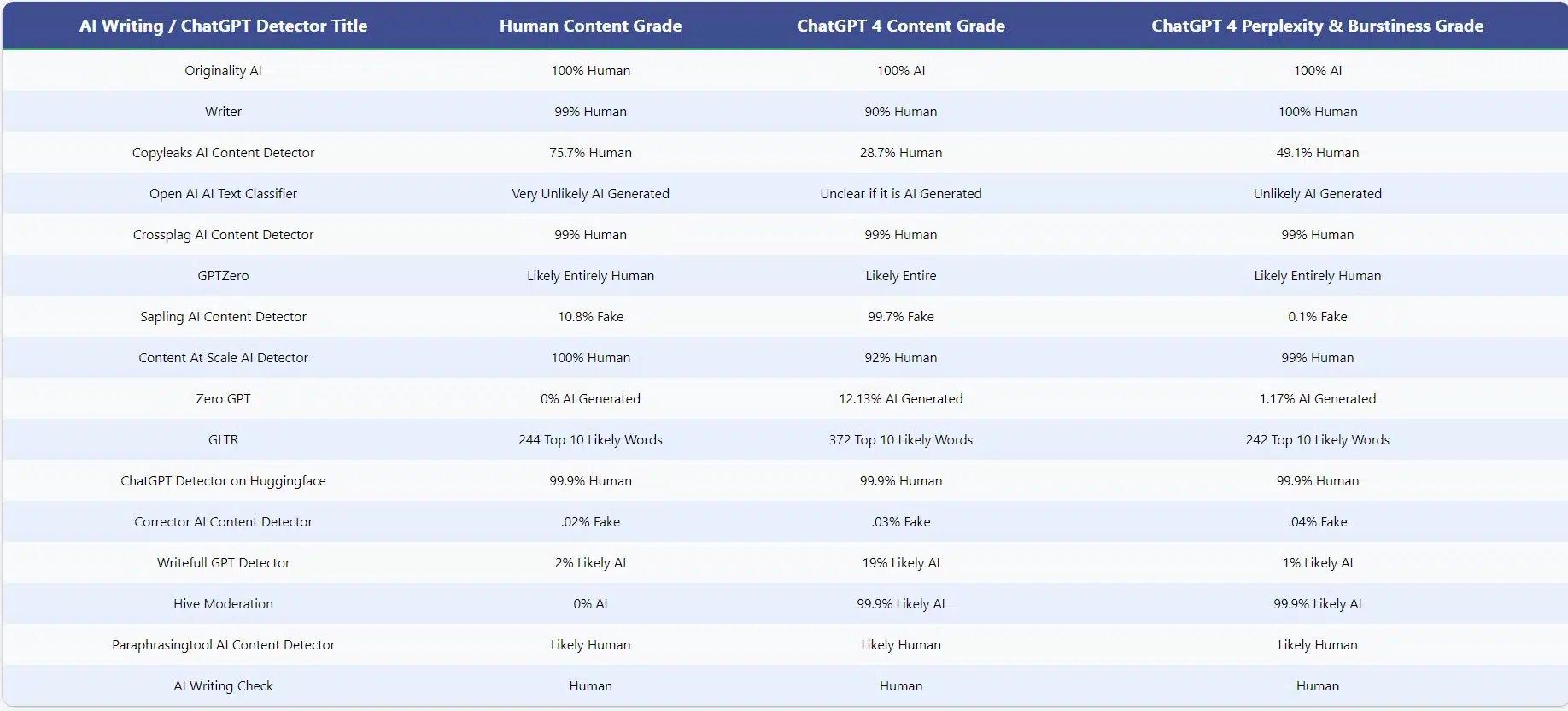
In the table below, you can see how each tool scored the copy I wrote from scratch, the copy I took from ChatGPT directly with no prompt modification, and that same copy tweaked with the “perplexity and burstiness” prompt :
Chatgpt Ai Writing Detectors Compared

Below is a brief overview of the tools included in the table and some of their key features.

1. Originality.AI
Originality.AI

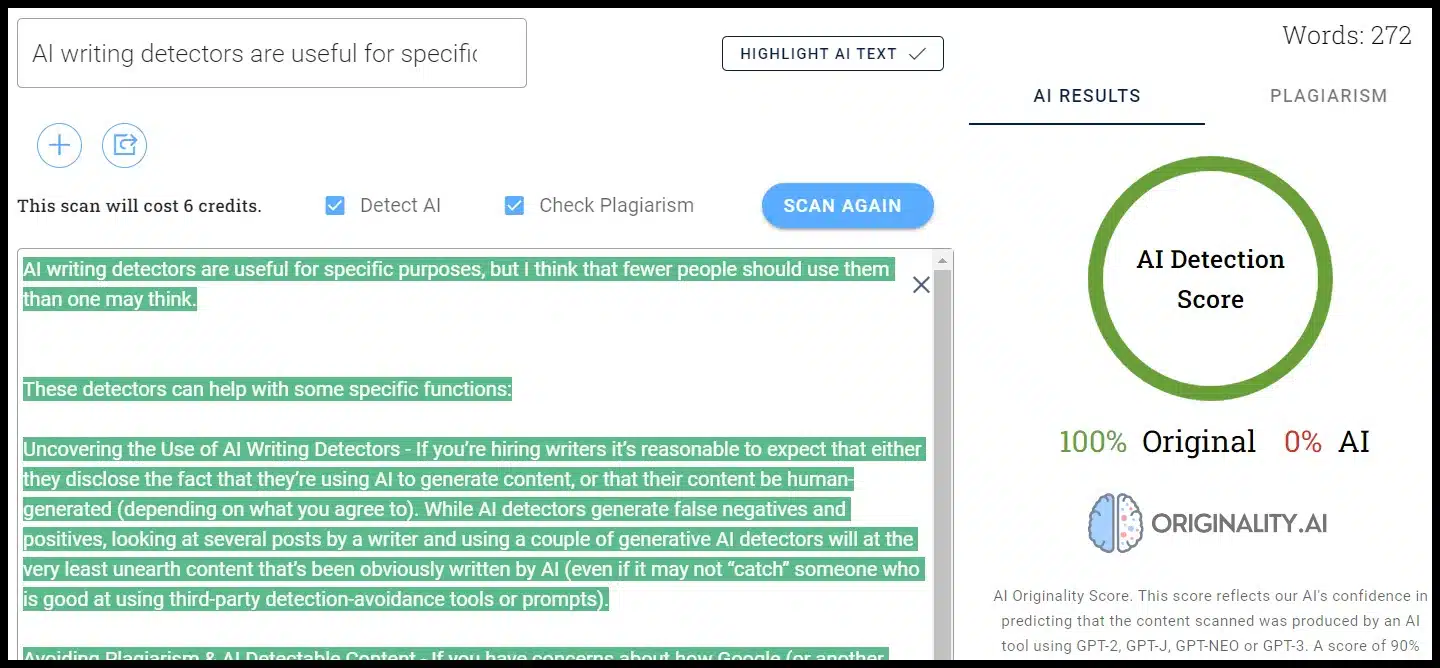
Originality.AI is a paid tool described as “the most accurate AI content detector and plagiarism checker built for serious content publishers.”

It costs $.01 per credit, which scans 100 words. It also features a plagiarism scanner alongside the AI scanner.

As you can see from the chart above, this is the only AI scanner with 100% confidence that the human content was human and that the AI content was AI (while also being correct in all cases). 

Hive Moderation (discussed later in the article) essentially had the same conclusion with a 0% AI score for the human content and 99.9% confidence the two AI-generated texts were AI.

On top of having a Chrome extension and an overall score, Originality.AI added a feature highlighting the specific sections of the content you paste that it predicts will and won’t be AI.

I use this tool most frequently to check for AI content personally. My most frequent use-case is checking content submitted by freelance writers we work with for AI and plagiarism.

2. Writer
Writer

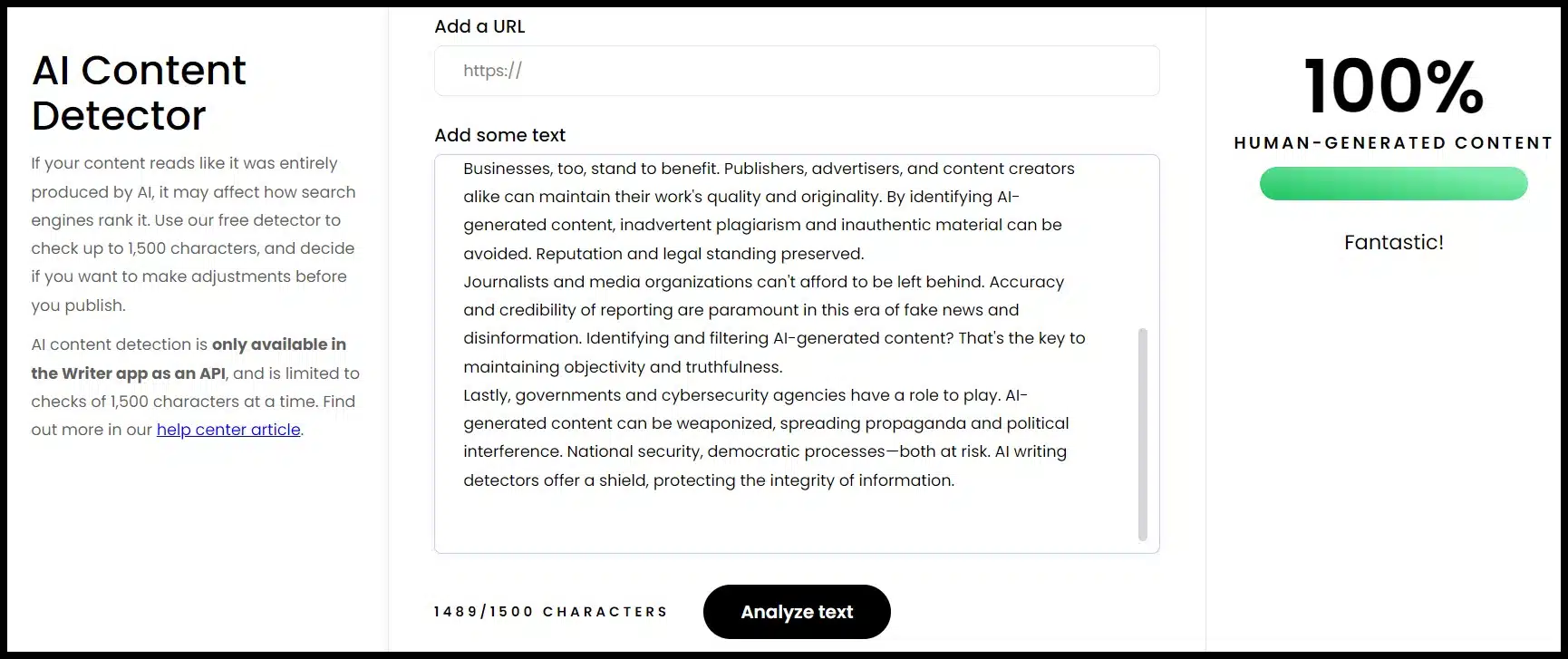
Writer offers a free detector that works on up to 1,500 characters and requires API access for more.

This tool essentially thought all of the submissions were relatively likely to be human-generated. 

Writer is an AI writing platform, and the free content detector also allows you to input a URL to check. 

There is no plagiarism feature within this tool directly, and it gives you an overall score but doesn’t mark specific sections as likely or unlikely to be AI-generated.

3. Copyleaks AI Content Detector
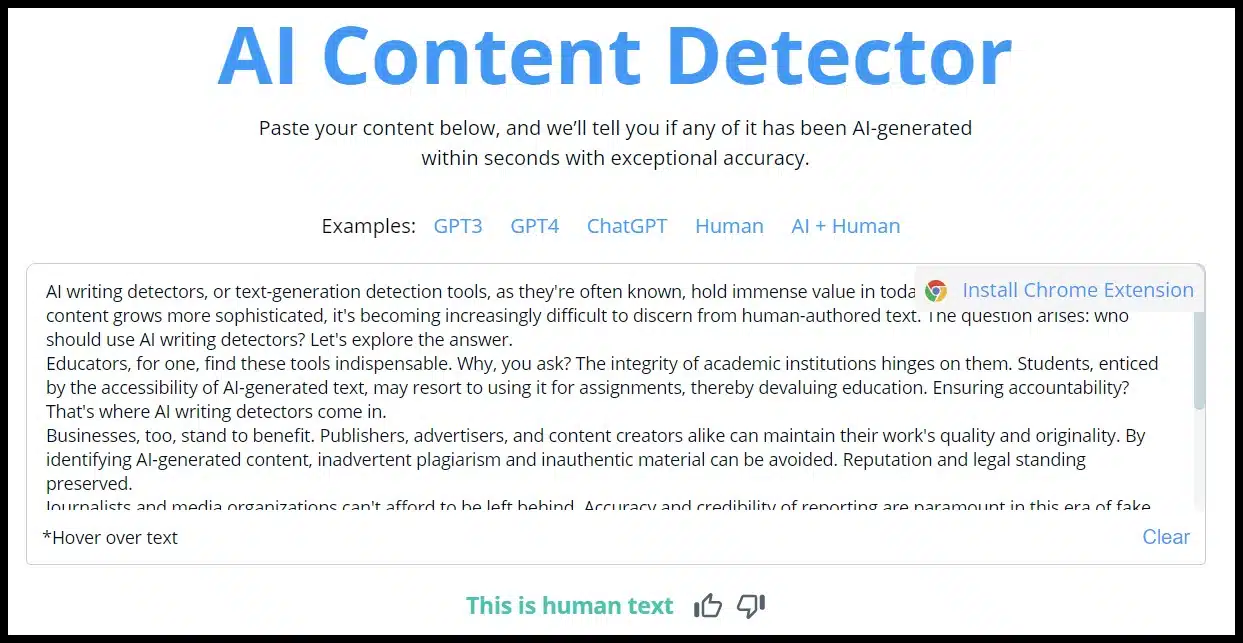
Copyleaks AI Content Detector

The Copyleaks AI Content Detector has a few interesting features:

  • It gives you an overall verdict (human or AI).
  • If you hover over specific text, it will give you a percentage likelihood that the text is human versus AI copy.
  • It pre-loads with examples across different GPT and human outputs to show you how the tool works
  • There’s a Chrome extension.

The tool is free, and while a single scan doesn’t do both, there’s also a plagiarism detector.

It accurately identified much of the human-generated content as human and much of the AI-generated content as AI. However, it wasn’t always confident and was incorrect in some individual sections.

4. OpenAI’s AI Text Classifier
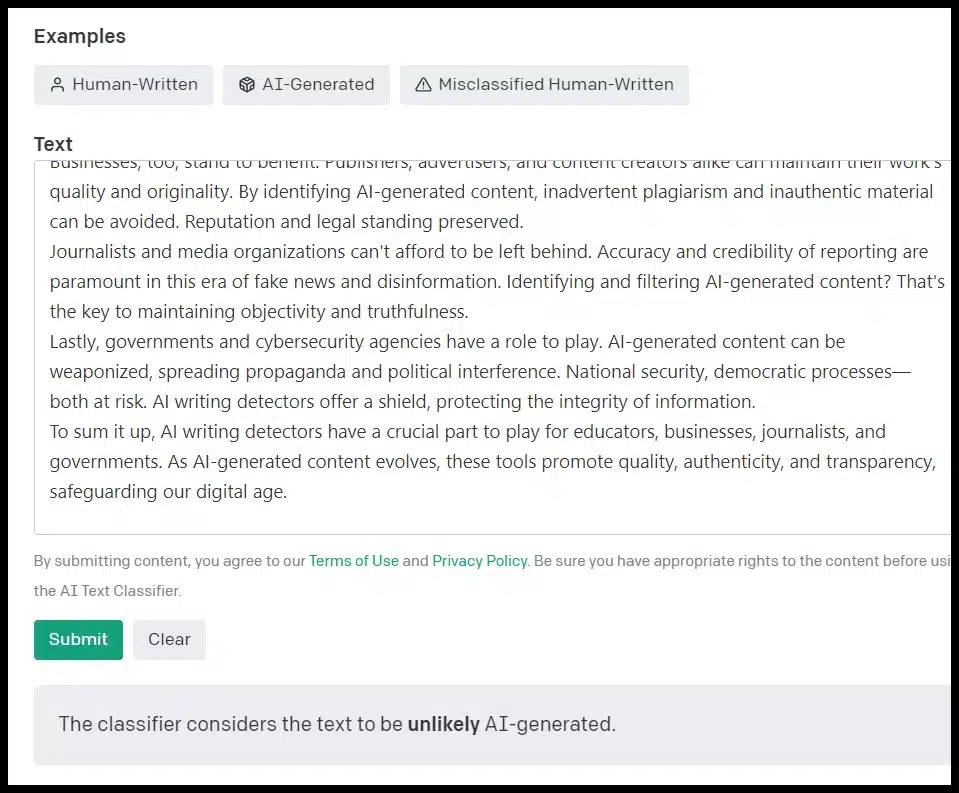
OpenAI's AI Text Classifier

AI Text Classifier is a free tool from OpenAI, the company that created GPT (which is what runs many generative AI tools) and ChatGPT.

If you thought the company that makes the most popular AI tools would have the most accurate detector, that didn’t ring true for our test.

The tool identified the human content as “very unlikely” to be AI-generated but identified the content from OpenAI’s own platform as “unclear” if it was AI-generated and “unlikely” AI-generated with and without the additional prompt.

The tool is free (you need an OpenAI account). There aren’t a lot of bells and whistles and no plagiarism check.

You get a finding (like what you see in the screenshot) but no precise score. It also won’t highlight specific sections of copy for their individual likelihood of being AI-generated or not.

5. Crossplag AI Content Detector
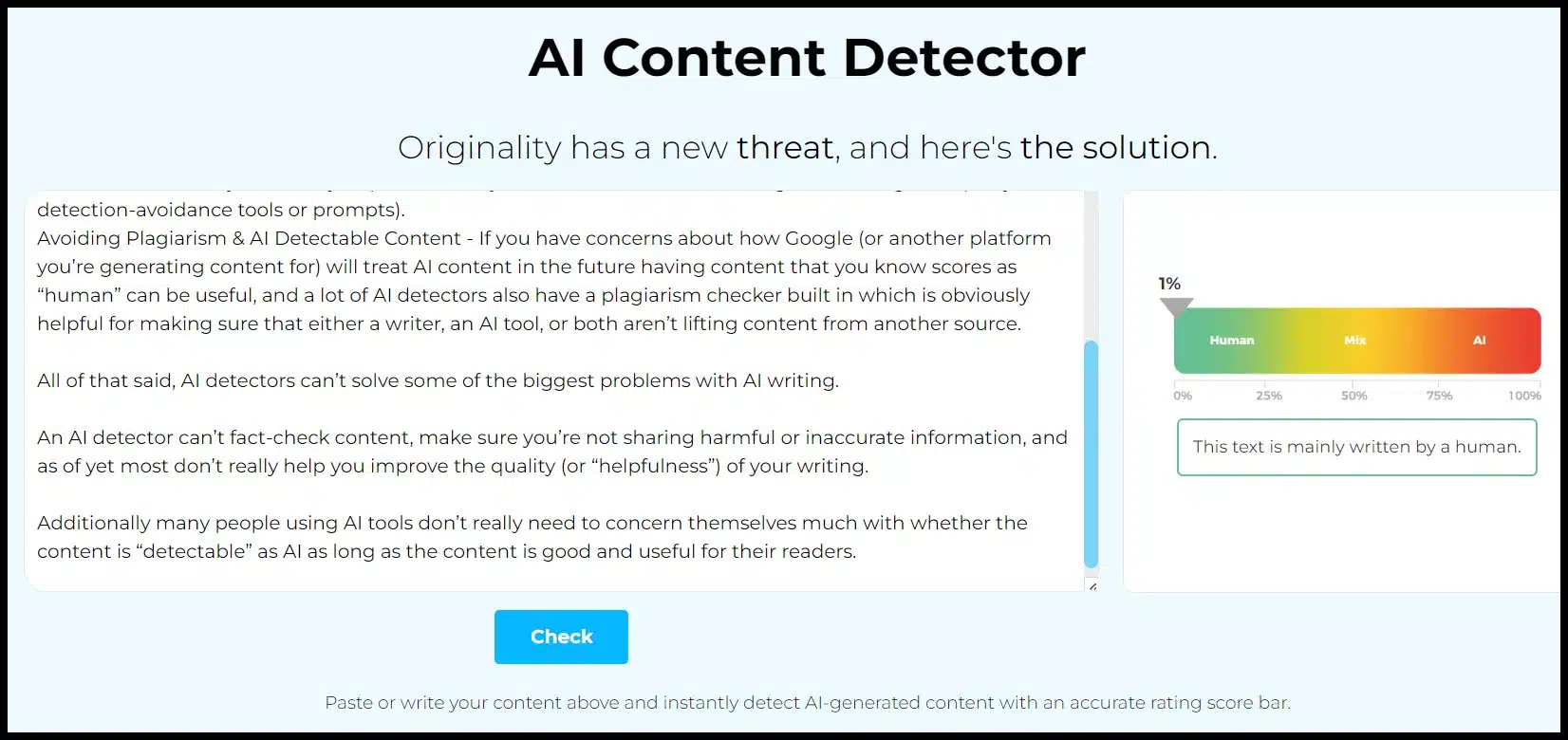
Crossplag AI Content Detector

Crossplag offers a few free scans without an account. When logged in, you’ll get unlimited free scans. The tool does give an overall score but doesn’t offer the ability to check for plagiarism or mark up individual sections of the content.

Crossplaq identified the human and AI content as 99% human. It is worth noting that the tool repeatedly calls out that it performs better on longer text.

Our samples here were above their 200-character minimum recommendation but on the shorter side.

6. GPTZero
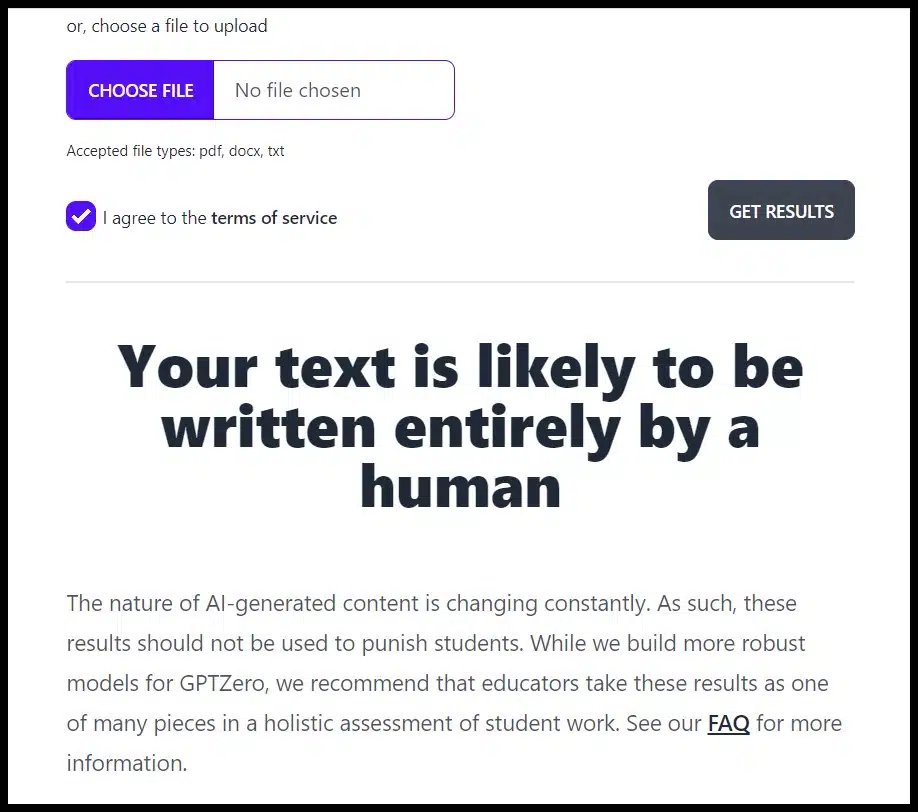
GPTZero

GPTZero has free and paid versions. The free version gives you a score and has some pre-loaded examples. 

The paid version also offers a plagiarism checker, highlighting AI content, and the ability to bulk upload multiple pieces of content (which is actually designed for a classroom environment, like many of these tools).

Pricing for the paid tools isn’t listed on the website, but you can fill out forms to request access to the paid tool and the API.

The free version of the tool identified all three of our writing samples as likely entirely human.

7. Sapling AI Detector
Sapling AI Detector

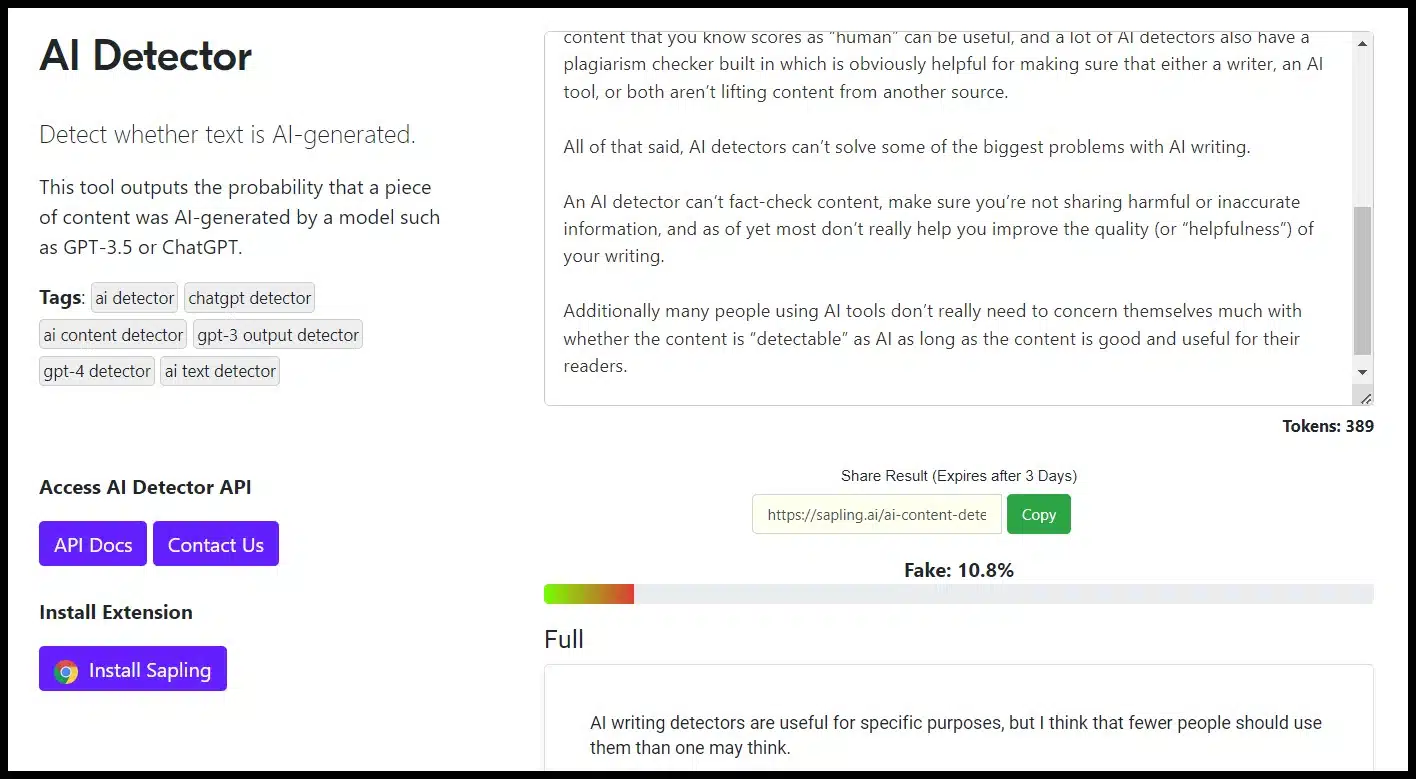
Sapling AI Detector offers free and paid versions, a Chrome Extension, an API, an overall score and sentence highlighting.

Sapling identified the human content as mostly human and the AI content as almost entirely AI. However, it identified the “perplex” and “bursty” ChatGPT content as highly likely to be human.

8. Content at Scale’s AI Detector
Content at Scale's AI Detector

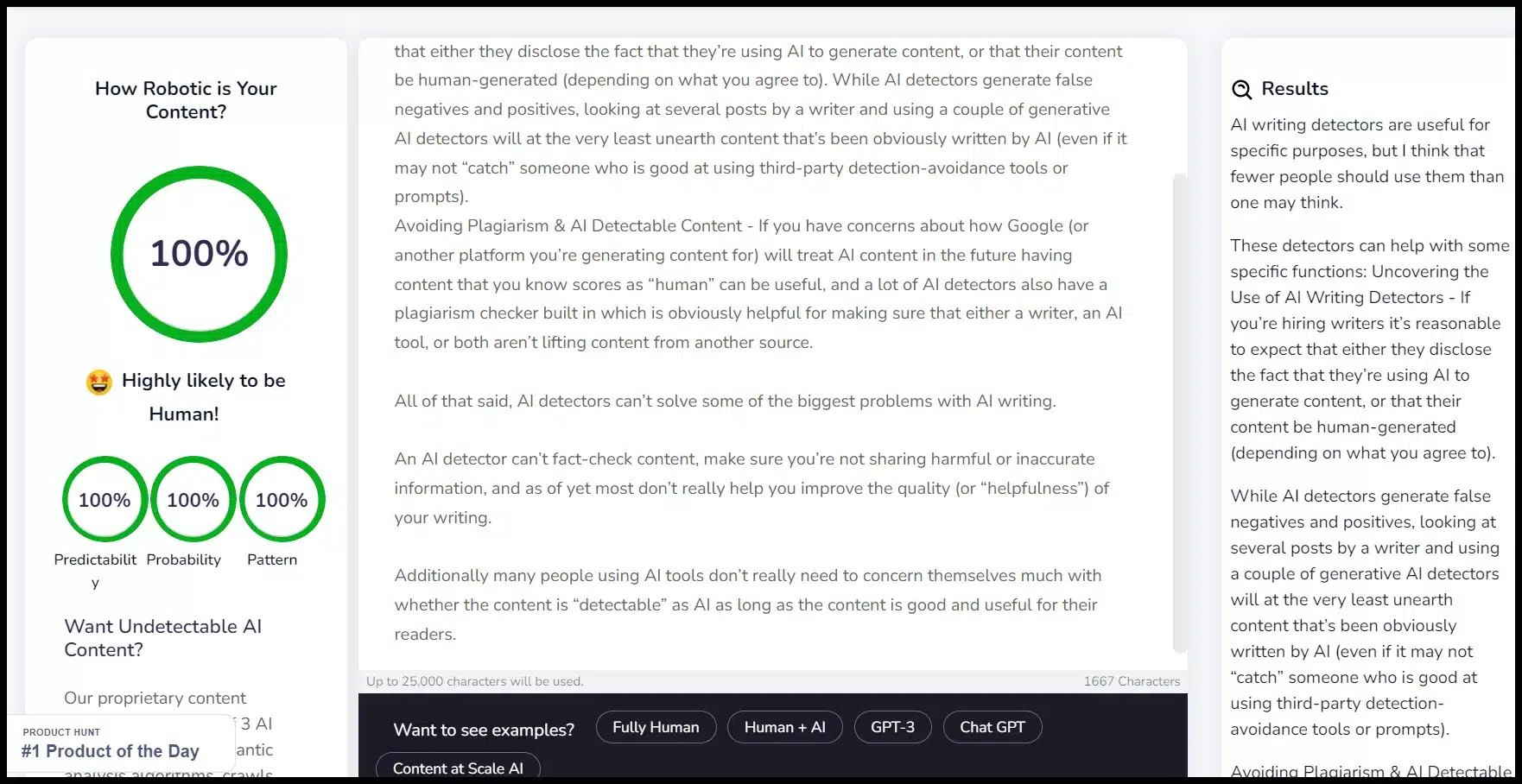
The Content at Scale AI Detector is free and offers a score with a breakdown of different elements within the content (predictability, probability, and pattern) and pre-populated examples.

No plagiarism detection option exists, and individual content sections aren’t highlighted.

Content at Scale rated all three samples as 92% human or higher.

The human did have the highest human percentage, followed by the prompt-modified GPT content and the content generated by the simplest prompt.

9. ZeroGPT
ZeroGPT

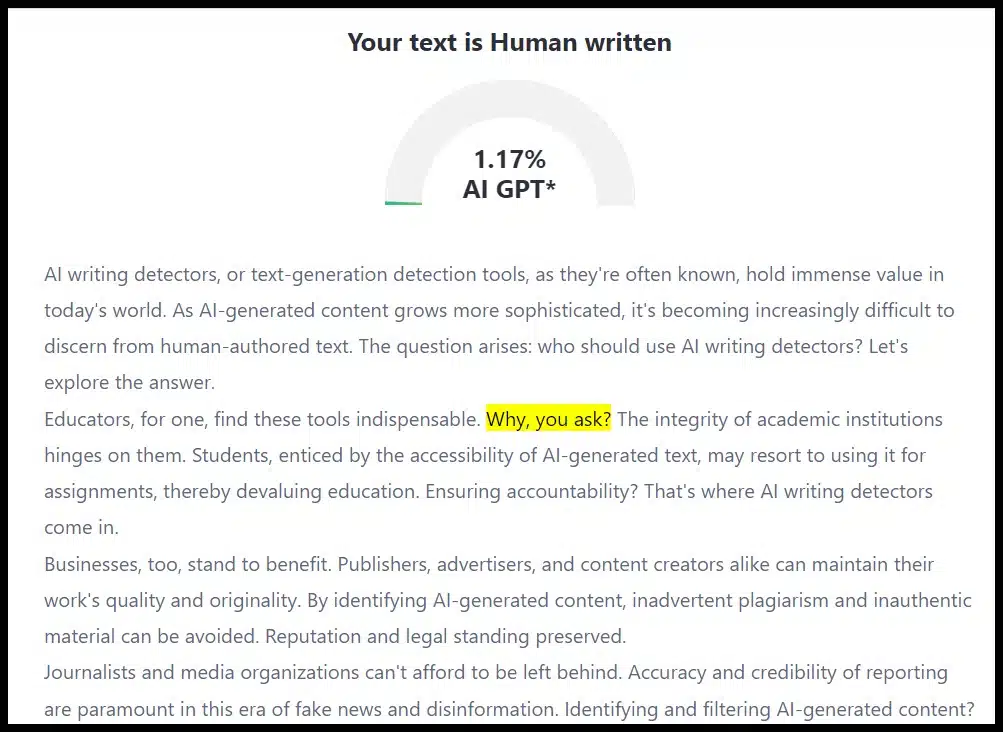
ZeroGPT is a free tool that offers an overall score and highlighting but no plagiarism detection.

The tool returned low percentages of AI-generated likelihood across the board. It roughly corresponded to the human-ness of the samples, with the human-generated sample getting the lowest AI percentage, followed by the burstiness / perplexity prompt, and then by the simpler prompt).

10. GLTR
GLTR

GLTR, or the “Giant Language model Test Room,” is a free tool that was a collaborative effort between Hendrik Strobelt, Sebastian Gehrmann, and Alexander Rush from the MIT-IBM Watson AI lab and Harvard NLP.

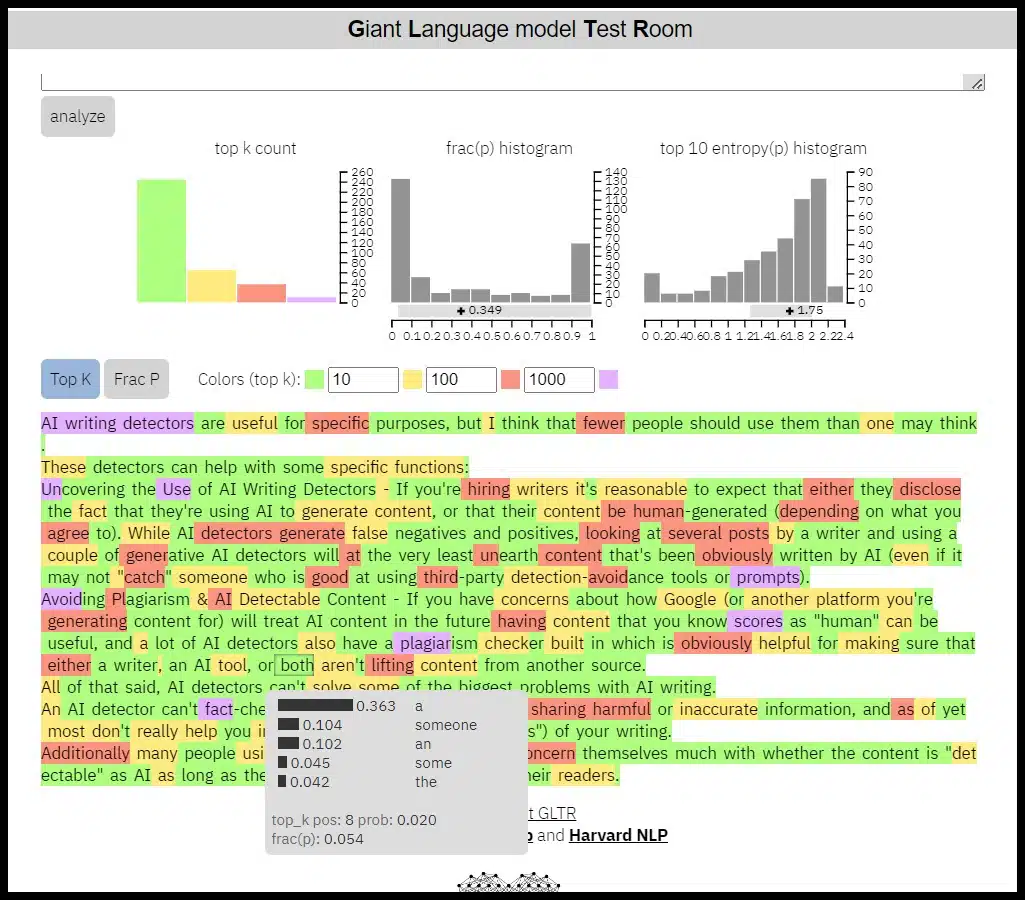
The tool offers some overall scoring but mainly shows whether each word within a text was one of the 10, 100, 1,000 or outside the 1,000 most likely words to be generated by AI based on the prior context in the text. There is no plagiarism feature set here.

The tool returned the highest number of “likely words” and particularly likely words in the top 10 for the text generated by the simpler prompt.

Still, the distribution was similar for the human and additional prompt copy in this small test.

11. ChatGPT Detector on Hugging Face
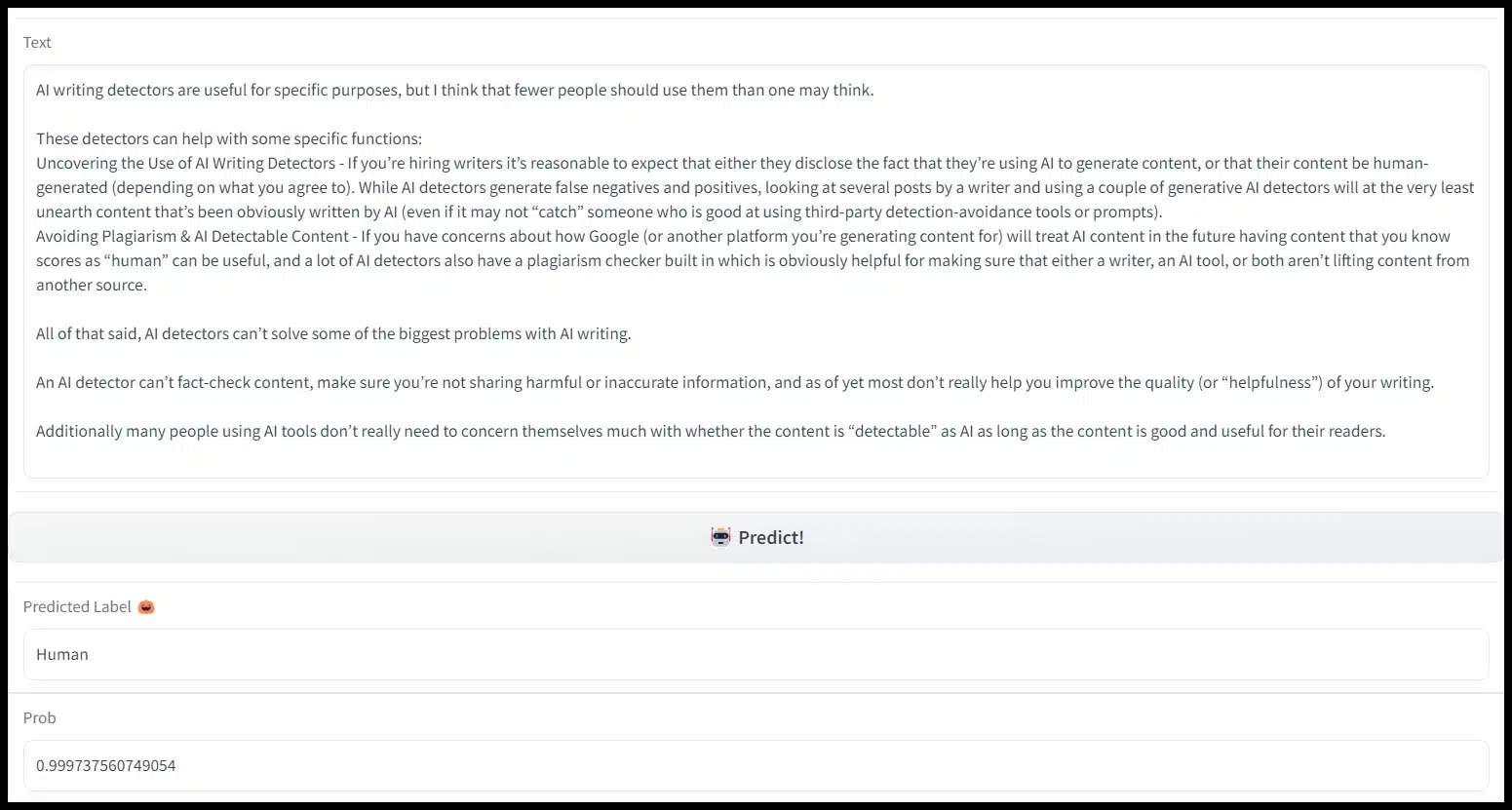
ChatGPT Detector on Hugging Face

This is a free detector that gives an overall prediction and score. It doesn’t have any plagiarism or highlighting features.

This tool generated over 99.9% likelihood of human content for all three samples. 

12. Corrector AI Content Detector
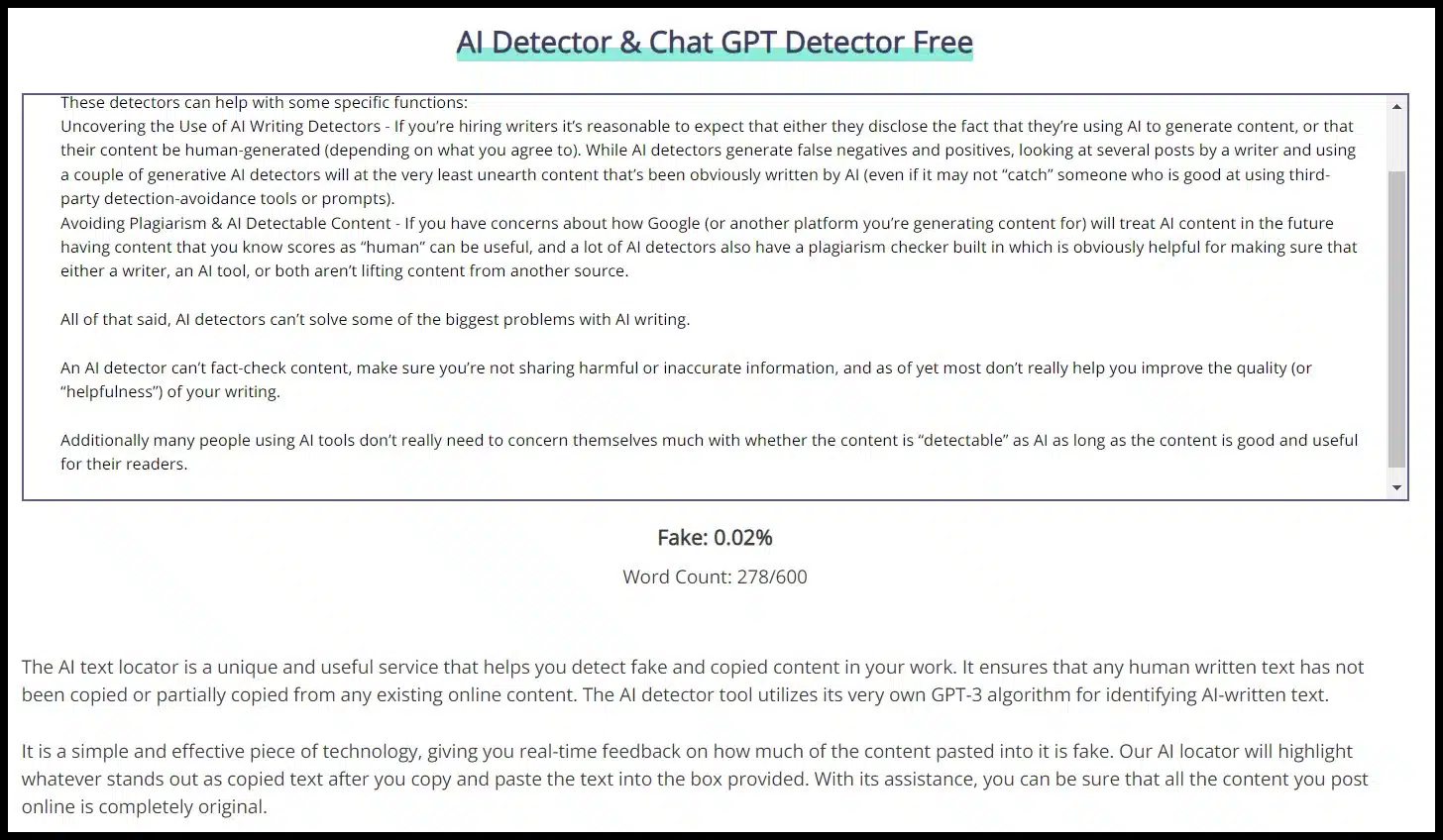
Corrector AI Content Detector

Corrector AI Detector is a free tool with a 600-word count limit and a percentage score. There is no plagiarism or highlighting features for the tool.

The tool labeled each of the samples with a very low percentage probability of being “fake” or AI.

13. Writefull GPT Detector
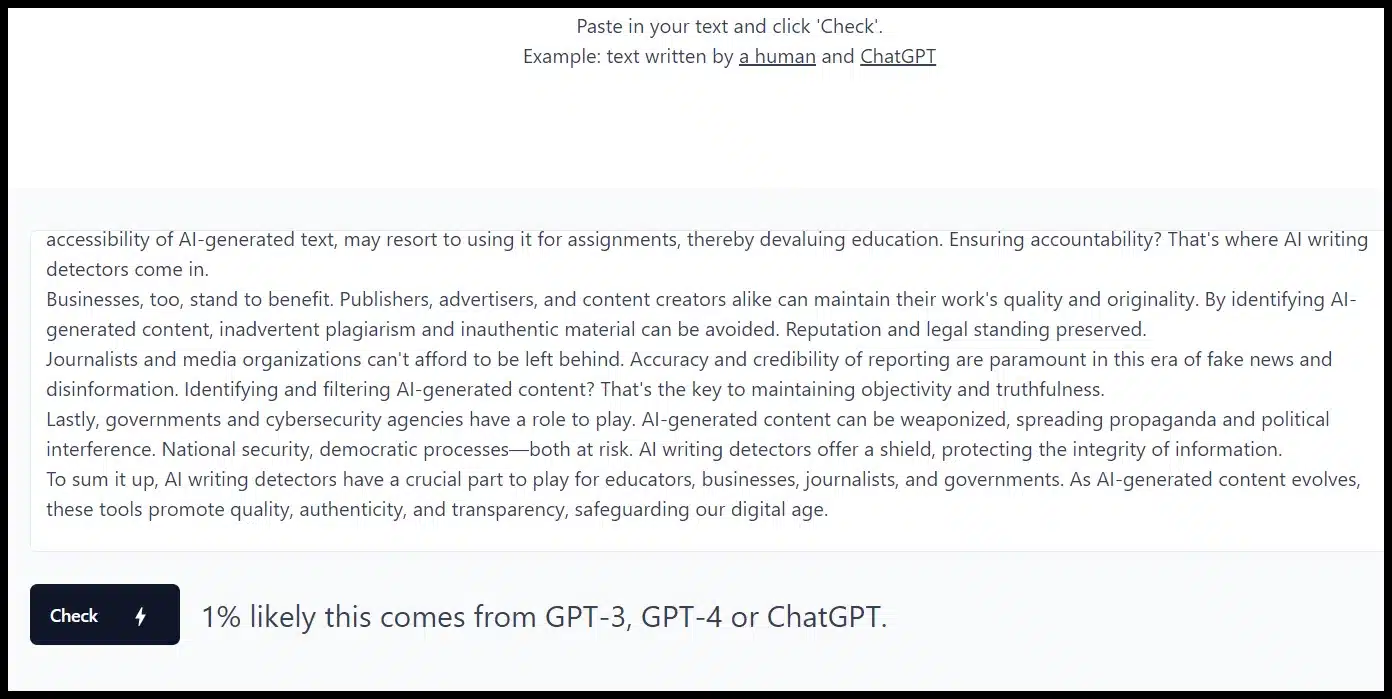
Writefull GPT Detector

The Writefull GPT Detector is a free tool with a simple score and API access. There is no highlighting and no plagiarism detection.

It found all three samples as likely human but did have the ChatGPT content with the simplest prompt with the highest AI likelihood (19%).

14. Hive Moderation’s AI-Generated Content Detection
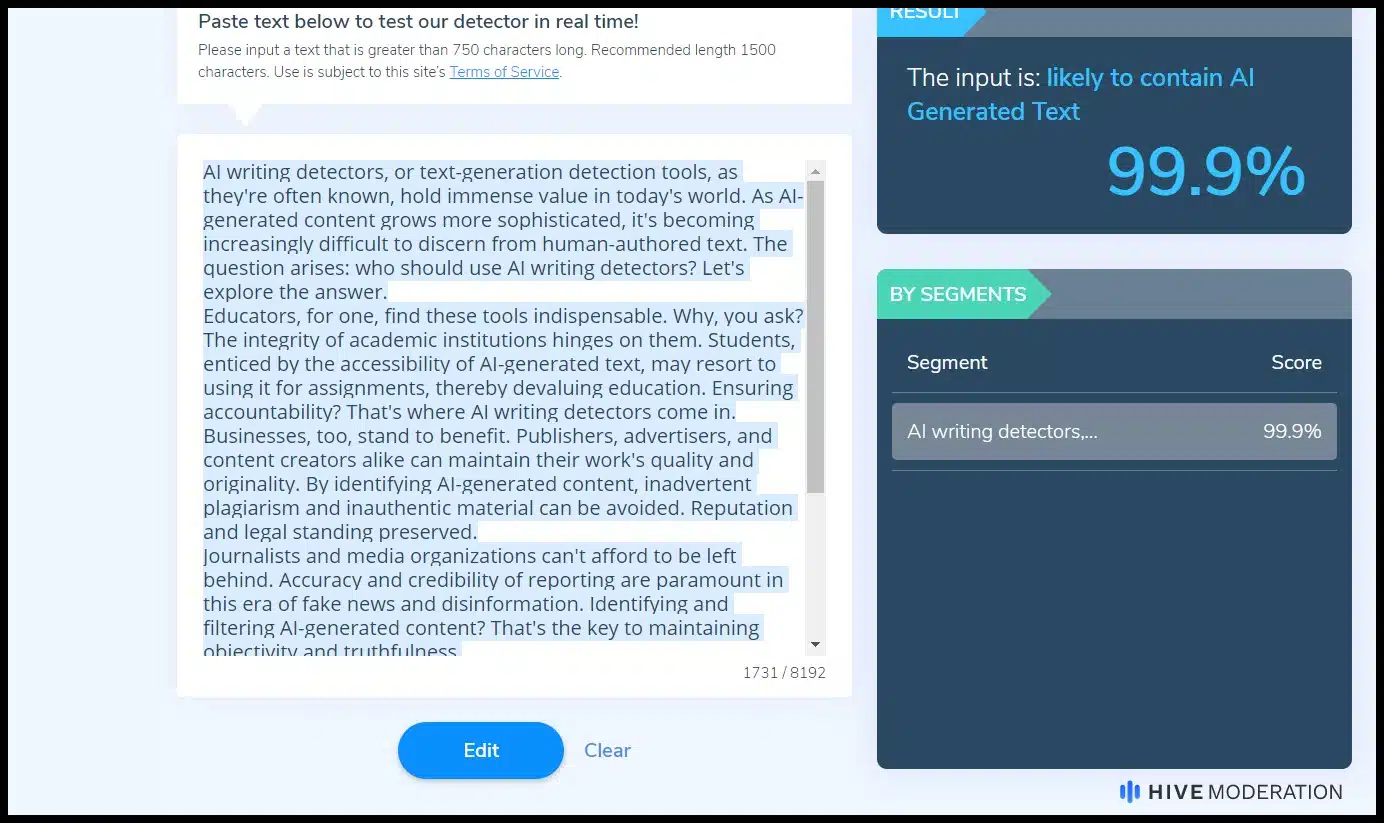
Hive Moderation’s AI-Generated Content Detection

The Hive Moderation AI-Generated Content Detection tool is free (with character limits and requiring sign-in after several uses).

It doesn’t offer plagiarism or highlighting but does allow you to break content out by sections and get segment-specific scores.

Hive essentially scored each writing sample properly, with a 0% likelihood of being AI for the human content and 99.9% scores for the AI samples. 

(Only Originality.AI had a similar confidence level while being accurate across the samples.)

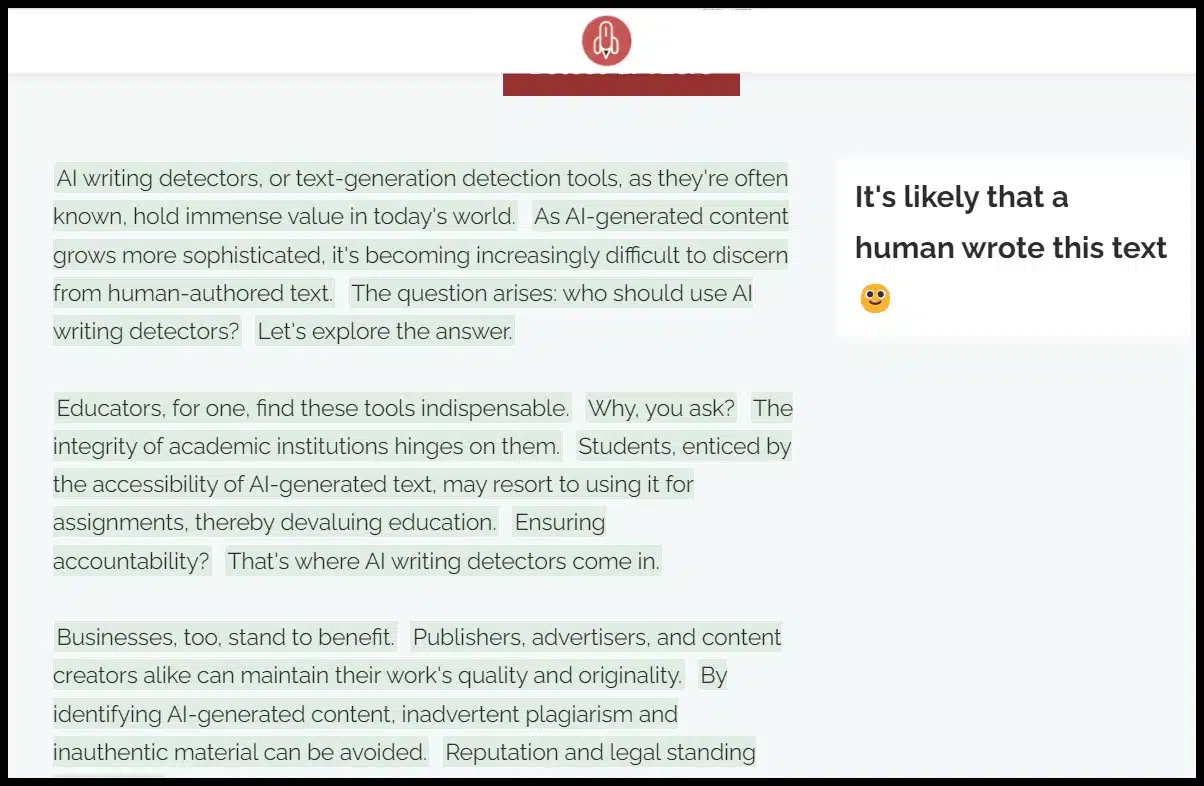
15. Paraphrasing Tool AI Content Detector
Paraphrasing Tool AI Content Detector

The paraphrasing tool is a re-writer, and they offer this free AI content detector with an overall conclusion and highlighting and no plagiarism features.

The Paraphrasing Tool concluded that each of the text was likely human.

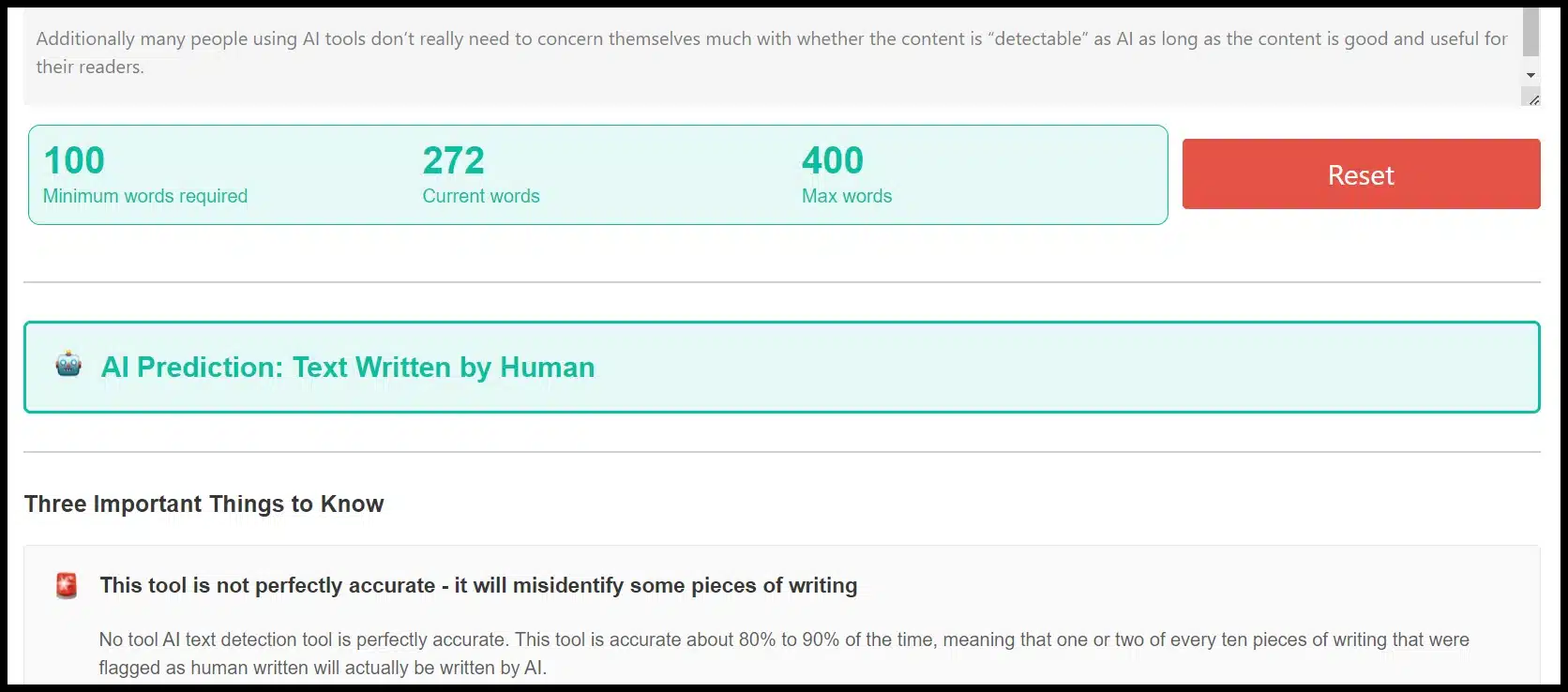
16. AI Writing Check
AI Writing Check

AI Writing Check is a free tool that offers a score, has a word maximum, and does not feature text highlighting for AI probability or plagiarism features.

AI Writing Check identified all three writing samples as human.

Key learnings from testing 16 AI and ChatGPT content checkers

Again, it’s essential to caveat my key findings here because three short writing samples are very small samples to draw steadfast conclusions about the individual tools.

That said, I found a few interesting patterns related to AI writing detectors in general:

  • Calibration: Most tools found all three writing samples either highly likely or highly unlikely to be human. Different tools will likely be “harder” or “softer” graders when it comes to scoring content human versus AI, so understanding how a tool is calibrated can help determine how useful they are.
  • Rarest features: A few rare features across the tools were things like bulk uploads, plagiarism detection, having a Chrome extension, and highlighting specific sections with likelihood of being AI versus human. 
  • Free vs. paid: All of the tools featured here but Originality.AI had at least free versions. But the tools with the most accurate results and most “rare features” tended to be the tools with a paid version.

I’d recommend keeping an eye on at least a few of these tools if you find AI detection useful in your projects.

The pace of innovation across AI content generation, editing and detection may quickly make your favorite tool obsolete.


Opinions expressed in this article are those of the guest author and not necessarily Search Engine Land. Staff authors are listed here.


Related stories

New on Search Engine Land

@media screen and (min-width: 800px) { #div-gpt-ad-3191538-7 { display: flex !important; justify-content: center !important; align-items: center !important; min-width:770px; min-height:260px; } } @media screen and (min-width: 1279px) { #div-gpt-ad-3191538-7 { display: flex !important; justify-content: center !important; align-items: center !important; min-width:800px!important; min-height:440px!important; } }

About the author

Tom Demers

Tom Demers is the co-founder and managing partner of Measured SEM and Cornerstone Content. His companies offer paid search management, search engine optimization (SEO), and content marketing services to businesses of varying sizes in various industries.

https://searchengineland.com/ai-chatgpt-content-detectors-395957


LinkedIn content analytics: What it is and how to use it

LinkedIn is an essential platform to leverage if you’re looking to nurture and engage your audience.

It’s great for distributing your organization’s content and even building your own brand. 

Tracking your LinkedIn performance is necessary to ensure you’re making the most of your presence on the site.

This article takes a closer look at LinkedIn content analytics, why it’s important, and how to use it to improve your performance on the platform.

What is LinkedIn analytics?

LinkedIn analytics comprises a collection of metrics specific to LinkedIn that evaluate your page’s or posts’ effectiveness.

Like other social media platforms, LinkedIn also offers a range of metrics that assist you in monitoring the success of your approach. 

There are several key metrics you should monitor when using LinkedIn analytics, including:

  • Profile views: This metric shows how often your profile has been viewed.
  • Content engagement: This metric shows you how many likes, comments, and shares your content has received.
  • Follower growth: This metric shows how many new followers you’ve gained over a certain period.
  • Visitor demographics: This metric shows you information about your audience, such as their job titles, industries, and locations.
  • Content performance: This metric shows you how your content is performing, including the number of impressions, clicks, and engagement.

To view post analytics for your content:

  • Click the Me icon at the top of your LinkedIn homepage.
  • Under Manage, click Posts & Activity.
  • Filter by what you want to see. You can choose between Articles or Posts.
  • Find the post you’d like to see.
  • Then click down on View analytics.
LinkedIn content analytics

How to use LinkedIn analytics to improve your performance

Here are some tips for using LinkedIn analytics to improve your performance on the platform.

Analyze your audience

Use the visitor demographics metric to learn more about your audience and tailor your content to their interests and needs.

Experiment with different types of content

LinkedIn can vary depending on factors such as the industry, audience, and current trends. 

However, some of the most effective types of content that generally perform well on LinkedIn include:

  • Long-form posts, typically thought leadership content.
  • Visual content like images, videos, and infographics. 
  • Industry-specific news and updates.

To find out which hashtags to use or follow, type in a topic, and you will see how many LinkedIn users are following it,

LinkedIn hashtags

Optimize your profile

Use the profile views metric to see how often your profile is viewed. 

Tweak your profile to make it more appealing to your target audience. 

Start with a strong headline and make it compelling and specific to your expertise so you stand out.

Engage with your followers

Use the content engagement metric to see how your audience interacts with your content and engage with them by responding to comments and messages.

Post a question or a statement to start a discussion. You can add visuals like emojis, tag companies and people, and share links. 

LinkedIn engagement optimization tips

Follow these steps to help you maximize your engagements on LinkedIn.

Set clear goals

Before you start analyzing your content, it’s important to understand what you want to achieve clearly. 

Do you want to increase engagement, generate leads, or build brand awareness? 

Knowing your goals will help you focus your analysis on the metrics that matter most.

Track the right metrics

Once you have your goals, you need to track the right metrics to measure your progress. 

On LinkedIn, some key metrics to track include engagement rate, click-through rate, and follower growth.

Analyze your content

With your goals and metrics in mind, you can start analyzing your content to see how it’s performing.

Look for patterns in your top-performing content, such as the type of content (text, image, video), topic, and time of day.

Optimize your content

You can start optimizing your content based on your analysis to improve engagement.

For example, if your video content performs better than text posts, you might want to create more videos.

Or, if you notice that your posts perform better in the morning, you can schedule more posts for that time.

Test and iterate

Finally, it’s important to test and iterate your content strategy based on your analytics.

Keep track of your metrics over time and adjust as needed to maximize your engagement on LinkedIn.

Make your content better with LinkedIn analytics

LinkedIn content analytics is a powerful tool for maximizing engagement for content marketing on LinkedIn.

By analyzing your content’s performance, using the data to improve your content, engaging with your audience, experimenting with different types of content, and monitoring your progress over time, you can increase engagement and build relationships with your target audience.


Opinions expressed in this article are those of the guest author and not necessarily Search Engine Land. Staff authors are listed here.


Related stories

New on Search Engine Land

@media screen and (min-width: 800px) { #div-gpt-ad-3191538-7 { display: flex !important; justify-content: center !important; align-items: center !important; min-width:770px; min-height:260px; } } @media screen and (min-width: 1279px) { #div-gpt-ad-3191538-7 { display: flex !important; justify-content: center !important; align-items: center !important; min-width:800px!important; min-height:440px!important; } }

About the author

Victoria Shepherd

Victoria Shepherd has been working in digital marketing for the past fourteen years, focusing on industries such as e-commerce, healthcare, fitness, SaaS, and eLearning. She is currently the vice president of marketing at Insurety Capital, a specialty finance and consulting company, driving growth for Medicare agencies by buying their future commissions upfront for cash every week.

https://searchengineland.com/linkedin-content-analytics-395997


Bing search results gain site name and favicons

Bing is adding site names and favicons to its search results in some cases, much like Google did months ago on desktop and last year on mobile search. Now when you look at the Bing search results, you may see little favicons at the top left of the search result snippets, with the site’s name above it, some have noticed and we are able to replicate at Search Engine Land.

What it looks like. Here is a screenshot of Bing showing the site name and favicon for this site:

Bing Sitename Favicon 800x336

Here is what it looks like without it in Bing search:

Bing Without Sitename Favicon 800x286

Let’s compare that to how it looks in Google search:

Google Site Name Favicon 800x285

Controlling site names with Google. Google explained that Google Search uses a number of ways to identify the site name for search results last fall. But if you want, you can use structured data on your home page to communicate to Google what your site’s name should be. Google has specific documentation on this new Site name structured data available over here.

I do wonder if this works the same way for Bing Search?

Site name issues with Google. Google has had some issues with showing the correct site name in Google Search, so much so the CMO of Salesforce called it “extremely damaging to our brand.” Google has since opened a form for you to report issues with your site name in Google Search:

Why we care. Site names and favicons can impact your click-through rate from the search results. If you can control what the site name says and how the favicon appears in the Bing and Google search results, it can be helpful for your brand and traffic. But if they show the wrong information, like “Sales force” with a space, it can be hurtful to the brand.


Related stories

New on Search Engine Land

@media screen and (min-width: 800px) { #div-gpt-ad-3191538-7 { display: flex !important; justify-content: center !important; align-items: center !important; min-width:770px; min-height:260px; } } @media screen and (min-width: 1279px) { #div-gpt-ad-3191538-7 { display: flex !important; justify-content: center !important; align-items: center !important; min-width:800px!important; min-height:440px!important; } }

About the author

Barry Schwartz

Barry Schwartz a Contributing Editor to Search Engine Land and a member of the programming team for SMX events. He owns RustyBrick, a NY based web consulting firm. He also runs Search Engine Roundtable, a popular search blog on very advanced SEM topics. Barry can be followed on Twitter here.

https://searchengineland.com/bing-search-results-gain-site-name-and-favicons-396010


Bing Webmaster Tools to gain Bing Chat impressions and clicks next month

Microsoft will include Bing Chat data in Bing Webmaster Tools in May, Fabrice Canel, Principal Product Manager at Microsoft Bing, said on Twitter.

Canel announced that data from Bing Chat would be included in Bing Webmaster tools several weeks ago. He didn’t say precisely when it would be included at that time.

Coming in May. “We will be shipping in May in Bing Webmaster Tools UX and Bing Webmaster Tools API,” Cancel said when asked if Bing Chat data is coming to Bing Webmaster Tools. He said in another tweet, “We will start reporting clicks and impressions in Bing Chat in the following weeks.”

Here are those tweets:

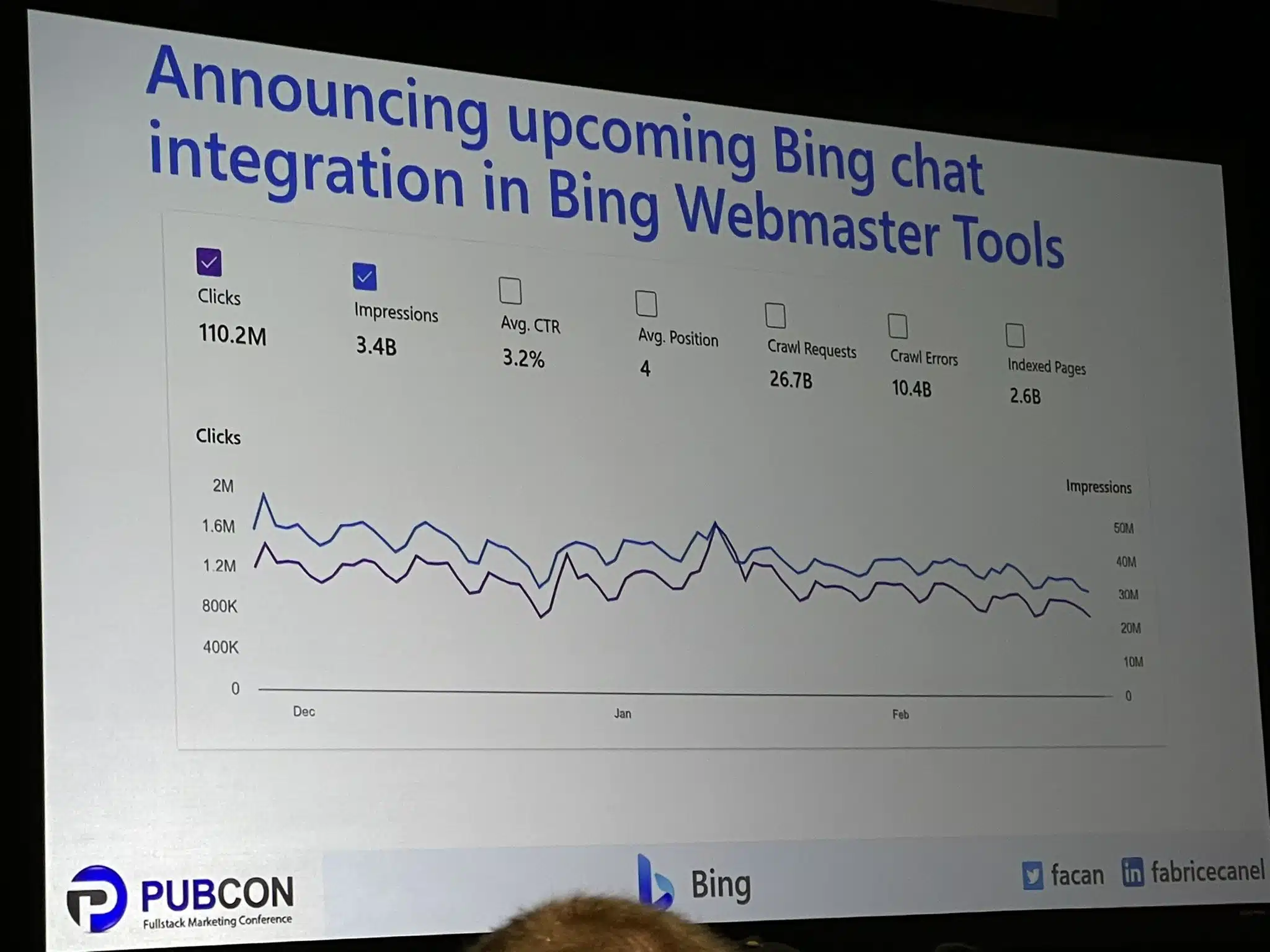
Bing Chat in Webmaster Tools. Bing Webmaster Tools will soon be adding Bing chat integration to allow publishers, content creators, and site owners to see how much traffic the chat feature is sending their sites. It will be part of the Bing performance report and show impressions, clicks, click-through rate, and more.

Here is a photo of this report from Jennifer Slegg on Twitter:

Bing Chat Webmaster Tools 800x600

Why we care. With all the concern, confusion and stress around these new chat AI features, having a report that shows how many people see our links, click on our links and visit our sites will be helpful to publishers, content creators and site owners. So soon, as early as May 2023, we should soon see how much traffic and visibility our sites are getting directly from Bing Chat.

I do hope Google does the same for Google Bard, but since Bard is less likely to offer citations, I doubt we will see this from Google anytime soon.


Related stories

New on Search Engine Land

@media screen and (min-width: 800px) { #div-gpt-ad-3191538-7 { display: flex !important; justify-content: center !important; align-items: center !important; min-width:770px; min-height:260px; } } @media screen and (min-width: 1279px) { #div-gpt-ad-3191538-7 { display: flex !important; justify-content: center !important; align-items: center !important; min-width:800px!important; min-height:440px!important; } }

About the author

Barry Schwartz

Barry Schwartz a Contributing Editor to Search Engine Land and a member of the programming team for SMX events. He owns RustyBrick, a NY based web consulting firm. He also runs Search Engine Roundtable, a popular search blog on very advanced SEM topics. Barry can be followed on Twitter here.

https://searchengineland.com/bing-webmaster-tools-to-gain-bing-chat-impressions-and-clicks-next-month-396008


How to create a guide that is optimized, useful and comprehensive

Guides are all over the web. Google any word + “guide,” and you’ll probably find someone has written about that topic, no matter how obscure.

But there’s a good reason for this: Well-written guides are extremely valuable pieces of content.

When your audience encounters your guide at the right place and time, it can be life-changing. Your guide may be the cornerstone or the turning point in their experience of a particular topic.

You could teach them valuable skills, introduce them to a vital concept, expand their knowledge, or help them understand a complex subject.

As you’d imagine, a good guide can help build a strong trust between a person and a brand.

And trust contributes to the customer experience. It can eventually translate to profitable action like converting a casual reader into a subscribed follower or turning a fan into a customer.

That’s why it’s time to learn how to create optimized, useful, and comprehensive guides – so you, too, can build trust with your audience through high-quality content.

What is a guide?

A guide is a comprehensive piece of content that aims to educate an audience by:

  • Introducing them to a topic or subject.
  • Teaching them a set of concepts or ideas.
  • Walking them through a process to achieve an end goal.
  • Showing them the steps to complete an action.

Quite simply, an effective guide will teach you in some way.

But, the best of this content type will meet you at your level of understanding, speak to you in terms you understand, and take you to the next level to broaden your knowledge.

How to create a guide, ultimate-style

1. Understand the knowledge level of your target audience

To write a great guide, you need to understand your audience and know their knowledge level about your topic.

  • What do they already know?
  • Where are they starting from? (Are they beginners? Intermediates? Experts?)
  • What do they not know?
  • What are their top challenges?

These points are crucial to understand because you will use them as a benchmark for where your guide will begin and what it will cover.

Not understanding your audience’s knowledge level about your topic will lead to a less useful guide.

For example, starting a guide on baking bread with information about buying mixing bowls will be helpful only to true beginners who don’t have the right equipment yet. It won’t be helpful for baking enthusiasts who have moved beyond acquiring tools.

So, if you’re unsure what your audience knows or doesn’t know about your topic, you’ll need to do some research. 

When all else fails, ask them directly. Post a poll or survey on social media, or post a question asking for feedback on what your audience would like to know about X topic.

2. Research and outline your topic

Now it’s time to start drafting your guide. 

I always start with an outline and jot down everything I know the guide should include.

Then I research the topic to see what I’m missing, what others have written about it, and any additional tidbits I should add.

For example, even as an expert, you don’t want to rely entirely on your brain for fleshing out a topic.

You may know it well, but you also need to ensure you cover all the key areas readers care about.

Start by researching the topic on Google. Look at what the top articles cover and make sure your guide includes all of those sub-topics, too. 

For example, say you’re writing a guide on planting tulips. You discover the guides at the top of Google also include information about when to plant them, how to care for them, and additional tips on varieties and container planting. That means your guide needs to be just as thorough.

When your outline is equally as comprehensive as the top articles in Google, you’re still not done. You need to go further.

Include information guided by your expertise (or the brand’s expertise). That’s the mixture of experience and education that’s unique to you that will differentiate your content from the masses.

  • Add insights based on personal experience.
  • Add insider knowledge that most people don’t have.
  • Include tips, tricks, shortcuts, or advice.
  • Include useful information that similar guides are missing.

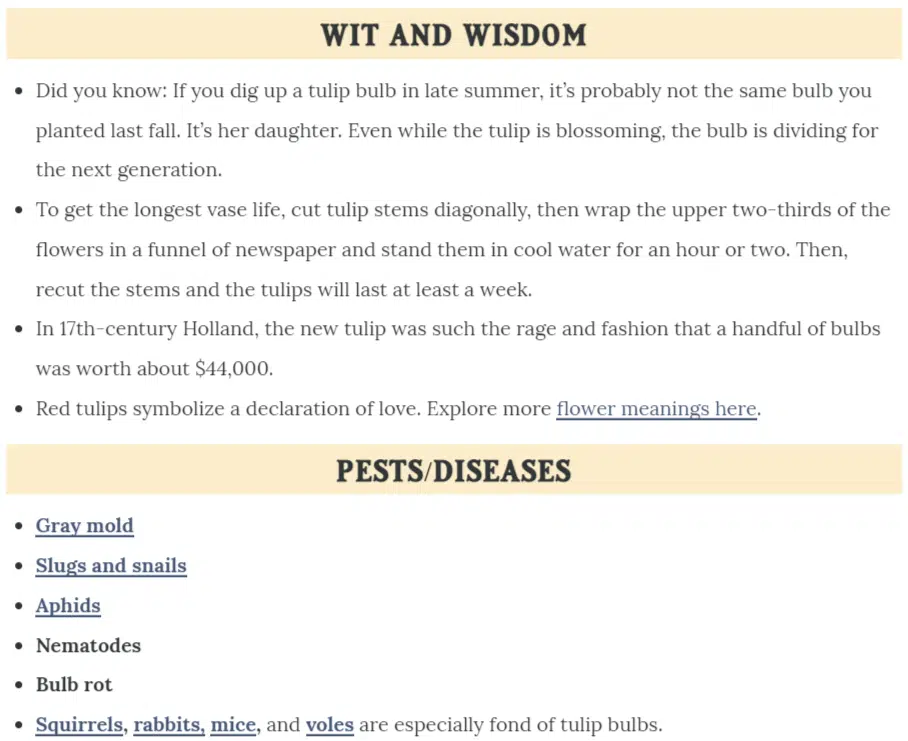
For instance, in this particular tulip planting guide, the author added information on common pests and fun facts. Similar guides are missing these pieces:

Tulip planting guide

Beyond Google, look at other information sources to flesh out your topic. Research books, look at interviews with experts, or watch videos.

Double-check to ensure you include the most accurate, relevant, and useful details in your guide.

3. Split your guide into sections, organized by sub-topic

At this point, while your draft is still pared down, it’s a good idea to get it organized.

  • Split it into sections, with each section covering a specific sub-topic. For example, the tulip planting guide would be split into sections like “when to plant tulips,” “how to plant tulip bulbs,” “how to care for growing tulips,” and “tulip varieties.”
  • Order the sections logically. You wouldn’t put “how to care for tulips” above the section on planting tulips, for instance, because one naturally precedes the other. (You can’t care for tulips you haven’t planted yet!)
  • If your guide includes any instructions or steps, ensure they’re clear, laid out logically, and easily read. Number each step so readers understand the sequence at a glance.

4. Use keyword-rich headings 

The best guides have clearly labeled sections with descriptive headings. This format helps readers find the information they’re looking for without having to hunt through unlabeled paragraphs that all bleed together.

It’s also good for SEO, especially if you include keywords in your section headings.

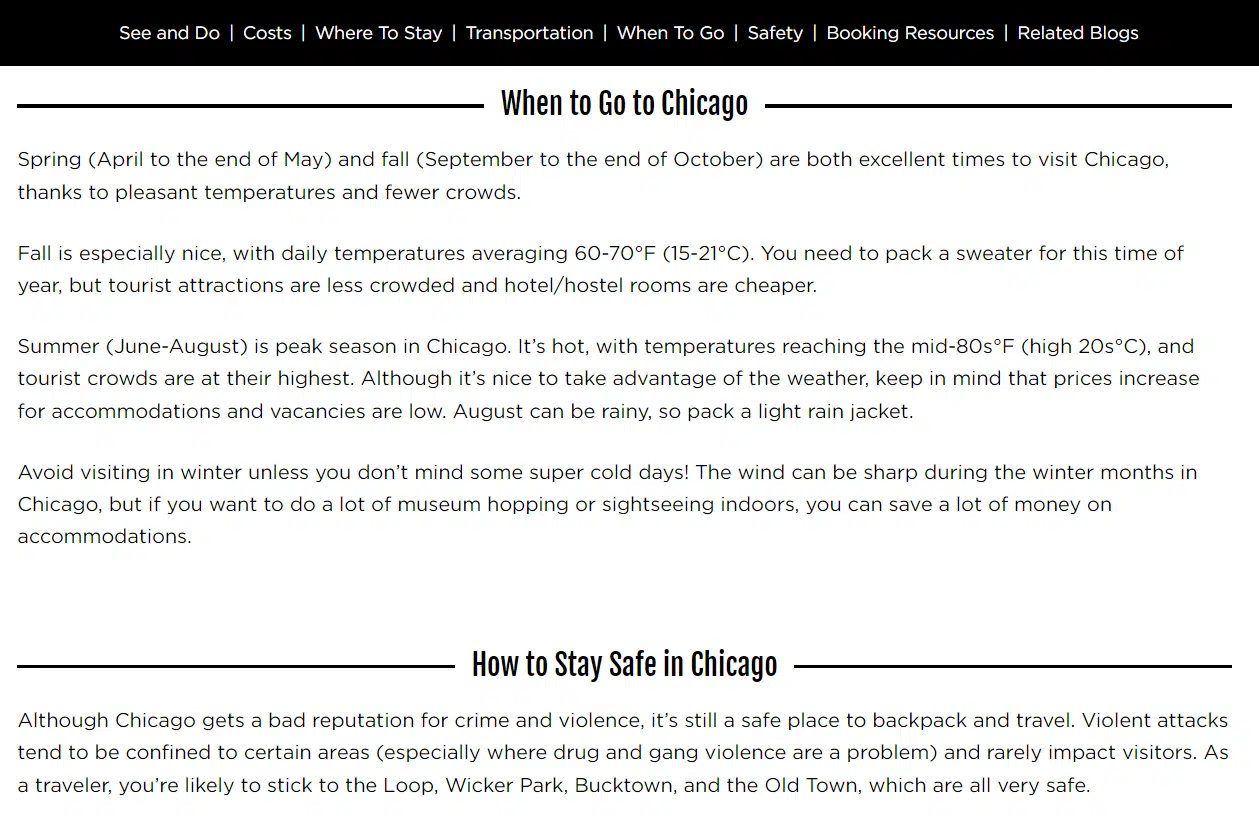
Here’s an example of a Chicago travel guide that uses clear, keyword-rich headings for each section:

Chicago travel guide

Particularly, note that the keyword “Chicago” is included in each heading.

Imagine if each heading was more generic, like “When to Go” vs. “When to Go to Chicago.” The difference is optimization. The latter heading is optimized – and the former isn’t.

If adding the focus keyword in your section headings doesn’t make sense, consider including related terms and phrases instead. You can find these by entering your main keyword into Semrush or Ahrefs.

At the very least, write headings that help your reader scan your guide and find the necessary information.

5. Go deep

Guides are typically long-form content for a reason. When readers look for a guide on a subject, they expect comprehensiveness. 

For that reason, don’t just skim the surface of your topic. Go deep.

That means you should try to include examples, descriptions, comparisons, or definitions in your guide. 

  • Examples put your subject in context for your readers. It shows them real-world applications of what you’re talking about.
  • Descriptions give readers sensory details that can widen their understanding. For instance, you can describe how something looks, feels, tastes, or smells to help your audience imagine it better.
  • Comparisons give additional context by comparing things your audience may not be familiar with to things they are familiar with.
  • Definitions also lay the groundwork for understanding a topic or difficult concept. Defining these in plain language can set up your reader to get the most out of the rest of your guide.

You may use some of these techniques or all of them – it really depends on your topic.

For example, in a guide about making a complex dessert, you might want to describe how it should look and taste to help your audience understand a successful end product.

Similarly, in a guide about bird-watching, you could help your audience identify a particular bird species by comparing it to a similar species and noting the key differences.

Explaining a subject well is an art form, so take the time to get it right to create the most useful guide possible for your particular audience.

Let’s return to high school English class briefly for this one. A useful lesson for writing guides is the importance of referencing sources to beef up your points.

In a nutshell, citing sources gives your content more credibility. Include them, and you’re essentially saying, “Hey, all these other authoritative people on this subject agree with me about this. That’s why you should listen to me.”

Even if you’re a known expert on your topic, including sources still shows that you did your homework. You’re drawing from the collective knowledge that exists on the topic, not just your own brain. 

Even further, some claims need proof to be credible – like if you write a guide on birds and claim that 10% of bird species can’t fly. You’ll need to prove that’s true, even if you’re the top bird expert.

So, to add credibility to your guide, look for opportunities to link to authorities on the subject. 

Search for recognizable names that are established authorities in the field. (Example: For medical information, known authorities include WebMD, Mayo Clinic, or the American Medical Association.)

Check their credentials and experience on their About page if the name isn’t well-known.

When evaluating websites, look at a variety of factors like their DA (domain authority) score, whether they accept and publish sponsored content, how they label that content, and whether the site is actually providing good information or if they’re just trying to sell you something.

(Note: A good identifier for credible websites is whether they accurately link to outside sources in their own content!)

Along with proving your credibility, linking to other sources can help provide additional information or context on your topic for readers from a trustworthy point of view (one you vetted for them!).

For that reason, consider adding links to related blog posts, ebooks, or even full-length books to allow the reader to learn more.

7. Add helpful visuals

It’s true what they say: A picture is worth 1,000 words. For that reason, adding helpful visuals to your guide is a great idea.

And, by the way, “visuals” means much more than just a few stock photos. Instead, try to find a variety of visuals in different formats that truly add meaning to your guide and clarify concepts.

  • For instance, a guide on planting tulip bulbs might benefit from photos demonstrating how deep and far apart to dig the planting holes. 
  • A guide on learning to knit begs for a video or a series of photos demonstrating how to cast the yarn onto the needle. 
  • A guide on different types of mental disorders could use an infographic chart that compares and contrasts them.
  • A beginner’s guide to a piece of software is much more useful with screenshots of processes and steps to use that software.

Think about what visual elements would add clarity to your text. If you were reading this guide as a beginner, what visuals would help you most? 

8. Format for readability

Without good formatting, long-form guides can be a chore to read.

After all, when faced with a lengthy, unbroken wall of paragraphs on a web page, what’s your first instinct?

If you’re like most people, you probably want to run away screaming. Or, you try to read a few paragraphs, but they all start to run together as your eyes glaze over and your mind wanders.

If that’s your guide people are trying and failing to read, that’s a failed guide.

Instead, the most successful guides are easy to read, scan and skim to find the information you need.

That’s because they are:

  • Organized and split into sections with clear, scannable headings.
  • Formatted for online reading with short paragraphs and plenty of white space around the text.
  • Digestible, even if the content is long, through the smart use of bulleted and numbered lists.
  • Not dominated by walls of text – they include helpful visuals to break up the text further.

9. Edit and optimize

With your first draft complete, you can edit and optimize your guide.

Even if you don’t have an editor, self-editing helps you trim your content’s fat and improve it.

Editing steps:

  • Walk away. Don’t try to edit the same day you finish writing. Give yourself a solid day away from the piece so you can see it more clearly.
  • Edit for flow. Ensure your sections are ordered logically and flow well from one to the next.
  • Clarify your writing. Simplify overly complex sentences, clean up your grammar, and check for spelling errors with an editing tool.
  • Tweak the readability. Break up long paragraphs, look for places where you could replace paragraphs of information with lists or bullets, and determine whether you could add more visuals.
  • Get a second pair of eyes. If you don’t have an editor, ask someone you trust to read the guide, edit, and provide feedback.

Optimization steps:

  • Keyword placement. Check for your focus keyword in the title (H1), main headings (H2s), and at least one subheading (H3). It should also appear naturally throughout the piece, along with related terms. If you haven’t used it enough, edit it into the content a few more times.
  • Meta title and description. Your keyword should appear at the beginning of these. When you write a meta description, think about how you can draw searchers in Google and describe the major benefit of reading your guide.
  • Image alt text. Make sure your images have alt text defined and that a few of them contain the keyword.
  • Links. Check that you’ve linked to related content on your site in a helpful way.

Get the daily newsletter search marketers rely on.


5 examples of effective guides

For inspiration and guidance, check out these examples of effective guides that incorporate all of the above steps well.

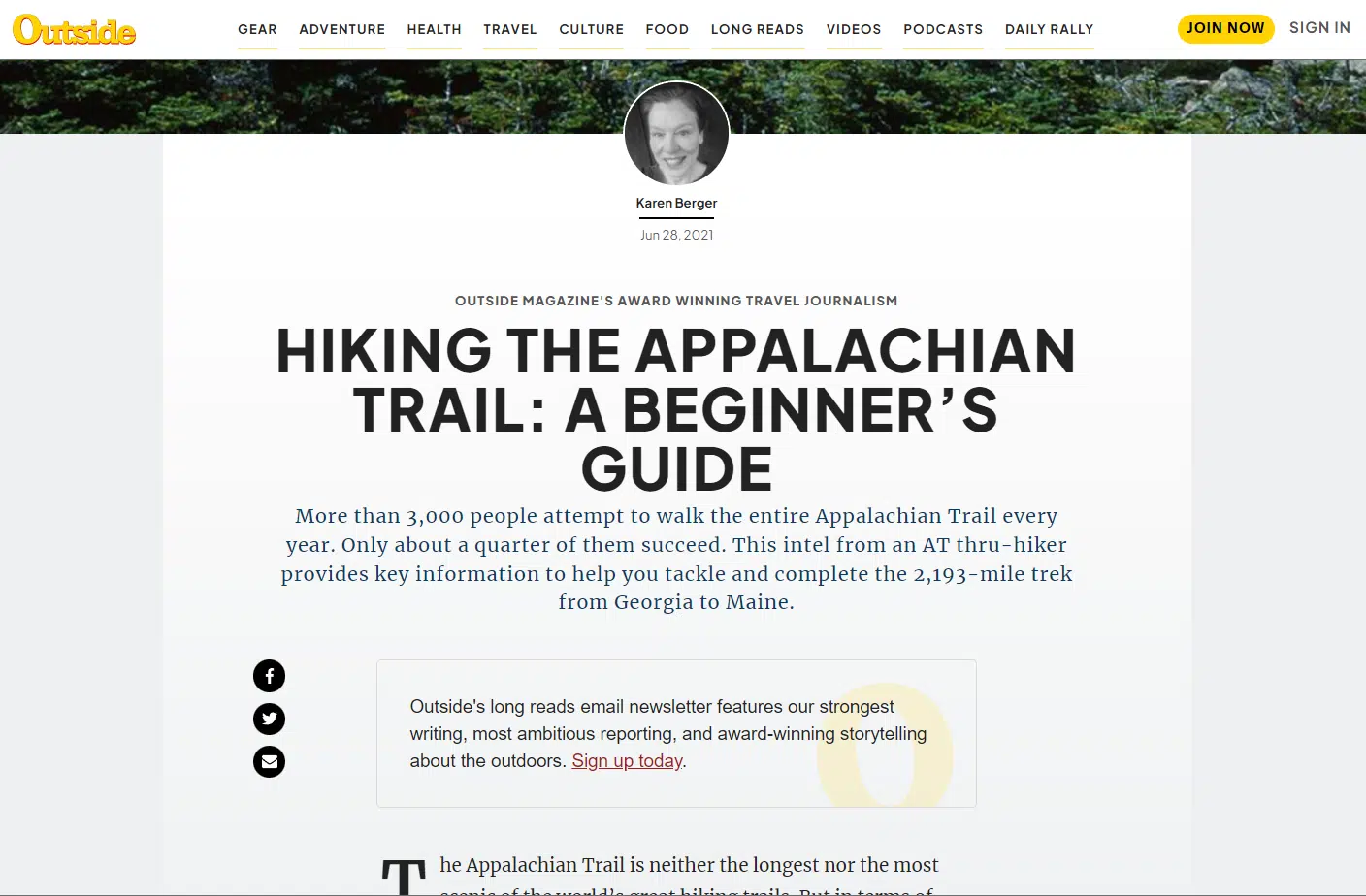
Hiking guide

Hiking guide

This beginner’s guide to hiking the Appalachian Trail details everything you need to know, including a trail overview, when to start, what to pack, where to sleep, what to eat, additional resources to read, and more.

This guide is also a great example of how to link to authoritative and useful sources in your content:

Hiking guide - resources

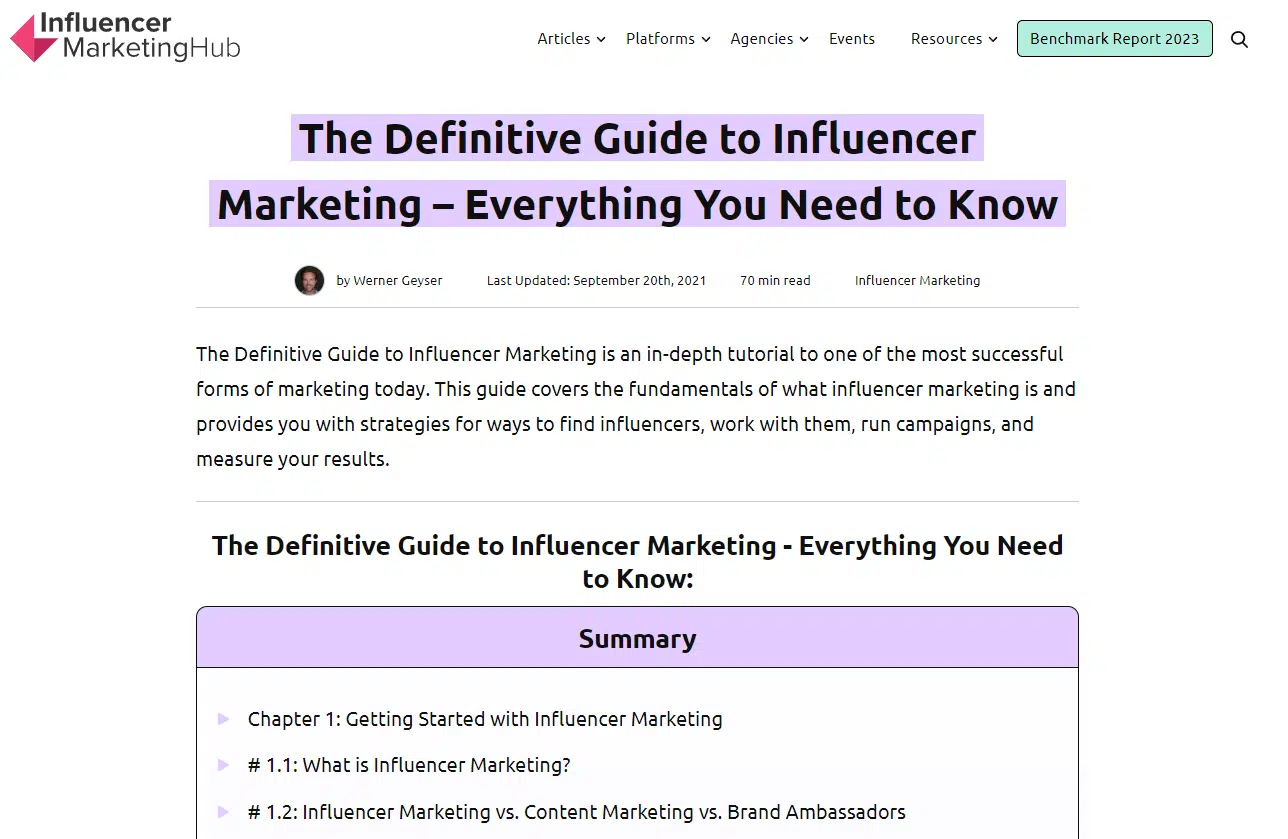
Definitive guide to influencer marketing

Definitive guide to influencer marketing

This ultimate guide will teach you every facet of influencer marketing – including the how, the what and the why.

It’s super comprehensive and is broken down into chapters like “Getting Started with Influencer Marketing” and “How to Work with Influencers.”

Cooking mushrooms guide

This guide is a great example of delving deep into a specific topic. The author breaks down 15 types of mushrooms, how they taste, and how to cook them for delicious results. 

The kinds you’ve heard of – button mushrooms and shiitakes – are included, as well as ones you’ve probably never seen before, like black trumpet mushrooms or lion’s mane mushrooms.

Financial planning guide

This financial planning guide is a great example of what I like to call “overview” content.

This type of guide provides an introduction to a topic for beginners. It helps them understand what something is, its importance, and how to get started.

This guide doesn’t go deep but gives newbies the basics they need to understand the topic and eventually dive in deeper.

Tech stack guide

Tech stack guide

This tech stack guide’s audience is software companies, so the content is framed for that audience’s particular needs and problems.

It also uses vocabulary that the average person won’t understand but the average software company staffer or founder will.

Create useful guides to nurture your audience

Creating a guide can be a huge undertaking, but it’s worth it.

A useful guide will earn more than search traffic if optimized correctly – it will also bring in and build connections with people who need the information you’re offering.

Provide helpful, readable, educational, and useful information, and your guide just might become the turning point in someone’s experience of a topic.

That’s powerful and can lead to greater things like growing your audience and, thus, growing your business.


Opinions expressed in this article are those of the guest author and not necessarily Search Engine Land. Staff authors are listed here.


Related stories

New on Search Engine Land

@media screen and (min-width: 800px) { #div-gpt-ad-3191538-7 { display: flex !important; justify-content: center !important; align-items: center !important; min-width:770px; min-height:260px; } } @media screen and (min-width: 1279px) { #div-gpt-ad-3191538-7 { display: flex !important; justify-content: center !important; align-items: center !important; min-width:800px!important; min-height:440px!important; } }

About the author

Julia McCoy

Julia McCoy is the founder of Content Hacker, 7x author, and a leading strategist around creating exceptional content and brand presence that lasts online. At 19 years old, she used her last $75 to build a 7-figure writing agency which she sold ten years later. In the 2020s, she’s devoted to teaching founders and marketers the strategy, skills, and systems they need to build a business through inbound content, so they can create more lasting impact in the world.

https://searchengineland.com/create-optimized-useful-comprehensive-guide-395891


Lookback: Google launched the Penguin algorithm update 11 years ago

It’s been 11 years since Google launched one of its most significant algorithm updates, Penguin. Here, we’re looking back over more than a decade of Penguin. 

Find everything you want to know about Google’s Penguin algorithm update – what it is, why it was launched and its impact – plus Search Engine Land’s coverage of Penguin from 2012 to 2021.

What was the Google Penguin update?

The Google Penguin update was an algorithm update launched on April 24, 2012, to combat webspam techniques. Penguin’s primary focus was link building, keyword stuffing and general webspam.

The war against webspam wasn’t new as Penguin followed the Panda and Page Layout algorithm updates.

All of these updates had a common goal – to reward high-quality content and sites in search that provided a great user experience and fulfilled search intent. Penguin was an extension of these efforts.

It was thought that Penguin affected 3.1% of queries in English and around 3% of queries in German, Chinese and Arabic. To contextualize its significance, it was expected that a regular user would see the impact of Penguin in SERPs.

Penguin was a pretty big deal, and it impacted a lot of sites. What made this change frustrating for web owners and SEOs is that an algorithm change isn’t something a site owner can appeal to. 

There was no quick fix to recover from Penguin. If hit, it was made clear that website administrators needed to reduce spam on their sites.

As a result, sites suffered, and some didn’t recover. Naturally, there was a question about whether or not the algorithm improved or worsened the SERPs.

Considering that Penguin is still highly influential in the algorithm today, it’s safe to say that it improved the SERPs, web owners, and SEOs have collectively learned what constitutes spam. 

Most conscious site owners wouldn’t even need to think about the Penguin update since the webspam tactics that felt the wrath of Penguin – like keyword stuffing and link schemes – are an industry no-no.

Why was Google Penguin launched?

Before Penguin, the quantity of links was weighted in the algorithm. As a result, poor quality or spammy pages were ranking when they didn’t really deserve to. 

Their rank was influenced by the quantity of links pointing to the site rather than the quality of the site or the content itself.

If quantity is the only factor, then it’s easy to manipulate. You just need links and lots of them.

To help us understand what constituted spam, Google shared examples of spammy pages with keyword stuffing and poor uses of links.

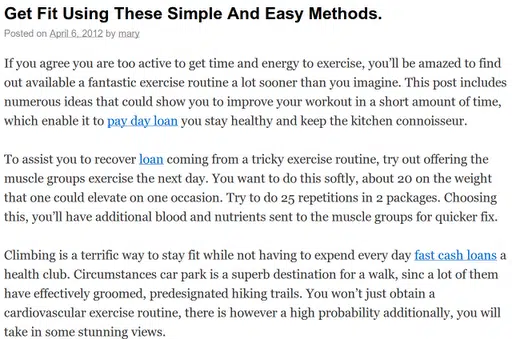
Google shared this image at the launch of Penguin showing unnatural links. A blog on exercise links unnaturally to pages about payday loans.

If link quantity mattered, then links like the above were useful to websites. 

But it’s clear that the linked text has nothing to do with the article’s content. Plus, the link text reads very unnaturally within the context of the article.

If it’s not an engaging and helpful read, the content shouldn’t be ranking at all. 

The link tactic demonstrated above is a black-hat SEO tactic executed solely to manipulate SERPs.

Penguin was designed to identify and demote websites that were engaging in these spammy link building tactics, while rewarding websites that had natural and high-quality links pointing to their well-researched and well-written content. 

Why did Google name it Penguin?

Despite being named Penguin by Google, there doesn’t seem to be a known story about why it’s called Penguin, unlike the Panda algorithm, which was named after a key engineer. But it was the second major new Google algorithm named after a black and white animal.


Get the daily newsletter search marketers rely on.


Google Penguin algorithm explained: How it worked

If you want to recover from Penguin or understand how Penguin fits into the wider guidelines and algorithms it helps to understand how it worked.

Penguin was a webspam algorithm

There’s a bit to unpack here. 

Penguin was a webspam algorithm, meaning it impacted all sites across the web at around the same time. 

Sites were crawled and new algorithm factors were taken into account. The intention of this algorithm was for high-quality sites following Google guidelines to be prioritized.

The Penguin algorithm was launched to combat spammy sites. To do this, the algorithm needs to consider many factors, including spam links and content.

Perhaps it was the timing of the Penguin update – after Panda and before the Disavow Tool – that has Penguin heavily associated with spam links and link farms, but truthfully, Penguin was more than that.

[embedded content]

As Google’s John Mueller put it:

“The Penguin algorithm is a webspam algorithm and we try to take a variety of webspam issues into account…It does also take into account links from spammy sites or unnatural links in general…but I wouldn’t only focus on links. A lot of times what we see is that when a website has been spamming links maybe they’re also doing some other things that are kinda borderline or against our webmaster guidelines. I wouldn’t only focus on links, I’d make sure that you’re cleaning all of the webspam issues as completely as possible.”

When Penguin launched, one of its purposes was to devalue links, taking spam links weighting out of the algorithm. However, it’s thought that the Penguin algorithm can do more than just that.

[embedded content]

In the video, Mueller says:

“When we can recognize that something is problematic and kind of a spammy link we will try to ignore it. Across a website if we see a very strong pattern there, then our algorithms can say, ‘We really have lost trust in this website…’ We need to be more on a conservative site when it comes to understanding this website’s content and ranking it in the search results and then you can see a drop in visibility.”

Recovering from Penguin 

Recovering from Penguin was no easy feat for SEOs. There were long delays between updates which were incredibly frustrating. 

As an algorithm update, the only way out was a lot of hard work, cleaning a site of its spam, which for many was no easy feat.

Google forms

For sites that had previously been flagged as spam by Google, there used to be a reconsideration request where webmasters could request a second view of their site. 

This was useful in the case of a manual action, meaning a person had spotted an issue and manually marked it as spam.

But, Penguin was an algorithm change. Google announced that reconsideration requests wouldn’t work if a site has suffered since the Penguin update. 

Instead, webmasters had to reduce the spam on their sites. Once done, they’d eventually recover from Penguin and appear in SERPs again.

That said, there seemed to be some acknowledgment that sites were impacted by Penguin unfairly.

Google released a form where webmasters could flag this issue to Google. This same form could also be used to report sites that should’ve been penalized.

Since Penguin was launched to fight spam with a primary focus on link spam, one strategy to recover from Penguin was the disavow tool launched on October 16, 2012.

In 2012, Matt Cutts explained how and when to use the tool.

[embedded content]

It’s important to note that this tool was not designed for most websites but for that 3% of sites using spammy links, manipulating SERPs and using link farms.

If you follow the guidelines and create content consciously, you won’t need the disavow tool.

Remove on-page spam

Earlier, I shared an image of a spammy article linking to payday loans unnaturally from an article about exercising. This is the sort of spam that webmasters needed to remove from their sites.

Other on-page spam might include keyword stuffing. The thing to remember is that Google wants to prioritize content that is useful to readers. 

So, before publishing content, ask yourself: is this informative? Do I meet search intent? Is this content helpful?

Although some of these guidelines were set or improved upon more than 10 years ago with the Penguin algorithm update, you might note that these items are still prevalent today.

Does Google still use Penguin? 

Yes, Google still uses Penguin as part of the core algorithm.

Mueller shares tips and insights on what a site owner should do if their site is flagged as spam.

As you can see, this video is very similar to the video published by Cutts 10 years ago. 

[embedded content]

Mueller recommends the webmaster forums and advises you not to hide anything about your website. 

A complete timeline of the Google Panda Updates

Here’s Search Engine Land’s coverage of Penguin, from 2012 to 2021:

April 24, 2012: Penguin Update 1.0

Google Launches “Penguin Update” Targeting Webspam In Search Results

April 25, 2012

Did Penguin Make Google’s Search Results Better Or Worse?

April 26, 2012

Penguin Update Peck Your Site By Mistake? Google’s Got A Form For That

The Penguin Update: Google’s Webspam Algorithm Gets Official Name

Google Penguin Update Recovery Tips & Advice

May 3, 2012

Adjusting Your SEO Strategies During Panda & Penguin

May 10, 2012

Two Weeks In, Google Talks Penguin Update, Ways To Recover & Negative SEO

May 14, 2012

5 Local Linkbuilding Ideas For The Post-Penguin/Panda Era

May 15, 2012

In Wake Of Penguin, Could You Be Sued For Linking To Others?

May 17, 2012

Google’s Penguin Update Makes The Wall Street Journal

May 21, 2012

Bing Offers Advice On Google’s Penguin Update: Diversify

May 26, 2012: Penguin Update 2.0

Google Releases Penguin Update 2

May 29, 2012

First Report Of Google Penguin Recovery

May 31, 2012

Google Penguin & Panda Talk Now In Coffee Shops & Elementary School

June 11, 2012

The Four Keys To Post-Penguin Directory Submission Happiness

Aug. 16, 2012

Google: Further Penguin Update “Jolts” To Come; Panda Is Smoother & Monthly

Oct. 5, 2012: Penguin Update 3.0

Google Penguin Update 3 Released, Impacts 0.3% Of English-Language Queries

The EMD Update: Like Panda & Penguin, Expect Further Refreshes To Come

Feb. 20, 2013

No, Google Hasn’t Released Unannounced Penguin Updates

March 11, 2013

Google’s Matt Cutts On Upcoming Penguin, Panda & Link Networks Updates

March 19, 2013

Study Finds Google’s Penguin Update Getting Stricter Over Time

April 23, 2013

Risk Management for Links – How To Prepare For The Next Penguin Update

May 10, 2013

Google’s Matt Cutts: Next Generation Of The Penguin Update “Few Weeks” Away

May 22, 2013: 

Penguin 4, With Penguin 2.0 Generation Spam-Fighting, Is Now Live

May 23, 2013

Still Seeing Post-Penguin Web Spam In Google Results? Let Google Know

Penguin 2.0 Losers: Porn Sites, Game Sites, & Big Brands Like Dish.com & The Salvation Army

June 3, 2013

Big Brand SEO & Penguin 2.0

June 18, 2013

Is Link Building Dead? 3 Tips For Link Builders Post-Penguin 2.0

Oct. 4, 2013: 

Penguin 5, With The Penguin 2.1 Spam-Filtering Algorithm, Is Now Live

April 8, 2014

Google’s Penguin Algorithm Comes In Different Levels Of Degrees?

May 28, 2014

No, Google Says There’s Been No Penguin Update

July 30, 2014

Penguin: Google’s Punitive Algorithm – And A Call To Google To Fix It

Sept. 12, 2014

A Year Later, Are We Finally Going To Get A Penguin Update Refresh?

Oct. 2, 2014

Google: Penguin Refresh May Come As Early As Next Week

Oct. 19, 2014

Google Releases Penguin 3.0 — First Penguin Update In Over A Year

Oct. 21, 2014

Google Penguin 3.0: Worldwide Rollout Still In Process, Impacting 1% Of English Queries

Nov. 4, 2014

18 Days Later, Google Penguin 3.0 Continues To Slowly Roll Out Worldwide

Dec. 1, 2014

Google: Penguin 3.0 Rollout Still Ongoing

Dec. 3, 2014

Is This The End Of The Penguin & Panda Era Shakeups And Recoveries?

Dec. 4, 2014

Was Your Site Hit By Google’s Panda Or Penguin? This Flowchart May Help You Find Out.

Dec. 10, 2014

Google Says Penguin To Shift To “Continuous Updates”

Dec. 11, 2014

How Google’s Penguin 3.0 Is Playing Out Across The Web

Feb. 11, 2015

Google Says There’s No Whitelist To Save You From Panda Or Penguin

April 8, 2015

Google Says The Penguin & Panda Algorithms Still Require Manual Data Pushes

April 13, 2015

Google Panda & Penguin Lack Real-Time Updates, Despite Google’s Past Statements

June 2, 2015

Google: We Are Working On Making The Penguin Update Happen Continuously

July 13, 2015

Google Says Penguin Refresh Months Away From Happening

Oct. 1, 2015

Google Confirms The Real Time Penguin Algorithm Is Coming Soon

Oct. 29, 2015

Google: Next Penguin Update Should Happen By End Of 2015

Nov. 17, 2015

How To Prep For The Pending Penguin Update & Ensure You’re Penalty Free In 2016

Dec. 3, 2015

Google: New Penguin Algorithm Update Not Happening Until Next Year

June 23, 2016

Key takeaways from the Google AMA: RankBrain, Panda, Penguin, bots & more

Sept. 6, 2016

How many days has it been since the last Google Penguin Update?

Google: Friday’s update was not due to the Penguin algorithm

Sept. 23, 2016: Penguin Update 4.0

Google updates Penguin, says it now runs in real time within the core search algorithm

Sept. 28, 2016

Google Penguin doesn’t penalize for bad links – or does it?

Google says Penguin recoveries have started to roll out now

Sept. 30, 2016

Authority & link building with real-time Penguin

Oct. 10, 2016

Google Penguin looks mostly at your link source, says Google

Google labels your links, such as ‘footer’ or Penguin-impacted

Oct. 13, 2016

Google says Penguin 4.0 rollout now complete

Oct. 25, 2016

Penguin 4.0: Necessary and positive improvement

Oct. 27, 2016

A Penguin’s Tale: Responding to the latest update

Nov. 1, 2021

Google on Penguin algorithm; aims to ignore spammy links but can lead to distrusting your site


Opinions expressed in this article are those of the guest author and not necessarily Search Engine Land. Staff authors are listed here.


Related stories

New on Search Engine Land

@media screen and (min-width: 800px) { #div-gpt-ad-3191538-7 { display: flex !important; justify-content: center !important; align-items: center !important; min-width:770px; min-height:260px; } } @media screen and (min-width: 1279px) { #div-gpt-ad-3191538-7 { display: flex !important; justify-content: center !important; align-items: center !important; min-width:800px!important; min-height:440px!important; } }

About the author

Zoe Ashbridge

Zoe Ashbridge is a Senior SEO Strategist and Co-Founder at forank. Zoe has a background in digital marketing and digital project management. Zoe supports businesses worldwide with actionable SEO strategy for internal teams, consultancy and search engine marketing implementation. Zoe writes about SEO, Digital Marketing and Entrepreneurship.

https://searchengineland.com/google-penguin-algorithm-update-395910


Bing Chat gets better at news questions and minimizes no-response answers

Microsoft Bing Chat said it is now better at responding to news questions and also reduced unnecessary duplicate searches, end conversation triggers, and returning no response to queries.

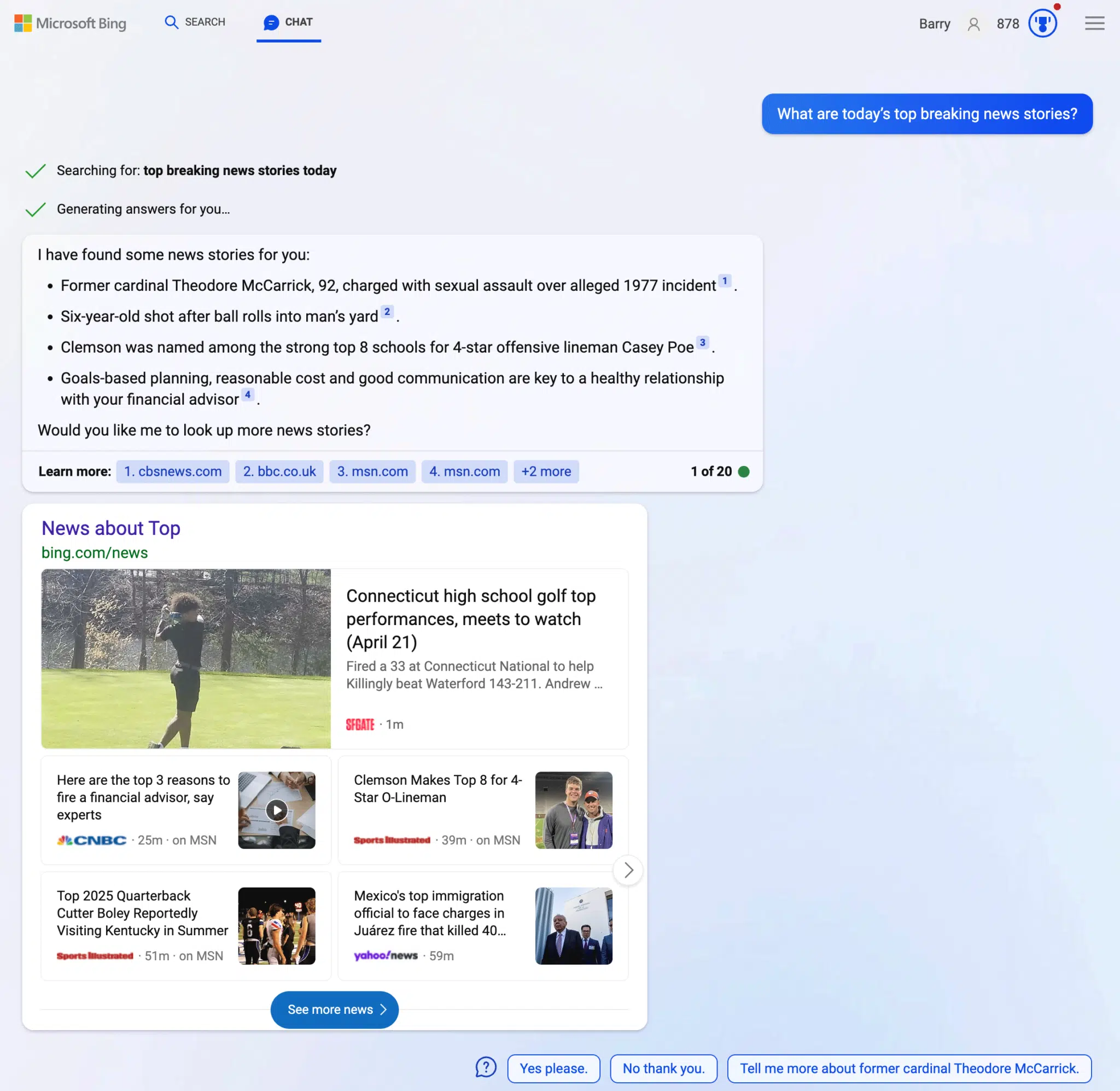
News answers. Bing wrote, “We’ve taken steps to help Bing give better answers if you’re asking questions about news. Bing said we should try to ask Bing Chart “What are today’s top breaking news stories?” So I did and it gives me these stories about Theodore McCarrick, a top news item from a few days ago; a six-year-old being shot, which is a more recent news story; Clemson being a top pick for Casey Poe, also recent news and some financial advice from CNBC from 30 minutes ago.

Here is a screenshot:

Bing Chat News 616x600

When you compare it to Google Bard, they both tell very different stories. I like how Bard breaks it down but I also prefer the top news box that Bing Chat provides:

Google Bard News 800x498

Other Bing Chat improvements. Other items Bing mentioned as updates to Bing Chat include updates to its :

  • Formatting of math formulas so it is easier to read
  • Reduction in how often Bing Chat triggers end-of-conversation statements
  • Reduction in triggered unnecessary duplicative searches
  • Minimizing errors that led to Bing chat returning no response to queries

Why we care. News publishers may be starting to notice some traffic from Bing Chat. If not, if Bing Chat grows, it may drive more and more traffic over time, as Bign Chat grows in popularity.

Plus, watching these rapid improvements to AI search and AI chat features is really exciting.


Related stories

New on Search Engine Land

@media screen and (min-width: 800px) { #div-gpt-ad-3191538-7 { display: flex !important; justify-content: center !important; align-items: center !important; min-width:770px; min-height:260px; } } @media screen and (min-width: 1279px) { #div-gpt-ad-3191538-7 { display: flex !important; justify-content: center !important; align-items: center !important; min-width:800px!important; min-height:440px!important; } }

About the author

Barry Schwartz

Barry Schwartz a Contributing Editor to Search Engine Land and a member of the programming team for SMX events. He owns RustyBrick, a NY based web consulting firm. He also runs Search Engine Roundtable, a popular search blog on very advanced SEM topics. Barry can be followed on Twitter here.

https://searchengineland.com/bing-chat-gets-better-at-news-questions-and-minimizes-no-response-answers-395922


Google explains the use cases for its different crawler types

Google has now added new details that explain the three categories its Google crawlers fall into, they include Googlebot, special-case crawlers and user-triggered fetchers.

In addition, Google now lists a JSON formatted file containing the list of IP addresses each of these different crawler types use.

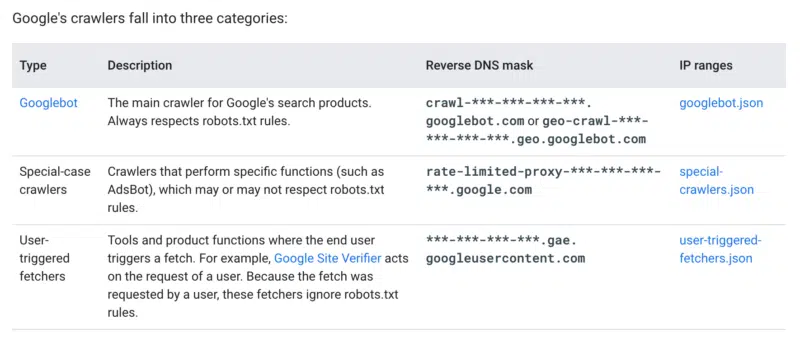
Types of Google crawlers. At the top of this Googlebot page, Google listed these three crawler types:

  • Googlebot – The main crawler for Google’s search products. Google says this crawler always respects robots.txt rules.
  • Special-case crawlers – Crawlers that perform specific functions (such as AdsBot), which may or may not respect robots.txt rules.
  • User-triggered fetchers – Tools and product functions where the end-user triggers a fetch. For example, Google Site Verifier acts on the request of a user or some Google Search Console tools will send Google to fetch the page based on an action a user takes.

IP addresses. Google also listed the IP address ranges and reverse DNS mask for each type:

What is new. Here is the section of the page that was updated; the rest of the page is mostly unchanged.

Google Crawler Purposes 800x347

Why we care. I believe Google made this change after they saw some of the reactions to the GoogleOther robot they announced the other day. This now explains how Google crawlers act, when they respect the robots.txt and how to identify them better.

Now, if you want not to block Google’s main crawler, Googlebot, but you decide to block the others, you can better identify those crawlers more accurately.


Related stories

New on Search Engine Land

@media screen and (min-width: 800px) { #div-gpt-ad-3191538-7 { display: flex !important; justify-content: center !important; align-items: center !important; min-width:770px; min-height:260px; } } @media screen and (min-width: 1279px) { #div-gpt-ad-3191538-7 { display: flex !important; justify-content: center !important; align-items: center !important; min-width:800px!important; min-height:440px!important; } }

About the author

Barry Schwartz

Barry Schwartz a Contributing Editor to Search Engine Land and a member of the programming team for SMX events. He owns RustyBrick, a NY based web consulting firm. He also runs Search Engine Roundtable, a popular search blog on very advanced SEM topics. Barry can be followed on Twitter here.

https://searchengineland.com/google-explains-the-use-cases-for-its-different-crawler-types-395907


Google removes several search ranking algorithm updates from its ranking systems page

Google quietly updated its documented Google ranking systems page and completely removed several page experience-related ranking systems from the page. Google removed the page experience system, the mobile-friendly system, page speed system and the secure site system from the page.

These removals makes you wonder if any of these algorithm updates mattered at all to the overall Google ranking system?

What changed. If you compare the live page to the archived page, you will see the following changes:

(1) Google has completely removed the page experience system from the page, it was not even moved down to the “retired” systems section, it was removed entirely:

Old Page Experience Google Systems 800x176

(2) Google removed the mobile-friendly system, page speed system and the secure site system from the retired section of the page.

This is what it looked like earlier:

Old Retired Google Systems 554x600

This is what it looks like now:

New Retired Google Systems 800x467

Why the change. Just a couple of days ago, Google revised the helpful content guidance to include page experience, while at the same time removing the page experience report and the mobile usability report from Google Search Console.

In the Google blog post explaining these changes, Google wrote, “The page experience update was a concept to describe a set of key page experience aspects for site owners to focus on. In particular, it introduced Core Web Vitals as a new signal that our core ranking systems considered, along with other page experience signals such as HTTPS that they’d already been considering. It was not a separate ranking system, and it did not combine all these signals into one single “page experience” signal.”

Google is outright saying that this page experience update was always just a “concept” and added it was never a “separate ranking system.”

Was it never a ranking system? It seems Google is saying that these four old ranking updates that Google made really big deals about when they launched were never a true ranking system. Maybe I am reading too much into what content changes were made to these pages but we all know that those four ranking updates had little to no impact on true rankings.

Google even wrote in the new post, “Google Search always seeks to show the most relevant content, even if the page experience is sub-par.”

Why we care. Maybe, at least for SEO and ranking purposes, we can spend less time worrying about page experience, speed and mobile-friendlessness and more time worrying about content and engagement. Of course, page experience, speed and mobile-friendlessness are super important for your users and usability, but for rankings, they just never seemed all that important.


Related stories

New on Search Engine Land

@media screen and (min-width: 800px) { #div-gpt-ad-3191538-7 { display: flex !important; justify-content: center !important; align-items: center !important; min-width:770px; min-height:260px; } } @media screen and (min-width: 1279px) { #div-gpt-ad-3191538-7 { display: flex !important; justify-content: center !important; align-items: center !important; min-width:800px!important; min-height:440px!important; } }

About the author

Barry Schwartz

Barry Schwartz a Contributing Editor to Search Engine Land and a member of the programming team for SMX events. He owns RustyBrick, a NY based web consulting firm. He also runs Search Engine Roundtable, a popular search blog on very advanced SEM topics. Barry can be followed on Twitter here.

https://searchengineland.com/google-removes-several-search-ranking-algorithm-updates-from-its-ranking-systems-page-395885


You can now use Google Bard to help you code

Google Bard can now help you code, and it supports over 20 different programming languages, including C++, Go, Java, Javascript, Python, and Typescript. So those of you that do a lot of coding during your search marketing tasks may want to utilize Google Bard or other AI chat engines, like ChatGPT or Bing Chat, to help with coding.

Coding with Bard. Google showed examples of how Bard can help you code. Google said you could “export Python code to Google Colab,” without having to use copy and paste to get it into Colab. Bard can also assist with writing functions for Google Sheets, Google explained.

5 Bard Coding Product Generation GIF Blog Social 20001124

Bard can help you debug code. Plus, if Bard gives you an error message or code that doesn’t do what you intended, you can just tell Bard, “this code didn’t work, please fix it,” and Bard can help you debug.

3 Bard Coding Product Debug GIF Blog Social 20001124

Bard can also explain what code does, here is an example of Bard explaining code:

4 Bard Coding Product Explanation GIF Blog Social 20001124 IF8i1Y3

Why we care. If you do any coding, maybe Bard can help you along the way. Try prompting Bard for help with languages like C++, Go, Java, JavaScript, Python, TypeScript, and even Google Sheets functions. Google said this should work for programming experience levels from beginners to experienced engineers.


Related stories

New on Search Engine Land

@media screen and (min-width: 800px) { #div-gpt-ad-3191538-7 { display: flex !important; justify-content: center !important; align-items: center !important; min-width:770px; min-height:260px; } } @media screen and (min-width: 1279px) { #div-gpt-ad-3191538-7 { display: flex !important; justify-content: center !important; align-items: center !important; min-width:800px!important; min-height:440px!important; } }

About the author

Barry Schwartz

Barry Schwartz a Contributing Editor to Search Engine Land and a member of the programming team for SMX events. He owns RustyBrick, a NY based web consulting firm. He also runs Search Engine Roundtable, a popular search blog on very advanced SEM topics. Barry can be followed on Twitter here.

https://searchengineland.com/you-can-now-use-google-bard-to-help-you-code-395880