How to redesign your site without losing your Google rankings

Relaunching or redesigning a website can make or break your SEO efforts. 

Even a single mistake can result in catastrophic ranking drops – or, worst, revenue loss. 

Here’s how to handle a site redesign without risking your organic traffic, rankings and revenue.

Why a redesign is an inherent risk

Businesses must never take a website change lightly. 

Aside from the SEO ramifications, users don’t always welcome a website overhaul. (Think of Facebook’s latest redesign and most marketers’ disdain of GA4).  

Numerous SEO horror stories revolve around disastrous site redesigns, re-platforms and relaunches.

Dealing with the aftermath can be a nightmare for SEO teams and the external SEO consultant (who often only gets called to fix others’ mistakes).

Most site redesign fails involve the following:

  • Noindexing the website.
  • No redirects in place.
  • Adding/removing content. 

Noindex

Typically, redesigned websites are prepared on a separate server where a copy of the live website is tested with the new look and feel. 

To avoid creating duplicate content issues with Google, you have to add the noindex meta tag to the test server (or block it in robots.txt):

<meta name="robots" content="noindex, nofollow" />

This tells the search engine to ignore this site version.

Yet, all too often, nobody remembers to remove the noindex command before relaunching the website. 

It might take weeks, along with lost leads, sales and revenue, before someone notices.

So before going live, make sure to remove that noindex meta tag.

No redirects

When moving a website to a new domain or changing your URL structure, you must “tell” Google and visitors where to find the new one. 

Unless the business has an in-house SEO, redirection is often neglected. 

Search engine bots and users might end up on error pages or get redirected to the homepage, resulting in poor user experience and missed SEO opportunities.

Failure to redirect existing resources to new ones will negatively affect your rankings, traffic and conversions. 

For one, since incoming links to your content end up nowhere, you might lose that ranking push on Google. 

Google handles error pages as if your site is broken and may demote it completely.

All 4xx errors (except 429) are treated the same. Googlebot signals the indexing pipeline that the content doesn’t exist. 

How to fix it? Use a permanent redirect (301).

Content removal/addition

Designers often work with a “lorem ipsum” placeholder text even when the website has existing content.

Only when the redesigned website goes live will they realize that large parts of the content don’t work with the new design. And instead of fixing the design, the content might get deleted.

In some cases, business owners just want to remove old content for no apparent reason other than that it’s “old” and they don’t want to update it. 

As ex-Googler Kaspar Szymanski noted in his SEO horror stories example: 

“When content migration is done, Google has to recrawl new URLs, along with all of their accompanying signals, such as backlinks and canonicals, in order to rank what effectively becomes brand new landing pages. Under any circumstances, a migration is best prepared months in advance, carefully planned and executed during a sales low season.”

There are also instances when SEOs prune underperforming content and then go overboard. 

Your existing content might have attracted links over the years. When the content gets deleted, that link equity you’ve built up will go away. 

Moreover, Google tends to assess websites as a whole, not just based on particular content or pages. Once your site shrinks overnight, you may lose credibility connected to your former size and status.

The same applies to the opposite. You can’t just grow from 100 to 100,000 pages overnight without causing Google trouble. 

Don’t deflate or inflate your page number drastically in a short time frame.

How to fix it? Treat existing content as valuable linkable assets and migrate them to the new website version. Use only one web address per content piece or add canonical tags.

Doing it like Amazon

Given the risks, you can opt for the slow and safe route like Amazon. The ecommerce powerhouse is known to make incremental changes to its platform.

Some sites redesign and relaunch occasionally, while others seemingly want to stay the same.

Amazon is a “prime” example (pun intended) of a site getting continuously improved over time instead of being recreated all at once. 

The current Amazon website design has been used since 2015 without a redesign. Even the design changes before that weren’t complete redesigns either.

This gradual change approach has pros and cons. 

Regular Amazon shoppers don’t have to struggle to learn a new interface. But the platform is also plagued with increasing clutter and feature creep. 

You may be doing something right when your revenue continues to grow despite such a bad user experience. Otherwise, a redesign is probably overdue.

When to redesign your site?

Despite all the risks mentioned above, there are some valid reasons for a site relaunch.

Acquisition

When your business or website has been acquired, you have various options for dealing with the “old ” website:

  • Some new owners let the existing site rot.
  • Some redirect it to the new owner’s website.
  • Others merely change the logo by adding “by [new owner].” 

Those serious about a website and its audience usually redesign and relaunch, often under a new name. 

Change of business model

Startups change business models frequently. At times, the pivot is so big that the former business model has nothing to do with the new one anymore.

Let’s say your startup used to offer a tool and then became an agency offering services. In that case, your previous website structure may no longer make sense.

Clutter and feature creep

Clutter and feature creep often go hand in hand but can also happen independently. 

Older websites accumulate items, options, content and links.

With an established design and system, removing items that have grown organically is hard.

Even long-time users will struggle with cognitive overload.

Your site may be ripe for a redesign when:

  • The bounce rate and exit rate grow over time.
  • It gets harder to retain new users, leading to a drop in recurring visitors.

Personally, I think Amazon’s design approach is tough to use. It’s full of clutter, feature creep and ads in different places that are not even properly disclosed.

If Amazon wasn’t one of those “too big to fail” corporations, their website would probably be defunct by now.

Expansion

You may also need a redesign or at least a design update to serve new markets (i.e., more countries), launch different products, or serve new audiences. 

A redesign is not always needed in such cases. It depends on how easily a website can be adapted to the expansion.

  • So instead of just serving the U.S. or UK, you want to serve a global audience or other languages? 
  • After selling shoes, do you want to enter the fashion market or even sell household items?
  • Instead of a niche audience of enthusiasts, do you want to reach a mainstream audience?

These large changes may require a full-fledged redesign or at least benefit from one instead of squeezing the new objectives into the limited existing design.

Unsupported technologies

Is your site built with Flash? That was never a good idea, especially now that Adobe has discontinued and most browsers stopped supporting it. 

The same applies to using less popular obsolete technologies like Java (not to be confused with JavaScript) or frames.

If your site still relies heavily on those, you must do something about them immediately. A whole redesign may be the only viable solution then. 

Some less obvious legacy technology within your website code may not be supported by major browsers anymore (Google’s Chrome and its derivatives mainly by now). 

I had to fix my website over the years a few times, not because it was broken, but due to changing requirements by browser vendors and evolving technologies that weren’t backward compatible.

Once, my website broke because the latest PHP version deprecated some built-in functions and interpreted others differently.

A legacy website with thousands of lines of custom code may make restoring functionality after third-party technology changes very difficult.

Sometimes a redesign from scratch may be cheaper in the long run.

Before anything else, call the SEO 

OK, so you decided that a redesign is the only way to go? For goodness’ sake, call an  SEO expert right now! 

The earlier you involve the SEO (team), the better. 

Often, businesses start the design with the designers, as the name conveniently suggests. But the SEO-compliant information architecture (IA) must be planned before the design. 

If you don’t have a sophisticated information architect on your team, you have to ask the SEO person about it.

And even if your UX specialist has a solid understanding of IA, don’t rely on that. 

Of course, the user experience is its own complex discipline that requires mastery, so you can’t expect the same person also to be an expert on SEO.


Get the daily newsletter search marketers rely on.


How to redesign without hurting the SEO

Hire an SEO! Let them inform all involved teams. Here are additional tips for an SEO-friendly website redesign project.

Agree on actual goals

To implement a proper redesign, you have to agree internally on its goals.

The SEO team can provide some of them, but there need to be overall business goals as well.

The redesign is not just a cosmetic change. It has to be validated using metrics that go beyond vanity. Increasing traffic or engagement is not enough.

How will a redesign impact conversions, sales and ROI?

Choose highly relevant KPIs before you start to determine whether your goals have been met.

For example, instead of adding annoying pop-ups and overlays to your legacy design, you could redesign with the primary goal of having built-in subscription forms to grow your newsletter audience. Each subscription would be a conversion, then.

Build the new site separately

Use at least one local server to code and test. Large website redesigns have three of them: 

  • A development server.
  • A test server. 
  • A live server.

Ideally, you check your site redesign as a website running beyond your local network. 

While at it, use the aforementioned noindex tag on the new site as long as it’s not officially live yet.

For small WordPress-based sites, you may get tempted to work on the live site and introduce the new theme out of the blue.

Don’t trust ready-made themes or the design and development team to care for your SEO, not even the basics!

It may be a shocking experience to check your analytics soon after. Some themes (and designs) ignore the SEO fundamentals, or they randomly rewrite them.

So you may have optimized your perfect title tag structure and streamlined your headlines, and then they’re gone overnight, and neither designers nor UX experts noticed.

The headlines may look exactly the same, but behind the scenes, there will be a div, span or p-tag instead of the H1, H2, etc.

Your title tag may show the brand first or, worse, only lorem ipsum and be repeated all over the place, creating duplicate content Google will automatically demote or remove from the index.

All your arduously created meta tags, schema code, nofollow/sponsored/UGC attributes, image alt attributes and minimized scripts may be completely gone. So create a checklist of must-have SEO features upfront.

Don’t mix up design and code

Ideally, you separate code, behavior and design. Your old site does not do that yet? Introduce this separation on the new site. 

You will be glad. There will probably be numerous changes down the road before you even go live.

Editing the HTML code to enter design tweaks is tedious and error-prone. It’s also utterly impractical in the long run. Also, it is likely to hurt your SEO efforts. 

Content should be separate anyway, usually in a database. Or if you have a small legacy website, using XML or text files like .txt, .csv or .inc.

Use whatever works best for you. Just don’t mix everything.

Legacy websites from the ‘90s had all of these things in one file in many cases, so it was almost impossible to change without breaking things that were not even related to the change.

Yet even modern WordPress websites struggle with mixing code, design and content. 

Some themes require tweaks or UX text added to the themes themselves so that you end up with English words like “comment,” “search” or “next” on your translated website version. 

Never touch a running system, especially URLs

Geeks with decades of experience will advise you to “never touch a running system” for a reason. 

This motto also applies to search engine optimization. A minor change can wreck your website’s SEO.

Is your domain already ranking well? Do you really have to rename it from x to x-y? Every domain name change is a huge risk. 

You never know whether Google will accept your new domain as fully equivalent to the last one. 

In the worst case, the algorithm may assume that your website is completely new and put you into the dreaded “sandbox” for new domains. 

Some people say there is no such filter, but seasoned SEOs know from their experience how long it sometimes takes to get a new domain off the ground. So you want to keep your existing authority.

When registering a new domain, please do not put it online without content authority or while the old one is still reachable.

Otherwise, the risk of being viewed as a completely separate project is much higher.

Having two domains for the same project at once is also a mistake. You compete against yourself. You have to go “all in” on one of them!

At least try not to change the URL structure. The design can change and improve without having to change that in most cases. 

So unless the IA changes significantly, you can simply add or subtract directories and pages to or from the existing structure.

Is there no alternative to changing your URLs because the new structure has to be different for some valid reasons? 

Then redirect the old URLs to the new ones by mapping every single or at least important page upfront or simply by changing the URL structure only slightly and then automatically redirecting every URL in .htaccess file using the asterisk “*“:

example.com/site/content/article

…could be then redirected to…

example.com/new-site/content/article

Instead of a “new-site” you could add something more meaningful or neutral. Web designers often just added a v2 or whatever number applied as a workaround.

example.com/v2/content/article

In reality, this could be something more specific lower on the structure level.

When you have pivoted the business model, you could keep the services page and add specific pages below it.

example.com/services/old-service-one

will be… 

example.com/services/new-service-one

Lorem ipsum yourself! Or don’t forget content design

When searching for a new WordPress theme, you will first look at the design and fall in love with it, only to realize that once your content has been displayed using the new one, it looks awful. 

What happened? Lack of content design! 

The design has been created in a vacuum with idealized content to fit and underscore the “beauty” of the new design.

Use the actual content from the existing site from day one or create content that will be displayed on the new site upfront. Only then should you create the design around the content.

When pruning content, do a content audit first and assess each page. Keep the pages that rank already and have garnered some backlinks in the past.

Pages that get traffic, be it search traffic, referral, or direct traffic, should also be kept for obvious reasons.

Some content may seem useless based on the criteria above, but it is needed to complete a website, even if it’s rarely visited. So don’t assume that obscure content has no value, either.

Ensure crawling and indexing

Why is the most important technical SEO part at the end? 

Once you go live with your new site, you have to check whether the SEO best practices you have taken into account earlier are making it into the Google index and whether you retain your rankings.

  • Watch your analytics and Google Search Console reports frequently to discover potential roadblocks (think noindex above).
  • Double-check your automatically created sitemaps and use a website crawler like Screaming Frog to test URLs once again on the live server.
  • You may also want to check the server log files. Why? Orphan pages and pages that haven’t been indexed for some reason may not even show up elsewhere.

Sometimes even the Analytics code does not appear on all pages, so some pages have no traffic because it’s invisible. 


Opinions expressed in this article are those of the guest author and not necessarily Search Engine Land. Staff authors are listed here.


Related stories

New on Search Engine Land

@media screen and (min-width: 800px) { #div-gpt-ad-3191538-7 { display: flex !important; justify-content: center !important; align-items: center !important; min-width:770px; min-height:260px; } } @media screen and (min-width: 1279px) { #div-gpt-ad-3191538-7 { display: flex !important; justify-content: center !important; align-items: center !important; min-width:800px!important; min-height:440px!important; } }

About the author

Tadeusz Szewczyk

Tadeusz Szewczyk, also known as Tad Chef, is a professional blogger and SEO since 2004. Even though based in Berlin, Germany he has covered blogs, social media and search for a global audience starting in 2006. In 2007 he launched his own blog – SEO 2.0 – and also published on numerous other marketing blogs ever since. In recent years he wrote for the social media accounts of many clients as well. You can connect with Tad on LinkedIn and Twitter or visit his website and read his blog about social SEO.

https://searchengineland.com/redesign-website-google-rankings-395604


How to create service pages that rank and convert

Your service pages, especially if you operate entirely online, have a huge job to perform.

They need to effortlessly convey exactly what you do, what you offer, and how your services benefit your ideal customer.

It’s a pretty big ask.

Luckily, you don’t have to start from scratch whenever you want to create a winning service page.

There’s a formula to ensure you include all the most important information, helping you create a page that will rank and convert.

What is a service page?

A service page is a webpage on your business website that describes and explains a signature service or offer to potential customers. (You might also call a service page a landing page or a sales page.) Ultimately, this page should make your target audience want to purchase your service.

A service page can be dedicated to presenting one service, multiple services under one umbrella, or all of the services you offer. The way you set it up will be dependent on your brand, industry, and audience, not to mention your preferences. 

Ultimately, whether you run a business online or have a hybrid brick-and-mortar/online presence, a service page is 100% necessary to include on your website.

5 elements every service page needs

A well-constructed service page is worth dividends.

Don’t just throw one together and hope for the best. Construct it with care, and include the most important pieces for success.

When you build your service page, include these key elements for better results.

1. Long-form, descriptive, benefits-focused copy for each service offered

The most important part of your service page is the description of your service(s).

You might be tempted to write a quick paragraph about your service and call it done.

But that will only result in a thin, useless page that doesn’t tell your prospect much about your service. And, in actuality, you have so much to tell them.

  • What is included in the service/offer? What does the customer get, in a nutshell, after they buy? For example, if you sell website design services, what does that entail? A website audit, page design/development, rewriting website copy?
  • What problem are you solving for the customer? What larger problem are you solving, beyond what the service accomplishes at face value? 
  • Who is your service/offer for? Describe the person who will benefit most from your service. This is your ideal customer – when they read this description, they should see themselves!
  • What are the long-term benefits? What positive outcomes will reverberate for your customer long after completing your services?
  • Why is your brand uniquely qualified to offer this service? What’s your backstory? How did your company form, and how did you come to sell XYZ? What experience, education, or combination of these two things has shaped your service(s)? Tell a story.
  • What are the most frequently asked questions you get about your service? Answer them on your service page.

Once you add all this information to your page should start getting pretty long – but that’s a good thing.

I always recommend going long-form for service and sales pages because adding more copy gives you more time to overcome your prospects’ objections to purchasing.

However, don’t fall into the trap of adding more copy just for length. Instead, think about how helpful you can be on your service page.

How can you clarify your offer, explain it, and present it so your prospect has zero questions left when they’re done reading?

2. Testimonials or reviews

Next, prove that your services work or deliver your promised benefits. 

Adding customer testimonials or reviews to your service page is the easiest way to do this.

For example, embed a video of a customer talking about their experience with your service. Or, add a customer quote alongside their photo.

Along with these pieces of social proof, if your brand is a B2B, consider adding a list of the businesses and brand names you’ve called clients. You’ll see this technique on most B2B sites, but that’s because it’s effective.

A great example that goes one step further comes from a financial services company.

On their debt financing solutions service page, there’s a section that shows clients they’ve worked with and what role they played.

Debt financing solutions service page

3. Visuals

Not every service page needs visuals, but very few wouldn’t benefit from adding an image, an embedded video, or some other element that adds visual interest.

Consider how your visuals can further help your prospect understand your offer for service pages. 

  • Add visual examples of your service in action. For example, a custom cabinetmaker could add photos of their workshop, pictures of cabinets in production, or a gallery of completed cabinet projects.
  • If your service is more desk-oriented, include screenshots of some of the services you perform in various programs and tools. 
  • If you produce a physical product as a result of your service, include photos of past projects (with client permission).
  • Consider adding a video of you/your client discussing and explaining the service and its benefits.

Here’s an example of a video embedded into a service page for website design. In the video, a team member explains how they work with you to redesign your website.

Video embedded to service page

4. Conversion-friendly design

A service page with great content won’t perform well if the design and layout are cluttered, confusing, busy, or hard to read.

For a conversion-friendly page, focus on a few key elements:

  • Easy to scan: Most people don’t read pages word by word – instead, they scan: 79% of users scan new web pages vs. read them. For that reason, design your service page content so your prospects can easily scan the page.
    • Use meaningful headers to organize the page.
    • Use bulleted and numbered lists.
    • Highlight or bold important text, such as your CTAs, contact information, or keywords that highlight what your service is about.
    • Break up long paragraphs (and long sentences) into smaller pieces.
  • Easy to read: Is your main font clear and readable? Do you have enough white space surrounding page elements? Do your text and background colors have sufficient contrast?
  • Speedy: Does your site load quickly?
  • Easy to navigate: Can users intuitively find their way around your site? Is your service page easy to find?
  • Prominent CTAs: Do your calls-to-action pop off the page? Are your prospects’ eyes drawn to them as they navigate and read your page?

This professional editing service page is a good example of a conversion-friendly design. It’s clear, easy to read, easy to scan, and the CTAs pop.

Professional editing services

5. Calls to action (CTAs)

Lastly, include targeted calls to action (CTAs) throughout your service page. Ideally, they should stand out and be formatted as buttons your prospects can click on.

Where should these CTAs lead? That depends on your service and how ready your prospects are to buy.

If the audience coming to this page is primed and ready to buy, your CTAs can point directly to a checkout page:

  • If you have more than one service listed on a single page, include a CTA for each service that leads prospects to a checkout page for that service.
  • If your page is dedicated to one single service, include CTAs sprinkled throughout the page that all point to one checkout page for that service.

If the audience coming to your service page isn’t quite ready to buy, consider adding CTAs to talk to your sales team or get a free consultation.

Give your customer who may be on the edge of buying a chance to hash out their last objections with a knowledgeable person – and gently move them toward the sale.

Whatever you do, ensure your prospects understand exactly what action they can take after reading your service page. CTAs provide this clear direction.

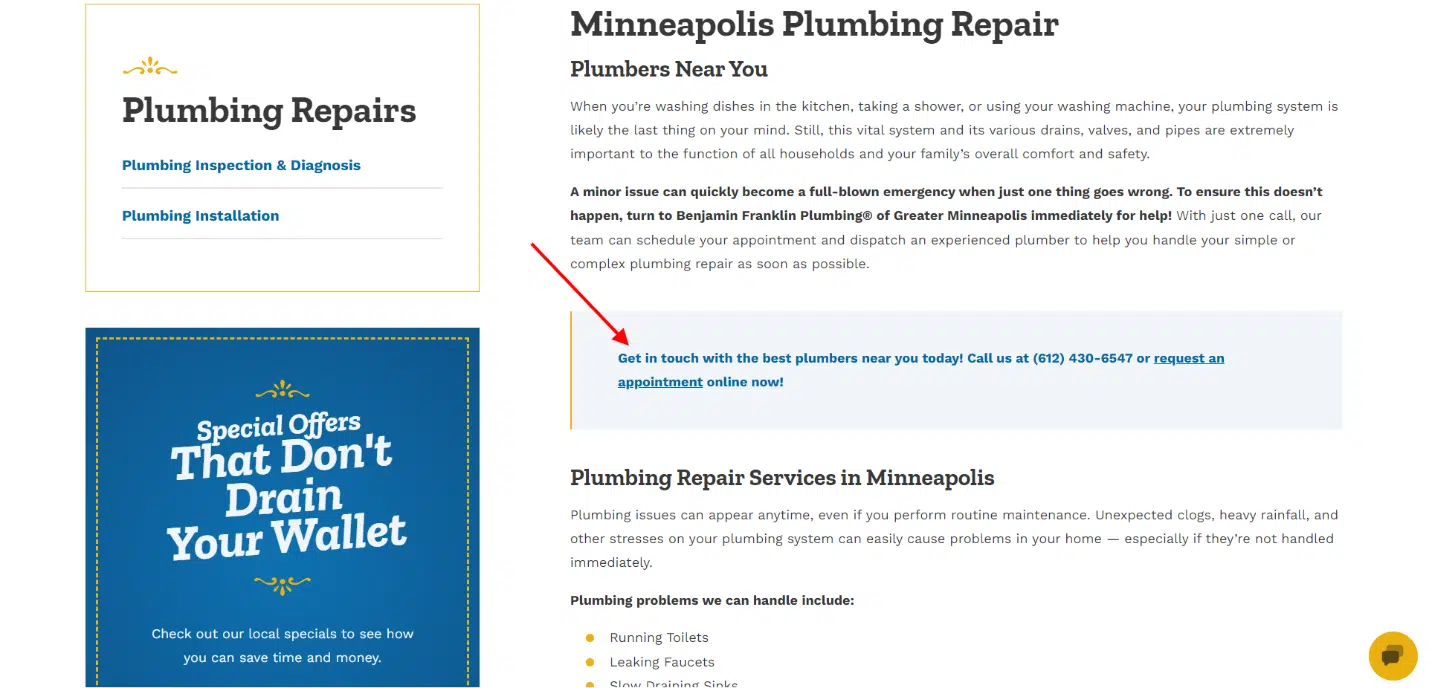
On this plumbing repair service page, the company has added multiple CTAs that urge customers to give them a call or request an appointment:

Plumbing repair service page

Get the daily newsletter search marketers rely on.


How to rank a service page on search engines

Ready to go the extra mile and get your service page ranking in search engines?

Follow these tips to research keywords and structure/optimize your page(s) for the best results.

Create individual, long-form pages for each service you offer

Consider creating individual, long-form pages for each service on your roster to boost your SEO.

Where does the SEO come in? Each page can be targeted to a specific keyword related to the service you’re selling. 

In essence, more pages optimized for more keywords = more opportunities for search engines to index and rank those pages.

Research and choose one relevant focus keyword for each service page and pepper in related keywords/synonyms/variations. Learn how in the next section.

If you focus on one main keyword per service page, how do you find the right ones?

Look for a combination of: 

  • Relevance to your business and service.
  • Relevance to your audience.
  • Tied to your location (if you’re a local business).
  • Low keyword difficulty (KD). 

The last part (low KD) is especially important if your business is new or small.

You don’t want to target highly competitive keywords because you’ll never rank against the high-authority brands already jockeying for those terms.

And, not ranking (or landing on page 25) means you won’t earn search traffic, which defeats the entire point.

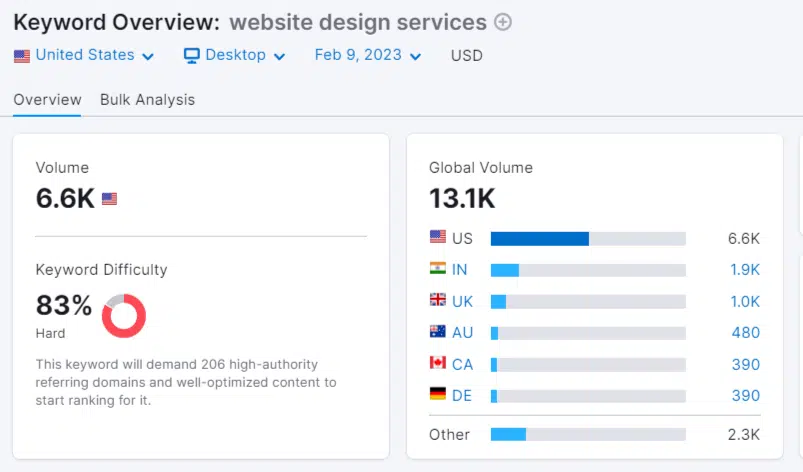
For example, you want to create a service page for your website design services.

Thus, you research the keyword “website design services” using a tool like Semrush – but you discover it has a KD of 83 (hard).

Semrush keyword overview

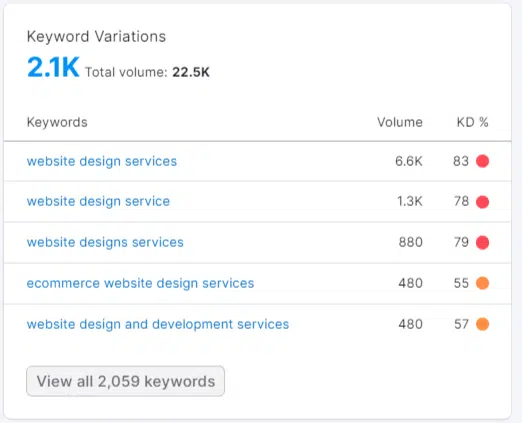
That just means you need to look at the keyword variations to find a similar, relevant keyword with a lower KD.

Ideally, the focus keyword you choose for your service page should have a KD of 40 or below so you can edge into the rankings.

Keyword variations

Never randomly choose keywords or guess what will work. Do your research and find a term your audience is searching for that you can also rank for in search results.

Optimize your service pages correctly

Once you have a focus keyword in hand for each of your service pages, you can move on to optimizing those pages.

What should you home in on for optimization? (Where should you place those darned keywords?) Here are the top pieces of your page to focus on:

Headings

Structure your service page with headings to organize the content, help search engines understand what the page is about, and help readers find the information they’re looking for.

Keyword placement

Place your focus keyword in important areas, including:

  • The page title/H1.
  • The meta description.
  • At least one H2.
  • At least one H3 (if applicable).
  • The first paragraph.
  • The URL slug (e.g., www.yoursite.com/url-slug-here)
  • Add keyword variations/synonyms if applicable.

Helpful, useful content

Don’t just think about selling on your service page. Instead, consider how you can help your prospect understand what you offer, how you deliver, and how that will ultimately benefit them.

Include helpful content to make your service page more useful and of higher quality – and to help you rank in the search engine results.

Internal links

From your service page, link to related pages on your site.

For example, if you have a service that’s related to another, you could link those pages to each other using keywords in the anchor text.

Meta description

Your meta description won’t necessarily directly impact your ranking, but it will impact how many people click your link in the search results.

Google is more likely to pull a well-written, keyword-optimized meta description into their listings.

These descriptions are what searchers read when they’re choosing which result to click on. Write yours with the intent of getting people to click:

  • Make it 160 characters long – or less. Anything longer will get cut off.
  • Include your keyword near the beginning.
  • Describe what your page is about and include your USP (unique selling point).

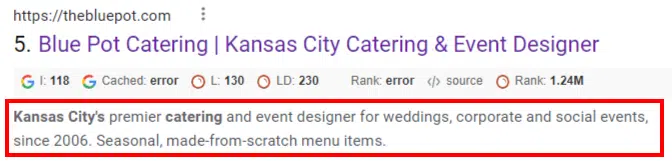
Here’s a good example of a meta description from a service page ranking for “catering Kansas City.” Note that they include their USP: “Seasonal, made-from-scratch menu items.”

Sample meta description

Build an ROI-worthy service page

Your service pages are some of the most important content on your website.

They also have to do a lot of heavy lifting. Simultaneously, they need to convey what you do, what you offer, and how what you offer benefits your customer.

And, if you want your service page(s) to rank, you need to structure and optimize them accordingly.

So, spend the time to make this important content incredible. Consider tracking the page’s performance, testing different versions of the page, updating the copy/content, and testing again.

Your service page should work hard for you, so take the time to find the right formula. It will be worth it.


Opinions expressed in this article are those of the guest author and not necessarily Search Engine Land. Staff authors are listed here.


Related stories

New on Search Engine Land

@media screen and (min-width: 800px) { #div-gpt-ad-3191538-7 { display: flex !important; justify-content: center !important; align-items: center !important; min-width:770px; min-height:260px; } } @media screen and (min-width: 1279px) { #div-gpt-ad-3191538-7 { display: flex !important; justify-content: center !important; align-items: center !important; min-width:800px!important; min-height:440px!important; } }

About the author

Julia McCoy

Julia McCoy is the founder of Content Hacker, 7x author, and a leading strategist around creating exceptional content and brand presence that lasts online. At 19 years old, she used her last $75 to build a 7-figure writing agency which she sold ten years later. In the 2020s, she’s devoted to teaching founders and marketers the strategy, skills, and systems they need to build a business through inbound content, so they can create more lasting impact in the world.

https://searchengineland.com/create-service-pages-rank-convert-395583


Google: Video must be main content to appear as thumbnail

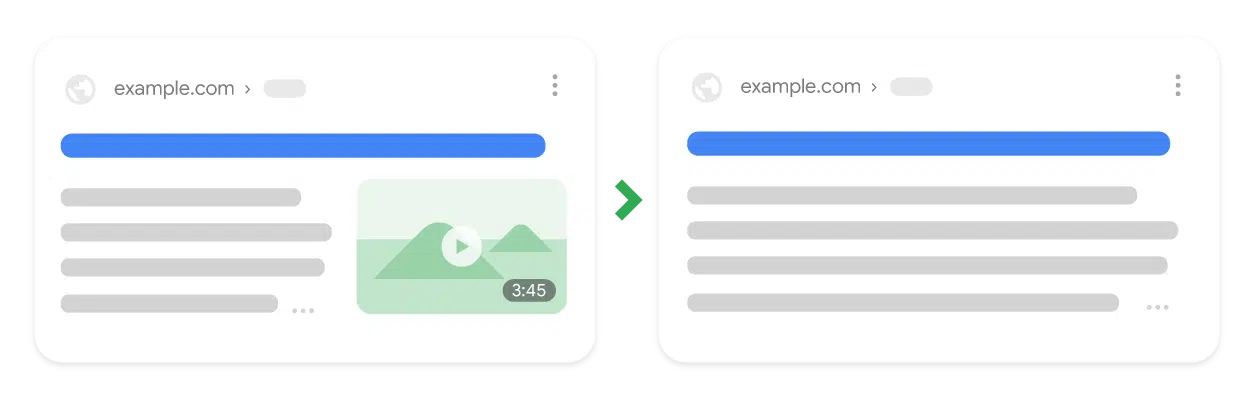
Video thumbnails will only be shown in Google’s search results when a video is the main content of a page, Google announced today.

The announcement. “Today, we’re making a change so that video thumbnails only appear next to Google search results when the video is the main content of a page. This will make it easier for users to understand what to expect when they visit a page.”

What’s changing. Google has been showing a video to the right of the search listing when a video was present on a page, but not the main element.

This video thumbnail format will go away because removing it had a “minimal impact” on the overall engagement for publishers, Google said based on tests it conducted.

Google Removes Video Thumbnail

Google Search Console impact. You may see an impact to your search appearance reported metrics for videos in the performance report. Annotations will appear in the video indexing report and video enhancement report, Google said.

What’s not changing. Google will still show a video thumbnail to the left of a search listing when Google determines a video is the main content of a page.

Google Video Thumbnail

Why we care. If your pages have been ranking with video thumbnails, you’ll watch to watch the performance of those pages heading forward. This change also has implications for the video metrics you see reported in GSC.

Read Google’s announcement. Simplifying video presentation on Google Search Results.


Related stories

New on Search Engine Land

@media screen and (min-width: 800px) { #div-gpt-ad-3191538-7 { display: flex !important; justify-content: center !important; align-items: center !important; min-width:770px; min-height:260px; } } @media screen and (min-width: 1279px) { #div-gpt-ad-3191538-7 { display: flex !important; justify-content: center !important; align-items: center !important; min-width:800px!important; min-height:440px!important; } }

About the author

Danny Goodwin

Danny Goodwin has been Managing Editor of Search Engine Land & Search Marketing Expo – SMX since 2022. He joined Search Engine Land in 2022 as Senior Editor. In addition to reporting on the latest search marketing news, he manages Search Engine Land’s SME (Subject Matter Expert) program. He also helps program U.S. SMX events. Goodwin has been editing and writing about the latest developments and trends in search and digital marketing since 2007. He previously was Executive Editor of Search Engine Journal (2017 to 2022), managing editor of Momentology (from 2014-2016) and editor of Search Engine Watch (from 2007 to 2014). He has spoken at many major search conferences and virtual events, and has been sourced for his expertise by a wide range of publications and podcasts.

https://searchengineland.com/google-video-must-be-main-content-to-appear-as-thumbnail-395597


7 proven methods to explain the value of SEO

SEO is the most undervalued marketing channel.

It gets a shoestring budget compared to PPC or TV ads.

And then it has to fight to justify its existence.

Not anymore. 

In this article, you’ll learn seven proven ways to explain the value of SEO.

Why most SEO reporting needs ripping up

Resource-strapped search marketers rarely do themselves any favors. They give data-laden reports that lack context. 

Many read more like annual accounts, with numbers everywhere, arrows up and down. But these reports fail to take into account business-relevant metrics.

For example, traffic might be down. But it might be down for everyone in the sector, thanks to a change in the SERP structure.

Or, what if you’re a seasonal business? Your report will show a decline that’s no fault of yours.

Generally speaking, SEOs give clients too much data they neither value nor understand. 

It’s time to change that model and provide stakeholders with data they understand and care about.

Treat sales data with caution

It’s common for SEOs to start claiming all kinds of revenue results.

This tends to ignore the business’s brand, product, social media, PPC, email marketing and any other type of marketing.

In reality, search – and customer acquisition – is a complicated business.

My parents are in their 70s and have only just made their first purchase from Amazon. It took a gift card.

Fair enough, if an SEO professional at Amazon wants to add my mom’s purchase into their analytics wins.

But it’s a lie. Gift cards caused a navigational search and allowed for zero-risk purchasing. 

SEOs tend to get fixated on fighting other channels for budget, and we’ll claim any wins we can.

But while revenue might be something you can show, it’s not your default.

People purchase for a wide range of reasons. They also abandon carts for many others.

So show conversion data in your reports, but ensure the client clearly understands this is website performance, not necessarily SEO performance.

Many factors affect sales, and it’s rarely all down to website traffic.

This leads us to the metrics that do show the value of SEO.

1. Nearest competitor traffic comparison

SIbpN48KAMD755oiDyvwT6sr7GgTqn1u28l7cdH5 WLwy7 4eVKWUtvisR68Vl0oOeLPGCezO8Nftb3Cqe552vcer83nqPiIa7rh BXdsc Qw6 3ptG1YeFVjbF3jvF0eUWZsCOH2CBXf 2dhXU8Dk

Search is a marketing channel, a space that other brands occupy.

Comparison will be your largest weapon for proving the value of SEO.

By pointing out how your client’s competition is doing in search, you can show the value of SEO by taking them toward and past the competition.

Comparison can come in a wide variety of ways.

But in this first valuation, create a chart showing your client’s site’s traffic next to a competitor. 

The one that they compete with most often.

In my view, use a simple bar chart. There’s nothing quite like a target to aim for.

As you go past them, keep changing the competitor. This will help the client to focus on short-term wins.

2. Share of search interest

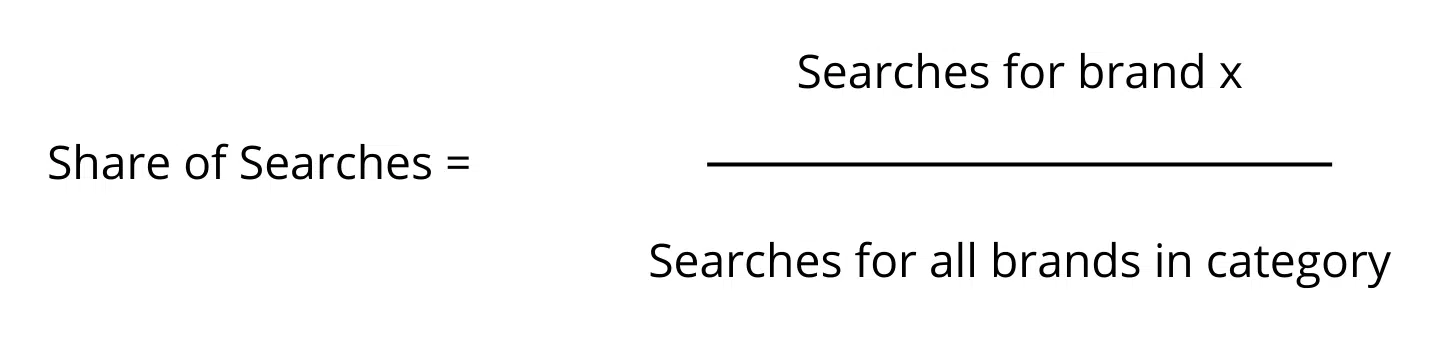
Share of search is a metric Les Binet and the IPA proposed as a cost-effective way of measuring brand performance. It’s also a fairly simple metric to work out. 

You can use Google Trends to measure the interest of your brand and the competitors and calculate your share of search interest.

Share of searches

This isn’t perfect for SEO because it shows search as a channel. This means that all of your marketing adds to this figure, but it’s a nice metric to:

  • Show how your marketing impacts your business.
  • Give you a warning, especially when there’s a decline in share of search interest. This data can provide six months’ notice about a change in business success, giving you time to take action.

3. Share of search volume 

Share of search interest tells you how interested people are in your brand (compared with the competition), but what if you’re a small brand? And what about search traffic only?

Thankfully, share of search volume is here to rescue.

Tools such as Semrush and Ahrefs now allow you to see this easily. 

Log into one of them, list your organic competition, and see how your share of organic search looks in comparison.

Although I don’t know of any SEOs conducting tests in this area, I feel (based on my experience) that search volume will tend to follow a similar path to search interest.

If you see a decline in traffic across your informational, brand, buyer intent or non-brand searches, it’s probably an indication that you need to take marketing action.

4. Branded search traffic

You’ll get two types of traffic for every business, brand and non-brand.

While an increase in branded traffic will not likely be down to you.

Depending on your business, capturing it can be part of the SEO’s role.

There are many ways to do this, of course, and it’s beyond the scope of this article to delve further.

Capturing as much brand traffic as possible ensures you show up for buyers.

Branded search traffic is a great metric to show key stakeholders. It can also be used to inform other marketing channels and help to plan marketing activities.

This is one of the reasons your SEO team should be in every marketing meeting. They have data that helps everyone. 


Get the daily newsletter search marketers rely on.


Google has covered the messy middle of search in the past. It is a model for how humans use search engines to purchase and make decisions.

To paraphrase their research, people explore a subject, research and then evaluate their decisions. 

This means it’s beneficial for your business to show up during the customer’s research journey.

So, showing up during the customer’s research phase and answering key questions is a valuable SEO tactic. 

And one that you can prove with analytics.

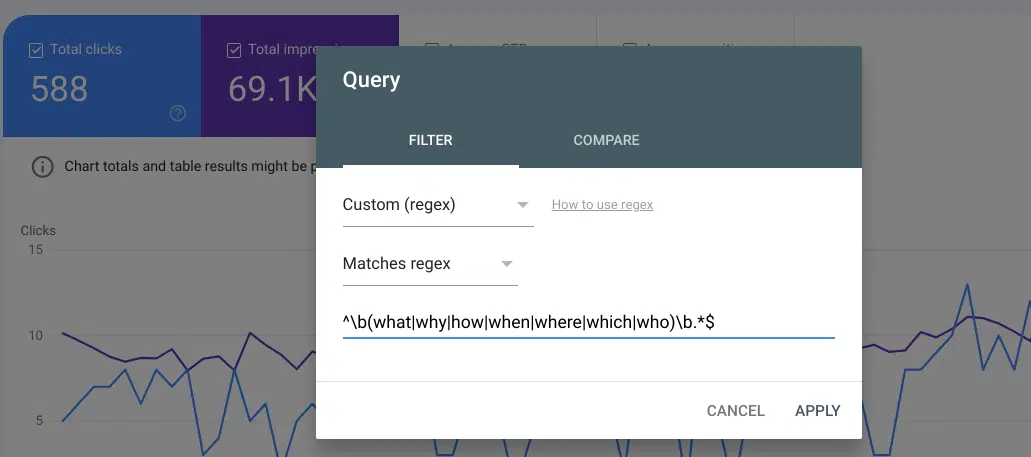
Regex in GSC

You can use a custom regex to generate these metrics or a tool like SEOTesting to extract the data.

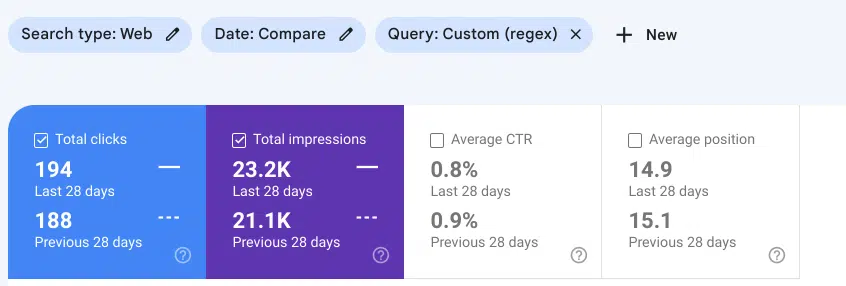
Organic search data from GSC

Now, you won’t want to give a spreadsheet to your clients (unless they want one), but a simple screenshot of Search Console data will be enough.

Alternatively, you can use spreadsheet reports to generate a better-looking chart.

6. Increased physical availability 

Physical availability indicates the ease and convenience a customer can buy from your brand.

And yes, these are your buyer terms, the ones you’re likely bidding on and paying a fortune with PPC.

It’s these that you can track and show the clients that you’re ranking for. Once ranked, you can start experimenting with reducing PPC spend to reduce CPL.

I advise having the PPC keywords for your client and then tracking organic rankings. Produce this in a monthly chart for the client to show your organic rankings for these terms.

7. New visitor acquisition 

Perhaps the most controversial yet valuable metric that gets ignored is new visitor acquisition.

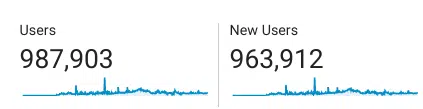
New users

New visitors are the lifeblood of any website, and showing where that traffic came from is essential.

Why?

Because it shows that your business is being introduced to new prospects, and this is how you grow a brand.

Cover reports: Your new best friend

Just because Google gives you analytics data doesn’t mean you need to use all of it for SEO reports.

For most, the data looks like a set of numbers, confusing customers. Your expertise is there to interpret that data for customers in meaningful ways.

Sure, give them the numbers, but I advise you to provide customers with a cover report.

A simple one-page report that highlights what I’ve shown above (or any metrics you like).

Not only will that reduce your reporting time, but it will also highlight your expertise in picking out relevant information.

We’re SEO specialists. We must ensure that this expertise touches every part of SEO, including reporting.

And by placing your data in context, you’ll increase your perceived value.

Or in other words, if your reporting calls aren’t interesting for clients, find a way to make the data far more relevant, and they will be.


Opinions expressed in this article are those of the guest author and not necessarily Search Engine Land. Staff authors are listed here.


Related stories

New on Search Engine Land

@media screen and (min-width: 800px) { #div-gpt-ad-3191538-7 { display: flex !important; justify-content: center !important; align-items: center !important; min-width:770px; min-height:260px; } } @media screen and (min-width: 1279px) { #div-gpt-ad-3191538-7 { display: flex !important; justify-content: center !important; align-items: center !important; min-width:800px!important; min-height:440px!important; } }

About the author

Andrew Holland

Andrew Holland is the Director of SEO at JBH, an award-winning Digital PR and SEO agency. His SEO background stems from a 17-year career in the police, where a number of years were spent within intelligence, utilizing SEO within internal systems to catch criminals. After developing chronic asthma, Andrew left the police and launched a freelance SEO and digital marketing career, and has worked with a wide range of clients, from SMEs to 8-figure businesses. Today, he directs the SEO delivery for one of the UK’s fastest-growing Digital PR and SEO agencies. Building organic visibility, trust and fame for consumer brands.

https://searchengineland.com/explain-value-seo-proven-methods-395538


Google releases April 2023 reviews update

Google has released the April 2023 reviews update. This update goes beyond Google’s prior product reviews updates to evaluate reviews of any topic that is reviewable, including:

  • Services and businesses.
  • Destinations.
  • Media (e.g., games, movies).

The big takeaway. Google has changed the name of its “product reviews system” to “reviews system” and has altered the language in multiple parts of its guidance documentation around product reviews to now apply to all types of reviews.

Announcement. Google announced the April 2023 reviews update on Twitter:

Google also updated its Search Status dashboard at 9:08 PDT with the following: “Released the April 2023 reviews update, which now covers reviews about products, services, and things. Learn more about how to write high quality reviews.”

Google makes “product review” guidance “review” guidance. This is a big change. Google has reworded its article on How to write high-quality reviews in multiple places, providing guidance about “product reviews” to simply apply to all types of “reviews” – just with more generic language.

You can see many of the changes here, as shared by Marie Haynes on Twitter:

Google Reviews Update Doc Changes

For example, Google has edited “shoppers” to become “people.” And a “product” becomes a “thing” or “something” or is simply deleted.

While the edits are small in terms of grammatical choices, they are big in terms of implications and scope. What was the product reviews update now essentially applies to every possible type of review as part of Google’s review system.

Review system name change. The “Google Search’s reviews system and your website” page, before this update, was called “Google Search’s product reviews system and your website.” That page is now 301 redirecting to the new page.

Google added some new guidance:

The reviews system is designed to evaluate articles, blog posts, pages or similar first-party standalone content written with the purpose of providing a recommendation, giving an opinion, or providing analysis. It does not evaluate third-party reviews, such as those posted by users in the reviews section of a product or services page.

Reviews can be about a single thing, or head-to-head comparisons, or ranked-lists of recommendations. Reviews can be about any topic. There can be reviews of products such as laptops or winter jackets, pieces of media such as movies or video games, or services and businesses such as restaurants or fashion brands.

Most of the other changes were simply deleting the word “product,” except where it added “services or other things” to the first line in the “How the reviews system works”:

“The reviews system works to ensure that people see reviews that share in-depth research, rather than thin content that simply summarizes a bunch of products, services or other things.”

– Google Search’s reviews system and your website

Why we care. If your website publishes any type of review content, this will be an important update to watch. Check your rankings to see whether your organic traffic improves, declines or stays the same.

Google on high-quality reviews. So what does Google consider a high-quality review? Google has shared 14 best practices (note that these are not new):

  • Evaluate from a user’s perspective.
  • Demonstrate that you are knowledgeable about what you are reviewing—show you are an expert.
  • Provide evidence such as visuals, audio, or other links of your own experience with what you are reviewing, to support your expertise and reinforce the authenticity of your review.
  • Share quantitative measurements about how something measures up in various categories of performance.
  • Explain what sets something apart from its competitors.
  • Cover comparable things to consider, or explain which might be best for certain uses or circumstances.
  • Discuss the benefits and drawbacks of something, based on your own original research.
  • Describe how a product has evolved from previous models or releases to provide improvements, address issues, or otherwise help users in making a purchase decision.
  • Focus on the most important decision-making factors, based on your experience or expertise (for example, a car review might determine that fuel economy and safety are key decision-making factors and rate performance in those areas).
  • Describe key choices in how a product has been designed and their effect on the users beyond what the manufacturer says.
  • Include links to other useful resources (your own or from other sites) to help a reader make a decision.
  • Consider including links to multiple sellers to give the reader the option to purchase from their merchant of choice.
  • When recommending something as the best overall or the best for a certain purpose, include why you consider it the best, with first-hand supporting evidence.
  • Ensure there is enough useful content in your ranked lists for them to stand on their own, even if you choose to write separate in-depth single reviews.

Languages impacted. Google said this system applies to these languages: English, Spanish, German, French, Italian, Vietnamese, Indonesian, Russian, Dutch, Portuguese and Polish.

Previous product review updates. This is an evolution of Google’s series of product review updates – of which there have been six since 2021. Google has now redirected all of its prior pages providing guidance around the “product reviews” update to its revised “reviews” guidance.

Here’s a timeline of all Google’s past product reviews updates:


Related stories

New on Search Engine Land

@media screen and (min-width: 800px) { #div-gpt-ad-3191538-7 { display: flex !important; justify-content: center !important; align-items: center !important; min-width:770px; min-height:260px; } } @media screen and (min-width: 1279px) { #div-gpt-ad-3191538-7 { display: flex !important; justify-content: center !important; align-items: center !important; min-width:800px!important; min-height:440px!important; } }

About the author

Danny Goodwin

Danny Goodwin has been Managing Editor of Search Engine Land & Search Marketing Expo – SMX since 2022. He joined Search Engine Land in 2022 as Senior Editor. In addition to reporting on the latest search marketing news, he manages Search Engine Land’s SME (Subject Matter Expert) program. He also helps program U.S. SMX events. Goodwin has been editing and writing about the latest developments and trends in search and digital marketing since 2007. He previously was Executive Editor of Search Engine Journal (2017 to 2022), managing editor of Momentology (from 2014-2016) and editor of Search Engine Watch (from 2007 to 2014). He has spoken at many major search conferences and virtual events, and has been sourced for his expertise by a wide range of publications and podcasts.

https://searchengineland.com/google-releases-april-2023-reviews-update-395561


LinkedIn SEO guide: Optimizing your profile for more connections, better leads

LinkedIn is a powerful search engine capable of generating targeted, substantial traffic to your profile.

Moreover, this traffic can develop into valuable professional connections and new clients. 

In this guide, you’ll learn how to optimize your profile to tap into that power and make LinkedIn work for you – driving more connections and better clients. 

LinkedIn is not just a resume

LinkedIn is much more than an online resume. It’s also more than just a place to list your credentials, add a little blurb about yourself and hope someone is intrigued enough to network with or hire you.

With LinkedIn optimization, you will build connections with some of the best and brightest in your industry and attract your ideal clients directly to your profile and inbox.

From profile optimization and SEO to content posting and engagement, this guide covers everything you need to turn your LinkedIn profile into a brand-building, lead-generating machine.

More than SEO: Full-throttle LinkedIn optimization

Many LinkedIn optimization guides start and end with SEO, but I say that SEO is just the tip of the iceberg.

As with your business website, the success of your inbound marketing through LinkedIn depends on traffic and conversion optimization.

If you focus all your efforts on SEO without fully optimizing your profile for conversions, you aren’t making the most of the traffic coming in.

That’s why I put all of the LinkedIn SEO best practices to the test and applied my own expertise around conversion copywriting, sales funnels, and conversion optimization.

The result of that testing is this guide – which includes sections about profile aesthetic, creating a LinkedIn lead funnel, writing compelling copy on your profile, and converting connections into new clients.

The LinkedIn optimization guide covers:

You’ll also learn how to craft a high-converting “welcome” message for new connections, attract your ideal clients directly to your profile and build authority with LinkedIn articles.

Let’s get into it, shall we?

1. Spruce up your profile aesthetic

One of the best things about your LinkedIn profile is how much real estate you have in terms of optimization.

Sure, the obvious places are your headline, summary and experience sections, but you can also take advantage of your profile photo and cover photo sections.

This is what I call optimizing your “profile aesthetic” – as you aren’t adding SEO keywords but tailoring your profile’s look to your target audience.

Do looks really matter? You tell me.

How important is the design of your business website to how it appeals to potential clients/customers?

Exactly.

Optimize your profile’s curb appeal

I’m a strong proponent of squeezing every bit of juice out of a platform to have it work for my business. When it comes to LinkedIn, that means not only having it talk the talk but look the look.

To optimize your profile’s “curb appeal,” you will focus on two features: the profile photo and the cover photo.

Profile photo

We are all familiar with the dull, grainy headshots on LinkedIn. If you want to take LinkedIn branding seriously, I say dare to stand out!

You’ll want a professional, high-quality image highlighting your personality and business. Something that your potential clients will find approachable.

  • High-quality image – clear, not pixelated.
  • Close shot of your face.
  • Simple background.
  • Appropriate attire.
  • Smile!

For some industries, your look may include professional attire and a corporate background. For others, it could be more casual. The key is to appeal to what your target audience is most familiar with in working with people like you.

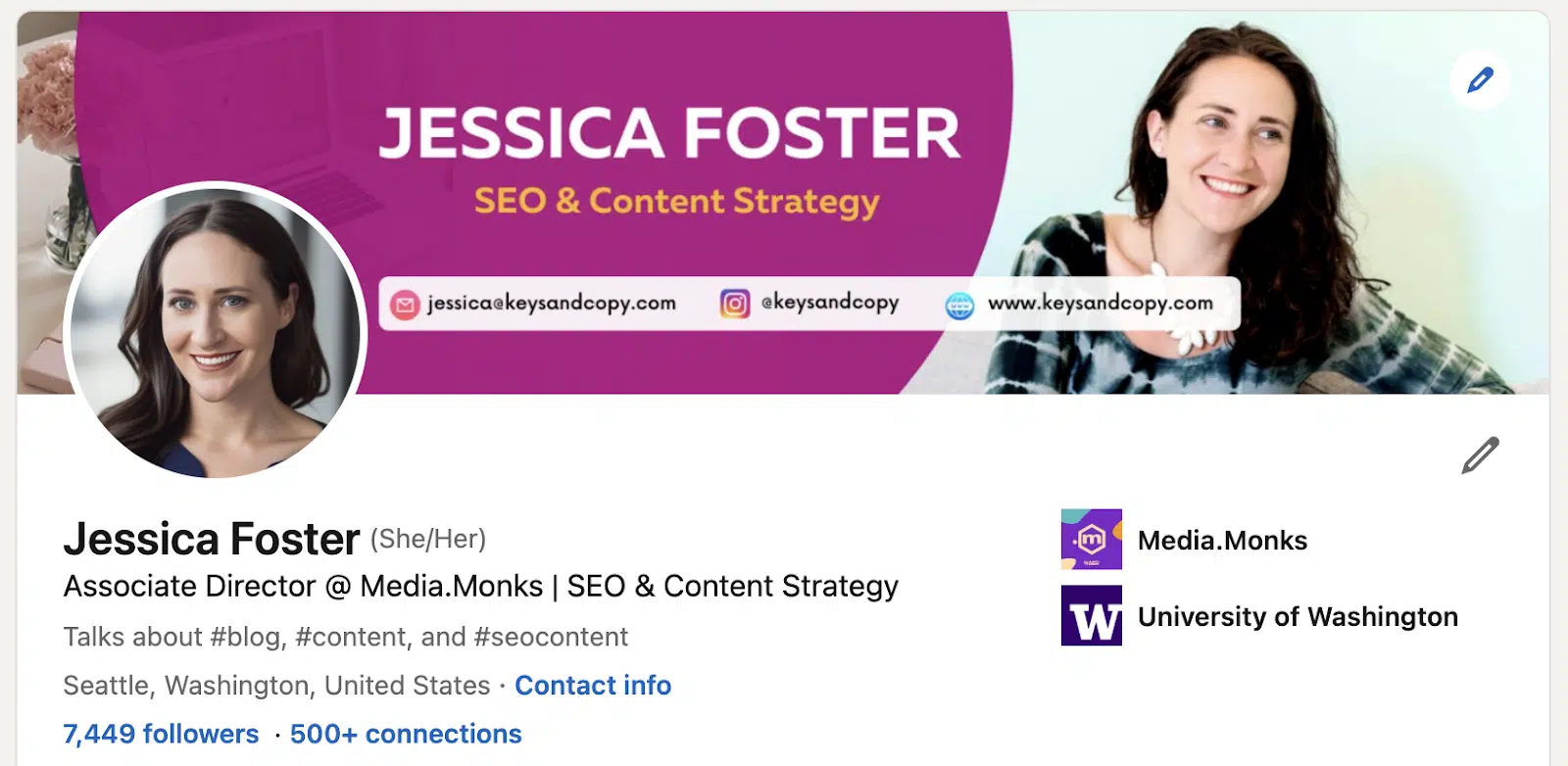
Professional LinkedIn profile photo

I’m an associate director of SEO at a global media agency, so my clients expect some degree of polish and professionalism.

This is why I include a professional headshot and a well-designed background image with my name, email address, and social media handles. 

And please, ditch the selfie. I highly recommend investing in a professional headshot for this. It will make a huge difference – taking you from amateur to expert.

Background photo

The background photo section also gives you ample real estate to tell profile visitors what you (and your business) are all about.

The default LinkedIn profile cover photo is a blue background with geometric shapes and dots.

As far as we business owners are concerned, this is nearly seven inches of desktop real estate that are going to waste.

LinkedIn profile cover image

Let’s make it count.

You can easily create a custom cover image using Adobe Photoshop or Canva with a professional background and copy that appeals to your target audience.

Best practices include:

  • Adding a tagline telling profile visitors what you do and who you serve.
  • Adding your website URL and social media handles.
  • Having an attractive backdrop image that draws in your target audience.
  • Including a call to action or letting users know how to contact you.
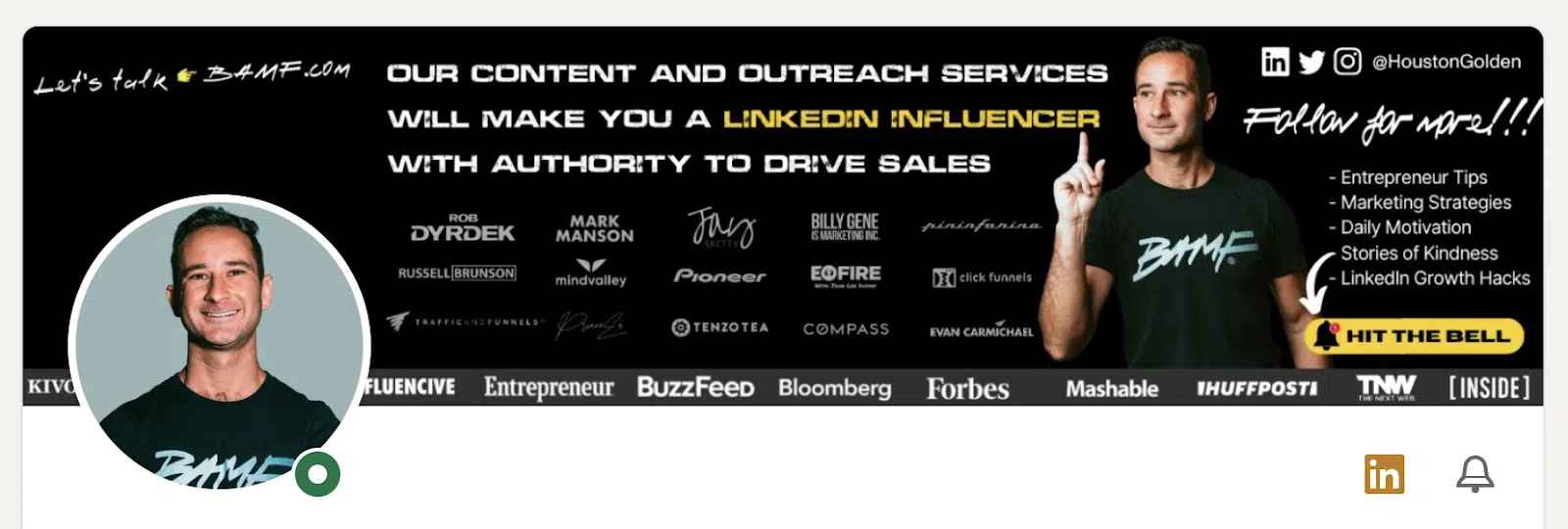
Optimized LinkedIn profile cover image

In the example above, we see how this LinkedIn profile makes ample use of the cover photo section by including:

  • A description of what services the founder offers (“content and outreach services…”)
  • A call to action (“Follow for more!”)
  • The founder’s social media handle (“@HoustonGolden”)

With this, users know at a glance what he does, who he helps and how best to reach him – all without having to dig through his entire profile. 

Users are prompted to “Hit the bell” (i.e., turn on notifications for his profile) to learn more “entreprenuer tips,” “marketing strategies,” and more. 

By optimizing the look of your profile, you give the best possible first impression to your potential connections. You also make it easier for potential clients to understand what you are about and how to get ahold of you.

Once your profile is pretty, it’s time to move on to the rest of the sections.

2. Write compelling profile copy

As an SEO content writer and copywriter, I geeked out when it dawned on me that LinkedIn is a great place to implement conversion copywriting. It really is a no-brainer.

Unfortunately, many of us have treated our LinkedIn profile like a resume – concise and professional, but boring.

LinkedIn was built around the idea of professionals connecting with other professionals.

You won’t effectively do that if your profile reads like the ingredients section on the back of a bran flakes cereal box.

Write with your target audience in mind

Instead, write your LinkedIn profile like you would your online dating profile, only more professional.

Make it interesting, add pizzazz and write it to appeal to the type of people you want to attract.

There are a few primary areas where you can do this: your headline, summary and experience sections.

Headline

Your headline is the line of text directly beneath your name on your profile. LinkedIn gives you about 220 characters of space here to tell visitors who you are and what you offer.

Your headline should combine LinkedIn SEO keywords (which we will discuss in section three of this guide) and compelling copy. That’s because it attracts traffic and keeps users engaged with your profile.

LinkedIn released an update stating that “dwell time” is an important factor in its algorithm.

This means it’s even more important to have a compelling copy to entice users to read through your profile and explore your content. 

In your profile copy, you will want to be uber-clear about what you do. This is not a space for witty taglines like “Probably out fishin’” or “I rank it, you bank it!”

Headlines like these do not include keywords and can leave profile visitors feeling confused about what exactly it is that you do.

I suggest:

  • Keeping your headline chocked full of keywords, with a bit of finessing copy. (i.e., “I’m a digital marketing strategist helping small businesses reach more customers online.”)
  • Crafting a compelling headline with conversion copywriting.
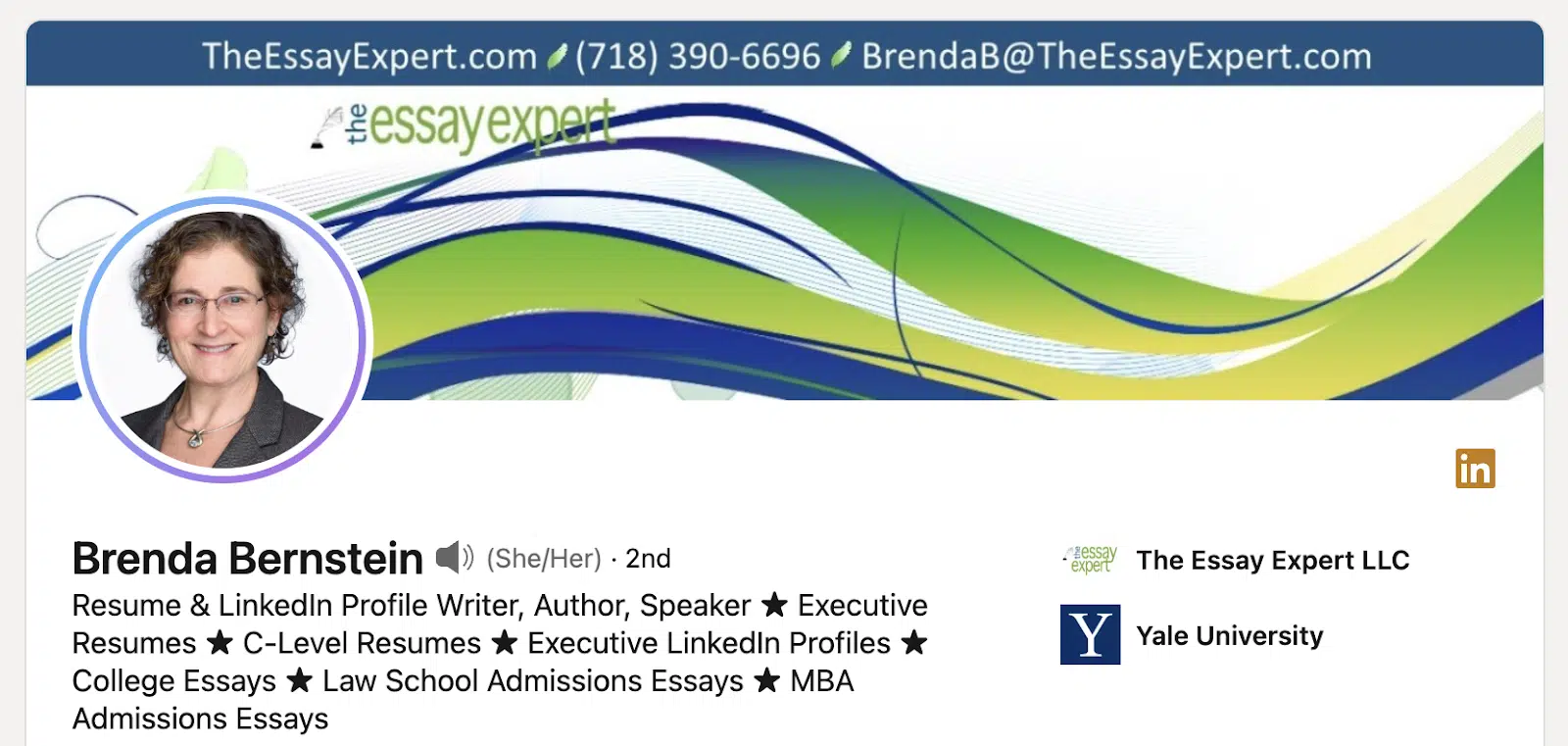
Optimized LinkedIn profile headline

In the example above, this profile gets straight to the point by describing:

  • What her title is (“Resume & LinkedIn Profile Writer”)
  • What she does (“Author” and “Speaker”)
  • What she offers (“Executive Resumes,” “Law School Admissions Essay,” etc.)

This headline includes relevant keywords that could potentially draw in people looking for services like hers.

Optimized LinkedIn profile headline - industry-related

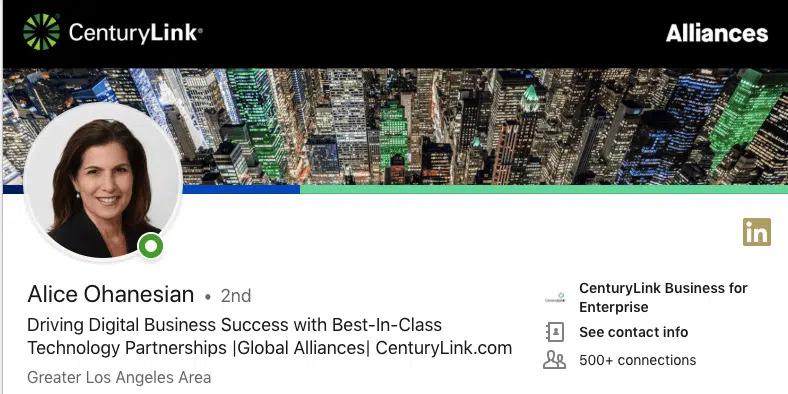
Similarly, this business owner focuses less on keywords and more on appealing to people looking for “business success” through a “best-in-class” partnership.

Both examples fill their headline with copy and keywords, ensuring no space goes to waste.

Not a great writer? You may want to contact a professional copywriter to help you craft a message that appeals to your target audience.

Later, we will discuss finding LinkedIn SEO keywords to include in your profile.

About section

Your About section is the largest space for adding compelling copy and LinkedIn SEO keywords. With 2,600 characters worth of space, you can’t afford not to optimize this section.

This is where visitors go to learn even more about you, your business and the services that you offer.

I like to compare it to the About us page on a business website. And every great copywriter will tell you this page is about your audience, not you.

You need to craft an about section that speaks to what your target audience is looking for. This is not a place to simply rattle off your accomplishments and services.

Ask yourself: What is my potential audience looking for when it comes to working with someone like me?

Market research will be able to answer this for you.

If you conducted market research prior to adding copy to your business website, then you can apply the same concepts here. If you haven’t conducted market research in order to figure out your audience’s struggles, pain points, needs, and wants, you will want to do that first.

Once you have your market research, you will write a summary that appeals to your target audience/ideal clients.

You will simply address their primary struggle and how you will be able to help them overcome that struggle.

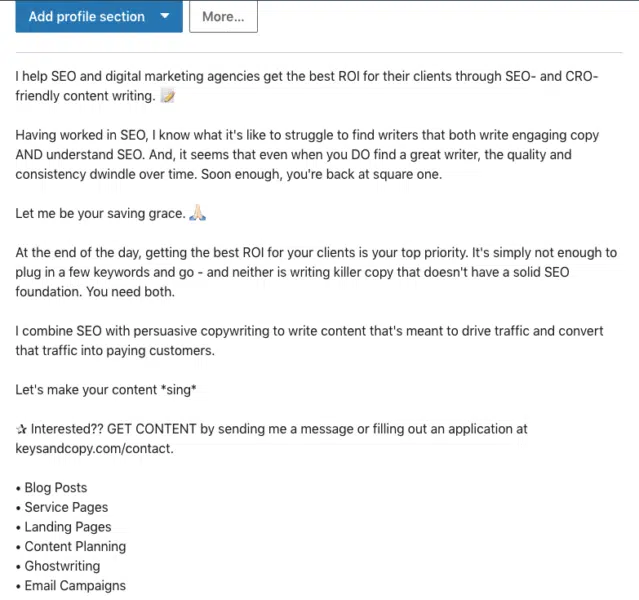
Optimized LinkedIn about section

In the example above, you can see how I address the primary struggles that SEO agencies have when outsourcing SEO content: poor quality and writers’ lack of SEO knowledge.

Then, I explain how I do things differently, what to expect when working with me and how best to contact me.

Your summary section shouldn’t ramble on and on; it should be concise, targeted and written with a purpose.

Get your message across as efficiently and effectively as possible so that you can move visitors along your profile funnel without delay.

In April 2022, LinkedIn announced that all Creators can add a link to the “Introduction” section on their profiles. This link appears below your name and description on your profile. 

You can use this feature to add a link to your website, YouTube channel, online store, ebook, or whatever you want.

Experience section

The experience section is where I see most business owners getting lazy and treating their profiles like a resume. I used to do this myself. Not anymore.

Your experience section is another place to include LinkedIn SEO keywords and compelling copy that convinces users that you are the right fit for them.

You do this by writing each experience in a way that highlights what you took away from working at that company and the results you got for them.

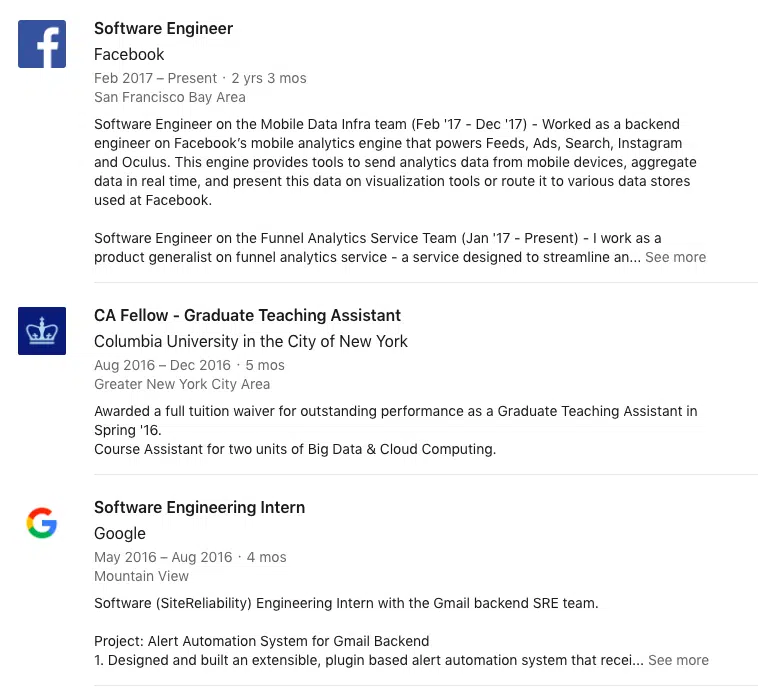
Optimized LinkedIn experience section

Above is an example of how a LinkedIn user has used the experience section to include detailed summaries of her work at certain companies, the projects she was a part of and the results she generated through these projects.

For your profile, you can mention results like:

  • The percentage increase in traffic generated for an SEO client.
  • An uptick in conversions for a Facebook ads client.
  • How you increased a client’s business revenue year over year.

Highlighting these achievements is a great way to show profile visitors that you have experience and can replicate those results for them.

I suggest writing naturally here rather than including a bulleted list of everything you have done. Hand-pick your best examples and make them super compelling.

Speak to what your potential clients are searching for and tell them how you can generate the desired results.

Top tips

  • Add experience items for each of your top clients (and link to their company profile), describing the work you did and the results you generated for them.
  • Use layman’s terms whenever possible. Don’t assume that your audience knows what “CTR,” “schema markup,” “KPIs,” “keyword cannibalization” or other industry terms mean.
  • Remove any experience examples irrelevant to the audience you aim to serve. If you offer SEO services to law firms, they don’t need to know that you were a Boy Scout in sixth grade or a party chair at your college fraternity.
  • Include references to any publications you write for or industry organizations you are a part of.

3. Implement LinkedIn SEO

LinkedIn SEO differs from regular SEO because the keywords users type in to find services and businesses on LinkedIn aren’t always the same as what users type into Google.

That’s because the average user doesn’t consider LinkedIn a search engine. They use it as intended – as a social media platform – and therefore use short-tail terms matching users’ job titles.

While users may use keywords like “copywriting services for small businesses” in Google, they are more likely to use terms like “copywriter” or “writer” on LinkedIn.

However, when users search long or short-tail terms in Google, LinkedIn profiles can rank in the SERPs. That’s why I suggest optimizing your profile with SEO keywords and what I call “LinkedIn SEO keywords.”

Finding SEO keywords

To find SEO keywords for your profile, simply conduct keyword research as you would if you were finding keywords for your business website.

  • What do you want your profile to rank for?
  • Do these terms get decent search volume, with low competition?
  • Do they match the intent of your target audience?

These are all questions you’ll want to consider.

Generate a list of terms worth ranking for and with a reasonable search volume.

With this list, you will start on your LinkedIn SEO keyword research and optimize your profile with a combination of these terms.

Finding LinkedIn SEO keywords

Unfortunately, I have yet to find a tool that provides search volume data for keywords used on LinkedIn.

Therefore, this is not a hard science. But, if you are skilled in SEO, you can make some informed guesses about how keywords are being used on LinkedIn.

Here is my process for finding keywords on LinkedIn:

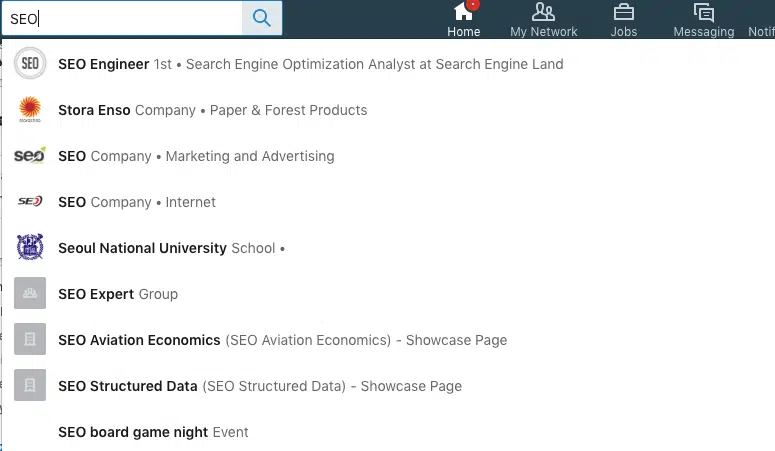
Step 1: Search for the shortest, broadest term associated with your services.

Finding LinkedIn SEO keywords - step 1

Use LinkedIn’s search box to search for the broadest term that applies to your business.

If you have an SEO agency, this would be “SEO” or even “marketing.” As a Facebook ads expert, this would be “Facebook ads” or “advertising,” perhaps “social media.”

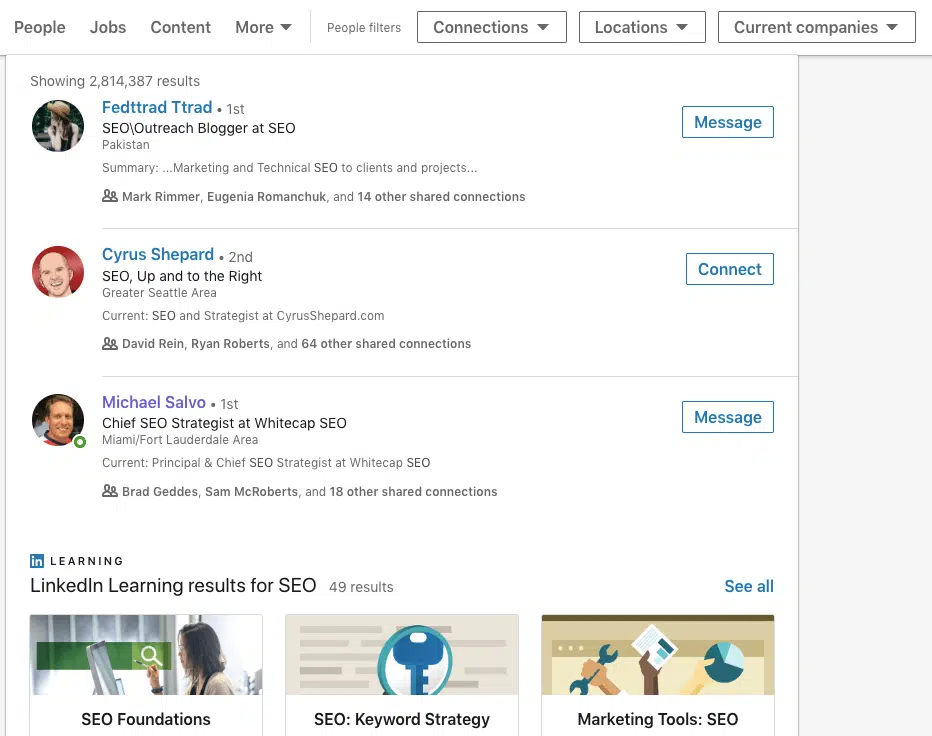
LinkedIn will automatically show you a list of the top results for that term in your network (more on this later).

Step 2: Look at the full results.

Beneath the list of results, you will see an option to “See all results for [keyword].” Click on this to view the full results page.

This will take you to a page that shows you all of the results associated with this keyword, including the number of results, whether the results are connections, companies, groups, the location of the results and much more.

Finding LinkedIn SEO keywords - step 2

You will notice that the top results are likely connections already in your network – identified by a “1st,” “2nd,” or “3rd” degree connection annotation.

This means that you aren’t seeing the true search results, as LinkedIn prioritizes showing people and companies you have some existing connection with.

Our job is to determine which terms yield the highest volume and best match results across the board.

Step 3: Take note of the search volume.

Before moving on to the next step, note how many results your initial search yields.

Finding LinkedIn SEO keywords - step 3

You can do this by looking at the original total or by filtering it by people and companies. Do not add any other filters yet.

Basically, you want to know how many results are pulled when users search for that term to find people or companies that offer services like yours.

Step 4: See expanded results for first-, second- and third-degree connections.

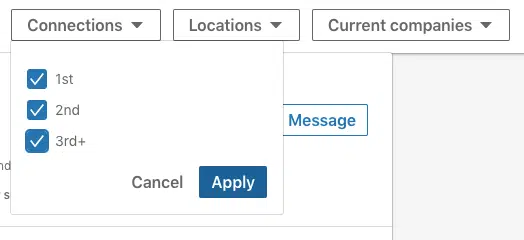
Once you have recorded the initial “volume,” filter the results by ticking off the connection options.

Finding LinkedIn SEO keywords - step 4

This will pull up the profiles of people you are connected with and those you are not connected with.

There’s no good way to see what others see when searching for your target keyword, but this gets you close.

It will show you what keywords profiles within and outside your network are using and how those profiles rank on LinkedIn for those terms.

This “search volume” will be your guide when it comes to deciding which terms are worth using in your profile.

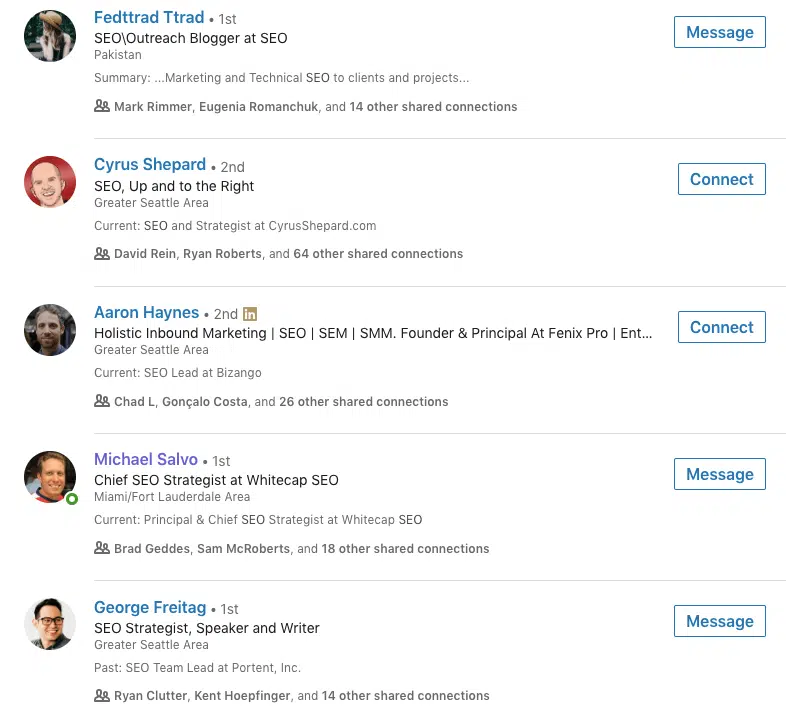
Step 5: Analyze the keywords used in the results.

Much like conducting competitor analysis of websites in your niche, you will now want to identify what keywords are used in the “top ranking” profiles.

(Remember though, these search results are skewed based on your degree of connection).

Finding LinkedIn SEO keywords - step 5

Note how your keyword is being used in the resulting profiles.

Are profiles using “SEO strategist” or “SEO specialist?” Are they simply listing “SEO, SEM, SMM” or are they more specific? See if you can find any trends here.

Finally, determine which terms are the best match for the kind of traffic you are trying to attract to your profile.

In the example above, we can see that most of these profiles use the term “SEO” near the headline’s beginning, so we may also want to implement this. “SEO strategist” has also been used.

Make a list of these terms. Then, enter these terms into the search box again and see what results come up. Repeat this process until you have a list of the top 3-5 most used terms related to your initial “seed” keyword.

Step 6: Reference your SEO keywords list

Finally, you should compare your LinkedIn SEO keywords list to your regular SEO keywords list.

Is there an overlap? If so, keep these terms.

Are some terms being used on LinkedIn but may not be a great fit in the search engines? Decide whether you should replace this with a high-volume, low-competition SEO keyword.

Eventually, you will have a mix of terms that have the potential to draw in traffic both from LinkedIn searches and Google searches.

Adding LinkedIn and SEO keywords to your profile

Once you have a solid list of keywords, you will want to incorporate them into your LinkedIn profile.

Compared to Google, a plus side with LinkedIn is that there is no evidence that keyword stuffing is penalized here.

However, you want to keep your audience in mind and have your keywords fit into your copy compellingly and naturally.

Some areas to add keywords:

  • Headline
  • Summary
  • Experience section
  • Recommendations
  • Skills section

If there are some regular SEO keywords that you don’t want to leave out, your Experience section is a great place to add these.

If you found trends regarding where these keywords were included in the top-ranking profiles, try to follow this in your own profile. 

At the same time, don’t compromise if you think your profile copy is stronger by taking a different approach.

In section six, I address how to generate recommendations, skills and endorsements, plus how to add keywords to these sections.

4. Create a profile ‘funnel’

Wondering why copywriting is so important for your LinkedIn profile?

Well, it’s because your goal is to turn your profile into a funnel for new leads.

While many LinkedIn users rely on visitors to take the initiative and contact them via direct message, you and I will do things differently. We are going to make it stupidly easy for people to convert.

We’ll funnel visitors down the page – from your cover photo and headline to your summary, to your media section and, finally, to your inbox or landing page.

Photos and headline – Awareness

After visitors have read the text on your cover photo and in your headline, they should have a pretty clear idea about who you are and who you help. They will then make the decision of whether to learn more about you.

About – Interest

The About section is your chance to:

  • Address any pain points they have.
  • Communicate what your unique selling point is.
  • Briefly cover the kinds of services that you offer.

This is where it’s super important to get your messaging on point, based on the market research you conducted earlier

Media – Decision

The media section on your LinkedIn profile allows you to add links to your website and blog posts or upload videos. This content can make all the difference in convincing visitors that you are the right fit for them.

While directing visitors to a page or post could be effective, this approach involves directing visitors off your profile.

There’s the chance of creating a bottleneck here, as visitors may drop off due to inconvenience or because it takes longer to read through text versus watching a short video.

That’s why I suggest adding a video to your media section instead. This video, again, should address the primary pain points your audience faces, communicate how you will help them and include a clear call to action.

If you do this effectively, you will build trust with your profile visitors and convince them to reach out to you directly.

Inbox or landing page – Action

The call-to-action in your video should tell visitors how best to contact you. This will likely be through LinkedIn direct message or your website. You may want to include a unique landing page for LinkedIn leads.

Your call to action should sound like this:

  • “For x services, send me a message [on my website/through LinkedIn/through this link].”

Be specific about how visitors should reach you and what they should expect after they contact you. 

“Send me a LinkedIn message for a custom quote” is much more compelling than “Visit mywebsite.com for more info.”

By creating a profile funnel, you are more likely to take advantage of the traffic coming to your profile. 

Without a funnel, the burden is on visitors to figure out what you offer, chase down the details on your website, and figure out how to contact you.

A funnel makes the process straightforward, simple and conversion-friendly.


Get the daily newsletter search marketers rely on.


5. Build smart connections

While LinkedIn SEO and creating a profile funnel taps into the power of inbound marketing on LinkedIn, there’s another way to attract your ideal clients to your profile.

That method involves building connections with your target audience and professionals in your industry.

As we learned in the SEO section of this guide, LinkedIn prioritizes showing you your first-, second- and third-degree connections whenever you search for a keyword. 

It works the same way for your potential clients. If you are connected with people in their network, your profile will likely pop up when they search for one of your keywords.

Therefore, the more industry connections you have, the better.

Making the right kind of connections

Many LinkedIn users connect with every possible person they can find (aside from the clearly spammy profiles).

While this has yet to be tested, I think this can potentially weaken your profile, as you will become associated with profiles outside of your industry, making it less likely for your profile to be associated with your target keywords.

Is it beneficial to be connected with loads of graphic designers in India if you provide legal SEO services in the United States? Common sense would say no. (Feel free to prove me wrong, though.)

I think it makes sense to build connections within your industry and the industries of your target audience.

As a legal SEO expert, that would mean connecting with other legal SEO agencies, digital marketing experts, law firms, law blog writers and the like. You can still get quite broad.

Be smart about the kinds of connections you want and how they could benefit your business in the short and long term.

Finding your target audience on LinkedIn

While connecting with other people in your industry is simple, you will want to put more time and energy into connecting with people who fit your ideal client persona.

If you have been in business for a while, you will likely already know what these people look like. They could be small business owners, tech entrepreneurs, SaaS businesses, Fortune 500 companies, law firms, etc. 

Knowing this, you will simply use these identifiers to find profiles on LinkedIn that match.

If you are just starting out, you need to figure out what terms your target audience uses to describe themselves on LinkedIn.

You can do this by searching some general terms that you know about your audience (like “small business,” “contractor,” or “mommy blogger”) and seeing what comes up in the LinkedIn results.

Dig around until you find people that fit your ideal client persona, and take note of what terms they used in their headline and summary. Then, use these terms to find other people to connect with.

Connecting and saying ‘hi’

One of the reasons why LinkedIn has had a bad reputation for being dull and spammy is that many users use the platform to cold pitch their new connections. We aren’t going to do this.

Every time you extend a connection request to someone, send them a message introducing yourself and why you want to connect with them.

Remember – you are practically strangers. It will take a bit for them to trust you and determine whether the connection is worth it.

Rather than jumping into the pitch, follow scripts similar to the ones below (which have gotten me a near 100% response rate):

Networking script

LinkedIn networking script

“Hello [ name ],

Thanks for connecting. I see that we are both in the [ niche ] industry. I am an [ industry title ] myself. Are you working on anything interesting lately? Chat soon! – [your name ]”

This script implies that the person has already connected with you or may have extended the connection first. It creates a sense of familiarity versus making it seem like a random stranger is connecting with them.

It also gives a reason for the connection instead of leaving room for the person to suspect ulterior motives. They know what you do, so they can decide whether the connection is worth their time.

Finally, it prompts the person to respond by asking them about themselves. This puts the ball in their court. 

And, if they happen to be working on a project that you could potentially help them with, it opens the door to having that conversation without you coming across as salesy.

Potential client script

“Hello [ name ],

Thanks for connecting. I see that you [ run a small business/have a law firm/are a tech entrepreneur/etc ]. I wanted to reach out because I [ help businesses like yours do x ]. Maybe there’s potential to work together. Are you working on anything interesting lately?”

Similar to the previous script, this script lets the person know who you are and why you want to connect with them and leaves it up to them to respond to you.

No pitch implies that you know how you can help them – you don’t yet – or start rambling about your services.

This keeps the conversation open and prevents the risk of you pitching them on one service when they may have asked you about a different service you didn’t think to mention.

Let the conversation flow more naturally, and they will likely ask you about services most relevant to them.

Another benefit of this approach is to avoid drawing in leads that may not be the best fit for you.

A final note about connections

Try to build as many connections as possible (following the process outlined above), or at least reach that “500+” mark. 

This helps you build a more expansive network and appear trusted in your industry.

6. Gather recommendations, skills and endorsements

Again, LinkedIn SEO isn’t quite as measurable as website SEO, but that’s part of the fun.

Optimizing certain sections for keywords allows you to test what works and what doesn’t and develop your lead generation strategy.

The recommendations, skills and endorsements sections are all areas where you can add LinkedIn SEO keywords, but they don’t bring any hard evidence that says they move the needle in SEO. They may, however, move the needle when it comes to conversions.

Recommendations

LinkedIn recommendations are the “reviews” of your profile.

This is where references and past clients can talk about their experience working with you and the results you have gotten for them.

LinkedIn recommendations

Your clients will likely include keywords naturally here, which may or may not play a role in your profile SEO.

If you prompt your network contact for recommendations, you may want to suggest that they include those target keywords, just in case.

SEO aside, recommendations are great social proof to show you know what you are doing and bring awesome results to your clients.

If visitors see many positive recommendations on your profile, this could be the final push they need to hire you.

Skills

LinkedIn allows you to add a list of skills to your profile that tells visitors what you are best at.

This is another area where it may be smart to include things with your target keywords.

LinkedIn skills

You can have three “top” skills and a longer list of other skills you have.

I recommend listing your primary skills in the top three sections, as these are the most likely to get endorsed (as they are seen first).

Endorsements

Endorsements are when other users endorse you for the skills on your profile. Again, this serves as social proof that you have the skills you say you have.

You can reach out to users on LinkedIn to endorse your skills to boost your numbers. You can also endorse users for their skills, which could prompt them to contact or endorse you.

It’s best to have many endorsements for just a few skills versus only a few endorsements for many different skills.

7. Post the right kind of content, consistently

LinkedIn has quickly evolved to reveal more SEO factors and capabilities than ever before.

And while many guides have been written on how to “hack” the algorithm, your success on the platforms really depends on what works best for you and your specific audience.

Your LinkedIn content strategy should incorporate different types of content – long-form posts, images, videos, shared blog posts, etc. – to see which ones get the best engagement. 

The goal is to repeat what works, ditch what doesn’t, and revise your strategy to fit your audience and business.

One thing to note is that it is difficult to test your content’s success without consistency.

You should post different types of content multiple times throughout the day and then assess the results. If you are simply posting one short post per day, it’s unlikely that you will get any tangible data.

You may also want to look at what your competitors are posting and which types of posting are getting the most engagement there.

LinkedIn articles

LinkedIn gives an added algorithmic push to articles that are published on their platform.

In recent developments, LinkedIn allows you to customize how your SEO title and description will appear in search engines, making it even easier to improve your LinkedIn reach. 

Think of some article topics relevant to your target audience on LinkedIn. Then, use LinkedIn’s own Articles function to write articles, optimize them for LinkedIn Search, and reach new users. 

LinkedIn articles

While a shared blog post may attract a small handful of website visits, an article published on LinkedIn can easily trigger 2x, 3x or 5x the views.

For this reason, it may make sense to republish your existing blog content on LinkedIn.

Just be aware of the ramifications of having two identical pieces of content competing for the same keywords.

However, if website SEO isn’t a major concern, it could be worth taking this approach for social traffic alone.

Be sure to include a call to action within your LinkedIn article to take advantage of that traffic.

Also, consider LinkedIn collaborative articles if you are eligible to contribute.

8. Give engagement, get engagement

Engaging with other accounts on LinkedIn is another way to expand your reach.

Whenever you engage in a post, your comment and name pop up on your connections’ LinkedIn feed.

You can also pop up as a second- or third-degree connection to users in their network, expanding your reach.

LinkedIn engagement

That is, the more of a presence you have on LinkedIn, the more likely you will be seen by people inside and outside your network.

Much of your time on LinkedIn should be spent engaging with other people’s content, not just posting your own content (until you come up with a content strategy that works). 

It’s the best way to connect with users one-on-one and reach profiles outside your immediate network.

LinkedIn profile views

When users see your comment, they are likely to click on your profile to learn more about you. You can then reach out to these new viewers by requesting to connect.

These views are reflected by your notifications and in your LinkedIn analytics.

9. Understanding your LinkedIn analytics

No optimization guide is worth its weight without showing the results in terms of cold, hard numbers.

That’s why I was sure to test all of the LinkedIn best practices I encountered and any optimization hacks I came up with on my own.

I recommend marketers and business owners do the same, as LinkedIn optimization is still not cut-and-dry. 

The success of your LinkedIn strategy depends on what works best for your target audience.

Post impressions, profile views, total followers and search appearances

LinkedIn analytics

LinkedIn offers you helpful data to see how your profile is performing. You can see:

  • How many people have viewed your profile.
  • How many have viewed your posts (i.e., impressions).
  • How many people new people have followed you.
  • How often you have appeared in the search results (i.e., search appearances).

You can also see who has viewed your profile (unless they have a protected account) and examine trends over time.

LinkedIn analytics - past 90 days

Since implementing my LinkedIn SEO strategy, I saw a 173% increase in profile views over 30 days.

LinkedIn analytics - content performance

A month later, my average number of profile views has been around 160 per day (following a sharp uptick when I posted more consistently in March). That is with very little posting or engaging on LinkedIn (roughly 1-3 times daily).

I have also grown my connections from 325 to 7,464, generating dozens of qualified leads every month. 

These results have come from a process of near-constant testing. I have told others to implement micro-optimizations and analyze their LinkedIn analytics to see what is working and what isn’t.

Track your conversions

The goal of LinkedIn optimization isn’t merely more traffic and connections, though.

If you are starting your LinkedIn optimization journey, I recommend tracking how many leads you generate due to your efforts (LinkedIn does not track this for you). Only then will you truly know whether your strategy is paying off.

You can tap into your Google Analytics to see how many visitors you get from LinkedIn and then set up conversion tracking there. 

However, if you direct users to your LinkedIn inbox, you must track this manually or with a bot.

The numbers don’t lie. Follow what works, and you will certainly see an uptick in connections, traffic, and leads over time.

10. Gain followers via Creator Mode

LinkedIn recently announced new tools to help creators like you increase discoverability and attract new followers. Note that you have to have Creator Mode turned on to access these features. 

Followers from feed

Remember when I talked about how you gain visibility via connections? In Creator Mode, you don’t have to be first-degree connections to attract new followers.

Now, whenever a user sees your content in their Feed (via the algorithm), LinkedIn prompts them to follow you (via a “Follow” button) without them having to leave their feed. 

Hashtags

LinkedIn has been utilizing hashtags to better surface content (and profiles) on the platform. Be sure to include hashtags in your profile and posts to make your content easier for users to find. When a user uses LinkedIn search to find topics, LinkedIn will match their search with people/profiles that regularly talk about those topics. 

Connection requests

It used to be that someone sending you a Connection request would only result in a prompt to you, but that user would not automatically become a follower. 

Now, whenever someone sends you a new connection request, that person becomes one of your followers – and your content will appear in their feed. 

Turn your LinkedIn profile into a lead-generation machine

By following the LinkedIn optimization tips above and testing your own ideas for optimization, you can generate high-volume traffic to your profile and convert that traffic into qualified leads for your business.

The foundation of this strategy consists of:

  • Conducting LinkedIn SEO keyword research.
  • Optimizing your profile aesthetic.
  • Building quality connections.
  • Directing visitors through your custom profile funnel.

Afterward, make adjustments based on what works for your target audience and business model.

Are you making the most of your LinkedIn profile? If not, start today.


Opinions expressed in this article are those of the guest author and not necessarily Search Engine Land. Staff authors are listed here.


Related stories

New on Search Engine Land

@media screen and (min-width: 800px) { #div-gpt-ad-3191538-7 { display: flex !important; justify-content: center !important; align-items: center !important; min-width:770px; min-height:260px; } } @media screen and (min-width: 1279px) { #div-gpt-ad-3191538-7 { display: flex !important; justify-content: center !important; align-items: center !important; min-width:800px!important; min-height:440px!important; } }

About the author

Jessica Foster

Jessica is an SEO content writer and content marketing strategist at Keys&Copy – a content agency that helps marketers get the best ROI on content for their clients. She is a regular contributor to Search Engine Land and other industry-leading blogs. When she’s not writing, she’s likely jet-setting across the world, laptop in tow.

https://searchengineland.com/seo-guide-to-optimizing-your-linkedin-profile-for-more-connections-better-leads-315882


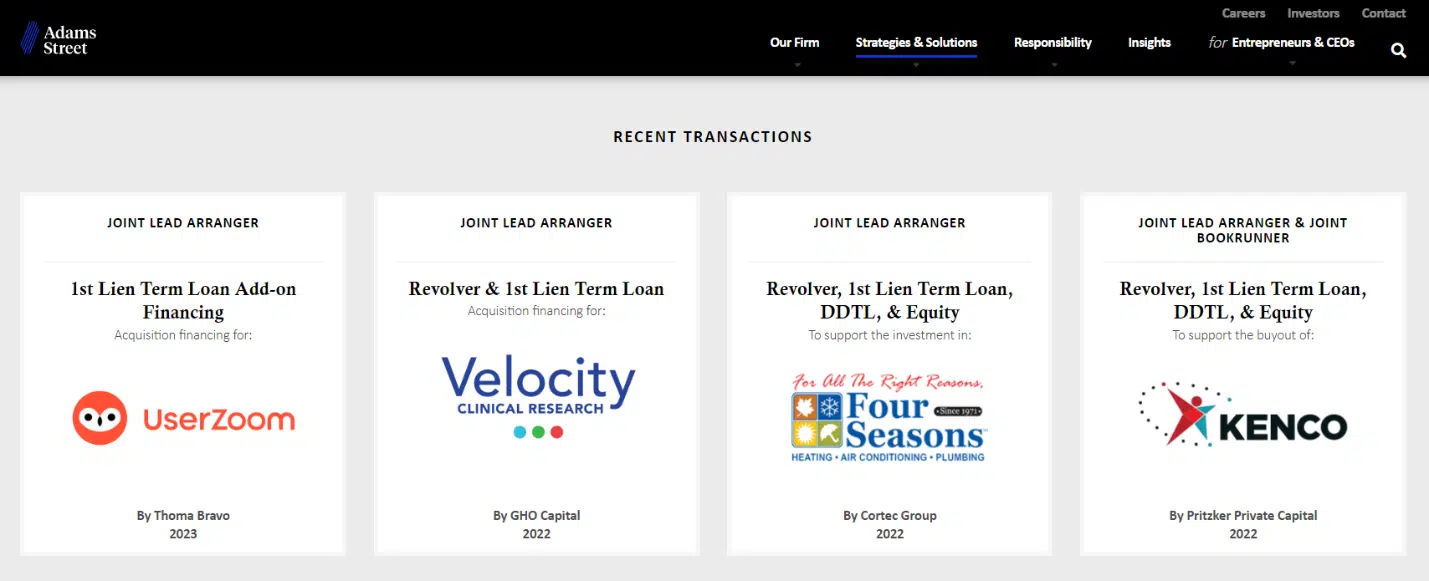
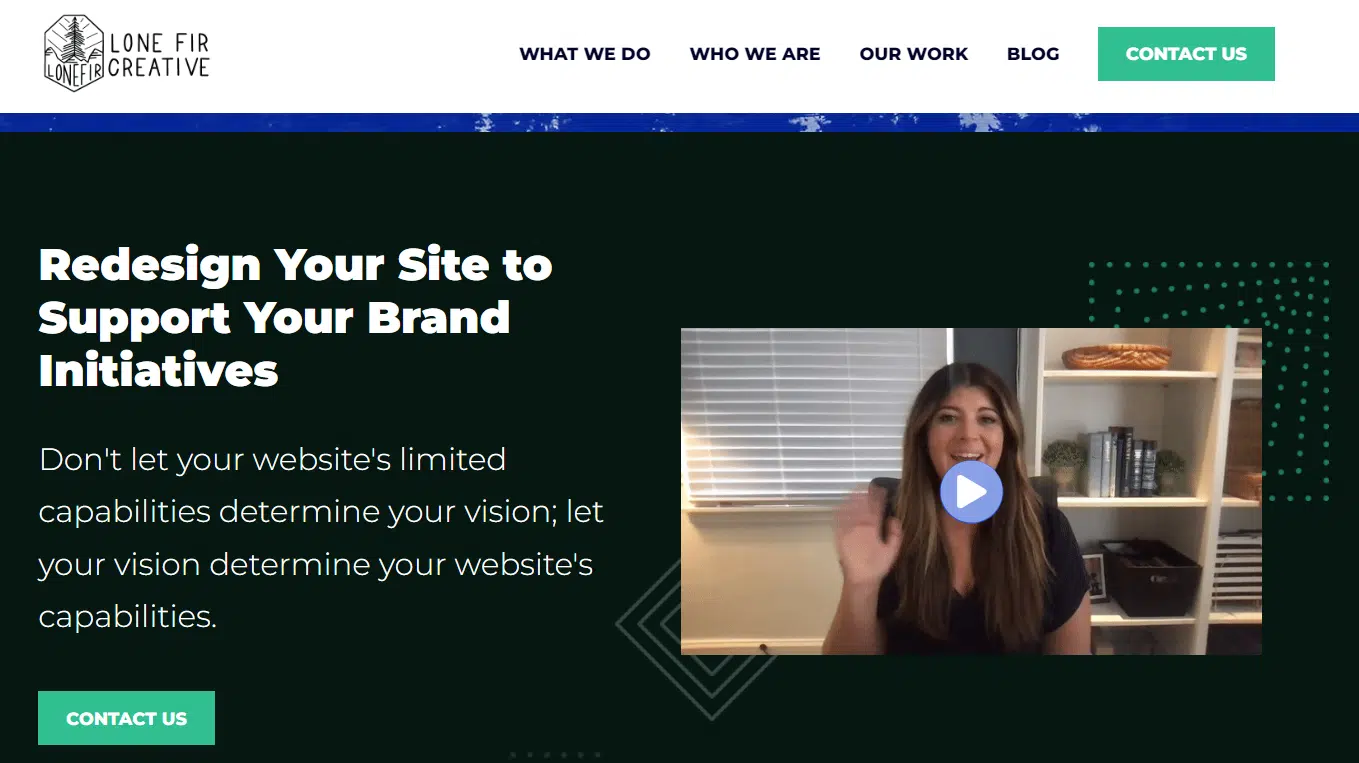
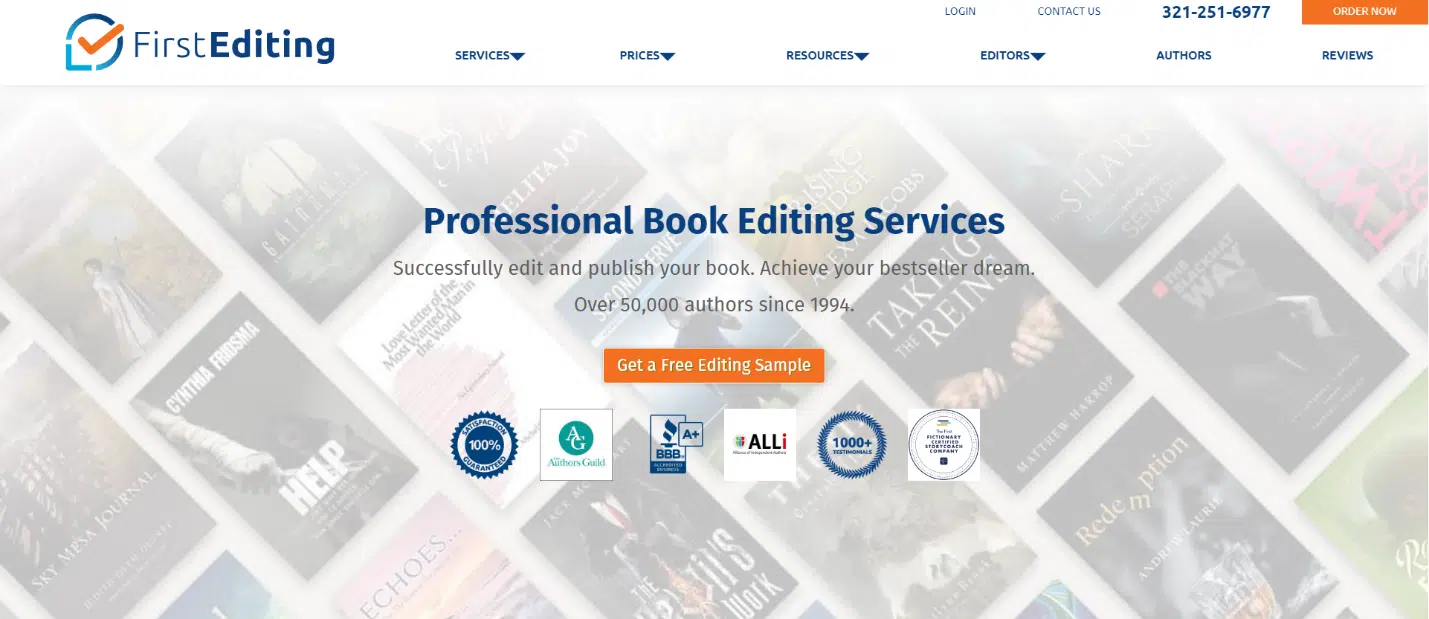
5 Python scripts for automating SEO tasks

Python is a powerful programming language that has gained popularity in the SEO industry over the past few years. 

With its relatively simple syntax, efficient performance and abundance of libraries and frameworks, Python has revolutionized how many SEOs approach their work. 

Python offers a versatile toolset that can help make the optimization process faster, more accurate and more effective. 

This article explores five Python scripts to help boost your SEO efforts.

The easiest way to get started with Python

If you’re looking to dip your toes in Python programming, Google Colab is worth considering. 

It’s a free, web-based platform that provides a convenient playground for writing and running Python code without needing a complex local setup. 

Essentially, it allows you to access Jupyter Notebooks within your browser and provides a host of pre-installed libraries for data science and machine learning. 

Plus, it’s built on top of Google Drive, so you can easily save and share your work with others.

To get started, follow these steps:

Enable file uploads

Once you open Google Colab, you’ll first need to enable the ability to create a temporary file repository. It’s as simple as clicking the folder icon. 

This lets you upload temporary files and then download any results files.

Access folder

Upload source data

Many of our Python scripts require a source file to work. To upload a file, simply click the upload button.

File upload button

Once you finish the setup, you can start testing the following Python scripts.

Script 1: Automate a redirect map

Creating redirect maps for large sites can be incredibly time-consuming. Finding ways to automate the process can help us save time and focus on other tasks.

How this script works

This script focuses on analyzing the web content to find closely matching articles. 

  • First, it imports two TXT files of URLs: one is for the redirected website (source_urls.txt), and the other for the site absorbing the redirected website (target_urls.txt).
  • Then, we use the Python library Beautiful Soup to create a web scraper to get the main body content on the page. This script ignores header and footer content.
  • After it’s crawled the content on all pages, it uses the Python library Polyfuzz to match content between URLs with a similarity percentage.
  • Finally, it prints the results in a CSV file, including the similarity percentage. 

From here, you can manually review any URLs with a low similarity percentage to find the next closest match.

Get the script

#import libraries
from bs4 import BeautifulSoup, SoupStrainer
from polyfuzz import PolyFuzz
import concurrent.futures
import csv
import pandas as pd
import requests #import urls
with open("source_urls.txt", "r") as file: url_list_a = [line.strip() for line in file] with open("target_urls.txt", "r") as file: url_list_b = [line.strip() for line in file] #create a content scraper via bs4
def get_content(url_argument): page_source = requests.get(url_argument).text strainer = SoupStrainer('p') soup = BeautifulSoup(page_source, 'lxml', parse_only=strainer) paragraph_list = [element.text for element in soup.find_all(strainer)] content = " ".join(paragraph_list) return content #scrape the urls for content
with concurrent.futures.ThreadPoolExecutor() as executor: content_list_a = list(executor.map(get_content, url_list_a)) content_list_b = list(executor.map(get_content, url_list_b)) content_dictionary = dict(zip(url_list_b, content_list_b)) #get content similarities via polyfuzz
model = PolyFuzz("TF-IDF")
model.match(content_list_a, content_list_b)
data = model.get_matches() #map similarity data back to urls
def get_key(argument): for key, value in content_dictionary.items(): if argument == value: return key return key with concurrent.futures.ThreadPoolExecutor() as executor: result = list(executor.map(get_key, data["To"])) #create a dataframe for the final results
to_zip = list(zip(url_list_a, result, data["Similarity"]))
df = pd.DataFrame(to_zip)
df.columns = ["From URL", "To URL", "% Identical"] #export to a spreadsheet
with open("redirect_map.csv", "w", newline="") as file: columns = ["From URL", "To URL", "% Identical"] writer = csv.writer(file) writer.writerow(columns) for row in to_zip: writer.writerow(row)

While meta descriptions are not a direct ranking factor, they help us improve our organic click-through rates. Leaving meta descriptions blank increases the chances that Google will create its own.

If your SEO audit shows a large number of URLs missing a meta description, it may be difficult to make time to write all of those by hand, especially for ecommerce websites. 

This script is aimed to help you save time by automating that process for you.

How the script works

  • First, the script imports a list of URLs from a TXT file (urls.txt).
  • Then, it parses all of the content on the URLs.
  • Once the content is parsed, it creates meta descriptions aiming to be below 155 characters. 
  • It exports the results into a CSV file.

Get the script

!pip install sumy
from sumy.parsers.html import HtmlParser
from sumy.nlp.tokenizers import Tokenizer
from sumy.nlp.stemmers import Stemmer
from sumy.utils import get_stop_words
from sumy.summarizers.lsa import LsaSummarizer
import csv #1) imports a list of URLs from a txt file
with open('urls.txt') as f: urls = [line.strip() for line in f] results = [] # 2) analyzes the content on each URL
for url in urls: parser = HtmlParser.from_url(url, Tokenizer("english")) stemmer = Stemmer("english") summarizer = LsaSummarizer(stemmer) summarizer.stop_words = get_stop_words("english") description = summarizer(parser.document, 3) description = " ".join([sentence._text for sentence in description]) if len(description) > 155: description = description[:152] + '...' results.append({ 'url': url, 'description': description }) # 4) exports the results to a csv file
with open('results.csv', 'w', newline='') as f: writer = csv.DictWriter(f, fieldnames=['url','description']) writer.writeheader() writer.writerows(results)

Script 3: Analyze keywords with N-grams

N-grams are not a new concept but are still useful for SEO. They can help us understand themes across large sets of keyword data.

N-Grams

How this script works

This script outputs results in a TXT file that breaks out the keywords into unigrams, bigrams, and trigrams. 

  • First, it imports a TXT file of all your keywords (keyword.txt).
  • Then it uses a Python library called Counter to analyze and extract the N-grams.
  • Then it exports the results in a new TXT file.

Get this script

#Import necessary libraries
import re
from collections import Counter #Open the text file and read its contents into a list of words
with open('keywords.txt', 'r') as f: words = f.read().split() #Use a regular expression to remove any non-alphabetic characters from the words
words = [re.sub(r'[^a-zA-Z]', '', word) for word in words] #Initialize empty dictionaries for storing the unigrams, bigrams, and trigrams
unigrams = {}
bigrams = {}
trigrams = {} #Iterate through the list of words and count the number of occurrences of each unigram, bigram, and trigram
for i in range(len(words)): # Unigrams if words[i] in unigrams: unigrams[words[i]] += 1 else: unigrams[words[i]] = 1 # Bigrams if i < len(words)-1: bigram = words[i] + ' ' + words[i+1] if bigram in bigrams: bigrams[bigram] += 1 else: bigrams[bigram] = 1 # Trigrams if i < len(words)-2: trigram = words[i] + ' ' + words[i+1] + ' ' + words[i+2] if trigram in trigrams: trigrams[trigram] += 1 else: trigrams[trigram] = 1 # Sort the dictionaries by the number of occurrences
sorted_unigrams = sorted(unigrams.items(), key=lambda x: x[1], reverse=True)
sorted_bigrams = sorted(bigrams.items(), key=lambda x: x[1], reverse=True)
sorted_trigrams = sorted(trigrams.items(), key=lambda x: x[1], reverse=True) # Write the results to a text file
with open('results.txt', 'w') as f: f.write("Most common unigrams:\n") for unigram, count in sorted_unigrams[:10]: f.write(unigram + ": " + str(count) + "\n") f.write("\nMost common bigrams:\n") for bigram, count in sorted_bigrams[:10]: f.write(bigram + ": " + str(count) + "\n") f.write("\nMost common trigrams:\n") for trigram, count in sorted_trigrams[:10]: f.write(trigram + ": " + str(count) + "\n")

Script 4: Group keywords into topic clusters

With new SEO projects, keyword research is always in the early stages. Sometimes we deal with thousands of keywords in a dataset, making grouping challenging. 

Python allows us to automatically cluster keywords into similar groups to identify trend trends and complete our keyword mapping. 

How this script works

  • This script first imports a TXT file of keywords (keywords.txt).
  • Then the script analyzes the keywords using TfidfVectorizer and AffinityPropagation.
  • Then it assigns a numeric value to each topic cluster.
  • The results are then exported into a csv file.

Get this script

import csv
import numpy as np
from sklearn.cluster import AffinityPropagation
from sklearn.feature_extraction.text import TfidfVectorizer # Read keywords from text file
with open("keywords.txt", "r") as f: keywords = f.read().splitlines() # Create a Tf-idf representation of the keywords
vectorizer = TfidfVectorizer()
X = vectorizer.fit_transform(keywords) # Perform Affinity Propagation clustering
af = AffinityPropagation().fit(X)
cluster_centers_indices = af.cluster_centers_indices_
labels = af.labels_ # Get the number of clusters found
n_clusters = len(cluster_centers_indices) # Write the clusters to a csv file
with open("clusters.csv", "w", newline="") as f: writer = csv.writer(f) writer.writerow(["Cluster", "Keyword"]) for i in range(n_clusters): cluster_keywords = [keywords[j] for j in range(len(labels)) if labels[j] == i] if cluster_keywords: for keyword in cluster_keywords: writer.writerow([i, keyword]) else: writer.writerow([i, ""])

Script 5: Match keyword list to a list of predefined topics

This is similar to the previous script, except this allows you to match a list of keywords to a predefined set of topics. 

This is great for large sets of keywords because it processes them in batches of 1,000 to prevent system crashes.

How this script works

  • This script imports a keyword list (keywords.txt) and a topics list (topics.txt).
  • Then it analyzes the topics and keyword lists and matches them to the closest match. If it doesn’t find a match, it categorizes it as other. 
  • The results are then exported into a CSV file.

Get this script

import pandas as pd
import spacy
from spacy.lang.en.stop_words import STOP_WORDS # Load the Spacy English language model
nlp = spacy.load("en_core_web_sm") # Define the batch size for keyword analysis
BATCH_SIZE = 1000 # Load the keywords and topics files as Pandas dataframes
keywords_df = pd.read_csv("keywords.txt", header=None, names=["keyword"])
topics_df = pd.read_csv("topics.txt", header=None, names=["topic"]) # Define a function to categorize a keyword based on the closest related topic
def categorize_keyword(keyword): # Tokenize the keyword tokens = nlp(keyword.lower()) # Remove stop words and punctuation tokens = [token.text for token in tokens if not token.is_stop and not token.is_punct] # Find the topic that has the most token overlaps with the keyword max_overlap = 0 best_topic = "Other" for topic in topics_df["topic"]: topic_tokens = nlp(topic.lower()) topic_tokens = [token.text for token in topic_tokens if not token.is_stop and not token.is_punct] overlap = len(set(tokens).intersection(set(topic_tokens))) if overlap > max_overlap: max_overlap = overlap best_topic = topic return best_topic # Define a function to process a batch of keywords and return the results as a dataframe
def process_keyword_batch(keyword_batch): results = [] for keyword in keyword_batch: category = categorize_keyword(keyword) results.append({"keyword": keyword, "category": category}) return pd.DataFrame(results) # Initialize an empty dataframe to hold the results
results_df = pd.DataFrame(columns=["keyword", "category"]) # Process the keywords in batches
for i in range(0, len(keywords_df), BATCH_SIZE): keyword_batch = keywords_df.iloc[i:i+BATCH_SIZE]["keyword"].tolist() batch_results_df = process_keyword_batch(keyword_batch) results_df = pd.concat([results_df, batch_results_df]) # Export the results to a CSV file
results_df.to_csv("results.csv", index=False)

Working with Python for SEO

Python is an incredibly powerful and versatile tool for SEO professionals. 

Whether you’re a beginner or a seasoned practitioner, the free scripts I’ve shared in this article offer a great starting point for exploring the possibilities of Python in SEO. 

With its intuitive syntax and vast array of libraries, Python can help you automate tedious tasks, analyze complex data, and gain new insights into your website’s performance. So why not give it a try?

Good luck, and happy coding!


Opinions expressed in this article are those of the guest author and not necessarily Search Engine Land. Staff authors are listed here.


Related stories

New on Search Engine Land

@media screen and (min-width: 800px) { #div-gpt-ad-3191538-7 { display: flex !important; justify-content: center !important; align-items: center !important; min-width:770px; min-height:260px; } } @media screen and (min-width: 1279px) { #div-gpt-ad-3191538-7 { display: flex !important; justify-content: center !important; align-items: center !important; min-width:800px!important; min-height:440px!important; } }

About the author

John McAlpin

John McAlpin has nearly a decade providing advanced SEO consultations to health organizations across the United States. John is deeply engaged in both the local and national SEO community and has a strong background in technical SEO, web development, and digital marketing strategy. McAlpin also provides freelance web development services for WordPress hosted sites.

https://searchengineland.com/python-scripts-automating-seo-tasks-395527


Connected TV’s results transcend the TV screen by MNTN

MNTN TDM Sponsored Article Featured Image 1920x1080 1 800x450

The tides of paid search and other performance channels seem to be shifting rapidly these days. Companies are changing hands, algorithms are updating and transparency is diminishing. With marketers looking for ad channels that they can consider both reliable and effective, this is where connected TV can enter the scene and support an already successful search strategy.

CTV is not just a brand awareness tool like its linear television predecessor, but it can also help advertisers achieve their performance goals, becoming the third pillar of performance marketing. Not only does it deliver performance results in its own right, but it also boosts the results of other paid channels, creating a halo effect.

Connected TV generates new demand

Connected TV is an essential tool for advertisers looking to generate new demand and avoid a dreaded performance plateau on your existing channels. There comes a time, after all, when adding more budget offers diminishing returns and the need for a new channel is necessary. 

Paid search relies on a self-identifying audience–a user’s interest and intent are clear based on their search. This makes them easy to target and capture. This audience is the low-hanging fruit. What happens when these leads have all been captured? The ease of identifying this powerful audience also means that it’s ripe with competition; your competitor is likely bidding on the same inventory.

Connected TV, on the other hand, creates and captures an incremental audience. CTV ads are precisely targeted to an audience that may benefit from a product or service but may not be in-market quite yet, thus creating new demand. Why is this important? The Harvard Business Review found 90% of B2B decision-makers purchase from companies they already knew at the start of the buying process. CTV allows advertisers to put themselves in this initial consideration set with TV ads that are high-impact, memorable, and carry the prestige generated by TV advertising.

From an SEO perspective, there is also the benefit of direct search. Connected TV puts the advertiser’s name out there, increasing the likelihood that they are searching directly for the company name itself and not just a product or service that you offer. These direct searches have a positive impact on your SEO efforts, underscoring the credibility of your brand and ultimately raising your ranking within the search results.

Paid search results skyrocket when CTV is added

Connected TV helps generate new traffic, which in turn, paid search and other paid channels can help capture. However, the benefits of adding CTV to the ad mix don’t stop there. When added to the ad mix, CTV actually creates a halo effect around paid search, social, and email, increasing their performance results in their own right.

A review of MNTN clients running paid search, social, and/or email before adding connected TV showed this trend across the board.

MNTN Research Advertiser Trends Halo Effect Graph 2 800x557
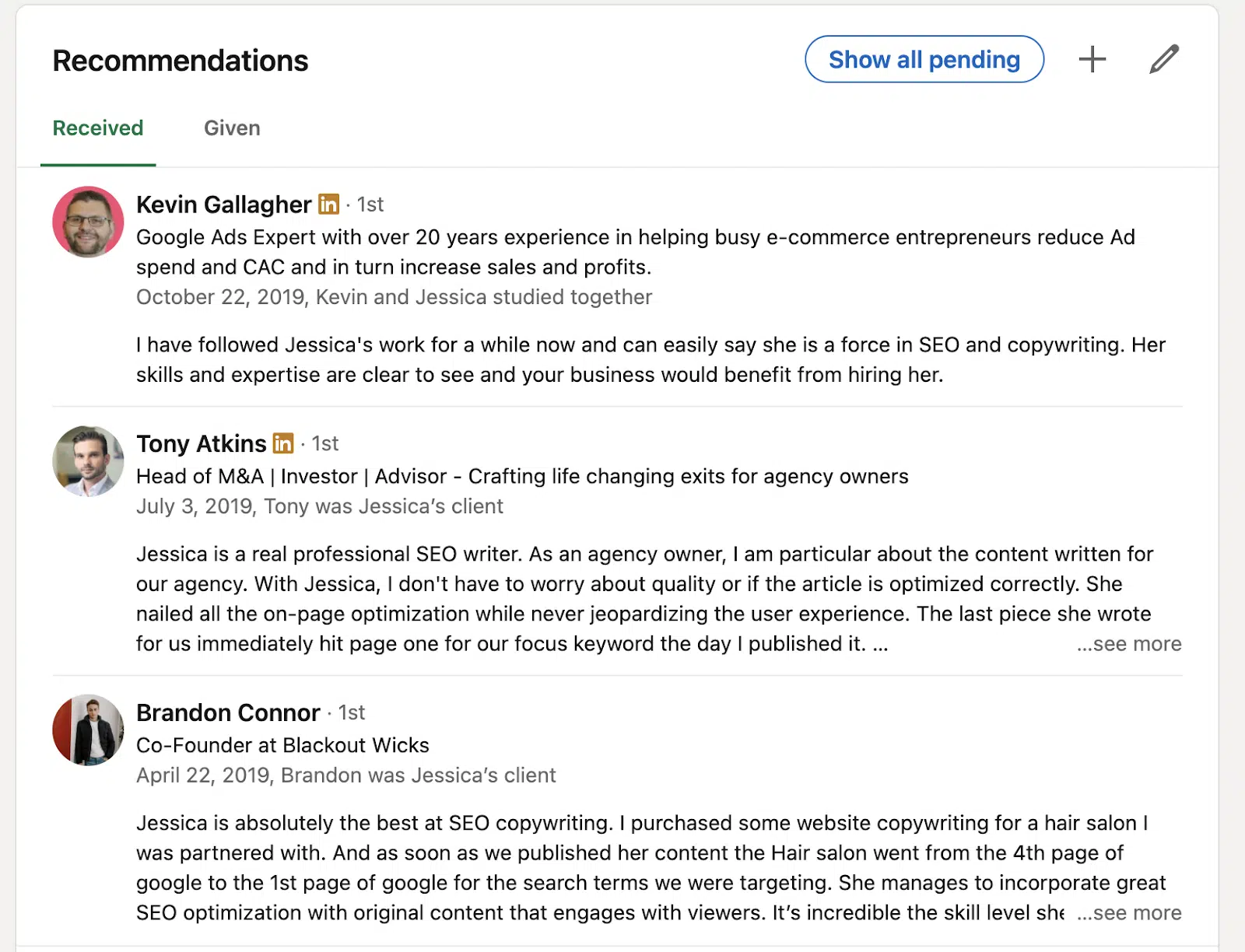
Only 30 days after adding connected TV to their strategy, MNTN clients saw an increase in conversion rates for both paid search and social, with increasing results over the next two months. When looking at email trends, these also showed a similar trend, with the conversion rates increasing 17.58% thirty days after adding CTV and 37.35% ninety days after. The first-party data was clear; Connected TV drives strong performance in its own right and makes other performance channels perform better too.

Video doesn’t need to be a barrier to reap the rewards of CTV

A key to success with connected TV is having video content–and enough of it–for regular refreshes. But before you worry that this is a blocker to adding CTV to your strategy, it’s not as hard (or costly) as you may think.

If you are already running social videos, this can be the perfect place to start. You can repurpose those same videos on the TV screen. CTV’s real-time reporting will help provide insights into what’s working and what’s not so you can make the appropriate adjustments before your next round of creative development.

If you don’t have video available to you, there are non-agency solutions that don’t cost an arm and a leg to make video creative. For example, at MNTN, we offer Creative-as-a-Subscription (CaaS) that bundles your media spend with creative development, so you don’t have to choose between spending on making ads or running them.

CaaS offers regular video refreshes, which deliver better results over time. Relying on the same video ads can result in ad fatigue or ad blindness. Regular refreshes disrupt this process and capture viewers’ attention. From our first-party data, we’ve seen that advertisers who regularly refresh creative have a 49.71% higher conversion rate and a 14.74% higher return on ad spend. Amazing what you can accomplish when creative fatigue isn’t a concern, right?

While spending time and money on the TV screen may feel counterproductive to a robust search strategy, Connected TV can actually help your search results thrive and reach new heights. You’ll be generating both brand awareness and key performance metrics with CTV while also boosting the impact of your already successful search strategy.


Related stories

New on Search Engine Land

About the author

MNTN

MNTN builds advertising software for brands to drive measurable conversions, revenue, site visits and more through the power of television. MNTN Performance TV is the world’s first and only Connected TV advertising platform optimized for direct-response marketing goals. It redefines what advertisers can do with television, giving them the power to tie performance directly to their TV campaigns.

https://searchengineland.com/connected-tvs-results-transcend-the-tv-screen-395432


Google webspam report says SpamBrain caught five times more spam this year

Google has released its webspam report for 2022 and said that SpamBrain was able to five times more spam sites compared to 2021 and 200 times compared to when it first launched, leading to 99% of visits from Google Search being spam-free, the search company announced.

Improvements to Spam detection. Google said it made improvements to SpamBrain to tackle abusive links, hack spam, and more. Such as when the December 2022 link spam update rolled out, which was an update to SpamBrain to detect and neutralize spammy links. Google said that update led to them being able to detect 50 times more link spam sites compared to the July 2021 link spam update.

Also, hacked spam saw a ten times improvement in detection and removal than previously.

Google is also faster at detecting spam because now SpamBrain can detect spam during the crawling process instead of after it indexes and processes the pages it crawls.

Why we care. Less spam in Google Search means that more quality websites are ranking and a more fair playing field for SEOs, site owners, and content creators. Is it perfect? No. But Google continues to try to improve its search spam detection and techniques.


Related stories

New on Search Engine Land

@media screen and (min-width: 800px) { #div-gpt-ad-3191538-7 { display: flex !important; justify-content: center !important; align-items: center !important; min-width:770px; min-height:260px; } } @media screen and (min-width: 1279px) { #div-gpt-ad-3191538-7 { display: flex !important; justify-content: center !important; align-items: center !important; min-width:800px!important; min-height:440px!important; } }

About the author

Barry Schwartz

Barry Schwartz a Contributing Editor to Search Engine Land and a member of the programming team for SMX events. He owns RustyBrick, a NY based web consulting firm. He also runs Search Engine Roundtable, a popular search blog on very advanced SEM topics. Barry can be followed on Twitter here.

https://searchengineland.com/google-webspam-report-says-spambrain-caught-five-times-more-spam-this-year-395493


How to build an E-E-A-T strategy for local SEO

While many SEO practitioners will smirk at the term “E-E-A-T” and immediately think about what’s for lunch, they aren’t necessarily wrong.

To achieve E-E-A-T, various crucial “ingredients” must seamlessly come together and result in quality. 

This article explores how to incorporate local SEO tactics into an E-E-A-T strategy.

So what is E-E-A-T?

SEO practitioners laud E-E-A-T as the cornerstone of long-term organic growth. Developed as part of Google’s search quality rater guidelines, E-E-A-T stands for experience, expertise, authoritativeness, and trustworthiness.

Whenever a Google algorithm rolls out, Google’s recommendations fall back on E-E-A-T factors without fail: 

“Google’s automated systems are designed to use many different factors to rank great content. After identifying relevant content, our systems aim to prioritize those that seem most helpful. To do this, they identify a mix of factors that can help determine which content demonstrates aspects of experience, expertise, authoritativeness, and trustworthiness, or what we call E-E-A-T.”

While Google’s statement here is fairly wordy, the key takeaway is crucial – Google’s automated systems look for E-E-A-T elements in online content. 

Why does E-E-A-T matter for local SEO?

Several key local SEO tactics relate directly to E-E-A-T: 

An SEO practitioner will leverage a unique competitive advantage by incorporating these local tactics as part of a larger E-E-A-T strategy. 

E-E-A-T wasn’t designed as a series of weights or ranking factors – it’s a singular emphasis on quality. By achieving a high-quality customer experience, a website is duly rewarded with high-impact rankings.

Here’s how each local SEO tactic can be incorporated into an E-E-A-T strategy.

Experience: How are you doing?

As the newest factor of E-E-A-T, experience emphasizes the customer’s perspective.

Sometimes, a user wants to hear from others who have used the product or service rather than reading content from a licensed professional.

So, how can a local business make the customer experience more accessible?

  • Local reviews
  • Google Business Profile posting
  • Employee bios
  • Customer photos

Local reviews

Local reviews overlap significantly with trust (the most important factor of E-E-A-T) and are primarily covered within that section of this article.

But a business’s reputation is vital to a consumer’s decision-making process.

Google Business Profile posting

By regularly posting on Google Business Profile (GBP), an organization connects directly with users who want to understand the company’s day-to-day culture. 

Showcasing experience through GBP posts.
This Denver pizzeria posts a monthly “Cocktail for a Cause” on GBP, sharing its culture of goodwill and community with potential customers. 

Customers can more readily grasp their potential experience with a business when they see what’s going on behind the scenes.

Posting regularly on GBP might not be a direct ranking factor, but it establishes a human element.

Employee bios

When users are looking for a service, they want to know about the human beings who will provide that service. Employee bios contribute to a culture of transparency and communication. 

Do people care more about Acme Plumbing, the company, or Doug, the plumber with two kids and a passion for sump pumps?

By learning about the team, the user can envision their potential experience. Employee information should be accessible to users – either posted on GBP or placed directly on location pages. 

Customer photos

A culture of documentation means there is nothing to hide. An organization should share imagery that accurately represents the customer’s experience.

By asking users for permission to repost their images and reviews, an organization takes ownership of its value in a local community.

For example, a local renovation company might include an “Examples of our work” section with “before” and “after” pictures on its website.

Experience can’t be simulated

Users care about their experience when choosing an organization. They want to know they’ll receive quality products or services without hassle.

Show the local community that your business values its customer experience with live, unpolished representations of that experience.


Get the daily newsletter search marketers rely on.


Expertise: Why are you qualified?

An organization brings value to its community when its employees have extensive backgrounds and skill sets.

Google recently emphasized the importance of expertise for users when it added several new features to search results, including “About this author,” “Perspectives,” and more prominence for “About this page”:

“As we surface new voices and perspectives, we want to ensure that people can easily learn more about the authors behind the content they are reading and discover new voices they can trust.”

"About the source"
Google features information about the author when a user clicks “More about this page.” Additionally, a new feature with more extensive author information is rolling out.

An organization leverages its expertise through its content, particularly:

  • Local service pages.
  • Blog posts.

Local service pages

Location pages are a commonly used local SEO tactic, but they often don’t offer enough content to rank. A single location page doesn’t have space to go into depth about its products or services. 

With local service pages, a website builds upon its local expertise by offering detailed information about its services to a specific community.

Substantial content about a local service proactively shows the user and the search engine that the business is knowledgeable. 

If a dentistry center has opened six locations across the Houston area and wants to rank for “cosmetic dentistry,” a single location page might not cut it.

By publishing a service page for specific suburbs like Sugar Land and Katy, the dentistry practice further emphasizes its expertise.

Location page
A page dedicated to specific services in a specific community establishes deeper expertise around that offering.

Other examples of informative content on local service pages include a troubleshooting section, a resources section linking to blog posts and customer testimonials specific to that service.

Blog posts

Many local websites have a blog. Few of them connect their blog’s editorial calendar with the customer experience.

  • What is the customer team receiving complaints about?
  • What information would educate and empower the customer?
  • What topics are rarely covered by other local blogs?

A local criminal defense lawyer might write a commonly published piece of content “when you need a criminal defense lawyer,” but is this accomplishing anything?

Search results for this keyword will be highly competitive. 

Quality blog post

What’s a more specific situation that hasn’t been written about?

For example, if your location recently faced a national disaster, did people break into local buildings for shelter or to help each other? Was there tension with the law in that scenario?

Providing general information about how to approach those legal troubles might attract local attention and rankings.

A blog post only builds expertise if it’s relevant to the customer. It should be well-researched, localized, easy to read, and backed by an author with expertise.

Look beyond keyword research into content opportunities that will make content stand out and provide thought leadership.

Expertise drives quality

A website’s on-page SEO strategy should prioritize expertise above all other tactics.

Most websites have leveraged SEO elements like title tags, meta descriptions, and headings in a competitive marketing environment.

An organization will be awarded for its expertise when its content proactively addresses its user base.

Authoritativeness: What are you known for?

Authoritativeness is an earned concept – third-party entities must vet it.

A local business could publish the industry’s most comprehensive and impactful content. But if nobody references that content, it doesn’t matter. 

As for authoritativeness, Google’s rater guidelines advise raters to “consider the extent to which the content creator or the website is known as a go-to source for the topic.”

The phrasing “is known as” emphasizes that others should have previously recognized the website.

An organization must be publicly recognized for its content, quality products/services, and local relevance to build authority around a target keyword.

In local SEO, several types of local links should be considered:

  • Citations
  • Community Involvement
  • Knowledge Sharing

Citations

The most basic tier of authoritativeness relates to the consistency of a local business’s name, address, and phone number (NAP consistency).

Have you ever tried to visit a business listed on Google Maps only to discover that its location is completely incorrect?

Accurate contact information is crucial to lead generation! Google’s information is only as good as the online consensus. 

When building online citations, a local business lists its basic information across dozens of websites.

Rather than relying on the website as a single resource for NAP, search engines can validate the information through multiple online listings. 

Community involvement

Beyond validating its own existence through NAP consistency, a local business should amplify its relevance within the community.

It takes more than a Google Business Profile to become recognized for nearby quality products and services. 

In my hometown of Fort Collins, CO, we have about 10 fried chicken restaurants (it’s a trendy food!). But only one of these chicken restaurants regularly stands out in the community as the best.

Music City Hot Chicken is described by locals and travelers alike as the best fried chicken restaurant because:

  • It’s won awards.
  • It regularly hosts community events.
Community involvement
By applying for awards and connecting with the community, Music City Hot Chicken amplified its authoritativeness on the topic of local fried chicken.

Knowledge sharing

Local websites should not be limited to content around basic services, troubleshooting, or commonly asked questions – everyone is working on those types of content!

When competition is tight, innovation is one of the best ways to stand out.

  • Can your organization use its expertise to conduct a local survey and publish that data?
  • Is there an employee who transformed the industry landscape with new or innovative technology? 

Local media outlets, industry publications, and social media users often recognize original data and innovation.

When links from trusted third-party organizations are achieved at scale, an organization’s authoritativeness is amplified. 

Authoritativeness drives recognition

From the simplicity of an address citation to the publicity of a news story, authoritativeness can only be accomplished through dedicated effort and skill. 

Trust: Why are you the best?

Described by Google as the most important factor in E-E-A-T, trust is supported and upheld through the elements of experience, expertise, and authoritativeness. 

Venn Diagram demonstrates how E-E-A-T works. Experience, authority and expertise all cross over in the middle which is where trust is.

While the factors of E-E-A all speak to trust, one tactic stands above all others – reviews are the most important element of local E-E-A-T.

A mountain of evidence supports the value of reviews as a trust element: 

  • 98% of consumers researching local businesses will “occasionally” read online reviews 
  • 86% of consumers say that reviews are either “the most” or “somewhat” important factor when choosing a business
  • Since 2015, the local SEO industry’s perception of review signals as a ranking factor has increased by 100% (from 8% to 16%)

Local reviews can be classified into two categories:

  • Third-party reviews
  • GBP reviews

Third-party website reviews

While local SEO represents a wide variety of industries, some occupations encounter significant local demand and competition:

  • Medical providers
  • Home service providers
  • Legal professionals
  • Real estate
  • Restaurants

Each of these providers is associated with specific local review websites. For example, people will review their experiences with local attorneys in Justia.

Justia
Justia, an attorney review website, frequently tops attorney-based search results in almost every major city.

In most major local SEO verticals, reviews on Google Business Profile are no longer a sufficient Trust strategy. Additional effort must be applied to trade-specific review websites.

Google Business Profile reviews

Ah yes, GBP, the ubiquitous review space for all local businesses – the use of Google for reviews is up from 81% in 2021 to 87% in 2023.

If a business serves local customers, it probably has a GBP, which likely has reviews. 

Getting users motivated to leave reviews is a significant challenge for local businesses.

Many resources are available to help organizations improve their local reviews, from hiring a reputation management company to promoting reviews with an email marketing strategy.

My primary recommendation with reviews is communicating their value across all levels of operation. Marketing materials, customer service, and day-to-day operations should all consider review generation. 

Trust is invaluable

Google places trust above all other factors because its user base depends on reliable, high-quality search results.

Reviews are the difference between saying, “you can trust me,” like some sketchy back-alley mobster, versus overhearing your mom tell another mom how proud they are of you for getting all As in the third grade.

Local E-E-A-T strategy is challenging but worth it

Individually, the pieces of local E-E-A-T are ineffective.

The journey to achieving E-E-A-T is similar to a notorious video game called “Dark Souls,” in which players must overcome ridiculously hard puzzles and boss fights.

When people complain about the game’s challenging nature, other players will respond with a single expression – “Git Gud” – which translates to…

Get good. 

All E-E-A-T tactics consolidate into this singular expression.

People don’t complete a video game by winning one boss fight, and a business doesn’t get rankings from executing a single tactic.

It all comes together through months of effort, testing, and improvement.

E-E-A-T in local SEO is a compilation of multiple tactics into a larger strategy. It accomplishes growth for a business through its collective emphasis on quality and user experience. 

If you want to improve your local E-E-A-T, prepare for a tough battle, but understand that your toils will make your victory that much sweeter.


Opinions expressed in this article are those of the guest author and not necessarily Search Engine Land. Staff authors are listed here.


Related stories

New on Search Engine Land

@media screen and (min-width: 800px) { #div-gpt-ad-3191538-7 { display: flex !important; justify-content: center !important; align-items: center !important; min-width:770px; min-height:260px; } } @media screen and (min-width: 1279px) { #div-gpt-ad-3191538-7 { display: flex !important; justify-content: center !important; align-items: center !important; min-width:800px!important; min-height:440px!important; } }

About the author

Harmony Huskinson

Harmony Huskinson is an award-winning SEO strategist at Portent, a full-service digital marketing agency. Harmony was named a 2023 Rising Star of Local SEO by BrightLocal and has worked with hundreds of businesses since starting her digital marketing career in 2015. You can find Harmony on Twitter or on LinkedIn if you’d like to chat about the intersection of community and digital in local spaces.

https://searchengineland.com/local-seo-e-e-a-t-strategy-395449