Domain Authority is dead: Focus on SEO content that ranks by Cynthia Ramsaran

SEO tool set

If you had undeniable evidence that Domain Authority is irrelevant when it comes to the rankability of your organic content, what would you do differently as a marketer? If you could stop focusing on metrics that don’t matter for SEO, imagine how much more of your effort could be put into the one thing that matters: Developing content that ranks.

In this bold presentation DemandJump’s Chief Solution Officer, Ryan Brock, will dare you to evaluate how much stock you put into your website’s Domain Authority and why. 

Register today for “Domain Authority is Dead: Focus on SEO Content That Ranks,” presented by DemandJump.


Click here to view more Search Engine Land webinars.


Related stories

New on Search Engine Land

@media screen and (min-width: 800px) { #div-gpt-ad-3191538-7 { display: flex !important; justify-content: center !important; align-items: center !important; min-width:770px; min-height:260px; } } @media screen and (min-width: 1279px) { #div-gpt-ad-3191538-7 { display: flex !important; justify-content: center !important; align-items: center !important; min-width:800px!important; min-height:440px!important; } }

About the author

Cynthia Ramsaran

Cynthia Ramsaran is director of custom content at Third Door Media, publishers of Search Engine Land and MarTech. A multi-channel storyteller with over two decades of editorial/content marketing experience, Cynthia’s expertise spans the marketing, technology, finance, manufacturing and gaming industries. She was a writer/producer for CNBC.com and produced thought leadership for KPMG. Cynthia hails from Queens, NY and earned her Bachelor’s and MBA from St. John’s University.

https://searchengineland.com/domain-authority-is-dead-focus-on-seo-content-that-ranks-394975


Google launches Perspectives, About this author and more ways to verify information

Google is officially rolling out some new features designed to help searchers better and more easily verify information within the search results.

What’s new. Google is:

  • Rolling out the About this result globally.
  • Launching Perspectives for top stories.
  • Launching About this author.
  • Making it easier to access the About this page feature.

Let’s dig in.

About this result expands globally: The Google About this result feature, which launched in 2021 to help searchers learn more about the sources and sites they see in Google Search, is now expanding to all languages. If you don’t see it yet, you should within the next few days.

By clicking the three dots next to most search results, you can learn more about where the information is coming from and how Google determined it would be useful for a query. 

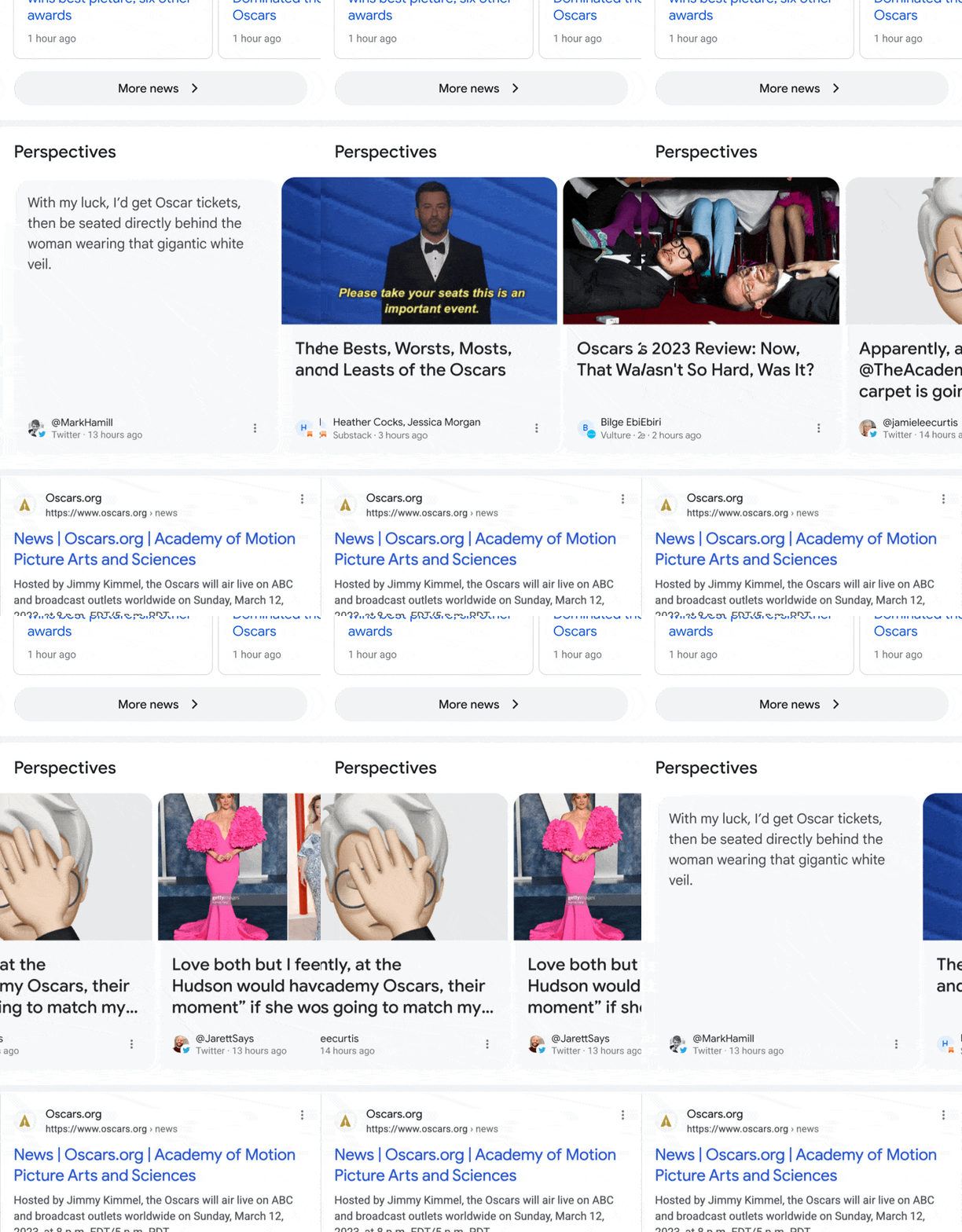
Perspectives. Google has been testing Perspectives in Google Search since August 2022 and now it is rolling out in the English US results. The Perspectives carousel will appear below Top Stories and showcase insights from a range of journalists, experts and other relevant voices on the topic you’re searching for.

Here is what it looks like:

Google0 Perspectives

About this author. The About this author will be in the About this result. Now when people tap on the three dots readers will be able to find more information about the background and experience of the news voices surfaced on Google Search, Google explained.

So maybe your authors might matter a bit more with this feature?

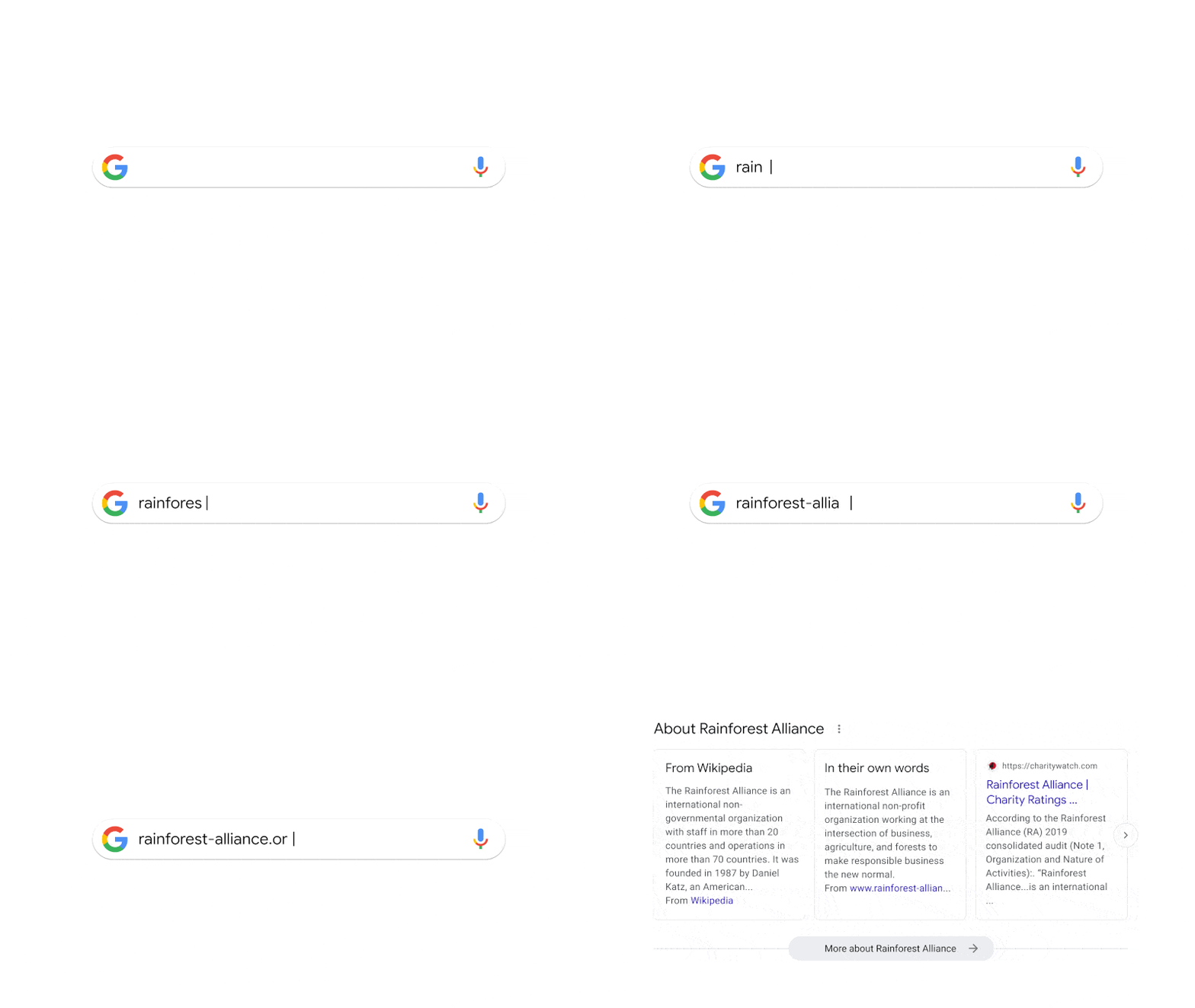
Access to About this page. Google also said it is making it easier to access the About this page feature. You can now type in the URL of the organization in Google Search and information from About this page will populate at the top of the Google Search results.

You’ll be able to quickly see how the website describes itself, what others on the web have said about the site and any recent coverage of it.

Here is how it looks:

About This Page 800

Why we care. With Google surfacing more information about your site, the authors and your page to searchers, making it clear to searchers that you can trust the site, the authors and the content on the page have become more and more important.

Not only that, Google can surface other perspectives around topics that already are ranking well in top stories, which gives publishers and content creators more visibility within the Google Search results.

Dig deeper. Read Google’s official announcement: Five new ways to verify info with Google Search.


Related stories

New on Search Engine Land

@media screen and (min-width: 800px) { #div-gpt-ad-3191538-7 { display: flex !important; justify-content: center !important; align-items: center !important; min-width:770px; min-height:260px; } } @media screen and (min-width: 1279px) { #div-gpt-ad-3191538-7 { display: flex !important; justify-content: center !important; align-items: center !important; min-width:800px!important; min-height:440px!important; } }

About the author

Barry Schwartz

Barry Schwartz a Contributing Editor to Search Engine Land and a member of the programming team for SMX events. He owns RustyBrick, a NY based web consulting firm. He also runs Search Engine Roundtable, a popular search blog on very advanced SEM topics. Barry can be followed on Twitter here.

https://searchengineland.com/google-launches-perspectives-about-this-author-and-more-ways-to-verify-information-394920


Join us online THIS WEEK for MarTech… for free

MTCS2023 OG Main 1

MTCS2023 OG Main 1

Driving sales, improving lead quality, and boosting conversions have never been more critical – especially in an age of increased privacy concerns. The right marketing technology is your key to getting it done.

Discover dozens of marketing technologies, tools, and solutions – all for FREE and all without leaving your desk: Grab your free MarTech pass now and join us online, this Tuesday and Wednesday (March 28-29)!

At MarTech, you’ll unlock nearly 50 data-rich sessions from world-class brands including Forrester, Sysco, Electrolux, Salesforce, and more:

Logo GardenKick-off each day with eye-opening keynotes…

… and get your questions answered in real-time during live Q&A (Overtime!) with select speakers, including the godfather of martech, Scott Brinker, Mission MarTech’s Milton Hwang, and more!

You’ll also explore the critical rise of AI and what it means for marketers during exclusive programming and networking opportunities, including…

Hungry for more? Discuss ChatGPT, GA4, and MOPs challenges with like-minded attendees and industry experts during Coffee Talk meetups – only available live!

And don’t miss these recent additions to the MarTech agenda!

After just a few hours, you’ll be ready to… 

  • Leverage automation and real-time insights to optimize KPIs
  • Reduce marketing spend with a first-party data strategy
  • Apply personalization strategies that accelerate customer loyalty
  • Support additional revenue streams through audience monetization 
  • Execute campaigns to help fill your marketing funnel with new consumers
  • Reach, engage, and convert more email marketing prospects  
  • Execute more effective targeting, increase personalization, and improve ROI 

…and so much more. Can’t attend live? Explore at your own pace with instant on-demand access, included for free. 

Don’t wait… grab your free MarTech pass now and join us online, this Tuesday and Wednesday, March 28-29!


Related stories

New on Search Engine Land

@media screen and (min-width: 800px) { #div-gpt-ad-3191538-7 { display: flex !important; justify-content: center !important; align-items: center !important; min-width:770px; min-height:260px; } } @media screen and (min-width: 1279px) { #div-gpt-ad-3191538-7 { display: flex !important; justify-content: center !important; align-items: center !important; min-width:800px!important; min-height:440px!important; } }

About the author

Lauren Donovan

Lauren Donovan has worked in online marketing since 2006, specializing in event marketing, content management, organic and paid social media, community and reputation management, and real-time journalism. She currently serves as Director of Marketing at Third Door Media — producer of the Search Marketing Expo and MarTech conference series and publishers of Search Engine Land and MarTech.

https://searchengineland.com/the-martech-conference-news-394240


Google Ads testing verification badges

Google is experimenting with displaying blue badge icons and labels on certain search ads for advertisers who have been verified by Google Ads. The blue label features a blue circle with ridges and a checkmark inside it. This is part of Google’s ongoing advertiser verification program, and it appears that the company is now testing the use of small blue checkmarks for verified advertisers.

Spotted in the wild. Khushal Bherwani first spotted the badge on Twitter.

Why we care. Verification badges can increase brands credibility and trustworthiness with potential customers. When users see the blue badge, they know that the advertiser has been verified by Google, which means that the advertiser has met certain requirements for advertising on the platform. This can help users feel more confident in clicking on the ad and potentially making a purchase or taking another desired action.

Additionally, the blue badge can help the ad stand out from other ads that do not have the badge, potentially leading to higher click-through rates and conversions.


Related stories

New on Search Engine Land

@media screen and (min-width: 800px) { #div-gpt-ad-3191538-7 { display: flex !important; justify-content: center !important; align-items: center !important; min-width:770px; min-height:260px; } } @media screen and (min-width: 1279px) { #div-gpt-ad-3191538-7 { display: flex !important; justify-content: center !important; align-items: center !important; min-width:800px!important; min-height:440px!important; } }
About the author

Nicole Farley

Nicole Farley is an editor for Search Engine Land covering all things PPC. In addition to being a Marine Corps veteran, she has an extensive background in digital marketing, an MBA and a penchant for true crime, podcasts, travel, and snacks.

https://searchengineland.com/google-testing-verification-badges-394868


Google Search Console breaks out Merchant listings and Product snippets appearances

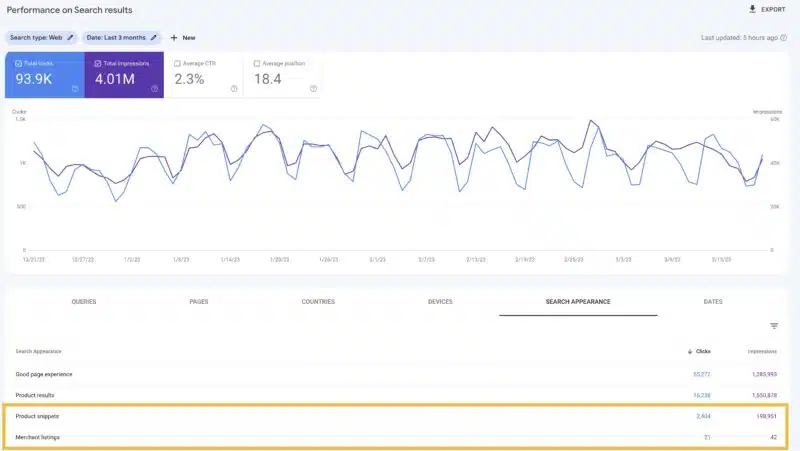
Google has broken out the merchant listings and product snippet reporting into two unique appearances that you can filter on within the performance reports in Google Search Console. Google also broke these out in the Merchant listings and product snippet reports, that it launched last September.

What is new. Google said, “we are adding the ability to measure the impact of Merchant listing by splitting the Product results search appearance into two: Merchant listings and Product snippets.” You can now see how many clicks and impressions you get for those appearances/experiences independently of each other.

The new Merchant listings and Product snippets search appearances can be viewed in two places in Search Console:

  • Merchant listings and product snippets reports as an overlay on top of the report charts
  • Performance report in the search appearance tab or through a filter

What it looks like. Here is a screenshot of the performance report:

Google Merchant Product Performance Report 800x451

The announcement. Google announced this on Twitter, in these set of tweets:

Why we care. Here is more reporting for you all to analyze and work with to implement improvements to your website on. If you have products on your site, you may see these reports and you may be able to use these to implement changes to your website that help you make for a better website and perform better in Google Search.


Related stories

New on Search Engine Land

@media screen and (min-width: 800px) { #div-gpt-ad-3191538-7 { display: flex !important; justify-content: center !important; align-items: center !important; min-width:770px; min-height:260px; } } @media screen and (min-width: 1279px) { #div-gpt-ad-3191538-7 { display: flex !important; justify-content: center !important; align-items: center !important; min-width:800px!important; min-height:440px!important; } }
About the author

Barry Schwartz

Barry Schwartz a Contributing Editor to Search Engine Land and a member of the programming team for SMX events. He owns RustyBrick, a NY based web consulting firm. He also runs Search Engine Roundtable, a popular search blog on very advanced SEM topics. Barry can be followed on Twitter here.

https://searchengineland.com/google-search-console-breaks-out-merchant-listings-and-product-snippets-appearances-394865


How to write title tags for SEO with ChatGPT

ChatGPT can be helpful for many SEO-related functions, including but not limited to local SEO, keyword research and SEO-focused content creation.

Title tags are another area the platform can help you with. Even if Google doesn’t always use them, title tags are still a critical on-page SEO element.

Even Google’s John Mueller acknowledged that ChatGPT could be helpful for creating page titles.

This article examines how ChatGPT and the ChatGPT API can help you create compelling, clickable title tags.

Before we dive in, keep the following caveats in mind:

  • The quality of your prompts will largely determine the quality of your responses.
  • ChatGPT is not an SEO tool, so it’s not explicitly designed to create SEO-friendly title tags.
  • You must always review and QA the tool’s output (it can often be wrong!).
  • The platform has a rough sense of text output and characters but doesn’t necessarily observe them precisely – an important point for title tag creation or editing. 
  • ChatGPT will only “remember” around 3,000 words of your chat.
  • The ChatGPT API won’t remember anything else but the prompt you’re applying at that moment and often ignores system messages.
  • You cannot fine-tune the ChatGPT API, but you can fine-tune the OpenAI API (which is more expensive than the ChatGPT API). 

For this article, I’ll focus on tasks you can do using either the ChatGPT web interface or the API. But you can extrapolate some of these and imagine how they may work with the Da-Vinci API or future versions of the ChatGPT API.

Let’s start by having the tool help me rewrite a title tag using some best practices.

If you have your own process, you can implement that. In this case, I will try to get ChatGPT to rewrite my title tags “like a pro.”

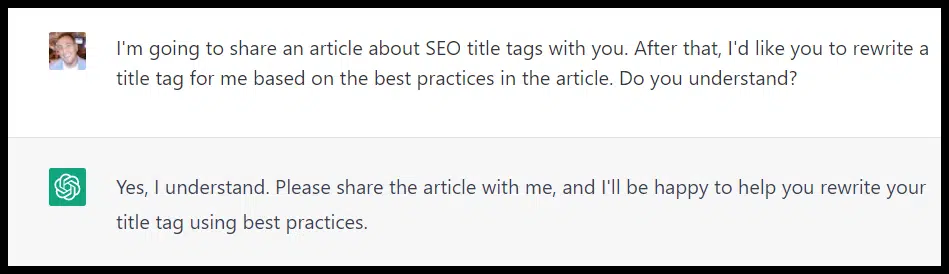
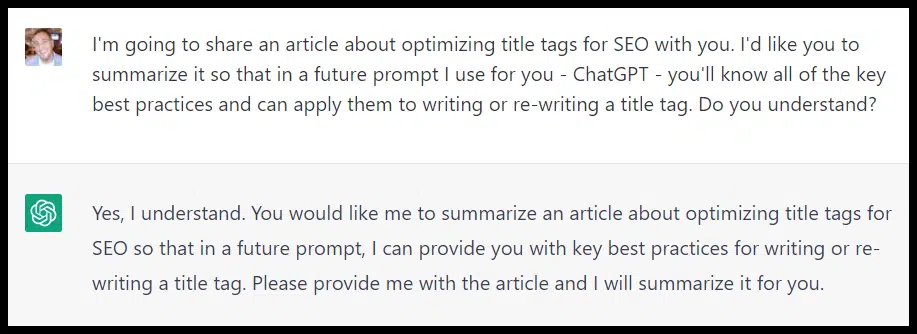
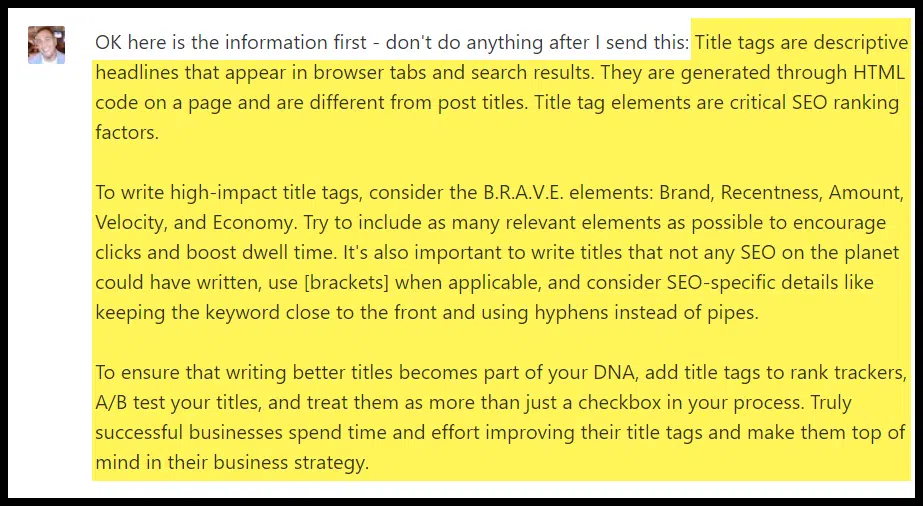
First, I’m going to take an article by Ross Hudgens at Siege Media about SEO title tag best practices and have ChatGPT analyze it:

ChatGPT prompt - title tag best practices

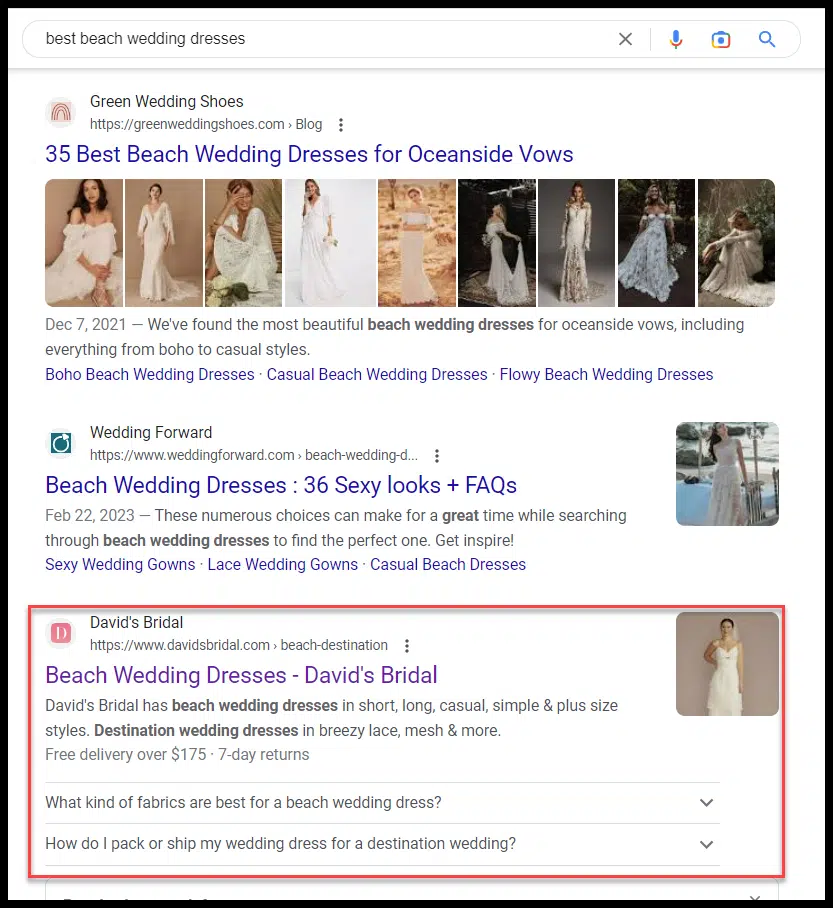
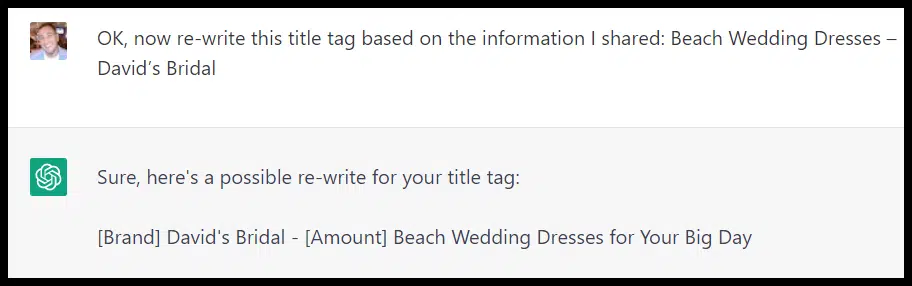
Next, I looked at the search results for “best beach wedding dresses” and grabbed a listing by David’s Bridal (just because it was ranking in the middle of the first page) and asked ChatGPT to rewrite their title tag:

David's Bridal - best beach wedding dresses

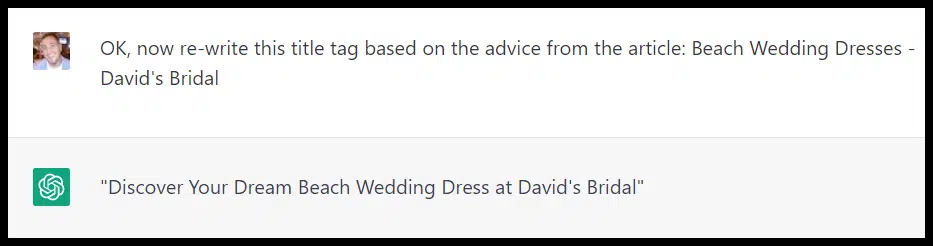
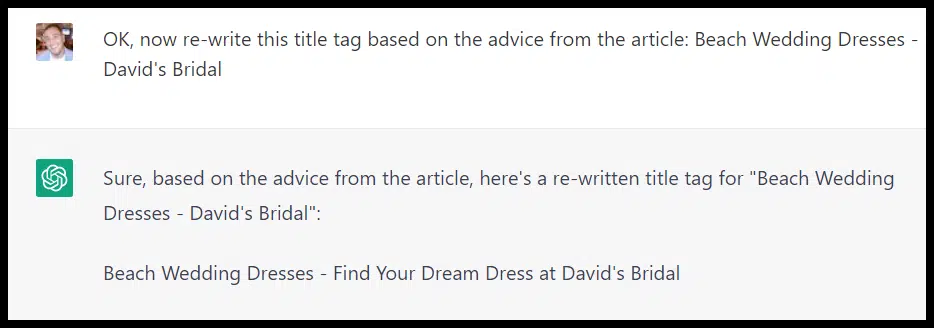
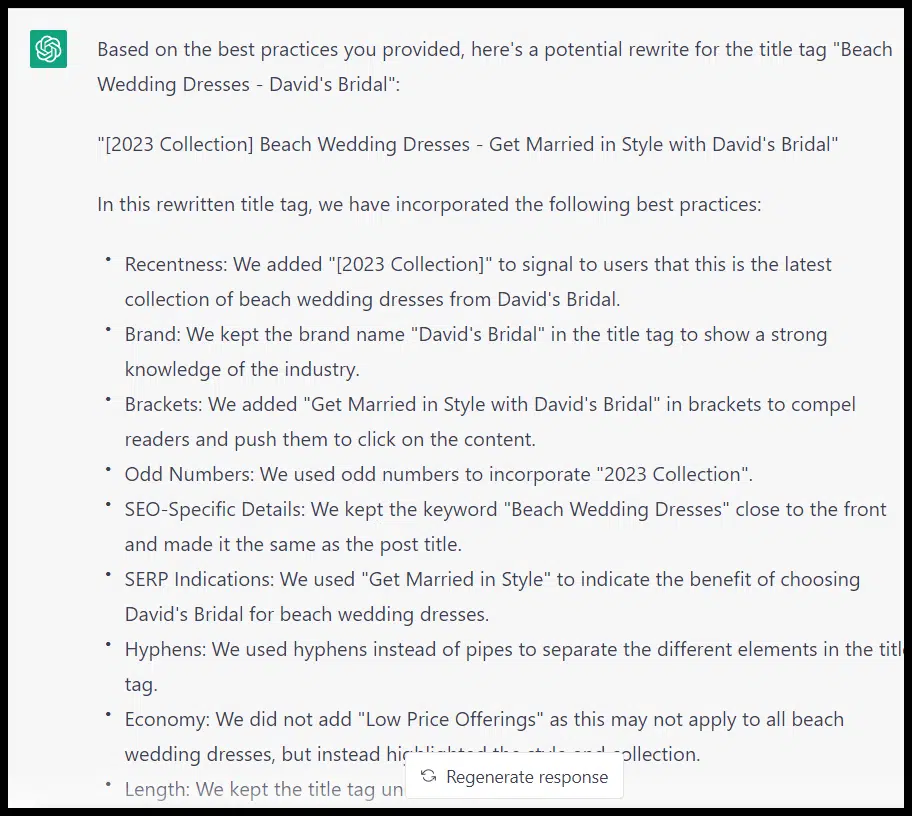
And here is what ChatGPT came up with after sharing the article and the title tag:

ChatGPT output title tag

Pretty interesting!

Let’s try the same thing, but this time with a different title tag process from Mike at Niche Twins:

Same approach here, I created a new chat (again: ChatGPT’s short memory!) and pasted in the contents of the thread and then asked ChatGPT to generate a new title tag based on Mike’s process:

ChatGPT output title tag - dream dress

ChatGPT does seem to have used a formula more in-line with the source, but it used a variation of “dream dress” again.

I’d opened a new chat for this prompt, so ChatGPT shouldn’t have used my previous prompt or result as context.

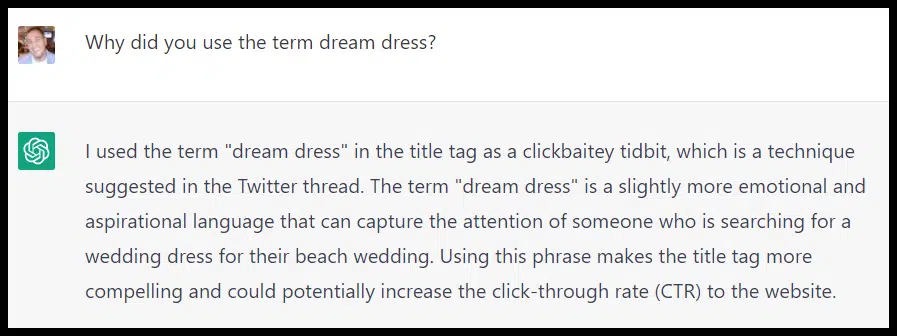
I asked it why it chose that term:

ChatGPT - dream dress prompt

Optimizing prompt character counts: Summaries are your friend

OK, so how about if we want to have ChatGPT ingest a long article (or multiple) and optimize multiple title tags?

Hudgens’s article was around 2,500 words, so we’ll be hitting up against the word and token limit of what ChatGPT actually remembers pretty quickly.

A good workaround is to get ChatGPT to summarize the article(s) and then use the summaries in place of the entire article (obviously, if there are some items you want to make sure are included, you may want to do the summarizing by hand):

Optimizing prompt character counts with summaries

Note that I will also create a new chat for each summary and a new chat once I’m ready to have ChatGPT write my title tags so that I can conserve “character memory.”

The summary ChatGPT generated in this case was 159 words. Here is the summary it came up with:

ChatGPT - summaries output

I created a new chat and shared the summary, then asked ChatGPT to rewrite the same title tag:

ChatGPT - rewrite title tag

What jumps out here is that ChatGPT came up with a different title tag based on its own summary of the article versus the article itself as the prompt.

I wanted to try one more prompt here to see how it impacted the output, so I created a new chat and asked ChatGPT to summarize the article again, but this time to pull out the main best practices and create a bulleted list.

I created a new chat and fed ChatGPT its bulleted summary. It gave me another title tag idea and, this time, walked me through its process.

ChatGPT - bulleted summaries

You want to be careful how much you trust ChatGPT’s summaries. But if I had gone through this exact process and were optimizing this URL’s title tag, I’d have some pretty interesting ideas to test.

Along those lines, I could take a summary here and get ideas for multiple URLs based on these best practices.


Get the daily newsletter search marketers rely on.


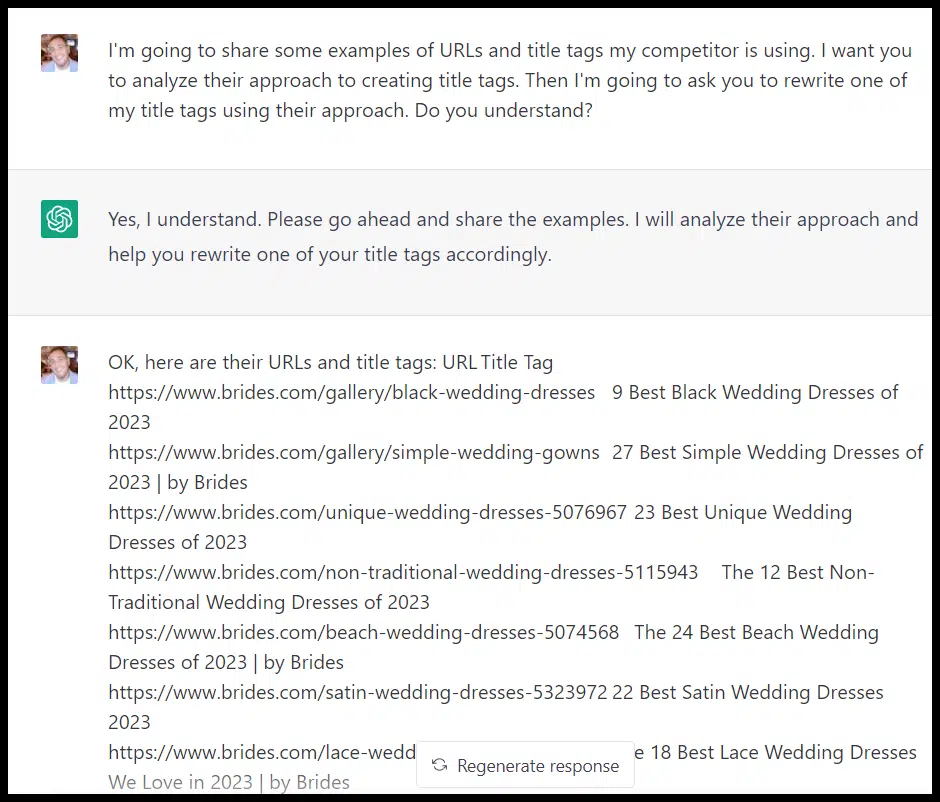
Let’s imagine Brides.com is crushing me in search results, and I want to test taking their approach to writing title tags for my pages. I can ask ChatGPT to give that a try:

ChatGPT - competitor title tags

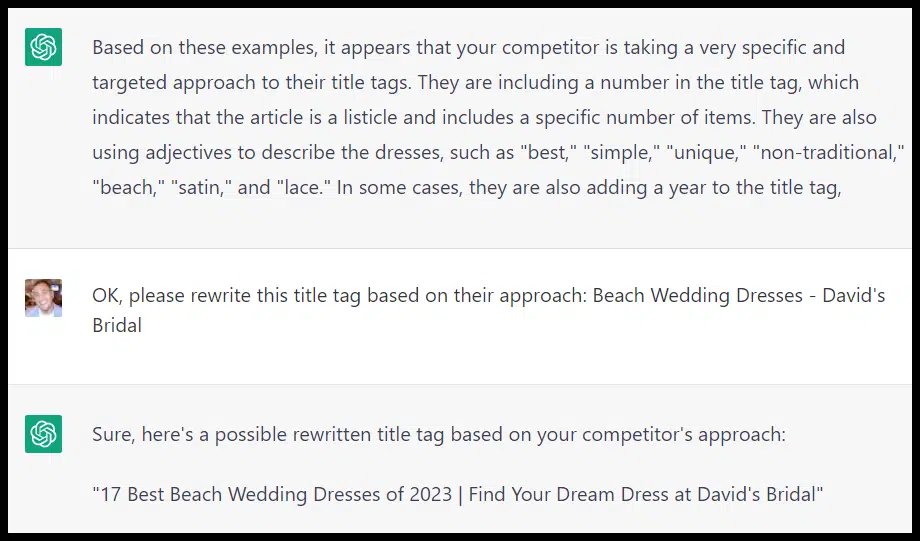
And get a different idea:

ChatGPT - competitor title tags analysis

ChatGPT is right: this is a straightforward example, but you get the idea.

You could also apply this same approach to a site that’s not a competitor but a site you admire.

If you know they have great title tags or that they test them frequently, you could use the same approach here and get ideas specific to your site using a similar approach.

Instead of looking at one competitor, you could look at several. Namely all of the sites in a search result.

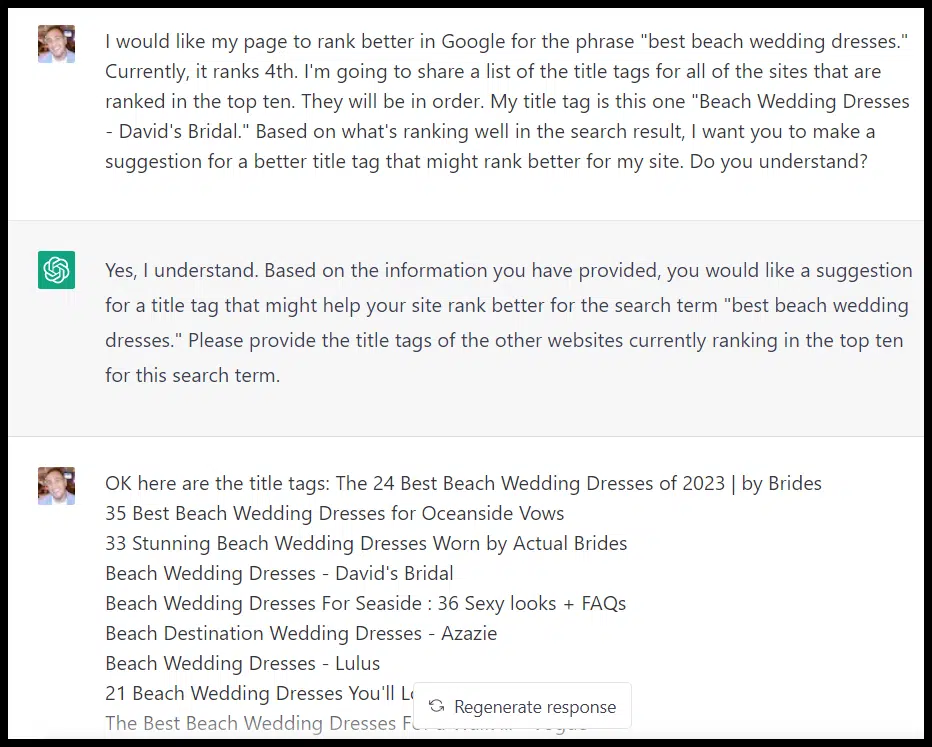
I asked ChatGPT to analyze the search result and come up with another new idea for David’s Bridal based on what’s ranking in their search result:

ChatGPT - title tags from search results

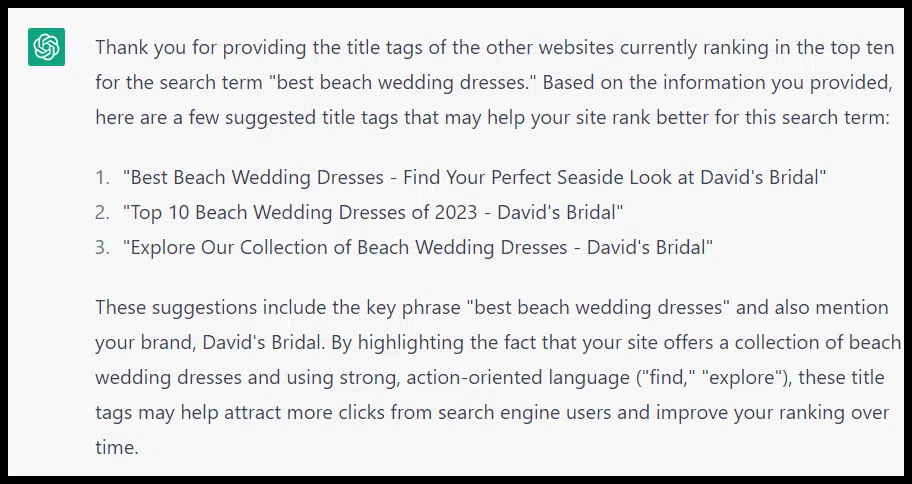
ChatGPT gave me a few different ideas:

ChatGPT - title tags from search results - outputs

Write title tags tailored to your content

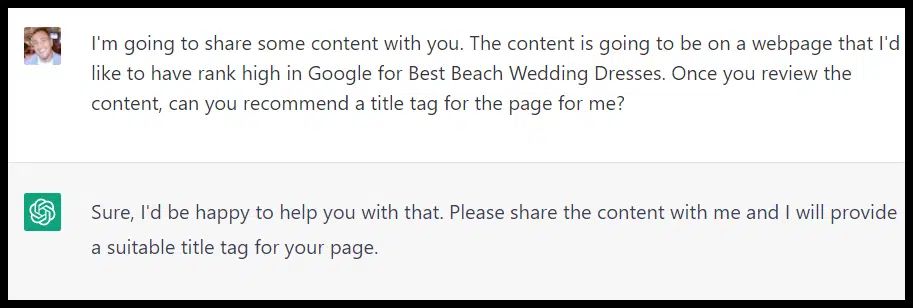
Another approach is obviously to summarize some content and ask ChatGPT to write a title tag for that content:

ChatGPT - title tag tailored to content

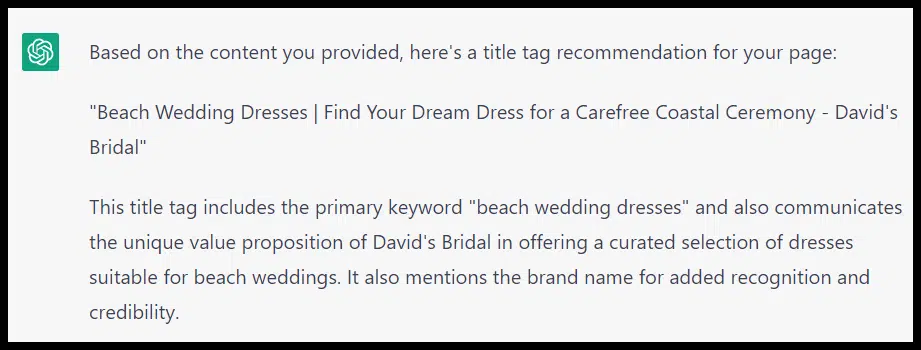
And here’s ChatGPT’s recommendation based on the content on the David’s Bridal page:

ChatGPT - title tag recommendation

You could also marry these two approaches, feeding ChatGPT some title tag best practices and content and then asking for title tag ideas based on the topic of your article or page.

Title tag formulas and ChatGPT API

The web interface is probably your best bet if you want to use lengthier best practices and lots of context or content to inform your title tags.

But if you want to apply a formula or a short set of best practices to several title tags, the ChatGPT API can be a great tool.

You can link the ChatGPT API to your Google Sheet as outlined here, and then could take your own best practices (or something you just found a competitor doing, or something you just pulled from an article) and rewrite multiple title tags at once:

Title tag formulas and ChatGPT API

I had some issues with the API adding quotation marks to the output here and writing very long titles. 

By keeping a close eye on the output and playing with the prompts, I eventually got some new shorter title tag ideas.

If you have some specific types of title tags you know have worked in the past, you can have ChatGPT apply that approach to specific titles you want to be rewritten.

To test these out, let’s implement some tactics outlined in this Moz article on title tag “hacks.”

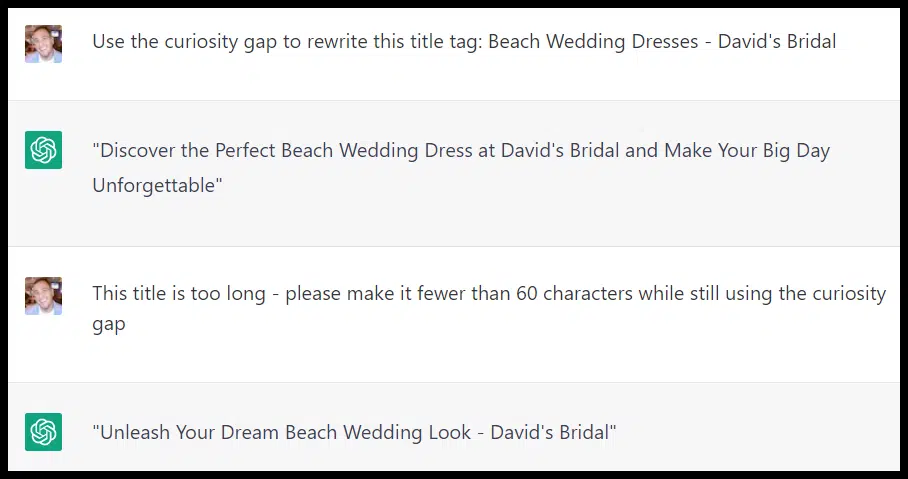
Curiosity gap

This may not work for every title tag or on the first try. Here’s our beach dress term rewritten using the curiosity gap:

ChatGPT prompt - Curiosity gap

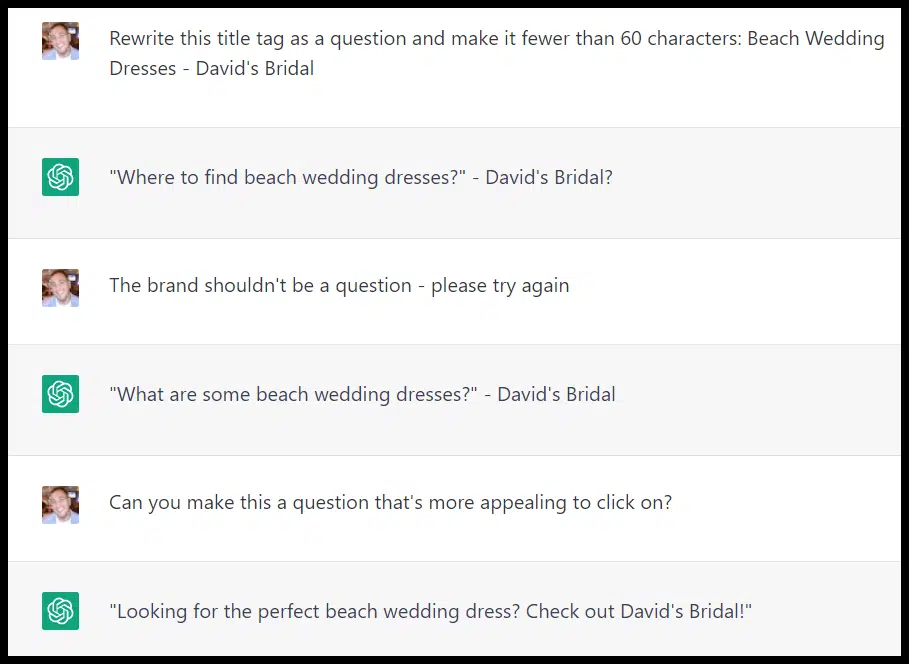
Questions

Here it is again with a new chat as a question:

ChatGPT prompt - Questions

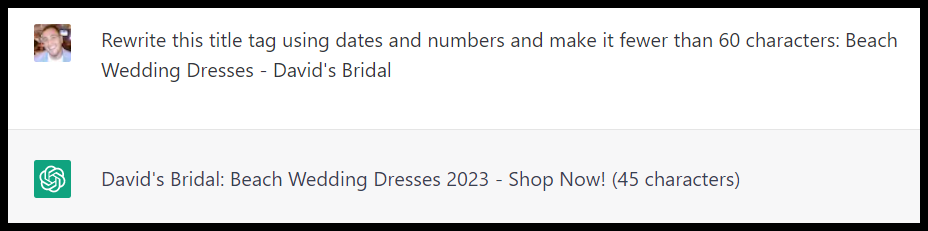
Dates and numbers

Here it is again using dates and numbers:

PsMbU8aDWqY GoEYcu0 QBlUenMHW7uMBdiIFJ0Zl330jYzAk6cx4dKODj4x7 VXqpFg3U0ILLzKOeuMPGc ZlMQWbvmyxryes I8dHFh8Z1vT6zXBMuaTKxtvInQWtOr5rsrz1GaPGdeLyrIm7AknE

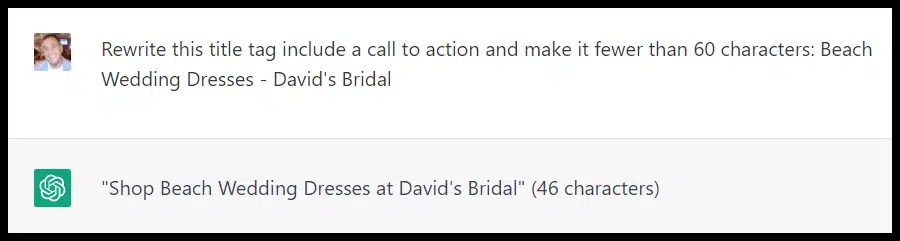
Call to action

And here, we incorporated a call to action:

ChatGPT prompt - CTA

Again it’s worth noting that I got different output formats using similar prompts each time. 

It’s also striking how short these title tags are with minimal instruction. 

In contrast, the title tag suggestions generated by the ChatGPT API in Google Sheets were often very long. I had to use multiple prompts to get a response with anything less than 70 or 80 characters. 

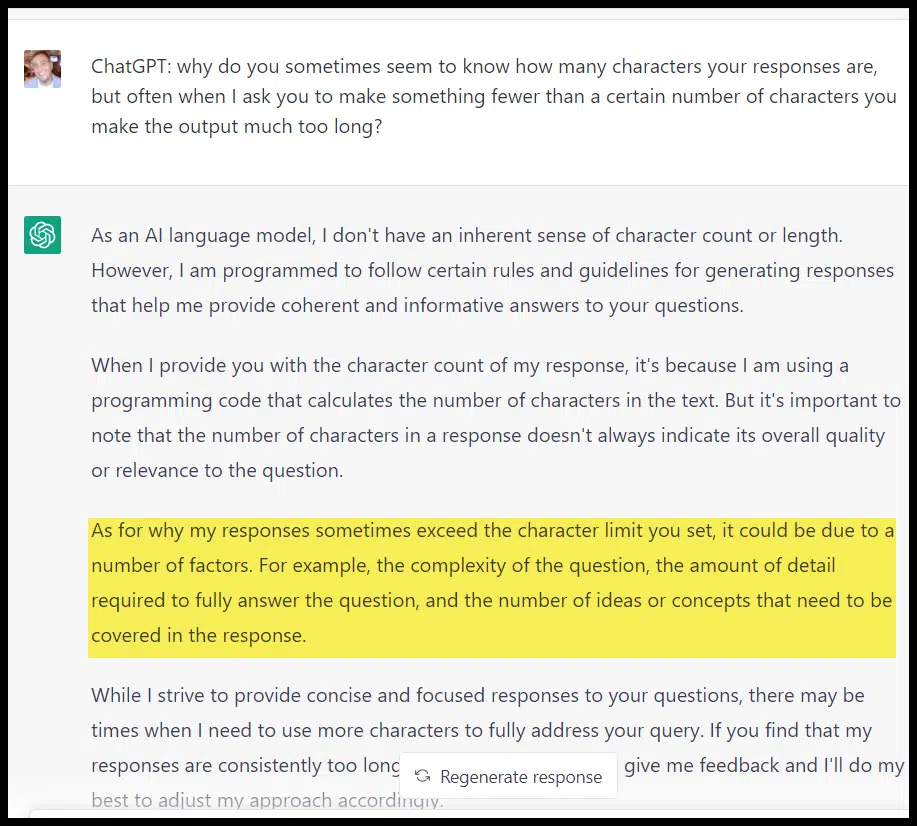
ChatGPT is getting the character counts in parenthesis right!

Here’s what ChatGPT had to say for itself on the matter:

ChatGPT character counts

This is very important to note. The more complex your prompt, the less likely ChatGPT is to observe character limits. This is a difficulty of the API since you don’t have the 3,000-word context you do in chat.

Title tag brainstorms

If you want to set up a testing framework to run through multiple possible title tag formulas or ideas (or if you want a big list of possible page titles), you could also mash up a few ideas for a big brainstorm.

By shortening up our earlier inputs with summaries, I can create a series of prompts where ChatGPT will remember all of the title tag approaches we’ve encountered here:

  • Hudgens’s best practices.
  • Mike’s title tag process.
  • The title tags of sites ranking in the same search result.
  • The approach of Brides.com.
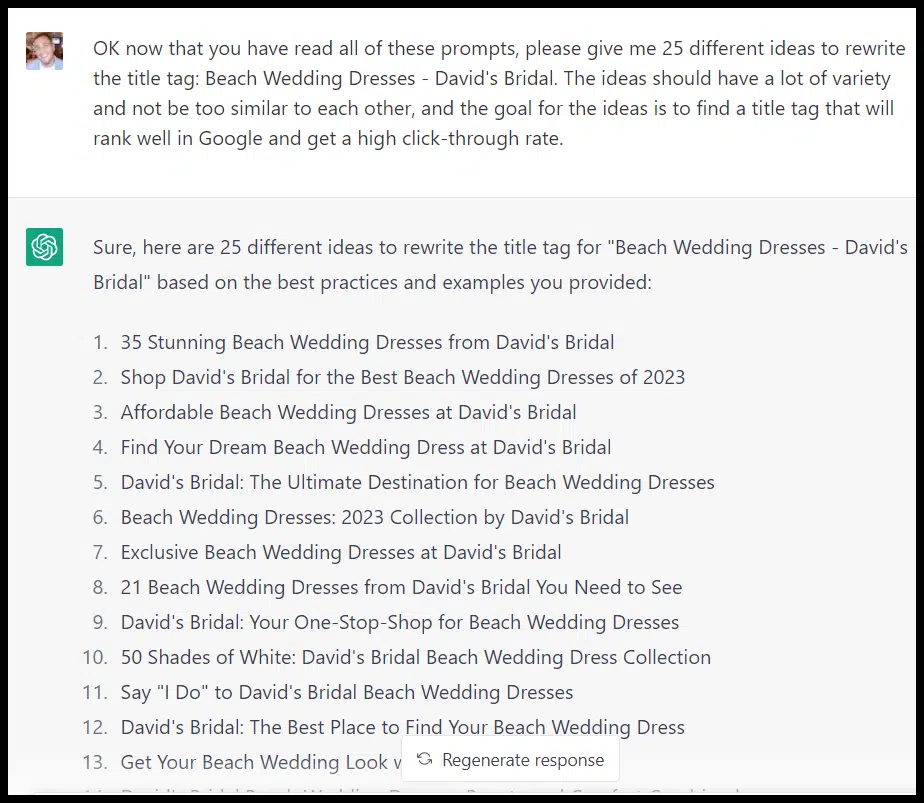
ChatGPT - title tag brainstorms

Not all of these will be winners. Despite my prompt, some are similar. But if I were looking for test ideas for a batch of wedding dress pages, I could likely find many here to test.

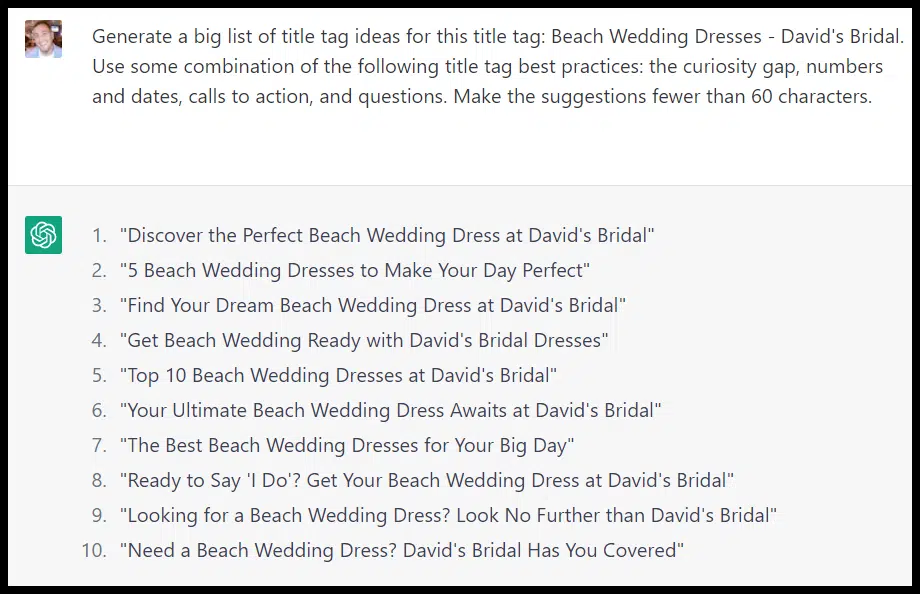
I can also go back to the different types of title tags from the last section of the article and ask ChatGPT to come up with a bigger list of ideas based on those title tag types:

ChatGPT - big list of title tags

Leverage your own data

Beyond just getting general ideas, you could use your data to have ChatGPT help with title tags in a few different ways:

  • Make predictions: If you’ve run a series of title tag tests, try sharing the results with ChatGPT, then ask it to write a title tag for a new page based on those results.
  • Find gaps: Look at your Search Console data and find the queries with low click-through rates. Ask ChatGPT for ideas to rewrite the title tag to increase CTR for those terms.
  • Look for SERP features: Use third-party tools to see keywords you’re ranking well for with SERP features that you aren’t getting. Share some of the typical best practices for getting those SERP features and the title tag of the site that is ranking, and ChatGPT for ideas on how to rewrite your title tag to be more like the titles that are ranking.

As with tasks like keyword research, often the best use for ChatGPT when it comes to title tags is around ideation and inspiration. 

Be creative about how to leverage it, always check the output of the tool manually and run your tests. All this could give your title tags a major boost.


Opinions expressed in this article are those of the guest author and not necessarily Search Engine Land. Staff authors are listed here.


Related stories

New on Search Engine Land

@media screen and (min-width: 800px) { #div-gpt-ad-3191538-7 { display: flex !important; justify-content: center !important; align-items: center !important; min-width:770px; min-height:260px; } } @media screen and (min-width: 1279px) { #div-gpt-ad-3191538-7 { display: flex !important; justify-content: center !important; align-items: center !important; min-width:800px!important; min-height:440px!important; } }

About the author

Tom Demers

Tom Demers is the co-founder and managing partner of Measured SEM and Cornerstone Content. His companies offer paid search management, search engine optimization (SEO), and content marketing services to businesses of varying sizes in various industries.

https://searchengineland.com/write-title-tags-seo-chatgpt-394793


How much should you budget for content?

As you build a content marketing strategy for your brand, you may encounter one key area that stumps you – especially if you’re new to content.

Budget.

How much should you budget for content?

That’s a great question with a kind of disappointing answer. 

It depends.

Thankfully, this guide will explain all the various factors that will affect your budgeting decisions:

  • Business size
  • Industry
  • Overall marketing budget
  • Competition
  • Goals
  • Tools
  • Insourcing vs. outsourcing

I’ll also give you some benchmark budgeting numbers that could help you determine where your brand (or your client’s brand) should fall, plus some tips for smart budgeting.

What should be included in your content budget?

First, let’s talk about some basics. You know you should set a budget for content, but what exactly should you budget for? 

At a minimum, this is what you need to produce great content:

  • Content team (either in-house or outsourced)
    • Content manager
    • Content strategist
    • Writers/editors, videographers and graphic designers
  • Tools (monthly/annual subscriptions)
    • Editing and design tools
    • SEO tools for keyword research and rank tracking
    • Analytics tools
    • Content management system
    • Project management system
    • Content calendar tool 
  • Website (your content house)
    • UX design and development
    • Fees and maintenance

And if you’re more advanced in your content marketing, consider budgeting to level your team.

  • Training (for investing in the talent of an in-house team)
    • Courses
    • Workshops
    • Live events and conferences
    • Books and resources

Budgeting benchmarks: What do average companies budget for content?

Now let’s look at some benchmarks. What do most marketers budget for content marketing? 

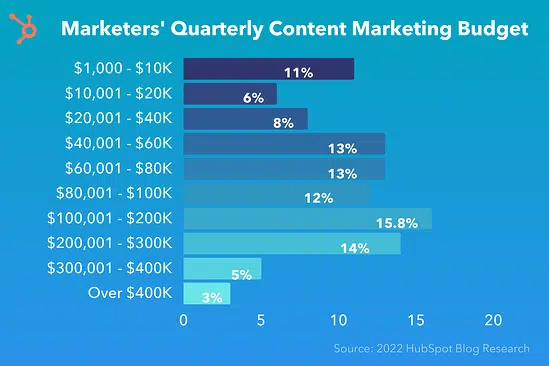
Most (26%) marketers said their quarterly budget hovered between $40,000 to $80,000, according to a HubSpot survey of over 1,000 respondents. 

The second-largest chunk of people (15.8%) said they spend $101,000 to $200,000 quarterly. And the third-largest (11%) said they spend $1-11K.

Overall, 51% of marketers spend $80,000 or below on content marketing quarterly. However, this data mixes responses from all business sizes and industries, so keep in mind that the average might not reflect the reality for large-scale enterprises, start-ups, or solopreneur brands.

Marketers' quarterly content marketing budget

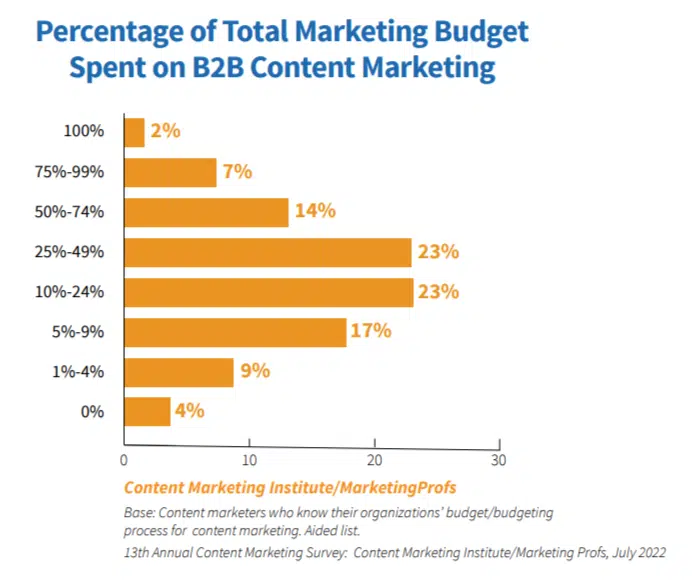
Additionally, most marketers don’t devote 100% of their budgets to content marketing. Most have an overarching marketing budget of which a percentage is allocated to content. 

The majority allocate 10-49% of their total marketing budget to content, according to Content Marketing Institute’s yearly report.

Percentage of total marketing budget spent on B2B content

While all this data might help you narrow your options, don’t set your budget based solely on what others are doing.

For example, if most other brands in your space only set aside 5% of their marketing budgets for content, that’s a great opportunity to differentiate. You could set your business apart by investing more in content.

I always err on the side of investing more vs. less because I’ve seen and experienced how well content marketing can work to grow a business.


Get the daily newsletter search marketers rely on.


Content budgeting by industry

What does content budgeting look like across different industries? Which industries invest more, and which invest less?

Gartner’s Annual State of Marketing Budget and Strategy and Deloitte’s CMO Survey answer these questions.

First, know that marketing budgets overall are climbing again after a pandemic dip.

Here’s the average per industry, with numbers representing the percentage of total revenue companies spend on marketing annually:

  • Service consulting – 21% of total revenue
  • Healthcare – 18%
  • Retail wholesale – 14%
  • Manufacturing – 13%
  • Financial services – 10.4%
  • Technology – 10.1%
  • Communications media – 10% 
  • Travel and hospitality – 8.4%
  • Consumer goods – 8%
  • Transportation – 6%
  • Consumer services – 6%
  • Education – 3%
  • Energy – 1%

Content budgeting by business size

Most businesses budget 8.7% of their total revenue for marketing. However, this number drastically changes depending on the business’s size, age, and industry. Let’s look at the most common categories to see how budgeting works for each.

How much should new businesses budget for content?

New businesses – especially those new to content – should start on the low end of the budget spectrum and scale up as you find what works and what doesn’t.

  • Before you budget anything, make sure you build a content strategy that will guide the direction of your efforts. Set goals for your content, and look at what you’ll need to invest in to meet those goals.
  • Look at the average spend for your industry and figure out how that would translate to your brand. For instance, a solopreneur consultant with an annual revenue of $50,000 might allocate $10,500 per year, or about $2,600 per quarter, to their marketing budget based on the industry average.

Remember, a budget isn’t a spending imperative – it’s a limit. Setting that limit doesn’t mean spending every cent of it. Instead, find ways to save money as you start.

For example, new business owners might start by managing content themselves and hiring a contractor to create content on a regular, if pared-down, schedule.

Invest in the “starter” plans for most tools. Keep it to the essentials only: a keyword research tool, a free analytics tool like Google Analytics, a content management system, and a content calendar.

As the business grows, the budget might also grow to include hiring a dedicated content manager and in-house creator or hiring a full-service agency. 

How much should small-to-medium-sized businesses (SMBs) budget for content?

More established companies with more employees can afford to make some extremely smart investments in content marketing. 

Businesses must determine whether to build a content team in-house or outsource at this level. Either way, you can afford to have dedicated people working on your content creation and managing your campaigns. Forget hiring individual contractors. Invest in consistency for your content, as it’s a big success factor.

The total amount to budget per year or quarter depends on lots of individual factors. Look at the average spend for your industry, but also look at what your competitors are doing. What amount will you need to invest to get on the same level – or better?

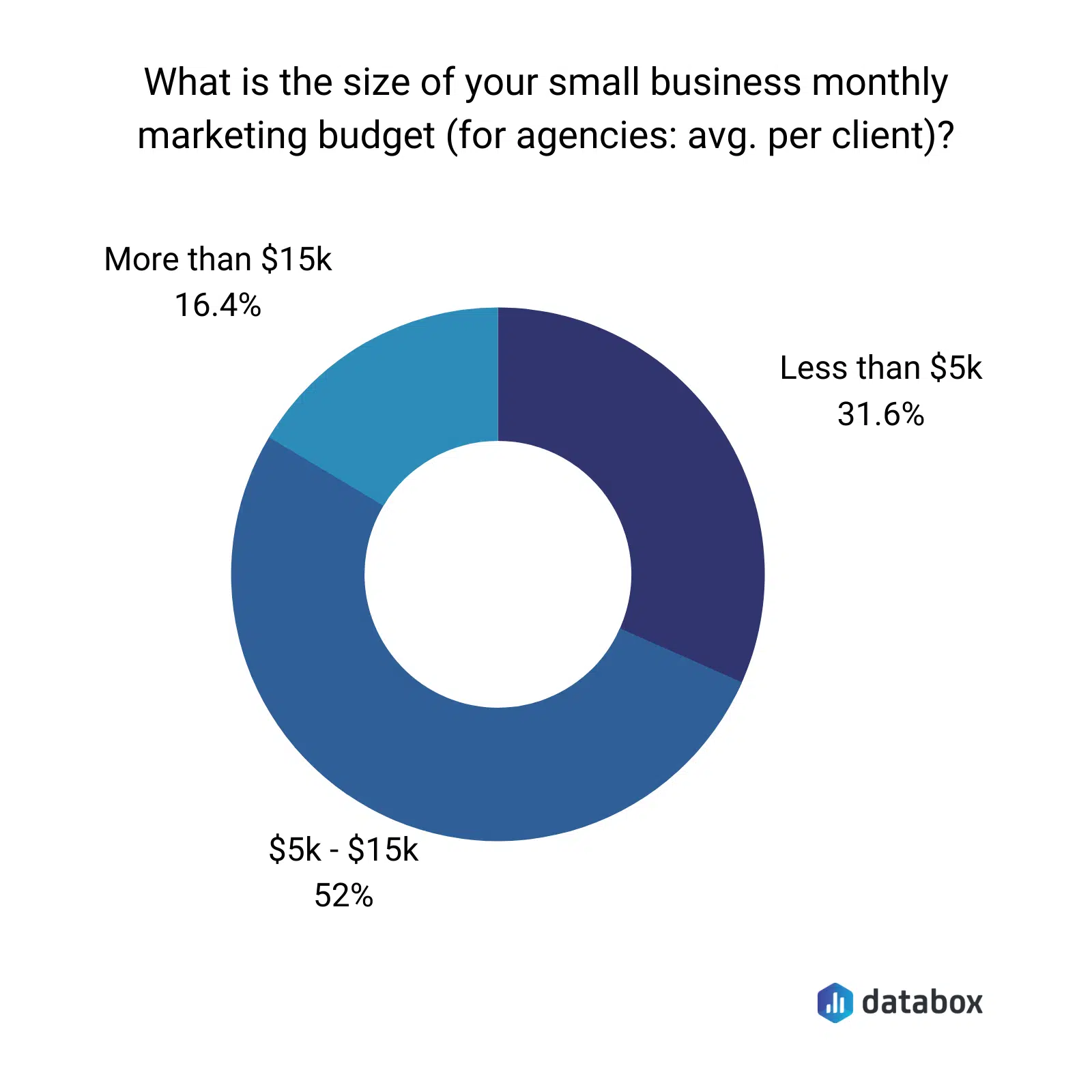
Most small businesses budget $5,000 to $15,000 monthly for marketing, with content taking up 25-30% of that total.

Small business marketing budget

How much should large enterprises budget for content?

Large enterprises – generally, businesses that boast over 1,000 employees – have the means to go wild with content marketing. 

They could go all-in for fast but lasting results. After all, publishing more content often equates to increased traffic and leads. And investing more in content leads to more success.

What does “going all-in” look like for your budget?

  • Building a fully-stacked, in-house, expert content team with a content manager, strategist, web developer, editor, graphic designer, videographer, and writers/creators who can publish 2-5 high-quality blogs per week.
  • High-level development and training for your team to produce their best work in the long run.
  • Additional agency help to fill in gaps (promotions and outreach, paid media, etc.).
  • Top tools, including nice-to-haves like editing tools, AI content tools, and anything else that streamlines or automates your workflows.

What about numbers? If we go by the average percentage of yearly revenue most companies budget for content – 8.7% — that means an enterprise that nets $10 million would allocate $870,000 to marketing per year, with 25-30% of that going toward content initiatives (around $217,000). 

Or, if we look at self-reported numbers, most enterprises’ average annual content budget hovers around $425,000.

Unfortunately, there’s often a lot of pushback and hesitancy in larger companies toward content as a vehicle for growth.

For this reason, marketers working within a larger company may need to work harder to earn buy-in for their content activities. They may need to outright prove the worth of content to various levels of higher-ups to get the kind of buy-in their enterprise is capable of.

So, in reality, many marketers in large enterprises are actually working with a budget that’s more akin to a small-to-mid-sized business. But you can do a lot with a little – as long as you have a content strategy.

9 key tips when budgeting for content

Budgeting for content is never as straightforward as you would hope. But that doesn’t mean it has to be a painful process.

Use these tips to make it more seamless – and make your budget work for the brand.

1. Set goals and build a content strategy, first

The best way to define your content budget is to set goals first. Clarify what you want to achieve, and then you can calculate your budget accordingly so you can reach those objectives.

And don’t forget that goal-setting is the indispensable first step in building a content strategy.

The other steps involved will also help you with budgeting, including defining your audience and researching their preferences. This will help determine the channels you invest in and the types of content you create and publish.

Define your goals, create a strategy, and you’ll have a much easier time setting up a budget. You may find that your budgeting decisions are made for you once your strategy is in place.

2. Look at past spending

If you’ve been in business for over a year, you have data you can look at to inform your content budgeting decisions going forward.

  • What did you spend last year on content?
  • What specific areas did you focus on (e.g., content creation, promotion, strategy, etc.)?
  • What results did you generate from those efforts?
  • What investment will you need to make to increase your results and meet your goals this year?

3. Low budget? Focus on organic content

Organic content marketing is low-cost marketing (it costs 62% less than traditional advertising!). That makes it a great time/effort investment for bootstrapped businesses.

Even starting small is better than doing nothing at all. And, once your budget increases, you can ratchet up your efforts accordingly.

Lastly, another low-cost way to up your content marketing is to invest time and effort into repurposing and updating old content. Every content piece you create is fodder for creative rejiggering, from turning a blog post into an infographic or video to creating show notes from podcast episodes and posting them on your blog or website.

4. Invest for the long-term

Content is a long-term game that’s more cost-effective the longer you do it. That also means you’ll need to swallow some up-front costs to get the results you want.

For example, you can’t budget for one month of SEO content and expect to get anything from it. You’ll need to implement your SEO strategy for 6-12 months before you see any gains, so you must also budget with that expectation in mind.

5. Don’t be afraid to hire expert help

Feeling out of your depth with content budgeting? Hire an expert to help you unravel it all. For example, a content strategist can look at your strategy in-depth and create a proposed budget that aligns with your needs, resources, and goals.

Or, if you want to take the entire content process off your hands, from building a strategy to budgeting to content creation and distribution, consider hiring a full-service content marketing agency.

6. Don’t treat the content budget as ‘leftovers’

Your content budget should not be comprised of whatever is leftover from all your other business spending.

If your budgeting is random, your results will also be random.

You also shouldn’t ballpark your budget. Don’t throw out a number because it “sounds good” or makes you feel comfortable and safe.

Instead, your budget should be rooted in your content strategy and goals. It should support them, so that none of your actions toward your goals are underfunded or incomplete.

Remember, budget for the success you want to achieve!

7. Look at what your competitors are doing

What are your competitors investing in content? This is a good way to judge what you should be doing (or maybe even surpassing).

For example, look at your competitors’ blogs, social media presences, and other content channels.

  • How much are they publishing per week, per channel?
  • What kinds of content are they producing?
  • What might you need to budget to reach this level or surpass it?

8. Don’t spread your budget too thin

While investing in establishing a presence on every channel possible may seem like a great idea, that’s not the best use of your budget.

Instead, hone your focus on one or two channels and invest in growing in those places. For example, spend your budget beefing up your website with content and building your SEO rankings.

Give your attention and budget to the channels that make the most sense for your industry and audience. Attempting to grow on every channel spreads your resources too thin, so you’ll end up with lackluster results. 

9. Continually review and evaluate the budget

A content budget should never fall into the category of “set it and forget it.”

Instead, you should be revisiting your budget regularly and evaluating whether it’s still working to grow the business effectively.

If, after a solid chunk of time, one of your investments isn’t producing results at the level you’d expect, pivot with your spending. Cut the dead weight and funnel that money elsewhere.

Your budget isn’t engraved into a stone tablet. Instead, it’s an ever-evolving, flexible limit you can edit as needed. 

How much you budget for content depends on your unique circumstances

Budgeting for content is an extremely individual process for every business. No two budgets will ever look the same.

For this reason, never assume that what works for others will work for your brand. 

Sure, examine benchmark numbers and your competition to find a starting point.

But, after that, take a deep look at your industry, audience, goals, content strategy, and revenue/resources to determine the best content budget to grow your unique brand.


Opinions expressed in this article are those of the guest author and not necessarily Search Engine Land. Staff authors are listed here.


Related stories

New on Search Engine Land

@media screen and (min-width: 800px) { #div-gpt-ad-3191538-7 { display: flex !important; justify-content: center !important; align-items: center !important; min-width:770px; min-height:260px; } } @media screen and (min-width: 1279px) { #div-gpt-ad-3191538-7 { display: flex !important; justify-content: center !important; align-items: center !important; min-width:800px!important; min-height:440px!important; } }

About the author

Julia McCoy

Julia McCoy is the founder of Content Hacker, 7x author, and a leading strategist around creating exceptional content and brand presence that lasts online. At 19 years old, she used her last $75 to build a 7-figure writing agency which she sold ten years later. In the 2020s, she’s devoted to teaching founders and marketers the strategy, skills, and systems they need to build a business through inbound content, so they can create more lasting impact in the world.

https://searchengineland.com/content-budgeting-394782


This day in search marketing history: March 27

Google research: PPC ads drive 50% incremental clicks

In 2012, Google released a study, Impact Of Ranking Of Organic Search Results On The Incrementality Of Search Ads. It looked at whether clicks from organic search results substituted for ad clicks when PPC ads were turned off.

Google found that, on average:

  • 81% of ad impressions and 66% of ad clicks occurred in the absence of an associated organic result on the first page of search results.
  • 50% of the ad clicks that occurred with a Position 1 organic result were incremental.
  • 82% of the ad clicks were incremental when the associated organic search result ranked between Position 2 and 4.
  • 96% of the ad clicks were incremental when the advertiser’s organic result ranked in Position 5 or lower.

In short, Google’s research indicated that even a website ranking in Position 1 could benefit from an accompanying PPC ad.

Read more about it in Google Research: Even With A #1 Organic Ranking, Paid Ads Provide 50% Incremental Clicks.


Also on this day


Google pledges $340 million in Google Ads credits for SMBs

2020: The credits would become available for eligible active advertisers “in the coming months.” Google was also expanding ad grants for COVID-19 public service announcements. 


Search marketers are volunteering services, support to help small businesses get through COVID-19

2020: Consulting, web hosting, budget coaching – marketers were extending help to ease the strain on businesses.


Will Facebook’s massive usage increases (eventually) turn into revenue?

2020: Facebook was experiencing new records in usage almost every day.


Apple extends Search Ads support to 46 more countries

2019: Apps marketers also got the ability to group multiple regions into one campaign.


Ahrefs, SEO toolset provider, to build their own search engine to compete with Google

2019: “Ahrefs is working on general purpose search engine to compete with Google,” said Dmitry Gerasimenko, the founder of Ahrefs. (Yep launched in 2022.)


Hijacking Google search results for fun, not profit: UK SEO uncovers XML sitemap exploit in Google Search Console

2018: SEO wins bug bounty from Vulnerability Reward Program, Google search team confirms the exploit no longer works


Google Maps adds 39 new languages supporting over 1B people

2018: Google Maps now supported an additional estimated 1.25 billion people worldwide with new languages.


Google Search Analytics bug drops some image search traffic from reports

2017: Google was working on a fix.


Update: Google Says Big AdWords Quality Score Bug Is Fixed

2015: There were widespread reports from Google AdWords users that their keyword quality scores had fallen significantly.


Goodbye Blekko: Search Engine Joins IBM’s Watson Team

2015: Quiet for nearly two years, Blekko’s home page said its team and technology were now part of IBM’s Watson technology.


Search In Pics: Google Cardboard Cubicles, Watch Store & The Founders In 1999

2015: The latest images showing what people eat at the search engine companies, how they play, who they meet, where they speak, what toys they have, and more.


Car Makers Drove 14.4 Million Clicks From Google Ads In 2 Months (And That Doesn’t Include Mobile)

2014: Of those 177 advertisers, the top 20 advertisers (roughly 11%) accounted for 81% of the paid search clicks in the two month period.


Author Rank, Authorship, Search Rankings & That Eric Schmidt Book Quote

2013: Schmidt’s speculative world of some governments requiring verified profiles, if authors wanted to rank well in search engines, wasn’t a reality. Neither was Author Rank at Google. But authorship as a ranking factor seemed likely.


As News Publications Experiment With Sponsored Content, Google Says Keep It Out Of Google News

2013: News publications having “sponsored content” deals were on the rise, so Google issued a reminder/warning that publishers should keep such content out of Google News.


Bing Adds Search Filter To Sort Results By Time Period

2013: You could limit search results by the past 24 hours, week and month.


Search On Smartphones Up 26%, On Tablets Up 19% In 2012 [Study]

2013: Desktop searches, meanwhile, were down 6% between November 2011 and November 2012.


Google Testing Toggle For Search Options & Tools In Search Results

2012: Google search was testing a new user interface feature where they hid the search tools and options from the left side and let you toggle them open and close with a click of a mouse.


App Search Engine Appolicious Introduces “AdWords For Apps”

2012: Appolicious, an independent apps marketplace and search engine, introduced “AdWords for Apps” – a new PPC advertising system for app developers and publishers.


Google Blog Search Fixing Blogroll Indexing Bug

2009: The Google Blog Search team was rolling out fixes to how it separates blogrolls from actual blog posts.


Google Expands AdWords Interface Beta Test

2009: Plus, new features including Performance graphs on every campaign management page.


Google “TV Ads Online” Dangles Multi-Platform Lure For Brand Advertisers

2009: Google was testing a program that let advertisers make a single buy that ran ads on conventional TV as well as online at YouTube and potentially across the internet on other sites.


The Google Wonder Wheel & Other Search Refinement Features Get Live Test

2009: After Wonder Wheel, Google offered two further refinement options: Timeline and Search Suggestions.


How Google Shot Microsoft After It Took A Knife To A Gunfight

2009: While Google wants to be seen as weak in the search marketplace, that playbook gets tossed aside if you question its technical abilities.


Celebrities, TV, & Taxes: Hottest Search Terms In February

2009: The terms “rihanna” and “chris brown” are Nos. 1 and 3 according to their data, with “irs.gov,” “hulu,” and “american idol” rounding out the top five.


Google Offers Robots.txt Generator

2008:  It was designed to allow site owners to easily create a robots.txt file, one of the two main ways (along with the meta robots tag) to prevent search engines from indexing content.


Drilling Into Google’s Decline In Paid Clicks

2008: comScore once again reported a drop in sponsored clicks from January to February, something that also happened in the prior period. 


YouTube Insight: View Your YouTube Video Statistics

2008: You could get stats on the number of views per day your video received, where those viewers were in the world, and how popular your video was compared to other videos in a given period of time.


Don’t Expect A Magic Flash Solution For Search Engines

2007: Things weren’t going to change soon.


Google Upgrades Mobile Search With More Content

2007: Google upgraded its WAP-based search to incorporate more data and information into results.


Google’s Orkut Gets Polls; Answers Next?

2007:  Google’s social networking site Orkut allowed people to post polls.


Yahoo Launches Mobile Ad Network & Mobile Publisher Services

2007: Yahoo launched a new Yahoo Mobile Publisher Services site designed to offer one-stop shopping for publishers that wanted to get mobile content into Yahoo in various ways.


Yahoo Click Fraud Settlement Approved

2007: A settlement in the Checkmate click fraud action against Yahoo received final approval by the judge overseeing the case. 


Mobile News From CTIA And Beyond: InfoSpace, V-Enable, ZenZui

2007: InfoSpace launched a direct-to-consumer version of its mobile local-search application Find It! for Blackberry devices.


Play The Search Engine Smackdown Flash Game

2007: You were asked a series of questions. If you got it wrong – then you got smacked!


From Search Marketing Expo (SMX)


Past contributions from Search Engine Land’s Subject Matter Experts (SMEs)

These columns are a snapshot in time and have not been updated since publishing, unless noted. Opinions expressed in these articles are those of the author and not necessarily Search Engine Land.


< March 26 | Search Marketing History | March 28 >


Related stories

New on Search Engine Land

@media screen and (min-width: 800px) { #div-gpt-ad-3191538-7 { display: flex !important; justify-content: center !important; align-items: center !important; min-width:770px; min-height:260px; } } @media screen and (min-width: 1279px) { #div-gpt-ad-3191538-7 { display: flex !important; justify-content: center !important; align-items: center !important; min-width:800px!important; min-height:440px!important; } }

About the author

Danny Goodwin

Danny Goodwin has been Managing Editor of Search Engine Land & Search Marketing Expo – SMX since 2022. He joined Search Engine Land in 2022 as Senior Editor. In addition to reporting on the latest search marketing news, he manages Search Engine Land’s SME (Subject Matter Expert) program. He also helps program U.S. SMX events. Goodwin has been editing and writing about the latest developments and trends in search and digital marketing since 2007. He previously was Executive Editor of Search Engine Journal (2017 to 2022), managing editor of Momentology (from 2014-2016) and editor of Search Engine Watch (from 2007 to 2014). He has spoken at many major search conferences and virtual events, and has been sourced for his expertise by a wide range of publications and podcasts.

https://searchengineland.com/search-marketing-history-march-27-394837


2023 Survey: Local search ranking factors

The 2023 local search ranking factors survey is now out, it is a survey of what local SEO experts rank the most important ranking factors are for both ranking in the Google local pack and also in the Google organic local results.

More survey details. This survey was conducted by Whitespark and surveyed 44 different local SEO experts. It asked these local SEO experts to rank 149 potential local search ranking factors in order of importance across both the local pack and organic rankings.

Local pack factors. The local pack findings showed that these were ranked the most important ranking factors for Google’s local pack:

  • Primary Google Business Profile category
  • Keywords in your Google Business Profile title/name (which may be against the Google guidelines)
  • Proximity of address to the point of search
  • Physical address in the city of search
  • Removal of spam listings through spam preventative mechasims
  • High numerical Google ratings
  • Additional Google Business Profile categories
  • Verification in Google Business Profiles
  • and more

Local organic factors. The local organic ranking factors showed these these were ranked the most important ranking factors for Google’s local pack:

  • Dedicated page for each service
  • Internal linking across website
  • Quality and authority of inbound links to the domain name
  • Geographic keyword relevance of domain content
  • Keywords in Google Business Profile landing page title
  • Quantity of inbound links to domain from locally relevant domains
  • Topical keyword relevance across entire website
  • Volume of quality content on service page
  • and more

Disclaimer. Search ranking factor studies can and have been somewhat controversial over the years. This study asked local SEOs to rate what they think are the most important factors for ranking well in Google’s local results. So keep that all in mind and make sure to read the study in full before just accepting these results as is.

Why we care. While there may be a lot of debate between SEOs and local SEOs as to what are the most important ranking factors, going through a survey like this may help you think about areas that you may not have thought about prior. So give it a read and hope you come up with some new ideas to implement for your clients.


Related stories

New on Search Engine Land

@media screen and (min-width: 800px) { #div-gpt-ad-3191538-7 { display: flex !important; justify-content: center !important; align-items: center !important; min-width:770px; min-height:260px; } } @media screen and (min-width: 1279px) { #div-gpt-ad-3191538-7 { display: flex !important; justify-content: center !important; align-items: center !important; min-width:800px!important; min-height:440px!important; } }
About the author

Barry Schwartz

Barry Schwartz a Contributing Editor to Search Engine Land and a member of the programming team for SMX events. He owns RustyBrick, a NY based web consulting firm. He also runs Search Engine Roundtable, a popular search blog on very advanced SEM topics. Barry can be followed on Twitter here.

https://searchengineland.com/2023-survey-local-search-ranking-factors-394839


This day in search marketing history: March 26

More sites move to Google mobile-first indexing

In 2018, Google announced it had enabled mobile-first indexing for more websites.

This was the first time Google had confirmed it was moving a large number of sites to this mobile-first indexing process. Google told us in October 2017 that a limited number of sites had been moved over.

Websites that were migrated in this batch were following mobile-first indexing best practices and were notified of the change via a Google Search Console message.

Read all about it in Google begins rolling out mobile-first indexing to more sites.


Also on this day


Now, analyze more accounts in Google Ads Report Editor

2020: Advertisers could run reports for up to 200 accounts in a Manager account.


The new contextual ad targeting works, study says

2020: A new study looks at how contextual relevance of ads to content influences consumers.


EU Android search choice screen’s impact delayed due to COVID-19

2020: Engagement with the search choice screen had been slowed by stifled smartphone supply and decreased demand. 


Small agencies brace for impact, but say remote work isn’t slowing them down

2020: Many expected client budget and project changes would have a negative effect on their businesses.


Businesses should limit, not disable, their sites during temporary closures, Google says

2020: A full takedown could result in losing Search Console data and make it more difficult to ramp back up.


Pinterest rolls out new commerce features for retailers as search volume climbs

2020: Upgrades included the new Verified Merchant Program, new conversion reporting opportunities, and updates to Catalogs and dynamic retargeting.


SEOs show mixed results following Google March 2019 core update

2019: The data was not conclusive on any specific tactic or type of site impacted by the algorithm change.


Google to retire the info: command, adds canonical information to URL Inspection Tool

2019: Google was retiring the info command because it “was relatively underused” and said the new URL inspection tool gave users much of that data now anyway.


Google Ads Keyword Planner gets new (and old) features

2019: Seed your keyword ideas with more terms, add keywords to existing campaigns and more.


Google adds vacation rentals to Hotel Search

2019: Increased competition between hotels and vacation rentals could increase visibility for rental providers and boost Google Hotel Ads revenue.


Europeans again raise the specter of breaking up Google

2018: More of a bargaining position, it was extremely unlikely to actually happen.


Bing begins removing sidebar text ads on desktop

2018: Starting in the US, text ads would show only in the mainline at the top and bottom of search results pages.


Bing ‘intelligent search’ capabilities continue to expand, include facts from multiple sources

2018: Bing also shared more about the platform it built to power intelligent search.


Google Testing Removing Line Separator Between Search Ads & Organic Search Results

2015: Google was testing removing the divider between the ads and free listings in the search results. Would it lead to more searcher confusion?


Google News Ranking Won’t Be Impacted By The New Mobile-Friendly Algorithm

2015: Google News ranking algorithm would not (yet) factor in if a publisher was mobile-friendly.


Google Expands Product Rating Stars In Google Shopping Ads To UK, France, Germany

2015: Star ratings for specific products appeared in product listing ads.


WSJ Report Suggests Intervention In FTC’s Google Investigation By White House

2015: Google lobbying reportedly affected agency’s decision in antitrust case.


Report: Mobile Search Queries 29% Of Total But Growth Modest

2015: Search query percentages didn’t line up with overall usage trends.


Google Says Don’t Delete Your Disavow File Prior To Uploading A New One

2014: He said instead, upload the new one, which will replace the old disavow file.


New AdWords For Video Reporting Now Rolling Out In Google Analytics

2014: Video Campaigns report in Google Analytics gave advertisers more insights into the performance of their YouTube TrueView ads that are managed through AdWords for Video campaigns.


How A Single Guest Post May Have Gotten An Entire Site Penalized By Google

2014: Another case of Google failing to keep its promise to provide more examples relating to penalties.


Bing Ads Launches Product Ads In U.S., Mobile Version Now In Beta

2014: After months of testing.


Microsoft “Research” Discovers The Obvious In Renewed Anti-Trust Attack On Google

2013: Indeed, Google displayed links to its own vertical search results differently. But so did Bing.


Google Gets Trademark Reprieve In Sweden Over Definition Of ‘Ungoogleable’

2013: “Ungoogleable” would not become an official word in Sweden.


CheapAir.com Mobile Voice Search Not Very “Natural”

2013: Its voice search fell quite short of expectations. 


Google Eliminates Another Link Network, BuildMyRank.com – Just One Of Several?

2012: BuildMyRank.com confirmed Google had deindexed an “overwhelming majority” of their network as of March 19, 2012.


In Japan, Google Ordered To Remove Some Autocomplete Suggestions

2012: A man lost his job several years ago and was rejected for new jobs due to the suggestions offered by Google.


Report: 25% Of Paid-Search Clicks Will Come From Mobile By December

2012: Marin also estimated that 23% of Google’s US paid-search spend [by December 2012] would come from mobile campaigns.


Rumor: Apple To Add Baidu To iPhone Search Options

2012: It would have been strange for Apple to exclude China’s most popular search engine from the default options.


Survey: 87% Of iPhone 4S Owners Use Siri Monthly

2012: Roughly one third of iPhone 4S owners used Siri “almost daily.”


UBL And Yext Join Forces To Offer More Complete Local Data Syndication

2012: The combination offered convenience for local marketers who might have been trying to choose between Yext and UBL.


Google Fights “Pogostick Searchers” With New “Get More” Option

2010: “Get More” links appeared when a searcher came back to the search results page.


Does CEO Coffee Summit Equal Détente For Apple, Google?

2010: Did this meeting signal that both men (and both sides) were interested in some sort of “healing” or rapprochement?


Facebook Nabs Google’s David Fischer & Google Nabs Oracle’s Amit Singh

2010: Fischer would be the VP of Advertising and Global Operations at Facebook.


Google Pushing Hard(er) To Get Webmaster Products Adopted

2009: The Google Webmaster Tools Access Provider Program was renamed Google Services for Websites and expanded to include AdSense, Custom Search and Site Search.


Google To Cut 200 Sales & Marketing Staffers

2009: The affected employees would be given time to find new positions at Google and/or help in locating a job elsewhere.


Ask.com Shows Display Ads On Home Page

2009: Ask.com was the only “search engine” to have display ads on their search home page at the time.


Long Time Yahoo Search Scientist Jan Pedersen Joins Microsoft

2009: He was the latest in a string of ex-Yahoos to start working for Microsoft.


Yahoo Not Focused On MSFT Sale, Rather On Mobile & 141 Home Page Variations

2009: Yahoo had “tested 141 different versions of the homepage in search of one that will get users to stick around for longer.”


Yahoo – But Not Yahoo Search – Headed To TV

2009: Yahoo was making a move onto television screens with the Yahoo Widget Engine (YWE), but its first iteration wouldn’t include a Yahoo search box.


What Israeli SEMs Want

2009: To see Yahoo and Microsoft set up offices in Israel and for Yahoo to fix its search marketing platform.


Google AdWords Video Ads Now Live & In the Wild

2008: Announced in February, BlackBerry and AT&T were testing the ads.


Google Founders Take $1 Salaries Again; Tell Investors To Say No On Anti-Censorship Proposal

2008: Google’s founders Larry Page and Sergey Brin, along with CEO Eric Schmidt, renewed their contracts again at a $1 per year salary.


Report: Microsoft To Up Bid For Yahoo To $34 Per Share

2008: It might have pleased Yahoo’s shareholders and put more pressure on Yahoo management to negotiate in earnest with Microsoft.


Google Continues Testing Navigational Link Placement

2007: More sightings of Google experimenting with additional navigational link placement ideas.


Google Gives Seminar On Google for Politics

2007: Google showed off how to use Alerts, AdWords, Analytics and AdSense. They also discussed YouTube and how that can impact an election.


Logo Bomb: Google Maps Returns Anti-Microsoft Logo For Microsoft Listing

2007: Here’s how it happened.


Yahoo Removes Directory Links From Individual Search Results

2007: Yahoo removed the links from the individual search listings to the Yahoo Directory because they caused “clutter.”


Yahoo Releases Greatly Simplified “SiteBuilder” Tool

2007: Yahoo created a “starter” tool that was extremely simple to use (template driven) and offered enough design choices to make it viable and interesting.


Travelocity: Non-Branded Terms Convert Nearly 25% But “Assists” Might Be Less Than Assumed

2007: Travelocity clarified that 20% of its bookings came from non-branded terms. When Travelocity bought a branded term, 4% of those got an “assist” or a click that converted after someone made an earlier visit via a non-branded term.


Rebranded Canadian Local Search Site ZipLocal Launches

2007: ZipLocal was a consolidated “Web 2.0” local search destination growing out of a number of earlier local search sites including Zip411.net and redToronto.com.


Live.com Link Command Currently Offline

2007: It had been offline for over 24 hours.


Yell.com Launches PPC On UK Directory Site

2007: UK yellow pages publisher and local search purveyor, Yell.com announced that it launched PPC ads on its site as well as targeted banner inventory.


No SEO Bull: Calacanis Challenge Sees Traffic Rise 21%

2007: Using “white hat” recommendation, Neil Patel increased Jason Calacanis’s search traffic by 21%.


From Search Marketing Expo (SMX)


Past contributions from Search Engine Land’s Subject Matter Experts (SMEs)

These columns are a snapshot in time and have not been updated since publishing, unless noted. Opinions expressed in these articles are those of the author and not necessarily Search Engine Land.


< March 25 | Search Marketing History | March 27 >


Related stories

New on Search Engine Land

@media screen and (min-width: 800px) { #div-gpt-ad-3191538-7 { display: flex !important; justify-content: center !important; align-items: center !important; min-width:770px; min-height:260px; } } @media screen and (min-width: 1279px) { #div-gpt-ad-3191538-7 { display: flex !important; justify-content: center !important; align-items: center !important; min-width:800px!important; min-height:440px!important; } }

About the author

Danny Goodwin

Danny Goodwin has been Managing Editor of Search Engine Land & Search Marketing Expo – SMX since 2022. He joined Search Engine Land in 2022 as Senior Editor. In addition to reporting on the latest search marketing news, he manages Search Engine Land’s SME (Subject Matter Expert) program. He also helps program U.S. SMX events. Goodwin has been editing and writing about the latest developments and trends in search and digital marketing since 2007. He previously was Executive Editor of Search Engine Journal (2017 to 2022), managing editor of Momentology (from 2014-2016) and editor of Search Engine Watch (from 2007 to 2014). He has spoken at many major search conferences and virtual events, and has been sourced for his expertise by a wide range of publications and podcasts.

https://searchengineland.com/search-marketing-history-march-26-394833