This day in search marketing history: March 21

rel=next/prev was not found on Google. That’s an error.

In 2019, we learned Google had stopped supporting the rel=next/prev markup it had introduced in 2011.

Worse than that, Google hadn’t been using it for indexing for a “number of years,” according to Google’s John Mueller.

All the while, Google continued to recommend using it, so SEOs, publishers and developers invested resources into implementing and maintaining the markup – all for no benefit.

Google apologized for the “oversight” a day later.


Also on this day


Google Ads Editor version 2.0 supports Performance Max campaigns

2022: The update also included support for custom actions and action triggers, conversion goals, shared audiences and more.


Patent suggests how CTR, time on page could be used in search rankings (if Google did that sort of thing)

2019: But no, this didn’t confirm Google was using engagement metrics in rankings.


Google’s neural matching versus RankBrain: How Google uses each in search

2019: Neural matching helped Google better relate words to searches, while RankBrain helped Google better relate pages to concepts.


Google launches News Initiative subscriptions lab for publishers

2019: The company also announced new fact-checking tools and other efforts to stop the spread of ‘misinformation.’


Bing upgrades text-to-speech, expands intelligent answers, improves visual search

2019: The latest upgrades made to Bing around voice, image and answer search.


Survey finds Google Home users do more, have ‘far higher’ satisfaction than Alexa owners

2019: Alexa devices dominated, but higher Google Home NPS scores suggested it would have better word of mouth and could gain market share.


Amazon to introduce video ads in mobile-app search results — report

2019: The buy reportedly required a minimum $35,000 budget.


Google: Using non-English URLs for non-English websites is fine

2018: Google was able to crawl, index and rank them.


Google News Initiative kicks off with Subscribe With Google, other efforts

2018: Subscribers would see articles from their subscribed publications higher in the search results and be logged in to those publications across devices.


Google’s new tappable shortcuts eliminate the need to search on mobile

2017: The shortcuts offered quick answers on weather, sports and entertainment info.


AdWords Brings Keyword Bid Simulator Estimates Into Reporting Columns

2014: From the keyword tab, advertisers could add several columns to their reporting from the Bid simulator section offered in the Customize Columns menu.


What Do Users Really Think Of The New Google Design?

2014: 33 of 50 participants in a usability study preferred the “clean,” “fresh” and “uncluttered” new version.


Google Alerts Adds Filters For Regions & Languages

2014: You could tell Google you only wanted alerts for specific keyword phrases within a specific region or country or a specific language.


Part Two: If Google Was A Guy (Video)

2014: It mocked searchers, Google Doodles, Google Glass and Bing.


Search In Pics: Sergey Brin With Ed Snowden, Google Water Balloon Launcher & More

2014: The latest images showing what people eat at the search engine companies, how they play, who they meet, where they speak, what toys they have, and more.


Topless Nude Photo Makes It Way To The Google Knowledge Graph

2013: When you searched for [Angel Tompkins], the image shown for her was from a site that appeared to be a spam blog with nude images of people.


Google Alerts: Still Broken

2013: Another open letter about how poorly the service was working.


Bing Snapshot Grows To Understand People, Places & Things With “Satori” Expansion

2013: Bing expanded Satori to include more people, places and things.


Firefox To Use Google Secure Search By Default; Expect More “Not Provided” Keywords To Follow

2012: It would further reduce the ability for publishers to know how people find their sites in Google — except for Google advertisers.


New Ad Status Info Added To AdWords

2012: Google gave AdWords users a new way to figure out whether their ads are approved, or not, and why.


Microsoft’s adCenter Improvements Rolling Out Fast And Furiously

2012: Enhancements would include broad match modifier, AdCenter Express and more.


Report: Google Still Top Desired Place To Work

2011: An annual study ranked Google the top place for young working professionals to work at.


Report: Google Still Web’s Dominant Traffic Driver, But Some Niches See Facebook Gaining

2011: Google was the No. 1 source of traffic for 26 of the 35 properties analyzed (74%), and Google traffic had increased or stayed the same since last July for 24 of them (69%).


Google Plays More Involved Matchmaker Between Advertisers And Agencies

2011: Google implemented changes to Google Partner Search to make it easier for the two parties to get in contact.


Google Fined 100,000 Euros By French Privacy Regulator

2011: This was the first fine/penalty any country had levied against Google over the WiFi data collection.


German Court OKs Google Street View Imagery In “Landmark Decision”

2011: A Berlin court vindicated Google Street View operation in Germany.


Kadafi, Gaddafi, Qaddafi: In The Age Of Search, News Publications Still Struggle With Libya Leader’s Name

2011: Use the wrong spelling, and your story might go missing. Could search tell us the “right” one?


Chinese Hacking Google Again To Stop “Jasmine Revolution”

2011: Google blamed the Chinese government for “politically motivated attacks” that had disrupted Gmail service for some Chinese users.


AT&T-Mobile Makes Google-ITA Antitrust Issue Look Trivial

2011: If approved by US regulators, AT&T would have become the largest wireless carrier by a wide margin.


Twitter Celebrates 5th Birthday With Conan Show Appearance, New Video & More

2011: The company shared a new video, new website, blog posts, and had a national TV appearance on tap.


Google Analytics Benchmarking Data Now Live

2008: The reports within the benchmarking feature included visits, pageviews, pages/visits, bounce rates, average time on site and new visits.


Google Suggest Becoming A Default Feature?

2008: Google had implemented this feature as a default on other non-U.S. based search engine home pages but never as the default at Google.com. 


LinkedIn Adds New Company Directory

2008: LinkedIn, with help from BusinessWeek’s CapitalIQ, added a company directory and related factual information to its business network.


Search Biz: Probing Wikipedia’s Finances, Facebook Toast?, & Google Denies Evading Chinese Taxes

2008: A fascinating inside glimpse into Wikipedia’s finances, and the people responsible for both raising money and spending it. And more.


Search In Pictures: Snoop Dogg, St. Patrick’s Day, & Danny Exposed

2008: The latest images showing what people eat at the search engine companies, how they play, who they meet, where they speak, what toys they have, and more.


Google Wins KinderStart Case Over Site Penalty

2007: Google won the case brought against them by KinderStart over Google downgrading their rankings.


Google CSE Adds Show Popular Queries

2007: You could add a snippet of code on your site to show off the most popular queries performed by your readers.


No Google Phone But Instead Mobile Software, Says Google

2007: Google pushed back on earlier reports of building its own cell phone.


Yahoo’s Semel Says Panama Will Show “Exciting Numbers” In 1st Quarter

2007: “I’m totally all smiles,” Semel said about Panama.


Local Search News: BooRah, Oodle and Rao

2007: A quick roundup of some local search news.


Q&A With François Bourdoncle, CEO Of Exalead

2007: Bourdoncle co-founded Exalead with the goal of revolutionizing the search engine software market by providing users with a unified technology platform to access information in the enterprise.


PreFound Relaunches, Tries To Rise Above Social Search Din

2007: Rebranding itself somewhat as a “community” search engine, PreFound, like others, was trying to build a human-edited layer on top of general (in this case Google) search results.


From Search Marketing Expo (SMX)


Past contributions from Search Engine Land’s Subject Matter Experts (SMEs)

These columns are a snapshot in time and have not been updated since publishing, unless noted. Opinions expressed in these articles are those of the author and not necessarily Search Engine Land.


< March 20 | Search Marketing History | March 22 >


Related stories

New on Search Engine Land

@media screen and (min-width: 800px) { #div-gpt-ad-3191538-7 { display: flex !important; justify-content: center !important; align-items: center !important; min-width:770px; min-height:260px; } } @media screen and (min-width: 1279px) { #div-gpt-ad-3191538-7 { display: flex !important; justify-content: center !important; align-items: center !important; min-width:800px!important; min-height:440px!important; } }

About the author

Danny Goodwin

Danny Goodwin has been Managing Editor of Search Engine Land & Search Marketing Expo – SMX since 2022. He joined Search Engine Land in 2022 as Senior Editor. In addition to reporting on the latest search marketing news, he manages Search Engine Land’s SME (Subject Matter Expert) program. He also helps program U.S. SMX events. Goodwin has been editing and writing about the latest developments and trends in search and digital marketing since 2007. He previously was Executive Editor of Search Engine Journal (2017 to 2022), managing editor of Momentology (from 2014-2016) and editor of Search Engine Watch (from 2007 to 2014). He has spoken at many major search conferences and virtual events, and has been sourced for his expertise by a wide range of publications and podcasts.

https://searchengineland.com/search-marketing-history-march-21-394551


Bing adds Bing Chat answers to search results

Microsoft Bing has added Bing Chat answers in the Bing Search results in place of some of the answer boxes. We knew this was coming, as Mikhail Parakhin, who leads up Bing Search and Bing Chat, suggested would happen a week ago and now it seems to be here.

What it looks like. Here is a screenshot of one of many queries that triggers the Bing Chat answer in Bing Search:

Bing Chat In Bing Search 800x570

What happens. When you search in any browser in Bing and you see this Bing Chat box come up, you can see the first answer above. But then if you want to click on an additional question in the Chat box or type your own message in that Chat box, it will lead you into Bing Chat.

Bing Chat only works currently in Microsoft Edge and when you are invited into the beta. So your journey with Bing Chat may end there in Bing Search. But yes, Microsoft is showing you a snippet of the power of Bing Chat and hoping you try to get into the beta.

Why we care. Watching how search may adapt over time with the rollout of AI chat features is interesting and also important for publishers, content creators, marketers and SEOs. If Bing will replace featured snippet-like responses with Bing Chat responses, that might impact click-through rates and traffic to your websites.

Here is one example of this happening right now.

Hat tip to David Iwanow for sending this to me.


Related stories

New on Search Engine Land

@media screen and (min-width: 800px) { #div-gpt-ad-3191538-7 { display: flex !important; justify-content: center !important; align-items: center !important; min-width:770px; min-height:260px; } } @media screen and (min-width: 1279px) { #div-gpt-ad-3191538-7 { display: flex !important; justify-content: center !important; align-items: center !important; min-width:800px!important; min-height:440px!important; } }

About the author

Barry Schwartz

Barry Schwartz a Contributing Editor to Search Engine Land and a member of the programming team for SMX events. He owns RustyBrick, a NY based web consulting firm. He also runs Search Engine Roundtable, a popular search blog on very advanced SEM topics. Barry can be followed on Twitter here.

https://searchengineland.com/bing-adds-bing-chat-answers-to-search-results-394524


8 important content strategy goals to consider

Goal-setting is one of the most important pieces of content strategy.

Every guide you’ve ever read on building a content strategy probably mentions goals somewhere.

Goals matter because they give your content marketing direction and purpose. Instead of creating content randomly, you’ll create content for specific reasons, and each piece will contribute to growth.

Because, without goals, content is just content. But add a goal behind it, and it becomes a tool for your business.

But it’s one thing to say, “Set goals for your content marketing.” It’s another thing entirely to put that into action.

If you’re new to content marketing or strategy, you’re probably wondering which goals your particular brand should focus on. 

That’s a valid question, but before you get too deep, know this:

The ultimate goal of content marketing is to drive profitable action.

That means, at some point, your content should affect your audience enough to move them to act in ways that grow your business.

Nurturing content strategy goals

While you can and should drive profitable action with your content marketing, consider how you’ll build up to that point.

You can’t move people to act if you can’t first move them emotionally. That’s what these first three goals are all about.

These goals might be considered “small” because they’re built on a small scale, content piece by content piece. They are also less straightforward to measure than some of the larger content marketing goals, like growing traffic. 

However, that doesn’t mean they’re any less worthy of pursuing. I’d argue that working toward these smaller goals will also help you build toward your larger goals, as they all involve nurturing your audience, which eventually can lead to conversions. 

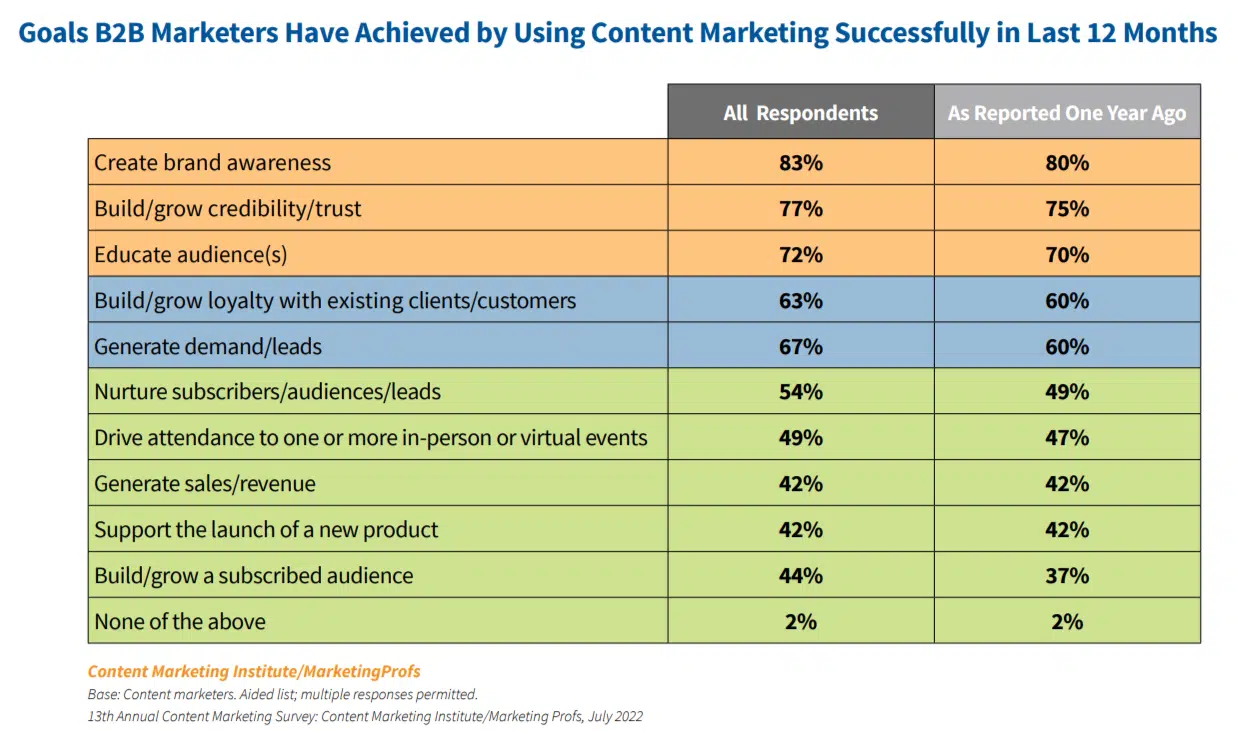
By the way, these are also some of the most common goals marketers say they have achieved in the last 12 months.

B2B content marketing goals

1. Building trust with your audience

This goal is small but mighty. An audience that trusts a brand is an engaged audience, and those people will be much more willing to convert based entirely on that trust.

Building trust is done slowly, one content piece and interaction at a time. Over and over, you need to:

With this goal in your content strategy, you’ll commit to giving your audience the best information possible: expertise they’ll come to know they can lean on.

Great content has an amazing ability to build trust. One study found that brand trust increased among 73% of consumers one week after consuming one piece of educational content.

To measure your progress toward this goal, look at:

  • The quality of your content over time: Each piece should be well-written, factually accurate, targeted to your audience, and provide much-needed value on a topic that matters to your people.
  • Customer feedback, reviews, comments, mentions, chats, etc.: How your customers talk about your brand will give you clues about how they feel about you and whether you’ve earned their trust. Keep your ear to the ground to monitor this.
  • Surveys: You can conduct surveys to get a picture of how your followers, blog readers, fans, and customers see you as a brand.

2. Educating your audience

This goal is about value. Content that truly educates and helps your audience learn and grow is immensely valuable. And giving away value builds trust.

To meet this goal, aim to provide educational value in your content. Ask yourself these questions every time you publish:

  • Is this content helpful – or are we too focused on selling?
  • If your topic is based on a keyword, are you fulfilling the search intent for that keyword? Are you giving a searcher the answers they’re looking for?
  • Does your content satisfyingly cover the topic?
  • Is it well-written? Well-researched? Credible? 
  • Does your content provide unique insights – or does it regurgitate what every other blog says about the topic?

If a blog fails to educate: if it’s lacking details, poorly written, rushed, or unsatisfying to read: then it’s not helping you meet your goals.

3. Building relationships and rapport

You might have noticed that these three nurturing goals all stack together. Building one bleeds into the others because they all boil down to trust.

Another way to capitalize on trust built is to nudge that toward building relationships, connections, and rapport with your audience.

To reach this goal, shoot for:

  • Transparency: For any relationship to work, you expect a level of honesty. Aim to be transparent in your business and let that flow into your content. For example, if you make changes in the business, like with pricing or policies, be up-front and explain the why to customers. Own up to missteps.
  • Responsiveness: No matter where you interact with customers, from the customer service chat on your site to your social media channels, be responsive and attentive. Relationships require two-way communication.
  • Demonstrate your brand’s trustworthiness: Earning trust isn’t done with words but actions. Continue consistently creating content that demonstrates that the business walks its talk.

Get the daily newsletter search marketers rely on.


Action-oriented content strategy goals

These next few goals are about building toward the profitable actions we discussed earlier. As you focus on nurturing content and interactions day-to-day, you can look to these larger goals for the long term.

4. Growing traffic

As you create valuable, helpful content, you can leverage that into search engine rankings. Once you start ranking, your traffic potential skyrockets.

88% of B2B sites are discovered through unbranded searches. That means people find them through regular keywords that typify a problem or knowledge gap.

But you can’t put the horse before the cart. You shouldn’t try to rank in search just to earn traffic. Valuable content must come first because search engines will not rank content users find worthless.

To reach the goal of growing traffic through content marketing and SEO, do these things:

  • Know and understand what your audience needs in your content: what information, what solutions?
  • Research keywords relevant to those pains and questions reachable for your brand to rank for.
  • Create valuable content properly optimized for those keywords that educate and build trust.

5. Increasing leads

More traffic is coming to your website and blogs from search engines and social media:

  • What will you do to capture it?
  • How will you turn those faceless visitors into interested audience members and potential customers?

This is a key content marketing goal because traffic means nothing if it disappears into the ether. You need those people to come back so you can continue nurturing them with content.

With that in mind, a great goal to focus on for lead generation is building an engaged list of email subscribers.

To reach this goal, continue creating valuable content. But add another layer to it:

  • Include CTAs in the content to sign up for your email list. You can even include a short form that collects their name and email address right on the page.
  • Create lead magnets with an even bigger value for your audience beyond your blogs. Offer these for free in exchange for emails.

6. Increasing sales

Yes, you can earn direct sales through content. I have accomplished exactly that with just one valuable, well-written, targeted long-form blog.

To get direct sales from a blog, you need the right combination of keyword + pain point + solution.

For example, in the blog that earned direct sales, the keyword I targeted was directly tied to a pain point that my business solved with our services.

In the blog, we wrote a helpful guide explaining exactly how to solve the problem and added CTAs that allowed readers to have us solve it for them.

Through keyword research and focusing on helping instead of selling, we were ironically able to sell on the spot. 

However, content marketing can also help increase your sales in less direct ways. 

Consistent, nurturing content will continue to build trust and can eventually convince your audience to buy from you: even if you’re not selling anything directly in the blogs.

For example, an on-the-fence customer who has been considering purchasing from you can finally decide to pull the trigger after reading a great blog and realizing, “Wait, these guys really know their stuff.”

Remember that increasing sales through content marketing does not happen without nurturing. You must help, add value, educate, and consistently show up that way.

7. Retaining customers

Focused on customer retention? Content marketing can help you achieve that, too.

Specifically, focus on creating content for new leads and reserving a slice of your calendar for people who have already purchased your products/services. What are their information needs? How can you continue helping them beyond the sale?

For instance, maybe there’s a common question new customers continually ask that you could address in a blog post. Maybe you could create a “new user’s guide” for one of your products. 

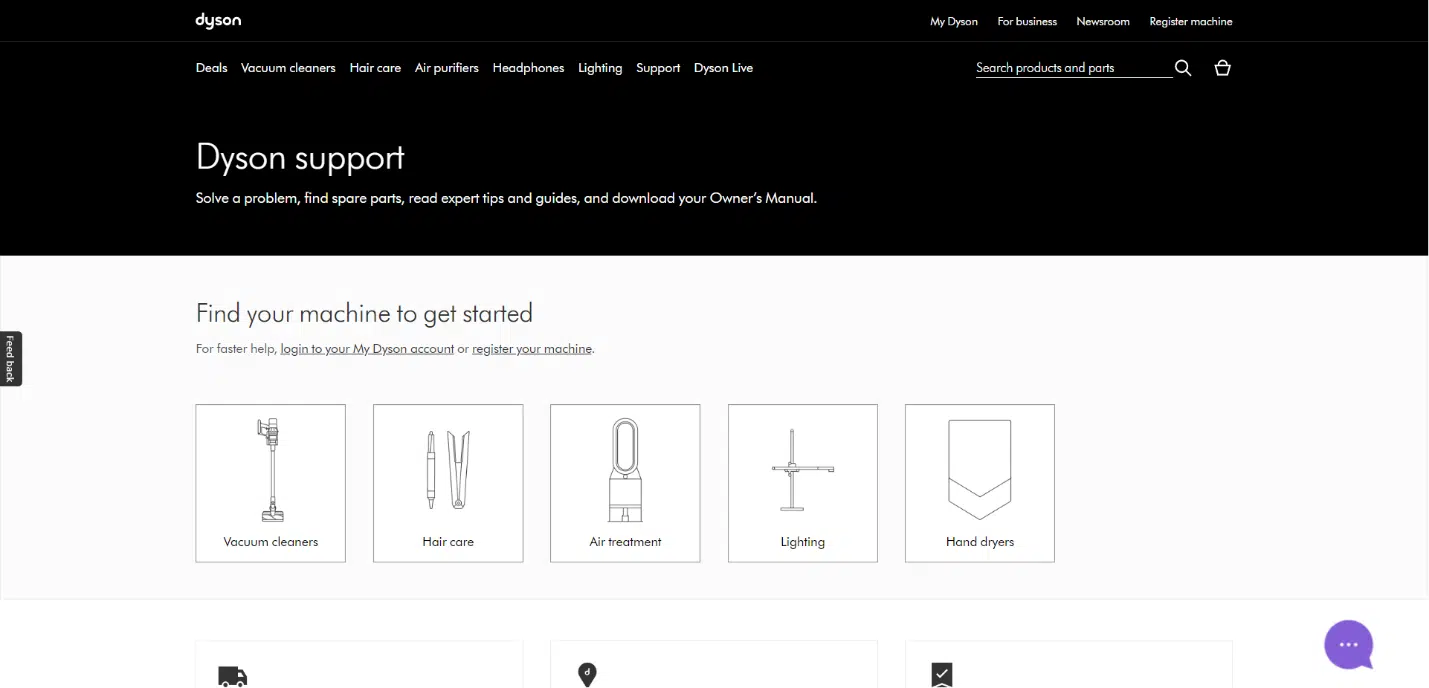
Many tech companies address existing customers’ content needs through a knowledge base, FAQ pages, or user guides on their websites.

Great example: Dyson has a robust set of user guides on their website for each product, including a place to download the user manuals.

Dyson

8. Inspiring brand loyalty

If increasing brand loyalty is your goal, you must find ways to surprise and delight your customers through content marketing.

  • Celebrate your audience in content: Showcase customer stories and take opportunities to shine a light on your audience.
  • Create fun, just-because content: Have fun with your content once in a while. Show the faces behind the brand, get creative, and enjoy it. When other people are having fun, it’s hard not to join in.
  • Share user-generated content: Give your audience a challenge and repost the content they create.
  • Give special discounts or coupons to your email subscribers: Offer rewards to your subscribers just for being there and sticking around.

Overall, inspiring brand loyalty is easier when you show your audience you genuinely care. Making this one of your content marketing goals will help inspire this attitude throughout your company.

Choose your content strategy goals wisely

As you choose the goals you’ll focus on, remember that not every goal will match up with what your business needs from content marketing at this moment.

Look at where you stand in terms of growth and where you need to go. Content marketing can help you get there, but you have to be realistic.

Set goals you can actually hit by a specific period. Stipulate when that time will be and what to do if you miss it.

Finally, don’t feel locked into the goals you set. If they’re not serving you after some time, don’t be afraid to pivot and tweak your goals as needed. You can even build a check-in point into your content strategy in three or six months to see what’s working and what isn’t.

With goals set, you’re ready to build the rest of your content strategy. Now go forth and grow.


Opinions expressed in this article are those of the guest author and not necessarily Search Engine Land. Staff authors are listed here.


Related stories

New on Search Engine Land

@media screen and (min-width: 800px) { #div-gpt-ad-3191538-7 { display: flex !important; justify-content: center !important; align-items: center !important; min-width:770px; min-height:260px; } } @media screen and (min-width: 1279px) { #div-gpt-ad-3191538-7 { display: flex !important; justify-content: center !important; align-items: center !important; min-width:800px!important; min-height:440px!important; } }

About the author

Julia McCoy

Julia McCoy is the founder of Content Hacker, 7x author, and a leading strategist around creating exceptional content and brand presence that lasts online. At 19 years old, she used her last $75 to build a 7-figure writing agency which she sold ten years later. In the 2020s, she’s devoted to teaching founders and marketers the strategy, skills, and systems they need to build a business through inbound content, so they can create more lasting impact in the world.

https://searchengineland.com/content-strategy-goals-394472


This day in search marketing history: March 18

Google Business Profiles new emergency help attributes for Ukraine support

2022: Google also added hotel attributes to define if hotels offered support to those displaced from Ukraine.


Brands, especially restaurants, need FAQs and ‘coronapages’ fast

2020: It was critical that precautions being taken were discoverable in search results.


Video: Martha van Berkel talks about structured data

2020: Does adding schema help improve your search rankings? Google said no but…


Google on the March 2019 core update: This is not the biggest update we’ve released

2019: Related: Early data on Google March 2019 Core Update show an interesting pattern


Google Ads now makes reporting column recommendations

2019: With this update, Bid Strategy Type was no longer a required column.


Waze conquers ‘digital dark zone’ with in-car, out-of-home ad coordination

2019: McDonald’s campaign showed drivers in-car ads that mirrored billboards.


Google Image Search launches colored filter buttons

2016: After testing various combinations, Google launched new filter buttons in the image search results.


Bing Ads testing Social Extensions: Link search ads to Facebook, Twitter, Instagram, Tumblr

2016: The ad extension was in beta in the U.S.


Bing partners with US National Park Service for #FindYourPark photo contest

2016: The winning photo would be featured on Bing’s home page during National Park Week and used as Bing’s Facebook and Twitter cover photo in April.


Search in Pics: Google Analytics With NASA, Google buffalo & Fiber office

2016: The latest images showing what people eat at the search engine companies, how they play, who they meet, where they speak, what toys they have and more.


Yahoo Loses Market Share As Some Firefox Users Return To Google

2015: Google had become increasingly aggressive in trying to lure back users.


EU Antitrust Chief Says Google Settlement Essentially Done

2014: Amid criticism from politicians and Google’s critics, EU antitrust chief Joaquín Almunia essentially said that Google’s antitrust settlement proposal was a done deal. 


Bing Ads Starts Allowing Keyword Variations Once Flagged As Duplicate

2014: Advertisers were able to start including multiple versions of keywords through Bing Ads Editor and the Bing Ads Upload API.


Yandex Buys Israeli Geo-Location Platform KitLocate

2014: The chief virtue of KitLocate was that it provided location to apps without using much power – unlike GPS or triangulation, which could drain mobile batteries.


GetListed Tool Relaunches As Moz Local

2014: Agencies and business owners could use the tool to research where their listings appeared online, manage claiming and verification and listings submission.


A Dilbert On Search Engine Keyword Research

2014: There was a fun search marketing-related Dilbert strip on the topic of doing and presenting your keyword research to your boss.


Google Penalized One Article On BBC’s Web Site

2013: Google’s John Mueller: “We found unnatural links to an individual article, and took a granular action based on that.”


Bing Webmaster Tools Adds Site Move Tool

2013: The tool let you move from one domain to another domain as well as from within a site; URLs to URLs.


Google Goes Beyond Answers, Starts Guessing Release Dates

2011: Google added a one box even when it only had a “best guess” at the answer to a search.


Yahoo’s AllTheWeb To Redirect To Yahoo Search April 4th

2011: AllTheWeb one of the search engines Yahoo acquired in 2003 to help build Yahoo Search, would sunset April 4, 2011.


SEO Held Liable, Fined In Counterfeiting Case

2011: A website builder and SEO firm was held liable in federal court in a case in which it was accused of enabling the sale of counterfeit goods.


Search In Pics: YouTube Socks, Yahoo Bowlers & Bing Armbands

2011: The latest images showing what people eat at the search engine companies, how they play, who they meet, where they speak, what toys they have, and more.


Google Tests “Sponsored Map Icons”

2010: The Sponsored Map Icons were a new way to promote your business within Google Maps.


Google Will Let Web Users Avoid Analytics Tracking

2010: The company said it would soon let web users opt-out of being tracked by its popular Google Analytics software.


Google-Viacom Court Documents Out; Google Says Viacom ‘Secretly’ Uploaded Videos

2010: YouTube’s chief counsel accused Viacom of “continuously and secretly” putting its content on YouTube, and “deliberately” making the material look amateur.


Google Updated Maps For Mobile For Android

2010: An updated interface and some feature changes to help improve usability.


Google’s Matt Cutts On Keywords In The URL

2009: Cutts answers: “Does the position of keywords in the URL affect ranking?”


Twitter Search: Not Your Friend If You Tweet Something Bad

2009: Be careful what you say in a public setting and use social media tools to help you, not hurt you.


Financial Times Launches Newssift, A Business News Search Engine

2009: Newssift aimed to bring context and meaning that its creators said was missing from traditional keyword-based business news search engines.


Google Maps Opens Up Editing To Everyone

2008: Users would now be able to edit any details about a business or location, or add new businesses, even if they weren’t the business owner.


Yahoo Expects To Double Cash Flow In Three Years & Reaffirms 2008 Outlook

2008: Yahoo expected to double its operating cash flow in three years from $1.9 billion to $3.7 billion.


Search Biz: Alibaba Gains, Google Loses, & Eric Schmidt Says Don’t Call Me Daddy Anymore

2008: China’s Alibaba.com, in which Yahoo was a significant minority shareholder, enjoyed a massive 340% gain in net profit tied to China’s fast-growing economy.


SES NY 2008 Day Two Live Coverage Recap


From Search Marketing Expo (SMX)


Past contributions from Search Engine Land’s Subject Matter Experts (SMEs)

These columns are a snapshot in time and have not been updated since publishing, unless noted. Opinions expressed in these articles are those of the author and not necessarily Search Engine Land.


< March 17 | Search Marketing History | March 19 >


Related stories

New on Search Engine Land

@media screen and (min-width: 800px) { #div-gpt-ad-3191538-7 { display: flex !important; justify-content: center !important; align-items: center !important; min-width:770px; min-height:260px; } } @media screen and (min-width: 1279px) { #div-gpt-ad-3191538-7 { display: flex !important; justify-content: center !important; align-items: center !important; min-width:800px!important; min-height:440px!important; } }

About the author

Danny Goodwin

Danny Goodwin has been Managing Editor of Search Engine Land & Search Marketing Expo – SMX since 2022. He joined Search Engine Land in 2022 as Senior Editor. In addition to reporting on the latest search marketing news, he manages Search Engine Land’s SME (Subject Matter Expert) program. He also helps program U.S. SMX events. Goodwin has been editing and writing about the latest developments and trends in search and digital marketing since 2007. He previously was Executive Editor of Search Engine Journal (2017 to 2022), managing editor of Momentology (from 2014-2016) and editor of Search Engine Watch (from 2007 to 2014). He has spoken at many major search conferences and virtual events, and has been sourced for his expertise by a wide range of publications and podcasts.

https://searchengineland.com/search-marketing-history-march-18-2-394506


Your SEO guide to the ChatGPT API

ChatGPT announced the rollout of its API (GPT 3.5 Turbo) on March 1. 

I’m bullish on ChatGPT’s utility for several different SEO-related functions like keyword research, local SEO, content, and link building. Having spent much time using ChatGPT, I’m also painfully aware of its limitations.

While the API won’t be a panacea (and the web interface is actually much better for some tasks), it can help address some of the shortcomings of the web interface.

This article will show you how to maximize ChatGPT’s API with specific SEO use cases.

How to use the ChatGPT API

To leverage the ChatGPT API, you need to be able to access the API in the first place. ChatGPT’s parent company OpenAI has extensive documentation for using the API.

If you’re looking to learn more about building a tool or interacting directly with the API there’s also a good walk-through here.

You can also use AppsScript to query the ChatGPT API in Google Sheets, which we’ll walk through here step by step.

Regardless of your approach, you’ll need to start by getting an API key.

Getting your ChatGPT API key

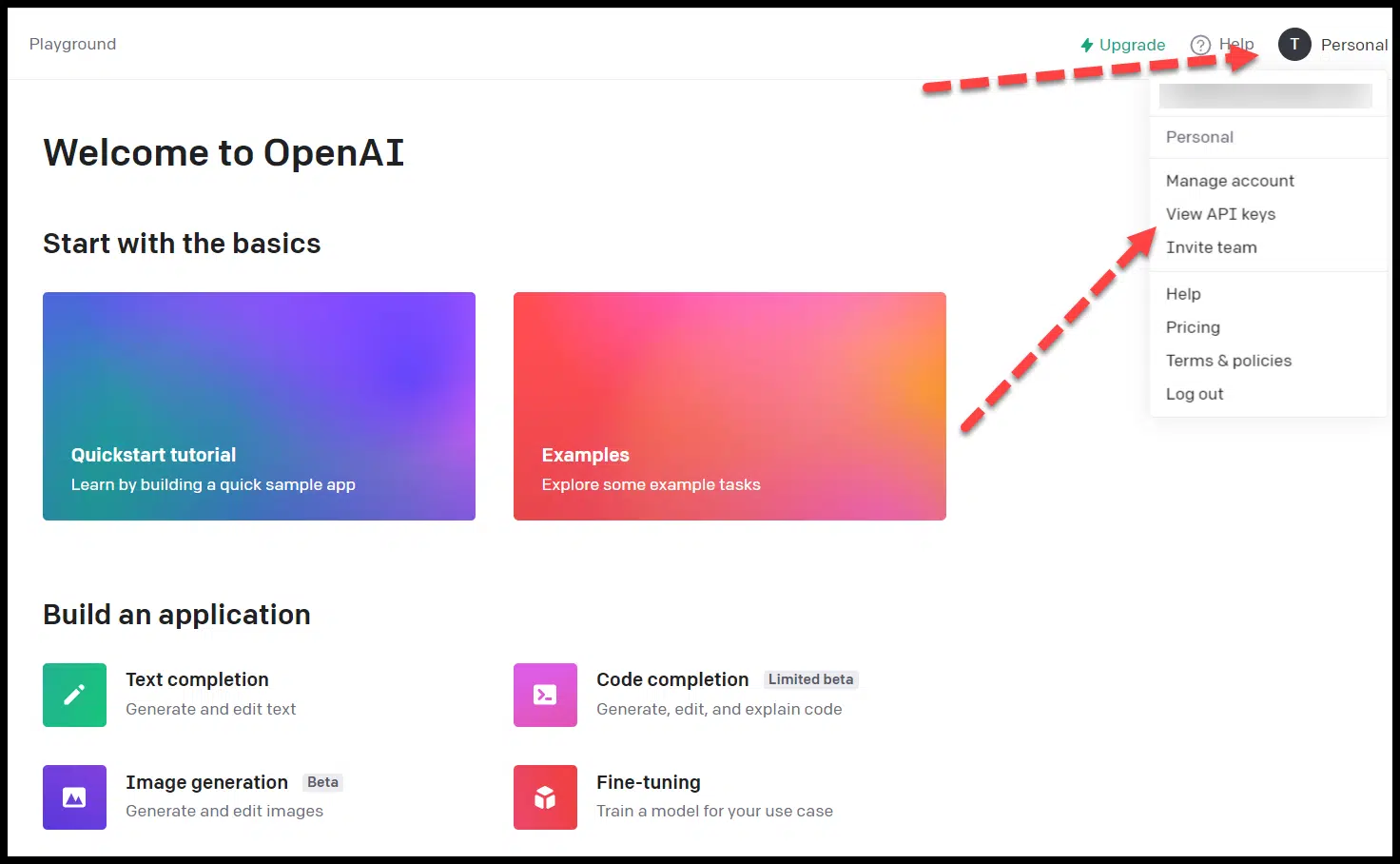
Once you have an OpenAI account, you can generate your API key either by following this link while logged in or clicking View API keys in the profile dropdown:

ChatGPT - View API keys

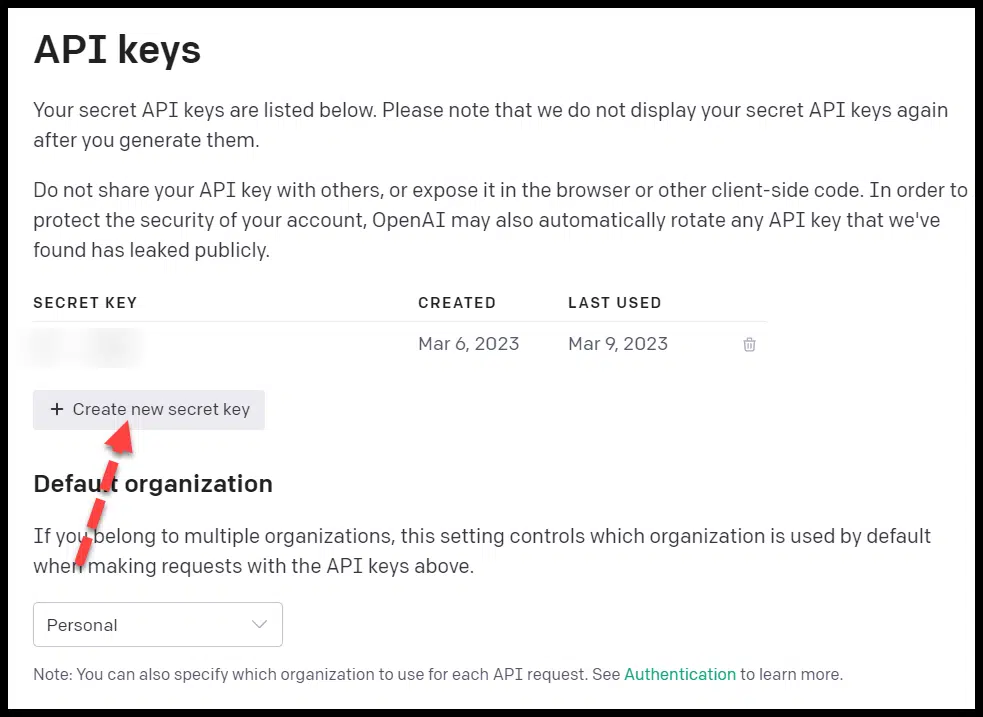
Then click Create new secret key.

ChatGPT - Create new secret key

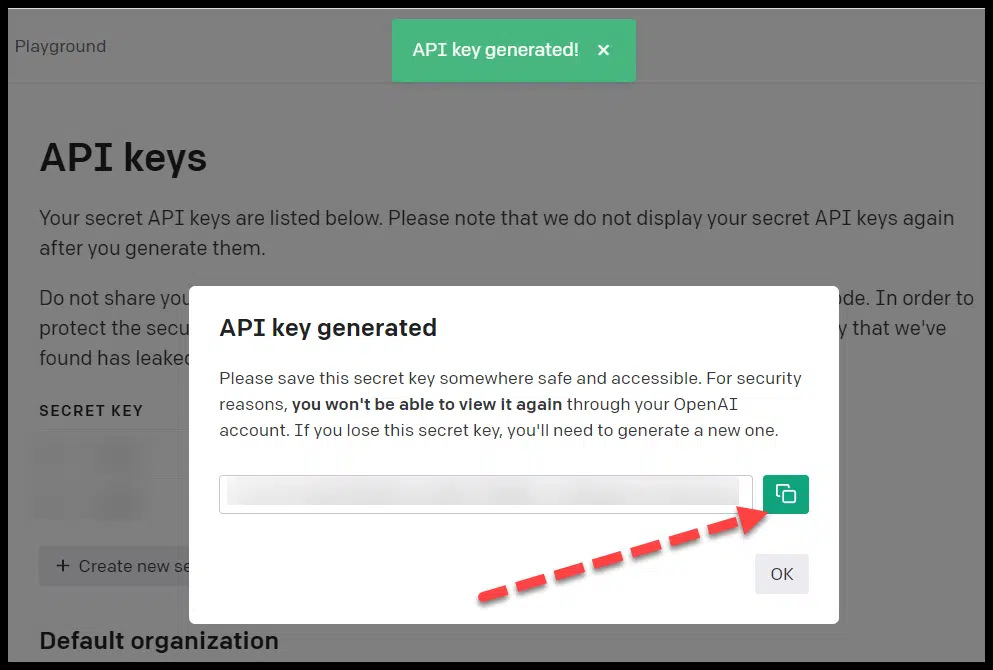
Copy the API key you generated.

ChatGPT - API key generated

Connecting the ChatGPT API to Google Sheets

There’s a straightforward way to connect ChatGPT to Google Sheets (h/t Keith Mint).

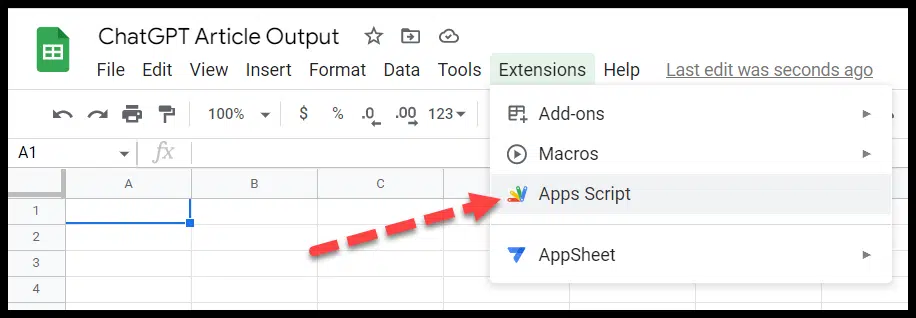
First, create a new Google Sheet, then click on Extensions and choose Apps Script:

ChatGPT API - Google Sheets extension

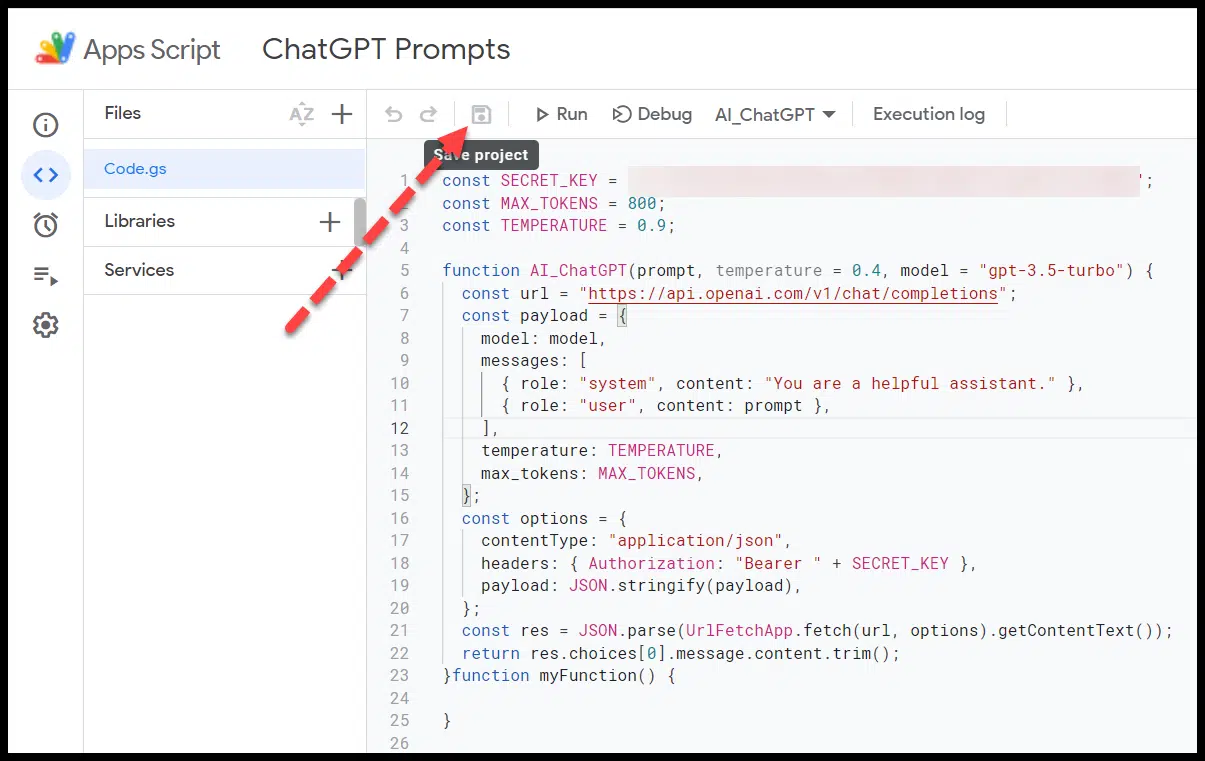
You then paste the following code (with your API key in place of YOUR API KEY):

const SECRET_KEY = "YOUR API KEY";
const MAX_TOKENS = 800;
const TEMPERATURE = 0.9; function AI_ChatGPT(prompt, temperature = 0.4, model = "gpt-3.5-turbo") { const url = "https://api.openai.com/v1/chat/completions"; const payload = { model: model, messages: [ { role: "system", content: "You are a helpful assistant." }, { role: "user", content: prompt }, ], temperature: TEMPERATURE, max_tokens: MAX_TOKENS, }; const options = { contentType: "application/json", headers: { Authorization: "Bearer " + SECRET_KEY }, payload: JSON.stringify(payload), }; const res = JSON.parse(UrlFetchApp.fetch(url, options).getContentText()); return res.choices[0].message.content.trim();
}

Click save within Apps Script:

ChatGPT API - Apps Script

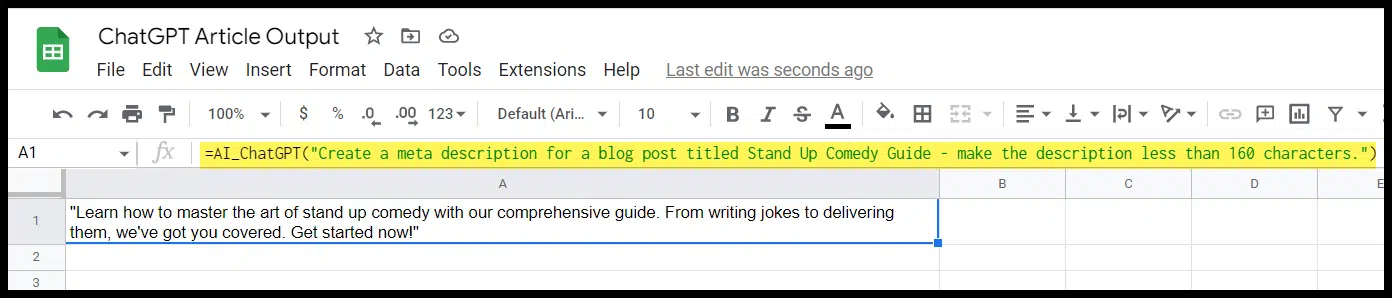
Then you can use the following function format to apply a prompt to a cell:

=AI_ChatGPT("YOUR PROMPT HERE")

ChatGPT Google Sheet prompt formula

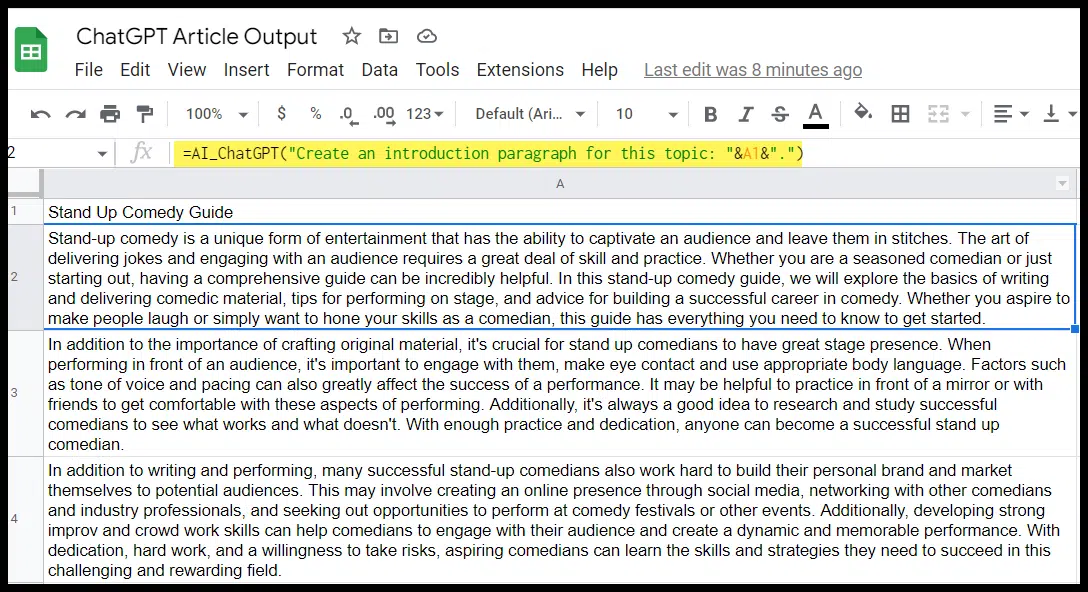
As Mint points out in his article, you can also reference a cell if you want to have multiple cells use prompts that refer back to one cell (like the title or topic of a blog post):

ChatGPT - Google Sheet prompt formula with multiple cells

In the example above, I used simple prompts like the one pictured, then created a second paragraph for this topic. (We’ll walk through more specific applications for the API shortly.) 

ChatGPT API pricing

Before you start leveraging the ChatGPT API for SEO tasks, it’s essential to understand the pricing.

The price for the gpt-3.5-turbo API (the ChatGPT API) is $0.002 per 1,000 tokens, which is 10x cheaper than the existing GPT-3.5 API.

To better understand what the pricing actually winds up looking like, you need to understand how tokens work.

ChatGPT API tokens

OpenAI has a good breakdown and a helpful free tokenizer tool to help you determine how many tokens a specific text will be and how the text is broken down (in case you need to reduce the number of tokens for a prompt or response).

A few key things to keep in mind:

  • By default, the API can return a maximum of 4,096 tokens.
  • Tokens are a representation of how much text your prompt and response are. This is a key factor, as longer prompts can shorten your response output.
  • Text is translated into tokens and roughly breaks down to around 4 characters in English.

OpenAI also provided this helpful breakdown of how tokens are calculated from text:

  • 1 token ~= 4 chars in English
  • 1 token ~= ¾ words
  • 100 tokens ~= 75 words

Or

  • 1-2 sentence ~= 30 tokens
  • 1 paragraph ~= 100 tokens
  • 1,500 words ~= 2048 tokens

To get additional context on how tokens stack up, consider this:

  • Wayne Gretzky’s quote, “You miss 100% of the shots you don’t take,” contains 11 tokens.
  • OpenAI’s charter contains 476 tokens.
  • The transcript of the U.S. Declaration of Independence contains 1,695 tokens.

So if you used a short prompt to generate a 1,500-word article, it would be less than half a cent.


Get the daily newsletter search marketers rely on.


Specific API use cases for SEO

The API can help with a lot of the same SEO-related tasks as the ChatGPT web interface, but the two have some significant differences, making some tasks better for one than the other.

Understanding that will help you determine which to use for SEO tasks.

ChatGPT API vs. web interface

The biggest differences include the following:

Scale and bulk tasks

If you want to integrate ChatGPT with an existing application or spreadsheet, you’ll need to use the API. 

Additionally, the API will be your friend if you want to perform a specific function applied across multiple instances (e.g., generate meta descriptions for several keywords).

Fine-tuning and relationship between prompts

Currently, ChatGPT’s API does not support fine-tuning. If you create multiple prompts through the API, they won’t have a relationship. 

You can create a system message to apply to multiple prompts and responses, but OpenAI has said that these are frequently currently ignored by the gpt-3.5-turbo API. 

This means if you have a task that requires several prompts and for ChatGPT to keep the context of an entire conversation, you’ll want to use the web interface.

Character limits

The API has a token limit of 4,096 which translates to around 16,384 characters per interaction for each prompt and response. 

Character limits for the web interface can vary, but generally, the prompt and response are limited to around 2,048 characters, or 4,096. 

So for tasks that require more extensive prompts or more significant responses, the API will be a better option. 

There are also more options for structuring prompts and tasks in a way that gives you a lengthier combined output if you’re using code rather than something like the Google Sheets integration.

Pricing 

Again, the API is priced by usage (and offers a free trial with $18 worth of tokens), and the web interface currently offers a free version and a $20/mo. paid version. 

Example ChatGPT API prompts

Let’s look at specific use cases where you’d want to consider the API over the web interface.

Title tags and meta descriptions

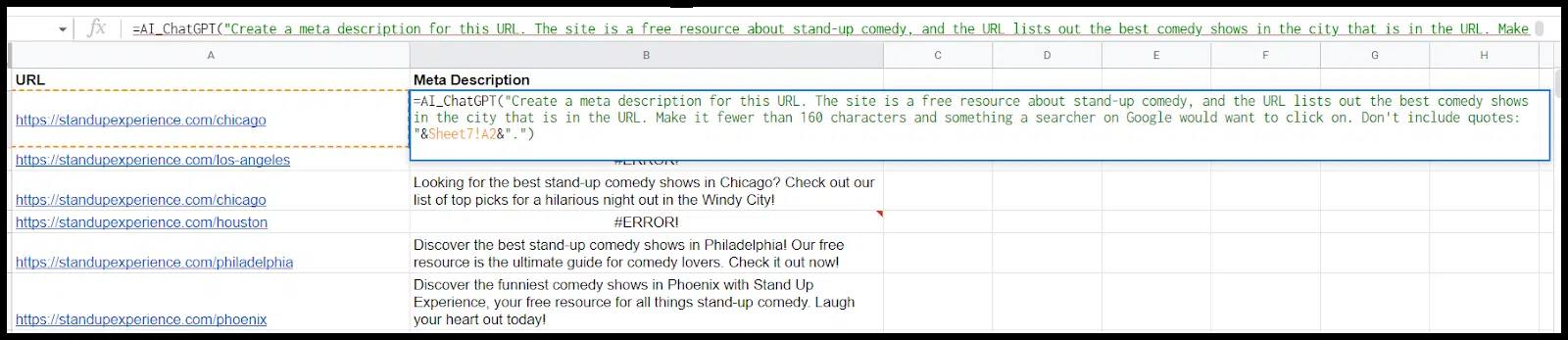
An obvious use case where the API makes sense is having ChatGPT generate title tags or meta descriptions at scale.

You can use similar prompts to those that work in the web interface here, but if you structure them properly and lay out your spreadsheet right, you can take the first prompt and then quickly apply that to several URLs or keywords: 

ChatGPT API - Title tags and meta descriptions

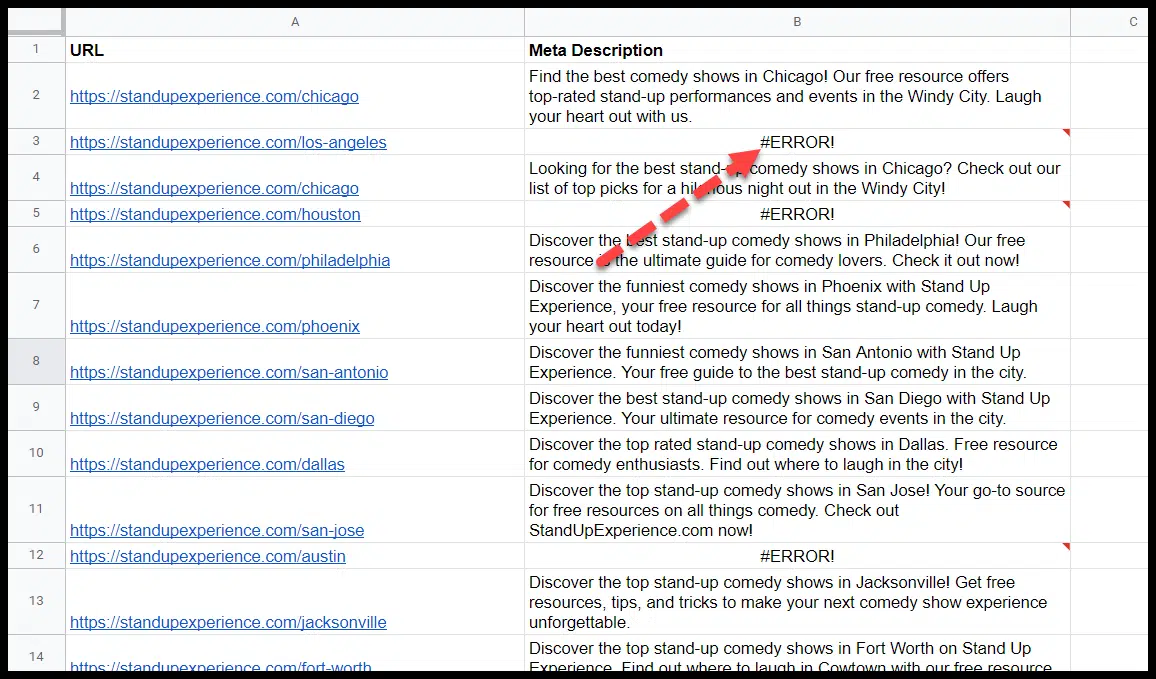
Note that the free plan particularly is rate limited, so you may have errors where the cells time out, in which case you need to delete and re-paste:

ChatGPT API - Google Sheets errors

And as always, keep in mind that:

  • ChatGPT can’t crawl the web, so it’s either using prior knowledge of a URL from the training period or an assumption about the URL based on terms in the URL to generate suggestions
  • ChatGPT’s output can often be wrong or misleading and needs to be edited.

You can use this same format for title tags. (I’ll have an article focusing specifically on using ChatGPT to generate and update title tags coming out soon).

Longer content and post outlines

You can use the web interface in ChatGPT to create chunks of content and outlines pretty easily.

If you want to make a longer article or if you’re going to create a series of outlines on different topics, however, it can be a clunky experience.

The API is smoother for these tasks.

First, you can chunk off a post you wrote into sections. Then line up the sections and pull your prompt down:

ChatGPT API - longer content and post outlines

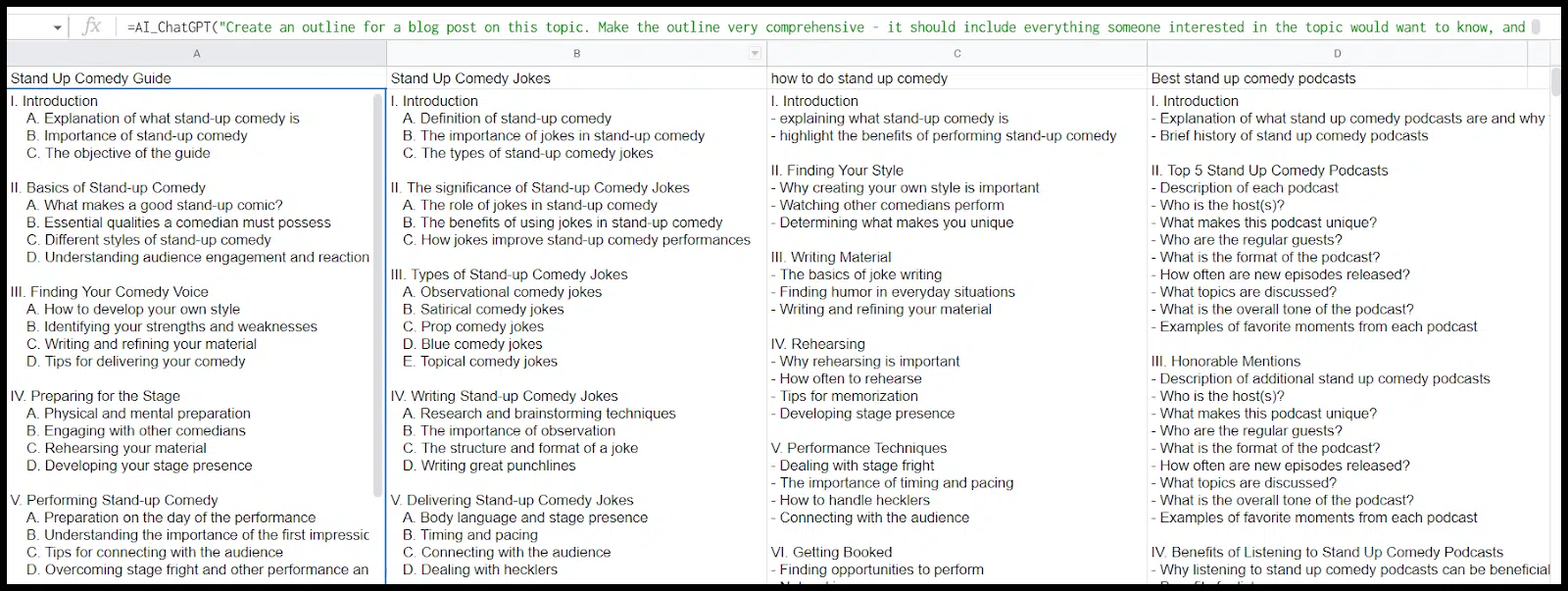
Alternatively, you could have ChatGPT generate several outlines that you then have a writer (or writers) fill in:

ChatGPT API - article outlines

Then, you could have the API write the content one section at a time:

ChatGPT API - write article sections

Again, here you could take these prompts, load them one by one across the outline (changing each prompt for the appropriate section), and then just pull the same formulas across multiple outlines and have a lot of text specific to the subsections of each post generated.

My experience is that this helps you steer clear of token limits, and even pedestrian prompts like the one above combined with having ChatGPT create an outline will generate better content than if you ask the tool to “write a blog post.” 

Beyond that, you can further improve content quality by doing things like:

  • Ask it to include specific phrases (either because you want them on the page or you want to add internal links for that phrase).
  • Feed it statistics or quotes to work into specific sections of the post. (This is particularly helpful if you have a topic that requires up-to-date tactics and statistics, given that GPT-3 was not trained on recent data.)
  • Tweak your prompts to output the tone and formatting you want (more on this shortly).

And, as always, layer on human editing.

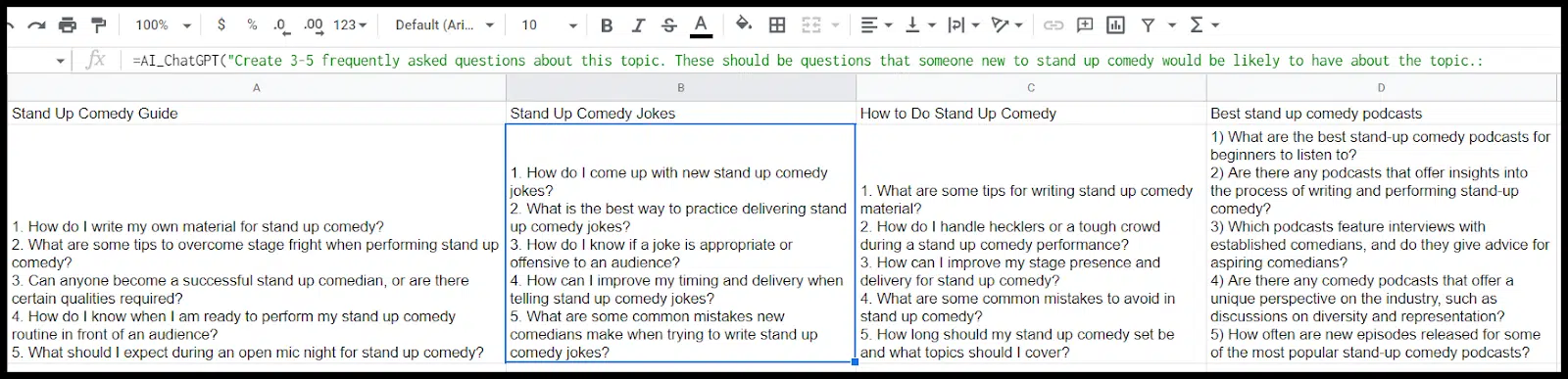
FAQs

There are multiple FAQ-related functions the API can help with.

First off, you can generate a list of FAQ questions to be associated with a blog post:

ChatGPT API - FAQs

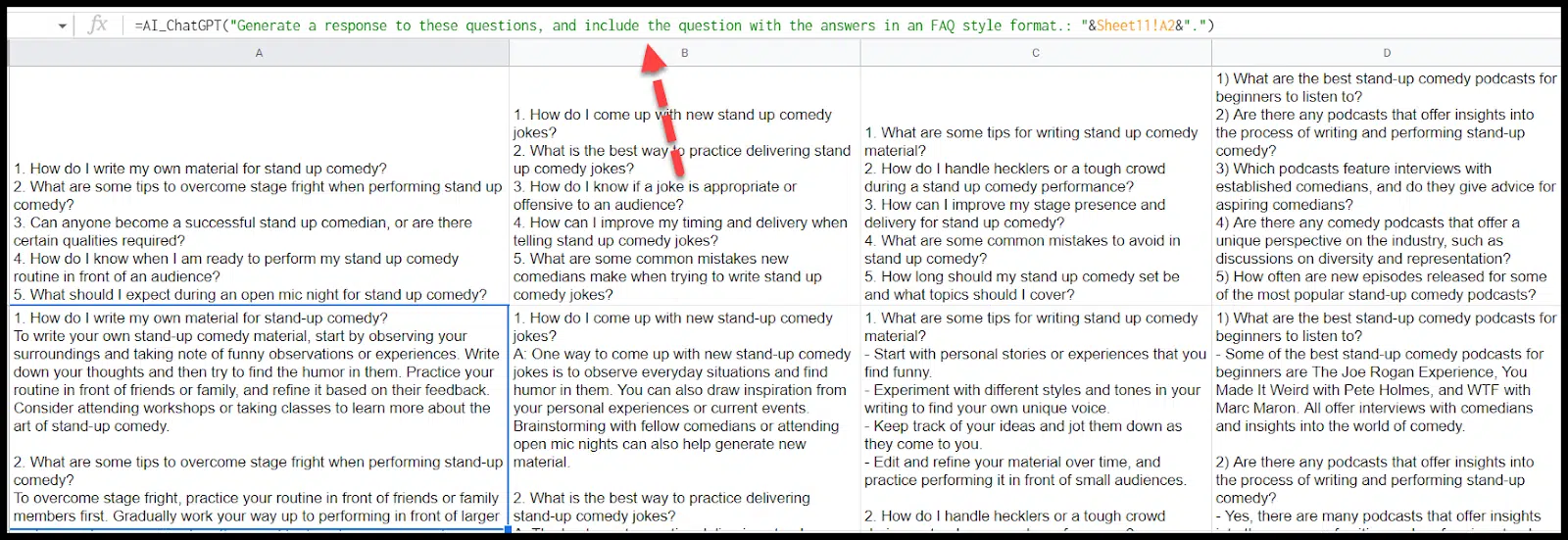
Next, you can have the ChatGPT API answer these (again: proceed with caution when it comes to output quality and accuracy):

ChatGPT API - FAQs - answers

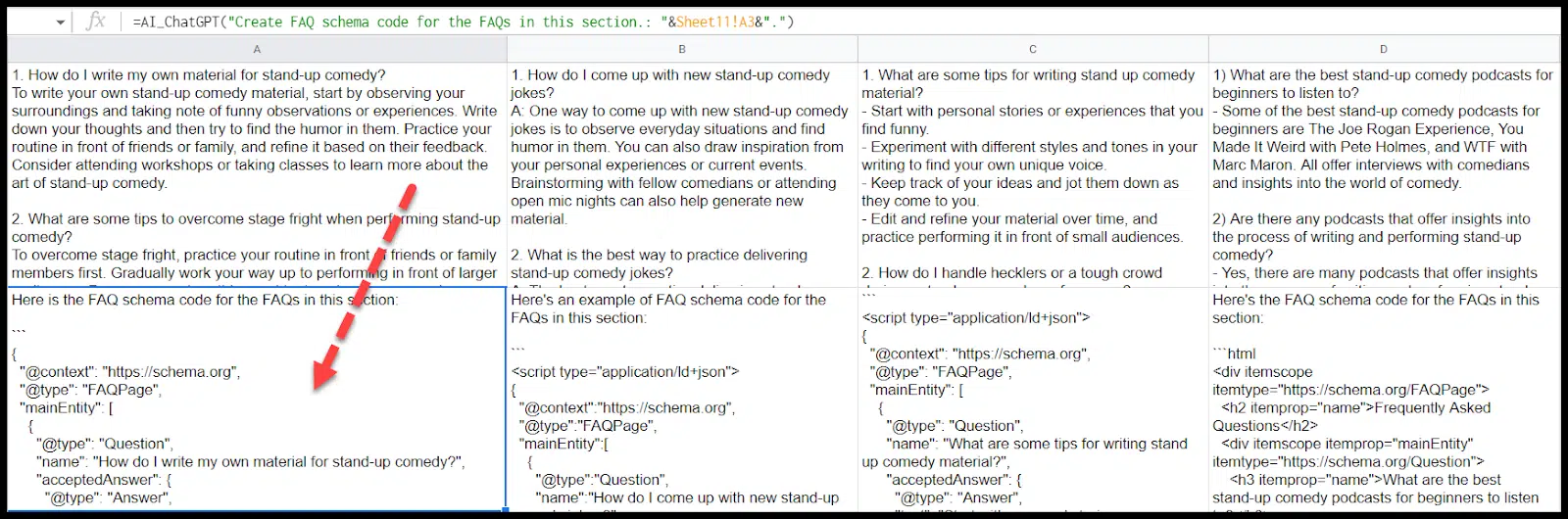
Schema

You can also have ChatGPT generate schemas for you across multiple pages. 

In this case, we can apply FAQ schema to the FAQs it created for us:

ChatGPT API - Schema

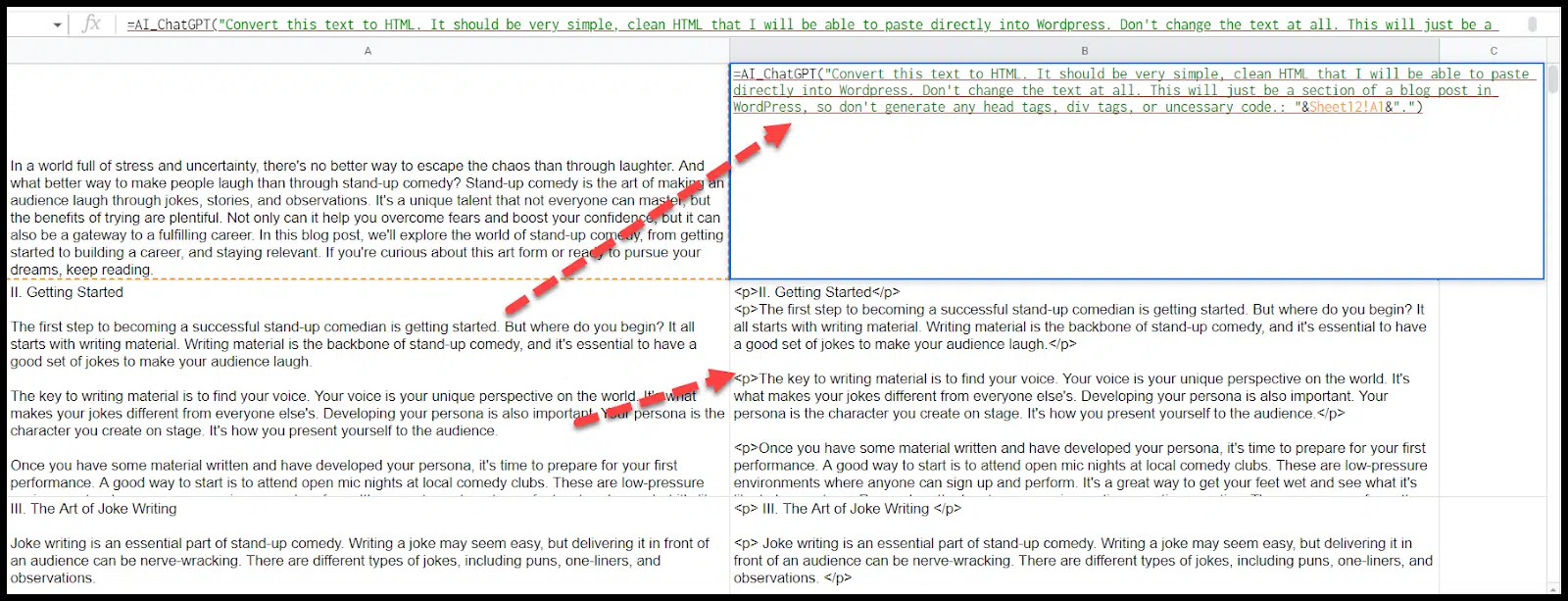
Convert content to HTML

Another cool use case for ChatGPT is to convert text to HTML. 

First, let’s convert our post from text to HTML:

ChatGPT API - Convert content to HTML

A few things to note here:

  • As you can see, the headers in each section were initially formatted with paragraph tags. I fixed this in the prompt by adding, “Format the header of the section as an h2, and any other headlines in this section as an h3.”
  • I wasn’t able to combine the entire post (which was around 1100 words) into one cell to be converted to HTML, so I had to chunk it off and gave specific instructions in my prompt for each cell to make sure ChatGPT didn’t layer in the formatting for an entire HTML document in every cell.
  • You may also get some wonky formatting, like additional quotes you didn’t expect in the output. 

As with all aspects of ChatGPT, keep refining your prompts and always check the output.

Now that we have our post in HTML, we can start to do some cool things with internal linking.

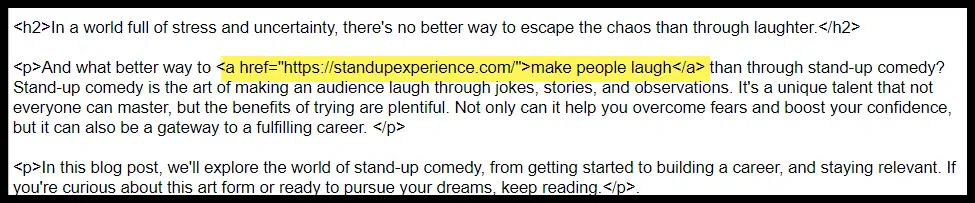
We can tell ChatGPT to add internal links from specific phrases to specific pages anywhere in the HTML we just generated:

ChatGPT API - Add internal links

If we were creating a cluster of pages, we could create rules specific to each page and apply them to the relevant HTML.

This way, everything we generate is interlinked the way we want, the HTML is ready to go, and the FAQ schema is added appropriately.

I tried to create a rule that was a little more complicated, asking ChatGPT to hyperlink phrases. Here is what I added to my prompt:

  • “Any time you see the words making and laugh within 5 words of each other, create a link with those two words and all of the words in between them to standupexperience.com/make-them-laugh.”

Here is the link that was added:

ChatGPT API - Wrong hyperlinks

That’s not what I asked for, and also, it didn’t link every instance of stand-up as I asked it to.

I’ll need to refine my prompts and check my outputs.

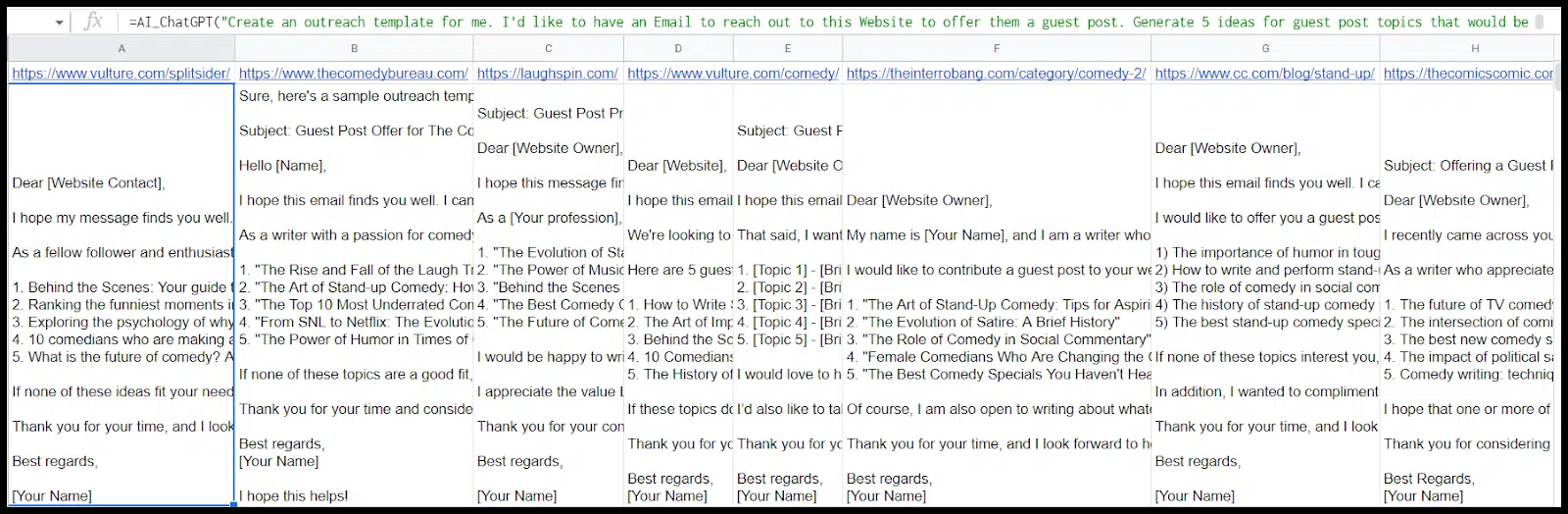
Outreach templates

If you’re reaching out to multiple places for link outreach or guest post placements, you can use the ChatGPT API to create multiple outreach templates for you:

ChatGPT API - Outreach templates

If you have different kinds of templates, get creative with applying these prompts across different outreach targets.

Using the web interface and the API in tandem (a.k.a., bring your prompts)

Two things are true:

  • The API is better for larger projects and performs many prompts simultaneously.
  • The web interface is frequently better at getting you to an excellent output since you can go back and forth with ChatGPT to give context, review the output, provide feedback, etc.

One way to get the best of both worlds is to create your prompt in the web interface and then apply it to multiple items via the API.

Let’s look at a specific example from this post. My internal linking prompt didn’t work via the API. It’s challenging to troubleshoot via the API because you can’t give ChatGPT feedback or ask why the prompt failed.

Enter, prompt generation via the web!

My typical ChatGPT process is to: 

  • Give it chunks of context.
  • Check for understanding. 
  • Review the output for errors and give it additional feedback to achieve my desired result.

To be able to do this for internal linking rules, let’s start with the web interface to clean up our ChatGPT prompt.

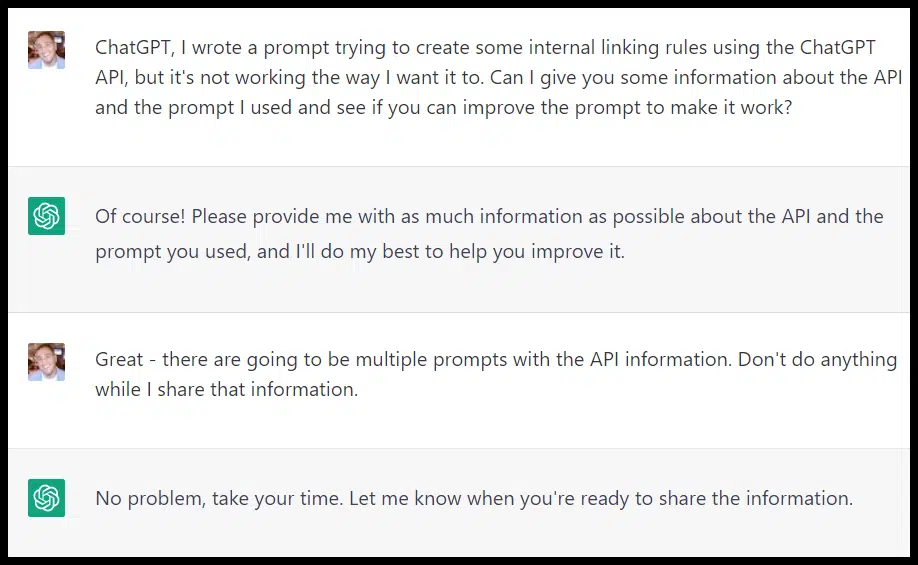
First, I want to give ChatGPT some context. (Remember: ChatGPT doesn’t know about its own API!) 

I want to give it information about the API, share the HTML I’m starting with, share the prompt I used, and share the output I got and then ask ChatGPT to diagnose the issue and rewrite the prompt for me.

Let’s see how it goes:

ChatGPT web - Prompt creation

If you don’t pre-empt it, ChatGPT will repeatedly interrupt you to fire (frequently irrelevant) answers and suggestions (like an eager student who didn’t do the reading).

I copied and pasted the text from this page in four prompts, the HTML I was trying to add links to, the full Sheets function I’d used, and the output I’d gotten.

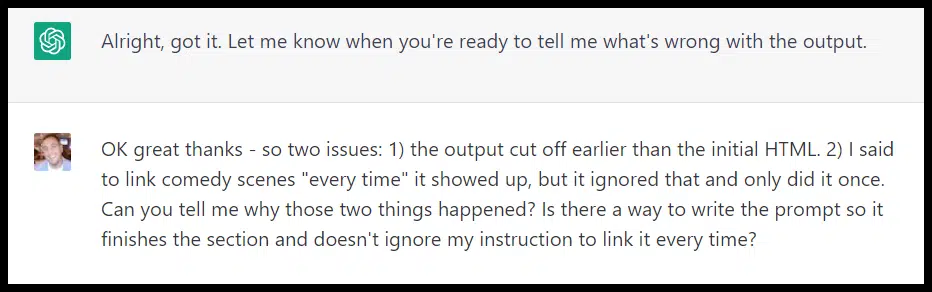
Next, I finally shared the issue with the output:

ChatGPT web - Prompt creation for Google Sheets

And then ChatGPT fixed the prompt for me.

ChatGPT web - Fixed prompt Google Sheets

Well, it wasn’t actually fixed.

ChatGPT web - Prompt syntax error

ChatGPT is relentlessly polite even if you’re getting a bit testy, and when I shared the prompt, it analyzed it for me:

ChatGPT Web Prompt Feedback 800x557

The suggestions on HTML size are good ones, but I was still getting the error:

ChatGPT web - Google Sheet max character limit

This time, the prompt worked!

To address the max tokens issue, I can go to Apps Script to adjust that number:

ChatGPT API - Google Sheet fix character limit

Or obviously, if I’m not using Sheets, it’s not likely to be an issue (until I hit the 4096 tokens).

Get creative and look for solutions

SEO applications for the ChatGPT API go well beyond what’s listed here. 

If you’re on the lookout for ways to use the platform and can get creative you’ll find many more applications like:

  • Programmatic solutions: You can go beyond Google Sheets to find exciting and scalable uses for the ChatGPT API.
  • Combining multiple APIs: Think about how you might be able to use the ChatGPT API in unison with APIs like Google Search Console, Ahrefs, Semrush or similar. What problems do you want to solve? 
  • More efficient or better workflows: Take stock of the tasks you and your team complete daily. Are there items that ChatGPT’s API may be able to either allow you to do just as well but more efficiently, or to improve your work product around?

With the recent release of GPT-4, more opportunities for leveraging the platform will likely continue to crop up.


Opinions expressed in this article are those of the guest author and not necessarily Search Engine Land. Staff authors are listed here.


Related stories

New on Search Engine Land

@media screen and (min-width: 800px) { #div-gpt-ad-3191538-7 { display: flex !important; justify-content: center !important; align-items: center !important; min-width:770px; min-height:260px; } } @media screen and (min-width: 1279px) { #div-gpt-ad-3191538-7 { display: flex !important; justify-content: center !important; align-items: center !important; min-width:800px!important; min-height:440px!important; } }

About the author

Tom Demers

Tom Demers is the co-founder and managing partner of Measured SEM and Cornerstone Content. His companies offer paid search management, search engine optimization (SEO), and content marketing services to businesses of varying sizes in various industries.

https://searchengineland.com/chatgpt-api-seo-guide-394411


Why SEOs should focus on creating trust

While trust is not a new marketing concept, it does not get the attention it deserves in most SEO strategies. 

This article will break down the overlooked importance of trust in SEO efforts and how to incorporate trust-building into your strategy.

Overlooking the value of trust is a missed SEO opportunity

Fellow Search Engine Land contributor Andrew Holland expressed dismay over his bad user experience with a UK-based retail brand. He felt they “didn’t show up” when he needed them as a customer, which in turn blemished his trust in the brand.

Instead of ranting (as I would have), he used the experience as an opportunity to educate, stressing the importance of trust and how it affects SEO. 

When people do not trust you and your website, they won’t buy, come back and recommend your products and services. 

The retail website Holland referred to has been his go-to for many years, so he might give it another chance. 

But for most websites, losing a user’s trust once means losing them as a customer forever.

Google on the importance of trust 

The original Google PageRank algorithm measures trust to some extent. Trust is also incorporated into Google algorithms with an increased focus on user experience (UX) and website security.

Trust is also a central component in how Google assesses content quality for search. 

Time and again, Google has reiterated the importance of E-A-T on “Your money or your life” (YMYL) topics like health, safety and financial advice. 

In December, Google’s revised quality rater guidelines (QRG) for search introduced the updated E-E-A-T concept while emphasizing that  “trust” is at the center of the search and is the “most important member of the E-E-A-T family.”

As E-E-A-T signals are among the main elements that Google ranking systems determine, we can safely assume that trust impacts SEO in manifold ways.


Get the daily newsletter search marketers rely on.


SEO tips for making a trustworthy website

Making your site more trustworthy for searchers and search engines benefits your brand.

Below are tips for improving the overall trust in your site that often affect Google rankings.

1. Name, brand and URL

Use an actual name or brand for your website URL (i.e., brand.com). Choose a trustworthy URL structure that is short, simple and conventional.

Also, consider the following:

  • Top-level domain (TLD): Opt for “.com” is still the most trusted TLD (a recent Yandex code leak also supports this).
  • Branding: Steer away from exact match domains with many hyphens (e.g., best-seo-company-usa.biz). 

Make sure your website URL is readable. Compare this…

  • example.com/seo/creating-trust

…with this…

  • best-seo-company-usa.biz/seo-blog/creating-trust-a-core-role-of-seo

2. Clean and working UX

Holland’s example of misguided infinite scroll (plus his inability to catch the footer links) is a concrete example of annoying UX.

Think of the elements that affect the trust on-page. How can you make a good impression from the start?

Simple navigation

Mega-menus and interactive menus showing numerous items on mouse over and completely hidden “hamburger menus” are not helpful. Straightforward site navigation is best.

Clean site structure

A clear information architecture follows when you have a clean and simple menu structure. 

However, feature creep happens and ongoing additions can make a site confusing quickly. 

When in doubt, implement breadcrumb navigation to show visitors where they are at any given moment.

White space

Is your site cluttered and filled with widgets, related stories and ads all vying for the visitor’s attention? 

You might be overwhelming users who just landed on your website. They won’t hesitate to leave.

Adding white space (negative space) makes your website readable.

Working links

On WordPress, you can install a broken links plugin that automatically checks whether your links work as intended. Some external links do not break but are redirected to parking or rogue sites. 

Static sites need to use a website crawler like Screaming Frog occasionally to find out whether their links still work.

3. Content

In the earlier example, Holland sought helpful content to make the right purchase decisions. 

When users know your website offers valuable content, they are more likely to trust you with their money.

Giving something for free first (the content)

The law of reciprocity is one of human relations’ most important rules. People are willing to help when they have received something from the other party. 

By delivering helpful content, you are making a good impression on people. As a result, they may even spread the word about you or make a purchase.

Expertise

An empty site that claims you are the best SEO expert around won’t be persuasive. Trust is established by showing, not telling. 

Can you say something to prove your expertise on a subject matter? Then do it. 

Many people hold back to protect their “trade secrets” yet lose potential customers that way.

Advice 

One of the best ways to help is to offer advice. Without sharing your insights, many potential customers must look elsewhere and trust somebody else. 

In the good old days of brick-and-mortar stores, you had actual clerks offering advice. This type of free service is substituted by web content.

4. Ads

Why are ads harmful when it comes to trust? Having ads on your site is among the most important negative ranking factors, as the recent Yandex code leak shows. 

It’s not just Yandex. With its page layout algorithm, Google has singled out ad-heavy sites as far back as January 2012. In 2014, they went after ad-heavy sites (above the fold) with the “top-heavy algorithm.”

Moderation

Too many ads, especially animated and blinking ones, are ostracizing visitors. Display ads on your site in moderation. You are not trustworthy when your website is overloaded with ads. 

Google takes this into account algorithmically. Likewise, marketers often advocate huge interstitials or overlays that hide the content. Those may grow your conversion rate by 2% but also annoy the other 98%. 

How many of those will trust you enough to come back or recommend you?

Above the fold 

The page layout algorithm takes care of websites that make it hard to find the actual content behind or below the myriads of ads that look like the content itself. 

Use ads above the fold sparingly and clearly separate ads from unpaid content. Tricking people into clicking ads is not trustworthy.

Transparency 

When showing ads, make sure to label them. It must be clear that they are ads or sponsored. 

You can do so by saying “ad,” “sponsored” or “advertorial” depending on what you are talking about. In the U.S., the FTC requires such disclosures. Google does, and people want to know in the first place. 

You may get fewer clicks but also more returning visitors who will trust you.

Full disclosure of conflicts of interests

Hidden ads are not as easily spotted as you might think. 

Often, business people write content on behalf of their employers. It’s editorial content but still an ad or advertorial. 

Sometimes it’s even harder to tell because it’s merely a mention inside a post. 

Make sure to disclose affiliations when in doubt. You might look biased but also more trustworthy.

Affiliate links

Affiliations are often simply links to Amazon or other partner sites. 

Over the years, many bloggers linked to Amazon without telling readers they get a commission from the number one ecommerce site. 

Thus I stopped reading most blogs that pushed books without telling me they earn money that way. Instead, I trusted those that didn’t.

5. Real humans behind the site

In the era of all-pervading AI and redundant content, showing that real people are behind a business is more important than ever. 

Real people who are “trustworthy” are often still the decisive factor in whether someone wants to do business with you. 

Some people trust written words, while others want to see you and literally look you in the eyes.

About us page 

Your About page should tell them why they should trust you. So you show them your team. 

It’s not about whether they look good, but whether real humans are behind your company.

Ideally, you also list reasons why they should trust you. Think of credentials, industry backgrounds, and awards. 

Author bio

Unless you have only a single author on your blog or website, you might want to add author bios to each published article. The more “real” you look, the better. 

Even single-author blogs can benefit from them. Personally, I’m not particularly eager to post images online. I also use an illustration based on a photo as my avatar on social media, but I published a recent photo in Search Engine Land.

Real team photos (no stock photography) 

Many website owners go the cheap and easy way of showing stock photos suggesting that the people pictured are part of the team. 

A professional photographer might help and the investment will pay off in future sales.

In local search results, stock photos are already banned. Google can identify such images and probably also discounts them in general search, too.

Unique, subjective take

Many businesses tend to publish completely impersonal press release type of content full of buzzwords. Numerous departments had approved such noisy content before barely any signal was left in it.

Real human mistakes or biases might be more trustworthy than aloof meaninglessness. As Google aims to reward “first-hand experience,” consider sharing a subjective opinion rather than just an amorphous mix that makes everyone happy.

6. Security and safety measures

Safety and security are often the first things people look at when deciding whether to trust a website or business. 

Does the site look sketchy? Then they don’t even bother. 

Google has long ago introduced corresponding ranking signals and made them more critical over the years.

SSL (encryption)

HTTPS websites are by now standard for ecommerce. Google uses encryption as “minor ranking factor” officially

Given their extensive documentation on the subject, we can deduce it’s more important than that. 

Even informational websites use SSL or other encryption, especially when sending potentially private data through contact forms. 

You get a rather small boost from Google, but visitors will be glad to see they are on a secure site.

Trust symbols (badges, reviews, testimonials) 

Most SEO agencies display their “Google Partner” badges on their websites. While it works to establish trust for some people, experts know that you get that badge for buying ads. 

So you might want to add other relevant badges and trust symbols like verifiable reviews and testimonials with real names on your homepage. 

In the U.S., the Better Business Bureau has a seal of approval. It’s not a direct ranking factor, but the QRGs mention it often.

When all your on-page reviews are five stars and enthusiastic, I won’t trust them at all.

Privacy policy

Sure, most people don’t read privacy policies, especially those in legalese. 

They have to exist, though. Work on making them findable and readable on the website. 

You already lose trust if your privacy policy is hidden somewhere and full of fine print. 

For some types of sites (e.g., health, online dating and financial services), your privacy policy should be perfect, not just something for lawyers to study.

No tracking

Once I realized how invasive trackers and cookies were, I removed all of them from my site. 

Then I used third-party tools to locate hidden third-party trackers from Google, Facebook and other web giants. 

Tracking your visitors might be off-putting depending on your business whereabouts and what you offer.

Most websites want you to agree to numerous trackers and cookies upon entry, making it difficult to opt-out. You can gain trust immediately by not having any trackers on your site.

In action: Optimizing for search and displaying trust

Back to Holland’s suggestion: I was surprised to find content and advice among the most important ways of establishing trust. Usually, most of the other options I listed above get highlighted first.

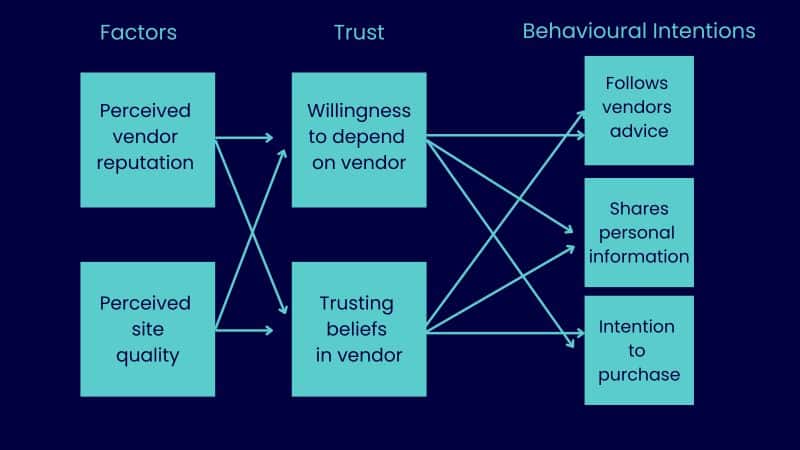
He even created a chart showing the impact trust can have on sales:

Building trust - Andrew Holland

He goes beyond what usually is meant by trust in the SEO sense by focusing on content creation for informational purposes. He concludes:

  • “… a lack of content and rankings has certainly lost my trust. Are they losing the trust of others?”

This is the type of SEO I have practiced myself successfully for years.

I was usually over-sharing my expertise on blogs and social media to establish trust and thus often got opportunities that way.

Many people in SEO work for well-known brands or “Fortune 500” companies behind closed doors after signing NDAs and simply share their credentials by mentioning some brand names they worked for.

Yet we have no way of verifying their expertise. What exactly have they done? Did it push the brand forward? 

This is also the kind of trust-building Holland means to some extent. Trustworthy brands can gain additional revenue by offering advice to potential customers, as demonstrated in his example.

Establishing trust: A core competency for SEO practitioners

Who is responsible for establishing trust on a website? 

  • The design alias UX department to some extent. 
  • The content team as well. 
  • The dev team has to implement some technologies like SSL. 

Yet the SEO is the ideal person to coordinate those efforts, especially looking for potential issues others overlooked. 

I bet the UX team loved the infinite scroll. It may bring some earnings, but at the expense of a broken website and annoyed visitors. You know it isn’t worth it.


Opinions expressed in this article are those of the guest author and not necessarily Search Engine Land. Staff authors are listed here.


Related stories

New on Search Engine Land

@media screen and (min-width: 800px) { #div-gpt-ad-3191538-7 { display: flex !important; justify-content: center !important; align-items: center !important; min-width:770px; min-height:260px; } } @media screen and (min-width: 1279px) { #div-gpt-ad-3191538-7 { display: flex !important; justify-content: center !important; align-items: center !important; min-width:800px!important; min-height:440px!important; } }

About the author

Tadeusz Szewczyk

Tadeusz Szewczyk, also known as Tad Chef, is a professional blogger and SEO since 2004. Even though based in Berlin, Germany he has covered blogs, social media and search for a global audience starting in 2006. In 2007 he launched his own blog – SEO 2.0 – and also published on numerous other marketing blogs ever since. In recent years he wrote for the social media accounts of many clients as well. You can connect with Tad on LinkedIn and Twitter or visit his website and read his blog about social SEO.

https://searchengineland.com/seo-creating-trust-394399


Insourcing vs. outsourcing: The pros and cons for content creation

Creating consistently high-quality content on the regular is a tall order for any business. So, how do the most successful get it done?

First, they have a content strategy in place.

After that, it all boils down to whether they insource or outsource that strategy, including planning, ideating, writing/creating, publishing, and promoting.

In other words, who is doing all the work? Who is in the trenches creating that brand’s consistent content presence on their blog, social media or video channels?

As you’ll soon see, neither insourcing nor outsourcing is inherently better. There are pros and cons associated with each option. Let’s look at the definitions and compare them so you can choose the right route for your brand. 

Insourcing vs. outsourcing content: What’s the difference?

  • Insourcing means you use people and resources within your company to create content.
  • Outsourcing means using people and resources outside your company (i.e., hiring an agency or freelancers) to create content.

Insourcing (Using in-house talent and resources)

When you insource content creation, your business must have a content strategy that guides a team of in-house people who create all your brand content. 

These people might belong to a dedicated content marketing team with defined roles like content manager, content writer, social media manager, editor, etc. 

Or, if your resources are limited, you might have everyone inside the business contributing to content creation in some way in addition to their other roles.

Pros of insourcing content creation

Build stronger, smarter teams

Creating content makes your team(s) smarter and better at content, plus a range of skills like researching, writing/communicating, strategizing, analyzing and tracking data, and more. 

The people who create the brand’s content get intimately familiar with the brand itself and all of its parts that matter: 

  • The audience and value proposition.
  • Their overarching differentiator.
  • Their voice and style.
  • The deeper benefits of their products/services.

Save money long-term

The initial investment in insourced, in-house content marketing may be larger, but the savings you’ll enjoy in the long run will make up for it.

Generally, the initial investment would involve skill-building (courses, training) for your team members, tech and tools like SEO and keyword research software, and maybe even resources for hiring another full-time team member (such as a content manager).

How will you save money over time?

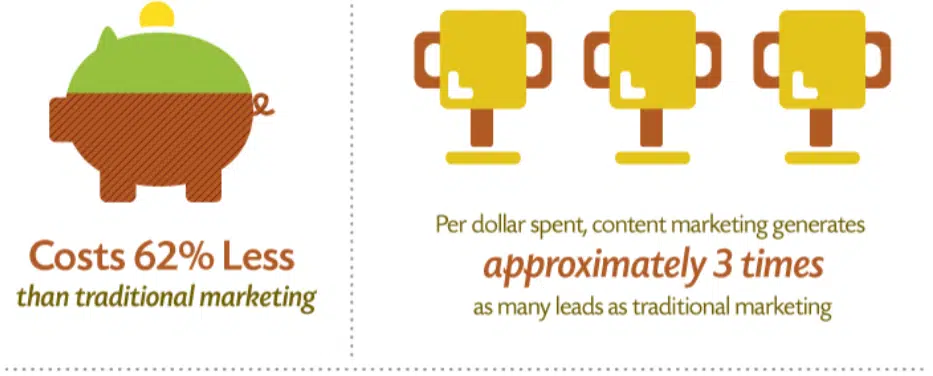
Once the skills, expertise, and strategy are in place, your team should be able to produce amazing content that earns real results at triple the rate of traditional marketing while costing 62% less.

You won’t have to funnel more money into content marketing to scale your efforts. You won’t have to waste time searching for competent freelancers to hire or rely on an agency that produces generic content.

That means, in at least 6-12 months, your investment should start paying for itself. 

Content marketing investment
Source: Demand Metric

Enjoy complete control over your content 

If you hire an agency, the amount of content they create for you depends on a contract and an agreed-upon number of content pieces produced per month or week.

While this is great for many reasons, it’s not so great for flexibility. That’s why insourcing earns the advantage here. Your insourced team can pivot with content much more quickly because they won’t be bound by any contract that says X number of blog posts must be produced monthly.

For example, maybe one month, you find it’s necessary to scale back blog posts so you can focus on creating new lead magnets.

Maybe you find a great keyword but need to write an epic, 3,500-word article on it to rank, which would replace two or three shorter posts.

Or maybe you find it would be best to update and republish old content for a month or two. 

You couldn’t quickly pivot and do any of that with an agency. But your in-house team could.


Get the daily newsletter search marketers rely on.


Cons of insourcing content creation

You need a solid content strategy in place

To insource content marketing, you need to know what you’re doing. You need someone guiding the ship who can steer it toward success. And that’s impossible without a content strategy in place.

Building a content strategy is no mean feat, either. You can do it, but you’ll need to invest time and money to learn what goes into it and what should come out.

Attempting to insource content without skills, knowledge, or a strategy is a disaster in waiting.

Everyone who touches the content needs a high level of skill

Speaking of skills and knowledge, content marketing, including content creation/production, is a full-time job. 

The sheer expertise you need on your side pushes many businesses to default to outsourcing.

You need, at a minimum:

  • Effective writers/communicators/creators who can connect with your audience through words or visuals, share expertise, and clearly demonstrate the business value and benefits for customers. (Writing is the top outsourced activity for marketing professionals, which means having this skill inside your business is both a differentiator and an advantage.)
  • A smart content manager who can plan, ideate, and implement a content strategy, manage a content schedule, track results, and hit goals.
  • A skilled strategist who can help build the brand’s SEO and online presence.

To be effective, there’s a ton of skill and experience needed in each of these roles – and some businesses can’t justify the up-front investment of either hiring in-house experts or getting training for their teams.

The initial investment can be spendy

Let’s say you run a small business with a team of five people. You’re considering insourcing content marketing, but your team lacks experience and knowledge. To get to a place where you can build, implement, and execute a content strategy, you’ll need a large up-front investment in things like:

  • Courses and/or training on content marketing, strategy, and management.
  • Courses and/or training on content writing.
  • Courses and/or training on SEO.
  • Tools to implement and execute content marketing, like SEO tools, content management software, a content calendar, and more.
  • Potentially, the resources to hire a full-time content writer or content manager.

It can be a lot at once, so many small businesses understandably default to hiring outside expertise to help them implement content marketing.

Let’s look at outsourcing in-depth to see the differences.

Outsourcing (Using external talent and resources, like an agency)

When you outsource content creation, that means you hire outside talent and resources to implement and execute your content strategy. That includes ideating and planning content, writing/creating content, and publishing/distributing content.

One of the most common ways to outsource content is to hire a full-service agency that completely takes over your content marketing from strategy-building to promoting finished pieces.

Additionally, you can hire freelancers to take on specific projects, short-term roles, or one-off content pieces. For instance, you might hire a freelance content writer to create three months’ worth of content for your blog.

So, what are the pros and cons associated with outsourcing?

Pros of outsourcing content creation

Choose the solution that fits your needs

No matter your sophistication with content marketing, there’s an outsourcing option for your needs.

Need the entire content marketing process handled? Hire a reputable agency.

Need just content creation taken care of? Hire a freelancer or an agency, or sign up with a writing platform, depending on your budget.

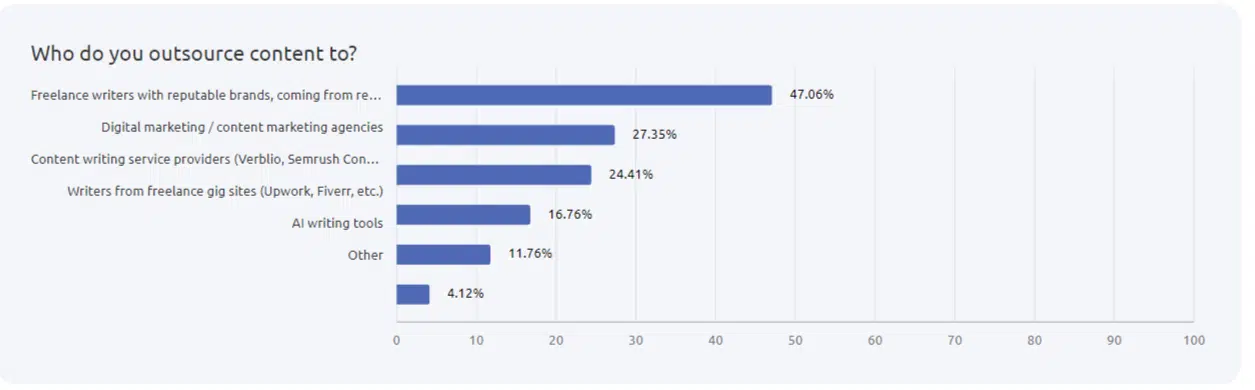
Most companies (47.06%) hire reputable freelance writers when they outsource, according to a Semrush survey.

Outsourcing content

If you don’t have much time to vet and hire talent, you can also get on a freelance platform where thousands of writers, editors, strategists, videographers, graphic designers, and more converge to look for work and bid on jobs.

Relatively low start-up costs and quick turnaround

The costs to start outsourcing right away are pretty low. Technically, you could find a freelancer with decent skills on LinkedIn, Indeed, or Upwork tomorrow, agree on a flat rate and get your completed content piece within a week.

Easily scale when you’re ready

It’s also relatively easy to scale outsourcing – you just need to pay more money to hire more freelancers, or pay an agency for an ongoing contract. 

It should also be pretty easy to find freelancers, as the job market is glutted with them. (By 2027, the majority of the workforce in the U.S. will be freelance!)

Cons of outsourcing content creation

Inconsistency or unreliability

You know what I’m about to say if you’ve ever hired a freelancer and had a bad experience.

Anyone can call themselves a freelancer and present a fluffed-up resume to impress. That doesn’t mean they can deliver. You’ll often end up with bad content, missed deadlines, or someone who ghosts you after you hire them.

Roughly half of companies outsource content writing, but one in ten stopped outsourcing because the results didn’t measure up.

Your outsourced team will never have the deepest knowledge of your brand 

An outsourced team is constantly in flux, often without your say. If you hire an agency, you may never even speak with the people writing your content, and various people may shuffle in and out of your projects without your knowledge.

That means you’ll never have a creator working with you who knows your brand inside and out, has learned from you and your team, and knows your audience, goals, brand voice, and other factors intimately.

This type of expert has a deep advantage over a freelancer who merely touches your content briefly and then moves on. The long-term hire will produce 10x better content just because they have the chance to learn and grow with your business.

Many writers become subject matter experts over time – about the brand they write for and the industry the brand represents – simply because researching and writing builds their cache of knowledge so effectively. That means the longer a writer works for you, the better they become for your business.

Outsourced creators have little to no motivation to stay loyal to you

When you rely on outside help to create content, especially unvetted freelancers, it’s ultimately a gamble.

Most likely, that freelancer has multiple clients and projects going on at once. They may be freelancing on the side to supplement their full-time job. It’s in their job description to come and go.

That means, when you find a freelancer who’s a great fit, that’s no guarantee they’ll be available to create content for your brand in the future. They have zero motivation to show loyalty to you, unlike the writer or creator you hire (or train) to dedicate themselves to your business and team.

Should you insource or outsource content creation?

Now that you know the difference between insourcing vs. outsourcing content creation, which should you choose?

To sum up, insourcing is better if:

  • You have the resources to make an up-front investment in your content team.
  • You have buy-in from everyone in your organization.
  • Your team already has content marketing knowledge, or you’re prepared to invest in it.
  • You have a content strategy in place or have plans to build one.

And outsourcing is the better choice if:

  • You’re a relatively new business and don’t have the resources yet to invest in an in-house content team.
  • Your team has zero content marketing knowledge.
  • You understand how to hire and work with freelancers effectively.
  • It would be very difficult to convince every level of the organization to invest in insourcing content.

Lastly, if you dream of insourcing content but don’t have the means quite yet, remember that you can always outsource content while you build the resources for insourcing.  

Neither choice is inherently better, but one will be smarter for your business in specific moments of growth, and that can change – so choose wisely.


Opinions expressed in this article are those of the guest author and not necessarily Search Engine Land. Staff authors are listed here.


Related stories

New on Search Engine Land

@media screen and (min-width: 800px) { #div-gpt-ad-3191538-7 { display: flex !important; justify-content: center !important; align-items: center !important; min-width:770px; min-height:260px; } } @media screen and (min-width: 1279px) { #div-gpt-ad-3191538-7 { display: flex !important; justify-content: center !important; align-items: center !important; min-width:800px!important; min-height:440px!important; } }

About the author

Julia McCoy

Julia McCoy is the founder of Content Hacker, 7x author, and a leading strategist around creating exceptional content and brand presence that lasts online. At 19 years old, she used her last $75 to build a 7-figure writing agency which she sold ten years later. In the 2020s, she’s devoted to teaching founders and marketers the strategy, skills, and systems they need to build a business through inbound content, so they can create more lasting impact in the world.

https://searchengineland.com/insourcing-vs-outsourcing-the-pros-and-cons-for-content-creation-394386


This day in search marketing history: March 17

Google AdWords further dilutes exact match

In 2017, Google announced a change to how exact match targeting would work in AdWords.

Matching for close variants – plurals, typos, abbreviations, adverbs, etc. – would be broadened to include variations in word order and function words in the coming months.

With this change, Google would ignore word order and function words when determining whether an ad should trigger for an exact match keyword.

Google introduced close variants in 2012 to broaden reach and coverage and save time building out keyword lists.

Read all about it in Google to further dilute exact match in AdWords; will ignore word order & function words.


Also on this day


Google blocks 3.1 billion ads in a tumultuous 2020, says annual Ads Safety Report

2021: The report listed misinformation around COVID-19 and the political climate, as well as ad fraud, as top concerns.


Schema.org adds coronavirus-related structured data types in version 7.0

2020: “SpecialAnnouncement” and “eventAttendanceMode” could help businesses provide event updates in the search results.


Yahoo and other Verizon-owned search sites favor Verizon media properties [Study]

2020: Study compared rankings for the same queries across six Bing-powered search sites, including Bing itself.


Sellers start feeling the strains on Amazon’s fulfillment systems amid coronavirus buying frenzy

2020: The company had halted shipments of non-essential items to its warehouses and stopped most of its ads on Google. 


Google receives search warrant for identities of everyone who searched crime victim’s name

2017: Police in Minnesota obtained a court order requiring Google to divulge the identities of people who searched for the name or images of the local victim of financial fraud.


DMOZ has officially closed after nearly 19 years

2017: The closure marked the final end of a chapter of humans trying to organize the web.


Search in Pics: Green GoogleBot, Google swings & hammock & a mini Google pool

2017: The latest images showing what people eat at the search engine companies, how they play, who they meet, where they speak, what toys they have and more.


Google Strongly Encouraging Webmasters To Adopt Autocomplete On Forms For Mobile

2015: Google said webmasters should implement autocomplete markup to improve mobile user conversions but didn’t say it would be a ranking factor.


How Big Will Google’s Mobile-Friendly Update Be? Bigger Than Panda Or Penguin

2015: Google’s Zineb Ait Bahajji said the mobile-friendly algorithm would impact more sites than the Panda or Penguin algorithms.


AdWords Top Movers Report Gets A Makeover

2015: Google updated the Top Movers report with a summary to make it easier to spot areas for improvement.


Play The Google Feud Game & I Bet You’ll Lose

2015: Google Feud adapted the popular game show, Family Feud, by using Google autocomplete suggestions.


Ranking Benefit To Making Your Site SSL? Not Yet But Google’s Cutts Would Like To Make It Happen.

2014: Cutts did not say this was or would be a ranking factor. He said that he would like to see it become a ranking factor.


Matt Cutts: Google Mobile Queries May Surpass PC Search This Year

2014: Google’s Matt Cutts said he “wouldn’t be surprised” if mobile search exceeded desktop queries by the end of the year.


Google Testing New Sponsored Shopping Boxes, With 3D View

2014: Google continued to experiment with Google Shopping displays beyond the traditional thumbnail box panel of Product Listing Ads.


Google’s Matt Cutts Gives SEO Advice For Times When Your Products Go Out Of Stock

2014: Cutts answers: “What should sites do with pages for products that are no longer available?”


Study: Researchers Blame Google Flu Trends Inaccuracies On Ongoing Algorithm Updates

2014: Researchers claimed the problem revolved around Google’s constantly updated algorithms and the inability of big data to produce, “Valid and reliable data amenable for scientific analysis.”


Bing Ads Now Shows Zero-Click Search Queries, Offers 20 To 40X More Data Than Before

2014: Bing Ads updated the Search Term Report (formerly known as the Search Query Report), which housed the data on the terms users actually typed before clicking on an ad.


Google Webmaster Tools Crawl Errors: How To Get Detailed Data From the API

2012: The data was tricky to get to and the specifics of what was available varied based on how you retrieved it. 


Hidden In Google Profiles: More Social Network Connections On The Way?

2011: Was Google readying several new “connect an account” options in Google Profiles?


Google Tweaks AdSense Code To Speed Loads

2011: The company estimated that its helping pages load faster by a half a second or more, when, previously, Google acknowledged that its code could delay page loads by 12% on average.


YouTube Down, But Still Dominates Online Video; Netflix Owns Movie Watching

2011: Video watching was down on YouTube during February, but it still held a seemingly unsurmountable lead in viewers, video views, and time spent per viewer.


Pew: Yahoo And Google Rank High On List Of Online Political News Sources

2011: Of the 24% of Americans who got most of their political news from the Internet, 20% cited Yahoo as their main source of news. Google came in next at 13%.


Microsoft More “Ethical” Than Apple, Google, Yahoo, Facebook

2011: That was according to the Ethisphere Institute, which produced an annual list of “world’s most ethical companies.”


Facebook Asking App Developers To Stop Using Google AdSense

2011: Some Facebook developers were receiving emails from Facebook to remove the Google AdSense ads they had on their apps.


FTC Commissioner: Google’s Buzz Launch Was ‘Irresponsible Conduct’

2010: “Google consistently tells the public to ‘just trust us.’ But based on my observations, I do not believe consumer privacy played any significant role in the release of Buzz.”


Google TV Platform In Testing, Says New York Times

2010: More details on Google’s plans to gain a stronger foothold in people’s living rooms.


Now View The Night Sky In Bing Maps

2010: Microsoft’s “WorldWide Telescope” was integrated into the Silverlight version of Bing Maps.


Facebook Adds Auto-Suggest To Search Box

2010: You would see results of the people, events, groups and Pages you were connected to plus the connections of your friends and globally relevant results.


How Many 301s Are Too Many?

2009: Google’s Matt Cutts answers “Is redirecting a large number of domains suspicious?”


Google AdSense Ads Making Their Way To iPhone Apps?

2009: The Urbanspoon iPhone app had what looked like Google AdSense ads on them.


Twitter Adding Advertisements?

2009: Twitter was promoting Twitter Search.


Making Sense Of All The Data: Google, Hadoop & Cloudera

2009: The very interesting history behind Hadoop – an open-source version of proprietary software developed by Google to process and analyze massive volumes of data for search.


Dennis Woodside Fills Tim Armstrong’s Position At Google

2009: Woodside, a Googler for five years, was previously Google’s Vice President for the UK, Ireland and Benelux.


Early Yahoo Postmortem And Google CEO Eric Schmidt On The Prospect Of MicroHoo

2008: Yahoo’s failure to recognize Google as a threat was partly responsible for the company’s predicament.


Yahoo Partners With 3rd Party Click Fraud Company, Click Forensics

2008: Yahoo and Click Forensics partnered to combat click fraud together.


Microsoft Launches New adCenter Community Site

2008: Features included product/service specific blogs, categorized user forums and more.


The State Of Search Engine Marketing 2007

2008: The future looks bright for search, according to SEMPO’s annual State of Search Engine Marketing report.


Search Biz: Google Pays More For DoubleClick, Benefits More From Online Ad Shift, AOL’s Platform A Coming Together, & More

2008: Google’s acquisition of DoubleClick closed at $3.24 billion, a mere $140 million more. 


SES NY 2008 Day One Live Coverage Recap


From Search Marketing Expo (SMX)


Past contributions from Search Engine Land’s Subject Matter Experts (SMEs)

These columns are a snapshot in time and have not been updated since publishing, unless noted. Opinions expressed in these articles are those of the author and not necessarily Search Engine Land.


< March 16 | Search Marketing History | March 18 >


Related stories

New on Search Engine Land

@media screen and (min-width: 800px) { #div-gpt-ad-3191538-7 { display: flex !important; justify-content: center !important; align-items: center !important; min-width:770px; min-height:260px; } } @media screen and (min-width: 1279px) { #div-gpt-ad-3191538-7 { display: flex !important; justify-content: center !important; align-items: center !important; min-width:800px!important; min-height:440px!important; } }

About the author

Danny Goodwin

Danny Goodwin has been Managing Editor of Search Engine Land & Search Marketing Expo – SMX since 2022. He joined Search Engine Land in 2022 as Senior Editor. In addition to reporting on the latest search marketing news, he manages Search Engine Land’s SME (Subject Matter Expert) program. He also helps program U.S. SMX events. Goodwin has been editing and writing about the latest developments and trends in search and digital marketing since 2007. He previously was Executive Editor of Search Engine Journal (2017 to 2022), managing editor of Momentology (from 2014-2016) and editor of Search Engine Watch (from 2007 to 2014). He has spoken at many major search conferences and virtual events, and has been sourced for his expertise by a wide range of publications and podcasts.

https://searchengineland.com/search-marketing-history-march-17-394379


Semrush ends 2022 with 95,000 customers, 35% revenue growth

Customer growth increased Semrush’s full-year revenue by 35% in 2022 to $254.3 million, up from 188.0 million in 2021. 

Semrush expects to break even or show a small profit in 2023. It lost $33.8 million in 2022.

The company is financially strong; cash and short-term investments totaled $237.5 million at the end of 2022. 

Customers. Semrush added 13,000 customers in 2022 and ended the year with 95,000 paying customers, up from 82,000 customers in 2021. Semrush customers who paid more than $10,000 annually grew by more than 50% year-on-year.

The company also reported its platform had more than 800,000 free active users, up more than 50% year-on-year, and saw “record levels of new customer registrations and trials.”

Employees. Semrush ended the year with more than 1,300 employees and more than 200 contractors.

The company also reported it has completed a successful relocation of about 600 employees who had been based in Russia, prior to the country’s invasion of Ukraine last year, to new office locations (Spain, the Netherlands, Germany, Armenia, Serbia, Cyprus, and the Czech Republic).

Why we care. These financial results from Semrush confirm there continues to be strong demand for SEO and SEO platforms. Also, the company is cash rich and expects to reach profitability next year. That means the 2022 losses don’t jeopardize the company’s ongoing operations. 

Only “minor fine-tuning” need to help Semrush customers be found in chat-based search. “The outputs of (chat-interface search) are actually very similar to what happens if you try to produce (a) featured snippet based on a couple of top articles,” is how Semrush president Eugene Levin responded to an analyst’s question about search engines transitioning to chat interfaces. He added:

  • “So from a technical point of view, optimizing for this is very similar to optimizing for featured snippets, which [we have helped] people to do for a very long time. And actually, we’ve seen a lot of demand for those features and support of our tracking feature snippet, as well as proactive recommendations about how people can… be mentioned in those features snippets.”
  • “At this point, we don’t know what the final implementation (of search results) is going to be. We have only seen a couple of examples being implemented their approach to this, which is, I think, very user-friendly.”

Dig deeper. Semrush Announces Fourth Quarter and Full Year 2022 Financial Results.


Related stories

New on Search Engine Land

@media screen and (min-width: 800px) { #div-gpt-ad-3191538-7 { display: flex !important; justify-content: center !important; align-items: center !important; min-width:770px; min-height:260px; } } @media screen and (min-width: 1279px) { #div-gpt-ad-3191538-7 { display: flex !important; justify-content: center !important; align-items: center !important; min-width:800px!important; min-height:440px!important; } }

About the author

Danny Goodwin

Danny Goodwin has been Managing Editor of Search Engine Land & Search Marketing Expo – SMX since 2022. He joined Search Engine Land in 2022 as Senior Editor. In addition to reporting on the latest search marketing news, he manages Search Engine Land’s SME (Subject Matter Expert) program. He also helps program U.S. SMX events. Goodwin has been editing and writing about the latest developments and trends in search and digital marketing since 2007. He previously was Executive Editor of Search Engine Journal (2017 to 2022), managing editor of Momentology (from 2014-2016) and editor of Search Engine Watch (from 2007 to 2014). He has spoken at many major search conferences and virtual events, and has been sourced for his expertise by a wide range of publications and podcasts.

https://searchengineland.com/semrush-financial-results-full-year-2022-394392


Get the latest SEO trends and predictions for 2023 by Digital Marketing Depot

Prediction Crystal Ball 1920x1080 1 800x450

Download the 2023 SEO Trends & Predictions report from Conductor and get access to detailed data analysis and a comprehensive list of trends and predictions. With this report, you’ll be able to optimize your current (and future) SEO and content marketing strategies to maximize performance and achieve increased goals for 2023.

Get insider knowledge on top trends like the rising importance of visual search, identifying the role AI should play in your SEO workflows, and expanding search strategies beyond Google.

Don’t miss out on this invaluable resource to gain the edge with your SEO and content marketing strategies. Visit Digital Marketing Depot and get your copy today!


Related stories

New on Search Engine Land

@media screen and (min-width: 800px) { #div-gpt-ad-3191538-7 { display: flex !important; justify-content: center !important; align-items: center !important; min-width:770px; min-height:260px; } } @media screen and (min-width: 1279px) { #div-gpt-ad-3191538-7 { display: flex !important; justify-content: center !important; align-items: center !important; min-width:800px!important; min-height:440px!important; } }

About the author

Digital Marketing Depot

Digital Marketing Depot is the resource center for digital marketing strategies and tactics. Created by Third Door Media, Digital Marketing Depot features a robust library of hosted white papers, eBooks, original research, and webinars on a wide range of digital marketing topics- from advertising, analytics, data and content management, to email marketing, SEO and PPC campaign management, and much more. Visit us at http://digitalmarketingdepot.com.

https://searchengineland.com/get-the-latest-seo-trends-and-predictions-for-2023-394383