This day in search marketing history: March 5

Matt Cutts confirms Vince, calls it a ‘minor change’

In 2009, Google’s Matt Cutts created a video to answer many questions about a recent “brand push” in the search results that SEOs and webmasters had noticed, starting in late February.

Cutts confirmed the “minor change,” adding that Google’s ranking algorithm may be factoring trust, quality, PageRank, and other metrics for more generic queries. Cutts said it did not impact long-tail queries.

A Googler named Vince created this change, which is how the Vince Update got its name.

Read all about it in Google’s Vince Update Produces Big Brand Rankings; Google Calls It A Trust “Change”


Also on this day


Google to switch completely over to mobile-first indexing by September 2020

2020: Google said 70% of sites shown in search had already been switched over.


Google Ads significantly streamlines attribution reporting

2020: It was also dropping “Search” from the name.


Several WordPress SEO plugins are on the fritz

2020: Google Analytics Dashboard for WP, Yoast SEO and Rank Math all had issues.


SEOs on Google e-commerce category recommendation: ‘I’ll stop doing it when it stops working.’

2019: Though Google’s John Mueller suggested webmasters not put content in e-commerce category page footers, SEOs valued performance more highly.


More ‘shoppable ads’ coming to Google Images

2019: The sponsored images highlighted products that, when moused over, revealed brand, price and other details.


Maximize Clicks in Bing Ads now available globally

2019: The strategy automatically set bids to increase click volume. There were some manual control options.


Report: 51% of website hacks related to SEO spam

2019: These hacks target websites in order to try to manipulate the success of a site’s SEO campaign and boost its rankings in Google and other search engines.


Voice gaining on mobile browser as top choice for smartphone-based search

2019: Since 2018, voice had become more users’ first choice for mobile search.


Yelp adds ‘Verified Licenses’ for local providers to lineup of paid products

2019: Yelp manually checks that the business has a license and is in good standing.


Google selling Zagat to restaurant recommendations site The Infatuation

2018: Google no longer needed Zagat.


Google is extending Search capabilities to iMessage and other browser apps on iOS

2018: New extensions brought the search engine into more apps on iOS.


Bing has confirmed support for JSON-LD formatted Schema.org markup

2018: Though not yet available in the toolset, buildout of verification support within Bing Webmaster Tools was in progress.


Google’s “One True Answer” problem — when featured snippets go bad

2017: It was a problem because sometimes these answers were terribly wrong.


Google: The Mobile Friendly Update Ranking Factor Will Be Real Time & On A Page-By-Page Basis

2015: Google’s Gary Illyes answered some questions around this new ranking factor at SMX West.


Google May Discontinue Its AJAX Crawlable Guidelines

2015: Gary Illyes indicated Google would be decommissioning its guidelines.


Official: Google Compare For Auto Insurance Launches

2015: Rolling out in California to start, Google was getting into the car insurance business with lead generation.


What’s The Most Searched Thing On Google? Turns Out It’s “Google”

2015: Webmaster Trends Analyst Gary Illyes said the most searched term on Google is “Google” itself during an SMX West session.


Google Search Now Serving Up Cocktail Recipes With Drink Ingredients & Directions

2015: The new cocktail recipe search feature worked on both desktop and mobile for a number of cocktails.


Bing Listens: New Site Serves As A Suggestion Box For Bing Users

2015: Bing was looking for feedback from its users, launching a virtual suggestion box.


Spotted: Google Knowledge Graph Ad Tests New Google Shopping PLA Display

2014: This appeared to be the first instance of Google Shopping powering Knowledge Graph ads.


Go Deep: Product Listing Ad Campaigns That Just Focus On Top Sellers Get Short Changed [Study]

2014: A significant amount of PLA revenue came from single-conversion SKUs and those conversions had a higher return on ad spend.


Xbox One Gets Bing Web Search

2014: When you searched with “Xbox Bing,” you would receive results from the Bing marketplace as well as relevant items from the web.


BrightEdge Uses SEO Patents As “Sword,” Sues Searchmetrics

2014: BrightEdge sued rival Searchmetrics using multiple SEO patents that were granted last year.


Google’s Cutts: We Don’t Ban Sites Critical Of Google, But Here Is Why We Do Penalize Sites…

2013: Matt Cutts answers “Does Google use a set standard for manually removing webspam?”


Google’s Matt Cutts Awarded Patent On Detecting Hidden Text & Hidden Links

2013: A new Google patent was awarded, named Systems and methods for detecting hidden text and hidden links.


Google Maps App For iPhone Upgrade Adds Local Icons, Google Contacts & More Countries

2013: The changes included improved search for local venues, integration with your contacts and the addition of new countries. 


Web Spam Archive Tool Saves Google’s Live Spam For More Than Just Recent Results

2013: This tool allowed users to flip through more than 2,000 examples.


Flush With New Cash, Structured Data Engine FindTheBest Ready To Make Its Move

2013: Company created a “data platform” that could manage enormous amounts of data, synthesize and present that information in a user-friendly way.


Google “Search Plus Your World” To Launch Beyond US? Likely, As Secure Search Set To Expand

2012: It also meant that search marketers could expect the percentage of “(not provided)” data to greatly increase.


Google Sent Over 700,000 Messages Via Webmaster Tools In Past Two Months

2012: That was more than the total number of messages Google sent in 2011 and almost more than what Google had sent since launching Google Webmaster Tools message center.


Keeping Up With Google: Bing Launches New “Search Quality Insights” Series

2012: Bing announced its “Search Quality Insights” series to provide a more behind-the-scenes look at its search engine. 


Google Enables Cross-Platform Local Search (As Carrot To Relinquish Your Privacy)

2012: Google was enabling people to gain access to PC search histories on their mobile browsers (Android, iPhone). 


Google Faces “Innovator’s Dilemma” As It Prepares Response To Siri

2012: Google delivered a mobile-optimized version of its PC experience. Siri is more task oriented and “transactional” than Google Voice Actions.


Bing & Yahoo Soon To Support Canonical Tag

2010: Bing said canonical tag support should be in place by the end of March or early April. Yahoo said they were rolling out support of the tag, but cautioned that Yahoo will only use it “as a hint”.


Bing, Yahoo Discussing Future Of Yahoo Site Explorer

2010: Yahoo and Bing were in the midst of discussions to decide the future of Yahoo’s popular Site Explorer SEO tool.


Bing Maps Rolls Out Its Largest Image Update

2010: New aerial and Bird’s Eye imagery across many countries on several continents.


Yahoo Updates Desktop Search Marketing Tool

2010: Upgrades to bulk editing, campaign transfer, keyword research and more.


Yahoo Gains AT&T, Loses T-Mobile Search Deal

2010: T-Mobile swapped Yahoo for Google as the default search engine on the T-Mobile portal.


Google Touts Wisdom Of Crowds For Financial Help

2009: Google announced TipJar, a place where people could submit answers to the question, “How can I save money?”


Inquisitor Debuts On iPhone

2009: A very nifty search tool from Yahoo for the iPhone.


Why Do Lawyers From Utah Hate Search Ads?

2009: Utah, for the third time, was trying to regulate keyword advertising by proposing new law.


Google Adds Page Load Time To Quality Score Algorithm

2008: If your destination URL was a very slow loading page, then Google would give you a poor “load time grade.”


Oops! Google’s SSL Certificate Throwing Out Scary Warnings

2008: Google: “some web pages containing the AdWords Conversion Tracking code snippet presented visitors with a browser message indicating a Google server certificate had expired.”


Google Debuts “Search Within A Site” Search Box Feature

2008: Google: “This feature will now occur when we detect a high probability that a user wants more refined search results within a specific site.”


Matt Cutts & The Search Community Interview

2008: Questions included how Cutts became the face of Google for webmasters, how other Googlers were aiding him, and the struggle in demonstrating that he was not the final answer at Google for SEOs.


Google Analytics Benchmarking Feature, Data Sharing & Audio Ad Charting

2008: Users could now compare their site’s performance to industry benchmarks, though only if they agreed to share their data to help produce such aggregate benchmarks.


Yahoo Celebrates Its 13th Birthday; Will There Be A 14th?

2008: Spoiler alert: yes.


Obit: A West Coast Digerati Deadpools Ask.com

2008: Goodbye, Ask.com.


Pew: Cellphones More Important To Users Than Internet, TV, Email

2008: And an increasing number of consumers were using their mobile phones for things other than voice communications, including accessing mobile internet content.


Google Testing Yellow Background Color Behind AdWords Ads?

2007: Those ads typically had a light blue background color.


Google Rises To UK’s 2nd Biggest Ad Earner

2007: Google UK had earned $1.6 billion (£825 million) in 2006, putting them ahead of Channel 4 but behind ITV


Local Shopping Search Stalks E-Commerce

2007: A number of companies were seeking to make the online-offline shopping connection.


Pandia Offers Custom Search For Search Information

2007: Pandia offered a free custom search called the Search Engine Detective, a meta search engine which let you do specialized searches for anything search engine related.


From Search Marketing Expo (SMX)


Past contributions from Search Engine Land’s Subject Matter Experts (SMEs)

These columns are a snapshot in time and have not been updated since publishing, unless noted. Opinions expressed in these articles are those of the author and not necessarily Search Engine Land.


< March 4 | Search Marketing History | March 6 >


Related stories

New on Search Engine Land

@media screen and (min-width: 800px) { #div-gpt-ad-3191538-7 { display: flex !important; justify-content: center !important; align-items: center !important; min-width:770px; min-height:260px; } } @media screen and (min-width: 1279px) { #div-gpt-ad-3191538-7 { display: flex !important; justify-content: center !important; align-items: center !important; min-width:800px!important; min-height:440px!important; } }

About the author

Danny Goodwin

Danny Goodwin is Managing Editor of Search Engine Land & SMX. In addition to writing daily about SEO, PPC, and more for Search Engine Land, Goodwin also manages Search Engine Land’s roster of subject-matter experts. He also helps program our conference series, SMX – Search Marketing Expo. Prior to joining Search Engine Land, Goodwin was Executive Editor at Search Engine Journal, where he led editorial initiatives for the brand. He also was an editor at Search Engine Watch. He has spoken at many major search conferences and virtual events, and has been sourced for his expertise by a wide range of publications and podcasts.

https://searchengineland.com/search-marketing-history-march-5-393889


This day in search marketing history: March 4

Sheryl Sandberg named Facebook Chief Operating Officer

In 2008, Facebook announced Sheryl Sandberg as its new Chief Operating Officer.

At the time, Sandberg was Google’s vice president of global online sales and operations, responsible for online sales of its advertising and publishing products. Sandberg joined Google in 2001.

Sandberg would join Facebook on March 24, 2008 and be responsible for helping the company scale its operations and expand its presence globally.

Why the change?

“For me that is part of the excitement,” Sandberg said. “I’ve loved being part of the process of helping to build Google. The opportunity to help another young company to grow into a global leader is the opportunity of a lifetime.”

Sandberg would remain COO of Facebook, later Meta, for 14 years. She announced her departure in June 2022 and officially transitioned out of her COO role by August.

Read all about it in Facebook’s New Chief Operating Officer, Ex-Google VP, Sandberg.


Also on this day


Google launches new Google Analytics 4 home page

2022: Google said “the Home page surfaces information that’s relevant to you based on your behavior in Analytics.” 


Google and Bing halt all ad sales in Russia

2022: The platforms already had suspended ads from Russian state media. As the conflict in Ukraine intensified, they were stopping all ads from serving to Russia-based users.


Microsoft Advertising’s Ad Creator extracts site images for use in ads

2022: Ad Creator and its built-in photo editor could help advertisers that didn’t have access to a design team save time.


Google My Business report shows how people found your business

2021: You could now see device and platform breakdown in your Google My Business performance reports.


Google Ads mobile app adds custom and performance insights notifications

2021: The updates could help advertisers keep tabs on the metrics that are important to them and notify them of significant performance changes.


Microsoft Bing updates search results interface to make it more visually immersive

2021: Microsoft Bing updated recipe results, similar-looking items, expandable carousels, infographic panels and local answers design.


Most local SEOs making at least $60,000

2020: Half of those responding to a survey said they had been working in the industry for more than a decade and 11% had been working in local SEO for 20 years or more.


Video: Ginny Marvin, our Editor-in-Chief, on the Periodic Tables of PPC

2020: Marvin also discussed her career, PPC versus SEO, natural language in search and some controversial topics in Google Ads.


Google My Business boosts visibility of business offers in Google Posts

2019: Google allowed up to 10 unique offers in the local listing carousel.


Google Ads API now out of beta, v0 will sunset April 30

2019: The production-ready v1 of the Google Ads API was available and ready for use.  


Google lobs invective at EU Copyright Directive

2019: Google’s SVP of Global Affairs Kent Walker urged changes in language ahead of ratification.


Google Agrees To Complicated Worldwide “Right To Be Forgotten” Censorship Plan

2016: Google would ensure those within a country where a RTBF request was granted could not find censored content, regardless of what Google edition they used.


Google Posts is now experimenting with Business Cards in search results

2016: Experimental feature allowed local businesses to promote specific content, which could be shared directly from the “card carousel.”


Google Adds 19 Animal Sounds To Search

2016: Searching for [animal noises] would bring up a carousel of animals with a speaker icon next to each one to listen to the sounds/noises that specific animal makes.


Google’s Candidate Cards Being Tested For Businesses?

2016: A local business was spotted using the equivalent of Candidate Cards to add content directly into Google’s search results.


Search In Pics: Google AMP, SMX & Androidify Station

2016: The latest images showing what people eat at the search engine companies, how they play, who they meet, where they speak, what toys they have and more.


How Google Made It A Little Harder To Reach Google.com From Outside The US

2015: Google said the change was meant to help local searchers, but did the Right To Be Forgotten play a role?


Google Tests Search Results Listings Without Descriptions

2015: Google tested how searchers would react to not seeing a snippet description in the search results.


Google Launches AdWords App For Android

2015: This was the first time Google had launched a native app for monitoring and managing AdWords campaigns.


YP Launches New Local Search Marketplace For National Advertisers

2015: YP built ypSearch Marketplace, a paid-search, bidded marketplace that tapped into the company’s 80 million monthly users.


Bing Saves, Search Bookmarking Feature, Now Public Beta

2014: The feature let searchers save URLs and searches to their personal Bing/Microsoft account, in order to build an index of their own saved searches.


New Video Shows Microsoft “Assistant” Cortana In Action

2014: Cortana was intended to help users discover and search for information as well as providing Google Now like personalization and “predictive search” capabilities.


Microsoft Says Goodbye To “Scroogled” Ad Campaign

2013: Microsoft’s “Scroogled” ad campaign, which attacked Google over paid inclusion in shopping and Gmail over privacy, was coming to an end.


Google Test: Auto-Completing Search Queries

2011: This auto-completion was happening on long-tail terms where Google Suggest had stopped giving suggestions.


PPC Data On “Farmer” Shows Traffic Quality Improvement

2011:  Revenue-per-click was showing a modest improvement.


Google Shows Your Latest Tweet As Search Snippet … In 10 Seconds

2011: Google was showing a user’s latest tweet as the snippet. It was even keeping links from the tweet active in the snippet.


Google Hotpot Places A Bet On Las Vegas

2011:  The company announced a local marketing campaign aimed at upping usage of Google Places and Hotpot. Google gave away 10,000 free Las Vegas Monorail tickets.


Google Releases First AdWords API Upgrade Of 2011

2011: Features included the ability to run reports across clients, better filtering, improved geo-targeting, and the ability to deploy and measure “experiments,” or A/B split testing.


Google, Microsoft Cooperate To Invalidate Broad Online Mapping Patent

2011: Google and Microsoft joined forces to fight a common foe: a small company in Texas that held a potentially sweeping mapping patent.


Bing Travel & Kayak Announce Partnership

2011: The two travel search engines announced a formal partnership to provide searchers with more comprehensive results.


Blekko Offers New Linkroll Widget & More Publisher Tools

2011: The Live Link Roll was a widget that displayed a site’s most recent inbound links “as they happen in realtime.”


CBS Buys Clicker Video Search Guide; Lanzone Becomes CBS Interactive Prez

2011: Clicker raised roughly $19 million from investors.


Big Trends (Hint: Mobile) Emerging In Online Advertising’s Next Frontiers

2011: The concept of “local” as a meaningful way to segment audiences was gradually becoming obsolete.


Google Wants Feedback On Buzz

2010: Google was asking for user feedback and ideas for its Google Buzz product, and had set up an ideas forum using Google Moderator.


How Wikipedia Turned PPC / Paid Search Into SEM

2010: How small changes snowballed into an entirely new meaning. Related: Does SEM = SEO + CPC Still Add Up?


Eye Tracking Study: Users Largely Blind To Real-Time Results In Search

2010: 73% had never heard of real-time results before participating this study.


Google Testing (Annoying) Expandable Ads

2009: Expandable ads are those annoying banners/graphics that expand and cover up the actual page content.


Google Spending Millions On Newspaper Ads To Notify Authors And Publishers Of Book Lawsuit Settlement

2009: Google planned to spend up to $8 million on newspaper and print magazine advertising to alert copyright holders about the settlement.


Google Health Makes It Easier To Share Medical Records

2009: Two new tools would help users share their medical information with trusted friends, family members, or medical providers.


Google Shakes Things Up By Adding Earthquake OneBox

2009: Google added an Earthquake OneBox result for a search on [earthquake].


New Coupon & Deals Search Engine Launches

2009: Offers.com entered an already crowded space of coupons/deals sites.


Google Tests Additional Search Box Within Search Results

2008: Google’s “Search Within A Site” search box feature.


Google: Not American’s Most Admired Company (But Almost)

2008: Google ranked at number four while Microsoft ranked at 16. Yahoo did not make the list.


Yahoo onePlace: Think Of It As MyYahoo For Mobile

2008: Yahoo announced a new mobile application called “onePlace” that appeared to be an elegant, highly customizable mobile bookmarking system and RSS reader.


IAC Cuts 8% Of Ask.com & Kills Search Engine

2008: Ask.com was being refocused to build out an engine that answered questions tailored to women searching on health and entertainment.


YADAC: Yet Another Debate About Cloaking Happens Again

2008: Some cloaking history plus an honest plea to get past this stupid, stupid issue.


From Search Marketing Expo (SMX)


Past contributions from Search Engine Land’s Subject Matter Experts (SMEs)

These columns are a snapshot in time and have not been updated since publishing, unless noted. Opinions expressed in these articles are those of the author and not necessarily Search Engine Land.


< March 3 | Search Marketing History | March 5 >


Related stories

New on Search Engine Land

@media screen and (min-width: 800px) { #div-gpt-ad-3191538-7 { display: flex !important; justify-content: center !important; align-items: center !important; min-width:770px; min-height:260px; } } @media screen and (min-width: 1279px) { #div-gpt-ad-3191538-7 { display: flex !important; justify-content: center !important; align-items: center !important; min-width:800px!important; min-height:440px!important; } }

About the author

Danny Goodwin

Danny Goodwin is Managing Editor of Search Engine Land & SMX. In addition to writing daily about SEO, PPC, and more for Search Engine Land, Goodwin also manages Search Engine Land’s roster of subject-matter experts. He also helps program our conference series, SMX – Search Marketing Expo. Prior to joining Search Engine Land, Goodwin was Executive Editor at Search Engine Journal, where he led editorial initiatives for the brand. He also was an editor at Search Engine Watch. He has spoken at many major search conferences and virtual events, and has been sourced for his expertise by a wide range of publications and podcasts.

https://searchengineland.com/search-marketing-history-march-4-393842


LinkedIn launches collaborative articles for users to share insights and advice

LinkedIn has introduced Collaborative Articles, what it is calling an all-new way to share knowledge. I’d highly dispute that, as this really feels like an elevated take on classic roundup articles designed to feature the “wisdom of the crowd.”

Why we care. LinkedIn is touting this as a way to grow your following, boost your reputation and help the community. All those are potentially true – but the big thing to also watch will be “collaboration spam.” I fully expect some people will try to boost their visibility by “collaborating” on as many of these articles as often as possible.

What is a LinkedIn Collaborative Article? Here’s how LinkedIn describes them:

  • “Collaborative articles are a new type of article, published by LinkedIn with insights from the LinkedIn community. These articles begin as AI-powered conversation starters, developed with our editorial team, but they aren’t complete without perspectives from experts like you. We’re inviting you to share your own ideas, examples, and personal experiences directly into sections of the articles, so our members can learn from you.”

LinkedIn said you can either search or browse for articles. Collaborative articles will also show up in your feed or as pop-up notifications in the coming weeks. Here’s what the notification looks like:

Linkedin Collaborative Article Feed Popup

How it works. Let’s walk through an example. You can start by going to any LinkedIn Skill Page, such as Social Media.

Right now, there is post to a Collaborative article on how to measure the ROI of influencer marketing campaigns. Clicking on that post opens up the actual article, How do you measure ROI of your influencer marketing campaigns?

You’ll see a note under the headline: “Help unlock community knowledge with us. Add your insights into this AI-powered collaborative article.” Along with LinkedIn’s explainer about Collaborative articles.

Linkedin Collaborative Article Top 800x499

Scroll down in this article and you’ll see multiple prompts to “Share an example”.

Linkedin Collaborative Articles Share Example 648x600

When you click to share an example, a field will appear that gives you some prompts to get you started (“One thing I’ve found…”; “Actually I disagree with…”; “An example I’ve seen…”).

Linkedin Collaborative Article Get Started 800x316

The minimum response is 125 characters. The maximum response is 750 characters.

LinkedIn seems to show only one contribution by default. You’ll have to hit Load more to see other contributions. Presumably, the contribution that gets the most “Insightful” reactions will get that featured slot.

New badge. As a reward for sharing their knowledge, perspectives and experience, LinkedIn members can earn a new Community Top Voice badge for their skill areas. The badge could appear on your LinkedIn profile and next to your article contributions.

Not available to everyone. LinkedIn said it plans to expand access in the coming months. I got an early access invite today, so check your email to see if you might have gotten early access.

Dig deeper. You can read LinkedIn’s announcement: Unlocking nearly 10 billion years worth of knowledge to help you tackle everyday work problems.


Related stories

New on Search Engine Land

@media screen and (min-width: 800px) { #div-gpt-ad-3191538-7 { display: flex !important; justify-content: center !important; align-items: center !important; min-width:770px; min-height:260px; } } @media screen and (min-width: 1279px) { #div-gpt-ad-3191538-7 { display: flex !important; justify-content: center !important; align-items: center !important; min-width:800px!important; min-height:440px!important; } }

About the author

Danny Goodwin

Danny Goodwin is Managing Editor of Search Engine Land & SMX. In addition to writing daily about SEO, PPC, and more for Search Engine Land, Goodwin also manages Search Engine Land’s roster of subject-matter experts. He also helps program our conference series, SMX – Search Marketing Expo. Prior to joining Search Engine Land, Goodwin was Executive Editor at Search Engine Journal, where he led editorial initiatives for the brand. He also was an editor at Search Engine Watch. He has spoken at many major search conferences and virtual events, and has been sourced for his expertise by a wide range of publications and podcasts.

https://searchengineland.com/linkedin-collaborative-articles-launched-393866


Brave Search adds AI Summarizer feature

Brave Search has introduced Summarizer, a new AI-powered feature with similarities to Google’s featured snippets and Perspectives SERP features. It’s also like what BingGPT is doing, generating answers to questions in near real-time.

Summarizer provides concise answers (generally two or three sentences), with one or multiple citations, to user search queries.

Brave’s Summarizer answers are based on search results found on the web. This is a key point Brave called out in their announcement:

  • “Unlike a purely generative AI model, which is prone to spout unsubstantiated assertions, we trained our large language models (LLMs) to process multiple sources of information present on the Web. This produces a more concise, accurate answer, expressed in coherent language.

What it looks like. Here’s an example of a search for [how many days until Christmas]:

Brave How Many Days Until Christmas 800x402

Brave’s Summarizer tells me:

  • “There are 305 days until Christmas 2023. This means there are 43.57 weeks, 7320.0 hours, and 10.89 months until then!”
This answer also includes three original sources (which I’ve annotated in red). Those numbered citations aren’t clickable. Hovering over them will tell you the website this information came from. Searchers will have to click on the websites below the summaries.

Interestingly, Brave doesn’t simply pull the information from the top 3 organic search results. Citation 0 was in 10th position; Citation 1 was 4th position; and Citation 2 was the top organic result.

Summaries are shown for 17% of queries. Brave said that using web results helps Summarizer provide real-time, up-to-date information to searchers. But Brave also noted that summaries are only being generated for about 17% of queries – though Brave plans to grow that number “in the near future.”

Brave’s result snippets also get summaries. Brave Search will also be highlighting (i.e., bolding) answers as opposed to bolding keywords on searches. Brave said:

  • “…our AI models are also able to replace the already query-dependent snippets (result descriptions) with a summarized version of those snippets, highlighting the answer when possible. This can be viewed as a summary of a single source (such as a press article), as opposed to the main summary where multiple sources are considered and aggregated to create a more comprehensive answer. The summary at the top of the results page and these special descriptions co-occur, so users will see the overarching summary as well as snippets with highlighted answers.”

Here’s a before and after on a query for [what happened in east Palestine ohio]:

What Happened In East Palestine Ohio Brave Search Highlight Answers

So instead of just bolding keywords from the search query, Brave is trying to actually provide full answers in result snippets. And as Brave notes, queries can trigger both these summarized snippets, as well as the Summarizer.

Why we care. Although privacy-focused search engine Brave trails far behind Google and Microsoft Bing, it may be worth your time to explore Brave’s Summarizer, to test examples of how it works on various queries. While this particular feature won’t change any of your search strategies, as Google and Bing evolve their AI chat features, Brave may provide some inspiration to the larger search engines.

Available now. Brave Summarizer is available today for all users on desktop and mobile. Users can opt out under Search settings.

Now at 22 million queries per day. As of last April, Brave said it passed 12 million queries per day. Now they are seeing 22 million queries per day.

While that’s solid growth, for comparison, we know DuckDuckGo dropped below 100 million queries per day in April 2022 and was unable to get back above that mark again before they stopped publicly sharing their traffic data. And for an even bigger comparison, an estimated 8.5 billion searches are conducted on Google every day. So that means Google sees more queries in a day than Brave will likely see in a year.


Related stories

New on Search Engine Land

@media screen and (min-width: 800px) { #div-gpt-ad-3191538-7 { display: flex !important; justify-content: center !important; align-items: center !important; min-width:770px; min-height:260px; } } @media screen and (min-width: 1279px) { #div-gpt-ad-3191538-7 { display: flex !important; justify-content: center !important; align-items: center !important; min-width:800px!important; min-height:440px!important; } }

About the author

Danny Goodwin

Danny Goodwin is Managing Editor of Search Engine Land & SMX. In addition to writing daily about SEO, PPC, and more for Search Engine Land, Goodwin also manages Search Engine Land’s roster of subject-matter experts. He also helps program our conference series, SMX – Search Marketing Expo. Prior to joining Search Engine Land, Goodwin was Executive Editor at Search Engine Journal, where he led editorial initiatives for the brand. He also was an editor at Search Engine Watch. He has spoken at many major search conferences and virtual events, and has been sourced for his expertise by a wide range of publications and podcasts.

https://searchengineland.com/brave-search-summarizer-ai-feature-393859


Keyword research for SEO: 6 questions you must ask yourself

Creating content is a demanding job. The creative process takes hours, and great content is wasted if people don’t find it. If you publish content online, you must do keyword research for SEO.

The challenge? The metrics SEOs traditionally use for keyword research – such as keyword difficulty scores and search volumes – are unreliable.

If all this is true, what should we do to research keywords effectively?

Let’s explore keyword research for SEO and the questions you must ask yourself to create content that will rank in SERPs.

Question 1: How does my audience search for my product/service?

If you want your content to be discovered by your audience then you need to use the words and phrases they’re searching for to find you. 

The best way to discover how your customers use language around your product or service is to talk to them directly. Or, talk to the sales and customer service teams who have conversations with customers daily.

Question 2: What problems do your buyers need to solve?

Discovering how your customers talk about your product or service will inevitably take you to the problems they must solve. You can unearth a trove of content ideas by:

  • Talking to your customers.
  • Engaging with feedback forms.
  • Checking reviews on your site and competitors’ sites.
  • Reading sites like Quora and Reddit. Or digging through Google’s People also ask.

If your buyers are vocal about issues with products or services, you can bet they also search for solutions to these problems online. Use these pain points to create content that helps the user.

Question 3: What’s the search volume?

Search volume provides a guide on how many times a keyword is searched per month. These volumes are not accurate and the results vary between tools.

If you’ve done your homework and found answers to questions one and/or two but found your keywords return zero search volume, you should write your content. 

You know this will help your audience, so why wouldn’t you write it?

Even if the content didn’t take it to the top of SERPs, you’ve got a piece of writing that can complement other marketing efforts such as email, social media, or even a piece of content sales can send out to prospective buyers.

Plus, low-volume keywords may surprise you.

The source of truth for the usefulness of any search term will unveil itself to you through your monitoring of tools like Google Search Console (GSC).

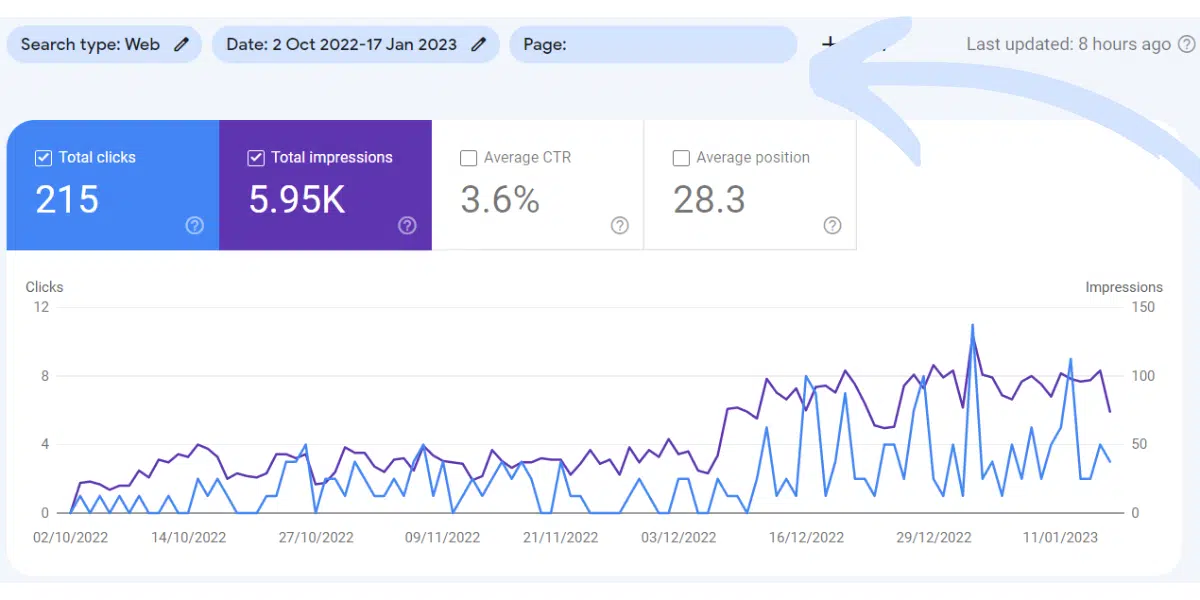
You can filter by page and see how many clicks and impressions a piece of content has received. Scroll down to find all the queries that returned your content. 

GSC Clicks And Impressions
A screenshot from Google Search Console shows growing clicks and impressions for a certain page. An arrow points to the page filter.

There’s nothing wrong with starting your next piece of content from a keyword with search volume that you discovered via SEO tools. This strategy is also perfect for identifying customer needs.

Getting into the data and discovering what’s searched “in the real world” will give you better insights.

Question 4: How competitive is the keyword?

Keyword tools offer metrics to score how difficult a keyword is to rank for. Generally, their data is based on how many backlinks ranking articles have – many backlinks to a page equal higher difficulty scores.

The problem is that backlinks are just one factor in a highly complex algorithm.

A general rule is that head keywords (keywords with one or two words) will be harder to rank for than a longer-tail keyword (4+ words) 

While I think it’s helpful to consider how competitive a keyword is, the better question to ask is what users want when they search for this keyword. What is the intent behind the search?


Get the daily newsletter search marketers rely on.


Question 5: What is the search intent?

Pairing an understanding of what your customers are searching for and what they’re looking for will take your SEO strategies to another level.

Let’s look at an example so you can use long-tail keywords and search intent to your advantage.

If you’re selling an email marketing tool, you might want to avoid the keyword “email marketing” in favor of a long-tail keyword like “email marketing tips for small businesses.”

You can identify a defined search intent using your brain. Email marketing is very broad. It’s unclear what someone wants. We can gather some data to support this by heading to Google, searching the keyword and seeing what’s returned.

With the billions of searches Google has for the term “email marketing,” the search intent is still not clear, so it provided an array of responses:

  • What is email marketing?
  • How to get started.
  • Campaign examples.

Plus, related questions that people ask.

SERPs for the keyword "email marketing" are varied.
Search results for the keyword “email marketing” are varied.

Google itself doesn’t know exactly what information to give the user.

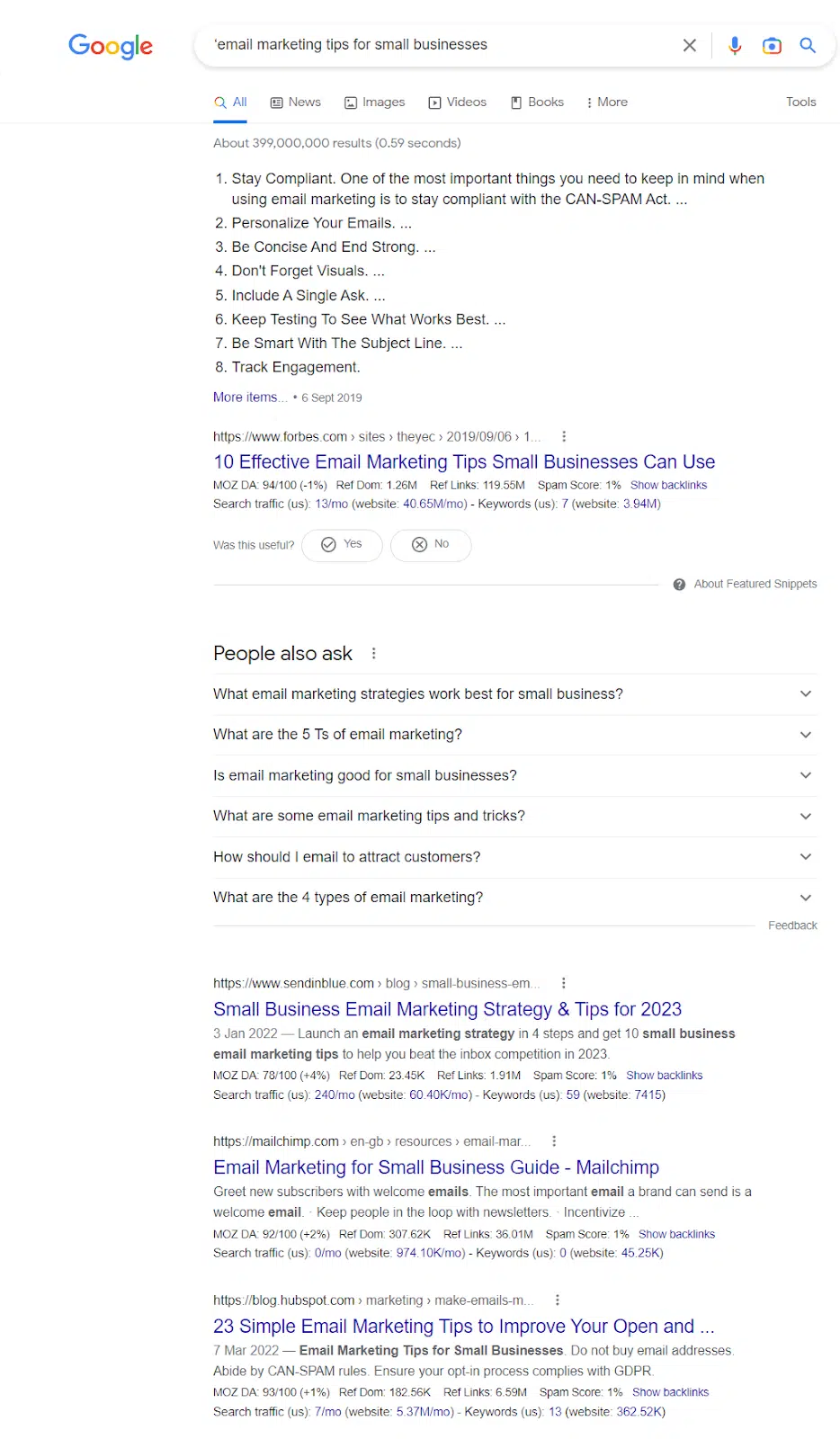
The SERPs significantly change with a long-tail search like “email marketing tips for small businesses” as the search intent becomes clear.

You don’t need Google to understand who is searching for this and what they want. The searcher wants tips, listicles, guides and expert advice on how to get the most out of email marketing tips.

That said, it never hurts to look at SERPs before we write. Some keywords might surprise you. Plus, we know Google wants to provide the most helpful content, and they have tested the content that resonated with this type of search, so the hard work is done.

If you search your keyword and Google provides email tips in listicle form, write that. And write it better, more informatively than anyone else currently ranking.

SERPs for the keyword "email marketing tips for small businesses" shows listicles and guides only.
SERPs for the keyword “email marketing tips for small businesses” shows listicles and guides only.

Question 6: What else can I write on this topic?

When clients want to write on a specific topic, I usually say, “let’s do it!” I also tell them, “But let’s not write just one new piece of content. Let’s write three, five… even 20 or 100.”

Keyword research for SEO is never about one piece of content in isolation. We know this from Google’s E-E-A-T. You cannot showcase experience, expertise, authoritativeness and trustworthiness in one piece of content.

When you find a keyword – or a subject – that you feel you should write about, cover that topic fully, pulling in all of your expertise.

Using the email marketing example above, if you wrote “email marketing tips for small businesses,” then it might be wise to write other pieces of content around this, such as:

  • How small businesses can use emails to get reviews
  • Email subject lines to improve CTR
  • The best (and affordable) email marketing tools for small business

Also, don’t forget to optimize your money pages, like “email marketing tool demo,” where users might subscribe to your offering. 

Covering a topic comprehensively is vital for two reasons.

  • It helps Google “see” that you’re a true authority on a subject. If you can write many good words covering all angles of a topic, it’s probably fair to say you know a lot about it.
  • Your website user will find your blog infinitely useful. The more valuable the content, the longer your users will stay on your site discovering what you’ve got to offer.

Weave in your offering throughout the content you create, keep sharing the benefits and nurture your users to conversion. 

Strategic keyword research drives SEO results

The six questions in this article are not an extensive list of what you need to ask to conduct a great SEO-driven content strategy. But answering them will help you strategically create content that resonates with searchers and drives results.


Opinions expressed in this article are those of the guest author and not necessarily Search Engine Land. Staff authors are listed here.


Related stories

New on Search Engine Land

@media screen and (min-width: 800px) { #div-gpt-ad-3191538-7 { display: flex !important; justify-content: center !important; align-items: center !important; min-width:770px; min-height:260px; } } @media screen and (min-width: 1279px) { #div-gpt-ad-3191538-7 { display: flex !important; justify-content: center !important; align-items: center !important; min-width:800px!important; min-height:440px!important; } }

About the author

Zoe Ashbridge

Zoe Ashbridge is a Senior SEO Strategist and Co-Founder at forank. Zoe has a background in digital marketing and digital project management. Zoe supports businesses worldwide with actionable SEO strategy for internal teams, consultancy and search engine marketing implementation. Zoe writes about SEO, Digital Marketing and Entrepreneurship.

https://searchengineland.com/keyword-research-for-seo-6-questions-you-must-ask-yourself-393823


How to create a winning content strategy framework

How’s your content strategy coming along?

Are you working on one? Or is it still just a distant task on your to-do list?

…Maybe think about prioritizing it. 

Overwhelmingly, brands and marketers with a documented content strategy outperform those without one.

How much do they outperform their peers? An astonishing amount – they’re 414% more likely to report success.

That’s a great motivator to get going on your strategy. 

One caveat: Whether you’re brand-new to content strategy, revising an existing strategy, or completely overhauling your content marketing, you need a solid framework to lean on.

And if you need help setting up the building blocks of that framework, this guide will show you what you must include.

What is a content strategy framework?

A content strategy framework is a plan that guides all of your content marketing actions. It details how you’ll create, manage, publish, promote, and maintain content to meet your brand goals.

You create a living reference point for executing your strategy when you document this framework – in a Google Doc, a spreadsheet, or even just jotted down on a notepad. It’s a plan you can return to again and again to guide all of your content marketing actions.

That distinction is essential, by the way. Your content strategy isn’t static at all. Instead, it should evolve with your brand as you discover what works and what doesn’t. You should be tweaking the strategy as necessary to account for what you learn. (That includes your goals, too.)

Finally, remember that the strategy guides that process and is meant to be repeated. You will never create just one piece of content and call it a day. You’ll create dozens to hundreds of pieces of content using this framework you’re working with.

And, at any given moment, you’ll be knee-deep in a handful of different stages. But you won’t get lost if you have a strategy.

What elements should you include in a content strategy framework?

Every content strategy should provide direction on key points. Here’s a quick breakdown. 

  • Set goals.
  • Define your audience.
  • Choose a content platform.
  • Choose content topics and formats.
  • Identify your team and roles.
  • Set a posting schedule.
  • Plan how you’ll promote.
  • Get the tools you need to execute content.
  • Determine how you’ll track and measure results.
  • Set a budget.

Get the daily newsletter search marketers rely on.


How to create your content strategy framework: 10 building blocks

1. Goals

Goal-setting is one of the most important parts of creating a content strategy. Without goals, you’ll have no destination to aim toward with your content marketing and, thus, no focus for your efforts.

Marketers who set goals are 377% more successful than those who don’t set goals, according to CoSchedule.

Goal setting marketers

So, ask yourself what you’re hoping to achieve with content. What do you want your content to do? Here are some common goals to get you started:

  • Build brand awareness: Increase your online visibility and become known in your industry.
  • Nurture your audience: Provide helpful content that educates your audience and builds trust to create more leads.
  • Drive more traffic: Bring more of your target audience to your virtual doorstep.
  • Earn more subscribers and leads: Use great content to encourage email sign-ups and convert visitors into prospects.

When you choose a goal, don’t keep it at this broad, vague level. Think about exactly what you want to accomplish underneath that particular goal umbrella. Get specific and use numbers.

For example, if my goal is to drive more traffic, I’d phrase it like this in my strategy: “Increase total website traffic by 20% in 6 months.”

2. Audience

With your goals defined, you can move on to defining your target audience.

This stage is about discovering who needs the expertise and solutions the brand offers and who you should be talking to via its content. To do that, you’ll have to conduct audience research.

This part is vital to get right. You need a deep understanding of your audience, including what they care about and their challenges, so your content will hit home.

If you don’t understand your audience fully, your content topics won’t always resonate. And content that doesn’t resonate doesn’t get results.

One of the best ways to get to know your audience is to interview them directly. To do this, you must start with a few assumptions about who needs what you sell. Then, when you talk to your prospects, you’ll learn whether those assumptions were right.

One of my favorite questions to ask my potential audience is, “If you had a magic wand that could instantly solve one of your current problems regarding X, which one would you choose?”

3. Platform

Next up: Where will you post content?

You can maintain different channels online for content publication and distribution, but you need to choose where you’ll focus the brunt of your efforts.

In other words, where do you want to focus on building your brand online? What platform will be your home base on the web?

I always recommend focusing on your website first – specifically, posting content on your blog. Why?

Your website is real estate you own. Social media accounts are not. Your Instagram, Facebook, Twitter, and LinkedIn accounts reside on borrowed land.

You also have little control over your visibility on social media. Your followers may or may not see all of your posts – and if you don’t post daily, your visibility will take an even bigger nosedive.

That’s why your website is such a powerful platform:

  • You own the content you post there.
  • You control that content’s visibility.
  • You can build your online authority with SEO and organic rankings.
  • Your other content posted to other platforms can point back to your website.
  • You completely control your website’s look and feel, including the user experience.

Whatever platform you choose, document the one you want to focus on growing the most with content.

4. Content

It’s finally time to talk about content in your strategy. You need to nail down two things:

What topic areas will you focus on in your content? 

To answer this question, lean on the intersection of your industry expertise/what you sell, and what your audience wants. Your best topic areas will be relevant to both.

For example, if you sell running shoes, you won’t exclusively write about running shoes. You’ll write about related topics your audience cares about, like training, knee health, running events, etc. However, you probably won’t write about sports and hobbies unrelated to running, like football, yoga, or tennis.

What content types and formats will you publish? 

Look at your resources and the types of content your audience prefers. If you’re a small brand, you probably won’t have the means to create slick, highly-produced video content. However, you will have the means to create high-quality blogs regularly – and that’s where most brands start.

5. Team

Who’s in charge of each aspect of your content marketing? 

While considering this, know that content should not be a “when I have time” activity.

It needs dedication to work. It needs someone on it who can spare it their full attention. That means, as soon as you can, you should invest in help (or seek buy-in to hire additional experts).

As you’re setting up your content team, these are the most necessary roles you might need to fill (and one person might fill multiple roles depending on your resources):

  • Content writer/creator: At a base level, you need someone comfortable creating written content in most formats, including blogs, ebooks, whitepapers, webpages, and social media posts. Alternately, if you decide to invest in video or infographics, you need people with those skill sets. 
  • Content manager: Who will be in charge of managing blog posts, including formatting, scheduling, and publishing?
  • Social media manager: Who will cover posting to social media and interacting with your audience?
  • Content/SEO strategist: Who will do keyword research and blog topic research? Who will ideate content topics? Who will track metrics and measure results?

6. Schedule

Yes, you need a content calendar for content marketing. But before you set one up, you first need to know your strategy for scheduling and posting content.

Remember: Consistency matters – not necessarily how much you post, but whether your audience can count on your posts and whether they’re always high-quality.

  • How often will you post content on your main platform?
  • How often will you post content on your secondary platform(s)?
  • How often will you promote content on social media?
  • What days/times are best for posting content for your audience?

Base your answers on research and your brand’s resources. What are your content team’s capabilities? What output can the business support?

With all of these questions answered, setting up your content calendar should be easy.

7. Promotion

Next, choose your avenues for promoting content. 

Promotion is how you get extra eyes on your content – especially when you’re new and don’t have an audience established yet. 

However, you don’t have to spend much money on promotion. It can be as simple as cross-posting the link to the new blog you just published on social media. It can be as quick as sending out an email to your subscribers alerting them to a new blog.

If you don’t have a list of email subscribers yet, you might choose that as a major goal for your content marketing and instead promote posts on social for the time being.

8. Tools

Most of the steps in your content strategy will probably require at least one tool to help make the process easier and faster. Plus, some tools provide data you cannot skip by any means if you expect to compete in search engine rankings.

Here are the must-have tools:

  • Keyword research or SEO tools (Semrush, Ahrefs, KWFinder by Mangools, etc.)
  • Web analytics tool (like Google Analytics)
  • Content management system (WordPress, Drupal, Joomla, etc.)
  • Content calendar (Airtable, Trello, CoSchedule, Google or Excel spreadsheets, etc.)
An example of a content calendar using Airtable

Here are the nice-to-have tools:

  • Editing software (like Grammarly).
  • SEO checker (like Yoast).
  • Conversion rate optimization (CRO) tool (like Hotjar).
  • Image editing tool (like Canva or Photoshop).

9. Progress tracking

As you work toward your content marketing goals, you must also track your progress.

Document how you plan to do that in your content strategy. Determine:

  • The key performance indicators (KPIs) you can attach to your goals. For instance, if one of my goals is to build brand authority and reputation, I could track Google keyword rankings over time to show how my online authority grows. 
  • The tools you need to track those KPIs. For example, I need an SEO tool to track Google rankings for my website.
  • How often you’ll check in. Will you look at metrics monthly? Quarterly? Keep in mind that content marketing results tend to be slow but steady.

10. Budget

Last but not least, iron out the budget for your content marketing. Based on your strategy, what will it cost to run? Figure in the people, tools, and processes you must invest in to make it happen.

Weigh the cost against your resources, and remember to tweak your strategy as needed to keep it in line with your budget constraints. Remember: Great content can help grow a brand. And as the brand grows, your content investment can also increase. 

A content strategy framework leads to solid content marketing

You need a content strategy framework if you want your content marketing to work.

Luckily, you’re already well on your way.

Use the framework to build your brand’s plan for content success, but remember the strategy isn’t set in stone. Instead, consider it a living document you’ll use daily to stay focused, stay on track, and reach your goals.


Opinions expressed in this article are those of the guest author and not necessarily Search Engine Land. Staff authors are listed here.


Related stories

New on Search Engine Land

@media screen and (min-width: 800px) { #div-gpt-ad-3191538-7 { display: flex !important; justify-content: center !important; align-items: center !important; min-width:770px; min-height:260px; } } @media screen and (min-width: 1279px) { #div-gpt-ad-3191538-7 { display: flex !important; justify-content: center !important; align-items: center !important; min-width:800px!important; min-height:440px!important; } }

About the author

Julia McCoy

Julia McCoy is the founder of Content Hacker, 7x author, and a leading strategist around creating exceptional content and brand presence that lasts online. At 19 years old, she used her last $75 to build a 7-figure writing agency which she sold ten years later. In the 2020s, she’s devoted to teaching founders and marketers the strategy, skills, and systems they need to build a business through inbound content, so they can create more lasting impact in the world.

https://searchengineland.com/create-content-strategy-framework-393819


This day in search marketing history: March 3

Google Panda name revealed

In 2011, Google’s Amit Singhal and Matt Cutts revealed that Google Panda was the true name of the update that was informally referred to as Farmer when it launched Feb. 24.

“Well, we named it internally after an engineer, and his name is Panda. So internally we called a big Panda,” Singhal said in a Wired interview with Steven Levy.” He was one of the key guys. He basically came up with the breakthrough a few months back that made it possible.”

Google said the launch of the “Caffeine” indexing infrastructure inadvertently helped increase the visibility of “shallow content.

“Our index grew so quickly, and we were just crawling at a much faster speed. When that happened, we basically got a lot of good fresh content, and some not so good. The problem had shifted from random gibberish, which the spam team had nicely taken care of, into somewhat more like written prose. But the content was shallow,” Singhal added.

Read all about it in Google Speaks More About The Farmer Update, AKA Panda Update. And dig deeper in


Also on this day


Google page experience update for desktop done rolling out

2022: The rollout was completed after nine days.


Google ‘Confirmed by phone’ label in local panel may add trust to local listings

2022: Google was testing displaying a “confirmed by phone” label to the local listing, followed by when it was last confirmed


Microsoft Advertising Editor rolls out support for Microsoft Audience Network campaigns

2022: Microsoft planned to add support for more Audience Network capabilities within the ads editor.


Help for Ukraine SEO & PPC specialists seeking work

2022: An SEO entrepreneur has created two resources: one for job seekers and another for employers with vacancies willing to hire Ukrainians.


Google will not build or use alternate identifiers to track users across the web

2021: Google reiterated that its products would use Federated Learning of Cohorts to enable advertisers to target audiences.


Optimization score comes to Google Ads app

2020: Also, Dark mode.


Fake and inaccurate reviews driving billions in ‘wasted’ consumer spending [Report]

2020: Roughly 90% of adult internet users relied on reviews, but with growing awareness of fraud and manipulation.


Search in Pics: Google sleep capsules, YouTube control room & golden Android figurine

2017: The latest images culled from the web, showing what people eat at the search engine companies, how they play, who they meet, where they speak, what toys they have and more.


Google Image Search Tests Colored Filter Buttons

2016: The new format showed up on desktop image results for some and used different colored backgrounds to enhance the filter options for the searcher.


Bing Native Ads Rollout Gains Steam: Support Coming To Bing Ads Editor

2016: Bing Ads rolled out an update for Bing Ads Editor that included editing support for native ad bidding.


Bing Partners With NCAA To Deliver March Madness Predictions & Tournament App

2016: Bing and the NCAA teamed up again to help fans fill out their NCAA brackets and follow all 67 games


Google Researchers Introduce System To Rank Web Pages On Facts, Not Links

2015: Could Google someday rank web pages based on how accurate they are? A new paper suggested they might.


Yahoo Celebrates Its 20th Birthday By Setting New World Record For Yodeling

2015: The company pulled together more than 3,400 people to set the Guinness World Record for the largest simultaneous yodel.


Matt Cutts Video: How Google Determines What’s A Paid Link

2014: Cutts answers: “What is a ‘paid link’?”


Google To Launch New Search Results Design With Larger Fonts & No Underlines Soon?

2014: Google had been testing several layouts that made the search results look a bit easier to read by increasing the font size and removing some of the underlines for the hyperlinked content.


Google Bug Turned Entire Web Into “Lorem Ipsum”

2014: There was. aweird issue where Google showed Lorem Ipsum boilerplate text in the search results snippets.


Bing Quietly Adds A Scientific Full Size Calculator

2014: When you searched for a math answer, not only did you get the answer, but you also got an interactive calculator in Bing’s search results.


Interflora Gets Its Google Rankings Back, 11 Days After Penalty

2013: Interflora was ranking again on searches for its company name, and its Google+ brand box was appearing again on the right side of the search results.


Google Redesigns Google Profiles

2011: The profiles looked slicker and more “social,” as you would expect from a Facebook or Twitter.


Google Intros AdSense Mobile Interface

2011: The mobile-friendly site let you check earnings, get alerts, and view non-Flash-based reports.


Kayak Welcomes Google As Travel Search Competitor, With ITA Acquisition Still Under DOJ Review

2011: The travel search engine didn’t fear Google’s entrance into the travel search market, according to Paul English, Kayak.com’s co-founder and Chief Technology Officer.


Video: Inside Google’s Self-Driving Cars

2011: TED attendees were allowed to travel inside the self-driving cars, on a closed course.


Bing Brings Local Deals To Mobile, PC

2011: The source of deals was The Dealmap.


Microsoft & Facebook No Longer Friends After Employee Poaching Accusations

2011: Microsoft was considering taking legal action against Facebook for allegedly poaching their employees.


Ask Launches Local Conversations iPhone App

2011: Ask launched a new app focused on local conversations called Ask Around.


Google Simplifies Verification For Multiple Owners In Webmaster Tools

2010: Rather than having to upload multiple verification files or create multiple meta tags, there was a new “Add a User” tool on the site verification page.


Google’s Norvig: PageRank Is Overhyped

2010: Google’s Director of Research Peter Norvig said the public’s focus on PageRank was misguided and it probably needed a new name.


Google Grades Itself On SEO Best Practices

2010: Google had a mixed bag of good SEO tactics and missed opportunities on the homepages of 100 different products.


Google Kills SearchWiki, Replaces It With Starred Results

2010: The ability to re-order, remove, and comment on search results was replaced by a scaled-down version that Google was simply calling “stars” or “starred results.”


It’s Official: Google’s Proposal For Crawling AJAX URLs is Live

2010: Google’s Maile Ohye confirmed that Google was now crawling AJAX pages.


Report: Growth Of Paid Search Budgets Decline While SEO Budgets Increase

2009: An eMarketer report said SEO budgets would increase in the next five years, while paid search budgets would decline relative to the overall marketing budgets for companies.


Twitter & Google Maps Help Find Lost Skiers

2009: Twitter, in conjunction with Google Maps, helped locate a couple of lost skiers.


MapQuest Launches Enhanced Biz Locator, Puts Brands On The Map

2009: A scrolling vertical bar appeared on the upper right of every map allowing advertisers to populate any map quickly with specific brand locations.


Cuil Announces New Layout, Other Updates

2009: Cuil, the search engine that launched to great hype in 2008 and then pretty much disappeared, announced changes to its design, content, and backend.


Yahoo Search March ’08 Weather Report

2008: Yahoo made changes to their crawling, indexing and ranking algorithms.


Ask.com Calls Dumping Teoma Search Technology Rumors False

2008: “Bottom line: they are just flat-out not true. Our Teoma technology will continue to power search engine results on Ask.com.”


comScore Paid Search Data & How The Sky Might Not Be Falling

2008: A drop in paid clicks was not due to advertisers holding back on spending but rather Google’s “quality initiatives.”


Mobile 411: A Leading Indicator For Mobile Search

2008: A survey found the most common usage frequency for mobile directory assistance was “once every three months” (61 percent).


InsideTrip Seeks To Add More Depth And Dimension To Travel Search

2008: The site offered a metasearch engine (like Kayak or Farechase) for airfares.


Compete Sold For $75 Million To Taylor Nelson Sofres

2008: Compete.com’s 2007 revenue was $14.9 million, over 50% higher than in the previous year.


From Search Marketing Expo (SMX)


Past contributions from Search Engine Land’s Subject Matter Experts (SMEs)

These columns are a snapshot in time and have not been updated since publishing, unless noted. Opinions expressed in these articles are those of the author and not necessarily Search Engine Land.


< March 2 | Search Marketing History | March 4 >


Related stories

New on Search Engine Land

@media screen and (min-width: 800px) { #div-gpt-ad-3191538-7 { display: flex !important; justify-content: center !important; align-items: center !important; min-width:770px; min-height:260px; } } @media screen and (min-width: 1279px) { #div-gpt-ad-3191538-7 { display: flex !important; justify-content: center !important; align-items: center !important; min-width:800px!important; min-height:440px!important; } }

About the author

Danny Goodwin

Danny Goodwin is Managing Editor of Search Engine Land & SMX. In addition to writing daily about SEO, PPC, and more for Search Engine Land, Goodwin also manages Search Engine Land’s roster of subject-matter experts. He also helps program our conference series, SMX – Search Marketing Expo. Prior to joining Search Engine Land, Goodwin was Executive Editor at Search Engine Journal, where he led editorial initiatives for the brand. He also was an editor at Search Engine Watch. He has spoken at many major search conferences and virtual events, and has been sourced for his expertise by a wide range of publications and podcasts.

https://searchengineland.com/search-marketing-history-march-3-393806


How to use ChatGPT for keyword research (with actual prompts)

If you’ve used ChatGPT for any period of time for tasks like creating content for SEO, you’ve likely noticed a few things:

  • It’s great and a major time-saver for some tasks.
  • It’s much worse than what you already do for other tasks.
  • To get the most out of it, you must understand how it works, be willing to refine your prompts (sometimes several times), and QA the platform’s output.

All of these things are true when using ChatGPT for keyword research. To help you navigate the process, let’s explore:

  • Keyword research functions ChatGPT is good at (with specific prompts).
  • Keyword research functions ChatGPT is not good at.
  • How to QA your keyword research output from ChatGPT.

You’ll leave this article with specific keyword research applications for ChatGPT, plus a framework for incorporating the tool into your SEO processes.

How to use ChatGPT for keyword research

An important thing to understand off the top: ChatGPT does not have access to search volume and other metrics the way keyword tools like Google Keyword Planner, Ahrefs and Semrush do.

That said, ChatGPT can be highly useful for several keyword research functions.

Keyword brainstorming and topic ideation

One downside to traditional keyword research tools is that your competitors (and often more authoritative sites than yours) are using the same tools and targeting the same keywords. 

As you build out a list of topics and keyword targets, the right ChatGPT prompts can help you find largely untapped pockets of keywords.

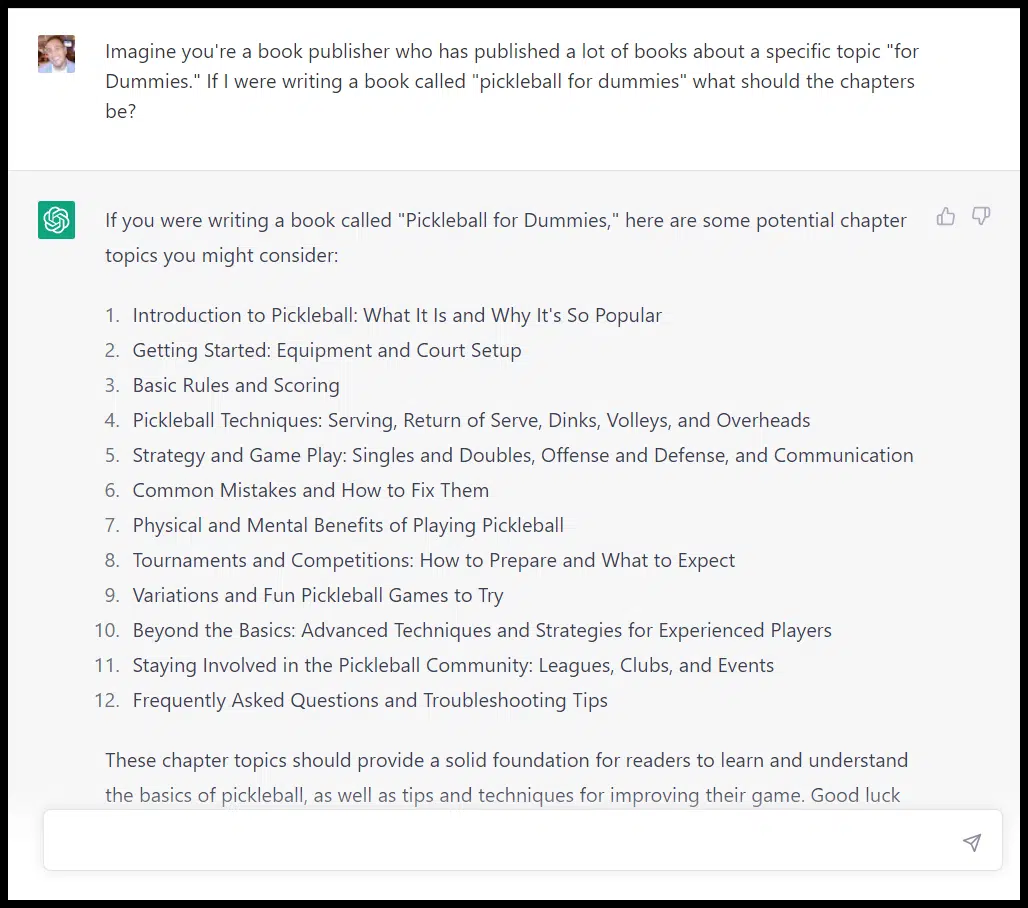
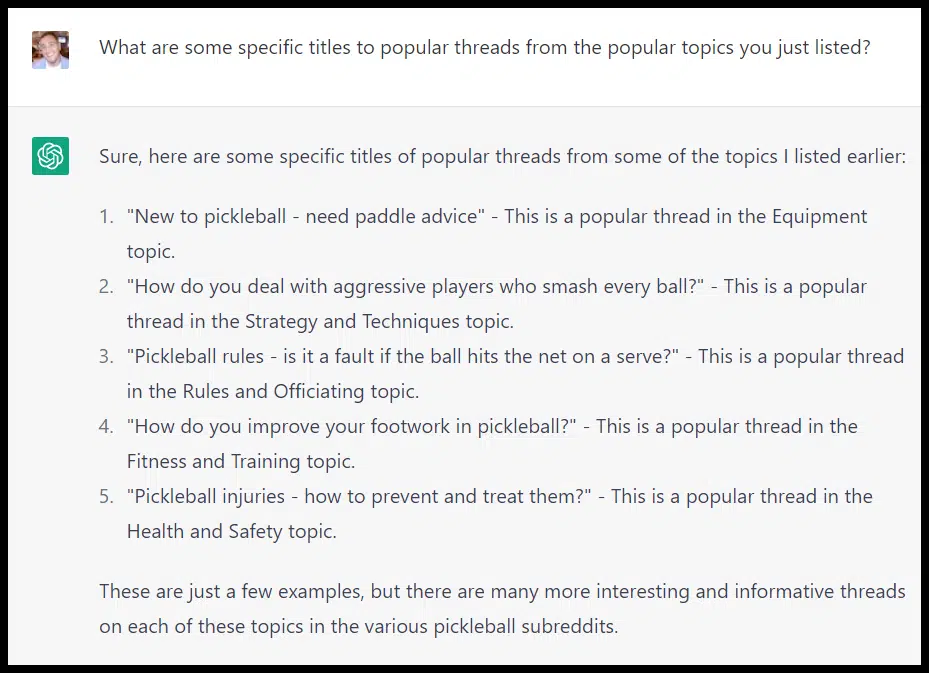
{Topic} for dummies

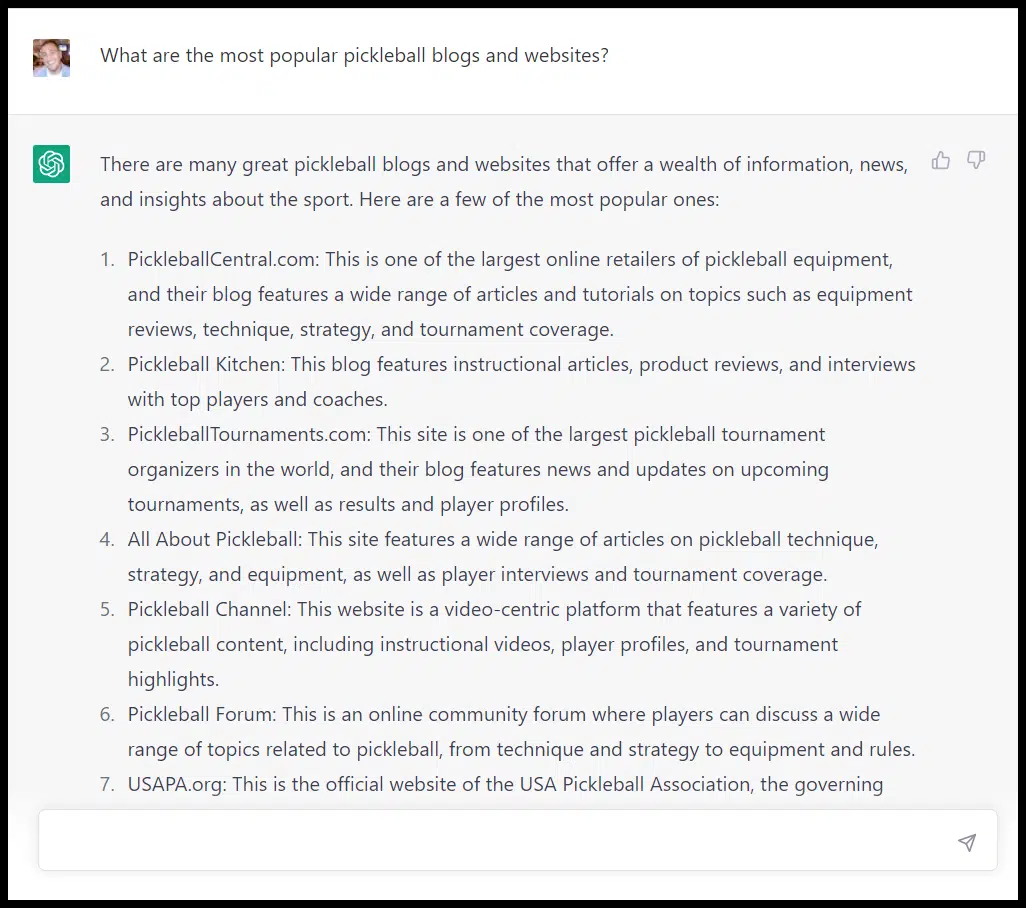
If I were starting a website about pickleball and wanted to get some broad ideas for what to write about, I could use some creative prompts to get ideas from ChatGPT on where to start:

ChatGPT topic for dummies

Obviously, this isn’t a list of keywords, but it could function as a general site structure and gives me ideas for keyword clusters to build.

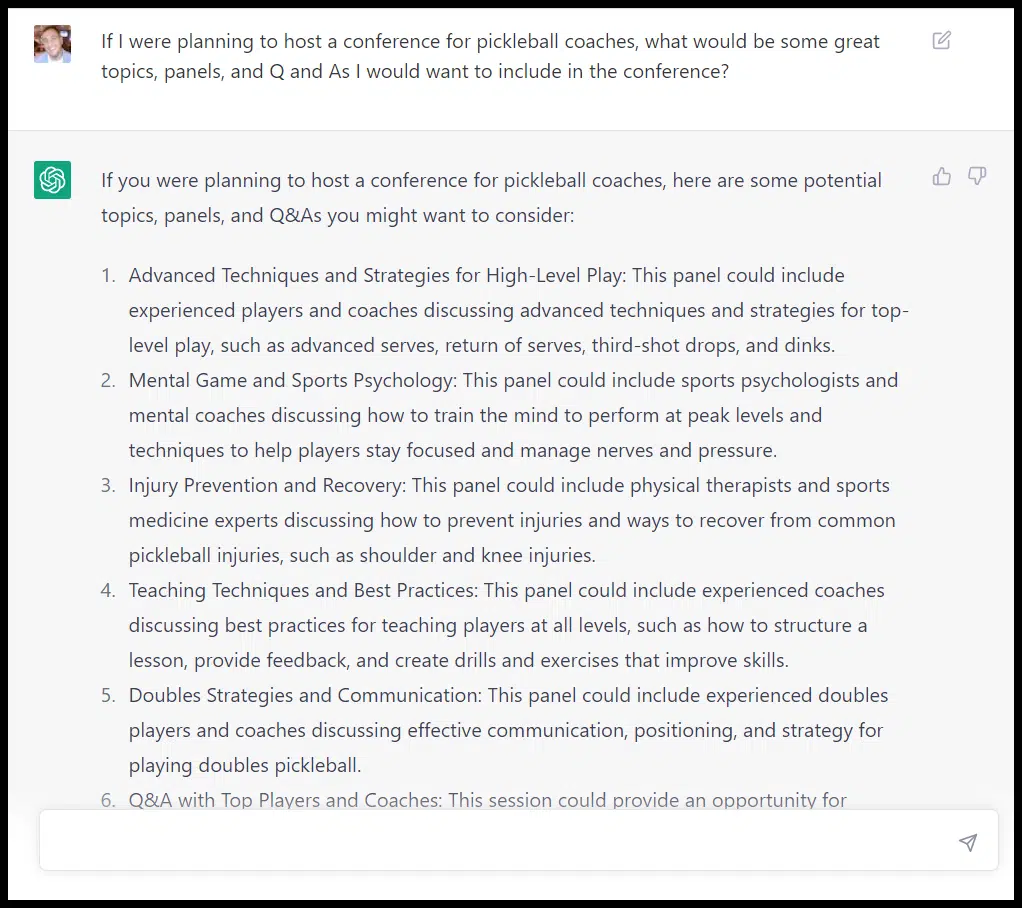
{Topic} conference agendas

Similarly, asking ChatGPT for conference topics targeting a specific persona in my niche provides some interesting ideas:

ChatGPT conference agendas

Quick and dirty competitive research

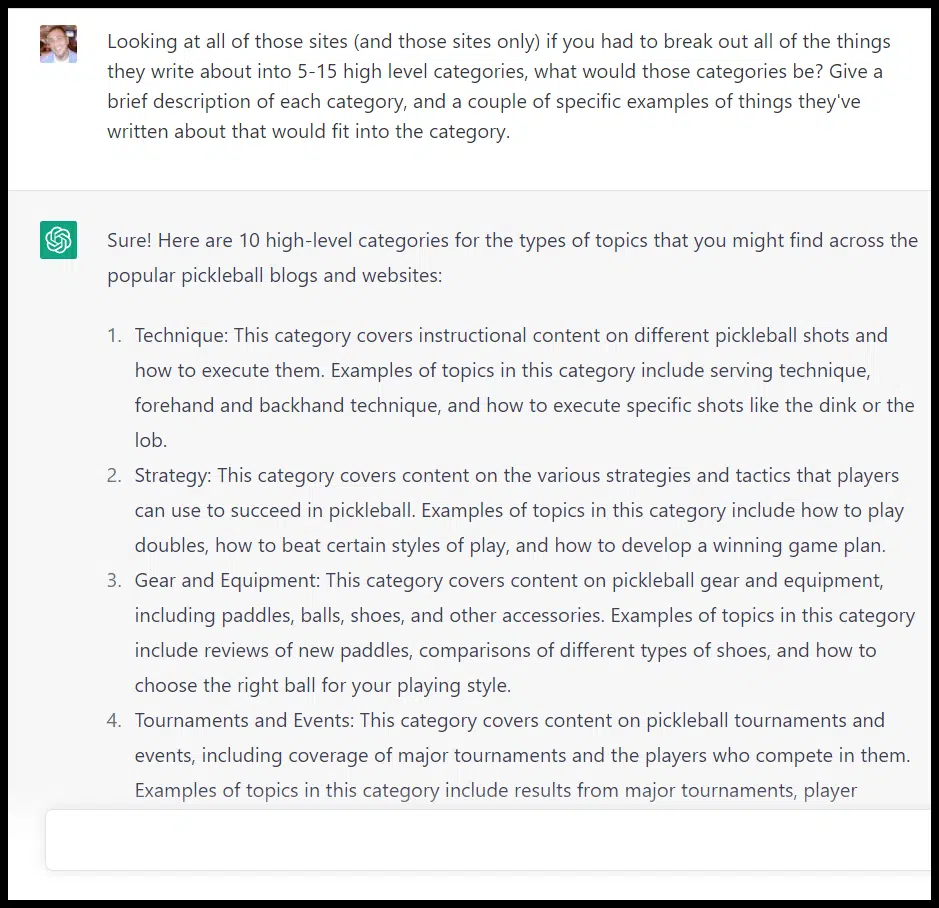
ChatGPT doesn’t have the most recent data and isn’t a comprehensive keyword research tool. But it can help me gain a quick sense of a niche’s competitive landscape and get started with high-level ideas:

ChatGPT for competitive research

Plus, more ideas for different topics and sub-niche:

ChatGPT for competitive research

Social media and influencer research

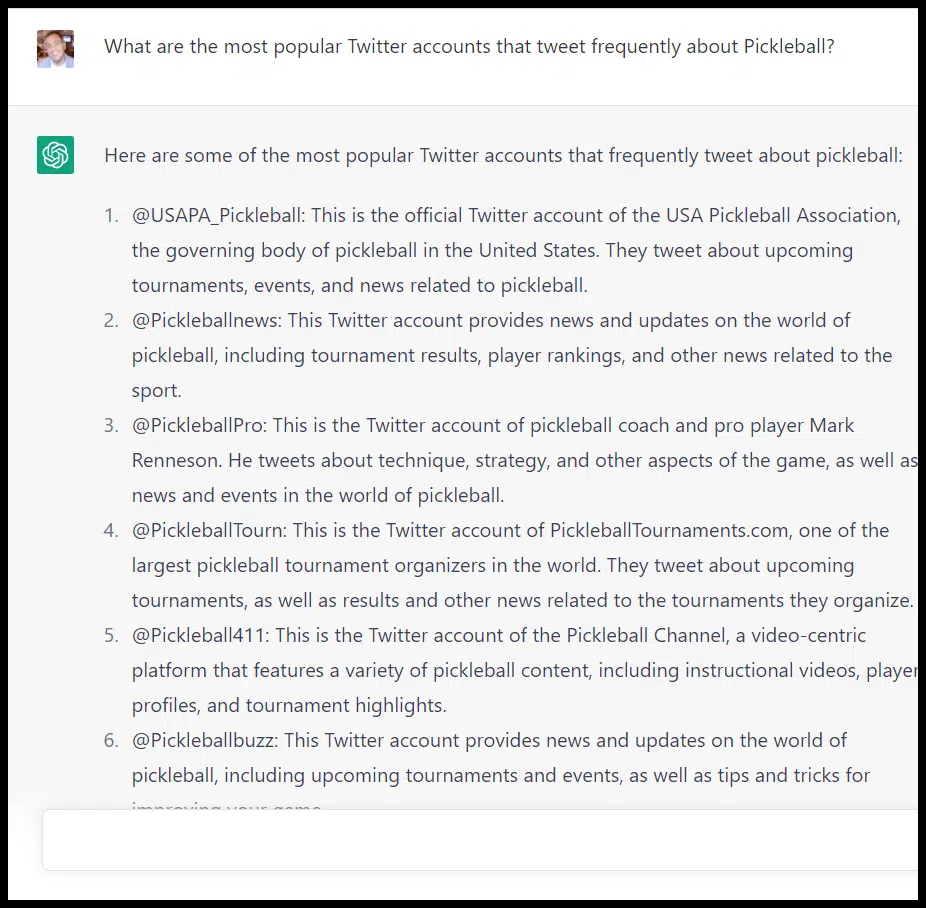
I can continue to get a lay of the land in this niche by looking at social media accounts on platforms like Twitter:

ChatGPT for social media and influencer outreach

Though keep in mind this data is from the GPT-3 training set, which isn’t current. Twitter also paused access as of December 4, 2022:

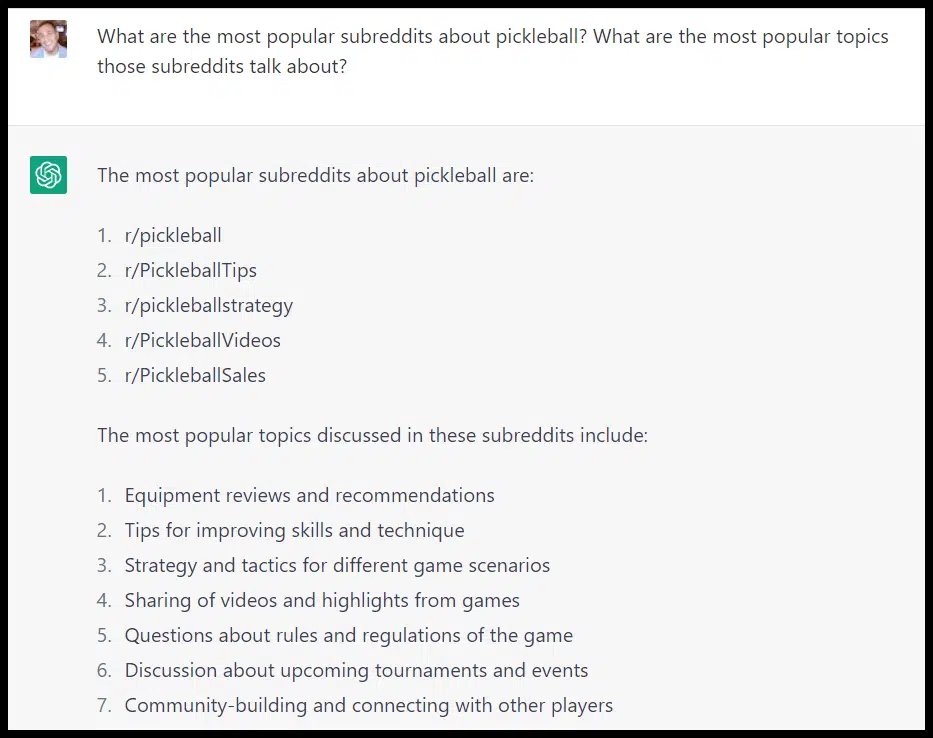
I can also look at Reddit:

ChatGPT and Reddit

This can be even more useful if you dive a little deeper:

Specific Reddit topics

The output is great as specific angles for articles or FAQs.

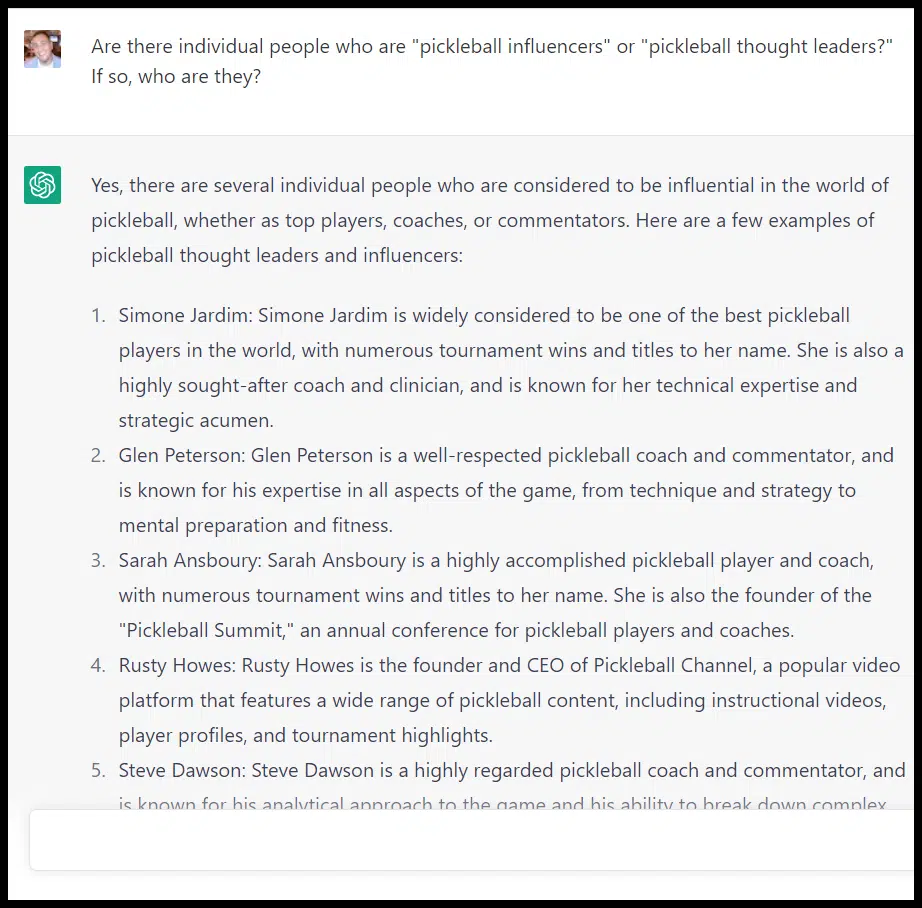
You can also get a quick view of influencers and thought leaders:

Search for social influencers

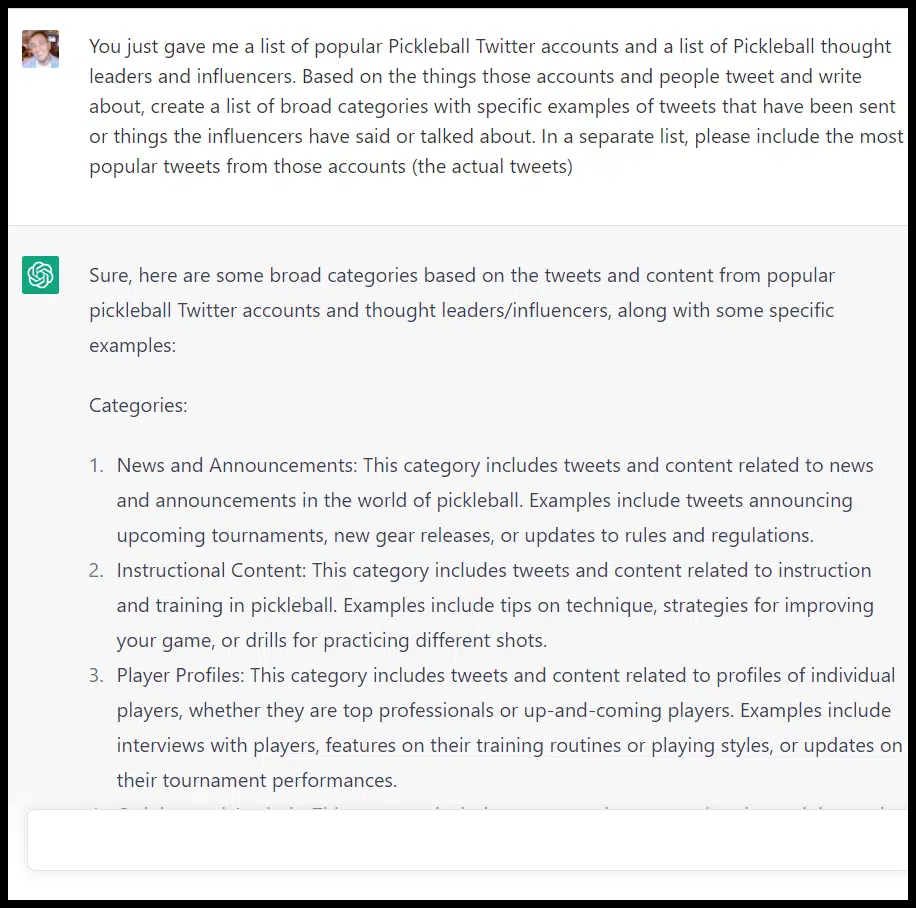
Then I can dive into more topic ideas and learn the topics they tweet and talk about:

Thought leaders and topics

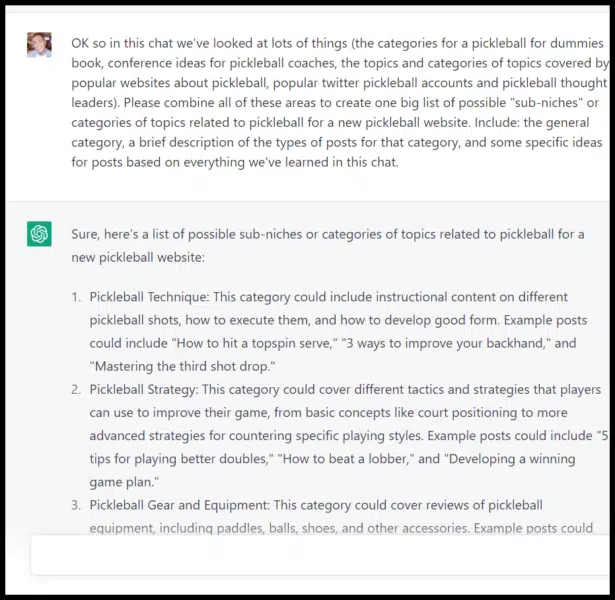
Next, I can start to pull this all together by combining prompts and asking ChatGPT to give me a summary of its research:

ChatGPT combining prompts

I’ll be honest: I run a lot of ChatGPT prompts, and some of the output is infuriatingly bad.

However, if you hired a VA to spend a few hours researching a niche and asked them to give some high-level topic and category ideas for a new site, it would be acceptable if they came back with this.

Brainstorm actionable keywords

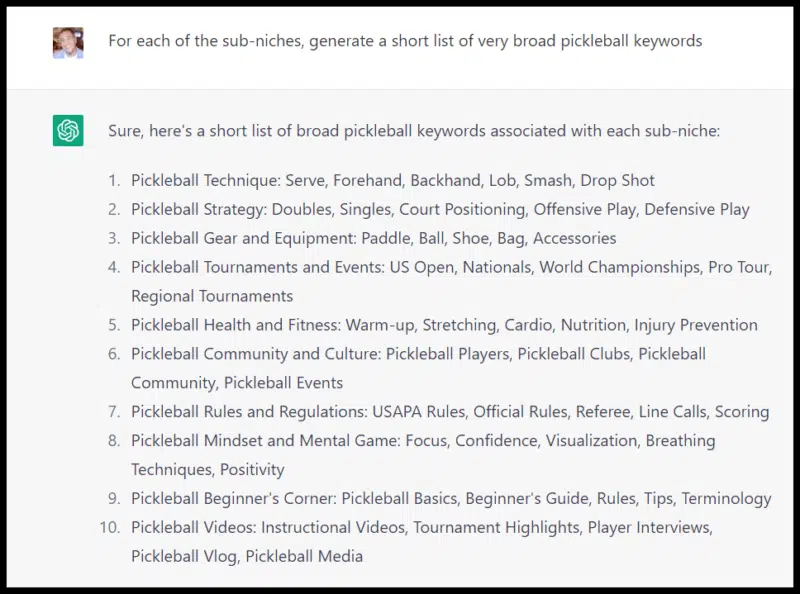
We now have interesting high-level category and “sub-niche” data. So how do we convert that into an actual list of target keywords?

ChatGPT can’t give you estimated search volume and keyword difficulty data. While they aren’t perfect metrics, you can waste time and resources if you’re “flying blind.”

We can use ChatGPT to prepare a list of “seed keywords” to run against our favorite keyword tool:

ChatGPT seed keywords

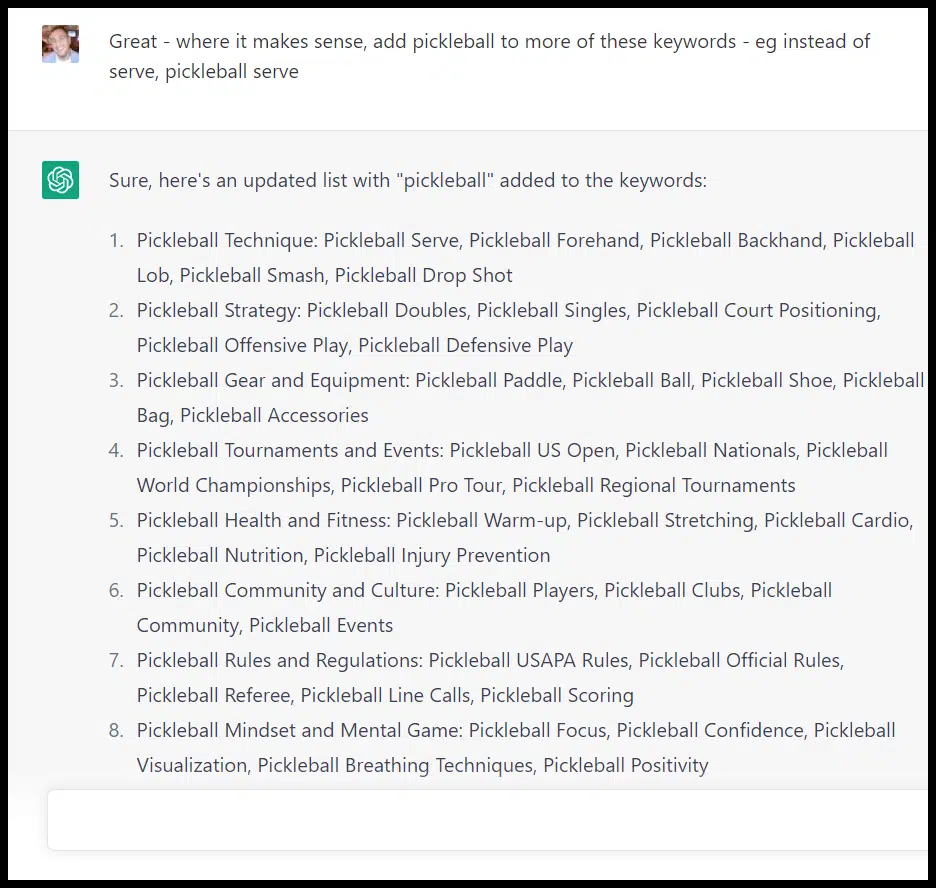
Depending on what you get back, you can then refine:

Refining keyword lists

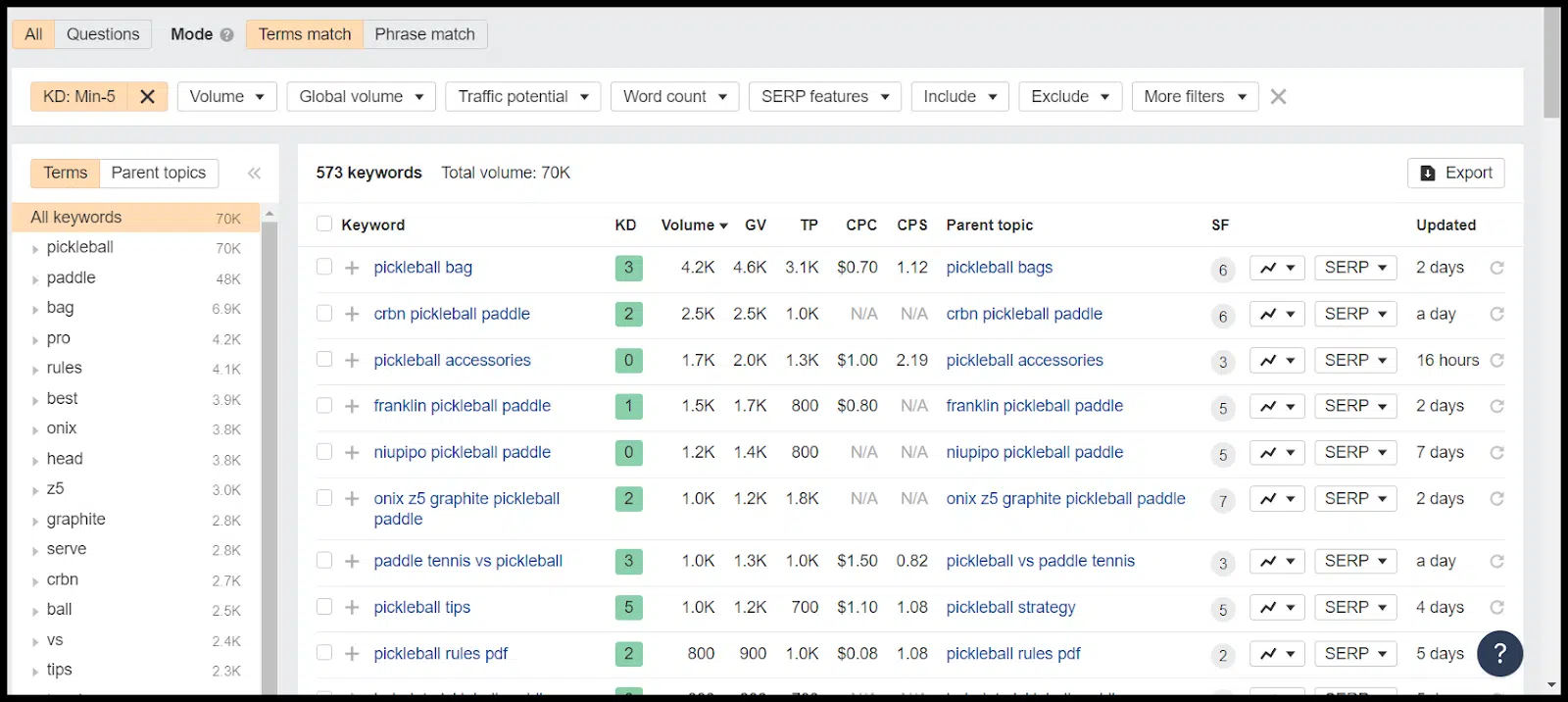
Next, I used a prompt to clean up the list (“Perfect, take these keywords and convert them into a list of just the keywords that I can easily copy and paste.”) and dropped them all into Ahrefs, looked at matching terms, and filtered for terms with a keyword difficulty of 5 or lower for my new site:

Ahrefs keywords

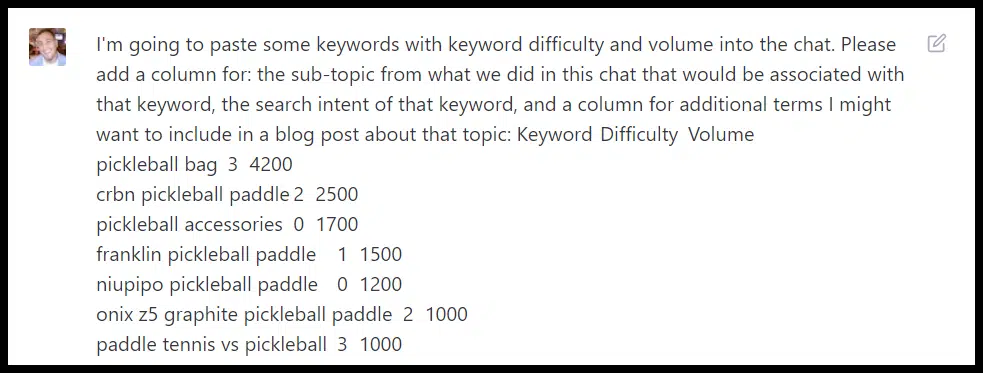
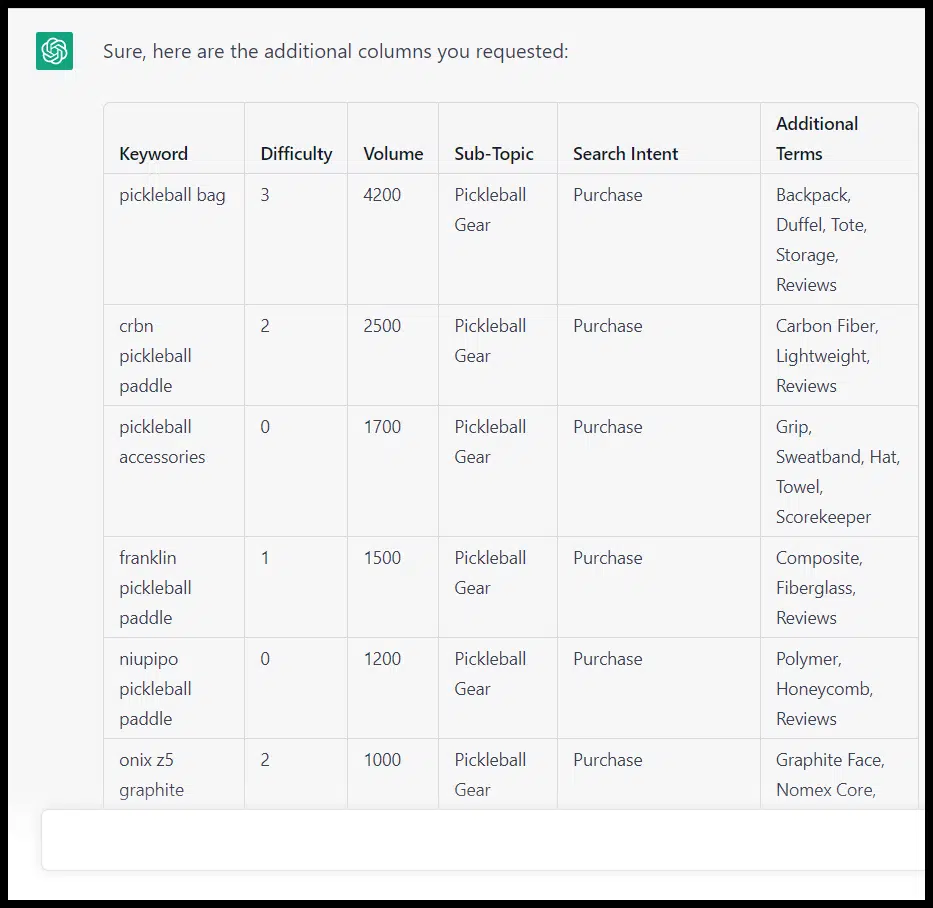
Now that I have some terms with difficulty and search volume, I can go back to ChatGPT to help add some information for these terms:

ChatGPT prompt with difficulty and search volume

The output is pretty impressive:

ChatGPT output with difficulty and search volume

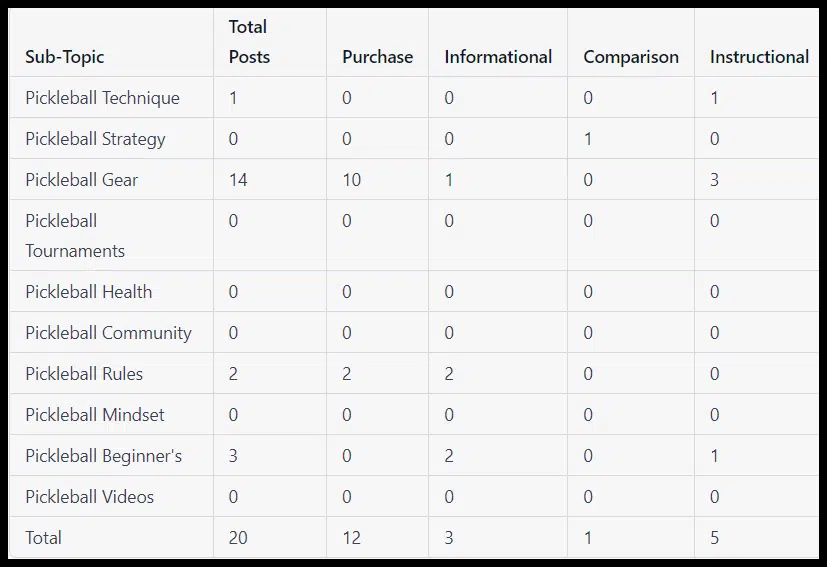
Now, I can also get some other interesting keyword data on my new list of terms by asking, “Can you tell me how many posts are in each sub-topic and how many fit into each level of search intent?”

ChatGPT output - categorized intent

Many times you may balance your content output across categories, business lines and support for different tools or products. This is a handy way to sum up that information quickly.

Keyword list generation, expansion and cleanup

Finding specific keywords to target and appending different modifiers to your terms to grow your list are critical aspects of keyword research.

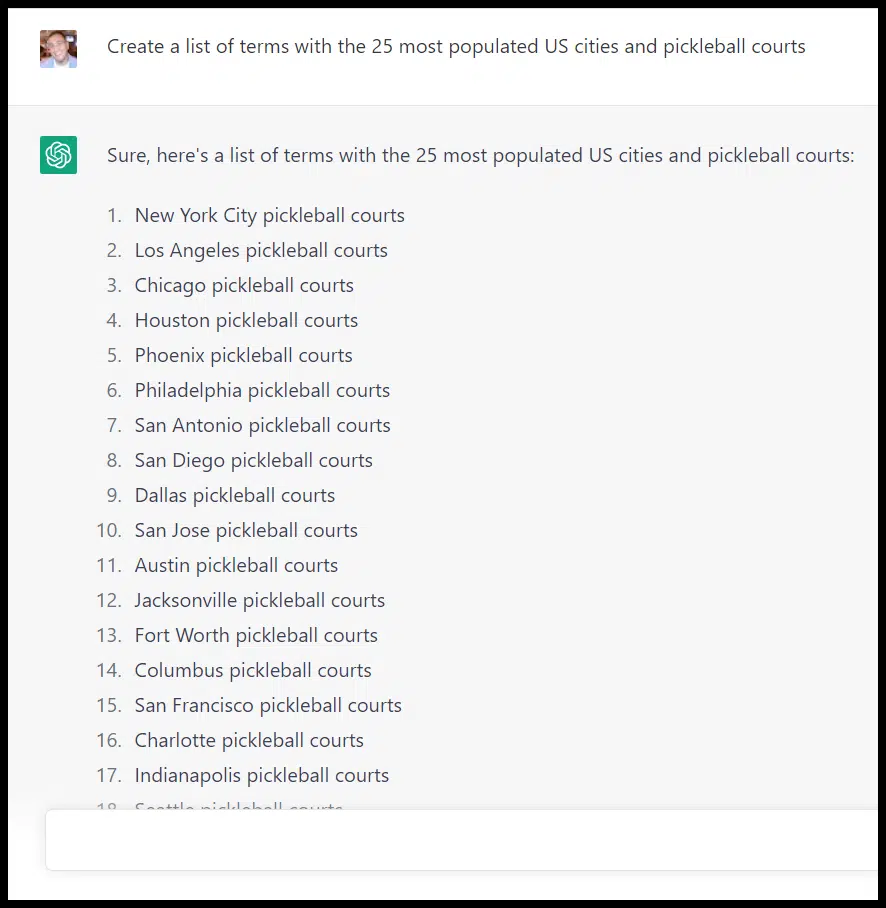
A common application is to generate a list of geo-modifiers and marry those with a target term:

ChatGPT geomodifiers

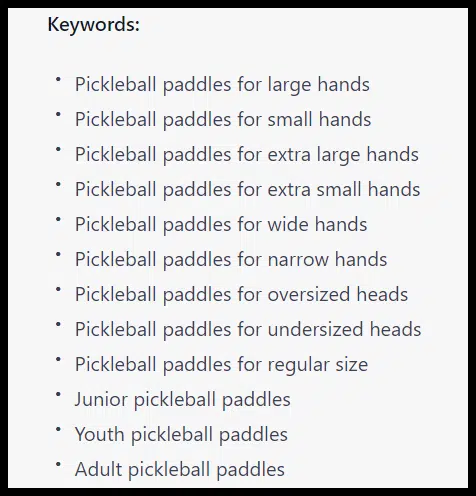
You can also get a list of size modifiers and apply that to different terms:

ChatGPT generate list with size modifiers

The output has some interesting ideas:

ChatGPT keyword list generation

If you have some seed lists of modifiers, the mash-up process can be even more straightforward here.

Page-level keyword research

Many tools will create content briefs and grades for your content based primarily on what’s currently ranking well in search engines. I use multiple of these tools in my day-to-day work, and they can be pretty expensive. 

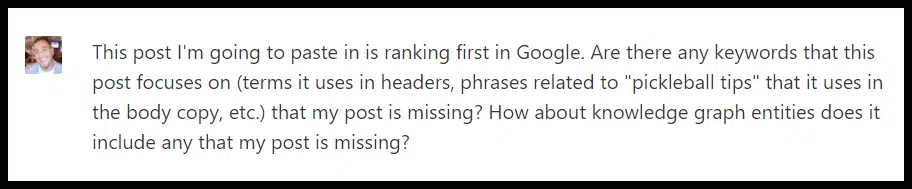
We can use ChatGPT to compare our article to whatever is ranking for specific terms. Again, it is not a native SEO tool, so data will differ from what those tools use. 

Unfortunately, ChatGPT doesn’t crawl URLs (yet), so you have to copy and paste both your article and the article ranking first into the chat to have it analyze them. This can be a pain since the character limit is 2,000 words.

ChatGPT page-level keyword research

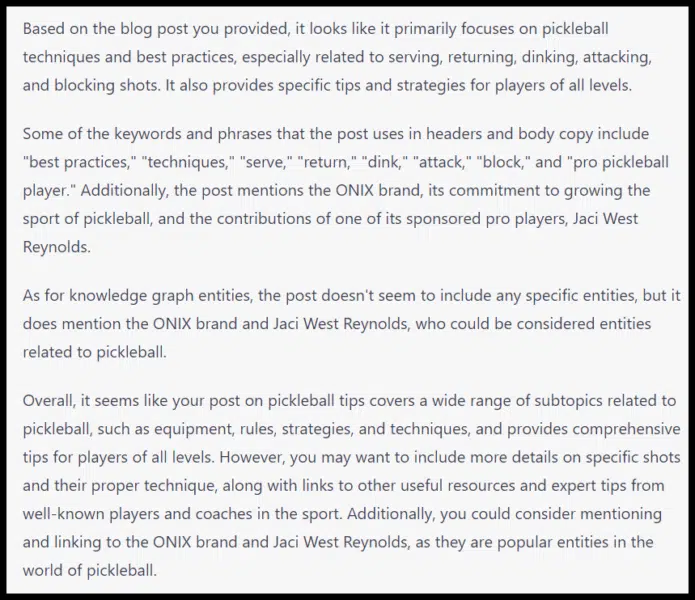
And here is the analysis:

ChatGPT page-level - output

And you can get more specific advice with a follow-up prompt:

ChatGPT page-level specific resources

Take advantage of ChatGPT’s ability to remember previous prompts within a specific chat.

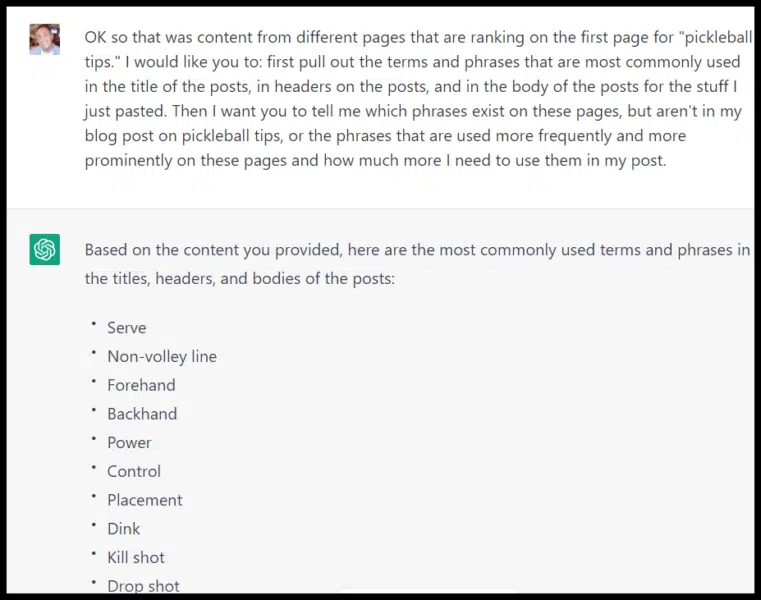
Here, I could run through multiple articles ranking on the first page for this search term, ask ChatGPT to pull out themes and common terms used in the headers for each, and then surface the most popular phrases across the articles:

Run Through Multiple Articles 761x600

This is pretty clunky to do manually since some articles or pages will exceed the 2,000-character limit. ChatGPT will try answering you before the content is all posted.

As you can see above, it’s not exactly answering my question. The tools that are specifically designed for this are undoubtedly much slicker.

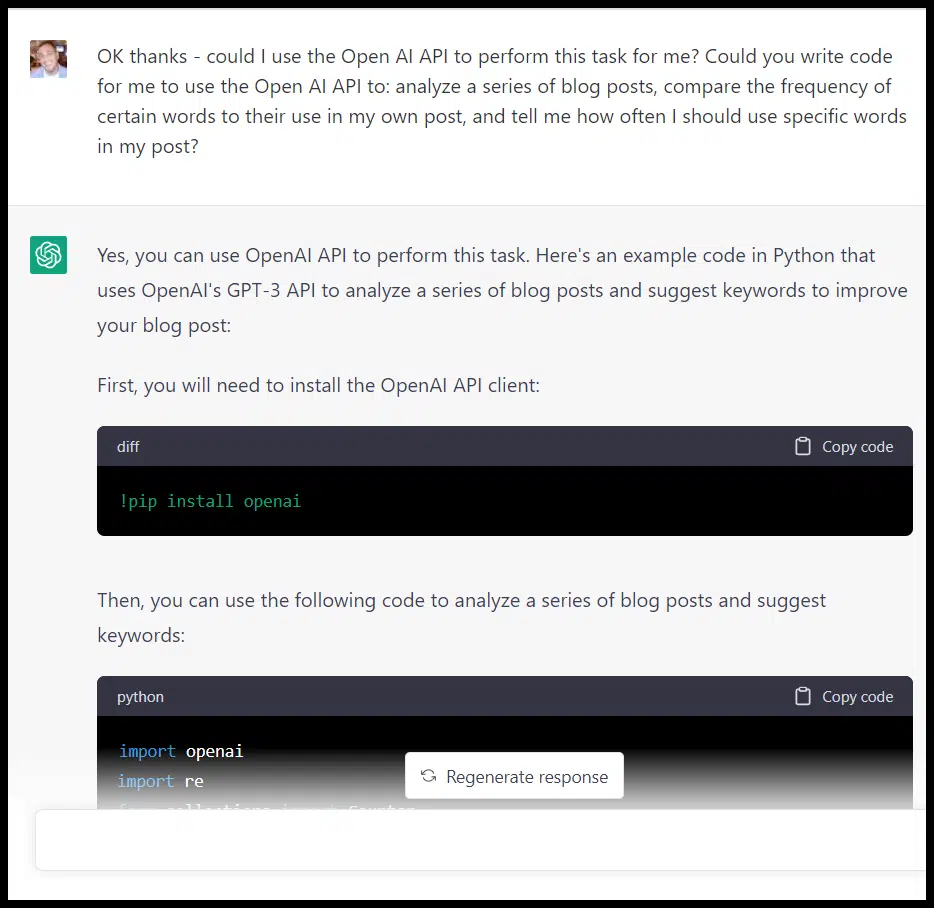
For a smoother and more scalable experience in prompt-heavy tasks, use the Open AI API. Have ChatGPT generate the code for you:

OpenAI API app

ChatGPT prompts for keyword research APIs 

Reminder: Proceed cautiously when dealing with programmatic APIs that cost money or credits. QA everything the tool spits out.

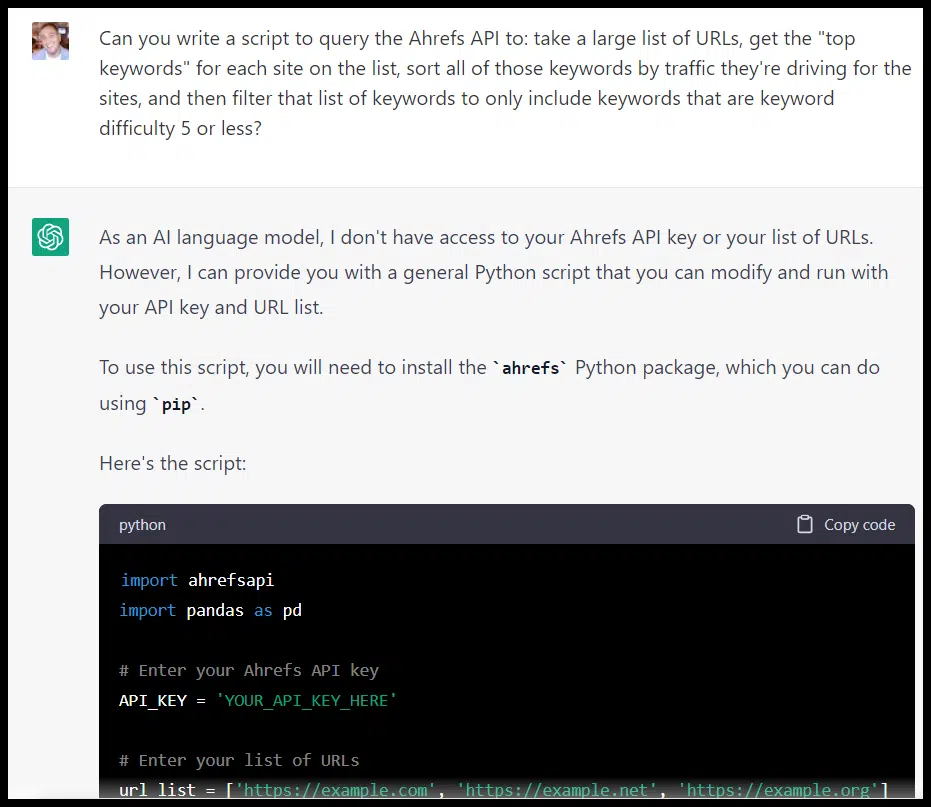
Another keyword research function for ChatGPT is to help SEOs interface with different keyword tool APIs:

Ahrefs API

For my new pickleball site, I could grab an extensive list of low domain authority sites ranking for some pickleball terms and then run them through this script.

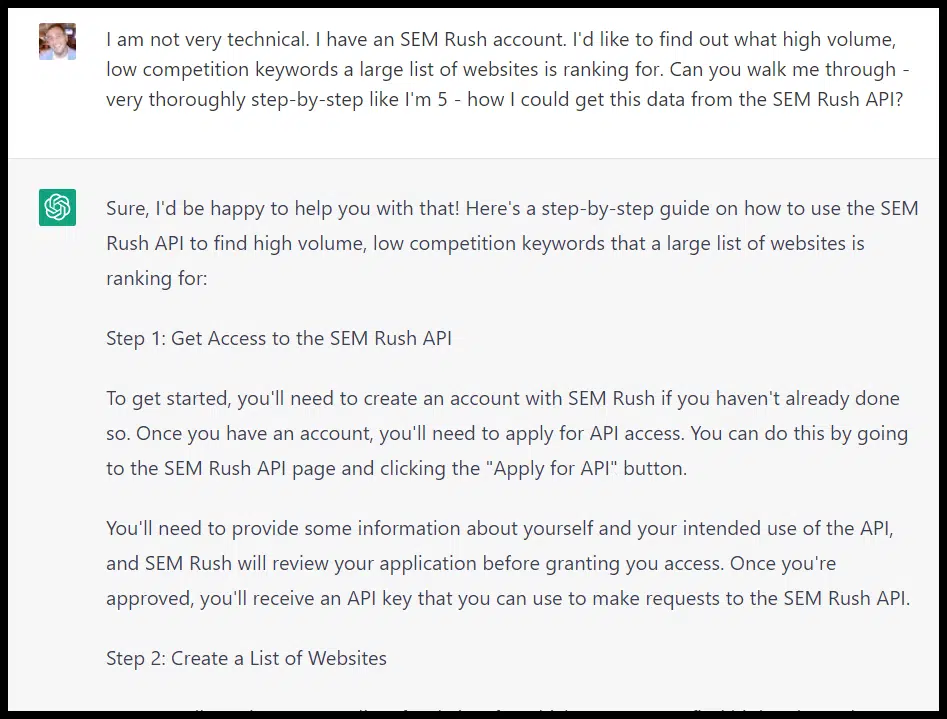
If you’re not very technical, you can get step-by-step instructions and ask the tool how to complete a generic task:

Semrush API

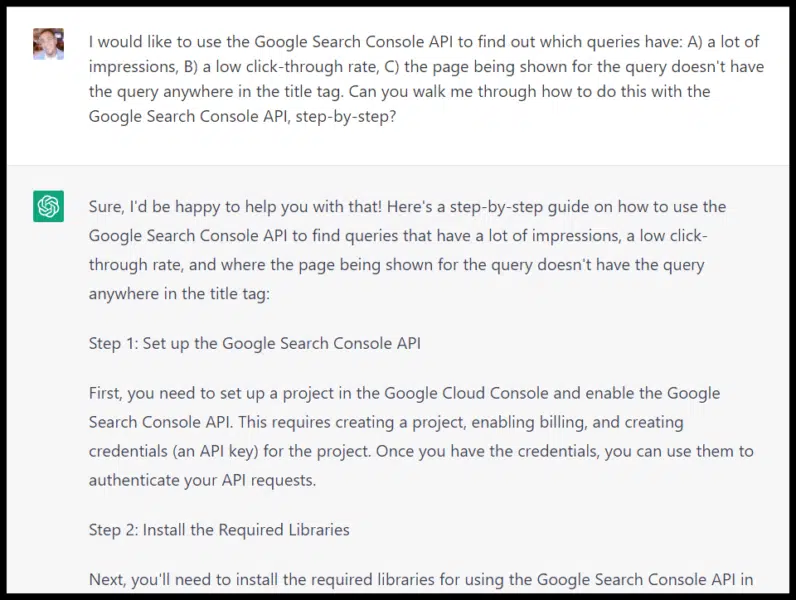
Not relevant for my new pickleball site, perhaps, but if I want to do some keyword research on my data, I can get ChatGPT’s help with the Google Search Console API to find search queries that may need their page or article:

GSC API

The GSC API isn’t the only way to get keyword data using ChatGPT.

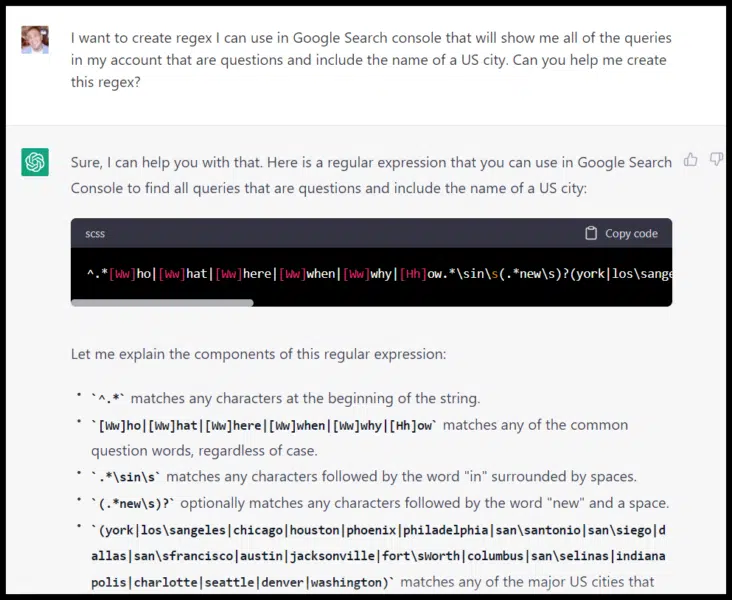
ChatGPT keyword research regular expressions

Like the GSC API, using regular expressions (regex) within Search Console can be a great way to unearth keyword targeting opportunities:

GSC API Regex 732x600

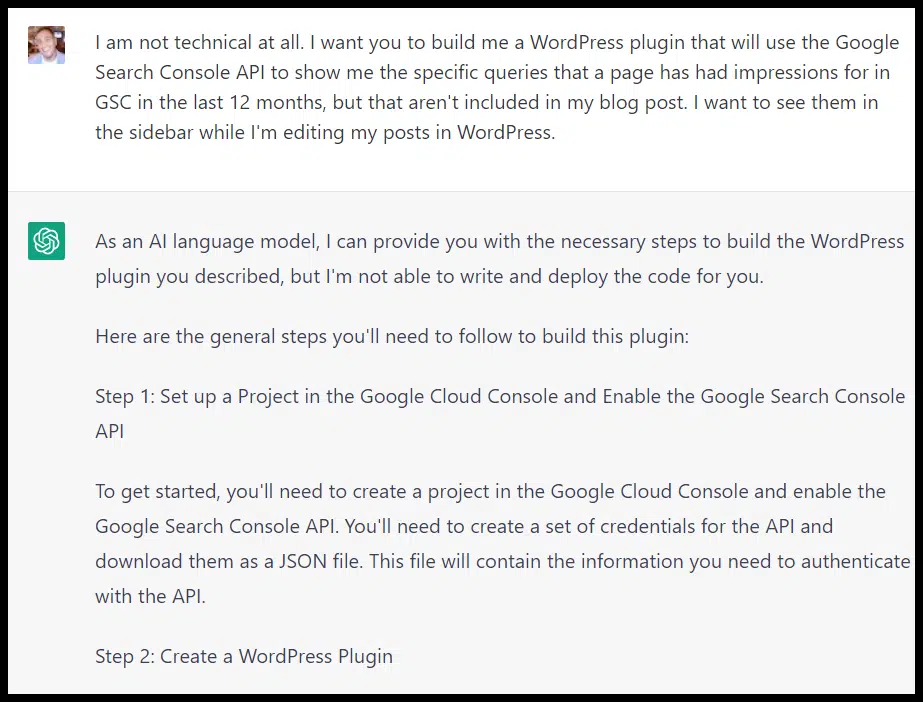
Build your own tools

ChatGPT can instruct you on how to build specific tools for keyword research. (Again, always QA and proceed with caution!)

GSC build your own tools

ChatGPT keyword research QA tips

The examples above demonstrate how valuable ChatGPT can be for keyword research. The price is free to $20 a month, so it is worth trying out.

In my experience, the platform tends to fall flat in three core areas of keyword research:

  • Not search-specific: ChatGPT is a native keyword research tool. It does not have direct access to keyword data and can’t perform key functions for keyword research.
  • Confident but wrong: The platform occasionally provides answers emphatically that aren’t true, delivering data presented as a fact but is flat-out wrong.
  • Broken code: ChatGPT’s code doesn’t always work. If you rely on it to interface with an API or build a tool to automate certain aspects of your process, assume there will be bugs and issues.

Here are a few specific suggestions to help: 

  • Ensure you use dev environments and sandboxes when working with ChatGPT code or instructions.
  • Check any keyword suggestions against search and competition data to confirm you’re not spinning your wheels on subjects that don’t make sense for your site and your bandwidth.
  • If you’re asking the tool to analyze something, take the output with a grain of salt. Remember that ChatGPT could be wrong, cannot crawl URLs and has an outdated data set.

Broader ChatGPT keyword research strategies

Caveats aside, SEOs will likely find useful keyword research applications with ChatGPT. Ask yourself these questions to determine how to use the platform best:

  • How can you leverage the ChatGPT API?
    • If the chat character limit keeps you down or you have a larger-scale keyword or topic ideation task, you can use the API for various functions.
  • Are there other applications or APIs you want to use but can’t dedicate the time and energy to? What about a mash-up of multiple APIs (marrying data from e.g., GSC, Ahrefs or Semush)?
  • What are your more tedious and time-intensive keyword research tasks? Can ChatGPT help with these?

Think of ChatGPT as a virtual assistant. Understand that you’re ultimately responsible for the implementation of any data or code it generates. Consider the tasks you need to complete, the things it’s likely capable of and try them out when it makes sense. 


Opinions expressed in this article are those of the guest author and not necessarily Search Engine Land. Staff authors are listed here.


Related stories

New on Search Engine Land

@media screen and (min-width: 800px) { #div-gpt-ad-3191538-7 { display: flex !important; justify-content: center !important; align-items: center !important; min-width:770px; min-height:260px; } } @media screen and (min-width: 1279px) { #div-gpt-ad-3191538-7 { display: flex !important; justify-content: center !important; align-items: center !important; min-width:800px!important; min-height:440px!important; } }

About the author

Tom Demers

Tom Demers is the co-founder and managing partner of Measured SEM and Cornerstone Content. His companies offer paid search management, search engine optimization (SEO), and content marketing services to businesses of varying sizes in various industries.

https://searchengineland.com/keyword-research-chatgpt-prompts-393741


SEO opportunities in 2023: Helpful content, E-E-A-T, People also ask

AI search is arguably the hottest topic in digital marketing right now. I worry that SEO newbies might think all they need is an AI chatbot to “get rich quickly.” When everybody and their aunt push the next big thing, I try to be cautious and resist the initial hype. 

After all, focusing on the fundamentals – optimizing your website, creating content and attracting links – still drives SEO results today.

But if you want to advance your game and get ahead of the competition, I’ll share SEO opportunities worth investing in this year.

SEO opportunities to seize in 2023

Instead of joining the AI bandwagon, I decided to take the “road less traveled” and look to Google’s own resources. 

What did Google increasingly stress at the end of 2022 and early 2023? What shows up in Google results prominently and causes a bump in analytics without too many people hyping it? 

Below are the things I have noticed.

1. Google’s new focus: Helpful content

The aftermath of the helpful content update (HCU) rollout was underwhelming. But soon after, Google declared it as a permanent search ranking system, not a single event. More related updates which had prominent effects across websites have taken place since.

The HCU did not initially affect automated websites considerably. 

Stressing helpful content instead of simply “quality content” is a paradigm shift. Google has focused on quality for years, so this is a massive change to their philosophy.

Google’s guidance was always along the lines of “just create great content and the rest will follow.” Over time, they have become less reliant on links and can now determine the quality and usefulness of content algorithmically.

If you’ve been following Google’s advice, your site is likely filled with high-quality content. Good for you! But nowadays, it’s not enough. 

We’re used to seeing quality content that give context, cite sources or provide additional links. Helpful content is more than this. 

To be truly helpful, your content has to display the following characteristics:

Displays expertise

Helpful content is written by subject-matter experts who know how things work from first-hand experience. 

In contrast, fully automated AI content or other cheap, mass-produced content merely summarizes other sources found on the web. It’s secondhand and not based on experience – equivalent to hearsay or gossip.

Solves particular problems

Quality content is more journalistic. You must check sources, verify the information and follow other links to get additional context and insights. 

Helpful content, on the other hand, solves particular problems from the outset and:

  • Does not distract but offers what people need when they need it. 
  • Is not content for content’s sake. 
  • Is not made for virality. 
  • Has a specific use case. 
  • Explains how to fix a common problem or deal with a known issue.
  • Provides a standalone solution that does not require a click back to Google. 
  • Offers additional links and resources if the user wants to read more on the same topic. 

Offers actionable advice

Helpful content explains a solution in general terms and offers step-by-step actionable advice for implementation. 

For instance, many “how to start a blog” guides only explain how to set up WordPress even though it’s usually ready out of the box with many hosting providers and to buy hosting (from the company that pays the highest affiliate commissions). 

Yet such “blogging guides” won’t say anything about how to write for a blog, how to get ideas (beyond keyword research) or how to make people link to you (it’s not just about outreach). 

Also, such guides, meant to generate as much affiliate revenue as possible, will never tell you how hard it is to maintain a blog and update it regularly, let alone get traction.

Actionable advice is needed here – not what the site owner wants (make more money) but what the visitor wants to perform (learn how to blog).

Helps by itself

Helpful content does not require a form fill, a sign-up, a payment or a click back to Google search results to be of help. Ideally, the page has all the information the user needs, not a transit place or “blog spam” linking elsewhere.

Helpful content is not meant to distract, get attention and sell a product or service. To upgrade your content and make it helpful, you can:

  • Answer specific questions.
  • Make body text readable/scannable.
  • Provide and/or list solutions.
  • Optimize for specific user intent.

Recognize your existing content as an opportunity. Invest resources to turn them into helpful pieces by solving problems that people ask for (see the last section).


Get the daily newsletter search marketers rely on.


2. Google’s people-powered ranking criteria: E-E-A-T

Google-QRG-Dec-2022-update-page-26-E-E-A-T

E-E-A-T is another notable change to Google’s guidance for search quality. Experience is a significant addition to the popular concept of expertise, authoritativeness and trustworthiness.  

At first, I thought Google was referring to user experience, but I was wrong.

While they are fond of a clean UX, especially webpages uncluttered with ads above the fold and optimized for site speed, UX is not part of E-E-A-T. 

The new “E” in E-E-A-T refers to the actual experience that people who created the content have. Google aims to reward first-hand experience. Again, it’s clear that they want to rank content from people familiar with a topic instead of merely auto-generated content.

AI tools do not have firsthand experience in dealing with many manual processes. Simply put, AI can’t cook, do yoga or play basketball. It can only study the theory and existing content and paraphrase it. 

Even though AI can drive a car, direct missiles and chat, it’s usually not the same AI that generates content. Unless your Tesla AI bot starts blogging about the daily commute, there is no first-hand experience to benefit from.

Gain a competitive advantage by finding the right people and making them write for you. We are talking about experienced subject-matter experts who also exhibit authority on the web and have gained considerable trust from audiences.

Either you invest in yourself, your team and the capabilities required in your particular field or you reach out to people who already have them. 

This is an excellent opportunity to stand out and differentiate yourself from the sea of mass-produced and often automated mediocre content.

In an era of overhyped AI content, Google wants to give power to the people who care and are knee-deep into the subject they cover. E-E-A-T is evident proof of that.

3. Google’s favorite SERP feature: ‘People also ask’ questions

To ensure you’re delivering helpful content, respond to actual demand. There is no better way to do so than looking at People also ask (PAA) questions. Google already shows them below most results for major search queries.

I noticed that PAA questions are beneficial to my SEO when I started getting thousands of visitors for one of the most popular navigational queries on the web. No, it wasn’t [google] or [facebook] but close: [twitter].

I was skeptical because I’ve experienced bugs and worthless traffic spikes. Not this time. After further investigation, I became a fan of PAAs. 

PAAs are not new. They have been widespread for a few years and exploded in 2019. The PAA feature showed up half as often in July 2022 but bounced back since then. 

As of January, 64% to 70% of search results had PAAs, according to RankRanger and Semrush data. This makes PAAs the second most important SERP feature after site links.

People Also Ask In SERPs 800x575

Enjoy their benefits traffic-wise while they are around. In the past, we had to mine third-party resources, such as:

  • Forums (Facebook and LinkedIn groups).
  • Q&A sites (Quora, StackExchange, even Reddit AMAs).
  • Keyword research tools.

You can still do these. But it’s better to go straight to the source. Simply visit Google, search for most, even broad one-word queries in your industry and then look up the questions being served.

Before PAAs, featured snippets were the next big thing. But there were 10x more PAAs than snippets on Google by 2022, and featured snippets often led to zero-click searches. You often need schema markup to rank for snippets, which means additional work.

PAAs are different. They can increase traffic to previously less prominent sites (including my almost-dormant SEO blog). I earned a PAA for my Twitter resources post that listed Twitter’s pros and cons neatly in a table side by side. 

You can do the same. All you need to do is provide a useful resource with common sense text formatting (tables, lists), and you’re all set.

Check out Jason Barnard’s article, Google brand SERPs: Why you must dominate People Also Ask, for a deep dive into PAAs.

Take Google’s advice with a grain of salt, but don’t ignore them

We don’t want to follow Google and believe everything they say blindly. They might omit things they don’t want you to focus on or use language that is hard to decipher. Read between the lines when it comes to official announcements and documentation. 

Implement sustainable SEO tactics that will work long-term. They may not be as shiny as the latest AI-powered tool, but they will help you stay in business for years to come.


Opinions expressed in this article are those of the guest author and not necessarily Search Engine Land. Staff authors are listed here.


Related stories

New on Search Engine Land

@media screen and (min-width: 800px) { #div-gpt-ad-3191538-7 { display: flex !important; justify-content: center !important; align-items: center !important; min-width:770px; min-height:260px; } } @media screen and (min-width: 1279px) { #div-gpt-ad-3191538-7 { display: flex !important; justify-content: center !important; align-items: center !important; min-width:800px!important; min-height:440px!important; } }

About the author

Tadeusz Szewczyk

Tadeusz Szewczyk, also known as Tad Chef, is a professional blogger and SEO since 2004. Even though based in Berlin, Germany he has covered blogs, social media and search for a global audience starting in 2006. In 2007 he launched his own blog – SEO 2.0 – and also published on numerous other marketing blogs ever since. In recent years he wrote for the social media accounts of many clients as well. You can connect with Tad on LinkedIn and Twitter or visit his website and read his blog about social SEO.

https://searchengineland.com/seo-opportunities-helpful-content-eeat-people-also-ask-393807


This day in search marketing history: March 2

Happy birthday, Yahoo! (or is it?)

In 1995, Yahoo! was incorporated.

I was very close to using our March 1 edition of This day in search history to wish Yahoo a happy 28th birthday. Especially after I saw our 2010 story, Happy Birthday, Yahoo: 15 Years Old Today.

But why was that the only headline from March 1 on Search Engine Land about it being Yahoo’s birthday? Perhaps it was because our article discussed a Yahoo blog post (Happy 15th Birthday Yahoo! from Jerry and David!), which was posted on March 1 and contained the words “as we celebrate 15 years today.”

Digging deeper into our archives, things continued to be confusing:

  1. Yahoo Celebrates Its 13th Birthday; Will There Be A 14th? – published March 5, 2008 (references a photo shared by Yahoo via Flicker on March 4, which was completely unhelpful.)
  2. Yahoo Celebrates Its 14th Birthday – published March 2, 2009. (“Yahoo is celebrating its 14th birthday today…”)
  3. Yahoo Turns 16 Years Old – published March 2, 2011 (“On March 1st, Yahoo turned 16 years old.” And that’s because Yahoo marked its “Sweet 16” on March 1, 2011.)
  4. Yahoo Celebrates Its 20th Birthday By Setting New World Record For Yodeling, published March 3, 2015 (“Yahoo turned 20 yesterday…” i.e., March 2)

Well, on March 2, 2005, Yahoo celebrated its 10th birthday by giving away a free scoop of Baskin-Robbins ice cream. And on March 2, 2020, Yahoo wished itself a happy birthday on social media and shared 25 years of milestones.

I even went to Yahoo search for the first time in a very long time to find out what Yahoo search (powered by Microsoft Bing) would tell me. No surprise, Wikipedia provided further consensus about March 2:

When Was Yahoo Incorporated

So Yahoo’s “official” birthday seems to be March 2, not March 1. Although it could easily be argued that neither is actually the “real” birthday of Yahoo.

After all, the company was founded in 1994. Jerry and David’s Guide to the World Wide Web was renamed as Yahoo in April 1994. And the Yahoo.com domain was registered on Jan. 18, 1995.

Also, let’s not add to the confusion by even mentioning the birthday of Yahoo Search (Feb. 18, 2004).

Ultimately, it really doesn’t matter whether Yahoo’s “real birthday” is. We already went through this with Google (see: Google Is 10 Years Old? Finding The Real Google Birthday), which decided to officially celebrate its birthday every Sept. 27.

So we wish Yahoo a happy birthday today. On March 2. As it should be.

And it seems like Yahoo’s search team will be wishing for a search comeback this year.


Also on this day


Google may require double verification for some business profiles

2022: Google updated its help documents to say that it may require you to verify your business with an additional method.


Semrush buys Kompyte so it can upsell competitive intelligence tools

2022: Kompyte offered competitive analysis tools that help marketers track changes on a competitor’s site, ad copy, social media and more.


New content analytics coming soon to LinkedIn

2022: LinkedIn would soon give creators more details on the people who read and engage with their content.


Semrush plans to go public after posting big 2020 growth

2021: The company’s gross profit was just under $95 million in 2020, compared to just under $70 million in 2019.


Maryland’s ad tax is here, and advertisers should look to their European counterparts for how to deal with it

2021: Ads from companies (in this case, platforms like Google, Microsoft, Amazon and Facebook) will be taxed at a rate of 2.5% to 10%, depending on their annual global revenue. 


Google tightens FAQ markup guidelines, disallows repetition of questions and answers

2020: Repeating the same question and answer in multiple FAQ pages on your site would put you in violation of Google’s guidelines.


Video: Aleyda Solis on remote SEO work, international SEO and YouTube optimization

2020: The international SEO expert shared advice on managing her SEO clients while traveling to help educate the SEO industry.


Bing Entity Search API is now available

2018: The API let you pull Bing Knowledge Graph information about people, places, things, and local businesses directly into sites and apps.


Yelp offers new ad customization to advertisers

2018: Advertisers could pick an image and favorite review or let an algorithm do it for them.


Search in Pics: Google Dublin snow, dog racing & Noogler handbook

2018: The latest images showing what people eat at the search engine companies, how they play, who they meet, where they speak, what toys they have and more.


Google makes it easier to search for programming languages answers

2017: Google could now handle queries containing sequences of 2–3 special characters.


AdWords Expanded Text Ads could get even longer with second description line test

2017: A new test doubled the number of characters available in text ad descriptions.


Google Would Like You To Buy Products Using Voice Search

2016: Conversational search would allow users to buy or locate products by just talking to their devices.


Google City Searches Now Include Hotel Booking Info In Knowledge Graph

2015: Average star rating and costs for city hotels were listed, along with “View hotels” link that delivered results page for hotels in the relevant city.


Yahoo’s Search Share Drops For First Time Since Firefox Deal Began

2015: Yahoo couldn’t maintain gains from previous months and small “switchback” losses to Google were likely to erode share more in the coming months.


Microsoft Advertising Begins Aggressively Courting Small Businesses For Search

2012: Microsoft Advertising was reaching out to PPC experts and small business customers, hoping to pair them up to educate SMBs about adCenter and learn about their needs and challenges.


iPad-apalooza: Yandex Looks At iPad Search & 30 Percent Of North Americans Want iPad3

2012: iPad users accounted for about 1% of all internet users in Russia.


Nathon Fillion Demonstrates His “Google Maps Pose”

2012: “If a Google Maps car is coming down the street, what am I going to do?”


Search In Pics: Google Sheep, Bing Neon Sign & Google Pinata

2012: The latest images showing what people eat at the search engine companies, how they play, who they meet, where they speak, what toys they have, and more.


Google Trying To Minimize Collateral Damage From “Farmer” Update

2011: Related:


Twitter Putting Focus On SMBs For Ads Growth

2011: About 100 small advertisers were using Twitter’s “promoted” ad products. By contrast, 125 big brands were using the site to market their products or services.


February 2011: Search Engine Land’s Most Popular Stories

2011: Search Engine Land’s 10 most popular stories from February 2011.


Google Extends “Click To Call” Ads To All Advertisers

2010: With no need for a physical address, calls could now be directed to call centers and more easily utilized by “national” advertisers.


Has Google Just Patented Geo-Targeting?

2010: Google was awarded a patent (“Determining and/or using location information in an ad system”) that had broad implications for PC and mobile advertising. 


Topeka Changes Its Name To Google, Kansas (Temporarily)

2010: What would you do to get Google to build a super high-speed broadband network in your hometown? If you were the city of Topeka, Kansas, you changed your name to Google, Kansas.


AT&T Picks Yahoo Over Google To Provide Search On First Android Phone

2010: Yahoo scored a spot as the default search engine on the Motorola Backflip, AT&T’s first phone using the Android operating system.


Bartz Says Yahoo Would Consider Buyout

2010: Yahoo CEO Carol Bartz said that Yahoo would “absolutely” consider a buyout offer from “any company at the right price.”


Yahoo TimeSense: New Trends Tool Previewed At SMX West

2010: TimeSense, the company’s version of Google Trends, was a tool being used within Yahoo.


Google Testing Single Line Sitelinks?

2009: Google was testing four sitelinks on a single line (one column), directly under the snippet and above the display URL


Kumo: Microsoft Tests Search Ideas With Its Own Employees

2009: Microsoft said it was using the Kumo.com URL for internal testing purposes only.


See Yahoo’s New Image Search Ads In Yahoo News

2009: This looked similar to how Yahoo displayed image ads on the Yahoo Directory.


Yahoo-Newspaper Consortium Producing Some Mutual Gains

2009: Anecdotes suggested that the newspapers were doing well with the program.


New Tool Adds Twitter Search To Google

2009: Called Twitter Search Results on Google, it added the most recent five tweets for your search query above Google’s regular search results.


EveryZing Launches Automatic Metadata Generator For Multimedia

2009: Video search and SEO services provider EveryZing introduced MediaCloud, an online service that automatically generated search-friendly metadata for video, audio and other rich media content.


The “About 260” Problem: Google Site: Command Glitch

2007: Google confirmed the problem, noting it wouldn’t impact search rankings, and said it would be resolved in the coming weeks.


Google’s YouTube To Showcase BBC Content On Three New Channels

2007: BBC would showcase its content on BBC, BBC WorldWide and BBC News.


The Unofficial Google Censorship FAQ

2007: Answers to 35 questions related to Google censorship.


From Search Marketing Expo (SMX)


Past contributions from Search Engine Land’s Subject Matter Experts (SMEs)

These columns are a snapshot in time and have not been updated since publishing, unless noted. Opinions expressed in these articles are those of the author and not necessarily Search Engine Land.


< March 1 | Search Marketing History | March 3 >


Related stories

New on Search Engine Land

@media screen and (min-width: 800px) { #div-gpt-ad-3191538-7 { display: flex !important; justify-content: center !important; align-items: center !important; min-width:770px; min-height:260px; } } @media screen and (min-width: 1279px) { #div-gpt-ad-3191538-7 { display: flex !important; justify-content: center !important; align-items: center !important; min-width:800px!important; min-height:440px!important; } }

About the author

Danny Goodwin

Danny Goodwin is Managing Editor of Search Engine Land & SMX. In addition to writing daily about SEO, PPC, and more for Search Engine Land, Goodwin also manages Search Engine Land’s roster of subject-matter experts. He also helps program our conference series, SMX – Search Marketing Expo. Prior to joining Search Engine Land, Goodwin was Executive Editor at Search Engine Journal, where he led editorial initiatives for the brand. He also was an editor at Search Engine Watch. He has spoken at many major search conferences and virtual events, and has been sourced for his expertise by a wide range of publications and podcasts.

https://searchengineland.com/search-marketing-history-march-2-393736