GA4 ‘auto-migration’: Here’s why you should opt out

Google will start automatically configuring your Universal Analytics properties to Google Analytics 4 (GA4) for you. But you actually do not want to do this for many reasons.

Is your GA4 already set up? You might still be subject to “auto-migration.” Read on for more details about it and how to opt out.

Making the switch to GA4

On February 9, Google sent an email saying they will soon start configuring Google Analytics 4 for users starting in March (as early as this week).

GA4 automigration email

This means that if you have a Universal Analytics (UA) property but haven’t migrated to GA4, Google will create a GA4 property for you based on many of the settings you have in UA, such as your goals, audiences, Ads links, users, and more.

But what is Google’s definition of “haven’t migrated”?

Scenario 1: You have a UA property and have not set up a GA4 property. The UA property is not opted out of the auto-migration setting.

This will be a common scenario for people who haven’t had the time or don’t want to set up GA4. This is essentially the “long tail” of customers Google wants to keep on GA.

If you just didn’t have the time or desire to do the migration, perhaps this isn’t a bad option for you. But be aware that your data may look quite different. (More details on how the migration works below.)

Scenario 2: You have created a GA4 property but haven’t linked it to a UA property. Google doesn’t know it’s the same as your UA property and doesn’t consider this migrated.

Have you seen this popup modal in GA4? Likely yes, because it pops up every time you log in or refresh.

GA4 property migration popup

What does linking do? It tells Google that you have created a GA4 property tied to a UA property.

Will that stop Google from automigrating you?

Not necessarily.

That will depend on how much of the GA4 setup assistant you have completed (more on that in a moment).

Scenario 3: You have created a GA4 property and linked it to a UA property but haven’t completed all GA4 Setup Assistant steps.

If you’re not opted out of migration in UA, then Google will start filling in the gaps for you in this scenario.


Get the daily newsletter search marketers rely on.


Using the GA4 Setup Assistant

The GA4 Setup Assistant is a 12-step tool that helps you track your GA4 migration progress.

It has some pretty useful tools included, such as help with audience migration and a more straightforward process for Google Ads linking.

GA4 Setup Assistant

Ads linking

Generally, you must have dual admin access, meaning you must be an admin on both the Analytics and Ads accounts to link. It can be frustrating and time-consuming to ensure you have the right access levels.

The setup assistant tool references the links you have in UA and does not require admin access to Ads to link. This is great if you are having someone not typically involved in Ads helping you migrate, such as a contractor or agency.

GA4 Setup Assistant Google Ads linking

Once you click Import from Universal Analytics, a new screen shows you all of the Ads links you have set up in UA.

You can check or uncheck the boxes for what you want to import to GA4 and then hit Import selected Ads links. It’s as easy as that.

GA4 import Ads links

Conversions

The tool will reference your conversions in UA and check if they are eligible (i.e., event or destination goals) for migration to GA4.

Goals using other goal types or regex are not currently eligible for migration, but maybe in the future.

GA4 Setup Assistant conversions

This migration screen is similar to the Ads linking screen. Check the eligible goals you want to migrate to GA4 conversions. Ineligible goals will be grayed out.

You have the option to change the name of the conversion. I recommend leaving it in the underscore format.

GA4 import existing goals

Users

This one isn’t as flashy, but if you have a lot of users with access to your UA property that you want to copy to GA4, it may be the most helpful tool.

When you select Import from Universal Analytics, it will send you to a help center article detailing the process.

You will need to use a Google Sheets Add-on tool for this. It sounds like work, but it’s quite quick and painless. The help center article gives great step-by-step instructions on how to use it.

Why some users might want to opt out

Back to the warnings I have in store for you…

Let’s say you fall into Scenario 3 (that is, you have created a GA4 property and linked it to a UA property but haven’t completed all GA4 Setup Assistant steps).

Whatever you have not marked as complete in the GA4 Setup Assistant tool will be done for you.

This is where, in my opinion, things can get pretty sketchy fast.

GA4 Setup Assistant - Incompletea

Yes, I just told you the Setup Assistant has some useful tools. But they are helpful because you can control the migration yourself.

For all 12 steps in the Setup Assistant, you must mark them Complete even if you have not done them – unless you want Google to do it.

This is especially important for these seven steps:

  • Turning on Google Signals.
  • Setting up Conversions.
  • Defining Audiences.
  • Managing Users.
  • Linking to Google Ads.
  • Bidding to GA4 conversions.
  • Targeting ads to GA4 audiences.

Let’s break a few of these down:

Linking to Google Signals

Google Signals is required for remarketing/retargeting with Google products. But some countries may have legal implications or restrictions, so I’d suggest checking with your legal team to be sure.

Managing Users

I just said how much I like this feature. But with great power comes great responsibility. You should check the access being granted, as there may be users you do not want to migrate. If you let Google do it, they’ll migrate everyone from UA.

Bidding to GA4 conversions

This is where the real danger begins. If you let Google migrate your conversions for you, and you haven’t checked them, you’re taking their word that you are still considering the actions from UA that they could migrate to be important.

Then, if you let Google bid to those conversions in Ads, they are changing the goals from UA to GA4 conversions that you are spending real money against.

If you didn’t set up those conversions, you risk an automated process spending your money in a way you may not want or that is not optimized toward your current goals.

Targeting Ads to GA4 Conversions

Same concerns as above. You would have Google migrate audiences for you, hoping they are good enough, and then bid toward them with your money. Your oversight is taken out of the process.

So what will migration look like?

For some things, like conversions, they may append a UA_ to the name of the conversion in GA4 to indicate that it came from UA. Other things may not have any indication of where they came from.

Convinced? Here’s how to opt out

So are you convinced yet that you should opt out of automigration? Here’s how.

In your Universal Analytics account, go to Admin > Property column > GA4 Setup Assistant.

Scroll to the bottom and toggle off the switch for “Automatically set up a basic GA4 property.”

GA4 automigration opt-out

Opting out will prevent the UA property from being migrated.

If you don’t opt out but are linked (that popup modal we keep getting), then you will need to Mark as complete all 12 steps (or whatever you don’t want automigrated) in the Setup Assistant in your GA4 property.

If you do not opt out or do not mark all as complete, Google might migrate some or all of your UA property to a GA4 property starting as early as this week.

The more complicated your UA property, the later it will be migrated since they’ll likely start with simpler properties.


Opinions expressed in this article are those of the guest author and not necessarily Search Engine Land. Staff authors are listed here.


Related stories

New on Search Engine Land

@media screen and (min-width: 800px) { #div-gpt-ad-3191538-7 { display: flex !important; justify-content: center !important; align-items: center !important; min-width:770px; min-height:260px; } } @media screen and (min-width: 1279px) { #div-gpt-ad-3191538-7 { display: flex !important; justify-content: center !important; align-items: center !important; min-width:800px!important; min-height:440px!important; } }

About the author

Krista Seiden

Krista Seiden is the principal digital analytics consultant and chief instructor with KS Digital, an analytics consultancy she founded in 2019, helping businesses make the most of their investments in digital marketing and analytics. Previously, Krista was VP, product marketing and growth at Quantcast. Prior to that, she was at Google for nearly 7 years, where she led product management efforts across the Google Marketing Platform and served as the external evangelist for the Google Analytics suite of products. Krista is a keynote speaker, practitioner, writer on Analytics and Optimization, and passionate supporter of #WomenInAnalytics. You can learn more about Krista and KS Digital over at KS Digital.

https://searchengineland.com/ga4-auto-migration-opt-out-393786


ChatGPT for link building: A primer

I’m fascinated by the potential of ChatGPT to improve link building tactics, focus efforts and deliver efficient campaigns.

After performing over 1,000 prompts and using the tool for client campaigns, I’m certain ChatGPT should find its way into your SEO tool stack. Below, I’ll cover how the AI chatbot can be used for link building processes.

To set up this article, I had ChatGPT write me a nut graph:

“The use of AI-powered tools like ChatGPT is becoming increasingly popular in the world of SEO, and for good reason. In this article, I’ll be showing you how ChatGPT can be used for link building and why it’s a valuable addition to your link building toolkit.” 

– ChatGPT, prompted by Kevin Rowe

Yes, I think I will do just that.

Before we jump in, I want to explain the anatomy of a prompt. 

Can ChatGPT assist with an article on link building for SEO?

When planning and executing campaigns, I use established models referenced in reputable books and universities. I can’t memorize them all, so I frequently have to review my book notes or search Google to find templates. This typically involves 5+ websites and several clicks for at least an hour of research. 

Let’s see how ChatGPT does at recommending a template for this article.

Prompt: “What are 5 contemporary case study templates from highly authoritative sources?”

Case study templates

I don’t hate these results, but I need more direction to make this usable and actionable. 

Prompt: “Which of these case study templates are best for a 1500-word article on link building?”

link building case study template

I don’t know if I completely believe this, but I’m no quitter.

Prompt: “Write an outline for that article about using ChatGPT for link building, using that template.”

ChatGPT outline

This isn’t a lousy outline for less than 5 minutes of work. Although it requires the touch of a subject matter expert (SME), and the headings could use some SEO love.

Let’s follow this structure for my article and see how it goes.

Case study overview

The importance of using ChatGPT for link building 

After using ChatGPT for research and testing it with my team, the business case for ChatGPT is to:

  • Build a deeper understanding of specific tactics and tools.
  • Narrowly focus the direction of efforts.
  • Build efficiency in research, planning, and on-site content for earned links.

Introduction to ChatGPT as a potential link building tool

ChatGPT is like a junior SEO specialist who reads a lot. They may not have the experience and context to understand a technique’s impact, but you can identify many great ideas with the right prompts. But I guess that’s just being a manager and leader.

The ideal scenario would be that the entire link building process could be automated in a way that was 100% compliant with Google’s link spam guidelines and have a short-term impact that drove 3:1 ROI. 

However, the realistic application is it can save time and resources at various stages of a known process or help with rapid brainstorming of new link building ideas.

To use the tool, you’ll need to develop your own prompts. This clever graphic from Rob Lennon provides a robust structure to get the most useful responses.

Anatomy of a ChatGPT prompt

You don’t need to use this structure for every prompt. But as you’ll see below, a good prompt structure is helpful to uncover insights that could have taken much longer to find otherwise.

Current landscape of link building

Which link building technique should you use? This is as polarizing a question as presidential elections, at least for an SEO geek. 

Here are significant considerations when creating a link building strategy.

Link building ethical considerations: A wide range of tactics can be used. All of them have different levels of risk. If you’re concerned about link building ethics, you will want to stay up-to-date on Google’s perspective on links.

Google’s POV: Google’s John Mueller suggests building great content and telling people about it through social, relevant blogs and forums, and other online or real-world communities. 

I highly recommend you reference Google’s material on link building (especially if you’re in a Your Money Your Life (YMYL) niche): 

Link building techniques: These can be categorized into paid, organic/natural, and earned links. Backlinko’s list of link building strategies can help you gain direction. I highly recommend customizing your own email templates for outreach.

Here is a general overview of the common approaches.  

  • Paid links: Guest posting is popular. This includes creating content for third-party blogs or trade sites, which can be paid or organic. There is a wide range of metrics, quality standards, and contextual considerations when selecting which site to spend time working with for a placement.
  • Link earning: Creating content that has a unique value proposition (UVP) or a unique selling proposition, and then sharing it with a community to see if they will like and share it. Basically, going viral. It’s a lot like product marketing but with content.
  • Organic/natural:
    • Digital PR: Using tools like HARO to secure links through journalist outreach.
    • Link reclamation: Includes unlinked brand mentions or unlinked thematic mentions (i.e., finding articles with a contextual but unlinked keyword).
  • Niche tactics: Then there’s a variation of tactics like infographic distribution, unique data-driven articles, coining new phrases, widgets and calculators, and so much more.

The limitations of current link building techniques

Following ChatGPT’s template results in a wordy article, so let’s keep the rest of this simple.

No link building tactic is guaranteed to work. They are all time-consuming. The economy of link building is the biggest limiting factor.

Limitations of ChatGPT

Refer to this list of limitations from OpenAI before using ChatGPT for real business applications. 

Limitations of ChatGPTa

Earning links is among the hardest facets of an SEO or content marketing program. 

After building thousands of links, I’ve found the biggest challenges with running a scalable and impactful campaign include the following:

Evaluating site quality

Content and site quality are critical to SEO. Algorithm updates like Penguin and the December 2022 link spam update powered by SpamBrain make it so. 

65% of marketers use third-party metrics such as domain authority, domain rating, or page authority to evaluate site quality which Google does not use. Instead, the search quality rater guidelines point to factors such as contextuality, reputation, usability, and the quality of the site or contributors as an entity for such evaluations.

Also, note that this document was updated on December 15, 2022. ChatGPT has no information about recent changes because it is not connected to the internet. 

Evaluating impact 

Determining which factor drove your KPIs forward is difficult on both domain and page levels. Google has stated it devalues links to a site and doesn’t demote the site if it’s caught performing link spam. This creates major challenges for analysis.

Scalability

On-site content creation and off-site link research, prospecting, and outreach are mind-numbingly resource-intensive and time-consuming. 


Get the daily newsletter search marketers rely on.


Looking at the challenges of link building, I’ve found a few applications to solve these massive hurdles. 

Evaluating site quality

Unfortunately, ChatGPT can’t evaluate site quality for you. This simplifies the process of interpreting Google’s guidelines on site quality. 

Prompt: “Create a list of criteria to evaluate site quality for link building against Google’s Quality Quality Evaluator Guidelines.”

Quality criteria

Let’s dive deeper.

Link building prompt - elaborate

Well, well…

But how do you identify expertise and reputation? I asked to “elaborate on expertise and reputation” and got:

Elaborate Expertise And Reputation

Not very algorithmic, but for those who want to do link building that complies with Google’s guidelines, this can be useful.

So let’s get more specific and find software to help.

Link building tools

OK. Now I need a step-by-step process to use a tool. Let’s use Ahrefs.

Step by step process for link evaluation

This does have some initial value and will provide direction for people new to using Ahrefs for link building, but this is great for initial direction. 

Evaluating impact 

In the same line of thinking, ChatGPT can give you some tool recommendations.

However, with general prompts like, “What tools are best to evaluate a site’s ranking improvement in Google.”

I used the word “best” which is not the most concise language, but let’s see where it takes me.

Best tools for link building

I love Serpstat, so let’s see if I can quickly identify a process to evaluate my keyword rankings.

Link building process using Serpstat

There you have it. I’m certain we can go much deeper into niche tools and processes with these types of prompts.

Scalability

I’ve been attempting to completely automate natural link building techniques, to no satisfaction. 

You know what would be amazing? If ChatGPT could help with broken link building.

ChatGPT - broken link prompts

This looks amazing at first glance and would have saved me hours of research, but none of these links are useful. 

I thought this would be clever if it worked, but this list was of internal links or to pages that had no links pointing to them. This doesn’t help with broken link building.

However, with some prompting, I was able to identify a tool (Ahrefs again) and get answers for how to find the broken link reports…

Link building SEO prompt

And:

Broken Link Building Process With Ahrefs

Not bad.

You can also save time with “act as” and the “step-by-step” prompts. 

Let’s see If I can use these prompts to understand John Mueller’s perspective on link building and have Brian Dean write me a strategy.

First, let’s see what Mueller has to say about how to build links.

ChatGPT Mueller

Now I need to design a link building program with a strong foundation in great content (The response above suggests creating viral content, which is its own article). 

Prompt: “Write me a strategy for SEO link building as if you were Brian Dean from Backlinko.” 

Brian Dean Link Building 439x600

I’ll take this and see if I can make it more actionable.

The step-by-step hack doesn’t provide the exact steps to the point where I can follow just this plan, but I was able to narrow down and find some direction in under 5 minutes of prompting. 

Content marketing and link building are different from programming. There isn’t much published research from reliable sources to train against. 

When you have people to reference, known strategies and specific tools or processes, ChatGPT can potentially reduce research time.

I hope to see ChatGPT provide more valuable automation and scalability. But right now, it’s a great assistant to shorten the research and planning process. 

Consider creating your own prompts to show you how to use general SEO/link building specific tools or quick references for established processes.


Opinions expressed in this article are those of the guest author and not necessarily Search Engine Land. Staff authors are listed here.


Related stories

New on Search Engine Land

@media screen and (min-width: 800px) { #div-gpt-ad-3191538-7 { display: flex !important; justify-content: center !important; align-items: center !important; min-width:770px; min-height:260px; } } @media screen and (min-width: 1279px) { #div-gpt-ad-3191538-7 { display: flex !important; justify-content: center !important; align-items: center !important; min-width:800px!important; min-height:440px!important; } }

About the author

Kevin Rowe

Kevin Rowe is the Founder of PureLinq, an enterprise link building solution, and an SEO Product Marketer. He has designed and implemented almost every type of link building technique over his 14 year stint in SEO. Since 2009, Kevin has worked on SEO, link building, and advanced analytics programs for enterprise clients like Hyatt Hotels, Kaplan University, Bullet Proof Coffee, VMware, Novartis, Coca Cola, and so much more. After studying at the Park School of Communications @ Ithaca College, he found a passion for content development and messaging which led him to publication in Forbes, Fast Company, Huffington Post, and Search Engine Land.

https://searchengineland.com/chatgpt-for-link-building-a-primer-393697


Optimizing local landing pages for search: 8 best practices

For businesses with physical locations, creating landing pages for your city or town is a great way to boost local visibility.

Local landing pages show your potential customers and Google where your physical locations are, the specific areas you serve and the products or services you offer.

The content of these pages can include relevant information about the specific city or town you’re targeting and the business keywords you’re trying to rank for. 

Location pages can also be used as Google Business Profile URLs or PPC ad, email and even online directory landing pages. 

Done right, local landing pages help build trust and authority for your business in the communities that you serve. 

Let’s talk about some best practices and tips for correctly optimizing local landing pages.

1. Avoid duplicate content

Gone are the days when you can use the same content on multiple local landing pages.

With Google SpamBrain and the helpful content update, each page must have unique and truly helpful content. You can’t swap out the city name or a few pictures and then call it good.

As Google’s John Mueller pointed out, these local landing pages with duplicated content can be considered doorway pages, which are against Google’s guidelines.

Don't duplicate content

For instance, an H1 like “Best Plumber in Chicago, IL” will read like a big red flag to Google.

This is especially true if you have other pages with the exact same content with the word “Chicago” swapped out for the cities of Evanston, Naperville, Oak Park, etc. 

A more useful H1 would be:

  • “Do You Own A Business in Omaha? Then You Need An Accountant You Can Trust”

These pages are not just for you to try and rank higher on Google for keywords and the city name. 

If you don’t take the time to create worthwhile content, then it’s not worth creating these pages in the first place. 

You must bring value to the location page – something that the end user will find worthwhile and useful. (If you do that, Google will reward you.)

To start, let’s look at an example. The lawn care company below included a convenient lawn mowing calculator on their local page specifically for the Houston, TX area. 

Lawn mowing calculator

Since estimates likely vary depending on the city and location, this is useful. 

They also included content on the page specifically explaining their services for Houston and the surrounding areas and discussed how their quoting system works. 

Content like this is beneficial for people in the Houston area because they’re getting accurate quotes for their locality.

2. Don’t spam your content 

Keyword stuffing has been a no-no for a long time, but you still see it in action – especially in poorly designed local pages. 

Do not overuse keywords on your local page. Using keywords in your H1, like “Best Lawyer” or “Los Angeles Landscaper,” screams of spam.

When paired with keyword-stuffed content, it’s a recipe for Google’s SpamBrain and helpful content update to penalize your entire site as being “unhelpful.”

You don’t have to stuff your page with keywords for Google to know what your page is about. It’s smart enough to figure this out with just a few subtle clues.

What NOT To Do 800x467

3. Optimize URLs and images

Be sure to use SEO best practices with your URLs. 

When possible, keep the URLs as short as feasible. But if you can include the product or service and the city, do so.

  • http://website.com/lawncare-cedar-rapids 

Maintain a proper URL structure and use hyphens to separate the words. No funky characters, underscores, squiggly lines or question marks. 

Also ensure that your images are SEO-friendly. Don’t just upload photos with the gibberish file name your camera or smartphone set. 

Rename each one to meaningfully describe what’s in the image and include the city name (if appropriate.) Again, use hyphens to separate the words. 

For example, before uploading an image of a bathroom remodel that you did in Oklahoma City, you could rename it to, “bathroom-remodel-oklahoma-city.png.”

Remember to add alt tags to your photos when you upload them to your landing page, too.

Use the keywords you’re trying to rank for and the city name, but make sure you’re actually describing the picture. (That’s the whole purpose of the alt tag after all.)


Get the daily newsletter search marketers rely on.


4. Write location-specific information about your business

It’s best if you can write details on your local page that relates to your business. That will sound natural and provide useful information to the reader, which Google will recognize as helpful.

One way to do this is to add “Before” and “After” pictures optimized for keywords and the city name.

The screenshot below is from a restoration service company’s local page targeted for Evanston, IL.

Include before and after pictures

While they included before and after photos, they failed to mention that these photos were taken at homes in the said area – a missed opportunity.

They could’ve used an H2 titled “Before and After Flooding Cleanup in Evanston, IL” above the images.

Another way to work in your content naturally on a local landing page is to talk about the history of the community or how the community needs your particular service. 

In the example below, the plumbing comany shares the history of the city and how the city was annexed even before gas and sewer lines were needed in the homes. It strategically created an anchor text link to their gas and sewer line services page.

Work in your services naturally

In the real estate industry, city pages can highlight the schools in the area, popular restaurants, shopping centers and grocery stores, among others. Let potential home buyers know what the local cities and towns have to offer.

Area High Schools

Alternatively, you can use case studies or work examples to get city names into your local pages.

This architecture firm showcases work they’ve done in various towns and cities.

local use cases

What a beautiful way to showcase their architectural designs and get the city names into their various pages.

Local landing pages don’t have to be boring. Use your creativity when it comes to writing your city-specific content.

Figure out how to use the keywords you’re targeting and the city names naturally.

5. Take original photos of the locality

Tour the towns or cities you’re writing about and take your own pictures. It can be the town square, the parks, the Chamber of Commerce, local entertainment, restaurants, the schools – you name it. 

Original images show that you are part of the community versus using some stock photos. Again, be sure and optimize those photos for search purposes.

6. Highlight local charities and organizations you support

Everyone loves businesses that support the communities they work and live in.

If you support local charities or organizations in areas you serve, you should mention them on your individual city-specific pages.

For instance, it doesn’t cost much to supply a local animal shelter with 20 bags of cat or dog food every month (and you’d be doing a great thing). 

Just contact the shelter and tell them what you’ll commit to donating monthly and ask if you can include their logo and information about their organization on your local page. 

Also, ask if it’d be OK for them to include your company’s logo on their website and a link to your local landing page as a simple thank you for the donation. Many charities are willing to do this.

Are you into sports and kiddos? How about sponsoring uniforms for a youth soccer or baseball team? Add your logo to their uniforms and supplement the cost of the uniforms. 

Again, include the team logo or information about the team on your local landing page and see if the sports organization will add you as a sponsor on their website and link to your local city page. 

Community spotlight

Not only are you showing website visitors that you’re supporting the city, but you’re getting valuable, quality backlinks in the process.

7. Include logos and details about local professional organizations you belong to

Show off what you are doing at a local level – whether it’s the local Chamber of Commerce, the city’s SCORE chapter or the local newspaper or community business website.

chamber of commerce logo

Wherever possible, see if you can get a backlink.

8. Include your address and embed Google Maps

If you have a physical location in the city, be sure to put your address and phone number on the landing page.

It’s also helpful to embed a Google Map. That way customers can easily get driving directions to your location. 

embed Google Maps

If you embed the Google Map properly, the map can also show your brand and your Google Business Profile reviews in it.

If you have a service area business, you can benefit from a Google Map, too. To embed a service area Google Map, just search for your Google Business Profile on Google Maps.

Service area business

Click on “Share” and then “Embed a map.” Next, simply copy the HTML code and paste it on to your web page.

Service area - GBP

Leverage your local connection

Creating landing pages for your city or town is a great way to reach local customers.

A good local landing page includes relevant content about your company, the city or town you’re serving, and and how they interact together.

Local landing pages with unique and helpful content can bring you closer to your community and put you in Google’s good graces.


Opinions expressed in this article are those of the guest author and not necessarily Search Engine Land. Staff authors are listed here.


Related stories

New on Search Engine Land

@media screen and (min-width: 800px) { #div-gpt-ad-3191538-7 { display: flex !important; justify-content: center !important; align-items: center !important; min-width:770px; min-height:260px; } } @media screen and (min-width: 1279px) { #div-gpt-ad-3191538-7 { display: flex !important; justify-content: center !important; align-items: center !important; min-width:800px!important; min-height:440px!important; } }

About the author

Sherry Bonelli

Sherry Bonelli is a search engine optimization (SEO) and digital marketing professional with 25+ years of experience. She is the owner of early bird digital marketing, a digital marketing agency that serves clients all over the U.S. Bonelli is a Google Business Profile Platinum Product Expert and columnist for leading marketing websites. She received Search Engine Land’s SEO Contributor of the Year Award in 2018. A recognized presenter and speaker at leading digital marketing conferences, Bonelli holds a Master’s Degree in Internet Marketing. She is also a LinkedIn Learning Instructor, Adjunct Instructor at several colleges and universities and is the host of The Marketing Plan Podcast.

https://searchengineland.com/optimizing-local-landing-pages-for-search-best-practices-393396


This day in search marketing history: March 1

Google publishes Search quality rating guidelines

In 2013, Google published Its Search Quality Rating Guidelines.

Previous versions of the document had been leaked many times prior to this. But this was the first time Google went public with its document.

It detailed how Google’s search quality raters – people hired through a third-party agency to rate the search results – graded Google’s search results.

This document actually just a heavily edited version of an older leaked version. It went from 161 pages to 43.

What was missing? Of note, The Page Quality Rating Guidelines and Rating Examples. We detailed what else changed in Google Gutted Its Search Quality Rating Guidelines For Public Release.

This was released as part of Google’s larger How Search Works interactive resource, which provided a high level overview of how crawling, indexing and algorithms worked. Google also


Also on this day


Google URL inspection tool bug leading to errors for some

2022: Google confirmed there was an “increase in errors when inspecting URLs” and was working on fixing the issue.


Google removed App campaign placement data from Ads and AdWords API reports

2022: Google: “We made this change because the data provided didn’t fully represent the complete view of the placements that help developers monitor brand safety for their advertisers.”


Microsoft Advertising extends Shopping campaigns to more markets

2022: The company also announced the global availability of its Marketing with Purpose attributes, a pilot for multi-asset Audience Ads and greater support for Google Import.


TikTok videos can now be 10 minutes

2022: The maximum video length on TikTok increased to 10 minutes following months of testing.


Ginny Marvin joins Google as its new Ads Product Liaison

2021: In her new role, the veteran PPC journalist and former Third Door Media editor-in-chief would be helping marketers learn about Google Ads’ products and policies.


Video: Steve Marin on content, SEO and using data as backup

2021: Also discussed: ego ranking, how to help your clients write content and much more.


Botify founder: Half of enterprise pages not being crawled by search engines

2019: The company hoped the $20 million it picked up in series B would bolster its platform to tackle the “complex” SEO climate.


AMP user experience updates include video, lists, more

2019: A recap of some new capabilities rolled out by The Accelerated Mobile Project.


Google’s antitrust infringement continues ‘unabated’, Google Shopping competitors tell European Commission

2018: Four months in, 19 rivals said too little had changed.


Bing Ads launches ‘fan’ community program for its most dedicated advertisers

2018: Users could apply to join the new advisory program to help advance the platform.


AdWords Price Extensions now live on all devices

2017: Advertisers could show prices for types of products and services in text ad extensions on desktop as well as mobile.


Bing Ads Editor for Mac is now available to everyone

2017: The highly requested desktop tool is now out of beta.


Latest AdWords Editor Update Supports Callout Extensions, Video Campaigns, HTML5 Ads

2016: Version 11.3 of AdWords Editor was now available.


Google Takes Action On 65% Of User-Generated Spam Reports

2016: Google took action on 65% of the 35,000 user-generated spam reports submitted to Google monthly, according to Juan Felipe Rincon from Google speaking at SMX West.


The Associated Press Partners With Google & Twitter To Track 2016 Election Trends

2016: The AP Election Buzz tool tracked 2016 election-related search volume and tweets.


Bing Adds Interactive Solar System To Search Results

2016: Searching for [Solar System] on Bing would return a cool interactive solar system map.


Google Avoids Link Tax But Vague “Ancillary Copyright” Law Sets Up Future Legal Battle

2013: There remains ambiguity about exactly how much can be excerpted without a content license.


Yahoo Clues, App Search & Other Products To Shut Down April 1

2013: Yahoo Clues provided a snapshot of keyword searches over time, plus great demographic information about keyword preferences between male and female, different age groups and by location.


Search In Pics: Google Cubatron, Sleeping Dog & Robbie The Robot

2013: The latest images showing what people eat at the search engine companies, how they play, who they meet, where they speak, what toys they have, and more.


Google Is Watching You (Or Not): New Privacy Policy Takes Effect Today

2012: Google said the new policy would simplify privacy across Google’s many properties and make it possible for the company to build a range of new products and services for consumers.


Bing Testing New, Google-y Local Search Results

2012: A new display for local search results looked quite a bit like what Google often showed.


Google Adds More Trike Views To Google Maps Street Views

2011: Google Bikes pedaled around the world capturing pictures of streets where cars could not venture. 


Google Doesn’t Sign Up As Facebook Ad Provider

2011: Facebook developers weren’t allowed to monetize their apps with ads from Google AdWords.


Bing Shopping Incorporates Natural Language Search

2011: Microsoft announced the ability to recognize price constraints, describing the innovation as “a small step in our journey to make search friendlier to natural language queries.”


Comments Made On Facebook To Appear On Sites

2011: Facebook announced changes to its Comment Box widget to keep at least some of the comments next to the original content.


On Twitter, Oscar Comes Up Short Against Super Bowl

2011: Twitter said its users sent a total of 36.4 million tweets in a five-hour span beginning with the Oscars pre-show and continuing through the end of the show.


DuckDuckGo Adds Yelp, The Free Dictionary To Search Results

2011: DuckDuckGo added two new content providers to its “zero-click” search results: local business listings from Yelp and definitions from The Free Dictionary.


Yelp: Google Told Us “Our Way Or The Highway”

2011: Yelp CEO Jeremy Stoppelman: “Google’s position is that we can take ourselves out of its search index if we don’t want them to use our reviews on Places…. But that is not an option for us.”


Hello Chomp, Goodbye Android Market

2011: iPhone “app search engine” Chomp introduced a version for Android to help address the “problem of app discovery.”


Google To Increase Abuse Alerts To Webmasters

2010: With website hacking and other forms of abuse on the rise, Google announced plans to step up the notifications it sent to webmasters when the company found these problems.


Google Adds Flickr, Picasa Photos To Street View

2010: The integration worked the same way it had since February 2009. When images were available, a small box labeled “User Photos” would appear in the upper right of the Street View interface.


Is Google’s Street View Trike Headed Your Way?

2010: Google announced the winners of its Street View Trike suggestions contest.


Bing Adds Search History To Auto-Suggest

2010: Bing said that “44% of non-navigational search sessions last longer than 1 week.”


Happy Birthday, Yahoo: 15 Years Old Today

2010: Yahoo celebrated its 15th birthday, in honor of the company’s incorporation.


Pew: Portals Most Commonly Used News Sites

2010: “Portal websites like Google News, AOL and Topix are the most commonly used online news sources, visited by over half of online news users on a typical day.”


My Friendly Meet Up With Google Israel

2009: Barry Schwartz recaps his meeting with the Google Israel team in their Tel Aviv office.


What France Can Teach Us About Search Success

2009: Ville d’Eu (more commonly known as simply “EU”) was thinking of changing its name in order to rank more easily in Google.


Microsoft Live Search Tests: Best Match And Categorized Listings

2009: Microsoft Live Search appeared to be flighting a new instant answer called “Best Match” that highlighted what presumably Microsoft found to be ideal result for the query.


Google: Click Fraud Is 0.02% Of Clicks

2007: How Google came up with the figure plus some click fraud fighting initiatives it planned to implement.


Google Releases 2006 Annual Report & Google Subsidiaries

2007: With financials for the year, a list of all of the company’s subsidiaries, as well as details of Google’s merger agreement with radio advertising placement firm dMarc.


Hard Data On Yahoo Panama From Avenue A | Razorfish

2007: Search Impressions were up an average of 5%; Cost Per Click was down an average of 6%.


Citysearch Buys InsiderPages

2007: Insider Pages was a reviews-based local search company.


Outside.in: Building The ‘Hyper-Local’ Internet

2007: It appeared Outside.in was automating the process of collecting content from various sources. It also relied on tagging and user submission for content discovery and organization.


Danny Sullivan’s Ad Age Column & Fast Company Debate

2007: On what makes search magical, why a new Google isn’t likely and debating whether Google is overrated.


From Search Marketing Expo (SMX)


Past contributions from Search Engine Land’s Subject Matter Experts (SMEs)

These columns are a snapshot in time and have not been updated since publishing, unless noted. Opinions expressed in these articles are those of the author and not necessarily Search Engine Land.


< February 29 | Search Marketing History | March 2 >


Related stories

New on Search Engine Land

@media screen and (min-width: 800px) { #div-gpt-ad-3191538-7 { display: flex !important; justify-content: center !important; align-items: center !important; min-width:770px; min-height:260px; } } @media screen and (min-width: 1279px) { #div-gpt-ad-3191538-7 { display: flex !important; justify-content: center !important; align-items: center !important; min-width:800px!important; min-height:440px!important; } }

About the author

Danny Goodwin

Danny Goodwin is Managing Editor of Search Engine Land & SMX. In addition to writing daily about SEO, PPC, and more for Search Engine Land, Goodwin also manages Search Engine Land’s roster of subject-matter experts. He also helps program our conference series, SMX – Search Marketing Expo. Prior to joining Search Engine Land, Goodwin was Executive Editor at Search Engine Journal, where he led editorial initiatives for the brand. He also was an editor at Search Engine Watch. He has spoken at many major search conferences and virtual events, and has been sourced for his expertise by a wide range of publications and podcasts.

https://searchengineland.com/search-marketing-history-march-1-393679


Google local map pack goes missing in search results (now fixed)

The Google local pack, the map results, you see Google often display in the search results seems to have gone missing. I assume this was a bug, but no one was able to trigger a local pack to show up in Google Search for a 20-minute period.

Examples. Try searching for [barber near me] and you won’t get that local pack. You just get the standard ten blue links, without the map.

Google Search Example 746x600

This seems to have stopped working at around 11:30 am ET.

And now has returned about 20 minutes later, I now see the local pack:

Barber Google Local 800x583

Why we care. The local pack drives a tremendous amount of traffic to local businesses. It going away, even for a short period of time, can be a huge loss for those local small businesses.

This appears to have been a bug and is now resolved.


Related stories

New on Search Engine Land

@media screen and (min-width: 800px) { #div-gpt-ad-3191538-7 { display: flex !important; justify-content: center !important; align-items: center !important; min-width:770px; min-height:260px; } } @media screen and (min-width: 1279px) { #div-gpt-ad-3191538-7 { display: flex !important; justify-content: center !important; align-items: center !important; min-width:800px!important; min-height:440px!important; } }

About the author

Barry Schwartz

Barry Schwartz a Contributing Editor to Search Engine Land and a member of the programming team for SMX events. He owns RustyBrick, a NY based web consulting firm. He also runs Search Engine Roundtable, a popular search blog on very advanced SEM topics. Barry can be followed on Twitter here.

https://searchengineland.com/google-local-map-pack-goes-missing-in-search-results-393693


Bing Webmaster Tools to gain Bing Chat and index coverage reporting

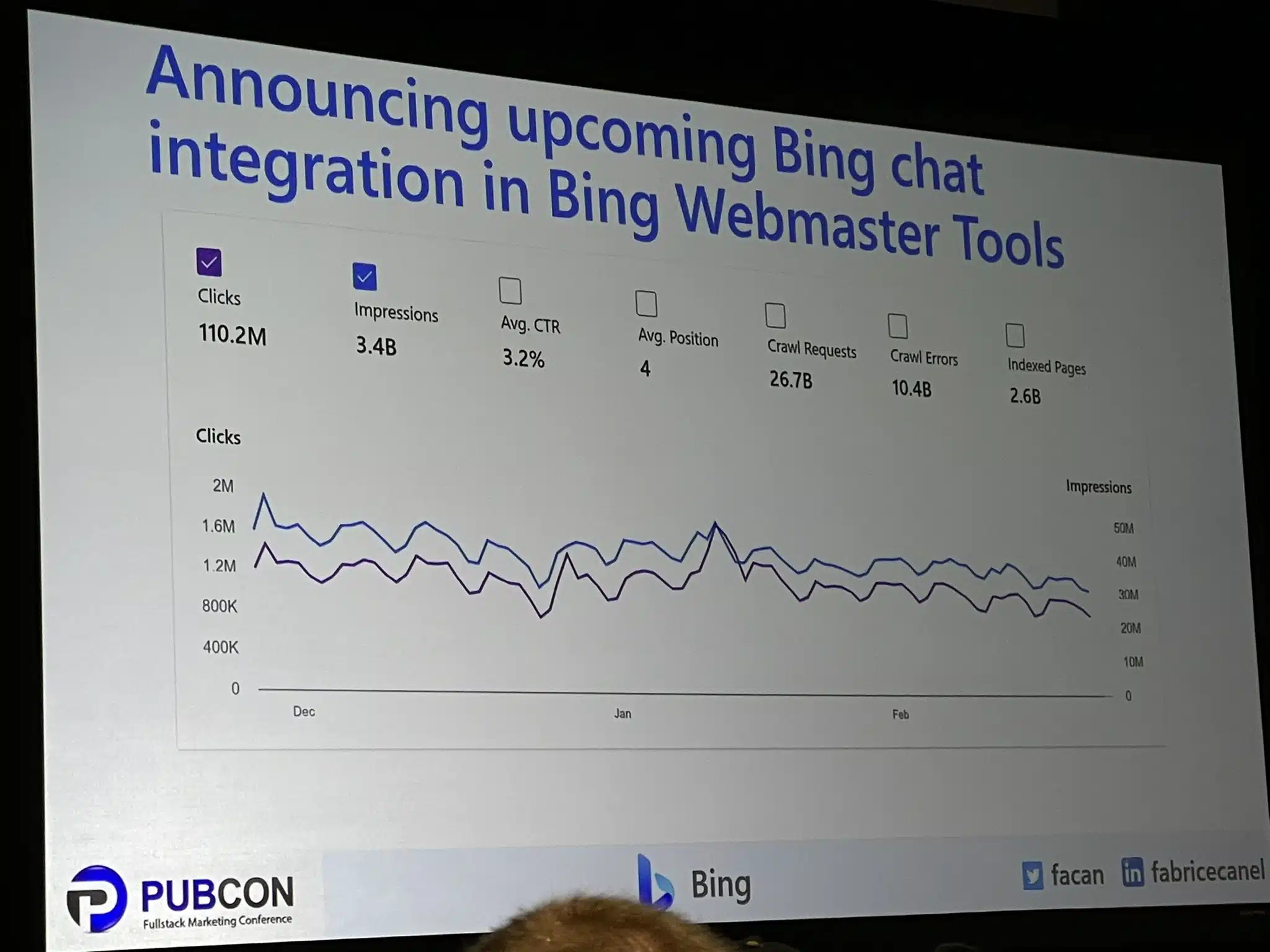
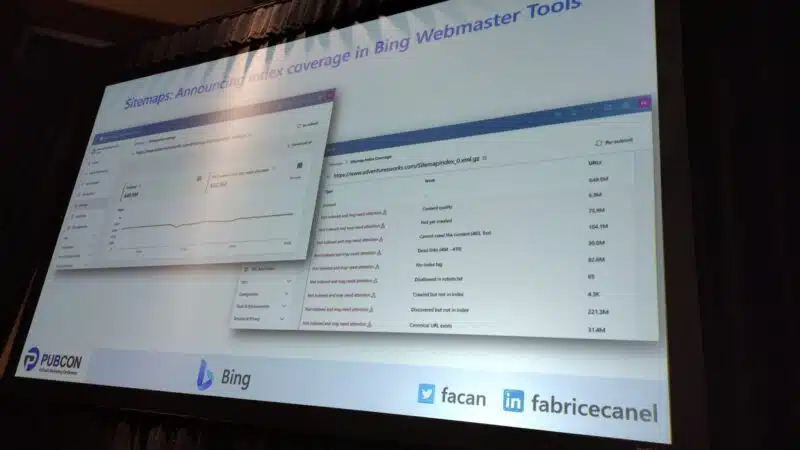
Microsoft Bing will upgrade Bing Webmaster Tools to add reporting and tools around the new Bing Chat feature and a new index coverage report. This was announced by Fabrice Canel, Principal Product Manager at Microsoft Bing, this morning in a keynote given at PubCon Austin.

Bing Chat in Webmaster Tools. Bing Webmaster Tools should be adding Bing chat integration to allow publishers, content creators and site owners to see how much traffic the chat feature is sending their sites. It will be part of the Bing performance report and show impressions, clicks, click through rate and more.

Here is a photo of this report from Jennifer Slegg on Twitter:

Bing Chat Webmaster Tools 800x600

Index coverage report. In addition, Fabrice also announced a new index coverage report coming to Bing Webmaster Tools. This report will show how your pages on your site are being indexed by Bing Search. If pages are being excluded or if pages are having issues being indexed.

Here is a photo of this report from Patrick Stox on Twitter:

Bing Index Coverage 800x450

Why we care. With all the concern, confusion and stress around these new chat AI features, having a report that shows how many people see our links, click on our links and visit our sites will be helpful to publishers, content creators and site owners. In addition, the new index coverage report can help site owners understand which pages are not being indexed, so they can work on improving indexing through IndexNow, sitemaps or other means.


Related stories

New on Search Engine Land

@media screen and (min-width: 800px) { #div-gpt-ad-3191538-7 { display: flex !important; justify-content: center !important; align-items: center !important; min-width:770px; min-height:260px; } } @media screen and (min-width: 1279px) { #div-gpt-ad-3191538-7 { display: flex !important; justify-content: center !important; align-items: center !important; min-width:800px!important; min-height:440px!important; } }

About the author

Barry Schwartz

Barry Schwartz a Contributing Editor to Search Engine Land and a member of the programming team for SMX events. He owns RustyBrick, a NY based web consulting firm. He also runs Search Engine Roundtable, a popular search blog on very advanced SEM topics. Barry can be followed on Twitter here.

https://searchengineland.com/bing-webmaster-tools-to-gain-bing-chat-and-index-coverage-reporting-393687


AI can’t write this: 10 ways to AI-proof your content for years to come

Don’t get it twisted. The machines are taking over.

It’s only a matter of time until we’re all serving aluminum overlords’ every beck and call.

Fortunately for all of us simple humans, that day is not today.

Despite being a regurgitating raconteur, AI is still a glorified mansplainer – like the Wizard of Oz, minus the fancy haberdashery.

It kinda sucks at basic math. 

It can’t wrap its dumb little head around anything subjective.

It’s eye-wateringly expensive to run. Orders of magnitude more than Google Search. As if that weren’t bad enough, AI content also makes a mockery of E-E-A-T. 

And its source material is probably (definitely) stolen, infringing on others’ copyrights and fair use intellectual property rights.

Promising? Sure. Ready for prime time? Not quite. 

So don’t fire your whole writing team just yet (unless they already sucked to begin with).

There are still a few things AI can’t do and won’t be able to do for years to come.

1. Google has already been disrupting top-of-the funnel content for years 

Microsoft made waves with a massive $10 billion investment into OpenAI.

That’s a lot of cheddar. But there’s only one problem…

Nobody uses Bing.

Seriously, no matter how you slice or dice the data, they have less than 10% of the market to Google’s ~80-90%+. 

So will AI help? Sure. I mean, it can’t hurt! It was already a ghost town to begin with. 

I’m not (just) being flippant. I’m making a point. 

Google has already been disrupting SERPs – for years! – with a proliferation of featured snippet and knowledge graphs, and instant answers that give you exactly what you’re looking for… without requiring a single click.

That means U cAn GeT yUr DrInK oN without ever clicking on poor liquor.com below (and giving them some “ad cents.” (Get it?)

Google SERPs instant answers

2. Spend more time on MOFU and BOFU content (i.e., the less disruptable stuff)

Despite Google SERPs + AI already cannibalizing your top-of-the-funnel (TOFU) content, it’s less destructive for middle or bottom-of-the-funnel (MOFU/BOFU) stuff.

You know, the kind that actually compels people to do something – click, opt-in, add to cart, start a trial, create an account, or just hit the Buy button. 

Content funnel stages

AI content will be similar for the foreseeable time, because the underlying technology relies exclusively on pretrained models.

It’s why machine can often beat Grand Masters at chess. They can scan and store information (read: patterns and moves) and then make decisions based on that data faster.

Like “garbage in, garbage out,” it associates data points that often show up together, then spits it back out again when called upon – without actually understanding what it’s saying. 

So while AI content can do a passable job at a simple, black-and-white query like “What is Advil?” and similar, it’s less useful for figuring out if you need Advil or if you should go to the ER.  

Which brings us to the next subplot:

AI content is notoriously wrong. Not, like, some of the time – but, like, all of the time.

3. Great content is often written by subject-matter experts, with quotes and nuance to add color to a topic or angle 

The world we live in is not black and white. It’s all shades of kinky, messy, sweaty grey.

That’s also why the best content is done by or with subject-matter experts.

‘Cause said experts rely on primary research and verifiable facts or stats vs. baseless claims to properly prepare persuasive points.

That’s not what you get with AI content.

Plus, it’s easy to spot, like the nerdiest game of whack a mole. A new version of ChatGPT is released, a few weeks later, Turnitin can spot it with 97% accuracy.

Take even the title of this article. It was initially going to be a straightforward “how-to,” but I knew turning it into a Top 10 listicle would get more attention. 

Knowledge of the audience should even inform the content structure.

But that isn’t all.

The very definition of “content” continues to evolve as more and more stuff shows up in today’s SERPs.

4. Better structure content types around the Query + SERP layout

Google “HubSpot tutorial” and here’s what you won’t see first:

  • PPC Ads.
  • HubSpot.com.
  • People Also Ask questions.
  • Traditional organic listings.
  • Knowledge Graph.

Give up?

Hubspot tutorial - Google SERPs

Videos!

C’mon, OpenAI. Where’s your vlogging game at?

This is a perfect segue (if I do say so myself) because the one thing that video often has over plain text is personality. 

The delivery of the content in video is arguably just as (if not more) important than the actual content.

But. That shouldn’t necessarily be the case.

It just is. Because most writing on the web suuuuuuuuuuuuuuccccckkkkssss.

Take the obnoxious-as-hell introduction of this article. 

I’ve worked with hundreds of brands in the past decade. And I can only count on one hand the number that would let us usually get away with something like that.

Most want to play it safe. Water it down. Make it more generic. Make sure the Oxford comma is just so. 

You know, because customers really care how you format em dashes. (Wait. No, they don’t.)

Get 10+ writers to drone on and on and on like the same nameless, faceless, Company, Inc. that’s been the content strategy over the past few years.

Yet, over the next few, it will die an excruciatingly-violent, Squid Games-esque death. 

‘Cause AI content is already the faceless master of the universe.

5. Think more recurring columns from individuals with personalities vs. lots of generic writing that all sounds the same 

Cue Bourdain. 

God, I love him. And miss him. Because he would drop bombs on the regular like so:

“If you are easily offended by direct aspersions on your lineage, the circumstances of your birth, your sexuality, your appearance, the mention of your parents possibly commingling with livestock, then the world of professional cooking is not for you.”

From the thought-provoking:

“Travel changes you. As you move through this life and this world you change things slightly, you leave marks behind, however small. And in return, life—and travel—leaves marks on you.”

To simple quips:

“When dealing with complex transportation issues, the best thing to do is pull up with a cold beer and let somebody else figure it out.”

What do you call that? Journalism? Satire?

No clue. I just call it endlessly readable. Can’t-take-my-eyes-off-it watchable. Literally-LOL listenable. 

AI can’t do that. Because AI ain’t got no soul.

It can’t make counterunitive arguments. It can’t weave a narrative that builds on itself. 

Not yet, anyway. And not over the next few years at this rate, either.

Those things are self-referential. They build arguments with one brick after another, which requires leaps in logic. 

Or they’re completely counter to what “most” acceptable norms might suggest on a particular topic or category. 

Remember: garbage in and garbage out. AI can’t process nuance like this yet.


Get the daily newsletter search marketers rely on.


When people say “content,” their minds drift to “text.”

But the lines between content types have already evolved. And for a good reason. 

Imagery is proven to increase memory recall. Meanwhile, scanning and skimming is the new reading. 

That’s why showing people what something looks like will always, unarguably, be better than walls of text.

You might as well be dropping 300 words of Lorem Ipsum when an image comes into view, like so:

Wall of text vs imagery

Mixed media helps break up content, actually encouraging more scanning and scrolling, which your crack fiend-like audience is already accustomed to online. 

This should include everything from:

  • Featured images.
  • Charts and graphs.
  • Visualizing a process or explanation.
  • CTAs.
  • Even graphics that could be repurposed for social channels, video thumbnails, and more.

And it means anytime you explain some visual process, show it!

It’s better to show people exactly how to “add a strikethrough in Google Docs,” as an example, than to ramble on and on and on and bury the good stuff in walls of text around it.

Show people how to add a strikethrough in Google Docs

7. Create long, in-depth content that can easily be repurposed into more audio and visual mediums

You don’t need another statistic to explain video’s importance to marketing. No one does.

So let’s skip the foreplay and focus on the important point:

The very same long, in-depth, nuanced, interesting content that AI can’t do also lends itself really well to another human-friendly element: audio and video.

A basic element is to take in-depth content and create audio summaries. Or, simply include thematically related discussion-style podcasts into related articles. The Economist does both.

But you can and should do the same with video, especially as YouTube continues to eat away at traditional television + streaming time while also eating away at organic SERP placements, too. (See point #4 above.)

So take your top content, or most competitive “head” terms, and create everything from product-focused walkthroughs to in-depth reviews or even motion graphics. 

Just remember that we’re shooting for what AI can’t do = which often means more human inclusion with some talking-head elements, too. 

Video example with talking head

8. Illustrate stories with interactive content and data visualization

The theme over the last few tips here is to focus less on the actual content itself and more on how you deliver it.

Specifically, make it more interactive so it is easier to grasp and more interesting to focus on for a few minutes.

Data visualization is the natural extension, then. Again, take a cue from top publishers like The Economist, which has recently been churning out interactive content pieces like this overview of worldwide weather systems.

The Economist - visualization example

9. Lean into nuance and subjectivity by comparing alternative solutions for different audiences 

AI doesn’t waffle. It can’t, by definition. It’s programmed to spit out facts like that supremely-annoying know-it-all in your office. (Err, Slack Watercooler.)

The good news is that this dovetails nicely with the fact that online audiences are also becoming savvier. Meaning: if you just spew BS, they’ll see right through it.

Nowhere is this clearer than affiliate-related SERPs. Sure, you can still pull the wool of the eyes of rubes in the “make money online” space. 

But generally speaking, people are smart enough to know that there is no #1 right answer 100% of the time.

Instead, you often compare different options for different people based on a wide range of factors.

For instance, what’s the best dive watch you can buy right now? 

The answer is entirely dependent on budget! 

What’s “nice” at $100 isn’t at $1,000, $10,000, or even $100,000. (Much to my bank account + wife’s chagrin.)

But the point is that you can and should lean more into subject-style content.

At the very least, take a more balanced and nuanced approach to the kind of searches that might realistically work for multiple parties.

Once again, you can up the ante here by using better design, presentation, and even development to highlight these subjective differences clearly.

Think: comparison charts and graphics. Showcase pros vs. cons or which alternative is better depending on their budget, goals, and preferences.

Example comparison charts and graphics

10. Demonstrate how things works, not just what they’re capable of

You should always strive to go the extra mile.

Sounds trite. But it’s true.

If the competing content has zero images, you should have five. If they have 10 stock images, you should have 10 custom ones.

Your content will need a competitive “moat,” made up of all these elements we’re talking about today, to “future-proof” your content as much as possible. 

My last favorite example includes calculators, tools, quizzes, and other embeddable elements. 

Let’s literally and figuratively go that extra mile now. Say you have two ways of determining your expected finish time in a marathon.

You can:

  • Painstakingly look up your mile time on the leftmost column of a huge chart, using both fingers to draw lines between that and your distance time… 
Marathon finish time - table
  • Or, you could punch in two numbers and get an instant answer:
Marathon finish time - calculator

(Hmmm. That latter example even kinda sounds like what AI is doing, anyway? 🤔)

Remember that “content” doesn’t always mean “text.”

Yes. You will often need text to start. A script is the nucleus of a video. 

But the actual presentation, format, delivery, or interaction will continue to matter more and more over the next decade.

Double down on what AI can’t do

The cat is out of the bag.

AI will only continue getting better and better and better.

Pretty soon, we’ll have no choice but to build digital pyramids in the metaverse in its honor.

Thankfully, that day isn’t today. Or tomorrow. Probably not five years from now, either.

AI can do lots of things better than you and me. However, it’s embarrassingly bad at a slew of things.

Compete on those latter things. On the things that aren’t easily reproducible and aren’t likely to change anytime soon. Especially the human bits that are already hardwired into our internal hard drives.

Machines might be able to beat you at chess. But they won’t ever at intangibles like instincts or intuition.

Or any other “i” word to complete the cheap alliteration joke that confirms there’s a living, breathing human typing this after all.


Opinions expressed in this article are those of the guest author and not necessarily Search Engine Land. Staff authors are listed here.


Related stories

New on Search Engine Land

@media screen and (min-width: 800px) { #div-gpt-ad-3191538-7 { display: flex !important; justify-content: center !important; align-items: center !important; min-width:770px; min-height:260px; } } @media screen and (min-width: 1279px) { #div-gpt-ad-3191538-7 { display: flex !important; justify-content: center !important; align-items: center !important; min-width:800px!important; min-height:440px!important; } }

About the author

Brad Smith

Brad Smith owns three content marketing companies, and has been featured in publications like The New York Times, Forbes, Business Insider, and The Next Web. Each week, he shares first-hand experience and growth strategies behind some of the web’s fastest growing brands.

https://searchengineland.com/ai-proof-your-content-393638


3 ways Google ensures safe online shopping

As an advertiser or SEO professional, it’s essential to recognize that with the growing popularity of online shopping, customers’ safety and security have become a top priority for e-commerce platforms. In response to this, Google has implemented three ways to help customers shop safely and ensure that merchants’ stores meet these standards.

  1. Vetting stores through automation
  2. Store badges
  3. Automated and human merchant and listing reviews

Automatically vetting product merchants. Before a product or merchant can list on Google, they must undergo a thorough safety review to ensure they meet standards. With the help of the Shopping Graph, a vast database of products and sellers, the systems can quickly evaluate the legitimacy of a business, ensure that the product information is accurate, and verify that the content adheres to Google policies.

These policies cover all products displayed in shopping results, including those obtained from web crawling. By following these policies, Google will ensure that the products you see meet standards and that you won’t come across items that violate the rules, such as violent weapons, merchants misrepresenting their businesses, or hateful content.

In January alone, Google prevented about 100 million product offers from being displayed and rejected nearly 300,000 accounts for quality issues or policy violations.

Store badges. Google offers store badges to businesses that are known to provide a positive shopping experience. The badges are awarded to stores that meet criteria for fast shipping, easy returns, high-quality websites, and excellent user ratings.

Google also displays ratings for both products and their various sellers, allowing you to learn from other shoppers’ experiences with those products and businesses. Additionally, the product listings link you directly to the merchant’s website, providing you with the opportunity to conduct further research about the store and its policies. This is so you can make informed decisions about your purchases and ensures that you are shopping with confidence.

Automated and human reviews for merchants and listings.

“Our automated systems are always monitoring for violating activity, and our team of human reviewers is on standby to review issues that might need a more nuanced perspective.” 

Google

Once merchants have been onboarded, Google will continue to monitor listings to ensure that nothing has changed in a suspicious or problematic manner since their initial inclusion on Google. For example, if a merchant met country-specific requirements for selling alcohol during onboarding, they periodically verify that those qualifications are still being met.

Google will also take various actions when they detect suspicious behavior, including removing suspicious listings that violate policies or banning a merchant from listing on Google.

Dig deeper. You can read the announcement from Google here.

Why we care. These efforts can directly impact advertisers ability to reach potential customers through Google’s advertising platforms and search results.

When customers feel secure shopping on Google, they are more likely to make purchases and interact with the merchants and products advertised on the platform. Advertisers and SEOs can take advantage of this trust by ensuring that their advertising and product listings meet Google’s policies and requirements. By adhering to these standards, they can earn store badges, improve their visibility, and increase the chances of attracting new customers.

By complying with Google’s policies and guidelines, advertisers and SEOs can avoid having their products or listings removed or being banned from the platform altogether. This would undoubtedly harm their ability to reach customers and affect their overall business goals. Therefore, it is essential for advertisers and SEOs to stay up-to-date with Google’s policies and make sure that their advertising and listings adhere to these standards.


Related stories

New on Search Engine Land

@media screen and (min-width: 800px) { #div-gpt-ad-3191538-7 { display: flex !important; justify-content: center !important; align-items: center !important; min-width:770px; min-height:260px; } } @media screen and (min-width: 1279px) { #div-gpt-ad-3191538-7 { display: flex !important; justify-content: center !important; align-items: center !important; min-width:800px!important; min-height:440px!important; } }

About the author

Nicole Farley

Nicole Farley is an editor for Search Engine Land covering all things PPC. In addition to being a Marine Corps veteran, she has an extensive background in digital marketing, an MBA and a penchant for true crime, podcasts, travel, and snacks.

https://searchengineland.com/3-ways-google-ensures-safe-online-shopping-393676


Microsoft Bing Chat launches quality improvements

Microsoft released version 96 of the Bing AI chat feature earlier this morning. This new update brings quality improvements such as a higher response rate to chats and also fewer “hallucinations,” Mikhail Parakhin, the CEO of Bing, wrote on Twitter.

What is new. Mikhail said the two main improvements to Bing AI chat include:

  • Significant reduction in cases where Bing refuses to reply for no apparent reason
  • Reduction of instances of hallucination in answers

Here are those tweets:

As a reminder, Microsoft had to limit the number of chats due to these issues.

Tone not live. Yesterday, Mike Davidson, Corporate Vice President, Design & Research at Microsoft, on Twitter said the ability to pick a tone for Bing Chat was live for some, but Mikhail said not just yet. It might launch in the coming days, he said.

Why we care. Again, it’s fascinating to follow all these rapid changes from Microsoft on its new Bing AI Chat. Keeping an eye on what Microsoft is doing to improve the quality of the results, how it responds to criticism, and more is something that is not just fun and exciting to stay on top of, but may teach us about how we can leverage these features to garner more traffic to our sites.

I wonder if anyone will pick up on these quality improvements but the speed of these updates to Bing Chat is so much fun to see.


Related stories

New on Search Engine Land

@media screen and (min-width: 800px) { #div-gpt-ad-3191538-7 { display: flex !important; justify-content: center !important; align-items: center !important; min-width:770px; min-height:260px; } } @media screen and (min-width: 1279px) { #div-gpt-ad-3191538-7 { display: flex !important; justify-content: center !important; align-items: center !important; min-width:800px!important; min-height:440px!important; } }

About the author

Barry Schwartz

Barry Schwartz a Contributing Editor to Search Engine Land and a member of the programming team for SMX events. He owns RustyBrick, a NY based web consulting firm. He also runs Search Engine Roundtable, a popular search blog on very advanced SEM topics. Barry can be followed on Twitter here.

https://searchengineland.com/microsoft-bing-chat-launches-quality-improvements-393683


This day in search marketing history: February 28

R.I.P., DMOZ

In 2017, DMOZ – The Open Directory Project that used human editors to organize websites — announced it was closing as of March 14.

By this time, DMOZ had been mostly forgotten as a resource. Perhaps the biggest surprise was that it took so long.

DMOZ was born in June 1998 as “GnuHoo,” then quickly changed to “NewHoo,” a rival to the Yahoo Directory at the time. It was acquired by Netscape in November 1998 and renamed the Netscape Open Directory. Later that month, AOL acquired Netscape, giving AOL control of The Open Directory.

Read all about it in RIP DMOZ: The Open Directory Project is closing.


Also on this day


New business openings nearly match pre-pandemic levels, Yelp says

2022: However, most major cities actually experienced a decrease in openings.


Etsy sellers to pay 30% higher transaction fees beginning in April

2022: A “considerable portion” of the revenue from the fee increase would be reinvested into the marketplace.


New Google Lighthouse extension for Firefox goes live

2020: Firefox had not yet reviewed the extension, so it got automatically categorized as “not a Recommended Extension.” 


Optimization scores, recommendations and their impact on Google Partner agencies

2020: Google said Partner agencies would continue to have “control and autonomy” as it put more emphasis on auto-generated recommendations.


Google’s new treatment of nofollow links has arrived

2020: Google was about to begin treating the nofollow link attribute as a hint, rather than a directive, for crawling and indexing.


Google experiments with public search profile cards

2020: Limited to India, the Google+-like feature gave personal brands and individuals some control over their own search results.


In feature battle with Google, Yelp improves restaurant waitlist functionality

2020: Yelp was rolling out its Notify Me feature, which supported Yelp Waitlist.


Google’s CTR answer just what you’d expect, and this is why SEOs go bananas

2019: Would Google give us a clear statement that outright said it does not currently use CTR directly in their core search ranking algorithm? Of course not.


Google opens complaint form to crack down on fake info in Maps

2019: Google launched the Business Redressal Complaint Form to allow searchers and users to report fraudulent activity relating to businesses Google Maps.


Amazon extends Sponsored Products to AmazonFresh for CPG brands

2019: Consumer packaged goods brands could extend their campaigns to their products sold in the AmazonFresh delivery program.


Multifaceted featured snippets begin rolling out in Google search results

2018: Multifaceted featured snippets would be surfaced for queries that were sufficiently broad enough to allow for more than one interpretation of what was submitted. 


Rand Fishkin leaves Moz, announces a new start-up

2018: After 17 years of working at the company he co-founded, Fishkin was starting a new company around influencer and audience intelligence.


Study: 11 voice search ranking factors analyzed

2018: 63.6% of voice search results didn’t use Schema at all. 


Google gives SEO tips on how to handle day-long site closures

2017: Tips from Google’s John Mueller on what to do if you needed to turn off your website for a period of time and worried your Google rankings will drop. 


After rare Google confirmation of on-site penalty, Natural News is back in Google’s index

2017: HealthNews.com confirmed being reincluded in the Google index after being deindexed last week.


Now Official: Google Adds Restaurant Menus To Search Results

2014: Google announced that it’s now showing restaurant menus as a OneBox-style answer at the top of its U.S. search results.


AdWords Mobile App Download Campaigns Get Deeper Reporting In Google Analytics

2014: New reports on mobile app campaign performance included day parts, destination URLs and keyword positions.


Tweet Showing How Google Itself Is A “Scraper Site” Goes Massively Viral

2014: Dan Barker did a search for [what is a scraper site], which brought up Google’s own web definition at the top of the results, which technically outranked the original source of the content.


New Bing Ads Editor Version Now Available

2014: New features included the ability to rename campaigns and ad groups in the Browser pane.


Search In Pics: Yahoo’s 19th Birthday Cake, Google Jugglers & Canadian KitKat Android Statue

2014: The latest images showing what people eat at the search engine companies, how they play, who they meet, where they speak, what toys they have, and more.


Google Testing Android/Chromebook-Like Navigation Element For Web Site

2013: Google was testing another navigation method to find all the various Google services and products.


Facebook Shares How People Are Using Graph Search: Finding Friends Tops List

2013: Facebook suggested some ways to go beyond that, for those who had the new search feature.


Bing Maps Adds Variety Of Hi-Res Image Improvements

2013: The prime feature that Bing was touting involved what it calls “top of the world” imagery — those hi-res, top-down images. 


Majestic SEO Now Supports 9 Languages

2013: The languages they currently support included English, Chinese, German, Spanish, French, Italian, Polish, Brazilian Portuguese and Russian.


New German Law Will Allow Free “Snippets” By Search Engines, But Uncertainty Remains

2013: A proposed German copyright law wouldn’t require search engines like Google to pay to show short summaries of news content. But uncertainty remained about how much might be “too much” and require a license.


In Another “Right to Be Forgotten” Case, UK Officials Threaten Legal Action Against People Posting Pictures Of Convicted Killer

2013: UK Attorney General Dominic Grieve threatened legal action against anyone posting pictures of convicted killer Jon Venables online.


Bing Webmaster Tools API Now Available

2012: This feature allowed webmasters to easily use Bing WMT data in other locations.


Microsoft And Nokia Unify Maps On PC, Mobile

2012: Microsoft was relying heavily on the Nokia-Navteq mapping and data infrastructure. Nokia had made Ovi Maps much more Bing-like in appearance.


Google: Mobile Growth Occurring Faster Than Expected

2011: Google CEO Eric Schmidt said consumers’ adoption of the company’s mobile services has happened more quickly than executives expected.


Videos Of The First Googleplex

2011: Videos were posted of the old Google office from November 1999.


Search + Social Media Increases CTR By 94 Percent: Report

2011: Nearly 60% of cases that ended in a purchase begin with search – and social media played an increasingly important role during consideration and especially after a purchase is made.


Placecast and AT&T Launch Geo-fenced Mobile “ShopAlerts”

2011: This was opt-in “push” marketing via SMS or MMS tied to “geo-fences.”


Google Webmaster Tools: Now On Your iGoogle Homepage

2008: Rather than log into your Webmaster Tools account, you could add the Webmaster Tools gadget to your iGoogle page and access information from there.


Google Sites Launches: Replaces Jotspot With Team Sharing Software

2008: Google launched Google Sites, basically a relaunch of Jotspot but with many more features.


Google Health Formally Announced This Morning

2008: Google said it would not sell any personal consumer information. However, pages that weren’t part of the consumer health profile would potentially feature ads.


Google Maps Tailgates Yahoo, Microsoft With Real-Time Traffic Info

2007: Google Maps has caught up with Yahoo and Microsoft in adding live traffic reporting for the United States to their online mapping service.


Google Stepping Up Governmental Sales

2007: Google started a two-day sales event aimed at the U.S. government that reportedly brought in “200 federal contractors, engineers and uniformed military members.”


Google Buying TV Scatter Units

2007: Google was looking to hire a head of national TV sales in New York and dive into their TV ad play with “scatter inventory,” ads that weren’t sold well in advance.


Yahoo Provides NOYDIR Opt-Out Of Yahoo Directory Titles & Descriptions

2007: You could now tell Yahoo to not use Yahoo Directory information to make a title and/or description for your web page listings.


40% Frustrated With Video Search

2007: 32% said web video had too many commercials.


Is Voice And Mobile Search Company TellMe For Sale?

2007: Spoiler alert: It was. Microsoft acquired it March 14.


Monitoring Buries At Digg

2007: A new monitoring technique.


Keane, Head Of Advertising Sales Strategy At Google Goes To CBS Interactive

2007: At Google for four years, Patrick Keane was “responsible for developing and managing the strategic plans and relationships critical to growing Google’s advertising customer base.”


February 2007: Search Engine Land’s Most Popular Stories

2007: The 10 most popular stories from February 2007.


From Search Marketing Expo (SMX)


Past contributions from Search Engine Land’s Subject Matter Experts (SMEs)

These columns are a snapshot in time and have not been updated since publishing, unless noted. Opinions expressed in these articles are those of the author and not necessarily Search Engine Land.


< February 27 | Search Marketing History | February 29 >


Related stories

New on Search Engine Land

@media screen and (min-width: 800px) { #div-gpt-ad-3191538-7 { display: flex !important; justify-content: center !important; align-items: center !important; min-width:770px; min-height:260px; } } @media screen and (min-width: 1279px) { #div-gpt-ad-3191538-7 { display: flex !important; justify-content: center !important; align-items: center !important; min-width:800px!important; min-height:440px!important; } }

About the author

Danny Goodwin

Danny Goodwin is Managing Editor of Search Engine Land & SMX. In addition to writing daily about SEO, PPC, and more for Search Engine Land, Goodwin also manages Search Engine Land’s roster of subject-matter experts. He also helps program our conference series, SMX – Search Marketing Expo. Prior to joining Search Engine Land, Goodwin was Executive Editor at Search Engine Journal, where he led editorial initiatives for the brand. He also was an editor at Search Engine Watch. He has spoken at many major search conferences and virtual events, and has been sourced for his expertise by a wide range of publications and podcasts.

https://searchengineland.com/search-marketing-history-february-28-393622