A guide to keyword cannibalization in SEO and how to fix it

Keyword cannibalization happens when you have two or more pages ranking for the same keyword. It is generally considered undesirable. 

This article will help you decide whether you have a keyword cannibalization problem and, if so, how to solve it.

Is keyword cannibalization always problematic?

Before fixing keyword cannibalization, check whether it is a real problem for your site.

Sometimes, two pieces of content ranking can be favorable, especially with an indented SERPs.

Screenshot from Google SERPs showing indented search results. An example of where keyword cannibalization is not really a problem.

For Delish, these two pages ranking on page 1 are beneficial. In one search, they’ve got two pieces of content ranking. The indented SERP gives Delish more space in the page and increases their chances of a click.

A quick browse of these two pages will show similarities in ranking keywords. For example, according to Semrush, both pages rank for:

  • “quick easy healthy lunch”
  • “easy healthy lunch ideas”
  • “easy healthy lunch”
  • “easy and healthy lunch ideas”

You don’t have to take action on two pages ranking when there are indented SERPs. Leave them especially if you’re getting clicks and conversions.

Identifying keyword cannibalization that needs fixing

If you don’t have access to software to help spot cannibalization, you can find potential issues with Google site search. 

Use the following when searching:

  • site:example.com “keyword” 
Screenshot of Google showing how to identify keyword cannibalization with the site: search query.

The screenshot above shows how Google has listed content on and around “healthy” and/or “lunch” published on the Delish website. 

If you have similar results, look at the pages and investigate if they are problematic.

To identify problematic cannibalization problems, look for the following:

A sudden drop in clicks or impressions

This can happen when you publish a new piece of content and Google prioritizes the new piece over what was already ranking. 

This can return to normal after a while, but if it doesn’t, look at the next section on fixing keyword cannibalization.

Struggling to rank despite your best efforts

Two pieces of content targeting the same SERP intent can be “confusing” to Google. 

It indicates that your content strategy isn’t as robust as it should be. 

Pages ranking for a keyword that isn’t supposed to

If you’ve worked on your content strategy, but the wrong page still ranks, then you’re almost definitely cannibalizing yourself.

In this situation, follow our tips on what to do when the wrong page ranks.


Get the daily newsletter search marketers rely on.


Fixing keyword cannibalization 

How you fix keyword cannibalization will depend on the problem it’s causing and the solution most useful for your readers.

Here are some keyword cannibalization solutions to consider.

Internal linking

An internal linking strategy is a good first effort to resolve keyword cannibalization. 

Here, you won’t be taking pages down or redirecting content – a fairly safe option if you feel nervous about the consequences.

How to fix keyword cannibalization with internal linking

Internal linking is a powerful tool for SEO. It’s useful for readers to find relevant sources and related content. It also gives Google a directive on what a page should rank for.

If you’re doing content the right way, you know what the two pieces of content should rank for. 

So you can use an internal link from one piece to the other to reinforce where they sit in website architecture and what people might search to find the piece.

In this instance, opt for an exact match keyword or something close to it.

Review your internal links and identify links pointing to the two ranking pieces. You might be pointing to the pages with the same anchor text. 

You can get a good idea of what anchor text you’re using to link to pages with Screaming Frog.

Open Screaming Frog, then click crawl your site. Filter by HTML, click the page you want to view, then hit inlinks.

Annotated screenshot of Screaming Frog showing the steps to analyze internal links to help solve keyword cannibalization issues.

You’ll see which pages link to your page and with what anchor text. With a quick edit you can straighten out your internal linking strategy.

Pro tip: When building a content plan, prepare a content database (like a Google Sheet) where you can pick a keyword from the cluster to use in your anchor links. This process prevents writers from adding random internal links in their articles.

Refining keyword clusters and establishing clear search intent

Perhaps you’ve identified keyword cannibalization but want to keep the two pages. In this case, you might need to give each piece a defined purpose. 

To do this, develop a keyword cluster and establish clear search intent. Each piece of content must do something unique.

Using the Delish example from above, we can see that although similar, the two articles have clear search intent. 

  • One article recommends lunch ideas for work.
  • The other recommends packed lunches. 

Taking a packed lunch to work is synonymous with a work lunch, but it isn’t just for work purposes.

Content consolidation and 301 redirects

It’s fairly intuitive when you need to do a content consolidation and a 301 redirect. Mostly, you can tell immediately if a page is targeting the exact same keyword.

Going back to the Delish example, although similar, the two pages on healthy lunches have two different intents. As mentioned, one article focuses more on lunches for work, and the other is about packed lunches.

Although nuanced, the two content pieces can co-exist assuming they’re not causing issues behind the scenes.

However, if the two articles were “55 Healthy Lunches” and “The Best Healthy Lunches,” there is an issue.

The target keyword is clearly similar – “healthy lunches” and “best healthy lunches.” Sounds like the same thing, right?

To confirm, a quick search of  “healthy lunches” and “best healthy lunches” returns almost the exact same SERPs.

So, these articles would be consolidated, and one would be redirected to the other.

How to fix keyword cannibalization with content consolidation and a 301 redirect

Before consolidating two (or more) articles, do your due diligence. Use data to help you decide which URL you’re keeping and which one you’re redirecting.

  • Consolidate the content in the two articles. When you do this, make sure you give it a thorough edit. You’ll do more bad than good if you end up with Frankenstein-esque content. To succeed with this tactic, your content must be high-quality and well-written. 
  • Find the most successful URL by looking at Google Search Console data. Filter by page to see which URL receives the most clicks, impressions and average position. Generally, one will supersede the other a lot, so the choice will be obvious.
Annotated screenshot of Google Search Console showing the page filter.
  • If the winning URL doesn’t jump out at you by this point, check the backlink profile. Although you will redirect one link to the other and carry over those backlinks, keeping the content on the URL with the strongest backlink profile would be better.

Add a canonical

If the two pages need to exist but you don’t want Google indexing both, you could add a canonical. 

This method is useful on ecommerce websites, particularly Shopify sites, where the same product exists on multiple URLs.

We can see the canonical in action on Helm’s Shopify website.

Their Xander Olive shoe exists on two URLs:

  • https://helmboots.com/products/the-xander-olive 
  • https://helmboots.com/collections/the-xander/products/the-xander-olive

A search within the code of the /collections/ URL shows the canonical pointing to the product.

Screenshot of Helm website showing canonical in their code.

How to avoid cannibalization in the future

Cannibalization issues occur when there’s no clear plan for content production. Without a plan, well-intentioned writers can deliver similar pieces of content. 

To avoid cannibalization, keep a content log and monitor the following:

  • Focus keyword: Assign one to each piece of content.
  • Keyword cluster: Detail all other keywords the piece should rank for.
  • Content pillar/topic: This helps visualize all content under a certain topic.

The closer you are to your content and its purpose, the less likely you are to create cannibalizing content. It helps to have a strategic SEO professional to guide the process so they can correctly assign keywords. 

If each piece of content fits within a specific pillar or topic, you can filter content by that topic and double check you’ve not already created content before you write it.

Or, you can use your content research process to identify content that could be edited instead of recreated. Sometimes, a good edit on an existing article can do wonders for your SEO.


Opinions expressed in this article are those of the guest author and not necessarily Search Engine Land. Staff authors are listed here.


Related stories

New on Search Engine Land

@media screen and (min-width: 800px) { #div-gpt-ad-3191538-7 { display: flex !important; justify-content: center !important; align-items: center !important; min-width:770px; min-height:260px; } } @media screen and (min-width: 1279px) { #div-gpt-ad-3191538-7 { display: flex !important; justify-content: center !important; align-items: center !important; min-width:800px!important; min-height:440px!important; } }

About the author

Zoe Ashbridge

Zoe Ashbridge is a Senior SEO Strategist and Co-Founder at forank. Zoe has a background in digital marketing and digital project management. Zoe supports businesses worldwide with actionable SEO strategy for internal teams, consultancy and search engine marketing implementation. Zoe writes about SEO, Digital Marketing and Entrepreneurship.

https://searchengineland.com/keyword-cannibalization-seo-guide-393596


Why content strategy matters most

Does your brand have a strategy behind its content marketing?

It should.

Planning is integral to achieving that ever-elusive return on investment (ROI).

Even if you’re not a natural planner, you’ll probably agree that most tasks are easier to achieve if you plan first.

For instance, planning your meals for the week vs. winging it. Going grocery shopping with a planned list vs. nothing. Planning a trip vs. stepping off the plane with no idea what you’ll do or where you’ll go.

Some people get excitement from living life in the unknown. But, for most of us, whether we want to save money, eat healthier, or get a seat at that hip restaurant on vacation, planning is essential.

The same is true of content marketing.

Without a strategy, your content marketing efforts are far more likely to go nowhere and do nothing.

I’d argue that profitable content marketing is impossible without a solid content strategy. 

To answer the inevitable “why?”, let’s discuss why content strategy matters most.

But first, what is a content strategy?

What is a content strategy?

A content strategy is a plan that lays out how you will ideate, create, publish, promote, and manage content.

A content strategy helps define your brand’s goals, workflows, guidelines, budget, team structure, and content rules. It definitively answers these questions:

  • Why are we creating content? (What goals are we trying to reach?)
  • Who are we creating content for? (Who is our target audience?)
  • How will we create content? (Will we use in-house talent? Hire writers/graphic designers/videographers?)
  • What content will we create? (What topics and formats will we focus on?)
  • Where/when will we publish content? (On our website? On social media?)
  • How will our audience find our content? (How does SEO tie in?)
  • Who is in charge of managing, publishing, and promoting our content? (What does our content team look like, and who fills what role?)

All of these questions are vital to answer if you create content. And if you formulate a content strategy, all of them will be addressed before you publish a single article. That’s key.

Why a content strategy is your map to profitable content

If you’ve been paying attention, content strategy is a huge deal.

Why?

Because smart content marketing gets incredible results, and those results will cost 62% less to achieve than traditional or paid advertising.

But to get those results, you need a strategy, because a strategy is a map that will lead you to profitable content that earns ROI. Here’s why.

1. Businesses with successful content have a content strategy

97% of businesses reported using content marketing as part of their overarching marketing strategy, according to a Semrush survey. However, only 57% reported having a documented strategy, and a mere 19% said their strategy was advanced.

The clincher? 78% of businesses who said their content marketing was “very successful” also had a documented content strategy.

Use of content marketing

What does it all mean? 

Most businesses use content marketing, but many aren’t realizing its full potential.

To do that, you need a content strategy. And, you need it documented.

It matters because, without a documented plan, your content efforts will be scattershot. And scattershot efforts lead to scattershot, unpredictable results.

That is, if you earn results at all.

2. No content strategy? No results

Here’s what doing content marketing without a strategy looks like:

A small brand decides to start a blog. One or two staff members who also happen to be creative are tasked with managing it. 

They’re not sure where to find topics, so they look at what their competition is doing and follow suit. They post whenever they have time, so publishing is sporadic and scattered. They post about the topics their main competitor posts about with little differentiation. And when the brand gets busy, the blog falls silent for months.

A year later, the brand checks in with the blog results – and finds none. They conclude blogging is a waste of time.

Yes – in this instance, it is. But that’s because the brand in question started wrong from the get-go. They treated content marketing as an accessory that could be done in spare minutes of the day without much effort.

The truth is, if you want content marketing to work, you have to regard it as another vital business activity – and a content strategy helps you get there.

You need to plan how, when and why to do it, and who you’ll do it for. You need to strategize so your brand can post consistently and regularly (because consistency leads to better results) – and that will require more than somebody’s spare time. 

Reality check: It will require dedicated effort from someone whose 9-5 work consists of content creation and nothing else. 

How will you direct that person? How will you allocate the resources to employ or pay that person? How do you ensure the created content will earn results? You have to plan. You need a content strategy.

3. A content strategy aligns your people, processes, and technology

If you want results from content, you must ensure your entire brand and team are on the same page, working under the same expectations and toward the same goals.

A documented content strategy aligns all those things like puzzle pieces snapping together to form a complete picture.

Think of building a content strategy as laying out your battle plan for increasing brand awareness, drawing in more website traffic, nurturing your audience, increasing conversions and sales, or whatever goal you decide is most important. 

Achieving these goals will require many moving parts, different people, and plenty of tools (like a publishing platform, SEO tools, a content calendar, social media scheduling tools, editing tools and content checkers, collaboration tools, and more).

But the strategy accounts for all these pieces and explains how they fit together.

That’s why you and your team should make decisions about and record the who, what, where, when, and why so your content has its best chance of succeeding.


Get the daily newsletter search marketers rely on.


4. A content strategy helps you win buy-in 

As we’ve explained, you need investment to ensure content marketing can work. You don’t just need people who will plan, create, manage, promote, and distribute content. You need people who know what they’re doing. And you need tools your people can use to facilitate all of those stages.

But what if the marketing budget isn’t up to you? Then you need buy-in from higher-ups.

How do you get content marketing buy-in? By laying out a strategy with goals, a trajectory, metrics to track, and a budget. 

The strategy serves as proof that you know what you’re doing. Even further, it serves as a detailed guide for other people on how you plan to execute content successfully. 

That makes it a powerful document to have on your side when you’re working to earn buy-in from bosses, department heads, clients, executives, and anyone else who holds power to invest.

5. A content strategy gives you a competitive edge

Only 40% of marketers say they have a documented content strategy, according to a recent Content Marketing Institute survey.

This statistic hasn’t budged in the last few years.

Percentage of B2B marketers with a content strategy

But, year after year, marketers with a documented strategy outperform their peers who don’t have one.

For that reason, they have a competitive edge. You need a documented strategy guiding everything you do in your content marketing to earn that edge over the competition.

The power of a content strategy lies in the finished document and the physical act of creating it. 

When brands sit down to figure out this content thing, they crystallize key areas vital to success:

  • Clarifying and refining their content goals.
  • Getting to the heart of who they need to target with content.
  • Envisioning what that content should look like.
  • Strategizing how to execute with a clear set of actions like a blueprint.

With all this in mind, we shouldn’t be surprised that marketers who strategize content and write down that strategy are regular top performers. 

Bottom line: If you want that competitive edge, you’ll join that club.

Your content marketing is more likely to fail without a content strategy

A content strategy at the heart of your content marketing will determine whether your efforts will fly – or fall flat.

Unfortunately, most brands are approaching content marketing with a laissez-faire approach. They might even be getting “okay” results. 

But the thing is, “okay” should not be the standard. 

That’s because content can achieve great heights for any brand, regardless of industry or size.

Think of that: Content has immense power to grow your brand.

But to tap into that power, you must have a content strategy.


Opinions expressed in this article are those of the guest author and not necessarily Search Engine Land. Staff authors are listed here.


Related stories

New on Search Engine Land

@media screen and (min-width: 800px) { #div-gpt-ad-3191538-7 { display: flex !important; justify-content: center !important; align-items: center !important; min-width:770px; min-height:260px; } } @media screen and (min-width: 1279px) { #div-gpt-ad-3191538-7 { display: flex !important; justify-content: center !important; align-items: center !important; min-width:800px!important; min-height:440px!important; } }

About the author

Julia McCoy

Julia McCoy is the founder of Content Hacker, 7x author, and a leading strategist around creating exceptional content and brand presence that lasts online. At 19 years old, she used her last $75 to build a 7-figure writing agency which she sold ten years later. In the 2020s, she’s devoted to teaching founders and marketers the strategy, skills, and systems they need to build a business through inbound content, so they can create more lasting impact in the world.

https://searchengineland.com/why-content-strategy-matters-most-393591


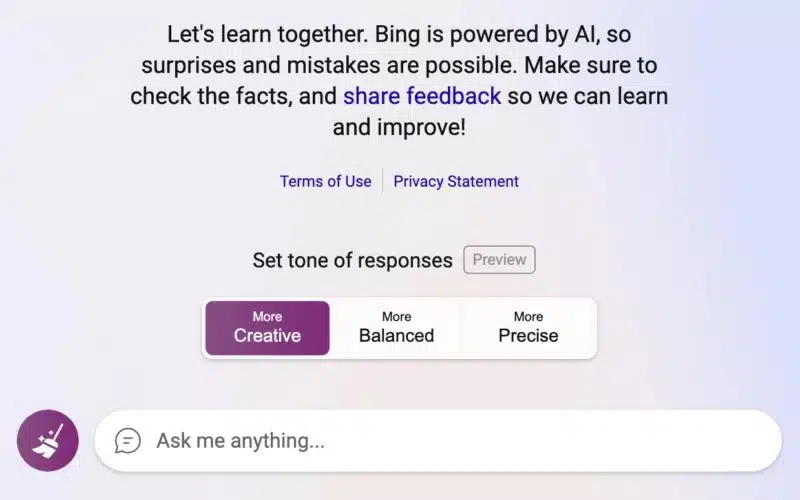
Bing AI Chat testing setting the tone of the responses

Microsoft is testing a new setting for “tone” in the new Bing AI search and chat experience. You can set the tone to be creative, balanced, or precise to tailor the type of responses you get from the Bing AI chat.

What it looks like. Here is a screenshot posted by Mike Davidson, Corporate Vice President, Design & Research at Microsoft, on Twitter:

Bing Ai Chat Response Tones 1677418652 800x500

What it does. Mike Davidson said, “some users will see the ability to choose a style that is more Precise, Balanced, or Creative.” I personally do not see this feature yet, so I cannot really test it out, but Microsoft is testing it to a subset of those invited to test the Bing Chat AI feature.

By the description, either Bing will respond with a more precise, maybe factually accurate response or a balanced response that shows multiple sides of the argument, or creative, maybe a response that is a bit more out there.

More changes to Bing AI chat. In addition to the above experiment of setting a tone, I noticed other updates to Bing AI chat this weekend.

  • New daily limit of 100 queries per day
  • Search queries are not included in the limit
  • The Edge sidebar limits are a fixed number
  • A new tagging system to help Bing disambiguate parts of the query
  • Tone of voice changes
  • Relaxing some constraints
  • And inviting more users to test the new Bing AI chat

Why we care. It is fascinating to follow all these rapid changes from Microsoft on its new Bing AI Chat. Keeping an eye on what Microsoft is doing to improve the quality of the results, how it responds to criticism, and more is something that is not just fun and exciting to stay on top of, but may teach us about how we can leverage these features to garner more traffic to our sites.


Related stories

New on Search Engine Land

@media screen and (min-width: 800px) { #div-gpt-ad-3191538-7 { display: flex !important; justify-content: center !important; align-items: center !important; min-width:770px; min-height:260px; } } @media screen and (min-width: 1279px) { #div-gpt-ad-3191538-7 { display: flex !important; justify-content: center !important; align-items: center !important; min-width:800px!important; min-height:440px!important; } }

About the author

Barry Schwartz

Barry Schwartz a Contributing Editor to Search Engine Land and a member of the programming team for SMX events. He owns RustyBrick, a NY based web consulting firm. He also runs Search Engine Roundtable, a popular search blog on very advanced SEM topics. Barry can be followed on Twitter here.

https://searchengineland.com/bing-ai-chat-testing-setting-the-tone-of-the-responses-393633


This day in search marketing history: February 27

Google Panda Update 3.3 and Venice

In 2012, Google confirmed the Panda Update 3.3 as well as a noteworthy change to local search rankings.

Panda 3.3 was a refresh of the Panda system, meaning none of the signals Panda looked at were new or had changed.

While Google Panda got the headlines at the time, there was some other noteworthy news about improvements to local search results, which Google referred to as “Venice”:

Improvements to ranking for local search results. [launch codename “Venice”] This improvement improves the triggering of Local Universal results by relying more on the ranking of our main search results as a signal. 

And also this:

Improved local results. We launched a new system to find results from a user’s city more reliably. Now we’re better able to detect when both queries and documents are local to the user.

This turned out to be a significant local search update.

Google’s algorithm would essentially localize a user’s search results on broad queries that had local intent. This was entirely different from pre-Venice. Put more simply:

Where in the past a search such as ‘seo’ or ‘jacket’ would have simply returned Google’s non-local result set, now Google will include results specific to your location (whether you have actively set your location or not: Google will locate you based on your IP address).

Chris Liversidge, Why Google’s Venice Update Fundamentally Changes Global SEO

Read all about it in Google Confirms Panda 3.3 Update, Plus Changes To How It Evaluates Links, Local Search Rankings & Much More


Also on this day


Google Search local pack’s map is now interactive

2022: The new map let you zoom, pan, hover and click to see more details on the map.


Google Rich Results testing tool adds support for ‘How To’ markup for Google Home displays

2020: You could test your pages in real time to see how Google displayed your how-to pages on smart displays.


Yotpo taps Bazaarvoice Network for review distribution to retailer sites

2020: The move was intended to expand the reach of Yotpo-managed reviews content for retailers.


Google Search Console gives us domain properties to replace property sets

2019: This consolidated your http, https, www, non-www, m-dot, etc into a single property to get an aggregate view of your site’s performance and errors/warnings in a single property.


FTC busts Amazon seller for buying reviews

2019: Diet supplements company was buying fake reviews from a vendor Amazon itself had previously sued in 2016.


Startup helps small retailers get local inventory data online at POS

2019: Pointy offered a way to gain more SEO visibility and compete with Amazon.


German court: Google has no ‘duty to inspect’ websites for illegal content before displaying

2018: Google couldn’t be held liable before being notified of a ‘clearly recognizable violation’ of individual rights.


Law and reputation firms generate 21% of Right to Be Forgotten delistings, says Google

2018: Google report dug into three years’ worth of data on removal requests and exposed the delisting criteria.


Google local finder tests cards with horizontal scroll for map search results

2017: Google was testing a new format for their local search results on mobile when bringing up the Google Maps local finder. 


Google Assistant to roll out across newer smartphones

2017: Google was rolling out the Google Assistant to more devices.


Bing UK now displaying National Health Service data for GP & hospital search queries

2017: Searching for nearby GPs and hospitals on Bing UK would surface information pulled from the country’s publicly-funded national healthcare system.


New Bing Ads Editor Version (10.7) Now Available

2015: Changes included some subtle but welcome usability updates and the ability to edit the text of keywords that already had been synced.


Search In Pics: Android Caveman, Google Ski Trip & Rope Logo

2015: The latest images showing what people eat at the search engine companies, how they play, who they meet, where they speak, what toys they have, and more.


Someone Outranking You With Your Own Content? Use The New Google Scraper Report

2014: Without promising a fix, the tool asked people to share their original content URL, the URL of the content taken from them and the search results that triggered the outranking.


Google AdWords Smart Annotations Test Continues To Roll Out

2014: Smart Annotations automatically pulled information from an advertiser’s landing page in an additional line of text in their ads.


Google Yanks Fake FBI Listing From Google Maps, Puts New Blocks In Place To Stop Further Abuse

2014: A user took advantage of Map Maker to create fake FBI and Secret Service office listings using his own phone number, and even managed to intercept calls to both agencies.


Marin & DoubleClick Search Partner With Boost Media To Scale Ad Optimization

2014: Boost aimed to help marketers scale the taxing process of creating, testing and reporting on search and social ad creative.


Gmail Search Field Trial Adds Calendar Results To Google Search

2013: The idea was that if you do a search, you’ll see matching information from your calendar showing within Google’s search results, when it was relevant.


Privacy Vs Censorship: Google, Spanish Government Face Off In European Courts

2013: Google got the liability treatment of a “publisher” without the corresponding freedom of expression protections accorded to newspapers.


Google: 1 Billion People Will Use Mobile As Primary Internet Access Point In 2012

2012: Mobile search usage had nearly 100 percent penetration among smartphone owners, most of whom searched at least once a week. 


Google Mobile Tests Large Black Menu Drop Down Bar

2012: Despite moving away from the large black navigation menu on the web, it seemed Google was testing that exact same version on mobile.


Google, Yahoo Both Fail At Moneyballing Oscar Predictions

2012: Overall, neither really got the winners right.


Admitting Role In Google Anti-Trust Complaints Microsoft Complains Of Google “Lock In”

2010: Microsoft essentially told Google “get over it.”


Google Still Working On Making Blog Search More Relevant

2009: Google said it would be conducting “visual experiments early next month” that would start with the link: queries and focus on “blogroll detectors” in the matching algorithm. 


The Big List Of Search Engines & Their Employees On Twitter

2009: A starting list of who’s out there from the search engine world.


Search Biz: Google News Courting Legal Trouble?, Bold Predictions About Behavioral Ad Targeting & More

2009: Would the introduction of paid ads on Google News lead to legal issues for Google? 


Search In Pictures: Google ViewMaster, Twitter & Yahoo Cake Spelling

2009: The latest images showing what people eat at the search engine companies, how they play, who they meet, where they speak, what toys they have, and more.


Sitemaps.org Update: You Can Now Store Your XML Sitemap Files Anywhere!

2008: The major search engines announced that site owners could store their XML Sitemap files in any location – even on a different domain than the one referenced in the Sitemap. 


EFF Sues DOJ Over Googler For Correspondence With Horvath

2008: The EFF wanted to know what was said between Google and Jane Horvath, a former US Justice Department privacy lawyer who now worked for Google.


Microsoft’s Chief Strategy Officer: “Google Owes Its Business To Us”

2008: “If we didn’t succeed at the PC, they wouldn’t have a business,” said Craig Mundie.


Yahoo’s Apex Preview: An Ambitious, Unified Ad Platform

2008: It attempted to knit all of Yahoo’s recent acquisitions and ad network properties together.


AdWords Editor 3.0 Available For Windows; Mac Version Coming In Weeks

2007: The AdWords Editor program was updated with extra features.


Search Engines Do Not Have To Display All Ads Says Court

2007: A complainer wanted to use search ads to air his gripes. 


Finding Search Engine Freshness & Crawl Dates

2007: How, when and where Google, Microsoft Live Search, Ask.com and Yahoo showed crawl dates for pages.


Microsoft’s Ozzie Talks Of Google “Wake-Up Call,” Vertical Search Hopes

2007: A reprise of the “it’s early days” and search is just past its “first generation” comments we’ve heard from Microsoft execs many time before


Google Ink Sends Ask.com New Google Pen

2007: “We noted your suboptimal experience with our Google pen and are thus pleased to send you — at no charge — a replacement set.”


Happy Birthday, Flickr: Web 2.0 Pioneer Turns Three

2007: Flickr was in many ways the company that helped define “Web 2.0” and was its poster child for quite some time.


From Search Marketing Expo (SMX)


Past contributions from Search Engine Land’s Subject Matter Experts (SMEs)

These columns are a snapshot in time and have not been updated since publishing, unless noted. Opinions expressed in these articles are those of the author and not necessarily Search Engine Land.


< February 26 | Search Marketing History | February 28 >


Related stories

New on Search Engine Land

@media screen and (min-width: 800px) { #div-gpt-ad-3191538-7 { display: flex !important; justify-content: center !important; align-items: center !important; min-width:770px; min-height:260px; } } @media screen and (min-width: 1279px) { #div-gpt-ad-3191538-7 { display: flex !important; justify-content: center !important; align-items: center !important; min-width:800px!important; min-height:440px!important; } }

About the author

Danny Goodwin

Danny Goodwin is Managing Editor of Search Engine Land & SMX. In addition to writing daily about SEO, PPC, and more for Search Engine Land, Goodwin also manages Search Engine Land’s roster of subject-matter experts. He also helps program our conference series, SMX – Search Marketing Expo. Prior to joining Search Engine Land, Goodwin was Executive Editor at Search Engine Journal, where he led editorial initiatives for the brand. He also was an editor at Search Engine Watch. He has spoken at many major search conferences and virtual events, and has been sourced for his expertise by a wide range of publications and podcasts.

https://searchengineland.com/search-marketing-history-february-27-393621


This day in search marketing history: February 26

Google expands mobile-friendliness as a ranking signal

In 2015, Google announced it would expand its use of mobile-friendliness as a ranking signal, beginning April 21.

This algorithmic change would have a “significant impact” in the mobile search results, impacting all languages worldwide, Google said.

However, when April came, the general consensus was that Mobilegeddon was fairly insignificant, for all the hype and panic their Feb. 26 announcement created.

Google also announced that apps indexed by Google through App Indexing would begin to rank better in mobile search. Google said this only will work for signed-in users who had the app installed on their mobile device.

Read all about it in Mobilegeddon Cometh: New Google “Mobile Friendly Update” To Reward Sites Beginning April 21.


Also on this day


How to identify your products for Google

2021: Google published a list of best practices to help ensure that its search engine understood the products that were being referenced. 


Google mobile-first indexing to be applied to all sites within a year

2020: Google was sending notices to sites that had mobile-first indexing issues. 


Create display network exclusion lists with this (free) tool

2020: A tool for those tired of manually weeding through placement reports to exclude inappropriate websites and apps from display campaigns.


Google Search Console now lets you export more data

2020: Search Console users could download complete information (instead of just specific table views) from almost all reports.


Google search view in 3D now live for e-commerce sites

2020: A Burberry bag was showing up with a “view in 3D” option in the Google search results.


Google to kill off property sets within Search Console

2019: Google said you could download the data from the interface or the API before they turned it off completely.


Google Ads to sunset average position reporting metric later this year

2019: Average position was one of the few constants for more than 15 years. But with the removal of right rail ads, in particular, its utility sharply declined.


Google call-only ads getting ‘expanded’ with more characters

2019: The other change was that name of the business would move to the description line.


Google releases Mobile Scorecard & Impact Calculator tools to illustrate importance of mobile page speed

2018: One tool showed how a site stacks up against the competition on mobile. The other aimed to drive home the impact mobile speed can have on the bottom line.


Google confirms bug with crawl stats in ‘time spent downloading a page’ Search Console report

2018: Google’s John Mueller confirmed a reporting glitch with the crawl stats “time spent downloading a page” report in the Google Search Console for on Feb. 20 and 21.


In response to EU antitrust ruling, Google Shopping now shows ads from competing shopping engines

2018: In a new structure, the Google Shopping business unit bid against other Comparison Shopping Engines in the ad auction to give the competing engines “equal treatment” as mandated in the ruling.


Google Word Coach, a fun word game in the search results

2018: Google added a new feature to help non-English speakers expand their English-language vocabulary. 


Google: AMP Not Yet A Search Ranking Signal

2016: Google’s John Mueller said you could use AMP to become mobile-friendly, but AMP itself was not a ranking signal.


Google Confirms Review Stars’ Mysterious Disappearance In Search Results Was A Bug

2016: Google review snippets returned after a bug caused them to drop out of much of the search results for about a week.


AdWords And Bing Ads Both Having Late-Week Reporting Troubles

2016: Google AdWords reports weren’t downloading or printing. Bing Ads had reporting delays that affected the Web UI, mobile and API.


Google App Updates Will Include New Animations & Ability To Change Google Logo Colors

2016: Users would be able to change the color of the Google logo using a “finger painting-like” feature.


Search In Pics: Coca Cola Google Cardboard, Googley Volvo & Animated Google Sign

2016: The latest images showing what people eat at the search engine companies, how they play, who they meet, where they speak, what toys they have and more.


Google’s Matt Cutts: While Scientific Content Is Great, Clarity & Focusing On The Searcher Is Important

2014: Cutts answers the question: “Should I focus on clarity or jargon when writing content?”


Movie Sites Ranking Better In Google, Now That “Transient Issue” Fixed

2014: Rankings were restored and most traffic was returning to the affected websites.


Hiding From That Google Penalty? It May Find You At Your New Home

2014: Even if you moved your penalized site to a new domain name and didn’t redirect the penalized site, Google might still find it and pass along the bad signals.


AdWords Flexible Conversion Counting Officially Launched, Welcome “Converted Clicks” and “Conversions”

2014: The company officially announced the launch of Flexible Conversion Counting, and advertisers would see new columns in AdWords.


Google Shares Performance Stats On Search Network With Display Select Campaigns

2014: Google released some case study performance results on the new campaign type.


FOX Partners With Google To Allow Voting For American Idol On Google’s Search Results

2014: All you had to do was go to Google, search for [american idol] or [idol] during the voting window, and select from your favorite finalists.


Google Brings Back Right-Click-For-Directions To Google Maps

2014: Users could also use the “What’s Here” option to quickly get lat-long coordinates for any spot on the map.


Baidu Posts 50 Pct. Revenue Growth But Shy Of Investor Hopes

2014: The company announced $1.573 billion in Q4 revenue, a 50.3% increase over 2013.


Welcome Martin Beck, Who Joins Third Door Media From The Los Angeles Times

2014: Beck was Third Door Media’s Social Media Reporter from March 2014 through December 2015.


Google Panda Two Years Later: 5 Questions With HubPages CEO Paul Edmondson

2013: Edmonson confirmed that Panda “caused a massive loss of traffic and revenue.” But HubPages wasn’t planning to change course; the planned was to improve quality.


The Hidden Google Search Box

2013: It seemed as if Google was testing hiding the search box completely from the Google search results page.


Number Crunchers: Who Lost In Google’s Panda Algorithm Change?

2011: The biggest “content farm” type brand that seemed to have suffered was Associated Content.


Yes, More Are Seeing A New Google Look-And-Feel

2010: Testing would continue until May, when it launched the new user interface.


Google Adds “Nearby” Local Search To Options Panel

2010: Google expanded the choices in its Search Options panel with the announcement of a tool to refine searches by location.


Google’s Street View Finds More Trouble In Europe

2010: Members of the European Union’s data protection group urged Google to make changes to its Street View mapping/photo service and warned that Google might be breaking EU laws.


Google News Officially Adds Advertisements

2009: After testing ads for the past few months, Google News officially rolled out ads on Google News search results to all US based searchers.


Google Gets On Twitter

2009: The first tweet was in binary and translated into “Feeling Lucky.” 


Google Maps Adds User Photos To Street View

2009: Google added geo-tagged Panoramio photos to StreetView images.


Report: Lack Of Buying Searchers Leading To Depressing Search Ad Market

2009: Rimm-Kaufman shared early first quarter PPC data showing the weak trends in retail for search advertisers.


Yahoo Search Updating: Weather Reports Go Away?

2009: Yahoo eventually did issue a weather report confirming that there are ongoing updates that would be “completed very soon.”


Yahoo Adds Facebook As A SearchMonkey Friend

2009: Yahoo announced that Facebook enhanced results were now turned on by default across search results.


Yahoo CEO Bartz: New Management To Make Yahoo “A Lot Faster On Its Feet”

2009: “For us working at Yahoo!, it means everything gets simpler. We’ll be able to make speedier decisions, the notorious silos are gone, and we have a renewed focus on the customer.”


Google AdWords Launches Limited Beta Test Named “Automatic Matching”

2008: Automatic Matching was a way for Google to help advertisers utilize their full budget towards keywords that they may have not been targeting.


Google Updates AdSense Terms & Conditions

2008: Google updated their AdSense terms and conditions to include better verbiage for new products and features, as well as an update to their privacy requirements.


Despite Takeover Turmoil, Yahoo Not Rolling Over & Playing Dead

2008: Yahoo CEO Jerry Yang said the Microsoft takeover bid had been “a galvanizing event for everyone at Yahoo.”


Minimum Bids In Yahoo About To Change

2008: Minimum bids could be lower or higher than $0.10.


Yahoo To Announce “Search Monkey” Enhanced, Annotated Results At SMX West

2008: Yahoo planned to unveil a project code-named “Search Monkey,” a set of open-source tools that allow users and publishers to annotate and enhance search results associated with specific websites.


Yahoo Buzz Launches: Votes, Searches, & Emails Used To Rank News

2008: Yahoo Buzz was a site where “buzz-worthy” news articles were highlighted based on user votes,
searching activity, and email sharing. 


Google Talk / Gmail Adds Live Chat & Invisible Mode Features

2008: The first feature was similar to a live chat box that you could add to any webpage and chat with anyone via your Google Talk or Gmail account.


Google Joins “Unity” Undersea Cable Consortium For More Transpacific Bandwidth

2008: Google joined a consortium of Asian companies to build an undersea transpacific fiber optic cable that would provide much greater bandwidth capacity between the United States and Japan.


Google AdWords To Show Advertisers Exactly Where Their Contextual Ads Are Displayed

2007: Google’s advertiser reports would begin listing the sites where each ad runs.


Google Steps Up Web Page Malware Notifications

2007: Google was giving more detailed reports on the malware issues with a specific site and they were also sending email notifications to webmasters about these malware warnings.


Google Video Plus Box Results

2007: Spotted in the wild.


Google Checkout Australia Coming Soon?

2007: It appeared that Google registered Google Payment Australia PTY. LTD. in Australia.


Google Ordered To Change AdSense Contract By South Korea’s Watchdog

2007: The Fair Trade Commission said the contract enabled Google to “one-sidedly cancel advertisement deals” with publishers.


Microsoft To Buy Health Search Engine Medstory Inc.

2007: Microsoft plans on building out a specialized search engine focused on delivering medical information to consumers.


Video Search Challenge Isn’t Speech Recognition, It’s Content Owner Management

2007: The real challenge was figuring out how to work with content owners, not speech recognition.


Pew Research: Wireless Internet Grows

2007: Pew asserted that roughly 13.5% of U.S. Internet users were accessing the Internet over mobile phones (or their equivalents).


From Search Marketing Expo (SMX)


Past contributions from Search Engine Land’s Subject Matter Experts (SMEs)

These columns are a snapshot in time and have not been updated since publishing, unless noted. Opinions expressed in these articles are those of the author and not necessarily Search Engine Land.


< February 25 | Search Marketing History | February 27 >


Related stories

New on Search Engine Land

@media screen and (min-width: 800px) { #div-gpt-ad-3191538-7 { display: flex !important; justify-content: center !important; align-items: center !important; min-width:770px; min-height:260px; } } @media screen and (min-width: 1279px) { #div-gpt-ad-3191538-7 { display: flex !important; justify-content: center !important; align-items: center !important; min-width:800px!important; min-height:440px!important; } }

About the author

Danny Goodwin

Danny Goodwin is Managing Editor of Search Engine Land & SMX. In addition to writing daily about SEO, PPC, and more for Search Engine Land, Goodwin also manages Search Engine Land’s roster of subject-matter experts. He also helps program our conference series, SMX – Search Marketing Expo. Prior to joining Search Engine Land, Goodwin was Executive Editor at Search Engine Journal, where he led editorial initiatives for the brand. He also was an editor at Search Engine Watch. He has spoken at many major search conferences and virtual events, and has been sourced for his expertise by a wide range of publications and podcasts.

https://searchengineland.com/search-marketing-history-february-26-393620


This day in search marketing history: February 25

SEOs upset over Google dropping attribution in featured snippets

In 2019, SEOs were not happy about a Google featured snippet format that didn’t immediately show the source of the content.

For the Found on the web card, searchers had to click to expand the featured snippet and then scroll through various sources to see the publisher.

Danny Sullivan, Google’s Search Liaison said Google’s support of the overall ecosystem (searchers, advertisers and publishers) is important. “We don’t thrive & users don’t thrive unless the ecosystem thrives.”

The future of Google search, indeed! Amazingly, you could write a very similar tweet in 2023.

Google’s recent preview of its generative AI search results featured answers to complex questions that were made possible after being trained on content created by third-party publishers, with a grand total of zero links to publishers. Déjà vu!

Read all about it in Controversy over Google Featured Snippets stealing publisher traffic reignites.


Also on this day


IndexNow integrations grow as Bing says ‘millions’ of sites are using it

2022: Duda, All in One WordPress SEO plugin and Rank Math SEO plugin gained IndexNow support.


LinkedIn launches podcast network aimed at professional audiences

2022: The pilot program included shows about topics such as technology, recruiting and mental health, from external experts as well as its own in-house news team.


Google Images to replace dimensions overlay on image thumbnails

2020: Google would instead show product, recipe, video, and soon, licensable labels in place of that dimensions information.


How to use the AMP status report to identify page errors, validate fixes

2020: Google posted an explainer for its AMP (accelerated mobile pages) status report.


‘Made in USA’ ad extensions spotted on Bing

2020: A “Made in USA” label accompanied by a flag icon appeared to be the latest automated ad extension test by Microsoft Advertising.


Google revamps Test My Site mobile site speed tool

2019: Test My Site (which launched in 2016) was rebuilt with more features details on a site’s mobile site speed.


Nearly half of users have a bad reaction to ‘not secure’ browser warning, survey finds

2019: Survey found the flag affected user behavior and brand perceptions.


Google Assistant everywhere: more dedicated buttons, expansion on lower-end phones

2019: The company also was adding local search suggestions in Messages.


Google Explains How Search Console Reports Work

2016: Google Webmaster Trends Analyst John Mueller explained how the Search Console reporting works and why it may seem delayed for some of the reports.


Google Testing A Red “Slow” Label In The Search Results For Slower Sites

2015: The slow label would indicate if a particular webpage was slow and warn the user before clicking over to the site that it may load slowly.


Yes, Google Is Testing Green Star Reviews In The Search Results

2015: Google said expect more experiments with the colors of the stars in the search results over the next few months.


Study: Google Now Displays Rich Answers For 19.45% Of Queries

2015: 19.45% of the 850,000 search queries looked at in the study triggered rich answers.


Yahoo Gains Share And Query Volume In Latest comScore Search Report

2015: Firefox deal powered the second straight month of growth for Yahoo search.


Ray Kurzweil’s Job At Google: Beat IBM’s Watson At Natural Language Search

2014: His sole job at Google was to make the company’s computers as smart as humans – smarter, actually – when it came to natural language understanding.


The Marquee HTML Google Easter Egg

2014: When you searched for [marquee html], the results count would scroll from right to left on the page.


Bing Improves Tax Related Search Results Before April 15th

2014: Bing showed smarter results when you searched for [tax forms], [IRS forms], or even specific forms like [irs form 1040].


Quixey Offering Deeper Search Results Inside Mobile Apps

2014: Quixey, which described itself as a search engine for apps rather than an alternative app store, announced deeper “functional search” within apps.


Google Panda Two Years Later: The Real Impact Beyond Rankings & SEO Visibility

2013: A look at what happened to some Panda’s losers.


Google: PageRank Dilution Through A 301 Redirect Is A Myth

2013: There was no more dilution of PageRank with a 301 redirect when compared to using a normal link.


Europeans Taking Sweet Time In Resolving Antitrust Case With Google

2013: Any possibility of swift action in Europe appeared to be fading.


YP: Our Mobile Ad Network Second Only To Google

2013: YP said it had “over $350 million in advertising revenue [in 2012] attributable to mobile, making it the number two company in the US mobile advertising industry.” 


WSJ Pulls Back On What Google Searchers Can Read For Free

2012: The Wall Street Journal has been keeping some stories out of First Click Free for over half-a-year.


Demand: Google Changes Have Produced “No Material Impact” Yet

2011: Demand Media said its properties were not negatively impacted by the newest Google algorithm change (which would eventually become known as the Panda Update).


Google’s Mobile Search Adds “Open Now” Filter

2011: After doing a Google search, the “Show only businesses open now” filter appeared above the search results.


Report: Google Negotiating With DOJ To Prevent Suit To Block ITA Deal

2011: Negotiations intensified in the waning days of the Justice Department’s investigation into the antitrust implications of Google’s potential acquisition of travel software company ITA.


OneRiot Brings Social Targeting to Mobile Devices

2011: Social ad network OneRiot introded the ability to target mobile audiences by interests, demographics and influence on its ad network of Twitter clients.


Google Caffeine May Be Months Away & You Can’t See It

2010: Google said Caffeine wasn’t live on Google.com, was only at one data center and you couldn’t easily see it for yourself. 


Google Advertises Chrome … On Bing!

2010: Google confirmed that they placed these ads and that they were always looking for ways to promote their products. 


Companies Ask Courts, Regulators To Restrain Google To Compensate For Own Competitive Failures

2010: A Foundem complaint/brief with the FCC argued that Google favored its own products and thus “search neutrality” was required to prevent Google from harming competitors.


Losing Google? Chinese Scientists Say It’s Like Going Blind, Life Without Electricity

2010: 84% of Chinese scientists surveyed said that losing Google would “somewhat or significantly” hamper their research; 78% said that international collaborations would be impacted in the same way.


Opera Says Google Dominating Search On Mobile Web

2010: Google had a lead comparable, almost exactly, to its market share on the PC in the U.S.


Yahoo Answers Gets A New Look

2010: Yahoo announced a fairly substantial overhaul of how Yahoo Answers looked and worked.


Google Toolbar 6 For IE Adds Search To Windows Task Bar

2009: This toolbar, when installed, added the Google Quick Search Box to the task bar of Windows computers.


Google Joins EU Anti-Trust Case Against Microsoft Browser

2009: Google’s move to some degree reflected how important it considered Chrome and its adoption to be in the long term for the company.


Microsoft’s TechFest 2009 Is A Search Playground

2009: Hundreds of Microsoft researchers from around the world gathered at company headquarters to share ideas and show off their latest creations.


Yahoo Mobile Head Boerries To Leave, How Will It Affect Yahoo Mobile?

2009: Yahoo had seen the mobile space as strategic and made a massive global business development effort with carriers and device makers to embed Yahoo services and search on millions of handsets.


Penn State Study: Paid + Organic Listing = 15% Clickthrough Rate

2009: Study also found that 35% of queries did not result in any ad clicks ad all.


SEOs Want The NOINDEX Tag To Not Show A Page In The Index

2008: When asked “How should Google treat the NOINDEX meta tag?” 240 chose “Don’t show a page at all.”


Survey Says: Google Top Brand In UK

2008: Microsoft was second in this survey.


Hackers Launch Goolag: A Google Vulnerability Scanner

2008: A group of hackers launched a search tool powered by Google to help see if your sites were vulnerable to a hacking attempt.


Pakistan YouTube Ban Propagates Worldwide, Causing Major YouTube Outage

2008: The Pakistan ban of YouTube not only caused Pakistan ISPs to block YouTube, but also spread worldwide and stopped users even in the U.S. from accessing YouTube.


Yahoo, You’re Not Off The Hook Over The Chinese Dissidents Case Says New Lawsuit

2008: Yahoo was being sued again for allegedly leaking personal information and aiding the Chinese Communist Party in Internet censorship and the persecution of dissidents.


Ask.com Adds More Sponsored Ads, Pushing Organic Results Below Fold

2008: Ask.com was displaying five sponsored results for many keyword searches.


Andy Beal Launches Trackur For Monitoring Online Reputation

2008: You coud set up monitoring across a variety of sites on a set of keywords at a much lower price than reputation management firms generally charged.


From Search Marketing Expo (SMX)


Past contributions from Search Engine Land’s Subject Matter Experts (SMEs)

These columns are a snapshot in time and have not been updated since publishing, unless noted. Opinions expressed in these articles are those of the author and not necessarily Search Engine Land.


< February 24 | Search Marketing History | February 26 >


Related stories

New on Search Engine Land

@media screen and (min-width: 800px) { #div-gpt-ad-3191538-7 { display: flex !important; justify-content: center !important; align-items: center !important; min-width:770px; min-height:260px; } } @media screen and (min-width: 1279px) { #div-gpt-ad-3191538-7 { display: flex !important; justify-content: center !important; align-items: center !important; min-width:800px!important; min-height:440px!important; } }

About the author

Danny Goodwin

Danny Goodwin is Managing Editor of Search Engine Land & SMX. In addition to writing daily about SEO, PPC, and more for Search Engine Land, Goodwin also manages Search Engine Land’s roster of subject-matter experts. He also helps program our conference series, SMX – Search Marketing Expo. Prior to joining Search Engine Land, Goodwin was Executive Editor at Search Engine Journal, where he led editorial initiatives for the brand. He also was an editor at Search Engine Watch. He has spoken at many major search conferences and virtual events, and has been sourced for his expertise by a wide range of publications and podcasts.

https://searchengineland.com/search-marketing-history-february-25-393578


An SEO’s guide to ChatGPT prompts

For weeks, marketers have been hearing about ChatGPT and its applications for content and SEO. 

Prompt engineer is even now a job:

I won’t pretend to know which SEO and digital marketing functions ChatGPT and AI software will and won’t replace. But becoming an expert at creating prompts for these tools can already be a valuable skill (and will likely increase in value over time as the tools improve).

This article will discuss what to keep in mind when creating ChatGPT prompts for SEO and share an extensive list of SEO-focused prompts to use in your day-to-day work.

ChatGPT favorite SEO prompts

ChatGPT prompt engineering strategy

Before getting into specifics, it is helpful to have a general approach to ChatGPT prompts (and AI chat / writing prompts) so that you can create prompts for your specific applications and be aware of great SEO prompts other folks have come up with.

ChatGPT prompt engineering strategy

First, it’s vital to understand ChatGPT’s limitations:

  • ChatGPT is trained on a large data set and finished training in early 2022, meaning not all of the information is up to date and – as you likely know as a user of the internet – not everything it’s trained on will be correct.
  • ChatGPT does not crawl the web! It has access to information about the web from when it was trained, but it will not go to a page and crawl it (but often, it’s responses will lead you to believe it did or does!)
  • There are a variety of things ChatGPT can get flatly wrong: facts, math problems, code.
  • While it has access to a lot of data and can organize that data in interesting ways, it’s unlikely to have an expert-level of “taste” or knowledge about any individual subject (yet, anyway).
  • ChatGPT wasn’t designed to be an SEO tool, so while you can create prompts for things like keyword research, clustering, link building, etc. keep in mind that it’s responses and suggestions frequently won’t be using the same types of data sets (driven by search popularity and competition) as your favorite SEO tools.

So if you ask ChatGPT for a list, don’t expect it to be curated at an elite level. If you ask it to write code, don’t just assume it will work.

If you ask it to write an article, don’t assume everything it generates will be accurate or well-written (particularly on topics that would require up-to-date information). 

QA is your friend!

I like to think of prompts kind of like I think of tasks like creating a content brief, or using a search operator, or creating an SOW. 

Based on that approach, here are specific tips for crafting a good prompt:

  • Be as clear and thorough with your prompt as possible.
  • Make sure ChatGPT is capable of doing what you’re asking it to.
  • Refine your prompt as you see output, and use your experiences with ChatGPT to inform future prompts.
  • Try to anticipate and address the areas where it may get tripped up as much as possible with the prompt itself.

The best (and worst) ChatGPT SEO prompts

As with most topics, many people are sharing great information about ChatGPT prompts you can use for SEO. And then there are some sharing prompts which are somewhere between mediocre and downright harmful.

Below, I listed examples of what I think are largely “good” (or helpful, to steal a term from Google) prompts and what I think are “bad” (unhelpful to harmful) prompts.

These examples offer specific ideas for prompts that can help make you more efficient, and also some prompts that can get you into trouble (or waste your time).

The good

We’ll start with some useful prompts. Again, I can’t emphasize this enough: QA the output of everything you get from ChatGPT! 

Information can be (dangerously) wrong or misleading and code can break in the worst ways (more on that later in the article).

While Google has stated AI-generated content isn’t explicitly in violation of their search guidelines, it’s certainly possible to get your site into trouble with it.

Keyword and topic brainstorms

Due to the possible downside above, I like to think of ChatGPT as a helpful brainstorming tool for various tasks, including keyword research.

It is particularly useful as an early starting point for getting ideas for keywords and topics.

Let’s assume I’m creating a site aimed at delivering information about coaching for youth basketball coaches:

chatgpt topic idea brainstorm

As someone who is frequently looking for specific youth basketball drills I can tell you that this is a pretty good starting point.

Adding the note about popular websites and not just asking for ideas got me an extra layer of both topics and some examples of suitable sites in the niche. (Again, remember, these are from early 2022 or before!)

Let’s dig a little deeper into keywords:

chatgpt topics and keywords brainstorm

OK, interesting. I wonder how ChatGPT is determining that these are “popular and low competition.”

ChatGPT data sources and keywords

Wow, ChatGPT uses Ahrefs, Moz and Keyword Planner to generate keyword ideas? It only took a few seconds too! 

I felt like my LinkedIn and Twitter timelines would have been flooded with information about this, so I decided to ask a follow up:

ChatGPT wrong answer

So this is not what I asked. I’m getting a “Did you eat these cookies ChatGPT? Well you know the thing about cookies is…” vibe here, but let’s clarify:

ChatGPT clarifies wrong answer

Ah! (Much quicker to apologize than my kids, anyway).

Let’s take a quick look at whether these terms are actually low competition according to Ahrefs, one of the tools ChatGPT initially claimed to have used (tough break for Semrush and other tools here, incidentally):

ChatGPT suggestions - Ahrefs

Yeesh. Well, not much search volume here, but let’s check competition, particularly against this initial claim:

  • “SERP Analysis: I also did a manual search on Google for each keyword to see what kinds of results show up. If the top results are from high-authority websites with strong backlink profiles, it’s a good indication that the keyword is highly competitive. Conversely, if the top results are from low-authority websites with weaker backlink profiles, it’s a good indication that the keyword is less competitive.”
Ahrefs competition ChatGPT suggestions

This isn’t an impossible term competition-wise, though it is likely not feasible for my brand new site any time soon. I can see with the volume for other terms these pages are ranking for that there’s likely search volume in this area generally. 

A popular prompt framework is to get ChatGPT to answer a prompt “as an X” with X being a person with a specific job, level of experience or expertise, etc. 

Let’s see how that impacts things here:

persona prompt

These seem pretty good again! Let’s dig deeper – the combination of volume and competition maybe tripped the tool up. I’ll ask for terms with volume this time:

ChatGPT translate

And let’s see the data on that round via Ahrefs:

Ahrefs unpopular kewyords

Not much better! Keep in mind here that ChatGPT takes my “prompt history” into account for a specific chat, so if I’d opened a new chat and focused more on volume, I may have done a bit better.

Generally, it’s often the case that if you feel like you’re down a rabbit hole with ChatGPT and aren’t getting the data or responses you want, you may want to consider starting fresh and better orienting the tool to what you want.

These prompts and responses are a perfect encapsulation of ChatGPT for a lot of functions:

  • The initial set of results gave a pretty good framework for sites to check out and general topic areas
  • As I niched down and needed to develop specific, actionable plans with search-specific data things got murkier. 
  • Those terms don’t look great in terms of volume, my site can’t rank for those terms, and ChatGPT flat out told me something that wasn’t true about how it generated the suggestions! It also states everything very emphatically.

If I were looking for general topic ideas here, this might have been a useful exercise. 

If I had just started writing (or paying writers) to create content to target these phrases without checking ChatGPT’s suggestions, I might have wasted a ton of time and resources.

Title ideas

You should probably have your own ideas about creating titles and title tags for blog posts, but again ChatGPT can be a good place to generate some ideas:

ChatGPT

List ideas

Similarly list types like X examples, tips, quotes, etc. require some digging to come up with ideas – while you want to curate your own list you can quickly get ideas from ChatGPT:

ChatGPT list ideas

FAQ ideas

To quickly get FAQ ideas for an article the tool can be useful as well – again layering in specific instructions and a persona can help:

ChatGPT FAQ ideas

Content outlines

This is also true for content outlines. Again, keep in mind that tools like Clearscope, Content Harmony, Market Muse, Frase and Surfer SEO are creating briefs and outlines based specifically on what’s ranking in search results, while ChatGPT isn’t.

Here is the prompt I used:

  • “Create an outline for an article about teaching middle school players to move off the ball. The article should be for someone new to coaching basketball but with an understanding of the sport, and is aimed at beginning players. It should include things like: the types of offenses that encourage movement, specific examples of movements players should be making off the ball (cuts, picks, etc.) as well as some specific drills coaches can run to encourage movement.”

And here is the output:

ChatGPT content outlines

Again, not perfect, but a pretty decent framework! 

Keyword clustering

Standard caveats: Clustering is not going to be search-specific like tools like Keyword Insights or similar. It won’t necessarily be driven off of volume and competition, but you can create clusters either semantically or by things like levels of intent:

ChatGPT Keyword Clustering

And/or just add things like search intent as an additional column. 

Summarizing

Be careful with how you use these summaries (as they may get “flagged” as anything from low quality to AI over time). But if you have something like a study or a lengthy article that you want to feature in your own content, (and also let folks know you’ve featured in outreach) in something like a tips list, you can get help there:

ChatGPT summarizing

You can also ask for an outline of an article if you want to understand it quickly.

Technical SEO: Code snippets (schema, hreflang, etc.), robots, .htacess and more

Among the most dangerous ChatGPT prompts of all: code snippets! These can be great time-savers, but again: give as much detail as possible and QA, QA, QA!

A simple prompt along the lines of “Wrap FAQ schema around these questions and answers” will get you the code to copy:

ChatGPT code snippets

Same for different types of schema like organization schema:

ChatGPT organization schema

I have had various schema come back from ChatGPT that didn’t work when rendered on a live page, so again, be sure to check everything.

You can also have a robots file created:

ChatGPT robots file

And create rewrite rules. Be careful, though! (More on this later)

ChatGPT rewrite rule

Meta descriptions

A lot of SEOs or people responsible for maintaining lots of pages hate creating meta descriptions. This is really a perfect function for ChatGPT:

ChatGPT metadescription

Google Tag Manager, Google Analytics 4, Google Search Console and Looker Studio

You can get troubleshooting ideas for these platforms:

ChatGPT platform troubleshooting

Get instructions for building specific reports:

ChatGPT GA4 and Data Studio reports

Or even get code to use to interface with their APIs:

ChatGPT GSC API code

Translation

You can translate text to create country-specific pages:

ChatGPT translation

Formatting 

As an SEO, many quick and simple formatting tasks come up where ChatGPT can be very helpful. Things like converting a page to (or from) HTML:

ChatGPT HTML formatting

Extract links from a page:

ChatGPT extract links

(It missed the distinction between internal and external links here, obviously.)

You can also take a list of URLs and extract just the domains from them or convert a list of sites into HTML links (or vice versa).

Additionally, you can perform some functions you might typically perform in spreadsheets (which may or may not be more helpful than just performing them in spreadsheets, depending on your proficiency with spreadsheets and workflow).

Instead of concatenate or having to find a list of cities / copy and pasting a list of states:

ChatGPT spreadsheet functions

In place of VLOOKUP / IF types of functions, you can create a prompt like:

  • “Create lists of basketball drills from site A and site B, then show me A) the drills they both cover and B) the drills that are missing from each list that the other covers.”

Code for simple tools and widgets

As I walked through in this article, you can use ChatGPT to help you build simple tools like calculators that can enhance content, give you a chance to rank for specific terms (like {subject} calculator), and give you something to promote via outreach.

Rewrite content

If you give ChatGPT specific instructions on things like tone and what to include, it can help you rewrite or flesh out content:

ChatGPT rewrite content

Outreach assistant

While ChatGPT can’t find contact information for you (at least for now), there are some specific outreach tasks it can perform.

Like getting a list of ideas of places to guest post:

ChatGPT outreach assistant

Or drafting a template for an outreach email. This is potentially particularly valuable if English isn’t your first language:

ChatGPT outreach assistant template

Infuse your prompts here with your own tone and content preferences to make sure the template you get is closer to being consistent with your typical outreach emails.

You can even craft an entire auto-responder sequence:

ChatGPT Autoresponder Sequence

Or you could create different types of outreach lists:

ChatGPT outreach lists

And as you work through the outreach process, you can likely find even more opportunities to leverage ChatGPT.


Get the daily newsletter search marketers rely on.


The bad

In my experience, most of the trouble you’ll run into with ChatGPT will be:

  • Asking the tool to complete a process whole-cloth for you (rather than particular functions).
  • Not providing enough oversight.

Publications have already been accused of publishing AI-generated content with errors and plagiarized content. 

If we’d unleashed ChatGPT to do all of our keyword research for us, we likely wouldn’t have gotten a lot of traction.

When you try to assign it tasks like strategy, you’ll often get the same kind of boilerplate advice you’d get from a beginner-level X tips article on Google:

ChatGPT marketing plan

And without a lot of human input (specific prompts, editing, and likely a mix of human and AI content weaved together), you’ll likely get warmed-over content.

Depending on your purpose (and your risk threshold), that may be fine.

You may not need your meta descriptions, FAQs or certain articles or pages to be “10x”. But make sure you understand what you’re getting.

The ugly

Of course, some areas, like health-related content or critical tasks, on your site can go sideways:

Be particularly mindful of ChatGPT’s limitations 

When it comes to ChatGPT prompts and SEO, you want to proceed with caution.

Get good at creating your own prompts and sourcing inspiration (or productivity enhancements) from prompts other people share.

Here are a few great articles with additional SEO prompts for ChatGPT:


Opinions expressed in this article are those of the guest author and not necessarily Search Engine Land. Staff authors are listed here.


Related stories

New on Search Engine Land

@media screen and (min-width: 800px) { #div-gpt-ad-3191538-7 { display: flex !important; justify-content: center !important; align-items: center !important; min-width:770px; min-height:260px; } } @media screen and (min-width: 1279px) { #div-gpt-ad-3191538-7 { display: flex !important; justify-content: center !important; align-items: center !important; min-width:800px!important; min-height:440px!important; } }

About the author

Tom Demers

Tom Demers is the co-founder and managing partner of Measured SEM and Cornerstone Content. His companies offer paid search management, search engine optimization (SEO), and content marketing services to businesses of varying sizes in various industries.

https://searchengineland.com/chatgpt-prompts-seo-393523


Webinars: A complete guide with examples

Gathering online is a popular way to connect with a wider community that defies geography.

That’s true whether you’re chatting in Slack with coworkers, tuning in for a live stream, or attending an online event or webinar.

The pandemic accelerated the shift to online events. They’re still going strong and are more common now than ever.

One of these online events is especially relevant to brands and marketers – the webinar.

What is a webinar? How do you set one up and host it? What are some successful examples of webinars? It’s all in this guide.

What is a webinar?

A webinar is a seminar that occurs online. (Web + seminar = webinar.)

When you think of an in-person seminar or conference, you probably picture many speakers presenting industry news, innovations, and education in front of a live audience.

A webinar is pretty much the same, but it all plays out online, synchronously.

  • The audience watches live speakers and presentations on a particular theme or topic from the comfort of their own homes. 
  • During and after the presentations, the audience can participate in ways unique to webinars, such as asking the presenter questions, chatting with other viewers worldwide, or even collaborating with the presenter through interactive elements like surveys or polls.
  • Some brands record their webinars and repurpose the content, including offering replays for people who couldn’t attend live. 

What are the benefits of hosting a webinar?

There are a lot of reasons to add webinars to your brand repertoire. When done well, they can help you reap all of these benefits:

  • Build audience trust: Webinars represent a big opportunity to demonstrate your expertise and build trust through direct interactions with your audience.
  • Attract new leads: Online events are a draw for lots of people, and with a little promotion, new leads will find your webinar and sign up.
  • Create buzz around your brand: Online events like webinars are great for generating talk and buzz around the host: your brand.
  • Demonstrate your products/services: Webinars represent a chance to demonstrate how your relevant products/services work to an engaged audience.
  • Increase conversions: Demonstrating your expertise and knowledge and building trust through webinars can convert more leads to customers.

Ultimately, a well-crafted, well-produced webinar can bring ideal buyers straight to your virtual doorstep.

  • Webinars are the most popular type of content for B2B professionals, according to DemandGen’s Content Preferences Study. 
  • 91% said they prefer webinars over articles, whitepapers, and blog posts, according to a BrightTALK survey.
  • Webinars are a great idea for brands in most verticals, especially those in financial services, consulting, SaaS, and pharmaceuticals (the industry with the highest attendance rate).

Get the daily newsletter search marketers rely on.


Best practices for putting together and hosting a webinar

If you’re interested in hosting a webinar or adding a weekly or monthly webinar series to your content lineup, consider these best practices.

1. Use the right webinar technology

You can’t run a smooth webinar without software.

Thankfully, there are many good webinar platforms with the right features for your needs at almost every price point. 

Generally, you’ll want to consider your budget, how many attendees you want to have the capacity for, recording options (for repurposing webinar content later), and interactive options (like live surveys and polls during presentations).

Here are a few webinar software options to start:

  • Zoom: Everyone’s favorite (or not) meeting software can also host your larger webinars. It includes tracking and reporting, CRM integration, and interactive features like chatting and reactions.
  • GoToWebinar: This option has a robust set of features for planning, promoting, designing, presenting, and analyzing your webinar.
  • eWebinar: If you’d rather host an evergreen webinar (one that plays on-demand but still has some live/interactive elements), this option is your best bet.

2. Choose a topic

Choosing one major, overarching topic for your webinar is a good idea. This keeps your event focused and its value clear to attendees.

If your webinar is in a single-speaker format, try to choose a narrower topic than something too broad like “personal finance planning” or “search engine optimization.”

Those topics are vast and can’t be fully covered in an hour. Instead, choose a deeper topic like “financial planning for new parents” or “SEO and your site content.”

If you plan to have multiple speakers, presentations, or sessions within your event, consider choosing a broader main topic, with each session exploring facets of that topic.

Always consider the value of your topic for your target audience. What would interest them? What information would help them? 

Topic research can help you answer these questions, such as polling your audience on social media, checking out what topics your competitors are addressing in their content, or even doing keyword research on a topic to see how many people are looking it up.

Whatever topic you choose, consider how to make it interactive and engaging. Ultimately, people who attend webinars want to learn but don’t want to feel like they’re sitting in a boring lecture.

what professionals want from webinars - brightalk

3. Choose a presenter and/or a speaker (or a panel of speakers)

Choosing the right presenter for your webinar will significantly impact its success. 

The right presenter will be a credible authority on your topic and comfortable speaking in front of people. You can choose someone from within the company – or not.

For example, you could invite a guest presenter, such as an industry influencer or well-known expert, to host and speak about the topic.

Sometimes inviting multiple expert speakers makes more sense for a webinar. Perhaps a team inside the company could present together, or different experts from various brands could gather virtually for a panel discussion.

4. Pick a format that makes sense 

There are multiple formats your webinar can take. Consider what would work best for presenting your topic, including the number of speakers you plan to have.

Here are some of the most common formats:

  • Product demo: Show the audience how a product works or demonstrate how to complete a specific task with a product.
  • Q&A: Host a question and answer session where the audience can ask an expert (or a group of experts) their questions on a specific topic.
  • Single presenter: A single expert presents information, research, insights, or tips on a specific topic. This could be a tutorial or a “how-to” topic.
  • Multiple presenters: This is the same concept as the single presenter webinar, but two or more experts share the “stage” and present information.
  • Interview: A host interviews a guest expert on a specific topic. An audience Q&A with the expert might follow.
  • Panel: A group of experts has a conversation about a topic.
  • Case study: This is a conglomeration of the interview and the single presenter webinars. Present a case study of one of your client’s success with your brand, then interview that client.

5. Create an engaging presentation

The visual format of webinars gives you a huge opportunity to get creative with presenting and displaying information to your viewers.

  • Slides: Preparing a slide deck to show alongside presenters talking is the most common way to keep viewers engaged because it’s effective. That’s especially true if the slides are visually creative, fun, or helpful for understanding the topic. Some brands offer the slide deck for download after the webinar, too.
  • Video: Short video clips or animations are an interesting way to illustrate key points. Look beyond your industry and relate your topic to pop culture, music, TV shows, characters, etc.
  • Screenshare: Demoing some software? Teaching attendees how to complete a task on a computer? Share your screen in real-time.
  • Demo: For product demos, point the camera at the product and show it off in action.

6. Give yourself time to prepare

There are lots of moving parts involved when it comes to webinars. You’ll need to think about software and tech, budget, presenters, branding, slide decks, promotion efforts, and more.

There will likely be many different hands involved, so you’ll need to give everyone enough time to do their part, as well.

Organizers of small webinar events report needing 3-6 weeks to promote the event. Large webinar organizers report needing more than six weeks.

Keep in mind these different timelines, especially as you plan and set a date for the webinar. Give yourself and your team enough padding to get it done right.

7. Market your webinar

Nobody will know about your webinar without some promotion behind it. You’ll need to spread the word through social media and your website. You can also email your subscriber list announcing the event and inviting them to register.

In all of these promotions, tell your audience about the value they’ll receive from attending your webinar and how it will help them with a particular question or problem.

  • Social media: Create a post on all channels announcing your webinar, including the topic, presenters, date, time, and where to register/how to attend. Reshare this post regularly in the weeks leading up to the webinar.
  • Website: Create a registration landing page on your site where attendees can register, and create a blog post that shares details about the webinar. Link to the landing page in your blog post and social media posts.
  • Emails: Send emails to your subscribers telling them about the webinar and, close to the date, reminding them to sign up. Include a link to your registration landing page.

8. Practice your presentation and test your equipment/tech

According to a Markletic survey, most virtual event attendees report bad connections and bad audio as the biggest annoyances (followed closely by bad cameras and messy backgrounds).

virtual annoyance

Annoyances like these make it less likely that your attendees will stick around or get any value from your webinar.

The best way to plan for equipment failures and flubs? Practice.

Days before your webinar, do a practice run-through with everyone involved. Test equipment. Test audio. Test connections. Check backgrounds. 

This is also a good chance to practice presentations and work out any kinks. You’ll ensure your speakers are prepared, all the slides are error-free, and everyone will know what to do when the webinar goes live.

5 examples of brands doing webinars the right way

The following brands have used webinars successfully to build brand awareness, nurture their audiences, increase conversions, or attract new customers.

Notion

Notion, a SaaS company, hosts weekly webinars centered around their product – a workspace/docs/spreadsheet/page-builder hybrid for teams, businesses, and individuals. 

Each webinar explores Notion’s capabilities and updates from its developers. Many of them share tutorials or demos on using Notion for different use cases.

webinar example - SaaS - notion

Additionally, all of Notion’s past webinars are available on-demand after the live presentation with a simple sign-up. All of them can be found on a dedicated page on their website.

webinar example - SaaS - notion

ELB Learning

ELB learning creates tools to facilitate online learning for people who design courses and instructional materials.

Their webinars focus on career and skills development for learning designers and are hosted by experts on their team.

webinar example - education - elb learning

U.S. Bank

U.S. Bank has an entire library of webinars under the umbrella of personal finance management.

Webinar topics include “Protect yourself or your loved ones from elder fraud,” “Insider tips for student debt,” and “Should you buy now, pay later?”

webinar example - finance - us bank

Reed Words

Reed Words, a U.K. copywriting agency, ran weekly webinars exploring topics to help brands find their voice and express it well.

A panel of four experts from their team discussed building a brand voice in this session, followed by an audience Q&A.

webinar example - marketing - better words

Sephora

Sephora, the reigning makeup chain in malls everywhere, hosts regular live webinars with influencers and brand ambassadors whose products are sold in-store.

For example, the regional director of the NARS makeup brand recently guest-hosted a webinar that showed customers how to apply NARS products to achieve different makeup looks.

webinar example - beauty - sephora

These events aren’t free – instead, Sephora customers spend their loyalty points (earned by making purchases) to register for webinars. However, attendees also get free gifts mailed to them, such as deluxe samples and automatic giveaway entries.

This way, Sephora’s webinars feel like exclusive events, and registration fills up soon after the events are posted.

Webinars are a dynamic content type loaded with potential

Technology has improved to a degree where online webinars and virtual events can be just as engaging and worthwhile as attending them in person.

If you plan it right, create it with care, and promote it effectively, your webinar could be your best investment in content this year.

And, once you get the knack for producing and hosting webinars, you can create them regularly to engage with customers, increase conversions, and build your brand authority and visibility online.

Finally, don’t forget to record your live webinar so you can repurpose that content later. Webinar replays are just as valuable for nurturing leads. You can get even more mileage out of that content if you strategize right.

By now, you should have enough basics to create and host your first webinar. Don’t panic. Enlist your team to help you, and plan, plan, plan. You’ve got this.


Opinions expressed in this article are those of the guest author and not necessarily Search Engine Land. Staff authors are listed here.


Related stories

New on Search Engine Land

@media screen and (min-width: 800px) { #div-gpt-ad-3191538-7 { display: flex !important; justify-content: center !important; align-items: center !important; min-width:770px; min-height:260px; } } @media screen and (min-width: 1279px) { #div-gpt-ad-3191538-7 { display: flex !important; justify-content: center !important; align-items: center !important; min-width:800px!important; min-height:440px!important; } }

About the author

Julia McCoy

Julia McCoy is the founder of Content Hacker, 7x author, and a leading strategist around creating exceptional content and brand presence that lasts online. At 19 years old, she used her last $75 to build a 7-figure writing agency which she sold ten years later. In the 2020s, she’s devoted to teaching founders and marketers the strategy, skills, and systems they need to build a business through inbound content, so they can create more lasting impact in the world.

https://searchengineland.com/webinars-guide-examples-393499


Lookback: Google Panda algorithm update launched 12 years ago

It was 12 years ago today that Google launched the Panda update. This algorithm update had a massive and far-reaching impact on SEO and content strategies for years to come.

Here’s a complete history of the Google Panda algorithm update.

What was the Google Panda update?

Google Panda was a major algorithm update that impacted search rankings for 11.8% of queries in the U.S.

Google said Panda was designed to reduce the rankings for low-quality sites (“sites which are low-value add for users, copy content from other websites or sites that are just not very useful”) and reward better rankings to high-quality sites (“sites with original content and information such as research, in-depth reports, thoughtful analysis and so on”).

The algorithm officially started rolling out on Feb. 23, 2011, but it wasn’t until Feb. 24, 2011, that we learned about it.

Panda didn’t only impact content farms. Websites of all sizes, across industries, felt the wrath of Panda.

There were multiple reports of companies going out of business because they had relied on Google traffic for years. Once that organic traffic was gone, so was their business.

After its initial launch, Google announced several refreshes and updates to Panda on a near-monthly basis for the next two years (9 in 2011 and 14 in 2012). You will find a complete timeline and our coverage of those updates at the end of this guide.

One thing Google Panda was not: a penalty. Websites impacted by the Google Panda Update were downgraded algorithmically. This means no Google employee took manual action to cause the lower rankings.

For anyone hit by Panda, it probably felt like a penalty. But Google doesn’t consider downgrading rankings for a website algorithmically as a “penalty.”

Why was Google Panda launched?

The main target of Google Panda was low-quality content. In 2011, Google was trying to find a solution for its content farm problem.

In case you’re not familiar with the term, a “content farm” was a website that paid freelance writers (typically poorly) to pump out as much content as fast as possible. The sole goal for these companies was to rank extremely well in Google’s search results for high-traffic keywords. Article quality was typically low.

Those high rankings meant these content farms got lots of traffic. And they monetized that traffic via display advertising (ironically, many of those sites were using Google AdSense.) Demand Media is probably the best example of the classic content farm model. Suite 101 was another big content farm.

Interestingly, many of the content issues Google was trying to solve in 2010 had come about after the Caffeine Update. Google was now crawling content faster, and its index grew rapidly. But it also meant some “shallow” content was ranking prominently.

Business Insider even published an article with this rather blunt headline: Google’s Search Algorithm Has Been Ruined, Time To Move Back To Curation.” On TechCrunch, there was: “Why We Desperately Need a New (and Better) Google.”

Well, on Feb. 24, 2011, Google rocked the world of content farms – and the entire SEO industry. Google now had a way to look for signals that differentiate high-quality and low-quality sites.


Get the daily newsletter search marketers rely on.


Why did Google name it Panda?

In an interview with Wired, Amit Singhal, head of Google search, revealed where the Panda name came from:

“Well, we named it internally after an engineer, and his name is Panda. So internally we called a big Panda. He was one of the key guys. He basically came up with the breakthrough a few months back that made it possible.”

– Google’s Amit Singhal in 2011

The full name of that Google engineer is Navneet Panda.

However, the update wasn’t referred to as “Panda” outside of Google when it initially launched. Search Engine Land founder Danny Sullivan called it the “Farmer’ update – until the Panda name was revealed in Wired. So if you see the Farmer name pop up in any of our old coverage of Panda, that’s why.

Google Panda algorithm explained: how it worked

Much speculation followed the arrival of Google Panda. Most of that is irrelevant today, so we won’t rehash the many Panda myths in this guide.

Here’s a rundown of what we learned about how Google Panda worked and what made it unique.

Panda was an algorithm applied to sites

The most important thing you need to understand about Panda is that it evaluates the overall quality of the entire website.

Here’s what Gary Illyes, Google webmaster trends analyst, told Search Engine Land in a 2016 interview:

“… we don’t think of Panda as a penalty now, but rather as an algorithm applied to sites … or sites as a whole.

It measures the quality of a site pretty much by looking at the vast majority of the pages at least. But essentially allows us to take quality of the whole site into account when ranking pages from that particular site and adjust the ranking accordingly for the pages.”rea

Google’s Gary Illyes, in 2016

So what Illyes confirmed is that Panda demotes content, essentially meaning low-quality content can harm ranking.

Google’s John Mueller also said that Panda looks at site architecture to assess website quality.

And Panda also assigned a sitewide score, according to Mueller.

Did removing or improving low-quality content help?

On March 8, 2011, Michael Wyszomierski, a member of the Google webspam team, posted a message in a Webmaster Central help forum thread:

“Our recent update is designed to reduce rankings for low-quality sites, so the key thing for webmasters to do is make sure their sites are the highest quality possible. We looked at a variety of signals to detect low quality sites. Bear in mind that people searching on Google typically don’t want to see shallow or poorly written content, content that’s copied from other websites, or information that are just not that useful. In addition, it’s important for webmasters to know that low quality content on part of a site can impact a site’s ranking as a whole. For this reason, if you believe you’ve been impacted by this change you should evaluate all the content on your site and do your best to improve the overall quality of the pages on your domain. Removing low quality pages or moving them to a different domain could help your rankings for the higher quality content.”

– Google’s Michael Wyszomierski, in 2011

What’s important to note here about Panda:

  • It can identify content that is shallow, poorly written, or copied from other websites.
  • Poorly written content can hurt rankings.
  • Removing low-quality pages from part of a website can help high-quality pages rank better.
  • Improving content (making it “useful”) can help your rankings.

Later on, Google tried to walk back the idea of removing content. Google started recommending adding high-quality content and fixing the low-quality content instead. This is most likely because many in SEO started taking a metaphorical blowtorch to their content instead of a scalpel.

At SMX East 2017, Illyes said pruning content didn’t help with Panda.

“It’s very likely that you did not get Pandalyzed because of your low-quality content. It’s more about ensuring the content that is actually ranking doesn’t rank higher than it should. …  It definitely does not work with the current version of the core algorithm, and it may just bring your traffic farther down. Panda basically disregards things you do to rank artificially. You should spend resources on improving content instead, but if you don’t have the means to do that, maybe remove it instead.”

– Google’s Gary Illyes, in 2017

Google on how to evaluate whether a site was ‘high-quality’

On May 6, 2011, Google published a list of 23 questions to explain how Google searches for high-quality sites, to help those that Panda had been negatively impacted:

  • Would you trust the information presented in this article?
  • Is this article written by an expert or enthusiast who knows the topic well, or is it more shallow in nature?
  • Does the site have duplicate, overlapping, or redundant articles on the same or similar topics with slightly different keyword variations?
  • Would you be comfortable giving your credit card information to this site?
  • Does this article have spelling, stylistic, or factual errors?
  • Are the topics driven by genuine interests of readers of the site, or does the site generate content by attempting to guess what might rank well in search engines?
  • Does the article provide original content or information, original reporting, original research, or original analysis?
  • Does the page provide substantial value when compared to other pages in search results?
  • How much quality control is done on content?
  • Does the article describe both sides of a story?
  • Is the site a recognized authority on its topic?
  • Is the content mass-produced by or outsourced to a large number of creators, or spread across a large network of sites, so that individual pages or sites don’t get as much attention or care?
  • Was the article edited well, or does it appear sloppy or hastily produced?
  • For a health related query, would you trust information from this site?
  • Would you recognize this site as an authoritative source when mentioned by name?
  • Does this article provide a complete or comprehensive description of the topic?
  • Does this article contain insightful analysis or interesting information that is beyond obvious?
  • Is this the sort of page you’d want to bookmark, share with a friend, or recommend?
  • Does this article have an excessive amount of ads that distract from or interfere with the main content?
  • Would you expect to see this article in a printed magazine, encyclopedia or book?
  • Are the articles short, unsubstantial, or otherwise lacking in helpful specifics?
  • Are the pages produced with great care and attention to detail vs. less attention to detail?
  • Would users complain when they see pages from this site?

How to recover from Panda

The big question for anyone whose site was hit by Panda: How do I recover? Aside from pointing to the blog post with those 23 questions, Google provided a little more information over time.

On July 9, 2012, during a Google Search Central hangout from India, Google’s Matt Cutts said it was possible to recover 100%. How?

“Take a fresh look and basically ask yourself, ‘How compelling is my site?’ We’re looking for high quality. We’re looking for something where you land on it, you’re really happy, the sort of thing where you wanna tell your friends about it and come back to it, bookmark it. It’s just incredibly useful.”

Google’s Matt Cutts in 2012

Here’s the video:

[embedded content]

Cutts also provided some high-level insight in another Google Search Central video released Sept. 11, 2013:

“… the overriding kind of goal is to try to make sure that you’ve got high-quality content, the sort of content that people really enjoy, that’s compelling, the sort of thing that they’ll love to read that you might see in a magazine or in a book, and that people would refer back to, or send friends to, those sorts of things,” Cutts said. “So that would be the overriding goal. …

So if you are not ranking as highly as you were in the past, overall, it’s always a good idea to think about, OK, can I look at the quality of the content on my site? Is there stuff that’s derivative, or scraped, or duplicate, and just not as useful?”

– Google’s Matt Cutts in 2013

Here’s the video:

[embedded content]

Google still uses Panda (sort of)

On Jan. 12, 2016, we reported that Panda had become part of Google’s core algorithm. Google never confirmed an exact date when Panda was consumed into Google’s core ranking system.

All we know with 100% certainty is that it happened at some point in 2015 (according to Google’s guide to Google Search ranking systems) after Google’s last confirmed Panda update (4.2, on July 17, 2015).

In June 2016, Mueller said that Google’s search engineers still tweaked aspects of Panda, but it was fundamentally the same algorithm.

Although Panda was continuously running, Panda wasn’t real-time and the rollouts took months, Illyes confirmed at SMX Advanced 2016.

Panda was replaced by Coati

Technically, Panda no longer exists. That’s because Panda evolved into a new algorithm called Coati some time later.

Basically, Google Coati was the successor to the Panda algorithm. We learned this from Hyung-Jin Kim, the VP of Google Search, in November at SMX Next 2022.

So even though it’s been years since Panda was replaced, Panda lived on through Coati, as part of Google’s core algorithm.

So that’s why I say Google sort of still uses Panda – because Google’s core algorithm today continues to do many of the same things that Panda was originally created to do in 2011.

The legacy of Google Panda

Google Panda is still impacting SEO to this day, more than a decade after it launched. Here are just three big changes that came from Panda:

  • E-E-A-T. The concept of Expertise, Authoritativeness, and Trustworthiness (plus the additional E for Experience, as found in the quality rater guidelines) can be traced back to the content farm problem. Google always wants to reward websites that publish high-quality content by experts who are authorities on a subject. The quality rater guidelines are the ultimate guide for how not to be a content farm.
  • Content marketing. Content marketing, as a term, wasn’t really a thing before Panda. Just go to Google Trends and you’ll see when the term started gaining popularity, and not by coincidence. The term itself may date back to 1996 (and the concept itself is as old as marketing), but content marketing as its own thing was essentially born as a result of Panda.
Content Marketing Google Trends 800x361
  • Differentiate or die. Perhaps the biggest lessons coming out of Google Panda was to never put all your eggs in one basket. Especially not Google’s. Relying on any one channel for all, or nearly all, of your traffic and income is not a business plan. It is a gamble. Never leave yourself at the mercy of any one channel. or platform – because you have no control over a third-party. If one algorithm change can wipe our your entire company overnight, you’re doing it wrong.

A complete timeline of the Google Panda Updates

Below is the complete list of all 28 confirmed Panda updates and refreshes. Oh, and since we didn’t get into the difference between an update versus a refresh, here’s what that means: an update was a change to the Google Panda algorithm, whereas a refresh meant Google reapplied all the same signals from the most recent update.

Here’s Search Engine Land’s coverage of Panda, from 2011 to 2016:

Feb. 23, 2011: Panda Update 1.0

April 11, 2011: Google Panda Update 2.0

May 9, 2011: Panda Update 2.1

June 21, 2011: Panda Update 2.2

July 23, 2011: Panda Update 2.3

Aug. 12, 2011: Panda Update 2.4

Sept. 28, 2011: Panda Update 2.5

Oct. 19, 2011: Panda Update 3.0

Nov. 18, 2011: Panda Update 3.1

Jan. 18, 2012: Panda Update 3.2

Feb. 27, 2012: Panda Update 3.3

March 23, 2012: Panda Update 3.4

April 19, 2012: Panda Update 3.5

April 27, 2012: Panda Update 3.6

June 8, 2012: Panda Update 3.7

June 25, 2012: Panda Update 3.8

July 24, 2012: Panda Update 3.9

Aug. 20, 2012: Panda Update 3.9.1

Sept. 18, 2012: Panda Update 3.9.2

Sept. 27, 2012: Panda Update #20

Nov. 5, 2012: Panda Update #21

Nov. 21, 2012: Panda Update #22

Dec. 21, 2012: Panda Update #23

Jan. 22, 2013: Panda Update #24

March 14, 2013: Panda Update #25

July 18, 2013: Panda Update #26

May 20, 2014: Panda Update 4.0

Sept. 23, 2014: Panda Update 4.1

July 17, 2015: Panda Update 4.2


Related stories

New on Search Engine Land

@media screen and (min-width: 800px) { #div-gpt-ad-3191538-7 { display: flex !important; justify-content: center !important; align-items: center !important; min-width:770px; min-height:260px; } } @media screen and (min-width: 1279px) { #div-gpt-ad-3191538-7 { display: flex !important; justify-content: center !important; align-items: center !important; min-width:800px!important; min-height:440px!important; } }

About the author

Danny Goodwin

Danny Goodwin is Managing Editor of Search Engine Land & SMX. In addition to writing daily about SEO, PPC, and more for Search Engine Land, Goodwin also manages Search Engine Land’s roster of subject-matter experts. He also helps program our conference series, SMX – Search Marketing Expo. Prior to joining Search Engine Land, Goodwin was Executive Editor at Search Engine Journal, where he led editorial initiatives for the brand. He also was an editor at Search Engine Watch. He has spoken at many major search conferences and virtual events, and has been sourced for his expertise by a wide range of publications and podcasts.

https://searchengineland.com/google-panda-update-guide-381104


This day in search marketing history: February 24

Google unleashes the Panda algorithm

In 2011, Google released an algorithm update that would eventually become known as the Google Panda Update.

Google had been facing mounting criticism over content farms earning top rankings in Google with “shallow” or “low-quality” content. The Panda algorithm was Google’s response.

The change impacted 11.8% of its search results in the U.S., which was a far higher impact on results than most of its algorithm changes.

This may have been one of the most memorable days in the history of SEO. And the impacts of Panda would continue to be felt for years to come.

Read all about it in Google Forecloses On Content Farms With “Panda” Algorithm Update and then dig deeper:


Also on this day


Google makes offline conversion tracking easier with Enhanced Conversions for Leads

2022: The new method could be configured entirely from your Google Ads account instead of your CRM. 


Buy on Google gets rid of order caps and automatic suspensions

2022: The changes removed potential bottlenecks for retailers.


Shoppers may soon be able to message merchants via Google Shopping

2022: Google was running a messaging pilot program that would enable customers to send messages to your customer service email.


Google Search may be showing featured snippets less often

2021: The tool providers noticed a decline in the number of featured snippets showing up in the Google search results.


Google set to deprecate Showcase Shopping ads on April 1

2021: Previous Showcase Shopping ad layouts would become part of Product Shopping ad groups. 


Google patent application reveals hints to E-A-T and categorizing health sites

2020: It seemed like Google could determine the category of a website and understand whether the site needed to have a level of authority (i.e., was the site written by experts and did it have an authority?).


Video: Dixon Jones on building tools for the SEO industry

2020: He helped grow one of the most popular SEO toolsets, Majestic, and was working on a new toolset called InLinks.


Search in Pics: Google cigar box guitar, branded airplane head covers & a skateboard

2017: The latest images showing what people eat at the search engine companies, how they play, who they meet, where they speak, what toys they have and more.


Google’s AMP Top Stories Now Live In Mobile Search Results

2016: The AMP news carousel launched for everyone, although some people started seeing these pages early.


Google “Send To Your Phone” Comes To Local Knowledge Graph Search Box

2016: Google added the “Send to your phone” feature, which was on the Google Maps interface, directly in the search results.


Google Now Warns You Before You Visit Sites That Contain Harmful Downloads

2015: Google released a new security measure to warn users before they visited sites containing nefarious downloads.


AdWords Spring Cleaning Coming: Detritus Be Gone, But You’ll Have to Think Before You Remove

2015: Unused ads, ad groups and campaigns would be deleted and “remove” would be a permanent move across the board.


Google Gives Businesses More Photo Control With My Business Upgrade

2015: New photo section included the ability to choose between profile, logo and cover images as display for maps and search.


Google Search Tests “Chat” Button In Local Business Box

2015: Google was testing showing a live chat button in the local search box within the web search results for some businesses.


No Whammies! Google To Test Social Casino Game Ads

2015: The ads would appear across Google ad networks including mobile apps, search, display and video.


Local Search Provider YP Offers All-Inclusive PPC Search Product For SMBs

2015: It combined YP’s own PPC-search inventory with paid-search ads on Google, Yahoo and Bing.


Google Targets Two Polish Link Networks While Continuing To Target German Link Networks

2014: Google’s Matt Cutts announced that Google had taken action on two link networks operated in Poland. 


Google’s Matt Cutts: We Reserve The Right To Use EXIF Data For Image Search Rankings

2014: Cutts answered: “Does Google use EXIF data from pictures as a ranking factor?”


Google To Look Into Movie Blogs Losing Traffic

2014: About eight different movie blog sites, including Slashfilm.com, had apparently lost traffic in Google.


DoubleClick Search Adds Integration With Channel Intelligence For Product Feed Management

2014: Google announced that Channel Intelligence’s feed management and optimization capabilities would integrate with the DoubleClick Search Commerce Suite.


The Blink HTML Google Easter Egg

2014: All you needed to do was search for [blink html] to activate it.


Bing Tags Hangs It Up & Shuts Down

2014: Bing Public Tags were no longer available and all existing tags were removed from Bing.


Bing Updates iPhone App With New Search Widget, Bookmarks Manager & Shake Feature

2014: Bing announced a series of updates for its iPhone app, including a search widget to help with navigation, new image tiles, and a shake feature to see what stories are trending.


AdGooroo Adds Mobile Paid Search Spend Insights, Releases List Of Top Mobile Search Advertisers

2014: Additional mobile insights included ad copy, impressions and clicks, click-through rates, costs-per-click at the campaign and keyword level.


Concert Rich Snippets: List Your Ticket Sale Site Under Band Web Sites

2012: The rich snippets would show upcoming concert tour dates in your area underneath a band’s website on Google’s SERPs.


In Chomp, Apple Gains A Social Search Engine For Apps

2012: Chomp, acquired for an unconfirmed $50 million, was dedicated to solving the problem of app discovery.


Search In Pics: Life-Size Google+ Circles, Google Tinfoil Office & Church Signs

2012: The latest images showing what people eat at the search engine companies, how they play, who they meet, where they speak, what toys they have, and more.


Google’s Action Against Paid Links Continues: Overstock & Forbes Latest Casualties; Conductor Exits Brokering Business

2011: Overstock created a program in which they provided discounts to products in exchange for links (with specific anchor text to specific URLs) from .edu sites.


Google Takes First Big Bite Into Rich Snippet Search With Recipes

2011: Google rolled out recipe search, taking advantage of the structured data to launch a whole category with the same prominence as image and video search.


AdWords Advertisers Can Now Optimize By Conversions

2011: Google let AdWords advertisers automatically optimize what ads displayed most based on conversion rates.


Google At Loggerheads With Swiss Over Street View Images

2011: Swiss privacy officials wanted Google to blur every face in Street View, even by hand if necessary. 


Bing Integrates Facebook Likes Further Into Its Search Results

2011: Bing integrated Facebook Likes within its regular search results, similar to a move that Google made with social “shares” from Twitter and other platforms.


Bing Tiles: Interactive Images In Search Results

2011: Tiles were interactive logos or images displayed next to a search result. 


A New Search Engine for Hotel Rooms: Room 77 Launches

2011: The site was creating and indexing data on hotels in the US and UK that qualify with three stars and above.


Google Real Time Search Now Shows Updates From Facebook Fan Pages

2010: Google’s Real Time Search gained a new data source, updates from Facebook fan pages.


Italian Court Finds Google Execs Guilty Of Violating Privacy Code

2010: Three Google executives were found guilty of criminal charges over a bullying video that appeared on the Google Video service. 


Class Action Lawsuit Filed Against Yelp Alleging “Extortion”

2010: Yelp had allegedly attempted to “extort” money from small businesses by offering to remove negative reviews in exchange for payment.


Yahoo To Offer Dayparting, Demographic Targeting & Display Ads Based On Searches

2009: New products included search retargeting, enhanced retargeting and enhanced targeting.


MapQuest Launches Mobile Personalization

2009: My Places for MapQuest4Mobile offered a rich user experience and the ability to save maps and directions.


Search Queries Are Getting Longer: Hitwise Report

2009: More than half of all search queries were at least three words long, and more than a third were four words or longer.


comScore: Search Behavior Is A Sign Of The Times

2009: Searches for terms related to the economic struggles rose dramatically during 2008.


Past contributions from Search Engine Land’s Subject Matter Experts (SMEs)

These columns are a snapshot in time and have not been updated since publishing, unless noted. Opinions expressed in these articles are those of the author and not necessarily Search Engine Land.


< February 23 | Search Marketing History | February 25 >


Related stories

New on Search Engine Land

@media screen and (min-width: 800px) { #div-gpt-ad-3191538-7 { display: flex !important; justify-content: center !important; align-items: center !important; min-width:770px; min-height:260px; } } @media screen and (min-width: 1279px) { #div-gpt-ad-3191538-7 { display: flex !important; justify-content: center !important; align-items: center !important; min-width:800px!important; min-height:440px!important; } }

About the author

Danny Goodwin

Danny Goodwin is Managing Editor of Search Engine Land & SMX. In addition to writing daily about SEO, PPC, and more for Search Engine Land, Goodwin also manages Search Engine Land’s roster of subject-matter experts. He also helps program our conference series, SMX – Search Marketing Expo. Prior to joining Search Engine Land, Goodwin was Executive Editor at Search Engine Journal, where he led editorial initiatives for the brand. He also was an editor at Search Engine Watch. He has spoken at many major search conferences and virtual events, and has been sourced for his expertise by a wide range of publications and podcasts.

https://searchengineland.com/search-marketing-history-february-24-393488