Advanced image SEO: A secret manual

Image SEO is an intriguing niche because of the immediate impression images make when viewed. 

Read on and I will share a comprehensive overview of my image SEO “secret manual.”

In this article:

The impact of images

Images are important because they communicate a wealth of information quickly, just with the initial view. 

Logos are one example. Effective logos convey a unique identifier specific to one company.

They can include a mix of words, letters, and graphic iconography that references the company’s products, services, industry category, or even corporate ethos. 

Other examples of highly communicative images include:

  • Splash banners that are the center point of some websites’ homepages.
  • Product images in e-catalogs.
  • Avatars that represent one in social media.
  • Portrait photos.
  • Graphs of statistics.
  • Diagrams.
  • Maps.
  • And the once-trendy infographic.

Image search has long been one of the top-used search vertical types. Consumers commonly search for images when they:

  • Are shopping for products where a visual aesthetic may be important.
  • Want to see what a subject looks like.
  • Are comparing products.
  • Are looking to understand how to identify subjects.
  • Need to comprehend geographic or statistical information. 

Because of consumers’ high interest in images, search engines have long worked on sophisticated methods to associate images with searchable keywords.

They have woven images into the keyword search results in what is frequently called “federated or “blended search.” Google branded this as their “universal search.”


Get the daily newsletter search marketers rely on.


Images in search: How they are processed and analyzed

Images show up on search in various areas and SERP features, such as:

  • Regular keyword search results, embedded images subsection (via Universal Search).
  • Thumbnails embedded with rich snippets.
  • Included with featured snippets.
  • Image search vertical results.
  • News search results.
  • Video search results.

It is informative to know some of the methods which Google and other search engines have used in surfacing images for users’ keyword searches.

Humans view images and rapidly process them to understand the contents based on years of experience in the natural world and a highly-evolved biological image processing system.

Computing systems, on the other hand, do not have all of this sophisticated image processing capability.

  • A major dependency for image search algorithms is the association of words with image content. This is accomplished using various metadata associated with the image to infer the content.

Search engines use:

  • File names.
  • Captions.
  • Text near the images on webpages.
  • Alt text within HTML code for the image.
  • Links pointing to the image.
  • And more.

But this sort of metadata is often undesirably sparse or less trustworthy. 

  • Filenames can be gobbledygook database IDs. 
  • Webmasters frequently leave out captions and alt text. 
  • Text surrounding images within articles is a somewhat dirty information source.

Because of this, search engines have worked on algorithms to analyze shapes within images, comparing the content of images sparse in keyword metadata with images containing similar content but having richer text data. 

Some of this algorithmic analysis includes identifying text within images (i.e., a sign appearing within an image) or the text added by graphic designers to images.

This optical character recognition (OCR) technology has been around for perhaps over a century but became more sophisticated when scanned documents could be converted back into text documents from the 1970s and 1980s. 

It is not clear when OCR first became incorporated into image analysis algorithms used by search engines, although it is likely this was sometime around 2005 when this started. 

In 2005, Google helped make Tesseract an open-source OCR project. They also hired one of Tesseract’s primary inventors, Ray Smith, who developed the technology originally at Hewlett-Packard. (Smith now works within the DeepMind research division of Alphabet, which is an AI think tank.)

In 2006, Google Labs famously launched its Image Labeler program, a means of crowd-sourcing identification of images by having people submit keywords to describe images that Google showed them. 

Image Labeler gamified the process by having two separate users shown the same images, and the users would get points by matching the same words for images. (Ten years later or so, Google relaunched this project in a different form as part of its Crowdsource project.) 

It is believed that Image Labeler generated a huge corpus of data about image contents which was later incorporated in helping to train AI-like algorithms to recognize identifiable shapes within images, further enhancing Google image search.

Google’s image analysis algorithms have progressed further using AI-like neural networks trained on data from images associated with appropriate keywords. 

One of Google’s systems, Inception, is described as a novel deep convolutional neural network architecture, applied to help identify shapes, including 3D shapes. (Its name was inspired by a quotation, “we need to go deeper,” from the 2010 science fiction film, “Inception.”) 

It is unclear if Google is using a variation of Inception with its image search vertical, or if it is using something similar. That said, it is known they are using neural network analysis in combination with other algorithmic methods to identify image content.

(One obvious application for image identification would be facial recognition technology. Google has not seemed to introduce this, perhaps because of the obvious privacy implications that can multiply through automated facial recognition. However, colleague Bill Hartzer has described how a client of his had apparently been outed through facial recognition in Bing search, strongly indicating this functionality is now in use in Microsoft’s Bing search engine. Microsoft has played with this in the past with a novelty app, and Jeff Sauer has previously theorized that the functionality is also used in Bing, conjecturing it was introduced through its partnership with Facebook. But, Facebook announced they discontinued facial recognition in 2021.)

The point of mentioning some of these technologies is to make you aware of how search engines can use multiple methods to understand the content of images to associate the images with keyword search queries. 

Search engines have done all this sophisticated work largely because webmasters have so poorly optimized image content that a huge proportion of it would be completely hidden from searchers if search engines did not make an effort to expose it better. 

And, while they have done an amazing job at this, there remains a much higher confidence level about keywords associated with images if developers will optimize their images, generating much higher confidence for search engines in determining what the content of the images may be.

Even though Google has developed methods for associating keywords with images, you cannot easily tell if they associated the right or ideal keywords with your images. Thus, you still need to optimize images on your website if they are important to you.

Below, I will describe the various ranking factors for images.

Image SEO: Ranking factors and influential elements

Optimizing the image itself

The first category of image optimization factors is not intuitive – it begins with the creation or formatting of the image itself. 

Originality

When creating an image, shooting a photograph, or sourcing stock art for your image, you should first focus on originality. 

Google image search results, like Google keyword search results, abhors duplicate content to some degree. 

You will rarely to never see five copies of the identical image appearing at the top of the search results because Google has determined that this is a bad user experience. 

Thus, if you are using an image on your webpage that has already been used elsewhere, you need to use a different one or change the image to make it significantly different enough such that Google may not suppress it by some degree as being a form of duplicate content. 

If you have a product data feed from a vendor, consider shooting your own photos. Or, if the product is on white background, have a graphic artist compose them onto a different one. 

Recropping the image and altering its color hues may also help – or, even flipping the photo to use a mirror-image version. 

If your photo is identical to other high-ranking photos appearing for the same keyword, chances are you may not when Google filters for duplicates.

Copyright infringement

It has become increasingly easy for image license holders to detect unauthorized use of their images. This goes without saying, but avoid publishing images on your websites without the proper license to do so. 

Google has also begun reducing rankings for websites with large quantities of DMCA copyright removal issues, so infringing exposes you to penalties and infringement lawsuits.

AI-generated images

While AI-generated art does not yet appear to be discriminated against in image search, I suspect it may do so rapidly if websites begin over-using AI tools to create images for articles, especially if the generated image was constructed to deceive in some way. 

There is some likelihood that search engines may already be working to detect AI-created art when displaying photos of people for individuals’ name searches. 

Beware of depending upon AI-generated images as this could become something suppressed or flagged in the near future. 

Similar to copyright-infringing content being a risk to image rankings, AI-generated is also under the presumption that such images may be composed of others’ content.

Size and resolution

Google image search allows one to filter the search results by image size (any size, large, medium and icon), but there is also reason to believe that if images are too small to have good resolution, Google would be less likely to present them prominently. 

Users desire to see images that are clear and focused as opposed to blurry. While your image should ideally be sized perfectly for how it will appear on a webpage, make sure it will be large enough to contain enough pixels to depict the subject. 

Images may also be provided responsively according to the viewing device screen size, so providing alternate sizes may increasingly be preferred by Google. (See information on this in the upcoming section on webpage optimization for images.)

Saturation and contrast

In various contexts, your image may appear as a small thumbnail, such as in search results along with other images, or as a thumbnail in the SERP beside the webpage’s listing. In such instances, you are often competing with a number of other images. 

One way for your image to stand out better, increasing the likelihood of attracting clicks, is if the image is a little higher contrast and higher color saturation when presented in a thumbnail version. 

Assess the overall image – can it be brightened and slightly increased in saturation or contrast, while still appearing natural? Tweaks like this can have a long-term beneficial effect on performance.

Filesize and file type

Because page speed is a ranking factor, if your image’s file size is too unnecessarily large, it might ding the ranking of the page where it is located. 

As some degree of an image’s ranking ability must be derived from the webpage’s ranking ability, then harming the page’s search performance is also contraindicated for image search rankings. 

Use a file type that helps compress the image without losing too much resolution. Google encourages people to use WebP and AVIF, which would be great options. 

But, if your images are used by your site visitors for some purpose, you may not want to use them because plenty of other software and systems cannot process them yet. (For example, WebP cannot be used in a PowerPoint slideshow.)

An old rule of thumb is that GIF is used for line drawings more and JPG for photo images. There is no hard-and-fast rule for this, however. 

GIFs also can be photo images (or even animated) and JPGs can be line drawings. PNGs are a great format for any type of content. 

Both GIFs and PNGs can have transparent areas. But for some types of images, such as image thumbnails appearing in keyword SERP listings, Google probably does not want transparent images or animated GIFs. 

Metadata within image files (EXIF and IPTC)

In SEO circles, we are used to talking about meta tags in HTML.

The meta description tag is a brief statement describing what a page is about, and can appear as the text snippet below your pages’ links in SERPs. 

The meta keyword tag was used years ago to convey keywords about a page to search engines, but major search engines do not use that anymore. 

But broadly speaking, metadata is data that describes data – and goes well beyond the description and keyword tags. (For that matter, Facebook’s Open Graph tags and Twitter Card tags are also metadata about a page, as well as schema and some other structured data.) 

But, images can frequently have their own metadata tacked onto the image file itself, and many are unaware of this because the data is largely invisible to people. 

EXIF data contains primarily technical info about the image – ranging from date/time-stamps for when the pic was taken, camera make and model, aperture, lens, focal length, color space, geolocation coordinates of the pic, description, and more. 

IPTC data can include a headline, description, category/genre, keywords, fields about persons (models) appearing in the image, location info (city, country, province/state, location of creation of the image, location shown in the image), copyright info, credit line, info about the image creator, the copyright owner, image license terms, and more. 

IPTC data is likely the industry-leading standard, although many legacy content and older systems use EXIF. 

What image metadata is used by Google? Years ago, it seemed likely Google might use as much as possible, but a lot of technical image specs like aperture would only be of interest to professional photographers and image creators, making this of very limited usefulness to most users. 

Years back, I urged people to make use of EXIF, because even if Google did not directly make use of it, an argument was to be had that some image-sharing websites will publish the EXIF contents on the webpages, generating keyword data that could help with rankings. 

Further, I expected geolocation data embedded in EXIFs might optimize more for local websites. 

But, there is no indication that this has been used. (Only some cameras with geolocation capability can embed coordinates into EXIF.) There is software or web services out there that will allow you to custom-engineer your EXIF data. 

Google is only using portions of IPTC data, such as:

  • The image’s creator.
  • Credit line.
  • Licensing/copyright notice. 

You can use image metadata via IPTC protocol or structured data, which Google allows. Note that it would be nonoptimal to use both IPTC and structured data with conflicting field values.

There is still an argument that the other EXIF and IPTC data could be indirectly beneficial to a degree if you are sharing the images on social media sites similar to Flickr where the fields will get published on webpages in conjunction with the image itself. 

But, this will be at best a marginal effect where keywords and rankings would be concerned. Besides conveying creator and licensing options, image metadata is unlikely to provide your website with all that much benefit. 

Remember that you could reveal some private or sensitive data with your hidden metadata in some cases, too, so be aware of its existence.

Image filename

Image filenames can be highly influential when an appropriate keyword is used to compose them, and if they are composed well for search engines. This is similar to how one may use keyworded URLs for webpages for SEO benefit. 

Obviously, a single-word keyword can easily make a file name, such as “pangolin.jpg.”  If the desired keyword you are optimizing for is a phrase with multiple words, the words need to be delimited by a whitespace character, such as a dash (“-“), a period (“.”), a tilde (“~”), or an HTML escape code for a space (“%20”). 

Despite it being a reasonable-seeming choice, do not use underscores (“_”) for your spaces, as this is treated differently from spaces and will reduce exact-match evaluation when compared with search queries. 

If your content management system demands an ID number for images, it is possible to design the CMS to allow you to put the ID at the end of the file name after your custom keyword, and before the filetype designator (e.g., “green-pangolin-ABC123.jpg”). 

Image URL path

Google states that they also use the URL path to understand images.

So if you have large amounts of image content, storing them in categorized and subcategorized directories on your server may provide some marginal keyword relevancy.

This is in addition to the much stronger relevancy of a nicely keyworded filename (e.g., “example.com/asia/exotic-animals/pangolin-in-nature.jpg”).

Avoid restricted content

This may seem obvious, but images that could get confused as pornographic or hate symbols could get suppressed.

If you host user-generated content, you should already have some policing in place to block or remove restricted content. Unless you are a website already categorized as being involved in a sensitive topic, that is.

Incorporating images into HTML pages

This second category of image optimization factors comprises tactics that have been most focused upon historically by search marketers. However, there are some modern twists worth paying close attention to. 

Following these recommendations will often pay off in terms of superior keyword rankings because so many sites are very lackadaisical about optimizing the images. Most websites merely focus on how webpages and websites look, without making certain they construct the site technically well.

Avoid CSS image delivery

Your page’s main content images should not be delivered as a background image for <div>, <span> or other elements. Google largely will ignore CSS images. 

Avoid JavaScript image delivery

Similar to CSS image delivery, delivering the images via JavaScript may cause Google to not index the image. For this reason, loading images through asynchronous delivery may not work. 

<img> alt text

Image alt text, short for “alternative text,” is included within the <img> tag like the following:

<img src="somewhere/green-pangolin.jpg" alt="Green Pangolins sauntering around their enclosure in the city zoo.">

The alt text should be succinct and communicate the image’s content clearly. 

The alt text is a fundamental element used by search engines for understanding images. It is used by visually impaired persons as their audio browsers may read the alt text out loud to enable them to understand the page’s contents. 

Optimize the <img> tag

In the same vein that CSS or JavaScript image delivery is not ideal, the simple HTML <img> tag functions great for SEO benefit. 

Building off the previous advice, construct your <img> tag with a good src file name and alt parameter text. 

Set the height and width. Ideally, it should match the actual image size when displayed on the page. Resizing purely through the height/width parameters can cause it to display less smoothly.

In the earlier evolution of HTML, one could use the lowsrc attribute to provide a URL for a small, lower-resolution image file that could load rapidly, followed by a slower-loading, higher-resolution image. But, this parameter was deprecated in HTML 5. 

The <img> file works beautifully for optimizing images for search. But if your marketing tactics involve providing larger or full-screen images to attract visitors, you may need to link the image to a higher-resolution or larger version of itself. 

However, Google recommends using an image srcset attribute to pass multiple size files for the same image to serve responsive pages for different screen sizes.

Their recent image SEO update clarifies that Google indexes the <img> elements, including when they are enclosed in other elements, such as <picture> elements.

Use the srcset attribute on <img> tags

Remember how page speed and mobile-friendliness are now important for SEO? Because of this, providing responsive images is now optimal. 

The srcset is optimal for defining a group of different size versions of the same image and conveying the sizes of each.

The inclusion of the sizes specification attribute instructs browsers as to which image to display according to browser window screen size. 

The viewing device browser can then determine which size will be displayed to the end user.

The src attribute specifies the URL of the default image file, while the srcset provides the URL/width pairs for each responsive image. For example:

<img src="somewhere/green-pangolin.jpg"
  srcset="green-pangolin-250.jpg 250w, green-pangolin-500.jpg 500w, 
  green-pangolin-750.jpg 750w"
  sizes="(max-width: 1082px) 250px, (max-width: 1282px) 500px, 750px"
  alt="Green Pangolins sauntering around their enclosure in the city zoo.">

Avoid redirecting images

Similar to webpages, Google can and does handle the redirection of images. But, ideally, you should not redirect your images – use the final URL of an image when including it on your webpage.

Don’t block Googlebot from your images directory with robots.txt

This should be obvious, but it happens. 

Use image sitemaps to disclose your images to Googlebot

If you have a straightforward site construction and it is easy for Google to index all your webpages where your images are located, using image sitemaps may only be a backup for indexing your images. 

But, if you have a large collection of images or the pages where they are found only display them via lazy loading and infinite scrolling, then image sitemaps may be a vital necessity. 

Use structured data

Google’s image SEO best practices cite product, video (for video thumbnail images) and recipe types of structured data. But I would also add to that list logo (for organizations, local business, how-to, and article (Article, NewsArticle, and BlogPosting) types. 

Note that logo optimization is very useful in helping to optimize an entire website. Thus, it is worthwhile even if you do not anticipate users specifically searching for your logo. 

But, for well-known brands, there will be many reasonable, fair-use applications for people searching for the logo. You may want to provide multiple sizes, including hi-resolution vector art, on a dedicated press kit page. 

As an added criterion, Google states that your logo used with the structured markup should be designed to look good on a white background, so consider carefully if your logo is a transparent PNG or GIF. 

As we mention logos, also be aware that Google increasingly uses your site’s Favicon and listings in search results, particularly on mobile.

Follow Google’s Favicon documentation to ensure optimal inclusion. (Note that Google uses a special Favicon crawler just for these little images! So, do not block it.)

Add Facebook’s Open Graph (OG) and Twitter Cards metadata to the page

In the past, Google has used data as a fallback from these tags when other metadata and structured data are not present, which can impact search optimization. 

But, the main advantage of using this is that they help to provide preview snippets when the page is shared on social media.

The images used in OG and Twitter Cards can appear in those snippets, increasing user clickthroughs from both Facebook and Twitter.

Promoting and distributing images

Image SEO is often focused primarily on optimizing for on-page and on-site factors, assuming one will be hosting the images on one’s native website. 

However, for those sites where images are a major marketing component, hosting and promoting in multiple ways can be more advantageous than only hosting on the native website itself. 

If you believe you may get website referral traffic by people searching for images and then clicking through to your website, then images may also be advantageously hosted on other channels in addition to your native site. 

This is an area where the lines can blur a bit between organic search and social media marketing.

The obvious question when promoting on social media is – will links from social posts benefit my native website’s content? 

This is a fairly complex topic at this point, but you should understand that while most of the links from social media platforms will be using the rel=”nofollow” link parameter, they still may be conveying some link benefit that can translate into organic ranking benefits. 

Nofollow generally halts the transfer of link benefit, but Google stated in 2019 that they may treat it as a “hint,” signaling that under some circumstances they will indeed count the link weight conveyed. 

Now, Google’s system analyzes social media platforms’ link graphs and popularity/engagement signals on social platforms also coordinate closely with links in those systems. 

So, it seems pretty likely that an account’s popularity measured through its links and the popularity of a particular post (including its images) would influence whether it might pass any link signal. 

And, accounts and posts with low popularity/engagement likely do not pass any link signal. Thus, you will need to achieve popularity or significant engagement for a post to influence search rankings. 

Should I also mention that just in December 2022, Google’s John Mueller delurked to add a comment on Reddit when a user posted the question, “Should we rel=”nofollow” social media?” 

Mueller answered, “Links to your own profile? Absolutely not. [omg, this will certainly be a fun ride]”.

Now, this was likely just focused upon how nofollowing links to your own accounts flies against the web standard because one does not disallow links to one’s own accounts. 

But, it also does suggest that interlinking among one’s own social media accounts while using nofollow can challenge Google’s ability to use the links to determine relationships between the accounts, something that could seriously affect the algorithmic analysis for their Knowledge Graph. 

Automatically nofollowed social media accounts sometimes happen, such as through ignorantly implemented default settings in WordPress themes.

This is something to be aware of and avoid. But, the obvious implication is also that this could have an effect on organic search rankings. 

Here are just a few ideas for promoting your images.

Post images on Facebook and Twitter

You can use the page URL where the images are located and have the images appear as previews on Facebook and Twitter.

But if your primary content is the images themselves, posting them directly on Facebook and Twitter and providing good description text with the posts (and alt text when it is an option) will give additional opportunities for the images to appear in image search results. 

The posts could then include links back to the original content pages on your website. Obviously, if your main feature is an article page, then you will want to initially promote with just a link to the page and rely upon the preview image. 

But, it is often the case that we may optimize on social media by posting about the same item a number of times, so the second or third time you post you could just upload an image and add the link to the page. 

Further, if a page has multiple images, it may be advantageous to post directly on Facebook or Twitter so that you can add the full gallery of images, increasing potential engagement on the social media platform while linking back to your content.

Option: Make slightly different versions of images when posting simultaneously across social media platforms and the native website

Earlier in this article, I covered how Google can and often does suppress duplicate content so that the same image does not appear multiple times for a search. 

This is because it is considered a poorer quality experience to see the same picture for a search. See the above recommendations regarding making alternate versions instead of exact duplicates.

Pinterest

Pinterest can be great for distributing images, in part because each Pinterest “Pin” page can be linked back to the page where the image is found on your website.

Flickr

This website seems increasingly like a vintage social media platform, but it continues to enjoy some great benefits in Google search and has a decent user base. 

It is also great for posting images with associated links to coordinating pages on your website, like Pinterest. 

In addition to this, Flickr publishes some EXIF data automatically and allows you to:

  • Post pics on maps to associate images with locations.
  • Tag keywords.
  • Host multiple image sizes.
  • Have multiple image licensing label options.
  • Group photos into one’s own or public albums based on themes – multiple ones – which are constructed generally well.

Instagram

Instagram is one of the prime social media platforms for image sharing. It can show up very well in image search results.

However, it is extremely limited in conveying any theoretical link benefit because links cannot be added to each individual image post. 

You can use the post description to tell users how to find your media, such as telling them how to find the website in your Instagram profile URL, or what words to search for in Google.

But, Instagram pics are mainly used for optimizing images on their own. Be sure to use the description text with the image and include multiple hashtags related to its content to increase its visibility to others interested in the topics. 

Image search optimization is worth the effort

Many social media platforms provide image-sharing services that can convey some benefits. Experiment and see what works well for your business and website.

Image search optimization can be well worth the effort involved, so pay attention to reap the benefits.

Once you have your processes and technology configured for image SEO, it will become less labor-intensive and will seem like a walk in the park.


Opinions expressed in this article are those of the guest author and not necessarily Search Engine Land. Staff authors are listed here.


Related stories

New on Search Engine Land

@media screen and (min-width: 800px) { #div-gpt-ad-3191538-7 { display: flex !important; justify-content: center !important; align-items: center !important; min-width:770px; min-height:260px; } } @media screen and (min-width: 1279px) { #div-gpt-ad-3191538-7 { display: flex !important; justify-content: center !important; align-items: center !important; min-width:800px!important; min-height:440px!important; } }

About the author

Chris Silver Smith

https://searchengineland.com/advanced-image-seo-secret-manual-392632


How to write long-form content: 7 smart steps and examples

If you’re intimidated by writing any piece of content longer than 1,000 words, don’t be.

Long-form content can be just as straightforward as dashing off a 500-word piece.

It will take you slightly longer to do it, but there are huge benefits to reap from spending time creating long-form pieces.

For one thing, longer content tends to perform better than short content. It earns more backlinks and is most likely to appear on Google’s first page. 

Plus, bloggers continually report that longer content formats such as guides and ebooks are most effective. The ones who write ultra long-form posts (3,000+ words) are 2.5x more likely to say their results are strong vs. bloggers who write shorter posts of 1,500 words or less.

Ultimately, writing long-form content that gets results is a skill, and once you learn, you can leverage it to meet your content marketing goals.

What is long-form content? Why does it matter?

Long-form content is any piece of written content that’s over 1,000 words in length. 

Some people will quibble about the exact word count, but almost everyone agrees that short-form content is always under 1,000 words. That means a good long-form content benchmark is 1,000 words or over.

That’s not the only defining factor of long-form content, however. To be truly long-form, the content must have depth. It needs to dive deep into a topic and provide value. It should be useful and helpful to readers, giving them the information they need.

For SEO purposes, long-form content helps you hit three connected goals:

  • Rank higher in search engines: Comprehensive content outranks thin content. Usually (but not always), comprehensive content is long-form. 
  • Engage leads and keep them on your site: Long-form content should be chock-full of interesting, valuable information targeted to a specific reader. This engages them, keeps them on your page longer, and improves your bounce rate.
  • Build your reputation: Lengthy guides and blog posts demonstrate your expertise on your topic and industry, establishing trust. Publish many high-quality, long-form posts, and your authority will build on itself.

Finally, as we move further into the age of multimedia content, don’t discount alternative content types when discussing the long-form format.

Videos, webinars, and podcasts can have just as much depth as a piece of written content and can help you meet your goals, too – and they might invite even better engagement.


Get the daily newsletter search marketers rely on.


How to write long-form content in 7 steps and examples

Writing long-form content doesn’t have to be an onerous chore. If you look at it as a big puzzle that needs to be put together, it becomes a fun challenge.

The key to writing long-form content is to break it into manageable chunks – the individual puzzle pieces. Here’s how.

1. Choose the right topic

One of the first things to understand about creating long-form content is: Not all topics are suitable for this format.

If you choose a topic that’s wrong for a long-form piece right off the bat, you’re setting yourself up to struggle. You probably won’t have enough to write about and may find yourself writing just to pad out the length – a recipe for fluff and useless filler no one wants to read.

To avoid these mistakes, look at your potential topic critically before writing. The right topic for a long-form piece will be:

  • Complex. There will be a lot of different parts to explain or walk the reader through.
  • Specific. A general explanation of the topic won’t give your reader the kind of understanding they need to grasp it fully.
  • Uncommon or unique knowledge. Your audience shouldn’t have a deep understanding of your topic going in, because the knowledge is unique or uncommon to them. This will vary depending on who you’re targeting, so make sure you understand your audience before hunting for long-form topics.

“The Pros’ Guide to Renovating Your Bathroom” by House Beautiful is a great example of a long-form blog sharing uncommon knowledge about things to consider when renovating a bathroom.

“The Pros' Guide to Renovating Your Bathroom” by House Beautiful

2. Study the search intent of your topic

Once you have a topic that can easily bear the weight of many words, it’s time to figure out exactly how many of them you should use.

Should your long-form guide on planning a European vacation be 1,500 words? 2,000? 3,000 or more?

To find out what searchers looking up your topic want to see (their search intent), look at the top results in Google and try to answer these questions:

  • What kind of information is your audience looking for when they search for this topic? 
  • How much information do they need to understand it?
  • How much information about the topic is satisfying to a searcher looking for answers?

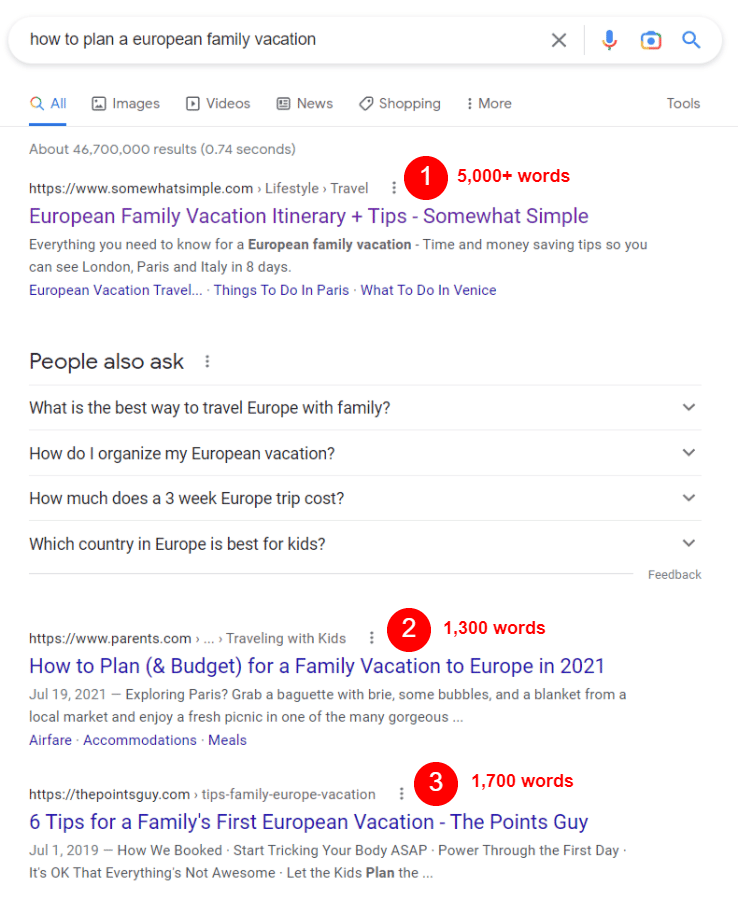
For example, googling “how to plan a European family vacation” will show you a bunch of guides at the top with a mix of word counts.

researching search intent of a topic

Browsing through these results (and taking notes) reveals a few key details:

At a base level, all of the guides include tips for traveling in Europe with families. Two guides (in the top two spots) provide additional information on booking airfare and accommodations. The top guide (“European Family Vacation Itinerary + Tips” by Somewhat Simple), however, went above and beyond and included a full itinerary for traveling from London to Paris to Italy.

travel long-form content example

So, how many words does your long-form guide need, based on all of this?

  • When you’re not sure how many words you should write, average the word count of the top 3 results for your topic and shoot for that number. For the above topic, I would try for a 2,500-3,000-word guide.
    • To find the word count of any page on the internet, use a word counter tool like Word Counter Plus.
  • Think about what you can add to the topic that’s useful and hasn’t already been said. How can you put your unique spin on it based on your brand expertise to provide more value to readers?
  • Don’t forget to consider what the top articles in Google are missing. Are there any gaping holes you can fill?
  • Always include the base information that searchers are looking for. In this instance, I would include tips for traveling to Europe with families, plus strategies and tips for booking airfare, hotels, and transportation.

3. Create an outline and structure the content

From your search intent research, you should already have a few notes about what your long-form post should include. Now it’s time to mix that with your expertise about the topic, plus any additional necessary research, to create an outline.

Why? It’s super important for long-form content to be structured and organized well to maximize readability and engagement. Outlining helps you build that structure.

To that end, always create a loose outline for your long-form content pieces. Since outlining gives you the skeleton structure of your post, it’s useful for playing with the order and flow of your points. Are they arranged logically? Are they all useful and necessary?

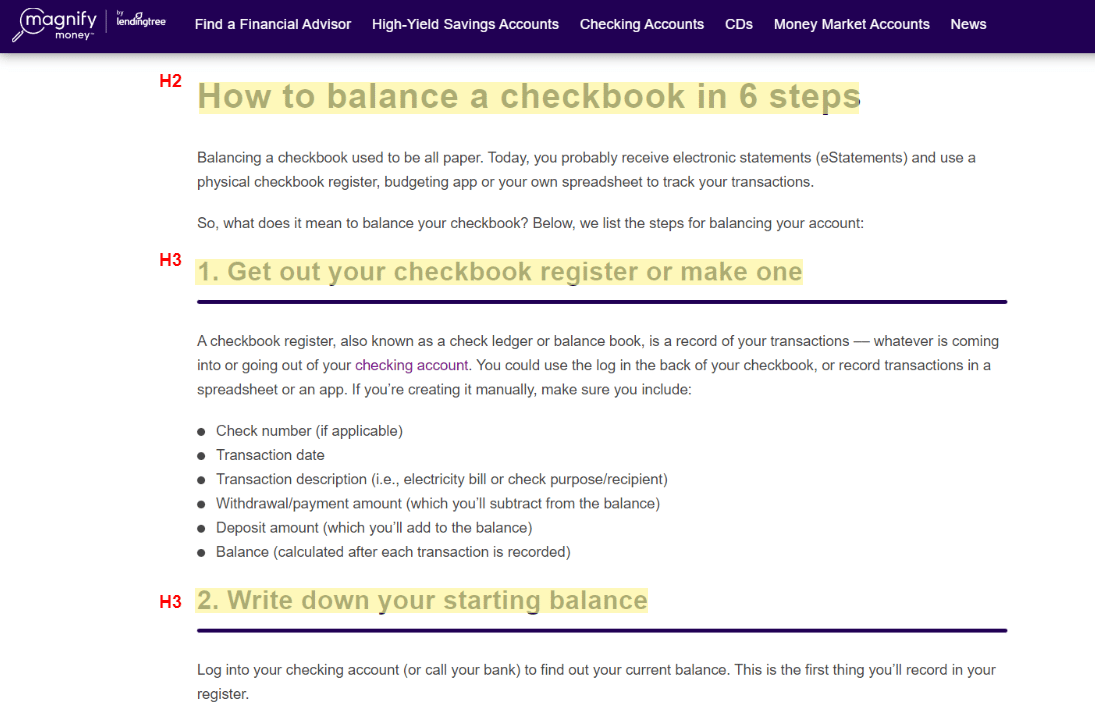
Your skeleton outline also gives you key places to include headings in your finished piece. In general, each major point and sub-point should have a heading attached to it. Including headings organizes the post, breaks up the text, makes it more scannable, eases readability, and even helps with SEO.

Here’s a rundown on headings you should use in your long-form content:

  • H2 – Used for titles of sections and main ideas.
  • H3 – Used for points that support the main idea in your H2.
  • H4 – Used for additional sub-points that support an H3.

You’ll rarely use H5s, and probably never use H6s, so no need to worry about those. H1s are strictly for your post title and nothing else.

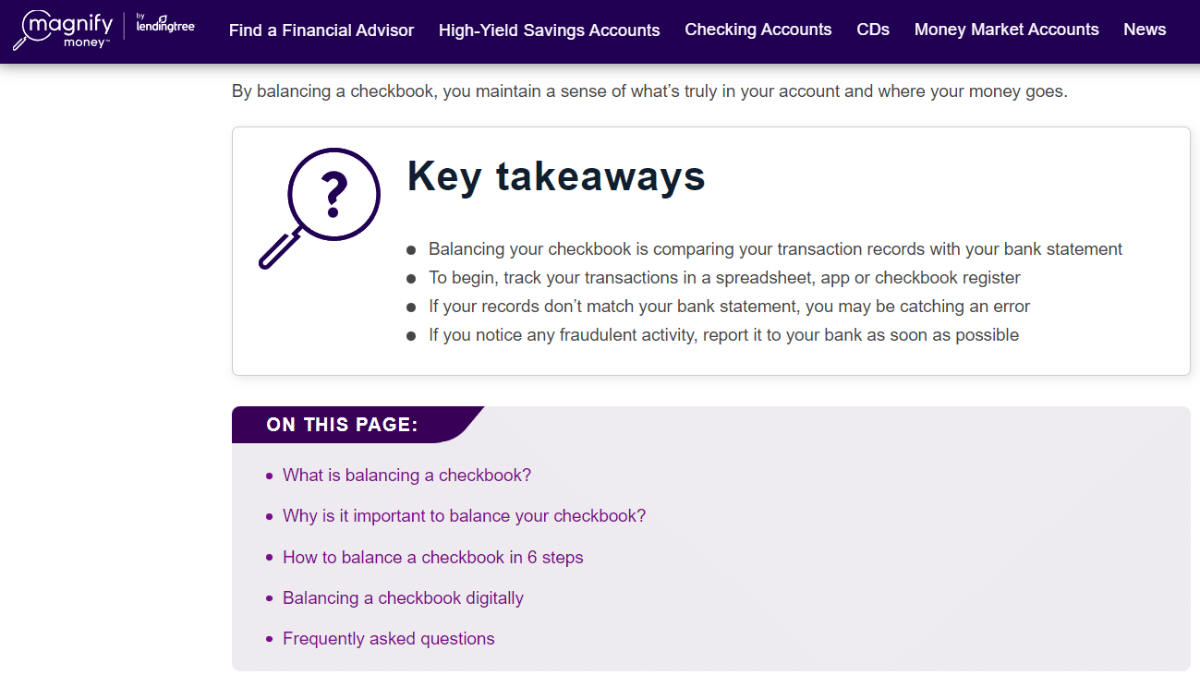
This guide by MagnifyMoney on how to balance a checkbook is well-structured and probably started with an outline of the major points, which also serve as the headings.

financial long-form content example and headings

4. Think about your audience as you write

As you research, structure, and write your long-form post, your audience should be top-of-mind the entire time.

What do they need to know about the topic? What do they want to know?

Do you have particular insight on these things from your research or interactions with them? Include those details in your content.

For example, say I’m writing a post for beginning photographers. My team has had a conversation with a member of our audience who told us they struggle with understanding exposure and need help remembering the basic concepts. I could take that straight into my long-form post and dedicate an entire section to demystifying exposure with pro tips.

Your audience research should guide what you include in your long-form content just as much as what you learn from studying Google and the competition. In many cases, this will help differentiate your content, too.

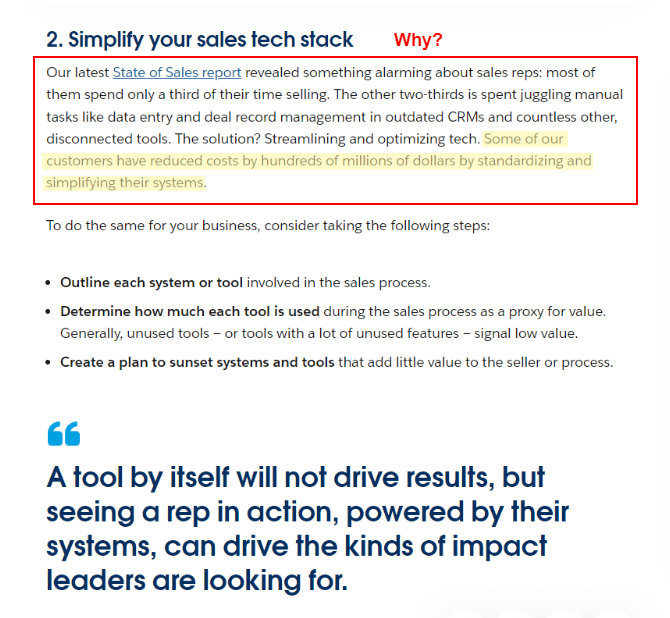
5. Expand on your points and answer, ‘Why should I care?’

As you fill in your outline and expand on each of your points, don’t just offer rote explanations. Instead, also answer the implied question your reader will have as they scroll through your content:

“Why should I care?”

Tell them why the information is important – why it’s crucial to understand in the scheme of things, how it benefits them, what it will ultimately help them do, and/or why it matters.

Great example – this Salesforce article, “3 Ways to Promote Efficient Growth with Resources You Already Have,” has an explanation for each point on why the advice matters and why business owners should care. Even better, Salesforce provides data on why it matters.

b2b long-form content - expanding on a point with why

6. Add visuals, like images and videos, to break up long-form content

More than any other type of content, long-form begs for visual elements to help break up the text.

This includes headings, but more importantly, you need relevant images or videos in there, too. Otherwise, your engagement will be much lower than if you didn’t include these elements.

After all, you don’t want your blog to look like this:

wall of text

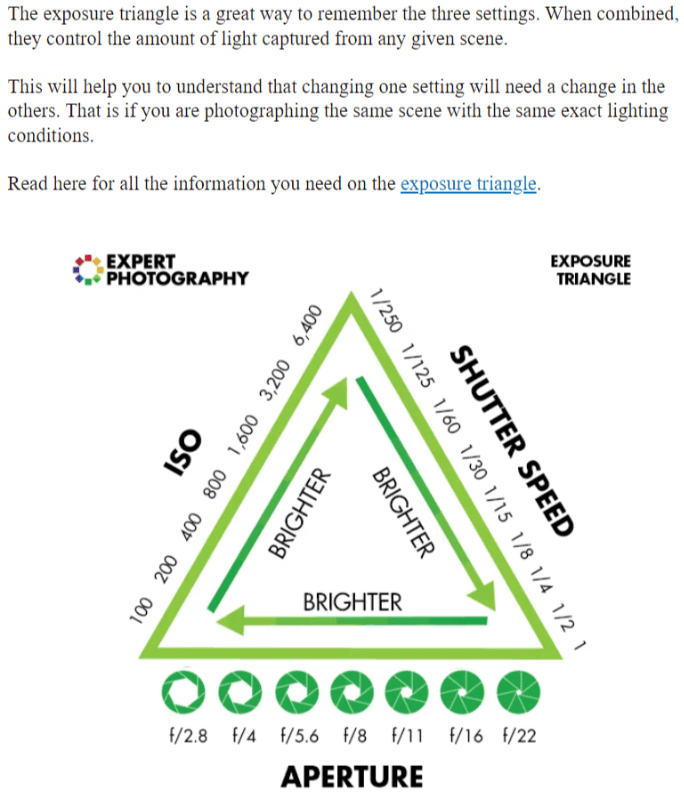
You want it to be readable, scannable, and visually engaging. For that reason, along with smart structuring and formatting, a good rule of thumb is to include one relevant image or video every 200 words.

For instance, in this beginner’s photography guide by Expert Photography, the text is punctuated with colorful custom diagrams and images that illustrate key concepts of photography.

long-form content with images

7. Consider creating a table of contents

Are you taking the plunge and writing a truly epic long-form guide? If your post is longer than 2,500-3,000 words, consider adding a table of contents to the top of the post.

This helps ground your reader in the face of an overwhelming amount of content. You’ll show them a clear overview of what’s inside your post, giving them the lay of the land before they head out on the trail you’ve laid for them through the topic.

It’s immensely helpful for any kind of reader, no matter the industry. Here’s a good example from a blog I mentioned earlier by MagnifyMoney, which includes “key takeaways” at the top followed by a table of contents:

long-form content with table of contents

Other types of long-form content to consider

Finally, don’t forget about the other types of long-form content out there that are not written – videos, webinars, and podcasts.

These content types will take just as much planning and research as written long-form content but can be just as effective for building authority and trust with your audience.

Webinars

According to a survey by Demand Gen, B2B buyers prefer webinars over any other content type (tied with ebooks, another long-form hero, at 57%).

Webinars are simply live presentation events broadcast over the internet to a select group of people. Participants can stream the presentation and participate virtually.

Brands produce educational webinars for the same reasons that you publish long-form content – to build trust with your audience and to grow your brand authority. Plus, webinars can be recorded and published as standalone long-form videos (“replays”) that anyone who couldn’t attend live can watch later.

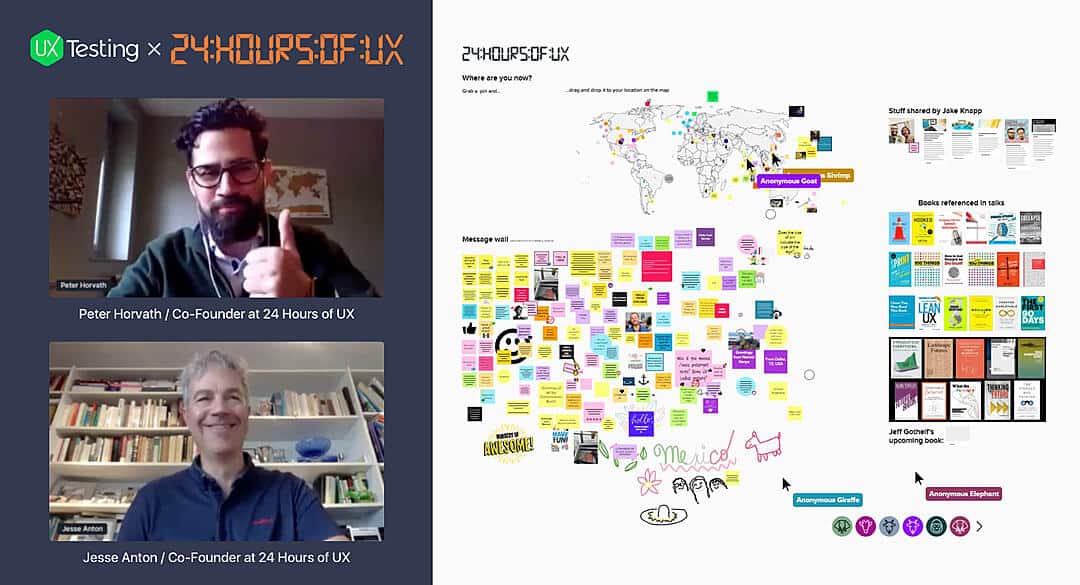
A great example of a webinar is this free event hosted by UX Testing, “24 Hours of UX.”

The webinar featured multiple speakers who talked about UX topics for a total of 24 hours. Over 7,000 people worldwide signed up to watch.

Webinar example

Long-form videos

Generally, long-form videos are around 15 minutes to a full hour in length and dive into a topic in the same vein as written long-form content, except with a visual or storytelling focus. 

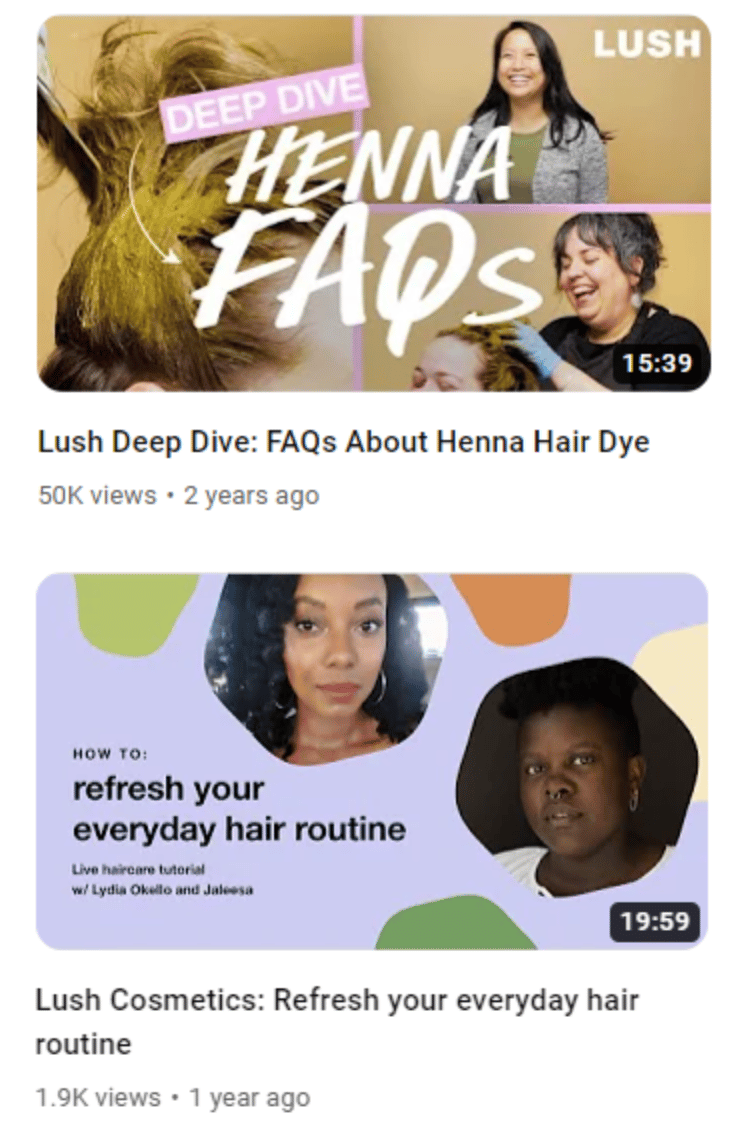
One example of a brand with a robust library of video content (both long and short-form) is Lush, a cosmetics company. Generally, their long-form videos focus on skincare and haircare guides, such as their guides to henna hair dye and refreshing your hair routine.

long-form video content examples

Podcasts

In the last decade, podcasts have risen in popularity. 78% of Americans are familiar with podcasting, and over 50% have listened to one.

It makes sense: They’re easy to listen to in the car or on public transport while doing chores or cooking dinner. They’re easy to download or stream from your mobile device. And there are limitless choices for topics.

Podcasts are also a great choice for long-form content creation. Your brand can tell stories and share valuable information with minimal investment, and you’ll reap the same benefits as publishing long-form content.

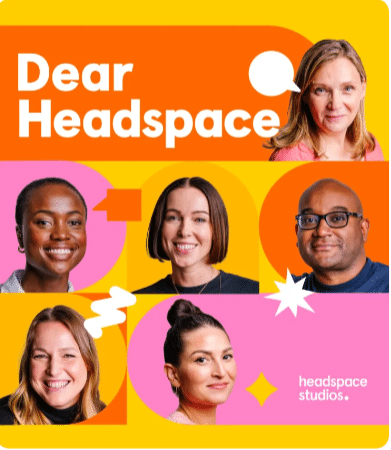
A good example is the Dear Headspace podcast, from the people behind the Headspace app.

dear headspace podcast

In the podcast, meditation experts answer listener questions and provide mindful advice on everything from loss to learning new skills to dealing with negativity in the news.

Commit to writing long-form content and beef up your content strategy

There’s no question that writing long-form content takes commitment. And, if you don’t know what you’re doing, it can seem like a monumentally difficult task.

It takes more time, effort, and resources to create than its short-form sibling, but ultimately, long-form will bring more and better results.

That’s because long-form content is more comprehensive. It aims to explore a topic fully, demonstrate the breadth of your brand expertise, offer valuable insights, and teach your audience something they don’t know.

Done right, comprehensive content ranks better. It keeps your readers on your page longer. Last but not least, it builds trust better than short-form content.

The time you spend learning to write long-form content won’t be wasted. It’s a highly-valuable skill that will help your content marketing bring in more ROI, and one you will use over and over to create profitable content that wins with readers and search engines.


Opinions expressed in this article are those of the guest author and not necessarily Search Engine Land. Staff authors are listed here.


Related stories

New on Search Engine Land

@media screen and (min-width: 800px) { #div-gpt-ad-3191538-7 { display: flex !important; justify-content: center !important; align-items: center !important; min-width:770px; min-height:260px; } } @media screen and (min-width: 1279px) { #div-gpt-ad-3191538-7 { display: flex !important; justify-content: center !important; align-items: center !important; min-width:800px!important; min-height:440px!important; } }

About the author

Julia McCoy

Julia McCoy is the founder of Content Hacker, 7x author, and a leading strategist around creating exceptional content and brand presence that lasts online. At 19 years old, she used her last $75 to build a 7-figure writing agency which she sold ten years later. In the 2020s, she’s devoted to teaching founders and marketers the strategy, skills, and systems they need to build a business through inbound content, so they can create more lasting impact in the world.

https://searchengineland.com/long-form-content-steps-examples-392592


This day in search marketing history: February 6

Google AdWords announces Enhanced Campaigns

In 2013, Google AdWords announced Enhanced Campaigns. This major update was designed to simplify campaign management across multiple devices and increase adoption rates of mobile advertising among small and medium-sized businesses.

Among the notable changes:

  • Tablets and desktops would be grouped together, rather than treated as separate devices.
  • Advertisers would set a baseline bid that applied to both desktop and tablet, and then set the mobile bid as a multiplier of the desktop/tablet bid. 
  • Targeting at the operating system level would no longer be available.

Google planned to upgrade all campaigns in June 2013 (though the full rollout would actually begin July 22 and would take several weeks to complete).

Read all about it in The Big AdWords Update: Enhanced Campaigns Puts The Focus On Mobile.


Also on this day


Happy 15th birthday to Google Maps, the company’s second most important product

2020: Google introduced a refreshed version of its app for Android and iOS with some new features.


Now, get your Google Shopping ads on Gmail, Discover, YouTube

2020: Google kept finding more places to show Shopping ads as merchants prioritized them over text ads.


Google Search Console to consolidate Search Performance reports to canonical URL

2019: Starting at the end of March 2019, Google would change how the Google Search Console Performance reports counted metrics.


Google My Business supports hotel check-in and check-out times

2019: Google would display that information to searchers looking for more information about those times.


Google officially announces the new Google Search Console is available for everyone

2018: The beta version had reached nearly everyone as of a couple of weeks ago.


Google removes tappable shortcuts from search app

2018: Less than a year after it launched, Google removed the shortcuts offering quick answers on weather, sports and entertainment info.


Bing explains how AI-powered intelligent answers can show users two points of view for the same query

2018: Bing believed there were many questions where getting just one point of view was not sufficient, convenient or comprehensive


Quora adds more contextual & behavioral ad-targeting options

2018: Quora offered more options for behavioral and contextual targeting to either narrow or widen audience targets.


Google makes it easier to see and share publishers’ real URLs from AMP pages

2017: The AMP header area would display a link or chain icon, what it called the “anchor” button. Clicking on this would make the publisher’s direct URL appear.


84 Lumber and Avocados From Mexico among Super Bowl advertisers that stood out in paid search

2017: Both advertisers opted to drive users to their own sites instead of YouTube.


Google Maps updates Android app with real-time traffic info, nearby places & bus schedules

2017: Swiping up from the bottom of the Google Maps app home screen on Android displayed a Places tab, Driving tab and Transit tab.


Google Confirms Making “Tweaks” To The Search Results But Says No “Update” To Announce

2015: Google said he latest update the SEO community noticed was not related to the Penguin or Panda algorithms.


Google Removes “How Can I Join ISIS” Autosuggestion

2015: Google censored out the Google autocomplete results to show ISIS for the search term [how can I join].


Bing Ads Rolling Out Updates To Quality Score Reporting

2015: Changes were designed to make quality score easier to use as a guide to where to focus your optimization efforts.


Yahoo Gemini Gaining Mobile Search Share, But Not At Google’s Expense, Yet

2015: The spike in Gemini traffic appeared to come almost entirely at the expense of mobile ads served by Bing.


Google Penalized A Germany Agency & Their Clients For Link Schemes, Says Matt Cutts

2014: He added that Google would be going after more Germany link schemes in the near future.


Google Requiring Some Business To Reverify Their Listings Or Be Removed From Google Maps

2014: Some business owners received emails from Google requiring them to reverify their listings within three weeks or their listings would be deleted from Google Maps and Google+ Local.


Two New Link Analysis Tools Available: OpenLinkProfiler.org & WebMeUp.com

2014: Two new link tools were available for those looking to analyze their own links or competitor links.


Google’s “Olympic Charter” Logo Stands Up To Russia’s Anti-Gay Legislation

2014: The logo included a quote stressing that the official Olympic Charter was against discrimination and using the colors of the rainbow gay pride flag.


Update: “When Do The Olympics Opening Ceremonies Start?” Now You CAN Ask Yahoo

2014: Yahoo inserted a Search Shortcut that displayed not only the live start time but the TV broadcast time at the top of the search results.


Google On Will They Ever Remove PageRank From The Google Toolbar?

2013: Matt Cutts said the “writing is on the wall” for this feature. Google would remove Toolbar PageRank just over three years later, in March 2016.


Australia’s Highest Court Relieves Google Of Liability For “Deceptive” Search Ads

2013: The Australian Competition & Consumer Commission sued Google six years earlier, claiming that certain travel-related ads appearing in search results were misleading.


Has Google Overtaken Naver In South Korea?

2013: Despite reports that Naver controlled somewhere between 70-80% of the search market in South Korea, StatCounter was showing Google soundly defeating Naver since February 2012.


Google Buys Channel Intelligence For $125 Million

2013: Channel Intelligence offered a range of services built around data management and product feed optimization.


Super Bowl Commercials 2013 Edition: For Search Visibility, Most Brands Bought AdWords Too

2013: Eighty percent of brands bought AdWords for branded searches and 50% bought AdWords for commercial taglines.


Google Maps Adds Ski Resort Trail Maps For Android & iPhone

2013: The new feature overlayed lifts and trail maps for 38 major ski areas in the U.S.


Find Content Quicker On The Go With Twitter’s New Mobile Search & Discover Upgrades

2013: The Search, Discover and Connect tabs were all updated.


Google Instant: Only On When Your Computer Can Handle It

2012: If you went to the search preferences it would say Google Instant was only enabled when “my computer is fast enough” and then showed whether Google thought your computer was fast enough.


Report: National Marketers Love Local, Fail At Basic Tactics

2012: Insufficient funding, a lack of education or just plain ignorance were the factors behind the flawed national-local approaches.


Bing Webmaster Tools Adds Markup Validator

2012: The tool scanned for HTML Microdata, Microformats, RDFa, Schema.org and Open Graph.


Yahoo Launches Mobile-App Search (For PCs) In The UK

2012: As an app search tool, it was quite nice. Neither Google nor Bing offered anything comparable in their main search engines.


Under Threat Of Being Blocked Google, Facebook Comply With India’s New Internet Censorship Rules

2012: The law made online publishers potentially liable for the acts of individual users and third parties.


A Google Super Bowl Ad? Eric Schmidt Hints At It

2010: His tweet suggested that Google would run its first major broadcast television commercial during the Super Bowl.


Another Survey (Incorrectly) Predicts Google Could Lose Search Crown

2009: Forrester Research had concluded that Google, for lack of user loyalty, was vulnerable to being dethroned and that another “Google killer” was lurking just around the corner.


Privacy Critics Don’t Give Google Enough ‘Latitude’

2009: An example of overreaching in an effort to gain (media) attention.


Google Offers A Peek Into Its Internal Eye-Tracking Studies

2009: An interesting look into how Google tested its search results pages and how searchers interacted with them.


Search In Pictures: Google Doodle Wall, Ask.com On Labonte’s Helmet & A Google Boat?

2009: The latest images showing what people eat at the search engine companies, how they play, who they meet, where they speak, what toys they have, and more.


The Latest From Jerry: Stay Focused, Yahoos!

2008: No real news other than Yang telling employees no decision had been made, proposals were being evaluated, and people loved Yahoo.


Berkowitz Had Hoped To Turn Around Microsoft, But May Find Himself In “Turnaound”

2008: Several internal groups were slated for leadership changes.


Google To Fight Baidu In China With Legal Music Downloads?

2008: 7% of Baidu’s traffic was to access free music, but Baidu had been a target of copyright actions because of this.


Ask Launches BigNews

2008: It was similar to Google News, with a side of Digg.


Searching For Southern Tornado Maps

2008: There wasn’t much map content about the tornadoes that tragically tore through the Southern U.S.


SphinnCon Israel 2008 Recap

2008: Coverage of first SphinnCon event in Jerusalem, Israel.


Google Hiring In Africa

2008: The company was hiring in its Nairobi, Kenya headquarters and opening new offices in several Africa countries.


What Yahoo’s Panama Update Means For Searchers

2007: With the new ad ranking system in place, Yahoo hoped people would start looking at the results more as a whole.


Keyword Research And Consumer Demand

2007: How marketers were using search volumes to help conduct research and development, launch new products and predict potential product success based on perceived consumer demand.


Google’s Pen Flatlines For Ask, Parody Of Recent Capacity Problems

2007: They described the flatlining of the Google pen to cause “considerable inconvenience and loss of data.”


IAC Earnings Drop But Ask.com Grows

2007: IAC’s profits dropped 98 percent in the fourth-quarter.


Search Engine Land: January 2007 Statistics Review

2007: How Search Engine Land was growing.


Past contributions from Search Engine Land’s Subject Matter Experts (SMEs)

These columns are a snapshot in time and have not been updated since publishing, unless noted. Opinions expressed in these articles are those of the author and not necessarily Search Engine Land.


< February 5 | Search Marketing History | February 7 >


Related stories

New on Search Engine Land

@media screen and (min-width: 800px) { #div-gpt-ad-3191538-7 { display: flex !important; justify-content: center !important; align-items: center !important; min-width:770px; min-height:260px; } } @media screen and (min-width: 1279px) { #div-gpt-ad-3191538-7 { display: flex !important; justify-content: center !important; align-items: center !important; min-width:800px!important; min-height:440px!important; } }

About the author

Danny Goodwin

Danny Goodwin is Managing Editor of Search Engine Land & SMX. In addition to writing daily about SEO, PPC, and more for Search Engine Land, Goodwin also manages Search Engine Land’s roster of subject-matter experts. He also helps program our conference series, SMX – Search Marketing Expo. Prior to joining Search Engine Land, Goodwin was Executive Editor at Search Engine Journal, where he led editorial initiatives for the brand. He also was an editor at Search Engine Watch. He has spoken at many major search conferences and virtual events, and has been sourced for his expertise by a wide range of publications and podcasts.

https://searchengineland.com/search-marketing-history-february-6-392679


This day in search marketing history: February 5

Moz upgrades its Domain Authority metric

In 2019, SEO tool Moz announced an update to how they measured Domain Authority (DA).

Basically, DA is a score, from 0-100, that “predicts how likely a website is to rank in search engine result pages.”

Curious about what changed? Read all about it in Moz upgrades controversial ‘domain authority’ metric.

To be clear, Google does not use Domain Authority to determine ranking. “We don’t use domain authority at all in our algorithms,” according to a tweet. by Google’s John Mueller.

I bolded that part above because the DA metric has caused confusion within the SEO industry, as many have basically assigned it value as a meaningful SEO metric, akin to the old visible Google PageRank scores. And you will often see it in spammy SEO and link building emails.

Even Rand Fishkin, who created the metric, essentially disowned Domain Authority as something he didn’t care much about anymore (“I know. I created it, but still”) during Milestone’s Engage conference in August 2022.


Also on this day


Justice Department homing in on Google Ad Manager in antitrust probe

2020: The feds were interviewing publishers and ad-tech rivals about whether Google has too much control “over the monetization of digital content.”


Tripadvisor’s new ‘Review Hub’ lets restaurateurs manage reviews from multiple sources in one place

2020: The subscription-based product could also be used to identify review trends across sites.


Video: Jim Boykin on how link building has evolved over two decades

2020:  In this installment of Barry Schwartz’s vlog series, he also chatted with Boykin about Google penalties, algorithm updates and the importance of featured snippets and people also ask for SEO.


5 takeaways from Google’s Q4 2018 earnings for search marketers

2019: Google executives discussed search experience, campaign, device and performance updates.


Google adds new SEO Audit category to Chrome’s Lighthouse extension

2018: The popular auditing tool used by developers and search marketers enabled users to run basic SEO checks against site pages.


Google dedicates engineering team to accelerate development of WordPress ecosystem

2018: Google’s partnership with WordPress aimed to jump-start the platform’s support of the latest web technologies, particularly those involving performance and mobile experience.


Google Search Console AMP report error now corrected

2018: “Major content mismatch” were due to a processing error on Google’s side. 


Google Has Penalized A Link Network In Japan

2016: After being quiet for over a year on link network penalties, Google said it had penalized a large, Japanese-based link network.


AdWords App For Android Now Supports Universal App Campaigns

2016: New conversion columns were also available in the latest update.


Sorry, No Emoji Allowed In Google PLAs (Frown Face)

2016: Google updated its store name guidelines in the Merchant Store policy center to specifically cite emoticons and emoji among its don’ts.


Search In Pics: GoogleBot Costume, Google Maps Peghog & Fancy Google Coffee Maker

2016: The latest images showing what people eat at the search engine companies, how they play, who they meet, where they speak, what toys they have and more.


Official: Twitter To Give Google Access To “Firehose” Of Tweets

2015: Twitter confirmed that it had a deal again to supply Google with access to its full stream of tweets.


As Apple-Google Deal Expires, Who Will Win The Safari Default Search Business?

2015: Would it be Bing, Yahoo or Apple itself that supplied Safari’s search engine?


Marketers Spent $4 Billion On Click-to-Call Advertising In 2014 — Report

2015: Lack of keyword attribution created a “blind spot” for search marketers.


Google App Indexing Statistics & Errors Being Emailed To Webmasters

2015: Google Webmaster Tools email notifications drove app deep linking awareness in terms of errors and impression and click statistics.


It’s Done: Google Settles Search Antitrust Case In Europe

2014:  Google escaped any significant fines or penalties. More coverage: Wow! See How Much Screen Real Estate Google Is Giving Rivals In Its EU Antitrust Settlement


Google’s Latest Manual Action Penalty: Spammy Structured Markup

2014: How to get it: marking up content that was invisible to users, marking up irrelevant or misleading content, and/or other manipulative behavior that violated Google’s Rich Snippet Quality guidelines.


Official: Google’s Sridhar Ramaswamy Takes Over Ads & Commerce As Wojcicki Heads To YouTube

2014: Ramaswamy and Wojcicki shared the title of SVP, Ads & Commerce, and had been jointly running the ads division for the prior year.


SEMPO Search Survey: Nearly 70% Of Agencies Say Client SEO Budgets To Increase In 2014

2014: Only 47% of respondents from within a company said there would be a significant or, at least, some increase to their SEO budget.


Yelp Reports $233 Million In Revenue For 2013, Up 69% From 2012

2014: Active local business accounts on Yelp grew to 67,000 in 2013, up 69% year-over-year.


Microsoft’s $15 Million Check-in: Will Redmond Buy Foursquare?

2014: Microsoft had reportedly signed a multi-year agreement to license Foursquare data for both mobile and Bing on the PC.


Bing Launches New Winter Olympics Search Features & Counter To Track Gold Medals

2014: When Bing users searched on specific sports and athletes the search engine would include Olympic-related schedules and content in its search results.


“When Do The Olympics Opening Ceremonies Start?” Search Engines Compete To Answer

2014: How Google, Bing and Yahoo stacked up in this Olympic effort.


Telenav Thinks Scout Can Take On Google Maps

2014: Apparently because Scout had higher user ratings than Google Maps in the Google Play store at the time.


Will A Google Crackdown On Shady Search Toolbars Hurt AVG & IAC?

2013: Either they needed to change their ways — and become much more transparent and easy to use — or they would apparently need to look elsewhere for ads. More coverage: IAC: We Comply With Google’s Toolbar Standards


Survey: Half Of Small Businesses Never Update Their Listings Online

2013: 70% of SMBs said they didn’t have the time to manage listings on all of the sites that consumers use.


Study: Are Public Record Ads Placed On Google Racially Biased?

2013: The study found that ads associated with black identifying names were more likely to have ads with the word “arrest” in them than ads that were associated with white identifying names. 


Dilbert: SEOs Control Content On The Web

2013: A Dilbert cartoon once again took a jab at SEOs and what they do or can do.


When Is the Super Bowl Start Time? The NFL Finally Gets It Right

2012: In past years, organizations like the NFL, the playing teams, and the failed to show up in search results because none of their sites answered the question.


Turning The Tables On The Google Toolbar & Disclosure Claims

2012: Google didn’t seem to occupy any higher ground than Microsoft when it came to using data gathered from browser add-ons to improve its own services, including its search engine.


What Time Does the 2011 Super Bowl Start? A (Continuing) Lesson in Search Visibility

2012: The NFL and FOX were still nowhere to be found.


Google Recommends The Competition On Your Business Place Page

2010: The content block, called “Nearby places you might like,” appeared below reviews on the place page and show up to 10 recommended businesses.


Microsoft Extends Bing Search Deal With Facebook

2010: Deal included a more robust Bing search experience on Facebook. Also, Bing would power Facebook search outside of the U.S., to all Facebook users, worldwide.


Siri: Not A “Search Engine” But You Might Use It Like One

2010: The highly-anticipated iPhone app was intended to enable you to do more with your voice and your phone in fewer clicks or moves.


Super Bowl 2010 Winners: Google, Yahoo & Bing Are Ready

2010: All three had Super Bowl shortcuts/oneboxes in place.


2002 In Review: Google Powers AOL; AdWords Go Cost-Per-Click

2010: Major events from the year 2002 in consumer search.


Google Earth Adds World War II Imagery

2010: Y could compare, side by side, the earth as it is today versus how it was during World War II.


Search In Pictures: Bing Hat, Yahoo Balls & Yahoo Karate

2010: The latest images showing what people eat at the search engine companies, how they play, who they meet, where they speak, what toys they have, and more.


Google Continues AdWords Product PlusBox

2009: It was still a limited beta to test the effectiveness of engaging potential customers for advertisers.


Google Books Search Goes Mobile

2009: If you viewed the book on a mobile device, they would try to extract the text using OCR and show you plain text, not scanned text.


A Bad Month For SEO’s Reputation

2008: Although the bad reputation issue had been out there for years, demand for SEO services was as strong as ever.


MicroHoo: Boon Or Bust For Yahoo?

2008: There seemed to be mounting cynicism and detachment among Yahoos.


2008 elections


Google Releases New Link Reporting Tools

2007: You could view and even download thousands of links to your site via Google Webmaster Central.


Google’s Click Fraud Team Writes On Commonly Raised Concerns

2007: They analyzed IP address, duplicate clicks, and various other clicking patterns to detect click fraud.


Searching For Super Bowl XLI

2007: Although there were improvements over 2006, this year was still lacking in terms of integrating their offline and online ad efforts.


YouTube Pulls Videos That May Not Violate DMCA Law

2007: Google didn’t know whether a video was infringing. It simply knew it was reported as an infringement.


Krillion Launches ‘Actionable Local Search’

2007: Krillion helped consumers find where they could buy products in their markets after conducting online research.


Major UK Mobile Companies Look To Start Mobile Search Engine

2007: The companies included Vodafone, France Telecom, Telefonica, Deutsche Telekom, Hutchison Whampoa, Telecom Italia and Cingular.


FAST Introduces Private-Label Contextual Ad System

2007: It let publishers manage and serve their own advertisements, bypassing Google, Yahoo and other third-party contextual advertising services.


Will Tagging Replace The Dewey Decimal System?

2007: 28% of internet users had tagged or categorized content online such as photos, news stories or blog posts.


Past contributions from Search Engine Land’s Subject Matter Experts (SMEs)

These columns are a snapshot in time and have not been updated since publishing, unless noted. Opinions expressed in these articles are those of the author and not necessarily Search Engine Land.


< February 4 | Search Marketing History | February 6 >


Related stories

New on Search Engine Land

@media screen and (min-width: 800px) { #div-gpt-ad-3191538-7 { display: flex !important; justify-content: center !important; align-items: center !important; min-width:770px; min-height:260px; } } @media screen and (min-width: 1279px) { #div-gpt-ad-3191538-7 { display: flex !important; justify-content: center !important; align-items: center !important; min-width:800px!important; min-height:440px!important; } }

About the author

Danny Goodwin

Danny Goodwin is Managing Editor of Search Engine Land & SMX. In addition to writing daily about SEO, PPC, and more for Search Engine Land, Goodwin also manages Search Engine Land’s roster of subject-matter experts. He also helps program our conference series, SMX – Search Marketing Expo. Prior to joining Search Engine Land, Goodwin was Executive Editor at Search Engine Journal, where he led editorial initiatives for the brand. He also was an editor at Search Engine Watch. He has spoken at many major search conferences and virtual events, and has been sourced for his expertise by a wide range of publications and podcasts.

https://searchengineland.com/search-marketing-history-february-5-392678


This day in search marketing history: February 4

Microsoft’s bid to buy Yahoo, Day 4

In 2008, there were some big developments following the news of Microsoft’s bid to purchase Yahoo. 

Google wasn’t happy about the news. The company objected, suggesting that the move would hurt what it called the underlying principles of the internet: “openness and innovation.”

There was some ironic back and forth, as Google had spent the past year arguing that it should be able to acquire DoubleClick, which Microsoft argued against because it would make Google too dominant in online advertising.

Meanwhile, was Yahoo considering an alliance with Google? And why did Google CEO Eric Schmidt call Yahoo CEO Jerry Yang to offer Yahoo help?

And what about post-acquisition “integration” issues? Local, maps, and mobile were areas where both companies had made significant investments but also had significant duplication and redundancy.

Microsoft sounded pretty confident the deal would happen. As Kevin Johnson put it:

  • “It doesn’t make sense to have thousands of engineers at Yahoo working on a search index, thousands of engineers at Microsoft working on the same search index. By combining, we can have one team of people across the two companies working on the search index, and then have others continue to focus on areas where we’ve defined differentiation in search. New search verticals and expanded user experience for search. We’ve got so many ideas, more engineers applied to those ideas will drive breakthroughs in search.”

Dig deeper:


Also on this day


Enhanced conversions: Google tests global site tags with automatic collection

2022: The global site tag could now automatically collect the information (e.g., email, telephone number) that a user submitted on the website.


Microsoft Bing adds automobile and car search features

2022: There were links to the MSN Autos marketplace in the knowledge panels for these car-related searches under “learn more” and “shop used cars” right above the car specifications.


Google expands phrase match to include broad match modifier traffic

2021: Phrase match would expand to include additional broad match modifier traffic and support for broad match modifier would end.


5 takeaways for marketers from Google’s Q4 2019 earnings

2020: For the first time, the company disclosed YouTube advertising revenues.


Hitwise halts some reporting services in wake of Jumpshot’s closing

2020: Hitwise informed its customers that daily, weekly and monthly metric updates were on pause until further notice.


Filter, sort, bulk manage product groups in Microsoft Shopping soon

2020: Scripts were also coming to Shopping campaigns in Microsoft Advertising.


Bing doesn’t show ads for queries around Super Bowl commercials, while Google does

2019: The company’s primary goal was not to drive revenue and chose not to monetize search results.


Survey: Local SEO an ‘artisanal’ discipline dominated by small agencies

2019: Roughly 53% of firms doing local SEO had 10 or fewer clients.


Google Adds JSON-LD Support For Structured Data Markup

2016: Google started supporting JSON-LD for structured data markup for reviews and products rich snippets.


Google Revamps Mobile Travel Search Results, Almost Making Web Results Irrelevant

2016: Once you clicked on the “more destinations” button, Google led you into a travel search experience that made it harder to view organic search results.


Bing Updates Android & iOS Apps To Enable More Finding With Less Searching

2016: The idea, according to Microsoft, was to help users “find” and “do” faster.


Google Expands Webmaster Documentation Around Reconsideration Requests

2015: Google clarified and expanded on their reconsideration request documentation for those who had been hit by a Google manual action.


Report: Google Will Get Access To Twitter’s Firehose Again

2015: The agreement came 3+ years after a similar arrangement ended. It would make tweets easier to find via search.


Google Answers Now Showing Blue Icons Linking To Publisher Sites Or More Google Answers

2015: This had been done previously for easter eggs and Google’s own content, but now it worked for third-party publishers.


Bing Ads Discusses 3 New Initiatives: Native Ads On MSN.com, Mobile Ad Formats, Remarketing

2015: The company’s foray into native advertising would harness intent signals from Bing Ads.


With Nadella’s Appointment, The “Search CEOs” Now Run Google, Yahoo & Microsoft

2014: For the first time in ages, the three major search companies in the US were all run by CEOs who either came out of a search background or had a solid understanding of it.


Google AdWords To Roll Out Flexible Conversion Counting, Says Goodbye To 1 Per-Click, Many-Per-Click

2014: Converted clicks = Conversions (1 per-click) and Conversions = Conversions (many-per-click).


Google’s DoubleClick Search Ramps Focus On PLAs And Ecommerce With New Commerce Suite

2014: The suite was comprised of two new capabilities: Dynamic Product Listing Ads creation and Product Listing Ads optimization.


Google Showing Large Video Embeds In Some Search Results

2014: Searching Google for video-related content would return a large, playable, video directly at the top of the search results.


Google Maps App Now Continually Searching For Faster Route

2014: The app would notify you if a faster route was available while you were in transit.


Beyonce, Blackout, Ravens And M&Ms — What We Searched For During Super Bowl 2013

2013: Viewers turned to their devices to ask [why did the lights go out], [superdome power outage] and [what caused power outage].


Bing: Why Google’s Wrong In Its Accusations

2011: Bing said it has search signal, not Google signal.


Yelp: 35 Percent Of Searches Mobile Now

2011: The mobile audience on Yelp was more active and engaged than its PC audience.


Search In Pics: Google Sweden License Plate, Yahoo Beach Sandals & Google Privacy Cup

2011: The latest images culled from the web, showing what people eat at the search engine companies, how they play, who they meet, where they speak, what toys they have, and more.


Google Maps To Add “Google Store Views”

2010: Google Store Views would allow people to virtually walk into the store, off of Google Street Views.


Yahoo Sells “Non-Core” Asset HotJobs For $225 Million

2010: Yahoo would continue to have a career site, but it would be powered and populated by Monster.


2001 In Review: Search Engine Marketing Gets Respect, As Does Search Generally

2010: Major events from the year 2001 in consumer search. 


Google Latitude: Share Your Location On Google Maps

2009: More coverage: Google Latitude Turns Maps (For Mobile) Into Social Tool


Google Android Phone Finds Its Voice (Search That Is)

2009: Google was rolling out voice search on the Android platform via the new software update.


FriendFeed Improves Search Features

2009: You could use the advanced search features and then subscribe to that search via RSS.


Internet Explorer 8 Search Now Showing Instant Answers From Live Search

2009: Instant answers were shown for searches related to financial information, weather conditions, movie show times, calculations, equations, conversions, and definitions.


Yahoo Starting To Roll Out “Search Pad” Feature

2009: The application automatically collected sites and content as users conducted online research.


Google’s Influence In The Oval Office

2009: Google was the “fourth-largest corporate source of campaign cash” for President Obama’s presidential race.


Virtual Earth’s First 2009 Imagery Update

2009: The major updates included the new Digital Globe satellite imagery they recently licensed and “bird’s eye” photos of Paris, France. 


IAC Troubles, Ask.com, And Post-Yahoo Search Share

2008: IAC claimed the legal battle for control of IAC’s board was impeding the company’s ability to effectively operate.


Microsoft’s Prize: Big Yahoo CPMs, Largest Display Share

2008: Yahoo ranked as the top site with just under 19% of US online display advertising.


Google Releases New Urchin Beta

2008: For those who required server-based analytics.


EU Prepares “Objections” To Google-DoubleClick Acquisition

2008: The European Union’s antitrust regulator was likely to impose conditions or ask Google for concessions in order to bless the acquisition.


Google Files Screenshots Of Compensation Tool With SEC

2008: The tool modeled the potential value of Google equity awards, including transferable stock options.


From Search Marketing Expo (SMX)


Past contributions from Search Engine Land’s Subject Matter Experts (SMEs)

These columns are a snapshot in time and have not been updated since publishing, unless noted. Opinions expressed in these articles are those of the author and not necessarily Search Engine Land.


< February 3 | Search Marketing History | February 5 >


Related stories

New on Search Engine Land

@media screen and (min-width: 800px) { #div-gpt-ad-3191538-7 { display: flex !important; justify-content: center !important; align-items: center !important; min-width:770px; min-height:260px; } } @media screen and (min-width: 1279px) { #div-gpt-ad-3191538-7 { display: flex !important; justify-content: center !important; align-items: center !important; min-width:800px!important; min-height:440px!important; } }

About the author

Danny Goodwin

Danny Goodwin is Managing Editor of Search Engine Land & SMX. In addition to writing daily about SEO, PPC, and more for Search Engine Land, Goodwin also manages Search Engine Land’s roster of subject-matter experts. He also helps program our conference series, SMX – Search Marketing Expo. Prior to joining Search Engine Land, Goodwin was Executive Editor at Search Engine Journal, where he led editorial initiatives for the brand. He also was an editor at Search Engine Watch. He has spoken at many major search conferences and virtual events, and has been sourced for his expertise by a wide range of publications and podcasts.

https://searchengineland.com/search-marketing-history-february-4-392677


New Bingbot user-agent now fully live

Microsoft’s Fabrice Canel confirmed this morning that the new Bingbot user-agent is now 100% live today. The new Bingbot will generally be used for crawling 100% of sites, unless something goes wrong and Bing has to fallback to the previous Bingbot user-agent.

Bing’s confirmation. Fabrice Canel posted on Twitter, “yes, 100% today. We fallback to previous user agents where appropriate.”

He linked to the updated Bing crawler user agents page that previously listed this as the user agent:

Mozilla/5.0 (compatible; bingbot/2.0; +http://www.bing.com/bingbot.htm)

Mozilla/5.0 AppleWebKit/537.36 (KHTML, like Gecko; compatible; bingbot/2.0; +http://www. bing.com/bingbot.htm) Chrome/ WXYZ Safari/537.36

Mozilla/5.0 (Linux; Android 6.0.1; Nexus 5X Build/MMB29P) AppleWebKit/537.36 (KHTML, like Gecko) Chrome/ WXYZ  Mobile Safari/537.36 (compatible; bingbot/2.0; +http://www.bing.com/bingbot.htm)

The new user agent is documented as:

Mozilla/5.0 AppleWebKit/537.36 (KHTML, like Gecko; compatible; bingbot/2.0; +http://www.bing.com/bingbot.htm) Chrome/

Mozilla/5.0 (compatible; bingbot/2.0; +http://www.bing.com/bingbot.htm)
W.X.Y.Z Safari/537.36

Mozilla/5.0 (Linux; Android 6.0.1; Nexus 5X Build/MMB29P) AppleWebKit/537.36 (KHTML, like Gecko) Chrome/W.X.Y.Z Mobile Safari/537.36 (compatible; bingbot/2.0; +http://www.bing.com/bingbot.htm)

Some history. In 2019, Microsoft Bing announced new Bingbot user-agent names that fit better with its evergreen Bingbot crawling and rendering service. Then in April 2022, Microsoft announced a name change, a user agent name change, for BingBot. In December, Microsoft told us the new Bingbot user agent would be 100% live by January 2023.

Old user-agent. Microsoft said it would stop using its historical user agent by the Fall of 2022. That user-agent looks like this:
Mozilla/5.0 (compatible; bingbot/2.0; +https://www.bing.com/bingbot.htm)

New user-agent. Bing will use a user-agent that identifies the specific version of Microsoft Edge is crawling your site. Here is the format for both desktop and mobile:

Desktop – Mozilla/5.0 AppleWebKit/537.36 (KHTML, like Gecko; compatible; bingbot/2.0; +https://www.bing.com/bingbot.htm) Chrome/W.X.Y.Z Safari/537.36

Mobile – Mozilla/5.0 (Linux; Android 6.0.1; Nexus 5X Build/MMB29P) AppleWebKit/537.36 (KHTML, like Gecko) Chrome/W.X.Y.Z Mobile Safari/537.36 (compatible; bingbot/2.0; +https://www.bing.com/bingbot.htm)

“W.X.Y.Z” will be substituted with the latest Microsoft Edge version Bing is using, for eg. “100.0.4896.127″.

Why we care. You probably should have been prepared for this change since it was announced back in 2019. But in any event, this change can impact your site if you have any user agent detection methods for BingBot. Make sure to test your site to see if it supports the new user agent. Most sites probably do not need to worry about this, but if you have done any advanced bot detection, you may need to take steps to update those scripts.

It seems that if you did not make the necessary changes, then Bing will use the old user agent as a fallback.


Related stories

New on Search Engine Land

@media screen and (min-width: 800px) { #div-gpt-ad-3191538-7 { display: flex !important; justify-content: center !important; align-items: center !important; min-width:770px; min-height:260px; } } @media screen and (min-width: 1279px) { #div-gpt-ad-3191538-7 { display: flex !important; justify-content: center !important; align-items: center !important; min-width:800px!important; min-height:440px!important; } }

About the author

Barry Schwartz

Barry Schwartz a Contributing Editor to Search Engine Land and a member of the programming team for SMX events. He owns RustyBrick, a NY based web consulting firm. He also runs Search Engine Roundtable, a popular search blog on very advanced SEM topics. Barry can be followed on Twitter here.

https://searchengineland.com/new-bingbot-user-agent-now-fully-live-392665


Five things you need to know about content optimization in 2023

5 Things You Need To Know About Optimizing Content in 2023

30-second summary:

  • As the content battleground goes through tremendous upheaval, SEO insights will continue to grow in importance
  • ChatGPT can help content marketers get an edge over their competition by efficiently creating and editing high-quality content
  • Making sure your content rank high enough to engage the target audience requires strategic planning and implementation

Google is constantly testing and updating its algorithms in pursuit of the best possible searcher experience. As the search giant explains in its ‘How Search Works’ documentation, that means understanding the intent behind the query and bringing back results that are relevant, high-quality, and accessible for consumers.

As if the constantly shifting search landscape weren’t difficult enough to navigate, content marketers are also contending with an increasingly technology-charged environment. Competitors are upping the stakes with tools and platforms that generate smarter, real-time insights and even make content optimization and personalization on the fly based on audience behavior, location, and data points.

Set-it-and-forget-it content optimization is a thing of the past. Here’s what you need to know to help your content get found, engage your target audience, and convert searchers to customers in 2023.

AI automation going to be integral for content optimization

Technologies-B2B-organizations-use-to-optimize-content

As the content battleground heats up, SEO insights will continue to grow in importance as a key source of intelligence. We’re optimizing content for humans, not search engines, after all – we had better have a solid understanding of what those people need and want.

While I do not advocate automation for full content creation, I believe next year – as resources become stretched automation will have a bigger impact on helping with content optimization of existing content.

CHATGPT

ChatGPT, developed by OpenAI, is a powerful language generation model that leverages the Generative Pre-trained Transformer (GPT) architecture to produce realistic human-like text. With Chat GPT’s wide range of capabilities – from completing sentences and answering questions to generating content ideas or powering research initiatives – it can be an invaluable asset for any Natural Language Processing project.

ChatGPT-for-content

The introduction on ChatGPT has caused considerable debate and explosive amounts of content on the web. With ChatGPT, content marketers can achieve an extra edge over their competition by efficiently creating and editing high-quality content. It offers assistance with generating titles for blog posts, summaries of topics or articles, as well as comprehensive campaigns when targeting a specific audience.

However, it is important to remember that this technology should be used to enhance human creativity rather than completely replacing it.

For many years now AI-powered technology has been helping content marketers and SEOs automate repetitive tasks such as data analysis, scanning for technical issues, and reporting, but that’s just the tip of the iceberg. AI also enables real-time analysis of a greater volume of consumer touchpoints and behavioral data points for smarter, more precise predictive analysis, opportunity forecasting, real-time content recommendations, and more.

With so much data in play and recession concerns already impacting 2023 budgets in many organizations, content marketers will have to do more with less this coming year. You’ll need to carefully balance human creative resources with AI assists where they make sense to stay flexible, agile, and ready to respond to the market.

It’s time to look at your body of content as a whole

Google’s Helpful Content update, which rolled out in August, is a sitewide signal targeting a high proportion of thin, unhelpful, low-quality content. That means the exceptional content on your site won’t rank to their greatest potential if they’re lost in a sea of mediocre, outdated assets.

It might be time for a content reboot – but don’t get carried away. Before you start unpublishing and redirecting blog posts, lean on technology for automated site auditing and see what you can fix up first. AI-assisted technology can help sniff out on-page elements, including page titles and H1 tags, and off-page factors like page speed, redirects, and 404 errors that can support your content refreshing strategy.

Focus on your highest trafficked and most visible pages first, i.e.: those linked from the homepage or main menu. Google’s John Mueller confirmed recently that if the important pages on your website are low quality, it’s bad news for the entire site. There’s no percentage by which this is measured, he said, urging content marketers and SEOs to instead think of what the average user would think when they visit your website.

Take advantage of location-based content optimization opportunities

Consumers crave personalized experiences, and location is your low-hanging fruit. Seasonal weather trends, local events, and holidays all impact your search traffic in various ways and present opportunities for location-based optimization.

AI-assisted technology can help you discover these opportunities and evaluate topical keywords at scale so you can plan content campaigns and promotions that tap into this increased demand when it’s happening.

Make the best possible use of content created for locally relevant campaigns by repurposing and promoting it across your website, local landing pages, social media profiles, and Google Business Profiles for each location. Google Posts, for example, are a fantastic and underutilized tool for enhancing your content’s visibility and interactivity right on the search results page.

Optimize content with conversational & high-volume keywords

Look for conversational and trending terms in your keyword research, too. Top-of-funnel keywords that help generate awareness of the topic and spur conversations in social channels offer great opportunities for promotion. Use hashtags organically and target them in paid content promotion campaigns to dramatically expand your audience.

Conversational keywords are a good opportunity for enhancing that content’s visibility in search, too. Check out the ‘People Also Ask’ results and other featured snippets available on the search results page (SERP) for your keyword terms. Incorporate questions and answers in your content to naturally optimize for these and voice search queries.

SEO-and-creating-content-in-2023

It’s important that you utilize SEO insights and real-time data correctly; you don’t want to be targeting what was trending last month and is already over. AI is a great assist here, as well, as an intelligent tool can be scanning and analyzing constantly, sending recommendations for new content opportunities as they arise.

Consider how you optimize content based on intent and experience

The best content comes from a deep, meaningful understanding of the searcher’s intent. What problem were they experiencing or what need did they have that caused them to seek out your content in the first place? And how does your blog post, ebook, or landing page copy enhance their experience?

Look at the search results page as a doorway to your “home”. How’s your curb appeal? What do potential customers see when they encounter one of your pages in search results? What kind of experience do you offer when they step over the threshold and click through to your website?

The best content meets visitors where they are at with relevant, high-quality information presented in a way that is accessible, fast loading, and easy to digest. This is the case for both short and long form SEO content. Ensure your content contains calls to action designed to give people options and help them discover the next step in their journey versus attempting to sell them on something they may not be ready for yet.

2023, the year of SEO: why brands are leaning in and how to prepare

Conclusion

The audience is king, queen, and the entire court as we head into 2023. SEO and content marketing give you countless opportunities to connect with these people but remember they are a means to an end. Keep searcher intent and audience needs at the heart of every piece of content you create and campaign you plan for the coming year.

https://www.searchenginewatch.com/2023/02/03/five-things-you-need-to-know-about-content-optimization-in-2023/


International SEO: How to avoid common translation and localization pitfalls

Before I started in digital marketing, my career involved quite a bit of foreign language translation work.

Since I left that path and started working on websites, I’ve worked on many websites for international businesses in my SEO career. Some have been smaller, operating only in the U.S. and Canada, while others were global enterprises. 

This combined experience has allowed me to see common areas of concern to avoid in international SEO, falling into two major categories:

  • Translation.
  • Localization.

Translation faux pas

One of my most embarrassing career moments happened when I confused the phrase “to your health” with “train station” in another language while interpreting during a toast among an international group. 

I was nervous, and the other language’s words for the two utterances sounded quite alike. While everyone had a good laugh at my expense, it broke the ice between the two groups and helped make the trip successful.

However, this kind of translation miscommunication is not funny and does not help a business succeed internationally. Errors in wording, grammar and idiomatic expressions can hurt a site’s chance to rank well and kill conversions. 

One error I sometimes see involves translations by people who are not native-equivalent in the target language. I am fairly proficient in two languages other than English, but I know my limitations and would not publish translated text for a website in either one. 

It’s one thing to make your intentions known if you’re ordering in a restaurant, talking about a hockey game, or asking where the restrooms are. It’s quite another writing marketing copy for a widget you’re looking to sell in Europe.

Recommendation: Hire native or near-native translators to translate your copy

The major objection I hear when I recommend hiring people to translate content is the cost. Yes, there is a cost involved, but if you’re going to do business globally, that’s part of the price of doing business that needs to be factored in.

Some websites try to get around the cost by using machine translation. One common implementation I see of this is to use the Google Translate API via a WordPress plugin or by adding some simple JavaScript to the website.

Machine translation has come a long way, but it’s still not good enough to rely on for translating website copy. Google recommends against using machine-translated copy without human review in their “Spam policies for Google web search.”  

Even when machine translations are good, they can be affected by many things, like dialectical and idiomatic differences. When you consider the numerous dialects in Spanish alone, it can make your head swim. 

While it’s true that someone in one Spanish-speaking country will likely understand what someone in another Spanish-speaking country writes, that doesn’t mean it will sound natural to them. It may be challenging to build trust if there are misunderstandings.

There’s one more disadvantage to using an API to auto-translate a website: Depending on how the translation piece is implemented, the translated content may be invisible to the search engines.

That could potentially cause the website to lose a lot of search traffic it might have gotten if it had its content organized along language and regional lines.

Recommendation: Even if you use machine translation, have a native or near-native speaker review the copy

And by “native or near-native,” it’s essential to consider a person’s location in addition to their linguistic skill.


Get the daily newsletter search marketers rely on.


Misguided localization

Another challenge I often see is traffic “leaking” from one country to another. Here’s an example based on what I’ve seen in real life:

  • An English-speaking person in Canada searches for something.
  • The site intended for people in the U.S. outranks the site set up for people in Canada.
  • The person ends up on the U.S. website, where they likely will not have the best experience.
  • They bounce and look for a better alternative.

Localization means more than just language, it also involves measurements (imperial versus metric), currency, and more. 

For one brand I worked with, nearly all the clicks on searches done in Canada ended up landing on the website intended for U.S. audiences. The bounce rates were astronomical, while engagement rates were minimal. Clearly, this was a bad experience for our friends in Canada.

Why does this happen? In many cases, it’s because the U.S. version of the website was launched first. Since the site in Canada may be, more or less, a duplicate, the first site published will often win out in the SERPs.

Until recently, Google Search Console had a feature that allowed website owners to specify which country was appropriate for a website. Unfortunately, that feature was deprecated in August. 

Using country-level TLDs or subdomains is good, but those alone are insufficient signals for search engines. In my example above, there was an excellent .CA available in Canadian English and Canadian French that did not get as many clicks as the website intended for the U.S. did.

Recommendation: Implement hreflang for your multi-lingual and multi-regional digital ecosystem

Hreflang is a set of meta tags or an XML sitemap that specifies which language and country (region) a website or web page is intended for. 

When done correctly, it can be a powerful tool in helping search engines send people to your website’s most appropriate version. This is Google’s recommendation for helping them better understand how you intend things to work.

If your sites are small or small in number, meta tags could be a good way to go. 

If your digital ecosystem supports numerous language and region options, an hreflang XML sitemap is a better option because it can be easier to manage and offloads the extra lines of code into a separate file. 

Bottom line: search engines won’t always determine your intended language and region desires. It’s up to you to inform them, and hreflang tags and sitemaps are the best way to do it.


Opinions expressed in this article are those of the guest author and not necessarily Search Engine Land. Staff authors are listed here.


Related stories

New on Search Engine Land

@media screen and (min-width: 800px) { #div-gpt-ad-3191538-7 { display: flex !important; justify-content: center !important; align-items: center !important; min-width:770px; min-height:260px; } } @media screen and (min-width: 1279px) { #div-gpt-ad-3191538-7 { display: flex !important; justify-content: center !important; align-items: center !important; min-width:800px!important; min-height:440px!important; } }

About the author

Elmer Boutin

Elmer Boutin is VP of Operations at WrightIMC, a Dallas-based full-service digital marketing agency. Following a career in the US Army as a translator and intelligence analyst, he has worked in digital marketing for over 25 years doing everything from coding and optimizing websites to managing online reputation management efforts as an independent contractor, corporate webmaster, and in agency settings. He has vast experience and expertise working for businesses of all sizes, from SMBs to Fortune 5-sized corporations, including Wilsonart, Banfield Pet Hospital, Corner Bakery Cafe, Ford Motor Company, Kroger, Mars Corporation, and Valvoline; optimizing websites focusing on local, e-commerce, informational, educational and international.

https://searchengineland.com/international-seo-how-to-avoid-common-translation-and-localization-pitfalls-392510


Microsoft Bing’s ChatGPT interface spotted in the wild

Microsoft Bing is working towards integrating ChatGPT with GPT 4.0 into its search interface in the coming weeks and now we may have spotted some of those testing efforts in the wild. Owen Yin posted screenshot and a GIF of Bing integrated with ChatGPT on Medium.

What it looks like. Here are screenshots Owen Yin shared on Twitter and Medium of this in action, please note that Microsoft did not confirm these to be true but it does seem very possible that these are beta tests of the interface.

Bing Search Chat Interface Owen 800x420
Revised Bing Home Page with Ask Me Anything
Bing Search Chat Interface Owen Results 800x444
Bing ChatGPT interface

Here is a GIF of it in action from Owen:

Bing Search Chat Interface Owen

What is ChatGPT? OpenAI launched chatbot ChatGPT several months ago and it has become incredibly popular across. Everyone, not just SEOs, is using it to get answers for homework, for writing essays and to get answers to their queries. Some have called ChatGPT the Google killer, but that may be a stretch.

OpenAI introduced ChatGPT in November 2022. It is built on OpenAI’s GPT-3.5 family of large language models, and is fine-tuned with both supervised and reinforcement learning techniques. ChatGPT uses content across the web from before 2021 to teach itself how to answer questions, but when it comes to recent and trending topics, it has difficulty. You can learn more about how it technically works in this blog post.

GPT-4. GPT-4, which stands for Generative Pre-trained Transformer 4, is a neural network created by OpenAI. It is the next version of GPT-3.5, which is currently used by ChatGPT.

Google. Google is also working towards its own version of ChatGPT in search, using LAMDA, the CEO confirmed last night. Earlier this week, we reported Google is rumored to have started on its own version named Apprentice Bard as CNBC reported.

Why we care. While don’t know yet how Google or Bing would incorporate these Q&A style AI features into search. But we all know it is an important space to keep an eye on to see how marketers can leverage it for their brands and how they use utilize these features to better connect with their customers and users.

Here is a glimpse at a possible user interface for the Bing search results with ChatGPT integration.


Related stories

New on Search Engine Land

@media screen and (min-width: 800px) { #div-gpt-ad-3191538-7 { display: flex !important; justify-content: center !important; align-items: center !important; min-width:770px; min-height:260px; } } @media screen and (min-width: 1279px) { #div-gpt-ad-3191538-7 { display: flex !important; justify-content: center !important; align-items: center !important; min-width:800px!important; min-height:440px!important; } }

About the author

Barry Schwartz

Barry Schwartz a Contributing Editor to Search Engine Land and a member of the programming team for SMX events. He owns RustyBrick, a NY based web consulting firm. He also runs Search Engine Roundtable, a popular search blog on very advanced SEM topics. Barry can be followed on Twitter here.

https://searchengineland.com/microsoft-bings-chatgpt-interface-spotted-in-the-wild-392646


This day in search marketing history: February 3

How Google uses AI in search

In 2022, we learned more about how Google was using AI in search – for understanding language for query, content and ranking purposes.

The overview covered in what ways AI and machine learning helped Google Search perform its daily tasks. Specifically with:

  • RankBrain
  • Neural matching
  • BERT
  • MUM

In short, RankBrain, neural matching and BERT were all used in Google’s ranking system across many, if not most, queries and look at understanding the language of both the query and content it was ranking. However, MUM was not used for ranking purposes.

Read all about it in How Google uses artificial intelligence In Google Search.


Also on this day


Google will suspend merchant sites that show higher prices at checkout

2021: Starting on April 6, Google would begin enforcing price accuracy between Merchant Center feeds and checkout.


Google Search Console fixed a bug with Google Tag Manager verification

2020: Reverification may have been necessary.


Amazon’s booming ad business grew by 40% in 2019

2020: Amazon’s quarterly ad revenues surpassed $4 billion for the first time in Q4.


Video: Jennifer Van Iderstyne on agency types & multimedia SEO

2020: In this installment of Barry Schwartz’s vlog series, he also chatted with Van Iderstyne about content creation in SEO, capitalizing on misalignments in SEO and more.


YouTube sees 90% lift in searches for football highlight videos during the last year

2018: In addition to the rise in search activity, watch-time of sports highlight videos skyrocketed 80% between 2016 and 2017.


Unconfirmed Google algorithm update may be better at discounting links and spam

2017: It appeared to impact those using more aggressive link building.


Google adds a new carousel to let you expand the search results

2017: Google began letting searchers filter down their search results and/or expand their search results using a carousel-style slider at the top of the desktop and mobile search results.


Report: Releasing Super Bowl ads early jump-starts lifts in brand search

2017: Snickers and Budweiser saw by far the biggest jumps in brand search volume. 


Search in Pics: Google & Sergey Brin protests, an Asian conical hat room & Google Somalia store

2017: The latest images showing what people eat at the search engine companies, how they play, who they meet, where they speak, what toys they have and more. 


Amit Singhal, The Head Of Google Search, To Leave The Company For Philanthropic Purposes

2016: He had worked at the company for 15 years and was instrumental in shaping Google Search across desktop, mobile and other search appliances.


Google’s Shopping Campaign Expansion To Search Partners Is Gaining Traction

2016: Traffic from product listing ads on YouTube and third-party retailers and in image search began surging in Q4, Merkle data showed.


To Fight Radicalism In The UK, Google’s Giving Away Free Search Ads

2016: NGOs that promoted anti-radicalization would be able to use $10,000 worth of AdWords credits each month.


Google Issues Its 2014 “Bad Ads” Report: Disabled More Than Half A Billion Ads

2015: More than 43 million ads were disabled for using “Trick to Click” ploys.


Google’s Mortgage Calculator Quick Answer Now Live

2015: Google launched their dynamic mortgage calculator quick direct answer in the search results for variations of queries around [mortgage calculator].


Google’s Senior VP Of Knowledge, Alan Eustace, To Retire

2015: He joined Google in 2002 as the Senior Vice President of Engineering and then moved into Knowledge when Google began working on its Knowledge Graph.


Google Warns German Webmasters That Paid Links Violate Google’s Guidelines

2014: Google head of search spam Matt Cutts posted another stern warning to German webmasters about a link penalty looming for them.


Google Brings Search Funnels Attribution Modeling Tool To AdWords

2014: Advertisers could look at five different attribution models and compare up to three attribution models simultaneously to analyze keywords, ad groups and campaigns.


Google Places International Adds Over 1,000 New Categories For Business Listings

2014: The categories were available in the new Places dashboard globally and translated to every language Google supported.


Super Bowl 2014: How We Searched

2014: Recipes, start time, people. and Skittles.


Searching for The Super Bowl Start Time: 2013 Edition

2013: Google provided the answer right at the top of the page.


Google’s January Search Update: Panda In The Pipelines, Fresher Results, Date Detection & More

2012: Google’s monthly update of search tweaks from the prior month.


Chrome’s Market Share Drops In January; Was It Due To Google’s Penalty?

2012: After 17 straight months of gains in market share, Google’s Chrome web browser dropped 0.17%.


Google’s New Privacy Policy May Violate HIPAA, Congresswoman Says

2012: But was Google actually compelled to follow the HIPAA requirements?


Czech Republic Gives Google Green Light To Resume Street View

2012: Google agreed to several conditions put forth by the Czech Office for Personal Data Protection.


Search In Pics: Obama’s Google Hangout, SEO Cake & Zuckerberg’s Desk

2012: The latest images showing what people eat at the search engine companies, how they play, who they meet, where they speak, what toys they have, and more.


Google Webmaster Tools Search Queries Report Now Less Accurate

2011: Google started rounding the impressions and clicks to one or two significant digits (e.g., 246,000 impressions now showed as 250,000 impressions).


Did A Google Employee Just Register Hiybbprqag.com To Help Recruit New Employees?

2011: Google’s Jobs page, which was at https://www.google.com/intl/en/jobs/index.html, could also be reached by going to hiybbprqag.com, via a 302 redirect.


Colbert: “Hiybbprqag Is A Word Meaning You Got Served”

2011: Despite being sponsored by Bing, Colbert came down in Google’s favor on “The Colbert Report” – at least jokingly.


Top AdWords Get Longer, Leaner Look

2011: Many AdWords placements at the top of the page would be getting extended headlines.


Answers.com Acquired For $127 Million

2011: But shareholders promised to prevent the deal from happening.


Yahoo Completes Outsourcing Its Real Estate Search To Zillow

2011: The two companies said this deal created “the largest real estate network on the web,” and involved several elements.


He Calls Google A Vampire, But Mark Cuban’s Mahalo Is Doing The Sucking

2010: Cuban was an investor in Mahalo, which touted to advertisers how it taps into Google to generate page views.


Report: Digital Marketing Budgets To Increase In 2010

2010: 64% planned to increase budgets for search engine optimization, and 51% planned to increase budgets for paid search marketing.


Do Search Engines (Google) “Harm Minority Owned Businesses”?

2010: More concerns about reports that Google was “heavily biased towards established brands” (i.e., wealth rather than merit). 


Google’s Recent Bugs: SMS Spam, Safe Filter Stuck, News Fonts & Google Docs Spam

2009: Many users complained that they were unable to change the safe search filter.


Google AJAX Search Results = Death To Search Term Tracking?

2009: If Google rolled out AJAX-based search results on a wide scale, there were concerns about the ramifications for SEO rank checking software and other tools.


Judgment Day For Four Google Execs In Italian Court

2009: The case was over a video uploaded to YouTube where a disabled child was being taunted.


Another French Court Rules Against Google On Trademark Claim

2009: Google was ordered to pay a total of €350,000 ($454,000) for violating two companies’ trademarks by allowing other companies to bid on the terms in AdWords.


Ask.com & Symantec Partner To Detect Malicious Sites

2009: When a search was run from the Norton toolbar, results were safety-rated by Symantec using a color-coded icon, to flag sites or sections of sites that could have been malicious or harmful.


Yahoo Communications Head Jill Nash To Depart

2009: Nash was “spent” after the transition from Terry Semel to Jerry Yang and the MicroHoo rollercoaster.


National Pork Board Says Sorry About The Breastfeeding Thing

2007: They apologized over the legal threat about her using “The Other White Milk” as a slogan on shirts supporting breastfeeding.


From Search Marketing Expo (SMX)


Past contributions from Search Engine Land’s Subject Matter Experts (SMEs)

These columns are a snapshot in time and have not been updated since publishing, unless noted. Opinions expressed in these articles are those of the author and not necessarily Search Engine Land.


< February 2 | Search Marketing History | February 4 >


Related stories

New on Search Engine Land

@media screen and (min-width: 800px) { #div-gpt-ad-3191538-7 { display: flex !important; justify-content: center !important; align-items: center !important; min-width:770px; min-height:260px; } } @media screen and (min-width: 1279px) { #div-gpt-ad-3191538-7 { display: flex !important; justify-content: center !important; align-items: center !important; min-width:800px!important; min-height:440px!important; } }

About the author

Danny Goodwin

Danny Goodwin is Managing Editor of Search Engine Land & SMX. In addition to writing daily about SEO, PPC, and more for Search Engine Land, Goodwin also manages Search Engine Land’s roster of subject-matter experts. He also helps program our conference series, SMX – Search Marketing Expo. Prior to joining Search Engine Land, Goodwin was Executive Editor at Search Engine Journal, where he led editorial initiatives for the brand. He also was an editor at Search Engine Watch. He has spoken at many major search conferences and virtual events, and has been sourced for his expertise by a wide range of publications and podcasts.

https://searchengineland.com/search-marketing-history-february-3-392610