Microsoft Bing to rely more on lastmod date in XML sitemap files for crawling
Microsoft Bing will soon rely a lot more on the date you specify in the lastmod field within your XML sitemap for crawling. Fabrice Canel, Principal Product Manager at Microsoft Bing said that starting in June 2023, Bing will revamp its “crawl scheduling stack to better utilize the information provided by the “lastmod” tag in sitemaps.”
What is lastmod. The lastmod field is the date of last modification of the page as specified in your XML sitemap file. It is not necessarily the date the URL was created but the date the last time that page was modified.
Bing says lastmod is critical. Microsoft Bing said the lastmod date is “one of the most critical tags that you can include in your sitemap.” It helps Bing crawl more efficiently today and will help Bing crawl a lot more in the future, the company said. “This will enhance our crawl efficiency by reducing unnecessary crawling of unchanged content and prioritizing recently updated content,” Fabrice Canel wrote.
Again, the lastmod crawl changes should be fully live by June 2023.
How Bing uses lastmod. Bing wrote, “the “lastmod” tag is used to indicate the last time the web pages linked by the sitemaps were modified. This information is used by search engines to determine how frequently to crawl your site, and to decide which pages to index and which to leave out. The inclusion of the “lastmod” tag in your sitemap is crucial as it allows search engines to easily determine when a page was last updated. Without it, search engines may delay crawling updated content or may over-crawl your website as they cannot accurately determine if the content has been modified.”
Lastmod usage statistics. Microsoft Bing also conducted a study showing how the lastmod field was used across the web in XML sitemap files. Here are the highlights of that date, note this is based on Bing’s crawling data.
58% of hosts have at least one XML sitemap.
84% of these sitemaps have a lastmod attribute set.
79% have lastmod values correct.
18% have lastmod values not correctly set.
3% has lastmod values for only some of the URLs.
16% of these sitemaps don’t have a lastmod attribute set.
42% of hosts don’t have one XML sitemap
The biggest issue they see is that the lastmod dates in XML sitemaps are identical to all the URLs listed in the file. Meaning, Bing is noticing the the date of the lastmod field is being set to the date of generation of the sitemap, rather than the date of content modification. This is of course possible but highly unlike for every URL listed in the XML sitemap file.
changefreq field. Bing also mostly ignores the changefreq field in XML sitemaps, like Google. Google has said in the past it ignores the lastmod date in XML sitemap files but later said they do read it but may not trust it fully. The current documentation says Google “uses the value if it’s consistently and verifiably (for example by comparing to the last modification of the page) accurate.”
IndexNow. This advice is not to replace Microsoft’s IndexNow initiative, Fabrice Canel wrote that they “highly recommended to adopt IndexNow to instantly inform search engines about latest content changes on your websites.”
Why we care. Going forward, if you have not taken the lastmod date in your XML sitemap file seriously, you probably now should. By doing so, you should be able to improve crawl efficiency of search engines, especially Bing. That should improve speed of crawl and potentially indexing and ranking and also your server resources.
@media screen and (min-width: 800px) { #div-gpt-ad-3191538-7 { display: flex !important; justify-content: center !important; align-items: center !important; min-width:770px; min-height:260px; }
}
@media screen and (min-width: 1279px) { #div-gpt-ad-3191538-7 { display: flex !important; justify-content: center !important; align-items: center !important; min-width:800px!important; min-height:440px!important; }
}
About the author
Barry Schwartz a Contributing Editor to Search Engine Land and a member of the programming team for SMX events. He owns RustyBrick, a NY based web consulting firm. He also runs Search Engine Roundtable, a popular search blog on very advanced SEM topics. Barry can be followed on Twitter here.
Internal linking for ecommerce: The ultimate guide
Internal linking is a crucial aspect of any website, but it is especially important for ecommerce websites.
Internal linking helps improve the navigation and user experience for your website visitors and can also help improve your website’s search engine optimization (SEO).
This article will discuss the best practices for internally linking pages on ecommerce websites. To help illustrate these opportunities, I’ll use some of my favorite examples of ecommerce SEO done well – the portfolio of Williams Sonoma brands. (Disclaimer: I have no affiliation and have never worked on any of these sites.)
But first, let’s lay the groundwork for why these tactics are so important.
What is internal linking?
Internal linking refers to linking one webpage to another on the same website domain. When a user clicks on an internal link, they will be taken to a different page on your website. These links can be words, phrases, or images.
Internal linking is important because it helps people find the information they are looking for on your website and helps them move from one page to another.
It also helps search engines understand the structure and hierarchy of your website, making it easier to find in search results.
What internal linking is not
Internal linking is not the same as external linking.
External linking is when you put links on your website that take users to other websites. This can help them find relevant information from other sources.
Using both types of linking is essential, but they have different purposes.
Why is internal linking important for ecommerce websites?
While there are probably many more reasons than I’ve listed below, these are the four primary reasons that are always top of mind when working on an ecommerce website with tens of thousands, if not millions, of pages.
Ecommerce websites often have a large number of pages, including product pages, category pages, and other informational pages. Internal linking helps users navigate these pages and find the information they want.
Ecommerce websites often have a lot of competition and potentially many vendors offering the same or highly similar products. Internal linking can help improve the SEO of the website, making it more visible in search results.
Internal linking can help improve the discoverability of ecommerce websites by helping search engines discover and crawl all of the pages on the website. This can lead to more traffic and potential customers for the website.
Internal linking can highlight promotions and sales, new products, and customer reviews on ecommerce websites. This can draw attention to these items and encourage users to take advantage of them.
It helps improve the visibility and ranking of a website on search engine results pages (SERPs) and improves the user experience by allowing visitors to navigate the website easily.
But, before we get into general best practices, as noted in the items above, it is essential to note the difference between navigational internal linking and in-content internal linking.
Get the daily newsletter search marketers rely on.
In-content vs. navigation internal linking: What’s the difference?
In-content internal linking includes links within the content of a page (typically a blog post), while navigation internal linking is when you have links in your website’s navigation menu.
For example, if you are writing a blog post about men’s shoes, you may want to link to a page about sneakers. This would help users find additional information related to the current page’s content.
In contrast, navigation internal linking helps people find the main pages on your website and navigate your website more easily.
With that explanation out of the way, here are 9 best practices for internally linking pages on ecommerce websites, broken down by in-content or navigational.
Navigation internal linking best practices
Let’s start with some of the basics for a solid ecommerce website.
1. Sitewide navigation menu
The organization and utilization of your primary navigation are table stakes for a robust internal linking strategy.
When a page is linked from the sitewide menu, it essentially means that it is linked from every page on the site, which can signal to Google that the page is essential. However, it’s necessary to be mindful of not overcrowding your menu.
Across the Williams Sonoma portfolio of sites, the main navigation is a master class of effective internal linking strategy. I’ll use the below example from West Elm’s Kids section to illustrate.
1 and 2 – Category / Sub-Category Linking: West Elm links to crucial category pages from the sitewide menu, boosting these pages’ internal authority. The sub-category links assist in providing Google with a better understanding of the organization of the website and the semantic relationships between them.
3 – Focusing on the user journey: Having dealt with this myself, I know design paralysis is a big blocker to purchasing furniture. With the Design Resources section, West Elm not only provides search engines an entry to all products in the category (All Kids & Baby Collections) but also answers common blockers to purchase (inspiration, in stock, etc.).
Ross Hudgens summarizes the additional benefits of including this content more eloquently than I could:
“Integrating content into navigation categories can help drive significantly more outcomes. Most people don’t care to visit “Resources” or “Blog.” This will lead them to ignore dropdowns like that.
They want to solve a specific problem and are more likely to be driven down the path of reading up on it if it’s naturally embedded within each category.
This will help drive users down the funnel, especially for products with a long sales cycle. In the nav, you can link directly to the hub category for the section that discusses that content.
If it doesn’t exist, that’s a hint your content hub could use better architecture around the actual problems people have.
You can see how this powerfully ties together from an internal linking and engagement benefit point of view.”
4 – Internally link to support business priorities: The critical thing to note about this example is the internal link doesn’t just say “Sale.” It is a specific sale (“Up To 40% Off Furniture”) aligned with the category.
As you navigate each sub-menu, you’ll find that the sale references align with the primary category. Great use of deep linking, even within the sale section.
5 – Internal link to support secondary KPIs: In an age where first-party data collection must be a priority, West Elm provides a clear CTA driving users into their design center to schedule an appointment.
While I cannot validate this, I would expect the data collected to be used to fuel additional marketing efforts.
Ultimately, if someone chose to utilize these services, I expect these average order sizes to be much larger (I know it was for me), which is also likely why they can offer these design services at no cost.
6 – Portfolio-wide internal linking strategy: I’ve worked on many ecommerce sites that were part of portfolio companies. The typical approach is to add a bunch of footer links to the portfolio domains and call it a day.
This is the first time I have seen such a focused effort on utilizing an internal linking structure to elevate all domains in a portfolio. The important element to note here is that even the cross-domain internal link is highly relevant (e.g., West Elm Kids Furniture → Pottery Barn Baby & Kids Furniture).
The Williams Sonoma site portfolio uses a mix of global navigation menus. I’ll focus on the two in the screenshot below.
At the top, again, we see a list of external links to ecommerce sites in the portfolio. (Gap also does this well.)
Directly below the logo, Mark & Graham utilizes a row of “quick links” that are updated to support seasonal efforts, promotions and sales, new product categories, and other deep links to category pages that otherwise might not have a home in the fixed navigation menu (i.e., Occasions, Interests, etc.)
This is an excellent example of secondary navigation that adds value to the user (and search engines) beyond just Find a Store, Shopping Cart, etc.
3. HTML breadcrumb navigation
HTML breadcrumbs are typically displayed at the top of the category and product pages. They include a series of links that show the path a user has taken to reach the current page.
They help users understand where they are on the website and make navigating to previous pages easy.
Improved crawlability: Breadcrumb internal linking helps search engines discover and crawl the pages on your website and can help minimize orphaned pages. This can improve the overall visibility of your website in search results.
Enhanced user experience: Breadcrumb internal linking can improve the user experience of your website by making it easier for users to navigate and find the information they are looking for. This can lead to increased engagement with your website and can also help improve your rankings in search results.
Increased relevancy: By using internal breadcrumb linking to show the relationship between different pages on your website, you can help search engines understand the site structure of your pages – especially when marked up with breadcrumb schema.
A perfect illustration of this is Williams Sonoma’s utilization of breadcrumbs to build natural internal links to essential category pages based on my navigational path to the same product:
An HTML sitemap is a page that lists all pages on your website and provides links to these pages.
For example, you might include a sitemap on your website that lists all of the pages on your website and provides links to these pages, or you could use internal linking to highlight the most critical pages on your website.
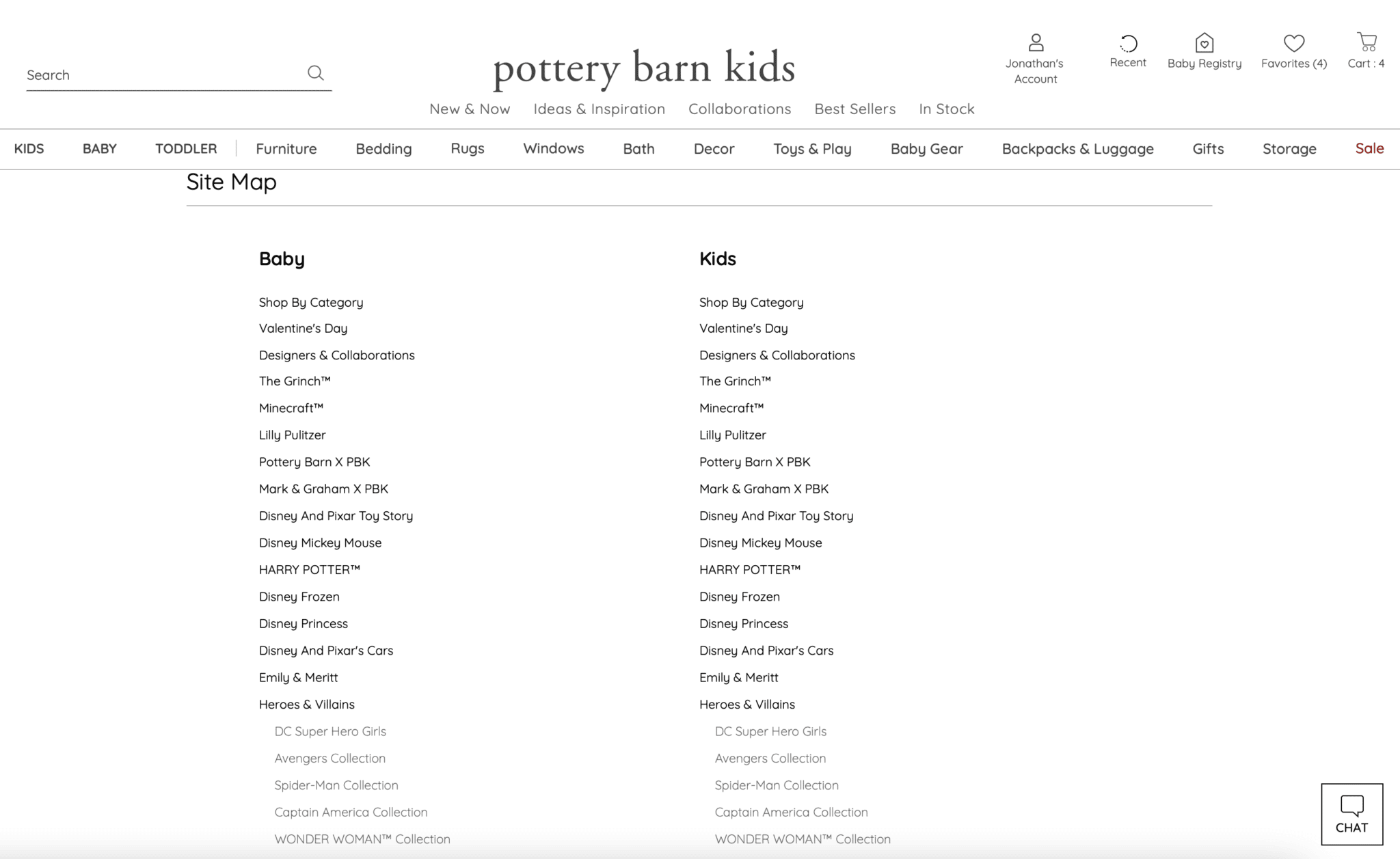
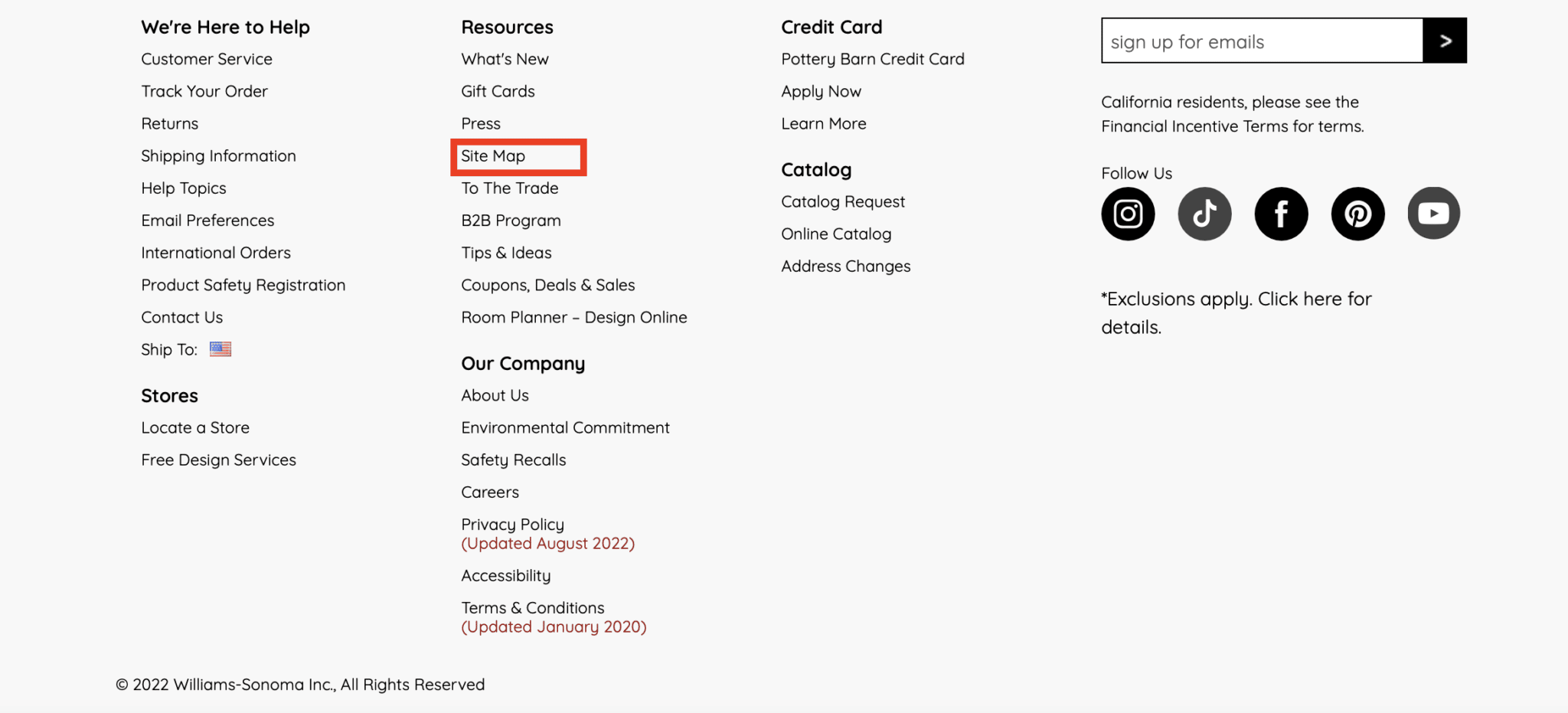
Creating a well-structured HTML sitemap and linking to it from the footer, as Pottery Barn Kids has done, ensures that most site pages are only a few clicks away, which aids in both user accessibility and SEO.
Since search engines crawl sites in a sequential manner and follow contextual cues, it is beneficial to have a single page that links to the site’s primary and secondary pages.
This can be helpful for users looking for specific pages on your website and help search engines discover and crawl all of the pages on your website.
Once created, it is essential to maintain an updated HTML sitemap on the site to ensure users and search engines can reach any page via minimal navigation.
In-content internal linking best practices
Ecommerce sites are notorious for lacking content – especially across category and sub-category pages. As a result, it could be argued some of these examples are “navigational” in nature.
However, I might argue these implementations are less ‘standard’ for navigational purposes and typically buried at the bottom of the page (where content is generally added for category pages).
5. Supporting category page content
There are many ways to build in supporting content on category pages – that could be a separate article.
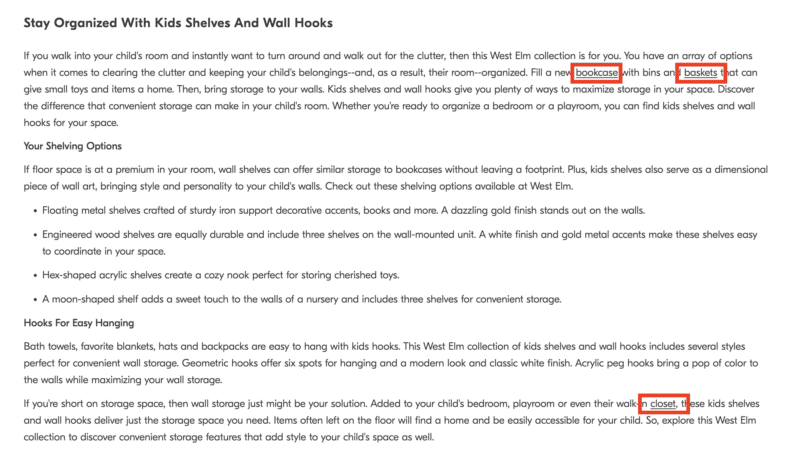
In the example below, West Elm adds a few supporting paragraphs at the bottom of their category pages with additional heading tags and content that adds value to the user experience.
Within that content, they naturally include links to other category and sub-category pages, individual product pages, and even educational/blog content where it makes sense.
6. Internal linking modules
Above the supporting page content, Pottery Barn, Mark & Graham, and West Elm utilize a row of Related Searches (read more about internal link modules here).
Pottery Barn Kids utilizes this same row directly above the footer.
In all cases, these text links take the form of long-tailed keyword-rich internal links to sub-categories and product detail pages (PDPs).
As you can see from the example above, this provides opportunities to build rich anchor text links to pages around color, texture, and even sizing – incredibly valuable for those long-tailed but highly-qualified searches.
7. Related products/browsing
Ecommerce SEO 101 requires a related products widget of some sort. This can help users discover additional products they may be interested in and is one of the foundational tactics for internal link building.
However, what was traditionally reserved for the product detail page, has expanded to category pages, and even the “types” of related products have grown exponentially.
For example, Williams Sonoma uses the standard “Related Products,” while Pottery Barn uses a “Top Picksfor You” widget on their category pages.
On product detail pages, this implementation expands to a wide variety of implementations and names, typically with multiple rows per page in a carousel allowing for a more extensive list of internal links per page:
“People Also Viewed” (Pottery Barn Kids)
“People Also Bought” (Pottery Barn Kids)
“Also in This Collection” (Pottery Barn)
“Pairs Well With” (West Elm)
“People Also Browsed” (West Elm)
“Customers Also Viewed” (Williams Sonoma)
“Customers Also Bought” (Williams Sonoma)
“Related Products” (Williams Sonoma)
“You May Also Like” (Rejuvenation)
And more!
These links are invaluable for cross-selling, upselling, and flattening the overall website architecture.
8. Product attributes
Where breadcrumbs might not be possible, product attributes can fill the void.
When both can be used, they are an effective complement for each other and can reference any/all attributes a product might have:
Size
Style
Color
Brand
Flavor
Texture
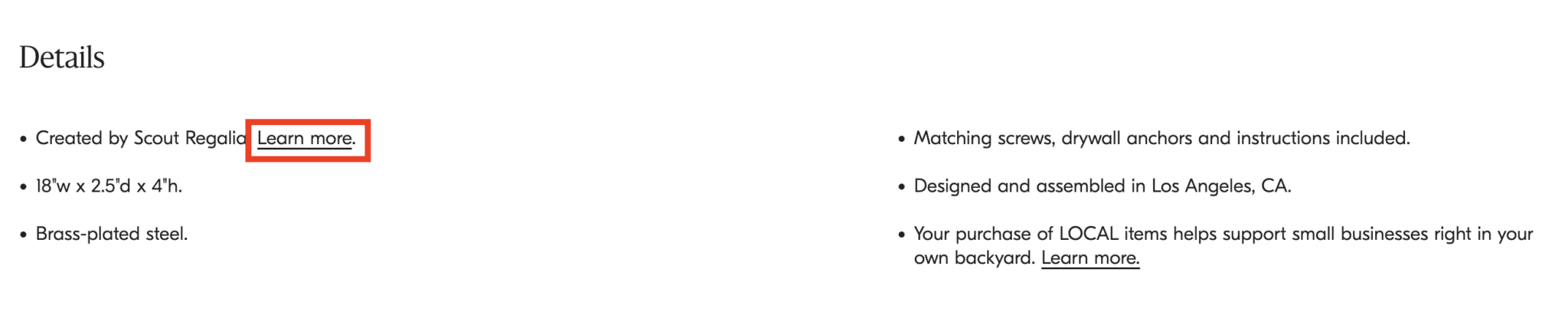
While this type of internal link is perhaps better showcased on another site (check out REI.com), I was able to find an example of this on West Elm:
In this case, “Learn more” links to the collaboration page for Scout Regalia. I would argue that a better anchor text implementation could be done here.
There are broader opportunities across the collective sites to take advantage of interlinking among collaborations and brand pages on product detail pages themselves.
9. User-generated content (UGC)
UGC content can take on many forms:
Reviews.
Testimonials.
Question and Answers.
It’s hard to find fault in Williams Sonoma’s SEO strategy. This, however, is one area where there might be a significant opportunity.
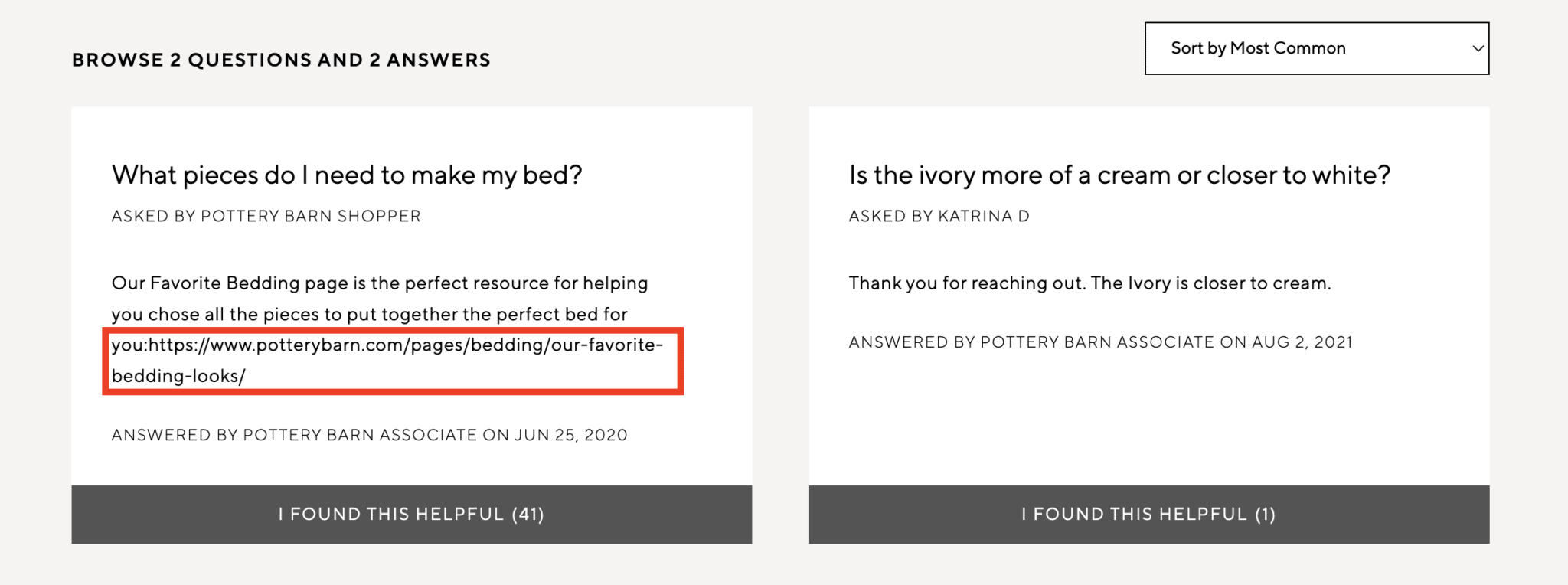
In the example above, a Pottery Barn associate left a response to a comment with a naked URL. However, the link is not clickable.
Generally, the Q&A section across the domains offers many opportunities for internal linking automation.
What are general internal linking best practices?
Now that you have a roundup of the why and where to incorporate internal links, you might wonder “what to do” and “how to do it.”
A myriad of articles outlines these internal linking best practices very well, including Moz, Semrush, and, of course, Google.
I suggest you dive into the links above for a more detailed breakdown. In my opinion, the five most crucial internal linking best practices to follow, in no particular order, are below:
Link to deep pages.
Use descriptive anchor text.
Link to relevant/related pages.
Link to the canonical version of the URL.
Don’t use the same anchor text for multiple pages.
How do I implement internal linking on my ecommerce site?
Much of this may require some grunt work and a partnership with your development team to implement these strategies effectively.
The implementation with the most bang for your buck (and potentially the highest level of effort) is internal linking modules. I linked it above, but I highly recommend reading this article from Holly Miller Anderson for more details.
Alternatively, auditing your existing internal links to determine which pages could benefit from increased internal linking is always a great place to start.
Paul Shapiro defines this process as determining “internal PageRank,” which is an intelligent way of thinking about it.
No matter how you define it, the outcome of this exercise will no doubt provide valuable insights to get started.
Maximizing internal linking for ecommerce
Internal linking is an essential aspect of any ecommerce website.
By following the best practices discussed in this article, you can ensure that your website is easy to navigate for users and is optimized for search engines.
Opinions expressed in this article are those of the guest author and not necessarily Search Engine Land. Staff authors are listed here.
@media screen and (min-width: 800px) { #div-gpt-ad-3191538-7 { display: flex !important; justify-content: center !important; align-items: center !important; min-width:770px; min-height:260px; }
}
@media screen and (min-width: 1279px) { #div-gpt-ad-3191538-7 { display: flex !important; justify-content: center !important; align-items: center !important; min-width:800px!important; min-height:440px!important; }
}
About the author
Jon Clark is a proud #girldad and the Managing Partner at Moving Traffic Media, a boutique digital marketing agency in New York. He writes regularly, providing thought leadership on topics related to SEO, PPC, and Social Media. In his downtime, he enjoys hanging out at coffee shops and documenting his travels on Instagram.
In 2022, Google released a new API under the Search Console APIs for the URL Inspection Tool. The new URL Inspection API let you programmatically access the data and reporting you’d get from the URL Inspection Tool but through software.
SEO tools and agencies can provide ongoing monitoring for important pages and single page debugging options. For example, checking if there are differences between user-declared and Google-selected canonicals, or debugging structured data issues from a group of pages.
CMS and plugin developers can add page or template-level insights and ongoing checks for existing pages. For example, monitoring changes over time for key pages to diagnose issues and help prioritize fixes.
2022: This change may have resulted in seeing more or less errors in your Breadcrumbs and HowTo structured data Search Console enhancement and error reports.
2022: Designed for small and mid-sized enterprises, the app automated weekly site crawls and detects issues ranging from broken pages to content that doesn’t meet best-practice guidelines for SEO.
2019: Previously you were able to submit up to 10 URLs per day and maximum of 50 URLs per month. Bing increased these limits by 1000x and removed the monthly quota.
2019: Marketing Land’s Digital Agency Survey found the sector was weathering digital transformation well, but the growth of data-driven marketing made it clear where they needed to hire.
2019: Quora introduced three new metrics (Auctions Lost to Competition, Impression Share, Absolute Impression Share) to help advertisers understand how they performed in the ad auctions.
2014: The latest images culled from the web, showing what people eat at the search engine companies, how they play, who they meet, where they speak, what toys they have, and more.
2013: Google added three new measurement features to the AdWords for video reporting interface (Reach & Frequency, Column Sets Tailored to Marketing Goals, Geographic Visualization).
2012: A program that guaranteed top listings for local searches on Google, Yahoo and Bing? An “officially approved” one in “cooperation” with those search engines? Not true, said Google and Bing.
2012: Search ad spend was expected to grow 27% from 2011 to 2012, up from $15.36 billion to $19.51 billion. And by 2016, it was expected to reach almost $30 billion annually.
2011: You could analyze domains, Twitter usernames, or keywords — and they can be compared over four timeframes: one day, a week, two weeks or a month.
2010: “We did not enter the search business,” Jobs said. “They entered the phone business. Make no mistake they want to kill the iPhone. We won’t let them.”
2008: The overall industry average click fraud rate rose to 16.6% for Q4 2007. That was up from 14.2% for the same quarter in 2006, and 16.2% in Q3 2007.
2007: Google’s Shuman Ghosemajumdersome said third-party auditing firms don’t appear to be matching up estimated fraud figures with refunds or even actual clicks registered by advertisers.
2007: The search engines had to make “moral judgments” about international authorities’ requests for information when they do not have to do the same for US requests.
Past contributions from Search Engine Land’s Subject Matter Experts (SMEs)
These columns are a snapshot in time and have not been updated since publishing, unless noted. Opinions expressed in these articles are those of the author and not necessarily Search Engine Land.
@media screen and (min-width: 800px) { #div-gpt-ad-3191538-7 { display: flex !important; justify-content: center !important; align-items: center !important; min-width:770px; min-height:260px; }
}
@media screen and (min-width: 1279px) { #div-gpt-ad-3191538-7 { display: flex !important; justify-content: center !important; align-items: center !important; min-width:800px!important; min-height:440px!important; }
}
About the author
Danny Goodwin is Managing Editor of Search Engine Land & SMX. In addition to writing daily about SEO, PPC, and more for Search Engine Land, Goodwin also manages Search Engine Land’s roster of subject-matter experts. He also helps program our conference series, SMX – Search Marketing Expo. Prior to joining Search Engine Land, Goodwin was Executive Editor at Search Engine Journal, where he led editorial initiatives for the brand. He also was an editor at Search Engine Watch. He has spoken at many major search conferences and virtual events, and has been sourced for his expertise by a wide range of publications and podcasts.
Yandex scrapes Google and other SEO learnings from the source code leak
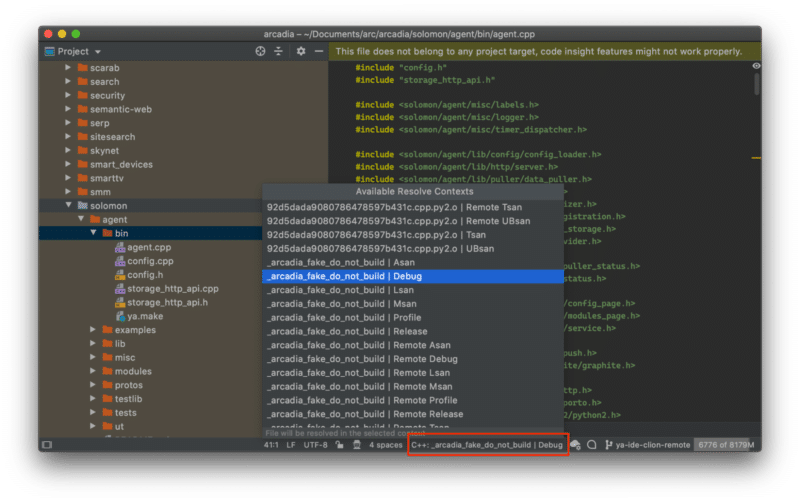
“Fragments” of Yandex’s codebase leaked online last week. Much like Google, Yandex is a platform with many aspects such as email, maps, a taxi service, etc. The code leak featured chunks of all of it.
According to the documentation therein, Yandex’s codebase was folded into one large repository called Arcadia in 2013. The leaked codebase is a subset of all projects in Arcadia and we find several components in it related to the search engine in the “Kernel,” “Library,” “Robot,” “Search,” and “ExtSearch” archives.
The move is wholly unprecedented. Not since the AOL search query data of 2006 has something so material related to a web search engine entered the public domain.
Although we are missing the data and many files that are referenced, this is the first instance of a tangible look at how a modern search engine works at the code level.
Personally, I can’t get over how fantastic the timing is to be able to actually see the code as I finish my book “The Science of SEO” where I’m talking about Information Retrieval, how modern search engines actually work, and how to build a simple one yourself.
In any event, I’ve been parsing through the code since last Thursday and any engineer will tell you that is not enough time to understand how everything works. So, I suspect there will be several more posts as I keep tinkering.
Also, shout out to Ryan Jones for digging in and sharing some key findings with me over IM.
OK, let’s get busy!
It’s not Google’s code, so why do we care?
Some believe that reviewing this codebase is a distraction and that there is nothing that will impact how they make business decisions. I find that curious considering these are people from the same SEO community that used the CTR model from the 2006 AOL data as the industry standard for modeling across any search engine for many years to follow.
That said, Yandex is not Google. Yet the two are state-of-the-art web search engines that have continued to stay at the cutting edge of technology.
Software engineers from both companies go to the same conferences (SIGIR, ECIR, etc) and share findings and innovations in Information Retrieval, Natural Language Processing/Understanding, and Machine Learning. Yandex also has a presence in Palo Alto and Google previously had a presence in Moscow.
A quick LinkedIn search uncovers a few hundred engineers that have worked at both companies, although we don’t know how many of them have actually worked on Search at both companies.
In a more direct overlap, Yandex also makes usage of Google’s open source technologies that have been critical to innovations in Search like TensorFlow, BERT, MapReduce, and, to a much lesser extent, Protocol Buffers.
So, while Yandex is certainly not Google, it’s also not some random research project that we’re talking about here. There is a lot we can learn about how a modern search engine is built from reviewing this codebase.
At the very least, we can disabuse ourselves of some obsolete notions that still permeate SEO tools like text-to-code ratios and W3C compliance or the general belief that Google’s 200 signals are simply 200 individual on and off-page features rather than classes of composite factors that potentially use thousands of individual measures.
Some context on Yandex’s architecture
Without context or the ability to successfully compile, run, and step through it, source code is very difficult to make sense of.
Typically, new engineers get documentation, walk-throughs, and engage in pair programming to get onboarded to an existing codebase. And, there is some limited onboarding documentation related to setting up the build process in the docs archive. However, Yandex’s code also references internal wikis throughout, but those have not leaked and the commenting in the code is also quite sparse.
Luckily, Yandex does give some insights into its architecture in its public documentation. There are also a couple of patents they’ve published in the US that help shed a bit of light. Namely:
As I’ve been researching Google for my book, I’ve developed a much deeper understanding of the structure of its ranking systems through various whitepapers, patents, and talks from engineers couched against my SEO experience. I’ve also spent a lot of time sharpening my grasp of general Information Retrieval best practices for web search engines. It comes as no surprise that there are indeed some best practices and similarities at play with Yandex.
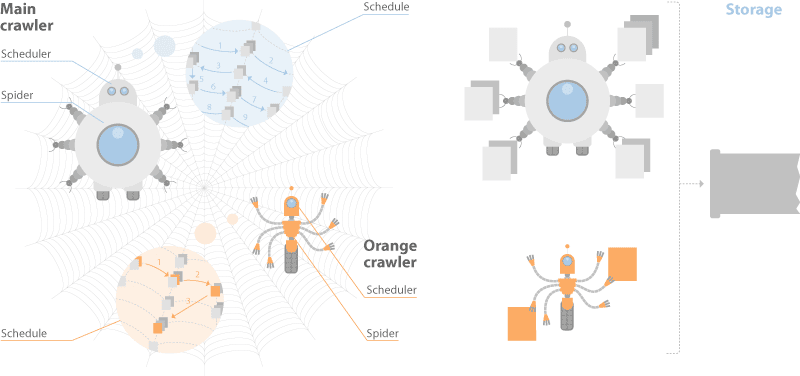
Yandex’s documentation discusses a dual-distributed crawler system. One for real-time crawling called the “Orange Crawler” and another for general crawling.
Historically, Google is said to have had an index stratified into three buckets, one for housing real-time crawl, one for regularly crawled and one for rarely crawled. This approach is considered a best practice in IR.
Yandex and Google differ in this respect, but the general idea of segmented crawling driven by an understanding of update frequency holds.
One thing worth calling out is that Yandex has no separate rendering system for JavaScript. They say this in their documentation and, although they have Webdriver-based system for visual regression testing called Gemini, they limit themselves to text-based crawl.
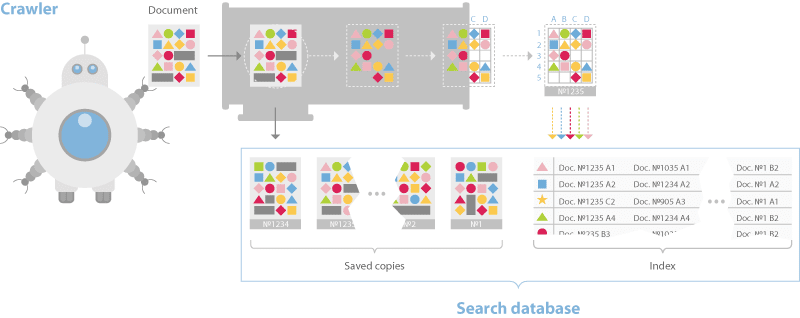
The documentation also discusses a sharded database structure that breaks pages down into an inverted index and a document server.
Just like most other web search engines the indexing process builds a dictionary, caches pages, and then places data into the inverted index such that bigrams and trigams and their placement in the document is represented.
This differs from Google in that they moved to phrase-based indexing, meaning n-grams that can be much longer than trigrams a long time ago.
However, the Yandex system uses BERT in its pipeline as well, so at some point documents and queries are converted to embeddings and nearest neighbor search techniques are employed for ranking.
The ranking process is where things begin to get more interesting.
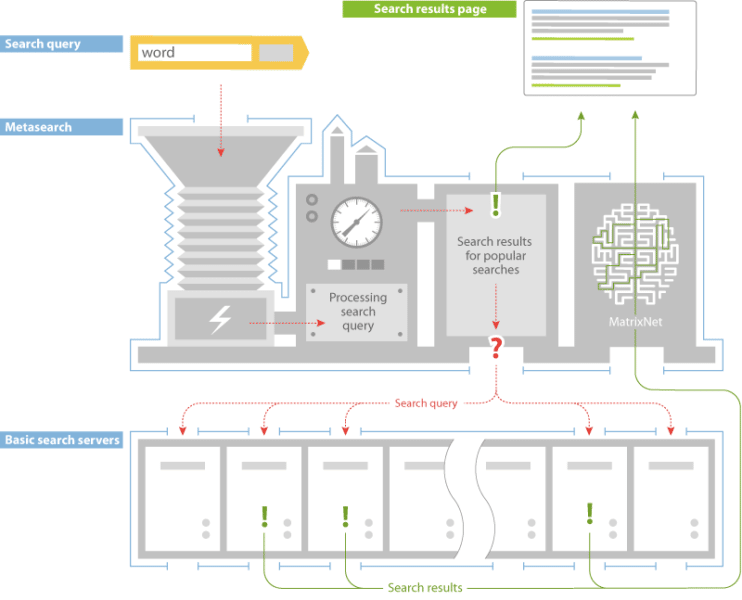
Yandex has a layer called Metasearch where cached popular search results are served after they process the query. If the results are not found there, then the search query is sent to a series of thousands of different machines in the Basic Search layer simultaneously. Each builds a posting list of relevant documents then returns it to MatrixNet, Yandex’s neural network application for re-ranking, to build the SERP.
Based on videos wherein Google engineers have talked about Search’s infrastructure, that ranking process is quite similar to Google Search. They talk about Google’s tech being in shared environments where various applications are on every machine and jobs are distributed across those machines based on the availability of computing power.
One of the use cases is exactly this, the distribution of queries to an assortment of machines to process the relevant index shards quickly. Computing the posting lists is the first place that we need to consider the ranking factors.
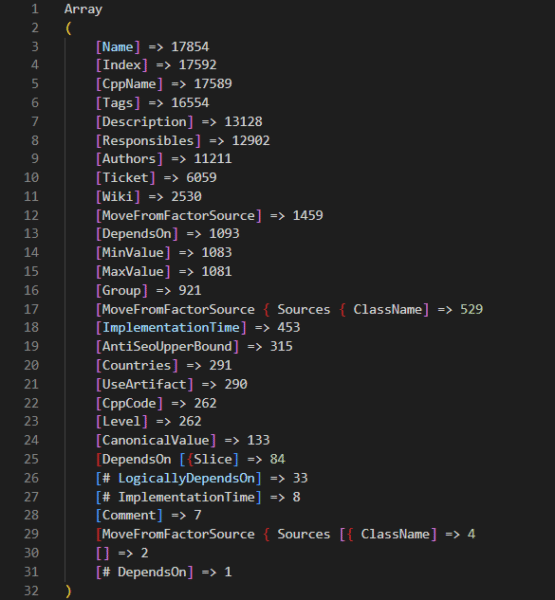
There are 17,854 ranking factors in the codebase
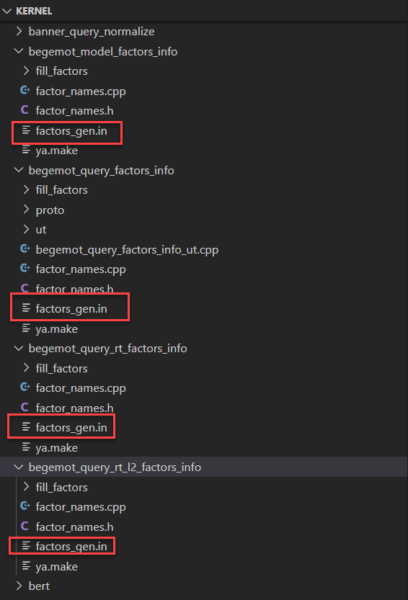
On the Friday following the leak, the inimitable Martin MacDonald eagerly shared a file from the codebase called web_factors_info/factors_gen.in. The file comes from the “Kernel” archive in the codebase leak and features 1,922 ranking factors.
Naturally, the SEO community has run with that number and that file to eagerly spread news of the insights therein. Many folks have translated the descriptions and built tools or Google Sheets and ChatGPT to make sense of the data. All of which are great examples of the power of the community. However, the 1,922 represents just one of many sets of ranking factors in the codebase.
A deeper dive into the codebase reveals that there are numerous ranking factor files for different subsets of Yandex’s query processing and ranking systems.
Combing through those, we find that there are actually 17,854 ranking factors in total. Included in those ranking factors are a variety of metrics related to:
Clicks.
Dwell time.
Leveraging Yandex’s Google Analytics equivalent, Metrika.
There is also a series of Jupyter notebooks that have an additional 2,000 factors outside of those in the core code. Presumably, these Jupyter notebooks represent tests where engineers are considering additional factors to add to the codebase. Again, you can review all of these features with metadata that we collected from across the codebase at this link.
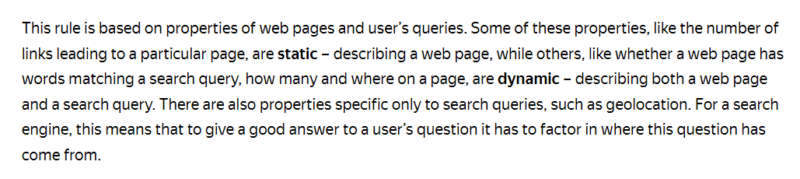
Yandex’s documentation further clarifies that they have three classes of ranking factors: Static, Dynamic, and those related specifically to the user’s search and how it was performed. In their own words:
In the codebase these are indicated in the rank factors files with the tags TG_STATIC and TG_DYNAMIC. The search related factors have multiple tags such as TG_QUERY_ONLY, TG_QUERY, TG_USER_SEARCH, and TG_USER_SEARCH_ONLY.
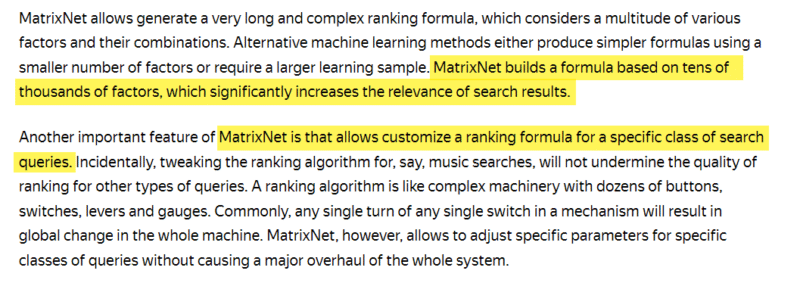
While we have uncovered a potential 18k ranking factors to choose from, the documentation related to MatrixNet indicates that scoring is built from tens of thousands of factors and customized based on the search query.
This indicates that the ranking environment is highly dynamic, similar to that of Google environment. According to Google’s “Framework for evaluating scoring functions” patent, they have long had something similar where multiple functions are run and the best set of results are returned.
Finally, considering that the documentation references tens of thousands of ranking factors, we should also keep in mind that there are many other files referenced in the code that are missing from the archive. So, there is likely more going on that we are unable to see. This is further illustrated by reviewing the images in the onboarding documentation which shows other directories that are not present in the archive.
For instance, I suspect there is more related to the DSSM in the /semantic-search/ directory.
The initial weighting of ranking factors
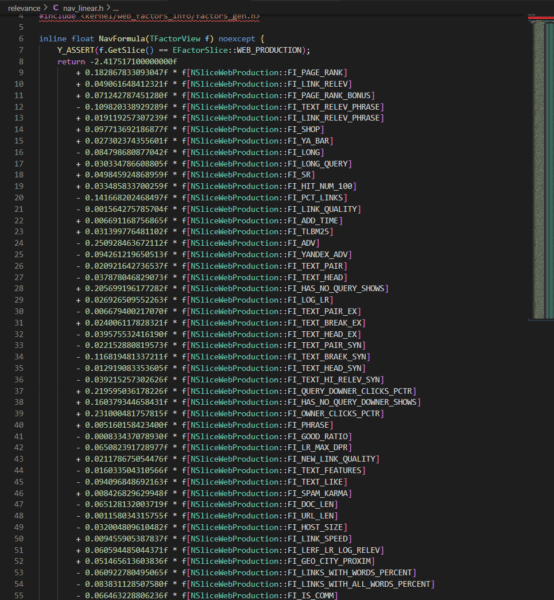
I first operated under the assumption that the codebase didn’t have any weights for the ranking factors. Then I was shocked to see that the nav_linear.h file in the /search/relevance/ directory features the initial coefficients (or weights) associated with ranking factors on full display.
This section of the code highlights 257 of the 17,000+ ranking factors we’ve identified. (Hat tip to Ryan Jones for pulling these and lining them up with the ranking factor descriptions.)
For clarity, when you think of a search engine algorithm, you’re probably thinking of a long and complex mathematical equation by which every page is scored based on a series of factors. While that is an oversimplification, the following screenshot is an excerpt of such an equation. The coefficients represent how important each factor is and the resulting computed score is what would be used to score selecter pages for relevance.
These values being hard-coded suggests that this is certainly not the only place that ranking happens. Instead, this function is most likely where the initial relevance scoring is done to generate a series of posting lists for each shard being considered for ranking. In the first patent listed above, they talk about this as a concept of query-independent relevance (QIR) which then limits documents prior to reviewing them for query-specific relevance (QSR).
The resulting posting lists are then handed off to MatrixNet with query features to compare against. So while we don’t know the specifics of the downstream operations (yet), these weights are still valuable to understand because they tell you the requirements for a page to be eligible for the consideration set.
However, that brings up the next question: what do we know about MatrixNet?
There is neural ranking code in the Kernel archive and there are numerous references to MatrixNet and “mxnet” as well as many references to Deep Structured Semantic Models (DSSM) throughout the codebase.
The description of one of the FI_MATRIXNET ranking factor indicates that MatrixNet is applied to all factors.
Description: “MatrixNet is applied to all factors – the formula”
}
There’s also a bunch of binary files that may be the pre-trained models themselves, but it’s going to take me more time to unravel those aspects of the code.
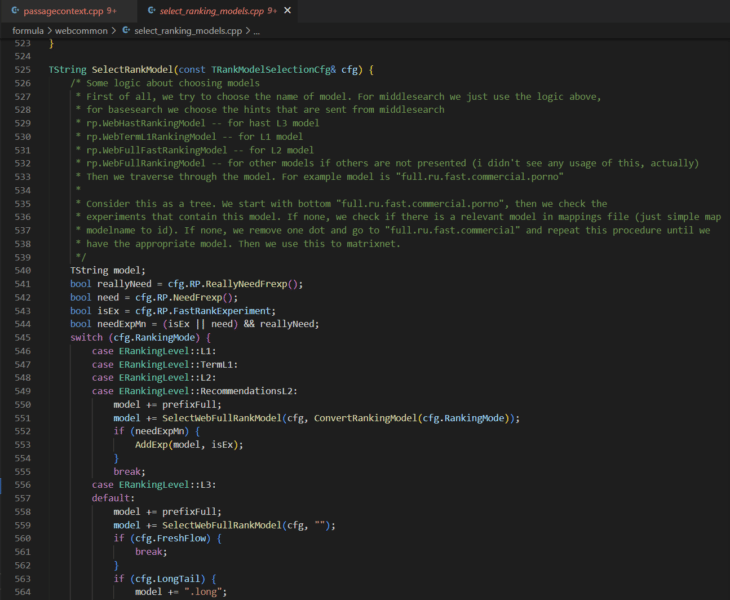
What is immediately clear is that there are multiple levels to ranking (L1, L2, L3) and there is an assortment of ranking models that can be selected at each level.
The selecting_rankings_model.cpp file suggests that different ranking models may be considered at each layer throughout the process. This is basically how neural networks work. Each level is an aspect that completes operations and their combined computations yield the re-ranked list of documents that ultimately appears as a SERP. I’ll follow up with a deep dive on MatrixNet when I have more time. For those that need a sneak peek, check out the Search result ranker patent.
For now, let’s take a look at some interesting ranking factors.
Top 5 negatively weighted initial ranking factors
The following is a list of the highest negatively weighted initial ranking factors with their weights and a brief explanation based on their descriptions translated from Russian.
FI_ADV: -0.2509284637 -This factor determines that there is advertising of any kind on the page and issues the heaviest weighted penalty for a single ranking factor.
FI_DATER_AGE: -0.2074373667 – This factor is the difference between the current date and the date of the document determined by a dater function. The value is 1 if the document date is the same as today, 0 if the document is 10 years or older, or if the date is not defined. This indicates that Yandex has a preference for older content.
FI_QURL_STAT_POWER: -0.1943768768 – This factor is the number of URL impressions as it relates to the query. It seems as though they want to demote a URL that appears in many searches to promote diversity of results.
FI_COMM_LINKS_SEO_HOSTS: -0.1809636391 – This factor is the percentage of inbound links with “commercial” anchor text. The factor reverts to 0.1 if the proportion of such links is more than 50%, otherwise, it’s set to 0.
FI_GEO_CITY_URL_REGION_COUNTRY: -0.168645758 – This factor is the geographical coincidence of the document and the country that the user searched from. This one doesn’t quite make sense if 1 means that the document and the country match.
In summary, these factors indicate that, for the best score, you should:
Avoid ads.
Update older content rather than make new pages.
Make sure most of your links have branded anchor text.
Everything else in this list is beyond your control.
Top 5 positively weighted initial ranking factors
To follow up, here’s a list of the highest weighted positive ranking factors.
FI_URL_DOMAIN_FRACTION: +0.5640952971 – This factor is a strange masking overlap of the query versus the domain of the URL. The example given is Chelyabinsk lottery which abbreviated as chelloto. To compute this value, Yandex find three-letters that are covered (che, hel, lot, olo), see what proportion of all the three-letter combinations are in the domain name.
FI_QUERY_DOWNER_CLICKS_COMBO: +0.3690780393 – The description of this factor is that is “cleverly combined of FRC and pseudo-CTR.” There is no immediate indication of what FRC is.
FI_MAX_WORD_HOST_CLICKS: +0.3451158835 – This factor is the clickability of the most important word in the domain. For example, for all queries in which there is the word “wikipedia” click on wikipedia pages.
FI_MAX_WORD_HOST_YABAR: +0.3154394573 – The factor description says “the most characteristic query word corresponding to the site, according to the bar.” I’m assuming this means the keyword most searched for in Yandex Toolbar associated to the site.
FI_IS_COM: +0.2762504972 – The factor is that the domain is a .COM.
In other words:
Play word games with your domain.
Make sure it’s a dot com.
Encourage people to search for your target keywords in the Yandex Bar.
Keep driving clicks.
There are plenty of unexpected initial ranking factors
What’s more interesting in the initial weighted ranking factors are the unexpected ones. The following is a list of seventeen factors that stood out.
FI_PAGE_RANK: +0.1828678331 – PageRank is the 17th highest weighted factor in Yandex. They previously removed links from their ranking system entirely, so it’s not too shocking how low it is on the list.
FI_SPAM_KARMA: +0.00842682963 – The Spam karma is named after “antispammers” and is the likelihood that the host is spam; based on Whois information
FI_SUBQUERY_THEME_MATCH_A: +0.1786465163 – How closely the query and the document match thematically. This is the 19th highest weighted factor.
FI_REG_HOST_RANK: +0.1567124399 – Yandex has a host (or domain) ranking factor.
FI_URL_LINK_PERCENT: +0.08940421124 – Ratio of links whose anchor text is a URL (rather than text) to the total number of links.
FI_PAGE_RANK_UKR: +0.08712279101 – There is a specific Ukranian PageRank
FI_IS_NOT_RU: +0.08128946612 – It’s a positive thing if the domain is not a .RU. Apparently, the Russian search engine doesn’t trust Russian sites.
FI_YABAR_HOST_AVG_TIME2: +0.07417219313 – This is the average dwell time as reported by YandexBar
FI_LERF_LR_LOG_RELEV: +0.06059448504 – This is link relevance based on the quality of each link
FI_NUM_SLASHES: +0.05057609417 – The number of slashes in the URL is a ranking factor.
FI_ADV_PRONOUNS_PORTION: -0.001250755075 – The proportion of pronoun nouns on the page.
FI_TEXT_HEAD_SYN: -0.01291908335 – The presence of [query] words in the header, taking into account synonyms
FI_PERCENT_FREQ_WORDS: -0.02021022114 – The percentage of the number of words, that are the 200 most frequent words of the language, from the number of all words of the text.
FI_YANDEX_ADV: -0.09426121965 – Getting more specific with the distaste towards ads, Yandex penalizes pages with Yandex ads.
FI_AURA_DOC_LOG_SHARED: -0.09768630485 – The logarithm of the number of shingles (areas of text) in the document that are not unique.
FI_AURA_DOC_LOG_AUTHOR: -0.09727752961 – The logarithm of the number of shingles on which this owner of the document is recognized as the author.
FI_CLASSIF_IS_SHOP: -0.1339319854 – Apparently, Yandex is going to give you less love if your page is a store.
The primary takeaway from reviewing these odd rankings factors and the array of those available across the Yandex codebase is that there are many things that could be a ranking factor.
I suspect that Google’s reported “200 signals” are actually 200 classes of signal where each signal is a composite built of many other components. In much the same way that Google Analytics has dimensions with many metrics associated, Google Search likely has classes of ranking signals composed of many features.
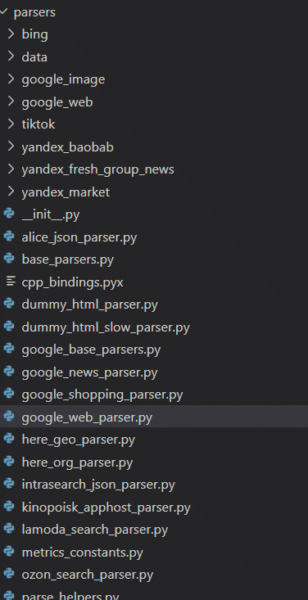
Yandex scrapes Google, Bing, YouTube and TikTok
The codebase also reveals that Yandex has many parsers for other websites and their respective services. To Westerners, the most notable of those are the ones I’ve listed in the heading above. Additionally, Yandex has parsers for a variety of services that I was unfamiliar with as well as those for its own services.
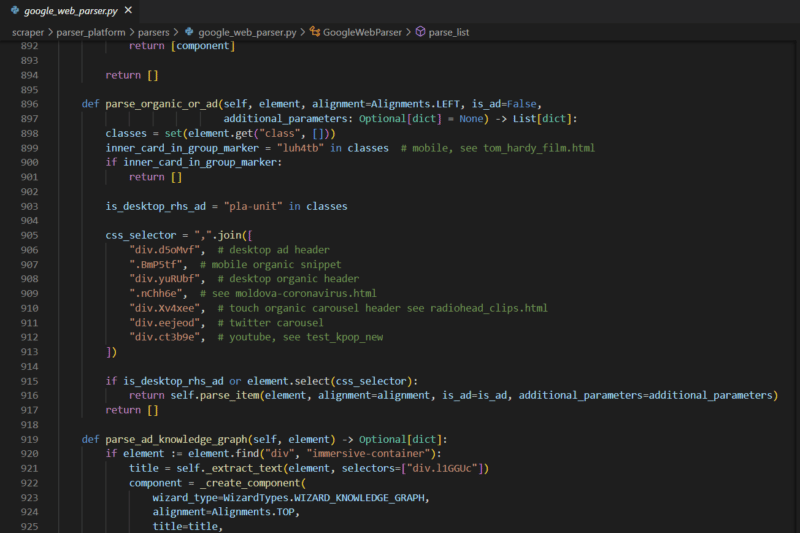
What is immediately evident, is that the parsers are feature complete. Every meaningful component of the Google SERP is extracted. In fact, anyone that might be considering scraping any of these services might do well to review this code.
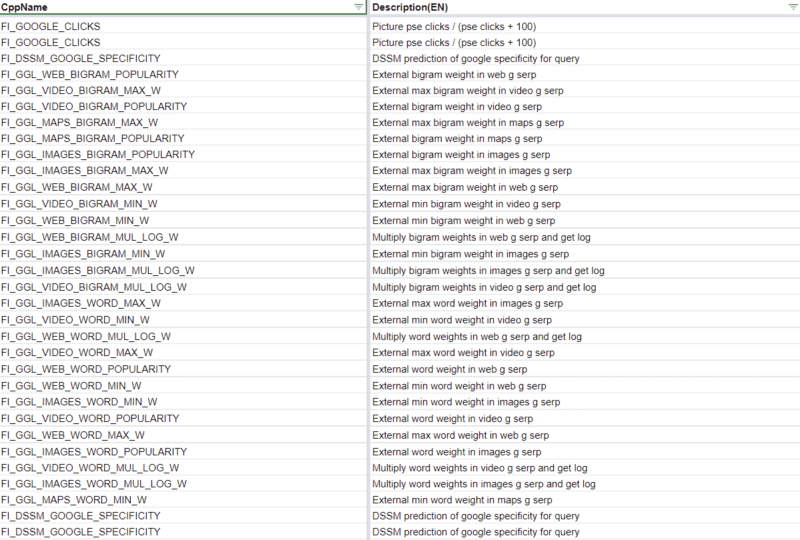
There is other code that indicates Yandex is using some Google data as part of the DSSM calculations, but the 83 Google named ranking factors themselves make it clear that Yandex has leaned on the Google’s results pretty heavily.
Yandex has anti-SEO upper bounds for some ranking factors
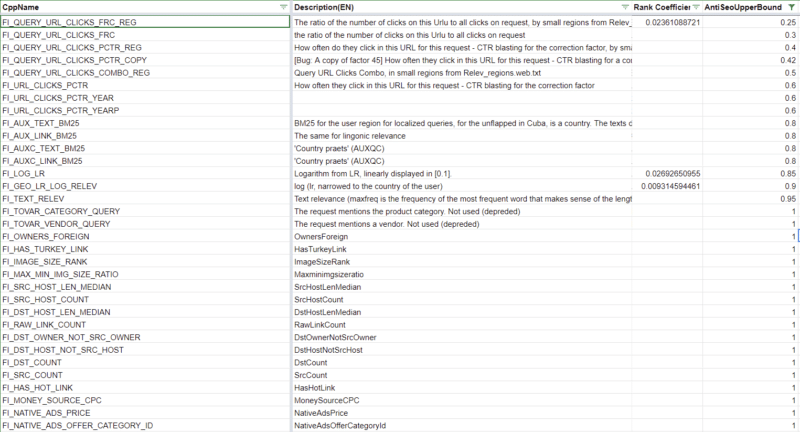
315 ranking factors have thresholds at which any computed value beyond that indicates to the system that that feature of the page is over-optimized. 39 of these ranking factors are part of the initially weighted factors that may keep a page from being included in the initial postings list. You can find these in the spreadsheet I’ve linked to above by filtering for the Rank Coefficient and the Anti-SEO column.
It’s not far-fetched conceptually to expect that all modern search engines set thresholds on certain factors that SEOs have historically abused such as anchor text, CTR, or keyword stuffing. For instance, Bing was said to leverage the abusive usage of the meta keywords as a negative factor.
Yandex boosts “Vital Hosts”
Yandex has a series of boosting mechanisms throughout its codebase. These are artificial improvements to certain documents to ensure they score higher when being considered for ranking.
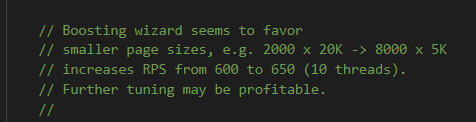
Below is a comment from the “boosting wizard” which suggests that smaller files benefit best from the boosting algorithm.
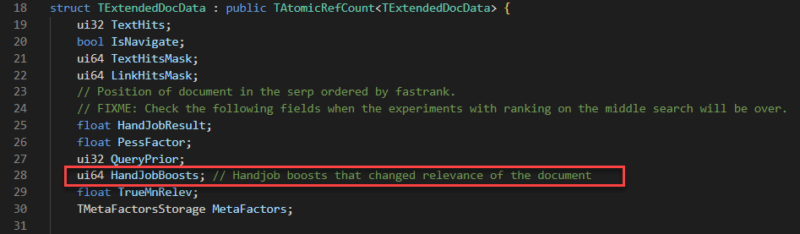
There are several types of boosts; I’ve seen one boost related to links and I’ve also seen a series of “HandJobBoosts” which I can only assume is a weird translation of “manual” changes.
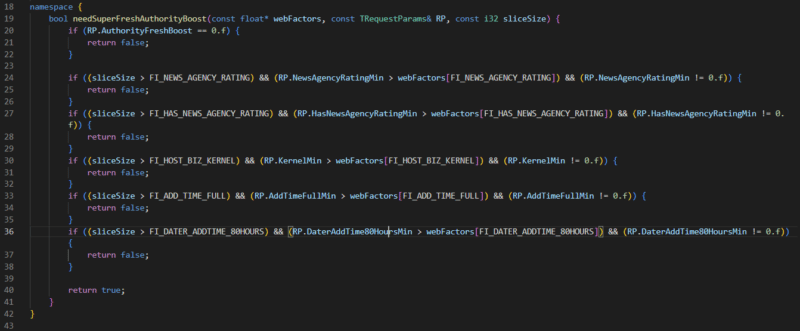
One of these boosts I found particularly interesting is related to “Vital Hosts.” Where a vital host can be any site specified. Specifically mentioned in the variables is NEWS_AGENCY_RATING which leads me to believe that Yandex gives a boost that biases its results to certain news organizations.
Without getting into geopolitics, this is very different from Google in that they have been adamant about not introducing biases like this into their ranking systems.
The structure of the document server
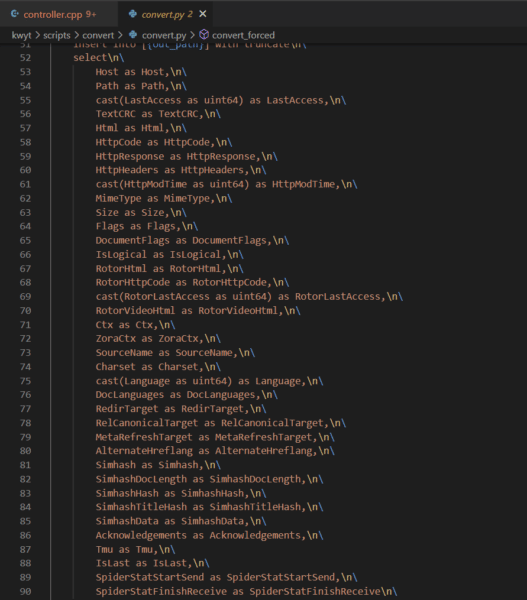
The codebase reveals how documents are stored in Yandex’s document server. This is helpful in understanding that a search engine does not simply make a copy of the page and save it to its cache, it’s capturing various features as metadata to then use in the downstream rankings process.
The screenshot below highlights a subset of those features that are particularly interesting. Other files with SQL queries suggest that the document server has closer to 200 columns including the DOM tree, sentence lengths, fetch time, a series of dates, and antispam score, redirect chain, and whether or not the document is translated. The most complete list I’ve come across is in /robot/rthub/yql/protos/web_page_item.proto.
What’s most interesting in the subset here is the number of simhashes that are employed. Simhashes are numeric representations of content and search engines use them for lightning fast comparison for the determination of duplicate content. There are various instances in the robot archive that indicate duplicate content is explicitly demoted.
Also, as part of the indexing process, the codebase features TF-IDF, BM25, and BERT in its text processing pipeline. It’s not clear why all of these mechanisms exist in the code because there is some redundancy in using them all.
Link factors and prioritization
The codebase also reveals a lot of information about link factors and how links are prioritized.
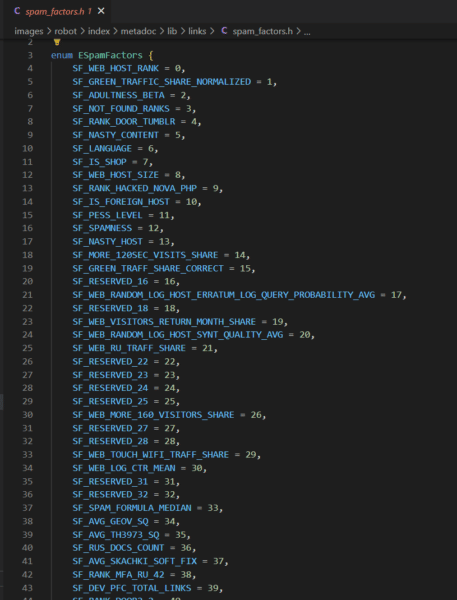
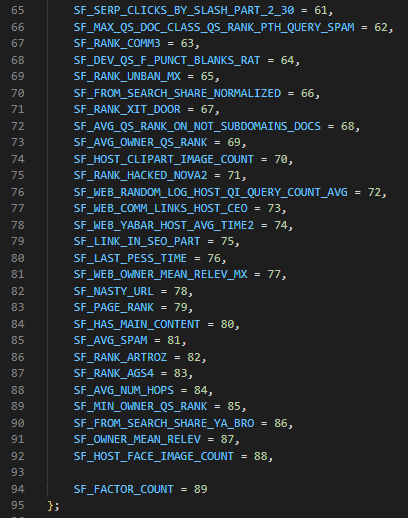
Yandex’s link spam calculator has 89 factors that it looks at. Anything marked as SF_RESERVED is deprecated. Where provided, you can find the descriptions of these factors in the Google Sheet linked above.
Notably, Yandex has a host rank and some scores that appear to live on long term after a site or page develops a reputation for spam.
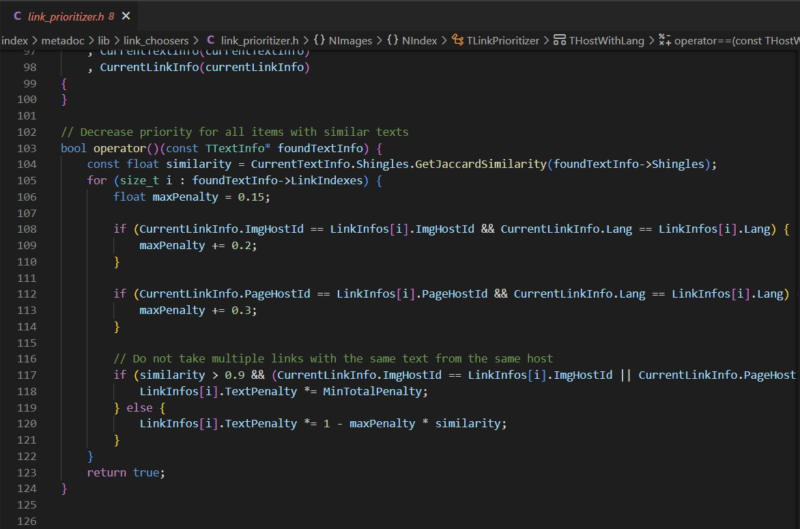
Another thing Yandex does is review copy across a domain and determine if there is duplicate content with those links. This can be sitewide link placements, links on duplicate pages, or simply links with the same anchor text coming from the same site.
This illustrates how trivial it is to discount multiple links from the same source and clarifies how important it is to target more unique links from more diverse sources.
What can we apply from Yandex to what we know about Google?
Naturally, this is still the question on everyone’s mind. While there are certainly many analogs between Yandex and Google, truthfully, only a Google Software Engineer working on Search could definitively answer that question.
Yet, that is the wrong question.
Really, this code should help us expand our thinking about modern search. Much of the collective understanding of search is built from what the SEO community learned in the early 2000s through testing and from the mouths of search engineers when search was far less opaque. That unfortunately has not kept up with the rapid pace of innovation.
Insights from the many features and factors of the Yandex leak should yield more hypotheses of things to test and consider for ranking in Google. They should also introduce more things that can be parsed and measured by SEO crawling, link analysis, and ranking tools.
For instance, a measure of the cosine similarity between queries and documents using BERT embeddings could be valuable to understand versus competitor pages since it’s something that modern search engines are themselves doing.
Much in the way the AOL Search logs moved us from guessing the distribution of clicks on SERP, the Yandex codebase moves us away from the abstract to the concrete and our “it depends” statements can be better qualified.
To that end, this codebase is a gift that will keep on giving. It’s only been a weekend and we’ve already gleaned some very compelling insights from this code.
I anticipate some ambitious SEO engineers with far more time on their hands will keep digging and maybe even fill in enough of what’s missing to compile this thing and get it working. I also believe engineers at the different search engines are also going through and parsing out innovations that they can learn from and add to their systems.
Simultaneously, Google lawyers are probably drafting aggressive cease and desist letters related to all the scraping.
I’m eager to see the evolution of our space that’s driven by the curious people who will maximize this opportunity.
But, hey, if getting insights from actual code is not valuable to you, you’re welcome to go back to doing something more important like arguing about subdomains versus subdirectories.
Opinions expressed in this article are those of the guest author and not necessarily Search Engine Land. Staff authors are listed here.
@media screen and (min-width: 800px) { #div-gpt-ad-3191538-7 { display: flex !important; justify-content: center !important; align-items: center !important; min-width:770px; min-height:260px; }
}
@media screen and (min-width: 1279px) { #div-gpt-ad-3191538-7 { display: flex !important; justify-content: center !important; align-items: center !important; min-width:800px!important; min-height:440px!important; }
}
About the author
An artist and a technologist all rolled into one, Michael King is the CEO and founder of digital marketing agency, iPullRank focused on technical SEO, content strategy and machine learning. King consults with enterprise and mid-market companies all over the world, including brands like SAP, American Express, Nordstrom, SanDisk, General Mills, and FTD. King’s background in Computer Science and as an independent hip-hop musician sets him up for deep technical and creative solutions for modern marketing problems. Check out his book “The Science of SEO” coming in Q2 of 2023 from Wiley Publishing.
Baidu working on AI chatbot service that will be added to search
First Microsoft Bing. Then Google. Now Baidu is reportedly planning on bringing ChatGPT-style AI to its search results.
Why we care. All the major search engines are seemingly in an arms race to add AI chat to search. Once search engines eventually add the chat features to search, it could have major implications for publishers (websites could see their traffic and visibility impacted, depending on how the AI chat is deployed within the search results) and searchers (will the information be accurate and reliable?). There are a lot of unknown unknowns here, which means search marketers should be watching all these developments.
A standalone app first, then search. Baidu is expected to launch its AI chatbot first as a standalone app (similar to ChatGPT). It would then be gradually merged into Baidu search by March, according to reports.
Baidu is reportedly using its deep learning model called ERNIE (which Baidu described as “a “pre-training language model with 260 billion parameters”) as the chatbot’s foundation and “training it on both Chinese- and English-language sources inside and outside China’s firewall,” according to the Wall Street Journal. Baidu also will limit the outputs of its chatbot to comply with China’s censorship rules.
Dig deeper. There’s more coverage of the news on Techmeme.
@media screen and (min-width: 800px) { #div-gpt-ad-3191538-7 { display: flex !important; justify-content: center !important; align-items: center !important; min-width:770px; min-height:260px; }
}
@media screen and (min-width: 1279px) { #div-gpt-ad-3191538-7 { display: flex !important; justify-content: center !important; align-items: center !important; min-width:800px!important; min-height:440px!important; }
}
About the author
Danny Goodwin is Managing Editor of Search Engine Land & SMX. In addition to writing daily about SEO, PPC, and more for Search Engine Land, Goodwin also manages Search Engine Land’s roster of subject-matter experts. He also helps program our conference series, SMX – Search Marketing Expo. Prior to joining Search Engine Land, Goodwin was Executive Editor at Search Engine Journal, where he led editorial initiatives for the brand. He also was an editor at Search Engine Watch. He has spoken at many major search conferences and virtual events, and has been sourced for his expertise by a wide range of publications and podcasts.
9 tips to get the full SEO benefits of long-tail keywords
Creating content to satisfy long-tail search queries is an often-overlooked strategy. It’s easy to go after bigger wins, but focusing on the smaller gains can lead to powerful long-term results. Many times in SEO, slow and steady wins the race.
Search has been evolving and talking about keywords might seem old-fashioned. But long-tail queries have never been more important.
As search is second nature for many people these days and voice search gains popularity, searches are becoming more conversational. Creating content to satisfy this type of query can be really beneficial.
To get the best results from this strategy you need to approach it thoughtfully. In this article, I’ll cover some tips to get more SEO benefits from long-tail queries.
Long-tail keywords: What are they and why use them for SEO?
Long-tail keywords are specific words or phrases that tend to have a better conversion value. They are usually longer (three to five words) and have a lower search volume.
If long-tail keywords are not part of your strategy, you miss out on many opportunities. Nearly 95% of U.S. search queries get less than 10 searches per month, a large-scale study by Ahrefs revealed.
It’s also widely accepted that 15% of search queries on Google are new. This statistic has been confirmed by Google many times, most recently in 2022 as reported by Barry Schwartz on Search Engine Roundtable.
Long-tail queries can be easier to rank for and have the potential toeliminate ambiguity to drive qualified traffic and conversions.
What is a long-tail strategy?
A long-tail SEO strategy is a technique that places a focus on lower-volume search terms. This SEO tactic capitalizes on a lower competition rate to drive qualified website traffic.
It can be a really effective approach because the searcher’s intent is usually much clearer with long-tail terms. This gives you an opportunity to make sure you capture really relevant, valuable traffic.
9 tips to maximize the SEO benefits of long-tail keywords
While leveraging long-tail keywords can be powerful and effective, it’s important to go about this in a planned and considered way.
Here are my top tips for getting the best results from your long-tail opportunities.
1. Start small, gain traction
A long-tail keyword strategy is ideal for gaining traction in a new market.
If you’re starting a new site or covering a new topic, putting your focus on long-tail keyword phrases within your content can help to give you visibility with the right target audience.
By their nature, long-tail keywords are less frequently searched for and very specific. This means the people searching for them tend to have a very clear intent.
Creating great content to satisfy these queries is ideal for building your reputation with the right people. It’s also a great SEO strategy to get things off the ground and build rankings around topics relevant to your niche.
For example, here’s Amore Coffee, a small coffee machine rental company in the UK, making the most of the long-tail.
That’s just one example, but across their website, they have managed to rank for a variety of detailed, long-tail queries around their main topic of coffee in the UK:
Source: Sistrix
This forms a good basis for their target audience to discover them via search engines.
They’re unlikely to be driving huge amounts of traffic but they will be reaching people who are really interested in what they have to offer.
2. Stay relevant and build your presence
When working with long-tail queries, it’s important to be thoughtful with your choices. Don’t just create content for the sake of it.
Select topics that are very closely related to your area of expertise, or product offering. Don’t stray too far from your core business goals.
Make sure you can create highly relevant content that’s helpful and adds value. This will help you avoid the trap of taking a “search-engine-first” approach, which Google actively discourages in its helpful content guidelines.
The “don’ts” include:
• Did you decide to enter some niche topic area without any real expertise, but instead mainly because you thought you’d get search traffic? • Are you producing lots of content on different topics in hopes that some of it might perform well in search results?
In most topic areas, there are many relevant long-tail queries to work on.
The road to success starts by choosing the right ones and keeping them unwaveringly fitting to your audience and goals.
3. Define your goals
Before you start working on your content, think about what you aim to do.
Are you writing an in-depth article that you’d like to achieve an organic ranking position?
Is there a featured snippet or People Also Ask (PAA) box you’d like to capture for that specific long-tail phrase?
Would showing up in voice search be more valuable to your business?
Your primary goal will influence the content you write.
To target a featured snippet or PAA your content will need to be objective, short and snappy.
For an overall organic ranking article, you’ll need to explore the topic in-depth and add your own unique perspective or expertise.
For voice search, you’ll want to target the featured snippet if there is one for your long-tail query. But with a focus on long-tail, you’ve already taken a step towards optimizing for voice search.
For the long-tail query “how much value will an extension add to my house” in the UK, Yopa clinched the featured snippet with their simple and objective answer:
Overall, Yopa now gets more organic traffic from their article:
Source: Ahrefs
However, Check a Trade’s more detailed article ranks well organically and has better overall search visibility.
So, having a clear idea of what would be most beneficial to your business before you start work can help you to gain the results you need.
Get the daily newsletter search marketers rely on.
4. Conduct thorough research
Spend time and effort researching before you start. Some great keyword research tools that can help you find long-tail keywords include Answer the Public, Also Asked, and Answer Socrates.
You can mine long-tail keyword data from tools like Semrush and Ahrefs. Industry forums, Reddit and Quora, can help add another dimension to your research.
Nothing beats thorough research. It gives you extra insight into the way your target audience is searching, the topics that are interesting to them and common themes within a topic area. Don’t skimp on this step, even if the sheer volume of ideas might seem overwhelming at first.
Use your research to define long-tail keywords that really matter to you and your audience. Building a strong strategy to support your main aims (and back up those valuable short-tail keywords) is much more effective than taking a random approach.
Just look at all the questions you could answer about SEO strategy that can be generated in seconds:
Source: Answer The Public
Some of these will overlap and others will be relevant to certain companies or publications.
Take your time to assess the opportunities, do further research and really get into the mindset of your audience before you embark on your long-tail journey.
5. Don’t get hung up on search traffic
A common question about targeting specific long-tail keywords is “what about search volume?”
It’s a conundrum. As SEO professionals, it can seem counter-intuitive to spend time and effort creating content around search queries that have zero or low search volume according to keyword research tools.
The trick with a long-tail strategy is not to be concerned with search volume. It’s more important to ask yourself whether the query is relevant to your business and if it is something you can add value to.
Through a long-tail strategy, you can gain an in-depth understanding of the gaps in your audience’s knowledge and help to optimize their search experience.
Mark Williams-Cook covers the topic of zero-volume keywords and why they’re important in detail in his recent Brighton SEO presentation. You can also watch the accompanying video for some in-depth advice.
6. Combine your keywords
Each individual search term might have a low search volume. But there’s a reason for this. It’s often because longer keyword phrases can be input in many different ways. The search intent might be the same but different people will phrase this in different ways.
Moreover, many of these specific keywords are interrelated and cover different facets of the same topic. If you’re writing a long-form article, you can generate more traffic by covering a whole host of long-tail phrases in one detailed resource.
Every successful piece of content ranks for multiple keywords, so think about the combination of terms you’d like to include in your content rather than focusing on specific keywords.
Here’s an example of a popular article on Search Engine Land about how Google uses artificial intelligence. This snapshot shows a small selection of the long-tail keywords it ranks for:
You can see these all cover the same theme but may discuss different facets of this theme.
This is keyword clustering, but in real terms, it’s organizing things effectively for readers and following a logical structure.
7. Cluster closely related articles
To really harness the power of a long-tail strategy, create a series of related articles focusing on different, closely related keyword clusters.
Link these articles together to create clear pathways from one topic to the next, and build them all around a cornerstone page that targets your head term.
This approach is known as a hub-and-spoke or pillar page and topic cluster method.
Each article contains a series of related keywords that forms a useful resource. Linking them together helps search engines contextualize them and helps users to access information that might be useful to them without leaving your site.
For example, Express Doors Direct clusters all their useful articles around internal doors in a way that’s accessible from the main category page to support the user journey:
This way, if their website visitors have questions about their purchase they can get easy access to support.
Search engines can determine that all this content is related and supports the overall topic of internal doors.
8. Scale up
Targeting one long-tail term isn’t going to have an impact. If you want to embrace this approach, you need to think long-term.
Plan to spend time on your long-tail strategy every month and create the amount of high-quality content your limitations allow. For a small site, this might be one article, for bigger teams you could tackle many.
Be consistent, structured and organized. Make future plans and stick to them.
Idea generation, research, content creation and optimization should be ongoing processes. This is a long-term strategy and not a quick win. Putting the work in on a regular basis can really pay off.
9. Optimize
Test, learn and optimize. Once your content has been established, use Google Search Console data to discover the long-tail keywords it’s ranking for.
You might uncover phrases that you hadn’t originally thought of. This could provide opportunities for further optimization or additional content.
You’ll also find opportunities to improve if the content didn’t fulfill your original goals.
If you haven’t captured that featured snipped or PAA box you were after, review the length of your text, the objectivity and the entities you’ve included. Google’s Natural Language Processing tool is really useful for assessing this.
A little optimization goes a long way. It keeps content fresh and up to date, providing a better user experience.
Love the long-tail
My final tip is to embrace your long-tail strategy. Opportunities are rich and the results can be really rewarding.
Get started and see where it takes you. You might be surprised by what you learn about your audience and who you reach with your content.
Opinions expressed in this article are those of the guest author and not necessarily Search Engine Land. Staff authors are listed here.
@media screen and (min-width: 800px) { #div-gpt-ad-3191538-7 { display: flex !important; justify-content: center !important; align-items: center !important; min-width:770px; min-height:260px; }
}
@media screen and (min-width: 1279px) { #div-gpt-ad-3191538-7 { display: flex !important; justify-content: center !important; align-items: center !important; min-width:800px!important; min-height:440px!important; }
}
About the author
Claire Brain is the Head of Copywriting for the SEO team at Boom Online Marketing. Claire has 16 years of experience in the digital marketing industry, specializing in SEO for 7 years. She manages both B2B and B2C SEO client accounts and leads the SEO copywriting team.
One of the most popular formats for written online content is the humble listicle.
55% of bloggers say they’ve published a listicle in the last 12 months (only how-to articles rank higher).
But this popularity exists precisely because people love to read lists.
We love clicking on list headlines because they’re incredibly specific and set an expectation for what’s inside the article. We know what we’re getting into, and it’s satisfying to behold.
We love reading lists because our brains are wired for this exact type of information sorting.
And, by the time you’re done reading this article, you’ll love writing listicles, too.
What is a listicle?
A listicle is a type of content that smashes together two things: an article and a list.
Simply put, in a listicle, you present information formatted as a detailed list. Usually, accompanying each list item will be a few paragraphs of description to help the reader understand it, to give them background or history on it, or to explain why it matters.
Listicles are formatted in a very specific way, with each list item denoted with a numbered subheading.
Here’s a good example from a Reader’s Digest listicle of the 100 Best Books of All Time. Each book’s title is a numbered point on the list formatted as a heading. Underneath each list item is a summary of the book, why it made the list, and why you should read it.
Why you should write listicles
Listicles are one of the most popular content types for a ton of reasons:
They break down a topic into bite-sized, easily-digestible pieces.
The list format is easy to scan, which helps readers find the information that’s most important to them.
When written about an educational topic, the listicle helps clarify complex ideas and processes.
The list format makes complicated topics and long explanations more approachable and less intimidating.
Writing listicles and publishing them as part of your content strategy is also useful for meeting brand content and SEO goals.
Listicles tend to get great engagement – when people see a typical listicle headline, they’re more likely to click it.
In a BuzzSumo study of the most-shared headlines, articles that got the highest engagement started with a number, e.g., “7 unique ways to decorate for the holidays” or “10 of the best books of all time.”
Don’t forget keyword rankings. If your listicles are properly researched and optimized for the right topics/keywords, they’ll rank in search engines, grab clicks, and drive traffic and leads to your website.
So, let’s answer the question: How do you write a good listicle that accomplishes all these things?
Get the daily newsletter search marketers rely on.
First, make sure you choose a topic that lends itself to a list – not every topic will work for writing a listicle.
The best listicle topics are straightforward and easily sorted into a list. If you do your sorting and are left with dangling information that wouldn’t make sense as part of your list, you need to rethink the topic or hone it.
For example, this article you’re reading could have been a listicle, but ultimately all the information I wanted to share wouldn’t fit neatly inside the list format (such as the definition of a listicle and why you should write one). These “danglers” ruin the list – and defeat the neatness, simplicity, and satisfaction inherent in the format.
Long story short: If you can’t fit all the information in your article neatly inside a list, you shouldn’t write it as a listicle.
2. Write a clear and specific listicle headline
Thankfully, your listicle headline should write itself – but it shouldn’t be clickbaity.
Click-bait headlines promise more than they deliver. That means your headline initially excites your reader in some way, but when they click and start reading, they immediately feel let down.
Avoid this by getting clear and specific about what your article will include. Describe that in your headline, including the exact number of steps/points your list contains.
For example, if I was writing a listicle about the best eco-friendly clothing companies, I would word it like this:
“10 amazing eco-friendly clothing brands for the earth-conscious shopper”
Or, if I was writing a listicle of tips to save money on heating/cooling:
“5 simple tips to save money on heating and cooling your home”
These headlines are descriptive, but they don’t over-promise. They’re also front-loaded with the number of points in the list.
This listicle headline from a plumber is another great example. It’s simple but effective:
3. Outline and number the steps or points
Next, lay out all the steps, points, or items in your listicle. Write them out as a simple list and number them accordingly.
This is your outline – a very helpful step that allows you to see your entire article at a glance and ensure it makes sense from a zoomed-out perspective.
At this point, ensure that your list items are ordered as logically as possible.
If your list items are steps in a process, organize them in the order needed to complete the task.
If the order of your list items doesn’t depend on logic, list the most valuable items or points first – the ones your readers will care about the most.
For example, this listicle by Baking Kneads offers 13 tips for baking a cake. The tips follow a logical order, starting with prepping ingredients and ending with the right frosting technique.
4. Don’t chain yourself to a certain number of points
As you’re outlining your listicle, don’t say, “I must write 13 points or else…”
That’s a recipe for an unsatisfying list. What if you have way more valuable information than that? What if you could easily write a list of 25 points, each one of them useful?
On the other hand, what if you struggle to come up with more list items after number 7? The remainder of your points probably won’t be that valuable or interesting – and that’s how you end up with useless fluff.
Instead, let your topic guide you on how much information you need to satisfy readers – and how long your list should be.
Do topic research on Google to see what competitors have included in their lists.
Think about your brand expertise and add what you know will be valuable based on your knowledge and experience.
Consider what your audience needs to know, and aim to provide that.
Never add more list items just to hit a specific number or pad out your list.
Great example: Plenty of people will tell you that including a certain number of items in your listicle is more engaging and will earn more clicks and reads. Some say to only use odd numbers, others stick to multiples of 5, and a few only build lists with 1-9 items.
This Backlinko listicle completely throws all those “best practices” out the window by including 200(!) items.
5. Make each point or step clear and valuable
To write a truly useful list article, make each point or list item as clear and valuable as possible. This means being specific, actionable, and descriptive.
For example, if I was writing a listicle of fall gardening tips, it would be easy to be vague, like:
Plant bulbs
Prune
“But wait!” my green-thumb readers would think. “Plant what bulbs? Prune what?”
These steps only hit one target: They’re actionable. But, to be clear and valuable, they must be specific and descriptive, too. Here’s how I would edit them:
Plant spring bulbs like garlic, tulips, and daffodils
Prune hardy perennials and woody herbs
Yes, you could describe these actions in the paragraph text. But, you’ll make your overarching list more valuable (and optimized) if you get clearer at the list level. For the scanning reader, especially, this is super useful. It also helps search engine crawlers understand what your content is about.
Here’s a good example of that from a gardening tips listicle by Eartheasy:
6. Use the right formatting for a listicle
Always use the same format for every listicle you write.
Sure, you could skip the formatting and just do whatever feels right. But remember that listicles are popular precisely because of their numbered list format. It’s the reason they’re so engaging and attention-grabbing. So why mess with a proven standard?
Here are the general rules to follow:
Format each list item as a numbered heading.
Use the same heading level for each point in the list (all H2s, all H3s, etc.).
Describe each list item. Tell the reader why it’s on the list, why they should care, and, if applicable, how to do it.
Order your points logically – use chronological order if you’re listing steps in a process; add the most valuable points at the top if there’s no clear ordering scheme.
If relevant, add images to illustrate each point. (For example, each book in the “best 100 books” list above includes a photo of the cover.)
Finally, if your list is super-long, consider grouping it by categories.
For example, a listicle of Christmas stocking stuffer ideas is grouped by type of gift:
Ready to write your listicle?
Don’t get overwhelmed when writing your listicle. Though there are lots of tiny details that will help your content rank better and earn more reads, you probably have an instinct about creating a good list already.
Think about it: How many listicles have you consumed in the last week alone? The last month? If you’re like most online readers, it’s probably a lot more than you realized.
Take all the things you love about listicles and pour them into your content. Add in these steps and tips, and mix well. Your effective listicle will be ready for your content calendar in no time.
Opinions expressed in this article are those of the guest author and not necessarily Search Engine Land. Staff authors are listed here.
@media screen and (min-width: 800px) { #div-gpt-ad-3191538-7 { display: flex !important; justify-content: center !important; align-items: center !important; min-width:770px; min-height:260px; }
}
@media screen and (min-width: 1279px) { #div-gpt-ad-3191538-7 { display: flex !important; justify-content: center !important; align-items: center !important; min-width:800px!important; min-height:440px!important; }
}
About the author
Julia McCoy is the founder of Content Hacker, 7x author, and a leading strategist around creating exceptional content and brand presence that lasts online. At 19 years old, she used her last $75 to build a 7-figure writing agency which she sold ten years later. In the 2020s, she’s devoted to teaching founders and marketers the strategy, skills, and systems they need to build a business through inbound content, so they can create more lasting impact in the world.
In 2020, following critical articles about its data collection and sales practices, analytics firm Jumpshot was shut down by its parent company Avast.
Jumpshot was made famous within the SEO industry by SparkToro founder Rand Fishkin’s (heavily criticized and widely circulated) zero-click analysis and presentations.
Articles from Vice, PC Mag and Motherboard claimed that Avast and Jumpshot were “secretly harvesting” users’ browsing behavior, packaging it and reselling without their full knowledge.
Fishkin defended the company and faulted the publications for what he said was incomplete and biased reporting.
2019: While Amazon and LinkedIn cracked the top five, Marketing Land’s Digital Agency Survey found second-tier platforms were much less likely to see spending increases in the coming year.
2018: Google explained what featured snippets are, the various user interfaces and treatments you can get from these featured snippets and how they interact with desktop, mobile and voice search results.
2015: The latest images showing what people eat at the search engine companies, how they play, who they meet, where they speak, what toys they have, and more.
2011: Google showed live snow results on the search results for ski resorts. The weather results had a slider and larger real estate for interacting with the weather.
2009: Rather than fixing its problems and earning more revenue by doing something advertisers actually want, Yahoo seemed more interested in doing manual tweaks to advertiser accounts – without explicit permission – to generate more money.
2009: It enabled search marketers to define various kinds of actions or “conversions” (e.g., newsletter sign-up, ecommerce transactions, email capture).
2008: In particular, Google Universal Search filled more than just 10 spots on the page, while shopping and blog search results were among the new resources being included.
2008: Total revenue in Q4 was $1.83 billion, which represented 8% growth year-over-year ($1.7 billion). Full year 2007 revenues for Yahoo were $6.97 billion.
2007: When you received an email in your Gmail account, and it contained a Google Docs or Spreadsheet file, the file would have a link to “Open as a Google Document.”
Past contributions from Search Engine Land’s Subject Matter Experts (SMEs)
These columns are a snapshot in time and have not been updated since publishing, unless noted. Opinions expressed in these articles are those of the author and not necessarily Search Engine Land.
@media screen and (min-width: 800px) { #div-gpt-ad-3191538-7 { display: flex !important; justify-content: center !important; align-items: center !important; min-width:770px; min-height:260px; }
}
@media screen and (min-width: 1279px) { #div-gpt-ad-3191538-7 { display: flex !important; justify-content: center !important; align-items: center !important; min-width:800px!important; min-height:440px!important; }
}
About the author
Danny Goodwin is Managing Editor of Search Engine Land & SMX. In addition to writing daily about SEO, PPC, and more for Search Engine Land, Goodwin also manages Search Engine Land’s roster of subject-matter experts. He also helps program our conference series, SMX – Search Marketing Expo. Prior to joining Search Engine Land, Goodwin was Executive Editor at Search Engine Journal, where he led editorial initiatives for the brand. He also was an editor at Search Engine Watch. He has spoken at many major search conferences and virtual events, and has been sourced for his expertise by a wide range of publications and podcasts.
In 2014, Google’s Matt Cutts tweeted, “Today we’re taking action on a French link network that violates our quality guidelines (Buzzea).”
Buzzea was less than thrilled about being called a link network, saying they “oppose this assertion since we never stopped wanting to keep the ethical side of sponsored articles focusing on quality and natural links created.” As a result of the penalty, Buzzea officially called it quits.
2021: Citing advertisers’ brand safety concerns, Facebook said the feature would allow marketers to choose whether to show their ads alongside potentially sensitive content.
2020: URLs shown in featured snippets that appeared in the right rail of Google desktop results would continue to be included in the main organic listings.
2020: In this installment of Barry Schwartz’s vlog series, he chatted with Barone about the older days of SEO and then moved on to how her career has changed over the years.
2019: Search marketing experts offered feedback on when to pay for search analytics tools, factors to consider and making the most out of what you buy.
2016: The latest images showing what people eat at the search engine companies, how they play, who they meet, where they speak, what toys they have and more.
2014: Bing also measured player searches, with Broncos’ quarterback Peyton Manning winning 72% of the searches over Seahawks’ quarterback Russell Wilson.
2014: iOS and Android users could earn Bing Rewards credits (toward gift cards for brands like Amazon, Xbox and Dominos) by performing searches on their phone.
2010: Google confirmed it was “testing a feature in which text ads on Google search results pages may include star ratings and links to third party sites that have reviewed the advertiser’s business.”
Past contributions from Search Engine Land’s Subject Matter Experts (SMEs)
These columns are a snapshot in time and have not been updated since publishing, unless noted. Opinions expressed in these articles are those of the author and not necessarily Search Engine Land.
@media screen and (min-width: 800px) { #div-gpt-ad-3191538-7 { display: flex !important; justify-content: center !important; align-items: center !important; min-width:770px; min-height:260px; }
}
@media screen and (min-width: 1279px) { #div-gpt-ad-3191538-7 { display: flex !important; justify-content: center !important; align-items: center !important; min-width:800px!important; min-height:440px!important; }
}
About the author
Danny Goodwin is Managing Editor of Search Engine Land & SMX. In addition to writing daily about SEO, PPC, and more for Search Engine Land, Goodwin also manages Search Engine Land’s roster of subject-matter experts. He also helps program our conference series, SMX – Search Marketing Expo. Prior to joining Search Engine Land, Goodwin was Executive Editor at Search Engine Journal, where he led editorial initiatives for the brand. He also was an editor at Search Engine Watch. He has spoken at many major search conferences and virtual events, and has been sourced for his expertise by a wide range of publications and podcasts.
Google begins experimenting with featured snippets
in 2014, Google started answering complex questions at the top of its search results with detailed responses (or answers) taken from websites.
Does that sound like featured snippets? It should. Because it was.
We know from Google that featured snippets were introduced in January 2014. We don’t know the official date Google began testing it, but this was the day Search Engine Land first reported on the new search feature.
We didn’t yet know these answers were called “featured snippets” – Google’s Gary Illyes revealed the name in June 2015 – but clearly that’s what we were seeing. All Google would say at the time was: “we’re always experimenting with different types of answers, but we don’t have more details to share at this point.”
2016: It expanded on examples about how to help Google find your webpages, how to give them better ideas on what those pages were about and how to make webpages that are good for visitors.
2014: “It’s not hard to imagine that machine learning and AI would have broad application across Google, from search and mobile … to advertising, robots, autonomous cars, security and the connected home.”
2013: Governments routinely ask search engines like Google for access to user data for various reasons. Google said they take each request incredibly seriously.
2012: Amit Singhal told Search Engine Land: “… People are judging a product and an overall direction that we have in the first two weeks of a launch … We’re clearly not done. The product is not complete. It will improve.”
2011: Online Services, which houses all Microsoft’s online operations including MSN and Bing, posted a $543 million loss. That was up from $463 million in 2010.
2011: Google redesigned the homepage for its AdWords advertiser interface in an effort to bring more relevant, customized information up front for marketers.
2011: Google and the Connecticut-led coalition of 40 US states would begin negotiations aimed at settling issues related to Google’s collection of personal data over unsecured WiFi networks.
2011: The latest images showing what people eat at the search engine companies, how they play, who they meet, where they speak, what toys they have, and more.
2008: Google added a new video to its existing series of privacy videos, plus it developed a privacy booklet (PDF) to educate consumers and parents about online data privacy.
2007: This would give original video creators the ability to earn revenue each time their videos were watched on YouTube.
Past contributions from Search Engine Land’s Subject Matter Experts (SMEs)
These columns are a snapshot in time and have not been updated since publishing, unless noted. Opinions expressed in these articles are those of the author and not necessarily Search Engine Land.
@media screen and (min-width: 800px) { #div-gpt-ad-3191538-7 { display: flex !important; justify-content: center !important; align-items: center !important; min-width:770px; min-height:260px; }
}
@media screen and (min-width: 1279px) { #div-gpt-ad-3191538-7 { display: flex !important; justify-content: center !important; align-items: center !important; min-width:800px!important; min-height:440px!important; }
}
About the author
Danny Goodwin is Managing Editor of Search Engine Land & SMX. In addition to writing daily about SEO, PPC, and more for Search Engine Land, Goodwin also manages Search Engine Land’s roster of subject-matter experts. He also helps program our conference series, SMX – Search Marketing Expo. Prior to joining Search Engine Land, Goodwin was Executive Editor at Search Engine Journal, where he led editorial initiatives for the brand. He also was an editor at Search Engine Watch. He has spoken at many major search conferences and virtual events, and has been sourced for his expertise by a wide range of publications and podcasts.