Yandex ‘leak’ reveals 1,922 search ranking factors

A former employee allegedly leaked a Yandex source code repository, part of which contained more than 1,900 factors used by the search engines for ranking websites in search results.

Why we care. This leak has revealed 1,922 ranking factors Yandex used in its search algorithm, at least as of July 2022. Perhaps Martin MacDonald put it best on Twitter today: “The Yandex hack is probably the most interesting thing to have happened in SEO in years.”

Yandex is not Google. If you plan to read the full list of Yandex ranking factors, remember that Yandex is not Google. If you see a ranking factor listed by Yandex, that doesn’t mean Google gives that signal that same amount of weight. In fact, Google may not use all of the 1,922 factors listed. In fact, many of the factors in this leak are deprecated or unused.

That said, a lot of these ranking factors may be quite similar to signals Google uses for search. So reviewing this document may provide some useful insights to better help you understand how search engines, such as Google, work from a technological standpoint.

The bigger picture. The code appeared as a Torrent on a popular hacking forum, as reported by Bleeping Computer:

…the leaker posted a magnet link that they claim are ‘Yandex git sources’ consisting of 44.7 GB of files stolen from the company in July 2022. These code repositories allegedly contain all of the company’s source code besides anti-spam rules.

Yandex calls it a leak. Because the code appeared on a popular hacking forum, it was first thought that Yandex was hacked. Yandex has denied this, and provided the following statement:

“Yandex was not hacked. Our security service found code fragments from an internal repository in the public domain, but the content differs from the current version of the repository used in Yandex services.

A repository is a tool for storing and working with code. Code is used in this way internally by most companies.

Repositories are needed to work with code and are not intended for the storage of personal user data. We are conducting an internal investigation into the reasons for the release of source code fragments to the public, but we do not see any threat to user data or platform performance.”

Dig deeper. You can find more coverage of the leak on Techmeme.

Yandex ranking factors list. MacDonald shared the full list of 1,922 factors here on Web Marketing School. I highly recommend downloading it, as I fully expect Yandex will try to scrub this information from the internet. (Editor’s note: In an earlier version of this article, we had linked to a translated version on Dropbox, but that link quickly went away.)

Early analysis of ranking factors. Alex Buraks created two Twitter threads – first thread, second thread – analyzing the various ranking factors. There’s another interesting Twitter thread here from Michael King.

Dan Taylor also shares some findings in Yandex Data Leak: What We’ve Learned About The Search Algorithms on Russian Search News.

Many of Yandex’s ranking factors are what you’d expect to see:

  • PageRank and many link-related factors (e.g., age, relevancy, etc.).
  • Text relevancy.
  • Content age and freshness.
  • End-user behavior signals.
  • Host reliability.
  • Some sites get preference (e.g., Wikipedia).

Some of the ranking factors SEOs are finding surprising: number of unique visitors, percent of organic traffic and average domain ranking across queries.

And as Taylor pointed out, 244 of the ranking factors were categorized as unused and 988 as deprecated, “meaning that 64% of the document is either not actively used or has been superseded – so it’s more like ~690 potential ranking factors, and a lot of them contain thin descriptions.”

Yandex Search Ranking Factor Explorer. Rob Ousbey has created Yandex Search Ranking Factor Explorer, a tool to search the various ranking factors.


Related stories

New on Search Engine Land

@media screen and (min-width: 800px) { #div-gpt-ad-3191538-7 { display: flex !important; justify-content: center !important; align-items: center !important; min-width:770px; min-height:260px; } } @media screen and (min-width: 1279px) { #div-gpt-ad-3191538-7 { display: flex !important; justify-content: center !important; align-items: center !important; min-width:800px!important; min-height:440px!important; } }

About the author

Danny Goodwin

Danny Goodwin is Managing Editor of Search Engine Land & SMX. In addition to writing daily about SEO, PPC, and more for Search Engine Land, Goodwin also manages Search Engine Land’s roster of subject-matter experts. He also helps program our conference series, SMX – Search Marketing Expo. Prior to joining Search Engine Land, Goodwin was Executive Editor at Search Engine Journal, where he led editorial initiatives for the brand. He also was an editor at Search Engine Watch. He has spoken at many major search conferences and virtual events, and has been sourced for his expertise by a wide range of publications and podcasts.

https://searchengineland.com/yandex-search-ranking-factors-leak-392323


Where should you spend your SEO budget?

Incoming links, or backlinks, still matter for SEO. But they are becoming less important for Google. We know the latter to be true since Googlers have reiterated this for years.

In November, Duy Nguyen from Google’s search quality team expressed the same, while explaining why link building campaigns are a waste of time and money and indicating where to allocate your SEO spend instead: 

“…you probably should not waste your money in spamming links. That money is much needed in creating a great website with great user experience and helpful content.”

However, I don’t think spending 100% of your SEO budget on UX and content alone is enough to drive organic search results. Just going after links won’t cut it in most markets either.

What you need is a balanced SEO budget. Achieving that balance is not always easy.

To determine the best possible SEO budget, you must put a premium on tasks that move the needle. Read on to learn how.

When I started practicing SEO in 2004, many empty sites ranked on Google. I soon discovered there were shady practitioners behind those projects. 

“SEO spammers” have been using all kinds of tricks to build links to their otherwise useless sites. (In my opinion, you either do SEO or do spam. You can’t negatively optimize by definition. You either break or fix things.)

The only use of such “over-optimized” sites, as Google later diplomatically called them, was to make money for their owners – often SEOs themselves who would create them for affiliate revenue and passive income.

At the end of 2022, Google announced another link spam update dealing with:

  • (Exact) match anchor text links.
  • Irrelevant links.
  • Foreign language links.
  • Other unnatural links.

Google states that spammy links “are neutralized and any credit passed by these unnatural links are lost.” 

Thank God the days of common link spam are over! 

To be clear, backlinks are still a ranking factor. But because of Google’s “robust ranking signals,” they can detect and remove sites with unnatural link profiles from the SERPs and “rank the most relevant and useful results for all queries” instead.

Google also updated the E-A-T concept in December to ensure that authors with proper first-hand “experience” end up higher in SERPs, hence the new acronym E-E-A-T.

Keep a significant chunk of the budget for linkable assets and outreach that will lead to links down the road. 

Ideally, your content will be so exceptional that it will attract links naturally. You might be better off with a bigger content marketing spend than allocating dollars on link building.  

Building links to empty sites or those with shallow content will be a waste of money. On the contrary, quality content may earn links automatically.


Get the daily newsletter search marketers rely on.


UX as a Google ranking signal

User experience (UX) as a ranking factor is nothing new. When Google introduced UX ranking signals to its ranking algorithm years ago, it was a paradigm shift. 

Before that, the ugliest websites with dismal interfaces ranked high with simple HTML pages. Nowadays, human quality raters and AI algorithms can spot which sites perform well with users and which are simply built to rank.

You have no choice. Actual visitors can no longer be ignored. Outdated SEO tactics won’t suffice. Everything will not magically fall into place just because you have website traffic.

Building findable and usable websites starts with writing descriptive and compelling titles and meta descriptions. There are numerous aspects of UX you have to take into account to meet searchers’ – and Google’s – expectations:

  • Findability: Content users can’t find on-site is less likely to get crawled and indexed. Link important pages on top, not invisibly in the footer. 
  • Load times: It started a minor ranking signal and still hasn’t been taken into account by many sites despite being a major part of Google’s Core Web Vitals. I’ve seen website speed make or break sites. Consider reducing third-party scripts and image file sizes. (You can use WebP for large images.)
  • Look and feel: A page that is overloaded with ads above the fold and has usability issues due to a cluttered interface will perform poorly on Google. Let your content breathe. Improve your text formatting and add as few website elements as possible.
  • Readability: Do you use tiny, unreadable fonts and almost no white space throughout your content section? You’re not alone. Many sites still suck at readability. Google knows this and will not display them on top of search results anymore. Make your fonts bigger. Add white space. Stress important parts.
  • Value proposition: What is your site about and what exactly does it offer its visitors? It’s still somewhat of a secret for many sites. The “x made simple” slogan is better than nothing, but ideally, your unique selling proposition is stated clearly and succinctly. Otherwise, Google may not know what your site is about, especially if it’s just about “viral content.”

These are just the UX best practices. Once you have those covered and the next budget is available, you can invest more. 

One area that most sites still neglect is meeting the needs of people with disabilities, who make up about one in four people in the U.S.

Accessibility affects non-disabled individuals as well. Here are some less obvious examples: 

  • People with poor eyesight but are below the “vision impairment” status.
  • Otherwise healthy individuals with recurring headaches or migraines who can’t focus or stare into glaring screens for a long period of time.
  • Parents who are multitasking (e.g., a parent only having one arm available due to holding their baby.)

Complying with WCAG and ARIA standards for website accessibility also simplifies the crawling and indexing process. 

Why? Google is still the proverbial “blind five-year-old” to a large extent. The bots read the code and do not see the websites as humans do.

Content’s ever-growing importance

This should be obvious for people who have followed the evolution of the web and Google search in particular. More than ever, Google prefers content that is:

  • Evergreen.
  • Fresh. 
  • High quality.
  • Helpful.

With content’s significance, can’t we just slash the SEO department and replace the geeks with writers and photographers? 

Well, not so fast. 

To an extent, editorial links (those given by actual writers, editors and publishers) influence the ranking of a webpage on Google search results. 

Content still has to attract links or it will be largely invisible. There is too much mediocre and low-quality content out there. Most competitive queries have dozens or hundreds of sites fighting for attention by offering similar content. The only way to find out which one of those articles is truly helpful is by looking at who recommends them throughout the web. 

Sure, when investing in SEO, content is a must. But avoid spending money on cookie-cutter, regurgitated content merely written for Google bots to digest. That era is nearly over.

With the helpful content system in place, Google not only takes content quality into account. They’re looking to reward helpful content for human beings in search of answers, solutions and inspiration.

In the past, I often heard the line “let’s add some SEO content in the footer for Google.”

This so-called “SEO content” strategy should not be a part of your SEO budget for 2023. That’s like throwing dollar bills in the trash.

Alternatively, focus on linkable assets or, even better, link magnets. What’s the difference? 

The first type is linkable but still rather requires PR or outreach, the second one is truly stellar content that attracts links like a magnet. 

How to allocate your SEO funds in 2023 and beyond

With SEO being a multidisciplinary approach, you can’t just build links and forget the rest. You must set priorities for your website and online presence as a whole. (Think social media!)

The SEO budget is not just meant to be spent on technical SEO, like crawling and indexing. You have to make SEO a holistic endeavor or fail at it.

SEO encompasses more than search engines, it is also linked to social and content. 

Avoid thinking in ‘strictly SEO’ terms 

Whenever I suggest improving UX or writing content for SEO, a common client objection I hear is…

“Yeah, but that’s not SEO. I just want you for SEO services.” 

Well, this “strictly SEO” approach is futile in 2023. 

Embrace a holistic website optimization philosophy. SEO is not about “feeding the bots” but meeting searchers’ needs. Google gets closer to being a mirror of human expectations every year and I expect 2023 to be a giant leap in that direction. It has been in the making for many years and now the time is ripe.

In the best case, you don’t pay for an SEO audit upfront before doing hands-on work but get a holistic website or web presence audit (including social media accounts).

Assign SEO importance to actual tasks

Look at the list below. Do you think the following are needed for SEO?

  • Information architecture
  • User experience design
  • Web development
  • Content creation and distribution
  • Public relations and outreach

If your answer is “no,” you still adhere to a “strictly SEO” mindset. 

The tasks above have their place, even in traditional SEO strategies. 

Internal architecture relates to internal linking which can influence a site’s crawling and indexing. 

Well-done user experience design ensures findability, readability, fast load times, and a welcoming look and feel that is easy on the eyes.

Divide the budget by departments

Do you have a company with several departments (i.e., technology, content, marketing, sales, etc.)? Or are you outsourcing various tasks to freelancers? 

Even if you’re doing everything on your own (which is not advisable), you should allocate your “time” resources appropriately.

As we have seen above, SEO tasks differ in nature. Some are technical, others are content-related or involve PR and outreach to journalists and influencers. Ultimately, SEO must drive results – specifically, revenue. 

So given this example, could you simply divide the budget by quarters? It’s not that simple. 

A well-established website with all the technical SEO basics does not require 25% of the SEO budget anymore. Once a foundation is set, you can focus on the actual building. 

Is your site almost empty with no content besides self-promotional copy and product or service descriptions? Then invest heavily in the content department. 

You might even have to set up one in the first place. Most companies will have employees responsible for technology, marketing and sales, but not all of them assign someone to content yet.

Let SEO people help ‘other’ teams

Most companies are not big enough to be able to afford a dedicated SEO team. If you’re lucky, you will have an SEO specialist in the marketing department. But many rely on external agencies or independent consultants instead of paying for an in-house SEO. I myself have been working as a “hands-on” freelance SEO and consultant for many years. 

What I have learned is that SEO experts often get treated like aliens from outer space when confronted with an already-established business hierarchy. 

Website audit advice often ends up being implemented half-heartedly, if not at all. Many things get lost or misunderstood in the process of dealing with many different stakeholders. 

At times, freelance SEOs are treated at the lowest level in the hierarchy and SEO best practices as a mere afterthought. In some cases, they are not even in contact with those in charge of implementing the changes.

In reality, SEO experts are like angels spreading wealth throughout the different teams and should be treated with regard. 

Assign a specific SEO budget, even if you don’t have an SEO on the team. Then let the SEO practitioner “spend it” on the other teams. 

If your technical SEO foundation is sound, then assign the funds to the content and PR/outreach tasks. 

Or, if your website content is excellent and has earned many incoming links but nobody can find you – your technical SEO might be the culprit. 

Is your site dead slow, your content not in the index or barely readable? Then the tech team gets the bigger funds again. Just don’t view the SEO as someone who competes for funds, attention and status against other teams and their members.

SEO is not the lowest or the highest in the hierarchy. SEO experts help every other team in one way or the other. 

Balance SEO spend based on results

Where to place your bet on SEO often depends on the current technology, content and relationships which all change over time.

Once you have established a solid content marketing plan, goals and KPIs, you can review the success of particular SEO efforts. 

  • Did the content work out for the ideal audiences? Did it attract links? 
  • Did the influencers spread the word about and link to you after the outreach? 
  • Did the infrastructure changes result in higher website speed and faster indexing? 

Key performance indicators like that can always be measured and inform you what works and doesn’t.


Opinions expressed in this article are those of the guest author and not necessarily Search Engine Land. Staff authors are listed here.


Related stories

New on Search Engine Land

@media screen and (min-width: 800px) { #div-gpt-ad-3191538-7 { display: flex !important; justify-content: center !important; align-items: center !important; min-width:770px; min-height:260px; } } @media screen and (min-width: 1279px) { #div-gpt-ad-3191538-7 { display: flex !important; justify-content: center !important; align-items: center !important; min-width:800px!important; min-height:440px!important; } }

About the author

Tadeusz Szewczyk

Tadeusz Szewczyk, also known as Tad Chef, is a professional blogger and SEO since 2004. Even though based in Berlin, Germany he has covered blogs, social media and search for a global audience starting in 2006. In 2007 he launched his own blog – SEO 2.0 – and also published on numerous other marketing blogs ever since. In recent years he wrote for the social media accounts of many clients as well. You can connect with Tad on LinkedIn and Twitter or visit his website and read his blog about social SEO.

https://searchengineland.com/where-spend-seo-budget-392257


How to build a winning SEO tool stack for 2023

SEO professionals can access many free and paid platforms, tools, and software. But if you and your competitors are all using the same tools, data, and approaches – how can you set yourself apart?

At SMX Next, I shared the SEO tools that will make up my toolkit in 2023. If you missed the session, read on as I share some highlights.

Before we dive in, it’s worth noting that true to the fast pace of SEO, there’s already been a change in how you might think of one of the tools – but we’ll get to that shortly.

So what will we be covering in this article?

  • Why do we use SEO tools?
  • The usual suspects.
  • The unusual suspects.
  • Fun with AI.

Let’s get started.

Why am I here?

As with virtually every decision we make, when it comes to tools, it’s good to think about the ever-present question – why? Why do we use tools in the first place?

We generally use SEO tools for one of the following tasks:

  • To automate monotonous tasks (e.g., rank checking). 
  • To distill large amounts of data into usable information (e.g., Google Analytics).
  • To access information not functionally available to us otherwise (e.g., backlink analysis).
  • To combine data sources and points (e.g., domain metrics on backlinks).

Essentially, we use tools to save time. When you think of most of the tools you use or want to use, they generally speed up the collection of information or present it in a way that’s easier to draw conclusions.

Take a moment and think of one of the tools you use and one of the tasks you use it for. Guaranteed it will fit one or more of the purposes above.

But, of course, there are hundreds of tools to choose from. I’m not going to pretend that the list below is fully exhaustive.

I’ve only included tools I use myself and only those that would apply to most people. That said, they’re tools that have proven themselves invaluable to my regular routine.

So what are they?

The usual suspects

The usual suspects

You can probably guess what my list of usual suspects is now. But let’s cover them anyway.

Semrush

Why does Semrush make this list?

Semrush is a solid all-in-one toolset covering multiple areas of SEO, SEM and SMM and generally does them well.

Some of the key tools within the suite I use regularly are:

  • Audit: There are definitely more sophisticated technical audit tools out there, but the Semrush tool runs regularly and gives you a quick-and-easy place to monitor for spikes and drops in errors, etc.
  • Rank checking: Their rank-checking tool is excellent. You can select the location your rankings are checked from (or multiple) and monitor them daily. For those with large numbers of terms, they’re also presented in an easily digested and filterable way.
  • Social poster: Semrush has a solid social monitoring and posting tool. You can keep track of your progress against competitors and monitor RSS feeds to quickly and easily get post ideas. It’s not as robust a social tool as some dedicated ones are, but it’s solid and good enough for many use cases.

You’re probably familiar with much of what it does and if not, I’d suggest a trial.

Semrush is generally pretty affordable for the variety of purposes it serves (though it can get pricey if you need to add users, white label reports, or use add-ons). And since it’s generally well known, knowing how to use it is a marketable skill.

Screaming Frog

Hands down, this is the best value tool on the market.

Screaming Frog, for the three of you who might not know, is a crawler.

Give it a website or a list of URLs and configure how you want it to crawl (depth, user agents, paths, etc.), info on the data you want to collect, plus a bit of time, and it’ll return an audit of the site with various visualizations and filters.

There’s a free version that’s good for up to 500 URLs, though it has limited customizations. For a paid version, you’ll have to pony up a “whopping” $210/year. As I said, best value tool on the market.

It’s good for:

  • Customized crawling.
  • Looking for specific text or HTML on pages.
  • Easily export issues to send to devs.
  • Creates XML sitemaps.
  • Great visualizations.

And I don’t have to dive into the remainder of my usual suspects as you hopefully use them already:

All I’ll say about Bing Webmaster Tools is this:

Bing Webmaster Tools

It’s like Search Console, but with far more details and information, making it the unsung hero of SEO tools.

The unusual suspects

The unusual suspects

Technical SEO tools

Jet Octopus is another technical SEO suite. (And no, I don’t know where these companies get their names.)

The interface includes screens like:

Jet Octopus

It’s similar to Semrush but with different filtering options and of course, a different crawler. As you can see above, Jet Octopus lets you easily group issues into the sections of the site you’ll find them in, like a combination of Semrush and Bing Webmaster Tools.

I also find it gives me a different way of looking at a site structure, though I wouldn’t give up Semrush for it, making it one to add to the mix if you have the budget and need to make sure you have an easy-to-use different way of looking at things.

And some additional unusual suspects for technical SEO:

Merkle: Various free SEO tools covering everything from schema to prerendering.

Merkle

Structured Data Testing Tool: For testing your schema.

Structured Data Testing Tool

Mobile Moxie: Free and paid tools for testing your mobile SEO.

Mobile Moxie

Uptime Robot: For making sure your site(s) are up.

Uptime Robot

Content tools

But all the technical SEO in the world won’t get your ranking without great content. So let’s look at some unusual suspects on the content side:

A huge favorite content-related SEO tool of mine is the shockingly inexpensive Infranodus (though it arguably isn’t a content tool, it’s what I use it most for).

Within Infranodus, you’ll find an array of tools for a whopping €9/month (about the same in USD).

Infranodus

My most commonly used tools help me dig into the concepts included in the top Google results, and how the concepts connect to various pages within a list.

In short, you can enter a query and it will produce an interactive mapping of how the terms in the results connect to each other, which I find helps me not only better understand how Google might see a concept, but a user as well.

Here it is in action:

A screenshot of a computer

And of course:

  • AlsoAsked: A good visualization of questions people as related to topics you’re researching.
  • Answer The Public: A good visualization of how the questions related to a phrase group, by question intent.

Of course, I have tools I use for keeping an eye on links and competitors’ links.

My favorite tools in this category are:

Ahrefs

While technically Ahrefs is a suite of tools one might compare to Semrush, it’s in links that I find it really shines. 

Ahrefs

I find it catches new backlinks faster than other tools, and generally has a more robust database.

So when I’m keeping my eye on new links, looking for gaps in link profiles, or just researching competitors, this is my first (though not only) stop.

Majestic

I haven’t used Majestic in a few years, but I wanted to include it in the list as it’s a solid backlink tool worth your consideration.

Majestic

At one point, I hit a threshold and had too many tools, so I made a “one in, one out” policy to keep it under control.

I had a lot of duplication in the link category so I had to get rid of some tools. But for those who don’t have this problem, Majestic is a solid option to consider (and might even be worth revisiting myself).

Search Console

I hope I don’t have to tell you why Search Console is an important tool for monitoring your backlinks, but here it is summed up in a Stable Diffusion-generated image. 

straight from the horse's mouth

Get the daily newsletter search marketers rely on.


Of course, we can’t forget about AI. There are all sorts of AI-driven tools and I’m not going to tell you which is best as I haven’t tested them all and am far from deciding which one(s) I’ll land on yet (though Jasper has taken an early lead).

That said, you can access some of the core tech for free! 

While there’s been a lot of hype around ChatGPT, I still prefer accessing the technology (GPT-3) in the OpenAI playground. It’s the same technology with (IMO) better flexibility and interface.

Simply sign up for an OpenAI account, and then you can access the API to perform all sorts of NLP-related tasks, or just play around in their playground.

It can be used for:

  • Content outlines.
  • Writing ecommerce data en masse.
  • Powering chatbots (though there are many pre-boxed solutions for that as well).
  • Translation.
  • And so much more, including full content creation. (Use at your own risk!)
OpenAI playground

AI tools for image generation are also popular nowadays. I’ve used text-to-image generators for:

  • Images for articles.
  • Featured images.
  • Digital ads.
  • Social posts.
  • Swag creation.

You can see some good examples of the power of image generators in my previous article, What the new wave of machine learning libraries means for SEO, marketing, which include:

Stable Diffusion-generated images

The major tools you can use for text-to-image generators include:

  • Craiyon (formerly DALL-E mini): Free and unlimited use.
  • Stable Diffusion (via Dream Studio): 200 free generations, then $10/month for 1,000.
  • DALL-E 2: 15 free generations, then $15 per block of 115.

I built a forecasting tool that you can run as a Google Colab.

It lets you connect with your Google Analytics (only Universal Analytics for now, as most people don’t have over a year of data in GA4, which is required for decent forecasting).

You can even choose a specific segment of your analytics (organic, for example) and forecast the next few months to give you something like:

Google Colab forecasting tool by Dave Davies

It’s nice to be able to know in advance what things are going to look like in the future.

I wrote a full tutorial on how to use it (very easy) in a previous Search Engine Land article, Forecasting web traffic using Google Analytics and Facebook Prophet. 

The above tools are not the only ones I use. (I have 39 in my bookmarks alone!) But these are the ones I’ve found to work for me over the years.

Of course, you may use different tools as your situation or budget may differ. What’s important is that you have tools for all the main tasks.

Below is the complete video of my SMX Next presentation.

[embedded content][embedded content]

Opinions expressed in this article are those of the guest author and not necessarily Search Engine Land. Staff authors are listed here.


Related stories

New on Search Engine Land

@media screen and (min-width: 800px) { #div-gpt-ad-3191538-7 { display: flex !important; justify-content: center !important; align-items: center !important; min-width:770px; min-height:260px; } } @media screen and (min-width: 1279px) { #div-gpt-ad-3191538-7 { display: flex !important; justify-content: center !important; align-items: center !important; min-width:800px!important; min-height:440px!important; } }

About the author

Dave Davies

Dave Davies is the Lead SEO for the Machine Learning Operations company Weights & Biases. He got his start in SEO in the early 2000s and in 2004 co-founded Beanstalk Internet Marketing with his wife Mary, who still runs its day-to-day operations. He hosts a weekly podcast, speaks regularly at the industry’s leading conferences, and is proud to be a regular contributor right here on Search Engine Land.

https://searchengineland.com/build-winning-seo-tool-stack-2023-392209


Moving on from search engine optimization to search optimization

In the early 2000s, web search was mostly limited to search engines and online directories available at the time. But we have come a long way since then. 

Optimizing for search remains important today. But users no longer solely rely on traditional search engines to look up information. 

I believe it’s time for SEO professionals to think beyond Google and search engines and start looking at search holistically.

Beyond Google: The reality of today’s search landscape

As the competition online increases, the best way to do right by our clients is to ensure we’re working to improve their visibility, not just on search engines like Google, but also on social media platforms where their target audiences are searching.

Nowadays, a substantial share of web searches happens on social media platforms. More than social networking, these websites and apps are where many of today’s web users knowingly – or unknowingly – search via hashtags, trending topics and the like.

While we’ve gotten used to the term “SEO,” it’s about time we talk about “search optimization” instead of the limiting concept of “search engine optimization.” Search campaigns should focus on overall search presence rather than only giving importance to search engine results.

Yes, there is already a concept of social media optimization (SMO). But this generally refers to creating and sharing content on social media with the goal of making it viral. 

What I am talking about is optimizing for searches done by social media users within social media platforms that have search functionality.

The mere fact that social media platforms have search features that are constantly enhanced is compelling proof. Brands must take their presence on social media search seriously – and as search marketers, our strategies should help set them up for long-term success.


Get the daily newsletter search marketers rely on.


Social search: What it is and why it matters

“Social search uses elements of user behavior, implicit and explicit, to improve the results of searches inside and outside enterprises. Such elements are typically stored as metadata, making social search a type of metadata mining. It also enables users to disambiguate results from their queries more effectively,” according to Gartner.

Showing up in social media search results is vital for brands. Here are 12 reasons why.

  • Social media platforms have allocated decent budgets to further improve their search functionality. Because of this, social search results will likely improve as well over time.
  • People are spending more time on social media than on search engines. Though Google search is still of great importance, the use of social search has increased alongside social media usage.
  • Gen Z users in the U.S. spend ~5 hours per week on Instagram.   
  • Social search results have many filters like hashtags, services, companies, jobs, events, people, etc. Hence, the results are more refined and targeted. 
  • Social platforms also focus on local business discoverability.
  • Social media search results show interaction and reflect word of mouth in the form of comments, likes, shares, follows and conversations. 
  • Studies show that people trust what other people (clients, customers, and suppliers) have to say rather than what business owners display on their websites.
  • While search engine results typically surface optimized webpages, social search mainly focuses on relevance and engagement. 
  • Since social media search results return content from posts and interactions of social media users, there is less spam than typical search engine results. 
  • Quality content becomes more valuable when people talk about your products, services and brands on social media, and when these conversations and feedback appear in social media search.
  • Search engine results generally provide information. Social search results can be influential.
  • People of all ages get easily accustomed to using new trends in social media, but understanding search engines and adapting to advanced techniques on search engines can be more challenging.

To get a better idea, let’s explore the search features of popular social media platforms, such as:

  • Twitter
  • LinkedIn
  • Instagram
  • YouTube

Twitter

There are many ways to use the search function on Twitter. You can:

  • Find tweets from yourself, friends, local businesses, well-known entertainers, global political leaders and many more. 
  • Search using search queries or use hashtags. 
  • Follow ongoing conversations about the news, products, services, or any other personal interests.

Just like traditional search engine results, Twitter search results for users who are logged in differ from the ones who are not.

Advanced search is also available when you’re logged in, letting you get customized search results for specific date ranges, people, and more. This makes it easier to find specific tweets.

The platform also has a FAQs page about search results displayed on Twitter.

LinkedIn

LinkedIn is the world’s largest professional network on the web. It is a platform for anyone looking for varied career opportunities, including people from various professional backgrounds, such as small business owners, students, and job seekers. 

LinkedIn members can use the platform to tap into a network of professionals, companies, and groups within and beyond their industry. 

LinkedIn search has great filters to help narrow your search for more relevant results. You can use filters like:

  • People
  • Companies
  • Jobs
  • Posts
  • Groups
  • Events
  • Courses
  • Schools
  • Services

Additionally, the platform is widely used by job seekers and recruiters. HR professionals use it for headhunting and background checks on applicants. 

LinkedIn is surely a social media platform, but with a focus on professional interactions, as well as knowledge-sharing.

From a search perspective, people use LinkedIn for professional development and seeking job opportunities. Hence, being found in the search results on LinkedIn is crucial.

Instagram

In 2021, there were 1.21 billion monthly active users on Meta’s Instagram, making up over 28% of the world’s internet users. By 2025, its user base is expected to grow to 1.44 billion, accounting for 31.2% of global internet users.

Hence, sharing innovative content regularly and using the correct hashtags can surely boost the chance of your profile showing up on Instagram search results.  

Instagram content is usually in the form of images, videos, live conversations, reels, and stories. (And there’s a shopping feature, too.)  

As a rapidly growing platform, you simply cannot ignore this social media platform – especially if you want to be in front of Gen Z users. 

Instagram interactions are measured in likes, shares, and follows. If your client is in retail, fashion, food, baby products or grooming, then this is a place where their prospective buyers are searching for options. 

YouTube

YouTube search prioritizes three main elements to provide the best search results:

  • Relevance
  • Engagement
  • Quality

Optimizing for YouTube search is like optimizing a website, but here the content is in video format. Thus, your video title and description have to be very relevant so that they can match the search query of the user. 

On YouTube, prospective buyers can discover your brand. You can also create videos that answer frequently asked questions customers may have after buying your product or service. Hence, making it a great platform for sales and after-sales.  

Optimizing for search beyond search engines

People are no longer limited to searching on search engines and online directories. Multiple tools are at their disposal to satisfy their need for information. 

Thus, our search campaigns should not merely revolve around showing up on search engines like Google – but for every type of search, regardless of the platform.

In the past, we have seen how the search on directories became redundant. The future may see popular social media platforms having more sophisticated search capabilities – and people using them more than the actual search engines.

To future-proof our clients’ businesses and set them up for long-term success, start optimizing for search where their target audiences are – not just on Google but also on social media platforms.


Opinions expressed in this article are those of the guest author and not necessarily Search Engine Land. Staff authors are listed here.


Related stories

New on Search Engine Land

@media screen and (min-width: 800px) { #div-gpt-ad-3191538-7 { display: flex !important; justify-content: center !important; align-items: center !important; min-width:770px; min-height:260px; } } @media screen and (min-width: 1279px) { #div-gpt-ad-3191538-7 { display: flex !important; justify-content: center !important; align-items: center !important; min-width:800px!important; min-height:440px!important; } }

About the author

Bharati Ahuja

Bharati Ahuja is the Founder of WebPro Technologies LLP. She is also an SEO Trainer and Speaker, Blog Writer, and Web Presence Consultant, who first started optimizing websites in 2000. Since then, her knowledge about SEO has evolved along with the evolution of search on the web.

https://searchengineland.com/from-seo-to-search-optimization-392253


This day in search marketing history: January 27

Google AdWords API launches

In 2005, Google launched the Google AdWords API.

Google said API usage would be free, though activity was capped via a quota system. Those with larger accounts or spending more with Google would be allowed to have higher activity.

Google described the AdWords API as a:

…free Google AdWords beta feature that enables developers to create computer programs that interact directly with the AdWords system. The AdWords API is designed for developers representing tech-savvy advertisers and the ecosystem of third parties which includes SEMs (search engine marketers), agencies, and other online marketing professionals who manage multiple client accounts and/or large campaigns.

Google News – AdWords API

The Google AdWords API had a good run. It wasn’t until April 29, 2021 that Google would tell developers using the AdWords API they would need to upgrade to the Google Ads API by April 27, 2022. That’s the date when Google AdWords API officially sunset.


Also on this day


Google SERP analysis: PAA appears 10x more than featured snippets

2022: The number of featured snippets shown in Google SERPs continued to decrease.


Smart Shopping and Local campaigns to be transitioned to Performance Max by end of September

2022: Google would also launch a “one-click” self-service tool for advertisers that would like to transition their campaigns ahead of the deadline.


Twitter launches Site Visit Optimization goal and Aggregated Measurement for campaigns aimed at driving site traffic

2022: Also, Events Manager, where advertisers can manage their Twitter Website Tag and associated web-based conversion events.


New Google mobile search feature: People Search Next

2022: The feature was meant to “help people more easily get to and see popular next searches based on what they’re searching.” 


Google Search Console logging issue may cause drop in image search performance data

2022: You may have seen a drop in the number of clicks and impressions in Google Search Console Performance reports for images.


Gmail campaigns to stop running on June 28

2022: Nearly a year after standalone Gmail campaigns became “read-only.”


WordPress 5.9 launches with full site editing

2022: WordPress made enhancements to the block editor and stretched no code capabilities.


Google allows ads for sports betting in Louisiana

2022: Advertisers first had to be state-licensed and certified by Google to run gambling ads.


Google may not display Web Stories that are teasers

2021: Google said its users want to see the full story and not have to click through to see more.


Google’s SEO job description highlights importance of collaborating with multiple teams

2020: Google posted a job opening to hire an SEO.


What local SEOs should focus on in 2020

2020: Four experts offered their top three recommendations for local search marketers.


Video: Thom Craver at CBS Interactive on the importance of schema and a bit on Google News

2020: In this installment of Barry Schwartz’s vlog series, he also chatted with Craver about how he gets blamed for some perceived bias within Google News.


Tick-tock: Expert findings, testing tips & resources for success after Jan. 31

2017: Findings and advice meant to provide some anxiety relief and motivation for paving the way with ETAs.


Search in Pics: Warrior helmet, Google auto rickshaw & colorful lockers

2017: The latest images showing what people eat at the search engine companies, how they play, who they meet, where they speak, what toys they have and more.


Math! Now Available Right In AdWords Custom Columns

2016: Google introduced an addition to custom columns: custom formulas.


Microsoft Pulls Funding For Anti-Google Lobbying Group FairSearch

2016: Microsoft was no longer listed as a member.


Bing Adds Lottery & Powerball Numbers To Search Results

2016: You could now check Bing’s quick answer box to see if your lottery ticket matched the winning lottery numbers.


Is Apple About To Launch A Competitor To Google Street View?

2016: Apple was driving vehicles around the world to collect data to improve Google Maps.


Google Seeking Testers For Search Queries Report In Webmaster Tools

2015: Google was looking for some volunteers to test out an early version of the updated search queries report within Google’s Webmaster Tools.


Google Mobile Search Descriptions Now Say If You’re Blocking Google

2015: Google’s mobile search results snippets started showing a message to searchers when Google was unable to show the snippet to searchers because the webmaster was blocking their crawlers.


Download Legacy PLA Product Target Data Prior To March 23

2015: If advertisers wanted to keep a record of that older data.


Google Analytics Rolling Out “Trash Can” Feature To Help Users Recover Deleted Data

2015: The feature would save views, properties and accounts for 35 days after they have been deleted.


Thanksgiving Drove Retailers’ Highest Paid Search Revenue Gains Of The Holiday Season [Report]

2015: Revenue rose 50% year-over-year, just beating out Black Friday’s revenue gains of 49%.


Bing Ads Reduces Campaign Reporting Lag To 1 Hour

2015: Impression and click performance data were delivered much faster.


Google’s Latest Search Trick: “As The Crow Flies” Distance Calculation

2014: Google’s OneBox could answer how far it was between two remote locations.


Israel Wants To Tax Google To Support Local Content Publishers

2014: Nicknamed “Google Law” it would assess a tax of 7% on search engine ad revenues to subsidize local content publishers. 


Bing Out Of “Betaphase” In Germany, Claims 10 Million Users

2012: Bing said its market share was 20% of active internet users in Germany. However, several third-party sources disagreed.


Search In Pics: David Beckham At Google, Google’s Moscow Office & Bing Bar

2012: The latest images showing what people eat at the search engine companies, how they play, who they meet, where they speak, what toys they have, and more.


Google Testing Display Ads In Gmail

2011: Google started experimenting with image ads on messages with heavy image content.


Larry Page And The Reinvention Of “The Google”

2011: The primary meme that emerged in the week after the Google’s CEO switch: Page’s ascension was about streamlining decision-making at Google and helping the company be more “nimble.”


Bing’s Chief Scientist, Alek Kołcz, Joins Twitter

2011: Microsoft’s Principal Scientist of Bing left to join the Twitter team.


The New York Times, Demand Media Edition

2011: When Demand Media, widely described as a “content farm,” went public it quickly racked up a valuation higher than the New York Times.


Schmidt Downplays Google’s Competition With Facebook, Apple & Well … Almost Everything

2011: He said his new focus would be on external things like “customers, partners, deals, M&A, government, press, publicity and marketing.”


Google Social Search Goes Live, Adds New Features

2010: It was a way of seeing customized search results based on the people in your social network.


Finally! Yahoo Search Weather Report : January 2010

2010: Yahoo was rolling out updates to crawling, indexing, and ranking algorithms.


Yahoo Gains “Default” Search Deal With Ubuntu

2010: The Firefox browser that was shipped in Ubuntu would be configured to use Yahoo as the default search engine.


AT&T Planning To Launch Yelp-Like Site Buzz.com

2010: It aimed to be a place where people could get and share recommendations about local businesses.


How Search-Like Are Social Media Sites?

2009: For search marketers looking at social media, how did it measure up? Which social media sites were most “search like?”


Yahoo Q4 Shows Operating Loss; CEO Bartz: ‘This Is Not A Company That Needs To Be Pulled Apart And Left For The Chickens’

2009: Revenues were $1,806 million for the fourth quarter of 2008, a 1 percent decrease compared to $1,832 million for the same period of 2007.


Search Biz: Yahoo Earnings, Google Lobbying, Tech Stimulus, Best Places To Work & Making PCs ‘History’

2009: Google was set to ramp up lobbying and other political efforts to push its agenda through the labyrinth of Washington policymakers.


Google Logs Help Convict Husband Accused of Murdering Wife

2009: The search queries were used as evidence of the husband’s guilty mind.


From Search Marketing Expo (SMX)


Past contributions from Search Engine Land’s Subject Matter Experts (SMEs)

These columns are a snapshot in time and have not been updated since publishing, unless noted. Opinions expressed in these articles are those of the author and not necessarily Search Engine Land.


< January 26 | Search Marketing History | January 28 >


Related stories

New on Search Engine Land

@media screen and (min-width: 800px) { #div-gpt-ad-3191538-7 { display: flex !important; justify-content: center !important; align-items: center !important; min-width:770px; min-height:260px; } } @media screen and (min-width: 1279px) { #div-gpt-ad-3191538-7 { display: flex !important; justify-content: center !important; align-items: center !important; min-width:800px!important; min-height:440px!important; } }

About the author

Danny Goodwin

Danny Goodwin is Managing Editor of Search Engine Land & SMX. In addition to writing daily about SEO, PPC, and more for Search Engine Land, Goodwin also manages Search Engine Land’s roster of subject-matter experts. He also helps program our conference series, SMX – Search Marketing Expo. Prior to joining Search Engine Land, Goodwin was Executive Editor at Search Engine Journal, where he led editorial initiatives for the brand. He also was an editor at Search Engine Watch. He has spoken at many major search conferences and virtual events, and has been sourced for his expertise by a wide range of publications and podcasts.

https://searchengineland.com/search-marketing-history-january-27-392282


How to write a checklist article: A 5-step checklist

Checklists are one of the simplest (yet most valuable) content types to create.

You probably make checklists all the time without even knowing it.

Shopping lists. Grocery lists. Chore lists. To-do lists for completing projects.

So it makes sense to take that extremely familiar format, apply it to a common problem or task your audience faces, and publish it on your blog.

That’s content your readers can put to use immediately. So if you’re looking for more ideas for helpful content to add to your website, look no further and write a checklist article.

How is a checklist blog post useful for SEO?

When considering how a checklist blog post might help your SEO, think keywords.

No matter your industry, your audience has problems and questions relevant to what you sell that they’re researching on search engines.

Problems like, “how to plan Thanksgiving dinner,” “how to load film into a 35mm camera,” or “how to write a meta description.”

If you can find such a problem, one that’s relevant to what you sell and can be helped or solved with a checklist, and tie that problem to a keyword you can win in search results…

That’s a recipe for targeted leads coming your way.

Here’s an example: This photography website is targeting beginner film photographers with an introductory checklist of the first steps for their new hobby.

film photography checklist example

You can do the same thing, except position it for your industry and audience.

Here’s how to write a checklist article for your blog (or your client’s blog) that will be highly valuable and useful for your specific audience – because that’s the kind of content that grows trust.


Get the daily newsletter search marketers rely on.


Your 5-step checklist for writing a checklist article

A checklist for writing a checklist? Why not.

Here’s how to write your new checklist article, step by step, including how to tie your article to a keyword for SEO.

1. Choose an actionable topic based on an audience-specific goal or problem

Technically, any topic that helps the reader achieve a goal or solve a problem can be turned into a checklist.

Just make sure the topic is:

  • Actionable, with clear steps needed to complete the action.
  • Audience-relevant, i.e., it’s a goal or problem they’re actually worried about.

Most how-to topics can be turned into checklists because you must follow certain steps or do specific tasks to arrive at a particular result. The reader can “check” those off as they go. For example:

Topic End goal
How to bake bread Bake a delicious loaf
How to balance a checkbook Manage finances smartly
How to prep for a party Throw an unforgettable get-together

Ultimately, you’re creating a checklist because your reader needs to do something, but they don’t necessarily know the right steps or actions to take to accomplish their task. You can help them do it with your checklist.

2. Tie it to a keyword

If you want to bring more traffic and leads to your website, you should optimize your checklist blog post with a keyword that maps to your topic.

For example, say you sell party supplies and your topic is “party planning checklist.” Could that also be your keyword to target in the blog post? 

To find out, you should use an SEO tool (like Mangools KWFinder, Semrush, or Ahrefs) to research that topic/keyword and find out its keyword difficulty (or KD, a measure of how hard it would be to rank for that keyword) and search volume (the average number of searchers who look up that keyword over a specific amount of time).

If the keyword is indeed too difficult to rank for, you could search for variations or synonyms to target instead.

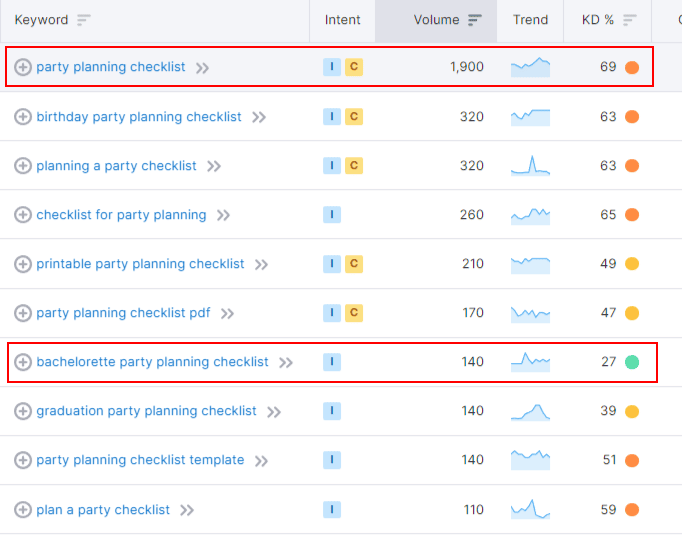
For instance, if you look up “party planning checklist” in Semrush, you’ll see it has a KD of 69 (difficult).

However, looking at the list of related terms, you’ll see “bachelorette party planning checklist” has a KD of 29 (easy). 

keyword research for checklist post

To target that second keyword, all you have to do is narrow your topic slightly. Write a good article, and you could rank on page one for that keyword and pull in your target audience.

3. Create an outline of tasks

Next, create an outline of the main tasks the reader will need to reach their goal. This is the bare bones of your checklist, so imagine writing them out in a list as if you’re going to tick them off one by one. (This also serves as the outline of your article.)

At this point, only jot down the most important or valuable tasks, and order them from most important to least important. 

Why? As a general rule, you want to front-load blog posts with the most valuable information so your readers stay engaged – or at least so they can quickly find the information that’s most important to them and thus have a satisfying content experience. 

That said, if the tasks need to be sequenced to make logical sense, order them that way. For instance, a checklist for party preparations probably needs to start with planning a menu of food and gathering supplies ahead of other tasks like decorating or making appetizers.

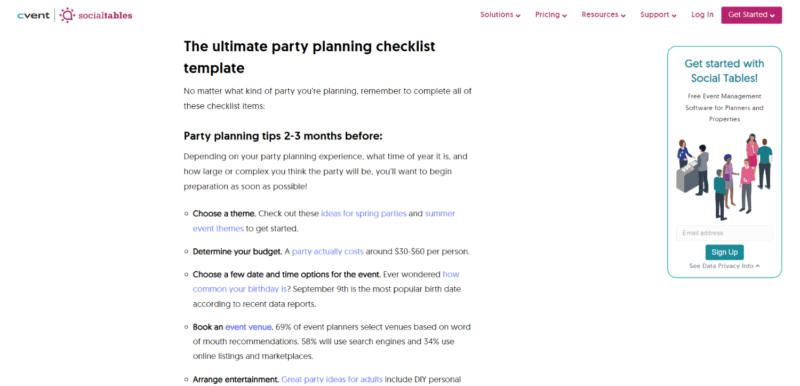
And that’s exactly how this checklist from Social Tables is ordered.

party-planning-checklist-example

On the other hand, this fall home maintenance checklist from Better Homes & Gardens follows the order of importance of tasks:

fall home maintenance checklist example

4. Craft engaging, task-oriented headers

Once your article is outlined, you can start tweaking your headers to not just help pull the reader down the page, but also to emphasize the actions they need to take. And, of course, you’ll need to insert your keyword in at least one header (ideally more than one) for SEO.

Here are some tips to make your headers better.

Use the formula of ‘verb + noun phrase’ 

If you scroll up and down this article, you’ll see I’ve used the verb + noun phrase formula in all the H3s in my task list (e.g., Create [verb] an outline of tasks [noun phrase].

Using this formula keeps the focus on each action needed to complete the checklist. This makes your list scannable and easy to read. Plus, it’s motivating – you’re literally commanding the reader to go do something.

Change up your verbs

To make each header even more unique and engaging, try changing up your verbs. For instance, in every H3 in my list, I could have repeated the verb “write” multiple times (“write an outline,” “write engaging headers”). Instead, I switch up the verbs to add variety and interest. 

Don’t be afraid to grab your thesaurus if you’re struggling to come up with unique verbs, by the way – you’ll just grow your vocabulary, which will improve your writing.

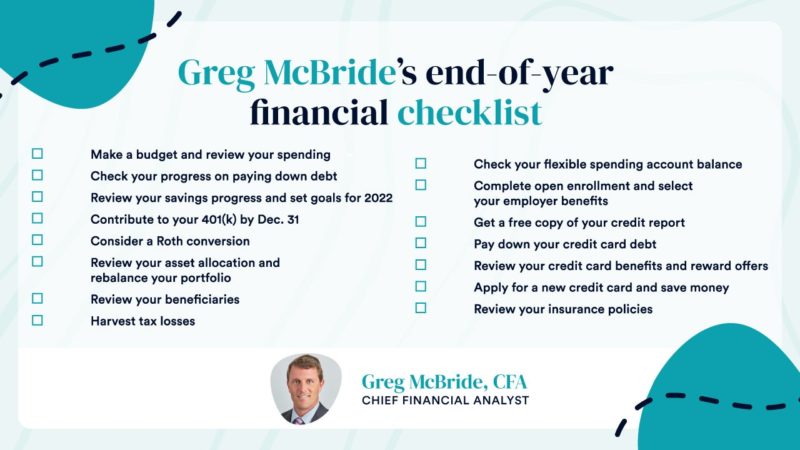
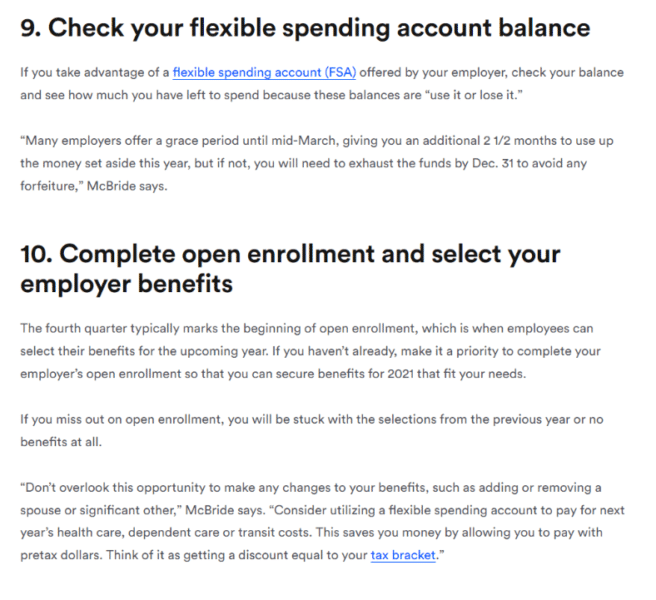
This end-of-year financial checklist by Bankrate is a good example of the “verb + noun phrase” formula in action. They also use a good variety of verbs.

financial_checklist_2022 example

Note that “review” is repeated a few times. Imagine if this entire checklist and all the action items said “review,” as in:

  • “Review your progress.”
  • “Review your spending.”
  • “Review your beneficiaries.”
  • And so on.

It would be pretty mind-numbing, right? Plus, it would make it harder to differentiate between tasks.

Bottom line: Plumb your vocabulary and make your action items more engaging – and more readable.

5. Include insider tips and how-tos in your checklist

Remember, your brand (or your client’s brand) is supposed to be the expert on this topic and how to complete this checklist. 

With that in mind:

  • What pieces of information could you add that most people don’t know about or consider?
  • What’s your insider advice for completing an action item faster or better?
  • What would be helpful to know if you were the person using the checklist?

Don’t just regurgitate what others have said before you. Add some flavor from the brand’s expert perspective, as if you were sitting with your audience and advising them personally about the topic.

Not only will that make your checklist article more unique, but it will also make it much more helpful and useful.

For example, Bankrate’s financial checklist includes advice for each action item straight from the company’s Chief Financial Analyst and includes quotes from him that directly address the reader.

It’s not rote advice, but rather helpful information from a true expert interviewed for the blog post.

financial-checklist-including-expert-advice

Bonus: Consider creating an infographic or PDF checklist for downloading

A checklist is a great piece of content to consider repurposing and offering in different formats.

First, if you create your checklist article thoughtfully, it’s endlessly useful, so much so that your audience might want to download it to save, reference, or print later – such as in a handy and visually appealing PDF document.

Offering a downloadable checklist inside your checklist article is a proven way to convert readers, by the way. Simply insert a few calls to action (CTAs) that link to a landing page where the reader can enter their email address to download the checklist. Done.

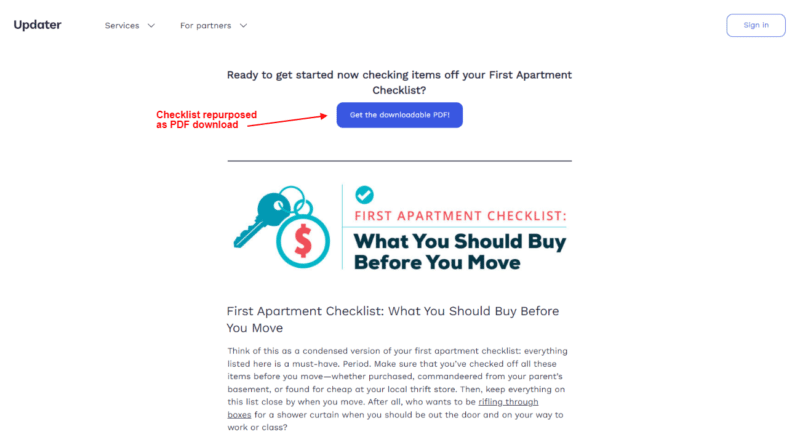
A good example: Updater includes a button with a CTA to download the PDF version of their checklist for a first apartment.

example of downloadable pdf checklist

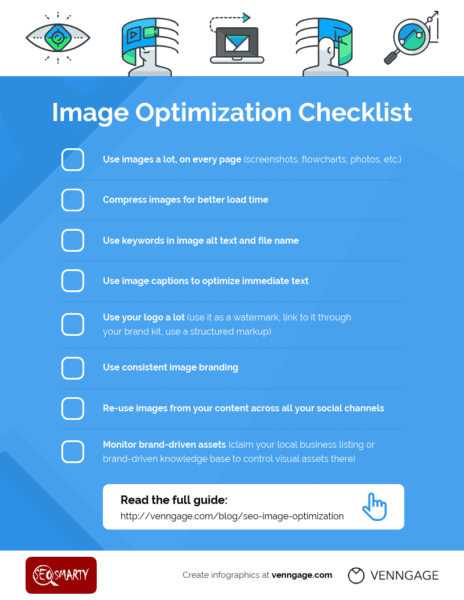
Second, a checklist article is endlessly shareable if you condense it down to a list of the action items – such as in a well-designed infographic. Include the infographic inside your checklist blog post for visual appeal, and share it on social media.

For example, Venngage created a clean infographic for their image optimization checklist.

Image-SEO-Checklist-Template

For those reasons, think about getting the main content of your checklist designed in a few different formats, or choose one additional checklist format to create depending on your goals.

Write a checklist article to move closer to your SEO and marketing goals

A checklist blog post is just plain useful content, which is what search engines want to serve their users.

If you create yours around a relevant problem your audience has or a goal they want to meet, tie it to the right keyword, and write a unique and helpful list that demonstrates the brand’s expertise, you’ll absolutely see results.

Plus, the humble checklist article is evergreen, which means, as long as you did your SEO research, you’ll probably see it pull in traffic and leads for a long time after it’s published.

Whether you’re looking for increased brand awareness, SEO rankings, or trust grown with your readers, adding the checklist article format to your content roster is a great idea.


Opinions expressed in this article are those of the guest author and not necessarily Search Engine Land. Staff authors are listed here.


Related stories

New on Search Engine Land

@media screen and (min-width: 800px) { #div-gpt-ad-3191538-7 { display: flex !important; justify-content: center !important; align-items: center !important; min-width:770px; min-height:260px; } } @media screen and (min-width: 1279px) { #div-gpt-ad-3191538-7 { display: flex !important; justify-content: center !important; align-items: center !important; min-width:800px!important; min-height:440px!important; } }

About the author

Julia McCoy

Julia McCoy is the founder of Content Hacker, 7x author, and a leading strategist around creating exceptional content and brand presence that lasts online. At 19 years old, she used her last $75 to build a 7-figure writing agency which she sold ten years later. In the 2020s, she’s devoted to teaching founders and marketers the strategy, skills, and systems they need to build a business through inbound content, so they can create more lasting impact in the world.

https://searchengineland.com/checklist-content-391921


This day in search marketing history: January 23

Expedia buys Travelocity

In 2015, Expedia bought rival Travelocity for $280 million amid sluggish travel industry growth and pressure from insurgent travel providers.

Expedia had actually been powering Travelocity.com since 2013. So the acquisition seemed quite logical from both perspectives.

At the time, Expedia also owned several online travel brands: Hotels.com, Hotwire, eLong and Trivago.

Read all about it in Travel Search Consolidation: Expedia Buys Rival Travelocity For $280M


Also on this day


Neeva seeks to expand user base with free subscriptions

2022: The free basic subscription was an alternative to its full-featured subscription, which cost $4.95 per month.


Google removes ‘ads’ and ‘sponsored’ labels from flight search results

2020: There would be no more referral fees from partners in flight search, as Google sought to emphasize price and convenience in rankings.


Google Dataset Search is out of beta and adds new features

2020: Google added new features to Google Dataset Search with this rollout.


Video: Search pioneer Mike Grehan on everything from the early days of SEO to AI’s role in paid and organic search

2020: In this installment of Barry Schwartz’s vlog series, he chatted with Grehan about the early days of search, how technology like AI and machine learning are impacting search and who originally came up with term “search engine optimization.”


Amazon adds customer acquisition metrics for Sponsored Brands campaigns

2019: The “new-to-brand” set of metrics were also available for Amazon sellers’ display and video ad campaigns.


Searchmetrics wins important victory in patent infringement lawsuit

2018: A federal judge invalidated five patents SEO platform provider BrightEdge claimed in lawsuit against competitor Searchmetrics.


Bing Hotel Ads moving out of beta to general release with Koddi

2018: After running its Hotel Ads offering in beta in 2017, Bing Ads rolled them out widely.


Google mobile search adds book previews

2017: You could now read book previews directly on your smartphone from Google search.


Ed Roberts activist Google Doodle honors leader of the disability rights movement

2017: The Google Doodle paid tribute to Ed Roberts, co-founder of the World Institute on Disability.


Automatic AdWords Currency Conversion Now Enabled In Google Analytics

2015: Advertisers using a different currency in AdWords and Analytics would now be able to easily compare cost data in Analytics.


PLAs Drove 56% Of Non-Brand Google AdWords Clicks In Q4 [RKG]

2015: Click share also rose on Bing’s product ads, doubling from Q3.


Pinterest Search Is Now Customized By Gender

2015: Pinterest adjusted its Guided Search system to serve results that differed depending on whether the user was female or male.


News Aggregator SmartNews Shows Rapid Growth, Adds Local Channels

2015: Local news became available for 12 US cities, including San Francisco, New York City, Los Angeles, Chicago, Washington, D.C., Atlanta, Seattle and Boston.


Search In Pics: Google Glass Mug, Google Pool Table & Gmail Paper

2015: The latest images showing what people eat at the search engine companies, how they play, who they meet, where they speak, what toys they have, and more.


An Easy Way To Check What Referrer Data Google, Bing Or Yahoo Pass To Your Secure Site

2014: There was no way to search for an HTTPS version of a “what is my referrer” site. So Barry Schwartz made one.


Google To Replace Smartphone User-Agent To Improve Smart Phone Indexing

2014: The new smartphone user-agent crawler would follow robots.txt, robots meta tag, and HTTP header directives for Googlebot instead of Googlebot-Mobile


MapQuest Transfers Local Listings Management To Yext

2014: MapQuest notified business users that its local business center and basic local listings product would be formally shutting down.


Google Loses Again In AdWords Patent Infringement Case

2014: A judge determined patent-holding company Vringo was entitled to additional royalties from Google in a patent infringement case involving Google AdWords.


Google Launches Streamlined Image Search

2013: With the new system made it easier to quickly skim through multiple images, rather than the old system that requires a lot of clicking, then closing windows to go back and select a new image.


New Tumblr Blog Raises Privacy Concerns Over Facebook Graph Search

2013: Examples of searches that were a mix of comedy and creepiness.


“Don’t Be Evil” Tool — Backed By Facebook & Twitter — Shows Google’s “Search Plus Your World” Can Go Beyond Google+

2012: The companies behind the tool felt Google hadn’t focused on what was best for its users with Search Plus Your World.


Google Search Showing Results For Punctuation Marks

2012: In the past, Google ignored most punctuation marks and didn’t show any useful results for them.


Projecting 2012 Google Mobile Revenues: $4 or $6 Billion?

2012: The Google 2012 mobile revenue “run rate” range was projected to be between $4 billion and $6 billion (globally). In the US the figure would probably be just over half the number.


A Proposal For Social Network Détente

2012: Some suggestions for how a social-nuclear war between Google, Twitter and Facebook could be averted.


Searching For Old Versions of Web Sites? The Wayback Machine Is New and Improved

2011: The Wayback Machine was redesigned and relaunched with a nicer user interface and migrated to a new platform as a foundation for further improvements. 


Google To Push Semantic Search In 2009?

2009: “Wouldn’t it be nice if Google understood the meaning of your phrase rather than just the words that are in that phrase? We have a lot of discoveries in that area that are going to roll out in the next little while,” said Google CEO Eric Schmidt


No Surprise: Google Is No. 1 Internet Property Worldwide

2009: Google’s sites reached 77% of the online population, age 15 and up, in December 2008.


Google Maps: From “OneBox” To Ten Local Links

2008: Google appeared to be serious about showing as many as 10 local listings beside the map and phasing this into results around the world. 


Google’s Mysterious Position Six Penalty

2008: Google’s Matt Cutts shrugged off discussion about a pattern of websites ranking in Position 1 or 2 falling to Position 6 in Google.


Google Best Place To Work, According To Fortune Magazine

2008: For the second year in a row.


Search Stocks & The Stock Crash: GOOG, YHOO, & MSFT

2008: Google had the greatest decline, down 19.5%. Yahoo was just behind at 18.5%, with Microsoft at about 12.5%. The NASDAQ overall was at 15.5%.


Google Health Close To Launching?

2008: The login page for Google Health was live, although the service itself was not.


Baidu Relaunches In Japan

2008: As part of this launch, Baidu revamped the Japanese home page and added blog search.


South Korea To Google: Return Our Cities From North Korea

2008: Google had labeled some of the regions in South Korea as being part of North Korea.


FTC Complaint Filed Over AskEraser: “Unfair & Deceptive”

2008: Multiple groups asked the US Federal Trade Commission to rule on whether Ask was using unfair and deceptive trade practices in marketing its tool.


Will The European Union Decide IP Addresses Are Personal?

2008: The head of an EU group looking into search privacy issues said that Internet Protocol addresses assigned to computers should be treated as personal information.


Anything Else? Vivisimo’s Remix Clustering Surfaces Subtler Results

2008: Remix clustering let you click a link to quickly answer the question, “What other, subtler topics are there?”


Google Adds RSS Snippets To Personalized Home Page

2007: Google added plus signs next to each RSS title that, if clicked, would open to show a snippet of the summary from the post.


Google’s Site Exclusion Tool Enables Unlimited Site Exclusions

2007: Google removed the cap on the number of sites you could exclude in the Site Exclusion Tool.


Google Takes Action To ‘Strip’ Confidential Information From Google Blacklist

2007: Google: “procedures have been put in place to strip login information from future submissions.”


Google To Test New Video Ads From BMG and Warner Music Group Over AdSense Network

2007: The ads were to be tested for four weeks.


Use Microsoft Live Search & Microsoft With Donate To Charity

2007: Microsoft said it would donate $1 per search to Team Seattle’s Seattle’s Children’s Hospital fund.


Google To Invest In Indian Companies Via Seedfund

2007: Google was reportedly giving an undisclosed amount to Seedfund, to indirectly invest in technology in India. 


Yahoo’s Panama Migration: Mixed Reviews

2007: The reviews and opinions presented were generally positive but some smaller businesses had problems and frustrations.


TellMe To Launch New Mobile Local Search Product

2007: It was free, direct-to-consumer, voice-enabled directory assistance.


SEMPO Institute: Online School For SEMs Announced

2007: The fundamentals course went live and provide 15+ tracks.


Past contributions from Search Engine Land’s Subject Matter Experts (SMEs)

These columns are a snapshot in time and have not been updated since publishing, unless noted. Opinions expressed in these articles are those of the author and not necessarily Search Engine Land.


< January 22 | Search Marketing History | January 24 >


Related stories

New on Search Engine Land

@media screen and (min-width: 800px) { #div-gpt-ad-3191538-7 { display: flex !important; justify-content: center !important; align-items: center !important; min-width:770px; min-height:260px; } } @media screen and (min-width: 1279px) { #div-gpt-ad-3191538-7 { display: flex !important; justify-content: center !important; align-items: center !important; min-width:800px!important; min-height:440px!important; } }

About the author

Danny Goodwin

Danny Goodwin is Managing Editor of Search Engine Land & SMX. In addition to writing daily about SEO, PPC, and more for Search Engine Land, Goodwin also manages Search Engine Land’s roster of subject-matter experts. He also helps program our conference series, SMX – Search Marketing Expo. Prior to joining Search Engine Land, Goodwin was Executive Editor at Search Engine Journal, where he led editorial initiatives for the brand. He also was an editor at Search Engine Watch. He has spoken at many major search conferences and virtual events, and has been sourced for his expertise by a wide range of publications and podcasts.

https://searchengineland.com/search-marketing-history-january-23-391998


This day in search marketing history: January 22

Google deduplicates featured snippets

In 2020, Google rolled out a global change to featured snippets that resulted in any URL only appearing once on the first page of search results, instead of twice.

Google said there would be no change to its overall set of web search results. There would still be 10 unique listings, as before. It’s just that Google would be deduplicating and no longer show any of those listings twice.

Google Search Liaison Danny Sullivan announced the news via Twitter:

If a web page listing is elevated into the featured snippet position, we no longer repeat the listing in the search results. This declutters the results & helps users locate relevant information more easily. Featured snippets count as one of the ten web page listings we show.

@dannysullivan

In November, Google was testing removing a site’s normal snippet when a featured snippet was displayed. Google even tested this back in 2017.

Read about it in Listings that earn featured snippets will not repeat on the first page of Google search.


Also on this day 


Google Search launches updated mobile design and interface

2021: The updated interface aimed to make the search  interface easier to read for searchers while providing a cleaner and more modern experience.


Google My Business updates flag review feature

2021: The new form asked the business owner, “Why are you reporting this review?” Then it offered multiple options.


Google might remove search in Australia if forced to pay to link to sites

2021: “The latest version of the Code requires Google to pay to link to news sites, breaking a fundamental principle of how the web works,” said Mel Silva, Google Australia’s managing director.


Contextual links in featured snippets may present new opportunities and risks

2021: The potential for more links to appear in this high-visibility search result feature had SEOs concerned about click-through rates, brand safety and how to optimize for it.


Google’s mobile-first indexing guide update emphasizes the same content across site versions

2020: New guidelines were added in several areas, including crawling, structured data, visual content, and best practices.


Video: Josef Sperzel talks technical SEO and using Python to pull data

2020: In this installment of Barry Schwartz’s vlog series, he chats with Sperzel about how he got into technical SEO, site architecture and spider crawling issues, and more.


Google offers improved GMB sign-up flow for service-area businesses

2019: Improved process would make it easier to set up service areas on GMB.


Small business scammer shut down by Google lawsuit

2019: Defendant firm had falsely represented that it was acting on behalf of Google.


New Google Search Console may be rolling out for everyone now

2018: Most users were able to see their properties in the new Search Console beta.


Sergei Eisenstein Google doodle honors Soviet film director known as the ‘Father of Montage’

2018: The animated image highlighted the director’s technique for creating montage film effects.


Court Documents Show Google Paid Apple $1 Billion For Safari Default Placement

2016: According to court documents and testimony in Oracle’s copyright suit against Google, “Apple received $1 billion from its rival in 2014.”


Google Down 1 Billion PC Searches From 2014, But Mobile Volumes Likely Way Up

2016: Including “powered by” search, Google controlled 64.8% of US search query volume, while Bing powered 32.2% of organic search.


Search In Pics: Google Dance Shirts, Google’s Micro Library & Revealing Screen Shot

2016: The latest images culled from the web, showing what people eat at the search engine companies, how they play, who they meet, where they speak, what toys they have and more.


Wilbur Scoville Google Doodle Marks 151st Birthday Of Man Behind The Scoville Scale

2016: The interactive doodle included an animated Scoville, pepper facts and a game pitting an ice-cream cone against different pepper types.


Google Suggesting Firefox Users Change Their Search Engine & Home Page

2015: Yahoo won the deal to be the default search engine in Firefox in November; now after losing some search share, Google was fighting back.


Bing Ads New Bid Preview Tool Lets You See Effects Of Bid Changes In Real Time

2015: Advertisers could see how ads would display with bid increases before committing to new keyword bids. 


Bing Also Testing Google’s Search Design Interface

2015: Days after Yahoo was caught testing a Google search design interface, Bing is also caught testing it.


YP Introduces Cross-Device Retargeting With Local Search Query Data

2015: It combined the company’s high-intent local query data with cross-screen behavior and ad exchange mobile display inventory.


Google Webmaster Tools Crawl Errors Reports Now Showing Errors On Final Redirect URL

2014: The crawl errors report showed errors on the final URL of the redirect, as opposed to the origin URL of the redirect.


Google’s Matt Cutts: We Don’t Use Twitter Or Facebook Social Signals To Rank Pages

2014: A video answered the question: “Are Facebook and Twitter signals part of the ranking algorithm?” Short answer: no.


Google Adds A Knowledge Graph Popup To Search Results, But Is It Good For Site Owners?

2014: The data provided background on the website listed in the search result, and it appeared in a small popup window that’s accessible from a clickable link on the second line of the result.


Yahoo Search Goes Secure, Taking Referrer Data — An Indicator Of Yahoo’s Popularity — With It

2014: That meant more protection for searchers but what did the loss of referrer data mean for search marketers?


Google Now Changing The Top Search Filters Based On Query

2014: The options you saw at the top might differ or be in a different order based on the query you entered into Google’s search box.


Study: Display Ads Drive Search Clicks After Two Weeks

2014: Display advertising did generate more search volume, clicks and conversions.


Google Panda Update Version #24; 1.2% Of Search Queries Impacted

2013: A new Panda refresh.


Report: 25 Percent Of Search Clicks Now From Mobile Devices

2013: Desktop searches remained level from Q3 2012 to Q4 2012, while mobile experienced an increase in search share.


Google Earnings Show Halt Of CPC Decline, At Least Temporarily

2013: The cost-per-click across Google’s advertising business increased approximately 2% in the fourth quarter, as compared to the third quarter, after several consecutive quarters of decline.


Google To Replace Black Top Bar With Gray Colored Bar?

2013:  Since June 2011, Google’s top bar had a black background color with white/gray text overlaid.


Bing Tags Expands, Makes Pages Linked To Your Profile Public

2013: You (or others) could tag pages to appear associated with you in Bing’s search results. This would be visible to those who had a Facebook account connected to Bing.


Are Search Engines Driving Libraries To Extinction? Not Quite Yet

2013: The traditional role played by libraries, including access to print works and professional librarians, was still important to most.


Google’s “Find Hotels By Travel Time” Offers Some Of That “Innovation” Google Was Talking About

2012: Transit time search was only available in cities where Google had partnered with local transit agencies to integrate their data into Google Maps.


Google May Let You Blacklist Domains To Fight Spam

2011: Matt Cutts confirmed that Google had discussed giving searchers the ability to remove domains from its search results.


Google’s Matt Cutts On 2010 & Looking Back At 2009

2010: Cutts answered a question about where he thought Google and search would be in 2010. In another video, he re-created his presentation on the “state of the index.”


comScore: US Has Most Searches; China Slowest Growth; Google Tops Worldwide In 2009

2010: Globally, searches grew overall by 46%.


Google Adds More Answers & Info To Search Results

2010: Google added an events hCalendar microformat and started highlighting answers in the snippets.


Google Founders To Sell 10 Million Shares Over Five Years

2010: This was part of a plan to diversify their portfolios over time.


Google 4th On Forbes’ Best Companies To Work For List

2010: Google also ranked fourth on the list in 2009, after being first in 2007 and 2008.


Ballmer Critical Of Google’s China Decision

2010: Ballmer called it an “irrational business decision” on Google’s part.


Satellite Images Of Haiti Earthquake From Google & Bing Maps

2010: How to see before and after images, taken by satellite, as well as 360-degree ground-level videos.


Bing Maps Challenge: Try Silverlight Version, Maybe Win $100

2010: Microsoft wanted people to download (or update Sliverlight) so they could use the new and improved Bing Maps. 


Search In Pictures: Google China, Yahoo Character & Google Pillows

2010: The latest images culled from the web, showing what people eat at the search engine companies, how they play, who they meet, where they speak, what toys they have, and more.


Google Revenues Beat Street, Economic Uncertainty Lingers

2009: Google reported revenues of $5.70 billion for the quarter ended Dec. 31, 2008, an increase of 18% compared to the fourth quarter of 2007.


The Rise (And Fall?) Of Real-Time Search

2009: For all the effort to put value into real-time search, particularly where Twitter was concerned – Twitter itself may have put an end to those efforts by announcing new limits on its API.


Microsoft Announces Q2 Results, 5,000 Layoffs

2009: The layoff rumors were true, though the numbers were less than anticipated.


Google Wants To Help Marketers Do More With Less

2009: The Google AdWords team has launched a new mini-site to help advertisers reach their goals in light of the current economy.


Job Search Engines: The Hottest Thing Going

2009: Job search was the fastest-growing search category in the U.S. in 2008.


Obama Is “Failure” At Google & “Miserable Failure” At Yahoo

2009: President Obama inherited all the links containing anchor text with the words “miserable failure” in them, aimed at former president Bush.


Yahoo Search Update: First Update Of 2008

2008:Yahoo had been rolling out updates to their “crawling, indexing and ranking algorithms” over the past couple days.


Publicis & Google In Technology, Media-Planning Partnership

2008: “Google would exchange its technological know-how for Publicis’s analytical and media planning expertise.”


After A Month, Google Fails The One Hour Guaranteed Press Response Test

2008: The fast response was meant for “corporate policy issues.”


Google Walks Down Fashion Avenue: The Oogle Sari

2008: A design in Satya Paul’s collection was named “Oogle sari” that looked like a sari
made up of the Google web search results.


Chinese Kissing Couple Sues Subway Operator For Uploading Video To YouTube

2008: The video reportedly drew over 15,000 hits in just two days and apparently embarrassed the couple tremendously.


Yahoo Search Index Update – January 2007

2007: Yahoo officially confirmed recent speculations of an index update taking place.


Google’s Blacklist Of Phishing Sites Contained Bank Information & More Confidential Details

2007: Google has quietly removed the information, which included usernames and passwords of individuals, including credentials for accounts at banks and other financial institutions.


Wikipedia Nofollows Links Again – Due To SEOs Abusing Wikipedia

2007: This was due to a discussion of a new SEO contest, where editors were warned of an onslaught of spam.


BBC To Partner With Google On Video Content Deal

2007: Google would make some of BBC’s content available through Google Video and possibly YouTube.


Google Germany Gone Kaput?

2007: That time when Google Germany disappeared due to google.de domain registrations shenanigans.


Google Seeking To Place Ads In Video Games; In Talks To Buy Adscape Media

2007: Google was “always considering new ways to extend Google’s advertising program to benefit our users, advertisers and publishers” – including in-game advertising.


Google To Provide Downloadable E-Books

2007: They hoped to “allow readers to download entire books to their computers in a format that they could read on screen or on mobile devices such as a Blackberry.”


Google Adds Sponsored Links To Your Search History

2007: Google added your sponsored link click activity to Google Search History. 


SuggestLocal Offers Collaboration Tools For Local Search

2007: It sought to solve the problem of figuring out where to go and what to do with a group of colleagues or friends.


From Search Marketing Expo (SMX)


Past contributions from Search Engine Land’s Subject Matter Experts (SMEs)

These columns are a snapshot in time and have not been updated since publishing, unless noted. Opinions expressed in these articles are those of the author and not necessarily Search Engine Land.


< January 21 | Search Marketing History | January 23 >


Related stories

New on Search Engine Land

@media screen and (min-width: 800px) { #div-gpt-ad-3191538-7 { display: flex !important; justify-content: center !important; align-items: center !important; min-width:770px; min-height:260px; } } @media screen and (min-width: 1279px) { #div-gpt-ad-3191538-7 { display: flex !important; justify-content: center !important; align-items: center !important; min-width:800px!important; min-height:440px!important; } }

About the author

Danny Goodwin

Danny Goodwin is Managing Editor of Search Engine Land & SMX. In addition to writing daily about SEO, PPC, and more for Search Engine Land, Goodwin also manages Search Engine Land’s roster of subject-matter experts. He also helps program our conference series, SMX – Search Marketing Expo. Prior to joining Search Engine Land, Goodwin was Executive Editor at Search Engine Journal, where he led editorial initiatives for the brand. He also was an editor at Search Engine Watch. He has spoken at many major search conferences and virtual events, and has been sourced for his expertise by a wide range of publications and podcasts.

https://searchengineland.com/search-marketing-history-january-22-391990


This day in search marketing history: January 21

Google explains the “core” algorithm

In 2016, Google’s Andrey Lipattsev explained the “core” algorithm.

This happened following the news about Panda becoming part of Google’s core algorithm. SEOs wanted to better understand what being part of Google’s core algorithm meant.

Put simply, it meant that an algorithm is consistent enough that Google doesn’t have to worry about it because it’s been tested, works the way it should, and won’t require many changes in the future. As Lipattsev explained:

It is less about the functionality, which means it probably doesn’t change that much over time, and it is more about how we perceive it, in the context of the algorithm. Do we still think this is an experimental thing, it is running for a while and we aren’t sure how long it will last? Or is it like PageRank, it is part of it, it will always be there, at least in the foreseeable future and then probably call it in certain context part of the core algorithm.

So now when you hear about the latest Google core updates, hopefully you better understand what Google’s core algorithm means.

Read all about it in: Google Explains What It Means To Be Part Of The “Core” Algorithm


Also on this day 


Google adds new robots tag indexifembedded

2022: The tag let you define if you wanted your content indexed when it was embedded through iframes or other means.


Google updates product structured data for car review snippets

2022: Google added a note to the product structured data help documentation to explain how to specify car markup and still have Product review snippet feature eligibility.


Google Ads issue impacted some Discover and Performance Max campaigns between Jan. 18-21

2022: It was a temporary technical issue that affected serving on YouTube inventory.


Google will drop support for data-vocabulary.org structured data on April 6

2020: Site owners needed to convert to the schema.org markup if they wanted their pages to be eligible for Google rich results.


CallRail adds call analytics integration with Google My Business

2020: CallRail developed the solution partly as a response to the rise of “zero-click search” and the “cannibalization” of website traffic by GMB.


Google’s 2015 “Bad Ads” Report: 780 Million Ads, 25K App Accounts Shut Down

2016: One of Google’s efforts was to prevent accidental mobile clicks when app developers purposely placed ads too close to application buttons.


Bing Boasts Continuous Updates To Their Search Engine Daily

2016: Bing deploys multiple updates per day in an effort to constantly improve the search results and features.


Google Improves Weather Search Results On Android In Time For Winter Storm Jonas

2016: Weather-related search results would now include hourly sky conditions, air quality and severe weather alerts.


Google Ventures-Backed RetailMeNot Climbs Out Of Its Google Penalty

2015: It was unclear what changes RetailMeNot made to recover from the Google Panda algorithm, but their rankings did bounce back.


Bing Ads Rolls Out Enhanced Sitelinks Globally, Adds Sitelink Device Preference

2015: Additional copy below each Sitelink extension became available in most markets and languages supported by Bing Ads.


Right To Be Forgotten: Google Tells Europe It Won’t Scrub Google.com

2015: “It’s our strong view that there needs to be some way of limiting the concept, because it is a European concept,” said David Drummond, Google’s Chief Legal Officer.


Keep Writing Quality Content: SEO Bloggers React To Matt Cutts’ Claim “Guest Blogging Is Dead”

2014: A round-up of industry reactions, summarizing comments from a selection of popular bloggers.


Expedia & Google: No Comment From Both About Possible Expedia Penalty

2014: Expedia appeared to have been hit by a Google penalty related to unnatural links.


Marin: 40% Of Google PLA Clicks To Come From Smartphones By Dec 2014

2014: Marin expected retailers to allocate roughly a third of their PPC budgets to PLAs.


Pinterest Adds Vegetarian, Vegan, Gluten-Free & Paleo Filters For Recipe Related Searches

2014: Pinterest also added an “Indulge Me” button to perform searches for “not so healthy” dessert recipes.


As Google Evolves To Satisfy User Demands, Others Are Necessarily Marginalized

2013: “People no longer have patience for traditional search results … They mostly just want quick (and reliable) answers, which is exactly what Google is increasingly giving them.”


Google’s Martin Luther King, Jr. Logo

2013: The Doodle was in shades of blue, green and yellow. With Dr. King’s face as one of the “O”s in the Google logo.


A To Do List For Google’s New CEO Larry Page

2011: How well would the leadership shuffling tackle Google’s many challenges?


Google Turns To Page: The Day Two Narrative

2011: The desire to get some of its old startup fire back was one of the driving forces behind Page’s ascension.


Google Sets Sights On Content Farms In 2011

2011: Matt Cutts promises a renewed effort to take action against content farms (which he defined as “sites with shallow or low-quality content”).


Google Says Search Quality Improved With New Spam Detection

2011: A redesigned document-level classifier made it harder for on-page spam to impact Google’s search index.


First Google Toolbar PageRank Update Of 2011

2011: It was arguably the first update in almost 9 months – though Toolbar PageRank was very out of date and didn’t have a direct impact on ranking.


AdWords Preview Tool Gets Mobile-Focused Facelift

2011: The tool let advertisers see how their ads looked on different devices (iPhone, Android, etc.) on multiple carriers.


Small Google Navigation Element Changes

2011: The first was making the Google search left-side bar more compact and the second was changing the menu choices in the top menu while in Gmail.


Search In Pictures: GoogleBot T-Shirt, Yahoo Rodeo & Yahoo Rubber Duckies

2011: The latest images culled from the web, showing what people eat at the search engine companies, how they play, who they meet, where they speak, what toys they have, and more.


Google Beats Estimates With Very Strong Q4: $6.67 Billion

2010: Google reported revenues of $6.67 billion in the fourth quarter of 2009, representing a 17% increase over fourth quarter 2008 revenues of $5.70 billion.


Another Person No One’s Heard Of Tries To Trademark SEO

2010: This was the second time in about two years that someone with no general stature, reputation or well-known and documented history had tried to claim a trademark on SEO. 


Bing As iPhone Default Search Engine Part Deux

2010: Some additional information asserted default search status on the iPhone was a real possibility for Bing. 


44% Of Google News Readers Only Scan Headlines? Maybe Not!

2010: Google really wasn’t the content vampire that some news publishers accused it of being.


Facebook To Cut Some Microsoft Ads

2010: Facebook and Microsoft scaled back their display ad relationship.


The YouTube Music Discovery Project

2010: The tool helped you search for music and create YouTube playlists based on that query.


What’s For Dinner? Bing Mixes Recipes Into Search Results

2010: Bing pulled the recipes from popular websites and let you filter by holiday, meals, ratings and convenience.


Google’s Sergey Brin Writes About His Relief Mission Visit To Haiti

2010: Brin said the people of Haiti were “the real heroes.”


A Quick January 2009 SEO Update

2009: Updates many SEOs and SEMs noticed at Google, Yahoo and Ask.com in the past week.


Layoffs At Microsoft Widely Expected To Be Announced This Week

2009: This was expected to impact around 6,000 to 8,000 employees of its 95,000 workforce.


Microsoft Offers SearchPerks Incentive

2009: It was a three-day incentive to encourage participants to do more searches on Live Search. 


The Obama Effect: Google Says President Changed Search Activity

2009: Google shared some interesting facts and figures about inauguration-related search activity.


Google: All Your NYC Tourists Are Belong To Us

2009: NYC Mayor Michael Bloomberg announced a partnership with Google to use Google Maps on a new tourism website and information center.


Comparing Mobile Search Surveys: Early Adopters Vs. Mainstream Users

2008: An informal, online reader survey, of two different audiences, on a range of high-level topics pertaining to mobile search yields different results.


The Google Webmaster Tools Quick Start Guide

2008: Google created the guide to help webmasters learn the features and reasons to use the tool.


Project Palimpsest: Google To Host Open-Source Science Data

2008: The data Google would be hosting would be available for scientists and also for free for anyone.


Yahoo Planning Big Job Cuts?

2008: Perhaps as many as 2,500.


Yahoo Tests Delicious Integration In Search Results

2008: For some users, a search would show whether a page listed in Yahoo results was also on Delicious and how it had been tagged.


Google-DoubleClick Drama Moves To European Stage

2008: The Europeans appeared poised to be more aggressive than their American counterparts in holding Google’s feet to the fire.


Search Engines Commemorate Martin Luther King Jr. Day

2008: Google had an artistic logo, with children drawing the face of Martin Luther King Jr. on a sidewalk.


From Search Marketing Expo (SMX)


Past contributions from Search Engine Land’s Subject Matter Experts (SMEs)

These columns are a snapshot in time and have not been updated since publishing, unless noted. Opinions expressed in these articles are those of the author and not necessarily Search Engine Land.


< January 20 | Search Marketing History | January 22 >


Related stories

New on Search Engine Land

@media screen and (min-width: 800px) { #div-gpt-ad-3191538-7 { display: flex !important; justify-content: center !important; align-items: center !important; min-width:770px; min-height:260px; } } @media screen and (min-width: 1279px) { #div-gpt-ad-3191538-7 { display: flex !important; justify-content: center !important; align-items: center !important; min-width:800px!important; min-height:440px!important; } }

About the author

Danny Goodwin

Danny Goodwin is Managing Editor of Search Engine Land & SMX. In addition to writing daily about SEO, PPC, and more for Search Engine Land, Goodwin also manages Search Engine Land’s roster of subject-matter experts. He also helps program our conference series, SMX – Search Marketing Expo. Prior to joining Search Engine Land, Goodwin was Executive Editor at Search Engine Journal, where he led editorial initiatives for the brand. He also was an editor at Search Engine Watch. He has spoken at many major search conferences and virtual events, and has been sourced for his expertise by a wide range of publications and podcasts.

https://searchengineland.com/search-marketing-history-january-21-391982


TikTok has a secret “Heating” (cheating?) button

According to six sources and documents reviewed by Forbes, TikTok and ByteDance employees frequently engage in “heating,” which is a manual process that guarantees certain videos receive a specific amount of views.

Heating is cheating. Six current and former employees of TikTok and its parent company, ByteDance, as well as internal documents and communications reviewed by Forbes, TikTok and ByteDance staff use a practice called “heating” to artificially boost the distribution of certain videos in addition to relying on the algorithm to determine what becomes popular.

According to one of those sources:

“The heating feature refers to boosting videos into the For You feed through operation intervention to achieve a certain number of video views,” an internal TikTok document titled MINT Heating Playbook explains. “The total video views of heated videos accounts for a large portion of the daily total video views, around 1-2%, which can have a significant impact on overall core metrics.”

TikTok doesn’t publicly disclose this, of course. Sources stated to Forbes that TikTok has used “heating” to attract influencers and brands by artificially increasing the view count of their videos, indicating that this practice may have benefited some influencers and brands that TikTok has business relationships with at the expense of others it does not have partnerships with.

“Heating” suggests that some videos on the For You page may not be based on personal preference but rather intended to increase views for specific brands or creators. Without labeling, it isn’t easy to distinguish these videos from regular content.

Potential abuse cases. Sources have informed Forbes that employees have misused “heating” by using it to boost the view count of their own or their loved ones’ accounts in violation of company policies. Documents reviewed by Forbes also support this, showing that employees have used “heating” on their own accounts and the accounts of people they have personal relationships with. One document revealed that an account had received over 3 million views due to this type of “heating” incident.

How TikTok has responded. “We promote some videos to help diversify the content experience and introduce celebrities and emerging creators to the TikTok community. Only a few people, based in the U.S., have the ability to approve content for promotion in the U.S., and that content makes up approximately .002% of videos in For You feeds.” TikTok spokesperson Jamie Favazza wrote.

Dig deeper. You can read the full article from Forbes here.

Why we care. If TikTok is artificially inflating the view count of some videos through “heating,” it could skew the metrics that marketers use to evaluate the success of their campaigns. This could lead to brands investing in partnerships or collaborations with influencers or channels that may not have as large of an audience as they appear to have, ultimately reducing the ROI of their marketing efforts.

Additionally, artificially inflating view counts could also lead to misleading metrics and data, which could cause issues with transparency, trust and reputation of the platform and brands on it.


Related stories

New on Search Engine Land

@media screen and (min-width: 800px) { #div-gpt-ad-3191538-7 { display: flex !important; justify-content: center !important; align-items: center !important; min-width:770px; min-height:260px; } } @media screen and (min-width: 1279px) { #div-gpt-ad-3191538-7 { display: flex !important; justify-content: center !important; align-items: center !important; min-width:800px!important; min-height:440px!important; } }

About the author

Nicole Farley

Nicole Farley is an editor for Search Engine Land covering all things PPC. In addition to being a Marine Corps veteran, she has an extensive background in digital marketing, an MBA and a penchant for true crime, podcasts, travel, and snacks.

https://searchengineland.com/tiktok-has-a-secret-heating-cheating-button-391983