5 Simple SEO Strategies to Improve Your Rankings

Opinions expressed by Entrepreneur contributors are their own.

Search engine optimization (SEO) affects your website’s visibility online. Good SEO means more page traffic and higher chances of selling your products and services to a broader audience. No matter how great your products are or how well-designed your website is, without an SEO strategy, your chances of ranking on Google or any other search engine are slim.

How important is SEO?

Sure, you’re already making other marketing efforts to lead your audience to your website. You’re spending on ads and perhaps partnering with content creators to post links to your page. But that’s not enough.

If you’re getting traffic from other sources, that’s great! But did you know that organic search is five times more valuable than Google ads? This is because over 90% of website traffic comes from search engines.

Users who land on your page from a search engine have higher chances of converting because they specifically searched for your brand, products, or services. On the flip side, someone who ended up on your page after coming across your ad may not have had any prior intentions to check out your website.

Unlike organic search, that’s intentional, paid marketing efforts may disrupt someone’s experience. Besides, any website that’s too deep into the Google search page may lose its credibility.

Related: 7 Reasons Why SEO Matters for Every Startup

What is an SEO strategy?

An SEO strategy improves your website’s search engine ranking to improve your organic traffic. A complete SEO strategy should tackle three types of SEO:

  • On-page SEO: Focuses on content that’s on your website and ensures that it addresses your specific search query. Some critical factors that affect on-site SEO are content quality and uniqueness.
  • Off-page SEO: Focuses on strategies done outside your website to improve its credibility and ranking. Link-building is the backbone of off-page SEO strategies.
  • Technical SEO: Technical SEO deals with the backend aspects of your website to help increase your ranking. Good technical SEO means your page load time is fast, all your pages work, and it has structured data.

Related: This Is What Makes SEO Important For Every Business

Easy SEO strategies to improve your ranking:

1. Content is everything

While Google has made significant changes in its algorithm in the past year, content has long been a priority. Consistent publication of engaging content is the number one factor that affects your ranking. This means your website shouldn’t just have a bunch of keywords, but you should also produce high-quality content that’s unique and provides value to your readers.

Google looks at the quality of your copy — beyond any SEO technique. You have to go beyond regular calls to action and stand out from other similar pages.

If you have an e-commerce business, creating a blog to supplement your main page can answer your audience’s questions and help you rank higher on search engines.

One of the factors that Google looks at is whether your content is up to date. Updating your website with fresh content with a blog will be much simpler. Plus, a blog can help you reach a broader range of search queries and increase the average visit duration.

There has been debate on the ideal length of a blog, but according to a HubSpot study from 2021, the ideal blog post length for SEO should be 2,100-2,400 words.

2. Make a list of keywords

Keywords are no longer the essence of an SEO strategy but are still essential in optimizing your page. Use a keyword search tool to help you find a list of keywords related to your niche.

If you’re a new business, targeting low-competition keywords would be a good idea for a higher chance of ranking, and getting more organic traffic to your website would be a good idea. Of course, these keywords have to make sense for the type of content on your page.

3. Know what your audience is searching for

Many will make the mistake of creating content to increase page rankings — this technique will backfire. Ultimately, you’ll have a page filled with keywords that aren’t relevant to your business. Consider creating an accurate buyer persona to understand what your audience wants. After that, you’ll know what motivates your audience and what content can address their needs.

4. Build high-quality links

A backlink is when another website links to yours. It is one of the most significant factors that affect your ranking and is a great way to get organic page visits. This means you can’t rank with on-page efforts alone.

Top websites may get backlinks organically, and building connections with reputable websites is essential. One of the best ways to get backlinks is by sending a genuine outreach email to websites you have linked to.

Email blasts do work but are becoming less effective as many marketers have overused them. That said, there are plenty of resources on the web to get your creative juices flowing and develop creative ideas to set up an outreach campaign. Make sure that if you do conduct an outreach campaign, you are polite and genuine and always try to provide value first.

5. Don’t upload large files to your page

Images and videos undoubtedly add value to your content and can help attract more visitors to your page. However, these files can be large and, as a result, affect your page’s load time.

Page load time is one of the factors that affect your page’s ranking, and it also affects your mobile friendliness. Look at these factors and what managers can do to stay on top of them.

Many plugins and tools can help you reduce your file size without losing quality. Never upload high-resolution images. As a best practice, stay within 500 KB.

Related: 10 Essential SEO Strategies For Entrepreneurs to Increase Their Traffic

Summing up

Like any business strategy, it will take time to see results. And instead of reaching for the stars, always make your SEO goals more specific to address your business needs. This way, it will be easier to track and measure your progress.

Since the algorithm is constantly changing, you also have to stay up to date with the latest changes to ensure that you’re familiar with the best practices.

https://www.entrepreneur.com/article/439444


AI content: Is it helpful or spam?

When Google announced the helpful content update, many in the SEO industry expected AI-generated content to get hit hard. 

I was expecting AI-generated content to get wiped out by this supposedly sweeping update, comparable to 2011’s Panda algorithm update. Yet, no major impact was recorded. 

Soon after, Google released the October 2022 spam update and that’s when we saw websites using AI content affected, although not as dramatically.

What happened? Let me take a few steps back.

Another vicious Panda attack?

Back in 2011, content farms were a serious problem. Many companies like Demand Media made a fortune by mass-producing low-quality articles.

They created thin content stuffed with all kinds of keyword variations taken from keyword research tools and generated similar articles for each slightly differing version of a popular search query. 

Underpaid and often outsourced workers from overseas wrote about topics they had no idea about, often creating gibberish.

Panda was a significant algorithm update that even legitimate blogs were affected. How do I know? My own popular SEO blog also got penalized. I lost most of my major top 10 rankings for phrases like [url seo], [image seo] or [advanced seo] overnight, and haven’t been able to recover them ever since.

Google was under increasing pressure to deal with content farms, especially as the search engine’s then-contender, the now-defunct Blekko, promoted itself as a content farm-free alternative to Google.

We’re living in 2023 and there are still no proper flying cars and jetpacks. What we do have are breakthroughs in automation, particularly for the manufacturing and services sectors.

On the web, it’s even more obvious. Automation helps us every day with a plethora of repetitive tasks and beyond.

The work we do has changed a lot in recent years. Boring and tedious tasks are being replaced by the creative industries. Many even play for a living by being professional skateboarders or gamers, making money as content creators and influencers.

When it comes to SEO, a lot of tasks can get automated, but the results vary. The overall focus of modern SEO is on human-to-human engagement – think of audience building and outreach.

My content creator bias

As a writer, I’ve become increasingly anxious in recent years due to the rise of AI. My fear stemmed not from an imagined Terminator-like apocalypse (even though that might still happen), but more from AI’s potential impact on my own line of work.

Would AI content soon replace actual writers like myself? We don’t know yet. It hasn’t happened as of now. What we do know, though, is that some bloggers use AI content tools to create content themselves. 

Saying that AI might replace writers is like saying that typewriters or computers will replace writers. Can a tool replace the person who uses the tool? Maybe for menial tasks. But is writing a menial task? 

In a way, I am already using AI just by writing this article. Google Docs offers suggestions to fix my grammar – although not as many as Grammarly (which was too invasive for me) but more than what Microsoft Word provided in the past.


Get the daily newsletter search marketers rely on.


A look at automation in SEO

In SEO, there are many ways to automate repetitive tasks and streamline workflows using various tools.

Keyword research

No single person can compile and assess the data for proper keyword research. Even if you do not use AI or conventional keyword research tools, you at least use Google to check those keywords “manually,” while Google uses advanced algorithms, AI and all types of automation to access keyword databases. 

There is indeed unethical or questionable keyword research automation, which involves crawling large numbers of Google results without authorization and causing heavy load on their servers. 

That said, this is only relevant for large-scale technical SEOs, as most mere mortals will resort to common keyword research tools that might already include AI input.

Auditing websites

You can get a fully automated website audit from many SEO tools. Even though they can’t match the expertise of an SEO consultant, some are very helpful and often free. 

Tools like Semrush, WooRank or HubSpot offer website auditing to inform your SEO strategy. Do not shy away from using them whenever they are helpful. 

The only drawback is that some tools may cause a heavy load on a website as they crawl it in its entirety by requesting and parsing hundreds or thousands of pages, at once or in quick succession. I’m not aware of AI tools used to audit website issues but they would make sense for this use case.

Checking internal links or external links from sites that link to you and sites you link to is a classic way of using SEO tools long before AI was sophisticated enough to help with SEO tasks. Internal links can break or simply divert website authority to orphan pages or less important resources. 

A well-optimized website has a structure that allows the overall authority to flow freely. AI tools could easily find and track links in ways that go beyond “push button” or “cron job” types of checks. As always, it’s important not to cause too much load on other websites. 

Checking rankings

Checking rankings is similar to checking links, but with a twist. Google search results must be crawled using automated tools, which is against their terms of use. If you use ranking checkers from your local computer, your IP might get blocked by Google.

Thus, this is quite risky and should only be an option when you have nothing to lose or you’re advanced technology that either balances the usage of Google resources or obfuscates your tracks to cover up where the load comes from. 

I know that some SEO tool providers have access to large server farms to fool Google into believing that legit human users are accessing their services. AI could help to alleviate the issue by causing less load or by hiding the activity better. 

What about automated content?

Automating content creation is not an ideal use case. AI tools do not have the firsthand experience Google requires and is expected by readers. They merely rewrite existing knowledge using their “own” words.

In the past, lots of spammers have tried to trick Google into believing that they have content-rich sites by spinning articles and rewriting them with synonyms. Google has long since filtered this from the SERPs.

The new generation of content automation tools run by AI

Many AI content tools proliferate in the market. They have well-designed websites, and some even quote SEO experts who recommend them.

I just searched the web for AI content and found lots of services offering it. Some of these tools are.

Proof Content

Proof Content promotes itself with the slogan, “Data-driven content for brands with something to say,” and claims their AI content is “automated,” “tailored,” and “speedy.”

They use “human editors” so content is not 100% automated. One of their results examples highlights success by an “increase of 127% SEO traffic growth YOY.”

Frase

Frase emphasizes speed even more while still promising improved quality, “Better content, faster.” 

They also clearly talk to SEO-driven marketers by declaring they can “create SEO content fast with AI,” adding that “going from keyword to SEO-optimized article has never been easier.”

GrowthBar

The GrowthBar AI content generator is even called growthbarseo.com in the domain name so there is no doubt that it is made to create SEO content. It also says so in its value proposition: “Make SEO … content that Google loves with AI”. It also incorporates a keyword research tool and a Chrome extension.

There is no ambiguity when it comes to the most important use case of these tools – content creation for SEO purposes.

What do the quoted experts say?

Brandan Hufford is quoted on the Frase page as saying: 

  • “I’ve spent a great deal of time comparing tools to get the most out of what I write, and Frase feels like you’re using content marketing cheat codes.”

Kevin Indig is cited on the same page:

  • “Frase feels like a next-gen content tool that’s not just exciting for SEOs, but for writers as well. In my mind, that’s more important to create successful content.”

Thomas Melching encourages the use of GrowthBar with the following: 

  • “Make SEO-perfect content in one click, generate meta descriptions with AI, and keyword research. GrowthBar is game-changing and it has a free trial.”

Mark Sandusky praises GrowthBar, saying: 

  • “GrowthBar has helped us break into new SEO categories and write content faster. I use the Content Generator almost daily.”

Can they all be wrong? As they also do not hide their usage of AI content tools they are apparently not afraid of their projects being penalized as spam or thin content.

So, is AI content helpful or spam? 

Can we clearly say whether AI content is helpful or spam? Well, we can’t. It depends.

In my opinion, AI content can be both helpful and spam. 

The motivation and the effort invested in it are some factors to consider. If you invest zero effort and let the AI do 100% of the work, the risk of getting low-level content farm drivel is high.

It really depends on quality over quantity. 

One thing is for sure, churning mass-produced, low-quality content makes all your content less than stellar. It doesn’t matter whether you use AI or inexperienced writers to inflate your website disproportionately, the outcome is the same. 

Less is more when it comes to content production. Regular publishing is fine as long as it’s not flooding.

WordLift has an in-depth overview of how “generative AI” can work for SEO content purposes and beyond.

The generative AI landscape for SEO automation
Image credit: WordLift

As of now, it mostly works well for easy content-related tasks (green) like:

  • FAQ generation.
  • Product descriptions.
  • Summarization.
  • Introductory text.

Human intervention

The key to making AI work in content creation is to double down on quality.

Implement quality control and ensure editorial content involves actual human editors. Do not let AI write and decide by itself. People must stay in charge. 

This is also the feedback I got from SEOs using AI for content creation. Their content is never completely automated and there are quality checks to ensure compliance with Google’s standards.

Google Search Advocate John Mueller has been pretty clear about AI content being “still” against Google’s webmaster guidelines in April 2022.

Using AI ethically in SEO

The question of whether AI content is helpful or becomes spam essentially boils down to the ethics behind it. What is the purpose of the automation process? 

Do you want to flood Google with potentially useless content just to make money from ad or affiliate revenue? Well, guess what, you are likely to spam.

Do you want to get your hands free from the menial work of rephrasing the basics that AI can gobble up from the web automatically to make sure your contribution is akin to poetry and one of a kind that nonsentient AI can’t replicate? Bingo!

Can creativity get fully automated?

Only truly intelligent AI could actually create as a human being does. Otherwise, it’s merely combining “facts” from elsewhere.

Many science fiction works have dealt with the possibility of artificial intelligence becoming fully alive. Most of those are scary dystopian visions. Some aren’t. 

There is a movie that is somewhere in the middle of those two extremes called “I, Robot” starring Will Smith. Based on a novel by Isaac Asimov, a respected science fiction writer, the film captures both the essence of humanity and true artificial intelligence pretty well. Asimov comes close to answering this question. (You can read the novel on Archive.org for free.)


Opinions expressed in this article are those of the guest author and not necessarily Search Engine Land. Staff authors are listed here.


Related stories

New on Search Engine Land

@media screen and (min-width: 800px) { #div-gpt-ad-3191538-7 { display: flex !important; justify-content: center !important; align-items: center !important; min-width:770px; min-height:260px; } } @media screen and (min-width: 1279px) { #div-gpt-ad-3191538-7 { display: flex !important; justify-content: center !important; align-items: center !important; min-width:800px!important; min-height:440px!important; } }

About the author

Tadeusz Szewczyk

Tadeusz Szewczyk, also known as Tad Chef, is a professional blogger and SEO since 2004. Even though based in Berlin, Germany he has covered blogs, social media and search for a global audience starting in 2006. In 2007 he launched his own blog – SEO 2.0 – and also published on numerous other marketing blogs ever since. In recent years he wrote for the social media accounts of many clients as well. You can connect with Tad on LinkedIn and Twitter or visit his website and read his blog about social SEO.

https://searchengineland.com/ai-content-helpful-or-spam-391745


3 core skills that will help advance your SEM career

There are three essential skills you need to develop to progress your SEM career. These critical skills apply to almost any industry, but we will make a specific case for roles within SEM: 

  • Clear communication
  • Effective collaboration
  • Focused productivity

Clear communication 

Do not underestimate clear, concise communication. Communication is at the core of any role within a company or agency. 

Every day you are sharing information across teams, clients, and vendors. Individuals who are thoughtful and purposeful with their communication style will benefit from a unique voice and confidence. 

As a result, these individuals will have a more significant impact on their organization. 

Communicate effectively in every medium

Conveying ideas comes in many forms – email, virtual and in-person meetings, presentations, instant messaging, and countless others. Conversations in instant messaging apps move quickly, which can cause errors and misunderstandings.

Often, instant messaging via Slack or Teams is informal and conversational. Still, it’s important to be professional when collaborating with team members, managing projects and delegating tasks on such platforms. Take the time to be thoughtful even during micro-discussions like chats. 

Specific channels, like email or deck presentations, allow more time to be purposeful with your communication. In many instances, email is a method of transferring ownership of a given topic.

For example, someone could be asking a question (you own the answer), requesting data or reporting (you own the data), or sending a task (you own the task completion).

Always confirm receipt and establish a timeline for a response and follow these quick tips:

  • Make sure your message is clear and concise.
  • Adapt your message for different media.
  • Use proper language for the medium.
  • Use active listening techniques.
  • Proofread your messages.

Run and attend successful meetings

Meetings are the bane of many professional existences. Poorly run meetings waste time, drain energy and provide little value.

Moreover, meetings occupy more time for many unfortunate souls than completing actual work. Break this cycle of meeting fatigue as much as possible.

Meeting agendas are your secret weapon. A great agenda will set the stage for a highly successful meeting. They set the tone and expectations. Meeting agendas allow attendees time to prepare for specific topics. Also, you should request an agenda that you are attending. 

Agendas set the stage for a successful meeting, and clear meeting notes ensure the meeting has the desired impact. Meetings that do not result in delegated tasks or new collaboration could have been an email.

You need to be the person who sets excellent agendas and provides thorough notes and task ownership afterward. For successful meetings, be sure to follow these steps: 

  • Set a great agenda.
  • Invite the right people.
  • Start on time.
  • Be organized.
  • Encourage participation.
  • Take thorough notes.
  • End on time.
  • Follow up.

Set agendas for 1:1 manager meetings 

Be aware of one of your most important regularly scheduled meetings. You should have weekly meetings with your manager.

These weekly sessions are your chance to discuss challenges, opportunities, and long-term goals. Remember, you should not rely on your manager to set the meeting agenda. 

Individuals in more junior positions may feel they can not dictate topics to their manager. That is not true. Be proactive about your development. 

Be sure to follow these tips for great 1:1 manager meetings: 

  • Set clear expectations.
  • Ask the right questions.
  • Listen carefully.
  • Follow up on any takeaways.
  • Encourage open communication.

Get the daily newsletter search marketers rely on.


Effective collaboration 

Success is not achieved alone. No matter where you work, you are a member of a team. You need to make sure that you are a supportive, collaborative team member. 

Build a support network with your company. This support network should be an outlet to brainstorm ideas, provide feedback, and help with tasks. 

Master the art of delegation and task management

One of the core tenants of collaboration is delegation. Delegation goes both ways. It would be best if you mastered the art of assigning tasks to people on your team. Also, it would be best if you mastered the ability to have tasks assigned to you.  

Identify the skills and tasks you are best at and those that are a struggle. Understanding your strengths and weaknesses will help you decide which SEM tasks to delegate and which to handle yourself.

Create a list of all the tasks that need to be completed and assign them to the appropriate people. Make sure to include deadlines and any other necessary details.

Next, prioritize tasks based on their importance and urgency. This prioritization will help you identify which tasks should be delegated and which you should handle.

Make sure to provide clear instructions and provide the necessary support to ensure that tasks are completed on time. Monitor progress on tasks to ensure that they are being conducted on time. Use regular check-ins or progress reports to stay up-to-date on the status of tasks.

Here is a quick checklist for task delegation:  

  • Understand your strengths and weaknesses.
  • Create a prioritized task list.
  • Set clear deadlines.
  • Provide clear instructions.
  • Monitor progress closely.

Build a support network within your company

You can build a support network in companies large and small. But first, take the time to personally get to know your team members.

Ask them about their interests and hobbies. Create an open environment where everyone feels comfortable sharing their perspectives.

This strategy is powerful when you get to know team members in other departments. 

Show every team member that you appreciate their work. Send thank-you notes when folks go above and beyond to help solve a problem. Also, be open to solving problems for other team members. From an SEM perspective, you should build strong bonds with your analytics, creative, and operational teams. 

Here is a quick checklist to build a support network: 

  • Get to know your team.
  • Show appreciation.
  • Provide resources and tools.
  • Celebrate achievements.

Always look for new ways to help your team

Make yourself available to team members when they have questions or need guidance. You can do this by:

  • Being active in team meetings.
  • Responding to emails promptly.
  • Being willing to provide advice or assistance.

Even if you are a junior or senior on your team, you can make yourself available to help solve problems within your skillset. There are always dozens of small tasks that need to be completed within SEM teams so dive into those small tasks.

Being a helpful resource for your team is a winning strategy, but you must protect your bandwidth to avoid burnout. Here is a quick checklist to be a resource for your team: 

  • Encourage team collaboration.
  • Offer help and support to folks inside and outside your team.
  • Share your knowledge and experience when possible.

Focused productivity 

Managing SEM campaigns is complex, and there is never a shortage of tasks.

Focused productivity means being purposeful with your time and energy. You will learn early in your career that no one will manage your time. 

To progress your SEM career, manage your daily workload while building toward your long-term goals. 

Be relentless about prioritization and project management 

There are tasks when managing SEM accounts that will take priority over others. Determine the objectives and scope of each project and task. Set realistic expectations for success. Establishing clear goals will help you determine priorities and allocate resources. 

Monitor the progress of your projects and adjust resources as needed. Regular updates and feedback will help ensure the project is progressing.

In addition, regularly communicate with stakeholders, team members, and other stakeholders to ensure everyone is on the same page.

A theme throughout this article is ownership. Take ownership to advance your SEM career. Own your project and task management. Stay on top of your task list, so your manager doesn’t have to follow up. 

Here is a short list of how to prioritize tasks and projects: 

  • Establish clear goals.
  • Create a project plan.
  • Assign responsibilities.
  • Track progress.
  • Communicate regularly.

Build a system to achieve your quarterly goals 

More than likely, your manager will set quarterly goals for you. However, you can contribute to this process and provide your unique insights.

Take ownership of your development and career trajectory. Your manager will appreciate your proactive approach to setting goals and thinking about long-term growth.  

There is no shortage of content to help build actionable long-term goals. If you do a few quick searches, you will discover a litany of resources to help with this process.

One high-level to take away right now is setting “SMARTER” goals. 

  • S: Specific 
  • M: Measurable 
  • A: Actionable 
  • R: Risky 
  • T: Time-keyed 
  • E: Exciting 
  • R: Relevant 

Approach your manager with structured SMARTER goals, and you’ll be ahead of the game. Your manager will likely have other ideas for your goals and milestones, but this process shows that you are thinking about long-term development. 

Here is a quick list of ways to set great long-term goals: 

  • Set up a goal-tracking system.
  • Establish specific timelines for your goals.
  • Create progress milestones for each goal.
  • Celebrate success as you make progress.
  • Stay focused and review your goals at least monthly. 

Focus on energy flow and take breaks

This strategy should be discussed more when discussing career progression. To progress in your SEM career, you must be mindful of your working patterns.

There are times of the day when you are more focused on detailed work like analyzing reports or building SEM campaigns. Take time to review your daily schedule and make sure it aligns with your best working patterns. 

Meetings are a reality of working life. You can not get around. There will be meetings with clients, internal stakeholders, team syncs, and countless others who can control your schedule.

Do your best to create meeting blocks. For example, if you have three meetings in a day, schedule them back-to-back. 

Meeting blocks allows you to create a workflow. You need a certain amount of time each day for focus time. Focus time is crucial for SEM campaign managers.

Take ownership of your daily calendar to allow for focus time, workflow management, and meeting blocks, and you will be astonished at how much this improves your day. 

How to facilitate positive workflow habits: 

  • Allot daily focus time on your calendar 
  • Schedule meetings in blocks as much as possible 
  • Add breaks onto your calendar to protect your restorative time 
  • Create a daily plan every morning to lay out your day 

This closes out our SEM career playbook series, which aims to advance your career in search engine marketing. Here are links to our previous installments:


Opinions expressed in this article are those of the guest author and not necessarily Search Engine Land. Staff authors are listed here.


Related stories

New on Search Engine Land

@media screen and (min-width: 800px) { #div-gpt-ad-3191538-7 { display: flex !important; justify-content: center !important; align-items: center !important; min-width:770px; min-height:260px; } } @media screen and (min-width: 1279px) { #div-gpt-ad-3191538-7 { display: flex !important; justify-content: center !important; align-items: center !important; min-width:800px!important; min-height:440px!important; } }

About the author

Joseph Kerschbaum

Joseph Kerschbaum is Senior Vice President of Search & Growth Labs for 3Q/DEPT. During his 20 years of experience in digital marketing, Joseph has worked with businesses of every size from SMBs to enterprise-scale. Joseph has been a regular speaker at digital marketing conferences for over a decade. Joseph is a regular contributor to Search Engine Land. He is co-author of the Wiley/Sybex book, “Pay-Per-Click SEM: One Hour a Day,” which was published long enough ago to be outdated but that is a good thing because SEM is such a dynamic industry.

https://searchengineland.com/core-skills-advance-sem-career-391198


This day in search marketing history: January 13

Matt Cutts educates Washington, DC about Google

In 2011, Matt Cutts, the head of Google’s search spam team, was in Washington DC, doing an “educational tour” to explain to US Federal Trade Commission members and congressional staffers that Google’s search results didn’t require government regulation.

Part of his visit included a 89-page slide presentation, called “Search Integrity,” at Google’s Washington, D.C. offices.

Cutts said the same thing that Google had been telling the search marketing community for years – that Google’s results are determined by an algorithm and not tweaked to get particular sites ranking well.

“The only reasons I know of to go in and change [search rankings] manually is for security, a court order or spam. It is impossible to pay for a better ranking.”

Matt Cutts, as quoted in The Washington Post

Read all about it in Mr. Cutts Goes To Washington, Testifies Google Has Integrity.


Also on this day 


IndexNow now officially co-sharing URLs between Microsoft Bing and Yandex

2022: If you used IndexNow to submit URLs to Microsoft Bing, Microsoft would immediately share those URLs with Yandex.


DuckDuckGo passes 100 billion searches

2022: The privacy focused search engine announced it had surpassed 100 billion all time searches.


Google pauses all political ads through inauguration

2021: Ads mentioning politics, impeachment, the inauguration, and the insurrection at the US Capitol were all being halted.


Google January 2020 Core Update rolling out later today

2020: Google announced it was releasing a broad core algorithm update called the January 2020 Core Update.


Google Rich Results testing tool now reports on unloadable embedded resources

2020: The tool could now report unloadable embedded resources, such as external elements included by a page.


Google’s ‘My Business Provider’ program replaces ‘Trusted Verifier’ for GMB outreach

2020: Agencies, SEOs, and resellers were not eligible for this program. And the proposed MBP “must not have access to the business listings they are verifying.”


Google rolling out desktop search redesign with black “Ad” label, favicons for organic results

2020: After several months of being live in the Google mobile results, Google launched the new design on desktop.


Responsive search ads available globally in all Microsoft Advertising interfaces

2020: Microsoft recommended running up to five ads per ad group, including at least one RSA.


Video: William Álvarez on the importance of structured data and Google search

2020: In this installment of Barry Schwartz’s vlog series, he chats with Álvarez about why structured data will be important in the future and his passion for mentoring SEOs.


Zhou Youguang Google doodle honors Chinese linguist known as the ‘Father of Pinyin’

2018: The animated doodle highlighted Youguang’s work by flipping the Os within Google’s name from Pinyin (Gǔgē) to Chinese characters (谷歌) and led to a search for “Zhou Youguang.”


Search in Pics: Google Bollywood car, orange tree & indoor bike parking

2017: The latest images culled from the web, showing what people eat at the search engine companies, how they play, who they meet, where they speak, what toys they have and more.


SEOs Confused, Puzzled After Google’s Mystery Update

2016: A summary of some of the questions, answers and additional confusion around the most recent Google core algorithm update and Panda becoming part of Google’s core ranking signals.


Bing Adds An Internet Speed Test Tool To The Search Results

2016: Some users were seeing the new feature on Bing when searching for [speed test] or [internet speed test]. 


Google Maps For Android Gets “Driver Mode” Feature To Anticipate Your Next Stop

2016: The new feature would anticipate where a user wanted to go and advise how best to get there.


Bing Predicts Launches AreWeIn.net For NCAA March Madness Basketball Fans

2018: The site offered daily analysis of NCAA basketball teams, predicting whether they would make the tournament and how they would finish. 


LinkedIn Gives Search A Promotion By Adding Better Post Results & Richer, Personalized Listings

2015: LinkedIn’s new customized search functionality was designed to help you find people, jobs or posts faster.


Ryanair CEO Claims Airline Is Working With Google On A Flight Search & Comparison Tool

2014: Ryanair CEO Michael O’Leary said his airline has entered a partnership with Google, and was providing the search engine with flight pricing to help build a travel search and comparison tool.


Bing Begins Supporting Separately SSL Search Site; No Referrers Pass

2014: If you conducted a search on Bing, while on the HTTPS URL, it would remain HTTPS and keep your searches secure.


Google: Ability To Block Sites From Search Results Will Return, But When?

2012: The ability to block web sites from search results disappeared when Google’s Search Plus personalized results format launched.


Q4 Reports: Search Advertising Growing In Efficiency

2012: Four reports all pointed to an overwhelmingly successful fourth quarter in 2011 for major search advertisers in a number of verticals.


Search Alliance Begins First AdCenter Testing In Europe

2012: The first testing for the roll-out was to commence mid-January and involve up to 10% of Yahoo’s traffic in France, Ireland and the United Kingdom.


Report: FTC Expanding Anti-Trust Investigation Of Google To Include Google+

2012: So said “people familiar with the situation.”


Bing Tests New Bottom Home Page Bar

2012: The new bar added a Popular Now, Weather, Image and Video boxes.


Google’s SPYW, Kenya Imbroglios An “Ink Blot” Test For Google As Good Or Evil

2012: A local search/directory startup said Google crawled its site for local business sales leads and then falsely claimed in cold calls to those businesses it had a partnership with the publisher to sign them up.


Search In Pics: Google Cockroach, Cutts With Horse Mask & Google Beer Pong

2012: The latest images culled from the web, showing what people eat at the search engine companies, how they play, who they meet, where they speak, what toys they have and more.


Google Now #1 Search Engine In Czech Republic; 5 Countries To Go For Global Domination

2011: The Czech Republic was one of six countries (along with Russia, Japan, China, Taiwan and South Korea) where Google wasn’t the dominant search engine.


Bing Now Powering Yahoo Search In 3 More Countries

2011: Bing was now powering the Yahoo back-end for organic search in Australia, Brazil and Mexico.


Bing Enhances Auto Instant Answers with Car Listings

2011: Bing added new and used car listings in a self-contained autos-shopping page that kept users within the Bing experience.


Experian Hitwise: Bing Searches Up 5% In December 2010

2011: From November to December 2010, Bing.com saw a 5% increase in search activity, while Bing-powered searches also rose 2%


Google’s New China Plan: Target Display Advertisers, Report Says

2011: Under the new game plan, Google was targeting Chinese firms to advertise on its dominant overseas search market, a business which already constitutes about half of its China revenues.


Europeans Go “Fishing” For Bad Google Behavior In Anti-Trust Inquiry

2011: A 120 question document sought “to ascertain whether Google manipulated search results and used its popular platform to keep business and disadvantage rivals in online advertising and Internet search.”


Topsy Launches Brand-Friendly Twitter Widgets

2011: Topsy’s Social Modules were embeddable widgets that brought Twitter content to any website.


AdWords Display URL Policy Change For Hosted Domains

2010: For sites hosted on a blogspot.com, wordpress.com or similar type of domain, Google wanted advertisers to show the subdomain portion of the domain, in addition to the main domain.


Google Ranks Real-Time Tweets Based On Followers?

2010: It wasn’t just about the number of Twitter followers, but also who the “reputed followers” were, according to Amit Singhal, a Google Fellow.


Google’s China Gambit: Day Two Reaction

2010: A sampling of a wide variety of reactions and responses to the news that Google could potentially pull out of China if it cannot operate without censorship.


Nielsen: Yahoo, Bing Down, Google Up in December

2010: Gains by Google, a minor gain by AOL, and declines for Yahoo and Bing. 


Harvard Professor Details New, ‘Insidious’ Form Of Google Click Fraud

2010: One of Google’s more vocal critics says the company should cut its ties with InfoSpace over what he called “a particularly insidious kind of click fraud” that involves a fairly complex combination of paid ads, affiliate traffic brokering, and spyware. 


Baidu: The Official Google Blog You Seek Does Not Exist (& Don’t Even Try Looking For It)

2010: Anyone searching for the official Google blog post about Google deciding to leave China over censorship was unable to find it on China’s leading search engine, Baidu.


Think Like A Blackhat By Matt Cutts

2009: A 20-minute video where Cutts went over what he considered to be virtual “blight” (link spam, open landing pages and hacking). Cutts also showed how to think like a spammer.


Autodesk’s Carol Bartz Named New Yahoo CEO; Sue Decker To Leave As President

2009: Bartz was praised for her management and deal brokering skills but had never run an internet company, and had no advertising background.


Help Google Find ‘Empty Review Sites’

2009: Cutts said these pages might run afoul of Google’s webmaster guidelines, and gave specific instructions for reporting this kind of page to Google’s spam team.


Obama Stimulus, Predictions And Search

2009: In retrospect, it appeared that relative search query volumes (Obama vs. McCain) did presage the outcome of the November election. And it appeared they predicted the recession.


Ask.com Partners With NASCAR, Says “Super Verticals” Will Put It Back In Search Race

2009: Coming soon: A NASCAR search engine? Ask also becomes the official search engine of NASCAR.


Google Maps Adds Public Transit Data In 50 Cities

2009: Once selected, the Transit Layer would display public transportation lines/routes for the area you were viewing.


Spice Up Your ASCII AdWords Campaign With Animated ASCII URLs

2009: How one agency created animated racing ASCII cars in the browser address bar using JavaScript.


From Search Marketing Expo (SMX)


Past contributions from Search Engine Land’s Subject Matter Experts (SMEs)

These columns are a snapshot in time and have not been updated since publishing, unless noted. Opinions expressed in these articles are those of the author and not necessarily Search Engine Land.


< January 12 | Search Marketing History | January 14 >


Related stories

New on Search Engine Land

@media screen and (min-width: 800px) { #div-gpt-ad-3191538-7 { display: flex !important; justify-content: center !important; align-items: center !important; min-width:770px; min-height:260px; } } @media screen and (min-width: 1279px) { #div-gpt-ad-3191538-7 { display: flex !important; justify-content: center !important; align-items: center !important; min-width:800px!important; min-height:440px!important; } }

About the author

Danny Goodwin

Danny Goodwin is Managing Editor of Search Engine Land & SMX. In addition to writing daily about SEO, PPC, and more for Search Engine Land, Goodwin also manages Search Engine Land’s roster of subject-matter experts. He also helps program our conference series, SMX – Search Marketing Expo. Prior to joining Search Engine Land, Goodwin was Executive Editor at Search Engine Journal, where he led editorial initiatives for the brand. He also was an editor at Search Engine Watch. He has spoken at many major search conferences and virtual events, and has been sourced for his expertise by a wide range of publications and podcasts.

https://searchengineland.com/search-marketing-history-january-13-391743


Google’s December 2022 helpful content update is now done rolling out

Google has confirmed that the December 2022 helpful content update is now finished rolling out. The update took 38 days to roll out, starting on December 5, 2022 but was first noticeable on December 6th, and ending on January 12, 2023. Google has posted it was completed today, January 12.

As a reminder, Google’s helpful content update is a sitewide signal. It targets websites with a relatively high amount of unsatisfying or unhelpful content, where the content is first written for search engines.

What was new with this update. The December 2022 helpful content update (aka system) is a global update, impacting all languages and not just the English language. This will help Google’s systems detect more forms of low-quality content created for search engines and primarily not for people.

Google also told us this system was updated with additional signals to help Google identify more content created primarily for search engines versus people.

What to do if you are hit. Google has provided a list of questions you can ask yourself about your content. Read through those questions as we posted over here, and in an unbiased manner, ask yourself if your content is in sync with this update.

Please note if this update has hit you, it can take several months to recover if you do everything right and make changes to your content over time.

More on the helpful content update. Google’s helpful content update specifically targets “content that seems to have been primarily created for ranking well in search engines rather than to help or inform people.”

This algorithm update aims to help searchers find “high-quality content,” Google told us. Google wants to reward better and more useful content that was written for humans and to help users.

Content written for the purpose of ranking in search engines – what you might call “search engine-first content” or “SEO content,” has been frequently written about lately and discussed across social media.

In short, searchers are getting frustrated when they land on unhelpful webpages that rank well in search because they were designed to rank well.

Google’s new algorithm aims to downgrade those types of websites while promoting more helpful websites, designed for humans, above search engines.

Google said this is an “ongoing effort to reduce low-quality content and make it easier to find content that feels authentic and useful in search.”

Why we care. If you notice any ranking and visibility changes in Google search over the past two weeks or so, especially if those were big changes, you can likely attribute it to this update. Read Google’s advice, make the necessary changes, and hope for a recovery in the upcoming months.

We hope you all benefited from this update and if not, we hope you recover quickly.


Related stories

New on Search Engine Land

@media screen and (min-width: 800px) { #div-gpt-ad-3191538-7 { display: flex !important; justify-content: center !important; align-items: center !important; min-width:770px; min-height:260px; } } @media screen and (min-width: 1279px) { #div-gpt-ad-3191538-7 { display: flex !important; justify-content: center !important; align-items: center !important; min-width:800px!important; min-height:440px!important; } }

About the author

Barry Schwartz

Barry Schwartz a Contributing Editor to Search Engine Land and a member of the programming team for SMX events. He owns RustyBrick, a NY based web consulting firm. He also runs Search Engine Roundtable, a popular search blog on very advanced SEM topics. Barry can be followed on Twitter here.

https://searchengineland.com/googles-december-2022-helpful-content-update-is-now-done-rolling-out-390569


Google December 2022 link spam update done rolling out

Google has confirmed that the December 2022 link spam update is now finished rolling out. The update took 29 days to roll out, starting on December 14, 2022 and ending on January 12, 2023. Google has posted it was completed today, January 12.

What is a link spam update. A link spam update looks to neutralize, or no longer count, links that Google finds to be spammy and against Google’s guidelines. Google wrote that this launch “may change as spammy links are neutralized and any credit passed by these unnatural links are lost. This launch will affect all languages.”

First time using SpamBrain for links. This is leveraging what Google calls SpamBrain, Google referenced it in the 2018 Google spam report, specifically the spam trends section where Google talks about its “machine learning systems” to improve search spam detection.

Google added that SpamBrain can not only “detect spam directly, it can now detect both sites buying links, and sites used for the purpose of passing outgoing links.”

Nullifying link spam.  Google used the word “neutralize” links, and in the previous link spam update Google used the word Google used here was “nullifying,” which does not necessarily mean “penalize,” but instead, to ignore or simply not count. Google’s efforts around link spam have been to ignore and not count spammy links since Penguin 4.0 was released in 2016.

Why we care. If you saw ranking declines in Google over this rollout period, it might be related to this new link spam update. Ensure your links are natural and follow Google’s webmaster guidelines. Work on improving your site to naturally attract new links over time.

As Google wrote with previous link spam updates, “Site owners should ensure that they follow the best practices on links, both incoming and outgoing. Focusing on producing high quality content and improving user experience always wins out compared to manipulating links. Promote awareness of your site using appropriately tagged links, and monetize it with properly tagged affiliate links.”


Related stories

New on Search Engine Land

@media screen and (min-width: 800px) { #div-gpt-ad-3191538-7 { display: flex !important; justify-content: center !important; align-items: center !important; min-width:770px; min-height:260px; } } @media screen and (min-width: 1279px) { #div-gpt-ad-3191538-7 { display: flex !important; justify-content: center !important; align-items: center !important; min-width:800px!important; min-height:440px!important; } }

About the author

Barry Schwartz

Barry Schwartz a Contributing Editor to Search Engine Land and a member of the programming team for SMX events. He owns RustyBrick, a NY based web consulting firm. He also runs Search Engine Roundtable, a popular search blog on very advanced SEM topics. Barry can be followed on Twitter here.

https://searchengineland.com/google-december-2022-link-spam-update-done-rolling-out-390572


Three must-have GA4 SEO reports you can build in under 30 minutes

Three must-have GA4 SEO reports you can build in under 30 minutes

30-second summary:

  • If conveying the value to C-suite wasn’t challenging enough, SEOs are now having to deal with the GA4 shift
  • Does your SEO reporting take hours or days? Is it too detailed, or not detailed enough?
  • Buy back some time for a cuppa and a catch-up, use this super-detailed guide that will save you hours and get you the most effective GA4 reports

Have you experienced this… desperately trying to find where your favorite GA3 reports are hiding inside the new Google Analytics 4 (GA4)?

The process can feel daunting for all teams–including SEO teams looking to trace the impact of their search engine optimization efforts on the website’s overall performance. That is because many GA3 (also known as Universal Analytics) reports are either difficult to locate or need to be custom-built from scratch inside the new GA4.

That’s where these three reports come in!

Here are the three GA4 SEO “P” reports we will be creating together in GA4

1. SEO Pages report

Which of our web pages are successfully ranking in the search engines and generating the most traffic, conversions, and sales for the business? With this report, you can instantly pinpoint the pages that need more “SEO” optimization so you can increase your website’s traffic, conversions, and sales.

2. SEO Profiles report

What locations, interests, age groups, and other characteristics define our SEO audience? With this report, you can confidently define or redefine your ideal customer–so you can attract more of them.

3. SEO Paths report

How do our organic search traffic visitors navigate our website? What is their most common path to conversion? With this report, you can quickly discover and remove any roadblocks that are preventing your visitors from converting into leads and customers.

So we’re all on the same page: Throughout this article, I will use the phrases SEO traffic, organic search traffic, and organic traffic synonymously. They all mean people who typed a query into Google, looked through the unpaid (non-ad) search results, and then clicked through to your website.

Step 1: Create your SEO Pages report

One of the time-saving beauties of Google Analytics 4 is the Explore feature which allows us to create fully custom reports from scratch. We will use this feature to create our SEO Pages report. Quick note: Google has announced a new landing page report in GA4 that you can use to build this report as well. For now, let’s keep going with the quick and easy steps outlined in this article.

  1. Click Explore. Click Explore in the left menu
  2. Click Blank. On the next screen, click Blank
IMPORTANT: Don’t see it? If you do not see the option to click Blank, your access to GA4 is set too low. You need to ask your GA4 administrator to upgrade your access so you can create reports. Once you’ve done that, come back and continue the steps.
  1. Name exploration. Under “Variables” change the Untitled exploration to SEO Pages. You have now named your report.
  2. Create Organic Search segment. Click the + sign next to “SEGMENTS” > User segment > At the top, change the segment name from “Untitled segment” to “Organic Search Traffic” > Add new condition > search for and click on First user medium > click Add Filter > select contains > type and select organic > Apply. You have just created a segment (or filter) that automatically only displays information about your organic search traffic in the report you’re about to create.
  3. We’re going to bulk-add: Now that you have created your organic search traffic segment, it’s time to build a custom report, then apply your segment to it. In the coming steps, we will bulk-add all the metrics and all the dimensions we will need for all three SEO “P” reports.
  4. Add Landing Page dimension. Click the + sign next to DIMENSIONS > in the search box, type landing page and when it appears, check the Landing Page + query string box.
  5. Add additional dimensions. Repeat the previous steps by searching for and checking the checkboxes of the following dimensions:
    1. Device category
    2. Browser
    3. Country
    4. City
    5. Type “demographic” and check all the demographic dimensions you want to report on, such as Age, Gender, and Interests. Note: For these selections to report any data, you will need to enable the Google Signals functionality in GA4 which you can do by opening another tab and going to Admin > Data Settings > Data Collection > Get Started > Continue > Activate. Be sure to read Google’s policy to ensure that it complies with your organization’s privacy requirements If not, skip this bullet.
  6. Import all dimensions at once. After the final dimension’s checkbox has been checked, click the Import button to bulk-import all of the dimensions into your exploration report.
  7. Add Entrances metric. Click the + sign next to METRICS > in the search box, type entrances and when it appears, check the Entrances box.
  8. Add additional metrics. Repeat the previous steps by searching for and checking the checkboxes of the following metrics:
    1. Entrances
    2. Views
    3. Views per user
    4. Engagement rate
    5. Bounce rate
    6. Conversions
    7. Session conversion rate
    8. User conversion rate
    9. New users
    10. Returning users
    11. Total users
    12. eCommerce revenue (if you have an eCommerce website)
    13. Optional step: Add other metrics–If you prefer to use different metrics than the ones listed above, GA4 makes it very easy to do so. Just leave the search box blank and use the “All” column to expand and add additional metrics you’re interested in. Hovering over a metric shows a definition of the metric, which is very helpful. You are free to do this now, or later. For now, let’s keep going.
  9. Import all metrics at once. After the final metric’s checkbox has been checked, click the Import button to bulk-import all of the metrics into your exploration report.
  10. Name the report. Rename the Free form report to Landing pages by clicking and typing over it.
  11. Add dimension to the report row. Double-click the “Landing page + query string” item under DIMENSIONS > this will add it to the “ROWS” section under the “Tab Setting” section.
  12. Add metrics to the report column. One by one, Double-click the following items under METRICS and they will be added to the columns of the report we are building: Entrances, Views, Views per user, Conversions, Session conversion rate, User conversion rate.
  13. Change cell type. Under the “Tab Setting” section, scroll down and change the Cell type to Heat map.

Congratulations! You have successfully created your SEO Pages report.

How to read your SEO Pages report

What the SEO Pages report tells you

Because the SEO Pages report uses the Organic Search Traffic segment that we created, here’s what the report tells you: The pages of your website that are responsible for generating the most organic search traffic, conversions, and sales to your business. (You can change the time frame on the left to adjust to different periods.)

Now what? 

Are these the pages you expected? Any pages glaringly missing from the report? This report helps you quickly pinpoint the pages that need more “SEO” optimization.

How? Because if you notice that key pages of your website–perhaps your core product pages, your main service pages, the big blog post your team spent weeks on, etc.–are missing from or are near the bottom of the SEO Pages report, this means those key pages are likely not ranking well in the search engines when your prospects are “googling.”

This tells you that it’s time to optimize these pages so they can start generating more traffic, conversions, and sales for the business. If you’re not sure how to optimize your web pages, see SEO Sprints on SprintMarketer.com.

Bonus Tip: Sorting

If you want to sort the report by another metric other than Entrances–for example, conversions–simply drag that metric to the top of the “VALUES” list under “Tab Settings.” In doing so, you will be able to quickly report on which pages of your site are responsible for generating the most conversions from SEO traffic.

Step 2: Create your SEO Profiles report

Because we’ve already created the SEO Pages report, we will use a shortcut to create the SEO Profiles report. Let’s dive in.

  1. Click Explore. Click Explore in the left menu.
  2. Duplicate the SEO Pages report. On the next screen, find your SEO Pages report > click the 3 dots to the right of your SEO Pages report > select Duplicate.
    GA4 SEO reports - SEO Pages
IMPORTANT: Don’t see it? If you do not see the option to click Duplicate, your access to GA4 is set too low. You need to ask your GA4 administrator to upgrade your access so you can create reports. Once you’ve done that, come back and continue the steps.
  1. Rename the duplicated report. A new report will appear and it will be named “Copy of SEO Pages” > click the 3 dots to the right of that report > select Rename > change the name to “SEO Profiles” > Submit.
  2. Create your Device category report to profile the devices your SEO traffic uses to access your website.
    1. Open the report. Click on the name of your SEO Profiles report to open it > now it’s time to modify our dimensions so you only see the dimensions that give you insight into the “profiles” of your SEO visitors.
    2. Remove old dimension. Under the “Tab Settings” column, hover over the Landing page + query string dimension located under “ROWS” > then click on the X to remove it from the list of dimensions. This will make your report “disappear” because there is no dimension selected, but not to worry–we will bring it back right away.
    3. Add new dimension. Double-click the Device category dimension. This will move the Device category dimension under “ROWS” in the “Tab Settings” column. Voila, your report has now reappeared.
      GA4 SEO reports - adding new dimensions
    4. Rename your table. Now that your Device category report has been created, you need to change the name of the table from Landing pages > Click on the words Landing pages > type “Device” > click Enter on your keyboard.
    5. Sorting. I prefer to sort this report by Total users so I can know the device preference of my individual users–this way, I’m not sorting by Views, Entrances, Sessions, or other metrics that may be inflated by a small number of users who visit frequently. To sort the report by Total users, simply drag the Total users metric to the top of the “VALUES” list under “Tab Settings.”
    6. You’ve created valuable data. Your new Device category report gives you insight into the profile of your SEO traffic by telling you their preferred devices (mobile, desktop, tablet, etc.). This is helpful in case your website experience is faulty or glitchy on certain devices, in which case if that device shows up near the top of your report, it should be a priority to fix those issues.
  3. Create your Browser report to profile the browsers your SEO traffic uses to access your website.
    1. Duplicate. Creating this report will be a breeze because you only need to duplicate the previous report and make some quick changes. Click on the arrow next to “Device” > select Duplicate
    2. Rename table. A new table will appear. Let’s rename it > Click on the words Device in the new table > type “Browser” > click Enter on your keyboard.
    3. Remove old dimension. Under the “Tab Settings” column, hover over the Device category dimension located under “ROWS” > then click on the X to remove it from the list of dimensions. This will make your report “disappear” because there is no dimension selected, but not to worry–we will bring it back right away.
    4. Add new dimension. Double-click the Browser dimension. This will move the Browser dimension under “ROWS” in the “Tab Settings” column. Voila, your report has now reappeared.
    5. Sorting. Make sure your table is sorted by Total users. If not, here’s how: To sort the report by Total users, simply drag the Total users metric to the top of the “VALUES” list under “Tab Settings.”
    6. You’ve created valuable data. Your new Browser report gives you insight into the profile of your SEO traffic by telling you their preferred browsers. This is helpful in case your website experience is faulty or glitchy on certain browsers, in which case if that browser shows up near the top of your report, it should be a priority to fix those issues.
  4. Create your additional profile reports. Follow the steps in bullet 5 to create tables for all the additional dimensions such as City, Country, Age, Gender, Interest, and any other dimensions you may have added in Step 3 when you created your SEO Pages report.

Congratulations! You have successfully created your SEO Profiles report.

How to read your SEO Profiles report

What the SEO Profiles report tells you

Each tab of your new SEO Profiles report provides an insight into your SEO audience. For example, you know their device preferences, their browser preferences, their ages, their interests, their top locations, and more. (You can change the time frame on the left to adjust to different periods.)

Now what? 

With this information, you can confidently define or redefine who your ideal customer is and use this invaluable information to:

  • Rework the wording your use on your website so it’s more effective for this group
  • Redefine the audiences you’re using for your ads (if you’re running ads)
  • Update the wording you use in your offline messages to align with your audience and more.

Understanding who your audience is and speaking their language is a marketing superpower that can create emotional connections between you and your potential customers, and drive up conversions and sales.

Step 3: Create your SEO Paths report

IMPORTANT: Do you have events set up? This SEO Paths report requires that you have added events and conversions to your GA4 property. For example, have you configured your “purchase” or “lead” events so GA4 knows how to spot your conversions? If not, search for articles on this site, or see Analytics (GA4) Sprints on SprintMarketer.com.

In this step, we will build two powerful reports. The first one is your Traffic Flow report which tells you how all SEO visitors navigate your website, and the second is your Conversion Flow report which tells you how your *SEO visitors who converted into leads or sales* navigated your website.

Ready? Let’s go.

  1. Click Explore. Click Explore in the left menu.
  2. Duplicate the SEO Pages report. On the next screen, find your SEO Pages report > click the 3 dots to the right of your SEO Pages report > select Duplicate.
IMPORTANT: Don’t see it? If you do not see the option to click Duplicate, your access to GA4 is set too low. You need to ask your GA4 administrator to upgrade your access so you can create reports. Once you’ve done that, come back and continue the steps.
  1. Rename the duplicated report. A new report will appear and it will be named “Copy of SEO Pages” > click the 3 dots to the right of that report > select Rename > change the name to “SEO Paths ” > Submit.
  2. Open the report. Click on the name of your SEO Paths report to open it > now it’s time to modify your report. Let’s dive in.
  3. Start new report. Click the + sign next to the Landing Pages report > Select Path exploration.

  4. Click Start over. Click Start over to clear everything in the existing report.
  5. Delete old report. Click on the old Landing Pages report > click on the arrow next to its name < select Delete.
  6. Rename report. Let’s give your report a more intuitive name. Click on the words Path exploration in the report > type Traffic Flow > click Enter on your keyboard.
  7. Add new dimension. Double-click the Device category dimension. This will move the Device category dimension under “ROWS” in the “Tab Settings” column.
  8. Apply segment. Double-click the Organic Search Traffic segment to apply it to the new report (since we started over).
  9. Remove old metrics. Under the “Tab Settings” column, hover over Event count located under “METRICS” > then click on the X to remove it from the report.
  10. Add new metric. Double-click the Total users metric. This will move the Total users metric under “METRICS” in the “Tab Settings” column and apply it to your report.
  11. Build your Traffic Flow report. This report shows how your SEO visitors navigated your site once they landed on it. This is a fantastic report for confirming whether the path you think people should take is indeed the path they are taking.
    1. Set Starting Point. Let’s begin by telling this report what we consider a starting point for traffic to our website. Click Drop or select node inside the Starting Point text on the report > select Event name > select session_start

    2. Rename steps. Click on the dropdown menu under STEP +1 > select Page title and screen name. This will expose the names of the pages that your visitors visit during their session. The bigger groupings represent the most visited pages.
    3. Reading this report. For example, in the screenshot below, I can see that, for the date range selected, after leaving the Google Online Store, the majority of the SEO visitors navigated to the Home page followed by the Men’s / Unisex Apparel page, followed by several other pages. I now know that people go back to the home page when I don’t expect them to–which could indicate that the calls-to-action on the Google Online Store page may not be clear.
    4. Add more paths. (1) Double-click any blue bar to expose additional visitor paths and see how your visitors navigated from one page to another. (2) Hover your mouse over any blue bar to see that page’s visitor breakdown by Device category. See the screenshot below.

Congratulations! You have successfully created your SEO Traffic Flow report.

  1. Build your Conversion Flow report. This report is a superb companion to the Traffic Flow report because it shows how users who converted navigated your site before they converted. This is a fantastic report for verifying if the funnel you think people should take is indeed the funnel they are taking.
    1. Duplicate. Click the arrow next to the Traffic Flow report > Duplicate > Rename the new report Conversion Flow > click Start over to clear the existing report. It’s now time to quickly create your Conversion Flow report.
    2. Set Ending Point. Let’s begin by telling this report what we consider to be an ending point (conversion event). Click Drop or select node inside the Ending Point text on the report > select Event name > search for and choose the event that represents the conversion you’ve set up for your website, for example, purchase, generate_lead, or etc.

    3. Rename steps. Click on the dropdown menu under STEP +1 > select Page title and screen name. This will expose the names of the pages that your visitors visit during their session. The bigger groupings represent the most visited pages.
    4. Reading this report. For example, in the screenshot below, I can see that, for the date range selected, the weakest link in the checkout process is from the Shopping Cart to the Checkout. Now I know that we need to get better at encouraging people to check out once they’ve added items to their cart.
    5. Add more paths as needed. (1) Double-click any blue bar to expose additional visitor paths and see how your visitors navigated from one page to another.(2) Hover your mouse over any blue bar to see that page’s visitor breakdown by Device category. See the screenshot below.

Congratulations! You have successfully created your SEO Conversion Flow report.

How to read your SEO Paths report

What the SEO Paths report tells you

With your Traffic Flow report, you can now observe exactly how your SEO visitors experience your website and make fixes where unexpected behavior might be occurring.

With your Conversion Flow report, you can now observe the most common steps your SEO visitors take while converting into leads or customers–and you can use this knowledge to make fixes where unexpected behavior might be occurring.

Now what? 

How do our organic search traffic visitors navigate our website? What is their most common path to conversion?

Maybe you need to add a call-to-action on one of your drop-off pages, so visitors know exactly what their next step should be.

Maybe you need to add an upsell to your checkout process so you can increase your transaction value.

Maybe you need to remove or completely rework a certain page because it’s proving to have the highest drop-off rate in the funnel.

Understanding and removing roadblocks from your users’ experience is a powerful marketing technique that can help you generate more conversions and sales from your existing traffic without having to generate new traffic.

Let’s summarize

Google Analytics 4 can feel daunting for all marketers, and SEOs are no exception. But with these quick and mighty GA4 SEO “P” reports, those of us who manage search engine optimization campaigns can easily monitor and communicate the impact of organic search traffic on the business.

Bonus: Sharing your GA4 SEO reports

When you first create an exploration, only you can see it. Would it be valuable for you to share your 3 reports with other members of your team? If so, this bonus is for you.

Sharing your Explore reports

  1. Click on the report you want to share
  2. In the upper right, click Share exploration
  3. That’s it. Anyone who has a Viewer role (or higher) in your GA4 property will be able to see your report when they log in and go to Explore.
  4. If you’re not sure how to create Viewers or any other roles inside GA4, it’s very easy. Just go to Admin > click Access Management in the Account or Property column > Assign roles to new or existing members. If you get stuck here, check out this access management article from Google.

Exporting your Explore reports

  1. In the upper right, click Export data.
  2. Select the export format:
  • Google Sheets
  • TSV (tab-separated values)
  • CSV (comma-separated values)
  • PDF
  • PDF (all tabs)

When you export to Sheets, TSV, or CSV formats, all the data available in the selected visualization is exported. This may be more data than is currently displayed. When you export to PDF, only the data currently displayed in the visualization is saved.

Happy SEO GA4 reporting!


Mary Owusu is CEO at Sprint Marketer, Professor of Digital Marketing & Analytics, President-Elect at the Digital Analytics Association Board. Mary is also an ATHENA Award Winner and FOUR Under 40 Emerging Leaders (AMA).

Subscribe to the Search Engine Watch newsletter for insights on SEO, the search landscape, search marketing, digital marketing, leadership, podcasts, and more.

Join the conversation with us on LinkedIn and Twitter.

https://www.searchenginewatch.com/2023/01/12/three-must-have-ga4-seo-reports-you-can-build-in-under-30-minutes/


Google search responds to BankRate, more brands using AI to write content

Artificial intelligence (AI) has been a scorching hot topic lately, especially since the launch of ChatGPT Nov. 30. Microsoft Bing has plans to add ChatGPT to search. Some have questioned whether it’s a Google killer.

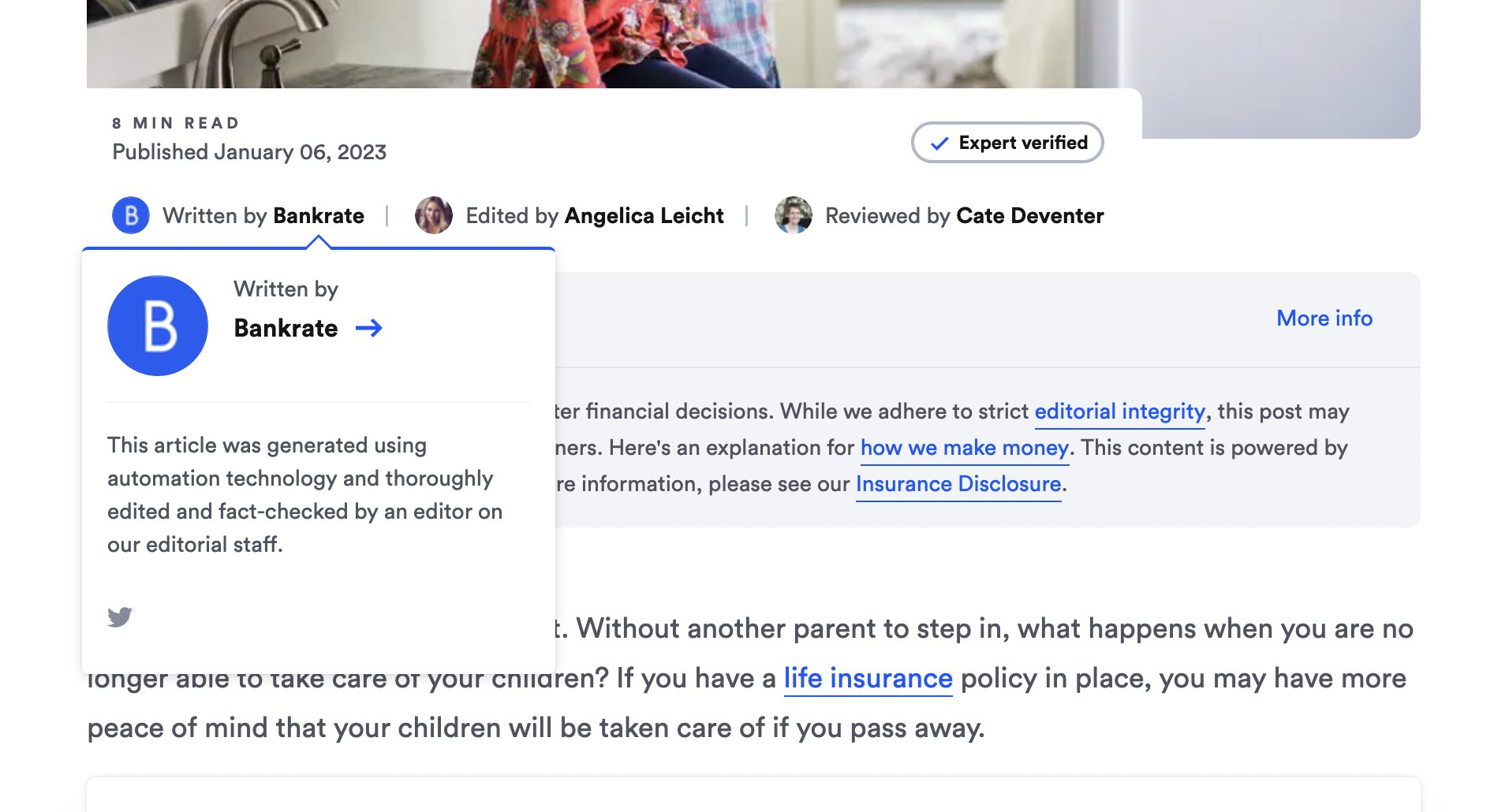
Now we’re seeing more examples of brands using AI-generated content. Bankrate is the latest example. It is having some of its content written by machines but reviewed by human editors.

It’s a bold strategy (let’s see if it pays off for them). And the SEO community wanted to know Google’s policies around these efforts.

Bankrate example. The example was highlighted by Tony Hill, who posted on Twitter that “BankRate.com, one of the largest finance sites on the web has now started using AI to write some of its content. A big moment in web publishing and SEO.”

The screenshot reads “this article was generated using automated technology and thoroughly edited and fact-checked by an editor on our editorial staff.”

Wondering how Bankrate.com is ranking for these articles? Sistrix did an analysis to find out:

For Bankrate.com, this specific use-case and the current point in time, one can say: yes, it works. 
Many , randomly-checked articles rank on the first page for both the main keyword and many other long-tail keywords

“How Bankrate.com is ranking with AI-generated text” – Johannes Beus, SISTRIX

Bankrate isn’t the only example of this. CreditCards.com is also using AI-generated content. The first line of the CreditCards.com Team author page says “Content published under this author byline is generated using automation technology.”

CNET has also quietly been using AI to write entire articles from the ground up since November.

Do a Google site search for [“This article was generated using automation technology”] will reveal dozens of CNET articles in Google’s index. CNET also assures readers that these articles have been “thoroughly edited and fact-checked by an editor on our editorial staff.”

The potential issue. If we can have machines and AI write content for us, then the amount of content that can be produced at incredibly low costs can be somewhat exciting for brands and businesses – more content for a minimal investment sounds like the stuff of dreams.

But, at the same time, mass-generated AI content can also frightening for consumers (what should you spend your time reading?) and search engines (what content should Google be ranking in search?).

So much content is being produced daily already; how much more can we consume, and how much more does Google need to crawl, index, and decide to rank for a given query?

Google’s statement on AI-generated content. Is Google OK with crawling and ranking content written by machines? If not, is Google OK if those AI-generated pieces of content are reviewed by human editors before they are published?

Danny Sullivan, Google’s Search Liason, reiterated some of what was said before about Google’s stance on this topic.

Sullivan wrote on Twitter this morning on the topic of AI-generated content, “content created primarily for search engine rankings, however it is done, is against our guidance.” But he added that “if content is helpful & created for people first, that’s not an issue.”

Sullivan then referenced their guidelines for the helpful content update, saying that the “key to being successful with our helpful content system — and if it’s not helpful content, the system catches that.”

If the AI can write helpful content, then it should be fine, one would assume.

Then Sullivan references the revised E-E-A-T quality raters guidelines, saying, “For anyone who uses *any method* to generate a lot content primarily for search rankings, our core systems look at many signals to reward content clearly demonstrating E-E-A-T (experience, expertise, authoritativeness, and trustworthiness).”

Finally, Google has a spam policy for automated content, which states “generated through automated processes without regard for quality or user experience” which is against Google’s guidelines.

Why we care. We know machine-generated content is not new, but what is new, is that the machines are getting better with the help of AI, in generating human-like, high-quality content. The question is, is it being produced with the intent of helping people or ranking in Google Search. If it is the latter, the helpful content system’s aim is to make sure such content does not rank well.

For the time being, Google wants content by the people, for the people but you can use AI for ideas and help you along the way. If machines and AI can write the content, you’d think similar technology can detect content written by AI.


Related stories

New on Search Engine Land

@media screen and (min-width: 800px) { #div-gpt-ad-3191538-7 { display: flex !important; justify-content: center !important; align-items: center !important; min-width:770px; min-height:260px; } } @media screen and (min-width: 1279px) { #div-gpt-ad-3191538-7 { display: flex !important; justify-content: center !important; align-items: center !important; min-width:800px!important; min-height:440px!important; } }

About the author

Barry Schwartz

Barry Schwartz a Contributing Editor to Search Engine Land and a member of the programming team for SMX events. He owns RustyBrick, a NY based web consulting firm. He also runs Search Engine Roundtable, a popular search blog on very advanced SEM topics. Barry can be followed on Twitter here.

https://searchengineland.com/google-search-on-using-ai-to-write-content-391728


8 dangers of copying another brand’s SEO

A successful SEO strategy includes various must-have components, such as SEO best practices, a proper focus and connection with target audiences and competitive factors.

Best practices and audience aspects are generalized and personal to your brand. Conducting a competitor analysis is also critical, as you want to learn from brands already well-positioned in the space you want to be in. 

However, there is a risk of going overboard when we play follow the leader, trying to match what the high-ranking competitor sites are doing.

Ignoring competitors or those currently ranking for topics within your target audience will hurt your chances of reaching and surpassing competitors. But focusing on them too much and copying their SEO strategies can have more damaging effects.

You definitely should know what other brands are doing and match up your strategy with what the search engines are “rewarding” those sites for doing well. 

Be mindful, though, of the eight dangers of copying another brand’s SEO.

1. Brand confusion

Most companies want to build a distinctive brand image and identity. Whether it is defined best by creative, messaging, or thought leadership, the goal is to be recognized and known for something.

If your idea of building a brand is by copying another brand’s SEO too closely, you will naturally start looking and sounding like them. This leads to a danger of brand confusion and can result in a lack of awareness of your brand.

Even if you are found in Google search results and get your target audience to click through, you risk not standing out. 

Your website will not be distinctive enough if you have many of the same elements as other sites, like page content, pages, navigation structure, and keyword focuses. 

If the searcher comes back later and finds your competitor’s site, will they even remember you? Will you stand out?

2. Lack of connection with your audience

Copying another brand’s SEO can also lead to losing connection with your audience.

Even if you are not replicating the competitor’s branded or trademarked content (because you shouldn’t), you will not have much unique content or perspectives if you are driven by copying someone else.

Beyond brand confusion, your content won’t be original and you are less likely to provide something unique and different to your target audience.

If they can get the same content and experience elsewhere, why would they want to give you their money, time, or attention?

Copying a competitor’s SEO will lead you to make trade-offs of unique opportunities you have to authentically engage with your site visitors.

3. Duplicate content and risk of being filtered

Naturally, if you’re literally copying your competitors’ SEO, you’re at risk of copying their copy itself.

Yes, they have some things working for them that might include their web copy and content being ranked well by Google. However, there are so many variables and ranking factors that you can focus on to get ahead.

Plus, when you copy content verbatim or in spurts, expect to see your content filtered from the SERPs. Since you are not the original creator, not in the same authority status as the competitor, or not providing enough unique copy, your site will likely be the one filtered out of Google search results while the competitor continues to rank as the author or originator of the copy.

While I see fewer threats and real legal action in organic search, it can happen.

Copying content, ignoring copyrights and trademarks or harming any business relationships that impact SEO performance can lead you closer to legal action.

I find it hard to come up with a reason to copy another brand’s SEO or to follow what they are doing so closely that you run this risk. Just don’t do it.

Even if you dodge legal action, items 1-3 above should be enough justification for not getting too close to what they are doing.


Get the daily newsletter search marketers rely on.


5. Being strategically reactive

Having an SEO strategy is necessary. If the primary drivers of the strategy are to copy another site’s SEO, then that’s not really a strategy.

Again, look at competitors and what’s working for them in your efforts. But, don’t follow them so closely that you’re simply reacting to everything they do. Blindly following along will keep you firmly in a position where you’re chasing them or in parody with them.

You want to include proactive aspects like:

  • Exploring new content areas.
  • Identifying topics to own.
  • Establishing your own authority. 

Beat them in areas where they aren’t competing. Find white space to fill and have a farseeing approach to get there.

6. Following a competitor’s poor strategy

Related to being reactive, you run the risk of implementing bad SEO. They could be ranking well for a key term that you want to rank for. However, they could also be doing a lot of tactics poorly. 

Maybe you misjudged what SEO factors were truly driving that ranking.

What if they were heavily supported by some high-quality links and brand mentions and not propped up by their content quality?

If you copy their content strategy and don’t have those links, you’re likely going to fall flat and look bad at the same time.

Additionally, with the emergence of SpamBrain from Google and how it further evaluates the quality of content, you have more incentive to differentiate than to follow along when it comes to on-page and content SEO strategy.

7. Measuring the wrong performance metrics

While there are some great “spy” tools out there that help with analyzing competitor sites, they aren’t perfect.

You can’t truly know (unless you have CRM and analytics access or other direct sources of the competitor brand) how well the SEO strategy is working for other sites.

What you can likely see is where they are ranked and connect that with the estimated search volume for the specific rankings or queries. Sure, you can overlay some estimated or benchmark conversion data. However, the more data points you’re estimating and adding together, the more inaccurate your numbers will be.

Ideally, your focus is on your end goal. Whether that is some type of conversion to sales, leads, or other meaningful ROI aspects for your business, you’ll want to start there and work backward to know what the traffic and approach should be.

If you focus purely on your competitor’s rankings and getting to their positions, then you’re copying them without having a complete understanding of what gaining their rankings will do for your business in terms of ROI.

You can spend a lot of time and money investing in copying their SEO strategy to find out that it wasn’t worth it for your specific needs, even if it helped you get on par with their rankings.

8. Risk against new competitors

If you’re overly focused on copying another brand’s SEO, you might fail to pay attention to the wider landscape.

I have had clients focused on one or two other companies jockeying for the top spot, answer boxes, and other prime real estate in the SERPs. So focused, that months down the road, a new competitor – or set of competitors – emerged looking much different and leapfrogged the long-established top-ranking sites.

Having the blinders on looking at a single site or two can cause a narrow SEO focus for all the reasons previously mentioned. It also puts you in danger of being overtaken by newer competitors and those with a different and better strategy for building authority status and relevant content.

Develop your own unique SEO strategy

Remember that applying best practices, focusing on your audience, and paying attention to the competitive landscape are all important for a solid SEO strategy. Doing just one or two won’t get you as far in terms of rankings, traffic and conversion goals.

Competitor analysis and reverse engineering can be useful. However, when you know who is ranking well or seemingly doing well in the space you want to own, be mindful of the dangers of copying their brand’s SEO strategy.

There’s a balance between matching up well with competitors on ranking factors, helpfulness to the audience, and gaining visibility without selling out your own brand or getting on the wrong kinds of radars legally.

Plus, you want to be as resistant as possible to their mistakes taking you down or taking your focus off of those coming up behind you. Leverage the information, but include it in your broader SEO strategy to gain the benefits and minimize the dangers.


Opinions expressed in this article are those of the guest author and not necessarily Search Engine Land. Staff authors are listed here.


Related stories

New on Search Engine Land

@media screen and (min-width: 800px) { #div-gpt-ad-3191538-7 { display: flex !important; justify-content: center !important; align-items: center !important; min-width:770px; min-height:260px; } } @media screen and (min-width: 1279px) { #div-gpt-ad-3191538-7 { display: flex !important; justify-content: center !important; align-items: center !important; min-width:800px!important; min-height:440px!important; } }

About the author

Corey Morris

Corey Morris is a skilled marketing professional with 15+ years of experience developing award-winning, ROI-generating digital strategies for local and national brands. He was recently honored as the recipient of the KCDMA 2019 Marketer of the Year award. Corey serves as the chief strategy officer at Voltage – a marketing firm based in Kansas City, MO. Previously, he founded the KC Search Marketing Conference to help build a local community for search marketers for career growth. He was recognized for his involvement in the conference and invited to join the global board of SEMPO (now part of DAA) as the VP of Cities.

https://searchengineland.com/copying-competitors-seo-391247


This day in search marketing history: January 12

Google Panda becomes a core ranking signal

In 2016, Google Panda became baked into Google’s core ranking algorithm.

Google Panda was one of Google’s most significant spam-fighting algorithmsl First launched in February 2011, the final confirmed refresh was Panda 4.2, which started rolling out July 18, 2015.

A Google Panda algorithm guide, published on The SEM Post, included several then-new quotes about Panda from Google, attributed to a “Google Spokesperson.” Those included a statement that Panda was now part of Google’s core ranking algorithm:

Panda is an algorithm that’s applied to sites overall and has become one of our core ranking signals. It measures the quality of a site, which you can read more about in our guidelines. Panda allows Google to take quality into account and adjust ranking accordingly.

Read all about it in Google Panda Is Now Part Of Google’s Core Ranking Signals. And dig deeper into Panda in

And, as we learned at SMX Next in 2022 from Hyung-Jin Kim, the VP of Google Search, Google’s Panda algorithm later evolved into the Coati algorithm.


Also on this day 


Why does Google tip us off to search updates with minor ranking impacts but surprise us with the major ones?

2022: It’s the updates Google does not give us huge lead time to prepare for that have impacted rankings the most, like the core, Penguin and Panda updates.


E-commerce sales jumped this holiday season as search marketers weathered Google updates

2022: U.S. consumers spent $204.5 billion on ecommerce purchases during the holiday season, an 8.6% increase in online spending year-over-year.


Google Business Profiles sets waiting period for new owners and managers

2022: Newly granted users had to wait 7 days before they could manage all the features of the profile.


Yoast SEO 17.9 adds keyphrase performance tracking

2022: The free version let you track up to five keywords while the premium account let you track up to 500 to 10,000 keywords.


Google News performance report added to Google Search Console

2021: Google Search Console started showing you how well your news site performed in Google News and the Google News App.


Yelp launches “health and safety measures” community feedback feature

2021: Yelp launched a new rating feature for community to leave feedback on local business social distancing and mask compliance.


Google My Business video uploads now available to business owners

2018: Videos could appear on Google Maps and local search listings.


Search in Pics: Google Brain jacket, puppy dog eyes & deprecated GoogleBot

2018: the latest images culled from the web, showing what people eat at the search engine companies, how they play, who they meet, where they speak, what toys they have and more.


Google has officially killed off their link command

2017: Google said the feature is no longer around, and using a link:www.domain.com will likely return irrelevant results.


Google Had A Major Core Ranking Algorithm Update This Past Weekend

2016: Google confirmed what was described as a “massive update” was a core ranking algorithm update, not an expected Penguin update.


Charles Perrault Google Doodle Marks 17th Century Fairy Tale Author’s 388th Birthday

2016: A series of three Doodles honored the 17th century French author Charles Perrault on his 388th birthday, representing classics like “Cinderella,” “Sleeping Beauty” and “Puss in Boots”.


DMCA Takedown Database ChillingEffects.org Takes Itself Out Of Search Results

2015: The irony was almost too obvious to mention: an entity dedicated to monitoring the potential “chilling effects” of DMCA takedown notices censoring itself. 


Report: Google Translate To Provide Real-Time Translation Via App

2015: Google was planning to soon announce a major update to their Google Translate App that enabled real-time, automated translation.


Seeing Double: Yahoo, Bing Search Ads Show Duplicate Copy In Headlines And Ad Text

2015: Search ads on Bing and Yahoo were showing description line one of the ad copy in both the ad text and ad titles.


Google Doesn’t Know When Super Bowl 2015 Starts (Yet!)

2015: Why wasn’t Google providing the correct answer for the Super Bowl start time when year-after-year, it has been an issue for them?


Zomato Buys Urbanspoon For $50 – $60 Million To Enter US Local Search Market

2015: The Urbanspoon acquisition capped a six month buying spree in which Zomato acquired restaurant verticals in New Zealand, Poland, Czech Republic, Slovakia, Italy and Turkey.  


RIP Aaron Swartz, One Of The Earliest Google Bloggers

2013: The Google Weblog went up on March 17, 2002, two years before Google launched its own official blog.


To Understand Google Favoritism, Think “If Google+ Were YouTube”

2012:  Google effectively launched a “who to follow” search engine, a way to show people and companies with social accounts that searchers might be interested in. But it based that solely around Google+.


Google Swallows Hard, Renews Effort In China

2012: Google was “softening its tone” and “renewing its push” into China.


Google Search App For Android Updated

2012: The new update makes it easier and faster for searchers to use.


Foursquare Launches “Personalized Search For The Real World”

2012: Foursquare introduced its “Explore” feature, better keyword search and several new filters to help users drill down in search results.


Big Chains Launch “Hulu For Hotels”

2012: The functionality and design of the Roomkey site was good, but it wasn’t clear whether Roomkey was comprehensive enough to be truly competitive.


Session-Based Clicks Under Fire in WSJ Report

2011: Advertisers were complaining about Google’s practice of delivering ads within a user’s search session, but beside results unrelated to an advertiser’s purchased keywords.  


German Govt. Says Google Analytics Now Verboten

2011: German privacy officials were concerned about Google Analytics tracking web users’ IP addresses, which could violate an individual’s privacy.


Google Places Gets Its Own iPhone App

2011: The app seemed to focus more on the discovery side of local than on search, which distinguished it from the Apple-produced, default Maps app that’s more about directions and navigation than about locating businesses. 


Google Tweaks New AdSense Interface

2011: The default metrics on the Home and Performances reports were changed back to page-level metrics, the ad block/allow selector showed the product name, and more changes.


How Will Google Be Impacted By Verizon’s iPhone?

2011: Google wasn’t as central to the iPhone user experience as on Android but Google had a strong presence on the iPhone. 


UK Regulator To Crack Down On Paid Celeb Tweets

2011: The UK Office of Fair Trading (OFT) was expected to soon require disclosure rules when tweets were commercially sponsored.


Wolfram Alpha Redesigns For 2011

2011: In addition to a shiny, new, colorful home page, there were some interesting tweaks to the results pages, such as the addition of linked data inside the search results.


11 Months Later, Google Removes Google Japan’s PageRank Penalty

2010: Google.jp returned a toolbar PageRank score of 8. Prior to December 31, it was still a PageRank of 5.


VigLink: Fire & Forget Solution To Turn Outbound Links Into Affiliate Earners

2010: VigLink, a service with venture capital backing from Google, promised to turn any outbound link on a web site into an affiliate link after the installation of a small bit of JavaScript code.


Netconcepts Acquired By Covario

2010: Netconcepts was a Wisconsin-based SEO company founded by Stephan Spencer.


Baidu Hacked By Iranian Cyber Army

2010: This is the same group of hackers that took over Twitter’s web site for a short time period several months ago.


Proposed UK Law Would Immunize Search Engines Against Copyright Claims

2010: A proposed amendment to a pending UK law would have permitted search engines to index any or all of the content on a “publicly accessible website” through a “presumed . . . standing and non-exclusive license.”


Google Hires Ex-McCain Spokesperson For Top Communications Job

2010: Jill Hazelbaker replaced Matt Furman as head of corporate communications.


Bing Adds More Health Data To Search

2010: The health related queries were related to sicknesses, medicine, medical facilities, in addition to more generic health and fitness related queries.


Google Book Scanning Faces Chinese Challenges

2010: Apparently most of the 20,000 Chinese books Google scanned were from US libraries.


Google Docs Adds Files Storage, AKA GDrive

2010: New feature allowed you to upload files and share those files with friends, co-workers and colleagues. Google limited the file upload to 250 MB per file, with a maximum total of 1 GB of free storage. 


Google Just Says No To China: Ending Censorship, Due To Gmail Attack

2010: Google was heavily criticized for caving into China, especially in light of its “Don’t Be Evil” motto.


Calculating The Carbon Footprint Of A Google Search

2009: Performing two Google searches from a desktop computer could generate about the same amount of carbon dioxide as boiling a kettle for a cup of tea.


Firefox Drops Google For Yandex In Russia, But Big Loser May Be Rambler

2009: Their Russian users really wanted direct access to the Yandex search.


Report: Yahoo’s Search Ad Share Drops 36%

2009: Yahoo’s search ad share dropped from 30.4% in Septembe to 19.4% by December.


The Search Gap Between Consumers And Small Business Advertisers

2009: 78% of SMB respondents said they dedicated 10% or less of their overall budget to marketing efforts.


Yelp Case Settled, But Bigger Issues Remain For Search & Reviews

2009: A lawsuit over a Yelp.com review was settled, but the larger issue of how business owners, customers, and review sites will co-exist online remained wide open.


Joshua Schachter Lands At Google

2009: The founder of the Delicious.com bookmarking service and a former Yahoo executive, had his first day on the job at Google.


Wacky Idea: A Yahoo-Nokia Combination

2009: Nokia invest in or acquire Yahoo? Just a wacky thought – or was it?


Local And The Paradox of Participation

2008: Nobody wants to be the first one at a party or the only one in a restaurant.


Matt Cutts On Appealing Google Malware Warnings

2007: Cuttts said he had checked out a quite a few ‘we don’t have any malware’ reports, and had yet to see a false positive.


Eye Tracking In MSN Search

2007: Among the interesting findings: Adding information to result snippets significantly improved performance for informational tasks but degraded performance for navigational tasks.


Google: Free Real-Time Quotes Here To Stay

2007: The NYSE issued a proposal to the SEC that, if approved, would keep fees at a level that would allow Google to display real-time, last-sale prices across all Google properties.


Past contributions from Search Engine Land’s Subject Matter Experts (SMEs)

These columns are a snapshot in time and have not been updated since publishing, unless noted. Opinions expressed in these articles are those of the author and not necessarily Search Engine Land.


< January 11 | Search Marketing History | January 13 >


Related stories

New on Search Engine Land

@media screen and (min-width: 800px) { #div-gpt-ad-3191538-7 { display: flex !important; justify-content: center !important; align-items: center !important; min-width:770px; min-height:260px; } } @media screen and (min-width: 1279px) { #div-gpt-ad-3191538-7 { display: flex !important; justify-content: center !important; align-items: center !important; min-width:800px!important; min-height:440px!important; } }

About the author

Danny Goodwin

Danny Goodwin is Managing Editor of Search Engine Land & SMX. In addition to writing daily about SEO, PPC, and more for Search Engine Land, Goodwin also manages Search Engine Land’s roster of subject-matter experts. He also helps program our conference series, SMX – Search Marketing Expo. Prior to joining Search Engine Land, Goodwin was Executive Editor at Search Engine Journal, where he led editorial initiatives for the brand. He also was an editor at Search Engine Watch. He has spoken at many major search conferences and virtual events, and has been sourced for his expertise by a wide range of publications and podcasts.

https://searchengineland.com/earch-marketing-history-january-12-391722