Google helpful content system update rolling out now (December 2022 update)

Google has begun to push out an update to its helpful content system, this is the first big update to this update since it launched in August 2022. The update started yesterday, December 5th but it is now noticeable on December 6th, which is why Google announced this update today.

What is new. Now the helpful content update (aka system) is a global update, impacting all languages and not just the English language. This will help Google’s systems detect more forms of low-quality content created for search engines and primarily not for people.

Google also told us this system was updated with additional signals to help Google identify more content created primarily for search engines versus people.

Timing. Google said this update appeared for a tiny amount of queries late on December 5th but on December 6th it became a more notable update, being more visible.

Rollout. The rollout, like most other Google updates, should take about two weeks to completely roll out.

Google wrote it “released the December 2022 helpful content update, which improves our classifier and works across content globally in all languages. The rollout may take up to two weeks to complete.”

More on the helpful content update. Google’s helpful content update specifically targets “content that seems to have been primarily created for ranking well in search engines rather than to help or inform people.”

This algorithm update aims to help searchers find “high-quality content,” Google told us. Google wants to reward better and more useful content that was written for humans and to help users.

Content written for the purpose of ranking in search engines – what you might call “search engine-first content” or “SEO content,” has been frequently written about lately and discussed across social media.

In short, searchers are getting frustrated when they land on unhelpful webpages that rank well in search because they were designed to rank well.

Google’s new algorithm aims to downgrade those types of websites while promoting more helpful websites, designed for humans, above search engines.

Google said this is an “ongoing effort to reduce low-quality content and make it easier to find content that feels authentic and useful in search.”

What to do if you are hit. Google has provided a list of questions you can ask yourself about your content. Read through those questions as we posted over here, and in an unbiased manner, ask yourself if your content is in sync with this update.

Note, if you were hit by this update, it can take several months to recover, if you do everything right and make changes to your content over time.

Google told us that if a site is no longer seen as unhelpful, it might see a positive change as soon as the current update has finished. However, a site might not see a positive change if there are other areas where it needs improvement. So always be working on making your site more helpful.

Why we care. If you notice any ranking and visibility changes in Google search over the next two weeks or so, especially if those were big changes, you can likely attribute it to this update. Read Google’s advice, make the necessary changes, and hope for a recovery in the upcoming months.

We hope you all will benefit from this update and if not, we hope you recover quickly.


Related stories

New on Search Engine Land

@media screen and (min-width: 800px) { #div-gpt-ad-3191538-7 { display: flex !important; justify-content: center !important; align-items: center !important; min-width:770px; min-height:260px; } } @media screen and (min-width: 1279px) { #div-gpt-ad-3191538-7 { display: flex !important; justify-content: center !important; align-items: center !important; min-width:800px!important; min-height:440px!important; } }

About The Author

Barry Schwartz

Barry Schwartz a Contributing Editor to Search Engine Land and a member of the programming team for SMX events. He owns RustyBrick, a NY based web consulting firm. He also runs Search Engine Roundtable, a popular search blog on very advanced SEM topics. Barry can be followed on Twitter here.

https://searchengineland.com/google-helpful-content-system-update-rolling-out-now-390047


Ecommerce SEO & UX: 4 simple tips to boost traffic and sales

Imagine walking into a grocery store, list in hand, and all of the store’s products were randomly strewn on tables displayed throughout.

Odds are good that you would U-turn and make the drive to a store where things were better organized. You wouldn’t want to spend the rest of your life sorting through all the products to find the things on your list.

The same is true for your ecommerce website. Organization is critical for a good user experience and good SEO.

Also, imagine having “toilet paper” on your list, but the signs on the various rows say no such thing.

And according to this imaginary grocery store, “toilet paper” is called “tissue for your bottom.” 

Does anyone have “tissue for your bottom” on your list? 

No. We simply call it “toilet paper.”

Ecommerce mirrors in-store browsing and buying

From studying traffic patterns, grocery stores learned long ago that aligning “like” products makes the shopping experience easier. 

As we all know, everyone seems to be there for milk so stores keep them in the back. (“Let’s make sure that folks have to walk past all the other items before getting to the milk!”) 

What you call “Products” and where you have them on your ecommerce site (i.e., information architecture and taxonomy) matter quite a bit in SEO. 

This hypothetical grocery store is akin to the ecommerce website with “Shop” in the navigation. 

  • Once you’ve clicked through, you get a list of every product available on the website. 
  • Things need to be organized (categorized). And again, the categories need to make sense.

For many years, my agency handled SEO for a leading HVAC manufacturer. 

Back in 2005, when we first engaged, they called their air conditioners “cooling products.” Unsurprisingly, they did not rank in Google for “air conditioners.”

User experience needs to consider the customer journey

It’s often been said that SEO and UX are linked, and it’s never been truer than when we think about how you organize an ecommerce website. 

That one product you have may have several categories that fit within. Easy enough – make sure that the product is associated with those other categories. 

Just like you might find the hot sauce in the Mexican aisle, you’ll also find that there’s a display near the chips.

Make it good for the user, and you’re most likely also making it good for Google and the searcher.

So, where do you start?

The following tips for organizing your ecommerce site and promoting your products will help you get more traffic and sales.

1. Build a solid site taxonomy

Start by creating your main categories. If you’re unsure where to start, learn from your competitors. 

Verify that they are successful in their SEO efforts through a Semrush audit and see the breadth and value of their organic keyword presence. 

Your main navigation should present your main categories. A great example of solid architecture is Wayfair:

Wayfair main navigation

You can see here that although Wayfair offers products across a wide spectrum, they have intuitively broken these out into what they consider to be their main categories. 

And, if you were to click into any one of these, you would then see their sub-categories:

Wayfair sub-categories

2. Explore use cases for product searches 

Once you have a foundation of main and sub-navigation (the basics), you can explore the various use cases that users might have for these products and how they search.

Do people search by price? Perhaps categories for pricing? 

For example, “Beds under $1,000,” where you list your beds that fall into this range.

Perhaps people search by style? 

Let’s say you offer adjustable beds. You’d be inclined to build a category page for this, as there are approximately 47,000 searches per month in the U.S. for these products.

Perhaps people search by brand? 

If you offer Craftmatic, you’d be inclined to build a category page for Craftmatic adjustable beds, with an estimated 1,900 searches per month.

Here’s another way to look at this. Say, for instance, you only have one category page for “Furniture.” 

In this case, you are targeting a keyword with a large monthly search volume (~588,000 searches per month).

But it is also a highly competitive keyword that is less likely to get you a top-ranking position.

Even if you went to the next level and built one sub-category page for “Beds” (with ~112,000 searches), you’d still be attempting to rank for something that would be very difficult to achieve. 

However, if you keep drilling down, you’ll begin to uncover relevant opportunities. 

Consider “targeted” keywords that may not have a sizable search volume but have a manageable competition level.

(People searching “Craftmatic adjustable beds” know what they’re looking for and are probably closer to conversion.)

The kicker is that by building this into your site structure and content plans, you reward your website visitors with a better user experience (matching content to the searcher’s intent).

And – almost by default – you will have improved your organic rankings. 

That one product can now be represented in several categories/areas of your website (Furniture/Beds/Beds Under {Price Point}/Style/Brand). 

You are merchandising your products much better than simply listing them on one page.

Now that you have this built out, consider how you might cross-promote (through internal linking) within your website. 

These category and subcategory pages can also be used for paid search, like Google Ads or Shopping Ads, where landing page relevance determines the Quality Score, which in turn impacts the cost per click.


Get the daily newsletter search marketers rely on.


3. Merchandise your products

Merchandising in brick-and-mortar typically refers to things like the endcaps, the small hanging display of pot holders next to the cookware display and signage.

In ecommerce, merchandising represents many more opportunities for product promotion. 

On your product page, you might have:

  • Other products from the same brand.
  • Other products people also bought.
  • Products commonly purchased together.
  • Similar products from competing brands.

You might highlight “Top brands” on your home page so visitors can quickly associate your site with reputable brands.

Building brand pages is a natural way to optimize for many “brand + product name” keywords. Your manufacturing/vendor partners can also use these pages to link from their websites. 

Many of these manufacturers have site sections devoted to “Distributors”, “Partners,” or “Where to buy” call-outs.

Perhaps the person who’s buying a bed would also be interested in a mattress pad? Do you sell these? 

If so, let’s be sure that we have opportunities to cross-sell these things and make sure that it’s intuitive with the product they’re looking to buy. 

Once again, Wayfair shows how this can add value to the user experience.

Wayfair - Compatible products section

When you merchandise your products better to improve the user experience, you grow the number of ways searchers will find you.

It’s a win-win! Users find what they’re looking for, and you are gaining relevant visitors who are more likely to convert.

You are expanding your keyword breadth, which is always good for SEO as you’ll have several other opportunities to maintain your organic traffic. (You never know when you might lose that top 3 ranking for “Beds.”)

Take it from Wayfair, which has 1.7 million non-brand keywords ranking in Google’s top 10 results, according to Semrush.

Wayfair non-brand keywords

This includes:

  • #2 for “Furniture” and #1 for “Beds.”
  • 253 keyword variations of “Adjustable beds” ranking in the top 10.
  • Rank #8 for “Craftmatic adjustable beds.”

4. Leverage shopping deals and seasonal promotions

Merchandising also takes into account the way the product is promoted. 

In brick-and-mortar retail, this would be the shelving, shelving signage, aisle signage, floor signage, packaging, price labels and promotional pricing labels. 

In ecommerce, you can also take advantage of shopping deals and seasonal promotions.

Walmart has the yellow tag sales, which they use as a sub-brand.

Leading up to Thanksgiving, they promoted their Black Friday “Deals for Days,” which was included in the main navigation, a promo banner and main header elements above the fold.

Walmart Black Friday “Deals for Days”

Then further down the page, they had another content section to highlight more Black Friday offers.

Walmart Black Friday Deals section

All of these content sections must be planned out and coordinated, so you also need a flexible CMS to support these temporary content sections and dynamically pull in the right products with all the correct pricing.

You also need to have a Deals/Discounts section on the site to capture search demand for those types of search queries.

For price-sensitive shoppers, many different keywords signal that they may not need to spend full retail. These include:

  • Discount.
  • Sales.
  • Deals.
  • Clearance.
  • Closeouts.
  • Markdowns.
  • Used.
  • Coupons.

There are also sometimes seasonal variations of some of these:

I recommend setting these up with an evergreen URL since they are annual events that will consolidate page and link signals. Doing so also helps reduce internal linking errors.

Get more sales with better site organization and product merchandising

These are just a few of the items you need to consider when building an ecommerce site and figuring out how to merchandise or promote specific products. 

Many of your decisions will depend on relationships with your vendors, seasonal promotions, and other factors. 

An SEO team with ecommerce experience can help you navigate through these items – maximizing your organic exposure based on what customers are searching for and which information they need to help them buy from you.

The work that you put in here can contribute to:

  • Many long-tail keyword rankings.
  • Improved user experience.
  • Higher conversion rates.

Additionally, a particular product category or a seasonal promotion can provide the type of content that could earn links. 

Remember – the higher you rank in Google, the more likely someone searching for related content will find your website.

Happy merchandising!


Opinions expressed in this article are those of the guest author and not necessarily Search Engine Land. Staff authors are listed here.


Related stories

New on Search Engine Land

@media screen and (min-width: 800px) { #div-gpt-ad-3191538-7 { display: flex !important; justify-content: center !important; align-items: center !important; min-width:770px; min-height:260px; } } @media screen and (min-width: 1279px) { #div-gpt-ad-3191538-7 { display: flex !important; justify-content: center !important; align-items: center !important; min-width:800px!important; min-height:440px!important; } }

About The Author

Mark Jackson

Mark Jackson is the President and CEO of Vizion Interactive, an agency founded in Dallas, Texas in 2005 and specializing in SEO Services, Paid Media Services (Search/Display/Social/Video/Amazon), Local Listing Management and Conversion Rate Optimization. Mark was a co-founder of the Dallas-Fort Worth Search Engine Marketing Association and Kansas City Search Engine Marketing Association and has been a contributor to Search Engine Watch, ClickZ, Pubcon and the Search Engine Strategies conferences.

https://searchengineland.com/ecommerce-seo-ux-tips-traffic-sales-389972


Location pages in Google’s crosshairs after October spam update

Within the last few months, service area business (SAB) websites started to see rank fluctuations aligned with the rollout of Google’s helpful content and spam updates around late August through October.

Chatter around those fluctuations picked up in the local SEO community during this period in various forums, including the Google SEO Mastermind Facebook group.

The common theme with sites that were impacted the most seemed to be related to duplicate content, specifically location pages – in other words, doorway pages.

However, sites weren’t getting directly penalized by rank. Instead, pages were being automatically deindexed, which in turn caused ranks to drop for queries related to the corresponding location pages.

Deindexing of location pages

Schieler Mew, admin of the Google SEO Mastermind group on Facebook, posted this video explaining what he saw with over 200 SAB sites.

In the video, he explains that sites with relatively low authority or a lack of helpful content throughout the site saw a deindexing of their “duplicate content” location pages en masse.

Scheiler and I jumped on a Google Meet, where he shared some data and screenshots below of what had happened in Search Console to these sites.

The first thing that was noticed was a large shift in the middle of September regarding indexed pages. This seems to line right up with the completion of the helpful content rollout.

GSC indexing issues

Digging into it, the next screenshot is all the pages that were deindexed seemingly overnight.

Finally, the report on the timeline of the affected pages.

The mass deindexing of pages that heavily contributed to geographic ranking vanished, taking the rankings with it.

This seemed to be the case for numerous other pages, although there were a few outliers.

Websites with seemingly higher authority or location pages that used unique content weren’t deindexed.

This leads me to believe that the helpful content and spam update algorithm seem somewhat unfinished. In this case, it tackled the easiest target – duplicate content location pages on sites with low authority.


Get the daily newsletter search marketers rely on.


How the helpful content and spam updates contributed

Most SEOs were under the assumption that these updates were targeting AI-generated content. (Recall that in an office-hours hangout in April, John Mueller referred to it as “spam” and made it clear it was against Google’s policies.)

On November 7, Danny Sullivan squashed this in a tweet, stating:

  • “We haven’t said AI content is bad. We’ve said, pretty clearly, content written primarily for search engines rather than humans is the issue.”

This is when I started putting two and two together.

SAB sites are dropping in rank right around the rollout of both the helpful content and spam updates, and we know it’s primarily targeting pages that have content written for search engines rather than humans.

What kind of pages would a local SAB have that almost every SEO in the industry creates?

Location pages.

Understanding doorway pages

A doorway page is essentially what Danny Sullivan was talking about in the above tweet. It’s a page written to rank for a specific keyword but provides little to no value to a user.

An example of doorway pages in the local SEO industry is location pages. In other words, a page that exists for the sole purpose of ranking [city #1] + [service A] multiplied by the number of cities and/or services the business is trying to rank for.

These can be created faster if the content is duplicated and only the keywords are swapped out. Additionally, you can write custom content for each page, but it’s still a doorway page.

SEOs in this sector hate to admit it, but location pages are doorway pages. Mueller confirmed this in February.

Doorway pages have always been against Google’s policies, but there had never seemed to be a way to suppress these algorithmically.

The only punishment seemed to be manual actions, and until this year, SABs seem to have been put on the Google backburner – so no one really ever saw any consequences for doing this.

Recent Google updates to local SEO

In the last few months, waves have been made within the local SEO community, not just with doorway pages, including:

For the most part, Google has addressed a few of these issues, such as the suspended business profiles and reviews hovering in purgatory – usually giving credit to “bugs.”

At some point, SEOs have to ask themselves why suddenly there are so many bugs in a specific sector.

Aside from the bugs with GBP profiles, Google has also made some obvious and strict changes to how profiles are now verified.

It started with the default verification method switching from postcard to video. Then, in some instances, video being the only way to verify.

This, mixed with business profiles suddenly being suspended over minor issues, started to raise flags that Google was finally tackling the SEO spam in the SAB community.

Fast forward to September this year, SEOs in communities and forums started to see declining rankings for location-dependant keywords and pages.

All of this being said, it looks like Google is seriously cracking down on local businesses that are violating their spam policies.

Can location pages still work?

The short answer is, “yes”, but it’s only a matter of time before location pages fade into archaic SEO practices like hidden text or meta keyword stuffing.

Google deindexing duplicate content location pages is just the first step in the conquest to punish sites for using doorway pages that don’t benefit humans.

It’s unclear whether or not Google will institute rank penalties for doorway pages in the future or continue to not index the pages.

My theory is that this is a temporary fix. Location pages are something local SEOs should be leaving in the past.

At the end of the day, Google wants content to exist to provide a positive user experience, not to influence rank.

As a consumer, I’ve never found a location page to benefit my user experience. This is how we should think when creating pages and content.

First, think about how it can help the user and then how it can be optimized to help your rank – in that order.

Alternative optimization options to rank in nearby cities

Suggesting that location pages may be coming to an end isn’t cause for local SEOs to throw their hands up on optimizing for neighboring cities and areas.

There are alternative things we can do that put the purpose of the content back in the direction of helping humans first.

Target your primary service area in your H1s and page titles

Chances are you or your client have a number one area they want to target.

Make sure this city is mentioned in your H1s and page titles. This will make it clear to Google from a content standpoint where your primary area of service is.

Make sure to have a general service area page

Make sure to have a general page that tells users where you or your client serves.

List out all counties, cities, or neighborhoods and include a map that visualizes that service area.

Create project pages

This is my favorite. If you or your client have project-oriented work like landscaping, roof repair, construction, etc; create pages for specific projects that were completed.

Treat it similarly to a blog or gallery. Add before and after pictures, explaining the job or project details.

Mention what city it was located in, how much it cost, some challenges, etc.

This method will not only show potential customers what your company is capable of and the type of work you do, but it’s also a great way to rank your service and the city where it was performed.

An example of a project page for a landscaper could be titled “Modern Highland Stone Retaining Wall in Minnetonka, MN.”

Local newspaper press releases

Reach out to local newspapers in the surrounding areas and issue a press release.

Brag about your company regarding a past or upcoming charitable contribution or discount you give. Newspaper and local publishing sites typically link back to your website.

Join multiple local Chambers of Commerce

These typically have an annual fee associated with each one you join, but each city you or your client is targeting has one.

If it’s in your budget, join them for the location-relevant links and geographic authority.

Where do we go from here?

Google’s enforcement of service area businesses is long overdue, but it seems like the action is now being taken. 

Some location pages still work as long as the site has high authority and good overall content. It’s duplicate content location pages that are getting deindexed.

Overall, SABs are now under Google’s magnifying glass. If SEOs aren’t getting hit with penalties yet, I would put money on it being something that will be happening in the very near future.

It’s important to remember that Google is always evolving. Even though something like unique content may still work for location pages, I bet that Google will tackle this next.

Google’s SpamBrain AI is updated every now and then. This time, it may be evolving to target easily distinguishable doorway pages.

It’s only a matter of time before it understands a location page as a standalone doorway page with unique content.

As SEOs, we must review our local business sites, stick to the core principles of local search,  and do some housekeeping per Google’s policies – before their algorithm team pays us a visit. 


Opinions expressed in this article are those of the guest author and not necessarily Search Engine Land. Staff authors are listed here.


Related stories

New on Search Engine Land

@media screen and (min-width: 800px) { #div-gpt-ad-3191538-7 { display: flex !important; justify-content: center !important; align-items: center !important; min-width:770px; min-height:260px; } } @media screen and (min-width: 1279px) { #div-gpt-ad-3191538-7 { display: flex !important; justify-content: center !important; align-items: center !important; min-width:800px!important; min-height:440px!important; } }

About The Author

Jake Hundley

Jake Hundley is the founder and co-owner of Evergrow Marketing, a digital marketing agency that focuses on the lawn care and landscaping industry. His background and strengths lie primarily in digital strategy, PPC, and SEO, specifically local SEO. Jake also consults with enterprise companies leveraging their first-party data utilizing CDPs as a Client Partner Manager with Leverage Lab.

https://searchengineland.com/location-pages-google-october-spam-update-390016


Google Search rolls out new search refinements for top bar filters with related topics

Google is now rolling out the new search refinement-related topics feature in the top bar filters under the Google Search bar. Google previewed these search refinements at the Search On event a few months back and even saw Google testing it before that, and now they are rolling out.

What do these refinements look like. Here is a GIF of these refinements in action. In short, Google displays this scroll list of related topics alongside these filters at the top of the search results page. The list should contain useful topics related to the query to help you refine your search.

Topic refinements that you can add to your query have a + symbol in front of them.

Google’s example above is if you’re searching for “dinner ideas,” you might see topics like “healthy” or “easy.” Tapping on a topic adds that refinement to your query, helping you quickly refine your search results with less typing.

The topics Google adds here are dynamic and will change as you tap, giving you more options and helping you explore new areas.

How dynamic topics work. Google said Google’s “systems automatically display relevant topics for you based on what we understand about how people search and from analyzing content across the web.” Google added that both the topics and the filters are shown in the order that “our systems automatically determine is most helpful for your specific query.”

Rolling out now. Google said this is now rolling out over the coming days to searchers in English in the U.S. on the Google app on iOS and Android and the mobile web.

Why we care. These search refinements might lead to more or less traffic to your site, depending on if these refinements lead to or distract from queries your site ranks for. Keep an eye on your top-performing queries to see if these dynamic topic refinements have rolled out for those queries.


Related stories

New on Search Engine Land

@media screen and (min-width: 800px) { #div-gpt-ad-3191538-7 { display: flex !important; justify-content: center !important; align-items: center !important; min-width:770px; min-height:260px; } } @media screen and (min-width: 1279px) { #div-gpt-ad-3191538-7 { display: flex !important; justify-content: center !important; align-items: center !important; min-width:800px!important; min-height:440px!important; } }

About The Author

Barry Schwartz

Barry Schwartz a Contributing Editor to Search Engine Land and a member of the programming team for SMX events. He owns RustyBrick, a NY based web consulting firm. He also runs Search Engine Roundtable, a popular search blog on very advanced SEM topics. Barry can be followed on Twitter here.

https://searchengineland.com/google-search-rolls-out-new-search-refinements-for-top-bar-filters-with-related-topics-389996


Google brings continuous scroll to desktop search results

Google is now rolling out continuous scroll on the desktop search results. Google initially brought continuous scroll to mobile search in October 2021 and now it is here for the desktop search results.

Continous scroll is like infinite scroll but it does not go on infinitely, it stops after a few pages or so – which is why Google does not call it infinite scroll but rather continuous scroll.

What continuous scroll looks like on desktop. Here is a GIF of continues scroll in action on desktop search:

Google statement. “So starting today, we’re bringing continuous scrolling to desktop so you can continue to see more helpful search results with fewer clicks. It’s now even easier to get inspired with more information at your fingertips,” a Google spokesperson told Search Engine Land.

“Now, when you scroll down you’ll continue to find relevant results so that you can discover new ideas. When you reach the bottom of a search results page, up to six pages of results will be automatically shown until you see a “More results” button if you wish to continue further.,” Google added.

US English. This is now rolling out today throughout English search results in the U.S. and may take some time to be fully rolled out for all U.S. users to see.

Ads impact. We covered what this means for Google Ads when continuous scroll first launched on mobile.

Why we care. This may (or may not) encourage searchers to look beyond the first few results and scroll more through more results. This may impact your Search Console data because searchers may scroll more or less.


Related stories

New on Search Engine Land

@media screen and (min-width: 800px) { #div-gpt-ad-3191538-7 { display: flex !important; justify-content: center !important; align-items: center !important; min-width:770px; min-height:260px; } } @media screen and (min-width: 1279px) { #div-gpt-ad-3191538-7 { display: flex !important; justify-content: center !important; align-items: center !important; min-width:800px!important; min-height:440px!important; } }

About The Author

Barry Schwartz

Barry Schwartz a Contributing Editor to Search Engine Land and a member of the programming team for SMX events. He owns RustyBrick, a NY based web consulting firm. He also runs Search Engine Roundtable, a popular search blog on very advanced SEM topics. Barry can be followed on Twitter here.

https://searchengineland.com/google-brings-continuous-scroll-to-desktop-search-results-390004


How do you hire an SEO manager?

How do you hire an SEO manager

30-second summary:

  • Business leaders struggle to hire SEO managers, and often wonder if they need one
  • SEO visibility is key to business success and is hard to increase your customer base and sales
  • SEO is a great contributor to brand growth and essentially needs the right mindset
  • This is a checklist to help you hire the right fit for your business

If you’re looking to improve your website’s search engine ranking, you may be wondering how to go about hiring an SEO manager. It can be a daunting task, but with the right information, it can be more straightforward than you think.

In this article, we will discuss some of the things you should consider when hiring an SEO manager. We’ll also provide some tips on how to make sure your team works well together and gets the most out of your SEO manager.

Why hire an SEO manager?

Without an SEO manager, it’s often difficult to know where to start when it comes to improving your website’s search engine visibility. And without valuable organic traffic, it’s hard to increase your customer base and sales. SEO can be a big contributor to brand growth.

An SEO manager can help you identify the best strategies for improving your website’s search presence. They will also be able to monitor overall performance, spot potential improvement opportunities, and create effective tactics to get the best results from your website’s content.

This includes conducting keyword research and creating SEO content, optimizing existing website pages, analyzing traffic sources, managing link-building campaigns, monitoring search engine performance, and regularly reporting on the progress of organic traffic. An SEO manager will ensure that your business sees SEO progress much more quickly.

What responsibilities does an SEO manager have?

The primary responsibility of an SEO manager is to ensure that your website ranks as high as possible in search engine results (not just Google, but Bing, and Amazon too).

If you’re not on the first page of Google for your most important keywords, you’re missing huge sales opportunities. This is particularly true for ecommerce SEO, where a poorly-performing website and SEO strategy can literally be the difference between a thriving business and bankruptcy.

It is crucial to hire an SEO manager who understands all aspects of SEO, including technical SEO, content-related tasks, analytics tracking, website performance, and link building.

They should have the ability to assess the current health of a website, developing plans to improve ranking in organic search results. The successful candidate should also be able to track and analyze performance metrics, such as click-through rates, conversion rates, and bounce rates.

What characteristics make a good SEO manager?

When looking for an SEO manager, you’ll want to find someone who is knowledgeable in the field, has good communication skills, is a self-starter, and can work independently.

Personality traits are key too. The person should be creative, persistent, and have a passion for problem-solving. They should also have good organizational skills and the ability to prioritize tasks.

It is important that the SEO manager you hire is a team player, and can take direction from upper management. Having the ability to build relationships with stakeholders and clients is also essential.

The importance of project management

Project management skills are essential for an SEO manager as they will need to coordinate activities between multiple teams and departments, manage timelines and budgets, and report on project progress.

Without good project management skills, an SEO manager will struggle to get results and could cause delays in achieving desired outcomes.

How can you ensure that your team gels well?

The key to creating a successful SEO team is finding people with complementary skills who work well together. This involves looking for individuals who have experience in different aspects of digital marketing, such as content writing, web design, and analytics.

You don’t want to hire a team of people who are all experts in the same field, as this will limit your team’s ability to think creatively and come up with innovative ideas.

It is also important to ensure that your SEO manager has good interpersonal skills. Having an open-door policy where everyone can easily communicate with each other is essential. This will help build trust between team members and ensure everyone is on the same page.

Having an open dialogue between all team members will also be crucial. This will ensure their feedback and input on how best to optimize the content or improve strategies.

Ideas for welcoming and onboarding your new hire

This could include creating an onboarding checklist, setting up regular meetings, assigning tasks to the team members, and scheduling time for team-building activities. Do make sure your SEO manager has face time with key leads from across the business to get a strong understanding of the business and its needs. This pays off in the long run.

Hiring in-house vs SEO outsourcing

When it comes to deciding if you should hire an in-house SEO manager, outsource the work to an SEO agency, or simply get a freelancer – you need to gauge the pros and cons.

Hiring in-house may be more expensive but can provide a greater level of control and allows for closer collaboration with the team. You totally own your processes and have granular input on everything.

On the other hand, outsourcing to an agency or freelance professional may be more cost-effective and can provide specialized skills that are not available in-house. Many SEO providers will offer types of monthly SEO packages, which make costs predictable and controllable. And depending on the terms of a contract, you likely have the freedom to cancel whenever you like. This can be much less hassle than employing someone ­– a poorly-performing employee, which can be more troublesome to resolve.

  Hiring in-house Hiring an SEO agency or freelancer
Pros • Greater control and collaboration

• Easier to monitor progress

• Assign tasks quickly

• Affordable

• Access to specialized skills

• High level of expertise and experience

Cons • Can be more expensive

• Limited experience level

• Can be difficult to find the right candidate

• Lack of control over the process

• Communication can be more difficult

• Accountability can be less clear

Interview questions to ask your potential SEO manager

When interviewing a potential SEO manager, you should ask some specific questions to make sure they are the right fit. These can include questions about their experience with SEO, how they stay up-to-date on algorithm changes, and what strategies they would use to improve your website’s ranking.

Example starter questions

  • What experience do you have with SEO?
  • How do you stay up to date on algorithm changes?
  • What strategies would you use to improve our website’s ranking?
  • How would you optimize our content for search engine visibility?
  • What kind of link-building tactics do you employ?
  • What do you consider to be the most important SEO trends?

Common mistakes to avoid when hiring a new candidate

When hiring an SEO manager, there are some common mistakes you should avoid:

Not understanding the responsibilities of an SEO Manager

It is vital you have a clear idea of what the job entails and that the candidate has the relevant skills for the position.

Not considering the team’s current culture

When bringing someone new onto your team it is important to consider how they will fit in with existing colleagues.

Not asking enough questions during interviews

Make sure you ask any potential candidates about their experience and qualifications, as well as their ability to work with the team and manage client relationships.

Not setting clear goals for the role

Setting clear expectations will ensure that everyone is on the same page from the outset and that any targets are achievable.

Not agreeing on a budget

Before you start your search, make sure to set a realistic budget for this role. This will help you determine how much you can afford to pay, and what kind of person is best suited to the job.

Not conducting background checks

Background checks are important when hiring an SEO manager as they will provide insight into their past experience and any qualifications they may have. It’s also a good way to make sure that there are no discrepancies in their resume.

FAQ

Q: How do I find an SEO manager?

A: You can look for SEO managers on job boards, or hire a freelancer or agency. Make sure to ask them questions about their experience and qualifications, as well as their ability to work with the team and manage client relationships.

Q: What should I look for in an SEO manager?

A: A good SEO manager should have experience with SEO, and up-to-date knowledge of algorithm changes and strategies to improve a website’s ranking. They should also be able to optimize content for search engine visibility, employ link-building tactics and keep track of the latest SEO trends.

Q: How much does it cost to hire an SEO manager?

A: The cost of hiring an SEO manager will depend on the level of experience, skills, and services required. Generally, in-house managers can be more expensive than agencies or freelance professionals. It’s important to set a realistic budget before you start your search.

Q: Is it a good idea to hire an SEO manager overseas to work remotely?

A: This depends on the situation. Hiring a remote SEO manager can be beneficial if they are highly experienced and able to deliver results, however, communication and accountability can be more challenging with remote workers. It’s important to weigh up the pros and cons before making your final decision. There may also be legal or compliance issues when employing internationally.

Closing thoughts

Finding the right SEO manager is an important step in ensuring your website’s success. Make sure to ask potential candidates plenty of questions and take into account their skills, experience, and ability to fit into the team culture before making a decision. Consider both the benefits and disadvantages of hiring an in-house employee or outsourcing to an agency or freelancer, and don’t forget to set a budget. With the right candidate on board, you’ll be well on your way to achieving long-term SEO success.


Joe Dawson is Director of strategic growth agency Creative.onl, based in the UK. He can be found on Twitter @jdwn.

Subscribe to the Search Engine Watch newsletter for insights on SEO, the search landscape, search marketing, digital marketing, leadership, podcasts, and more.

Join the conversation with us on LinkedIn and Twitter.

https://www.searchenginewatch.com/2022/12/05/how-do-you-hire-an-seo-manager/


How to optimize underperforming content

If your content isn’t performing as well as you expected, or old pieces you published a few years ago are no longer relevant or pulling their weight, it’s time for an update.

Specifically, it’s time to optimize your underperforming content.

This is the process of updating, tweaking, editing, and rewriting old content that’s not pulling in ROI. The goal is to improve the content so it will eventually start:

  • Ranking in search.
  • Getting read.
  • Gaining engagement such as shares or comments.
  • Earning conversions.

Often, optimizing your underperforming content is a cost-effective method to improve your content marketing overall. By optimizing, you won’t need to invest in creating completely new pieces – you can just rejigger what you already have and make it better.

It’s a good practice for any brand with content (especially as part of a content audit), as it ensures every piece continues to work toward your goals (versus hindering them).

First, you’ll need to identify your underperforming content – what pieces aren’t living up to their potential – and then take steps to improve and optimize it.

How to identify underperforming content

How do you know which content pieces are underperforming?

You’ll need to look at specific metrics to find them.

Use tools like Google Analytics, Semrush, or Ahrefs to look at this data and find your underperforming content.

Search ranking metrics:

  • Organic keywords 
  • Average position

To identify content pieces underperforming in search results, look at your organic keyword stats, especially the average position of your content in Google. Pay attention to:

  • Anything ranking #5-10: Optimizing these further could potentially lead to increased rankings.
  • Anything ranking #11 and below: Optimizing further or rewriting these could help you eventually reach Page 1, depending on the keyword.

Traffic and engagement metrics:

  • Page views
  • Sessions
  • Bounce rate
  • Time on page
  • Social shares
  • Comments

Which pages are losing traffic? 

Which pages get little to no engagement (i.e., people aren’t spending enough time on the page to read the content)? 

These are great candidates for optimization.

7 questions for optimizing underperforming content

After you find your underperforming content that’s prime for optimization, ask yourself the following questions to understand how to fix it.

1. Are the keywords you’re targeting actually winnable?

If your content isn’t performing, first consider whether the keyword you’re targeting is, in fact, winnable for your brand.

For example, if you targeted the keyword “content strategy” in a piece and it’s languishing on page 5 of search results, that might be a result of two factors:

  • You’re a small or new brand that’s still building online authority.
  • The competition for “content strategy” is incredibly stiff, with well-known, authoritative names like HubSpot, Content Marketing Institute, and even the U.S. Government ranking at the top of Google.
Stiff competitions in the SERPs for the query "content strategy"
Stiff competition in the SERPs for the query “content strategy”

It’s doubtful that a new or low-authority site could crack the top 10 results for this keyword. 

If that’s the case, consider switching keywords to target what you can actually win. Especially for newer or smaller brands, long-tail keywords are usually easier to rank for. They also generate 70% of all traffic.

Long-tail vs. short-tail keywords: Search volume and engagement

For example, instead of targeting “content strategy,” try targeting “content strategy for beginners” or “content marketing strategy for SEO.”

Going long-tail is generally a win-win because these keywords are more specific and target searchers with more specific intent. 

These searchers also may be more willing to convert because they’re actively looking for solutions – not just browsing.

2. Have you optimized the content with enough keywords in strategic places?

If a piece is already well-written and optimized for a winnable keyword, consider whether it’s optimized enough.

Google has stated that the key best practices for improving your SEO include: 

  • Using the right words people would use to search for your content.
  • Placing the right words in prominent locations on-page.
Google SEO: Key best practices

Placement and use of keywords matter a ton to how well you’ll rank in search. 

If you haven’t given Google enough signals that say, “Hey! This keyword is the focus and topic of this page!” it’s not going to get the memo.

Some tips for keyword usage and placement in your content:

  • Include your focus keyword in all of these places for ideal optimization:
    • In the H1 heading (a.k.a., page title).
    • In the meta title and description, ideally near the beginning of both.
    • In the first paragraph.
    • In at least one of the H2 headings.
    • In at least one of the H3 headings.
    • Sprinkled naturally throughout the body text.
    • Inside image alt text (for images that appear on the page).
  • Include synonyms and variations of your focus keyword in these places:
    • In at least one H2 (depending on how many appear in the content).
    • In at least one H3 (same as above).
    • Sprinkled naturally throughout the content.
    • Inside image alt text.
  • Never keyword stuff. Always aim to add keywords that are descriptive and helpful for readers.
  • Always structure and organize your content with keyword-optimized headings. These make it more scannable and thus easier to read. Headings also give search engines crucial clues about your page and whether your content is relevant to the search query.

Get the daily newsletter search marketers rely on.


3. Are your headings, subheadings, meta title, and meta description strong enough?

Many people overlook little details (e.g., writing a solid meta title and description or crafting strong, descriptive headings). And that’s a mistake.

These little pieces do a lot of hard work. The meta title alone can entice searchers to click your link among extremely similar results – especially if yours is more thoughtfully crafted or descriptive than the other options.

For example, if I search for “how to make caramel popcorn” in Google, the results are almost identical. However, only one mentions “easy” in their meta title. That’s enough of a differentiator to make me want to click it.

Example of an optimized meta title

With that in mind, take the time to craft strong meta titles, descriptions, and headings for your underperforming content.

These elements can pique your readers’ curiosity or interest, pulling them further into the piece, which can positively impact its performance.

A few tips:

  • Lengthen your headings. Longer headings and sub-headings are more descriptive, more creative and engaging, and are prime spots to include keywords.
  • Think of headings and metas as hooks. Your headings can do much more than just split your content into sections. They can also serve as little hooks that pull your reader down the page. The same goes for your meta description – it can act as a hook that grabs the reader and makes them want to click your link in the search results. 
  • Speak to the reader. So, what makes a good hook? Speak directly to your reader. Imagine they’re sitting across from you; address them. Address their concerns. Make their lives better.
  • Learn to write good headlines. If you’re shaky about crafting any of these pieces, first learn to write a solid headline. That knowledge can be applied to writing metas and headings, too. This article by Brian Clark of Copyblogger is a great place to start.

This is one of the easiest ways to optimize underperforming content. Make sure it’s up-to-date and relevant to modern readers!

For example, are the statistics cited in the content from 2016 or earlier? That’s too old, especially since companies usually update studies (or conduct new ones) every few years.

A good rule of thumb: If the statistics in your content are more than five years old, find new ones unless the stat is ground-breaking or foundational in your industry. 

If a statistic comes from a unique study that hasn’t been updated or replicated, then it should be OK to cite it.

Next, what about the links? Are the links that point to other sites and resources still relevant? Do they point to the correct pages (and are the pages still there)? Are the links high-quality and authoritative? If not, update.

Finally, check your content for relevance. For example, if the year 2020 is mentioned multiple times in an otherwise evergreen blog, update those references so they’re current.

5. Is the content quality up to snuff?

Let’s say the content piece you’re optimizing is relatively short and thin when you’d expect it to be meatier. 

Maybe the piece doesn’t fully address the topic it’s trying to cover, or it delves into irrelevancies. 

Perhaps the topic calls for supportive statistics or data that help add weight to the piece, but it doesn’t have any. 

Or, maybe it has a bunch of spelling or grammatical errors, or it doesn’t have any images.

These issues are all related to content quality – how helpful, relevant, accurate, and informative/entertaining/empowering the content is for your particular audience.

Luckily, in all of these scenarios, a few updates will improve the quality without requiring a complete rewrite. For example: 

  • Add on to the piece with additional information to make it more exhaustive and useful. 
  • Trim irrelevant sections and add better information that’s more relevant to your audience’s concerns. 
  • Find some pertinent images to add to the content to increase engagement.

6. Does the content need a complete rewrite?

Sometimes you can’t save poor-quality content.

Instead, some pieces may need total overhauls. This means you’ll delete everything and start over.

How do you know when your content requires a complete rewrite?

  • It’s poorly written with no structure (read: headings) or logical flow.
  • It completely misses the point of the topic and what readers are looking for when they search for it.
  • It focuses on the brand instead of the brand’s audience.
  • It focuses on an event or date that has long since passed.
  • The targeted keyword is still winnable for the brand and is worth the investment/effort of rewriting.

7. Do you have site issues hindering readability or crawling?

Finally, don’t forget to zoom out to look at the bigger picture when you’re optimizing underperforming content.

Your site may be contributing to your content’s poor performance in a few ways.

  • Readers are having a hard time viewing your site as a whole.
  • Search engines can’t crawl it to index it.

For example, if your site loads extremely slowly, that can affect your rankings and engagement. People won’t wait to read a webpage that doesn’t load quickly. 

Or, maybe your site isn’t optimized for mobile browsing, so people trying to access your content on smartphone browsers can’t even read it.

A poor site design can interfere with its readability as well. Make sure there’s enough contrast between the text on your page and the background for comfortable reading. 

Avoid long paragraphs, too – those are hard on the eyes when reading from a screen. 

Last but not least, ensure Google and other search engines can crawl your pages to index them. 

Sometimes a silly error can lurk under the surface, such as a “noindex” tag accidentally placed in the code for one of your blogs (“noindex” tells search engines not to include the page in results). 

Optimize underperforming content and improve your ROI

Optimizing your lackluster content is a great way to get the most ROI from it.

Each piece of content requires a certain amount of investment (the effort, money, and time spent to create it). When you take the time to optimize and update it, you’ll stretch that investment further.

Even better, content that starts performing will bring in heftier positive returns.

That means you’ll get more longevity out of your content assets, and they’ll keep performing into the future to bring in passive traffic, leads, and conversions.

It’s crucial to repeat the optimization process regularly as part of your content strategy to get the best results. This will ensure all of your content keeps working to reach your goals. 


Opinions expressed in this article are those of the guest author and not necessarily Search Engine Land. Staff authors are listed here.


Related stories

New on Search Engine Land

@media screen and (min-width: 800px) { #div-gpt-ad-3191538-7 { display: flex !important; justify-content: center !important; align-items: center !important; min-width:770px; min-height:260px; } } @media screen and (min-width: 1279px) { #div-gpt-ad-3191538-7 { display: flex !important; justify-content: center !important; align-items: center !important; min-width:800px!important; min-height:440px!important; } }

About The Author

Julia McCoy

Julia McCoy is the founder of Content Hacker, 7x author, and a leading strategist around creating exceptional content and brand presence that lasts online. At 19 years old, she used her last $75 to build a 7-figure writing agency which she sold ten years later. In the 2020s, she’s devoted to teaching founders and marketers the strategy, skills, and systems they need to build a business through inbound content, so they can create more lasting impact in the world.

https://searchengineland.com/optimize-underperforming-content-389465


3 last-minute Amazon optimization tips for the holidays

Holiday shoppers aren’t the only ones who wait until the last minute. 

If you need some optimization tips to boost your Amazon sales before the end of the year, we have some suggestions to help make an impact.  

Why product optimization is worth the effort

Many ecommerce players fight tooth and nail to get their products listed on Amazon, only to take a step back once they’ve been granted the keys to the kingdom. 

But obtaining an Amazon seller account is only half the battle. The point is to sell your products, right?

Unless Taylor Swift grants you a celebrity endorsement – about as likely as the earth no longer spinning on its axis – customers will not come to you on their own. 

You have to work for those sales. One of the most effective tools in your arsenal is product optimization.

Think it’s not worth the effort?

Consider this: Amazon sells over 12 million products.

Optimizing your Amazon product listings is crucial if you want to have any shot at standing out in a field of crowded competitors – especially during a lucrative time like the holiday season. 

3 quick Amazon optimization tips for the holidays

Improving product listings to rank higher in searches on Amazon.com is something sellers should be doing all year round. 

Doing so will result in the following benefits:

  • Drive more traffic to your product listings.
  • Increase product and brand visibility. 
  • Improve conversion rates and boost sales.

You might be tempted to go the Sponsored Products route, as cost-per-click (CPC) ads are an effective way to promote product listings. 

However, not everybody has a professional seller account enrolled in brand registry or the budget to invest in advertising. 

Fortunately, there are other ways to optimize your products organically for the holidays without breaking the bank.

1. Pay attention to your product videos 

If you’ve got videos promoting your products, get the most out of your investment through the following tactics: 

  • Capitalize on the videos being displayed in the Amazon search engine results pages. These are now showing in almost every category. 
  • Amazon will play a seven-second clip from a randomly selected video in your listing. If you want to make sure Amazon chooses the right video, you may need to remove all of them except the one you are optimizing for the SERPs.
  • Make sure you have a video that grabs attention quickly but doesn’t rely on audio. When the videos autoplay, they will not have any audio. Relying on visual callouts and attention-grabbing imagery is critical. But you can’t completely ignore audio because it will play if the shopper clicks watch now.

Get the daily newsletter search marketers rely on.


2. Keep an eye on dynamic pricing

Amazon’s dynamic pricing model offers shoppers the lowest prices possible. 

This means prices often change depending on factors such as:

  • Competitor prices.
  • Supply and demand.
  • Market trends. 

Prices may even change multiple times a day. That cheese grater that costs $11.99 at 7 a.m. might sell for $8.99 at noon and $13.99 by the time you go to bed. 

This is especially true around the holidays! 

A price tracker is the best way to stay on top of changing prices. It’s a seller tool that alerts you any time a product price increases or decreases, allowing you to adjust your own pricing accordingly. 

Pricing changes now more than at any other time of the year. None of your optimization strategies will matter if you aren’t priced competitively! 

Amazon offers a free tracking tool called Amazon Assistant. 

There are several free price tracker apps if you’d prefer something with more robust features, such as cashback and referral programs. Keepa, Honey, Earny, and CamelCamelCamel are all popular choices.

3. Don’t overlook keyword bids

If you have the resources for PPC, this is the best time of year to take advantage.

The following tips will help give you a boost. 

  • If you don’t have bidding software, make sure you monitor your budget daily. This is especially true on big sales days like Black Friday and Cyber Monday. You don’t want to miss a busy shopping period because of a budget issue.
  • The same can be said for keyword bids. With more competition, the cost per ad will be higher. You can’t bid to be unprofitable, but you do need to make sure you push your bids higher than normal if necessary. Using Bid+ for Amazon Sponsored Products effectively ensures you are still at the top of the search results. 

Keyword bidding optimization isn’t just centered on the cost of the bids. Take a look at the other criteria and hone in as much as possible around the right targeting.

If you haven’t looked into your keyword research since you launched the product, it would be a good time to reevaluate from a paid advertising perspective. 

Bonus tip: Offer a coupon

One last piece of advice that won’t cost you anything upfront: offer a coupon. 

Shoppers always gravitate toward deals, and coupons will help increase the CTR of your products. 

Make your holidays brighter

Like it or not, the holiday shopping season is upon us. If you’re a procrastinator, you still have time to work on these Amazon optimization tips. But the clock is ticking. 

Don’t put these off too long – or you’ll end up on the naughty list. 


Opinions expressed in this article are those of the guest author and not necessarily Search Engine Land. Staff authors are listed here.


Related stories

New on Search Engine Land

@media screen and (min-width: 800px) { #div-gpt-ad-3191538-7 { display: flex !important; justify-content: center !important; align-items: center !important; min-width:770px; min-height:260px; } } @media screen and (min-width: 1279px) { #div-gpt-ad-3191538-7 { display: flex !important; justify-content: center !important; align-items: center !important; min-width:800px!important; min-height:440px!important; } }

About The Author

Evan Facinger

Evan Facinger is a digital marketer with 15 years of experience and is the Director of Sales and Marketing at Foremost Media, a full-service digital marketing and web development agency. Evan has a robust background that includes; Amazon optimization, search engine optimization (SEO), conversion rate optimization (CRO), marketing automation, and pay-per-click management. He has helped hundreds of clients realize their business goals through digital marketing.

https://searchengineland.com/amazon-optimizatio-last-minute-holiday-ti-389984


YouTube SEO: How to find the best traffic-generating keywords

Video marketing is not a “nice-to-have” marketing strategy anymore. It has become a digital marketing necessity for almost every business – from financial planners to physicians.

If you haven’t jumped into the video-making pool yet, now is the time to take that plunge.

Why?

People love to watch videos. No matter what type of business you have, videos can help you sell more products or services. And if you think that video marketing doesn’t fit your industry, it’s time to put your creative mind to work. 

For example, if you’re a plumber and you post videos on simple plumbing hacks that people can use to solve their minor plumbing issues, what plumbing company do you think they will call when they have a big plumbing problem? Yup. You! (See how that works?)

And you’ll find that many YouTubers are die-hard fans. They’re watching all sorts of videos about how to jimmy a locked door, make the perfect smash burger, and everything in between. 

You can find a video about how to do almost anything on YouTube. And if you look, you’ll find that most of these videos are tied to some type of business – like a locksmith or a burger joint.

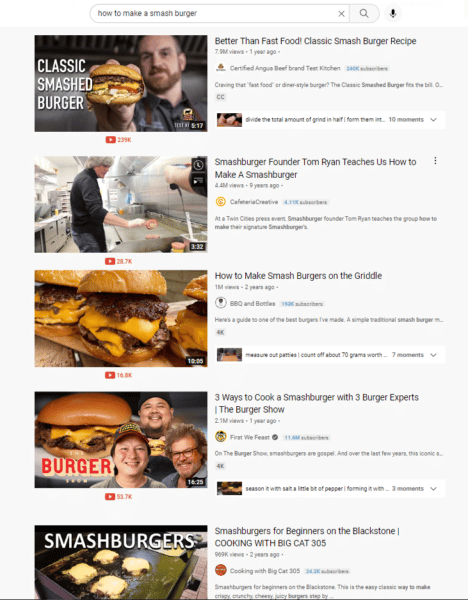
"how to make a smash burger" YouTube video search results

So if you want people to watch your videos and take action – whether it’s to look at more videos on your YouTube channel or to go to a link that’s in your video’s description – you need to get people to your video.

That means you need to attract YouTube’s algorithm to your video.

Like Google’s algorithm, YouTube’s algorithm comprises hundreds of factors that determine a video’s ranking position.

But just like a search on Google, everything starts with words – keywords and keyword phrases.

To get your video found on YouTube, you need to master finding the right keywords to target for your video and then put those keywords strategically where they need to go. 

How to do your YouTube keyword research

Keywords are an important ranking factor for YouTube videos.

Similar to Google’s search engine, YouTube wants to show people the most relevant videos according to the keywords or keyword phrases people are searching for. 

When doing keyword research for YouTube, you want to find keywords that will drive traffic to your video – phrases that people are searching for frequently.

One of the best (and free) places to look for keywords is YouTube itself.

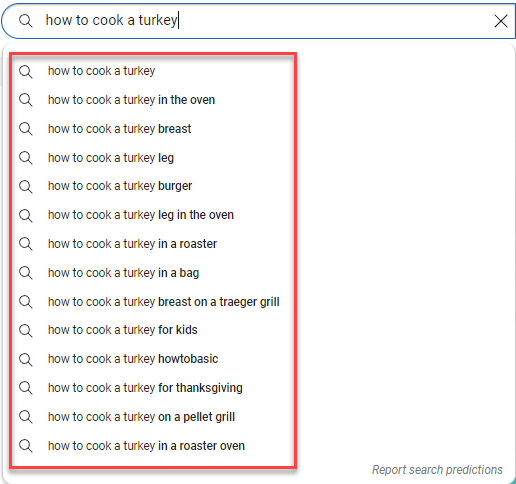
When you’re on YouTube and start a search, YouTube will offer up “search predictions.” These are keyword phrases that people on YouTube are actually searching for. 

If you’re on a tight budget, this is a great way to find some keywords as a starting point! (It’s also a good way to get video content ideas.)

YouTube search predictions for "how to cook a turkey"

But if you’re serious about ranking your videos on YouTube, you should use paid keyword research tools (like Semrush, SE Ranking, Moz or others.)

These types of tools will give you more robust information about the keywords so you can be more strategic about the keywords you’re targeting.

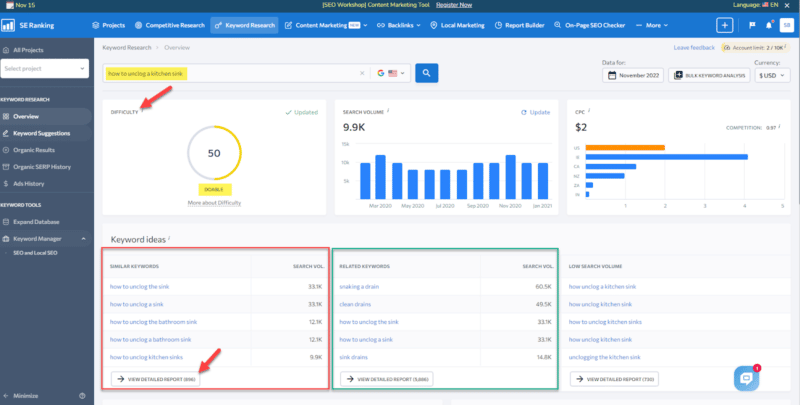
Let’s take a look at SE Ranking as an example. This is a traditional SEO software tool, but we can still glean some great insights on what types of keywords we should focus on for our YouTube videos.

For instance, when we enter “how to unclog a kitchen sink” as a keyword phrase, we will get keyword ideas and semantically related keyword phrases. 

When you click on View detailed report, you’ll see a ton of information about each of the keyword phrases.

Even though this info is related to Google search, you can still extrapolate it and use it for YouTube. 

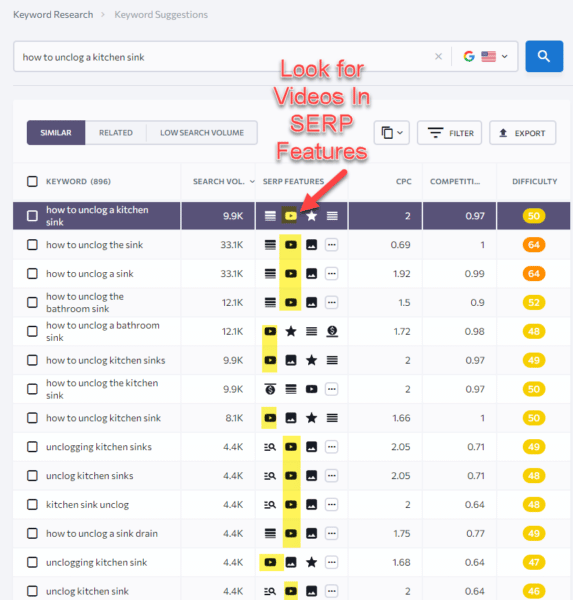
One important thing to look for in this view is videos that appear in the SERP features. 

SE Ranking - Videos in SERPs

You can see live results or copy to the clipboard and paste the SERP results in a new window to see what types of videos appear in Google search results. 

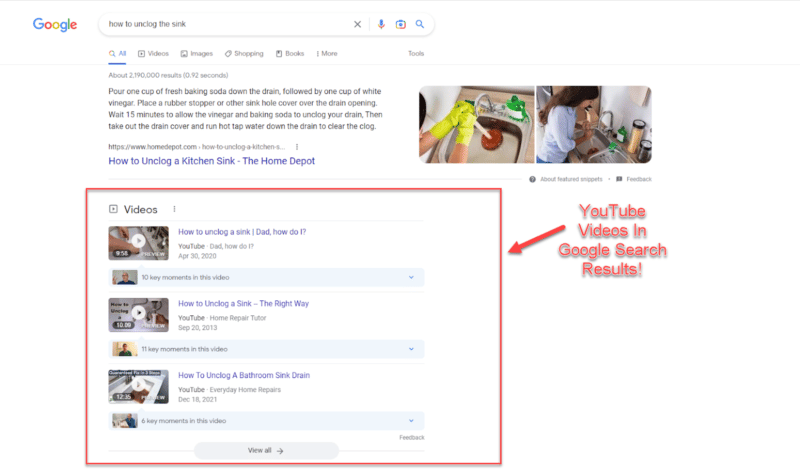
Youtube videos in serps

If videos show up on the first page of Google, then those are great keywords to target. (If you check out the videos on the SERPs, more than likely they are YouTube videos.)

These are perfect keywords for optimizing your YouTube videos because you know that Google is already showing videos in search results.

Not only can you rank your videos on YouTube, but you also have a chance of getting your videos to show up on Google search results.

Now all you have to do is make your video better and more informative than your competitors and optimize your YouTube video options more strategically to (hopefully) take over their spots in the Google SERPs.

Using traditional SEO tools can make your keyword research for YouTube life a lot easier.

If you want to find the right keywords for YouTube videos, try out some tools specifically created for YouTube marketing.

Keyword Search

You can discover keywords using Keyword Search’s “AI algorithm,” developed by a top YouTube marketing expert.

The tool:

  • Bases all its data directly on YouTube search results from the user’s perspective.
  • Scrapes and analyzes YouTube data to help you find the best keywords to use when optimizing your videos on YouTube.

And because your top-ranking rivals often know something you don’t, you can even conduct “Competitor Research” on their keywords, rankings, YouTube channels and videos.

This lets you better develop your video marketing content strategy and plan which keywords you’ll target.

You can also use the tool’s “Collections” feature to keep track of all your keywords, videos and the competitors you’re tracking.

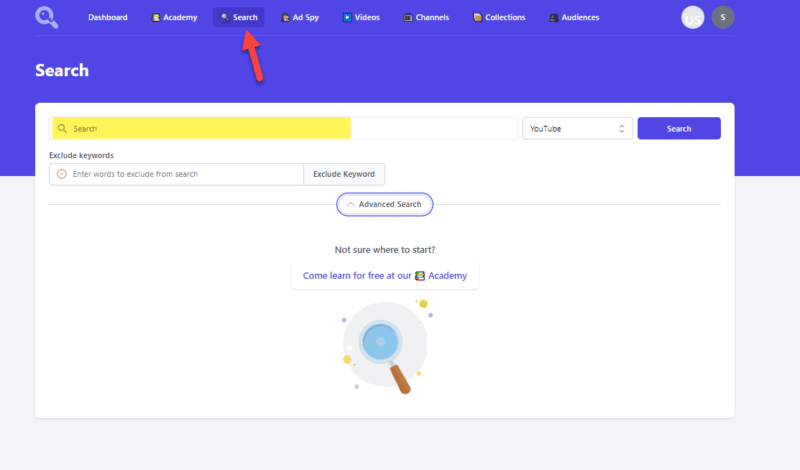
At its most basic level, using Keyword Search is as easy as entering a keyword phrase in the search field:

Keyword Search - Search Interface

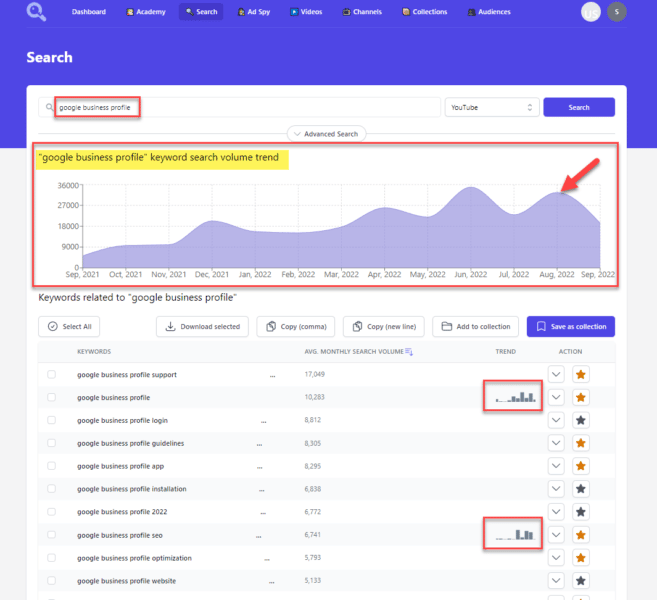
You’ll then get a slew of keyword phrases to review and see the average monthly search volume on YouTube for each keyword.

Keyword search volume trends

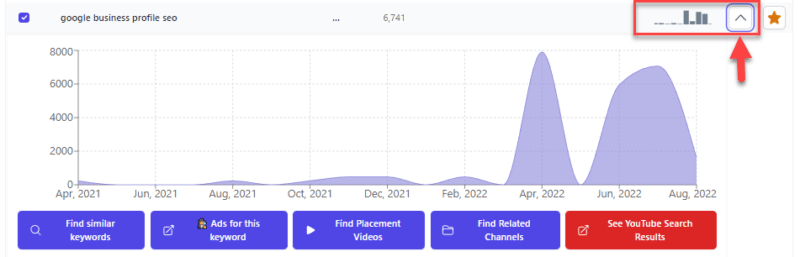
As you’re analyzing the keyword results you get, if you see keywords with “trends,” click on the down arrow to see the trends in detail – the high and low points. 

As you’re analyzing the keyword results you get, if you see keywords with “trends,” click on the down arrow to see the trends in detail – the high and low points. 

Detailed trends

If you spot a hot and trending topic over the past month (or now), get behind your camera, do a video, and optimize for those trending keyword phrases.

Creating and optimizing a video for a trending topic will boost the chances of your video getting searched for and found on YouTube!

To get some semantic keywords to target, Keyword Search also uses its algorithm to give you similar keywords.

These are additional words to consider optimizing your videos for. You can see:

  • How similar the word is to your original search query.
  • The average search volume.
  • Trends, if any.
Similar Keywords

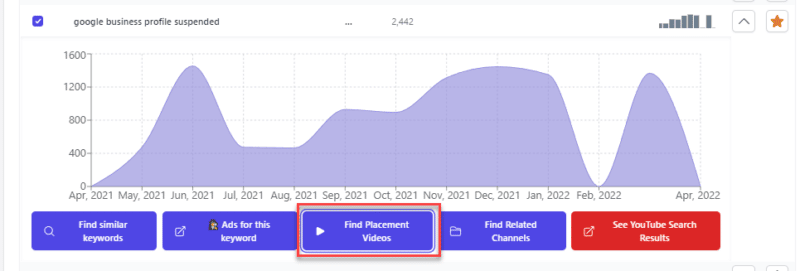
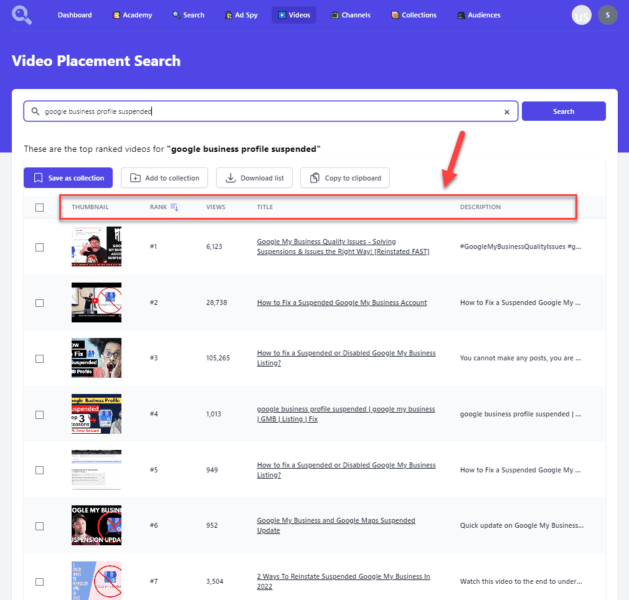
Another handy feature is the “Find Placement Videos” feature. When you click on this button under a keyword, a new window opens up showing the top-ranked videos for that keyword phrase.

Find Placement Video

This information is invaluable because you can see:

  • The videos ranking for the keyword phrase.
  • The number of views each video received.
  • Their video titles and a partial description of the videos.

All this without having to go to YouTube.

video placement search

As an extra special bonus, clicking on the title link opens a pop-up where you can watch the video.

Keyword Search is one of my favorite YouTube keyword research tools by far. But there are other YouTube-specific software tools you should also check out.

vidIQ and TubeBuddy

Both used in the YouTube platform, vidIQ and TubeBuddy have a free version and several paid options. Each tool has pros and cons, so if you can afford it, I recommend you use them both.

TubeBuddy and vidIQ are great for finding the keywords – and related keywords – you should use to optimize your YouTube videos.

When looking at your high-ranking competitors’ videos, both tools show you keyword information that will help you determine what keywords you should target for your video.

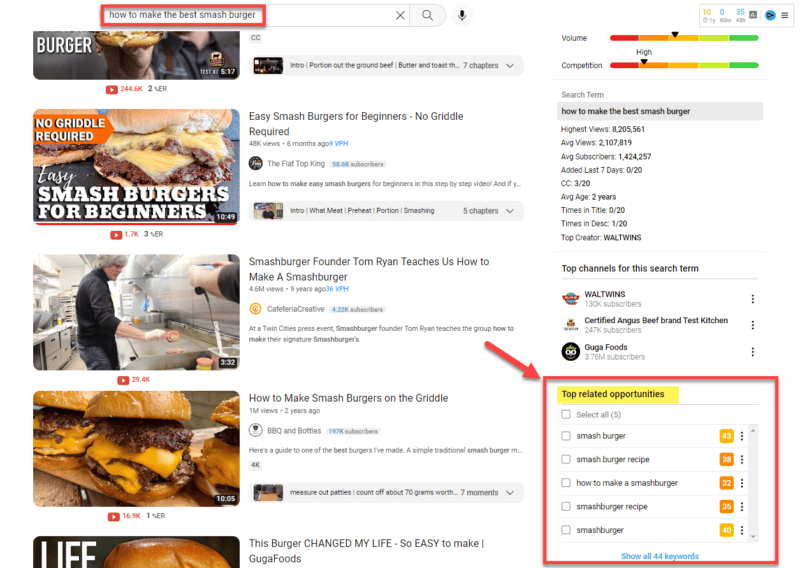
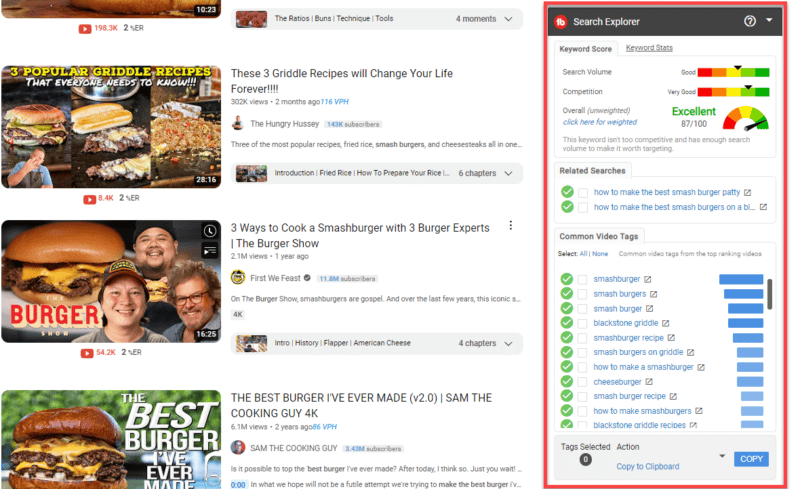
For example, in our “how to make the best smash burger” example, vidIQ shows us the “top related opportunities” keywords you should consider targeting.

vidiq top keyword opportunities

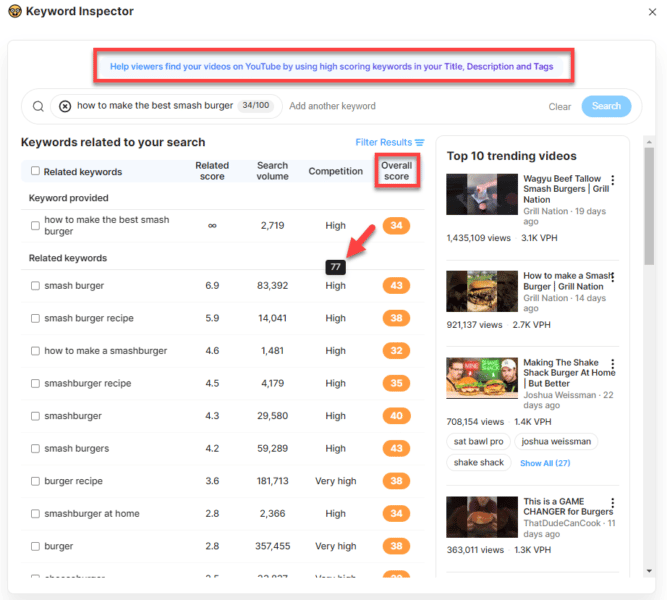
And if you click “Show all 44 keywords” you will get even more details about:

  • The keywords you might want to work into your title, description and tags.
  • Which keywords might be too competitive to target.

(As you can see, trying to rank for the keyword “smash burger” by itself is just too competitive at a High Competition score of 77.)

vidIQ "smash burger" keyword inspector details

TubeBuddy also shows you related keyword search phrases and tags for your video keyword optimization strategy.

tubebuddy smashburger

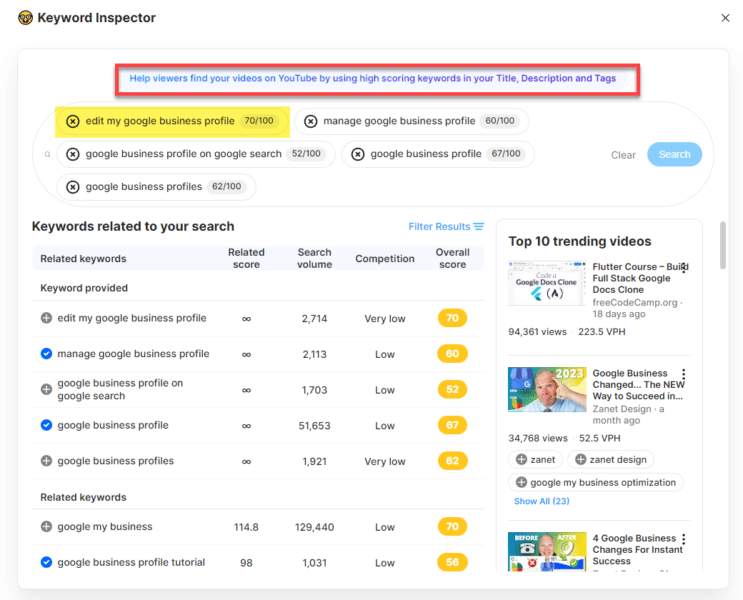
In vidIQ’s Keyword Inspector, you can:

  • Enter keyword phrases you want to evaluate and see related keywords, the score, search volume, competition, and the top ten trending videos.
  • Search up to five keywords at a time.

When determining which keywords to target, look for the high-scoring keywords. 

In the example below, “Edit My Google Business Profile” had the highest score of 70/100:

vidIQ GBP keyword

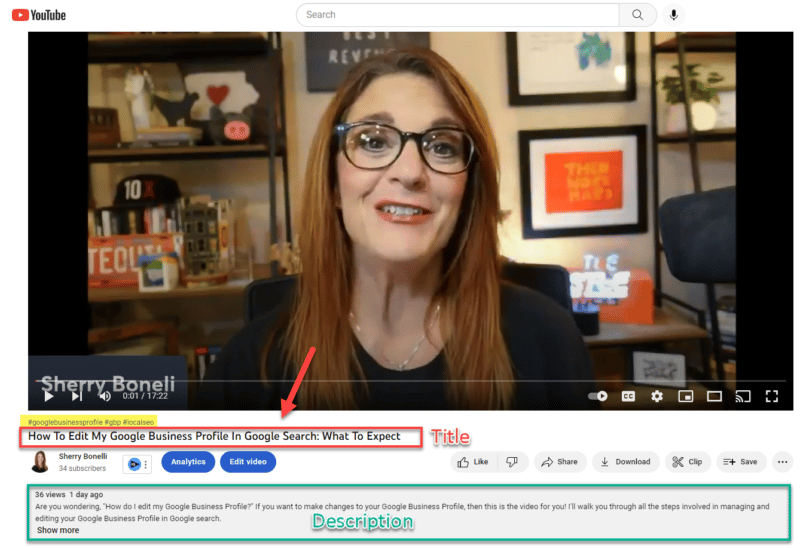
To test out this keyword strategy, I used that keyword phrase in the title of my recent Google Business Profile YouTube video:

GBP YouTube video title

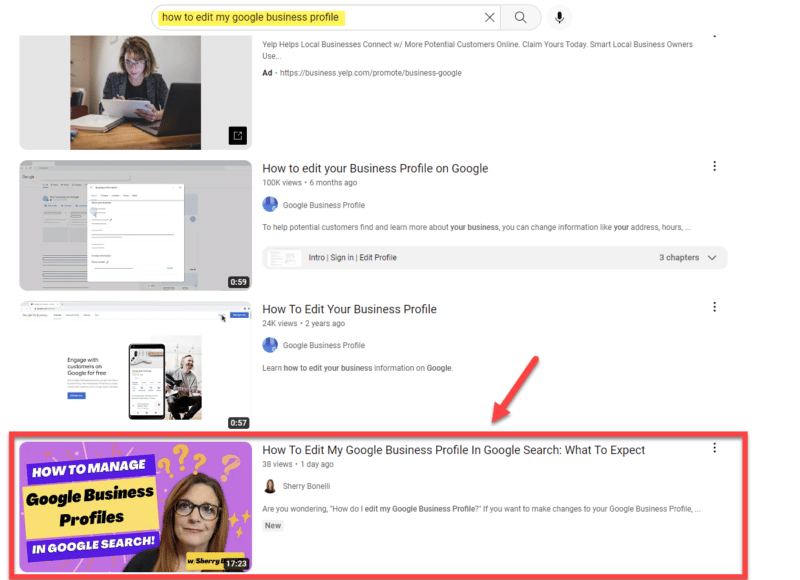
Within three days, my Google Business Profile video ranked third for the keywords “how to edit my google business profile.” Boom!

YouTube video ranking

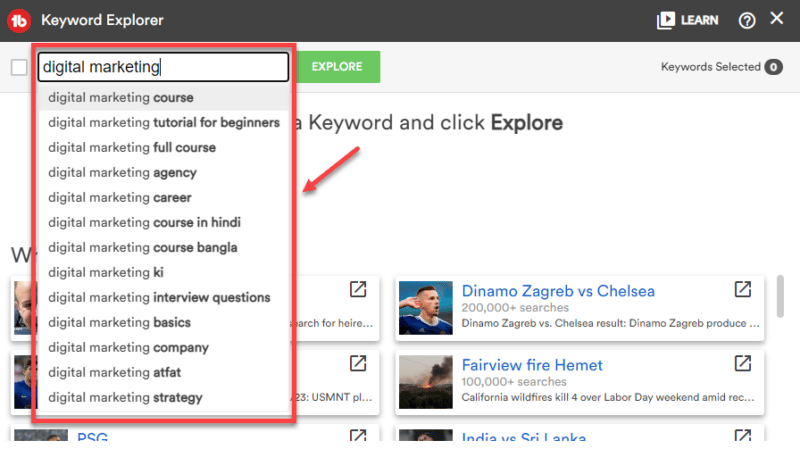
TubeBuddy also has a Keyword Explorer feature. When you start typing your keyword, TubeBuddy shows possible keywords you may be targeting.

Just continue entering your keyword phrase or select the one you’re interested in from the dropdown.

Keywords TubeBuddy

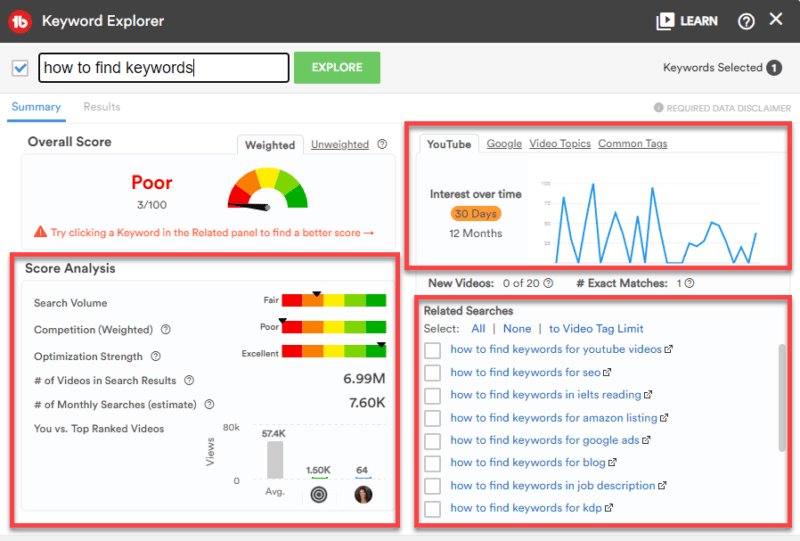
In TubeBuddy’s Summary page, ignore the overall score and focus more on the Score Analysis, Interest Over Time and Related Searches sections.

TubeBuddy video metrics

Let’s delve into TubeBuddy a little deeper. 

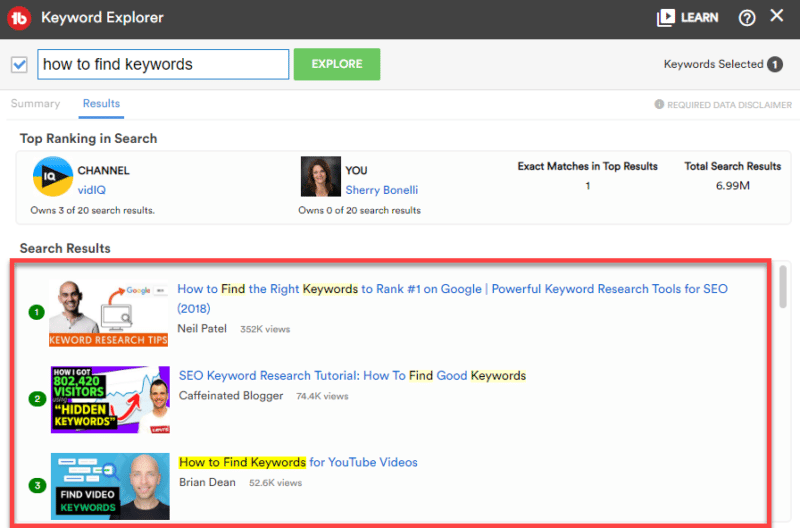
When you look at YouTube search results for “How to Find Keywords for YouTube Videos,” you can see that there’s only one exact match in the top search results – and that happens to be Brian Dean’s video.

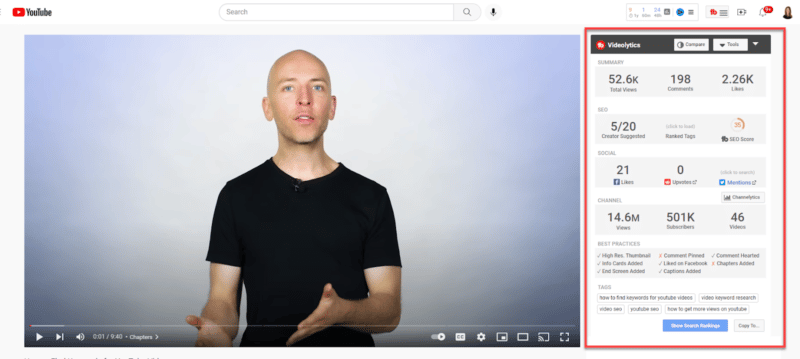
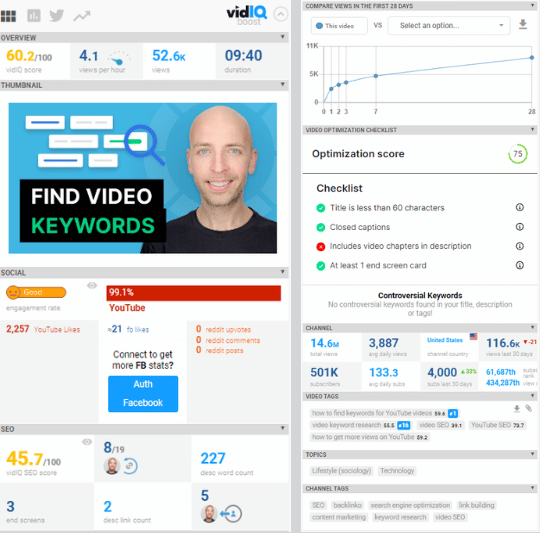
Clicking on Dean’s video, you can see TubeBuddy’s analysis of the video – which is quite extensive.

TubeBuddy analysis

From this, you can see what his video is doing from a YouTube optimization perspective and what he’s missing so you can try and improve yours.

VidIQ also provides an extremely comprehensive analysis of the video.

vidIQ analysis

By using TubeBuddy or vidIQ (or both), you can:

  • Find awesome keywords.
  • Evaluate your competitors and their weaknesses.
  • Capitalize on those flaws to make your video optimization stronger. 

These tools go way beyond just keyword research, which will give your YouTube videos and channel a great advantage.

Where to put your keywords on YouTube for ultimate optimization

Once you find about 2-6 targeted keywords (and a few semantic keywords that complement those targeted keywords), it’s time to put those keywords to work in your video marketing.

Let’s talk about where you should strategically put your keyword phrases on YouTube.

Put keywords in your video’s title on YouTube

Your video’s YouTube title gives YouTube’s algorithm, users and search engines a “first impression” of your video and tells everyone what your video is about.

A well-optimized video title will make YouTube’s algorithm happy and attract more traffic, which can turn into more views.

When optimizing your title, include the most important keywords people are searching for as close to the front of your title as possible – this helps your video get ranked and suggested.

The keywords you most want to rank for should be included within the first 60 characters of your title. (Your title can be up to 100 characters, so the closer you put your keywords to the front of the title, the better.)

When writing your title, be as concise as possible. Five words or less is best. 

If possible, use words in your title that connects the video to other videos in the same category.

Also, having a title that is catchy, compelling, and accurately represents the contents of your video can also help attract searchers. (No bait and switch, please.) 

Strategically work keywords into your video’s description

With so many videos on the same topic, it’s often hard for your video to stand out.

Your video’s description is one way to make your video jump out among the crowd – and help your video rank.

Write a short – but detailed – description of what the video is about, what the watcher will learn and how your video is different or stands out from the other videos on the subject.

When it comes to keywords, putting the right keywords in your description will help your video get more views and visibility. 

Remember that partial descriptions can also appear in search results, so be sure to put your keywords as close to the beginning of the description as possible.

That means:

  • The main keywords you’re targeting should be within the first 200 characters of your description.
  • The most important keywords should be in the first 25 words of the description because partial descriptions can appear in search results.

(Your video description can have 5,000 characters total. But if it is too long, it probably won’t be read in its entirety anyway.)

Throughout your description, it’s key to include partial matches of your targeted keywords in the description, too.

So write a description that is an overview of your video writing naturally using related and similar keywords to your targeted keywords.

That means breaking the words up, using semantic – or similar – keywords and using them individually in addition to the main target keywords you’re aiming for.

YouTube (and Google) use your text descriptions to determine the content of your video.

So if you don’t include a description, the search engines (and viewers) won’t know what your video is about. This will negatively impact your rankings.

GBP video description

In the description, you can also link to other related content you have (i.e., website, blog, social media channels, etc.). Remember to include your full URL (including the https:// or http://).

And if you’re at a loss for what to write, you can get a jumping-off point by using vidIQ’s AI Description Generator Feature.

vidiq ai description generator

Hashtag it!

Many people like to search with hashtags. So for those people, adding appropriate hashtags in your description helps them find your videos when searching for specific hashtags.

YouTube hashtags

Add a few appropriate hashtags to your description.

When you start typing in the hashtags, YouTube will show you the number of videos and channels that use each hashtag. That way, you can scope out your hashtag competition.

Hashtags in description

Ironically, no matter where you put hashtags in your description, the hashtags you entered show up directly under your video.

Hashtags-under-video

Keywords in tags: Do tags matter?

Tags can help categorize your video by keywords or phrases, but they’re primarily meant to help correct common spelling mistakes or synonyms (i.e., Google Business Profile vs. GBP or U-Haul vs. UHaul.)

Other than that, tags play a negligible role in helping people find your videos, according to YouTube. (Still, you want to include tags when optimizing your YouTube videos!)

YouTube allows you to include Tags to help categorize your video by keywords, but it limits the number of tags you can include. (There is a character limit of 500 characters.) 

When you’re using tags, you should include your most important exact target keyword (or keyword phrase) as the first tag. That lets YouTube know what keyword phrase is the most important one.

It’s also recommended that you include partial matches of your target keyword as tags.

You’ll also want to include multiword tags (i.e., long-tail keywords) that relate to your video’s topic.

You should also use single-word and broad-term tags that relate to your video’s broader topic. 

(Note: Do not use trademarks or copyrighted material unless you have explicit permission from the owner to use it.)

YouTube is effective at semantically understanding your tags – so you don’t need to go overboard.

One great way to get tag ideas is to look at the top-ranking YouTube videos that directly compete with your video. However, YouTube hides the video tags, which makes it more difficult to “spy” on your competitors and see their keyword/tag secret sauce.

Luckily, vidIQ and TubeBuddy lets you see the tags competitors are using to get their videos to rank high.

Get your video keyword and optimization strategy in place

By having a YouTube keyword research and optimization strategy in place, you can increase the chances of your videos showing up in YouTube’s search results.

Play your cards right, and you might even reach the top of Google search results.

Video marketing will continue to grow. Mastering YouTube’s ranking algorithm is a great way to kick your efforts into high gear.


Opinions expressed in this article are those of the guest author and not necessarily Search Engine Land. Staff authors are listed here.


Related stories

New on Search Engine Land

@media screen and (min-width: 800px) { #div-gpt-ad-3191538-7 { display: flex !important; justify-content: center !important; align-items: center !important; min-width:770px; min-height:260px; } } @media screen and (min-width: 1279px) { #div-gpt-ad-3191538-7 { display: flex !important; justify-content: center !important; align-items: center !important; min-width:800px!important; min-height:440px!important; } }

About The Author

Sherry Bonelli

Sherry Bonelli is a search engine optimization (SEO) and digital marketing professional with 20+ years of experience. She is the owner of early bird digital marketing, a digital marketing agency that serves clients all over the U.S. Bonelli is a Google Business Profile Gold Product Expert and columnist for leading marketing websites. She received Search Engine Land’s SEO Contributor of the Year Award in 2018.
A recognized presenter and speaker at leading digital marketing conferences, Bonelli holds a Master’s Degree in Internet Marketing. She is also a LinkedIn Learning Instructor, Adjunct Instructor at several colleges and universities and is the host of The Marketing Plan Podcast.

https://searchengineland.com/youtube-seo-find-traffic-generating-keywords-389947


In-house vs. agency SEO work: The pros and cons

Roughly half of the Twitter DMs I receive are attempts to sell me “high-quality guest link posting.”

The other half are lifelong agency SEOs looking to move in-house, asking me how to make the move and to review their resumes. 

While I started my career in a link building agency (the real trenches of SEO) and have the utmost respect for agencies, I’d like to share insights into how I feel about in-house vs. agency life.

Disclaimer: This is my experience and not reflective of everyone’s truth. If you’ve decided to make the switch in-house, I recommend speaking to those who made the move, as this article is just one data point.

The benefits of agency life

Truthfully, I wish every SEO started their career at an agency. Like a boot camp, the pace of agency life early in your career will be very formative. 

Being in-house your entire life (especially at just one or two companies) can give you a tunnel-vision view of the world. 

The exposure to sites of different sizes and the SEO savviness one can get inside an agency are unparalleled. 

Experience is a superpower in SEO, so while now in life I (clearly) enjoy in-house life, I highly recommend SEOs work at agencies, even if just for a few years.

Here are other advantages of working in an agency:

  • Exposure to many clients and verticals.
  • Learning incredible project management skills.
  • Many senior people mentoring you in what you do.
  • Quickly learning a repeatable playbook of best practices for each vertical.
  • Company incentives (i.e., sending you to SEO events or allowing you to speak).
  • A more developed career ladder (i.e., an opportunity to be Director or Sr. Director).
  • Fewer meetings and easier transition to consulting.

Exposure to many clients and verticals

One of the biggest shortcomings I see in SEO hires is a lack of experience working across sites of different sizes with different resources. 

Even if you can spend your entire SEO career at a highly competitive SEO-driven company (e.g., Tripadvisor, Condé Nast), that won’t necessarily translate well into doing SEO for a new SaaS company with limited resources and no bespoke or custom tooling. 

In an agency, you get to use a variety of the clients’ homegrown tools and off-the-shelf SEO tools your clients may already be bought into, so you’ll know the right tool for the job.

Learning incredible project management skills

A lack of project and stakeholder management skills can often cripple your career.

I suggest SEOs focus on these soft skills if they ever want to move in-house. 

It’s a survival skill most agency SEOs pick up as they juggle client work and relationships.

Early mentorship and a repeatable playbook

In an agency, assuming SEO is a commonly sold service, there might be a lot of senior SEOs with vast experience around you. 

Generally speaking, every vertical has best practices that are fairly repeatable and usually work. 

Having this wealth of knowledge and experience around you can quickly uplevel you and compensate for your own lack of experience. 

In-house, you might be the only SEO trying to figure it out while teaching yourself. 

I’ve often found completely self-taught SEOs to be a little undisciplined if they never received feedback early in their careers from other SEOs. 

Company incentives to send you to SEO events or allow you to speak

Public speaking can be an incredible platform to build your SEO career. It’s also great for networking and discussing SEO tactics privately with other SEOs.

Quite frankly, they’re also quite fun if you’re social like me! 

But being in-house, it is rare that companies will pay for you to do public speaking or attend SEO events. There’s simply little incentive to do so. 

Agencies need new business, so sending employees to events and putting themselves in front of companies looking to learn about SEO makes fiscal sense. 

It’s a great way to build your agency’s brand and bring in inbound leads.

Within some organizations, sending SEO employees to speak is sometimes seen as a double negative. Not only is it costly, but the talent is also likely to be poached and they won’t be able to easily anonymize their data. 

No company wants their secrets openly shared with the world to live indefinitely on SlideShare, where competitors can easily see them. 

The best companies I’ve been in allowed for a single conference each year. Generally, you need to speak about the work of other companies to qualify for speaking engagements.

A more developed career ladder for SEO

If you’re the only SEO in your company or one of a few, and SEO is not a major lever, it is unlikely SEO will have a well-defined career ladder.

For example, you might need to champion the creation of a senior position like Director of SEO – and, likely, it might never happen. 

Due to the number of SEOs and the customer-facing aspect of agencies, I feel that agency SEO roles at Director and VP levels are much more common than in-house. 

The key exception I’ve seen is for SEO-driven companies, such as Booking, Yelp or Tripadvisor.

Most in-house SEO roles top out at “Lead” or “Head of SEO.” 

Some circumvent this by taking on other teams, like SEM. But more commonly, companies will give an SEO team to a paid search lead than give paid search to SEO. 

When millions of dollars of budget are on the line, prudent budget spend is generally optimized for rolling search teams under a single search lead.

Fewer meetings because you’re a consultant and an easier transition to consulting

I have a lot of meetings. In my experience with an agency and my own consulting friends, many can have just ~2 meetings maximum per day. 

As an SEO lead in a multinational company, it is not unusual for the most senior SEO to be in 5-6 hours of meetings a day. This is especially common as you start taking on more projects or products within the company. 

It is also much easier to transition from being an agency SEO into consulting because you:

  • Have the playbook.
  • Know how to pitch clients. 
  • Understand the nuts and bolts of running a business that sells SEO. 

Consulting is an attractive proposition if you have the best clients. I know many of the best SEOs who easily generate incomes of several hundred thousand a year with just a few clients. 

I’ve seen lifelong in-house SEOs struggle with this transition. In contrast, it seemed second nature for my agency SEO friends to begin side hustles and eventually transition into working full-time for themselves.


Get the daily newsletter search marketers rely on.


The benefits of being in-house

Becoming an in-house SEO has various advantages which I really enjoy. Some of them include:

  • Having a better quality of life (for me, at least). 
  • More opportunities for consistent, deep work.
  • Not caring if clients fire you.
  • Going into tech or SEO product.

Better quality of life

I know some agencies have a high quality of life. But by their nature, I have always found the work to be more reactive depending on who the client is. 

I’ve also witnessed some clients being abusive to agencies, as they can be an easy scapegoat when things go south. 

It is almost always painful for me to join a new company. There’s a level of needing to “prove yourself” initially. 

Yet over time, I find the familiarity and friendships I’ve built within a company allow me to have a high quality of life I am not confident I could find in an agency with new companies, teams and stakeholders all the time. 

This level of peace and comfort usually happens at around the 1.5-year mark, when you’ve had some wins and finally feel “settled.” 

My quality of life is pretty exceptional, and I have no complaints at most of the large companies I worked for.

More opportunities for consistent, deep work

When you think about just one customer (your company) every day, getting the buy-in needed for meaty, big multi-year projects becomes much easier. 

It also enables you to be a real subject matter expert on your products, allowing you to take on exciting and out-of-the-box SEO ideas and not just execute best practices. 

A lot of my agency friends find this lack of variety boring, but I personally love being able to think deeply about a smaller portfolio of products.

Not having to care if your clients fire you 

Oftentimes, agencies might have a big client representing a disproportionate share of revenue in the agency. Losing clients like this often can mean layoffs will quickly follow. 

This is quite stressful for me because now I have to worry about doing SEO and keeping all of the clients. 

Worrying about SEO results and impact is enough for me, and I don’t like having my job security tied too heavily to a single customer.

Going into tech and/or SEO product 

Tech has been a career-changer. I get to do what I love in combination with working on products I use daily and receiving some widely lauded industry perks such as:

  • Stock packages.
  • Generous benefits.
  • World-class snacks.
  • A fine education in big company vernacular (i.e., “taking a step back” to produce results that really “move the needle”). 

I recognize that I got incredibly lucky with my timing at Square. Most tech companies fail, and it’s a highly tumultuous industry at the moment. But I am deeply satisfied and appreciative of my experience in tech, and it’s an incredible way to build wealth. 

Working for a tech company also means there is usually a large product management organization. 

This means you might be able to join and transfer into a more traditional tech ladder and, eventually, a more well-rounded growth leader who perhaps no longer even does SEO. 

If you want to go into product, working for a tech company is likely the easiest way to eventually transfer into this role style (if it doesn’t exist yet).

Improving your chances of getting hired in-house

Interviewing for an in-house role? 

The most common mistake I see agency SEOs make is spending too much time discussing new business when in-house companies simply don’t care. 

Here are my suggestions:

Change the number of clients to the number of sites you owned

In-house hiring managers don’t care how much you billed or how many clients you managed. They want to know the results you produced for any particular client.

Focus on quantitative growth numbers, the size of the sites, and the tools you have familiarity with. Remove anything related to selling/closing clients.

If you were a team manager, say it!

Mention how many people you hired and/or managed. Hiring is one of your most important jobs as a leader, so if you’re a great people manager, let them know.

Name drop

Big companies like knowing you worked for other big companies, especially if they’re competitors or companies like them.

If you had an attractive client base, let them know, and it will help your resume stick out to the hiring manager.

Don’t be nervous

Remember, the company wants to fill this role the most. It is in their best interest to like you.

If the company treats you poorly, this is not the right company for you, and you should move on.


Opinions expressed in this article are those of the guest author and not necessarily Search Engine Land. Staff authors are listed here.


Related Stories

New on Search Engine Land

@media screen and (min-width: 800px) { #div-gpt-ad-3191538-7 { display: flex !important; justify-content: center !important; align-items: center !important; min-width:770px; min-height:260px; } } @media screen and (min-width: 1279px) { #div-gpt-ad-3191538-7 { display: flex !important; justify-content: center !important; align-items: center !important; min-width:800px!important; min-height:440px!important; } }
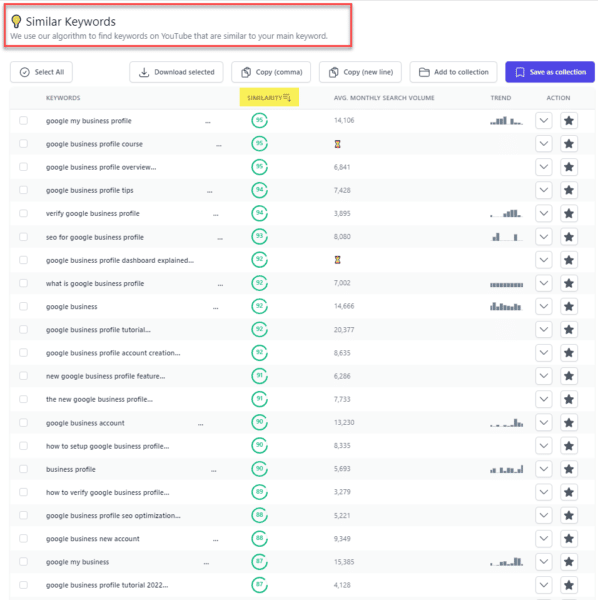
About The Author

Jackie Chu

Jackie Chu is currently the SEO Intelligence Lead at Uber Technologies in San Francisco. She has deep experience in B2B, B2C and online publishing, and has led SEO and ASO efforts both in-house and as a consultant for companies like Square, Dropbox and Yahoo. In addition to doing SEO, she loves wasting money at Barry’s Bootcamp, drinking sparkling wine and hanging out with her mini Goldendoodle, Bailey.

https://searchengineland.com/in-house-vs-agency-seo-work-pros-cons-389844