Changing URLs for SEO reasons: When is it OK?

Personally, I change outdated, harmful or lengthy web addresses (a.k.a., URLs) when updating existing content quite often.

Why? Let me explain.

What did Google’s John Mueller say about changing URLs for SEO?

Before we dive in, let’s see what the official Google position on changing URLs for SEO seems to be. It’s quoted from a tweet by John Mueller, Search Advocate at Google, as the connection between webmasters and the search giant.

As reported by Barry Schwartz on Search Engine Roundtable, Mueller stated that the risk is much higher than the possible reward when changing URLs (for SEO reasons):

“(…) Will it help the site? Very, very rarely (if they have terrible URLs that you can’t even copy & paste, maybe). Will a change negatively affect the site for a while until it’s reprocessed? Probably. Some risk + usually no gain.”

How does a proper URL look in the first place?

Let’s start with the ideal state of your URL. 

In case you are using WordPress or a similar CMS, you will most likely have a well-designed URL structure already by current standards. 

The examples below are all fine:

  • example.com/post-title
  • example.com/topic/post-title
  • example.com/topic/sub-topic/post-title

Does your URL look anything like this? Congratulations! You most likely do not have to change anything! 

It’s just like Mueller said: the risk of changing a URL would outweigh any imagined benefit.

Examples of potentially harmful URL structures

Custom websites and even content management systems of the early days often create harmful website addresses. 

You may even run a legacy WordPress site that has some mistakes of the past still built in. 

Does your website address look like some of the potentially harmful examples below?

  • example.com/p?=123
  • example.com/2022/11/01/post-title
  • example.com/keyword1-keyword2/keyword1/keyword2-keyword1
  • example.com/category/sub-category/topic/sub-topic/very-long-headline-that-does-not-really-have-to-be-added-to-url?id=123456789&utm_source=Twitter&utm_campaign=social

All these were pretty common until a few years back, so you may still have a site with a less optimal URL structure like one of the above.

Also, with website builders and complex enterprise-level CMS software, you may have additional issues.

Sometimes, website builders like Weebly or Squarespace add gibberish to file names when dealing with special characters from foreign languages.

  • Numbers-only post addresses are short and sweet, but there is no reason to click them. They are bland and meaningless.
  • Date-based addresses make sense only for publications that truly publish time-sensitive news, like The New York Times (e.g., https://www.nytimes.com/2022/10/12/business/wall-street-mixed-quarterly-earnings.html). For everybody else, it may discourage people from clicking a link to evergreen content because they assume it’s just “yesterday’s news”.
  • Keyword-stuffed URLs can ostracize visitors as they are viewed as low quality and Google might also demote them in search results.
  • Very long, hard-to-read URLs with lots of redundant elements can simply confuse people. 

URL parameters that often contain other website names or even addresses (like utm_source=Twitter.com) are utterly confusing. They can even mislead scripts on third-party sites where you share content.

When to change URLs for SEO reasons

So when can you change URLs? Ideally, never – not only for SEO reasons. It’s “never change a running system” as an old computer geek motto says.  

However, we are not living in an ideal world (and I understand that Mueller’s tweet is too short to add all the exceptions). So here, we’ll go over instances when it’s OK to change URLs.

Sometimes URLs are completely bonkers as in the example offered by Patrick Cunningham on LinkedIn:

Lengthy ecommerce URL example

Below is a classic comparison of typical URL structures from Moz.

The Scale of URL Readability

Personally, I do change less dirty URLs as well. Why?

Let me explain.

First of all, I have been shortening lengthy URLs when updating existing content on WordPress regularly. For SEO reasons, a very long URL like this:

  • example.com/shortening-too-long-urls-when-updating-existing-content-on-wordpress 

…can be shortened to:

  • example.com/shortening-urls 

Why exactly?

First off, the URL itself is by now a negligible ranking factor. As you’d expect, experts are divided on that question. 

The most obvious SEO benefit of clean URLs is that they contain (just) keywords in them and no redundant “stop words.”

So whenever someone links your URL (like many automated systems do – think aggregators), you get rich anchor text links that benefit you in Google’s organic results.

Also, people are most likely to click them and thus notice your content, share it and link to it.

The URL:

  • example.com/?p=123

…is less likely to attract visitors than:

  • example.com/henry-cavill-shirtless

After an update of existing content, you might find that the current URL no longer reflects the original message. It may even be that the updated article states the opposite of what it said earlier.

A legacy article, like example.com/google-plus-launched, could be changed to example.com/google-plus-discontinued to reflect the current reality. 


Get the daily newsletter search marketers rely on.


When to change URLs for other reasons: Findability, usability and shareability

Direct SEO benefit is not the only reason to change, optimize or fix your URLs. There are at least three often more important ones. 

When people talk about SEO, they often limit their SEO definition to something like “technical SEO optimization for Google.”

Thus, when I suggest doing something for actual visitors, many clients will scream “no” and tell me “but that’s not SEO.” Hence, they don’t want to pay for it.

The logic behind this seems to be very old school as in “who cares for actual visitors when Google loves it”? Nowadays, this approach no longer works well. 

Google now considers a plethora of ranking factors, many of which can be subsumed under the umbrella of user experience (UX).

Convincing Google that you have to rank on top of its organic results is only the first step.

You have to enable people to find the actual resource they are looking for, use it without difficulties, and ideally share it.

Findability

Findability goes beyond SEO. It ensures that things are findable on-site as well. 

If you have a complex website with lots of sections, topics and categories, you may want to ensure that they are reflected in the URL so visitors know where they are locally.

A simple URL like example.com/post-title may not suffice, especially when there are lots of similar resources. 

Consider a post title and address this: google-struggles.

Imagine a site that covers Google in many different sections:

  • example.com/technology/google
  • example.com/finance/google 
  • example.com/law/google 

Depending on the context, the content of the article could be covering something completely different:

  • “Google struggles to combat spam”
  • “Google struggles to satisfy shareholders”
  • “Google struggles to convince EU”

Your site may have started years ago and grown substantially over time. You may have added thousands of articles and by now it’s hard to find them on the site just by relying on the post title.

Consider changing your URLs to make content more findable on your site then, particularly if many people use your internal search to navigate the site.

Usability

Some argue that findability is just a subset of usability. To me, you have to be able to find something first to be able to use it second. 

Again, too-long or cryptic URLs that appear in the browser address bar might be unhelpful. Just compare these two examples from Amazon:

  • www.amazon.de/dp/1501197983/?coliid=IZB68GB6MJQMQ&colid=3A7JBQOG6TBE9&psc=1&ref_=lv_ov_lig_dp_it
  • www.amazon.com/Contact-Novel-Carl-Sagan/dp/1501197983

Which one of them is more usable? I think you get the point. 

Both the German one and the .com link to the same product (as the id “1501197983” is the same).

When you see just the URL in the address bar, you have no way of knowing what the cryptic one leads to. 

Most people have more than one tab open in their browsers. Sometimes you want to decide quickly which tabs to close. 

When you scroll down to view the reviews on Amazon (the only original content they have), you will not know which product you are viewing from looking at the page and address bar. 

When I research products on Amazon and open numerous tabs, I tend to close other tabs because of this.

Also, if it wasn’t for the globally recognized brand, it would look like some kind of creepy phishing site.

Does your URL look like the first example above? You have a usability problem to fix.

Shareability

So you found something and were able to use it. Now you are fond of it and want to share it. 

Or maybe, you were researching it for someone else (like your elderly parents) in the first place and now want to share your findings. 

You may see some sharing buttons you could use but, in many cases, you will just want to copy and paste a link (or rather URL) to send by mail or instant messenger, think:

  • Skype.
  • WhatsApp.
  • Telegram.
  • Other instant messaging apps.

Sharing long URLs can look like this:

URL sharing on Skype

On my own site, I also add an easy way to copy and paste a link. Most sites don’t do this. They rather promote third-party sites. So what you do is:

  • Go to the address bar.
  • Select the URL.
  • Copy it.
  • Then paste it manually. 

A lot of things can go wrong while sharing so the link may not arrive at its destination without breaking. 

Often, it is also not attractive enough to entice the recipient to click it.

A numbers-only URL stuffed with all kinds of gibberish like the above example may even prevent someone from clicking it as it looks suspicious.

Does your URL make it very difficult to be copied, pasted and shared? You may have to change it then. 

As you probably notice, all these reasons are also “SEO reasons.”

When visitors can’t find, use or share your links due to bad URL structure, they are less likely to spread the word about your content, products or services.

At the end of the day, you get less exposure and ultimately links.

How to change URLs without hurting your SEO too much

Now that you have found out that indeed your site is one of those few exceptions that make a change of URLs for SEO reasons advisable – what’s next? 

How do you change URLs actually without damaging your SEO?

Follow these tips.

Be descriptive 

Just having cryptic numbers like “1501197983” in your URLs, won’t cut it.

Make your URLs as descriptive as possible. You can keep the number for technical reasons (as explained below), but add the gist of what the page is about to the URL slug. In our case, it’s something like: 

  • example.com/change-url-seo

Forget keyword-stuffing

The “SEO reasons” Mueller meant are probably adding keywords to URLs to “rank better.” In the distant past, many people would do that. Nowadays it’s rather counterproductive. 

A URL slug like /change-url-seo is already keyword-rich. 

I ranked top 10 on Google for the phrase [url seo] for years and the URL was a lot less clean than that back then.

Add a number

WordPress and most other CMSs (internally) require a number to find a resource. So once you don’t have one in the URL it is mapped internally (and even slows down your site a bit). 

Also, when you change URLs too radically, WordPress might not be able to map the URL to the resource correctly.

The solution is simple and a compromise, you add both the number and the self-explanatory URL slug, as in:

  • example.com/123/change-url-seo

The following will all lead to the same article:

  • example.com/123
  • example.com/123/cha
  • example.com/123/change-url-seo

Thus, sharing long URLs by mail or IM is also less likely to break the link.

Use hyphens (no other special characters)

Ideally, hyphens should be the only special characters in URLs (just like example.com/hyphenated-url).

If your system requires other characters for technical reasons, make sure to find out whether they are supported by Google and what they mean.

Use 301 redirect

When you move in real life, you will most likely tell your customers or clients your new address.

On the web, it’s similar albeit even easier. You have to use a redirect to tell both visitors and Google spiders where to find you now. 

Almost the same process applies when just a page from your site moves or when the whole domain gets replaced (e.g., when your business changes its name). 

There are many techniques to redirect a page or whole site, yet just one of them truly works both for visitors and Google at the same time. It’s a 301 redirect. You just have to implement it. 

When your site runs WordPress or other modern CMSs, a 301 will be applied automatically in most cases – unless the new URL is so different that the CMS can’t assign it correctly anymore.

Here is an example of an URL redirected by simply using the URL slug feature of WordPress on my blog.

url-slug-example

After shortening it, I simply looked up whether the post still shows up when reloaded or throws an error.

Then you can use third-party redirect tools. On WordPress, there are many different ones. I use Redirection by John Godley, which is free and has been downloaded over 2 million times.

Some all-in-one tools like Yoast SEO also offer that (as a Premium) feature. On Yoast, it’s called redirect manager.

Otherwise, you may have to:

Manually add your URL in Search Console

This is probably the risk Mueller wanted to warn website owners about in the first place.

Once you change the URL – and assuming the 301 redirects work properly – it can still take a long time for Google to find and index the new address.

Whether Google will crawl it quickly or over time depends on the overall authority and even the size of your site. Changing the URL in your XML sitemap may take care of that, but you can’t be sure.

So when you’re in a hurry or want to minimize the risk of losing valuable organic reach it is advisable to tell Google manually through the Search Console that a resource moved and where it is now.


Opinions expressed in this article are those of the guest author and not necessarily Search Engine Land. Staff authors are listed here.


Related Stories

New on Search Engine Land

@media screen and (min-width: 800px) { #div-gpt-ad-3191538-7 { display: flex !important; justify-content: center !important; align-items: center !important; min-width:770px; min-height:260px; } } @media screen and (min-width: 1279px) { #div-gpt-ad-3191538-7 { display: flex !important; justify-content: center !important; align-items: center !important; min-width:800px!important; min-height:440px!important; } }

About The Author

Tadeusz Szewczyk

Tadeusz Szewczyk, also known as Tad Chef, is a professional blogger and SEO since 2004. Even though based in Berlin, Germany he has covered blogs, social media and search for a global audience starting in 2006. In 2007 he launched his own blog – SEO 2.0 – and also published on numerous other marketing blogs ever since. In recent years he wrote for the social media accounts of many clients as well. You can connect with Tad on LinkedIn and Twitter or visit his website and read his blog about social SEO.

https://searchengineland.com/change-url-seo-389209


How to get the most out of the Google Search Console API using regex

Google Search Console is an amazing tool that provides invaluable search data by real users directly from Google. While the charts and tables are friendly to work with, a large part of the data is not accessible from the UI. 

The only way to get to this hidden data is to use the API and extract all that valuable search data that is available to you – if you know how. This is possible with regular expressions.

Here’s how you can maximize the Google Search Console API using regular expressions, according to Eric Wu, VP of Product Growth at Honey, a PayPal Company, who spoke at SMX Advanced.

Diagnosing SEO issues with GSC

Working on a website experiencing stagnant or declining growth or a core update drop?

Most SEO professionals turn to Google Search Console (GSC) to diagnose such issues.

(Or if resources permit, you may even use a paid tool like Ryte or build your own platform.)

Fortunately for the SEO community, there’s no shortage of Looker Studio dashboards (formerly Google Data Studio) useful for GSC analysis, including:

Dashboards allow SEOs to look at an overview of different trends as opposed to using GSC and doing multiple clicks to get to the data you need.

But if you’re analyzing enterprise sites, you can run into some roadblocks.

  • Looker Studio and Google Sheets both load slowly, especially when you’re dealing with large sites. 
  • GSC’s interface has a 1,000-row export limit.
  • GSC has a huge sampling problem. Enterprise SEO teams miss 90% of their GSC keywords, according to Similar.ai. And if you know how to extract the data, you can actually get 14x the keywords. 

Overcoming GSC’s sampling problem

Explorer for Search is another tool that you can use for GSC analysis. From Noah Learner and the team at Two Octobers, it is built with data pipelines using GSC’s API which then outputs data to BigQuery (basically bypassing Google Sheets and downloading CSV files), and then visualizes information with Data Studio.

With this, you can have confidence that you’re getting to almost all the data. 

There’s still a caveat due to GSC’s sampling problem, especially for large, ecommerce sites with lots of different categories. GSC won’t necessarily show all the data that’s coming in from those directories.

After conducting various tests to get the most data out of the GSC API, the Similar.ai team discovered a way to close the GSC sampling gap.

They found that by adding more subdirectories as different profiles within your GSC dashboard, you can extract even more data as Google gives you more information at that lower level. 

similar-ai-closing-the-gsc-sampling-gap

For example, if you’re looking at example.com/televisions and you add “televisions” as a subdirectory in your GSC profile, Google will give you only the keywords and the click information for that subdirectory and down.

And by adding a lot of these different subdirectories, you can extract a lot more information.

That solves the sampling problem, but you can get even more data by using regular expressions.

Getting more GSC data with regular expressions

Regular expression, or regex, is a powerful tool to understand your data. 

In April 2021, Google added regex support to GSC – giving SEOs more ways to slice and dice organic search data. 

A lot of times, data is not useful unless you can comprehend it. And regex helps to extract actionable insights from GSC’s rich data.

But as powerful as it may be, regex can be difficult to learn. 

The best place to understand and dive deep into regular expressions is Google’s official documentation on GitHub. (Google uses RE2 in its products, which is a flavor of regular expression.)

While regex is available in all kinds of different programming languages, you’ll find it almost everywhere even to those who are modifying .htaccess files.

In the next few sections are use cases for leveraging regex for GSC. 

Regex informational queries

When looking at actual informational search queries in GSC, you typically want to understand:

  • How are people actually coming to your site?
  • What questions are they extracting?

Looking at those things from a one-off standpoint, within GSC can be difficult. 

You’re always searching for the words “what,” “how,” “why” and then “when.”

There are a couple of ways to make extracting informational queries less tedious with regex.

Daniel K. Cheung shared a regex string that will show you all queries containing “what,” “how,” “why” and “when” that either got a click or an impression:

  • "what|how|why|when" 

And this regex string shared by Steve Toth takes the previous example up a notch:

  • ^(who|what|where|when|why|how)[" "]

You can use this string if you want to capture question-based queries that start with either “who,” “what,” “where,” “when,” “why” and “how” and then followed by a space. 

This is a great list to use when you’re looking for any type of word that would start a question:

  • are, can, can’t, could, couldn’t, did, didn’t, do, does, doesn’t, how, if, is, isn’t, should, shouldn’t, was, wasn’t, were, weren’t, what, when, where, who, whom, whose, why, will, won’t, would, wouldn’t

Putting all this into regex form would look something like this: 

  • ^(are|can|can't|could|couldn't|did|didn't|do|does|doesn't|how|if|is|isn't|should|shouldn't|was|wasn't|were|weren't|what|when|where|who|whom|whose|why|will|won't|would|wouldn't)\s

In this 178-character string:

  • You have the caret (^) which tells you the query needs to begin with this word:
  • The words are separated with pipes (|) instead of commas. 
  • All the words are wrapped in parentheses. 
  • There’s a backslash and the “s” (\s) which denotes a space after the word. 

This is good, but can also get tedious to do.  

Below, Wu simplified the previous list of words to be more regex-friendly and shorter which is ideal for copying and pasting. Maintaining it this way also helps with efficiency. 

regex-compressed-words

In the first column are the normal words and in the second column, the compressed regex. 

For instance, the word “can” uses the compressed version can(‘t)?.

What the question mark indicates is that anything within the parentheses is optional. The compressed syntax allows you to cover both the word “can” and “can’t.” 

More interestingly, you can do this with could/couldn’t, should/shouldn’t, and would/wouldn’t where the -ould part of the words is the common base, like (c|sh|w)ould(n’t)?. This short string covers all six of those cases.

While simplifying that long list of words turned the string less readable, what’s great is that it fits more into the regex field and allows you to copy-paste easier.

  • ^(are|can('t)?|(c|sh|w)ould(n't)?|did(n't)?|do(es)?(n't)?|how|if|is(n't)?|was(n't)?|were(n't)?|wh(at|en|ere|y)who(m|se)?|will|won't)\s

If you go a step further, you can compress it even more. In this case, Wu reduced the character count from 135 to 113 characters. 

  • ^(are|can('t)?|how|if|wh(at|en|ere|y)|who(m|se)?|will|won't|((c|sh|w)ould|did(n't)?|do(es)?|was|is|were)(n't)?)\s

Regular expressions can get really complicated. If you’re getting a regex string from someone else and would like to disambiguate what is doing what, you can use Regexper to help you visualize it. 

Below you’ll see a comparison of the different regex string versions. It’s easier to maintain the first one, and obviously harder to maintain and read the last one. 

But sometimes character count really will matter especially when you have longer regular expressions.

Regex filter limits for GSC is 4,096 characters, according to Google Search Advocate Daniel Waisberg. 

That would seem quite a bit. However, if you have an ecommerce site and have to add domain names, subdomains or longer directories, you’ll most likely hit that limit.

Regex branded queries

Another instance where you may start hitting the regex character limit in GSC is when you use it for branded queries.

When you think about all the different types of misspellings of a brand name that a person could type, you’ll quickly run into that 4,096 character count. For instance:

  • aamaung, damsung, mamsang, sam sung, samaung, samdung, samesung, sameung, samgsung, samgung, samsang, samsaung, samsgu, samshgg, samshng, samsing, samsnug, samssung, samsu, samsuag, samsubg, samsubng, samsug, samsumg, samsumng, samsun g, samsunb, samsund, samsund, samsunh, samsunt …

This is where understanding regex helps. With this string, you can capture the brand name “samsung” along with misspellings:

  • (s+|a|d|z)[a-z\s]{1,4}m?[a-z\s]{1,6}(m|u|n|g|t|h|b|v)

A lot of times, people will misspell the middle parts of the word. But in general, they get the format and length right and you can approach your syntax this way.

For brand query misspellings, consider the following:

  • Main letters that make up the brand query.
  • Consonants.
  • Letters surrounding hard consonants.

In red are the hard consonants that people typically don’t miss when they’re typing in a brand name. These are the main letters that make up that particular brand. For “samsung”, the “s” in the beginning, the ”m” in the middle, and then “n” and “g” at the end.

The blue letters surrounding those main consonants on the keyboard are the ones people typically mistype. In the example, around “s”, you see the “a”, “d” and “z”. (While the layout is different for international keyboards, the concept is still the same.) 

The regex string above captures all the possible variants of “samsung.”

The other major trick here is in [a-z\s]{1,4}.

In regex form, this basically says, “I want to match any letter “a” to “z”, or a space, one to four times.” 

This captures all those weird misspellings that can happen in the middle of a brand query – where a person can potentially hit the same key multiple times or accidentally press space.

Additionally, the brand name is a certain length (“samsung” has seven characters). People likely won’t end up typing 20–50 characters. 

So in this regular expression, we’re guessing that between “s” and “m” in “samsung,” someone’s going to mistype 1–4 characters. And then from “m” to “g” at the end, they’ll mistype 1–6 characters, with spaces included. 

Adding all this allows you to capture the many variations of a branded query comprehensively.

The other thing to note is that the brand name could appear in different parts of the query.

So we need to make sure that the brand name itself, is captured. It should either be:

  • At the start of the query.
  • In the middle of the query (thus surrounded by spaces).
  • Or at the end of the query.

The regular expression for this is as follows:

  • (^|\s)(s+|a|d|z)[a-z\s]{1,4}m?[a-z\s]{1,6}(m|u|n|g|t|h|b|v)(\s|$)

This captures all queries where the brand name “samsung” is either at the start, middle or end.

  • Start of string = ^ 
  • Surrounded by spaces = \s
  • End of string = $

JC Chouinard’s post, Regular Expressions (RegEx) in Google Search Console, dives even deeper into regex examples. 

Regex and the GSC API in action

Regular expressions came in useful for Wu and his team when they worked with a client that encountered traffic drops following a core update.

After looking at the ecommerce site’s different issues, they discovered that the problem resided in some product detail pages. 

They needed to segment pagetypes for analysis in GSC. But this was a complex task because of the different URL structures for U.S. and international products.  

The site’s international product URLs included language and country codes, whereas U.S. product URLs did not. 

Even using regex syntax was tricky because letters and dashes exist in the product slug, categories and subcategories. Additionally, they needed to filter out the international product URLs to capture only U.S. pages.

To get all U.S. product landing + detail pages (not i18n pages), they came up with the following regex strings:

Include: /([^/]+/){1,2}p? 

Exclude: /[a-zA-Z]{2}|[a-zA-Z]{2}-[a-zA-Z]{2}/ 

Here’s a breakdown:

The team wanted to match the category, the subcategory and all the products so they included:

  • Any character that’s not a slash = [^/]+
  • 1 or 2 directories = /){1,2}
  • Sometimes followed by a product slug = p?

A caret (^) typically means the start of the string. But when it’s inside brackets (as in [^/]), it indicates a negation (i.e., “not anything within this box”). 

So this string /([^/]+/){1,2}p? means “I want any number of characters that is not a slash, leading up to a slash (which denotes the directory), and sometimes followed by the letter ‘p’ (the prefix for product slugs).” 

At the same time, the team didn’t want to match the country and language combination which also contained letters and dashes, so they excluded:

  • Any 2 letter directory = [a-zA-Z]{2}
  • 2 letter + 2 letter lang-country combo = [a-zA-Z]{2}-[a-zA-Z]{2}

Creating a regular expression to match all the language and country codes on their own would be tedious because of all the possible combinations, so they were unable to approach this the way did for informational queries (where every single type of combination was excluded). 

But even after creating these regex strings, they had a problem. 

In Google Search Console, there’s only one field to paste a regex string. You’ll have to choose either Matches regex or Doesn’t match regex – you can’t use both at the same time.  

This is where the GSC API came in handy as it allows joining regex strings.

In the Google Search Console API documentation, there’s a Try it now link.  

Once clicked, it will open up a console that allows you to select a site and make your API request through the web view.

But to better manage API queries, Wu recommends using Postman on the desktop or Paw (which is native to Mac).

Postman allows you to create queries and save them for later. And if you have access to other sites, you don’t have to create a new query each time. You just simply change out the site name with a variable and then make multiple requests.

Paw, on the other hand, is much easier to look through and utilize.

To access the API, you’ll need to get your API keys. (Here’s a helpful tutorial from Chouinard.) 

Once you get this info, you’ll have your client ID and client secrets, which you’ll add to your OAuth 2.0 authentication within either Postman or Paw.

From there, you’ll be able to sign in with your normal account.  

Wu mainly made GSC API requests using the regex strings in Paw. The query is entered in the middle of the interface.

The response from Google is similar to that of the GSC API web view. The data can then be exported for processing.

Since the data is in JSON, the information can be messy and hard to read. 

For this, you can use a free and open-source command-line JSON processor called JQ to pretty-print the information.

The data is not that useful until you get it into a spreadsheet. Pipe in the file you’ve exported from Paw to JQ. Open it and then iterate over each row – saving each element so you can output them to a CSV.

Here, you’ll need to convert clicks and impressions which are floats (a number that has a decimal place). Both need to be converted into strings compatible with a CSV. 

JQ will then output the following much-simpler format. 

Next, you’ll use Dasel to take this format and then make it into a CSV. 

And here’s the end result. 

What’s amazing for Wu’s team is that they were able to use the Google Search Console API and regular expressions to:

  • Filter out all the international queries and look at just the U.S. where they were having the main issues.
  • Identify the days the site was having issues. 

Watch: Getting the most out of the Google Search Console API

Below is the complete video of Wu’s SMX Advanced presentation.

[embedded content][embedded content]

Related Stories

New on Search Engine Land

@media screen and (min-width: 800px) { #div-gpt-ad-3191538-7 { display: flex !important; justify-content: center !important; align-items: center !important; min-width:770px; min-height:260px; } } @media screen and (min-width: 1279px) { #div-gpt-ad-3191538-7 { display: flex !important; justify-content: center !important; align-items: center !important; min-width:800px!important; min-height:440px!important; } }

About The Author

Angel Niñofranco

Angel Niñofranco is Senior Content Editor at Third Door Media, focusing on editing content from Search Engine Land and MarTech’s rosters of subject-matter experts. She has over five years of combined editorial and marketing experience in the digital publishing industry, specializing in content editing, copywriting and email marketing. Prior to joining Third Door Media, Angel worked with the editorial and marketing teams of Search Engine Journal in various roles, most notably as project editor and email marketing manager.

https://searchengineland.com/google-search-console-api-regex-389034


Enterprise SEO agency vs. in-house SEO team: What to consider

Every time I start a new job, I get asked, “What does the relationship look like between you, the in-house enterprise SEO Director, and the SEO agency? When can we pull back on our budget for our SEO agency?”

This is a problem in the SEO industry. 

The tweet below illustrates the symptomatic problem within the industry. 

The central problem is understanding that it’s not enterprise SEO agencies vs. in-house SEO teams. It’s not a competition. 

Enterprise SEO involves complex problems dependent on many other resources and departments. It’s time to let go of the surface-level thinking of us vs. them. 

This isn’t an article about the pros and cons of using an SEO agency, consultant, or in-house SEO. It’s about my personal experience of creating a blended approach to using both an SEO agency and an in-house SEO professional.

If you’re an enterprise company investing in SEO, choosing between an in-house SEO and an SEO agency depends on how fast you want to run. Let me explain. 

Why the ‘enterprise SEO agency vs. in-house SEO teams’ concept is broken 

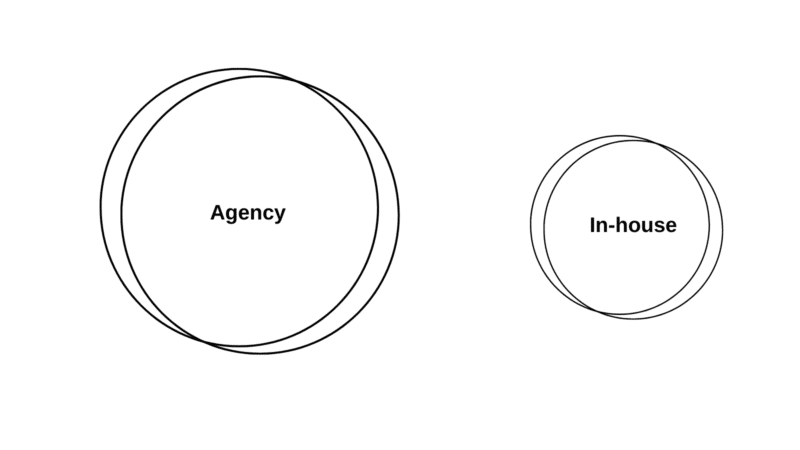
In-house vs. agency - SEL

You either worship the altar of promised ROI predictions from SEO agencies or the realistic, logical in-house SEO that tells you SEO can’t promise ROI. 

Whatever side you’re giving the Voldemort treatment to doesn’t matter. 

It’s an example of how in-house SEO teams and agencies can meet in the middle – and give the C-suite what they want. 

When hiring their first in-house SEO lead, executives often make the mistake of searching for a unicorn that’s equally proficient in technical and content. 

If you find one, lucky you. But it’s more likely you’ll need a give and take. 

SEO agencies should be an extension of your in-house SEO team to fill in the gaps your in-house team is missing.

Ask yourself: Do you need a screwdriver? Or a Swiss Army knife? 

So, instead of promising ROI predictions based on keywords, an in-house SEO team can provide the agency with a full accounting of what true SEO looks like behind the scenes with product, engineering, and content.  

Together, the agency and the in-house team can provide a blueprint for investment, scale, and return. 


Get the daily newsletter search marketers rely on.


Investing in enterprise SEO agencies and in-house SEO teams is expensive

Many enterprise companies have marketing budgets but often believe SEO is “free” and don’t prioritize resources. 

This is a mistake.

This mentality leaves the in-house SEO team to live up to unrealistic expectations and burnout. 

Previously, I worked at a well-known enterprise company with a portfolio of 15 global brands as a Director of SEO to find out I was the only person actually doing SEO. In my first 1on1 with my boss, I was tasked to create a roadmap for when we could let go of our SEO agency to bring SEO in-house. 

The caveat – “bring SEO in-house,” meant I was the only person to execute SEO. 

At this company, that meant partnering with UX to design the website and working with web dev on our page speed, all while executing on-page and link building, not to mention writing content.  

I took on this challenge to make a business use case with a budget for SEO that allocated funds toward scaling my internal SEO team and hiring an SEO agency. 

Here’s how. 

Annual estimated cost (USD):
Enterprise in-house SEO team vs. SEO agency
Low  Medium High
In-house $90,000 $320,000 $760,000
Agency $120,000 $600,000 $1.5 million
Numbers are pulled based on my personal experience in-house and working with agencies.

When looking at the side-by-side comparison, it may seem like building an in-house SEO team is cheaper, but an agency can execute faster. 

60% of my time is spent getting leadership and cross-department buy-in to SEO as an in-house SEO professional. With an SEO agency, SEO work is still getting done. 

Take a look at this outline of tasks broken up between an enterprise SEO agency and an in-house SEO team: 

In-house Agency
SEO Strategy Creates SEO strategy focusing on processes and cross-department collaboration and shares with the SEO agency.  Agency aligns with the in-house SEO team strategy and supports with data and execution of tactics. 
Forecasting Provides forecasting and ROI based on in-house resources. Merges keyword forecasting with in-house forecasting to create a middle agreement.
Monthly Report Shares metrics, definitions, and KPIs that align with overall business goals.  Creates monthly reports utilizing data from in-house tools. 
Technical Audit Reviews technical audit and begins prioritization. Provides technical audit.
Technical Roadmap Prioritize technical audit findings, creates Jira tickets, and partner with the web dev team for execution.  Reviews and aligns on the technical roadmap and troubleshoots questions from the web dev team.
Content Audit Reviews content audit and begins prioritization. Provides content audit. 
Content Gap Analysis Reviews content gap analysis and begins prioritization. Provides content gap analysis. 
Keyword Mapping Reviews keyword mapping and partners with Product Marketing to ensure it aligns with the brand and business goals.  Provides keyword mapping.
Content Calendar Prioritize content audit findings, create content briefs (if the agency does not provide them), and partner with the editorial team for execution.  Reviews and aligns on the content calendar and troubleshoots questions from the Product Marketing and/or Editorial team.
Content Briefs Reviews and approves content briefs, and assigns to the Editorial team, then edits and submits to the web dev team for publishing. Provides content briefs. 

One of the biggest challenges enterprise companies face is how fast the company grows. If you’re a global brand, SEO is expensive and time-consuming. 

As your brand evolves, your marketing and SEO tactics need to accommodate the scale of your company. 

This means prioritizing an in-house SEO team and an SEO agency that can work together at scale. 

The power of working together with enterprise SEO agencies and in-house SEO teams

There is great power in combining forces. Think of Woody and Buzz, Apollo and Rocky, Clarice and Hannibal. 

Enterprise SEO takes a lot of time and money to execute properly. And oftentimes, you’ll have to fight for the resources you know you need to meet the business goals. 

The culprit lies in this stigma of choosing between an SEO agency and building an in-house team. There is no choice. The answer is both. 

Remember, SEO is not here to tell enterprise companies what to do with their web presence. 

Our goal as SEO professionals is to show them the opportunities and together, with a combined effort from the agency and in-house team, you can build a plan for investment and scale. 


Opinions expressed in this article are those of the guest author and not necessarily Search Engine Land. Staff authors are listed here.


Related Stories

New on Search Engine Land

@media screen and (min-width: 800px) { #div-gpt-ad-3191538-7 { display: flex !important; justify-content: center !important; align-items: center !important; min-width:770px; min-height:260px; } } @media screen and (min-width: 1279px) { #div-gpt-ad-3191538-7 { display: flex !important; justify-content: center !important; align-items: center !important; min-width:800px!important; min-height:440px!important; } }

About The Author

Anna Crowe

Anna Crowe is a Frank’s Hot Buffalo sauce advocate (leading with obvious priorities), writer, marketer and SEO nerd. Over the last 12+ years, Anna has successfully run SEO and content programs for brands like Dollar Thrifty Rental, Marriott, Hilton, Hearst Magazine, Mailboat Records, Philip Morris International, Bloomin’ Brands and Brother USA and many more. She enjoys burritos and puppies (in that order) when she’s not moonlighting as a soccer coach. https://annaleacrowe.com/

https://searchengineland.com/enterprise-seo-agency-vs-in-house-team-389121


The ultimate recipe for writing SEO optimized content by Rablab

It’s been said countless times throughout the years, and we’ll say it again: in SEO, content is king.

The importance of content has never been devalued by Google. However, the importance of quality content tends to become an increasingly important ranking factor.

This is where you tell me “Okay! But what does quality SEO content look like in 2022?“

And I answer you “Let me introduce you to the recipe for good content as if you were in your kitchen ready to cook up a tasty dish”.

1 – Incorporate a reasonable number of keywords into your post

The first step is to select quality keywords that will serve as the foundation of your article. Ideally, get your hands on keywords with good search volumes and a reasonable keyword difficulty. Feel free to target long-tail keywords for shorter-term results.

You can start from a topic that you have in mind by querying search volumes on specific keywords, with a tool such as Semrush. Or you can search for a specific topic by exploring the possibilities with your favorite keyword research tool.

For example, to come to this post idea, I didn’t really do anything original. I simply typed the word “SEO” into my tool.

After five minutes spent filtering the keywords to explore the possibilities, the topic was found.

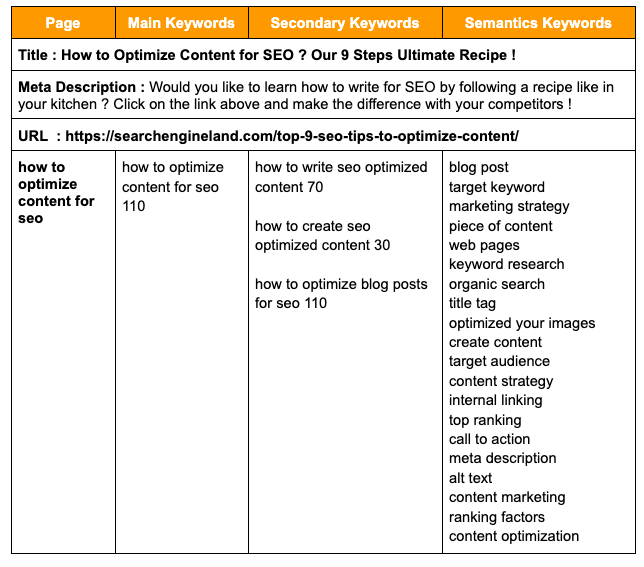
Once your main query has been found, look for secondary queries to solidify your semantics. By doing research around the query “optimize SEO content,” Semrush returned interesting results to add to my post.

I sorted it out in a nice table that I share with you here:

Once your keyword list is established, integrate them into your post. No need to repeat them at the beginning of each sentence, it would be unproductive. Just make them appear naturally in the important HTML tags of your page, and in the body text.

This will be the best SEO search engine optimization practice.

Finally, keep the keyword density between 2% and 5% of the total word count of your post.

Now that you have the tools, let’s get cooking.

Before tackling the main content of your post, focus on two of the hottest SEO tags: the title tag, and the meta-description tag.

The idea will be to fill them with your main keywords in compliance with Google guidelines.

Let me give you an overview of the title/meta-description tags of this post to see the correlation with my keyword research.

3 – Structure the post with explicit Hn tags

We are starting to get closer to the heart of the recipe: the content itself!

When I write SEO content, I like to begin my optimizations by outlining Hn tags. 

The Hn tags correspond to the titles of the different sections of your text. They are six in total, the most important being the H1 tag, and the least important, the H6 tag.

The H1 tag is generally unique, whereas for the other tags, there may be several. Usually, we tend to use H1, H2, H3, or even H4 tags depending on the importance of the content. The more subparts, the more you can increment your Hn tags. Unless you post a nuclear physics essay online, H5 and H6 are rarely used.

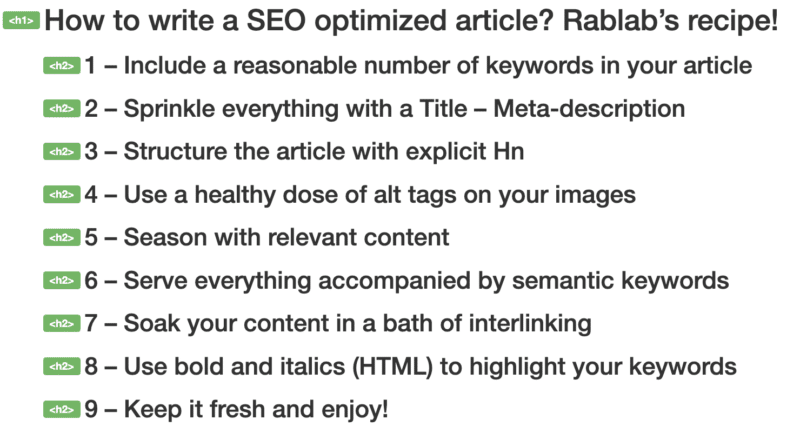
So, here’s how I started to write this article:

Web developer is the best tool if you want to quickly visualize Hn tags structure of any web page

If you look closely, you will find that these Hn tags are made up of a mix between the searched keywords we talked about previously and words that came naturally.

This is the advice that ends this part: optimize your Hn tags with keywords, but make sure that they are relevant for the reader!

A good SEO post ideally includes a few images related to your main subject.

Optimize their weight/size, so that the loading speed of your site is not altered. Name your images with a relevant title all in lowercase, avoiding accents, and using “-” to separate words.

And above all, do not neglect your images’ alt tags.

The alt tag is an alternative text that describes an image and is displayed when the image cannot be loaded. The goal is to label your images by inserting one or more relevant keywords in its alt tag.

This tag has a rather weak influence on the search engine ranking algorithm, but it helps solidify the weight of your content if filled in correctly.

Alt tag: Image to illustrate a well-optimized alt tag for SEO

Curious to discover the alt tag of this image? Right-click the image, then “inspect element” to discover it!

5 – Season with relevant content

Once your Hn structure has been validated, you have the skeleton of your article! You now have to write the contents of the different parts.

Your goal shouldn’t be to just pile on searched keywords. This technique has not been working for the past 15 years. You must maintain a good balance between the different components of your content, with:

  • Researched keywords,
  • Rich and informative content, preferably long and relevant (minimum 500 words or more depending on the competition).

In 2022, the average word count varies according to the page type:

  • 350 words minimum for product/collection pages,
  • 500 words minimum for service pages,
  • 700 words and (much) more for blog articles.

The goal: to satisfy the indexing robots and your visitors. They must find the information they are looking for in your content. Give them as many relevant details as possible and lead them to conversion.

This is valid both for a site aimed at generating leads (forms, calls, etc.) and for an e-commerce.

In the case of a lead-gen site, optimize the content of your services/blog/home pages as a priority. For a commercial site, highlight the texts of your category pages and product pages, and of your possible blog posts.

6 – Serve everything accompanied by semantic keywords

keywords help algorithms to better understand the content of your site. They constitute the lexical field of your article.

Taking the current post as an example, if my main keyword is “How to optimize an SEO post?” my semantic relates to everything coming remotely close to this topic:

  • Title,
  • Meta-description,
  • Tags Hn,
  • Keywords,
  • Number of keywords,
  • Alt tag,
  • Search engines,
  • Interlinks…

All these semantics keywords will help Google better understand the main topic of this article.

Of course, these semantic keywords will have more weight placed in relevant and informative sentences.

In SEO, internal linking is of great importance.

The crawlers follow all the links made between the pages of your site. Apart from your menu/footer, the textual links that you make in your contents are very important. They facilitate indexing and help robots know what your pages are about.

So give them some love!

Avoid, with some exceptions, generic link anchors such as “click here” or “find out more.” Rather, provide an overview of the topic being discussed in the article you are linking to.

8 – Use bold and italic (HTML) to highlight your keywords

The strong tag is a semantic HTML tag. Its function is to signify that the content contained therein is of great importance for the meaning of the text. By default, this tag bolds the words it contains. It also gives them visual importance.

Use it to reinforce the weight of your main and secondary keywords, and your semantics. Avoid putting your keywords in bold every time they appear, to prevent falling into over-optimization. One or two bolding per important keyword is a good ratio.

Same principle for the em (italic) tag, which will rather serve to reinforce the importance of the lexical field linked to your theme.

Namely: do not confuse these tags with the HTML tags <b> (bold) and <i> (italic) which have no semantic weight. Same thing for bolding or italicizing via CSS, which has no weight in SEO.

9 – Keep it fresh and enjoy!

You now have all the cards in hand to effectively write SEO-friendly content.

But I have one last piece of advice for you, and not the least.

While it is true that content that has been optimized for SEO from the start will bring you lasting traffic, the freshness of the content is also important.

Do not hesitate to update your old content regularly, and to publish new content frequently (via a blog, for example). Google loves recent and up-to-date content. This tells them that your site is alive and up to date. Conversely, a site that has never been updated will tend to be less visited by “crawlers,” and therefore to decline in ranking.

Finally, if you need help writing your content, do not hesitate to contact us at Rablab. We can provide semantic optimizations as part of an SEO strategy dedicated to your company. We can also offer you SEM, SMM and programmatic strategies.

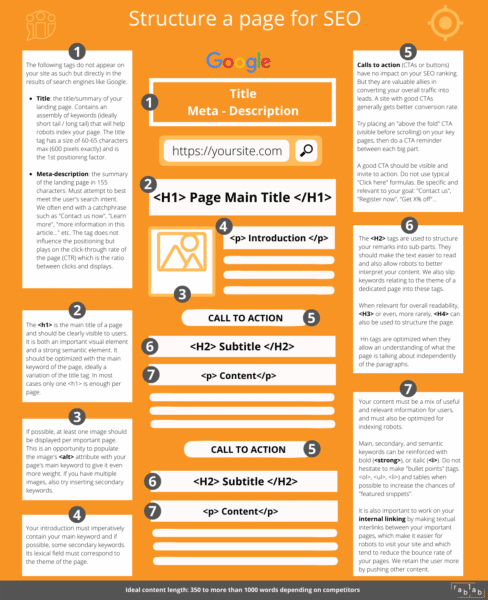
Gift: an infographic of what we talked about!


Related Stories

New on Search Engine Land

About The Author

Rablab

Rablab is a web marketing agency in Montreal specialized in referencing strategies (SEO), paid search (SEM) strategies, social media marketing (SMM) and results-driven programmatic advertising. Acquiring traffic, converting potential customers, generating online sales, our team of experts always find the ideal solution to help companies reaching their goals. We are not a traditional agency. We form what is called the Rabfam. Our clients love us because we are competent and fun. Come and have a look !

https://searchengineland.com/the-ultimate-recipe-for-writing-seo-optimized-content-388941


Google adds Google Lens button to home page search box

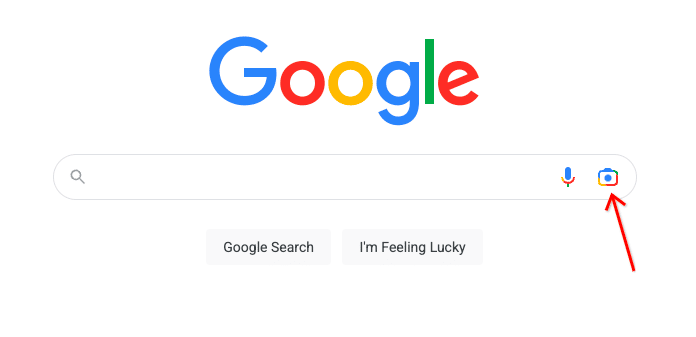
Google has added the Google Lens button to the Google home page, by the search box. Google Lens allows you to search by uploading a photo to Google Search and then Google matches visually similar search results for you.

What it looks like. Here is a screenshot of the Google Lens button on the Google home page for desktop:

Mobile. Well, Google had the Google Lens button on mobile for a while, but has now added it to the desktop Google.com home page.

Announcement. Google’s VP of Engineering, Rajan Patel, posted about this on Twitter. He wrote “The Google homepage doesn’t change often, but today it did. We’re always working to expand the kinds of questions you can ask and improving how we answer them. Now you can ask visual questions easily from your desktop.”

Why we care. This may lead to more visual searches and thus different types of traffic to your images and content. Like Rajan said, Google doesn’t often change its home page and today it did. Google Lens is a really magical search feature that we should likely all use more often.


Related Stories

New on Search Engine Land

@media screen and (min-width: 800px) { #div-gpt-ad-3191538-7 { display: flex !important; justify-content: center !important; align-items: center !important; min-width:770px; min-height:260px; } } @media screen and (min-width: 1279px) { #div-gpt-ad-3191538-7 { display: flex !important; justify-content: center !important; align-items: center !important; min-width:800px!important; min-height:440px!important; } }

About The Author

Barry Schwartz

Barry Schwartz a Contributing Editor to Search Engine Land and a member of the programming team for SMX events. He owns RustyBrick, a NY based web consulting firm. He also runs Search Engine Roundtable, a popular search blog on very advanced SEM topics. Barry can be followed on Twitter here.

https://searchengineland.com/google-adds-google-lens-button-to-home-page-search-box-389270


In a sea of signals, is your on-page on-point?

In a sea of signals, is your on-page on-point

30-second summary:

  • Content managers who want to assess their on-page performance can feel lost at sea due to numerous SEO signals and their perceptions
  • This problem gets bigger and highly complex for industries with niche semantics
  • The scenarios they present to the content planning process are highly specific, with unique lexicons and semantic relationships
  • Sr. SEO Strategist at Brainlabs, Zach Wales, uses findings from a rigorous competitive analysis to shed light on how to evaluate your on-page game

Industries with niche terminology, like scientific or medical ecommerce brands, present a layer of complexity to SEO. The scenarios they present to the content planning process are highly specific, with unique lexicons and semantic relationships. 

SEO has many layers to begin with, from technical to content. They all aim to optimize for numerous search engine ranking signals, some of which are moving targets. 

So how does one approach on-page SEO in this challenging space? We recently had the privilege of conducting a lengthy competitive analysis for a client in one of these industries. 

What we walked away with was a repeatable process for on-page analysis in a complicated semantic space. 

The challenge: Turning findings into action

At the outset of any analysis, it’s important to define the challenge. In the most general sense, ours was to turn findings into meaningful on-page actions — with priorities. 

And we would do this by comparing the keyword ranking performance of our client’s domain to that of its five chosen competitors.

Specifically, we needed to identify areas of the client’s website content that were losing to competitors in keyword rankings. And to prioritize things, we needed to show where those losses were having the greatest impact on our client’s potential for search traffic.

Adding to the complexity were two additional sub-challenges:

  1. Volume of keyword data. When people think of “niche markets,” the implication is usually a small number of keywords with low monthly search volumes (MSV). Scientific industries are not so. They are “niche” in the sense that their semantics are not accessible to all—including keyword research tools—but their depth & breadth of keyword potential is vast.
  2. Our client already dominated the market. At first glance, using keyword gap analysis tools, there were no product categories where our client wasn’t dominating the market. Yet they were incurring traffic losses from these five competitors from a seemingly random, spread-out number of cases. Taken together incrementally, these losses had significant impacts on their web traffic. 

If the needle-in-a-haystack analogy comes to mind, you see where this is going. 

To put the details to our challenge, we had to:

  • Identify where those incremental effects of keyword rank loss were being felt the most — knowing this would guide our prioritization;
  • Map those keyword trends to their respective stage of the marketing funnel (from informational top-of-funnel to the transactional bottom-of-funnel) 
  • Rule out off-page factors like backlink equity, Core Web Vitals & page speed metrics, in order to…
  • Isolate cases where competitor pages ranked higher than our client’s on the merits of their on-page techniques, and finally
  • Identify what those successful on-page techniques were, in hopes that our client could adapt its content to a winning on-page formula.   

How to spot trends in a sea of data

When the data sets you’re working with are large and no apparent trends stand out, it’s not because they don’t exist. It only means you have to adjust the way you look at the data.

As a disclaimer, we’re not purporting that our approach is the only approach. It was one that made sense in response to another challenge at hand, which, again, is one that’s common to this industry: The intent measures of SEO tools like Semrush and Ahrefs — “Informational,” “Navigational,” “Commercial” and “Transactional,” or some combination thereof — are not very reliable. 

Our approach to spotting these trends in a sea of data went like this:

Step 1. Break it down to short-tail vs. long tail

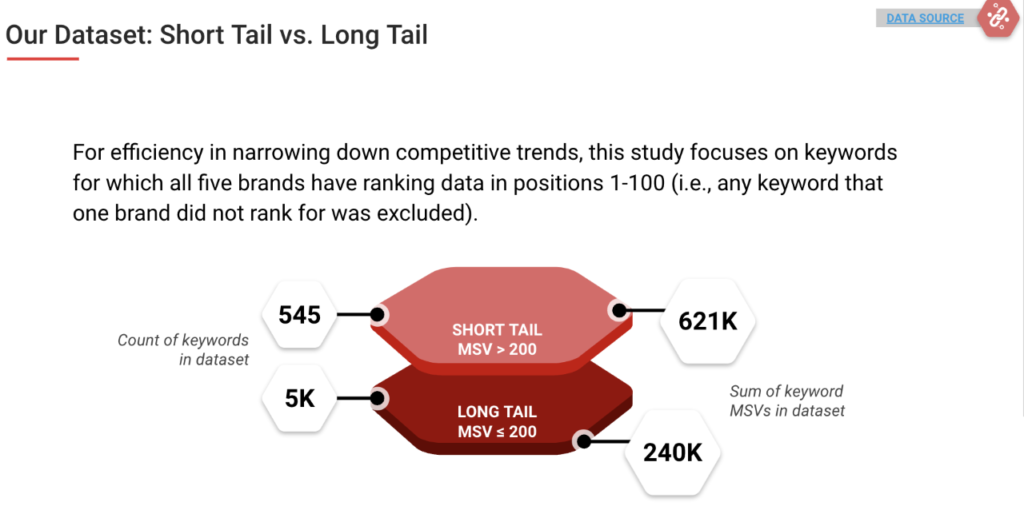
Numbers don’t lie. Absent reliable intent data, we cut the dataset in half based on MSV ranges: Keywords with MSVs above 200 and those equal to/below 200. We even graphed these out, and indeed, it returned a classic short/long-tail curve.

on-page SEO signals - Short tail vs long tail keyword performance 

This gave us a proxy for funnel mapping: Short-tail keywords, defined as high-MSV & broad focus, could be mostly associated with the upper funnel. This made long-tail keywords, being less searched but more specifically focused, a proxy for the lower funnel. 

Doing this also helped us manage the million-plus keyword dataset our tools generated for the client and its five competitor websites. Even if you perform the export hack of downloading data in batches, neither Google Drive nor your device’s RAM want anything to do with that much data.

Step 2. Establish a list of keyword-operative root words

The “keyword-operative root word” is the term we gave to root words that are common to many or all of the keywords under a certain topic or content type. For example, “dna” is a common root word to most of the keywords about DNA lab products, which our client and its competitors sell. And “protocols” is a root word for many keywords that exist in upper-funnel, informational content.

We established this list by placing our short- and long-tail data (exported from Semrush’s Keyword Gap analysis tool) into two spreadsheets, where we were able to view the shared keyword rankings of our client and the five competitors. We equipped these spreadsheets with data filters and formulas that scored each keyword with a competitive value, relative to the six web domains analyzed.  

Separately, we took a list of our client’s product categories and brainstormed all possibilities for keyword-operative root words. Finally, we filtered the data for each root word and noted trends, such as the number of keywords that a website ranked for on Google page 1, and the sum of their MSVs. 

Finally, we applied a calculation that incorporated average position, MSV, and industry click-through rates to quantify the significance of a trend. So if a competitor appeared to have a keyword ranking edge over our client in a certain subset of keywords, we could place a numerical value on that edge. 

Step 3. Identify content templates

If one of your objectives is to map keyword trends to the marketing funnel, then it’s critical to understand the role of page templates. Why? 

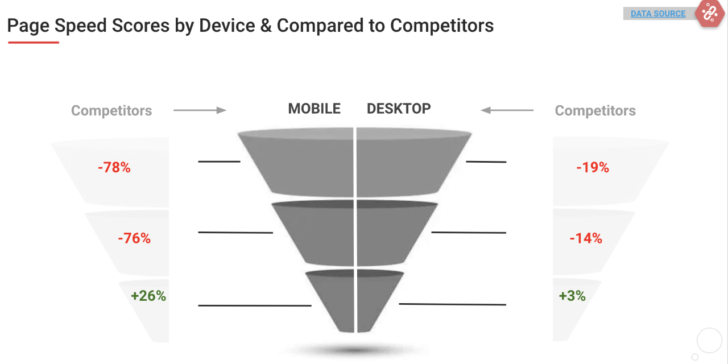
Page speed performance is a known ranking signal that should be considered. And ecommerce websites often have content templates that reflect each stage of the funnel. 

In this case, all six competitors conveniently had distinct templates for top-, middle- and bottom-funnel content:

  • Top-funnel templates: Text-heavy, informational content in what was commonly called “Learning Resources” or something similar;
  • Middle-funnel templates: Also text-heavy, informational content about a product category, with links to products and visual content like diagrams and videos — the Product Landing Page (PLP), essentially;
  • Bottom-funnel templates: Transactional, Product Detail Pages (PDP) with concise, conversion-oriented text and purchasing calls-to-action.

Step 4. Map keyword trends to the funnel

After cross-examining the root terms (Step 2), keyword ranking trends began to emerge. Now we just had to map them to their respective funnel stage.

Having identified content templates, and having the data divided by short- & long-tail made this a quicker process. Our primary focus was on trends where competitor webpages were outranking our client’s site. 

Identifying content templates brought the added value of seeing where competitors, for example, outranked our client on a certain keyword because their winning webpage was built in a content-rich, optimized PLP, while our client’s lower-ranking page was a PDP.

Step 5. Rule out the off-page ranking factors

Since our goal was to identify & analyze on-page techniques, we had to rule out off-page factors like link equity and page speed. We sought cases where one page outranked another on a shared keyword, in spite of having inferior link equity, page speed scores, etc. 

For all of Google’s developments in processing semantics (e.g., BERT, the Helpful Content Update) there are still cases where a page with thin text content outranks another page that has lengthier, optimized text content — by virtue of link equity. 

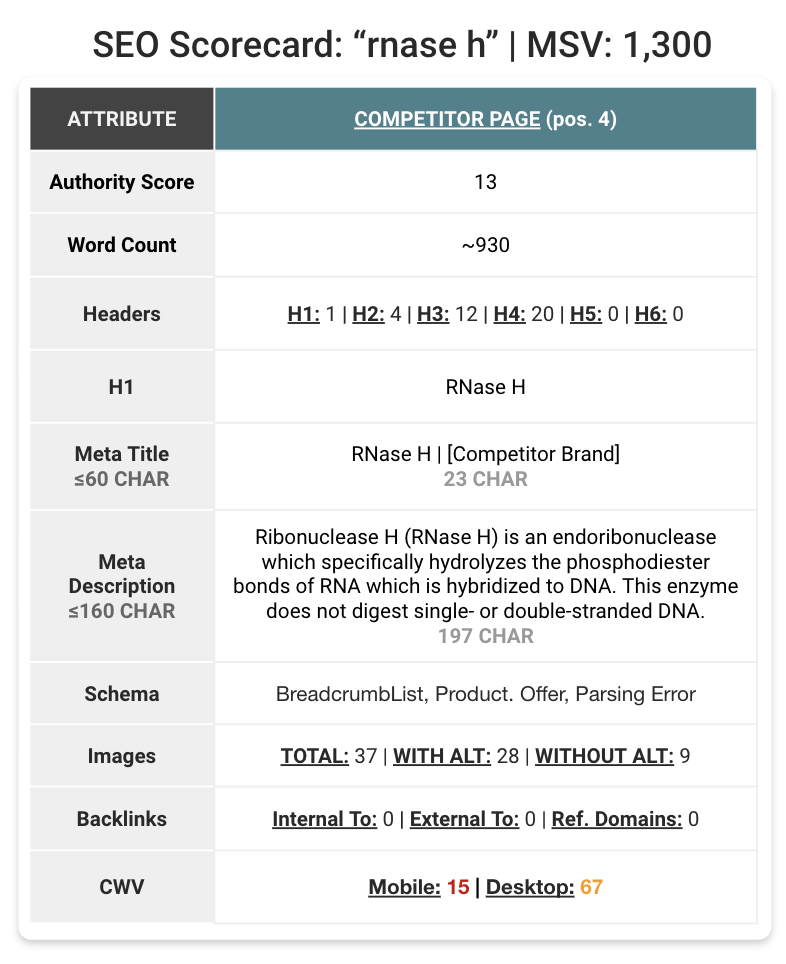
To rule these factors out, we assigned an “SEO scorecard” to each webpage under investigation. The scorecard tallied the number of rank-signal-worthy attributes the page had in its SEO favor. This included things like Semrush’s page authority score, the number of internal vs. external inlinks, the presence and types of Schema markup, and Core Web Vitals stats.

on-page SEO signals - SEO Scorecard

The scorecards also included on-page factors, like the number of headers & subheaders (H1, H2, H3…), use of keywords in alt-tags, meta titles & their character counts, and even page word count. This helped give a high-level sense of on-page performance before diving into the content itself. 

Our findings

When comparing the SEO scorecards of our client’s pages to its competitors, we only chose cases where the losing scorecard (in off-page factors) was the keyword ranking winner. Here are a few of the standout findings.

Adding H3 tags to products names really works

This month, OrangeValley’s Koen Leemans published a Semrush article, titled, SEO Split Test Result: Adding H3 Tags to Products Names on Ecommerce Category Pages. We found this study especially well-timed, as it validated what we saw in this competitive analysis.

To those versed in on-page SEO, placing keywords in <h3> HTML format (or any level of <h…> for that matter) is a wise move. Google crawls this text before it gets to the paragraph copy. It’s a known ranking signal. 

When it comes to SEO-informed content planning, ecommerce clients have a tendency — coming from the best of intentions — to forsake the product name in pursuit of the perfect on-page recipe for a specific non-brand keyword. The value of the product name becomes a blind spot because the brand assumes it will outrank others on its own product names.

It’s somewhere in this thought process that an editor may, for example, decide to list product names on a PLP as bolded <p> copy, rather than as a <h3> or <h4>. This, apparently, is a missed opportunity. 

More to this point, we found that this on-page tactic performed even better when the <h>-tagged product name was linked (index, follow) to its corresponding PDP, AND accompanied with a sentence description beneath the product name. 

This is in contrast to the product landing page (PLP) which has ample supporting page copy, and only lists its products as hyperlinked names with no descriptive text. 

Word count probably matters, <h> count very likely matters

In the ecommerce space, it’s not uncommon to find PLPs that have not been visited by the content fairy. A storyless grid of images and product names. 

Yet, in every case where two PLPs of this variety went toe-to-toe over the same keyword, the sheer number of <h> tags seemed to be the only on-page factor that ranked one PLP above its competitors’ PLPs, which themselves had higher link equity. 

The takeaway here is that if you know you won’t have time to touch up your PLPs with landing copy, you should at least set all product names to <h> tags that are hyperlinked, and increase the number of them (e.g., set the page to load 6 rows of products instead of 4).  

And word count? Although Google’s John Mueller confirmed that word count is not a ranking factor for the search algorithm, this topic is debated. We cannot venture anything conclusive about word count from our competitive analyses. What we can say is that it’s a component of our finding that…

Defining the entire topic with your content wins

Backlinko’s Brian Dean ventured and proved the radical notion that you can optimize a single webpage to rank for not the usual 2 or 3 target keywords, but hundreds of them. That is if your copy encompasses everything about the topic that unites those hundreds of keywords. 

That practice may work in long-form content marketing but is a little less applicable in ecommerce settings. The alternative to this is to create a body of pages that are all interlinked deliberately and logically (from a UX standpoint) and that cover every aspect of the topic at hand.

This content should address the questions that people have at each stage of the awareness-to-purchase cycle (i.e., the funnel). It should define niche terminology and spell out acronyms. It should be accessible.

In one stand-out case from our analysis, a competitor page held position 1 for a lucrative keyword, while our client’s site and that of the other competitors couldn’t even muster a page 1 ranking. All six websites were addressing the keyword head-on, arguably, in all the right ways. And they had superior link equity.

What did the winner have that the rest did not? It happened that in this lone instance, its product was being marketed to a high-school teacher/administrator audience, rather than a PhD-level, corporate, governmental or university scientist. By this virtue alone, their marketing copy was far more layman-accessible, and, apparently, Google approved too.

The takeaway is not to dumb-down the necessary jargon of a technical industry. But it highlights the need to tell every part of the story within a topic vertical. 

Conclusion: Findings-to-action

There is a common emphasis among SEO bloggers who specialize in biotech & scientific industries on taking a top-down, topical takeover approach to content planning. 

I came across these posts after completing this competitive analysis for our client. This topic-takeover emphasis was validating because the “Findings-To-Action” section of our study prescribed something similar:

Map topics to the funnel. Prior to keyword research, map broad topics & subtopics to their respective places in the informational & consumer funnel. Within each topic vertical, identify:

  • Questions-to-ask & problems-to-solve at each funnel stage
  • Keyword opportunities that roll up to those respective stages
  • How many pages should be planned to rank for those keywords
  • The website templates that best accommodate this content
  • The header & internal linking strategy between those pages

Unlike more common-language industries, the need to appeal to two audiences is especially pronounced in scientific industries. One is the AI-driven audience of search engine bots that scour this complex semantic terrain for symmetry of clues and meaning. The other is human, of course, but with a mind that has already mastered this symmetry and is highly capable of discerning it. 

To make the most efficient use of time and user experience, content planning and delivery need to be highly organized. The age-old marketing funnel concept works especially well as an organizing model. The rest is the rigor of applying this full-topic-coverage, content approach.


Zach Wales is Sr. SEO Strategist at Brainlabs.

Subscribe to the Search Engine Watch newsletter for insights on SEO, the search landscape, search marketing, digital marketing, leadership, podcasts, and more.

Join the conversation with us on LinkedIn and Twitter.

https://www.searchenginewatch.com/2022/11/01/in-a-sea-of-signals-is-your-on-page-on-point/


Google Search adds new coupons, side-by-side deals and price insights

Google has added new ways to find deals across the web using Google Search through new coupons and promotions, side-by-side deal views, and a new price insights navigator. Google launched this before the holiday shopping season and said “few new features to help you easily find those discounts and get the perfect gift at the right price.”

Google now has new coupons and promotions labels in the shopping search results. Google has a new promotion badge that will show up in Google Search on items running a special promotion. Google is also adding a new coupon clipping feature, which allows you to easily copy promo codes when you’re ready to buy. This is a feature you often see on those coupon sites, where you click to copy the promotion code to your clipboard.

Here is a screenshot of this:

Compare deals side by side

Google also added a way to compare two or more deals, by giving you a side by side comparison view in Google Search. For example, if you search for a women’s puffer coat, Google will show a side-by-side comparison of available puffer coats on sale right in Google Search results

Here is what that looks like:

Price insights

Google also launched a new design and feature called price insights. Price insights helps searchers understand the prices they see and make better buying decisions, Google said. You can see in price insights how one merchant’s price compares to others’ and whether it’s low, typical or high for that product.

Here is what that looks like:

Why we care

With the holiday shopping season here, as expected, Google is adding new search features to help shoppers find the products they are looking for. These features may or may not help your e-commerce site be more visible in Google Search. At least, you search be aware of these changes so that you can understand what you may want to do, such as which structured data you want to add, or what information you want to add to Merchant Center, so that you can leverage these new Google Search features.


Related Stories

New on Search Engine Land

@media screen and (min-width: 800px) { #div-gpt-ad-3191538-7 { display: flex !important; justify-content: center !important; align-items: center !important; min-width:770px; min-height:260px; } } @media screen and (min-width: 1279px) { #div-gpt-ad-3191538-7 { display: flex !important; justify-content: center !important; align-items: center !important; min-width:800px!important; min-height:440px!important; } }

About The Author

Barry Schwartz

Barry Schwartz a Contributing Editor to Search Engine Land and a member of the programming team for SMX events. He owns RustyBrick, a NY based web consulting firm. He also runs Search Engine Roundtable, a popular search blog on very advanced SEM topics. Barry can be followed on Twitter here.

https://searchengineland.com/google-search-adds-new-coupons-side-by-side-deals-and-price-insights-389249


How seasonality affects the SERPs and what it means for SEO

As we head into another seasonal period, it’s time to prepare our holiday strategies to maximize client visibility for the deal-getters and the peak shoppsouing period.

During the next quarter, many of us acknowledge that we’re likely to see a change in traffic levels as we attribute this to seasonality. 

This does not affect all business models. Still, for some (outside of the ecommerce spectrum), interest begins to slow down as consumer focuses are laid elsewhere, and company priorities change.

One thing that may not necessarily factor into your SEO strategies – as a threat and an opportunity – is how Google’s search results pages (SERPs) behave to the changes in both user search frequency and search intent.

Why does seasonality affect search results pages?

Google’s end goal is to provide a high-quality SERP that caters to user needs and supports a query by presenting high-quality results.

Google determines if a query requires a seasonal or temporary change to how specific value propositions and beneficial purposes are presented in the SERPs. They might consider: 

  • Has there been an increase in searches for this query? (Comparing period Y to X.)
  • Has there been a change in user SERP behavior for this query? (Changes in click patterns, scroll, quick-backs.)
  • Has there been an increase in users performing further queries to refine it?
  • Has there been a change in the additional terms or stop words being introduced to the secondary query?

If Google detects changes in these user patterns, it may choose to begin experimenting with the SERP and rotate results and source-types – or even introduce new source-types and SERP features altogether.

This isn’t something new. In 2018, JR Oakes tweeted his observations on how rankings changed month-over-month, with major changes around December 2017.

Over time, Google will learn these patterns and refine future SERP adjustments over time.

With seasonality, most marketers have an almost predictable data pattern used for planning marketing activities, content, and onsite messaging. Often, this is where the assessment stops.

Many strategies I’m privy to don’t go one step further to assess how the SERPs will change during these seasonal periods. Yet, it is important to understand so we can inform our SEO strategies (including content type and publishing frequency).


Get the daily newsletter search marketers rely on.


Identifying seasonally affected SERPs

A lot of ecommerce SERPs we are familiar with will experience some form of seasonality, and we can usually predict and identify these through experience and common sense.

But what if you start seeing a change in traffic and rankings for particular URLs? How can you identify whether or not your SERPs are beginning to fall into a seasonality experiment?

The answer is through data. Understanding what your SERPs look like during “normal times” is important, and comes from:

  • Recording and monitoring SERP features.
  • Monitoring the source types (and their positions) within the results page.

Several third-party tools record this information and retain it historically. 

Let’s take the search term [beard oil]. It is a query with more than one dominant interpretation, as I could be looking to make a purchase, research different brands, or even research different oils.

This query has already changed several times over the course of this year. This October, it is beginning to show signs of changing to a seasonal SERP:

March 2022 July 2022 October 2022
Reviews
People also ask
Video carousel
Reviews
Sitelinks
Images
People also ask
Video carousel
Reviews
Shopping ads
Map pack
FAQ
Images
People also ask
Video carousel

As we get closer to peak ecommerce periods and more users are searching for the term, Google’s SERP features are favoring and introducing commercially focused elements with Shopping Ads and the Map Pack (to cater to those wanting to buy both online and in-person).

We can also see a change in which source types are being ranked highest for the query.

So if we look at the top 5 ranking URLs for July 2022:

Rank / Website Source Type
#1 Men’s Health Non-commercial entity, informational
#2 CNN Non-commercial entity, informational
#3 GQ Magazine Non-commercial entity, informational
#4 Amazon Commercial entity, commercial
#5 Amazon Commercial entity, commercial

And we compare them to October 2022:

Rank / Website Source Type
#1 Amazon Commercial entity, commercial
#2 Men’s Health Non-commercial entity, informational
#3 Beard Brand Commercial entity, commercial
#4 Dr. Squatch Commercial entity, commercial
#5 Bad Ass Beard Care Commercial entity, commercial

Looking at third-party metrics, one would argue that websites like Dr. Squatch don’t have the same backlink profile, brand, or content levels as the likes of GQ. But they’re a different source type, so the threshold required to rank is lower.

As Google is altering the SERP with a heavier commercial focus, the only thing that GQ can do in this scenario is to try dislodging Men’s Health as the second result or wait it out for Google to determine that a different source type is required.

This, of course, is not taking into account that October 2022 also has a Map Pack and Shopping Ads taking up SERP real estate and clicks.

Looking at data from 2021, the SERPs followed a similar pattern before reverting back around March.

If we look at Google Trends data, we can correlate these SERP changes with the peaks and troughs of [beard oil] searches in the United States (outside of an increase around the time of the first pandemic lockdown).

Communicating seasonal SERPs to wider stakeholders

Not all SEO stakeholders who receive reports and updates are au fait with how search engines work. Changes in rankings and traffic can unnecessarily set off alarm bells and lead to poor short- and long-term decision-making.

Identifying if your key traffic-driving search terms are susceptible to seasonality changes, or have been so in the past, is vital. Ensure that tags or classifications are in place and monitor them more closely around seasonal periods. 

This is especially useful if the organization you are working with has a turnover of VP and C-level. They might not know the vertical as well as the previously established person in that position.

Creating awareness of how rankings and traffic may change will mitigate the conversations when it does happen. It also helps build a business case for different content types to maintain brand visibility. 

This might involve a strategy in which the brand is made visible through a different source type or adjacent search queries that aren’t as affected by the seasonality changes. 

Investing in brand or digital assets outside of your website is an important consideration for creating an SEO strategy that can weather Google changes.


Opinions expressed in this article are those of the guest author and not necessarily Search Engine Land. Staff authors are listed here.


Related Stories

New on Search Engine Land

@media screen and (min-width: 800px) { #div-gpt-ad-3191538-7 { display: flex !important; justify-content: center !important; align-items: center !important; min-width:770px; min-height:260px; } } @media screen and (min-width: 1279px) { #div-gpt-ad-3191538-7 { display: flex !important; justify-content: center !important; align-items: center !important; min-width:800px!important; min-height:440px!important; } }

About The Author

Dan Taylor

Dan Taylor is head of technical SEO at SALT.agency, a UK-based technical SEO specialist and winner of the 2022 Queens Award. Dan works with and oversees a team working with companies ranging from technology and SaaS companies to enterprise e-commerce.

https://searchengineland.com/serp-seasonality-seo-389100


What is content marketing? Defining marketing’s present and future

Content marketing is – you guessed it – a type of marketing strategy.

But what differentiates it from the other marketing types you may be familiar with?

For one thing, think of it as the polar opposite of traditional marketing methods, such as advertising.

What is content marketing?

Content marketing is the process of planning, creating, and distributing relevant, valuable content (like blogs, videos, podcast episodes, ebooks, guides, and more) with the intent of attracting and engaging a specific audience.

  • Brands and marketers research to figure out their ideal customers’ pain points, questions, and information needs about their industry, products, or services.
  • Then they create content to alleviate those pains, answer those questions, and provide that information.
  • Over time, as the prospective customer engages with the brand, reads its content, and interacts with it, their trust and affinity with the brand will grow.
  • Eventually, this loyalty will result in the ultimate goal of any content marketing strategy: a sale or other profitable action in the brand’s favor.

Content marketing vs. traditional marketing

We briefly mentioned traditional marketing in contrast to content marketing.

What’s the difference?

In terms of return on investment, content marketing costs less than traditional marketing to maintain, but pulls in three times as many leads.

Also of note: Ad blocking on desktop computers has reached an all-time high, which means more people than ever are using ad-blocking software to remove traditional ads from their internet experience.

And 70% of consumers in a Demand Gen report said they consume at least three pieces of content as part of the purchase process.

Content marketing is the present and future of marketing. It exists in stark contrast to traditional marketing.

Traditional marketing

Traditional marketing uses outbound methods to push the brand’s message and products/services out to consumers. 

This is the kind of marketing you see every day of your life. Brands are pitching themselves constantly, so much so that most of us have learned to tune it out.

Outbound methods include:

  • TV ads.
  • Billboards.
  • Print ads (in magazines and newspapers, for instance).
  • Display ads (think banner ads or pop-ups on websites).
  • Cold calling.
  • Trade shows.
  • Door-to-door sales.
An example of a display ad on the Forbes website.

Content marketing

Conversely, content marketing is an inbound method, which means brands create and publish content with the hopes that it will draw in prospects to them organically through curiosity, interest, and engagement.

Content marketing is all about exposing audiences to the right content at the right time.

It gently nurtures them to build their awareness of the brand, increase their engagement, and pull them deeper into the brand’s marketing funnel and toward profitable action (like making a purchase).

Why use content marketing?

You may be convinced to use content marketing already. Regardless of where you stand right now, the benefits of investing in content speak for themselves.

1. It brings in more (and better) leads

Content marketing doesn’t just bring in three times as many leads as traditional marketing.

On top of that, leads from content are often more qualified (i.e., they’re more likely to buy eventually) because of the nature of content. 

Consistent, good content that educates, informs, or inspires helps audiences grow a connection with a brand over time. That connection fosters trust in the brand’s expertise and creates brand recall. 

The first time a lead encounters a brand through content is powerful – especially if that content is relevant to their pains, useful, and high-quality. Just one great experience can make them come back for more… and more and more.

Eventually, when they’re ready to buy, who will they turn to? The brand they trust, that nurtured them all along with great content.

2. It’s more cost-effective and sustainable

Traditional marketing is often about paying for visibility. It’s about pushing a message or name out to the masses. And ad space costs money no matter where you’re advertising. 

The second you pull those ads and stop paying, that visibility ends, too.

Content marketing couldn’t be more different. 

The cost is mostly upfront: If you can’t create it yourself, you’ll need to pay someone to do that for you. You might need to pay a writer/editor, a graphic designer, a video editor, or even an animator depending on the content.

Once the content is created and published, the possibilities are endless. 

  • If the topic is evergreen and the piece is optimized with SEO, it could bring in passive traffic on auto-pilot for years. That equates to passive leads coming in without the brand having to work for them or pay more money.
  • That content can be reused and repurposed endlessly, which keeps costs down on new content creation. 
  • One piece can be kept relevant for the long term with strategic, low-cost updates like minor rewrites.

Now, imagine a whole site filled with evergreen content pieces, optimized for long-tail keywords that bring in targeted prospects most likely to convert. That site will be a lead generation machine with the right structure, strategy, and content.

And it will still cost 62% less than traditional marketing methods.

3. It’s what consumers prefer

Let’s be real. Overwhelmingly, consumers actively avoid traditional marketing (like ads) whenever possible – when they aren’t ignoring them. Just some of the strategies people use to block them out include:

  • Ad blockers.
  • Changing their media habits to see fewer ads.
  • Paying for subscriptions that promise zero ads.
Strategies used by Internet users worldwide to avoid ads - eMarketer

What do consumers prefer?

Content marketing, of course.

70% say they would prefer to get to know a company through content versus traditional ads. They want to see relevant content from the brands they like, and they actively seek it out as they move through the sales cycle, from awareness to consideration to decision. 

Finally, since consumers are wiser than ever about sales tactics, meeting them where they stand with content is simply a smart play.


Get the daily newsletter search marketers rely on.


How to start implementing content marketing

Ready to get started with content marketing? 

Never jump in blindly. You need a strategy to make sure you get the results you’re craving.

Here are the first steps to take to implement a content marketing and SEO strategy.

Step 1: Define your goals

First, define what you hope to get out of content marketing. Choose one or two specific goals and decide how you’ll track and measure them.

For established brands, to truly create goals that will advance your business (or your client’s business), you might need to do a website and content audit to determine where you stand and what you need to do to make both perform optimally.

For new brands, remember that content marketing takes time and consistency to pay off. Setting goals means considering what’s achievable with the resources you have.

Here are some common content marketing goals and their associated content types:

  • More traffic: Combine content marketing and SEO with keyword-optimized blogs to drive more relevant traffic from Google.
  • More leads: Take advantage of the existing traffic on your site by nurturing visitors with consistent content creation on relevant topics (targeted blogs, videos, podcast episodes, guides, reports).
  • More sales: Create content aimed at proving your business’s worth (testimonials, case studies, white papers) for prospects in the decision stage.

Step 2: Define your audience

Next, ensure you know exactly who you’re creating content for. 

You’ll need to understand their interests, preferences, challenges, and pain points to truly create content that nurtures them. The only way to gather all that information? Research.

Particularly, persona research will help you determine who is visiting your site, who has an interest in what you/your client sells, and what makes them tick.

Also, helpful: 1:1 interviews with ideal clients will add a deeper layer of insight into their specific challenges related to the brand’s industry. 

Step 3: Choose your content platform and formats

Don’t move to this next step until you understand where your audience congregates online and what content formats they prefer. Plan your content marketing accordingly.

For example, will you produce blogs? A podcast? Videos? Where will you publish? What platform will be your main focus?

Remember: You don’t have to have a presence on every platform to be successful. Pick a few where you can concentrate your efforts, and the results will be much better than if you try to show up everywhere. 

I recommend focusing heavily on your own real estate – your website and blogging – with one or two supporting social media channels.

Step 4: Plan content topics mapped to keywords

One of the golden rules of content marketing: 

Don’t guess what to create. Follow the data.

For this reason, plan out your content topics and validate them with research (or research first and ideate second). Find out what your audience actually wants to read, watch, or listen to… and then create it.

With this in mind, some of the best content topics will come straight from your audience research. Use these topics to create compelling content that directly answers their questions and solves their quandaries.

Finally, map your content topics to relevant keywords you can win in search engines.

Use SEO tactics to optimize your content for those keywords, and you’ll bring people with the problems and questions you’re addressing straight to the content that answers them (yours).

Step 5: Decide who will write/create

For content to work, you need the highest quality you can get. That means your content satisfies your audience and upholds your reputation while building your authority.

It’s a tall order, and you’ll probably need help doing it (in fact, I recommend never writing your own content!).

At this point, brands may need to hire a creator (or two or three, depending on the scale) to do the brunt of the creation. Decide what tasks need outsourcing (writing? Editing? Video editing? Graphic design?) and plan out how content creation as a whole will be delegated.

Step 6: Plan your content publishing schedule

The last thing to plan is your content publishing schedule. However, a common mistake is to overestimate how much content you can reliably put out on a regular basis.

Remember: Consistency and quality matter just as much as quantity. If the former suffers because you’re doing too much, that’s going to hurt your strategy and results.

The key is to find a good balance where you’re producing high-quality content every single week (or every other week, or every month).

While having more content on your site is correlated with more traffic, if that content is poor quality, it won’t do its job of engaging, nurturing, and converting.

Content marketing is a smart way to grow

Content marketing is smart marketing, plain and simple.

It’s about planning, creating, and distributing great content that attracts an audience, engages their interest, nurtures their trust, and ultimately, gives them a reason to buy.

In comparison to traditional marketing, it’s more cost-effective, brings in more qualified leads, and is easier to maintain. It’s also what consumers prefer to see from the brands they like and engage with.

It’s also not hard to get started with content marketing – as long as you have a game plan and stick to a strategy. Content marketing should never be done via the “fly by the seat of our pants” method. Careful planning is essential to meet goals, see success, and earn ROI.

With the right ingredients, your content marketing efforts will pay off with better leads coming in that stay longer on the site and, over time, convert into customers.


Opinions expressed in this article are those of the guest author and not necessarily Search Engine Land. Staff authors are listed here.


Related Stories

New on Search Engine Land

@media screen and (min-width: 800px) { #div-gpt-ad-3191538-7 { display: flex !important; justify-content: center !important; align-items: center !important; min-width:770px; min-height:260px; } } @media screen and (min-width: 1279px) { #div-gpt-ad-3191538-7 { display: flex !important; justify-content: center !important; align-items: center !important; min-width:800px!important; min-height:440px!important; } }

About The Author

Julia McCoy

Julia McCoy is the founder of Content Hacker, 7x author, and a leading strategist around creating exceptional content and brand presence that lasts online. At 19 years old, she used her last $75 to build a 7-figure writing agency which she sold ten years later. In the 2020s, she’s devoted to teaching founders and marketers the strategy, skills, and systems they need to build a business through inbound content, so they can create more lasting impact in the world.

https://searchengineland.com/what-is-content-marketing-defining-marketings-present-and-future-388970


SEO doesn’t have to be scary: shift from a reactive to proactive strategy

SEO doesn't have to be scary shift from a reactive to proactive strategy

30-second summary:

  • SEO is a reality that all marketers face and many try to steer clear of as they devise an all-encompassing digital marketing strategy that is reactive in nature
  • Begin by familiarizing yourself with Google’s Page Quality Rating Guidelines
  • Create a sound SEO strategy to use every time you start the content creation process, include – researching audience needs, keyword considerations, and internal linking
  • Make sure to clean up and update your existing content so that it doesn’t drag down new, SEO-optimized content

SEO can be vague. It is nuanced. It is always in a state of evolution. But that doesn’t change the fact that it is a very real factor that impacts your marketing, whether you plan for it or not. 

Many marketers discover the powerful effects of SEO when it’s too late. Their content is already underperforming. It isn’t ranking for the right keywords. It isn’t retaining readers and has a low dwell time. 

Fixing the issue of bad SEO wastes time and resources. It’s also completely unavoidable.

The key to utilizing SEO to your advantage is to approach it in a proactive rather than a reactive manner. If you’re in a pattern of noticing the effects of SEO on your online content and trying to make adjustments after the fact, here are some suggestions to help you seize the reins and regain a sense of control over your organic search traffic.

1. Associate yourself with Google’s Page Quality Rating Guidelines

If you want to dominate with your SEO, you need to start by understanding it as much as possible. This is much easier said than done. SEO often feels more like an art form than a science. Algorithms can be difficult to follow. Results can be conflicting. But there are ways to bring some clarity to the chaos.

Google provides a number of pointers for how its search engine works via its Page Quality Rating Guidelines. This is a massive document that used to be privy to Google employees only. Now that it’s public, it enables marketers and SEO experts to better inform their proactive SEO strategies.

There are several key areas of the document that shed light on how Google evaluates your website. For instance, it’s important to understand key concepts, like YMYL pages. These are ‘Your Money or Your Life‘ pages, which contain important information to help readers make critical decisions. Due to their higher degree of importance, Google grades these pages with a more stringent, high-quality standard. That means you need to keep them impeccably informed and up-to-date (more on that further down).

E-A-T is another essential element of Google ranking. The acronym stands for expertise, authority, and trust — a trio of elements that help define how high to rank a web page.

Google’s Page Quality Rating Guidelines may be extensive, comprehensive, and a bit overwhelming. But you don’t need to read it cover to cover every quarter. Instead, familiarize yourself with many of the basic concepts. And, of course, keep it bookmarked for easy reference so that it can continue to inform your SEO strategy in the future.

2. Build each piece of content thoughtfully from the get-go

Everyone and their mother knows about the importance of keywords and linking in SEO. The problem is when you fail to address these critical content components in the planning phase — i.e. before you actually make your content.

Now, this is where things can get tricky. If you focus entirely on things like keywords, it’s easy to over-prioritize SEO at the expense of the reader — and that is always a bad strategy. 

Good SEO comes from putting the reader first and the search engines second. That naturally creates content that better satisfies the searcher’s intent. This has the effect of boosting critical SEO criteria, like dwell time …which ends up boosting your SEO in the long run anyway.

Even so, it’s important to factor things like keywords and linking into your initial content creation strategy. A good way to do this while still prioritizing your audience is by using the following steps:

  • Search for important keywords and phrases related to your audience: What is your target demographic searching for? What answers or advice do they need? One easy way to see this is by looking up generic keywords from your audience and checking the “Related searches” section at the bottom of the SERPs. Use this to guide what content you create.
  • Choose additional keywords: Use a keyword planner to add other keywords to your initial topic. Don’t be excessive. Just use a handful of additional terms to help your content stand out in search results.
  • Create complete content: When you go to create the content itself, try to make it as comprehensive as possible. Complete content refers to something that doesn’t just answer an initial inquiry but any follow-up questions, as well.
  • Add internal links: Finally, remember to link to other areas of your site throughout each piece. Consistently linking to important pages can tie your site together and help it perform better.

By planning keywords and links ahead of time, you can ensure that you optimize each piece of content right out of the gate.

3. Cultivate existing content

It’s tempting to dive right into creating fresh, new content that is SEO-friendly. But let’s stop for a minute and think things through.

If your current site is already performing poorly, creating better content is only going to solve part of the problem. Many chronic SEO issues are a site-wide affair. In fact, Google has clarified that thin content (that is, content without much value) doesn’t apply to individual posts. It’s a site-wide problem.

That means if you start the proactive SEO process by creating new content, it’s going to have to overcome the flaws of your past low-quality content before it can really start to lift your site out of the SEO gutter.

Instead, as you study Google’s search engine guidelines and gain a better grasp of how to improve your SEO, start the reformation process by assessing the state of your current content. Conduct a review of the existing content on your site by asking these questions:

As you go along, try to identify YMYL pages. Remember, those are the pages that contain high value for readers — and which consequently tend to be graded on a higher curve. Make a list of these and check in on them from time to time to keep them at peak value.

Don’t leave SEO to chance

SEO is a powerful tool that can make or break your online content. It’s not the kind of thing that you want to leave to chance. It’s also hard to overcome by reacting to poor SEO after the fact.

Instead, take control of your SEO by using the suggestions above. Start by familiarizing yourself with Google’s guidelines. Then create a sound strategy to guide each new piece of content. Finally, review your existing site (especially any YMYL pages) to make sure you’re offering value with both past and future content.

If you can stay proactive with your SEO, you can turn it into a key element of your marketing strategy.


John Rampton is a top marketing leader and founder of Calendar. Find John on Twitter @johnrampton.

Subscribe to the Search Engine Watch newsletter for insights on SEO, the search landscape, search marketing, digital marketing, leadership, podcasts, and more.

Join the conversation with us on LinkedIn and Twitter.

https://www.searchenginewatch.com/2022/10/31/seo-doesnt-have-to-be-scary-shift-from-a-reactive-to-proactive-strategy/