Google adds more example categories of sites that may be impacted by the product reviews update

Google has added three new examples to the top of the “how to write product reviews” help document, clarifying more types of sites that may be impacted by the product reviews algorithm updates.

Three examples. Google added these three examples to this help document:

  • An expert staff member of a merchant that guides shoppers between competing products.
  • A blogger that provides independent opinions of products.
  • An editorial staff member at a news or other publishing site.

Confusion. Historically, there has been a lot of confusion about the types of sites that may be impacted by the product reviews algorithm updates. This algorithm was designed to look at sites that offer product reviews, not necessarily e-commerce sites that have reviews on the product listing pages.

These examples provide additional guidance on what types of sites may be impacted by this set of algorithm updates.

In short, it is about content where someone is doing a review of a product, either as a comparison or a deeper dive into a specific product. This can include merchant sites, shopper guides, bloggers that share their opinion, news or publishing sites doing reviews, and more.

As Alan Kent of Google recently said on Twitter “a merchant’s product page with user reviews is not considered a “product review page” in this context.”

Identify product reviews. Google also recently clarified that structured data may help Google identify product review-type content, but it is one of many ways Google identifies such content. Danny Sullivan wrote, “as for structured data, it might help us better identify if something is a product review, but we do not solely depend on it.”

Why we care. Hopefully, these clarifications and examples from Google will help you identify if your site was hit by a Google product reviews update over maybe another type of Google algorithmic update. Continued clarification from Google is useful and helpful for SEOs, publishers and site owners.


Related Stories

New on Search Engine Land

About The Author

Barry Schwartz a Contributing Editor to Search Engine Land and a member of the programming team for SMX events. He owns RustyBrick, a NY based web consulting firm. He also runs Search Engine Roundtable, a popular search blog on very advanced SEM topics. Barry can be followed on Twitter here.

https://searchengineland.com/google-adds-more-example-categories-of-sites-that-may-be-impacted-by-the-product-reviews-update-388659


4 SEO tweaks to transform Q4 sales

SEO drives 43% of all website traffic and helps brands reduce paid search costs. During the shopping-heavy holiday season, SEO becomes even more important as ready-to-purchase consumers search for specific products. It’s time to bet on smart SEO strategies and pay attention to sales-impacting updates Google has made to its search algorithms.

Just over the last five weeks, Google has introduced four big changes that affect page rankings, as well as the way brands’ products are displayed in search results: Helpful Content Update, the September core update, the product experiences update and the September 2022 product reviews update.

These changes can mean more opportunity for bands’ products to show up in Google search results as well as higher rankings for pages with thoughtful content. EXCLUSIVE tracked how these changes impacted their clients’ traffic and examined ways these clients can use the updates to drive traffic and revenue.

Join EXCLUSIVE on Weds., October 19th to learn how to adapt to Google’s recent updates while maximizing exposure and sales potential in time for Black Friday and Cyber Monday. We’ll cover:

  • Product structured data updates that drive high-intent clicks
  • How Google’s Helpful Content update can impact SEO and your content strategy
  • Achieving better search visibility with event-specific holiday pages.
  • Feeding better data to Performance Max through SEO by optimizing content for the full funnel.
  • Effective ways to coordinate SEO and PPC efforts & budgets

SAVE YOUR SPOT


Related Stories

New on Search Engine Land

About The Author

For 25 years, EXCLUSIVE has helped eCommerce businesses achieve unparalleled growth and profitability using proven marketing strategies for SEO, PPC, PLA, marketplaces, email, and social. EXCLUSIVE’s 10-time inclusion on the Inc. 5000 list demonstrates why eCommerce leaders trust EXCLUSIVE to grow their business across digital channels. EXCLUSIVE offers outstanding digital marketing services through its robust partnerships with the leaders in the space – the agency is a Premier Google Partner, a BigCommerce Elite Partner, Meta Business Partner, Bing Elite Partner, Microsoft Select Partner, Klaviyo Platinum Partner and many more. For more information, visit www.exclusiveconcepts.com.

https://searchengineland.com/4-seo-tweaks-to-transform-q4-sales-388580


Bounce and exit rate analytics: measure, assess, and audit to increase conversions

Bounce and exit rate analytics measure, assess, and audit to increase conversions

30-second summary:

  • Bounce rate is the percentage of single-page visits or visits in which the person left your site from the entrance (landing) page
  • This metric helps measure visit quality and relevance
  • Exit rate is a metric that identifies the number of exits from your site, and, as with entrances, it will always be equal to the number of visits when applied over your entire website
  • Use this metric in combination with particular content pages in order to determine the number of times that particular page was the last one viewed by visitors
  • Pages that fail to meet visitor expectations, don’t provide clear navigation, talk about features rather than benefits, and content that’s not actionable all increase bounce rate

Google Analytics provides valuable intelligence into how visitors find, interact with and leave your website. This intelligence is central to improving both user experience and the profitability of your website. Google Analytics provides many useful metrics that help you do this and two of the most useful are the bounce rate and exit rate.

The difference between a bounce and an exit can be confusing, especially if you are new to analytics. The goal of this article, then, is to demystify the two and explain why they are important. It also acts as a guide to interpreting bounce and exit data and how to lower them in order to improve the performance of your website and increase conversions.

Making an entrance that counts

Before you can understand and calculate bounce rate you need to know a little about entrance pages, also referred to as landing pages and entry pages. Google defines an entrance page as:

Entrances

This metric identifies the number of entrances to your site. It will always be equal to the number of visits when applied over your entire website. Thus, this metric is most useful when combined with particular content pages, at which point, it will indicate the number of times a particular page served as an entrance to your site.

In short, an entrance page is the first page a visitor lands on when visiting a website. Entrances are, as we will see, a key factor in calculating bounce rate.

How to view your entrances?

In Google Analytics, you can easily view your entrances by following these simple steps:

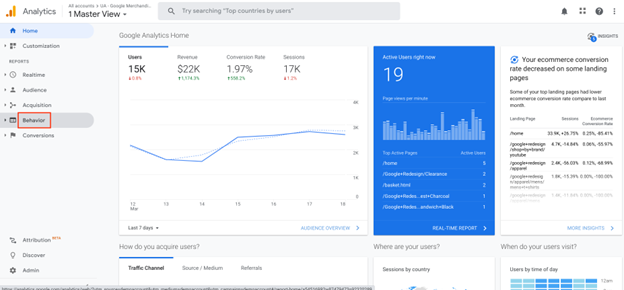
  1. Go to “Behavior,” under “Reports”
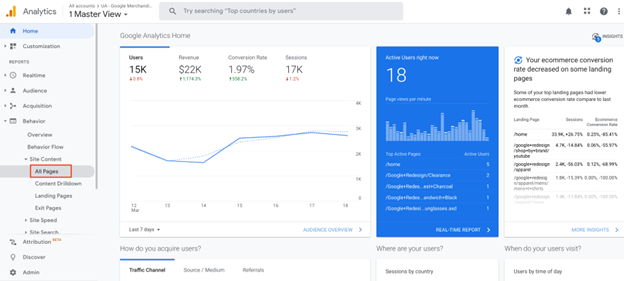
  2. Click on “Site Content”
    site content
  3. Click on “All Pages”
    all pages
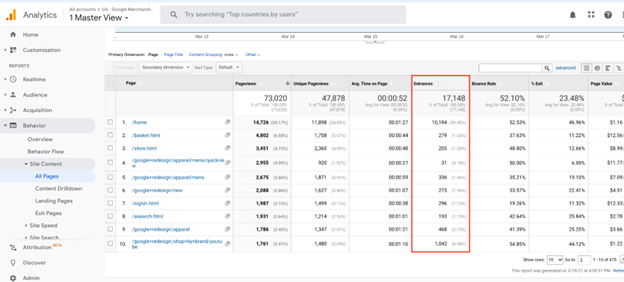
  4. View your “Entrances”
    view entrances - step 4 to understanding bounce rate

Entrances are particularly helpful since they can show you which pages are bringing the most visits to your site. They can also tell you the opposite and help you identify the weakest pages with lower bounce rates.

Well, what is a bounce?

A bounce is a single-page visit. A bounce occurs when a visitor enters and exits a website viewing no other pages other than the entrance page.

And, what is bounce rate?

If, for example, 100 visitors enter your site via Page “A” and 20 of them leave without clicking through to any other page, page “A” would have a bounce rate of 20 percent.

what is a bounce rate - site wide averages

The above figure shows site-wide averages.

Some of the reports Google Analytics generates will give site-wide averages. The screen grab above has been taken from the ‘Top Content’ report which can be found by clicking the Content tab in your Google Analytics dashboard.

The first thing you might notice is that when you add the average bounce rate and the average exit rate together the result is greater than 100 percent. If bounce rate and exit rate are measures of how many people leave your site, how can the total be greater than 100 percent. The answer is that it can’t.

You might be fooled into thinking that bounce rate is calculated as a percentage of Pageviews. This is a logical thought since it is figured in the report. However, when added together, bounces and exits would again be greater than the total Pageviews.

Bounce rate is not based on the number of visitors or the number of page views it’s based on entrances.

Why do people bounce?

People bounce because of many reasons the key to reducing your bounce rates lies in identifying and addressing the most common ones:

1. When pages don’t meet expectations

Let’s say, for example, that you are looking for a new air fryer. So you Google “buy air fryers free shipping”. You see an ad that says “air fryers With Free Shipping”. So you click on it. But when you click on the ad, instead of a landing page about different air fryers, you’re on the site’s homepage. What are you going to do? Bounce back to Google and make a new research to find a page that is 100% about air fryers.

2. When design is ugly

Having an ugly design can also lead users to bounce back. People largely judge websites first, based on design, and second on the content.

3. When the page gives users what they’re looking for

Yes. Not all bounces are “bad”. A bounce can be, in fact, a sign that your page gave users exactly what they were looking for.

For example, I have been looking personally over the last few days for a low-carb chicken soup recipe and I landed on this recipe page. This landing page had everything I needed to make the recipe: ingredients, detailed instructions, and pictures. So, as soon as I got my soup to simmer over medium-low heat, I closed the page.

Despite the fact that this single-page session is “technically” a bounce, it is not because that website suffered a bad UX or an ugly design. It’s just because I got what I needed.

Identifying pages with high bounce rates

Notice the figure below that shows sitewide entrances and bounces.

identifying pages with high bounce rates

To get at the real numbers that contribute to bounce rate you need to dig a little deeper. The screen grab above has been taken from the ‘Top Landing Pages’ report which can also be found by clicking the Content tab in your Google Analytics dashboard.

As you work your way down the report you can also view bounce rates for individual pages.

Viewing bounce rates for individual pages

The above figure shows the bounce rate at a page level.

The ‘Top Landing Pages’ report helps identify pages with high bounce rates that might require further investigation.

You can clearly see from Figure three how the bounce rate is calculated for a single page: (283 bounces / 303 entrances) * 100 = 93.39939939934% which analytics has rounded up to 93.40%. As interesting as this is, it tells us nothing about what is driving the bounce rate and what steps to take if any are required to lower it.

Bounce rate through poor user experience

Pages that fail to meet visitor expectations, don’t provide clear navigation, talk about features rather than benefits, and show content that is not actionable – all increase bounce rate. Not all visitors on your site are using desktop machines with ultra-fast connections and will abandon your site if a page takes too long to download. If you have been over-zealously linking to your site, links from pages that are not closely related can also increase the bounce rate. These are all things you can test for and fix to a degree.

Missing timestamps and the pages time forgot

Google Analytics reports the time visitors spend on pages by comparing timestamps. When a visitor lands on a page a timestamp is created which records the precise time they arrived.
If a visitor arrives at page “A” at 13.45 and clicks through and lands on page “B” at 13.47 two timestamps will be created. By subtracting the time the visitor lands on page “A” from the time they land on page “B” you arrive at the time spent on page “A”:

13.47 – 13.45 = 2 minutes spent on page “A”.

If at 13.50 the visitor leaves your site completely no timestamp is created and there is no way to tell how long the visitor spent on page “B”.

Why was no timestamp created? If the page was outside the scope of your analytics account, on another domain for example, the timestamp can’t be accessed by your analytics account. Therefore, the time spent on that page can’t be determined for that page view.

Similarly, the time spent on a page by visitor who enters a site and bounces without visiting any other page cannot be measured either.

Cookies, sessions, and timeouts

Google Analytics uses cookies to track the activity of visitors to your pages and report those activities back to their server. Cookies enable Google to distinguish the activities of each visitor individually and track sequential page visits made by the same user during their time (session) on your website. This information is then reported back to you when you log into your Google Analytics account.

Every bounce or exit is the result of a session timeout. In Google Analytics, a session will timeout after 30 minutes of browser inactivity. If a visitor navigates to another website, the session will still continue for a maximum of 30 minutes before registering a bounce or exit. As long as the visitor returns before the session times out and clicks through to another page of your website, it will not be considered as either a bounce or an exit.

  • Each and every visit to your site culminates in a session timeout
  • A session that times out after a single page view is classed as a bounce
  • A session that times out after multiple page views are classed as an exit

Have a look at the tabs open in your browser right now – how many have been open for more than 29 minutes without any activity? Despite the page still staying open in your browser, some of the sessions associated with individual pages might have already timed out causing an exit or a bounce. Also closing your browser, disconnecting from the internet, or hitting the back button will all cause a session to time out which will likely be recorded as a bounce or an exit in someone’s Analytics.


Subscribe to the Search Engine Watch newsletter for insights on SEO, the search landscape, search marketing, digital marketing, leadership, podcasts, and more.

Join the conversation with us on LinkedIn and Twitter.

https://www.searchenginewatch.com/2022/10/11/bounce-and-exit-rate-analytics-measure-assess-and-audit-to-increase-conversions/


9 big risks of cheap SEO

Search engine optimization requires an investment. Look at it as an investment with an expectation of a return on that investment.

SEO is a long-term discipline and process. It demands a robust plan for strategy development and implementation in the technical, on-page and off-page areas of optimization.

Not all sites are equal. Goals, conversions, starting points, opportunities, and organizational structures are some factors that determine how easy or hard it will be to reach SEO goals.

Over my career, I have worked with hundreds of brands, organizations and sites on SEO. I can definitively say there’s no one-size-fits-all answer for the right SEO plan or the right partner for each company.

A vital variable in SEO ROI is the investment amount itself. If you have it covered by someone on your team or in a role you manage, then you have soft costs. If you’re paying someone outside like a consultant, agency or SEO firm, then you are well aware of the hard costs.

Using “cheap” options is dangerous. Cheap is a relative term, but it will make sense what it is as I unpack the nine risks of cheap SEO.

1. Absence of a strategy and plan

With the short-term tactics and longer-term expectations on ROI, it is critical to have a roadmap for SEO. Yes, it will likely change based on the need for additional content, rounds of optimization, and changes with search engine algorithms. 

Yet, when cutting corners, costs or time, you risk getting short-changed when it comes to putting enough time into research, strategy development, and planning out the tactics.

2. Misalignment of goals

An age-old frustration for me is seeing and hearing about SEO reporting that only reports ranking positions, keywords ranked, and clicks. Even some levels of conversion reporting can fall into this for me.

I painfully learned about the misalignment of SEO goals versus business goals firsthand early in my career a long time ago. I can still remember walking confidently into that client meeting with all of my SEO metrics looking great, thinking the client would be pleased. That client walked in thinking the opposite as they saw zero new business from the SEO efforts.

Cheap SEO runs the risk of showing superficial stats and focusing on things that aren’t tailored to your business or that really move the needle.

3. Lack of transparency

If you’re buying $99/month SEO, there has to be something allowing the firm to charge that low of a price. Or, if you’re investing in equally cheap software that promises to deliver results, you’re at risk of not getting a transparent picture of what you’re buying.

One of the things I hate the most about this industry (my industry) is that there are still entities out there taking advantage of small (and even large) businesses.

A lack of transparency is a warning sign that you’re at risk of being hurt by cheap SEO. That can cover: 

  • Who is working on your account.
  • The strategy.
  • What will be measured.
  • How it will be reported.
  • Or anything related to the effort.

4. Risky tactics

I’m not here to dive into any debates or talk about gray areas or risky tactics. You can find those conversations and debates elsewhere, and I’m happy to have them. 

You need to know that cheap SEO can often take shortcuts to make it affordable. That could include:

  • Buying links from third-party services.
  • Creating large-scale, low-quality content.
  • Engaging in many other tactics that might be high risk and high reward. 

Again, you can be the judge on whether you are OK with those tactics or not, but know that the risk exists.

That’s especially the case if you experience the lack of strategy, lack of transparency, or other aspects I have shared so far.


Get the daily newsletter search marketers rely on.


5. Poor reporting

Good SEO reporting includes integration with your business metrics that matter and all the aspects that led up to that point. That means the SEO visibility and engagement metrics and the story and insights as to what drove the effort.

  • How are we doing in meeting our goals? 
  • Where are we in the plan? 
  • Is there anything changing or adapting in the strategy? 
  • What do the metrics mean? 
  • How are they contributing to SEO ROI?

Cheap SEO often leads to skimpy, inadequate or unreliable reporting. It can lead to seeing numbers that don’t make sense or that don’t go deep enough to validate the effort.

6. Not enough communication

Early in my career, I could do a lot more SEO in a silo than can be done now. I think the evolution and blowing up of the silo is a good thing.

That said, whoever is driving the strategy, implementing the tactics and reporting on the plan should be talking regularly. SEO requires alignment of approvers/stakeholders, strategists, UX, dev, IT, content producers, and more.

Cheap SEO often leads to promises to do it all, only for the cheap SEO provider to disappear. They might also over-promise or over-commit without enough communication to collaborate properly and have all resources working together for success.

7. Little action

Again, I hate seeing people being taken advantage of. Yes, cheap SEO is cheap. That means if it doesn’t work, then you’re not out as much money as if you invested in an expensive effort that failed.

However, time lost now pushes out the timeline for ROI and results down the road. If the cheap SEO provider is slow or only does an amount equivalent to their monthly or set scope, it can cost you the speed and velocity at which you can grow through SEO.

Cheap SEO risks wasting months of your time and ability to grow, even if it doesn’t set you back significantly financially.

Even if you’re seeing some positive movement with a cheap SEO provider, chances are that your mileage will vary. You likely have someone staying in a shallow strategy area who is working through a checklist.

SEO is much more than a checklist. If you’re getting cookie-cutter tactics, you’ll have a lower ceiling than if you’re working with someone who might be a larger investment but provides a more custom, tailored approach and solution for you.

Cheap SEO is often based on running through simple audits, software, or a checklist that anyone could implement and doesn’t get deep enough to push through for more competitive markets and keywords.

9. Negative ROI

The most important and biggest risk to cheap SEO is negative ROI. Again, maybe you’re not out a large sum of money if the effort doesn’t have an impact.

However, if the cheap SEO option did harm, you may have some hidden costs that push you into further negative territory.

Having to undo risky tactics that might have gotten you penalized or pushed into negative SEO territory, trying to regain lost time and money, are big risks of cheap SEO that fall into the negative ROI arena.

Conclusion

I’m not saying that expensive SEO is good. That’s a topic for another article (along with how to ensure you fully understand what you’re getting without over-investing and putting yourself into a negative SEO ROI position).

Knowing the risks of cheap SEO, though, can help you know what you might be getting into and fully understand the questions to ask, warning signs to watch for, or situations to avoid. Much like other areas of life and business – if it sounds too good to be true, it probably is.

Seek out referrals, references and case studies to find the right partner for you if you’re hiring an SEO firm, buying software, or hiring talent. Recognize the risks and keep your eye on your return on investment goals and how you’re trending and tracking toward them.


Opinions expressed in this article are those of the guest author and not necessarily Search Engine Land. Staff authors are listed here.


Related Stories

New on Search Engine Land

About The Author

Corey Morris is a skilled marketing professional with 15+ years of experience developing award-winning, ROI-generating digital strategies for local and national brands. He was recently honored as the recipient of the KCDMA 2019 Marketer of the Year award. Corey serves as the chief strategy officer at Voltage – a marketing firm based in Kansas City, MO. Previously, he founded the KC Search Marketing Conference to help build a local community for search marketers for career growth. He was recognized for his involvement in the conference and invited to join the global board of SEMPO (now part of DAA) as the VP of Cities.

https://searchengineland.com/cheap-seo-risks-388596


How to complete a website shutdown with a split migration

Recently, I have been asked by a major global brand to support a website shutdown project. The company wasn’t making enough to sustain itself and make a profit. The same global brand also owns multiple other similar companies in the niche.

Shutting down a website is easy, but when you have to do that along with redirects, what and how do you do it?

One of the requirements was to make the shutdown smooth and redirect half of the traffic to one website, and the other half to another. The determining factor was the type of product.

Why is it called a ‘split migration’?

A website migration is a detailed, procedural process that often involves changing the domain and URLs, redesigning or replatforming. While tedious even on a small site, the issues that you can run into will only amplify with each additional page of a site. 

Now, imagine a site with thousands of pages or products that you need to include in the migration. Add in the complexity of having to migrate portions of a single site between two other sites.

How do you handle thousands of pages and products when you have to move them to two different and existing websites?

Before this point, I never did a split migration, but I had a general idea of where to start and how to begin the process.

Unfortunately, migrations are more than a simple redirect. Every migration comes with its difficulties, but this particular one was a little easier because it included only URL redirects from the source to the destination page(s).

However, the process would be more painstaking for a normal migration or replatform that includes:

  • Metadata
  • Content
  • Headings
  • 404 errors
  • Existing redirects
  • Images
  • Etc.

In terms of quality assurance (QA), a basic URL redirect is easier to test and verify that everything is working properly. However, we still went through multiple phases to make the process go along smoothly, starting with “discovery.”

Discovery phase

I knew that my biggest challenge was to identify the existing pages on all three websites. For privacy, intellectual property and other legal reasons let’s call them Source, Destination1 and Destination2.

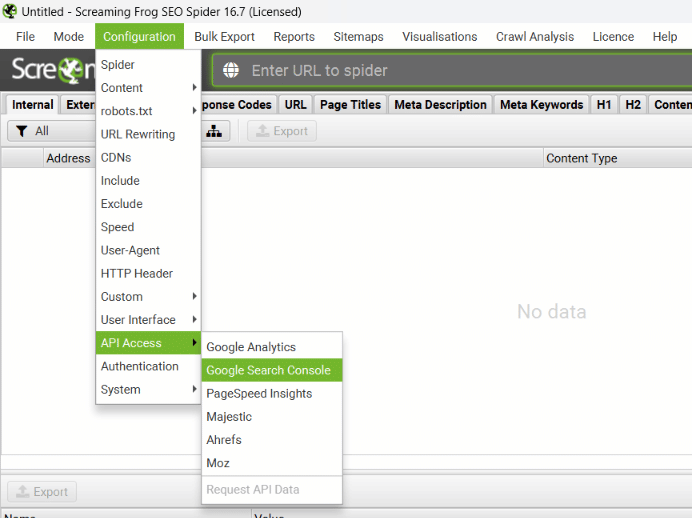
I started off with a Screaming Frog crawl that would go over the source website, identifying all indexable pages. And for an easier decision-making process, I had to pull Google Analytics and Google Search Console data using the APIs.

Make sure you save your configuration file so that your results match up when you do the final check upon going live.

But I was still missing another piece of data. I didn’t have Semrush API access so had to pull the backlinks data separately. Once you have the list of URLs you need to work with, make sure to pull backlink data as well.

You can change this to Ahrefs or another source you prefer. The point here is to know how important a URL is in terms of backlinks.


Get the daily newsletter search marketers rely on.


Set-up phase

Now that I collected all my URLs from the source site I had to work with, I needed a few things to make the process smoother:

  • Clean up the list to exclude URL parameters or other duplicates.
  • Identify the owners of the page (to which site should it go – Destination1 or Destination2).
  • What is the priority of the page? (Does it have direct traffic? Is it ranking in Google? Does it have backlinks?) 
  • What is the status code of the page? (Is it a 200 or a 301 or a 404?)

I put my ScreamingFrog data and Semrush data into separate sheets and created a Google Sheets file:

Initially, I shared the file with all involved parties and owners, this allowed them to select the URLs that belong to the specific destination. Remember that each URL may have its owner counterpart on each of those websites.

For example, a specific product existed on Source and Destination website, so the final redirect should be to the Destination URL and the same page.

You may also choose to pass parameters. So make sure the Destination is properly filled in.

In my task, I was working with 18,000 URLs, and after some filtering and removing those that weren’t important I ended up with 11,000.

Testing

In most cases, you’d have to test this on a temporary server. This may or may not have a setup of your actual Source URLs, for example, it may be dev.source.com instead of source.com.

You can easily replace your source URLs temporarily, or use a duplicate of the file.

When testing, make sure you use the same configuration you used during discovery.

Updating the ScreamingFrog export in SF-Internal ALL sheet will automatically adjust the data in the URLs sheet and show you the ones which have a failed destination URL.

But what went wrong?

Every migration is a learning experience. If you’ve ever performed a migration, you know that a single mistake can lead to 404 errors, images not loading or other issues. Thankfully, the biggest issue we had was with a global server-side cache impacting the testing process.

This migration QA was based on two things:

  • Targeting.
  • Checking 301 redirects.

We spent more time on the discovery phase than the migration itself.

One thing we take away from this particular migration is that you really need to learn the ins and outs of a site. It takes a lot of time to work with large teams and learn who the owner of each page is and how to manage them (pages or page owners).

Nothing particularly concerning impeded the migration, but we attribute this to the immense amount of time spent in the discovery phase. If we didn’t dedicate a lot of time to this phase, it could have ended badly.

Discovery allowed us to be ready if there were issues during migration so that we could call in the right people and have the error fixed on the spot.

Using the template helped us a lot. 

Template

This split migration template will be updated as new and similar projects come my way. Please make your own copy rather than requesting access. Also, improve or suggest improvements as you work on it. 

Conclusion

Our migration was a success, it took us 5 minutes to go live (including clearing all global cache) and just 15 minutes to run a list crawl to identify all the redirects were functioning properly.

Defining “success” is something that every migration needs. In most migrations, there always seems to be something that goes wrong. Even when you spend extra time in the setup phase, there’s always a small detail that is overlooked.

This migration’s success was admittedly easier than others performed in the past because the only real QA required was ensuring the redirects worked. Automation helped here to verify that all redirects were successful.

However, that’s only part of the story. We also waited for the following before deeming the project a win:

  • Source site pages started to slowly be de-indexed.
  • Destination page rankings began to increase.

We did run into a problem with a server-side cache that impacted the verification process and needed to be cleared a few times. Global caches always seem to pose issues during migrations, so this is definitely something to consider when working on a regular or split migration in the future.

Within one day we started seeing updates in Google’s search results and many of the destination pages spiked because of targeted redirects.


Opinions expressed in this article are those of the guest author and not necessarily Search Engine Land. Staff authors are listed here.


Related Stories

New on Search Engine Land

About The Author

Ludwig Makhyan is a contributor for Search Engine Land, covering organic and technical SEO. His background is in web development and digital marketing. Ludwig has over 20 years of experience in website design, coding and promotion. He is the co-founder at MAZELESS, an enterprise SEO agency.

https://searchengineland.com/website-shutdown-split-migration-388603


8 simple steps to optimize your WordPress site for SEO

A fast website is a crucial part of improving your SEO rank; however, guides will oftentimes give generalized statements of optimization and what it can do for your website, or go in-depth into more technical aspects that might overwhelm some users.

In this article, you will be provided with the most basic steps to improve the performance of your website without getting into the nitty gritty of code.

WordPress websites and optimization

Site speed is more important than ever, end users will leave websites if the load time for pages or assets takes more than a couple of seconds, so every moment counts to capture your audience’s attention and maintain your conversion rate.

One of the most prevalent concerns with a part of the WordPress community is the Content Management System’s (CMS) speed.

This pressure for faster websites was one of the reasons why the Performance Team was created by the community, as there was fear WordPress was falling behind some of its competitors.

While new integrations are being added to WordPress core, the good news is that many of the lightning-fast websites run WordPress as their CMS, and if you are struggling with yours it could be easily fixed with the following tips.

1. Test your site speed often

The first step to improving your website’s speed is to test it to see what can be improved.

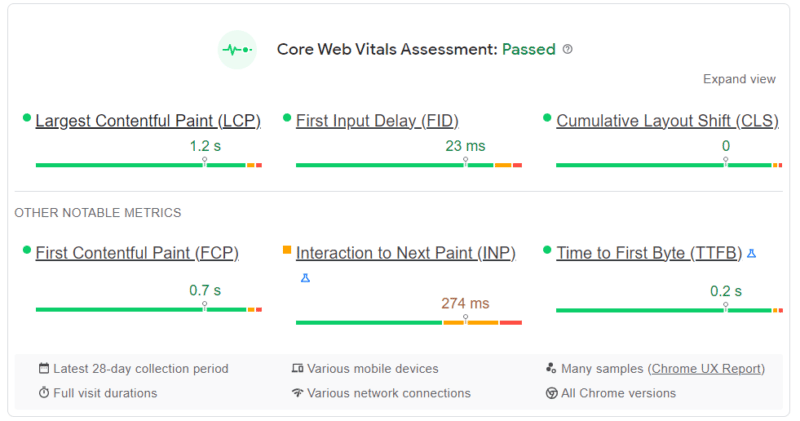
There are hundreds of tests to choose from online when checking performance, however, we will focus on Google Web Core Vitals and Lighthouse Reports.

Google Core Web Vitals

Initiated by Google, Core Web Vitals is one of the most important sites for speed tests on the internet currently, giving you information on the different fields that affect your website.

Currently, Core Web Vitals is very focused on user experience, with measurements such as loading performance, interactivity and visual stability; however, it is expressly mentioned that these factors can change in the future.

Lighthouse report

If you are familiar with GTMetrix and other popular free speed test tools, you have been using Lighthouse Report Technology. It is an open-source technology, also by Google, that breaks down your website speed.

Similarly to Web Core Vitals, this report is incredibly thorough and will provide a breakdown of issues that could be slowing down your page, from general performance, accessibility, best practices, and SEO.

2. Change the PHP Version

PHP (Hypertext Preprocessor), is the coding language WordPress is based on. This means as WordPress grows in versions, it will need the latest version of this scripting language.

Thankfully, WordPress has a PHP warning if it believes your current version of the CMS is not compatible or needs a newer version installed.

Currently, it is recommended that you run PHP 8 or PHP 8.1 for a stable version of WordPress, or at the minimum PHP 7.4.

PHP version 7.4 will continue to have security fixes until November 28, 2022. Once a version of software stops receiving security updates, it reaches its “end of life” and is no longer recommended for use.

If your web host does not update your PHP version automatically, you can switch between different versions across sites using cPanel.

3. Choose a host focused on WordPress

Site speed goes deeper than hosting, however, the web host you choose will be the foundation for your website.

A host that is focused on providing you with the best performance for your WordPress site comes down to the server infrastructure.

At InMotion Hosting, we provide our customers with high-performance servers that are fine-tuned for WordPress. Our custom UltraStack configuration is designed to make your server incredibly fast and efficient using NVMe SSD, NGINX, PHP-FPM and Redis. No additional software configuration is necessary for you to see a significant improvement in your WordPress performance.

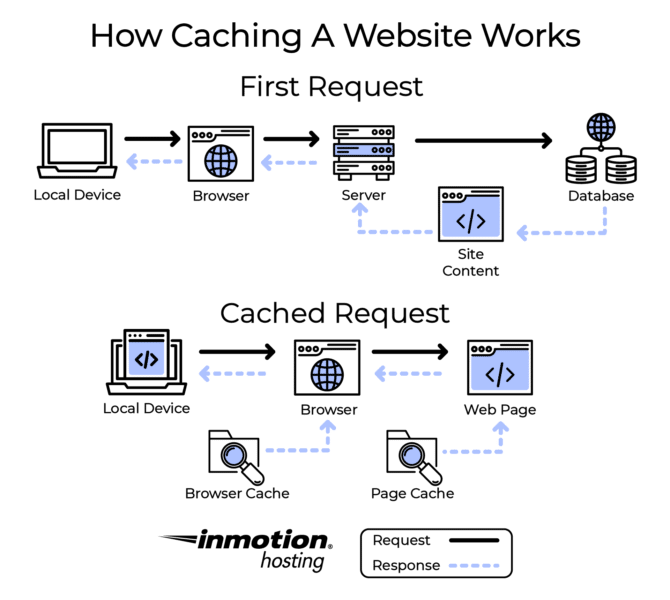
4. Use a caching plugin

Some of the most popular plugins in the WordPress ecosystem are caching plugins. They are advertised as a sure way to boost your website’s performance, but what do they really do?

In simple terms caching occurs when your computer remembers frequently used data from a website to save time.

This means when you pull up a website, your computer first looks locally to see if it has a recently cached version to view.

Since WordPress sites are dynamic, every time an end-user requests your website it pulls content from the host. The website will try to load any new data and might be slower because of this.

If you don’t update your website often, using a caching plugin whose main job is to create a static version of your website that can be cached can increase your site’s speed.

These days caching plugins have different ways to increase your performance, from minimizing files to optimizing images and more.

Here are a few popular and free WordPress caching plugins:

  • W3 Total Cache: A caching plugin with a large number of options to tailor the caching capabilities of your website. This hosting agnostic plugin improves performance and reduces page load times by offering minification, object caching, database caching, cache-control and more.
  • WP Super Cache: This caching plugin from Automatic generates static HTML files from dynamic WordPress files and serves them to site visitors at lightning speeds.

Due to compatibility issues, we do not recommend having more than one caching plugin active at the time, as activating multiple plugins is counterproductive for optimization purposes.

5. Optimize your images

Images can be deceivingly large files. Therefore, when your computer calls for information from the host it can be one of the last things to load.

Optimizing your images can be done before or after the upload then to your website. WordPress supports WebP images which are optimized images introduced by Google that retain the quality of the photo without taking up a lot of space.

Image optimization plugins are also a popular choice for WordPress users. Our recommendations include:

  1. Performance Lab: The Performance Lab plugin is a great resource to have for WebP image conversion and other optimization settings.
  2. Smush: One of the most popular plugins in WordPress, Smush automatically compresses and optimizes images as you upload them. You might need to upgrade to premium for bulk editing more than 50 images or compressing files larger than 5MB.

6. Consider lazy loading

Contrary to what their name suggests, lazy loading is a great way to increase your site speed.

A lazy loader will load your content only when it is needed, decreasing the number of asset and server requests to render your website.

Certain optimization plugins now include lazy loading as one of their options, including Jetpack and WP Rocket, though sometimes this perk is offered at a premium price.

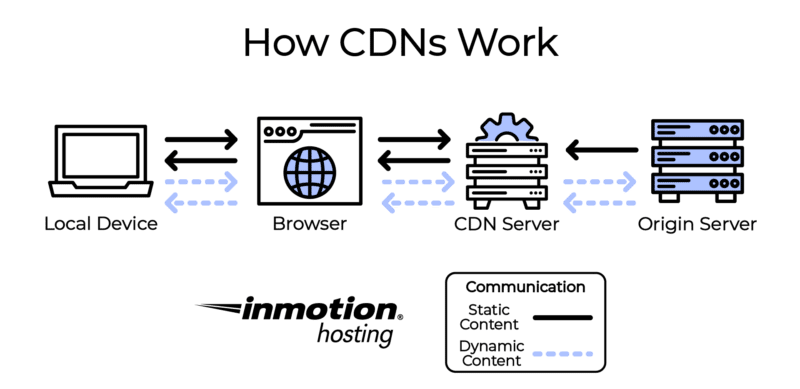
7.  Use a Content Delivery Network (CDN)

Content Delivery Networks have become a hot topic for web hosting, and for good reason. A CDN is a way for your end-users to access your website at a faster rate due to their servers caching your site data.

Similarly to caching plugins, this helps users load up content without having to request it fresh every time they pull your site.

Having a CDN also heightens your website security, and certain brands even have implementations to protect you from DDoS attacks.

If you are interested in a CDN but do not currently have the budget for one, Cloudflare offers a personal account for free, which has access to its CDN services.

8. Optimize your database

The information stored in your database is the heart of your website. It contains all the important WordPress installation details and files from your plugin, pages and even comments users make.

Because of the way WordPress stores data, your database will need optimization. Database tables store things like post revisions, spam comments and deleted posts. These entries take up space and slow your site down.

Removing these unnecessary files can improve your site speed because the tables where the data is stored will be smaller and data will be easier to process for your end users.

Fortunately, you do not have to go through your database manually to optimize it, you can use a plugin such as WP-Optimize with database optimization capabilities.

Continuing your education

If you are interested in learning more about WordPress optimized hosting and how you can improve your website speed and SEO, check out InMotion Hosting’s WordPress Education Channel for further articles and guides.

Final thoughts

Site speed will always be an important factor for SEO. Ensuring that your WordPress site is up to date and optimized will do wonders for your ranking.

Learn more about how WordPress VPS with UltraStack can help improve your WordPress performance.


Related Stories

New on Search Engine Land

About The Author

As a certified Great Place to Work, with over 30,000 positive customer comments, we strive every day to make our customers happy. We are an employee-owned technology company, guided by a commitment to the open source community and fostering technical thought leadership in the hosting industry. With a blended approach of technology, expert customer support, and easy to use digital tools, our success and growth have stemmed from our honest desire to help businesses succeed and grow.

https://searchengineland.com/8-simple-steps-to-optimize-your-wordpress-site-for-seo-388450


9 important features of enterprise SEO platforms

Enterprise SEO platform vendors offer numerous capabilities. These range from keyword research
and rank-tracking to backlink analysis and acquisition, as well as competitive intelligence and content
optimization.

Most of the vendors profiled in Enterprise SEO Platforms: A Marketer’s Guide offer the following core capabilities:

  • Keyword research and rank tracking;
  • Page-level SEO analysis;
  • Content optimization analysis;
  • Link (also called backlink) analysis and acquisition/removal;
  • Site error detection;
  • Organic search traffic market share;
  • Competitive analysis;
  • International search results and rank tracking;
  • Internal cross-linking; and
  • APIs for third-party data integration and management, as well as for export to other analysis tools.

Enterprise-level platforms may also provide more extensive link and site audits or analytics that include predictive scoring systems to identify potential opportunities to improve page performance or link authority.

Vendors differentiate by offering more frequent or detailed data updates or content marketing features that sometimes require additional investment. These more advanced capabilities may include, but are not limited to:

  • Daily or real-time site crawls.
  • Features to manage adjacent fields like PPC or social media marketing.
  • Search intent-based analysis, perhaps involving artificial intelligence or machine learning.
  • Universal search rankings incorporating featured snippets, knowledge panels, reviews, local packs, images, top stories, video, related questions, carousels, tweets and other dynamic displays.
  • Analysis and management of Google Shopping feeds.
  • Content marketing analysis and performance tools.
  • On-page content quality analysis.
  • Competitive intelligence and benchmarking.
  • Identification of technical issues that can impact rankings (e.g., broken pages, slow loading pages, content duplication, excessive redirects).
  • Cross-device attribution.

Here are nine important features of enterprise SEO platforms.

Links continue to be one of the most important external or “off-page” signals that can help a website rise in search engine rankings.

Most enterprise SEO platforms provide link analysis (i.e., what sites are linking to yours), link building or removal recommendations via competitive analysis and other reports that reveal opportunities for obtaining links (i.e., what sites should you solicit links from) as part of their base platforms.

2. Keyword research/rank analysis

Keyword research – knowing what terms people use to find your website, how your pages rank for various queries and how you should use those terms in your copy – is a pillar of effective SEO.

Virtually all enterprise SEO platforms provide keyword research tools that allow marketers to discover the ways that consumers search for content, and what keywords are driving traffic for competitors.

Vendors source this data differently, however.

Some vendors license data from point solutions or ISPs, due to Google’s restrictions on scraped data in its terms of use and the percentage of search results that are keyword “(not provided).” Other vendors develop and manage a proprietary database of keyword terms.

As a result, reliable keyword data has become less of a commodity and more expensive.

It’s also important to note that rank analysis has grown increasingly complex as Google has upped its use of more dynamic and visual SERPs.

Marketers are no longer satisfied with a simple numeric designation of how their page ranks for a particular query; they want to know if it’s displayed in a carousel, in a knowledge panel, with sitelinks – or any of the other ways in which crawled content is being displayed on the SERPs.

Brands want a sense of how they’re coming across in search generally, even if the brand-related activity is happening on third-party sites. That’s why providers are coming up with their own proprietary formulas for calculating “share of voice” in search

3. Search intent-based analysis

Google’s search algorithms, often powered by artificial intelligence, are focusing less on keyword
matches and more on search intent.

To counter the lack of keyword data, SEO platform vendors are developing more tools that analyze search intent and predict or recommend the most relevant content that would meet the searcher’s needs.

4. Custom site crawls/audits

With content quality becoming the lynchpin for many marketers’ SEO strategies, site crawls or audits are important tools offered by enterprise SEO platform vendors.

Some platforms offer optimization recommendations for keywords, page structures and crawlability. They often prioritize and assign scores for such factors as HTML title tags, body tags and meta tags.

Many enterprise SEO platforms provide daily site crawls; some feature real-time technical data, while others offer updates on a weekly basis.

Ideally, the tool should be able to crawl the entire site, not just random pages. However, some enterprise sites are so large it’s unrealistic to expect a tool to crawl it in its entirety.

5. Content marketing and analysis

SEO and content marketing have become closely aligned, as Google has raised the content quality bar through artificial intelligence as well as its regular algorithm updates. As a result, relevant, up-todate content has become integral to SEO success.

Many vendors have upgraded the content optimization and content marketing capabilities of their enterprise SEO platforms and expanded the tools’ content marketing features. These include:

  • Page management tools or APIs to monitor on-page content and errors.
  • Reports on content performance and traffic trends.
  • Influencer identification and campaign management.
  • Real-time content recommendations.

More advanced platforms perform analysis to help improve the depth and quality of content by performing topical analysis of content and comparing it against the competition to identify potentially important gaps and make recommendations for improvement.

One emerging area in which vendors are investing is the ability to automatically and proactively suggest topics that marketers should create content about – eliminating the need to spend lots of time on analysis. Some even aid in developing the type of content that will show up in queries for target keywords.

6. International search tracking

International search coverage has become a critical capability, as the global economy leads more U.S.-based enterprises to conduct business online and offline in multiple countries and languages.

Virtually all enterprise SEO platforms profiled in this report offer some level of international search coverage that crosses borders, languages and alphabets.

The capabilities include international keyword research, integrating global market and search volume data into the platform, as well as integrating global CPC currency data.

7. Mobile/local analytics

Google’s search engine updates are increasingly focused on improving the mobile/local search user experience.

While mobile-friendly sites are now table stakes in the SEO game, appearance in local listings has become more important in the COVID-19 era, which elevated e-commerce and digital communication among local retailers and restaurants, in part to cope with the demand for BOPIS and curbside delivery.

8. Technical SEO crawling

Tools to identify technical issues that may be hindering ranking performance are very important, given that marketers rank technical SEO fixes as their number one priority. These include things like:

  • Slow page load.
  • Implementation of schema markup.
  • Identification of crawling issues.
  • The allocation of crawl budget.
  • The flagging of duplicate URL and canonical issues.

9. Cross-device attribution

Recognizing that SEO is just one aspect of a brand’s marketing efforts, and also that search traffic (especially on brand keywords) is influenced by paid media, some vendors are developing capabilities that help marketers determine what marketing initiative is driving site visits or sales.

This is becoming increasingly difficult, however, as third-party cookies are no longer being supported by many companies.

Get the full report on Enterprise SEO Tools here


Related Stories

New on Search Engine Land

About The Author

Pamela Parker is Research Director at Third Door Media’s Content Studio, where she produces MarTech Intelligence Reports and other in-depth content for digital marketers in conjunction with Search Engine Land and MarTech. Prior to taking on this role at TDM, she served as Content Manager, Senior Editor and Executive Features Editor. Parker is a well-respected authority on digital marketing, having reported and written on the subject since its beginning. She’s a former managing editor of ClickZ and has also worked on the business side helping independent publishers monetize their sites at Federated Media Publishing. Parker earned a master’s degree in journalism from Columbia University.

https://searchengineland.com/enterprise-seo-platforms-features-388586


How to choose an enterprise SEO platform

Enterprise SEO platforms guide

Understanding your current marketing processes, knowing how to measure success and being
able to identify where you are looking for improvements are all critical pieces of the SEO platform
decision-making process.

In this guide you will learn:

5 key benefits of enterprise SEO platforms

With thousands, tens of thousands, and even millions of pages, sites, social conversations, images, and keywords to manage and optimize, enterprise SEO has become increasingly complicated and time-consuming.

Using an enterprise SEO platform can increase efficiency and productivity while reducing the time and errors involved in managing organic search campaigns.

More specifically, managing SEO through an enterprise toolset can provide the following benefits:

  • Many tools, one interface. Enterprise SEO platforms perform many tasks in one system. A comprehensive dashboard can help your organization monitor SERP rankings and trends, how you measure up to competitors and your share of voice. The integration and prioritization of tasks, reporting and user permissions can offer substantial benefits to enterprise-level SEO operations.
  • Intent insights. Because of the search engines’ increased focus on user intent, enterprise-level SEO tool vendors are developing machine learning models that analyze user behavior and site content to help marketers answer searchers’ questions. This information can inform content development strategy –- a critical element given the foundational importance of quality content.
  • More efficient management of global operations. Enterprise SEO tools have built-in diagnostics that can be invaluable on a global scale to identify site-wide issues across languages, countries or regions. These tools uncover macro and micro issues with pages, templates and infrastructure.
  • Keeping pace with the search engines. SEO software vendors have dedicated teams and engineers to follow frequent search engine algorithm changes and their impact on the SEO reporting required by enterprises. Through education as well as software tool development, a relationship with a quality vendor can give marketers a competitive advantage.
  • Automated reporting to provide data in near real-time. Many brands end up trying to put a lot of data in spreadsheets and updating them manually. But that doesn’t provide a complete view of the data. Most enterprise SEO platforms offer highly customized reporting capabilities that are widget- and wizard-driven to make reporting faster and easier. Many also allow for the export of data to business intelligence tools or other analytics software

How much enterprise SEO platforms cost

Licensing an enterprise SEO platform can be a significant investment, particularly for ecommerce or retail brands with hundreds of thousands of SKUs or product pages.

Marketers typically spend tens of thousands of dollars each month in licensing fees. They may also pay for installation and staff training to maximize the value of the platform and its capabilities.

Virtually all enterprise SEO platforms are provided on a software-as-a-service (SaaS) basis (i.e. the vendor makes the software available online and is responsible for all maintenance and system administration).

Enterprise-level pricing models vary and are often customized based on the number of users, sites, keyword rankings, link volume, international coverage and other SEO activities.

How to make an informed SEO platform purchase

Ready to help your organization choose the SEO platform that is the right fit for your business needs and goals? Here are four steps to help.

Step 1: Do you need an enterprise SEO platform?

Deciding whether your company needs an enterprise-level SEO platform calls for the same evaluative steps involved in any software adoption, including a comprehensive self-assessment of your organization’s business needs and resources, staffing, management support and financial resources.

Use the following questions as a guideline to determine the answers.

  • Do we have the right human resources in place? Employing people to implement and use SEO platforms is a prerequisite to success. If you have marketing staff, utilizing SEO toolsets can make them more efficient and effective. The vast majority of organic search marketers struggle to justify their SEO budgets. SEO platforms and tools are a key component of helping to keep overall costs down while getting the required work done. Their analytical capabilities can also help SEOs prove the impact of their work on the bottom line.
  • Do we have C-level buy-in? Enterprise SEO software can be a five- or six-figure investment annually. It is critical to demonstrate the value of SEO to C-level executives by running pilot test projects and agreeing to a definition of “success” in advance.
  • Do we have the right technical resources? Successful enterprise SEO needs dedicated technical resources deployed to it to act on the recommendations and opportunities surfaced by the analytics and reports. With many SEOs reporting a technical backlog as the primary thing hindering their SEO success, allocating resources to this task can be the factor that determines whether an implementation is successful or not.
  • Who will own enterprise SEO? Enterprise SEO is commonly placed into marketing, editorial or IT, depending on the nature of the business. Unfortunately, in large companies, it usually ends up with either whoever has the budget or whoever can best articulate the business case. In a best-case scenario, it should be both.
  • Can we invest in staff training? It is vital to provide training to technical, design, content and marketing teams, and reinforce it on a regular basis. A successful enterprise SEO implementation will find ways to inject SEO knowledge into existing training programs and identify internal evangelists to broadly distribute the messages. Training needs to be comprehensive, consistent and continuous. Some tool companies include or offer training for an additional fee, so be sure to ask about this.
  • To what extent do we need to share reports with non-SEO staff? Some tool providers focus significant development resources on simple interfaces that can be utilized by people in other organizational roles – such as writers or C-suite executives. If this is important to you, make sure you specifically look for this when evaluating possible platforms.
  • Have we established KPIs and put a system in place for tracking, measuring and reporting results? It’s important to know upfront what you want your SEO to achieve. Do you want to improve SERP rankings or the time visitors spend on your site? Is conversion – whether a product purchase or whitepaper download – your key objective? Having goals will help you decide if you’re ready to put an enterprise platform to good use, as well as help you decide which tool will best meet your organizational needs.
  • How will we measure success? Depending on your site’s monetization strategy, make sure you know how you’ll determine if the rollout of the platform and the successful execution of the established KPIs actually increased sales, conversions, or page views.
  • Do we have realistic expectations? It is not uncommon for enterprise SEO efforts to take at least six months to generate tangible results. If SEO is a new initiative within the organization, cultural shifts and workflow processes will need to be implemented and refined. Setting realistic timelines and goals will help build support at all levels of the enterprise.
  • Do we have an SEO culture? Many organizations begin to invest in SEO but find that a lack of understanding of SEO across the organization cripples its progress. Broad educational programs are often required to provide consistent performance and results.

Step 2: Identify and contact appropriate vendors

Once you have determined that enterprise SEO software makes sense for your business, spend time
researching individual vendors and their capabilities by doing the following:

  • Make a list of all the SEO capabilities you currently have, those that you would like to have, and those that you can’t live without. This last category is critical and will help you avoid making a costly mistake. If you find that one vendor doesn’t offer this “must-have” capability, it’s obviously not a fit. When it comes to international data, it can be cost-prohibitive to track all your markets, so you may want to use an enterprise-level tool to track your most important market, then use simpler tools for secondary markets.
  • Take your list of capabilities and then do some research. Many of the vendors profiled in this report also provide whitepapers and interactive tools that can help.
  • Narrow your list to those vendors that meet your criteria. Submit your list of the SEO capabilities you’ve identified and set a timeframe for them to reply.
  • Decide whether you need to engage in a formal RFI/RFP process. This is an individual preference, however, be sure to give the same list of capabilities to each vendor to facilitate comparison.

The most effective RFPs only request relevant information and provide ample information about your business and its SEO needs. It should reflect high-level strategic goals and KPIs. For example, mention your company’s most important KPIs and how you will evaluate the success of your SEO efforts. Include details about timelines and the existing digital technology you have deployed.

When written properly, an RFP will facilitate the sales process and ensure that everyone involved on both sides comes to a shared understanding of the purpose, requirements, scope, and structure of the intended purchase. From the RFP responses, you should be able to narrow your list down to three or four platforms that you’ll want to demo.

Step 3: Scheduling the demo

Set up demos with your shortlist of vendors within a relatively short timeframe after receiving the RFP responses to help make relevant comparisons.

Make sure that all potential internal users are on the demo call, and pay attention to the following:

  • How easy is the platform to use?
  • Does the vendor seem to understand our business and our marketing needs?
  • Are they showing us our “must-have” features?
  • Is the reporting actionable?

Other questions to ask each vendor include:

  • How do you calculate search volumes? Knowing how the system treats information types will impact how you ascribe value to certain keyword terms, make decisions about keyword and content choices and affect the ROI of your search marketing efforts. Find out from where raw data is extracted (i.e., analytics, log files, or a proprietary tracking pixel).
  • Can this system track millions of searches, visits, site pages, etc.? Knowing whether the
    platform is a true enterprise solution or a simple tool that may not scale for your business
    needs is crucial. Limits on the numbers of keyword rankings, pages or traffic tracked could
    impact your use of the system or significantly increase the cost.
  • Do you support international search? There are many nuances within international SEO that can mislead even the best SEOs. Find out if the numerator in the calculation of the platform’s average clicks per search or average search volume is normalized for global or local (in that market) search, and whether search ranks are calculated from within the country or remotely. Does their tool make hreflang coding recommendations? Will it manage the page relationship and directional recommendations? The misapplication of international data could impact the ROI of your search marketing efforts.
  • How do you track and report universal search results? You will want to know if and where your site was listed on the results page. For example, did your listing appear in web results, the In the News segment, an in-depth article or the video results? That location and reporting feedback helps to quantify strategic and tactical efforts.
  • Does your tool help customers understand what competitors do, and derive actionable insights from that? What are the most important features the tool has for providing competitive research? Competitive intelligence is a standard feature for virtually all enterprise SEO platforms – but the scope and cost differ between vendors. Find out what level of data is provided about your competitors and vertical industry, and make sure it fits your requirements.
  • How robust and flexible are your reporting options? Different users have different reporting needs. Find out if reports can be customized and automatically delivered to different users and types of users, and whether data can be exported in CSV format.
  • Where are the actionable reports? Enterprise tools have dashboards and generous amounts of data but it’s important to understand how (and which) reports can immediately benefit your business. A good sales team will understand your company’s objectives and KPIs and will have reports ready or be able to run them in real-time. This is data that can be handed over to the appropriate teams and promptly acted upon.
  • What other meta-information does your system collect that may be made available via API? Being able to trace search traffic data from the front of the funnel all the way to sales data in a CRM or business intelligence (BI) system will help you to more accurately calculate ROI.
  • Is there a workflow built in that allows me to coordinate the work of my marketing, content, web development and social media teams across the organization? SEO cannot operate in a silo. A true enterprise platform should provide built-in workflow management that includes task assignment, management and monitoring of completion rates across groups.
  • What does the onboarding process entail and how long will it take? What are the training options (i.e., is it online only or will you send people to our location to train us on-site)? Be sure to find out what onboarding and support is included in pricing and what is an add-on.
  • What kind of ongoing support and client engagement will your account team provide? How will you gauge our use or non-use of the platform’s features? One of the most common reasons a company transitions out of an enterprise platform is because they don’t use it enough. How do they propose you avoid tool fatigue and checkout for your organization? A vendor should be prepared to address this issue and specifically how the tool creatively engages users and gets them back into the environment.
  • What new features are you considering? What are the long-term roadmap and launch dates? The SEO landscape is constantly changing with new features to further leverage digital assets rapidly coming out of Google and Bing. How quickly do they respond to the implementation of new SERP features and begin tracking them? It’s important to understand the level of innovation and the ability to add and track emerging technologies. Knowing a vendor’s new feature release date schedule and its ability to stick to committed timelines is also important. This helps establish long-term trust and an expectation with the vendor that it will always be on the cutting edge of SEO.

Step 4: Check references, negotiate a contract

Before deciding on a vendor, take the time to speak with one or two customer references, preferably someone in a business like yours. The SEO vendor should be able to supply you with several references if you cannot identify them yourself.

Use this opportunity to ask any additional questions and find out more about any topics that weren’t addressed during the demo. Make sure that the person you’ve been referred to is a primary user of the solution.

Consider also asking these basic questions:

  • Why did you move to an enterprise SEO platform?
  • Why did you select this platform over others?
  • Has this platform lived up to your expectations?
  • How long did the system take to implement?
  • Are you also using additional tools for crawling, page evaluations, competitive analysis, domain and link data?
  • Were there any surprises that you wish you’d known about beforehand?
  • What was the quality of the training resources and the onboarding process?
  • Where have you seen the most success? The biggest challenges?
  • Do other teams in your company use the tool? How did you get their buy-in?
  • How are you measuring your own success?
  • How easy was the set-up process and how long? Did the vendor help?
  • How responsive is customer service?
  • Has there been any downtime?
  • Do you use all the resources provided? If not, which ones and why?
  • What is the most useful, actionable (favorite) report the tool generates?
  • What do you wish they did differently?
  • Why would you recommend this platform?

Although not all vendors require an annual contract, many do. Once you’ve selected a vendor, be sure to get in writing a list of what technology and support are covered in the contract. Ask about what kinds of additional fees might come up.

  • Are there charges for custom integrations, if so, how much (and how long will the onboarding take)?
  • What is the hourly charge for engineering services, and is there a minimum?
  • What partner organizations are available to install and integrate the tool?
  • If you need to train a new hire midyear, what will that cost?
  • What is the “out” clause?
  • Are they open to a trial period with options to exit the contract?

Obtaining the answers upfront – and having them in writing – will ensure fewer surprises and fewer
costs down the road.

Enterprise SEO Platforms: A Marketer’s Guide

Our MarTech Intelligence Report examines the market for SEO platforms and the considerations involved in implementation. The 65-page report reviews the growing market for SEO platforms, plus the latest trends, opportunities and challenges.

Download your free report here: Enterprise SEO Platforms: A Marketer’s Guide (12th edition).

This report was prepared by conducting in-depth interviews with leading vendors and industry experts. Research took place in the first quarter of 2022. These, in addition to third-party research, form the basis for this report.

You can compare 15 leading enterprise SEO software vendors in the full report:

  • AgencyAnalytics
  • Ahrefs
  • Botify
  • BrightEdge
  • Conductor
  • Moz
  • Quattr
  • Searchmetrics
  • Semrush
  • seoClarity
  • SE Ranking
  • Serpstat
  • Siteimprove
  • Visably
  • WebCEO

Related Stories

New on Search Engine Land

About The Author

Pamela Parker is Research Director at Third Door Media’s Content Studio, where she produces MarTech Intelligence Reports and other in-depth content for digital marketers in conjunction with Search Engine Land and MarTech. Prior to taking on this role at TDM, she served as Content Manager, Senior Editor and Executive Features Editor. Parker is a well-respected authority on digital marketing, having reported and written on the subject since its beginning. She’s a former managing editor of ClickZ and has also worked on the business side helping independent publishers monetize their sites at Federated Media Publishing. Parker earned a master’s degree in journalism from Columbia University.

https://searchengineland.com/enterprise-seo-platforms-388566


Link-building services to scale your SEO efforts

Link building is essential. While Google has made numerous advancements in machine learning and content comprehension, links remain a critical element of how Google ranks websites.

We know that Google doesn’t want you to proactively build links. They want you to create high-quality content and hope for the best (i.e., build it and links will come).

Whether you’re a well-known brand or a local SMB, you need to be findable in the SERPs when people are searching for your product, service or expertise. Getting that initial push to get the front page creates a virtuous cycle where the better you rank, the more links you get because of how well you rank.

Enter: link-building services. 

While link building is essential, it’s also tedious. It’s time-consuming. And, honestly, it can seem quite boring. (Though we’d politely disagree!)

Luckily, there are companies that can do this tedious and time-consuming work for you!

Link building, done right, can be a win-win – for your website and the site linking to you. The key is reaching out to your own personal network of publishers and bloggers within a niche to offer a piece of content that they can either write about themselves or link to when relevant. 

If you haven’t built the types of relationships that can turn into links – this is where link-building services providers become incredibly valuable. 

In this article, we will introduce to you to 10 popular options when considering link-building service providers. Choose wisely – there are always risks and rewards when choosing a link-building service to scale your SEO efforts. 

We’ll start shamelessly with our own and if you understand the risks and rewards of proactive link building this way, try them.

The following are in no particular order. We are not claiming anyone is better than any other. This is simply a list of link-building service providers you can choose from.

1. OutreachZ

Here’s what makes us a bit different. We are a team with vast experience in the link-building space and have identified and tried to address the following pain points.

Transparency: Unlike most services, you can pick the right publishers upfront from our marketplace. Metrics like the primary niche they operate in, organic traffic, and DA (by Moz) are filters you can apply to find the right blogs, so there are no surprises after reviewing the report.

Pricing: Unlike most service providers, we will not charge you hefty fees based on the domain metrics. Instead, we take a fixed success fee and pass on the benefit of a low cost of link acquisition irrespective of how big or small that publisher is.

Flexibility: Even with the marketplace model, you are working with us to get the job done and not waiting for the publisher to react despite operating on a dynamic pricing model like other marketplaces that only serve as a platform provider. You also have managed posts and custom link-building campaigns and the option to upload your content, so the number of ways you can get this done is highly flexible.

Now let’s move on to some other notable link-building providers.

2. Page One Power

Page One Power focuses on giving you a personalized experience. They will sit down with you to discuss your individual needs, analyze your existing website and give you a customized link-building plan. They are willing to do the research and heavy lifting for you, giving you the extra breathing room to focus on other aspects of your business.

3. Fat Joe

To help you get started as quickly as possible, Fat Joe features an intuitive order intake form and a dashboard to monitor active orders and manage them. They seem to be the go-to service provider for agencies that need a lot of links for multiple clients with tight deadlines and provide content services that seem reasonably priced.

4. The Hoth 

If you considered link-building services, there is a high probability you have come across The Hoth already. They are one of the oldest link-building service companies with diverse offerings across various off-page SEO services. Their dashboard is intuitive, and one can navigate through their diverse offerings quite easily; however, given their large-scale link-building services, you might have to be careful in picking the right product for you as some could do more harm than good if you do not understand the product and its risks, so talk to them about your goals before you go ahead.

5. No BS Marketplace

No BS could have kick-started the transparent approach to link building, where you get to pick publishers upfront that they would suggest based on your requirements. So if you appreciate transparency and would like tighter control on the links you want to acquire, they are another great alternative to look into.

6. uSERP

If you’re looking for a tried and true SEO and link-building agency that works with high-profile industry names like Robinhood, Monday, Freshworks, Hotjar, and others, uSERP fits the bill. Working with small businesses and large enterprises alike, they craft and initiate content-based link-building campaigns. 

7. Siege Media

Siege Media is another agency that offers content-driven link building, where they prospect and reach out to authority publishers in your industry with amazing content. Although the specific link-building services they provide won’t give you an exact number of links they can expect to build, they will provide you with a ballpark figure instead.

8. Posirank

The folks at Posirank have been at it for a while as well. The team offers both custom campaigns and some large publishers’ lists from which they could secure a backlink for you. In addition, they have an easy dashboard where you can quickly sign up and start your first link acquisition campaign immediately.

9. The Upper Ranks

Beginning its operations in 2011, this link-building company is a trusted business partner of some of the largest brands, including established names from the Fortune 500 list. The philosophy of their approach is to build relevant backlinks that could stand the test of time.

10. Hire a Freelancer: For many, hiring an experienced blogger outreach and link-building expert from Upwork could work out best, especially if you want to control the process at every level and keep the costs in check at the same time. There seem to be plenty of skilled freelancers for hire with great feedback.

Conclusion

Google is no fan of “link building,” – but who can blame them? For years, links were a commodity that was abused by SEOs.

But proactive link building is incredibly hard. As it should be. 

That’s why you should partner with an experienced agency with clear goals and quality control. For that, we highly suggest OutreachZ – but admittedly, we’re biased!


Related Stories

New on Search Engine Land

About The Author

RankZ is an online marketing agency with a focus on search engine optimization and content marketing.

https://searchengineland.com/link-building-services-to-scale-your-seo-efforts-388421


Webinar: Jumpstart your SEO with content

good content

Ever struggle with what to write, when to write it, and how often to write content on your website?

Join this live webinar and learn how science can offer a quantifiable approach, as well as help you develop content that matches what your audience is searching for.

Register today for “Go Down the Content Rabbit Hole to Jumpstart Your SEO,” presented by iQuanti.


Related Stories

New on Search Engine Land

About The Author

Cynthia Ramsaran is director of custom content at Third Door Media, publishers of Search Engine Land and MarTech. A multi-channel storyteller with over two decades of editorial/content marketing experience, Cynthia’s expertise spans the marketing, technology, finance, manufacturing and gaming industries. She was a writer/producer for CNBC.com and produced thought leadership for KPMG. Cynthia hails from Queens, NY and earned her Bachelor’s and MBA from St. John’s University.

https://searchengineland.com/webinar-jumpstart-your-seo-with-content-388559