Google Analytics v3 Search Console report currently not showing query data

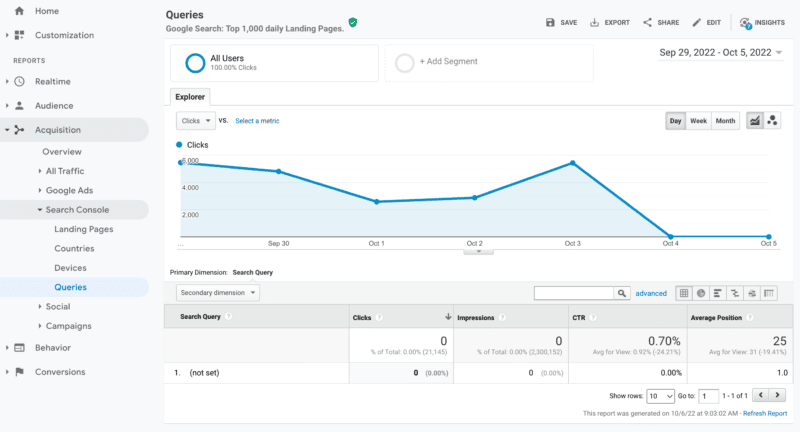
Google Analytics, specifically the Universal Analytics 3 version and not Google Analytics 4, is currently not showing any query data within the integrated Search Console reporting. If you try to access your query data within Acquisition > Search Console > Queries, you will see the data for the past several days is shown as “not set.”

What it looks like. Here is a screenshot I pulled from one of the profiles I have in my Google Analytics profiles:

Google is aware. Google’s John Mueller responded on Twitter about this saying “I don’t have any insight on this at the moment, but the team has been looking into it.”

Will Google fix it? A lot of SEOs and marketers are asking if this is something Google will fix. With Universal Analytics 3 sunsetting on July 1, 2023, some are wondering if Google will bother fixing this integration path between Google Search Console and Google Analytics 3.

The report does currently seem to work within Google Analytics 4 and you can also access the data directly in Google Search Console.

Why we care. If you depend on this report in Google Analytics 3, be aware that currently there is some sort of issue where the Search Console query data is not flowing to the report. It is unclear if or when this will be resolved, so you might want to plan an alternative approach to accessing this data. Either check Search Console directly or make the switch to GA4.


Related Stories

New on Search Engine Land

About The Author

Barry Schwartz a Contributing Editor to Search Engine Land and a member of the programming team for SMX events. He owns RustyBrick, a NY based web consulting firm. He also runs Search Engine Roundtable, a popular search blog on very advanced SEM topics. Barry can be followed on Twitter here.

https://searchengineland.com/google-analytics-v3-search-console-report-currently-not-showing-query-data-388539


What the new wave of machine learning libraries means for SEO, marketing

When many of us think of algorithms and machine learning models, we think of Google.

And really, who can blame us? We’re marketers, and many of us SEOs. We can’t help ourselves.

But there is a lot going on in and out of the Googleplex right now, and it’s becoming increasingly important that we keep up.

In this article, we’ll dive into some new and exciting technologies. We’ll cover some of the current uses where applicable, then move on to discuss where I see the technology going in the near-to-mid future and how it’ll impact marketers.

So let’s dive in – starting with arguably my favorite “new release.”

1. Stable Diffusion

Stable Diffusion is a text-to-image model built by Stability AI. In essence, with it, you can generate some amazing images from text prompts.

The model is open source and public, meaning you can get your hands on it easily (on GitHub) and build a variety of tools or applications to suit your needs. 

Here are a couple of examples of it in action.

This shoe doesn’t exist.

And Johnny Depp never did a photo shoot like this, nor did anyone put in the painstaking effort to create this in PhotoShop. In fact, it only took me a few minutes of prompt engineering to create.

Prompt engineering is basically just playing around with different words, word orders and syntax to generate the type of image you want.

For those interested, you can play with Stable Diffusion yourself here. I should note, you do need to authenticate yourself, either by creating an account or with Google or Discord, but it’s well worth it. 😊

If you’d like to see Stable Diffusion running with the code (but without having to write the code), I’ve created a Colab here.

Stable Diffusion is already being used to create images for ads (I know… I’ve used it myself) and websites (did you like the featured image for this article?) so the current use case makes itself.

There’s already a PhotoShop plugin you can download from here to integrate Stable Diffusion images directly into your work more easily.

The obvious questions

This brings up some obvious questions such as who owns the rights to the work? It turns out, you can’t copyright your images because they’re not really yours and immediately become public domain.

How about the issue with me having created an image of a person without their consent? What if I had them holding a product? Or worse, if I can’t own the copyright as it’s not mine, how responsible am I for other images that might be produced?

I’m not going to head down the ethical rabbit hole with you here, but there is a lot to consider.

Thinking purely as a marketer, if you build your ad campaign on Stable Diffusion-generated images, they can be taken and reused by your competitors and there’s nothing you can do about it.

Down the road

Last spring, we saw the rise of text-to-image models with DALL-E Mini (now Craiyon). You can play around with that model here.

Stable Diffusion is a leap forward. Assuming things continue to progress along the same line in the months and years ahead, I predict that we’ll evolve quickly into video generation from text, including the creation of video tutorials from text instructions.

Additionally, I imagine we’ll soon see automated WordPress plugins that create images for the site based on the surrounding content.

But more interesting perhaps are some commercial opportunities Sergey Galkin captures brilliantly in this video tweet:

It’s worth noting that OpenAI has also produced DALL-E 2 which is arguably superior in quality, but it’s not open source and thus less versatile and more expensive.


Get the daily newsletter search marketers rely on.


2. GPT-3

The GPT-3 algorithm was developed by a team of researchers from a variety of institutions. However, some of the key contributors to the development of GPT-3 include Geoffrey Hinton, Yoshua Bengio, and Yann LeCun from the University of Toronto, as well as Andrew Ng from Stanford University.

GPT-3 was designed to improve the performance of natural language processing models. The developers hoped that by using a larger and more diverse training set, they could create a model that would better capture the meaning of text.

GPT-3 is fine-tuned to improve its performance on a specific task or set of tasks. For example, if GPT-3 is being used for machine translation, it may be fine-tuned to improve its accuracy on that task.

Fun fact: An interesting fact about GPT-3 is that it was used to write the three blocks of text above which are “mostly right.” That should give you an idea of the impact it will have on marketing. If you want to play around with it, you can do so here.

Additionally, GPT-3 systems can be used to enhance ad copy generation.

Almost two years ago, Search Engine Land covered what was then new PPC ad and landing page copy creation tools. Well, those tools are still around, improved, and still in use. One of them recently secured $10 million in funding.

From a PPC standpoint, they tend to work similarly to what you’ll have seen before in the suggested headlines and descriptions in Google Ads, but you can fine-tune them better, and the systems are constantly improving upon themselves.

The obvious questions

This leads to a number of questions about the future of content and content creation. 

Google has said they don’t like automatically generated content, and that it’s considered spam as it violates their guidelines, however, they themselves put massive resources into technologies that are fundamentally designed to do the same (more on that later).

At the end of the day, Google creates guidelines and not laws so the big question we have to ask is whether what we are producing provides the best (at least better) user experience. Unfortunately, at this time even fine-tuned GPT-3 models are far from perfect and the content they produce needs to be fact-checked and often edited. 

At the end of the day, it can often be as much work as just writing the content yourself – though using GPT-3 can prove useful in surfacing ideas and information that you may not think of yourself.

Down the road

Will AI take over writing? Not for the foreseeable future.

The advantage we humans have is that we can write about that which we haven’t encountered before. We can create unique ideas based on our observations and imaginations. Machines can’t do that, so systems like GPT-3 need to encounter content and facts to create from. 

That said, some writing will be automated soon. I suspect most Google Ad copy will be automated within five years (like it or not).

Tell me you can’t see Google Ads announcing you now just give them a URL and a budget, and they’ll take it from there, generating ads and bid strategies and showing you about 20% of the data you want on what’s going on inside the black box. 

Maybe 20% is too generous, but you get where I’m going.

This all said, we’ll be getting advantages at the same time, and will be left to put more energy into our landing pages and experiences. Getting assistance from language models that help us communicate with our customers (GPT-3 powered chatbots or maybe Meta AI’s publicly available BlenderBot 3?) and help with research and first draft content creation.

3. MUM

When I mentioned above that Google is developing systems to create AI-generated content, this was the model I was thinking of. MUM, along with other similar models that will be developed in the coming months/years will dramatically change now just how we market, but where.

Let’s take a quote right from Google’s write-up of MUM:

“… MUM not only understands language, but also generates it. It’s trained across 75 different languages and many different tasks at once, allowing it to develop a more comprehensive understanding of information and world knowledge than previous models. And MUM is multimodal, so it understands information across text and images and, in the future, can expand to more modalities like video and audio.

Take the question about hiking Mt. Fuji: MUM could understand you’re comparing two mountains, so elevation and trail information may be relevant. It could also understand that, in the context of hiking, to “prepare” could include things like fitness training as well as finding the right gear. 

Since MUM can surface insights based on its deep knowledge of the world, it could highlight that while both mountains are roughly the same elevation, fall is the rainy season on Mt. Fuji so you might need a waterproof jacket. MUM could also surface helpful subtopics for deeper exploration — like the top-rated gear or best training exercises — with pointers to helpful articles, videos and images from across the web.”

The big takeaway here is that with MUM, Google can collect information from various languages and modalities, and use this information to generate its own content/answer.

Yes, they’re displaying it in their examples in a nice format and suggest they’ll just use it to recommend articles and products – but in truth, they will use it to create the answers.

After all, one of the features is being able to understand information across languages. It’s hardly useful to me to have an article recommended in a language I don’t speak.

So, fundamentally they will be using the information they’re collecting and presenting it to the end user as a complete answer. Collect from enough sources, and there’s no one to cite.

Down the road

The big “down the road” on this one is understanding that as it deploys into the environment in full force, there will simply be less room for organic results. Featured snippets will no longer be sources from a single authority but rather created by Google, based on their knowledge of the world at large.

No attribution. No click.

Organic won’t go away and SEO is not dead (sorry to the naysayers) – but the structure will change dramatically. 

Picture a world where the search result is constructed of answers with only secondary and tertiary links to resources. Think of a LamDA/chat world where each result is meant to be an engagement rather than the end of the story. An engagement meant to draw the user to fulfilling their intent, rather than just answering a question.

Imagine the marketing opportunities that will come from this. Weaving your content into new locations. Having your ads show up at just the right time in the discussion to trigger conversions.

Don’t get me wrong, it’s not all sunshine and roses. There will be less exposure, and I genuinely feel for publishers and people for whom content is the primary product. But for those selling products and services and who can adapt quickly, there will be a lot of opportunities.

What’s next?

When it comes to marketing and its future, there are a lot more machine learning models to explore. Some might even say the best is yet to come.

In my next piece, I’ll be exploring augmented reality and the metaverse. We’ll discuss some likely directions for them to take, what you need to do to prepare for this brave new world (or is it unworld?), and some takeaways from interviews with the machine learning engineers working to build this reality.


Opinions expressed in this article are those of the guest author and not necessarily Search Engine Land. Staff authors are listed here.


Related Stories

New on Search Engine Land

About The Author

Dave Davies is the Lead SEO for the Machine Learning Operations company Weights & Biases. He got his start in SEO in the early 2000s and in 2004 co-founded Beanstalk Internet Marketing with his wife Mary, who still runs its day-to-day operations. He hosts a weekly podcast, speaks regularly at the industry’s leading conferences, and is proud to be a regular contributor right here on Search Engine Land.

https://searchengineland.com/machine-learning-libraries-seo-marketing-388415


What should the title tag length be in 2023?

The title tag is one of the most important SEO elements. It can have a great impact on your rankings. In my experience, optimizing title tags can give rankings a strong boost.

There are many different ways to approach optimizing a title tag. 

One is making sure they fit within the 55-60 character limit. Though other SEOs suggest it’s okay to have title tags that are up to 70 characters long.

There are also concerns that getting the title truncated in search results or having it rewritten by Google can negatively affect organic performance. 

In this post, we’ll explore the basis for such concerns, Google’s official statement about title length, and my findings after manually looking at 645 title tags on Page 1 of Google’s SERPs.

Example of title tag cut off in SERPs

Technically speaking, the number of characters for a title tag that Google can display in SERPs is measured in pixels. When your title tag is too long, Google can cut it off like this.

SERP listing with a truncated title.

The title tag update and the aftermath

In August 2021, Google released an update aimed at title tags. This update enables Google to show a different title to users in SERPs than the one available in the HTML title tag. 

HTML title tags may get rewritten in SERPs when they are:

  • Too long.
  • Stuffed with keywords.
  • Missing or containing repetitive “boilerplate” language (i.e., home pages might be called “Home”).

Once the update was released, it caused an uproar in the SEO community as many SEOs have reported incidents where the title rewrite went “horribly wrong.” This even led Google’s John Mueller to tweet about it:

Rob Woods reported an incident where the title tag was replaced with the URL slug:

slug used as SERP listing title

Chatter in the SEO community showed many examples of Google replacing <title> tags in the search results with alternative page elements like H1 tags, image alt texts, image file names, and sometimes the selected text was not even within the source code of the page. The most noticeable insight from the title tag update is that “Google wants shorter titles displayed in SERPs.”

This has caused some panic in the SEO community. Many SEOs started to double down on the importance of avoiding title rewrites by making sure their titles are short and within the character limit.

The confusion

It is clear to everyone that Google wants shorter titles in SERPs.

But does that mean they will use the titles displayed in SERPs (which may be potentially cut off or rewritten) for rankings instead of the HTML title?

This has led many SEOs to assume that longer titles will either get cut off or rewritten, and Google will not consider them for rankings but will consider the new title displayed in SERPs for rankings instead.

What is Google’s official statement about title length?

In a Search Off the Record episode, Google’s John Mueller asked Gary Illyes about title tag length:

“I have a question that is, maybe, just a yes or no thing, Gary. Is there a value in having <i>title</i> tags that are longer than the displayable space and the sections of it?”

To which Illyes gave a very clear and precise answer, “Yes.”

He added, “The <i>title</i> length, that’s an externally made-up metrics… Technically, there’s a limit, like how long can it be anything in the page, but it’s not a small number. It’s not 160 characters or whatever– 100, 200, 20, or whatever.”

And recommended to “Try to keep it precise to the page, but I would not think too much about how long it is and whether it’s long enough or way too long. If it fills up your screen, then probably it’s too long, but if it just one sentence that fits on one line or two lines, you’re not going to get a manual action for it.”

If we refer to Google’s documentation on SERPs titles (a.k.a., title links), there’s no recommended length for the title tag.

Would having longer titles impact rankings?

If longer title tags can get cut off or rewritten in SERPs, wouldn’t that impact rankings? Luckily, Lily Ray popped this question on Twitter and got this reply from Glenn Gabe.

This is what Mueller said in Google’s SEO Office Hours from Dec. 11, 2020.

So whether your titles get cut off or rewritten in SERPs, Google still uses the HTML title tag for ranking considerations and not the titles shown in SERPs.

My analysis

I want to put this argument to rest. Hopefully, as an industry, we stop recommending to clients to “shorten” their title tags for the sake of it – just because there’s been a title length metric circulating in almost all online resources on the topic with no facts or evidence to support it.

I put together a random set of keywords and analyzed the titles on Page 1 of the SERPs for each of those keywords. 

Here are my findings after manually looking at 645 title tags:

  • Google tends to display shorter titles. Out of the 645 titles displayed in SERPs that I analyzed, only 79 (12%) were above 60 characters, with 68 characters as the maximum length. 
  • Out of the 645 URLs, 286 URLs (22%) had HTML title tags longer than 60 characters, with 139 characters as the maximum length. This means you can go above the 60-character title length limit, get cut off or rewritten, and still rank on the first page.
  • If we filter out pages that didn’t have any title tags at all, there were instances where Google actually increased the title tag length. So even shorter titles can get rewritten. This is very common in LinkedIn profile page titles. Example:
    • For this URL [https://ca.linkedin.com/in/michael-kuch-387740207] the HTML title tag was “Michael Kuch | LinkedIn” but Google decided to display a longer more descriptive title as follows:
Longer LinkedIn profile page title in SERPs
  • The length of the titles displayed in SERPs increased in 103 URLs of the 645 sample URLs. This is 16% of the entire sample. 
  • The most common length of titles displayed in SERPs in this sample is between 58-60 characters (see histogram below).
Length of titles displayed in SERPs

To view the complete sample, check this Google Sheet.

Title tag length in 2023

In summary, you do not need to stick to a 55-60 character limit for your title tags. Your titles can be – and should be – as long as needed within reason.

Title tags are among the few assets which highly impact rankings that we still have some control over. Let’s make the best out of them.

If you’re worried about getting cut off or having your title rewritten, know that these are secondary concerns. Ranking well gets the highest priority. 

Optimize your titles to rank first even if you go above the 60-70 character limit. Then, experiment to adjust how your titles look in SERPs.

But if you don’t rank, it doesn’t matter how long your titles are anyway.


Opinions expressed in this article are those of the guest author and not necessarily Search Engine Land. Staff authors are listed here.


Related Stories

New on Search Engine Land

About The Author

Sara Taher is a Canadian based SEO consultant with over 8 years experience in the field. She is most known for her SEO tips and riddles that she shares on her Linkedin account. You can sign up for her newsletter & check out her blog here.

https://searchengineland.com/title-tag-length-388468


Google Search Console data logging issue on September 21st

The search performance report in Google Search Console had a data logging issue on September 21, 2022. This caused some data to not be presented in the search performance report on that date, potentially making it appear that you had fewer visitors from Google Search on that day.

Google said it is working on replacing most of the data in the near future. If you did any reporting for clients or you plan to do reporting for clients in the near future, you should communicate this data anomaly in those reports.

The issue. Google wrote here, “Due to a logging error, sites may see a small drop in data for this day. This is a logging issue only; it does not reflect changes in search performance or user behavior. We hope to replace most of the missing data soon.”

This was on September 21st for the Search performance report.

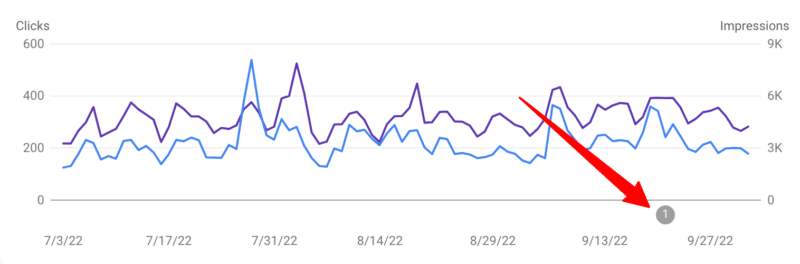
What it looks like. Google has now annotated the report so you can clearly see which date is affected:

Fix coming soon. Google said it will fix or replace most of the missing data soon. It is unclear if the fix will be actual data or similar data from previous day averages.

Why we care. If you have provided reporting to clients or management, you may want to update them that the September 21st data in Search Console may be wrong. If you will soon be providing reporting to clients or management, you may want to annotate your reports with this note.

Make sure to check back later to see if the data was restored and if you need to send revised reports to clients or management.


Related Stories

New on Search Engine Land

About The Author

Barry Schwartz a Contributing Editor to Search Engine Land and a member of the programming team for SMX events. He owns RustyBrick, a NY based web consulting firm. He also runs Search Engine Roundtable, a popular search blog on very advanced SEM topics. Barry can be followed on Twitter here.

https://searchengineland.com/google-search-console-data-logging-issue-on-september-21st-388466


The modern search landscape: How and where to reach your target audience

Imagine you’re on vacation, it’s approaching noon and you’re starting to feel hungry. You’re eager to enjoy the best local cuisine your destination has to offer. So you go to Google Maps and search for “best lunch restaurant near me”, a topic that’s more than doubled in search volume on Google in the last three years alone. 

Over 80% of searches worldwide occur on Google based on the latest search engine market share data. You might think that you’ve just completed the most common search journey to lunch.

However, nearly 40% of U.S. searchers between the ages of 18 and 24 go to TikTok or Instagram when looking for a place for lunch, according to Google’s own internal research.

In other words, if a restaurant in the area wants to attract this audience, their marketing strategy needs to extend beyond Google to include these platforms.

Now imagine if you were crunched for time and had decided you’d rather order lunch in your room than go out to eat.

If you’re vacationing in San Jose, consumers in your area are statistically more likely to find lunch on DoorDash, whereas New York consumers are more likely to order through Uber Eats. 

Ultimately, these scenarios illustrate that when building a search marketing strategy, marketers need to consider the context behind a search, such as:

  • Demographics and psychographics of searchers.
  • Their location when conducting a search.
  • The goal of their search journey. 

We need to erode the distinctions we have historically made between traditional search marketing domains (e.g., Google and Microsoft Bing) and the broader ecosystem of digital platforms. 

Search is one of the most common human behaviors in the digital space. It’s no surprise that Google is the most-visited website across the globe and all the top 10 most-visited websites worldwide feature a search experience that is core to the user experience.

Search is also one of the most valuable user behaviors for marketers because it is an expression of users’ needs and intent. Search data is not only a key input into content and advertising strategies, but also it provides valuable insight into the mindset of high-value audiences (HVAs). 

As a result of technological innovation and shifts in user behavior, modern search marketing strategies must now consider a significantly broader set of platforms than ever before to effectively understand and market to target audiences and capture true search demand. 

The following are just a few examples of the variable nature of users’ search engine consideration sets, and the platforms that should be on every search marketer’s radar. 

Traditional search engines

Perhaps apart from Wikipedia loyalists, traditional search engines remain the dominant destination for users seeking information online.

Google announced a new technology in 2021 called Multitask Unified Model, or MUM, which aims to more efficiently answer complex queries that may previously have required multiple searches. MUM is multimodal, which means it understands information across text and images, and in the future, can expand to video and audio.

This ability to index multiple content formats and provide dynamic, relevant search results pages is why traditional search engines will continue to be a catch-all destination for searchers. 

Google, Bing, and Yahoo make up 95% of the worldwide desktop market share of search engines. Despite that global dominance, it’s important for search marketers to also consider other traditional search engines. 

For example, the following search engines attract the largest share of searches within their primary region:

Each of these engines requires a customized SEO strategy and paid advertising can be bought through the engines directly. 

There are also more recent entries into the landscape globally that are worth monitoring, including:

DuckDuckGo

DuckDuckGo launched their search engine in 2008, which aims to protect users’ privacy by not tracking their search history. DuckDuckGo has been steadily growing in use since its launch and now processes 3 billion searches per month. It had a 0.6% search engine market share worldwide and 2.52% search engine market share in the U.S. as of August 2021.

DuckDuckGo doesn’t require a custom SEO strategy, though you can set yourself up for success by following best practices for Bing SEO and claiming your local listings on Apple Maps, if applicable, based on the sources from which DuckDuckGo compiles its organic results. Paid search ads can be bought via Microsoft Advertising’s partner network.

Ecosia

Ecosia launched in 2009 and like DuckDuckGo, it promotes privacy as an alternative to more mainstream search engines. Ecosia’s privacy features include: 

  • Anonymizing all search data within one week.
  • Not selling data to advertisers.
  • Avoiding the use of third-party trackers.
  • And more. 

Its main differentiator, however, is its climate-conscious mission. Ecosia uses its profits from advertising to fund climate action and has already planted more than 150 million trees around the world. 

It held a 0.11% worldwide search engine market share as of September 2021, including a 1.03% share in Germany, where it was founded. 

Organic and paid results are sourced from Microsoft Bing, so Bing SEO best practices and a Microsoft Advertising account are the primary tools required to target Ecosia searchers. 

Brave Search, another “no-tracking” search engine, exited its beta phase in June 2022, a year to the day after launching. It surpassed 2.5 billion queries in its beta phase and is projecting queries to double over the next year. 

Unlike DuckDuckGo and Ecosia, Brave Search has its own ranking algorithm that serves results from its own web index.

Searchers can personalize their organic results using the newly released Goggles beta feature and engage in conversations related to their queries across forums such as Reddit and StackExchange through the Discussions search engine results page (SERP) feature. 

In the future, Brave Search will feature ads that are part of the Brave Rewards program, which allows users to earn a portion of the revenue Brave earns from advertising. In the meantime, searchers can subscribe to Brave Search Premium for $3/month to enjoy an ad-free search experience. 

Yep

Yep is a search engine currently in beta being built by the SEO tool company Ahrefs, which announced an initial $60 million investment in June 2022. It is committed to user privacy in a similar manner to many of the other search engines that are positioning themselves as alternatives to Google and Bing.

What makes it stand out, though, is its proposed revenue-sharing model. Yep plans to share 90% of its advertising revenue with content publishers. It does not yet serve ads in its current beta state, so no distributions have been made to date. Yep has its own web crawling technology, index, and ranking algorithm.

That said, it’s too early in its development to warrant separate consideration in website optimization strategies unless a publisher wants to promote the use of Yep to its users as a means to earn potential revenue from the revenue-sharing model when it launches its advertising solution.

You

You opened in public beta in November 2021 and announced a $20 million funding round at that time led by Salesforce CEO Marc Benioff. It has since closed an additional $25 million round of funding in July 2022 to develop “premium features” and expand on its unique apps feature. 

You offers users a customizable search engine experience by supplementing web results from its own ranking algorithm with custom apps that appear in the SERP. 

Apps range in functionality from providing results sourced from a specific website (e.g., Wikipedia) to its YouCode app, which allows users to generate code based on a search query. You touts its privacy features as a key selling point for users and does not currently serve ads. 

Richard Socher, co-founder of You and former chief scientist at Salesforce, claims that You has a rapidly growing user base in the hundreds of thousands. He also reported that 50% of users continue to use You after setting it as their default search engine.

It’s likely still too early for You-focused optimization efforts to yield any meaningful results, but its expanding library of apps is worth monitoring, especially for publishers who may want to partner with You to launch a custom app. 

Apple

Finally, while Apple has yet to formally launch their own search engine, there have been multiple rumors over the past few years that they are planning to develop a Google Search competitor. Among Siri, Spotlight, Camera, Shazam, and more, Apple already has a variety of search entry points seamlessly integrated into its operating system. 

Google is currently the default search engine powering the web results on Apple devices and will pay Apple an estimated $18 billion to $20 billion in 2022 for that privilege. The agreement between Apple and Google requires that the former won’t compete against the latter in the internet search business, so Apple would be violating its agreement with Google if it were developing its own search engine. 

Despite that considerable barrier, Apple will continue to be a massive presence on the fringe of the traditional search engine conversation positioned to capture a meaningful share of searches were they ever to launch their own.

Sensory search engines

Sensory search refers to the growing trend of using senses beyond typed keyword inputs to conduct searches.

Voice search and visual search are the two most common forms of sensory search today. The leading platforms in sensory search vary based on the sense being activated by the searcher.  

The human brain can identify images seen for as little as 13 milliseconds. Compare that to the measly 36 words per minute the average mobile phone user can type into a search bar and it stands to reason that 62% of Gen Z and Millennial consumers want visual search capabilities, more than any other new technology. 

Google, Bing, Amazon, and Pinterest are currently among the leading visual search engines. Google Lens usage has tripled in the last year with Lens now being used nearly 8 billion times per month. 

As augmented reality and computer vision technologies advance, the lines between searching and browsing will blur. For example, Google Lens’ “scene exploration” capability will allow users to search multiple objects captured within a wider scene in real time. 

Prabhakar Raghavan, who oversees many of Google’s businesses including search, described the following use case:

“Imagine you’re trying to pick out the perfect candy bar for your friend who’s a bit of a chocolate connoisseur. You know they love dark chocolate but dislike nuts, and you want to get them something of quality. With scene exploration, you’ll be able to scan the entire shelf with your phone’s camera and see helpful insights overlaid in front of you.” 

Expect these examples to become commonplace as technology improves since a 2019 study by the Intent Lab found that visual information is preferred over text by a majority of respondents across all categories except for electronics, household goods, and wine and spirits. 

The keys to success in visual search are:

  • Feed management.
  • Image optimization.
  • Structured markup.
  • Content quality and uniqueness 

The average English speaker talks at a rate of more than 100 words per minute. While speaking a search query isn’t as efficient as snapping a photo, it’s still more efficient than typing. 

Google processes hundreds of millions of voice search queries per day. Voice search adoption is most prevalent among new internet users. In India, nearly 30% of all Hindi search queries are spoken. 

Google, Apple’s Siri, and Amazon’s Alexa are the most prominent voice search engines, often referred to as digital assistants.

One of the more unique nuances of voice search is the diversity of devices used to conduct voice searches. While phones and smart speakers are the most obvious voice search devices, in-car voice assistants are the second-most used surface for voice assistant technology in the U.S. 

This device distribution expectedly presents a challenge when optimizing content for voice search, but the best practices are actually quite straightforward: 

  • Analyze user search behavior.
  • Create content that directly answers user queries.
  • Ensure technical code and visual elements such as images are properly optimized for devices with no visual output. 

Some businesses will find more industry-specific opportunities, as well. For example:

  • The optimization and syndication of location data across digital platforms for brick-and-mortar businesses can attract in-car voice searchers to a nearby store.
  • Paid media and the optimization of product detail pages on Amazon.com can drive purchases among Amazon Echo searchers. 

There’s a lot of overlap behind how the technology of voice search and audio search works. 

The engine:

  • Is activated through some user action (e.g., say “Alexa” to an Echo, click the microphone icon in the Google search bar, etc.).
  • Listens for the audio input.
  • Then returns a result based on machine learning to match queries to results. 

Voice search is the most notable form of an audio search, but there are some audio search engines that don’t feature voice search capabilities. 

One such engine is Shazam, the music recognition app purchased by Apple for about $400 million in 2018. Launched in the U.K. 20 years ago as a text message service, Shazam surpassed 70 billion song recognitions in August 2022 and boasts 225 million global monthly users. 

Many of the commercial use cases for the app are focused on the music industry, such as the recently launched concert discovery feature. 

Additionally, Shazam launched a feature in 2011 that allowed users to capture audio from TV programs and ads and receive related marketing messages and special offers. 

This technology and the rise of sonic branding in marketing through sonic logos, “earcons”, and other forms of branded audio content provide creative opportunities for advertisers to connect with audio searchers.


Get the daily newsletter search marketers rely on.


Activating the senses in the search journey isn’t limited to inputs. Searches for multimedia content (e.g., images, videos, audio, etc.) are a major driver of behavior across digital platforms. 

The platforms on which multimedia content seekers search differ by the content format sought. The paths users take to ultimately consume multimedia content are even more varied.

Video content

Approximately 720,000 hours of video content is uploaded daily to YouTube alone, so there’s predictably huge demand for video search engines. It is the world’s second-largest search engine and second-most visited website. 

In the U.S., viewers spend an average of 31 minutes per day watching videos on YouTube. Content creators who upload videos to YouTube can apply YouTube SEO best practices to enhance discovery across YouTube and Google Search and can promote their videos on YouTube through paid advertising. 

Vimeo is another major video search engine with usage that pales in comparison to YouTube but still is the 589th most visited website worldwide. It rolled out a series of optimizations to its platform in May 2022 aimed at improving the visibility of Vimeo creators’ videos within Google’s organic search results. 

The Vimeo team also highlighted some video SEO best practices for its creator community to implement in its announcement about the platform’s SEO updates. Unlike YouTube, Vimeo does not have advertising and instead positions its core offering as a streaming video on demand (SVOD) service.

Search plays a big role in the streaming video space and is a core platform function across Amazon Prime, Disney+, Hulu, Netflix, and many of the other major providers. There are even streaming video search engines that search across platforms and can personalize results based on a searcher’s active subscriptions. 

JustWatch and Reelgood are two engines in that category. While search discovery and advertising opportunities across these streaming search engines are limited in relevance if you’re not a content producer yourself, there is value in the search data available for analysis from these engines to keep a pulse on pop culture and inform potential content partnerships or ad targeting across streaming platforms. 

Audio content

Digital audio content commands a massive share of attention with U.S. adults spending an average of one hour and forty minutes per day consuming this medium.  

  • Spotify, Pandora, Amazon Music, Apple Music, YouTube Music, and Deezer are just a handful of the many mainstream audio streaming services with extensive libraries of music and podcasts. 
  • Soundcloud and Bandcamp are among others that skew toward more niche and indie artists.
  • Audible and Audiobooks.com are purveyors of audiobooks and other spoken word content. 

Search is a core function of all these platforms. The search for audio, however, isn’t limited to digital audio streaming services. 

If you conduct a search in Google for “taco bell commercial song” (97k searches in the last 12 months) or “applebees commercial song” (79k searches in the last 12 months), you might end up on YouTube or iSpot.tv.

If you think this type of search is an anomaly, consider that “att lily” has been searched 2.4 million times in the last 12 months. 

This behavior extends to all forms of media. For example, if you can’t open Shazam quickly enough to record the ballad playing in the 13th episode in the 4th season of Roswell, New Mexico (*spoiler alert*) during the montage of Michael and Alex getting married, a quick Google search may direct you to Tunefind, where the community has confirmed that song is “I’ll Be” by Edwin McCain. 

Most advertisers produce at least some content that includes audio, and many drive brand awareness through the promotion of that content supported by massive budgets. 

To maximize the return on that investment and ensure that content is discoverable, it’s imperative that all content is:

  • Hosted publicly (on a brand website, YouTube, or other platforms).
  • Properly marked up to include key details that someone previously exposed to the content may search.

Social media

Commanding one hour and fifteen minutes per day among U.S. adults, social media competes for attention by building immersive sensory experiences. 

Scrolling is probably the action most associated with social, but search plays a significant role across platforms, as well. 

Pinterest boasts 433 million active monthly users who conduct an average of 8 searches per month on the platform. That equates to nearly 42 billion searches per year of which an estimated 97% are unbranded. It was already processing 600 million visual searches per month in 2018 and continues to be a leading visual search engine. 

Search is so central to the Pinterest experience that the company rolled out Pinterest Trends in 2019, which features topics with high search volume over a rolling 7-day lookback period. Pinterest search data drives the company’s trend prediction engine Pinterest Predicts, which boasted an impressive 80% success rate in its predictions from 2021 coming true.

Search volume data across social platforms is much harder to come by than other engines that share absolute volume or trending estimates. Even outdated data, however, indicates the immense scale of social media search activity. For example:

Not all these searches have meaningful commercial intent nor do social platforms typically offer advertisers the ability to target on-platform search queries. 

For organic discovery, hashtags can improve relevance for target search queries and the content of the posts themselves should incorporate keywords relevant to their target audience. 

Social platforms such as Instagram and Facebook have shared more information in recent years about their personalized search ranking algorithms. Interest in TikTok SEO has grown significantly, with more than 84 million views of videos on TikTok with the #tiktokseo hashtag as of early September.

As evidenced by Gen Z’s search journey for lunch in the U.S., many searches conducted across social media have inherently local intent. 

It’s no surprise that many social platforms have responded to this intent by incorporating more local features into their search and discovery experiences. 

  • Snap and Instagram feature maps with details about nearby businesses overlayed.
  • Facebook hosts a robust network of location pages.
  • Twitter recently launched a Location Spotlight tool that allows brick-and-mortar businesses to post details about their location on their Twitter profile. 

As social platforms expand these local features, they will continue to compete for local search market share held by traditional maps apps (like Google Maps, Waze, and Apple Maps) and local directories (such as Yelp and TripAdvisor). 

Advertising opportunities supplement an organic social strategy and local listings management in driving discovery across these platforms, preferably leveraging a technology provider to syndicate consistent updates across publishers. 

BloomReach made waves in the search industry in 2016 when they released the results of a study they commissioned that found 55% of U.S. shoppers start their product search journey on Amazon. Since then, a multitude of surveys has reinforced that Amazon is the top destination for product searchers. 

Trailing behind Amazon as the go-to product search engine are:

  • Traditional search engines (e.g., Google, Bing).
  • Other retailer search engines (e.g., Walmart, Target, etc.). 

More recently, online shoppers have reported starting their product searches on social media platforms such as TikTok, Instagram, Facebook, and Reddit. 

This emerging trend skews toward a younger audience with 18% of U.S. online shoppers between the ages of 18 and 24 years old reporting that they typically start their product search journey on TikTok, third behind Amazon and Google. 

Content optimizations informed by shopper search behavior and syndicated across retail partner websites will help brands gain organic visibility across the digital shelf. 

Amazon Ads and Walmart Connect are the two largest retail media ad networks by spend, but an increasing number of retailers are entering the retail media landscape with their own offerings. 

  • Kroger Precision Marketing powered by 84.51°.
  • Sam’s Club’s Membership Access Platform.
  • The CVS Media Exchange.
  • Target’s Roundel.
  • Instacart Ads.
  • eBay Ads.
  • Best Buy Ads.
  • Wayfair Media Solutions.
  • Macy’s Media Network

And the list keeps expanding. Advertising partners such as Criteo and PromoteIQ enable advertisers to efficiently target searches across a broad network of retailer sites.

Specialized search engines

As illustrated in the scenario at the outset, the search for lunch occurs on a wide array of engines beyond Google and Microsoft Bing. Many other verticals follow this same pattern.

Travel

OTAs (e.g., Expedia, Booking.com, Kayak) act as one-stop shops for travel search needs.

Disruptors like Airbnb and VRBO compete with accommodation network websites (e.g., Marriott, Hilton, Hyatt) for searchers looking to book stays.

Real Estate

Zillow, Trulia, Realtor.com, and Redfin are among the leading search engines for buying and selling homes.

Apartments.com, HotPads, and regional engine StreetEasy in New York attract apartment hunters.

Recipes

Allrecipes, Taste of Home, and Epicurious are prominent engines in this space, though traditional search engines and social media platforms capture a high volume of recipe search demand as well.

Automotive

Cars.com, Autotrader, CarMax, Edmunds, and Carvana are just a few of the major players in this competitive search space.

Finance

Google Finance, Yahoo! Finance, Bloomberg, and brokerage firm websites facilitate traditional investment searches. Nerd Wallet, BankRate, and Credit.com power credit card searches.

CoinMarketCap, CoinGecko, and exchange websites (e.g., Coinbase, Crypto.com, Binance) cater to cryptocurrency searchers.

Health

WebMD, MayoClinic, and Healthline are among the reputable sites with search experiences built to surface important health information

Freelance talent

Upwork, Fiverr, and Freelancer.com help businesses of all sizes source freelance talent, while helping freelancers search for work

Contractors

Angi (formerly Angie’s List), HomeAdvisor, and TaskRabbit are among the major search engines in this vertical

Jobs

Indeed, LinkedIn, Glassdoor, and Google are a few of the top search engines for job seekers

Note: This list could go on and on as there are specialized search engines in virtually every vertical. 

What this list and the preceding examples ultimately illustrate is that search is fragmented now to the point where the line has blurred between search platforms and digital platforms with search as a key function. 

As the quality of site search solutions available to website owners continues to improve, this line will only get blurrier.

So, what’s a marketer to do? How do companies maximize the value of their search programs in the context of their broader communications strategy?

The following guidelines provide a framework that reflects the role search should play in the comms planning process:

  • Analysis of search behavior across relevant search engines contributes to the development of high-value audiences (HVAs).
  • Understanding the digital platforms most frequently used by each HVA is key to mapping their respective search journeys across platforms.
  • An assessment of the key digital platforms will qualify the importance of search as both a driver to and function within each platform, and lead to a search strategy that will incorporate some permutation of the following tactics:
    • Optimizations that can be made to an on- and/or off-platform owned experience to drive organic search discovery within the platform.
    • Advertising that can be purchased to target users’ on-platform search queries.
    • Advertising and/or experiences – both paid and earned – targeting off-platform searches that attract users to the platform.
    • Analysis of platform search data to generate insights that deliver a better understanding of target audiences and inform other strategic initiatives.
  • Search strategists should be included throughout the entire comms planning process to ensure that marketers are present during all stages of users’ increasingly fragmented search journeys.

Interested in learning more? Well, there are search engines for that. Which ones will you use?


Opinions expressed in this article are those of the guest author and not necessarily Search Engine Land. Staff authors are listed here.


Related Stories

New on Search Engine Land

About The Author

Dan Toplitt is the SVP, Head of US SEO at Reprise, the global performance marketing agency of IPG Mediabrands. Dan has more than a decade of SEO experience, building award-winning teams at enterprise SEO agencies servicing Fortune 500 clients. He has spoken at multiple industry conferences on topics ranging from zero-click search to optimizing new search platforms. Prior to entering the agency world, Dan co-founded a company that operated a national high school recognition and college scholarship program, awarding more than $15 million in scholarships.

https://searchengineland.com/modern-search-landscape-how-where-reach-target-audience-388290


19 advanced Google search operators you need to know

Google search is a powerful tool in and of itself. You can use it to find anything, but did you know that you can use it to get specific results as well? 

If you are looking to enhance your search engine marketing efforts, you need to know about advanced Google search operators. With the right search operator, your Google searches will be more efficient and accurate than ever before. 

Advanced Google search operators can provide you with powerful insights to inform your SEO audits, content strategy, keyword research, and much more. 

In this guide, we will reveal everything about the main advanced Google search operators so that you can get a better understanding of how to use them to your advantage. 

What are Google search operators?

Google search operators are special commands and characters that extend the capabilities of standard text searches. 

To use a search operator, simply enter it directly into the Google search box (in the same manner you would if you were doing a text search).

Make your results much more specific 

Advanced Google search operators will deliver much more specific results. Let’s say you search “SEO” on Google right now. You will get more than 730 million results!
However, if you use the allintitle operator, which is one of the advanced Google search operators we’re going to tell you about below, you can reduce this to just 14.6 million results, as you will only be presented with results that have “SEO” specifically in the page title. 

Use advanced Google search operators to take your business to the next level

With search operators, you can:

  • Find content and backlink opportunities. 
  • Find SEO issues, such as glaring indexation errors.
  • Find research and statistics to improve your content.
  • Efficiently gauge how competitive certain long-tail keywords are.

Search operator rules to follow

There are two important ‘rules’ to follow when refining web searches:

  • If punctuation is not part of the search operator, Google will usually ignore it.
  • Avoid spaces between your symbol or word command and your search term. For example, site:movingtrafficmedia.com will work, however, site: movingtrafficmedia.com will not work.

The best advanced Google search operators

It is so much easier to search for things online once you know about Google search operators. Once you have mastered these commands, you will wonder how you previously managed without them.

1. site:

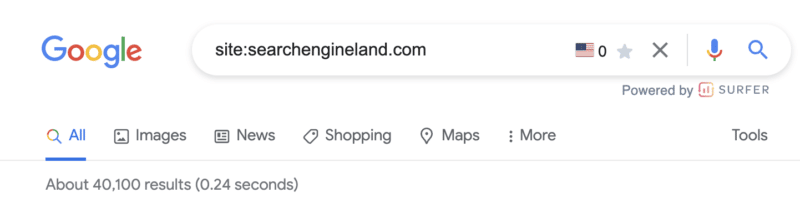
site: command

As you might have guessed, this operator allows you to search for content that’s hosted on a certain domain.

If you want to search through specific websites like Wikipedia or YouTube, but not other sites, site:youtube.com or site:wikipedia.org is what you need.

site: command use case 

There are many use cases for this particular command. Perhaps the most common is to determine the number of pages Google has indexed for a particular domain. 

2. cache:

cache: command

Simply put, the cache: operator makes it possible for you to locate the most recent cached version of a specific web page. 

cache: command use case 

If you’ve recently made a content update or design change, this command will show you if and when Google crawled the new changes.

related: command

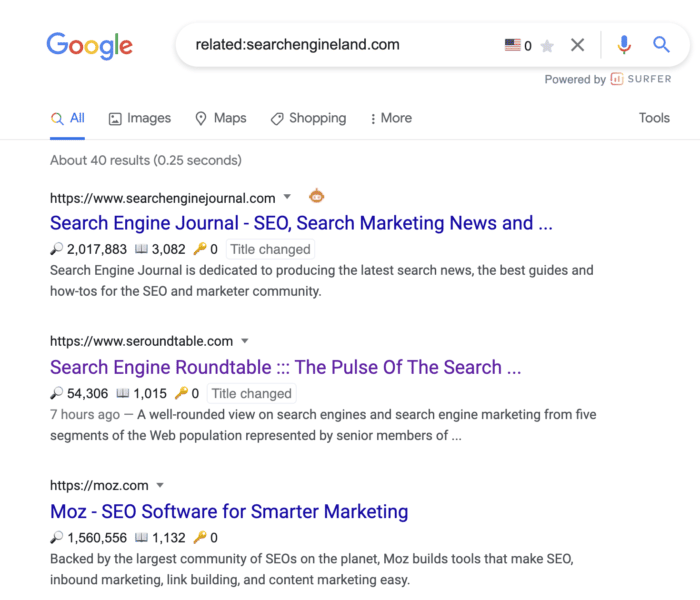
You can use this search operator to find websites that are related to the site in question. This is only effective for large domains, such as nytimes.com or searchengineland.com as illustrated in the image above. 

related: command use case 

Use the related: command for an illuminating look into how Google categorizes your site and the competition. 

This is incredibly valuable for competitive analysis when trying to understand who your digital competitors are – which may be wildly different from your offline competitors.

4. inanchor:

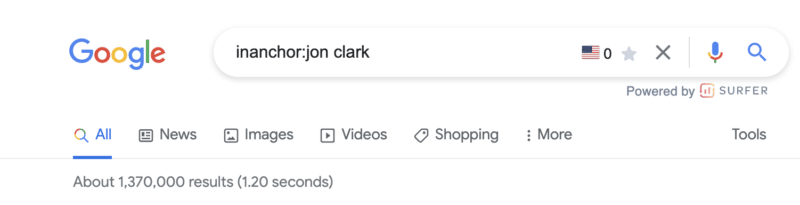
inanchor: command

This advanced Google search operator is used when you want to locate pages containing inbound links that have the anchor text specified.

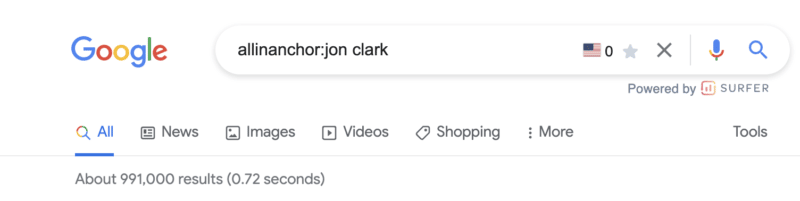
In the example above, the 1,370,000 results returned will display any pages with anchor text that includes the word “jon” or the word “clark.”

Note: You cannot expect accurate global results, as data is only sampled.

inanchor: command use case 

This command is helpful when evaluating link building opportunities or competitive link audits.

5. allinanchor:

 inanchor: command

This operator builds on the inanchor: command from above but makes sense when you want to conduct research for pages that include all of the words in the inbound anchor text. 

For example, you can see the returned results for pages with anchor text that includes both “jon” and “clark” have decreased to 991,000.

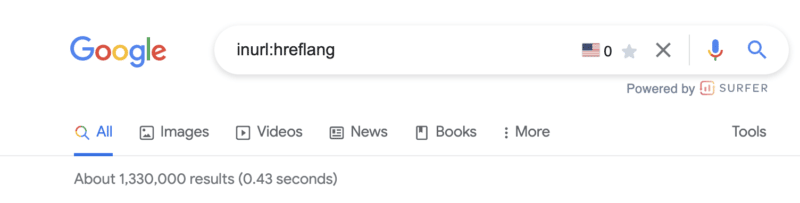
6. inurl:

inurl: command

If you wish to find a page on a website that includes a specific word (or words) in the URL itself, then the inurl: is the Google search operator to use.

inurl: command use case 

This search command is extremely helpful for:

  • Diagnosing indexing issues (inurl:tag to identify indexed blog tag pages).
  • Content inspiration across topics you are researching.
  • Identifying guest posting opportunities (inurl:guest-post). 

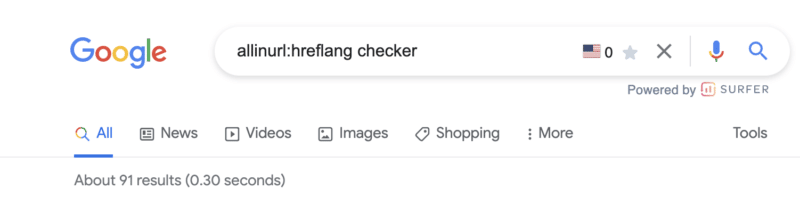
7. allinurl:

allinurl: command

This advanced Google search operator will further refine the inurl: command by returning only results that include all of the defined words in the URL.

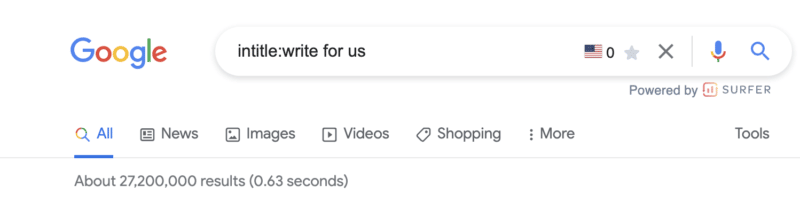
8. intitle:

intitle: command

This operator allows you to locate results that are more targeted for certain search words or phrases. In the image above, more than 27,200,000 results are returned that include at least one of the terms in the page title.

intitle: command use case 

This is a great search function for locating guest posting opportunities and checking levels of competitiveness for keywords based on the number of results returned for a word. 

9. allintitle:

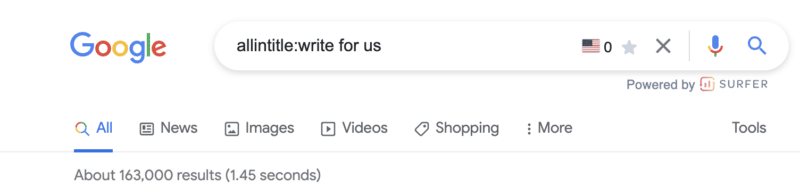
allintitle: command

Similar to the above variables, the allintitle: command further refines returned results to include all the words in the page’s title.

For example, the results that include all of the words “write for us” have been further refined from 27,200,000 to 163,000.

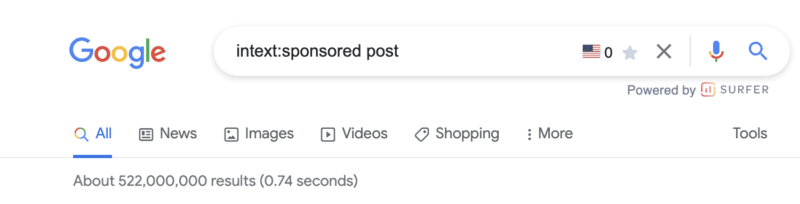
10. intext:

intext: command

Looking for a specific word or phrase somewhere in the content? The intext: operator enables you to locate terms that show up in any part of a website page, from the page title to page’s content. 

intext: command use case 

Personally, I use this command most often to find link building opportunities. In the example screenshot above, there are more than 522,000,000 pages with the terms “sponsored” or “post.“ 

The next advanced search operators will help us further refine these results.

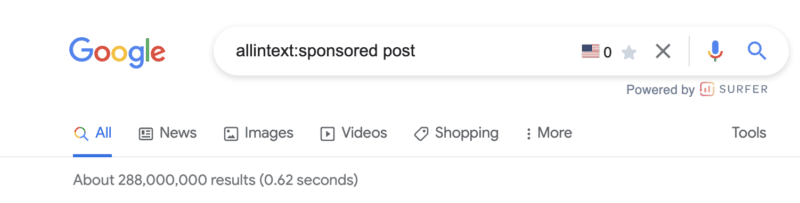
11. allintext:

allintext: command

This operator helps you to refine your search to only pages that include all of the terms you are searching for in the text of the page.

Modifying the operator from intext: to allintext: removes almost 200,000,000 results.

Note: This operator does not account for the proximity of the words on the page, only that they appear on the page. Said another way, the words may not be in a phrase or close to each other in a sentence.


Get the daily newsletter search marketers rely on.


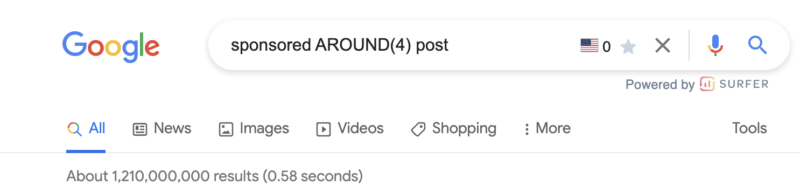
12. around(X)

around(X) command

The around(X) command will account for word proximity by limiting your results to pages that feature the searched words within ‘X’ words of one another. The maximum gap or distance between words is denoted by whatever number is included within the parentheses. 

around(x): command use case 

While this is one command I rarely use, it can be helpful when looking for quotes, sentences, or references that you don’t remember.

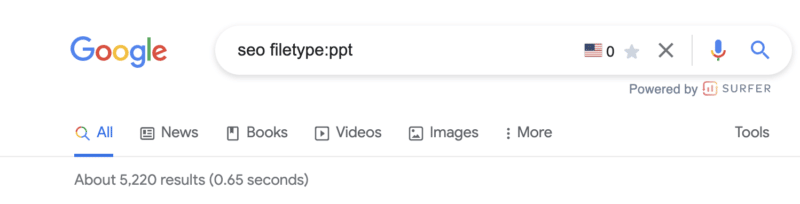
12. filetype:

filetype: search operator

When you use the filetype: search operator in conjunction with a keyword will limit returned results to certain file types that include the keyword. These file types include: 

  • SWF
  • PDF
  • PS
  • DWF
  • KML, KMZ
  • GPX
  • HWP
  • HTML
  • XLS, XLSX
  • PPT, PPTX
  • DOC, DOCX
  • ODP
  • ODS
  • ODT
  • RTF
  • SVG
  • TEXT
  • TXT, 
  • BAS
  • C, CC, CPP, CXX, H, HPP
  • CS
  • JAVA
  • PL
  • PY
  • WML, WAP
  • XML

Note: Using the ext: will return the same results.

filetype: command use case 

I love this search operator.

First, for content writers, this is an extremely powerful site command to improve “information gain” – something that should be discussed more in light of the helpful content update.

Hat tip to Steve Toth’s SEONotebook email newsletter for this awesome tip. He laid out this use case via the following:

First, it’s important to understand Google’s information gain patent.

Information gain scores state how much more information one source may bring to a person who has seen other sources on the same topic. Pages with higher information gain scores may be ranked higher than pages with lower information gain scores.

Here’s what Google’s patent has to say about it:

“…when a set of documents is identified that share a topic, many of the documents may include similar information.”

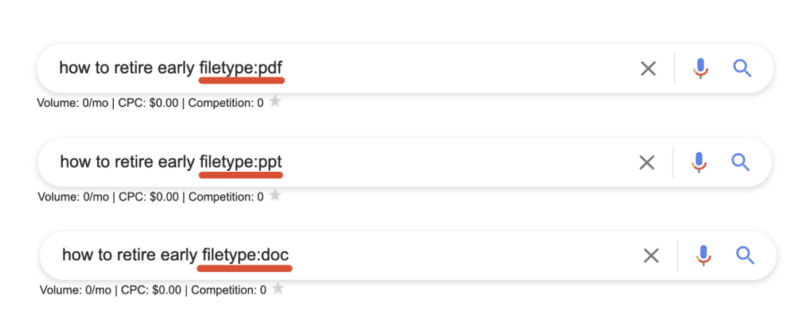
So let’s say there are 10 pages on Page 1 that all tell “how to retire early,” and all 10 articles on page one basically share the same tips. This presents a problem for Google since users wouldn’t want to read 10 blogs about the same thing. Google goes on to say:

“Implementations described herein relate to determining an information gain score for one or more documents of potential interest to the user and presenting information from one or more of those documents that are selected based on their respective information gain scores.”

Here are three ways we can source information and insights beyond the same Page 1 results everyone else is looking at to create their content:

By sourcing information that is buried within PDFs, Powerpoints, and Word docs we’re able to unearth new information that the rest of Page 1 isn’t talking about!

Open the results and look for topics or ideas missing from the article.

13. daterange:[XXXXX-XXXXX]

daterange: command

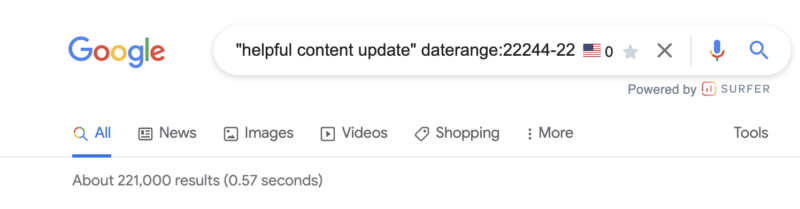
You may be feeling a little bit perplexed by the example in the screenshot above. 

The daterange: advanced search operator does display search results within a set number of dates that you specify. However, it utilizes the Julian date format which requires the year followed by the number of days since the beginning of the year.

To ensure you do not make any mistakes, I would advise using an online converter so you can be sure you will get the date format right.

daterange: command use case 

This can be useful to determine the volume of content published for a certain topic during a specific period. For example, in the screenshot above, there were 221,000 pieces of content published on the helpful content update from September 1, 2022 – September 21, 2022.

14. OR

OR command

This is one of the search operators you have probably used a few times without fully knowing what it does.

If you want to combine searches, simply add the capitalized OR between your search terms (keyword1 OR keyword2). Google will surface results that satisfy either the first search term OR the second.

Quick tip: If your caps lock is broken, the pipe (|) operator will provide identical results.       

OR: command use case 

This is probably most useful when doing research in which you need information on more than one item but not necessarily looking for results that include references to both.

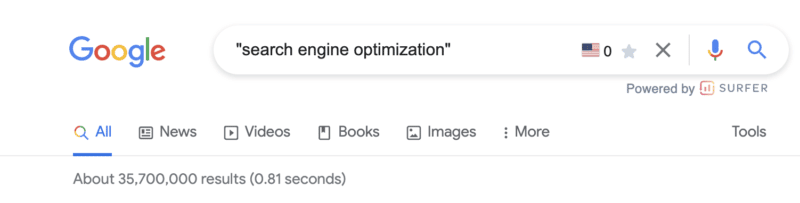
15. “keyword”

"keyword" command

When you utilize quotes during a Google search, you are basically limiting the search result to that exact match phrase. 

Google will return every webpage that has the specific phrase in its body copy, title, or description.

“keyword” command use case 

In addition to refining the results returned for a query, the " " search modifier is one of the most efficient ways of locating instances whereby your content has been duplicated. 

You can copy as much as an entire paragraph from your online content, paste it with quotation marks, and find out whether or not someone has pinched your work.

Of course, there are other ways you can find out if someone else has stolen your work, such as Copyscape. Nevertheless, this is certainly one of the quickest ways of getting to the root of the problem.

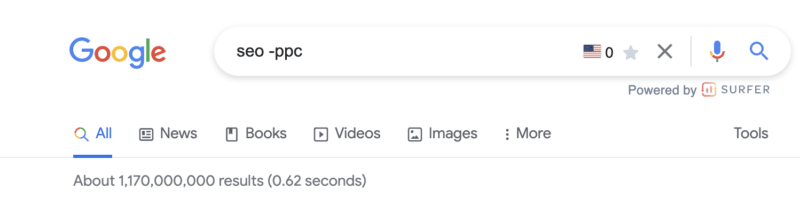
16. -keyword

-keyword command

The minus (-) sign is a simple tool you can use if you want to exclude a certain search term/topic from your results. 

In the above example, the results returned will be related to SEO but not PPC.

Pro tip: This command is not limited to a single exclusion. Layer on additional exclusions to filter down to the most specific results.

-keyword command use case 

This is beneficial if you are searching for something that has more than one meaning, and you want to exclude the other meaning.

You can also utilize it if you want to get rid of some branded search results. 

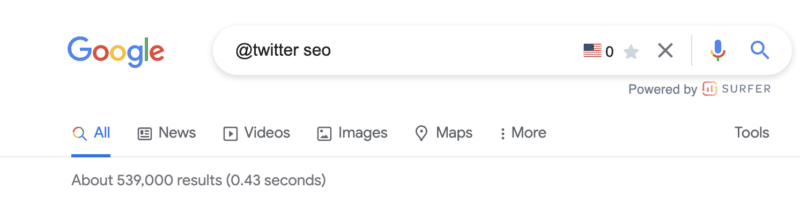
17. @ 

@ command

Looking for a specific result from social media? Adding the @ modifier to the front of your query will return social media-specific results.

Note: This is still listed on Google’s list of search refinements but does not appear to always work.

@ command use case 

This is most useful when searching for the official channels of a company or organization.

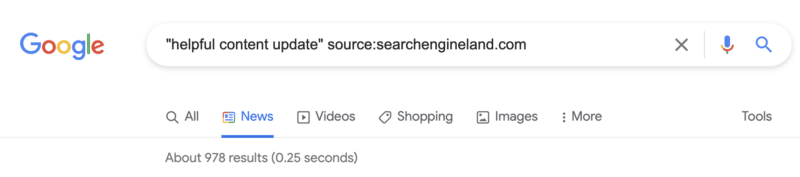
18. source:

source: command

The source: command enables you to search specific sources for a given topic in Google News.

source: command use case 

While it is limited to Google News, if you are looking for article sources or potential link partners who have written about a similar topic, this command can certainly come in handy. 

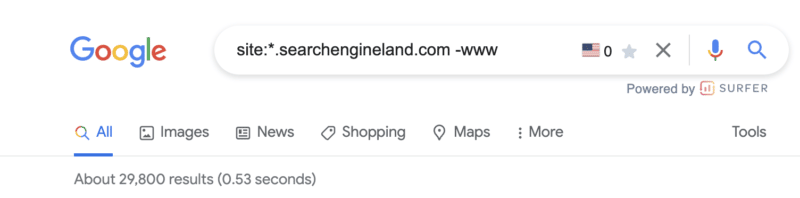
18. *

(*) wildcard operator

Should you wish to get more matches, you can utilize the asterisk (*) wildcard operator. 

If the wildcard is put in between terms, you will end up with all of the variations of the phrase. This makes it helpful in terms of finding phrases and quotes. 

* command use case 

Similar to the example above, this can be very useful in technical audits or maintenance of your own domain. However, it requires the combination of a handful of commands (more on that below). 

Simply add the * wildcard operator in front of the site: command and exclude any -www results.

Combining multiple search operators: Use cases

One of the best things about using Google search operators is that they can be combined for specific use cases. 

The sky is the limit when it comes to this, as you can easily combine any of the advanced Google search operators we have mentioned above.

This means you can efficiently locate official documentation, an original image, or the source of a quote for pretty much anything. 

Find backlink opportunities

It seems link building opportunities (or uncovering how your competitors are acquiring links) is a super common use case for Google search refinements. 

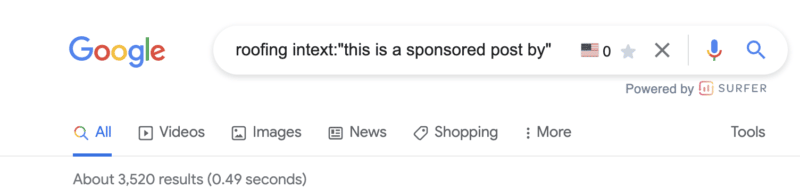
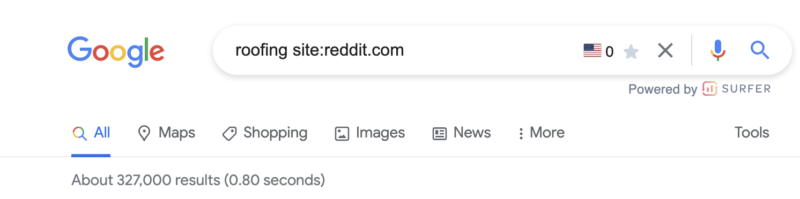
In the example above, if you have a roofing company, you now have 3,500+ potential targets that you know accept sponsored content. 

There are a handful of command combinations that will provide similar results:

  • [topic] sponsored AROUND(3) post
  • [topic] intitle:"sponsored post"
  • [topic] intext:"sponsored by"
  • [topic] intext:"sponsored post"

Not looking for sponsored posts? Not to worry. Give these Google search operators a try:

  • [topic] "write for us"
  • [topic] intitle:"write for us"
  • [topic] inurl:"write-for-us"
  • [topic] inurl:"write-for-us" intitle:"write for us"

Still not finding a list of solid outreach targets? Plug in some of these variations:

  • "guest contribution"
  • "guest post"
  • "write for me"
  • "become a contributor"
  • "guest post guidelines"

Find infographic submission opportunities

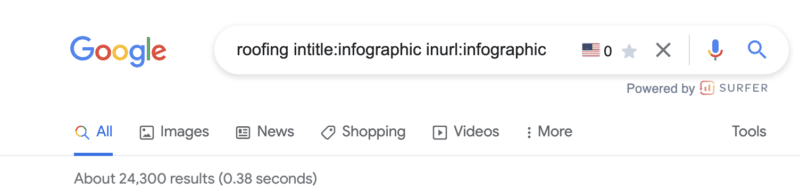
Find infographic opportunities

Infographics can be excellent visual assets to create for your website. However, their creation is only half of the task. You then need to make sure they are effectively distributed. 

If you use this advanced Google search operator, you may be able to locate websites that could be interested in featuring the infographic you have made.

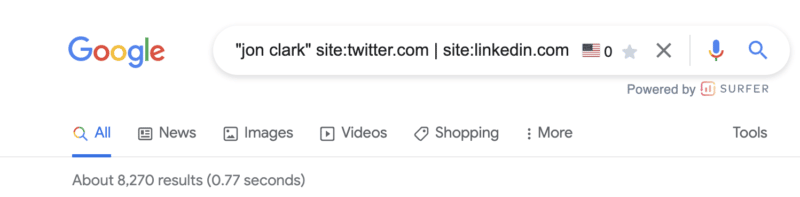
Find social profiles for outreach

Find social profiles for outreach

So, using the search operators above, you’ve built a solid list of outreach targets. 

What if their contact details aren’t listed on the site?

If you want to reach out to a certain person on social media, this is the best operator to use. It is also highly effective if you are trying to find the contact details of someone in general.

Discover indexation issues

Discover indexation issues

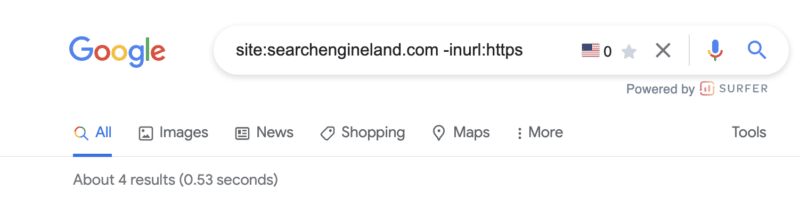
We talked about discovering subdomains that may have been inadvertently indexed using the site: and wildcard (*) command above. 

Similar to the screenshot above, another useful tactic is to utilize the site:, exclusion (-) and inurl: commands to discover non-secure URLs that may be floating around Google’s index.

For those working on sites with a blog, I also find the combination of site: and inurl: commands infinitely valuable in diagnosing common indexing issues with tag pages. 

Just drop the following command string into Google to see for yourself: site:yoursite.com inurl:tag.

Join social conversations

Join social conversations

This is a great advanced Google Search operator to use if you want to locate relevant forum and community discussion topics. 

Q&A websites, like Quora, as well as online communities, subreddits, and relevant forums, are ideal for content promotion. 

You can easily locate questions being asked in your niche and relevant discussions. Joining in is a great way of building your online presence. 

Some of the best options to consider here include:

  • [topic] site:quora.com intitle:topic
  • [topic] site:reddit.com intitle:topic
  • [topic] site:reddit.com | site:quora.com
  • [topic] site:reddit.com | site:quora.com inurl:topic intitle:topic

Discover internal linking opportunities

Discover internal linking opportunities

I utilize search commands to discover internal linking opportunities seemingly every day.

The concepts are simple.

Prevent duplicated topics. Before you get started, the below command will show you if and how many similar pages have already been published. 

[topic] site:yoursite.com

If you see a headline that is similar, it may be worth revisiting that older post or looking for an alternative topic. 

Find existing references. While you’re building your content, adding internal links (where it makes sense) is a smart SEO strategy. Using the below command, search the general topics being covered and add internal links to those existing pages.

site:yoursite.com intext:topic

In the example above, I see six potential internal links to add to this post.

Add internal links to your new post. Once your post is published, adding internal links from older content to your new post will aid in indexation and transfer some existing authority.

site:yoursite.com intext:topic -site:yoursite.com/your-published-url

Find Google Drive docs

Find Google Drive docs

This is a bit of a sneaky one but, if nothing else, it is useful to make sure you don’t have any private information stored in a Google doc floating around the interwebs. 

Google docs (documents, spreadsheets, presentations, etc) all live off of docs.google.com. 

Using the site:docs.google.com command, we can then filter down indexed Google Docs in unlimited ways. 

Some examples:

  • site:docs.google.com "your brand name"
  • site:docs.google.com "your competitors brand name"
  • site:docs.google.com "your keyword"
  • site:docs.google.com "author name"

Want to look for a specific document type?

  • site:docs.google.com/spreadsheets
  • site:docs.google.com/document
  • site:docs.google.com/forms
  • site:docs.google.com/presentation

Give it a try. You might be (very) surprised by what you’ll find!

Making the most of advanced Google search operators 

As you can see, there are many different types of advanced Google search operators for you to make the most of. 

From technical SEO audits to content research, search operators really can help to enhance your online marketing efforts in several ways.


Opinions expressed in this article are those of the guest author and not necessarily Search Engine Land. Staff authors are listed here.


Related Stories

New on Search Engine Land

About The Author

Jon Clark is a proud #girldad and the Managing Partner at Moving Traffic Media, a boutique digital marketing agency in New York. He writes regularly, providing thought leadership on topics related to SEO, PPC, and Social Media. In his downtime, he enjoys hanging out at coffee shops and documenting his travels on Instagram.

https://searchengineland.com/advanced-google-search-operators-388355


25 tips to optimize your content for people and search engines

Google’s helpful content update has finished rolling out, and while it didn’t create the impact many anticipated, it’s certainly turned our attention to reviewing and improving content.

What we have determined is that Google is making more steps toward serving content written for people, by people. With this in mind, optimizing content for both people and search engines should be possible.

Here are my top tips for enhancing your content for better search results and happy readers. 

1. Review the readability

Assessing readability is one of my biggest tips for optimizing online content.

Online, we read and take in information differently than in print. Short, simple sentences are easier for us to digest. 

In the U.S., the average reading age is 12-14  years old.

In the U.K., guidelines encourage us to pitch our writing to something a 9-year-old could understand. The U.K.’s Office for National Statistics recommends writing in a way that’s easy to understand for all users.

Putting this into practice is harder than it sounds and is often overlooked. 

Search engines love “readable” content too. They use natural language processing (NLP) to process language based on linguistic rules to understand the relationships between words.

The intended meaning can easily be lost if these relationships are too complex.

For example, this sentence has a readability score of 11 (OK) on the Hemingway Editor:

Google NLP tool

And Google’s NLP tool identifies “sales funnel” and “target audience” as the most salient entities. But this passage is intended to focus on ecommerce PPC management. 

I’ll simplify it to get a readability score of 7 (Good) and run the updated version through Google’s NLP tool:

Google NLP tool

Not only is this easier to follow, but it’s also more relevant to the topic intended. 

2. Keep language simple, precise and concise

Following on from readability, it’s best to keep your language as accurate and succinct as possible.

Remove any unnecessary or complex words.

Do your best to write things in their simplest form while maintaining pace and rhythm to keep things interesting. 

This will help readers to follow your content and help search engines to process it. 

3. Use synonyms and close variants

Repeating the same terms or phrases isn’t a good idea. It creates content that’s laborious to read, and it can appear untrustworthy to a discerning audience.  

Optimize your content by upgrading recurrent words to their equivalent alternatives. This will make a much more interesting and engaging reading experience. 

It will also provide search engines with more contextual information and avoid the temptation to overuse certain keywords that could result in poor search performance.

The use of synonyms solidifies the topics you’re writing about by providing lots of different points of reference. It can give you wider ranking opportunities, too. 

For example, Search Engine Land’s guide “What is PPC?” ranks for a whole host of different synonyms and close variants of PPC, like paid search, search engine marketing, paid search marketing, paid search advertising, pay-per-click search, and more.

Search Engine Land's guide "What is PPC?" - Keyword rankings
Data from Sistrix

Every piece of content is a collection of entities, and both search engines and people understand the relationships between many entities.

People have learned over time, for example, that Buckingham Palace is a royal residence located in London, England:

Buckingham Palace

So it is connected to entities like London (location), the late Queen Elizabeth II (person), and certain events, to name just a few. 

While some entity relationships like these are well-defined and apparent, others are more subtle. This is why it’s important to research entity associations and consider the connections you’re making within your content. 

Making the right associations helps build the bigger picture and give context to your topic. This is useful for your readers and search engines. If you wrote about Buckingham Palace but failed to mention the Royal Family, your content would be lacking. 

But entity relationships help to clarify meaning, too. If you’re writing content about the historical figure Anne Hathaway, related entities like William Shakespeare and Stratford Upon Avon provide context. A piece of content about Anne Hathaway, the modern-day movie star, would likely connect entities like films, acting, Academy Awards and New York City.

So, when you include an array of relevant entities within your content, it improves the overall piece. It helps to give search engines wider reference points to improve their confidence in what you’re talking about, and it shows your readers that you have thoroughly researched a topic and provided them with a valuable resource. 

5. Structure your content

Make sure your content follows a logical, ordered structure. This makes it easier for readers to digest and for search engines to interpret. 

For example, this Ideal Home article about how to load a dishwasher is structured simply and effectively. It covers general tips on getting the best results, followed by considering the top and bottom racks.  

Ideal Home article on how to load a dishwasher.

Other, competing articles cover a muddle of tips. While useful, their structure isn’t as logical and easy to follow. 

6. Use headings

An effective heading structure is vital for people and search engines alike.

Clear, descriptive headings help busy readers scan your text more quickly or jump to the areas they’re interested in. 

Correctly structured headings are also essential in accessibility. They are used by assistive technology, so good headings allow users of screen readers to navigate effectively and understand your content as intended.

Just like people, search engines love headings, too.

Clear H1, H2 and lower level headings help search engines to understand what your page is about, what each paragraph covers, which topics are important and how they relate to each other.    

Mordy Oberstein recently reported some really interesting findings about how improving ambiguous headings actually helped more of his content to get indexed. 

This really demonstrates how important clear, informative headings are to content success. 

7. Use formatting correctly

The way you format content helps to convey the meaning behind it.

For example, a numbered list might be a step-by-step process or a ranking system. Bullet points usually indicate a list of items with equal importance. Bold or italic text helps items stand out and gives them emphasis. 

You’re reading this article now, and I promised you 25 tips. So I labeled these 1-25 to reinforce the message in the title. 

The right formatting will help people to read your content in the way you have intended. It will also make it easier to scan and process. But it helps search engines too, as they also recognize these formats and their common meanings. 

For example, some formatting will suggest a classification like an address. Other items like tables imply certain relationships. Charts can show averages and ranges. 

If I’m interested in the weather in London throughout the year (perhaps I’m planning a trip there) charts and tables convey this information more effectively than text:

London annual weather averages
Screenshot from Holiday Weather

So the formatting here helps to support the message. It creates a better resource for people and search engines by configuring elements most effectively.


Get the daily newsletter search marketers rely on.


If you’re producing long-form content, adding a contents section with jump links to each main section can be a helpful optimization.

This will help readers move between sections easily, accessing the information they need. It improves user experience and makes your content more digestible. 

From an SEO perspective, these unique internal links help clarify the focus of certain passages, which can boost the passage-based ranking of long-form articles. 

In the 2020 article How AI is powering a more helpful Google, Prabhakar Raghavan explained:

“Very specific searches can be the hardest to get right, since sometimes the single sentence that answers your question might be buried deep in a web page. We’ve recently made a breakthrough in ranking and are now able to better understand the relevancy of specific passages. By understanding passages in addition to the relevancy of the overall page, we can find that needle-in-a-haystack information you’re looking for.”

So search engines are able to identify useful passages and match them with queries, but it certainly doesn’t hurt to point them in the right direction with a clear contents section. 

9. Choose usefulness over word count

When you’re writing or optimizing content, aim to cover what is useful to your users rather than hitting a word count. 

Most people can see right through content that’s written to hit a word count. And search engines can, too. The content becomes empty and lacks meaning.

Google’s helpful content guidelines ask:

“Are you writing to a particular word count because you’ve heard or read that Google has a preferred word count? (No, we don’t).”

So clearly, they have their eye on this, too. 

If you focus on providing enough depth to satisfy your target audience, they will genuinely find it useful. You’ll avoid empty words and information that’s there just for the sake of it. 

10. Do your search term research

Great content should always be based on research. Often, we think we know what our target audience wants, but as content producers, we might have a skewed perspective.

This is where search query data comes in. It’s a treasure trove of information about what people are actually looking for. While it’s important to use this carefully, it shouldn’t be disregarded. 

Awareness of how people search for the topics we’re writing about is essential for content optimization. Readers will find that your content is more aligned with what they searched for to discover your content, and search engines will serve your content in the right context. 

Here’s an example of a piece of content in a very specialist niche that was optimized based on search data and republished on a new URL:

Niche article - SEO performance
Data from Sistrix

Visibility has increased considerably, and Google Analytics shows a lower exit rate and bounce rate for the new page in comparison to the previous version. This optimized content is clearly more effective for discovery via search and readers alike. 

11. Identify an appropriate scope

Consider where your content starts and ends. Should it be combined with other resources to make a better and more useful asset? Or should it be broken down into bitesize chunks?

When you’re optimizing content, it’s better for both people and search engines if you consider the scope. Something very short might be considered thin content from a search perspective and lacking in detail for your readers.

On the flip side, an extremely long resource might be easier to digest in parts or sections that interlink. Breaking it down could create a series of more focused pieces of content that perform better in search because they’re more defined. 

For example, Search Engine Land’s guide to SEO covers high-level information and includes links to more in-depth chapters about sub-topics. Trying to cover everything about what SEO is in one resource would be too broad a scope.   

12. Give direct answers to questions

If you ask a question in your content, provide a direct answer. Don’t equivocate or waffle.

Use the expected units or classifications in your answer. Think about the answer you’d like to see!

For example, this passage directly answers a question simply and effectively:

what is LiDAR surveying featured snippet

(Disclosure: GeoSLAM is a current client of mine.)

And this one gives a straightforward answer using the expected temperature measures of Celsius and Fahrenheit:

what temperature should i set my fridge featured image

Most people are using search engines to find fast answers to their questions. They don’t want to read a debate. They want to access something definitive and unambiguous. 

13. Use images to improve understanding 

People are visual learners by nature, so consider updating or increasing your images to optimize your content. 

Great visuals improve your search performance too. They can boost click-through rate, appear in image search and increase your real estate in SERPs. 

The key is to make sure your imagery is really adding value to your content. 

  • Does it help to illustrate something difficult to understand? 
  • Does it make a key point more memorable or emotive? 

If so, it’s likely to be enriching your message. 

For example, this technical piece about LiDAR technology aids understanding with simple diagrams:

LiDAR articlewith simple diagrams

14. Add videos to improve the experience

In 2020, over 3 billion internet users were consuming online video content. This is expected to reach 3.5 billion by next year based on Statista’s figures. So, where videos are suitable for supporting or enhancing your content, they’re well worth considering as part of your optimization plan. 

Many people prefer watching rather than reading, so video content improves their overall experience.

You’ll only get real search benefits if you produce original video content yourself. If your budget doesn’t stretch this far, embedding useful video content from other producers is still an option.

Overall, creating a better content resource is the aim, which could result in secondary benefits like more shares and backlinks. 

When you’re optimizing content, make sure you consider internal links.

Does your content link to other useful internal resources? And do other internal pages link to it?

Improving internal linking enhances the experience for readers as it allows them to find out more about a topic of interest. It’s also critical for search engines, helping with content discovery, importance and topical relationships. 

Earlier this year, Google’s John Mueller explained:

  • “It’s something where internal linking is super critical for SEO. I think it’s one of the biggest things that you can do on a website to kind of guide Google and guide visitors to the pages that you think are important. And what you think is important is totally up to you. You can decide to make things important where you earn the most money or you can make things important where you’re the strongest competitor or maybe you’re the weakest competitor. With internal linking you can really kind of focus things on those directions and those parts of your site.”

Adding external links to your content is a great way to enrich and optimize.

It might seem counterintuitive at first. Why should you send your readers to another website?

But there are multiple benefits if you consider this approach thoughtfully.

People will find your content more trustworthy and useful if you back up claims, statistics or quotes with an authoritative external source. They also add value by giving your audience a fast route to access further information.

But these need regular checking to make sure you’re still sending your readers to the most relevant source. 

Clear, relevant sourcing also demonstrates expertise in your field, something that search engines value. They provide context that helps solidify the relationship between your content on a certain topic and other expert or authority sites that also cover it.

17. Give examples

A great tip for enhancing your content is to provide real examples. Are there areas that could be explained better by showing how something works rather than trying to explain it in words? 

You’ll notice I’ve provided lots of examples throughout this article to help you to follow my thinking. They reinforce my points by showing you a representation of the advice in action, making it easier to apply to your own content. 

Showing a representation of your idea in action adds credibility, and makes it more useful and engaging. 

18. Ask the experts

If you’ve produced thought pieces or content that answer a qualitative question, you might be able to upgrade it by asking some experts in the field.

Combining expert quotes that are clearly referenced will enhance E-A-T signals for search engines by demonstrating that you have qualified subject matter experts involved. Readers will get the benefit of a more balanced argument, as well as the recognition of industry expertise. 

You might even benefit from attracting eternal backlinks or social activity from the experts involved. 

This post on Google penalties from Ahrefs is a great example of reaching out to qualified experts to add value:

Ahrefs article on Google penalties

It’s gained backlinks from 212 linking domains and just look at the recent uptick in visibility after September’s core update (marker H). 

Ahrefs article SEO performance
Data from Sistrix

19. Find a new angle

Add value to your content by making sure you approach a given topic differently. If you’re just rewriting something that has been covered many times before, you’re unlikely to deliver anything insightful or meaningful. 

Google’s helpful content guidelines state that you should avoid “mainly summarizing what others have to say without adding much value.”

So if you have some older content to optimize, perhaps you could approach it from a different perspective or gain some additional insight into the topic.

You might do original research, test something out or ask an expert in the field for additional commentary as mentioned above. 

20. Include data

When reviewing your content, consider whether you have made claims that could be backed up with data. Providing hard facts builds trust and shows readers that you have really researched your topic.

From a search perspective, adding relevant data might also provide external linking opportunities. You can reference useful data published on authority sites in your niche. 

If you are including your own unique data, there’s a strong chance that others writing on a topic will link to your resource to back up their own claims in the future. 

For example, this study that benchmarks over 2,000 digital PR pieces gained several relevant backlinks from industry websites in a short time due to the unique, useful and interesting data provided. 

21. Keep it up to date

Content optimization never ends, and it’s essential to keep your assets current. By carrying out a regular review, you can avoid people accessing outdated content that could provide obsolete advice. 

Search engines use freshness as a ranking factor, so they value content that’s well maintained and kept up to date. Studies by Botify have confirmed this, although it’s a complex issue. 

One ecommerce site I worked on was experiencing a downturn in traffic for a key page, and through analysis, I noticed that “prices start from” was mentioned in the copy, but the minimum price had changed. After correcting the price, performance returned to its previous levels. 

22. Keep it relevant

Make sure the topic of your content is highly relevant to your area of expertise.

People reading content that’s detached from your main topic area may find this confusing, unhelpful or might fail to trust it.

Search engines are working toward a better user experience, so they mirror this. I’ve carried out many content audits over recent months on different types of websites.

Assessing a site’s content as a whole usually reveals a lot, but one of the predominant findings has usually been that relevant content performs much better than unrelated content. 

There are several reasons for this. In most cases, the content is likely to be better quality if subject matter experts create it. But the relationships between pages matter, too.

Content clustering displays a breadth of knowledge about a topic that interlinks, which can help you build up topical authority over time. I covered this in more detail in my recent article on how to use relationships in SEO. 

23. Take your time

Considering the implications of content optimization on search and users alike takes time.

The time taken to write a blog post is just over 4 hours on average, and that has increased by 67% since 2014, a large-scale study by Orbit Media shows.

This just goes to show that the quality, level of detail and expertise involved are only increasing. Older content may require extra time to optimize and bring up to current standards.

If you want to do a thorough job, allow yourself the time you need to develop your content and strengthen it. 

24. Analyze the results

If you’re optimizing content, use results to guide you. Data will provide valuable information about what’s working in search and how people engage with your content. You should analyze both. 

This page, which was improved using data from Google Search Console and Google Analytics, has performed much better after optimization. Total impressions have increased by 359%, and clicks have increased by 433%. 

GSC data
Data from Google Search Console

Google Analytics shows that the average time on page has increased, indicating that the content refresh is not only bringing in more traffic but is engaging readers.  

25. Check and check again

Spell check, grammar check and fact check.

Maybe you missed something the first time and have published content with inaccuracies. Any errors will erode trust with your readers. They could also hamper your search performance.

I find it really valuable to have a proofing process in place within my team. It’s much easier to spot someone else’s errors and review content from a pragmatic perspective if you haven’t written it yourself. 

Balance humanity and SEO

It’s never been more important to get the right balance between enhancing content for search engines and people.

An ideal mix is a user-first approach with a good grounding in SEO.

Neither should be ignored when you’re optimizing content.

Search engines are crucial for driving an audience to your content, but you don’t want your readers to be disappointed when they get there.

Keep both in mind, and search engines and your readers can work hand in hand to deliver exceptional results. 


Opinions expressed in this article are those of the guest author and not necessarily Search Engine Land. Staff authors are listed here.


Related Stories

New on Search Engine Land

About The Author

Claire Brain is the Head of Copywriting for the SEO team at Boom Online Marketing. Claire has 16 years of experience in the digital marketing industry, specializing in SEO for 7 years. She manages both B2B and B2C SEO client accounts and leads the SEO copywriting team.

https://searchengineland.com/tips-optimize-content-people-search-engines-388271


Want to Increase Your Conversion Rates? This Is the Biggest Threat to Your Success.

Opinions expressed by Entrepreneur contributors are their own.

Businesses with websites need conversions to thrive. A is any meaningful action that a user takes that eventually leads to the possibility of generating revenue; it could mean purchasing a product, calling your business or even just watching a video. In any case, getting more conversions will lead to higher revenue for your and eventually, greater profitability.

That’s why conversion rate optimization (CRO) is so important. Conversion optimization is the process of tweaking your copy, your design and other onsite elements to maximize the chances of winning a conversion whenever a user is exploring your page.

Although many conversion rate optimizers are worried about following the latest trends, avoiding the and maintaining consistency in existing , the biggest problem is lurking under the surface.

Related: Should You Prioritize Traffic or Conversions on a New Website?

The biggest problem for most conversion optimizers is complacency.

Defining complacency

In this context, complacency simply means accepting your conversion rate for what it is. Rather than pushing for a higher conversion rate or trying out new things to see how they work, you’re content to sit back and let your existing engine continue working as it has.

Why complacency is a problem

Why is this such a problem?

  • Accepting “decent” conversion rates. If you’re already seeing decent conversion rates for your brand, you may not see complacency as much of an issue. For example, let’s say when you first launched your business, you saw a conversion rate of less than 1%. After a few months of experimentation and the incorporation of a few new strategies, you’ve managed to increase that conversion rate to 2.5%. That’s a big increase and something to be happy about. But too often, marketers see this as a reason to functionally stop improving; they focus on maintaining this conversion rate, rather than pushing it even higher. If it’s possible to get to 3%, or 5%, or something even greater, you owe it to your brand to try.
  • Avoiding experimentation. Complacency also typically means avoiding experimentation. You might continue to run new AB tests, seeing how certain headlines perform or tinkering with little changes like alterations in color or font. But you won’t spend much time or energy on the bigger, more robust experiments that can introduce you to game-changing ideas.
  • Ignoring new strategies and innovation. Resting on your laurels also means you’ll deliberately ignore the emergence of new strategies and innovations. If a guru announces a new experiment that showcases a breakthrough new tactic, you’re not going to see it, because you’re not actively looking for it. Accordingly, you’re going to miss out on some of the latest new trends.
  • Inefficient practices. It’s not just about conversion rate optimization. It’s also about the efficiency of your habits and workflows as they relate to your conversion rate. If you’re too complacent with the way things are, you’ll never learn to work more efficiently and you’ll miss out on opportunities to reduce costs.

How to overcome complacency

So what can you do to overcome complacency in your business’s approach to conversions?

  • Study the competition and industry averages. One of the best things you can do is break out of your bubble by studying your competition and overall industry averages. Different industries tend to see different conversion rates, and yours may be higher or lower than you think. If you notice your competitors getting a much higher conversion rate than you are, it’s a sign you’re in need of a massive overhaul.
  • Experiment (beyond AB tests). Keep experimenting constantly. AB tests are important, and they’re relatively easy to implement and observe. However, you’ll need to think beyond AB tests if you want to achieve your true potential. That means going back to first principles thinking and challenging some of your biggest assumptions.
  • Hire and reward creative thinkers. Build a team of creative thinkers, and encourage people to think creatively by rewarding them for doing so. Ideally, all your marketers will be thinking like innovative entrepreneurs. People who consistently think outside the box and come up with new ideas will keep you moving forward.
  • Keep learning more about your audience. Get to know your audience as much as you can. Use surveys, demographic research and onsite behavioral patterns to inform and feed your strategy. The better you understand how your users think and behave, the better you’ll be able to design calls to action (CTAs) that work for them specifically.

Related: What Makes Persuasive Web Copy Work?

Your conversion rate is arguably the most important variable for your online company’s profitability and growth. Accordingly, you can’t afford to grow complacent with it. Keep challenging your baseline assumptions and your existing workflows as you continue optimizing your website and content for higher conversion rates — and never fall into the trap of feeling “good enough.”

https://www.entrepreneur.com/article/428958


5 massive SEO and content shifts you need to master right now

Google’s focus on optimizing for the user never goes away, which is why its continual updates are always targeted at both SEO and content best practices. 

These can range from core algorithmic changes and new features and products. For example, this can include SERP format changes and new ranking signals to avoid low-quality content to understand consumer behavior better. With Google’s focus on user experience, it is no surprise that they have been rolling out updates to improve search and site experiences.

Some of the most recent changes were aimed at improving page speed and Core Web Vitals, as well as product reviews which shows how much importance Google places upon providing quality content. The helpful content update (HCU) focuses on content for human users, rather than just for ranking (over-optimizing) and not really giving people anything useful when looking for information!

Some marketers have struggled to keep up with and adapt to these changes. Meanwhile, other brands are thriving.

Why?

Because they have learned to stay ahead of Google’s ever-evolving algorithms by focusing on quality content.

Savvy marketers know that they must have similar goals to Google. That means providing content that resonates, engages and converts – wherever, whenever and however consumers discover it.

It’s essential to not just look at where Google is today but where Google is heading over the next six months, next year and beyond. If you can keep pace with these momentous shifts, you can stay ahead of Google and your competition to dominate online in your industry.

The best way to stay ahead is to focus your efforts on content and optimization for the user, not the algorithm.

It’s time to start thinking forward – and fast! Below are five SEO shifts you need to master as we head into the latter part of this year.

1. From SEO just to rank to ‘SEO for content convergence and performance’

Just as content alone isn’t enough to guarantee SEO success, SEO alone isn’t enough to ensure that people will find and engage with your content. 

As Danny Goodwin highlights in a recent article, content needs to:

  • Be created for a specific audience.
  • Feature expertise.
  • Be trustworthy and credible.
  • Meet the searcher’s want(s) or need(s).

The old days of irrelevant content and over-optimizing just for rank means that good SEO and content marketers have a unique opportunity. Those who use good SEO practices and align better with their content partners and writers stand to win in the long term.

Now, more than ever, data can help marketers understand consumer intent to create quality content that aligns with the customer journey and satisfy the human user.

Here’s how marketers can master this shift.

Ensure your content creation is based on intent-led data

Content marketing without data lacks purpose. Data is becoming a key source of business and content intelligence.

Utilize SEO data to understand user intent, define correct audiences, and provide relevant topics people want to read and engage with.

Track and measure these to gain the insights you need to create meaningful content that people want to consume and improve future content marketing efforts.

Foster search, social and content synergy

In combination, organic search, social and content help brands achieve their goals and objectives. Creating high-quality content with SEO in mind from the beginning boosts search visibility.

That great content can then be further amplified via social media, creating demand you can harvest later via search.

Maximize your search engine results page (SERP) footprint

Create and optimize high-ROI content like articles and videos to help people (by answering important or popular questions or providing practical information) or capitalize on trendy topics.

Then help your brand further stand out in the SERPs by winning real estate with featured snippets, site links, related questions, images, videos and tweets.

2. From mobile-first to ‘the need for mobile speed’

For years, Google told marketers about the coming shift to mobile-first – and it finally arrived. Today, optimizing for mobile search, devices, and usability is no longer optional. It’s mandatory.

This is especially true with Core Web Vitals, where the initial focus was on mobile rather than desktop. 

While many brands have become mobile-ready, many forget that mobile speed matters the most. Google has begun to factor mobile loading times into its ranking algorithm, which means increasing site speed can help your website gain in the SERPs.

Here’s how marketers can master this shift.

Make your mobile SEO fast and furious

In addition to being attractive and easy to navigate, mobile websites must be fast. About 53% of mobile users leave sites that take more than three seconds to load, according to Google research.

Therefore, following technical mobile SEO best practices (e.g., image optimization, redirects, JavaScript, and CSS) is a necessary barrier to entry in today’s digital world.

Consider contextual mobile content

Focus on creating content that mobile users want and will find valuable. Typically, mobile users are in research mode – searching for information they need or need some inspiration.

Make sure your brand is there and influences that decision when they’re ready to convert, which is more likely to be on a desktop or in-store than on a smartphone.

Design for mobile

CDNs can be a great way to make your media load faster.

One way of doing this is by consulting Google’s latest developer documentation on image optimization and adhering to Web Content Accessibility Guidelines (WCAG).

Working with front-end developers ensures that lightweight crafted HTML5/CSS will help you stay within industry standards while focusing primarily on “is the user getting what they came for.” Ensure your design works well enough so as not to hinder their experience.


Get the daily newsletter search marketers rely on.


The hyperlocal opportunity has never been greater for marketers. Hyperlocal targeting lets you reach people based on their location. This is an excellent way for brands to capitalize on “near me” searches and “I-want-to-go” micro-moments and become hyper-relevant and valuable.

It’s worth noting that the COVID-19 pandemic caused many shoppers to choose between online shopping vs. in-store. There’s been a steady increase of people buying from websites on their phones with just one click, according to a Digital Commerce 360 ecommerce study. 

Here’s how marketers can master this shift.

Make sure critical contact information that people search for is prominent or easy to find. This includes name, address, phone, hours and directions.

Hyperlocal optimization = hyper important

Google’s personalized hyperlocal results give more visibility to smaller geographic locations.

Optimize your Google Business Profile, create localized content and landing pages, use local business Schema markup and monitor the performance of your local keyword rankings.

Build on the intersection of local and mobile

People who do local searches on smartphones have higher intent.

Optimizing for local also means optimizing for users who are on the go. These people have different needs and expectations than those doing local searches on other devices.

Understand and adapt

Some people still prefer visiting brick-and-mortar stores when they need something.

However, most consumers now search for products first through Google or other platforms before making purchases at physical locations as well. Monitor how these trends change over time by tracking ranking fluctuations across industries. 

4. From text to voice to ‘multiple search entry points’

To be successful in today’s competitive market, marketers need to build comprehensive strategies that drive interactions at every search entry point. This includes TV sets and smartphones and extends to IoT devices like smart plugs or lightbulbs. 

As marketers collect this data, we become a virtual user group, gathering information and understanding where what and why people search. 

Here’s how marketers can master this shift.

Understand the customer experience

From product development, customer acquisition, and sales through to service, post-sales support, and loyalty, consumers are searching at every stage to find just what they need at any particular moment.

Search is a window into the user experience every step of the way, so utilize it. 

Ensure consumers have an enjoyable experience from start to finish

You must provide them with what they desire: seamless experiences across all channels without any unnecessary hassle or hindrance. 

Get smart about intelligent agents

Many voice searches happen at home, in the car, or on the go, resulting in a more connected world. These intelligent agents use semantics, search history, and user interests and behaviors to provide the best results.

So, make sure content is aligned with the intent and interests of customers at the right moment of the decision journey. Be the best answer.

5. From data to machine learning to ‘intelligent automation’

Google relies on machine learning, in the form of RankBrain, MUM, and its core technologies, to make sense of the massive amounts of data and deliver the best possible search results for users.

We know that the pandemic helped accelerate every organization’s journey to digital transformation. The next step in that process is evolution and who can progress with ease, speed and efficiency. 

As marketers, we, too, must turn to data science and machine learning to understand our audience’s intent, interests, and behavior so we can deliver and personalize the content they want.

Here’s how marketers can master this shift.

View data as a source of truth

Martech stacks are being built around data integrations and performance because we simply have too much data and not enough analysts or hours in the day to make sense of it all.

To capitalize on demand, spot patterns, and stay ahead of the competition, marketers need to go beyond the “what” of data to understand the “when” and “why” of analytics.

Utilize AI and machine learning

Machine learning helps marketers spend less time analyzing data and more time creating content that will engage and influence prospects and customers.

Let AI and machine learning deliver actionable insights about your audience and content performance. Do not let it write content for you. 

Define metrics and measurement

Data allows marketers to make better and more accurate decisions more quickly. Define the metrics that matter to your brand, and monitor your search and content data.

This will allow you to track your progress, iterate and improve your content production and organic search optimization for greater visibility and a greater share of voice.

Conclusion

SEO and data are essential for a successful integrated digital strategy with tangible ROI.

By understanding the five points above and consistently measuring your results, you will demonstrate that creating compelling, engaging, thoughtful content is the path to revenue and genuinely worth the investment.

SEO plays a vital role in providing insights, optimizing and measuring content – content has become the cornerstone of any good SEO campaign. 


Opinions expressed in this article are those of the guest author and not necessarily Search Engine Land. Staff authors are listed here.


Related Stories

New on Search Engine Land

About The Author

Jim Yu is the founder and CEO of BrightEdge, the leading enterprise content performance platform. He combines in-depth expertise in developing and marketing large on-demand software platforms with hands-on experience in advanced search, content and digital marketing practices.

https://searchengineland.com/5-massive-seo-content-shifts-need-master-right-now-274647


Technical SEO testing: How Googlebot handles iframes

Earlier this year at SMX Advanced, I presented results from our Peak Ace test lab. These tests shed some light on several technical implementation points and how Googlebot would deal with them. 

One of my favorite tests examined Google’s indexing of iFramed URLs and their content. In my SMX Advanced presentation, I touched on various scenarios that may lead Google to index the content inside an iFrame, while “assigning” that content to its parent URL.

iFrame content will be attributed to its parent URL post-render.

The parent URL can, in some instances, rank for content that only exists in the iFramed URL and not in the parent URL.

Post-render, the parent page can now be found for content within the iFrame.

Naturally, this excited people – and all sorts of follow-up questions arose. Here are a few of them with my answers.

In the iFrame test, was the iFramed content coming from the same domain or a different one? 

My example showed two URLs that live on the same domain: domain.com/test.html would iFrame domain.com/tobeframedA.html, so that test.html could rank for content that only exists in tobeframedA.html. 

The same also works for externaldomain.com/tobeframedB.html – which can still cause test.html to rank for content only present in tobeframedB.html, as well as for iFrames residing on subdomains. We tested every combination we could think of and concluded that it made no difference where the iFrame content was hosted.

If you want to prevent someone from loading (and ranking for) your content in an iFrame, it would be a good idea to look into the X-Frame-Options Header. This indicates whether a browser should be allowed to render a page in an iFrame. 

If we were to use iFrames with a no-indexed content page, would the parent page still rank for the listed content with the intent to improve page speed?

As soon as the iFramed URL contains a meta robots noindex directive, the parent URL won’t be able to rank for the content from the iFramed URL.

iFramed URL containing meta robots noindex directive.

The same is true if you iFrame a URL that would be served with an X-Robots noindex header directive or is actively blocked using robots.txt.

As far as page speed is concerned, iFrames support the loading="lazy" attribute, which would defer offscreen iFrames from being loaded until a user scrolls near them. This is an elegant solution for speeding up loading times for URLs that depend on iFramed content.

Does Google give full value to semi-hidden content (content that typically comes after ‘Read more’)?

There doesn’t seem to be too much love for using “Read more” functionality within the ranks of Google. John Mueller went on record a couple of times here and here, questioning the use of the functionality in its entirety. Mueller added, “I don’t think you’d see a noticeable, direct change in SEO, […]”. 

When we tested it, the purpose of the test was to understand what difference the technical implementation could potentially make – and if, in general, content behind a “Read more” would be indexed (if correctly set up). 

The short answer: whether or not it was visible, the content would be indexed, found and returned.

However, content that was invisible during loading didn’t get highlighted in the snippet. The technical implementation didn’t make a difference (as long as the content was part of the HTML DOM at load), leaving you free to use display:none, opacity:0, visibility:hidden, etc.

That said, in my opinion, it is impossible – due to various factors outside of our control – to create a test setup that (including results) could provide an accurate answer regarding the “full value” part of the question. 

Did you mention that duplication in certain areas of the content can be fixed by CSS implementation since it is not indexed?

I did present some behavior that I find fairly interesting regarding CSS selectors. What technically happens is that selectors such as ::before create a pseudo element that is the first child of the selected element. In practice, this is often used to add cosmetic content to an HTML element. 

This could also be useful from an SEO point of view because Googlebot seems to treat this just as it would treat Chrome on desktop/smartphone. The rendered DOM remains unchanged (which is to be expected since it’s a pseudo class). As a result, content from within said selectors won’t be indexed.

So, ultimately you could use this to prevent certain content from being indexed without keeping it from being displayed on the website. Maybe you have to display certain content that gets classified as “boilerplate” (e.g., shipping info, or legal info) or you want to create a certain content footprint. This opens up a great many possibilities to explore further.

Watch: Technical SEO testing in 2022: Separating fact from fiction

Below is the complete video of my SMX Advanced presentation.

[embedded content][embedded content]

Opinions expressed in this article are those of the guest author and not necessarily Search Engine Land. Staff authors are listed here.


Related Stories

New on Search Engine Land

About The Author

Bastian Grimm is the CEO of Peak Ace and a renowned expert in large-scale, international SEO, managing sites of almost any size and in highly competitive industries. With more than 20 years’ experience in online marketing, technical and global SEO, Bastian was named “Search Personality of the Year” at the 2019 European Search Awards: a welcome acknowledgement of his contributions to a rapidly evolving industry. Bastian’s believes that understanding a target market means not only getting to grips with the language, but also the culture. This has given him a unique perspective on how to reach global audiences. Bastian leads a thriving team of expert native speakers, equipped to serve clients in 25+ languages, and the results speak for themselves. With a technology-driven approach, Peak Ace is a one-stop shop for highly flexible, data-driven solutions for all relevant digital marketing channels. Working closely with world-renowned brands such as Airbnb, TUI, Sage and McKinsey & Company, Peak Ace is also celebrated in the marketing industry. In 2022, Peak Ace was recognised for its exceptional standard as an agency multiple times, named Best Large Integrated Agency by multiple industry awards bodies. Bastian is proud to lead such an innovative, ever-expanding company. His secret? Dynamic, decisive processes, a phenomenal team and always going to bed with “inbox zero”.

https://searchengineland.com/how-googlebot-handles-iframes-388243