Indeed, we saw an enormous surge in COVID cases at the beginning of this year, when many first-half conferences had already been planned. Although the new variants were highly infectious, they seemed less damaging.
The number of cases quickly declined and have remained fairly flat. Nevertheless, the uncertainty seemed to shut down the in-person option for about half of the roughly 200 respondents who were part of the Event Participation Index.
Fifty-three said they were “extremely unlikely” to attend a live event in what remains of 2022; 62 said they were “extremely likely” to go to an in-person event. The rest of the sample was spread unevenly between those extremes.
This year, once again, we asked marketers to rate their likelihood of returning to in-person events. We also asked how many events they have actually attended, as well as the extent to which they have a budget for attending, or exhibiting at, events.
Here are the results.
Marketers ‘extremely likely’ to attend in-person events
Things look brighter for next year. About twice as many respondents were “extremely likely” rather than “extremely unlikely” to attend in-person events in the first half of 2023.
For the second half of next year, optimism reigns, with 80 “extremely likely” to go to live events, and 40 more checking in as likely or highly likely. Only 19 were still “extremely unlikely” to jump aboard.
At the same time, many thought that a virtual element should still be included. Said one Event Participation Index respondent:
“Given climate change, travel challenges and increased viruses I think events should have online virtual opportunities that are both synchronous and asynchronous and facilitate in-person gatherings in the locale where people are. For example you have attendees from Chicago, London, and Philly. Create small, intimate networking events in each city so that attendees can go in their backyard while also attending the conference sessions that could be streamed from anywhere.”
Should event organizers mandate vaccination?
A strong majority continued to believe not only that attendees should be vaccinated (and presumably, although we didn’t ask, boosted), but that event organizers should mandate vaccination.
Logically, that probably means checking evidence of vaccination, too.
More than half of our sample, 121 respondents, wanted to see vaccinations made mandatory. Although 77 said no, that doesn’t necessarily mean they’re against vaccination (or unvaccinated).
Attendance levels: What is the new normal?
The return of in-person events doesn’t necessarily imply a complete return to normal.
“Attendance will be at pre-pandemic levels,” predicted one Event Participation Index respondent, and for 2022 at least that seems likely to be true.
HubSpot estimated a decline in Inbound attendance of around 10-15% compared with 2019. That said, Inbound had an extensive virtual component, so the overall audience may have been larger than past live-only editions of the conference.
It remains to be seen whether offering audiences the choice of virtual or in-person will depress live attendance. After all, viruses aren’t the only problem – there’s the expense and rampant chaos of air travel.
As one Event Participation Index respondent told us:
“Expensive air travel and brutal travel experiences make me not want to recommend in-person events.”
Another respondent told us:
“If event attendance is down, I don’t think it’ll be due to COVID. I’ve been to concerts, ball games, and other crowded events. People seem to be back living their lives.”
Here’s what the survey sample actually did (or are doing) this year:
There was a fairly even split between those who went to zero events (77) and those who went to one or two (I went to two or three).
There was a sharp decline when it came to multiple event attendance, with only eight brave warriors experiencing ten or more in-person shows.
“Seeing how accessible events can be online has made it more difficult to justify spending money and time away from family on travel for in-person events. While it’s true that networking might be a missing component in the online space, networking isn’t always a strong enough justification to attend in person.”
Marketers have budget for events
A strong majority of respondents (154) had budget to travel to at least a few events the rest of this year and into next year. A small minority (22) had the budget to attend many events.
When it came to exhibiting, 46 had the budget for at least some events, while 19 had the budget for many. Added together, that means around one-third of this sample have the costs of at least some exhibiting covered.
Of course, there’s no pleasing some people: “Do something different. I’m bored with in-person and online events.”
New on Search Engine Land
About The Author
Kim Davis is the Editorial Director of MarTech Today. Born in London, but a New Yorker for over two decades, Kim started covering enterprise software ten years ago. His experience encompasses SaaS for the enterprise, digital- ad data-driven urban planning, and applications of SaaS, digital technology, and data in the marketing space. He first wrote about marketing technology as editor of Haymarket’s The Hub, a dedicated marketing tech website, which subsequently became a channel on the established direct marketing brand DMN. Kim joined DMN proper in 2016, as a senior editor, becoming Executive Editor, then Editor-in-Chief a position he held until January 2020. Prior to working in tech journalism, Kim was Associate Editor at a New York Times hyper-local news site, The Local: East Village, and has previously worked as an editor of an academic publication, and as a music journalist. He has written hundreds of New York restaurant reviews for a personal blog, and has been an occasional guest contributor to Eater.
Every competent SEO knows that “SEO is not an island.” We need to work with different stakeholders to align our marketing efforts.
But one of the most underutilized relationships in marketing teams is between SEO and PPC specialists.
From my experience working with agencies and in-house, collaborating with PPC specialists can bring tremendous value to an SEO strategy and vice versa.
After all, it is not uncommon for an online business to leverage PPC and SEO strategies to grow. Both channels are essential for any online marketing strategy.
While the tactics for PPC are different than SEO techniques, there are a few cases where both channels should collaborate to improve overall business performance.
A look at PPC landing pages
One of the touchpoints between PPC and SEO is landing pages created specifically for PPC campaigns. Creating alternative PPC landing pages is a great way to optimize pages for conversions – and not necessarily for search.
Take a look at this sample landing page used for PPC ads.
Screenshot from SpyFu
The page has very little text and no schema (which isn’t surprising since it’s not an SEO page).
Screenshot from pspdfkit.com/try
And if you look at the organic keywords this page is attracting in Semrush, it’s only ranking for two keywords, and one of them is branded.
Screenshot from Semrush
(The actual number of organic keywords may be higher, but it’s expected to be branded, and low rankings on non-branded keywords, if there are more.)
This is an example of a landing page not optimized for search but utilized for PPC purposes. PPC campaigns may require pages with more focus on branding or creative titles, less text, more graphics and clear calls to action.
And because SEOs can get really touchy about their titles, keywords, length of content, and more, PPC pages offer a PPC manager a way out.
Can PPC pages interfere with SEO efforts?
The short answer is yes. Any page that is indexed in search needs to be optimized for search.
Creating PPC pages without taking into consideration the impact they can have on SEO can interfere with organic performance in two ways:
Cannibalization. When there’s a PPC page version of an existing SEO page, the PPC landing page can potentially jeopardize the performance of its counterpart SEO page.
Creating PPC landing pages means having pages on your website with low word count and minimal content, which in the time of Google’s helpful content update, can actually impact the overall performance of the website, including pages that are well optimized and provide value to the users.
Why have PPC landing pages?
A landing page can be used for both SEO and PPC purposes, so why would we need to create a PPC landing page?
From a marketing standpoint, PPC pages attract customers from ads. Thus, the content on the page should align with the ads’ messaging. This means that the most prominent text on the page can be the same as the messaging used in the PPC ad.
So, for example, if your PPC ad says something like, “We’re the best in the Canadian market,” your H1 can be the exact same text. Some PPC managers even use the ad title as the H1 and the ad description as the H2 to improve the CRO of their ads.
Another issue with PPC landing pages is that they are built to eliminate distractions. They are focused on getting the user that clicked on the ad to convert. In SEO, the content serves both the users and a search algorithm that decides whether this page brings the best value to the user.
How to handle PPC pages from an SEO standpoint
You can do any of the following tactics to deal with PPC landing pages on your website before they are created.
1. Mark your PPC landing pages as noindex
This is the simplest solution and the noindex tag will not impact the PPC campaign performance.
2. Create your PPC landing pages on a subdomain
Creating PPC landing pages on a subdomain:
Does not require cross-domain tracking.
Keeps your website organized.
Will not impact the organic performance of your main domain as Google treats subdomains as a separate domain.
This solution may not be 100% reliable. Google’s Danny Sullivan answered a question on whether the helpful content update considers subdomains as part of the main domains saying, “We tend to see subdomains apart from root domains but it can also depend on many factors.”
We tend to see subdomains apart from root domains but it can also depend on many factors.
Given all of this information, you may want to do both if you are handling PPC pages before they are created. In short, create the PPC pages on a subdomain and mark them as noindex.
Get the daily newsletter search marketers rely on.
What if PPC landing pages already exist?
The solution can be a bit more complicated if you just started working on a website and found that PPC landing pages already exist.
First, you’ll need to look into the performance data of those pages in Google Search Console and evaluate the impressions and clicks those pages are getting from search.
If the PPC landing page is not performing well
If the page is not performing well in search and there’s an alternative SEO page alternative for it, then you can just mark it as noindex and move it to a subdomain.
You can try canonicalizing the PPC page instead of using the noindex tag on its alternative SEO page. However, this may not help resolve duplication or cannibalization issues, as Google can ignore the canonical tag and choose to index both pages.
That said, because this solution requires the least effort, you may want to test it first and try implementing proper canonicals on a few PPC landing pages and see whether Google executes your canonicals.
If the PPC landing page is performing well and there’s no alternative SEO page
If the PPC page is performing well in search or has the potential of performing well in search if optimized (something that can be indicated by seeing that the page is getting plenty of impressions in GSC) and there’s no corresponding SEO page, you can copy the content of the PPC page to a new SEO page with an optimized URL path.
Then you can redirect the existing PPC page to that newly created SEO page. Finally, you can re-create the PPC page on another URL and mark it as noindex, so the PPC campaign doesn’t get interrupted.
Use this approach if you want to have two separate pages for PPC and SEO and want the URL to be optimized, and the PPC page will have fewer content optimizations.
Note: If the PPC page URL is good, and you are allowed to optimize the PPC page for SEO, then definitely go with this much simpler approach.
If the PPC landing page is performing well and there is an alternative SEO page
If the PPC page is performing well and attracting some clicks from search and there’s an SEO alternative for it, you can simply redirect the PPC page to the SEO page, create a new PPC page on a different URL and mark it as noindex.
Here’s an infographic summarizing the SEO process for handling PPC landing pages.
What to consider before making changes
There’s a line between ideal SEO recommendations and what you can actually execute in real life.
It won’t always be feasible to noindex every PPC page and move it to a subdomain. We need to consider the following:
The number of pages: Does the issue occur on 2-3 pages or hundreds of pages? If you’re only dealing with a few pages, you should be easily able to implement “noindex then move to subdomain” approach.
The backend: Does the client have the resources to create and move pages to a subdomain? If that’s not the case, you can skip this part and stick to the noindex.
Impact/effort: It takes resources to create new pages and redirect existing PPC pages. Is it worth the effort? Does the impact of handling the existence of PPC pages vs. just doing minimal SEO tweaks for the PPC page justify the expected outcome?
The approach in practice
For one client, a small ecommerce business, I decided to do minimal SEO tweaks to their existing PPC pages and let them be. I optimized the title tag, didn’t change the H1, changed H2s where applicable, and added keywords when needed.
I decided to use this approach because:
The client’s website was small. The effort will not justify the impact with only a few PPC pages.
The existing PPC pages were not jeopardizing or cannibalizing any important pages on the website.
Before rushing to execute SEO recommendations for handling PPC pages, evaluate the situation first. Look at the data and the expected outcome/impact before deciding.
Opinions expressed in this article are those of the guest author and not necessarily Search Engine Land. Staff authors are listed here.
New on Search Engine Land
About The Author
Sara Taher is a Canadian based SEO consultant with over 8 years experience in the field. She is most known for her SEO tips and riddles that she shares on her Linkedin account. You can sign up for her newsletter & check out her blog here.
I find myself answering a lot of the same questions from new clients about ways to measure SEO. My answers generally fall into one of two categories:
Why basic/boilerplate SEO metrics aren’t good KPIs and how to make them better.
Which (more advanced) metrics we should establish to determine actual business impact.
This article will tackle the first category and show how to apply an advanced approach to make basic SEO KPIs far more effective indicators of success. The KPIs I’ll discuss include:
Traffic (visits)
Ranking
Conversions
Links
Let’s get started.
1. Traffic
Measuring SEO traffic week over week is as basic as it gets – and it’s missing nuances that can become clear with a couple of adjustments.
First, use Search Console to split traffic into brand and non-brand buckets.
There’s a simple reason for this: brand traffic is generally nota function of SEO. Instead, it’s influenced by awareness campaigns, including billboards, CTV (or linear TV) ads, programmatic campaigns, PR, and more. Brand search, in short, is a function of your overall marketing portfolio.
Non-brand search is where SEOs can shine, especially when you identify keywords at the most important stages of your funnel and prioritize them by potential impact. This often functions as the level of intent.
Educational keywords (e.g., “SEO best practices”) equate more or less to the top of the funnel and more transactional keywords (e.g., “best SEO agency for B2B”) align with the bottom of the funnel.
Second, remember that seasonality impacts SEO as any other channel.
For this reason, it’s crucial to set up month over month, quarter over quarter, and year over year windows. I prefer QoQ and YoY over shorter comparisons.
Big SEO shifts, whether forced by an algorithm change or internally directed, require longer measurement cycles to prove real change.
2. Ranking
Relying on moment-in-time screenshots of your current keyword rankings will get you a limited idea of your overall campaign success.
Instead, consider these factors:
How are your target keywords ranking over time(MoM, QoQ, YoY)?
How are individual pages ranking?
Are you achieving actual milestones?
What are your trends?
Evaluating rankings over time will show you progress across possible calendar events and seasonal shifts.
Instead of looking at a blended portfolio affecting a keyword, which offers less actionable insight, look at individual pages using Google Search Console. This allows you to isolate which specific properties are impacting rankings for a single keyword.
On the topic of milestones, not all ranking changes are created equal. You can move up 50 spots from 61 to 11, but that may have less impact than moving up a single notch from the top spot on page 2 of the SERPs to the last spot on page 1.
Last, dig deeper to see the actual deltas of impressions and clicks that any rankings changes are driving. This also incorporates external trends. For instance, consider that you could have seen huge increases in impressions and clicks for “video conferencing software” in March 2020 without a change in your ranking for that keyword.
The more activity around the keyword, the more competitive it will get – and the more potential impact it has on your portfolio.
3. Conversions
The 1.0 way to measure acquisition is to aggregate last-click conversions from organic search. Incorporating GA4, which uses a cross-channel, data-driven model with a 30-day lookback window for acquisition, will give you a more nuanced view of attributed credit for conversions.
We could add many more layers here, including measuring the effects of SEO on other channels’ acquisition costs.
For this post, which is meant to help you derive more meaning from relatively basic KPIs, let’s talk about building different conversion events aligned with the level of intent of the keywords you’re targeting (e.g., “download the guide” for educational keywords or “book a demo” for transactional ones).
Your report might look like this:
Different conversion events, when used strategically with back-end CRM data, will have different values.
When you use a variety of conversion events that align strategically with your keywords, you should see an increase in conversion rate andget a more accurate picture of the value those keywords are driving.
4. Links
Links are important. They’re still a ranking factor, and they can help measure the impact of your content.
That said, link quantity is a shallow metric. Links are simply a means to an end.
SEO’s overall purpose is to drive meaningfultraffic and acquisition. Focusing on downstream KPIs without rolling them up to business impact (which is admittedly more complex) will do little to move the needle in important ways.
If you focus on counting links, you’re incentivizing yourself to chase more links. The incentive shouldbe actual impact.
Counting will give you a quantity bias and will shift the way you run your SEO program. If you focus on business drivers, you’ll be incentivized to deliver value, not volume.
Volume is easy. Value is harder.
Prove the value of SEO with better metrics
For the most part, these are fairly easy adjustments to make, and they’ll help you paint a much clearer picture of the value you’re driving with your SEO program and how that’s trending over time.
In my next post, I’ll show how to take measurement to the next level by helping you understand how SEO is affecting your overall marketing efforts in relation to other channels.
Opinions expressed in this article are those of the guest author and not necessarily Search Engine Land. Staff authors are listed here.
New on Search Engine Land
About The Author
Adam Tanguay is Head of SEO and Content at Jordan Digital Marketing, which he joined in Feb. 2019. Formerly Head of Marketing at Webflow and Head of Organic Growth at Weebly, Adam has developed successful growth programs with a mix of content strategy, copywriting, technical know-how, and analytics acumen across a range of organic channels.
Google releases September 2022 product reviews update
Google released the fifth version of the Google product reviews update on September 20th at around 4 am ET, this one is named September 2022 product reviews update. Google told us a couple of weeks ago to expect this update, which is unusual in terms of being so soon after the most recent product reviews update, which was the July 2022 product reviews update.
This is the fifth product reviews update, a search ranking algorithm update targeted at ranking product review-related content on the web that is most helpful and useful to searchers. The first product reviews update was launched on April 8, 2021, the second was launched on December 1, 2021, the third has been released on March 23, 2022, and the fourth has been released on July 27, 0222, and the fifth was released on September 20, 2022. The new is named the September 2022 product reviews update.
Google announced this update on Twitter referencing the Google updates page here.
Google product reviews update. The Google product reviews update aims to promote review content that is above and beyond much of the templated information you see on the web. Google said it will promote these types of product reviews in its search results rankings.
Google is not directly punishing lower-quality product reviews that have “thin content that simply summarizes a bunch of products.” However, if you provide such content and find your rankings demoted because other content is promoted above yours, it will definitely feel like a penalty. Technically, according to Google, this is not a penalty against your content, Google is just rewarding sites with more insightful review content with rankings above yours.
Technically, this update should only impact product review content and not other types of content.
The rollout. This rollout will take “Today we released the September 2022 product reviews update for English-language product reviews,” Google said. These, and core updates, normally take a few weeks to roll out, so that should be no surprise. You should expect the bulk of the ranking volatility to happen in the earlier stages of this rollout. The July 2022 update only took five-days to rollout.
What is impacted? Google said this update may in the future impact those who “create product reviews in any language,” but Google said the initial rollout will be “English-language product reviews.” Google added they have seen “positive effects” from this update in the past and the search company “plans to open up product review support for more languages” in the future.
September core update is not done. Google knows the September 2022 core update is not yet done but said on Twitter “For awareness, the September 2022 core update has not fully completed but it’s mostly done. We expect it will be fully complete within a week and will share on our updates page when it is done.” Google also explained how you can now if you were impacted by the core update versus the product reviews update:
Google wrote “If you see a change and wonder if it’s related to the core update or the product reviews update:
If you produce product reviews, then it’s probably related to that.
If not, then it might be related to the core update.”
Previous advice on the product reviews update. The “focus overall is on providing users with content that provides insightful analysis and original research, content written by experts or enthusiasts who know the topic well,” Google said about this update. That is similar advice to the core update recommendations mentioned above, but here is a list of “additional useful questions to consider in terms of product reviews.” Google recommends your product reviews cover these areas and answer these questions. Do your product reviews…
Express expert knowledge about products where appropriate?
Show what the product is like physically, or how it is used, with unique content beyond what’s provided by the manufacturer?
Provide quantitative measurements about how a product measures up in various categories of performance?
Explain what sets a product apart from its competitors?
Cover comparable products to consider, or explain which products might be best for certain uses or circumstances?
Discuss the benefits and drawbacks of a particular product, based on research into it?
Describe how a product has evolved from previous models or releases to provide improvements, address issues, or otherwise help users in making a purchase decision?
Identify key decision-making factors for the product’s category and how the product performs in those areas? For example, a car review might determine that fuel economy, safety, and handling are key decision-making factors and rate performance in those areas.
Describe key choices in how a product has been designed and their effect on the users beyond what the manufacturer says?
Provide evidence such as visuals, audio, or other links of your own experience with the product, to support your expertise and reinforce the authenticity of your review.
Include links to multiple sellers to give the reader the option to purchase from their merchant of choice.
Google added three new points of new advice for this third release of the products reviews update:
Are product review updates relevant to ranked lists and comparison reviews? Yes. Product review updates apply to all forms of review content. The best practices we’ve shared also apply. However, due to the shorter nature of ranked lists, you may want to demonstrate expertise and reinforce authenticity in a more concise way. Citing pertinent results and including original images from tests you performed with the product can be good ways to do this.
Are there any recommendations for reviews recommending “best” products? If you recommend a product as the best overall or the best for a certain purpose, be sure to share with the reader why you consider that product the best. What sets the product apart from others in the market? Why is the product particularly suited for its recommended purpose? Be sure to include supporting first-hand evidence.
If I create a review that covers multiple products, should I still create reviews for the products individually? It can be effective to write a high-quality ranked list of related products in combination with in-depth single-product reviews for each recommended product. If you write both, make sure there is enough useful content in the ranked list for it to stand on its own.
Not a core update. Google also previously said that product review updates are not the same as core updates. This is a standalone update they’re calling the product reviews update. This is separate from Google’s regular core updates, the company told us. Nonetheless, Google did add that the advice it originally provided for core updates, “about producing quality content for those is also relevant here.” In addition to that advice, Google provided additional guidance specific to this update.
Why we care. If your website offers product review content, you will want to check your rankings to see if you were impacted. Did your Google organic traffic improve, decline, or stay the same?
Long term, you are going to want to ensure that going forward, you put a lot more detail and effort into your product review content so that it is unique and stands out from the competition on the web.
Also, those impacted by previous core updates, that put in the work, may be rewarded by this September 2022 product reviews update.
New on Search Engine Land
About The Author
Barry Schwartz a Contributing Editor to Search Engine Land and a member of the programming team for SMX events. He owns RustyBrick, a NY based web consulting firm. He also runs Search Engine Roundtable, a popular search blog on very advanced SEM topics. Barry can be followed on Twitter here.
While Google’s emphasis on “people-first” content may have come as a surprise to many content creators, users (and many SEO professionals) have been craving this change since the gain in popularity of the pre-recipe life stories that trended on food blogs for many years.
Here are some tips on using the helpful content update as a guide in making your social media channels an authority in your local niche.
Creating authoritative ‘people-first’ social media content
How do we create great content that serves users and ranks well as an authority in the SERPs?
One way to assist your website in solidifying your reputation is to make your brand a helpful authority in your online communities. Social media supports and promotes your website content and reinforces your position as a community authority within your niche.
I care about Google – why are we talking about social?
In case you haven’t noticed, social media sites rank well in the SERPs. Additionally, Google not only pulls review content from social but can see all of your content on your brand pages, in public groups and on other brand pages.
So while your social media profiles may not be a direct ranking factor, your presence and activity on social can affect Google’s interpretation of your brand’s authority and helpfulness on social media.
Here are 11 ways to use social media to become an authority in your niche.
1. Stay relevant
If you are sharing news, best practices, or industry-specific information, ensure it is relevant and up to date. Don’t share old advice and expect your followers to swoon.
Stay on top of current trends – both within your industry and social media in general. The more relevant your content is to your audience’s everyday lives, the more likely they are to like, engage, and share that content. Regular engagement expands your reach and your authority.
2. Keep it interesting
Alongside relevance, you want your content to be interesting. Sharing the same tip or news article that thousands of other pages share will not favor you. How can you put a unique spin on your content to push it to the top of the heap?
Adding unique commentary or analysis to already popular ideas or articles and niche-specific information will attract the interest of your audience. Doing this regularly will also earn their loyalty, making you their chosen authority within their niche.
3. Engage, engage, engage!
Engagement is a two-way street. Many business owners contact us with requests for help with their social profiles. Their biggest complaint? Low engagement and stalled audience growth.
Often, it’s because they are pushing out information to their audiences without ever going back to host the conversation they’ve started on their post.
Respond to comments, reviews, recommendations, and even questions or comments within groups relevant to your community or brand. This will subconsciously create trust with your audience, further helping build that brand authority.
Two-way engagement (or conversation, as some of us like to call it) shows your audience that you care about what they have to say and that your brand has actual humans behind it who want to get to know them. This makes them want to get to know you as well.
Increased effort into engagement and relationship building also makes them more likely to trust your brand with their families, friends, and community members through referrals and recommendations.
4. Solve their problems
Do your users have a question? Even if it has nothing to do with your brand, be the one to answer it! Be helpful, whether this is on your brand page, a community group or a conversation thread.
They will remember you going above and beyond to help them out when you had nothing to gain from the interaction and will choose or recommend you when it is time to spend money on what you have to offer.
Know complimentary companies that can further help them after your job is done. If you’re a landscaper, make sure you’ve got great recommendations for concrete, decks, and exterior painting companies.
Want to take it to the next level? Be ready to recommend your favorite taco shop, give them helpful tips on the perfect weekend getaway, or tell them about your favorite pediatrician in town when they ask in local community groups or on other pages.
Helping people when you won’t directly profit from the interaction increases your trustworthiness and makes you more memorable.
Get the daily newsletter search marketers rely on.
5. Make it about them
Being helpful and authoritative involves going above and beyond when engaging with social media communities and users. How can you better serve them?
While they may not care so much that your carpet cleaning business just spent a small fortune on a new van, they probably do care that you now have equipment that is 30% more efficient, doing a better job cleaning their carpets while using fewer chemicals where their family eats, sleeps and lives.
Your restaurant customers may not care much about your new logo design, but they will be happier to celebrate it with you when you’re handing them a new t-shirt with that logo.
Small touches can go a long way with your social media audience. Make it about them, and they will reward you with their time.
6. Share content they want to see
Social media is not about pushing promotional content at people until they give you their money. The helpful content update understands the value and importance of giving people what they want, not what you want to sell them. Social media communities are similar.
Give audiences what they want, not what you want. What does this mean?
Scale back on promotional posts and increase the amount of valuable, helpful information you share with them. Try not to link to your website or sales content more than once every three to five posts.
What do you share in between? That depends on your brand, but some things community members tend to engage with include helpful tips and tutorials, user-generated content, and feel-good content. This will show your users that you’re interested in them and what they want, not just using them for their wallets.
7. UGC shows that you care
A great way to increase engagement in a local community online is to share user-generated content (or UGC). Share photos from a community event and encourage people to tag their friends or share the post. People love seeing themselves and the people they know, creating a subconscious connection to your brand.
Local customers don’t want stock images or photos of models in your local business. Show them that you know the same community. Encourage them to tag friends they see in photos or share the photo of their child in your shop with friends and family.
UGC is an inexpensive way to promote your brand while showing that you are an active part of your community. You’re not some shareholder living 2,000 miles away. You live, work, shop, and play in the same places they do.
This makes you relatable and more human, even if they don’t know you personally. In turn, local customers feel like they know you and are faster to trust you with their recommendations and dollars.
8. Know the micro-influencers
In most local communities, a local influencer will do more for your local brand than an endorsement from a Kardashian. Whether that is a local player from your state’s favorite professional sports team or a local blogger who always has the scoop on where to be and what to do around town.
They trust the recommendations from people who live, eat, shop and engage with the local community more than they will take your word for it or even those of a famous mega-celebrity with no connection to them.
How can you use micro-influencers to help increase your authority?
Invite the local mayor into your restaurant for a meal.
Host a meetup at the park with a local moms’ group.
Provide items from your boutique to people you see promoting local brands in the larger Facebook groups or on Instagram.
Be sure to provide fantastic service without asking anything in return. If you turn them into raving fans, they’ll bring you a ton of business.
9. Stop focusing on ‘the algorithm’
I cannot count how often I see people posting promotional content and saying something like “adding a photo for the algorithm” or “posting about this for the algorithm.”
This is not how it works, people.
Create great content that benefits your audience, not your brand or what you think feeds “the algorithm.”
Facebook, Twitter, Linkedin and all other social platforms want users on the platforms. Do you know what keeps users on the platforms?
Engagement.
Conversations, entertainment, shopping, and helpful information encourage them to spend time interacting with others on social media.
Give them what they want, and they will stick around. If they stick around, the platforms will reward you by showing your content to a larger audience.
You will become a local authority to these audiences, and your brand will grow. This will increase your brand awareness and profit over time.
10. Be helpful
Many brands are always looking for that quick fix or secret trick on social media platforms that will propel their business forward and make them the popular choice in their local community. Guess what? There’s none.
Stop trying to game the system and focus on providing helpful, relevant information to your audience. Be authentic and help by providing the information they need. Brands spend resources going viral or growing their followers that they forget to provide value.
Dosomething for your audience. Give them a reason to pay attention to what you have to say.
11. Have some fun
Seriously! Users can see when you’re just cranking out content to feed “the algorithm.” Stop doing this. (And while we’re at it, can we please stop with the whole “the algorithm” thing? Please?)
Share content that you enjoy creating. This will carry through in your messaging, and your fans and followers will enjoy it more.
It’s also OK to poke fun at your brand or industry. Many business owners fear their industry is too boring or technical for social media. Give your audience a chance; they may surprise you.
While plumbers and insurance agents may not have the most exciting topics, they can provide incredibly helpful content to their local communities. They can also share some relatable, entertaining information. Who hasn’t had to call a plumber in the middle of the night or take on an insurance claim?
Align with your audience and show them how you can make these stressful situations less awful. Sure, it may not be as fun as selling snarky T-shirts or cute photo sessions on social media, but you’re meeting your audience where they already are, and what is more helpful than that?
From Google to social to real life
While the helpful content update has created a stir, providing helpful, useful and relevant information to your audience has always been – and will continue to be – incredibly important.
This is not just about rankings and charts. It’s about providing valuable information to real people in your community.
Opinions expressed in this article are those of the guest author and not necessarily Search Engine Land. Staff authors are listed here.
New on Search Engine Land
About The Author
Erin Jones has been working in digital marketing and SEO since 2005. She specializes in local SEO, social media, and brand reputation. She works at Sterling Sky and is also a Local University faculty member. Erin is passionate about community and loves helping brands connect with their ideal audiences both online and in person.
The by-no-means-definitive keyword size showdown: GSC vs. Ahrefs vs. Semrush vs. Moz
When it comes to tools, we all have our favorites as SEO professionals. Ahrefs, Moz and Semrush aim to accomplish the same things at a high level, but you’d be hard-pressed to find an SEO professional who doesn’t have strong opinions on each tool’s ability to do so.
Any seasoned SEO practitioner knows opinions alone can get you roughly as far as asking Google’s John Mueller about domain authority (hint: not far).
Our SEO team recently put our opinions to the test and biases to the side to compare the keyword size of Google Search Console (GSC), Ahrefs, Semrush and Moz for the clients we manage.
While you can read more in the Methodology and Caveats and considerations sections below, the nod to this data not being definitive in the title is that it isn’t. The data was only pulled for 51 domains, all of which live in the pharmaceutical space. So, it’s a small, non-representative sample. You’ve been warned.
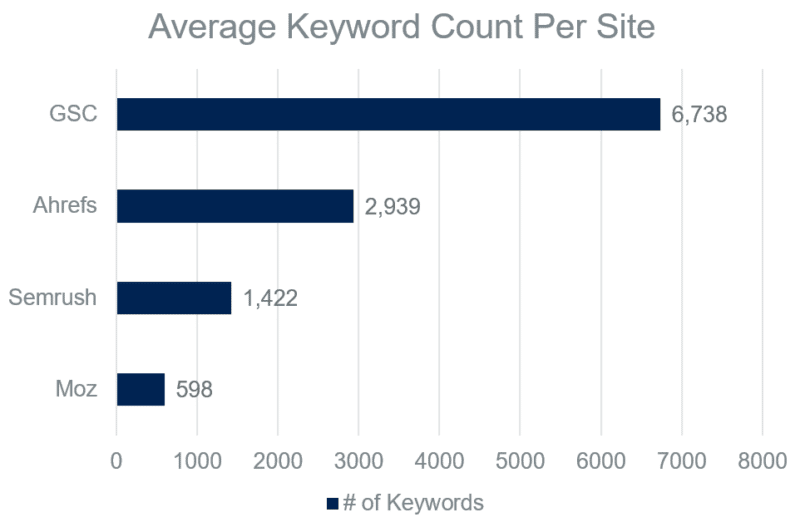
GSC had over 36% more keywords than the other sources combined
A comparison of Google Search Console, Ahrefs, Semrush and Moz for the average number of ranking keywords or keywords registering at least one impression among 51 domains in May 2022.
Patrick Stox from Ahrefs published a fantastic study about keywords hidden in Google Search Console. I encourage you to read it, but the gist is while the number varied greatly by site, almost half of the overall clicks were attributed to hidden terms.
Given that Google Search Console hides lower volume keywords, which make up the majority of search queries, this likely means significantly more than half of the keywords are obstructed to the end user.
But here’s the reality. GSC still might be the best we have when it comes to keyword visibility size.
Among the three, Ahrefs had the most keywords for 98% of websites
Relative keyword ranking size by domain
Source
1st
2nd
3rd
Ahrefs
50 domains
0 domains
1 domain
Semrush
0 domains
50 domains
1 domain
Moz
1 domain
1 domain
49 domains
A ranked order of Ahrefs, Semrush and Moz by keyword ranking size of 51 domains in May 2022
In many ways, it’s unfair to compare Ahrefs, Semrush and Moz to Google Search Console. GSC’s metrics and intended use contrast quite a bit from the other three tools.
So, when removing GSC, we ranked the keyword size for each of the 51 sites in our data warehouse. I’ll be honest; I was shocked at the consistency in the results.
Ahrefs nearly had a clean sweep of first-place finishes, with Semrush and Moz continually coming in second and third.
On average, Ahrefs had twice the ranking keywords as Semrush, which had over twice as many as Moz. Ahrefs had nearly five times the amount of ranking keywords for our clients as Moz. That’s an incredible disparity!
You might be wondering, if Ahrefs has such a dominant lead on Semrush and Moz, why not just use Ahrefs?
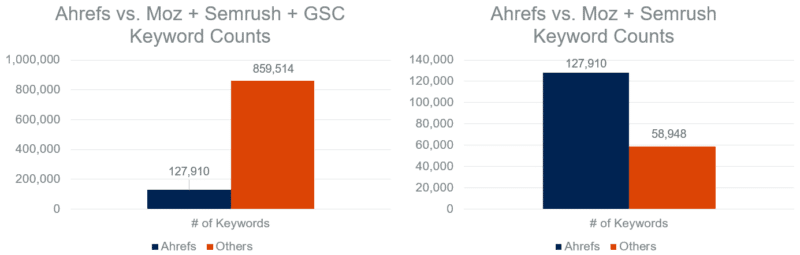
As strong as Ahrefs was, it missed 87% of keywords
First chart: The total ranking keywords in Ahrefs compared to the total ranking keywords or keywords registering at least one impression found in Moz, Semrush and/or Google Search Console and not in Ahrefs for 51 domains in May 2022.
Second chart: The total ranking keywords in Ahrefs compared to the total ranking keywords found in Moz and/or Semrush and not in Ahrefs for 51 domains in May 2022.
First, the fact that Ahrefs is even able to be compared to the other sources stacked together is powerful. This is far from a knock on it. However, if all of our eggs were in the Ahrefs basket, we would be missing out on a consequential amount of keyword data.
Even if you remove Google Search Console, Ahrefs still didn’t contain 32% of keywords.
At the same time, not using Moz (our smallest source), leaves some blindspots.
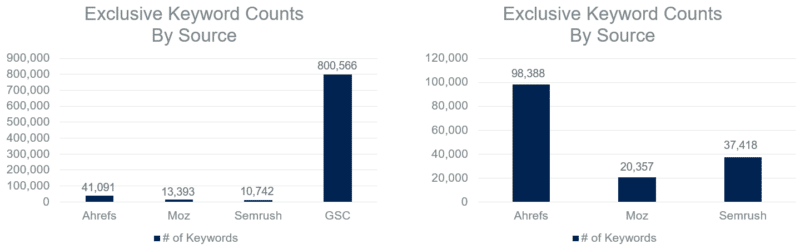
When compared to Ahrefs and Semrush, 13% of keywords were exclusive to Moz
First chart: Total ranking keywords or keywords registering at least one impression exclusive to one source comparing Ahrefs, Moz, Semrush and Google Search Console for 51 domains in May 2022.
Second chart: Total ranking keywords exclusive to one source comparing Ahrefs, Moz and Semrush for 51 domains in May 2022.
When looking at the chart on the right, missing out on 13% of total keywords is hard to ignore.
Moz’s exclusive numbers dropped drastically when GSC was added to the mix with under 2% of keywords. But as I’ve previously mentioned, these tools aren’t exactly equivalent in what they cover.
Semrush’s exclusivity percentage jumped to 24% when compared to Ahrefs and Moz, but it was also sitting at under 2% when GSC was included.
Let’s look at the opposite end of the spectrum. Instead of exclusivity, where was there complete coverage? If we drew a random keyword out of a hat, how likely would it be found in each of the four sources we analyzed?
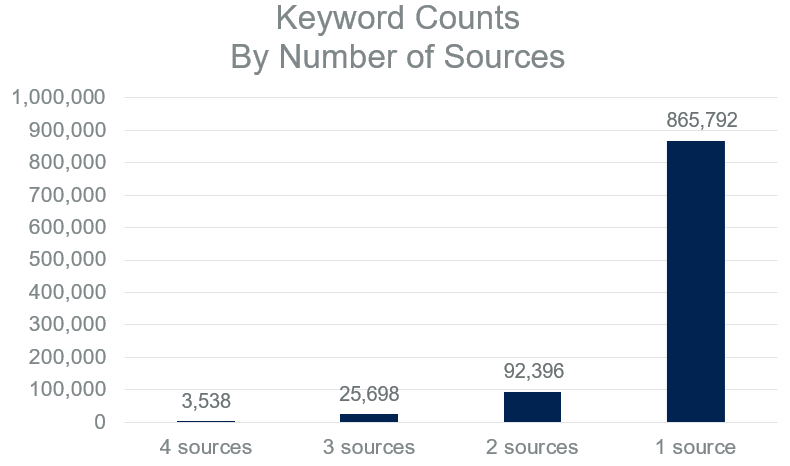
Fewer than 1% of keywords were found in all four sources
Number of ranking keywords or keywords registering at least one impression by represented source count among Ahrefs, Google Search Console, Moz and Ahrefs for 51 domains in May 2022.
A staggering amount of keywords in our dataset were only found in one source. Conversely, just a select few were represented in all four sources.
The keyword counts increased modestly from 0.4% to 2.6% when moving from four sources to three. Even two sources didn’t cover 10% of the total keywords.
Get the daily newsletter search marketers rely on.
Methodology
Data collection
Google Search Console: Unfiltered, query-level search data was stored in our data warehouse via Google Search Console’s API each day from May 1 to May 31 for 51 client domains. Keywords were deduplicated by domain and aggregated into a monthly total.
Semrush: One live API call via Semrush’s Domain Organic Search Keywords report was stored in our data warehouse in May for 51 client domains. The U.S. was the designated region.
Moz: Organic search keyword rankings were manually exported from the front end of Moz’s Keyword Explorer using the default settings in May for 51 client domains.
Ahrefs: Organic search keyword rankings were manually exported from the front end of Ahrefs’ Keywords Explorer using the default settings in May for 51 client domains.
Processing and analysis
A query-source matrix was created in order to determine where there was overlap and exclusivity among Ahrefs, Google Search Console, Moz and Semrush per client domain and in aggregate.
Caveats and considerations
Data sample
I mentioned this in the introduction, but it’s worth repeating. Our analysis featured both a small and industry-specific sample of domain rankings. You should not draw any conclusions around overall relative keyword size comparisons of these tools.
So, why publish the results? As also touched on in the key takeaways section below, beyond the data being interesting and potentially sparking beneficial dialogue, I wanted to stress the value of analyzing these tools under the lens of your industry.
Source availability
Ahrefs, Google Search Console, Moz and Semrush are not the only products with unique keyword visibility datasets. Serpstat, seoClarity, Brightedge’s Data Cube and other tools could have been part of this study to make it more comprehensive. If any reps from those tools are reading this, we would be interested in comparing your tool to the rest next time around. Hit me up!
Source comparability
With Ahrefs, Moz and Semrush, these were one-time data pulls within the month of May. However, with Google Search Console, 31 separate API calls were made. This may have inflated GSC’s numbers a bit.
Had we pulled rankings each day in May for the other tools, more unique keywords would have been added either from shifting domain rankings or keyword database updates. For what it’s worth, I don’t believe it would have impacted any overarching trends or takeaways.
Additionally, Google Search Console data included mobile and desktop keywords from all countries, while we only included U.S. desktop rankings from the other sources. This again would inflate GSC’s numbers, but not likely to a degree that would change any of the trends in a meaningful way.
Keyword volume exclusion
Keyword volume was not included in this exercise, which limits its potential value. With all else being equal, I’d be more worried if Moz missed a 25,000 MSV keyword than a 25 MSV keyword.
The next time this analysis is run, we plan on incorporating volume. However, we’ll need to create logic around how to best include GSC impressions as an MSV proxy, as well as how to calculate the volume for keywords found in multiple tools.
Data freshness
Data freshness was not considered in this analysis. Due to the way its metrics work, Google Search Console is inherently fresh. In other words, if we pulled GSC data from May, those keywords were definitely visible in May (even if only for a moment).
However, it’s possible the other sources contained keywords without a refreshed rankings pull since before May. If any of these tools had disproportionately stale data, it could have altered the results.
Key takeaways
1. Challenge your assumptions
Before revealing the results to my team, I asked them to rank the four sources in order of keyword coverage based on their own gut feeling. Around 10 people guessed, including me, but not one of us was correct!
Semrush was routinely ranked lower than we predicted, and GSC was not given nearly enough credit. However, with GSC, that’s more likely due to them being used to pulling the data from the front-end user interface.
We all can be guilty of trusting our gut feelings and hunches a little too much, and this goes far beyond SEO tools. As marketers, we should continually pressure test our positions and be willing to change our minds.
2. Use the GSC API
When pulling data directly from Google Search Console’s user interface, you are limited to 1,000 rows of data. If we had simply downloaded data from GSC with the date range of May 1 to May 31, this tool would no longer have been leading the pack (far from it).
Querying GSC from the API still has its limitations, but it increases the amount of available data by a considerable margin.
3. Use all the tools
Admittedly, this takeaway is a bit of a contradiction coming from me. As stated in the section above, we don’t even use all of the tools, nor do we plan to. However, I have consistently advocated for not using just one SEO tool.
My actual advice is this: invest in one-month subscriptions and/or free trials to gauge the relative performance in your specific category. From there, you can choose the best tool(s) for you based on your particular verticals, budget and goals. Our pharmaceutical client ads often say, “Results may vary,” and the same is true with this. Take the extra time to see what’s best for you.
Also, when testing out tools for your specific industry and needs, don’t just look at keyword sizes. Size, accuracy, user experience, customer support, technology integrations and so much more can also be considered.
This is an arms race, and if we don’t refresh these results periodically, we could be making decisions on outdated and inaccurate data.
Opinions expressed in this article are those of the guest author and not necessarily Search Engine Land. Staff authors are listed here.
New on Search Engine Land
About The Author
Tylor is the VP of SEO at EVERSANA INTOUCH in the burbs of Kansas City. He also runs SandboxSEO.com in his spare time and occasionally speaks at search conferences. His life outside of SEO includes attending concerts, watching the Houston Rockets and avoiding the Oxford comma within simple lists.
An SEO strategy flywheel to win leadership buy-in and drive results
30-second summary:
From my experience, every SEO has struggled to get buy-in on a recommendation at some point
An SEO’s job has changed a lot in a decade. Now, prioritization is mandatory for success
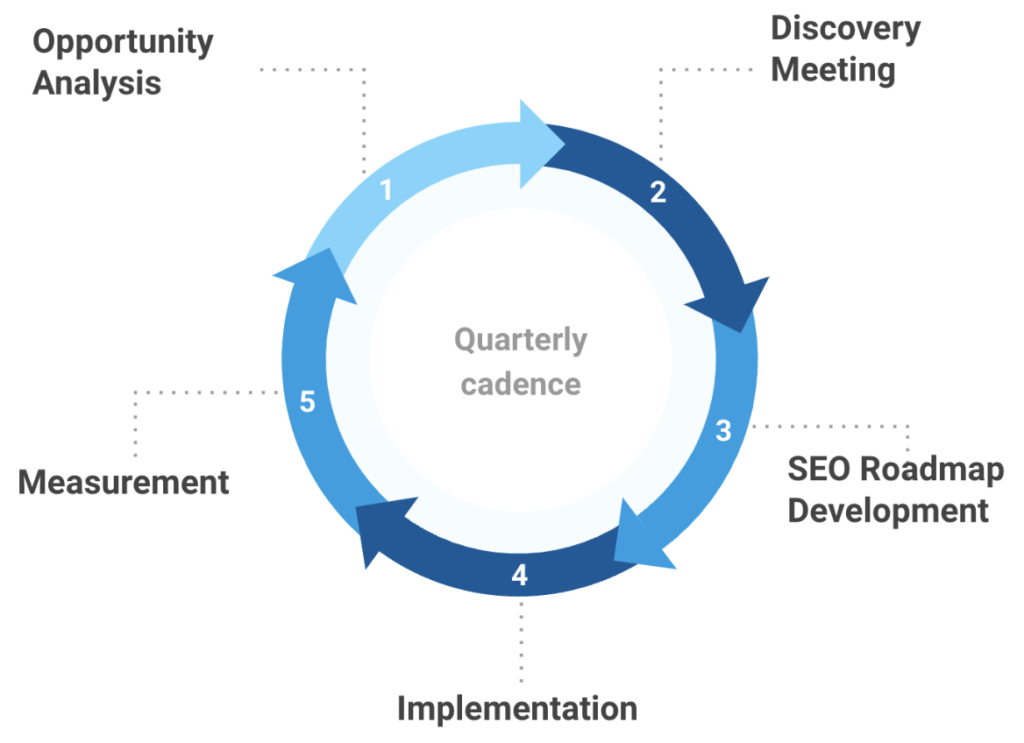
To have proper prioritization in your roadmap, you need a framework that builds in opportunity analysis, discovery, and measurement
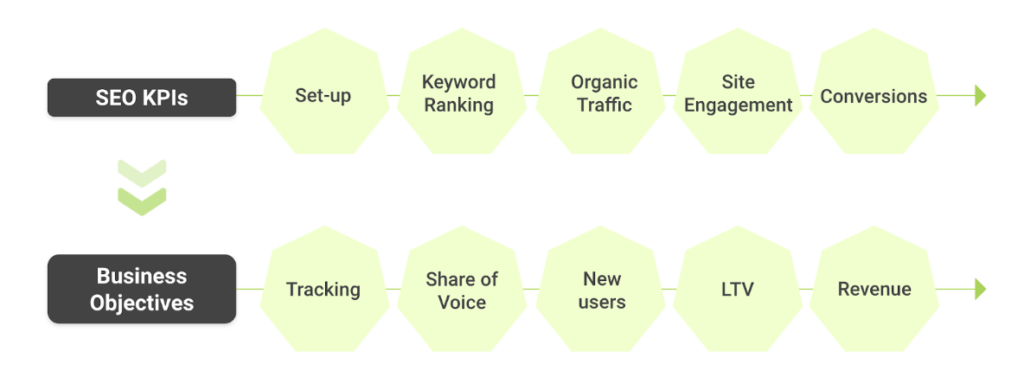
It can be challenging to win-over stakeholders because there is skepticism against advertisers—and SEOs can have competing interests if we don’t get early buy-in and speak in terms of business KPIs rather than SEO KPIs
The SEO Strategy Flywheel outlined below is your ticket to unlocking SEO roadmaps that get implemented
In today’s SEO industry, human challenges far exceed technical challenges. Our job as SEOs has evolved dramatically in the last 10 years. To show value a decade ago, SEOs manually audited sites and created a laundry list of SEO action items to fix. Prioritization wasn’t imperative to success because marketing teams were limited, websites were smaller, and SEO didn’t have an obvious home…should SEO live with development, content, creative, or marketing? As we love to say, “it depends.”
In the decade since we’ve learned that SEO does require meaningful prioritization to get buy-in from all stakeholders. Prioritization is now mandatory for two reasons:
Resources are finite—as SKUs and sites grow, the SEO resources usually don’t
Tools have replaced the need for manual audits but cannot replace human expertise in prioritizing against business needs and objectives
John Mueller, Senior Webmaster Trends Analyst at Google, even says this on Reddit:
As an SEO, a part of your role is to take all of the possible optimizations and figure out which ones are worth spending time on. Any SEO tool will spit out 10s or 100s of “recommendations”, most of those are going to be irrelevant to your site’s visibility in search. Finding the items that make sense to work on takes experience.
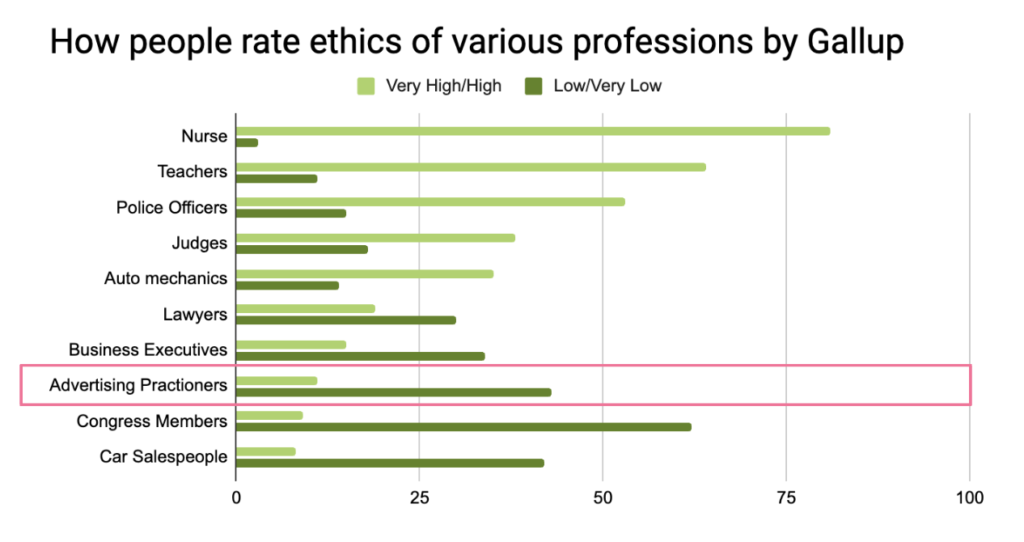
However, modern SEO success also requires more than just excellent prioritization. We’ve agreed on a common belief that regardless of where SEO sits within an organization, it is marketing! SEO = marketing. And, whether we like it or not, that makes us as SEOs advertisers. SEOs = advertisers.
So this presents obvious challenges for us as we try to win over folks like business executives, developers, content writers, etc., with this inherent bias against us as advertisers.
Introducing: The SEO strategy flywheel
The SEO strategy flywheel was hard-fought through my personal experience. The best part is that this flywheel can be used by in-house SEOs, freelancers, and agencies!
As Myriam Jessier says to SEOs, “Heart surgeons use checklists. You are not above them.”
To take this further, we are not above process either – and in today’s world, the process must go beyond traditional SEO expertise. SEOs must use processes to overcome human and technical challenges. Processes can feel mundane, boring, and possibly even robotic. Far too often have I witnessed SEOs painfully living in chaos with no defined roadmaps, processes, or regular workflow cadence. But the truth is: we are not above process and it does not turn us into robots.
Rather, creating process makes us more human. It eliminates the need to focus on “survival” tactics and reserves bandwidth to focus on more impactful strategic initiatives.
Having a team and various stakeholders commit to a process improves efficiency, allows for more collaboration, and ensures we can see our recommendations implemented.
1. Opportunity analysis – Build confident humility into your process
Step one is our opportunity to reassess our strategic vision, layered against the new competitive landscape from the previous quarter.
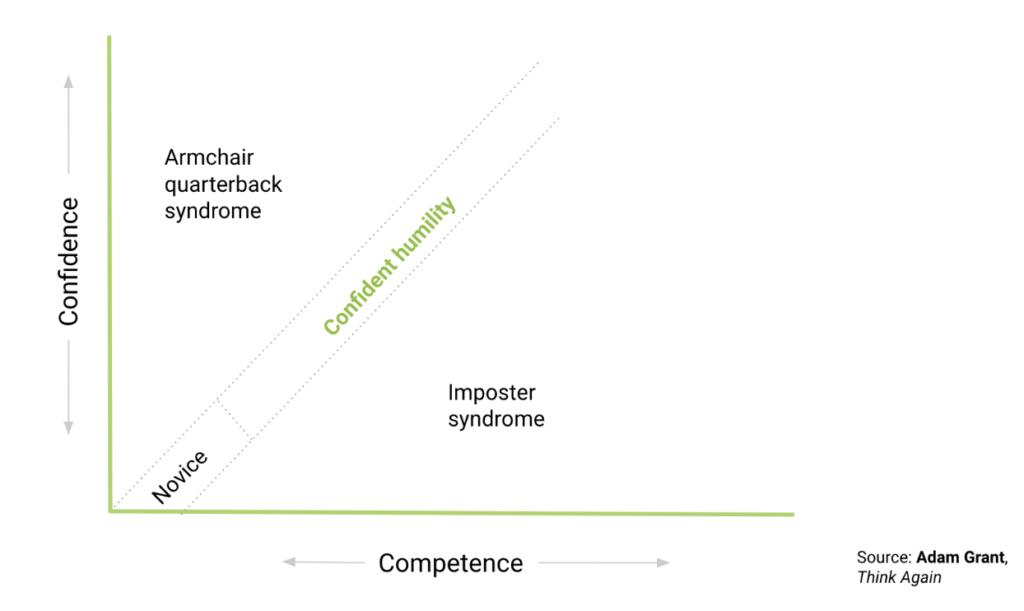
Too often, we as SEOs are either too stubborn in our strategic vision or too passive to make recommendations that may be experimental or challenging to get approved. This leads to either armchair-quarterback syndrome where you’re blinded by hubris or imposter syndrome where you’re too meek to make difficult cases compelling. The goldilocks spot is what Adam Grant calls, “Confident Humility” in his book ‘Think Again’.
The opportunity analysis commits all teams to consistently review site performance, and analyze and prepare for any industry/vertical change. In short, the opportunity analysis forces confident humility. And confident humility is how we get better—quarter after quarter.
Most important in the opportunity analysis is to ensure that there is an “outside” perspective from another SEO expert to ensure that your findings are sound. At Brainlabs, this includes check-ins and QA with the Group Account Director and VP of SEO. This outside perspective allows us to help narrow in on the most impactful findings for our recommendations.
Tips
Doing an audit, you will find someone somewhere along the line made a mistake (for example, unimplemented content, wrongly implemented schema, and the other). Make sure to rectify this before the Discovery Meeting where you recap findings so you don’t burn a bridge with an important stakeholder like a developer.
Always put the opportunity in business KPIs, not SEO KPIs.
2. Discovery meeting – Get buy-in from stakeholders early
The most collaborative part of the process is my personal favorite and the most influential: the discovery meeting. The discovery meeting is our time to build relationships with all stakeholders—and understand available resources and appetite for change. Put simply, robots can’t build relationships–that’s still something we have over any SEO auditing technology.
Having meaningful questions to ask stakeholders is part of the reason why the Opportunity Analysis is the first step—you don’t want to go to this meeting empty-handed. The questions I like to ask can be grouped into 4 buckets: Partnership, Business, Industry/SEO, and Resources. While templated questions are a great start, you should always tweak the questions to be relevant to the brand.
Example questions include:
Partnership:
What project has been your favorite so far? Should we do more of that?
Business:
Are there any changes in your industry or business that can/will impact the website or marketing efforts?
SEO:
Is there anything in the backlog of projects that you’re excited about? What can we provide to make a case for implementation?
Resources:
With the economic uncertainty, will resources stay the same on your side?
Tips
This meeting can be folded into a QBR-esque meeting or, if you can swing the time, it can stand alone on its own, which is my preference.
Invite stakeholders from multiple teams to get perspective (for example, developers, execs, content, brand marketing, and other relevant members)
If time allows, have a mock call to ensure that the questions and presentation are well-crafted and the team is comfortable delivering them.
3. SEO roadmap creation – Put rubber to the road
Most SEOs try to skip directly to this step first. But—be warned from my experience—it is a costly mistake (in both time and political capital). Beginning your SEO project with a roadmap results in a long list of unprioritized recommendations and little implementation, and the end result is a loss of trust and frustration with stakeholders.
The roadmap, when preceded by proper opportunity analysis and an effective Discovery meeting, will successfully accomplish three things:
Lay out projects with enough detail for early buy-in
Identify participants for each activity to avoid a collective action problem
Act as an activity log which makes measurement easier
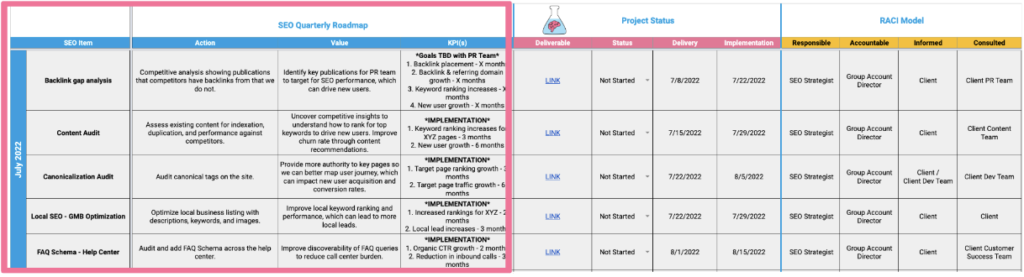
The sheet below is an example of an SEO quarterly roadmap. We define each project and quantify the impact on the business using relevant SEO KPIs and business terms (outlined in pink).
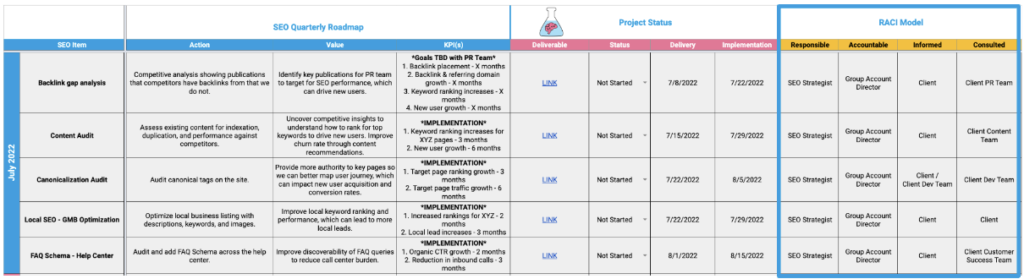
Next, we include a RACI model (outlined in blue) to define project participants by who is Responsible, Accountable, Consulted, and Informed.
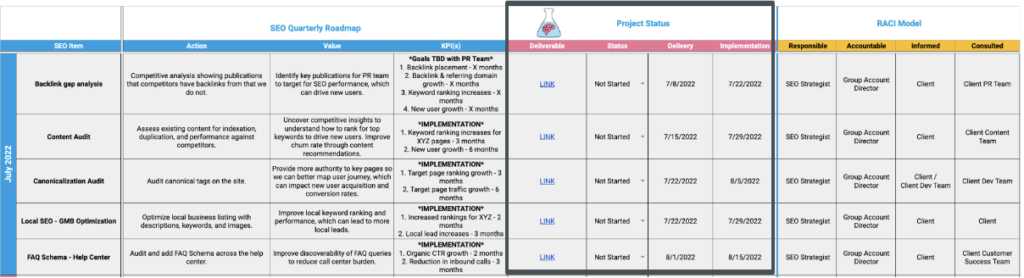
Lastly, once the Roadmap is approved we add the middle Project Status section (outlined in black), and track each activity so we can measure pre- and post-implementation success.
Tips
Exercise ongoing confident humility with the roadmap and know when to pivot a project
Continuously update the roadmap and use this to guide status calls
Use the roadmap to define resource allocation and project management—that is, new projects to be added must be done in place of something else
4. Implementation – Get sh*t done
While site implementation may fall to different teams, the important part is being able to assess who needs approval for which implementations early on. That way, by the time each recommendation is finalized then it can immediately be ready for implementation.
Tips
Since you have a roadmap with defined timelines, get development tickets submitted early so the implementation team can prepare resources for them in an upcoming sprint
QA all implementations to ensure that the final result matches your recommendation
Use a site change tracker tool to see when stuff gets implemented
5. Measurement – Identify winning efforts to scale
Step five is where this framework turns into a flywheel: Measurement. Having an activity log in your roadmap allows you to easily identify pre- and post-implementation impacts. Being able to tie performance back to a specific subset of optimizations allows you to scale those efforts to yield the compounding effects of SEO.
There’s no better way to win influence over a site’s development team than by following up and sharing the results of their work. Make sure they see the post-implementation report and watch how easily SEO projects get added to the development roadmap in future sprints!
Tips
Make sure implementation dates are accurate (including site adjustments)
Ensure to account for seasonality in your analysis
Track pre and post-measurement from the soonest crawl date after implementation, rather than implementation itself as it can take upwards of three months for a page to be recrawled
Use an SEO A/B testing tool for testing ranking/traffic impact—like SearchPilot for large sites—and/or a conversion testing tool like Google Optimize to test for engagement/conversion impact
Set up tracking for SEO KPIs as early as possible to get enough pre-implementation data
Process = Success
The SEO strategy flywheel allows you to dedicate your SEO team’s time and resources to SEO rather than reactively resolving prioritization conflicts. Committing to this process builds confident humility into your work, gets stakeholder buy-in early, and easily allows you to scale winning efforts. I encourage you to modify this process to fit in with your existing workflows and share your modifications with others in the comments for inspiration.
Next quarter’s planning is right around the corner—go get it!
Travis Tallent is the VP, SEO at Brainlabs overseeing the SEO product to ensure account teams have the right talent, tools, tech, and process to do their jobs well. Travis spends time enjoying nature, playing saxophone in a local band, and volunteering for LGBTQ+ organizations. Follow Travis on LinkedIn and Twitter.
Subscribe to the Search Engine Watch newsletter for insights on SEO, the search landscape, search marketing, digital marketing, leadership, podcasts, and more.
12 WordPress site settings that are critical to your SEO success
WordPress is one of the most SEO-friendly content management systems today. If you have a WordPress website, there are many things you can do to improve your SEO. But if you’re not careful, you could also harm your site’s ranking without realizing it.
In this post, you’ll discover 12 settings to consider if you want your WordPress website to reach its full SEO potential.
In SEO, security is an often overlooked but important consideration. Beyond general SEO settings, we’ll review some necessary security settings that can help prevent negative SEO attacks.
SEO settings for WordPress
Below are simple settings that should be the foundation of all WordPress sites looking to improve their SEO efforts.
1. Set up homepage and blog settings
Before you start building out the pages and posts, you must ensure that your homepage and blog pages are set up and ready to go. This may seem like a minor detail, but it’s essential. Your homepage is the first thing people will see when they visit your site, so you want to make sure it makes a good impression.
Likewise, your blog is a great way to connect with your audience and build an engaged following. By setting up these essential pages before you start adding content, you’re more likely to end up with a successful website that people will enjoy visiting.
By default, WordPress has your latest posts page as the home page. You will need to select ‘A static page’ option and select which page is your home page and which is your blog page.
2. Optimize permalinks
When you set up your blog, one of the first things you need to decide is how you want your URLs to be structured.
A scalable URL taxonomy will make it much easier for search engines to crawl and index, and it will also be more user-friendly. As a result, it is worth taking the time to choose a permalink structure that will work well for your blog in the long run. There are a few different options, so take some time to experiment and find the one that works best for you and your blog.
You may choose whichever structure works best for your site, but I recommend using a custom structure and staying away from a date-based structure. A permalink structure that uses month and day or day and name can create a convoluted site architecture.
3. Dynamic sitemap
A dynamic sitemap is an essential tool for any website. It helps search engines index your site and makes it easier for users to find the information they are looking for.
On the other hand, a static sitemap is a lot less effective, can be difficult to keep up to date, and doesn’t offer the same level of scalability.
Plenty of plugins offer dynamic sitemap options with various customizations. So if you’re looking for the best way to improve your website’s SEO, a dynamic sitemap is the way to go.
4. Set up an automated image optimizer
To maintain a fast WordPress site, you need to have optimized images. The SEO benefits of having optimized images are numerous, from increased website speed to better search engine rankings. The simplest way to optimize your images is to use a plugin.
Many WordPress plugins will automatically optimize images as you upload them. While some are paid, many free options work just as well.
5. Set up default title and meta descriptions
Many SEO plugins offer default settings for titles and meta descriptions, guaranteeing that all new pages are optimized for search. This is a lifesaver for large websites with many pages or teams unfamiliar with SEO best practices. By taking advantage of these tools, you can help to ensure that your website is visible and easily found by potential visitors.
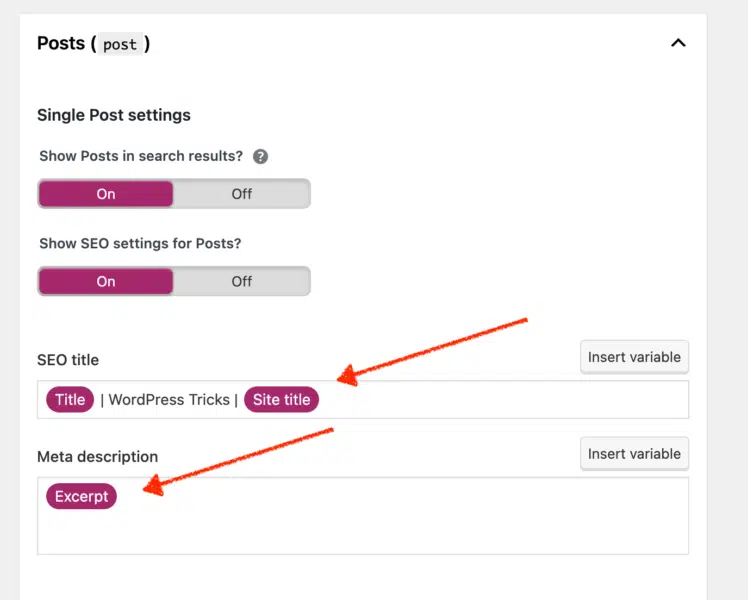
In the screenshot below, I’m using Yoast to set defaults for my blog posts. In my title, I put a structured format to make it user-friendly.
For meta descriptions, I’m pulling an excerpt from the beginning of the blog post. This is a simple default setting that anyone can deploy.
Protect your SEO with these WordPress security settings
SEO is starting to become a crucial element of website security. Website security has always been important, but it is becoming even more so as the web becomes more and more a part of our everyday lives.
Websites are now being used for everything from online shopping to online banking, and if a website is not secure, the consequences can be serious.
Google has penalties for websites infected with malware and those that may be practicing social engineering. If your website is not secure, you could be losing out on potential customers and rankings in Google’s search engine. Website security is, therefore an important element of SEO and should not be ignored.
Get the daily newsletter search marketers rely on.
6. Deactivate comments
While the SEO value of comment sections has been debated, there is no doubt that they can be a security risk.
Spammers often use comment sections to add links to their websites, which can contain malicious code. Hackers can also attempt SQL injections and XSS attacks through online forms.
As a result, it is vital to be aware of the risks associated with comment sections. If you choose to use a comment section on your WordPress site, monitor it closely and delete any spam or suspicious comments.
You should consider disabling the comment section if you are unwilling to put in the extra effort to keep it secure. Below is a screenshot that shows how to disable the content section.
7. Deactivate and remove XML-RPC
One of WordPress’s most common security vulnerabilities is brute force attacks on the XML-RPC file. By default, this file is activated and can be used to access the WordPress site remotely.
However, it also provides a perfect target for hackers using automated tools to guess the username and password. Once they gain access, they can wreak havoc by deleting files, installing malware, or even taking over the entire site.
An easy way to protect against these attacks is by deactivating the XML-RPC file. Doing so will prevent remote access to the site and disable some features such as pingbacks and trackbacks.
SEO experts believe that the increased security outweighs the drawbacks. So if you’re concerned about brute force attacks on your WordPress site, deactivate the XML-RPC file.
There are three ways to deactivate the xmlrpc.php file on WordPress sites.
Use a plugin: Search the plugin directory for “remove xmlrpc”
Add this code to functions.php file: add_filter('xmlrpc_enabled', '__return_false');
Disable it in the .htaccess file: # Block WordPress xmlrpc.php requests <Files xmlrpc.php> order deny,allow deny from all </Files>
8. Set user permissions
As a WordPress site manager, you must ensure that the site runs smoothly and that all stakeholders have the necessary access. That said, not all stakeholders need access to every aspect of the site.
Setting user permissions allows you to give each stakeholder access to only the sections they need – keeping the site organized and preventing unauthorized changes from being made.
In addition, you should review user permissions regularly to ensure that they are still accurate.
9. Ensure all users have secure passwords with 2FA
Having secure passwords and enabling two-factor authentication (2FA) are effective ways to make a WordPress site more difficult to hack.
Hackers attempting brute force login attacks use large password lists that contain millions of the most common passwords. Having a complex password can help render these password lists ineffective.
If a hacker were to get access to your password, having 2FA enabled can help act as another method to prevent hackers from gaining access to your site.
Many security plugins offer 2FA settings.
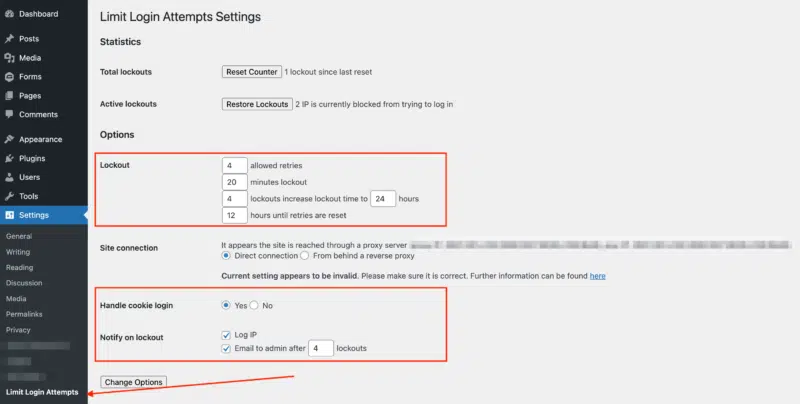
10. Set up limit login attempts
A brute force attack happens when an attacker tries to guess a user’s password by repeatedly entering different combinations of characters. One way to prevent brute force attacks is to configure your WordPress site to limit login attempts.
This security measure will block an attacker’s IP address after a certain number of unsuccessful login attempts, making it more difficult for them to gain access to your site.
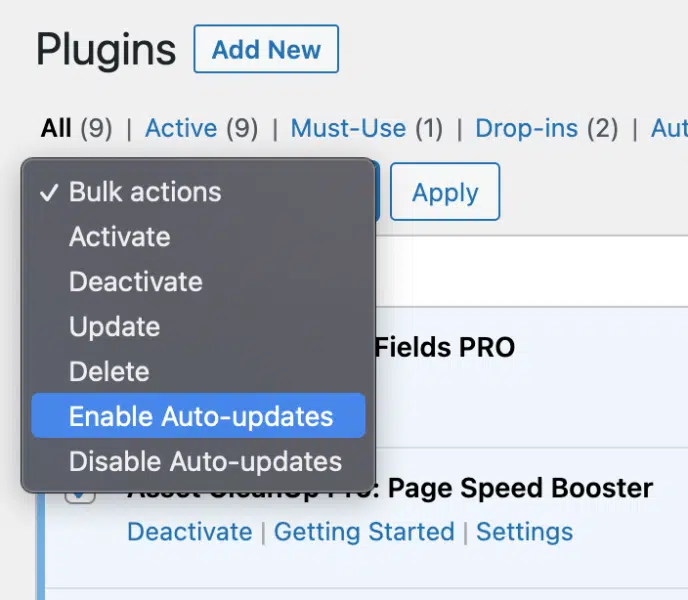
11. Auto-update plugins
Unfortunately, many people don’t realize that their plugins can be a security risk. If a plugin is outdated, it may be vulnerable to known exploits. This is why it’s ideal to go with auto-updating plugins.
12. Set up recurring backups
You shouldn’t overlook a solid website security plan in today’s digital age. One of the best ways to protect your site is to ensure that you have daily backups taken. If your site is hacked or experiences any other security breach, you’ll have a recent copy of your site that you can restore.
While many plugins offer this service, it’s often best to find a WordPress host to manage backups. This way, you can be sure that your backups are being taken care of regularly.
Wrapping up
As your site gains more visitors, ensuring its foundation is strong will be increasingly important. Applying the settings mentioned in this article is essential to start SEO on WordPress. By following these tips, you are taking a vital step toward creating a scalable website that will grow with your business.
Opinions expressed in this article are those of the guest author and not necessarily Search Engine Land. Staff authors are listed here.
New on Search Engine Land
About The Author
John McAlpin leads the SEO strategy for Cardinal Digital Marketing, an Atlanta SEO agency that focuses on serving enterprise healthcare companies across the United States. Currently located in Colorado Springs, McAlpin is deeply engaged in both the local and national SEO community and has a strong background in technical SEO, web development, and digital marketing strategy. McAlpin also provides freelance web development services for WordPress hosted sites.
How to tell if you’ve been hit by an algorithm update
The news of a Google algorithm update rolling out can be concerning for SEO practitioners. Shifts in the search landscape are inevitable, and as SEOs, we must always be ready to face them.
When you see changes in your SERPs performance, the first thing you can do is to figure out whether you were indeed affected by an algorithm update.
Want to know if the patterns you are seeing are connected to an update or something else entirely?
In this article, I will share an exhaustive list of data and events to rule in or out. Use this as your guide so that you have all the answers you need for your own knowledge or to reassure those you report to before they even ask you what’s up.
The following advice applies to any update, be it a core update or a new aspect of rank evaluation.
1. Check primary sources of information
Whenever you first become aware of the existence of the latest update, I’d recommend tracing back to a credible primary source of information for first-hand explanations of the update and its characteristics.
I’d also recommend following the people who write about the content or engineer the change, such as Danny Sullivan, Google’s public liaison for search, or John Mueller, Google’s search advocate.
If updates are related more to performance or Core Web Vitals, then you should follow Addy Osmani, senior staff engineering manager for Google Chrome.
Starting with the right primary sources for information helps you establish some of the real characteristics of what the update is designed to do and often what the outcomes may be if your pages fall foul of this.
2. Review your activities objectively
Try to be as objective as possible, mainly if this is your own website. Don’t let your emotional and financial investment cloud your judgment.
Do the primary sources describe your pages or tactics? In the case of the helpful content update, Google has shared some provocative questions to evaluate if you can objectively consider your content helpful.
• Is the content primarily to attract people from search engines, rather than made for humans? • Are you producing lots of content on different topics in hopes that some of it might perform well in search results? • Are you using extensive automation to produce content on many topics? • Are you mainly summarizing what others have to say without adding much value? • Are you writing about things simply because they seem trending and not because you’d write about them otherwise for your existing audience? • Does your content leave readers feeling like they need to search again to get better information from other sources? • Are you writing to a particular word count because you’ve heard or read that Google has a preferred word count? (No, we don’t). • Did you decide to enter some niche topic area without any real expertise, but instead mainly because you thought you’d get search traffic? • Does your content promise to answer a question that actually has no answer, such as suggesting there’s a release date for a product, movie, or TV show when one isn’t confirmed?
Now, we all know how hard it is to spot our own spelling mistakes or proof our writing. I would challenge you to pass your content to a family member or mentor and see if they will provide some honest perspective.
3. Check to see if the dates of your anomalous traffic patterns line up with the update
If pages or aspects of your site are questionable in the confines of the latest update characteristics, make sure to:
Monitor your site analytics packages.
Understand what the intended consequences of the update will be.
First, let’s understand what a “rollout” means. The way an algorithm update “rolls out” doesn’t always mean you will see a pronounced negative impact scythe through your traffic like an Old Testament plague of locusts.
Look at this query and how many different rollouts are described in these historical and real updates. To summarize, what rolling out can look like in terms of an algorithm update – be it core or new – may be as follows.
Sector-specific rollouts. For example, YMYL, or “Your Money or Your Life,” content has been highlighted frequently in recent years – and quite rightly – because providing poor quality information in these areas can hurt users.
Geographic rollouts (particularly when it comes to content-related updates).
Volatile rollouts. For example, where an impact may appear very sharp initially, with some recovery, as engineers try to find the right balance for the new algorithm outside of testing.
Progressive rollouts that may get stronger and stronger or take longer to get out of. In the case of the helpful content update, the classifier process is entirely machine-learned, meaning “sites identified by this update may find the signal applied to them over a period of months.”
4. Check other search engine traffic sources
This one can be a little difficult as Google is so dominant in most markets. However, you may have a site that is big enough to have a reliable amount of data from Microsoft Bing, DuckDuckGo, Yandex (or combine them together to see Google vs. “other search” in a graph).
If your other search engine sources of traffic are following the same sort of data patterns as usual and Google is the only one showing the anomalous pattern then that’s a really good indication that it’s Google specific, and you need to go deeper into the update.
Have a look at this tip from Gianna Brachetti-Truskawa, where they’ve reminded us to check Bing Webmaster tools and what to look for.
5. Check your data sources – but don’t come to final conclusions
So you’re checking your analytics package of choice, and your Search Console data and secondary sources (which we will come to in more detail next). If you see no initial volatility or notable shift in any direction immediately, this may be due to the pace of the rollout. Don’t come to any final conclusions until the update rollout is complete.
Also, consider your comparison periods and get your date patterns and pages lined up. Regardless of your business sector, most traffic has a weekly cycle, so it’s always a good idea to compare the first week of rollout to the equivalent week in the preceding year as opposed to the exact same dates.
In the case of the helpful content update, I’d be looking at the week of Thursday, Aug. 25, 2022 to Wednesday, Aug. 31, 2022, and comparing it to Thursday, Aug. 26, 2021 to Wednesday, Sept. 1, 2021.
You can see in this graph that the numbers follow the same smooth pattern for the weekly flow. Regardless if you are up or down from last year, the thing to watch out for is an anomalous pattern in the current period.
Also, props to GA4 for actually suggesting this as a comparison period. See how when you choose to compare a custom period, the second pre-set option is Compare: Same period last year (match day of week)?
Get the daily newsletter search marketers rely on.
6. Check secondary sources of information
At the beginning of this article, I mentioned the importance of primary sources for the first stage of information. The industry being what it is, there will then follow a lot of speculation which may or may not be useful to you depending on where you are in your learning process.
I say “speculation” as providing real insight requires a lot of data, experience and time. Once a rollout is close to completion, it is then a good idea to be looking for reputable secondary sources. In the case of new updates, this is where tool providers can provide fantastic insights.
At the same time, a great secondary source, like in this case the Sistrix team, has the credibility, data and authority to announce that there’s pretty much nothing to report one week in.
But keep an eye on reputable news sources like Search Engine Land, Moz, Sistrix, and Semrush as these are where the people with data and years of experience will be publishing if and when there’s something to talk about.
7. My traffic went up! Did I ‘win’ the update?
When it comes to (generally speaking) linear rankings, if the pages that precede yours are negatively impacted by a rollout, you will “go up” – like SEO Whac-A-Mole!
This does not mean that you have “won” or are necessarily doing a great job. You may very well be. But you should also not take it for granted that this stage of this rollout benefited you. If this happens to our clients our immediate checks are to see:
Are there notable absences from stable competitors?
What does the realignment look like? Is it volatile? A lot of movement or just one or two high-ranking contenders now absent?
Has the SERP layout changed at all recently?
Are there any differences in SERP layout and aggregate rankings across main markets? (For us, this tends to be the U.S. and U.K. as both are great high-volume markets with the same language so makes for good comparison data.)
When we look into the above, we’re looking at characteristics and commonalities between the pages that are now absent. We’re comparing our clients to those, to see if we think there is any risk at all or if we are, as usual, ahead of the curve. (This will happen if you optimize for users first and let Google catch up to you!)
8. My traffic went down. How do I confirm it is the update?
Let’s say:
Your traffic has taken an anomalous downturn from the start of the rollout.
You can tick the box on the questions to ask yourself about the characteristics of the update.
In that case, there are still a few ways you can confirm this with data. But this will vary from update to update depending on the characteristics. In this recent helpful content update example, I’d be confirming this with my site data by slicing my analytics in the following ways:
Using regex or filters to exclude non-content pages.
If my website is a brand I’d also look at organic performance outside of the homepage.
Remember that this particular update can have a sitewide impact if the majority of the site is classified as unhelpful, so all content on your site may be impacted in some way.
9. My traffic patterns are still fluctuating – what else could it be?
If you have anomalously patterned organic search traffic commensurate with an algorithm update period and can’t confidently rule out the update completely, here are some things to check which may explain the data patterns:
Other media
If your organization is mid- to large-sized, it’s a good idea to check out what activities are going on in other marketing and advertising departments. TV for example can often cause a really big positive spike in visits. We like to use Google Trends with Glimpse Chrome extension to give both the pattern and the actual volume here.
In this example, you can clearly see spikes in the brand term volume that coincide with the 2020 sponsorship (and weekly airing) of one of the UK’s most popular TV programs, “Ant and Dec’s Saturday Night Takeaway,” in a deal that started late Feb. 2020.
Social media influencers
This can be a hard one to trace if it’s not a link click, but do consider the characteristics of anomalous traffic patterns against brand references from social media influencers.
We had a situation once with a client who used a particular ingredient in a drink and ranked in the top 3 for a page explaining this ingredient. Using a process of thorough rule-outs, we managed to establish that the ingredient was mentioned as having health benefits by a very popular YouTube influencer.
Such instances can be very difficult to work out. But by checking the primary volume-driving-term for the spiking landing page in Google Search Console, you can use that query in the search of each of the social platforms to see if you can spot who may have name-dropped you.
Spam traffic
Perhaps it is unfortunate timing and you may see a spike in traffic due to an increase in spam. Or alternatively a drop in traffic due to the sharp absence of it.
Get hold of your server logs for the anomalous data periods and ask the following questions:
Is it a particular country that’s driving the pattern?
Have there been changes with your host, firewall, or CDN that could explain sudden anomalous drops in traffic?
Lost links
It’s also possible that you’ve lost a significant number of quality backlinks. (Maybe a site that links to you frequently has gone out of business.) While the traffic from that should show up in referrals, it can have an impact on rankings. If you have tens of thousands of ranking keywords, just a few little drops in rank across the board can look like an anomalous drop.
The inverse of this can also be true. If you nail a killer digital PR campaign and accrue a lot of high-quality links from sites that have traffic, this can lead to:
An overnight bump in referral traffic.
Increase in brand demand.
Across-the-board rank improvements.
DebtBuffer experienced a 1,500% spike in brand-driven search traffic as soon as one of their stories went live, as Tom Johnson of ReactivePr shares in a recent case study. The story itself was topical, timely and an expose of big energy companies and how they allocate energy top-up cards against customer debt, so it did get a lot of consumer interest.
Manual penalties
While much less common to see in SEO today, you can still receive a manual action if Google identifies or determines that you’re engaging in any practices that contravene their guidelines. Check Google Search Console for notifications, just in case.
SERP layout change
In this phenomenally comprehensive CTR study from Sistrix, the single biggest takeaway was “Click rates are determined by the SERP layout”. Simply put, if the Google landing page for one or some of your high-volume keywords changes, that is going to have a knock-on effect on your traffic patterns.
This isn’t always a bad thing. For example, we have a client with a physical destination. One of their biggest drivers of traffic used to be “[brand name] postcode”. By using schema to mark up the structure of that kind of data, we are now able to allow Google to answer that question in-SERP.
This reduces unnecessary server costs and gives a more accurate picture of the conversion rate for the site, as those people are customers who now need to find the venue. A change like this can have a sudden anomalous drop pattern, but actually, it’s a positive overall.
This is an example of the type of featured snippet described above where the query is answered in the SERP.
As we can see in this example, the answer to this query is presented clearly in large bold letters, extracted from the listing from The National Trust. Therefore, a click is not required to satisfy the intent.
Front-end changes
I’ve mentioned how getting access to your server logs and ruling out changes in the stack (CDN, firewall etc.) can help understand if spam is a factor. However, it is also worth checking to see if any front-end changes have occurred that have been positively or negatively perceived.
Hopefully, your business will have a change log or some form of editorial control for those who are able to make changes to the front end. Things to look out for could be:
Page deletions: Has a well-meaning colleague deleted an out-of-date post rather than updating or redirecting?
Have we added things to the site that can slow it down causing a significant increase in time to get the page fully rendered and interactive?
Has the aesthetic changed in any way?
Look at a total redesign to the addition of a huge banner video on the homepage. Things that may seem cosmetic can have short sharp positive and negative impacts on how search engines rank your pages because these changes significantly impact human perception too.
Figure out whether it was an update or something else
Hopefully, this article has provided some useful information and some reasoned approaches you can consider in your own reaction to Google update announcements.
Opinions expressed in this article are those of the guest author and not necessarily Search Engine Land. Staff authors are listed here.
New on Search Engine Land
About The Author
Nichola Stott founded Erudite: The SEO UX Agency, over a decade ago, following five years as Head of UK Search Partners at Yahoo! where she first found her love for all things search. Erudite has become one of the most respected technical and strategy-focused SEO agencies in the UK, routinely delivering over 500% ROI for clients every year. Stott’s professional recognition includes being named in the BIMA Hot 100 Digital People, as well as Drum Most Respected Agency Leader as voted by Peers in 2018.
Google launches new HTTPS report in Google Search Console
Google has added a new HTTPS report within Google Search Console that not only shows which pages are being served under HTTPS but also why the pages not being served under HTTPS are having issues. “One of the common requests we heard from you was to provide more information regarding the HTTPS status of the site and make it easier to understand which pages are not served over HTTPS, and why not,” Google said.
What the report looks like. Here is a screenshot of the HTTPS report that shows the number of non HTTPS URLs and the number of HTTPS URLs, with the non-HTTPS URLs in red and the number of HTTPS URLs in green. Google also shows the issue on why pages are not being served over HTTPS, including but not limited to these errors:
HTTP marked with canonical tag
HTTPS has invalid certificate
Sitemap points to HTTP
HTTPS has redirect
HTTPS URL is roboted
HTTPS not evaluated
Other issues
Report availability. Google made this report available to many sites, as of today, but said it is still rolling out over the “next few months.” Google also said this new report is available only for Domain properties and HTTPS URL-prefix properties.
Page experience. HTTPS is a part of the overall page experience ranking algorithm, which is a very light weight signal uses towards ranking web sites. Google said “As a reminder, page experience is a set of signals that measure how users perceive the experience of interacting with a web page beyond its pure informational value, both on mobile and desktop devices. It includes Core Web Vitals, which is a set of metrics that measure real-world user experience for loading performance, interactivity, and visual stability of the page, along with signals for mobile friendliness, intrusive interstitials, and HTTPS. The HTTPS component ensures the safety and security of users on the web.”
Why we care. We love new and improved reports and this is both of that. You can not only see which pages Google is serving under HTTP vs HTTPS but also why Google is not serving some of your pages under HTTPS. Then you can dig in to see how you can fix those issues.
New on Search Engine Land
About The Author
Barry Schwartz a Contributing Editor to Search Engine Land and a member of the programming team for SMX events. He owns RustyBrick, a NY based web consulting firm. He also runs Search Engine Roundtable, a popular search blog on very advanced SEM topics. Barry can be followed on Twitter here.