How to enhance your ecommerce branding strategy with Google Trends

How to enhance your ecommerce branding strategy with Google Trends

30-second summary:

  • In the wake of the helpful content rollouts, Google Trends can be a strong gateway into search trends
  • How do you spot a trend and differentiate it from a fad to justify resource investment?
  • Hands-on tips to unearth Google Trends and apply them to your ecommerce SEO strategy

A successful digital marketing strategy grows through exploiting online visibility that results in conversion. Organic traffic and SEO generate the most leads in a digital marketing strategy, according to 61 percent of marketers using B2B initiatives.

Statistics for 2022 capture the situation as they show that a search engine is the point of departure for 68 percent of online activity. The internet offers plenty of advice on building a digital marketing strategy. Still, we cut through the chase and focus on how you can harness the power of an SEO strategy and keyword research to grow your business this year and beyond.

The role of Google Trends in enhancing your SEO strategy

If you exploit its capacity, Google Trends can be a game changer for your SEO strategy. Consider the following steps to exploit this tool to develop your digital marketing strategy:

1. Monitor trends

Google Trends is a free tool that scours the internet, collects data on search behavior, and helps you capitalize on popular trends when developing a marketing strategy. It collects information from platforms such as YouTube, Google Images, Google News, Twitter, and Google Shopping on which web users engage.

The analytics from Google Trends looks at the total search volume over a specific period. In addition, it identifies how often users looked up a search query time on the Google search engine. Though said to be a reliable tool, it gives estimates of the levels given to the value of a keyword, ranging from 0 to 100. It establishes seasonal variations in a keyword.

A value of 100 on user intent means the keyword is a high-interest, while zero does not mean that no one showed interest but that the interest level was shallow. For example, if you search the term “swimwear”, you will notice it has more searches during summer than in winter. If you track such analytics, you can judge the relevance levels of your niche to users and know when to jump on and off a trend.

2. Google Trends unearths new keywords

When you have a website, keywords are the pointers that show search engines what you have on your website. Keyword research shows you what your potential customers might be looking for and the estimated size of the audience with that search intent.

Try the following steps:

  • Identify the main idea with which your potential customers associate the product or service your business offers, such as cashmere scarves. Avoid using adjectives.
  • Narrow down on the product or service specifics by anticipating a unique aspect of your niche that would send users to your website. For example, cashmere scarves from Italy.
  • At this point, you can add a link from a website to your search for better results.
  • Include brand names of your products or well-known names in the industry to improve product association but do not include an unknown brand name in your search.
  • Try different keyword phrases on the topic in different variations, such as “Italian cashmere scarves”, “designer Italian cashmere scarves”, and “affordable Italian cashmere scarves”. Use keywords related to the topic to narrow down the results.
  • Considering there are over six billion worldwide searches daily, you should use tools like SEMrush to identify keywords that rank on a page and include related keywords for comparison to other viable keywords.

Beware, though, some new search terms could be popular but just fads that later disappear, making your content redundant.

Understand the difference between a trend and a fad

Here’s a quick look to help you discern what is a trend and what is not, further giving you stronger clarity on whether to invest time and resources in content creation.

A trend is –

  • A general development, situational change, or a shift in the way people are behaving
  • Can be traced to a starting point in time
  • Evolve gradually
  • Have a broader influence on culture and consumer behavior

A fad is –

  • A very popular style or activity that can be compared to a “one-hit wonder”
  • Can not be traced into a starting point as fads blow up on scenes out of nowhere
  • Fade away as fast as they show up
  • Does not have a substantial impact on consumer behavior

3. Research your niche

Even as you search for the best keywords to boost your SEO strategy, Google Trends ensures you do not miss any relevant topics in your niche. Your niche should provide value to remain relevant.

The variances between the dips and increases on charts generated by Google trends show the following at a glance:

  • Seasonal changes in prices
  • Seasonal changes in demand
  • The stability of a niche depends on the sustained search volumes over a given period
  • Whether the niche is still a viable business idea

The metrics from that search guide you in making data-driven decisions for your brand and exploit your niche because it will enable you to:

  • Identify target regions
  • Determine the viability of your niche
  • Know the relevant terms to search
  • Make decisions using real-time data
  • Optimize your campaign
  • Know if you have loyal customers who can build a community

4. Track the latest popular searches

When your business dealings center on a dynamic niche, Google Trends helps you stay abreast of changes. People’s needs keep evolving, and to stay ahead, you must get real-time results on their search engine queries and act accordingly.

Invest in that research to adjust your marketing tactics to address the new concerns that arise in the market due to emerging issues.

Businesses that modify their strategy to emerging, real-time needs thrive while the rest that don’t naturally see a drop in returns.

5. Compare keywords

Google Trends searches accumulated data from people’s search history in Google and the search terms used most in those searches. The Google Trends landing page has a search bar tailored for search terms. On this bar, you can type up to five keywords you wish to compare, separating them with a comma.

The search avails much when focused on related topics and shows the less obvious needs of customers. When analytics terms the results on a term as rising, it means it had the most considerable volume in growth. Breakout is a percentage that shows the search query volume exploded to over 5000%.

6. Optimize for video and ecommerce

Videos on YouTube offer another avenue for studying the market scene besides web results. Through videos, Google Trends can unearth the video topics fueling trends. You will also know if it is time for you to create video content for ecommerce and the relevant tags you should include for optimization.

You can also use the tool to follow up on the success of your video. Consider that 88 percent of people say that watching a video on a brand convinced them to buy their product or service. While 0ver 70 percent would rather watch a short video on a brand than read text about it.

7. Target local audience

It’s no longer a hassle to find geo-specific data and evaluate the popularity of a search item by region. You will reliably establish the region with the highest demand for your product or services.

There are different ways of conducting this search. One is by typing the name of what your business offers into the search space and then scrolling to the map section on the same page to determine locality.

The second way is to use search filters to compare keywords and identify different regions where web users showed interest in your products or services. Effective campaigns should have geographical relevance.

8. Google Trends for analyzing competitors

Google Trends not only guides you on what your potential customers use the internet to seek from your industry. It also gives you insights into what your competitors have been up to, for example, it shows the search queries trending for your competition, now and within the past year.

You can use the tool to narrow down your search into seasons to see any variance in their market presence. For instance, you can see if there were any changes in pricing, such as seasonal offers and supply during different times of the year. Such findings can help you strategize how to promote your brand depending on your competitor’s business tactics.

9. Plan your yearly calendar

In the end, you must create a search marketing plan with time-specific events. The yearly calendar will guide you in planning and creating schedules for seasonal events according to the needs of your customers. This calendar is a dynamic tool subject to review and adjustment not only to create goals but also to track them to completion.

It takes into account all the above-discussed steps and integrates them into an ecommerce marketing strategy for both web-based establishments and brick-and-mortar businesses.

Make Google Trends work for your campaign

Google Trends is a great tool to provide valuable insights into your digital marketing and content strategy. Use this knowledge to plan for content, measure the most optimal times of the year, and understand your audience.

Contact us for consultations and support for result-driven branding strategies.


Eric Ritter is the Founder & President of Digital Neighbor. He can be found on Twitter @EricRitter.

Subscribe to the Search Engine Watch newsletter for insights on SEO, the search landscape, search marketing, digital marketing, leadership, podcasts, and more.

Join the conversation with us on LinkedIn and Twitter.

https://www.searchenginewatch.com/2022/09/01/how-to-enhance-your-ecommerce-branding-strategy-with-google-trends/


7 tips for transitioning from in-house marketing to agency life

Have you been working in an in-house marketing role and considering a switch to agency life?

Agencies are great because you can gain exposure to various types of businesses and learn to optimize against different marketing objectives. But they’re also fast-paced and come with significant differences relative to working in an in-house marketing role.   

One of the most significant differences between in-house marketing and agency life is that you may be responsible for several accounts at once and need to focus on time and attention management more than ever. 

Making the switch to agency life can be a little intimidating, especially if you’ve been working in-house or focused on one brand for a long time.

The following seven tips can help you hit the ground running so that your agency career is as awesome as you hope it will be.

1. Adhere to the 80/20 rule

One of the most important things in any agency is working quickly and efficiently. It’s helpful to timebox yourself and think about where the 80/20 rule applies. This is where I’ve seen people struggle the most during a transition from corporate life, especially on smaller client accounts where hours are limited.

For example, a client may have a 20-hour-per-month contract, and you have to deliver as much value as possible using those hours. Approach the problem this way – delivering several things at 80% will likely add more value to their business than going 100% on one thing.

For example, you could spend two hours researching keywords to target and get a lot of the information you need or spend five hours and come up with some additional words you may not work on for six months. Think of what else you could do with the extra three hours that might be more valuable than additional keyword research.

Another rabbit hole is doing competitive backlink research. Spend a couple of hours developing an initial target list, but be realistic about what you’ll use over the next few months.

It’s easy to keep digging and lose track of time when something doesn’t have a finite end (like keyword research or reviewing backlinks), so block an hour or two to work on it and then see how you feel about the results.

You’ll want to think about delivering value constantly and consistently. Remember that every day you hold back or delay sharing information is a day that clients can’t move forward in growing their businesses and achieving their goals, so don’t overthink things and aim for “perfect!”

2. Plan your schedule to create room for ad hoc work

Managing simultaneous clients can be daunting for people coming over from in-house marketing roles. I’d recommend blocking meetings out on your calendar with specific tasks assigned to each. It’s even better if you can book recurring meetings at the same time each week to build a rhythm.

For example, “Client A content briefs” every Monday at 2 p.m. or “Client B weekly report” on Wednesday at 3 p.m. 

If you can plan out 80% of your time, this should allow you to absorb ad hoc requests from your manager, colleagues, or clients without them getting in the way of completing your projects. 

Friday afternoon is a great time to plan out the following week so that you don’t stress about it over the weekend!

3. Get comfortable working with imperfect information

When you work in-house, it’s easy to put things off until you get all the information you need from your colleagues or your research.

However, you have to get comfortable working with imperfect information when you work for an agency. This might include not receiving information about audience demographics, a rough estimate of cost-per-lead targets, or historical performance data.

You will rarely get everything you need from a client. It’s essential to move forward and work around constraints. Waiting for all data will lead to burning through days and weeks on projects that generally already have tight timelines.

Think of your time as perishable inventory or like an unsold hotel room – once the day passes, it’s gone, and there’s no getting it back.


Get the daily newsletter search marketers rely on.


4. Sync with your peers to get up to speed quickly

When you work for an agency, you should get comfortable with the fact that sometimes “and other duties as assigned” may be the biggest part of your job and that you might enter a project or take over a client mid-stream.

Usually, it’s faster to learn about a new industry or client by listening to what your peers have already figured out rather than trying to get up to speed on everything by yourself. 

Peers may be able to communicate enough background information in a one-hour call to get you started, where it would otherwise take you hours to dig through all of the original materials or old emails.

This is tougher if the person you’re taking over has already left. In that case, you may want to ask for a copy of an original kick-off document, dig through Slack, or review the past four or five weekly / monthly reports.

5. Respond quickly without dropping other priorities

Offering high-touch service doesn’t mean dropping everything or your existing commitments for ad hoc requests. Responding to an email, text, or Slack immediately can disrupt your workflow – unless it’s a true emergency (like a site outage, broken data feed or similar issue).

While clients (and colleagues) expect that you’ll communicate promptly, don’t confuse offering excellent service with doing the work immediately.

Schedule time to check your email and Slack (or similar) several times throughout the day, and get familiar with sending these types of responses:

  • “Got it! When do you need this by?”
  • “I can get it to you by the 15th – will that work?”
  • “Sure thing. I’m tied up this week but can start on that on Tuesday. Is that okay with you?”
  • “Confirming I got your email. Unfortunately, we can’t commit to getting this done in the time frame you need. We’ll do our best but can definitely get it to you by Friday. Please let me know if that will work for you.”

You can preserve your relationships by learning to set realistic timeframes and sticking with your other commitments. Juggling conflicting priorities is tough – make sure you don’t confuse “important” with “urgent.”

If you have multiple emails from clients with different requests, you may want to consolidate the answers into a single email. Consolidating different threads should help reduce the number of responses you get back!

6. Control the conversation by planning

A surefire way to make an impression with your colleagues and clients is to plan ahead. As an in-house marketer, you were likely either just tackling whatever felt most important, getting ready for seasonal spikes, or doing analysis.

Clients will look to you to push them forward in their marketing – that’s why they’ve hired an agency!

Here are a couple of planning opportunities: 

  • Early in the month, or ahead of it: Ask clients if there are any important product launches, meetings, or conversations that they’ll need help with (i.e., board meeting) so you can plan accordingly
  • Build 30-, 60- and 90-day plans and get alignment with clients on tests, projects and initiatives. Plan for most likely scenarios. You can always pull things forward, but it looks worse to push things out.

This also works really well with organizing your schedule – once you have an approved 30-, 60- or 90-day plan, you can block time out on your calendar to get the work done on time.

Plans inspire confidence and let clients know you’re thinking ahead, not just reacting to their requests. 

7. Learn to track your time

This is one of the most challenging things for people transitioning into agencies from in-house roles, but it’s important. Time tracking helps agency leaders plan for capacity and staffing, understand client profitability, and bill clients accurately.

I’ve found it easiest to track in real-time, leaving a browser tab with the time tracking tool (e.g., Harvest, Toggl) open next to my email so it’s always visible. But, as I suggested earlier, you can also track your time at the end of the day or week if you block projects out of your calendar.

Agencies also keep an eye on utilization and billable time, so keeping up with time tracking will help ensure you get “credit” for your hard work!


Opinions expressed in this article are those of the guest author and not necessarily Search Engine Land. Staff authors are listed here.


New on Search Engine Land

About The Author

Antonella Pisani is CEO and founder at Eyeful Media, where she leads a team of passionate & talented marketers. Over the course of her career, she’s held senior digital marketing & eCommerce leadership positions with Fossil, JCPenney, Guitar Center, and Proflowers but began her career as a web designer in 1996. Antonella is based in Dallas, and her trusty sidekick, Riley (a rescue pup who also serves as the company’s Chief Security Officer), is often sleeping by her desk. She’s been to 37 countries and loves to travel any chance she gets.

https://searchengineland.com/transition-in-house-marketing-agency-387654


How video SEO can boost your overall digital marketing strategy

When we talk about creating a video strategy, people usually see it as getting found on YouTube. And for good reason – billions of users access the platform every single month.

And then comes an inevitable argument: “I don’t think my product or service is a good fit for YouTube.”

Yet, creating and marketing videos goes far beyond YouTube findability.

Videos can make your content better, your product easier to understand and your brand more credible and relatable. Further, videos continue to receive exposure on Page 1 of Google’s search results for an increasing number of queries.

Even beyond that, a well-shaped video strategy can boost your overall SEO efforts. Here’s how.

1. Deeper understanding of your customers’ buying journeys

Video keyword research allows for discovery regarding which queries your target audience is using when searching for videos.

Knowing how your target audience is searching for related videos can give you a better understanding of their buying journeys, problems they are struggling to solve and tasks they are trying to complete.

When we turn to video content, we tend to look for informational or entertaining content, but we may also be able to uncover content opportunities that naturally solve the customers’ needs best in video format: how-to videos, product demonstrations, comparisons, and so on. A solid marketing strategy should always include both of these parts of buying journeys.

If you compare Google and YouTube auto suggestions, you will notice that YouTube search attracts a specific type of audience. If you search Google for Google Chromebook, for example, the top suggestions will be Google Chromebook laptop, Google Chromebook charger and Google Chromebook price – all three clearly signaling a commercial intent (i.e., start of a buying journey).

Some of YouTube’s top suggestions for Google Chromebook are Google Chromebook won’t turn on and Google Chromebook tutorial for beginners, which reflect an informational intent, possibly for a current owner of the product.

Not all YouTube suggestions have an informational intent, though. Based on YouTube autocomplete, people use the platform to find reviews of products from current customers of the brand, unboxing videos, as well as information on specific models.

And yet, YouTube-driven buying journeys seem to be very different from those that happen in Google, which makes YouTube suggestions such a powerful addition to any keyword research strategy.

A similar pattern applies to Google Video search, which often reveals a different angle or buying journey your target audience may take when researching their options.

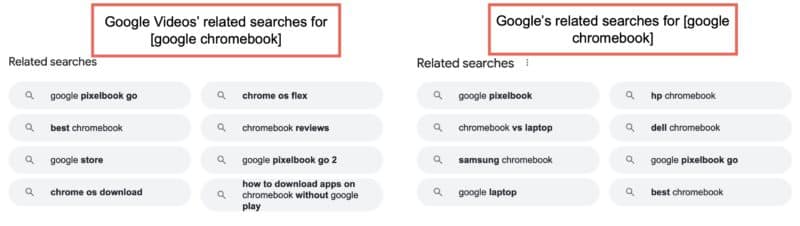
Like Google’s regular search, the Google video section generates “related search” suggestions underneath organic search results. Here again, video-related searches differ from those you will see when using Google’s main search showing that people use Google videos for different purposes:

This way, Google Videos’ related searches allow you to discover keywords you’d miss if you were only relying on Google’s regular search results. 

To sum up, when you start researching video-driven search queries, you get a better understanding of your target market and where your product may fit in. Your overall SEO strategy becomes better informed than that of your competitors.

Talk about a good way to find new “helpful content” opportunities! 😉

2. Better on-SERP visibility through video carousels

Google’s search engine results are much more diverse, visual and interactive than they were a decade ago.

These days Google’s SERPs include related images, instant answers, popular questions, and more.

One of the most visible sections is the one that includes related videos.

Videos have gained huge visibility in organic search results, mainly through video carousels.

Based on Mozcast data, videos show up in at least 30% of Google’s SERPs:

In many cases, video results are “blended,” i.e., they are included in a standalone section that is not an organic listing but is added within SERPs as a standalone element.

This section is called a video carousel.

A video carousel is a separate search element within Google SERPs that contains related videos.

Video carousels are often included on the first page of search results, but the location of the section may vary depending on the specific searcher’s intent.

Sometimes video carousels show up right on top of SERPs: Try searching for “how to tie a tie,” for example. The video-only search snippet and the video carousel dominate the whole above-the-fold part of the screen, especially if you search from a mobile device. For other queries, the section may be included lower on a search result page.

In some cases, YouTube videos are not included into a carousel and simply act as organic results. This is different (a video actually counts towards the ten organic links that are allowed on page one) but still rewarding: You are able to see a huge thumbnail of the video, which is hard to miss, likely increasing the click-through rate for that rank position.

In both cases (carousels and organic results), when accessed from a mobile device, this video can be played right within search results.

In other words, in both of these cases, well-optimized and hence high-ranking videos that are branded provide additional visibility to a brand helping it dominate its target search result pages with more than a single organic listing.

3. More visibility in organic search with video-rich snippets

While YouTube video pages may act as organic listings giving you additional visibility, earning video-rich snippets allows you to get your own page ranked in the same SERPs.

Video rich snippets are enriched organic search results that include a video thumbnail from the page, making the result that much harder to miss:

Unlike video carousels that provide brands with indirect exposure (people clicking a video in a carousel normally land on that YouTube page or watch that video right away from within Google’s search result page), video-rich snippets trigger a direct click to your site.

To earn a video-rich snippet, publishers need to embed a video on that page and use video schema.

Another benefit of earning a video-rich snippet is that it creates an expectation: People seeing a video thumbnail and clicking through to a page expect to find a video on that page, so they are more likely to stay on the page and watch the video. This, in turn, increases the probability that they will continue their journeys through the site, engage with your brand more, and dive deeper into the conversion funnel.

Conclusion

A video marketing strategy is more than making your brand or product findable on YouTube. When you start researching video opportunities, you’ll get to understand your audience better and uncover more SEO opportunities. Additionally, you make your brand stand out in search by having your video show up in related carousels, ranking your YouTube page in organic search and/or earning video snippets.

Google has created a lot of opportunities to make your SEO strategy better informed and more diverse by including videos into your digital marketing routine. If you’re unsure where to begin or don’t have the resources to implement a video strategy yourself, a comprehensive video creation and marketing service can help transform your digital presence, improve brand sentiment & trust, and increase sales & conversions across the web.


New on Search Engine Land

About The Author

Internet Marketing Ninjas is a leading digital agency specializing in SEO strategy, link building, content marketing, and site speed optimization. Led by industry veteran Jim Boykin since 1999, IMN’s team of 50 is based in Upstate New York and brings nearly 400 years of combined experience helping their clients improve search rankings and increase organic traffic from Google.

https://searchengineland.com/how-video-seo-can-boost-your-overall-digital-marketing-strategy-387512


Webinar: Harness first-party data for conversion

In order to retain and grow existing customer relationships, leading organizations are betting on first-party data solutions that can drive impact for both acquisition and retention initiatives.

Join ActionIQ and Hearst’s VP of acquisition and conversion as they discuss how Hearst is unlocking value by leveraging its first-party data to drive conversion across both subscriber and e-commerce products.

Register today for “Harness Your First-Party Data For Customer Acquisition & Conversion,” presented by ActionIQ.


New on Search Engine Land

About The Author

Cynthia Ramsaran is director of custom content at Third Door Media, publishers of Search Engine Land and MarTech. A multi-channel storyteller with over two decades of editorial/content marketing experience, Cynthia’s expertise spans the marketing, technology, finance, manufacturing and gaming industries. She was a writer/producer for CNBC.com and produced thought leadership for KPMG. Cynthia hails from Queens, NY and earned her Bachelor’s and MBA from St. John’s University.

https://searchengineland.com/webinar-harness-first-party-data-for-conversion-387638


10 SEO experts share their favorite interview questions

Hiring is one of the hardest jobs you have as a manager, team builder and even coworker.

I have a distinct memory of hiring my first SEO employee at Uber over five years ago. The search took months, and the pressure to fill the headcount was overwhelming (lest it be taken away). 

The fact of the matter is I just take hiring with great care. And it looks like I’m not the only one.

One of the hottest Twitter topics this year was when Lily Ray, Senior Director, SEO and Head of Organic Research at Amsive Digital, shared her favorite hiring question during the Search Central NYC Meetup. 

Ray revealed that when interviewing potential employees, they asked them to explain the difference between a few critical search engine processes: crawling, indexing, ranking and rendering. 

While the onus of hiring at first felt daunting, I now love identifying and interviewing special SEO talent many years later and have contributed to finding a large portion of the SEO teams at Uber and Square. 

Hire the right team and I believe you can surmount any SEO challenge. Hire the wrong teammate, and the whole team and morale suffer.  

So how do you weed out SEOs in a 30- to 60-minute interview and figure out who is all bark and no bite? What if they’re more of a snake oil salesman than a spider crawling expert? 

I asked some of my favorite SEOs their favorite SEO interview questions. Find out the answers below.

10 SEO interview questions to ask and why

1. “Have you done this before? How did you overcome the biggest challenges?”

– Kevin Indig, Former SEO Director at Shopify

Why Indig likes this SEO interview question

  • “You learn more about how the candidate approaches things in general and how they’ve dealt with your specific issue in the past. Since you’re always hiring for a specific problem, that’s the best way to gauge whether a candidate is right for the job or not.”

2. “Imagine we wanted to rank #1 for <insert keyword>. What should we do?”

“…and then every time they answer say something along the lines of, “and what if that didn’t work? What would you do?” And see how long they keep going.” 

– Tyler Reardon, Global SEO Lead at Chewy

Why Reardon likes this SEO interview question 

  • “I think it’s useful to see how persistent someone is and how deep their SEO knowledge is. A lot of good or bad things will come of this question. If they end up saying, “Well we don’t have enough links” after you ask what else a couple of times they’re probably not the right candidate.” 

3. “You’re a vending machine repair specialist. You walk into a room and see a dark vending machine. What’s the first thing you do?”

– Jamie Indigo, Senior Technical SEO, Deepcrawl

Why Indigo likes this SEO interview question 

  • “It walks through basic problem-solving. The ideal answer is, “I check to see if it’s plugged in.” It shows the ability to logically address an issue step by step.”

4. “How do you go about making sure your recommendations get implemented?”

– Areej AbuAli, Head of SEO, Papier / Founder, Tech SEO Women

Why AbuAli likes this SEO interview question 

  • “Even though this isn’t an SEO question per se, it’s one of the most important ones for me to ask. Simply giving out recommendations is just the ‘first’ part of our job, making sure they get implemented is the ‘core’ of our job. This question helps me understand how the candidate works cross-functionally, how they prioritize their recommendations, how they communicate what needs to get done and how they work alongside different stakeholders in the organization.”

Get the daily newsletter search marketers rely on.


5. “How would you set up an SEO test?”

– Jackson Lo, Sr. SEO Lead, Growth, Shopify

Why Lo likes this SEO interview question

  • “One of the biggest lessons I learned during my time at TripAdvisor came from our CEO Steve Kaufer, ‘If it’s worth doing, it’s worth measuring.’ If you’re just doing things, no one will know if your actions are contributing to the bottom line. As SEOs, we need to be able to measure impact from our work and testing is a great topic to further understand their thought process on setting up and measuring results.” 

6. “Organic traffic is down – walk me through how you would diagnose its cause.”

– Victor Pan, Head of Technical SEO, Hubspot

Then follow up with:

“You checked x, y, and z and that wasn’t it – what else could it be?” I keep going until they hit the bottom of the barrel. I want to know how they respond to uncertainty. So I throw a hint e.g., “so I noticed our rank showed Y, so the interviewee has a chance to react to new information. I get to understand how they approach problems (bonus points if they look at it differently from the team).”

Why Pan likes this SEO interview question 

  • “You need to test hard skills in SEO, look for a candidate with a growth mindset, and this question also allows you to challenge them just enough to bring out their best self and want to work to learn from you.”

7. “Describe a complex SEO challenge you’ve encountered, and walk me through step by step how you approached trying to solve it, and why you chose the route you did.”

– Kyle Faber, Founder and Head of SEO, Snark Digital

Why Kyle likes this SEO interview question 

“The reason I like this question is that it:
a. Gives me a basic sense of what they feel is complex and/or challenging and why.
b. Lets me see their thought process on how they try to solve problems.
c. Gives me insights into how they rationalize their decisions.

At the end of the day, there are multiple ways to approach a challenge, so this question
– Gives me insight into whether or not they’re a strategic thinker.
– Can speak to how they create processes for implementing their strategies.
– And if they are able to back up their decisions with credible reasoning.”

8. “Tell me about a project that you’re particularly proud of, why you’re proud of it and what you learned from the project.” 

– Niki Mosier, Director of Digital Marketing and Content, AgentSync

Why Mosier likes this SEO interview question

  • “I like this question because it gives candidates an opportunity to talk about something they are really proud of and usually gives me a good idea of what types of projects they get excited about. This question also allows us to dig deeper into what kinds of projects the candidate has had experience with. It also gives me a good sense of how they take ownership of projects.”

9. “What’s the most important SEO initiative?”

– Eli Schwartz, Author, “Product Led SEO” / Former SEO Lead, SurveyMonkey

Why Schwartz likes this SEO interview question

  • “I love this question because it’s so vague the answer forces the interviewer to explain and defend and thereby I get insight into what they are thinking and how they think.”

And my personal favorite question to ask when interviewing SEOs is…

10. “What was your most difficult technical SEO project and what was the business impact?”

Why I like this SEO interview question
Assuming this role is a little senior, I expect them to:

  • Figure out how to execute challenging technical SEO tasks.
  • Understand what the business impact was. 

Best case, I’ll selfishly learn something interesting during the interview about something I didn’t know was possible. I’ll also learn if they understand how to look at analytics, how they think through attribution and other critical skills related to being part of a successful SEO team. 

Worst case, they’ll reveal that they do not focus on the business metrics or do not understand how to tell the narrative of their business impact, disqualifying them from a senior role in the organization.


Opinions expressed in this article are those of the guest author and not necessarily Search Engine Land. Staff authors are listed here.


New on Search Engine Land

About The Author

Jackie Chu is currently the SEO Intelligence Lead at Uber Technologies in San Francisco. She has deep experience in B2B, B2C and online publishing, and has led SEO and ASO efforts both in-house and as a consultant for companies like Square, Dropbox and Yahoo. In addition to doing SEO, she loves wasting money at Barry’s Bootcamp, drinking sparkling wine and hanging out with her mini Goldendoodle, Bailey.

https://searchengineland.com/seo-experts-interview-questions-387587


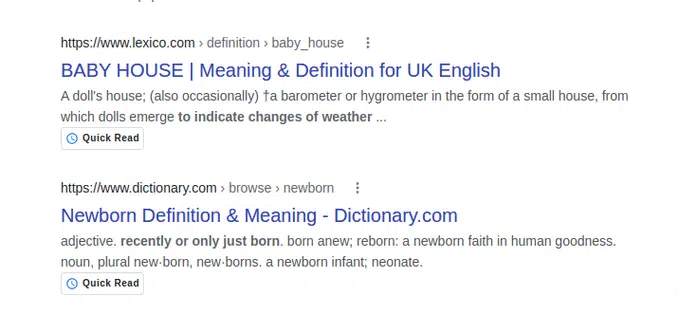
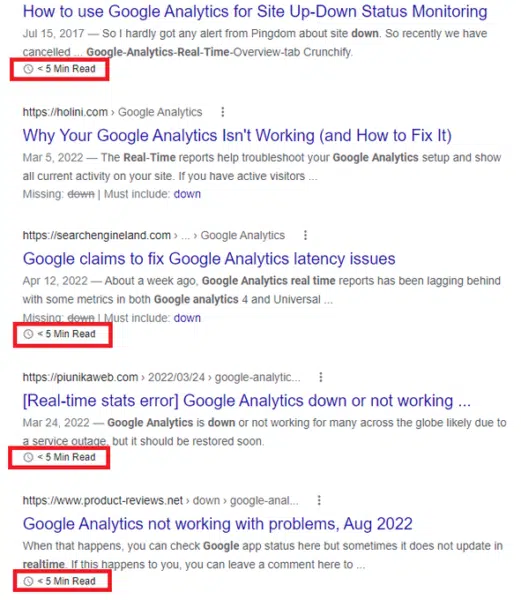
Google tests Quick Read, 5 Min. Read labels in search results

Google is testing two new labels in search results:

  • Quick Read
  • 5 Min. Read.

What it looks like. The labels were shared on Twitter. Here are screenshot of both types, via @Ozaemotion and @lilyraynyc:

Short content can be helpful content. For nearly a decade, skyscraper content and 10x content have been popular concepts. In short, the idea behind both was that “length is strength.”

Some SEO correlation studies appeared to back up the idea because Page 1 of Google is full of articles at 1,000+ words.

However, word count is not a ranking signal. And searchers have been growing tired of clicking on articles that discuss the entire history of a topic before finding the answer to their question buried somewhere in a 2,000+ word blog post. 

Axios has built an entire news strategy around smart brevity.

Does that mean all long-form content is bad? No. In some industries, longer content is good, necessary and acceptable. 

There is also no need to revisit your content strategy at this point. Don’t edit or break up all your stories so they have a reading time of 5 minutes or less.

Why we care. Any change Google makes to its SERPs can impact which sites get clicks and traffic, which makes this test one to watch. If this test becomes a feature, it could have a major impact on recipe searches, for example, which are notoriously overstuffed. It also makes sense in places where you’d expect a short answer or definition instead of a novella full of anecdotes and tangents. 


New on Search Engine Land

About The Author

Danny Goodwin is Managing Editor of Search Engine Land & SMX. In addition to writing daily about SEO, PPC, and more for Search Engine Land, Goodwin also manages Search Engine Land’s roster of subject-matter experts. He also helps program our conference series, SMX – Search Marketing Expo. Prior to joining Search Engine Land, Goodwin was Executive Editor at Search Engine Journal, where he led editorial initiatives for the brand. He also was an editor at Search Engine Watch. He has spoken at many major search conferences and virtual events, and has been sourced for his expertise by a wide range of publications and podcasts.

https://searchengineland.com/google-search-quick-read-5-min-read-labels-387599


Shopify SEO: How to limit your reliance on canonicals and boost crawl efficiency

30-second summary:

  • Reducing reliance on canonical tags can improve product URL discovery on Shopify
  • How you structure your products on Shopify can determine how well these pages perform
  • Shifting reliance from canonical tags to rich internal anchor text helps build relevancy

Can anything stop the relentless rise of Shopify? Back in 2012, the landscape was dominated by WordPress, Magento, and Joomla. Fast-forward 10 years and many in the industry now see Shopify as the leading ecommerce platform, with the others going from leaders to laggards.
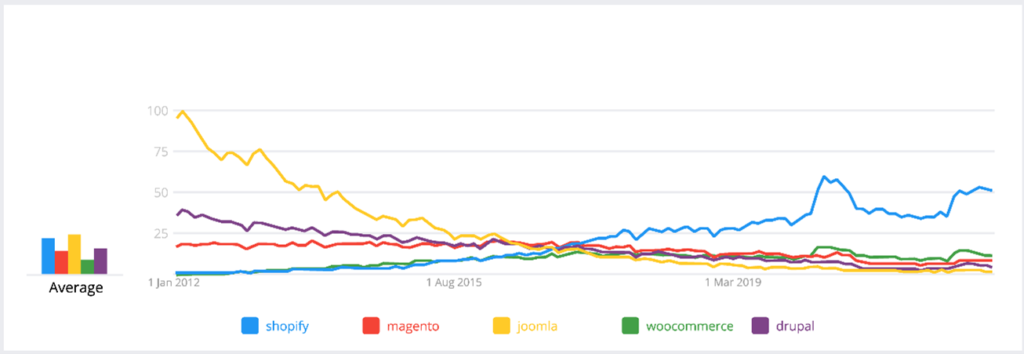
Shopify SEO graph

There are of course multiple reasons for Shopify’s rise to prominence, but arguably one of the biggest factors is that the platform is much more technically accessible than other ecommerce infrastructure providers. Getting your head around a fresh Magento install or working out how Joomla works (which is still a mystery to me till date!) often requires a certain level of technical know-how. And, if you don’t possess it, then you need to spend extra resources outsourcing that work to someone who does.

Shopify understood that baking simplicity and an “it just works” ethos into their platform would allow everyday entrepreneurs to get their sites up and running quickly, without needing a degree in computer science or a huge budget to maintain their online presence. However, as user-friendly, as it might be, there are still a few technical and SEO hurdles to overcome if you want your Shopify site to succeed on the SERPs.

In this article, I’ll take a closer look at a key “out of the box” SEO issue that often limits the relevance of product pages within Shopify and creates significant site bloat. More importantly, I’ll also share four potential solutions that can be used to fix the problem and maximize your product page potential. Let’s dive in.

The cost of inefficiency

Something that we often discuss with our clients is ensuring that Google can crawl their websites as efficiently as possible. We explain this by breaking down the cost to Google of crawling the web. Every time Google visits a webpage on the Internet there is a physical cost to Google: the price of electricity consumption, water consumption, hardware, software, and all the other assets needed to visit that page. While this cost might be a thousandth of a penny per URL, with the sheer amount of URLs crawled by Google each day, the total cost is likely staggering.

Therefore, if you are serving Google webpages that are duplicated or not relevant, you are wasting resources. Google has made a point of stating that in their article on managing crawl budget:

“Without guidance from you, Googlebot will try to crawl all or most of the URLs that it knows about on your site. If many of these URLs are duplicates, or you don’t want them crawled for some other reason (removed, unimportant, and so on), this wastes a lot of Google crawling time on your site. This is the factor that you can positively control the most.”

The key message here is that you can control how much of Google’s crawl time is wasted. By aiming to reduce this waste, you are ensuring that the time Google spends on your website is as productive as possible. This means Google will spend more time crawling URLs that have true value, picking up changes to existing URLs, and discovering new pages much faster.

Use canonicals as a temporary solution and not the final fix

A canonical tag is used when there are multiple duplicate pages, allowing you to define which of the duplicates should be deemed the correct page for Google to index.

While they are effective in the short term, the existence of a canonical tag highlights that there are structural issues within a website, and this can impact crawl efficiency. Even though the canonical tag will indicate to Google that you have selected a preferred URL to index, the search engine still needs to crawl all duplicates that contain the canonical tag to come to the consensus that you have set.

Rather than using a canonical tag as a permanent solution, it’s important to take steps to fix the underlying structural problem, therefore negating the use of a canonical tag. This in turn will have a positive impact on crawl efficiency.

What does this have to do with Shopify product pages?

Put simply, product URLs on Shopify rely on canonical tags to be discovered. Let’s look at the two main causes of this.

Products in multiple collections

The URL below is a product page from a Shopify website.

https://www.bellfieldclothing.com/collections/mens-jackets/products/naota-mens-funnel-neck-quilted-puffer-jacket-navy

You will notice that the URL has the collection the product is in is seen in the URL as well. If this product is in multiple collections, Shopify creates multiple product URLs. As these are duplicates, Shopify handles this by using canonical tags. These canonical tags point to the preferred product URL, which does not contain a collection:

The product highlighted above is currently in four collections, meaning there are now five different product URLs for Google to crawl to find this one product that it needs to index. There is, however, another issue that further increases this number: product variants.

Product variants

A product variant is a product attribute that can implement within Shopify. This could be color, size, weight, or any other type of attribute that a product may have. Creating variants of a product within Shopify allows a user to select attributes on the product page. This can be seen below on our example product URL as “size”:

Shopift SEO canonical URL product page example

In this setup, Shopify adds a parameter to the product URL called ?variant. This contains an ID that references the selected variant. The URL below is our example product URL with the medium variant selected:

https://www.bellfieldclothing.com/collections/mens-jackets/products/naota-mens-funnel-neck-quilted-puffer-jacket-navy?variant=39593265954876

This is of course another duplicate, which is handled via a canonical tag. If we begin to calculate the total number of URLs this single product has that rely on canonical tags, you will notice how this can have a detrimental impact on crawl efficiency.

Based on this product being in four collections and having four variants, there are a total of 20 product URLs that rely on a canonical tag. This means Google needs to regularly crawl 21 product URLs to discover the single product URL that needs indexing.

10,000 URLs crawled to index 600

When you factor in the sheer number of products across an entire website, it’s easy to see how this figure can add up. If our example website has 600 products, and each product appears in four collections with four variants each, then Google will need to regularly crawl in excess of 10,000 product URLs to find the 600 that have been requested to be indexed.

How do you fix this on Shopify?

There are two distinct problems we need to fix here: the issue with products appearing in multiple collections, and the issue with product variants. There are solutions for both — however, implementing them will require compromise in certain areas.

Products in multiple collections: The fix

This fix works by removing links to product URLs with the collection name in the product URL. The main culprit here is the collection URL — specifically the theme file that powers collection URLs. On Shopify, this file is called product-grid-item.liquid.

You can navigate to this file via the following route within your Shopify admin.

Online Store > Themes > Customize > Theme Actions > Edit Code > Snippets

Within this file there are HTML hyperlinks that reference product URLs containing the collection name:
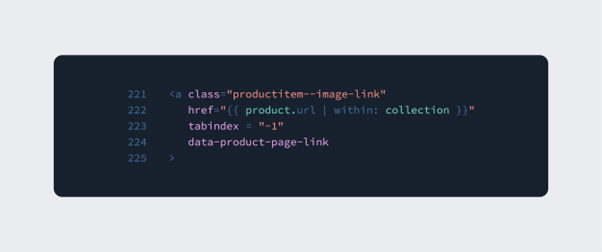
Shopify SEO code

The “within: collection” element is what is responsible for pulling the collection name into the product URL. Removing this ensures that the collection name no longer appears in the product URL.

However, before you jump in, there are a few things you’ll need to bear in mind:

  • It is recommended that you consult with your web development team before making this change.
  • Apps that you use may need the “within: collection” functionality, so it is worth checking with app support on whether or not this can be changed.
  • This change impacts the breadcrumb on product URLs. If this is problematic, then I’d suggest building breadcrumbs manually using META fields with a dedicated META fields app.
  • You will also need to ensure that manual links that use this format are changed.
  • There may be other template files that contain “within: collection” so it is worth liaising with your development team to identify these.

Product variants: The fix (or is it?)

Unfortunately, the solution to product variants is more complex and ultimately depends on how much SEO value you are getting from your existing product variants. The recommendation here is to first find out how viable product variant keywords are in terms of search volume and market opportunity.

For example, if our imaginary Shopify store sells Ralph Lauren polo shirts, then my variants are likely to be color and size. By running a quick search for the product type plus these variants, we can see that there is search volume and therefore it will be important that my variants are indexable and optimized.
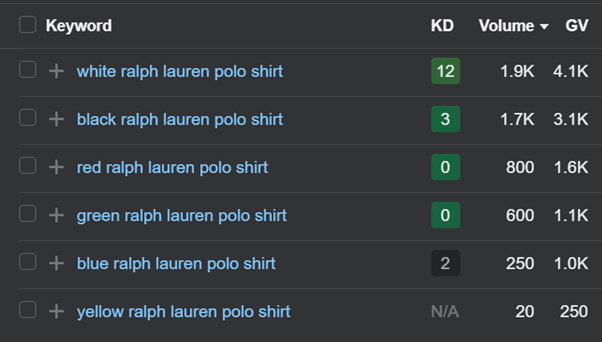
Shopify SEO keywords

Fix Option #1: Optimize ?variant URLs

This first option is viable if you believe that there is search volume opportunity across a wide range of your product variants. The premise of this fix is to build logic into your theme code, so that when a variant is selected, the variant name is appended into the page title tag and where possible, the product description.

This change will likely depend on your theme setup and, as with any change, it is recommended that you consult with your web development team. More details on how to do this can be found via the Shopify community thread below:

https://community.shopify.com/c/shopify-design/different-product-titles-for-different-variants-for-the-same/td-p/620113

Another thing to bear in mind with this solution is that you will need to remove the canonical tag that is currently in place on ?variant URLs. The main drawback to this approach is that you may need to implement it sitewide across all product variants — but not all variants will necessarily have available search volume.

Fix Option #2: Optimize main product URL for variants

If you want more control over which product sets have optimized variants, then this option might be for you. By optimizing the main product URL for variants, by including variant keywords in the product description and META data, you will stand a chance of being visible for these product variant keywords.

The drawback here is that product URLs could become over-optimized and not as relevant as a dedicated, optimized product variant URL.

Fix Option #3: Disallow ?variant parameter

If it turns out that your product variants have minimal or no search value then disallowing the ?variant parameter in your robots.txt file might be the best option. This will stop Google crawling ?variant URLs, therefore making crawl activity more efficient.

Fix Option #4: Individual products per variant

If your product variants do have search viability, then creating individual products per variant might be an effective option. This is something we have seen retailers like Gym Shark do with color. The product below comes in a number of different colors, each of which has its own product URL and does not rely on variants, e.g.:

https://www.gymshark.com/products/gymshark-element-baselayer-t-shirt-black-aw21
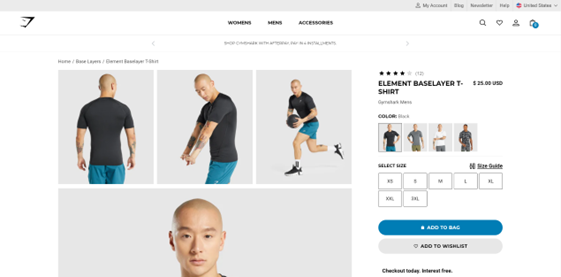
Shopify SEO Example

With more control over both META data and optimized content, this approach means it is easier to build deeper relevance for product variants. The downside here is that there are simply more products to manage within the CMS.

Shopify & SEO issues: Final thoughts

As I mentioned earlier, one of the reasons for Shopify’s meteoric rise has been the “it just works” ethos that makes the platform such a cinch to use. But that’s not to say that the platform doesn’t suffer from a few SEO snags.

In addition to the canonical issue, Google’s Core Web Vitals can be another source of headaches for SEOs who work with the platform. But there are generally workarounds for those who are willing to take the time to implement them. You can learn more about how to navigate these in our ultimate guide to Shopify SEO (2022).

There are also hopeful signs that the Shopify team are increasingly receptive to the needs of the SEO community. The team have regularly taken on board feedback from SEOs to improve their product, from allowing users to edit the robots.txt file, to allowing for sub-folder international structures. So, we can hope that easy-to-implement solutions around the use of canonicals and other issues will be rolled out before too long.

Can anything stop the relentless rise of Shopify? Back in 2012, the landscape was dominated by WordPress, Magento and Joomla. Fast-forward 10 years, and many in the industry now see Shopify as the leading e-commerce platform, with the others going from leaders to laggards.

There are of course multiple reasons for Shopify’s rise to prominence, but arguably one of the biggest factors is that the platform is much more technically accessible than other ecommerce infrastructure providers. Getting your head around a fresh Magento install or working out how Joomla works (which is still a mystery to me to this day!) often requires a certain level of technical knowhow. And, if you don’t possess it, then you need to spend extra resources outsourcing that work to someone who does.

Shopify understood that baking in simplicity and an “it just works” ethos into their platform would allow everyday entrepreneurs to get their sites up and running quickly, without needing a degree in computer science or a huge budget to maintain their online presence. However, as user-friendly as it might be, there are still a few technical and SEO hurdles to overcome if you want your Shopify site to succeed on the SERPs.

In this article, I’ll take a closer look at a key “out of the box” SEO issue that often limits the relevance of product pages within Shopify and creates significant site bloat. More importantly, I’ll also share four potential solutions that can be used to fix the problem and maximize your product page potential. Let’s dive in.

The cost of inefficiency

Something that we often discuss with our clients is ensuring that Google can crawl their websites as efficiently as possible. We explain this by breaking down the cost to Google of crawling the web. Every time Google visits a webpage on the Internet there is a physical cost to Google: the price of electricity consumption, water consumption, hardware, software, and all the other assets needed to visit that page. While this cost might be a thousandth of a penny per URL, with the sheer amount of URLs crawled by Google each day, the total cost is likely staggering.

Therefore, if you are serving Google webpages that are duplicated or not relevant, you are wasting resources. Google have made a point of stating that in their article on managing crawl budget:

“Without guidance from you, Googlebot will try to crawl all or most of the URLs that it knows about on your site. If many of these URLs are duplicates, or you don’t want them crawled for some other reason (removed, unimportant, and so on), this wastes a lot of Google crawling time on your site. This is the factor that you can positively control the most.”

The key message here is that you can control how much of Google’s crawl time is wasted. By aiming to reduce this waste, you are ensuring that the time Google spends on your website is as productive as possible. This means Google will spend more time crawling URLs that have true value, picking up changes to existing URLs and discovering new pages much faster.

Using canonicals as a temporary solution and not the final fix

A canonical tag is used when there are multiple duplicate pages, allowing you to define which of the duplicates should be deemed the correct page for Google to index.

While they are effective in the short term, the existence of a canonical tag highlights that there are structural issues within a website, and this can impact crawl efficiency. Even though the canonical tag will indicate to Google that you have selected a preferred URL to index, the search engine still needs to crawl all duplicates that contain the canonical tag to come to the consensus that you have set.

So, rather than using a canonical tag as a permanent solution, it’s important to take steps to fix the underlying structural problem, and therefore negating the use of the canonical tag. This in turn will have a positive impact on crawl efficiency.

What does this have to do with Shopify product pages?

Put simply, product URLs on Shopify rely on canonical tags to be discovered. Let’s look at the two main causes of this.

Products in multiple collections

The URL below is a product page from a Shopify website.

https://www.bellfieldclothing.com/collections/mens-jackets/products/naota-mens-funnel-neck-quilted-puffer-jacket-navy

You will notice that the URL has the collection the product is in within it. If this product is in multiple collections, Shopify creates multiple product URLs. As these are duplicates, Shopify handles this by using canonical tags. These canonical tags point to the preferred product URL, which does not contain a collection:

The product highlighted above is currently in four collections, meaning there are now five different product URLs for Google to crawl to find this one product that it needs to index. There is, however, another issue that further increases this number: product variants.

Product variants

A product variant is a product attribute that can implement within Shopify. This could be color, size, weight or any other type of attribute that a product may have. By creating variants of a product within Shopify, it allows a user to select attributes on the product page. This can be seen below on our example product URL as “size”:

Shopift SEO canonical URL product page example

In this setup, Shopify adds a parameter to the product URL called ?variant. This contains an ID that references the selected variant. The URL below is our example product URL with the medium variant selected:

https://www.bellfieldclothing.com/collections/mens-jackets/products/naota-mens-funnel-neck-quilted-puffer-jacket-navy?variant=39593265954876

This is of course another duplicate, which is handled via a canonical tag. If we begin to calculate the total number of URLs this single product has that rely on canonical tags, you will begin see how this can have a detrimental impact on crawl efficiency.

Based on this product being in four collections and having four variants, there are a total of 20 product URLs that rely on a canonical tag. This means Google needs to regularly crawl 21 product URLs to discover the single product URL that needs indexing.

10,000 URLs crawled to index 600

When you factor in the sheer number of products across an entire website, it’s easy to see how this figure can add up. If our example website has 600 products, and each product appears in four collections with four variants each, then Google will need to regularly crawl in excess of 10,000 product URLs to find the 600 that have been requested to be indexed.

How do you fix this on Shopify?

There are two distinct problems we need to fix here: the issue with products appearing in multiple collections, and the issue with product variants. There are solutions for both — however, implementing them will require compromise in certain areas.

Products in multiple collections: The fix

This fix works by removing links to product URLs with the collection name in the product URL. The main culprit here is the collection URL — specifically the theme file that powers collection URLs. On Shopify, this file is called product-grid-item.liquid.

You can navigate to this file via the following route within your Shopify admin.

Online Store > Themes > Customize > Theme Actions > Edit Code > Snippets

Within this file there are HTML hyperlinks that reference product URLs containing the collection name:

Shopify SEO code

The “within: collection” element is what is responsible for pulling the collection name into the product URL. Removing this ensures that the collection name no longer appears in the product URL.

However, before you jump in, there are a few things you’ll need to bear in mind:

  • It is recommended that you consult with your web development team before making this change.
  • Apps that you use may need the “within: collection” functionality, so it is worth checking with app support on whether or not this can be changed.
  • This change impacts the breadcrumb on product URLs. If this is problematic, then I’d suggest building breadcrumbs manually using META fields with a dedicated META fields app.
  • You will also need to ensure that manual links that use this format are changed.
  • There may be other template files that contain “within: collection” so it is worth liaising with your development team to identify these.

Product variants: The fix (or is it?)

Unfortunately, the solution to product variants is more complex and ultimately depends on how much SEO value you are getting from your existing product variants. The recommendation here is to first find out how viable product variant keywords are in terms of search volume and market opportunity.

For example, if our imaginary Shopify store sells Ralph Lauren polo shirts, then my variants are likely to be color and size. By running a quick search for the product type plus these variants, we can see that there is search volume and therefore it will be important that my variants are indexable and optimized.

Shopify SEO keywords

Fix Option #1: Optimize ?variant URLs

This first option is viable if you believe that there is search volume opportunity across a wide range of your product variants. The premise of this fix is to build logic into your theme code, so that when a variant is selected, the variant name is appended into the page title tag and where possible, the product description.

This change will likely depend on your theme setup and, as with any change, it is recommended that you consult with your web development team. More details on how to do this can be found via the Shopify community thread below:

https://community.shopify.com/c/shopify-design/different-product-titles-for-different-variants-for-the-same/td-p/620113

Another thing to bear in mind with this solution is that you will need to remove the canonical tag that is currently in place on ?variant URLs. The main drawback to this approach is that you may need to implement it sitewide across all product variants — but not all variants will necessarily have available search volume.

Fix Option #2: Optimize main product URL for variants

If you want more control over which product sets have optimized variants, then this option might be for you. By optimizing the main product URL for variants, by including variant keywords in the product description and META data, you will stand a chance of being visible for these product variant keywords.

The drawback here is that product URLs could become over-optimized and not as relevant as a dedicated, optimized product variant URL.

Fix Option #3: Disallow ?variant parameter

If it turns out that your product variants have minimal or no search value then disallowing the ?variant parameter in your robots.txt file might be the best option. This will stop Google crawling ?variant URLs, therefore making crawl activity more efficient.

Fix Option #4: Individual products per variant

If your product variants do have search viability, then creating individual products per variant might be an effective option. This is something we have seen retailers like Gym Shark do with color. The product below comes in a number of different colors, each of which has its own product URL and does not rely on variants, e.g.:

https://www.gymshark.com/products/gymshark-element-baselayer-t-shirt-black-aw21

Shopify SEO Example

With more control over both META data and optimized content, this approach means it is easier to build deeper relevance for product variants. The downside here is that there are simply more products to manage within the CMS.

Shopify & SEO issues: Final thoughts

As I mentioned earlier, one of the reasons for Shopify’s meteoric rise has been the “it just works” ethos that makes the platform such a cinch to use. But that’s not to say that the platform doesn’t suffer from a few SEO snags.

In addition to the canonical issue, Google’s Core Web Vitals can be another source of headaches for SEOs who work with the platform. But there are generally workarounds for those who are willing to take the time to implement them. You can learn more about how to navigate these in our ultimate guide to Shopify SEO (2022).

There are also hopeful signs that the Shopify team are increasingly receptive to the needs of the SEO community. The team have regularly taken on board feedback from SEOs to improve their product, from allowing users to edit the robots.txt file, to allowing for sub-folder international structures. So, we can hope that easy-to-implement solutions around the use of canonicals and other issues will be rolled out before too long.


Marc Swann is Director of Search at Glass Digital, a digital marketing agency offering SEO, affiliate marketing, and paid search services. Marc has been working in digital marketing for 12 years and specializes in technical SEO. At Glass Digital, his focus is on the organic search service, ensuring our teams are delivering maximum value for their clients.

Subscribe to the Search Engine Watch newsletter for insights on SEO, the search landscape, search marketing, digital marketing, leadership, podcasts, and more.

Join the conversation with us on LinkedIn and Twitter.

https://www.searchenginewatch.com/2022/08/29/shopify-seo-how-to-limit-your-reliance-on-canonicals-and-boost-crawl-efficiency/




Keyword rank tracking software – 6 tools compared

Reliable rank tracker software is crucial to developing a successful SEO strategy. Aside from tracking keyword rankings, SEO tools provide you with keyword research features and useful SEO metrics, which lets you pick the most effective keywords for your website.

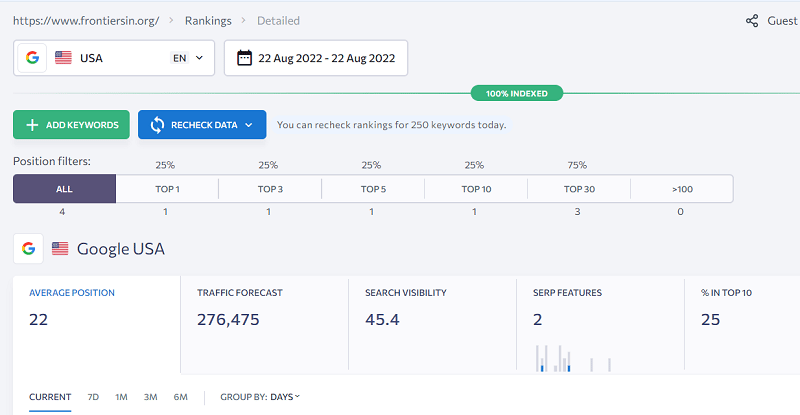
With so many rank tracking tools in the market, how do you know which one is the best fit for you? This list includes some popular rank tracking tools, showing what scope of tasks they offer based on different pricing models.

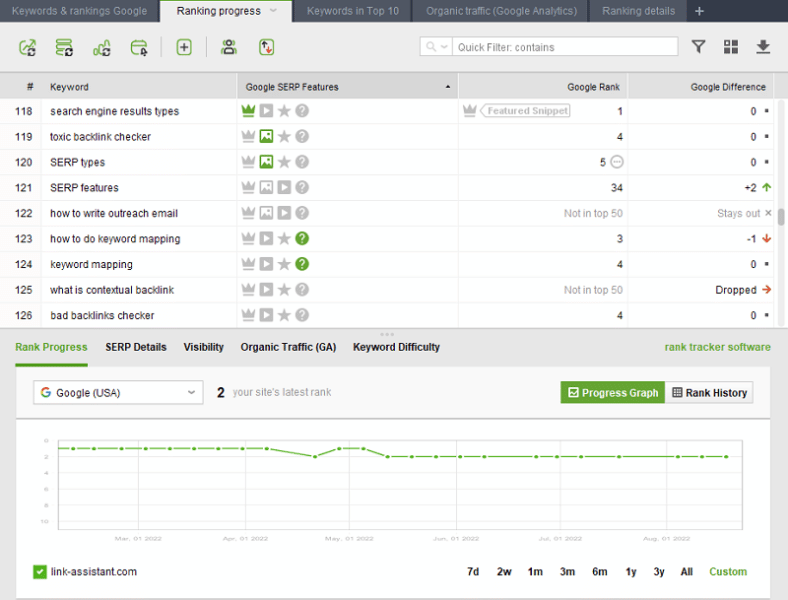
1. Rank Tracker by SEO PowerSuite

Rank Tracker from SEO PowerSuite enables you to track keyword positions, analyze SERPs, research keywords, explore competitors, and make estimates for SEO and PPC campaigns.

The accuracy and volume of keyword data make it a decent competitor of industry-leading rank-checking tools, such as Semrush or Ahrefs. Meanwhile, Rank Tracker is affordable for small businesses. It is also cost-efficient when it comes to large SEO agencies.

Main features:

  • An unlimited number of keywords and projects.
  • Local rank tracking: the software supports over 500 search engines in all possible locations, including Yahoo, Bing, Baidu, Naver and others. 
  • Separate mobile rank tracking.
  • Automated ranking checks for regular monitoring of your keyword positions.
  • Custom alerts and keyword position reports straight to your or your clients’ email boxes.
  • SERP feature analysis: the tool tracks if any of your pages are represented in featured snippets, FAQs, People Also Ask, featured images and videos, etc.
  • 24 keyword research techniques: in addition to its own keyword database, Rank Tracker includes Google and YouTube suggestions, related searches, Amazon autocomplete tool, keyword gap, TF-IDF analysis, etc.
  • Integration with Google Analytics, Google Search Console and Keyword Planner.

Pricing plans: Free version or Professional $149/year, Enterprise $349/year, billed annually.

Rank Tracker’s free version is pretty generous. It allows checking an unlimited number of keywords and websites. You can compare your rankings with one competitor. Besides, you can research as many keywords as you want.

With the Professional edition, Rank Tracker allows you to record the SERP history and track rankings for up to five competitors. Besides, it allows scheduling keyword position checks.

The Enterprise version of Rank Tracker is great for reporting to SEO clients as it comes with the white-label feature to add your company name and logo to your reports.

2. Mangools

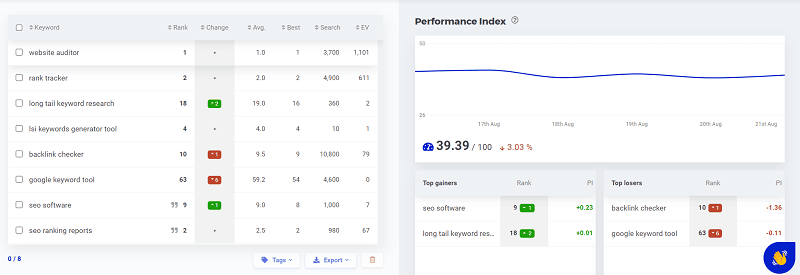
Mangools is web-based software providing various tools for tracking search results. With this tool, you can quickly monitor top gainers and losers in SERPs.

Main features: 

  • Mangools software calculates the proprietary Performance Index score to show your ranking success.
  • The Keyword Position Flow board shows the number of keywords that moved up or down across the SERP. There is a compact dashboard of distribution for your Keyword Positions.
  • SERPWatcher shows your keywords’ ranking performance, defined by the target country and user device type. 
  • SERPСhecker checks rankings on the search results page and their quality (page authority and backlinks). The rank checker also provides a snapshot of the SERP.
  • Keyword research tools in Mangools include Related queries, Autocomplete, and Related questions.
  • Easy sharing of SEO reports on your search engine rankings. 

Pricing plans: Basic $358.80, Premium $478.80, Agency $958.80 if billed annually, monthly billing is available.

Mangool’s pricing plans differ by the limits on the number of keyword lookups per 24 hours. The Basic plan allows up to 100 lookups, 500 lookups are allowed in the Premium plan, and 1,200 lookups in the Agency plan. The number of tracked keywords also ranges from 200 to 700 and 1500 respectively.

This SEO tool offers a fairly limited free trial.

3. SE Ranking

SE Ranking is a cloud-based platform for SEO and online marketing professionals.

Its rank checker has neat keyword dashboards to help you easily understand what’s going on in search results.

Main features: 

  • Web-based keyword tracking and site audit platform.
  • Allows tracking your site’s ranking positions on Google, Bing, Yahoo, Yandex and YouTube.
  • The tool also lets you track local and mobile keyword rankings.
  • This rank monitoring tool offers 14 days free trial.

Pricing plans: Essential, Business, and Pro, monthly and yearly billing available.

The pricing plan of the SE Ranking online rank tracker is based on the frequency of your ranking checks: depending on whether you run the checks daily, every three days, or weekly. Besides, there is a limit of 5 search engines or locations per keyword.

The cheapest is the Essential edition, with weekly checks of 250 tracked keywords. It will cost $225 if billed annually. The most advanced Business plan with daily checks for at least 2500 keywords will cost around $1800 if billed yearly.

4. Ahrefs

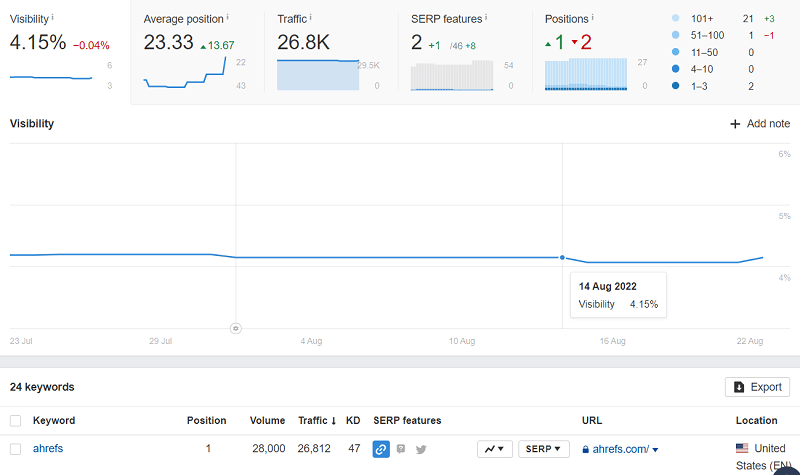
Ahrefs is a popular SEO and marketing platform that lets you audit websites, research keywords, analyze backlinks, etc. The rank tracker tool in Ahrefs provides a pretty compact dashboard where you can grasp all your trends in keyword rankings at a glance.

Main features:

  • All-in-one web-based SEO software.
  • Ahrefs’ Rank Tracker lets you overview top traffic keywords and the SERP in detail, with each result accompanied by important metrics. 
  • SERP features appear next to each result, and you can unwrap and see all three ranking results in the local pack.
  • The filtering tags let you quickly filter the data you need.
  • The widely-known metric of Ahrefs is Domain Rating (DR), the score showing the authority of a domain based on its backlink profile.
  • In every plan, you will get weekly updates on your ranking progress.

Pricing plans: Lite $990/year, Standard $1,990/year, Advanced $3,990/year, Enterprise $9,990/year if billed annually; monthly billing is available.

Rank tracking history is available in all plans but Lite. Like most cloud-based rank tracking software tools, Ahrefs charges per keyword in the project. The Lite plan allows tracking up to 750 keywords per project; Standard — 2,000 keywords, Advanced — 5,000; and 10,000 keyword checks are available in Enterprise.

There is also a pay-as-you-go option to get additional keyword entries at $50 per 500 keywords. For additional costs, you can get daily checks of your keyword positions.

Ahrefs’ Rank Tracker tool allows an unlimited number of verified projects. But there are limits on tracking the unverified domains, starting with five in the cheapest plan.

5. Semrush

Semrush is an all-in-one web-based solution for a complete SEO and marketing workflow. Due to its costly pricing, it is more suitable for large SEO agencies.

Main features:

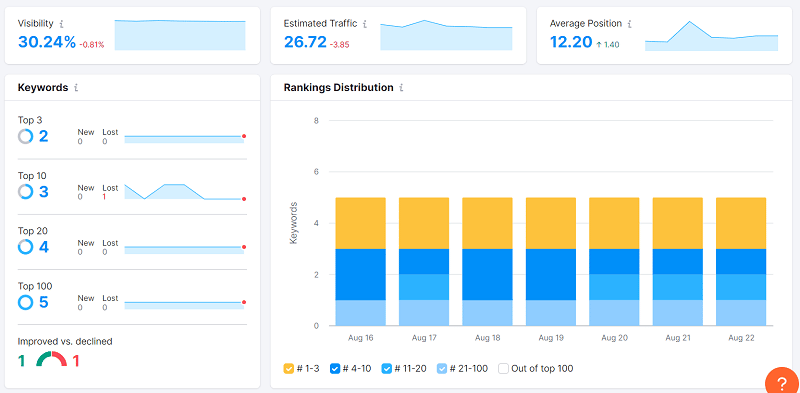
  • Organic Traffic Insights with all sorts of data: the number of ranking keywords, traffic fluctuation over the last 12 months, and traffic cost.
  • Branded vs. non-branded traffic trends, top organic keywords. 
  • The graph of organic keywords trends shows how many keywords entered the top 3-10 and up to 100 historically.
  • The free plan is available with a limit of 10 requests per day.
  • 7-day free trial.

Pricing plans: Pro $1,199/year, Guru $ 2,299/year, Business $4,499/year, if billed annually.

Similar to other powerful rank tracking tools, Semrush tracks search engine rankings in multiple countries and languages. However, these features, as well as keeping historical data, are available only with Guru and Business plans.

The Pro plan limit is 500 keywords to track simultaneously per all projects, 1500 for Guru, and 5000 for Business (with the keyword ranking progress updated daily). The number of projects is 5, 15 and 40 respectively. There are also some limits on the number of keyword metrics’ updates per month.

6. Wincher plugin

WordPress enthusiasts know the power of the Yoast SEO plugin. Now they can have even more with the Wincher integration for tracking keyword rankings.

Main features:

  • The plugin is used in combination with Yoast SEO.
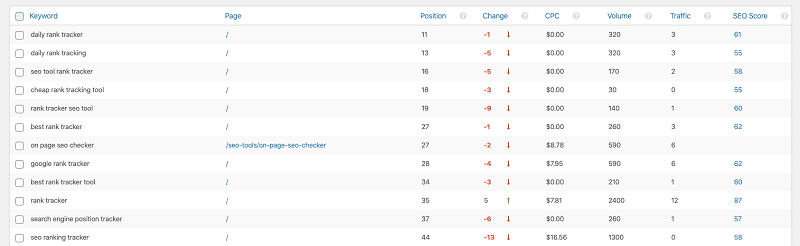
  • Up to 5 key phrases tracking per post.
  • The trend of keyword ranking position over time.

Pricing plans: Starter $288/year, Business $588/year, Enterprise $2388/year, if billed annually; monthly billing is also available (the price in U.S. dollars is approximate since the payment is made in euros).

The free version of the Wincher rank tracking plugin is limited to one keyword per five posts, just to give you a slight taste of rank checking. The paid version allows reviewing organic ranking positions of up to 10,000 keywords, with five keyword phrases per post if used in combination with the paid Yoast SEO.

Rank checking in a meaningful way

Hopefully, this comparison list of rank tracking tools will help you figure out what software you need for your tasks. If you are new to rank tracking, read our detailed guide on how to track SEO results and what important metrics to consider.


New on Search Engine Land

About The Author

SEO PowerSuite is a one-stop SEO toolkit that combines pro-level functionality with minimized costs, making full-scale SEO affordable for businesses of any size. The toolkit lets webmasters, marketers, and professional SEOs run full-cycle SEO campaigns and grow rankings, traffic, and sales. The toolkit is always on top of the latest search trends with continuous improvements and feature updates, including the recently added SERP history, rendered site crawling, and in-depth backlink analysis. Since 2005, over 2 million users have grown their business online with SEO PowerSuite. SEO PowerSuite is available for free download on the official website.

https://searchengineland.com/keyword-rank-tracking-software-6-tools-compared-387503


10 tips to help you become an in-house SEO

Looking to land a new SEO role to grow your career? You may want to consider becoming an in-house SEO specialist.

Thanks to the Great Resignation, more jobs are available and plenty of companies are currently open to remote work gigs. There’s a significant demand for in-house SEO roles, with hundreds of openings advertised around the U.S. alone.

Now’s the ideal time to give it a shot as the demand is high, yet the bar is not too steep. You have the opportunity to improve your own “hireability,” and as a former long-term in-house SEO strategist, I have tips for you.

But first, why look in-house?

Why should you consider an in-house SEO role?

In-house SEO can be advantageous compared to working for small SEO agencies or as an independent consultant. Benefits include things like:

  • Great pay (if you do in-house for larger companies or companies in lucrative verticals).
  • A more regular work schedule.
  • More robust group benefits such as insurance, sick leave, and 401K.
  • Stability.
  • Supportive teammates and infrastructure.

For instance, a larger company can call an IT person to fix your computer or internet access. In contrast, if you are independent, you may be doing everything ranging from accounting, IT, sales, and advertising to performing your HR functions, hardware upgrades, system admin work, and more.

My experience at doing SEO in-house for one of the world’s largest corporations and subsequently providing strategic guidance for other in-house teams has given me insights into how people may position themselves best for obtaining in-house SEO roles.

Below are 10 tips you can use to land that ideal position.

1. Determine your specialization

There are many aspects to SEO, and it can take considerable time to become a jack-of-all-trades in this arena. You should first look to leverage your existing skills and background.

If you come from computer science and programming, focus on learning:

  • In-depth details about HTML code elements related to optimization.
  • How structured data is designed within HTML.
  • How content management system (CMS) templates may be optimized.
  • How programmatic SEO is conducted.

You might also learn how to configure spidering software to perform audits on a website and how this can help review SEO elements across many of a website’s pages.

If your background is in writing, read up on:

  • How to perform keyword research.
  • How to find sources showing comparative data on keywords and phrase choices for particular topics.
  • How content marketing can help attract more links and visitors and improve a website’s performance in search.
  • If your background is in graphic design, learn how even attractively designed webpages may have code designed to be optimal without harming the graphic layout and styling of the site.

Those with a business analytics background should learn:

  • How to use web analytics packages to assess websites’ performance in search results.
  • How this performance data can indicate areas for potential improvement or reveal a site’s top-performing content.

You will use your specialization as a starting point and then work to expand your knowledge and skills to be more of a generalist in SEO later.

A specialization frequently helps you get your foot in the door with a company since those skills may match up with more available positions, albeit there have been increasing roles available as SEO specialists.

2. Learn the basics

This advice likely goes without saying, but all those interested in working in SEO should read up on the most influential and simplest ranking factors, and how to assess whether a website has them established. 

Before writing this piece, I posted a poll on Twitter asking what one thing someone should do to prep to become an in-house SEO. The number one item that voted for was “Read Google’s Webmaster Guidelines and SEO Documentation.” 

Google’s Webmaster Guidelines are general advice on what Google likes and dislikes. There’s also SEO documentation, including an SEO Starter Guide, that provides dependable, authoritative introductory instruction on SEO. 

While it is easy to hyper-focus on the industry juggernaut, there’s value in reading Bing’s Webmaster Guidelines. Many SEO elements are parallel in Microsoft Bing, but there are differences. 

According to my informal Twitter poll, SEO books were not a popular suggestion for learning the craft, but there are good ones out there that can help you learn SEO very well. Some of these SEO books can also be very helpful when researching issues that may come up outside the basics.

If you are a beginner, read a beginner’s guide – just not one marketed to “dummies” because you are not a dummy! Also, The Art of SEO is a great reference book, although I would not recommend it as a guide for beginning to learn the craft. The great thing about having books on your desk for reference can be a great resource to point to when someone does not believe you, and you need an authority to point to.

3. Learn HTML

Hypertext Markup Language, or HTML, is the formatting instruction protocol that tells browsers how to display webpage content. 

A page’s HTML can be very complex and resembles programming code, so this may seem daunting. However, it is pretty easy. 

You can view any webpages’ HTML code – often by right-clicking on the page in your browser window and selecting “View page source.” You can also view the code that composes the page by adding “View-source:” in front of the page’s URL in the browser address bar and clicking “Return” to view it. 

You can learn HTML just by viewing code this way, but many webpages are so complex that this will prove frustrating. 

You can also refer to online video tutorials on how to write HTML and guides and articles for learning the language. 

Some of the best tutorials provide a “sandbox” area on the webpage for one to write HTML directly, which will immediately display the result. For instance, the Learn-HTML.org website provides instructions and sandbox areas to try out the code. 

Once you have learned HTML, you might also learn further about CSS and JavaScript basics as they are closely intertwined in contemporary websites.

4. Create your own website and optimize it

Nothing beats hands-on experience, and this is ideal for learning both HTML and SEO. No matter your skill level, this should be an option open for you. 

Make a website around your personal interest because it should be a topic that will inspire you to work on the site. 

A personal website can also provide you with a safe space to experiment with different aspects of SEO, such as structured data, redirects, and image SEO. 

When I hired code developers at Verizon, it was sometimes difficult to select between many qualified candidates. 

But I found that those who had developed their own websites were typically an order of magnitude better for SEO and brought more real-world experience and skills to the table. 

You do not have to hand-code HTML and CMS to launch your own website. 

If you’re not as familiar with web coding, you could choose to go with a web host company that provides turnkey WordPress installations. You could also try Wix or other CMS. 

If you have time and inclination, it is great to set up a few websites on a few different CMS platforms to gain skills and advanced understanding.

When you achieve rankings for key terms related to your topic, you could use your website as an example of your work.

5. Intern

Many agencies and top consultants may accept interns or apprentices in return for work. Take on such a gig to gain further experience and enhance your resume for landing a desired in-house SEO position. 

Beware, however. There is a difference between cold-calling people or agencies you admire and applying for listed intern positions. Those of us operating agencies receive many cold-call offers from off-shore developers, lead-gen partners, and people offering to do work for us. 

So, you will have to either focus only on applying for posted internship positions or go to extra effort to court an agency or independent consultant compellingly enough to break through all the noise. 

Once you have an intern position, you may use it to step up into another role that helps build your job history into your dream in-house SEO role.


Get the daily newsletter search marketers rely on.


6. Campaign for a lateral move within an organization

It may be easier to initially get a position within a company for a non-SEO role, but you can then work to transition yourself into providing SEO analysis, guidance or development. 

Discover who within the company are the decision makers who can approve SEO efforts or who may already be providing SEO guidance to an extent. 

If there is already a primary in-house SEO person, you may be able to campaign to work with them as a team member, or you may be able to assist them from your existing position. 

Often, the SEO role is shared in some way between the Marketing and IT departments. (In other places, it could even be in the Sales or Business Development departments.) 

Individuals who carefully and sensitively position themselves to help facilitate SEO and can communicate its value proposition while exploring ways to make optimizations happen have an edge. They can have a role created specifically

7. Develop your soft skills

This tip likely needs to be my number one recommendation for in-house SEOs! 

You would think that SEO cleverness might be the most beneficial skill for these roles – and, I think it should be considered second to soft skills. 

But being diplomatic and communicating effectively and professionally will get you further along in your career than nearly anything else. 

You may dream of ranting in an offended, dramatic tone when your system admin bans the pesky Googlebot and Bingbot, but you also may need that person to do you a favor later. Thus, embarrassing them in front of leadership will not win you a friend and ally. 

As an in-house SEO, you not only need to be able to convey ROI advantages to your leadership, you will need to persuade others to collaborate with you and inspire everyone to work toward increasing qualified referral traffic. 

When I was younger in my career, my mentors suggested improving my soft skills – picking up the phone more rather than attempting to direct and persuade through email. 

They were right. I have also seen younger SEO professionals hamstring their career growth through too-blunt and unprofessional speech. 

Even worse, others have tripped up in dealing with others because they did not understand the value of maintaining culturally sensitive communications in professional settings. 

Consider bolstering your ability to do public speaking and writing well. 

And, seriously, take sensitivity and diversity training courses online.

8. Stay up to date on SEO developments

One mark of professionals in the SEO industry is that we must all keep up with a rapidly evolving landscape. Read the top news emerging here on Search Engine Land and Search Engine Roundtable, as well as top articles in other publications. 

You might also want to read the commentaries about new and emerging things written by top consultants in the industry.

Some articles posted on the major SEO tools’ websites are also very good quality – particularly the research studies that they conduct from time to time. 

Search engines publish thousands of changes per year, so reading the articles posted each week on major websites can distill down the information to the most important for you to consume. 

Make a consistent habit, and you will not fall behind or go stale.

9. Attend an SEO conference, meet-up and/or workshop

There are plenty of conferences, meet-ups, and workshops provided around the world. One upside of the pandemic era is that you can attend many of these from the comfort of your own home. 

Frequently, these may be more beneficial to people who are a little more advanced than beginner-level. Regardless, they feature presentations by experienced people from whom you may learn a lot. 

According to my informal poll, this was not one of the popular options for preparing for in-house roles, but that could be because conferences can be pricey. 

If you have the budget to invest, do this for the sake of professional development. If you do not, look for free opportunities. Also, consider lower-cost options, such as attending regional search marketing association meetings. 

Other in-person conferences may also allow you to attend sessions in return for working at the conference. 

Larger conferences are often attended by many in-house SEOs looking to expand their knowledge. As such, those already working for a large company should campaign to get the company to pay their way to one or two conferences per year. 

Having the company’s in-house SEO staff become more educated on the intricacies of optimization can pay off in dividends as the company’s website may rank higher and gain more qualified visitors.

10. Become Google Analytics certified

Understanding web analytics is a crucial skill for people in SEO. 

Going through Google Analytics’s training program formalizes that understanding. It can help you evaluate your optimization work’s effectiveness and research what is bringing people to your site. 

You should also become fully familiar with Google Search Console to see critical analytic information related to your organic search presence. 

Certification also helps you appear serious as a professional in SEO, which is unquestionably beneficial for an in-house career. 

Web analytics are undergoing a serious sea-change at the moment, unfortunately, with the transition from the traditional GA Universal Analytics to GA4. Some of the analytics may become a little dumbed-down from what it has been in the past. Consider familiarizing yourself with alternative analytics services out there.

One final, bonus tip

Do not let “imposter syndrome” hold you back, make you feel insecure about applying for SEO positions or make you too hesitant to campaign to attain the SEO role you desire. 

While SEO has evolved over the past 20 years, it is also completely approachable, regardless of your degree of technical knowledge. 

It is still the case that a simple webpage with a beautifully written article may outperform another webpage on the same topic that is technically optimized to the Nth degree. 

You absolutely should endeavor to expand your own knowledge and skills, but you can do this without feeling reticent to assert yourself as a professional in the field. 

There are short-sighted gatekeepers in SEO because it is a field that can attract people who want to create a territory for themselves without having to jump through a lot of formal hoops to do so.

That said, there is a lot of room for new participants to join in, and people don’t have to try to make it seem harder than necessary. 

You do not have to be a hardcore programmer or have umpteen advanced degrees to do SEO. 

You just need a desire to push for quality, informed by understanding what works well with the search engines.


Opinions expressed in this article are those of the guest author and not necessarily Search Engine Land. Staff authors are listed here.


New on Search Engine Land

About The Author

https://searchengineland.com/tips-become-in-house-seo-387526


The pros and cons of using AI content writing tools

The rise of artificial intelligence (AI) programs has allowed writers to streamline content development.

Simple AI writing tools are available for spelling and grammar checks, while more advanced programs provide copywriting and content generation with the click of a few buttons. 

But is it worth using such tools when Google is clearly against AI-generated content? 

Learn three pros and four cons of using AI content generators before purchasing your own subscription.

1. Writing efficiency and scalability

The greatest benefit to using these tools is the speed at which content is generated – significantly quicker than human writers. 

Between researching and writing, a two-page article may take a human writer 30 minutes to an hour to complete while this can be done in a few minutes by AI. 

Multiplying this writing efficiency by the number of articles to produce at any time, AI writing tools improve the scalability of work. 

Other benefits of this efficiency include:

  • Meeting the speed-to-market requirement for trending topics.
  • The localization of language for each product or service in geographic regions.
  • Developing unique social media content with personalization for each platform.

2. Cost-effectiveness

Quality human writers can cost a few hundred dollars per content project, depending on factors such as:

  • The number of articles.
  • Length per article.
  • The technical knowledge required.
  • And more.

This cost is often worth it, given the high-ranking results of detailed, well-researched content. 

Comparatively, most AI writing tools use a monthly subscription pricing model that limits the number of words, keywords and articles developed in the billed period – with prices often around $100 per month for tens of thousands of words and multiple articles.

Using AI writing tools might be more cost-effective when developing brief, simplistic content.

3. Spark ideas and overcome writer’s block

A common hurdle to human writers is creating authoritative content on subjects they are not qualified experts on. This hurdle requires extensive research and ideas to develop the content. 

To overcome this, many AI tools can develop detailed outlines on what to include in the content and key points on the subject.

This circles back to writing efficiency, as AI tools can help overcome writer’s block and spark ideas for content development.


Get the daily newsletter search marketers rely on.


1. Quality concerns and plagiarism

Although AI is considered one of the fastest-growing industries in the world, it still heavily relies on data analysis and algorithms to write content.

The intended tone of an article and the misuse of statistics within the flow of the content are just two of the quality concerns that can be experienced with AI writing tools.

Similar to the quality concern is the potential to be flagged by search engines as plagiarizing other content. 

Many AI tools scrape pieces of content from other websites and then re-word them, which is against Google’s guidelines of “stitching or combining content from different web pages without adding sufficient value.”

2. Risk of Google algorithms devaluing your content

Google’s helpful content update aims to “help people see more original, helpful content written by people, for people, in search results.” 

This clearly states that the search engine prefers human-written content that provides a satisfying experience while also utilizing SEO best practices, and intends to better reward these website pages.

The update also says to “avoid creating content for search engines first”.

As many AI-writing tools analyze search engine results without truly understanding what the searcher is looking for, beyond siloing each search as informational, transactional or navigational, this is not a people-first approach.

3. Lack of E-A-T

Closely related to the risk of Google algorithms devaluing your content, Google’s quality rater guidelines assess how content appears for expertise, authoritativeness and trustworthiness (E-A-T). 

This is separated as another con to AI-writing tools given the significance that Google uses E-A-T criteria to help it evaluate good content, and the lack of E-A-T that AI content gives.

Readers are inherently skeptical of online content, due to numerous factors including the rise of misinformation. Showcasing the expertise of the writer of the content, their professional certifications or years of experience are invaluable in terms of overcoming this. 

Since AI-written content lacks these credentials, quality raters (and users) will have issues trusting you. 

4. Missing creativity, originality and other nuances

Adding creativity to content is what makes articles engaging and shareable, which are two key metrics for success. Because AI does not have emotional intelligence and the ability to understand nuances in the local language, quality human content should continue to outperform AI content.

Again, AI relies on existing content and data for the development of “new” content. Combining this with the lack of creativity, AI is unable to understand search query intent nor plant the seeds for an evergreen content strategy.

AI should be a writing assistant, not an outsourcing solution

After evaluating all of the pros and cons of AI-generated SEO content, there is scope to use these tools for writing assistance. The ability to quickly develop cost-efficient draft articles is enticing, especially when AI tools can help you overcome writer’s block and spark creative ideas.

However, be careful not to become overly reliant on such tools for content generation. Use it to source content suggestions, help paraphrasing short passages, check grammar and spelling and support your research. 

Even before drafting content, research:

  • What content users are actually looking for.
  • How you can demonstrate E-A-T.
  • If the content you’re creating is satisfying to the reader. 

Lastly, always proofread, edit and humanize your content.


Opinions expressed in this article are those of the guest author and not necessarily Search Engine Land. Staff authors are listed here.


New on Search Engine Land

About The Author

James Hare is the SEO manager of Bliss Search Agency. Whether it’s lead generation for B2B, retail e-commerce sales or increasing the readership of a blog, James loves to analyze marketing strategies and objectives to help businesses get the most out of their digital marketing investments.

https://searchengineland.com/the-pros-and-cons-of-using-ai-content-writing-tools-387519