Google Search Console to remove International Targeting report
Google is deprecating the international targeting report in Google Search Console, the company announced. Google wrote, “The International Targeting report has been deprecated, and will be removed from Search Console soon.”
The report will go away on September 22, 2022.
The announcement. Here is the announcement:
The International Targeting report has been deprecated, and will be removed from Search Console soon. We continue to support hreflang and our recommendations for managing multilingual and multiregional sites still stand. https://t.co/yz4lsHhXhO
What was the international targeting report. Google’s International Targeting report was launched in 2014 and was used to monitor your hreflang errors, or to choose a country that should be prioritized for your search results. This report had the following sections:
The Language section: Monitor the usage and errors of hreflang tags on your site.
The Country section: Set a site-wide country target for your entire site, if desired.
International support going forward. Google said they will continue to support hreflang and continue to follow its recommendations for managing multilingual and multiregional sites still stand. You can read more on those recommendations over here.
Why we care. If you depend on this report for your international SEO efforts, well, you will now need to make the necessary adjustments to your SEO processes.
New on Search Engine Land
About The Author
Barry Schwartz a Contributing Editor to Search Engine Land and a member of the programming team for SMX events. He owns RustyBrick, a NY based web consulting firm. He also runs Search Engine Roundtable, a popular search blog on very advanced SEM topics. Barry can be followed on Twitter here.
As an analyst, marketer, or SEO, you probably have some go-to reports you are used to looking at in Google Analytics. You may have them bookmarked or have memorized the three or four clicks you need to get the right report from Universal Analytics.
Now that it will soon become Google’s default analytics tool, let’s look at how to create three common and useful reports for SEO in Google Analytics 4.
1. Traffic acquisition report
This one is quick and straightforward – only one click in the GA4 interface will get you the Traffic acquisition report, aka the session acquisition report (there is acquisition by both user and session in GA4).
Here’s where you can quickly analyze the different channels bringing traffic to your site.
In the reporting UI, you’ll find this report under Life cycle > Acquisition > Traffic Acquisition.
Note that this report initially defaults to use the Session default channel grouping as the primary dimension. Still, you can change this to a different view of traffic acquisition if preferred.
For example, you can select Session source / medium which was a default report in the UA navigation.
You can also break this report down by additional dimensions, including custom dimensions.
Let’s say you collect custom dimensions on your blog for things like article title, article tag, article date, and so on. This then gives me the ability to analyze article performance by channel.
Finally, you can use the filter box above the table if you want to filter this report for just Organic Search as a channel.
Note that the filter box currently references both the primary and secondary dimensions. Unlike UA, there is not (yet) the ability to filter on a single dimension in a table.
Get the daily newsletter search marketers rely on.
2. Google Search Console reports
If you are using the Google Search Console integration (and you should be!), you will have a new collection of reports available to publish to your reporting navigation menu.
Once you have this setup, you’ll see two reports:
The Google organic search traffic report.
The Queries report.
Note that in my screenshot below, I’ve renamed these reports (via the customization feature) to be a bit more meaningful to me, so they are called “SC: Organic Keywords” and “SC: Landing Page.”
These reports show pretty much what you’d expect. The Landing page report displays SEO-specific metrics such as:
Organic Google search clicks.
Organic Google search impressions.
CTR.
Avg Position.
The Queries/keyword report shows the same metrics against the actual search query (as opposed to the Landing page in the previous report).
While these reports won’t replace your GSC data, they are a nice addition to GA4, especially when you add secondary dimensions of web traffic when analyzing organic search data.
For example, I can break down my search queries by Device category.
3. SEO landing page report
I saved the best for last – building a customized SEO landing page report.
In a previous article, I covered a quick 10-step process for creating a landing page report in GA4. The landing page dimension is available out of the box, but there isn’t (yet) an out-of-the-box report specifically for landing pages, so you’ll need to create it yourself.
Now, I want to show you how to tailor your landing page report to just show organic traffic.
Sure, you could just add either default channel grouping or source / medium to your current landing page report. But taking a few moments to further customize will save you that click and allow you to then break down your SEO landing page report by an additional dimension in the reporting UI.
Step 1: Via the Library section, create a new detail report.
Step 2: Next, you’ll need to choose a template to start from. You can select a blank template or one of the pre-populated templates. These will all start as a copy of the basic report for the subject area.
For example, the Traffic acquisition template will be a copy of the Traffic acquisition report. For this scenario, we’ll start with the Pages and screens template.
Step 3: Once in the report template, click on the Dimensions tile in the upper right corner to select additional dimensions to add to the primary dimension column.
Then click Add dimension.
From the dropdown list, choose Landing page.
Step 4: Once you’ve added the Landing page dimension, you’ll want to make it the primary dimension in the report.
To do so, click the three dots menu and select Set as default. Then click Apply to save changes.
Step 5: Now comes the fun part (everything up until now was just a walk-through of making the landing page report from scratch!).
We’re going to use a brand new feature in GA4 called Report filter to filter this landing page report to only show us data that came from organic traffic.
Step 6: When you click the Add filter button, you’ll find a condition builder for your filter settings. For this particular filter, we want to:
Choose Include, which acts as an include-only operator.
Select the dimension we want to filter on. In this case, the Session default channel grouping. Then select from a dropdown list which channels to include. We’ll choose only Organic Search.
Hit OK and apply.
This will now filter the landing page report to only show traffic that has come from organic search.
A couple of other quick things I like to do with custom reports is to change the visuals. I prefer to hide the scatter plot and change the bar chart to a line graph. You can do this in the Charts section of the editor.
Once you’re done, save the report and give it a name. I’ll call this one my “SEO Landing Pages report.”
You’ll also know this is a filtered report because it shows a little filter icon in the upper left-hand corner of the report.
Don’t forget to add this new report to one of your report collections in the Library so it will appear in your left-side navigation bar.
Hopefully, these quick examples of common SEO reports are a helpful way for you to get more familiar and comfortable with GA4.
Opinions expressed in this article are those of the guest author and not necessarily Search Engine Land. Staff authors are listed here.
New on Search Engine Land
About The Author
Krista Seiden is the principal digital analytics consultant and chief instructor with KS Digital, an analytics consultancy she founded in 2019, helping businesses make the most of their investments in digital marketing and analytics. Previously, Krista was VP, product marketing and growth at Quantcast. Prior to that, she was at Google for nearly 7 years, where she led product management efforts across the Google Marketing Platform and served as the external evangelist for the Google Analytics suite of products. Krista is a keynote speaker, practitioner, writer on Analytics and Optimization, and passionate supporter of #WomenInAnalytics. You can learn more about Krista and KS Digital over at KS Digital.
How Google uses NLP to better understand search queries, content
Natural language processing opened the door for semantic search on Google.
SEOs need to understand the switch to entity-based search because this is the future of Google search.
In this article, we’ll dive deep into natural language processing and how Google uses it to interpret search queries and content, entity mining, and more.
What is natural language processing?
Natural language processing, or NLP, makes it possible to understand the meaning of words, sentences and texts to generate information, knowledge or new text.
It consists of natural language understanding (NLU) – which allows semantic interpretation of text and natural language – and natural language generation (NLG).
NLP can be used for:
Speech recognition (text to speech and speech to text).
Segmenting previously captured speech into individual words, sentences and phrases.
Recognizing basic forms of words and acquisition of grammatical information.
Recognizing functions of individual words in a sentence (subject, verb, object, article, etc.)
Extracting the meaning of sentences and parts of sentences or phrases, such as adjective phrases (e.g., “too long”), prepositional phrases (e.g., “to the river”), or nominal phrases (e.g., “the long party”).
Recognizing sentence contexts, sentence relationships, and entities.
Linguistic text analysis, sentiment analysis, translations (including those for voice assistants), chatbots and underlying question and answer systems.
The following are the core components of NLP:
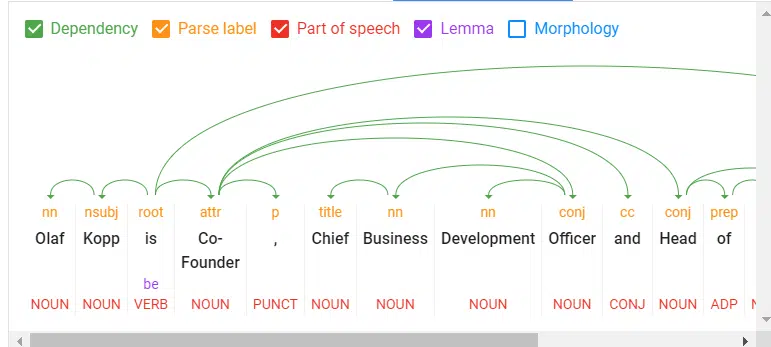
A look into Google’s Natural Language Processing API
Tokenization: Divides a sentence into different terms.
Word type labeling: Classifies words by object, subject, predicate, adjective, etc.
Word dependencies: Identifies relationships between words based on grammar rules.
Lemmatization: Determines whether a word has different forms and normalizes variations to the base form. For example, the base form of “cars” is “car.”
Parsing labels: Labels words based on the relationship between two words connected by a dependency.
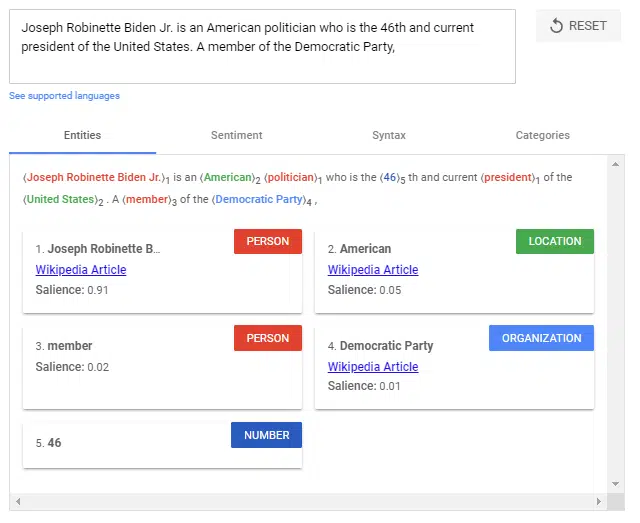
Named entity analysis and extraction: Identifies words with a “known” meaning and assigns them to classes of entity types. In general, named entities are organizations, people, products, places, and things (nouns). In a sentence, subjects and objects are to be identified as entities.
Entity analysis using the Google Natural Processing API.
Salience scoring: Determines how intensively a text is connected with a topic. Salience is generally determined by the co-citation of words on the web and the relationships between entities in databases such as Wikipedia and Freebase. Experienced SEOs know a similar method from TF-IDF analysis.
Sentiment analysis: Identifies the opinion (view or attitude) expressed in a text about the entities or topics.
Text categorization: At the macro level, NLP classifies text into content categories. Text categorization helps to determine generally what the text is about.
Text classification and function: NLP can go further and determine the intended function or purpose of the content. This is very interesting to match a search intent with a document.
Content type extraction: Based on structural patterns or context, a search engine can determine a text’s content type without structured data. The text’s HTML, formatting, and data type (date, location, URL, etc.) can identify whether it is a recipe, product, event or another content type without using markups.
Identify implicit meaning based on structure: The formatting of a text can change its implied meaning. Headings, line breaks, lists and proximity convey a secondary understanding of the text. For example, when text is displayed in an HTML-sorted list or a series of headings with numbers in front of them, it is likely to be a listicle or a ranking. The structure is defined not only by HTML tags but also by visual font size/thickness and proximity during rendering.
The use of NLP in search
For years, Google has trained language models like BERT or MUM to interpret text, search queries, and even video and audio content. These models are fed via natural language processing.
Google search mainly uses natural language processing in the following areas:
Interpretation of search queries.
Classification of subject and purpose of documents.
Entity analysis in documents, search queries and social media posts.
For generating featured snippets and answers in voice search.
“At its core, Search is about understanding language. It’s our job to figure out what you’re searching for and surface helpful information from the web, no matter how you spell or combine the words in your query. While we’ve continued to improve our language understanding capabilities over the years, we sometimes still don’t quite get it right, particularly with complex or conversational queries. In fact, that’s one of the reasons why people often use “keyword-ese,” typing strings of words that they think we’ll understand, but aren’t actually how they’d naturally ask a question.”
BERT & MUM: NLP for interpreting search queries and documents
BERT is said to be the most critical advancement in Google search in several years after RankBrain. Based on NLP, the update was designed to improve search query interpretation and initially impacted 10% of all search queries.
BERT plays a role not only in query interpretation but also in ranking and compiling featured snippets, as well as interpreting text questionnaires in documents.
“Well, by applying BERT models to both ranking and featured snippets in Search, we’re able to do a much better job helping you find useful information. In fact, when it comes to ranking results, BERT will help Search better understand one in 10 searches in the U.S. in English, and we’ll bring this to more languages and locales over time.”
The rollout of the MUM update was announced at Search On ’21. Also based on NLP, MUM is multilingual, answers complex search queries with multimodal data, and processes information from different media formats. In addition to text, MUM also understands images, video and audio files.
MUM combines several technologies to make Google searches even more semantic and context-based to improve the user experience.
With MUM, Google wants to answer complex search queries in different media formats to join the user along the customer journey.
As used for BERT and MUM, NLP is an essential step to a better semantic understanding and a more user-centric search engine.
Understanding search queries and content via entities marks the shift from “strings” to “things.” Google’s aim is to develop a semantic understanding of search queries and content.
By identifying entities in search queries, the meaning and search intent becomes clearer. The individual words of a search term no longer stand alone but are considered in the context of the entire search query.
The magic of interpreting search terms happens in query processing. The following steps are important here:
Identifying the thematic ontology in which the search query is located. If the thematic context is clear, Google can select a content corpus of text documents, videos and images as potentially suitable search results. This is particularly difficult with ambiguous search terms.
Identifying entities and their meaning in the search term (named entity recognition).
Understanding the semantic meaning of a search query.
Identifying the search intent.
Semantic annotation of the search query.
Refining the search term.
Get the daily newsletter search marketers rely on.
NLP is the most crucial methodology for entity mining
Natural language processing will play the most important role for Google in identifying entities and their meanings, making it possible to extract knowledge from unstructured data.
On this basis, relationships between entities and the Knowledge Graph can then be created. Speech tagging partially helps with this.
Nouns are potential entities, and verbs often represent the relationship of the entities to each other. Adjectives describe the entity, and adverbs describe the relationship.
Google has so far only made minimal use of unstructured information to feed the Knowledge Graph.
It can be assumed that:
The entities recorded so far in the Knowledge Graph are only the tip of the iceberg.
Google is additionally feeding another knowledge repository with information on long-tail entities.
NLP plays a central role in feeding this knowledge repository.
Google is already quite good in NLP but does not yet achieve satisfactory results in evaluating automatically extracted information regarding accuracy.
Data mining for a knowledge database like the Knowledge Graph from unstructured data like websites is complex.
In addition to the completeness of the information, correctness is essential. Nowadays, Google guarantees completeness at scale through NLP, but proving correctness and accuracy is difficult.
This is probably why Google is still acting cautiously regarding the direct positioning of information on long-tail entities in the SERPs.
Entity-based index vs. classic content-based index
The introduction of the Hummingbird update paved the way for semantic search. It also brought the Knowledge Graph – and thus, entities – into focus.
The Knowledge Graph is Google’s entity index. All attributes, documents and digital images such as profiles and domains are organized around the entity in an entity-based index.
The Knowledge Graph is currently used parallel to the classic Google Index for ranking.
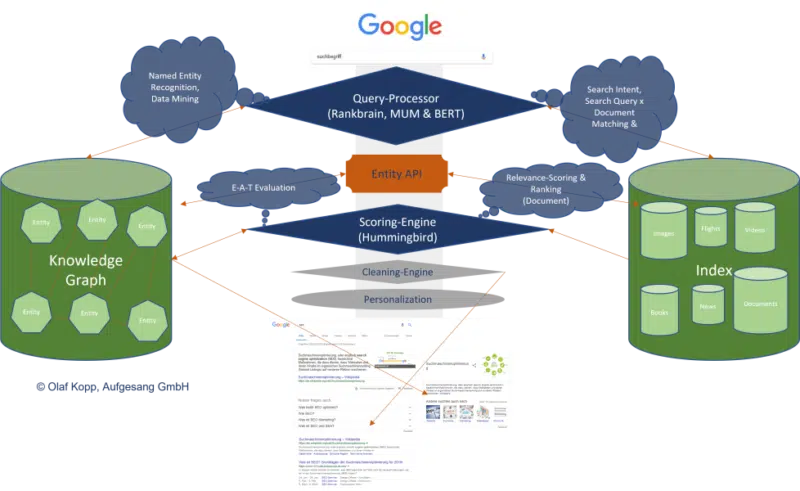
Suppose Google recognizes in the search query that it is about an entity recorded in the Knowledge Graph. In that case, the information in both indexes is accessed, with the entity being the focus and all information and documents related to the entity also taken into account.
An interface or API is required between the classic Google Index and the Knowledge Graph, or another type of knowledge repository, to exchange information between the two indices.
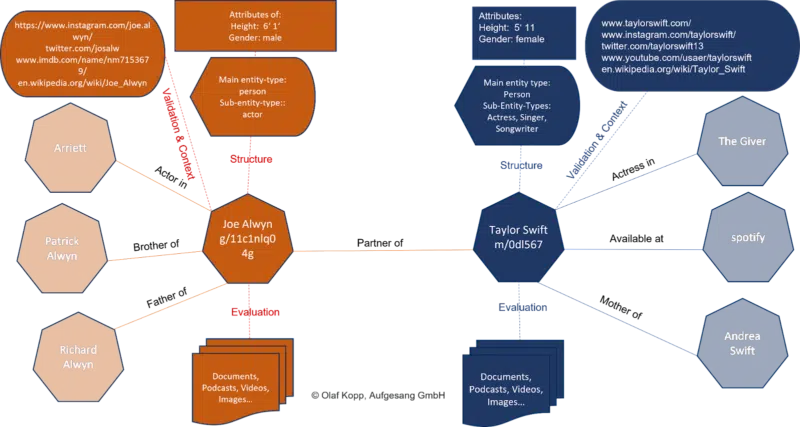
This entity-content interface is about finding out:
Whether there are entities in a piece of content.
Whether there is a main entity that the content is about.
Which ontology or ontologies the main entity can be assigned to.
Which author or which entity the content is assigned.
How the entities in the content relate to each other.
Which properties or attributes are to be assigned to the entities.
It could look like this:
We’re just starting to feel the impact of entity-based search in the SERPs as Google is slow to understand the meaning of individual entities.
Entities are understood top-down by social relevance. The most relevant ones are recorded in Wikidata and Wikipedia, respectively.
The big task will be to identify and verify long-tail entities. It is also unclear which criteria Google checks for including an entity in the Knowledge Graph.
In a German Webmaster Hangout in January 2019, Google’s John Mueller said they were working on a more straightforward way to create entities for everyone.
“I don’t think we have a clear answer. I think we have different algorithms that check something like that and then we use different criteria to pull the whole thing together, to pull it apart and to recognize which things are really separate entities, which are just variants or less separate entities… But as far as I’m concerned I’ve seen that, that’s something we’re working on to expand that a bit and I imagine it’ll make it easier to get featured in the Knowledge Graph as well. But I don’t know what the plans are exactly.”
NLP plays a vital role in scaling up this challenge.
Examples from the diffbot demo show how well NLP can be used for entity mining and constructing a Knowledge Graph.
NLP in Google search is here to stay
RankBrain was introduced to interpret search queries and terms via vector space analysis that had not previously been used in this way.
BERT and MUM use natural language processing to interpret search queries and documents.
In addition to the interpretation of search queries and content, MUM and BERT opened the door to allow a knowledge database such as the Knowledge Graph to grow at scale, thus advancing semantic search at Google.
The developments in Google Search through the core updates are also closely related to MUM and BERT, and ultimately, NLP and semantic search.
In the future, we will see more and more entity-based Google search results replacing classic phrase-based indexing and ranking.
Opinions expressed in this article are those of the guest author and not necessarily Search Engine Land. Staff authors are listed here.
New on Search Engine Land
About The Author
Olaf Kopp is an online marketing professional with over 15 years of experience in Google Ads, SEO and content marketing. He is the co-founder, chief business development officer and head of SEO at the German online marketing agency Aufgesang GmbH. Olaf Kopp is an author, podcaster and internationally recognized industry expert for semantic SEO, E-A-T, content marketing strategies, customer journey management and digital brand building. He is co-organizer of the PPC-Event SEAcamp and host of the podcasts OM Cafe and Content-Kompass (German language).
Webinar: SEO metrics and KPIs every marketer should know
Learn which key technical SEO and website health metrics you should be including in your marketing KPIs — and how to demonstrate the impact of organic search and website health on your wider business goals.
From website traffic and click-through rates to sales attribution models, SEO experts cover it all in this webinar.
Cynthia Ramsaran is director of custom content at Third Door Media, publishers of Search Engine Land and MarTech. A multi-channel storyteller with over two decades of editorial/content marketing experience, Cynthia’s expertise spans the marketing, technology, finance, manufacturing and gaming industries. She was a writer/producer for CNBC.com and produced thought leadership for KPMG. Cynthia hails from Queens, NY and earned her Bachelor’s and MBA from St. John’s University.
Does the announcement have you concerned? Aleyda Solis posted a poll on Twitter to ask SEOs. The final results:
No! My content is helpful: 44.1%
Unsure tbh! Let’s see: 46.6%
Yes! Will prune/improve: 9.3%
I’m surprised that so many people think their own content is helpful. But we’re all biased to think our content is great. After all, we’re producing it! That’s exactly why it’s important to have an objective, data-based way to assess content (i.e., metrics).
Just remember: Google’s new algorithm uses machine learning to detect “helpfulness” of content. So much content today is produced – and much without – so it will be interesting to see whether Google can truly distinguish between helpful and unhelpful content.
So make sure you review all of the questions and guidance Google has shared around the Panda, Core, Product Review and helpful content updates. I’ve compiled this all for you in What is helpful content, according to Google.
I’m solidly in the “unsure” camp right now. There are certainly a few sites I’ll be watching in the days following the rollout to see whether Google can detect the true depth and helpfulness of content.
Will the helpful content update be as big as Panda, Penguin or Florida?
We don’t know yet how big Google’s helpful content update will be. But we know it will have a “meaningful” impact when it hits.
Marie Haynes shared some thoughts about what to expect earlier today, comparing it to Penguin in 2012.
Our own Barry Schwartz has compared it to Panda from 2011. And Panda was probably the largest update following Florida in 2003, which was one of the earliest and most impactful changes to Google and SEO.
But just as a quick reminder – or in case you weren’t working in SEO a decade or longer ago – those updates did a lot of damage.
For those on the losing end, traffic vanished overnight. People lost their jobs. Businesses shut down. It was serious. It was estimated that Panda had a $1 billion impact.
On the other side, it’s quite possible the helpful content update will be more like past pre-announced updates (think: Mobilegeddon, which was anything but apocalyptic for most websites, or the Page Experience Update, which got tons of hype but was basically an insignificant update).
What to do now?
For now, we wait.
After the helpful content update launches, as with any Google algorithm update, the first rule is don’t panic.
Google said it will take two weeks for the update to roll out completely. Make sure you collect enough data to know whether any changes to your traffic are just temporary or are sticking.
You want to respond, not react, to an update. If you react too quickly, you can end up doing more damage, whereas if you collect and analyze your data, read and learn everything you can about the update, you can respond more deliberately and smartly.
Were you already planning to improve or remove content from your site? If so, it’s likely because that content isn’t good or is outdated. So go on – update it or delete it. This update shouldn’t change your plans.
Here are a couple of articles that may help you:
Remember, the helpful content update is a sitewide signal. That means if you have too much unhelpful content on part of your website, it could hurt your ability to rank – even if you have helpful content.
This is where some people in the “My content is helpful” crowd need to be careful.
Is all of your content helpful? Or just some of it?
New on Search Engine Land
About The Author
Danny Goodwin is Managing Editor of Search Engine Land & SMX. In addition to writing daily about SEO, PPC, and more for Search Engine Land, Goodwin also manages Search Engine Land’s roster of subject-matter experts. He also helps program our conference series, SMX – Search Marketing Expo. Prior to joining Search Engine Land, Goodwin was Executive Editor at Search Engine Journal, where he led editorial initiatives for the brand. He also was an editor at Search Engine Watch. He has spoken at many major search conferences and virtual events, and has been sourced for his expertise by a wide range of publications and podcasts.
Google Search Console adds URL-level data in Core Web Vitals report
The Core Web Vitals report in Google Search Console is now showing URL-level data in the example URLs.
Google also has made some changes to the text in the report to make it clearer.
What it looks like. Google shared a screenshot via Twitter.
New issue classification. Google Search Console recently added new classifications. One of those changes was to the Core Web Vitals report. It now groups pages into two tables:
Poor or Need improvement. The table below the charts lists all issues for pages with these statuses.
Good.Click View data about usable pages under the summary chart.
Support page updated. The Core Web Vitals report support page has also undergone some significant revisions. Most are minor rewording. But of note:
The previous version of the Why page performance matters section focused on how longer page load times negatively impact bounce rates. Even though GA4 recently added bounce rate, all signs point to bounce rate as a metric of diminishing importance to Google.
That section has been revamped to highlight user engagement and business metrics:
• When a site meets the Core Web Vitals thresholds, research showed that users were 24% less likely to abandon page load.
• With each 100ms reduction in Largest Contentful Paint (LCP), web conversion rate for Farfetch increased by 1.3%.
• Reducing Cumulative Layout Shift (CLS) by 0.2 led Yahoo JAPAN to a 15% increase in page views per session, 13% longer session durations, and a 1.72 percentage point decrease in bounce rate.
• Netzwelt improved Core Web Vitals and saw advertising revenues increase by 18% and page views by 27%.
• Reducing CLS from 1.65 to 0 significantly uplifted domain rankings globally for redBus.
Core Web Vitals report, Google Search Console Help Center
Google also added a new Additional information section:
Click a URL in the Examples table of the issue details page to see more information about the represented by that URL, including other URLs in the group, and scores for those group members, if the URL has enough data to show.
The LCP, FID, and CLS status applies to the entire group. Some outlier URLs might have better or worse values on some visits, but 75% of visits to all URLs in the group experienced the group status shown.
You can click a URL in the group to run a PageSpeed Insights test against that URL. However, it’s useful to understand a few important differences between PageSpeed Insights and Core Web Vitals information:
• Core Web Vitals combines data and status into PageSpeed Insights generally shows data for individual URLs (unless the URL doesn’t have enough information by itself). The statistics for a specific URL in PageSpeed Insights might not match the group results in Core Web Vitals, because an individual URL might be an outlier in its group.
• Core Web Vitals URLs include URL parameters when distinguishing the page PageSpeed Insights strips all parameter data from the URL, and then assigns all results to the bare URL.
Why we care. These changes should make the Core Web Vitals report in Google Search Console more useful. Not being able to get detailed data in the URLs section has been a frustration for many SEOs.
New on Search Engine Land
About The Author
Danny Goodwin is Managing Editor of Search Engine Land & SMX. In addition to writing daily about SEO, PPC, and more for Search Engine Land, Goodwin also manages Search Engine Land’s roster of subject-matter experts. He also helps program our conference series, SMX – Search Marketing Expo. Prior to joining Search Engine Land, Goodwin was Executive Editor at Search Engine Journal, where he led editorial initiatives for the brand. He also was an editor at Search Engine Watch. He has spoken at many major search conferences and virtual events, and has been sourced for his expertise by a wide range of publications and podcasts.
Google has given us a list of questions to consider to determine whether our sites are designed to help people, or rather, created to do well on search engines.
If the latter is the case, you may find yourself hit with a sitewide signal that makes it difficult to rank.
If this update has a strong impact, which I believe it will, we may be in for another shakeup in the world of SEO like we had following the launch of Penguin 10 years ago.
If you have focused more on SEO efforts than creating content for humans to benefit from, this could strongly affect your site. It still remains to be seen how powerful this ranking signal is.
Does it affect all sites that use SEO?
Google was careful to note in their blog post that this update does not invalidate following SEO best practices.
They say, “SEO is a helpful activity when it’s applied to people-first content” and link to their SEO starter guide. Google is not against search engine optimization.
This update is geared toward sites that have gamed the system, creating content that isn’t super helpful to people but still ranking well because of SEO rather than on the merit of the content on the site.
Is it a penalty?
Google is careful in its wording regarding whether this is a penalty.
It’s not a manual action. You won’t see it listed in Google Search Console. It’s not a spam action.
We are to call it a “signal”. This is one of the many ranking signals Google describes in their documentation on How Search Works.
If that signal is applied to your site, it likely will feel like a penalty.
The good news is that you can get this classification removed from your site if you can improve your content.
The part of Google’s algorithm that classifies sites for this update will be running continuously.
If the algorithms see that your site’s content has shifted to be helpful to searchers, the strength of the signal may be reduced, or even lifted completely.
This announcement reminds me of the early days of Google’s Penguin and Panda algorithms.
Today these algorithms are baked into the core algorithm, but initially, they were filters that were applied to affected sites.
Sites with unnatural links (Penguin) or low-quality content (Panda) would have a filter applied that suppressed ranking.
If those sites cleaned up their link profile or improved the quality of their content then they had a chance at seeing recovery the next time Google ran a Penguin or Panda update.
It sounds like the helpful content classifier will have a similar effect in that sites affected will suffer some degree of sitewide ranking suppression and eventually can have that suppression lifted. But there are some significant differences:
The helpful content classifier runs in real-time, continually. This means that new sites created just for SEO should have the signal applied right from the start. Also, existing sites can be affected when the amount of content created for SEO purposes exceeds a threshold.
Sites will be impacted over the course of a few months and to different degrees depending on the amount of unhelpful content found. Google won’t run specific updates during which sites recover. Rather, if the classifier determines that content has changed to now be deemed helpful to searchers and has remained that way for a few months, the weight of the deranking signal will be reduced or even lifted.
What is people-first content?
This is what Google wants us to focus on. But what is it?
I’ll share my thoughts on each of the questions they say to ask ourselves about our content.
“Do you have an existing or intended audience for your business or site that would find the content useful if they came directly to you?”
Something I’ve often said to clients when trying to explain content quality is, “Would this content still exist if it wasn’t for search engines?”
A local business would still want to educate its customers on their services.
The National Kidney Foundation would still publish content to educate patients and doctors.
Would you still create the content you are creating if search hits from Google did not exist?
“Does your content clearly demonstrate first-hand expertise and a depth of knowledge (for example, expertise that comes from having actually used a product or service, or visiting a place)?”
Is it designed to share information? Or to sell products? Or perhaps to entertain?
Why does your site exist? How are you trying to help people?
It is important that the purpose of your content’s existence is clear.
From section 2.2 of the search quality evaluator guidelines: What is the purpose of a webpage?
I think that many people who have created sites that are created with SEO efforts foremost in mind will rationalize that their content is created to inform people.
If you’re unsure, I encourage you to review the next two questions:
After reading your content, will someone leave feeling they’ve learned enough about a topic to help achieve their goal?
Will someone reading your content leave feeling like they’ve had a satisfying experience?
Google wants to present searchers with information that fully meets their needs.
How do I know if my content is built for search engines first?
Once again, Google has given us some questions to ask.
When I read these, it feels to me that this update could have a large impact on what we see in the search results.
If these questions apply to your content, you may find that your site is classified sitewide as being created primarily for search engines.
“Is the content primarily to attract people from search engines, rather than made for humans?”
I expect some content may lie on a spectrum. Google says the signal is weighted and that “[s]ites with lots of unhelpful content may notice a stronger effect.”
Super spammy sites with little actual benefit to searchers should be hit strongly.
Sites with some content created primarily with SEO in mind that also have content that is helpful will be impacted, but not as strongly.
It is important to remember that the sitewide effect means the good content on your site will also be affected by this update if Google deems you worthy of the classification.
“Are you producing lots of content on different topics in hopes that some of it might perform well in search results?”
Many of the sites affected by the July 2022 product reviews update were review sites that reviewed almost any product out there. There was little focus other than “we review products.”
I expect we’ll see declines in many sites because they are writing on as many topics as they can rather than focusing on what is important to their users.
“Are you using extensive automation to produce content on many topics?”
I wonder whether this line is geared toward sites writing their content mostly with AI content-generating tools.
AI-generated content can often rank well because it contains many of the words search engines use to determine relevancy.
But a person can usually tell when content is AI-written and not created by an actual human. If you are creating content by automated means, you may find yourself on Google’s radar.
“Are you mainly summarizing what others have to say without adding much value?”
This makes me think about review sites that aggregate Amazon listings and slightly re-word them. It will be interesting to see if other types of aggregator sites are hit as well.
“Are you writing about things simply because they seem trending and not because you’d write about them otherwise for your existing audience?”
I do think that it is still acceptable to write on trending topics provided they are what your audience wants to read.
But if the focus of your site is simply to capitalize on new trends, I expect you may be affected.
“Does your content leave readers feeling like they need to search again to get better information from other sources?”
The quality rater guidelines instruct the raters to determine to what extent content meets a searcher’s needs:
It is becoming increasingly more important to determine what your readers’ intent is when they come to your site.
And are you fully satisfying their needs? Would they need to go elsewhere for more information after reading your content?
“Are you writing to a particular word count because you’ve heard or read that Google has a preferred word count? (No, we don’t).”
I have seen blog posts that advise that content below a certain word count will be considered thin by Google which is not the case. Sometimes short content actually helps the searcher more.
I suppose this question is written to dissuade sites from writing massive articles covering everything there is to know about a topic on one single page (unless it is meeting the need of searchers who want to read a thorough essay on a subject).
This may seem like it contradicts Google’s advice to fully meet the needs of a searcher.
If tasked with creating content on buying a lawn mower, many SEOs are conditioned to produce the most thorough article on lawn mowers possible.
Let’s say a searcher typed, “best lawn mower.”
Do they really need an article that explains “What is a lawn mower?,” “Types of lawn mowers” and also “How to start a lawn mower”?
Having those words on the page historically has helped search engines understand that the page is relevant to lawn mowers.
However, the searcher’s intent, in this case, is to get help in deciding which mower to buy, not to learn everything there is to know on the subject.
A shorter article may be what is more helpful to a searcher in this situation.
“Did you decide to enter some niche topic area without any real expertise, but instead mainly because you thought you’d get search traffic?”
I’ve seen a real rise lately in discussions about operating “niche sites.”
I do think some of these will survive, provided the writer really is passionate about the niche and can write on relevant topics from a point of personal experience.
But if you’ve picked a niche primarily based on your ability to rank for that content, rather than out of a passion for covering that topic, you may find Google does not reward you.
“Does your content promise to answer a question that actually has no answer, such as suggesting there’s a release date for a product, movie, or TV show when one isn’t confirmed?”
This seems like a specific question and is pretty straightforward.
Is recovery possible?
If your site is classified as being built primarily for search engines, you will likely see a significant decline in search traffic over the next few months.
Google says that sites that are affected will indeed be able to work to get the classifier removed and possibly recover their rankings.
It is important to remember that if Google sees enough SEO content on your site, the sitewide signal will also impact the remainder of the content on your site as well.
As such, you will need to identify where the problems are and work aggressively to repair them if you want to rank at all.
Here is what I will be recommending to sites that come to us for help after being affected by this update although we’ll adapt our advice as more information becomes available:
Identify which content on the site could be construed as being created for search engines rather than humans.
Determine whether that content can be improved upon to Google’s satisfaction, or whether it should be noindexed/removed from the site.
Find ways to produce content that goes above and beyond when it comes to being helpful to searchers. This may include adding more user-generated content, first-hand photos or videos, etc.
Compare competitor pages that continue to rank well to see if we can understand what content Google is rewarding as inspiration on how to improve our content.
Work on improving E-A-T for the site to help make it more obvious to Google’s algorithms that the site has and also is known for having expertise on the topics it covers.
Clarify what the purpose or focus of each page is (and ensure that this purpose is first and foremost meant to help people).
In some cases, know when to cut losses and move on. I believe that some sites that are hit by this update may not be able to recover without extensive and possibly unattainable changes.
Conclusions
Prior to the launch of this update, Google reached out to several SEOs, myself included, to discuss its release. They wanted to make it clear that this is not an attack on SEO.
Good SEO can help people-first content perform even better.
It sounds to me like there is the potential for this update to have a strong impact on many sites that have invested heavily in SEO.
I am looking forward to participating in and watching the discussions on changes that the SEO community is seeing once this update is live. I hope you fare well!
Opinions expressed in this article are those of the guest author and not necessarily Search Engine Land. Staff authors are listed here.
New on Search Engine Land
About The Author
Dr. Marie Haynes is completely obsessed with trying to understand how Google assesses quality and then helping businesses to improve their websites. Her growing company, Marie Haynes Consulting Inc. specializes in site quality reviews and link audits. You can contact her team or sign up to her newsletter that keeps the SEO world up to date on the latest changes and tips in search.
Google Search Console’s video indexing report now live for all
In May, Google teased a new video indexing report in Google Search Console, then in July the report started to roll out to some properties, the search company announced. Now, the report is fully live for all properties where Google can detect video on the site, the company just announced on Twitter.
What is the video indexing report. The video indexing report shows how many indexed pages on your site contain one or more videos, and how many of those pages a video could be indexed. Google said the report can help you understand the performance of your videos on Google, and identify possible areas of improvement.
What it looks like. Here is a screenshot of this report for one of my sites in Google Search Console:
Google’s announcement. Here is the tweet where Google announced this:
We have completed the roll out of the Search Console Video index report – if Google detects videos on your site, this report will appear on the left navigation bar in the coverage section. We hope this will help you understand how your videos perform on Search! 🧑💻 https://t.co/XfQO5q42md
When the report shows. Google said if Google detects videos on your site, the Video indexing report will appear on the left navigation bar in the coverage section. If Google has not detected a video on your website, you will not see the report.
What it tells you. The report shows the status of video indexing on your site. It helps you answer the following questions:
In how many pages has Google identified a video?
Which videos were indexed successfully?
What are the issues preventing videos from being indexed?
In addition, if you fix an existing issue, you can use the report to validate the fix and track how your fixed video pages are updated in the Google index, Google explained.
URL Inspection tool for video pages. Google also also enhanced the URL Inspection tool to allow you to check the video indexing status of a specific page. When inspecting a page, if Google detected a video in it, you will see the following in the results:
Details such as the video URL and the thumbnail URL.
The page status showing whether the video was indexed or not.
List of issues preventing the video from being indexed.
Why we care. If you host videos on your site or embed videos on your site, you will want to check out this report to see if there are ways to improve those videos or help other videos to show up in Google Search. Videos are an important aspect of search traffic and visibility in Google Search.
Barry Schwartz a Contributing Editor to Search Engine Land and a member of the programming team for SMX events. He owns RustyBrick, a NY based web consulting firm. He also runs Search Engine Roundtable, a popular search blog on very advanced SEM topics. Barry can be followed on Twitter here.
Google’s new helpful content update is meant to reward content that is written for humans.
So how exactly does Googe define “helpful content”?
In short, according to Google, helpful content:
This is important to know because your definition of “helpful content” is likely different from Google’s.
Here’s everything we know about what Google considers helpful content.
What is helpful content?
What follows is all the guidance and questions Google has provided to assess whether your content is helpful, around the helpful content (HCU), product review (PRU), core (CU) and Panda updates (PU).
Google’s guidance around helpful content generally breaks down into four areas. Helpful content:
1. Is created for a specific audience
Do you have an existing or intended audience for your business or site that would find the content useful if they came directly to you? (HCU)
Does your site have a primary purpose or focus? (HCU)
Is the content primarily to attract people from search engines, rather than made for humans? (HCU)
Are you producing lots of content on different topics in hopes that some of it might perform well in search results? (HCU)
Are you using extensive automation to produce content on many topics? (HCU)
Does the content seem to be serving the genuine interests of visitors to the site or does it seem to exist solely by someone attempting to guess what might rank well in search engines? (CU)
Are you writing about things simply because they seem trending and not because you’d write about them otherwise for your existing audience? (HCU)
Are you writing to a particular word count because you’ve heard or read that Google has a preferred word count? (No, we don’t). (HCU)
Evaluate the product from a user’s perspective. (PRU)
2. Features expertise
Is this content written by an expert or enthusiast who demonstrably knows the topic well? (CU)
Does your content clearly demonstrate first-hand expertise and a depth of knowledge (for example, expertise that comes from having actually used a product or service, or visiting a place)? (HCU)
Does the content provide insightful analysis or interesting information that is beyond obvious? (CU)
If the content draws on other sources, does it avoid simply copying or rewriting those sources and instead provide substantial additional value and originality? (CU)
Is the content mass-produced by or outsourced to a large number of creators, or spread across a large network of sites, so that individual pages or sites don’t get as much attention or care? (CU)
Does the content provide substantial value when compared to other pages in search results? (CU)
Are you mainly summarizing what others have to say without adding much value? (HCU)
Did you decide to enter some niche topic area without any real expertise, but instead mainly because you thought you’d get search traffic? (HCU)
Demonstrate that you are knowledgeable about the products reviewed – show you are an expert. (PRU)
Discuss the benefits and drawbacks of a particular product, based on your own original research. (PRU)
Describe how a product has evolved from previous models or releases to provide improvements, address issues, or otherwise help users in making a purchase decision. (PRU)
Identify key decision-making factors for the product’s category and how the product performs in those areas (for example, a car review might determine that fuel economy, safety, and handling are key decision-making factors and rate performance in those areas). (PRU)
Describe key choices in how a product has been designed and their effect on the users beyond what the manufacturer says. (PRU)
When recommending a product as the best overall or the best for a certain purpose, include why you consider that product the best, with first-hand supporting evidence. (PRU)
3. Is trustworthy and credible
Would you trust the information presented in this article? (PU)
Does the content present information in a way that makes you want to trust it, such as clear sourcing, evidence of the expertise involved, background about the author or the site that publishes it, such as through links to an author page or a site’s About page? (CU)
If you researched the site producing the content, would you come away with an impression that it is well-trusted or widely-recognized as an authority on its topic?
Does the content have any easily-verified factual errors? (CU)
Would you feel comfortable trusting this content for issues relating to your money or your life? (CU)
Does the content provide original information, reporting, research or analysis? (CU)
Does the content provide a substantial, complete or comprehensive description of the topic? (CU)
Does the headline and/or page title provide a descriptive, helpful summary of the content? (CU)
Does the headline and/or page title avoid being exaggerating or shocking in nature? (CU)
Is this the sort of page you’d want to bookmark, share with a friend, or recommend? (CU)
Would you expect to see this content in or referenced by a printed magazine, encyclopedia or book? (CU)
Does the content have any spelling or stylistic issues? (CU)
Was the content produced well, or does it appear sloppy or hastily produced? (CU)
Does the content have an excessive amount of ads that distract from or interfere with the main content? (CU)
Provide evidence such as visuals, audio, or other links of your own experience with the product, to support your expertise and reinforce the authenticity of your review. (PRU)
Share quantitative measurements about how a product measures up in various categories of performance. (PRU)
Explain what sets a product apart from its competitors. (PRU)
Cover comparable products to consider, or explain which products might be best for certain uses or circumstances. (PRU)
Include links to other useful resources (your own or from other sites) to help a reader make a decision. (PRU)
Consider including links to multiple sellers to give the reader the option to purchase from their merchant of choice. (PRU)
4. Meets the want(s) or need(s) of the searcher
After reading your content, will someone leave feeling they’ve learned enough about a topic to help achieve their goal? (HCU)
Will someone reading your content leave feeling like they’ve had a satisfying experience? (HCU)
Does your content leave readers feeling like they need to search again to get better information from other sources? (HCU)
Does your content promise to answer a question that actually has no answer, such as suggesting there’s a release date for a product, movie, or TV show when one isn’t confirmed? (HCU)
Does content display well for mobile devices when viewed on them? (CU)
Ensure there is enough useful content in your ranked lists for them to stand on their own, even if you choose to write separate in-depth single product reviews for each recommended product. (PRU)
Would users complain when they see pages from this site? (PU)
Digging deeper into intent
There are the classic search intents you likely know (informational, navigational, transactional), but also several micro-intents you should think about when creating content.
Google has broken down search behavior into four “moments” in the past:
I want to know. People searching for information or inspiration.
I want to go. People searching for a product or service in their area.
I want to do. People searching for how-tos.
I want to buy. People who are ready to make a purchase
The QRG breaks down user intent into these categories:
Knowquery: To find information on a topic. Some of which are Know Simple queries (i.e., queries that have a specific answer, like a fact, diagram, etc.)
Do query: When the user is trying to accomplish a goal or engage in an activity.
Website query: When the user is looking for a specific website or webpage
Visit-in-person query: Some of which are looking for a specific business or organization, some of which are looking for a category of businesses.
Additionally, search behavior is driven by six needs, according to a 2019 Think With Google article:
Surprise Me: Search is fun and entertaining. It is extensive with many unique iterations.
Thrill Me: Search is a quick adventure to find new things. It is brief, with just a few words and minimal back-button use.
Impress Me: Search is about influencing and winning. It is laser-focused, using specific phrases.
Educate Me: Search is about competence and control. It is thorough: reviews, ratings, comparisons, etc.
Reassure Me: Search is about simplicity, comfort, and trust. It is uncomplicated and more likely to include questions.
Help Me: Search is about connecting and practicality. It is to-the-point, and more likely to mention family or location.
One final way to think about audience intent is Avinash Kaushik’s See, Think, Do, Care framework. Though it’s not “official” Google advice specific to an algorithm update, Kaushik was Google’s Digital Marketing Evangelist when he wrote this.
Google highlights ‘helpful content’ in featured snippets
The term “helpful content” rarely shows up on Google’s documentation. But it does show up on Google’s How Search Works page, in reference to Featured Snippets:
“Featured snippets are where we prominently display a page’s description — what we call a snippet. We use this format when our systems determine it might help people more easily discover what they’re seeking, both from the description and when they click on the link to read the page itself. It’s especially helpful for those on mobile or searching by voice.”
Google wants to help searchers find the answer or information they are looking for as quickly as possible – sometimes without ever leaving the search results page.
Your content should be the best answer that someone is searching for.
In short: helpful content should be the best answer – and provide that answer as quickly as possible.
New on Search Engine Land
About The Author
Danny Goodwin is Managing Editor of Search Engine Land & SMX. In addition to writing daily about SEO, PPC, and more for Search Engine Land, Goodwin also manages Search Engine Land’s roster of subject-matter experts. He also helps program our conference series, SMX – Search Marketing Expo. Prior to joining Search Engine Land, Goodwin was Executive Editor at Search Engine Journal, where he led editorial initiatives for the brand. He also was an editor at Search Engine Watch. He has spoken at many major search conferences and virtual events, and has been sourced for his expertise by a wide range of publications and podcasts.
A 3-phased approach to proactive online reputation management
I’ve helped several brands with their online reputation management (ORM) during my digital marketing career.
Unfortunately, most of this work involved trying to help the brands recover from a crisis.
Even more unfortunate was that the damage to their reputations could have been greatly mitigated with some proactive effort.
What follows is a basic, three-pronged approach to a proactive ORM strategy.
1. Own your name
Often, what looks like a reputation problem is more of an SEO problem related to entity optimization. Because the search engines seek to understand brands as entities, it’s important to amplify the signals that help them know who you are and what you do.
For most businesses, using Organization schema is a significant first step in letting the search engines know who you are.
This simple tagging system hides in the source code of a page on your website and acts as a data feed to show information about your brand or business.
At a minimum, the following information should be tagged:
Name.
Address.
Link to your logo.
Links to official active social media sites (and to Wikipedia if you already have a page).
Another aspect is to claim your business name on major social media sites. Even if you don’t use a channel, it’s a good idea to grab your brand to keep someone else from trying to impersonate you.
If your brand is big enough, it would be beneficial to ensure your Wikipedia page is correct and up-to-date or, to have one created if there isn’t one already.
Directly making and editing pages by brand representatives is frowned upon and problematic, so hiring an agency specializing in this type of work would be best.
If you are part of a brand with well-known leaders, claiming domain names and social media sites under their names should also be considered.
Politicians, especially, seem to forget this step and often have to contend with parody and impersonator sites set up by their opponents.
Lastly, owning your main website’s .com, .net and .org versions is a great idea.
Global brands may wish to extend this to ccTLDs where the business operates or may operate in the future.
For even more insurance, it is helpful to buy domains with negative messaging like:
ihatebrand.com or i-hate-brand.com
boycottbrand.com or boycott-brand.com
You may think those last examples are a bit extreme, but I’ve seen brand detractors go to great lengths and spend much of their own money to set up hater websites on domains like these.
Get the daily newsletter search marketers rely on.
2. Own your story
In SEO, we say, “content is king.” This concept is also true in ORM.
Owning your story often means creating content on your website that will potentially outrank any negative content that others may post online.
The more content you can rank in branded searches on owned and controlled channels like your website or social media accounts, the more you can push negative content off Page 1 of search results and out of view of most searchers.
As the old joke goes, the best place to hide a dead body is on Page 2 of Google search results because no one will find it there.
In extreme cases, it might become necessary to create content to hit on a specific topic around which a brand detractor has generated a lot of content.
When this happens, bringing in an ORM and SEO expert would be helpful if you don’t have that expertise in-house.
What looks entirely innocuous for the casual website visitor is a targeted volley against negative content. For example, don’t strike back directly if a hater created content around alleged food poisoning targets your restaurant.
Create content on your website highlighting the brand’s commitment to food safety and the number of passed inspections conducted by health officials.
3. Own your reviews
Some businesses revolve around reviews. For them, this can be life or death.
I’ve worked with many brands that had trouble recruiting. The reason? Too many negative reviews on Indeed and Glassdoor.
If you think your company doesn’t live and die by reviews, I recommend you take heed anyway.
One primary key to reviews is to respond to each one. Respond to positive reviews with a quick “thank you” and move on. Negative reviews take a bit more work.
Many negative reviews are the result of missed expectations. You can often diffuse the negativity of the review by how you respond. A simple apology, an offer to make things right, and an invitation to give you another chance can mitigate the hit of a negative review.
It’s important not to be too defensive or shift the blame for the problem back onto the complainant. This will nearly always backfire.
Hint: Don’t respond when you’re angry!
Some businesses, especially those in regulated industries, must be careful how they respond.
Thus, a response guide is critical to help everyone stay within guidelines while responding effectively to reviews. An invitation to contact a customer support rep via phone or secure message would be appropriate.
Prepare for a crisis
Another critical process in proactive ORM work is to prepare for a crisis before it begins.
Set up documented procedures to guide the entire company when a situation occurs. At a minimum, the plan should include:
Who will monitor for potential crises?
Who needs to be informed when one comes up?
Who will do what during the crisis?
Monitoring
Reporting
Responding
If you can also include potential scenarios that might come up, all the better.
The more you prepare, the easier it is to walk through a challenging time.
Already in a crisis? Please don’t panic
A vital part of any ORM strategy must include reviews of all content written about the brand. This information can be an invaluable part of a business.
Your customers are the best focus group you can get. They don’t have to pay for them to tell you about your business.
You can do this efficiently by setting up Google Alerts to notify you anytime your brand or key people are mentioned by name.
Taking criticism and plowing it back into product and service improvements can help ensure your reputation stays positive.
According to speaker and author Jay Baer, some brands even reward their detractors because of the valuable information they provide.
A great resource to help you get started in a proactive ORM program is Repped: 30 Days to a Better Online Reputation by Andy Beal. Considered by many to be the “godfather” of online reputation management, Beal’s book is filled with great information and helpful tips to get your business moving in the right direction.
Opinions expressed in this article are those of the guest author and not necessarily Search Engine Land. Staff authors are listed here.
New on Search Engine Land
About The Author
Elmer Boutin is VP of Operations at WrightIMC, a Dallas-based full-service digital marketing agency. Following a career in the US Army as a translator and intelligence analyst, he has worked in digital marketing for over 25 years doing everything from coding and optimizing websites to managing online reputation management efforts as an independent contractor, corporate webmaster, and in agency settings. He has vast experience and expertise working for businesses of all sizes, from SMBs to Fortune 5-sized corporations, including Wilsonart, Banfield Pet Hospital, Corner Bakery Cafe, Ford Motor Company, Kroger, Mars Corporation, and Valvoline; optimizing websites focusing on local, e-commerce, informational, educational and international.