Using digital PR to earn links and rank for your target keywords

So what comes first, the chicken or the egg?

Links continue to be an important organic search ranking factor. However, Google frowns on “link building” and states that the best way to build links is to create great content.  

If you build it, they will come. But how will they find you if you don’t rank, to begin with?

Ideally, when your site starts gaining authority and ranking well, your pages will start showing up in the SERPs, and you’ll gain links naturally.  

However, you can’t achieve this without some initial outreach and digital PR.

Let’s review the steps to create a digital outreach campaign.

Preparation

You’ll need to do some prep work before starting outreach.  

Browser extensions

Install the following extensions to your Chrome browser:

Select outreach personas

You’ll need to determine who will be your outreach coordinator and make sure they have a strong social media presence.

From having a good bio and profile image to having active social profiles, it’s important that they are credible and trustworthy to elicit answers.

Make sure your outreach persona has:

  • Credible email (e.g., [email protected])
  • Active social profiles
  • A personal website 
  • Strong LinkedIn profile
  • Examples of published content
  • Company email signature

All of these are signs of authority and will influence whether people open and answer the emails.

Select outreach targets

What pages should be promoted to receive inbound links? What keywords/anchor text should be used for the links?

In the past, it was common to build links using keywords in the anchor text. This can result in link penalties, so it’s important to vary your URL/Anchor text combinations to avoid being on the receiving end of manual action from Google.

It’s important to use a combination of brand terms, noise anchors and miscellaneous words for inbound links.

You should continuously track your pages and keywords using a tool (e.g., Semrush or Google Search Console) to identify potential targets for link building.  

You can select pages that are trending up, keywords that are within striking distance, as well as keywords that are sliding in rankings.

Build your outreach list

The first step is to create a list of potential sites to reach out to.  

Use sites from your content research

During your topic and audience research, you probably came across many sites that discussed relevant topics about your industry. In addition to adding all of these sites to your list of potential target sites, use tools like BuzzSumo to further expand that list.


Get the daily newsletter search marketers rely on.


Using search operators to find sites on Google

The goal here is to uncover sites that have shared similar content in the past. To do so, you want to use search operators to build queries that will uncover the types of sites you need.

For example, for a site that offers online degrees, you could start off with broad keywords like “education,” “college,” and “online universities.” You’ll then want to qualify those terms by adding search operators, such as “education” + “infographics.”

Knowing how to search will greatly impact the effectiveness of your outreach campaign, so it’s definitely worth spending the time to gain more in-depth knowledge on how to use search operators.

Here are some ways to use search operators to turn up great outreach opportunities:

Quotation marks (”…”) for exact-match searches.  

  • “guest author”
  • “write for us”
  • “submit”

The tilde (~…) before a word to generate similar topics and ideas.  

Inurl:guest-___ tends to yield good results, as many sites put “Guest Post/Blog/Writer/etc” in the title of the post, which ends up appearing in the URL.

The full search terms might come out looking like this:

• “guest post” “real estate”

• “write for us” real estate ~auction

• “foreclosures” inurl:guest-post

• ~home auctions “guest blog”

Now that you know how to find keywords, it’s time to start using them!

By using BuzzSumo and searching Google with search operators, you’ll be able to create a list of potential sites to reach out to and pitch your content. 

Once you have collected and added them all to a spreadsheet, your next step will be to verify the quality of these sites to ensure that they have strong authority metrics. 

You want to look at:

  • Semrush:
    • Authority Score
    • # of Keywords Ranking
    • Organic Traffic  
  • Majestic:
    • Trust Flow: A number predicting how trustworthy a page is
    • Citation Flow: A number predicting how influential a URL might be based on how many sites link to it

If you don’t check these metrics, you may waste valuable time and resources contacting and writing for sites that won’t help your link profile.

This is where your Chrome browser extensions can help by placing this information at your fingertips.

Find contact information

Now that you’ve added the metrics and have modified your list of target sites to make sure they are qualified, you’ll want to look for contact information.

Don’t stop by going to the “Contact Us” page. Look for other contact info such as direct email addresses, social media profiles and possibly even WHOIS info. You have to be thorough in this step.

Sending an email to the main site’s contact form may mean that your request ends up in the customer service department, or worse, their spam folders, where it doesn’t get forwarded to the right people.

Without trying to spend too much time navigating around the site, look carefully for their contributor guidelines and add the URL to your spreadsheet for tracking purposes. For example, there may not be a page for contributors, but perhaps the Twitter profile for the editor may be listed on the site, so you can use Twitter to contact the editor directly.

Writing pitch letters

People receive a lot of junk in their email, and many sites are constantly receiving requests for guest posting from humans and spambots alike. For this reason, it’s crucial that your pitch letters stand out and showcase transparency.

Here are some of the elements that help pitch letters stand out: 

  • Try to keep your letter brief and easy to read/scan
  • Personalize the letter wherever possible
  • Be friendly and approachable – small talk goes a long way. People want to know you’re a real person, not a robot sending auto-generated emails
  • Use perfect grammar – you can’t offer to contribute to other sites and use poor grammar. Double and triple-check your grammar!
  • Link to examples of your work, preferably articles posted on authoritative domains.

Now let’s discuss the letter itself:

FROM: Use a company email address to make your email more credible and trustworthy.

SUBJECT: Short, catchy subjects will draw the “open”

BODY: Now, you need to mix all of the elements discussed above into the email:

It’s important to spend enough time crafting these outreach letters to have a chance to succeed.

Start outreach

Using email marketing tools such as Mailchimp or ActiveCampaign is not an effective way to send outreach emails. Many will go to the spam folder or will cause your email server to be banned.

Instead, use your email server or Gmail to send out your outreach emails. This is why it’s important to be thorough and meticulous in the steps above.

With a list of target sites and email templates, start sending out emails and marking the date that you sent the emails in a spreadsheet so you can keep track of what sites were contacted and when.

Once you start receiving responses to your emails, it’s easy for your inbox to become absolute chaos.  

Methodical organization is key at this stage to keep all conversations moving forward.

Label emails

When you receive a response, go ahead and label your emails. Here are examples of labels you could use:

  • Interested 
  • Not Interested 
  • Pay to Post 

This way, you can separate emails that require responses and move the ones that don’t need responses to a different folder.

Categorize positive responses

Create a folder and/or label for all of the positive responses. Some of the folders can be:

  • Send Topic Ideas
  • Accepted Topic
  • Ready for Content
  • Submitted
  • Published

Now that everything is labeled and organized, you can actually take the actions required for each conversation. These will require sending topic ideas to people who accepted your request, ordering content with your writers, and sending follow-up emails.

Topic ideas

From the first email response, you need to cultivate a relationship with other website owners.  

When they respond and agree to accept an article, the first step is to spend some time on their site, becoming familiar with the type of content they share. What is the site’s theme? Who is their target audience?

You’ll need to spend some time researching so that the title you pitch will be relevant, interesting and appealing to their audience.

The ideas you pitch should also include something thematically relevant to your target landing page and keywords so that the link placement to your site is natural.

If you use BuzzSumo, you can try searching multiple relevant keywords, and BuzzSumo will sort the articles by total shares, which can help you surface the content that resonates with their audience.

Deliver content

As soon as the target site approves your topic, it’s time to get your article written. You may have a dozen open conversations taking place simultaneously; it’s important that you get your content written and sent to the site in a timely manner, or you may lose the chance of getting published.

Ideally, your articles should be at least 750 words long, include a link to your site and to other relevant authoritative sites, and contains a couple of links to other relevant pages of the target’s site.

Add optimized images and cite their source!

Following up

When you send articles to be published to other websites, you may need to send a few follow-ups to make sure the target sites received and has all the information they need. You may want to create a task or reminder for yourself to follow up a few times until the article goes live.

Sometimes, you may not hear from the site owner, but if you review the site, your article may already be published.  

If you don’t hear back from them, it could be that the article wasn’t relevant, and they preferred to drop the communication. Or it could be they went on vacation or got busy, and your emails drowned in their inbox.

Send out 2-3 follow-ups, and if you don’t hear back after that, you can mark your article as available and pitch it to a different site.

Promoting your published content

Getting content published on other sites can be an arduous process, but gaining editorial placements in targeted, authoritative is worth it!

Now, you’ll want to promote your published article.

Share the article in your social media profiles and tag the site where your article was published.  

If you have a budget for content promotion, consider boosting the post with Facebook ads to increase the readership and traffic to your article.  

You can also use each published content piece as “social proof” when pitching other sites.

Influences have two things that every brand needs:

  • An audience
  • Credibility

Consumers have learned to trust influencers and follow their recommendations, and guess what? So does Google.

Working with influencers can be a powerful way to gain authoritative links and citations, as well as gain social proof and increase brand awareness. These links and mentions will diversify your link profile and improve your site’s authority score. 

Let’s go through the steps toward creating and implementing an influencer marketing strategy:

Identify relevant influencers

  • Investigate the metrics of each influencer
  • Study their profiles for relevance to your brand identity

Develop your influencer marketing strategy

  • Determine your budget and potential incentives
  • Develop campaign KPIs
  • Create a campaign brief, including any relevant assets such as social media images and sample posts

Pitch influencers

  • Reach out to influencers with an effective pitch letter
  • Track conversations with your influencers (make sure you respond in a timely manner)

Track the results of your campaign

  • Potential KPIs to track include impressions, clicks, transactions, audience growth and newsletter signups.

Now that you have the inside scoop on influencer marketing, it’s time to get researching!  

Finding influencers and media contacts

  1. Research: You can use tools (e.g., BuzzSumo, Traackr, Izea) to create a database of possible influencers to contact.
  2. Create a connection: Before sending them a pitch, you should consider following them on social media and liking or commenting on their content. This way, your name will become visible in their feed before you contact them
  3. Personalize your pitch:  When you do reach out, make sure you send them a personal email, so it’s obvious you’re not sending an automated email to a million people.
  4. Agreement: Once you’ve talked to the influencer and negotiated an agreement, we highly recommend getting the details and deliverables signed to create accountability.  Some influencers may ask for a payment, others for product and others can become affiliates.  

Adding authoritative links and citations to your backlink profile can have a substantial impact on your site’s visibility.  

Digital PR

You should always be thinking about producing unique content that will be of genuine benefit to your audience and industry.

Some ways of producing this content include:

  • Conducting surveys: You can use SurveyMonkey or Google Surveys to run surveys and share your findings with graphs and metrics and share these with the media.
  • Sharing industry research: Track patents being published in your industry and share them and discuss the potential benefits and impact.
  • White papers and e-books: Write comprehensive white papers or e-books delving into specific topics in your niche.

Once you produce these assets, you can promote them using outreach and work with influencers to help you extend the reach of these assets.

It’s a powerful way to earn media mentions and coveted links.

Track your progress

Track your outreach efforts by looking at your backlink profile periodically and seeing how your authority score changes over time.

What links have had a significant positive impact on your score? What is your link velocity? Are you continuously earning more links than you’re losing?

It’s important to keep a close eye so you can amplify your strengths and overcome weaknesses in your link profile.


Opinions expressed in this article are those of the guest author and not necessarily Search Engine Land. Staff authors are listed here.


New on Search Engine Land

About The Author

Marcela De Vivo is an industry veteran with more than 20 years of digital marketing experience, Marcela travels the world speaking about SEO, data-driven marketing strategies, and workflow automation and optimization. Marcela owns a digital marketing agency called Gryffin based in California.

https://searchengineland.com/using-digital-pr-to-earn-links-and-rank-for-your-target-keywords-385829


Google Search Console compare feature in performance reports

Google has a compare feature in the Search Console performance report. This compare feature seems to allow you to compare by query or pages across clicks, impressions and other metrics.

It turns out this is not new, it has been around for a while and I had some brain fog. I have updated the story to reflect this is not new and decided to leave it up, as it may help others.

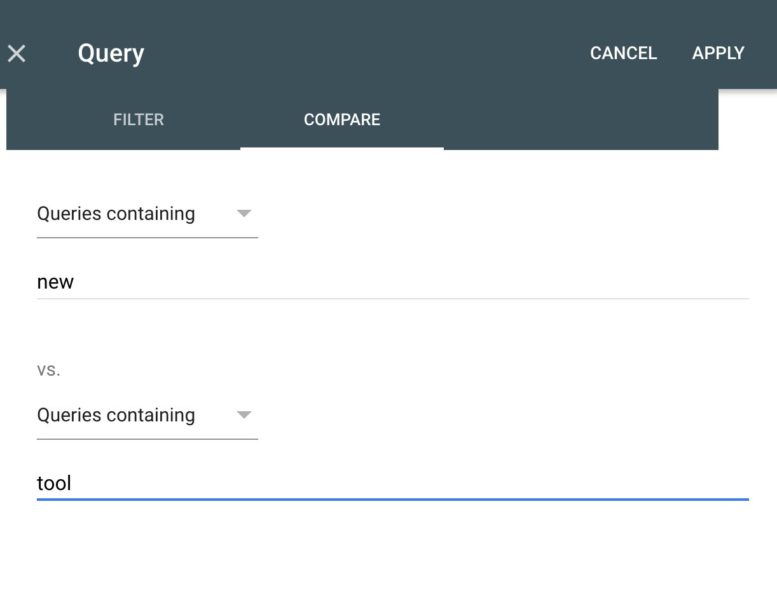
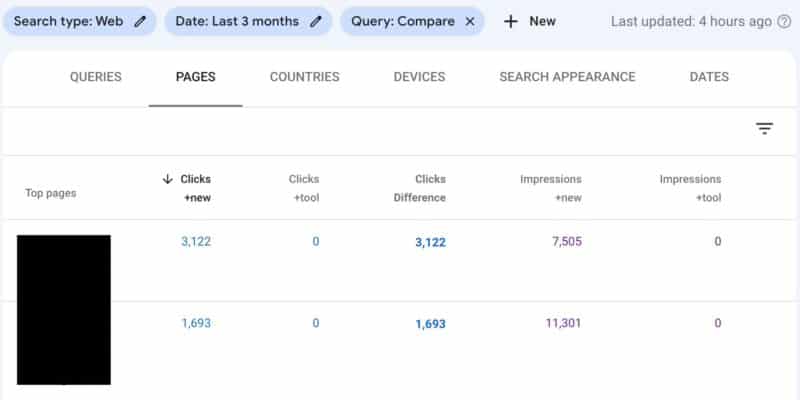
What it looks like. Andrew Shotland shared screenshots of this on Twitter showing how the compare feature lets you put in two parameters or strings and compare them against each other. In this example, he is comparing queries containing “new” versus queries containing “tool”.

Here is the comparison tool that you can find when going into any of these parameters.

Here is the report that it generates after you apply these parameters:

More details. There is a help document available that has more details on this saying:

You can compare data between two values in any one grouping dimension, whether or not it is the currently selected grouping. For example, when grouped by Query you can compare clicks between two dates (this week vs last week), or two countries (USA vs France). Comparing by page or search appearance can change the metric calculation for CTR, impressions, and clicks. When comparing values for a single metric, the results table will display a Difference column to compare values in each row.

To compare group data:

  1. Comparison is managed by filters (for example, Date or Search type). Either edit an existing filter or click New to add a new filter.
  2. In the filter properties dialog box, choose Compare.
  3. Add the dimensions or times to compare, and click Apply.
  4. You can have only one comparison at a time. Adding a new comparison filter will replace an existing comparison. For example, if you are comparing dates and then add a comparison between countries, the country comparison will replace the date comparison.

Why we care. Adding more advanced reporting features that can help you analyze your site’s performance in Google Search is always useful. Being able to drill down into specific queries and compare one to another, or drill down into specific pages and compare one to another, can be super useful in debugging SEO issues.


New on Search Engine Land

About The Author

Barry Schwartz a Contributing Editor to Search Engine Land and a member of the programming team for SMX events. He owns RustyBrick, a NY based web consulting firm. He also runs Search Engine Roundtable, a popular search blog on very advanced SEM topics. Barry can be followed on Twitter here.

https://searchengineland.com/google-search-console-testing-compare-feature-in-performance-reports-385855


DuckDuckGo drops below 100 million searches per day

DuckDuckGo, the privacy-focused search engine, is now trending at below 100 million searches per day according to its public traffic statistics page. Back in January 2021, DuckDuckGo hit the 100 million searches per day milestone and then a year after that, the search engine broke 1 billion searches.

Declining daily searches. But since April 2022, DuckDuckGo has been reporting less than 100 million searches per day. Here are the trends for 2022:

  • January 2022: 106 million searches per day
  • February 2022: 105.5 million searches per day
  • March 2022: 102.7 million searches per day
  • April 2022: 97.7 million searches per day
  • May 2022: 96.2 million searches per day
  • June 2022 (to-date): 93.8 million searches per day

The daily record of search queries in a single day for DuckDuckGo was 111.7 million searches per day. DuckDuckGo is currently at 115 billion queries since it launched.

Why we care. Is DuckDuckGo no longer growing? Is this a sign that DuckDuckGo is giving up on competing against Google? It is hard to say. I personally feel like I am hearing fewer and fewer commercials for DuckDuckGo on the radio, yes, I listen to the radio on the way to and from work. But there still are DuckDuckGo ads playing, maybe not as many?


New on Search Engine Land

About The Author

Barry Schwartz a Contributing Editor to Search Engine Land and a member of the programming team for SMX events. He owns RustyBrick, a NY based web consulting firm. He also runs Search Engine Roundtable, a popular search blog on very advanced SEM topics. Barry can be followed on Twitter here.

https://searchengineland.com/duckduckgo-drops-below-100-million-searches-per-day-385835


Google Search Console item classifications updated to show valid or invalid

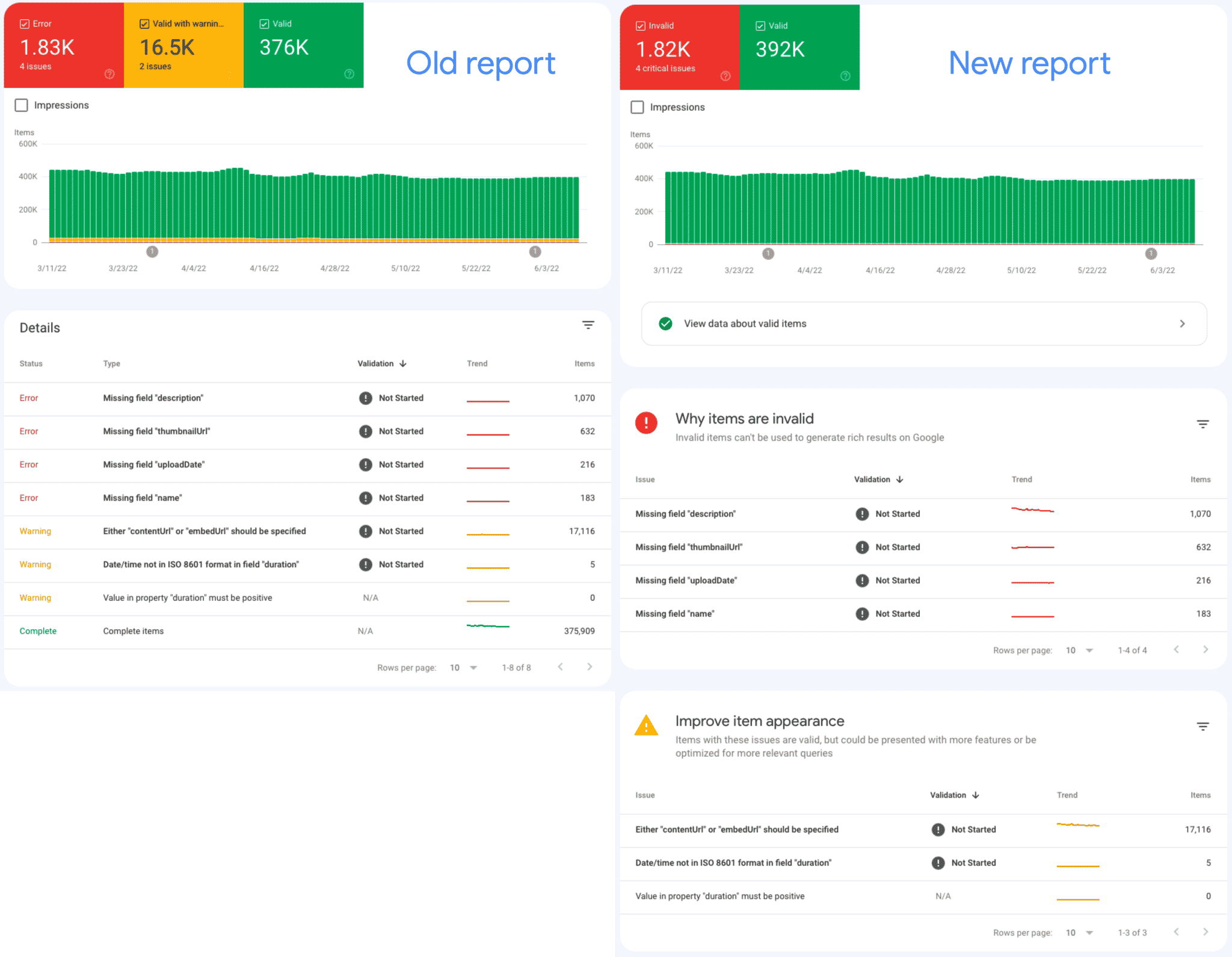
Google changed how it is displaying errors within some of the Search Console reports to show only valid or invalid classifications, the company announced today. Instead of the coverage report showing errors, valid with warnings and valid; now the report just shows invalid or valid information.

What changed. Google said the URLs or items in the Search Console report are no longer grouped at the top level by three or more status categories, i.e. Valid, Warning, and Error. Now they are grouped or classified into two more broad statuses that reflect whether those URLs or items are invalid or not. Google said invalid means that there is a report-specific critical issue in the page or item, and not invalid means that the item might still contain warnings, but has no critical issues. The implications and exact terms for the valid and invalid states varies by report type, Google added.

Google explained “grouping the top-level item (a rich result for the rich result reports, a page or URL for the other reports) into two groups: pages or items with critical issues are labeled something like invalid; pages or items without critical issues are labeled something like valid. We think this new grouping will make it easier to see quickly which issues affect your site’s appearance on Google, in order to help you prioritize your fixes.”

What is looks like. Google shared this before and after coverage report sample:

API and URL Inspection tool. Google said these changes are coming to the URL inspection tool and the API soon. The URL inspection tool will show these changes when inspecting a particular URL inside Search Console.

The API will take months to reflect these changes in “in a few months.” This will take longer for the API and because of that “this means that if your property shows the updated item classification in Search Console, you might see differences when comparing results from the product interface and the API,” Google explained. Google will update us on the status of the API changes in the future.

Impacted reports. Google said these are the following reports impacted by this classification change and you can learn more exactly how each report is impacted in this help document:

  • Core Web Vitals
  • Mobile Usability
  • AMP report
  • Rich results report
  • URL Inspection tool

Why we care. This should make it easier for you to understand errors in Search Console reports and thus which items to prioritize over others. This change is just a reporting change and does not change how Google crawls, indexes or ranks your content.


New on Search Engine Land

About The Author

Barry Schwartz a Contributing Editor to Search Engine Land and a member of the programming team for SMX events. He owns RustyBrick, a NY based web consulting firm. He also runs Search Engine Roundtable, a popular search blog on very advanced SEM topics. Barry can be followed on Twitter here.

https://searchengineland.com/google-search-console-item-classifications-updated-to-show-valid-or-invalid-385830


5 tips to develop authoritative content for Google and searchers

Day 1 of SMX Advanced 2022 opened today with a keynote by Jaimie Clark, VP of SEO at Centerfield. It was packed full of insights around creating authoritative content that Google ranks and searchers need. 

The Wirecutter migration: SEO + content + rebrand

Before Clark joined Centerfield, she worked at the New York Times. In 2016, New York Times Co. bought The Wirecutter, a product recommendation site.

She led the migration of thewirecutter.com to nytimes.com/wirecutter in 2020. This migration resulted in Wirecutter doubling its search traffic within a year.

But two years of SEO work preceded the migration. And it started with a new mission: to help people effortlessly choose and buy the stuff they need to live a better life.

How they did this: 

  • Thorough reporting that got to the right answer. 
  • A hard focus on solving reader problems (not heroing products). 
  • Making actionable recommendations and communicating as a human would.
  • Prioritizing long-term reader trust. 

Here are five tips Clark shared during her SMX Advanced keynote on how to develop authoritative content for Google and searchers.

1. Focus on depth, not breadth

Clark said Wirecutter had a “mile-wide, inch-deep approach” to product reviews.

But their content strategy shifted in 2018 to go a mile deep. They started creating:

  • Top-level pages: These acted as a collection of summaries for specific guides and related use cases. These pages were linked to mid-level pages for more in-depth analysis.
  • Mid-level pages: These went deep on specific use cases or types of products.
  • Supporting content: These included blog posts, how-tos and news. Meant to add breadth and depth of topical coverage by answering frequently searched for questions and linking to other pages when it made sense. 

2. Build topical authority

One of Wirecutter’s goals was to own search results for the term “vacuums.” They had about five reviews on different types of vacuums (handheld, cordless, robot, steam, stick). 

Clark said they looked at search data to find additional use cases to identify and fill content gaps. They also researched comparisons and supporting content people were searching for. 

“And we always updated the topics page – the ‘best vacuum’ page, to link to and address each of those use cases as anything underneath was updated,” Clark said.

3. Have a purpose

There should be a clear, user-centric reason why a page or website was created.

That purpose can be singular or multifaceted.

By Google’s definition, each page should have a clear beneficial or helpful purpose for users, Clark said. 

Questions to ask yourself:

  • What is the main purpose of any given page on your site?
  • Who do you expect to be on the page?
  • What are they looking for when they get there?
  • How do they expect to see the content formatted?

“We don’t want to help one random person make one decision. Instead, we wanted people to really Wirecutter their homes,” Clark said. “Helping them discover what they needed day to day, bigger picture, longer-term, tied to the largest events in their lives.”

4. Present content in the most useful way

You should make clear what’s more important by the way you present your content. You should then lead people deeper for people to dive into specific use cases as needed.

There are two main categories of content: 

  • Main content: Should directly help a page achieve its purpose. This can be text, images, tables, videos or any other page features that help someone understand what the purpose is and actually achieve the goal.
  • Supplementary content. Should help users find and navigate the main content. Supplementary content should not distract the user from the main content.

5. Demonstrate your E-A-T 

Here’s how Wirecutter approached E-A-T:

Expertise

Structured data was added to author pages to reinforce that Wirecutter’s content was written by experts or enthusiasts who demonstrated expertise in a specific space. 

Author pages started with a paragraph up top, with details about the writer:

  • How long they have been covering a subject.
  • Their background.
  • Why they are qualified to talk about the topic. 

The pages also included social media links (e.g, LinkedIn), an email contact and a feed of their latest articles.

Authoritativeness

These are the “tried-and-true” on-page elements for how Wirecutter generally structured its pages:

  • Introduction: This provides an overview of the process and results in one paragraph. It’s meant to be a condensed form of the hours spent researching and testing. This paragraph always included a link to the product buy page to make it easy for people to make a decision.
  • How we picked: This details the criteria and features evaluated. These types of elements are especially important in light of Google’s Product Review updates.

Wirecutter also preserved the original publishing date timestamps, using schema. Why?

They believed this way to demonstrate longevity and make sure Google understood that even though the page moved to a new location, it is the same authoritative piece of content that was first written by the same person years earlier.

Trustworthiness

This is a measure of two things:

  • Accuracy: You can use an Update box to call out if something is out of stock or if some information has changed. This helps show that your page provides the most up-to-date information.
  • Transparency: How do you recommend products? How do you test products? You want people to trust you. So you have to explain why they should.

Register now for SMX Advanced

Missed Clark’s keynote live? No worries! Simply register for free here to watch Clark’s full keynote on-demand.

And there’s still plenty of time to experience the rest of this year’s 100% free and virtual edition of SMX Advanced. You can watch all the other great SEO and PPC sessions on the agenda today and tomorrow – and ask your questions of the speakers in our live Overtime Q&A. 


New on Search Engine Land

About The Author

Danny Goodwin is Managing Editor of Search Engine Land & SMX. In addition to writing daily about SEO, PPC, and more for Search Engine Land, Goodwin also manages Search Engine Land’s roster of subject-matter experts. He also helps program our conference series, SMX – Search Marketing Expo. Prior to joining Search Engine Land, Goodwin was Executive Editor at Search Engine Journal, where he led editorial initiatives for the brand. He also was an editor at Search Engine Watch. He has spoken at many major search conferences and virtual events, and has been sourced for his expertise by a wide range of publications and podcasts.

https://searchengineland.com/develop-authoritative-content-google-searchers-smx-advanced-keynote-385793


Should your business ever take a break from doing SEO?

For so many reasons it can be tempting to stop doing SEO for a period of time – maybe it’s budget, maybe you’ve had a bad experience with your SEO vendor or maybe you’re not seeing the results you thought you’d see.

When that happens, should you take a break from SEO? And if you do, what are the consequences?

The answer: SEO is a marathon, not a sprint

SEO is like running a marathon. If you stop because you tire easily, your competitors will pass you. The longer you take a break, the further ahead the competition – and it might be hard to catch up.

Of course, no one is forcing you to do SEO. But you must consider what you are up against before you make a decision to stop spending time and money on it.

What you are up against is 12 changes to Google Search on average each day, millions of competitors per keyword and website maintenance that if not done will result in a poor-quality site, making it even harder to rank.

That’s why the secret to SEO success is endurance. SEO can only stop if Google quits changing things and all your competition goes away.

Three reasons you shouldn’t stop doing SEO 

Here are three things to consider before you take a break from your SEO: 

1. There’s an average of 12 changes to search per day

It’s no secret that Google is always updating its search engine. In 2020 alone, Google ran over 600,000 experiments that “resulted in more than 4,500 improvements to Search.” That’s an average of 12 changes per day, folks.

Some changes are minor, some are major. Some are announced, many fly under the radar. (You can see how many Google updates SEOs are talking about, here.)

In all cases, tracking and understanding how these changes impact a website is not a core competency of most businesses. So, you need SEO expertise.

And that is why SEOs spend countless hours testing and analyzing Google changes so their clients or employers can benefit from that knowledge.

If you quit SEO suddenly, your website will not likely stay afloat in the Google storm for very long.

2. You have millions of competitors – yes, millions!

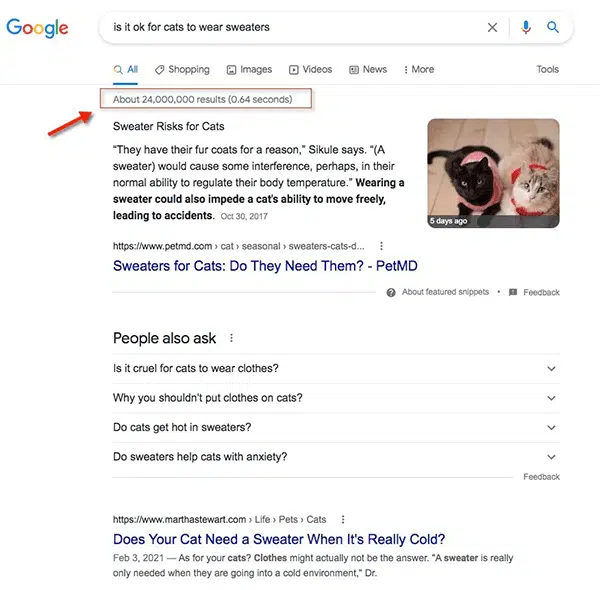
Try doing any search in Google and see how many results show up. Literally any query can have millions or billions of results. Those are your competitors online.

Out of those millions of results, your content somehow needs to show up on page one. And if you want even more clicks, your content needs to be among the first few results on the page.

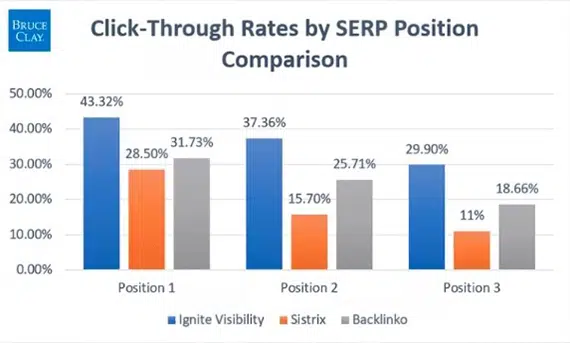
We analyzed data from three recent studies on search results position and click-through rate, and across the board, position one always gets the most clicks:

Click-through rates analysis from three studies by Ignite Visibility, Sistrix and Backlinko

Add to that the fact that you need to be an expert on the different search verticals (like Google Images, for example) and all the search features that show up on page one – not just the 10 blue links – to effectively compete.

Every day that you pause your SEO is a day your competition can spend money and resources to get ahead.

Given that it can take five to seven months to start seeing the results you want from SEO, that is time you can’t afford to waste. (Plus, some keywords take even longer to rank; it took us two years to help a client rank No. 1 for “games”).

Maintaining your website is a full-time job

While it’s true that quality websites can build value over time in the form of links and traffic, you cannot set it and forget it in SEO. 

You need to maintain both the technology that drives your website and the content on it regularly. And how often depends on what type of website you have and what type of content there is.

For example, if you have what Google calls “your money or your life” content, you will need to review it and refresh it regularly.

Consider also that every site will need technical SEO fixes on a regular basis to ensure it is operating at peak performance for search engines and end-users. Think: servers, content delivery networks, content management systems, pages crawling issues, etc. 

Remember that Google said in its Search Quality Rater Guidelines that “unmaintained/abandoned ‘old’ websites or unmaintained and inaccurate/misleading content is a reason for a low Page Quality rating.”

Because Google cares that websites are up-to-date and offer a good experience, if you stop SEO, you risk impacting your ability to rank.

Final thoughts

When businesses want to take a break from SEO, it’s often because they aren’t seeing the results they want. And that is usually due to other factors like budget constraints, hiring the wrong SEOs or even mismatched expectations.

If you budget 5% to 10% of your revenue, though, and you work with the right SEO vendor, you should be able to get the results you want. And those results typically end up in more revenue to the business.

When SEO is driving revenue, stopping SEO is rarely a question that any business ponders. If you treat SEO as an essential marketing activity for the life of your business, you will often win the marathon. If you give up, you lose.


New on Search Engine Land

About The Author

Since January 1996, Bruce Clay Inc. (BCI) has helped websites rank in search engines. BCI has grown into a leading search marketing company providing SEO services and consulting, pay-per-click (PPC) advertising management, content development and social media marketing services. BCI also provides SEO tools including the SEOToolSet® and the Bruce Clay SEO plugin for WordPress. It operates SEOtraining.com, a comprehensive online SEO training and membership site that includes the acclaimed Bruce Clay SEO Training course. More than 5,000 attendees have learned SEO from Bruce Clay’s classes worldwide, and now members can access it from all over the world.

https://searchengineland.com/should-your-business-ever-take-a-break-from-doing-seo-385731


Why 100% indexing isn’t possible, and why that’s OK

When it comes to topics like crawl budget, the historic rhetoric has always been that it’s a problem reserved for large websites (classified by Google as 1-million-plus webpages) and medium-sized websites with high content change frequency.

In recent months, however, crawling and indexing have become more common topics on the SEO forums and in questions posed to Googlers on Twitter.

From my own anecdotal experience, websites of varying size and change frequency have since November seen greater fluctuations and report changes in Google Search Console (both crawl stats and coverage reports) than they have historically.

A number of the major coverage changes I’ve witnessed have also correlated with unconfirmed Google updates and high volatility from the SERP sensors/watchers. Given none of the websites have too much in common in terms of stack, niche or even technical issues – is this an indication that 100% indexed (for most websites) isn’t now possible, and that’s OK?

This makes sense.

Google, in their own docs, outlines that the web is expanding at a pace far outstretching its own capability and means to crawl (and index) every URL.


Get the daily newsletter search marketers rely on.


In the same documentation, Google outlines a number of factors that impact their crawl capacity, as well as crawl demand, including:

  • The popularity of your URLs (and content).
  • It’s staleness.
  • How quickly the site responds.
  • Google’s knowledge (perceived inventory) of URLs on our website.

From conversations with Google’s John Mueller on Twitter, the popularity of your URL isn’t necessarily impacted by the popularity of your brand and/or domain.

Having had first-hand experience of a major publisher not having content indexed based on its uniqueness to similar content already published online – as if it is falling below both the quality threshold and doesn’t have a high enough SERP inclusion value.

This is why, when working with all websites of a certain size or type (e.g., e-commerce), I lay down from day one that 100% indexed is not always a success metric.

Indexing tiers and shards

Google has been quite open in explaining how their indexing works.

They use tiered indexing (some content on better servers for faster access) and that they have a serving index stored across a number of data centers that essentially stores the data served in a SERP.

Oversimplifying this further:

The contents of the webpage (the HTML document) document are then tokenized and stored across shards, and the shards themselves are indexed (like a glossary) so that they can be queried quicker and easier for specific keywords (when a user searches).

A lot of the time, indexing issues are blamed on technical SEO, and if you have a noindex or issues and inconsistencies preventing Google from indexing content, then it is technical, but more often than not – it’s a value proposition issue.

Beneficial purpose and SERP inclusion value

When I talk about value proposition, I’m referring to two concepts from Google’s quality rater guidelines (QRGs), these being:

  • Beneficial purpose
  • Page quality

And combined, these create something I reference as the SERP inclusion value. 

This is commonly the reason why webpages fall into the “Discovered – currently not indexed” category within Google Search Console’s coverage report.

In the QRGs, Google makes this statement:

Remember that if a page lacks a beneficial purpose, it should always be rated Lowest Page Quality ­regardless of the page’s Needs Met rating or how well­-designed the page may be.

What does this mean? That a page can target the right keywords and tick the right boxes. But if it’s generally repetitive to other content and lacks additional value, then Google may choose not to index it.

This is where we come across Google’s quality threshold, a concept for whether a page meets the necessary “quality” to be indexed. 

A key part of how this quality threshold works is that it’s almost real-time and fluid.

Google’s Gary Illyes confirmed this on Twitter, where a URL may become indexed when first found and then dropped when new (better) URLs are found or even given a temporary “freshness” boost from manual submission in GSC.

Working out whether you have an issue

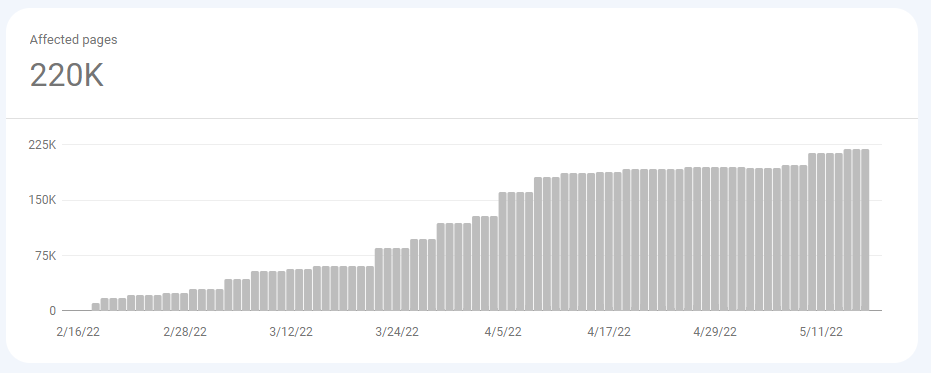
The first thing to identify is if you’re seeing the number of pages in Google Search Console’s coverage report being moved from included to excluded.

This graph on its own and out of context is enough to cause concern amongst most marketing stakeholders.

But how many of these pages do you care about? How many of these pages drive value?

You’ll be able to identify this through your collective data. You’ll see if traffic and revenue/leads are decreasing in your analytics platform, and you’ll notice in third-party tools if you’re losing overall market visibility and rank.

Once you’ve identified if you are seeing valuable pages dropping out of Google’s index, the next steps are to understand the why and Search Console breaks down excluded into further categories. The main ones you need to be aware of and understand are:

Crawled – currently not indexed

This is something I’ve encountered more with e-commerce and real estate than any other vertical.

In 2021 the number of new business applications registrations in the U.S. broke previous records, and with more businesses competing for users, there is a lot of new content being published – but likely not a lot of new and unique information or perspectives.

Discovered – currently not indexed

When debugging indexing issues, I find this a lot on e-commerce websites or websites that have deployed a considerable programmatic approach to content creation and published a large number of pages at once.

The main reasons pages fall into this category can be down to crawl budget, in that you’ve just published a large amount of content and new URLs and grown the number of crawlable and indexable pages on the site exponentially, and the crawl budget that Google has determined for your site isn’t geared to this many pages.

There’s not a lot you can do to influence this. However, you can help Google through XML sitemaps, HTML sitemaps and good internal linking to pass page rank from important (indexed) pages to these new pages.

The second reason why content may fall into this category is down to quality – and this is common in programmatic content or e-commerce sites with a large number of products and PDPs that are similar or variable products.

Google can identify patterns in URLs, and if it visits a percentage of these pages and finds no value, it can (and sometimes will) make an assumption that the HTML documents with similar URLs will be of equal (low) quality, and it will choose not to crawl them.

A lot of these pages will have been created intentionally with a customer acquisition objective, such as programmatic location pages or comparison pages targeting niche users, but these queries are searched in low frequency, will likely not get many eyes, and the content may not be unique enough versus the other programmatic pages, so Google will not index the low-value proposition content when other alternatives are available.

If this is the case, you will need to assess and determine whether the objectives can be achieved within the project resource and parameters without the excessive pages that are clogging up crawl and not being seen as valuable.

Duplicate content

Duplicate content is one of the more straightforward and is common in e-commerce, publishing and programmatic.

If the main content of the page, which holds the value proposition, is duplicated across other websites or internal pages, then Google won’t invest the resource in indexing the content.

This also ties into the value proposition and the concept of beneficial purpose. I’ve encountered numerous examples where large, authoritative websites have had content not indexed because it is the same as other content available – not offering unique perspectives or unique value propositions.

Taking action

For most large websites and decent-sized medium websites, achieving 100% indexing is only going to get harder as Google has to process all existing and new content on the web.

If you find valuable content being deemed below the quality threshold, what actions should you take?

  • Improve internal linking from pages that are “high value”: This doesn’t necessarily mean the pages with the most backlinks, but those pages that rank for a large number of keywords and have good visibility can pass positive signals through descriptive anchors to other pages.
  • Prune low-quality, low-value content. If the pages being excluded from the index are low value and not driving any value (e.g., pageviews, conversions), they should be pruned. Having them live is just wasting Google’s crawl resource when it chooses to crawl them, and this can affect their assumptions of quality based on URL pattern matching and perceived inventory.

Opinions expressed in this article are those of the guest author and not necessarily Search Engine Land. Staff authors are listed here.


New on Search Engine Land

About The Author

Dan Taylor is head of technical SEO at SALT.agency, a UK-based technical SEO specialist and winner of the 2022 Queens Award. Dan works with and oversees a team working with companies ranging from technology and SaaS companies to enterprise e-commerce.

https://searchengineland.com/100-percent-indexing-impossible-385773


Google to sunset old Search Console message panel

Google Search Console will sunset the old legacy version of messaging starting on August 1, 2022. If you try to access the legacy version of the Search Console message panel, you will be presented with a notice that reads “Important: This report won’t be available after Aug 1, 2022. Please use the new Message panel instead.”

The notice. Here is a screenshot of the notice that I can see for one of my verified sites in Google Search Console:

All messages moved. There is no need to worry, back in February 2022, Google moved all messaging from the old Search Console to the new Search Console. Google said then it has “finished the migration of all the messages into the new Search Console interface.” As a result of this, you should expect even “more user messages in the messages panel.”

More details. When Google rolled out the new Google Search Console in 2018, not everything was migrated from the old to the new platform. In fact, there are still several tools in Search Console that are not yet migrated. In 2019, Google revamped the Search Console messages into a bell icon in its own panel. But not all messages were found in that section when that launched. Now, all messages should be accessible in that message panel and the old version will go away in the next several weeks.

Why we care. It is now easier for you to see all the messages you would be getting from Google Search Console in one place. It might be a bit overwhelming to see all these messages, but don’t worry, scan through them and anything that seems concerning or important, speak to your SEO consultant, agency or developer for their assistance.

Removing the old version will force some of you who continue to check those messages to just focus on one message panel going forward, hopefully saving you time and resources.


New on Search Engine Land

About The Author

Barry Schwartz a Contributing Editor to Search Engine Land and a member of the programming team for SMX events. He owns RustyBrick, a NY based web consulting firm. He also runs Search Engine Roundtable, a popular search blog on very advanced SEM topics. Barry can be followed on Twitter here.

https://searchengineland.com/google-to-sunset-old-search-console-message-panel-385774


Top 7 SEO tips for WordPress sites

If your WordPress site rank is not performing as expected, all hope is not lost.

There are a couple of things you can do to improve your SEO ranking. The seven methods outlined below are quick, simple, and proven to show results.

1. Make sure HTTPS is enabled

Using an SSL certificate to secure your website lets your viewers know your site is secure, which helps with ranking.

SSL certificates are available both free and paid. Once you have an SSL certificate installed for your site, use a plugin like Really Simple SSL to assure your content is served from the secure protocol.

2. Optimize your URLs

A good permalink structure is crucial to SEO-friendly URLs.

WordPress gives you this functionality from installation, but you can make changes to it with plugins for more modifications.

URL optimization is important when optimizing your pages on your site for certain search queries and keyword phrases.

Placing your primary keyword in the URL is considered a best practice for on-page SEO.

When a search engine crawls your site, it’s easy for them to understand what your content is about.

3. Use an SEO plugin

SEO plugins are a great way to diagnose and improve both technical and on-page SEO recommendations. Consider installing one of these recommended plugins.

  • Yoast SEO – One of WordPress’s most popular plugins. The free version of Yoast boasts tools to help optimize your content for SEO and improve overall readability.
  • Rank Math – Rank Math has an intuitive panel on your page or post that allows you to see changes that would positively affect your SEO.

Meta descriptions or tags is an element that summarizes the content of your post or page. It gives search engines a brief description of what they will read or find on your website.

A meta description should not be longer than 275 characters long as that is all Google will display.

A compelling meta description can bring more readers to your post, adding to your SEO rank. You will want to add your keyword to your meta description for easy lookups and add it to your content.

5. Craft good content

High-quality content is one of the best ways to improve your SEO. Good quality content goes deeper than the material you write or create on your website.

Assure you have a deep understanding of the subject you are writing about and do some keyword research to best capture your audience’s attention.

Avoid creating duplicate content on your site. Duplicate content refers to ideas or topics that have already been created or discussed on your website and will negatively affect your SEO score.

A good model to follow is the E-A-T model, which creates trust with your user and an overall better SEO ranking.

What is E-A-T content? Google uses search quality guidelines to ensure the content on a site is good for users. It is not a ranking factor for SEO, but it affects how your content is read.

E-A-T stands for the expertise of the writer, authoritativeness of the content or site itself and trustworthiness of the content provided.

Assuring your website has an about us page will show your authoritativeness and expertise to your readers. Because of this, collaborating with other experts contributes to your SEO.

6. Site optimization

Today, site speed is another important factor for SEO optimization, as serving content as fast as possible is what a lot of users need—every second matters.

Use a hosting provider that is optimized for your WordPress site with options such as NGINX or Redis for server-side caching.

An example of WordPress optimized hosting is InMotion Hosting’s Ultrastack, which uses NGINX to intelligently cache frequently-used resources to save memory.

Images should also be optimized. If they are too large or take too long to load, it will strain your website. Using a CDN (Content Delivery Network) to serve your content helps reduce load times.

The Jetpack plugin provides a free image CDN, but there are other hosting resources that can be used such as Cloudflare.

If your current hosting provider does not provide server-side caching, you can use a caching plugin such as W3 Total Cache or WP Rocket.

7. Keep an eye on your analytics

Google Search Console and Google Analytics go hand in hand to track how your website is performing. These metrics give you detailed information about how visitors interact with the content on your website.

Other resources are Bing’s Webmaster Tools and third-party options such as Semrush.

Utilizing these tools also allow you to review your keyword rate, as well as site speed.

Final words

SEO can be challenging, especially if you are a new website creator or small business owner; however, keeping the tips above in mind will help you along the way. Having the right foundation to start and creating good quality content will ensure your website and media rise to the top.

Get WordPress Hosting that’s optimized for performance and SEO.


New on Search Engine Land

About The Author

As a certified Great Place to Work, with over 30,000 positive customer comments, we strive every day to make our customers happy. We are an employee-owned technology company, guided by a commitment to the open source community and fostering technical thought leadership in the hosting industry. With a blended approach of technology, expert customer support, and easy to use digital tools, our success and growth have stemmed from our honest desire to help businesses succeed and grow.

https://searchengineland.com/top-7-seo-tips-for-wordpress-sites-385545


Twitter removes nofollow attribute from links in tweets

Twitter has removed the nofollow link attribute from Twitter posts, tweets, in its source code. It is unclear if Twitter removed this attribute on purpose or not and if even search engines, like Google, would value links from Twitter or not.

Timing. According to Chris Silver Smith, Twitter removed the nofollow link attribute sometime in the past couple weeks or so. He said on Twitter “Twitter is apparently no longer using rel=”nofollow”. This includes links you find on “profiles, tweets, and other pages on Twitter may now contain followed links,” he said.

Back in 2008, former search quality lead and spam fighter, Matt Cutts, posted that Twitter added the nofollow link attribute to bio sections on Twitter. Within a year later, Twitter added the attribute to all tweets and other sections of their site.

Will these links count? It is hard to know if Google or Bing or other search engines will start to now follow and count links found on Twitter.com and within tweets. We know Google can sometimes treat links that do not have a nofollow attribute, as if it does have a nofollow attribute. I would assume Google would by default do that with most social networks, including Twitter, because user generated content and links, are hard to trust in general.

Will it last. Also, I suspect Twitter will soon add the nofollow link attribute back to external links as soon as they hear about this publicly. So this may be short-lived. We have reached out to Twitter for a statement.

Why we care. Twitter is one of the largest social networks and is used heavily by SEOs and marketers. If links remain unfollowed, it potentially might lead to more link spam on that network and both hurt the usefulness of Twitter and potentially the value of links in general on Twitter.

But again, I really don’t think Twitter intentionally removed the nofollow but we will see.


New on Search Engine Land

About The Author

Barry Schwartz a Contributing Editor to Search Engine Land and a member of the programming team for SMX events. He owns RustyBrick, a NY based web consulting firm. He also runs Search Engine Roundtable, a popular search blog on very advanced SEM topics. Barry can be followed on Twitter here.

https://searchengineland.com/twitter-removes-nofollow-attribute-from-links-in-tweets-385753