Yandex CEO and founder resigns following sanctions
Arkady Volozh, Yandex’s CEO and executive director, resigned from his position, the company announced today.
The European Union imposed sanctions on Volozh personally. Yandex has not been sanctioned by the EU, U.S., or UK. Volozh had a 45.3% voting and 8.6% economic interest in Yandex.
Why we care. Yandex is generally regarded as Russia’s Google, even though Yandex pre-dates Google (Yandex launched in 1997). Yandex’s share of the Russian search market is estimated to be at 48%, behind Google’s 49%, according to StatCounter – but Yandex says it owns 61% of the search market. So this development, as well as others below, mean it’s worth keeping an eye on the state of the company if you work on any sites that rely on Yandex organic traffic.
What Volozh said. “While I consider this decision to be misguided and ultimately counterproductive, I do not intend to give any instructions to my family trust as long as sanctions are in place. During this time the trust will vote in line with the recommendations of the Board. While I will continue to support the team wherever possible, this decision is in the best interests of the company and its stakeholders.”
Timeline of Yandex turmoil. Here are some significant Yandex stories since Russia’s invasion of Ukraine on Feb. 24:
Feb. 28: Nasdaq suspended trading of Yandex shares. (Nasdaq)
March 3: “We believe that our current data center capacity and other technology critical to operations will allow us to continue to operate in the ordinary course for at least the next 12 to 18 months. In the event of any prolonged suspension of supplies of hardware, software or other technology used in our business or offerings, if we are unable to secure alternative sources, our operations could be materially adversely affected over time.” (Yandex)
March 7: Esther Dyson and Ilya Strebulaev resigned from Yandex’s board of directors (Yandex).
March 15: Yandex Deputy CEO and Executive Director Tigran Khudaverdyan, who had been sanctioned earlier in the week, resigned. (Yandex)
March 16: Yandex rumored to be in negotiations to sell its media division (news and Zen). (TechCrunch)
April 27: Yandex’s Q1 financials were released. Yandex reported an adjusted net loss of 8.1 billion roubles ($110 million). The company said it experienced continued stable operations and strong growth across most of its businesses until Feb. 23. (Reuters)
April 28: Yandex announced the sale of news and Zen to VK. (Yandex)
May 18: It was reported that Yandex was exploring selling search and mail and moving its headquarters to Israel. (Data Center Dynamics)
New on Search Engine Land
About The Author
Danny Goodwin is Senior Editor of Search Engine Land. In addition to writing daily about SEO, PPC, and more for Search Engine Land, Goodwin also manages Search Engine Land’s roster of subject-matter experts. He also helps program our conference series, SMX – Search Marketing Expo. Prior to joining Search Engine Land, Goodwin was Executive Editor at Search Engine Journal, where he led editorial initiatives for the brand. He also was an editor at Search Engine Watch. He has spoken at many major search conferences and virtual events, and has been sourced for his expertise by a wide range of publications and podcasts.
How to drive B2B conversions from your organic traffic
30-second summary:
B2B conversion funnels are long and unpredictable, and your SEO strategy should reflect that
Because it takes several touchpoints for a buying decision to be made, a B2B SEO strategy should focus on both informational and commercial phrases
Brand-driven search is crucial for your conversions because B2B customers tend to careful consider all options
While optimizing for informational queries is important, make sure you have distinct conversion paths on each page
Create consistent visual identity across on- and off-site channels to improve brand recognizability at each touchpoint
There’s one key difference between B2B and B2C conversions: B2B shopping is almost never spontaneous. It takes several decision makers (which are collectively referred to as a decision making unit or a DMU) to review several options and make a choice.
A B2B shopping journey can thus take weeks and months.
Obviously, the organic search optimization strategy should address that challenge ensuring that more of those clicks driven by organic positions result in leads and sales.
1. Create SEO-driven landing pages for both TOFU and MOFU parts of the sales funnel
Fundamentally, a B2B marketing funnel consists of three stages: top, middle and bottom. The final stage is where the final sale happens, and may take eight touchpoints (i.e. a potential customer seeing or interacting with the site in some way or another) for a buying decision to finalize.
Traditionally, when it comes to SEO, businesses tend to prioritize landing pages that drive direct sales. In B2B it is hardly possible because customers tend to make lots of searches prior to making a purchase.
This is why informational search queries (those driving top of the funnel) are as important in B2B as commercial queries are.
How-to queries
How-to queries are highly engaging because visitors tend to stay on the page while taking the steps in a tutorial.
These are also likely to be transactional queries that may drive conversions if you manage to solve the customer’s problem.
Filter your keyword lists to how-to queries and start your optimization efforts by providing useful instructions (where your product is included in a non-promotional context as part of the solution).
You can also use Google Search Console to find how-to queries your site is already ranking: Come up with a plan to improve your positions for those:
Google’s People Also Ask and Suggestions
Both People Also Ask and suggestions impact searching journeys because they show up while people search giving them more ideas.
Moreover, both are dynamic, that is, they change depending on what people are typing in the search box or what they choose to click.
Because both of these search features can change the direction in which your customers are heading, you need to keep a close eye on those and optimize for each relevant query and question that shows up there.
Make sure you actually search for each of your target keywords and make notes of People Also Ask results and how to best address them on your site. You can use your current FAQ or Knowledge Base or answer each question in a dedicated article, depending on how in-depth an answer should be.
2. Keep a close eye on your (and competitors’) branded search queries
Because B2B purchases usually require long-term investment and commitment, B2B customers tend to carefully consider and compare all possible options and alternatives before finally making a purchase.
This means your brand name will be searched a lot.
Your brand will also be searched alongside your competitors.
No wonder in B2B these queries are always popular:
Brand name alternatives
Brand name 1 vs Brand name 2
Treat your brand name as a keyword and keep optimizing your site for it. It is a never-ending process because your competitors are likely to be doing the same.
Keep in mind that your brand-driven search is the most important part of your customers’ buying journeys.
3. Plan and monitor your search-driven buying journeys
Once those searchers land on your site, what do they do from there?
While optimizing for informational-intent queries is important, don’t forget to plan distinct conversion paths from those informational pages down into your sales funnel: Invite people to schedule a demo with you, sign up for a webinar or sign up for a free trial.
Make sure to take full advantage of your lead magnets and lead-qualifying surveys: These normally make the best conversion path from an informational page because they match search intent and provide more answers to the covered questions.
Lead magnets work best when they are contextual, for example, cheat sheets, checklists and flowcharts make it easier to implement how-to content. HubSpot is a prime example of contextual CTAs and lead magnets done well:
Additionally, make sure all your assets are visually branded: Your organic-search-driven visitors should be able to remember you so that your tool looks familiar at the next touchpoint.
Use your logo as a watermark on all images, keep your colors consistent within your site and across your social media channels and make sure all your downloads (ebooks, whitepapers, and other resources) include your visual identity elements and links back to your site.
From there, make sure you know how to monitor those conversion paths. Google Analytics Behavior Flow is a great way to track where people tend to go once they land on a certain page. You can segment this report to users referred to your site from organic search:
Don’t forget to use Facebook pixel to be able to retarget those organic search visitors on social media to generate more touchpoints. You can also use retargeting when running YouTube ads. Both will remind your past visitors of your brand and take them close to a conversion.
Conclusion
Converting your organic search traffic is always a challenge, especially in B2B niches where customers are not likely to commit to your product from the first visit. Yet, when you understand your goals better, a strategic approach will gradually improve your conversions and boost your lead generation efforts.
Ann Smarty is the Founder of Viral Content Bee, Brand and Community manager at Internet Marketing Ninjas. She can be found on Twitter @seosmarty.
Subscribe to the Search Engine Watch newsletter for insights on SEO, the search landscape, search marketing, digital marketing, leadership, podcasts, and more.
Google updates its title algorithm for multi-language or transliterated/scripted titles
Google has introduced a new “algorithmic improvement” for how it selects titles for the search result snippets for multi-language or transliterated titles or where the title element is written in a different language or script from its content, the company announced.
Google said this algorithm update is “based on the general principle that a document’s title should be written by the language or script of its primary contents.”
What is changing. Google said it will try to find the best title link (not sure why Google doesn’t mention the name “title link” in its announcement) for the search result snippet when the title is written in a different language or script from its content.
(1) When multilingual titles repeat the same phrase in two different languages or scripts. The most popular pattern is to append an English version to the original title text, Google said. The example Google gave was the title “गीतांजलि की जीवनी – Geetanjali Biography in Hindi.” Google said in this case, the title consists of two parts, divided by a hyphen, and they express the same contents in different languages, both Hindi and English. Since the document itself is written only in Hindi, Google will change the title to just be in Hindi and remove the English. So “गीतांजलि की जीवनी – Geetanjali Biography in Hindi.” will be just “गीतांजलि की जीवनी.”
(2) With Latin scripted titles with transliteration, when content is written from one language into a different language that uses a different script or alphabet. The example Google gave is “jis desh me holi kheli jati hai”, consider a page title for a song written in Hindi but transliterated to use Latin characters rather than Hindi’s native Devanagari script. In this case, Google’s systems try to find an alternative title using the script that’s predominant on the page. So Google will change “jis desh me holi kheli jati hai” to “जिस देश में होली खेली जाती है.”
Why we care. Google is recommending that you provide a title that matches both the language and/or the script of the page’s main content. Do not use different languages or scripts for your title that you do not use in your page’s content.
If you notice changes in your click-through rates or changes to your titles and you use multilingual titles or scripted titles, this is why.
Barry Schwartz a Contributing Editor to Search Engine Land and a member of the programming team for SMX events. He owns RustyBrick, a NY based web consulting firm. He also runs Search Engine Roundtable, a popular search blog on very advanced SEM topics. Barry can be followed on Twitter here.
There’s an abundance of SEO strategies available to improve website performance. However, most strategies focus on increasing sessions.
What happens once these users land on your website?
As David Freeman explained back in 2017, UX is pivotal to the future of SEO and “what is good for the consumer is good for organic search performance.”
By analyzing user interactions on website navigation menus, measuring scroll depths, button clicks, engagement with form fields and even JavaScript errors, we can see potential barriers to conversion.
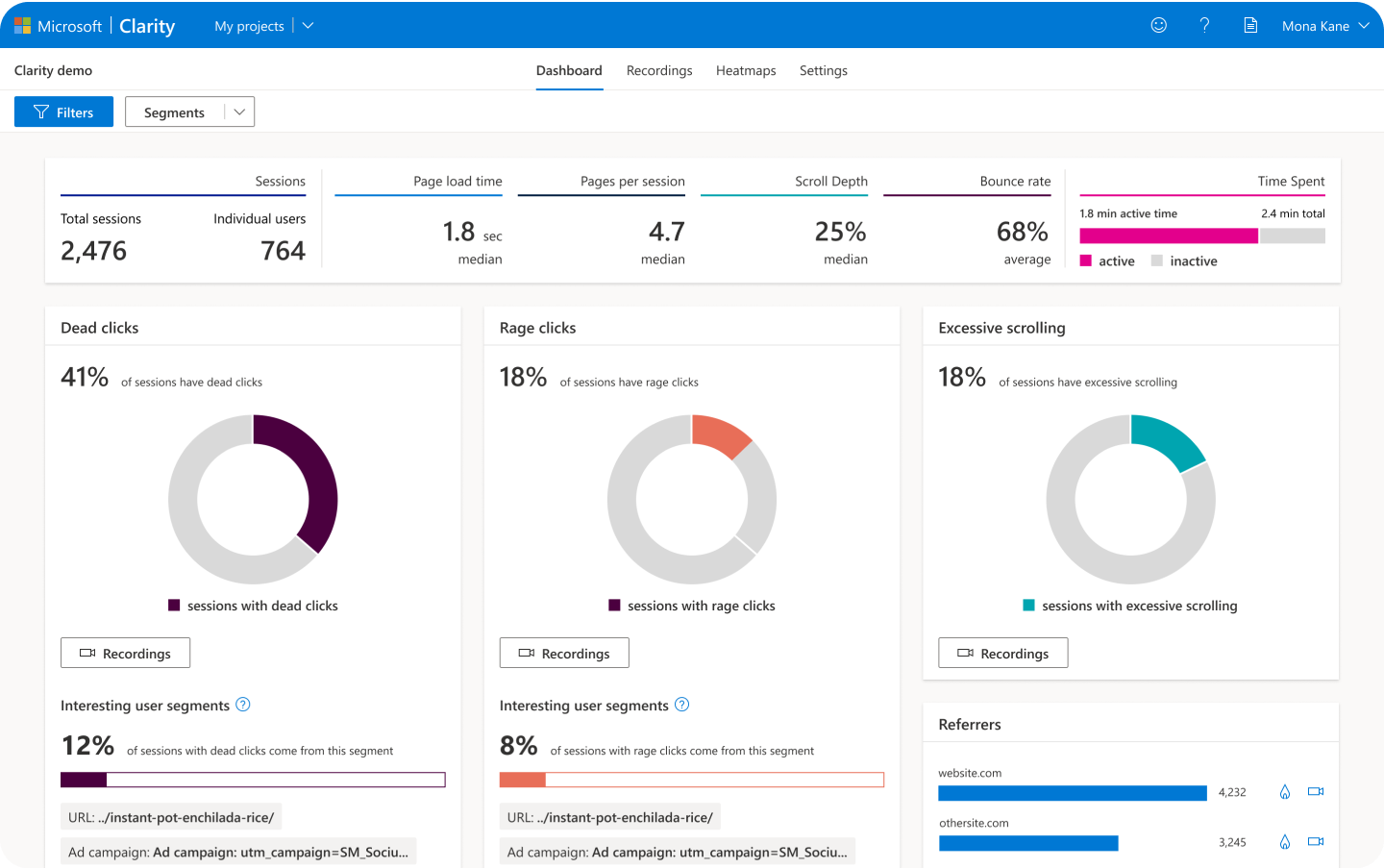
User experience (UX) metrics can be easily tracked via free and paid platforms such as Microsoft Clarity, Hotjar and other platforms.
How to measure UX with Microsoft Clarity
Before signing up to a UX tracking platform, check to see if it is GDPR and CCPA compliant, if there are traffic limits, if data sampling or sharing of data with third parties occurs and the pricing model.
As Microsoft Clarity satisfies all of these criteria and will forever be a free service, it is a cost-effective tool for measuring UX.
Sign up with Clarity by using your Microsoft, Facebook or Google account. Then, once logged in, create a new project for your website.
You will need to add the Clarity tracking code to your website, found in Settings > Setup > How to install Clarity. This installation can be done by manually adding the code to your webpages or via third-party platforms such as Google Tag Manager.
Allow for up to two hours before data appears within your Clarity project.
Get the daily newsletter search marketers rely on.
When to analyze UX metrics
Before analyzing the data provided by Clarity (or any other UX measurement platform), remember to consider:
The timeframe of the data to be analyzed (days, weeks, months)
Potential seasonality
The influence of other marketing campaigns (offline and online)
The amount of data you’re analyzing (for statistical significance)
Depending on the daily average of total sessions on your website, it may take two weeks or 10+ weeks to gather enough data as a baseline for future analyses and testing. The more data, the better!
Using Microsoft Clarity as the example, start by watching session recordings with JavaScript errors and these abnormal user behaviors:
Dead clicks. These occur when a “User clicked or tapped on a page with no effect,” which could be users clicking on an unlinked element such as a button, in-text reference or navigation item.
Rage clicks. These occur when a “User clicked or tapped in the same small area,” which could be due to a slow website response from a link click or users highlighting text content seeking more information.
Excessive scrolling. This happens when a “User scrolled through a page more than expected,” which could be users unable to find the information they need within the content.
Quick backs. This happens when a “User navigated to a page then quickly returned to the previous one,” which could be considered a page bounce due to an accidental click or irrelevant content.
By watching these recordings, you can get insights into unknown technical issues, how to improve internal links and ideas for page design changes.
You can also save (favorite) recordings that show interesting user behavior, for quick rewatching at another time. You can share recordings via a link (which expires after up to 30 days) or in an email.
By using the filters, you can find the recordings of interest to you. For example, filter by mobile devices in the last seven days of users from Australia that entered the site via a URL that starts with x (to include UTMs too), with the session lasting longer than one minute, to see how users are engaging with your localized landing page.
Analyzing heatmaps also provides insights into how users are engaging with content and which call-to-actions are most effective. See which elements of a webpage have the most clicks (on PC, tablet or mobile) and if that element is a video, a button, an in-text link, a drop-down navigation option or a footer link or any other area of the page.
If the key call-to-action on your page is not getting the most clicks, test a change in its design such as making it a floating button, a larger element or using different content around it.
How far users are scrolling down the page (on average) on PC, tablet or mobile can also vary depending on your page design and device responsiveness. See how far users are willing to scroll to find the information they seek and if important content is being missed.
If only a few users are scrolling to the footer and there are low numbers of clicks and engagement, test changing your page layout and adjusting your content, headings or multimedia.
Start collecting data today
Don’t miss an opportunity to improve your websites with data-driven UX insights. Set up an account, implement the tracking code and start measuring today.
Opinions expressed in this article are those of the guest author and not necessarily Search Engine Land. Staff authors are listed here.
New on Search Engine Land
About The Author
James Hare is the SEO manager of Bliss Search Agency. Whether it’s lead generation for B2B, retail e-commerce sales or increasing the readership of a blog, James loves to analyze marketing strategies and objectives to help businesses get the most out of their digital marketing investments.
How to create captivating, compelling and optimized content
We all know that “content is king.”
What many don’t understand is that for content to be king, it needs the support of its court.
To make the most out of your content strategy, it’s important for you to:
Identify entities and topically-related keywords.
Optimize for on-page elements.
Build content that will stand out.
Create your editorial strategy
At this stage, you should have a comprehensive list of keywords. You should also have insights about your target audience, personas and buying cycle and what your competitors are doing.
Now it’s time to put that data to use.
In the planning stage, you’ll need to determine:
Cadence: How often will you publish content on your website/blog? Daily? Weekly? Monthly?
Resources: How many writers do you have available? What about editors? How many words can they write every week while maintaining quality?
Formats: What type of content will you be producing? Long-form articles? Infographics? Tutorials? Ebooks?
Get the daily newsletter search marketers rely on.
When developing your strategy, make sure you develop different types of content for the different ways of learning that your audience personas may exhibit. Some may learn visually, others prefer videos, yet others might enjoy looking at infographics or images.
Here’s how you should conceptualize your topic clusters or content pillars:
Style guides
Before developing content, make sure you have a style guide in place. For marketing agencies, this can be used as a library for assets: style guides, brand books, etc., provided to you by clients.
If you’re creating content for your own brand, this is where you can brainstorm your own style:
What kind of imagery do you want to add to your content?
What kind of voice should your authors use?
What color palette should be used when creating visual content?
What types of citations and references should your writers use?
Trending topics
What are some interesting trends in your industry that might appeal to your target audience? You can supplement your editorial calendar with trending topic ideas by setting up keyword alerts or an XML feed of relevant industry sites.
Tip: Watch for new patents or studies being released in your space. If you find a new patent that can significantly impact your industry, translating it into “people-speak” can help you gain news coverage.
A fantastic tool for monitoring news and staying up to date with your industry is BuzzSumo:
You can filter by keyword, site or date and see which articles resonated the most based on social shares.
Create your editorial calendar
Next, you can formulate topics and themes based on your topics, keywords and target persons. Mind mapping can help you organize your thoughts and create a strategy.
Next, map out your calendar by following these steps:
Assign a theme, topic or seed set to each publication date.
Segment each content piece by adding a buyer persona and buying stage.
Select primary and secondary keywords for each content piece.
Here’s what it may look like at this stage:
Next, you’ll want to find out what channels present an opportunity and create content for each specific channel. Some of these channels and content types include:
Featured Snippets
People Also Ask
Knowledge Graph
Videos
Images
Here’s what your editorial calendar might look like at this stage:
Your content cadence can help you determine what elements you use and how often. If you publish daily or multiple times a day, you can address all of your opportunity gaps faster than if you’re only publishing once a week or once a month.
The idea is to be strategic in the content you publish so it focuses on keyword gaps, your most devoted personas at their most advantageous stage in the buyer’s journey.
Having all the research handy can make your editorial calendar creation as simple as drag and drop!
When all of the elements are properly “framed,” it’s pretty easy to create appealing titles and to give your writers detailed descriptions to work with.
Manage your editorial calendar
To stay organized and strategic, you’ll want to include as much data as possible for each content piece. Here are some fields you should consider tracking:
Article title
Author
Editor
Date scheduled to publish
Campaign
Word count
Content type
Target persona
Buying stage
Primary keyword
Secondary keywords
People Also Ask questions
Article description
Once you have all of these data points in place for each content piece, let’s look at your workflow.
Editorial workflow
Your workflow will change based on your content type. If you are creating a long-form article that does not need to be reviewed by a client, your workflow could look this:
If you are creating a visual asset, such as an infographic, the workflow would require more steps and might end up looking like this:
As you go through the editorial process, ensure that you check the content for Readability level, use of keyword variants, topical entities and proper formatting such as header tags.
Content length
How long should your articles be? Is Google truly rewarding long-form articles? How can you determine how long each article should be?
When planning content length, it’s important to use a tool such as SurferSEO or Semrush’s SEO Writing Assistant so you can map content length to the target query.
If someone searches Google for the question, “How tall is the Eiffel tower?” they probably don’t want to read a 5,000-word essay about the history of the Eiffel tower. They know exactly what they are looking for and want a quick, direct answer.
However, if your article is about “how real estate agents can get into the commercial auction field,” the person researching is more likely to want a detailed, comprehensive article and will be willing to read an ebook or a 3,000-word long-form article.
If you already use Semrush, the SEO Content Template or SEO Writing Assistant will allow you to search for a keyword and get an idea of what’s working in the SERPs for that particular query set, such as:
Semantically Related Words
Backlinks
Readability Score
Text Length
It’s ideal to use this data in the instructions given to your writing team for each content piece.
Beware the ides of duplicate content
Before finalizing and publishing your content pieces, make sure there is no duplicate content used by your authors.
It’s human nature to give others the benefit of the doubt, but it’s important to make sure that the content you’re publishing is not duplicated elsewhere on your site or the web.
Two great tools to check for duplicate content are:
Copyscape: You can add a content block to Copyscape and it will show you other places on the web where your content is duplicated.
SiteLiner: Siteliner will provide you with a detailed report based on duplicate content percentages and many more data points.
Sometimes, other sites scrape and publish your content on their sites after you publish. By running duplicate content checkers, you can identify those situations and request them to remove your content.
Adding internal and external links
Make sure all of your content pieces have links to other relevant pages of your own site within the body of the content. Internal, contextual links can help increase the topical relevance of your pages. Simultaneously, add links to authoritative external sources when it makes sense.
Publish your content pieces
Once your content pieces have gone through all the workflow steps and are approved, it’s finally time to get them live on your site!
When you upload to your CMS, verify that your content has all the proper tags in place and that you include the target keywords in your:
Meta title
Meta description
URL
Breadcrumbs
H1 tag (primary keyword)
H2/H3 tags (secondary keywords)
…etc
Also, make sure you assign your article to the most relevant category, which will help Google understand your site’s hierarchy.
Track your content pieces
Once you’ve published your content, create a reminder to check its performance after 30, 60 and 90 days.
This way, you can quickly identify pages that are not gaining traction and can work on adjusting the keywords or on-page SEO.
You can look at the metrics in Google Analytics and Google Search Console and change the date ranges to figure out how your articles perform.
Here are some of the elements you can review and track:
No traction: The article doesn’t have any traffic and needs to be optimized.
Trending up/down: If the article is trending up, you can enhance and extend it to target more keywords. If the article was doing well but started dropping, optimize for the keywords dropping and add more inbound links.
Low CTR: These are articles ranking well and have good impressions but have low CTR, which means people aren’t clicking on your link from the Google results page. If you update the title and/or description, it might help to improve the CTR and increase clicks.
Promote your content pieces
Many marketers believe that publishing an article is the end of the content creation cycle. In reality, the end of content creation is just the beginning of the content promotion stage.
Here are a few ideas for ways to promote your article after you hit publish:
Amplify with Facebook Ads: Boost your post to reach a wider audience and increase the chances of it being shared and linked to.
Share in Facebook and LinkedIn industry groups: Join industry groups and, sporadically, share your articles. Make sure you engage with others, share thought leadership, and comment on other people’s content.
Email marketing and networking: Build your email list and send out a newsletter sharing your latest blog posts. You can also email people directly by building a list based on relevant keywords.
Answer questions on Quora or forums: Search quora for content related to your target keyword and, where possible, link to the relevant blog post. Make sure your answers are detailed, comprehensive, and valuable.
Ideally, you should only create as many content pieces as you can promote.
As Google’s database becomes increasingly crowded, Google will continue to emphasize quality content, and getting your content promoted is key to standing out.
The days of spaghetti marketing are over
You can’t just throw a bunch of content at Google and hope a few stick. Instead, focus on being strategic and producing truly helpful, unique content differentiating you from your competitors.
The content creation journey is the glue that makes SEO stick. If your approach is strategic and focused on quality, the next stage, outreach, will happen naturally.
Opinions expressed in this article are those of the guest author and not necessarily Search Engine Land. Staff authors are listed here.
New on Search Engine Land
About The Author
Marcela De Vivo is an industry veteran with more than 20 years of digital marketing experience, Marcela travels the world speaking about SEO, data-driven marketing strategies, and workflow automation and optimization. Marcela owns a digital marketing agency called Gryffin based in California.
Google help document adds author markup best practices
Google has added a new section to the Article structured data documentation for author markup best practices. As a reminder, Article structured data can be added to your news, blog, and sports article page and can enhance your appearance in Google Search results.
Author markup. Google said in this new section “to help Google best understand and represent the author of the content, we recommend following these best practices when specifying authors in markup.”
New best practices. The new best practices include these points:
Include all authors in the markup
Specify multiple authors when applicable
Use the additional fields that is available to you
Only specify the author’s name in the author.name property
Use the appropriate author type
Google also shares some examples of how to implement these best practices.
Why we care. If you are using Article markup, make sure you are following these new documented author best practices. It may help your articles show up for article rich results and drive higher engagement and clicks from the Google Search results.
New on Search Engine Land
About The Author
Barry Schwartz a Contributing Editor to Search Engine Land and a member of the programming team for SMX events. He owns RustyBrick, a NY based web consulting firm. He also runs Search Engine Roundtable, a popular search blog on very advanced SEM topics. Barry can be followed on Twitter here.
Google has launched new learning video rich results and with that structured data markup support. This is a new form of rich results that is available to be shown in English desktop and mobile search results, specifically for searches related to academic learning content.
What are learning video results. Google said these are videos that provide “educational level and concept and skills covered in the video” that have learning-specific information with structured data. “Learning Video markup is intended to give more visibility into the educational contents of the video. The markup can hold information about the various concepts and skills taught in the video,” Google added.
What they look like. Google provided the screenshot below as a sample, but we have yet to see a raw learning video rich result in the wild just yet:
When it shows. Google said learning video results can show in English in all regions where Google Search is available, when searching for academic learning content on desktop and mobile.
Guidelines. Here are the guidelines for using learning video structured data:
The video must be publicly available to watch without a subscription.
The total video duration must be a minimum of 30 seconds.
Learning Video markup must be added to a page where users can watch the video. It’s a bad user experience to point users to a page where they can’t watch the video.
Why we care. If you offer learning videos, educational, or how-to videos – you may want to investigate adding this new structured data markup to those pages. Anything you can do to richen up your Google search results can help drive a higher click-through-rate and possibly more conversions.
New on Search Engine Land
About The Author
Barry Schwartz a Contributing Editor to Search Engine Land and a member of the programming team for SMX events. He owns RustyBrick, a NY based web consulting firm. He also runs Search Engine Roundtable, a popular search blog on very advanced SEM topics. Barry can be followed on Twitter here.
Enterprise SEO platform seoClarity today announced it has purchased the RankSense technology and intellectual property (IP). Terms of the deal were not disclosed.
RankSense, which is best described as an “agile SEO platform,” was founded by Hamlet Batista, who passed away in January 2021.
Why seoClarity acquired RankSense. The technology will be added to seoClarity’s ClarityAutomate platform for enterprises, according to Mitul Gandhi, co-founder and Chief Architect of seoClarity. “It paves the path for our vision of providing the most complete SEO technology to test, execute and automate challenging SEO projects at scale.”
What it means for SEOClarity users. Combining RankSense and ClarityAutomate will help its users more quickly make critical fixes at scale, with no dev resources needed, such as:
Updating on-page SEO changes.
Running SEO tests.
Automating internal linking.
Applying page speed optimizations.
Deploying schema.
SEOClarity is used by more than 3,500 brands, enterprises and agencies (including Orbitz, Samsung, Expedia and Overstock).
What it means for RankSense. “Hamlet had a passion for the search industry and solving SEO challenges,” according to a statement provided by Hamlet’s spouse, Odette Martinez. “His contributions were vast and generous, and this move by seoClarity ensures that his vision and legacy will move forward.”
Why we care. Batista’s death hit the SEO community hard. He contributed so much to the search industry and was a huge advocate for automating SEO and scaling SEO through technology. It’s great to know his work and legacy will be carried on. Here’s how one of Batista’s closest friends, Lily Ray, senior director, SEO and head of organic research at Amsive Digital, reacted to the news on Twitter:
The year of acquisitions rolls on. It seems like only yesterday (oh wait, it was!) that I was writing about how this has been a big year of change in the SEO tools space. As we edge closer to the halfway point of 2022, here’s a recap of all the big acquisitions we’ve seen so far:
New on Search Engine Land
About The Author
Danny Goodwin is Senior Editor of Search Engine Land. In addition to writing daily about SEO, PPC, and more for Search Engine Land, Goodwin also manages Search Engine Land’s roster of subject-matter experts. He also helps program our conference series, SMX – Search Marketing Expo. Prior to joining Search Engine Land, Goodwin was Executive Editor at Search Engine Journal, where he led editorial initiatives for the brand. He also was an editor at Search Engine Watch. He has spoken at many major search conferences and virtual events, and has been sourced for his expertise by a wide range of publications and podcasts.
Now hiring: Marketing Services Client Success Manager
Are you equally left- and right-brained? Love working with people and numbers? In front of the camera and on spreadsheets? Our marketing services manager position may be for you.
We’re seeking a motivated self-starter to join our growing marketing services team. You’ll participate with our customers and your team members in the ideation, creation, and execution of marketing programs that unearth prospective customers. Webinars, buyer’s guides, and content syndication are among the channels you’ll work in.
We’re looking for someone who can work in a fast-paced, team environment. You must be comfortable with technology and data platforms. The ideal candidate will be able to manage multiple projects leveraging outstanding project management skills and attention to detail while confidently working directly with clients.
Responsibilities:
Create and execute email and other campaigns across multiple channels to achieve client goals and success
Serve as a concierge to clients/sponsors/speakers by communicating program details, deliverables, and timelines
Write copy and promotions that solicit audience participation
Track the status of the programs you manage; prepare and deliver sponsor reporting
Schedule and conduct tech checks for webinars
Coach speakers/sponsors on presentation best practices
Write moderator notes and/or introductions for the moderators to read/record
Provide quality control, proofreading, and formatting of all materials, including lead lists
Qualifications:
Obsessed with external and internal customer satisfaction
A people person: enjoys customers, colleagues, and community members
Strong written and verbal communication skills
Digitally savvy with an eagerness to learn new technologies
Experience creating, implementing, and reporting on e-mail marketing campaigns
Detail-oriented and highly accurate
Exceptional Excel skills
Experience with PowerPoint and Google Slides a plus
Chris is a founding partner and CEO of Third Door Media, the publisher of MarTech and Search Engine Land, and producer of the MarTech Conference and Search Marketing Expo – SMX. TDM accelerates customer acquisition for its clients by providing trusted content and targeted marketing programs that deliver qualified prospects. You can reach Chris at chris[at]thirddoormedia.com.
Common questions and answers about SEO certification from Google
Google’s decision to offer digital marketing certification, which includes search engine optimization (SEO), left some amused. Others were confused.
Meanwhile, some are rushing to get the certification. But should you?
Sadly, many SEO professionals have been disappointed with what they’ve seen of the certification training so far. For example, Google’s instructors were teaching nonsense about keyword density and word count. (Once that problematic slide was called out, Google quickly erased it.)
Whether you’re thinking about getting certification from Google, or hiring someone who has certification, here are some important questions to answer and things to evaluate.
Get the daily newsletter search marketers rely on.
Does the person receive SEO certification or course completion?
Short answer
In many cases, certification generally means that a person or user enrolls in many courses and attends these courses.
Many certification programs offer a Certificate of Completion after each course a person takes. Or the Certificate of Completion is given after a person takes a set of courses. This reward system at least shows progress toward a seemingly greater goal: certification in a topic or discipline.
In some certification programs, attendees must pass a test to receive certification. Some of these tests are relatively easy to pass. Some are not so easy because the instructors are trying to measure whether an attendee has the genuine aptitude to be certified.
Long answer
There are many types of certification, including but not limited to:
SEO
Usability/UX (user experience)
Agile
Interaction design (IxD)
Human/computer interfaces (HCI)
User interfaces (UI)
And so forth
In some cases, classes might be a set of continuing education classes. This certification process can provide more trust value because the coursework appears to be endorsed by a college or university.
The most advanced route to “certification” is likely the least common route: getting a degree in the topic or discipline. This route is not for everyone because it tends to be time-consuming and expensive, especially with out-of-state or out-of-country tuition. Additionally, one must apply and be admitted into the undergraduate or graduate program.
This route is best for truly die-hard, passionate fans of the topic or discipline. Nevertheless, the people who choose this route can often become the best instructors for certification.
At the end of all of these routes, after all of the coursework, practice, homework and tests, a person is awarded a certificate and usually a stamp that shows that person went through the entire certification process.
The image-formatted stamp is supposed to communicate trust, authority, and credibility. Here are some things to look out for when evaluating an SEO certification program:
Quality of instructors: You should look for experienced, well-educated and well-trained instructors. Simply having a brand name next to a person’s name does not automatically mean that an instructor is an expert. You want subject-matter experts to teach the classes.
Course quality: Look at the certification’s agenda to see what is taught. Are you being taught how to use a certification organization’s tool or set of tools? This isn’t necessarily SEO certification. SEO pros use a variety of tools. Make sure the course quality is objective.
Completion vs. certification: Are you being awarded the completion or a certification? Certification programs that require passing a test or tests for aptitude might be better than certification programs that don’t. On the other hand, as long as the subject-matter experts are outstanding, completing a series of courses for a Certificate of Completion can be equally authoritative and trustworthy.
Continuing education and training. Understand that SEO certification is also not the same as SEO experience. Algorithm changes, the appearance of search engine results pages (SERPs), fluctuating search traffic, evolving technologies, and so forth make SEO an ongoing (iterative) process.
So if you want to hire or contract a qualified search engine optimizer, don’t only use certification as a qualification factor. Please keep in mind ongoing education, training and experience.
What about unethical SEO and ethical SEO?
Short answer
This is a subject that Google has overlooked. Currently, anyone can get Google’s SEO certification. Therefore, the SEO certification does not guarantee that an SEO pro follows all of Google’s guidelines and best practices.
Long answer
I know. Many SEO professionals want to move past this topic. Many SEO pros believe we have long moved past this topic. The ethical vs. unethical debate is the proverbial elephant in the room.
Ethical SEO means following all of the rules set forth by the web search engines. This type of SEO pro is considered an ethical SEO pro.
UnethicalSEO involves several methods that do not follow the rules and guidelines set forth by web search engines. These unethical methods are usually used to get higher rankings faster than ethical methods. The companies that implement unethical SEO methods might feel the risk of search engine spam is worth taking.
The classification is not a strict division. There are usually shades of gray.
For example, an ethical SEO might not spam search engines but will follow a usability/UX rule that differs from what search engines recommend. An unethical SEO might follow most of the rules but genuinely disagree and ignore one or two guidelines. In the end, ethical SEO is often in the eye of the beholder.
As mentioned previously, I do not think that the folks at Google fully thought out this certification process. If Google truly wants its SEO Certification program to communicate trust, credibility and authority, then it should have considered the different types of SEO methodologies. Talking to the “Spam Department” and the Search Quality Raters might have helped.
Can Google succeed with SEO certification?
Short answer
Google can get some gains from having SEO certification. Currently, search and evaluating search listings is not commonly taught at schools from elementary school through university. People still believe that search engine optimization is optimizing for search engines only instead of optimizing for people who use search engines.
As long as these circumstances persist, I believe Google can have some success.
Long answer
What would be better? If Google offered a certification on how to best use their arsenal of search tools.
If Google can provide stamps of approval for Google Analytics and Google Ads, why not provide similar certification for using available Google search tools? What can SEOs and other professionals learn from each of these search tools? How can people best connect Google search tools to different products such as Google Analytics?
What about image search? Video search? How can both newbies and experts make an image XML sitemap? A video XML sitemap? I can see many how-to items in the course agendas that lead to hands-on exercises and test questions.
This type of certification can be far more useful for SEO newbies and professionals and other types of web professionals.
What am I going to do as an SEO professional?
I will probably take the certification courses for several reasons.
For credibility? Of course.
But I will also evaluate the quality of information being presented. After all, Google isn’t the only search engine. I’d rather have a broader SEO perspective than only focus on a single search engine.
Opinions expressed in this article are those of the guest author and not necessarily Search Engine Land. Staff authors are listed here.
New on Search Engine Land
About The Author
Shari Thurow is the Founder and SEO Director at Omni Marketing Interactive Omni Marketing Interactive and the author of the books Search Engine Visibility and When Search Meets Web Usability. Shari is currently a contributing editor for the ASLIB Journal of Information Management. She also served on the Board of Directors of the Information Architecture Institute (IAI) and the User Experience Professionals Association (UXPA).