Google drops support for job training structured data

Google has dropped support for job training structured data and rich results in Google Search. Google said based on its initial tests, the search company “found that it wasn’t useful for the ecosystem at scale.”

Not useful. Google posted about this saying “We initially tested this markup with a group of site owners, and ultimately found that it wasn’t useful for the ecosystem at scale.” Google did not say how large its tests were but just said it did test this in Google Search.

Other job rich results not impacted. Google added that this does not affect any other features that may use Job training markup. Plus, Google said you are welcome to “leave the markup on your site so that search engines can better understand your web page.” Although, I am not sure which other search engines use this this markup.

Why we care. If you were using job training structured data, Google will no longer show them as rich results in Google Search. You may notice click through rate changes on those pages, as the rich results no longer will be displayed in Google Search.


New on Search Engine Land

About The Author

Barry Schwartz a Contributing Editor to Search Engine Land and a member of the programming team for SMX events. He owns RustyBrick, a NY based web consulting firm. He also runs Search Engine Roundtable, a popular search blog on very advanced SEM topics. Barry can be followed on Twitter here.

https://searchengineland.com/google-drops-support-for-job-training-structured-data-385503


Google’s May 2022 core update impact was mixed, but it touched down fast and seemed very large

On May 25, 2022, Google began rolling out the May 2022 core update, this update came over six months after the November 2021 core update, whereas there was about four and a half months span between the November update and the July 2021 core update. This was the the first update we had in 2022, in contrast, in 2021, we had a total of three core updates.

Historically, we have waited longer to report on the impact of these core updates but honestly, after writing several of these core update impact stories, generally the vast majority of the impact is realized within the first few days of the update (although there have been outliers to this). With this update, the impact was felt super quickly, within 24 hours of the announcement, so we feel it is now safe to report on the impact of this May 2022 core update.

Data providers on the May 2022 core update:

Generally the data providers, which have consistently been Semrush and RankRanger for these reports, have agreed on how volatile these updates have been but with this update – they seem to disagree, that is until you dig into the data.

Semrush. Semrush data showed that the May 2022 core update hit pretty quickly after the announcement. In terms of its volatility tracker, as shown below (or you can view live at the Semrush Sensor tool).

In terms of the speed for these core updates to roll out, “This is already the 3rd core update in a row where the initial roll-out saw a very short burst of initial rank volatility,” Mordy Oberstein, Semrush Communication Advisor, told us. He added that “this seems to be a new pattern” with the rollout of these core updates.

When you compare the May 2022 core update to the November 2021 core update, at first glance, it seems the May update was less volatile than the November update. This is with the exception of the real estate niche, “which seemed to undergo a significant shakeup,” the company shared. Here is this chart comparing the May 2022 core update to the November 2021 core update by vertical:

The issue is that the average level of volatility prior to the May 2022 core update was higher than that of the volatility seen before the November 2021 core update, Semrush explained. In fact, Semrush said the overall increase in rank volatility compare to the baseline level of before the core update volatility was 19% less during the initial release of the May 2022 update compared to the November 2021 core update on desktop, and 24% on mobile.

So if you plot the peak volatility, you see things differently:

So this might mean that even with Semrush data, May 2022 might have been more volatile than the November 2021 core update? Again, it is all about how you process and interpret the data.

This chart below shows you that 17% of the new top 20 ranked results in Google post May 2022 core update came from position 20 or beyond, which is not far off from the previous November 2021 core update:

RankRanger. The RankRanger team also analyzed the Google search results after this May 2022 core update rollout and here you can see how quickly there tool also picked it up (you can also see this live at the Rank Risk Index tool). RankRanger did say the May 2022 core update was a “significant update.”

The folks at RankRanger did compare the May 2022 core update to the November 2021 core update for us as well. RankRanger found that in its data the May 2022 update’s average position changes were higher than the November 2021 update.

When you dive in and compare by position, the volatility does seem more similar across positions:

Retail seemed to be most impacted according to RankRanger data, as you can see by these charts below:

SISTRIX. SISTRIX, another data provider that tracks the changes in the Google search results, sent their top 20 winners and losers for the May 2022 core update. These are US based sites from Sistrix’s data set.

Sistrix added “In our example, we saw that the visibility of the domain was 25.84 points on Thursday, then increased to 27.95 on Friday and as of now (Monday 30th May 08:55) the Visibility Index is 31.98.”

More on the May 2022 core update

The SEO community. The May 2022 core update to the community seems much more significant than the November 2021 core update. Unlike the November 2021 core update, where the timing for that update was not the best, i.e. right during the busiest online shopping season, this update was scheduled a lot better for retailers. I was able to cover the community reaction in one blog post on the Search Engine Roundtable early on. It includes some of the early chatter, ranking charts and social shares from some SEOs.

On Twitter you can find plenty of examples of SEOs sharing charts from their clients – mostly showing winners but also showing losers – with this update.

What to do if you are hit. Google has given advice on what to consider if you are negatively impacted by a core update in the past. There aren’t specific actions to take to recover, and in fact, a negative rankings impact may not signal anything is wrong with your pages. However, Google has offered a list of questions to consider if your site is hit by a core update. Google did say you can see a bit of a recovery between core updates but the biggest change you would see would be after another core update.

Why we care. It is often hard to isolate what you need to do to reverse any algorithmic hit your site may have seen. When it comes to Google core updates, it is even harder to do so. What this data and previous experience and advice has shown us is that these core updates are broad, wide and cover a lot of overall quality issues. The data above has reinforced this to be true. So, if your site was hit by a core update, it is often recommended to step back from it all, take a wider view of your overall website and see what you can do to improve the site overall.

We hope you, your company and your clients did well with this update.

More on Google updates

Other Google updates. This year, we only had one confirmed update outside of this May 2022 core update. We have the March 2022 product reviews update. Last year we had a number of confirmed updates from Google and many that were not confirmed . In the most recent order, we had: The July 2021 core update, Google MUM rolled out in June for COVID names and was lightly expanded for some features in September (but MUM is unrelated to core updates). Then, the June 28 spam update, the June 23rd spam update, the Google page experience update, the Google predator algorithm update, the June 2021 core update, the July 2021 core update, the July link spam update, the November spam update and a December 2021 product reviews update.

Previous core updates. The most recent previous core update was the November 2021 core update which hit hard and fast. Prior to that was July 2021 core update which was quick to roll out (kind of like this one) followed by the June 2021 core update and that update was slow to roll out but a big one. Then we had the December 2020 core update and the December update was very big, bigger than the May 2020 core update, and that update was also big and broad and took a couple of weeks to fully roll out. Before that was the January 2020 core update, we had some analysis on that update over here. The one prior to that was the September 2019 core update. That update felt weaker to many SEOs and webmasters, as many said it didn’t have as big of an impact as previous core updates. Google also released an update in November, but that one was specific to local rankings. You can read more about past Google updates over here.


New on Search Engine Land

About The Author

Barry Schwartz a Contributing Editor to Search Engine Land and a member of the programming team for SMX events. He owns RustyBrick, a NY based web consulting firm. He also runs Search Engine Roundtable, a popular search blog on very advanced SEM topics. Barry can be followed on Twitter here.

https://searchengineland.com/googles-may-2022-core-update-impact-was-mixed-but-it-touched-down-fast-and-seemed-very-large-385479


4 technical SEO issues auditing tools won’t show you

Throughout the history of SEO, people have debated the pros and cons of relying on technical SEO tools. Relying on the hints from auditing tools isn’t the same thing as a true SEO strategy, but we’d be nowhere without them. It’s just not feasible to manually check dozen of issues page per page.

To the benefit of the SEO industry, many new auditing tools have been created in the past decade, and a few of them stand strong as industry leaders. These few technical auditing tools have done us a great service by continuing to improve their capabilities, which has helped us better serve our clients, bosses and other stakeholders.

However, even the best auditing tools cannot find four important technical SEO issues that could potentially damage your SEO efforts:

  1. Canonical to redirect loop
  2. Hacked pages
  3. Identifying JS Links
  4. Content hidden by JS

Get the daily newsletter search marketers rely on.


Some of these issues could be detected by tools, but they’re just not common enough to come across their desk. Other issues would be impossible for tools to detect. 

As with many cases in SEO, some issues may affect sites differently, and it all depends on the context. That’s why most tools won’t highlight these in summary reports.

Before we dive into the specific issues, there are two specific requirements to help us find these issues.

Your web crawling tool of choice

Even though most tools won’t uncover these issues by default, in most cases, we can make some modifications to help us detect them at scale.

Some tools that you could use include:

  • Screaming Frog
  • Sitebulb
  • OnCrawl
  • DeepCrawl

The most important thing we need from these tools is the ability to:

  • Crawl the entire website, sitemaps and URL list
  • Ability to have custom search/extraction features

Google Search Console

This should be a given, but if you don’t have access, make sure you acquire Google Search Console access for your technical SEO audits. You will need to be able to tap into a few historic reports to help us uncover potential issues.

Issue 1: Canonical to redirect loop

A canonical to redirect loop is when a webpage has a canonical tag pointing to a different URL that then redirects to the first URL. 

This can be a rare issue, but it’s one that I’ve seen cause serious damage to a large brand’s traffic. 

Why this matters

Canonicals provide the preferred URL for Google to index and rank. When Google discovers a canonical URL different from the current page, it may start to crawl the current page less frequently. 

This means that Google will start to crawl the webpage that 301 redirects more frequently, sending a type of loop signal to their Googlebot.

While Google allows you to make a redirected page the canonical, having it loop back to the previous page is a confusing signal.

I’ve seen this happen to some large brands. One recently came to me asking to investigate why one of their key pages hasn’t been driving the traffic they were hoping for. They had invested a lot of money into SEO and had a well-optimized page. But this one issue was the sore thumb that stuck out. 

How to detect canonical redirect loops

Even though this issue will not appear in any default summary reports in standard auditing tools, it’s quite easy to find. 

  • Run a standard crawl with your preferred technical SEO auditing tool. Make sure to crawl sitemaps as well as a standard spider crawl.
  • Go to your canonical report and export all of the canonicalized URLs. Not the URLs the tool crawled, but what the URL in the canonical tag is. 
  • Run a new crawl with that URL list and look at the response codes report with this list of canonicals. All response codes should return a status 200 response code. 

Issue 2: Hacked pages

Hacked websites for profit is not a new topic. Most seasoned SEOs have come across websites that have been hacked somehow, and the hackers have conducted malicious activities to either cause harm or generate profit for another website.

Some common website hacking that happens in SEO includes:

  • Site search manipulation: This occurs when a website’s search pages are indexable. A malicious person then sends a ton of backlinks to their search results page with irrelevant searches. This is common with gambling and pharma search terms. 
  • 301 redirect manipulation: This happens when someone gains access to the site, creates pages relevant to their business and gets those indexed. Then they 301 redirect them to their own websites. 
  • Site takedowns: This is the most straightforward attack when a hacker manipulates your code to make your website unusable or at least non-indexable.

There are dozens of types of site hacking that can affect SEO, but what’s important is that you maintain proper site security and conduct daily backups of your website.

Why this matters

The most important reason that hacking is bad for your website is that if Google detects that your website might have malware or is conducting social engineering, you could receive a manual action. 

How to detect hacked pages

Luckily, there are many tools out there to not only mitigate hacking threats and attempts but there are also tools to detect if your website gets hacked. 

However, most of those tools only look for malware. Many hackers are good at covering their tracks, but there are ways to see if a website has been hacked in the past for financial gain.

Use Google Search Console

  • Check manual actions report. This will tell you if there are any current penalties against the site.
  • Check the performance report. Look for any big spikes in performance. This can indicate when a change may have happened. Most importantly, check the URL list in the performance report. Hacked URLs can stick out! Many of them have irrelevant topics or may even be written in a different language.
  • Check the coverage report. Look for any big changes in each sub-report here.

Check website login accounts

  • Take a look at all users to find any unusual accounts.
  • If your website has an activity log, check for recent activity.
  • Make sure all accounts have 2FA enabled. 

Use online scanning tools

Several tools will scan your website for malware, but that may not tell you if your website has been hacked in the past. A more thorough option would be to look at https://haveibeenpwned.com/ and scan all website admin email addresses. 

This website will tell you if those emails have been exposed to data breaches. Too many people use the same passwords for everything. It’s common for large organizations to use weak passwords, and your website can be vulnerable.

It’s well communicated from Google that they do not follow or crawl internal links generated by JavaScript.

By now, we’d think that our SEO auditing tools should be better at detecting internal links generated by JavaScript. Historically, we’ve had to rely on manually discovering JS links by clicking through websites or looking at link depths on reports.

Why this matters

Googlebot does not crawl JavaScript links on web pages. 

While most SEO auditing tools can’t detect JavaScript links by default, we can make some slight configurations to help us out. Most common technical SEO auditing tools can provide us with custom search tools. 

Unfortunately, browsers don’t really display the original code in the DOM, so we can’t just search for “onclick” or anything simple like that. But there are a few common types of code that we can search for. Just make sure to manually verify that these actually are JS links.

  • Most developers use the button tag to trigger JS events. Don’t assume all buttons are JS links, but identifying these could help narrow down the issue.
  • data-source: This pulls in a file to use the code to execute an action. It’s commonly used within the JS link and can help narrow down the issues.
  • .js: Much like the data-source attribute, some HTML tags will pull in an external JavaScript file to find directions to execute an action.

Issue 4: Content hidden by JavaScript

This is one of the most unfortunate issues websites fall victim to. They have so much fantastic content to share, but they want to consolidate it to display only when a user interacts with it. 

In general, it’s best practice to marry good content with good UX, but not if SEO suffers. There’s usually a workaround for issues like this. 

Why this matters

Google doesn’t actually click on anything on webpages. So if the content is hidden behind a user action and not present in the DOM, then Google won’t discover it. 

How to find content hidden by JavaScript

This can be a bit more tricky and requires a lot more manual review. Much like any technical audit generated from a tool, you need to manually verify all issues that have been found. The tips below must be manually verified.

To verify, all you need to do is check the DOM on the webpage and see if you can find any of the hidden content.

To find hidden content at scale:

  • Run a new crawl with custom search: Use the techniques I discussed in finding JS links. 
  • Check word counts at scale: Look through all pages with low word counts. See if it checks out or if the webpage looks like it should have a larger word count.

With experience, we learn to use tools as they are: tools.

Tools are not meant to drive our strategy but instead to help us find issues at scale. 

As you discover more uncommon issues like these, add them to your audit list and look for them in your future audits.


Opinions expressed in this article are those of the guest author and not necessarily Search Engine Land. Staff authors are listed here.


New on Search Engine Land

About The Author

John McAlpin leads the SEO strategy for Cardinal Digital Marketing, an Atlanta SEO agency that focuses on serving enterprise healthcare companies across the United States. Currently located in Dallas, John is deeply engaged in both the local and national SEO community and has a strong background in technical SEO, web development, and digital marketing strategy. John also provides freelance web development services for WordPress hosted sites.

https://searchengineland.com/technical-seo-issues-auditing-tools-385471


SEO reporting to impress: How to successfully report your SEO process, efforts and result

None of us have likely become an SEO for the love of reporting, in fact, it’s among the least favorite activities for many SEOs based on a poll I did a while ago.  

However, decision-makers care a lot about reporting as it’s how we communicate and they assess the SEO process investment and overall success. In fact, the effectiveness of SEO reports can end up being the difference between getting fired rather than more SEO support or a raise by decision-makers. 

Despite this, many SEO reports are broken as they’re just a compilation of dashboards automated via tools featuring SEO metrics. I asked over Twitter and 41% of SEOs who answered said to only use a dashboard with data for SEO reporting. 

Data from our SEO dashboards can be included in reports but they can’t replace them as a whole: an SEO dashboard is a visualization resource that contains the most important, latest status of all metrics we want to follow up from our SEO process, to easily monitor its progress at any time. 

On the other hand, an SEO report is a document featuring a collection of key performance indicators from a certain time period along with an analysis and conclusions, to be used for periodic analysis and assessment of the SEO process towards the achievement of its goals.

Using only automated SEO dashboards as reports can end up harming more than helping. They are filled with information that the audience – often non-technical stakeholders or decision-makers – won’t understand or care about, with no prioritization, insights, analysis, or outcome actions. This only generates more questions than providing answers. 


Get the daily newsletter search marketers rely on.


Even personalized SEO dashboards can’t achieve all SEO reporting goals – especially taking into consideration that a high share SEOs don’t always present their reports which are the following: 

  • Communicate SEO results: The SEO process evolution towards the established goals (what has been achieved vs. what was expected?)
  • Explain the cause of SEO results: Why the different areas are or aren’t evolving as expected. 
  • Drive actions to achieve SEO results: Establish SEO-related activities and request support for the next steps to achieve goals. 

The biggest challenge to developing personalized SEO reports is caused by timing restrictions as we tend to feel the pressure to develop reports fast to get back to “SEO execution,” but SEO reporting is also in most cases only a monthly effort too. 

Ready to help effectively tackle your SEO reporting goals while accelerating the process? Here are three principles to follow.

1. Use only meaningful KPIs that communicate your results 

Cut the noise and minimize doubts with the data you include in SEO reports.

Avoid using confusing proprietary metrics, as they’re unreliable and difficult to connect with your actual SEO goals.

Don’t add everything you monitor to reports either, only Key Performance Indicators (KPIs) that show the progress towards those SEO goals the audience is actually interested in.  

This is why the KPIs to include in each case should be personalized based on the audience profile and interests: the SEO related goals the CEO and CMO care about will be different (eg. SEO activities ROI, revenue and organic search market share) than those the head of SEO is interested in following up with (eg. SEO activities ROI, revenue and organic search market share along with other more technical related ones like non-branded commercial search traffic growth, top-ranked targeted queries, key pages crawlability and indexability, etc.).

Because of this, the KPIs used in the reports targeted to the former will be different than the latter, as well as the metrics to calculate them. 

Here are a few steps and criteria to help you select relevant KPIs to include in your SEO reports: 

  • Start by establishing your SEO reports audience: Who will you report? Each audience will want to answer different questions about the SEO process’s progress. Ask each stakeholder about the SEO goals achievement they want to be informed of. Make sure these are actual goals that have been set for the SEO process and there are actions to be executed that are connected to their achievement.
  • These should be “SMARTER” SEO goals (specific, measurable, attainable, relevant, time-bound, evaluated, reviewed), connecting SEO efforts with business objectives. Depending on the stakeholder role, they can be operational or business-related: Agree on which goals progress questions should be answered with SEO reports. Once you have these questions, it will be easier to establish the KPIs to report, as well as the metrics to obtain and measure to calculate the KPIs. If you can’t establish meaningful metrics to calculate KPIs and answer goal progress questions, then the goal might not be a SMARTER one.  
  • Ensure metrics data sources are reliable and stakeholders trust them and establish a couple of methods to gather the same data for consistency check. If it’s difficult to ensure accuracy for some KPIs, ensure precision (its consistency over time).  
  • Confirm the scope, frequency and format to present the SEO report to ensure you use a medium to facilitate its consumption (Google Slides, Google Docs, etc.). Set expectations about timing to avoid unnecessarily too-frequent reporting (e.g., there’s no point in doing weekly reports if there won’t be meaningful changes during this period due to SEO nature and frequency of releases). 

You now have the input needed to start collecting data and putting SEO reports together with only relevant KPIs for each audience and their understanding metrics. Here’s a Google sheet version of the SEO report Planner for using meaningful KPIs to facilitate this process further: 

2. Ensure clear KPIs presentation to facilitate progress understanding 

Your SEO reports KPI presentation efforts shouldn’t be about “creating a pretty document with beautiful charts” but about making the featured data easy to understand and achieving SEO reporting communication goals.

Sometimes a simpler scorecard will make it easier to understand goals achievement than a fancy time series. 

This is why it’s fundamental to follow certain data presentation and visualization best practices when selecting how to feature your KPIs:  

  • Identify the best data visualization format for each KPI by asking a few questions, as described here and here, the most important being: 
    • What’s the story your data is trying to deliver?
    • Who will you present your results to?
    • How many data categories and points do you have?
    • Should you display values over time or among groups?
  • Test with real data to see if each KPI goal progress question can be answered.
  • Communicate one major KPI in each chart to avoid confusing the audience.
  • Remove pointless decorations and chart information that won’t help to answer the relevant KPI goal question.
  • Add the relevant data source to each chart to establish trust and avoid potential doubts.
  • Always label chart elements clearly and directly to facilitate fast understanding.
  • Add the question to be answered with each KPI as a chart headline to facilitate storytelling.
  • Use color with intent to facilitate KPIs progression understanding.

Here’s a Google Sheet checklist for KPIs clear data presentation that you can use to facilitate your decision-making process: 

3. Leverage data storytelling to explain and drive action with your SEO reports

Data storytelling creates compelling narratives to help audiences understand and drive action from your data analysis.

As explained by PPCexpo, stories attract and maintain people’s attention for longer, numbers without stories can quickly become boring, and stories communicate insights with higher clarity. As a consequence, storytelling should help to communicate the value of the data you’re showing. 

However, it’s fundamental to avoid misrepresenting the data and bringing it to the wrong conclusions when leveraging storytelling.

For this, it’s recommended to avoid cherry-picking data or manipulating scale. Always show the whole picture, giving full visual context and keeping visuals and language consistent across the report. 

SEO reporting storytelling should explain and drive action from the data without misleading. Even if the results are not positive, otherwise, you will lose trust. 

For this, craft a compelling narrative for each KPI using the three-act structure, asking the following questions: 

  • Setup: What happened? Describe “what happened” with each KPI result vs. expected goal progress, taking the audience into account. 
  • Conflict: Why did it happen? Explain the why behind the result, whether positive or negative and describe the cause of the results
  • Resolution: How to proceed? What to do next to achieve the expected goal given the current results? Summarize top-recommended actions

Then to effectively structure your SEO report: 

  • Include a page or slide per KPI by organizing the pages to begin with, the most important KPIs to the audience.
  • Add a data appendix at the end with additional evidence to refer to from the KPIs pages.
  • Include an executive summary at the start, highlighting the main KPIs results and actions: It should be concise but include enough to stand by itself as a report overview. 

It’s also important to remember that there’s nothing like presenting the SEO report yourself to facilitate understanding and get feedback to improve. 

SEO reporting is critical for SEO success, and you should prioritize it accordingly. I hope these principles, guidelines and templates can help you with it as they’ve helped me.  


Opinions expressed in this article are those of the guest author and not necessarily Search Engine Land. Staff authors are listed here.


New on Search Engine Land

About The Author

Aleyda Solis is an SEO consultant & founder of Orainti, speaker and author, who also offers SEO tips in the Crawling Mondays video series, the latest resources in SEO in the #SEOFOMO newsletter and Free SEO Learning Roadmap in LearningSEO.io. She’s also co-founder of Remoters.net, a remote work hub featuring a free remote job board, tools, guides and more to empower remote work.

https://searchengineland.com/seo-reporting-to-impress-385420


9 ways to become an SEO problem-solver

SEO is a big thing. Yes, it is made up of a lot of small things. Some connected, some not.

We’d all love to stay on track, on plan and have everything go smoothly.

But the reality is that, at some point, something won’t perform as expected or a resource won’t come through.

That’s why, to some degree, SEO is based on problem-solving as a whole.

We have to be ready for those situations and know what to do because SEO roadblocks and challenges are inevitable.

Some SEOs are great strategists, others great implementers. Few excel at both. Everyone has different strengths and levels of idea generation, strategy development and tactical implementation disciplines.

With so many stakeholders and variables involved in SEO, what does it takes to be a successful SEO problem-solver? Here are nine ways to become an SEO problem-solver.


Get the daily newsletter search marketers rely on.


1. Understand your stakeholders (all of them)

SEO success (fair or not) is often judged by non-SEOs and, at the same time, can be held back or negatively impacted by others as well.

Problem-solving gets easier when you already know the expectations, identify possible roadblocks in advance and have a full context. Whether it is company politics, differing levels of understanding of SEO subject matter, or wildly different expectations for performance and timing, you need to know all the players and assess what challenges might be ahead.

The more you can manage the stakeholder mix and expectations, the easier it will be to troubleshoot issues or to go down the right path when they happen. And yes, that’s a “when,” not an “if.” I’m not being snarky, but nothing ever goes according to plan.

2. Set up roles and communication plans

Beyond the full set of stakeholders, there are distinct people who you work with. That may include people on your team, within your agency, within your department and/or other functions whether agency-side or client-side.

You will need others to be successful unless you have the skills and roles beyond SEO of writer, designer, developer and approver.

Establish clear roles and responsibilities. Know who your go-to people are for the different functions you need. Learn their processes and sync them up with yours.

Understand lead times and turnaround times. Make sure they know that unplanned requests and things will happen.

Make it crystal clear what you know you need and what you might need, and how timing and responsiveness will impact SEO performance. Build allies and include them in your problem-solving and troubleshooting process and work to gain as much agility with resources that you can.

3. Maintain baselines and goals

You want to have as much objectivity and cause and effect as you can in any SEO effort.

There are so many misunderstood and gray areas that, without baselines and goals of where the effort is going, you can get way off track with resources, why something isn’t going according to plan, and more.

There are often many ways to accomplish your goals. We can get lost down a rabbit hole on a technical issue if we can’t tie it back to a baseline or impact on a goal.

We also can take a step back and reprioritize our efforts when we receive resistance or a roadblock if we find out that a dev update to resolve a technical issue might take six months.

4. Leverage your strategy and plan

First, I hope you have a defined strategy and plan. If you don’t have it or your baselines and goals (noted above), take a step back and work on this. Otherwise, it is hard to be proactive and lead in the SEO effort as you’ll always chase down issues.

With your strategy and plan, you can further build on the objective aspects of the campaign or cause that your baselines and goals help with.

As I noted in the intro, SEOs can be great at big picture strategy, some at detailed implementation, and many have a range of experience and favorite parts (technical vs. content, etc.).

Unification around a strategy and plan will allow you to know how hard to push for a specific fix versus moving on to bigger impact items. However, it allows you to adjust expectations. If the content writer or approval process is booked for months out, you can raise the red flag about how that will cause a change in the plan and expected timing and what that might do to push results further out.

Using your plan and any changes that come to manage expectations will help you get resources or engage others who can help you.

5. Go off-script and be agile

Even with the best plan and all the resources you could want at your disposal, things often play out in different ways that we project or anticipate. Sure, we work through all of the title and meta description tags and they are “perfectly” optimized. Yet we might find that there are issues that remain with duplicate tags or how they are being indexed.

  • Should we check off the box and move on?
  • Should we do another round of optimization?
  • Should we start doing other things in the plan in parallel?
  • Do we need to get a developer or copywriter involved?

Again, things don’t always go according to plan. Sometimes we have to double down in certain areas.

Finding the right balance of adjusting the plan and being agile while you go versus sticking to the plan is probably the most important troubleshooting or problem-solving ability that an SEO can have.

6. Develop technical skills and/or resources

Knowing the “what” and “why” of an SEO issue is powerful. This is a step beyond being able to rely on tools or performance issues as indicators that something is not performing according to expectations.

If you can dig into the XML sitemap, robots.txt, HTML code or other related factors yourself to get to the root of the problem, you can get deeper into problem-solving directly.

At a minimum level, you need to be able to quarterback a situation by bringing your resources together. However, with the ability to solve issues yourself or speak the same language and be highly prescriptive and direct with your resources, you’ll have a better chance of getting a resolution to your satisfaction and hopefully quicker.

7. Have content backup plans

One of the top reasons plans and performance get off track: not getting the quality and volume of content needed.

I don’t know many SEOs who still are writing or making content edits. In most cases, SEOs rely on a client, another resource, or a partner responsible for writing and producing content. In some industries, this is also shaped by legal and compliance requirements.

Content resources can get booked up even if you have a content calendar and needs established.

  • What happens when your content resource is unavailable or gets off track from the initial plan?
  • Do you have backup resources?
  • Do you go deeper into technical and off-page optimization to compensate?

It is one thing to be a problem-solver when content isn’t performing. It is another when you can’t get the content you need.

8. Be patient, but don’t wait

Be a team player and respectful of your partners and resources you collaborate with.

Pushing too much and/or not being tactful won’t help your cause. Give some grace and have patience, but also don’t wait.

If you’re stuck on content (per the section above), or a dev edit, or a technical update or on any specific resources beyond your control, find ways to move things around in the plan.

You can always prioritize link building, tag updates, or some other type of audit or update to keep things moving forward.

It might take some creativity, but don’t sit idle while waiting on others. Keep moving something forward.

9. See roadblocks as opportunities

My tone has probably been pretty strong because there will be challenges, roadblocks and things to troubleshoot. That’s the nature of SEO and the web in general.

A problem-solver mentality is important.

Accepting this reality and being positive in the face of adversity, being a realist and getting others on board with this reality are critical.

SEO is hard for everyone. We’re trying to be the best possible with our website and strategy.

If it were easy, everyone would be good at it, and we’d have a different set of problems.


Opinions expressed in this article are those of the guest author and not necessarily Search Engine Land. Staff authors are listed here.


New on Search Engine Land

About The Author

Corey Morris is a skilled marketing professional with 15+ years of experience developing award-winning, ROI-generating digital strategies for local and national brands. He was recently honored as the recipient of the KCDMA 2019 Marketer of the Year award. Corey serves as the chief strategy officer at Voltage–a marketing firm based in Kansas City, MO. Previously, he founded the KC Search Marketing Conference to help build a local community for search marketers for career growth. He was recognized for his involvement in the conference and invited to join the global board of SEMPO (now part of DAA) as the VP of Cities.

https://searchengineland.com/become-seo-problem-solver-385340


More FAQ rich results being displayed in Google Search

Google Search seems to be displaying more FAQ rich results in its search results over the past few days. Both RankRanger’s tracking tool and some SEOs are noticing this increase in the number of times a site is showing FAQ rich results.

What are rich result FAQs. Web pages that have a list of frequently asked questions (FAQs) that contain a list of questions and answers pertaining to a particular topic can markup the questions and answers with FAQ structured data. Google may then show those FAQs in the search results snippets as illustrated below:

More showing. Google is now showing these FAQ rich results five percentage points more often according to RankRanger, who happened to be recently acquired by Similarweb. Here is the data chart showing the uplift:

SEOs like Brodie Clark and Glenn Gabe noticed the increase too on clients they have access to:

Two links. As a reminder, Google recently limited the number of links you can see within an FAQ rich result to two links. A couple years ago, Google also tightened the guidelines around using FAQ schema on your site.

Why we care. With more FAQ results showing up in Google Search, it may benefit your site if you gained those rich results but at the same time, if your competitor now shows up for these rich results, then it might have the opposite affect. Rich results generally lead to a higher click through rate from the Google search results snippet to the publisher’s site but not always. In this case, if the searcher gets his or her answer from the FAQ rich result, they made not end up clicking over to your site.

So test, test and test to see if you want these FAQ rich results for your site.


New on Search Engine Land

About The Author

Barry Schwartz a Contributing Editor to Search Engine Land and a member of the programming team for SMX events. He owns RustyBrick, a NY based web consulting firm. He also runs Search Engine Roundtable, a popular search blog on very advanced SEM topics. Barry can be followed on Twitter here.

https://searchengineland.com/more-faq-rich-results-being-displayed-in-google-search-385447


Google releases May 2022 broad core update

Google is now rolling out its first broad core algorithm update of 2022. It is named the May 2022 core update, Danny Sullivan of Google announced.

The most recent core update was the November 2021 core update, over 6 months ago.

The announcement. Google said “today, we’re releasing our May 2022 core update. It will take about 1-2 weeks to fully roll out.”

“Core updates are changes we make to improve Search overall and keep pace with the changing nature of the web. While nothing in a core update is specific to any particular site, these updates may produce some noticeable changes to how sites perform, which we’ve noted in previous guidance on what site owners should know about core updates,” Google added.

Rumors of core updates. The SEO community since May 16 through this week has been seeing signs of a potential Google algorithm update rolling out. Google has not confirmed those rumors

Any volatility prior to today is likely unrelated to those rumors. Maybe Google was testing this core update? John Mueller of Google specifically addressed this saying “when we announce core updates, we start the roll-out at that point, not beforehand.”

Rollout started this morning. Google started this broad core update rollout at about 11:30 a.m. ET. And Google will update us when this update is done rolling out.
Previous core updates. The most recent previous core update was the November 2021 core update and prior to that was the July 2021 core update and before that it was the June 2021 core update and that update was slow to roll out but a big one.

Before that, we had the December 2020 core update, which was very big, bigger than the May 2020 core update, and that update was also big and broad and took a couple of weeks to fully roll out. Before that was the January 2020 core update, we had some analysis on that update over here.

The one prior to that was the September 2019 core update. That update felt weaker to many SEOs and webmasters, as many said it didn’t have as big of an impact as previous core updates. You can read more about past Google updates here.

What to do if you are hit. Google has given advice on what to consider if you are negatively impacted by a core update in the past. There aren’t specific actions to take to recover, and in fact, a negative rankings impact may not signal anything is wrong with your pages.

However, Google has offered a list of questions to consider if your site is hit by a core update. Google did say you can see a bit of a recovery between core updates but the biggest change you would see would be after another core update.

Why we care. Whenever Google updates its search ranking algorithms, it means that your site can do better or worse in the search results. Knowing when Google makes these updates gives us something to point to in order to understand if it was something you changed on your website or something Google changed with its ranking algorithm. Today, we know Google will be releasing a core ranking update, so keep an eye on your analytics and rankings over the next couple of weeks.


New on Search Engine Land

About The Author

Barry Schwartz a Contributing Editor to Search Engine Land and a member of the programming team for SMX events. He owns RustyBrick, a NY based web consulting firm. He also runs Search Engine Roundtable, a popular search blog on very advanced SEM topics. Barry can be followed on Twitter here.

https://searchengineland.com/google-releases-may-2022-broad-core-update-385435


How to audit your site’s backlink profile

There are differing opinions in the SEO industry about whether disavowing links is still a necessary part of SEO.

Some say that Google simply doesn’t count toxic links. Others say that Google still uses the disavow as a means of “policing” spam links. Yet others claim that disavowing toxic links is essential for your site’s health and growth.

I prefer to err on the side of caution and disavow toxic links.

Perhaps, right now, Google simply ignores toxic backlinks. However, what if Google decides to pay attention to these in the future? Google is constantly changing, so what guarantee do we have that toxic links won’t result in manual actions or algorithmic downgrades?

In this article, we’ll explore a step-by-step process to comprehensively audit your backlink profile and keep an updated disavow on file with Google Search Console.


Get the daily newsletter search marketers rely on.


It’s important to use as many sources as possible to build your initial disavow list. Generally, I download my backlinks from Google Search Console, Ahrefs, and LinkResearchTools. I then upload all of these links to Semrush’s Backlink Audit tool. 

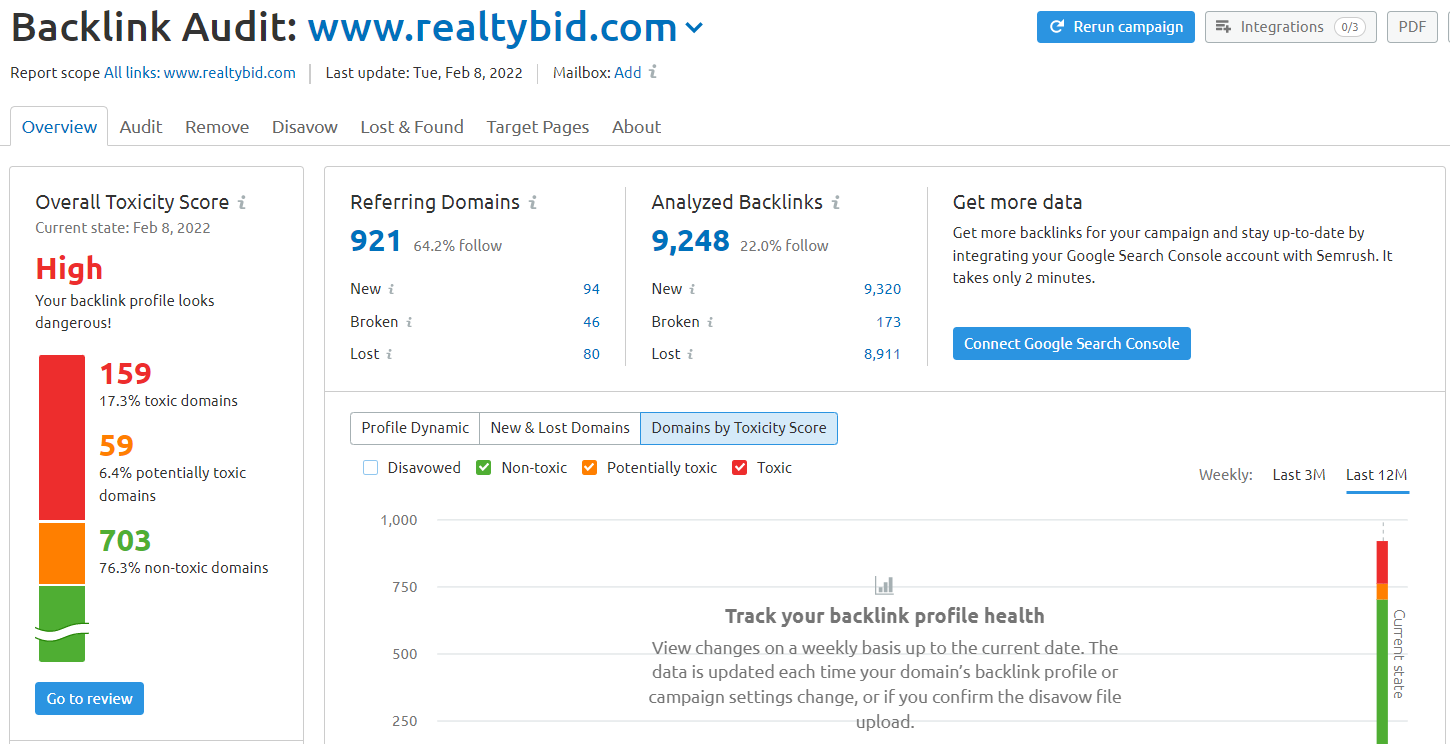
Once your audit runs, you’ll get an Overall Toxicity Score and other important data:

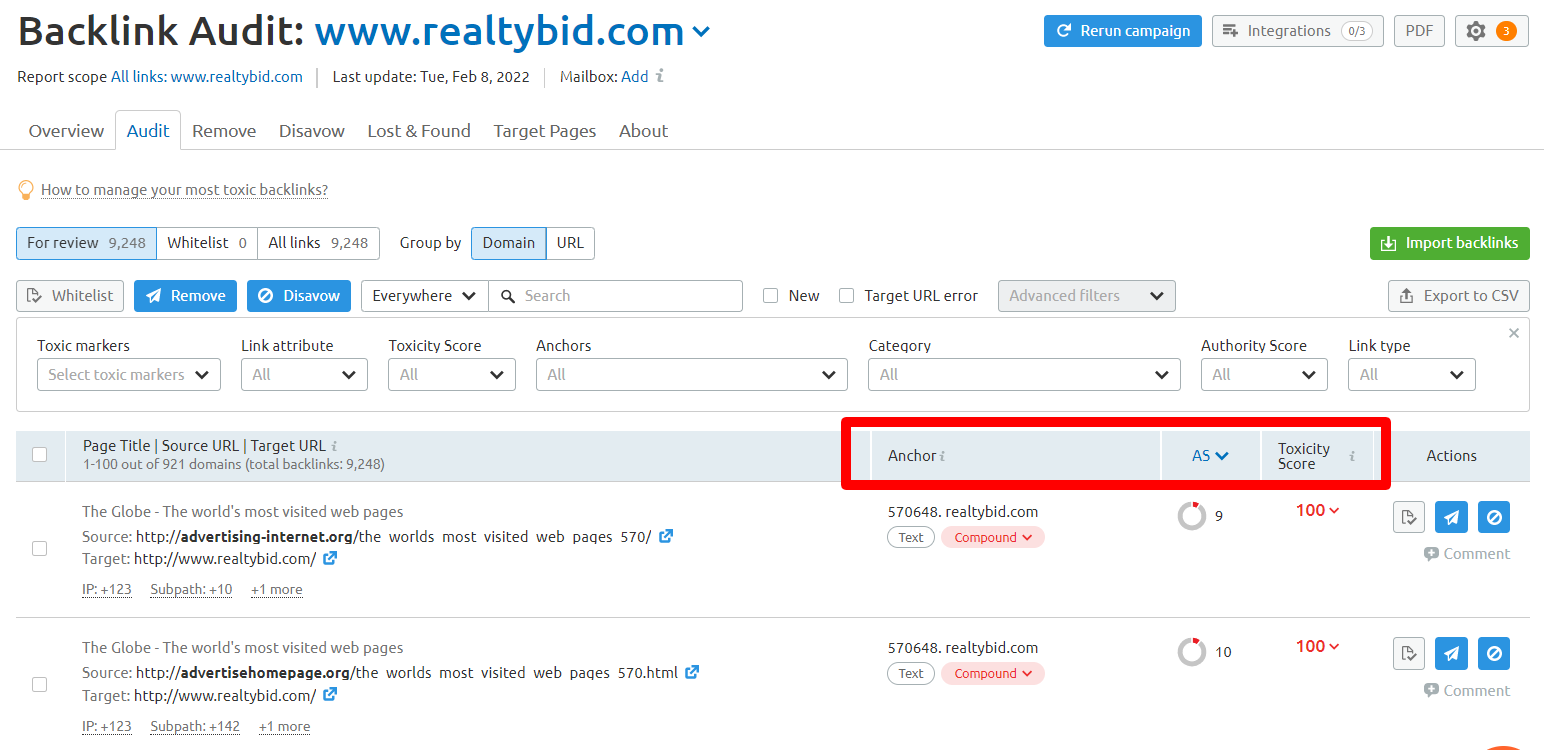
If you click on the Audit tab, you’ll see a list of all of your backlinks. For each, Semrush will list the Anchor Text, Authority Score and Toxicity Score.

Ideally, you should go through each and every one of your links and categorize them as:

  • Whitelist: Safe, healthy links that should be kept as part of your link profile
  • Remove: Links that should be removed. You have to do this by contacting the site owners and requesting for them to remove your links.
  • Disavow: These links should be disavowed from your backlink profile.

Semrush will save this audit and, as new links are found, will prompt you to categorize them, making it easy and systematic to maintain your backlink profile free of toxic links.

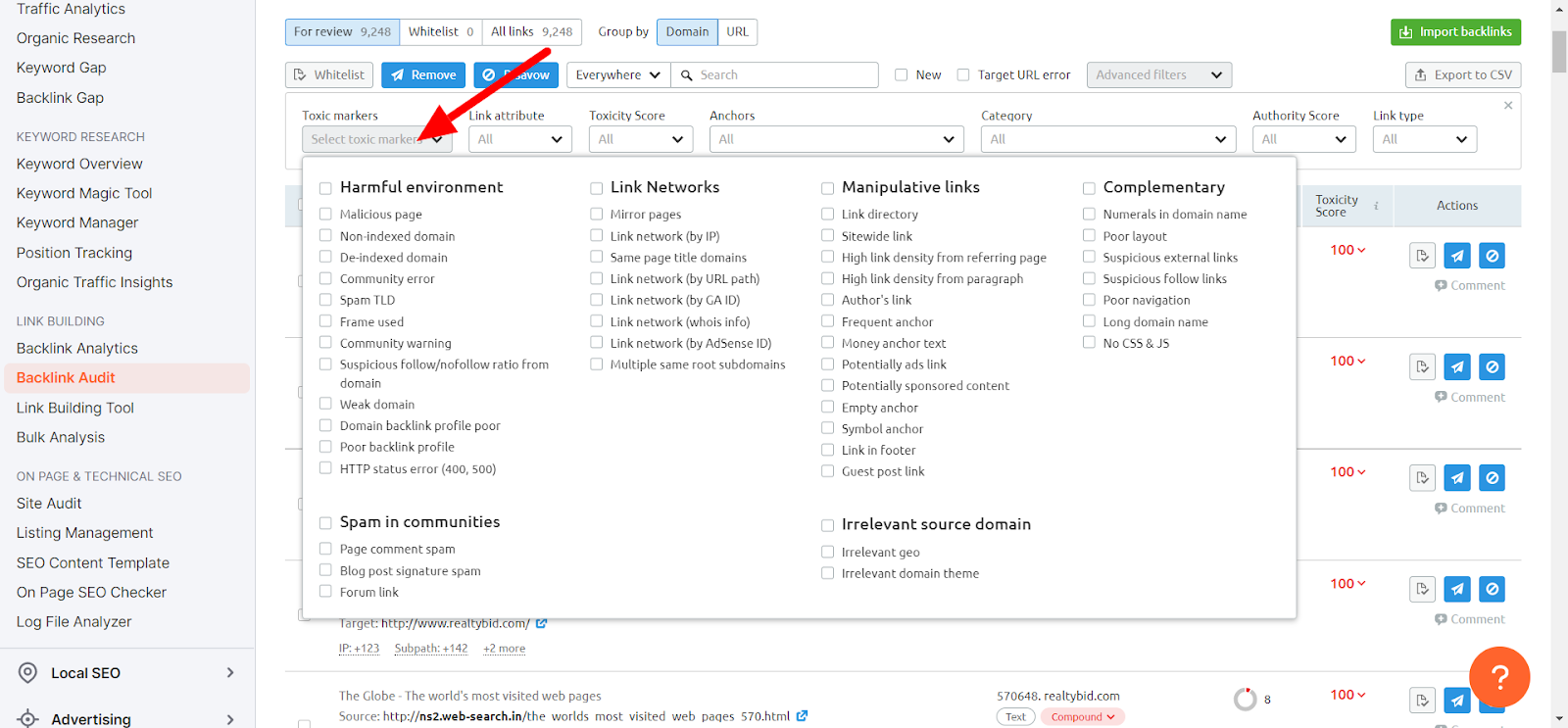
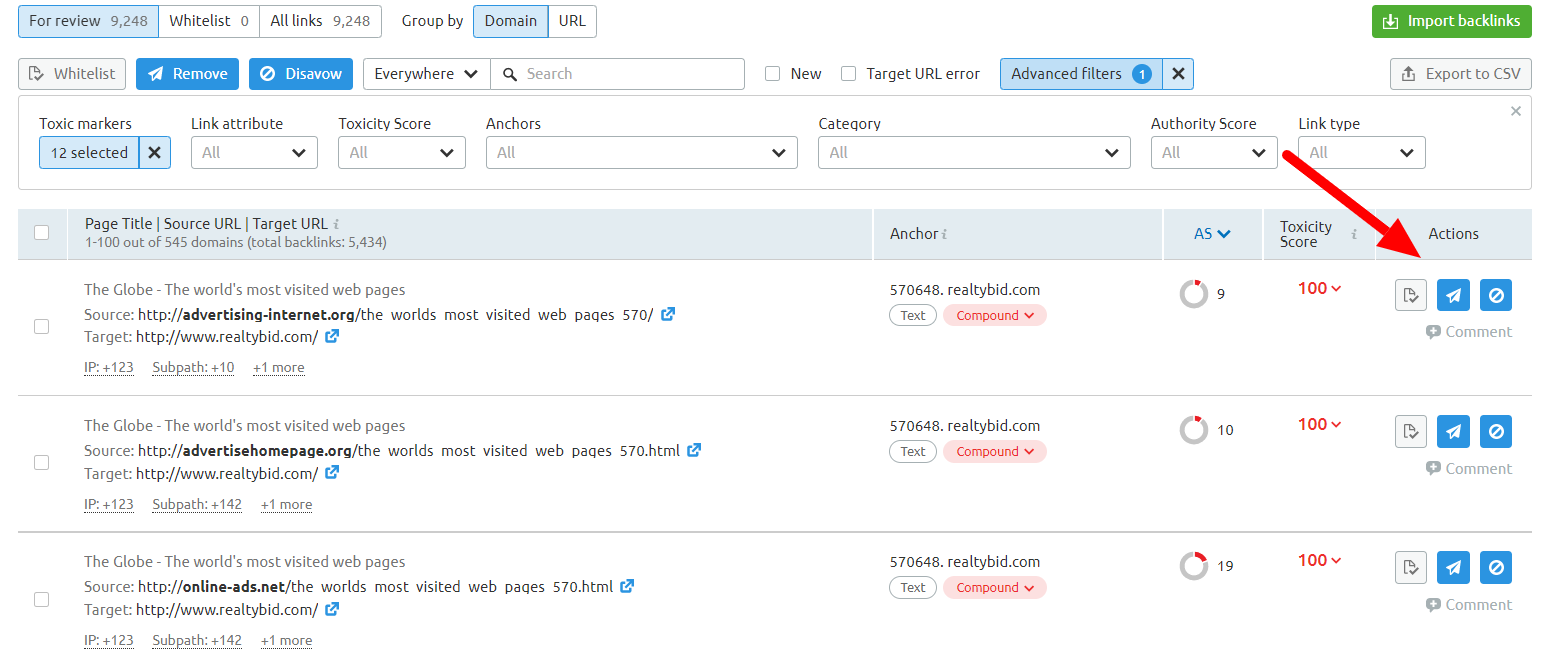
In the audit report, click on Toxic Markers. You’ll see a list of patterns that can be used to filter your backlinks:

By using these markers, you can look at your backlink profile in the context of patterns, instead of having to look at your backlinks one by one.

A link might look healthy when analyzed by itself, but when you use the Toxic Markers, you may notice it’s part of a link network, that you have many links from the same C class or that many of them have the same Google Analytics or Google Adsense code.

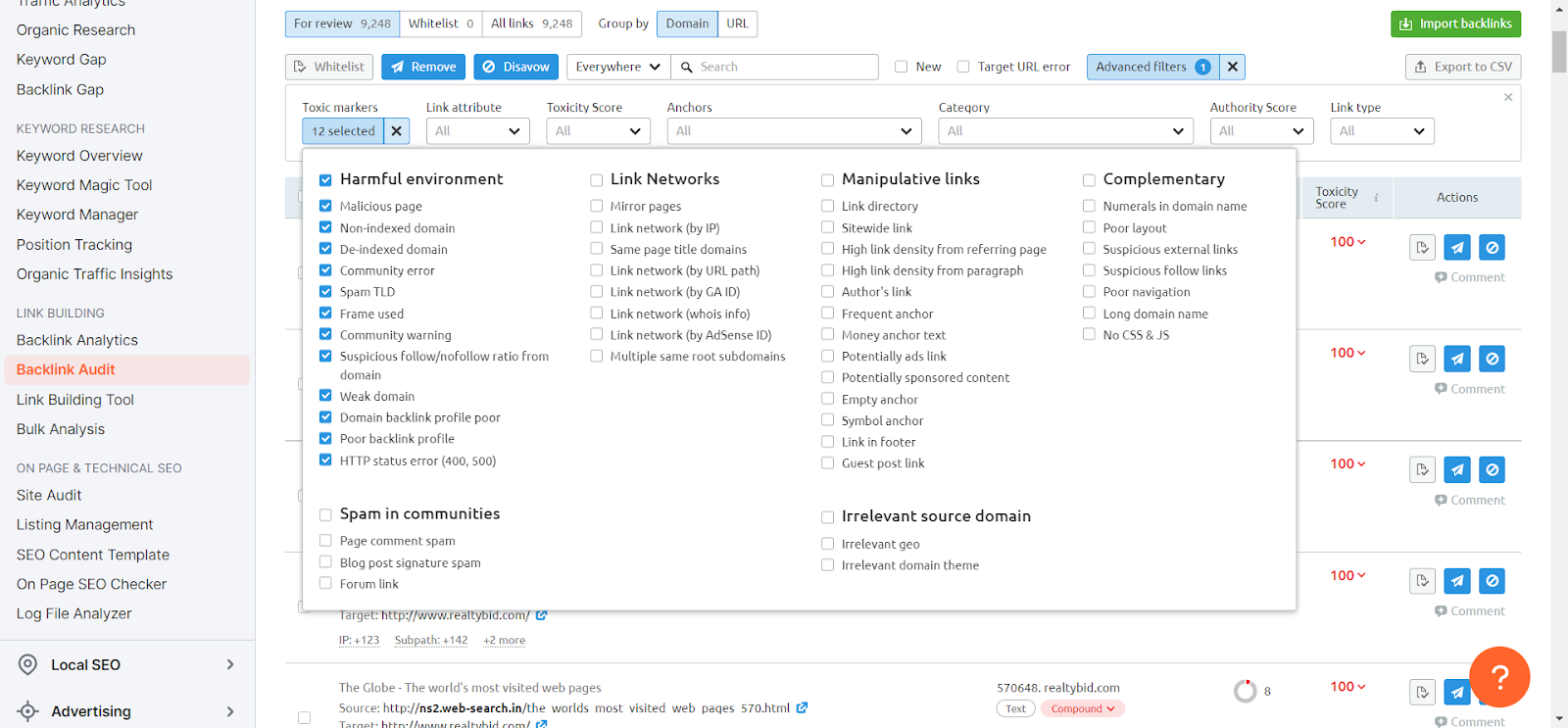
Start by clicking on each of the sections for toxic markers.

Next, go through the links that show up and label them as whitelist, remove or disavow.

Once you have gone through every pattern, go through the remaining links and use the toxic score and other link details to determine if you should whitelist, remove or disavow the links.

When analyzing your backlinks, you need to look at the entire context of your backlink profile to make decisions. Also, you may want to audit your competitors’ backlinks as well, especially those that are ranking well, to get an idea of the backlink ratios that are working in your particular industry.

Here are some of the percentages that you can review and keep in mind when deciding how to label links:

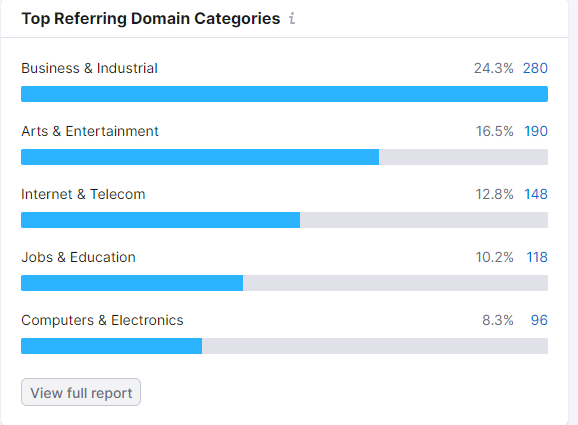
Top referring domain categories

Based on your business, the category of internal links is important. Are most of your links coming from:

  • Related, topical websites?
  • Directories or unrelated websites?

Look at the percentages. Compare those to your competitors and use those percentages to help you decide what links to keep or disavow.

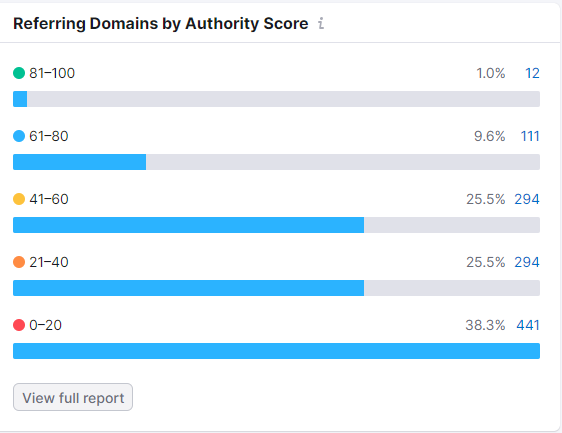
Referring domains by authority score

Many people believe that they should disavow all low-quality links or links with low authority scores. However, think of the natural growth of the web.

Is it natural for sites to only gain links from topical, authoritative websites? Think of how many people have small sites that only their close circle follows. 

Looking at link patterns, it’s clear that sites will have a mixture of high, medium and low-quality links. Your goal should be to have links from each of these levels, almost like a link pyramid.

In the “natural state” of the web, you’ll have a number of low-quality links that simply don’t have a lot of authority or that may be toxic. You should keep some of those, especially those that don’t belong to other patterns.

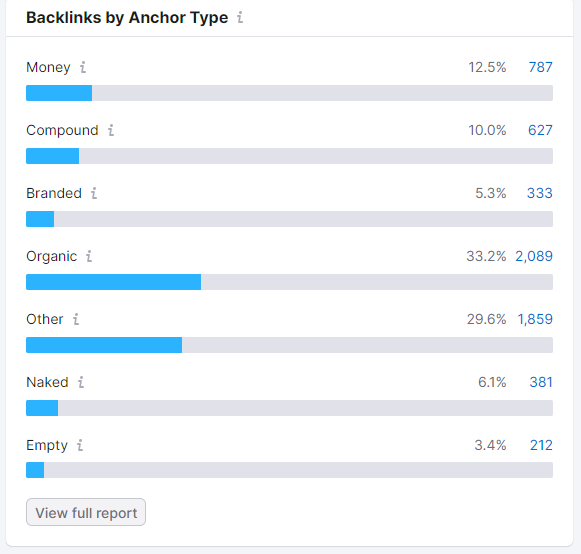
How many of your backlinks are branded? How many of your links use keywords in the anchor text? Monitor this closely as it will reveal patterns.

If your percentage of money anchors is high, this could lead to a suppression of your rankings due to algorithmic Penguin filters. When reviewing your backlinks, disavow some of the links with money anchors to bring those percentages down.

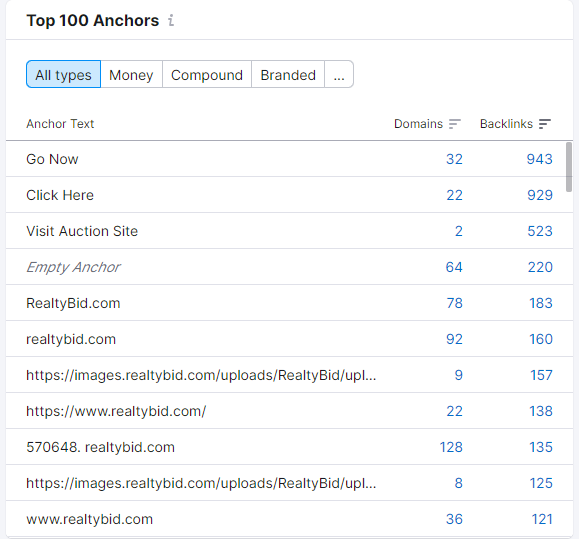
Look at the exact anchor text to identify some that are being overused or look unnatural.

Semrush will allow you to click on the links for each of the charts above, knowing the context of the filter, so you can go straight through and disavow links that belong to a particularly obvious pattern.

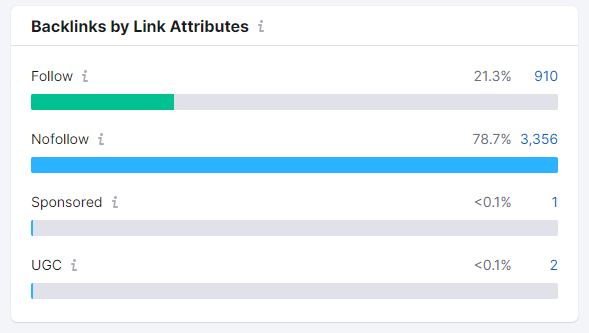
When looking at Link Attributes, you can determine if there’s a high volume of follow vs. nofollow links or links from User Generated Content (UGC). A high number of nofollow links is expected. However, if too many of the links are Follow, Sponsored or UGC, you may want to disavow some to even out the percentages.

Review your disavow list

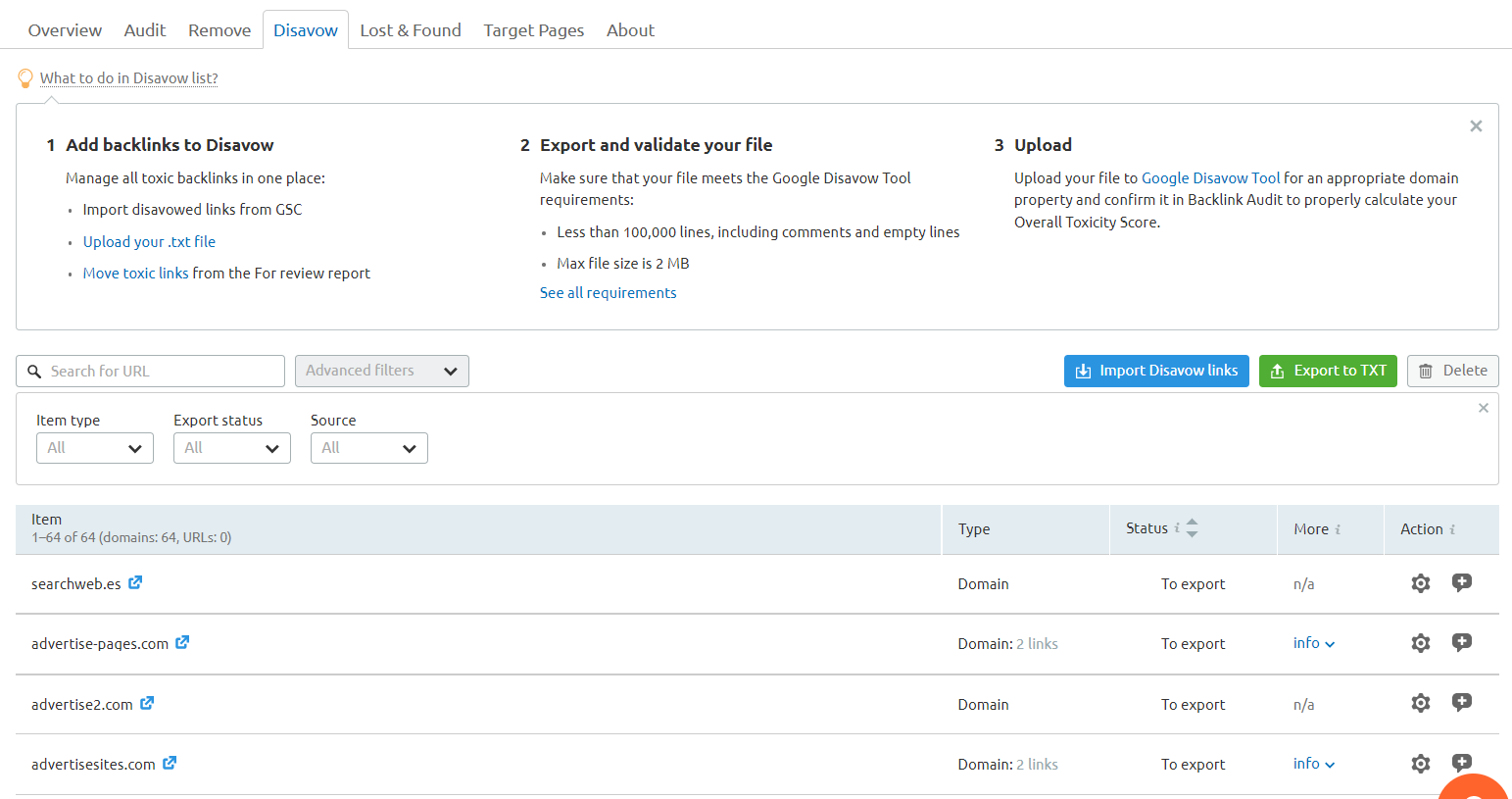
Once you have completed your audit, you can click on the disavow tab to review all of the URLs you added to this list:

Before uploading your disavow to Google, use a metrics tool to get additional data on each of these URLs.

Sometimes, you’ll find that some of the links that have a toxic marker have good metrics and would be acceptable to keep. Scrubbing all of your links one last time will help you make sure you’re not disavowing links that could help your site to rank better.

To decide what links to keep, review the Authority Score, number of keywords ranking, and organic traffic to ascertain if the link should stay in the disavow file or be removed.

Once completed, export your disavow file.

Google disavow file

Once you have your disavow file in a .txt format, you can go to the Google Disavow Tool to upload your disavow file. 

You should run a new backlink audit at least quarterly to make sure your backlink profile is healthy. If you use the same Semrush project, it will save all of the data and will only add new links that haven’t been labeled or categorized. 

Keeping an eye on your backlink profile can signify the difference between thriving traffic or ranking suppression.

Even though Google claims it isn’t possible to suffer from a negative SEO attack, there have been enough reports to prove that it is, in fact, possible for your site to be negatively impacted.


Opinions expressed in this article are those of the guest author and not necessarily Search Engine Land. Staff authors are listed here.


New on Search Engine Land

About The Author

Marcela De Vivo is an industry veteran with more than 20 years of digital marketing experience, Marcela travels the world speaking about SEO, data-driven marketing strategies, and workflow automation and optimization. Marcela owns a digital marketing agency called Gryffin based in California.

https://searchengineland.com/backlink-profile-audit-385392


Is Google Search showing fewer sitelinks

Google Search seems to be showing fewer sitelinks in the search results. Google would show as many as six sitelinks per search result snippet, now Google seems to be showing a maximum of four sitelinks and often just two sitelinks.

What are sitelinks. Sitelinks are links from the same domain that are clustered together under a web result. Google Search said it “analyzes the link structure of your site to find shortcuts that will save users time and allow them to quickly find the information they’re looking for” in the search results.

What changed. Google seems to have changed to a vertical format for large sitelinks and is only showing up to 4 sitelinks. Even the example from Google’s very own help documentation shows six sitelinks.

Screenshots. Here are screenshots showing how a search for [tesla] is showing four sitelinks:

A year or so ago, the same search displayed six sitelinks:

My site has always showed at least four sitelinks, now I see it showing only two:

If you search for rustybrick with a space, [rusty brick], Google does show four:

Why we care. Fewer sitelinks may lead to less of a chance to get clicked on from the Google Search results. That may lead to less site traffic from Google search and ultimately lead to less revenue.

We have emailed Google to confirm this was changed and to learn more about why it has changed.

Hat tip to this Reddit thread for spotting this.


New on Search Engine Land

About The Author

Barry Schwartz a Contributing Editor to Search Engine Land and a member of the programming team for SMX events. He owns RustyBrick, a NY based web consulting firm. He also runs Search Engine Roundtable, a popular search blog on very advanced SEM topics. Barry can be followed on Twitter here.

https://searchengineland.com/is-google-search-showing-fewer-sitelinks-385346


Google search results spam for ‘Bill Slawski obituary’ shows the dark side of SEO

We reported yesterday the sad news that Bill Slawski has died.

It’s less than 24 hours later and no actual obituary has been published (either by a news site or funeral home). Yet, Google’s search results are littered with spammy results.

Look at what is ranking on a Google search right now for [bill slawski obituary]:

This is a horror, especially for anybody seeking trustworthy information on Slawski’s funeral arrangements.

To me, this SERP looks like Google, before the Panda Update, for certain queries where content farms reigned. That’s the easiest way to describe it. 

A ton of low-quality websites have created thin content with the sole purpose of optimizing it to rank whenever someone searches for an obituary for Bill Slawski. And they are monetizing whatever traffic they get through display ads.

What’s worse – there are many of these types of sites. And these sites have one thing in common: the content reads like it was either automatically generated or written (poorly) by people whose first language is not English.

Let’s look at some of the sites so you can understand how gross this all is:

1. AReal News

The content is pure garbage. Look at this paragraph:

“He was hale and hearty until he suffered a broken leg which caused his death. Before his death, he suffered a Brian clot, due to which he was admitted to the hospital. This information was shared on Twitter. This did not affect his ability to think and write. He was only facing issues with waking properly. He was very much active on Twitter before his death.”

Aside from the obvious content problem, this site looks like it should be in clear violation of Google’s page layout algorithm (aka Top Heavy). Before you even get to the content, you get nothing but ads, ads, ads.

And searching for [obituary site:arealnews.com] reveals this isn’t a one-off. It’s a strategy:

2. OnTrend

Some of the garbage content:

“No doubt, he was surrounded by his wife and children when he took his last breath peacefully. The further insights of Bill’s partner are inaccessible at this time. We are keeping an eye on this topic.”

3. CowdyCactus

If this isn’t outright search spam, it’s certainly about as low-quality content as you can publish before reaching that threshold:

“Twitter mourns the lack of lifetime of web site positioning skilled Bill Slawski at age 61. However, his clarification for lack of life has remained secret. What occurred?”

In fact, when I turned my adblocker off to take that screen capture, it was infested with so many ads and redirects to spam I could no longer even view the site. Hopefully, my computer didn’t get a virus.

4. CmaTrends

Before we look at this example, make sure you check out this site’s homepage title tag: “CmaTrends « We SELL Entertainment Periodt!”

And the opening of their “article”: 

“Bill Slawski, the author of Search Engine Land, died at the age of 61, #Bill #Slawski #author #Search #Engine #Land #died #age Welcome to O L A S M E D I A TV N E W S, This is what we have for you today:”

I could cite more examples, but you get the point. 

Google’s new information problem. The quality of this search result is bad. But it goes beyond just Slawski.

This is a known issue. For certain new search queries, often there isn’t enough content on the web for Google to rank. So you get a bunch of content that, otherwise, has no reason to have any visibility. 

Sometimes you also see this after a broad core algorithm update. Suddenly, Google starts surfacing iffy content from suspect sources – as if they hit a sort of reset button. Typically, Google eventually figures it out and more appropriate content returns to where it should be (though not always). 

The profits of death. Aside from the clearly bogus “news” sites, there are a couple of spammy obituary websites in there – deathobits.com and death-obituary.com. Both are also loaded up with display ads. Including Google ads.

Yet this is not a new problem. And it goes far beyond Slawski. In fact, some brands are even helping fund this low-quality content. 

Marketing Brew published a report in November detailing how spammy sites rip off obituaries and actually end up being monetized by ads from major brands (e.g., Nike, Nordstrom, Zola, Burt’s Bees). Google told Marketing Brew it has:

“strict policies that explicitly prohibit Google–served ads from running on sites that use disruptive advertising formats, including pages with more ads than publisher content. We also prohibit ads from running alongside content that’s been copied from other sites. When we find pages or sites that violate these policies we take appropriate enforcement action.”

I’ve reached out to Google to comment on this story. I will update if/when I receive a response.


New on Search Engine Land

About The Author

Danny Goodwin is Senior Editor of Search Engine Land. In addition to writing daily about SEO, PPC, and more for Search Engine Land, Goodwin also manages Search Engine Land’s roster of subject-matter experts. He also helps program our conference series, SMX – Search Marketing Expo. Prior to joining Search Engine Land, Goodwin was Executive Editor at Search Engine Journal, where he led editorial initiatives for the brand. He also was an editor at Search Engine Watch. He has spoken at many major search conferences and virtual events, and has been sourced for his expertise by a wide range of publications and podcasts.

https://searchengineland.com/google-obituary-spam-385327