Will you show Gary Vaynerchuk support?

He is a good friend, he has 15+ million-plus social media followers, is Chairman of VaynerX, and active CEO of VaynerMedia – a digital marketing agency you might have already heard of. Go to SESlingshots.GaryVaynerchukMedia.com and get your website on Google’s first page.

Search engine optimization (SEO) is the number one form of advertising in terms of return on investment so that means if you have a website or a business, search means more to you than anything else out there if you’re looking for more leads, sales, customers, and friends. As a matter of fact, if you aren’t purposely and actively pursuing SEO for your business, you’re leaving more than money off the table, you’re leaving your entire business profile, reviews and ultimately destroying your reputation.

Content created in partnership with Gary V.

If you’re still asking, “What is search engine optimization”? – it’s the digital version of yellow or white pages. If someone is looking for something they typically use Google or another search engine and type what’s on their mind. From there, whatever websites and keywords show up on the first results will get clicked on.

Basically, if you have a website that’s selling t-shirts or sportswear you want to be able to have your website show up on Google when someone types up “red shirt” or “giants hat” (if you live in San Francisco). The neat thing about search engine marketing is that anyone can get it done, and save $1000s you would spend elsewhere otherwise. You can have a website up and running and use SESlingshots.GaryVaynerchukMedia.com  to get your search terms ranked on Google as the first result in as little as 72 hours. It’s called backlink building and if done right, you can get links from other trusted pages that tell Google – your website is positively referred to and belongs at the top of search results.

It’s a really smart and effective strategy and once again, it has the highest return on investment in comparison to any other form of marketing or advertising to have ever have existed on the planet. Visit SESlingshots.GaryVaynerchukMedia.com  and use the search tool to find out what your website needs to get to the top result on Google.

Click here to show Gary V your support: SESlingshots.GaryVaynerchukMedia.com

https://www.searchenginewatch.com/2021/07/09/will-you-show-gary-vaynerchuk-support/


Multilingual SEO for voice searches: Comprehensive guide

30-second summary:

  • Search engines are laser-focused on improving user experience and voice search plays an increasingly key role
  • With 100+ global languages, people are prone to searching in their native language
  • How do you optimize your website for multilingual search while keeping a natural and conversational tone?
  • Atul Jindal accurately guides you through the process

Google is now recognizing 119 different languages on voice search. Which is great for user experience. But it makes ranking a bit more challenging for website owners, especially those who host multi-linguistic traffic. Website owners must act to cater to these people who are taking a different linguistic approach to search. That’s where multilingual SEO comes in, done with voice search in mind.

But before we begin digging deeper into multilingual SEO for voice search, let us first introduce the search of the future aka multilingual voice search.

What is Multilingual Voice Search?

With the evolution of technology, search engines like Google, Bing, Yandex, and others work towards enhancing their user experience and making the search easier than ever.

Keeping up with these efforts, they now let people talk to them in their own language, understand it and yield the results they were searching for.

Moreover, more than 23 percent of American households use digital assistants, and nearly 27 percent of people conduct voice searches using smartphones. This number is expected to increase by more than nine percent in 2021 alone.

This means, more and more people will converse with Google in languages other than English. Like, a German native is likely to search for something by talking in German. A native Indian could use any of the 100+ languages spoken in India, and a US national may use English, Spanish, or some other language.

This increase in the popularity of voice assistants, multilingual voice search inadvertently leads to an increase in the demand for multilingual SEO for voice search.

But do you need to optimize your website for multilingual searches? Yes. How else will your website reach your target audience that searches in their native language?

Combining Multilingual SEO with voice search

So far, there are guides only for either multilingual SEO or for voice search. However, gauging the rising importance of this relatively new search, we present you with a guide that combines voice search and multilingual SEO.

What is Multilingual SEO?

Multilingual SEO is a practice that adapts your website to cater to your target audience that uses multi-linguistic search. It involves translating the web page, using the right keywords, and optimizing the web page accordingly. We will go into the details below.

Notice how Google yields Hindi results for a search conducted in Urdu/Hindi. That’s because these results were optimized for multilingual voice searches.

Voice search: The search of the future

Voice searches are hugely different from regular typing searches. When typing, you want to do minimum physical effort, that is typing, and get results. Anyway, when speaking, you are not doing any physical effort and just talking. Therefore, voice searches tend to be longer and have a more conversational style and tone.

Let’s take an example

A person looking for a Chinese restaurant will go about it in two different ways when using voice search and regular search.

When typing, this person will type something like “best Chinese restaurant near me.”

On the other hand, when using voice search, he or she will simply say “Hey Google, tell me about the best Chinese restaurants I can go to right now.”

Do you see the difference? To optimize for voice assistants, you have to adapt to this difference when doing SEO.

Adding the multilingual touch to this and you’ll have a multilingual voice search.

From the example above, I searched for the weather in my city.

If I were typing, I simply would’ve typed “[my city name] weather.”

However, when using voice, I used a complete phrase in my native language, and google yielded results in that language. These results showed that they were optimized for multilingual voice searches.

How to Do Multilingual SEO for Voice Searches?

Now, if you want to cater to a global audience and expand your reach. And you want your website to rank when your target audience searches for something you offer, in their own language, you need multilingual SEO.

Below we are discussing some steps to optimizing your website for multilingual searches:

Keyword Research

No SEO strategy can ever start without keyword research. Therefore, before you begin doing multilingual SEO for your website, you need to perform proper keyword research.

When translating your website, you can’t just translate the keywords or phrases. Because a keyword that has high search volume in one language may not be that viable when translated in another language.

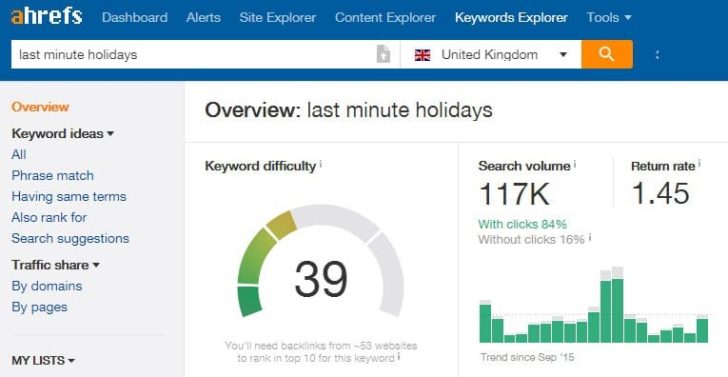
Let’s look at a case study from Ahrefs to understand this point.

Ahrefs looked at the search volume for the key phrase “last minute holidays.” They found out it received 117k searches from the UK in a month.

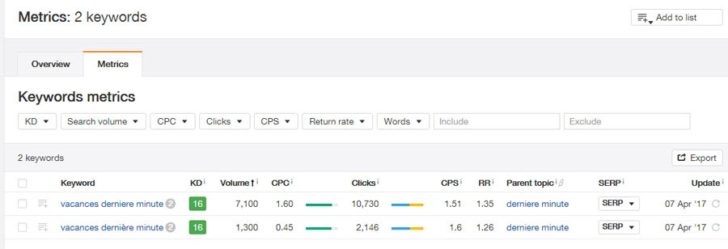
However, the same phrase translated into French “ Vacances dernière minute.” Had a total search volume of 8.4k.

keyword research for multilingual seo

keyword list - geography specific

The findings from this case study go to show the importance of independent keyword research for multilingual SEO. Because simply translating the keywords won’t yield good results.

So, what you can do is pick up the phrases from your original website, which we assume is in English and is optimized for voice search. Translate them. Brainstorm additional relevant keywords and plug them into any of the keyword research tools to see their search volume and competition.

Additionally, keywords for voice searches are different from regular keywords as you need to take an intuitive approach by getting to your target audience’s mind to see what they think and speak when searching. And how they do it. Then use these phrases to go ahead with your keyword search and make a list based on high search volume and low competition.

Translation

Once you have a list of keywords you want to optimize, the next step is to translate the content that’s already there on your website and optimize it with the keywords.

When translating a website, the best approach is to hire a human translator who is a native speaker of the target language.

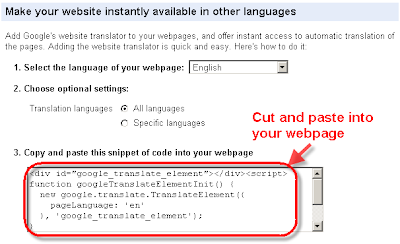
You may be tempted to use Google Translate or some other automatic translation tools. But even though Google endorses its translators, it leaves a subtle recommendation on using human translators. Because robots are yet to come as far as competing and beating humans. At least when it comes to translations.

translation code for multilingual seo

Additionally, make sure the translator aligns the content with the tone of your original website.  

Hreflang Annotation

Here comes the technical part. Did you really think you can get by multilingual SEO without getting involved in the technicalities?

Hreflang annotation is critical for websites that have different versions in different languages for various searches.

It enables Google to identify which web page to show to which visitor. For example, you don’t want your English visitors to land on the French version of your page. Using Hreflang will enable you to receive English visitors on the English page, and French-speaking people on the page in French.

Another important attribute that will go in your website’s code when doing multilingual SEO is the alternate attribute. It tells the search engine that a translated page is a different version, in an alternate language, of a pre-existing page and not a duplicate. Because Google cracks down on duplicate pages and can penalize your website if you haven’t used the alternate tag.

URL structure

You can’t discuss multilingual SEO, without talking about URL structure.

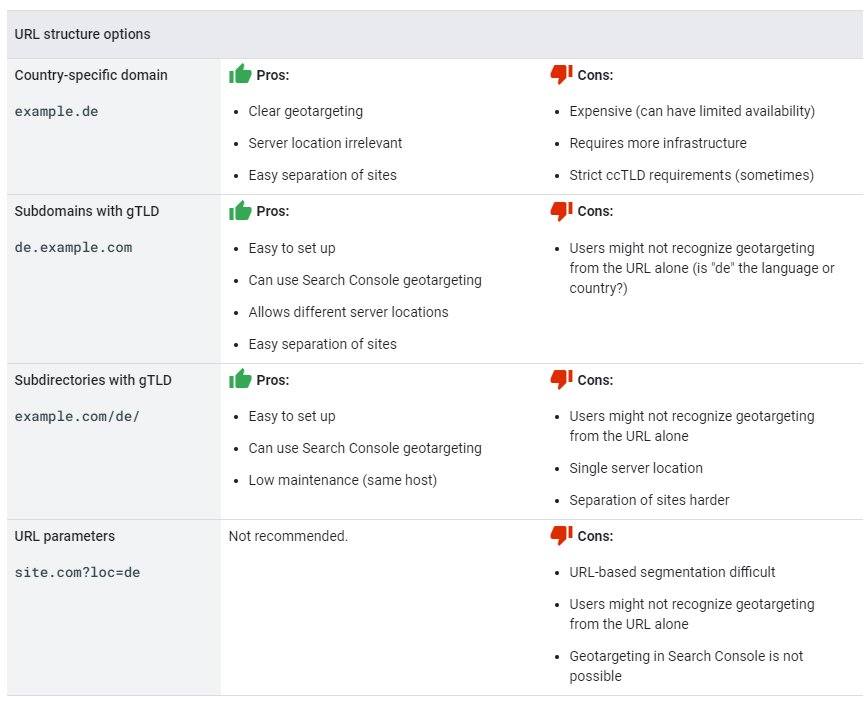
When doing multilingual SEO, you are often saving different versions of your website under the same domain. This means, you have to create a URL structure for each version, so the search engine can take the visitor to the right page.

When it comes to URLs for multilingual websites, you have many options, and each option has its pros and cons. You can check out how Google lists these pros and cons in the image below.

url structure

 Source: Google Search Central

Confused about which URL structure to use?

You can choose any option as per your preferences. According to Google, no URL structure has a special impact on SEO except using parameters within URLs. I personally think using a sub-domain as Wikipedia or Sub-folder/directory as Apple, are the easiest options to create a multilingual site. But if you’re using WordPress then you can use a plugin like Polylang to multi-lingual.

Content style

The content writing style is quite important when optimizing your website for multilingual SEO. your content should be more focused on conversational style rather than academic or complex sentence structures. As said, voice-related queries are mostly in questions format, so faqs, short paragraphs with more emphasis on addressing questions will be better for voice-related search queries.

The importance of multilingual SEO for Voice Search

Now that you know how to set your website for multilingual SEO, you might be wondering whether it is worth all the hassle.

If your website sees a lot of multilingual traffic, you have no other choice than to go for multilingual SEO for voice search because,

  1.   Voice search is the future of search 51 percent of people already use it for product research before buying. Therefore, starting with multilingual voice search right now will prepare you to tackle the challenges of search and SEO that the future brings.
  2.   Your business can’t grow all that much unless it personalizes its offerings to the visitor. In this case, speaking to them in their own language adds up to a good user experience.
  3. Multilingual SEO will expand your website’s reach by catering to multi-linguistic searchers. If your business is global or spread to multiple countries with different languages, and your website is restricted to only English, I bet you must be missing a big chunk of easy traffic. Which would be difficult with English keywords with higher competition globally and keywords difficulty.

Final thoughts

Multilingual SEO for voice search is something that you’ll see all website owners (who receive multilinguistic traffic) doing in the future. Therefore, it is better to start now and get ahead of your competitors.

The key takeaways for optimizing your website for multilingual voice searches are target language keyword search, human translation, hreflang tags, and the right URL structure.

With the right keyword research, a meaningful translation, thorough technical SEO, and by using the URL structure that fits best with your unique web requirements, you can enjoy riding the wave of multilingual voice search when it arrives, and it will arrive soon.

Atul Jindal is Sr. Web Engineer at Adobe Research.

https://www.searchenginewatch.com/2021/07/01/multilingual-seo-for-voice-searches-comprehensive-guide/


Design systems and SEO: does it help or hinder SERP achievements?

30-second summary:

  • All the copy and strategic use of keywords in the world will not impress search engines if your web design is not fit for purpose
  • The design of your website or web app is linked intrinsically to user experience, which in turn impacts your Google quality score and SEO performance
  • Website design must drive users from A to B without any unnecessary steps in between – while retaining relevant copy that ties in with your SEO strategy
  • Review your website design when considering your SEO strategy KPIs – a drop in traffic may be due to a substandard or outdated layout
  • Do not neglect copy, as UX meta copy will improve your CTR on paid advertising. In turn, though, ensure that your website’s design system is strong enough to obtain a suitable quality score and keep your Google Ads spending within budget

In many respects, a website is the home of your business on the web. To this end, it’s perhaps fitting that creating a website is not unlike building a house. To achieve your intentions, you’ll need to establish solid foundations before commencing construction. When it comes to building a website from scratch, that means engineering your design systems and templates to maximize SEO potential.

Many businesses emphasize content and keywords in their SEO strategy, with design becoming an afterthought. To return to our housebuilding analogy, that’s like laying a solid roof upon unstable walls. There is no denying that superior copy is critical to enjoying a successful approach to SEO. Even the most gifted writer cannot overcome substandard web design and user experience, though.

What is a design system?

No website, no matter how well designed, will remain the same forever. Therefore, websites and web apps need to be regularly audited, refreshed, and even wholly redesigned. Such steps are the only way to retain your target audience’s interest and ensure that you remain one step ahead of Google’s ever-evolving SEO algorithms.

At the very least, a website redesign is necessary every three years. If you diagnose a plummet in traffic, it may become essential sooner than this. Take a deep breath, review your data, and ascertain what is to blame for your drop-in visitors. If you suspect that your web design is the issue, a wait-and-see approach will not yield results. Your traffic will continue to drop, and the longer you wait to resolve the problem, the more mountains you will need to overcome.

Now, as anybody that has ever built a website from scratch will know, the task requires two things in abundance – time and money. Both are precious commodities for a business, especially an SME.

Alas, all websites periodically need a little tinkering under the bonnet. If you have established a design system, this will be significantly less disruptive. Effective website design systems ensure that your tech team or design agency has a firm and reliable blueprint to work from, and everything is in its place. Essentially, any work on your website is editorial rather than creative. As a result, you’ll enjoy positive implications on labor intensiveness and expense alike.

Above all, design systems create a positive user experience. If you expect to have any measure of success with your SEO strategy, superior UX is non-negotiable. 21st Century consumers have more choice than ever before, and patience is in short supply. If your website design system does not meet users’ needs quickly and efficiently, visitors will stay away – and Google will sit and take notice.

Do design systems influence SEO performance?

SEO and design systems initially appear to be opposites. Web designers focus on making a site look fabulous and providing accessible, fluid navigation. Copywriters ensure that the content meets a users’ needs, convincing them to follow the steps laid out in web design. In reality, these two disciplines are entwined when it comes to maximizing SEO.

First thing’s first – if you redesign a website without factoring your SEO into the equation, disaster awaits. Forget to apply 301 redirects, and Google may wipe your entire SEO strategy overnight. If all else fails, at least take advantage of UX microcopy to create engaging, interactive 404 pages. Ensuring that a redesigned website can still find high-performing pages is the only way to maintain SEO and SERP progress, though.

In addition, consider the impact of design on your SEO. Consider how mobile-friendly your design system us, and what coding you use. Anything more complex than industry-standard CSS or HTML may capture the imagination of a first-time user but can be considered a novelty. It may be challenging for readers to understand how to navigate such a site, and you’ll struggle to optimize your content. These issues will have a knock-on effect on your page ranking.

What makes the ideal web design for SEO and SERPs?

As discussed, any business or individual must update their website from time to time. Even if your site is still pulling in traffic, there is no harm in making tweaks. It’s much easier to keep traffic flowing than to regain loyalty and interest from lapsed consumers.

When reviewing your website’s design templates, ensure that you consider the following to maximize the impact of your SEO strategy.

1. Clear brand messaging

First and foremost, ensure that your website design templates clearly and directly explain your brand values and mission. Imagine that every click on your site is from a first-time visitor. Do they know what you can offer and how you’ll do so? If you cannot convince a user that you’re worthy of their attention in less than 15 seconds, they’re likely to click away and be lost for good. Google will acknowledge this bounce rate and adjust your quality score accordingly

2. Investigating competitors

As we have mentioned previously, all websites need to undergo periodic renewal, including your competitors’ online presence. Be sure to constantly check in on what your rivals are doing, especially those that seem to enjoy excellent SEO performance. Take your findings and build upon them, whether that’s taking a skyscraper approach to SEO copy or adjusting the layout and design of your site to meet the industry gold standard.

Before you embark on any kind of website redesign, factor all these matters into your thinking. If you create a website design system that meets all criteria, any future adjustments will be considerably more straightforward.

3. Understanding industry trends

As well as keeping an eye on your competitors, think about industry trends. While every consumer is unique, large groups can be relied upon to embrace a herd mentality. When building a design system, ensure that you can showcase any social awareness campaigns. Be ready to alter payment methods if a new financial platform takes the world by storm. Consider introducing one-click models to reach pages if these become popular. Few consumers will place their trust in a website that is deemed archaic and out of touch with contemporary tastes and expectations.

4. Be mobile-friendly

Website design packed with bells and whistles can look spectacular on a large HD screen. Consider how your site will perform when squeezed into a 5.5″ smartphone display, though. More and more people are eschewing desktop browsing for a portable alternative, which must factor into your design template. Failure to cater to the mobile market will place you firmly in Google’s bad books.

5. User experience

Arguably the most prominent concern of them all – you must ensure that your website design offers an enhanced UX for your visitors. Get people from A to B with a minimum of fuss. Do not be tempted to stuff your site with additional pages, creating more links in a chain to flex your copywriting muscles or cram in more advertising. Speed and simplicity will always win out.

6. Ease of adjustment

Is your website’s design system engineered in-house or through an external agency? It’s better to bring in outside help if you are not an expert in this field. If you do so, however, ensure that you understand how to make any changes yourself. Fast action may be required, and you will not want to be at the mercy of a third party’s availability.

7. Get meta

Meta text and tags will not directly influence your page ranking with Google, as they do not influence a quality score. Appropriate meta tags on images can help images be sourced by search engines, though, as well as enhancing UX for visually impaired visitors.

8. Gather first-party data

Another consideration when building a website design system for your SEO is the capturing of first-party data. In 2021, the real currency is information. By understanding your target audience and obtaining data that they willingly provide themselves, you tailor your offering to those likeliest to use it. Do not neglect opportunities to source this data for yourself – it will save time and money and ensure accuracy when building a customer profile.

9. Think like Google

Whether we like it or not, this is Google’s world, and we’re just living in it. Set up alerts and do whatever you can to stay one step ahead of any algorithm updates, whether major or minor. History is littered with horror stories of websites that lost four figures of revenue overnight due to traffic slumps following an algorithm update. While it’s impossible to predict what The Big G will get up to next, you can at least protect yourself by pre-empting changes.

10. Avoid intrusive advertising

For some websites, advertising is a necessary evil to maintain a revenue stream. Always consider the placement and style of advertising in your website design system. Static ads that fill a page or videos that slow down performance will infuriate users and lead to a high bounce rate. Google will also notice these issues and reduce your quality score accordingly. Slow loading speeds and an emphasis on advertising over quality content are both red flags.

11. Investigate ROI

Finally, think about how you will assess the success – or otherwise – of your SEO strategy. Is it time to update your choice of SEO tool? Think about the KPIs you measure regularly, and ensure your website design system supports such tools and plug-ins. There is little point in investing in SEO services if you are unaware of their performance.

Does copy influence SEO and SERPs more than design systems?

As discussed, a gold standard copy will not supersede poor website design. However, this does not mean that you ignore your copy needs in favor of focusing on aesthetics. Relevance and information are just as crucial to UX as rapid negotiation of a website. Never lose track of the importance of Google’s algorithms, either. If you fall foul of E-A-T expectations, it can be challenging to regain your standing.

So, to answer the question above, copy is not more important than website design – but it’s equally critical. A well-planned website will attract attention but great copy will retain it. Copy alone will not dictate a stellar Google quality score but can bolster conversions and improve CTR on paid advertising. Such steps are vital when taking advantage of SERPs.

All of this raises an important question – what should come first when prepping an SEO strategy, copy or design? Returning to the housebuilding analogy that opened this guide, design is the sturdy, reliable bricks and mortar of a dwelling. Copy is the personal touch that makes a house a home and something uniquely your own.

If you were building a home from scratch, however, would you not feel strongly about ensuring it met your needs? You would ensure that the dimensions accommodate your existing furniture and that the blueprints provide enough space that you will not need to move any time soon.

If you have your copy planned out before creating a website design system, you will have a margin for error. You can tailor every step of the user journey to the text that you have prepared, and where necessary, streamline your content with the aid of data storytelling. Above all, you can adjust copy without too much fuss, adapting to the ever-shifting SEO landscape. A design system is considerably tougher to remold around your prose. Always keep this in mind when planning your website.

Joe Dawson is Director of strategic growth agency Creative.onl, based in the UK. He can be found on Twitter @jdwn.

https://www.searchenginewatch.com/2021/06/22/design-systems-and-seo-does-it-help-or-hinder-serp-achievements/


Here’s how you can master your next seasonal digital marketing campaign

30-second summary:

  • To ensure organic visibility for your seasonal pages, start creating, optimizing, and analyzing them now
  • Start creating, organizing, and scheduling seasonal content assets now for a head-start when it’s time to start focusing on driving sales
  • Evaluate your past seasonal content performance to be able to recycle, update, and possibly even expand them into standalone projects
  • Research your competitive tactics to evaluate how they utilize seasonality in their digital marketing strategy
  • Create a detailed editorial calendar to plan out all assignments and deadlines to “catch” the rising interest in seasonal content and deals

Summer is a slow season for many businesses, especially those in a B2B niche. If things are a bit slow for you now, here’s an idea – Use these quiet months to turn your next big season into a huge boost for your business. Here is how you can start preparing for your next big seasonal content marketing campaign now:

1. Check your seasonal rankings now

Do you have a page (or pages) offering seasonal deals, gift ideas, and special offers? The demand for this type of content may be seasonal but its rankings should be permanent. That’s why I always advise against removing these pages or even delinking them throughout the site.

You want those pages to always be accessed by Google for your rankings to be there when the searches start climbing.

If you cannot find your site ranking for your target seasonal queries, it is time to set them up even if the actual season is still months ahead.

Seasonal campaignsSource: Screenshot created by the author

Furthermore, Spyfu offers a comprehensive analysis of all SERP movements for you to identify important patterns and spot a competitor that was doing the best job retaining their organic visibility for seasonal search queries:

SERP analysis of seasonal marketing campaignsSource: Screenshot created by the author

Read more about this feature here.

When it comes to SEO, seasonality can be tricky but it definitely needs to be planned ahead as organic SEO takes time to yield results.

2. Start creating seasonal assets (content and social)

Your high season is going to be a busy time for you and your team, so while planning your upcoming campaigns, start creating (and even scheduling) your content assets beforehand.

When brainstorming seasons content ideas, I always turn to Text Optimizer that does a great job suggesting related concepts and angles to focus on:

Semantic search for seasonal content ideas

Source: Screenshot created by the author

The tool relies on semantic analysis.

Content marketing involves a lot of channels, so the more you are prepared, the easier (and more productive) your seasonal campaign will turn out to be.

Furthermore, there are a few cross-channel content marketing tools that can help create and organize your seasonal content. For example, Boosted by Lightricks allows you to easily create festive videos in multiple formats:

Formats for cross channel marketingSource: Screenshot created by the author

This way you can create content assets that will fit all of your channels. There’s also a handy Brand Kit feature allowing you to maintain a consistent visual identity throughout all your assets:

Creating a brand kit for seasonal campaignsSource: Screenshot created by the author

The app is available on iPhone and Android for free. You can choose to upgrade for $4.99 per month. I for one have been using the free tier (and the above screenshots are taken when using the free version of the app).

The platform also offers a list of seasonal content ideas and hashtags to make your campaign even more effective.

There are a few more video creation apps out there but I don’t think any of them let you access so many great features for free.

Another great content creation tool that gives you lots of free features for free is, of course, Canva. I’ve been using Canva for free for as long as I can remember without ever having to upgrade.

Christmas campaignsSource: Screenshot created by the author

Here’s the guide on planning a Christmas marketing campaign.

3. Evaluate your past seasonal campaign performance

If you were publicizing any seasonal content over the years, find all of it to:

  • Explore an opportunity for an update (“Can I reuse this asset this year?” as well as “How can I make it better?”)
  • Evaluate how effective it was in attracting traffic as well as turning those clicks into conversions

Google Analytics offers an easy way to identify landing pages that did the best job attracting traffic during any period:

  • Go to the Acquisition report and select one channel (for example, “social” or “organic search”)
  • Select the date range of your seasonal campaign from the last year
  • (Optionally) Check the box “Compare” and select “Previous year” from the drop-down
  • Click “Landing page” tab in the chart below:

Analyzing past seasonal campaigns' performance in Google AnalyticsSource: Screenshot created by the author

This gives you an at-a-glance report of the highest traffic page from your previous campaigns. You can further narrow it down by using word filters (for example, type “blog” there to see your best performing seasonal content).

To analyze conversions, you can use Google Analytics goals and funnels. Another tool I am using to closely monitor incoming traffic and its conversions is Finteza. Because it makes it incredibly easy to narrow the data down to identify which traffic source is sending traffic and how well it converts as compared to other pages.

Finteza dataSource: Screenshot created by the author

Read more about Finteza’s conversion funnels here. Finteza costs $25 a month and there’s a 30-day trial available for you to play with the tool before committing.

4. Consider starting a tradition

If any of those previous content assets turned particularly successful, consider expanding that idea into a new project! We all remember the overwhelming success of “Elf Yourself”, Ask Santa, and NORAD mini-projects that were able to engage (and convert) thousands of people year over year.

 A separate (single-page) site will be easier to brand and promote without causing any strong associations with your main business. If you need some inspiration, check out Namify:

Start a tradition for your next seasonal campaignSource: Namify

5. Look what your competitors did (or didn’t)

Competitive analysis is important because it motivates a business owner to do more and do it better. Therefore I always include competitive analysis in any of my marketing planning.

There are plenty of ways to research your competitors and what they are doing. My first step is always checking Ahrefs and what other search queries they are ranking for:

competitor analysisSource: Screenshot created by the author

Ahrefs is the only platform in the industry that also offers an estimate of traffic each search query sends. Here’s how they calculate it. Ahrefs lowest tier is $99 per month but it is definitely a must-have tool if you are doing SEO.

Similar Web is another nice tool for competitive research. I like looking at their “Referral Traffic” report to identify which sites are sending traffic to my competitors:

Similar WebSource: Similar Web

This basic report is available for free.

It is also a good idea to set up Google Alerts to be modified when your competitors are doing something new.

6. Create your editorial calendar

Every year people seem to start preparing for big holidays earlier. It is not unusual to spot a Holiday-centric social media ad in October. This can actually cause both excitement and irritation.

So the important question remains: When should I start publishing seasonal content?

This may depend from niche to niche, so I always suggest typing your target seasonal search query into Google Trends:

Google search trends on seasonal keywordsSource: Screenshot created by the author

It also helps to compare several of your target search queries. For example, in this niche the demand seems to be pretty consistent over the years:

Google Trends compareSource: Screenshot created by the author

When it comes to organizing and scheduling your content assets, there are a few great calendar plugins to choose from. I mostly use CoSchedule because it allows me to also schedule those updates to your social media channels as well as assign certain content assets to various contributors. 

CoSchedule costs $29 per month. It supports scheduling to Twitter, Facebook, Linkedin, and Instagram. I prefer the tool because it combines on-site content planning (assigning content assets to be written) and social media scheduling. This allows me to create a very well-aligned content marketing campaign and makes it easy to organize editorial workflow across many channels.

Instagram also offers a helpful guide on planning your seasonal content strategy here:

Instagram resource on holiday seasonal marketingSource: Screenshot created by the author

Conclusion

Seasonal planning is a great way to make the most of those seasonal interest spikes and build more sales. The earlier you start preparing for your big season, the more time you have to handle an increased amount of sales. Good luck!

Ann Smarty is the Founder of Viral Content Bee, Brand and Community manager at Internet Marketing Ninjas. She can be found on Twitter @seosmarty.

https://www.searchenginewatch.com/2021/06/17/heres-how-you-can-master-your-next-seasonal-digital-marketing-campaign/


Quora and Reddit: Powerhouses for SEO and marketing in 2021

30-second summary:

  • Reddit is the seventh most popular website in the US while Quora has a DR of 91
  • These factors make for great opportunities to build your brand’s online presence and enhance your E-A-T standing
  • This comprehensive guide helps you take advantage of Quora and Reddit marketing

Get ready to take advantage of the resources that two-third of marketers and SEO specialists miss out on. We’re talking about Quora and Reddit Marketing and you’re about to know how they can bring tons of value to your business.

Raising brand awareness, driving traffic, and diversifying your link profile with useful backlinks – all that is more than feasible with the right, out-of-the-box approach.

Let’s dive right in and take a look at the pros, cons, and everything in-between concerning the promotion of your website on Reddit and Quora.

Content created in partnership with Crowdo.

What makes these two solid platforms for SEO and marketing?

According to Alexa, Reddit is the seventh most popular website in the US, surpassing even Wikipedia. It’s a community-based platform with 130K+ niche-based subreddits brimming with highly active users.

Reddit and Quora DR

Although different from Reddit in terms of structure, Quora is equally worthy of marketers’ attention. It’s a Q&A platform with a DR of 91, making it a highly trustworthy resource, frequently shown in SERP.

Both platforms have strict moderation and high content standards, which means no spamming or self-promotion is allowed. Google is known to favor links from clean unspammed resources, which is why backlinks from either of these platforms will be useful for your backlink portfolio.

Apart from that, expanding your brand’s online presence is crucial for the EAT Google algorithm. This is aimed to provide users with relevant, and useful information.

This is where Quora answers and Reddit comments and posts come into play. Submitting helpful and informative answers can get you far in your promotion strategy, but let’s first start with some theory.

Are backlinks from Reddit and Quora useful for SEO?

Many SEO specialists don’t consider Quora and Reddit viable sources for link-building because the backlinks coming from these platforms are nofollow.

Taking into account the myth about the uselessness of nofollow links – nofollow translates into no-good for them.

This misconception is easy to clear up:

  1. Your backlink profile looks suspicious to Google and other search engines if it contains dofollow links exclusively. Diluting it with good nofollow links allows creating an organic-looking and diversified link profile.
  2. Google perceives nofollow links as “hints,” which means they still have a positive effect on your promotion. Even Google’s John Mueller confirmed it, just take a look at the tweet below.

John Mu on backlink building on Quora

How to get the most out of Quora: A step-by-step guide

1. Create a well-thought-out user profile

A thorough and properly formatted user profile is essential for Quora. Your profile should look trustworthy for your answers to be considered valuable and included in the feed. Here are some points you need to include:

  • Fill out the “About me” section with information about you and your occupation. Don’t shy away from going into details if it can truly benefit your credibility as an expert. But keep in mind that only 50-character-worth of text, including your name, will be shown above your answers. So make sure you make them count.
  • List your fields of expertise by choosing them from the “Knows About” section. Expert replies are deemed more valuable by the Quora algorithm, which in turn increases the chance that your answers will get into the feed and won’t be collapsed.
  • Link your social media accounts in the Settings section. Verified social media accounts add trustworthiness and make it easier to connect with you.
  • Add credentials

You can either copy them from your LinkedIn profile or fill them out and add some more info. “Credentials” is the part of your profile where you can add links to your portfolio, info about previous companies you worked for, your educational background – anything that can make people believe that you are indeed an expert in your field.

  • Upload a clear and friendly photo of yourself

Profiles with a photo instill more trust and are more relatable for other users. Try to avoid funky pictures or graphics.

Building a profile on Quora

2. Find suitable, niche-related questions

Now that your profile is all set up and looks good, it’s time to get down to business and find relevant questions to showcase the expertise and skills you’ve mentioned.

Start with outlining some keywords, relevant to your niche. You can either do it yourself or you can use a keywords generator tool like SEMRush or Ahrefs.

You can either choose questions with the most views because they’re shown in the feed and get a lot of attention or go for unanswered questions and score a higher chance to get in the top spot.

Finding Q&As in Quora

3. Write informative, source-rich, helpful answers

Your answers on Quora should be informative and answer the question directly – include statistics, references, graphics, and other media that can help illustrate your points and give a better insight into the topic you’re covering.

The Quora algorithm filters out irrelevant answers and collapses them. The more expert and in-depth your answer is, the higher the chance that it gets shown in the feed and won’t get collapsed.

As for the length of the answer – short answers usually don’t look authoritative and insightful. The optimal length of your answer should be between 1500 – 2000 characters, at least that’s what we think at Crowdo.

4. Format your answers in an appealing way

Formatting your answer is essential for making it look professional and easy to understand. No matter how much effort you’ve poured into your answer and prior research – if you submit a wall of text, it won’t do.

Answers like these don’t get enough upvotes and are mostly ignored by the viewers. Use all formatting means necessary to make your answer as appealing as possible: bullet points, appropriate headings, quotes – all of it will help your text look clear, engaging, and comprehensible.

5. If you use someone else’s content – indicate the source

Plagiarism is a big no-no on Quora, and it might get you banned. If you use someone else’s content to emphasize/illustrate/prove your point – always indicate the source.

6. Link to your website naturally

Although Quora allows self-promotion, it doesn’t mean that you can blatantly abuse it. Clickbait titles are frowned upon on Quora, and the same goes for obvious begging for clicks, like “Check out my awesome website!”.

The link to your website must be organically inserted in the text and correspond to the context.

For instance, you can present it as something that provides additional in-depth information: “This detailed overview of best digital marketing practices might come in handy to you.”

7. Use authoritative sources to enrich and add authority to your answer

Answers with a single link to your website look suspiciously promotional and don’t instill trust. Try including other topic-related, helpful links from reputable and authoritative sources like Wikipedia, Reddit, YouTube, or others.

It will add a professional touch to your answer and increase its value for the reader.

Using authoritative sources

How to avoid collapsed answers?

Sometimes, even if you followed the Quora guidelines to the letter, your answer might get collapsed.

collapsed answers

The reasons may vary, from an error in the algorithm that can be corrected by writing a support ticket to a mistake on your part. Let’s take a peek at the most common reasons why answers get collapsed:

Your user profile is lacking trustworthiness

If you haven’t indicated your field of expertise, skipped the credentials and bio description, the Quora algorithm may deem you unfit to answer certain questions due to the lack of trustworthiness of your profile.

Your answers aren’t helpful to the author of the question

Make sure you clearly state the answer to the question.

Posting long text walls containing no definitive answer and brimming with irrelevant links helps no one.

You’re overlinking

A common mistake among those who only start working with Quora is to write as many replies as possible and cram all the links they can think of in their answers.

You have to establish yourself as a trustworthy contributor first, show your expertise and only then strategically insert links into your replies. Start with writing 20+ helpful and informative answers without any links.

Your answers are lacking interaction from other users

If the Quora algorithm detects that your answers have no comments or upvotes, it may deem them unworthy of showing and collapse them.

The ideal way would be to try to benefit the readers as much as possible and get this social traction organically.

The rather “grey” way would be to use other Quora profiles to upvote your answer and increase the view count.

The approach you choose is completely up to you.

Product/service promotion on Reddit: All about Reddiquette and Karma

Being a community-based platform, Reddit pushes you to come to the audience and pour actual value into the content you generate and share. On Reddit, you must be a part of the community if you want to succeed.

Before submitting anything, you need to “get the feel” of what every community is about and tailor the content you contribute to be in line with the customs of each and every subreddit.

Reddiquette

An excellent way to start your marketing campaign on Reddit is to learn its basic rules, aka Reddiquette. Let’s take a quick look at the main ones:

  • Don’t rush to submit – Easy does it

Reddit algorithm and moderators take into account your profile’s age and authority, aka Karma (more on this later). If you rush to post right after you registered and haven’t even researched the subreddit you’d like to post on – it’s a sure bet that your post will be removed.

  • Never beg for upvotes

Upvotes and downvotes are used on Reddit to show appreciation or displeasure with posts or comments. Submissions with the highest upvote score rise to the top and may even reach the front page – the holy grail of Reddit. Begging for upvotes is rightfully considered to be a “big no”.

  • Don’t rely on reposting

Reposting is a common bane on Reddit and involves sharing the content of any type, pictures, gifs, videos previously shared by the original poster on another subreddit. In other words, it’s stealing to get upvotes.

In a few cases, the content is reposted to multiple subreddits if it’s extremely important for all, and the more people see it, the better. But in the vast majority of cases, it’s a dishonest way of obtaining Karma points.

  • Don’t spam with useless comments

Comments in threads are a perfect place to help the OP (original poster), give advice, joke around, provide some tips. Users share links and provide valuable insights here.

You can use the comment section to your advantage and write helpful answers with a link to your website.

However…sometimes people just share the link. Comments like these are immensely annoying and bring no value to the discussion. They are typically removed by moderators and will likely lead to a shadowban (more on that in a bit).

Karma

Karma is a Redditor’s score determined by the number of upvotes against downvotes their posts and comments received. In other words, Karma is essentially the reflection of the user’s reputation and a trustworthiness indicator.

Some subreddits don’t allow submitting content if one’s Karma score is low. That’s why it’s crucial to spend some time surfing the subreddits, understanding the rules, types of content welcomed in each of your target communities, and contributing helpful and interesting content.

It’s a common mistake among new users to rush into posting with no Karma and include links on top of that. If you do that, there’s a very high chance that your post won’t pass the moderation and will be deleted.

And here comes the shadowbanning that we mentioned earlier.  It implies that the posts you submit are visible only to you. Shadowban is used to filter out promotional posts and comments that are made solely for self-advertising purposes.

Marketing on Reddit: Some ground rules

Keep in mind that each subreddit is a close-knit community protective of its habits, rules, and culture. The one thing communities have in common is the absolute hatred towards those whose sole purpose is self-promotion.

Imagine it as a gathering of friends discussing things they like, and that one guy suddenly starts to preach about some irrelevant business and its benefits. It’ll obviously annoy everyone and get your profile banned.

Let’s take a look at how to approach marketing on Reddit the right way:

  • Grow your Karma by submitting useful content

Learn the ins and outs of every subreddit and contribute content people of the subreddit like to see. The more engaging, useful content you post, the more Karma you’ll generate.

The sure-bet subreddits to grow your Karma are r/aww – for cute pics of animals (no one downvotes these), r/AskReddit – where you can ask literally about anything and everything, or r/explainlikeimfive/ – a helpful and friendly community that rarely downvotes even the most absurd questions.

Remember that your submission history is visible to everyone, and some Redditors make it their point to go through the entire submission history of the person to see if there’s a hint of them being an advertiser.

  • Once again, don’t go crazy with placing links

It’s not a commonly known fact, but only one in ten of your submissions can contain a link to look natural and be accepted – the rest should be contributed without any links, be it posts or comments.

This ratio is directed at making you contribute more than you take, keeping the benefit of the community above all else. If you exceed this ratio, you’ll be immediately suspected of self-promotion and get a shadowban.

Long story short, be a friendly neighbor and not a salesperson.

Avoid excessive linking

Conclusion

Marketing on Quora and Reddit takes a lot of time and effort, but the benefits for SEO (in terms of increased traffic to your website and backlink portfolio diversification), brand awareness, and ultimately sales boost are equally impressive.

Given the extent of work, competence, and resources needed for successful marketing on these platforms, even experienced marketers leave this task to experienced professionals like Crowdo, who offer a standalone Quora and Reddit Promotion Service.

That being said, hopefully, you’ve just discovered two unexplored marketing channels and got a hint of how to approach them wisely!

https://www.searchenginewatch.com/2021/06/11/quora-and-reddit-powerhouses-for-seo-and-marketing-in-2021/

Using SEO data analytics to identify business gaps

30-second summary:

  • Are your leads slipping through the cracks in these business gaps?
  • SEOs have a great vantage point in the form of data that actively helps identify business opportunities and gaps
  • SEO pioneer, serial entrepreneur, and best selling author, Kris Jones identifies three critical aspects that can be fixed to create the foundation of a successful SEO strategy in 2021

One of the strangest things to try to explain to someone who isn’t so familiar with digital marketing is how business owners can start targeting business opportunities that aren’t currently on their radars. After all–if we consider the problem semi-philosophically–how can we know what we don’t know? Relying on human logic alone would make that task quite difficult.

Thankfully, as SEOs, we have plenty of tools available that can help us identify business opportunities and gaps. That means keywords we aren’t targeting, audiences we aren’t going after, backlinks we aren’t getting, and content topics we aren’t covering on our websites. In other words, these are the foundations of a successful SEO strategy in 2021, and you could be missing out on leveraging them for yourself. Here are three pointers for using SEO analytics to identify your business gaps, in the area of keywords, content, and backlinks.

Find your keyword gaps

Digital marketers know the fluctuation in the importance of keywords since the late 1990s. But no matter how much that has changed, you still need to be ranking for the right keywords, or else you won’t be showing up for anything.

But have you ever done a few searches for keywords you want to rank for and not even been able to find your website in the SERPs? Doesn’t it frustrate you to see your competitors on page one?

You can be as good as they are. The way to do it is to run a keyword gap analysis in a tool such as Semrush or Google Search Console (GSC).

Semrush is better and more user-friendly for this, but if you don’t have access to that, let me cover GSC first.

You first have to link your Google Analytics and GSC together. After that, go to Analytics and navigate to Acquisition>Search Console>Queries.

SEO data analytics and identifying missed keyword targeting opportunities

You’ll see the search terms people have used to get to you, as well as those queries’ clicks, impressions, and click-through rates (CTRs).

Export that data into an Excel or Google Sheets spreadsheet, and then compare the number of actual site visits that those keywords got you to the number of impressions you got for those keywords. The percentage of difference between them will give you a measurable idea of where you need to improve.

However, I prefer Semrush’s Keyword Gap tool for this. You simply input your URL and those of a few competitors, and it compares your keyword numbers against your competitors. The tool shows you a keyword overlap diagram as well as your top opportunities for getting new rankings.

Find your content gaps

You likely know that no serious SEO today writes content for keywords alone. Keywords have their place as subject identifiers for Google, but we need to focus content around actual topics. We need our content to address questions people are asking.

And maybe your top competitors are doing that much better than you are.

As a result, they rank well for this or that query, and you don’t. So, how do we use SEO data to find content gaps?

Well, we are going to build on the previous point and use our competitors’ keywords to find this out. I mentioned earlier that we write content for topics over keywords, but keywords are still how the public finds your content.

In Semrush or your spreadsheet from before, you can filter your keyword gap analysis to show the keywords you’re ranking for in positions 11 through 100 or any number you like. If your competitors are doing well for this or that term, while you are languishing in position 18 or 22, then it’s time to take a look at the content you’ve built around those terms.

What’s wrong with it from user experience and SEO perspectives? Is the information outdated? Is the content thin? Does it not address a certain issue within the buyer’s journey?

For instance, are you writing blog posts about making an appointment with a doctor when you haven’t even covered why you might need to see a doctor? Not everyone who’s browsing a medical center’s website is ready to take action.

Analyzing your content this way (as well as the content of your competitors, by mining the SERPs, for instance) tends to be more of a manual approach, but the keyword gap analysis you did should really come in handy.

You can also use what you’ve learned from that data to generate new ideas for content marketing if you need to. Tools such as BuzzSumo, Answer the Public, and Semrush’s Topic Research tool aggregate user analytics to show you the currently trending topics around certain keywords.

Find your backlink gaps

When we’re discussing using SEO data to identify your business gaps, then the icing on the cake is a good, thorough backlink gap.

Where keywords get you found and content earns customer trust, backlinks flex your site’s authority for Google. A backlink is a vote of confidence. It’s the equivalent of someone standing up in a crowd and saying, “Yes, I believe in what you’re doing.”

The way to a strong backlink profile is through your content marketing, reaching out to influencers to see if they would like to link to your useful and authoritative content.

But then, your competitors are doing the same thing, and possibly to much greater effect.

Here again, we can use SEO analytics to find where you’re falling behind.

You can certainly use everything already mentioned here to analyze your competitors’ content, but in the end, you’ll likely need a paid tool to perform a full-fledged backlink gap analysis.

You can use Ahrefs, Semrush, Moz’s Link Explorer, or something else. You can check out how each works with a free trial, but to stay on top of your backlink gaps, you would need a paid subscription.

From your research, input your site and a few of your competitors’ sites. Whichever tool you use, you will need to view the total number of backlinks and referring domains.

Now, note that it is quite common to have more backlinks than domains. That just means that some domains are linking to you more than once. That doesn’t sound so bad, but if you want a large and varied backlink profile, you will want to ramp up the number of domains that link to you.

SEO data analytics and identifying backlinking opportunities

At this point, though, it’s all about sifting through the data to see where you’re missing the mark. Check out your top competitors’ backlinks. What kind of content gets the most links? Is it long-form blog posts? White papers? Or is it some other content format that’s winning those links?

Find out what your competitors are doing well, and then create better content! If these domains linked to that type of content for someone else, they can certainly do it for you.

Similarly, if you’ve filtered to see your top pages for backlinks and notice you’ve gotten a ton to a certain type of post, then make more of those in the future!

In conclusion

In the end, whether it’s keywords, content, or backlinks, the best overall presentation wins in SEO. You have to be useful and authoritative to human users and Google.

As SEOs, we’re used to sorting through data. The everyday business owner might not be, though. In that case, I hope readers have learned a lot from this about how analytics data is your friend when you’re looking to identify gaps in your business’s SEO strategies.

When you start to get this right, you’re going to share in those wins, too.

Kris Jones is the founder and former CEO of digital marketing and affiliate network Pepperjam, which he sold to eBay Enterprises in 2009. Most recently Kris founded SEO services and software company LSEO.com and has previously invested in numerous successful technology companies. Kris is an experienced public speaker and is the author of one of the best-selling SEO books of all time called, ‘Search-Engine Optimization – Your Visual Blueprint to Effective Internet Marketing’, which has sold nearly 100,000 copies.

https://www.searchenginewatch.com/2021/05/24/using-seo-data-analytics-to-identify-business-gaps/


Is it time to switch to a new SEO tool?

30-second summary:

  • The needs of an SEO agency are dynamic and change as the business grows
  • From data accuracy to seamless functionality, the spectrum of SEO tools and their features is wide, but how do you decide?
  • Five telltale signs that it might be time to start prospecting for new SEO software to complete your technology stack

The SEO industry is constantly changing and evolving. Your SEO agency’s needs also change as your business grows. The tools you use will shape how you direct your growth. So it’s important to stay up-to-date on what’s new in the space to decide whether adopting a new SEO tool would benefit your business.

Yet, it’s always a question of prioritizing what’s critical for your business requirements.

There are many factors at play here:

  • Some SEO platforms solve problems that you maybe didn’t even know existed – to identify these, you need to stay abreast of new advancements in the industry
  • Some solve a particular problem, which you’re already aware of – in these cases, it’s just about identifying which tool is the best fit for your agency’s needs
  • Some offer a seamless experience that helps you optimize your SEO workflows
  • Some offer competitive advantages in terms of features or pricing

In our interviews with top SEO agencies from around the globe, we’ve gathered various insights into the factors that most influence the decision to test, and even switch, to a new core SEO tool.

Here are some of the telltale signs that it might be time to start prospecting for new SEO software in your tool stack.

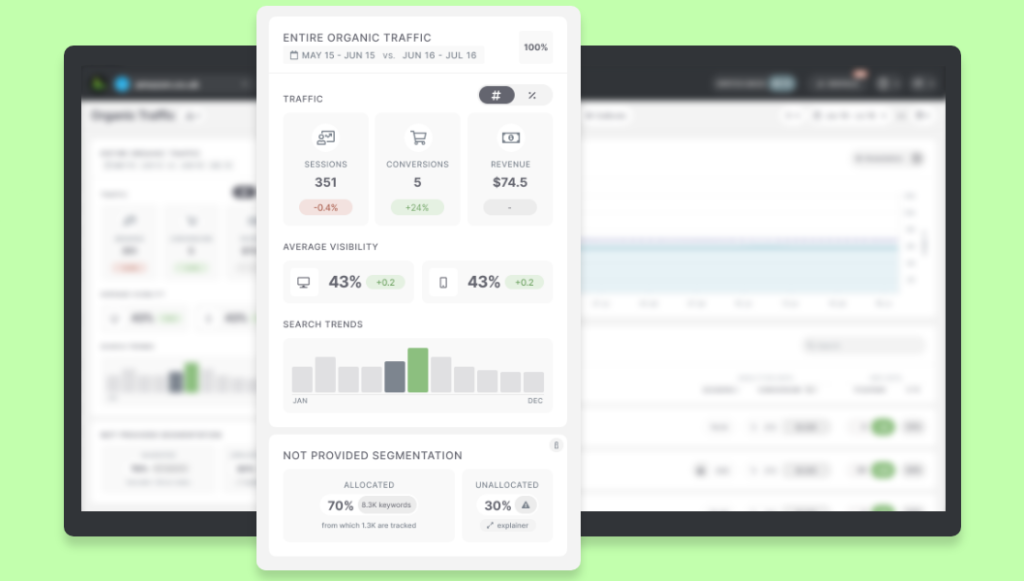
Content created in partnership with SEOmonitor.

1. Your current tool isn’t giving you the right data or functionalities

Accuracy and functionality are the biggest pain points SEO professionals have with their tools.

Does your current solution give you enough data? Does it provide the right data? If not, you may not be able to deliver on your SEO goals.

Have you ever come across either of these problems?

Unreliable or incomplete data

Some SEO platforms simply provide more data features than others, while others charge extra to view specific metrics, like:

  • Google’s “(not provided)” data
  • Brand/non-brand organic traffic segmentation
  • Mobile vs. desktop traffic

Having this data is invaluable for SEO professionals. But having to pay for it granularly can be a hugely limiting factor, particularly for smaller agencies.

For example, mapping the traffic data from Google Analytics and matching it with the keyword data from Google Search Console to get what’s “(not provided)” means you can show clients the direct impact which SEO has on other business goals – like how increasing ranking for a keyword affects conversions.

SEO tools and keyword rankings

SEO platforms that provide this type of data as standard can give you an advantage when it comes to acquiring and retaining clients by highlighting the connection between SEO and business results.

Or it can be an issue of unreliable metrics – misleading or opaque calculations, issues that pertain to technical changes and not your SEO performance, and so on.

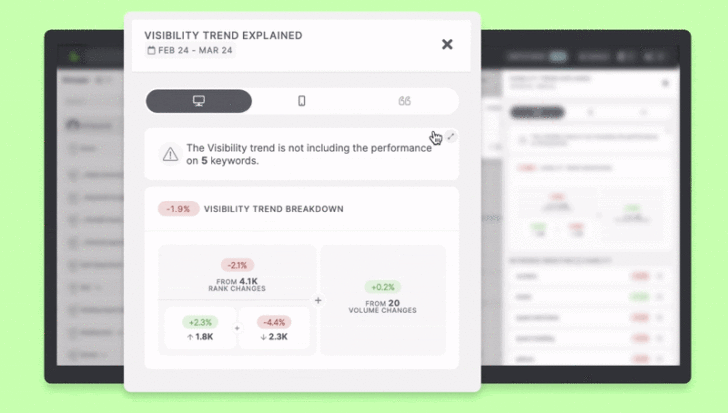
Think about the visibility metric. If it’s calculated as an average of positions for a set of keywords, then changes based on adding or deleting keywords on that list will be misleading, leaving you to figure out why the score fluctuates.

Paul Wood, Director of Indulge Media, points out that innovation in how an SEO tool calculates a key metric is a deciding factor. Even more so if it’s something the agency used to do with spreadsheets and many hours spent before finding out about such an efficient metric.

“The more interesting scenario is when you suddenly become aware of a tool that’s out there that does something your team didn’t even consider,” Wood said. “When you see it in a tool, that’s a moment when you change the way you’re thinking about things, about how you structure your work. And then you start to work differently.”

How SEO tools can impact the workflow

This is how the right SEO tools should work – solving agency pain points, even the ones you might not have thought were possible to resolve.

Functionality issues

Speed is a huge factor in the SEO industry.

Search professionals need access to accurate, up-to-date data in the moment to implement campaigns and track performance.

Because when your software malfunctions, you need to get the problem solved fast.

This is why it’s essential to consider the quality of support provided when selecting an SEO tool.

Ideally, you should get access to a dedicated account manager who you can approach for quick resolution of issues on an as-needed basis, as well as regular support calls to review your agency’s needs.

When Paul Friend, Head of SEO, and Ben Foster, Managing Director, from SEO Works decided it’s time to choose a different core SEO tool, they scored ongoing and ad-hoc support as one of the “hundreds of different relevant aspects when selecting the right tool.”

As part of their decisional matrix, this was one point that needed to match key functionalities like keyword features including universal rankings, overall market visibility scores, content insights, forecasting and reporting capabilities, link building capabilities, competition insights, and many more.

After all, when you’re evaluating or considering upgrading your existing tech stack, you need to see how well a solution performs based on your agency’s specific needs.

2. You want to be seen as a leader in innovation

Digital is always moving, and SEO professionals have to be up-to-date with new developments to remain competitive. Agencies need to be at the forefront of innovation, so they constantly lookout for new technologies that will set them apart.

Paul Wood says that they “make an effort at least a few times a year to have a proper review of what’s out there in terms of tools.” They focus primarily on accessibility and UX when assessing new tools on the market, like:

  • How easily they allow you to export data
  • How they facilitate collaboration between internal teams and clients
  • How many functionalities can be integrated into a single platform

The team at SEO Works also highlights the importance of always being on the lookout, with members keeping each other informed. They have an extensive training program in place, too – so everyone is onboarded not only with the tools but the specific methodologies the agency uses for top-notch SEO strategies.

Going even further, agencies like SEO Works develop proprietary tools, showing how their innovative approach can be a competitive advantage for clients in their portfolio.

3. You’re growing or scaling your SEO agency

Digital adoption has accelerated globally by at least three to four years in just a few months, according to a recent McKinsey Global Survey of C-level business leaders.

This drive toward a digital-first approach is only expected to continue, which means that scaling needs for SEO agencies are likely to be high right now, as well as for the foreseeable future.

Meeting this growing demand for SEO services requires agencies to scale operations efficiently while also staying competitive themselves. If you’re growing your agency, it’s a good time to test your tools and see if they have the right set of functionalities to promote and support this growth.

Fast-growing agencies need more capabilities, like:

  • Access to more users: As you add new clients and employees, you want tools that allow you to have unlimited users (ideally, at no extra cost) and facilitate collaboration across teams
  • Unlimited API access: Your SEO tools need to work seamlessly with your other business tools as you grow your overall technology toolkit. For example, we’ve made it as simple as possible to export large quantities of data through the SEOmonitor API, letting you pull the campaign and keyword-level data into your preferred internal systems (like Klipfolio) and customize client reports
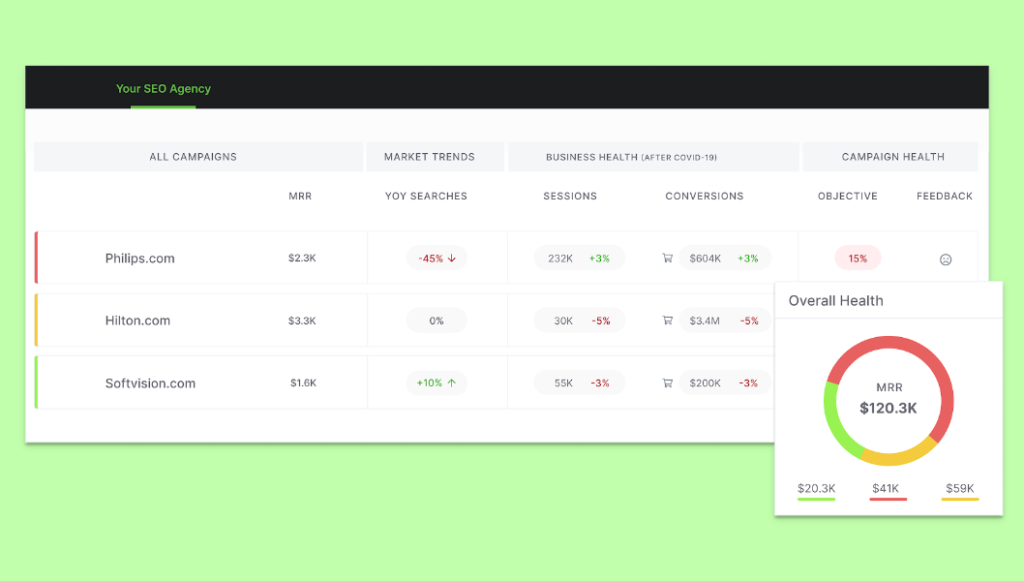
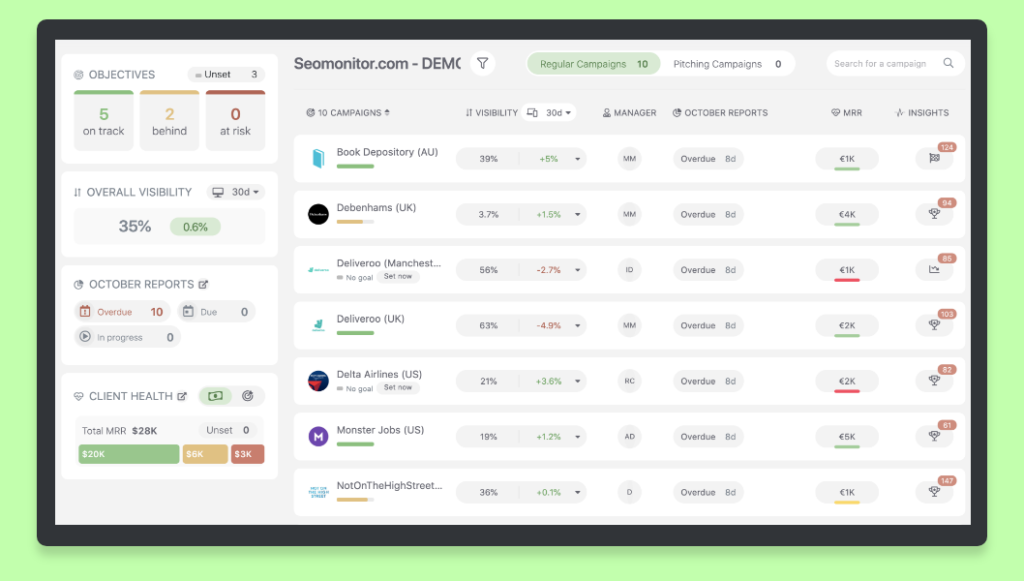
  • More efficient workflows: Operational dashboards, integrated systems, and organizing capabilities for your client portfolio, all make a difference in helping you get the status quo at a glance

Fast growing agencies and their need for more capabilities in an SEO tool

In the words of many SEO professionals we’ve talked with, the highest value an SEO platform can bring is to help you not waste time.

The right tools will help you do this, but ineffective ones can leave your team spending too much time on technical processes, which will seriously impede your ability to scale.

4. Your tool isn’t collaborative enough or customizable

SEO professionals need to have stable processes and methodologies across all teams. The best software is built with this in mind.

Collaboration and customization are the most important things that agencies prioritize when choosing SEO tools. And lots of features facilitate this, like:

  • Multiple user access: Unlimited access for team members and clients, with customizable client view permissions.
  • Collaborative features: Real-time annotations, comments, and sharing capabilities for both teams and clients.
  • Tracking metrics: A centralized agency dashboard that lets teams monitor performance and tasks, as well as align on goals.
  • Personalization features: From filtering campaigns by account managers, to an editing mode that optimizes your time for keyword management, to saving customized reporting templates across the agency, there are many capabilities you should consider.

A robust SEO solution, which combines multiple functionalities like these in a single platform, helps optimize internal workflows and gain a holistic view into agency operations.

5. Your tool isn’t cost-effective

Different sized agencies have different budgets.

Optimizing costs is crucial, particularly for scaling agencies. You have to hire more people and use more resources in your tools to handle a larger volume of clients, and you don’t want to scale your costs at the same rate.

Some questions to ask when evaluating the cost-efficiency of a particular tool are:

Does it offer flexible pricing and use of resources?

Most SEO software solutions have a fixed subscription cost, which includes a set number of domains and keywords. But if your use of the tool’s resources fluctuates from month to month, your pricing remains the same.

Other platforms give agencies the ability to upgrade or downgrade each month, so you only pay for what you use. Having no predefined plan supports agencies better evaluate their expenses based on campaign volume on a specific timeframe.

Are there any extra hidden costs?

Some tools have an attractive base price but come with hidden costs and extras that can quickly add up, especially when you’re onboarding lots of new clients and handling larger campaigns. These include:

  • Per-user costs: Will you be able to add unlimited users (including clients) at no extra cost to allow for internal and external collaboration?
  • Migration fees: Is there an hourly or fixed rate for migrating from your existing system to a new tool?
  • Integration costs: Are there multiple integrations to important tools of the trade (Data Studio, Google Sheets, API access, and more) included in the price?

So if your current software isn’t making the most financial sense for your business, it could be time to test a new one.

When is the right time to start prospecting for a new SEO tool?

The answer is, you should never stop your critical analysis.

Innovation is an ongoing process, especially in this rapidly-changing industry. So your core SEO tool of choice needs to keep up the pace and constantly update its capabilities.

When you encounter these signs with your existing solutions, they may not be serving you as well as they should be, like:

  • When you don’t get access to the right data or functionalities.
  • When you want to be a leader in innovation, which means you need innovative methodologies.
  • When you’re growing or scaling your agency, and you need more capabilities in place.
  • Or when you want to be more cost-effective.

We understand that an SEO agency’s core tools are crucial in winning more clients and managing them more efficiently.

That’s why our team at SEOmonitor is committed to designing specific solutions that help you acquire, manage, and retain relevant customers.

Join us and our SEO agencies community in the journey to bring more transparency and measurability to the SEO industry.

SEO tool designed for SEO agencies

Alice Teodorescu is Content Marketing Manager at SEOmonitor.

https://www.searchenginewatch.com/2021/05/19/is-it-time-to-switch-to-a-new-seo-tool/


Seven first-party data capturing opportunities your business is missing out on

30-second summary:

  • Third-party data is being phased out by big tech, making first-party data indispensable
  • First-party data is willingly provided by users, helping you build a consumer profile
  • Internet users are cautious about providing their data but will do if rewarded
  • Tracking pixels, CRM platforms, surveys, and encouraging interaction and registrations are all effective ways to capture first-party data
  • First-party data must be used responsibly, repaying the trust placed in a business by consumers

When doing business online, data is arguably the greatest currency of all. By obtaining reliable data about your target audience, an effective and bespoke marketing plan can be devised. This will convince customers that you understand their unique needs, desires, and pain points.

Alas, not all data is created equal. As the influence of the internet grows, and the fallout of the Cambridge Analytica scandal continues to reverberate, consumer privacy is more important than ever. Any online business needs to build a consumer profile in an ethical, reliable manner. This makes the collection of first-party data critical.

What is first-party data?

First-party data is consumer information collated directly by your business, based on user behavior. This data can be used to build a profile of your target audience, tailoring your marketing and user experience accordingly.

What is the difference between first-party, second-party, and third-party data?

As discussed, first-party data is user information collated directly from your website. We will discuss how you can obtain first-party data shortly. Let’s clarify the difference between this approach and second- or third-party data, though.

Second-party data is essentially the first-party data collated by another business. This may be shared between two websites for an agreed common good. However, second-party data remains private. It will not be made available to the public and cannot be purchased.

Third-party data is that which you purchase, usually from a data management platform (DMP) or consumer data platform (CDP). These platforms harvest data from users based on their online habits. These are known as tracking cookies. It is important to note that third-party data is not gained through any personal relationship with consumers.

The use of third-party data is slowly being phased out. Internet users are growingly increasingly security-conscious and are looking to shape online privacy policies. Google has announced that they will be removing third-party cookies from 2022, while the Firefox and Safari browsers have all already done so. With Google Chrome accounting for some 65 percent of global web browser traffic, the impact of this will be keenly felt.

In essence, third-party data is a dying art, and second-party data ultimately belongs to somebody else. This means that first-party data collation should be a priority for any online business, now and in the future.

How does first-party data help a business?

As intimated previously, first-party data is used to build a consumer profile. Think of this as market research straight from the horse’s mouth. By monitoring how users interact with your web presence, you can offer them more of what they want – and less of what will not interest, or even alienate, them. After all, there is little to gain by marketing a steakhouse restaurant to somebody that exclusively shows interest in a vegan lifestyle.

Perhaps the most effective example of marketing through first-party data is Amazon. We’ve likely all purchased something from Jeff Bezos’ empire at one time or other. Even if a conversion was not completed, you may have browsed the products on offer. Amazon uses this data to build personalized recommendations on your next visit.

It’s not just a tool for direct interaction on a website, though. First-party data is also invaluable for advertising. By learning about the habits of a user, tailored marketing can reach them on social media. This is a powerful form of inbound marketing that piques consumer interest.

Consumers that have previously been exclusively interested in red circles may be tempted to experiment with a blue triangle, but they are likelier to stick to type. By embracing first-party data, you can meet customer needs before they ask. This is a cornerstone of success, especially in the competitive world of online commerce. After all, 63 percent of customers now expect at least some measure of personalization from any service provider.

Creative ways to capture first-party data

Capturing first-party data is a delicate art. With consumers wary about how much the tech industry knows about them, this data may not be provided freely. You’ll need to offer something in return. 90 percent of consumers will willingly offer first-party data if you make it worth their while.

Most importantly, you’ll need to be transparent about how first-party data is captured and used. Consumers are wary by default, and you’ll need to earn their trust. An open acknowledgment of the data you collect, and how it will be used, is the first step to achieving this faith.

Seven great opportunities to capture first-party data

Let’s discuss some ways to help your business obtain first-party data that will help elevate your business to the next level.

1. Add tracking pixels to a website

Tracking pixels are tiny – usually no bigger than 1 x 1 – pixels that users rarely notice. These are installed in websites through coding and collate first-party data about user habits.

This could include what pages are viewed, the adverts that garner interest, and personal information such as whether the user browses through a mobile or desktop appliance.

This all sounds like cookies, but there is a crucial difference. Cookies can be disabled or cleared, as they are saved within the browser of the server. A tracking pixel is native to your website, so it will capture data from every visit, regardless of what settings the user enables.

2. Use a CRM platform

Customer relationship management (CRM) software is growing increasingly popular with online businesses. Chatbots are perhaps the best example of this. Chatbots are not for everybody – many consumers still prefer to interact with a human – but 90 percent of businesses claim that chatbots have enhanced the speed and efficiency of problem resolution.

What’s more, chatbots effortlessly capture first-party data. If a user has an issue or concern, they may grow weary of waiting on hold on the phone for 15 minutes and hang up. That lead is now potentially lost forever, and you’ll never know what they were looking for. Even if a chatbot cannot encourage a user to convert, you’ll have an idea of what they were interested in. This will aid in targeted marketing and user personalization in the future.

3. Reward users for sharing their data with you

As mentioned previously, customers want to be rewarded for their exchange of data. Ideally, this will be an immediate, tangible reward such as a discount. At the very least, provide evidence that you are personalizing your service to unique consumer needs.

Not every business will be able to offer immediate fiscal motivation to every user. There are other ways to reward consumers, though. Monthly giveaways are a good example, especially when advertised and managed through social media. Encourage people to like and share a post, promising to provide an incentive to one lucky winner at the end of the month.

This is easily dismissed as a cynical marketing ploy, so you’ll need to follow through on your promise. More importantly, you’ll need to make it clear that you have done so. If consumers believe that they are in with a shot of something for nothing, though, they are likelier to consider the use of their data a fair exchange.

4. Encourage interaction

Buzzfeed may not the first place many look for hard-hitting journalism, but it enjoyed stellar traffic for many years. Why? Because it encouraged interaction through goofy online quizzes that offered easy ways to harvest consumer data.

This isn’t necessarily a model for every website to follow. You need to protect your brand reputation. Inviting people to learn which pizza topping defines them best may do more harm than good. Similar exercises surrounding your business may encourage interaction though. A quiz about your business sector, promising a reward for completion, will attract interest.

Any competent SEO services agency will tell you that quizzes and other interactive elements on a page can also have the bonus of helping with SEO. This is because an important metric for Google when evaluating the quality of your website is “time spent on page”. If Google can see that your visitors are spending several minutes looking at a page, then this is a positive signal that the page is engaging and interesting to visitors.

Another strategy could be unlockable social media posts. Consumers will be intrigued about what you are offering behind a shield. Paywalls are likely to deter, but promising content-centric rewards if people share their data can be effective – if the result is worth the sacrifice.

5. Conduct surveys

The march of technology ensures that all consumers now have a voice. They expect this to be heard. Never lose sight of the fact that consumers hold the power in the 21st Century. Negative reviews of products and services can cost a business up to 80 percent of potential conversions.

The simplest way to achieve this is by issuing surveys to your existing customers, and even potential leads. Do not expect a 100% return rate, especially if you do not offer a reward for the time of consumers. Some will leap at the chance to express their opinions though, providing you with valuable first-party insights.

6. Encourage registration

If you run an ecommerce website, conversions are the most important bottom line of all. This means that many businesses will, understandably, offer services that increase the likelihood of making a sale. This could include guest checkout, a policy preferred by half of all online consumers.

The issue with guest checkout is that it captures less data than signing a customer up. Many consumers choose guest checkout as it’s faster, provides more privacy (especially when paying with an e-wallet rather than a credit card), and – theoretically – protects their inbox from unwanted marketing communication.

As we have established though, many consumers will provide data if you offer something in return. The most popular example of this is a discount on the first purchase. Couple this with a promise of personalized offers and an enhanced shopping experience and you’re likelier to see more sign-ups.

Just be careful about what data you are asking for. Be sure to explain why information is important. Unless a credit check is necessary, for example, many customers may be reluctant to share their date of birth. If you promise to offer exclusive offers around their birthday, however, your argument will be much more persuasive.

7. Host events

Younger consumers value experience over results. The days of gaining unstinting loyalty through providing goods or services at an affordable price are over. The rise of social media, and its omnipresence in the lives of Millennials and Generation Z, means that a personal connection is required.

Live events can provide this. Host an AMA, whereby a senior figure of your business answers questions about your practices. This can also be a great way to reassure consumers that you operate in a sustainable, socially conscious manner – something hugely important to many modern consumers. A live product launch can be another way to attract users.

How does this benefit first-party data? Attending the event will require registration. Even if the number of sign-ups is not mirrored by the eventual attendees, you have gained valuable data. You will also capture insights from those that do attend the event, especially if you encourage interaction.

Mistakes to avoid when capturing first-party data

As we have been at pains to point out, consumer data is a sensitive subject. First-party data is invaluable, but it must be obtained without betraying the trust of consumers. Here are some key pitfalls to avoid in your data collection strategy.

  • Do not ask for something for nothing. Data sharing needs to be a quid pro quo exchange
  • Avoid getting too personal – only seek data that is relevant to your business model
  • Be clear about how the data will be used, offering consumers the opportunity to opt-out if this is their preference
  • Shout from the rooftops about your privacy policies. Users can never be made to feel too safe
  • Use the data responsibly, offering value to consumers and not abusing the information you have gained. Trust is hard to gain and easy to lose. As Google discovered, unethical use of data that breaches trust can also be very costly

Is your website making the best use of first-party data? Do you have any additional creative suggestions of how this information can be ethically sourced? These are the questions that will define the success of your business going forward. Be sure to hop onto the first-party data train now. It has already left the station and is rapidly picking up speed.

Joe Dawson is Director of strategic growth agency Creative.onl, based in the UK. He can be found on Twitter @jdwn.

https://www.searchenginewatch.com/2021/04/29/seven-first-party-data-capturing-opportunities-your-business-is-missing-out-on/


How to Write Landing Page Copy That Connects With Your Customer

Millions and millions of landing pages are created every year, but most of them will fail to engage their target audience. You can avoid this fate with these simple tips.

April 28, 2021 5 min read

Opinions expressed by Entrepreneur contributors are their own.

Have you ever visited a ’s landing page that just felt…off? You’re not alone. Although many of us believe a landing page’s effectiveness lies in its visual design, a truly impactful website relies heavily on copy, or the text used to guide and inform site visitors. 

Great web copy does more than just explain your product or service. Rather, it’s the start of a relationship with your audience — a relationship that will keep eager customers returning again and again and evangelizing your business in the long term. But unless you’re a seasoned copywriter, it can be tricky to determine what words to use on a landing page, which have the potential to make or break a potential sale. Here are a few tips to keep you ahead of the curve.

Advertise your ability to fill a need

Customers more readily pay for things they need than those they merely want. If a successful business fills a gap, its website’s responsibility is to prove its ability to fill that gap. Your web copy should clearly identify what need exists in your ideal customer’s life (like the need for an M&A advisor wealth management coach or SEO auditing) and explain how and why your business is the ideal solution. Just look to Go Clean Co for proof: The Instagram-famous, -based cleaning company clearly points out a need — insufficient time for housekeeping — on its homepage, then advertises its ability to create thorough “custom cleans” for its busy clientele. Remind your audience why they need you (kindly, of course). In turn, your audience will be able to more closely relate to your business, which is the foundation of brand loyalty. 

Related: 10 Tips for Increasing Your Landing Page Conversion Rates

Write with your demographic in mind

Another secret to relatability is language. A landing page for a new 55-and-over retirement community won’t use the same tone and language as a recipe blog aimed at hungry college students just learning how to cook. Keep in mind how your intended audience speaks or how they prefer to be spoken to: Do they remain casual, or do they prefer a more formal, upscale experience? Do they find puns and dry humor funny, or is it best to stay serious? Do they throw around industry terms, or should you keep things simple for newcomers to the field? If you’ve tested your company’s offerings with its ideal customer base, you’re likely familiar with the way that base speaks. Show them you’re familiar with their community by selecting appropriate language.

Provide upfront value

If your business has any competition whatsoever, your web copy needs to be able to answer your audience’s most likely question: “Why should I buy from you over someone else?” The quickest way to prove your expertise and begin to form a relationship with your audience is to provide upfront value. Online talk therapy platform Talkspace does this by providing information about mental health and various forms of therapy on its blog, The Talkspace Voice, while cult-favorite foodie magazine Bon Appetit shares videos on how to cook unique meals via its YouTube channel. Though this information is being offered to potential customers free of charge, it’s crucial to showing those customers that each business knows what it’s all about. Think of it like leaving a trail of breadcrumbs that leads right to your business’s (virtual) door. 

Sometimes less is more 

Avoid the urge to over-explain your product or service from the beginning. Too much copy is confusing and will crowd your landing page, making it difficult for your audience to absorb the information they really need. Similar to an elevator pitch, your web copy should be able to introduce and explain your product or service in a few sentences. You can always provide a FAQ section or an “about us” page if you feel the need to answer common questions or provide some background on your business. 

Related: 3 Ways to Create More Engaging Website Landing Pages

Include a call-to-action

So you’ve convinced a site visitor to work with you. Now what? Effective landing page copy will include a call-to-action, or the final step in the conversion process. This call-to-action should speak to your audience’s main need. At my company, we offer online business owners a free valuation so they can find out what their business is worth and determine if selling is the right move. A security consulting firm might advertise a free introductory phone call, all the while reminding site visitors that this is key to reducing risk at their company; a new slow-fashion brand may use a link that says “start your eco-friendly journey here” instead of a simple “shop now” button. When in doubt, always aim to relate.

You don’t have to be a master at copywriting to create a clean and effective landing page. By writing toward your audience’s demographic and primary needs, you’ll generate copy that builds loyalty and converts even the most skeptical visitors. 

Related: Here Is a Simple, Affordable Way to Build Marketing Landing Pages in Minutes

https://www.entrepreneur.com/article/369113


Diagnosing a traffic drop? Just breathe!

30-second summary:

  • A traffic drop doesn’t necessarily mean something is wrong – in most cases, it is natural
  • All sites have experienced a decline in traffic throughout their lifetime which can be explained by seasonality, loss of PPC budget, and many other factors
  • When it comes to organic search traffic decline, it is often caused by stagnant content, the emergence of new competitors, or loss of backlinks
  • To diagnose a traffic drop, identify which traffic source is declining, then find which pages have lost traffic
  • It is important to avoid hasty decisions, take your time exploring whether you lost any positions and which pages replaced yours
  • Try to evaluate why this shift has happened and how you may fix it

Have you ever checked your analytics and saw a sudden or gradual organic traffic drop? Who hasn’t? If there’s one common thing in just about any marketing strategy: All of us have dealt with organic traffic decrease on many occasions. Any website out there has seen traffic dips, often even regularly.

How to deal with an organic traffic drop when you see something like this inside your Google Analytics?

organic traffic dropSource: Screenshot made by the author (April, 2021)

Here are four well-defined steps to take when diagnosing a traffic drop:

Step 1: Check which traffic source was effected

This is an obvious one but too many people automatically assume it’s Google organic traffic that has dropped.

So make sure it hasn’t been PPC traffic that has exhausted your budget. This happens more than you think!

So assuming, it is an organic traffic drop, let’s go on checking:

Step 2: Which page has dropped?

To quickly find out which pages dropped, navigate to your Google Analytics account Acquisition -> All Traffic -> Channels. Click “Organic” there and in the date range, check “Compare to” and in the drop-down select “Previous period”:

comparing website traffic over timeSource: Screenshot made by the author (April, 2021)

Now scroll down and click the “Landing pages” tab to see all your pages and how their traffic of this week compares to the previous week.

landing pages and website traffic drop analysis

Source: Screenshot made by the author (April, 2021)

No need to scroll a lot here. If you see a traffic dip, chances are, your higher-ranking page or pages were affected. So look at the top of the list.

Now, most importantly, if all your pages took a hit, that’s a good reason to worry. This may be an indicator of a site being affected by a recent Google Update or even a penalty (the latter is much less common these days). This article lists a few good ways to research whether there was an update and how to evaluate whether you may have been affected.

A more common scenario is that you will see some pages dropping. Others will remain intact or even start gaining in traffic. This is a good indicator you shouldn’t be worried about any possible action from Google. Most pages go up and down search engine result pages all the time. 

Now, you grab the list of declining URLs and research them further.

Step 3: Was there any impact on rankings?

It is not such a rare thing: We see a gradual decline in traffic without any obvious impact on rankings. This can be explained by two possible reasons:

  • People just don’t search for that query that much anymore. This was very common in 2020 when searching patterns shifted dramatically. And this can still be the case for seasonal queries (think “costumes,” “ski gear”, “swimsuits,” etc.)
  • Search engine result pages have added a new search element that steals attention and clicks.

So how do you diagnose if your rankings drop?

This question is harder to answer these days. If you are monitoring your rankings, an obvious step here would be to go check there. 

Google’s Search Console is another platform to check but it is not easy to quickly diagnose the ranking drop there. The tool is a little behind in showing data. Still, if you give it some time, you can analyze your rankings thereby using “Compare” tab within the “Performance” section of the reports:

Search console comparison

Source: Screenshot made by the author (April, 2021)

Once you choose your date range, scroll down to your data and filter it by the “Position difference” column.

Mind that all you need to note here is lost or declined first-page ranking because your second-page rankings wouldn’t have driven traffic to lose anyway. So again, breathe.

Source: Screenshot made by the author (April, 2021)

Instead, you can filter Search Console data by “Previous positions” to see, for example, lost #1 rankings:

Source: Screenshot made by the author (April, 2021)

Another – probably smarter – way to diagnose hit queries is to judge by traffic. Search console shows the number of clicks each query is sending and how it compares to what it used to send. If Google is not the only search engine you are concerned about, using Finteza you can spot search queries that are sending less traffic than they used to:

Finteza search

Source: Screenshot made by the author (April, 2021)

Finteza’s default search keyword report consolidates data from all search engines you appear in. You do need it running for some time to accumulate this data. It is easy to integrate.

Finteza is paid (costs  $25 per 100,000 unique users a month) but it is the only web analytics solution that still offers reliable keyword data.

For a better understanding of what is going with your organic traffic, I suggest using all of the above (and more) methods. Again, with search personalization and localization, it is very hard to understand where you are gaining (or losing) from, so combining data from multiple sources is the key.

Step 4: Identify why these ranking dropped

Here comes another tedious part in our analysis. More often than not, your rankings may fluctuate or drop due to Google finding a better page to rank. This may happen because:

  • Your query deserves freshness and there is a fresher page that was boosted on top of yours. If this is the case, you’d have got used to fluctuations by now.
  • Your competitor created a better page that has better backlinks.
  • You have lost some important backlinks which has led to losing some equity

Your position monitoring solution may give you some clues as to which page has overcome you in SERPs. Most rank monitoring platforms come with “SERP tracking” feature that grabs a snapshot of your important SERPs on a regular basis.

You can monitor your target SERP movements for you, for example:

Rating website visibilitySource: SE Ranking

For high-search-volume queries, SpyFu is keeping a record of key SERP movements:

Image source: Spyfu

To make it easy to spot your lost backlinks that may have accounted for declined positions, use link monitoring tools. They keep a record of when exactly each link was lost, and so make it easy for you to evaluate if this is what may have had an impact on your rankings and organic traffic:

Source: LinkChecker.pro

When you know which page is replacing you in search results, try to find why. There can be an array of reasons, including the most common ones (as well as the combination of such): 

Conclusion

Keeping your traffic in control is beyond your powers. What you can do is to keep an eye (building a dashboard would make it easier and more consistent) as well as create a well-set routine for analyzing a possible dip.

When you see organic traffic decline or dip, it doesn’t usually mean that your site is under any kind of filter or penalty (which is most often assumed). In most cases, this is a perfectly natural ongoing SERP fluctuation. Stay calm and carefully analyze what has changed (and why). Don’t rush to take any action or fix anything until you check various data sources and take time to come up with a strategic plan. And most importantly: Just breathe!

Ann Smarty is the Brand and Community manager at InternetMarketingNinjas.com. She can be found on Twitter @seosmarty.

https://www.searchenginewatch.com/2021/04/20/diagnosing-a-traffic-drop-just-breathe/