Five hacks to enhance your organic CTR and rankings in SERPs

30-second summary:

  • Issues with increasing your site’s organic traffic may be attributed to low organic CTRs.
  • Creative title tags helps your site create a positive first impression.
  • Limit your meta description to under 160 characters to avoid truncation.
  • A well-optimized, keyword-rich URL can increase organic CTRs by 45%.
  • Leverage the power of rich results to steal SERP real estate from your competitors.

Appearing in Google search engine results pages (SERPs) is a must-have for any business looking to further their online presence and increase their market share. But if your goal is to grow your website traffic or increase sales, merely appearing on the first page isn’t enough. With Google progressively changing from a search engine into an answer engine, more and more search users are completing their search without leaving the SERPs. To win in today’s zero-click era, it’s become paramount for businesses to occupy more real estate in SERPs and be more visually engaging to search users. If your website is having little luck with increasing its organic traffic, your troubles may be attributed to low organic click-through-rates (CTR). Improving click-through performance is an essential facet of ensuring long-term online success, both on and off Google. 

So what can you do to improve your site’s organic CTR?

Whether you run an e-commerce shop, operate a cooking blog, or manage your client’s site, these five well-tested CTR enhancing techniques will positively boost your organic CTRs, driving more targeted traffic to your site.

And the best part? All of these techniques are easily actionable and are all within your control.

Let’s get started.

1. Get creative with your title tags

A traditional organic SERP listing has three main elements:

Headline: A blue clickable link that denotes the title of the page.

Description: A brief snippet of what contents can be found on the page.

URL: The internet address of a specific web resource.

Your search listing’s title tag (the headline) has significant importance to both the search engine and its users. As an HTML element, search engines use your title tag to understand better the information contained within the page.

Search visitors, on the other hand, use the title tag found in SERPs to make a first impression about your business. Because it’s displayed in a prominent blue color, how you craft your title tag can be a make-or-break factor in its clickability, impacting organic CTR.

But search results aren’t the only places where title tags are used. Because the <title> tag element is found in your page’s HTML code, your title is also displayed at the top of your web browser’s tab and when your content is shared across social media networks.

So how should you write title tags to make them irresistible to search visitors?

Here are five fundamentals to apply to your title tag writing

Aim for a title tag length of 35-55 characters

According to research performed by Backlinko, title tags between 15 and 40 characters have the highest CTR. A title this short, however, can provide a challenge – how do you fit your keywords in and make the title tag compelling? 

In my experience, the sweet spot for a title tag is 35-55 characters in length. A length in that range keeps the title tag short and punchy and ensures it does not truncate in search results, which generally happens at around 60 characters or 600 pixels.  

Use tools like SERP Simulator and SERP Preview Tool to check title tag length.

Place your primary keyword closer to the beginning

Frontloading your title tag with your target keyword increases that keyword’s prominence, giving more weight to its importance. Plus, most users typically only see the first two words of any given headline. Placing your keyword at the beginning helps to make the keyword more obvious, and thus appear more relevant to users scanning the SERPs.

Never keyword stuff

While keyword placement is essential, avoid titles that are just filled with irrelevant keywords or variations of your target keyword. Title tags stuffed full of keywords are unappealing to search users and are CTR killers.  

Add emphasis on capitalization

Capitalizing the first letter of every word in your title tag is general copywriting best practice. To make your title tag stand out even more and add emphasis to high-impact words, consider capitalizing the occasional odd word.

Minimize the use of stop words

Stop words like “a”, “the”, “on”, “or”, and, “etc.”, can add unnecessary length to your already restricted character limit. To better position your title tag, use high impact, power words like best, exclusive, insane, and so on.

Once you’ve mastered the art of title-tag writing, it’s time to move on to the next step.

2. Meta descriptions

The snippet below the headline in the SERPs is commonly (but not always) pulled from your page’s meta description. In addition, an HTML element, the purpose of a meta description is to summarize a web page’s content.

And like your page title tag, a well-written meta description can positively influence CTRs. 

These 155 characters can influence 43% of search users to click on your site. And with nine out of ten search users clicking on organic search results vs paid advertisement, meta descriptions are your opportunity to draw some attention to your site.

How to write the perfect meta description

When it comes to writing the most compelling meta description for search results, start by researching SERPs. Having oversight on what your competitors are doing will help you better assess what descriptions are click-worthy among your target audience.

Here’s a quick checklist you can use to ensure your meta description is highly clickable:

  • Stick to Google’s optimal length

To optimize your meta description, be sure to keep the page’s summary under 160 characters and 130 characters for mobile searches. 

  • Add your most important keywords

Be sure to include your target keyword(s) in the description so they get highlighted in bold within search results.

  • Write descriptive copy

To further create snippets that entice search users to click, avoid generic descriptions as much as possible.

  • Don’t duplicate descriptions 

The pages of your site should have unique meta descriptions. Duplicating descriptions can cause Google to penalize your site.

  • Include a call-to-action
  • To add value to your description and entice more clicks, write your description with advertising in mind. 

If you have a lot of pages on your site, just focus on optimizing the most important pages. Why is this you would ask? 

Because Google ignores the meta description tag for 63% of queries. Focussing your efforts on pages getting little SERP visibility is not worth the time, especially when Google’s descriptions perform equally well, and sometimes better than custom descriptions.

Now that title tags and meta descriptions have been addressed, it’s time to turn our attention to URLs.

3. Use descriptive URLs

The third element of a traditional search listing is your page URL. And studies have shown that a well-optimized, keyword-rich URL can increase organic CTRs by 45%.

After all, when it comes to URLs in search results, wouldn’t you prefer to click on example.com/blog/ten-tips-for-seo-success rather than example.com/index.php?=5754225=t44=?p=987?

So what are the steps necessary to craft click-worthy SEO-friendly URLs?

The first step is to include the exact keyword you’d like to target in your URL.

When writing out your URL, avoid using special characters, stop words, and numbers. Special characters like the ampersand or “&” and numbers are best suited for your page title tag or header tag. Be sure also to only use lowercase letters and hyphens to separate words rather than underscores.

Lastly, keep your URL length short. Some studies have shown there is a correlation between shorter URLs and higher rankings. The average URL length of top-ten ranking pages is 66 characters.

Now that you grasp the basic SERP strategies to increase CTR performance let’s take a look at two advanced techniques you can start using on your site.

4. Turn your title tag donkeys into CTR unicorns

While it may be tempting to simply write a title tag and forget it, to get the very best results from your organic listing, you need to constantly optimize your title tags. As Larry Kim shows, this requires testing new variations and measuring their performance. 

The best way to fully optimize your title tags is to determine your site’s worst performers. These title tags we’ll call your donkeys. The best way to assess which title tags are underperforming is by going to Google Search Console and downloading your query data.

Once you have your query data, plot a graph that compares your Click-Through-Rates vs. Average Position for any queries you rank for in organic search. Add a trend line to your graph.

Now that you have your graph, target the keywords below the graph’s curve. These are your site’s biggest donkeys, the pages with the highest number of impressions but deliver lower than expected CTR for their ranking position.

To maximize your efforts, rather than testing new title tags and comparing their performance over time, consider doing some Google Ads “blitz testing.”

Blitz testing requires you to create a set of ads for the page you’re optimizing and testing at least 10 different headlines. 10 headlines are the bare minimum for blitz testing because it gives you a better chance at finding the headline that resonates best with your audience.

When you find your statistical unicorn from the Google Ads test, use that headline as your title tag on your re-optimized page.

The last hack we’ll be looking at will not only bring more visibility to your listing, but it has also been shown to bring in 2.7x more traffic from organic search.

5. Rich results

Leveraging the power of rich snippets allows your listing to occupy more SERP real estate and improve the visual elements of your SERP result, helping your site increase its organic CTR while satisfying search intent.

To experience success with rich snippets from organic search, it pays to know the most common schema types. While there are dozens of different rich snippets available, not every single one can be adapted for your business. Some are event industry-specific like flight information.

The most common schema types that will work for the majority of businesses competing in the SERPs include:

  • Review snippets: Displays a star and numeric rating below the meta description.
  • Recipe rich data snippet: Provides a step-by-step overview of a specific recipe.
  • How-To snippets: Provides step-by-step instructions for a specific task.
  • Sitelinks: Adds navigational links to key pages on your site below the meta description.
  • Search box snippet: Displays your site’s internal search box within SERPs.
  • Product snippet: Displays product information (price, reviews, stock availability) in SERPs.
  • Video snippet: Displays video information (thumbnail URL, upload date, transcript, etc.) in SERPs.
  • FAQ snippet: Presents commonly-asked questions and answers in the search results.

Now that you have a clearer understanding of the type of rich snippets available to you, follow this seven-step process to publish structured data onto your site:

  • Visit Google’s Structured Data Markup Helper.
  • Select the snippet type you’d like to create.
  • Paste your URL or HTML source to the markup helper.
  • Highlight the page elements you want to be included in the structured data.
  • Click the Create HTML button.
  • Copy and paste your generated structured data onto your page HTML.
  • Preview and test your new rich snippet in Google’s Rich Results Test.

Once you run your test, your schema markup will create a report that states the eligibility of your rich snippet. The information will also show any issues or warnings that will need to be fixed before your page can be published.

It should be noted, though, that having validated structured data in your page’s code doesn’t automatically guarantee that your search listing will display a rich snippet. Google will always provide the search user with the best search experience which, at times, may not require a rich snippet.

Now it’s your turn

By using the strategies above, your site can start to experience more organic traffic. This can significantly contribute to greater overall online success and, ultimately, increased site conversions. What’s more, the strategies provided here increase site traffic without creating more content or building more links.

With organic click-through-rates already on the decline, adapting these tips and tactics to your site will allow your brand to remain competitive in the current zero-click search landscape.

And the best part? All of the strategies mentioned here can also be used by any business, regardless of SEO experience or marketing budget.

Karl Tablante is Inbound Marketing Manager at SEO Sherpa.

Five hacks to enhance your organic CTR and rankings in SERPs


How to create an XML sitemap and submit it to Google

30-second summary:

  • A sitemap is one of the technical sides of SEO.
  • A sitemap doesn’t boost your SEO traffic but helps search engines index your web pages faster.
  • It’s very easy to create an XML sitemap and doesn’t require any coding knowledge.
  • Once a sitemap is created, you need to submit it to Google.
  • Through your Google Search Console dashboard, you can see detailed index coverage reports and fix any technical errors if present.
  • Founder of WPMyWeb.com, Jyoti Ray guides you through the process of creating an XML sitemap using different tools and details on how you can fix existing sitemap errors.

When it comes to SEO, there are over hundreds of Google ranking factors you need to master as well as execute them in order to increase your search engine visibility. Believe me, it’s lots of work – generating content ideas, keyword researching, creating high-quality content, building backlinks, auditing your website, etc. And working on each of the techniques is time-consuming and requires lots of effort. Fortunately, there are some SEO techniques that are easier to perform but have a huge impact on SEO. One of them is – submitting an XML sitemap to Google.

Although a sitemap is one of the parts of “technical SEO”, it doesn’t require any technical knowledge, and most importantly, it’s free and easier to create.

Even, in just 10-15 minutes, you can create an XML sitemap and submit it to Google.

So, in this article, we will first explain what is an XML sitemap, why do you need a sitemap, and then show you how to create an XML sitemap and submit it to Google. Let’s get started.

What is an XML sitemap?

A sitemap is a list of a website’s URLs. It’s a roadmap of a website that tells Google what information is available and where to find it. A sitemap contains important information about each URL, such as – when a post or page was last updated, how often do you change, etc.

The best part of a sitemap is that you can specify what pages, posts, or media files to be indexed by search engines crawlers.

Sitemaps are specially written for search engines, not for humans. So, it would be hard for us to understand if not seen before.

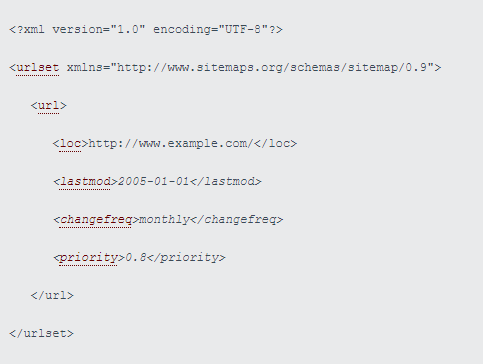
Here’s how an XML sitemap looks:

XML sitemap example

Source

Why do you need a sitemap?

Search engines use crawlers to find and index all the information on the web. While crawling a page, they use both internal and external links to discover new content.

However, if a new webpage hasn’t linked from other known pages, crawlers find it difficult to discover new pages on a website, and as a result, the indexing process gets delayed.

That’s where a sitemap comes.

A sitemap doesn’t only contain a bunch of valuable links but also helps Search Engine crawlers to discover new information faster.

Once you submit your XML sitemap file to Google, you can see that all new posts/pages you are publishing are available somewhere on Google search results (after a couple of minutes). It’s because of the sitemap file.

When do you need to use a sitemap?

Not everyone needs a sitemap. Google has its own complex algorithm to schedule crawling.

Google officially stated when a webmaster needs a sitemap:

  • Your website is really large
  • Your website is brand new and has few external links pointing to it
  • You don’t build internal links

However, in most cases, having a sitemap could be beneficial in a few ways.

Now I know the basics of a sitemap, let’s see how to create an XML sitemap and submit it to Google.

How to create an XML sitemap

Creating a sitemap is very simple. You can use an online tool to generate an XML sitemap and for WordPress sites, there are plenty of plugins available.

I will show both of them.

1. Creating a sitemap in WordPress

More than 35% of the total websites are powered by WordPress.

If you run a WordPress site, you can create a sitemap using a plugin.

There are several WordPress plugins available that allow you to create an XML sitemap, such as Yoast SEO, Rank Math SEO, etc.

Method 1, Create a sitemap using Yoast SEO

Yoast is one of the best SEO plugins for WordPress. Yoast plugin helps you to optimize your page titles, meta descriptions, SEO analysis, etc.

It also has an option to create an XML sitemap.

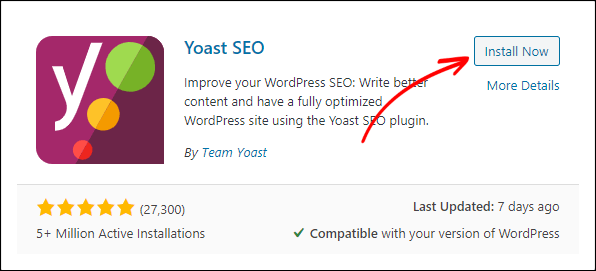
If you are not using the Yoast SEO plugin, download and install it from the WordPress plugin directory.

Follow the steps below

From your WordPress admin panel, go to Plugins > Add New and search for “Yoast SEO”.

Creating an XML sitemap using the Yoast plugin

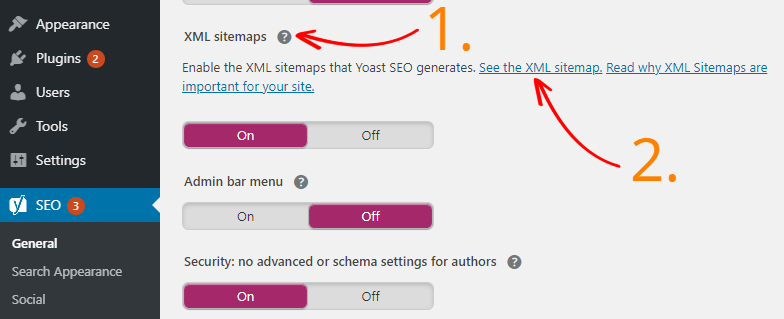
Once activated, go to SEO > General > Features. Click on the Question icon to reveal the sitemap URL.

Yoast SEO Sitemap

Method two – Creating a sitemap using Rank Math SEO

If you are using the Rankmath SEO plugin, you can generate a sitemap like the way you created using the Yoast SEO plugin.

But, I prefer using the Rank Math plugin because it gives more advanced options that are missing in Yoast SEO.

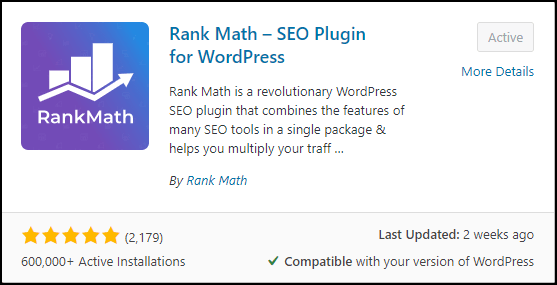
First, log in to your WordPress dashboard and go to Plugins > Add New.

Search for “Rank Math” and install it.

Rank Math

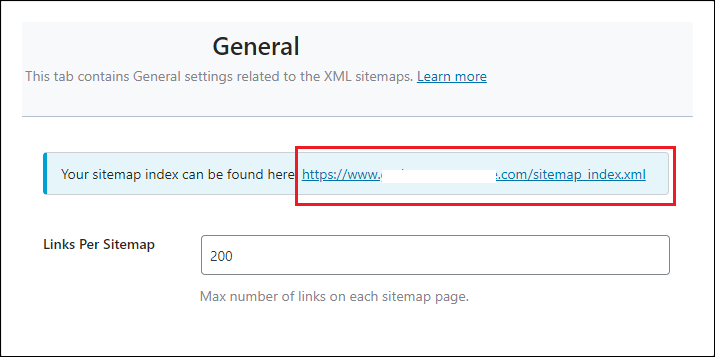
Upon activation, go to Rank Math > sitemap Settings.

From there, you can set how many links you want per sitemap page, exclude URLs, images in posts, etc.

At the top, you can see your sitemap URL which looks like:

“https://www.website.com/sitemap_index.xml”

Rank Math Sitemap

Now, you are ready to submit to Google Search Console.

2. Creating a sitemap without a CMS

If you are not using any CMS, you can still generate a sitemap.

For this case, Screaming Frog would be a great option. Screaming Frog is a desktop-based program (available on Windows & Mac) that crawls your website. The software comes both in free and premium versions.

If your site has less than 500 URLs, you can start using the free version of Screaming Frog to generate a sitemap.

Follow the steps given below

Once downloaded and installed, open the software on your computer.

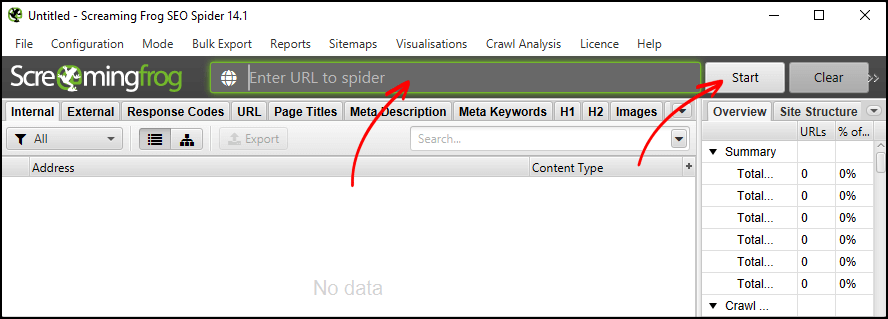
At the top of the screen, enter your website URL and click on Start.

Using Screaming Frog for creating an XML sitemap

It will start crawling your site and may take a few minutes to finish.

Once the crawl is finished, take a look at what pages are being crawled.

If the number is below 500, then you are good to go.

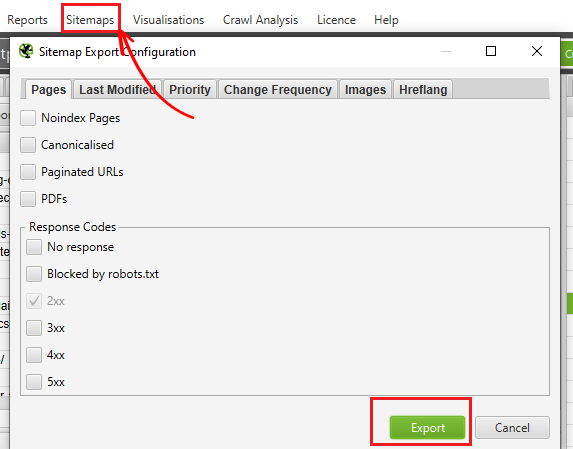
From the top of the menu section, click on sitemap > XML sitemaps.

Screaming Frog Sitemap

You can also include or exclude any options that you want in your sitemap file, such as Noindex pages, last modified date, Paginated URLs, PDFs, Images, etc.

I recommend keeping this default, however, you are free to make any modifications.

Once done, hit on the Export button and save the file on your computer.

Your XML sitemap file is ready to use.

3. Creating a sitemap in Wix

If you are using Wix, then you don’t need to manually create a sitemap.

Wix does it automatically.

You can view your sitemap file by going to “your-wix-site.com/sitemap.xml”.

However, in Wix, you wouldn’t have much control over your sitemap.

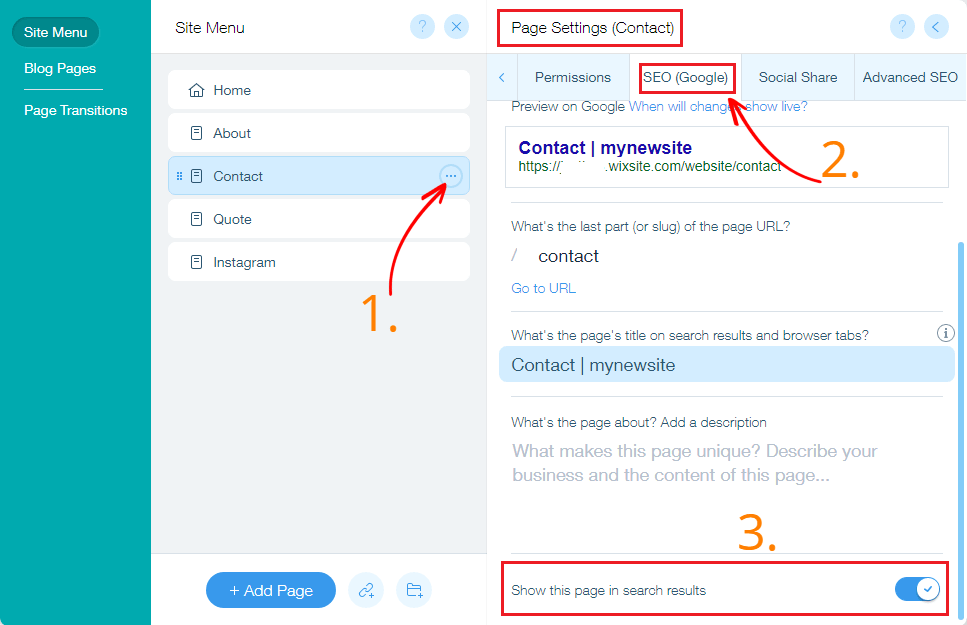
If you want to exclude a page from the sitemap, simply go to the “SEO (Google)” settings tab under page settings and turn off “Show this page in search results”.

Creating a sitemap on Wix

Note: Wix recommends that you submit your sitemap each time you make any changes.

4. Creating a sitemap in Squarespace

Like Wix, Squarespace also creates a sitemap automatically.

You can view your sitemap by adding “/sitemap.xml” at the end of your website’s URL, which is “your-website.com/sitemap.xml”.

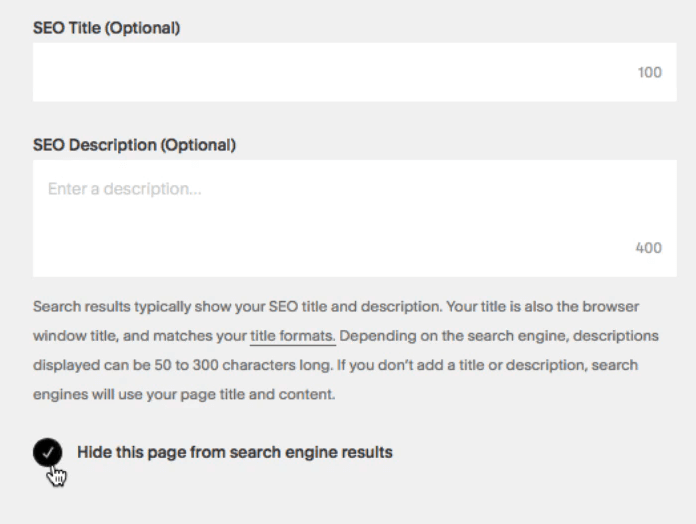
You can’t manually edit your sitemap in Squarespace, however, you can exclude pages from search results.

To perform this, go to Page setting and check “Hide this page from search engine results” in the SEO tab.

Squarespace Sitemap

5. Creating a sitemap in Shopify

Shopify automatically generates an XML sitemap file for you. You can view your sitemap file by going to “your-website.com/sitemap.xml”.

The generated sitemap contains all the products, collections, blogs, and webpages. The sitemap files automatically updated when made any changes.

Now your sitemap file is ready for submission.

Suggested read – How to optimize your Shopify site for SEO

How to submit an XML sitemap to Google

Now you have just created an XML sitemap file, it’s time for submitting to Google.

For this, you will need to connect your Google Search Console account with your website. Here’s the step by step procedure by Google.

Once connected, log in to your Google Search Console account and select your website.

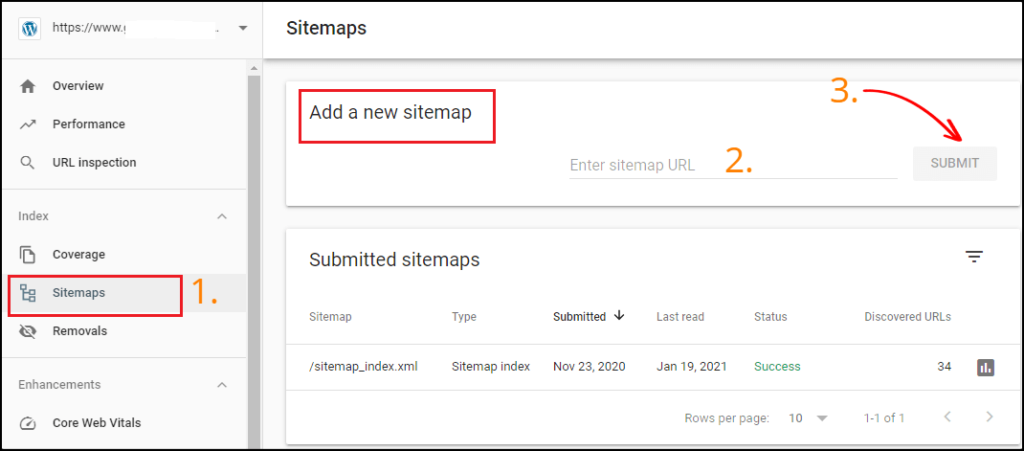
From the dashboard, click on the sitemaps.

You will see the option “Add a new sitemap”. Enter your sitemap URL in the blank field, and hit the Submit button.

Google Search Console Submit Sitemap

That’s it. Now, sit back and relax. Google will take care of the rest.

Fixing your sitemap errors to improve SEO

Generally, if your site consists of one or more technical errors, it’s really hard to figure it out. However, in most cases, it’s not even detectable unless you use a paid site auditor tool.

But, there is good news for you.

If you have submitted your sitemap to Google, you can see detailed index coverage reports to check if there is any technical error present on your site.

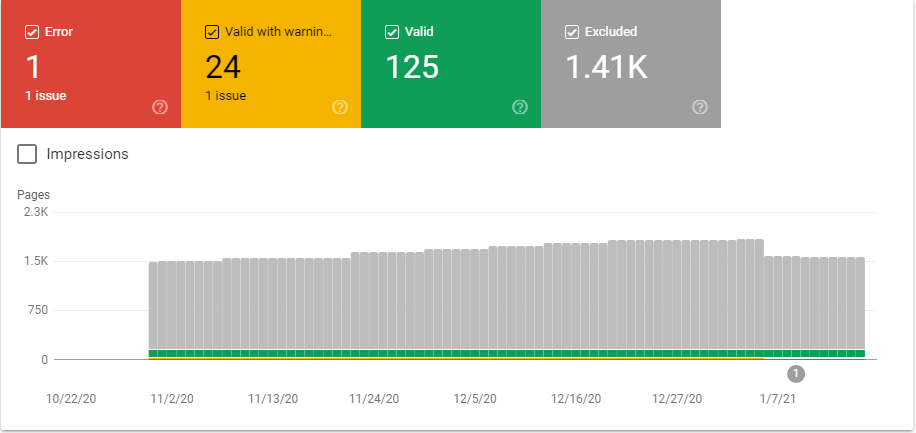
Log in to your Google Search Console account, and click on Coverage.

Then click on the Error, Valid with a warning, Valid, and Excluded tab to get the details.

Google Search Console XML Sitemap Coverage

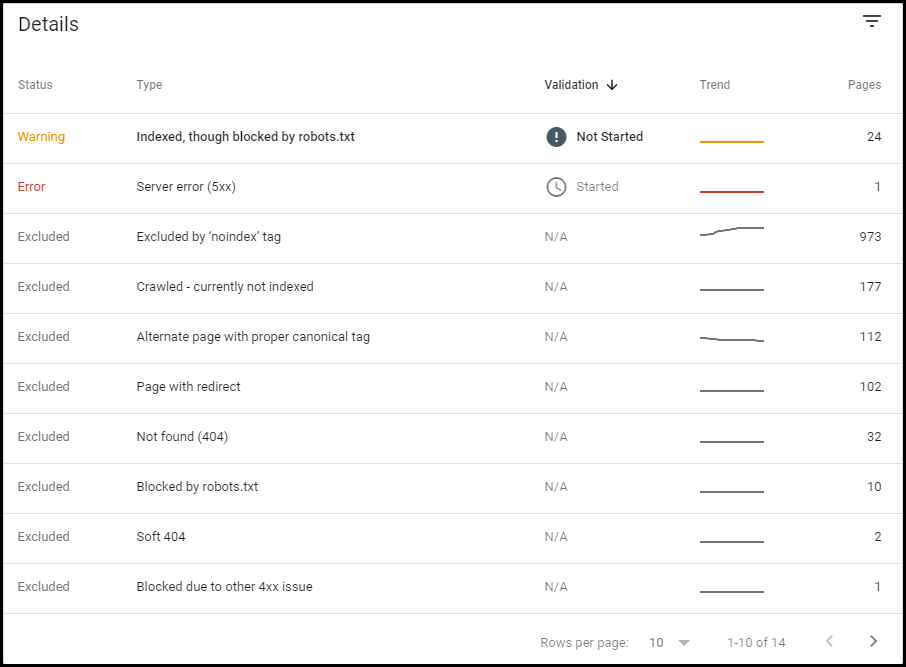
From there, you can check pages for:

  • Indexed but blocked by robots.txt
  • Pages that have a server error (5xx)
  • Excluded by ‘noindex’ tag
  • Crawled but not indexed
  • Not found (404)
  • Page with redirect
  • Blocked by robots.txt, and many more

Google Search Console Sitemap Coverage Error Details

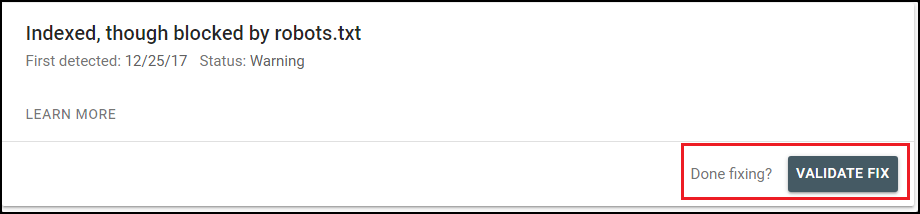
Click on each of the error pages to check what you need to fix. Once done, you can request Google to mark it as fixed by clicking on Validate Fix.

Once you fix all the technical errors with the help of your XML sitemap file, you can see a significant improvement in your search traffic.

Conclusion

Creating an XML sitemap is very simple and doesn’t require any technical skills. If you are using WordPress, you can create a sitemap using SEO plugins in just a few clicks. It’s also easier if you are not using any CMS.

There is no evidence that a sitemap boosts your website’s SEO, but it helps Google to find and index your website’s content faster. I also recommend you use a sitemap.

Submitting a sitemap to Google is just a tiny part of the full SEO game.

Jyoti Ray is the Founder of WPMyWeb.com. He writes about blogging, WordPress tutorials, hosting, and affiliate marketing.

How to create an XML sitemap and submit it to Google


Pinterest SEO guide: Eight tips for search-friendly pins

30-second summary:

  • Every pin has the potential to be discovered by thousands of users creating a chain reaction of activity.
  • Google loves Pinterest and places its pages on the top positions, including SERP features and Google Image search.
  • Linking your Pinterest account and website together is an important step towards better SEO performance.
  • Using the Pinterest Analytics dashboard will help you understand your performance.
  • Research your niche keywords to optimize pins and boards for the relevant key phrases.
  • Follow other related accounts and optimize your publication time to improve engagement.

Pinterest has recently become the third-largest social network in the U.S. With its popularity on the rise, it now has over 440 million monthly active users, who have pinned more than 240 billion posts to date. Keeping that in mind, one can’t help but wonder what the reason for its success is. 

What makes it stand out from the rest of the photo-sharing sites is the focus on the discovery and curation of not just yours, but also someone else’s content. Each Pin has the potential to be re-pinned by other users and then discovered by their followers, creating a chain reaction of activity.

Furthermore, lots of businesses use Pinterest as their product catalog. About 90% of weekly Pinners make purchase decisions on Pinterest, turning it into a great platform for businesses to market their products. 

So, Pinterest has tons of users and they have money to spend. How do you take advantage of that? Well, one way to make sure your Pins are popular with other users is to treat Pinterest as a search engine, which it kind of is. Optimize your Pins for discovery, follow best SEO practices, and your visibility is guaranteed to go up.

The icing on the cake here is Google’s preferential treatment of Pinterest. Unlike Facebook or Instagram posts, your Pins have a chance of appearing in traditional search results. Usually, Google directs users to Pinterest in the early stages of the buyer’s journey, when they are just searching for ideas:

Pinterest SEO guide

As you can see in the screenshot above, the first page of search results is practically littered with Pinterest pages. And if you switch to image search, then Google is even more likely to include Pinterest content:

Content listed from Pinterest

But first, let’s focus on Pinterest itself and see how you can improve your chances of being discovered by other Pinners:

Tip #1: Create a business account

Start with getting a free business account. If you don’t already use Pinterest, you need to create it from scratch. If you already have a personal account, you can either create a linked business account or convert your personal account into a business one.  

Conveniently, having a business account implies having a number of useful features that cannot be accessed with a regular account: 

Header

For starters, you have a header that can be full of either your latest Pins or the ones that have been recently saved by other users. Alternatively, you can pick any board that you like.

This kind of interface visually displays what your account is for. It is a quick way to draw people’s attention and help them understand what kind of products or services you provide.

Pinterest analytics

On top of that, you can check Pinterest analytics by clicking the Analytics button:

Pinterest analytics set up

Pinterest Analytics shows who sees your Pins, the number of views you get, what content your followers or other users click on and save the most, and lots of other important data. All of these features are essential to help you understand your performance on Pinterest.

Pinterest ads

You also have the option of using paid ads. In fact, there are different types of them. For instance, Promoted Pins that can be found in the home feed and the search results of your target audience. Or One-tap Pins that, when tapped, instead of taking users to your profile first, take them directly to your website. 

Website claim

You can claim your website and social accounts. Thanks to this perk, all of your Pins are shown with your name and profile picture. Even the ones shared by other people. It’s a great way to increase your discoverability and ranking in general.

Here is what a claimed business account looks like:

Claim your website on Pinterest to being optimization

And here is what a regular account looks like:

Regular Pinterest account example

Tip #2: Optimize your profile

Pay attention to your profile as well. Both your name and bio are of high importance when it comes to looking trustworthy and reliable. You can edit it in the Settings section: 

Edit your business profile in Pinterest for SEO

Name

There are two names that you need to create on Pinterest: your display name and your username. Your display name is what other users see on Pinterest, while your username is more like a unique ID used mainly for your URL.

For your display name, the main goal is to represent your brand and be easily found in search results. Add some keywords to provide a clear understanding of your content:

Add keywords for a better understanding of your account name

Bio

This is where you state the purpose of your account loud and clear. Make sure to feature relevant keywords in the first part of your bio. Add some personality or a call-to-action in the second. That can contribute to your profile’s searchability and users’ engagement. 

Tip #3: Prepare your website

Linking your Pinterest account and website together is another important step towards better SEO performance.

Pinterest tags

Basically, Pinterest tags are pieces of code you put on the pages of your website. They allow you to check what type of Pinterest content delivers the most traffic. This data is collected and sent back to your Pinterest account, where you can examine it and adjust your strategy accordingly.

You can use Pinterest tags to see what people do on your site after interacting with your Pins. What type of content attracts more viewers, makes them interested in your services, or urges them to purchase your products. At the same time, you can find out what type of content needs optimization or is of no use at all. 

Save button

With the help of the Save button on your site pages, your customers can save things from your website to Pinterest. This way your content can be spotted by a far greater number of people.

Here is an example of a website offering the Pinterest Save button:

Pinterest Save button

Tip #4: Find relevant keywords

Pinterest itself can help you find the right keywords. Similar to Google, it has an advanced suggestion system, always offering similar posts and ways to improve your search queries. 

For instance, if you search for evergreen plants, Pinterest will offer you a whole range of popular query modifiers. Adding them to your Pin’s description can increase their relevance:

Add descriptions to improve search relevance

If you are into a more advanced quest for keywords, you can use SEO tools that can help you build a high-potential keyword list. 

Tip #5: Optimize your boards

Keywords are also essential when you create boards for your profile. Make them SEO-friendly and add some searchable terms when naming them. In the screenshot below, you can see a perfect example of boards with strategic keywords:

Optimize your boards

Give some consideration to your board’s description as well. Try to make it detailed, coherent, and entertaining. Including keywords here is also to your advantage:

Add a cover photo to your Pinterest account

Another thing that can improve the discoverability of your profile is adding an eye-catching and memorable cover photo. It can take the visibility of your board to a whole other level.

Finally, make sure to categorize all of your Pins appropriately. They need to reflect the name and aim of the board. This way Pinterest can spread them most effectively. 

Tip #6: Optimize your pins

Obviously, your pins have to be awesome and trendy and all that. But there are also some technical opportunities that may push your pins even further and make them a bit more search-friendly.

Perfect aspect ratio

Since not all types of Pins display fully in search results, pay attention to their ratio. Pinterest diminishes the role of super-long images, so they don’t perform well in search results. And when uploading videos, avoid horizontal dimensions. 

A ratio of 2:3 — or 600:900 pixels — is your best option for images, while 1:1, 9:16, 4:5, 2:3 ratios are optimal for videos. Square ones are especially handy when you post videos from your Facebook or Instagram.

Rich Pins

One more tool in your collection is a unique opportunity to use Rich Pins. They automatically sync information from your website to Pinterest. In other words, they simply update each time something changes on your website. 

Pinterest offers three types of Rich Pins: product, recipe, and article. There is a slight difference between them, but the main thing is that Rich Pins allow for extra bits of information to be added to your post, like in this example of a recipe pin:

Use rich pins to specify your content type

You can add a title, cook time, serving size, ratings, and a list of ingredients. Recipe Rich Pins also let you specify that, for example, your recipe is vegan and gluten-free. 

Tip #7: Encourage engagement

Try to get more engagement on Pinterest. The more engagement you get the more likely your Pins are to be recommended to other users.

Follow other profiles

Follow profiles similar to yours. This way you can get into their followers’ recommendations. Alternatively, there is a point in following influencers and celebrities that fit in well with your brand or business. High-traffic accounts like theirs can also contribute to your visibility.

Choose the best time to post

The faster users see your post and react to it, the bigger chances are for your posts to be noticed by Pinterest and boosted in search results. 

According to a study by CoSchedule, Pinterest users are more likely to scroll their feed during their free time or in the evening. But, of course, it depends on the type of your content and your followers’ goals. Whether they use Pinterest for work tasks, to unwind, or for shopping. 

Connect your social accounts to Pinterest

Instead of building your follower base from scratch, connect all of your social accounts to your Pinterest profile. This way you are likely to get new followers faster and distribute your content across other platforms as well.

Communicate with your followers

Don’t forget to reply to comments and answer your followers’ questions. It’s one more way to create a solid customer base.

Tip #8: Check Pinterest analytics

If you need to make your account and its content better, Pinterest is always there for you. It has a great number of metrics, which you can use to improve your Pin performance, reach the right audience, increase your sales, and much more. 

For instance, Saves can show the number of times people saved your Pin to their boards. As well as Clicks that point out which of your linked Pins are clicked more often. These metrics can help you understand what kind of content gets more attention and, consequently, might be more profitable. 

Impressions are also essential for your SEO campaign. They give you the total number of times your Pins were shown in search results, someone’s feed, and through boards. With their assistance, you are able to spot popular and engaging content and concentrate on adapting your SEO strategy based on this data.

Keeping a close eye on such metrics is the best way to find new optimization opportunities not only on Pinterest. They come in handy when you want to improve your SEO performance where you need it most. In this article, you can find more useful tips about essential metrics to watch when doing SEO.

Final thoughts

With Pinterest being on the rise, you should make full use of it. Not only is it a great assistant with lots of helpful features and a prominent number of monthly active users, but it’s also a way to look at your online performance from another angle – to make it more efficient, adjust your SEO campaign, attract new customers, and boost your popularity. You can do all of this while creating thumb-stopping and eye-catching content through Pinterest SEO.

Aleh Barysevich is Founder and CMO at SEO PowerSuite and Awario.

Pinterest SEO guide: Eight tips for search-friendly pins


The business value of SEO in 2021: From revenue generation to reputation and retention

30-second summary:

  • SEO is without a doubt the most cost-effective channel for enterprises today.
  • SEO also adds incremental value in a number of different ways.
  • It helps maintain brand equity, helps inform product and sales.
  • SEO can also be used as a PR channel and vice-versa.
  • From consumer behavior trends to market and demand volatility, search behavior can provide the data businesses need to understand market drivers and pivot in real-time.
  • SEO adds value by providing a model for continuous digital improvement of the user (customer) online experience.

Those within the industry understand that the inclusion of SEO as part of a comprehensive marketing strategy is an absolute. But while we recognize that SEO holds the keys to digital success – from the insights and context it provides, to the optimization of content it can deliver – we sometimes overlook the additional business value of SEO.

The power of doing SEO now cannot be understated. As the most cost-effective channel for enterprises today, SEO also adds incremental value in a number of ways. In this article, we’ll consider just seven ways of them.

1. Brand awareness

Some tend to think about SEO primarily in terms of rankings and traffic. While both are great ways to measure the success of your SEO strategy, limiting yourself to those metrics alone can miss the wider value provided by a first-page result – whether it converts to click through or not.

Every search returns pages of results, and each time your product, service, or brand appears on page one of those results you create an impression. Those impressions are fundamental to brand awareness, which is the extent to which consumers recognize your brand, your product, or service.

In an endless sea of options, brand awareness is the first step in the marketing and sales funnel. Whether you’re promoting a new product or focused on retention, recall and recognition are key. SEO presents an opportunity to build brand awareness with every search.

In creating your SEO strategy, you will have ensured your site is easy to navigate, simple to search, accessible, and – critically – credible. Landing your business on the first page of results not only increases visibility but also means you’re more likely perceived as a leader in your industry.

2. PR and reputation

The shift from print media to digital has exponentially expanded your company’s potential audience. Online publications often have much higher readerships than traditional media outlets, and as such digital public relations support increased visibility of your brand.

Understanding that both online and traditional print publications leverage industry experts as content contributors, as step one in your PR and reputation strategy you’ll want to ensure you’re visible to be considered an expert in your local area and/or your industry.

Once in the virtual domain as an expert, your credibility continues to grow and has an incremental impact with each piece of coverage. News publications tend to have high domain authority, as links continue to be one of the most important ranking factors for search engines, each and every media mention further optimizes your searchability with a multiplier effect that continually increases your credibility. and visibility.

3. Consumer and market insights

Throughout the ongoing global pandemic, we’ve seen incredible shifts in consumer behavior worldwide. As consumers continue to re-evaluate everything from their careers to lifestyles and demand more from the brands they choose to buy from, seeking meaning in their purchasing, the insights SEO can provide offer incredible value. From consumer behavior trends to market and demand volatility, search behavior can provide the data businesses need to understand market drivers and pivot in real-time.

Using SEO results and search patterns, combined with the right strategic thinking, can lead to continuous improvement across a number of departments.

Consider content strategy, for example. Marketers know that high-quality content is critical to sales strategies, but what makes for success depends on the needs and wants of users. Understanding user search patterns can help to inform desirable content throughout the buying stages, ultimately leading to better conversation rates.

4. Content and cross channel activation

Of course, we can’t consider content strategy without addressing cross-channel activation. Integrating and activating content across marketing channels – from video to email to verticals and beyond – allows you to reach your customers in the places they are. It acts as the starting point for the personalization we know consumers crave.

By implementing optimized content in an integrated approach that covers everything from paid search to social, an intelligent content framework supports strong organic search success while fulfilling consumer curiosity by ensuring that content is optimized not just for one channel, but for all channels.

The business value of SEO in 2021 - Research showing content cross channel activation

Source: BrightEdge SEO Platform Research

Smart content is optimized from the point of creation and ready to activate across channels. The key to successful cross channel activation is a true understanding of customer intent, targeting customers with the detail they want and need, when they need it, and optimizing to ensure visibility.

5. Customer experience and retention

The hallmarks of a good digital experience are key components in the assessment search engines perform when considering whether your site is the best result to showcase. From usability to the relevance of content and simple search functionality, Google wants to see that your site and content are the best answer.

SEO adds value by providing a model for continuous improvement of the user (customer) online experience. Add to that the personalization facilitated by SEO and you’ve got yourself the basis of a top-notch customer experience.

As customers across the globe are craving more personalized experiences, successful businesses are looking at the customer experience holistically – and SEO is a great tool to support the complete customer view. Providing a package of integrated tools and features, SEO insights are an opportunity to take digital strategy from the page to the personal by leveraging data to deliver personalized experiences to customers in real-time.

6. Offline and local

Consumers leverage online research to inform their offline activities, as we well know. Mining SEO insights informs offline and local campaigns, as well.

From a service perspective, from comments to questions online, what consumers want to know in the digital space can lead to conversation starters in the physical space. Arm your customer service representatives with these insights for more meaningful in-person engagements, ultimately deepening the customer relationship.

Informing an in-store experience with SEO insights doesn’t end with sales training. In understanding search terms that returned no results, your buyers are presented with items your customers want you to offer, providing opportunities for new product lines and/or diversification in your services.

7. Revenue and lead generation

Customer acquisition can be costly. We know that inbound strategies are the most effective, and that SEO is a key source of leads. Rather than investing countless hours in outbound marketing strategies, drawing in customers with the information they need – when they need it – as they research and review throughout their buying journey provides a cost-effective avenue of lead generation.

Whether B2B or B2C, revenue grows when the right content is delivered to the right customer, at the right time. Optimizing online content across channels can generate more traffic, more conversions, and thus provide more revenue.

In short, having the right SEO strategy can bring success well beyond the digital space. Understand that set-it-and-forget-it is a strategy doomed to fail. Committing to monitoring and activating SEO insights in as near to real-time as possible gives organizations the opportunity to meet customers and prospects where and when they’re most receptive to your messaging.

From sales to service and loyalty, when supported by the right insights there are almost endless opportunities for companies to reap the value of SEO.

Jim Yu is the founder and CEO of BrightEdge, the leading enterprise SEO and content performance platform.

https://www.searchenginewatch.com/2021/01/25/business-value-of-seo-in-2021-from-revenue-generation-to-retention/


Four marketing strategies to increase app store downloads and engagement

30-second summary:

  • App marketing is intensely competitive. There are limited channels to market your app but millions of apps to compete with. It’s important to maximize every opportunity.
  • Like SEO, App Store Optimization involves keyword research and optimization. App developers have limited space for their keywords and much competition to face. Hence, precision is highly necessary.
  • App ads on Facebook are unlike other types of ads. You need Facebook SDK, in addition to the ads manager, to properly track app downloads and engagement.
  • Rewards should turn your app users into customers. When done right, incentives can generate social proof and viral loops.
  • There is ASO but there’s also app SEO. Content formats such as blogs, podcasts, and newsletters can make your app website/landing page gain higher rankings on search engines.

Your app is competing for visibility with 1.82 million other apps if it’s on Apple’s App Store, or 2.7 million apps if it’s on Google’s Play Store. That’s tremendous competition. 

Marketing your app almost seems a lost cause. But while making your app stand out is indeed a daunting undertaking, it is possible, as long as you apply the right strategies. 

Effective app marketing involves identifying key types of channels for discovery and engagement (app stores, social media, search engines, and in the app itself) and targeting your audience. 

1. App store optimization/landing page optimization 

Newcomers make up only 8% of apps listed on the App and Play store top charts, going by Adjust’s App Trends 2020 Report. Considering that the app store is your app’s main chance, by far, at organic discovery, it need not be said that your App Store Optimization (ASO) must be on point. 

ASO is to apps what SEO is to websites. And both have their similarities, especially in the on-page/off-page strategy dichotomy. And like SEO, ASO begins with improving visibility. 

The first tip to achieve this is to use an attractive name and logo. Those two are the first things users see when they find your app. But before then, you have to make sure people can find it, right? And not just anyone – the right people, your target audience. 

When optimizing your app store listing, what factors must you consider, keeping in mind that app indexing differs between stores?

  • App Name/Title: feature relevant keywords to enable the app store algorithm to properly identify and categorize your app. You have 50 characters for this on Play Store while Apple’s App Store also includes a subtitle, for keywords that don’t fit the main title.

App store optimization tips - Work on the title

  • Apple, unlike Google, allows developers to input specific keywords in a private field on its App Store. For Google, you have a short description field (80 characters) and a long description page (4000 characters) which are both public. 
  • Include keywords that are relevant to your app and which accurately describe its features, functionalities, and benefits.

That is as much as you can influence your app’s rankings. Other factors, beyond your direct influence, include reviews and ratings, download and uninstall rates, app updates, etc. 

2. Facebook ads strategy 

ASO has its place and you can’t rely on app stores entirely for app discovery. Not if you’re not a big-name brand. Your marketing strategy should tilt more towards the paid, discussed below. As Christian Eckhardt of Customlytics says,

“The likelihood of a user going to a store to browse or discover new apps has declined significantly, compared to the early days of the stores.”

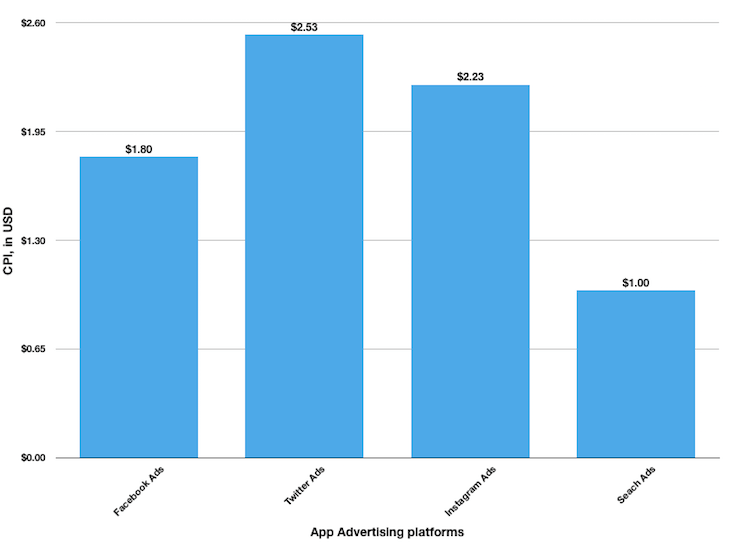
By creating a page on Facebook for your app, you can run ads with custom call-to-actions to gain publicity for your app and increase downloads. Facebook Ad Manager allows you to set an objective for your app: whether you are targeting app installs or app engagement (traffic). Facebook Ads offer a competitive ROI with an average cost-per-install rate of $1.8, compared to Twitter’s $2.53 and Instagram’s $2.23. 

CPI using Facebook ads

To run ads for your Facebook app,

  • First, set up Facebook SDK. This is necessary to optimize your app for mobile ads, though you can still run ads for unregistered apps using the app store URL. 
  • Continue setup in the Ads Manager, where you select your target audience, budget, bid, creative format, and other options. 

  • Finally, continually measure your ad performance, track engagement data, and gain analytics insights using Facebook SDK and within the Ad manager.

Measuring ad performance that adds to your app store downloads

3. Use a rewards system 

This is a strategy that helps you to convert your app users into marketers. Of course, this assumes that you have an app that delivers value to its users. The next step would be to incentivize app engagement. 

In-app rewards that can facilitate engagement include unlockable customization options, discounts, push notifications, in-app currency (points, coins, etc.), vouchers, and other freebies Many apps (especially games) already feature these. But here, motivation is important. What kind of behavior does/should the reward system encourage?

  1. Retention 
  2. Publicity
  3. Reviews

Beyond app retention, your in-app incentives should encourage actions that publicize your app. For instance, you can offer a discount or some other benefit to people who share the app or refer users (using referral codes). We know this works since old research by Google showed that people find new apps through friends and family than by any other means. Likewise, incentivize app users to rate and write reviews of your app on the store. Apart from promoting the goodwill of an app, positive reviews drive up app store optimization rankings, increasing the visibility of your app.

But app retention is important too. Only 32% of users would return to an app at least eleven times, a six-point reduction from last year’s rate. And app stores consider high uninstall rates as signs of a low-quality app. Such an app would get lower rankings and may even be removed from the store eventually. Incentives keep people using the app and create viral loops.

4. Content marketing strategy 

Search engines are a great place to gain publicity for your app. Think about it. Someone hears how great your app is and immediately searches the name, only to find scanty or no relevant results at all. You need a creative and consistent content marketing strategy to convert search engine users. 

You can use a blog to highlight the benefits of your app, inform users of updates, and teach them how to maximize the features of the app. If businesses that blog gain 126% more leads than those that don’t, why not apps? The popular investing app Robinhood’s marketing strategy features a blog where they teach people the basics of investing and finance.

Using content marketing to make your app more visible and valuable in the audience's eyes

But there is more to blogging than just posting articles. You need to research keywords to find the ones that will help you convert the most. That’s what enables search engines to effectively rank your blog posts. 

In addition, content marketing is not limited to blogging. You may also take advantage of newsletters, podcasts, and YouTube videos, as Robinhood does. Called ‘Robinhood Snacks’, it delivers a daily newsletter with financial news to subscribers (irrespective of whether they use the app or not) and breaks down business stories via podcasts as well. 

Content marketing is broader though. You also need backlinks to rank. And that means getting your app featured on ‘top apps’ listings, external reviews, guest article mentions, all of which should contain backlinks to your landing page. Of course, it need not be mentioned anymore that you need a highly-engaging landing page with a clear call-to-action that takes visitors to the app’s store page.

A simple content marketing checklist for app optimization will look like the following:

  • Research ideas that are related to your app and relevant to your audience. 
  • Craft topics from these ideas and develop engaging content around them. 
  • Use mediums that your audience uses the most. For instance, podcasts are a great idea if you are targeting millennials. 
  • Feel free to repurpose content. Your blog post can be repurposed into a YouTube video. You can transcribe a podcast interview and convert it into an article, etc. 
  • Always include a call-to-action 

Conclusion

If you implement the strategies discussed above, you can rest assured of steady app growth. However, the most important factor is that the app is indeed valuable. The best apps are those that advertise themselves. But virality does not happen overnight. Its the result of the consistent application of the right strategies.

Guy Sheetrit is the CEO of Over The Top SEO, an award-winning marketing agency that provides customized SEO marketing solutions for ecommerce, local, and Fortune 500 companies. He can be found on Twitter @guysheetrit.

https://www.searchenginewatch.com/2021/01/22/four-marketing-strategies-to-increase-app-store-downloads-and-engagement/


Top four SEO myths debunked: Director’s cut

30-second summary:

  • SEO is rife with myths and it is difficult to separate fact from fiction.
  • SEO and SEM, while complementary, are not the same thing and cannot be approached the same way.
  • SEO is not a temporary or one-time adjustment — far from it.
  • Your SEO agency, while rockstars are not superhuman. They cannot do everything for you.
  • SEO results are not instant.

Myths, what are they? To Joseph Campbell, “myths are the world’s dreams. They are archetypal dreams and deal with great human problems.” Ultimately, they serve as a conduit to understanding. While true for most myths, this definition falls apart when it comes to the concept of SEO myths.

If you’ve been in digital marketing for any length of time, you’ve run into the fact that it is a fractured space. Between full-service agencies, vertical-specific boutique shops, independent consultants, and more, separating myth from reality when it comes to prescriptive SEO advice is a significant hurdle.

While the number of SEO myths out there are innumerable, I will nail down the four that I come across most often.

SEO myth #1: SEO and SEM can be approached in the same way

“If all you have is a hammer, everything looks like a nail.”

Although there are many useful concepts that can be taken from SEM and applied to SEO, looking at each channel as the same is a mistake. To start, consider this: a powerful concept in the management of Google Ads is to optimize your use of negative keywords — keywords that you do not want to show up for.

Because of how immediately transactional and visible SEM is — you set a budget, create an ad, and press go — it is common for people to carry that mindset over to SEO. Rather than thinking of what keywords are viable, those coming in with an SEM “bias” can bring a perspective that’s largely focused on what isn’t viable. This is accompanied by the belief that as long as you continue to build out what doesn’t work, what does work will rise to the top.

Unfortunately, this can stymie conversations around a campaign’s keyword research — the launch pad for all other SEO activities — and as you’ll see below, there isn’t a need to contextualize your keyword research within what doesn’t work so long as you approach that research from a sound SEO framework.

Keyword variations and match types

It is not uncommon for Google Ads campaigns to target thousands of keyword variations across a handful of match types. This is done to ensure that you’re able to connect with your audience despite slight variations in the ways that they may type and look for a certain query.

While a necessary practice in SEM, this is not needed in SEO. Though tracking the rankings of thousands of keywords is something we’ve seen our customers do, if you try to target every keyword you can think of, you make it difficult to target and optimize for those that matter most.

When done right, your keyword research for SEO purposes should be chunked out in “themes”. This process, referred to as thematic keyword research, allows you to distill a semantic grouping into a handful of related keywords. This then allows you to focus your optimization efforts and theoretically enables you to surface for all the keywords you would otherwise directly target in Google Ads.

Frequent changes to landing pages to improve ad quality metrics

Another habit that people bring over from SEM to SEO is the frequency that landing pages are changed, says Victorious SEO Strategist Jenni Bojanin. In SEM, specifically ad platforms like Google Ads, these changes help improve ad quality metrics like Quality Score and Landing Page Experience, which allows for a lower cost per click (CPC).

That said, frequently changing pages that are core to your SEO campaigns can cause problems. At best, depending on how often search engine spiders crawl your site, you could be making changes that are never seen in the pursuit of metrics that apply to SEO. At worst, you could be making changes at a frequent enough clip that it confuses search engine spiders and negatively impacts the indexation and categorization of the page itself.

SEO myth #2: SEO is a temporary fix

“You should not drive over 50 mph and no more than 50 miles with a donut-type spare tire. Driving for long distances on a spare tire can potentially cause damage to other car parts, including the transmission.”  – American Automobile Association

Viewing SEO as a temporary fix to your digital marketing problems is like riding on a spare tire at speeds and distances greater than recommended. It’ll work in the short term, but after a while, you can end up doing greater damage than if you had approached the problem with a long-term view on fixing the issue, that is, a new tire.

SEO is not a channel but the foundation of all other digital marketing activities. As such, we have frequent conversations with prospective customers about how integral it is to not view SEO as something you do one time to “clean up” a site, but rather as something to maintain long-term.

To better contextualize this, I’ll cover two scenarios.

The first is a company with a large site with many individuals responsible for the upkeep of the said site. As a site grows in size, the number of individuals you need to manage it begins to grow in tandem. And as you add more individuals, the risk of things going awry and negatively impacting the site’s SEO grow as well.

Now, let’s say you have a smaller site. Maybe you’re a solopreneur or a smaller mom-and-pop-type shop. It’s reasonable to think that with such a small site that the number of things that can go wrong has got to be very small. That is true, but only from the perspective of what’s happening on-site.

In SEO, the saying “if you’re standing still, you’re moving backward” is a very real thing. Just because there’s a comparatively small chance your site has egregious on-site issues, doesn’t mean your competition isn’t continuing to build out their site, both on- and offsite.

In both scenarios, regularly investing time and resources into your site’s SEO over, ideally, the life of the sites would prevent the two negative consequences of “quick fix” SEO: missing egregious issues due to a  lack of having someone reviewing the site and becoming complacent while your competition focuses efforts off-site.

SEO myth #3: Your SEO agency will handle everything for you

At my agency, Victorious, we view our engagements with our customers as partnerships. There are many things that a partnership can mean, but the idea that a partner should handle everything for you is not one of them.

Just like a one-to-one human relationship, a partnership works best when both partners are engaged and committed to finding ways to work together to achieve shared goals.

To better expand on this idea, I consulted an article on Oprah Mag titled, “The Best Relationship Advice, According to Experts”. In it, I found two helpful analogs to how your relationship with your SEO agency should ideally function, which are:

Schedule dates to talk about your relationship

If you don’t put time on the calendar to meet with your SEO agency, you’re missing out on an opportunity to better empower them to deeply understand your business and its needs. As much as you think the discussions you’ve had with them during your pre-sales and onboarding meetings should be enough, they’re not.

Your business is evolving — probably daily. Your priorities will shift and resources will change. If you’re not regularly updating your SEO agency about these shifts and changes, you cannot expect them to properly execute a strategy that ultimately serves your company well.

Don’t expect your partner to be your BFF

Just like you’d be setting yourself up for failure by expecting your partner in real life to be everything for you — confidante, therapist, etc. — you’re doing the same by expecting your SEO agency to handle and/or keep an eye on all aspects of your digital marketing.

When engaging with an agency, be very clear upfront with what your expectations are and allow space for the agency to push back on anything that would be out of scope. If you’re already engaged with an agency, be prepared to have open and candid conversations about your needs and understand that some of those needs may not be able to be accommodated by the agency.

And that’s ok. Let your agency do what they’re best at. Don’t try to fit a square peg in a round hole. Besides, most agencies will have referrals or be able to point you in the right direction to help support the need you are looking to fulfill.

SEO myth #4: SEO results are instant

Not even Instant Noodles are instant. Why would you think results from a marketing channel would be?

While it is true that every site, both new and old, likely has low hanging fruit that could result in fairly quick wins, seeing sustained and compounding SEO results takes time.

Depending on who you ask, the SEO flywheel can take a minimum of three to four months and up to one to two years before any visible “self-propulsion” of the flywheel begins to take effect.

Why is this the case? Because of the myriad of variables involved — some within your control, and some outside of your control. The top three are:

Competition

If you’re entering into a competitive space like credit cards with a brand new site, there are two elements of competition that you need to consider. The first is that a space like credit cards automatically lends itself to a lot of online competition since they are often targeted towards nationwide audiences, rather than regional ones. That alone means that the number of sites you’re competing against rise exponentially.

The second element to consider is the types of companies you’re competing against in the space you’re operating within. With credit cards, you’re going to be operating against some of the largest businesses in the United States, for example, companies like Bank of America, Discover, and the likes. The larger the business, the more likely it is that they employ SEO professionals, and therefore the more likely you are up against sites that are fairly well optimized.

Inbound links

In case you haven’t heard recently, links continue to be a top-ranking factor on Google. As a testament to that, Andrey Lipattsev, a Search Quality Senior Strategist at Google, stated years ago in a conversation about the top two ranking factors outside of RankBrain: “I can tell you what they are. It is content. And it’s links pointing to your site.”

And this isn’t going to change anytime soon.

So, how do you identify how many links you need to start surfacing on page one of the search engine results page (SERP) of the queries you’re targeting? In an earlier article I wrote for Search Engine Watch, “Five SEO tips that capture holiday attention and boost sales”, I discuss how to understand link acquisition needs.

The steps are broken down here succinctly:

  1. For your target queries, take a look at the number of Referring Domains (RDs) pointing to the pages ranking in positions one through five for those queries. You can achieve this through tools like Ahrefs, SEMrush, and the like.
  2. Once you get the number of RDs, average them.
  3. The product of this is the number of RDs you realistically need to break into the top five of page one of your queries’ SERPs.

Content

According to Victorious Content Strategist Ashley Cardell, when it comes to SEO content creation, a handful of things come into play. Those things are content length, the search intent of the primary query the content is targeting, and the cadence at which you should be publishing new content.

To figure out your content needs, a good first step is – gauging the number of pages your top organic competitors are ranking for. Ahrefs makes it easy. After plugging in the URL of the competitor you’re assessing, click “Top Pages” in the left-hand pane and look for the section that says the number of results, like the picture below:

Based on this number — 8,393 — you now have a loose target with regards to the number of content pieces you would need to produce to achieve “competitive parity” in terms of content footprint.

In Conclusion

Marketing is hard. With so many channels, competing internal interests and shared budgets, a shifting landscape, and ever-increasing goals, it’s understandable that you’d be tempted to apply the logic of a channel you know to one that you don’t know. I wish it worked that way, too. However, applying that kind of logic makes you vulnerable to falling for the myths of SEO.

SEO and SEM are as distinct as night and day. There is some overlap between them, and they complement each other, but they are not the same. Additionally, SEO should not be looked at as a short-term or one-time fix. It should be part of your long-term digital strategy. Within that strategy, it is important not to expect your agency to handle everything, but rather treat your agency as your valued partner and consultant. And most importantly, always remember that when implementing SEO into your strategy, keep in mind that results are not instant, and will take time.

With the above, I’ve given you things to look out for when approaching SEO with a predominantly SEM background. But at the end of the day, these tips won’t help you if you don’t view SEO as a foundational element to your overall marketing mix rather than a “set and forget” channel. With SEO, take the long-term view and things will pan out in the end.

Houston Barnett-Gearhart is Director of SEO at Victorious.

https://www.searchenginewatch.com/2021/01/21/top-four-seo-myths-debunked-directors-cut/


How to perform SEO A/B testing in Google Search Console

30-second summary:

  • SEO A/B testing allows site owners to understand whether the changes they make to their website have a positive impact on keyword rankings.
  • Anything on a website can be A/B tested, but the best variants to test are those that have a direct relationship to Google’s ranking algorithm.
  • How site owners can best execute an SEO A/B test will depend on the size of their website and their ability to easily roll back changes.
  • If an A/B test proves that a specific optimization is effective, a site owner can more confidently incorporate identical or similar changes to other pages of their website.

For SEO strategists, it is sometimes difficult to know which of the many changes we make to our websites actually impact their overall SEO performance. Moving websites from page 10 to page 2 can usually be accomplished by following SEO best practices, but the trek to page 1? That requires far more granular attention to the specific changes we make to our landing pages. Enter SEO A/B testing, one of the best ways to narrow in and understand the effectiveness (or ineffectiveness) of specific optimizations.

Many digital marketers are comfortable using A/B testing features in their PPC campaigns or to analyze user behavior in Google Analytics, but fewer are incorporating this powerful strategy to better understand which of their on-page optimizations have the greatest impact on keyword rankings.

SEO A/B testing can seem intimidating, but with the right tools, it’s actually fairly simple to perform. Not only does A/B testing help SEOs identify the most impactful optimizations, but it also gives them a way to quantify their efforts. Although SEO A/B testing is more often utilized by advanced SEO strategists, site owners who are comfortable working on the backend of their website have a great opportunity to elevate their SEO strategy through well-structured A/B tests.

What is SEO A/B testing?

When it comes to controlled experiments, testing two variants is the fundamental building block from which all other testing is built. A/B testing is simply measuring how a single variant impacts an outcome. In the case of SEO, the outcomes are either better, worse, or static keyword rankings.

It doesn’t take much to get started. You’ll need Google Search Console for one (the absolute truth of your SEO rankings), as well as two clearly defined variants you want to test out. Lastly, site owners need to have a dev or staging environment where they can save a version of their website prior to the SEO A/B test just in case the changes do not produce the desired results.

Best use cases for SEO A/B testing

Anything can be A/B tested on our websites, but for SEO purposes, certain site elements are more likely to result in keyword rankings improvements because of the weight they carry in Google’s algorithm. For that reason, the below elements are the best use cases for SEO A/B tests.

Title tags

Choosing title tags is so important and has a huge impact on search results. Title tag changes are very impactful from a rankings perspective because they directly influence click-through-rate (CTR). Google has a normalized expected CTR for searches, and if your landing pages continually fall below the mark, it will negatively impact your overall chances of ranking.

Meta descriptions

For those websites that already have a lot of keywords on page one and are therefore getting lots of impressions, A/B testing meta descriptions can be really beneficial. Like title tags, they directly impact CTR, and improving them can result in significantly more clicks and thus better rankings. 

Schema markup

If you can, it’s good to add schema markup to all of your web pages (you miss all the shots you don’t take!), but if certain pages on your site still don’t have schema.org markup, adding it can be a great use case for an A/B test.

Internal links

Internal links communicate to Google site architecture, and they also distribute PageRank across our websites. Getting internal links right can produce dramatic keyword ranking improvements, particularly for larger websites with thousands of landing pages. Focus on header and footer links because of how much they shift PageRank. For websites with product pages, you can use A/B testing to find the best anchor text for your internal links.

New content

Adding good content to your landing pages is always beneficial because longer content implies topical depth. Using a landing page optimizer tool can help you improve the semantic richness of your content, and a subsequent A/B test empowers you to measure whether Google positively responds to those quality signals. 

Large groups of pages

For ecommerce sites or those who may add a large group of pages all at once, you can use A/B testing to measure whether those pages are crawled and indexed in a way that positively or negatively harms your existing rankings.

Information architecture

There are certain elements of information architecture that are more specific to SEO. Google likes page experience features like jumplinks and carousels, so understanding the impact of adding these features to your web pages is another reason to perform an SEO A/B Test.

Site migrations

Whenever you make core technical changes to your website, A/B testing is a great way to measure how those changes impact keyword rankings. It also helps prevent your site from experiencing a significant rankings drop in the long-term. 

The types of SEO A/B testing

There are a few different types of A/B tests that you can execute on your website. It will largely depend on the number of landing pages you have as well as the category of variants you are testing out.

A then B

The most basic form of A/B testing, this type of test will simply compare the performance of a single page with one different variant. This type of A/B test is better for smaller sites and easier to implement, particularly if you’re confident that the changes are in the right direction.  

Multi-page

This type of A/B test allows for far more statistically significant results and can be executed on large sites with hundreds to thousands of landing pages. Instead of measuring a single variant on a single page, pick two page groups of similar pages (I recommend at least 50 pages per cohort) and change the variant on all of those pages.  

Multivariate

This common form of experimentation has the same core mechanisms of an A/B test, but it increases the number of variants being tested. Multivariate testing can be great for measuring user behavior, but it is less effective in measuring search performance when you’re trying to discover whether a specific optimization has a direct impact on keyword rankings. 

How to perform an SEO A/B test 

The easiest way to do A/B tests is by using site snapshots and rollbacks. Basically, you take a site snapshot, make the change to your site, and sit back for a week and watch what happens. If the change to the site has improved your SEO, you’ll see it in your benchmarking. If you’ve made a mistake, then you just roll back to a previous version of your site and move forward with different optimizations. 

Here is a simple step-by-step process of an SEO A/B test:

  1. Take a site snapshot or do a site backup prior to implementing changes so you can return to a previous version of your website if the change is not effective
  2. Determine the variant being tested (for example, title tag, schema.org, and the others) and make the change to a page or cohort of similar pages
  3. Wait 7-14 days to determine the impact of the change
  4. Compare the keyword rankings for the variant page/s to the original. This can be done in Google Search Console or a Google Search Console Dashboard 

If the optimizations are impactful, you can proceed with making similar changes to other pages of your site. More targeted changes like adding keyword-rich title tags and meta descriptions won’t necessarily directly translate to other pages. However, more technical optimizations like schema.org and information architecture can be implemented across the entirety of your website with more confidence if an A/B test proves them impactful.

Some practical advice for SEO testing across hosting environments

The way you proceed with step one will depend on your dev and staging environment. If you’re hosting on DigitalOcean, you can take site snapshots. If you’re on WPEngine, you can choose a site backup to restore from. For the best in class, try Version Control from Git, which allows you to roll back to any version of your website. 

Version Control is like Track Changes on a Word Document, but the history never gets deleted. With Version Control, even if you delete something or change it, there is a chronology to all of the changes that have been made — when a line of code was created, when it was edited — and you can roll back at any time.

It’s also important to make sure all of the in-development pages and test environment pages on your site have the robots no index tag. Some SEO specialists might tell you that adding the pages to your blocklist in robots.txt or with on-page rel canonical tags would be sufficient, but at LinkGraph I’ve seen numerous examples where pages or subdomains were added to robots and continued to be in search results for months. Just adding a canonical tag is insufficient at blocking the dev domain from crawling and indexing.

The best strategy is to use the robots no index. The even better strategy is to use both robots no index and rel canonicals for added protection.

How long does it take to know whether the variant was effective?

How long you wait to measure your A/B tests will depend on how often Google crawls your website. If you test parts of your domain that aren’t crawled often, you may have to wait longer in order for Google to actually see your changes. If you’re changing primary pages that Google crawls frequently, you can likely see whether those optimizations had any impact within 7-14 days.

As you evaluate the effectiveness of your optimizations, beware of confounding variables. Multiple backlinks in a short period of time, adding Javascript, and of course, algorithm changes, can sharply impact keyword rankings. Any type of experimentation is more accurate when you can eliminate variables, so do your best to not schedule A/B tests during link building campaigns, core algorithm updates, or any period of high search volatility. 

When done correctly, A/B testing can be a powerful way to refine your SEO strategy toward maximum results. Not only can A/B testing help site owners make more data-driven decisions, but it can also help SEO strategists prove the value of their work to clients or executive leadership who may be wary of investing in SEO.

Manick Bhan is the founder and CTO of LinkGraph, an award-winning digital marketing and SEO agency that provides SEO, paid media, and content marketing services. He is also the founder and CEO of SearchAtlas, a software suite of free SEO tools. You can find Manick on Twitter @madmanick.

https://www.searchenginewatch.com/2021/01/20/how-to-perform-seo-a-b-testing-in-google-search-console/


Eight great ways to audit your ecommerce site’s SEO

30-second summary:

  • Optimizing your ecommerce site’s SEO is essential to maximizing your ecommerce site’s traffic and revenue potential.
  • Improve your SEO by structuring your website and page in a way that is easy for Google to understand.
  • Pagespeed optimization is a necessity, not an option, with the upcoming algorithm change.
  • Writing a relevant, informative blog on your ecommerce site will help increase organic traffic.

A recent statistic shows that 33% of global ecommerce traffic comes from organic searches. In other words, you will be missing out on a significant portion of potential traffic if your ecommerce site is not optimized for SEO. Although some SEO components are not entirely within your control, you can still do many things to improve ecommerce site’s SEO.

In this article, we’ll go over eight ways you can audit and improve on your ecommerce site’s SEO health.

Additionally, we will discuss why it’s now more important than ever to optimize your page speed for the algorithm update in the coming months.

Let’s get started.

1. Canonical tags for filtered pageviews

In most ecommerce sites, you can filter product types based on different categories, such as color, fit, and size.

If your ecommerce site has many filtered pages, you want to use canonical tags in your filtered pages to avoid duplicate content.

Having duplicate content on your site can make it difficult for Google to rank your page since your duplicate page will compete for the top spots in search results.

The image below shows filters on the Underarmour website. You can also see that the URL comes with the “/shoes” text at the end when you filter based on shoes.

Ecommerce site's SEO tips - filters-on-underarmour-site

By placing the canonical tags on your filtered pages, you tell a Google crawler which page is the main page you want to rank.

In this case, the canonical tag on “underarmour.ca/en-ca/d/mens/shoes” points to the “underarmour.ca/en-ca/d/mens” URL.

Ecommerce site's SEO tips - Use canonical tags

This lets Google know that the latter URL is the primary URL you want to rank. You will also prevent your site from potentially receiving a duplicate penalty from Google.

2. Optimize a meta description for each page

Does each one of your pages have a unique meta description?

Ecommerce site SEO tips - Optimize your meta descriptions based on your keywords

Writing a relevant and unique meta description for each page increases the likelihood of people clicking your link. 

Since click-through-rate (CTR) is an important ranking factor in Google search results, you will be jeopardizing your search ranking if you fail to optimize a meta description for your page.

That said, you may find it difficult to implement this in practice if you have hundreds and thousands of pages on your ecommerce site.

In such a case, I recommend you start optimizing meta descriptions for pages currently making you the most revenue and moving down in the order.

3. Keyword placement

While you certainly want to avoid stuffing your page with your target keywords, it’s a good idea to strategically include them throughout your page to let Google know what keywords you are targeting. 

You will want to include a few keywords in your URL, title, description, and alt image text to ensure your page is relevant for your target keywords.

Here is an example.

Ecommerce site's SEO tips - Place your keywords

And an example of keywords in the description.

Ecommerce site SEO tips - Place your keywords in the product title and description

4. Breadcrumb trails

Breadcrumb trails help website visitors navigate through your website and help organize your site in a well-structured manner.

Tips to audit and improve your ecommerce site's SEO - Use breadcrumbs to improve site navigation and improve CTR

Additionally, breadcrumbs make it easy for Google crawlers to understand your page better, which, in turn, may help your page rank better.

Moreover, search results will show breadcrumbs instead of your page’s permalink, which is another clue that Google emphasizes breadcrumbs for SEO.

Breadcrumbs in search results

You don’t need to overcomplicate things when implementing breadcrumb navigation. Just make sure to follow the standards of good practice, such as using breadcrumbs only when it makes sense and progressing from highest to lowest level.

5. Optimize your ecommerce site for sitelinks

Here is an example of sitelinks that appear in search results for a well-optimized site.

Tips to audit and improve your ecommerce site's SEO- Use sitelinks wisely

Google states that they only show sitelinks for structured websites that allow their algorithms to find good sitelinks.

Sitelinks improve click-through-rates and help searchers quickly see pages that are relevant to their interests. 

Furthermore, they add credibility to your sites. Google doesn’t show sitelinks for websites that aren’t well optimized and not trustworthy. 

If Google trusts your website enough to give a large space on search results, you can sort of view that as a seal of approval from Google. 

At the very least, you can assume Google doesn’t see your website as untrustworthy and scammy.

While you can’t fully control whether your ecommerce site shows sitelinks in search results, there are a few things you can do to increase your chance.

  • Enable breadcrumbs and a sitelink search box
  • Structure your website clearly
  • Use anchor text for your internal links

6. Do you have reviews on your product page?

Reviews on your product page serve several purposes.

First, they give useful information to people who visit your website and help them make better purchasing decisions.

Add review snippets and ratings to improve your ecommerce site's SEO

Furthermore, your page can show a star rating in search results, which will help your search result stand out and improve your CTR.

As a matter of fact, a study done by CXL found that review stars can improve CTR by as much as 35%.

You can check out documentation from Google to learn how best to structure your page so you can maximize your site’s chance to display review snippets in search results.

7. Optimize your site speed

You’ve probably heard about the importance of website speed optimization.

But with Google confirming that page loading speed will become a ranking signal in the coming months, it’s now more important than ever to optimize page speed on your website.

According to Moovweb, 87% of ecommerce sites do not meet the page experience standards set out by Google.

You can also see this as an opportunity for your site to gain a competitive edge over others.

There are many things you can do to improve your page speed, such as:

  • Get a better hosting service
  • Use lazy loading, so your image only loads as users scroll down
  • Remove large elements on your page

You can use PageSpeed Insights from Google to determine what elements on your page are slowing down speed.

Google Page Speed Insights

Here is an article with more good advice on optimizing your page speed for the upcoming algorithm changes. 

8. Does your website have informational content?

Finally, it’s always a good idea to write blog posts around keywords that your target audience is searching for.

Add informational content that can answer your consumers' key concerns to optimize your ecommerce site

A study shows that 61% of online shoppers in the US are more confident about purchasing from recommendations that they read in blogs.

Blogging for your ecommerce site can help your business in several different ways.

  1. Build trust with your audience by providing helpful content
  2. Establish your brand as an expert in the field
  3. Improved search engine ranking with relevant, high-quality content on your blog

A blog post you publish today isn’t going to bring an impressive result by tomorrow. But it’s a long-term investment that will help your ecommerce site generate more traffic and build trust and authority with the audience in your niche in the long haul.

Conclusion

Improving SEO for your ecommerce site is rarely ever a quick, easy process.

This is especially true if your site has hundreds of pages that need to be optimized.

In such a case, it would be wise to start with pages that are generating the most amount of traffic and revenues.

Start optimizing from the best-performing pages and move down in the order as your time and effort allows.

Your results with SEO won’t be instantaneous, but you will be glad you put extra effort into optimizing your site’s SEO down the road.

Jin Choi is a writer at the MoneyNam blog.

Eight great ways to audit your ecommerce site’s SEO


Core Web Vitals report: 28 Ways to supercharge your site

30-second summary:

  • Google plans to roll out the new Core Web Vitals update in early 2021.
  • The overall size, dimensions, load order, and format of your images will drastically affect your PageSpeed score.
  • Loading critical CSS and JS inline can improve the perceived load time of your site.
  • Above-the-fold videos and large background images can be particularly damaging to your Largest Contentful Paint time.
  • A server upgrade and a CDN can improve your server response time and your contentful paint score.
  • Founder of Content Powered, James Parsons, shares an exhaustive list of 28 elements that will supercharge your site for Google’s Core Web Vitals update and Google PageSpeed Insights.

Announced in early 2020, the Core Web Vitals are a set of metrics Google is developing and plans to roll into their overall search algorithm in May of 2021.  Given that it’s almost 2021 now, anyone who wants to get ahead on optimizing their site for this new algorithm update can get to work now.  Thankfully, Google has been very good about publicly disclosing what these new metrics are and how they work.

Armed with that information, it’s possible to build a checklist of action items to check and optimize on your site to ready yourself for the inevitable rollout of these new ranking factors.  Here are 28 such items for that checklist.

A. Image optimization

Images are one of the largest influencing factors in the core web vitals.  All of the web vitals measure the time until some initial rendering, and loading images is the largest source of delay before a page is initially fully loaded.  Thus, optimizing images tends to be the most powerful tool for improving core web vitals.

1. Reduce the Dimensions of Background Images

Background images are rarely fully necessary to a site design and can be a large source of delay in loading a page for the first time.

If you use a background image, reduce how large that image is and optimize it so it loads as close to instantaneously as possible.

2. Minimize or Replace Background Images with Patterns

If you’re not tied to a specific background image, either replace the image with flat colors, a gradient, or even a simple tiled pattern.  Again, the goal is to minimize how many assets need to load before the initial load of the website is complete.  Since background images don’t make a huge impact (and are even less necessary on mobile), minimize or remove them as much as possible.

3. Remove Images on Mobile Above the Fold

Speaking of mobile, the mobile browsing experience is often slower than desktop browsing due to the quality of cell and wireless signals.  Mobile devices are especially susceptible to delays in the first input and on the content shift.

Core Web Vitals report elements - Above and Below the Fold

To help avoid that, strive to make as much of your above-the-fold content as possible based on text and other simple elements.  Large images and slideshows above the fold are particularly rough on your score, so remove or move them as much as possible.

4. Implement Lazy Loading

Lazy loading is a common technique for speeding up the initial load of any given page.  With Google’s new metrics on the horizon, it’s no surprise that support for it is quickly becoming a default feature.  WordPress, for example, added native default lazy loading in version 5.5 earlier this year.  Make use of lazy loading for any content, particularly images, that doesn’t need to load above the fold initially.

5. Use WebP Images

Another Google initiative, WebP is a new image format developed back in 2010.  It’s a smaller image format with better compression algorithms than your traditional image formats like PNG.

While it hasn’t really picked up widespread traction until recently, it’s becoming more and more valuable as both users and search engines are increasingly concerned with speed and load times.  Support is widespread, even if usage isn’t, so you can more-or-less safely use WebP images as your primary image files.

6. Optimize Image File Sizes

Using a tool to crunch or smush image files to be smaller in file size should be a default part of optimizing images for the web by this point.

Core Web Vitals report elements - WebP Image Optimization

If you don’t do it already, make sure you implement a way to process images as part of your blogging workflow moving forward. You’ll also want to make sure you’ve defined the height and width of images to prevent layout shift.

B. CSS optimization

CSS has become an increasingly critical part of many site designs, so much so that blocking it makes the web almost unrecognizable.  With so much of a site reliant on CSS for everything from colors to positioning, making sure your code is optimized is more important than ever.

7. Inline Critical CSS

You don’t need to inline every bit of your CSS, though that works as well.  In particular, you want to inline CSS that is critical to the overall design and layout of your theme.

Core Web Vitals report elements - Inlining CSS

This minimizes the number of individual files a browser needs to call from your server just to load the initial layout and paint the initial content on your site.

8. Minify CSS

CSS is by default a very minimalist language and can operate perfectly well without spaces, indentation, comments, and other text that makes it more user-friendly and easier to develop.  Before uploading new code to your site, run it through a tool to minify it and remove all of that excess cruft that has a microscopic-yet-tangible effect on page loading.

9. Consolidate CSS Files and Code

It can be tempting to store CSS in a variety of files and scattered throughout your code, placing it where it seems like it should be rather than where it makes sense to put it.  Remember; what is easiest as a developer is not necessarily the fastest for a user.  Consolidate your CSS, whether it’s inline or in separate files, and only execute specific elements as necessary.

10. Optimize CSS Delivery

CSS is often a late-loading element of site code.  Traditional site design loads the framework for the site, then the content, then the CSS to format it all.  Particularly when CSS is stored in an external file, this delays loading significantly.  Preloading your CSS is a strategy recommended by Google to force the browser to load the CSS and have it ready when it’s needed.

C. JavaScript optimization

JavaScript is one of the biggest sources of code bloat and delay in loading websites. Optimizing your site’s JS can help speed it up tremendously, even when it doesn’t seem like it would have much of an effect based on what you’re doing to it.

11. Minify JS Scripts

Like CSS, JavaScript doesn’t need extraneous spaces and breaks to function.  It also doesn’t need verbose variable names, which are useful for development but can increase the size of scripts by a significant amount.

Run your scripts through a minifier before adding them to your site.

Core Web Vitals report elements - Minify your Javascript

12. Consolidate Scripts and Minimize Usage

Many of the purposes web designers use JavaScript for have been available as features in HTML5 and CSS3 for years now.  Particularly in older websites, a revamp or review of scripts can find alternative, faster ways to do the same things.  Review and optimize, minimize, consolidate, and strip as much JavaScript as you can from your site.

13. Defer or Async Scripts Whenever Possible

Scripts are roadblocks in rendering a website.  When a browser has to render a JS script, it has to process through that script before it can continue loading the page.  Since many developers put scripts in their headers, this delays page loading significantly.  Using Defer allows the browser to continue loading the page before executing the script, while Async allows them to load simultaneously.  Using these two features allows you to offset the delay inherent in using scripts and speed up your initial page loads.

14. Remove jQuery Migrate

A recent update to jQuery has led to a lot of old plugins and scripts no longer working.  To buy time and allow webmasters to update their sites, the Migrate module was introduced.  This is essentially a translation module that allows old jQuery to function on sites that utilize a newer version of jQuery.

Core Web Vitals report elements - Remove jQuery Migrate

Perform an audit of your site to see if anything you’re using – particularly old plugins and apps – uses jQuery Migrate.  If so, consider updating or replace those plugins.  Your goal is to remove usage of the Migrate module entirely because it’s rather bulky and can slow down websites dramatically.

15. Use Google Hosted JS Whenever Possible

Google offers a range of standard libraries hosted on their servers for use on your website.  Rather than relying on a third party for those libraries or hosting them yourself, use Google’s versions for the fastest possible load times.

D. Video optimization

Videos are increasingly popular as part of the average website, from core elements of content to video-based advertising and everything in between.  They’re also extremely large files, even with partial loading and modern video buffering.  Optimize your use of video as much as possible.

16. Use Image Placeholders for Video Thumbnails

There are plenty of users who browse the web with no desire to watch videos, so forcing videos to load in the background for them is completely unnecessary.  A good workaround is to use an image placeholder where the video would normally load.

Core Web Vitals report elements - Lazy load your videos

The image loads faster and looks like the video player with a loaded thumbnail.  When a user clicks it to start the video, it begins the video load but doesn’t require loading any of the video file or player until that point.

17. Minimize Videos Above the Fold

As with images, video files are extremely heavy, so loading them above the fold is a guaranteed delay on your first content paint.  Push them below the fold; most people want to read a title and introduction before they get to the video anyway.

E. Font and icon optimization

Fonts and icon usage can be a lot heavier on a site’s load times than you might expect. Optimizing them might seem like minuscule detail work, but when you see the impact it can have, you’ll wonder why you never made these minor-yet-impactful optimizations before.

18. Preload Fonts

Similar to scripts, when your website calls for a font that it needs to load, loading that font takes precedence and stops the rest of the code from rendering.

Using a preload command to load the font earlier than necessary helps speed up page loading, as well as preventing the “flash of unstyled text” effect that happens for a brief instant between the text loading and the font styling appearing.

Core Web Vitals report elements - Pre-load your fonts

19. Only Use Fonts You Need

Many web fonts and font families load their entire character sets and stylesheets when called, even if your page doesn’t utilize 90% of that content.  Often, you can limit how much you load, though you may need to pay for premium font access.  It can be quite worthwhile if you’re using limited amounts of a given font, or a font that has a particularly large character set included.

20. Use SVG Whenever Possible

SVGs are Scalable Vector Graphics and are a way to create extremely small elements of a page that can nevertheless scale indefinitely, as well as be manipulated individually, to a much greater degree than traditional fonts and icons.  If possible, switch to using SVGs instead of your usual icons.

F. Server optimization

No matter how many optimizations you make to the code of your website, to your images, or to other elements of your site, none of it matters if your server is slow.  The proliferation of web hosting companies, the ongoing development of faster and stronger tech, all means that web hosting shows its age very quickly.  Every few years, it can be worthwhile to change or upgrade hosting to faster infrastructure.

21. Upgrade to a Faster Server

You don’t necessarily need to upgrade from a shared host to a dedicated host, though this can help with some of the speed issues inherent in shared hosting.  Even simply upgrading from a slower package to a faster one can be a good use of a budget.

22. Use a CDN

Modern content delivery networks can handle most of the elements of your site faster than your typical web host can in almost every circumstance.  At a minimum, consider using a CDN for your images, videos, and other multimedia.  You can also consider offloading stand-alone script files as well.

23. Preload DNS Queries

Preloading or prefetching DNS queries helps minimize the delay between an asset being requested by the visitor and the display of that asset.

This couples with using a CDN to store assets by loading and resolving the CDN’s domain before it’s called for the first time, further speeding up page load times.

Preload DNS queries - DNS lookups

24. Preload Your Cache

Often, a cache plugin or script used on a website triggers when the first visitor arrives to view the page.  That first visitor has a slower experience, but their loads cache the page for future visitors until the cache expires.  Unfortunately, the first visit is often a Google bot crawling your page from your XML sitemap or an internal link, and that means that Google is the first one to experience the slow version of your site.  You can get around this by preloading the cache on your website so Google’s next visit is a guaranteed fast-loading web page.

25. Consider a Server-Side Cache

Software such as Varnish Cache acts as a server-side cache to further speed up the generation and serving of a cached version of your page, making it as fast as possible with as few server calls as possible.

G. Additional optimization

Anything that didn’t fit in another category has been added here.  These additional optimizations might not apply to your site design, but if they do, taking care of them can be a great boon.

26. Minimize Third-Party Scripts

Webmasters in 2021 will need to strike a balance between site speed optimizations and user engagement tools.

Many plugins, such as social sharing buttons, third-party comment systems, and media embeds all need to execute third-party scripts in order to work, but those scripts slow down the site.  Minimize them as much as possible, and try to find the fastest versions of each.

Minimize third-party scripts

27. Avoid Pre-Load Filler

A common technique for sites with slower load times is to add a spinner, a loading icon, an animation, or another form of content that loads and displays to indicate to a user that the site is, in fact, loading.  While this can help minimize bounces, it’s a huge hit to the initial loads measured by the core web vitals.  Remove these and work to speed up your site such that you don’t need them.

28. Consider a Site Redesign

When all is said and done, sometimes you need to make so many changes to so many foundational elements of your site that it’s easier to simply scrap your current design and engineer a new one with speed in mind.  Consider it a possibility, and analyze the benefits you’ll get from optimized core web vitals.  No one knows yet how influential those metrics will be on the overall algorithm, but it certainly can’t hurt to optimize for them.

James Parsons is the founder of Content Powered, a blog management & content marketing company. He’s worked as a senior-level content marketer for over a decade and writes for Forbes, Entrepreneur, Inc, and Business Insider.

https://www.searchenginewatch.com/2021/01/13/core-web-vitals-report-28-ways-to-supercharge-your-site/


Search in 2021: Five must knows for advertisers and marketers

30-second summary:

  • 2020 set the stage for one of the most disruptive and fluid years search has ever seen.
  • Local search and Google My Business (GMB) set to be key focal areas for search advertisers and marketers amid shifts in COVID era search activity.
  • Google continues to make moves at further integrating ecommerce into search.
  • Manual Text Ads look to be on shaky ground as we move into 2021.
  • Ashley Fletcher, VP of Marketing at Adthena, shares five must-knows for search in 2021.

From algorithm changes to shifts in search activity as a result of COVID-19, 2020 was one of the most disruptive years that the search industry has ever seen. And although positive movements have been made in helping to rein in the COVID-19, a “return to normal” still seems a long way off. However, with the COVID-19 vaccine raising the possibility that “non-COVID era” search habits may return, search professionals are hard at work trying to determine which industry changes are here to stay, and which may fade away, as the world begins to get long overdue COVID relief. This means the landscape of search in 2021 is likely to see just as unpredictable of evolution as it did in 2020.

With that in mind, here are three key areas search advertisers and marketers should pay close attention to as we move into, and through, 2021.

Doubling down on GMB and local search

Remember when Google My Business (GMB) was just a helpful little tool for search advertising and marketing? Those days are now behind us.

Accounting for 33% of how local businesses are ranked, GMB is now a huge factor when it comes to SEO. Moreover, as local continues to become a bigger part of the search environment as more users are opting to stay close to home as a result of the COVID-19 pandemic, advertisers and marketers need to optimize their search strategies appropriately and stay abreast of any enhancements to GMB.

Greater consideration for voice search

With 157 million Amazon Echos in homes around the US at the start of 2020, voice search is poised to continue being a massive player in search moving forward. And given how easy it is, the fact that more smart speakers are set to be purchased in the years to come, voice search is likely to go from a secondary voice channel to a primary one in short order. Therefore, with this new avenue opening up and PPC having to be rethought as a result, advertisers should begin thinking about how to optimize their searches from traditional keyword search logic to spoken word-centric phrases.

Direct buy on Google? Amazon beware

E-commerce is set to be one of the most intriguing areas of search in 2021 as Google continues to indicate that shopping will be a key goal for its platform moving forward. For years, Google has been signaling that shopping and e-commerce are key focal areas for its platform. And through the rollout of features such as Smart Shopping — among other things — Google has never been in a better position to drive sales directly from its SERPs. This means that not only should Amazon be on high-alert, but traditional retail search advertisers need to seriously consider their search strategies in the year ahead.

The end of the text ad?

Could 2021 be the end of the road for text ads? This has been the question on search pros minds particularly since Google briefly scrapped the ability to create text ads in October — not to mention when the ability to create ETAs disappeared from Google Ads dropdown menus on a smaller scale in August. Plus, given the added emphasis being placed on Smart Bidding, it seems that manual text ads could have a limited lifespan at best, and 2021 could be the year where we see this search staple wound down entirely.

Being OK with uncertainty

Search advertisers are used to adapting to continuously evolving circumstances. But 2021 could push the term “evolution” to an extreme. From better understanding search patterns during the COVID era to figuring out which trends are here to stay and which are just passing fads, 2021 is going to be a very hard year for search professionals to get their heads around — let alone always get it right. With that in mind, it has never been more important for search professionals to lean into both technology and teamwork to make sense of what lies ahead. Moreover, search professionals need to move into 2021 with a whole new perspective on flexibility. Simply put, search advertising is set to chart completely foreign waters in 2021, and by embracing the fact that uncertainty is the new normal search professionals will likely have a much easier time adapting to these new circumstances.

Closing note

While 2020 presented the search industry with an unprecedented amount of uncertainty, 2021 could represent a period of even greater unpredictability as several foundational changes seem to be set to take place within the space. However, by keeping an eye on these emerging areas and game planning now, search advertisers and marketers will not only be able to avoid potential headaches and growing pains but be able to put themselves in a position to drive success as soon as possible.

Ashley Fletcher is VP of Marketing at Adthena.

Search in 2021: Five must knows for advertisers and marketers