How visual content can give a boost to your SEO and how to take advantage

30-second summary:

  • Visual content offers a ton of value for your website.
  • It can boost critical statistics such as time on page.
  • Visuals guide the reader through your content more smoothly.
  • They make your content more consumable and increase sharing.
  • Google loves images that are optimized for search.
  • Read on to learn more about how adding optimized images to your site can boost your search visits from your target audience.
  • See examples of how companies are successfully incorporating visual content into their marketing and websites.

It’s no secret that visual content is hot right now (queue the Zoolander references). You know content formats like video, infographics, GIFs, memes, and more should be a part of your content strategy, but did you know these also impact your site’s SEO?

How does visual content impact SEO?

There is so much value to adding visual content on your website. While your written content serves the purpose of enabling you to naturally incorporate keywords and create more content to rank in search engines, the visual content you add to your site and elsewhere can help give that content a further boost.

1. Video content keeps visitors on the page

One stat Google loves is “time on page”. If visitors are checking out your site and leaving after an average of 10 seconds, that signifies to Google that your content is bad or isn’t relevant. By placing a video in the middle of your written content, you can keep people on page longer.

Think about it. Let’s say it takes someone 10 seconds to read the first two paragraphs of your article. Then, directly on your site is a video your visitors can easily click on that adds more value to the piece.

They click to view and end up watching the full two-minute video. This intrigues your visitors to dig deeper. Before they know it, they’ve been on your site for five minutes. This can give a huge boost to your time on page stats.

Video also impacts critical stats like your bounce rate, which is also a critical factor used by Google. The last thing you want is people visiting your site and bouncing away after just reading a few lines on one page. Video can help reduce your bounce rate and convince people to stick around.

While we’re on the subject, here’s a video from Neil Patel that explains this concept a bit more. In the video, Patel highlights a few ways (including video) that you can use to reduce your bounce rate.

[embedded content]

2. Visuals help guide the reader through your content

Reading straight through a 1000-word article, no matter how well-written, can become tedious quickly. To keep site visitors flowing through the content, you can add things like infographics, screenshots, and more to help visualize the concepts you’re presenting and push your visitors further down the page.

Breaking up your content with related visuals allows readers to take a break from soaking up the copy and instead check out a few related graphics, videos, or other visual content. It also provides an opportunity for the reader to pause and look at a graphic that might more easily explain a complex subject you’re presenting or highlight some related stats visually to really drive home the impact, so they don’t get lost in the text.

Here’s a great example of an infographic that grabs readers’ attention and gives them something more to soak up in addition to just text. These are a few screenshots from a larger infographic that appeared in an article highlighting the state of SEO in 2019.
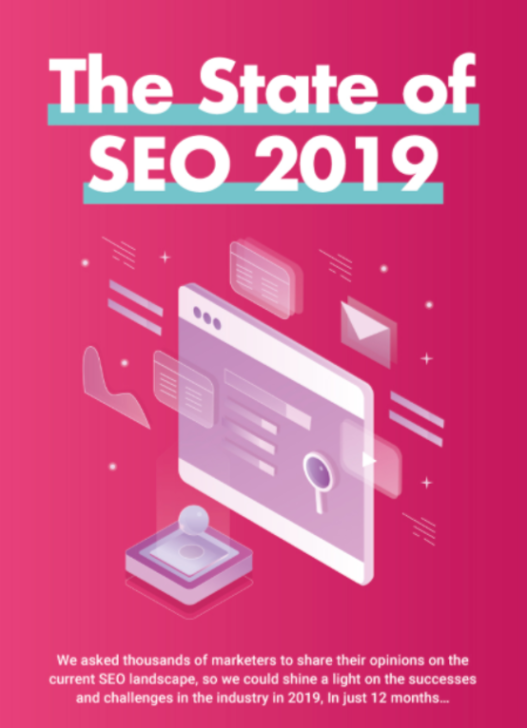
To view the full infographic, click here.

3. Google’s machine learning is learning to read visuals

While it’s not 100% clear how this works, it’s out there and known well enough that Google is actively learning how to read images on pages. With billions of images online, Google’s machine learning becomes adept at using shapes and other elements to compare and comprehend what the images on your site represent.

I mean, is there really much more I need to say here? If Google is focusing on learning how to crawl something and then attribute it to the value your site brings to the Internet, you need to pay attention. That’s why it’s so important to ensure your images are relevant and are formatted in a way Google can read them.

How can you use images to boost SEO?

So, now that you know the “why” part, let’s dig into the “how” part. It’s important to dig a bit deeper and explore some of the ways you can apply visual marketing to your efforts to boost your SEO.

1. Make sure your images add to the story

There is a ton of value in adding things like graphs, screenshots, and other content that actually relate to your article and adds value. There is decidedly less value in adding generic images that simply represent the concepts and don’t really add anything. Since we’re on the topic, why don’t I use some visuals to show you what I mean?

For example number one, you can see instructive screenshots dropped into this piece of content. These are screenshots from an article I recently wrote that details how to use HARO for SEO and backlink building. I used screenshots to walk readers through each step and provide them with actionable guides like the image of the email template and the walkthrough of how to set up an email.

On the opposite side, you have the images below that show an example of using images that relate to the topic but don’t really add value. This is another article on my site. I decided to test out generic images on this piece, as you can see in the screenshots below. The images relate to the content, but they really don’t add much extra.

As you can see, both do add a certain level of appeal to their respective articles. That said, for example one, the HARO article, has 12 times the number of page views, 11 more comments, and double the time on-page. So, you can see the value is clear that adding relevant images that add to the story brings a boost to your SEO.

2. Optimize your images

It’s not enough to just add images to your pages and posts. You also need to ensure they are optimized. If you ignore this step, you can run into issues with the performance of your site. For example, images that aren’t optimized can lead to slow load times on your site, and site speed is a critical ranking factor for Google.

To ensure you aren’t bogging down your site with heavy images, try using appropriate image types. The best formats to use are JPEG, PNG, and GIF. And as for videos, host the videos elsewhere (YouTube, for example) and then embed them on your site rather than uploading them directly.

Another important factor in optimizing your images is the tags you add. Just like you need to add meta tags to your posts, you need to add tags to your images as well. This serves as a way to tell Google (and let’s not forget other search engines, of course) what your images are about.

Kayako

Source: Kayako

3. Take advantage of off-site search

You’ve likely heard this before, but it deserves being restated. YouTube is the second largest search engine. Second only to…drumroll please…Google!

So, why not take advantage of posting videos to YouTube and optimizing those videos to give you more content to rank in search?

While this is obviously an off-site strategy, if you create excellent video content and then optimize it properly to appear in search, your videos can grab some SEO value.

You can then add links back to your website in your video descriptions and on your YouTube channel, and as your videos become more popular, clicks from the links on your YouTube channel will give a boost to your site traffic.

Wrapping it up

So, you get it now, right? Images are good for the health of your website and the impact of your SEO strategy. They not only add some life to your website and grab readers’ attention, they also help you improve critical stats that can help give your SEO a boost.

If you’ve been using visuals in your content, your first step should be to review those visuals to ensure they are optimized. Make sure they add to the story and then check to catch any missed opportunities to enhance your files with the right file types along with proper tagging.

Using images and video content on and off your website is a no-brainer. In today’s visual world, it’s important to stay on top of the continuing trend toward a preference for visual content. Make sure to work visuals into your content to give your SEO a serious boost.

Anthony is the Founder of AnthonyGaenzle.com a marketing and business blog. He also serves as the Head of Marketing and Business Development at Granite Creative Group, a full-service marketing firm. He is a storyteller, strategist, and eternal student of marketing and business strategy.

How visual content can give a boost to your SEO and how to take advantage


Machine Learning SEO Software Seeks International Partners

[unable to retrieve full-text content]https://feedpress.me/link/13962/14053457/383912


3 Steps to Better Content: Power up Your SEO with Audience Understanding via @marktraphagen

[unable to retrieve full-text content]https://feedpress.me/link/13962/14048077/386525


Using Virtual Assistants: The Complete Guide for SEO Agencies

[unable to retrieve full-text content]https://feedpress.me/link/13962/14042514/386389


How to Make Your WordPress URLs SEO Friendly via @coreydmorris

[unable to retrieve full-text content]https://feedpress.me/link/13962/14041178/203926


The 7 Most Important Things I’ve Learned About SEO This Year via @Stevenvvessum

[unable to retrieve full-text content]https://feedpress.me/link/13962/14039356/386638


How to Use Microsoft Bing Site Explorer for SEO via @facan

[unable to retrieve full-text content]https://feedpress.me/link/13962/14039256/386429


Two Latest Google Patents of Interest – November 6, 2020 via @theGypsy

[unable to retrieve full-text content]https://feedpress.me/link/13962/14039050/386680


Customer experience optimization (CXO) for online stores: Three proven SEO tactics

30-second summary:

  • Once you have the right product and pricing, succeeding with your online store essentially boils down to effective digital marketing and delivering a top-notch customer experience.
  • For ecommerce, in particular, SEO — or ranking on the first page of Google — plays a huge role in effective marketing and online branding, as it builds trust in the eyes of your audience which paid ads can’t. And trust translates to a better customer experience.
  • Here we discuss three proven SEO tactics that boost your search engine rankings while also enhancing your brand’s customer experience in ways that go beyond trust-building.

Your modern online store has a lot of moving parts, with hundreds to thousands of different product pages, numerous variations of the same page, and dynamic elements. And you’re well aware of the importance of having your store rank on the first page of Google — more traffic, brand awareness, trust, and sales. However, SEO today is not just about including the right keywords and building backlinks to your online store but is closely knit with providing a great user or customer experience (CX).

When you work on your SEO by keeping the customer experience aspect in mind, you’ll build a store that not only garners top rankings and tons of organic traffic but also converts that traffic into customers.

In this post, let’s take a look at three tried-and-true SEO tactics that directly improve your store’s search visibility while also establishing an outstanding customer experience.

Tactic #1: Make your store load lightning fast

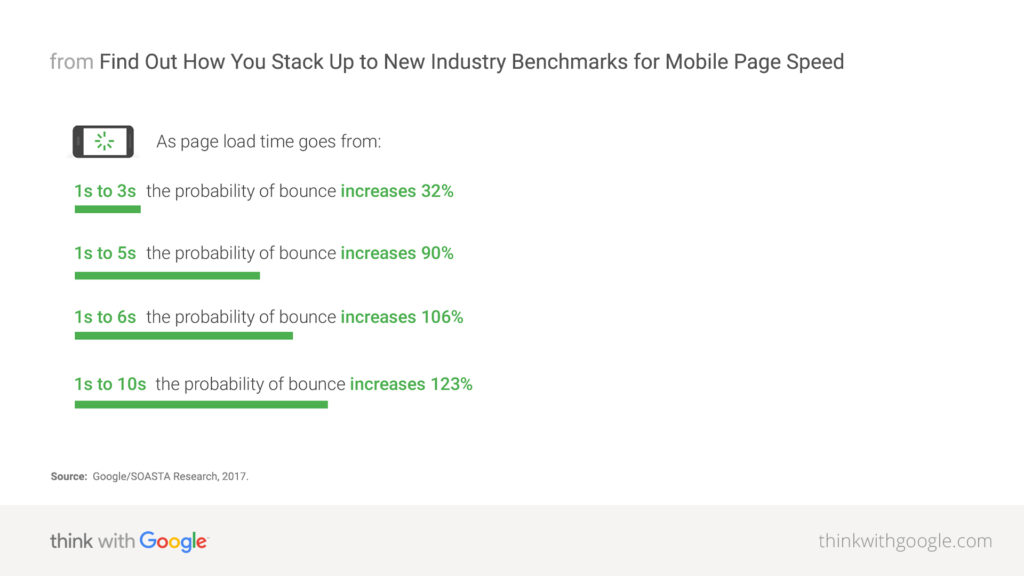
Page speed is one of the most critical factors that can make or break your store’s rankings and CX. Most people today lack the patience to wait for even three-to-five seconds for your website to load, and won’t think twice before bouncing off to a competitor.

mobile page speed new industry benchmarks that impact customer experience

Source: Think With Google

Site speed is an official Google ranking factor since 2010. Thus, optimizing your store’s speed is pivotal to both search rankings and CX.

That being said, the sheer number of visuals and dynamic elements on your store can make this seemingly straightforward task a tall order.

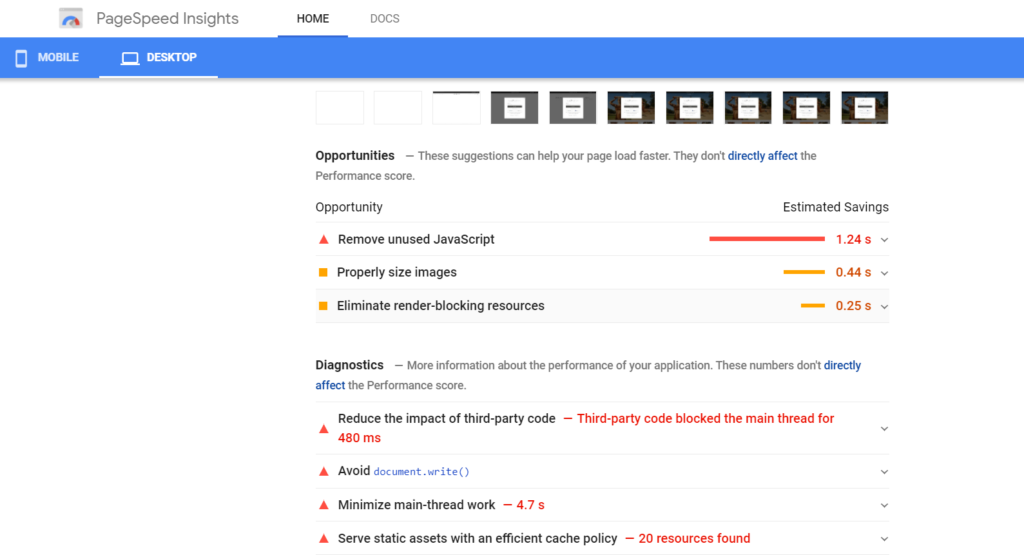
The best way to go about optimizing your site speed is to run your site through a free tool such as GTmetrix or Google’s PageSpeed Insights to assess how your site performs currently. These tools will generate a list of suggestions and optimization opportunities that you can then check off one by one to make your store lightning fast.

For example, you may have bulky image files that need to be compressed using an image compression tool. Or, you may have yet to enable browser caching so repeat visitors don’t have to reload the entire page each time.

page speed insights and how they can help improve customer experience

Similarly, it is possible that you have too many unnecessary redirects in your product pages or render-blocking resources that negatively impact your site speed. Use the aforementioned tools to pinpoint the exact reasons for suboptimal speed, and then work to individually improve every aspect.

Tactic #2: Ensure content on all pages is unique and updated

Google wants you to have unique, high-quality content on every URL of your store. But with countless URLs owing to product variations and categories, this can become a tough nut to crack.

That’s because, on top of creating unique, keyword-optimized, and descriptive content for each product page, you must take care of internal search result pages and product filters (such as color and size) that result in too many low-value duplicate pages which you don’t want Google to index.

And duplicate content (for instance, multiple colors or sizes of the same shirt) can seriously hurt your SEO.

To dodge this, opt for one of these three options:

  • Include a canonical tag (rel=canonical) on product variation pages that points to the main product page.
  • Place a “noindex” tag on the pages you don’t want Google to index.
  • Block the variations within your robots.txt file.

Next, you need to have a plan for dealing with outdated content, such as products that are discontinued or seasonal. You need to deal with such content in a way such that the SEO value is not lost and customers aren’t left confused.

The easiest way to do that is to use 301 redirects to point old URLs to the new ones. This way, visitors get the most up-to-date content on the product they are looking for (thus ensuring consistent customer experience), while the link juice from the original URL is correctly passed on to the new page.

Tactic #3: Focus on the mobile experience

Online shopping on smartphones and tablets has become mainstream in the last decade. Today, mobile is where the money’s at.

Take a look at these numbers from the recent holiday shopping seasons:

  • On Black Friday ($6.2 billion in online revenue in 2018), nearly 40% of sales on the conventionally brick and mortar shopping day came via a mobile device.
  • On Cyber Monday ($9.2 billion in online revenue in 2019), 54% of visitors came from mobile devices, while around 33% purchases on their mobile device, up over 40% from the previous year.

What’s more, in 2021, 53.9% of all retail ecommerce is expected to be generated via mobile. In other words, odds are that the bulk of your visitors are coming from a smartphone or tablet than a desktop.

Despite that, 84% of users have experienced difficulties in completing mobile transactions. This means you have a great opportunity to surpass your competitors in terms of customer experience (CX) and rankings by creating a mobile-friendly store.

Due to Google’s mobile-first indexing, the mobile version of your store (not the desktop!) is the benchmark for how Google indexes your website and determines your rankings.

Follow these best practices for a stronger mobile experience:

  • Incorporate a responsive design, so all the content on your store automatically adjusts to the screen size. This way, you serve the same HTML code and URLs regardless of the visitor’s device.
  • Mobile page speed is an official ranking factor, so ensure optimal speed on mobile by optimizing images, enabling compression, minifying CSS and JS, avoiding redirects, improving server response times, and leveraging browser caching.
  • Don’t forget usability. Make your store easy to navigate, even on mobile. Enable autofill for contact forms, wherever possible. Make buttons large enough to be easily clickable. After all, Google rewards excellent experience no matter the device.

Furthermore, make sure to avoid these common mobile UX mistakes:

  • Blocked JavaScript and CSS files
  • Unplayable video content (due to Flash)
  • Illegibly small font size
  • Cluttered touch elements

Simply put, smartphone ecommerce is a growing trend and Google is prioritizing mobile experience. And so, focus on your store’s mobile-friendliness for better rankings and CX.

SEO and customer experience (CX) are two sides of the same coin

The modern customer won’t settle for anything less than a sublime online shopping experience, which starts from finding your store on the first page of search results to a fast loading site, up-to-date content, and beyond.

Coupled with the fact that search engines like Google have now evolved to a point where they’re able to reward remarkable customer experience with first-page rankings, you know you’ve got to work on your store’s SEO from a CX perspective.

The three tactics outlined above directly improve your SEO and CX, so focus on getting these right to not only boost your store’s search rankings and drive more organic traffic but also to render an impressive shopping experience that customers keep coming back to.

Harsh Agrawal is the pioneering blogger behind ShoutMeLoud, an award-winning blog with over 832K subscribers and a million Pageviews per month.

https://www.searchenginewatch.com/2020/11/06/customer-experience-optimization-cxo-for-online-stores-three-proven-seo-tactics/


Page speed is a big deal – Why? It impacts SEO rankings

30-second summary:

  • Consumers expect ≈ and apps to respond quickly. Each second of delay can cost $100K in lost revenue for brands.
  • There are tools to help understand a page’s overall speed. Looking at the relationship between page speed and SEO ranking shows that having a faster performing site/page does impact ranking in a positive way, albeit slightly.
  • As marketers look for additional data points about why they should prioritize page speed, Jason Tabeling highlights the data and how it fits into an overall SEO strategy.

The saying is, “Speed Kills.” However, when it comes to digital speed, it’s really, “Slow speed kills.” According to a study by Google and Deloitte for every 0.1 seconds that your page speed improves can increase your conversion rates by 8%. That data point creates a pretty powerful business case to improve the performance of your site. Think about this data point from your own experience browsing the web, mobile, and desktop. Have you ever found that a page was just loading too slow that you moved on to something else, or that brand lost the sale? I know I have. 

So, we know that speed improves page performance, but what about how it impacts SEO rankings? I took a look at a small data set to try to get a sense of the impact that page speed has on rankings. I took 10 retail and conversion based keywords and ran the specific webpages through the Google Page Speed Test to look at the correlation between speed and rank. This data set gives a good directional study on the impact. Here is what I found;

Rank and page speed are only slightly correlated

Creating a scatter plot of each website’s rank with the page speed shows the distribution. The data does show a relationship between speed and rank. The correlation of the data suggests there is just a 0.08 correlation. A correlation of 1 would be perfectly correlated. So, this score isn’t very high, but there is a correlation and when you are looking for an edge and you know the impact speed has on conversion rates becomes very meaningful. The way to forecast the impact is to use the trendline and its slope. If you remember your algebra class you can use this data to create the equation of a line and estimate what your page speed needs to be a achieve a certain rank. Using that equation you can see that every 10 points of additional speed roughly equals a tenth of a point in rank improvement. So moving from a speed score of 10 equals a rank of 5.3, but a page speed of 100 would equal a rank of 4.4. This might not seem like a big deal, but remember speed dramatically improves conversion rates and has a positive impact on rank as well.

rank vs page speed data graph

What action should you take?

Here’s an outline of a few steps you can take to optimize your speed.

1. Improve your page speed

There are a lot of opportunities for brands to increase their page speed. Probably the most surprising thing was how many sites had very slow speed rankings. Look at the data in the histogram below. 56% of page speed scores came back <20. That is pretty remarkable considering there are some very well known brands in this study. There are so many opportunities to improve page speed and Google’s tool, and many others provide very step by step actions to take to improve. If you haven’t run your site through this tool or another one you should do that to start – https://www.thinkwithgoogle.com/feature/testmysite/

histogram of page speed

2. Don’t forget that speed is important but it’s just one of many factors that impact SEO rankings

While this article is about speed, it should be clear that SEO has many more key items that impact rank and overall results than speed. SEO is a holistic strategy that includes content and technical resources. You can’t forget about how well your content resonates with your audience, how fresh it is, and how well the search engine spiders can crawl and understand your site. So many businesses get caught up in their re-platforming their ecommerce platform and never put a minute of thought into the SEO strategy. 

https://www.searchenginewatch.com/2020/11/06/page-speed-is-a-big-deal-why-it-impacts-seo-rankings/