Guide to using interactive 404s to boost your SEO

30-second summary:

  • Reducing bad user experience of 404 errors by branding and customizing them.
  • Including links to 404s allow users to navigate the website even when they come across a potential dead end.
  • Boost SEO by placing your sitemap, homepage tab, and search bar.
  • Usage of conversational language along with attractive visuals reduces user’s contempt and frustration.
  • Mention of blog on your customized 404 error page promotes your intellectual prowess for possible users who might be interested in your content.
  • Amanda Jerelyn shares some amazing methods to improve the SEO of your site even through 404 pages.
  • Lastly, some tips to help you avoid 404 errors wherever possible.

Bad user experience can lead to your website’s demise and can also adversely affect your website rankings. This is why 404 errors are considered deplorable when taking into their perspective regarding both user experience and the search engine rankings of your website.

However, there are ways through which you can use 404s to boost your SEO, as in some situations, it is not a broken link but an error by the user that can cause them.

A 404 can be generated when a user types in a faulty address, and this may result in an error being generated on their browser that may look bad, but you can definitely address the situation.

According to a recent study conducted by Gomez, a commercial platform that runs tests for web performance, 88% of online consumers are less likely to return to a website after a bad experience.

In the light of this information, let us take a quick look at some of the ways you can use 404s to negate such inferences and strengthen your SEO.

1. Add links to them
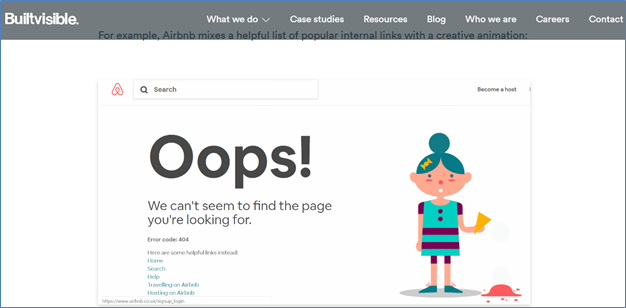
Creating interactive 404s - Add links

Screenshot Credits

Perhaps one of the best ways to make use of 404s is to design them so that it can link random internal pages from your website. This will allow you to get more website pages indexed through your 404 error pages. This can be achieved by running an algorithm that can help you to link out to a random number of internal pages.

Hence whenever a 404 page is generated, the links also change each time. According to Neil Patel’s own practice, he was able to boost TechCrunch search engine traffic by 9% in just a matter of 30 days. As far as search engines go, Google itself encourages developers to create custom 404 pages.

Since it is a standard HTML page, developers can customize it the way they want to, hence adding links to 404 pages shouldn’t be a big hassle.

2. Brand and customize them
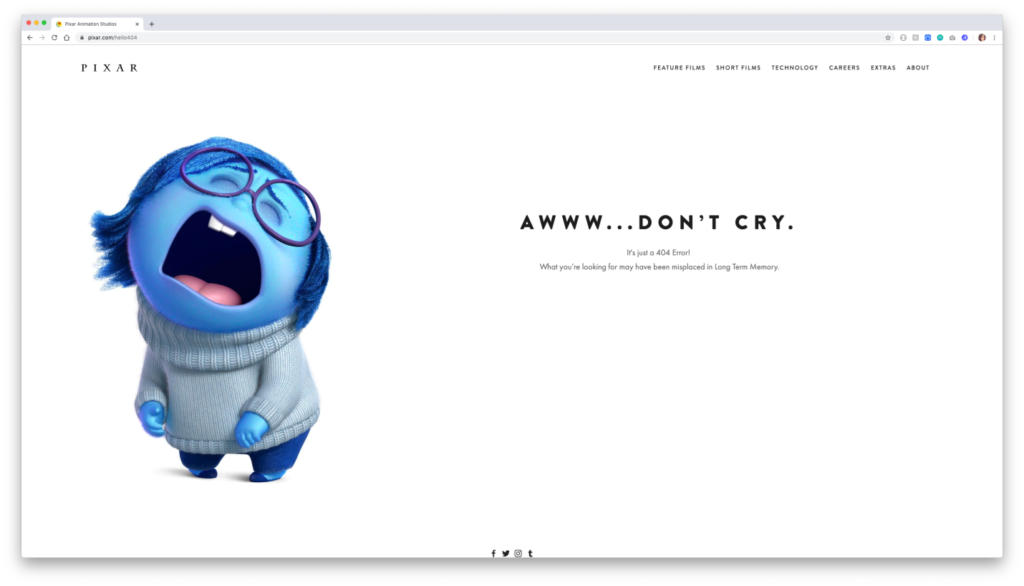
Creating interactive 404s - Brand and customize

Screenshot Credits

The inconvenience user experiences when they run into a 404 can be quite infuriating; however, this is also a moment where you can use creativity to capture their attention. By branding and customizing your 404 pages, one can actually boost their website revenues and increase their conversions.

However, this might involve additional effort where a 404 page has to be properly designed and optimized in order to turn lost visitors into loyal customers. A standard 404 page doesn’t look good at all. In fact, it seems like coming for an era that was far less progressive. We understand that visuals play a huge role in attracting customers.

Several social media and marketing statistics proclaim the power of visuals, such as the fact that 96% of online shoppers watch a video about a product or a service before making a decision and that 88% of marketers prefer visuals in their published content.

So why refrain from using visuals and not branding your 404s? The answer is that you should definitely not only brand them but also customize them to make them even more appealing for your users.

3. Put in a search bar
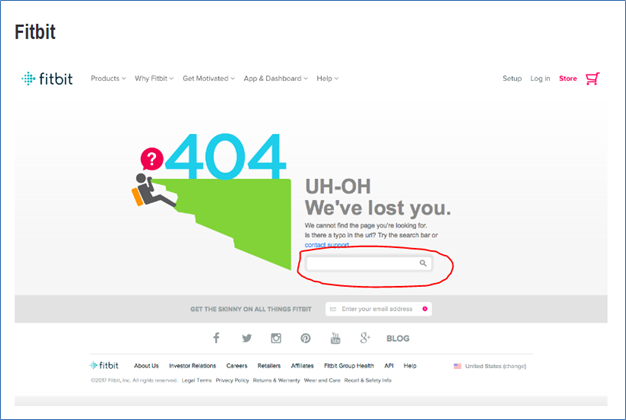
Creating interactive 404s - Add a search bar

Screenshot Credits

Another great tactic to follow with your 404 pages is to add in a search bar. This is further reflected by the study published by the Search Engine Journal, where 81% of users think less of a brand if it’s outdated, and that 40% of users consider search box as the most important feature.

Therefore this should be plenty of reasons for you to make this change happen. A search bar added to your 404 is like sweet candy to a small kid who just dropped their ice-cream.

Surely it is not what they were expecting, but with the power of search in their hands, they can begin their adventure anew. Plus, a nice consolidating message to go along with it would also work wonders.

It is all about compensating for the error they just ran into. Hence you are covering damages and making it easier for your users to recover from them.

4. Include mentions of popular landing pages
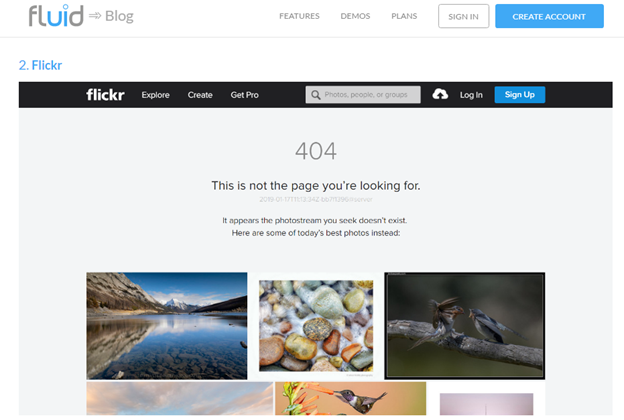
Creating interactive 404s - Add popular landing pages to encourage engagement

Screenshot Credits

Remember that your main goal is to create attention for your online users and direct them to your most profitable and viable landing pages. Hence even when your customers accidentally land themselves on a 404 error page, you can continue your efforts to divert their attention from the error and towards your most popular products and services. It is like a never-back down approach.

Sure, you would be offering them some comforting words to soften the impact created by the error. However, marketing is all about never quitting. Hence your 404 actually becomes like a landing page. It is true no one would actually land on a 404 with intention.

However, when they do, you will be prepared for them to divert the traffic to the most popular pages on your website. This can downright act out as a recommendation for your users. According to a recent report by McKinsey and Company, 35% of Amazon’s and 75% of Netflix’s revenues are generated by their recommendation engines, respectively.

5. Place your sitemap
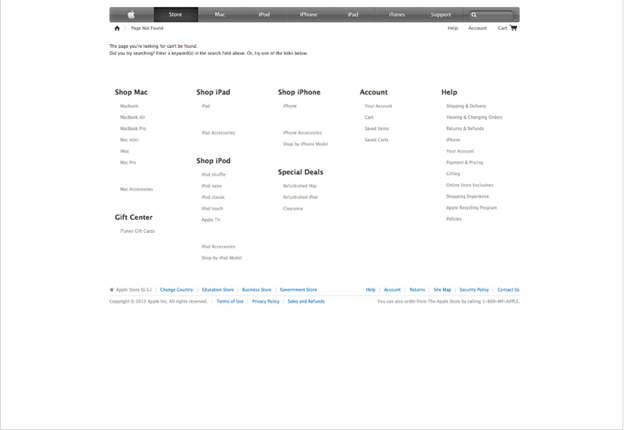
Creating interactive 404s - Place your site map

Screenshot Credits

If you are from the SEO side of things and adept in the knowledge that encircles the mastery of search engine rankings, then you know for sure that sitemaps can be extremely good for your websites. Since they are listed in search control, there is no doubt that Google does pay attention to them. Hence it would be great for your 404s to include a sitemap on them.

This will allow users to easily navigate through your website without leaving your website or going back to the SERPs (search engine result pages) to start their journey all over again. Hence you would be effectively reducing pogo-sticking. This will thus enhance your users’ dwell-time.

6. Use conversational language
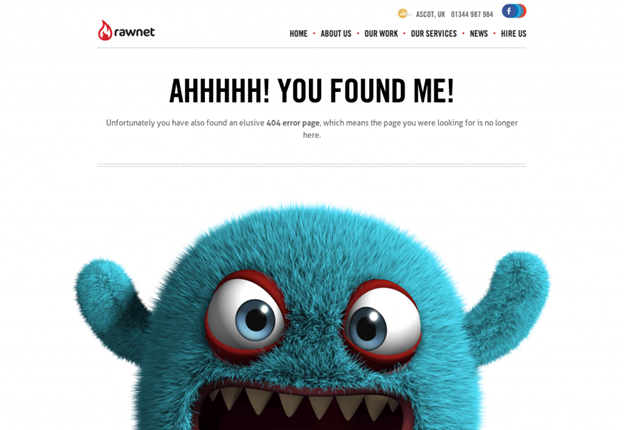
Creating interactive 404s - Use conversational language

Screenshot Credits

It must be pretty obvious by now that a remedy for a 404 lies in offering users a human touch that softens their impact, and this can be further augmented with the use of conversational language.

You want your customers and website visitors to feel less infuriated, and in order to do that, you need to spread out some comfort for them so that they do not feel agitated.

This can be reflected by a recent study by Business 2 Community, where they emphasize the use of conversational marketing. According to the study, 79% of consumers are willing to use messaging apps for customer service, 82% consider immediate response as extremely important, and 36% of companies are actively using live chat for marketing and sales.

Hence the idea over here is to make your users feel as if you are directly speaking to them, and this can help break the ice and reduce the tension created.

7. Get to homepage tab
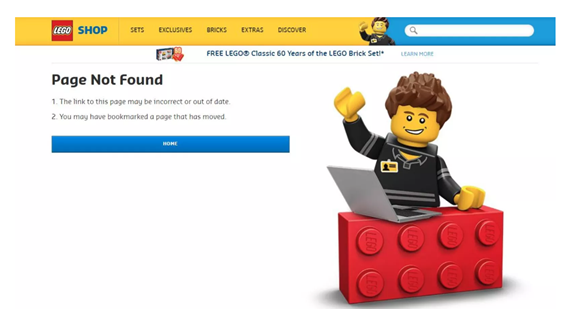
Creating interactive 404s - Homepage tab

Screenshot Credits

Probably one of the easiest get around for your 404 pages is to link back to the homepage. What you are doing is here is giving your customers the easiest route to start their search all over again without letting them go and trying to keep them on your domain.

8.   Mention your blog
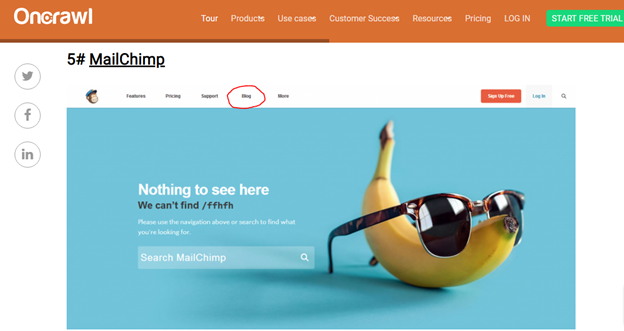
Mention your blog

Screenshot Credits

Blogs are considered a good choice for your audiences as well. While they may not be good for directly influencing their behavior, they can certainly create awareness that your domain does publish interesting content that users might find interesting to read.

It’s just a small nudge in the right direction. Obviously, customers who are looking to buy products or hire services would like to be directed to their requested pages, but mentioning your blog on a 404 is like saying, “hey there, we have more in store for you!”

Many students nowadays also go through blogs while they buy research papers online to increase their pool of knowledge relating to their field of study.

9.   Avoiding the 404 Error

Lastly, I would like to share some guidelines with you to help you avoid 404s where you can possibly manage to reduce them. This will only make your user experience skyrocket and help negate dissonance from users. Here are some quick tips:

  • Log into your Google Search Console account.
  • Check the Coverage report to see how many URLs are returning error codes.
  • Use the URL Inspection Tool to find more details about each error.
  • A 301 redirect is considered a good option for rectifying a 404 status.

Why are we doing this after all of the discussion above? This is because having too many 404s can prove to be detrimental to your user’s experience. Hence if you are notified about their existence, you should resolve them.

Conclusion

The 404 error codes undoubtedly leave a negative impact on your users and visitors. However, there are various ways you can make them add value for your customers.

I hope this post was able to offer you some meaningful ways through which you can use 404s in an interactive manner to boost your website’s SEO. For more questions regarding the topic, please feel free to post your queries in the comment section below.

Amanda Jerelyn currently works as a Marketing Manager at Dissertation Assistance, a perfect place for students to buy academic writing services from expert dissertation writers UK.  During her free time, she likes to practice mindful yoga to keep herself fit and healthy.

Guide to using interactive 404s to boost your SEO


Top 15 Chrome extensions for social media marketers

30-second summary:

  • When it comes to the internet browser, Google Chrome, with its extensive list of extensions is the indisputable chart-topper.
  • As a digital marketer, you have to keep track of so many things – different projects at various stages of development, research, reporting, new leads, existing clients, et cetera.
  • Bhavik Soni shares a list of the top 15 Chrome extensions that will make social media marketers more productive, smart, and efficient.
  • These are categorized into extensions for – Productivity, research and tracking, content creation and implementation, and digital marketing. Dive in!

When it comes to the internet browser, Google Chrome, with its extensive list of extensions is the indisputable chart-topper. From simple theme-based to technical coding-related, the extension list in chrome is practically endless.

This extension-packed list also boasts a wide variety of efficient social media extensions that boost professionalism, punctuality, and productivity. And, who wouldn’t love a convenient free plugin that makes life easier!

As a digital marketer, you have to keep track of so many things – different projects at various stages of development, research, reporting, new leads, existing clients, et cetera. These extension apps create a focus-orientated and organized work environment by keeping marketers updated on project developments, sending to-do reminders, enhancing content, and more.

In short, these install-and-use plugins act as the ace up their sleeves for social network marketers. They work as useful gadgets and trained assistants. They are the must-have social media marketing tools for every marketer.

You can optimize and make Google work for you in a jiffy by adding these 15 Chrome Extensions to your browser today.

Chrome Productivity Extensions

1. StayFocused: App block & website block google chrome extension

Designed to boost productivity, the StayFocused extension limits the amount of time you spend on vanity Googling. It offers the brute force you need somedays to anchor your focus to what’s more important.

Pricing:

Free

2. Momentum: Personal dashboard new tab chrome extension

Perhaps, Momentum is the best Chrome extension for productivity. It steers your focus from idle to important by motivating you with quotes, encouraging positivity with mantras, and inspiring with serene photography. Features like Daily Focus, To-Do, Countdowns, Metrics, Event Reminder and Links help you browse the internet with intent. What’s more? The plus version is available for just $3.33/month.

Pricing

$3.33/month

Research and tracking extensions

3. Diigo Web Collector: Highlighter and bookmarker for chrome

Diigo is a research chrome extension that lets you highlight important phrases, bookmark and save pages, write notes, and collect references at a single place. It comes in handy for social media marketers, who generally invest hours in R&D for planning a campaign, learning trends, and comparing the competitor’s strategy.

Pricing:

Free

4. Google Analytics URL Builder: Online UTM tracking

This is a tracking extension that lets you build UTM parameters. With the help of this plugin, you will be able to gauge the effectiveness of the UTM tags used in the campaigns. Google Analytics URL Builder also allows you to share templates with others, saves time when you have to generate URLs manually, and shares progress with clients.

Pricing:

Free

5. Ghostery: Makes web cleaner, faster, and safer

Ghostery is designed to block ads and trackers, this productivity chrome extension makes a great social media marketing tool. With its help, you will be able to learn the trackers on the competitor’s sites that they use to attract, engage, and convert the visitors.

Pricing

$11.99 USD /month/user*

6. SpyFu: SEO and PPC tools for professionals

Yet another efficient tracker extension that lets you peek into the competitor’s site data. Spyfu reveals extensive information, including where the competitor appeared on Google in the past nine years. The social media marketing (SMM) plugin also shows all keywords bought on AdWords, every ad variation, and every organic rank for $33/month.

Pricing

$33/month

Content creation and implementation

7. Canva: Design is all around us

How social media advertising will perform relies a lot on visuals. Photo-driven platforms like Instagram and Pinterest yield better ROI than content-driven Twitter or Facebook. It is because photos get more engagement. To ensure you can make most of this social media trend, creating impressive and attention-grabbing posts become imperative. It is where Canva comes into the picture.

Pricing

Free

8. Figure it Out: Solve your time zone pain

A digital marketer works for clients and target audiences in different time zones. For them, Figure it Out proves to be a handy tool. It is an extension that lets you keep track of up to 10 time zones, and makes scheduling posts accordingly.

Pricing

Free and paid ($3/month)

9. WhatFont: Identify fonts on web pages

We get it, fonts are tricky. Download an app, and it gives you hundreds of fonts that are too similar-looking, too familiar, or too quirky for your campaign. One day you browse a site – may be a competitor’s – and find just the font you were looking for but have no clue which one it is.

That’s when WhatFont comes to the rescue. A single click and it reveals not only the name but also the family, style, weight, size, line height, and color of the font.

Pricing

Free

10. Unsplash Instant: Beautiful photos in your new tab

For every social media marketing post, there is a tedious task to find high-quality, professional stock pictures, usually for free. Unsplash Instant lets you find great photos ranging from flowers and skies to desktops and artsy portraits. You can save them for free and use it for all kinds of commercial use.

Pricing

Free

11. Colorzilla: Advanced colorful goodies

Colorzilla allows you to hover over any color shown on a webpage and learn about its hex code for future use in a social media ad post. With this plugin, you will be able to create consistent color themes, appealing visuals, and come up with perfect palettes.

Pricing

Free

12. Sniply: Drive conversion through content

Social media promotions through third-party content are more effective when they include a tempting call-to-action that takes the reader to your own online space. Sniply helps you make those conversion-generating posts by letting you add custom CTA to any piece of content. On the dashboard, the plugin will show how many clicks your links are getting and the level of engagement for tracking purposes.

Pricing

$29/month

Digital marketing extensions

13. IFTTT for Marketing and social media automation

IFTTT free digital marketing extension syncs multiple apps and automates them, thus saving a lot of time and effort. In simple terms, you could post a pic on a dozen different platforms all at once.

Pricing

Free

14. Buffer: Share content easily

With this social media extension, you will be able to schedule and manage posts across different platforms. Buffer will also let you follow up with analytics to track the performance of each post.

Pricing

$85/mo

15. LastPass: Free password manager

By downloading the LastPass Chrome extension, you will not need to remember dozens of passwords to each social media platform. This free password manager will do it for you. You could also create a master password through LastPass.

Pricing

Free

Let’s sum it up

Here’s a guide to 15 best Chrome extensions available for social media marketers. From saving bookmarks to managing posts and passwords, these plugins will work as assistants to digital professionals.

Note: Details like pricing are subject to change as per the respective tool provider.

Bhavik Soni is a Creative Writer at Auto Monkey. We provide an original analysis of the latest happenings in the social media industry. Connect with Latest Social Media Trends and News plus tips on Twitter, Facebook, and other social tools on the web.

https://www.searchenginewatch.com/2020/09/23/top-15-chrome-extensions-for-social-media-marketers/


How to make your website ADA-compliant and win at SEO

30-second summary:

  • The Americans with Disabilities Act (ADA) passed in 1990 does now include mobile apps and websites.
  • An ADA-compliant website helps more people than those covered by ADA.
  • There are many SEO benefits such as increased visibility on google image searches, and featured snippets.
  • Co-founder of Ally digital media, Abhishek Shah says, “Responsive websites help with ADA compliance and further improve your website’s overall search presence.”
  • The four best ways to make your website ADA-compliant with a clear outline of its ADA as well as SEO benefits.

The Americans with Disabilities Act (ADA) passed in 1990 does now include mobile apps and websites. Specifically, Title III of the ADA has taken an official stand on how websites should be accessible for disabled users. However, when you look at what’s necessary to make a website ADA-compliant, you will see that these also will help improve your site’s SEO.

Some elements such as title tags, heading structure, alt text, and responsive design are things all websites should include. By ensuring these are done properly and in an ADA-compliant way will maximize your website’s effectiveness.

How ADA accessibility prioritization benefits everyone

Ensuring your website complies with the ADA helps you serve a larger audience and gives a boost to your search engine rankings. This is because most of the necessary components of making your website ADA compliant feed directly into SEO best practices.

After all, the whole point is to make your website easier to view, understand, and navigate. What business doesn’t want all that for their website?

Four ways an ADA-compliant website helps improve your SEO

Here are 4 ADA-compliant must-haves (in no particular order) that will help improve your SEO. This list is by no means comprehensive, but it is a good place to start.

1. Title tags help screen searches and readers

Title tags are very basic SEO. They let the reader, and search engines, know what the page is about. A title tag doesn’t show up on your website. Rather, it appears on the results page of a search engine, and the tab at the top of your web browser.

SEO benefits

Title tags, while basic SEO, are very important. This tag needs to match your user’s intent. For example, when someone googles “best phone” the phrase best phone (or a variation like “best smartphone”) will appear in the title tag.

Writing a title that accurately reflects what the page is about is the best way to get found and clicked on. It’s why a title tag should be specific: “The best Android phones for 2020” is far better than “Why you will want to buy one of these phones.”

ADA benefits

For those who need screen readers to help them use a computer, a specific title tag such as the above example is much more user-friendly. So, it is vital the title tag accurately reflects the page content.

The accessibility guidelines say the title should be “The best Android phones for 2020” instead of “Why you will want to buy one of these phones.”

2. Descriptive alt text

Alt text is not the same thing as a caption. A caption is visible usually beneath an image. Whereas alt text is not visible on the front end of the site. The alt text is a written alternative to a page’s visual elements. This includes: .jpegs, .pngs, and .gifs. the alt text is a description of an image that lives in the backend of the site.

SEO benefits

Alt text lets search engines know the subject matter of an image. It also helps search engines to better understand the page. Additionally, if you want images to show up in Google, then writing descriptive alt text is a must-have.

ADA benefits

For web users with visual impairment using screen readers, descriptive alt text is read aloud. This helps a visually impaired reader get a better sense of what’s going on, on any given page.

A useful descriptive alt text might be: “woman at café with laptop drinking coffee” 

A useless alt text would be: “SEO tips for freelancers | Get more clients with SEO | Writing your way to success with SEO”

3. Responsive design

Responsive design has been around since 2012/2013 in one form or another. But it means more than just your website being able to adapt to whichever screen size it finds itself on.

It’s about where your logo sits, how easy is your site to navigate, how easy is it to read, and how quickly does it load?

SEO benefits

Websites that offer good, functional user experience rank better in search results. User experience isn’t just one ranking factor but an umbrella term for quite a few. Google has said that a site that takes longer than three seconds to load on a mobile site will rank higher.

How easy content is to read (and how useful it is) is also an important ranking factor.

ADA benefits

Good responsive design puts the user first. It starts from the premise that a website needs to be easy to look at, easy to navigate, and be easy to understand.

This is why you need legible text for the visually impaired. As well as quick load times for people with slow internet. And straightforward navigation to make it easy for people to get around your website.

4. Proper heading (and subheading) structure

Headings (which show up in the code as <h1> or <h2> or <h3> etc.) define your content’s hierarchy. These headings (and subheadings) work along similar lines to when you wrote essays in school.

Proper heading structure:

  • Goes in order: a h3 doesn’t go directly after a h1.
  • Describes the copy beneath it.
  • Follows a sequence: if your h2 is “4 ways…” then the h3s would be each of those points.

SEO benefits

When your writing is clearly structured it is easier to read, and easier to follow. It’s also easier for Google to crawl your content and understand what is the most important (starting with h1, and so on).

Good header structure can also your content appear in the featured snippets in the search engine results page (SERPs).

ADA benefits

For users who have limited reading comprehension or cognitive impairments, clear and direct headings make it easier to read. Headings and subheadings let a reader know what’s worth reading and what’s worth skipping over.

And just like a reader skips heading, so too can a screen reader. Which only reinforces the need for a strong, clear heading structure.

An example of a website that has both good SEO and is ADA compliant is Enviro Safety Products. When you review this site you will see it ticks all the boxes, and provides the user a seamless, friendly experience.

Americans with Disabilities Act (ADA-compliant) - Example

Source: Enviro Safety Products

How making your website ADA compliant will help you win at SEO

By applying all the necessary ADA compliant elements to your website, you are helping the one in four Americans with a disability use your website. Additionally, you will also greatly enhance your website’s SEO.

If you would like to know more about how making your website ADA compliant will help you win at SEO, you can throw questions in the comments section below.

Abhishek Shah is the co-founder of Ally Digital Media, a leading voice in digital media and marketing. He advocates for evidence-based marketing strategies to fuel the businesses. He can be found on Twitter @abiishek.

https://www.searchenginewatch.com/2020/09/21/how-to-make-your-website-ada-compliant-and-win-at-seo/


Google ranking factors to change search in 2021: Core Web Vitals, E-A-T, or AMP?

30-second summary:

  • The biggest Google update of the year is called the Page Experience update.
  • Core Web Vitals are part of that update, and they are definitely ranking factors to keep in mind, especially when optimizing images.
  • AMP is no longer the only way to get a “Top Stories” feature on mobile. Starting in 2021, any news webpage can become a “Top Story”.
  • Combining AMP’s privacy concerns and cost of operation might mean that AMP will disappear within a couple of years.
  • E-A-T is not a ranking factor right now, and we don’t know if it will become one in the future.

2020. What a year. History is happening around us, and Google? Well, Google keeps on revamping their search algorithms. Over the years, there have been many many major algorithm updates, as Google worked to keep us on our toes. 2020 was no different: in one fell swoop, we got the news about a Page Experience update and AMP news. All the while the debate about whether or not you need E-A-T for ranking rages on. How do the Core Web Vitals stand in changing the search game in 2021?

Let’s go over each of these innovations and see which will change the way we do SEO, and which will fade into obscurity sooner rather than later.

1. Importance of core web vitals for SEO

Core Web Vitals were part of Page Experience update, and, by far, caused the biggest ruckus.

There’s a lot to learn about Core Web Vitals, but they boil down to the three biggest issues on our webpages:

  1. LCP — Largest Contentful Paint, which deals with the loading speed of the largest single object on the page.
  2. FID — First Input Delay, which means the reaction time of the page to the first user input after (whether they click, tap, or press any keys).
  3. CLS — Cumulative Layout Shift — this is the measure of how much the content of the page jumps while loading content, mostly visual content, after opening.

How core web vitals influences rankings

Of course, some SEO experts think that the entire Page Experience update is nothing special, and could even: “[…] distract, […] from the core mission of communication and storytelling,”.

And, sure, most of Page experience update is simply an assembly of things we’ve known for a while: use HTTPS, be mobile-friendly, control your page speed, and so on.

But Core Web Vitals are a bit different and can influence the SEO practice in unexpected ways. Key factor that’s already changing rankings is Cumulative Layout Shift.

As most SEO experts know, for a while an important part of image optimization was using the <decoding=async> attribute in the <img> tag to avoid losing page speed while rendering the page.

Using <decoding=async> could lead to some seriously janky pages if coders didn’t specify the height and width of every single image to be rendered. Some websites did it anyway, for example, Wikipedia on most of its pages has a predefined space for images created ahead of time.

Core Web Vitals and other ranking factors for 2021 - Wikipedia

But as SEO experts we didn’t have to worry about pages being jumpy all too much, as that didn’t influence the rankings. Now with CLS being formally announced as a ranking factor, things will change for a whole slew of websites and SEO experts.

We’ll need to make sure that every webpage is coded with CLS in mind, with the needed space for every image defined ahead of time, to avoid the layout shifts.

The verdict

Overall, of course, it’s too early to tell, and more work by SEO’s around the web needs to be done here. However, it seems that if you aren’t used to focusing on technical SEO, Core Web Vitals becoming ranking signals might not influence your day-to-day work at all.

However, if you are conducting complicated technical SEO, then Core Web Vitals will definitely change the way you work in as-yet unexpected ways.

2. Importance of AMP for SEO

The AMP’s relevance today is kind of an open question. While it’s always been great as a quick-and-easy way to increase page speed, the privacy concerns have been voiced over and over again since the technology’s very inception.

But in 2020, significant changes are afoot, since, within the same Page Experience update, Google announced that there’s finally no requirement for us to create AMP pages to occupy the “Top Stories” SERP feature.

That’s a pretty huge step for anybody trying to accrue as many SERP features as they can, and, in particular, for news websites.

Core Web Vitals and other search ranking factors for 2021 - Top Stories

How AMP influences rankings

If we believe John Muellers’ words, then AMP is not a ranking factor. Seems plain and simple enough. But of course, things aren’t so simple, because AMP comes with pretty significant gains in page speed, and speed is an important ranking factor.

Thanks to AMP’s pre-rendering combined with some severe design limitations, AMP webpages often really do win in page speed, even if not in ranking as is.

The “Top Stories” SERP feature, however, was a huge benefit to using an AMP for any news agency with a website, and it’s easy to understand why. Just look at how much of the page is occupied by the “Top Stories” results.

Not only do “Top Stories” automatically get top 1 ranking on the SERP, but they also sport a logo of the website posting them, standing out even more from the boring old blue-link SERP.

This means that for a few years now news websites were essentially forced into using AMP to get into a “Top Stories” SERP feature on mobile since it absorbs a whole lot of clicks.

On the other hand, it takes quite a lot of resources to support AMP versions of the webpages, because you are basically maintaining a whole additional version of your website.

Added to which, a page that’s been properly optimized for speed might not need AMP for those speed gains, as well.

The verdict

While it’s tough to imagine that AMP will fade away completely within the next couple of years, AMP’s privacy issues combined with the cost of maintaining it might spell the end of it being a widely used practice.

Now, with the “Top Stories” becoming available to non-AMP pages, there’s virtually no reason to jeopardize the users’ security for speed gains you could get by proper optimization.

3. Importance of E-A-T for SEO

Expertise. Authority. Trust. All perfectly positive words and something we should all strive for in our professional lives. But what about search optimization?

Coming straight from Google’s Quality Rater Guidelines, E-A-T has been the talk of the town for a good moment now. Let’s dive in and see how they might change the way we optimize for search.

How E-A-T influences rankings

For most of us, they don’t really.

Sure, Quality Rater Guidelines provide valuable insights into Google’s ranking process. However, E-A-T is one of the lesser-important factors we should be focusing on, partly because these are nebulous, abstract concepts, and partly because Google doesn’t exactly want us to.

As Google’s official representatives informed us, E-A-T is not in itself a ranking factor.

Receiving follow-up questions, Google’s John Mueller then reiterated that point, and Ben Gomes, Google’s VP of search engineering confirmed that quality raters don’t influence any page’s rankings directly.

However, in practice, we often see that the so-called YMYL websites already can’t rank without having some expertise and authority established. A very popular example is that it’s virtually impossible to rank a website providing medical advice without an actual doctor writing the articles.

The problem here is that expertise, authority, and trustworthiness are not easily interpreted by the search algorithms, which only understand code.

And, at the moment, there seems to be no surefire way for Google to transform these signals into rankings, except to read the feedback of their quality raters before each algorithm update.

The verdict

While using E-A-T to rank websites might sound like an inarguable benefit for the searcher, there is a couple of concerns that aren’t easily solved, namely:

  1. Who exactly will be determining the E-A-T signals, and according to which standard?
  2. The introduction of such factors creates a system where the smaller and newer websites are punished in rankings for not having the trustworthiness that they couldn’t realistically acquire.

Responding to both of these concerns requires time and effort on the search engine’s side.

As things stand right now, E-A-T is not something to keep in mind while doing day-to-day SEO operations.

Let’s imagine a fantastical scenario where a webmaster/SEO expert has some free time. Then they might want to work on E-A-T, to try and stay ahead of the curve.

On the other hand, there simply isn’t any proof that Google will actually use E-A-T. Or that, even if used, these signals will become major ranking factors. For this reason, E-A-T shouldn’t be your priority ahead of traditional SEO tasks like link building and technical optimization.

Additionally, consider this. The entire Quality Rater Guidelines is 168 pages long. However, a comprehensive explanation of what E-A-T is and why it might be calculated a certain way will take many more pages than that.

Conclusion

As of the time of this writing, the Core Web Vitals seems to be the most important ranking news to come out in 2020 in practical terms. However, search is an extremely volatile field: what worked two weeks ago may not work today, and what works today might not work for most of us.

The matters are further complicated because we’re fighting an uneven battle: it’s simply not in search engines’ best interest to give us a full and detailed picture of how ranking works, lest we abuse it.

This is why it’s crucial to keep our hand on the pulse of optimization news and changes occurring every single day. With constant efforts from our SEO community to work out the best way to top rankings, it’s possible for us to close that gap and know for sure which trends are paramount, and which we can allow ourselves to overlook.

Aleh Barysevich is Founder and CMO at SEO PowerSuite and Awario.

https://www.searchenginewatch.com/2020/09/16/google-ranking-factors-2021-core-web-vitals-e-a-t-or-amp/


How to drive digital innovation necessary during the pandemic

30-second summary:

  • COVID-19 has kept consumers in their homes, which has led to significant spikes in internet use and companies scrambling to digitize in order to meet customers where they are.
  • The ability to quickly develop digital capabilities will continue to be critical for meeting customer needs and ensuring organizations’ survival.
  • To remain competitive, companies must enhance the digital customer experiences they offer through upgraded social media, optimized conversion, strategies, better marketing research, an effective internal website search, and fresh customer touchpoints.

Emerging digital technologies like artificial intelligence (AI) and cloud computing enticed leaders with their agility and efficiency. Many companies planned to make digitization a goal for the new decade.

In hindsight, they probably wish they hadn’t waited.

The novel coronavirus upended every aspect of our lives. As businesses and governments around the world try to combat the pandemic, millions of consumers sit inside their homes. And where do people go during a government-mandated lockdown? Online.

The unprecedented shift to remote work and online learning, combined with a dramatic increase in movie streaming, videoconferencing, and social media traffic, has led to significant spikes in internet use. In this same time frame, big tech companies — the businesses at the forefront of digital innovation — have flourished, as have brands that capitalized on the power of social media engagement.

The biggest trick to digitization right now is meeting customers where they are. For example, my company, Teknicks, is working with an online K-12 speech and occupational therapy provider. When schools began transitioning to remote learning, students’ needs changed, too. We helped the provider pivot its value proposition and messaging to accommodate school districts’ new realities. By focusing on teletherapy tools and reassuring parents, we’ve seen substantial growth and brand recognition during the pandemic.

Until we find a vaccine for the novel coronavirus, your customers will likely engage with you through online channels. The ability to develop digital capabilities quickly will continue to be critical for meeting customer needs and ensuring survival for your organization. With that in mind, here’s how you can enhance your digital customers’ experiences:

1. Upgrade your social media

It’s not hard to be good at social media marketing — it’s hard to be great. As you build your audience on websites like Facebook and Instagram, be sure to engage with followers consistently. Create a content calendar mapping out your posts and sharing strategies and stick to it. These platforms are also a great channel for customer service, allowing you to provide personalized support and become instantaneously useful (something that customer support tickets and chatbots never seem to be).

If you already have a sizable engaged audience, it’s time to work on your content strategy. Don’t build your content strategy around keywords. Instead, focus on your audiences’ needs. A truly effective content strategy will be customized for the platform you’re on and will account for the user behavior most characteristic of that platform. Naturally, you will use keywords and phrases that are optimized for discoverability while maintaining authenticity.

One key strategy is to conduct marketing research using a survey. This tactic goes well beyond traditional keyword research and generates content ideas directly from your targeted audience, not a keyword tool. Surveying your prospective customers allows them to tell you what type of content they want to consume, significantly increasing the likelihood of engagement. Often, this strategy is the key to successful marketing strategy. I’ll go into more detail below.

2. Focus on and prioritize conversion optimization

Ideally, your website looks good and loads quickly, but those qualities alone don’t make a website great. The user experience that your website offers is ultimately what determines whether customers bounce in droves or actually stick around. Attempting to boost your initial traffic will exponentially increase customer acquisition costs, so improving your conversion rates via website optimization is a more affordable (and profitable) solution.

We often see double-digit increases in conversion rates on our first test. We typically focus on the most trafficked pages to increase the likelihood of big, impactful wins. There is an entire science behind conversion optimization, but the core fundamentals have remained the same for years.

To make sure your website’s architecture is seamless and intuitive, develop a conversion rate optimization strategy that works for you. This will require you to ask visitors for feedback, experiment with different messaging options, and regularly review your analytics, among other things. The idea is to get to know your visitors well. It takes work, but it will pay off over time as the incremental conversion rate increases impact top-line revenue.

3. Conduct marketing research surveys

With the right insights, you can turn every engagement into a memorable and valuable experience for both you and your customers. The best way to get customer insights is to ask. Design a survey of up to 10 questions in a variety of formats along with some screening questions to make sure the feedback you get is actually useful.

When designing, consider your potential customers’ preferences and pain points. For example, if you know your audience is mostly on Instagram, asking “What do you like about social media?” won’t be as effective as “What makes Instagram posts better than Facebook posts?” Once the survey’s drafted, post it to your social channels and send it out to your mailing list. You want to understand which messages resonate with your audience before you spend a cent on marketing. Learning how to conduct marketing research is one of the most important marketing skills you can attain.

Asking individual customers how they feel about various messaging options can give you a goldmine of useful data to help inform the language and design choices you make. Not every customer will choose to participate in a survey, but some will. Show them you appreciate their input by offering a small discount or another incentive once the survey is completed. You’ll be surprised by how many responses you get and how beneficial the precursory information is.

4. Review your internal website search

As much as you’d love for every visitor to spend hours exploring every nook and cranny of your website, most will want to get on with their lives after they’ve found what they came for. To make the process faster, you should offer some sort of internal website search functionality. If you don’t already have one, add a search box to your navigation menu.

Not every website has one, and even the ones that do have very surface-level functions. However, search bars are a valuable asset that can increase internal sessions and conversion. Internal website searchers are 216% likelier to convert, according to WebLinc. Search bars assist your visitors and expand your understanding of user behavior, providing you with the information you need in order to adjust your website accordingly.

Evaluate the effectiveness of your internal search, taking notice of how it finds and organizes the content after a search. Most native search functionality is very basic and just looks for the presence of “search term,” but you may want to test out more advanced filters that help users more effectively find the information they are looking for.

I recommend looking at the search data monthly to see what users have been looking for. Be sure to review what searches yielded zero results and which searches brought up irrelevant content. Identify areas that can be approved and understand your content gaps that need additional content to support the demand.

5. Identify new customer touchpoints

Innovation is all about using new technology to improve old processes. While your typical customer journey might depend on your industry and business, chances are good that you can find ways to enhance it with emerging technologies.

Evaluating whether an emerging technology is a fit for your business and whether you should invest in testing it out, starts with (drumroll …) a survey. As we discussed earlier, surveys can answer just about anything you want to know about your target audience. Go ahead and ask your audience if they own or use the emerging tech and validate its place in the customer journey.

Take the new home buying process, for example. David Weekley Homes, the largest privately-held home builder in the U.S., wanted to better understand whether voice-enabled devices can play a role in the customer journey. The company also wanted to propose a voice app idea to the audience and understand how they felt about the emerging technology concept. By conducting a survey, we uncovered that 81% of the respondents would consider the voice app idea to be somewhat to extremely valuable and 70% would possibly to definitely use the voice app if it existed.

The increasing usage of voice search and voice-enabled devices also offers an opportunity for consumer brands to make it easier than ever for customers to find their products. Tide, for example, has capitalized on marketing on Amazon’s Alexa Skills platform to remove a step from the purchasing process. Customers can use the company’s skill to order Tide products without having to pull up the Amazon app or go to the Tide website. In that way, new tech makes an old process (purchasing detergent) more frictionless than ever.

The COVID-19 pandemic has made digital innovation a business imperative. Regardless of your industry, you should look for ways to anticipate and meet customer needs. Your customers expect a seamless digital experience. If you can’t provide it, they won’t have to leave their homes to find someone else that can.

Nick Chasinov is the founder and CEO of Teknicks, a research-based internet marketing agency certified by Google in Analytics, Tag Manager, and a Google Premier AdWords partner.

https://www.searchenginewatch.com/2020/09/16/how-to-drive-digital-innovation-necessary-during-the-pandemic/


Are search engines dead in China?

30-second summary:

  • WeChat, a widely-used Chinese app, provides users with a variety of features including messaging, shopping, and more, inevitably affecting the search landscape with the abundance of data and content it provides to users.
  • Chinese users are stepping away from using traditional search engines, and instead, are leaning on searching within one-stop apps that are more tailored to their search queries.
  • Many companies like Bytedance and Alipay are increasingly trying to make their mark in search by creating large ecosystems that effectively tend to users’ needs.
  • Many of these challenger platforms are aiming to gain more dominance in the search market to capitalize on rising search demands.

 Are search engines dead in China?

You can’t imagine the internet without the search engine. It started out as a way of finding stuff on the various websites that were popping up, but ended up shaping the very medium it was indexing. Nobody would build a website without making sure it was molded around the demands of the biggest search engines in its customers’ region.

But that doesn’t mean search itself isn’t changing. As we’re seeing in China, the days of the search engine website that you visit to start your exploration could be numbered.

WeChat, therefore WeSearch

The largest search engine in China has always been (and remains) Baidu, which has a billion regular users, making it the second most popular search resource in the world.

But there’s a new player in town. WeChat has 1.2 billion users globally, mainly in China. It’s a one-stop app with a multitude of uses, not limited to messaging, consuming content, shopping, accessing services, and mobile payments. It’s ubiquitous in the nation, so it’s easy to see how it could become a hugely disruptive element in the search landscape. Because of its huge user base and multiple functions, there are billions of different user actions recorded and thousands of items of content being created and consumed on a daily basis. 

WeChat has a large volume of content and data within its ecosystem, including articles from WeChat official accounts (similar to Facebook business pages), mini-programs (mini-apps embedded within WeChat which don’t require installation on users’ mobile devices), news content from Tencent News, along with content from Tencent Music and WeChat Video channel. More importantly, WeChat has a partnership with Sogou, China’s second-largest search provider, to pump more information into WeChat’s ecosystem.

WeChat stats

Plugged into this huge index, WeChat search has become a powerful tool to find information. A survey by SocialBeta showed that 32% of WeChat users use it as their prime search engine of choice, and 46% use it as a general search tool. These are big numbers.

Now, Tencent, the owner of WeChat (and Sogou’s major shareholder), is moving to buy Sogou outright, potentially empowering its business model to take on more of the traditional search engines’ market share and to grab the benefits that come with it.

Search is moving away from pure search engines

The amount of searching going on in China is as strong as ever, but increasingly, people are turning away from the traditional search providers and searching within the enormous ecosystems Chinese tech giants build. 

A typical Chinese consumer can have various different sources to search for information depending on what they are looking for. To search for a product, they can go straight to dominant ecommerce platforms like Taobao and JD.com, then search in Xiaohongshu to look for inspiration and community reviews. If they are interested in a brand, a celebrity, or trending news, they will head to WeChat, Weibo, or Toutiao. To find a nearby store or a local service they will search in WeChat and Alipay without downloading any apps. A typical American would do most of that through Google, even when searching for products on Amazon, despite it having a perfectly good search engine of its own.

Search engine market in China

Search defragmenting

When it comes to search engine market share in China, only traditional search engines like Baidu and Sogou will be classified in the landscape by all the statistics providers. The movement of other players has been neglected for a long time. Toutiao, for example, is the top news and information aggregation app in the country, with 275 million monthly active users. Its owner is Bytedance, a company that’s currently in the Western news, as it’s the owner of TikTok, a video sharing app that President Trump wants to ban in America.

TikTok’s cousin in China, Douyin, has more than 400 million users. Similar to WeChat, millions of pieces of content and actions happen across Bytedance’s portfolio, ranging from news and articles to videos. With the data and information continuing to grow in the app, an increasing number of users are adapting to use search in the news app to look for information.

However, in March 2020, when Toutiao launched an independent search engine to rival Baidu, it failed to meet expectations and didn’t make much of a crater in Baidu’s landscape.

With 700 million users, Alipay is another rising star in the search landscape. It is a financial app that allows users to not only pay for things, but do a host of daily tasks like picking up parcels, ordering food, applying for credit cards, and buying and selling stocks and shares. Again, search within this ecosystem is a significant competitive thing, as it can guide users towards certain products and services over rivals.

According to third party research, half of the search queries happening in Alipay are finance related. In early 2020, Alipay even made an improvement to its in-app search algorithm so users can directly search for the name of a stock or finance product, instead of accessing them through the menu.

Alipay has not stopped there – this year, as the major sponsor of a trending reality show, “Street Dance of China Season 3″, Alipay has been actively placing branded search bars in the show to encourage more viewers to engage with its in-app search function.

Alipay sponsors major reality show in China

Why are they all eyeing the search market?

The answer is ad revenue. Many of the platforms mentioned above, including Weibo, Tencent, and Toutiao are already offering paid search ad positions to capitalize on the search demand.

Clearly, Chinese people regularly use all or most of these apps on a daily basis, so they don’t tend to stick to a single search engine, as is the case with Europe and the US, where Google dominates and permeates throughout the entire digital world. A rough parallel could be the search results given by Facebook and Twitter, but neither has the dominance or the captive audience that these Chinese giants can boast.

Should Baidu be worried? By far, Baidu provides the biggest index compared to all the other players. Also, like Google, Baidu has vigorously diversified, and provides dozens of services from maps to cloud storage – and its search engine backs up the whole ecosystem. The biggest long-term challenge for traditional search engines is that all the valuable data and content from super apps like WeChat, Toutiao, and Aliplay have not, and will not, open their indexes to service users outside their ecosystems.

In the short term, Google’s search dominance doesn’t look like it will be challenged in the same way Baidu has been. Through accidents of history and habitual use among consumers, it’s hard to knock big search engines off their perch. But nothing is predictable in digital, and analysts will certainly be keeping a close eye on the petri dish that is the Chinese search sector.

Ada Luo is Regional Account Director (APAC) at Croud.

https://www.searchenginewatch.com/2020/09/14/are-search-engines-dead-in-china/


Partial match domains in 2020: How to optimize and use effectively

30-second summary:

  • Partial match domains refer to when your domain name has partially included the main keyword that you are trying to rank for.
  • There are many aspects that make it different from how the exact match domain works.
  • Tudor Lodge Consultants share a quick guide to help you succeed at partial match domains, understand the caveats, and optimize effectively.

Partial match domains refer to when your domain name has partially included the main keyword that you are trying to rank for.

Commonly used by SEO professionals to gain an advantage when it comes to ranking in the search engines or from business owners who have a company name that is closely linked to the services they offer or area they work in.

Examples of partial matches include having vital keywords like “insurance”, “loans”, or “casino” in the domain name or adding words like “hub”, “network”, or “quick” to the beginning or end of the domain, such as casinohub.com, everydayinsurance.com or quickmoney.com

This is different from an exact match domain (EMD) which stipulates the exact keywords you are trying to rank for in your domain name e.g carinsurance.com, plumbing.com, bestcasinos.com

Content created in partnership with Tudor Lodge Consultants.

Why can partial match domains be an issue?

Historically, having an exact match or partial match domain was a sure-fire way to rank top for your target keywords – only for Google to weigh this down considerably in recent years as a way to make SEO positions more ‘earned’ rather than ‘gained.’

Partial match and exact match domain have been shown to have a higher click-through-rate (CTR) in search results – largely because they mention the exact words that the customer is looking for. Unsurprisingly, these domains can be worth thousands and are put on sale through the likes of GoDaddy and 123 Reg.

Whilst having a partial match domain can be an advantage for SEO, there is always the risk of exposing your business to a Google penalty, especially as Google’s guidelines become more strict and give preference to brands that demonstrate good use of the content, link-building, varied traffic sources, and user experience.

Although you may demonstrate very good SEO results initially, you may find yourself compromised during the next algorithm update, which could have a massive impact on your website and its rankings – and make it very challenging to recover from the penalty. Not to mention, the financial implications to you and your client.

Therefore, being conscious of partial matches and how they work for SEO is of vital importance.

When partial match domains are high risk

Partial matches are high risk when optimizing in an industry that is very highly competitive and prone to algorithm updates – such as casino or gamblings, loans and credit, finance and insurance, web hosting, FX, and more.

Reason 1: There is a risk that you may use too many keywords in your URL, meta-data, and content and this is deemed as keyword stuffing by Google and is therefore penalized in the next update.

Reason 2: You may be generating links back to the site, but getting your brand name linked back to the site might be considered overkill if it mentions high-risk words like “casino”, “loans”, or “insurance” too often.

When partial match domains are low risk

Partial match domains are low risk when targeting local SEO searches (that is, a location) or the keywords are not competitive.

After all, if you have the domain name malibu-hairdressers.com, there are only going to be a handful of hairdressers in the Malibu area to compete against and this is a viable name for a company in that area. Also, local SEO searches are not often included in algorithm updates, which makes them a safer bet and you can always gain good and free exposure through the three results that feature on Google Local Listings.

If your keywords are not competitive and you are more or less the only person in your industry, you should be low risk, since you may not need many optimizations to get to position one of Google and the role of keyword stuffing does not come into play as much.

In addition, if your website is an information resource, you are trying to capture lots of search phrases and not heavily relying on just a few that might be struck by an algorithm. A website that is full of guides or news, should generate content and links more naturally, even though it has a partial match domain. Successful examples of sites like this include searchenginewatch.com, moneyadviceservice.co.uk, and smcrcompliance.com.

How to optimize partial match domains

1. Be as natural as possible

If you have a partial match domain and are already optimizing it, try to make the SEO as natural as possible. Create good quality content guides or blog posts and when getting links, drive them towards these pages, not your money pages.

If you are linking back money pages, use anchor like ‘read more’ or ‘find out more’ to hyperlink back to them. Try to stay clear or exact match or partial match anchor text as this could be seen as too spammy. It’s not too late to message all the links you have generated so far and get them redirected to safer pages or blog posts on your website. This approach may take longer but will be much more safer and effective long-term.

2. Manage your keyword stuffing

Try and avoid using the main keyword like “casino” or “insurance” too often. One of the simplest ways is to mention it one only in the meta-title, meta-description, and URL too.

Rather than: quickcarinsurance.com/car-insurance

Use: quickcarinsurance.com/car

3. Try to avoid using one from the start

If you can avoid using a partial match domain from the start, this would be ideal. As SEOs, we never know what is round the corner with Google’s guidelines, but we can certainly see the trend of brands taking center stage on page one. So with this in mind, try using a brand name if you can.

Be clever with your domain name: You do not necessarily have to include the money word to get the value of a high-click-rate. You can be smart with your domain choices, such as the company Fetch.com which is a pick-up delivery app, or Paw.com for dog accessories, or GetIndemnity.co.uk, the large business insurance broker. Think of good synonyms or words connected to the brand, without compromising your Google ranking.

4. Manage the expectations of your client

The majority of SEO clients want quick results, even though we really need six to 12 months (or longer) to show the full impact of our work. When pitching to a client with a partial match or exact match domain, you need to manage expectations that there might be a fall in rankings during the course of a year due to an algorithm change – and you may need to make changes for this to recover. Someone with a long-term view on their SEO will appreciate this, but someone who wants quick results will not and will likely demand their money back before you know it.

https://www.searchenginewatch.com/2020/09/14/partial-match-domains-in-2020-how-to-optimize-and-use-effectively/


13 Tips to Make Your PDFs SEO Friendly via @jonleeclark

[unable to retrieve full-text content]https://feedpress.me/link/13962/13876427/59975


Seasonal Shopping: How to Use Market Insights & Intent Modeling

[unable to retrieve full-text content]https://feedpress.me/link/13962/13876332/380515


How to Catch & Fix SEO Issues Before It’s Too Late [Webinar] via @lorenbaker

[unable to retrieve full-text content]https://feedpress.me/link/13962/13876143/380511