How to Build 600+ Links in One Month via @_kevinrowe
[unable to retrieve full-text content]https://feedpress.me/link/13962/13856769/379729
[unable to retrieve full-text content]https://feedpress.me/link/13962/13856769/379729
Google has confirmed site speed as one of the 200+ factors that Google uses to determine your website’s position in search. The fact alone that the search engine giant has deemed site speed important should be enough for you to make it a priority. Beyond that, however, there are other reasons you should place a focus on the speed of your site.
Let’s look at a couple of other critical reasons why you need to focus on your site’s speed for the success of your SEO efforts and the success of your business.
In a recent report, Google noted that 53% of mobile users will leave a site if it takes more than three seconds to load. That’s where we’re at in this world in regard to our attention spans. Think about all the traffic you could lose if over half of the visitors to your site leave simply because they don’t have the patience to stick around longer than three seconds for your site to load.
And with every second it takes for the pages on your site to load, the chances that your visitors will bounce increases. Take a look at this chart from the same study. It shows that, as your page load speed increases second-by-second, the bounce rate also increases, a lot.
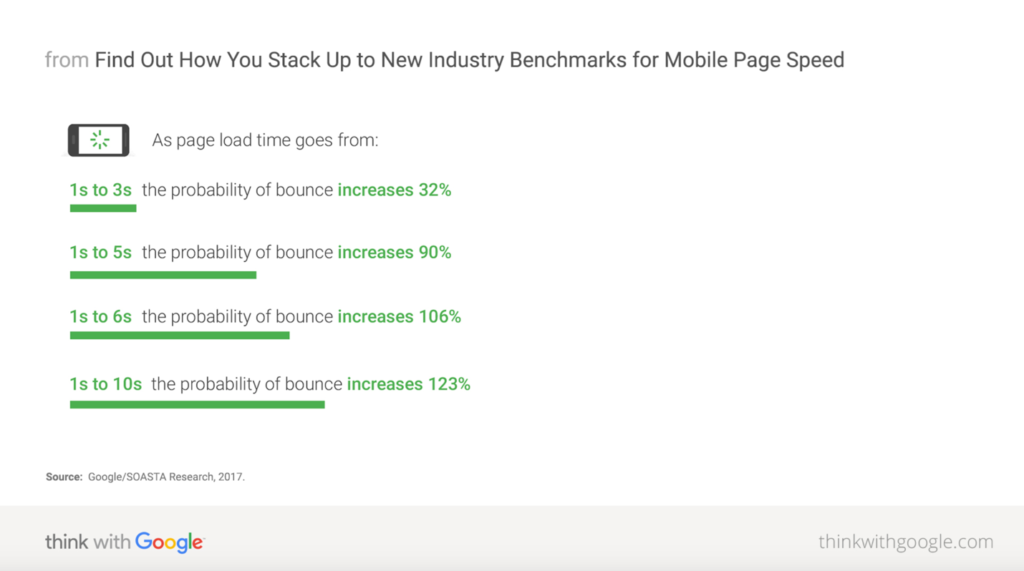
Source: Think with Google
Reducing your site’s bounce rate is a focus for virtually every site owner or it should be anyway. So, make sure to pay attention to site speed to avoid issues in this area.
It’s challenging enough to craft a call-to-action that convinces your site visitors to buy your product or services without adding any additional hurdles. Sprinkle in a bit of slow page load time, and you could be missing out on a ton of revenue.
In fact, in 2012, Fast Company had conducted a study showing that even a one-second increase in page load time could cost Amazon $1.6 billion in lost revenue. Granted, your business likely doesn’t bring in the same revenue as Amazon, but you can still work the formula backward from Amazon’s actual revenue, determine what percentage that loss accounts for and then apply that to your revenue.
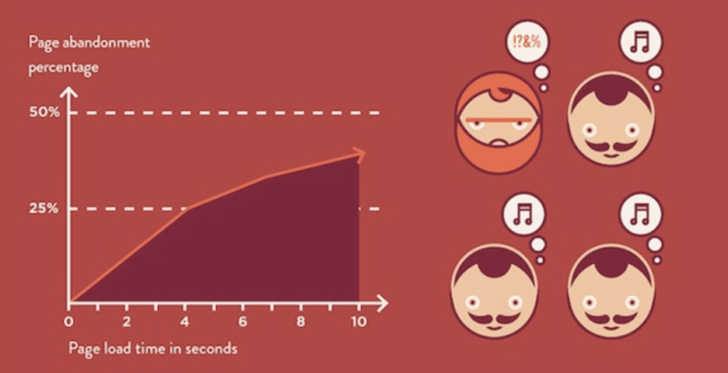
Source: Fast Company
Whatever that number is, I can guarantee you it’s not a number you want to lose when it comes to revenue. No business wants to lose revenue, no matter how large or small.
You get the importance by now of making sure your site loads quickly. So, now let’s look at a few reasons why your site might be bogged down.
Videos, images, graphics, and other large media files can take up a lot of space. When a visitor hits your site, your site begins to serve up images, graphics, videos, and other media files that are supposed to exist on the page on which the visitor lands. If the files are super huge, this can slow down the speed of your site.
Host your video files elsewhere. Rather than hosting them on the site, host them in places like YouTube, Vimeo, and other such services. Then, embed the videos on your site. That way, visitors can still play the video right there on your page, but they won’t deal with any lag in load time. Regarding optimizing your images, try to use file types like JPEG, PNG, and GIF. These tend to load much more quickly than less optimized file types.
While you may be tempted to cut costs in an area like website hosting, I strongly advise against doing so. There are some affordable hosting options that do offer decent site speed, but often the cheap, cost-saving hosting services come with slow page load speeds.
First, look to avoid shared servers if you want your site to load fast. Shared servers are ok for smaller sites, but if you want to avoid the lag time, opt for another type of hosting. There are a variety of options here depending upon your site and your particular needs. So, do your research and figure out what the best option for hosting is for your site.
There are tons of great CMS options for creating your website. Options such as Joomla, WordPress, Wix, and others are higher quality options and often help with your site’s load speed. There are less reliable CMS options, however, which can slow your site down.
WordPress is my personal preference for all the great plugins and other available tools at your disposal to help you boost your site’s performance. Avoid some of the lesser-known options, especially those with reputations for being highly unreliable. Focus instead on more proven options. If you’ve never heard of a particular CMS, do some digging, look at reviews, ask your peers, and make the best choice for your business.
Redirects are an easy way to point site visitors away from content like a 404 page and toward relevant content that actually exists and might meet their needs. The problem is, if you have too many redirects on your site, you can start to aggravate your site visitors. Think about the extra second or two a redirected link causes as it finds the new content. Those seconds could lose a visitor’s attention.
I’m not saying don’t use redirects. They are a highly useful tool. That said, try to use them sparingly. Also, try to limit multiple levels of redirects which can add even more seconds on to the page load time.
Too much code can bog down your site. Javascript, CSS, and HTML can all include unnecessary code that can lead to your site slowing down.
Cut down on any unnecessary characters like commas and spaces. This alone can help speed up your site. Also, get a skilled developer to look at your code. There are potentially a lot of lines of code on your site that are unnecessary. One example of how this can happen is when someone copies and pastes something from a Word Document right into your site. This can add lots of lines of unnecessary code. In this instance, it’s best to instead copy and paste the text into a text editor, then bring the copy into your site.
These are just a handful of the many things that can slow down your site. Start here, as each of the above can have a significant impact. Then take it a step further and bring in an expert to dig through your site and analyze any other issues that might be impacting your site’s load time.
You’ve seen the evidence. Now I highly recommend digging around and checking out the page speed on your own website. Fortunately, that task is simple. Here are a few great tools to easily check the load speed of your website.
I can’t stress enough how important it is to focus on the speed of your website. Why put your site at risk of turning visitors away and missing out on revenue critical to the growth of your business. Even if you run a blog and don’t sell services or products directly on your site, your revenue likely comes through Google AdSense clicks or affiliate marketing, thus you still need to rely on high traffic levels and people sticking around your site.
So, no matter what niche you are in, get focused on site speed now, and address the issue before it becomes a major problem.
Anthony is the Founder of AnthonyGaenzle.com a marketing and business blog. He also serves as the Head of Marketing and Business Development at Granite Creative Group, a full-service marketing firm. He is a storyteller, strategist, and eternal student of marketing and business strategy.
https://www.searchenginewatch.com/2020/09/04/why-site-speed-is-critical-for-your-seo-success-and-how-to-make-it-happen/
The trick is being able to get featured snippets is using a structured process. One that you can repeat over and over again. Which is exactly what we show you how to do in this blog post. But just before we go any further into how to do that, let’s do a quick brief on featured snippets.
Featured snippets are the images, content summaries, answers, widgets, or other data that Google displays in their SERPs in addition to traditional web results.

From Google’s point of view, these provide their “customers” with better user experience – they get the information they need without ever needing to actually go to a website. And an improved revenue model for them – paid ads are how Google keeps the lights on.
But it’s a different story for website owners and bloggers. Featured snippets can feel like a mammoth task. But you don’t have to feel that way.
There’s a straightforward answer to this – Google has increased its use of featured snippets in the last 12 months.
This is a trend that does not look set to change anytime soon.
If anything, Google will double-down on this approach, treading the fine line between scraping your content (without paying for it) and rewarding you with enough traffic to continue publishing.
There was even a time when you could grab the featured snippet and the numero uno ranking for a given keyword.
So you could effectively rank for position zero and position one. Which obviously drove insane amounts of traffic.
But then Google went and changed its algorithm to terminate “spot zero” rankings, and SEOs went back to the drawing board. The point we’re making is how your visitors interact with your website has changed dramatically.
But this also provides you with an opportunity.
As you probably already know, grabbing the first position result in Google SERPs will give you a CTR of at least 31.7% for a given search query. That’s why SEOs push so hard to dominate that particular slot in the organic SERPs.
But what if we told you that a competing featured snippet gets way more clicks you should get. There is hope, though.
Because around 60% of all featured snippets are owned by sites that don’t hold position one or that keyword. Basically, as long as you rank somewhere on page one it’s simply a matter of reverse engineering how to grab the featured snippet for that result. And yes, we’ve got you covered.
As has been the case with most aspects of SEO over the last few years you should analyze what your competitors are doing.
So, the Authority Hacker team analyzed over one million search results for commonalities in the “how” and “why” of rich snippets.
Our criteria were that we included all types of featured snippets, including YouTube, People Also Ask, Knowledge cards, and more. And we also only analyzed phrases that had at least 1,000 searches per month.
What we found is that anywhere up to 65% of all search results included a snippet of some kind.
Basically, if you’re not optimizing for these rich/featured snippets, I can pretty much guarantee that your competitors are.
Let’s say you rank on page one for your keyword of choice. It typically takes a lot of links and a lot of work to kick down the door to position one. But snagging a featured snippet can help you leapfrog your competitors.
Quick reminder: You have to already rank somewhere on page one for our tactic to work.
With that in mind, head on over to Ahrefs.
Click on ‘Site Explorer’, paste in the URL of your website, click the search icon, and then click on ‘Organic Keywords’.

Now, filter the results so you only see what pages already rank on the first page of the SERPs.

And the final step is to look for the gaps i.e. keywords you already rank for but where you don’t own the featured snippet.
To do that click on ‘SERP Features’ and select ‘Featured snippet” and ‘Apply’.

Here’s what the results look like:

Now you know exactly what keyword phrases to target for your next featured snippet conquest.
And yes, you could do all of this manually.
But that’s entirely up to you – Ahrefs is our tool of choice when it comes to this stuff.
So now we get to the cool stuff – reverse-engineering the SERPs to snag those premium organic placements.
Remember those commonalities we mentioned a little while back?
Well, what also became apparent during our research is that Google isn’t quite as clever as they’d like you to think they are.
All the talk about using AI and NLP (Natural Language Processing) to determine search results well it’s basically smoke and mirrors.
It all sounds compelling but it’s still basically fluff. Instead, the process they appear to use is far more mechanical in nature.
Our data indicate that they’re using how content is structured and semantic analysis to figure out what should appear as a featured snippet. Which all sounds very complicated, but it isn’t.
What we found is that Google follows some very basic rules when choosing which page to take a featured snippet from.
In effect, they would appear to be giving preference to pages that structure their data in a very specific way:

What you are effectively doing here is over-optimizing for the search query.
So it’s kinda like being back in 2004, for now.
Some will view this tactic as “keyword” stuffing, which I think is maybe a little hyperbolic.
I see it as simply structuring your data in a way that makes Google pay attention to your page.
We’re simply providing you with the information we use to dominate whatever featured snippet we want to.
What you do with that information is entirely up to you.
But just imagine the positive impact this could have on an already successful affiliate site?
As with any SEO “hack”, there is always the likelihood that Google will update its algorithm again, changing the selection criteria.
So – in several month’s time – you might have to adjust your approach to retain your position zero placements.
But the argument I’d make here is that in the meantime you’ll miss out on a lot of free traffic.
Something which your competitors will be more than happy to take the risk on.
For me, this is an opportunity to take advantage of.
And if things change, well I’ll see that as “Que sera sera”.
https://www.searchenginewatch.com/2020/09/03/how-to-become-a-master-of-featured-snippets/
[unable to retrieve full-text content]https://feedpress.me/link/13962/13853905/379582
[unable to retrieve full-text content]https://feedpress.me/link/13962/13850503/379652
Voice search is fast gaining popularity among online users. It is easier, faster, and more conversational as compared to traditional search.
As per ComScore, by 2020, 50% of all searches will be voice searches. Google also reports that 27% of online users are using voice search on mobile globally.
But to make it work, you will require optimized content and focus on voice search SEO. In this article, we will be digging into the eight best practices of optimizing just that.
In simple terms, voice search SEO is a technique that optimizes the content, phrases, keywords, metadata, and more to enable your voice search to rank on top whenever a user asks questions. It mainly focuses on the natural language of users and delivers them answers accordingly.
As per emarketer, smart speaker usage is estimated to grow at a compound yearly growth rate of approximately 48% to meet the demands of more than 76 million users by 2020.
And it is said that 40 million Americans currently possess a smart speaker. Clearly, more and more households are using smart speakers these days.
Earlier, only a handful of products such as Alexa and Siri were popular. But over the years, voice technology has improved tremendously. As a result, many tech companies are releasing their own smart speakers.
There is a remarkable improvement in artificial intelligence (AI) and machine learning (ML), and it has changed how users interact with their smart devices and search the internet.
For instance, with Google’s RankBrain, you can recognize words and phrases to predict forecast results more accurately. When it encounters a new phrase, it makes its best guess and gives answers accordingly.
People are increasingly using voice search to search for local products and services. According to statistics, 58% of people have used voice search while finding information about a local business.
Also, as per Google reports, searches for “near me” business has increased drastically over the last few years. It is indeed great news for local businesses.
To emerge at the top, marketers are regularly fine-tuning their SEO strategy to optimize for voice search. Considering that Google’s voice recognition has 95% accuracy, businesses wanting to attract more inbound traffic to their site have to implement voice SEO.
And Google alone is not working on perfecting voice recognition to make the most of voice search. China’s iFlytek speech recognition system has an accuracy rate of 98%, and the team is working to achieve 99% accuracy.
Google’s voice search is now available in more than 100 languages on mobile devices.
Moreover, statistics suggest that mobile phones are used nearly 40% more than smart speakers for voice search.
And with mobile phones, people usually use voice search in different environments like at the office alone, at a restaurant, at a party, or any other location.

This trend of voice search on smartphones continues to rise – all thanks to advances in speech recognition technology.
Long-tail keywords are specific keywords that your target audience is likely to enter (and in this case speak) to the search engine.
People have been using long-tail keywords for a long time and seeing brilliant results with their search rankings.
Thus, it’s a great idea to use long-tail keywords to optimize voice search for a website.
In fact, according to statistics, they make up 70% of all web searches.

In voice search, you can add long-tail keywords in a more conversational tone and specify what users are looking for.
The good news is that you can use plenty of online tools to search for relevant phrases and add them to your content. Some of them include:
Also known as Structured Data, Schema Markup is a code that you can add to your website. It will allow search engines to understand your site’s content, what it means, and why it is there.
Schema Markup can also help search engines robots crawl and make it rank higher on search engines. Further, you can use it for improving and getting comprehensive search results that boost the user experience.

The second search result has a star rating and a publication date, which has been added using Schema Markup. Since the result is illustrated, the users are likely to click on it readily.
You can also implement schema markup SEO best practices to provide more information about your site to the search engines and rank higher.
Users don’t do voice search like they do a text search. Instead, they will probably be making longer and more specific queries.
As per research, there has been a 61% growth in question keyphrases.

The statistics reveal how people are using question keywords to ask queries through voice search.
Thus, it’s an excellent idea to curate your content to answer their queries. However, make sure that you write great content that is valuable to your target audience. It will satisfy your user and, at the same time, increase the chances of appearing in featured snippets.
Another way to rank higher for voice searches is to optimize your Google My Business page.
Actually, it’s one of the easiest ways to get discovered by your target audience when they voice out their queries in Google. You just have to make sure that your content, images, and information are complete and precise.
Additionally, implement your prevailing local SEO strategy along with targeting how users are phrasing their queries. As per reports, 76% of smart speaker-users carry out local searches at least once a week. Thus, local SEO is as crucial as entering relevant info and images.
Websites with many links pointing to them rank higher in regular search. And it is the same for voice search.
A study by Brian Dean, which examined 10,000 Google Home search results, found that sites with more links rank more often in voice search.
As soon as you put in your voice query, the Google search engine will provide results from high authority websites.
Here are some of the ways to increase your domain authority to rank higher in voice search:
Everyone surfs the internet via smartphones these days since it’s convenient and accessible. It is only evident that most users will do their voice search from mobile.
The graph below shows the different environments where people use voice search.

Since voice searches are mostly done via mobile phones, mobile optimization is crucial.
Your page speed is going to play a significant role in voice search SEO. Studies show that the pages that rank higher in search engines after doing a voice search load in 4.6 seconds. They are also 52% faster compared to average pages.
Thus, optimizing your site speed is essential if you want to rank higher in search engines.
Crafting voice search FAQ pages will benefit you a lot since question keywords are very popular.
According to statistics, voice search results come more from FAQ pages than desktops.

The best part is that FAQ pages can rank for several voice search queries. Moreover, they are concise and answer precisely what the users are looking for.
Therefore, Google usually pulls out the answer from your FAQ page whenever users do a voice search.
Voice search is convenient and straightforward to use. No wonder it is gaining popularity among online users. But unless you optimize your voice search for SEO, users won’t be able to find your content.
Implementing all the eight tips mentioned in this article to optimize your site for voice search SEO can help you a great deal. These are tried and tested tips and will definitely work.
Plus, when you optimize your site for voice search SEO, you will be optimizing your website in general and rank higher in search engines either way.
https://www.searchenginewatch.com/2020/09/02/voice-search-seo-guide-trends-and-best-practices/
[unable to retrieve full-text content]https://feedpress.me/link/13962/13848518/378695
A few years ago, “zoom and enhance” was an internet meme making fun of CSI-style shows using a technology that didn’t really exist. Taking a very low-resolution image and zooming in/enhancing it wasn’t something that could be done as depicted.
However, in the last few years, new modern artificial intelligence (AI) models have changed that. The so-called “super-resolution” can now be done with pretty stunning results. Even better, the models and underlying code are open-sourced, meaning anyone can upscale their images using these new, state-of-the-art AI models.
I’m going to reveal how you can easily utilize this technology to automatically upscale your website images in bulk and why it can be beneficial.
Super-resolution is probably best suited for e-commerce sites that don’t have super high-quality images and instead have small images provided by manufacturers, drop shippers or other ecommerce middlemen.
Here’s a look at the kind of quality increase you could expect from this process.


Source: Imgur Album
You can see more full-size examples here. The differences are more apparent the larger the image is zoomed.
However, there are some other factors to consider before proceeding. Site speed is a key SEO ranking metric. Increasing image resolution typically also means increasing image size. The tradeoff between quality and image size is an important one, and you should have an idea of how upscaling images may impact page load times.
If you already have only high-quality images, as you should, upscaling likely isn’t worthwhile.
Super-resolution upscaling also doesn’t do particularly well with text. It can create artifacts that decrease overall image quality. However, it works much better for images without text.
Despite those caveats, if you still think the increase in quality would be useful for you like the examples below, keep reading.
This guide requires that you sign up for two APIs:
While it’s possible to achieve what is outlined here without relying on paid APIs, it does drastically simplify the process for relatively inexpensive API usage rates. If you have an ongoing need for using super-resolution on your images, implementing these models from their open-source base code is probably your least expensive bet.
Here’s what to do:
We are now at a tipping point in the emergence and democratization of AI-driven models that can do magical things. Learning Python opens up a huge new world where open-source code and open-source trained models now give even programming novices the opportunity to leverage these technologies for a huge variety of digital marketing goals.
Keeping abreast of this AI revolution will not only keep you ahead of the curve but will also give you the opportunity to be among the first to apply these advancements in new and creative ways, addressing previously unaddressable problems and challenges in our space.
Kristin Tynski is VP of Creative at Fractl, a prominent growth marketing agency that’s worked with Fortune 500 companies and boutique businesses.
https://www.searchenginewatch.com/2020/09/01/how-to-use-super-resolution-and-improve-onsite-image-quality/
[unable to retrieve full-text content]https://feedpress.me/link/13962/13847361/376936
[unable to retrieve full-text content]https://feedpress.me/link/13962/13846657/379421