Google Search Allegedly Boosts YouTube Results Ahead of Competitors via @MattGSouthern

Google prefers ranking content from YouTube over other video sources, according to a new report in the Wall Street Journal.

When Facebook and other competitors host a video that also appears on YouTube, Google will allegedly push the YouTube result ahead of others in search results.

The Wall Street Journal claims tests show YouTube ends up first in the Google Search video carousel more often than not.

Further, YouTube results frequently take up most of the slots in Google’s video carousels.

“The Journal conducted Google searches for a selection of other videos and channels that are available on YouTube as well as on competitors’ platforms. The YouTube versions were significantly more prominent in the results in the vast majority of cases.”

If true, a case can be made that Google is engaging in anti-competitive behavior.

However, these allegations are difficult to prove.

Here are more highlights from WSJ’s report, including how it arrived at these conclusions.

Does YouTube Have An Unfair Advantage in Google Search?

The Wall Street Journal is clear about what it’s trying to prove in its report.

ADVERTISEMENT

CONTINUE READING BELOW

“Engineers at Google have made changes that effectively preference YouTube over other video sources, according to people familiar with the matter.

Google executives in recent years made decisions to prioritize YouTube on the first page of search results, in part to drive traffic to YouTube rather than to competitors…”

The Wall Street Journal conducted a test that involved searching Google for titles of selected publishers that had posted nearly identical content to YouTube and a competing video platform.

Here’s what was found to show up most frequently in the first spot of Google’s video carousel.

  • YouTube vs. Facebook Watch: YouTube is first 95% of the time versus 5% of the time for Facebook.
  • YouTube vs. Twitch: YouTube is first 86% of the time versus 14% of the time for Twitch.
  • YouTube vs. Dailymotion: YouTube is first 82% of the time versus 18% of the time for Dailymotion.

Videos on YouTube will even rank first when they receive more views and engagement on other platforms, WSJ finds.

In fact, WSJ deliberately chose content with more engagement on other platforms in an effort to detected “skewed” results in Google search.

ADVERTISEMENT

CONTINUE READING BELOW

“The tests found that video results in a large majority of cases featured YouTube videos ahead of the same or very similar versions of the videos available on competitor sites, even when the actual views and followers were higher on the competitor sites.”

The disparity was particularly evident in comparing results from YouTube against Twitch.

When searching Google for seven of the most popular streamers on Twitch, the video carousel would rank YouTube results in the first position most often.

“Out of a total of 69 carousel slots, Twitch occupied only four,” the report states.

For what it’s worth, user engagement signals such as views and comments are not ranking signals for videos in Google Search. Although the difference in ranking is still worth noting.

What Does This Mean For Marketers?

Again, these claims are all alleged, and Google’s official stance is that it does not give preference to YouTube in search results.

Going strictly off of data gathered by the Wall Street Journal – marketers should strongly consider uploading all videos to YouTube in order to have the best chance of getting them surfaced in search results.

That means if you have a video that went viral on Facebook, for example, also upload it to YouTube if you haven’t already.

Regardless of how much engagement a video receives on other platforms, this report indicates the video will underperform in Google Search unless it’s uploaded to YouTube.

It’s up to video publishers themselves to drive traffic where it would best serve them.

If Facebook is your priority, then it may be helpful adding a disclaimer on YouTube saying: “This video first appeared on our Facebook page. Follow now for similar videos.”

Twitch streamers are exceptionally good at this. It’s rare to find a YouTube video from a Twitch streamer without several calls-to-action to follow them on other platforms.

That’s a sound strategy for all publishers right now, unless Google acknowledges there’s a problem with the video carousel and changes it.

Methodology

The Wall Street Journal conducted tests by searching Google for the exact titles of 98 recent videos on Facebook and Dailymotion that had also been posted to YouTube.

ADVERTISEMENT

CONTINUE READING BELOW

Of the searches, 82 returned a video carousel. The relative placement of results were then compared.

For the Twitch tests specifically, the WSJ searched Google for the handles of the seven most-followed still active on Twitch to bring up their videos.

To carry out these tests, WSJ created computers in the cloud that presented unique IP addresses for each search.

For more details about these tests and how they were conducted, see the full report here.

http://tracking.feedpress.it/link/13962/13727366


Thesis and Adobe prove SEO content doesn’t have to be boring to be useful

30-second summary:

  • To make Adobe findable via non-Adobe keywords, Thesis created over 100 helpful, entertaining, professionally informed, SEO-rich articles to draw people closer to the brand.
  • Thesis’ writing director, Tyler Stenson describes a very interesting process of how they worked with Adobe to create valuable, engaging, and unique SEO content.
  • This article serves as a great focal point on how to create helpful, entertaining, professionally informed articles that actually build relations and help people reach their goals.  

Adobe is the industry standard for creative software. Most makers know this, but what about the rest of the internet? To make Adobe findable via non-Adobe keywords, Thesis, a digital agency in Portland, Oregon, created over 100 helpful, entertaining, professionally informed, SEO content to draw people closer to the brand. 

Adobe recognized that they were findable in search engines through all of the expected product names and branded phrases—search well-known products like Photoshop or InDesign and Adobe dominates search results. But seek out unexpected subjects like food photography or vector illustration and the company with the industry-leading products for these types of creative outlets were falling short.  

A modern editorial approach 

Tasked by Adobe with increasing search traffic to Adobe.com to attract new audiences with new interests, Thesis took a modern editorial approach. They wielded data—strategically researched keyword opportunities—in concert with rich editorial articles and tutorials to orchestrate a seismic SEO effort that aimed to pull people closer to the Adobe brand. 

To be truly helpful, these SEO articles required more than desk research. They required a unique point of view that comes with experience and talent. So Thesis built a database of more than 100 subject matter experts (SMEs)—professional photographers, designers, illustrators, videographers, editors, colorists, sound engineers, and even ASMRtists—and Thesis’s writers interviewed them.

The writer made sure they made nailed every detail in every article by using recorded phone calls and video chats, live demonstrations, close study of interview transcripts, and exchanges of fact-checking emails. It was more than simple SEO, this process created a library of diverse expertise that added depth to topics covering dozens of creative disciplines. 

Smooth sailing requires ship-shape operations 

In over 100 SME interviews, Thesis collected more than 5,200 minutes of expert advice. You can watch the entire ‘Game of Thrones’ series and the first season of ‘The Wire’ in less time than that. Keeping to a newsroom-like schedule, Thesis built, managed, and fine-tuned a workflow that gave writers enough time to conduct interviews and write articles, editors enough time to edit them, and designers enough time to make the pages beautiful.  

Working in month-long sprints, the Writing and Design teams paired tens of thousands of words (actually 101,639 words—longer than ‘To Kill a Mockingbird’) with hundreds of images, coming together in 108 new, entertaining editorial pages with real value to the reader and real SEO impact to the brand. A massive information resource on topics and disciplines that Adobe products can help creatives pursue, from landscape and pet photography to children’s book illustration, audio editing, storyboarding, film effects, and more. 

SEO content - Adobe and Thesis

More than just pretty words and pictures

This is not your average snooze-inducing, keyword-salad SEO content. These are well-considered editorial pages with the user’s experience top of mind—always relevant, entertaining, and educational.

Adobe products are top-of-the-line creative software, but what the product can do isn’t always as inspiring as what you can do with it. Each page has SEO content that translates the expertise of professionals into digestible bits of wisdom, offering step-by-step guidance or linking to helpful tutorials at Adobe.com, giving readers guidance in new creative endeavors and showcasing how Adobe products can help them achieve those goals. 

And more than that, each page is primed for SEO publishing—optimized copy, customized metadata, and intentional HTML structures that maximize SEO scoring.  

Before finalizing each article, Thesis ensured it earned an A-grade or better in the Clearscope optimization tool, and that attention to detail paid off. First-page rankings grew 26% quarter over quarter. In the first six months, organic traffic to Adobe Creative Cloud SEO content pages increased by 88%.

Even though it wasn’t an expected or requested KPI, Adobe also experienced a 139% increase in revenue driven by these same pages through organic search—proof that this Herculean editorial effort made their products more accessible than ever before. 

SEO content - Interactive and more than just a keyword-salad

Increased visibility for broader search terms

Now when someone searches the internet for tips on shooting night photography, taking great portraits, using shallow depth of field, creating comic book art, drawing anything from roses to feet, mixing music, recording a podcast, creating a shot list, editing video, and so much more, they can find the answers they need in clear language that’s informed by expert advice, alongside beautiful images. And it just makes sense that these articles live on Adobe.com, a hub for creativity and design—a resource that now has dozens of articles that provide budding creators with next-step guidance to pursue their creative dreams. 

In what may be the ultimate marker of success, now when you ask Google if black is a color, the information card at the top of the search results pulls from the article Thesis created for Adobe. And the work continues by expanding the encyclopedic creative knowledge and experience available on Adobe.com.

Thesis and Adobe keep generating new articles, doing their part to make this corner of the internet a little more helpful, a little more beautiful, every day (while also increasing organic search traffic to the website).

Tyler Stenson is writing director at Thesis, a digital agency based in Portland, Oregon.

https://www.searchenginewatch.com/2020/07/16/thesis-and-adobe-prove-seo-content-doesnt-have-to-be-boring-to-be-useful/


How SEO Friendly CMS can support your digital goals now and in future

30-second summary:

  • Choosing the right content management system (CMS) to support your content and marketing goals is a big undertaking.
  • A good CMS should be here to support your SEO objectives. 
  • The selection includes looking at factors such as budget, the purpose of your website, and the technological capabilities of who will be using the CMS. 
  • The biggest challenges with CMS often relate to a lack of flexibility to deal with dynamic changes in markets and consumer demand. This is an area where AI needs to help. 

Your CMS enables your team to create and edit content, set up workflows and collaborate with one another, and publish content directly to your website. Choosing the right content management system (CMS) to support your marketing goals is a critical decision. Having to migrate your site to another CMS later if you’re unhappy with your choice is a major undertaking with serious SEO considerations, so you want to choose the best fit right out of the gate. 

Of the top million sites on the web, 47% use WordPress. Another 43% use unnamed “other” CMS solutions including Joomla!, Squarespace, Blogger, Wix, and more. WordPress can be a good CMS choice for SEO, but it is not without its challenges. Enterprise brands, in particular, may need a more powerful, customizable CMS to suit their needs without introducing all of the vulnerabilities and integration foibles of a WP setup with third-party plugins. 

What are we looking for in an SEO-friendly CMS? 

On-page SEO is still a top organic ranking factor. The ability to optimize specific elements of the page—page title, URL, meta description, headings, and image alt text—is key. You also want to ensure that code is as clean as possible.  

What else should you be looking for in a CMS to support your search optimization strategy? 

1. WYSIWYG – “What You See Is What Get”

Make sure your CMS is manageable for all users. While many marketers know coding basics, you don’t want to present obstacles for creative team members in your CMS. You can read more about “What You See Is What Get” and more on the mechanics of CMS selection here.  

2. Loading speed 

Given Google’s emphasis on page speed and the fact that every single second of delay can cost you a seven percent reduction in conversions, you can’t afford to get this one wrong. A quick-loading CMS is a foundation on which your other page speed optimizations can be more successful. 

3. Workflows and collaboration 

How intuitive is your content workflow? If you’re having to track revisions and control permissions in other software, you’re wasting valuable time.  

4. Mobile optimization 

Today, over 40% of online transactions occur on mobile and 87% of internet users are on mobile phones. Google recognizes the importance of mobile to user experience, so much that the search engine implemented mobile-first indexing as of July 1, 2019. 

5. Purpose-built features 

These will vary on your type of business and unique needs. If you’re selling online, for example, you’ll want an ecommerce CMS with the ability to add hundreds or thousands of products, define the attributes shoppers use to search your inventory, and edit product groups en masse.  

6. Crawlability 

Your CMS should include standard features to support crawlability and indexing including canonical tags, meta robots control, automatic RSS generation, and security features. 

7. Content optimization 

Built-in content optimization capabilities enable your team to meet searcher demand in real-time with SEO recommendations based on search data. 

How can you future proof your CMS with AI? 

As I mentioned above, you really don’t want to have to migrate your site if your CMS can’t keep pace with your business growth and the evolving search landscape. There are other options if your CMS meets your needs today but doesn’t have the capabilities to serve you in the years to come. 

Dynamic content is the future of SEO. Human marketers simply don’t have the bandwidth to collect and analyze the massive amount of consumer data being generated across hundreds of touchpoints. Artificial intelligence (AI) is a game-changer in so many facets of marketing, and content management is no exception. 

1. Bridge the customer experience and optimization gaps

AI is transforming the CMS market by helping marketers to bridge the customer experience and optimization gaps where traditional CMS options come up short. For example, AI drives real-time SEO research and insights which can then be used to make smart content optimization recommendations or even implement optimizations that personalize the reader’s experience. 

2. Expand image and voice search opportunities

Inside a CMS, AI can enable automatic image tagging and Natural Language Processing (NLP) or even Generation to accelerate the process of content creation. AI can analyze text for linking and CTA opportunities, and optimize for voice control and voice search platforms. 

3. Free up more time for productive campaign management

All of this intelligent automation enables marketers and SEOs to hand off the manual, labor-intensive aspects of their strategy and free up time for more creative campaign management tasks. 

In the future, we may even see intelligent CMS solutions able to interface with other AI systems and devices. AI may be able to personalize not only the content but efficiently deal with thousands of landing pages that need to be optimized quickly and frequently.

Building SEO into your content creation

Optimizing for search today means not only optimizing for the customer experience but for the myriad search result types a well-optimized piece of content can trigger. Local/MapPack results, zero-click search, answer boxes, video carousels, featured snippets, and more help searchers make better decisions and give brands opportunities to get in front of more relevant queries. 

Choosing the right CMS, or if you need a CMS, is far from the only consideration in your SEO strategy, but it should be a well-thought decision based on your company’s unique needs and goals for your marketing program. A good CMS gives authors the power to optimize new content ‘out of the gate’ as it is produced.  

With your CMS and all tools, choose solutions that are built to scale. Focus on search-friendly content types that enable you to target different search intents and types, and help you stand out in competitive SERPs—for example, video thumbnails are now appearing in 26% of search results.  

The role of AI and automation

AI is now beginning to play an important role in the development of content and with integration in CMS systems. Sometimes there are areas where CMS systems can be large and not sufficiently flexible to deal with dynamic changes of markets, consumer demand, and competitive movement. This can make it hard for you to make changes quickly, and when things break the amount of time and resources needed to fix them is huge. AI-powered automation can now help relieve some of this burden and help marketers seize on immediate opportunities and act on them in as near to real-time as possible.  

There is no one size fits all CMS. However, if you are challenged by slow and cumbersome changes then focusing on how AI is used may help when evaluating how, if, and what is the best CMS option for your brand. 

Jim Yu is the founder and CEO of BrightEdge, the leading enterprise SEO and content performance platform. 

https://www.searchenginewatch.com/2020/07/16/how-seo-friendly-cms-can-support-your-digital-goals-now-and-in-future/


Google SEO 101: Website Crawl Budget Explained via @MattGSouthern

Google goes in depth on crawl budget, answering some of the most common SEO-related questions in the latest episode of SEO Mythbusting.

Joined by Merkle’s Alexis Sanders, Google’s Martin Splitt answers over a dozen questions that SEOs frequently ask about crawl budget.

Here’s a quick recap of each question and answer, along with its corresponding time stamp in the video.

What is crawl budget? (1:15)
Crawl budget is the balance between crawling as much content on a site as quickly as possible without overwhelming the servers.

The budget is number of requests Googlebot can make at the same time without overwhelming the server.

Related: How Search Engines Crawl & Index: Everything You Need to Know

What is crawl demand? (1:47)
This refers to how often Google wants to crawl a site based on its subject matter.

For example, a breaking news site will likely have a higher crawl demand compared to a recipe site.

How does Googlebot make its crawl rate and crawl demand decisions? (2:44)
Google determines how often to crawl a page based on how frequently the content changes. If the frequency of change is low then the site will not be crawled as often as others.

ADVERTISEMENT

CONTINUE READING BELOW

ETags, HTTP headers, last modified dates, and similar (3:43)
Google uses things like ETags, HTTP headers, and last modified dates to determine how often content should be crawled.

An ETag is a caching header that contains a fingerprint of the content to detect changes over time.

What size of sites should worry about crawl budget? (4:35)
This is primarily a concern for large sites with millions of pages. If your site has under a million pages then you do not have to be concerned about crawl budget.

Server setup vs crawl budget (5:00)
Crawl budget is frequently cited as a problem for site owners when the underlying issue is usually server setup or quality of content.

Crawl frequency vs quality of content (6:18)
It’s not an indication that content is high quality when it is more frequently crawled. It’s also not an indication that content is low quality when it is less frequently crawled.

Related: 7 Tips to Optimize Crawl Budget for SEO

ADVERTISEMENT

CONTINUE READING BELOW

What to expect to see in one’s log files if Google is testing one’s server? (7:45)
They might see an increase in crawl activity, followed by a decrease, followed by another increase. So a wave pattern, in other words.

Tips on how to get your site crawled accurately during a site migration (8:18)
Martin Splitt recommends progressively updating your sitemap noting what has changed and when. Beyond that, try to ensure both servers are running as smoothly as possible.

Crawl budget and the different levels of one’s site’s infrastructure (9:40)
The ways in which crawl budget affects different levels of site infrastructure depends on the site itself.

This is usually not something site owners should worry about, Splitt says.

Does crawl budget affect rendering as well? (10:37)
Yes, crawl budget does affect rendering. When Googlebot renders content it fetches additional resources, which comes out of the site’s crawl budget.

Caching of resources and crawl budget (11:46)
Google caches resources as aggressively as possible to avoid having to recrawl them every time.

Crawl budget and specific industries such as publishing (13:34)
E-commerce sites and large publishers should be most concerned about crawl budget.

What can be – generally speaking – recommended to help Googlebot out when crawling one’s site? (15:03)
Splitt recommends blocking resources from being crawled that do not absolutely need to be crawled. This will help Googlebot crawl more efficiently.

What are the usual pitfalls people get into with crawl budget? (16:52)
A frequent issue site owners run into is blocking resources in robots.txt that Googlebot really needs.

For example, some sites block their CSS file from being crawled, which Googlebot needs in order to render the content as visitors see it in a web browser.

Can one tell Googlebot to crawl one’s site more? (17:40)
No, this cannot be done. Site owners can limit how often Googlebot crawls, but there’s no way to trigger Googlebot to crawl more frequently.

See the full video below:

[embedded content]

http://tracking.feedpress.it/link/13962/13726901


101 Quick & Actionable Tips to Improve Your SEO via @annaleacrowe

SEO can be a lot like fad dieting.

There’s a lot of advice that promises fast results, but most of it doesn’t deliver.

Plus, many highly-touted SEO tactics just don’t work anymore.

If you’re using outdated practices it’s time to let them go.

You’ll also find that some new and cool trendy tactics don’t actually work for you.

Still, other legit SEO tactics (hello, month-long technical audits!) simply take time. I’m talking months or even more than a year to show results.

But that doesn’t mean your SEO strategy has to be a real time-suck.

Let’s focus on more actionable and proven SEO tactics.

The kind that will help you today.

Here are 101 of my fast-and-quick tips, tricks, and secrets that will work better than any fad diet.

101 SEO tips

101 SEO tips

Basic SEO Tips

1. Use Video & Optimize It

Video is more valuable than ever.

ADVERTISEMENT

CONTINUE READING BELOW

Don’t let budget limitations stop you from getting into the game.

Between phone recordings and motion graphics, there are plenty of options available to you.

2. Focus on User Intent

When conducting keyword research, incorporate user intent search queries and tie them together with voice search queries, like questions, to help support those user intent queries.

3. Start Building Your Expertise, Authority & Trust

If you’re a newcomer, it’s going to be hard to compete against a website that’s been around for 10 years.

There’s only one place to start: creating great content and pages that showcase your expertise (whether you’re an individual or a company).

That content should support your SEO and business goals.

4. Make Your Content User-Friendly

SEO is ultimately about people.

And most search engine updates favor user-friendly content.

Learn about personas, human behaviors, and user trends, in addition to the technical side of SEO.

5. Customer Citations Remain Super Popular

Put together a plan to ask customers for product reviews or comments on products.

ADVERTISEMENT

CONTINUE READING BELOW

Search engines use these to attribute value and result in higher conversions.

6. Think SEO from the Start

When redesigning your website, bring in an SEO professional early in the process.

Design trends should be tailored to SEO best practices, especially for the mobile version of the site.

7. Manage Client Expectations Honestly

There are many shifty characters in this field.

Failing to meet expectations can make you appear to be in their company.

8. Think Beyond ‘Exact Match’ Keywords

You do not need to use exact match keyword terms.

Google understands entities (things and concepts) and relationships.

It can associate your topical keyword search terms.

9. Use a Referral

Personalize your call-to-actions based on a referral.

You can also do this based on location and keyword search query.

10. Pick a Short Domain

When choosing a domain name, stick to 15 characters or less.

Short domain names are easier for people to remember.

11. Find All Variations of Your Site

When you’re searching your site in the search engines ‘site:example.com’ make sure to find all the variations of your site.

For example, search the following:

  • http://example.com
  • http://www.example.com
  • https://example.com
  • https://www.example.com

Mobile SEO Tips

12. Take a ‘Mobile-First’ Approach

As of September 2020, Google is switching to mobile-first indexing for all sites.

Use Google Search Console’s Mobile-Friendly Test Tool to see how Google’s mobile search agent views your site.

13. Investigate Whether AMP & PWA Are Right for You

To help prep for the mobile-first index and increase mobile search traffic, launch Google Accelerated Mobile Pages (AMP) or Progressive Web Apps (PWAs).

Google will serve up your AMP pages or PWAs in the mobile-first index if you don’t have a mobile site, so you’ll want to make sure your primary content and links list on the AMP pages or PWAs.

14. Remove Interstitials

Unless they’re for age restrictions or data privacy purposes, remove pop-ups and interstitials from mobile.

ADVERTISEMENT

CONTINUE READING BELOW

There are many more effective alternatives to pop-ups.

15. Implement Scroll Tracking on AMP

With Google AMP, you can implement Scroll Tracking with Google Tag Manager.

16. Add Forms to AMP

Even though Google AMP pages may seem bare bones, you can add forms to capture leads.

17. B2C? Consider PWA

For B2C brands, consider investing in a Progressive Web App (PWA).

PWAs are predicted to replace 50% of consumer-facing apps.

Starbucks, Spotify, and Uber have already created impressive experiences, and users will come to expect that from smaller brands too.

18. Use Breadcrumbs on Your Mobile Website

You want to show a clean destination path as it may help increase your click-through rate on mobile.

Technical SEO Tips

19. Switch to HTTPS

When migrating your site from HTTP to HTTPS, do not make any other changes to your website. Google assumes you’re only changing protocols and may have a hard time acknowledging additional changes.

20. Canonical Tags Don’t Save Crawl Budget

Search engines must also crawl the duplicates to determine they are, in fact, duplicates.

ADVERTISEMENT

CONTINUE READING BELOW

21. Keep Site Speed to 2-3 Seconds for Users

Work closely with your developer using your Core Web Vitals report to show where the page speed issues lie.

22. News + BERT = Top Stories Carousels

For news publishers, Google BERT added a top news carousel.

The best way to appear in these results is by publishing legitimate news content, having AMP pages, and submitting your site to Google News.

23. Use rel=canonical

Make sure all your pages that can be gotten to through multiple URLs have the rel=canonical tag directing search engines to the main page.

Rel=canonical tags reduce confusion when another site scrapes your content, ultimately creating duplicate content.

24. Confirm Your Pages Are Indexed

Double-check to make sure your money pages are indexed with ‘site: domain’ search.

Also, check to see if you’re double-indexed. Double-indexing can lead to duplicate content.

25. One H1 Tag Per Page

Don’t use multiple H1 tags on a single page.

26. Add Image Alt Attributes Before Posting

Google is moving to a more visual search to compete with other sources.

ADVERTISEMENT

CONTINUE READING BELOW

Don’t skimp on this!

27. You Can Have More Than One Sitemap

If you want Google to focus its crawl attention to specific sections of your site, create separate sitemaps for images, videos, profiles, and blog posts.

28. Get a Handle on Your URL Parameters

If your URLs are dynamic URLs (meaning you see something like this: www.donutsaregoodforyou.com/?mode=1-list=1), you’ll want to adjust your parameters in Google Search Console to how you want Google to crawl your content.

Again, this helps with reducing duplicate content.

29. Change Your Internal Links for HTTPS

Before you migrate from HTTP to HTTPS, change your internal links to HTTPS.

30. Add Breadcrumbs

Adding breadcrumbs to your site will enhance SEO and the user experience.

31. Check Your Redirects

Avoid long, daisy chain redirects to help search engines crawl your site faster.

32. When Using Images, Try to Get the Vector Format Image File

These types of files scale better, giving you better image quality on multiple devices.

ADVERTISEMENT

CONTINUE READING BELOW

You may want to switch it up to WebP files if you’re having issues with page speed.

33. Use a CDN

Consider getting a content delivery network (CDN) to host your images.

A CDN helps speed up your website.

34. Optimize Your Images

Images are typically the biggest drain on load times. Make sure to optimize images for page speed and user-friendliness.

35. Use Canonical Tags for Similar Products

If you have products with very close descriptions and names, use the canonical tag instead of redirecting it.

36. Get Dedicated Hosting

While having a privately hosted domain won’t affect your search rankings, having shared hosting may cause your site to get indexed less.

Search engines index based on IP address and when they are multiple IP addresses, search engines can get too many signals.

37. Invest in Visual Search

Retailers and e-commerce brands should integrate visual search into their marketing strategy.

Following Pinterest’s lead, Amazon, Snapchat, and Bing have added visual search to their platforms, so it’s worth the investment.

ADVERTISEMENT

CONTINUE READING BELOW

38. Use Structured Data

Getting to the first page of the SERPs isn’t what it used to be. But that’s not a bad thing.

Between the Knowledge Graph, featured snippet, top stories and video carousel, there are a lot of ways to tell Google you’ve got valuable information that searchers want.

So use structured data to improve your odds.

Link Building Tips

39. Disavow Spammy Links

Always remember to use the disavow tool wisely!

40. Paid Links: Beware the Wrath of Google

If you’re donating to charities and nonprofits in exchange for a link, this is against Google’s webmaster guidelines.

41. Avoid Bad Links

If you’re in SEO for the long haul, you need to beware of risky link building tactics.

If Google detects mass manipulation, it could devalue all of your links, not just the bad.

42. Don’t Build Massive Amounts of Links on Directories

Stick with directories that are of higher quality and add relevance to your brand.

ADVERTISEMENT

CONTINUE READING BELOW

43. Make Sure Your Website Has a Clear linking Structure

For example, if you’re counting on your footer links to drive your internal linking strategy, think again.

Footer and header links do not hold a lot of weight.

Therefore, internally linking within your body copy will allow Google to navigate your website better.

44. Maintain a Healthy Link Profile

This is one way the search engines connect this to the authority and quality of your overall website and brand.

45. Go for Link Quality (Not Quantity)

As it’s quality over quantity for content, the same goes for link building.

Link building should be highly targeted and strategic; it all boils down to authenticity.

46. Do Manual Outreach for Link Building & PR

Yes, you can earn links naturally.

But what’s wrong with a little nudge?

Proactive link building gives you better control over their quality.

47. Nofollow Outbound Links

These were first created to identify paid links.

Today, most sites use them for external links in case you link to a low-quality site.

ADVERTISEMENT

CONTINUE READING BELOW

48. Always Nofollow Links Listed in Forums or Comments

The same goes for sponsorships, advertising, and press releases.

49. Add Internal Links in Logical Places

When you’re linking internally, you do not need to link with your keyword terms internally.

But it does help if the content surrounding the link is related to your main keywords.

50. Don’t Guest Post for Links

Guest posting is not a relevant way to build links directly, but it is an awesome way to create content.

Content Optimization Tips

51. Write About Topics (Not Keywords)

Think in terms of topics, not just keywords, to better align your content with your audience’s intent.

52. Get Rid of Thin Content (or Rewrite it)

It’s doing nothing for your site but bringing down the quality.

Long-form content has proven to get higher search results (though long-content doesn’t always guarantee success).

53. Clean up Duplicate Content

By cleaning up duplicate content, you’re removing any scraped content or duplicate on your site. If you have duplicate content on other sites, email the webmaster to have it removed or add it to your disavow file.

ADVERTISEMENT

CONTINUE READING BELOW

54. Check Your Old Content

Sometimes old content is still driving traffic.

If this is the case, consider creating a new post with similar content to drive new, fresh, more relevant content.

55. Create FAQ Pages

These are a win-win for readers and your search rankings, especially for voice searches.

Spend time combing through your FAQ pages.

To gain more exposure for long-tail keyword terms, rewrite them to incorporate more of these search terms.

56. Syndicate Your Content

If you’re taking advantage of the benefits of syndicated content, make sure the other site places the rel=canonical tag to direct back to your original page.

57. Repurpose Your Content

This isn’t a revolutionary idea, but it’s still commonly overlooked.

Think about how every piece of content you create can be repurposed into a video, Facebook Live, Slideshare, etc.

58. Edit! Edit! Edit!

When you’re writing content, be sure to check your spelling, grammar, and consistency.

Errors won’t affect your rankings, but they make for poor user experience and damage your credibility.

ADVERTISEMENT

CONTINUE READING BELOW

59. Use Tools for Content Ideas

When figuring out what type of content to write, use tools like BuzzSumo to reverse engineer your competitor’s top-performing content.

60. Old Content Can Potentially Hurt Your Rankings

Perform regular audits to determine whether to refresh or get rid of old content.

61. Check the Cache

When you’re working with influencers, or getting your content posted to another site, do a quick search to see when their pages were last cached by searching “cache: URL”.

If it’s more than a month old, save your content for somewhere else.

62. Write Conversationally

Develop content in a conversational tone to rank for voice search queries.

63. Write Original Product Descriptions

If you run an ecommerce site, take the time to write original product descriptions for the user and search engines.

Duplicating manufacturer content can hurt your rankings and turn off users.

64. Test Your Meta Descriptions

In Google Search Console, if your impressions are up but clicks are down, try A/B testing your meta description copy to see what can increase clicks.

ADVERTISEMENT

CONTINUE READING BELOW

65. Eliminate Keyword Cannibalization

If you have multiple pages competing for similar keyword search terms, consider combining the content into one giant piece of long-form content to avoid cannibalization.

66. Analyze Your Content

Curious why your competitor is beating you in the SERPs for the same piece of content?

Go back and fill in the blanks of your content.

Conduct an analysis of the keyword terms related to your article and find out if there are any missing pieces you can add to beef up your content.

67. Personalize the User Experience

Serve up different content for new and returning visitors.

Local SEO Tips

68. Focus on Facts & Local Guides

With Google Home, Amazon Echo, and more digital assistants on the rise, content centered on facts and local guides will become beneficial for brands looking to land in the first result.

69. Create Travel Guides

Take advantage of the trip planning feature in Google’s Knowledge Graph.

If you’re a local business or travel company, creating travel guides might work to your advantage.

ADVERTISEMENT

CONTINUE READING BELOW

70. Use Google Local Inventory Ads

You can have customers browse your local store within Google if you’re using Google’s Local Inventory Ad program.

71. Collect More Reviews

Implement tactics to increase reviews for your local business.

An overwhelming majority of customers read reviews for local businesses and the ones in the closest vicinity with the most reviews get top priority.

72. Optimize for Geographic Regions & User Locations

If you’re a brick-and-mortar store, use Google Ads distance and store visit reports to optimize what geographic regions and user locations are driving the most in-store purchases.

73. Optimize for Multiple Locations

If you have multiple locations, make sure the name, address, and phone number (NAP) are consistent for each location across all your local profiles.

74. Use Regional Pages

If your locations are spread out in different states.

75. Add Photos to Your Local Pages

Including interiors, to make your business look more appealing to customers.

76. Optimize for “near me” Searches

Voice search queries for locations have continued to grow.

ADVERTISEMENT

CONTINUE READING BELOW

Think about incorporating phrases like “near me” in your content and ad strategy.

Analytics & Tools Tips

77. Analyze Exit Pages

Track what pages users are leaving your site by analyzing the exit pages.

Why are users leaving?

Consider revising these exit pages to increase time on site.

78. Add Your IP Address

Add your IP address to Google Analytics.

79. Watch Out for Traffic Drops

If you have a sudden drop in traffic, it could be due to an algorithm change – or a manual action.

Check your email and Google Search Console to see if they sent you a manual action notification.

80. Watch Out for Competitors

A sudden drop in traffic could also be due to keyword loss.

Check to see if your competitors have started ranking for similar keyword terms with new content they are producing.

81. Set up Store Visits Conversions in Google Ads

If you’re eligible.

82. GSC: Add the www & non-www Versions of Your Site

Are you setting up Google Search Console for the first time?

ADVERTISEMENT

CONTINUE READING BELOW

Remember to add both versions of your site.

You should submit both www and non-www versions of your site.

Once it’s finished, set the preferred site.

83. GSC: Add Your Subdomains

If you have multiple subdomains, you’ll want to submit them to Google Search Console as a new property to gain all the data.

84. Rewrite Your Meta Descriptions

If you see low click-through rates in Google Search Console Search Analytics report, consider rewriting your meta descriptions.

85. Use Google Analytics Segments

Segments let you dig deeper into your Google Analytics traffic data.

86. Create Custom Dashboards

Save yourself some time by creating custom dashboards in Google Analytics or Google Data Studio.

See exactly what you need to as soon as you log in.

87. Without Insights, Data Is Just Numbers

Don’t optimize without considering the context of your analytics first.

Use content analytics tools to evaluate opportunities and get deeper insights into trends and behaviors.

88. Answer Questions

Use BuzzSumo’s Question Analyzer or AnswerthePublic.com to see which questions are commonly associated with your keywords.

ADVERTISEMENT

CONTINUE READING BELOW

Then answer them with your content!

89. Use Bing Webmaster Tools

Open yourself up to new audiences and access some reports and tools you won’t find in Google Search Console.

Add Bing Webmaster Tools to your SEO toolkit.

Social Media Tips

90. Use Twitter Cards

Swap out your Twitter URL for Twitter Cards to make your URLs look more clickable.

91. Use Facebook Open Graph Tags

You want to add Open Graph markup to optimize how your posts are viewed on Facebook.

92. Don’t Just Work on Your Personal Profile on LinkedIn

Companies with more complete profiles get more views.

93. Get on Instagram

If you’re an e-commerce brand and you’re not using Instagram, now is the time to start.

Instagram (and Facebook) is rolling out features that let users shop straight from the app.

94. Invest in Customer Service on Facebook

Chatbots and automated messages make this a powerful extension of your customer support team.

95. Test & Experiment with LinkedIn Ads

LinkedIn allows you to track conversions for how many users from your sponsored content and ads are converting.

ADVERTISEMENT

CONTINUE READING BELOW

96. Use Facebook Playlists

New features make Facebook playlists easier to build and interact with.

Try them out.

97. Use Pinterest’s Shop the Look Ads

Pinterest has added “Shop the look” ads, just like Google Ads.

Use it to convert more mobile searchers.

98. Explore Reddit

Reddit is the seventh most-visited website in the U.S.

This is somewhere you want your brand to be.

You can start by testing with their sponsored content ads.

99. Geotarget on Facebook

If you’re a local business and on Facebook, geotarget your Facebook Live posts to include or exclude specific locations.

100. Always Sign a Contract

When you’re working with an influencer, always have a contract in place.

You want to be clear about what the influencer expects from you and vice versa.

101. Be Engaged

Pursuing social bookmarks as part of your SEO strategy isn’t the best use of your time.

Instead, focus on earning links and engaging on social bookmarking platforms just like you would on social media.

ADVERTISEMENT

CONTINUE READING BELOW

You need to have a conversation, leave a few comments, or upvote other content not related to your content.

Summary

If you knew everything on this list, then you’re well-versed in the latest and greatest SEO best practices.

You’re probably stats deep into a technical audit, and you’re never at a loss for words during a client meeting.

Sometimes (OK, most of the time) though, you’re new to the SEO game or you need a quick refresher (if so, I highly recommend Search Engine Journal’s SEO for Beginners: An Introduction to SEO Basics).

Getting up to speed on these practices put you in good shape before you begin your audit.

Whether you’re a little out of practice, or about to launch your audit for the first time, use these tips to set yourself up for success.


Image Credits

Featured Image: Paulo Bobita
In-Post Image: Created by author, July 2020

http://tracking.feedpress.it/link/13962/13726708


How to Combine SEO & PPC Data for More Powerful Results via @iambenwood

SEO and PPC are separate marketing channels that each have unique roles and purposes.

But that doesn’t mean you have to choose between SEO and PPC.

You can benefit from both SEO and PPC.

Integrating SEO & PPC Data Has Never Been More Important

SEO and PPC both have a goal in common: attracting people to your website.

A holistic approach to search will help you to navigate an increasingly complex landscape.

By combining forces, you have an opportunity to:

  • Share learnings.
  • Improve budget efficiency.
  • Help drive mutual growth for the brands you’re managing.

The truth is this does not happen enough in practice.

Take for example this debate a few months back about the need for brand bidding to maintain visibility in search due to competitor bidding.

Brand ads can actually be more effective than organic listings, allowing brands to fully control creative messaging and landing pages for every related search term.

ADVERTISEMENT

CONTINUE READING BELOW

Building a deeper understanding of how both SEO and PPC can complement each other to deliver mutually beneficial performance is critical to success.

Strategic Data Sharing Across Organic & Paid Search

The ability to share learnings across organic and paid search begins by building integrated dashboards displaying key search (SEO and PPC) performance data, primarily focusing on keyword-level trends.

The examples I’ll cover in this post use dashboards built out using Google Data Studio, but the same outcomes can be achieved using any data management platform.

Essentially, the aim is to export and integrate organic performance metrics such as:

  • Organic impressions.
  • Average ranking  position from Google Search Console (or related keyword tracking software).
  • Organic CTR.

And then combining this data with PPC metrics such as:

  • CPC.
  • CTR.
  • Conversion data.

ADVERTISEMENT

CONTINUE READING BELOW

How to Combine SEO & PPC Data for More Powerful Results

How to Combine SEO & PPC Data for More Powerful ResultsExample output of combined SEO and PPC keyword-level data.

Once you’ve finished data wrangling, you can start to build out some useful charts to identify areas to improve performance for both PPC and SEO activity.

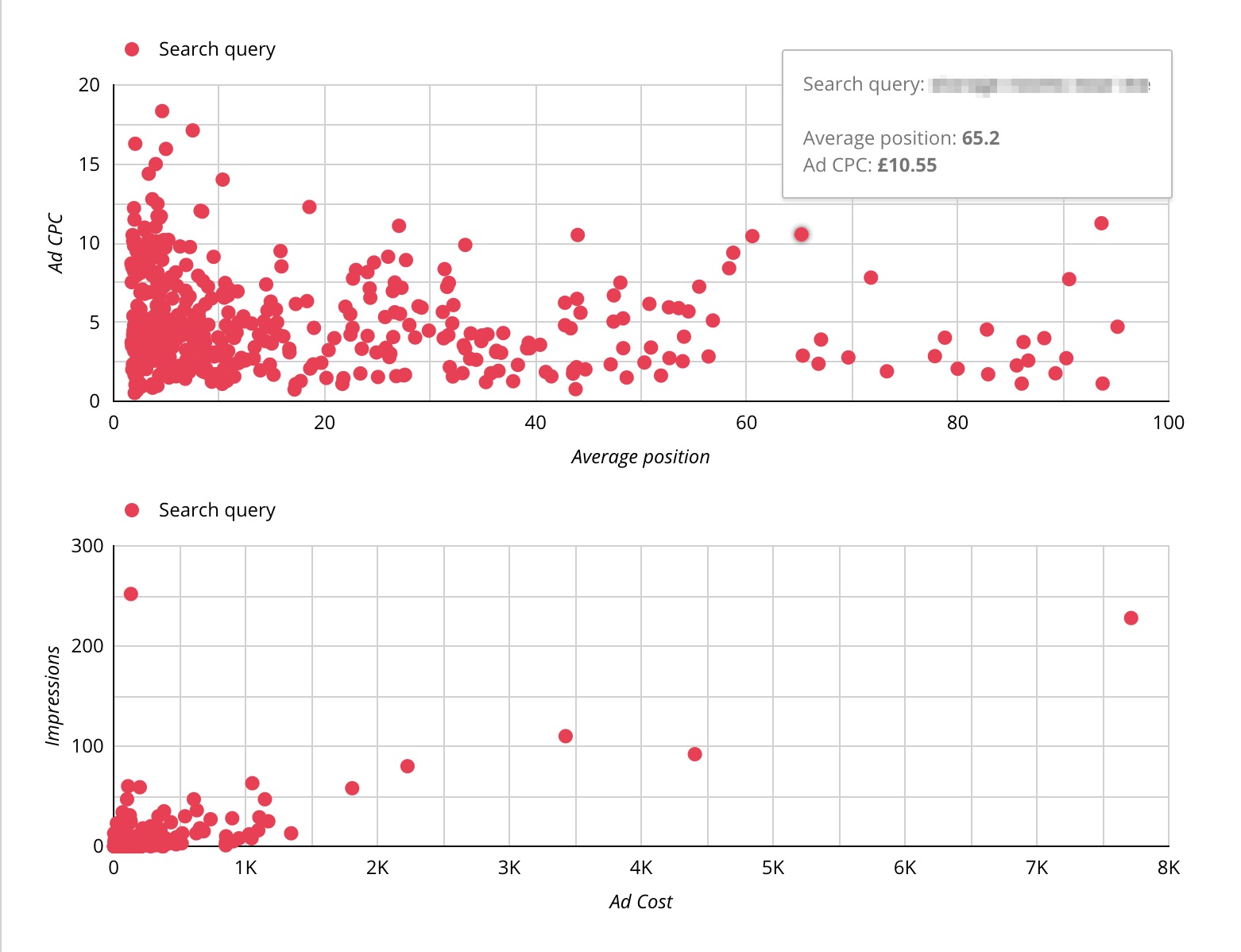
Using scatter graphs is a highly visual method of spotting outliers, while also being able to drill down to a keyword level for further investigation.

As an example, identifying keywords with high paid CPC’s and really low organic visibility (measured by average position/ranking).

ppc and seo data - outliers example

ppc and seo data - outliers exampleExamples of graphs used to identify outliers for further investigation

However, data without insight is just a bunch of numbers.

Therefore, it’s imperative to combine this with human insight and analysis to provide input and advice before taking action.

How Can I Use This Data in Practice?

Scenario 1: I Need to Cut Budgets, Where Should I Start?

Many of us have had to make difficult decisions over the past few months.

And with a global recession now inevitable, we’ll likely be asked to cut marketing budgets further.

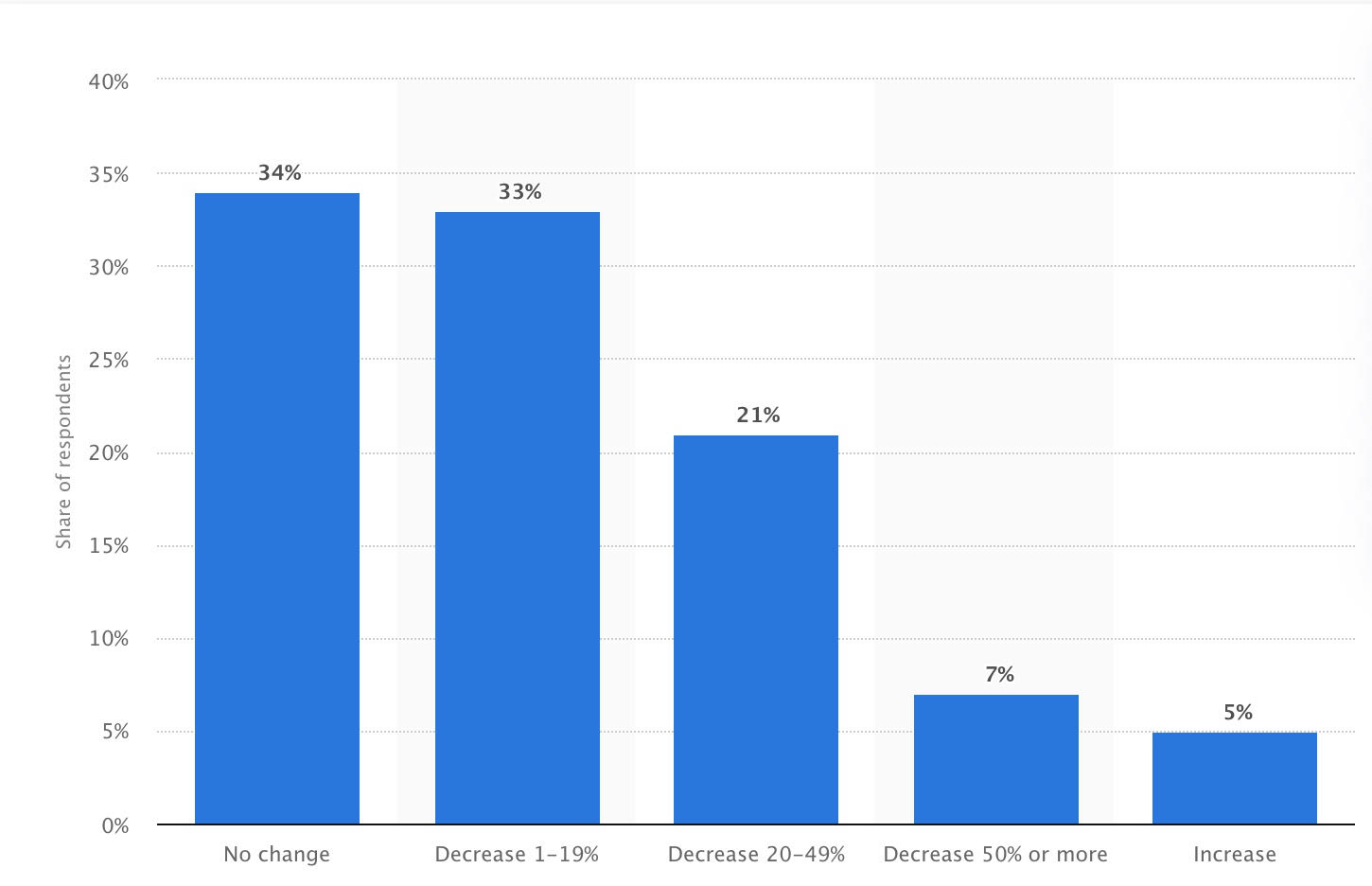
In March 2020, Statista surveyed B2B marketers in the U.S. and found that 61% expect they will need to cut budgets.

US B2B Marketer Budget Cuts

US B2B Marketer Budget Cuts

The key to ensuring your brand doesn’t suffer long-lasting damage is to:

  • Cut budgets where you can sustain a downturn.
  • Prop up performance with strong organic visibility.

ADVERTISEMENT

CONTINUE READING BELOW

One way to do this while minimizing damage is to identify which PPC keywords are using budget where you’re dominating organic results with little paid competition.

For example, we can look to identify any keywords that rank #1 (on average) and start to total up any associated paid spend on those keywords.

This will help you identify immediate areas where you can start to pause within PPC accounts, while monitoring the overall impact on traffic and sales.

identify ppc budget savings

identify ppc budget savingsKeywords with organic average position ≈ 1 and associated PPC spend

Scenario 2: Where Can I Save More Budget in the Medium Term?

Need to make even more savings?

Then you need to start identifying opportunities where you:

  • Are not performing quite as well organically.
  • Are currently spending more substantial cash on PPC.

ADVERTISEMENT

CONTINUE READING BELOW

For example, here we may look to identify:

  • Keywords ranking outside the top 3 organic results.
  • Average CPC higher than account average.

The amounts you’ll typically be able to save with this kind of filter will be much more substantial.

But the potential impact on overall traffic acquisition and sales will certainly impact business performance more than scenario A if implemented immediately.

This is where the SEO team has their work cut out!

high cpc ppc results

high cpc ppc resultsOrganic rank < 3 and above average PPC CPC

If saving budget is a necessity, then we need to write some content that enables us to rank for these queries through organic search instead of trying to recapture some of this traffic.

ADVERTISEMENT

CONTINUE READING BELOW

For the SEO practitioners, this means identifying clusters of related keywords and writing useful content related to these phrased designed to target some of the traffic previously being driven through PPC.

Granted, this is an area you wouldn’t want to pause PPC immediately if given the option, but what you can do is build a business case around this data.

And over the next month, for instance, write content aimed at targeting related topics through organic search.

Maybe then you can start pausing some of these PPC keywords once you gain more organic visibility.

Scenario 3: Which Pages Can I Tweak to Make the Biggest Impact on Organic Sales?

Strong rankings are important for SEO but what’s even more important is getting clicks through from the search results.

You can measure the proportion of clicks you’re receiving relative to the impressions you get for different keywords by measuring organic CTR.

The focus of this exercise is identifying areas where we can boost organic CTR.

ADVERTISEMENT

CONTINUE READING BELOW

How to Combine SEO & PPC Data for More Powerful Results

How to Combine SEO & PPC Data for More Powerful ResultsIdentifying low organic CTR for keywords where PPC CTR is above average

Here we’d look to know which keywords are generating a low organic CTR compared to an above average PPC CTR.

Essentially, we’re identifying high performing ad copy that can be used to inform our on-page SEO efforts.

For example, we can identify the ad copy related to the keywords with low organic CTR and high PPC CTR and then work this into key elements that make up the search engine listings such as page titles and meta descriptions.

Focusing on these relatively basic SEO elements for high volume search terms can drive significant traffic improvements, so focusing on this as a regular exercise really is a no-brainer.

Conclusion

These are just a few illustrations highlighting the power of a unified approach to search.

Integrating your data together and analyzing it with an eye on how each channel can complement each other will allow you to make smarter data-driven decisions around your search strategy.

ADVERTISEMENT

CONTINUE READING BELOW

This should in turn improve the results delivered through both channels.

It’s highly likely many of us will be asked to make cuts over the coming months due to economic circumstances.

There’s no better time to start arming yourself with this kind of data.

Prepare for the inevitable conversation on where savings can be made rather than pausing everything and putting yourself back to square one when everything starts picking back up again.

More Resources:


Image Credits

All screenshots taken by author, July 2020

http://tracking.feedpress.it/link/13962/13726468


What Is Largest Contentful Paint: An Easy Explanation via @martinibuster

Largest Contentful Paint (LCP) is a Google user experience metric. It is set to become a ranking factor in 2021. This guide explains what LCP is and how to achieve the best scores.

Definition of Largest Contentful Paint

What is Largest Contentful Paint?

LCP is a measurement of how long it takes for the main content of a page to download and be ready to be interacted with. What is measured is the largest image or block of context within the user viewport. Anything that extends beyond the screen does not count.

Typical elements that are measured are images, video poster images, background images, and block-level text elements like paragraph tags.

Why is LCP Measured?

LCP was chosen as a key metric for the Web Vitals score because it accurately measures how fast a web page can be used. Additionally it is easy to measure and to optimize for.

Block-level Elements Used to Calculate the LCP Score

Block-level elements used for calculating the Largest Contentful Paint score can be the <main> and <section> elements, as well as the heading, div, form elements.

ADVERTISEMENT

CONTINUE READING BELOW

Basically any block-level HTML element that contains text elements can be used, as long as it’s the largest one.

Not all elements are used. For example, the SVG and VIDEO elements are not currently used for calculating the Largest Contentful Paint.

LCP is an easy metric to understand because all you have to do is look at your web page and determine what the largest text block or image is and then optimize it by making it smaller or removing anything that would prevent it from downloading quickly.

Because Google includes most sites in the mobile first index, it’s best to optimize for the mobile viewport first, then the desktop.

Delaying Large Elements Might Not Help

Sometimes a web page will render in parts. A large featured image might take longer to download than the largest text block-level element.

What happens in this case is that a PerformanceEntry is logged for the largest text block-level element. But when the featured image at the top of the screen loads, if that element takes up more of the users screen (their viewport), then another PerformanceEntry object will be reported for that image.

ADVERTISEMENT

CONTINUE READING BELOW

Images Can Be Tricky for LCP Scores

Web publishers commonly upload images at their original size and then use HTML or CSS to resize the image to display at a smaller size.

The original size is what Google refers to as the “intrinsic” size of the image.

If a publisher uploads an image that’s 2048 pixels wide and 1152 pixels in height, that 2048 x 1152 height and width are considered the “intrinsic” size.

Now, if the publisher resizes the 2048 x 1152 pixel image to 640 x 360 pixels, the 640×360 size image is called the visible size.

For the purposes of calculating the image size, Google uses whichever size is smaller between the intrinsic and visible size images.

Note About Image Sizes

It’s possible to achieve a high Largest Contentful Paint score with a large intrinsic size image that is resized with HTML or CSS to be smaller.

But it’s a best practice to make the intrinsic size of the image match the visible size.

The image will download faster and your Largest Contentful Paint score will go up.

How LCP Handles Images Served from Another Domain

Images served from another domain, like from a CDN, are generally not counted in the Largest Contentful Paint calculation. Publishers who want to have those resources be a part of the calculation need to set what’s called a Timing-Allow-Origin header.

Adding this header to your site can be tricky because if you use a wildcard (*) in the configuration then it could open your site up to hacking events.

In order to do it properly you would have to add a domain that’s specific to Google’s crawler in order to whitelist it so that it can see the timing information from your CDN.

So at this point, resources (like images) that are loaded from another domain (like from a CDN) will not be counted as part of the LCP calculation.

Scoring Gotchas to Be Aware Of

All elements that are in the users screen (the viewport) are used to calculate LCP. That means that images that are rendered off-screen and then shift into the layout once they are rendered may not count as part of the Largest Contentful Paint score.

ADVERTISEMENT

CONTINUE READING BELOW

On the opposite end, elements that start out in the user viewport and then get pushed off-screen may be counted as part of the LCP calculation.

How to Get the LCP Score

There are two kinds of scoring tools. The first one is called Field Tools and the second one is called Lab Tools.

Field tools are actual measurements of a site. Lab tools give a virtual score based on a simulated crawl using algorithms that approximate Internet conditions that a typical user on a mobile phone might encounter.

How to Optimize for Largest Contentful Paint

There are three main areas to optimize (plus one more for JavaScript Frameworks):

  1. Slow servers
  2. Render-blocking JavaScript and CSS
  3. Slow resource load times

A slow server can be an issue with DDOS levels of hacking and scraper traffic on a shared or VPS host. You may find relief by installing a WordPress plugin like WordFence to find out if you’re experiencing a massive onslaught and then block it.

ADVERTISEMENT

CONTINUE READING BELOW

Other issues could be misconfiguration of a dedicated server or VPS. A typical issue can be the amount of memory allotted to PHP.

Other issues could be outdated software like an old PHP version or CMS software that is outdated.

Worst case scenario is a shared server with multiple users that are slowing down your box. In that case moving to a better host is the answer.

Typically, applying fixes like adding caching, optimizing images, fixing render blocking CSS and JavaScript and pre-loading certain assets can help.

Google has a neat tip for dealing with CSS that’s not essential for rendering what the user sees:

“Remove any unused CSS entirely or move it to another stylesheet if used on a separate page of your site.

For any CSS not needed for initial rendering, use loadCSS to load files asynchronously, which leverages rel=”preload”and onload.

<link rel=”preload” href=”stylesheet.css” as=”style” onload=”this.rel=’stylesheet’”>”

Field Tools for LCP Score

Google lists three field tools:

ADVERTISEMENT

CONTINUE READING BELOW

PageSpeed Insights
Search Console (Core Web Vitals report)
Chrome User Experience Report

The last one, Chrome User Experience Report, requires a Google account and a Google Cloud Project. The first two are more straightforward.

Lab Tools for LCP Score

Lab measurements are simulated scores.
Google recommends the following tools:

Chrome DevTools
Lighthouse
WebPageTest.org

The first two tools are provided by Google. The third tool is provided by a third party.

Citations

How to Optimize for LCP

What is LCP?

Timing Attacks and the Timing-Allow-Origin Header

http://tracking.feedpress.it/link/13962/13726245


Testimonial link building: Using real experiences for success

30-second summary:

  • Link building is one of the most crucial yet most difficult aspects of SEO but testimonial link building can solve that problem for you.
  • Testimonial link building is seen as a great way to harness this raw strength of positive experiences by customers. 
  • Giving a testimonial to a company you have availed service from or purchased from can be a great way to get a link back to your site.  
  • It’s such a simple and straightforward method, which may be one of the reasons  why your business should implement testimonials and reviews into your link building strategy. 

In this analytical age, brands are competing on the minutest details. Targeting the right keywords, creating campaigns targeting the right demographic, coming up with effective CTAs, and all those technicalities. However, amidst all that, there is still an element that cannot be measured using an existing tool. That’s where testimonial link building comes into the picture.

Word of mouth from customers can end up making or breaking all the efforts brands put in their campaigns. You as a brand can do everything right but a negative experience by a customer can create negative brand equity that’ll be hard to shed. In the same way, positive word of mouth can boost up your sales manifolds. This why testimonial link building is seen as a great way to harness this raw strength of positive experiences by customers. 

Continue reading below to learn what exactly is testimonial link building, how to get started, and what rules you need to abide by during the entire process. 

What is testimonial link building?

In laymen terms, testimonial link building is using a positive comment from customers that have used your service or product and featuring them on your website. At its core, testimonial link building is meant to provide genuine positive word of mouth for website owners in exchange for a link. In the end, everyone’s happy and it helps brands grow and gain brand recognition. 

There are some finer details involved too such as relevance. Think about it, if you’re a software company, do you want a testimonial from a café from a completely different country? Relevance is key. Just like textual content, you can’t overdo the use of testimonial link building as it’ll end up hurting both parties instead of helping them. There’s no perfect recipe for success in testimonial link building apart from ensuring clarity and relevance. 

Jayson Demers, CEO of Email Analytics says testimonials really fruitful strategy to build links,

“With every testimonial, you will receive Search Engine Crawlers will recognize that your site has an authority” 

Perfection on those true fronts will yield great results for both parties. So, how does it work, and more importantly, how do you get started? Continue reading below to learn more. 

How to build testimonial links 

Without beating around the bush, the whole process boils down to 5 crucial steps that anyone can follow. These are as follows: 

1. Create a target list of products/services

This is where you’ll need to do the most homework. I’d advise you to keep your range of targets as wide as possible but avoid venturing into irrelevant fields. 

Some other things to keep in mind include targeting solution-based products and services. The potential customers looking at this are already at a high engagement point and they’re more likely to convert. I’d also advise making sure you target products and services that you’ve actually used. It would be futile to skip this part as it is a legal requirement. You can still choose to move ahead with this but it’s unlikely any product or service will entertain your testimonial requests if you’re not an existing customer.

Jay Eckert, Founder of Parachute Design also recommends using testimonials for your services,

“When you write honest reviews for products or services you are using, it is ultimately benefiting your website’s exposure and visibility in the form of backlinks or through Brand mentions”  

2. Find their contact information 

Once you’ve identified the best possible leads, it’s time to start contacting them. Again, this step requires a lot of elbow grease, so bear that in mind. However, some extensions and tools can help you in this regard and make your job a little easier. 

For instance, ’FindThatLead’ is a tool that  allows you to find your target’s contact details almost at a click of a single button. Just enter the domain you’re targeting and it’ll provide you the details of the right person to contact for your request. Some other similar apps include Hunter.io and Voila Norbert. 

3. Pitch your testimonial via email

This is a crucial part that a lot of people mess up. This is the point where you pitch your testimonial, do not send your testimonial. There is a clear difference between the two and it could save you a lot of time. 

You’re supposed to pitch the idea of giving them a testimonial on the site. While nothing is stopping you from writing up a testimonial and sending it to them, if they reject it, you’ve wasted all that hard work for nothing. 

Write a short and to-the-point email to pitch your testimonial and how it can add value to their overall site. 

4. Write a relevant testimonial

Once you’ve received a green-light to go ahead with a testimonial, you can start working on it. The intent of each testimonial matters a lot, so you must understand what the site owner’s intent is. For instance, if they’re a no-profit organization, they don’t want to sell anything but rather raise awareness. Similarly, a start-up would want to encourage a maximum of new customers. 

Tailor your testimonial based on what the intent of that testimonial on the site is supposed to be. 

5. Create a video backing up that testimonial 

Okay, fair disclaimer, this last step is more of a bonus step. You can skip it if you want but I’d advise against it. There’s a pearl of old internet wisdom to be skeptical of everything you see on the Internet. Put yourself in the shoes of a potential customer. If you’re someone that’s looking at these testimonials, how do you know they’re real. Yes, they all sound convincing and they have the verification mark guaranteeing they’re real customers. However, there will still be an iota of doubt in their minds. This doubt can be the obstacle between a potential customer converting into an actual customer. You can use video or visual testimonial as well. 

Laws and regulations to consider

Even though testimonials present a tremendous opportunity to sell your product and service using your previous sales’ as proof, there are some strict guidelines on how you need to present them. 

The Federal Trade Commission has an entire set of laws on how businesses can use endorsements and testimonials in their advertising. I wouldn’t go as far as to call these to be stifling but they do require some strict criterion to be followed. The entire document can be found and studied here. 

But in case you’re looking for a short rundown of what this means, there are three things you need to be careful about when using testimonials. 

The context needs to be clear. You can’t throw in a testimonial that was given to you for a different version of the service or the app for instance. If you still want to use that testimonial then you’ll have to specify the details. This is primarily why on the App Store when reading reviews for apps, you’ll find reviews marked “review for a different version” 

In case the testimonials were for quid pro quo, you can still use them but you’ll have to provide all customers full disclosure. This means any behind the scenes deals to prop each other up by brands is a big no-no. 

This should go without saying, but all testimonials you choose to use must be genuine. If found guilty of cultivating fake testimonials, your brand can face heavy fines depending on which state you’re in. Steer clear of quantities when it comes to testimonials and focus on delivering quality and earning genuine, organic testimonials that you can use.

https://www.searchenginewatch.com/2020/07/15/testimonial-link-building-using-real-experiences-for-success/


How SEOs Can Work with the Sales Team to Drive Business Growth via @kristen_vaughn

We are all familiar with the age-old tale of how marketing and sales teams once ran in complete silos.

In fact, many organizations still function this way.

But why?

At the end of the day, there is no major difference between marketing and sales.

We share the same primary goal – to drive business growth.

Therefore, it’s in marketing’s best interest to help sales and in sales’ best interest to help marketing.

SEOs & Sales Team: How to Better Work Together

While there are many ways that marketing and sales can work together so that both teams are better at their jobs and generate more revenue for the business, this post will focus on one specific marketing strategy – SEO.

Let’s jump into some of the ways that SEO professionals can work with sales teams to drive business growth.

Whether you’re an SEO working in-house or at an agency, these simple methods will help improve your strategy.

1. Reach the Right Audiences

Reach the right audiences

Reach the right audiences

ADVERTISEMENT

CONTINUE READING BELOW

A good SEO strategy takes more than increasing website traffic – it requires getting your website in front of the right people.

This is where SEO pros and sales teams must work closely together to help drive business growth.

Yes, keyword research is essential to build a solid foundation for any SEO strategy.

You can spend hours upon hours doing keyword research – uncovering every term with search volume, doing competitive research, digging through Search Console reports for longer tail queries, etc.

But having direct input from the sales team is what will take your SEO strategy to the next level.

Get feedback from the sales team to verify keyword priorities and uncover potential gaps in your roadmap. And do this regularly!

Remember, sales folks are talking to prospects and customers every day.

ADVERTISEMENT

CONTINUE READING BELOW

They know the unique language used, the information they are looking for, and the biggest challenges that they’re up against.

Focusing on longer tail keywords that come from these types of discussion can help move the needle of your SEO strategy.

While longer tail keywords typically have lower monthly search volume, there is a much better chance that these users will actually convert.

For example, someone searching for “black leather crossbody purse” is much more likely to convert than someone searching for “purses.”

My advice?

Choose quality over quantity to drive real business impact.

2. Understand & Refine Processes

As someone whose focus is SEO, having a thorough understanding of the sales process is vital.

Sit down with the sales team and ensure you fully grasp some of the most basic (and often overlooked) elements of the sales process like:

  • Target audiences and job titles.
  • Key decision-makers involved.
  • Daily responsibilities and challenges.
  • Competitive advantages that win deals.
  • Common issues or topics that arise.
  • Priority industries, company size, and revenue.
  • And more.

This shouldn’t just be a one-time conversation either.

Customers purchasing behavior, needs, and challenges are constantly evolving and changing – especially in a time where companies are working to adapt to today’s unknown business environment.

Similarly, it’s important for the sales team to be aware of digital marketing campaigns that are bringing in leads.

This will help personalize follow up and better nurture those prospects.

Spend time gathering and reviewing sales materials like follow up cadences, pitch decks, product brochures, demos, and more.

There may even be an opportunity to leverage some of this material for SEO.

This brings me to my next point…

3. Develop Mutually Beneficial Content

Develop mutually beneficial content

Develop mutually beneficial content

Syncing up with sales can help spike new content ideas based on:

  • The feedback they are hearing.
  • The questions prospects and customers are asking.
  • The information they are looking for.

ADVERTISEMENT

CONTINUE READING BELOW

Sometimes we get so fixated on our keyword research and roadmap that we may overlook valuable keyword targets with lower search volume and really solid search intent.

We may not have some important keywords on our radar at all, or prospects may be using different language than we are.

Brainstorming with the sales team can help avoid these common concerns.

Once you develop content inspired by this feedback:

  • Sales folks will have an asset to share with prospects/customers to better nurture them or strengthen the existing relationship.
  • And you will have a piece of content that is carefully crafted to rank in Google.

In this same way, the SEO research that you are regularly doing can offer the sales team great value.

Share key search trends that you uncover, the user behavior you’re seeing, branded queries that can expose a lot about what prospects are trying to learn in the process.

For example, branded queries that include “reviews,” “vs,” “pricing,” “free”, and “demo.”

4. Test, Track & Adjust

Tracking the traffic to your website is great.

ADVERTISEMENT

CONTINUE READING BELOW

But do you know if and how users are converting?

A conversion can mean many different things depending on your business model but, in this case, I’m referring to whether the users coming to your website are actually taking action.

For example:

  • Retail or ecommerce websites must track if visitors are making purchases.
  • B2B organizations should know when visitors fill out forms (to download a gated asset or submit a contact us request).

Setting up goals in Google Analytics and/or Google Tag Manager is essential.

Make sure that you are analyzing this data regularly and adjusting your strategies as needed.

If you’re seeing an increase in traffic to a landing page but no action being taken – ask yourself what needs to be changed.

  • Are you reaching the right users?
  • Could the page be further optimized to drive conversions?
  • Is there enough information on the page?
  • Do competitions have a similar page? If so, what are they doing that you are not?
  • Etc.

ADVERTISEMENT

CONTINUE READING BELOW

Arguably the most important aspect of SEO and sales alignment is ensuring that you have the data needed to report progress back to your team, make informed decisions, and adjust your strategy ongoing.

Before dedicating a budget to new SEO strategies, make sure you will be able to properly track and monitor the data and report results back to the rest of the marketing team and sales team.

Now What?

Whether you are working at an agency or in-house, communicating with sales on a regular basis will help take SEO and broader marketing tactics to the next level.

If you don’t already have a recurring meeting with the sales team, I encourage you to get one on the calendar as soon as possible!

This is more important than ever before – with so many of us working remotely and missing out on the casual conversations that happen in passing in the office.

I realize that both teams are likely very busy and that no one likes an extra meeting on their calendar.

ADVERTISEMENT

CONTINUE READING BELOW

But if you make sure that the obvious benefits are explained, and objectives are clear – your organization will be one step closer to marketing and sales alignment.

More Resources:

http://tracking.feedpress.it/link/13962/13723986


Do We Have the Math to Truly Decode Google’s Algorithms? via @countxero

On a recent hike around the ruins of the St. Francis Dam disaster site about 40 miles from Downtown Los Angeles, with my archaeologist friend, John, we discussed the tarnished life of its builder and the age of the “Gentlemen Scientist.”

The St. Francis Dam was built between 1924 and 1926 to create a large storage reservoir for the city of Los Angeles, California, by the Bureau of Water Works and Supply, now the Department of Water and Power. The department was under the direction of its general manager and chief engineer, William Mulholland. If you’ve ever seen the classic movie, “Chinatown”, William Mulholland was such a significant part of Los Angeles history they had to break him into two characters.

While he was a legend in his own time, Mulholland wasn’t a civil engineer by today’s standards. He was self-taught during his early days as a “ditch tender” for the Water Department. After a hard day’s work, Mulholland would study textbooks on mathematics, engineering, hydraulics, and geology. This origin story is the foundation of the “Gentlemen Scientist” persona – devouring all the material available on a subject and then claiming an understanding that would allow them to oversee a massive undertaking, despite any form of testing or certification.

ADVERTISEMENT

CONTINUE READING BELOW

If I showed up at NASA and said I was qualified to send humans to Mars because I read a lot of books on space travel and used to build model rockets as a kid, they would throw me off the property. In Mulholland’s day, it meant a promotion to the head of the department.

Mulholland is an integral part of Los Angeles history. While many of his early efforts literally changed the landscape of Los Angeles (he supervised the design and construction of the Los Angeles Aqueduct, which brought water to much of the county), his lack of modern civil engineering caused “one of the worst American civil engineering disasters of the 20th century,” according to the Catherine Mulholland, in her biography of William Mulholland, her grandfather.

Just minutes before midnight on March 12, 1928, the dam catastrophically failed, and the resulting flood killed at least 431 people, but some reports claim up to one thousand. Even with the smaller number, the collapse of the St. Francis Dam remains the second-greatest loss of life in California’s history. Only the 1906 San Francisco earthquake and fire killed more people.

ADVERTISEMENT

CONTINUE READING BELOW

The discussion with my friend that day made me think about the search engine optimization business and its collection of “Gentleman Scientists.”

Instead of building dams, our colleagues are trying to reverse engineer the complex algorithms of search engines like Google using faulty statistical practices to devise SEO strategies backed by shoddy science.

A Long History of Bad Science

For decades now, legions of SEO professionals claim to have “tested” different theories about Google’s algorithms via some very questionable practices. In the beginning, these tests usually involved a self-proclaimed SEO “mad scientist changing one aspect of a single webpage, then waiting for the next Google Dance to see if their website advanced in a search engine’s index. If it worked, they published a post about the results in a forum or on their websites. If the poster were popular enough, the SEO community would replicate their new “hack” until Yahoo, Google, or one of the other early search engines told them to stop or figured out how to block it from happening in their algorithms.

Early SEO legends were born from this sort of activity.

Eventually, companies like Moz, Ahrefs, and SEMrush figured out ways to replicate Google’s index, the “testing” or “studies” they did got a lot more legitimate-looking because of the access to much larger data sets. Google would occasionally shut these theories down with the classic and appropriate, “Correlation does not equal causation” reply; however, most of these faulty proclamations lived on under the flag of “Trust but verify.”

My long-held stance on the matter comes from the fact that Google’s multiple algorithms consider hundreds of data points to create an index of the World Wide Web composed of billions of webpages. With something so sophisticated, are most SEO professionals qualified to “test” Google using our limited understanding of statistics?

With rare exceptions, that I’m sure will be highlighted once this article is published, most of the people who work in SEO are novice statisticians who, at best, attended the typical classes and retained more than most. A few colleagues possess a slightly more in-depth understanding of statistics, but still aren’t statisticians or mathematicians, but acquired their mathematical abilities in the study of other sciences accustomed to less complex data. In most cases, the statistical systems they use are for analyzing surveys or media buying forecasts. They aren’t for the large, complex systems found in search engine algorithms and the information they organize.

ADVERTISEMENT

CONTINUE READING BELOW

Our Basic Understanding of Statistics May Not Be Enough

I’ll be the first to admit I am not a mathematician or a statistician. I struggled with math in school just enough to finish my undergraduate degrees and didn’t feel comfortable with it all until grad school. Even then, that was in the standard business statistics class most people suffered while seeking their MBA.

Just as when I worked with actual intellectual property lawyers for my article on the legality of Google’s Featured Snippets, I sought out an actual statistician. Most importantly, I needed someone who doesn’t work in the SEO space to avoid any observer bias, that is, someone who would subconsciously project their expectations onto the research.

My search led me to the statistician, Jen Hood. Jen studied mathematics and economics at Virginia’s Bridgewater College, and for most of the 15 years she has been working as a statistician. She was a data analyst for Volvo. Since 2019, she has been working as an analytics consultant at her company, Avant Analytics, mostly helping small businesses that wouldn’t usually have an in-house analyst.

ADVERTISEMENT

CONTINUE READING BELOW

We spoke about how most of the studies around SEO rely on the concept of statistical correlation during our first discussions. Statistical correlation shows whether – and how strongly – pairs of variables, such as certain aspects of a webpage and that page’s position in Google’s search engine result pages, are related.

“The vast majority of statistical work, even forecasting the future, revolves around measuring correlation,” Jen says cautiously. “However, causation is incredibly difficult to prove.” Causation is the action of causing something to happen; that is, the real reason things work the way they do.

“Without knowing the details of how any of these companies create their metrics, I’m suspicious there’s a significant amount of confirmation bias occurring,” Jen continued. Confirmation bias happens when the person performing an analysis wants to prove a predetermined assumption. Rather than doing the actual work needed to confirm the hypothesis, they make the data fit until this assumption is proven.

To give Jen a better idea of how these companies were producing their data, I shared some of the more popular SEO studies over the past few years. Some of the proclamations made in these studies have been disproven by Google multiple times over the years, others still linger on Twitter, Reddit, and Quora and get discussed on what feels like a daily basis.

ADVERTISEMENT

CONTINUE READING BELOW

“The confirmation bias error shows up a lot in these SEO articles,” Jen states right away. “This is common with any topic where someone’s telling you how to get an advantage.”

First, Jen reviewed a study presented by Rob Ousbey at Mozcon 2019, back when he was working for Distilled (he currently works for Moz) on the SEO testing platform, then called Distilled ODN, now the spin-off SearchPilot. Of the various theories presented that day, one claimed that the results on Page 1 of search engine result pages are driven more by engagement with those pages than links. Jen gets suspicious immediately.

“With the information available, it’s hard to say if Rob’s theory about the first page of results is driven by engagement and subsequent results are driven by links is accurate,” Jen wrote after reviewing the presentation. “This idea that it’s mainly links [driving the search results for Page 2 onward] seems a bit strange given that there are so many factors that go into the ranking.”

ADVERTISEMENT

CONTINUE READING BELOW

“The easy test would be: if you can rank on Page 1, especially the top of the page, without previously having any engagement, then the engagement is most likely driven by placement, not the other way around.”

I reached out to Will Critchlow, founder, and CEO of Distilled. He offered another study by a former colleague of Rob Ousbey, Tom Capper, that provided a deeper dive into the material that Rob presented back in 2019. “Tom approached this from a few different angles – but the short answer is no – this is not just because top results get more interaction because they are top results.”

“[Tom’s study provided] various different kinds of evidence,” Will continued, “One is that links have a higher correlation with relative rankings lower down the SERPs than they do on the first page (and especially for high-volume keywords).”

“Other evidence includes the way rankings change when a query goes from being a relatively low volume search phrase to a head term (e.g., very spiky volume),” Will states, referring to an analysis of the search term, “Mother’s Day flowers.”

ADVERTISEMENT

CONTINUE READING BELOW

“This continues to get more interesting,” Jen writes after reviewing the new information. “This new [data] gets into actual correlation values though on a completely different and much smaller sample focused on data from the UK – only 4,900 queries over two months.”

Before we continue, it’s crucial to understand how correlation studies are supposed to work.

There are multiple ways to measure the relationship, or correlation, between two factors. Regardless of the method, the numbers returned from these calculations measure between -1 and 1. A correlation of -1 means as one factor goes up, the other factor goes down every time. A correlation of 1 means as one factor goes up, the other factor goes up every time. A correlation of zero means there is no relationship – no predictable linear pattern, up/down, up/up, down/up, or otherwise.

“Most correlation coefficients (results) aren’t close to 1 or -1,” Jen clarifies. “Anything at +/-1 means that 100% of the variation is explained by the factor you’re comparing. That is, you can always use the first factor to predict what the second factor will do.”

ADVERTISEMENT

CONTINUE READING BELOW

While there’s no rule for saying a correlation is strong, weak, or somewhere in between, there are some generally accepted thresholds, which Jen describes. “Keeping in mind that we can have values that are +/-, for factors that are easily countable, such as the number of links a webpage has and that webpage’s ranking on Google, the high correlation would be 0.7-1.0, moderate would be 0.3-0.7, and weak would be 0-0.3.”

“Someone could challenge these exact groupings,” Jen acknowledges, “though I’ve erred on the side of generosity for correlation strength.”

We go back to the study. “Tom’s slides mainly reference back to a February 2017 presentation he did on whether Google still needs links. There’s a Moz study also referenced which, at this point, is five years old.” (Jen pauses here to state, “On a side note, I find it interesting that everyone seems to acknowledge the algorithms have experienced significant changes and yet they’re referencing studies two, three, or more years old.”)

ADVERTISEMENT

CONTINUE READING BELOW

“In this, [Tom] looks at how Domain Authority and rankings relate,” referring to the Moz metric that is the cornerstone of the tools inbound link reporting. “He gives the correlation of Domain Authority to a webpage’s Google ranking as 0.001 for positions 1 through 5 and 0.011 for positions 6 through 10.”

“This means that Domain Authority is more highly correlated with search engine ranking for positions 6 through 10, but both results are very weak correlations,” Jen paused to make sure I understand.

“To put this in plainer terms, for positions 1 through 5 in Google’s results, Domain Authority can be used to explain 0.1% of the variance in SERP ranking. For positions 6 through 10, it explains 1.1% of the variance in SERP ranking,” clarifying her point.

“This is held up as proof that Domain Authority doesn’t matter as much for top positions. Yet the correlations for both are so extremely low as to be nearly meaningless,” Jen says excitedly by the discovery. At the same time, I consider how many domains and links are bought and sold using this metric. “Elsewhere, he mentions 0.023 and 0.07 as correlation coefficients for Domain Authority and ranking in top 10 positions, which doesn’t make sense with his earlier values both being lower.”

ADVERTISEMENT

CONTINUE READING BELOW

Jen brings the explanation full circle, “Since this is the backup detail, more technically focused, provided by the company, it seems like a reasonable leap to think that the correlations in the original study you sent me are of a similar level.” That is to say, while we don’t have the numbers for Rob Ousbey’s original presentation, they are most likely just as weak a correlation.

“The Mother’s Day study is highly anecdotal,” Jen continues, “The results are interesting and raise questions about what implication this might have for other search terms. However, this is one search term studied for one month. There’s nowhere close to enough content to this study to make universal implications from it.”

“Good for a sales pitch; bad for a statistical study,” Jen proclaims. “Meanwhile, I still haven’t seen anything that shows how they’ve proven that the top results don’t get more interaction because they are the top result.”

ADVERTISEMENT

CONTINUE READING BELOW

“There are many examples presented on other slides to support the claims, but no broad studies.” Jen refers to some of the other studies provided in Rob’s original presentation by Larry Kim, Brian Dean, and Searchmetrics.

“[Larry Kim’s study on the influence of click-through rate on rankings] suggests that lower click-through rate drives a lower ranking. Yet it could be the lower ranking driving the lower click-through rate,” Jen says, illustrating a common paradox with this sort of data. “I would fully expect a high correlation between page rank and click-through rate simply because more people are presented the opportunity to engage.”

“Does Bounce Rate affect search position or vice-versa?” Jen asks, moving on to another slide that references a study by Brian Dean of Backlinko that claimed that the bounce rate metric influences the search result position. “I find it interesting that the narrative seems different if you actually go to the source data.”

Jen refers to the original Backlinko study where the graph used in Rob’s presentation was sourced, which stated, “Please keep in mind that we aren’t suggesting that low bounce rates cause higher rankings. Google may use bounce rate as a ranking signal (although they have previously denied it). Or it may be the fact that high-quality content keeps people more engaged. Therefore, lower bounce rate is a byproduct of high-quality content, which Google does measure.”

ADVERTISEMENT

CONTINUE READING BELOW

The statement concludes, “As this is a correlation study, it’s impossible to determine from our data alone,” thus proving Jen’s point of how inappropriate it is to publish these studies at all.

Jen strongly concludes, “The use of this graph is intentionally misleading.”

“[These studies are] just looking at one factor. With multiple algorithms in place, there must be many factors all working together. Each must have individual ratings that are weighted into a total for the specific algorithm and likely weighted again within the aggregating algorithm they use.” Jen states, mirroring something that Google’s Gary Illyes and John Mueller has said more than once at various conferences and on Twitter and something this publication’s own Dave Davies has recently discussed.

Because of this acknowledged complexity, some SEO studies have abandoned correlation methods entirely in favor of machine learning-based algorithms, such as Random Forest. A technique a 2017 investigation by SEMrush uses to propose top-ranking factors on Google, such as page traffic and content length. “This is a good approach to predict what’s likely to happen,” Jen writes after reviewing the SEMrush study and its explanation of its methodology, “but it still doesn’t show causation. It just says which factors are better predictors of ranking.”

ADVERTISEMENT

CONTINUE READING BELOW

The Research Presented Is Limited & Unverified

Most of the research around search engines that is issued comes not from independent sources or educational institutions, but from companies selling tools to help you with SEO.

This kind of activity by a company is the ethical equivalent of Gatorade proving its claims of being a superior form of hydration for athletes by referencing a study conducted by The Gatorade Sports Science Institute, a research lab owned by Gatorade.

When I mentioned to Jen Hood how many of the studies she reviewed have spawned new guiding metrics or entirely new products, she was surprised anyone takes those metrics or products seriously.

“Anyone claiming that they have a metric which mimics Google is asserting that they’ve established many cause-effect relationships that lead to a specific ranking on Google,” Jen wrote, referring to Moz’s Domain Authority. “What this should mean is that their metric consistently matches with the actual results. If I started a brand-new site or a brand-new page today and did everything that they say is an important factor, I should get a top ranking. Not probably rank high. If there’s a true match to the algorithms, the results should always follow.”

ADVERTISEMENT

CONTINUE READING BELOW

Jen provides a hypothetical example:

“Let’s say I offer a service where I’ll tell you exactly where your webpage will rank for a given search term based a metric I include in that service. I have a formula for calculating that metric so I can do it for many different sites. If I could accurately tell you where you’d rank based on my formula 0.1% of the time, would it seem like my formula has the Google algorithms figured out? If I upped that to 1.1% of the time, would you now feel confident?”

“That’s all these studies [and products] seem to be doing,” Jen explains. “Cloaking themselves in just enough statistical terms and details to make it seem like it’s much more meaningful.”

* * *

As Jen alluded to earlier, most studies of Google’s results are using a limited amount of data, but claiming statistical significance; however, their understanding of that concept is flawed given the nature of the very thing they are studying.

ADVERTISEMENT

CONTINUE READING BELOW

“Rand says he estimates that Jumpshot’s data contains ‘somewhere between 2-6% of the total number of mobile and desktop internet-browsing devices in the U.S., a.k.a., a statistically significant sample size,’” Jen is referring to a 2019 study by SparkToro’s Rand Fishkin that claims that less than half of all Google searches result in a click. “Rand would be right about statistical significance if the Jumpshot data were a truly random and representative sampling of all Google searches.”

“From what I could find, [Jumpshot] harvested all their data from users who used Avast antivirus,” referring to the now-shuttered service’s parent company. “This set of users and their data likely differs from all Google users. This means that the sample Jumpshot provides isn’t random and likely not representative enough – a classic sampling error usually referred to as Availability Bias.”

“Statistics without context should always be taken with a grain of salt. This is why there are analytics experts to raise questions and give context. What types of questions are people asking, and how have these maybe changed?” Jen said, digging into the premise of the study.

ADVERTISEMENT

CONTINUE READING BELOW

“For instance, people searching for topics where there’s no added value of going to another website are unlikely to be considered lost opportunities for those who lose the clicks. Are people immediately refining their search term because the algorithm didn’t capture the context of what they were asking?” Jen suggested, both something that Rand clarified later as being a part of his claim of why clicks on results are not happening on more than half of the results. “Now we’re getting more into the nuance, but if Rand is claiming that the no-click searches are bad, then there needs to be a context of why this might happen even in the absence of a [Featured Snippet].”

* * *

If the concept of using data too thin to be accurate isn’t damning enough, there’s the problem that there’s no concept of peer review within the SEO industry. Most of these studies are conducted once and then published without ever being replicated and verified by outside sources. Even if the studies are replicated, they are done by the same people or companies as a celebrated annual tradition.

ADVERTISEMENT

CONTINUE READING BELOW

Of all the historical studies of the St. Francis Dam Disaster, one by J. David Rogers, Ph.D., Chair in Geological Engineering, Department of Geological Sciences & Engineering and professor at Missouri University of Science and Technology, stands out to me. He stated one of the critical reasons for the failure: “The design and construction being overseen by only one person.”

“Unless the results are life and death or highly regulated, we don’t normally see people doing the actual work required to show causation,” Jen Hood adds. “The only way to really show causation is to have a robust study that randomizes and controls for other factors on the proper scale. Outside of clinical drug testing, which normally takes years, it’s very uncommon to see this taking place.”

How the SEO industry conducts and presents its research is not how scientific studies have been administered since the 1600s.  You don’t have to believe me. I’m not a scientist, but Neil deGrasse Tyson is.

ADVERTISEMENT

CONTINUE READING BELOW

“There is no truth that does not exist without experimental verification of that truth,” said Tyson in an interview with Chuck Klosterman for his book, “But What If We’re Wrong”. “And not only one person’s experiment, but an ensemble of experiments testing the same idea. And only when an ensemble of experiments statistically agrees, do we then talk about an emerging truth within science.”

The standard counter to this argument is just to state, “I never said this study was scientific.” If that’s so, why does this information get shared and believed with such conviction? This is the heart of the problem of confirmation bias, not just with the researchers but also with the users of that research.

“[I]f you really think about what you really actually know, it’s only a few things, like seven things, maybe everybody knows,” comedian, Marc Maron, is talking about the concept of knowledge in his stand-up special, “End Times Fun”. “If you actually made a column of things, you’re pretty sure you know for sure, and then made another column of how you know those things, most of that column is like, ‘Some guy told me.’”

ADVERTISEMENT

CONTINUE READING BELOW

“You know, it’s not sourced material, it’s just – it’s clickbait and hearsay, that’s all,” Maron continues. “Goes into the head, locks onto a feeling, you’re like, ‘That sounds good. I’m gonna tell other people that.’ And that’s how brand marketing works, and also fascism, we’re finding.”

Most of the Time, We’re Wrong

Science has been about figuring out how the physical world works since the time of Aristotle, which most people agree now, was wrong about many things. Scientists must make these efforts because there’s no user’s manual for our planet or anything else in the universe. We can’t visit a random deity during office hours and ask why they made gravity work the way it does.

But with Google and the other search engines, we do have such access.

I hate to fall back on the “Because Google said so!” type argument for these things, but unlike most sciences, we can get notes from The Creator during announced office hours and occasionally, Twitter.

ADVERTISEMENT

CONTINUE READING BELOW

The following tweet by John Muller from earlier this year was in response to yet another correlative study published by yet another SEO tool company without any outside corroborations, claiming to have unlocked Google’s secrets with a limited amount of data.

John Muller and I share a very similar view of the presentation of this type of data, “I worry that folks assume they’re useful,” that is, this data isn’t useful at all and even potentially misleading.

The above statement came about after the author of the study, Brian Dean stated that this report was “more to shed a bit of light onto how some of Google’s ranking factors *might* work.”

ADVERTISEMENT

CONTINUE READING BELOW

Statements like this are a popular variation of a typical mea culpa when an SEO research study is called out as incorrect. “I never said this was a Google ranking factor, but that there’s a high correlation,” implying that even if Google says it is not valid, it still might a good proxy for Google’s algorithm. After that, the conversation breaks down as SEO professionals claim to have caught Google in some sort of disinformation campaign to protect their intellectual property. Even the slightest crack in their answer is treated as if someone discovered they were using the souls of conquered SEO pros to power their servers.

“I’m perplexed how this hasn’t become an issue before,” Jen says during our final conversation. I tell her it’s always been an issue and that there have always been people like me who try and point out the problem.

“There’s no solid science behind it with people knowing just enough to be dangerous at best or downright deceptive,” she says, amazed by the concept. “A coin flip can do a better job than any of the studies I’ve seen so far when it comes to predicting whether one site is going to rank higher than another website.”

ADVERTISEMENT

CONTINUE READING BELOW

“The only way to statistically prove that any individual metric claiming to recreate Google’s search algorithms is accurate is to do massive randomized testing over time, controlling for variation, and randomly assigning changes to be made to improve or decline in ranking,” Jen says, providing a solution that seems impossibly distant for our industry. “This needs to be on a large scale across many different topics, styles of searches, etc.”

“Even then, I suspect that Google has frequent algorithm updates of different magnitudes,” Jen supposes, which I confirm. “Undoubtedly, they have dozens or hundreds of engineers, programmers, analysts, and so on working on these algorithms daily, which means if we take a snapshot in time now of what we suspect the algorithm is, by the time we’ve fully tested it, it’s changed.”

In the end, Jen agrees that it appears our industry doesn’t have the tools we need to make these studies useful. “The mathematics of analyzing how Google’s index functions are closer to astrophysics than predicting election results, but that’s the methods used today are closer to the latter.”

ADVERTISEMENT

CONTINUE READING BELOW

* * *

I don’t want to make the people who publish these studies out to be total charlatans. Their efforts clearly come from an honest quest for discovery.

I get it. It’s fun to play with all the data they have at their disposal and try and figure out how something so complicated works.

However, there are known methodologies that reveal what is being presented as theories with these studies, but they are just not being applied… at all.

When it comes down to it, these “Gentlemen Scientists” of SEO are trying to build a dam without a full understanding of engineering, and that’s just dangerous.

Sure, publishing yet another report claiming something is a ranking factor because of a high correlation won’t accidentally kill 400 people. It is undoubtedly wasting multitudes of their clients’ time and money by sending them on a wild goose chase.

More Resources:

http://tracking.feedpress.it/link/13962/13723735