Over 25% of People Click the First Google Search Result via @MattGSouthern

The first organic result in Google Search has an average click-through rate of 28.5%, according to a newly published study.

Sistrix analyzed over 80 million keywords and billions of search results to understand how users engage with SERPs.

Average CTR falls sharply after position one, the study finds, with the second and third positions having a 15% and 11% click-through rate respectively.

Unsurprisingly, the tenth position in Google has an abysmal 2.5% click-through rate.

Over 25% of People Click the First Google Search Result

Over 25% of People Click the First Google Search Result

Beyond that, it’s well known users rarely venture into the second page of search results.

What’s less known are the massive differences in clicks between the first ten organic positions.

This study aims to further the understanding of CTR within the first page of Google search results.

Here are more key findings from the study, with information on what could cause the CTR for position 1 to swing between from 13.7% and 46.9%.

ADVERTISEMENT

CONTINUE READING BELOW

Google Search Click-Through Rates

It’s particularly important for SEOs to understand how the CTR of Google search results can be impacted

After all, many SEOs’ jobs involve ranking content on the first page of Google.

More crucial than ranking is driving traffic to those pages. What good is a first page result if no one clicks on it?

That’s where this study from Sistrix comes in, as it shows the amount of traffic generated by each position on page one varies wildly.

For example, a result in position #2 will generate an average of 3x more clicks than a result in position #6.

A result in position #1 earns a CTR over ten times higher than a ranking at position #10.

Results on the second page of Google have a CTR of less than 1% for each position. So this study only focuses on the first page of search results.

These are some of the factors that can impact the CTR of each position on the first page.

ADVERTISEMENT

CONTINUE READING BELOW

Factors Impacting Click-Through Rate in Google Search

The greatest factor impacting the CTR of Google search results is the SERP layout.

While a majority of queries will generate the traditional 10 blue links SERP layout, certain queries generate other types of layouts.

All the data referenced so far refers to positions within the 10 blue links layout.

Here’s information on other types of SERP layouts and their respective CTRs.

SERPs with Sitelinks

Over 25% of People Click the First Google Search Result

Over 25% of People Click the First Google Search Result

A sitelinks extension in search results is found to boost CTR.

A result in position #1 with a sitelinks extension will achieve a CTR of 46.9%.

This is likely due to the fact that sitelinks are shown by Google when a specific website is searched for.

So it makes sense that the top position of a SERP with sitelinks receives almost half of all clicks.

Featured Snippets

Over 25% of People Click the First Google Search Result

Over 25% of People Click the First Google Search Result

SERPs with featured snippets have a click-through rate that is 5.3% percentage points below average.

The study states there is no benefit to a web page displaying a featured snippet in search results.

In fact, positions #2 and #3 have an above average click-through rate when the first result returns a featured snippet.

Knowledge Panels

Over 25% of People Click the First Google Search Result

Over 25% of People Click the First Google Search Result

SERPs with knowledge panels take a hit in CTR as well, with the first position receiving only 16% of clicks instead of 28%.

ADVERTISEMENT

CONTINUE READING BELOW

The study states these SERPs receive fewer clicks because searchers get the answers they need in the knowledge panel.

“The CTR in the first two organic positions drops significantly compared to the average. Many users appear to find the information they are looking for in the Knowledge Panel – especially on their smartphones, where each time a page is loaded it takes a lot of time.“

SERPs With Google Ads

Over 25% of People Click the First Google Search Result

Over 25% of People Click the First Google Search Result

Click-through rate falls below average for all positions when the top of the SERP is full of Google Ads.

However, the Google Ads layout impacts organic results less than the knowledge panel layout does.

Google Ads reduce the CTR by 10 percentage points, compared to the 12 point reduction for SERPs with Knowledge Panels.

Other Notes

Those are just a few of the different SERP layouts examined by this exhaustive study.

ADVERTISEMENT

CONTINUE READING BELOW

Overall, the study proves keyword search volume is not the only factor that should be considered when evaluating potential clicks.

“As can be clearly seen in the analyses, the SERP layout of the keyword must also be included in the evaluation – only the combination of search volume and SERP layout results in a realistic number of potential visitors.”

For a complete look at how every Google SERP layout impacts CTR, see the full study here.

http://tracking.feedpress.it/link/13962/13722552


How to Write for Google’s Core Algorithms, User Intent & SEO via @JuliaEMcCoy

On May 4, Google released a broad core algorithm update called the May 2020 Core Update.

As usual, webmasters took to social media to express their dismay.

But should you really be worried about Google’s core algorithm updates?

And is there a way to maintain your rankings, no matter how many updates roll in?

In this post, you’ll learn proven, SEO-intent writing practices to help you remain calm through all Google’s future updates.

Proven Writing Practices for Content That Ranks Well for Google’s May 2020 Core Update & Beyond

In the announcement of the May 2020 Core Update, Google underscored that:

ADVERTISEMENT

CONTINUE READING BELOW

“Our guidance for such updates remains as we’ve covered before.”

As usual, no one out of Google knows exactly how sites are ranked. But here’s a tip from the Google Webmaster Central Blog.

Google webmaster blog focus on content

Google webmaster blog focus on content

And here’s Danny Sullivan’s take on it (he posted this in 2018, but it’s still relevant today).

From this, we see that Google’s algorithms seek to reward the best content out there.

Here’s how to write content that matches these criteria.

ADVERTISEMENT

CONTINUE READING BELOW

1. Write for Google’s E-A-T Standards

Google’s E-A-T stands for expertise, authoritativeness, and trustworthiness.

Clear as mud?

Here are four components of content that Google awards on its SERPs time and time again.

Original Content

Tired, old advice will never make it in the eyes of today’s online readers.

People are looking for something fresh and bold.

They’re searching for new, eye-opening insights.

So if you publish generic, cliché content that’s just, well, meh…your readers will click back the moment they land on it.

And Google will notice.

Content That Dives in Deep

Ever read a blog and realize you simply didn’t get anything out of it?

Something like this.

bad blog example

bad blog example

I bet you didn’t stick around to finish it.

The thin, worthless content (plus the massive blocks of text) is enough to scare the stoutest online reader.

But what about content like this?

why enterprise seo matters

why enterprise seo matters

It’s in-depth, engaging, and easy on the eyes.

Yup, you’ll stick around for that.

You might even give it a comment or share.

If you want to engage your readers and impress Google, dive deep into your topic.

Share stats, graphs, and images.

Show your authority.

Add value to people’s lives.

Then they’ll stick around.

Authority Content

When you’re looking for medical advice online, whose blog will you read: An experienced medical doctor’s or a shallow piece written by an anonymous person?

Authority and expertise are two aspects Google considers for ranking.

An established site owned by an expert in the industry will rank higher than a random site with no credentials.

Remember, though, that authority doesn’t necessarily mean a bachelor’s degree or special certificates.

ADVERTISEMENT

CONTINUE READING BELOW

For instance, if you’ve been making goat cheese for 15 years you’re clearly an expert on the topic.

Readers will love to hear your advice, and Google should reward you for how well you serve them.

Content That’s User-Friendly & Well-Presented

Online readers are in a hurry and don’t want to wade through endless blocks of content.

For example, would you continue reading a piece like this?

bad content example

bad content example

Not only does the paragraph run on forever, but the attempt to be fancy with the font also hurts the eyes.

To avoid scaring your reader away, always present them with:

  • Short paragraphs.
  • Content broken up into subheads (as many as you can is great!).
  • Large font that’s easy on the eyes.
  • Zero typos and grammar mistakes.
  • High-quality images.

ADVERTISEMENT

CONTINUE READING BELOW

2. Write for User Search Intent

Here’s the deal-breaker:

No matter how much expertise, authority, and trustworthiness your content has, it won’t rank if you don’t optimize it for search intent.

To understand this, imagine yourself in your readers’ shoes.

Let’s say you want to learn how to make your own goat cheese at home.

You go on Google and click on a blog about goat cheese. It’s beautiful. It takes you back to 8th century France, the first time the Moors invented goat cheese. The writing is witty, intelligent, and absorbing. There are charts, images, and stats.

But there’s one problem.

It doesn’t teach you how to make goat cheese.

Do you stick around to read it?

Nope!

You click back and read another blog.

Maybe it’s lighter and less beautifully-written.

But if you end up with a nice slab of goat cheese you made yourself?

You’re satisfied.

That’s how user search intent works.

ADVERTISEMENT

CONTINUE READING BELOW

Now, here’s how to optimize your content for search intent.

Plan Your Content with Search Intent in Mind

Even before you put pen to paper (or fingers to keyboard), be clear on the search intent you’re optimizing for.

There are times when it will be easy.

For instance, it’s not difficult to guess the search intent behind “what is content marketing.”

But what about a keyword like “best chocolate cake?”

Are users looking for recipes?

The best pastry shops in their area?

A history of the most stunning chocolate cakes in the world?

If you’re feeling confused you can…

Check Out What Google Is Ranking

Head over to Google and type in the keyword you’re confused about.

In our example, it’s “best chocolate cake.”

Here’s the result:

best chocolate cake

best chocolate cake

What it tells you is that Google is currently ranking chocolate cake recipes for that keyword.

ADVERTISEMENT

CONTINUE READING BELOW

If you write a blog on the history of chocolate cakes and optimize it for “best chocolate cake,” your piece will probably end up far away from page one of the SERPs.

Don’t Confuse Readers When They Land on Your Site

If you already know what readers are looking for in your content, tell them immediately that they’ve found it.

For instance, don’t wait until halfway down your blog to tell your readers they’re going to learn how to make goat cheese.

Tell them in the introduction so they don’t leave.

Stay Relevant to Your Topic

If you want to rank consistently on Google, you can’t write about anything you want whenever the mood strikes you.

Let’s say you want to rank for searches on cake recipes.

To show Google you care about search intent, don’t post random blogs on “how to stay healthy” or “the top 10 most delicious vegetables in the world.”

ADVERTISEMENT

CONTINUE READING BELOW

Stick to your cakes.

The May 2020 Core Update & Beyond: Moving Forward

The bad news: pandemic or no, Google will always update its algorithms.

The good news: it doesn’t matter.

What it all boils down to is Google’s mission.

To give real value to real people.

When you get this right, you’ll rank well no matter what new updates rock the SEO world in the future.

More Resources:


Image Credits

All screenshots taken by author, July 2020

http://tracking.feedpress.it/link/13962/13721189


Google Updates Recipe Structured Data Guidance via @martinibuster

Google recently updated their structured data developer page with regard to multiple items. Google recommends nesting related items, particularly for recipe sites.

The update, on July 8, 2020, was not specific to recipe structured data. However one part of the update specifically completely changed how Google recommends recipe structured data is displayed.

Previously, Google recommended that Recipe structured data and Video structured data be listed separately.

That recommendation to list them separately has changed.

Google recommends that structured for both the recipe and video be nested together. According to Google, this will help Google understand that they are related to each other.

This is what Google used to recommend:

“A recipe page with both recipe text and an accompanying video. Mark the text and video separately with schema.org/Recipe and schema.org/VideoObject respectively.”

That entire section has been completely updated.

It now says:

“If there are items that are more helpful when they are linked together (for example, a recipe and a video), use @id in both the recipe and the video items to specify that the video is about the recipe on the page.

If you didn’t link the items together, Google Search may not know that it can show the video as a Recipe rich result.”

ADVERTISEMENT

CONTINUE READING BELOW

Related: What Is Schema Markup & Why It’s Important for SEO

Google Gives Two Structured Data Examples

Google provided two examples of structured data, one nested and another that’s not nested.

Both examples are not meant to be full and complete structured data examples. Google warns they are meant to illustrate the concepts.

They are not meant to be used as templates because they do not validate as valid structured data.

Screenshot of Google's structured data validator

Screenshot of Google's structured data validatorScreenshot showing that Google’s examples do not validate as valid structured data

Google then shows an example of nesting aggregateRating and video within a Recipe structured data:

<script type=”application/ld+json”>
{
“@context”: “https://schema.org/”,
“@type”: “Recipe”,
“name”: “Banana Bread Recipe”,
“description”: “The best banana bread recipe you’ll ever find! Learn how to use up all those extra bananas.”,
“aggregateRating”: {
“@type”: “AggregateRating”,
“ratingValue”: “4.7”,
“ratingCount”: “123”
},
“video”: {
“@type”: “VideoObject”,
“name”: “How To Make Banana Bread”,
“description”: “This is how you make banana bread, in 5 easy steps.”,
“contentUrl”: “http://www.example.com/video123.mp4”
}
}
</script>

ADVERTISEMENT

CONTINUE READING BELOW

The above is an example of “nesting” the different page items that are related.

There is one @context declared and two separate but related @type declarations nested beneath it, in the above example.

Google then shows an example of two unrelated page elements that are joined in a script but not nested.

The below example is of the “Recipe” type and the “BreadcrumbList” type.

Note how there are two “@context” statements:

There is one for Recipe:

“@context”: “https://schema.org/”,
“@type”: “Recipe”,

And another for BreadcrumbList:

“@context”: “https://schema.org”,
“@type”: “BreadcrumbList”,

This is the example on individual listed structured data:

<script type=”application/ld+json”>
[{
“@context”: “https://schema.org/”,
“@type”: “Recipe”,
“name”: “Banana Bread Recipe”,
“description”: “The best banana bread recipe you’ll ever find! Learn how to use up all those extra bananas.”
},
{
“@context”: “https://schema.org”,
“@type”: “BreadcrumbList”,
“itemListElement”: [{
“@type”: “ListItem”,
“position”: 1,
“name”: “Recipes”,
“item”: “https://example.com/recipes”
},{
“@type”: “ListItem”,
“position”: 2,
“name”: “Bread recipes”,
“item”: “https://example.com/recipes/bread-recipes”
},{
“@type”: “ListItem”,
“position”: 3,
“name”: “How To Make Banana Bread”
}]
}]
</script>

According to the updated page:

“When you add more items that apply to a page, Google Search has a fuller picture of what the page is about and can display that page in different search features.”

Google is recommending adding more related items to a page in order to help Google understand the page. However, that doesn’t mean to dig around the Schema.org site and adding hyper-granular descriptions of what’s on the page.

That’s because Google only uses specific structured data for the purposes of showing rich results.

That doesn’t mean to restrict how much structured data that you use.

But it does mean that it’s best to know what Google uses for displaying rich results your particular kind of website and business.

Citation

Read the updated guidelines about Multiple Items on a Page.

http://tracking.feedpress.it/link/13962/13720969


How Would an SEO Agency Be Built Today? Part 1: Consumers & Trends via @seomonitor

How Customers Look in the Current Context

Since March 2020, we continued to see consumer behavior changes, new online practices, and a global outlook that is still concerning.

With anxiety factors about health and finances fueling uncertainty and high unemployment rates sweeping the world, we need to keep a close eye on the way people now shop, live, and consume.

Tracking demand and looking at year over year search trends, with Google Ads data as source, remains an accurate way to understand what changed for good, and what is just a fleeting trend depending on the short-term pandemic impact.

After all, if we put the consumer psychology lens in place, we mustn’t forget that people are more prone to evaluate essential and non-essential goods and services for daily use right now, showing more risk-aversion than usual.

Worry drives demand, as financial issues are far from being resolved.

Look at top searches in the U.S. as of May 2020:

How Would an SEO Agency Be Built Today? Part 1: Consumers & Trends

How Would an SEO Agency Be Built Today? Part 1: Consumers & Trends

Following this thread, pragmatism is the driving force, as many consumers will not get back to “normal” anytime soon – a study by the Cambridge Group even coins new profiles whose core is based on immediate COVID-19 response such as Panicked Millennials (focused on household finances) or Pragmatists (focused on reducing non-essential spending).

Yet, a look at search data shows the insights in-between: more discretionary or non-essential goods are starting to bounce back in segments such as “athleisure” clothing or home entertainment, although the industries remain affected.

How Would an SEO Agency Be Built Today? Part 1: Consumers & Trends

How Would an SEO Agency Be Built Today? Part 1: Consumers & Trends

Even the way people look at entertainment shifts, choosing to spend leisure time close to home or in a safe manner:

How Would an SEO Agency Be Built Today? Part 1: Consumers & Trends

How Would an SEO Agency Be Built Today? Part 1: Consumers & Trends

On the other hand, because some people still work or spend most of their time in their houses, together with family and close friends, the home improvement segment continues to grow:

How Would an SEO Agency Be Built Today? Part 1: Consumers & Trends

How Would an SEO Agency Be Built Today? Part 1: Consumers & Trends

While commute and travel budgets have been put on halt for most information workers, remote work seems to be here to stay. It’s what constant demand for building a home office points toward, anyway:

How Would an SEO Agency Be Built Today? Part 1: Consumers & Trends

How Would an SEO Agency Be Built Today? Part 1: Consumers & Trends

And a slight rising demand for car rentals and safe, private mobility in general:

How Would an SEO Agency Be Built Today? Part 1: Consumers & Trends

How Would an SEO Agency Be Built Today? Part 1: Consumers & Trends

Consumer intent reveals an acceleration of shifting channel preferences with a focus on online operations, although macro studies show anxiety levels regarding brick-and-mortar businesses easing a bit.

For instance, the Deloitte State of the Consumer Tracker confirms an increasing tendency in trust levels to shop in stores (49%), go to restaurants (32%), or stay in a hotel (34%) at a global level.

But the numbers remain low.

How Would an SEO Agency Be Built Today? Part 1: Consumers & Trends

How Would an SEO Agency Be Built Today? Part 1: Consumers & Trends

That’s why a prolific avenue is to challenge the macro-level studies with search data – it’s where the relevant insights dwell, helping you discern between lasting trends, spurs of the moment, and important shifts in consumer interest that influence business operations as well.

What Trends Are Emerging That Might Impact SEO Agencies

Having looked at the state of consumers today, which can prove a certain degree of familiarity for your SEO team, it’s important to take this next step – look at the state of businesses and how consumer shifts generate new trends that impact the whole chain.

To pick the most relevant ones for an SEO agency, we’ll employ a different lens: Gartner’s Hype Cycle.

In short, the framework proposed by Gartner enables you to critically assess the promise of emerging technology through these phases:

  • Innovation trigger: Although there’s no commercial viability yet, there’s a lot of interest in the potential of a new technology. Take AI for example, everybody’s talking about it.
  • Peak of inflated expectations: More publicity and a few success stories, but mostly struggles and failure. The promise of AI to change the world as we know it, right?
  • Trough of disillusionment: Interest decreases and investors drop, as the technology fails to deliver the initial promise. Only a few developers insist.
  • Slope of enlightenment: Second- and third-generation products appear as the technology begins to stabilize and show other use cases that prove to be viable. Machine learning and deep learning have strong usability segments, far from the initial sci-fi scenarios.
  • Plateau of productivity: The technology is applied across sectors and markets, and assessment criteria for viability are clearer now. Machine learning adoption rates continue to steadily grow.

How Would an SEO Agency Be Built Today? Part 1: Consumers & Trends

How Would an SEO Agency Be Built Today? Part 1: Consumers & Trends

What emerging trends can impact the current agency landscape, beyond the trough of disillusionment?

1. Remote Working as a Viable Company Set-Up

Even before the pandemic hit, the rise of remote working was visible. If the trend seemed to be somewhere between experimenting and a productive framework, with its acceleration due to COVID-19, remote work is becoming a big part of the new normal.

Recently, we’ve seen geographical constraints move to timezone ones, especially for synchronous companies that do most of the work together.

The challenge remains to innovate both at the level of technology and business processes to transform workflows, while also maintaining a strong organizational culture.

In addition, that means a different way of doing recruitment, supporting career growth or enabling social connections in a team. That’s what Remote: office not required explores, presenting how Basecamp designed a remote-first company with all the advantages and struggles.

It’s clear that the trend is here to stay, reshaping such things as telecommuting, client relationships or individual and team productivity.

2. No-Code Is Filling the Gaps of ‘Software as a Process’

Software companies, in their bid to acquire more users, have started developing highly personalized solutions, influencing a business process from start to finish. That’s why, we’re seeing a shift in thinking about software – not just a tool, but a string of actions that dictate a certain business framework and a specific market segment.

For instance, tools like Zapier or Integromat allow for a high level of business flow customization, while Jupiter is a CRM dedicated to the beauty industry.

If we consider this business need for fast implementation and high customization, one particular trend stands out. No-code, a movement where people without programming expertise build websites and flows, like connecting two systems, using drag and drop interfaces, is growing past the early days of inflated expectations.

Transforming the traditional software development flow from “business specifications” to “software implementation”, no-code essentially implies less time and money spent on coding, and more resources for optimizing business processes (marketing, sales, etc.) and discovery.

Think about helping, let’s say, an AC installation supplier set up a customer management system personalized with an automation solution for qualifying leads and scheduling visits, without human intervention at every step. Or building a custom feature on top of HubSpot, to satisfy your agency specialized flows. And with no focus on the technical resources, but the process design.

3. Businesses (SMBs & Fortune 500) Are Willing to Experiment More in the Digital Environment

Talking about discovery and experimentation, the pandemic forced both small businesses and large corporate companies to look for alternatives, as digital became a primary channel for the whole funnel. If a marketing or sales backlog was available, the pandemic months were the time to review it.

It’s no wonder that the search for “Shopify” exploded in May, as more businesses needed to sell online:

How Would an SEO Agency Be Built Today? Part 1: Consumers & Trends

How Would an SEO Agency Be Built Today? Part 1: Consumers & Trends

Digital-first frameworks have accelerated, or as a McKinsey report puts it, “we have vaulted five years forward in consumer and business digital adoption in a matter of around eight weeks.”

This creates a window of opportunity for creativity and innovation, as more business processes move in digital environments: from optimizing digital infrastructure to pivoting client management and communications, rehashing customer journeys, and even identifying new segments, niches or markets that are no longer out of reach.

That also means a plethora of data needs and a way for SEO agencies to leverage their know-how.

4. Search & Discovery Fragmentation

In the U.S., more than half of the consumers start their buying journey on Amazon, instead of Google Search, statistics that you’re probably familiar with. Google is also aware of this trend, which makes them continue to develop vertical aggregators like Jobs or News. And that is only one part of the search equation that goes beyond a “box and the 10 blue links”, being now more dependent on behaviors than anything else.

With the fast digitization of businesses after COVID, the trend of search and discovery fragmentation is accelerating at a higher rate, challenging businesses to respond to these channel shifts while thinking more about touchpoints and a buyer quest than a seamless, singular journey.

Can this be the birth of a new innovation trigger?

5. Business Networking Is Not What It Used to Be

The pandemic drastically impacted business networking, as events are not possible in person, a trend that will probably last longer than expected. The first wave of responses was to move to online events, virtual summits, and a variety of webinars, but there’s also the question of informal talks and sales meetings that need to be rethought in order to maintain the quality of interaction.

As with remote work, the geographical boundaries are not a concern anymore for finding vendors or connecting with peers, which leaves a lot of room for creativity in designing new networking processes.

What will the pitch look like in another few months? Or the sales meeting? Or the agency community meetup?

Probably another innovation trigger is shaping here.

Summary

From a critical assessment of consumer macro-trends against search data, to the way business trends have accelerated in the current context, we’re starting to paint a picture of the new agency landscape.

Which are here for good and which are just a trigger in the Hype Cycle? That’s an open question for you and us both.

Here’s a summary of what we’ve seen so far in terms of Consumers and Trends:

How customers look now:

  • Unemployment rates and health concerns remain high, causing anxiety and making people reassess what is essential and what is non-essential for daily living.
  • Many consumers will not “get back to normal” as pragmatism is still the driving force for buying something new. Yet, some discretionary or non-essential goods are starting to bounce back, as caution levels waver.
  • New consumer profiles are emerging, as they also shift channels of consumption. Online-first pragmatists and panicked millennials are concerned with health and finances, while there is a shy recovery of “brick and mortar” consumption.
  • Entertainment continues to grow in the home-related areas or in the safe outdoors.

What trends are emerging that might impact SEO agencies:

  • Remote working is a viable company set-up that challenges business operations and organizational cultures.
  • No-code is filling the gaps of “Software as a process”, enabling businesses to explore tech solutions fast, with lower costs, while optimizing their processes.
  • Businesses (SMBs and Fortune 500) are willing to experiment more in the digital environment, as consumers dictate new sales and marketing funnels.
  • Search and discovery fragmentation continues to accelerate, posing the challenge for businesses to rethink buyer journeys.
  • Networking is not about events anymore and can be the next big innovation ground.

We’ll continue this series, based on researching our SEO agencies community with a thorough analysis of their business models now and what the shifts in 2020 can inspire for reshaping the next-level agency.

You can sign up here and be the first to receive the following articles in the series, once they’re live.

At SEOmonitor, we’re committed to helping SEO agencies navigate uncertainty, so we adapt our solutions to the current context. Search Trends, the Client Health Tracker, or the Reporting board are just a part of our specialized tools and resources.

We’ll get through this together!

http://tracking.feedpress.it/link/13962/13720358


Google: No Way to Optimize Content for Ranking in Google Discover via @MattGSouthern

Google says content cannot be optimized for Discover in the same way that it can be optimized for search results.

This is stated in an updated help document that contains information on how Google Discover surfaces content to match users’ interests.

In explaining how content is surfaced, Google notes that publishers should not rely on traffic from Discover due to its “serendipitous” nature.

This was not stated as succinctly in previous versions of the same help document.

Here’s a look at what exactly Google has added to the document and how it compares to what was published before.

New Google Discover Help Document

Google has almost completely rewritten its help document on Google Discover.

However, there are more similarities than differences between the new and old texts.

After going through both the current and archived version of the document I picked out some of the key differences.

Change in Focus

There’s a noticeable change in focus between the old and new help documents.

ADVERTISEMENT

CONTINUE READING BELOW

The old help document focused more on answering questions about how Google indexes and ranks content in Discover.

There were even recommendations provided for boosting the ranking of content in Google Discover.

“The two best ways to boost the ranking and performance of your Discover content are (1) to post content that you think users would find interesting and (2) to use high-quality images in your content.”

The new help document focuses on educating site owners about the differences between Discover and Google organic search results.

“Instead of showing results in response to a query, Discover surfaces content primarily based on what Google’s automated systems believe to be a good match with a user’s interests.

The content in Discover changes regularly based on newly published web content or evolving user interests.”

Guidance on Optimizing Content

Google carefully points out that content cannot be optimized for Discover in a similar way to how publishers optimize content for search results.

Due to the unpredictable nature in which Google Discover content is surfaced, publishers should not depend on it as a reliable source of referral traffic.

ADVERTISEMENT

CONTINUE READING BELOW

“Given the serendipitous nature of Discover, traffic from Discover is less predictable or dependable when compared to Search, and should be considered supplemental to your Search traffic.

This means that you might create and optimize content to fulfill specific search needs for search engine traffic, but there is no way to create content that explicitly targets Discover’s interest matching.”

Related: How to Succeed in Google Discover

Different Images

For what it’s worth, Google is using different images in the new and old versions of the help document.

Google: No Way to Optimize Content for Ranking in Google Discover

Google: No Way to Optimize Content for Ranking in Google DiscoverOld image

Google: No Way to Optimize Content for Ranking in Google Discover

Google: No Way to Optimize Content for Ranking in Google DiscoverNew image

Related: Google Discover: An Image Could Be Worth 1,000 Clicks

A Brand New Section of Recommendations

There were few recommendations provided in the previous document for how to enhance the appearance of content in Google Discover.

Content cannot be optimized for ranking in Discover, but site owners can optimize how content looks when it does get surfaced.

The way content appears may influence whether users want to click on on it or not.

Here are Google’s recommendations to “increase the likelihood of success” in Discover:

  • Have page titles that capture the essence of the content, but in a non-clickbait fashion.
  • Avoiding tactics to artificially inflate engagement by using misleading or exaggerated details in preview content (title, snippets, images) to increase appeal, or by withholding crucial information required to understand what the content is about.
  • Avoiding tactics that manipulate appeal by catering to morbid curiosity, titillation, or outrage.
  • Having content that’s timely for current interests, tells a story well, or provides unique insights.
  • Providing clear dates, bylines, information about authors, the publication, the publisher, company or network behind it, and contact information to better build trust and transparency with visitors.
  • Including compelling, high-quality images in your content, especially large images that are more likely to generate visits from Discover. Large images need to be at least 1200 px wide and enabled by the max-image-preview:large setting, or by using AMP. Avoid using a site logo as your image.
  • Our automated systems surface content in Discover from sites that have many individual pages that demonstrate expertise, authoritativeness and trustworthiness (E-A-T). Those looking to improve E-A-T can consider some of the same questions we encourage site owners to consider for Search. While Search and Discover are different, the overall principles for E-A-T as it applies to content within them are similar.

No Changes to Monitoring Content Performance

Google left the following section on monitoring performance on Discover completely unchanged:

“If you have content on Discover, you can monitor your performance using the Performance Report for Discover. This report shows impressions, clicks, and CTR for any of your content that has appeared in on Discover in the last 16 months, as long as your data reaches a minimum threshold of impressions.”

ADVERTISEMENT

CONTINUE READING BELOW

Source: Google

http://tracking.feedpress.it/link/13962/13720303


Marketing strategies during COVID-19 times

30-second summary:

  • If a site has never been promoted, there have been no SEO audits and there are a lot of errors in code, then link building will not help.
  • If the company is set up to work in messengers, it can receive subscribers – even without the support.
  • SMM is less about direct sales and more about building a link between user and brand, and content plays a primary role in this.
  • The main task now is to build an approximate plan to get back to the world and maintain feedback with clients and the team.
  • In this article, we discuss marketing strategies during COVID-19 on the lines of contextual advertising, SEO, email, social networks, and more.

Not everyone was as lucky in the pandemic as mask manufacturers, food delivery companies, Zoom, and others. The offline business had to decide: either to quickly move all the work online or limit the business in all directions. In this article, we will discuss marketing strategies during COVID-19. 

Simply moving to the Internet is not enough: you need to understand what you are doing, and under the influence of coronavirus, marketing strategy is changing rapidly. I am going to explain what happens with contextual advertising, SEO, messengers, email, and social networks.  

You’ll find out:

  • How the demand structure in these channels is changing, 
  • How to work with them now, 
  • Whether marketing can be paused without affecting the company, 
  • Which marketing strategies are best to choose, even if there’s a shortage of money. 

PPC marketing in COVID-19 times

The trend in the PPC is as follows due to the decline in demand in general, we can see a decrease in demand in search, and search advertising subsidies in particular. Previously, PPC search and product advertising was the main source of sales. People were looking for something in search, saw ads, and bought. Context has always been an auxiliary marketing tool – creating demand, brand, remarketing. 

But nowadays, the trend returns a little, if you look at last month’s stats, banner ads and videos have become the main source of traffic from advertising. This is due to the fact that people are using streaming services, watching movies, TV series, courses, and there are banner ads everywhere. 

If we talk about conversions, then again, in most cases there is a fell. I would even say that the conversion has not fallen, but lengthened. In the past, a person coming from an advertisement would buy a simple product at once, and a more complicated product in a few clicks.  

Now, this funnel has lengthened. It became even more important to work with email, chatbots, maintain communication with other advertising channels. 

If in some areas the decision-making period was three-to-four days, it could grow to two-to-three weeks. I assume that this is due to the decrease in purchasing power because many people are on vacation or without work. Those who have money are not in a hurry to spend it, because it is not clear what will happen tomorrow. Even those who have an intention to buy something started to buy less. 

Conclusion 

Advertising is greatly reduced, due to this decreases the advertising competition. The click is cheaper and you can get cheaper traffic. And if you are ready to work with these long conversion leads – you can get them cheaper than before. 

SEO in COVID-19 times 

In most cases, organic traffic drops. And the positions of the site may be good, but the traffic is falling heavily. Demand has decreased in SEO, but again, it depends on the subject. In some niches demand has increased – someone was selling masks and antiseptics, and he had no demand but then suddenly got it. And there is, for example, tire fitting there is no change in demand because people need to retrain the car anyway. There’s no drop in demand. 

Traffic is falling in everything that concerns business services – if you take, for example, furniture for private use, the demand has not fallen much. And for offices, demand has fallen to almost zero, even those who have ordered before, stopped doing it.  

If now there is no need for “burning” clients, business is on pause, it is better to invest at least minimal in SEO, in social networks, in maintenance, and stop contextual advertising.  

How can your business save money while working on SEO? 

There are free sites, directories, where you can go and place links for free. If there is no money, this way you can optimize a good part of the budget. 

If a company does not work with content, you can follow this direction. This is a conditionally free tool – even if you don’t write it yourself, you can hire a copywriter at growyourstaff, conditionally it is not so expensive. Content can help SEO a lot, and it is much cheaper than buying links and working with technical optimization. 

If a site has never been promoted, there have been no SEO audits and there are a lot of errors in code, then link building will not help. If the site had been worked with before, now you just need to reduce budgets, you can buy fewer links or look for cheaper and free sources.

Pay more attention to the content – by publishing new articles you cover more keywords, more search queries. For example, if you sell laptops, then write “how to clean a laptop”, “how to pick up a laptop for games” and so on. A person looking for information – gets into an article, read advice, can subscribe to the mailing list, social networks, become your regular customer. It is possible in this way to reduce the budget for SEO. 

Messenger marketing and COVID-19 times

Being in a situation of forced closure, some businesses could not afford to keep their marketing budget at the same level. Accordingly, some suspended the work with messengers, as with any other channels generating leads. The reason was not even that the companies had no money left. But also the fact that there is nothing to sell and no one to sell due to quarantine if the business is related to offline services. 

Is it worth stopping the activities in messengers at all, if the company is very tight with money? If not, then how to reduce budgets for this channel with minimal damage?  

The work with messengers is divided into several categories. In terms of generating leads, traffic, and conversion, it is the same as in targeted advertising and other lead gen channels. If the business closes, it makes no sense to generate hot leads.

But the messengers themselves can be used in many different ways. For example, the funnel does not have to sell quickly. It can be long and work for involvement, heating, work not only with potential clients but also with existing ones. It makes sense to maintain such a funnel whether the business is working now or not. When the company opens its doors again, it will be able to sell to the same people – no one has forgotten about them, they have been communicating and maintaining relationships throughout this period – it is important. 

If the company is set up to work in messengers

The company may continue receiving subscribers – even without support, even in suspended advertising campaigns. However, as a budget cut, it is possible to suspend work with the contractor. In such a situation, this is a normal solution. In a few months, nothing should break. Thus, it is possible to cut the budget through new developments, testing, active generation of leads. 

SMM in COVID-19 times 

It’s bad for those who are affected by an offline fall. If offline is closed, the whole company has stopped working, and SMM too. For example, they somehow manage the account themselves, they only have enough strength for some content activity. And advertising – nobody simply comes to them, and they cannot work, and they do not maintain advertising. 

Those who are forbidden to work, and who can not accept clients in the office, reduced to almost zero advertising in social networks and other sources. And someone, on the contrary, increased, like VR clubs. They launched a new service – previously there was an offline point, which is now closed, and the equipment is idle. They’ve set up a rental service and are actively developing it. 

What are the changes in campaign traffic that continue working during quarantine? 

In some campaigns, traffic has increased, but this is due to the fact that the auction has been released. On Facebook, the current price of a click has dropped several times – simply because many competitors have left. The price is going down, the number of clicks is going up, and the traffic is going up accordingly. 

In general, somewhere it has increased, somewhere it has decreased. Now it all depends on the area in which you work. If you can reformat online painlessly enough, you’ll have some minimal reductions, there will be growth. 

Is it possible to save money on social networking?

In general, it is better not to reduce the number of posts, and make them better in quality. If the budget for advertising has decreased, then focus on the content. 

SMM is less about direct sales and more about building a link between user and brand, and content plays a primary role in this. If you lose content, the connection is broken.

In paid promotion it is possible to save on what does not bring results right now – it can be reduced. In terms of conversions now everything should be actively connected to analytics. You look through the analytics – does the campaign bring you additional conversions after the transition and application. If the results are down dramatically, you should turn it off. 

And the content takes a little time, especially if the company initially approached it correctly – there is a content strategy, a content plan, and so on. If it’s all there, there’s nothing stopping you from giving it all to one employee who’s sitting at home at a remote location to write according to a ready-made plan. If there is a strategy, there is nothing difficult about continuing to write, and it is not so expensive. 

Email marketing during COVID-19 times

At the moment the main task of the channel is to keep in touch with the client and not to give false hopes. Therefore, the only dynamics that are important to us are the unsubscribe rate and the remaining amount of “live” users. For example, these are openings in the last 60 days. 

I would advise not to stop and not to panic, the situation will somehow be solved and the brand will either resist or not. The main task now is to build an approximate plan to get back to the world and maintain feedback with clients and the team.

Stop everything – it’s like stopping a blast furnace, it’s easier to build a new one than the old one to run. So it is definitely worth reducing the volume, stopping the retention, and reviewing the basic onboard messages. 

It is important that customers know that you are alive and in control of the situation on your side. Therefore, informational digests and regular alerts when you update the situation shouldn’t be stopped. We all have already learned how to wash our hands and listen to all the CEOs, so if you have something specific – then write about it necessarily.

Evelina Brown is an internet marketing, trainer, and founder of marketing courses expert who has been involved in brand development and creation since 2012.

https://www.searchenginewatch.com/2020/07/13/marketing-strategies-during-covid-19-times/


How to Become an SEO Expert via @MrDannyGoodwin

So you want to become an SEO expert.

I can totally understand why.

There are so many reasons to love SEO.

SEO is fascinating.

SEO is a fast-paced, in-demand field with plenty of longevity ahead of it.

But that means SEO also attracts people who just see it as an easy money grab or work-from-home job.

They read some blogs here and there, learn the terminology, and voila! They’re changing their title on LinkedIn to “SEO Expert.”

After only a few days.

Or worse, a matter of hours.

🤦

That’s like reading a few medical books and calling yourself a doctor.

That’s not how this works.

SEO expertise, like any other field, requires time, commitment, and experience.

You can’t just declare yourself an SEO expert.

It’s not a young field anymore.

There are experts who’ve been doing SEO for decades now.

Ready to follow in their footsteps?

Here are 21 things you need to know to become an SEO expert.

ADVERTISEMENT

CONTINUE READING BELOW

1. Understand the Basics of SEO

To become an expert, start with the basics. You need to understand how audiences and search engines interact, and what you can do to optimize content effectively.

Learning the basics boils down to three core components:

  • The types of content that users want, expect, or need. It’s all about user intent.
  • The inner workings of how search engines really work.
  • The tools and techniques needed to optimize websites.

Without this background, you may be able to explain the “what,” but not the “why.”

As someone who has worked in this industry for 15 years, knowing the why sets you apart.

When you get into more advanced aspects of SEO, knowing why things are the way they are makes you more effective.

At Search Engine Journal, we created an ebook that covers the SEO basics.

2. Build Your Own Websites

Once you understand the basics of SEO, it’s time to apply them.

Most pros will tell you they learned the most by building sites and breaking things.

ADVERTISEMENT

CONTINUE READING BELOW

Ryan Jones of Razorfish put it well when I interviewed him on the Search Engine Journal Show:

“Don’t just start out trying to do SEO for big brands; start doing SEO for yourself. Make something. Whether it’s a blog, affiliate site, or an app…start doing it for yourself and hone your skills that way.”

Learn HTML. Learn all the tags. Test.

Fiddle with the content and see how it manifests in SERPs.

Pick a topic that you’re into. That’ll make it easier to create content.

You want to spend more time building and optimizing the content, not writing it.

3. Learn WordPress

One-third of websites are built with WordPress.

So if you want to be an SEO expert, you need to know it well.

It’s not just that it’s ubiquitous – it’s also the best CMS for SEO.

WordPress is perfect for functionalities that directly (e.g., metadata) and indirectly (e.g., UX) affect SEO performance.

Start your WordPress education with this great list of resources from Kinsta.

4. Learn Google Analytics & Google Search Console

SEO pros use a wide variety of tools to optimize content and analyze their effectiveness.

Google Analytics and Google Search Console are essentials for any SEO command center.

Google Analytics is all about measurement and reporting.

Google Search Console enables you to optimize your site.

SEO expertise requires mastery of both.

5. Read About SEO Every Day

Remember I mentioned commitment?

You’ve got to have the determination to read about SEO daily.

The major search engines make changes every day and you never know the impact that will have on your rankings.

Your colleagues, clients, and bosses – they’ll expect you to have answers.

become seo expert breaking news

become seo expert breaking news

Keeping up with SEO content daily keeps you fresh.

ADVERTISEMENT

CONTINUE READING BELOW

Not sure where to begin? Try this list of 25 reliable resources to start with.

6. Understand How Search Engines Work

It can feel like much of your fate rests in the hands of the search engines.

And it does.

That’s why you need to know about crawlers.

These bots are making decisions about the quality and relevancy of your content.

Several key factors drive those decisions.

Understanding search intent, relevance, content quality, links, and usability will help you better grasp why the algorithms operate the way that they do.

Search engines are a black box – they don’t reveal the secret sauce behind their products.

But you can use these known factors to optimize your site and give yourself a leg up.

If you want to get into the real nitty-gritty of Google’s patents, check out Bill Slawski’s SEO by the Sea blog.

Or, dive deep by reading our ebook: How Search Engine Work.

7. Read Google’s Quality Rater Guidelines

For an even more in-depth look behind the curtain, study Google’s Quality Rater Guidelines.

ADVERTISEMENT

CONTINUE READING BELOW

Google hires people to rate websites, and this guide covers the factors they’re told to look for.

It’s not a short read.

You may be familiar with the simplified version of its contents, known as E-A-T:

  • Expertise
  • Authoritativeness
  • Trustworthiness

The simplified version is useful if you’re just starting out or even at the intermediate level, but to become an expert, you need to read the whole thing.

The raters are not SEO professionals – they’re everyday people.

Similar to the search engines’ bots, these raters have an effect on your site’s performance.

8. Look at the SERPs

This is where all the action is.

Look at the search engine results pages (SERPs).

  • How are they composed?
  • What content do they display?
  • Who is doing it well?

ADVERTISEMENT

CONTINUE READING BELOW

Notice how the results change when you search for different kinds of queries.

Look at how this search for “How to make alfredo sauce” differs from “alfredo sauce.”

You can see this featured snippets for recipes because I asked a question in the search box.

become seo expert google recipes

become seo expert google recipes

Then, here you can see the knowledge panel on the right.

become seo expert knowledge panel

become seo expert knowledge panel

Google is making decisions about the intent behind those queries and serving up content in a format that it thinks users want the most.

ADVERTISEMENT

CONTINUE READING BELOW

So look at the SERPs.

A lot.

9. Learn About Technical SEO

Technical SEO is everything that you do to make your site easier to crawl and index.

Technical SEO involves mobile usability, site speed, structured data, JavaScript, and all the mechanisms that influence how a website works.

These factors play a role in how well a site ranks in the SERPs.

You can have amazing content, but a slow or site with lots of bugs will hurt your performance.

With so much content to compete with, a website with a solid foundation from technical SEO can make or break your strategy.

Learn more in our technical SEO guide.

10. Learn About Content Strategy, Creation, Optimization & Promotion

While technical SEO helps search engines crawl and index your site more effectively, understanding content will help you improve the user experience, time on site, links, and so much more.

Gone are the days when content was created by a keyword-first strategy.

Since the Hummingbird update and RankBrain came on the scene, content needs to be created in a user-first strategy.

ADVERTISEMENT

CONTINUE READING BELOW

But, just because you published content, doesn’t mean users will find it.

Content needs to be optimized to add context to content to help search engines understand how to categorize it.

That content also needs to be supported by a promotional strategy.

SEO alone isn’t enough – other marketing channels (e.g., social media, email) contribute to the success or failure of your content.

11. Use Link Building Tactics That Actually Work

Link building is one of the first things you learn about when studying SEO.

And it’s also one of the topics with the most dubious advice out there.

To benefit from link building, you need quality links, not just quantity.

Getting there requires a mixture of good reporting and relationship-building.

Relationships are super important for link building. I was asked to contribute to this post on PointVisible, and that resulted in a nice link back to SEJ.

become seo expert danny goodwin

become seo expert danny goodwin

If you’re a beginner, start with our ebook, Link Building for Beginners.

ADVERTISEMENT

CONTINUE READING BELOW

If you’re a little further along, check out our more in-depth link building guide.

12. Don’t Develop Checklist Mentality

Checklist mentality is when you’re so focused on following a regiment that you become inflexible and unaware of when that routine isn’t working anymore.

Search engines are changing all the time.

You need to be adaptable, and checklist mentality means blindly walking through a to-do list.

Over time, the items on that to-do list become outdated or don’t account for new updates.

Eventually, the checklist mentality will negatively affect your outcomes.

Instead, be open-minded and outcome-oriented.

If your rankings have dropped, despite adhering to your checklist, think creatively.

Ask for help.

Be prepared to change.

Just don’t be held captive by your checklist.

The following tips will point you in the direction of good resources to help you continually develop.

13. Join Facebook Groups

Facebook is full of active, helpful groups for SEO professionals. Here are just a few:

ADVERTISEMENT

CONTINUE READING BELOW

Global SEO Network

become seo expert global community

become seo expert global community

Digital Marketing Questions

become seo expert facebook group

become seo expert facebook group

SEO Tips, Tricks & Tools

become seo expert tips tricks

become seo expert tips tricks

Facebook groups give you access to a ready-made network of peers.

Don’t just look for SEO groups, look for groups that also include marketers, content creators, and social media pros.

If you have an interest in e-commerce or B2B marketing, look for groups with those areas of focus.

The sheer breadth of the network you can access on Facebook is unmatched.

ADVERTISEMENT

CONTINUE READING BELOW

14. Follow SEO Experts on Twitter

Sometimes you need a break from your typical blogs and news sites.

Following SEO experts on Twitter gives you one more way to access their wealth of knowledge.

Use Twitter to keep up with the latest news, participate in conversations, and get opinions on SEO topics that aren’t black-and-white.

To start, follow other SEO experts that top SEO blogs are already following.

When you follow the right people on Twitter, it sharpens your SEO knowledge and connects you to opportunities that you may not have heard about otherwise.

I’ve curated a list of experts to help you get started.

15. Attend SEO & Marketing Conferences

Another way to level up your skills is by attending events.

Conferences and webinars are excellent resources for learning more about specific aspects of content marketing.

In-person events may be on hold for now, but there are plenty of virtual conferences still going on.

The presentations feature expert guidance on the topics that are top of mind for most SEO pros.

ADVERTISEMENT

CONTINUE READING BELOW

become seo expert conference schedule

become seo expert conference schedule

They can be pricey, but a great conference is totally worth the investment.

Attending events gives you a chance to hear directly from industry experts, an opportunity you may not get otherwise.

Here’s a list of great events to check out this year and next year.

16. Listen to Podcasts

When you need a break from reading and watching, try listening.

Podcasts have exploded in recent years, and that includes podcasts that cover SEO.

Listen on your commute, or while you’re cooking or working out.

Podcasts are the best way to feed your brain while multitasking.

You can find any number of formats, show lengths, and hosts to suit your fancy.

I’m admittedly biased, but check out The Search Engine Journal Show for lots of great insights and tips from some of the brightest minds in SEO today.

ADVERTISEMENT

CONTINUE READING BELOW

17. Grow Your Personal Network

You don’t know everything.

You don’t have all the answers.

And in SEO, you likely never will.

But that’s OK!

Some SEO professionals who are total experts in JavaScript SEO know next to nothing about link building.

Other people in our industry are amazing at content strategy and promotion, but terrible at some technical aspects of SEO.

At some point, you’re going to need help from someone else in the industry.

So start building connections.

Use social media to start building relationships.

Platforms like Twitter and LinkedIn make this fairly easy.

The best way to make connections and grow your network is to be willing to share information.

Don’t just take and take.

Give and take.

Remember, relationships are a two-way street.

Share your own experiences and expertise.

The idea is to continually stay in touch and develop a rapport with people.

Over time, these connections will start to see you as an expert.

ADVERTISEMENT

CONTINUE READING BELOW

Also, share and comment on content others have shared.

Eventually, you’ll want to build a trusted network of people with whom you can troubleshoot, bounce ideas off of, and share tips, strategies, and other learnings.

18. Take Advantage of Free Courses

One of the great things about learning SEO is the wealth of free information available to you.

Sure, there’s a lot of junk to filter through.

But there are also plenty of free courses from highly respected companies and instructors.

Moz, for instance, lets you explore by topic:

Moz Academy

Moz Academy

You can also find free courses from SEMrush, and through free trials on Lynda.com.

19. Keep Learning & Growing Your Skill Set

There’s no endpoint to becoming an expert.

And there are many other skills adjacent to SEO that make you more effective.

ADVERTISEMENT

CONTINUE READING BELOW

Study web development, copywriting, or even graphic design.

Get familiar with a particular industry or specialize in a certain type of content.

Continually expanding your skillset deepens your expertise and sets you up as a knowledgeable resource.

And it also makes YOU more valuable – so you can earn more or charge more.

20. Learn from Your Mistakes & Repeat Your Successes

SEO isn’t an exact science, and experts learn a lot through trial and error.

Mistakes are inevitable.

Learn from them and move on.

On the flip side, when you do something that works, make a note of it.

Do it again.

Until it doesn’t work.

Then it becomes a mistake that you can learn from.

The point: never stop learning and improving.

21. Be Patient

Like I said at the beginning of this post, becoming an SEO expert takes time.

Ride the wave of algorithm changes.

Get thrown off by updates to search tools.

Build your community.

None of these things can be rushed.

ADVERTISEMENT

CONTINUE READING BELOW

But if you have the passion for it, the payoff is a rewarding, in-demand career.

Summary

Being an SEO expert opens up a world of opportunities.

You can play a vital role in launching a startup.

You can upgrade the online presence of a 50-year-old company.

You can help a solopreneur reach new audiences.

You can help a retailer crush its sales goals.

There are a lot of skills you need to develop to become that trusted resource.

But it all starts with patience, integrity, and hunger to learn.

More Resources:


Image Credits

Featured Image: Created by author, July 2020
All screenshots taken by author, July 2020

http://tracking.feedpress.it/link/13962/13718820


How to Use Heatmaps to Take Your SEO Strategy to the Next Level via @johnelincoln

Heatmaps have been a mainstay of the digital marketing scene for a while now.

They’re an essential tool for helping marketers understand how users interact with a website.

Use them to learn what kinds of images best capture your audience’s attention or if they’re having trouble navigating your website.

In this post, you’ll learn some ways y0u can use heatmaps to improve your SEO strategy.

So, What Is a Heatmap?

Heatmaps are data visualization tools designed to help website owners understand how well a specific page is performing.

The idea is to make it easy for users to visualize complex data sets by representing values with color.

Heatmaps measure user behavior on a scale from red to blue, with the warmest color indicating the highest level of engagement and the coolest indicating those areas with the lowest engagement levels.

Now, it’s also worth noting that there are a few different types of heatmaps you can use to measure webpage activity.

ADVERTISEMENT

CONTINUE READING BELOW

Here’s a brief overview of some of the more common examples:

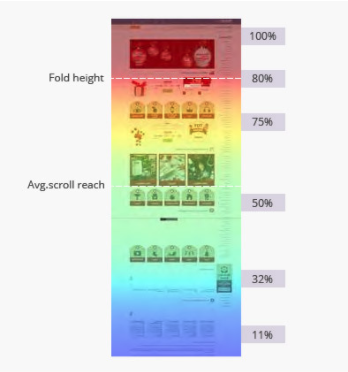
  • Scroll maps: Track how far readers made it down the page before dropping off. The redder the area, the more people read it.
  • Click maps: Track where users click most often. This could be internal links, the navigation bar, logos, images, CTA buttons, and anything that appears to be clickable.
  • Hover maps: Track where users move the cursor around the page. Hot spots are indicated by where users pause most often.

Now that we’ve covered some basic heatmap info, let’s move on to some ways that you might use heatmaps to take your SEO strategy to the next level.

1. Learn More About User Intent

Visual analytics offers a unique opportunity to learn more about audience behavior.

Another thing you can do with heatmaps is to figure out which parts of the page get the most play.

Which content do people care about, and which sections do they scroll over without stopping?

At which point do users drop off?

Additionally, you might try looking at which menu options and filters get the most play – which can tell you which topics your audience cares about most.

This data can then be used to inform your PPC campaigns, as well as future landing pages and blog posts.

ADVERTISEMENT

CONTINUE READING BELOW

Compare heatmap data to paid search data to uncover keyword opportunities you can use to inform your content strategy, ad copy, social posts, and so on.

It might also be worth checking Google Analytics for bounce rates and dwell times.

Here, your goal is to find out how many people visit the page, then leave because there’s something missing or the content isn’t relevant.

2. Optimize Page Layout

In many cases, page structure is something we try to navigate by applying our best judgment.

Sure, the importance of things like H2s, H3s, and white space have been drilled into our minds.

However, there are literally hundreds of factors that contribute to great user experience.

The most common way to use heatmaps is for gaining an understanding of how customers interact with on-page elements like CTA buttons, where friction exists, and visitors move through the site.

For example, in this side-by-side, the image on the left revealed that visitors spent more time looking at the promotional banner, which advertised a rewards program, than completing the checkout.

The image on the right addresses the problem by making subtle changes that more effectively guide users toward the desired action.

how to use heatmaps to improve SEO

how to use heatmaps to improve SEO

You might also use heatmaps to optimize image placement to increase conversions.

For example, here are two versions of an ecommerce landing page.

In the first version, the baby is looking directly at the viewer, making the face the strongest element on the page.

how to use heatmaps to improve SEO

how to use heatmaps to improve SEO

In the second version, we have the baby looking toward the web copy, ensuring that visitors pay attention to the messaging and offer.

ADVERTISEMENT

CONTINUE READING BELOW

how to use heatmaps to improve SEO

how to use heatmaps to improve SEO

3. Use Heatmaps with Analytics to Uncover the ‘Why’ Behind Your Metrics

Analytics platforms like Google Analytics allow you to collect tons of quantitative data.

You can track page views, referral traffic, bounces, and how many times someone abandoned a cart.

The problem is, those insights don’t offer much in the way of “why” consumers take those actions.

For example, if your heatmap reveals that a ton of people click a certain button, but don’t convert, head over to your GA account to sort things out.

Navigate to Behavior > Site Content > All Pages, and then click Destination URL.

From there, you might use a heatmap to understand how users interact with the destination page.

For example, you notice that most clicks are happening at the bottom of the page.

ADVERTISEMENT

CONTINUE READING BELOW

In this case, that could indicate that the information people are looking for is way too far below the fold.

From there, you might try moving that content further up the page, and test to see whether that change had any impact on conversions.

4. Combine Heatmaps with On-Page Surveys

Heatmaps allow you to identify points of friction, design issues, and other opportunities that your audience might not bring up in a survey or review.

Collecting feedback from multiple sources allows you to paint a clearer picture of users’ relationship with your website.

Try using heatmaps to uncover design issues on specific pages, then use on-site surveys to ask visitors to share their feedback about that page.

  • What might they add or change?
  • How was their experience?

Keep in mind, you’ll want to make sure that you approach this strategy one issue at a time, otherwise, it’ll be too difficult to analyze your data and implement the recommended changes.

ADVERTISEMENT

CONTINUE READING BELOW

5. Determine Optimal Content-Length

However, Google has long insisted that word count does not equate with quality content.

You want to focus on giving users the answers they want, not simply taking up more space.

How well does each page match your audience’s search queries?

You can use heatmaps to uncover how much information your customers want on any given topic.

Use a scroll map to find out where users are dropping off the page.

how to use heatmaps to improve SEO

how to use heatmaps to improve SEO

Have you answered a question up top and there’s no need for readers to keep scrolling on?

Or, are readers scanning for information then dropping off after realizing you aren’t going to provide the information they were hoping for?

While the heatmap itself won’t provide the full answer here, you should start by finding out where people are dropping off, then look at what they do next.

ADVERTISEMENT

CONTINUE READING BELOW

  • Are they leaving your site for good or have they found what they need and are moving on to the purchasing phase?
  • What do your competitors cover on similar pages?
  • What can you do to create something better?

6. Improve Your Internal Linking Strategy

Internal links are essential for helping the Googlebot understand the structure of your website.

From Google’s perspective, the anchor text you use to link to different parts of your website provides more context for what that target page is all about.

Additionally, internal linking allows you to distribute link equity between pages and establish a content hierarchy where the most important pages are given the highest value.

For organizations that haven’t given internal links much thought, making an effort to improve the connections between pages can be a quick way to boost your rankings.

For marketers relying on content to grow their site, internal linking offers an opportunity to strengthen authority around key topics, grouping content into “cornerstone” or “pillar” pages and subtopics.

ADVERTISEMENT

CONTINUE READING BELOW

So, how can heatmaps help with this?

The benefit of using heatmaps to measure internal link performance is, they offer specific information about where users click.

Users can take those insights to optimize link placement, driving more traffic to related pages.

7. Structure Your Site Around the Buying Process

Done right, your website should be set up in a way that guides users to relevant content that aligns with their stage in the customer journey.

This means you’ll need to make sure that all of your links work together to nurture your visitors and offer them valuable insights, so they stay with you from awareness to purchase and beyond.

To ensure that people are clicking on the “right” content, clickmaps to learn which links users click.

Clicking links takes users away from the page they’re currently reading, so you’ll want to find out whether the links embedded in your articles are relevant.

If they’re irrelevant – or jump to a completely different place in the buyer’s journey, you risk driving those users away from your website altogether.

ADVERTISEMENT

CONTINUE READING BELOW

As you evaluate each page, look at what happens after the user clicks an internal link.

Ask yourself the following questions to determine relevance:

  • How much time do they spend on the new page?
  • How far do they scroll?
  • Do they continue exploring your content?
  • Does the session end with the user taking action?

8. Identify Confusing Elements Causing Friction

Another advantage of using heatmaps is they provide website owners with specific information about which elements that users find confusing.

Have you ever visited a website where items looked clickable but didn’t help you get to the next page?

It’s annoying, right?

Well, your customers feel the same way.

Items that appear “clickable” might not seem like that big of a deal, but they indicate that a page’s structure fails to meet expectations.

Clickmaps can help you spot the areas where customers expect to find links, allowing you to go back and add them in to meet your audience’s expectations.

ADVERTISEMENT

CONTINUE READING BELOW

In addition to unclickable items, heatmaps can help you identify other signs that users “aren’t getting it.”

Think hovering for a long time in weird places or a high number of drop-offs on a certain page.

Make a list of all of the weak spots you encounter on each page, and as you improve each area, see if bounce rates and conversions improve.

Ultimately, you want to make sure that you look out for any issues preventing your audience from converting – whether that’s a poor checkout experience, images that look like buttons, or convoluted copy.

9. Improve Your Outbound Linking Strategy

It may seem counterintuitive, but including outbound links within your content is good for SEO.

While some site owners worry that following this bit of advice will drive users away, the fact is, referencing reputable sources shows readers (and search engines) that you care about providing useful information – regardless of where it comes from.

The links you include in your web copy can play a major role in how your audience perceives your content, according to research from Stanford University.

ADVERTISEMENT

CONTINUE READING BELOW

Link to spammy sites and your credibility goes out the window.

So, where do heatmaps come into play?

There are actually a couple of different ways.

For one, you might try using a click map to uncover which links get the most clicks.

This will help you figure out which links your audience is most interested in – which websites/institutions do they perceive as being most credible/interesting?

Second, you might also use a scroll map to analyze your content.

For example, you might find that readers drop off after encountering an outbound link they perceive as spammy or irrelevant.

If that’s the case, link out a better source, then see if things improve.

If not, then it’s worth looking into how you can make the rest of the piece more engaging.

Wrapping Up

Understanding how your visitors interact with your site’s content, structure, and on-page elements allows you to build a strategy that gets users to stick around, read a blog, and ultimately, convert more often.

ADVERTISEMENT

CONTINUE READING BELOW

Heatmaps serve as an ideal starting point, allowing marketers to identify big-picture problems that cause friction and new opportunities to drive traffic and conversions.

That said, you shouldn’t rely exclusively on heatmaps for research.

They’re one of many tools that come together to shape your understanding of the buyer’s experience.

More Resources:


Image Credits

In-Post Image #1: Convince and Convert
In-Post Image #2: VWO
In-Post Image #3: UXmag

http://tracking.feedpress.it/link/13962/13716508


Tips and tools to combine content marketing and PPC

30-second summary:

  • Many businesses opt for content marketing because organic traffic is free. But, this strategy makes them miss a great opportunity to grow fast because combining SEO-optimized content with PPC speeds up the lead generation process.
  • Online businesses need to know specific use cases for content marketing and PPC to assess the value of the strategy.
  • Less than half of small businesses (45%) invest in PPC.
  • PPC and SEO content marketing can bring in more leads by capturing more quality traffic with more effective keyword optimization of blog content, lead magnets, and landing pages.
  • To get the most value from content marketing and PPC, businesses need to master keyword research, searcher intent, and the consistency between the landing page and ad optimization.

As someone who primarily engaged in SEO and content writing for small businesses, I didn’t really care about PPC advertising.  

Maybe because of people like me, only 45% of small businesses invest in PPC.  

I thought that the best way to bring high-quality leads was with super optimized content, so paid advertising was the realm of bigger companies. That’s the mindset of many small business owners. With teeny tiny marketing budgets, they have to choose between SEO/content and PPC. 

SEO/content often becomes their choice, especially of those with interest in content creation and a lack of real marketing experience.  

SEO was my preferred choice, too, and I saw PPC as something secondary. 

Boy, was I wrong about this!

After a couple of projects involving PPC promotion, my view of the strategy completely changed. No, they didn’t change how I thought about SEO, but they showed how amazing the results could be if you combine the power of both strategies. 

To all SEO specialists still not using PPC and the other way around, here’s what you’re missing.  

1. More effective content thanks to PPC-tested keywords

Developing a content strategy is one of the most complex and important tasks for any SEO specialist. They use keyword research tools, PPC tools, Google Search Console results, and other methods to find those precious keywords used by customers.  

When they find the keywords they think are good for targeting SEO/content marketing, they begin a slow process of creating content. I wrote oh-so-many blog articles, eBooks, checklists, reports, and other content to find out the keywords that attracted the most conversions.  

All of this takes a lot of time.  

In fact, to write a super effective blog post, you need more than six hours.  

Time required to invest per blog postSource: OrbitMedia 

When you’re done with writing the draft, there’s also proofreading, editing, making visuals, and keyword optimization. To cut a long story short, you might need a few days to complete a good article that can bring quality organic traffic.  

But that’s not the end of that road.  

Google, too, needs some time to index the article and rank it. In fact, it might take between two and six months to rank in the top 10.  

That’s a bit much, agree? 

To top it all off, the keywords you’ve chosen for your content might not the best ones to target. If you make this mistake, you’ll have to learn your mistakes and start all over again (welcome to the world of SEO content writing, folks). 

Is there a way to speed this time-consuming process up? Yes. It’s PPC.  

It can get you in front of the audience and allow you to test your keyword ideas much faster. If you have content to test, use PPC ads, and equip them with the keywords.  

Get them out there and see what people respond to best. You can have some great results as early as a few days, which is pretty much impossible with SEO/content marketing.  

Another great news is that you can run A/B testing. This means running ads featuring different keywords for the same content piece. If one performs much better than the other, update the content with the more popular keywords.  

So, the takeaway here is that running PPC campaigns for content is a much faster way to test keywords. Start by finding keywords with research tools and make some ads, and you’ll be more likely to discover how your customers look for businesses like yours.  

Related:  

2. More leads from lead magnets

In content SEO, we often create lead magnets.  

They are content pieces like reports, white papers, eBooks, webinars, videos, and other valuable content that people need to sign up to access.  

You’ve seen tons of them before. A common example is a banner promoting an industry report with an irresistible CTA on a blog. It says that you need to provide your email address and name to access it instantly.  

Click on that CTA, and you’ll go to a landing page with the lead capture form.  

Like this “The Ultimate Agency Guide to Video Marketing” landing page, where everyone can download a guide with helpful tips on video marketing.

Example of lead magnets landing pages

As you can see, the content is offered in exchange for some data. Not a bad deal of a guide packed with useful instructions for businesses.  

Unsurprisingly, many content producers often turn to lead magnets for quick lead generation.  

Ozan Gobert, a senior content writer at Best Writers Online said, 

“Lead magnets work well for both B2B and B2C businesses aslong as they have some value for customers. You can generate some high-quality leads with them, as they typically attract those interested in insights and tips inside.” 

If a blog has thousands of visitors every week, then there might not be a need for PPC promoting lead magnets. But is that true for your blog? 

Many people think they can manage without the ads (I was one of them). Basically, it’s because they think that great content will “sell” itself. 

Despite what they might think, not so many blogs are that successful in attracting visitors. In fact, more than 90% of web pages don’t get any organic search traffic from Google.

Ahrefs stats on PPC and content marketing

As you can see, only about 1.3 percent of web pages out there get decent traffic. Just for that tiny share, promoting a lead magnet with PPC advertising might not be necessary every time. 

Obviously, the situation is very different for the rest.  

If your website doesn’t have a lot of visitors, too, then creating lead magnets might be pointless. They’ll just sit there only to be discovered by a few people per week.

Not good because you need more leads.  

If you wish that there was a way to get more people to pay attention to, there is actually a way.

And it’s PPC, of course. To get some emails, you need a well-crafted PPC campaign that leads people to the landing page where they can sign up to receive the content.  

You can try to bring people with keyword-based ads promoting the lead magnet. If you choose the right keywords, the ads have a much greater chance to attract leads than SEO alone.  

This is how it works: PPC does the job bringing in visitors, the content converts them into leads by having them complete the capture form.  

To increase the chance of people signing up, the value of content is critical. But, the visual appeal is also a major consideration. You need tools for creating visual content like images, graphics, and infographics to add to your lead magnets.  

3. Better marketing campaign performance thanks to a smart keyword use

Many businesses out there don’t realize they can bring much more quality traffic to their websites if they focus on best-performing keywords in both SEO, content marketing and PPC.  

Much more traffic.  

When an SEO/content marketing specialist and a PPC marketer share a list of relevant keywords, they can decide how to divide them to: 

  • Target the most promising keywords together to bring the most traffic 
  • Identify the keywords that are the most difficult for SEO and target them with PPC and the other way around
  • Define which search queries to focus on with each lead acquisition strategy

Ultimately, the cooperation between the PPC and SEO teams can result in a much more effective keyword strategy. In turn, this strategy could attract more traffic to your websites. 

Important note

To make content keyword optimization work, you need to master searcher intent or purchase intent. Put simply, searcher intent is the reason behind a search query.  

For example, the query “Samsung a10 review” implies that the searcher is looking to do some research but has not made the decision yet. If they search Google for “buy Samsung a10 cheap”, then they might be ready to buy.  

Each intent defines how you should create content. It matters a lot for SEO because Google’s goal is to provide its users with the most relevant results.  

Dive Deeper: Tapping into Google’s Algorithm for Searcher Intent. 

4. Create landing pages that convert more visitors

A landing page is the heart of any PPC marketing.  

But, in many cases, PPC specialists aren’t the best persons to write the copy for it. By engaging content and SEO specialists and having them work with PPC folks, you can create a keyword optimized copy that also appeals to the readers.  

For example, PPC specialists can provide keywords and ideas for optimized headings and subheadings for attracting traffic. In turn, content writers contribute by creating a copy that’s easy to read and entices the visitors to act.  

So, the collaboration of PPC and SEO/content teams can result in campaign landing pages that generate clicks and converts.  

A good way to start doing PPC campaign landing pages is to create a checklist to cover all bases. This checklist can include images, copy, sign up options, etc. 

Know more: Studying the anatomy of a successful high-conversion landing page

SEO and PPC: Two are better than one

I’m not exaggerating when I say that SEO and PPC are a marriage made in heaven. I am positive that these points described in this article prove that.

Don’t make a mistake I made by neglecting the power of PPC advertising. Combined with SEO and quality content, you can greatly increase the quality of your traffic.

If you’d like to try them together, feel free to start by doing PPC ads for your best-performing blog articles. The results you’ll see will definitely impress and inspire you to try more. Thanks to this article, you’ll know your next steps.

Ana Mayer is a project manager with 3+ years of experience. She likes to read and create expert academic materials for the Online Writers Rating writing review website.

https://www.searchenginewatch.com/2020/07/10/tips-and-tools-to-combine-content-marketing-and-ppc/


How to Generate Structured Data Automatically Using Computer Vision via @hamletbatista

Adding structured data to your website pages is extremely important as rich results continue to take the place of the plain old blue links.

In Google’s announcement of the Rich Results Test Tool getting out of beta, they said:

“Rich results are experiences on Google Search that go beyond the standard blue link. They’re powered by structured data and can include carousels, images, or other non-textual elements. Over the last couple years we’ve developed the Rich Results Test to help you test your structured data and preview your rich results.”

While the improvements to the tool are really welcome and there are a decent number of tools and plugins that help produce structured data, there is still a significant gap.

Adding correct structured data to webpages remains a manual effort, and as it requires playing with code, which is very prone to human error.

In this post, I’m going to introduce a fairly advanced technique that can help produce quality structured data without manual input.

ADVERTISEMENT

CONTINUE READING BELOW

It relies on the latest advances in computer vision and connecting concepts from completely different disciplines.

Here is our technical plan:

  • We will leverage a list of product page screenshots that my team annotated to indicate things like product name, price, description, main image, etc.
  • We will convert the annotations to a format expected by Google AutoML Object Detection Service.
  • We will go through the steps to upload the annotated images, train, and evaluate a model that can predict the annotations on new screenshots.
  • We will run the prediction code from Python on new images.
  • We will take new screenshots automatically using puppeteer and inject JavaScript code to convert the predictions into structured data.
  • We will review some of the key concepts that make this technique possible.

Let’s review some foundational concepts first.

Computer Vision 101

The best way to learn and appreciate the power of computer vision is to run a quick example.

I put together a simple Colab notebook that basically follows the steps outlined in this repo from Streamlit.

Please make a copy and select Runtime > Run all, to run all cells.

In the end, you should get a dynamic ngrok URL.

Copy and paste it in your browser and after the YOLO weights download, you select Run the App in the sidebar, you should see the demo web app below.
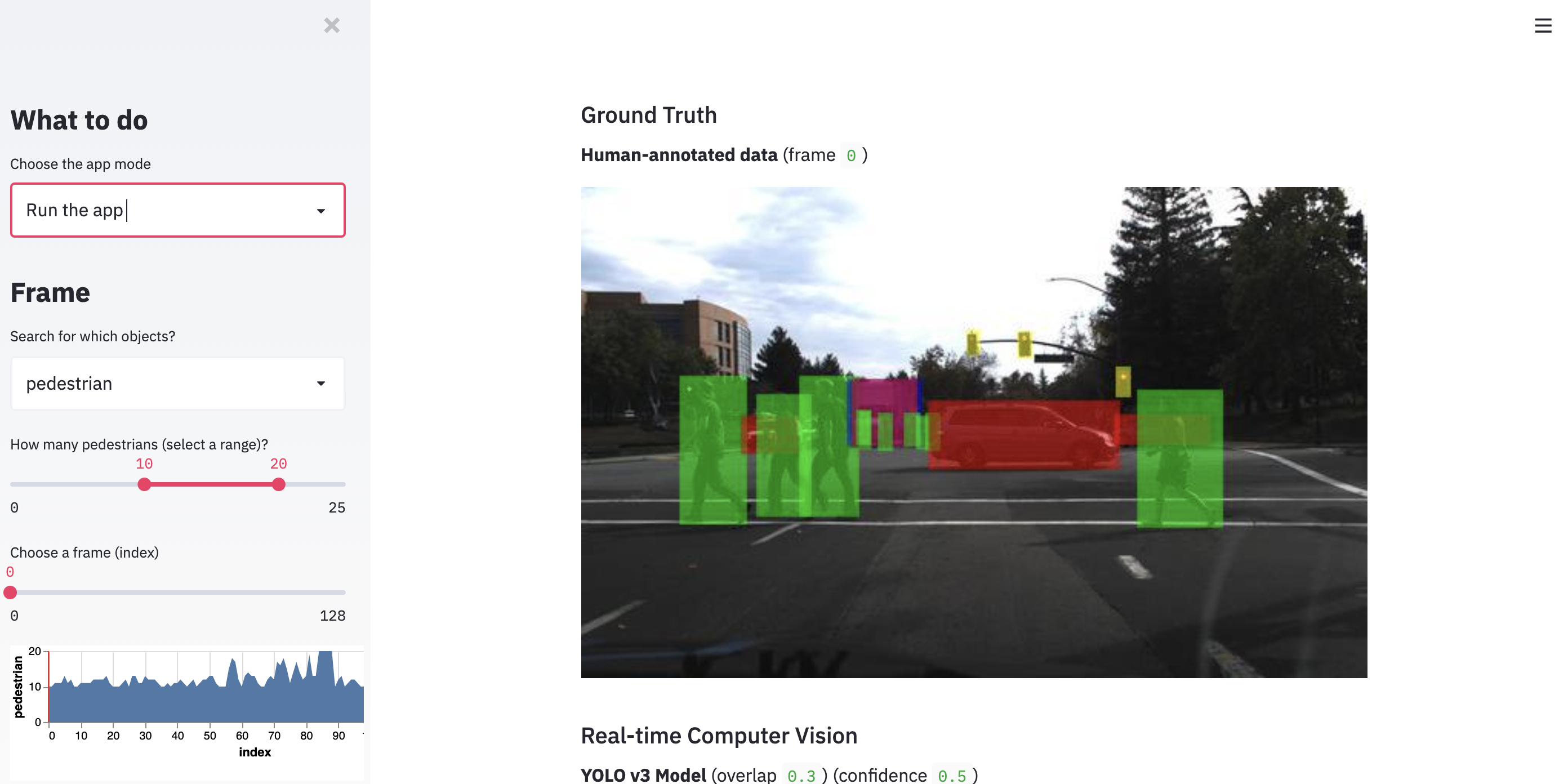
How to Generate Structured Data Automatically Using Computer Vision

How to Generate Structured Data Automatically Using Computer Vision

This web app allows you to browse different images and apply the computer vision algorithm YOLO3, which stands for You Only Look Once.

ADVERTISEMENT

CONTINUE READING BELOW

You will notice that the objects of interest in the pictures (cars, people, etc.) are represented by colored boxes.

These are called bounding boxes in Computer Vision and the task that can predict them is called object detection.

Similar to any supervised deep learning task, object detection algorithms require labeled datasets.

The datasets for object detection include images and the labels plus the coordinates of the boxes that contain the labels.

There is some heavy-duty manual work required in labeling objects in images.

Fortunately, as I don’t need to ask for permission in my business, I am sharing 200 images already curated by my team that you can use to complete this tutorial.

We will learn the process we used to put our full dataset together and ways to scale it automatically so you don’t need to manually label every image.

Browser Automation for Image Capturing

In one of my early columns, I introduced the idea of automating the Chrome browser to help us perform repetitive tasks where we don’t have an API.

As our idea is to take screenshots of web pages and apply object detection to the images to get structured data, we can automate part of the process with browser automation.

Given a list of, for example, product URLs, we can run a puppeteer script (or pyppeteer in Python) to open all web pages and save screenshots to disk.

Now, the screenshots alone are not enough. We also need the labels for each structured data type and bounding box.

There are at least a couple of approaches to do this.

The first and obvious one is to have a data entry person/team manually label the screenshots.

That is the approach we took when we initially tried this a couple of years ago.

How to Generate Structured Data Automatically Using Computer Vision

How to Generate Structured Data Automatically Using Computer Vision

We used an open-source tool, called LabelImg and our data entry person manually draw boxes over the objects of interest.

ADVERTISEMENT

CONTINUE READING BELOW

The results of the labeling are saved in a standard format. In our case, we used the DetectNet format.

This format creates a txt file for every image with a line for each object. Each line includes a label and coordinates.

Another, more scalable approach that we use more recently, is to screenshot pages that already have structured data and use the structured data to calculate the labels and the coordinates of the boxes.

We still combine it with human supervision, but primarily to make sure the process produces quality training data.

Google AutoML for Vision Object Detection

When we first tried this idea a couple of years ago, we had to do it the really hard way!
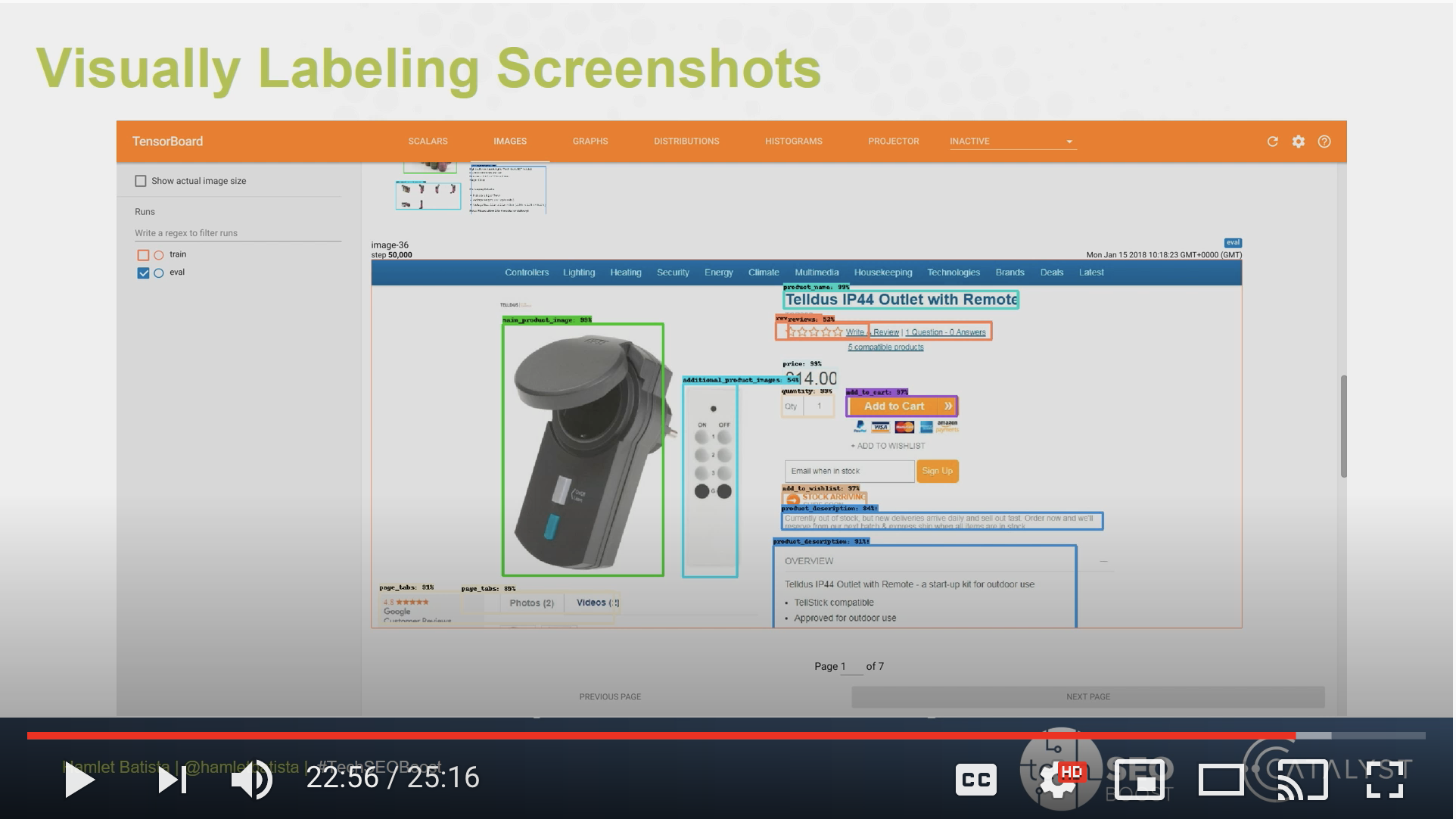
How to Generate Structured Data Automatically Using Computer Vision

How to Generate Structured Data Automatically Using Computer Vision

I actually briefly mentioned it during my TechSEO Boost talk in 2018.

I learned about object detection during my Deep Learning specialization with Coursera and immediately connected the dots.

ADVERTISEMENT

CONTINUE READING BELOW

We learned to use YOLO, but in practice I found Faster-RCNN to be the best performing approach back then.

The Tensorflow Object Detection API made things a bit simpler, but nowhere near as simple as it is with AutoML.

When use AutoML, we only need to provide the data in the format expected and provide enough examples for each label/bounding box. At this time, the service only needs 10.

We had to get hundreds of examples of each label to get decent performance back then.

Now that we understand the basics, let’s get to work.

Preparing our Dataset for AutoML

Let’s review an example from our product dataset. We have two files for every image.

The first file is the image itself like the one below.
How to Generate Structured Data Automatically Using Computer Vision

How to Generate Structured Data Automatically Using Computer Vision

You can display it in Google Colab using the following Python lines.

ADVERTISEMENT

CONTINUE READING BELOW

import numpy as np import cv2 
img = cv2.imread("img1063.jpg", cv2.IMREAD_COLOR)
from google.colab.patches import cv2_imshow
cv2_imshow(img)

The second part is the corresponding DetectNet text file with the labels.

You can review it with the command line.

!cat imag1063.txt

main product image 0.0 0 0.0 30 82 790 561 0.0 0.0 0.0 0.0 0.0 0.0 0.0
original price 0.0 0 0.0 836 99 903 116 0.0 0.0 0.0 0.0 0.0 0.0 0.0
price 0.0 0 0.0 837 125 939 151 0.0 0.0 0.0 0.0 0.0 0.0 0.0
product name 0.0 0 0.0 31 8 798 39 0.0 0.0 0.0 0.0 0.0 0.0 0.0
reviews 0.0 0 0.0 114 41 315 63 0.0 0.0 0.0 0.0 0.0 0.0 0.0
quantity 0.0 0 0.0 836 198 1303 253 0.0 0.0 0.0 0.0 0.0 0.0 0.0
add to cart 0.0 0 0.0 837 289 1302 354 0.0 0.0 0.0 0.0 0.0 0.0 0.0
product description 0.0 0 0.0 843 367 1304 556 0.0 0.0 0.0 0.0 0.0 0.0 0.0

There is a line for every labeled object in the screenshot. The line includes the label name and the bounding box coordinates.

Let’s see how this specific example looks like when I load it into AutoML.
How to Generate Structured Data Automatically Using Computer Vision

How to Generate Structured Data Automatically Using Computer Vision

You can see how structured data elements are carefully labeled with bounding boxes.

We have the product name, price, quantity, reviews, description, etc.

Before I was able to upload my examples, I needed to convert them to the format expected by AutoML.

I also needed to upload the images to a Google Cloud Storage bucket, but that part is straightforward.

The format is: set,path,label,x_min,y_min,,,x_max,y_max,,

ADVERTISEMENT

CONTINUE READING BELOW

First, I read the files from disk and created a list of dictionaries one per each bounding box.

defaultdict(<class 'int'>, {'add to cart': 2308, 'add to wishlist': 978, 'additional product images': 1292, 'availability': 832, 'color': 600, 'main product image': 2981, 'price': 2719, 'product description': 1965, 'product name': 2888, 'quantity': 1738, 'reviews': 473, 'size': 1050})

Here you can see how many examples I have per bounding box/object.

Here is what one example looks like:

{'objects': [{'name': 'main product image', 'xmax': 0.4351371386212009, 'xmin': 0.06745737583395107, 'ymax': 1.0, 'ymin': 0.6900175131348512}, {'name': 'price', 'xmax': 0.5559673832468495, 'xmin': 0.5100074128984433, 'ymax': 0.043782837127845885, 'ymin': 0.008756567425569177}, {'name': 'add to wishlist', 'xmax': 0.5959970348406227, 'xmin': 0.508524833209785, 'ymax': 0.29422066549912435, 'ymin': 0.2714535901926445}, {'name': 'quantity', 'xmax': 0.6404744255003706, 'xmin': 0.508524833209785, 'ymax': 0.6234676007005254, 'ymin': 0.5516637478108581}, {'name': 'size', 'xmax': 0.793180133432172, 'xmin': 0.5070422535211268, 'ymax': 0.7408056042031523, 'ymin': 0.6760070052539404}, {'name': 'add to cart', 'xmax': 0.6056338028169014, 'xmin': 0.5107487027427724, 'ymax': 0.8669001751313485, 'ymin': 0.7933450087565674}], 'screenshot': 'img716.jpg'}

If you pay close attention, the coordinates in the file were integers, not decimals. AutoML expects the numbers to be normalized to 1.

You can do that by dividing the numbers by either the width or height of the image.

#conver to float image_box = dict(name=name, xmin=max(0, float(xmin) / width), ymin=max(0, float(ymin) / height), xmax=max(0, float(xmax) / width), ymax=max(0, float(ymax) / height), )

Once we have the data structure with the right values, we can proceed to persist it to a CSV file with the expected format.

import csv
with open('screenshots.csv', "w") as csvfile: csvwriter = csv.writer(csvfile) for example in examples: for obj in example["objects"]: #expected format -> set,path,label,x_min,y_min,,,x_max,y_max,, csvwriter.writerow(["UNASSIGNED", f"gs://<bucket_name>/to_upload/{example['screenshot']}", obj["name"], obj["xmin"], obj["ymin"],"", "", obj["xmax"], obj["ymax"], "", ""])

This generates a file like the following.

!head screeshots.csv
UNASSIGNED,gs://<bucket_name>/to_upload/img716.jpg,main product image,0.06745737583395107,0.6900175131348512,,,0.4351371386212009,1.0,,
UNASSIGNED,gs://<bucket_name>/to_upload/img716.jpg,price,0.5100074128984433,0.008756567425569177,,,0.5559673832468495,0.043782837127845885,,
UNASSIGNED,gs://<bucket_name>/to_upload/img716.jpg,add to wishlist,0.508524833209785,0.2714535901926445,,,0.5959970348406227,0.29422066549912435,,
UNASSIGNED,gs://<bucket_name>/to_upload/img716.jpg,quantity,0.508524833209785,0.5516637478108581,,,0.6404744255003706,0.6234676007005254,,
UNASSIGNED,gs://<bucket_name>/to_upload/img716.jpg,size,0.5070422535211268,0.6760070052539404,,,0.793180133432172,0.7408056042031523,,
UNASSIGNED,gs://<bucket_name>/to_upload/img716.jpg,add to cart,0.5107487027427724,0.7933450087565674,,,0.6056338028169014,0.8669001751313485,,
UNASSIGNED,gs://<bucket_name>/to_upload/img2093.jpg,main product image,0.09636767976278725,0.3134851138353765,,,0.44551519644180876,0.8581436077057794,,
UNASSIGNED,gs://<bucket_name>/to_upload/img2093.jpg,product name,0.5100074128984433,0.11208406304728546,,,0.8584136397331357,0.16112084063047286,,
UNASSIGNED,gs://<bucket_name>/to_upload/img2093.jpg,price,0.5107487027427724,0.18739054290718038,,,0.5922905856189771,0.2381786339754816,,
UNASSIGNED,gs://<bucket_name>/to_upload/img2093.jpg,quantity,0.5107487027427724,0.3607705779334501,,,0.5774647887323944,0.45183887915936954,,

It takes a little bit of work and a clear understanding of the concepts and process, but we are pretty much ready to train our predictive model.

Download the CSV to your computer and upload it to the Google Cloud Storage bucket.

from google.colab import files files.download("screenshots.csv")

Training our Predictive Model in AutoML

First, let’s create a new dataset to import our labeled images in Cloud Storage.

ADVERTISEMENT

CONTINUE READING BELOW
How to Generate Structured Data Automatically Using Computer Vision

How to Generate Structured Data Automatically Using Computer Vision

Next, we select the CSV we generated with the image paths, labels, and bounding box coordinates.
How to Generate Structured Data Automatically Using Computer Vision

How to Generate Structured Data Automatically Using Computer Vision

After we import the images, AutoML creates a really nice image browser that we can use to review the images and labels.

How to Generate Structured Data Automatically Using Computer Vision

How to Generate Structured Data Automatically Using Computer Vision

Finally, after we train the model for several hours, we get really high accuracy metrics.
How to Generate Structured Data Automatically Using Computer Vision

How to Generate Structured Data Automatically Using Computer Vision

In order to test the model, I manually took a screenshot of a Macy’s product page and uploaded the image to the model prediction tool.

ADVERTISEMENT

CONTINUE READING BELOW
How to Generate Structured Data Automatically Using Computer Vision

How to Generate Structured Data Automatically Using Computer Vision

The predictions are exceptionally good. The model only missed the reviews and the price.

This means this example had high precision and low recall.

We can improve it by increasing the number of examples with labeled prices and reviews.

We have fewer reviews, but plenty of price examples. But, probably, this price doesn’t fit the existing patterns.

The next part is probably the most interesting.

How do we turn these bounding box coordinate predictions into structure data that we can inject into the HTML?

Turning Our Bounding Box Predictions into Structured Data

First, need to take screenshots automatically from Python. We can use Pyppeteer for that.

%%writefile get_product_shot.py import asyncio from pyppeteer import launch async def main(): url = "https://www.amazon.com/Kohler-Elongated-AquaPiston-Technology-Left-Hand/dp/B005E3KZOO" browser = await launch(executablePath="/usr/lib/chromium-browser/chromium-browser",args=['--no-sandbox']) page = await browser.newPage() await page.goto(url) await page.screenshot({'path': 'product_shot.png'}) await browser.close() asyncio.get_event_loop().run_until_complete(main())

In order to get this to work in Colab, we need to install chromedriver

!apt install chromium-chromedriver

Running async functions inside Jupyter or Colab can be a pain, so I prefer to run them as scripts.

ADVERTISEMENT

CONTINUE READING BELOW

%%bash python get_product_shot.py

How to Generate Structured Data Automatically Using Computer Vision

How to Generate Structured Data Automatically Using Computer Vision
Now, that we have the screenshot, we can run a prediction on it.

This is the code to get predictions from our model.

import sys import os from google.cloud import automl_v1beta1 from google.cloud.automl_v1beta1.proto import service_pb2 os.environ["GOOGLE_APPLICATION_CREDENTIALS"] = "CHANGE-ME.json" # 'content' is base-64-encoded image data. def get_prediction(file_path, project_id, model_id): with open(file_path, 'rb') as ff: content = ff.read() prediction_client = automl_v1beta1.PredictionServiceClient() name = 'projects/{}/locations/us-central1/models/{}'.format(project_id, model_id) payload = {'image': {'image_bytes': content }} params = {} request = prediction_client.predict(name, payload, params) return request # waits till request is returned

This code requires creating a service account with access to the AutoML service.
How to Generate Structured Data Automatically Using Computer Vision

How to Generate Structured Data Automatically Using Computer Vision
Generate a JSON file, upload it to Colab and change the code that says “CHANGE-ME.json” with the path name.

This line will generate the predictions from the screenshot we took.

ADVERTISEMENT

CONTINUE READING BELOW

response = get_prediction("img1996.jpg", <project_id>, <model_id>)

Let’s check our model predictions on the Amazon product page.
How to Generate Structured Data Automatically Using Computer Vision

How to Generate Structured Data Automatically Using Computer Vision

Look how the model was able to detect the product name even with the pop up partially obstructing it.

Pretty impressive!

In order to draw the boxes and labels, I created a function that takes the image file name and response from the AutoML model. You can find it in this gist.

Then just needed to call it with these lines.

img_with_boxes = draw_bounding_boxes("product_shot.png", response)

I also print the predictions we get back.

Predicted label and score: additional product images 99.40%
Predicted x1, y1: (62, 450)
Predicted x2, y2: (300, 495)
Predicted label and score: product description 98.80%
Predicted x1, y1: (364, 373)
Predicted x2, y2: (694, 600)
Predicted label and score: product name 94.47%
Predicted x1, y1: (369, 180)
Predicted x2, y2: (696, 283)
Predicted label and score: main product image 90.14%
Predicted x1, y1: (86, 247)
Predicted x2, y2: (284, 432)

Then, we can visualize them here.

from google.colab.patches import cv2_imshow cv2_imshow(img_with_boxes)

Now we get to the tricky part.

Let’s use the predicted coordinates of the product description, highlighted in bold above.

I want to calculate a point right in the middle of the bounding box. We can do that using:

x1, y1 = (364, 373) x2, y2 = (694, 600)
x, y = ( int((x1 + x2) / 2), ( int((y1+y2) / 2)))
print(x, y) -> (529, 486)

We can identify the HTML DOM element in JavaScript that appears in these coordinates.

ADVERTISEMENT

CONTINUE READING BELOW

Here is the code with the coordinate values hard-coded (in bold).

%%writefile get_element_box.py import asyncio from pyppeteer import launch async def main(): url = "https://www.amazon.com/Kohler-Elongated-AquaPiston-Technology-Left-Hand/dp/B005E3KZOO" browser = await launch(executablePath="/usr/lib/chromium-browser/chromium-browser",args=['--no-sandbox']) page = await browser.newPage() await page.goto(url) await page.screenshot({'path': 'product_shot.png'}) output = await page.evaluate('''() => { var el = document.elementFromPoint(529, 486); //document.querySelector("#productTitle"); var coords = el.getBoundingClientRect(); return { x: coords.left, y: coords.bottom, tag: el.tagName, text: el.innerText, width: document.documentElement.clientWidth, height: document.documentElement.clientHeight, deviceScaleFactor: window.devicePixelRatio, } }''') await browser.close() print(output) asyncio.get_event_loop().run_until_complete(main())

I’m injecting and executing a custom JavaScript function when pyppeteer loads the page.

The function selects the element by the coordinates we calculated and returns its tag name and inner text among other attributes.

Here is what the output looks like when we run the script:

{'x': 383.03125, 'y': 519, 'tag': 'SPAN', 'text': 'Compact elongated bowl offers added comfort while occupying the same space as a round-front bowl', 'width': 800, 'height': 600, 'deviceScaleFactor': 1}

If you look a the image above, it is the bullet item right in the middle of the description.

In practice, we use some extra logic to find the parent element with the biggest surface overlap so we can capture the full description in cases like this.

Finally, let’s see what the output looks like when we pass the predicted product name coordinates.

{'x': 363.59375, 'y': 280, 'tag': 'SPAN', 'text': 'Kohler 3811-0 Santa Rosa Comfort Height Elongated 1.6 GPF Toilet with AquaPiston Flush Technology and Left-Hand Trip Lever, White', 'width': 800, 'height': 600, 'deviceScaleFactor': 1}
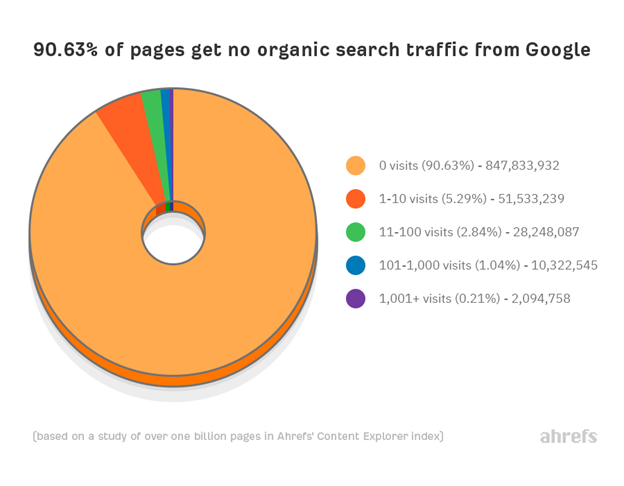
We were able to capture the full product name very precisely!

Here is your homework: update the code so you can return the text from all the predicted bounding boxes with the corresponding labels.

Resources to Learn More

We started a new weekly series of Python tutorials focused on practical SEO building blocks for beginners.

ADVERTISEMENT

CONTINUE READING BELOW

I am mentoring a couple of interns that help with our technical support and they are the ones putting together the Colab notebooks as they learn.

Make sure to check them out and try to follow the steps and complete the homework assignments!

More Resources:


Image Credits

All screenshots taken by author, July 2020

https://tracking.feedpress.com/link/13962/13713465/373940