Google’s John Mueller on Internal Anchor Text and “Visible Effect in Search” via @martinibuster

In a Google Webmaster Central hangout, Google’s John Mueller answered a question about best practices for anchor text on internal linking. He answered the question and along the way dropped some information about the impact of internal link anchor text on search.

Question About Internal Anchor Text

Anchor text is the text used when linking one page to another page (or one site to another site).

For example, when using the words “click here” to link to another page, the words “click here” are the anchor text.

The context of this question is that there is an understanding that the anchor text used to link to another page will help that page rank for the keyword phrase used in that anchor text.

In the past, using keywords in the anchor text of external links (links from another site) used to automatically help a page rank in Google. But that stopped being the case many years ago.

The publisher asking the question asks what the best practice is for linking to do different kinds of pages that are about the same topic.

ADVERTISEMENT

CONTINUE READING BELOW

Here is the question  

Let’s say I have two strong URLs about cheese in my website.

One is an e-commerce page where you can buy cheese. The other is a complete guide about cheese.

So two different pages talking about the same topic but both really relevant.

What’s the best practice for internal linking?

Is it okay to link to both pages using the same anchor text cheese? Or should one be linked differently?

What are some suggestions?

Google’s John Mueller asserted that the internal link from one page to another page from within the same site helps Google to find pages in a site and also to understand what the page being linked to is about.

This is what Mueller said:

“Essentially, internal linking helps us on the one hand to find pages, so that’s really important. It also helps us to get a bit of context about that specific page.”

Then he said that the “context” part comes from the anchor text as well as from the page that is linking out. That’s actually an important detail.

ADVERTISEMENT

CONTINUE READING BELOW

Where a page is linked from can say something about the page that it is linking to. A link has more meaning (or coherence) when a page about “cheese” links to another page about “cheese.”

This is how Mueller explained the bit about context of a link:

“And we get some of that from the anchor text from the internal linking. And some of course from understanding where these pages are linked within your website.”

Reasonable Anchor Text

Mueller encourages the publisher to use “reasonable” anchor text. He doesn’t specify what he meant by reasonable.

But in my opinion, you can’t go wrong by accurately describing what the user expects to find when they click the link.

So if it’s a commercial page, an anchor text that indicates the sale of cheese makes sense.

If it’s an informational page then an anchor text that indicates an informational article is required.

A common mistake that many publishers make is to use the keyword that has the highest search volume as the anchor text. And that’s a bad way to choose anchor text.

The publisher asked if it was okay to use the anchor text “cheese” for both pages, one page transactional and the other page informational.

From a user experience point of view, the answer is obviously no, it’s not a good practice.

The best anchor text to use is one that accurately describes what the user will find after they click the link.

Mueller apparently intuited that in the question and correctly advised the publisher to use a “reasonable anchor text” and encouraged the publisher to do what “makes sense for your users” which is good advice.

This is what John Mueller said:

“So with regards to that… thinking specifically about the anchor text here, I don’t think you need to do anything specific there if you’re already linking to those pages.

If you’re using a reasonable anchor text for cheese in this case, that sounds perfectly fine.

I don’t think you need to kind of change the anchor text to be “buy your cheese online here” and it’s like, “the ultimate guide to all types of cheese here.”

ADVERTISEMENT

CONTINUE READING BELOW

Internal Links Have No Effect on Search?

John Mueller goes on to say that anchor text on internal linking will not have a “visible effect” on rankings (he uses the word, “search”).

“It’s something you could do if you wanted to if you think it makes sense for your users but it’s not something where you would see a visible effect in search.”

On the one hand, Mueller says that internal links help Google understand the context of a page. And on the other hand he advises to not expect to see a visible effect on search.

Does that mean that internal linking is a useful but weak signal?

You make up your own mind. It makes sense to not give too much ranking factor influence to internal linking.

But it also makes sense to let it influence the non-ranking factor part of the algorithm in terms of providing some context of what a page is about.

What do you think? Does internal linking have a visible effect on search? I have my opinions.

ADVERTISEMENT

CONTINUE READING BELOW

Watch Google’s Webmaster Central office-hours video:

[embedded content]

http://tracking.feedpress.it/link/13962/13667937


Modern SEO strategy: Three tactics to support your efforts

30-second summary:

  • If your search strategy hasn’t evolved to account for algorithm updates, then you’re probably not seeing the returns you want.
  • Your website won’t become an authoritative digital property overnight; it takes time and effort to master modern SEO and earn that clout.  
  • Nick Chasinov, founder and CEO of Teknicks, shares three tactics you can use to support your SEO strategy this year.

SEO is alive and well, but it has definitely changed over the years. If your search strategy hasn’t evolved to account for algorithm updates, then you’re probably not seeing the returns you want. After all, there isn’t a one-size-fits-all approach to SEO. The best strategies are continually reassessed and refined overtime to meet unique organizational objectives. Agility will serve you better than a comprehensive plan, especially right now amid the coronavirus pandemic. 

That’s not to say there aren’t guidelines for modern SEO. Your approach should include a steady stream of fresh, high-quality content (including well-written long-form content that adds real value to customers), a strong branding strategy, an exceptional user experience that highly meets the needs of visitors, and a strong backlink portfolio. Above all else, your strategy should prioritize your visitors’ experiences. 

Why, if you may ask?

Google ultimately ranks websites by how useful they are to a user’s search. The search giant doesn’t usually reveal its search statistics (even though many have attempted to estimate), but Google disclosed in 2012 that the year held 1.2 trillion searches across 146 languages. The majority of your website’s traffic most likely comes from Google, so you need to meet its ever-evolving set of ranking criteria. Sure, other search engines matter too, but considering the second-largest is the Google subsidiary YouTube, it’s safe to base your SEO strategies on Google’s standards. 

Take it slow

Your website won’t become an authoritative digital property overnight; it takes time and effort to master modern SEO and earn that clout. Traditional factors like quality backlinks, positive user engagement, optimized on-page elements, and stellar content still all contribute to your website’s credibility and rank over time, so don’t look for quick fixes. Stick the process and you will see results. 

Don’t worry if you haven’t been keeping up with recent algorithm changes. Even seasoned marketers can feel out of the SEO loop sometimes, especially when myths and speculations regarding algorithm updates spread online. These updates are real — Google announced a core algorithm update on May 4, after all — but you don’t need to worry. Just make sure you aren’t doing something that’s hurting rather than helping your brand’s website. Google will penalize you for spammy guest blogs, keyword-stuffed content, unnatural link building, and everything designed to unethically manipulate rankings. Simply put, Google wants you to earn your rank. 

With so much to focus on, how do you prioritize your efforts? Luckily, Google lays it all out for us: Focus on the user’s experience. Build trust and credibility with Google and the people visiting your site.

Becoming an online authority means prioritizing not only what’s important to you, but also what’s important to the people you want to reach. Here are three tactics you can use to support your modern SEO strategy this year: 

1. Create a thoughtful FAQ page

In a crisis, your strengths and weaknesses are spotlighted as a brand. People observe what you do and how you do it, and that will inevitably affect their opinions. This is especially true during the coronavirus pandemic. According to Edelman’s recent report, only 38% of respondents believe that businesses are doing well at putting people before profits. Your customers, clients, and consumers are humans, and they’ve craving comfort and connection right now. Prioritize the user experience with a frequently asked questions webpage. 

Everyone knows what an FAQ page is, but not everyone knows that it can be your best friend when it comes to optimizing your website for search. Having a thoughtful, helpful FAQ page shows that you care about your customers and search engines like businesses that care about their customers.

Plus, a robust FAQ page that’s marked up properly might receive a rich result on the search and action on the Google Assistant, dramatically expanding your reach. 

2. Organize content by topic

It is no surprise that internet usage is up. In fact, Comcast, the largest residential internet network in the U.S., has experienced a 285% increase in videoconferencing and VoIP use while people are quarantined at home. More people are streaming, searching, shopping, teaching, learning, meeting, and gaming online than ever before. This is your opportunity to meet the needs of users by organizing your content by topic.

When it comes to the amount of content displayed on a given webpage, don’t lose sleep over the word count. Adding value and being helpful doesn’t require a set number of words or characters. Just keep writing until you feel the content highly meets the needs of your users. You’ll end up with an article that Google will love.

Don’t pack tons of information across an array of topics onto a single page. Instead, focus on providing an exceptional user experience by ensuring individual pages are each dedicated to a unique topic. You’ll want to start this process by building out a content map to define the information architecture. As you gradually add pages and remove others, make sure your content map reflects these modifications. 

3. Get the tools you need to help with link building

When outreaching and creating content for link building and brand mentions, you’ll need to be helpful and human. It’s not just about hyperlinks — it’s about building relationships and providing value. During the coronavirus pandemic, let compassion guide this element of your strategy. Selectively reach out to domains with effective, modern content that audiences will find useful. There’s no better time to demonstrate your knowledge and support your audience. 

Link building is a critical part of the most effective SEO strategies. Just keep in mind that this is generally a long-term tactic, so you’ll have a hard time executing without some help. Luckily, there is plenty of software available to do the heavy lifting for you. The quickest and easiest place to start is Google’s own search console, which offers tools and reports to improve your website’s search presence. This service will show you which websites link to yours and confirm that Google can both find and crawl your site. 

As search engines learn more about users’ behaviors, they will continue to change. What was a widely accepted SEO best practice just a few years ago may now hurt more than help your goals.

The bottom line

You can’t predict what Google or any other search engine will do with its algorithm, but luckily, that’s not your job. Your job is to adapt, evolve, and do what’s best for your business and your customers.

Nick Chasinov is the founder and CEO of  Teknicks, a research-based internet marketing agency certified by Google in Analytics, Tag Manager, and a Google Premier AdWords partner.

https://www.searchenginewatch.com/2020/06/23/modern-seo-strategy-three-tactics-to-support-your-efforts/


Google Mobile First Indexing and Scoring of Sites with Mobile and AMP Versions via @martinibuster

In a recent Webmaster Hangout, Google’s John Mueller discussed how Google will handle multi-platform sites in a mobile first index. Specifically, Mueller discussed how they will index and score the Web Vitals factors for sites that have both a mobile and AMP version.

Web Vitals are metrics that will become ranking factors in 2021, so knowing which version of a site Google will use for indexing and user experience scoring is important.

In the hangout, a publisher asked about best practices for showing visitors different versions of a site.

Mueller answered that question and then went into detail about how Google will index and score sites that have a mobile, AMP and desktop version.

Mobile Version Preferred for Indexing

Mueller began by stating that for indexing purposes, Google will use a mobile version of a site if both a mobile and AMP version co-exist.

Google would not use the AMP version of a site for indexing if there’s a mobile version of a site.

ADVERTISEMENT

CONTINUE READING BELOW

This is what Mueller said:

“With regards to AMP and mobile and desktop, we treat AMP pages as being alternates by default. So we wouldn’t use the AMP pages for indexing.”

Related: Google: If Choosing Between Desktop or Mobile Site, Choose Mobile

Situations When Google Will Uses AMP For Indexing

Then Mueller said that Google will use the AMP version of a site for indexing where there is no mobile version of a website and only an AMP version.

“There are certainly ways that you can set up a website so that the AMP page is your mobile page and you have an alternate desktop page where you just have a desktop version and the AMP version.

And in a case like that, we would see the AMP page as being a normal mobile page and we will just index that normally.”

Google Web Vitals Ranking Factor Scoring

Mueller next explained how Google will score the Web Vitals ranking factor when there is a mobile and AMP version of a website.

ADVERTISEMENT

CONTINUE READING BELOW

Here’s how Mueller explained it:

“The other thing that kind of plays into this complex scenario of mobile, desktop and AMP is that when it comes to the page experience score, kind of the Core Web Vitals, where we’re testing the speed and stability and usability of a web page, we will test the version that users end up seeing.

So that means we would test the AMP version with regards to speed, the quality and usability.

From that point of view we would not test the mobile version for that.

So that’s something where in this situation with mobile first indexing, we would index the mobile version.

We would use the AMP version with regards to testing usability and speed.

And we would show the desktop version in the search results as an alternate URL when people on desktop are searching.”

How Google Handles Sites in Mobile First Index

There are many sites that have three versions, mobile, AMP and desktop. Google has revealed that sites created with both a mobile and AMP version will have their mobile version crawled for indexing and the AMP version used for Web Vitals scoring.

Google will then use the AMP version for user experience ranking factors represented by the Web Vitals metrics.

And the desktop version will be shown as an alternate URL for those on a desktop device.

Watch the Google’s John Mueller Explain it Here

[embedded content]

Related: Google’s Mobile-First Indexing: Everything We Know (So Far)

http://tracking.feedpress.it/link/13962/13665254


Google Adds ‘Fact Check’ Label to Image Search Results via @MattGSouthern

Google is adding “Fact Check” labels to thumbnails in image search results in a continuation of its fact check efforts in Search and News.

“Photos and videos are an incredible way to help people understand what’s going on in the world. But the power of visual media has its pitfalls⁠—especially when there are questions surrounding the origin, authenticity or context of an image.”

This change is being rolled out today to help people navigate issues around determining the authenticity of images, and make more informed decisions about the content they consume.

When you see certain pictures in Google Images, such as a shark swimming down the street in Houston, Google will attach a “Fact Check” label underneath the thumbnail.

After tapping on a fact-checked result to view a larger preview of the image, Google will display a summary of the information contained on the web page where the image is featured.

A “Fact Check” label will only appear on select images that come from independent, authoritative sources on the web. It’s not exactly known what criteria a publisher needs to meet in order to be considered authoritative.

According to a help page, Google uses an algorithm to determine which publishers are trusted sources.

Google also relies on ClaimReview structured data markup that publishers are required to use to indicate fact check content to search engines.

Fact Check labels may appear both for fact check articles about specific images and for fact check articles that include an image in the story.

As mentioned at the beginning of this article, Google already highlights fact checks in regular search results and Google News. YouTube also utilizes ClaimReview to surface fact check information panels in Brazil, India and the U.S.

ADVERTISEMENT

CONTINUE READING BELOW

Google says its fact check labels are surfaced billions of times per year.

While adding ClaimReview markup is encouraged, being eligible to serve a Fact Check label does not affect rankings. This goes for Google Search, Google Images, Google News, and YouTube.

Related: Uncover the Truth With Google’s New Fact Check Labeling System

Source: Google

http://tracking.feedpress.it/link/13962/13659671


Studying the anatomy of a successful high-conversion landing page

30-second summary:

  • Landing pages can help you appeal to your audience, so they want to stick around and make the switch to a paying customer.
  • The structure of your landing page is just as important as its content and should lead the human eye directly to the CTA.
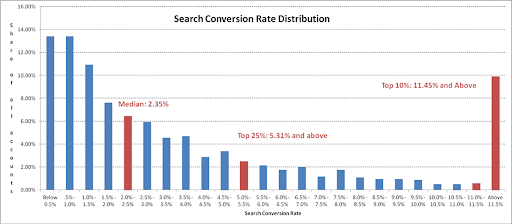
  • The top 25% of landing pages convert at 5.3% or higher relative to the average conversion rate of 2.35%- it pays to optimize your landing page.
  • The anatomy of a landing page is key to increasing conversions; by strengthening first impressions, embedding psychological trust, capturing email leads, demonstrating UPS, and illustrating social proof.

A high proportion of landing pages convert well as they are created following key fundamental steps. This is largely down to the structure of a landing page as it aligns with persuasion, including elements that help to persuade. 

A landing page with a high conversion rate is the solid foundation of a successful online business. The average landing page conversion rate across industries is 2.35%, with the top 25% converting at 5.31% or higher. As a business, no matter the conversion goal or the intended audience, following a set of structural rules can elevate your business. 

Landing page search conversion rate stats

Source: WordStream

For this specific reason, it is essential to understand the anatomy of a landing page to help boost your business, prompting better results. In most cases, all landing pages look poles apart but read in between the lines the same. Below, we will discuss the structure of landing pages in more detail.

Landing pages – understanding them

In marketing, a lot of time and effort is spent on driving traffic to a website. The intention is to reach the target audience with a hope that they will interact with the site and join the opt-in action, which might be in the form of subscribing to a newsletter or signing-up. 

However, this does not always entice an audience into the sales funnel, converting them into customers. For this reason, landing pages are crucial and are at large, consist of effective content, graphics and call-to-actions (CTAs).

What is a landing page?

In all cases, a landing page is a web page that all site visitors are sent to initiate a conversation attempting to close a deal. Some of the most effective landing pages are stand-alone pages that are created for a single purpose where the CTA is pointed directly at the targeted audience. To get a higher conversion rate on email marketing, your landing page ought to give your visitors positive user experience. 

To be frank, landing pages live separately from your initial website. They are designed only to receive campaign traffic. Separating them from websites allows organizations to focus on a single objective, making analytics easier, and testing simpler, which we will look at in more detail below. A landing page can be used for almost anything. However, the purpose of the page needs to be clear with a definitive link to an appropriate call-to-action. 

Landing page Nike example

Source: Nike

For example, taking a look at the landing page above created by Nike, it is immediately evident from the onset precisely what product they are promoting, with a small purpose text and a call to action. The use of different colors also plays a vital role which will explore later.

Why you need a landing page

Landing pages are used to achieve particular goals. These can be either to build an email list, grow a brand, or to make a profit. 

Landing page stats

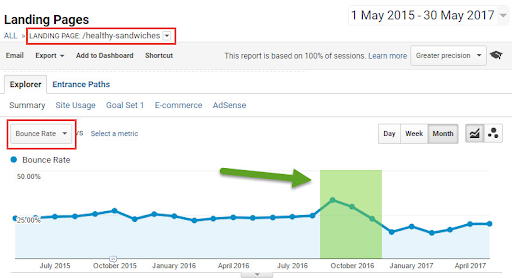
Source: Hallam

Landing pages also offer essential metrics for measuring the success rate of your business’s marketing campaign. By looking at the graph above, it is evident that by analyzing a single landing page, organizations can see the history of important metrics such as bounce rates. 

At the core of a landing page sits an opt-in process for page visitors. The landing page metrics give organizations the clear insight they need to grow their business in the right direction successfully.

Here’s a look at numerous benefits that businesses can gain by producing specific landing pages. 

Promote a positive first impression 

If you consider that there are far more interesting pages to look at online in comparison to your landing page, you will begin to understand that the duration of time visitors spend on your site will be relatively low. For this reason, first impressions count. Landing pages aid businesses to appeal to their audience, transitioning them from a reader into a solid customer.  

Use trust elements to your advantage

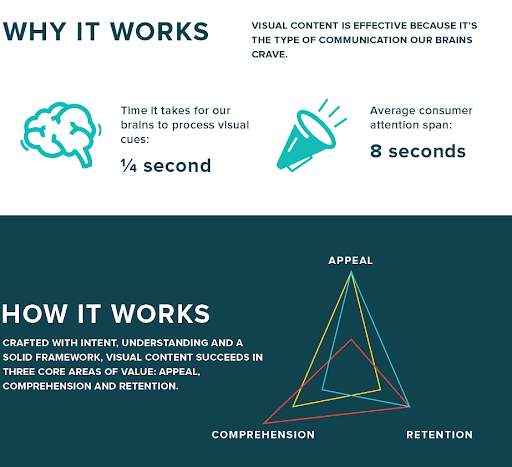
Images, graphics, and videos can attract visitors and have a way of persuading them emotionally to take action. Many psychology studies have indicated that people respond better to visual information than to text, resulting in much more positive user experience. Doing so can produce spectacular results, potentially giving business over a million unique visitors from Google alone. 

Landing page content example

Source: ColumnFive

The image above indicates processing visual content can be done at rapid speeds with greater retention and appeal, making clear that understanding visual content takes a small fraction of your reader’s attention span. 

Increase conversion rate

Landing pages allow you to increase your conversion rate as it is easier to capture email leads from them in comparison to a typical blog. This is because a landing page has only one purpose. A website or a blog focuses on highlighting trending posts, recommending affiliate products or services, whereas the landing page is solely focused on the CTA. 

Now we’ve spent a little time looking at what landing pages are, let’s now dissect the anatomy of one, focusing on the key components of a successful high-conversion landing page.

The components of a successful high-conversion landing page

What is your unique selling proposition as a business?

No matter what industry or field your business participates in, a fierce competition is always inevitable. As a business, your unique selling proposition is what sets you and your competitor’s miles apart. Your USP on your landing page is how you decide to position your offering differently. 

Landing pages need to communicate this proposition in a succinct way sufficiently. Why? So your visitors can immediately understand what makes your product or service far more appealing compared to others alike. To do so, you must follow and include page elements that aid in telling your story clearly.

Landing page iPhone SE example

Source: Apple

The main headline: One of the first things visitors will see and read is the headline. For this reason, it needs to be precise. Keeping the headline punchy and to the point is a must, being direct about your USP is vital. As demonstrated by Apple’s landing page above, they have decided to make the headline their product name, making clear what the landing page is promoting.

Supporting headline: As our heading needs to be short and sweet, additional context can be offered in the form of a subheading, adding a touch more information. The shorter the subheading, the better, as exemplified on Apple’s landing page. A subheading can have two approaches. The first being a direct extension of the headline itself. The second is offering additional information, conveying a secondary message that is persuasive. Apple has chosen the latter, by using the word “love” it adds an emotional element of persuasion. 

Reinforcing statement: This is optional and depends on the length of your landing page. If the landing page runs long, you will want to add a reinforcing statement towards the middle of the page to help remind visitors of your USP. However, the reinforcing statement can also be used to persuade, as Apple has done so, by including prices and offering a “trade-in” option.

Closing statement: a closing statement is typically used to back up your USP, giving your visitor one last chance to convert into a customer. It is thought to be the climax to your offering, so making it count will pay off. A strong closing statement will help remind the visitor why they are on your landing page along with a repeat CTA with a little urgency.

The hero image or video

As mentioned above, first impressions are paramount, and so, the hero image is the first visual your visitor will see on your landing page. Hero images are thought to be the primary image that helps to convey your message. The image should clearly demonstrate and convey and communicate the use of your product or service as demonstrated by the below image from Mercedes-Benz. 

Landing page Mercedes example

Source: Mercedes

With that in mind, some businesses prefer to use text-only landing pages that do not include videos or images. The purpose of this strategy is, since page loading times affect Google rankings, text-based landing pages load with speed, increasing the user experience. However, as we explored above, the retention and processing of text is much slower,

Video landing pages have become increasingly popular over the years thanks to sites like YouTube and Vimeo. Research has shown that one-third of all online activity comes from users watching videos. Videos are also increasingly interactive and help to demonstrate how your product or service works transparently.

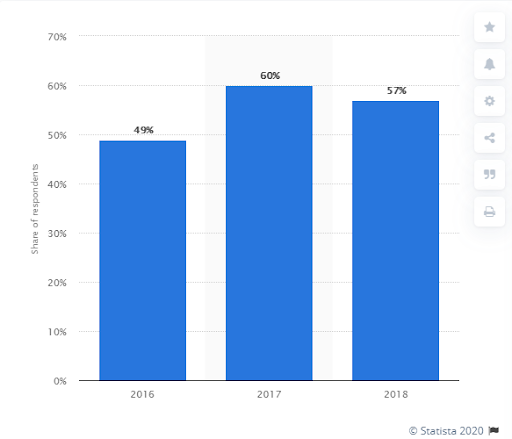
Source: Statista

The graph above provided by Statista indicates the share of businesses that were using videos on their landing page worldwide between the years 2016-2018. As you can see there was an 11% increase between 2016 and 2017 which is considered to be quite high and a 3% decrease in 2018, which is relatively low. Considering economic issues, it seems videos that are present on landing pages are proving to be successful for businesses.

The benefits of your offering

One of the main components of your landing page is the copy that is placed on it which helps to persuade readers. The key to your copy is to describe the specific benefits of your product or service along with flaunting its features. The feature helps to demonstrate a particular quality of your product and the benefit describes its positive impact. To drive and increase conversions, it is better to show off features and benefits together as Apple have done so with their “Lots of love, Less to spend’ copy. In this case, the feature of the product is what it can do for the customer, and the benefit is the price.

A form of social proof

Landing pages that convert well have examples of social proof that can be used to help influence your reader’s decision making. Pictures of customers, social media posts, and testimonials of users using your product help to build trust and help gain conversions. Large organizations such as Apple mix between using this strategy. The image below clearly indicates the benefits of social proof.

Source:Unbounce

Conversion goal – CTA

The landing page’s key focus is a conversion goal, getting visitors to follow the CTA which can be a stand-alone button, a click-through page or a form designed for lead generation. When creating your CTAs, it would be wise not to use a bland button with text that says ‘click here’. Using conversation language as Apple has done so will let visitors know exactly what to expect when clicking on it if you opt to use a form, keep it short while including a privacy statement reassuring visitors that their data is safe. 

Considering the psychology of color, Apple has used it to their advantage. Using the right colors help improve landing page conversions. The color blue is thought to make readers feel peaceful, which is the color Apple has chosen for their CTA text. The text also stands out from the other colors used on the pallet of the page. 

Increasing your landing page conversion rate

Market research

Conducting market research is essential for your landing page. Gathering vital information surrounding your target audience and customers will assist you in creating a valuable and desirable customer experience. Doing so will help you gain an insight into the topics of interest surrounding your target market, allowing you to create a streamlined, well-targeted landing page.

A/B testing

Testing landing pages is vital. A/B testing is the process of running a simultaneous experiment between two or more pages in the aim to see which pages perform the best. Doing so can help gather evidence considering variations between texts, heading, and images. 

Gathering metrics from analytics and A/B testing platforms like Finteza and Optimizely can help you make clear and concise decisions based on first-hand data collected when considering the behavior of your audience.

By seeing the effectiveness of a specific landing page, you’ll be able to make more informed decisions when it comes to allocating marketing budget and spending time.

Source: Finteza

The impact of testing can largely elevate your business as President Obama raised an additional $60million dollars by using A/B testing in his last campaign.

https://www.searchenginewatch.com/2020/06/22/studying-the-anatomy-of-a-successful-high-conversion-landing-page/


A Complete Guide to Bing Webmaster Tools via @annaleacrowe

Bing doesn’t have the brand cachet of Google, but neglecting the traffic that it generates can be a big mistake.

Bing Webmaster Tools may lag behind the popularity of Google Search Console, but you may be surprised at the range of features it offers.

If you want to draw traffic to your site, using Google is a no-brainer.

But Bing should be in your arsenal of tools too.

In order to grab every bit of search engine traffic that’s available to you, you need to get down with Bing.

Google attracted 92% of the global search engine market share, while Bing draws in 2.4%.

Bing also powers Yahoo’s search, which made up 1.4% of the market share. Combined, that’s nearly 4%.

It may seem like a paltry number compared to Google, but think about how many eyeballs it represents.

Read on to learn all about Bing Webmaster Tools and how to use it for your business.

Note: Bing Webmaster Tools is rolling out a new dashboard as you’re reading this. I will update this post once the dashboard is released.

ADVERTISEMENT

CONTINUE READING BELOW

What You’ll Learn About Bing Webmaster Tools

So what’s the 411 on Bing? It’s all here.

I’ll cover everything you need to know about how to get started with the tool, where it differs from Google Search Console, and how to use it to root out issues and make your site perform better.

I’ve divided this article into sections to make it easier for you to read:

My Sites

The first thing you see when logging in to Bing Webmaster Tools is the My Sites page.

Here, you can access your websites in the platform, see all of the sites you’ve set up, and quickly jump to other sections of the tool.

On GSC, users can toggle between sites from the upper left corner of the Dashboard.

ADVERTISEMENT

CONTINUE READING BELOW

bing webmaster tools my site

bing webmaster tools my site

Add a Site

Adding a site to BWT is pretty easy.

Unlike GSC, there are only a few options, but they all get the job done.

Type in your URL.

Then you’ll be taken to a screen that asks you to add your sitemap and the most popular time of day for your site.

bing webmaster tools add site

bing webmaster tools add site

The next step is to verify that you’re the owner of the site you’re adding.

BWT offers three ways to do this:

  • XML file authentication: Download a custom XML file and upload it to your root directory.
  • Meta tag authentication: Copy and paste a custom <meta> tag to your site’s homepage.
  • Add CNAME record to DNS: Edit your site’s CNAME record with a custom verification code.

If your site has already been verified by Google, Bing has a beta feature that allows you to import it easily.

bing webmaster tools add my site

bing webmaster tools add my site

Dashboard

Once you’ve added and verified a site, you can go straight to your dashboard by clicking on the site on the “My Sites” page.

bing webmaster tools dashboard

bing webmaster tools dashboard

The dashboard gives you an at-a-glance view of your site’s performance.

ADVERTISEMENT

CONTINUE READING BELOW

The first section, Site Activity, shows clicks, search appearances, pages crawled, crawl errors, and pages indexed.

At the top of this list, you can see the percentage change over the period you searched.

The next section, Sitemaps, shows you the sitemaps you’ve submitted to Bing.

Submitting a sitemap makes it easy for Bing to crawl and index your site.

It’s another one of the reasons why you should use BWT.

Why leave it to chance, when you can be proactive?

You can also submit a new sitemap right from the dashboard. More on that below.

Below Sitemaps, there are two sections: Search Keywords and Inbound Links, both of which are pretty self-explanatory.

You can easily see which search queries and websites (that aren’t your own) are driving traffic to your site.

Finally, you have the Diagnostics & Tools section. This is where you can put on your detective hat and learn more about how Bing views your site:

ADVERTISEMENT

CONTINUE READING BELOW

bing webmaster tools diagnostics tools

bing webmaster tools diagnostics tools

  • Fetch as Bingbot lets you see how the page’s code appears to Bing.
  • Markup Validator shows you any structured markup Bing found on the page.
  • SEO Analyzer shows you areas that could use some improvement in terms of SEO best practices.

You’ve probably noticed that BWT’s dashboard is more information-rich than GSC’s. GSC shows three large graphs:

  • Performance.
  • Coverage.
  • Enhancements.

To access the more detailed information that BWT’s dashboard provides, you have to use the left menu bar to drill deeper within each report.

With GSC, you need to know where to look for certain things, while BWT makes the process more intuitive.

That’s pretty comprehensive, right?

ADVERTISEMENT

CONTINUE READING BELOW

Well, BWT allows you to dig even deeper, right from the Dashboard.

Now let’s go over the features you can access from the navigation pane on the left-hand side of the Dashboard.

bing webmaster tools menu list

bing webmaster tools menu list

Configure My Site

The Configure My Site section enables you to see some of the same details you get from the dashboard, but with a little more detail.

This is your one-stop-shop for setting up your site and how Bing’s crawlers will interact with it.

These are familiar steps that you’ll find in GSC, but it’s consolidated a little more easily.

Let’s dive in.

Sitemaps

Just as the name states, all of your submitted sitemaps are located here.

bing webmaster tools submit sitemap

bing webmaster tools submit sitemap

BWT offers several formats for submitting your sitemaps:

ADVERTISEMENT

CONTINUE READING BELOW

  • XML Sitemap
  • RSS 2.0
  • Yahoo! mRSS and Bing mRSS (Media RSS)
  • Atom 0.3 & 1.0
  • Text (a plain text file containing one URL per line)

Do you want to give Bing an overview of all the pages on your site at one time?

The XML sitemap is best for that.

If you want Bing to know about new URLs on your site, then Bing recommends you use the RSS or Atom format.

After submitting your sitemaps, you’ll get a list of the URLs that Bing has indexed, along with any issues that it found.

GSC’s sitemap feature allows you to see the same data, but only takes sitemaps in XML format.

Submit URLs

Let’s say you’ve rolled out new services, complete with their own landing pages and a couple of blogs.

Google Search Console allows you to submit URLs to be crawled with its URL Inspection tool.

bing webmaster tools submit urls

bing webmaster tools submit urls

In BWT, the Submit URLs feature does the same thing.

ADVERTISEMENT

CONTINUE READING BELOW

You can submit up to 10,000 URLs per day and there’s no limit to how many you can submit in a month.

To add a URL, you simply enter it (one per line) and hit “submit.”

From there, Bingbot immediately goes to work.

If your pages meet Bing’s quality criteria, then they’ll start being served up in search results. Voila!

Ignore URL Parameters

URL parameters are great for attribution and a pain in the neck for SEO.

The search engines don’t differentiate between URLs with and without parameters.

There are plenty of reasons why that’s bad for SEO.

Both Bing and Google allow you to block these pages from appearing in search results.

With Bing, you can manually add URLs to be blocked from search.

bing webmaster tools ignore url

bing webmaster tools ignore url

GSC’s URL parameters tool is much more powerful, but Bing’s lets you get the job done, albeit not as optimally.

ADVERTISEMENT

CONTINUE READING BELOW

Crawl Control

Crawl control sounds like “cruise control,” and there are some similarities.

With this feature, you can control how quickly or slowly Bing crawls your site.

bing webmaster tools crawl control

bing webmaster tools crawl control

If your site typically gets a lot of traffic on weekday mornings, the last thing you need is Bing adding stress to your servers.

This feature gives you a chance to tell Bing to chill and come back when your site isn’t so busy.

Google’s new Search Console doesn’t have this feature.

You’ll have to go to the legacy features to control the crawl rate.

Deep Links

Deep links are the links that appear just below the site’s main page in the search results.

On Google, they’re known as sitelinks.

bing webmaster tools deep link serp

bing webmaster tools deep link serp

This feature allows you to block specific pages so they don’t appear here.

ADVERTISEMENT

CONTINUE READING BELOW

bing webmaster tools deep links

bing webmaster tools deep links

You can only do this on Bing; Google retired its feature that allowed you to demote sitelinks.

Block URLs

If you’ve got pages that you don’t want to appear in search results, this is for you.

It’s pretty much the same as GSC’s Remove URLs feature.

Remove your gated PDFs, campaign landing pages, etc.

bing webmaster tools block urls

bing webmaster tools block urls

Ideally, you’ll want to noindex these pages.

ADVERTISEMENT

CONTINUE READING BELOW

But SEO managers don’t always have that level of access.

Use this feature in a pinch.

The catch? The block only lasts for 90 days.

Disavow Links

Are there sites linking to your site that you’d rather not be associated with?

Just like Google, Bing allows you to disavow specific pages, directories, or domains.

With Bing, you simply enter the URL(s) that you want to disavow, while GSC requires that you upload them via text file.

bing webmaster tools disavow

bing webmaster tools disavow

Geo-Targeting

If you want to tell Bing to serve up certain pages or sections of your website for users from a particular region, this is your feature.

You can do this for a single page, domain, subdomain, or directory.

Just enter the URL that you want to geo-target and the country, and Bing will start serving up your preference in the search results.

ADVERTISEMENT

CONTINUE READING BELOW

bing webmaster tools geo targeting

bing webmaster tools geo targeting

Much simpler than the individual targeting that GSC requires, right?

Verify Ownership

Like most SEO pros, you probably manage more than one site.

And just like Google, Bing lets you add a site to your account.

You can do that here or from the Dashboard.

Easy, right?

Connected Pages

So this is pretty cool.

Tell Bing which social media accounts or pages that host your apps are linked to your site.

Then it can tell you how many impressions and clicks you get from those pages.

bing webmaster tools connected pages

bing webmaster tools connected pages

You can link pages from social media and the big app stores.

ADVERTISEMENT

CONTINUE READING BELOW

This really lets you see how people are finding you across your entire web presence, not just your main site.

Users

Just like GSC, BWT allows you to manage who can have access to your account, as well as their permissions.

It’s pretty easy to manage your users.

Simply add them using their email address and pick their role.

You have three options to choose from: Read Only, Read/Write, and Administrator.

bing webmaster tools user

bing webmaster tools user

Reports & Data

Everything we’ve covered so far addresses how to get your BWT account set up, make sure your pages are crawled correctly, and that you’re serving up the right content in search.

Next, we’ll talk about the reports that BWT generates and how you can use them to improve your site’s performance.

ADVERTISEMENT

CONTINUE READING BELOW

Page Traffic

Get into the nitty-gritty of page-by-page performance with this report.

In Google Search Console, this data is available via the performance report, which you can filter by page.

bing webmaster tools organic search top

bing webmaster tools organic search top

BWT pulls together data from both Bing and Yahoo here, so you get a bit of a two for one.

Beneath the URL of each page, you’ll see “View Search Keywords.”

This takes you to a page that shows all the search queries that led traffic to the page you selected.

Index Explorer
bing webmaster tools index explorer

bing webmaster tools index explorer

Want to get inside the mind of Bing?

ADVERTISEMENT

CONTINUE READING BELOW

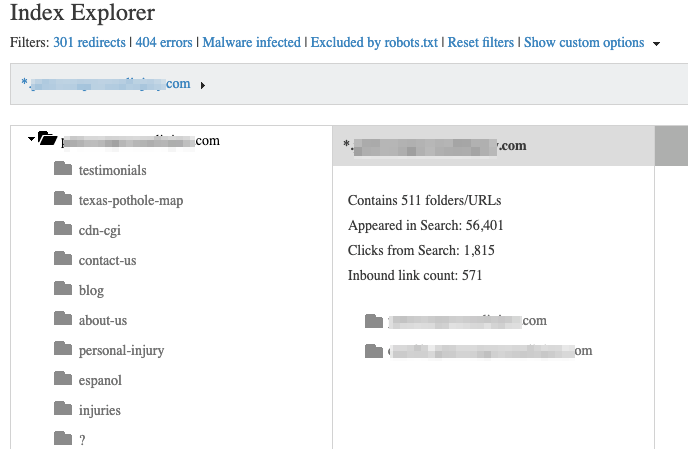
The Index Explorer allows you to see how Bing views your site, organized in folders and files – a lot like how Windows Explorer looks.

This report is complex, but once you dig in, it can be really powerful.

You can see all of the data that Bing has collected on the pages it crawled.

See all of your redirects, pages with errors, malware-infected pages, and URLs blocked by robot.txt.

With this level of detail, you can really fine-tune your site’s performance.

GSC provides the same information via its Index Coverage Report, but it doesn’t have the same visual structure.

This is one area where Bing’s navigation is one step ahead of Google.

Search Keywords

This one’s pretty straightforward.

Here you can see the keywords that drive traffic to your site, drill down into details per keyword, and export into a CSV file.

bing webmaster tools organic search top

bing webmaster tools organic search top

Just like the page traffic report, this is captured in GSC’s Performance report; you just have to set the filters to view by queries.

ADVERTISEMENT

CONTINUE READING BELOW

SEO Reports

Bing’s automated SEO Reports identify areas of your site that don’t follow SEO best practices.

Instead of digging into the Index Explorer or individual reports to identify areas that need improvement, Bing does some of the hard work for you.

bing webmaster tools seo reports

bing webmaster tools seo reports

This bi-weekly report is great for beginners or anyone who just wants to tackle low-hanging fruit before moving on to more complicated matters.

Inbound Links

Which sites are linking to yours? And which pages are drawing the most inbound links?

This report, just like GSC’s Links Report, has the goods.

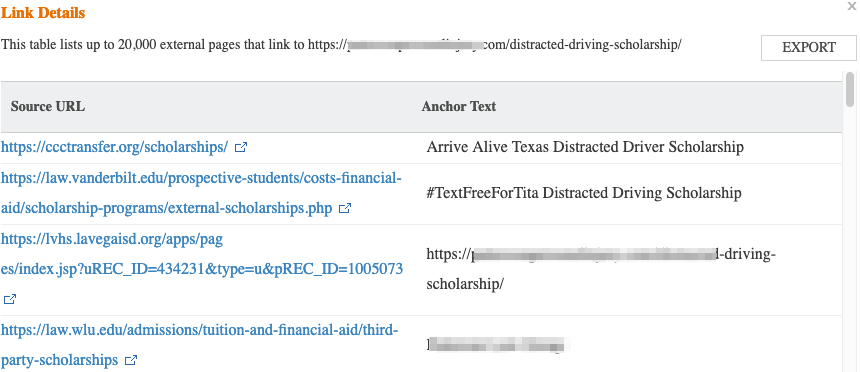
Dig a little deeper by clicking on the individual link.

Then you’ll see a pop-up that shows the anchor text tied to the link.
bing webmaster tools link details

bing webmaster tools link details

Crawl Information

ADVERTISEMENT

CONTINUE READING BELOW

Crawls errors happen.

And when they do, you need to investigate.

That’s what the Crawl Information Report is for.

bing webmaster tools crawl information

bing webmaster tools crawl information

Issues are organized by type.

Clicking on the number under each type will take you to a list of all the pages that have registered that particular type of error.

The report covers:

  • HTTP codes 400-499
  • HTTP codes 500-599
  • HTTP code 301
  • HTTP code 302
  • Excluded by robots.txt
  • DNS Failures
  • Connection Timeouts

BWT has consolidated this information all in one report, whereas GSC breaks it up between the URL Inspection Report and the Index Coverage Report.

ADVERTISEMENT

CONTINUE READING BELOW

Diagnostics & Tools

So you’ve got your site(s) all set up, and you’re moving and grooving through reports.

Now it’s time to get insights to make sure your site’s performing as well as it should.

BWT has consolidated these tools together under Diagnostics & Tools.

If you’re looking for similar data from GSC, you’ll find it broken up through several reports in different places.

Mobile Friendliness Test

First up, let’s look at the Mobile Friendliness Test.

If a site isn’t mobile-friendly these days, then it’s seriously lagging behind.

Google’s placing more emphasis on mobile sites, so its Mobile Usability Report is critical for your site’s performance.

Even though Bing has said there are no plans to introduce mobile-first indexing on its platform, you still want to make sure your site is mobile friendly.

The Mobile Friendliness Test allows you to analyze your site to see how well it meets mobile best practices.

ADVERTISEMENT

CONTINUE READING BELOW

You can actually analyze any site, not just those that you’ve verified in BWT.

bing webmaster tools mobile friendliness

bing webmaster tools mobile friendliness

Keyword Research

Bing’s keyword research tool shows you search appearances and trends, much like what you can get from Google, SEMrush, and other keyword research tools.

The key difference here is that you won’t find it in GSC.

bing webmaster tools keyword research

bing webmaster tools keyword research

Instead, you’ll need to use Google Trends or the Keyword Planner that comes with Google Ads.

ADVERTISEMENT

CONTINUE READING BELOW

Fetch as Bingbot

I mentioned Fetch as Bingbot earlier, because it’s a part of BWT’s Dashboard.

Here’s a deeper breakdown of what you can do with it:

  • See what your HTTP Headers and page source look like to Bingbot.
  • Make sure that Bingbot is seeing the same content as your users.
  • Test if a URL is being blocked by your robots.txt file.

This tool pulls back the curtain between you and Bingbot.

Use that transparency to identify errors or anything that you don’t want going on.
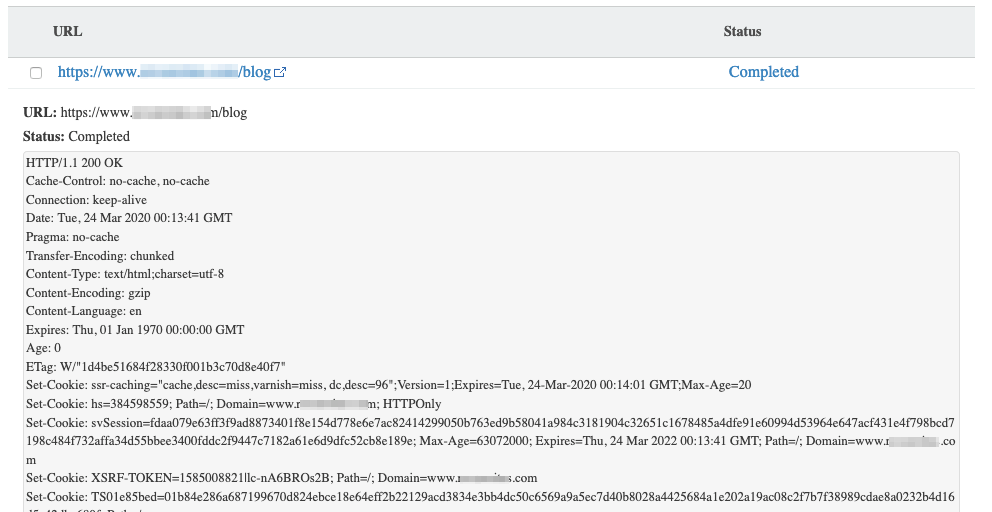
bing webmaster tools fetch bingbot

bing webmaster tools fetch bingbot

Markup Validator

Using structured data helps you squeeze every bit of functionality out of search engines.

ADVERTISEMENT

CONTINUE READING BELOW

Bing recognizes six languages that allow you to have more control over how your pages appear in search. Like so:

bing webmaster tools structured data

bing webmaster tools structured data

bing webmaster tools markup validator

bing webmaster tools markup validator

The Markup Validator tool tells you if you’ve done it correctly.

It works a lot like GSC’s Structured Data tool.

Just plug in a URL and go.

bing webmaster tools markup validator url

bing webmaster tools markup validator url

Structured data is a pretty advanced SEO concept, so Bing has included links to resources on the six languages it recognizes.

ADVERTISEMENT

CONTINUE READING BELOW

If you find an issue with any of your pages, just hop on over to the resources to find a fix.

SEO Analyzer

Remember the SEO Reports I touched on earlier?

The SEO Analyzer lets you run through the same best practices, on-demand.

The difference here is it’s on a page-by-page basis.

Enter your URL and Bing will download the page, checking for about 15 SEO best practices.

Once a page has been scanned, the SEO Suggestions panel on the left lists each individual issue.

Click on an item to get more detail:

bing webmaster tools seo analyzer

bing webmaster tools seo analyzer

Click on the plus sign to see the level of severity, and how to fix it.

The menu across the top of the page lets you see where the issue is in the page’s code and how the page appears on the web.

ADVERTISEMENT

CONTINUE READING BELOW

As an added bonus, The SEO Analyzer will fetch any page, even those that you don’t want to be crawled.

You won’t find a similar tool on Google Search Console.

Instead, Google’s web.dev tool will help you analyze your site for search engine optimization.

Verify Bingbot

Up to one-fifth of all internet traffic can be attributed to bad bots that steal data and credentials.

If you want to stay one step ahead of those little gremlins, you have to pay attention to the traffic that comes to your site.

Bing wants to help you with that. Use this tool to verify that an IP address comes from Bing.

If you want to do this with Google, you’ll have to run a DNS lookup.

bing webmaster tools bingbot tool

bing webmaster tools bingbot tool

Site Move

ADVERTISEMENT

CONTINUE READING BELOW

The Site Move tool helps you fast-track the process of telling Bing that you’ve moved your site.

It’s Bing’s answer to GSC’s Change of Address Tool.

BWT gives you several options to choose from in terms of the scope of your move:

  • Domain
  • Subdomain
  • Directory

After you enter the source and destination URLs, Bing will run a few tests to make sure that everything is correct.

If all goes well, then Bing will let its crawlers know about your new address.

bing webmaster tools site move

bing webmaster tools site move

Note: You still want to set up 301 redirects before you take this step. This just lets you be a little more proactive instead of waiting for Bing to figure out that you’ve permanently moved your site.

ADVERTISEMENT

CONTINUE READING BELOW

Security

While it’s a bit more limited than GSC’s Security & Manual Actions section, Bing does offer a couple of tools to help you manage your site’s security.

Ideally, you’ll be in the free and clear here.

But it’s better to know about security issues on your site instead of being in the dark.

Malware

The good news: Malware-infected sites are on the decline.

The bad news: 40% of malicious URLs were found on good domains.

BWT’s Malware tool shows you any URLs where Bing has detected malware.

You’ll also see a short description of the issue, when it was detected, and when it was last scanned.

This is valuable information to take back to your developer so you can root out the issue and fix it.

bing webmaster tools malware

bing webmaster tools malware

Phishing

ADVERTISEMENT

CONTINUE READING BELOW

Cybercriminals create a new phishing website every 20 seconds.

Search engines don’t want to play a part in leading users to those sites, so they’re constantly flagging sites that seem like they may be malicious.

Bing relies on Microsoft SmartScreen’s list of suspicious sites to pull this data.

In the unfortunate event that your site is flagged, you can address it with BWT’s Phishing Re-evaluation tool.

Once you’ve identified the issue, you can request Bing to review your site again using the tool.

bing webmaster tools harmful elements

bing webmaster tools harmful elements

Messages

Once you’ve made a BWT account, Bing may send you all kinds of messages – from phishing alerts to crawl errors. The Message Center is your inbox inside of Bing.

You can have these messages sent directly to your inbox if you don’t want to have to log into BWT to check.

ADVERTISEMENT

CONTINUE READING BELOW

And if you miss that email, Bing keeps them all safe right here for you.

Current

All of your current messages will be marked as current, so you can easily see any that you haven’t addressed.

You can filter by site or message type to make it easier to navigate through.

You have a few options for what to do with these messages once you’ve read them (see the checkbox next to each message).

You can leave them here, delete them, or archive them.

bing webmaster tools message center

bing webmaster tools message center

Archived

If you choose to archive a message, it’ll go here.

The functionality of this section is a lot like the Current section, where you can filter by site or message type.

Keeping an archive is good for helping you keep track of issues that you’ve addressed, but don’t want to clutter up the Current section.

ADVERTISEMENT

CONTINUE READING BELOW

And once you’re really really done with an issue, you can permanently delete it from here.

Copyright Removal Notices

In the event that someone flags content on your site for a DMA violation, the URL will appear here.

You can also see the Copyright URL owner here as well.

Think your content has been flagged unfairly?

Click on “Respond to Notices” to appeal the claim.

Translator Widget

Up until July 2019, Microsoft offered a Translator Web Widget to easily translate your site’s content. But the widget wasn’t without its flaws.

Now, Microsoft offers a few options, with Microsoft Translator being the most popular.

It uses machine learning to translate everything from web pages to downloadable assets.

It supports over 60 languages, and there are a few ways to integrate it into your site:

  • CMS plugins.
  • CMS platforms with integrated support.
  • Integration of the Microsoft Translator API.

ADVERTISEMENT

CONTINUE READING BELOW

These options give you more flexibility than the old Translator tool, though they may be a bit more complicated to get up and running (depending on your selection).

Webmaster API

I’ve spent a lot of time in this article highlighting Bing’s perks and why it’s a valuable tool to have in your arsenal.

But I totally understand if the idea of adding BWT to your list of sites to keep up with gives you a headache.

BWT’s got you covered.

If you’d like to access BWT’s features (well, most of them) on your SEO or analytics software of choice, you’ll need to use the Webmaster API.

It’s a pretty simple process, just like with any API integration.

Bing Places for Business

If you want to be found in local search, then the search engines need to know where you’re located.

Bing Places for Business offers you two options to do so.

ADVERTISEMENT

CONTINUE READING BELOW

If your location is already verified with Google My Business, then you can import it here.

If not, you can add or claim your business manually through Bing.

It’s a simple process, but the steps vary, based on your business type.

First, select your business type.

You’ll be asked to choose from small or medium business, chain business, online-only, or whether you’re managing listings on behalf of your clients.

Small businesses can look up their business by phone number or address manually.

If Bing has a listing for it, then you’ll be able to claim it for your business here.

Next, you’ll be asked to cross-check the business details (such as the name, website, etc.).

Once you’re all set there, you’ll be given a few options to verify your listing: Bing will send a PIN via snail mail, email, text, or phone call.

For businesses with multiple locations, Bing offers a bulk upload file to make the process a little easier.

ADVERTISEMENT

CONTINUE READING BELOW

Bing News PubHub

Do you publish news content?

Bing News PubHub will help you get your content in front of readers who are looking for news stories.

Sites that are accepted into the PubHub will be served up to users across these Microsoft products:

  • Bing News Connector on Outlook, which allows users to create their own news digest.
  • Cortana, Microsoft’s voice-activated digital assistant.
  • Bing News on the web and the Bing app.

To be a part of PubHub, sites must meet Bing’s guidelines.

Bing evaluates sites for newsworthiness, originality, authority, and readability.

Additionally, Bing says that sites that don’t publish regularly, are too lax with grammar and spelling rules, or that were designed primarily for marketing products or services are not eligible.

Bing Manufacturer Center

Bing Manufacturer Center helps product makers improve the way their products appear in search, Product Ads, and various Microsoft applications.

The Manufacturer Center allows you to add details, such as product IDs and descriptions, to make your product stand out.

ADVERTISEMENT

CONTINUE READING BELOW

As the name states, the tool is primarily for product manufacturers.

Retailers that don’t sell their own products can use Bing’s Merchant center to manage their product listings.

If you already have a Google Manufacturer Center account, Bing will accept your catalog in the same file formats as Google.

So you can get the benefits of both tools without having to do a whole lot of additional work.

Once your products are set up in the Manufacturer Center, Bing will provide analytics on their performance.

Bing Solutions

Bing Solutions, now known as Bing for Partners, enables you to integrate Bing into your apps, tools, website, and services.

There are a number of ways companies are integrating Bing into their tools, or are integrating with Bing:

  • Twitter uses Bing’s Translation API to translate tweets.
  • Amazon uses Bing in the search feature on Fire tablets.
  • Fandango connects with Bing to serve up movie showtimes in search.

Bing touts its partner program as a way to boost functionality and reach new users.

ADVERTISEMENT

CONTINUE READING BELOW

While the Bing for Partners website is divided into sections for businesses and developers, most of the good stuff is for developers.

Once accepted into the program, developers can use Bing’s API to create maps, integrate speech, and translation tools.

The search capabilities are the most powerful elements of Bing for Partners.

Bing offers five search APIs, ranging from the basic web search functionality to video search capabilities.

You can also create custom searches to control the search experience users have on your site.

The most impressive tools are Bing’s Visual Search APIs and tools. They can recognize bar codes, pull text from images, and serve up visually similar images.

What’s Next for Bing Webmaster Tools

And there you have it – everything that Bing Webmaster Tools has to offer.

It’s more than you expected, right?

Good news: Bing is only getting better.

As I write this, the Bing team is rolling out a refreshed portal for Bing Webmaster Tools. The new portal will feature a cleaner, faster responsive design.

ADVERTISEMENT

CONTINUE READING BELOW

You can start accessing some of the new features inside of the current portal. And all of the features we’ve shown here are still available.

As you can see, Bing has no shortage of functionalities to help you improve your website’s performance.

This refresh will help make the experience more intuitive and flexible.

Bing says the move to the new portal will take place over the next few months.

I’ll keep you posted here as updates are released.

More Resources:


Image Credits

Featured Image & In-Post Photos: Created by author, June 2020
All screenshots taken by author, June 2020

http://tracking.feedpress.it/link/13962/13658984


Elevating Your Analytics: A Guide for SEO Beginners via @beanstalkim

Analytics can be daunting for many business owners and decision-makers.

Heck, it can be daunting for seasoned SEO veterans.

I’ve been working in SEO for longer than Google’s offered analytics, and I still find myself stumped at times, trying to think of how to best measure something.

Google Analytics is a complicated system with seemingly endless features and functions.

One can easily get overwhelmed and what’s worse, it’s easy to miss some important data points – often by simply not knowing how to access it or even that it exists.

Or as I like to think of it, not knowing the right questions to ask, because you don’t know how to frame it.

Over the years I’ve chatted with clients either over the phone, via reports, or more often – over a screenshare – and I’ve noticed a common trend where my go-to actions differ from theirs: Which configurations of data that I view as a default, that isn’t necessarily obvious to everyone.

ADVERTISEMENT

CONTINUE READING BELOW

I can’t count the number of times I’ve casually navigated in a way that prompts the exclamation, “You can do that?!”

And thus, this article.

Below we’ll explore a few of the more common areas of analytics that I view as “given”, that beginners might not even know exist.

1. Exclude Parameters

Google Analytics FBCLID

Google Analytics FBCLID

One of the most common issues I see in analytics is FBCLID and other, similar parameters.

FBCLID is a tracking parameter that Facebook adds to URLs.

And it’s annoying in your analytics, especially if you get a lot of traffic from Facebook, as illustrated above.

All the pages you see listed here are actually the same page.

Each time the page was shared or posted, a new FBCLID was used by Facebook.

This means that when we’re trying to look at stats for how that page performs across channels, or just how it performs at all, the data is spread across multiple URLs.

ADVERTISEMENT

CONTINUE READING BELOW

In this case, literally hundreds.

Thankfully, the fix is easy, though a downside is that it only works moving forward.

That is to say, it will fix your future data, but not your past.

So set it up now.

Removing FBCLID

Click Admin in the left-hand navigation.

Then go to View Settings.

Google Analytics View Settings

Google Analytics View Settings

Go to Exclude URL Query Parameters and enter “fbclid”.

Adding FBCLID to Google Analytics

Adding FBCLID to Google Analytics

Click Save.

And you’re done!

With this completed, all fbclid parameters will be removed, and all the page metrics will report at one URL … the actual URL of the page.

Extra

Want to see whether you have any other parameters cluttering your data?

Simply head over to your Landing Pages in the left nav.

Click Advanced next to your filter, and include all the pages with a question mark in them, excluding those with “fbclid” to get those out of the way as they’re already addressed.

Google Analytics Advanced Filters

Google Analytics Advanced Filters

Personally, I don’t worry about parameters I rarely see or that have negligible impact.

If it won’t affect my data analysis then it doesn’t matter.

But it’s worth periodically checking and make sure your data is as clean as you need it to be.

ADVERTISEMENT

CONTINUE READING BELOW

2. Baked-In Segments

Segments are the unsung hero of Google Analytics.

Segments can help you dig and clarify data points.

I find them especially valuable when I’m walking into environments where things are not set up properly.

They allow me to literally segment what I’m looking at, for a clearer view.

Segments are right in front of everyone, and I can’t count the number of folks I chat with who have never adjusted which one they’re looking at.

Most people seem to use one:

Google Analytics Segments

Google Analytics Segments

If you click Add Segment, it opens up a world of opportunity to better understand your traffic.

For example, a person wanting to understand their organic search traffic.

You can view some pretty limited data going through the Acquisition > Source/Medium reports:

FBCLID in Google Analytics

FBCLID in Google Analytics

Where you can click on the one you want data on (google / organic, for example) and pull the metrics you’re interested in.

ADVERTISEMENT

CONTINUE READING BELOW

Quite limited in what you can access (though less than you might think … more on that below) so …

Simply click Add Segment which you will find beside the All Users segment that you’re using.

You’ll be taken to the segments screen, where you’ll find a number of baked-in segments including:

The Organic Segment In Google Analytics

The Organic Segment In Google Analytics

Once selected, either click Apply, which will leave you with two segments (All Users and Organic Traffic), or you can scroll the top and remove the All Users.

Having multiple segments is very useful to compare different traffic types, but a single segment is a great place to start.

Having selected Organic Traffic, I can now navigate through the rest of my analytics, seeing just what this traffic did, answering questions like:

  • What devices does this segment use?
  • Where do they enter?
  • How long do they stay?
  • What’s their demographic (especially handy with social)?
  • And about a million more things.

ADVERTISEMENT

CONTINUE READING BELOW

As noted, you can also have a few segments selected at the same time, to easily compare differences in how they interact with your website.

Let’s say I want to know the difference between my paid and organic traffic in the ages of the visitors through each, and how they convert.

I’d select the two segments, head over to Age in the left nav and voila …

Comparing Google Analytics Segments

Comparing Google Analytics Segments

I can now see how my traffic sources compare.

The use of this goes far broader than just seeing ages, but it’s core details like that I find are a good place to start.

3. Custom Segments

While the stock segments can open the door to significant insights, it’s in the custom segments you can answer some real questions.

In the first image at the top of this article, you may have noticed the segment I was using was Social – FB or IG.

ADVERTISEMENT

CONTINUE READING BELOW

That was an accident as I was creating the image, but I left it in as some of you will now scroll up to check and then come back, and that’ll improve the metrics on this article. 😉

That segment is a custom segment, I created it to answer specific questions about a campaign the client was running, where we wanted to gather traffic data for the two combined.

To create this segment you click on Add Segment as you did to adjust which segment you were looking at, and instead of selecting one, you click New Segment:

Custom Google Analytics Segments

Custom Google Analytics Segments

You can then choose from an array of options that can be overwhelming.

If you’re just getting started, you may want to stick to the default setting:

Google Analytics Custom Segments

Google Analytics Custom Segments

But personally, I find it easier to just click Conditions and choose manually what I want.

ADVERTISEMENT

CONTINUE READING BELOW

For example, for the Facebook and Instagram segment, I knew I wanted to combine traffic from facebook.com and Instagram.com, so I created a segment that looked like:

Facebook Or Instagram Custom Google Analytics Segment

Facebook Or Instagram Custom Google Analytics Segment

You will notice the OR.  You can choose either “or” or “and”.

“And” requires both to be true, “or” requires one.

While “and” would be problematic in this case, it allows for segments that answer questions like, “Who is visiting my site from Facebook on mobile, and what are they doing?”

Which would look like:

Custom Google Analytics Segment - Facebook and Mobile

Custom Google Analytics Segment - Facebook and Mobile

And Conversions…

Probably my biggest use of custom segments though, is in understanding conversions, especially when goals haven’t been set up properly.

ADVERTISEMENT

CONTINUE READING BELOW

If you haven’t set up goals properly, or are walking into a scenario where they weren’t done or were done but not properly, you create a segment for the goal “thank you page”.

This obviously only works where the conversion triggers one.

I was dropped into such a scenario recently and created the following segment.

Google Analytics Segment For Past Conversions

Google Analytics Segment For Past Conversions

I can now navigate their analytics, looking just at those who converted, or comparing conversions with other segments.

Ideally, you will have goals set up, that’s far better than segments for this purpose.

But like filters, goals only report forward from the time they were set up.

When you need data from a time when you didn’t have goals set up, this method is backward compatible.

4. Secondary Dimensions

Sometimes the answer is right in front of you, hidden in plain sight.

ADVERTISEMENT

CONTINUE READING BELOW

Secondary Dimensions are often that answer.

In most pages of analytics, you’ll notice (or more often – not notice) the secondary dimensions. Without them, pages can look pretty useless.

When I click on my Source/Medium and then click google / organic, I land at a page like:

Google Analytics Secondary Dimensions

Google Analytics Secondary Dimensions

Why would I even want to go there?

There’s nothing on this page that I couldn’t get on the previous page, and with the same data for all the other sources as well.

The answer is:

Google Analytics Secondary Dimensions

Google Analytics Secondary Dimensions

That Secondary dimension drop-down is the key to unlocking a cornucopia of information.

ADVERTISEMENT

CONTINUE READING BELOW

What it provides depends a lot on the primary dimension.

In general, though, all you need to know is the question you’re trying to answer.

What did I want to know when I clicked on google / organic?

Did I want to know what kind of mobile device, users entered with?

Measuring Secondary Dimensions in Google Analytics

Measuring Secondary Dimensions in Google Analytics

Do I want to know the time of day they visit?

Elevating Your Analytics: A Guide for SEO Beginners

Elevating Your Analytics: A Guide for SEO Beginners

Basically, the Secondary dimension is where you uncover the data you probably got to a page to find.

ADVERTISEMENT

CONTINUE READING BELOW

To Be Continued

We’ll be continuing with more beginner (plus) analytics tips next month, as we uncover more ways to get the data you need, to answer the business questions you have.

In the meantime, explore.

In this piece, I could only cover how to access some areas of Google Analytics I see folks overlook frequently.

As far as how it’s used and what lies within, if the data these techniques unlock was an iceberg, the examples given above would amount to an ice cube.

While I highly recommend exploring, just looking at what options are available, I can’t stress enough to be constantly asking yourself the following question, “What information do I need to make better business decisions?”

Whether that’s collecting past conversion data to understand what sources, landing pages, or demographics are more profitable – or knowing how different age groups, from different sources, engage with specific types of content – knowing the question guides figuring out what site metrics you need to answer that.

ADVERTISEMENT

CONTINUE READING BELOW

And with that, knowing where (and hopefully now a bit more about how) to look at it.


Image Credits

Featured Image: Adobe Stock, edited by author
All screenshots taken by author, June 2020

http://tracking.feedpress.it/link/13962/13658895


Google Shares How to Succeed in Mobile First Index via @martinibuster

Google’s John Mueller answered a technical question about serving content. During the course of answering that question he offered two tips on how to adapt to Google’s mobile first index.

Google Mobile First Indexing

The person asking the question stated that they were serving content differently depending on whether the user was on mobile or desktop.

What they described sounded somewhat over-engineered and Mueller addresses that in his answer.

John Mueller shared two insights into how to adapt to Google’s mobile first indexing:

  1. First, that it’s important to keep your mobile/desktop rendering simple.
  2. The second insight is his statement about getting dropped from Google’s upcoming mobile first index if the content cannot be reached in the mobile version of the site.

Third, Mueller provided an insight into how Google tests Web Vitals metrics when a site has a mobile and an AMP version of a site.

This is John Mueller’s answer about serving content in complex ways:

“I don’t know how much it makes sense to do such vastly different approaches on different devices.

So that’s something where I would try to be a bit thoughtful on what it is that you’re trying to do there, rather than just doing whatever you can do with regards to the technology.

It’s very easy to, kind of similar with word count, to focus on a technology and say, … I can do all of these crazy things therefore I will do them. And it looks really fancy.

But is that really what works best for users?

I don’t know… Maybe it is. Maybe it works well for your users.”

ADVERTISEMENT

CONTINUE READING BELOW

Mueller moves on to discuss how it’s important to get the mobile version of the website right.

His answer highlights the importance of crawling the mobile version of the site to make sure that the mobile version performs well and allows crawling of all the other pages.

Mueller said:

“With regards to the different versions on different pages, the thing to keep in mind is with mobile first indexing, we will be indexing the mobile version of the page.

So if the mobile version of your page does not use normal URLs for navigation, then we will have trouble indexing your mobile site because we won’t be able to access those non-URLs to get to your content.

So if the whole navigation on the mobile site is really purely JavaScript-based, you’re swapping out different layers on a page, it stays on the same URL, there are no actual links on this page, then we would probably have a lot of trouble being able to crawl and index that site.

And probably we would not shift that site to mobile first indexing at the moment. But at some point we’re going to make the decision and say well, we need to shift everyone over.

And that will mean we’ll shift your site over as well, even if it’s not ready yet for mobile first indexing.

And if really all of the content on your mobile site is not accessible through normal URLs, then we will drop that from the index.

So that content won’t be shown in the search results at all.

And with mobile first indexing it doesn’t mean that it’ll be dropped for mobile users. It’ll be dropped for desktop users as well.

So if that content is not accessible on mobile, we will not be able to index it.”

ADVERTISEMENT

CONTINUE READING BELOW

That underlines the importance of getting the mobile version of a site done correctly.

If you have Screaming Frog, run it as the mobile version of GoogleBot to see if there are any crawl issues.

Mueller offered this recommendation of what to do:

“So it gets really complicated.

My recommendation for this kind of situation is to try to simplify things as much as possible for your website.

And instead of having three different variations of the same page, find a way that you can use some kind of responsive design so that you either just have two versions, maybe kind of like desktop/mobile combined and the AMP version.

Or maybe there is even a way to move to a pure AMP framework where you essentially use AMP for the whole website.

Because AMP is a responsive web framework, so you could theoretically do that for a lot of things as well.”

The mobile first index is going to be harsh for sites that do not adequately test the mobile versions of their websites.

Google has instructions on how to simulate mobile devices with Chrome’s native Device Mode in DevTools.

There are also more professional tools such as MobileMoxie that can help speed testing and development of mobile web pages.

[embedded content]

http://tracking.feedpress.it/link/13962/13655780


Google Creates a New Source of Traffic With Keen via @martinibuster

Google has quietly announced a content discovery service called Keen. Keen is being referred to as a Pinterest competitor but that’s not entirely accurate.

Keen is a machine learning app that actively promotes relevant web pages to users. Keen is poised to become a new source of referral traffic, which makes it worthy of investigation.

What is Keen

Keen is an experimental web and Android app that is a part of Google’s Area 120 projects. Area 120 is described as where small teams can work together in a small startup mode to bring innovative projects to life.

According to an official post on Google, the project grew out of a husband and wife sharing information about activities that were important to them, activities they wanted to share with each other.

As they gathered links and resources related to their hobbies and goals, the Googler understood that he needed a tool that not only helped curate and share those ideas but to discover more of those ideas.

The post explains:

“It was powerful to tell each other what we wanted to spend more time on. And once we did, we found that collecting related ideas, links and resources together gave us a way to spend more time on our shared passions in real life.

To explore this idea further, four colleagues and I created a new experiment called Keen…”

The curated content can be shared with the public, with specific people or kept private.

What sets Keen apart from Pinterest is that Keen uses Google Search and machine learning to help surface content that is related to your interest.

As your collection grows Keen becomes even better at surfacing the kind of content users are interested in.

This is a proactive content discovery method.

According to the official announcement you can:

“Save and add links, text, images and web searches. Everything you add gets you more to explore…”

That “more to explore” part is what is going to help the web ecosystem receive more traffic.

ADVERTISEMENT

CONTINUE READING BELOW

Keen is a New Channel for Traffic

Keen represents a new opportunity to grow popularity and traffic.

The most powerful recommendation a website can receive is a recommendation from one friend to another.

The value of Keen to the web ecosystem is that it represents a new way for users to discover web content.

Keen actively searches and suggests relevant content to users.

A search engine is passive. It waits for someone to ask it a question. Keen is proactive.

Instead of passively suggesting content in response to search queries, Keen actively recommends content that people will enjoy.

This is far more than a Pinterest competitor. It’s a way to grow traffic and popularity.

Web publishers, search marketers and web stores may find it useful to look into Keen to see how it may fit into their marketing strategy.

Read Google’s announcement here:
Want to Share Your Passion with the World? Get Keen

http://tracking.feedpress.it/link/13962/13655322


Content creation guide: How to effectively think of SEO at every stage

30-second summary:

  • Content marketing and SEO are like a sailboat and its sail, they need each other.
  • We’re in a time where only nine percent of content actually sees organic traffic from search results, and nearly 70% of all clicks go to the first five organic search results.
  • Co-founder and CEO of Influence & Co., Kelsey Raymond shares a five-step guide to help you with an SEO-friendly content creation process that wins in SERPs.

Content marketing and SEO are like a sailboat and its sail, they need each other. Just like your sailboat’s not going anywhere fast without a sail, your content isn’t going to help you reach your goals if people can’t find it. And finding it might be harder than you think.

In a time when there are nearly 80,000 Google searches per second, breaking through the noise can seem impossible. Only nine percent of content actually sees organic traffic from search results, and nearly 70% of all clicks go to the first five organic search results.

So how can you compete in this race to the top of search engine results pages to make sure your target audience can find your content?

By thinking about SEO at every single stage of the content creation process.

Keeping SEO in focus throughout the content creation

Creating high-quality, educational, engaging content is an honorable pursuit, but in order for that content to actually be valuable, you can’t ignore SEO as you’re planning and creating your content. After all, content can only be valuable to someone if she knows that it exists.

So as you’re developing your next batch of content, here’s how you can consider SEO and implement SEO strategies at every stage of the content creation process:

1. Brainstorming

From the very start of content creation — even before you’ve nailed down definite content topics — you should be considering SEO. Two ways you can do that are by looking into which subjects you should cover based on what your audience is searching for and researching potential publications you might want to target.

Let’s start with keyword research. You can use a tool like Ahrefs, SEMrush, or Moz to get a grasp on what your audience members are searching for now, how they’re searching for it, and what other content is ranking for those keywords. This research will tell you which keywords you rank for, your position in search results for each keyword, and the traffic that keyword attracts, just to name a few metrics.

As you’re researching keywords to gather content topic ideas, start broad with your overall content theme. For example, if you’re looking into what your audience is searching for related to content marketing, start there. When you search for content marketing in one of the above tools, it will return variations of other keywords that people are searching for that are related to content marketing, such as what it is, techniques, strategies, ROI, case studies, examples, and more. This will help you cast a wide net from the start and narrow your focus from there.

Once you have this information, you can discover what content your audience finds valuable and take the next step of determining how you can create content that’s higher-quality and more engaging and relevant to your audience.

For guest-contributed content

Consider which publications you might want to target based on your niche and subject matter expertise. Once you have that list, research those publications. It’s important to choose publications that are reputable authorities within your industry. While domain authority isn’t a direct ranking factor, a site with a higher DA is perceived as more authoritative, which can potentially lead to more eyeballs on your content and, therefore, a higher ranking due to that engagement. Not sure which sites qualify as authoritative? A good test is to ask yourself whether you’d be comfortable sharing an article from the publication with your colleagues and friends. If not, keep looking.

In addition to considering publications’ credibility, you’ll also want to look at what types of links these publications include in their articles. You can use a tool like MozBar to see which links in an article are “nofollow” or follow and internal or external. A follow link is acknowledged by search engines and drives SEO juice for the linked site. But keep in mind that just because a site doesn’t use follow links, that doesn’t mean it won’t advance your content goals. Follow links do carry link juice, but you can still gain valuable organic referral traffic to generate leads without those follow links.

Also, check to make sure the publication uses contextual links, tools like cognitiveSEO can help with this. Contextual links are links that are surrounded by relevant text within the body of a piece of content. For example, in one of my recently published articles, I included an educational link that was directly related to the surrounding text:

CMI Contextual Link Screenshot

Getting those contextual links in high-authority publications helps Google establish the relevancy of your content, and these links can boost your click-through rate by providing readers with additional valuable information.

2. Outlining

Once you’ve chosen a content topic and a publication target for guest-contributed content based on your research, you can begin the outlining phase.

Start by determining a few primary keywords you’re focusing on in this specific piece of content. List out some related long-tail keywords and keyword variations you might consider including so you can keep them in mind during the writing stage. Also, pinpoint any related links you’d like to try to include naturally within the content. Here’s an example:

Content creation example: Outline Keywords and Links

Next, write up a brief summary of the topic. What’s the big picture? What will this article cover, and what value will it provide to readers? Make sure this summary ties back to your target keywords. Here’s an example, notice the underlined target keywords:

Content creation tips: Outline Summary

Once you have that summary in place to guide you, you can create a bulleted outline including the actual information you want to cover within the article. Include your own insights, the takeaways you want readers to walk away with, and relevant examples and research.

3. Write with a “people first” approach

When you’re writing your content, remember to write for people first. Write content that is helpful, educational, and engaging, and optimize from there.

When you’re including keywords, use both short- and long-tail keywords naturally. These days, search engines are trying to curate search results that ring true to the searcher’s intent and to do that, they’re trying to understand the searcher’s natural language in the same way another person would. Make sure to include your keywords in a way that would match up with what your audience members are looking to learn based on their search.

Searcher intent is also important when determining the length of your content. If you’re focusing on a keyword that people are searching for when asking a simple question, you might want to keep the content short and sweet — they’re probably not in the market for a long guide. However, it’s still important to balance out those shorter pieces of content with long ones so you can provide valuable content to members of your audience at every stage of their journey with your company.

Consider voice search

Also, remember that search isn’t limited to text anymore. By 2020, almost a third of searches will be done without the help of a screen  – think Siri, Amazon Echo, and Google Home. And research shows that only 1.71% of voice search results have the exact match keyword in their title tag. So make sure you’re including keyword phrases in a way that people might speak to help your content rank in voice search. For example, in addition to the keyword “content marketing strategy”, you might also want to include something like “how can I create a content marketing strategy?” into your text.

Make it digestible

Finally, as you’re writing your content, make it digestible. For content that’s on the longer side, use subheadings and bullet points to break up the content to provide a better experience for the reader.

Also, look for opportunities to optimize your content for Google’s “featured snippet” box, also known as “position zero.” Only 12.3% of search queries result in a featured snippet box, and 93% of SEO experts say that claiming the featured snippet box can drive more clicks and visits to a website. A few ways you can optimize your content for the featured snippet box are posing a question in a header and then concisely answering the question directly below, including FAQ schema, and providing a table of contents with anchor links.

4. Editing

Once you have a written draft put together, it’s editing time. It’s best to have someone other than the writer edit the content because a fresh set of eyes is more likely to catch grammatical errors and other content issues.

During the editing stage, make sure the keywords read naturally within the copy. Be on the lookout for keyword stuffing (that is, including tons of keywords without regard for readability) or missed keyword opportunities, and double-check that any hyperlinks you’ve included are placed on keyword phrases when possible.

The anchor text for hyperlinks should be relevant to readers based on where they are within the article, and it should make sense for them to want to click another link. For example, let’s say a reader stumbles across this sentence: “It’s important to optimize your blog posts for SEO.” When the reader sees that “optimize your blog posts” is linked, he will probably assume that the link goes to a page that provides advice on optimizing blog posts for SEO. But if that link leads straight to a homepage that contains no helpful insights related to that topic, the reader will probably get frustrated and bounce.

It’s also important to ensure the content title is relevant and includes keywords so your audience members can find the content in search and see clearly that it can help them solve their pain points or answer their questions.

Next, take a step back and make sure the content is formatted for readability on mobile. Google research found that there are more Google searches on mobile than desktop, so this couldn’t be more important. To ensure your content is formatted for mobile, Jumpfactor CEO Zamir Javer recommends that you “use the squint test to scan the page to identify design and layout flaws so that you can adjust the layout to make it more readable. Don’t bring your readers to a page with a wall of text, or they will leave just as fast as they came. This will ultimately erode your search visibility as Google measures site interaction as a signal for rankings”. This squint test should be done on a mobile device to confirm that everything looks great for your mobile readers.

Evaluate whether there are enough subheadings within the content. Subheadings break up content to make it digestible and less overwhelming for readers, which can improve the user experience and time on site, which then boosts your search rankings. Include relevant keywords within subheadings when appropriate so readers can quickly see that the content is relevant to them and what they’re hoping to learn.

5. Prepping for publishing

Congratulations! You’ve created a high-quality piece of content and have kept SEO in focus throughout the journey. But the work isn’t finished quite yet if you’re creating content for your own site.

Don’t forget to add alt text for any visual elements you’re including. The alt text describes what an image or other visual element contains. This makes your content accessible for people with visual impairments and makes sure Google correctly interprets what those visual elements are.

Also, create an SEO title tag that’s 60 characters or less and a meta description that’s 155 characters or less. The title tag denotes what will appear as the page title in search results, and the meta description is the descriptive text that appears just below the title in those results. These elements ensure searchers can clearly see what your content is about and are enticed to click through to it. Make sure this metadata is both keyword-rich to help with rankings and engaging to drive click-through rates.

Content creation with SEO meta data

Finally, do one last check to make sure the content is visually easy to follow and doesn’t bombard readers with a big wall of text.

Well, there you have it! You’re now armed with the information you need to stay focused on SEO throughout the entire content creation process — all while creating high-quality, engaging content that your audience will love.

Kelsey Raymond is the co-founder and CEO of Influence & Co., a full-service content marketing firm that specializes in helping companies strategize, create, publish, and distribute content that accomplishes their goals.

https://www.searchenginewatch.com/2020/06/19/content-creation-guide-how-to-effectively-think-of-seo-at-every-stage/