Top five B2B digital marketing tips during COVID-19 times

30-second summary:

  • Review your channel mix to find new sources of traffic. 
  • Update your website messaging to show and understanding of the evolving situation. 
  • Monitor user intent to understand how your market is shifting and how you need to react.
  • Focus on CRO, traffic is more valuable than ever, so make sure it converts.
  • Keep on top of content, evolve your strategy with the changing needs of your clients, be useful, creative, and engaging.  
  • Five ways to get through B2B digital marketing and improve your website performance during COVID-19.

COVID-19 has undoubtedly hit global business hard and that is bound to create a knock-on effect on your digital marketing activity.  

In this piece I have provided five key areas to look at that can help you minimize the current impact on your business and build up back to normality and hopefully grow in the future.  

1. Re-assess your channel mix

Throughout the course of a normal year, your traffic channel mix will remain largely consistent, notwithstanding any huge changes in strategy or budget. However, COVID-19 has caused a shift in the way traffic is hitting websites.  

You should start off analyzing your channel report and then drill down into source/medium to start to find any changes in where your traffic is coming from.  

B2B digital marketing tips - Check your analytics

What you see here will greatly shape what you are doing, for example:

  • Specific channels increasing – Delve into this further to understand why. If search volume for your product/service is higher than usual look for ways to capitalize on this, like increasing paid search activity or double down on improving organic keyword rankings.  
  • Specific channels decreasing – Again, it is key to understand what is driving the decrease, it could be due to lack of search interest, drops in rankings, and reductions of activity. You need to understand why if you are to remedy it. 
  • Everything decreasing – It is quite possible that this may happen to your business, it’s likely that it will be something impacting your whole industry, but you need to look to minimize this as much as you can. The key thing is not to panic, be objective, analyze, and create a strategy to bounce back.  
  • Everything increasing – You’re winning, sit back, and enjoy. Seriously, if this is happening you may be entering the territory of having to work out if your business can cope with increased demand and you may need to scale back if you cannot.  

It is worth digging into your Google Search Console data and your Search Query Reports in any paid advertising you are doing to see if there are any changes in the amount of brand and non-brand traffic your site is seeing. It might be that generic traffic is declining due to less search interest, but if you have been building a strong brand you see consistency here. It is important to understand the difference here.  

It would also be worth looking at new channels you could utilize to bridge the gap. For instance, if you find your Google Ads are not getting as much visibility and you have the budget available maybe it is a good time to try some paid social activity. Or it could even be worthwhile spending your time creating compelling email campaigns and hitting your audience this way.  

2. Update website messaging

It is important that you show your website visitors, be they current customers or future prospects, that you understand the current environment and the challenge it presents to their business.  

Likewise, you need to show them that your business is prepared, functioning correctly, and can still provide your products or services throughout this pandemic.  

Further still, if your business is in a position that means your services are now more important, or you have new services that could offer more value to prospects then it is important that people know about them.  

Salesforce for example has a banner across their UK site promoting how their tools can help businesses right now.

Upgrade messaging on website  

Many businesses have followed suit with similar banners, it is just important that you track interaction with these and make sure they aide your website performance and don’t reduce conversion.  

As the situation changes, lockdowns are relaxed and people go back to work in some sense of normality your messaging should be updated to reflect the situation and the role your business can provide.  

3. Monitor intent and respond accordingly

Search intent is such a key consideration for B2B digital marketing. We know that our buyers will typically be in the consideration phase much longer than a B2C consumer and they are more likely to explore the whole market before committing to a purchase, or even an inquiry.  

Couple that with the economic uncertainty the COVID-19 is causing globally it is likely that we will see businesses taking more time before making an inquiry, especially when it comes to the higher value or long term contracts.  

It, therefore, becomes important to look at what users are searching for and to understand what they expect to see when they are searching.  

How can you do that?

  • Google Search Console – Mine your search performance report to see what users are searching for and what is driving clicks to your site.  
  • Google Ads Search Query Reports – Mirror the actions above to see if your ads are now matching to different or new queries. 
  • Trends or Exploding Topics – These tools will let you see user interest in specific topics or keywords, highlighting opportunities.

B2B digital marketing tips - Exploding topics example

The data you get from these actions will prove invaluable in shaping your content strategy over the coming months. If you see a spike in organic impressions for a particular search query that your rank on page 3 for, you know you should be creating a new piece of content to improve this. Likewise, if you see a topic starting to peak in Google Trends that is relevant to your business, that should become your next blog.  

Done properly this will help you improve your SEO performance as well as engaging with your audience.  

4. Focus on website conversions

CRO should be a priority every day of every month of every year. In an environment where the intent is changing and search interest for many services is down it becomes much more important for your website to work hard to convert traffic into leads and sales. Moreover, something that worked in early March may not be as effective in this new world.  

First, you should review your Google Analytics data to see how users are interacting with your site. Look at whether your top landing pages are changing, whether your conversion rates are shifting or the lead sources are different. Couple this with heatmap analysis from tools like HotJar to see how users are interacting with your site.  

Your goal from this is to find areas that could be improved, either because they have dropped off or because they have started to improve and have presented an opportunity to capitalize on. If they haven’t changed then you should be looking for continuous improvement.  

Once you have the data in front of you it’s time to start coming up with test hypotheses, these can be as simple or as complex as you like, but you should always be testing something.  

Some CRO tests you could look at in these times are

  • Change the USPs you promote – If your product/service has a particular use case in the new environment you should get this across in a prominent position on your website. Maybe by changing the copy in the header of your product page.  
  • Test new CTAs – If demand is increasing for your services it could be worth changing your main CTA from a “Get a quote” or “Free trial” message to “Call us now” to drive the urgency.  
  • Try new response methods – Look for new lead generation channels. Things like live chat, instant call-back widgets, and online setup forms can all drive a new stream of leads.  
  • Pricing offers – During and post-COVID-19 times B2B buyers are becoming more careful with their budget, maybe due to reductions, so think about whether you can offer a promotion to get them to convert.  
  • Free products – If your business has the ability to give something away for free try it! Showing value and the desire to help businesses now could reap huge rewards in the long term.  

5. Keep on top of content strategy

We know that during lockdown user intent has shifted for many search queries, but also people have started to search for new things and lockdown specific things too. And that is the same for B2B too.  

In a B2B context, we are seeing people searching for lockdown tips on how best to work from home, business owners are searching for ways to prepare to get back to normality and people want to know what the office of the future looks like. As B2B digital marketing professionals, it is our duty to provide them with answers to those questions.  

To that end, it means that we should move away from our typical product or business-related content and shift more into blogs with advice, tips on how people can prepare their offices for the return to work, and even articles on how your business can help them.B2B digital marketing tips - Creative content example

There’s also something to be said around having some fun with your content and producing something more light-hearted. For instance, my team surveyed Brits to find out how lockdown was impacting them, where they were working in their homes, and what they were doing to relax. This was a great piece as it drove new traffic to our site and supported our SEO campaigns by generating coverage in national publications.  

It is important that we pivot our content strategies, not only because of COVID-19 but more importantly to meet the changing needs of our customers moving forward. 

In conclusion

Whilst we will see many changes to B2B website performance due to COVID-19, in both the short and long term, it is our role as B2B digital marketing professionals to analyze the changes in performance and to create strategies that help our businesses to recover and grow again in the future.

Top five B2B digital marketing tips during COVID-19 times


Google Explains Why Field Data is More Reliable Than Lab Data via @MattGSouthern

Google’s Martin Splitt recently gave a detailed explanation of the difference between lab data and field data as it relates to testing tools.

Field data is more reliable, Splitt says, as it’s an indicator of how real users experience and interact with a website.

This topic was brought up during a Google Webmasters JavaScript SEO hangout held on June 10th.

A site owner submitted a question asking why there’s a difference between field data and lab data when measuring page speed.

Here is what Splitt had to say in response:

“Field data is coming from real users, whereas lab data comes from a quite strong machine with probably good internet from somewhere around the world. So you might not see the same results.”

Field Data vs. Lab Data

Splitt offers a hypothetical example of testing a site with a tool that uses lab data from a country where the site’s server is also based.

In this example, the lab data would likely determine the site loads quite fast. That’s because the site is hosted in the same country where the test is being run, so the physical time it takes to send data is minimal.

ADVERTISEMENT

CONTINUE READING BELOW

Let’s say the country is also relatively well covered with high-speed internet access. That would further increase site speed measured by the lab data.

However, that speed drops considerably when the site’s visitors are based in another country. The speed drops even further if visitors do not have a high-speed internet connection where they live.

That’s the key difference between lab data and field data.

Why Field Data is More Reliable

Lab data is measured with a controlled test under ideal conditions, while field data is measured according to how real-life users interact with a site under a variety of conditions.

As Martin Splitt puts it:

“In that case, my lab data looks amazing. And then my field data, because my users are sitting on the other end of the world, looks terrible.

That’s what happens because the lab data is only synthetic. It’s only an approximation of what happens in the real world. And then you have field data which, surprisingly, gives you the actual thing that people are experiencing.

So if you know that you are serving users on slow, old phones. Or rural, spotty, internet connections. This is what happens. This is when the field data looks a lot worse than what you see in lab data.

That’s a general problem – developers usually work with fantastic internet connections on modern laptops. And then the real world user is on an old iPhone 2, somewhere in rural, northern Germany where you have Edge internet connection if you are lucky. And then everything looks terrible for them…

Field data is probably a better indicator for how real users are experiencing your website than lab data. Because lab data is literally just someone’s server making a request to your thing. And then if that server happens to be quite beefy then you get pretty good looking numbers, but then the real world isn’t as beefy and nice.”

ADVERTISEMENT

CONTINUE READING BELOW

Hear Splitt’s full response in the video below:

[embedded content]

http://tracking.feedpress.it/link/13962/13638851


How to turn your customer feedback into a driving force for your product

30-second summary:

  • Customer reviews are a powerful tool that helps businesses understand what they are doing right and where there’s room for improvement.
  • To efficiently collect client reviews, use multiple channels to encourage users to share their feedback both internally and on third-party platforms.
  • Negative customer feedback is especially precious as, if handled properly, it helps businesses grow and offer better service.
  • Social media can help you build a positive brand image, you just need to engage with people mentioning your brand and start building relationships with influential figures in your field.

Businesses tend to think that it’s better to get no reviews than to get bad ones. We at SE Ranking, have an opposing view – for us, customer feedback is always a blessing, be it positive or negative. We have developed a system of collecting, processing, and responding to user reviews that is beneficial both for us and our customers.

Over the years, we’ve built an engaged and motivated community of clients who help us shape our product. They are not just people who happen to use our platform, but also our consultants, partners, and friends who know that their feedback is always appreciated.

I’m Maria Kazakova, reputation manager at SE Ranking, and in this article, I’ll share our experience of gathering user feedback and using it for the product’s sake. The guide will be especially useful for SaaS products.  

How to encourage users to share their feedback through different channels

Leaving reviews takes time, so normally users don’t rush to your contact us page or review platforms unless they had a remarkably positive or exceptionally poor experience. Our task as a business is to provide users with opportunities to easily share their feedback across different channels. This is how we do it at SE Ranking.

1. On-site communication

We have a live chat widget on our website, where users can ask their questions and get assistance at any time. The chat is available for both our website visitors and customers with the only difference: our clients are asked to rate their experience on a three-point scale when the chat ends. Then our customer success team works with every feedback approaching both happy and disappointed clients. 

When the feedback is negative, our agents’ task is to figure out what went wrong and how we can solve the problem. If the client is happy, we ask them to review our product on a third-party platform. In most cases, they won’t leave a review straight away but will agree to write one sometime later. We add such customers to the list of potential reviewers and later send them a follow-up email once again asking them to leave a review. 

What helps us streamline the whole process is our customer communication software by HelpCrunch. It automatically sends the rate-us chat message I mentioned earlier, it keeps all the chat histories, so we can analyze them when necessary. Finally, it provides us with statistics on the number of highly and poorly-rated chats.

Needless, to say that we strive to keep our satisfaction rate high. Our customer success team’s KPI is getting 98% of positive feedback, and they do their best to deliver outstanding service and reach this goal.

2. Net promoter score survey

SE Ranking users who have no reason to contact our customer service also get a chance to share their feedback. After using SE Ranking for a few weeks every customer is asked to rate their experience on a scale of 1-10 – a window with a survey pops up after a user signs in to the platform. 

NPS survey SE Ranking - Using customer feedback to drive product

If the client is not ready to rate us immediately, they can close the window and get back to the survey at any time by clicking the ‘Rate us” button. It is accessible across the platform and only disappears when a user completes the survey. At the same time, we made the button absolutely unintrusive so that users could keep using the platform without any inconvenience. 

Once a user rates their experience, another window pops up inviting them to leave detailed feedback on how we can further improve our product. Just like with feedbacks we get via chat, we contact every unhappy customer to learn what we can do to provide them with a better experience. Customers who gave us a nine or a ten automatically get an email with a request to review our platform on G2.

3. Wishes

Every year before Christmas holidays we ask our users to make a wish—tell us which new features they want us to add to the platform in the year that comes. 

SEranking wishes animation

We get hundreds of wishes from our customers all over the world which we then carefully analyze. Many customers actually ask for the same things, so we group all the similar ideas and forward them to our CTO who decides which suggestions to take on. And once we have a clear plan to follow, sometime around January we share all the details with our customers committing to fulfill the wishes that made it to our roadmap.

Such an approach is a win-win strategy because through wishes we get to understand what our clients lack the most and users can help us transform the platform in a way that speaks to their needs. We get lots of encouraging comments from users whose wishes were included in our roadmap. These users keep track of our updates become a part of what we call “customer development”—testing new features together with our clients. 

For example, last year we implemented the new reporting system. Interested customers were granted early access to the test version of the new tool. We asked them to share their suggestions and report any possible bugs, and once we polished the tool and followed the customer’s most relevant recommendations, the new version replaced the old one.

4. Review platforms

Often, review platforms are considered to be the most important channel of user feedback. For us, it’s rather secondary. Before users leave comments elsewhere they most like have already shared their opinion with us through live chat, surveys, emails, or wishes. 

However, reviews on third-party platforms work as rumor mills—more people get to know about our product and its advantages. So, for sure, it’s important to keep an eye on the reviews across different platforms and encourage loyal customers to share their feedback.

Keeping track of the reviews

We at SE Ranking monitor over 20 websites where people can write reviews about us. We realize that users can leave reviews at any time with no push from our end. So, even though monitoring all these platforms is a bit time-consuming, we still want to be sure not a single review goes unnoticed.

My recommendation is to pay special attention to Google reviews. They are a part of a company’s Google My Business profile. It can be seen when the business is searched for on Google Maps, but also often makes its way to the brand SERP as a panel to the right of the blue links. For brick and mortar businesses, Google reviews is the primary platform for working with customer feedback. As we are a SaaS product, Google reviews are not as important for us. However, it’s crucial to monitor and answer reviews and questions on Google, so users won’t get a feeling that you ignore your clients. 

SE Ranking Google reviews

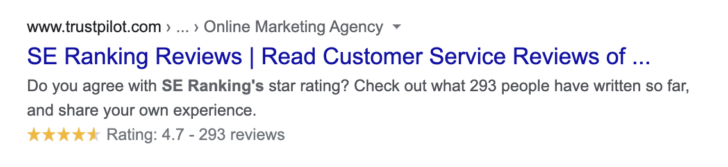
Also, keep a close eye on Trustpilot. It is one of the review platforms whose little stars are likely to appear in your brand SERP. 

SE Ranking Trustpilot reviews

The good and, at the same time, the bad thing about Trustpilot is that there’s no moderation procedure. Nobody checks where the reviews come from, so anybody can write anything about your product here including sneaky competitors trying to manipulate your rating. On the other hand, users find it easy to leave feedback here, so you may get plenty of “organic” reviews.

Encouraging users to leave reviews

When asking your users to share their feedback, you can’t embrace every platform where your business has a profile. To get tangible results, you have to choose one platform to focus on along with one or two supplementary review websites.

Important note: Don’t offer users to leave a review on several platforms at once. If you ask them to “write a review on G2, Capterra, Trustpilot, or Google”, you’ll probably get none. Pick one platform to focus on (we’ve chosen G2). Over time, you can approach the same users and ask them to leave another review on a different platform (on Capterra in our case). 

Just like Trustpilot, G2, and Capterra ratings often make their way to the brand SERPs. But the reason that made us choose these two platforms is their excellent reputation.

G2

Unlike Trustpilot, G2 has a complex moderation system in place: every profile needs to be validated and it takes up to a week for a review to be approved and published. To leave a review a user has to spend up to 40 minutes answering 30 questions and sharing detailed feedback. Naturally, such a complex process puts off some customers but this is what makes every review so valuable and the platform so reputable. 

So how one can convince clients to review their product on G2?

  • First of all, provide a service that is worth talking about. 
  • Second, use both manual and automated ways of collecting reviews.

I’ve already mentioned how we collect reviews automatically—we target users who shared their feedback in the live chat or through the NPS survey. If a user is happy with your product, or if they were unhappy with it but you solved their problems, they will most likely be up for writing a review for you. Besides, we collect reviews manually by emailing our most loyal customers. 

Such an approach has proved efficient as we’ve managed to collect over 500 G2 reviews. Thanks to the amazing feedback of our happy customers, SE Ranking was named the second-best SEO Software among 66 other tools listed. Besides, we were listed among the 50 best software solutions in line with HubSpot, Zoom, and Grammarly.  

The big advantage of G2 is that it asks users whether we can use their review elsewhere. This means that we can use G2 reviews on our website without spending time on gathering new ones. 

Capterra

Capterra is another reputable review platform that also has a complex moderation procedure. Among others, they verify the reviewer’s identity, check if they are in any way affiliated with the product or on the contrary work for the competitors. For this platform, we only encourage users to leave a review manually. For example, if a user has already shared their feedback on G2 Crowd, we ask them to share one on Capterra as well. Naturally, some users review us on Capterra out of their own initiative. 

How we work with negative feedback

We insist that negative reviews are very important for brand self-reflection. 

Most of the time, users write such reviews on the spur of the moment, after having a short unpleasant episode with your product or your staff. 

However, sometimes, even a loyal customer with long-lasting relationships with you can still be unsatisfied with some aspects of your work. Negative feedback from such clients shows that you’ve been doing something wrong systematically, so they should be treated as a signal to start fixing things up immediately.

It also happens that users rate you badly by mistake. A misclick can result in a negative review—an actual case we had with our NPS survey.

Misclick bad review

In any case, you should reach out to the clients, figure out what the problem was, and make things right. 

  • First, thank them for sharing their feedback and letting you know that something was off. 
  • Second, say that whatever is the reason for their negative impression, you are sorry for that and ready to make up for it. 
  • Third, try to figure out what exactly went wrong and how you can help to remedy the situation. At this stage, we can offer our users a demo session, extended trial access, or a prolonged subscription. 
  • Finally, if you solved the problem and you feel that the user is happy with your efforts, ask them to change the review.

You shouldn’t really care too much about the bad review themselves, but you should feel concerned about providing poor service. Your task here is to do your best to turn the negative experience a user had with your brand into a positive one.

How to build your reputation through monitoring mentions and working with influencers

In addition to internal feedback and review on third-party platforms, we also track our brand mentions as they have a tremendous impact on business online reputation.

Social media brand mentions 

People often use social media to share their experiences and exchange recommendations, so we track all social media mentions of our brand to be able to engage with our audience. It helps us build a positive image in social networks. 

We have configured Awario to send daily notifications to our “Brand mentions Chat”. Our outreach managers and customer success team try to respond to every post either offering a solution to a problem or simply leaving a thank-you message.

We have Facebook, Twitter, and LinkedIn public pages that people tag when mentioning us. 

customer feedback can be through social media and response example

On top of that, we have a special private community on Facebook, where our users seek advice and share their feedback about our tools and marketing activities. We go through every message, and depending on the nature of a post, it can be answered by our support managers, SMM specialists, content, or tech team members. 

Working with influencers 

Every now and then SEO specialists and marketers publish reviews of our platform. 

Such reviews are especially valuable for two reasons. First, as they are written by the experts in our field such reviews can give us precious insights into the capabilities of our tools. On the other hand, these professionals usually have an audience of people working in the same industry. So, if an influencer recommends our service, lots of potential customers get to know about our platform. 

Expert reviews come in all shapes and sizes: blog articles, YouTube videos, social media posts, and other forms of content. We tend to share them on our social pages—provided that they are positive :). We also normally reward reviewers with discounts, presents, or by promoting their blogs to our community.

Most of the reviews come organically, however, it’s always a good idea to boost this process. 

To find influencers who could review SE Ranking we use two approaches: 

  1. We find experts with a large following among our clients and ask them to review the platform; 
  2. We find influencers in the field of SEO, offer them an extended trial, run a demo and guide them around our platform. Then, we ask them to share their opinion about the platform. 

If you are a happy customer of any business, leave a review

I’d like to round up this post by addressing the clients of any businesses. 

Choose to be an active, contributing client.

Reach out to the support team of the company that you have any trouble with. Don’t hesitate to complain—it helps businesses get better.

If there are some online services or products you use daily—share your feedback through any channel you find convenient. Your review can be a decisive factor for someone trying to make the right choice. 

We at SE Ranking are thankful for every review and mention from our clients, as we strongly believe that review culture is a driving force that helps businesses grow and provide an outstanding user experience.

Maria Kazakova is the Reputation Manager at SE Ranking.

https://www.searchenginewatch.com/2020/06/18/how-to-turn-customer-feedback-into-driving-force-product/


Eight great tips for internal site search optimization

30-second summary:

  • An under-optimized UX can sometimes limit the user’s journey by creating roadblocks to conversions.
  • Internal site search is one of the hidden gems every SEO should know about. 
  • Not only does it improve UX and conversions but literally shows us what’s missing in our content strategy and product range.
  • CRO Expert Marco Bonomo reveals the top eight tips on internal site search optimization.

Making content easy to access and discovering content gaps are one of the greatest challenges in SEO. Aside from that, an under-optimized UX can sometimes limit the users journey by creating roadblocks to conversions. Thankfully, Internal site search can be used to reveal these gaps, and help in making the most of the existing traffic. Here are the top eight tips to take advantage of: 

1. Make internal site search part of your optimization routine 

Once you’ve set up the internal site search functionality and mastered the internal site search basics, it’s time to make site search part of your optimization routine. Important metrics such as exit rates, search refinements, or the “zero-result” search queries are particularly relevant in adding an extra layer of information to your audits and reports and help you in making more data-driven recommendations. 

2. Dive into users’ behavior using the Google Analytics segments 

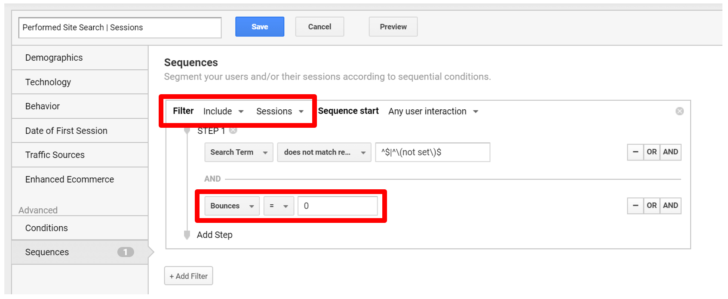
Google Analytics segments come in handy when you’re looking to filter a portion of the traffic by a specific behavior, for example by selecting “Organic  Only” visitors. What is less known though, is that Google updated the default segment “Performed Site Search” from “sessions” to “users” not long ago. Even if this might seem like a small change, it means that you might look at users with several sessions and purchases in their history, but who are still looped in this segment because of the way it is measured. 

To mitigate this issue, you can copy the “Performed Site Search” segment and make it more targeted in two simple steps. The first one would be switching from “users” to “sessions”, while the second one (optional) consists in adding a “Bounces = 0” condition to exclude users that are less relevant for your site search analysis. For more info about the implementation, I recommend having a read at this piece from Loop54.

Sessions performed site search Google Analytics custom segment

3. Analyze the internal site search flow in Google Analytics  

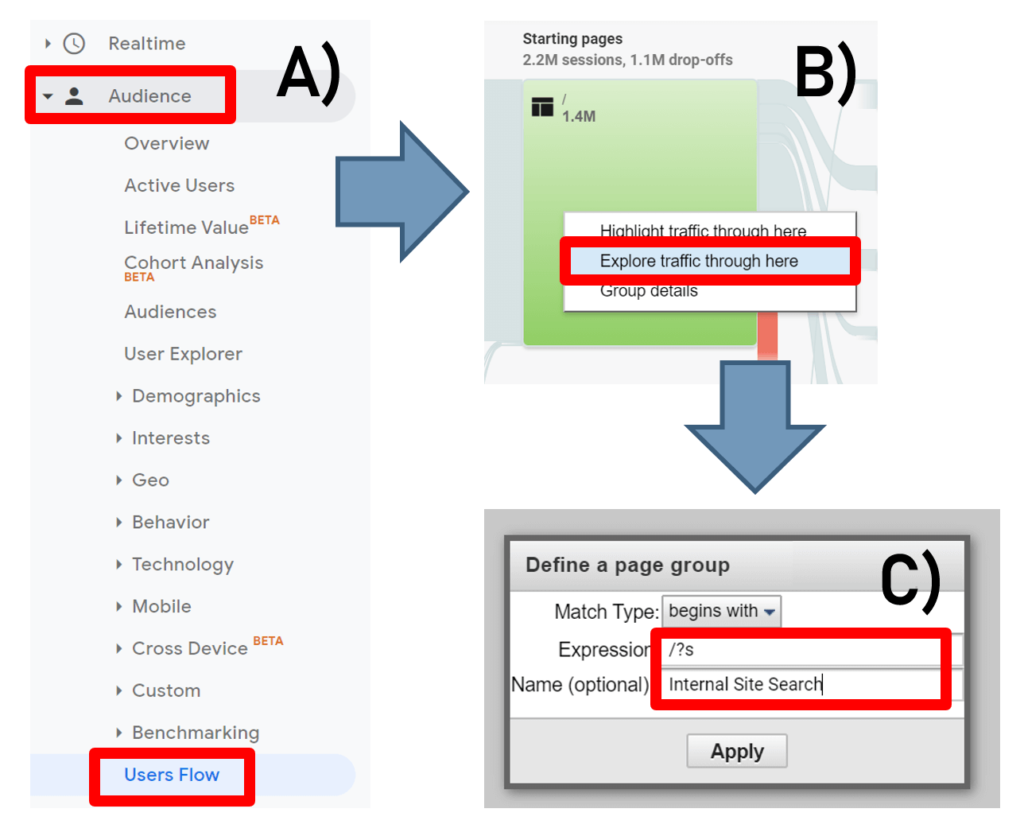
Another report I recommend dive into is the Audience’s “Users Flow”. This particular report allows you to analyze the user’s behavior like never before and reveal further gaps in your UX and internal linking. To access the report, click on Audience > Users Flow and add your site’s custom search path (for example “/?s”) into the pop-up window from the node you are interested in querying, as per the screenshot below. 

Internal site search flow in Google Analytics

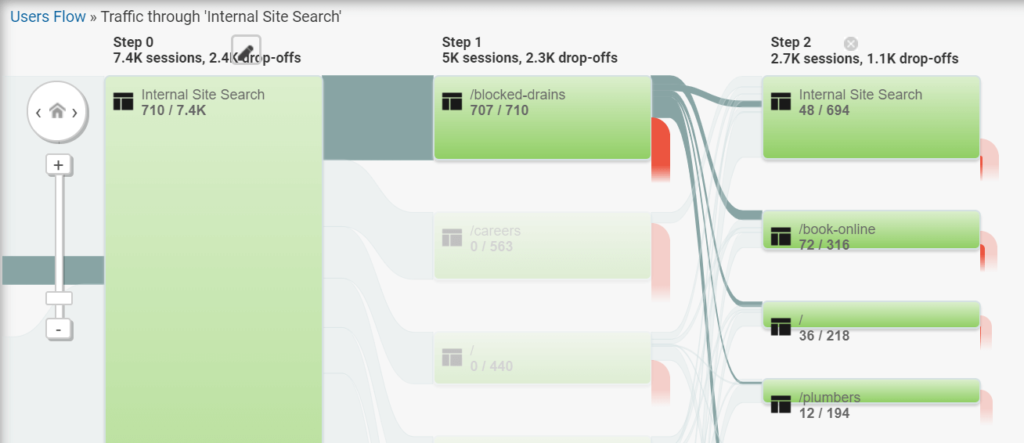
As a result, you should be able to see the specific path the visitors made after triggering the on-site search (see example below). For more information about the setup, I recommend having a look at this post from Bounteous.  

Internal site search flow screenshot example

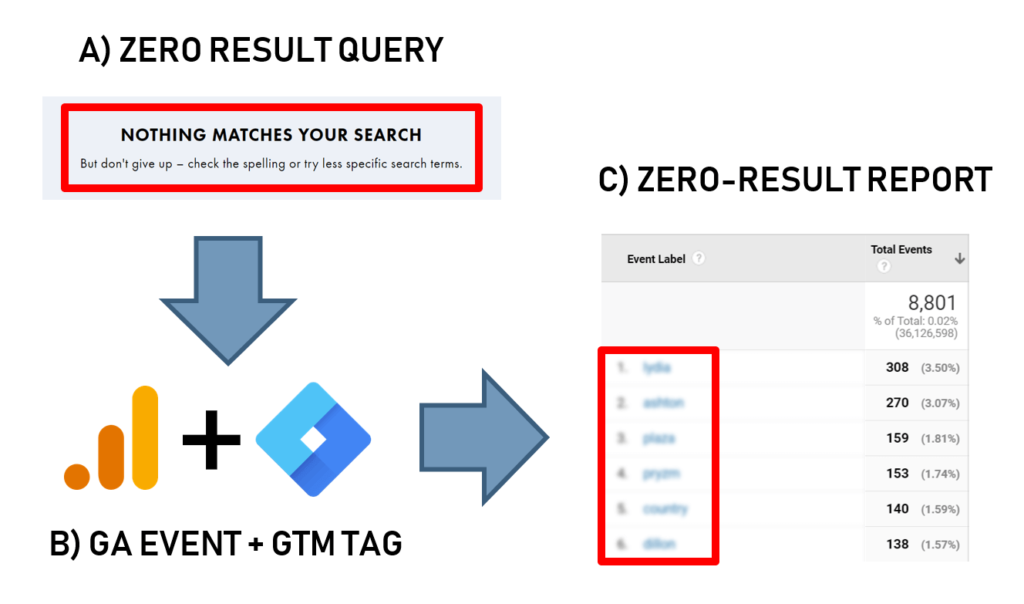
4. Use Google Tag Manager to unveil zero-result search queries 

Looking at search terms is a great way to have an understanding of what users are looking for, but what about the internal search queries that produced no results at all? Luckily, there’s a quick fix for this as creating a custom Google Tag Manager tag and an event on Analytics enables you to track these queries and identify even more gaps in your content or product ranges. To have this implemented (Analytics does not come with “zero-result” reports out of the box), have a read of the guide ‘How to implement the zero-result google analytics track’ by Dmitri Ilin.

Zero result search queries with analytics and tag manager

5. Implement a smart site search solution  

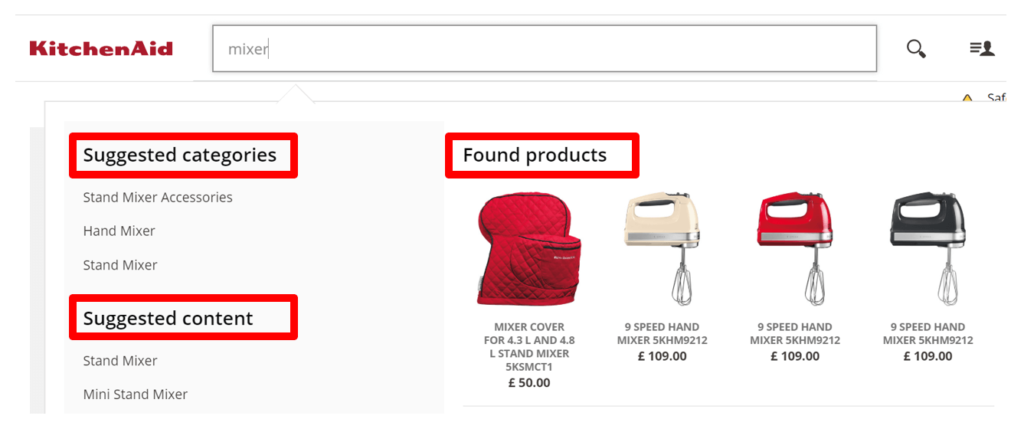
Using third-party software can enhance internal site search like never before. Especially for ecommerce websites, navigating through thousands of products can now be done in a more efficient way by simply implementing features that help improve the conversion rate. Features like auto-suggest or providing query results for different categories (see screenshot below) are now a must-have for ecommerce brands, as they aid in maximizing the site search revenue. 

Smart site search solution ecommerce example

6. Add a voice search functionality to your internal site search 

Especially if you’re working in a B2C niche, it’s definitely worth considering adding a voice search feature to your internal site search. Considering that mobile and tablet are now already generating over 50% of your traffic, it makes sense to make site search even more accessible by adding a feature that can only grow over time.   

Voice search feature for internal site search ecommerce

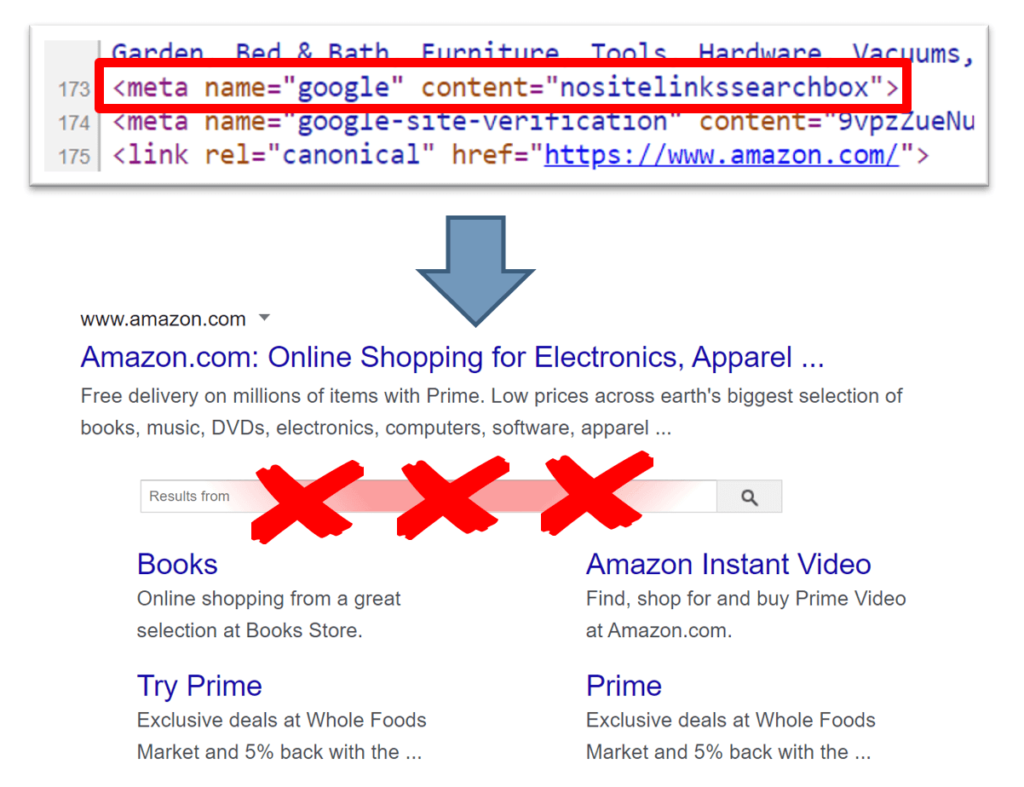
7. Consider disabling the Google search box 

Even though disabling the Google search box might sound like a bizarre idea, I recommend considering this in particular cases. For example, big ecommerce like Amazon might want to leverage the homepage to display personalized deals. Doing so, Amazon encourages users to purchase items they didn’t even think about, but that was made irresistible by a clever combination of search history and flash discounts. To have a look at this, simply follow the Google site links search box guidelines and test it for a short period of time to see if this solution works for your ecommerce too. 

Google sitelinks search box Amazon example

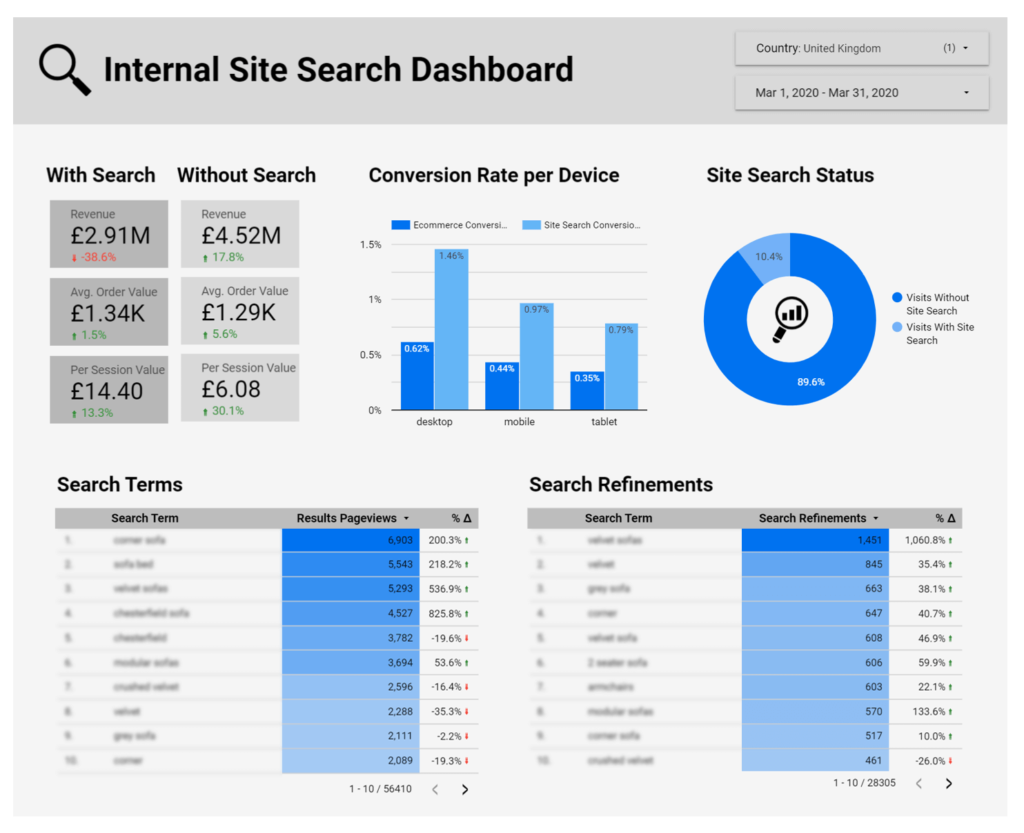
8. Use Google Data Studio for internal site search reporting 

In order to make sure that an on-site search is part of your optimization routine, I also advise you to create a dedicated Google Data Studio dashboard for your weekly or monInternal site search reporting with Google data studiothly reporting. The key metrics I suggest to display are the top search terms, search exits, search refinements, revenue, with the ability to filter by country and dates.  

Wrapping up 

Internal site search is one of the hidden gems every SEO should know about. It not only represents another way to improve UX and conversions but literally shows us what’s missing in our content strategy and product range. So why not start using these practical tips, and make the most of this underrated tool today? 

Marco Bonomo is an SEO & CRO Expert at MediaCom London. He can be found on Twitter .

https://www.searchenginewatch.com/2020/06/18/eight-great-tips-for-internal-site-search-optimization/


What Does It Mean to Create Engaging Content? via @seocopychick

The word “engaging” is one that’s thrown around in the SEO space quite a bit, especially when referring to content.

Every SEO professional understands the need to create engaging, SEO-friendly content, but what this actually means isn’t always clear.

Does “engaging” mean driving clicks to a page?

Inspiring social shares?

Getting followers to comment on your posts?

All of the above.

In this post, I’m going to discuss what “engaging” really means and how you can create content that drives the engagement your content deserves.

Defining ‘Engagement’

“Engaging” content is content that entices people to take some kind of action, however broadly defined.

Engagement could be in the form of social media likes, social shares, clicks, form fills, or any other type of action.

Where things get confusing is when marketers herald the need for “engaging” content without defining what action users are expected to take.

This is a problem because it makes it nearly impossible to determine whether one’s content is successful in driving engagement. And most of us know the saying, “What gets measured, gets managed”.

ADVERTISEMENT

CONTINUE READING BELOW

If marketers want to be successful in creating engaging content, they need to first determine what action(s) they want users to take.

With this in mind, they can then craft content that drives users to like/comment/click/share/subscribe.

Measuring Engagement: Engagement KPIs

In the marketing world, key performance indicators (KPIs) are used to measure the success of a campaign.

As with a paid ad campaign, KPIs should be set for your content marketing campaigns as well.

Simply striving for “engagement” won’t pay the bills.

Here are just a few of the many content marketing KPIs that can be used to measure engagement and analyze tangible results:

  • Social Media Post Likes: “Likes” on Facebook, Instagram, LinkedIn, and other social platforms tend to indicate that users like your content and therefore can be used as a measure of engagement.
  • Social Media Post Comments: Similar to likes, social media comments show that users are interested in your content. Of course, comments can be good, bad, or neutral, so they’re not always a sign of positive engagement.
  • Pageviews: Pageviews are a measure of how many users visit a particular page on your website. Pageviews, sessions, and users are the most common website engagement metrics.
  • Unique Visitors: A unique visitor refers to a person that visits a website at least once during a particular reporting period. Unique visitors shows how many people your website actually reaches.
  • Time on Page: An engagement metric that measures the time a user spends on a page on your website. The assumption is that a user will spend more time on your website if they are interested in your content.
  • Bounce Rate: The percentage of visitors that exit after only viewing one page on your website. A low bounce rate is a good sign, as it means users are venturing to other pages on your website.
  • Pages per Session: A measure of how many pages a user visits per session. The logic is that if a user visits several pages on your website, they’re likely interested in your content.
  • Page/Scroll Depth: If a user scrolls down on a webpage, this could be an indication that they are interested in your content.
  • New vs Returning Visitors: You want to get new visitors but you also want users to come back to your site. Great content will encourage visitors to come back time and time again.
  • Conversion Rate: Conversions are measured differently depending on your goals. Typically, this involves form fills, purchases, or opt-ins. Your conversion rate is a percentage of how many visitors end up taking a preferred action on your website.
  • Cart Abandonment Rate: This refers to the percentage of people who drop off right before they confirm their purchase. If your content is doing its job, you should have low cart abandonment.

This is just the tip of the iceberg when it comes to the different KPIs you can look to when measuring engagement.

ADVERTISEMENT

CONTINUE READING BELOW

The important thing is that you choose the right KPIs based on your goals and look to actual data when determining engagement.

This is the surest way to determine whether your content is yielding the results you want.

Why Create Engaging Content?

It’s one thing to create SEO-friendly content but quite another to create content that converts that organic traffic into paying customers.

While many marketers are focused on keywords, on-page SEO, links, and the like, they often overlook the components that drive engagement and conversions.

Often, creating engaging content is as simple as “writing for the user” (i.e., writing content your target audience actually wants to read).

Ranking content for topics your audience is searching for is nearly pointless if they aren’t finding the value they need and aren’t taking action on your content.

So, creating engaging content – content that entices readers to take action – is essential if you actually want to make money from your content.

Traffic is nice, but conversions are better.

How to Drive Engagement

Once you’ve identified your content KPIs, have a system for measuring progress, and have determined your next content topics, it’s time to craft content that’s sure to drive engagement.

Obviously, results will vary depending on the type of action(s) you want users to take, but the below tried-and-true methods are great for boosting engagement on most content pieces.

In every case, your goal should be to create content your audience will love and that will get them itching to share/like/comment/opt-in/buy.

1. Create a Content Outline

It’s easy to get sucked into the stream-of-consciousness-like process of content writing, but this often leaves your content disjointed and veering off-topic.

Well-thought-out, organized content is best if you want to keep readers engaged and moving toward your main conversion point.

So, before you get to writing, create a basic outline of what you want to cover.

ADVERTISEMENT

CONTINUE READING BELOW

  • What questions are your audience expecting you to answer in this content?
  • What value are they expecting to find?
  • How can you organize this content in a straightforward way?

For example, if I’m writing a guide titled “10 Underrated Marketing Strategies for 2020”, I’m not going to dive right into talking about the #1 strategy.

I’ll probably set the stage with an intro paragraph, provide some stats on how marketing has changed in 2020, and then map out the top 10 strategies.

By mapping out an outline first, you keep yourself focused on your main point and make it easier for readers to skim your content.

If at first glance they see that you cover the information they’re looking for, they’re more likely to read your content from top to bottom.

2. Ask Questions

Asking questions within your blog content and on social media has been shown to increase engagement.

Even though readers may not have an opportunity to actually respond to your question, it will get them thinking and may encourage them to continue reading your content.

ADVERTISEMENT

CONTINUE READING BELOW

Screenshot of in-text question

Screenshot of in-text question

For example, if you want readers to continue reading the next section, you might add a question like “What does this mean for business owners in 2020?” or “How can you apply these strategies to your own marketing?”

With these lingering questions in their mind, they’ll be inclined to read on in hopes of discovering the answer.

At the same time, questions at the end of a blog post can encourage blog comments, which you can respond to later.

If you respond to your blog comments, it might encourage users to come back to your site and read more of your content.

3. Add ‘Bucket Brigades’

Bucket brigades are words or phrases that keep readers on your website for longer.

They’re used to break up larger chunks of content and also lead into the next section.

ADVERTISEMENT

CONTINUE READING BELOW

It’s usually a short phrase followed by a colon or ellipses like:

  • For example:
  • Take this story…
  • Interested? Check this out:
  • You wouldn’t believe this:
  • Here’s one…
  • See this case study:

These work beautifully to encourage readers to stay engaged with your content.

Example of a bucket brigade

Example of a bucket brigade

In fact, Bucket Brigades are an old copywriting technique that was originally used to keep people reading sales letters.

Today, they are used in SEO content to increase time on page, an important engagement metric.

4. Include Shareable Quotes

Twitter users love to share expert quotes and sound bites from their favorite articles.

ADVERTISEMENT

CONTINUE READING BELOW

That’s why you’ll often see bloggers including block quotes that make it easy for readers to share the quote (and article) to social media, mainly Twitter.

With a single click, users can share your article and have it reach tons of additional users.

In fact, I have seen this in action with my own Search Engine Journal articles, SEJ often embeds a block quote and shares it along with my original article.

This has earned me more Twitter followers, retweets, and Twitter traffic to my website.

Adding block quotes to your articles can be a great way to drive social shares and expand the reach of your content.

5. Add Social Share Buttons

Speaking of social shares… are you making it stupid easy for readers to share your content on social media?

If readers have to jump through hoops (copy your link, paste your link, add an image, add a caption, etc.) just to post an article, you may be hindering your social shares.

ADVERTISEMENT

CONTINUE READING BELOW

Blog post social share buttons

Blog post social share buttons

That’s why I encourage all sites to include social share buttons and make sure the metadata is filled out.

That means whenever a reader wants to share your article, all they have to do is post the social share button and their post is already propagated with the article’s title, image, and description.

I like to include social share buttons for Facebook, Twitter, LinkedIn, and Pinterest, as these are the top drivers of traffic to my site.

Having these social share buttons has earned me more social media followers and traffic from a variety of social platforms.

6. Offer Content Upgrades

I have a Facebook group for aspiring writers and one of the questions I got today was “My website is getting 500-600 visitors per month. Now what?”

This is a question I see quite a bit, because many writers, marketers, and business owners focus on traffic generation but not on how to capture that traffic.

ADVERTISEMENT

CONTINUE READING BELOW

If you’re not directing visitors to a product, sales, or contact page, you should at least be adding them to your email list via content upgrades.

In response to this writer’s question, I told them to “dangle the carrot”.

In essence, this means offering an irresistible content upgrade that your target audience can’t help but be interested in.

Specifically, offer them content that helps them overcome one or several of their most pressing pain points.

For example, I know that many marketers list “time” as being one of their biggest hindrances in creating SEO content on a regular basis.

To help them overcome this, I might publish a “Time-Saving SEO Content Calendar” that helps them plan out tons of content months in advance.

Then, I’d promote this content in my blog posts and encourage readers to download it in exchange for their email address.

With that, I’m not only providing them with a highly valuable resource, but I am growing my list of email subscribers than I can market to later.

ADVERTISEMENT

CONTINUE READING BELOW

Ask yourself:

Am I giving new website visitors multiple opportunities to engage with my content – or does my marketing strategy end with traffic generation?

7. Add Opt-Ins

While content upgrades do typically involve an opt-in, not all opt-ins involve content upgrades.

You can encourage visitors to opt into anything from your weekly newsletter to a new web tool you just published to a free SEO audit.

The goal, again, is to give visitors at least one opportunity to engage with your content beyond just reading the text on the page.

I encourage website owners to offer multiple opt-in opportunities – typically at the top, middle, and bottom of the page – so visitors encounter several points of engagement.

For example, I direct homepage visitors to my contact page right away where they can apply for SEO content.

Lower down on the page, I include another link to that same application. And at the bottom, I give visitors the chance to subscribe to my newsletter.

ADVERTISEMENT

CONTINUE READING BELOW

Keys&Copy opt-in example

Keys&Copy opt-in example

With these opt-ins, I can actually measure goal completions rather than just rely on pageview data.

So, I’m able to look beyond traffic and actually measure how many users are engaging with my content.

8. Include Internal Links

If you remember, bounce rate and pages per session were two important engagement metrics.

You can lower your bounce rate and increase pages per session by directing users to other pages on your site via internal links.

There are tons of data about the value of internal linking, but, in a nutshell, the benefits include:

  • Directing PageRank from high-authority pages to other pages on your site.
  • Directing visitors to other important pages on your site.
  • Sending visitors to crucial product and sales pages.
  • Keeping readers on your site for longer by directing them to relevant content.
  • Preventing “orphan” pages and reducing page depth.

ADVERTISEMENT

CONTINUE READING BELOW

Since the goal is to keep users on your website until they make a purchase or contact you regarding your services, it’s in your best interest to use internal links to direct them to your most important pages.

If you make it easy for users to find the information they’re looking for, they’re less likely to abandon your site and are more likely to convert into a customer.

9. Utilize AI-Powered Product Recommendations

Artificial intelligence (AI) is a relatively new technology but it is powerful in using existing user data to drive engagement and boost sales.

The best application I have seen is in using AI to provide customized product recommendations in order to encourage purchases.

AI-powered tools can analyze user behavior and even your existing CRM data to offer tailored product recommendations to visitors.

That means users are shown products or offers they’re more likely to buy, therefore increasing your conversion rate.

Ecommerce businesses can also benefit from AI-powered predictive sort, which displays different results for each user.

ADVERTISEMENT

CONTINUE READING BELOW

So, if a user is searching for a particular product, they’ll be shown what the AI predicts the user wants to find based on previous shopping behavior.

10. Use Video

Last but certainly not least is the use of video content to increase engagement.

Not only can video drive traffic from Google, YouTube, and other search engines, but it can add value to your text content.

Since videos are easy to view on social, it’s highly shareable and tends to drum up tons of likes and comments.

Brands can create video tutorials, reviews, Q&A videos, and more boost social and blog engagement.

"What is SEO Copywriting" video

"What is SEO Copywriting" video

In fact, there are several psychology-backed hacks to create engaging videos your audience will love.

In general, you want to utilize a variety of content types to reach a variety of users and increase engagement on all platforms.

ADVERTISEMENT

CONTINUE READING BELOW

Is Your Content Engaging?

Don’t let your SEO content stop at traffic generation – make sure it drives engagement and results in the conversions your website deserves.

All of this starts with setting your target KPIs and then following best practices to boost these metrics across platforms.

The goal should always be to create content your audience will love and will entice them to take action.

That’s the way to turn passive readers into excited, loyal customers.

More Resources:


Image Credits

All screenshots taken by author, June 2020

http://tracking.feedpress.it/link/13962/13636818


Five SEO content types to power and grow your business through 2020

30-second summary:

  • The convergence of content and SEO has happened and digital is next.  
  • Brands that produce quality content over quantity using insights to understand intent stand to capture market share from competitors.  
  • Producing search friendly, optimized content out of the gate and aligned with paid media strategy gives marketers the best opportunity to dominate SERP real estate. 
  • In B2B combined search averages 76% of traffic. 
  • Content also provides value beyond SEO and across whole organizations from branding and awareness through to sales, customer service, and product marketing.
  • Jim Yu shares the top five content types that also serve SEO value.

The convergence of SEO and content has happened. Today, we’re experiencing the convergence of content with all things digital. That was evolution enough—then a pandemic swept through to really shake things up, accelerating digital transforming digital nearly overnight. 

As businesses look to reopening, people are hungrier than ever for content. Media consumption is spiking as so many scour their laptops, phones, and tablets for information about which businesses are open, what products and services they can access nearby, and how businesses are adjusting to the “new normal”. 

In the coming months, businesses are going to be challenged to adapt their SEO and content strategies to meet the constantly shifting needs of consumers. Now you have not only seasonal trends and personalization to contend with but different stages of business recovery and access across verticals and regions, too. 

Look to SEO now for real-time customer insights

We have never before experienced a global, all-encompassing, and near-universal experience such as this. Nearly every customer has been affected in some way. Customer journey maps must be updated but moreover, it is critical now that you are set up to monitor and analyze customer data in as near to real-time as possible.  

You can expect the rest of 2020 to bring dramatic shifts and swings in consumer behavior, and SEO insights are about as close to real-time voice-of-customer as you can get. 

Search data is rich in customer needs and intent. Now more than ever, consumers are turning to search engines for their every need. The insights gleaned from search trends and queries, local search analytics, and on-site activity will help inform the decisions your business must make going forward. Aligning SEO and PPC strategy is becoming more critical. According to BrightEdge research in B2B combined search averages 76% of traffic. 

 If you didn’t have a structured method of communicating search insights to department heads and the C-level before, now is the time. Start with the questions your organization needs answered and work backward from there: 

  • Are consumers remaining loyal to their usual/familiar brands, or is it a mix of usual and new brands (perhaps out of necessity and due to availability)? 
  • Where are your customers spending their time online right now? 
  • What are customers saying about your brand in social media, on review sites, and elsewhere on the web—and are you in a position to engage and respond in real-time? 
  • How have your customers’ needs changed due to COVID-19? 
  • Are you seeing any surprising or unexpected behavioral changes in how people discover and consume your content?  
  • Are consumers using your products or services (or others similar to yours) in new or different ways? 

These insights will help guide not only your marketing strategy but how the entire organization rebuilds and find opportunities for growth in the coming months.  

Five content types to power your content strategy now and in future

Get ready to move fast on opportunities for prime search visibility and share of voice, as there’s a distinct advantage to being the first-mover. Choose your content types wisely to ensure you’re presenting information to customers in the best format for their needs, devices, and intent, and experience. 

Make sure these five types of search-friendly content are part of your arsenal: 

1. Written word 

Text-based web content still drives the vast majority of search results. It can be made more interesting and engaging with the inclusion of other content types (which we’ll talk about in a minute), but a well-written article or webpage is still one of the most powerful tools in your content arsenal.  

This is what Google calls “Main Content” in its Search Quality Evaluator Guidelines—“any part of the page that directly helps the page achieve its purpose”. It can be text, imagery, video, or even user-generated content, and includes the page title. The written word is often complemented by multimedia elements but usually serves as the basis on which the content piece is built. 

Writing is a great way to establish thought leadership, to guide users through step-by-step processes, to share opinions and perspectives and expertise. Landing pages, glossaries, listicles, feature stories, media releases—there are countless ways to tell your company’s stories and share messages in writing.  

How can you make your written content stronger and maximize its SEO value?  

  • Understand what Google is looking for: “…unique and original content created by highly skilled and talented artists or content creators. Such artistic content requires a high degree of skill/talent, time, and effort.” 
  • Avoid writing mistakes that Google says detracts from the quality of a piece: grammar and punctuation errors, paraphrasing another piece of content but introducing inaccuracies, lack of adherence to E-A-T principles, poor quality writing, meaningless statements, failing to cite sources, sharing mostly commonly known information, text broken up by large ads that disrupt the user experience. 

2. Visual content types: Photos, infographics, and illustrations

Images can feature prominently in search results, depending on the query, and can really enhance the quality of a piece of written content. They can help tell the story, illustrate specific points, help a reader envision a complex idea, and more. 

We know that image alt text helps Google understand an image’s relevance to the rest of the page content (and to the query, as a result). But it serves an even more important function: improving the accessibility of your content. By now, descriptive alt texts should be best practice for all content teams. 

What else do we know about Google’s evaluation of image content? 

  • Images can be considered “Main Content” by Google. In section 4.2, Google states that quality evaluators are to look for “a satisfying amount of main content’ and list multiple product images as one example of achieving this. 
  • Evaluators are to consider the “skill/talent, time, and effort” it appears to have taken to create images. 
  • Shocking images that don’t match the main content, sexually suggestive or grotesque images, deceptive images that imply a celebrity endorsement where is none for example, and images that don’t fit the screen on mobile are all examples of image content that detract from the user experience and therefore their SEO value.  

Google says that a picture truly is worth a thousand words, in some cases. Using the example of a trestle bridge, the guidelines state that “a picture may be more helpful than a text description due to the unique design of the bridge.” Keep this in mind as you create written content—if you’re writing at length to explain something, could an image help? 

3. Video content types

More than 500 hours of video are being uploaded to YouTube per minute and users still can’t get enough, devouring over a billion hours of YouTube content per day. If video isn’t yet a part of your content mix, this is the time to figure out how you’re going to make it so. 

Videos can also count as the main content, and they’re great for augmenting written text. Explainers, how-to guides, product or service demos, behind-the-scenes looks, expert interviews, and more are all great material for a high-quality video. 

And what is Google looking for when it comes to video? Increase its SEO value by keeping in mind that: 

  • Google considers “a satisfying or comprehensive amount of very high-quality main content” and “High E-A-T for the purpose of the page” indicators of quality in video content. 
  • Other characteristics of a good quality video include that it is well-produced, subject matter expertise, uniqueness and originality. 
  • Things that detract from your video’s SEO value include a subject matter with no clear expertise on the topic, publishing on a network with little oversight, or an attempt to deceive audiences in some way. 

Note that Google specifically instructs raters that they “must consider the reputation and E-A-T of both the website and the creators of the MC in order to assign a Page Quality rating”. Protect the reputation of your creators and your site by ensuring that these best practices are employed in every video you publish. 

4. Audio content types

The explosion in popularity of voice search and content formats such as podcasts and internet radio has made audio content a key component in the marketing mix. in optimizing audio content for voice search, you want to make sure you’re using structured data, concise headlines, and descriptions that help people understand what the content is about. Google’s main concerns about voice search as far as search quality goes have to do with mobile-friendliness. When a person uses their mobile phone for a voice query, for example, it’s not a good user experience if the page they are delivered to isn’t optimized for mobile.  

For audio content such as podcasts, the content you create around the episode is key. In fact, you should be considering SEO implications even as you choose your topics and structure your shows, to ensure you’re talking about things people are actually looking to hear about. Optimize your podcast title and description in the same way you do other web content, around a focused keyword. Write a blog post that helps people understand what the episode is about and share a transcript, if possible. 

5. Interactive content types

Webinars, virtual events, online courses, and other similar interactive content, when put together well, offer great value for participants and therefore can be considered quality content by Google. We’re about to see an explosion in their popularity, given the potential long-term implications of the coronavirus pandemic, too. 

You can improve the SEO strength of your interactive content and virtual events by creating and optimizing supportive content for each channel in which you’ll promote the event. Create graphics to promote the speakers. Shoot a quick explainer video that tells people what they’ll learn or experience if they participate.  

And don’t just hold the event and forget it about it—share the recording, write a wrap-up blog post, create an infographic with the top takeaways, create an ebook, and more. Ask participants to share their best photos and feedback and share them on a dedicated page on your site. 

The best content isn’t just optimized for search—it starts with search

Optimizing for search isn’t an activity you tack onto the end of the writing process or something you do to an image before publishing. How and where your audience will discover and engage with your different types of content needs to be a key consideration from the very earliest planning stages of your content strategy. 

Redesigning the website? Ask how SEO needs to be involved. Writing content? Consider how it can be optimized to fit the SEO strategy. Launching a new product? Involve SEO sooner in the planning. SEO needs to be ingrained throughout every aspect of the business right now, from the very initial planning stages of any project or initiative.  

As you become more intentional in strategic content planning, your data will show you which content formats work best at each stage of your unique funnel. Work on developing these measurement and attribution systems, if you do not already have them in place. They will drive your content creation, optimization, and amplification strategy across all channels throughout your COVID-19 recovery and beyond. 

Jim Yu is the founder and CEO of leading enterprise SEO and content performance platform BrightEdge. He can be found on Twitter .

Five SEO content types to power and grow your business through 2020


Google Advises Against Using Nofollow Links When Migrating Sites via @MattGSouthern

Google’s team of webmaster trends analysts discuss the intricacies of nofollow links in the first episode of the company’s new podcast.

The podcast brings together Google’s John Mueller, Martin Splitt, and Gary Illyes to discuss topics related to search and share information about upcoming projects.

In episode one of ‘Search Off the Record,’ Google reveals the one situation where using nofollow links may do more harm than good.

Illyes kicks things off with a conversation on changes to nofollow links that may be rolling out at some point in the future.

Changes to Nofollow Links

Site owners and SEOs want to know when Google’s big changes to nofollow links will be rolling out.

Back in September 2019, Google announced plans to treat the nofollow attribute as a hint rather than a directive.

That change was supposed to have been fully rolled out by March 2020, but it appears Google is running behind schedule.

See: Google Makes Big Change to Nofollow, Introduces 2 New Link Attributes

ADVERTISEMENT

CONTINUE READING BELOW

There is nothing new to announce regarding the nofollow attribute being treated as a hint.

However, Illyes discussed even more changes to nofollow that are being worked on, and advised when nofollow is not the best solution.

Don’t Use Nofollow When Migrating Sites

As Gary Illyes explains, using nofollow links should be avoided when migrating sites from one domain to another.

Specifically, when it comes to linking from an old site to a new site, it would be more helpful for site owners if Google could follow those links.

Illyes suggests Google is working on changes which may address this problem in the future. For now, at least, the best solution is to use ordinary links.

“We are working on a few things that I think will be helpful for the web and, also, probably helpful for webmasters…

Like you have those sites that can, for example, redirect to a new site when they move and they just leave up a link saying “visit us on our new site.”

Often those links are nofollowed. It would be very helpful, for example, for us to follow those links and essentially help webmasters have their new site discovered much faster.”

ADVERTISEMENT

CONTINUE READING BELOW

Related: How to Successfully Pull Off an Enterprise-Level Site Migration

Upcoming Changes to the Nofollow Attribute

Illyes shared some information about further changes that may or may not be coming to the nofollow attribute.

Google is trying to determine whether the nofollow attribute can be used as a way to discover malicious sites.

“We are also thinking about, well, other things. I really don’t want to name those things because they actually might not happen at all. And it might just turn out bad.

But if you think about it, those nofollow links could be very, very helpful for discovering malicious sites for example. The ones that force downloads and whatnot, or spam even.

I think nofollow links could be helpful [in those cases], but I just don’t have anything yet to say about how we use them.”

Illyes was careful not to reveal too much, as these changes might not happen, but he confirmed they’re being worked on.

There are currently three projects Illyes is personally involved in to determine if nofollow would be useful for discovering malicious sites.

After the discussion on nofollow links, the podcast covered topics such as the new Core Web Vitals, the challenges of working from home, and more.

To listen to the full 30-minute episode, download “Search Off the Record” by searching for it in your favorite podcast app.

Related: Managing Successful SEO Migrations

http://tracking.feedpress.it/link/13962/13632811


How to use headlines to help create and optimize content

30-second summary:

  • The point of publication should not be solely focused on promoting a brand or converting readers, it needs to be a strong medium to tell a story, educate, and add value to the audience.
  • Fractl’s Growth Specialist, Delaney Kline shares a guide on how to optimize content through effective headlines.
  • She also covers how you can frame, promote, pitch, and sell your content.

As content marketers, we know that the purpose of our content should always be to educate, inform, and entice readers. The point of publication should not be to promote a brand or convert readers — our content should be a tool for journalists to tell a story. 

In order to avoid getting bogged down with data and numbers, there’s one content hack that will help your project resonate with your audience – a headline. Here’s how to use headlines to promote, pitch, sell, and optimize content. 

How to plan for promotional viability

By keeping an interesting headline in mind during the development stages of your project, you’re able to remain focused on the most important takeaways. 

Oftentimes, when creating content, we become attached to our findings, we believe each little tidbit is important to the narrative. This isn’t true. Certain information is more important and more interesting to the audience you’re trying to reach, and you need to plan for that. 

Although research is an essential piece of the process, some pieces of content can thrive on just a single takeaway or statistic. So, if you find one data point that is educational, newsworthy, shocking, and relevant- build on it. It can carry your entire piece of content.

Spend some time online and research the vertical you’re aiming to address in order to optimize content. Journalism has a heartbeat, and adjusting your content to meet news trends is the easiest way to gain traction.

During the creative process, use the headline as a beacon and focus your efforts on creating a story that supports that hook. 

How to frame your content for successful pitching

Not only will your imagined headline look fabulous on the front page of CNBC, but it will look great as a subject line to your email pitches. 

Once your content makes it through the creative process, you face the challenge of promotion. Of course, this challenge is made exponentially easier if the content was created with a headline in mind. 

Not only will your story fit in among other industry publications, but you’re able to compare your content with other articles online.

Optimize content using headlines analysis

Use tools like BuzzSumo to follow topic trends and compare the engagement metrics of some of the most successful articles in your vertical. You can filter through writers and publications with headlines that resemble your own to create a highly-targeted list of people to pitch.

Creating a media list is a strenuous task, but your project has strong ideas, and interesting takeaways, the pitch will write itself. 

Journalists can recognize a viral idea when they see one, and you’re sure to grab their attention from the get-go with a well-thought-out headline and cohesive narrative to support it. 

How to incorporate social proof of concept

This is a process we use in ideation meetings to provide evidence for the strength of a certain content idea. Pulling coverage similar to the concept you’re working with and determining what worked, what didn’t, and how it can be improved, is a solid way to predict success. 

Of course, you can never know 100% that a piece of content will meet your objectives, but by comparing metrics of other successful projects, your team will be able to craft new content within the verticals you’re looking to target.  

In order to make the most of your past successes, ask your team these questions: 

  1. What made this content so successful?
  2. What can we add to make it more timely?
  3. How can we improve the work that’s already been done?
  4. Are there other aspects of the same idea we can explore?
  5. Can we use other tools to enhance this information (social media, digital scrapes, free information sources, and government data)?

These are actionable questions to take into account before delving into a new project. And if your team feels that revisiting this idea would not improve the quality of the work that’s already been done, move on. You don’t want to repeat the same process just to create something subpar. 

How to plan for keyword optimization

Visualizing a headline with keywords for the concept you’re working with will not only help in search, but will also end up optimizing your copy for long-tail searches as well. 

As we learn more about the habits of younger generations, we’re seeing Gen-Z searchers input lengthy queries into Google. Younger generations seem to have a higher interest in searching for things that are the “best.” Maybe this is because millennials and Gen Zers have grown up in an age where endless options are available at the click of a button, so they’re looking to rank the very best the internet has to offer.

This is something to keep in mind when creating your content as well. Consider developing visualizations or lists if the data allows for it. Additionally, “how-to” lists are also an incredibly popular search among all generations. Perhaps your team can spend time developing on-site content with actionable “how-to” tips that are relevant to your industry. 

Bottom line is – if you’re looking to reach a certain audience, make sure you keep their Google habits in mind during the development of your project.  

Focus your efforts to optimize content

The whole idea is to remain focused. While we’re not trying to pigeon hole the creative process to meet a certain end, we are trying to keep a target in mind in order to optimize our efforts. 

Delaney Kline is a Growth Specialist at Fractl, a creative digital marketing agency specializing in the creation and promotion of branded content. She can be found on Twitter at @delaneykline.

https://www.searchenginewatch.com/2020/06/16/how-to-use-headlines-to-help-create-and-optimize-content/


The Leadership Vacuum of Search Engine Marketing via @tonynwright

All politics are personal.

Whether you lean left or right, at the end of the day the politics that affect your life are the ones you should care about the most.

I’ve long been an advocate for our industry to get more involved in working to shape the laws that govern the ecosystem that provides us with our livelihoods.

As an industry, despite some valiant efforts, we have failed to create a united front that protects us from legislation passed by bureaucrats that think the internet is a “series of tubes”

Legislation is constantly being proposed by politicians who have no understanding of the ramifications these laws will have on our industry, our companies, and our clients.

Facebook, Google, Twitter, and other social media platforms spend literally millions of dollars each year lobbying lawmakers, trying to influence legislation that could potentially upend their entire business models.

In the search industry, we lament our lawmakers’ lack of basic understanding of how the internet works – all the while sitting back and watching as the corporations that help feed our families react to potential legislation in sometimes draconian actions that have decimated specific industries.

ADVERTISEMENT

CONTINUE READING BELOW

Executive Orders

Before we talk about some of the measures that Google and others have taken that have harmed legitimate industries, let’s look at the latest shot across the bow to our livelihood.

On May 28, President Donald Trump signed an executive order seeking to re-define a section of the long-standing Communications Decency Act (CDA) passed in 1996.

Section 230 of the CDA protects social media and other user-generated content providers from liability resulting from what is posted by their users.

Without these protections, it is safe to assume that Twitter, Facebook, and even Google would not exist as they do today.

In fact, section 230 of the CDA has repeatedly been referred to as “the 26 words that created the internet”

Trump’s executive order appears to have no teeth, however, his public spats with social media giants aren’t over, by a long shot.

Section 230

I’ve served as an expert witness several times on issues related to section 230 of the CDA.

ADVERTISEMENT

CONTINUE READING BELOW

I’ll be the first to admit that I think the law needs to be re-examined.

Shielding UGC publishers from litigation create a nightmare for many small businesses that have been defamed by competitors, disgruntled employees, and even run-of-the-mill trolls.

There is a fine line between a UGC publisher creating an environment where comments and reviews are perceived as tacitly endorsed by an authoritative source such as Google, even if as search marketers when know this editorializing is far more algorithmic than editorial.

But, by dismantling section 230, we run the risk of decimating the internet landscape as we know it – including and especially Google.

There are no easy answers on this one.

But I believe that people who understand how Google works – and don’t have a vested interest in Google’s financial statements – should be providing guidance to our lawmakers.

Our industry isn’t doing that.

Online Advertising’s Industry Wasteland

There are many legitimate industries that are not allowed to advertise on Google, Facebook, Twitter, and other online platforms.

Google’s advertising policy page lists many categories of businesses that are either banned or restricted from advertising on the Google Ads platform.

Twitter and Facebook both have similar lists.

Everything from healthcare to financial services has pockets of their industries that are affected.

These businesses are left with SEO being one of their only options.

Anyone who has performed SEO in one of these “banned” categories knows they quickly become the “wild west”, where Google’s rules and terms of service mean very little, no matter how the algorithm attempts to improve.

To my knowledge, none of the major search engines or social media platforms have ever reached out to the search and social media industry to ask what businesses should be able to advertise and what business should not.

One prominent example of what I consider to be an overreach by Google is the advertising restrictions placed on drug and alcohol rehabilitation facilities.

You can find these restrictions here.

ADVERTISEMENT

CONTINUE READING BELOW

I don’t know anyone that would say that there is not a societal need for these facilities.

But I also understand why Google took this stand.

Frankly, Google couldn’t tell the legitimate offers from the scammers.

So they outsourced the verification function to a company called Legitscript – but most of the facilities affected aren’t even eligible for Legitscript’s services.

This leaves many smaller sober houses and rehabilitation centers without many options.

They are forced to participate in highly competitive, and in many cases, highly risky SEO programs that may or may not bear any fruit.

Leadership Vacuum

Our industry has, for some time, experienced a leadership vacuum.

The recent demise of the Search Engine Marketing Professionals Organization (SEMPO), which was folded into the Digital Analytics Association was the last breath of our industry leadership.

SEOs can’t agree on who should lead us, much less the path we need to take moving forward.

In our current state, the SEO industry is at the whim of others who may not have our best interest at heart.

ADVERTISEMENT

CONTINUE READING BELOW

Google will continue to dictate what it deems best for the industry, which in many cases, is not what is best for those who practice search engine marketing.

Where are the leaders?

Where are those that will step up, take the hard hits it takes to unify the industry, and get us a seat at the big boys’ table where the discussions that really matter are taking place?

I don’t believe that the leaders aren’t out there.

Our industry is full of tribes.

The tribes are tight-knit groups that help each other, care for each other, and freely share their knowledge – in most cases, without worry about competitive concerns.

But when it comes to making meaningful strides toward influencing policy or bettering the industry, we argue like the Hatfields and the McCoys.

I see everyday people in our industry with polar opposite political views helping each other with technical SEO issues.

I know that the industry can work together to create a better experience for both practitioners and consumers alike.

ADVERTISEMENT

CONTINUE READING BELOW

But we need a uniter.

We need a person or group who can get us all rowing the boat in the same direction.

Once we have that, I believe that there is no limit to what we can do.

So who wants to step up?

More Resources:


Image Credits

Featured Image: Created by author, June 2020

http://tracking.feedpress.it/link/13962/13632029


Google: Rankings for New Sites Could Fluctuate For Up to a Year via @MattGSouthern

Google’s John Mueller recently advised that it could take up to a year for the search engine to figure out where to rank new sites.

During that time there is likely to be some significant fluctuations in search rankings.

That’s completely normal, Mueller says, and not necessarily related to anything a site is doing right or wrong.

This topic came up during a Google Webmaster Central hangout held on June 12. A concerned site owner asked a question about their 8-month-old website, which was apparently ranking well up until a month ago.

The site owner notes their rankings drop coincided with a negative SEO attack by a competitor which resulted in over 1,500 spammy backlinks.

Now the site is nowhere to be found in search results and the site owner wants to know how to recover their rankings. How do they proceed from here?

John Mueller’s Response

In response, Mueller informs the webmaster their site is still considered very fresh. Compared to the history of the internet, 8 months is not a long span of time.

ADVERTISEMENT

CONTINUE READING BELOW

Google’s algorithms are still trying to figure out how the website should be ranked amongst all other content on the web. This process could take up to a year before rankings level off.

“I think if your website is just, let’s say, a couple of months old, maybe 8 months, maybe a year, then that’s still very fresh with regards to the rest of the internet. So that’s kind of a time where our algorithms are still trying to figure out how and where we should show your website in the search results overall.

So that’s something where it would be normal to see some kind of fluctuations around how it’s being shown in search. Sometimes things go up for a while, sometimes they go down for a while. And then, I’d say over the course of a year, things settle down in kind of a stable state.

So that’s something where I wouldn’t necessarily worry too much about this particular situation. I’d continue working on your website, and over time that’s something that should be reflected in search overall.”

ADVERTISEMENT

CONTINUE READING BELOW

What about the spammy backlinks?

The site owner directs Mueller’s attention back to the spammy links and asks if they could be negatively impacting rankings.

Mueller confirms, as has he has stated before, that Google’s algorithms ignore those types of links.

“That’s something that we see all the time. It’s really easy for people to run a script and to drop thousands and millions of links on the internet and we ignore that. That’s something where people get really busy, and they do all this crazy stuff, but our algorithms have seen it so often they’re used to just ignoring it…”

Further, anchor text doesn’t matter in these cases. It also doesn’t matter whether the links are nofollow or not. Google ignores all of it.

“This kind of thing is really easy where you can take 5 dollars and send it to someone and they’ll put thousands of links up on the web. People have been doing this for years and years.”

Lastly, the site owner asks if the spammy links show be disavowed as a precautionary measure.

“I don’t think you need to. I don’t think that would change anything. I would just completely ignore it.

If your competitor is focused on building bad links for your website then at least they’re not making a better website for themselves.”

Hear the full question and answer in the video below:

[embedded content]

http://tracking.feedpress.it/link/13962/13631741