Google Update and Search Console Lag via @martinibuster
[unable to retrieve full-text content]http://tracking.feedpress.it/link/13962/13519609
[unable to retrieve full-text content]http://tracking.feedpress.it/link/13962/13519609
[unable to retrieve full-text content]http://tracking.feedpress.it/link/13962/13517190
[unable to retrieve full-text content]http://tracking.feedpress.it/link/13962/13516480
[unable to retrieve full-text content]http://tracking.feedpress.it/link/13962/13514686
[unable to retrieve full-text content]http://tracking.feedpress.it/link/13962/13514092
While running the SEO team at Croud in New York over the last three years, 60% of our clients have been through some form of migration. Another ~30% have either moved from or to a SPA (Single Page Application) often utilizing an AJAX (Asynchronous Javascript and XML) framework to varying degrees.
Anyone working in enterprise SEO in 2020 will have encountered this web architecture scenario with a client at some point. Frameworks like React, Vue, and Angular make web development more simply expedited. This is especially true when creating dynamic web applications which offer relatively quick new request interactivity (once the initial libraries powering them have loaded – Gmail is a good example) by utilizing the power of the modern browser to render the client-side code (the JavaScript). Then using web workers to offer network request functionality that doesn’t require a traditional server-based URL call.
With the increased functionality and deployment capabilities comes a cost – the question of SEO performance. I doubt any SEO reading this is a stranger to that question. However, you may be still in the dark regarding an answer.
Revenue, in the form of lost organic traffic via lost organic rankings. It’s as simple as this. Web developers who recommended JavaScript (JS) frameworks are not typically directly responsible for long-term commercial performance. One of the main reasons SEOs exist in 2020 should be to mitigate strategic mistakes that could arise from this. Organic traffic is often taken as a given and not considered as important (or controllable), and this is where massive problems take place. There are tons of case studies but one business we encountered migrated to a hybrid Shopify / JS framework with internal links and content rendered via JS. They proceeded to lose traffic worth an estimated $8,000 per day over the next 6 months… about $1.5m USD.
There are many problems. SEOs are already trying to deal with a huge number of signals from the most heavily invested commercial algorithm ever created (Google… just in case). Moving away from a traditional server-rendered website (think Wikipedia) to a contemporary framework is potentially riddled with SEO challenges. Some of which are:
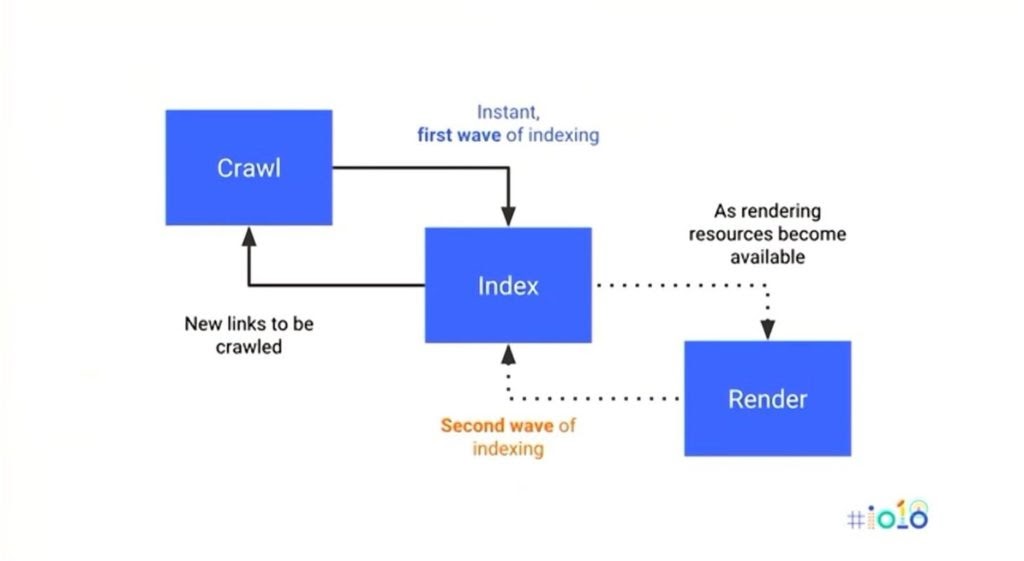
Google’s Crawling and Rendering Process – The 2nd Render / Indexing Phase (announced at Google I/O 2018)
Now, everything prior to this sentence has made the assumption that these AJAX pages have been built with no consideration for SEO. This is slightly unfair to the modern web design agency or in-house developer. There is usually some type of consideration to mitigate the negative impact on SEO (we will be looking at these in more detail). The experienced readers amongst us will now start to get the feeling that they are encountering familiar territory. A territory which has resulted in many an email discussion between the client, development, design, and SEO teams related to whether or not said migration is going to tank organic rankings (sadly, it often does).
The problem is that solutions to creating AJAX applications that work more like server-based HTML for SEO purposes are themselves mired in contention; primarily related to their efficacy. How do we test the efficacy of anything for SEO? We have to deploy and analyze SERP changes. And the results for migrations to JavaScript frameworks are repeatedly associated with drops in traffic. Take a look at the weekly stories pouring into the “JS sites in search working group” hosted by John Mueller if you want some proof.
Let’s take a look at some of the most common mitigation tactics for SEO in relation to AJAX.
Isomorphic JavaScript, AKA Universal JavaScript, describes JS applications which run both on the client and the server, as in, the client or server can execute the <script> and other code delivered, not just the client (or server). Typically, complex JavaScript applications would only be ready to execute on the client (typically a browser). Isomorphic Javascript mitigates this. One of the best explanations I’ve seen (specifically related to Angular JS) is from Andres Rutnik on Medium:
Source: Medium
To reiterate, following the request, the server renders the JS and the full DOM/CSSOM is formed and served to the client. This means that Googlebot and users have been served a pre-rendered version of the page. The difference for users is that the HTML and CSS just served is then re-rendered to replace it with the dynamic JS so it can behave like the SPA it was always intended to be.
The problems with building isomorphic web pages/applications appear to be just that… actually building the thing isn’t easy. There’s a decent series here from Matheus Marsiglio who documents his experience.
Dynamic rendering is a more simple concept to understand; it is the process of detecting the user-agent making the server request and routing the correct response code based on that request being from a validated bot or a user.
This is Google’s recommended method of handling JavaScript for search. It is well illustrated here:
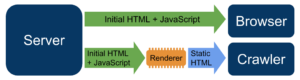
The Dynamic Rendering Process explained by Google
The output is a pre-rendered iteration of your code for search crawlers and the same AJAX that would have always been served to users. Google recommends a solution such as prerender.io to achieve this. It’s a reverse proxy service that pre-renders and caches your pages. There are some pitfalls with dynamic rendering, however, that must be understood:
Content delivery networks (such as Cloudflare) can create additional testing complexities by adding another layer to the reverse proxy network. Testing a dynamic rendering solution can be difficult as Cloudflare blocks non-validated Googlebot requests via reverse DNS lookup. Troubleshooting dynamic rendering issues therefore takes time. Time for Googlebot to re-crawl the page and then a combination of Google’s cache and a buggy new Search Console to be able to interpret those changes. The mobile-friendly testing tool from Google is a decent stop-gap but you can only analyze a page at a time.
Think smart and plan effectively. Luckily only a relative handful of design elements are critical for SEO when considering the arena of web design and many of these are elements in the <head> and/or metadata. They are:
Every element above should be served without any JS rendering required by the client. As soon as you require JS to be rendered to yield one of the above elements you put search performance in jeopardy. JavaScript can, and should be used to enhance the user experience on your site. But if it’s used to inject the above elements into the DOM then you have got a problem that needs mitigating.
Internal links often provide the biggest SEO issues within Javascript frameworks. This is because onclick events are sometimes used in place of <a> tags, so it’s not only an issue of Googlebot rendering the JS to form the links in the DOM. Even after the JS is rendered there is still no <a> tag to crawl because it’s not used at all – the onclick event is used instead.
Every internal link needs to be the <a> tag with an href attribute containing the value of the link destination in order to be considered valid. This was confirmed at Google’s I/O event last year.
Be wary of the statement, “we can use React / Angular because we’ve got next.js / Angular Universal so there’s no problem”. Everything needs to be tested and that testing process can be tricky in itself. Factors are again myriad. To give an extreme example, what if the client is moving from a simple HTML website to an AJAX framework? The additional processing and possible issues with client-side rendering critical elements could cause huge SEO problems. What if that same website currently generates $10m per month in organic revenue? Even the smallest drop in crawling, indexing, and performance capability could result in the loss of significant revenues.
There is no avoiding modern JS frameworks and that shouldn’t be the goal – the time saved in development hours could be worth thousands in itself – but as SEOs, it’s our responsibility to vehemently protect the most critical SEO elements and ensure they are always server-side rendered in one form or another. Make Googlebot do as little leg-work as possible in order to comprehend your content. That should be the goal.
Anthony Lavall is VP Strategic Partnerships at digital agency Croud. He can be found on Twitter @AnthonyLavall.
https://www.searchenginewatch.com/2020/05/06/javascript-rendering-and-the-problems-for-seo-in-2020/
A frequent review of your digital marketing strategy can help you stay successful with your tactics. However, focusing on your own tactics is not enough nowadays. You should be able to know what your competitors are doing and how you can outperform them.
Analyzing your competitors’ digital marketing strategy can help you optimize your campaign and your upcoming ideas to improve both your short and long-term wins.
SEMrush have created the guide ‘How to Do Online Competitor Analysis’ to help you start looking at what your competitors are doing.
Here are some ideas on how to get started:
Content produced in partnership with SEMrush.
A look at your competitors’ website traffic can provide many useful insights. You can start by mapping out your competitors and how their online presence is performing.
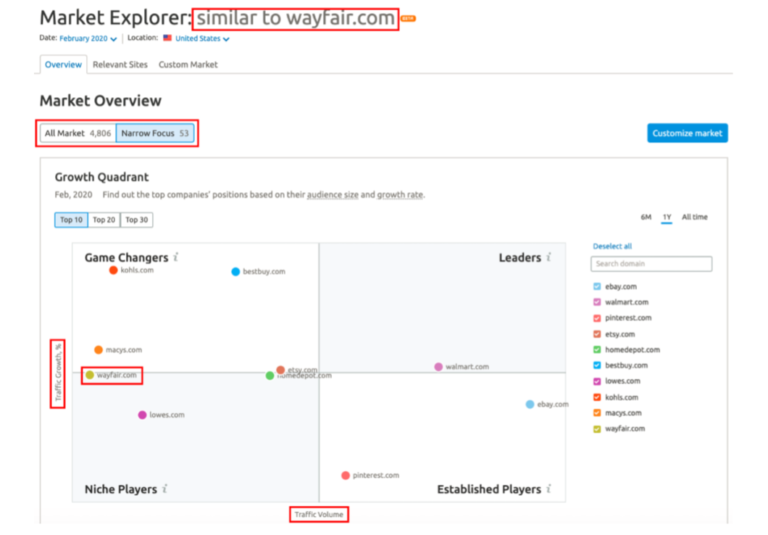
A website traffic analysis can help you discover more details about your competitors’ digital marketing strategy, their performance over the past months and whether there had been any big changes to their results.
You can also look at their most popular channels to decide how you can adjust your digital marketing strategy based on the findings.
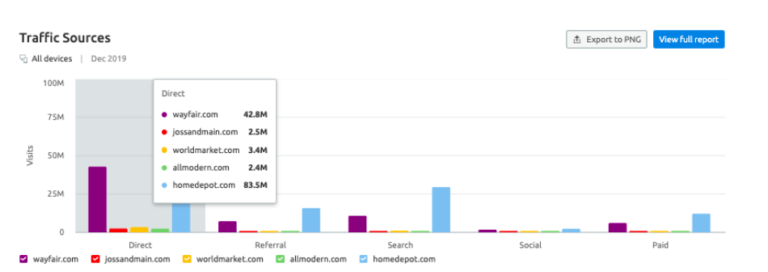
After the first review of their website traffic, you can narrow down the analysis to focus on your closest competitors.
It can also be useful to review any trends and seasonal changes that might affect the traffic and what these changes could mean to your own tactics.
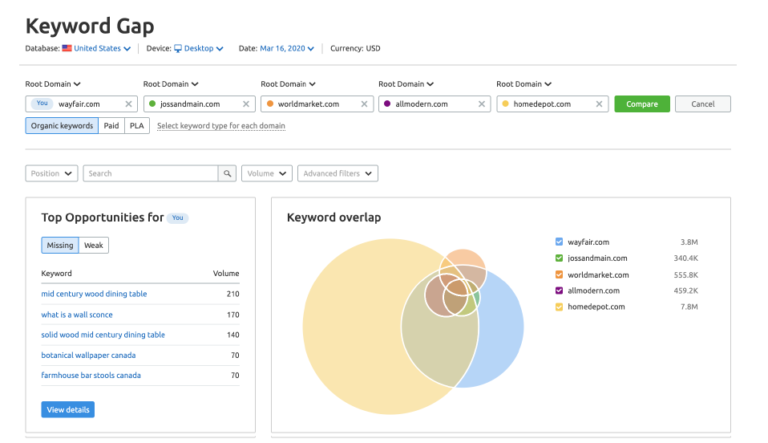
If you want to build a long-term digital marketing strategy then you need to include SEO to your plans. Improving your ranking in search results can lead to a consistent number of views to your website every month.
You should also look at your competitors’ ranking to explore how you can rank higher than them.
A good way to get started is to analyze a target website’s organic search visibility on a daily basis.
The analysis can help you explore your competitors’ best keywords, their average monthly search traffic but also their most successful pages.
The learnings can help you optimize your campaign and your content so that you target the right keywords. You can also explore potential keyword gaps to help you rank higher at a shorter time.
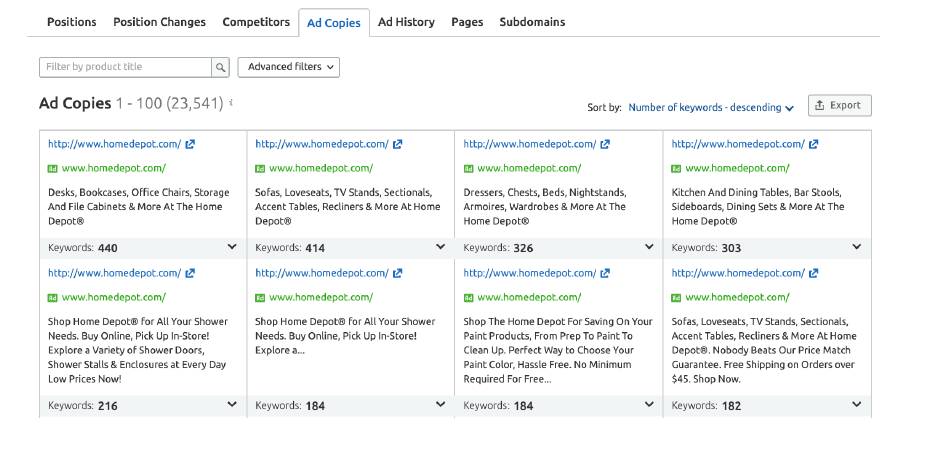
You don’t need to reinvent the wheel to run a successful advertising campaign. It’s okay to look at your competitors’ ads to find inspiration for your upcoming campaigns.
Analyzing your competitors’ online ads can help you find out useful information, such as:
The learnings can help you spot opportunities that your competitors might be missing or even specific markets that you can tap into.
You can even use the data to explore new ways to improve your ROI, from picking different keywords to trying out new channels and audiences.
If you want to improve your content marketing strategy then it’s good to look at what your competitors are doing in terms of content and PR.
You can analyze your competitors’ online mentions, social media presence, their overall reputation and the number of backlinks to get a better idea of their strengths and weaknesses.
An analysis of their content marketing and PR efforts can help you understand your target audience and also the opportunities that you can explore.
For example, if you want to reach a very niche audience and your competitors have already created too much content and are popular then you may want to explore the missing opportunities that you can tap into.
It can be a new channel, a new content type or an opportunity to think outside the box.
You can also get inspired by their content marketing tactics and adjust them to fit your own objectives.
Your social media presence can tell a lot about your digital marketing strategy. Imagine looking at your competitors’ social media presence!
Your competitor analysis can include a closer look at your competitors’ social channels, their frequency of posting, their engagement rate and their most popular channels.
It can help you discover opportunities of standing out by learning from your competitors’ mistakes.
Whether it’s the tone of voice, a sudden post that got viral or even the use of the new channel, there are many useful insights that you can explore.
Right after understanding how your competitors are doing in digital channels, it’s time to make the most of these learnings.
The best way to use competitor analysis is to incorporate the findings to your digital marketing strategy and your upcoming campaigns.
How can you use the findings then?
Here are some ideas from the SEMrush team:
Competitor analysis can help multiple teams for both short and long terms goals in your business. Start by looking at different strategies and channels and make sure you gather the findings in one place to evaluate your own performance.
To find out more details on how to perform a competitor analysis, download SEMrush’s guide here.
https://www.searchenginewatch.com/2020/05/05/improve-your-digital-marketing-with-competitor-analysis/
Using HTML for SEO benefits isn’t new. SEO’s love to write about HTML elements as a vital ranking signal, and as a part of any “perfectly” optimized page.
Why do we love them so much? Because the essence of SEO is communicating to the search engine what a webpage/website is all about, and using HTML tags and their attributes is one of the best ways to do so.
To avoid possible confusion: this is not an HTML guide. Instead, I’ll look at how you can use HTML tags to better communicate with the search engines to achieve better rankings.
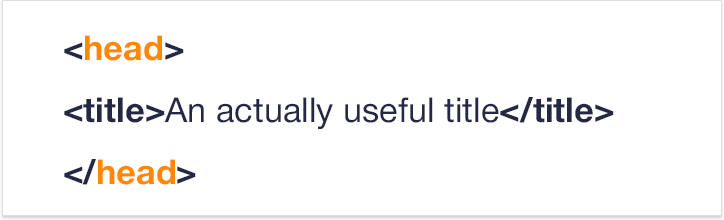
Title tag is your main anchor. Both on the SERP, as well as on social media like Facebook, <title> is used as an anchor to your page.
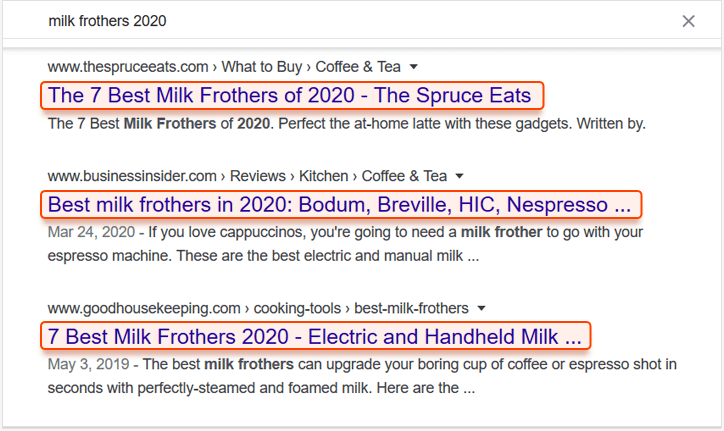
So writing it isn’t only about SEO, it also needs to be laconic, informative, unique and eye-catching.
First, don’t make your title tags longer than 60-70 characters. Long titles are shortened to about 600-700px on the SERP, so your longer title simply ends looking incomplete in the SERPs. Second, the keywords. A long time ago Google only understood exact keyword matches. Today, thanks to RankBrain, among other things, Google gets you. Plus, you get penalized for overstuffing your titles.
Conclusion: use your keywords in your <title> tag, but only to help search engines parse out the meaning of your page and to help your users.
A page’s title is not just visible on a SERP. It’s also shown in the web browser as a tab title. Some webmasters use that title tag to attract a user’s attention — if you switch tabs the text changes to something like “Come back, we miss you!”.
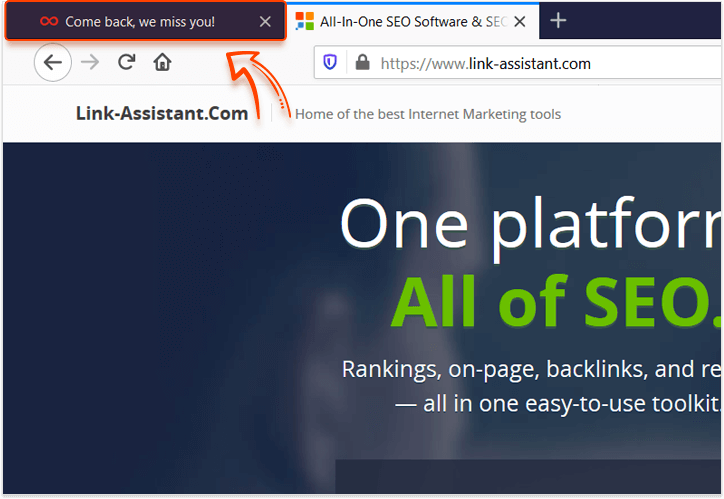
It’s the exact approach used by Facebook/LinkedIn to show you you have notifications and can be used to pretty good effect.
The meta description tag determines what’s going to be written about your page on the SERP.
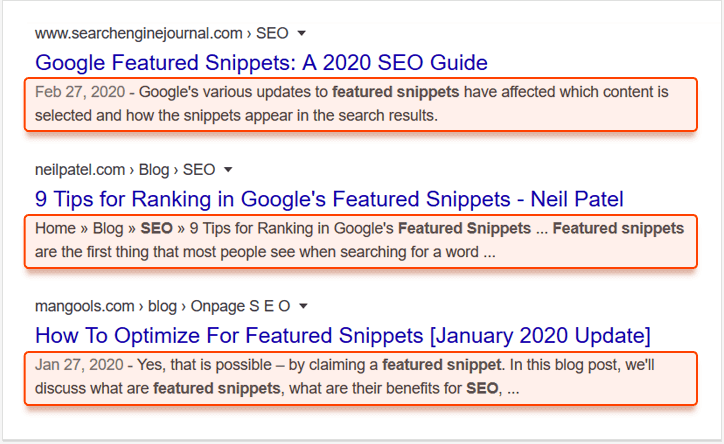
First, before writing a meta description, it’s a great idea to check out the first SERP for your target keywords, get a feeling of how the top-ranking results compose their descriptions. Plus, avoid repeating other descriptions word for word Second, try and explain what your page is about in 70-200 characters, and be careful not to overoptimize. Instead, aim to match the search intent of a potential query.

Don’t use quotation marks in your description tag without using HTML entities “"” to encase the word you want to be in quotation marks. If you simply use “ quotation marks around your content, the search engine is likely to cut off your description immediately.
Among meta tags, the robots one occupies a special place. It’s used to instruct crawlers on how to crawl and index your page. Now, it should be noted that meta robots tag might be ignored at any point, but mostly crawlers respect the wishes of the webmasters.
You can use one or a combination of the following attributes within this tag:

Use the nofollow attribute to optimize your crawl budget. Remember to balance your meta robots values and your robots.txt parameters. If you block a page in robots, then obviously a crawler won’t be able to access and heed its meta tags. On the other hand, a crawler might ignore the block in robots.txt, and then if your meta tags don’t specify that your page is noindex/nofollow, the crawler might index it anyway.
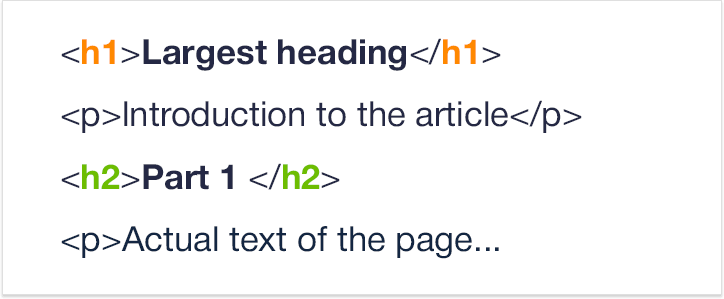
Heading tags, from h1 to h6, are arranged hierarchically. Use them to break your text up into chapters and as convenient headings for your contents table.
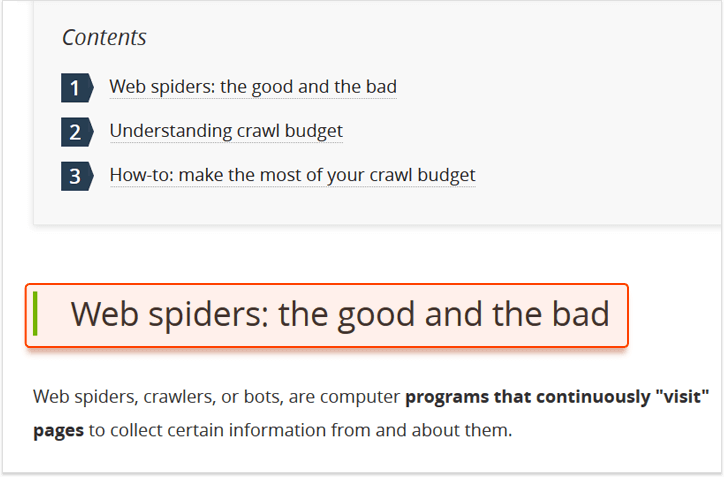
<h1> is the “main” text heading, and by far the most important for our purposes.
To answer this question, our colleagues ran an experiment not so long ago. I’d recommend you check out the entire findings, but in summary: <h1> tags considerably influence your rankings. Definitely fill them out, and definitely use some of your target keywords.
While using keywords in your headings is important, overall your title tag is what the search engines will be looking at much more attentively. That said, Google recommends matching your title tag and h1 heading, so you can pretty much repeat the same thing, maybe a little more user-friendly.
The rel=”canonical” is an attribute within the <link> tag. Use it to point towards the “main” version of the page among its duplicates. It’s used because a certain amount of duplication is inevitable, and massive duplication will actually harm your rankings in the long run. It’s generally a great idea to use an auditor tool to keep an eye on all of your duplicate pages and canonical tags in a single dashboard.
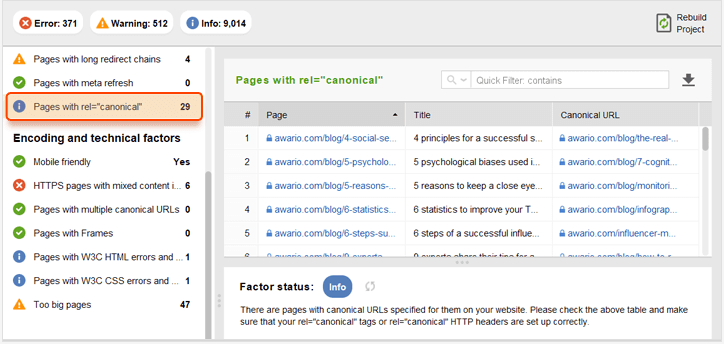
It should be correctly implemented within the <head> section of the page and should point to the version that you want to be ranking. Alternatively, if you can configure your server, you can indicate the canonical URL using rel=”canonical” HTTP headers.

rel=”canonical” tag may be used not just for duplicates, but also near-duplicates. Be careful though: if the two pages connected by a canonical tag differ too much in content, the search engine will simply disregard the tag. Use it for two nearly identical product pages in two different categories, for example, or for two products differing in one small attribute.
We all know that links are super important for ranking. But a link’s weight will significantly change depending on how that link is covered by the rel attribute in the <a> tag.
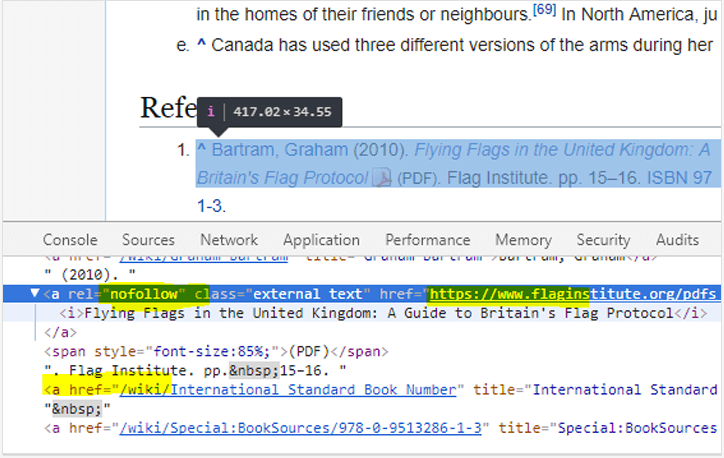
The rel=”nofollow” element is used in order to point out that you don’t want Google to associate this link with your webpage, and you don’t want to pass your Link Authority to them.
The most obvious use for nofollow HTML element is to block out the spam and promotional links. Remember that by default all of the links on your pages are “follow”, but be careful not to make Google associate you with the wrong pages. When doing link building, you want to avoid nofollow links, and as a webmaster, the situation is reversed, and you should tag any link you don’t want the search engine to associate you with as nofollow.

Please remember that internal PageRank sculpting using nofollow, which is sometimes promoted as solid advice, is actually useless. On the other hand, use the rel values such as ugc to tag your user-generated content, and sponsored for the paid links — this will help Google make a sober assessment of your ranking.
Data markup is an approach to the organization of the information on your page. It’s a win-win decision for a webmaster. Structured data is both good for the UX, and also carries huge SEO value. 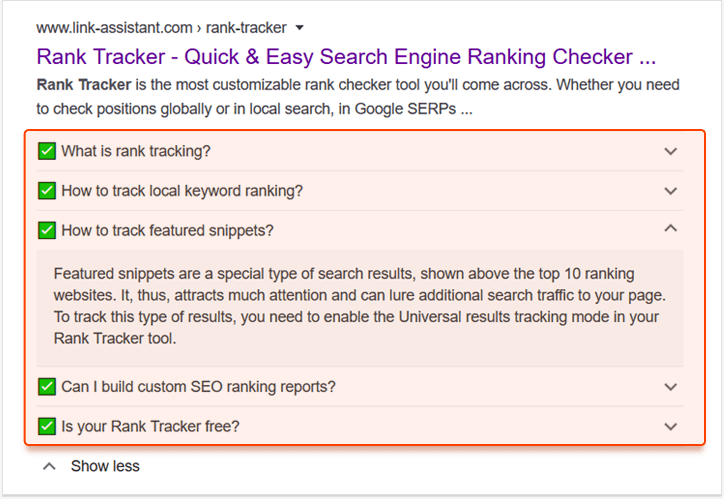 You see, lists, along with data markup (schema.org in particular) are absolutely vital to get some additional SERP real estate in the form of rich snippets. From FAQ information, to your review ratings, and much more — to have that additional SERP space, you need to use data markup.
It’s about much more than simply using <ul>/<ol> tags, although it’s still not very difficult. Simply go to schema.org, find the type of markup that suits your page, and implement it into your page’s code.
Additionally, in terms of SEO, data markup is absolutely necessary to get into a featured snippet. While there is no guarantee that the Featured snippet will be yours thanks to structured data, the rich snippets alone make it a worthy investment of your time.
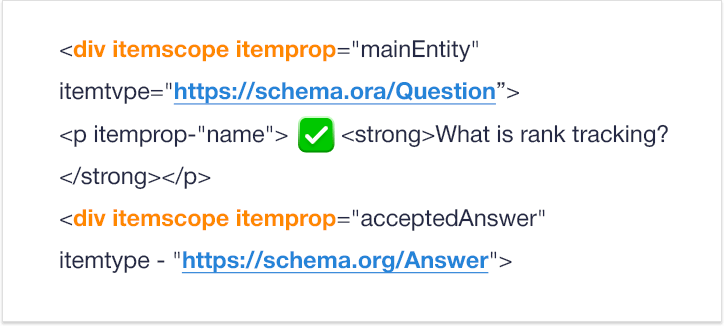
Note that you can combine different markup schemas, and should do so when appropriate. When creating a page describing a person, a “person” schema is an obvious choice, but you can also easily add “address” and “organization” to the relevant page elements. That would net you the best SERP results.
Within the <img> tag, the key attribute for SEO is definitely alt. The thing about this tag is it’s indexed. Having your images show up for a certain search query is all about writing a good alt text.
Alt text gives your page a relevance boost. Plus, an additional opportunity to be displayed for relevant search queries. What you need to do is describe the image in about 125 characters or less. It’s definitely the case that you shouldn’t use the words “picture of” or “image of” — just jump straight to the point, and explain specifically and in some detail what’s on the page.

In a situation where you’ve mapped certain keywords to a page with multiple images, the overoptimization threshold is different. You might get penalized for using your target keywords too consistently over a number of alt tags. A good idea would be to choose an image that best reflects what you’re trying to rank for, and put a keyword in its description. Describe the rest of the pictures as naturally and specifically as you can.
SEO is not an isolated practice, it influences every part of a website’s life, webpage creation included.
Sure, there is no golden rule to writing HTML tags, no “trick” that would guarantee you a top ranking — what’s important is the accumulation of the best SEO practices.
The next step after implementing the advice described here would be to switch to HTML5 semantic tags wholesale. These elements help the search engines sort through which element occupies which semantic place on the webpage
By carefully optimizing your tags you get an opportunity to communicate with browsers and search engines directly, and this is something you need to be proactive about.
Aleh is the Founder and CMO at SEO PowerSuite and Awario. He can be found on Twitter at .
https://www.searchenginewatch.com/2020/05/05/eight-html-elements-crucial-for-seo/
[unable to retrieve full-text content]http://tracking.feedpress.it/link/13962/13509461
[unable to retrieve full-text content]http://tracking.feedpress.it/link/13962/13507503