What It Takes To Stay On Top Of Local Search In 2025 [Webinar] via @sejournal, @lorenbaker

Is AI Changing How Local Customers Find You?

If your clients rely on local search to drive business, the landscape is shifting faster than ever. 

AI-driven updates are changing how users see results, how trust is built online, and how businesses get chosen in 2025.

The real question is, will your local SEO strategy keep up or fall behind?

Get Ready For The New Rules Of Local SEO

In our upcoming webinar, you will explore the latest insights from a major study of over 15,000 businesses and 1,200 consumers. This is your opportunity to stay ahead of AI changes and lead your clients to stronger local visibility.

What You Will Learn In This Local SEO Webinar

✅ Current local SEO ranking signals every agency should know.
✅ How Google’s AI updates are reshaping local results and map packs.
✅ New ways to boost visibility and build consumer trust in 2025.
✅ How to turn these insights into a new local SEO service offering.
✅ How to identify and fix technical review signals that may be hurting your rankings.

Why This Webinar Matters Now

Local search behavior is evolving quickly. New AI tools are not just changing how results appear, they are also reshaping what customers trust and choose. 

This webinar gives you a real-world strategy to protect your local presence and turn SEO insights into agency growth.

Your Speaker

Mél Attia, VP of Marketing at GatherUp, will guide you through the major shifts happening right now and how to position your clients for success.

Can’t Make It Live

No problem. Register today, and we will send you the full recording so you can watch it on your own time.

Turn reviews and local signals into real SEO results for 2025 and beyond.

https://www.searchenginejournal.com/stay-on-top-of-local-search/547258/


How To Host Or Migrate A Website In 2025: Factors That May Break Rankings [+ Checklist] via @sejournal, @inmotionhosting

This post was sponsored by InMotion Hosting. The opinions expressed in this article are the sponsor’s own.

Is your website struggling to maintain visibility in search results despite your SEO efforts?

Are your Core Web Vitals scores inconsistent, no matter how many optimizations you implement?

Have you noticed competitors outranking you even when your content seems superior?

In 2025, hosting isn’t just a backend choice. It’s a ranking signal.

In this guide, you’ll learn how hosting decisions impact your ability to rank, and how to choose (or migrate to) hosting that helps your visibility.

Learn to work with your rankings, not against them, with insights from InMotion Hosting’s enterprise SEO specialists.

Jump Straight To Your Needs

Best For Hosting Type How Easy is Migration?
Growing SMBs VPS Easy: Launch Assist (free)
Enterprise / SaaS Dedicated Very Easy: White-Glove + Managed Service

Don’t know which one you need? Read on.

Hosting Directly Impacts SEO Performance

Your hosting environment is the foundation of your SEO efforts. Poor hosting can undermine even the best content and keyword strategies.

Key Areas That Hosting Impacts

Core Web Vitals

Server response time directly affects Largest Contentful Paint (LCP) and First Input Delay (FID), two critical ranking factors.

Solution: Hosting with NVMe storage and sufficient RAM improves these metrics.

Crawl Budget

Your website’s visibility to search engines can be affected by limited server resources, wrong settings, and firewalls that restrict access.

When search engines encounter these issues, they index fewer pages and visit your site less often.

Solution: Upgrade to a hosting provider that’s built for SEO performance and consistent uptime.

Indexation Success

Proper .htaccess rules for redirects, error handling, and DNS configurations are essential for search engines to index your content effectively.

Many hosting providers limit your ability to change this important file, restricting you from:

– Editing your .htaccess file.

– Installing certain SEO or security plugins.

– Adjusting server settings.

These restrictions can hurt your site’s ability to be indexed and affect your overall SEO performance.

Solution: VPS and dedicated hosting solutions give you full access to these settings.

SERP Stability During Traffic Spikes

If your content goes viral or experiences a temporary surge in traffic, poor hosting can cause your site to crash or slow down significantly. This can lead to drops in your rankings if not addressed right away.

Solution: Using advanced caching mechanisms can help prevent these problems.

Server Security

Google warns users about sites with security issues in Search Console. Warnings like “Social Engineering Detected” can erode user trust and hurt your rankings.

Solution: Web Application Firewalls offer important protection against security threats.

Server Location

The location of your server affects how fast your site loads for different users, which can influence your rankings.

Solution: Find a web host that operates data centers in multiple server locations, such as two in the United States, one in Amsterdam, and, soon, one in Singapore. This helps reduce loading times for users worldwide.

Load Times

Faster-loading pages lead to lower bounce rates, which can improve your SEO. [Server-side optimizations], such as caching and compression, are vital for achieving fast load times.

These factors have always been important, but they are even more critical now that AI plays a role in search engine results.

40 Times Faster Page Speeds with Top Scoring Core Web Vitals with InMotion Hosting UltraStack One. (Source: InMotion Hosting UltraStack One for WordPress )Image created by InMotion Hosting, 2025.

2025 Update: Search Engines Are Prioritizing Hosting & Technical Performance More Than Ever

In 2025, search engines have fully embraced AI-driven results, and with this shift has come an increased emphasis on technical performance signals that only proper hosting can deliver.

How 2025 AI Overview SERPs Affect Your Website’s Technical SEO

Google is doubling down on performance signals. Its systems now place even greater weight on:

  • Uptime: Sites with frequent server errors due to outages experience more ranking fluctuations than in previous years. 99.99% uptime guarantees are now essential.
  • Server-Side Rendering: As JavaScript frameworks become more prevalent, servers that efficiently handle rendering deliver a better user experience and improved Core Web Vitals scores. Server-optimized JS rendering can make a difference.
  • Trust Scores: Servers free of malware with healthy dedicated IP addresses isolated to just your site (rather than shared with potentially malicious sites) receive better crawling and indexing treatment. InMotion Hosting’s security-first approach helps maintain these crucial trust signals.
  • Content Freshness: Server E-Tags and caching policies affect how quickly Google recognizes and indexes new or updated content.
  • TTFB (Time To First Byte): Server location, network stability, and input/output speeds all impact TTFB. Servers equipped with NVMe storage technology excel at I/O speeds, delivering faster data retrieval and improved SERP performance.
Infographic Illustrating How Browser Caching Works (Source: Ultimate Guide to Optimize WordPress Performance )Created by InMotion Hosting. May, 2025

Modern search engines utilize AI models that prioritize sites that deliver consistent, reliable, and fast data. This shift means hosting that can render pages quickly is no longer optional for competitive rankings.

What You Can Do About It (Even If You’re Not Into Technical SEO)

You don’t need to be a server administrator to improve your website’s performance. Here’s what you can do.

1. Choose Faster Hosting

Upgrade from shared hosting to VPS or dedicated hosting with NVMe storage. InMotion Hosting’s plans are specifically designed to boost SEO performance.

2. Use Monitoring Tools

Free tools like UptimeRobot.com, WordPress plugins, or cPanel’s resource monitoring can alert you to performance issues before they affect your rankings.

3. Implement Server-Side Caching

Set up caching with Redis or Memcached using WordPress plugins like W3 Total Cache, or through cPanel.

4. Add a CDN

Content Delivery Networks (CDNs) can enhance global performance without needing server changes. InMotion Hosting makes CDN integration easy.

5. Utilize WordPress Plugins

Use LLMS.txt files to help AI tools crawl your site more effectively.

6. Work with Hosting Providers Who Understand SEO

InMotion Hosting offers managed service packages for thorough server optimization, tailored for optimal SEO performance.

Small Business: VPS Hosting Is Ideal for Reliable Performance on a Budget

VPS hosting is every growing business’s secret SEO weapon.

Imagine two competing local service businesses, both with similar content and backlink profiles, but one uses shared hosting while the other uses a VPS.

When customers search for services, the VPS-hosted site consistently appears higher in results because it loads faster and delivers a smoother user experience.

What Counts as an SMB

Small to medium-sized businesses typically have fewer than 500 employees, annual revenue under $100 million, and websites that receive up to 50,000 monthly visitors.

If your business falls into this category, VPS hosting offers the ideal balance of performance and cost.

What You Get With VPS Hosting

1. Fast Speeds with Less Competition

VPS hosting gives your website dedicated resources, unlike shared hosting where many sites compete for the same resources. InMotion Hosting’s VPS solutions ensure your site runs smoothly with optimal resource allocation.

2. More Control Over SEO

With VPS hosting, you can easily set up caching, SSL, and security features that affect SEO. Full root access enables you to have complete control over your server environment.

3. Affordable for Small Businesses Focused on SEO

VPS hosting provides high-quality performance at a lower cost than dedicated servers, making it a great option for growing businesses.

4. Reliable Uptime

InMotion Hosting’s VPS platform guarantees 99.99% uptime through triple replication across multiple nodes. If one node fails, two copies of your site will keep it running.

5. Better Performance for Core Web Vitals

Dedicated CPU cores and RAM lead to faster loading times and improved Core Web Vitals scores. You can monitor server resources to keep track of performance.

6. Faster Connections

Direct links to major internet networks improve TTFB (Time To First Byte), an important SEO measure.

7. Strong Security Tools

InMotion Hosting provides security measures to protect your site against potential threats that could harm it and negatively impact your search rankings. Their malware prevention systems keep your site safe.

How To Set Up VPS Hosting For Your SEO-Friendly Website

  1. Assess your website’s current performance using tools like Google PageSpeed Insights and Search Console
  2. Choose a VPS plan that matches your traffic volume and resource needs
  3. Work with your provider’s migration team to transfer your site (InMotion Hosting offers Launch Assist for seamless transitions)
  4. Implement server-level caching for optimal performance
  5. Configure your SSL certificate to ensure secure connections
  6. Set up performance monitoring to track improvements
  7. Update DNS settings to point to your new server

Large & Enterprise Businesses: Dedicated Hosting Is Perfect For Scaling SEO

What Counts As An Enterprise Business?

Enterprise businesses typically have complex websites with over 1,000 pages, receive more than 100,000 monthly visitors, operate multiple domains or subdomains, or run resource-intensive applications that serve many concurrent users.

Benefits of Dedicated Hosting

Control Over Server Settings

Dedicated hosting provides you with full control over how your server is configured. This is important for enterprise SEO, which often needs specific settings to work well.

Better Crawlability for Large Websites

More server resources allow search engines to crawl more pages quickly. This helps ensure your content gets indexed on time. Advanced server logs provide insights to help you improve crawl patterns.

Reliable Uptime for Global Users

Enterprise websites need to stay online. Dedicated hosting offers reliable service that meets the expectations of users around the world.

Strong Processing Power for Crawlers

Dedicated CPU resources provide the power needed to handle spikes from search engine crawlers when they index your site. InMotion Hosting uses the latest Intel Xeon processors for better performance.

Multiple Dedicated IP Addresses

Having multiple dedicated IP addresses is important for businesses and SaaS platforms that offer API microservices. IP management tools make it easier to manage these addresses.

Custom Security Controls

You can create specific firewall rules and access lists to manage traffic and protect against bots. DDoS protection systems enhance your security.

Real-Time Server Logs

You can watch for crawl surges and performance issues as they happen with detailed server logs. Log analysis tools help you find opportunities to improve.

Load Balancing for Traffic Management

Load balancing helps spread traffic evenly across resources. This way, you can handle increases in traffic without slowing down performance. InMotion Hosting provides strong load balancing solutions.

Future Scalability

You can use multiple servers and networks to manage traffic and resources as your business grows. Scalable infrastructure planning keeps your performance ready for the future.

Fixed Pricing Plans

You can manage costs effectively as you grow with predictable pricing plans.

How To Migrate To Dedicated Hosting

  1. Conduct a thorough site audit to identify all content and technical requirements.
  2. Document your current configuration, including plugins, settings, and custom code.
  3. Work with InMotion Hosting’s migration specialists to plan the transition
  4. Set up a staging environment to test the new configuration before going live
  5. Configure server settings for optimal SEO performance
  6. Implement monitoring tools to track key metrics during and after migration
  7. Create a detailed redirect map for any URL changes
  8. Roll out the migration during low-traffic periods to minimize impact
  9. Verify indexing status in Google Search Console post-migration

[DOWNLOAD] Website Migration Checklist

Free Website Migration Checklist download from InMotion Hosting – step-by-step guide to smoothly transfer your websiteImage created by InMotion Hosting, May 2025

    Why Shared Hosting Can Kill Your SERP Rankings & Core Web Vitals

    If you’re serious about SEO in 2025, shared hosting is a risk that doesn’t come with rewards.

    Shared Hosting Issues & Risks

    Capped Resource Environments

    Shared hosting plans typically impose strict limits on CPU usage, memory, and connections. These limitations directly impact Core Web Vitals scores and can lead to temporary site suspensions during traffic spikes.

    Resource Competition

    Every website on a shared server competes for the same limited resources.

    This becomes even more problematic with AI bots accessing hundreds of sites simultaneously on a single server.

    Neighbor Problems

    A resource-intensive website on your shared server can degrade performance for all sites, including yours. Isolated hosting environments eliminate this risk.

    Collateral Damage During Outages

    When a shared server becomes overwhelmed, not only does your website go down, but so do connected services like domains and email accounts. InMotion Hosting’s VPS and dedicated solutions provide isolation from these cascading failures.

    Limited Access to Server Logs

    Without detailed server logs, diagnosing and resolving technical SEO issues becomes nearly impossible. Advanced log analysis is essential for optimization.

    Restricted Configuration Access

    Shared hosting typically prevents modifications to server-level configurations that are essential for optimizing technical SEO.

    Inability to Adapt Quickly

    Shared environments limit your ability to implement emerging SEO techniques, particularly those designed to effectively handle AI crawlers. Server-level customization is increasingly important for SEO success.

    In 2025, Reliable Hosting Is a Competitive Advantage

    As search engines place greater emphasis on technical performance, your hosting choice is no longer just an IT decision; it’s a strategic marketing investment.

    InMotion Hosting’s VPS and Dedicated Server solutions are engineered specifically to address the technical SEO challenges of 2025 and beyond. With NVMe-powered storage, optimized server configurations, and 24/7 expert human support, we provide the foundation your site needs to achieve and maintain top rankings.

    Ready to turn your hosting into an SEO advantage? Learn more about our SEO-first hosting solutions designed for performance and scale.


    Image Credits

    Featured Image: Image by Shutterstock. Used with permission.

    In-Post Image: Images by InMotion Hosting. Used with permission.

    https://www.searchenginejournal.com/migrate-website-ranking-factors-inmotionhosting-spa/546417/


    Google Search Console Fails To Report Half Of All Search Queries via @sejournal, @MattGSouthern

    New research from ZipTie reveals an issue with Google Search Console.

    The study indicates that approximately 50% of search queries driving traffic to websites never appear in GSC reports. This leaves marketers with incomplete data regarding their organic search performance.

    The research was conducted by Tomasz Rudzki, co-founder of ZipTie. His tests show that Google Search Console consistently overlooks conversational searches. These are the natural language queries people use when interacting with voice assistants or AI chatbots.

    Simple Tests Prove The Data Gap

    Rudzki started with a basic experiment on his website.

    For several days, he searched Google using the same conversational question from different devices and accounts. These searches directed traffic to his site, which he could verify through other analytics tools.

    However, when he checked Google Search Console for these specific queries, he found nothing. “Zero. Nada. Null,” as Rudzki put it.

    To confirm this wasn’t isolated to his site, Rudzki asked 10 other SEO professionals to try the same test. All received identical results: their conversational queries were nowhere to be found in GSC data, even though the searches generated real traffic.

    Search Volume May Affect Query Reporting

    The research suggests that Google Search Console uses a minimum search volume threshold before it begins tracking queries. A search term may need to reach a certain number of searches before it appears in reports.

    According to tests conducted by Rudzki’s colleague Jakub Łanda, when queries finally become popular enough to track, historical data from before that point appears to vanish.

    Consider how people might search for iPhone information:

    • “What are the pros and cons of the iPhone 16?”
    • “Should I buy the new iPhone or stick with Samsung?”
    • “Compare iPhone 16 with Samsung S25”

    Each question may receive only 10-15 searches per month individually. However, these variations combined could represent hundreds of searches about the same topic.

    GSC often overlooks these low-volume variations, despite their significant combined impact.

    Google Shows AI Answers But Hides the Queries

    Here’s the confusing part: Google clearly understands conversational queries. Rudzki analyzed 140,000 questions from People Also Asked data and found that Google shows AI Overviews for 80% of these conversational searches.

    Rudzki observed:

    “So it seems Google is ready to show the AI answer on conversational queries. Yet, it struggles to report conversational queries in one of the most important tools in SEO’s and marketer’s toolkits.”

    Why This Matters

    When half of your search data is missing, strategic decisions turn into guesswork.

    Content teams create articles based on keyword tools instead of genuine user questions. SEO professionals optimize for visible queries while overlooking valuable conversational searches that often go unreported.

    Performance analysis becomes unreliable when pages appear to underperform in GSC but draw significant unreported traffic. Teams also lose the ability to identify emerging trends ahead of their competitors, as new topics only become apparent after they reach high search volumes.

    What’s The Solution?

    Acknowledge that GSC only shows part of the picture and adjust your strategy accordingly.

    Switch from the Query tab to the Pages tab to identify which content drives traffic, regardless of the specific search terms used. Focus on creating comprehensive content that fully answers questions rather than targeting individual keywords.

    Supplement GSC data with additional research methods to understand conversational search patterns. Consider how your users interact with an AI assistant, as that’s increasingly how they search.

    What This Means for the Future

    The gap between how people search and the tools that track their searches is widening. Voice search is gaining popularity, with approximately 20% of individuals worldwide using it on a regular basis. AI tools are training users to ask detailed, conversational questions.

    Until Google addresses these reporting gaps, successful SEO strategies will require multiple data sources and approaches that account for the invisible half of search traffic, which drives real results yet remains hidden from view.

    The complete research and instructions to replicate these tests can be found in ZipTie’s original report.


    Featured Image: Roman Samborskyi/Shutterstock

    https://www.searchenginejournal.com/google-search-console-fails-to-report-half-of-all-search-queries/548219/


    How To Use LLMs For 301 Redirects At Scale via @sejournal, @vahandev

    Redirects are essential to every website’s maintenance, and managing redirects becomes really challenging when SEO pros deal with websites containing millions of pages.

    Examples of situations where you may need to implement redirects at scale:

    • An ecommerce site has a large number of products that are no longer sold.
    • Outdated pages of news publications are no longer relevant or lack historical value.
    • Listing directories that contain outdated listings.
    • Job boards where postings expire.

    Why Is Redirecting At Scale Essential?

    It can help improve user experience, consolidate rankings, and save crawl budget.

    You might consider noindexing, but this does not stop Googlebot from crawling. It wastes crawl budget as the number of pages grows.

    From a user experience perspective, landing on an outdated link is frustrating. For example, if a user lands on an outdated job listing, it’s better to send them to the closest match for an active job listing.

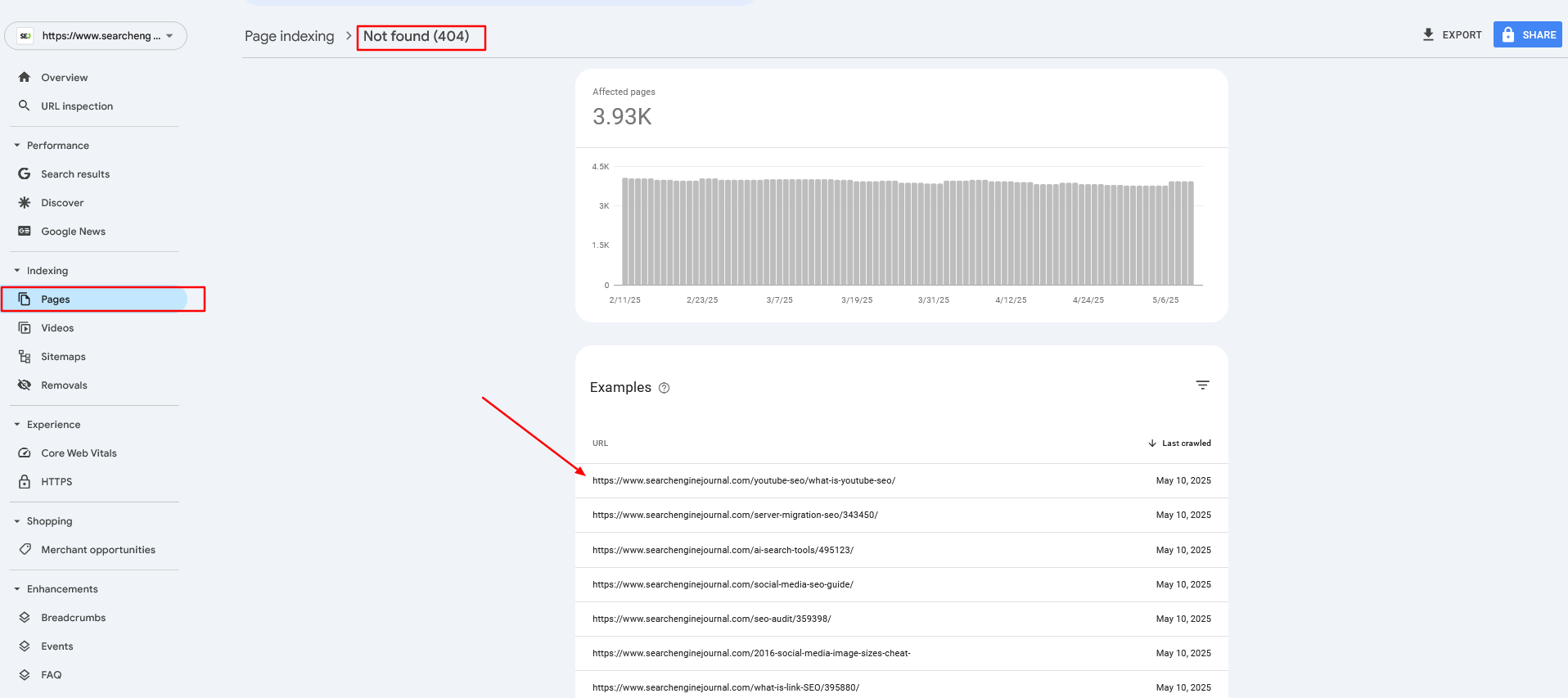
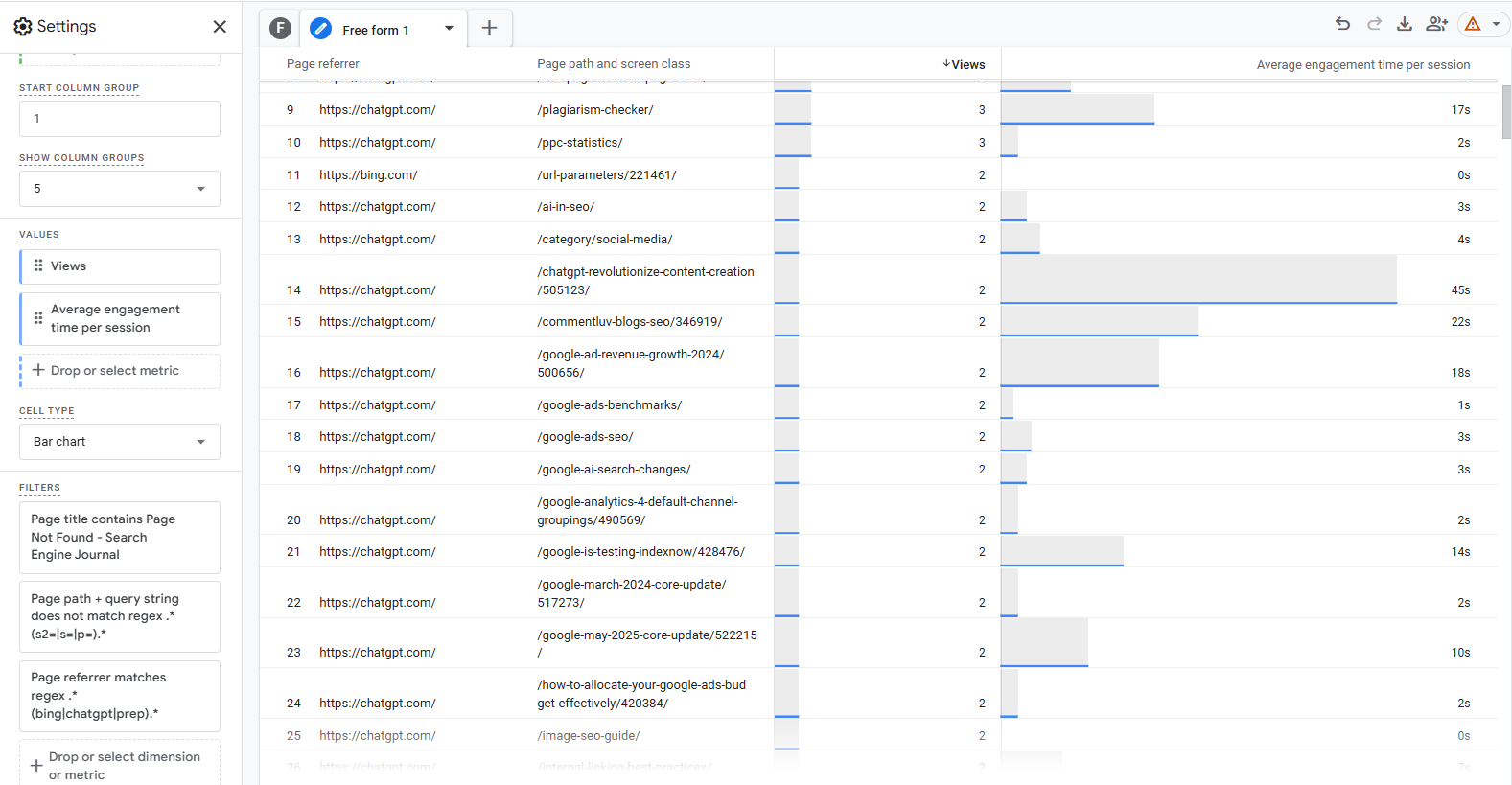
    At Search Engine Journal, we get many 404 links from AI chatbots because of hallucinations as they invent URLs that never existed.

    We use Google Analytics 4 and Google Search Console (and sometimes server logs) reports to extract those 404 pages and redirect them to the closest matching content based on article slug.

    When chatbots cite us via 404 pages, and people keep coming through broken links, it is not a good user experience.

    Prepare Redirect Candidates

    First of all, read this post to learn how to create a Pinecone vector database. (Please note that in this case, we used “primary_category” as a metadata key vs. “category.”)

    To make this work, we assume that all your article vectors are already stored in the “article-index-vertex” database.

    Prepare your redirect URLs in CSV format like in this sample file. That could be existing articles you’ve decided to prune or 404s from your search console reports or GA4.

    Sample file with urls to be redirectedSample file with URLs to be redirected (Screenshot from Google Sheet, May 2025)

    Optional “primary_category” information is metadata that exists with your articles’ Pinecone records when you created them and can be used to filter articles from the same category, enhancing accuracy further.

    In case the title is missing, for example, in 404 URLs, the script will extract slug words from the URL and use them as input.

    Generate Redirects Using Google Vertex AI

    Download your Google API service credentials and rename them as “config.json,” upload the script below and a sample file to the same directory in Jupyter Lab, and run it.

    
    import os
    import time
    import logging
    from urllib.parse import urlparse
    import re
    import pandas as pd
    from pandas.errors import EmptyDataError
    from typing import Optional, List, Dict, Any from google.auth import load_credentials_from_file
    from google.cloud import aiplatform
    from google.api_core.exceptions import GoogleAPIError from pinecone import Pinecone, PineconeException
    from vertexai.language_models import TextEmbeddingModel, TextEmbeddingInput # Import tenacity for retry mechanism. Tenacity provides a decorator to add retry logic
    # to functions, making them more robust against transient errors like network issues or API rate limits.
    from tenacity import retry, wait_exponential, stop_after_attempt, retry_if_exception_type # For clearing output in Jupyter (optional, keep if running in Jupyter).
    # This is useful for interactive environments to show progress without cluttering the output.
    from IPython.display import clear_output # ─── USER CONFIGURATION ───────────────────────────────────────────────────────
    # Define configurable parameters for the script. These can be easily adjusted
    # without modifying the core logic. INPUT_CSV = "redirect_candidates.csv" # Path to the input CSV file containing URLs to be redirected. # Expected columns: "URL", "Title", "primary_category".
    OUTPUT_CSV = "redirect_map.csv" # Path to the output CSV file where the generated redirect map will be saved.
    PINECONE_API_KEY = "YOUR_PINECONE_KEY" # Your API key for Pinecone. Replace with your actual key.
    PINECONE_INDEX_NAME = "article-index-vertex" # The name of the Pinecone index where article vectors are stored.
    GOOGLE_CRED_PATH = "config.json" # Path to your Google Cloud service account credentials JSON file.
    EMBEDDING_MODEL_ID = "text-embedding-005" # Identifier for the Vertex AI text embedding model to use.
    TASK_TYPE = "RETRIEVAL_QUERY" # The task type for the embedding model. Try with RETRIEVAL_DOCUMENT vs RETRIEVAL_QUERY to see the difference. # This influences how the embedding vector is generated for optimal retrieval.
    CANDIDATE_FETCH_COUNT = 3 # Number of potential redirect candidates to fetch from Pinecone for each input URL.
    TEST_MODE = True # If True, the script will process only a small subset of the input data (MAX_TEST_ROWS). # Useful for testing and debugging.
    MAX_TEST_ROWS = 5 # Maximum number of rows to process when TEST_MODE is True.
    QUERY_DELAY = 0.2 # Delay in seconds between successive API queries (to avoid hitting rate limits).
    PUBLISH_YEAR_FILTER: List[int] = [] # Optional: List of years to filter Pinecone results by 'publish_year' metadata. # If empty, no year filtering is applied.
    LOG_BATCH_SIZE = 5 # Number of URLs to process before flushing the results to the output CSV. # This helps in saving progress incrementally and managing memory.
    MIN_SLUG_LENGTH = 3 # Minimum length for a URL slug segment to be considered meaningful for embedding. # Shorter segments might be noise or less descriptive. # Retry configuration for API calls (Vertex AI and Pinecone).
    # These parameters control how the `tenacity` library retries failed API requests.
    MAX_RETRIES = 5 # Maximum number of times to retry an API call before giving up.
    INITIAL_RETRY_DELAY = 1 # Initial delay in seconds before the first retry. # Subsequent retries will have exponentially increasing delays. # ─── SETUP LOGGING ─────────────────────────────────────────────────────────────
    # Configure the logging system to output informational messages to the console.
    logging.basicConfig( level=logging.INFO, # Set the logging level to INFO, meaning INFO, WARNING, ERROR, CRITICAL messages will be shown. format="%(asctime)s %(levelname)s %(message)s" # Define the format of log messages (timestamp, level, message).
    ) # ─── INITIALIZE GOOGLE VERTEX AI ───────────────────────────────────────────────
    # Set the GOOGLE_APPLICATION_CREDENTIALS environment variable to point to the
    # service account key file. This allows the Google Cloud client libraries to
    # authenticate automatically.
    os.environ["GOOGLE_APPLICATION_CREDENTIALS"] = GOOGLE_CRED_PATH
    try: # Load credentials from the specified JSON file. credentials, project_id = load_credentials_from_file(GOOGLE_CRED_PATH) # Initialize the Vertex AI client with the project ID and credentials. # The location "us-central1" is specified for the AI Platform services. aiplatform.init(project=project_id, credentials=credentials, location="us-central1") logging.info("Vertex AI initialized.")
    except Exception as e: # Log an error if Vertex AI initialization fails and re-raise the exception # to stop script execution, as it's a critical dependency. logging.error(f"Failed to initialize Vertex AI: {e}") raise # Initialize the embedding model once globally.
    # This is a crucial optimization for "Resource Management for Embedding Model".
    # Loading the model takes time and resources; doing it once avoids repeated loading
    # for every URL processed, significantly improving performance.
    try: GLOBAL_EMBEDDING_MODEL = TextEmbeddingModel.from_pretrained(EMBEDDING_MODEL_ID) logging.info(f"Text Embedding Model '{EMBEDDING_MODEL_ID}' loaded.")
    except Exception as e: # Log an error if the embedding model fails to load and re-raise. # The script cannot proceed without the embedding model. logging.error(f"Failed to load Text Embedding Model: {e}") raise # ─── INITIALIZE PINECONE ──────────────────────────────────────────────────────
    # Initialize the Pinecone client and connect to the specified index.
    try: pinecone = Pinecone(api_key=PINECONE_API_KEY) index = pinecone.Index(PINECONE_INDEX_NAME) logging.info(f"Connected to Pinecone index '{PINECONE_INDEX_NAME}'.")
    except PineconeException as e: # Log an error if Pinecone initialization fails and re-raise. # Pinecone is a critical dependency for finding redirect candidates. logging.error(f"Pinecone init error: {e}") raise # ─── HELPERS ───────────────────────────────────────────────────────────────────
    def canonical_url(url: str) -> str: """ Converts a given URL into its canonical form by: 1. Stripping query strings (e.g., `?param=value`) and URL fragments (e.g., `#section`). 2. Handling URL-encoded fragment markers (`%23`). 3. Preserving the trailing slash if it was present in the original URL's path. This ensures consistency with the original site's URL structure. Args: url (str): The input URL. Returns: str: The canonicalized URL. """ # Remove query parameters and URL fragments. temp = url.split('?', 1)[0].split('#', 1)[0] # Check for URL-encoded fragment markers and remove them. enc_idx = temp.lower().find('%23') if enc_idx != -1: temp = temp[:enc_idx] # Determine if the original URL path ended with a trailing slash. has_slash = urlparse(temp).path.endswith('/') # Remove any trailing slash temporarily for consistent processing. temp = temp.rstrip('/') # Re-add the trailing slash if it was originally present. return temp + ('/' if has_slash else '') def slug_from_url(url: str) -> str: """ Extracts and joins meaningful, non-numeric path segments from a canonical URL to form a "slug" string. This slug can be used as text for embedding when a URL's title is not available. Args: url (str): The input URL. Returns: str: A hyphen-separated string of relevant slug parts. """ clean = canonical_url(url) # Get the canonical version of the URL. path = urlparse(clean).path # Extract the path component of the URL. segments = [seg for seg in path.split('/') if seg] # Split path into segments and remove empty ones. # Filter segments based on criteria: # - Not purely numeric (e.g., '123' is excluded). # - Length is greater than or equal to MIN_SLUG_LENGTH. # - Contains at least one alphanumeric character (to exclude purely special character segments). parts = [seg for seg in segments if not seg.isdigit() and len(seg) >= MIN_SLUG_LENGTH and re.search(r'[A-Za-z0-9]', seg)] return '-'.join(parts) # Join the filtered parts with hyphens. # ─── EMBEDDING GENERATION FUNCTION ─────────────────────────────────────────────
    # Apply retry mechanism for GoogleAPIError. This makes the embedding generation
    # more resilient to transient issues like network problems or Vertex AI rate limits.
    @retry( wait=wait_exponential(multiplier=INITIAL_RETRY_DELAY, min=1, max=10), # Exponential backoff for retries. stop=stop_after_attempt(MAX_RETRIES), # Stop retrying after a maximum number of attempts. retry=retry_if_exception_type(GoogleAPIError), # Only retry if a GoogleAPIError occurs. reraise=True # Re-raise the exception if all retries fail, allowing the calling function to handle it.
    )
    def generate_embedding(text: str) -> Optional[List[float]]: """ Generates a vector embedding for the given text using the globally initialized Vertex AI Text Embedding Model. Includes retry logic for API calls. Args: text (str): The input text (e.g., URL title or slug) to embed. Returns: Optional[List[float]]: A list of floats representing the embedding vector, or None if the input text is empty/whitespace or if an unexpected error occurs after retries. """ if not text or not text.strip(): # If the text is empty or only whitespace, no embedding can be generated. return None try: # Use the globally initialized model to get embeddings. # This is the "Resource Management for Embedding Model" optimization. inp = TextEmbeddingInput(text, task_type=TASK_TYPE) vectors = GLOBAL_EMBEDDING_MODEL.get_embeddings([inp], output_dimensionality=768) return vectors[0].values # Return the embedding vector (list of floats). except GoogleAPIError as e: # Log a warning if a GoogleAPIError occurs, then re-raise to trigger the `tenacity` retry mechanism. logging.warning(f"Vertex AI error during embedding generation (retrying): {e}") raise # The `reraise=True` in the decorator will catch this and retry. except Exception as e: # Catch any other unexpected exceptions during embedding generation. logging.error(f"Unexpected error generating embedding: {e}") return None # Return None for non-retryable or final failed attempts. # ─── MAIN PROCESSING FUNCTION ─────────────────────────────────────────────────
    def build_redirect_map( input_csv: str, output_csv: str, fetch_count: int, test_mode: bool
    ): """ Builds a redirect map by processing URLs from an input CSV, generating embeddings, querying Pinecone for similar articles, and identifying suitable redirect candidates. Args: input_csv (str): Path to the input CSV file. output_csv (str): Path to the output CSV file for the redirect map. fetch_count (int): Number of candidates to fetch from Pinecone. test_mode (bool): If True, process only a limited number of rows. """ # Read the input CSV file into a Pandas DataFrame. df = pd.read_csv(input_csv) required = {"URL", "Title", "primary_category"} # Validate that all required columns are present in the DataFrame. if not required.issubset(df.columns): raise ValueError(f"Input CSV must have columns: {required}") # Create a set of canonicalized input URLs for efficient lookup. # This is used to prevent an input URL from redirecting to itself or another input URL, # which could create redirect loops or redirect to a page that is also being redirected. input_urls = set(df["URL"].map(canonical_url)) start_idx = 0 # Implement resume functionality: if the output CSV already exists, # try to find the last processed URL and resume from the next row. if os.path.exists(output_csv): try: prev = pd.read_csv(output_csv) except EmptyDataError: # Handle case where the output CSV exists but is empty. prev = pd.DataFrame() if not prev.empty: # Get the last URL that was processed and written to the output file. last = prev["URL"].iloc[-1] # Find the index of this last URL in the original input DataFrame. idxs = df.index[df["URL"].map(canonical_url) == last].tolist() if idxs: # Set the starting index for processing to the row after the last processed URL. start_idx = idxs[0] + 1 logging.info(f"Resuming from row {start_idx} after {last}.") # Determine the range of rows to process based on test_mode. if test_mode: end_idx = min(start_idx + MAX_TEST_ROWS, len(df)) df_proc = df.iloc[start_idx:end_idx] # Select a slice of the DataFrame for testing. logging.info(f"Test mode: processing rows {start_idx} to {end_idx-1}.") else: df_proc = df.iloc[start_idx:] # Process all remaining rows. logging.info(f"Processing rows {start_idx} to {len(df)-1}.") total = len(df_proc) # Total number of URLs to process in this run. processed = 0 # Counter for successfully processed URLs. batch: List[Dict[str, Any]] = [] # List to store results before flushing to CSV. # Iterate over each row (URL) in the DataFrame slice to be processed. for _, row in df_proc.iterrows(): raw_url = row["URL"] # Original URL from the input CSV. url = canonical_url(raw_url) # Canonicalized version of the URL. # Get title and category, handling potential missing values by defaulting to empty strings. title = row["Title"] if isinstance(row["Title"], str) else "" category = row["primary_category"] if isinstance(row["primary_category"], str) else "" # Determine the text to use for generating the embedding. # Prioritize the 'Title' if available, otherwise use a slug derived from the URL. if title.strip(): text = title else: slug = slug_from_url(raw_url) if not slug: # If no meaningful slug can be extracted, skip this URL. logging.info(f"Skipping {raw_url}: insufficient slug context for embedding.") continue text = slug.replace('-', ' ') # Prepare slug for embedding by replacing hyphens with spaces. # Attempt to generate the embedding for the chosen text. # This call is wrapped in a try-except block to catch final failures after retries. try: embedding = generate_embedding(text) except GoogleAPIError as e: # If embedding generation fails even after retries, log the error and skip this URL. logging.error(f"Failed to generate embedding for {raw_url} after {MAX_RETRIES} retries: {e}") continue # Move to the next URL. if not embedding: # If `generate_embedding` returned None (e.g., empty text or unexpected error), skip. logging.info(f"Skipping {raw_url}: no embedding generated.") continue # Build metadata filter for Pinecone query. # This helps narrow down search results to more relevant candidates (e.g., by category or publish year). filt: Dict[str, Any] = {} if category: # Split category string by comma and strip whitespace for multiple categories. cats = [c.strip() for c in category.split(",") if c.strip()] if cats: filt["primary_category"] = {"$in": cats} # Filter by categories present in Pinecone metadata. if PUBLISH_YEAR_FILTER: filt["publish_year"] = {"$in": PUBLISH_YEAR_FILTER} # Filter by specified publish years. filt["id"] = {"$ne": url} # Exclude the current URL itself from the search results to prevent self-redirects. # Define a nested function for Pinecone query with retry mechanism. # This ensures that Pinecone queries are also robust against transient errors. @retry( wait=wait_exponential(multiplier=INITIAL_RETRY_DELAY, min=1, max=10), stop=stop_after_attempt(MAX_RETRIES), retry=retry_if_exception_type(PineconeException), # Only retry if a PineconeException occurs. reraise=True # Re-raise the exception if all retries fail. ) def query_pinecone_with_retry(embedding_vector, top_k_count, pinecone_filter): """ Performs a Pinecone index query with retry logic. """ return index.query( vector=embedding_vector, top_k=top_k_count, include_values=False, # We don't need the actual vector values in the response. include_metadata=False, # We don't need the metadata in the response for this logic. filter=pinecone_filter # Apply the constructed metadata filter. ) # Attempt to query Pinecone for redirect candidates. try: res = query_pinecone_with_retry(embedding, fetch_count, filt) except PineconeException as e: # If Pinecone query fails after retries, log the error and skip this URL. logging.error(f"Failed to query Pinecone for {raw_url} after {MAX_RETRIES} retries: {e}") continue # Move to the next URL. candidate = None # Initialize redirect candidate to None. score = None # Initialize relevance score to None. # Iterate through the Pinecone query results (matches) to find a suitable candidate. for m in res.get("matches", []): cid = m.get("id") # Get the ID (URL) of the matched document in Pinecone. # A candidate is suitable if: # 1. It exists (cid is not None). # 2. It's not the original URL itself (to prevent self-redirects). # 3. It's not another URL from the input_urls set (to prevent redirecting to a page that's also being redirected). if cid and cid != url and cid not in input_urls: candidate = cid # Assign the first valid candidate found. score = m.get("score") # Get the relevance score of this candidate. break # Stop after finding the first suitable candidate (Pinecone returns by relevance). # Append the results for the current URL to the batch. batch.append({"URL": url, "Redirect Candidate": candidate, "Relevance Score": score}) processed += 1 # Increment the counter for processed URLs. msg = f"Mapped {url} → {candidate}" if score is not None: msg += f" ({score:.4f})" # Add score to log message if available. logging.info(msg) # Log the mapping result. # Periodically flush the batch results to the output CSV. if processed % LOG_BATCH_SIZE == 0: out_df = pd.DataFrame(batch) # Convert the current batch to a DataFrame. # Determine file mode: 'a' (append) if file exists, 'w' (write) if new. mode = 'a' if os.path.exists(output_csv) else 'w' # Determine if header should be written (only for new files). header = not os.path.exists(output_csv) # Write the batch to the CSV. out_df.to_csv(output_csv, mode=mode, header=header, index=False) batch.clear() # Clear the batch after writing to free memory. if not test_mode: # clear_output(wait=True) # Uncomment if running in Jupyter and want to clear output clear_output(wait=True) print(f"Progress: {processed} / {total}") # Print progress update. time.sleep(QUERY_DELAY) # Pause for a short delay to avoid overwhelming APIs. # After the loop, write any remaining items in the batch to the output CSV. if batch: out_df = pd.DataFrame(batch) mode = 'a' if os.path.exists(output_csv) else 'w' header = not os.path.exists(output_csv) out_df.to_csv(output_csv, mode=mode, header=header, index=False) logging.info(f"Completed. Total processed: {processed}") # Log completion message. if __name__ == "__main__": # This block ensures that build_redirect_map is called only when the script is executed directly. # It passes the user-defined configuration parameters to the main function. build_redirect_map(INPUT_CSV, OUTPUT_CSV, CANDIDATE_FETCH_COUNT, TEST_MODE)
    

    You will see a test run with only five records, and you will see a new file called “redirect_map.csv,” which contains redirect suggestions.

    Once you ensure the code runs smoothly, you can set the TEST_MODE  boolean to true False and run the script for all your URLs.

    Test run with only 5 recordsTest run with only five records (Image from author, May 2025)

    If the code stops and you resume, it picks up where it left off. It also checks each redirect it finds against the CSV file.

    This check prevents selecting a database URL on the pruned list. Selecting such a URL could cause an infinite redirect loop.

    For our sample URLs, the output is shown below.

    Redirect candidates using Google Vertex AI's task type RETRIEVAL_QUERYRedirect candidates using Google Vertex AI’s task type RETRIEVAL_QUERY (Image from author, May 2025)

    We can now take this redirect map and import it into our redirect manager in the content management system (CMS), and that’s it!

    You can see how it managed to match the outdated 2013 news article “YouTube Retiring Video Responses on September 12” to the newer, highly relevant 2022 news article “YouTube Adopts Feature From TikTok – Reply To Comments With A Video.”

    Also for “/what-is-eat/,” it found a match with “/google-eat/what-is-it/,” which is a 100% perfect match.

    This is not just due to the power of Google Vertex LLM quality, but also the result of choosing the right parameters.

    When I use “RETRIEVAL_DOCUMENT” as the task type when generating query vector embeddings for the YouTube news article shown above, it matches “YouTube Expands Community Posts to More Creators,” which is still relevant but not as good a match as the other one.

    For “/what-is-eat/,” it matches the article “/reimagining-eeat-to-drive-higher-sales-and-search-visibility/545790/,” which is not as good as “/google-eat/what-is-it/.”

    If you wanted to find redirect matches from your fresh articles pool, you can query Pinecone with one additional metadata filter, “publish_year,” if you have that metadata field in your Pinecone records, which I highly recommend creating.

    In the code, it is a PUBLISH_YEAR_FILTER variable.

    If you have publish_year metadata, you can set the years as array values, and it will pull articles published in the specified years.

    Generate Redirects Using OpenAI’s Text Embeddings

    Let’s do the same task with OpenAI’s “text-embedding-ada-002” model. The purpose is to show the difference in output from Google Vertex AI.

    Simply create a new notebook file in the same directory, copy and paste this code, and run it.

    
    import os
    import time
    import logging
    from urllib.parse import urlparse
    import re import pandas as pd
    from pandas.errors import EmptyDataError
    from typing import Optional, List, Dict, Any from openai import OpenAI
    from pinecone import Pinecone, PineconeException # Import tenacity for retry mechanism. Tenacity provides a decorator to add retry logic
    # to functions, making them more robust against transient errors like network issues or API rate limits.
    from tenacity import retry, wait_exponential, stop_after_attempt, retry_if_exception_type # For clearing output in Jupyter (optional, keep if running in Jupyter)
    from IPython.display import clear_output # ─── USER CONFIGURATION ───────────────────────────────────────────────────────
    # Define configurable parameters for the script. These can be easily adjusted
    # without modifying the core logic. INPUT_CSV = "redirect_candidates.csv" # Path to the input CSV file containing URLs to be redirected. # Expected columns: "URL", "Title", "primary_category".
    OUTPUT_CSV = "redirect_map.csv" # Path to the output CSV file where the generated redirect map will be saved.
    PINECONE_API_KEY = "YOUR_PINECONE_API_KEY" # Your API key for Pinecone. Replace with your actual key.
    PINECONE_INDEX_NAME = "article-index-ada" # The name of the Pinecone index where article vectors are stored.
    OPENAI_API_KEY = "YOUR_OPENAI_API_KEY" # Your API key for OpenAI. Replace with your actual key.
    OPENAI_EMBEDDING_MODEL_ID = "text-embedding-ada-002" # Identifier for the OpenAI text embedding model to use.
    CANDIDATE_FETCH_COUNT = 3 # Number of potential redirect candidates to fetch from Pinecone for each input URL.
    TEST_MODE = True # If True, the script will process only a small subset of the input data (MAX_TEST_ROWS). # Useful for testing and debugging.
    MAX_TEST_ROWS = 5 # Maximum number of rows to process when TEST_MODE is True.
    QUERY_DELAY = 0.2 # Delay in seconds between successive API queries (to avoid hitting rate limits).
    PUBLISH_YEAR_FILTER: List[int] = [] # Optional: List of years to filter Pinecone results by 'publish_year' metadata eg. [2024,2025]. # If empty, no year filtering is applied.
    LOG_BATCH_SIZE = 5 # Number of URLs to process before flushing the results to the output CSV. # This helps in saving progress incrementally and managing memory.
    MIN_SLUG_LENGTH = 3 # Minimum length for a URL slug segment to be considered meaningful for embedding. # Shorter segments might be noise or less descriptive. # Retry configuration for API calls (OpenAI and Pinecone).
    # These parameters control how the `tenacity` library retries failed API requests.
    MAX_RETRIES = 5 # Maximum number of times to retry an API call before giving up.
    INITIAL_RETRY_DELAY = 1 # Initial delay in seconds before the first retry. # Subsequent retries will have exponentially increasing delays. # ─── SETUP LOGGING ─────────────────────────────────────────────────────────────
    # Configure the logging system to output informational messages to the console.
    logging.basicConfig( level=logging.INFO, # Set the logging level to INFO, meaning INFO, WARNING, ERROR, CRITICAL messages will be shown. format="%(asctime)s %(levelname)s %(message)s" # Define the format of log messages (timestamp, level, message).
    ) # ─── INITIALIZE OPENAI CLIENT & PINECONE ───────────────────────────────────────
    # Initialize the OpenAI client once globally. This handles resource management efficiently
    # as the client object manages connections and authentication.
    client = OpenAI(api_key=OPENAI_API_KEY)
    try: # Initialize the Pinecone client and connect to the specified index. pinecone = Pinecone(api_key=PINECONE_API_KEY) index = pinecone.Index(PINECONE_INDEX_NAME) logging.info(f"Connected to Pinecone index '{PINECONE_INDEX_NAME}'.")
    except PineconeException as e: # Log an error if Pinecone initialization fails and re-raise. # Pinecone is a critical dependency for finding redirect candidates. logging.error(f"Pinecone init error: {e}") raise # ─── HELPERS ───────────────────────────────────────────────────────────────────
    def canonical_url(url: str) -> str: """ Converts a given URL into its canonical form by: 1. Stripping query strings (e.g., `?param=value`) and URL fragments (e.g., `#section`). 2. Handling URL-encoded fragment markers (`%23`). 3. Preserving the trailing slash if it was present in the original URL's path. This ensures consistency with the original site's URL structure. Args: url (str): The input URL. Returns: str: The canonicalized URL. """ # Remove query parameters and URL fragments. temp = url.split('?', 1)[0] temp = temp.split('#', 1)[0] # Check for URL-encoded fragment markers and remove them. enc_idx = temp.lower().find('%23') if enc_idx != -1: temp = temp[:enc_idx] # Determine if the original URL path ended with a trailing slash. preserve_slash = temp.endswith('/') # Strip trailing slash if not originally present. if not preserve_slash: temp = temp.rstrip('/') return temp def slug_from_url(url: str) -> str: """ Extracts and joins meaningful, non-numeric path segments from a canonical URL to form a "slug" string. This slug can be used as text for embedding when a URL's title is not available. Args: url (str): The input URL. Returns: str: A hyphen-separated string of relevant slug parts. """ clean = canonical_url(url) # Get the canonical version of the URL. path = urlparse(clean).path # Extract the path component of the URL. segments = [seg for seg in path.split('/') if seg] # Split path into segments and remove empty ones. # Filter segments based on criteria: # - Not purely numeric (e.g., '123' is excluded). # - Length is greater than or equal to MIN_SLUG_LENGTH. # - Contains at least one alphanumeric character (to exclude purely special character segments). parts = [seg for seg in segments if not seg.isdigit() and len(seg) >= MIN_SLUG_LENGTH and re.search(r'[A-Za-z0-9]', seg)] return '-'.join(parts) # Join the filtered parts with hyphens. # ─── EMBEDDING GENERATION FUNCTION ─────────────────────────────────────────────
    # Apply retry mechanism for OpenAI API errors. This makes the embedding generation
    # more resilient to transient issues like network problems or API rate limits.
    @retry( wait=wait_exponential(multiplier=INITIAL_RETRY_DELAY, min=1, max=10), # Exponential backoff for retries. stop=stop_after_attempt(MAX_RETRIES), # Stop retrying after a maximum number of attempts. retry=retry_if_exception_type(Exception), # Retry on any Exception from OpenAI client (can be refined to openai.APIError if desired). reraise=True # Re-raise the exception if all retries fail, allowing the calling function to handle it.
    )
    def generate_embedding(text: str) -> Optional[List[float]]: """ Generate a vector embedding for the given text using OpenAI's text-embedding-ada-002 via the globally initialized OpenAI client. Includes retry logic for API calls. Args: text (str): The input text (e.g., URL title or slug) to embed. Returns: Optional[List[float]]: A list of floats representing the embedding vector, or None if the input text is empty/whitespace or if an unexpected error occurs after retries. """ if not text or not text.strip(): # If the text is empty or only whitespace, no embedding can be generated. return None try: resp = client.embeddings.create( # Use the globally initialized OpenAI client to get embeddings. model=OPENAI_EMBEDDING_MODEL_ID, input=text ) return resp.data[0].embedding # Return the embedding vector (list of floats). except Exception as e: # Log a warning if an OpenAI error occurs, then re-raise to trigger the `tenacity` retry mechanism. logging.warning(f"OpenAI embedding error (retrying): {e}") raise # The `reraise=True` in the decorator will catch this and retry. # ─── MAIN PROCESSING FUNCTION ─────────────────────────────────────────────────
    def build_redirect_map( input_csv: str, output_csv: str, fetch_count: int, test_mode: bool
    ): """ Builds a redirect map by processing URLs from an input CSV, generating embeddings, querying Pinecone for similar articles, and identifying suitable redirect candidates. Args: input_csv (str): Path to the input CSV file. output_csv (str): Path to the output CSV file for the redirect map. fetch_count (int): Number of candidates to fetch from Pinecone. test_mode (bool): If True, process only a limited number of rows. """ # Read the input CSV file into a Pandas DataFrame. df = pd.read_csv(input_csv) required = {"URL", "Title", "primary_category"} # Validate that all required columns are present in the DataFrame. if not required.issubset(df.columns): raise ValueError(f"Input CSV must have columns: {required}") # Create a set of canonicalized input URLs for efficient lookup. # This is used to prevent an input URL from redirecting to itself or another input URL, # which could create redirect loops or redirect to a page that is also being redirected. input_urls = set(df["URL"].map(canonical_url)) start_idx = 0 # Implement resume functionality: if the output CSV already exists, # try to find the last processed URL and resume from the next row. if os.path.exists(output_csv): try: prev = pd.read_csv(output_csv) except EmptyDataError: # Handle case where the output CSV exists but is empty. prev = pd.DataFrame() if not prev.empty: # Get the last URL that was processed and written to the output file. last = prev["URL"].iloc[-1] # Find the index of this last URL in the original input DataFrame. idxs = df.index[df["URL"].map(canonical_url) == last].tolist() if idxs: # Set the starting index for processing to the row after the last processed URL. start_idx = idxs[0] + 1 logging.info(f"Resuming from row {start_idx} after {last}.") # Determine the range of rows to process based on test_mode. if test_mode: end_idx = min(start_idx + MAX_TEST_ROWS, len(df)) df_proc = df.iloc[start_idx:end_idx] # Select a slice of the DataFrame for testing. logging.info(f"Test mode: processing rows {start_idx} to {end_idx-1}.") else: df_proc = df.iloc[start_idx:] # Process all remaining rows. logging.info(f"Processing rows {start_idx} to {len(df)-1}.") total = len(df_proc) # Total number of URLs to process in this run. processed = 0 # Counter for successfully processed URLs. batch: List[Dict[str, Any]] = [] # List to store results before flushing to CSV. # Iterate over each row (URL) in the DataFrame slice to be processed. for _, row in df_proc.iterrows(): raw_url = row["URL"] # Original URL from the input CSV. url = canonical_url(raw_url) # Canonicalized version of the URL. # Get title and category, handling potential missing values by defaulting to empty strings. title = row["Title"] if isinstance(row["Title"], str) else "" category = row["primary_category"] if isinstance(row["primary_category"], str) else "" # Determine the text to use for generating the embedding. # Prioritize the 'Title' if available, otherwise use a slug derived from the URL. if title.strip(): text = title else: raw_slug = slug_from_url(raw_url) if not raw_slug or len(raw_slug) < MIN_SLUG_LENGTH: # If no meaningful slug can be extracted, skip this URL. logging.info(f"Skipping {raw_url}: insufficient slug context.") continue text = raw_slug.replace('-', ' ').replace('_', ' ') # Prepare slug for embedding by replacing hyphens with spaces. # Attempt to generate the embedding for the chosen text. # This call is wrapped in a try-except block to catch final failures after retries. try: embedding = generate_embedding(text) except Exception as e: # Catch any exception from generate_embedding after all retries. # If embedding generation fails even after retries, log the error and skip this URL. logging.error(f"Failed to generate embedding for {raw_url} after {MAX_RETRIES} retries: {e}") continue # Move to the next URL. if not embedding: # If `generate_embedding` returned None (e.g., empty text or unexpected error), skip. logging.info(f"Skipping {raw_url}: no embedding.") continue # Build metadata filter for Pinecone query. # This helps narrow down search results to more relevant candidates (e.g., by category or publish year). filt: Dict[str, Any] = {} if category: # Split category string by comma and strip whitespace for multiple categories. cats = [c.strip() for c in category.split(",") if c.strip()] if cats: filt["primary_category"] = {"$in": cats} # Filter by categories present in Pinecone metadata. if PUBLISH_YEAR_FILTER: filt["publish_year"] = {"$in": PUBLISH_YEAR_FILTER} # Filter by specified publish years. filt["id"] = {"$ne": url} # Exclude the current URL itself from the search results to prevent self-redirects. # Define a nested function for Pinecone query with retry mechanism. # This ensures that Pinecone queries are also robust against transient errors. @retry( wait=wait_exponential(multiplier=INITIAL_RETRY_DELAY, min=1, max=10), stop=stop_after_attempt(MAX_RETRIES), retry=retry_if_exception_type(PineconeException), # Only retry if a PineconeException occurs. reraise=True # Re-raise the exception if all retries fail. ) def query_pinecone_with_retry(embedding_vector, top_k_count, pinecone_filter): """ Performs a Pinecone index query with retry logic. """ return index.query( vector=embedding_vector, top_k=top_k_count, include_values=False, # We don't need the actual vector values in the response. include_metadata=False, # We don't need the metadata in the response for this logic. filter=pinecone_filter # Apply the constructed metadata filter. ) # Attempt to query Pinecone for redirect candidates. try: res = query_pinecone_with_retry(embedding, fetch_count, filt) except PineconeException as e: # If Pinecone query fails after retries, log the error and skip this URL. logging.error(f"Failed to query Pinecone for {raw_url} after {MAX_RETRIES} retries: {e}") continue candidate = None # Initialize redirect candidate to None. score = None # Initialize relevance score to None. # Iterate through the Pinecone query results (matches) to find a suitable candidate. for m in res.get("matches", []): cid = m.get("id") # Get the ID (URL) of the matched document in Pinecone. # A candidate is suitable if: # 1. It exists (cid is not None). # 2. It's not the original URL itself (to prevent self-redirects). # 3. It's not another URL from the input_urls set (to prevent redirecting to a page that's also being redirected). if cid and cid != url and cid not in input_urls: candidate = cid # Assign the first valid candidate found. score = m.get("score") # Get the relevance score of this candidate. break # Stop after finding the first suitable candidate (Pinecone returns by relevance). # Append the results for the current URL to the batch. batch.append({"URL": url, "Redirect Candidate": candidate, "Relevance Score": score}) processed += 1 # Increment the counter for processed URLs. msg = f"Mapped {url} → {candidate}" if score is not None: msg += f" ({score:.4f})" # Add score to log message if available. logging.info(msg) # Log the mapping result. # Periodically flush the batch results to the output CSV. if processed % LOG_BATCH_SIZE == 0: out_df = pd.DataFrame(batch) # Convert the current batch to a DataFrame. # Determine file mode: 'a' (append) if file exists, 'w' (write) if new. mode = 'a' if os.path.exists(output_csv) else 'w' # Determine if header should be written (only for new files). header = not os.path.exists(output_csv) # Write the batch to the CSV. out_df.to_csv(output_csv, mode=mode, header=header, index=False) batch.clear() # Clear the batch after writing to free memory. if not test_mode: clear_output(wait=True) # Clear output in Jupyter for cleaner progress display. print(f"Progress: {processed} / {total}") # Print progress update. time.sleep(QUERY_DELAY) # Pause for a short delay to avoid overwhelming APIs. # After the loop, write any remaining items in the batch to the output CSV. if batch: out_df = pd.DataFrame(batch) mode = 'a' if os.path.exists(output_csv) else 'w' header = not os.path.exists(output_csv) out_df.to_csv(output_csv, mode=mode, header=header, index=False) logging.info(f"Completed. Total processed: {processed}") # Log completion message. if __name__ == "__main__": # This block ensures that build_redirect_map is called only when the script is executed directly. # It passes the user-defined configuration parameters to the main function. build_redirect_map(INPUT_CSV, OUTPUT_CSV, CANDIDATE_FETCH_COUNT, TEST_MODE)
    

    While the quality of the output may be considered satisfactory, it falls short of the quality observed with Google Vertex AI.

    Below in the table, you can see the difference in output quality.

    URL Google Vertex Open AI
    /what-is-eat/ /google-eat/what-is-it/ /5-things-you-can-do-right-now-to-improve-your-eat-for-google/408423/
    /local-seo-for-lawyers/ /law-firm-seo/what-is-law-firm-seo/ /legal-seo-conference-exclusively-for-lawyers-spa/528149/

    When it comes to SEO, even though Google Vertex AI is three times more expensive than OpenAI’s model, I prefer to use Vertex.

    The quality of the results is significantly higher. While you may incur a greater cost per unit of text processed, you benefit from the superior output quality, which directly saves valuable time on reviewing and validating the results.

    From my experience, it costs about $0.04 to process 20,000 URLs using Google Vertex AI.

    While it’s said to be more expensive, it’s still ridiculously cheap, and you shouldn’t worry if you’re dealing with tasks involving a few thousand URLs.

    In the case of processing 1 million URLs, the projected price would be approximately $2.

    If you still want a free method, use BERT and Llama models from Hugging Face to generate vector embeddings without paying a per-API-call fee.

    The real cost comes from the compute power needed to run the models, and you must generate vector embeddings of all your articles in Pinecone or any other vector database using those models if you will be querying using vectors generated from BERT or Llama.

    In Summary: AI Is Your Powerful Ally

    AI enables you to scale your SEO or marketing efforts and automate the most tedious tasks.

    This doesn’t replace your expertise. It’s designed to level up your skills and equip you to face challenges with greater capability, making the process more engaging and fun.

    Mastering these tools is essential for success. I’m passionate about writing about this topic to help beginners learn and feel inspired.

    As we move forward in this series, we will explore how to use Google Vertex AI for building an internal linking WordPress plugin.

    More Resources: 


    Featured Image: BestForBest/Shutterstock

    https://www.searchenginejournal.com/how-to-use-llms-for-301-redirects-at-scale/546159/


    Google Discover, AI Mode, And What It Means For Publishers: Interview With John Shehata via @sejournal, @theshelleywalsh

    With the introduction of AI Overviews and ongoing Google updates, it’s been a challenging few years for news publishers, and the announcement that Google Discover will now appear on desktop was welcome.

    However, the latest announcement of AI Mode could mean that users move away from the traditional search tab, and so the salvation of Discover might not be enough.

    To get more insight into the state of SEO for new publishers, I spoke with John Shehata, a leading expert in Discover, digital audience development, and news SEO.

    Shehata is the founder of NewzDash and brings over 25 years of experience, including executive roles at Condé Nast (Vogue, New Yorker, GQ, etc.).

    In our conversation, we explore the implications of Google Discover launching on desktop, which could potentially bring back some lost traffic, and the emergence of AI Mode in search interfaces.

    We also talk about AI becoming the gatekeeper of SERPs and John offers his advice for how brands and publishers can navigate this.

    You can watch the full video here and find the full transcript below:

    [embedded content]

    IMHO: Google Discover, AI, And What It Means For Publishers [Transcript]

    Shelley Walsh: John, please tell me, in your opinion, how much traffic for news publishers do you think has been impacted by AIO?

    John: In general, there are so many studies showing that sites are losing anywhere from 25 to 32% of all their traffic because of the new AI Overviews.

    There is no specific study done yet for news publishers, so we are working on that right now.

    In the past, we did an analysis about a year ago where we found that about 4% of all the news queries generate an AI Overview. That was like a year ago.

    We are integrating a new feature in NewzDash where we actually track AI Overview for every news query as it trends immediately, and we will see. But the highest penetration we saw of AI Overview was in health and business.

    Health was like 26% of all the news queries generated AI Overview. I think business, I can’t remember specifically, but it was like 8% or something. For big trending news, it was very, very small.

    So, in a couple of months, we will have very solid data, but based on the study that I did a year ago, it’s not as integrated for news queries, except for specific verticals.

    But overall, right now, the studies show there’s about a loss of anywhere from 25 to 32% of their traffic.

    Can Google Discover Make Up The Loss?

    Shelley: I know from my own experience as well that publishers are being really hammered quite hard, obviously not just by AIO but also the many wonderful Google updates that we’ve been blessed with over the last 18 months as well. I just pulled some stats while I was doing some research for our chat.

    You said that Google Discover is already the No. 1 traffic source for most news publishers, sometimes accounting for up to 60% of their total Google traffic.

    And based on current traffic splits of 90% mobile and 10% desktop, this update could generate an estimated 10-15% of additional Discover traffic for publishers.

    Do you think that Discover can actually replace all this traffic that has been lost by AIO? And do you think Discover is enough of a strategy for publishers to go all in on and for them to survive in this climate?

    John: Yeah, this is a great question. I have this conspiracy theory that Google is sending more traffic through Discover to publishers as they are taking away traffic from search.

    It’s like, “You know what? Don’t get so sad about this. Just focus here: Discover, Discover, Discover.” Okay? And I could be completely wrong.

    “The challenge is [that] Google Discover is very unreliable, but at the same time, it’s addictive. Publishers have seen 50-60% of their traffic coming through Discover.”

    I think publishers are slowly forgetting about search and focusing more on Discover, which, in my opinion, is a very dangerous approach.

    “I think Google Discover is more like a channel, not a strategy. So, the focus always should be on the content, regardless of what channel you’re pushing your content into – social, Discover, search, and so on.”

    I believe that Discover is an extension of search. So, even if search is driving less traffic and Discover is driving more and more traffic, if you lose your status in search, eventually you will lose your traffic in Discover – and I have seen that.

    We work with some clients where they went like very social-heavy or Discover-heavy kind of approach, you know – clicky headlines, short articles, publish the next one and the next one.

    Within six months, they lost all their search traffic. They lost their Discover traffic, and [they] no longer appear in News.

    So, Google went to a certain point where it started evaluating, “Okay, this publisher is not a news publisher anymore.”

    So, it’s a word of caution.

    You should not get addicted to Google Discover. It’s not a long-term strategy. Squeeze every visit you can get from Google Discover as much as you can, but remember, all the traffic can go away overnight for no specific reason.

    We have so many complaints from Brazil and other countries, where people in April, like big, very big sites, lost all their traffic, and nothing changed in their technical, nothing changed in their editorial.

    So, it’s not a strategy; it’s just a tactic for a short-term period of time. Utilize it as much as you can. I would think the correct strategy is to diversify.

    Right now, Google is like 80% of publishers’ traffic, including search, Discover, and so on.

    And it’s hard to find other sources because social [media] has kept diminishing over the years. Like Facebook, [it] only retains traffic on Facebook. They try as best as they can. LinkedIn, Twitter, and so on.

    So, I think newsletters are very, very important, even if they’re not sexy or they won’t drive 80% [of] other partnerships, you know, and so on.

    I think publishers need to seriously consider how they diversify their content, their traffic, and their revenue streams.

    The Rise Of AI Mode

    Shelley: Just shifting gears, I just wanted to have a chat with you about AI Mode. I picked up something you said recently on LinkedIn.

    You said that AI Mode could soon become the default view, and when that happens, expect more impressions and much fewer clicks.

    So on that basis, how do you expect the SERPs to evolve over the next year, obviously bearing in mind that publishers do still need to focus on SERPs?

    John: If you think about the evolution of SERPs, we used to have the thin blue links, and then Google recognized that that’s not enough, so they created the universal search for us, where you can have all the different elements.

    And that was not enough, so it started introducing featured snippets and direct answers. It’s all about the user at the end of the day.

    And with the explosion of LLM models and ChatGPT, Perplexity, and all this stuff, and the huge adoption of users over the last 12 months, Google started introducing more and more AI.

    It started with SGE and evolved to AI Overview, and recently, it launched AI Mode.

    And if you listen to Sundar from Google, you hear the message is very clear: This is the future of search. AI is the future of search. It’s going to be integrated into every product and search. This is going to be very dominant and so on.

    I believe right now they are testing the waters, to see how people interact with AI Overviews. How many of them will switch to AI Mode? Are they satisfied with the single summary of an answer?

    And if they want to dig more, they can go to the citations or the reference sites, and so on.

    I don’t know when AI Mode will become dominant, but if you think, if you go to Perplexity’s interface and how you search, it’s like it’s a mix between AI and results.

    If you go to ChatGPT and so on, I think eventually, maybe sooner or later, this is going to be the new interface for how we deal with search engines and generative engines as well.

    From all that we see, so I don’t know when, but I think eventually, we’re going to see it soon, especially knowing that Gen Z doesn’t do much search. It’s more conversational.

    So, I think we’re going to see it soon. I don’t know when, but I think they are testing right now how users are interacting with AI Mode and AI Overviews to determine what are the next steps.

    Visibility, Not Traffic, Is The New Metric

    Shelley: I also picked up something else you said as well, which was [that] AI becomes the gatekeeper of SERPs.

    So, considering that LLMs are not going to go away, AI Mode is not going to go away, how are you tackling this with the brands that you advise?

    John: Yesterday, I had a long meeting with one of our clients, and we were talking about all these different things.

    And I advised them [that] the first step is they need to start tracking, and then analyze, and then react. Because I think reacting without having enough data – what is the impact of AI on their platform, on their sites, and traffic – and traffic cannot be the only metric.

    For generations now, it’s like, “How much traffic I’m getting?” This has to change.

    Because in the new world, we will get less traffic. So, for publishers that solely depend on traffic, this is going to be a problem.

    You can measure your transactions or conversions regardless of whether you get traffic or not.

    ChatGPT is doing an integration with Shopify, you know.

    Google AI Overview has direct links where you can shop through Google or through different sites. So, it doesn’t have to go through a site and then shop, and so on.

    I think you have to track and analyze where you’re losing your traffic.

    For publishers, are these verticals that you need to focus on or not? You need to track your visibility.

    So now, more and more people are searching for news. I shared something on LinkedIn yesterday: If a user said, “Met Gala 2025,” Google will show the top stories and all the news and stuff like this.

    But if you slightly change your query to say “What happened at Met Gala? What happened between Trump and Zelensky? What happened in that specific moment or event?”

    Google now identifies that you don’t want to read a lot of stories to understand what happened. You want a summary.

    It’s like, “Okay, yesterday this is what happened. That was the theme. These are the big moments,” and so on, and it gives you references to dive deeper.

    More and more users will be like, “Just tell me the summary of what happened.” And that’s why we’re going to see less and less impressions back to the sites.

    And I think also schema is going to be more and more important [in] how ChatGPT finds your content. I think more and more publishers will have direct relationships or direct deals with different LLMs.

    I think ChatGPT and other LLMs need to pay publishers for the content that they consume, either for the training data or for grounded data like search data that they retrieve.

    I think there needs to be some kind of an exchange or revenue stream that should be an additional revenue stream for publishers.

    Prioritize Analysis Over Commodity News

    Shelley: That’s the massive issue, isn’t it? That news publishers are working very hard to produce high-quality breaking news content, and the LLMs are just trading off that.

    If they’re just going to be creating their summaries, it does take us back, I suppose, to the very early days of Google when everybody complained that Google was doing exactly the same.

    Do you think news publishers need to change their strategy and the content they actually produce? Is that even possible?

    John: I think they need to focus on content that adds value and adds more information to the user. And this doesn’t apply to every publisher because some publishers are just reporting on what happened in the news. “This celebrity did that over there.”

    This kind of news is probably available on hundreds and thousands of sites. So, if you stop writing this content, Google and other LLMs will find that content in 100 different ways, and it’s not a quality kind of content.

    But the other content where there’s deep analysis of a situation or an event, or, you know, like, “Hey, this is how the market is behaving yesterday. This is what you need to do.”

    This kind of content I think will be valuable more than anything else versus just simply reporting. I’m not saying reporting will go away, but I think this is going to be available from so many originals and copycats that just take the same article and keep rewriting it.

    And if Google and other LLMs are telling us we want quality content, that content is not cheap. Producing that content and reporting on that content and the media, and so on, is not cheap.

    So, I believe there must be a way for these platforms to pay publishers based on the content they consume or get from the publisher, and even the content that they use in their training model.

    The original model was Google: “Hey, we will show one or two lines from your article, and then we will give you back the traffic. You can monetize it over there.” This agreement is broken now. It doesn’t work like before.

    And there are people yelling, “Oh, you should not expect anything from Google.” But that was the deal. That was the unwritten deal, that we, for the last two generations, the last two decades, were behaving on.

    So, yeah, that’s I think, this is where we have to go.

    The Ethical Debate Around LLMs And Publisher Content

    Shelley: It’s going to be a difficult situation to navigate. I agree with you totally about the expert content.

    It’s something we’ve been doing at SEJ, investing quite heavily in creating expert columns for really good quality, unique thought-leadership content rather than just news cycle content.

    But, this whole idea of LLMs – they are just rehashing; they are trading fully off other people’s hard work. It’s going to be quite a contentious issue over the next year, and it’s going to be interesting to see how it plays out. But that’s a much wider discussion for another time.

    You touched on something before, which was interesting, and it was about tracking LLMs. And you know, this is something that I’ve been doing with the work that I do, trying to track more and more references, citations in AI, and then referrals from AI.

    John: I think one of the things I’m doing is I meet with a lot of publishers. In any given week, I will meet with maybe 10 to 15 publishers.

    And by meeting with publishers and listening to what’s happening in the newsroom – what their pain points are, [what] efficiency that they want to work on, and so on, that motivates us – that actually builds our roadmap.

    For NewzDash, we have been tracking AI Overview for a while, and we’re launching this feature in a couple of months from now.

    So, you can imagine that this is every term that you’re tracking, including your own headlines and what they need to rank for, and then we can tell you, “For this term, AI Overview is available there,” and we estimate the visibility, how it’s going to drop over there.

    But we can also tell you for a group of terms or a category, “Hey, you write a lot about iPhones, and this category is saturated with AI Overview. So, 50% of the time for every new iPhone trend – iPhone 16 launch date – yes, you wrote about it, but guess what? AI Overview is all over there, and it’s pushing down your visibility.”

    Then, we’re going to expand into other LLMs. So, we’re planning to track mentions and prompts and citations and references in ChatGPT, which is the biggest LLM driver out of all, and then Perplexity and any other big ones.

    I think it’s very important to understand what’s going on, and then, based on the data, you develop your own strategy based on your own niche or your content.

    Shelley: I think the biggest challenge [for] publisher SEOs right now is being fully informed and finding attribution for connecting to the referrals that are coming from AI traffic, etc. It’s certainly an area I’m looking at.

    John, it’s been fantastic to speak to you today, and thank you so much for offering your opinion. And I hope to catch you soon in person at one of your meetups.

    John: Thank you so much. It was a pleasure. Thanks for having me.

    Thank you to John Shehata for being a guest on the IMHO show.

    Note: This was filmed before Google I/O and the announcement of the rollout of AI Mode in the U.S.

    More Resources:


    Featured Image: Shelley Walsh/Search Engine Journal

    https://www.searchenginejournal.com/google-discover-ai-mode-what-it-means-for-publishers-john-shehata/547750/


    Google’s Query Fan-Out Patent: Thematic Search via @sejournal, @martinibuster

    A patent that Google filed in December 2024 presents a close match to the Query Fan-Out technique that Google’s AI Mode uses. The patent, called Thematic Search, offers an idea of how AI Mode answers are generated and suggests new ways to think about content strategy.

    Disclaimer: Virtually all of the patents that Google files list multiple ways to implement them as part of an algorithm, which is also the case with this patent. Google generally does not confirm that the inventions in a patent or research paper are in use, which is the case with this patent.

    What The Patent Describes

    The patent describes a thematic search system that organizes related search results to a search query into categories, what it calls themes, and provides a short summary for each theme so that users can understand the answers to their questions without having to click a link to all of the different sites.

    The patent describes a system for deep research, for questions that are broad or complex. What’s new about the invention is how it automatically identifies themes from the traditional search results and uses an AI to generate an informative summary for each one using both the content and context from within those results.

    Thematic Search Engine

    Themes is a concept that goes back to the early days of search engines, which is why this patent caught my eye a few months ago and caused me to bookmark it.

    Here’s the TL/DR of what it does:

    • The patent references its use within the context of a large language model and a summary generator.
    • It also references a thematic search engine that receives a search query and then passes that along to a search engine.
    • The thematic search engine takes the search engine results and organizes them into themes.
    • The patent describes a system that interfaces with a traditional search engine and uses a large language model for generating summaries of thematically grouped search results.
    • The patent describes that a single query can result in multiple queries that are based on “sub-themes”

    Comparison Of Query Fan-Out And Thematic Search

    The system described in the parent mirrors what Google’s documentation says about the Query Fan-Out technique.

    Here’s what the patent says about generating additional queries based on sub-themes:

    “In some examples, in response to the search query 142-2 being generated, the thematic search engine 120 may generate thematic data 138-2 from at least a portion of the search results 118-2. For example, the thematic search engine 120 may obtain the search results 118-2 and may generate narrower themes 130 (e.g., sub-themes) (e.g., “neighborhood A”, “neighborhood B”, “neighborhood C”) from the responsive documents 126 of the search results 118-2. The search results page 160 may display the sub-themes of theme 130a and/or the thematic search results 119 for the search query 142-2. The process may continue, where selection of a sub-theme of theme 130a may cause the thematic search engine 120 to obtain another set of search results 118 from the search engine 104 and may generate narrower themes 130 (e.g., sub-sub-themes of theme 130a) from the search results 118 and so forth.”

    Here’s what Google’s documentation says about the Query Fan-Out Technique:

    “It uses a “query fan-out” technique, issuing multiple related searches concurrently across subtopics and multiple data sources and then brings those results together to provide an easy-to-understand response. This approach helps you access more breadth and depth of information than a traditional search on Google.”

    The system described in the patent resembles what Google’s documentation says about the Query Fan-Out technique, particularly in how it explores subtopics by generating new queries based on themes.

    Summary Generator

    The summary generator is a component of the thematic search system. It’s designed to generate textual summaries for each theme generated from search results.

    This is how it works:

    • The summary generator is sometimes implemented as a large language model trained to create original text.
    • The summary generator uses one or more passages from search results grouped under a particular theme.
    • It may also use contextual information from titles, metadata, surrounding related passages to improve summary quality.
    • The summary generator can be triggered when a user submits a search query or when the thematic search engine is initialized.

    The patent doesn’t define what ‘initialization’ of the thematic search engine means, maybe because it’s taken for granted that it means the thematic search engine starts up in anticipation of handling a query.

    Query Results Are Clustered By Theme Instead Of Traditional Ranking

    The traditional search results, in some examples shared in the patent, are replaced by grouped themes and generated summaries. Thematic search changes what content is shown and linked to users. For example, a typical query that a publisher or SEO is optimizing for may now be the starting point for a user’s information journey. The thematic search results leads a user down a path of discovering sub-themes of the original query and the site that ultimately wins the click might not be the one that ranks number one for the initial search query but rather it may be another web page that is relevant for an adjacent query.

    The patent describes multiple ways that the thematic search engine can work (I added bullet points to make it easier to understand):

    • “The themes are displayed on a search results page, and, in some examples, the search results (or a portion thereof) are arranged (e.g., organized, sorted) according to the plurality of themes. Displaying a theme may include displaying the phrase of the theme.
    • In some examples, the thematic search engine may rank the themes based on prominence and/or relevance to the search query.
    • The search results page may organize the search results (or a portion thereof) according to the themes (e.g., under the theme of ‘cost of living”, identifying those search results that relate to the theme of ‘cost of living”).
    • The themes and/or search results organized by theme by the thematic search engine may be rendered in the search results page according to a variety of different ways, e.g., lists, user interface (UI) cards or objects, horizontal carousel, vertical carousel, etc.
    • The search results organized by theme may be referred to as thematic search results. In some examples, the themes and/or search results organized by theme are displayed in the search results page along with the search results (e.g., normal search results) from the search engine.
    • In some examples, the themes and/or theme-organized search results are displayed in a portion of the search results page that is separate from the search results obtained by the search engine.”

    Content From Multiple Sources Are Combined

    The AI-generated summaries are created from multiple websites and grouped under a theme. This makes link attribution, visibility, and traffic difficult to predict.

    In the following citation from the patent, the reference to “unstructured data” means content that’s on a web page.

    According to the patent:

    “For example, the thematic search engine may generate themes from unstructured data by analyzing the content of the responsive documents themselves and may thematically organize the search results according to the themes.

    ….In response to a search query (“moving to Denver”), a search engine may obtain search results (e.g., responsive documents) responsive to that search query.

    The thematic search engine may select a set of responsive documents (e.g., top X number of search results) from the search results obtained by the search engine, and generate a plurality of themes (e.g., “neighborhoods”, “cost of living”, “things to do”, “pros and cons”, etc.) from the content of the responsive documents.

    A theme may include a phrase, generated by a language model, that describes a theme included in the responsive documents. In some examples, the thematic search engine may map semantic keywords from each responsive document (e.g., from the search results) and connect the semantic keywords to similar semantic keywords from other responsive documents to generate themes.”

    Content From Source Pages Are Linked

    The documentation states that the thematic search engine links to the URLs of the source pages. It also states that the thematic search result could include the web page’s title or other metadata. But the part that’s important for SEOs and publishers is the part about attribution, links.

    “…a thematic search result 119 may include a title 146 of the responsive document 126, a passage 145 from the responsive document 126, and a source 144 of the responsive document. The source 144 may be a resource locator (e.g., uniform resource location (URL)) of the responsive document 126.

    The passage 145 may be a description (e.g., a snippet obtained from the metadata or content of the responsive document 126). In some examples, the passage 145 includes a portion of the responsive document 126 that mentions the respective theme 130. In some examples, the passage 145 included in the thematic search result 119 is associated with a summary description 166 generated by the language model 128 and included in a cluster group 172.”

    User Interaction Influences Presentation

    As previously mentioned, the thematic search engine is not a ranked list of documents for a search query. It’s a collection of information across themes that are related to the initial search query. User interaction with those AI generated summaries influences which sites are going to receive traffic.

    Automatically generated sub-themes can present alternative paths on the user’s information journey that begins with the initial search query.

    Summarization Uses Publisher Metadata

    The summary generator uses document titles, metadata, and surrounding textual content. That may mean that well-structured content may influence how summaries are constructed.

    The following is what the patent says, I added bullet points to make it easier to understand:

    • “The summary generator 164 may receive a passage 145 as an input and outputs a summary description 166 for the inputted passage 145.
    • In some examples, the summary generator 164 receives a passage 145 and contextual information as inputs and outputs a summary description 166 for the passage 145.
    • In some examples, the contextual information may include the title of the responsive document 126 and/or metadata associated with the responsive document 126.
    • In some examples, the contextual information may include one or more neighboring passages 145 (e.g., adjacent passages).
    • In some examples, the contextual information may include a summary description 166 for one or more neighboring passages 145 (e.g., adjacent passages).
    • In some examples, the contextual information may include all the other passages 145 on the same responsive document 126. For example, the summary generator may receive a passage 145 and the other passages 145 (e.g., all other passages 145) on the same responsive document 126 (and, in some examples, other contextual information) as inputs and may output a summary description 166 for the passage 145.”

    Thematic Search: Implications For Content & SEO

    There are two way that AI Mode ends for a publisher:

    1. Since users may get their answers from theme summaries or dropdowns, zero-click behavior is likely to increase, reducing traffic from traditional links.
    2. Or, it could be that the web page that provides the end of the user’s information journey for a given query is the one that receives the click.

    I think this means that we really need to re-think the paradigm of ranking for keywords and maybe consider what the question is that’s being answered by a web page, and then identify follow-up questions that may be related to that initial query and either include that in the web page or create another web page that answers what may be the end of the information journey for a given search query.

    You can read the patent here:

    Thematic Search (PDF)

    Read Google’s Documentation Of AI Mode (PDF)

    https://www.searchenginejournal.com/google-query-fan-out-patent/547983/


    Is SEO Still Relevant In The AI Era? New Research Says Yes via @sejournal, @MattGSouthern

    New research analyzing 25,000 user searches found that websites ranked #1 on Google appear in AI search answers 25% of the time.

    This data demonstrates that traditional SEO remains relevant, despite claims that AI has rendered it obsolete.

    Tomasz Rudzki, co-founder of ZipTie, studied real searches across ChatGPT, Perplexity, and Google’s AI Overviews. His findings challenge the widespread belief that AI makes traditional SEO pointless.

    Top Rankings Translate To AI Visibility

    The data shows a clear pattern: if you rank #1 on Google, you have a 1-in-4 chance of appearing in AI search results. Lower rankings result in lower chances.

    Rudzki stated:

    “The higher you rank in Google’s top 10, the more likely you are to appear in AI search results across platforms. This isn’t speculation – it’s based on real queries from real users.”

    The pattern holds across all major AI search platforms, suggesting that they all rely on traditional rankings when selecting sources.

    How AI Search Engines Select Sources

    The study detailed how AI search operates, using information from Google’s antitrust trial. The process involves three main steps:

    Step 1: Pre-selection
    AI systems identify the best documents for each query, favoring pages with higher Google rankings.

    Step 2: Content Extraction
    The AI extracts relevant information from these top-ranking pages, prioritizing content that directly answers the user’s question.

    Step 3: AI Synthesis
    The AI synthesizes this information into one clear answer, utilizing Google’s Gemini model for this step.

    Google’s internal documents from the trial confirmed a critical fact: using top-ranking content enhances the accuracy of AI responses, which explains why traditional rankings continue to be so significant.

    See also: Study: Google AI Overviews Appear In 47% Of Search Results

    The Query Fan-Out Effect Explained

    Sometimes, you’ll come across sources that don’t make it into the top 10. Research identified two reasons why:

    Reason 1: Personalization

    Search results differ by user. A page might rank high for one user but not for another.

    Reason 2: Query Fan-Out

    This is the more significant factor. According to Google’s documentation:

    “Both AI Overviews and AI Mode may use a ‘query fan-out‘ technique — issuing multiple related searches across subtopics and data sources — to develop a response.”

    Here’s what that means in simple terms:

    When you search for “SEO vs SEM,” the AI discreetly runs multiple searches:

    • “What is SEO?”
    • “SEO explained”
    • “What is PP?C”
    • Plus several other related searches

    Pages that perform well for these additional searches can appear in results even if they don’t rank for your primary search.

    Related: Google’s Query Fan-Out Patent: Thematic Search

    The research shows we need to think differently about content.

    Traditional SEO focused on creating the “best page.” This meant comprehensive guides covering everything about a topic.

    AI search wants the “best answer.” This means specific, focused responses to exact questions.

    The analysis notes:

    “When someone asks specifically about iPhone 15 battery life, you may rank top 1 in Google, but AI doesn’t care about it if you don’t provide a precise, relevant answer to that exact question.”

    Marketers need to shift from keyword optimization to answering real questions.

    Related: Top SEO Shares How To Win In The Era Of Google AI

    Practical Implications For Digital Marketers

    Here’s what marketers should do based on these findings:

    • Continue your SEO efforts: Top 10 rankings directly impact AI visibility. Do not abandon your SEO strategies.
    • Restructure your content: Divide lengthy guides into sections that address specific questions.
    • Target related searches: Optimize for various versions of your main keywords.
    • Write clearly: AI systems favor straightforward answers over content loaded with keywords.
    • Track everything: Monitor your visibility in both traditional and AI search results.

    Industry Impact and Future Considerations

    This research comes at the perfect time. AI search is growing rapidly. Understanding how it connects to traditional rankings gives you an edge.

    Consider this: Only 25% of #1-ranked content appears in AI results. That means 75% is missing out. This suggests an opportunity for marketers who adapt.

    Rudzki concludes:

    “Instead of asking ‘How do I rank higher?’ start asking ‘How do I better serve users who have specific questions?’ That mindset shift is the key to thriving in the AI search era.”

    For an industry experiencing rapid adoption of AI, these findings provide a strong foundation for informed strategic decisions. Instead of abandoning SEO practices, the evidence suggests building on what already works.


    Featured Image: Tada Images/Shutterstock

    https://www.searchenginejournal.com/is-seo-still-relevant-in-the-ai-era-new-research-says-yes/547929/


    Google’s CEO Says AI Overviews Website Referrals Are Increasing via @sejournal, @martinibuster

    Google’s Sundar Pichai said in an interview that AI Overviews sends more traffic to a wider set of websites, insisting that Google cares about the web ecosystem and that he expects AI Mode to continue to send more traffic to websites, a claim that the interviewer challenged.

    AI Agents Remove Customer Relationship Opportunities

    There is a revolutionary change in how ecommerce that’s coming soon, where AI agents research and make purchase decisions on behalf of consumers. The interviewer brought up that some merchants have expressed concern that this will erode their ability to upsell or develop a customer relationship.

    A customer relationship can be things like getting them to subscribe to an email or to receive text messages about sales, offer a coupon for a future purchase or to get them to come back and leave product reviews, all the ways that a human consumer interacts with a brand that an AI agent does not.

    Sundar Pichai responded that AI agents present a good user experience and compared the AI agent in the middle between a customer and a merchant to a credit card company that sits in between the merchant and a customer, it’s a price that a merchant is willing to pay to increase business.

    Pichai explained:

    “I can literally see, envision 20 different ways this could work. Consumers could pay a subscription for agents, and their agents could rev share back. So you know, so that that is the CIO use case you’re talking about. That’s possible. We can’t rule that out. I don’t think we should underestimate, people may actually see more value participating in it.

    I think this is, you know, it’s tough to predict, but I do think over time like you know like if you’re removing friction and improving user experience, it’s tough to bet against those in the long run, right? And so I think, in general if you’re lowering friction for it, you know, and and people are enjoying using it, somebody’s going to want to participate in it and grow their business.

    And like would brands want to be in retailers? Why don’t they sell directly today? Why don’t they sell directly today? Why won’t they do that? Because retailers provide value in the middle.

    Why do merchants take credit cards? There are many parts like and you find equilibrium because merchants take credit cards because they see more business as part of taking credit cards than not, right. And which justifies the increased cost of taking credit cards and may not be the perfect analogy. But I think there are all these kinds of effects going around.”

    Pichai Claims That Web Ecosystem Is Growing

    The interviewer began talking about the web ecosystem, calling attention to the the “downstream” effect of AI Search and AI search agents on information providers and other sites on the web.

    Pichai started his answer by doing something he did in another interview about this same question where he deflected the question about web content by talking about video content.

    He also made the claim that Google isn’t killing the web ecosystem and cited that the number of web pages in Google’s index has grown by 45% over the past two years, claiming it’s not AI generated content.

    He said:

    “I do think people are consuming a lot more information and the web is one specific format. So we should talk about the web, but zooming back out, …there are new platforms like YouTube and others too. So I think people are just consuming a lot more information, right? So it feels like like an expansionary moment. I think there are more creators. People are putting out more content, you know, and so people are generally doing a lot more. Maybe people have a little extra time in their hands. And so it’s a combination of all that.

    On the web, look things have been interesting and you know we’ve had these conversations for a while, you know, obviously in 2015 there was this famous, the web is dead. You know, I always have it somewhere around, you know, which I look at it once in a while. Predictions, it’s existed for a while.

    I think web is evolving pretty profoundly. When we crawl, when we look at the number of pages available to us, that number has gone up by 45% in the last two years alone. So that’s a staggering thing to think about.”

    The interviewer challenged Pichai’s claim by asking if Google is detecting whether that increase in web pages is because they’re AI generated.

    Pichai was caught by surprise by that question and struggled to find the answer and then finally responded that Google has many techniques for understanding the quality of web pages, including whether it was machine generated.

    He doubled down on his statement that the web ecosystem is growing and then he started drifting off-topic, then he returned to the topic.

    He continued:

    “That doesn’t explain the trend we are seeing. So, generally there are more web pages. At an underlying level, so I think that’s an interesting phenomenom. I think everybody as a creator, like you do at The Verge, I think today if you’re doing stuff you have to do it in a cross-platform, cross-format way. So I think things are becoming more dynamic cross-format.

    I think another thing people are underestimating with AI is AI will make it zero-friction to move from one format to another, because our models are multi-modal.

    So I think this notion, the static moment of, you produce content by format, whereas I think machines can help translate it from, almost like different languages and they can go seamlessly between. I think it’s one of the incredible opportunities to be unlocked.

    I think people are producing a lot of content, and I see consumers consuming a lot of content. We see it in our products. Others are seeing it too. So that’s probably how I would answer at the highest level.”

    Related: The Data Behind Google’s AI Overviews: What Sundar Pichai Won’t Tell You

    Search Traffic and Referral Patterns

    The interviewer asked Pichai what his response is to people who say that AI Overviews is crushing their business.

    Pichai answered:

    “AI mode is going to have sources and you know, we’re very committed as a direction, as a product direction, part of why people come to Google is to experience that breadth of the web and and go in the direction they want to, right?

    So I view us as giving more context. Yes, there are certain questions which may get answers, but overall that’s the pattern we see today. And if anything over the last year, it’s clear to us the breadth of where we are sending people to is increasing. And, so I expect that to be true with AI Mode as well.”

    The interviewer immediately responded by noting that if everything Pichai said was true, people would be less angry with him.

    Pichai dismissed the question, saying:

    “You’re always going to have areas where people are robustly debating value exchanges, etc. … No one sends traffic to the web the way we do.”

    See also: Google’s AI Overviews Slammed By News Publishers

    Oh, Really?

    What do you think? Are Google’s AI features prioritizing sending traffic to web sites?

    Watch the Sundar Pichai interview here:

    [embedded content]

    Featured image is screenshot from video

    https://www.searchenginejournal.com/googles-ceo-says-ai-overviews-website-referrals-are-increasing/547887/


    The Overlooked Traffic Drop Caused by AI Overviews [Webinar] via @sejournal, @lorenbaker

    If your rankings are stable but your clicks are fading, AI Overviews could be the reason. 

    These AI-powered summaries now show up on nearly half of Google searches. While they aim to help users, they may be shifting attention away from your site.

    The problem is not just visibility. It is visibility without engagement. And the only way to fix it is to know exactly where the drop is happening.

    That is what this session is designed to do.

    AIO Hurting Traffic? How To Identify True Loss With GA4, GSC & Rank Tracking
    Live on June 11, 2025 | Sponsored by STAT Search Analytics

    Join us for a tactical webinar that breaks down how to track, measure, and respond to traffic loss caused by AI Overviews. You will explore how to use GA4, GSC and rank tracking to separate what has changed and what still works.

    What You Will Take Away From This Session:

    ✅ A method for separating AIO traffic from traditional organic clicks.
    ✅ A clear process for identifying traffic loss that is often hidden.
    ✅ Steps to update your SEO strategy based on your actual data.
    ✅ A framework to turn assumptions into insights you can act on.

    Tom Capper, Senior Search Scientist at STAT SA, will guide you through the same tools and techniques used by leading SEO teams to evaluate AIO impact and protect long-term search performance.

    This is not about guesswork. This is about clarity. If your site is losing visibility in subtle ways, now is the time to find out why and learn what to do next.

    Can’t Make It Live?

    Register anyway, and we will send you the full recording to watch on your own schedule.

    https://www.searchenginejournal.com/traffic-drop-caused-by-ai-overviews/546528/


    Google I/O 2025: The Background Google Didn’t Tell You via @sejournal, @MordyOberstein

    On March 29, 2025, the New York Yankees hit a franchise record nine home runs in one game versus the Milwaukee Brewers.

    To accomplish this feat, they used a bat that will probably change baseball forever (or not).

    They provided Google with the opportunity to oversell its AI abilities, hoping that no one would be familiar with baseball, torpedo bats, and Google Search – all at the same time.

    I am that person.

    The Background Google Didn’t Tell You

    That same day, I was sitting at the very desk I am writing this article on, ordering my groceries online and watching Nestor Cortes pitch against his former team, the New York Yankees.

    Cortes, a personal favorite of mine (and of all Yankees fans), picked up right where he left off in 2024 … giving up home runs (he gave a grand slam to the Dodgers in the World Series that I am still hurting from) – dinger (that’s a word for a home run) after dinger.

    As I was watching the Yankees crush Cortes (my 7-year-old was on cloud nine), I noticed one of the players’ bats was oddly shaped (that player was Austin Wells, note this for later). I thought it must have been my eyes, but then, player after player, it was the same thing.

    The shape of the bat was different. What the Yankees did was custom-load the bulk of the wood of the bat to where the player (per advanced analytics) makes contact most often (so that when they did make contact, it would be harder). Not every player, but a good chunk of the lineup, was using these bats.

    You do marketing, not baseball. Why do you care?

    Because, as the Yankees hit a franchise record number of home runs in this game, the entire baseball world went bonkers.

    Is this bat legal? What is this thing? Who is using it? Since when?

    If you are in the baseball world, you know this was an absolutely huge story.

    If you’re not familiar with baseball, the term “torpedo bat” sounds entirely obscure and obtuse, which is what Google was counting on when it used this example at Google I/O 2025 to show how advanced its AI abilities are.

    What Did Google Say Exactly?

    Rajan Patel, who is the VP of Search Engineering at Google, got on stage at Google I/O and said he was a huge baseball fan.

    Screenshot from Google I/O 2025 livestream, May 2025

    So what?

    Rajan used a query related to baseball to show how Google’s AI Mode was analyzing complex data.

    Specifically, he ran the following query (prompt?): “Show the batting average and OBP for this season and last for notable players who currently use a torpedo bat.”

    It seems really complex, which is exactly how Rajan packaged this to the audience, saying: “Think about it, there are so many parts to that question.”

    It does seem like a really niche sort of topic that you’d have to have very specific knowledge about.

    It’s got multiple layers to it. It’s got data and acronyms wrapped up in it. It’s got everything you need to think that this is a seriously complex question that only advanced AI could answer. It’s even asking for two years’ worth of data.

    The reality is that you could find this information out in three very easy searches and never even have to click on a website to do it.

    Shall we?

    Why What Google Said Is Not ‘Advanced’

    This whole “torpedo bats” thing seems extremely niche, which is, again, from an optics and perception point of view, this is exactly what Google wants you to think.

    In reality, as I mentioned, this was a hot story in baseball for a good while.

    Moreover, the question of who uses these bats was a big deal. People thought, initially, that these players were cheating.

    It was a semi-scandal, which means there is a ton of content from big-name websites that specifically lists which players are using the type of bat.

    Here you go, it’s right in the featured snippet:

    Screenshot from search for [who uses torpedo bats], Google, May 2025

    The last player mentioned above, Dansby Swanson, is who Google featured in its talk:

    Screenshot from Google I/O 2025 livestream, May 2025

    Compare the list Google shows to the one from Yahoo Sports.

    Four out of the seven on Google lists are right there in the featured snippet (Austin Wells, Jazz Chisolm [Jr.], Anthony Volpe, and Dansby Swanson).

    For the record, three out of those four play for the Yankees, and Wells was the first person we saw use the bat type in 2025 (some players experimented using it in 2024).

    Not hard information to access. It’s right there – so are the players who are “notable.”

    Rajan makes a point of saying Google needs to know who the notable players are to answer this “complex” question. Meaning, he portrayed this as being “complex.”

    Maybe in 2015, not in 2025.

    It’s been stored in the Knowledge Graph for years.

    Just Google [best mlb players]:

    Screenshot from search for [best players mlb], Google, May 2025

    Boop. Carousel of the best MLB players in the league right now (pretty good list too!)

    So, the complex thing that Google’s AI Mode had to do was pull information from a Yahoo Sports page (or wherever) and combine that with information it’s been using in the Knowledge Graph for years?

    If that’s hard for Google and complex for AI, then we have problems.

    There were, in essence, three parts to Google’s “query” here:

    1. Answering who in the league uses a torpedo bat.
    2. Identifying notable current players.
    3. Pulling the stats (this year’s and last year’s) of these notable players using this new bat.

    The data part seems complex. Stats? Current stats? Seems like a lot.

    There are two things you need to know:

    The first thing is that baseball is famous for its stats. Fans and teams have been tracking stats for 100 years – number of home runs, batting averages, earned run averages, runs batted in, strikeout walks, doubles, and triples (we haven’t even gotten into spin rates and launch angles).

    That’s correct, baseball teams track how many times the ball spun between when the pitcher threw the ball and when the catcher caught the ball.

    Today, the league is dominated by advanced analytics.

    Guess who powers it all?

    I bet you guessed, Google.

    Screenshot from search for [who powers mlb statcast], Google, May 2025

    The second thing you need to know is that Google has been collecting stats on specific players in its Knowledge Graph for a good while.

    Forget that the stats on specific players can be found on dozens upon dozens of websites; Google itself collects them.

    Here’s a search for the league’s best player (no, he does not use a torpedo bat):

    Screenshot from search for [aaron judge stats], Google, May 2025

    Did you notice the stats? Of course, you did; it’s a tab in the Knowledge Panel.

    It’s information that might seem incredibly vast or complex, but it’s literally stored by Google.

    What I’m saying is, Google created a “complex” scenario that was nothing more than combining two things it stores in the Knowledge Graph with one thing that is spread all over the web (i.e., the list of players using this type of bat).

    Is that really that complex for Google, or was it engineered to look complex for the optics?

    What Is The Best Way To Talk About AI Products?

    I love the graphs. Taking the data and the information and creating a custom graph with AI?

    Love that. That’s amazing. That’s so useful.

    Google, you don’t need to oversell it; it’s awesome without you doing that.

    Google is not going to listen to me (it will read this article, but it will not listen to my advice). I’m not writing this for Google.

    I am writing this for you. If you are a small or a medium-sized marketing team and you’re looking at how Google and other big brands market their AI products as a beacon for your own marketing … don’t.

    Don’t feel you have to. Decide on your own what is the best way to talk about AI products.

    Is the best way really to overstate the complexity? To try to “package” something as more than it really is?

    I get the temptation, but people are not stupid. They will start to see through the smoke and mirrors.

    It may take them time. It may take them more time than you might think – but it will happen.

    I’ll end with a personal story.

    My wife is a nurse. She was recently sent to a seminar where they talked about “what’s happening with all the AI stuff.”

    My wife came home and was taken aback by what’s going on out there and how people are using AI, as well as how good the AI was (or wasn’t).

    My wife is now a thousand times more skeptical about AI.

    What happens if you’re following what these brands are doing and oversell AI when your target audience eventually has the experience my wife did?

    More Resources:


    Featured Image: Master1305/Shutterstock

    https://www.searchenginejournal.com/google-i-o-2025-the-background-google-didnt-tell-you/547371/