Customer-Centric SEO: How To Enhance Customer Experiences via @sejournal, @jasonhennessey

We’ve all heard the phrase, “The customer’s always right.” It’s a common mantra in customer service and hospitality – and, I’d argue, should carry over into the world of SEO as well!

After all, we SEO pros are in the business of not only pleasing Google but also appealing to the needs and interests of prospective consumers.

Customers do the searching, navigate your website, and ultimately decide whether your brand is worth buying from.

While many SEO tactics focus on rankings and clicks, customer-centric SEO asserts that the user experience on-site should be the top priority.

So, if you’re looking to enhance customer experiences and build brand loyalty, consider these customer-first SEO strategies.

What Is Customer-Centric SEO?

Customer-centric SEO prioritizes the user’s online experience, from navigating your website to the content that appeals to their needs and interests.

Instead of implementing SEO improvements for the sake of performance metrics or rankings, customer-centric SEO combines optimization best practices with a deeper, purposeful understanding of user behavior and customer goals.

The importance of user experience (UX) in SEO has grown, in no small part, due to the rollout of a page experience report in Google Search Console analytics (April 2021, now depreciated) and Google’s Page Experience Update in May 2021.

SEO Improvements To Enhance Customer Experience, Behavior

Designing a great website UX and providing valuable content are two important aspects of customer-centric SEO, but many other factors can affect user behavior, trust, and brand loyalty.

Here are a few ways to enhance the user experience, increase conversions, and build a loyal customer base.

1. Make Information Easy To Find With User-Friendly Navigation

One of the best ways to facilitate a friendly user experience is through simple, organized site navigation.

A website’s structure should not be convoluted; rather, it should make it easy for users to find information, navigate to related pages, learn about your products or services, and proceed with their inquiry or purchase.

An example of poor site navigation might include a cluttered menu with too many drop-down options, broken links resulting in 404 pages, a lack of clear categories or topical hierarchy, or the absence of a search bar to assist users in finding specific information.

On the other hand, user-friendly site navigation will have an intuitive menu with clear page categories (e.g., Services, Products, About Us, etc.), breadcrumbs that indicate where users are within the site, and a search function that helps people find results quickly.

It will also maintain a shallow page depth, keeping the number of clicks required for users to access important pages at a minimum.

Optimized site navigation will not only help enable faster search engine crawling and indexation, but also reduce friction in website visitors’ path to purchase.

2. Reduce Visual Bloat And Page Speed Issues

It’s no secret that page speed is an important factor in user experience and search engine rankings.

Today’s consumers expect a fast and easy-to-use website, and search engines tend to prioritize sites that have a fast loading speed.

PageSpeed Insights is the go-to test to assess a website’s loading speed and experience across desktop and mobile devices.

If a website yields a low score (any less than 60/100), this indicates a slow loading time, which can deter prospective customers.

Some factors that may contribute to slow loading speed include unoptimized page code (CSS, unnecessary JavaScript, etc.), visual bloat through large images and video files, hosting your website on a slow hosting server, and the presence of other render-blocking scripts/stylesheets that delay loading of your main page content.

That said, there are many more elements that may be hindering your site’s speed and rendering, so be sure to assess your specific site and review the items outlined in the PageSpeed Insights report.

Data from a page speed report reveals that nearly 70% of online shoppers factor in loading time before making a purchase.

Customer-centric SEO prioritizes loading speed as a matter of user experience, knowing that a slow website can be a huge deterrent to new site visitors.

3. Audit Content For Timeliness And Relevance

In the SEO space, there’s a strong draw toward evergreen content due to its promise of long-running organic traffic.

While evergreen content has its place, it sometimes does a disservice to new website visitors if it is not regularly updated and maintained.

For example, a previously published “Social Media Marketing Best Practices” page might have included relevant statistics from 2023, but new visitors are likely looking for more timely information, up-to-date examples, and current sources.

Thus, auditing and updating existing content should be an ongoing practice in customer-centric SEO. This allows one to identify outdated information, link to more recent sources, add information as relevant, and provide more value to prospective customers.

Here are a few things to look for when refreshing old content:

  • Is the information still accurate and relevant to today’s audience?
  • Are there outdated statistics, articles, or references that need updating?
  • Do all internal and external links still work? Are they pointing to the best sources?
  • Has search intent changed? Does the content still align with user expectations?
  • Are there new insights, case studies, or examples that could enhance the content?
  • Are there opportunities to improve formatting and readability (e.g., adding images, videos, or bullet points)?
  • Does the content reflect the latest industry guidelines and/or technology updates?
  • Are there opportunities to expand or consolidate content for better clarity?
  • Is the metadata still optimized to drive clicks in the search results?

I highly recommend running through these questions like a checklist, at least every quarter.

Not only will this allow you to catch missed SEO opportunities (in terms of content length, metadata updates, etc.), but it also will ensure that your content is still relevant and valuable to incoming visitors.

4. Implement A Mobile-First Website Design

In 2024, mobile devices generated the majority (64.54%) of all global website traffic.

With so many users searching for information via mobile devices (smartphones, tablets, etc.), having a mobile-friendly website is absolutely essential.

In addition to ensuring a fast load speed, your website should be responsive (load correctly, be easy to navigate, etc.) on all types of devices.

Best practices for mobile-friendliness include disabling intrusive pop-ups and display ads, formatting the mobile version of your site to adapt to various screen sizes, and using large and easily “clickable” buttons so users can navigate your site.

One significant component that often changes between a site’s desktop and mobile versions is the navigation.

The menu bar on the mobile version of your site may be larger; include a more compressed hamburger menu, and perhaps larger text. This makes it easier for users to click on the menu items even when using a smaller screen.

Mobile-friendliness is not a “nice to have.” In this fast-paced world, users expect a positive experience no matter where they search. This makes mobile optimization an essential aspect of customer-centric SEO.

5. Put Trust Factors At The Forefront

In keeping with the theme of making information easy to find, your site’s case studies, reviews, and testimonials should also be at the forefront.

Avoid nesting this important info – what I call “trust factors” – deep in your website (as many do, at the bottom of a webpage).

Instead, embed testimonials strategically in your content. Accompany these testimonials with product or service examples, customer names, and even videos to add to the visual appeal.

Build out robust case studies that explain how your products/services work and the benefits they’ve provided to your customers.

By making this information highly visible, you’ll build trust with prospective customers more quickly, eliminating the need for them to search through your site to find proof of your credibility.

6. Make Content Skimmable And Well-Organized

When it comes to webpage and blog post content, customer-centric SEO makes the body content easier to scan and digest.

This means adding strategic headings that establish a hierarchy between sections and adding bulleted or numbered lists to better organize the text.

Few people want to read a wall of text that reads more like an essay than an informative guide.

Formatting gives readers “breathing room” as they skim the information, contemplate the value provided, and search for references within your content.

Ideally, your content should be formatted in such a way that readers can:

  • Immediately know what the content is about (i.e., a clear title).
  • Easily scan the most important sections, clearly labeled with specific headers.
  • Readily find sources cited and internal links to related content.

7. CRO Your CTAs

Calls-to-action (CTAs) are often a driving force in getting users to take action on your site – whether that’s calling your business, signing up for your newsletter, or making a purchase.

With customer-centric SEO, you make sure these CTAs are prominent, concise, and easy to navigate.

First, there’s the design aspect of your CTAs. Are they visually appealing? Is the color contrast such that users can easily find them? Do they stand out from other parts of your content?

Then, there’s the text itself. Is the CTA clear in what action you want users to take? Does the text imply where the user will be directed next? Does it use action verbs to compel clicks?

Some examples of poor CTAs can include:

  • “See here.”
  • “More.”
  • “Read.”

However, some more compelling CTAs may include:

  • “Browse products.”
  • “Book a free demo.”
  • “Schedule a consultation.”
  • “Read related articles.”

Both the visual design and the text are important in appealing to users and driving the desired action.

8. Break Up Text With Media Elements And Eye-Catching Graphics

Add intrigue to your content by breaking up walls of text with custom graphics, videos, downloadables, GIFs, and other types of media.

Many studies have pointed to the value of images in content, indicating that engagement rates improve when high-quality visuals are used.

Media adds to the visual appeal of your content, but it can also bring SEO benefits as well.

For instance, pre-recorded videos embedded on your website and uploaded to YouTube can drive additional traffic via search engines, YouTube Search, and similar methods.

There’s an accessibility component as well.

Media optimized with descriptive alt text is more readily accessible by e-readers, devices used by visually impaired individuals to understand content on the web. This is an SEO best practice and a user experience best practice.

A Confident Future In Customer-Centric SEO

Chances are, many of the SEO best practices you’ve been implementing to date were designed with user experience in mind.

Search engines have a long history of considering the user experience, from algorithm changes to emerging technologies in analytics tools.

But there are up-and-coming practices as well – ones that SEO pros would be remiss to neglect in future forward strategies.

Customer-centric SEO is a philosophy that puts the customer first.

Outside of optimization, for optimization’s sake, it involves purposeful changes to make a user’s experience more enjoyable.

This can bring tangible benefits for the brand – in terms of traffic and sales – and meaningful benefits to the user, in terms of ease of use, accessibility, and trust.

More Resources:


Featured Image: PeopleImages.com – Yuri A/Shutterstock

https://www.searchenginejournal.com/customer-centric-seo-how-to-enhance-customer-experiences/539644/




9 Trends You Should Watch To Keep Your Website Afloat in 2025

This post was sponsored by Bluehost. The opinions expressed in this article are the sponsor’s own.

Is my website ready for 2025’s tech and SEO changes?

How can I keep my site fast, secure, and user-friendly?

What makes a hosting provider future-proof?

In 2025, the extent to which you adapt to emerging technologies, changing user expectations, and evolving search engine algorithms will determine if you’ll thrive or struggle to stay relevant.

Staying ahead of emerging trends is essential for maintaining a fast, secure, and user-friendly website.

Optimizing performance, strengthening security measures, and enhancing user experience will be key factors in staying competitive.

The first step to ensuring your website remains resilient and future-ready is choosing a reliable hosting provider with scalable infrastructure and built-in optimization tools.

1. AI-Powered User Experience

Artificial intelligence has transformed how websites interact with visitors, making online experiences more personalized, engaging, and efficient.

Use AI For Higher Conversion Rates

AI-driven personalization allows websites to deliver tailored content and product recommendations based on user behavior, preferences, and past interactions to create an intuitive experience.

The result? Visitors remain engaged, increasing conversions.

Chatbots and AI-powered customer support are also becoming essential for websites looking to provide instant, 24/7 assistance.

These tools answer common questions, guide users through a website, and even process transactions, reducing the need for human intervention while improving response times.

And they’re gaining in popularity.

71% of businesses in a recent survey either already have a chatbot integrated into their sites and customer service processes or plan to get one in the near future.

And they’re reaping the benefits of this technology; 24% of businesses with a chatbot already installed report excellent ROI.

Use AI For Speeding Up Website Implementation

AI is also revolutionizing content creation and website design.

Based on user data, automated tools can generate blog posts, optimize layouts, and suggest design improvements.

This streamlines website management, making it easier for you to maintain a professional and visually appealing online presence.

For example, many hosting providers now include AI-powered website builders, offering tools that assist with design and customization. These features, such as responsive templates and automated suggestions, can make building and optimizing a website more efficient.

2. Voice Search & Conversational Interfaces

Voice search is becoming a major factor in how users interact with the web, with more people relying on smart speakers, mobile assistants, and voice-activated search to find information.

To put this into perspective, ChatGPT from OpenAI reportedly holds 60% of the generative AI market, performing more than one billion searches daily. If just 1% of those are via its voice search, that equates to 10 million voice searches every day on ChatGPT alone.

Reports estimate 20.5% of people globally use voice search daily. And these numbers are increasing.

You need to adapt by optimizing for conversational SEO and natural language queries, which tend to be longer and more specific, making long-tail keywords and question-based content more important than ever.

To stay ahead, websites should structure content in a way that mimics natural conversation:

  • FAQ-style pages.
  • Featured snippet optimization.
  • Ensuring fast-loading, mobile-friendly experiences.

If this is an upgrade that makes sense for your industry, be sure that your host supports SEO-friendly themes and plugins that help websites rank for voice queries.

3. Core Web Vitals & SEO Best Practices

Google continues to refine its ranking algorithms, with Core Web Vitals playing a critical role in determining search visibility.

Implement Core Web Vital Data & Monitor Website Speed

These performance metrics, Largest Contentful Paint (LCP), First Input Delay (FID), and Cumulative Layout Shift (CLS), measure how quickly a page loads, how responsive it is, and how stable its layout appears to users.

Websites that meet these benchmarks not only rank higher in search results but also provide a better overall user experience.

One study found that pages ranking in the top spots in the SERPs were 10% more likely to pass CWV scores than URLs in position 9.

Ensure Your Website Is Faster Than Your Competitors To Rank Higher

As part of the prioritization of performance, mobile-first approach remains essential; Google prioritizes sites that are fast and responsive on smartphones and tablets.

Ensuring faster load times through optimized images, efficient coding, and proper caching techniques can make a significant impact on search rankings.

Leverage Structured Data To Tell Google What Your Website Is About

Structured data, on the other hand, helps search engines better understand a website’s content, improving the chances of appearing in rich snippets and voice search results.

4. Mobile-First & Adaptive Design

With mobile devices accounting for the majority of web traffic, mobile optimization remains a top priority in 2025.

Google’s mobile-first indexing means that search engines primarily evaluate the mobile version of a site when determining rankings.

A website that isn’t optimized for mobile results in overall poor performance, lower search rankings, and a frustrating user experience.

To keep up, many websites are adopting:

  • Adaptive design – Ensures that websites adjust dynamically to different screen sizes, providing an optimal layout on any device.
  • Progressive Web Apps (PWAs) – Combine the best features of websites and mobile apps, offering faster load times, offline capabilities, and app-like functionality without requiring a download.

Best practices for a seamless mobile experience include responsive design, fast-loading pages, and touch-friendly navigation.

Optimizing images, minimizing pop-ups, and using mobile-friendly fonts and buttons can also greatly enhance usability.

5. Enhanced Website Security & Data Privacy

Cyber threats are becoming more sophisticated.

You must take proactive measures to protect your websites from attacks, data breaches, and unauthorized access.

Implementing strong security protocols not only safeguards sensitive information but also builds trust with visitors.

Key security measures include:

  • SSL certificates – Encrypt data transmitted between users and a website, ensuring secure connections—something that search engines and users now expect as a standard feature.
  • Multi-Factor Authentication (MFA) – Adds an extra layer of security by requiring multiple verification steps before granting access, reducing the risk of compromised credentials.
  • Zero-trust security models – Ensures that all access requests, even from within a network, are continuously verified, minimizing potential security gaps.

Beyond technical defenses, compliance with evolving privacy laws such as GDPR and CCPA is essential.

You must be transparent about how they collect, store, and process user data, providing clear consent options and maintaining privacy policies that align with current regulations.

6. Sustainability & Green Web Hosting

Every website, server, and data center requires energy to function, contributing to global carbon emissions.

Optimizing websites through lighter code, efficient caching, and reduced server load also plays a role in minimizing environmental impact.

Choosing a hosting provider that values sustainability is an important step toward a greener web.

For example, Bluehost has taken steps to improve energy efficiency, ensuring that website owners can maintain high-performance sites while supporting environmentally friendly initiatives.

7. AI-Generated & Interactive Content

AI tools can assist in creating blog posts, product descriptions, and videos with minimal manual input, helping businesses maintain a steady content flow efficiently.

Beyond static content, interactive features like quizzes, calculators, and AR are becoming key for user engagement.

These elements encourage participation, increasing time on site and improving conversions.

To integrate interactive features smoothly, a hosting provider that supports interactive plugins and flexible tools can help keep websites engaging and competitive.

8. The Role of Blockchain in Web Security

Blockchain is emerging as a tool for web hosting and cybersecurity, enhancing data security, decentralization, and content authenticity.

Unlike traditional hosting, decentralized networks distribute website data across multiple nodes, reducing risks like downtime, censorship, and cyberattacks. Blockchain-powered domains also add security by making ownership harder to manipulate.

Beyond hosting, blockchain improves data verification by storing information in a tamper-proof ledger, benefiting ecommerce, digital identity verification, and intellectual property protection.

9. The Importance of Reliable Web Hosting

No matter how advanced a website is, it’s only as strong as the hosting infrastructure behind it. In 2025, website performance and uptime will remain critical factors for success, impacting everything from user experience to search engine rankings and business revenue.

Scalable hosting solutions play a crucial role in handling traffic spikes, ensuring that websites remain accessible during high-demand periods.

Whether it’s an ecommerce store experiencing a surge in holiday traffic or a viral blog post drawing in thousands of visitors, having a hosting plan that adapts to these changes is essential.

Reliable hosting providers help mitigate these challenges by offering scalable infrastructure, 100% SLA uptime guarantees, and built-in performance optimizations to keep websites running smoothly.

Features like VPS and dedicated hosting provide additional resources for growing businesses, ensuring that increased traffic doesn’t compromise speed or stability. Investing in a hosting solution that prioritizes reliability and scalability helps safeguard a website’s long-term success.

Future-Proof Your Website Today

The digital landscape is changing fast, and staying ahead is essential to staying competitive.

From AI-driven personalization to enhanced security and sustainable hosting, adapting to new trends ensures your site remains fast, secure, and engaging. Investing in performance and user experience isn’t optional, it’s the key to long-term success.

Whether launching a new site or optimizing an existing one, the right hosting provider makes all the difference.

Bluehost offers reliable, high-performance hosting with built-in security, scalability, and guaranteed uptime, so your website is ready for the future.

Get started today and build a website designed to thrive.


Image Credits

Featured Image: Image by Bluehost. Used with permission.

https://www.searchenginejournal.com/seo-website-trends-2025-bluehost-spa/540836/


Google On Search Console Noindex Detected Errors via @sejournal, @martinibuster

Google’s John Mueller answered a question on Reddit about a seemingly false ‘noindex detected in X-Robots-Tag HTTP header’ error reported in Google Search Console for pages that do not have that specific X-Robots-Tag or any other related directive or block. Mueller suggested some possible reasons, and multiple Redditors provided reasonable explanations and solutions.

Noindex Detected

The person who started the Reddit discussion described a scenario that may be familiar to many. Google Search Console reports that it couldn’t index a page because it was blocked not from indexing the page (which is different from blocked from crawling). Checking the page reveals no presence of a noindex meta element and there is no robots.txt blocking the crawl.

Here is what the described as their situation:

  • “GSC shows “noindex detected in X-Robots-Tag http header” for a large part of my URLs. However:
  • Can’t find any noindex in HTML source
  • No noindex in robots.txt
  • No noindex visible in response headers when testing
  • Live Test in GSC shows page as indexable
  • Site is behind Cloudflare (We have checked page rules/WAF etc)”

They also reported that they tried spoofing Googlebot and tested various IP addresses and request headers and still found no clue for the source of the X-Robots-Tag

Cloudflare Suspected

One of the Redditors commented in that discussion to suggest troubleshooting if the problem was originated from Cloudflare.

They offered a comprehensive step by step instructions on how to diagnose if Cloudflare or anything else was preventing Google from indexing the page:

“First, compare Live Test vs. Crawled Page in GSC to check if Google is seeing an outdated response. Next, inspect Cloudflare’s Transform Rules, Response Headers, and Workers for modifications. Use curl with the Googlebot user-agent and cache bypass (Cache-Control: no-cache) to check server responses. If using WordPress, disable SEO plugins to rule out dynamic headers. Also, log Googlebot requests on the server and check if X-Robots-Tag appears. If all fails, bypass Cloudflare by pointing DNS directly to your server and retest.”

The OP (orginal poster, the one who started the discussion) responded that they had tested all those solutions but were unable to test a cache of the site via GSC, only the live site (from the actual server, not Cloudflare).

How To Test With An Actual Googlebot

Interestingly, the OP stated that they were unable to test their site using Googlebot, but there is actually a way to do that.

Google’s Rich Results Tester uses the Googlebot user agent, which also originates from a Google IP address. This tool is useful for verifying what Google sees. If an exploit is causing the site to display a cloaked page, the Rich Results Tester will reveal exactly what Google is indexing.

A Google’s rich results support page confirms:

“This tool accesses the page as Googlebot (that is, not using your credentials, but as Google).”

401 Error Response?

The following probably wasn’t the solution but it’s an interesting bit of technical SEO knowledge.

Another user shared the experience of a server responding with a 401 error response. A 401 response means “unauthorized” and it happens when a request for a resource is missing authentication credentials or the provided credentials are not the right ones. Their solution to make the indexing blocked messages in Google Search Console was to add a notation in the robots.txt to block crawling of login page URLs.

Google’s John Mueller On GSC Error

John Mueller dropped into the discussion to offer his help diagnosing the issue. He said that he has seen this issue arise in relation to CDNs (Content Delivery Networks). An interesting thing he said was that he’s also seen this happen with very old URLs. He didn’t elaborate on that last one but it seems to imply some kind of indexing bug related to old indexed URLs.

Here’s what he said:

“Happy to take a look if you want to ping me some samples. I’ve seen it with CDNs, I’ve seen it with really-old crawls (when the issue was there long ago and a site just has a lot of ancient URLs indexed), maybe there’s something new here…”

Key Takeaways: Google Search Console Index Noindex Detected

  • Google Search Console (GSC) may report “noindex detected in X-Robots-Tag http header” even when that header is not present.
  • CDNs, such as Cloudflare, may interfere with indexing. Steps were shared to check if Cloudflare’s Transform Rules, Response Headers, or cache are affecting how Googlebot sees the page.
  • Outdated indexing data on Google’s side may also be a factor.
  • Google’s Rich Results Tester can verify what Googlebot sees because it uses Googlebot’s user agent and IP, revealing discrepancies that might not be visible from spoofing a user agent.
  • 401 Unauthorized responses can prevent indexing. A user shared that their issue involved login pages that needed to be blocked via robots.txt.
  • John Mueller suggested CDNs and historically crawled URLs as possible causes.

https://www.searchenginejournal.com/google-on-search-console-noindex-detected-errors/540829/


SEO Data Suggests Google Indexing Rates Are Improving via @sejournal, @martinibuster

New research of over 16 million webpages shows that Google indexing rates have improved but that many pages in the dataset were not indexed and over 20% of the pages were eventually deindexed. The findings may be representative of trends and challenges that are specific to sites that are concerned about SEO and indexing.

Research By IndexCheckr Tool

IndexCheckr is a Google indexing tracking tool that enables subscribers to be alerted to when content is indexed, monitor currently indexed pages and to monitor the indexing status of external pages that are hosting backlinks to subscriber web pages.

The research may not statistically correlate to Internet-wide Google indexing trends but it may have a close-enough correlation to sites whose owners are concerned with indexing and backlink monitoring, enough to subscribe to a tool to monitor those trends.

About Indexing

In web indexing, search engines crawl the internet, filter content (such as removing duplicates or low-quality pages), and store the remaining pages in a structured database called a Search Index. This search index is stored on a distributed file system. Google originally used the Google File System (GFS) but later upgraded to Colossus, which is optimized for handling massive amounts of search data across thousands of servers.

Indexing Success Rates

The research shows that most pages in their dataset were not indexed but that indexing rates have improved from 2022 to 2025. Most pages that Google indexed are indexed within six months.

  • Most pages in the dataset were not indexed (61.94%).
  • Indexing rates have improved from 2022 to 2025.
  • Google indexes most pages that do get indexed within six months (93.2%).

Deindexing Trends

The indexing trends are very interesting, especially about how fast Google is at deindexing pages. Of all the indexed pages in the entire dataset, 13.7% of them are deindexed within three months after indexing. The overall rate of deindexing is 21.29%. A sunnier way of interpreting that data is that 78.71% remained firmly indexed by Google.

Deindexing is generally related to Google quality factors but it could also reflect website publishers and SEOs who purposely request web page deindexing through noindex directives like the Meta Robots element.

Here is the time-based cumulative percentages of deindexing:

  • 1.97% of the indexed pages are deindexed within 7 days.
  • 7.97% are deindexed within 30 days.
  • 13.70% deindexed within 90 days
  • 21.29% deindexed after 90 days.

The research paper that I was provided offers this observation:

“This timeline highlights the importance of early monitoring and optimization to address potential issues that could lead to deindexing. Beyond three months, the risk of deindexing diminishes but persists, making periodic audits essential for long-term content visibility.”

Impact Of Indexing Services

The next part of the research highlights the effectiveness of tools designed to increase the web page indexing. They found that URLs submitted to indexing tools had a low 29.37% success rate. That means that 70.63% of submitted web pages remained unindexed, possibly highlighting limitations in manual submission strategies.

High Percentage Of Pages Not Indexed

Less than 1% of the tracked websites were entirely unindexed. The majority of unindexed URLs were from websites that were indexed by Google. 37.08% of all the tracked pages were fully indexed.

These numbers may not reflect the state of the Internet because the data is pulled from a set of sites that are subscribers to an indexing tool. That slants the data being measured and makes it different from what the state of the entire Internet may be.

Watch also: Get Content Crawled & Ranked Faster: 5 Tips From An SEO Expert

Google Indexing Has Improved Since 2022

Although there are some grim statistics in the data a bright spot is that there’s been a steady increase in indexing rates from 2022 to 2025, suggesting that Google’s ability to process and include pages may have improved.

According to IndexCheckr:

“The data from 2022 to 2025 shows a steady increase in Google’s indexing rate, suggesting that the search engine may be catching up after previously reported indexing struggles.”

Summary Of Findings

Complete deindexing at a website-level are rare for this dataset. Google’s indexing speed varies and more than half of the web pages in this dataset struggles to get indexed, possibly related to site quality.

What kinds of site quality issues would impact indexing? In my opinion, some of what is causing this could include commercial product pages with content that’s bulked up for the purposes of feeding the bot. I’ve reviewed a few ecommerce sites doing that who either struggled to get indexed or to rank. Google’s organic search results (SERPs) for ecommerce are increasingly precise. Those kinds of SERPs don’t make sense when reviewed through the lens of SEO and that’s because strategies based on feeding the bot entities, keywords and topical maps tend to result in search engine first websites and that’s not going to affect the ranking factors that really count that are related to how users may react to content.

Read the indexing study at IndexCheckr.com:

Google Indexing Study: Insights from 16 Million Pages

Featured Image by Shutterstock/Shutterstock AI Generator

https://www.searchenginejournal.com/data-suggests-google-indexing-rates-are-improving/540700/


Data Shows Google AI Overviews Changing Faster Than Organic Search via @sejournal, @martinibuster

New research on AI Overviews and organic search results presents a fresh view on how AIO is evolving and suggests how to consider it for purposes of SEO.

Among the findings:

  • Their research showed that the AIO they were tracking showed more volatility than the organic search results, that they were changing at a faster rate.
  • AIO volatility doesn’t correlate with organic search volatility
  • They conclude that AIO is replacing featured snippets or “enhancing search results.”
  • It was also concluded that, for the purpose of SEO, AIO should be considered as something separate from the organic search.
  • Generative text changed for every query they looked at.

That last finding was really interesting and here is what they said about that:

“As far as I can tell, the generative text changed for every single query. However, our measure was looking for meaningful changes in the generative text which might reflect that Google had shifted the intent of the original query slightly to return different generative ranking pages.”

Another interesting insight was a caveat about search volatility is that it shouldn’t be taken as a sign of a Google update because it could be the influence of current events temporarily changing the meaning of a search query, which is related to Google’s freshness algorithm. I don’t know who the Authoritas people are but hats off to them, that’s a reasonable take on search volatility.

You can read the AIO research report here, it’s very long, so set aside at least 20 minutes to read it:

AIO Independence From Organic SERPs

That research published by Authoritas got me thinking about AIO, particularly the part about the AIO independence from the search results.

My thoughts on that finding is that there may be two reasons why AIO and organic SERPs are somewhat decoupled:

  1. AIO is tuned to summarize answers to complex queries with data from multiple websites, stitching them together from disparate sources to create a precise long-form answer.
  2. Organic search results offer answers that are topically relevant but not precise, not in the same way that AIO is precise.

Those are important distinctions. They explain why organic and AIO search results change independently. They are on independent parallel paths.

Those insights are helpful for making sense of how AIO fits into overall marketing and SEO strategies. Wrap your head around the insight that AIO and Organic Search do different and complementary things and AIO will seem less scary and become easier to focus on.

A complex query is something AIO can do better than the regular organic search results. An example of a complex question is asking “how” a general concept like men’s fashion is influenced by an unrelated factor like military clothing. Organic search falls short because Google’s organic ranking algorithm generally identifies a topically relevant answer and this kind of question demands a precise answer which may not necessarily exist on a single website.

What Is A Complex Query?

If complex queries trigger AI Overviews, where is the line? It’s hard to say because the line is moving. Google’s AIO are constantly changing. A short TL/DR answer could arguably be that adding a word like what or how can make a query trigger an AIO.

Example Of A Complex Query

Here’s the query:

“How is men’s fashion influenced by military style?”

Here’s the AIO answer that’s a summary based on information combined from from multiple websites:

“Men’s fashion is significantly influenced by military style through the adoption of practical and functional design elements like sharp lines, structured silhouettes, specific garments like trench coats, bomber jackets, cargo pants, and camouflage patterns, which originated in military uniforms and were later incorporated into civilian clothing, often with a more stylish aesthetic; this trend is largely attributed to returning veterans wearing their military attire in civilian life after wars, contributing to a more casual clothing culture.”

Here are the completely different websites and topics that AIO pulled that answer from:

Screenshot Of AIO Citations

The organic search results contain search results that are relevant to the topic (topically relevant), but don’t necessarily answer the question.

See also: AI Overviews Data Shows Massive Changes In Search Results

Information Gain Example

An interesting feature of AI Overviews is delivered through a feature that’s explained in a Google Patent on Information Gain. The patent is explicitly in the context of AI Assistants and AI Search. It’s about anticipating the need for additional information beyond the answer to a question. So in the example of “how is men’s fashion influenced by military style” there is a feature to show more information.

Screenshot Showing Information Gain Feature

The information gain section contains follow-up topics about:

  • Clean lines and structured fit
  • Functional design
  • Iconic examples of military clothing
  • Camouflage patterns
  • Post-war impact (how wars influenced what men after they returned home)

How To SEO For AIO?

I think it’s somewhat pointless to try to rank for information gain because what’s a main keyword and what’s a follow up question? They’re going to switch back and forth. Like, someone may query Google about the influence of camouflage patterns and one of the information gain follow-up questions may be about the influence of military clothing on camouflage.

The better way to think about AIO, which was suggested by the Authoritas study, is to just think about AIO as a search feature (which is what they literally are) and optimize for that in the same way one optimized for featured snippets, which in a nutshell is to create content that is concise and precise.

Watch also:

Featured Image by Shutterstock/Sozina Kseniia

https://www.searchenginejournal.com/data-shows-google-ai-overviews-changing-faster-than-organic-search/540502/


Hostinger Horizons Enables Anyone To Build Web Apps With AI via @sejournal, @martinibuster

Hostinger announced a new service called Hostinger Horizons that allows anyone to build interactive online apps (like an AI-based website builder) without having to code or hire programmers. The new service allows users to turn their ideas into web applications by prompting an AI to create it.

AI Democratizes Entrepreneurship

In the early days of the Internet it seemed like people with backgrounds from Stanford University and Harvard Business School had access to the resources and connections necessary to turn ideas into functioning web apps. Over time, platforms like WordPress lowered the barrier to entry for starting and running online businesses, enabling virtually anyone to compete toe to toe with bigger brands. But there was still one last barrier and that was the ability to create web apps, the functionalities that power the biggest ideas on the Internet. Hostinger Horizons lowers that barrier, enabling anyone to turn their idea into a working app and putting entrepreneurial success within reach of anyone with a good idea. The significance of this cannot be overstated.

AI Powered Web App Builder

Hostinger Horizons is an AI-powered no-code platform created specifically for individuals and small businesses that enables them to create and publish interactive web applications without having to use third-party integrations or requiring programming knowledge.

The new platform works through an AI chat interface that creates what users are asking for while also showing a preview of the web app. A user basically prompts what they want, makes feature requests, tells it what to change and preview the results in real-time.

Hostinger Horizons speeds up the time it takes to create and deploy a functioning web app. Hosting and all other necessary services are integrated into the service, which simplifies creating web apps because there’s no need for third party services and APIs. Once an app is created an online a user can still return to it, edit and improve it in minutes. It promises to be a solution for fast prototyping without the technical and investment barriers that are typically associated with translating a good idea to deployment on the web.

The Hostinger announcement noted that simple web apps only takes minutes to create:

“Early access trials show that simple web apps, such as a personal calorie tracker, a language-learning card game, or a time management tool, can be built and published in minutes.”​

How Hostinger Horizons Works

The new service combines AI-powered chat, with real-time previews and the ability to instantly publish the app to the web.

Hostinger provides all the necessary elements to get the work done:

  • Domain name registration
  • Email services
  • Multilingual support (80+ languages)
  • Supports image uploads
  • Supports user-provided sketches and screenshots
  • Voice prompting
  • Web hosting

Giedrius Zakaitis, Hostinger Chief Product and Technology Officer, offered these insights:

“Web apps have turned ideas into million-dollar startups, but building one always required coding or hiring a developer. We believe it is time to change the game. Just like Hostinger AI Website Builder introduced a new kind of site-building experience, Hostinger Horizons will democratize web apps so that anyone can bring their unique and exciting ideas online…”

Hostinger Horizons is an AI-powered no-code platform that is specifically designed to enable individuals and small businesses to build and publish fully functional web apps with no coding experience or external integrations needed. Users can just prompt what they want through an AI chat interface with real-time previews. It even allows uploading screenshots and sketches.

Hostinger Horizons promises to dramatically simplify the process of turning an idea into a working business by bundling hosting, domain registration, and email services into one solution.

Four reasons that make this a breakthrough service:

  1. Rapid Prototyping: Create, modify, and deploy interactive apps in real-time, including rapid revisions after the app is published.
  2. Integrated Services: Hosting and other essential tools are built in, eliminating reliance on third-party providers.
  3. Democratized Development: Hostinger Horizons enables anyone to turn their ideas into an online business without technical barriers.
  4. Supports 80+ languages

Creating Complex Websites With AI

What can you do with Hostinger Horizons? It seems like the right question to ask is what can’t you do with it. I asked Hostinger if the following applications of the technology was possible and they affirmed that the short answer is yes but that some of the ideas that I suggested may not be 100% straightforward to implement but that they were indeed possible to create.

Money makes the web run and I think applications that many would be interested in are ways to interactively engage users by enabling them to accomplish goals, capture leads, product comparison, improved shopping experiences and follow-up emails.

Since Hostinger Horizons handles hosting, domain registration, and email in a single platform, entrepreneurs and businesses can build these kinds of web pages by describing it to the AI chat interface, iteratively improving it and then publishing the finished project when it’s ready.

This could be useful to a restaurant, a law office, or a product review site, for example. Here are examples of the kinds of things I’d like to see it do.

Restaurant:

  • Reservation & Loyalty App
    Allows users to sign up and reserve tables and receive follow up reminders and offers.
  • Interactive Menu Explorer
    Can enable users to browse a menu according to dietary preferences and capture contact information for special offers.

Legal Office

Could be used to generate questionnaires and streamline the intake.

Product Reviews

  • Can encourage users to provide their requirements and preferences and then generate a summary of product reviews with quick links to where to purchase them.
  • Interactive Comparison Tools with links to where to purchase

Read more:

Prompt, refine, go live: We are set to disrupt the web app market with a fully integrated no-code solution — Hostinger Horizons

https://www.searchenginejournal.com/hostinger-horizons-ai-web-app-development/540268/


The Impact Of AI Overviews On SEO [Analysis Of 19 Studies] via @sejournal, @Kevin_Indig

Keeping pace with AI is exhausting and overwhelming – and so important.

To quench my own curiosity and make life easier for you, I’ve spent hours reading 19 original analyses of AI Overviews (AIOs). I’ve summarized them and synthesized the insights into five key questions:

  1. How often does Google show AI Overviews?
  2. What triggers AI Overviews?
  3. How do AI Overviews impact click-through rates and SEO traffic?
  4. How can you rank in AI Overviews?
  5. How should you rethink content creation for AI Overviews?

This guide is perfect for you if you:

  • Want to get a comprehensive overview of AI Overviews.
  • Are tired of keeping up with AI news and want a single source of the most important information.
  • Seek a comparison of the outcomes from AI Overview studies.
Image Credit: Lyna ™

My goal is to provide a “meta-analysis”: In (medical) research, a meta-analysis is a statistical method where researchers combine data from multiple independent studies on the same topic to produce a single, more robust conclusion about the overall effect, providing a more comprehensive picture than any individual study alone could offer.

Essentially, it’s a “study of studies” that analyzes and summarizes results from various research papers to identify trends and patterns across the data.

I always preach that “we need more data” to form stronger convictions. Now, we have more. Let’s form.

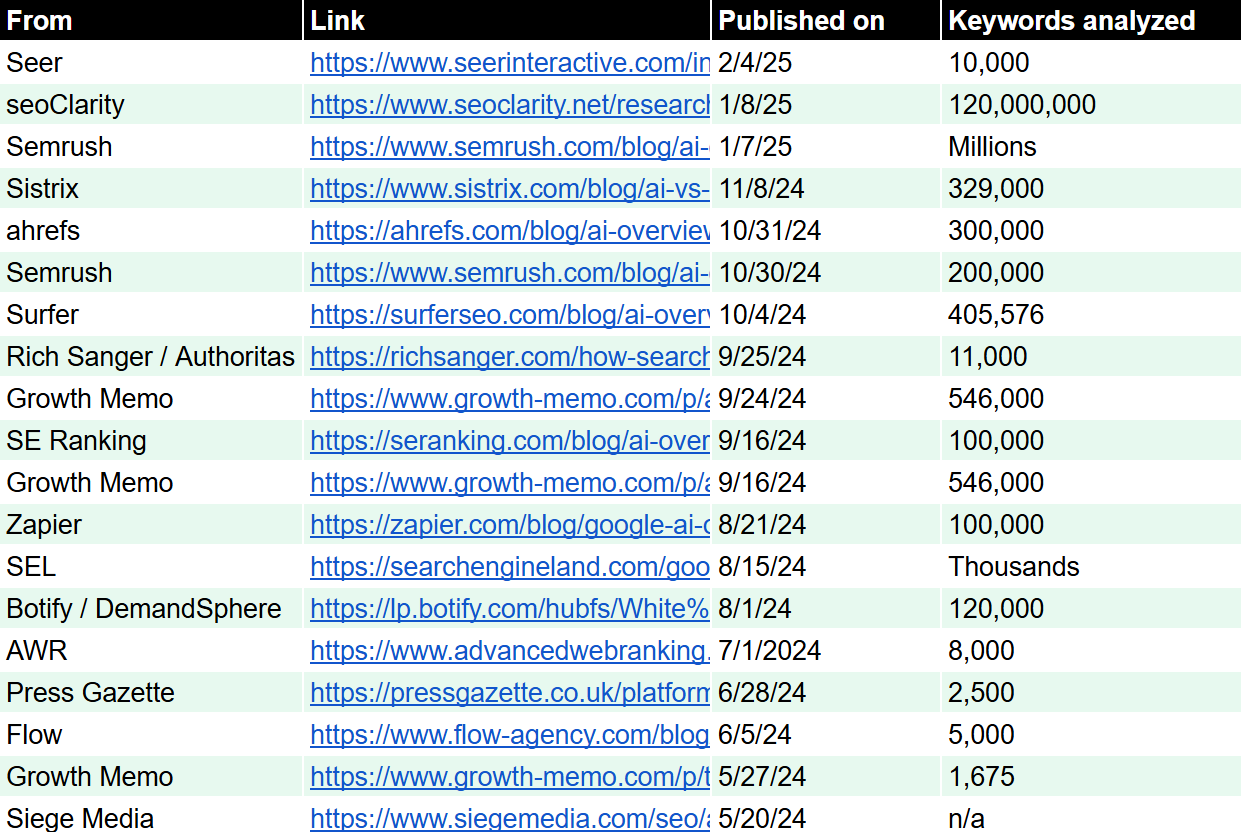
The Studies

Image Credit: Kevin Indig

Get the spreadsheet with sample sizes and publish dates: Sheet.

  1. Google AIO Impact – SEO & PPC CTRs at all time low
  2. AI Overviews: What Are They & How Do They Affect SEO?
  3. AI Overviews Study: Inside Google’s New Search Reality
  4. I Analyzed 300K Keywords. Here’s What I Learned About AI Overviews
  5. We Studied 200,000 AI Overviews: Here’s What We Learned
  6. Google AI Overviews Study: 25+ Statistics from 405,576 searches
  7. Search Intent and AI Overviews: Study Insights
  8. AI on Innovation – Part 2
  9. AI Overviews Research: Google Ads in the AIO-inclusive SERPs
  10. AI on Innovation – Part 1
  11. How Google AI Overview impacts 20 industries
  12. Publishers report ‘negligible’ traffic impact of Google AI Overviews
  13. Impact of Google’s AI Overviews: SEO Research Study
  14. AI Overview Study for 8,000 Keywords in Google Search
  15. The Traffic Impact of AI Overviews
  16. AI Overviews SEO Impact Report [New Data]
  17. ‘Devastating’ potential impact of Google AI Overviews on publisher visibility revealed
  18. AI Overview Trends: Insights from 5,000 HR and Workforce Management Keywords for SaaS
  19. AI vs. SEO: What does the Future of Search look like?

How Often Does Google Show AI Overviews?

Image Credit: Kevin Indig

The biggest question, of course, is, “How much does this matter”? To my surprise, the AIO-pocalypse has not yet happened. At least not according to the data.

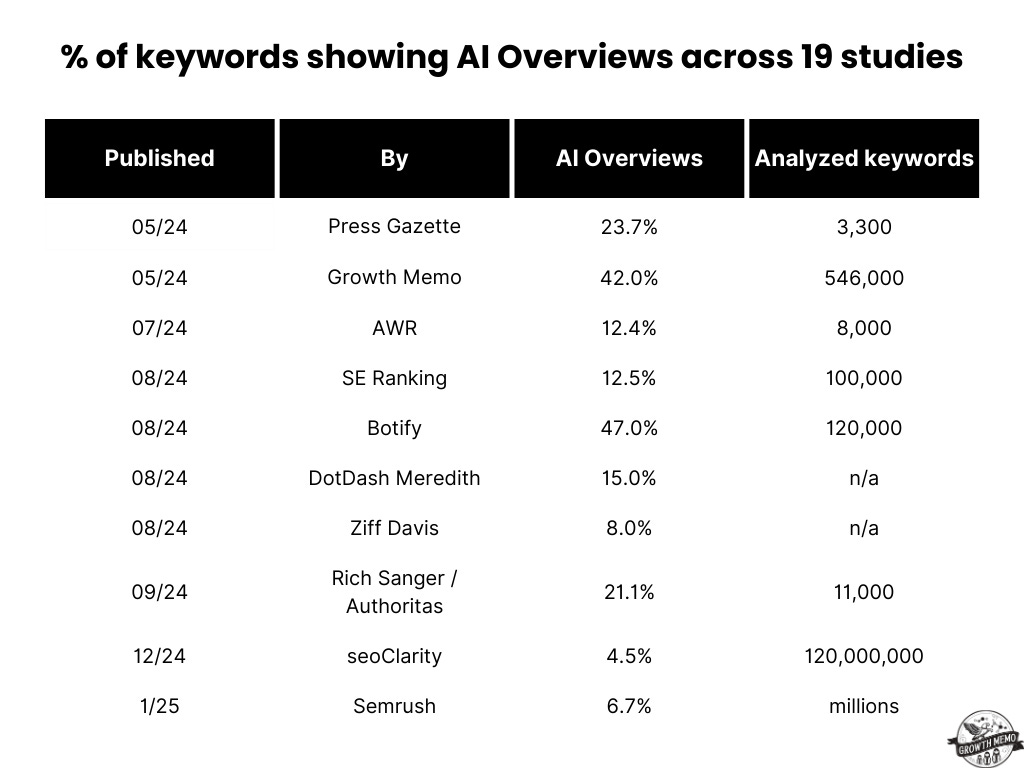
How many keywords show AIOs in the respective studies:

  • Press Gazette, 05/24: 23.7% out of 3,300 news keywords (US). [17]
  • Growth Memo, 05/24: 42% of 546,000 queries. [15]
  • AWR, 07/24: 12.4% of 8,000 keywords. [14]
  • SE Ranking, 08/24: 12.47% of 100,000 keywords. [9]
  • Botify, 08/24: 47% of 120,000 keywords. [3]
  • DotDash Meredith, 08/24: 15% “of searches across our categories.”
  • Ziff Davis, 08/24: “8% of most important queries”. [12]
  • Rich Sanger / Authoritas, 09/24: 21.1% of 11,000 keywords. [7]
  • seoClarity, 12/24: 4.5% of 120 million keywords. [13]
  • Semrush, 01/25: 6.7% across millions of keywords. [5]

The coverage varies very much by industry.

Industry Distribution

Press Gazette, 05/24: [17]

  • Horoscopes: 62%
  • Health: 55%
  • Geo locations: 47%
  • Shopping: 43%
  • Media & Tech: 36%

AWR, 08/24: [14]

  • Health: 67.5%
  • Safety: 46.1%
  • Technology: 23%
  • SEO: 17%
  • Finance: 17%

Zapier, 08/24: [11]

  • Relationships: 40.6%
  • Food & Beverage: 23.6%
  • Business: 18.5%
  • Technology: 17.2%
  • Wellness: 15.6%

SE Ranking, 08/24: [9]

  • Relationships: 46.1%
  • Food & Beverage: 33.5%
  • Business: 23.4%

DotDash Meredith, 08/24: [12]

  • Health
  • Technology
  • Finance

Semrush, 01/25: [5]

  • Health: 23.0%
  • Science: 20.1%
  • Internet & Telecom: 11.7%
  • Travel: 10.0%
  • Computers & Electronics: 8.75%

Implications:

  1. AI Overviews came hot out of the beta gate on May 14, 2024. Since then, we’re seeing fewer keywords showing AI Overviews – not more. That’s counterintuitive to me. And a bit counter to my personal experience when using Search. But that’s the data.
  2. The latest studies share numbers between 4.5 and 6.7% compared to early studies that found 12.5 – 42%. It seems that the TsunAImi I was worried about hasn’t materialized itself yet, and there are still plenty of non-AIO keywords left that can deliver meaningful organic traffic. However, I wonder how well we really track the longtail keywords that show AIOs (more in a moment).
  3. It’s also noteworthy that Semrush [3] found significant differences between mobile and desktop AI Overviews: The most populated industries on the desktop are health, people and society, and science, while mobile shows most AIOs for people and society, science, and food & drink.
  4. YMYL industries like health show the most AIOs. And I just don’t understand why. If I were Google and launched LLM answers that are prone to hallucination, I’d start in a space where it’s less consequential, like people and society or entertainment. To be fair, some studies show that Google invests in those “lightweight” verticals. But health comes up most consistently at the top. I assume that Google has a lot of medical studies that it uses to ground health-related AI Overviews.

What Triggers AI Overviews?

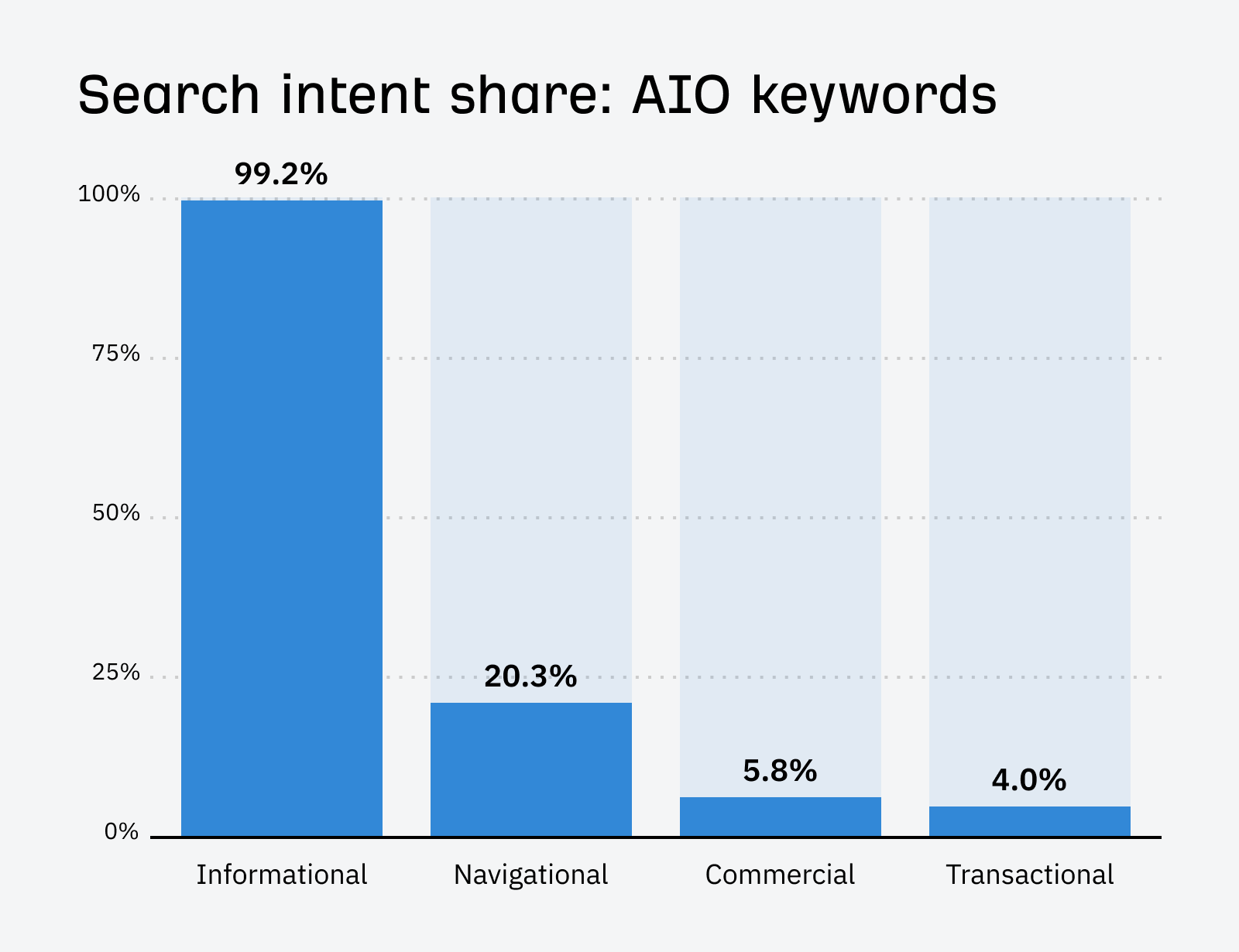
The common theory is that AIOs disrupt predominantly informational searches, and the data backs that up.

Search intent is important because, theoretically, even a low percentage of keywords showing AI Overviews could have a big impact if those keywords are important for business and influence purchase decisions.

Image Credit: Kevin Indig

Every study I looked at confirmed that the majority of AI Overviews show up for informational-intent keywords like questions:

  • Flow, 06/24: 24% of AIOs show up for top-of-the-funnel and 5% for bottom-of-the-funnel keywords. [18]
  • AWR, 07/24: 34.7% of queries showing an AOI include the question word “how.” 21.3% of AIOs show up for informational keywords, compared to 4% for commercial/transactional. [14]
  • Botify, 08/24: 59% of informational keywords trigger an AIO, compared to 19% of commercial keywords. [3]
  • Rich Sanger / Authoritas, 09/24: 28.8% of keywords showing an AIO are informational compared to 11.1% commercial/transactional. [7]
  • Ahrefs, 10/24: 99.2% of information keywords trigger an AIO compared to 10% of commercial/transactional keywords. [4]
  • seoClarity, 12/24: 92.9% of keywords showing an AIO have informational intent. [13]
  • Semrush, 01/25: 80% of desktop and 76% of mobile AIOs targeted informational keywords. 35% of desktop and 32% of mobile keywords were questions. Transactional keywords showed AIOs only 3% of the time. [5]
  • Seer, 02/25: 31.6% of keywords showing an AIO are questions compared to 9.7% without an AIO. [1]

User intent is tightly connected to query length. The longer, the easier it is to gauge what a searcher wants. And the lower the search volume.

Longtail Vs. Shorthead

Longer queries are more likely to trigger AIOs:

  • AWR, 07/24: Queries with five words (long-tail) trigger AIOs 22.6% of the time compared to one with 0.9% and 10-word queries with 0.2%.
  • Botify, 08/24: 73.6% of long-tail queries (+5 terms) trigger an AIO, compared to 8.9% for short-head queries. Also, 55% of queries < 1,000 monthly searches show an AIO. [3]
  • Ahrefs, 10/24: Long-tail keywords are more likely to trigger AIOs than shorthead keywords. Search volume for keywords showing AIOs is 193x smaller than for keywords not showing AIOs. [4]
  • Semrush, 01/25: 82% of desktop and 76% of mobile AIOs occurred for keywords with less than 1,000 monthly searches. [5]
  • Seer, 02/‘25: The average query length leading to an AI Overview was 4.29 words compared to 3.48 words for a query not presenting an AIO. [1]

Maybe not a trigger, but a strong co-occurrence exists between AIOs and SERP Features.

Featured Snippets

Featured Snippets and AI Overviews tend to show up together:

  • AWR, 07/24: AI Overviews appear alongside Featured Snippets in 59.5% of keywords. [14]
  • Botify, 08/24: Featured Snippets and AIOs co-occur 60% of the time and cover 67-76% of your screen, depending on the device. [3]
  • Ahrefs, 10/24: Featured Snippets appear for 65.5% of keywords showing an AIO. Google is much less likely to show Knowledge Panels and videos when AIOs are present, probably because the Knowledge Graph is the foundation for AIO generation. [4]

Paid Search Results

Google seems to shy away from showing PPC ads when AIOs are present:

  • SE Ranking, 08/24: 13.5% of AIOs show up next to ads on desktop. [9]
  • Semrush, 01/25: 5% of keywords showing AIOs also showed PPC ads. [5]
  • Seer, 02/25: Paid Search CTRs dropped across the board – with or without an AIO, but they were lower comparatively when Google shows AIOs. [1]

Implications:

  1. If there is SEO traffic to be lost (getting to that shortly), it’s mostly for informational searches, as we can also see the fact that Featured Snippets tend to show up with AIOs. Commercial and transactional keywords don’t show a high rate of AI Overviews, maybe because that’s where ads show up the most, and Google doesn’t want to kill its click-through rates.
  2. On the other hand, Google’s Knowledge Graph does often show up with AIOs. Why? Most likely because the Knowledge Graph is the foundation for Google’s AIOs and doesn’t provide net value in the search results. As a result, you should check whether your brand has a knowledge graph and what entities Google associates it with. It could impact how you should up in AIOs.1
  3. AI Overviews are more likely to show up for longer queries with lower search volume. Makes sense as AIOs answer long questions so much better than classic search results (Google never really figured longtail search out), and longer queries are searched by fewer people because they’re more specific.

How Do AI Overviews Impact Click-Through Rates And SEO Traffic?

We know that AIOs might not show up as often now as they did fresh out of the egg. They occur for informational longtail queries with lower search volume. But when they show up, what’s their impact?

AIOs push organic results down significantly:

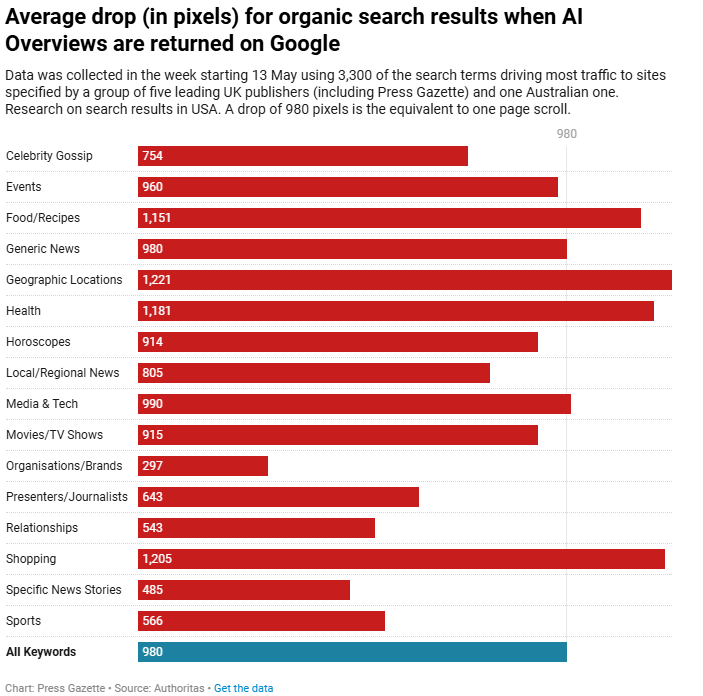
  • Press Gazette, 05/24: On average, organic search results dropped by -980 pixels when AIOs were present. In the shopping vertical, the average was 1,205! Keep in mind that the data was gathered just when AI Overviews first rolled out. Things could and likely do look very different now. [17]
  • AWR, 07/24: The average AIO is 912 pixels long. [14]
  • Botify, 08/24: AI Overviews take up 42% of the screen on desktop and 48% on mobile. [3]
  • Rich Sanger / Authoritas, 09/24: AI Overviews push organic results down by an average of 202 pixels. [7]
  • The fact that AI Overviews occupy so much screen real estate alone hurts the CTR for organic results.

Organic Click-Through Rates

AIOs shrink CTRs and SEO traffic. Some industries that target high-intent keywords report a smaller impact than others:

  • Growth Memo, 05/24: A negative impact of -8.9% on click-through rates on average. [15]
  • Siege Media, 05/24: 3% increase in CTR after AIOs went live. [16]
  • DotDash Meredith, 08/24: minimal differences in CTR between search results with and without AI Overviews. [12]
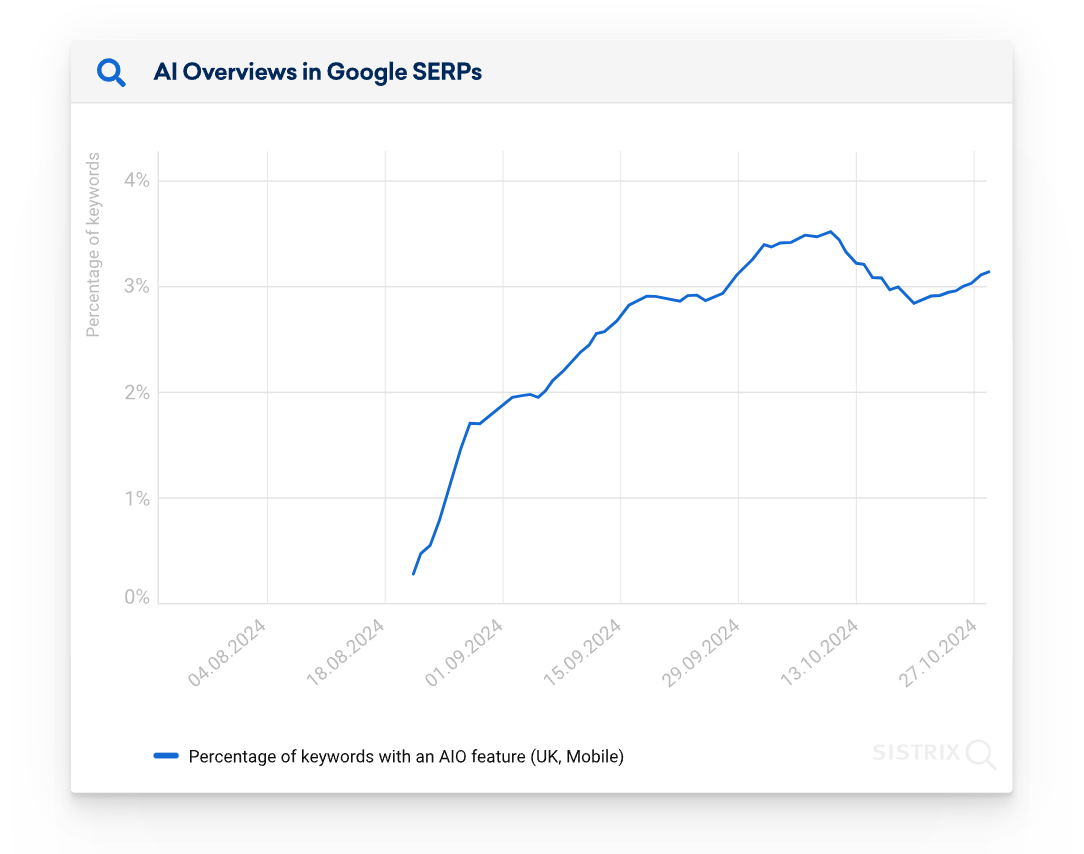
  • Sistrix, 11/24: Prominent citations in AI Overviews lead to more clicks than Featured Snippets, but still much less compared to classic organic results. [19]
  • Seer, 02/25: AIOs cut organic CTRs in less than half and tend to show up for queries that already got fewer clicks before (zero-click searches). When cited, sites get more traffic, and average CTR grows from 0.74% to 1.02%. [1]

Being cited matters, but how much room is there to win in citations?

Number Of Citations

Since we know being cited in AIOs matters for organic traffic, the next question is how much “real estate” there is, and the answer seems to be 5-8:

  • AWR, 07/24: AI Overviews contain 7.2 citations on average. [14]
  • Rich Sanger / Authoritas, 09/24: The average number of citations is 8.2, with small variations across user intent. [7]
  • Surfer, 10/24: Google cites eight or fewer sources 90% of the time, with five on average. 99% of sources are only cited once. [6]

Implications:

  1. AIOs have a negative impact on CTRs. Intuition validated. “Ranking in AIOs,” a.k.a. being cited, should be the new goal in SEO when they’re shown in the SERPs.
  2. The data validates that informational searches are dwindling in SEO value. So, theoretically, we should see a lot more companies losing organic traffic, though not necessarily revenue from organic traffic. But that doesn’t seem to be the case, at least not to the intensity I expected. A possible reason could be that organic CTRs were already low for queries that show AI Overviews, as the Seer study shows. Maybe the negative impact of AIOs is a continuation of a trend that has already existed for years, which is Google answering more questions in the SERPs.
  3. What’s still unclear is if and when searchers click on organic results below AI Overviews and citations. I assume that user intent is also the deciding factor here, but we need more data.

How Can You Rank In AI Overviews?

When we talk about “ranking in AIOs,” we mean being cited. There is a lot more to be discovered about how Google decides what pages to cite.

Based on patents, it seems that Gemini first creates the answer to a question and then seeks sources that could be a good fit, though I’m not sure why it doesn’t simply ground the answer in the top results.

Based on the data so far, we can agree on the following citation factors:

It’s Not Keyword Match

The number of AIOs citing the exact keyword is extremely low:

  • Botify, 08/24: Text (Cosine) similarity between the AIO and cited pages shows a strong relationship, meaning the closer your text matches what’s shown in the AIOs, the higher your chances to be cited. [3]
  • Surfer, 10/24: Only 5.4% of AI Overviews contain the exact search query. [6]

But your position matters as well.

Organic Ranking Position Matters Somewhat

Image Credit: Kevin Indig

Ranking higher is better but not a requirement to get traffic from AIOs:

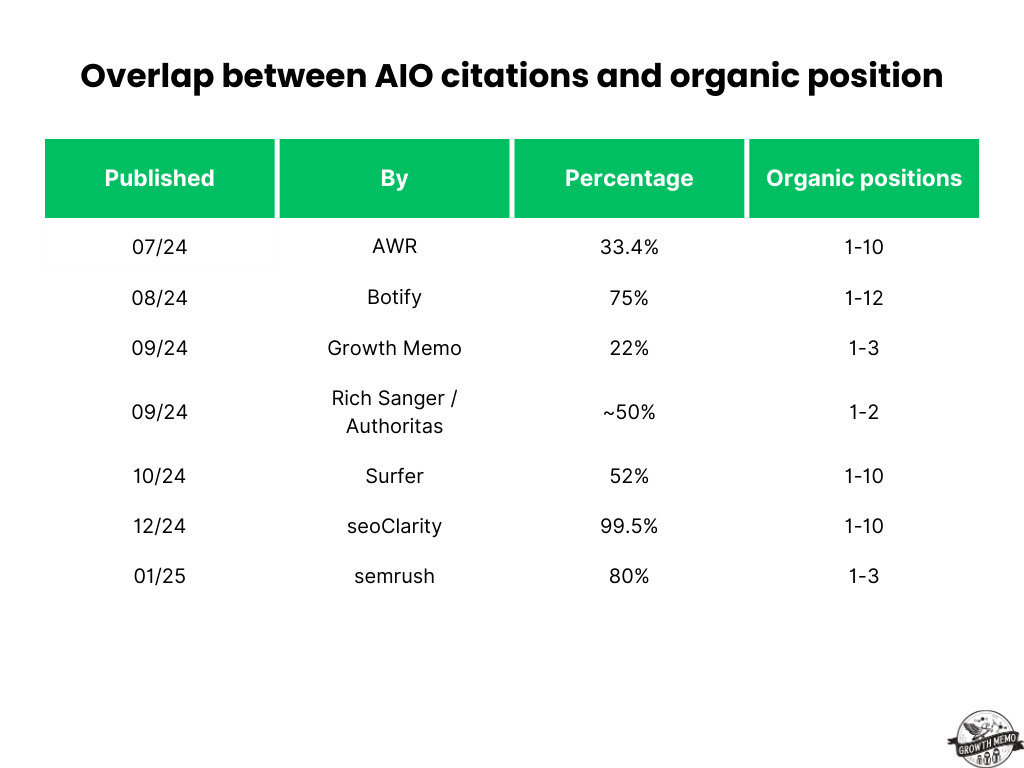
  • AWR, 07/24: 33.4% of AIOs cite pages that rank in the top 10 positions. [14]
  • Botify, 08/24: 75% of cited websites rank in the top 12 positions, but the median rank is 4. [3]
  • Growth Memo, 09/24: 40% of AIO sources rank in positions 11-20 and only 22% in positions 1-3. [8]
  • Rich Sanger / Authoritas, 09/24: The top two positions are included in citations 47.8 – 53.8% of the time. [7]
  • Surfer, 10/24: 52% of cited sources rank in the top 10 results. [6]
  • seoClarity, 12/24: AIOs cited the top 10 positions 99.5% of the time, and 80% of AIOs cite a page that ranks in the top 3 organic positions. [13]
  • Semrush, 01/25: The overlap between AIO citations and organic search results is only 20-26%. Over 50% of AI Overviews on desktop and 60% on mobile did not link to the top organic result. [5]

Implications:

  • Today, AI Overviews cite more pages in the top 10 ranking positions than when they initially launched.
  • The best thing you can do to target AIOs is to run a Cosine similarity analysis between your text and the AIO. Pick the page that ranks best for the target keyword and check which parts of the AIO it could give the best answer to.
  • Of course, strong technical fundamentals and good on-page SEO matter, but more to have a high ranking position and increase your chances to be picked as a citation rather than as a hard criterion AIOs evaluate.

How Should You Rethink Content Creation For AI Overviews?

Optimizing for AIO citations and mentions isn’t a 180-degree turn compared to classic organic results, but you want to keep in mind the right format and where you publish the content.

AIO Length

The average AI Overview is around 90-170 characters:

  • AWR, 07/24: The average AIO is 169 words long. [14]
  • Botify, 08/24: The average AI Overview is 169 words and 912 pixels long. [3]
  • Surfer, 10/24: AI Overviews are, on average, 157 words long, with 99% being shorter than 328. Featured Snippets average ~50 words. [6]
  • Semrush, 01/25: 90 (mobile) to 119 words (desktop). [5]

AIO Format

Most AIOs contain lists:

  • AWR, 07/24: 40% of AIOs are lists, 24% are paragraphs, and only a few have images. [14]
  • Surfer, 10/24: 61% of AI Overviews are unordered lists, 21% contain no list, 12% are ordered lists, and 6% are ordered and unordered lists. [6]

Prominently Cited Domains

Youtube sticks out as the domain with the most citations:

  • Rich Sanger / Authoritas, 09/24: YouTube and Wikipedia are cited most often in AIOs for information intent keywords. [7]
  • Growth Memo, 09/24: The most cited domains are YouTube, Wikipedia, and Google, which often rank in lower positions. [10]

Implications:

  1. 90-170 characters equal roughly 15-40 words on average – not a lot! So optimizing your content for AIOs really seems to be about straightforward answers, no fluff, and a high degree of insight. Similar to optimizing for Featured Snippets, it seems AIO optimization is about tweaking small parts of an article over and over until you get the citation.
  2. The outsized impact of YouTube on AIOs pushes content generation further away from websites. I also found that LinkedIn is cited a lot in my research. So, social and content platforms could be part of modern SEO. At the very least, run tests on YouTube and LinkedIn.

Bottom Line

As a community, we’ve made significant progress in understanding AI Overviews and their impact.

Even though it’s a moving target, we can conclude for now that AIOs occupy informational, long-tail queries with low search volume and negatively impact click-through rates unless you’re part of the citations.

I hope to write a follow-up meta-analysis with new studies in about a year and be able to answer questions like:

  1. How often do AI Overviews change?
  2. How does Google decide which products to list in ecommerce AIOs?
  3. What are sites doing at scale to get more AIO citations over time?
  4. What new AIO formats is Google testing, and how are they different?
  5. How do AIOs vary between countries for the same query?

Stay tuned for next week when I publish my meta-analysis of AI Chatbots like ChatGPT or Perplexity and their impact on Search.

I also plan to publish at least three more original data studies about AI Overviews this year. Subscribe to stay up to date!


1 AI Overviews and your website


Featured Image: Paulo Bobita/Search Engine Journal

https://www.searchenginejournal.com/impact-of-ai-overviews-on-seo/539982/


How To Create a Certified Fast Website To Compete In 2025

This post was sponsored by Bluehost. The opinions expressed in this article are the sponsor’s own.

Imagine clicking on a website only to wait several seconds for it to load.

Frustrating, right?

Your prospective customers think so, too.

In a world where attention spans are shrinking, even a one-second delay can lead to lost visitors, lower rankings, and missed revenue opportunities.

Research finds that B2C websites that load in one second or less have conversion rates three times higher than those that load in five seconds or more.

Conversion rates are 2.5 times higher for B2C websites that load in one second or less.

In other words, speed is no longer a luxury.

Speed is a necessity.

A fast-loading website enhances user experience, boosts SEO rankings, and drives higher conversions.

And with search engines and consumer expectations continuing to evolve, businesses must prioritize performance to stay ahead of the competition.

Implementing the right strategies ensures that websites remain fast, competitive, and ready for the demands of 2025.

A trusted partner like Bluehost provides the robust infrastructure, advanced caching mechanisms, and built-in performance enhancements needed to help websites reach peak efficiency.

1. How To Select The Right Hosting Plan

A website’s performance starts with selecting the right hosting plan. The plan should align with the site’s current and future needs to effectively accommodate growth and traffic fluctuations.

Assess Your Website’s Needs

Before settling on a hosting plan, it’s crucial to evaluate key factors like traffic expectations, content types, and scalability.

For example, websites with heavy multimedia content require more resources than text-based sites, and anticipated visitor numbers influence server capacity needs.

Additionally, selecting a plan that supports future growth ensures smooth scaling without performance bottlenecks.

Match Your Website’s Needs To What The Host Provides

Different hosting solutions cater to different website requirements, ranging from budget-friendly shared hosting to more robust, performance-driven plans. Bluehost offers multiple hosting options tailored to various business needs.

Shared Hosting can work well for smaller websites with moderate traffic, offering a cost-effective way to get started.

Bluehost’s VPS hosting offers more power and flexibility by providing dedicated resources, making it an excellent choice for growing websites that need additional performance.

For large-scale websites demanding maximum speed and control, our dedicated hosting plans deliver exclusive server access with top-tier performance for optimal speed and scalability.

2. Implement Caching Mechanisms

Caching is an essential tool for optimizing website speed by reducing the need to load the same data repeatedly. By storing frequently accessed files, caching decreases server load, enhances response times, and ensures visitors experience faster page loads.

Websites that effectively utilize caching experience better performance, lower bounce rates, and improved search rankings.

Use Built-In Caching Features

For instance, Bluehost provides multiple caching mechanisms to enhance website performance, such as PHP APC (Alternative PHP Cache). A powerful opcode caching system, PHP APC improves database query speed and optimizes PHP script execution, ensuring that frequently accessed data is retrieved faster.

On the other hand, edge caching minimizes latency by delivering content from servers closest to the user, reducing server response times and improving load speeds.

Bluehost makes it easy to use caching to enhance website speed. Caching can be enabled directly through the Bluehost control panel, ensuring seamless implementation.

Additionally, Bluehost is powered by Dell rack-mount servers, which use AMD EPYC chips, DDR5 RAM, and ultrafast NVMe storage. With caching plugins like W3 Total Cache or WP Rocket, your web pages will load faster, improving the user experience, SEO, traffic, and conversion rates.

3. Absolutely Leverage Content Delivery Networks (CDNs)

Another way to speed up websites is to examine how content is delivered to users. A Content Delivery Network (CDN) enhances website performance by distributing content across multiple servers worldwide. This reduces latency and ensures visitors load pages faster, regardless of location.

CDNs minimize the physical distance between the server and the user by caching static assets like images, stylesheets, and scripts at various data centers worldwide. This results in load times and reduced bandwidth usage.

Beyond speed improvements, CDNs also enhance website security by protecting against DDoS attacks, traffic spikes, and malicious bots. Some CDNs offer additional features, such as image optimization, automated compression, and firewall rules, that further improve performance and security.

CDNs & Bluehost

Bluehost offers built-in CDN solutions, including Cloudflare integration, to help websites achieve optimal performance and security.

Activating a CDN through Bluehost’s dashboard is straightforward, and configuring settings that best suit a website’s needs significantly improves speed and reliability.

4. Optimize Images & Media

Impact of Media Files on Load Times

Large images and unoptimized videos can significantly slow down a website. Why? High-resolution media files require more bandwidth and processing power, leading to slower page loads and a poorer user experience.

This is particularly problematic for mobile users and those with slower internet connections since heavy media files can take significantly longer to load, frustrating visitors and increasing bounce rates.

Additionally, media files that are not optimized can consume excessive server resources, potentially affecting overall website performance. If too many large files are loaded simultaneously, the hosting environment can strain, causing slowdowns for all users.

Image- and media-based slowdowns are widespread on websites that rely heavily on visual content, such as e-commerce platforms, portfolios, and media-heavy blogs.

Reducing file sizes, choosing appropriate formats, and leveraging compression techniques can greatly enhance website speed while maintaining visual quality.

How To Size Images The Right Way

First, while it may be common and easy to do, avoid using the width and height attributes in HTML to resize images since this forces the browser to scale the image, increasing load times and decreasing performance.

Instead, resize images before uploading them using graphic editing tools such as Photoshop, GIMP, or online compression services. Scaling images improperly can lead to pixelation and a stretched appearance, negatively impacting user experience.

By resizing images to their intended display size before uploading, websites can significantly reduce the amount of data a browser needs to process, resulting in faster page loads and a more visually appealing layout.

Appropriately resized images will also have a higher visual quality because they are sized for the right display dimensions.

How To Compress Images For Better Website Performance

Compressing images using tools like Squoosh, TinyPNG, or plugins like Smush helps reduce file sizes without sacrificing quality.

Implementing lazy loading ensures that off-screen images and videos only load when needed, reducing initial load times and enhancing overall site performance.

5. Minimize Plugins & External Scripts

How To Discover Your Plugins’ Usage

Overloading a website with excessive plugins and external scripts can severely impact performance. Therefore, it’s essential to regularly assess installed plugins and remove outdated, redundant, or unnecessary ones.

Limiting the number of external scripts running on a page can also help reduce loading times and improve efficiency.

How To Choose Efficient Plugins

Selecting the right plugins is crucial for maintaining website performance. First, look for lightweight, well-coded plugins that prioritize speed and efficiency.

Then, regularly auditing your plugins and removing outdated or redundant ones can prevent conflicts and minimize resource usage.

Bluehost provides hosting environments tailored for WordPress users, ensuring compatibility with essential caching, security, and SEO plugins.

By hosting your website on a reliable platform like Bluehost, you can benefit from a stable infrastructure that complements the best WordPress plugins. This will help you enhance functionality without compromising speed.

6. Tips For Compression, Minification & Technical Tweaks

Additional technical optimizations, in addition to caching and CDNs, can further improve site speed and performance. Compression and minification techniques help reduce file sizes, while other backend optimizations ensure web pages load efficiently.

Implementing these strategies can significantly improve desktop and mobile user experiences.

Benefits Of Compression

Reducing the size of HTML, CSS, and JavaScript files significantly improves page speed. Compressed files require less bandwidth and load faster, creating a smoother user experience.

Effortless Compression & Technical Optimization With Bluehost

Bluehost makes compression easy. GZIP compression can be enabled via Bluehost’s control panel or by modifying the .htaccess file.

Plugins like Autoptimize help minify code by removing unnecessary characters, ensuring that files remain lightweight and optimized for performance.

Utilizing ETags & Expires Headers

Another important aspect of page speed optimization involves using ETags and expired headers, which help streamline browser requests and improve overall efficiency.

These settings instruct a visitor’s browser on how to handle cached content, preventing unnecessary reloads and reducing the number of requests made to the server.

ETags (Entity Tags) are used by browsers to determine whether cached resources have been modified since the last visit. If the content remains unchanged, the browser loads the local copy instead of downloading it again, minimizing bandwidth usage and speeding up load times.

On the other hand, expired headers specify a timeframe for when specific resources should be refreshed.

By setting an appropriate expiration date for static files like images, CSS, and JavaScript, web developers can ensure that repeat visitors are not unnecessarily reloading content that has not changed.

For example, a website logo that remains consistent across pages can be cached efficiently so that users do not have to download it every time they navigate the site.

Properly configuring these settings enhances website performance, particularly for sites with recurring visitors. It prevents redundant data transfers and reduces the workload on the browser and server.

Many hosting providers, including Bluehost, offer tools and support to help website owners implement these optimizations effectively. This ensures a faster and more seamless user experience.

7. Regularly Monitor & Execute Maintenance

Practice Continuous Performance Assessment

Technology changes and slows down. Websites are no exception.

Therefore, websites should undergo regular performance assessments to ensure they’re continually optimized for the best user experience.

Routine speed testing helps identify areas where performance can be improved, whether by addressing slow-loading elements, optimizing server response times, or refining backend processes.

Various tools can assist in performance evaluation. Google PageSpeed Insights, for example, provides detailed reports on website speed and offers specific recommendations for improvements.

Lighthouse, a Google open-source tool, analyzes performance, accessibility, and SEO, helping site owners fine-tune their pages.

Beyond automated tools, ongoing monitoring through website analytics platforms, such as Google Analytics, can offer valuable insights into user behavior.

High bounce rates and low engagement metrics may indicate slow performance, guiding further refinements.

Businesses running ecommerce platforms or large applications should consider integrating application performance monitoring (APM) tools to track performance bottlenecks in real time.

Maintenance Tips

Regular updates to website software, regardless of the platform used, are essential for security and performance.

Content management systems (CMS) like WordPress, Joomla, and Drupal require frequent updates to core files, themes, and plugins to prevent compatibility issues and vulnerabilities. Similarly, frameworks and libraries for custom-built sites must be kept up to date to ensure efficiency and security.

Database optimization is another crucial maintenance task. Over time, databases accumulate redundant data, slowing down query execution.

Periodic optimizations, such as removing unused tables, cleaning up post revisions, and properly indexing databases, can enhance efficiency.

Server maintenance is equally important. Websites hosted on dedicated or VPS servers should have automated backups, uptime monitoring, and log analysis configured.

Cloud-based hosting solutions like Bluehost Cloud provide performance-tracking tools that can help identify and mitigate slowdowns at the infrastructure level, a 100% uptime SLA, and more to ensure websites run smoothly.

Lastly, implementing a proactive security strategy ensures ongoing performance stability. Regular malware scans, security patches, and SSL certificate renewals help prevent vulnerabilities that could slow down or compromise a website.

Security plugins and firewalls, such as Cloudflare, add an extra layer of protection while minimizing unwanted traffic that could strain server resources.

That’s what makes Bluehost the superior choice. We offer automated backups, performance monitoring tools, and dedicated 24/7 support professionals who can help keep your website running at peak efficiency.

And with a range of hosting plans tailored to different needs, Bluehost ensures that your website will remain fast, secure, and scalable as it grows.

Building a certified fast website in 2025 requires strategic hosting, caching, content delivery, and ongoing maintenance.

Leveraging Bluehost’s robust hosting plans, integrated CDN, and performance optimization tools ensures your website remains fast, competitive, and ready for the evolving digital landscape.

Bluehost’s hosting solutions provide an easy and reliable way to optimize performance.


Image Credits

Featured Image: Image by Bluehost. Used with permission.

https://www.searchenginejournal.com/create-fast-website-2025-bluehost-spa/539645/


Why Google’s Rich Results Tool Can Be Misleading via @sejournal, @martinibuster

A recent discussion in a Facebook SEO group highlighted how Google’s structured data testing tool can produce misleading results, making Schema.org structured data difficult to debug. This is why the tool falls short and why Schema.org provides a better solution.

This article doesn’t link to the private Facebook group discussion but it does provide screenshots from debugging the site that was discussed.

WordPress Plugin For Structured Data

The person who started the discussion said they were using a WordPress plugin to output their structured data. Someone pointed their finger at the SEO plugin, saying that the Schema.org structured data output by plugins isn’t good enough but that answer turned out to be incorrect. It may have been an issue with the structured data selected by the user, not the plugin itself.

Structured data plugins are useful for outputting structured data because:

1. It automates the tedious task of generating a Schema.org JSON-LD structured data script.

2. It automatically outputs structured data that is required by Google.

3. Plugins will automatically update all structured data when Google changes its requirements.

The only downside, as may have been the case in this situation, is if the user chooses a structured data that’s not appropriate for their content. This can happen, for example, if the correct version is LocalBusiness, but it requires a paid version of the plugin and the user selects another type of structured data, like AggregateRating.

Google Rich Results Tool Error

The person should have been using the LocalBusiness structured data but the code on the page was for AggregateRating. But when the person checked it on Google’s structured data testing tool it incorrectly showed that they were using the LocalBusiness structured data.

Screenshot Of Misleading Google Rich Results Test

The weird part is that Google’s tool enables users to view the structured data that’s in the HTML and it accurately shows that the web page was using AggregateRating, not LocalBusiness, Schema.org structured data.

Screenshot: Google’s Tool Detects Wrong Structured Data

The tool detects LocalBusiness structured data but that is actually something that’s nested within the AggregateRating structured data, which is not detected.  What the tool is showing is related to rich results, but the label on the tool confusingly says it’s showing detected structured data.

Schema.org Structured Data Validator

The more accurate Schema.org structured data validation tool is the one provided by Schema.org, not Google.

Here’s the structured data that the official Schema.org tool detected:

Why Did Google’s Tool Fail?

What happened is that the website was using the AggregateRating structured data to review their local business. Google’s Rich Results Test tool mistakenly identified the LocalBusiness structured data and ignored that the script was really about AggregateRating.

The official Schema.org validator accurately identified the structured data.

This doesn’t mean that Google’s tool is broken though. I think what’s happening is that Google’s tool has a functionality that may be limited to testing for whether a website’s structured data qualifies the page for rich results, which is why it’s called the Rich Results Tester.  It maybe doesn’t validate the structured data so if you want to accurately debug your code then it’s probably a good idea to give the official Schema.org tool a spin.

If you’re having trouble debugging structured data and reading HTML isn’t a part of your skill set you may want to give the official Schema.org structured data tool a try, it may help you better understand what’s wrong with your structured data.

Maybe it’s time SEOs and publishers add the official Schema.org Structured Data Validator to their list of tools to use.

Featured Image by Shutterstock/Viorel Sima

https://www.searchenginejournal.com/why-googles-rich-results-tool/539964/


WooCommerce Rebrand Offers Lessons For Gaining Competitive Edge via @sejournal, @martinibuster

An interview with WooCommerce shows that their recent rebrand is a strategic refresh, offering lessons for businesses and search marketers on how to stay relevant and competitive.

A Business Refresh

A recently announced rebrand by WooCommerce is far more than a logo update; it’s part of an evolution of their platform that demonstrates the strategic value of reassessing user expectations to stay competitive.

A spokesperson from WooCommerce agreed:

“Exactly: the brand update reflects our broader evolution toward a more integrated platform. While the visual changes are noticeable, they represent our shift toward making WooCommerce more powerful out of the box while maintaining the flexibility of open source.”

From Evolution To A Refresh

WooCommerce has been on a steady evolution from a plugin to a platform. And even though it’s referred to itself as a platform for awhile now, the evolution from plugin to platform is speeding up because of an internal WooCommerce initiative called More In Core. Announced in 2024, More In Core is a shift to a WooCommerce experience that provides a more complete ecommerce experience straight of the box, delivering the core functionalities that most ecommerce sites need without needing to install additional plugins.

One of the examples, from October 2024, is the Brand Plugin integration, which used to be a premium plugin but is now a standard feature of the platform itself. The Brand feature enables store owners to create a taxonomy based on brands.

A WooCommerce spokesperson explained:

“While ‘More in Core’ is an internal name we use (we’re excited about these improvements!), our goal isn’t simply adding more features — it’s about thoughtfully building a comprehensive commerce platform that delivers the essential tools that the majority of merchants need out of the box, reducing plugin conflict and management, increasing the depth of integration between platform features, and freeing builders and sellers to focus on other parts of their business.

We’re starting by integrating Woo-owned extensions, like Brands. This isn’t about removing opportunities for third-party developers — we remain committed to a vibrant ecosystem where developers can build and grow on our platform. We’re carefully considering which features are truly essential for most merchants and integrating them in ways that maintain the flexibility WooCommerce is known for.

Looking ahead to 2025, merchants and developers can expect continued thoughtful and deep integration of key features, continued performance improvements across product and order management in particular, and a streamlined user experience that’s leveraging more and more of WordPress’ modern admin designs.”

User Experience And UI

Focusing on the user is a great place to start a business refresh. Do site visitors use your site the same way? Are there emerging trends to consider?

I asked WooCommerce if there were any any specific UX and UI improvements implemented as part of their recent February 2025 brand refresh. They answered:

“The brand refresh aligns with ongoing work to make WooCommerce more intuitive. We’re focusing first on improving core experiences in the admin interface and store management — the essential interactions our merchants use daily.

More specifically, we’re rolling out improvements to the payments onboarding and configuration experience.

We’re creating a new commerce-optimized starter theme with a set of creative variations available out of the box. We’re iterating rapidly on the WooCommerce Analytics product we just released in beta, and collaborating directly with the community on new capabilities around order status and fulfillment management.”

Lessons For Search Marketers

I asked about how their brand refresh fits into a larger strategy in order to find out what others can learn about doing something like this for their own brands and websites. I asked them for what lessons search marketers could learn from their experience and they described a process that identified stakeholders from the ecosystem to the users, user expectations set by competitors and wrapping all of that into creating their refresh.

The WooCommerce spokesperson shared:

“Our rebrand considered the multiple groups that make up our ecosystem: builders who create stores for clients, developers who create products and extensions, merchants who run their businesses on WooCommerce, hosts who help connect us to a larger set of customers, and contributors to our open source platform. The key was researching each group to understand how they interact with WooCommerce differently: developers building businesses on our platform, merchants managing daily operations, builders creating client sites, and contributors enhancing the core platform.

And of course we also had to factor in the current landscape. What other ecommerce platforms look like, what other technology companies look like — and how can we stand out. All that, plus we needed to make sure it felt true to Woo: that it aligned with our open-source roots, what we believe in, and what the platform does. We’re incredibly proud of what our in-house design and marketing teams accomplished here; it’s a great demonstration of the team we’ve assembled and what they’re capable of.

For search marketers, there’s a valuable lesson here about understanding your different audience segments and how they interact with your product or service. Just as we needed to consider how our brand speaks to builders versus merchants versus developers, search marketers need to consider how different user groups search for and interact with their content. It’s about creating a cohesive message that resonates across audiences while addressing their specific needs and pain points.”

Priorities For A Refresh

Some people like the flexibility of only activating needed functionalities because of concerns about the performance hit that comes from feature bloat. My understanding is that there are ways to turn off unneeded functionalities, is that true? Would turning them off be as simple as a toggle (a module UI), or would they have to jump into the code to do that?

How does one go about deciding what what’s best for the user? At what point do you say, not enough people need this?

WooCommerce offered the following useful insights:

“We’re being very thoughtful about considering what features become part of core WooCommerce. We started by looking at our own premium extensions that provide essential commerce functionality — features that most merchants need to run their businesses effectively.

This isn’t about adding features just to add them, and it’s definitely not about limiting opportunities for third-party developers who are crucial to our ecosystem. We recognize that some merchants and builders need specific features that our extensions don’t offer — and that’s the power of WooCommerce. At the same time, we also recognize that having to manage multiple extensions for simple functions, like brands, can create pain points.

Instead, it’s about providing a solid foundation that both merchants and developers can build upon. Features can be easily enabled or disabled through the admin interface so merchants can keep their sites lean and fast. This modular approach means stores can use what they need while developers can continue to innovate and extend the platform in new ways, relying on robust core functionality that’s always available.

When evaluating what becomes part of core, we look at how essential the feature is for most merchants — what they need to get a store online, selling, shipping, and getting paid — plus how it fits into the broader WooCommerce ecosystem. And of course for anything we add into core, performance is top of mind for our product teams.

Our goal is to strengthen the platform’s foundation while maintaining the openness and flexibility that makes WooCommerce so powerful. In some cases we’re looking at opening up new capabilities via lower level changes, without necessarily dictating how those capabilities should be used. Order statuses are a good example here: adding separate statuses for fulfillment and payment enables all sorts of new functionality, even if we don’t immediately require all solutions to leverage both.”

Focus On Performance

Adding more features or code to a site can degrade performance, something WooCommerce considered as part of the initiative. Adding needed functions helped make the entire platform more stable which ended up helping performance.

An example that WooCommerce shared was last year’s introduction of High-Performance Order Storage (HPOS), an optimized way to store customer order information that increases store website performance over the traditional ways of handling the same data.

The spokesperson answered:

“Performance remains fundamental to our approach. When we consider adding features to core, we’re actually making a thoughtful trade-off: for functionality that most merchants need, having it built-in and optimized is often more performant than requiring an additional plugin. This can reduce complexity and potential conflicts while improving overall site performance.

Our team ensures that as we integrate features, we’re doing so in a way that maintains or improves site speed. HPOS is a prime example — we’re rebuilding fundamental structures to improve scalability. Each feature addition is carefully evaluated for its performance impact, and we’re committed to keeping WooCommerce fast and efficient. We’re also currently in the middle of a performance review across all of our main functionalities to see where we can make improvements ahead of adding anything new.

For 2025, our focus is on thoughtfully enhancing WooCommerce’s essential capabilities while maintaining the open ecosystem that lets developers build innovative solutions for merchants, and improving the quality of our user experience from end to end. The goal isn’t to add more for the sake of more — it’s about providing a solid, performant foundation that benefits merchants, builders, and developers, and raising the bar for everyone.”

Should You Consider A Business Refresh?

What WooCommerce is doing is a reminder that settling on a strategy and moving forward year after year isn’t enough; consumer needs and the ways they interact online are constantly evolving. Taking inventory of emerging trends and user expectations is a sound practice for keeping an enterprise fresh and relevant—especially important right now as the Internet undergoes one of the most significant transformations in decades. Ultimately, consumers, not competitors, should drive your strategy. Identifying better ways to interact with users, customers, and site visitors can help position you as the disruptor rather than the disrupted.

Featured Image by Shutterstock/insta_photos

https://www.searchenginejournal.com/woocommerce-rebrand-offers-lessons-for-gaining-competitive-edge/539895/