As expected, Google has released the November 2023 reviews update today on November 8, 2023 at around 12 pm ET. This will be the last time Google announces a reviews update because, as it said, “because they will be happening at a regular and ongoing pace.”
Google posted, “Released the November 2023 reviews update. Learn more about how to write high quality reviews. Going forward, as the reviews system is now being improved at a regular and ongoing pace, we will no longer be posting about future updates on the status dashboard..”
No more announcements. Google said, “we’ll no longer be giving periodic notifications of improvements to our reviews system.” We have had a total of 8 reviews updates confirmed by Google since the first reviews update launched in April 2021.
What is new. Besides for this update no longer being confirmed by Google going forward, Google said the update is happening at a “regular and ongoing pace.” That makes it sound like the reviews update is now a more real-time update. So changes to your site, for better or worse, may be reflected with this reviews system in more real-time that just when Google pushes out a new update to the reviews system.
This update still is a global update that impacts these languages; English, Spanish, German, French, Italian, Vietnamese, Indonesian, Russian, Dutch, Portuguese, Polish.
Product reviews to reviews update. With the last reviews update, the April 2023 reviews update, Google stopped naming them the product reviews update and started calling them just the reviews update.
This made the reviews update go beyond Google’s prior product reviews updates to evaluate reviews of any topic that is reviewable, including:
Services and businesses.
Destinations.
Media (e.g., games, movies).
November core update overlapping. Yes, Google is currently rolling out another update at the same time, the November 2023 core update. Sites may see an impact from both the core update and the reviews update. It may be hard to know which update impacted your site.
But we did see the November core update so far have touched down in a big way almost immediately after it launched on November 2nd. We saw a lot of Google search volatility from the 2nd through the 5th of November related to the core update and even more movement reported this morning.
Previous reviews updates. Here are all the previous reviews updates:
Why we care. If your website publishes any type of review content, this will be an important update to watch. Check your rankings to see whether your organic traffic improves, declines or stays the same.
Google on high-quality reviews. So what does Google consider a high-quality review? Google has shared 14 best practices (note that these are not new):
Evaluate from a user’s perspective.
Demonstrate that you are knowledgeable about what you are reviewing—show you are an expert.
Provide evidence such as visuals, audio, or other links of your own experience with what you are reviewing, to support your expertise and reinforce the authenticity of your review.
Share quantitative measurements about how something measures up in various categories of performance.
Explain what sets something apart from its competitors.
Cover comparable things to consider, or explain which might be best for certain uses or circumstances.
Discuss the benefits and drawbacks of something, based on your own original research.
Describe how a product has evolved from previous models or releases to provide improvements, address issues, or otherwise help users in making a purchase decision.
Focus on the most important decision-making factors, based on your experience or expertise (for example, a car review might determine that fuel economy and safety are key decision-making factors and rate performance in those areas).
Describe key choices in how a product has been designed and their effect on the users beyond what the manufacturer says.
Include links to other useful resources (your own or from other sites) to help a reader make a decision.
Consider including links to multiple sellers to give the reader the option to purchase from their merchant of choice.
When recommending something as the best overall or the best for a certain purpose, include why you consider it the best, with first-hand supporting evidence.
Ensure there is enough useful content in your ranked lists for them to stand on their own, even if you choose to write separate in-depth single reviews.
@media screen and (min-width: 800px) { #div-gpt-ad-3191538-7 { display: flex !important; justify-content: center !important; align-items: center !important; min-width:770px; min-height:260px; }
}
@media screen and (min-width: 1279px) { #div-gpt-ad-3191538-7 { display: flex !important; justify-content: center !important; align-items: center !important; min-width:800px!important; min-height:440px!important; }
}
About the author
Barry Schwartz is a Contributing Editor to Search Engine Land and a member of the programming team for SMX events. He owns RustyBrick, a NY based web consulting firm. He also runs Search Engine Roundtable, a popular search blog on very advanced SEM topics. Barry can be followed on Twitter here.
Google page experience report updated in Search Console
Google has updated the page experience report in Google Search Console to show more of an informational page, with links to the same reports. “The Search Console Page Experience report is evolving to help site owners consider page experience more holistically as part of the content creation process,” Google wrote.
Google told us months ago that this would be happening. Google has removed the:
Page experience report from Search Console
Good page experience search appearance filter from the Performance report in Search Console
What it looks like. Google has updated the page experience report overview page to look like this:
What else changed. Google also noted, “Update on November 8, 2023: We’re also retiring the Good page experience search appearance filter from the Performance report, as page experience has evolved to include more aspects than just Core Web Vitals and HTTPS. To allow time for adjusting your API calls, support for this search appearance filter in the Search Console API will be removed in 180 days.”
Google removed:
The page experience search appearance filter was removed from the Performance report
The API will remove this data in 180 days
Why we care. You may have relied on this report for some of your SEO work. With these changes, you will need to adapt some of your reporting practices going forward.
Ultimately, don’t get bogged down with this page experience report.
@media screen and (min-width: 800px) { #div-gpt-ad-3191538-7 { display: flex !important; justify-content: center !important; align-items: center !important; min-width:770px; min-height:260px; }
}
@media screen and (min-width: 1279px) { #div-gpt-ad-3191538-7 { display: flex !important; justify-content: center !important; align-items: center !important; min-width:800px!important; min-height:440px!important; }
}
About the author
Barry Schwartz is a Contributing Editor to Search Engine Land and a member of the programming team for SMX events. He owns RustyBrick, a NY based web consulting firm. He also runs Search Engine Roundtable, a popular search blog on very advanced SEM topics. Barry can be followed on Twitter here.
Best of the Bot: Write a blog post on local SEO for small businesses
Best of the Bot showcases Search Engine Land Bot’s responses to prompts submitted by readers. The language model is based on content from Search Engine Land layered on top of ChatGPT. The editors of Search Engine Land selected this response for its usefulness and have supplemented it with additional relevant content.
I am the first generative AI chatbot for search marketers. I am trained with Search Engine Land content.
Here’s something somebody asked me! After that, how you can improve prompts to get even better answers from me.
Prompt:
Write blog on The Importance of Local SEO for Small Businesses.
Answer:
Title: The Importance of Local SEO for Small Businesses
Introduction: In today’s digital age, local search engine optimization (SEO) has become a crucial aspect of any small business’s online marketing strategy. With the majority of consumers turning to search engines to find local products and services, optimizing your online presence for local searches can significantly impact your business’s visibility, credibility, and ultimately, its success. In this blog post, we will explore the importance of local SEO for small businesses and how it can help you attract more customers in your target area.
1. Increased Online Visibility: Local SEO techniques, such as optimizing your website, creating local business listings, and managing online reviews, can significantly improve your business’s visibility in local search results. When potential customers search for products or services in their area, appearing prominently in search engine results pages (SERPs) increases the likelihood of them discovering and choosing your business over competitors.
2. Targeted Traffic and Qualified Leads: By focusing on local SEO, you can attract highly targeted traffic to your website. Local search queries often indicate strong purchase intent, as users are actively seeking products or services in their immediate vicinity. By optimizing your website and content for local keywords, you can drive qualified leads to your business, increasing the chances of converting them into paying customers.
3. Enhanced Online Reputation: Online reviews and ratings play a crucial role in shaping a business’s reputation. Local SEO strategies include managing and encouraging customer reviews on platforms like Google My Business, Yelp, and Facebook. Positive reviews not only improve your business’s credibility but also influence potential customers’ decision-making process. By actively monitoring and responding to reviews, you can build trust and establish a positive online reputation.
4. Competitive Advantage: For small businesses competing against larger corporations, local SEO levels the playing field. By targeting specific geographic areas and optimizing your online presence accordingly, you can compete effectively within your local market. Local SEO allows you to showcase your unique value proposition, connect with your target audience, and differentiate yourself from larger competitors who may not have the same local focus.
5. Mobile Optimization: With the increasing use of smartphones, local searches have become even more prevalent. Mobile users often search for nearby businesses while on the go, making local SEO crucial for small businesses. Optimizing your website for mobile devices, ensuring accurate business information, and utilizing location-based keywords can help you capture the attention of mobile users and drive foot traffic to your physical location.
Conclusion: In today’s digital landscape, local SEO is no longer optional for small businesses; it is a necessity. By implementing effective local SEO strategies, you can increase your online visibility, attract targeted traffic, enhance your online reputation, gain a competitive advantage, and capitalize on the growing trend of mobile searches. Investing time and effort into local SEO can yield significant long-term benefits, helping your small business thrive in the local market and connect with customers who are actively seeking your products or services.
How this prompt could be improved
You are a trusted, successful digital marketing and SEO professional that specializes in helping small businesses. You are an expert in local SEO and have ample experience in creating local SEO strategies that have helped your clients to make profitable returns on their investments. You simplify complicated technical issues so that it’s easy for your clients to understand what services their money is being spent on, you speak with confidence and are great at selling your services. You are an excellent writer that ensures published content always serves user intent and meets the highest editorial standards. You excel in creating strong, click-worthy headlines, you break up copy into easy-to-digest sections separated with optimised headers, share your first-hand experience where appropriate, and speak to authoritative figures to provide deeper insights. You make sure your content educates and always links back to your primary objective, which is to sell your local SEO services to small businesses. You use call-to-action words to motivate potential buyers and highlight unique selling points with enticing hooks. You write in a professional, concise and easy-to-understand tone.
Please create a detailed blog for small business owners, explaining why it would benefit their company to invest in local SEO by purchasing the services of an experienced local SEO expert like myself. The key phrase we want to target is “local SEO for small businesses”.
Format the results in markdown and make sure each section has an informational, optimized header that helps the user to navigate the blog more easily.
The key elements and enhancements to this prompt are as follows:
(Task)
Please create a detailed blog for small business owners, explaining why it would benefit their company to invest in local SEO by purchasing the services of an experienced local SEO expert like myself. The key phrase we want to target is “local SEO for small businesses”.
(Context)
You are a trusted, successful digital marketing and SEO professional that specializes in helping small businesses. You are an expert in local SEO and have ample experience in creating local SEO strategies that have helped your clients to make profitable returns on their investments.
(Format)
Format the results in markdown.
(Tone)
You simplify complicated technical issues so that it’s easy for your clients to understand what services their money is being spent on, you speak with confidence and are great at selling your services.
(Example)
You are an excellent writer that ensures published content always serves user intent and meets the highest editorial standards. You excel in creating strong, click-worthy headlines, you break up copy into easy-to-digest sections separated with optimised headers, share your first-hand experience where appropriate, and speak to authoritative figures to provide deeper insights. You make sure your content educates and always links back to your primary objective, which is to sell your local SEO services to small businesses. You use call-to-action words to motivate potential buyers and highlight unique selling points with enticing hooks. You write in a professional, concise and easy-to-understand tone.
New SearchBot answer
As an AI assistant, I can provide you with a detailed content marketing and SEO plan for a digital marketing agency trying to drive more sales. Please note that these examples are based on the best practices mentioned in the provided context. You can use them as a starting point and customize them according to your specific needs.
Local SEO for Small Businesses: Boost Your Online Presence and Drive More Customers
In today’s digital age, having a strong online presence is crucial for the success of small businesses. With the majority of consumers turning to search engines to find products and services, it’s essential for small businesses to invest in local SEO. In this blog, we will explore the benefits of local SEO and why hiring an experienced local SEO expert like myself can make a significant difference in your business’s growth.
What is Local SEO?
Local SEO refers to the process of optimizing your website and online presence to attract more local customers. It involves various strategies and techniques to improve your visibility in local search results. By targeting specific geographical areas, local SEO helps small businesses connect with potential customers who are actively searching for products or services in their local area.
The Benefits of Local SEO for Small Businesses
Investing in local SEO can bring numerous benefits to your small business. Here are some key advantages:
1. Increased Online Visibility
With effective local SEO strategies, your business can appear prominently in local search results. This increased visibility ensures that your business is seen by potential customers who are actively searching for products or services in your area. By being visible to the right audience, you can significantly increase your chances of attracting more customers.
2. Targeted Traffic and Qualified Leads
Local SEO allows you to target specific geographical areas, ensuring that your website is seen by people who are most likely to become your customers. By optimizing your website for local keywords and implementing local SEO techniques, you can drive targeted traffic to your site and generate qualified leads. This means that the people who visit your website are more likely to convert into paying customers.
3. Improved Online Reputation
Local SEO not only helps you increase your visibility but also allows you to build a strong online reputation. By optimizing your Google My Business profile, managing online reviews, and engaging with customers on social media, you can establish your business as a trusted and reputable local brand. A positive online reputation can significantly impact your customers’ decision-making process and drive more business to your doorstep.
4. Competitive Advantage
In today’s competitive business landscape, it’s essential to stay ahead of your competitors. Investing in local SEO gives you a competitive advantage by ensuring that your business appears prominently in local search results. By outranking your competitors, you can attract more customers and establish your business as a leader in your industry.
Why Hire an Experienced Local SEO Expert?
While it’s possible to learn and implement local SEO strategies yourself, hiring an experienced local SEO expert can provide significant advantages. Here’s why:
1. Expertise and Knowledge
An experienced local SEO expert, like myself, has in-depth knowledge and expertise in the field. We stay up-to-date with the latest trends, algorithm changes, and best practices in local SEO. By leveraging our knowledge and experience, we can create a customized local SEO strategy tailored to your business’s unique needs and goals.
2. Time and Resource Efficiency
Implementing local SEO strategies can be time-consuming and resource-intensive, especially for small business owners who already have a lot on their plate. By hiring a local SEO expert, you can save valuable time and focus on running your business while leaving the technical aspects of SEO to the professionals. This ensures that your local SEO efforts are efficient and effective.
3. Results-Driven Approach
An experienced local SEO expert understands the importance of delivering measurable results. We use data-driven strategies and analytics to track the progress of your local SEO campaign and make necessary adjustments to maximize your ROI. With a results-driven approach, we can help you achieve your business goals and drive tangible growth.
Conclusion. Investing in local SEO is a smart move for small businesses looking to boost their online presence and attract more customers. By targeting specific geographical areas and implementing effective local SEO strategies, you can increase your visibility, drive targeted traffic, and establish a strong online reputation. Hiring an experienced local SEO expert like myself can provide you with the expertise, efficiency, and results-driven approach needed to succeed in the competitive digital landscape. Don’t miss out on the opportunity to grow your business with local SEO – contact me today to discuss how I can help you achieve your goals.
*Contact me at [email protected] or visit my website at www.yourseowebsite.com to learn more about my local SEO services and how I can help your small business thrive.*
@media screen and (min-width: 800px) { #div-gpt-ad-3191538-7 { display: flex !important; justify-content: center !important; align-items: center !important; min-width:770px; min-height:260px; }
}
@media screen and (min-width: 1279px) { #div-gpt-ad-3191538-7 { display: flex !important; justify-content: center !important; align-items: center !important; min-width:800px!important; min-height:440px!important; }
}
About the author
Nicola Agius is Paid Media Editor of Search Engine Land after joining in 2023. She covers paid search, paid social, retail media and more. Prior to this, she was SEO Director at Jungle Creations (2020-2023), overseeing the company’s editorial strategy for multiple websites. She has over 15 years of experience in journalism and has previously worked at OK! Magazine (2010-2014), Mail Online (2014-2015), Mirror (2015-2017), Digital Spy (2017-2018) and The Sun (2018-2020). She also previously teamed up with SEO agency Blue Array to co-author Amazon bestselling book ‘Mastering In-House SEO’.
Microsoft patent on website and site content reliability scores for Bing Search ranking
Microsoft has released a patent named Web Content Reliability Classification that talks about how to develop a reliability score for a website or content on a website. The patent seems like it can be used by the Bing Search team for better ranking of websites and web content, but that does not mean it is currently being used in the Bing Search results today.
The patent was published on November 2, 2023 after being filed on July 5, 2023 – you can read it over here.
Highlights. Here are some interesting highlights from this patent application.
The reliability score can be used to block content, rank content, provide a content warning, and select a source to answer a question, along with other uses.
Traffic data can indicate whether a source is popular, but popular is not the same thing as reliable.
Natural language processing can be used to determine whether online content is grammatical, but grammatical is also not the same thing as reliable.
The present technology identifies reliable content by leveraging expert scoring for a small amount of web content by iteratively extending these scores to other content based on how web content is linked.
User interactions may also be leveraged for determining a reliability score as well
The high reliability score is generated by first identifying high reliability online content within a web graph.
These initially scored sites may be described as seed sites.
Ratings for the seed sites may be taken from authoritative lists of known reliable content providers
An output of the technology is a high reliability score and a low reliability score for a web content.
Different applications can consume this score to perform or guide different functions, including search, filtering, content warning generation, and the like.
The abstract. Here is the abstract of the patent:
Technology described herein assigns a reliability score to web content, such as a web site or portion of a website. In one aspect, an output of the technology is a high reliability score and a low reliability score for a web content. The high reliability score represents conformance to high reliability sites, while the low reliability score represents conformance to low reliability sites. The high reliability score may be generated by first identifying high reliability online content within a compressed web graph. In a first iteration, the high reliability score of the seeds is used to score online content that is linked to the seed sites. At a high level, the more links that originate from high reliability sources, the higher the reliability score for the linked content. The low reliability score is similar, but uses outgoing links to low reliability sites instead of incoming links from high reliability sites.
Why we care. Many SEOs enjoy reading patent documents from the Google and Bing Search teams. While we know that just because a patent has been filed, it does not mean a search engine is using the technology as described in the patent in the live search results. Either way, it can be educational and useful to understand how these search scientists who work at Google and Bing think about these ranking and scoring challenges.
@media screen and (min-width: 800px) { #div-gpt-ad-3191538-7 { display: flex !important; justify-content: center !important; align-items: center !important; min-width:770px; min-height:260px; }
}
@media screen and (min-width: 1279px) { #div-gpt-ad-3191538-7 { display: flex !important; justify-content: center !important; align-items: center !important; min-width:800px!important; min-height:440px!important; }
}
About the author
Barry Schwartz is a Contributing Editor to Search Engine Land and a member of the programming team for SMX events. He owns RustyBrick, a NY based web consulting firm. He also runs Search Engine Roundtable, a popular search blog on very advanced SEM topics. Barry can be followed on Twitter here.
How to optimize your content for social: Facebook, Slack and X
We all know what’s involved in crafting the perfect, most SEO-conscious article for the web.
But how many of us really think about those crucial next steps – sharing them in the right communities to help ensure they reach our target audiences?
This part of the post-publishing process is vital to ensure that you’re amplifying the content you create and should help it reach a wider chunk of your audience.
Even though Google hasn’t officially confirmed it, I believe that when an article does well on social media (gets a lot of likes, shares, and comments), it is more likely to appear in the Google Discover feed.
I’ve noticed many cases where popular articles on social media end up being featured in Google Discover.
As SEOs, we must ensure any content published on our watch is well-optimized for these additional social channels – and there sure are plenty of them out there right now.
Most active social channels for SEOs to consider
Outside of the obvious “holy trinity of social” – Facebook, X and LinkedIn – there are some new kids on the block that are worthy of your attention, including:
Outside of these, and if you are looking to target other tech/SaaS communities, you need to be aware of:
Slack.
Discord.
And how do you ensure content is social-media friendly?
The main thing to check is how your URL is presented to people when someone is sharing it on social media – which we’ll cover in more depth now.
How to ensure your content is optimized for social media
Technically speaking, the tags you need to pay close attention to here are your OpenGraph (OG) tags. These tags belong in the <head> of your page and allow you to customize things like article title, featured image, description and even reading length.
There are other tags to be wary of, which will be specified below, but OpenGraph tags are the main ones to keep optimized.
Side note: When selecting the image to use across social channels, I’d recommend choosing one with a minimum of 1,200 pixels in width and specifying the max-image-preview robots tag on the page. These are two big requirements for inclusion by Google Discover, which can be a huge traffic source.
Getting your tags right for Facebook is fairly easy – especially if you’re using WordPress and have a plugin like Yoast installed.
The main ones to include are:
og:title
og:image
og:description
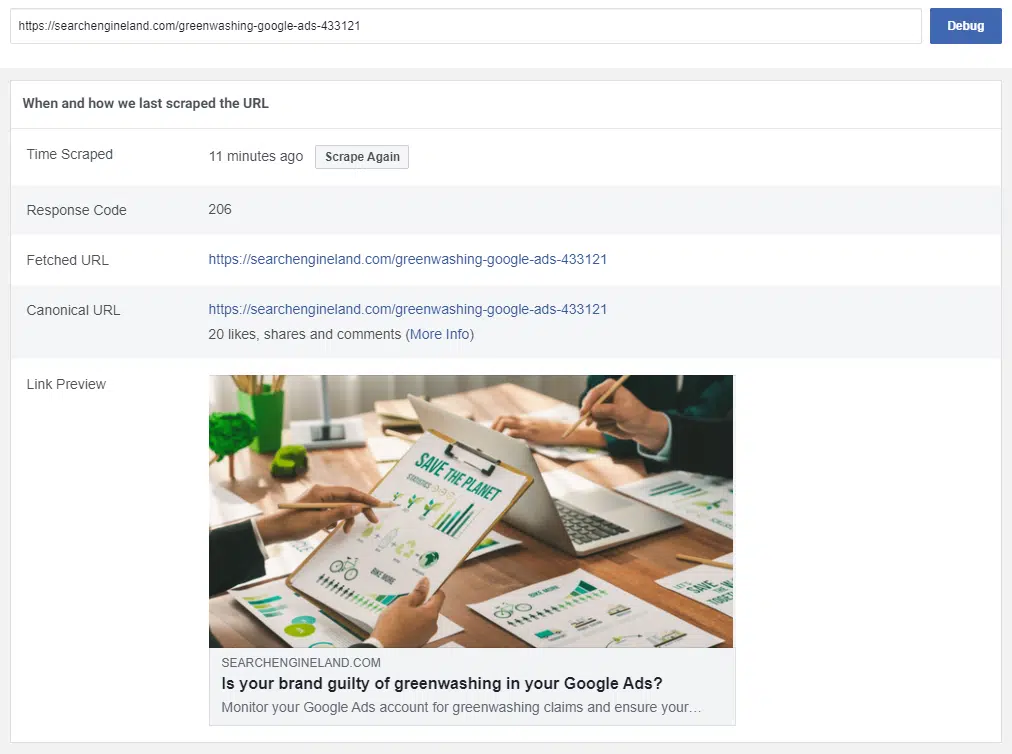
Preview of a Search Engine Land link when shared on Facebook
You can use Facebook’s handy Sharing Debugger if you want to check which OG tags you’ve specified and to see how a link looks when shared on Facebook.
The Facebook Sharing Debugger. OG tags are also specified further down on the page.
The code used might look something like this:
<meta property="og:title" content="Is your brand guilty of greenwashing in your Google Ads?" /> <meta property="og:description" content="Monitor your Google Ads account for greenwashing claims and ensure your messaging aligns with your brand’s environmental efforts." /> <meta property="og:url" content="https://searchengineland.com/greenwashing-google-ads-433121" /> <meta property="og:image" content="https://searchengineland.com/wp-content/seloads/2023/10/Is-your-brand-guilty-of-greenwashing-in-your-Google-Ads-800x450.png" />
Get the daily newsletter search marketers rely on.
Sharing on Slack
It’s easy to forget the value or impact of Slack communities. Probably because:
They’re hidden from those who aren’t actively participating within them.
Referral traffic from Slack will likely be hidden from your analytics reports (unless you are a genius and use custom UTM tags specifically for Slack).
While I don’t know of any Slack URL validator, I do know if you post a URL into a Slack channel, you should see a preview along with:
The brand name.
Page title.
Page description.
Image.
Estimated reading time.
Video previews.
And, sometimes, even price and availability (when sharing product links).
Not all those elements are included by default (which is probably a good thing!).
When I shared my first Search Engine Land article a few weeks ago, I noticed that none of those elements were being pulled through – just the URL was visible.
Slack optimization is a bit more complex than Facebook, X or other social channels, and there are some quirks to be aware of.
When you post a URL on Slack, it must first “unfurl” the URL – meaning it has to discover what is contained within the URL to show any kind of link preview.
Slack will first check the page headers for any oEmbed server code, Twitter card tags and/or Facebook Open Graph Tags, and then, finally, HTML meta tags.
The Slack system will give priority based on the order it finds those tags – so if they are set within the oEmbed server, those will override any HTML meta tags found later.
The main point to remember here is that if you provide valid Facebook Open Graph tags/Twitter cards for any key elements (image, description), then you should have a nice, well-optimized Slack URL preview.
Don’t forget to include pricing and availability info if you are an ecommerce retailer.
<img decoding="async" width="586" height="327" src="https://rassegna.lbit-solution.it/wp-content/uploads/2023/11/how-to-optimize-your-content-for-social-facebook-slack-and-x-3.webp" alt="The Slack unfurl/link preview after Search Engine Land updated their , removing the old Twitter card.” class=”wp-image-434226″ srcset=”https://rassegna.lbit-solution.it/wp-content/uploads/2023/11/how-to-optimize-your-content-for-social-facebook-slack-and-x-3.webp 586w, https://rassegna.lbit-solution.it/wp-content/uploads/2023/11/how-to-optimize-your-content-for-social-facebook-slack-and-x-21.webp 200w” sizes=”(max-width: 586px) 100vw, 586px”>The Slack unfurl/link preview after Search Engine Land updated their <head>, removing the old Twitter card.
Digging into the code, it looked like the Search Engine Land website had a redundant Twitter Card App code found high up within the <head>, which didn’t have a set image preview, description or anything else. This was likely overriding the subsequent OpenGraph tags that were correctly set.
Preview of the old Twitter App card blocking the optimized Twitter card from being shown on Slack.
Removing that old chunk of code while saving a few bytes in wasted code across every page on the domain also ensured the Slack unfurl pulled in more valuable data.
In effect, Search Engine Land carried out some good old-fashioned SEO – “Slack Experience Optimization.” ;)
A quick word on X optimization
In mid-October, Elon Musk decided to change how links are presented on the platform.
This has been deemed as an action to mask links, to try and keep users on the platform for more extended periods. (After all, social media companies don’t like users to “leave” the app, which means lower ad revenue.)
While links were fairly obviously presented, with a title and description included alongside the link, as of now, this is not the case.
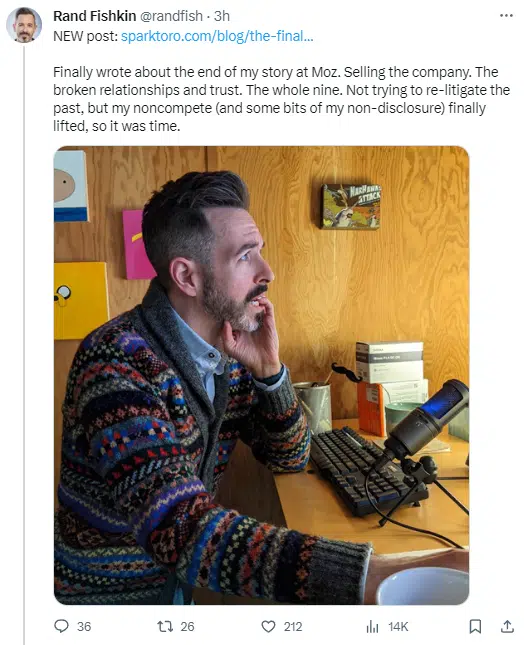
Links are now presented with an image pulled from the page being shared and a tiny mention of the brand embedded in the image.
Showing how URLs are now displayed within a post at present. Note the small URL/text at the bottom-left of the image.
You may not have noticed this change – especially if you’ve decided to ditch X – and many users took the chance to point out some fundamental flaws in this decision:
Example of how the new format has presented issues – or opportunities – for people to be misled due to shares no longer pulling in page titles or descriptions.
Either way, you now need to be wary of this and act accordingly. Some users seem to have adopted a new way of presenting links:
Adding a CTA and sometimes an emoji to help highlight the link at the end of a thread.
Just adding a link at the beginning of a tweet and clearly signposting it.
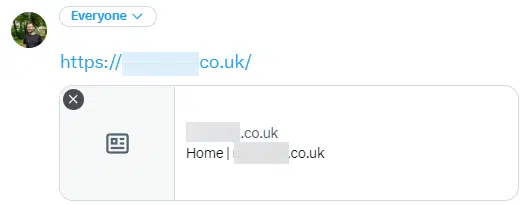
An alternative way to share links – clearly signpost that there’s a link, add a nice intro and include a custom image manually – thus avoiding the Twitter overlay on the image they pull.
Technically, you could also remove the OpenGraph/Twitter card from the page, which would leave the link looking bare when sharing (no image gets pulled), but at least it’s obvious that it’s a link. (Note that the Twitter Card Validator Tool is no longer supported.)
There’s no right or wrong way of doing things here. Still, it’s good to be wary of the issues, especially if you’re wondering why traffic to your site from X has dropped since mid-October.
Are you optimizing your content for social?
It’s easy to forget to optimize your content for social platforms – especially when we’ve got our heads fully within the search engine algorithm.
But I think it’s crucial to realize lots of positive interaction can come within social channels, whether that’s from customers sharing content you’ve produced or even sites linking to articles having found them via a social channel.
It doesn’t take long to ensure content is ready for sharing on social media and to have a strategy for feeding (not spamming!) the articles in any relevant communities.
@media screen and (min-width: 800px) { #div-gpt-ad-3191538-7 { display: flex !important; justify-content: center !important; align-items: center !important; min-width:770px; min-height:260px; }
}
@media screen and (min-width: 1279px) { #div-gpt-ad-3191538-7 { display: flex !important; justify-content: center !important; align-items: center !important; min-width:800px!important; min-height:440px!important; }
}
About the author
Matt Tutt is an SEO consultant that specialises in helping Purpose Driven and ClimateTech companies get found online. Passionate about anything that aims to help the environment, he’s been working as an SEO for over 10 years. Outside of work he can usually be found in his garden, attempting to grow anything that could be considered edible.
How Danny Sullivan shares SEO issues with Google’s Search team
Ever wonder how Danny Sullivan, Google’s Search Liaison, compiles feedback on issues related to Search and then shares those details with the wider Google Search team?
Sullivan regularly does this work but has only shared examples with the public a few times. He shared some of the latest feedback he’s received Nov. 3.
What Sullivan shared. In a recent post on various social platforms, Sullivan wrote:
“Someone asked me this week for examples of how I bring the feedback people have outside Google back into Google. Good question. I’ve done this in the past. Here’s a fresh one. After the discussions I’ve had over the past two weeks at an in-person event and online, I compiled a write-up that runs about nine printed pages long, covering themes, thoughts, concerns and suggestions that were shared with the search team. A sampling from that.”
Someone asked me this week for examples of how I bring the feedback people have outside Google back into Google. Good question. I’ve done this in the past. Here’s a fresh one. After the discussions I’ve had over the past two weeks at an in-person event and online, I compiled a… pic.twitter.com/aqIL6TQHGf
The notes. Here are interesting excerpts from the notes, although he posted screenshots of them as shown above:
Everyone is doing things for us. all If you tell someone to make people-first content, it’s not uncommon they fall back into thinking how they show us – Google – that it’s people first. “So you’re saying I should have an author bio to rank better?” No! They should have bios because their own readers would expect that!
Our guidance even encourages people to compare themselves to other pages in our results – something we probably need to amend to say something like I covered in this post. Do a search, look at the sites that come up. Those are what our systems find helpful. That said, the systems aren’t perfect. So if you see a site that seems to be doing things against our guidelines, it might not be successful in the future.
Over and over, people noted large publishers that seem like they can write about anything and get rewarded.
Related is the idea that “parasite SEO” site win, sites that lease themselves out to third-parties and then content ranks on these sites that would never succeed on a different. This is different from big sites winning for original (but not necessarily people-first) content, but the two get conflated.
there’s a desire (such as here and here) for some type of tool or examples to help people better understand what we mean by helpful content or something that identifies if a page or site has been impacted by the helpful content update. I also floated the idea of taking our self-assessment questions and turning them into an interactive tool (this is a very rough idea of how that might work) Possibly, we could begin sharing some actual examples (such as here) or generic/stylized examples like this:
Past examples. It’s been more than four years since Sullivan publicly shared examples of him sharing feedback from SEOs, creators and users with the Google Search team. Here are two of those posts:
Last week, we asked webmasters what they’d like in how Google displays listings. We received over 250 thoughtful replies. It’s greatly appreciated by our team that handles this area, shown here as we reviewed them. We’re also circulating the comments broadly within search. pic.twitter.com/YDmjkC15fK
The search team at Google holds regular “Ranking Fairs,” which are like science fair for sharing your projects with others in search. I’m doing my first one today sharing some of the webmaster ecosystem concerns I hear. I share these in other ways, too. But this is more creative! pic.twitter.com/E52hVpB8OG
Why we care. On some level it is nice to know that we do have people inside Google that do take our feedback seriously and share them with the wider Google Search team. I know it is not just Sullivan who does this but also other teams at Google, such as John Mueller’s Search Relations team.
We also know that it takes Google time to compile, review and process the feedback and then sometimes even more time to decide if they should take action on that feedback. Finally, programming that feedback into the various search algorithms and search interfaces can take even longer.
So don’t expect any of this feedback to result in changes in Google Search in the next week or two. These changes take time.
@media screen and (min-width: 800px) { #div-gpt-ad-3191538-7 { display: flex !important; justify-content: center !important; align-items: center !important; min-width:770px; min-height:260px; }
}
@media screen and (min-width: 1279px) { #div-gpt-ad-3191538-7 { display: flex !important; justify-content: center !important; align-items: center !important; min-width:800px!important; min-height:440px!important; }
}
About the author
Barry Schwartz is a Contributing Editor to Search Engine Land and a member of the programming team for SMX events. He owns RustyBrick, a NY based web consulting firm. He also runs Search Engine Roundtable, a popular search blog on very advanced SEM topics. Barry can be followed on Twitter here.
12 SEO pitfalls to avoid during a website platform migration
Migrating to a new website platform can be a necessary step for businesses looking to scale up or embrace new technologies. However, website migrations come with considerable SEO risks.
Without proper SEO planning and execution, a platform migration can lead to a significant loss of organic traffic, revenue and market share.
Here are 12 common SEO pitfalls to avoid during a website platform migration.
1. Neglecting to create a migration plan
Like any major project, migrating to a new platform requires a well-thought-out execution plan. Whenever possible, SEOs should join the process early on, leaving ample time and opportunity to:
Align with product and engineering.
Map out technical and content requirements.
Provide ongoing guidance and assistance with pre- and post-migration QA.
Every thorough migration plan should include a detailed checklist outlining all key areas of technical SEO, content, page speed and performance, analytics benchmarking and more.
2. Sloppy information architecture
Migration offers an opportunity for a reset. It is an excellent time to re-evaluate the overall SEO setup and explore any new opportunities for improvement around more fundamental areas, like information architecture, taxonomy and navigation.
A straightforward and intuitive information architecture is preferable to an outdated or convoluted one. However, any functional site navigation structure that drives organic traffic is an asset. Any changes should be rolled out gradually and cautiously, with close monitoring along the way.
A sudden overhaul will almost always come as a shock to the system. Changes to core navigation and browsing paths can impact user behavior and link equity distribution, causing:
A shift in PageRank.
A decrease in long-tail traffic.
Fluctuations in keyword rankings and organic traffic.
The risks are especially pronounced for large, established sites with considerable organic market share in their respective niches.
Several years ago, a classifieds website considerably trimmed and simplified its category tree during a platform migration without realizing it was one of the primary drivers of organic traffic.
They lost nearly 40% of their SEO market share and have not yet recovered.
3. Overzealous content pruning
Many marketers use site migrations to review their content inventory for gaps, redundancies and outdated or irrelevant content.
Considerable content pruning tends to happen at this stage – in part, because it often seems easier to retire entire portals and blogs than to migrate them.
A thoughtful plan for updating, maintaining, consolidating and retiring content is far more advisable than overzealous content pruning that will almost certainly result in the deletion of valuable content and loss of traffic.
A periodic content inventory review is a good practice. It should be undertaken instead to avoid the buildup of abandoned and long-forgotten pages that are no longer supported or actively maintained.
Even a perfectly executed 301 redirection strategy won’t guarantee SEO parity pre- and post-migration, as some short-term traffic loss is almost guaranteed.
But sloppy 301 redirects, or the lack thereof, will result in permanent traffic losses.
Invest time and effort in 301 redirection mapping to preserve link equity and offer a smooth transition for users and search engines. This includes:
Updating all internal links to the new URL structure.
Removing any redirect chains.
5. Overlooking on-page SEO elements
Site redesign is an integral part of many website migrations.
Pair with UX and engineering teams to ensure that page layout follows a coherent structure and all core elements – titles, headings, breadcrumbs, metadata etc. – are present and properly labeled across all indexable page types and landing pages.
Pay special attention to components that contain structured markup and ensure that all key elements are preserved on the page and in HTML.
Get the daily newsletter search marketers rely on.
6. Forgetting about mobile
Seven years after Google first announced its intent to shift to mobile-first Indexing, the project has finally been completed. And yet, a solid mobile experience remains an afterthought for many sites, especially those that primarily earn revenue from desktop users.
A lot can slip through the cracks during a major platform migration while all eyes and resources are on revenue-driving initiatives, with negative consequences for SEO.
Don’t forget to test rigorously on mobile, checking for mobile responsiveness and parity between key features and on-page elements. Pay especially close attention to internal linking on the mobile experience.
As Google predominantly uses the mobile version of a site’s content, crawled with the smartphone agent, for indexing and ranking, ensuring a well-optimized mobile experience is key to overall SEO success.
7. Slow page load times
Newer doesn’t always mean faster. Optimizing for page loading speed, user experience and Core Web Vitals metrics is both an art and a science that requires a deep understanding of page elements and their impact on performance.
A new design or framework will introduce new performance challenges. It can take months of dedicated effort to find and implement solutions, often through a series of incremental tweaks, optimization and testing.
As such, start optimizing early, long before the launch date. Encourage designers and engineers to think performance-first.
Key page components or navigation elements become uncrawlable due to an oversight.
Entire directories or page types become accidentally disallowed in robots.txt, noindexed via directives, or bulk canonicalized to the home page.
Although this can occur anytime, it’s most likely to happen during or immediately following a significant migration when teams are busy squashing bugs and resolving other migration issues. It’s essential to keep a close eye here and monitor daily.
On large ecommerce marketplaces, bulk indexing bugs can be costly to the business. They can wipe out SEO traffic virtually overnight and will take weeks or months to recover lost traffic as Google recrawls, processes and re-indexes removed content.
It’s essential to have these tools in place to monitor website performance and quickly address any issues.
Better yet, create custom dashboards that can help you compare performance metrics for critical areas of your site pre- and post-migration.
Specialized analytics dashboards can act as additional QA levers to help you spot and address potential issues early before they become huge problems.
Changes in taxonomy, content consolidation and pruning can affect user behavior, leading to fluctuations in engagement, conversion metrics, time on site and bounce rates.
For example, a decreased organic conversion rate for a particular page type might be fully expected if the page begins to receive a lot more pageviews and traffic for lower-intent head terms as a result of a content consolidation project.
10. Ignoring XML sitemaps
Up-to-date XML sitemaps can help speed up the discoverability, crawling and indexing of your new URLs.
Separate sitemaps created for each page type, content type or another criterion can help track the discovery rate and indexing of content by key segments, offering a more granular view.
11. Overlooking content that shouldn’t be indexed
SEOs focus so much on what to index that we might forget to ensure that non-indexable content stays out of search engine indices.
Aside from non-SEO URL parameters or sorting filters, this includes all kinds of restricted content:
System folders.
Order tracking pages.
Parts of checkout flows.
Other pages may contain sensitive user data and PII information not meant for the public eye.
Leaking of user data carries both considerable reputational and financial risks. SEOs should take every precaution to ensure that this does not occur.
Sometimes, things go wrong even when you’ve done everything right. Bugs slip unnoticed as developers and QA teams learn the ropes of a new platform.
It’s important to spot issues quickly when they arise. Just because migration is complete doesn’t mean that work is finished.
Close monitoring post-launch is essential for success, particularly:
Regular crawls.
Live production QA.
Assessing key metrics and dashboards, including overall SEO impressions, rankings, CTR and visibility.
A proactive approach to SEO during website platform changes
Website platform migrations offer a chance to improve user experience, adopt new technologies and rejuvenate a brand’s online presence. But without meticulous planning and execution, there’s a risk of derailing SEO performance.
Being aware of – and avoiding – the pitfalls can ensure a smooth transition and maintain your performance.
@media screen and (min-width: 800px) { #div-gpt-ad-3191538-7 { display: flex !important; justify-content: center !important; align-items: center !important; min-width:770px; min-height:260px; }
}
@media screen and (min-width: 1279px) { #div-gpt-ad-3191538-7 { display: flex !important; justify-content: center !important; align-items: center !important; min-width:800px!important; min-height:440px!important; }
}
About the author
Olya Ianovskaia has worked in SEO, growth and product management for over 15 years. Her primary area of expertise is in technical SEO and designing data-based search products for global marketplaces and ecommerce sites. Olya has a background in anthropology, dabbles in wildlife photography, and runs a small family homestead in Central Ontario.
Successful SEO professionals know a lot about dealing with uncertainty – such is life when algorithms that make or break performance are kept under lock and key.
Simply put, it’s both a paradigm shift anda quickly moving target; Google’s incorporation of SGE has been evolving almost daily.
So what do we know, and what should we expect – and how should we prepare? In this article, I’ll take a look at:
Where do we stand on SGE?
From a UX perspective, Google scaled back on the initial look, which was taking over most of the SERP. Now it’s less in your face, which I suspect they had planned the whole time – test maximalist to force people to notice and collect data on how they behave in the new environment.
Sticking with the user perspective, not everyone is served SGE with every query. I just tried 10 queries (a mix of “what is,” “should I buy,” “top 10 options for,” and information on state governors), and none of them returned results featuring SGE.
This will certainly change as the product comes out of beta, but it reaffirms that SGE is still in the roll-out phase, and users, SEO, and Google are all learning on the fly.
For SEOs, SGE is kind of the black box within the black box of Google’s algorithm. We can make some very educated recommendations for navigating the world of SGE, but nothing is clear at this point.
How could user behavior (and SEO) shift?
I’ve spoken with many people who have recoiled at the idea of SGE taking over their SERPs. This isn’t surprising; it combines the specter of AI taking over the world with a general distrust of change.
Add that to Google’s reputation on the advertising side, taking a few PR hits lately, and you have a bit of a perfect storm.
That said, I expect Google will just shove SGE down people’s throats as they did with featured snippets, the knowledge graph, etc.
After the 100th search, it’ll just be the expected experience. And I do expect the results to get better and more useful over time.
I’m already finding it useful as a user. For example, when looking for synonyms for a given word, I used to go to Thesaurus.com.
Now, I can just type it in and ask Google to show me synonyms, and AI will spit out a list, which saves me time. Something like that is fairly linear.
But for more complex issues, you’re still better off with content written by humans.
Get the daily newsletter search marketers rely on.
What kind of skills do SEOs need to capitalize on SGE?
This is where we get into speculation a bit more. I believe SGE won’t reward SEOs who practice completely different strategies than they do for keyword and query-related search. The skills will have a ton of overlap.
Having said that, I think for some SEOs, the question of how to harness SGE for your brand’s benefit might become, essentially, “How do you produce really good content that Google will use as a source for its AI,” not “How do you produce valuable content for the end user?”
Writing for AI and writing for users, after all, could have subtle but meaningful differences.
I’m looking at this question like I do with featured snippets. The goal should be to communicate trust and usefulness to Google.
The SEO content I’ve seen featured in SGE for my clients has either featured structured data (easy for Google to digest) or has been housed in pillar pages that cover the topic in-depth and act as a resource.
In short, it looks like content that ChatGPT would reference if asked a specific question, but it doesn’t soundlike ChatGPT (which would add nothing to the conversation).
When I think of writing for SGE – which could have real benefits, like lifting your content from the bottom of the SERPs to the top-of-the-page SGE ranks – I think of giving the AI incentive to point the user to your site.
This might sound counterintuitive because Google’s been telling SEOs not to make content just to rank – but ultimately, my goal is to be useful to the end user, which hasn’t changed from pre-SGE days.
If there’s a net-new skill we need to add, it’s developing an understanding of how large language models (LLMs) spit out answers and what the model isn’t delivering that humans need to add.
That could be personal opinions, experience, anecdotes, etc.
AI could certainly remix those and spit them out in aggregate, but there’d be a lot lost in translation.
In short, think about the gaps in AI-produced answers, and make sure you’re addressing those gaps to add value.
Use user-generated content as an insurance policy
On the opposite end of the content spectrum, we have user-generated content (UGC).
Big September and October updates from Google kicked off a lot of chatter on X and SEO forums about the possibility of a bigger emphasis on UGC in the SERP results.
While I haven’t seen a big spike in its SERP visibility, I do think content pulled from sites like Quora and Reddit (speaking as someone with a focus on B2B/SaaS) is useful.
And it represents an extremely personal counterpoint to SGE:
If you’re looking to lean into a facet of SEO to hedge against possible erosion from SGE, UGC could be a smart – and relatively underutilized – bet.
SEO and SGE: Preparing for the future
In a meta sense, the SEO tenets of methodical testing and finding your way in a murky landscape will be more important than ever in planning a world heavy in SGE.
Follow your favorite industry sources closely.
Annotate changes in both the Google landscape and your own strategy to recognize trends.
Understand the role of human insight in bringing value to the user.
It might not guarantee success, but you’ll have a solid foundation that will make strategic pivots easier to pull off.
Opinions expressed in this article are those of the guest author and not necessarily Search Engine Land. Staff authors are listed here.
@media screen and (min-width: 800px) { #div-gpt-ad-3191538-7 { display: flex !important; justify-content: center !important; align-items: center !important; min-width:770px; min-height:260px; }
}
@media screen and (min-width: 1279px) { #div-gpt-ad-3191538-7 { display: flex !important; justify-content: center !important; align-items: center !important; min-width:800px!important; min-height:440px!important; }
}
About the author
Adam Tanguay is Head of SEO and Content at Jordan Digital Marketing, which he joined in Feb. 2019. Formerly Head of Marketing at Webflow and Head of Organic Growth at Weebly, Adam has developed successful growth programs with a mix of content strategy, copywriting, technical know-how, and analytics acumen across a range of organic channels.
Google Business Profile: The new suspension appeal process
Google Business Profiles (GBP) are the lifeblood of most local businesses’ marketing efforts. For many small companies, having a GBP is often the onlyway they promote their business online.
And if a company’s GBP listing gets suspended, that business will likely lose a ton of business. (Having worked on hundreds of suspension/reinstatement cases for clients, a suspension can even lead to a company going out of business.)
Until now, Google’s suspension reinstatement process was a little “fuzzy” in terms of why a business’s GBP listing was suspended – a major frustration for business owners.
Now, a new Google Business Profile suspension appeal process has rolled out in the European Union (EU), and it’s expected to go global soon.
This article explains the new GBP suspension appeal process and how to prepare for it.
How the GBP suspension appeal process has changed
With this new appeal process, Google will now tell business owners why their Business Profile is suspended (or at least give them a general idea of the reason.)
This transparency will help merchants fix their profiles and get their GBP listing compliant with Google’s guidelines.
This new appeal process doesn’t introduce any new rules or guidelines. Instead, it’s designed to make the existing rules clearer.
Also, this process might evolve in the future as Google gathers feedback. So, be ready for minor adjustments in how it works, including the steps and visuals provided here.
Be sure to look at the help document about the new appeal process and become familiar with it. Next, let’s look at how this new appeal process works.
How to know if your Google Business Profile has been suspended
When your Google Business Profile gets suspended, you will see a notification in your Business Profile merchant panel that your listing is either suspended or disabled:
Notification for suspended profiles
Notification for diabled profiles
And you will also receive an email from Google informing you that your profile was suspended.
In this email, you will see the “Violation type,” which will tell you which guideline or policy your GBP listing violates. In this case, it’s Deceptive Content and Behavior.
Click on the “suspension policy” link to learn more about the policy violation so you can learn how to fix your Business Profile before you file your appeal.
Once you fix your Google Business Profile to comply with Google’s guidelines, make sure you’re logged into the email address you use to manage the suspended Google Business Profile, and then click the Appeal button in the email. You’ll then be taken to the Appeals tool.
Get the daily newsletter search marketers rely on.
Explained: The new Google Business Profile appeal process
The new process is pretty straightforward, but you must be prepared ahead of time for an appeal. That’s why reading through this entire article is so important.
The Appeals tool will be your central location for working on your appeal and checking the status of the appeal.
Always double-check to make sure that the email is the correct email that you use to manage the suspended GBP listing account, and then click Confirm.
Next, you’ll be taken to a screen where you will select the business that’s suspended. If you only have one location, only the suspended location will appear.
If you’re an agency or have multiple Business Profile locations, you’ll need to choose the suspended listing.
On the next screen, you will see when the Business Profile was suspended, the general reason for the suspension, and the details/status:
Can’t be appealed.
Eligible for appeal.
Please note that not all suspensions are eligible to be appealed.
If the Details/Status says Eligible for Appeal, click Next to move forward through the appeal process.
This next section is very important. Once you click the Submit button on this screen, you have exactly 60 minutes to upload the necessary official documents Google requires to prove you are a legitimate business.
These documents include:
Official business registration
Business license
Tax certificate
Utility bill
Your Business Registration/License must display the business name and address that matches the Business Profile you are appealing for.
The utility bill must display the same business name and address as your registration/license or tax certificate. Utility bills can include any of the following: electricity, phone, gas, water, sewage, trash, recycling, TV or internet.
Double-check all your documents to ensure your business name and address match your GBP listing exactly.
It’s best to provide as many items as possible to ensure you have the greatest chance for reinstatement.
Tip: If you’re unsure about your evidence or the process, consider hiring a product expert for help. Don’t proceed without expert guidance; your business’s future is at stake.
Once you have all your documents gathered and are ready to upload, click the Submit button.
This is when the 60-minute timer starts ticking. There is no timer on this page, so keep an eye on your clock or set your timer.
Click on the Add Evidence link to open the form to upload your evidence documents. (If you choose not to submit any evidence, the chances of your Google Business Profile getting reinstated are very slim.)
Note: Soon, there will be a more prominent Add Evidence callout on this screen so that it stands out more to merchants. (Right now, it’s easy to miss this section on the screen.)
When the evidence form opens, you will see that it is pre-populated with your email address, business name, address and Google Business Profile ID.
There are two file upload options available. If you have more than two files to upload, zip up those files and upload the zipped file. (Remember, the more evidence you can provide to Google, the better!)
There is also a text box where you should provide a narrative about:
Why your profile should be reinstated.
What you changed to fix your Business Profile so that it’s now in compliance with Google Business Profile Guidelines.
Any other information that you feel would be helpful for Google to know.
Keep in mind that this is not the place to complain about how much business you’ve lost or how desperate you are to get your GBP listing reinstated. Keep everything about the facts.
You are allowed 1,000 characters in this space, so choose your words carefully.
Once you have uploaded your documents and completed the rest of the form, click the Submit button.
After you submit the evidence, you will be directed back to the Appeals tool, where your Details/Status should change to Submitted.
Please check the Appeals tool often to see if the Details/Status has changed to any of the following:
Approved
Not Approved
The Google Support team will need several days to manually review the evidence you have submitted and to check your Business Profile for compliance.
Once they have reviewed your evidence and GBP, you will receive one of two emails.
Suppose your evidence is compelling and proves that your business is legitimate and your Google Business Profile is now in compliance with Google’s Guidelines. In that case, you will receive an email letting you know that your appeal was approved.
However, if your GBP listing is still in violation of guidelines and/or your evidence is not compelling or does not satisfy Google’s requirements, you will receive an email denying your appeal.
And the Details section in the Appeals tool will show Not approved.
If your appeal is denied, you may be able to “re-appeal” the decision. However, we do not have details on how this “re-appeal” process works.
Better transparency and a streamlined appeal process
The transparency of why a Google Business Profile actually got suspended is a refreshing change for merchants. The new process is simple and easy to follow.
That said, the challenge is to ensure that you fix your Google Business Profile before you start the appeal process. Your profile must meet Google’s guidelines, and you must provide Google with ample and correct documentation that proves you are a legitimate business.
If you’re in doubt, it’s best to hire a product expert to help you go through this process.
Opinions expressed in this article are those of the guest author and not necessarily Search Engine Land. Staff authors are listed here.
@media screen and (min-width: 800px) { #div-gpt-ad-3191538-7 { display: flex !important; justify-content: center !important; align-items: center !important; min-width:770px; min-height:260px; }
}
@media screen and (min-width: 1279px) { #div-gpt-ad-3191538-7 { display: flex !important; justify-content: center !important; align-items: center !important; min-width:800px!important; min-height:440px!important; }
}
About the author
Sherry Bonelli is a search engine optimization (SEO) and digital marketing professional with 25+ years of experience. She is the owner of early bird digital marketing, a digital marketing agency that serves clients all over the U.S. Bonelli is a Google Business Profile Platinum Product Expert and columnist for leading marketing websites. She received Search Engine Land’s SEO Contributor of the Year Award in 2018. A recognized presenter and speaker at leading digital marketing conferences, Bonelli holds a Master’s Degree in Internet Marketing. She is also a LinkedIn Learning Instructor, Adjunct Instructor at several colleges and universities and is the host of The Marketing Plan Podcast.
7 must-see Google Search ranking documents in antitrust trial exhibits
The U.S. Department of Justice has released several new trial exhibits – including internal Google presentations, documents and emails related to ranking.
Here are seven that specifically discuss elements of Google Search ranking:
This is a heavily redacted PowerPoint presentation put together by Google’s Eric Lehman – and like most of the other documents, it lacks the full context accompanying it.
However, what’s here is interesting for all SEOs.
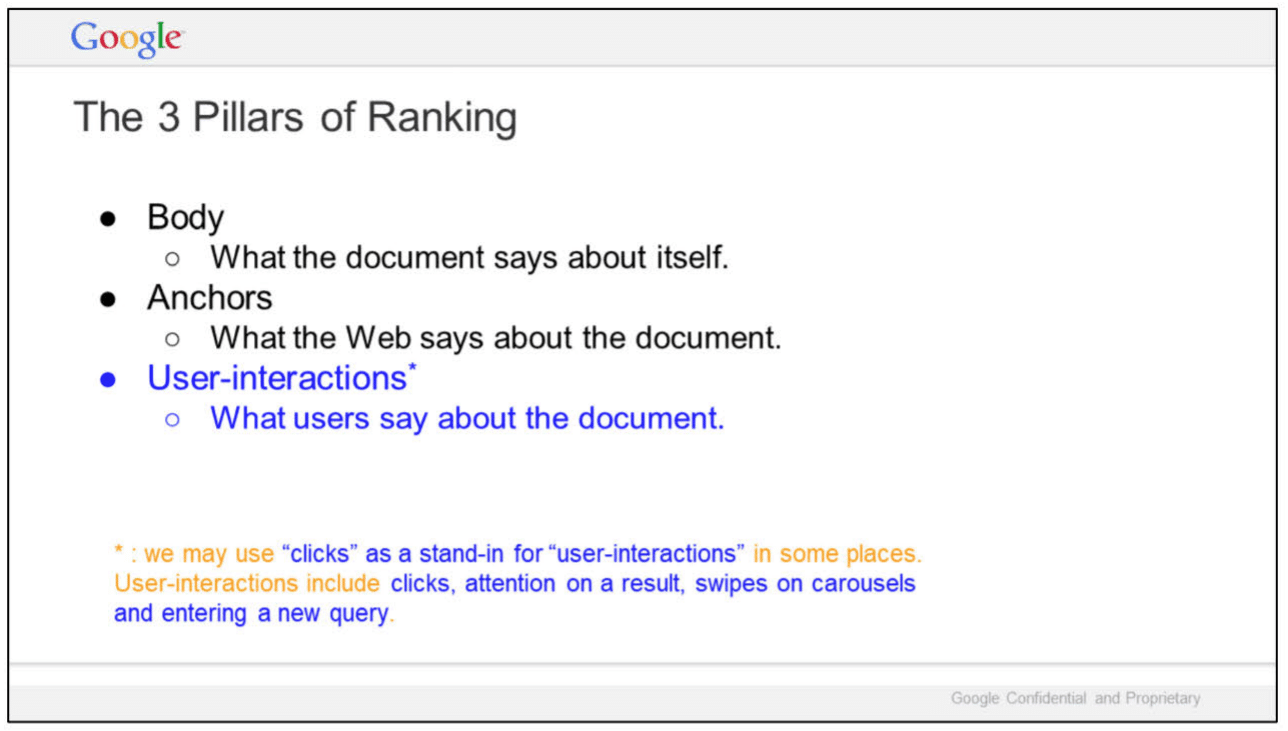
In “The 3 Pillars of Ranking,” slide, Google highlights three areas:
Body: What the document says about itself.
Anchors: What the Web says about the document.
User-interactions: What users say about the document.
Google added a note about user interactions:
“we may use ‘clicks’ as a stand-in for ‘user-interactions’ in some places. User-interactions include clicks, attention on a result, swipes on carousels and entering a new query.
In this slide, titled “User interaction signals,” Google illustrates the relationships of queries, interactions and Search results, alongside results for the query [why is the ocean salty]. Specific interactions mentioned by Google:
Read
Clicks
Scrolls
Mouse hovers
In September, Lehman testified during the antitrust trial that Google uses clicks in rankings. However, once again, it’s important to make clear that individual clicks alone are a noisy signal for ranking (more on that in Ranking for Research). Google has publicly said it uses click data for training, evaluation, controlled experiments and personalization.
What is redacted:
A slide titled “Metrics” – all that is visible is one line: “Web Ranking Components.”
Seven additional slides, including two titled “Outline” and “Summary.”
These seven slides were part of a larger Q4 2016 Search All Hands presentation, prepared by Lehman.
In this slide, Google says “We do not understand documents. We fake it.”
“Today, our ability to understand documents directly is minimal.
So we watch how people react to documents and memorize their responses.”
And the source of Google’s “magic” is revealed:
“Let’s start with some background..
A billion times a day, people ask us to find documents relevant to a query.
What’s crazy is that we don’t actually understand documents. Beyond some basic stuff, we hardly look at documents. We look at people.
If a document gets a positive reaction, we figure it is good. If the reaction is negative, it is probably bad.
Grossly simplified, this is the source of Google’s magic.”
So how does this work?
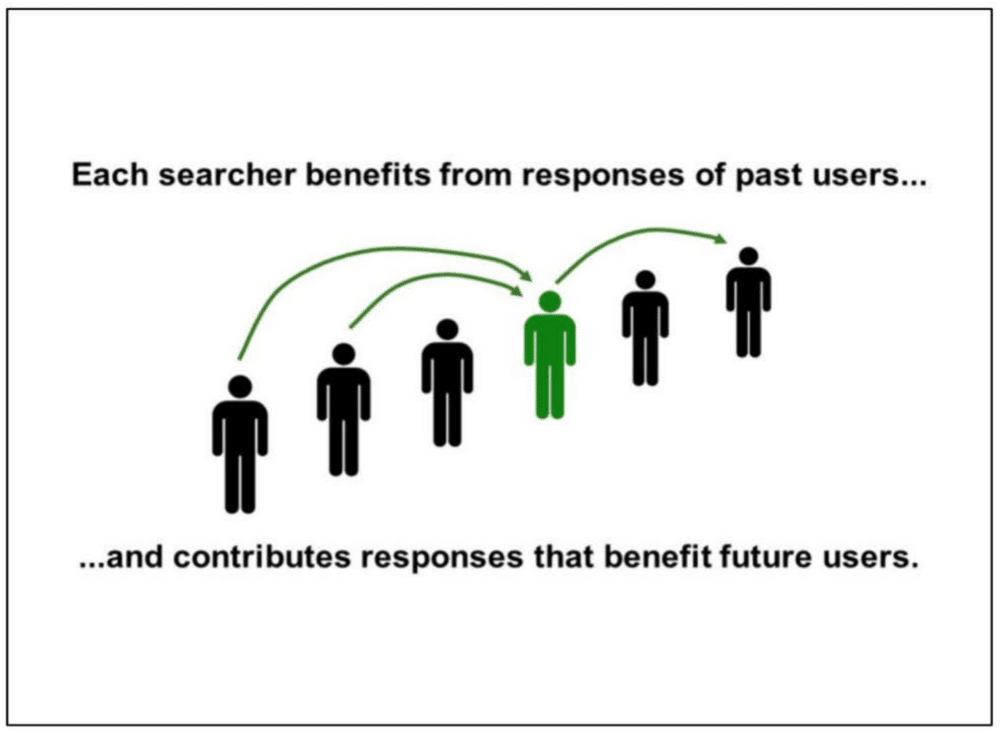
In this slide, Google explains how “each searcher benefits from the responses of past users … and contributes responses that benefit future users”:
“Search keeps working by induction.
This has an important implication.
In designing user experiences, SERVING the user is NOT ENOUGH.
We have to design interactions that also allow us to LEARN from users.
Because that is how we serve the next person, keep the induction rolling, and sustain the illusion that we understand.
Looking to the future, I believe learning from users is also the key to TRULY understanding language.”
And in the final slide, Google sums up with this statement:
“When fake understanding fails, we look stupid.”
The other four slides are entirely skippable, unless you’re interested in knowing that “Search is a great place to start understanding language. Success has implications far beyond Search.”
Google is looking at end users – how people interact with Search results. Not as individuals – but as a collective.
3. Ranking for Research
It’s unclear who created this presentation, but there are some very interesting findings in here.
In this slide, Google talks about 18 aspects of search quality:
Relevance
Page quality
Popularity
Freshness
Localization
Language
Centrality
Topical diversity
Personalization
Web ecosystem
Mobile friendly
Social fairness
Optionalization
Porn demotion
Spam
Authority
Privacy
User control of spell correction
This slide discusses the shortcomings of live traffic evaluations. Yes, essentially Google is talking about clicks not being a good signal because they are hard to interpret.
“The association between observed user behavior and search result quality is tenuous. We need lots of traffic to draw conclusions, and individual examples are difficult to interpret.”
Finally, this slide provides a different illustration of how Google Search result ranking works:
There are some other interesting tidbits in this presentation, though not necessarily tied to ranking. Of note:
“Attempts to manipulate search results are continuous, sophisticated, and well-funded. Information about how search works should remain need-to-know.” (Slide 5)
“Keep talk about how search works on a need-to-know basis. Everything we leak will be used against us by SEOs, patent trolls, competitors, etc.” (Slide 10)
“Do not discuss the use of clicks in search, except on a need-to-know basis with people who understand not to talk about this topic externally. Google has a public position. It is debatable. But please don’t craft your own.” (Slide 11)
In this presentation, we learn how search really works.
This slide explains how search does not work. From the notes:
“We get a query. Various scoring systems emit data, we slap on a UX, and ship it to the user.
This is not false, just incomplete. So incomplete that a search engine built this way won’t work very well. No magic.”
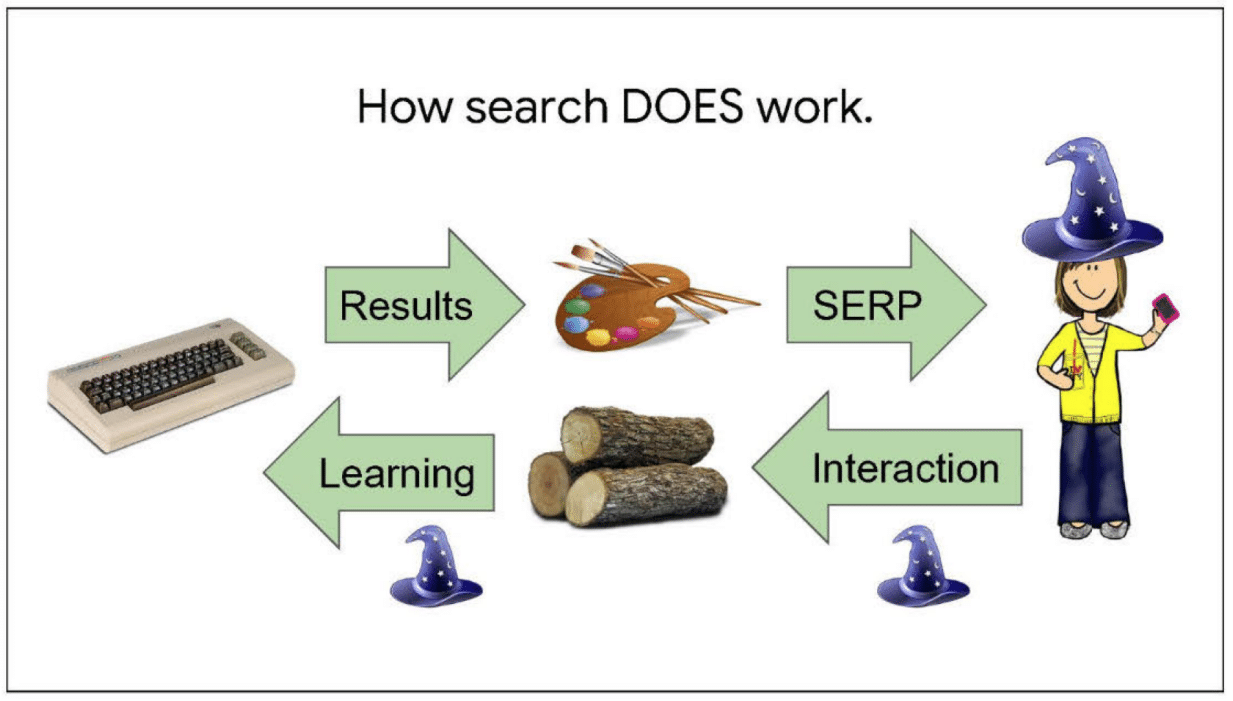
In this slide, we learn how search does work:
“The key is a second flow of information in the reverse direction.
As people interact with search, their actions teach us about the world.
For example, a click might tell us that an image was better than a web result. Or a long look like might mean a KP was interesting.
We log these actions, and then scoring teams extract both narrow and general patterns.”
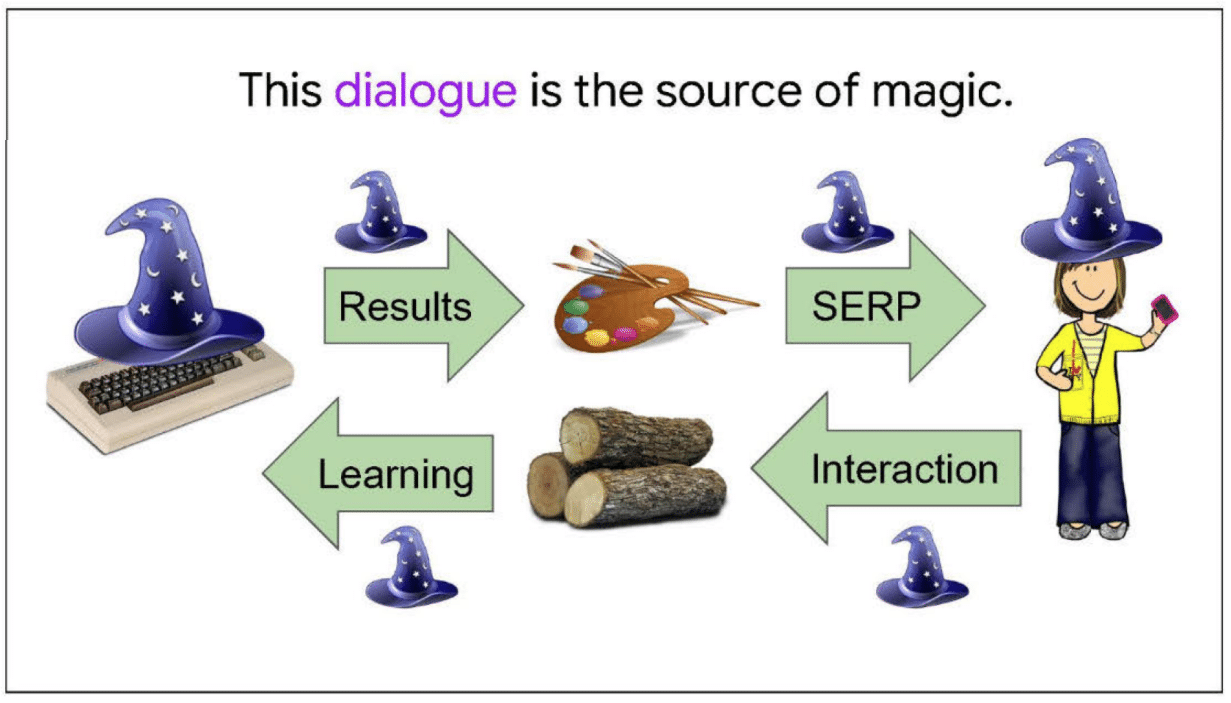
Next, we learn the source of Google’s “magic.” From the notes:
“The source of Google’s magic is this two-way dialogue with users.
With every query, we give a some knowledge, and get a little back. Then we give some more, and get a little more back.
These bits add up. After a few hundred billion rounds, we start lookin’ pretty smart!
This isn’t the only way we learn, but the most effective.”
So how does Google learn more from users? From the notes:
“On the surface, users ask questions and Google answers. That’s our basic business. We can’t screw that up. But we have to quietly turn the tables. One way is to:
ask the user a question implicitly
provide necessary background information
give the user some way to tell us the answer”
This slide looks at the 10 blue links.
“For example, the ten blue links implicitly pose the question, ‘Which result is best?’
Result previews give background. And the answer is a click.
This is a great UX for learning. For years, Google was mocked for great search results in a bland UI.
But this bland UI made the search results great.”
This slide is on Image Search:
“Image search poses a similar question– which do you like best? Thumbnails provide background information, and the user’s answer is logged as a hover, click, or further interaction.”
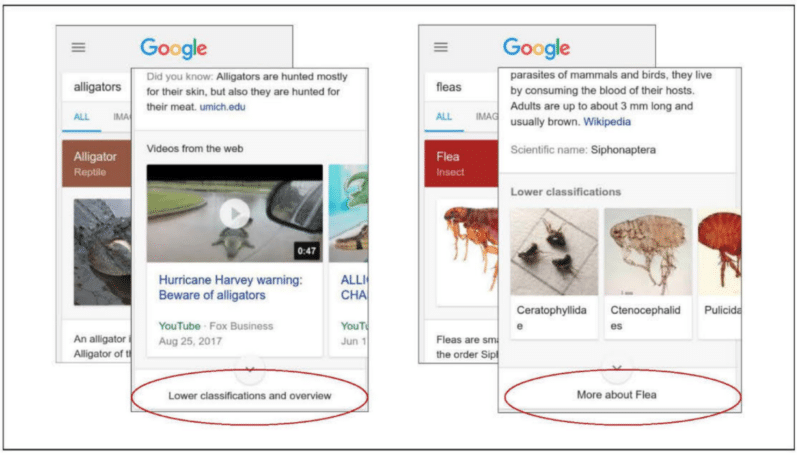
Finally, knowledge cards:
“For example, some knowledge cards need an extra tap to fully open.
On the left, an extra tap means the user wants lower classifications and an overview.
On the right, the user has too little background information.
More what? How is tapping here different from scrolling down? Users can’t make a good decision, so Taps and clicks are such distinctive events in logs; we should endow every one with meaning.”
This presentation discusses the “critical role that logging plays” in ranking and search.
This familiar-looking slide revisits the two-way dialogue being the source of Google’s magic. As explained in the notes:
“Search is a bit like a potluck, where every person brings one dish of food to share. This a great, big spread of food that everyone can enjoy. But it only works because everyone contributes a little bit.
In a similar way, search is powered by a huge mass of knowledge. But it isn’t something we create. Rather, everyone who comes to search contributes a little bit of knowledge to the system from which everyone can benefit.”
In this slide, Google discusses translating user behaviors. From the slide notes:
“The logs do not contain explicit value judgments– this was a good search results, this was a bad one.
So we have to some how translate the user behaviors that are logged into value judgments.
And the translation is really tricky, a problem that people have worked on pretty steadily for more than 15 years.
People work on it because value judgements are the foundation of Google search.
If we can squeeze a fraction of a bit more meaning out of a session, then we get like a billion times that the very next day.
The basic game is that you start with a small amount of ‘ground truth’ data that says this thing on the search page is good, this is bad, this is better than that.
Then you look at all the associated user behaviors, and say, “Ah, this is what a user does with a good thing! This is what a user does with a bad thing! This is how a user shows preference!’
Of course, people are different and erratic. So all we get is statistical correlations, nothing really reliable.
For example:
[REDACTED]
– If someone clicks on three search results, which one is bad? Well, likely ALL of them, because it is probably a hard query if they clicked 3 results. Challenge is to figure out which one is most promising.”
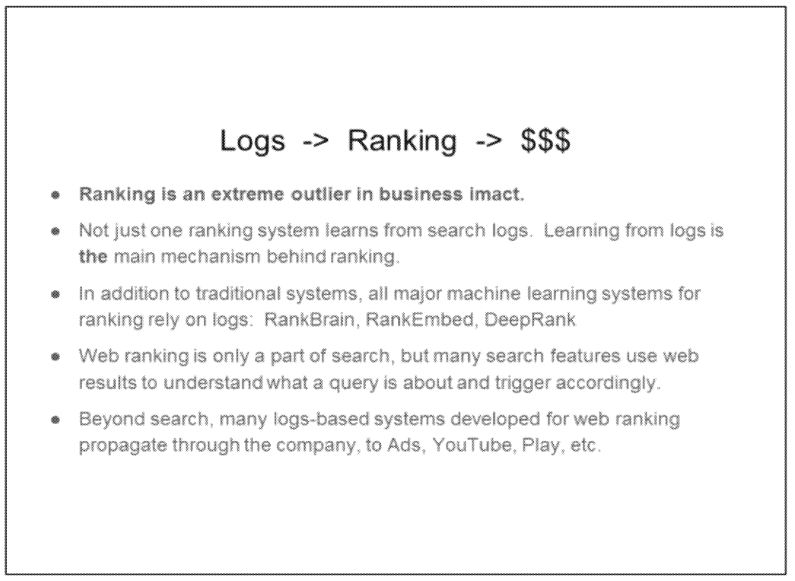
Finally, this slide discusses how logging supports ranking and Search. From the notes:
“… and here comes the part I warned you about. I’m selling something. I’m selling the idea of the logs term keeping the needs of the ranking team in mind. Pretty please with sugar on top.
But the basic reason is that the ranking team is really weird in one more way, and that is business impact.
As I mentioned, not one system, but a great many within ranking are built on logs.
This isn’t just traditional systems, like the one I showed you earlier, but also the most cutting-edge machine learning systems, many of which we’ve announced externally– RankBrain, RankEmbed, and DeepRank.
Web ranking is only a part of search, but many search features use web results to interpret the query and trigger accordingly.
So supporting ranking supports search as a whole.
But even beyond this, technologies developed in search spread out across the company to Ads, YouTube, Play, and elsewhere.
So– I’m not in finance– but grossly speaking, I think a huge amount of Google business is tied to the use of logs in ranking.”
This newsletter dove into the differences between desktop and mobile search ranking, user intents and user satisfaction – at a time when mobile traffic was starting to surpass desktop traffic on some days.
Google did a comparison of metrics, including:
CTR
Manual refinement
Queries per task
Query length (in char)
Query lengths (in word)
Abandonment
Average Click Position
Duplicates
Based on the findings, one of the recommendations was:
“Separate mobile ranking signals or evaluation reflecting different intents. Mobile queries often have different intents, and we may need to incorporate additional or supplementary signals reflecting these intents into our ranking framework. As discussed earlier, it is desirable that these signals handle local-level breakdowns properly.
Nothing surprising in this document (it’s unclear who wrote it), but one interesting bullet on BERT and Search ranking:
“Early experiments with BERT applied to several other areas in Search, including Web Ranking, suggest very significant improvements in understanding queries, documents and intents.”
“While BERT is revolutionary, it is merely the beginning of a leap in Natural Language Understanding technologies.”