Analysis: FAQ rich results show on 17% of Google SERPs, down from 54%

The number of FAQ rich results appearing in Google’s SERPs has decreased from 53.94% to 17.04%, according to a new analysis by digital marketing agency Portent.

Why we care. It’s much harder to earn FAQ rich results, though not impossible. As the study suggests, you should continue using FAQ schema and following best practices when it makes sense.

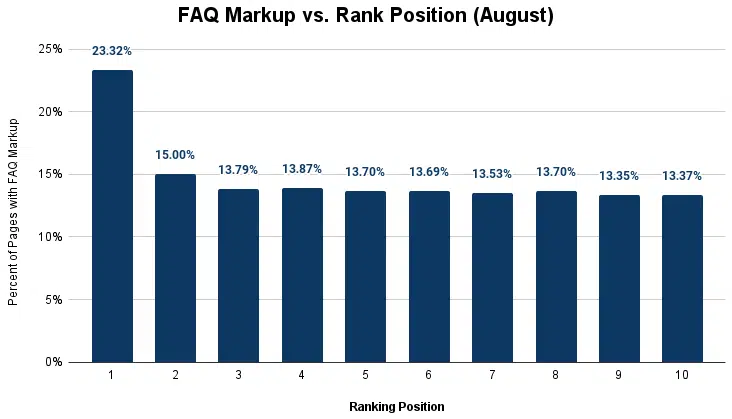
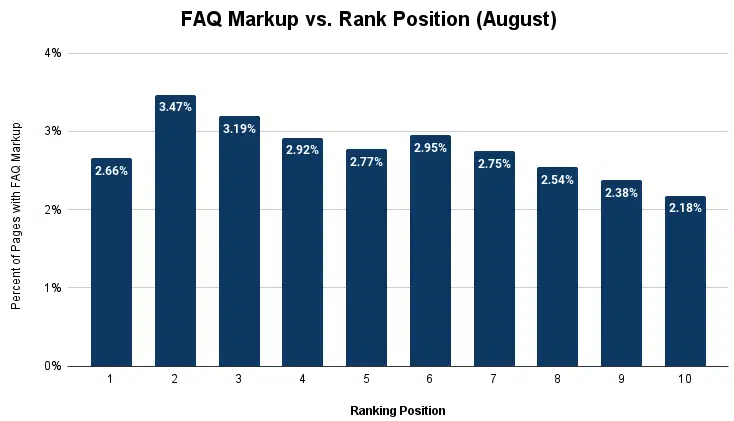
Interesting findings. The Position 1 result is less likely to get a rich result than Positions 2 through 7.

Faq Rich Result Google Position

The comparison also found:

  • “It’s 1.88 percent more likely that the page in the number one position will have FAQ schema, but 9.39 percent less likely it will receive an FAQ result.”
Faq Markup Vs Position Portent

FAQs always matched the schema markup – the analysis found no instances of Google rewriting questions or answers, as it commonly does with title tags and meta descriptions.

About the analysis. It compared an Aug. 15 crawl of more than 30,000 Google searches, with 10 links per result, against the crawl from February (Portent didn’t give an exact date). It focused on “seed keywords from various verticals with a high likelihood of FAQs” including home improvement, mortgage, telehealth, cybersecurity, pet adoption and hiking.

Google reduced FAQ visibility. FAQs rich results are now only shown for “well-known, authoritative government and health websites” as Google announced Aug. 8. FAQ rich results are no longer shown regularly for other sites.

Simplification of search. Google’s Gary Illyes said the removal of SERP features such as FAQ and HowTo rich results is part of Google simplifying search results, a trend he said will likely continue. Google removes features because users don’t use them or find them useful, Illyes said.

Read the full Portent study. Google Update Decreases Search Result FAQs By 37%


Related stories

New on Search Engine Land

@media screen and (min-width: 800px) { #div-gpt-ad-3191538-7 { display: flex !important; justify-content: center !important; align-items: center !important; min-width:770px; min-height:260px; } } @media screen and (min-width: 1279px) { #div-gpt-ad-3191538-7 { display: flex !important; justify-content: center !important; align-items: center !important; min-width:800px!important; min-height:440px!important; } }

About the author

Danny Goodwin

Danny Goodwin has been Managing Editor of Search Engine Land & Search Marketing Expo – SMX since 2022. He joined Search Engine Land in 2022 as Senior Editor. In addition to reporting on the latest search marketing news, he manages Search Engine Land’s SME (Subject Matter Expert) program. He also helps program U.S. SMX events. Goodwin has been editing and writing about the latest developments and trends in search and digital marketing since 2007. He previously was Executive Editor of Search Engine Journal (from 2017 to 2022), managing editor of Momentology (from 2014-2016) and editor of Search Engine Watch (from 2007 to 2014). He has spoken at many major search conferences and virtual events, and has been sourced for his expertise by a wide range of publications and podcasts.

https://searchengineland.com/analysis-faq-rich-results-show-on-17-of-google-serps-down-from-54-432866


Google unleashes October 2023 spam update

Google has unleashed a new search update today, the October 2023 spam update. This spam update improves Google’s “coverage in many languages and spam types,” Google wrote.

Types of spam. Google said the October 2023 spam update “aims to clean up several types of spam that our community members reported in Turkish, Vietnamese, Indonesian, Hindi, Chinese, and other languages.”

Google said that update should “reduce the visible spam in search results, particularly when it comes to cloaking, hacked, auto-generated, and scraped spam.”

Few week roll out. The update will take a few weeks to roll out.

Previous updates. Before this, the most recent confirmed Google spam update was the October 2022 spam update and the  December 2022 link spam update. Before that was the  November 2021 spam update. Google also released a two-part Spam Update – on June 23 and June 28 in 2021, as well as the July 2021 link spam update.

Why we care. If you notice changes to your rankings over the next few weeks and your site is not primarily English, although, it may target English results, it may be related to this. This update specifically targets cloaking, hacked, auto-generated, and scraped spam.


Related stories

New on Search Engine Land

@media screen and (min-width: 800px) { #div-gpt-ad-3191538-7 { display: flex !important; justify-content: center !important; align-items: center !important; min-width:770px; min-height:260px; } } @media screen and (min-width: 1279px) { #div-gpt-ad-3191538-7 { display: flex !important; justify-content: center !important; align-items: center !important; min-width:800px!important; min-height:440px!important; } }

About the author

Barry Schwartz

Barry Schwartz is a Contributing Editor to Search Engine Land and a member of the programming team for SMX events. He owns RustyBrick, a NY based web consulting firm. He also runs Search Engine Roundtable, a popular search blog on very advanced SEM topics. Barry can be followed on Twitter here.

https://searchengineland.com/google-unleashes-october-2023-spam-update-432881


Google bringing Bard to Google Assistant

Since Google introduced Bard in February, everyone has been asking what that means for the Google Assistant. Well, today we know the answer – Bard is coming to Google Assistant. Assistant with Bard, as Google is calling it, is coming to iOS and Android in the “coming months.”

What Google said. Google wrote, “Today we introduced Assistant with Bard, a personal assistant powered by generative AI.” “It combines Bard’s generative and reasoning capabilities with Assistant’s personalized help.”

Inputs for Assistant with Bard. Google said you can “interact with Assistant with Bard through text, voice, or images.” This version can “even help you take actions,” Google added.

It can read your Gmail emails, your Google Docs and other Google services.

Smarter Assistant with Bard. Google explained that it is working to make Google Assistant smarted with Bard by building a “more contextually helpful experience” on your device. So if you take a photo of a puppy, as per the GIF below, it can help you write a social media post to share on your favorite social network.

Google said “Bard will use the image as a visual cue.” Here is how it looks:

Conversational Overlay Full Demo

iOS and Android. This will be released in the coming months for iOS and Android devices. For now, Google said it is “rolling it out to early testers soon” but won’t be available for the public for a “few months.”


Related stories

New on Search Engine Land

@media screen and (min-width: 800px) { #div-gpt-ad-3191538-7 { display: flex !important; justify-content: center !important; align-items: center !important; min-width:770px; min-height:260px; } } @media screen and (min-width: 1279px) { #div-gpt-ad-3191538-7 { display: flex !important; justify-content: center !important; align-items: center !important; min-width:800px!important; min-height:440px!important; } }

About the author

Barry Schwartz

Barry Schwartz is a Contributing Editor to Search Engine Land and a member of the programming team for SMX events. He owns RustyBrick, a NY based web consulting firm. He also runs Search Engine Roundtable, a popular search blog on very advanced SEM topics. Barry can be followed on Twitter here.

https://searchengineland.com/google-bringing-bard-to-google-assistant-432836


Your SEO guide to finding and fixing broken internal links

Broken internal links on your website are bad for user experience and search engine visibility.

But among the long list of technical SEO improvements you can make to your site, identifying and fixing broken links can fall by the wayside. This is especially true if you’re trying to do this at scale on a site with thousands of webpages. 

Fortunately, regular audits and a whole suite of SEO tools make broken links an easily solvable problem without needing vast technical expertise. 

This guide will highlight everything you need to know about the critical process of fixing broken internal links on your site. 

As implied by the name, broken internal links point to a non-existent page on your website.

Internal links become broken when they point to a page that returns an error, no longer exists or can’t be found. 

Links become “broken” for a number of reasons. Depending on the number of stakeholders who work on your website as well as your site’s size, it can be easy for these errors to fly under the radar.

Here are the primary broken link causes to look out for. 

  • The page in question has been deleted/removed from the site.
  • There is a typo in the link’s URL.
  • A change was made to the page’s URL without an update reflected in the redirect.
  • Pages are structured or have had their naming convention changed during a site migration. 

Pay special attention to your links if you plan on undertaking a site migration in the near future. A comprehensive 301 redirect map can prevent the loss of search equity and ultimately help save you time by preventing mass broken links site-wide. 

Impact on SEO 

Broken internal links can have major repercussions from an SEO standpoint. First and foremost, Internal links with strong anchor text are a ranking signal used by search engines like Google. 

Broken links can impact the ability of search engines to index a site properly. Pages that are not correctly linked or are unreachable might not get indexed at all, leading to lost opportunities in search visibility.

Additionally, a well-linked internal structure distributes link equity throughout a website.

Broken links interrupt this flow, potentially diminishing the value of a page or even the entire domain.

User experience (UX) 

Ultimately, improving the end-user’s experience is the core mission of any website. No matter what marketing or web development aspect your role covers, a website’s smooth and rewarding navigation should be everyone’s goal. 

Encountering a broken link or 404 error can quickly frustrate users and deter visitors from further exploring your site. Repeated encounters with broken links can erode a user’s trust in your website. 

For users and search engines, a site riddled with broken links might be perceived as neglected or outdated, causing questions about its content quality and legitimacy. Over time, this mistrust can decrease repeat visits, longer-term on-page engagement, and even the ability to rank.

While broken internal links may seem like a small oversight, their cascading effects on user experience and SEO can be detrimental to a site’s overall health and performance. Luckily, there are several fixes you can employ to identify and fix these pesky errors. 


Get the daily newsletter search marketers rely on.


The first step to fixing broken internal links is identifying where they may be present on your site. 

Manual checking

This approach is exactly what it sounds like – going page by page to verify which, if any, internal links are not directing to the correct page.

While this method is thorough, it is certainly tedious and not a practical solution for large enterprise websites with thousands or tens of thousands of pages. 

For these reasons, most SEO professionals will turn to tools designed to solve broken link problems at scale. 

Utilizing online tools

Google offers several tools for finding and fixing incorrect links and 404 pages within your domain. 

  • Use Chrome’s Inspection feature by right-clicking on a webpage and selecting Inspect from the dropdown menu. The Console tab will highlight any 404 errors indicative of broken internal links.
  • Similarly, you can visit Google Search Console directly to identify all 404 error webpages within your domain property. Identifying these errors implies the existence of a malfunctioning internal link leading to the error on your website.
  • Another method involves using Google Analytics. One of the most useful features of the GA4 rollout is the automated tracking of 404 error responses. This data can be retrieved in the Pages and Screens report section, where the error page can be searched directly.

Outside of Google, several popular SEO tools also offer capabilities to detect and resolve issues like broken links. Some examples include: 

  • Screaming Frog: A desktop website crawler designed primarily for SEO professionals, Screaming Frog can quickly scan a website and identify broken links. Within your crawl, use the Response Code option to isolate 404 pages. Then, filter for inlinks to view just internal issues. 
  • Ahrefs: This backlink database tool also offers a Site Audit feature, which combs through a website, highlighting various issues, including broken internal links. The detailed report segregates the links based on their HTTP status codes, making it easier to locate and rectify 404 errors.
  • Semrush: Semrush’s Site Audit tool is designed to uncover on-site issues that might be hampering a website’s performance. Among the issues it detects are broken internal links. Navigate to the Issues tab after running an audit to see the list of links requiring immediate attention.

Incorporating these tools into your SEO toolkit can streamline the process of identifying broken links, each offering a reliable means to ensure your website remains free from the disruptions caused by broken internal links.

CMS-specific solutions

You might not have to look too far outside your setup for a broken link solution. 

Popular content management systems (CMS), including WordPress and Drupal, have integrated or supported plugins and modules that identify problematic links. 

These plugins integrate with the platform’s core functionality and are designed for ease of use, ensuring you don’t need to be a seasoned developer to maintain your site’s SEO health. 

One of the most effective ways to fix broken internal links while retaining SEO benefits is by employing 301 redirects. A 301 redirect essentially tells browsers and search engines that a page has permanently moved to a new location. Importantly, this type of redirect still passes on PageRank to the redirected page.

Employ 301 redirects if a page on your site has moved permanently or a page has been deleted, but you can redirect users to a similar page. 

For example, you’ve combined an About Us and a Meet the Team page into a single URL. 

All previous links to each of these individual pages can be redirected to the new combined webpage, given that the user will still see the expected content when clicking the link. 

You should never 301 redirect to an irrelevant or unrelated page, as this can damage your user experience and subsequent site rankings. 

Content management systems like WordPress offer redirection plugins to help simplify and automate this process. 

Sometimes, a 301 redirect might be more of a labor-intensive fix than is needed, especially if the broken link is due to a simple typo, making a redirect non-applicable.

In this case, once you identify broken links using one of the aforementioned tools or methods and the anchor point for the link on your site, simply replace the old URL with the correct or updated URL. Test the updated link to ensure it directs users to the right location.

If the content linked is outdated, irrelevant, or no longer exists, it’s often best to either remove the link altogether or replace it with a more relevant resource.

For links pointing to outdated content, evaluate if there’s a newer version or a more recent resource on your site. Replace the old link with the new resource.

If no replacement exists, consider linking to a relevant external resource, ensuring it’s credible and adds value to your content. If neither of these options is available, remove the link to maintain content integrity.

Regular audits

Stop broken links in their tracks before they become a major problem for your site. To prevent a major faulty link build-up, schedule regular link audits. 

Tools like Screaming Frog or CMS-specific solutions can be set up to periodically scan your site, ensuring broken links are identified and rectified in real time.

Training and guidelines

With any size website, it’s undeniable that some percentage of your broken links will result from human error. 

Mistakes can happen when creating or updating content. As such, it’s imperative to train content creators or anyone responsible for touching the backend of your website about the importance of proper internal linking. 

As an SEO professional, you might consider providing best practices on content upload, including the basics of:

  • How to create and fix links, with directions specific to the CMS used by the site in question.
  • The significance of double-checking URLs.
  • The importance of updating links when pages are moved or deleted.

By instilling this sense of awareness, many broken link issues can be nipped in the bud, ensuring a seamless user experience and improved SEO performance.

While individual broken links might not seem like a big deal, they can quickly add up to have a major adverse impact on your user experience, ability to rank and general SEO health. 

By following the guidelines set out here, you can not only easily identify broken links but also take preventative measures to minimize the effects of broken links on your site in the future. 


Opinions expressed in this article are those of the guest author and not necessarily Search Engine Land. Staff authors are listed here.


Related stories

New on Search Engine Land

@media screen and (min-width: 800px) { #div-gpt-ad-3191538-7 { display: flex !important; justify-content: center !important; align-items: center !important; min-width:770px; min-height:260px; } } @media screen and (min-width: 1279px) { #div-gpt-ad-3191538-7 { display: flex !important; justify-content: center !important; align-items: center !important; min-width:800px!important; min-height:440px!important; } }

About the author

Alex Klugerman

Alex Klugerman is a New York city-based SEO professional. He is currently an Analyst on the Enterprise SEO team at Direct Agents, optimizing the online presence of a diverse range of clients in the B2B, B2C, and retail domains. With a focus on enhancing technical SEO strategies and curating tailored content, Alex’s knowledge and areas of interest encompasses various aspects of digital marketing, particularly content creation and marketing, as well as the dynamic and evolving interplay between artificial intelligence and the SEO landscape.

https://searchengineland.com/finding-fixing-broken-internal-links-seo-guide-432788


How to survive and thrive in a Google helpful content world

Google’s September 2023 helpful content update started rolling out Sept. 14 and completed rolling out 14 days later, on Sept. 28. The impact of this update was significant – many websites were devastated.

X (formerly Twitter), forums, and Facebook groups were inundated with thousands of publishers reporting traffic drops from 10% to 70%. The update was so dire that companies even publicly commented they would have to lay off dozens of employees.

Google says that the point of helpful content updates is to promote helpful, reliable, people-first content, and has directed affected site owners to review their help page for information on how to self-assess content if they feel negatively impacted.

Google was also clear that this update would not be rolled back, and as of publication of this article, we have not seen that happen. That’s a sign that Google is confident that the update did what it was intended to do, which is no salve or comfort for affected site owners.

So what happened?

What did this update target, and what is really the difference between helpful and non-helpful content?

First, some great analysis of this update has already been done by several of my colleagues. I would urge any who have not already done so to review:

These resources provide a great overview of the update, good commentary on what has changed compared to 2022 versions of the update and strategies for possible recovery.

I’m going to concentrate today on my personal observations as a site auditor, focused exclusively on the food, travel and lifestyle niches. These niches, explicitly, were incredibly impacted by the update.

Because I routinely do hundreds of audits a year, I have access, at any one time, to 400+ Google Search Console profiles. This provides me with an incredible amount of data from sites big and small, from which I can pull Google-only data to discern any clear patterns.

Next, as a recognized professional in the food and lifestyle niche, I’m an invited “group expert” in several of the world’s largest Facebook groups. That also allows me to pull detailed information on affected sites.

I’ve taken that data and distilled it down to the top seven findings below.

These findings are what I’m using to assess sites that come to me following the helpful content update and what I would recommend site owners also consider when doing a self-assessment to recover lost traffic.

1. Ad companies are not your friend 

You want to read endless horror stories about traffic loss? Visit the Mediavine or Raptive ad network groups on Facebook. The recent update affected thousands of bloggers and the drops were significant.

The drops, unfortunately, are not surprising.

Ad companies are notorious for pushing aggressive ad density percentages, giving incredibly poor SEO advice and optimizing for “ad income” over site UX whenever possible.

Some of the more questionable practices from these ad companies include the following;

  • Auto-playing video ads that follow the user down the page are the norm.
  • Pushing full-screen vignette ads that activate “between pages” covering the entire screen.
  • Advice to write longer posts so that “you can stuff more ads” onto the page.
  • Pushing for “one-sentence paragraphs” and repetitive photography to increase page length.
  • Ad densities as high as 28% to 32%, which is well above “recommended” levels.
  • GumGum sticky ads that attach to the bottom of in-post images. The new ones actually cover the entire ad briefly and then disappear.
  • Stuffing the above-the-fold area with leaderboard banners and auto-playing video ads.

The helpful content update has a clear Page Experience component, and it is here where we can start to see why Google would target “ad aggressive sites” algorithmically:

“Does the content lack an excessive amount of ads that distract from or interfere with the main content?”

Also from the same page:

“Does content display well for mobile devices when viewed on them?”

If a page is covered in ads, and the user struggles to discern all the content on that page, then by its very nature, that page is no longer “helpful.”

Finally, it’s worth noting that Google’s Markus Bordihn published a blog post on web.dev on Friday, Sept. 29, just one day after the end of the September 2023 helpful content update. 

This blog post discusses the interaction between ads and UX and how users need to balance their overall UX with their end goal of generating revenue.

Bottom line: If you are running ads and were negatively impacted by the recent update, this is the first thing I would look at. 

Dial your ads back. Always optimize for the user. 

2. Always optimize for usability

Besides dialing your ads back, optimizing for the user can be done in other simple ways.

Two of the easiest ways to improve usability in content these days is to include either jump links or a table of contents at the top of posts.

For the average recipe site, having a jump to recipe button is a simple user-first optimization that allows visitors to access the recipe card quickly to qualify their time. For example, do I have the ingredients on hand for this? Can this be made in less than 30 minutes?

Unfortunately, some ad companies “take over” this jump button. So instead of sending the user to the recipe card, they send them to an ad.

This is both a slap in the face to users and a WCAG accessibility violation. 

You are communicating to both visual users and the visually impaired using a screen reader that the user is going to the recipe card by clicking on this button. Instead, you send them to an ad, and they have to click a second link to go to where they should have been going in the first place.

That’s not usability and certainly not “helpful” for the user.

Table of contents

Adding a table of contents to the top of blog posts is a popular practice. You can see great examples of this in action on sites here and here.

But imagine including a nice table of contents, then closing it completely. That’s become a common recommendation from ad companies in 2023. 

Do not do this. 

There is no reason to include a table of content nobody will see. And again, it’s certainly not “helpful” to do this.

3. Stop using interstitials and pop-ups incorrectly

The page experience algorithm is something routinely coupled with the helpful content update. I’ve already noted the “avoid excessive ads that cover main content” notation above.

But another one that is commonly seen (and ignored by site owners) is the use of violating interstitials on a website. 

Google can filter and/or penalize a site if it uses regular “violating interstitials” that “cover the majority of content on a page,” per the guidelines.

I cannot tell you how many times per day I see a site running a “violating interstitial.” 

As a review, if you are running any pop-up (email, newsletter, ebook, etc.) that takes up more than one-third of the screen and activates on the “first click from Google,” you are in violation.

  • “But my interstitial only activates when you scroll down.” Still a violation!
  • “But my interstitial only activates as an exit-only.” Still a violation!

If you want to run a pop-up, focus on making sure that it activates “between pages” and, most importantly, not after the first click from Google.

Finally, please stop showing the pop-up to the same person multiple times as they navigate the site. You will not get that person to sign up the second or third time.


Get the daily newsletter search marketers rely on.


4. Helpful content doesn’t mean more content

No matter how many times Google says it, most still don’t understand that word count is not a ranking factor.

One of the bigger themes seen while reviewing sites during this recent update was the incredible amount of superfluous content that existed on affected pages.

Example: Recipe site 

The author wrote an entire treatise on “Crème Brulee” and then wondered why they were beaten by multiple sites with less info.

Being helpful means providing the information the user needs and, in many cases, only the information the user needs. 

Having an extra 400 words on the “disputed history of crème brulee dating back to the 17th century” is not needed to fulfill the intent of this recipe for the average user.

Example: Travel site 

The author wrote a detailed article on sights to see in Wellington, NZ. The article was well above the ranking average for word count and very detailed. 

The problem? The author had never personally visited the country or any sight listed therein.

The article reflected that: 

  • No photos with the author in them existed.
  • The information lacked any clear personal observations from someone who would have visited.
  • More than one “point of interest” referenced in the post no longer existed.

Being helpful means showing “clear expertise” per the guidelines on what you are actually writing about.  

Writing a detailed article is not enough, especially when you also use stock photography and have no first-hand observations to share with the audience.

5. Bloggers must support any and all health claims

Health-related blogs and recipe sites were hit noticeably during this last update. A clear pattern was easy to see when reviewing the aggregate of the sites affected.

The vast majority of health sites that were hit struggled to understand the difference between a “health fact” and a “health claim.”

For example, a blogger can say, “This recipe is dairy-free,” and that is not a health claim. That’s a health fact. Something is either “dairy-free” or it’s not. No outside support is usually needed.

But if the same blogger says, “This recipe is dairy-free and, as such, will work great to clear up acne,” that’s a health claim that has to be supported.

One of the easiest ways to see if you have done this accidentally or intentionally is to conduct simple Google Site Operator searches of your site content.

Here are some major ones I recommend when auditing a site:

  • site:yoursite.com intext:health benefits
  • site:yoursite.com intext:weight loss
  • site:yoursite.com intext:reducing inflammation
  • site:yoursite.com intext:heart disease

The above would fall under the proving expertise of the content and author section, per Google helpful content update guidelines. Does the information make you trust the author by means of clear sourcing or verifiable information?

In the examples above, little to no visible expertise was involved, and the ranking drops for the target sites reflected as such.

6. Stop writing copy just because you think it will rank

This is the most confusing one. 

Per Google, if you are writing content “solely because it’s something you think you can rank for,” that’s actually not something they wish to rank. Ironic, right?

This is detailed under the “why” portion of Google’s “How to Create Reliable People-First Content” page.

This update continues a string of changes we see with Google where the main focus is to elevate content that is original, unique, or that adds something new for users to truly find useful and, in turn, helpful. 

The content quality questions that Google provides here become increasingly valuable with every update. As a site owner, look at your dropped content. 

Now, compare that content against the 12 content quality questions Google lays out for all publishers.

When you do your content audit and look at what dropped, ask yourself three simple questions:

  • Is your content primarily written for human or search engine readers? 
  • Does your content provide unique and valuable insights that are not readily available elsewhere?
  • Would you be happy to share your content with your friends, family, or colleagues?

If the answer to any of these questions is “no,” it’s time to rethink that piece of content and remove it completely from the site!

7. Niche down and elevate individual expertise

A noticeable minority of affected sites from this most recent update were multi-niche in nature. 

Those sites had food, lifestyle and travel posts. Or, they had food and travel posts. Or, they had how-to, health, food and product reviews all living on the same domain.

Google has said many times that although they grade on the individual page level, they penalize at the host level. And the helpful content update is a sitewide algorithm.

Do you have multiple niches that exist on your site? Is it possible one or more of those niches have significant downgrades in overall content quality?

Understand that it is not only possible, but exceedingly common, to have varied content quality across multiple niches. And with the helpful content update, that can specifically hurt your overall ranking prospects.

Example: Travel site

Site authors previously traveled a lot pre-pandemic but had to move to another niche (recipes) when COVID-19 shut down travel.

For the last several years, they have been expanding their content choices to more and more niches, first to recipes, then to how-tos, and more recently to a whole section on product reviews.

This site is now down 50% following the September 2023 helpful content update. A review shows that some niches have extremely low-quality content compared to others.

Just like you may have to cut away a gangrenous limb to save the entire body, that may be the case with this site if it wishes to recover. Cut away the low-quality, weak niche content and start moving forward again with what you used to do best.

Example: Dessert blogger

This blogger initially did incredibly well niching down to just gluten-free dessert recipes. She did a fantastic job writing complete recipes and staying away from health claims.

Then, she decided to expand the blog to cover non-recipe-related content because she was told she needed more content to really grow her blog. 

The result was a significant amount of “complementary content” made with AI tools that didn’t remotely match her previous content quality.

New content posts like “X ways to use fondant icing” and “What to serve with pumpkin dip” were then chosen, not because her audience was asking for them, but because her ad company provided tools that were telling her, “Hey, you can rank for this and we can serve more ads for you when you do.”

That site is down 52% since the update. Most content published in the last 18 months no longer ranks competitively.

Finally, and most importantly, work to elevate your individual expertise. 

It’s not enough these days to say you are good at something. You must show it. Rewrite that About page and brag to all that will hear, “Hey, I’m really damn good, and this is why you should trust my content.”

You also need to look externally for cheerleaders. From podcasts and interviews to past clients and existing fans, milk all of them for whatever visible examples of expertise you can show.

Now is the time to consider optimizing for a knowledge panel. Or writing that cookbook you’ve been putting off. Or, just getting over your insecurities and finding a podcast to tell your story.

Bottom line: We cannot be experts in all niches. If you are suffering traffic losses, now is the time to go back to what you know and what Google was initially using to rank you. Remove the new niche content, or move the new niche content to a completely new domain.  

Also, the squeaky wheel gets the grease, they always say. Make it impossible to be ignored. Be your own cheerleader and build up external mentions to your site to reinforce your E-E-A-T.

It’s never been harder to be a content creator

It’s a dark wasteland for many bloggers right now.

I’ve been a search marketing professional for nearly 25 years. And yet, I’m no better today at consoling a blogger or site owner who has lost their livelihood.

Although you can recover from Google’s core and helpful content updates, it’s not a quick fix. It takes several months and a clear effort to communicate to Google that you are writing for humans, not robots.

But you can do it. Focus on the takeaways above. 

Always put the user front and center. The site you save will be your own.

Good luck out there.


Opinions expressed in this article are those of the guest author and not necessarily Search Engine Land. Staff authors are listed here.


Related stories

New on Search Engine Land

@media screen and (min-width: 800px) { #div-gpt-ad-3191538-7 { display: flex !important; justify-content: center !important; align-items: center !important; min-width:770px; min-height:260px; } } @media screen and (min-width: 1279px) { #div-gpt-ad-3191538-7 { display: flex !important; justify-content: center !important; align-items: center !important; min-width:800px!important; min-height:440px!important; } }

About the author

Casey Markee

Casey Markee is the owner of internet consultancy Media Wyse. An SEO for over two decades, he has been working exclusively with food and lifestyle bloggers since 2015. During that time he’s worked with thousands of bloggers across every recipe niche imaginable. He likes long walks to the refrigerator and back and believes bacon and candy corn are gourmet foods.

https://searchengineland.com/google-helpful-content-updates-survive-thrive-432843


Impact of the Google September 2023 helpful content was big for the SEO industry
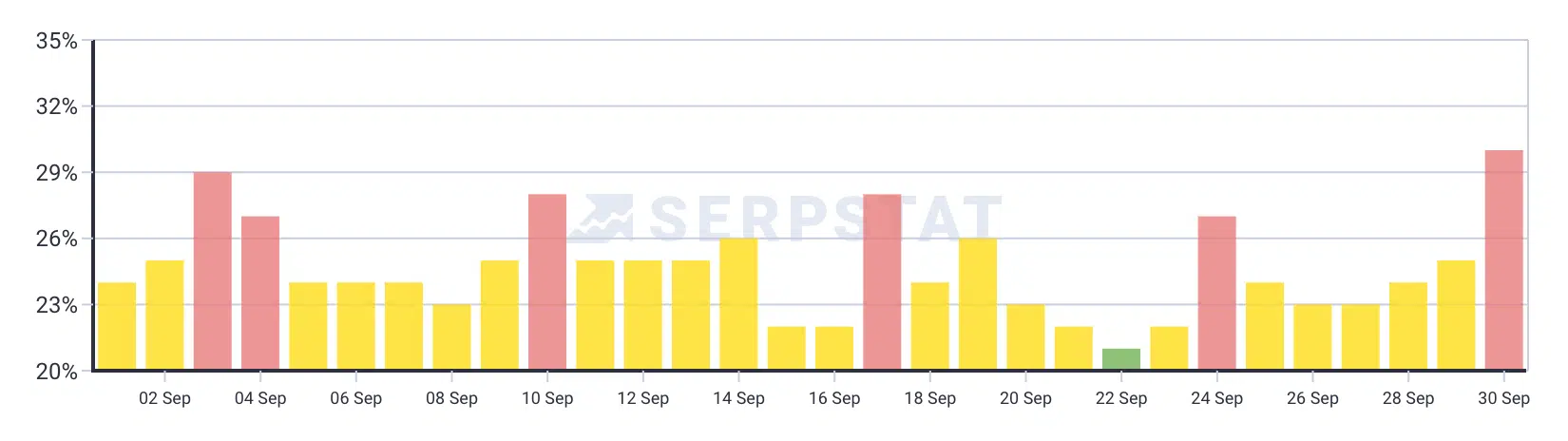
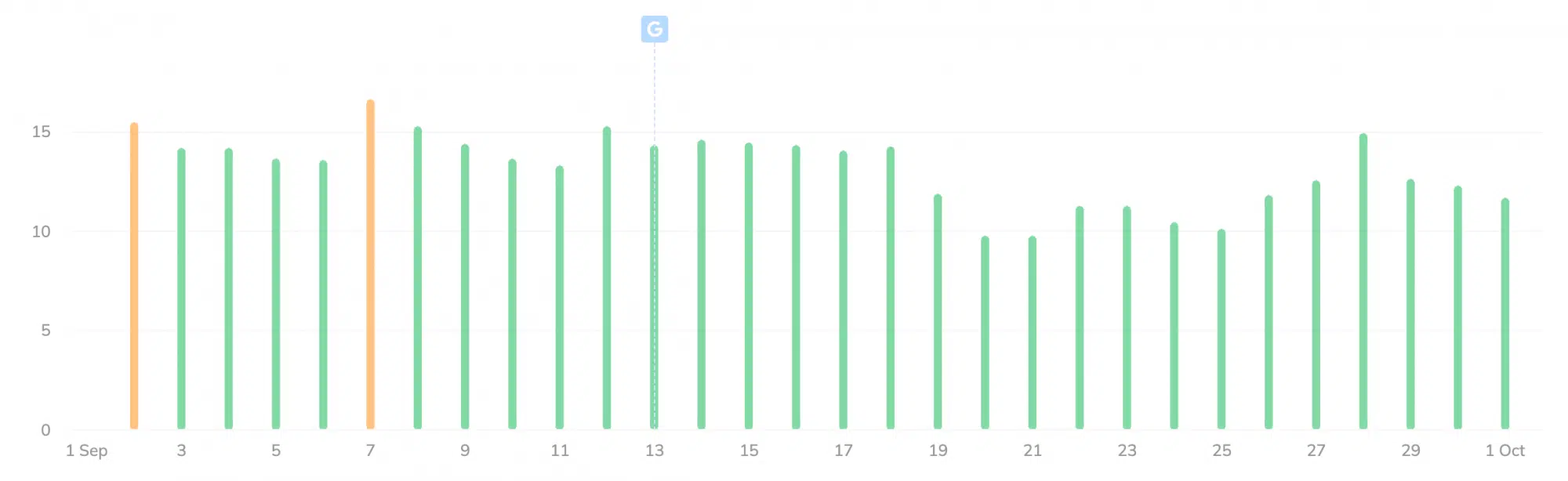
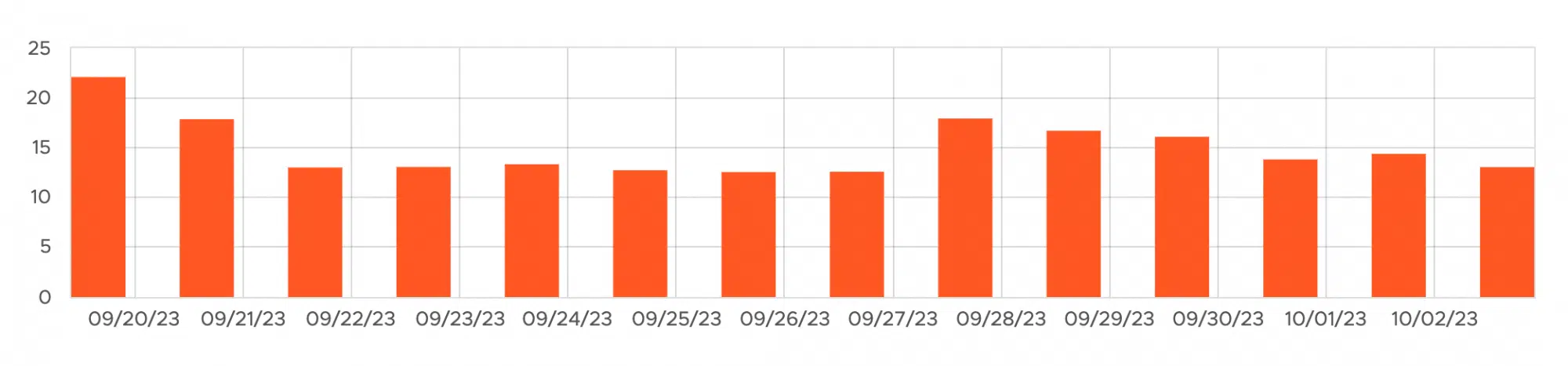
Last Thursday, Google finished rolling out the September 2023 helpful content update after a 14-day rollout. The update took 14 days to roll out, starting on September 14, 2023, and ending on September 28, 2022. It has been a few days since the rollout was completed, and we wanted to dig in a bit on the impact felt by this latest Google algorithm update.

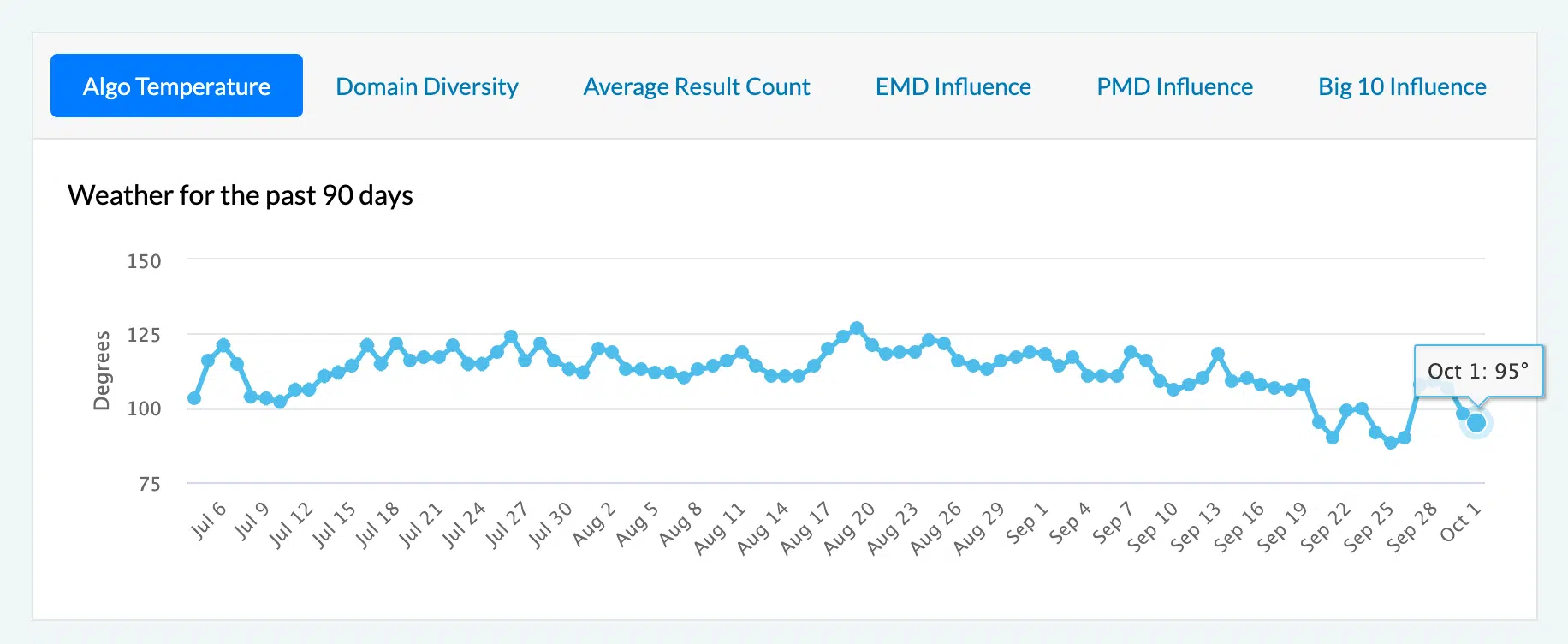
The previous two helpful content updates felt somewhat underwhelming for Google Search update standards, but this one did not. To be frank, it was a weird update in that many of the Google tracking tools showed that volatility has calmed significantly during this update, all while the SEO community was heated in documenting ranking changes for themselves, clients or other sites during this update.

It is my opinion that this update was felt more within the SEO industry niche, maybe sites designed to rank well in search engines, more so than typical sites that take into account more than just search engines. This is not to say, I repeat, not to say, that there was not collateral damage, and good, helpful sites, did see a drop in traffic related to the helpful content update. But based on what I track, it does seem this update did have more of an impact on SEOs than the average website owner.

Data providers on the September 2023 helpful content update

Let me start off by saying again that many of the data providers didn’t pick up as much volatility with this update as typical Google algorithm updates. So we were not able to get as much detailed data from as many data providers as we normally get.

Remember, when looking at some of these daily charts, that the update started on September 14th and ended up September 28th.

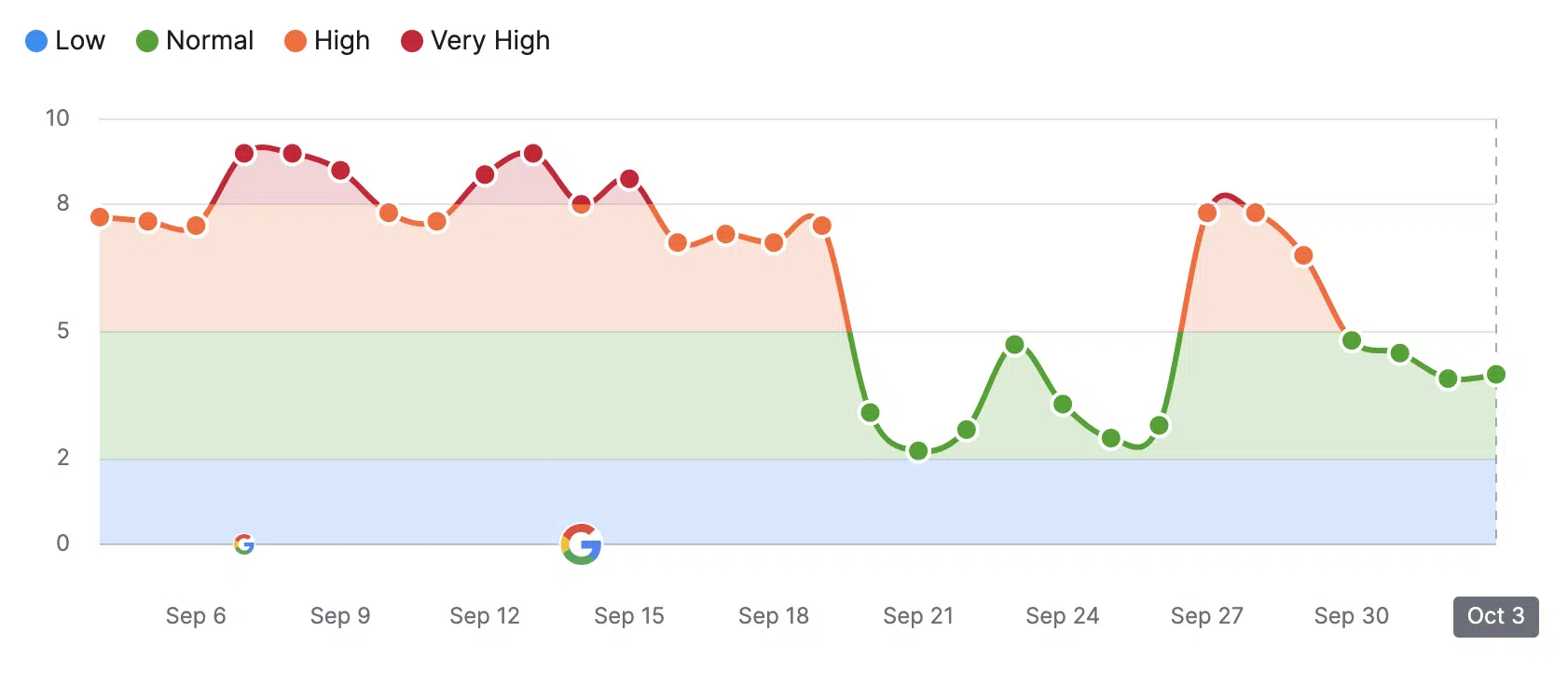
Semrush. The Semrush sensor quickly began to show less volatility as the update kicked into gear. You can see it cooling as the days went on:

Semrush Sensor

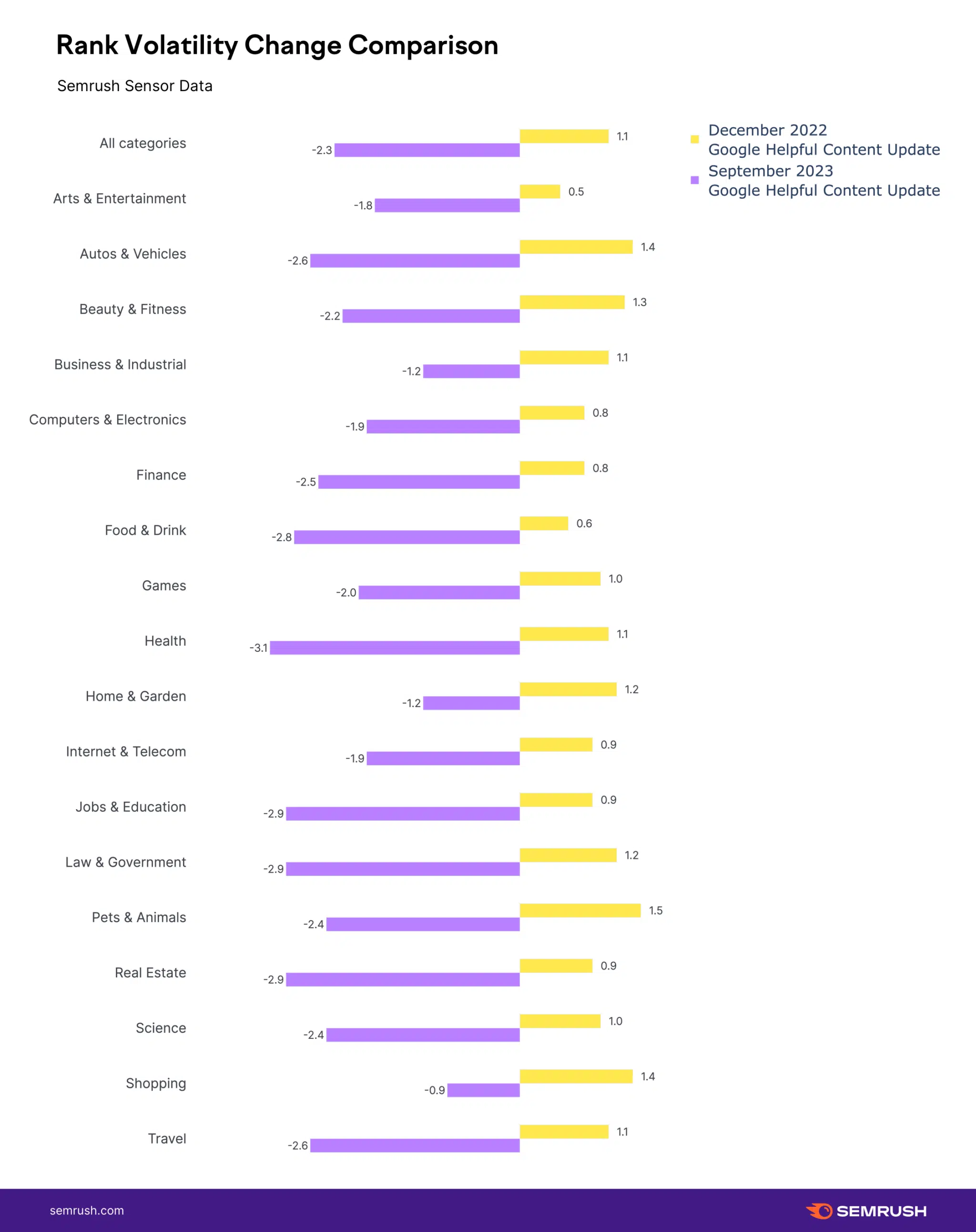
Mordy Oberstein from the Semrush team told us, “It was noticeably more impactful than the last helpful content update back in December 2022 but with less movement than the recent Core Update.” That is for sure true, because the previous helpful content updates felt pretty tame. Here is a chart showing the impact of the September helpful content update on the December helpful content update by niche:

Semrush Hcu Dec To Sep

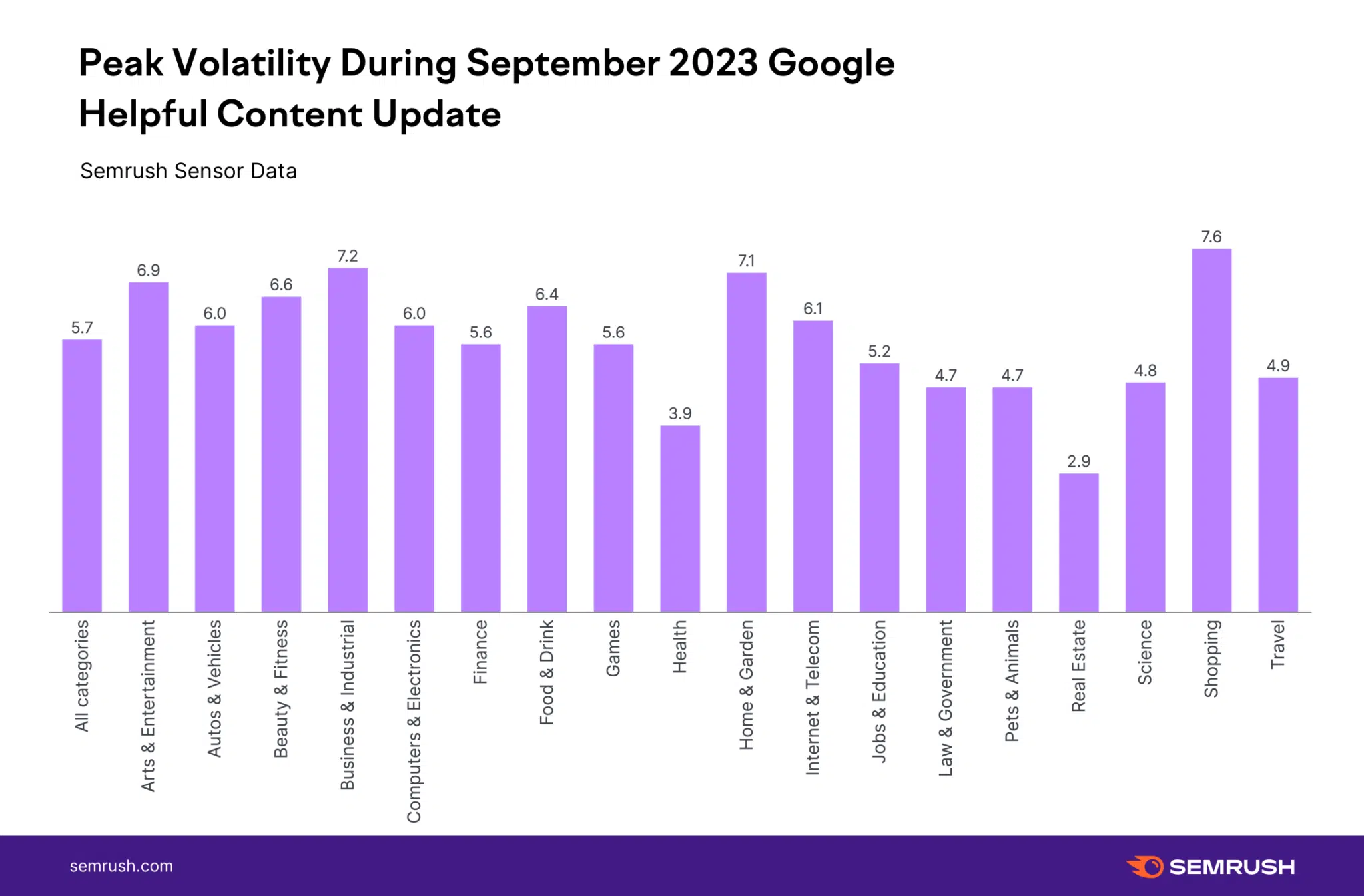
This next chart shows the peaks of volatility by category during the last helpful content update, with the shopping category seeing the most change:

Semrush Hcu Peak

“In comparing peak volatility to the recent Core Update the numbers for the HCU are far less severe. The overall average didn’t hit a peak of 6 on the Semrush Sensor scale and only 3 verticals saw peak volatility above 7,” Mordy Oberstein told us.

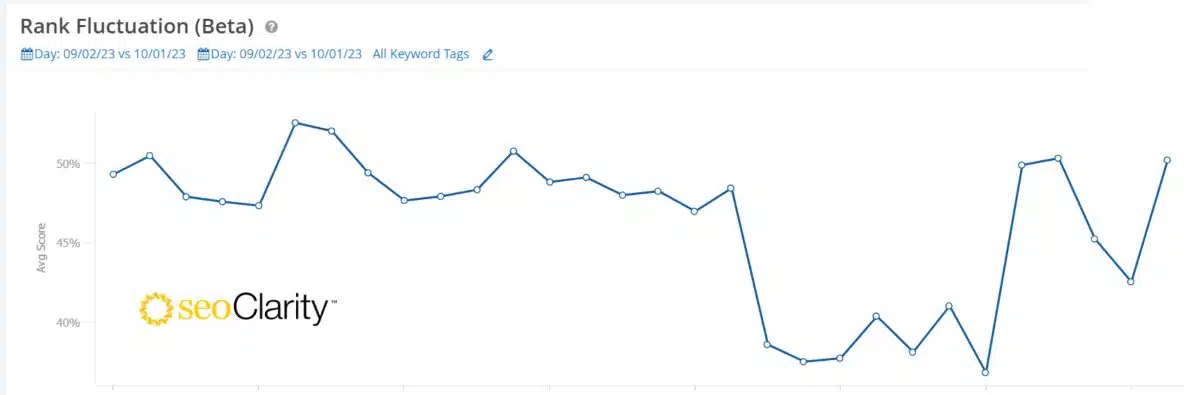
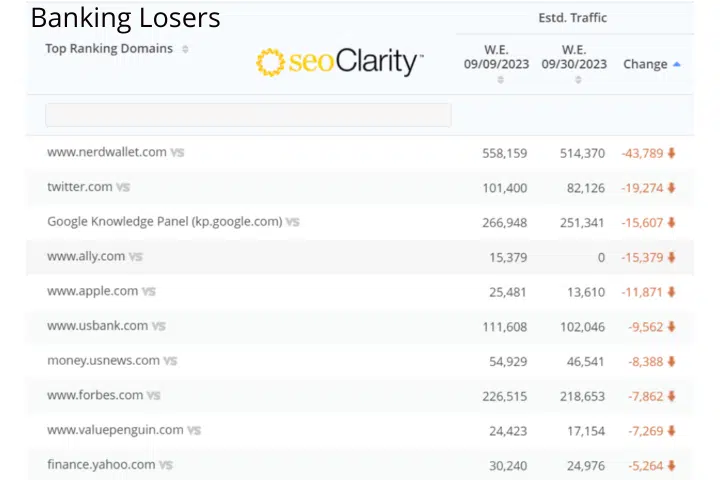
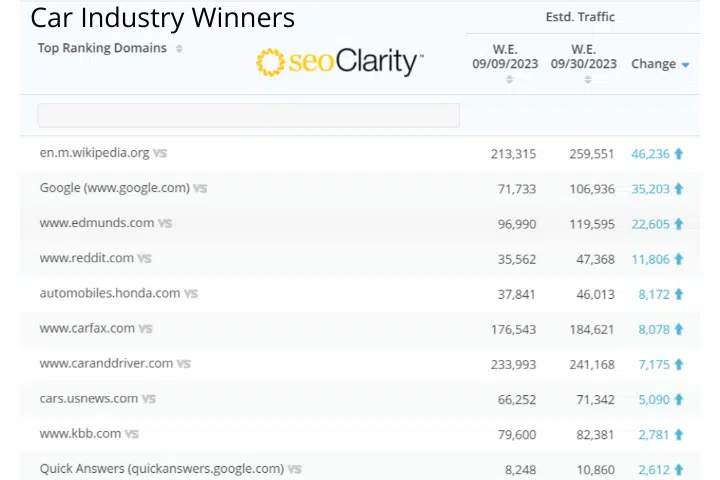
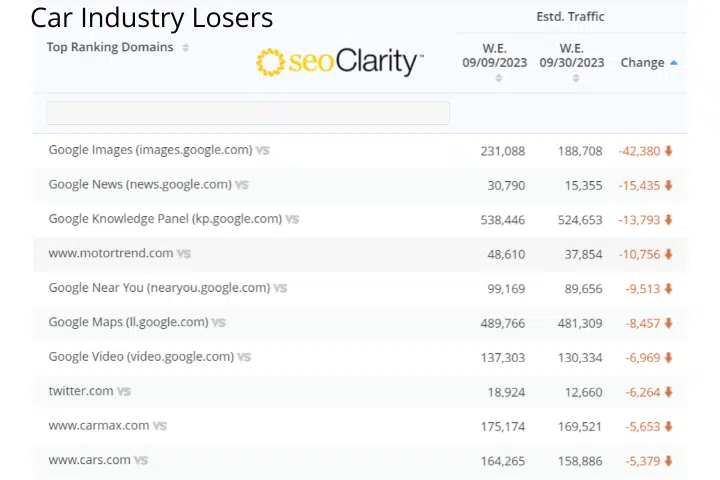
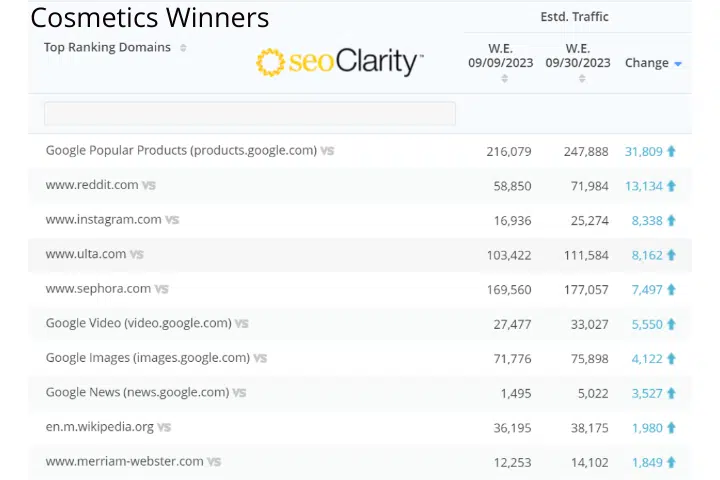
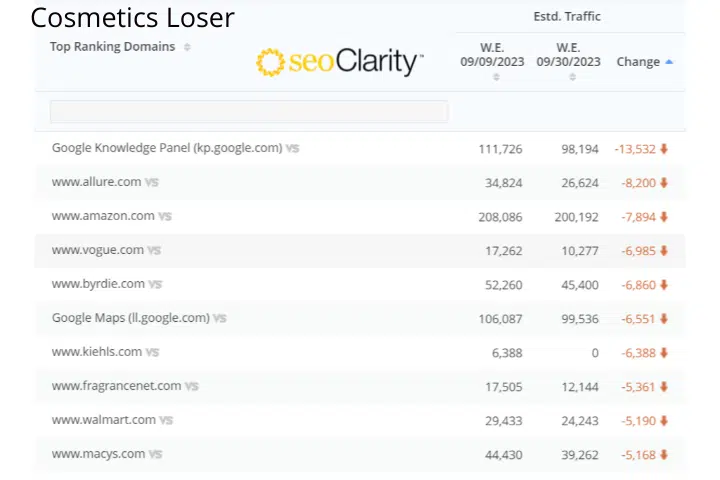
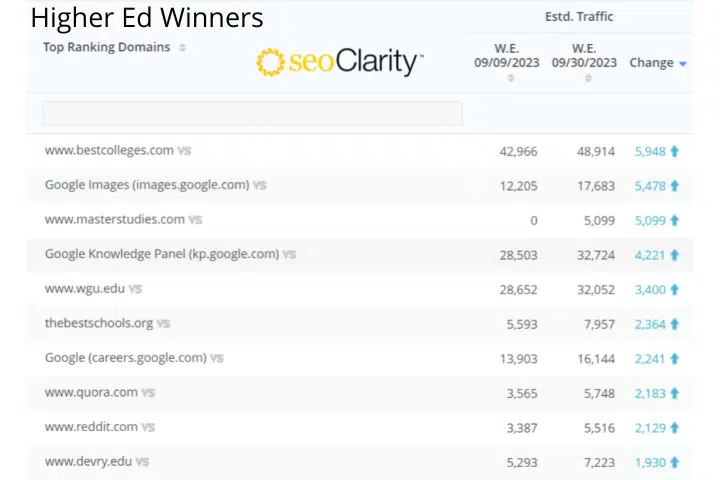
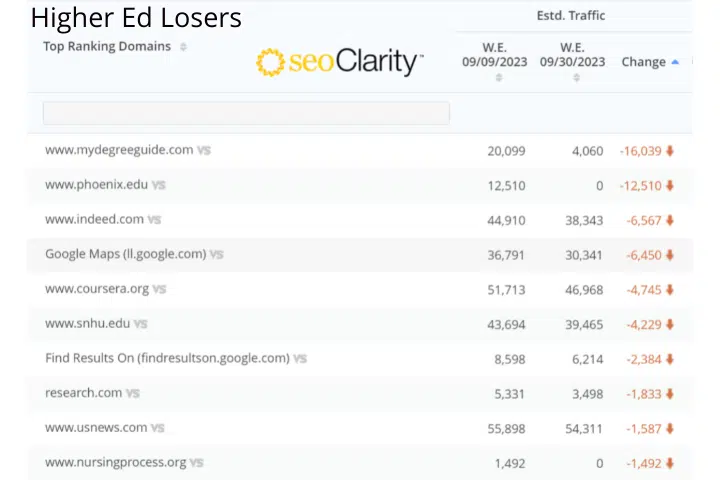
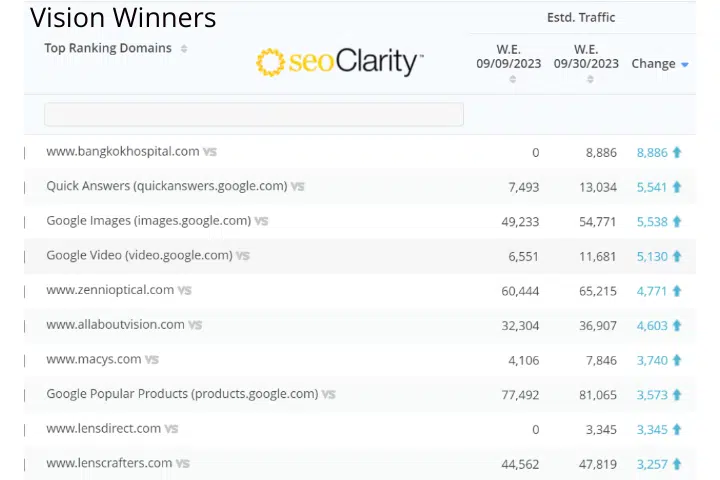
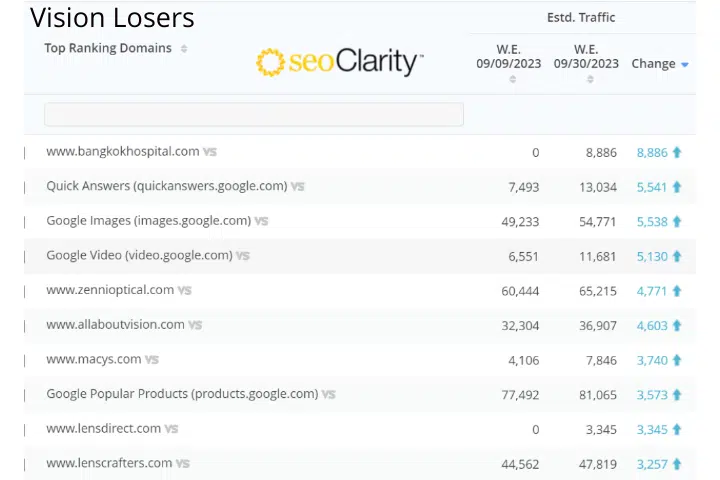
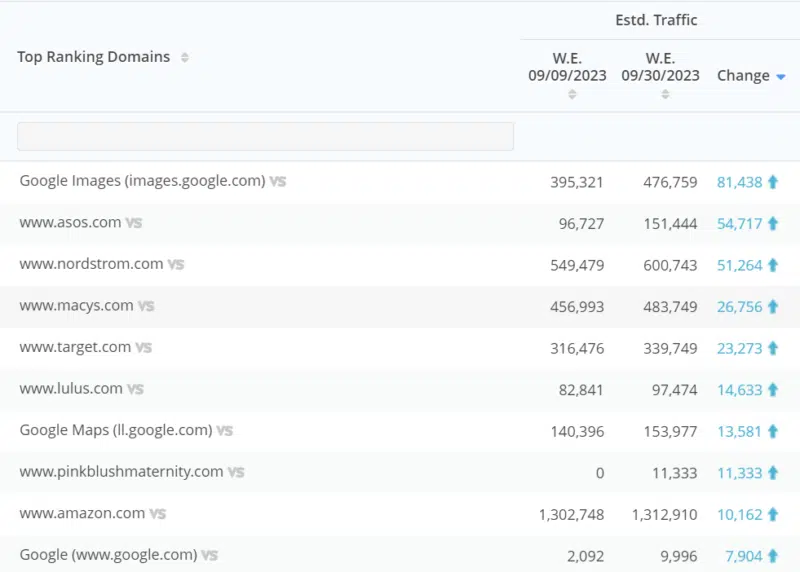
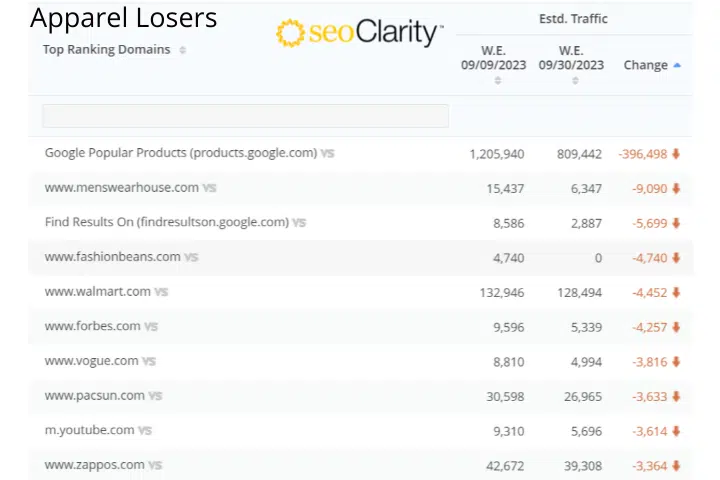
seoClarity. The seoClarity team sent me the top winners and losers by niche/industry from this helpful content update. Mark Traphagen from seoClarity also shared a volatility chart:

Seoclarity

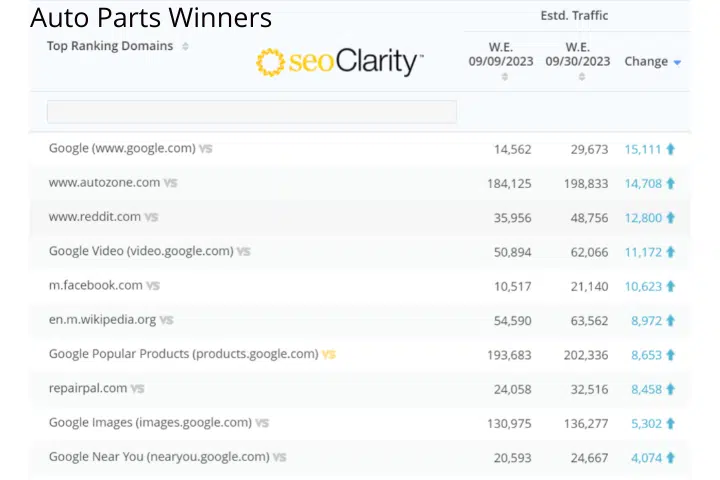
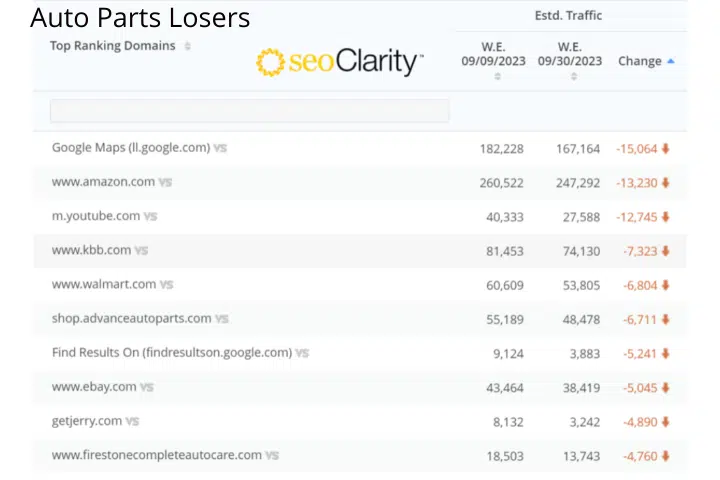
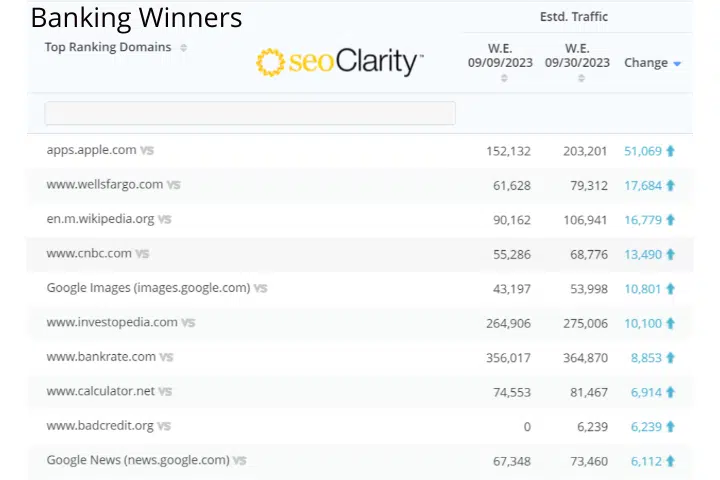
Here are the winner and loser charts from seoClarity:

Auto Parts Winners 2
Auto Parts Losers 2
Banking Winners 2
Banking Losers 2
Car Winners
Car Losers
Cosmetics Winners 2
Cosmetics Losers 2
Higher Ed Winners 2
Higher Ed Losers 2
Vision Winners 2
Vision Losers 2

Apparel winners:

Apparel Winners 800x572
Apparel Losers

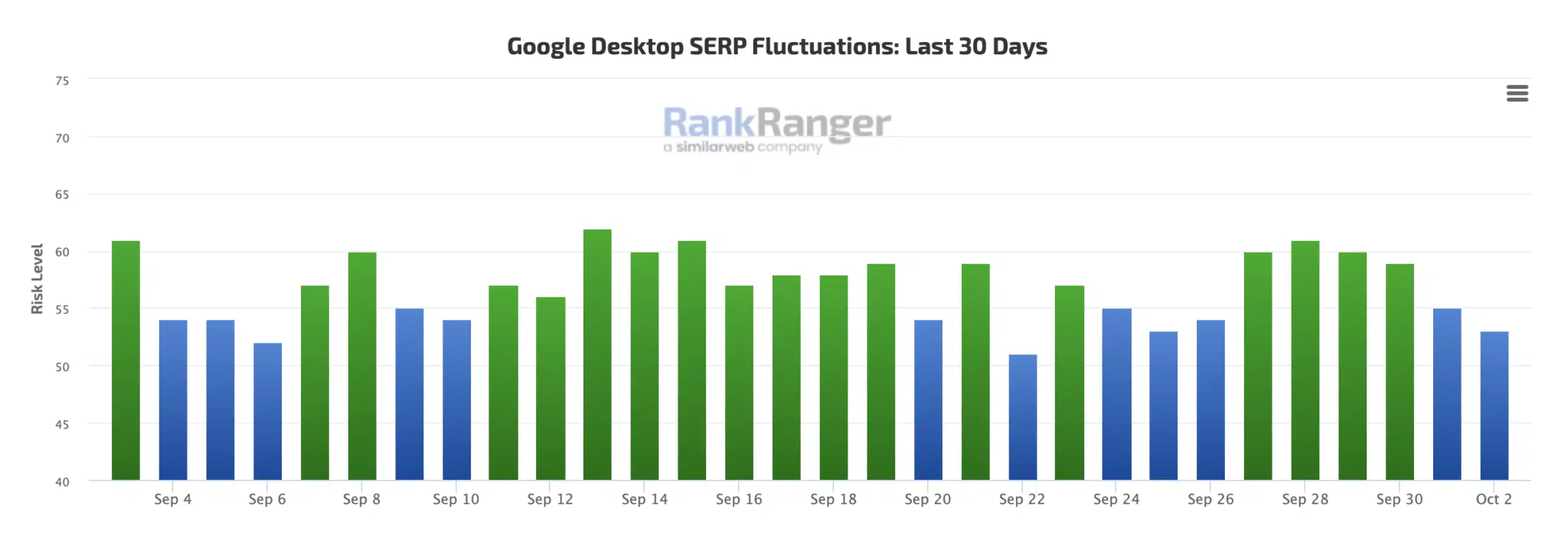
RankRanger. The folks at RankRanger showed a typical trend with its Rank Risk Index, showing calming after the update started to roll out:

Rankranger

RankRanger a day later we posted this sent us their data, where they said, “When we compare the average fluctuations of the two updates, we see that the September update showed higher levels of fluctuations overall.” This chart demonstrates that:

Rankranger0hcu

But when you look at this data by the top results, “September update fluctuations were lower in the top ten results, and substantially lower in the top five and top three,” RankRanger noticed.

Rankranger Hcu Top Results Compare

Also, breaking it out by niche or vertical, RankRanger saw the most fluctuations in the retail niche in the top three, top five, and top ten results. “In this update, the travel niche also had relatively high fluctuation levels compared to the other 3 niches,” the company told us.

Pasted Image 0

Other tools. While the other tools did not send me data, many have dashboards that show volatility changes to the search results. Here they are:

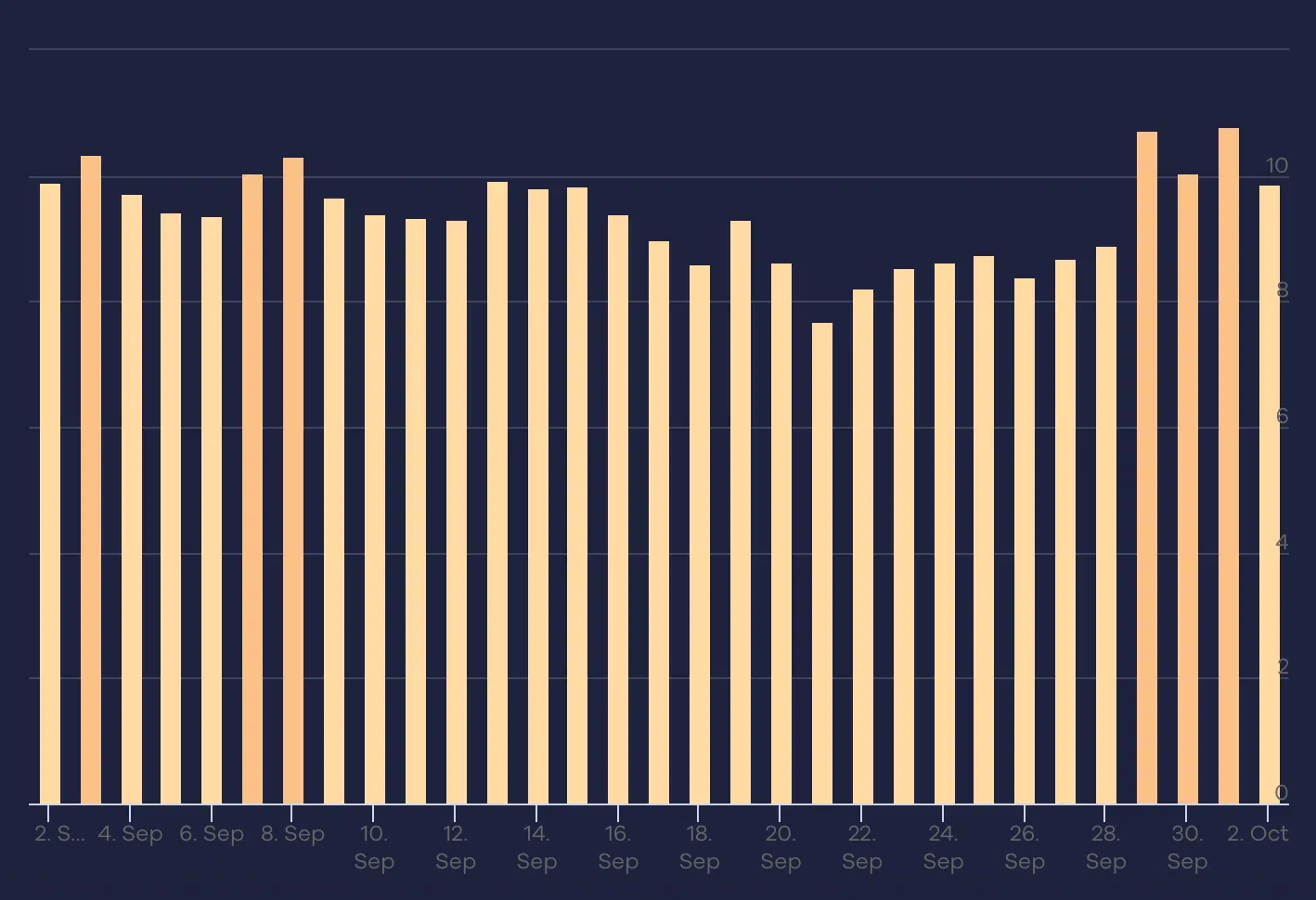
SERPmetrics:

Serpmetrics 1696243494

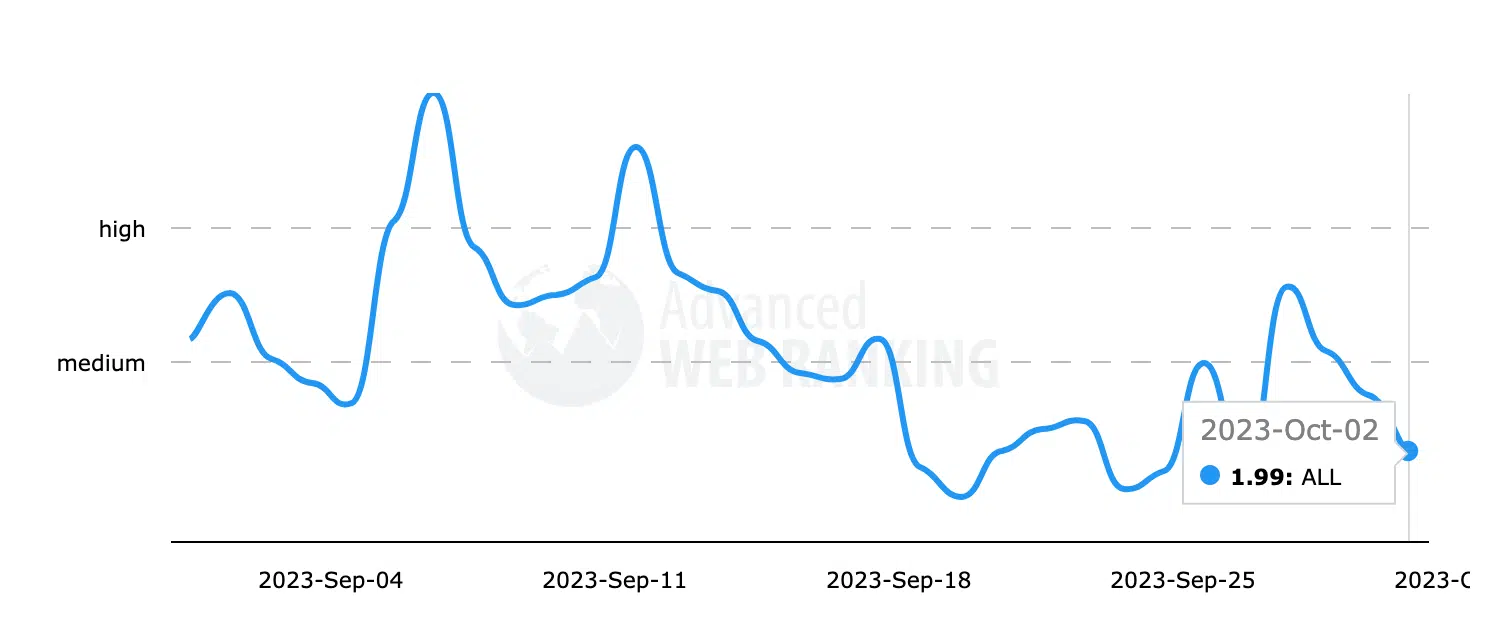
Advanced Web Rankings:

Advancedwebranking 1696243533

Accuranker:

Accuranker 1696243549

Mozcast:

Mozcast 1696243466

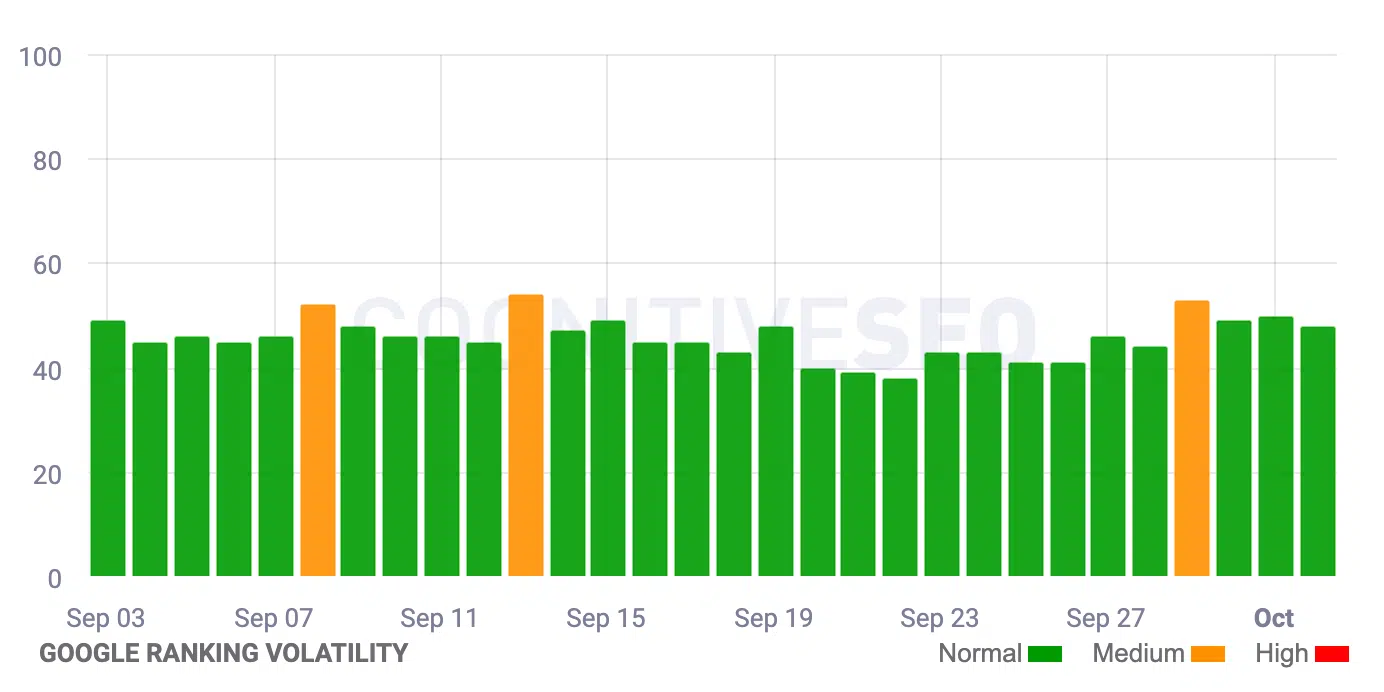
Cognitive SEO:

Cognitiveseo 1696243587

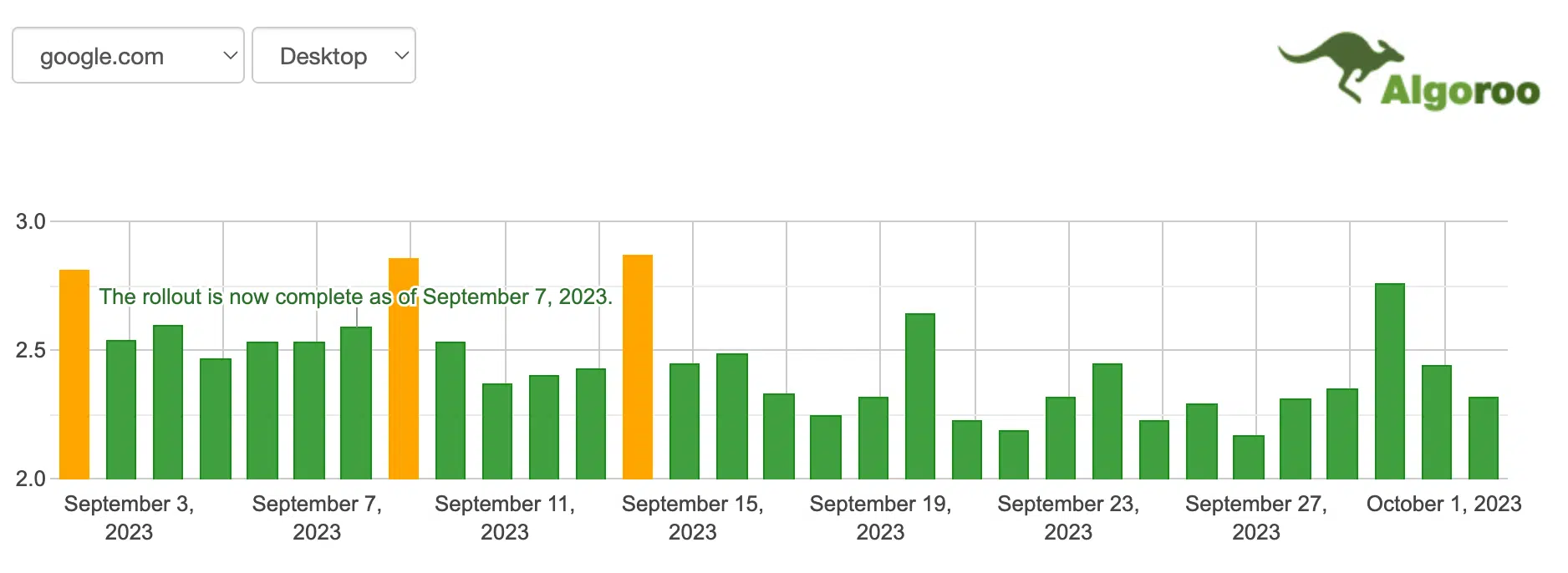
Algoroo:

Algoroo 1696243506

SERPstat:

Serpstat 1696243612

Wincher:

Wincher 1696243676

SERPwoo:

Serpwoo 1696243651

More insights and data

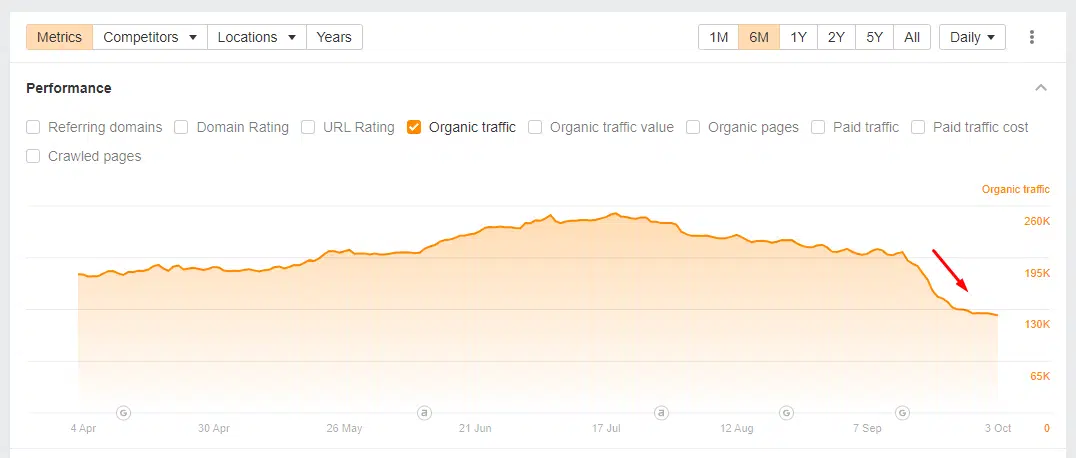
I asked Glenn Gabe, SEO Consultant at G-Squared Interactive, to provide some examples of sites that saw declines due to this last helpful content update. For privacy reasons, he did not share the specific names of the sites but he did share anonymized data of two sites that saw big declines in their Google search visibility due to this update.

Here are those charts:

Glenn Gabe Chart 1
Glenn Gabe Chart 2
Glenn 3

ANYONE ELSE?

My personal opinion. I believe this update targeted SEO-first, or search engine-first, content. I covered a lot of the industry “chatter,” the noise within the SEO industry, over the course of the update. My stories have hundreds of comments, including over 270 comments here, 170 comments here, 200 comments here, 235 comments here and 225 comments here and growing. The industry chatter on my site, in the forums and on social is really heated. In my opinion, it is more heated than even a core update.

It reminds me of when Google released the Penguin update that ravished the link-building SEO industry overnight. To be fair, it was not as devasting as that but it was pretty harsh. Maybe you can equate this more closely to the Panda update that target more content-related techniques. But this update seemed to go after content that was written for ranking in search.

It’s worth repeating, this is not to say that there was not collateral damage, and good, helpful sites, did see a drop in traffic related to the helpful content update.

And this makes sense, this update was originally aimed to target content written only to rank well in search engines. ogle’s helpful content system specifically targets “content that seems to have been primarily created for ranking well in search engines rather than to help or inform people,” as we covered earlier.

This algorithm update aims to help searchers find “high-quality content,” Google told us. Google wants to reward better and more useful content that was written for humans and to help users.

Searchers get frustrated when they land on unhelpful webpages that rank well in search because they were written for the purpose of ranking in search engines. This is the type of content you might call “search engine-first content” or “SEO content.”

Google’s helpful content algorithm aims to downgrade those types of websites while promoting more helpful websites, designed for humans, above search engines.

Google said this is an “ongoing effort to reduce low-quality content and make it easier to find content that feels authentic and useful in search.”

What to do if you are hit. Google has provided a list of questions you can ask yourself about your content. Read through those questions as we posted over here, and in an unbiased manner, ask yourself if your content is in sync with this update.

Please note if this update has hit you, it can take several months to recover if you do everything right and make changes to your content over time.

Dig in, see what content and website improvements you can make to your site and start now. This is a process that can take months and months and hopefully in the next several months you will see improvements.


Related stories

New on Search Engine Land

@media screen and (min-width: 800px) { #div-gpt-ad-3191538-7 { display: flex !important; justify-content: center !important; align-items: center !important; min-width:770px; min-height:260px; } } @media screen and (min-width: 1279px) { #div-gpt-ad-3191538-7 { display: flex !important; justify-content: center !important; align-items: center !important; min-width:800px!important; min-height:440px!important; } }

About the author

Barry Schwartz

Barry Schwartz is a Contributing Editor to Search Engine Land and a member of the programming team for SMX events. He owns RustyBrick, a NY based web consulting firm. He also runs Search Engine Roundtable, a popular search blog on very advanced SEM topics. Barry can be followed on Twitter here.

https://searchengineland.com/impact-of-the-google-september-2023-helpful-content-was-big-for-the-seo-industry-432751


How SEOs can detect and address user data leaks

In today’s data-driven era, regulations such as GDPR safeguard user privacy, while SEO professionals control what appears in search engine results.

Despite ongoing changes in both fields, however, the relationship between data protection and SEO is not well-explored.

This gap has devastating consequences, as personally identifiable information (PII) data indexed in search engines is instantly discoverable, harvestable and exploitable. 

When personal data is exposed, individuals are at a higher risk of experiencing identity theft, financial loss, account hijacking, medical fraud, harassment, stalking, threats and emotional distress.

Consumers worldwide lost nearly $9 billion in identity theft in 2022 and one in three Americans are victims.

For organizations involved in the leaks, this can translate into:

  • Loss of reputation.
  • Loss of customers.
  • Legal and regulatory action.

Not all these damages are due to intentional breaches – some result from preventable errors when accidental data leaks go unnoticed and find their way into Google and other search engines.

Basic precautions, monitoring and a solid incident response plan can help SEOs prevent these accidents, protecting organizations and their users.

What is PII data?

PII stands for personally identifiable information. It refers to any data or information that can be used to identify, contact, or locate a specific individual. This includes:

  • Names: Full names or partial names of individuals.
  • Contact information: Email addresses, phone numbers, physical addresses or social media profiles.
  • Financial information: Credit card numbers, bank account details or financial transaction records.
  • Health information: Medical records, health insurance details or other healthcare-related data.
  • Identification numbers: Social Security numbers, passport numbers, driver’s license numbers or employee IDs.
  • Login credentials: Usernames and passwords.

If exposed, any PII data may get crawled and included in Google’s index in some form.

How does PII data get exposed and indexed?

There are many ways in which personal data can get unintentionally exposed to crawlers and indexed in search engines. Some of the more common ones include:

Bugs and accidental rendering

  • Bugs can cause PII data to be rendered in unintended places.
  • For example, sensitive data reserved for a specific audience (logged-in users that meet a set of conditions) is made fully public or rendered in HTML, where crawlers pick it up.

Unintentional publishing

  • Website administrators or content creators may accidentally publish documents or pages containing PII.

User-generated content (UGC)

  • Websites that allow UGC, such as marketplaces, forums, blogs with comment sections, or social media platforms, can expose PII if users post personal information that search engines can find and index.

Cloud storage misconfigurations

  • Data stored in cloud-based services can be inadvertently exposed if the storage settings are misconfigured.

URL parameters

  • Passing sensitive user details in URL parameters can create privacy and security risks. This is especially true for transactional pages or checkout flows.

Searchable databases

  • Some websites use search functionality that allows users to query databases containing PII.
  • SEOs must ensure that indexable search results do not display PII and that search engine bots are blocked from crawling sensitive areas.

Third-party data sharing

  • A third-party vendor, partner or affiliate who doesn’t fully adhere to data protection standards could cause a leak of your customer data.

Browser extensions

  • Some browser extensions may initiate actions that can modify page content, execute JavaScript code, or potentially expose the URL to external systems or platforms. 
  • Others may interact with third-party services or APIs, such as saving content to cloud storage. 
  • If improperly configured, these extensions can expose PII content.

Monitoring for PII leaks

Once search engines index data, removing it from the internet can be challenging. 

Even if the source of the leak is secured, copies may already exist elsewhere, making it accessible to anyone who knows where to look. 

Regular monitoring is crucial. SEOs can do a lot to reduce the risks:

Regular website audits

Conduct regular website audits to identify areas where sensitive customer data might be exposed. 

Utilize crawling tools and set up automated alerts to spot potential issues before they become major problems.

Manual content review

Manually review website content to ensure that PII is neither visible on the page nor rendered in HTML. 

Pay special attention to contact forms, login pages, pages displaying user information and user-generated content sections.

Monitor SERPs

Regularly check SERPs using advanced operators to identify any unintentionally indexed pages that contain sensitive data. 

Search for specific PII elements like names, addresses, phone numbers and any other keywords or phrases relevant to your website that might indicate a leak. 

Look for PII data found in snippet titles and meta descriptions.

Set up Google Alerts

Create Google Alerts for specific keywords or phrases related to your brand and sensitive data to receive notifications if any matching pages get indexed.

Customer feedback

Often, customers are faster and better at spotting issues than in-house teams. 

Ensure you have an easy way for users to report problems and concerns, including data leaks. 

Likewise, your customer support team must be trained to identify and act on this information, alerting the relevant teams and helping prioritize the work.

Pay special attention to URL parameters

Customer data passed through URL parameters can be very challenging to detect, especially if the URL has a 302 response code and is part of a redirection chain, for example, during an ecommerce checkout flow.

Once indexed in Google, these URLs will be discoverable and scrapable. But as 302s, they will redirect away when clicked, making them harder to detect. 

In addition to testing onsite checkout flows and monitoring SEPRs, it’s good practice to monitor 302s and 301s via access logs.

There are several alternatives to relying on URL parameters for passing customer data, including: 

Form submissions (sending the data to the server via a POST request without exposing data in the URL).

  • Cookies.
  • Session management.
  • APIs.
  • And more.

Get the daily newsletter search marketers rely on.


Preventing accidental SEO PII leaks

While it’s difficult to ensure complete protection, there are many steps that SEO can take to minimize the risks of accidental exposure and search engine indexing of sensitive data.

Block public access

Internal account or administration pages, transactional pages, shopping carts, order status pages and any pages that may contain sensitive customer data should not be out for the whole world to see:

  • Password protection: Keep private information private and inaccessible without proper credentials.
  • Robots.txt file: Utilize the robots.txt file to block search engine crawlers from indexing specific parts and directories of your site that are not meant for the public eye.
  • Implement noindex tags: Leverage noindex tags when it makes sense.

Content moderation

If your website includes user-generated content, implement content moderation tools and processes to detect and prevent the publication of personal data. Review and remove any content that violates privacy guidelines.

Data encryption

Secure data encryption protocols (HTTPS) are a must to protect data transmitted between users and your website.

Data minimization

Practice data minimization by collecting only the essential customer information required for the intended purpose. Limit the storage and retention of customer data to minimize exposure.

Employee training

Train your in-house teams, including content creators, developers, QA and product managers, to identify PII, handle it responsibly and spot potential exposure risks. 

For enterprise-level sites, consider including PII checks as part of standard QA protocol or automated QA testing for all releases. 

This is especially relevant for ecommerce sites or platforms where rendering content is contingent on user state (i.e., logged-in vs. logged-out), automated localization and more.

Incident response plan

Develop a clear incident response plan outlining steps to take in case of accidental exposure. Please do not ignore the problem; it will not go away.

We are indexing PII and sensitive data in Google – now what?

Remember, GDPR imposes strict obligations on organizations to protect personal data. 

If a data breach occurs due to negligence or failure to implement adequate security measures, organizations can face severe consequences, including:

  • Considerable financial penalties.
  • Compensation orders.
  • Loss of data processing rights.
  • Criminal sanctions for the most serious violations. 

If you discover an accidental leak, act quickly to minimize the damage to your customers and your organization.

Secure the source of the leak

Escalate the incident to appropriate teams. Identify the source of the data leak and eliminate it.

Remove content with PII from Google

Suppose the issue is isolated to a handful of pages. In that case, it may be possible to remove sensitive content from the page manually and request URL Removal or Cache Removal in GSC as appropriate.

For more significant issues that span thousands or millions of pages, request the removal of corresponding directories via GSC. Add a noindex tag as necessary. Resubmit for reindexing once the underlying problem has been corrected.

In some situations, it’s best to work directly with Google, for example, if exposed data is associated with pages that no longer exist (404s) but continue to linger in Google’s index without being re-crawled.

Dig deeper: How to remove sensitive client data from Google’s index

Scrapers and syndicators

Has your customer data been scraped and published elsewhere? Report directly to Google if found. 

While you might not be able to remove it from another website, you should be able to have it removed from Google. 

Be prepared to escalate this, as Google’s automated feedback submission tools will likely prove inadequate for the job.

Take responsibility

Open and transparent communication is critical. Depending on the extent of the exposure, be prepared to notify affected individuals and authorities as required by law. 

Transparency can help mitigate the potential damage to the organization’s reputation and demonstrate a commitment to compliance with GDPR.

Navigating the intersection of SEO and user privacy

The relationship between user privacy and SEO is vital, as exposure of PII data in search engine results poses significant risks. The consequences, including financial loss and identity theft, are substantial. 

SEOs are well positioned to monitor, safeguard and respond to PII exposure early, protecting users and their organizations and upholding GDPR principles for a safer digital world.


Opinions expressed in this article are those of the guest author and not necessarily Search Engine Land. Staff authors are listed here.


Related stories

New on Search Engine Land

@media screen and (min-width: 800px) { #div-gpt-ad-3191538-7 { display: flex !important; justify-content: center !important; align-items: center !important; min-width:770px; min-height:260px; } } @media screen and (min-width: 1279px) { #div-gpt-ad-3191538-7 { display: flex !important; justify-content: center !important; align-items: center !important; min-width:800px!important; min-height:440px!important; } }

About the author

Olya Ianovskaia

Olya Ianovskaia has worked in SEO, growth and product management for over 15 years. Her primary area of expertise is in technical SEO and designing data-based search products for global marketplaces and ecommerce sites. Olya has a background in anthropology, dabbles in wildlife photography, and runs a small family homestead in Central Ontario.

https://searchengineland.com/seo-detect-address-user-data-leaks-432717


Fashion ecommerce: How to analyze search demand and forecast trends

Fashion ecommerce is going through a period of change. Brands are under increasing pressure from consumers and market forces to become more sustainable and less wasteful, especially in fast fashion.

As a result:

  • Several brands are starting to charge customers for returning online purchases.
  • Resale ecommerce, or “recommerce,” is growing quickly and entering the mainstream. 
  • Users are being reminded to make more sustainable buying choices, turning more toward thrift.

Users are also moving away from using Google for discovery and utilizing Amazon and TikTok more.

This shift in the market and consumer means data is more important than ever, and the ability to forecast and monitor the changes in buyer behavior. 

Given the amount of data available to us from multiple sources, we’re now in the strongest position possible to monitor demand changes and create forecasts.

The core focus of trend analysis in ecommerce should always be to:

  • Identifying opportunities for value creation.
  • Informing SEO (and general marketing) activities for maximum impact.
  • Creating stronger messaging to better meet user expectations at the right time.

Here are some examples of how we provide more value in the ecommerce fashion sector by leveraging search data effectively.

Multiplatform trend analysis

Both resale and rental are emerging consumer trends in fashion. For this example, I’ll use handbags as a data source. 

Users shop across multiple platforms, so we must not only focus on Google when performing any trend analysis for ecommerce.

Consider other shopping and product discovery platforms such as Amazon and TikTok.

To do this at a simple level, we can:

  • Take a set of search terms, in this case, the top 50 related keywords by U.S. monthly search volume (MSV) when looking at “large handbags” as a root topic.
  • Compile 12 months’ worth of MSV data, TikTok search trends, eBay and Amazon search data.

If we take this data as a whole set, we can actually see that in the months’ Google search declines around “large handbags,” the search velocity in other platforms remains higher (relative to platform search demand).

large handbags - MSV

We can then drill down into this data more and look at additional modifiers of “large handbags,” such as “luxury” or “on-sale.”

Seeing the search demand data over four different product discovery platforms also allows you to forecast user demand, taking into account that users in your target market are potentially using more than just Google to discover products.

The easiest way to display this is through a Bayesian Structural Time Series (BSTS) graph:

large handbags - BSTS for user demand

You can do this via Google Sheets, as I have above, or you can use RStudio to model traffic graphs with different ranges and periods by following this RStudio forecasting guide.

Dig deeper: Ecommerce SEO & UX: 4 simple tips to boost traffic and sales


Get the daily newsletter search marketers rely on.


Opportunity products

Using the same demand modeling (with data from periods over time), we can also identify “opportunity products” across a catalog. 

For example, suppose you have an ecommerce website specializing in luxury fashion. In that case, you can take your product categories (or a specific brand) and model products against each other to find demand correlations.

These correlations can then:

  • Create product opportunities for cross-selling and cross-merchandising.
  • Influence your email and social channels.
  • Be used to influence helpful user content such as style and “wear the look” guides for added value.

Let’s use the brand Van Cleef & Arpels for the data example below.

Van Cleef & Arpels - product categories

We’d expect all four product categories to see an increase in demand around December/January in line with seasonal demand for most luxury items.

We can also identify that during July, August and September, search demand for Van Cleef & Arpels earrings and necklaces has a small peak. In September, bracelets also hit peak search velocity.

With early knowledge of a correlating product trend, fashion businesses can:

  • Coordinate omnichannel marketing efforts.
  • Produce content that aligns with the trend.
  • Set up targeted ads. 
  • Collaborate with influencers who resonate with the product’s appeal on platforms where a brand may not have a strong presence, such as TikTok or Instagram.

The final use case for better data usage I want to cover is identifying trends between your fashion products and tangential searches.

A great example of this is exploring the relationship between athletic wear and users wanting to make healthier lifestyle choices.

To do this, we need to overlay gym/athletic wear clothing searches with a tangential topic the same user audience may be searching for, like workouts.

Very quickly, we can see that both Amazon and Google reach peak search velocity for gym/athletic wear around January and February (as we’d expect with what we know of the topic’s seasonal trends) before seeing some uptick again toward the end of the year.

gym or athletic wear - tangential search trends

When we look at users searching for workouts and workout ideas, we see that both Google and TikTok have a consistent search velocity the whole year round (compared to workout clothing searches).

wrokouts - tangential search trends

With data supporting this, we can justify creating content and messaging across multiple platforms that actively works to engage our target customer all year round, even when they’re not in the peak buying cycle.

The more positive brand touchpoints we create in this way, the more we can build trust and, hopefully, brand demand. This can help influence Google’s perception of the domain/brand when assigning crawl resources.

Tangential trends can also extend to other product use cases, sporting events, television shows, or other pop culture and media elements that influence a buyer’s decision-making.

The ecommerce imperative: A holistic, search data-led approach

Different demographics are adopting platforms like TikTok to discover products and information and make product purchases. 

TikTok sees ecommerce as a growth play and has ambitions to quadruple its operations and achieve $20 billion in sales.

That’s why, as a fashion brand, it’s vital to take a holistic approach when analyzing your search demand, researching keywords, and crafting your content and messaging strategy. 

This approach helps establish a strong organic presence and guides other channels in maintaining a consistent brand message.

Dig deeper: Ecommerce marketing next year: 5 ways to set up for success


Opinions expressed in this article are those of the guest author and not necessarily Search Engine Land. Staff authors are listed here.


Related stories

New on Search Engine Land

@media screen and (min-width: 800px) { #div-gpt-ad-3191538-7 { display: flex !important; justify-content: center !important; align-items: center !important; min-width:770px; min-height:260px; } } @media screen and (min-width: 1279px) { #div-gpt-ad-3191538-7 { display: flex !important; justify-content: center !important; align-items: center !important; min-width:800px!important; min-height:440px!important; } }

About the author

Dan Taylor

Dan Taylor is head of technical SEO at SALT.agency, a UK-based technical SEO specialist and winner of the 2022 Queens Award. Dan works with and oversees a team working with companies ranging from technology and SaaS companies to enterprise e-commerce.

https://searchengineland.com/fashion-ecommerce-analyze-search-demand-forecast-trends-432710


Microsoft CEO: AI will make Google more dominant

“Bogus.” That’s what Microsoft CEO Satya Nadella thinks about Google’s argument that there is actual choice in the search engine market. And artificial intelligence will provide zero advantage or hope for any companies that hope to enter web search – the “biggest no-fly zone of all,” Nadella said.

Why we care. The ongoing U.S. vs. Google antitrust trial has already unearthed troubling behavior from Google, including raising ad prices to meet revenue targets. If Google is found to have abused its monopoly position in search, it could potentially reshape the company and the search landscape.

Exclusive rights. To further enhance its dominance in AI Search, Google plans to pay publishers for “exclusive” content rights, Nadella testified. If only Google could access this data, it would essentially make every other search engine irrelevant, Nadella said.

  • “When I am meeting with publishers now, they say Google’s going to write this check and it’s exclusive and you have to match it,” Nadella said.
  • “What is publicly available today, will it be publicly available tomorrow? That’s the issue.”
  • “Is this going to be even more of a nightmare to make progress in search?” Nadella added.

Search engines have been “the organizing layer of the internet” Nadella said. But publishers are concerned over the rise of large language models (LLMs) – many popular websites have blocked GPTBot – and using their content/data for training and profit, without compensation.

Google has not commented on this accusation about exclusive deals.

Google’s Search Ads 360 dispute. One of the key issues of interest to paid search marketers is Google Search Ads 360. The platform has not kept up with new Microsoft ad features and types and Nadella said Microsoft wanted to make it easy for advertisers to transfer ad campaigns from Google to Microsoft with the click of a button. That didn’t happen.

  • “We keep asking for them to add some features we want. They’ve asked us to go pound sand,” Nadella said.

A vicious cycle. With nearly 90% market share, Google is able to improve its search results and bottom line, Nadella said, and has nothing to do with product quality.

  • “The distribution advantage Google has today doesn’t go away. In fact, if anything, I worry a lot that – even in spite of my enthusiasm that there is a new angle with AI – this vicious cycle that I’m trapped in could become even more vicious because the defaults get reinforced.”

All hope is gone? The launch of the new Bing and Bing Chat, powered by OpenAI’s technology that powers ChatGPT, came with a lot of hype and excitement, especially from Nadella, who said he may have been over-enthusiastic.

  • “Yeah, I mean, look, that’s called exuberance of someone who has like 3% share, that maybe I’ll have 3.5% share,” Nadella said.

So far, Bing Chat has failed to take market share away from Google. Yusuf Mehdi, Microsoft’s corporate VP and consumer CMO, claimed the opposite, but to date has not shared any of the company’s data showing this. In fact, Microsoft Bing’s market share is lower than it was a year ago, as we reported in August.

No breaking the Google habit. Default search agreements, such as the one Google has with Apple, have cemented Google’s dominance, Nadella said.

  • “You get up in the morning, you brush your teeth, and you search on Google. With that level of habit forming, the only way to change is by changing defaults,” Nadella said.
  • “Defaults are the only thing that matter in terms of changing user behavior.”
  • “It would be a game changer (for Bing) to be a default on Safari,” Nadella added.

But. On laptop devices where Microsoft’s operating systems are used, and Bing is the default search engine, Bing’s market share is still below 20%, Nadella admitted. That means a lot of people have figured out how to switch their default search engine.

$100 billion. That’s how much Microsoft has invested in Bing, according to Nadella. Why?

  • “I see search or internet search as the largest software category out there. We are a very, very low share player. But we continue to persist in it because we think of it as a software category we can contribute to.”

Leading with pessimism. It surprised me to see such bleak quotes today from Nadella, who has typically been an optimistic leader with all things Bing. He never argued that Microsoft Bing Search is better than Google Search. It seemed more like a concession that Microsoft Bing Search could never be better because of Google’s monopoly position.

Is this Nadella simply telling it as he sees it? That he knows Microsoft Bing will never be a true contender (which is true).

It’s likely he views this antitrust trial as a last-ditch moment to stop Google – a monopolistic rival that could do real damage to consumers, competitors and the entire ecosystem that relies on Google advertising and traffic. The $244 billion question is whether Google will be forced to change how it operates.


Related stories

New on Search Engine Land

@media screen and (min-width: 800px) { #div-gpt-ad-3191538-7 { display: flex !important; justify-content: center !important; align-items: center !important; min-width:770px; min-height:260px; } } @media screen and (min-width: 1279px) { #div-gpt-ad-3191538-7 { display: flex !important; justify-content: center !important; align-items: center !important; min-width:800px!important; min-height:440px!important; } }

About the author

Danny Goodwin

Danny Goodwin has been Managing Editor of Search Engine Land & Search Marketing Expo – SMX since 2022. He joined Search Engine Land in 2022 as Senior Editor. In addition to reporting on the latest search marketing news, he manages Search Engine Land’s SME (Subject Matter Expert) program. He also helps program U.S. SMX events. Goodwin has been editing and writing about the latest developments and trends in search and digital marketing since 2007. He previously was Executive Editor of Search Engine Journal (from 2017 to 2022), managing editor of Momentology (from 2014-2016) and editor of Search Engine Watch (from 2007 to 2014). He has spoken at many major search conferences and virtual events, and has been sourced for his expertise by a wide range of publications and podcasts.

https://searchengineland.com/microsoft-ceo-ai-will-make-google-more-dominant-432733


How to do a quick SEO accessibility check

Among the top one million homepages, there were a staggering 49,991,225 unique accessibility issues identified, averaging 50 issues per page.

This statistic is shocking, especially when you think about Gartner’s analysis that digital products fully compliant with the Web Content Accessibility Guidelines (WCAG) Level 2 will outperform their competitors by a factor of 50.

Many best practices for improving website accessibility align closely with SEO tactics.

This article tackles how to manage 10 accessibility elements to can also help improve your site’s SEO and ensure inclusivity for all users.

How disabilities impact the online journey

You can’t make an accessibility audit without understanding, at least partially, what accessibility means. So before you start:

  • Make sure that you dedicate enough time to read the WCAG Level 2 standards, their descriptions, examples, and potential techniques to meet them.
  • Once you finish the reading, install a screen reader program and start using it. Make sure that you don’t cheat. Put a blindfold on if needed.
  • Install an add-on simulating color blindness like RGBlind, and navigate websites while it is switched on.
  • Navigate websites using just the keyboard or with voice commands.
  • Remove images and other types of media.
  • Try to accomplish one of your usual routine tasks. For example, make an order by using your local supermarket’s website.

It is not easy, right?

Now that you’ve familiarized yourself with the basics, you can begin your quick audit.

Accessibility elements impacting SEO

1. Main navigation

A consistent navigation structure facilitates a smoother user experience on a website by minimizing potential confusion. Conversely, unpredictable or inconsistent layouts can block users from efficiently locating the necessary information.

Individuals with disabilities often lean on a consistent site layout for navigation. For instance, a person who is blind might depend on a screen reader. If this tool indicates that the primary navigation is situated in the page’s top-left corner, the user can effortlessly navigate to it.

To detect potential navigation-related issues, you can manually review websites, especially if they are relatively small in scale, or utilize a website crawler to assess more extensive sites. Tools like Python scripts, ChatGPT, and the ever-trusty Excel can help you.

2. Breadcrumb navigation

Breadcrumb navigation significantly enhances a website’s accessibility. 

It offers users a logical and efficient pathway, clearly reflecting the content’s position within the overall site structure.

Bread crumb navigation example

While breadcrumb navigation aids user accessibility, it also serves a vital role in SEO. It promotes internal linking and helps with page discoverability. It also incorporates target keywords, which can influence the page’s topical relevance.

Various tools can be used to assess your breadcrumb navigation. If you’ve implemented structured data markup, Google Search Console will do some of the heavy lifting, as it will proactively check your implementation. 

For sites rich in JavaScript, it’s prudent to analyze how breadcrumbs are displayed when JavaScript is turned off.

3. Keyboard navigation

Keyboard navigation aims to ensure all page functionality is accessible via the keyboard. This can benefit users with visual or motor impairments and those using keyboard alternatives or devices that act as keyboard emulators, like speech input software. 

While there isn’t a direct correlation with traditional SEO on-page elements, good keyboard navigation can impact website engagement and can lead to improved user metrics. 

I haven’t found a perfect tool to test keyboard navigation. The best way to test this is to do it manually. If this is not an option for your whole website, do this for your primary pages (both in terms of traffic and conversions). 

Try to use standardized templates for your website. For example, one template for product pages and one for customer stories. If you use templates, you can test one or two of them, but your fixes may impact thousands of pages.

4. Webpages crawlability

Natural language processing tools and text-to-speech synthesizers use web crawlers to help people with impairments comprehend and use websites. If a website is not fully crawlable, these tools and services might not function properly, making it difficult for individuals with impairments to utilize a website. 

Poor web page crawlability may potentially affect all users because it will make the page’s entirety or certain portions inaccessible.

Utilize Google Search Console’s URL inspection tool or your browser’s console to check if your pages are easily crawlable and indexable. Regular technical audits are also smart, especially after major updates like website overhauls.

RedBot is another useful tool for identifying potential issues. You can set up alerts in your log file monitoring software to proactively monitor for any crawlability issues.


Get the daily newsletter search marketers rely on.


5. Page titles

Unique page titles allow users to quickly grasp the content and intent of a page. This is especially helpful for users who rely on screen readers, such as the blind and visually impaired. Clear and descriptive titles also assist users with cognitive disabilities by clarifying the page’s topic.

While these titles are crucial for accessibility, they’re equally vital in SEO as search engines use page titles for the same reason. Effective page titles can significantly influence your bounce rate. 

There’s nothing more jarring than encountering a page where the meta title suggests one thing, and the page title indicates something entirely different.

For example, when the meta title starts with “What is”, but the page title makes it clear that you have landed on a product page. In these situations, I often feel disoriented for a moment and typically bounce back to the search results.

Checking this element is straightforward but could be time-consuming. If you utilize a website crawler tool like Screaming Frog, Sitebulb or Lumar, they will instantly provide data for your page titles. 

Alternatively, a quick export by your backend team, plus the feature of Excel to highlight duplicate values, can also get part of the job done. This method can sometimes be more thorough, as there are instances where web crawlers might miss some pages. 

The hard part comes when you need to evaluate the uniqueness and meaning of your page titles and if they correspond to the page content. And there is no better way to do it than manually.

When dealing with a large website or one with multiple languages, reviewing every page title for its relevance to the page content might not be feasible. In such scenarios, prioritize your review, starting with the most critical pages in terms of rankings, traffic and conversions. 

Additionally, educate your colleagues in other departments about the importance of page titles. They might assist in some evaluations or, at the very least, flag any glaring discrepancies they come across.

6. Section headers

We’ve all encountered that exceedingly lengthy webpage at least once: long sentences, sprawling paragraphs and hardly any breaks.

While there might have been a time when people read every word, nowadays, most just skim.

Good section headers enable users to scan content faster and help them determine if it’s worth further attention.

These headers are also crucial for users with disabilities. Per WCAG standards, section headings organize content.

This organization aids blind users in discerning their position on a page and recognizing when they’ve transitioned. Those relying on keyboard navigation can effortlessly move between sections, pinpointing relevant content.

To assess section headings, you can use web crawlers and extract specific elements using CSS or X Path. Tools like the WAVE browser extension or HTML 5 Outliner are also handy if you’re examining a smaller batch of pages or template pages.

Alternatively, you can ask for help from your QA team and leverage the capabilities of comprehensive automated testing tools.

7. Alt texts

Alternative text is essential for providing image descriptions to those who can’t view them, such as individuals with visual impairments.

On slow internet connections or when there’s an issue with the image, alt tags prove useful for all users by describing the image’s content.

From an SEO standpoint, alt tags offer search engines additional context, helping them better understand the page’s content. Consequently, this can influence the page’s relevance to a search query and overall performance.

In my routine work, I primarily use three tools to check alt tags: 

8. Video captions and transcripts

Users engage with content in diverse ways. Personally, I’m inclined towards reading (a bit of a rarity these days). While video content can captivate me, if I need to grasp something truly, I prefer reading it. 

However, users like me may not be a compelling reason to caption or transcribe all your videos. But consider scenarios where the video fails to load, the internet is sluggish, or there’s a pronounced accent in the voiceover (cue amusing examples).

For accessibility, video captions and transcripts are vital. Some users may struggle to interpret moving images or have limited hearing.

From an SEO standpoint, transcripts furnish search engines with more indexable content, potentially enhancing search visibility.

When it comes to evaluation, it’s wise to have your captions and transcripts reviewed by a proofreader, followed by an editorial review. For creation, built-in features from platforms like YouTube or Wistia can be handy. Alternatively, there are several premium tools available.

9. Media descriptions

Media descriptions narrate the visual components of videos or multimedia content. They’re indispensable for blind or visually impaired individuals to comprehend visual aspects not captured in the primary audio.

From an SEO angle, detailed descriptions of media help search engines better understand and rank multimedia elements on a site. Moreover, including descriptions for your videos, for instance, is a recommended step when implementing Video Structured data markup.

When you’re looking to test, especially for videos, a great approach is to employ structured data markup and rely on Google Search Console. Alternatively, a web crawler can extract descriptions of various media types or their built-in feature to check structure data markup implementation.

Descriptive links are essential for both accessibility and SEO. They offer context about the linked page’s content to both users and search engines.

Such links are especially vital for those using screen readers, including individuals with visual impairments.

The most effective way to assess anchor texts on a site is by using a website crawler. Ensure you’ve established webpage templates that avoid generic link texts like “Here,” “Click here,” and similar phrases.

I believe it’s also important to limit the use of “Learn more.” This brief phrase doesn’t provide clarity on what the user will discover next.

Bonus: Abbreviations 

Abbreviations can streamline your content and enhance readability, but they come with their own set of challenges. The same abbreviation can carry different meanings across languages and sometimes even within the same language.

MFT - abbreviation

Furthermore, not every reader might be familiar with a given abbreviation, which can disrupt the user experience.

A good practice is always introducing the full term and its abbreviation within the initial sentences. From an SEO standpoint, including the complete phrase and its abbreviation can enhance the page’s relevance, potentially boosting its performance.

Checking your content for abbreviations can be nuanced, especially since some abbreviations might coincide with code snippets. However, using search operators is one method to tackle this. 

Another approach, though it might sound repetitive, is employing a web crawler with a tailored search. If needed, request an export from your backend team – and don’t take “it’s not possible” for an answer.

Starting your accessibility audit

Start your accessibility audit with your navigation and footer. Make sure that all elements in them are fully accessible, as they are met on every single page of your website. 

  • Links should not be empty or redundant.
  • Images should have alt tags (including the icons).
  • Your copyright or legal text should not be too small.
  • Form labels shouldn’t be empty (for example, your search box). 

Remember, good websites are the ones optimized for users. 

Starting with some easy checks is not difficult and doesn’t require huge investments.

All you may need is time and some of your well-known SEO tools. 


Opinions expressed in this article are those of the guest author and not necessarily Search Engine Land. Staff authors are listed here.


Related stories

New on Search Engine Land

@media screen and (min-width: 800px) { #div-gpt-ad-3191538-7 { display: flex !important; justify-content: center !important; align-items: center !important; min-width:770px; min-height:260px; } } @media screen and (min-width: 1279px) { #div-gpt-ad-3191538-7 { display: flex !important; justify-content: center !important; align-items: center !important; min-width:800px!important; min-height:440px!important; } }

About the author

Maria Georgieva

Maria Georgieva has been working for more than a decade in digital marketing, specializing in search engine optimization in the last eight. She is now heading SEO at Payhawk, Bulgaria’s premier unicorn company. Her résumé also includes overseeing the SEO team at the US-based Progress Software. Her user-centric approach underscores her belief that optimal sites are designed with users in mind. Before beginning her digital path, Maria held positions in project management and business journalism.

https://searchengineland.com/how-to-do-a-quick-seo-accessibility-check-432678