Links are not a top 3 Google Search ranking factor, says Gary Illyes

In 2016, Andrey Lipattsev, a Google search quality senior strategist, said links pointing at your site were one of the top three Google Search ranking factors (along with content and RankBrain).

In 2023, that is no longer the case, according to Gary Illyes, an analyst on the Google Search team, speaking at Pubcon Pro in Austin last week.

Why we care. To be clear, links still matter. Illyes said as much. Nobody is saying otherwise. But it’s also important to understand that the Google Search of today is not the same as it was in 2014 or the early 2000s when PageRank was everything and every link was a “vote.” Technology has advanced and machine learning (e.g., BERT, MUM), natural language understanding and other relevance signals now have more importance in Google’s algorithm.

Dig deeper: AMA with Google’s Gary Illyes: 15 quick SEO takeaways

What Illyes said. Illyes was asked whether links are still among the three most important Google Search ranking factors. He does not.

  • “I think they are important, but I think people overestimate the importance of links. I don’t agree it’s in the top three. It hasn’t been for some time.”

Illyes also said, “it is possible to rank without links.” Although it very much sounded like an edge case, he mentioned one case in which a website had zero links (internal or external) but had such fantastic content that it was ranking number one consistently. Google was only able to discover it via the website’s sitemap.

Illyes delivered a similar message earlier this year during a keynote at a Pubcon event in February, noting you can do fine in many verticals without links:

  • “Links are important, but not as important as people think.”

Not the first to downgrade links. Duy Nguyen from Google’s search quality team also said links have a less significant impact for ranking in November during a Google SEO Office Hours:

  • “First, backlinks as a signal has a lot less significant impact compared to when Google Search first started out many years ago. We have robust ranking signals, hundreds of them, to make sure that we are able to rank the most relevant and useful results for all queries.”

In a Search Off the Record podcast episode, Google’s John Mueller said he believes that links will be not as important of a ranking factor for Google:

“Well, it’s something where I imagine, over time, the weight on the links. At some point, will drop off a little bit as we can’t figure out a little bit better how the content fits in within the context of the whole web. And to some extent, links will always be something that we care about because we have to find pages somehow. It’s like how do you find a page on the web without some reference to it?

“But my guess is over time, it won’t be such a big factor as sometimes it is today. I think already, that’s something that’s been changing quite a bit.”

Mueller also said in 2020:

  • “Links are definitely not the most important SEO factor.”

And in 2014, Matt Cutts, then a distinguished engineer at Google, said backlinks would become less important:

“I think backlinks still have many, many years left in them. But inevitably, what we’re trying to do is figure out how an expert user would say, this particular page matched their information needs. And sometimes backlinks matter for that. It’s helpful to find out what the reputation of the site or a page is. But, for the most part, people care about the quality of the content on that particular page. So I think over time, backlinks will become a little less important.”

Liar, liar? Whenever a Google representative makes a statement like this, many SEOs say it is typical Google disinformation or flat-out lying. Nobody will ever agree on this – it is SEO, after all.

But again, Illyes didn’t say links are not important at all. He just said that it is not in the “top three.” (Illyes disagrees that there even is a “top three” because every site will have something different as the top two or three ranking factors.)


Related stories

New on Search Engine Land

@media screen and (min-width: 800px) { #div-gpt-ad-3191538-7 { display: flex !important; justify-content: center !important; align-items: center !important; min-width:770px; min-height:260px; } } @media screen and (min-width: 1279px) { #div-gpt-ad-3191538-7 { display: flex !important; justify-content: center !important; align-items: center !important; min-width:800px!important; min-height:440px!important; } }

About the author

Danny Goodwin

Danny Goodwin has been Managing Editor of Search Engine Land & Search Marketing Expo – SMX since 2022. He joined Search Engine Land in 2022 as Senior Editor. In addition to reporting on the latest search marketing news, he manages Search Engine Land’s SME (Subject Matter Expert) program. He also helps program U.S. SMX events. Goodwin has been editing and writing about the latest developments and trends in search and digital marketing since 2007. He previously was Executive Editor of Search Engine Journal (from 2017 to 2022), managing editor of Momentology (from 2014-2016) and editor of Search Engine Watch (from 2007 to 2014). He has spoken at many major search conferences and virtual events, and has been sourced for his expertise by a wide range of publications and podcasts.

https://searchengineland.com/links-google-search-ranking-factor-gary-illyes-432422


Measuring and optimizing for Google Core Web Vitals: A technical SEO guide

Collecting data on your site’s performance is the first step toward delivering a great user experience. Over the years, Google has provided various tools to assess and report on web performance. 

Among them are Core Web Vitals, a set of performance signals that Google deems critical to all web experiences. 

This article covers the current set of Core Web Vitals and key tips and tools to improve your web performance to deliver a good page experience for users.

A look at the evolution of web performance

Gone are the days when improving site performance was straightforward. 

In the past, bloated resources and laggy connections often held up websites. But you could outperform competitors by compressing some images, enabling text compression or minifying your style sheets and JavaScript modules.

Today, connection speeds are faster. Most resources are compressed by default and many plugins handle image compression, cache deployment, etc. 

Google’s quest for a faster web persists. PageSpeed Insights (PSI) is still live on web.dev, serving as the best tool to evaluate individual page loads. 

While many feel that PSI ratings are unnecessarily punitive, it’s still the closest we can get to how Google might weigh and rank sites via page speed signals.

To pass the latest iteration of Google’s page speed test, you’ll need to satisfy the Core Web Vitals Assessment.

Understanding the Core Web Vitals

Core Web Vitals are a set of metrics integrated into the broader page experience search signals introduced in 2021. Each metric “represents a distinct facet of the user experience, is measurable in the field, and reflects the real-world experience of a critical user-centric outcome,” according to Google.

The current set of Core Web Vitals metrics include:

Web.dev explains how each metric works as follows.

First Contentful Paint (FCP)

“The First Contentful Paint (FCP) metric measures the time from when the page starts loading to when any part of the page’s content is rendered on the screen. For this metric, “content” refers to text, images (including background images), <svg> elements, or non-white <canvas> elements.”

What this means for technical SEOs

FCP is fairly easy to understand. As a webpage loads, certain elements arrive (or “are painted”) before others. In this context, “painting” means on-screen rendering. 

Once any part of the page has been rendered – let’s say the main nav bar loads in before other elements – the FCP will be logged at that point. 

Think of it as how quickly the page begins visibly loading for users. The page load won’t be complete, but it will have started.

First Input Delay (FID)

“FID measures the time from when a user first interacts with a page (that is, when they click a link, tap on a button, or use a custom, JavaScript-powered control) to the time when the browser is actually able to begin processing event handlers in response to that interaction.”

What this means for technical SEOs

FID is a user interaction responsiveness metric set to be replaced by Interaction to Next Paint (INP) in March 2024. 

If a user interacts with an on-page element (i.e., a link, sorting a table, or applying faceted navigation), how long will it take for the site to begin processing that request?

Interaction to Next Paint (INP)

“INP is a metric that assesses a page’s overall responsiveness to user interactions by observing the latency of all click, tap, and keyboard interactions that occur throughout the lifespan of a user’s visit to a page. The final INP value is the longest interaction observed, ignoring outliers.”

What this means for technical SEOs

As mentioned, INP will replace FID as a Core Web Vital in March 2024. 

INP factors deeper information (apparently stretching back to the keyboard) and is likely more detailed and sophisticated.

Time to First Byte (TTFB)

“TTFB is a metric that measures the time between the request for a resource and when the first byte of a response begins to arrive.”

What this means for technical SEOs

Once a “resource” (i.e., embedded image, JavaScript module, CSS stylesheet, etc.) is requested, how long will it take for the site to begin delivering that resource? 

Let’s say you visit a webpage, and on that page is an embedded image. It begins to load but hasn’t finished loading yet. How long until the very first byte of that image is delivered from server to client (web browser)?

Largest Contentful Paint (LCP)

“The Largest Contentful Paint (LCP) metric reports the render time of the largest image or text block visible within the viewport, relative to when the page first started loading.”

What this means for technical SEOs

LCP is one of the most important metrics yet the trickiest to satisfy. 

Once the largest chunk of visual media (i.e., text or image) has loaded, the LCP is logged. 

You can read this as, how long does it take for the vast bulk of a page’s main content to load?

Maybe there are still little bits loading further down the page, and things that most users won’t notice.

But, by the time the LCP is logged, the large and obvious chunk of your page has loaded. If it takes too long for this to occur, you will fail the LCP check.

Cumulative Layout Shift (CLS)

“CLS is a measure of the largest burst of layout shift scores for every unexpected layout shift that occurs during the entire lifespan of a page.

A layout shift occurs any time a visible element changes its position from one rendered frame to the next. (See below for details on how individual layout shift scores are calculated.)

A burst of layout shifts, known as a session window, is when one or more individual layout shifts occur in rapid succession with less than 1-second in between each shift and a maximum of 5 seconds for the total window duration.

The largest burst is the session window with the maximum cumulative score of all layout shifts within that window.”

What this means for technical SEOs

Back in the day, when page speed optimization was simpler, many site owners realized they could achieve incredibly high page speed ratings by simply deferring all of the render-blocking resources (commonly, CSS sheets and JavaScript modules). 

This was great at speeding up page loads but made the web a more glitchy and annoying navigation experience.

If your CSS – which controls all the styling of your page – is deferred, then the contents of the page can load before the CSS rules are applied. 

This means that the contents of your page will load unstyled, and then jump about a bit as the CSS loads in.

This is really annoying if you load a page and click on a link, but then the link jumps and you click on the wrong link.

If you’re a bit OCD like me, such experiences are absolutely infuriating (even though they only cost seconds of time).

Due to site owners attempting to “game” page speed ratings by deferring all resources, Google needed a counter-metric, which would offset all the page speed gains against the user experience deficit. 

Enter Cumulative Layout Shift (CLS). This is one tricky customer, who is out to ruin your day if you try to broad-brush apply page speed boosts without thinking of your users. 

CLS will basically analyze your page loads for glitchy shifts and delayed CSS rules. 

If there are too many, you will fail the Core Web Vitals assessment despite having satisfied all speed-related metrics. 

Assessing your Core Web Vitals for better UX and SEO results

One of the best ways to analyze a single webpage’s performance is to load it into PageSpeed Insights. The view is split into a combination of: 

  • URL-level data.
  • Origin (domain-level) data.
  • Lab data. 
  • Field data.

To make sense of this, we need to look at an example:

https://pagespeed.web.dev/analysis/https-techcrunch-com/zo8d0t4x1p?form_factor=mobile

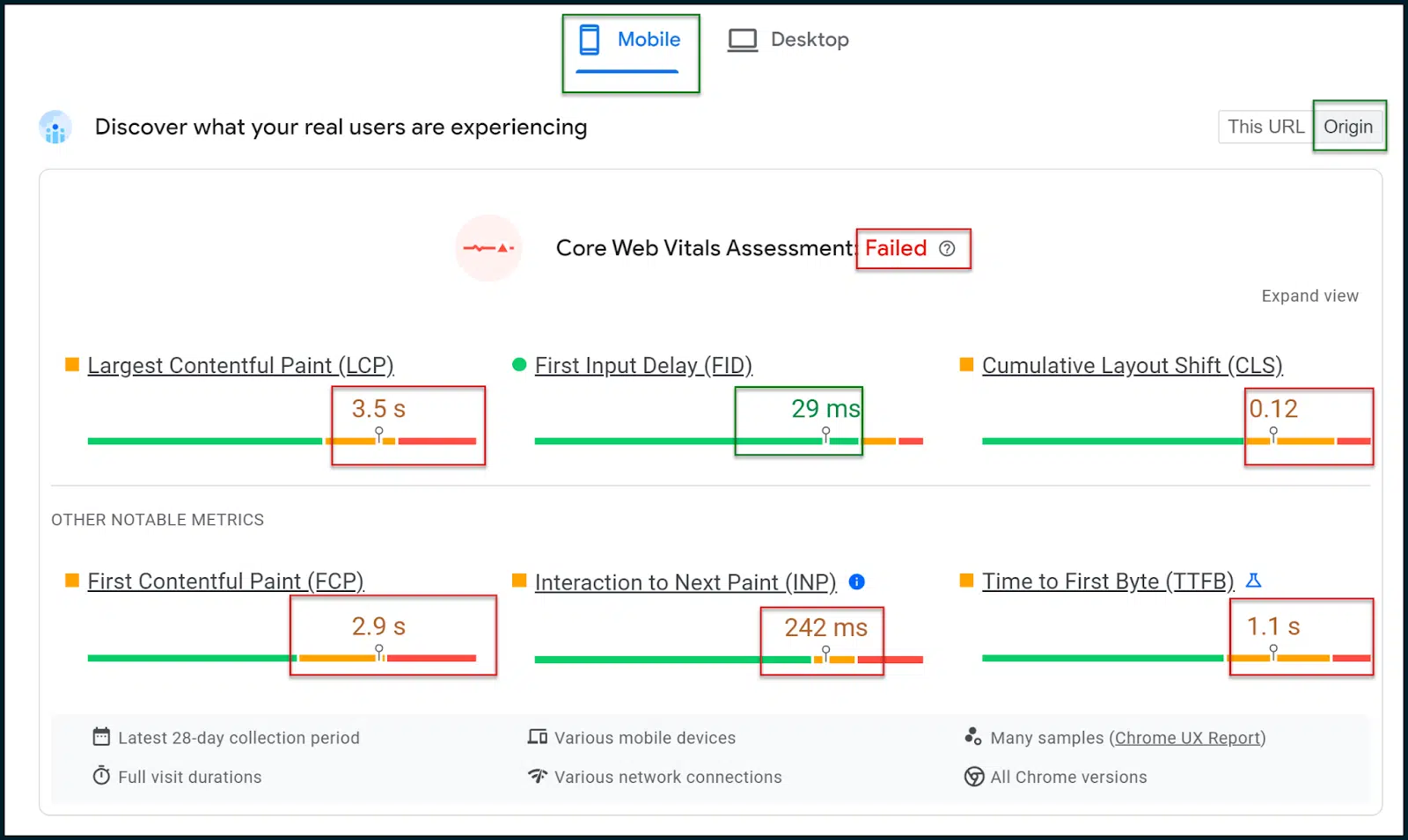
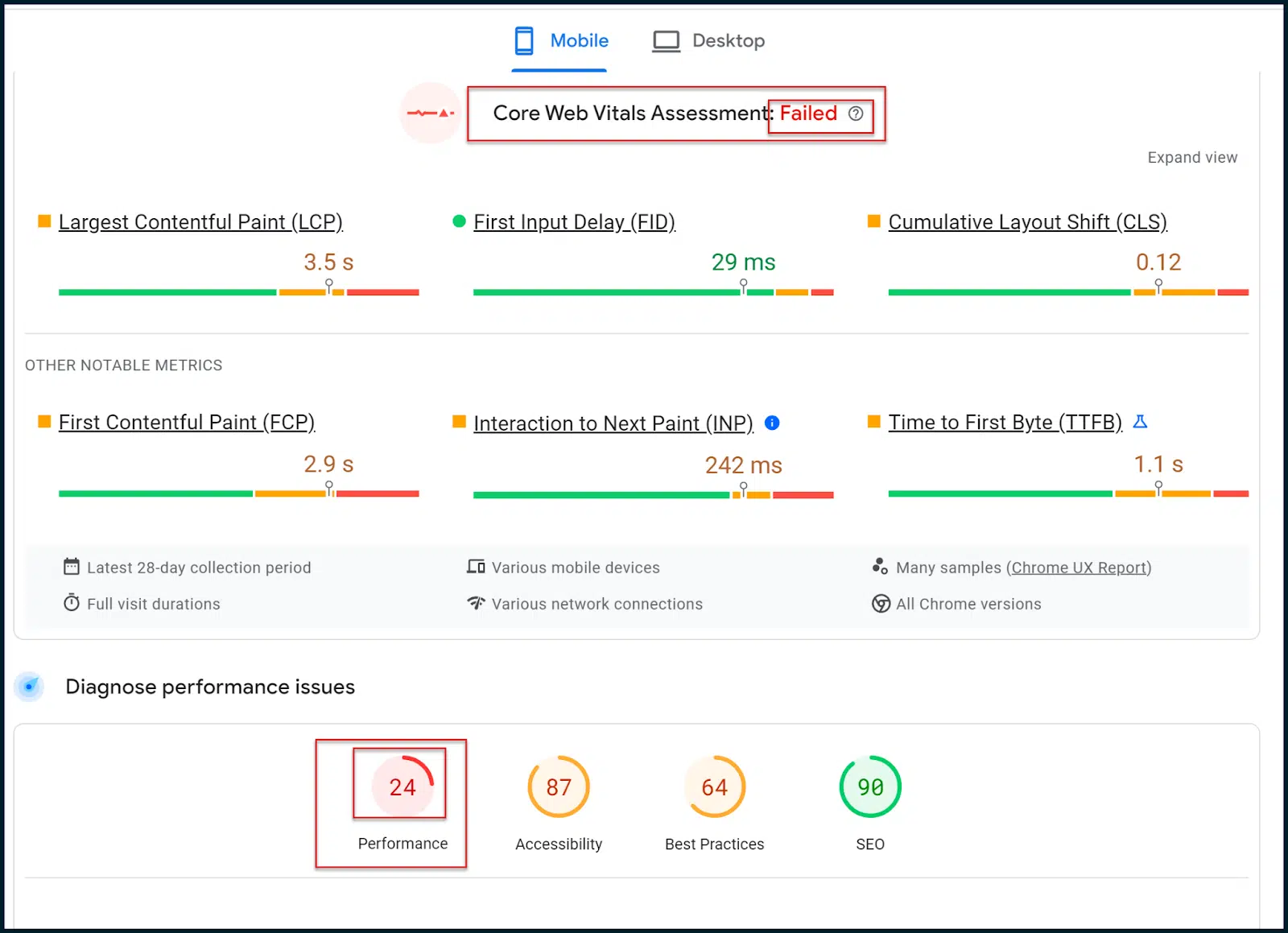
Here, we can see the page speed ratings and metrics for the TechCrunch homepage. 

Image 92

Above, you can see that the Core Web Vitals Assessment has failed. 

In a mobile-first web, it’s important to select the Mobile results tab, which should be rendered by default (these are the results that really matter). 

Select the Origin toggle so you see general data averaged across your site’s domain rather than just the homepage (or whichever page you put in to scan).

Further down the page, you will see the old, familiar numeric page speed rating:

Image 93

So, what’s the difference between the new Core Web Vitals assessment and the old page speed rating?

Essentially, the new Core Web Vitals assessment (Pass / Fail) is based on field (real user) data. 

The old numeric rating is based on simulated mobile crawls and lab data, which are only estimates.

Essentially, Google has shifted to the Core Web Vitals assessment in terms of modifying search rankings. 

To be clear, the simulated lab data can give a nice breakdown in terms of what’s going wrong, but Google does not utilize that numeric rating within their ranking algorithms.

Conversely, the Core Web Vitals assessment doesn’t offer much granular information. However, this assessment is factored into Google’s ranking algorithms. 

So, your main aim is to use the richer lab diagnostics so that you eventually pass the Core Web Vitals assessment (derived via field data). 

Remember that when you make changes to your site, while the numeric rating may immediately observe changes, you’ll have to wait for Google to pull more field data before you can eventually pass the Core Web Vitals assessment.

You will note that both the Core Web Vitals assessment and the old page speed rating utilize some of the same metrics. 

For example, both of them reference First Contentful Paint (FCP), Largest Contentful Paint (LCP) and Cumulative Layout Shift (CLS). 

In a way, the types of metrics examined by each rating system are fairly similar. It’s the level of detail and the source of the examined data, which is different.

You must aim to pass the field-based Core Web Vitals assessment. However, since the data is not too rich, you may wish to leverage the traditional lab data and diagnostics to progress. 

The hope is that you can pass the Core Web Vitals assessment by addressing the lab opportunities and diagnostics. But do remember, these two tests are not intrinsically connected.


Get the daily newsletter search marketers rely on.


Assessing your CWVs via PageSpeed Insights

Now that you know the main Core Web Vitals metrics and how they can technically be satisfied, it’s time to run through an example.

Let’s go back to our examination of TechCrunch:

https://pagespeed.web.dev/analysis/https-techcrunch-com/zo8d0t4x1p?form_factor=mobile

Image 94

Here, FID is satisfied, and INP only fails by a narrow margin. 

CLS has some issues, but the main problems are with LCP and FCP.

Let’s see what PageSpeed Insights has to say in terms of Opportunities and Diagnostics. 

We must now shift over from the field data to the lab data and attempt to isolate any patterns that may be impacting the Core Web Vitals:

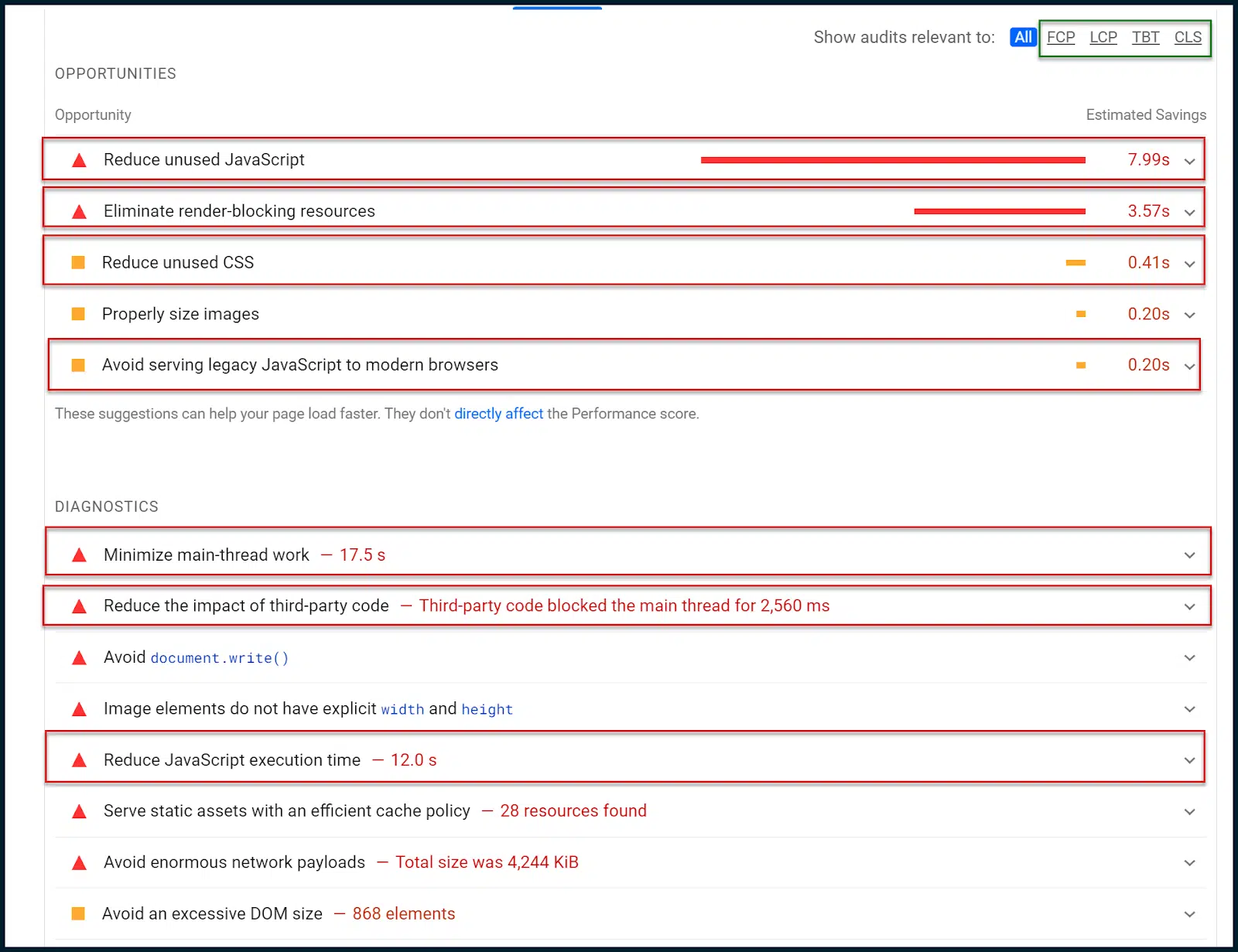
Image 95

Above, you can see a small sub-navigation in the upper right corner boxed in green.

You can use this to narrow the different opportunities and diagnostics to certain Core Web Vitals metrics. 

In this case, however, the data tells a very clear story without narrowing.

Firstly, we are told to reduce unused JavaScript. This means that sometimes, JavaScript is being loaded without being executed. 

There are also notes to reduce unused CSS. In other words, some CSS styling is loading, which isn’t being applied (similar problem). 

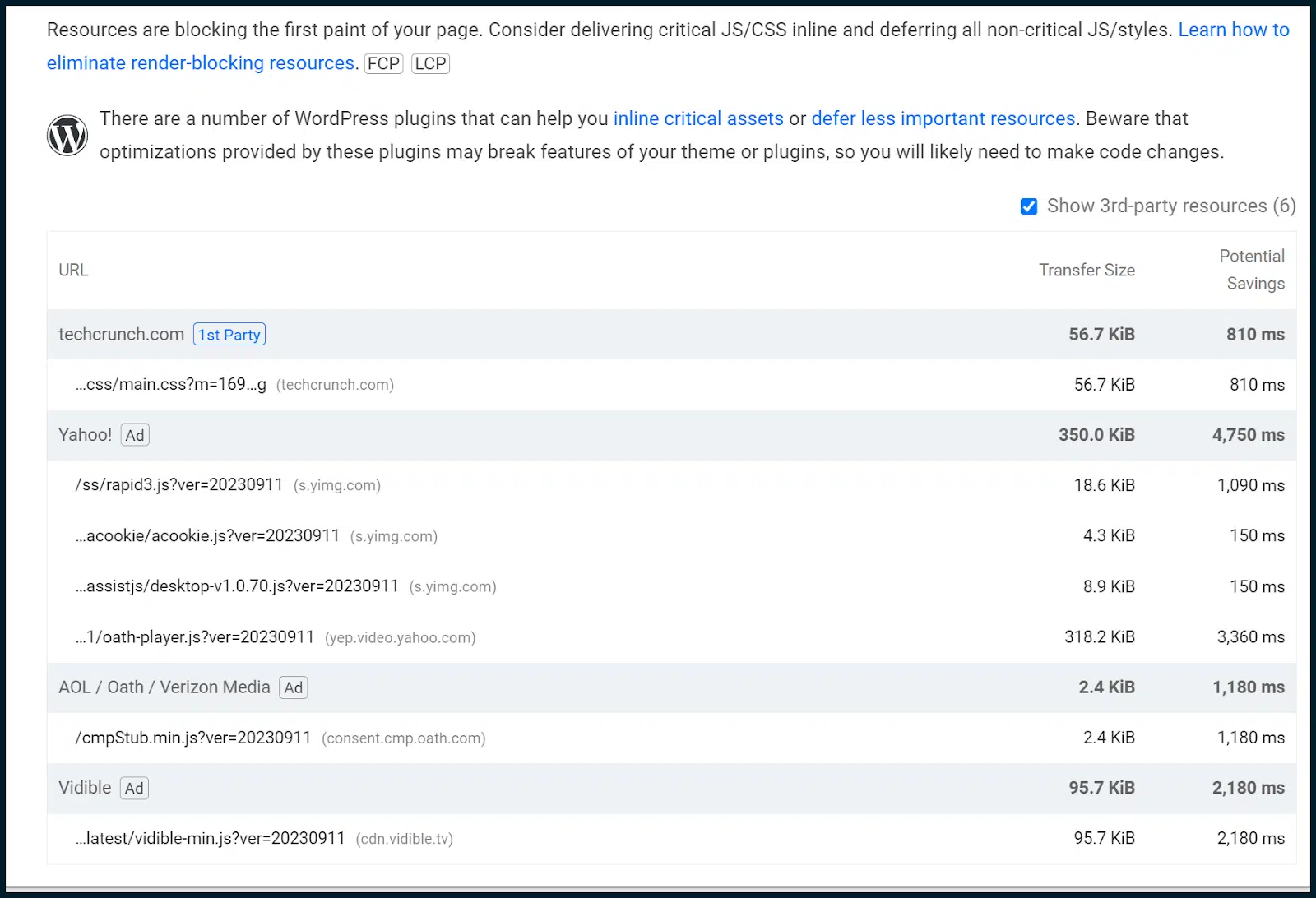
We’re also told to eliminate render-blocking resources, which are almost always related to JavaScript modules and CSS sheets.

Image 96

Render-blocking resources must be deferred to stop them from blocking a page load. However, as we have already explored, this may disrupt the CLS rating. 

Due to this, it would be wise to begin crafting both a critical CSS and a critical JavaScript rendering path. Doing this will inline JavaScript and CSS needed above the fold while deferring the rest.

This approach enables the site owner to satisfy page loading demands while balancing with the CLS metric. It’s not an easy thing to do and usually requires a senior web developer. 

Since we also found unused CSS and JavaScript, we can also issue a general JavaScript code audit to see if JavaScript could be deployed more intelligently.

Let’s go back to Opportunities and Diagnostics:

ZSlV1tZBO97ZownjzVZnRBmmR QZW9S8TRSVhT9nf6wCtmBdS3HJhTf1721x3OhwzYyV A6XCqXH0TFXv2oJ5MswDBbRGaVsSx8TfBRFbB8qwNeGQPdO XWMCOBahfg2oy3kwSbZES Y5oXoXZ7V1z4

Now, we want to focus on the diagnostics. Google deliberately throttles these checks through poor 4G connections, so items such as the main-thread work seem so long (17 seconds). 

This is deliberate in order to satisfy users with low bandwidth and/or slow devices which are common worldwide.

I want to draw your attention here to “Minimize main-thread work.” This single entry is often a goldmine of insights. 

By default, most of a webpage’s rendering and script execution (JavaScript) tasks are pushed through a client’s web browser’s main processing thread (one single processing thread). You can understand how this causes significant page loading bottlenecks.

Even if all of your JavaScript is perfectly minified and shipped to the user’s browser quickly, it must wait in a single thread processing queue by default, meaning that only one script can be executed at once. 

So, quickly shipping loads of JavaScript to your user is the equivalent of firing a firehose at a brick wall with a one-centimeter gap. 

Good job delivering, but it’s not all going to go through! 

More and more, Google is pushing client-side speed responsiveness as our responsibility. Like it or lump it, that’s how it is (so you’d better get familiar).

You might say in frustration, “Why is it like this!? Web browsers have had access to multiple processing threads for years, even mobile browsers have caught up. There’s no need for things to be this awkward, is there?”

Actually, yes. Some scripts rely on the output of other scripts before they themselves can execute. 

In all likelihood, if all browsers were suddenly to start processing all JavaScript in parallel, out of sequence, most of the web would probably crash and burn. 

So, there’s a good reason that sequential script execution is the default behavior for modern web browsers. I keep emphasizing the word “default.” Why is that?

It’s because there are other options. One is to prevent the client’s browser from processing any scripts by processing them on the user’s behalf. This is known as server-side rendering (SSR).

It’s a powerful tool to detangle client-side JavaScript execution knots but also very expensive. 

Your server must process all script requests (from all users) faster than your average user’s browser processes a single script. Let that one sink in for a moment.

Not a fan of that option? OK, let’s explore JavaScript parallelization. The basic idea is to leverage web workers to define which scripts will load in sequence vs. which may load in parallel. 

While you can force JavaScript to load in parallel, doing this by default is extremely inadvisable. Integrating technology such as this would largely mitigate the need for SSR in most cases.

However, it will be very fiddly to implement and will require (you guessed it!) the time of a senior web developer. 

The same guy you hire to do your full JavaScript code audit might be able to help you with this, too. If you combine JavaScript parallelization with a critical JavaScript rendering path, then you’re really flying.

In this example, here’s the really interesting thing:

Image 97

You can immediately see that whilst the main thread is occupied for 17 seconds, JavaScript execution accounts for 12 seconds. 

Does that mean 12 seconds of the 17 seconds of thread work are JavaScript execution? That is highly likely. 

We know that all JavaScript is pushed through the main thread by default. 

That’s also how WordPress, the active CMS, is set up by default. 

Since this site is running WordPress, all of those 12 seconds of JavaScript execution time likely come out of the 17 seconds of main thread work.

That’s a great insight because it tells us that most of the main processing thread’s time is spent executing JavaScript. And looking at the number of referenced scripts, that’s not hard to believe.

It’s time to get technical and remove the training wheels. 

Open a new instance of Chrome. You should open a guest profile to ensure there’s no clutter or enabled plugins to bloat our findings. 

Remember: perform these actions from a clean guest Chrome profile.

Image 98

Load up the site you want to analyze. In our case, that’s TechCrunch. 

Accept cookies as needed. Once the page is loaded, open Chrome DevTools (right-click a page and select Inspect).

Image 99

Navigate to Performance > Screenshots.

Image 100

Hit the reload button to record the page load. A report will then be generated:

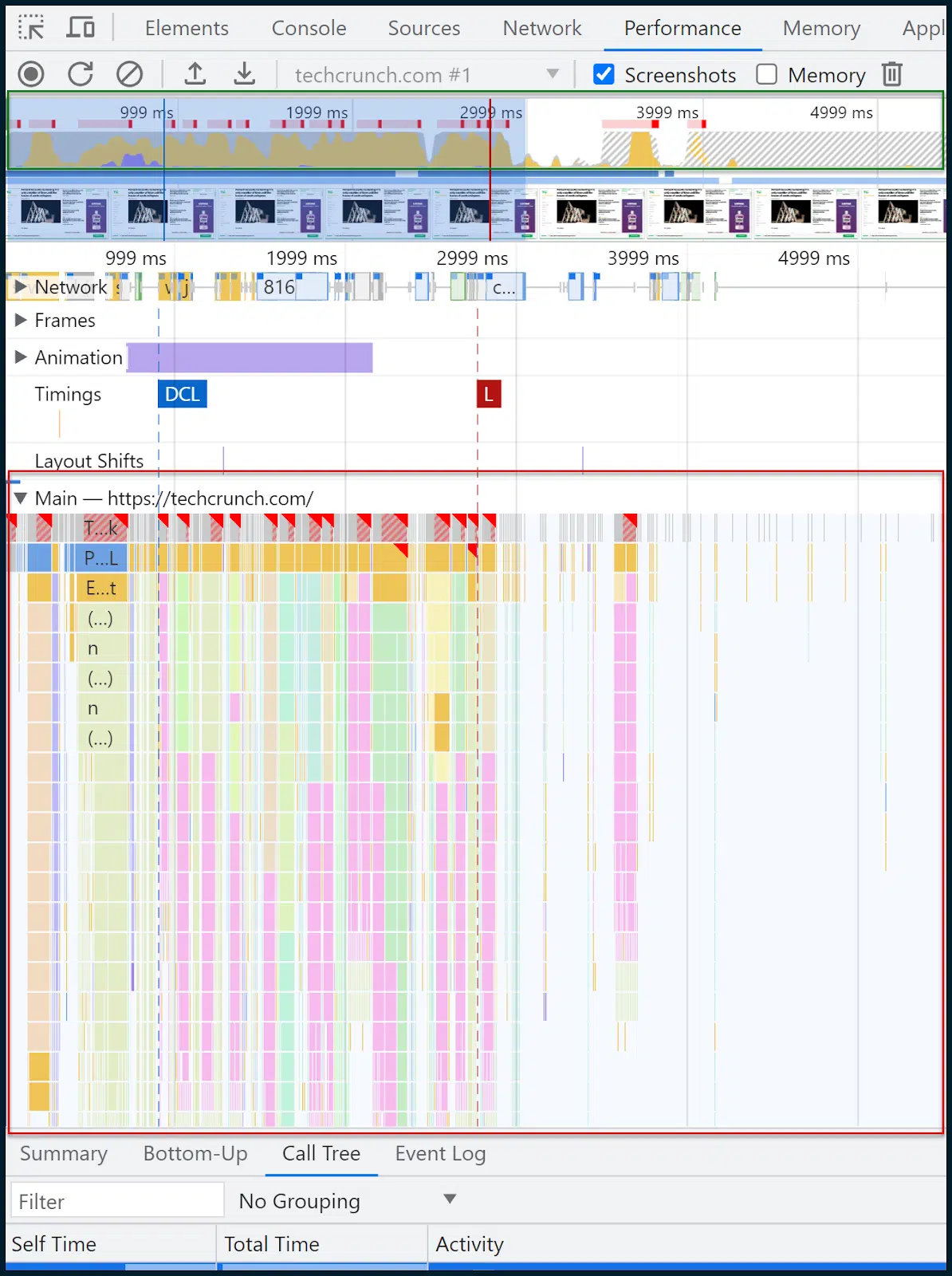
Image 101

This is where we all need to take a deep breath and try not to panic. 

Above, boxed in green, you can see a thin pane that illustrates requests over time. 

Within this box, you can drag your mouse to select a time slice, and the rest of the page and analysis will automatically adapt. 

The region I have selected manually is the area covered with a semi-transparent blue box. 

That’s where the main page load happens and what I’m interested in examining.

In this case, I have roughly selected the range of time and events between 32ms and 2.97 seconds. Let’s focus our gaze on the interior of the main thread:

Image 102

You know how earlier, I was saying that most rendering tasks and JavaScript executions are forced through the bottleneck of the main thread? 

Well, we’re now looking at the interior of that main thread over time. And yes, in yellow, you can see a lot of scripting tasks.

On the top couple of rows, as time progresses, there are more and more dark yellow chunks confirming all the executing scripts and how long they take to process. You can click on individual bar chunks to get a readout for each item.

Although this is a powerful visual, you’ll find a more powerful one in the Summary section:

Image 103

This sums up all the granular data, broken down into simple thematic sections (e.g., Scripting, Loading, Rendering) via the easy-to-digest visual medium of a doughnut chart. 

As you can see, scripting (script execution) takes up most of the page load. So, our earlier supposition from Google’s mix of field and lab data, which pointed the finger at JavaScript execution bottlenecks in the main thread, seems to have been accurate. 

In 2023, this is one of the most widely encountered issues, with few simple, off-the-shelf solutions. 

It’s complex to create critical JavaScript rendering paths. It takes expertise to perform JavaScript code audits, and it is not so simple to adopt JavaScript parallelization or SSR.

Now let’s go and look at the Call Tree:

Image 104

Call Tree is often more useful than Bottom-Up. 

The data is similar, but Call Tree will thematically group tasks into handy buckets like Evaluate Script (script execution). 

You can then click on a group, expand it and see the scripts and how long they took to load. 11% of the time was taken loading pubads_impl.jsm while 6% of the time was taken loading opus.js.

I don’t know what those modules are (and you may not either), but this is where the optimization journey often begins.

We can now take a step back to:

  • Google these scripts and see if they are part of third-party libraries, what they do, and what the impact is. 
  • Consult the developer in terms of how these might be more intelligently deployed. 
  • Narrow the problem down to individual resources and look for alternatives.
  • Tackle the performance deficit (or alternatively, fight for more resources/bandwidth, a strong hosting environment – if that is indeed required).

If you managed to stick with me this far, congratulations. In terms of deep Core Web Vitals and page speed analysis, we only used:

Yes, you really can be just that lean. However, there are other tools which may be of immense assistance to you:

  • GTMetrix: Especially useful for its waterfall chart (requires a free account for waterfall), which you can learn how to read here. Don’t forget that GTMetrix will run unthrottled by default, giving overly favorable results. Be sure to set it to an LTE connection.
  • Google Search Console: If you set this up and verify your site, you can see lots of performance and usability data over time, including Core Web Vitals metrics across multiple pages (aggregated).
  • Screaming Frog SEO Spider: This can be connected to the page speed API, to allow bulk fetching of Core Web Vitals Pass or Fail grades (for multiple pages). If you’re using the free page speed API, don’t hammer it in an unreasonable way

Improving your page speed ratings used to be as simple as compressing and uploading some images.

Nowadays? It’s a complex Core Web Vitals crusade.

Prepare to engage fully. Anything less will meet with failure.


Opinions expressed in this article are those of the guest author and not necessarily Search Engine Land. Staff authors are listed here.


Related stories

New on Search Engine Land

@media screen and (min-width: 800px) { #div-gpt-ad-3191538-7 { display: flex !important; justify-content: center !important; align-items: center !important; min-width:770px; min-height:260px; } } @media screen and (min-width: 1279px) { #div-gpt-ad-3191538-7 { display: flex !important; justify-content: center !important; align-items: center !important; min-width:800px!important; min-height:440px!important; } }

About the author

James Allen

Hailing from the Midlands of the United Kingdom; James Allen has been working in search since 2009. Specialising in technical SEO early in his career, he is an auditor who is capable of ascertaining his own data. With a solid knowledge of XPath and some working knowledge of Python, James also dabbles in AI scripting. James decided to split his career between then technical SEO, light API scripting and Analytics disciplines. Due to this, he also has high familiarity with Google Analytics, Google Tag Manager and managing custom events within the data layer. James currently works at Anicca in Leicester, where his time is spent auditing websites, exploring AI workflow integrations and implementing in-depth tracking on clients’ websites.

https://searchengineland.com/measuring-optimizing-google-core-web-vitals-technical-seo-guide-432368



Mapping the customer journey for SEO and marketing success

Before embarking on a shopping journey, customers often find themselves in a state of awareness where a specific need or desire has sprouted in their minds. 

A growing recognition of a gap characterizes this initial phase – perhaps a missing item in their collection, an upgrade to enhance their lifestyle or a solution to a newly identified problem at their workplace.

Customer journey in SEO

During the purchasing decision process, a customer navigates a rich landscape of exploration and contemplation.

Initially, curiosity leads them to sift through various options, scrutinizing features, reviews, and personal recommendations while considering the product’s aesthetic appeal.

As the customer dives deeper, a complex interplay between desire and rationality occurs, with considerations of value, necessity and potential enjoyment balanced against budget constraints.

An emerging emotional connection to the product influences their choice, potentially aligning with their personal narrative or lifestyle.

Ultimately, a fusion of research and emotional resonance guides them to a decision where trust in the brand and perceived value peaks, culminating in a purchase that is both anticipated and satisfying yet open to subsequent evaluation based on the product’s ability to meet cultivated expectations.

In the vibrant canvas of digital marketing and SEO, weaving personal narratives through customer journey maps isn’t just vital – it’s a sophisticated art.

Join me on a journey to understanding the significance of the customer journey map and what role SEO plays, bridging SEO finesse with a nuanced grasp of your audience’s journey and painting not just a plan but a masterpiece of empathy and insight.

Understanding the significance of the customer journey in SEO

By aligning SEO strategies with the customer journey, marketers can craft content that is highly relevant and tailored to resonate with users as they research a product or service. 

This approach enhances the user experience and positively impacts search engine rankings by aligning the two. 

Google, in particular, tends to favor content that embodies the principles of experience, expertise, authoritativeness and trustworthiness (E-E-A-T). The process in which users begin to research their needs starts on Google and other search engines.

Data-driven insights from understanding and optimizing the customer journey through keyword analysis and proper tagging can inform SEO strategies. This leads to more impressions, traffic and increased brand loyalty.

Users who identify their needs and validate their decision will make a purchase decision quickly and are more likely to engage with the site and convert. 

In the long run, SEO strategies focusing on the customer journey are more sustainable and benefit the user experience, contributing to a positive return on investment (ROI) and a competitive edge in the digital landscape.

The customer journey map: A compass for success

A customer journey map is a visual tool that meticulously charts the various touchpoints and interactions a customer has with a brand, extending from the initial spark of awareness to post-purchase engagements. 

This illustrative map captures transactional phases and intricately explores the underlying emotions and motivations steering the customer’s choices. 

It serves as a comprehensive blueprint, offering a deep dive into each step of the customer’s experience, thus painting a fuller picture of their path and nuanced relationship with your brand and offerings.

Why define your customer journey map?

In the ever-evolving business and marketing landscape, understanding your customer journey map is more of a necessity than a luxury. 

I have entered new roles as an SEO of a company many times, only to find that the marketers I work with haven’t considered where the user is in their decision-making process while developing content. 

As a part of this, it isn’t clear what role SEO should play during attribution. I will utilize a keyword analysis while considering what problems they want to solve. 

I ask myself the right questions, tagging each keyword with where they are in their journey to understand their intent. 

But don’t take my word for it. Here are some compelling reasons why defining your customer journey is crucial for the success and growth of your marketing efforts:

Better understanding your customer

Implementing a customer journey map provides deep insights into your target audience’s goals, pain points, and emotions. With this knowledge, you can tailor your marketing and SEO efforts for maximum impact.

Identification and resolution of service issues

No product or service is flawless, but by viewing the brand from your customer’s perspective, you can identify and address shortcomings to enhance customer satisfaction.

Creation of exceptional experiences

A clear understanding of the customer journey allows you to optimize touchpoints from your various marketing channels, creating exceptional experiences at every stage and fostering trust in your brand.

Discovery of untapped opportunities

By analyzing the journey, you may uncover gaps in your SEO strategy or what your competitors might have missed. These unique nuances can set your brand apart.

Cost reduction and improved results

Aligning your SEO strategy with the customer journey can enhance campaign effectiveness, driving up results while reducing costs.


Get the daily newsletter search marketers rely on.


SEO’s part in the customer experience journey

For optimal success, it’s vital to harmonize your marketing efforts with the nuanced pathways of the customer experience journey. This holistic approach involves:

Understanding the phases

  • Recognizing that marketing communications alone are short-sighted. 
  • The entire customer experience should be considered, from awareness to post-purchase, with SEO playing a crucial role.

Data-driven decisions

  • Use estimated volume numbers from your keyword analysis to guide marketing decisions at each journey stage.

Industry-specific tailoring

  • To stay focused, adapt the customer journey map and where SEO fits within your business model, whether B2B, B2C, or retail.

Optimizing for search throughout the entire customer journey

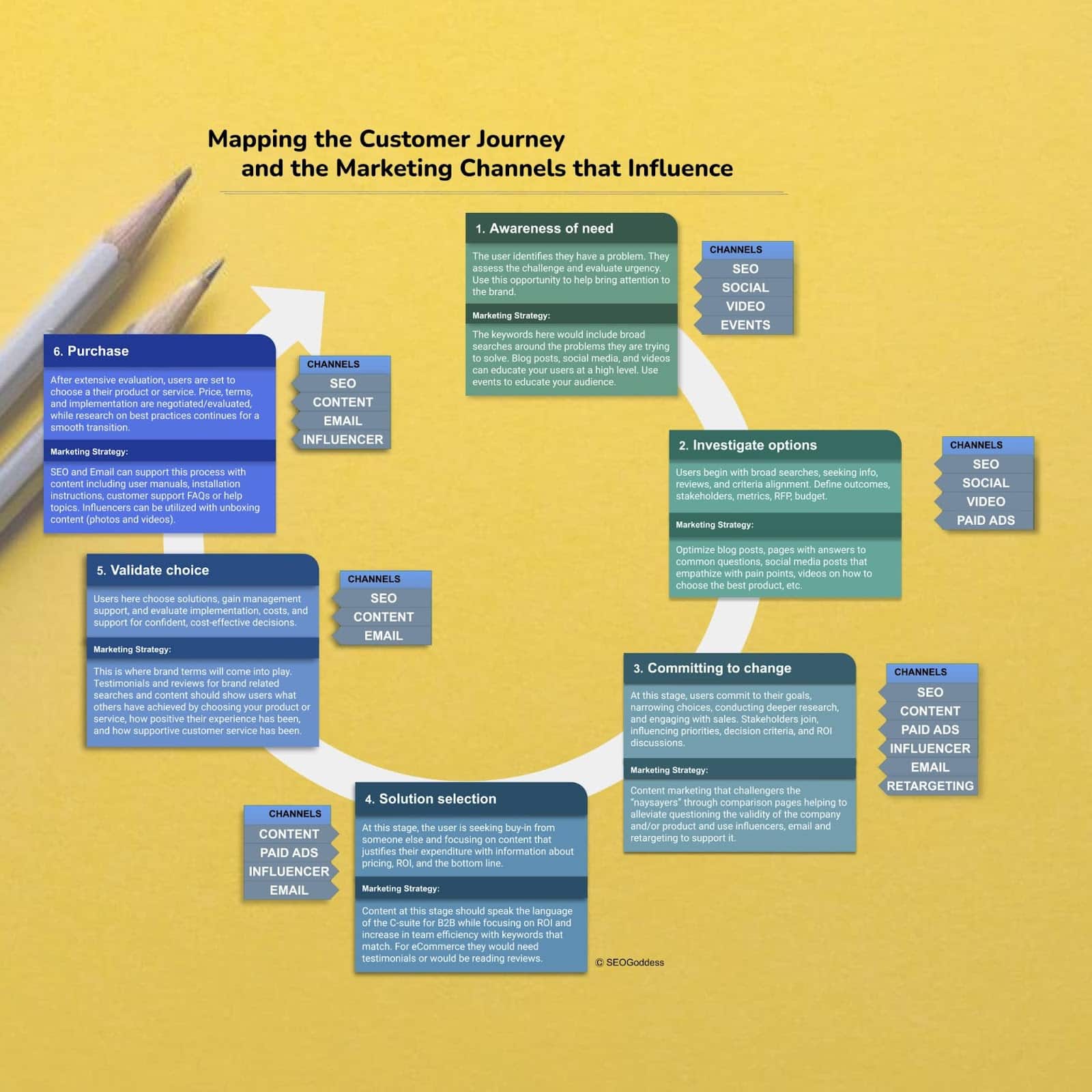
The customer journey process intricately branches into six well-defined stages, each necessitating a tailored marketing strategy. 

This approach effectively engages and shepherds users through a thoughtful progression culminating in a well-informed purchase decision. 

It is a delicate dance of guidance and persuasion, ensuring potential customers feel supported and enlightened on their path to choosing the perfect product or service at each step.

Image 3

1. Awareness of need

Initially, customers recognize a pressing issue that necessitates resolution. They gauge the gravity of the dilemma, presenting an opportunity for brands to seize their interest. 

Marketing strategies should encompass problem-related keywords, enlightening blog articles, captivating social media narratives, and instructional videos. 

Additionally, events are a powerful tool to deepen the audience’s understanding of the matter, showcasing the brand’s viable solutions.

2. Investigate options 

During this phase, users initiate broad searches to gather information, read reviews, and align criteria for potential solutions. They start defining outcomes, stakeholders, metrics, budgets and more. 

To assist users in their research, marketers should:

  • Optimize blog posts.
  • Create informative website pages.
  • Share empathetic social media posts addressing pain points.
  • Produce videos guiding users in selecting the best product or service.

3. Committing to change 

Users in this stage commit to their goals, narrow choices, and delve deeper into research. 

Sales engagements become more prominent, and stakeholders join the decision-making process. 

Marketing strategies should focus on content that challenges doubts or objections, such as comparison pages that validate the company’s credibility. 

Influencers, email campaigns and retargeting efforts can reinforce the commitment made by users.

4. Solution selection 

As users seek buy-in from decision-makers, they require content that justifies their expenditure, often emphasizing pricing, ROI and overall value. 

B2B marketing should speak the language of the C-suite, highlighting ROI and efficiency improvements. 

For ecommerce, testimonials and reviews play a crucial role in influencing selection.

5. Validate choice

Users validate their choice in this stage by seeking management support and evaluating implementation logistics, costs, and ongoing support. 

Brands should optimize for brand-related searches, leverage testimonials and reviews to showcase successful experiences and highlight exceptional customer service.

6. Purchase 

Following a thorough assessment, customers stand on the cusp of making their ultimate purchasing choice. Discussions surrounding pricing, terms and specifics of implementation might take place. 

To facilitate this phase, brands can employ SEO and email marketing strategies, offering resources like: 

  • User guides.
  • Setup manuals.
  • Answers to frequently asked questions. 

Moreover, leveraging influencers to craft engaging unboxing videos can vividly illustrate the product or service in use, enhancing the customer’s ability to visualize its value in their lives.

Successful campaigns are born from the seamless integration of customer journey mapping, adept SEO and strategic marketing. 

Businesses can cultivate trust, enhance online visibility, and boost customer engagement by deeply understanding the customer’s journey and aligning SEO techniques with marketing efforts. Embrace this powerful synergy, ensuring you confidently navigate the vast SEO terrain. 

In my next Search Engine Land article, I’ll guide you on aligning SEO with your customer journey, diving deep into keyword analysis and content strategy to enrich your company’s digital prowess.


Opinions expressed in this article are those of the guest author and not necessarily Search Engine Land. Staff authors are listed here.


Related stories

New on Search Engine Land

@media screen and (min-width: 800px) { #div-gpt-ad-3191538-7 { display: flex !important; justify-content: center !important; align-items: center !important; min-width:770px; min-height:260px; } } @media screen and (min-width: 1279px) { #div-gpt-ad-3191538-7 { display: flex !important; justify-content: center !important; align-items: center !important; min-width:800px!important; min-height:440px!important; } }

About the author

Jenn Mathews

Jenn Mathews, also known as the SEOGoddess since 2004, is a renowned expert in Enterprise SEO with over 20 years of experience in search engine optimization. Her impressive background includes serving as GitHub’s only SEO Manager, directing SEO across Groupon’s global organization, managing the SEO team at Nordstrom, and working with several fortune 500 companies. Jenn’s expertise in technical SEO and her ability to develop overall strategy while advocating for SEO within large organizations has made her an authority in the industry. Today, Jenn shares her knowledge as a mentor and author for Search Engine Land, as well as through various speaking events. Trust in Jenn Mathews to help your enterprise achieve its SEO goals.

https://searchengineland.com/mapping-customer-journey-seo-marketing-success-432346


Former Googler: Google ‘using clicks in rankings’

“Pretty much everyone knows we’re using clicks in rankings. That’s the debate: ‘Why are you trying to obscure this issue if everyone knows?’”

That quote comes from Eric Lehman, a former 17-year employee of Google who worked as a software engineer on search quality and ranking. He left Google in November.

Lehman testified last Wednesday as part of the ongoing U.S. vs. Google antitrust trial.

If you haven’t heard this quote yet, expect to hear it. A lot.

But. That’s not all Lehman had to say. Google’s machine learning systems BERT and MUM are becoming more important than user data, he said.

  • “In one direction, it’s better to have more user data, but new technology and later systems can use less user data. It’s changing pretty fast,” Lehman said, as reported by Law360.

Lehman believes Google will rely more heavily on machine learning to evaluate text than user data, according to an email Lehman wrote in 2018, as reported by Fortune:

  • “Huge amounts of user feedback can be largely replaced by unsupervised learning of raw text,” he wrote.

User vs. training data. There was also a confusion around “user data” vs. training data” when it came to BERT. Big Tech on Trial reported:

“DOJ’s attempt to impeach Lehman’s testimony also seemed to backfire. In response to a DOJ question about whether Google had an advantage in using BERT over competition because of its user data, Lehman testified that Google’s ‘biggest advantage in using BERT’ over its competitors was that Google invented BERT. DOJ then put up an exhibit titled ‘Bullet points for presentation to Sundar.’ One of the bullets on this exhibit said the following (according to my notes): ‘Any competitor can use BERT or similar technologies. Fortunately, our training data gives us a head-start. We have the opportunity to maintain and extend our lead by fully using the training data with BERT and serving it to our users…’

This likely would have been an effective impeachment of Lehman if “training data” meant some kind of user data. But after DOJ concluded its re-direct examination, Judge Mehta asked Lehman what “training data” referred to. Lehman explained it was different from user search data.”

What is it like to compete against Google?

Sensitive Topics. Lehman was also asked by DOJ attorney Erin Murdock-Park about a slide from one of his slide decks on “Sensitive Topics” that instructed employees to “not discuss the use of clicks in search…”

According to reporting from Big Tech on Trial (via X), Lehman said “we try to avoid confirming that we use user data in the ranking of search results.”

The reporter X post says “I didn’t get great notes on this, but I think the reason had something to do with not wanting people to think that SEO could be used to manipulate search results.”

Google = liars? Since discovering this testimony, SEOs have been quick to use Lehman’s quotes as definitive proof that Google has been lying about using clicks or click-through rate for all of its 25 years.

The question of whether Google uses clicks was the first question asked last week during an AMA with Google’s Gary Illyes at Pubcon Pro in Austin. Illyes answer was “technically, yes,” because Google uses historical search data for its machine-learning algorithm RankBrain.

Technically yes, translated from Googler speak, means yes. RankBrain was trained on user search data.

We know this because Illyes already told us this in 2018. He said RankBrain “uses historical search data to predict what would a user most likely click on for a previously unseen query.”

RankBrain was used for all searches, impacting “lots” of them, starting in 2016.

Google Search tracks everything. But the fact that Google tracks clicks in Search does not mean clicks are used as a direct ranking factor. In other words, if site A gets 100 clicks and site B gets 101 clicks, then site B automatically jumps up to Position 1.

Much like how Google uses its people to rate the quality of its search results, Google is likely using clicks to rate the results for queries and train its ranking systems.

Why we care. Does Google use clicks? Yes. But again, probably not as a ranking signal (thought admittedly I can’t say that with 100% certainty as I don’t work at Google or have access to the algorithm). I know clicks are noisy and easy to manipulate. And for many sites/queries, there simply wouldn’t be enough data to evaluate to make it a useful ranking signal for Google.

Dig deeper. The biggest mystery of Google’s algorithm: Everything ever said about clicks, CTR and bounce rate


Related stories

New on Search Engine Land

@media screen and (min-width: 800px) { #div-gpt-ad-3191538-7 { display: flex !important; justify-content: center !important; align-items: center !important; min-width:770px; min-height:260px; } } @media screen and (min-width: 1279px) { #div-gpt-ad-3191538-7 { display: flex !important; justify-content: center !important; align-items: center !important; min-width:800px!important; min-height:440px!important; } }

About the author

Danny Goodwin

Danny Goodwin has been Managing Editor of Search Engine Land & Search Marketing Expo – SMX since 2022. He joined Search Engine Land in 2022 as Senior Editor. In addition to reporting on the latest search marketing news, he manages Search Engine Land’s SME (Subject Matter Expert) program. He also helps program U.S. SMX events. Goodwin has been editing and writing about the latest developments and trends in search and digital marketing since 2007. He previously was Executive Editor of Search Engine Journal (from 2017 to 2022), managing editor of Momentology (from 2014-2016) and editor of Search Engine Watch (from 2007 to 2014). He has spoken at many major search conferences and virtual events, and has been sourced for his expertise by a wide range of publications and podcasts.

https://searchengineland.com/former-googler-google-using-clicks-in-rankings-432401


Bing adds controls for webmasters to disallow their content in Bing Chat

Bing has announced a set of new controls to allow webmasters and site owners to block Bing Chat from using its content for AI training and Microsoft’s generative AI models. “While we are actively collaborating with the industry on establishing future AI standards, we also wanted to provide more immediate support for publishers,” Fabrice Canel from Microsoft told us.

The controls. Here are the options you can implement to control how Bing uses or does not use your content for Bing Chat or other Microsoft generative AI models:

  • No action is needed to remain in Bing Chat. Content without NOCACHE tag and without NOARCHIVE tag may be included in Bing Chat answers and will benefit from AI’s ability to generate more helpful answers and to increase your ranking opportunities in Bing Chat; site content may be used in training our generative AI foundation models.
  • Content with the NOCACHE tag may be included in Bing Chat answers. Bing will only display URL/Snippet/Title in the answer; Going forward, for content in our Bing Index that is labeled NOCACHE, only URLs, Titles and Snippets may be used in training Microsoft’s generative AI foundation models.
  • • Content tagged NOARCHIVE will not be included in Bing Chat answers, not be linked to in the answers. Going forward, for content in our Bing Index that is labeled NOARCHIVE, Bing will not use the content for training Microsoft’s generative AI foundation models.
  • If content has both NOCACHE and NOARCHIVE tags, we will treat it as NOCACHE.

Bing added that content with the NOCACHE tag or NOARCHIVE tag will still appear in the Bing search results.

To help Bing Chat users find paywall articles, Bing said it recommends adding the NOCACHE value to the NOARCHIVE value.

Bing has more details on how this works within its meta tags help documentation.

Bigger initiatives. Google announced it was working with the AI community on an alternative to the robots.txt protocol for AI models. But clearly Bing didn’t want this to drag out too long and not give site owners controls now, while AI is growing so fast. So Bing decided to leverage what is there now to give us options on how Bing Chat and Microsoft can use our content for its AI ventures.


Related stories

New on Search Engine Land

@media screen and (min-width: 800px) { #div-gpt-ad-3191538-7 { display: flex !important; justify-content: center !important; align-items: center !important; min-width:770px; min-height:260px; } } @media screen and (min-width: 1279px) { #div-gpt-ad-3191538-7 { display: flex !important; justify-content: center !important; align-items: center !important; min-width:800px!important; min-height:440px!important; } }

About the author

Barry Schwartz

Barry Schwartz is a Contributing Editor to Search Engine Land and a member of the programming team for SMX events. He owns RustyBrick, a NY based web consulting firm. He also runs Search Engine Roundtable, a popular search blog on very advanced SEM topics. Barry can be followed on Twitter here.

https://searchengineland.com/bing-adds-controls-for-webmasters-to-disallow-their-content-in-bing-chat-432174


What is the best generative AI tool for writing PR content?

Ever wondered which is the best generative AI tool for writing PR content?

I have just finished conducting a series of tests to determine just that and found that the post generated by Bard produced: 

  • Slightly better results than a post I had written from scratch.
  • Significantly better results than the post by ChatGPT.
  • Dramatically better results than Claude 2.

This article reveals more details about the tests and the result we weren’t expecting but upstaged the three industry-leading chatbots.

Testing the best generative AI tool for PR content

In August, Katie Delahaye Paine, CEO of Paine Publishing, and I uploaded four posts on successive Fridays to a blog, Facebook, and LinkedIn. 

Each post was about our new course designed for PR and communications professionals who need to improve their metrics and want to use Google Analytics 4 (GA4) to show their value.

I wrote the first post from scratch without help from an AI chatbot. Then, I reviewed and made edits to posts on the same topic generated by:

  • GPT-3.5, an AI-powered language model developed by OpenAI.
  • Bard, a collaborative AI tool developed by Google.
  • Claude 2, a next-generation AI assistant based on Anthropic’s research.

We used Google’s free Campaign URL Builder tool to add campaign parameters to the URLs in the call to action at the end of each post. 

This enabled us to objectively measure our custom campaign in GA4 by tracking which PR content generated more new users to a landing page on Paine Publishing’s website.

But while we were analyzing the results of our tests in GA4, we also stumbled across a much bigger surprise that is over 15 times more valuable to PR and communications professionals.


Get the daily newsletter search marketers rely on.


One human-written narrative, three AI-generated posts

Before diving into the results, let’s look at how the posts used in the test were generated.

The baseline: Human-written content

First, I decided that our test needed a baseline. So, I wrote a 1,150-word chronological narrative from scratch entitled, “Why do Digital PR people need to learn about Digital Analytics?”

The body of this post includes four award-winning case studies:

  • In 2005, SEO-PR and Southwest Airlines linked $2.5 million in ticket sales to four optimized press releases.
  • In 2010, SEO-PR and SES Conference & Expo “put butts in seats” at a series of events during the Great Recession.
  • In 2013, SEO-PR and Get City Dealz drove an 85% increase in referral traffic in February over January.
  • In 2019, SEO-PR and Rutgers generated 27% of the leads for a new online master’s degree program.

Then, I published this post on my blog on a Friday afternoon and reposted it to my LinkedIn and Facebook accounts on successive Friday afternoons.

GPT-3.5 via ChatGPT

Next, I used ChatGPT powered by the GPT-3.5 model to draft a post on the same topic entitled, “Elevate Your PR Game with Google Analytics 4 (GA4).”

When I reviewed the first draft, I thought it was too chirpy. The lead read:

  • “Hey fellow PR and communications enthusiasts! Are you ready to take your campaigns and programs to the next level? Say hello to your new secret weapon: Google Analytics 4 (GA4)!”

So, I revised my prompt and ChatGPT generated a 500-word listicle that provided five reasons why GA4 was “a game-changing tool.” And it produced these snappy subheads:

  • Precision meets insight.
  • Short-term wins, long-term growth.
  • 360-degree attribution.
  • Data privacy, front and center.
  • A skill that sets you apart. 

Now, ChatGPT had created a listicle when I had initially asked it to:

  • “Write a Facebook post that explains why PR and communications professionals would benefit from learning how to use Google Analytics 4 (GA4) to measure the results of their short-term campaigns and ongoing programs.”

Even after I revised my prompt to ask the AI-powered language model developed by OpenAI to “write a LinkedIn post,” it had generated another listicle.

This may reflect what its language model was trained to produce and optimized to deliver using Reinforcement Learning with Human Feedback (RLHF).

Then, I published this post on my LinkedIn account on a Friday afternoon and reposted it to my Facebook account and blog on successive Friday afternoons.

Bard

Then, I used Bard to draft a post on the same topic, entitled, “Why should PR and communications professionals learn GA4?”

When I reviewed the draft, I was surprised it used a spiral approach to generate 550 words of helpful content. 

The spiral approach is a teaching method that involves revisiting a subject or skill area at intervals, each time at a more sophisticated level.

The spiral approach used the inverted pyramid structure to place the most fundamental information in the lead paragraphs of the post:

  • GA4 is the future of Google Analytics.
  • GA4 is more powerful than UA.
  • GA4 is more privacy-focused.

Further details were then introduced in the following paragraphs:

  • GA4 can help you track the impact of your earned media. 
  • GA4 can help you identify your target audience. 
  • GA4 can help you track the success of your campaigns over time.

This indicates that Bard’s training reflects some of the new guidance that has just been incorporated in Google’s latest algorithm update, which Barry Schwartz wrote about in Google September 2023 helpful content system update rolling out.

Before this month’s update, the previous guidance had emphasized:

“Google Search’s helpful content system generates a signal used by our automated ranking systems to better ensure people see original, helpful content written by people, for people, in search results.”

The updated guidance for creating helpful, reliable, people-first content has deleted the phrase “written by people.”

The updated guidance has also revised one of the questions that Google says creators can use to “gauge if the content you’re making is helpful and reliable.”

Google added “or reviewed” to the question: “Is this content written or reviewed by an expert or enthusiast who demonstrably knows the topic well?”

I added a closing paragraph and used Google’s Campaign URL Builder to add campaign parameters to the URL.

I published it on my Facebook account on a Friday afternoon and reposted it to my blog and LinkedIn account on successive Friday afternoons to compare the results.

Claude 2

Finally, I used Claude 2 to draft a post on the same topic, entitled, “Why Should PR & Comms Pros Use Google Analytics 4?”

The next-generation AI assistant, which is based on Anthropic’s research “into training helpful, honest, and harmless AI systems,” initially failed when I asked it to: 

  • “Write an article that’s 1,000 to 2,000 words long about why PR and communication professionals should use Google Analytics 4 (GA4) to measure the results of their campaigns and programs.” 

It wrote an article that was 497 words long.

After I pointed this out, Claude 2 generated “an expanded 1,193-word version of the article.” However, it was about 550 words long.

At that point, I shifted gears and asked Claude to:

  • “Write a social media post about why PR and communication professionals should use Google Analytics 4 (GA4) to measure their campaigns and programs. Use a question and answer (Q&A) format.”

The next-generation AI assistant generated a Q&A that was only 325 words long with five questions and five short answers. For example:

Q: What key metrics can I track with GA4 for PR?

A: Website traffic, referrals, backlinks, social media engagement, email open/click rates, lead generation, content engagement, brand awareness surveys and more. GA4 connects data across marketing channels.

Now, I know that Google had reduced the visibility of content featuring Frequently Asked Questions (FAQs) in early August. But I wanted to see if Claude 2 was up to the challenge. 

Like the previous two posts, I added a closing paragraph and used Google’s Campaign URL Builder to add campaign parameters to the URL.

But unlike the previous three posts, I had specified the type of content I’d asked Claude 2 to generate, and I published this post on my blog and to my LinkedIn and Facebook accounts on the final Friday afternoon in August. 

So, this may have produced apples-to-oranges results.

Analyzing the results

When we analyzed the landing page report in GA4, we found what we were looking for:

  • The 550-word spiral post drafted with help from Bard had generated eight new users.
  • The 1,150-word chronological story written from scratch had generated seven new users.
  • The 500-word listicle drafted with help from ChatGPT had generated five new users.
  • The 325-word Q&A drafted with help from Claude 2 had generated one new user.

But we also noticed that direct traffic had generated 122 new users and three conversions.

I did a Google search for “link:https://painepublishing.com/training-education/ga4-for-pr-and-comms-course/” – which is an old SEO technique to find a sampling of links to any site. 

I was astounded to discover that the second listing – after the landing page on Paine’s website – was a LinkedIn page titled “Katie Delahaye Paine’s Post.”

Image 89

When I clicked on the image at the bottom of the short post, it took me directly to the landing page.

In other words, the content that was over 15 times more valuable than even the post generated by Bard was an image that Paine had made into a clickable link. 

Now, there are various ways to add a link to an image. In Word, right-click the image and select “Link”. Then, type or paste the hyperlink address into the “Address” field. 

But you should use Google’s Campaign URL Builder tool to add campaign parameters to the URL so you can use GA4 to show your contribution to the bottom line.

You may discover that a picture is worth a thousand words – even if those words are generated by an expert or enthusiast who knows the topic well or three of the best generative AI tools for writing PR content.


Opinions expressed in this article are those of the guest author and not necessarily Search Engine Land. Staff authors are listed here.


Related stories

New on Search Engine Land

@media screen and (min-width: 800px) { #div-gpt-ad-3191538-7 { display: flex !important; justify-content: center !important; align-items: center !important; min-width:770px; min-height:260px; } } @media screen and (min-width: 1279px) { #div-gpt-ad-3191538-7 { display: flex !important; justify-content: center !important; align-items: center !important; min-width:800px!important; min-height:440px!important; } }

About the author

Greg Jarboe

Greg Jarboe is the president and co-founder of SEO-PR, which has generated award-winning results for Southwest Airlines, the Search Engine Strategies (SES) Conference & Expo series, and Rutgers University. He is the author of YouTube and Video Marketing and a co-author of Digital Marketing Fundamentals. In addition, he is one of the 25 successful gurus profiled in Michael Miller’s book, Online Marketing Heroes. Since 2003, Jarboe has written more than 1,600 articles for Search Engine Watch, Tubular Insights, Search Engine Journal, and other online publications. Over that time, he has also spoken at more than 80 industry conferences. In addition, Jarboe is an instructor at the New Media Academy in the UAE and for Rutgers, the State University of New Jersey, on Coursera.

https://searchengineland.com/best-generative-ai-tool-writing-pr-content-432261


How to optimize your ecommerce ad spend and budget for the best ROI

As advertisers, we want to maximize our PPC budgets for our clients

But how do we do that?

This article identifies eight areas where you can focus your optimization efforts to improve ROI.

If you aren’t already doing these things – there’s time to start testing before we get into the throes of holiday planning and execution.

1. Invest in upper-funnel tactics

Many advertisers get too focused on last-click conversion and revenue metrics and opt for bottom-of-the-funnel tactics. Don’t. 

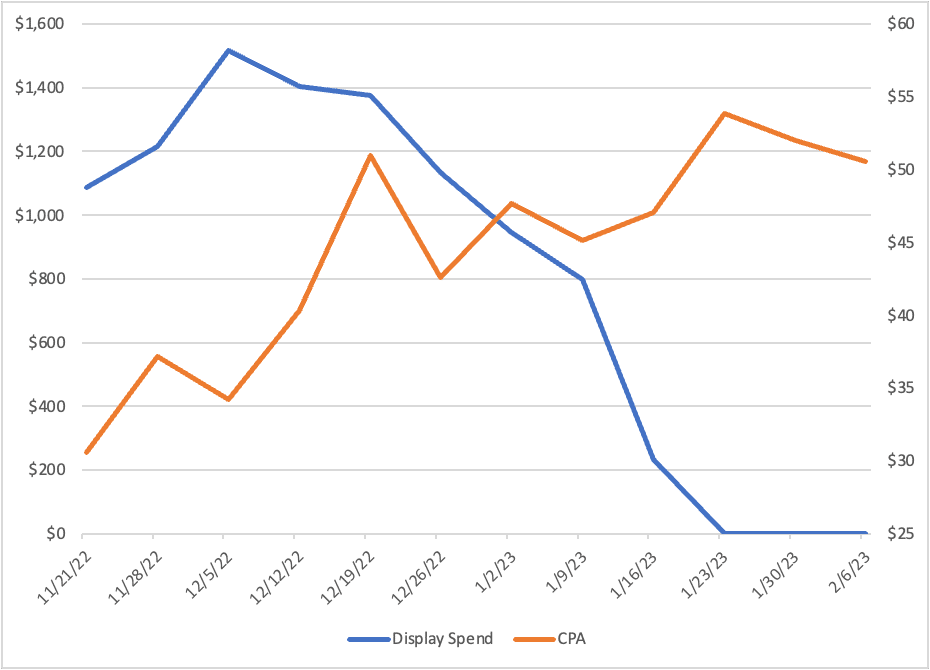
We saw a more than 50% decline in overall efficiency for an apparel brand when we decreased our investment in more awareness tactics. That was immediately reversed when we returned spend. 

Image 87

That said, there will be a point where you reach diminishing returns, so it is important to make smaller incremental increases so you can measure the overall impact.

2. Run on a variety of campaign types 

It’s easy to get blinded by the latest and greatest from Google, but like with your 401K, diversifying your investments is a must.

There may be claims that certain campaigns are all-inclusive and can replace many of your current campaign types while complementing keyword campaigns, especially Performance Max and Shopping.

However, always take the time to test things for yourself. Google rolls out new campaigns gradually, and advertisers should follow suit by gradually adopting these new campaign types.

For instance, we’ve tested running Performance Max only vs. running Performance Max while keeping Shopping live and found that when Shopping is fully paused, Performance Max does not pick up all that volume.

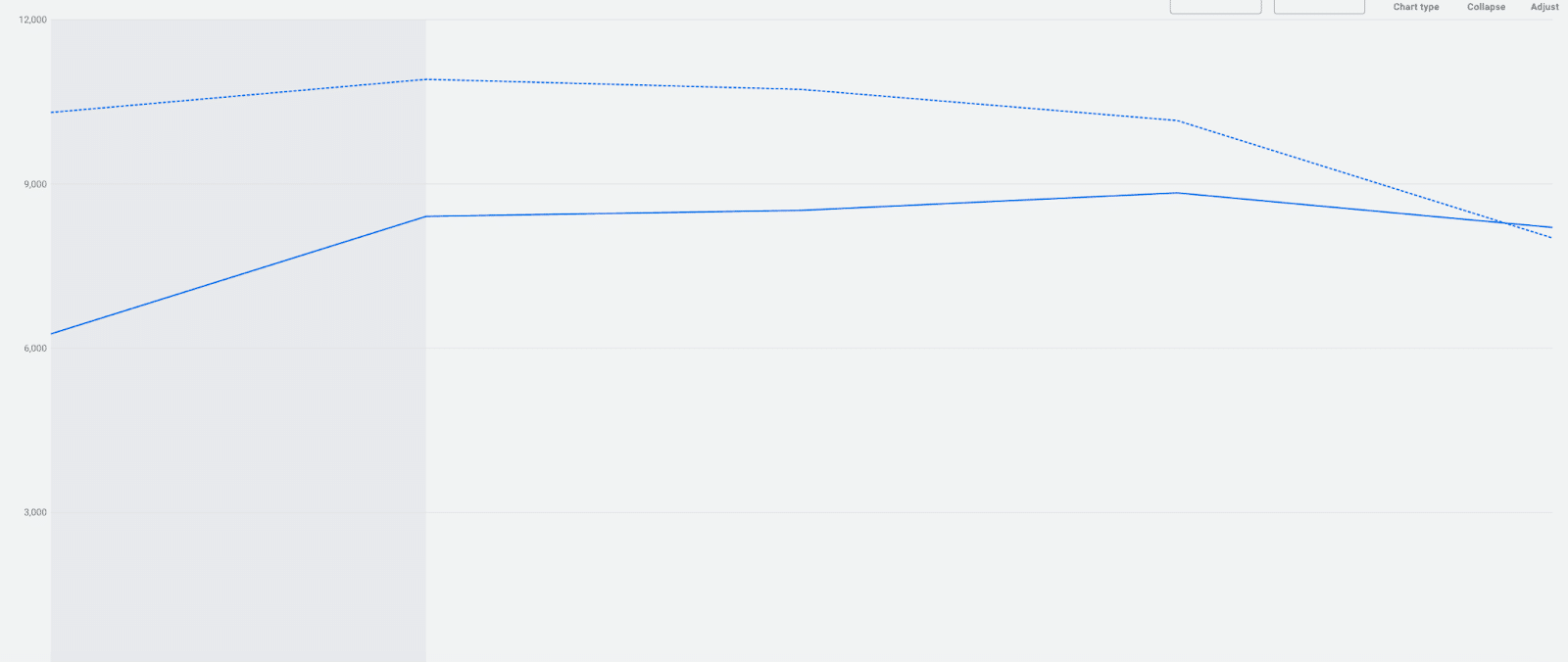
Clicks fell off by 20% compared to the previous period when we paused shopping. When we reactivated Shopping, traffic rebounded almost instantly.

Image 88

Running on the historical campaign types helps us maintain some control and insights, which we all want in work and life. 

3. Have an audience strategy for your business and goals

Segmentation of at least new and returning customers – as long as there is sufficient volume – helps increase overall performance in my experience. 

This is beneficial in allowing you to divert the budget to areas with higher performers and, if using automated bid strategies, enable you to set separate targets on areas that will typically perform differently. For example, stronger ROAS from returning customers and a lower one from new.


Get the daily newsletter search marketers rely on.


4. Keep your segments in place

Similarly to audiences, when Google tells us to consolidate campaigns (which you should listen to an extent), there is still value in having some level of segmentation. 

For example, if you sell other brands and bid on those terms, those can be more expensive keywords and could eat your budget if grouped with other non-brand terms. 

Find a way to segment that works for you – be it profit margin, product type, price, etc. It will allow for faster analysis (work smarter, not harder!) and the ability to “lean in” where it makes sense (especially if budgets are tight). 

One thing that has worked well for us is segmenting our Shopping and Performance Max campaigns by product type (which inadvertently is also by the client’s profitability).

We have a set of top products that the client earns excellent margins on in one campaign and all other subcategories of products in their own respective campaigns. 

When budgets are slimmer, this allows us to push money where the return is best for the client and optimize toward different ROAS targets based on the products’ profit margins.

5. Lean in on automation

This may sound contradictory, but go ahead and adopt automation. Sure, we as marketers want to control what we can when we can, but automation is here to stay and will only become more prevalent. 

Adopt automation and learn how to make it work for you so that when Google inevitably forces it upon us entirely, you’re already ahead of the curve. If you still need to start using bid strategies, do it.

A big perk I’ve observed is that in every test I have ever run, automated bid strategies consistently outperform Enhanced CPC (which will be sunset from Shopping campaigns later this year).

Give Performance Max a try, especially if your audience strategy focuses on new customers. On average, we drive 50% more new customers with Performance than traditional Shopping campaigns.

6. Consider data-driven attribution

If you haven’t, it’s time to look into data-driven attribution (DDA). Switching attribution settings is a big, scary change, like quitting your job as an ads manager to become a stand-up comic. 

But like automation and Google’s propensity to force changes, it is a matter of time before Google moves solely to this or something similar, as seen with them discontinuing first-click, linear, time decay and position-based attribution models.

DDA will be particularly helpful for high-consideration purchases where users may spend more time shopping around. It will give advertisers a better understanding of the impact of more of their top-of-funnel initiatives.

7. Get specific with your creative

Success is more than how you set up your campaigns and targeting. Creative can play an important role, and moving to more consolidated campaigns can make this a bit more challenging to figure out.

Creative ideally should be as specific as possible.

Although, getting super-tailored ad copy and images has proven more difficult in recent years. You can still do it, though! 

I have found that keeping ad groups thematic, using RSAs, and incorporating different products or product types help. 

Then, you can let Google’s AI serve the most relevant combination of headlines and descriptions for a search. So don’t be afraid to have an RSA peddling boots and sneakers in the same ad.

Regarding display, focus on seasonally updating creatives that utilize best-selling and regularly in-stock products and show them in use. 

Lifestyle-type images work great. There is nothing worse as a shopper than seeing a display ad with something you want only to click through, and it’s sold out on the site. This also results in wasted funds for the marketer.

None of this matters if you are not being as efficient as possible and pushing budget where it most benefits the overall business. Cut those inefficient products, times and people out of your campaigns (and your life if you’re feeling extra ambitious). 

8. Trim the fat where you can

There is no denying that we are facing some economic uncertainty and tighter marketing budgets. This is the time to find the areas that don’t perform as strongly and lean in more to those that do. 

We are seeing lower-cost products move and sales doing better than ever. People want to shop but want to do it in a more money-conscious way. 

Plus, sale products have driven some of the best new customer acquisition numbers for programs we manage. Hook them on the discount so they come back for full-priced items. 

Now’s also a great time to ensure your targets align with business goals. Look at lifetime value (LTV) and cost of goods (COGs) and make sure the return on ad spend (ROAS) or customer acquisition cost (CAC) targets you have still mean profitability. 

Adapting your PPC strategy for maximum budget performance

Overall, the key is finding a nice balance between a structure that supports your business goals and what Google tells us are best practices. 

It may take some trial and error, but if you can do that using the above insights and recommendations, you can improve your efficiency and grow your business.


Opinions expressed in this article are those of the guest author and not necessarily Search Engine Land. Staff authors are listed here.


Related stories

New on Search Engine Land

@media screen and (min-width: 800px) { #div-gpt-ad-3191538-7 { display: flex !important; justify-content: center !important; align-items: center !important; min-width:770px; min-height:260px; } } @media screen and (min-width: 1279px) { #div-gpt-ad-3191538-7 { display: flex !important; justify-content: center !important; align-items: center !important; min-width:800px!important; min-height:440px!important; } }

About the author

Chris Molony

Chris Molony, a creative intellectual, thrives on crafting unique solutions for clients’ daily performance challenges. With nearly 10 years of digital marketing experience, he excels in scaling efficiently, seizing growth opportunities and achieving ROAS targets. Specializing in paid search and social for retail, he drives strong revenue and growth for brands. As a University of South Carolina graduate with a bachelor’s degree in advertising, Chris is not only a passionate advocate for lower return and upper funnel tactics but also a Harry Potter enthusiast. Outside of work, he explores the muggle world, seeking travel adventures, local breweries, and quality time with friends.

https://searchengineland.com/optimize-ecommerce-ad-spend-budget-best-roi-430993


TikTok testing displaying links to Google search results

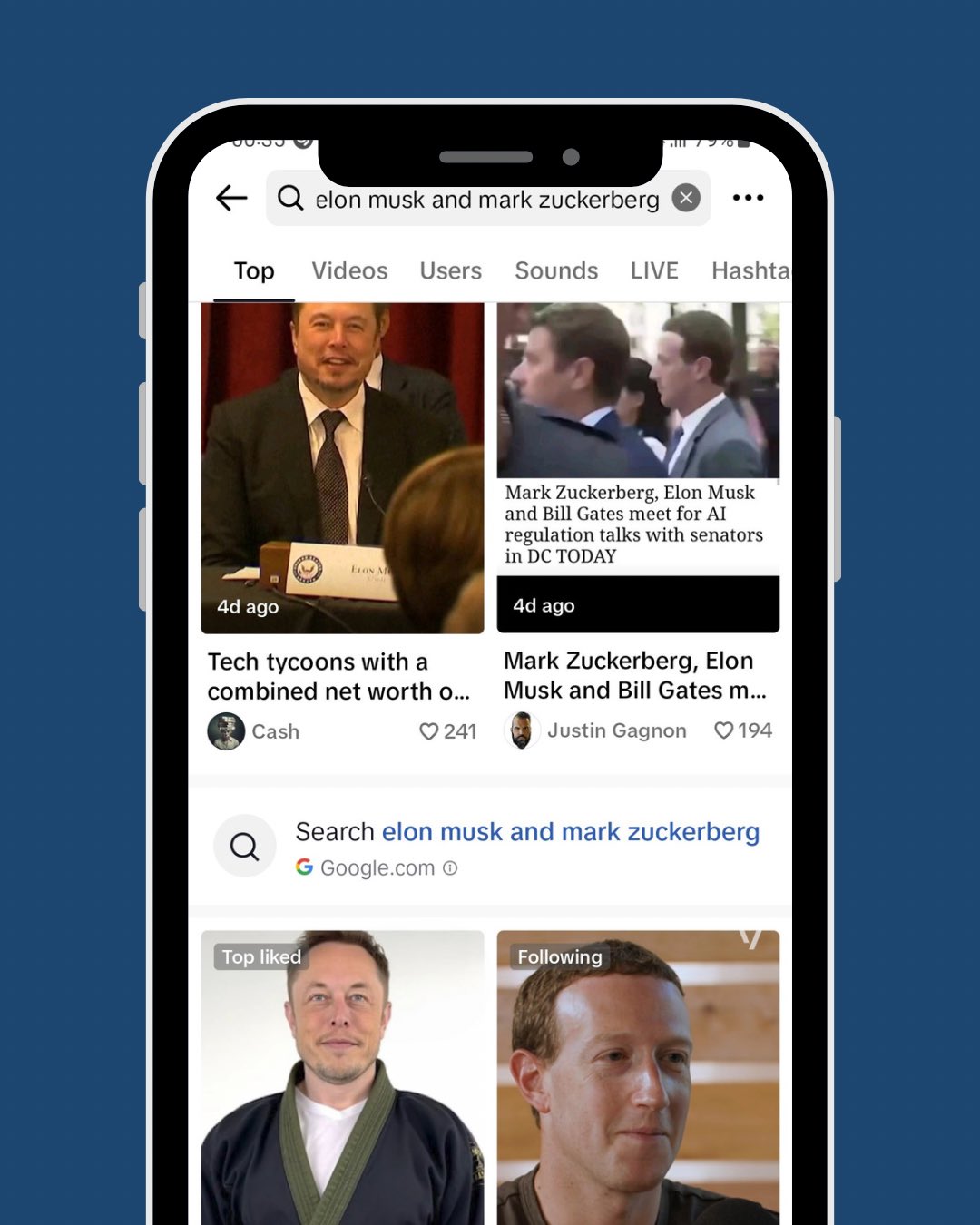
TikTok is testing displaying links to Google search results from its own internal search results page. Radu Oncescu spotted this and posted a screenshot of this on X, which we embedded below.

What it looks like. TikTok added to its search pages a small link with a Google logo to its search results page. TikTok is also running a disclaimer that it “does not endorse or take responsibility for search results from Google. Here is that screenshot from Radu Oncescu on X:

Google Tiktok 480x600

Confirmed. A TikTok spokesperson confirmed this information with Business Insider, who wrote, “A TikTok spokesperson confirmed the company is experimenting with third-party integrations within the TikTok app, including a test with Google. The feature, which is being trialed globally across several different markets, is not an ad unit, the spokesperson said.”

“A Google spokesperson said the company had nothing further to share and declined to comment on whether there was a financial agreement between the two companies as part of the partnership,” Business Insider added.

Why we care. With all the concern about Google seeing its market share escape to TikTok, maybe Google is testing a partnership with TikTok to drive some search traffic back from TikTok to Google.

In any event, it is unclear if this is just a test or the start of a rollout of a new TikTok feature paid for by Google.


Related stories

New on Search Engine Land

@media screen and (min-width: 800px) { #div-gpt-ad-3191538-7 { display: flex !important; justify-content: center !important; align-items: center !important; min-width:770px; min-height:260px; } } @media screen and (min-width: 1279px) { #div-gpt-ad-3191538-7 { display: flex !important; justify-content: center !important; align-items: center !important; min-width:800px!important; min-height:440px!important; } }

About the author

Barry Schwartz

Barry Schwartz is a Contributing Editor to Search Engine Land and a member of the programming team for SMX events. He owns RustyBrick, a NY based web consulting firm. He also runs Search Engine Roundtable, a popular search blog on very advanced SEM topics. Barry can be followed on Twitter here.

https://searchengineland.com/tiktok-testing-displaying-links-to-google-search-results-432328


AMA with Google’s Gary Illyes: 15 quick SEO takeaways

Google’s Gary Illyes fielded several questions during an AMA at Pubcon Pro in Austin this afternoon from moderator Jennifer Slegg. Here are some of the highlights of the interview.

1. Does Google use user click data in ranking?

“Technically, yes,” Illyes said. This is because historical search data is part of RankBrain. 

2. Unlaunches happen ‘a lot’

Things change a lot (emphasis his) in search ranking at Google, Illyes said. What is true for ranking today could be wrong in two weeks. 

Google is known for experimenting with Search – and noted that it’s very hard to keep track of launches and “unlaunches,” adding that these unlaunches happen “a lot.” 

This makes sense when you consider Google rolled out 5,000 changes to Search in 2021 and ran a total of 800,000 experiments. 

3. Factors vs. signals vs. systems

The main difference between factors and signals is just language, Illyes said. At one point, they wanted people to differentiate between them. 

Ranking systems are more complex – this is when Google takes multiple signals (e.g., from crawling and indexing data) and ranks them. Ranking systems are also more “stable than signals,” Illyes said. 

4. Why Google doesn’t index everything

In short, the Internet is “insanely big,” Illyes said. There are probably hundreds of trillions of webpages that Google has sight of – but there are even more than that Google can’t access (e.g., content behind a login page).

  • “There is virtually no storage you can use to index all of them. It’s not possible to index it in a way you can serve it,” Illyes said. 

5. You don’t have to label AI content for Google

Labeling AI content is not necessary for Google search – “I don’t think we care” – Illyes said. But he suggested labeling it if your users would appreciate it. 

Humans can cause more trouble than AI on certain topics, Illyes noted. He reiterated once again that Google doesn’t care how content is created – by AI, human or both.

“As long as I will learn from it, learn correct information, why would it matter?” Illyes said. 

6. AI content = no typos

One thing Illyes noticed while analyzing the output of ChatGPT and generative AI tools is that it doesn’t have typos.

  • “Computers don’t make mistakes unless they were instructed to,” he said.

7. Why niche sites were impacted by helpful content update

When it comes to helpful content, niche sites often don’t fall into a category Google is looking to promote. To be clear, here Illyes was not referring to all types of niche sites, he was mostly talking about affiliate-type of niche sites that are heavily money-driven.

8. You can see gains between core updates

If your site is impacted by a Google core update, you should start working on things that could help your site improve and get pushed back up in Search results.

  • “Maybe the next core update will help you more. Don’t think of updates in isolation. We’re using hundreds of signals to rank pages,” Illyes said.

He said waiting and holding your breath between core updates would be bad for your website’s health. 

While many websites removed comment sections and forums in the past 10 years, Illyes said that comments can be good. 

  • “Especially if I know the site has a strict rule about how users can behave on the site, then I would trust info from those users more,” Illyes said.

Illyes didn’t say comments are a ranking signal. He was more saying this from his own perspective. And it was an interesting insights, especially considering how moderated user-generated sites like Reddit and Quora have seen gains following recent Google updates.

10. Google will keep launching updates in December

Google will continue to release updates during the holidays – Google used to avoid doing this, but Illyes called that an “old thing.” 

  • “The problem is around that time, everyone tries to manipulate search results. With these updates we’re trying to course correct. I don’t think we should stop releasing updates in that period of time. Honestly I would hope that the updates will actually help you rank better if you were not trying do manipulate search results.”

11. Core Web Vitals = low priority

Short but sweet: 

  • “If you don’t have anything better to do on your site, go do Core Web Vitals. Most sites won’t see benefit playing around with it,” Illyes said.

12. No voice data in GSC

Illyes said it was too difficult to get voice search data and doesn’t see a reason to add it to Google Search Console. He said it would take a “considerable amount of engineering time” to expose that data. 

13. Expired domain signals are not inherited

If a domain expires, and somebody buys that domain, any signals the site had accumulated will not be transferred to the new domain owner. Google knows when a domain expires. 

So if you bought an expired domain and tried to rebuild it (e.g., by getting all the content from Wayback Machine), you would be building the site from scratch, as if it were a new domain. 

From Google’s perspective, it would be “pretty stupid” to rely on H1-6 tags for understanding order and hierarchy of content, Illyes said. 

He suggested using a screen reader on your site to make sure the content doesn’t “read wrong.” Use H tags where you need to use them, where it makes sense, Illyes said.

Links are not a “top 3” ranking signal and hasn’t been “for some time,” Illyes said, adding that there really isn’t a universal top 3. 

It’s absolutely possible to rank without links, Illyes said, citing an example of a page with zero internal or external links that he knew of that was ranking Position 1 on Porsche cars – and Google had only found the page via a sitemap.

Content continues to be the number one ranking signal.

  • “Without content it literally is not possible to rank. If you don’t have words on page you’re not going to rank for it. Every site will have something different as the top 2 or 3 ranking factors,” Illyes said.

Related stories

New on Search Engine Land

@media screen and (min-width: 800px) { #div-gpt-ad-3191538-7 { display: flex !important; justify-content: center !important; align-items: center !important; min-width:770px; min-height:260px; } } @media screen and (min-width: 1279px) { #div-gpt-ad-3191538-7 { display: flex !important; justify-content: center !important; align-items: center !important; min-width:800px!important; min-height:440px!important; } }

About the author

Danny Goodwin

Danny Goodwin has been Managing Editor of Search Engine Land & Search Marketing Expo – SMX since 2022. He joined Search Engine Land in 2022 as Senior Editor. In addition to reporting on the latest search marketing news, he manages Search Engine Land’s SME (Subject Matter Expert) program. He also helps program U.S. SMX events. Goodwin has been editing and writing about the latest developments and trends in search and digital marketing since 2007. He previously was Executive Editor of Search Engine Journal (from 2017 to 2022), managing editor of Momentology (from 2014-2016) and editor of Search Engine Watch (from 2007 to 2014). He has spoken at many major search conferences and virtual events, and has been sourced for his expertise by a wide range of publications and podcasts.

https://searchengineland.com/ama-google-gary-illyes-seo-takeaways-432325


Google’s helpful content update did not yet target hosted third-party content

Google is currently rolling out the September 2023 helpful content update and with that Google made several updates to its helpful content documentation, which we covered in detail. But just because Google updated its documentation, it does not mean that those changes are reflected in the actual algorithm that Google has released.

Gary Illyes from the Google Search team said at PubCon today that those changes were just help documentation changes, that they were not implemented into the helpful content system yet.

Source. This is where I found this information, as I am not at this event now:

What changed in the documentation. As we reported over here, Google added a new section to its help document on the helpful content update on the topic of hosted third-party content. It reads, “If you host third-party content on your main site or in your subdomains, understand that such content may be included in site-wide signals we generate, such as the helpfulness of content. For this reason, if that content is largely independent of the main site’s purpose or produced without close supervision or the involvement of the primary site, we recommend that it should be blocked from being indexed by Google.”

Expecting changes. Many in the SEO community were expecting to see changes that resulted in these third-party sites see a drop in ranking for those types of content. But that didn’t really happen. So that question was brought up to Gary who clarified that this was not yet implemented into the algorithm. It will be one day but was not implemented yet.

Why we care. The documentation does not always reflect the real time state of the Google algorithms. Here is an example where Google made a change to its documentation but the live algorithm does not actually follow that change.

Ultimately, this is a stern warning that Google will likely go after such content practices. So it is probably best to clean up those third party hosted content programs from your site, if you have them.


Related stories

New on Search Engine Land

@media screen and (min-width: 800px) { #div-gpt-ad-3191538-7 { display: flex !important; justify-content: center !important; align-items: center !important; min-width:770px; min-height:260px; } } @media screen and (min-width: 1279px) { #div-gpt-ad-3191538-7 { display: flex !important; justify-content: center !important; align-items: center !important; min-width:800px!important; min-height:440px!important; } }

About the author

Barry Schwartz

Barry Schwartz is a Contributing Editor to Search Engine Land and a member of the programming team for SMX events. He owns RustyBrick, a NY based web consulting firm. He also runs Search Engine Roundtable, a popular search blog on very advanced SEM topics. Barry can be followed on Twitter here.

https://searchengineland.com/googles-helpful-content-update-did-not-yet-target-host-third-party-content-432308