There has been some speculation by some SEOs that Google removed certain features due to the shift to AI-powered answers in SGE. Illyes said that is not the goal, adding that it frees up Google to experiment with “other things.”
“The ultimate goal is not for AI. It is to make results that look clean. We’re not freeing up space for x or y,” he said today at Pubcon Pro in Austin.
Search results simplification. One of the three key points of emphasis in Illyes’ keynote was that Google has been removing SERP features that Google users didn’t use or find useful. That include the change to video thumbnails in April and then the recent removal of HowTo rich results and heavily reduced visibility of FAQ rich results.
Much of the discussion around Google SGE of late, and CEO Sundar Pichai’s vision for the future of Google, seems to be evolving away from the idea of 10 blue links in the next decade. Though Illyes pointed out those 10 blue links have been the only stable element on the SERPs over the past 25 years of Google’s existence.
Illyes also noted Google launches lots of “shiny things” that SEOs focused too much attention and too many resources on (e.g., Core Web Vitals). He advised being careful about planning on a long-lasting strategy around search features.
“You want to rely on 10 blue links,” Illyes said.
You can do that by writing like a human would and including associations within your content, Illyes said.
Why we care. It will be interesting to see if Google continues to remove more SERP features this year. He made a point to tell the audience to pay attention to this one in particular.
Content is king? As Google has done for 25 years, Illyes emphasized that the key to success is “publishing original, helpful content created for people.”
While content is “royalty,” Illyes said it’s important that you convince people to realize you are trustworthy and an authority on your topics. You may have some short-term success writing on basic “top of the funnel” topics, but it is not sustainable.
@media screen and (min-width: 800px) { #div-gpt-ad-3191538-7 { display: flex !important; justify-content: center !important; align-items: center !important; min-width:770px; min-height:260px; }
}
@media screen and (min-width: 1279px) { #div-gpt-ad-3191538-7 { display: flex !important; justify-content: center !important; align-items: center !important; min-width:800px!important; min-height:440px!important; }
}
About the author
Danny Goodwin has been Managing Editor of Search Engine Land & Search Marketing Expo – SMX since 2022. He joined Search Engine Land in 2022 as Senior Editor. In addition to reporting on the latest search marketing news, he manages Search Engine Land’s SME (Subject Matter Expert) program. He also helps program U.S. SMX events. Goodwin has been editing and writing about the latest developments and trends in search and digital marketing since 2007. He previously was Executive Editor of Search Engine Journal (from 2017 to 2022), managing editor of Momentology (from 2014-2016) and editor of Search Engine Watch (from 2007 to 2014). He has spoken at many major search conferences and virtual events, and has been sourced for his expertise by a wide range of publications and podcasts.
Department of Justice removes key Google evidence from its website
Crucial evidence from the Google antitrust trial has been removed from the US Department of Justice (DOJ) website.
The DOJ had been publishing key documents, including Google’s private emails, memos, charts and internal presentations as it presented its case – without informing Judge Amit Mehta first.
When the search engine raised a complaint, the judge was sympathetic and ordered the DOJ to remove key documents from the public domain, reports Bloomberg.
Why we care. Now that access to vital evidence has been taken away, it’s going to be a lot tougher for the public to keep up with this landmark case, which could shape the future of the Internet. This stance presents a huge contrast to the widely followed Microsoft Corp. antitrust case back in the 1990s.
What was Google’s objection? Google lawyer John Schmidtlein argued that sharing all evidence with the public was not relevant to the case. He said:
“Just so we understand what’s at stake here, every document they push into evidence they post on their website, and it gets picked up far and wide.”
“This isn’t a business record, and it’s totally irrelevant to these proceedings.”
Get the daily newsletter search marketers rely on.
What influenced the Judge’s decision? The judge told the court he was surprised to learn that the DOJ had published evidence on its website without telling him first. He said:
““That’s something I wish I’d been told.”
“I think a judge is told before evidence in the record is actually put on a publicly available website.”
Government attorney Kenneth Dintzer then quickly apologized and ensured all exhibits previously published on the DOJ website were taken down immediately.
Deep dive. Keep up-to-date with all the latest developments in the Google antitrust trial by reading our trial updates article.
@media screen and (min-width: 800px) { #div-gpt-ad-3191538-7 { display: flex !important; justify-content: center !important; align-items: center !important; min-width:770px; min-height:260px; }
}
@media screen and (min-width: 1279px) { #div-gpt-ad-3191538-7 { display: flex !important; justify-content: center !important; align-items: center !important; min-width:800px!important; min-height:440px!important; }
}
About the author
Nicola Agius is Paid Media Editor of Search Engine Land after joining in 2023. She covers paid search, paid social, retail media and more. Prior to this, she was SEO Director at Jungle Creations (2020-2023), overseeing the company’s editorial strategy for multiple websites. She has over 15 years of experience in journalism and has previously worked at OK! Magazine (2010-2014), Mail Online (2014-2015), Mirror (2015-2017), Digital Spy (2017-2018) and The Sun (2018-2020). She also previously teamed up with SEO agency Blue Array to co-author Amazon bestselling book ‘Mastering In-House SEO’.
Enterprise businesses face a distinct SEO challenge. Their websites often house thousands of pages and diverse elements such as expansive product catalogs, sophisticated ecommerce functionalities, and even sprawling networks of franchise locations.
Large enterprise websites have a great chance to rank high in search results, but making this happen depends on correctly using technical SEO within the website’s structure.
While a fantastic content strategy can lead to rapid growth, it can only take you so far if your website’s technical foundation is unstable. Technical SEO pushes your content to the top of search engine results.
Today, we’ll dive deep into the unseen elements that might be eluding your enterprise SEO audit. Get ready to uncover the hidden gems that could supercharge your organization’s SEO game.
A comprehensive enterprise SEO audit
When conducting an enterprise-level SEO audit, it’s important to remember that technical SEO is justone part of the larger picture. A holistic audit strategy encompasses:
Technical SEO audit:Uncover and address critical technical issues that underpin your website’s overall SEO health.
Content audit: Evaluate your website content’s quality, relevance, and effectiveness. Identify opportunities for improvement and gaps for new content.
Keyword audit: Understand how your target audience searches for your products or services and how that aligns with your website’s content strategy.
Backlink audit: Examine the quality and relevance of websites linking to yours.
Competitive analysis: Analyze your competitors’ SEO strategies to gain insights and differentiate your approach.
Local SEO audit(if applicable): For businesses with physical locations or franchises, assessing local search performance is vital.
User experience audit: Evaluate the overall usability and accessibility of your website.
While this article focuses primarily on the technical SEO audit, it’s important to recognize that all these audits work collaboratively to shape a holistic enterprise SEO strategy. Focusing solely on technical SEO is a gap in itself.
Uncovering hidden gaps in your enterprise SEO audit
Think of SEO as building a skyscraper. Technical SEO is the foundation that upholds your website’s search engine results. A foundation that is not strong can quickly topple in the SERPs. The technical backbone is even more essential at the enterprise level.
Two challenges create gaps in enterprise SEO audits:
The large size of enterprise websites can make common areas of your technical audit much more complex.
There are elements unique to enterprise organizations that can be overlooked in a basic audit.
This article goes beyond the standard on-page audit elements (like titles, descriptions and header tags) to examine potential gaps in your enterprise technical SEO audit stemming from the complex nature of these websites. We’ll explore:
Canonicalization issues that can lead to significant duplicate content penalties.
Indexing issues that span across internal linking, sitemaps, and URL structure.
How to approach organizational challenges with prioritization.
Correct canonical implementation
Canonical tags guide search engines to the preferred version of a webpage when duplicate or similar content exists.
In enterprise setups, such as franchise websites with numerous locations and sprawling ecommerce platforms, the correct implementation of canonical tags becomes paramount.
When a page contains unique content, its canonical tag should be self-referencing.
However, within the intricate landscapes of enterprise websites, it’s commonplace to encounter content duplication across numerous pages.
In such cases, the purpose of canonical tags shifts to acknowledging the original source of the content or the page you intend to rank.
This is especially critical when dealing with sprawling product catalogs, franchise websites and other setups where many pages may contain duplicate content.
Common canonical tag mistakes
Let’s dissect common canonical tag pitfalls within each category:
Generic.
Ecommerce.
Franchise websites.
Generic canonical tag issues
Non-usage of canonical tags: Failing to employ canonical tags at all is a cardinal error, as it leaves search engines without guidance.
Self-referencing tags for duplicate content: another prevalent mistake is the overuse of self-referencing canonical tags on pages that should reference the authoritative source of duplicate content.
Canonical chains: Complex canonical chains, where one page references another, which, in turn, references yet another page, can befuddle search engines. For example, Page A canonicalizes to Page B, which canonicalizes to Page C.
Ecommerce canonical tag issues
Product pages:Product pages that contain unique options/content reference a parent product page. This leads to the deindexing of unique product pages that should be in Google’s index. However, if the product pages all contain the same content, a canonical tag referencing a single version or parent can be used.
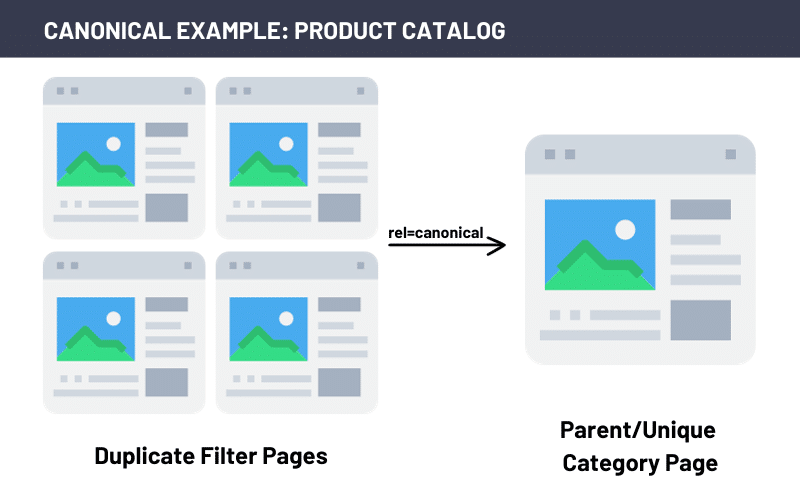
Product category pages: Product catalogs that use faceted navigation for product category or listing pages should have a canonical tag that references the main parent category. This helps ensure the Google crawl budget is focused on the top pages.
Franchise canonical tag issues
The URL structure for franchise websites can vary widely for displaying national and local content, introducing severe content duplication issues.
Consider a national blog syndicated across all local franchise websites, causing a network of duplicate content. All sub-site pages must contain a canonical tag citing the original national source of the content.
Finding canonical errors in Google Search Console
Google Search Console Page Indexing report can help flag potential indexing issues created by improper canonical tag use. These flags include:
Duplicate without user-selected canonical: When Google finds two or more pages with duplicate content, but neither page has a canonical tag pointing to the other.
Duplicate, Google selects a different canonical than the user: When Google finds two or more pages with duplicate content, then chooses a different canonical page than the one you specified. This is an important flag to review, as Google may not choose the correct page. This will require you to take action to correct it.
Alternate page with proper canonical tag: When Google finds a page with a canonical tag, but the target URL is not a valid page. These should be addressed quickly by updating the canonical tag.
Mismatched canonical tags: When Google finds pages with duplicate content but the canonical tags point to different target URLs.
Incorrect canonical elements: Google’s flag for incorrectly formatted canonical tags.
The pitfall of neglected canonical tags
Another common misstep with Enterprise SEO is the “set it and forget it” approach to canonical tags.
While canonical tags can serve as guiding beacons for your expansive website, their incorrect application can pave the way for substantial ranking challenges and even deindexing.
Continue to monitor your canonical tags regularly to safeguard your SEO endeavors.
Get the daily newsletter search marketers rely on.
Indexing for enterprise websites
Indexing and crawlability are the cornerstones of enterprise SEO. With thousands or even millions of pages, ensuring the right pages are being indexed is key.
But, given the size of these sites, tackling the indexing audit can be a beast, and essential pieces may be missed.
Efficient indexing deep dives
Google Search Console offers a wealth of information about indexing, including data on indexed pages, excluded pages, and crawl errors. This data can be invaluable in identifying issues with indexing.
However, relying on Google Search Console alone only gives you one piece of the puzzle.
Begin your audit by running a Screaming Frog crawl of your website. This crawl will comprehensively list every page’s response codes, sitemap presence, no-index tags, broken links, and other critical data points.
Comparing this data with Google Search Console’s Page Indexing report can aid you in identifying potential indexing issues like those outlined below.
Orphaned pages
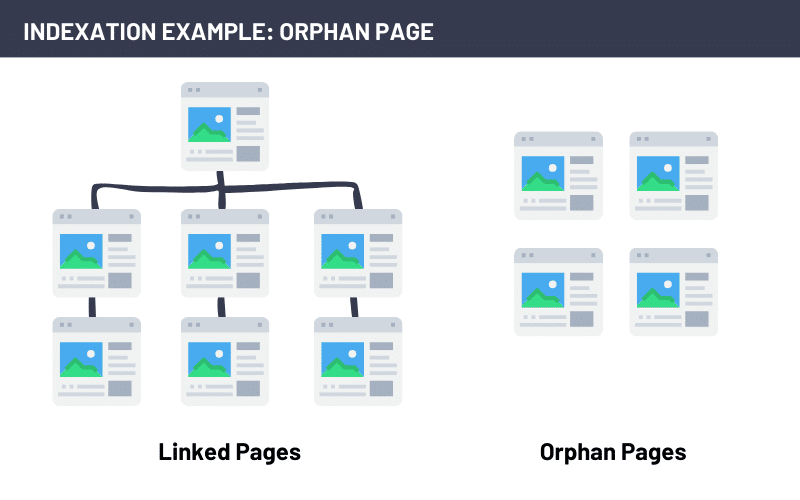
An orphan page is webpage that is not linked to any other page. This predicament often arises when pages are included in your sitemap but lack any meaningful on-page link structure or navigational pathways.
With Google’s ranking algorithm increasingly valuing internal linking, a thoughtful internal link structure is paramount for all ranking pages.
Orphaned pages are easy to spot in a Screaming Frog crawl. After completing your crawl and running the crawl analysis, Screaming Frog compiles a list of your orphan URLs.
When confronted with an orphaned page, evaluate its purpose and role in your website’s ecosystem:
Relevance: Determine whether the orphaned page should be part of your website’s indexing. If it holds no relevance or value, consider removing it or making it not indexable.
Internal linking: If the page possesses merit and should be included in your website’s index, build internal link pathways to the page by establishing connections from relevant pages.
XML sitemap and robots.txt files
Imagine a large and intricate library with no central repository listing all the books within. Finding what you are looking for would be madness. Or worse yet, a repository missing some books while listing others that weren’t even there. That is your enterprise website without an XML sitemap.
The XML sitemap helps search engines navigate that labyrinth of your site. The robots.txt file helps search engines find the roadmap.
Using Google Search Console’s Page Indexing report is the quickest way to identify errors in your sitemap.xml or robots.txt files that could impact indexing.
Specifically, look for any errors with accessing the sitemap.xml and robots.txt files. Then, look for any submitted pages blocked by the robots.txt file.
The indexing deep dive: Crawl vs. sitemap vs. index
Elevate your sitemap review to a more comprehensive level by meticulously comparing a complete Screaming Frog crawl and Google’s index. The primary objective here is to unearth any indexing disparities that may exist.
For the Screaming Frog crawl, export the complete HTML page list, paying particular attention to the following attributes for each page:
Status: Ascertain the status of each page, identifying if they are accessible or encounter any issues during crawling.
Indexability: Determine whether each page is marked as indexable or carries any restrictions.
Canonical link element: Review the canonical link elements to ensure they correctly point to the preferred versions of each page.
Sitemaps: Extract a comprehensive list of all URLs featured in the sitemap directly from the “Sitemaps” tab within Screaming Frog.
In Google Search Console, access the list of all indexed pages by navigating to the Pages Indexing report and selecting “View data about indexed pages,” as indicated below.
Now comes the critical step: Compare your compiled list of pages indexed by Google with the data obtained from your Screaming Frog crawl.
This side-by-side analysis will unveil any disparities in indexing, allowing you to pinpoint the exact pages where gaps in indexing may exist.
URL issues that can hinder indexing
Within indexing challenges, URL issues can be pivotal in determining how search engines perceive and rank your webpages. These seemingly minor discrepancies can significantly impact the overall health of your website’s indexing.
Let’s delve into three URL-related issues that may be missing from your audit but can inhibit proper indexing.
Missing HTTP to HTTPS redirect
Ensuring a secure connection to your website is paramount. It doesn’t stop there. All HTTP (or non-secure) versions of your webpages or resources should redirect to the proper HTTPS version.
With HTTPS as a ranking factor, correct implementation and the presence of the HTTP redirect are essential. Incorrect implementation can also lead to duplicate content, as Google sees two versions of every webpage.
Use your .htaccess file to bulk rewrite http to https. An example is shown below.
RewriteEngine On
RewriteCond %{SERVER_PORT} 80
RewriteRule ^(.*)$ https://%{HTTP_HOST}%{REQUEST_URI} [R=301,L]
Loading both WWW and non-WWW as unique pages
The decision to use “www” or omit it from your website’s URL can inadvertently create content duplication and indexing complications. When both versions of your site’s URL are accessible, it can confuse search engines and lead to suboptimal rankings.
It’s important to identify the preferred version of your website’s URL. Then redirect the non-preferred version.
Here is an example code to implement in your .htaccess for redirecting non-www to www:
RewriteEngine On
RewriteCond %{HTTP_HOST} !^www\. [NC]
RewriteRule ^(.*)$ http://www.%{HTTP_HOST}/$1 [R=301,L]
Mixed case URLs
URLs are typically case-insensitive, meaning that capitalization variations should resolve to the same content. However, some servers may interpret uppercase and lowercase letters differently.
This can result in indexing challenges, particularly if inconsistent URL capitalization is used across your site.
Mixed case issues can be resolved with the following code added to the .htaccess file:
RewriteEngine On
RewriteCond %{REQUEST_URI} ^/(.*)$ [NC]
RewriteRule ^/(.*)$ /$1 [R=301
Crafting an actionable enterprise SEO plan
One of the biggest gaps in enterprise SEO audits is often what comes next.
Your audit will likely reveal a sizable amount of issues, the resolutions of which have varying levels of effort and impact.
Translating your findings into a clear and actionable plan with the maximum impact in mind is crucial.
Set expectations
Don’t get overwhelmed when your audit reveals 5 million individual errors. Remember that it’s all about opportunity cost.
Your goal isn’t to have a site with zero warnings or errors. Your goal is to continually improve your site’s overall SEO health.
Focus on high-priority items
With your expectations in line, focus on your high-impact and low-effort items first.
Your high-impact items are those that will have the greatest positive impact or those that will alleviate existing negative impacts. These include the gaps outlined above related to indexing and canonicalization.
Low-effort items, or low-hanging fruits, are technical items of varying impact levels that are relatively easy to implement. For example, if we find any URL Issues (like the http redirect), these can be solved by simply updating the .htaccess file.
This is a great example of a recommendation with both high impact and low effort. Start with these and continue to prioritize your remaining recommendations from here.
Avoid overemphasizing low-priority flags
While it’s essential to be thorough in your audit, avoid overemphasizing low-priority flags that may not significantly impact your website’s performance. This includes warnings that don’t have a significant impact on SEO.
For example, your schema validator may flag a warning that the pricing variable is missing in your product schema. If price is not a data point you have available, remember many of these warnings are optional. Having some information is better than nothing.
Assessing tech debt and organizational challenges
Every enterprise operates within its unique ecosystem, with its own technical and organizational challenges. Assess your tech debt and understand what can and can’t be done within your website infrastructure.
Incorporate in your action plan what items you can address and what items may require further development.
Bridging the gaps for SEO excellence
In this article, we’ve explored the unique challenges expansive enterprise websites face in achieving digital success.
From canonicalization to indexing, we’ve highlighted several hidden gaps in your technical audits that can hinder enterprise SEO success.
By bridging these gaps and emphasizing actionable plans, priorities, and continuous monitoring, we’ve paved the way for mastering enterprise SEO.
Opinions expressed in this article are those of the guest author and not necessarily Search Engine Land. Staff authors are listed here.
@media screen and (min-width: 800px) { #div-gpt-ad-3191538-7 { display: flex !important; justify-content: center !important; align-items: center !important; min-width:770px; min-height:260px; }
}
@media screen and (min-width: 1279px) { #div-gpt-ad-3191538-7 { display: flex !important; justify-content: center !important; align-items: center !important; min-width:800px!important; min-height:440px!important; }
}
About the author
Lauren Busby is the Co-Founder of Trebletree, a boutique SEO and web design agency, where she leads the SEO/web teams in building websites for SEO success. She has worked in the SEO field since 2009, driving organic growth for a range of medium-sized to enterprise-level brands, including Carpet One and Urban Air. Lauren specializes in keyword strategy, technical SEO, and large-scale franchise/enterprise SEO.
Wix, a very popular website publishing platform, has adopted IndexNow, the Microsoft-backed indexing initiative. Wix is used by about 2.5% of all websites on the internet, based on some recent data, so this is a big deal for the platform.
“This means that Wix customers can now quickly reflect their latest content changes (added, updated, and deleted) in search engines search results and allowing them to drive more customers to their sites,” Microsoft wrote.
“We’re excited to release the integration with IndexNow as part of our collaboration with Microsoft Bing,” said Einat Hoobian-Seybold, Product Lead at Wix. “This integration marks yet another step in our dedication to providing users with exceptional out-of-the-box SEO solutions, simplifying the process of promoting their websites quickly and effortlessly.”
What is IndexNow. IndexNow provides a method for websites owners to instantly inform search engines about latest content changes on their website. IndexNow is a simple ping protocol so that search engines know that a URL and its content has been added, updated, or deleted, allowing search engines to quickly reflect this change in their search results. The co-sharing of IndexNow went fully live last month in January 2022.
60 million sites. “Today, more than 60 million websites are publishing over 1.4 billion URLs per day to the IndexNow API,” Microsoft said. “This month, IndexNow 12% of all new URLs clicked in web search results are first discovered in IndexNow,” the company added.
How it works. The protocol is very simple — all you need to do is create a key on your server, and then post a URL to the search engine to notify IndexNow-participating search engines of the change. The steps include:
Host the key in text file named with the value of the key at the root of your web site.
Start submitting URLs when your URLs are added, updated, or deleted. You can submit one URL or a set of URLs per API call.
Why we care. Like we said before, instant indexing is an SEO’s dream when it comes to giving search engines the most updated content on a site. The protocol is very simple and it requires very little developer effort to add this to your site, so it makes sense to implement this if you care about speedy indexing.
Now with Wix adopting it, even more pages can be discovered by Bing Search and the other search engines like Bing, Naver, Yandex, and Seznam.cz.
@media screen and (min-width: 800px) { #div-gpt-ad-3191538-7 { display: flex !important; justify-content: center !important; align-items: center !important; min-width:770px; min-height:260px; }
}
@media screen and (min-width: 1279px) { #div-gpt-ad-3191538-7 { display: flex !important; justify-content: center !important; align-items: center !important; min-width:800px!important; min-height:440px!important; }
}
About the author
Barry Schwartz is a Contributing Editor to Search Engine Land and a member of the programming team for SMX events. He owns RustyBrick, a NY based web consulting firm. He also runs Search Engine Roundtable, a popular search blog on very advanced SEM topics. Barry can be followed on Twitter here.
Bing explains the new Sitemap Index Coverage report
Bing has quietly rolled out the new sitemap index coverage report in Bing Webmaster Tools and today posted a how-to on that reporting tool. I believe the new sitemap index coverage report began rolling out in late June 2023 and pushed it to everyone a few weeks ago but Bing has never formally announced the new report.
Bing said they attempt to download relevant and valid sitemaps at least once a day except when your lastmod date says that your sitemaps didn’t change.
What it shows. The sitemap report shows:
A page that shows all the submitted and organically discovered sitemaps for your site, along with when they were submitted, status (success or error), last crawl date, the number of URLs discovered, a link to Index Coverage when this data is available, and the ability to resubmit sitemaps.
Per sitemaps index file, a listing of all the sitemaps included and the issues detected if any.
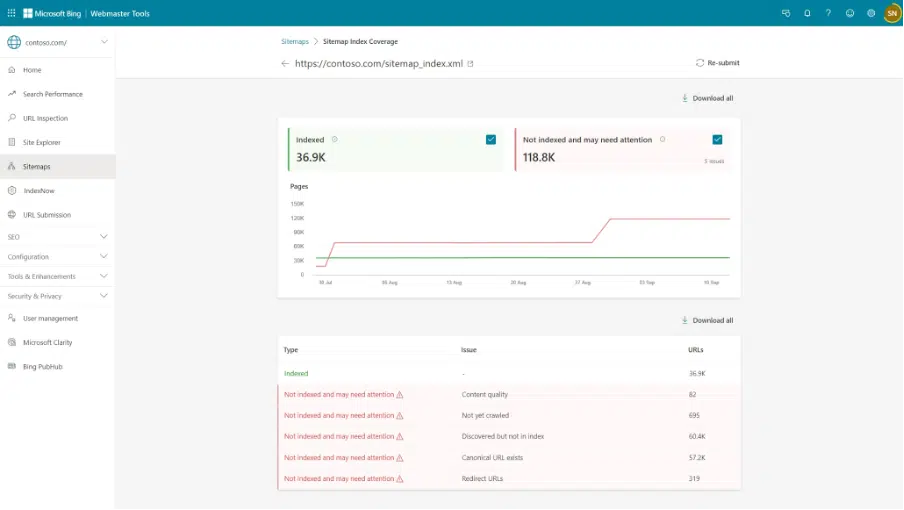
Bing now reports a breakdown of URLs indexing status for URLs indexed and URLs which need attention from sitemaps and sitemap index files. Currently this is available for sites having more than 10,000 URLs indexed in Bing.
What is looks like. Here is a screenshot of this report:
How it helps. Bing said this report can help you do better in search by:
First, ensuring that Bing is informed about all the relevant sitemaps associated with your website. If you notice any relevant sitemaps are absent, submit them to Bing or references them in your robots.txt file or ensure that they are part of a sitemap index file which is already referenced in robots.txt file.
Second, Identifying and fixing in your sitemaps. For instance, if you see that we cannot crawled your sitemaps ensure that there are no settings in robots.txt that are blocking the crawl by Bing Bot. Additionally make sure individual sitemaps are organized via Index Sitemaps so that number of URLs per sitemap are less than 50,000 and each sitemap file size is less than 50 MB to ensure maximum discovery.
Third, and this is the role of the new indexing report, please investigate why URLs listed in your sitemaps are not indexed by looking at URLs which need attention.
Why we care. When you have issues with your URLs being indexed in Bing Search, that can lead to less traffic and visibility for your business or organization. This report helps you understand which pages are indexed and which are not indexed. More importantly, it gives you clues on why those pages are not index.
This report can help you improve your index rate by Bing Search and thus improve your traffic from Bing Search.
@media screen and (min-width: 800px) { #div-gpt-ad-3191538-7 { display: flex !important; justify-content: center !important; align-items: center !important; min-width:770px; min-height:260px; }
}
@media screen and (min-width: 1279px) { #div-gpt-ad-3191538-7 { display: flex !important; justify-content: center !important; align-items: center !important; min-width:800px!important; min-height:440px!important; }
}
About the author
Barry Schwartz is a Contributing Editor to Search Engine Land and a member of the programming team for SMX events. He owns RustyBrick, a NY based web consulting firm. He also runs Search Engine Roundtable, a popular search blog on very advanced SEM topics. Barry can be followed on Twitter here.
Bing Webmaster Tools performance report gains new data but you can’t filter by just Bing Chat data
Microsoft has launched a new performance report within Bing Webmaster Tools that incorporates new data that Bing never reported on. Previously, Bing only showed web search and crawling data, now this report gains metrics on Bing Images, Bing Videos, Bing News, Bing Knowledge Panel, and more.
Bing Chat data? This does include data from Bing Chat, but you cannot filter out just Bing Chat data alone. Chat is combined with web data at this point, but this should not be surprising to anyone as we expected Bing not to release individual Bing Chat data any time soon.
“With the latest update, we’ve improved Bing web data by combining web and chat clicks and impressions, and we now offer performance data for numerous new verticals or answers, Bing Images, Bing Videos, Bing News, Bing Knowledge Panel, and a combined view of all of them,” Fabrice Canel from Microsoft wrote.
What it looks like. Here is a screenshot of the new report interface:
What is new. Previously, Bing only showed web-specific data in this report. Now Bing is showing data from News, Images, Videos, and knowledge panels and now groups together Chat data with Web data.
So, the web data now includes clicks and impressions from both Bing web search and Bing Chat. Plus, now you gain new click, impression, and click-through rate data from Bing Images, Bing Videos, Bing News, Bing Knowledge Panel.
Only web search will show keyword and page-level details, including clicks, impressions, and CTR. Bing Images, Bing Videos, Bing News, Bing Knowledge Panel will only show clicks, impressions, and CTR data, not pages, keywords, or average position.
Why we care. While we didn’t get Bing Chat data to isolate and dive into, we did gain more data sources from Bing to report on. “By accessing granular data across most information displayed, SEO professionals can gain deeper insights into their website’s performance across Bing, enabling them to compare, refine their strategies and, optimize their content and online presence to maximize clicks, impressions, and overall performance,” Fabrice Canel from Microsoft wrote.
Postscript (Danny Goodwin). It is still possible in the future that Bing could break out Web vs. Chat clicks, Canel told me during an AMA panel at Pubcon Pro conference in Austin this morning. Canel also noted that the Chat experience may not translate to more clicks for websites, but better clicks (better meaning more targeted traffic).
@media screen and (min-width: 800px) { #div-gpt-ad-3191538-7 { display: flex !important; justify-content: center !important; align-items: center !important; min-width:770px; min-height:260px; }
}
@media screen and (min-width: 1279px) { #div-gpt-ad-3191538-7 { display: flex !important; justify-content: center !important; align-items: center !important; min-width:800px!important; min-height:440px!important; }
}
About the author
Barry Schwartz is a Contributing Editor to Search Engine Land and a member of the programming team for SMX events. He owns RustyBrick, a NY based web consulting firm. He also runs Search Engine Roundtable, a popular search blog on very advanced SEM topics. Barry can be followed on Twitter here.
Bing Webmaster Tools disavow link tool is going away
Bing will do away with its disavow links tool in Bing Webmaster Tools starting in October 2023. Bing “will be removing the disavow links feature and associated API,” said Fabrice Canel from Microsoft.
Why remove it. Fabrice Canel explained that it is no longer needed that the Bing Search algorithms are great at figuring out which links to count and which ones to ignore. “Times have changed, and so has our technology,” Fabrice Canel wrote. He said:
“We have invested heavily in developing and improving our artificial intelligence capabilities, which enables us to better understand the context and intent of links, as well as the trustworthiness and authority of their sources. We can now differentiate between natural and unnatural links, and we can ignore or discount the latter without affecting the former.”
Bing launched the disavow tool in June 2012, and back then, we questioned why Bing added the feature. Fabrice Canel said it was a “way for webmasters to tell us which inbound links they did not want us to consider when assessing their site’s quality and relevance.” But that is no longer needed, “webmasters will not have to spend time and resources auditing and disavowing links that point to their sites,” he added.
Bing backlinks report. The Bing Webmaster Tools backlink report is not going anywhere, Microsoft said. “We will continue to provide the Bing Webmaster Tools backlink report, which displays inbound links data not only for your site but also for any website,” Fabrice Canel wrote.
Why we care. You can now stop disavowing links for Bing Search and probably Google Search. Google has been downplaying the need to disavow links for a while now, so if you have other things to do, like create new useful content – do that instead of looking for bad links.
@media screen and (min-width: 800px) { #div-gpt-ad-3191538-7 { display: flex !important; justify-content: center !important; align-items: center !important; min-width:770px; min-height:260px; }
}
@media screen and (min-width: 1279px) { #div-gpt-ad-3191538-7 { display: flex !important; justify-content: center !important; align-items: center !important; min-width:800px!important; min-height:440px!important; }
}
About the author
Barry Schwartz is a Contributing Editor to Search Engine Land and a member of the programming team for SMX events. He owns RustyBrick, a NY based web consulting firm. He also runs Search Engine Roundtable, a popular search blog on very advanced SEM topics. Barry can be followed on Twitter here.
Have you ever wondered why people click on certain search results or buy things online?
Google is always trying to understand how people search, so they’ve made many changes to how their algorithms work in the past ten years.
These algorithms don’t just follow rules; they help shape how people think and feel, which is why search and SEO are the way they are today.
This article dives into neuromarketing – the study of how our brains react to marketing signals and how these reactions affect what we buy – and how to use it for SEO.
What is neuromarketing?
Neuromarketing is a field that studies the brain to predict and potentially even manipulate consumer behavior and decision-making, according to Harvard Business Review.
Simply put, neuromarketing is the art and science of leveraging neuroscience principles to understand how consumers think, feel and make purchasing decisions.
It helps us to understand how the brain works and gain insight into customers’ motivations, preferences and decisions.
How does neuromarketing drive consumer behavior?
Neuromarketing goes deeper than keywords and algorithms, tapping into the psychology of consumer behavior and actions.
Neuromarketing uses brain imaging, eye tracking and biometric measurement to understand how consumers respond to marketing messages.
It involves using visual and auditory cues, messages and experiences to influence how people think and act. These cues can be visual, auditory or emotional and can be used in various marketing strategies.
These mental stimuli are designed to make consumers think and react in a certain way, affecting their decisions.
Exploring the connection between brain areas and neuromarketing tactics
The consumer purchase decision process involves different brain areas, often called the triune brain model.
This concept suggests that three main areas of the brain play distinct roles in influencing consumer behavior:
Reptilian brain (The ‘old’ brain)
Responsible for basic survival functions, instincts,and automatic responses.
Plays a role in assessing safety and avoiding threats in the context of buying decisions.
Evaluates whether a product or offer meets basic needs and survival instincts.
Limbic brain (The ‘middle’ brain)
Associated with emotions, memory, motivation and social behavior.
Particularly influential in driving emotional responses to marketing stimuli.
Helps create emotional connections between consumers and products, influencing preferences and brand loyalty.
Positive emotional experiences during the buying journey can lead to stronger purchase intentions.
Neocortex brain (The ‘new’ brain)
The most evolved part of the brain.
Responsible for higher-order cognitive functions, including reasoning, language and conscious thought.
Crucial for complex decision-making and rational evaluation of options.
All of these brain regions have a part to play in influencing consumer behavior.
Knowing these brain areas and their respective functions allows you to create neuromarketing strategies that target both the emotional and rational aspects of consumer decision-making.
Get the daily newsletter search marketers rely on.
What challenges does neuromarketing solve in consumer decision-making?
The goal of neuromarketing is to uncover the mysteries of consumer behavior by concentrating on three fundamental dimensions: THINK, FEEL and MAKE.
These three dimensions are the foundation upon which successful marketing strategies are constructed.
‘THINK’
Tapping and translating brain signals.
Harnessing brain activity to understand consumer behavior.
In-depth insights and understanding of brain (neuro) reactions/responses.
Navigating through consumers’ minds to build connections.
Key neurological factors in consumer decision-making.
Example
The popular streaming service Netflix utilizes the “THINK” dimension of neuromarketing by offering multiple subscription tiers with varying features and prices.
When users are presented with these options, they rationalize to choose the tier that best aligns with their needs and budget.
Imagine a Netflix subscription with three options:
Basic plan: Standard definition, one screen at a time, at $9.99/month.
Standard plan: High definition, two screens at a time, at $13.99/month.
Premium plan: Ultra HD, four screens at a time, at $17.99/month.
The Standard plan serves as the bait in this scenario.
By positioning it between the Basic and Premium plans, Netflix nudges users toward the Premium plan, which offers more features for a slightly higher price.
At first, users may be tempted to go with the Standard plan, but the bait-and-switch effect makes the Premium plan look more appealing.
This is known as a decoy effect in marketing(a.k.a., the asymmetric dominance effect), a form of cognitive bias observed in decision-making, according to Forbes.
It occurs when a person’s preferences between two options are altered by introducing a third, seemingly less attractive option.
The third option, called the “decoy,” is intentionally designed to make an otherwise attractive alternative look more appealing.
‘FEEL’
Fostering emotional connections with neuroscience.
Extracting emotional significance for branding.
Empathizing with consumers through emotions.
Leveraging emotional insights to enhance loyalty.
Example
Spotify enhances the “FEEL” dimension of the neuromarketing strategy.
Spotify creates a deep and meaningful connection beyond music by engaging users’ emotions and senses.
Fostering a sense of nostalgia, excitement and emotional engagement with its platform.
Its personalized music recommendations, themed playlists and mood-based search options create a sensory-rich experience that resonates with users’ emotions.
It’s an eye-catching example of what’s known as sensory marketing, which is a strategic approach that leverages the human senses to shape consumer perceptions and actions, according to Harvard Business Review.
It capitalizes on the human senses, such as sight, sound, touch, taste and smell, to create a profound and memorable brand experience.
‘MAKE’
Manipulating neurological factors for marketing impact.
Amplifying consumer engagement via neuro insights.
Knitting neuro-data to enhance marketing strategies.
Executing targeted marketing through neurological knowledge.
Example
Nike’s limited edition “Dunk” sneakers are a prime example of the “MAKE” dimension that neuromarketing is all about.
Released in a very limited number, these sneakers ignite a fire inside sneaker enthusiasts to “MAKE” a unique choice that makes them stand out.
This captures the essence of the concept known as scarcity-driven marketing. This leverages the psychological principle of scarcity to influence consumer behavior.
By creating a perception of limited availability for a product or service, this approach prompts individuals to act swiftly and decisively.
The fear of missing out (FOMO) on a unique or rare opportunity motivates consumers to make purchases, sign up, or engage with the offering to secure what is perceived as a valuable and exclusive item.
Applying neuromarketing to search and SEO strategies
The psychology of user intent
At the heart of every search lies a motive – an intent that reflects the user’s desires and needs.
Tapping into users’ subconscious desires makes your content more compelling and relatable. This results in higher engagement and increased time spent on your website.
When you understand how the brain processes information, makes decisions and responds to emotional triggers, you can create online environments that cater to users’ subconscious desires and motivations.
A great example of this is Airbnb. By analyzing user search behaviors and preferences, Airbnb tailors its search results and recommendations to align with users’ intent to find unique travel experiences.
The platform’s focus on delivering personalized results triggers positive emotions related to adventure and wanderlust, enhancing user engagement and conversion rates.
Crafting landing pages that mirror user intent from search queries creates a sense of familiarity and trust.
This approach demonstrates how integrating the psychology of user intent with neuromarketing principles can lead to more effective SEO strategies and a deeper connection with the audience.
Neuro-optimized content strategy
Keyword optimization through neuromarketing-informed content strategy delves into the psychology of user intent, focusing on words that evoke emotions, trigger desires and establish connections.
Many brands adeptly use specific keywords that tap into the brain’s emotional responses and desires, effectively guiding consumer perceptions and decisions through carefully crafted messaging.
Take Adidas’s official tagline, “Impossible is nothing.”
This tagline conveys a spirit of determination, ambition and empowerment, encouraging individuals to overcome challenges and push their limits. It aligns with the brand’s focus on sports, athleticism and achieving one’s goals.
You create a seamless narrative that aligns with the brain’s emotional and cognitive processes by linking your brand’s tagline to emotionally resonant words and desires in your content.
This connection enhances your brand’s influence and fosters deeper engagement with your audience.
Adidas can use emotionally resonant language to tap into users’ desires for self-improvement, achievement and confidence.
Phrases like “unleash your potential” or “achieve your best” evoke positive emotions linked to personal growth.
Using user data, Adidas can create personalized content, such as workout plans or product recommendations catering to individual preferences and goals.
Sharing user-generated content, success stories and testimonials fosters a sense of community and authenticity.
This is one of the most powerful neuromarketing messages that tap into the emotional resonance and desire of the brain.
User experience optimization (UXO) using neuroscience
User experience is at the heart of any online success. Neuroscience teaches us that swift loading time triggers positive emotions and anticipation, enhancing overall satisfaction.
Visualize this through the lens of heatmaps, where you can witness the areas of the page that receive the most attention – a crucial insight for optimizing content placement.
Eye-tracking studies highlighted by heat maps show the natural direction that users’ eyes follow.
This example from Hotjar shows how heatmaps can visualize your page content’s most popular (hot) and least popular (cold) elements using colors on a scale from red to blue.
A scroll map (left) and a move map (right) on the hotjar.com homepage
Heatmaps visually represent user activity, revealing webpage hotspots of engagement and disinterest.
By analyzing these heatmaps through a neuroscientific lens:
UX designers can uncover patterns in user attention, clicks and scrolling behaviors.
These insights help refine web page layouts, CTAs and content placement to align with how the brain processes information.
Applying neuroscience-backed principles, such as the primacy effect (prioritizing what’s seen first) or Hick’s Law (reducing choices for quicker decisions), UXO ensures smoother user journeys, increased engagement and improved conversions.
Landing page optimization using neuromarketing
Creating landing pages that engage users intuitively, resonate emotionally and drive conversions effectively, incorporating neuromarketing principles with search strategies.
Use strategic visual cues to guide user attention on landing pages, like signposts directing a path.
Evoke emotions related to the user’s needs on landing pages to establish a profound connection and influence decisions.
Providing clear and uncomplicated options aligns with the brain’s ability to process information and make decisions.
You can avoid decision fatigue and overthinking by limiting the number of options you offer.
Here is an example from the Economist.com.
This encourages faster decision-making, lessens anxiety and increases user engagement.
You direct users toward desired results by grouping related options and displaying a prominent primary CTA.
The human brain values simplicity, which makes a landing page more attractive and successful in turning visitors into customers.
Influencing behavior with calls to action
Calls to action (CTAs) are powerful tools for influencing user behavior and driving specific actions.
The principles of neuromarketing can be applied to design effective CTAs. A good CTA should be aligned with your brand’s objectives and tailored to your audience’s needs.
When creating the CTAs, it is important to use persuasive language, contrast colors and strategically place them to get people to do what you want: subscribe, download, or buy.
For example, Netflix effectively employs CTAs on its website to guide user behavior.
So, why does it work?
The distraction-free page focuses on the main CTA: to get started with the membership.
The contrasting color of the button helps users easily navigate to the next steps.
“Get Started” is a great call to action due to its clear, action-oriented simplicity, indicating what users should do next – initiate their journey with a service or product.
Additionally, regular evaluation and optimization of CTAs based on user interactions can further enhance their impact on driving desired actions.
Leveraging social proof
Social proof, a potent psychological trigger, can be harnessed through neuromarketing techniques.
When potential buyers see evidence that others have purchased and endorsed a product or service, their brains interpret it as a cue to make a similar choice.
Customer reviews, ratings, testimonials and user-generated content tap into this psychological tendency.
Amazon’s “Frequently Bought Together” and “Customers Who Bought This Also Bought” features further leverage social proof.
By suggesting complementary or similar items based on the shopping behaviors of others, Amazon taps into the brain’s preference for recommendations and validated choices.
People tend to follow the actions of others when making choices, driven by a need for validation and belonging.
Neuromarketing + SEO = Optimizing minds and metrics
Neuromarketing aims to uncover the secrets of perception, emotion and decision-making – the secret to digital success.
By understanding and utilizing the complex relationship between visual content, the human mind and search engines, we open up a whole new world of digital marketing that speaks directly to our audience’s hearts.
Tapping into the neuro-insights of the audience will elevate your SEO efforts to create impactful experiences that connect, engage and convert.
As the future unfolds, it’s clear that the union of neuromarketing and SEO isn’t just a strategy – it’s a mindset, a philosophy.
It’s a reminder that beyond the keywords and algorithms, the humans we serve, the minds we engage and the emotions we evoke truly matter.
Opinions expressed in this article are those of the guest author and not necessarily Search Engine Land. Staff authors are listed here.
@media screen and (min-width: 800px) { #div-gpt-ad-3191538-7 { display: flex !important; justify-content: center !important; align-items: center !important; min-width:770px; min-height:260px; }
}
@media screen and (min-width: 1279px) { #div-gpt-ad-3191538-7 { display: flex !important; justify-content: center !important; align-items: center !important; min-width:800px!important; min-height:440px!important; }
}
About the author
Rewati Khare is an accomplished SEO strategist and Content Creator with more than 8 years of experience, currently holding the influential position of Associate Director – SEO & Media Planning at Dentsu Creative in India. She has successfully run SEO programs for brands in e-commerce, BFSI, and the automobile industry. Rewati has been featured in The Drum’s annual “The Future 50” list of 2023 as the best emerging marketer in the world. When she is not working, you can find her sipping exotic teas, exploring hidden landscapes, or hitting the trails for an invigorating hike.
Whether you’ve had your Google Business Profile (GBP) for 10 years or you have a new business and are just getting ready to claim your Business Profile, it’s important that you carefully read – and understand – Google’s guidelines.
If you don’t, your GBP listing will likely get suspended.
A suspension means that your Business Profile will not show publicly, or it will show, but you won’t have control over any of the information on it. (And that’s not a good thing!)
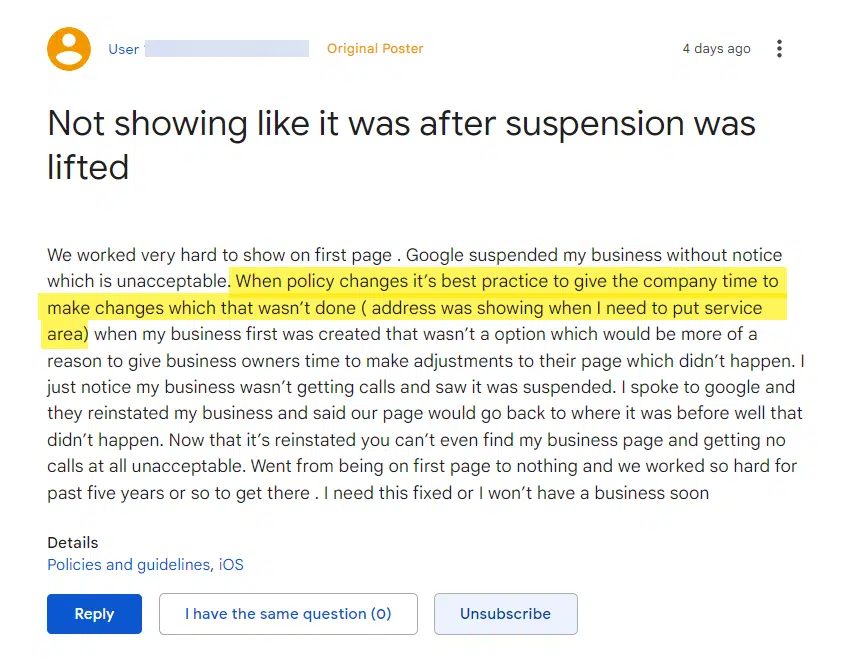
As a Google Business Profile Platinum Product Expert, I often see posts like this on the GBP Help Forum.
If you have a Google Business Profile, it’s up to you to know and follow Google’s rules.
Google can change them anytime and won’t typically notify users of guideline changes. Even a slight change in wording could impact whether your Business Profile complies.
This article discusses some of the critical Google Business Profile guidelines and the latest changes to the policies you may not be aware of.
Updated guidelines released by Google
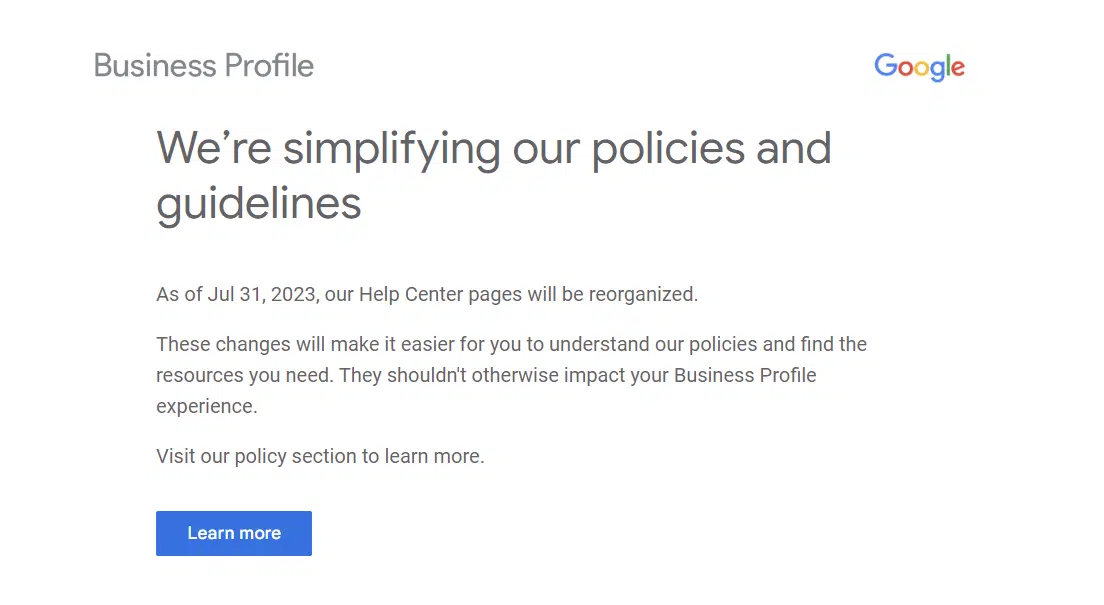
Google sent an email to GBP managers and owners on July 31, letting them know that they updated their help documents to make it easier for people to understand the guidelines.
Here are the most important links you need to pay attention to:
It’s a good idea to bookmark these links. Just be aware that there are many more specific help documents that you’ll discover once you dig into the guidelines.
First, is your business eligible for a Google Business Profile?
Google Business Profiles are meant for businesses that meet face-to-face with local customers. You do not qualify for a Google Business Profile if your business doesn’t meet that basic condition.
There are other requirements for a company to claim a Google Business Profile.
First, you must have a physical location for your business – and it must be your location (you can’t use another business’ location unless it meets specific qualifications.)
There are essentially three different types of business GBP locations.
One location can be your home – typically making you a Service Area Business (SAB), where you go out to meet your customers at their location or another location, like a coffee shop (for instance). Service Area Businesses cannot show their physical address in their Google Business Profile.
Another business type is a storefront where customers come to your location to either shop or meet with you.
The third business type is a hybrid business, where you have a storefront with permanent signage, have employees staffed there during business hours, and go out to customers to service them at their location.
A good example of a hybrid location is an appliance store that has a storefront that sells appliances and has a team of employees that goes out to deliver and repair appliances at customers’ homes.
Another example would be an insurance agent that has an office location that clients come to, but the insurance agent also goes out to clients’ homes to meet with them as well.
Ideally, each business should only have one Google Business Profile.
Google discourages home-based businesses from having more than one business from the same residential address.
(If more than one Business Profile is set up at the same residential address, it is likely that one or both Business Profiles will get suspended. This is to prevent abuse and spam.)
If you are a Service Area Business, you can have one location per metropolitan area within a two-hour driving radius.
Franchises and other storefront locations, like McDonald’s or Lowe’s (for example), can have multiple locations in cities, which is fine per Google’s guidelines.
Each of the different types of business locations has its own specific guidelines you must follow. Be sure to read up on the guidelines if you have a Service Area Business, a storefront location or a hybrid business, and adhere to the precise rules you must comply with.
Now let’s talk about virtual offices and co-working spaces. If your business rents a physical mailing address but doesn’t operate out of that location – often called a virtual office – that location isn’t eligible for a Business Profile.
Businesses also can’t list an office at a co-working space unless that office has clear signage, can see customers at the location during business hours and is staffed by your employees during business hours.
Typically, Google also requires you to rent a dedicated workspace or office at co-working spaces.
So, if your GBP listing were to get suspended, you’d have to provide Google with a copy of the lease showing that you have your own separate work area that belongs to just your company. (So most co-working spaces are ineligible for Google Business Profiles.)
Here are just some more examples of ineligiblebusiness types that are not allowed to have Google Business Profiles:
An ongoing service, class or meeting at a location you don’t own or have the authority to represent. (If you have an exercise company with classes at your local church basement in the morning, your business would not qualify for a Google Business Profile.)
Lead generation agents or companies.
Brands, organizations and artists.
Online-only businesses.
Rental or for-sale properties like vacation homes, model homes or vacant apartments.
Any business whose address is listed as a P.O. Box or mailbox in a remote location (like a UPS box.)
Also, Google wants your information to be as accurate as possible.
To help keep information accurate, Google uses information from different sources like user reports and licensed content (i.e., third-party data).
If Google determines that your business doesn’t exist in the location you claim it does, Google will disable your profile (i.e., suspend your Google Business Profile.)
Keep in mind that Google can determine how best to display your business address based on information provided by the business and other relevant sources it finds online.
This ensures that the address accurately reflects the business and how the customers are served.
They state that only business owners or authorized representatives can verify and manage business information on a Business Profile.
Google has also confirmed that they can revoke GBP ownership for a variety of reasons:
You haven’t signed into your account recently – content may also be removed after adequate warnings.
The business confirmed that you or the agency is no longer authorized to manage the GBP.
Google hasn’t been able to reach you by email after several attempts to confirm your affiliation with the business.
You or another profile owner deleted your profile.
You created your business profile through another Google product and that product profile has been suspended.
If it’s been determined that a differentmerchant is the authorized owner of a business profile, access to other unauthorized users will be revoked.
If any of these happen, you can attempt to reverify or request ownership from the new business owner following the steps in the Resolve owner conflicts help article.
Tip: Do not try to delete your Google Business Profile from your dashboard and create another Google Business Profile. That will create what’s known as a “duplicate listing” and will likely cause issues with both listings.
Additional guidelines for authorized representatives
Google also outlined other important ownership and manager rules in this recent help guidelines update.
These are especially important if you are a marketing agency that manages GBP listings for clients or a business owner considering hiring a marketing agency to manage your Google Business Profile.
According to Google:
“Any person or company that manages information on a Google Business Profile that they don’t own is considered an authorized representative. Examples of “authorized representatives” would be a third-party SEO/SEM company, a friend of the business owner, an online ordering, scheduling, or booking provider, an affiliate network provider or some other person or business entity that is managing or working on your GBP listing.”
Authorized representatives must:
Never claim a Business Profile without express consent from the business owner.
Never make false, misleading, or unrealistic claims.
Never use harassing, abusive, or untrustworthy tactics with potential or existing customers.
Always work directly with the business owner to complete verification.
Always ensure the business owner understands what a Business Profile on Google is and where Business Profile data is used.
Always keep the business owner informed about which actions the authorized representative will take on the Business Profile.
Always follow the Guidelines for representing your business on Google. Note that the phone number and website for a Business Profile should always be the single, authoritative phone number and website for the business and be verifiable by the business owner.
Promptly respond to management access requests and transfer Business Profile ownership to the business owner immediately upon request.
Authorized representatives must, whenever possible, encourage the business owner to create an account, own the Business Profile, and add authorized representatives as managers. (Learn how to transfer ownership.)
Website content must be owned and managed by the business owner.
Failure to follow these policies can result in a suspension of the Business Profile and/or Google Account.
Authorized representatives should also share the following resources with the business owner:
This is important so that the business owner is aware of Google Business Profile guidelines.
If you are a business owner, it’s crucial that you stay involved in your GBP listing. Your Google Business Profile is often the lifeblood of your business.
Never put your trust solely in an authorized representative/digital marketing agency.
If that authorized representative violates Google’s guidelines, your Google Business Profile could get suspended even though your listing – or you – didn’t do anything wrong.
So make sure that you’re working with a marketing agency that truly has extensive and expert experience working with Google Business Profiles. Because if they do something wrong, your Business Profile will be held accountable for it.
And if it gets suspended because of something the agency did wrong, you may not get your Business Profile reinstated.
Get the daily newsletter search marketers rely on.
Business naming rules
According to Google, your business name should reflect your real-world company name, as used on your storefront signage, website, stationary and as known to customers.
This would also include how your business is presented on the branding of your service area vehicles and other legal documents that contain your company’s business name (i.e., incorporation or LLC documentation or business license).
All this information should align and match your Google Business Profile’s business name.
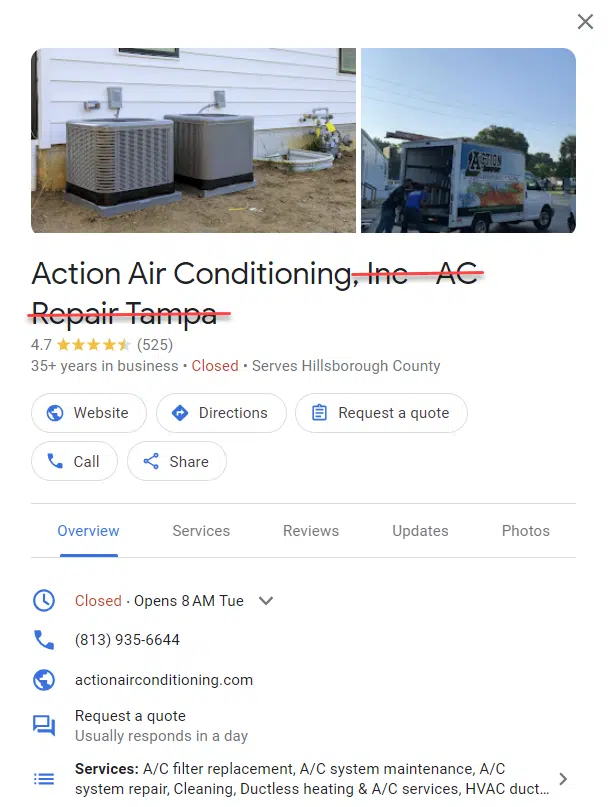
Including unnecessary or extra information (i.e., additional words) in your GBP business name violates Google’s guidelines and could result in a suspension.
Your Google Business Profile business name must not include any of the following:
Marketing taglines
Store codes
Trademark/registered signs
Fully capitalized words
Business hours information
Phone numbers or website URL’s
Special characters (e.g. %$@/”) or irrelevant legal terms
Service or product information
Location information
Any keywords that aren’t part of your official business name
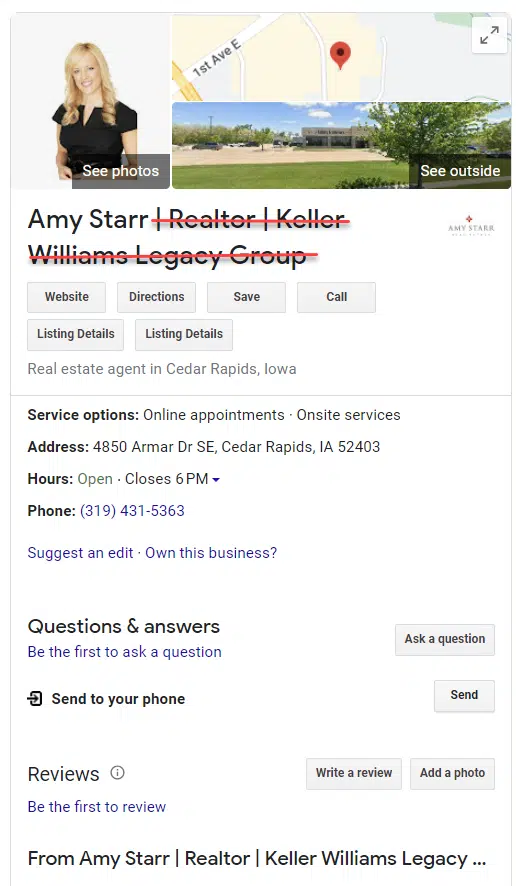
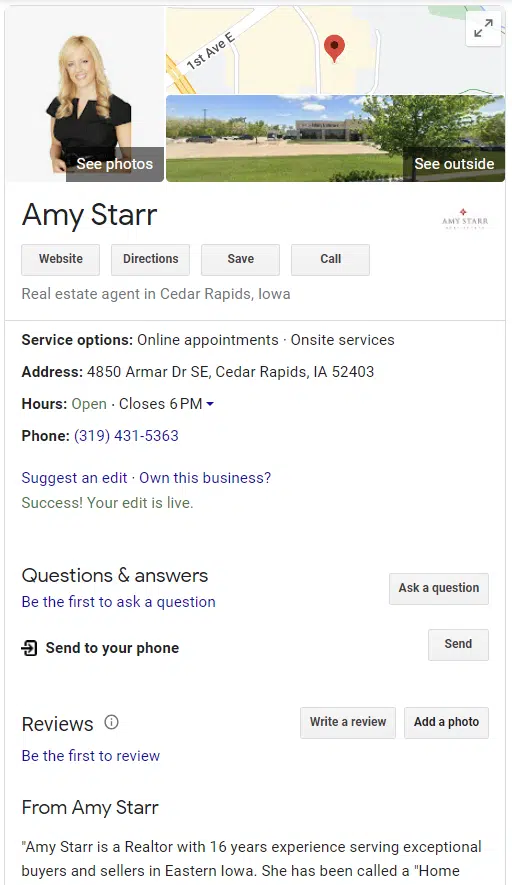
If you’re a practitioner, like a doctor, dentist, chiropractor, lawyer, financial planner, insurance agent or realtor, your Google Business Profile business name can only be your first and last name.
Business Profiles for practitioners may include title or degree certification (for example, Dr., MD, JD, Esq., CFA). No other words or names can be added!
So, if you’re a realtor, you cannot add the word “Realtor” or “Real Estate Agent” after your first and last name; that would violate guidelines.
Note that sales associates or lead generation agents for corporations aren’t considered individual practitioners and are not eligible for a Business Profile.
Keyword-stuffed listing
Corrected GBP listing
Setting your business hours
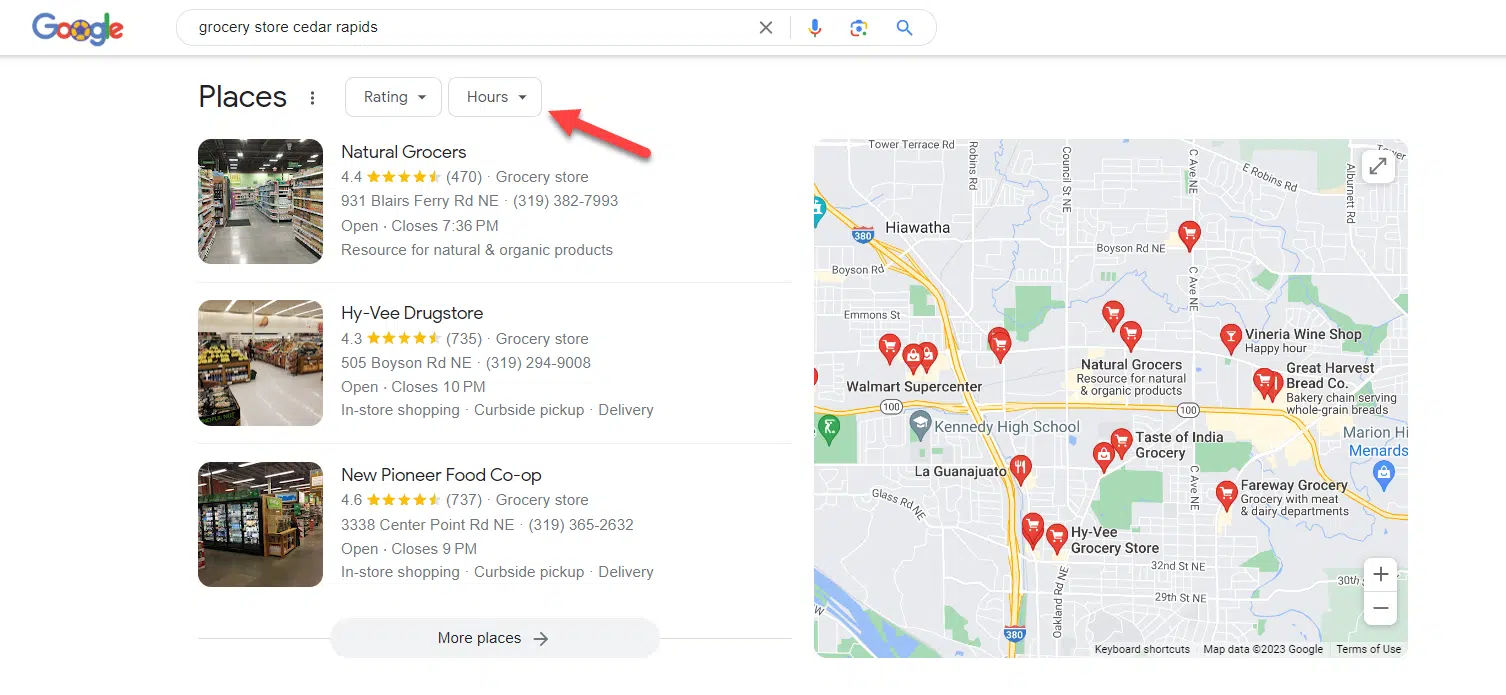
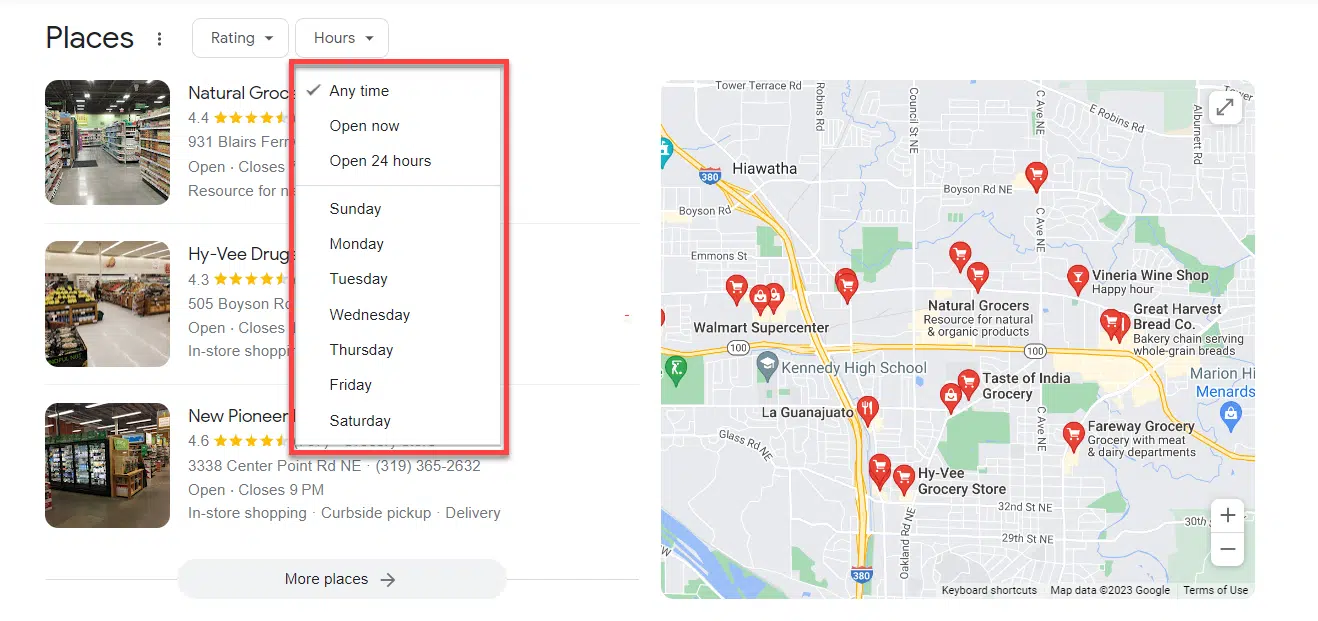
Your Business Profile must show accurate hours. Customers rely on those hours when making decisions on who to shop with, and an hour’s filter can even appear in search results, which can impact a searcher’s decision on who to shop with.
Whether you have a storefront or a Service Area Business (SAB), the business hours you set up should be when your employees are ready to help customers or clients.
For storefront locations, studies have shown that people rely on business hours to know when they can come to your business, so it’s essential to keep your business hours up-to-date and accurate.
If you answer your phone 24 hours a day, your Google Business Profile business description and website are where you should put that information.
However, if you truly do run a business that is open 24/7 and has your employees staffed at your business 24 hours a day, like a 24-hour grocery or convenience store, then it’s appropriate to list your hours as 24 hours.
Google has recently stated that certain types of businesses should not have set business hours.
If your business has varied hours and days (like schedules for different activities, including showtimes, worship services or classes) or operates by appointment only, you should not list your hours of operation.
Here are some examples of businesses that shouldn’t provide set business hours:
Indoor lodging like hotels, motels, and apartment buildings/complexes
Schools and universities
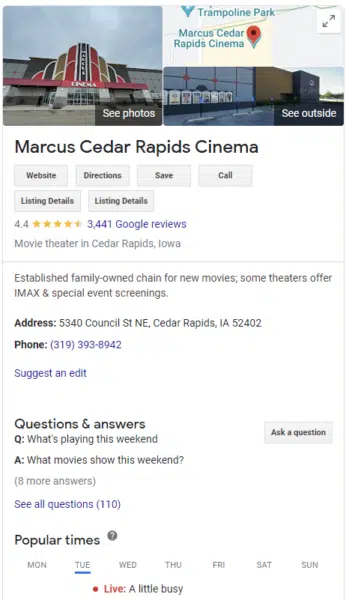
Movie theaters
Transportation services and airports
Event venues and natural features (like National parks)
You may be wondering why Google recommends not displaying hours for some of these types of businesses – especially when many have standard business hours.
I’m not sure exactly why, but in some cases, the business can set hours, but those hours often don’t display in the company’s Google Business Profile Knowledge Panel.
To get even more detailed information on how to correctly set your company’s business hours on your Google Business Profile, be sure to read the complete guidelines.
Account-level restrictions
The specific discussion of account level restrictions is also new with the latest guidelines update. Merchants can lose access to their Business Profile or have their access restricted for a variety of reasons.
Google account not in good standing
If a Google Account is not in good standing (e.g., it is disabled, suspended, or deleted) you must take steps to fix the issue before your Google Business Profile will be reinstated.
Account restricted from Business Profile activity
If a merchant has a pattern of violating Google Business Profile policies, their Business Profile access might be restricted, and all Business Profiles associated with that account will be suspended.
When an account is restricted, content added from the restricted account will be rejected. The account must be reinstated before any previously removed content (like user reviews) can be successfully reinstated or new content (like posts) can be added to the profile.
Profile suspension due to other Google product account restriction
When a Business Profile is created via an account that’s associated with another Google product (like Google Ads or YouTube), restriction of the non-Business Profile product account can result in suspension of the Google Business Profile.
This is the first time Google is providing transparency on how interconnected all of Google’s products are to Google Business Profiles and how a merchant can lose access to their GBP listing.
When a non-Business Profile account is restricted, content added to the business profile from the restricted account may be rejected.
To fix this, the non-Business Profile account must be reinstated before you try to reinstate the Google Business Profile.
Following Google’s guidelines is key
When a Google Business Profile suspension happens, I’ve had businesses tell me they lose thousands and thousands of dollars a day (some as high as $20,000 per day!)
So it’s important that you follow Google’s guidelines so you avoid getting your GBP listing suspended at all costs. That means you must become familiar with the guidelines – and follow them all.
Now is the time to brush up and read Google’s guidelines and ensure your GBP listing complies.
Opinions expressed in this article are those of the guest author and not necessarily Search Engine Land. Staff authors are listed here.
@media screen and (min-width: 800px) { #div-gpt-ad-3191538-7 { display: flex !important; justify-content: center !important; align-items: center !important; min-width:770px; min-height:260px; }
}
@media screen and (min-width: 1279px) { #div-gpt-ad-3191538-7 { display: flex !important; justify-content: center !important; align-items: center !important; min-width:800px!important; min-height:440px!important; }
}
About the author
Sherry Bonelli is a search engine optimization (SEO) and digital marketing professional with 25+ years of experience. She is the owner of early bird digital marketing, a digital marketing agency that serves clients all over the U.S. Bonelli is a Google Business Profile Platinum Product Expert and columnist for leading marketing websites. She received Search Engine Land’s SEO Contributor of the Year Award in 2018. A recognized presenter and speaker at leading digital marketing conferences, Bonelli holds a Master’s Degree in Internet Marketing. She is also a LinkedIn Learning Instructor, Adjunct Instructor at several colleges and universities and is the host of The Marketing Plan Podcast.
How to create an SEO content plan with Google Sheets functions
SEO involves constantly creating and optimizing content for your website. Achieving more traffic and better organic rankings means you’ll need a content strategy.
Google Sheets functions make it easy to turn your keyword research and site performance data into a list of content to be created or updated.
Turn keywords into URLs with LOWER and SUBSTITUTE functions
Let’s start by adding some new content to your content plan.
If you have a list of target keywords for new pages, you can turn them into URLs with some quick functions.
Use the LOWER function if your keywords are capitalized and you want them all to be lowercase, as in:
=LOWER(A1)
Use SUBSTITUTE to change any spaces to dashes like:
=SUBSTITUTE(A1,“ ”,“-”)
The basic logic for SUBSTITUTE is:
Change the content in this cell.
That matches this string.
Into this string.
Or do both at once:
=LOWER(SUBSTITUTE(A1,“ ”,“-”))
Use JOIN to include categories or folders in your URL and separate them with a slash. JOIN is like CONCATENATE but lets you add a character or string between each cell you’re combining.
Include the character or string to separate them at the start, then list the cells to combine, like this:
=JOIN(“/”,A1,A2)
You might not want to use the keyword by itself as your final URL, but it’s an easier starting point than manually removing spaces.
Use the Control + Shift + V keyboard shortcut on Windows (or Command + Shift + V on Mac) to copy this to plain text in another column without the functions. Then, use that column to start editing your URLs.
Now you have a list of your target keyword and proposed URL to add to your content brief or content schedule.
Change URLs with CONCATENATE and JOIN functions
Let’s say you want to see which pages on your site aren’t performing well and need to be updated.
You might start by exporting current page performance from Google Analytics and Search Console.
Your Analytics report might export page paths, while your Search Console report exports full URLs. You want to use VLOOKUP to combine your data into one report.
Use CONCATENATE to combine your domain with your page path or slug to get your full URL.
JOIN is helpful if you have multiple categories or folders in your URL. Split each folder into a column, and JOIN will combine them with a slash between them.
Or, if you want to reverse it, use the SUBSTITUTE function to remove your domain from a URL. This is also handy for searching by page path in Google Analytics.
Find your oldest content with MIN and MAX functions
In addition to checking pages that have dropped in rankings, you can also plan to update old pages that haven’t been edited recently.
If you have a list of your content and the published or updated dates, MIN and MAX functions will tell you which pages are the oldest and newest.
Use MIN for the oldest and MAX for the oldest, then select the range for your dates, for instance:
=MIN(A1:A10)
You can also check for your oldest content that meets other criteria from your data, like old articles that aren’t ranking well. Add conditions to check with a MIN IF or MIN IFS function.
Get the daily newsletter search marketers rely on.
Filter your data with AVERAGE IF and SUM IF functions
You can’t tackle your whole content library at once. It can be helpful to break it into groups to see which series or categories must be updated first.
AVERAGE IF and SUM IF are helpful for filtering data for a specific group of pages or keywords.
The basic logic for these functions is:
If the content in this range.
Matches this copy/cell.
Show me this data.
Use AVERAGE IF for data like rank and conversion rate, for example. Use SUM IF to total your sessions and conversions.
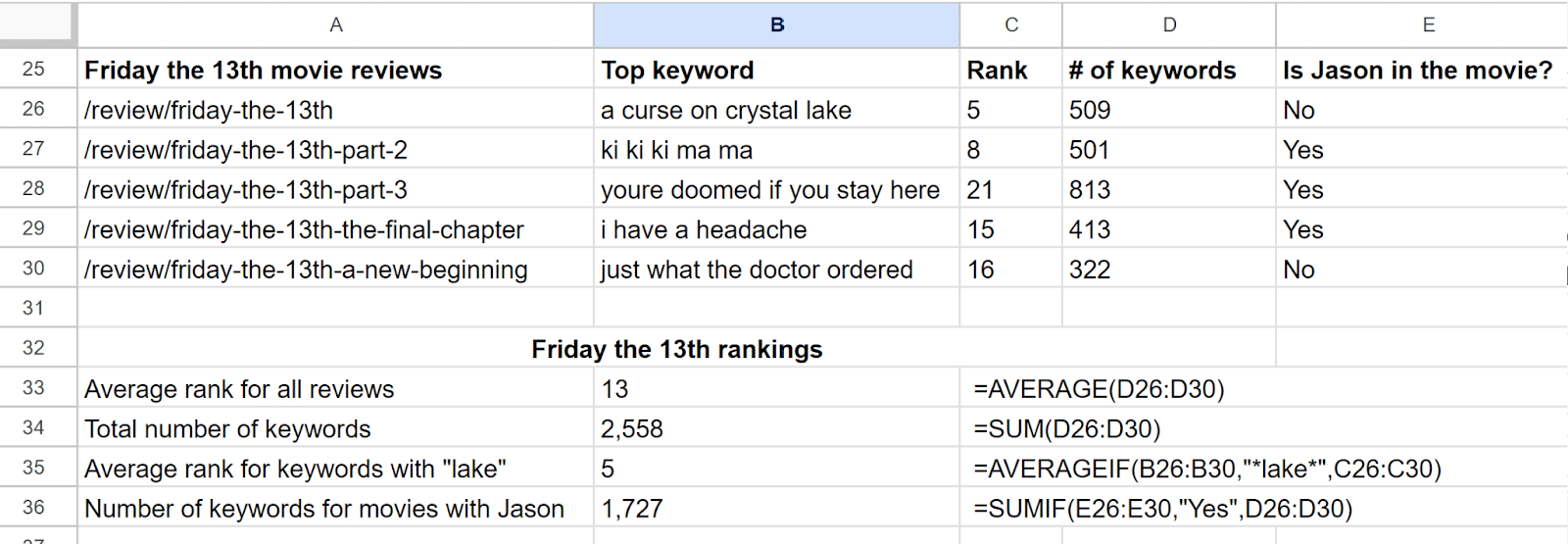
The cell to check can be an absolute value or accept wildcards like *keyword* to show content that’s a partial match.
You can also have the function reference content in a specific cell. If you do, you can use $ to reference an absolute cell, row, or column (like $B$1) if you drag your function to other cells.
Use AVERAGE IFS or SUM IFS functions if you have multiple conditions or IF statements you want to check for. AVERAGE IFS can include up to 127 conditions.
The logic for these functions is almost the opposite:
Show me this data if it matches my criteria.
Check this first range of data.
For my first condition.
Check this second range.
For my second condition.
And so on.
Clean up your spreadsheets with IFERROR and IF ISBLANK functions
You might want to clean up your spreadsheet before you add your pages to your content calendar.
#N/A and #ERROR can make your plan look busy or mess up your calculations.
Add IFERROR before any formula to change what will appear in the cell if there is a formula error, like this:
=IFERROR(“Custom error message”,VLOOKUP(…))
You can change it to show 0 or make it blank with “ ”, for example.
IF ISBLANK lets you customize what should appear if a cell is blank instead of throwing an error.
The basic logic for both functions is:
If this cell has a problem.
Show or do this.
Otherwise, do this.
Check your numbers and finalize your content plan
Spreadsheets take much of the manual work out of the equation, but it’s still up to you to discover what’s best for your users.
You’ll still need the expertise to know when a keyword isn’t relevant for your article or to decide to 301 an underperforming page instead of improving it for the 30th time.
SEO is an art and a science. And getting better at the science part with new functions can help you spend more time mastering your art.
Opinions expressed in this article are those of the guest author and not necessarily Search Engine Land. Staff authors are listed here.
@media screen and (min-width: 800px) { #div-gpt-ad-3191538-7 { display: flex !important; justify-content: center !important; align-items: center !important; min-width:770px; min-height:260px; }
}
@media screen and (min-width: 1279px) { #div-gpt-ad-3191538-7 { display: flex !important; justify-content: center !important; align-items: center !important; min-width:800px!important; min-height:440px!important; }
}
About the author
Roslyn Ayers is a contributing writer for Search Engine Land. With over a decade of experience in SEO, her subject matter expertise includes everything from finance and tech to ecommerce and education. Her expert analysis has been featured on sites like Bankrate, MSN and Reader’s Digest. Roslyn is currently an SEO Manager for ValuePenguin by LendingTree.