SEO content optimization: How to rank higher and convert better by SE Ranking

SE Ranking 1920x1080 1 800x450

Due to Google’s algorithms constantly evolving, it can be difficult to determine areas to focus your SEO efforts on for maximum results. Yet, there’s one ranking factor that’s always worth optimizing for: content.

With the launch of the helpful content system, there’s no doubt that content tailored to people’s needs can naturally secure a high ranking, especially if it’s published on a website with a high domain authority. Still, for particularly competitive keywords, it might require a little push.

Steps to optimize content for SEO

Content optimization is a complex process that requires the implementation of numerous activities, starting from content audit to continuous SEO tracking. With so many steps involved, it can be easy to lose track.

Now, let’s briefly go over each of them so we don’t miss out on anything important.

1. Perform a comprehensive SEO content audit.

Before we determine which content optimization activities are necessary, it’s essential to know where to implement them. Simply put, we need to identify pages that are not performing as expected.

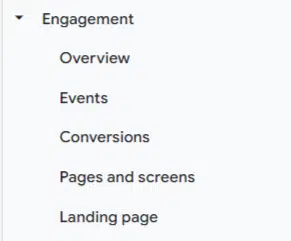
To do this, go to GA4 and click Reports > Engagement > Pages and Screens. Here, you can find an overview of your content/pages, along with a combination of metrics necessary for effective content optimization (e.g., users, views, average engagement time, conversions and so on).

By combining this data with the data offered by Google Search Console (GSC), you can easily identify pages containing content that is not performing well but can be improved upon. For instance:

  • If a page ranks high on SERPs but has a low CTR, you might need to improve your metadata.
  • If your page gets a lot of traffic but has a low conversion rate, it could be because your content isn’t solving the problem people are looking for. In this case, you’ll most likely need to optimize your content for the right search intent, which takes us to the next step of SEO content optimization.

2. Target relevant keywords that align with user intent.

Keyword research today involves more than just identifying high-volume queries. It’s also about understanding the intention behind an internet search and satisfying it better than competitors.

Since Google is now able to recognize the semantic meaning, context, and user intent behind keywords, make sure to optimize content with keywords that meet users’ expectations from the start. 

Otherwise, even if you rank high for keywords that don’t correspond to people’s needs, your conversion rate will likely remain low.

3. Fine-tune on-page elements.

In most cases, to improve your content’s rating and CTR, you’ll need to:

  • Create attention-grabbing titles and meta descriptions that accurately portray your content. Don’t forget to optimize your title for your target keyword.
  • Organize your content with clear, relevant, and easy-to-navigate headings and subheadings.
  • Make sure your URLs are user-friendly and reflect the topic of your content.

Ensure you link to other relevant pages on your website to improve navigation, distribute link equity, and help search engines understand the structure of your site.

To get the most out of your internal linking, stick to these practices:

  • Include the most important links at the beginning of your text.
  • Link to newly created pages.
  • Avoid using spammy anchor texts.
  • Make sure your post includes enough internal links but don’t link too much.

Additionally, keep in mind that incorporating authoritative external links to reputable sources throughout your optimized content boosts credibility, increases user trust, aids in SEO and fosters reader engagement.

5. Improve user experience.

According to Google’s developer document, ensuring excellent user experience involves:

  • Improving your Core Web Vitals scores.
  • Optimizing your website for mobile users.
  • Making it easy for visitors to locate and navigate to the main content.
  • Designing the layout for easy differentiation of main content from other page elements.

6. Continuously monitor your content optimization impact.

After optimizing content, measure the results over time by analyzing key metrics such as rankings, traffic, bounce rate, time on page and conversions. Use tools like GSC, GA4 or other analytical tools of your choice.

Generally, companies conduct an SEO content optimization review around 1-2 times per year, but you can do this as often as you deem appropriate.

How to optimize content for SERPs

Although you can complete most content optimization tasks manually, it will most likely take a vast amount of time. To streamline this process, experienced marketers use automated SEO solutions.

This is where platforms like SE Ranking can come in handy.

Conduct in-depth page analysis

Begin by utilizing the On-Page SEO Checker. It lets you compare your content optimization efforts with those of your main organic competitors. It also provides a list of issues on the analyzed page and improvement tips.

For this, follow these simple steps:

  1. Enter a URL.
  2. Select your target location.
  3. Enter keywords.

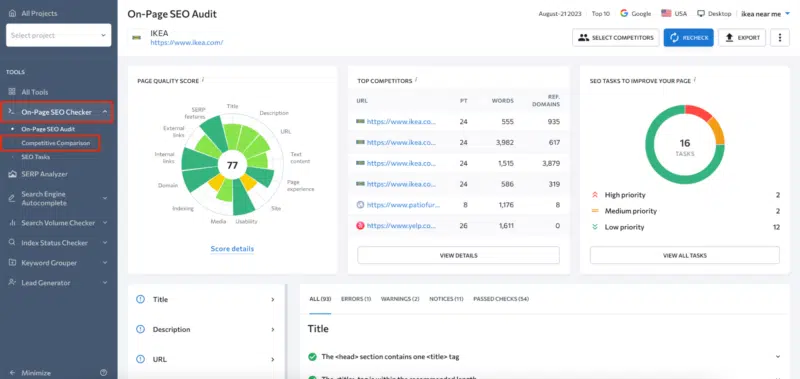
With the help of AI-backed algorithms, the On-Page SEO Checker will analyze the page against 94 content and technical metrics while also providing backlink insights.

In particular, using this tool, you can carry out the following content optimization tasks:

  • Perform content analysis:

All you need to do to get info on content-related parameters is scroll down the On-Page SEO Audit page and go to the Text Content feature.

SE Ranking 1 800x387

Note: All checks are divided into four groups: Errors, Warnings, Notices and Passed Checks. Click on any issue to see its detailed explanation.

SE Ranking 2 800x387

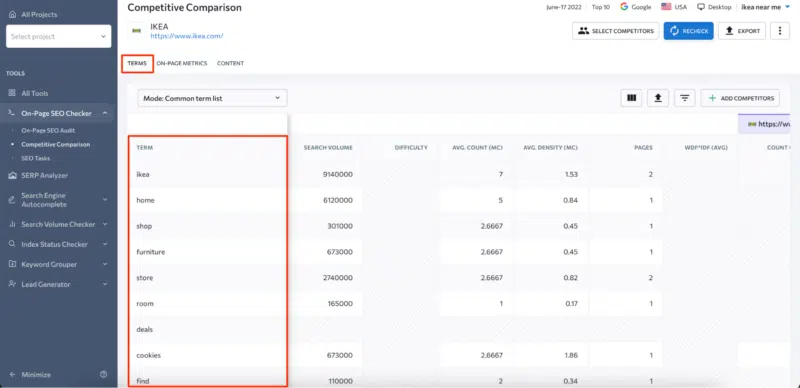
To compare your content elements with your competitors in greater detail, head to the Competitive Comparison section.

SE Ranking 3 800x379

In the Terms tab, you can find the entire list of words you should utilize in your content.

SE Ranking 4 800x388

Note: You can switch the keyword display mode to either a common list with competitors or a separate list.

In the On-Page Metrics section, you can view a comparison table with SEO parameters of added competitors like:

  • Title/description/URL length
  • Number of words in main content
  • Domain age
  • Number of internal/external links
  • And more
SE Ranking 5 800x387
  • Enhance technical parameters:

With this tool, you can also get in-depth data on any technical parameters affecting user experience on your webpage.

For instance, the Page Experience block offers insights on Core Web Vitals, unused JavaScript and CSS, etc.

SE Ranking 6 800x387

Additionally, using this report, you can detect various usability and indexing issues, potentially keeping you away from the top of the SERP.

  • Gain backlink and domain insights:

The on-page SEO audit report also offers valuable insights into:

  1. Domain: domain age and expiration date, page/domain trust score, etc.
  2. Backlinks: referring domains and inbound linking pointing to a page or a domain, etc.
  3. Internal and external links: the number of these links, whether they link to error pages/redirected pages, anchor text issues, and more.
SE Ranking 7 800x383

Pro tip: To compare your backlink profile with up to five competitors and identify gaps preventing you from reaching the top of the SERP, proceed with the Backlink Gap Analyzer.

Optimize your content for SEO standards

If you want to focus solely on improving your content’s structure, word count, keyword density and overall text quality, SE Ranking’s Content Editor is your go-to solution. In particular, this tool facilitates content optimization in terms of:

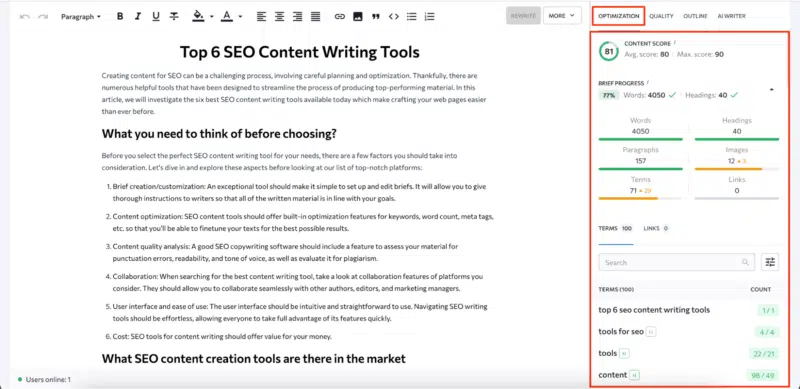
  • Content structure: Easily build headings using your competitors’ heading structures or use AI Writer to generate an outline in minutes.
SE Ranking 8 800x346
  • Text optimization: Receive insights on word count based on the top-performing pages of your competitors. Get an extensive list of the relevant keywords, identified through SE Ranking’s own advanced NLP algorithm, which offers a rich selection of multi-word phrase suggestions. Get precise recommendations on the keyword count needed to get into the top 10 search results.
SE Ranking 9 800x389
  • Text quality: Gain insights and suggestions to enhance the overall quality of your text – grammar, readability, tone of voice and plagiarism check.
SE Ranking 10 800x388

Go for quick wins by spotting top-priority pages with low content scores

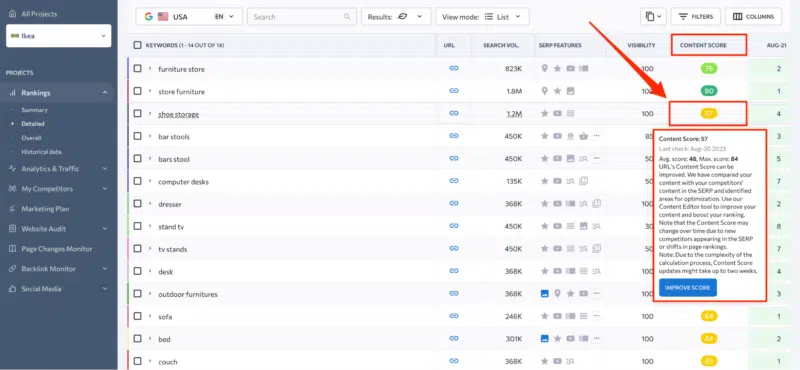
First, what is a content score? It’s a numerical measure of the quality and relevance of a content piece compared to other content pieces on the SERP. The higher your content optimization score, the higher your chances of outranking competitors.

SE Ranking allows users to check their content score in two different ways: directly in the Content Editor while working on a specific text or by checking the content score of all URLs within Rank Tracker (along with their respective rankings).

In the second case, click the “Improve Score” button against analyzed keywords/pages to get tips on optimizing a particular page from the list. This will prompt the Content Editor to provide tailored recommendations and improve the content right away.

SE Ranking 11 800x370

Simplify SEO content optimization with a tool bundle

As you can see, by utilizing a combination of SE Ranking’s tools, like the On-Page SEO Checker, Content Editor and Rank Tracker, you can cover the entire content optimization cycle, all within a single platform.

Using this tool bundle on a regular basis is a perfect way to continuously refine and enhance your content so that it remains relevant and consistently drives traffic to your website.


Related stories

New on Search Engine Land

About the author

SE Ranking

SE Ranking is a powerful cloud-based SEO and marketing platform packed with over 30 tools and features. With more than 500,000 users worldwide, it provides entrepreneurs, SMBs, agencies and enterprises with everything they need to get their websites to the top of the search results and stay there, including advanced competitive and keyword research, rank tracking in every major search engine, technical and SEO website audit, backlink analysis and monitoring, and so much more. All housed in an intuitive, user-friendly interface, the all-in-one platform can help you make the most of your digital marketing activities and yield better sales results.

https://searchengineland.com/seo-content-optimization-how-to-rank-higher-and-convert-better-431659


R.I.P. UA – Search Engine Land property has stopped processing data

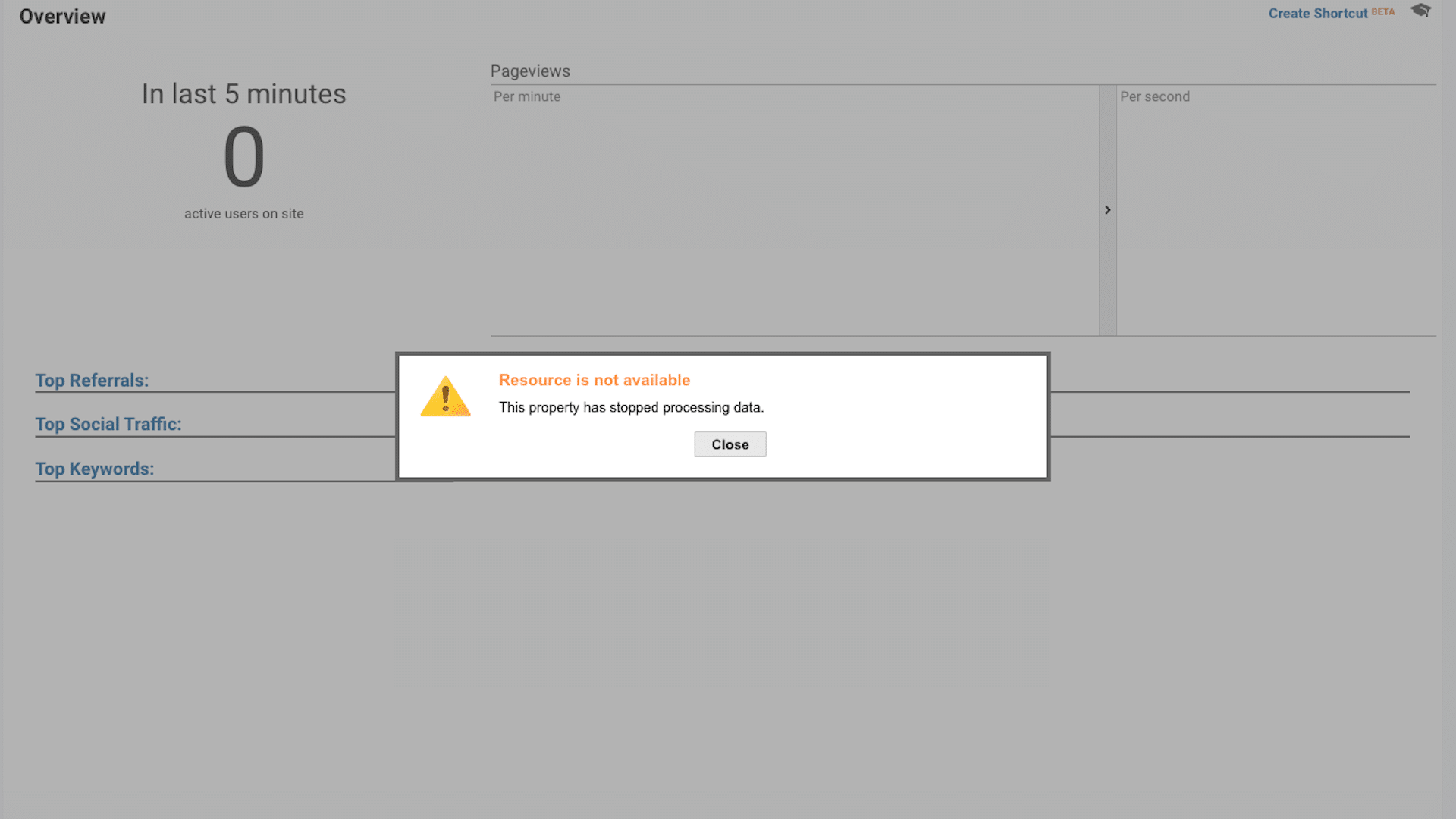
It’s a sad day at Search Engine Land. We got the dreaded “This property has stopped processing data” message when we logged into our Google Universal Analytics property this morning.

What it looks like. Here’s a screenshot of what we’re seeing today:

This Property Has Stopped Processing Data

Why we care. No more procrastination. Onward to GA4. If you’ve been waiting until you absolutely had to switch to GA4, you may want to read How to use Google Analytics 4: A complete guide.

Jan. 1, 2017 – Sept. 7, 2023. That’s how long this UA property had been collecting analytics data.

We knew this was coming, just not when. Google sent out a huge batch of notifications that many UA properties had stopped processing data last month.

68 days. We were expecting our properties to stop collecting data on July 1, but it ended up taking 68 days past this date. At least I finally have my answer as to how long “soon” is in Google’s world. More than two months.

If your UA property hasn’t already stopped processing data, the end may be coming soon. The UA property for our sibling site MarTech also stopped processing data as of this morning.


Related stories

New on Search Engine Land

@media screen and (min-width: 800px) { #div-gpt-ad-3191538-7 { display: flex !important; justify-content: center !important; align-items: center !important; min-width:770px; min-height:260px; } } @media screen and (min-width: 1279px) { #div-gpt-ad-3191538-7 { display: flex !important; justify-content: center !important; align-items: center !important; min-width:800px!important; min-height:440px!important; } }

About the author

Danny Goodwin

Danny Goodwin has been Managing Editor of Search Engine Land & Search Marketing Expo – SMX since 2022. He joined Search Engine Land in 2022 as Senior Editor. In addition to reporting on the latest search marketing news, he manages Search Engine Land’s SME (Subject Matter Expert) program. He also helps program U.S. SMX events. Goodwin has been editing and writing about the latest developments and trends in search and digital marketing since 2007. He previously was Executive Editor of Search Engine Journal (from 2017 to 2022), managing editor of Momentology (from 2014-2016) and editor of Search Engine Watch (from 2007 to 2014). He has spoken at many major search conferences and virtual events, and has been sourced for his expertise by a wide range of publications and podcasts.

https://searchengineland.com/r-i-p-ua-search-engine-land-property-has-stopped-processing-data-431788


The case against Moz’s Domain Authority

Domain Authority (DA) is a search engine ranking score developed by Moz that supposedly predicts how well a website will rank on search engine result pages (SERPs).

DA scores range from one to 100, with higher scores corresponding to a greater likelihood of achieving higher rankings.

It’s also a problematic metric misused by unsuspecting marketers and abused by bad actors in the industry. Here’s why it’s time to rethink Domain Authority’s role in your SEO efforts.

A metric for ‘an earlier, very different game’

Bill James, the father of Sabermetrics, the advanced study of baseball metrics, has a big problem with the concept of the “error” metric in baseball.

“It is, without exception, the only major statistic in sports which is a record of what an observer thinks should have been accomplished.”

Michael Lewis, author of “Moneyball,” shared how James describes it… 

The error metric was invented for an “earlier, very different game” when “fielders didn’t wear gloves, the outfield went unmowed,” and “any ball hit more than a few feet from a fielder on leave from the Civil War was unplayable.”

Maybe that’s my big problem with Moz’s Domain Authority metric and anything like it, really. The metric was made for an “earlier, very different game” when the world needed extensive lists of popular websites.

Why I’m beating this ‘dead horse’

While writing this article, I showed some early drafts to some of the smartest SEOs I know. 

A few responded, “It’s all valid, but why beat a dead horse?” or “I think everybody already understands this metric is worthless.” 

I wish that were true.

During a recent new business pitch, a prospective client asked about my notes in the RFP about not using Domain Authority as a KPI. 

After I made my points, the prospect said, “That makes so much sense; the SEO agency we’re firing kept reporting on DA going up, but we weren’t seeing any of the other real KPIs in the organic channel increase.”

While I was finishing this article, the marketing platform for content marketers, DemandJump, released a webinar titled “The Death of Domain Authority.”

One can only hope.

During the presentation, Ryan Brock, Chief Solution Officer at DemandJump, presented their data on why Domain Authority is worthless. 

I’ll let DemandJump speak for itself there, but the point is that Domain Authority is still very much a part of the conversation in 2023.

A brief history of Moz’s Domain Authority and its calculations

As part of the research for this article, I looked into the history of Domain Authority to provide some context to the story. 

Sometimes, details get lost along the way, especially when you reach out to the company for the “official line.”

For instance, through my research, I found that Moz’s Domain Authority (DA) was first released in 2006, and back then, the official word was that it was developed by Moz co-founder Rand Fishkin, along with his team of SEO experts. 

However, when we reached out to Moz to verify this, that bit of history seemed to have been lost in the archives. (Ironically, they referred us back to a Search Engine Land article on the matter.)

Initially, the idea behind DA was to provide a more accurate and reliable way of measuring a website’s authority and influence than simply looking at its PageRank, a similar metric developed by Google. 

Early on, Moz’s DA was based on a combination of link metrics such as MozRank and MozTrust, as well as other factors like the age of the domain, the size of its link profile, and the quality of its content.

In 2019, Moz introduced the second version of the Domain Authority algorithm, this time developed by the late Russ Jones. 

Starting with DA 2.0, Moz retired MozRank and MozTrust and started relying more on their own Link Explorer product, a link index that they claim has “over 35 trillion links.” 

According to Moz:

“Domain Authority 2.0 is a neural network model based on a number of proprietary internal metrics – link counts, Spam Score, and complex distributions of links – alongside other more traditional inputs. Together they approximate the quality and quantity of traffic a link might pass.”

One of the interesting things I found in digging through all of this history is that, outside of the occasional mention of trying to build a better metric than PageRank, there isn’t a lot of mention of Google or any other search engine. We’ll talk about that more later.


Get the daily newsletter search marketers rely on.


Why Moz’s Domain Authority is a flawed search engine metric

Reason 1: It’s at the domain level 

My big problem with Domain Authority has always been that Google’s PageRank was designed to judge webpages, not domains. 

A metric designed to evaluate a domain would be more like Alexa Rank, now owned by Amazon, which is calculated based on a combination of data sources, including the browsing behavior of users who have installed the Alexa Toolbar or Alexa browser extensions.

Yet, right from the get-go, Moz calculates the authority metric at the domain level, even though Google has repeatedly stated that they don’t look at authority, that is, anything to do with their linking algorithm, PageRank, at the domain level.

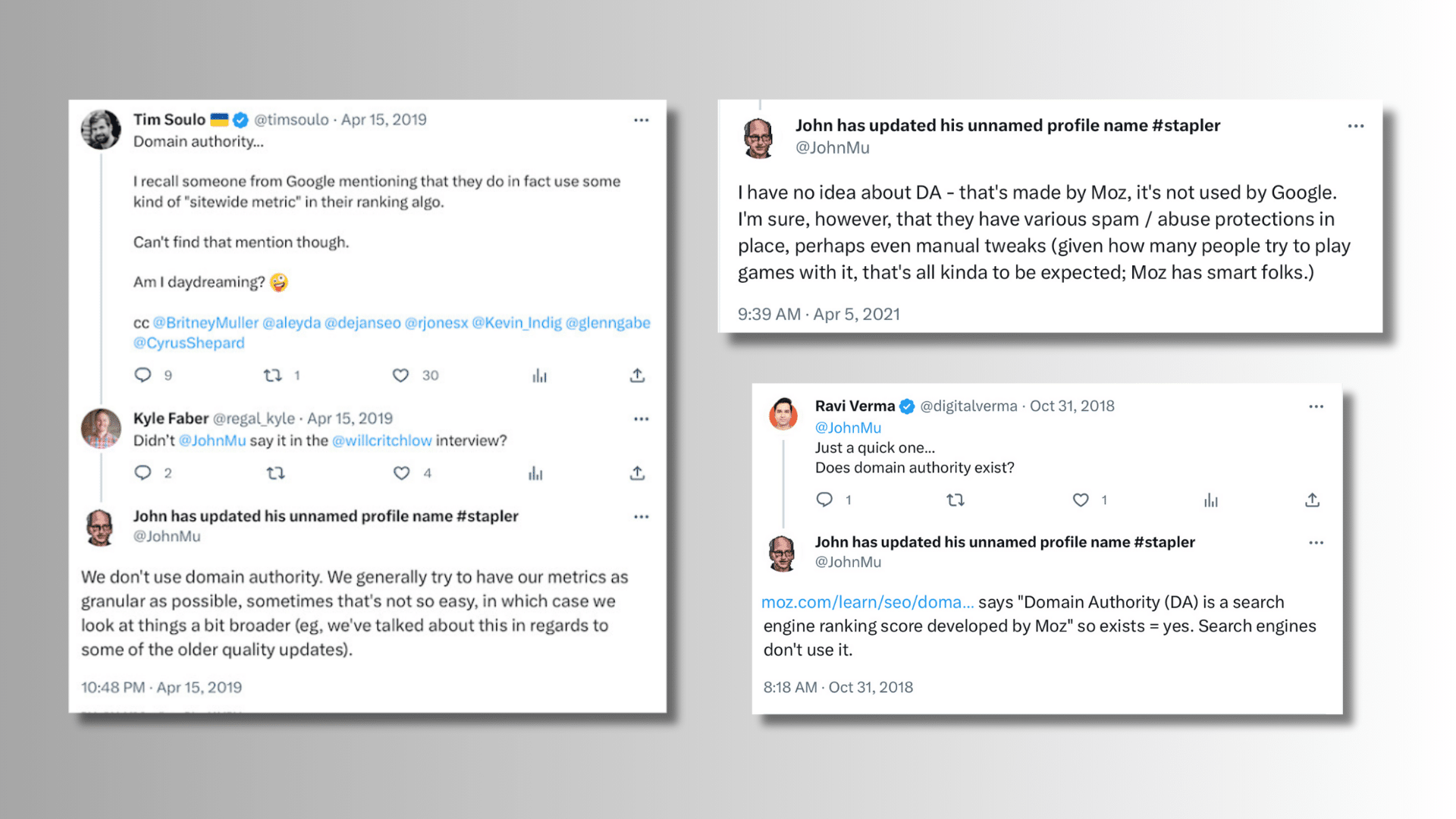
Seriously, Google, specifically John Mueller, can’t state this fact enough times.

John Mueller on Domain Authority

I have a whole collection of screenshots of Mueller telling people that DA doesn’t align with anything at Google that I use during a class I teach at UCLA about “SEO Mythology.”

Before someone jumps in with an “actually” here like they’re debating comic book character origin stories, Google has stated that they do look at some signals at the “domain” level. However, “authority” (i.e., link-based signals) is not one of them.

Years ago, while sitting on a panel with Gary Illyes of Google in Sydney, Australia, someone asked him about Domain Authority, and he replied: 

  • “We don’t use it, and it doesn’t align with anything we have at Google. [Moz’s] Page Authority has the right idea, but it is not exactly the same, obviously.”

Yes, you read that right. If you didn’t know it already, Moz has another “authority” metric called Page Authority. 

It’s still not the same as PageRank, but at least it’s in the same ballpark, and yet, Domain Authority seems to get all the attention at the dance.

Reading some of Jones’s old blog entries, frankly, I think the disconnect came down to a matter of semantics. In a blog post, “In Defense of Domain Authority,” he wrote: 

“If Google uses anything like the PageRank model, then domain level metrics matter, and here is why. The vast majority of links on the web are internal links. That is to say, most links are one link pointing to another where both reside on the same domain. Thus, the flow of link value is largely contained within these clusters formed around domains. The external links which point to any page on a domain are more likely to pass value on to more internal pages than to more external pages. While each individual external link pointing to a page is not itself a ‘domain metric,’ the undeniable outcome of this pattern is that we form a domain metric like phenomena in the process of simply following links through the web.”

Jones wasn’t the first person to say this, and I doubt he’ll be the last, especially after this article hits the web. 

Usually, when I debate about Domain Authority, some variation of the “internal links matter, and that’s what I really mean when I say ‘domain authority'” argument above comes out. 

However, the problem comes back to the fact that Google still says there’s no such thing as a “domain authority” in their book, so the point is moot.

Dig deeper: Google: Don’t worry about SEO tool scores

Reason 2: It’s a weak correlation

TL;DR – Moz’s Domain Authority doesn’t strongly correlate statistically with Google rankings.

This is a bit of a walk, so be patient.

A few years ago, while working on an article for another publication about the misuse of statistical “studies” by various SEO tool companies, the statistician who assisted me, Jen Hood, reviewed a presentation by Rob Ousbey at Mozcon 2019. It covered Ousbey’s theory of how results on Page 1 of search engine result pages are driven more by engagement with those pages than links. 

Wanting to learn more, I reached out to Ousbey’s old boss, Will Critchlow, founder and CEO of Distilled, who offered me another study by a former colleague of Ousbey, Tom Capper, that provided a deeper dive into the material that Ousbey presented back in 2019.

Capper’s slides reference a February 2017 presentation he did on whether Google still needed links. There was also a Moz study, which, I should point out, was five years old in 2017, so we are talking about the original version of Domain Authority here.

From my interview with Hood on this matter:

  • “In this, [Capper] looks at how Domain Authority and rankings relate,” referring to the Moz metric that is the cornerstone of the tool’s inbound link reporting. “He gives the correlation of Domain Authority to a webpage’s Google ranking as 0.001 for positions 1 through 5 and 0.011 for positions 6 through 10.”
  • “This means that Domain Authority is more highly correlated with search engine ranking for positions 6 through 10, but both results are very weak correlations,” Hood paused to make sure I understood.
  • “To put this in plainer terms, for positions 1 through 5 in Google’s results, Domain Authority can be used to explain 0.1% of the variance in SERP ranking. For positions 6 through 10, it explains 1.1% of the variance in SERP ranking,” clarifying her point.
  • “This is held up as proof that Domain Authority doesn’t matter as much for top positions. Yet the correlations for both are so extremely low as to be nearly meaningless.”

During DemandJump’s recent webinar, Brock presented numerous instances of websites with high Domain Authorities whose content ranked horribly compared to other websites with much lower DA scores (sometimes by more than half!).

Shortly after my interview with Hood was published, Jones was among the first to challenge the conclusions. However, I always felt he proved her point further by doing so.

  • “We know that no single potential ranking factor is going to explain the majority of the algorithm.” Said Jones in his response back in July 2020, “Weak correlations are going to be part of any complex system.”

And that’s my point. We’re dealing with a metric that correlates weakly to the one thing it is supposed to correlate to in the first place, or does it?

Reason 3: Domain Authority wasn’t designed to mimic Google

Have you ever seen someone try to drive a nail into a piece of wood with the handle of a screwdriver? It’s terrifying. 

Maybe it’s just because I have a childhood of my grandfather grumbling, “Right tool for the right job, boy!” 

I’m a little sensitive about this sort of thing. This brings me to my next problem with Domain Authority – people use this tool for the wrong damn job. 

According to Jones, the creator of Domain Authority 2.0, “Moz doesn’t claim to have a metric which mimics Google.”

Call me crazy, but why would anybody bother using Domain Authority if it doesn’t mimic Google?

Well, according to Moz’s website: 

“Domain Authority (DA) is a search engine ranking score developed by Moz that predicts how well a website will rank on search engine result pages (SERPs).” 

Or, as Hood puts it: 

  • “Moz claims to have a metric which predicts with some degree of accuracy the likelihood a site will rank based solely on domain-level link metrics.”

However, as we’ve already established, Google doesn’t look at link-based authority on the domain level, so we’re back to where we started.

Not long after our article on shoddy SEO studies was released, Jones clarified in a Twitter conversation with Hood that: 

  • “Moz does not make a claim that Domain Authority established many cause-effect relationships that lead to a specific ranking on Google.”

Domain Authority’s big lie

James’s major complaint with the error metric in modern-day baseball was that it was too easy to avoid. According to Lewis:

  • “The easiest way not to make an error was to be too slow to reach the ball in the first place.”
  • “You have to do something right to get an error,” wrote James. “Even if the ball is hit right at you, then you were standing in the right place to begin with.”
  • “The statistics were not merely inadequate; they lied,” Lewis continued. 
  • “And the lies they told led the people who ran major league baseball teams to misjudge their players, and mismanage their games.”

That’s what’s happening with Domain Authority – it’s lying to people.

I get it. People love to get things down to “one number” to make their lives easier.

But even in baseball, they know they need to look at myriad metrics to help make their decisions, and their dataset isn’t anything near the size of Google’s.

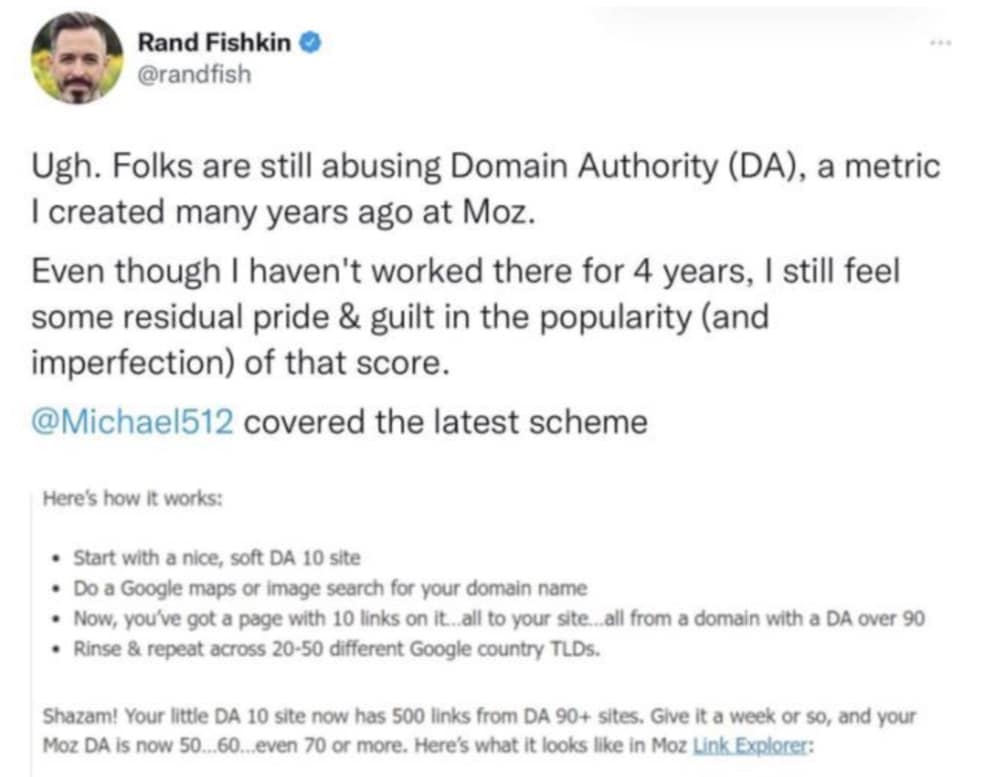
I mean, at this point, Fishkin himself is kind of embarrassed by Domain Authority, and you can imagine what it took for him to get to this “I have become death, the destroyer of worlds” moment after all this time.

Rand Fishkin on Domain Authority

Who is DA hurting, really?

The idea behind DA was to provide a more accurate and reliable way of measuring a website’s authority and influence than simply looking at its PageRank. 

Moz can use the excuse that it’s not their fault that people are misusing their product as a comparison for ranking in Google. 

But just like when a company that makes weed killer finds out their product is giving people cancer, you don’t just shrug and say sorry. You take that poison off the market. 

Look, I get it. They’re not prescribing Thalidomide to pregnant women or ignoring the health hazards of smoking here. 

Still, Moz has a large segment of the SEO industry hooked on a metric in the belief that it aligns with Google’s rankings when it has nothing at all to do with Google’s rankings.

Millions of companies live and die by the Domain Authority metric every day. When it drops, people panic, and sometimes, jobs are lost because goals aren’t met. 

Meanwhile, as we all know, an entire link and domain buying and selling micro-economy exists with Domain Authority as its core metric. The domain name reselling industry alone is a multi-billion-dollar business. 

Given the clandestine nature of link selling, who knows how much money is wrapped up there?

Companies that use Domain Authority as a KPI often find themselves participating in black-hat link-building practices solely to improve their DA score rather than creating a better experience for their visitors. 

Meanwhile, those same companies end up ignoring the real KPIs of their business in favor of what is basically a vanity metric.

Moz is a good company (I actually use it to teach SEO at UCLA). Still, they could stop all this carnage at any time by simply clarifying that Domain Authority has nothing to do with Google or, better yet, doing away with it altogether.

Moz may never take this metric off the table, but at the very least, you can stop using it in your SEO reporting.


Opinions expressed in this article are those of the guest author and not necessarily Search Engine Land. Staff authors are listed here.


Related stories

New on Search Engine Land

@media screen and (min-width: 800px) { #div-gpt-ad-3191538-7 { display: flex !important; justify-content: center !important; align-items: center !important; min-width:770px; min-height:260px; } } @media screen and (min-width: 1279px) { #div-gpt-ad-3191538-7 { display: flex !important; justify-content: center !important; align-items: center !important; min-width:800px!important; min-height:440px!important; } }

About the author

Jeff Ferguson

Jeff Ferguson is a passionate growth marketer and digital educator who has led the online marketing efforts for companies such as Hilton Hotels, Kimberly-Clark, InterActiveCorp, Experian, and Napster. In his current role as Head of Amplitude Digital, he has worked with renowned brands such as Belkin, Billabong, CBS, eHarmony, JustFab, Manchester United, Paychex, PetSmart, Popcornopolis, The Smithsonian, Stila Cosmetics, ThriveMarket, Sony, and many more. Jeff has been a columnist for various publications, including Search Engine Land and Search Engine Journal, where his legendary data research projects have tipped many sacred cows of SEO and paid media advertising malpractice. As an instructor at UCLA, Jeff teaches advanced digital marketing classes and designed the school’s first-ever course on Search Engine Optimization (SEO) where he instructs the next generation of marketers how search engines really work.

https://searchengineland.com/moz-domain-authority-case-against-431732


Google Search updated its language matching systems

Google has released another Google Search update around its language matching systems. This update was released two weeks ago, but Google only announced it earlier this morning.

What Google said. Google wrote, “Over the past few months, we’ve also released a series of updates to improve our language matching systems, including the latest update about two weeks ago. Collectively, these should better match results to the language someone searches in, while still allowing for the flexibility multilingual searchers need to access results in multiple languages.”

What changed. Over the past year or so, there have been many complaints where Google was getting the preferred language of the searcher wrong. This resulted in searchers not seeing the content they wanted in Google Search for sites in the language they wanted.

This update should improve how Google matches the language of the searcher to show more relevant web pages in its search results.

Google added, “We will also keep improving how our automated systems determine the language of results to show, so that we continue to list the most helpful information we can to people in the languages they prefer.”

When this was released. Google released this update two weeks ago but only announced it today.

What this impacts. Google said this impacts all languages worldwide.

Why we care. If you have a non-English web site this may have impacted your visibility in Google Search. This update may now lead to your site showing more or less frequently for specific queries in Google Search. Again, this was about improving the search results to match the language of the searchers query better.


Related stories

New on Search Engine Land

@media screen and (min-width: 800px) { #div-gpt-ad-3191538-7 { display: flex !important; justify-content: center !important; align-items: center !important; min-width:770px; min-height:260px; } } @media screen and (min-width: 1279px) { #div-gpt-ad-3191538-7 { display: flex !important; justify-content: center !important; align-items: center !important; min-width:800px!important; min-height:440px!important; } }

About the author

Barry Schwartz

Barry Schwartz is a Contributing Editor to Search Engine Land and a member of the programming team for SMX events. He owns RustyBrick, a NY based web consulting firm. He also runs Search Engine Roundtable, a popular search blog on very advanced SEM topics. Barry can be followed on Twitter here.

https://searchengineland.com/google-search-updated-its-language-matching-systems-431776


12½ emotional ingredients for SEO success

In his book, “Twelve and a Half,” Gary Vaynerchuk explores essential emotional skills integral to his life and business success. 

Developing these skills as an SEO professional can set the stage for a successful career:

If I had been aware of these 12 and ½ emotional ingredients during the early days of my career, I would have approached many situations differently.

Let’s dive into each trait and how you can use them.

1. Unlock your SEO potential and embrace curiosity

Curiosity is a must-have trait for any skilled SEO expert. It’s all about diving deep into the company, product, customer persona, websites and other team processes. 

Without this contextual knowledge, your recommendations could miss the mark, eroding trust with clients, employers and teammates.

But curiosity doesn’t just enhance your SEO game – it fuels professional growth. By embracing curiosity, you uncover the latest in SEO, UX best practices, project management, and even “minor” skills like creating helpful prioritization matrices. These skills are invaluable when juggling multiple websites and stakeholders.

2. Learn to ‘count to 10’ with patience

Initial setbacks or early hurdles should not discourage you. 

Let’s face it: SEO success demands hard work, and results rarely happen overnight. 

As an SEO professional, you’ll often find yourself preaching the gospel of patience.

  • Educating stakeholders on why Semrush and Google Search Console show different positions for the umpteenth time. 
  • Explaining to the dev team why excessive redirects aren’t ideal, even if users remain unaffected. 
  • The classic question about the quarterly plunge in organic traffic (because nobody asks about the upward trend) from teams that haven’t implemented any recommended changes. 

In these moments, my golden rule is to respond with a deliberate delay, refining my initial reply and highlighting any positives.

3. Unleash your tenacity and embrace the ‘impossible’

Don’t be disheartened by discouraging responses like “I don’t know,” “Our website can’t handle it,” or the classic “This is impossible.” 

Tenacity means pushing on, asking how it can be done, and challenging the idea of impossibility. 

(Kudos to StackOverflow, Stack Exchange, and ChatGPT for showing that the “impossible” is achievable!)

I may not be a JavaScript whiz or well-versed in React or Node.js. But that doesn’t mean I won’t notice if a website fails to render correctly.

Just recently, in one of my projects, none of my trusty plugins rendered the website properly. Google Search Console hinted at occasional rendering glitches, but as a user, everything appeared fine. The dev teams were convinced everything was flawless. 

I endured the chorus for months, “Your SEO tools are faulty; check how they work and clear your cache.” 

But then, a tiny error message caught my eye in the Chrome console.

After half a day of research, it turned out my SEO tools were solid. A rendering issue indeed existed due to tag setup and a Node.js update months ago.

You can only imagine my pride. But what made me even prouder was how I handled it afterward.

4. Kindness wins, so join every conversation with respect

Our fast-paced lives are all focused on achieving results and meeting deadlines. But let’s not forget that we’re only human, and mistakes happen.

Take the rendering issue, for example. I’ll admit I was fortunate to discover it through my tenacity. 

However, a younger me might have started the conversation with, “I’ve been telling you for months that something’s not right, but you ignored it. Now, what will you do with this proof?”

Not the best approach for a productive conversation or future collaboration, right? Now, as a wiser version, I opted for a simple suggestion: 

  • “I came across this error in the Chrome console and did some research. Could you please check it out? It might be what we’ve been searching for.”

Same information, different emotions, and potentially different outcome.

Kindness isn’t so hard. Often, it’s about stepping into someone else’s shoes and asking simple yet powerful questions like, “How are you?” 

The challenge lies in giving ourselves enough time to do so. 

Think twice before speaking and four times before writing (since writing lacks tone and body language, which can easily lead to misunderstandings).

5. Know what you don’t know and embrace self-awareness

It’s vital to gauge your business-specific knowledge and understand your professional standing. We live in a fast-paced era where digital marketing and businesses evolve rapidly. 

Don’t hesitate to lean on the expertise of others or openly admit when you’re unfamiliar with certain concepts or lagging behind in the latest SEO tools.

Having a realistic sense of how you stack up against others is equally crucial. Being self-aware isn’t just about recognizing your skills and knowledge; it’s about keeping your ego in check. 

6. Stay grounded and deflate your ego

A valuable lesson came my way recently, courtesy of my manager. I’ve collaborated with various external agencies as an in-house SEO. 

Some partnerships were fantastic, with both sides learning and growing together. Others, let’s just say were a never-ending cat-and-mouse game. 

But no matter the relationship type, the journey always began with rough edges, fueled by my skepticism and a defensive stance.

It hit me that my hesitation wasn’t solely due to past experiences with these agencies. It was rooted in a slight offense, thinking outsiders lacking business knowledge would dare to review my work. 

Thanks to my manager’s guidance, I’m now trying to shift gears. I aim to view these agencies as extensions of our internal team, unburdened by history. 

It’s about adopting their fresh, critical perspective and learning from it. Over time, I hope to cultivate an open mind, eagerly seeking feedback and embracing the chance to fill gaps in my work.


Get the daily newsletter search marketers rely on.


7. Listen and connect with empathy 

Building alliances and friendships with colleagues from other teams is vital. 

Show empathy, listen, understand their challenges and goals, and demonstrate how you can support them. 

Educate both teammates and stakeholders. These efforts will pay off in the end.

Picture this: You won’t have to be the constant website guardian, as others understand the impact of headline tweaks. 

Stakeholders will recognize the importance of effective page titles. People will invite you to crucial meetings about website, content and infrastructure changes.

By aligning your SEO strategy with other teams’ goals, more resources and support will flow freely to your projects.

8. Own your impact as accountability builds trust

Trust is earned through accountability. As a competent professional, only recommend changes you genuinely believe in, no matter their scale. 

When things go awry, take ownership of the outcome. Be responsible for SEO deliverables and the projects on which other teams rely. 

Avoid making empty promises about meeting deadlines you can’t meet. If you realize you won’t deliver as agreed, communicate promptly.

Here’s a handy practice: Keep a written record of agreements and promises and a list of emails where these were shared. 

It’ll save you from overlooking crucial details and help prevent last-minute scope changes. 

Furthermore, showcasing SEO’s meaningful impact on business numbers is essential. Your SEO efforts should translate into real customers for your business.

Now’s the time to dive deep into Salesforce (or your company’s equivalent tool) if you haven’t yet. Ensure your Google Analytics tracking is robust, capturing the entire user funnel and all significant website events.

9. Be ambitious and try to see the bigger picture

When you’ve earned trust, demonstrated SEO’s impact on crucial business numbers, and embraced accountability, people will be open to ambitious strategies. 

It’s time to think beyond boundaries and collaborate with content creators, developers, CRO specialists, UX designers, and UI experts. 

Understand how your recommendations intersect with their work and find common ground. It’s time to dream big.

Ambition isn’t easy. It takes a visionary outlook, a strategic plan and unwavering belief. 

You must convince others and decision-makers – a challenging task, especially when starting out.

10. Embrace conviction and never stop believing in the power of SEO

In the early stages, SEO can feel like a mysterious black hole. 

Results take months to materialize, and pinpointing the exact reasons can be challenging. 

That’s why it’s crucial to have an unwavering belief in your strategy and the tools you rely on. 

Take action and turn your strategy into tangible website optimizations.

The key is creating a strategy document for C-level executives, outlining your high-level actions. 

Then, transform that document into a detailed, step-by-step plan that considers your resources and those of other teams. 

My usual approach is an annual plan divided into quarters, which I update at the start of each quarter. 

Don’t forget to sync these plans with all the teams you depend on, such as content and development.

Have monthly or bi-weekly syncs with these teams to discuss the priorities and challenges for both teams. Try keeping detailed notes for every meeting so everyone can be on the same page.

11. Stay optimistic and don’t lose faith when your priority keyword’s ranking slips

Setbacks are inevitable in SEO. You may have experienced seeing your hard-earned results take a sudden nosedive. 

One day, you’re in the top five for your priority keyword, and the next, a Google update reshapes the entire organic landscape. 

This is the moment when optimism becomes essential. Remember that you can offset the traffic decline with other tactics.

However, there are two types of optimism. 

  • The first, “Based on Data,” stems from having faith in your thorough efforts and adherence to best practices. 
  • The second, “Believing in Miracles,” is not really reliable. 

Good SEO professionals rely on the former. 

Even if you’re 100% certain that you’ve done everything right, reexamine every step of your strategy if your rankings and traffic decline. 

12. Revel in gratitude and celebrate every achievement

Gratitude is a vital emotional ingredient, too. Appreciating even the smallest bits of progress along the way is crucial. 

I break down each project into meaningful milestones, allowing me to celebrate every incremental step. This boosts team morale and demonstrates progress to colleagues, other teams, and stakeholders.

Highlighting the impact of others’ work on overall company performance is equally important. In my regular reporting, whether weekly, monthly or quarterly, I make sure to mention the people behind the results. 

Celebrating small victories maintains optimism and highlights positive signs of progress. 

If you, as an SEO expert, believe in your ability to drive traffic and conversions, others will believe, too. 

And if you happen to be superstitious, you may be familiar with the phrase, “Positive thoughts bring positive results.”

12½. Embody kind candor

One of my former colleagues claims that “SEOs are naturally critical.” 

I would phrase it slightly differently: we should not shy away from being a bearer of bad news. As a responsible SEO, you must embody “kind candor.” This is the last bit of the 12½ emotional ingredients. 

Often, people undertake projects without fully comprehending the impact on organic traffic or the necessary work involved. 

As an SEO expert, it is your duty to openly express your concerns in a timely manner. Keeping silent typically yields more negative results. 

It is crucial, however, to articulate your opinions with kindness and respect.

By embodying the 12½ emotional ingredients, you can go from an SEO specialist who merely checks off tasks and generates a ton of work for other teams to a meaningful partner for your colleagues and the business.


Opinions expressed in this article are those of the guest author and not necessarily Search Engine Land. Staff authors are listed here.


Related stories

New on Search Engine Land

@media screen and (min-width: 800px) { #div-gpt-ad-3191538-7 { display: flex !important; justify-content: center !important; align-items: center !important; min-width:770px; min-height:260px; } } @media screen and (min-width: 1279px) { #div-gpt-ad-3191538-7 { display: flex !important; justify-content: center !important; align-items: center !important; min-width:800px!important; min-height:440px!important; } }
About the author

Maria Georgieva

Maria Georgieva has been working for more than a decade in digital marketing, specializing in search engine optimization in the last eight. She is now heading SEO at Payhawk, Bulgaria’s premier unicorn company. Her résumé also includes overseeing the SEO team at the US-based Progress Software. Her user-centric approach underscores her belief that optimal sites are designed with users in mind. Before beginning her digital path, Maria held positions in project management and business journalism.

https://searchengineland.com/emotional-ingredients-seo-success-431746


Google August 2023 Core Update rollout is now complete

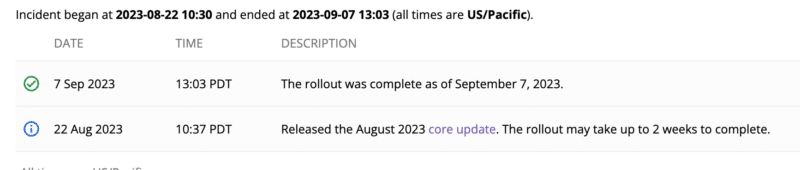
Google has confirmed that the August 2023 Core Update – the second core update this year – has completed rolling out. The update started on August 22, 2023, and completed 16 days later on September 7, 2023.

Why we care. Google algorithm updates are critical for all brands, businesses, and organizations to be aware of because they can impact how your site performs in search results. Any change in rankings from a core update – positive or negative – can impact your organic traffic, conversions and revenue.

Knowing when Google makes these updates gives you something to point to in order to understand if it was something you changed on your website or something Google changed with its ranking algorithm.

What now? It’s a good time to dig into your analytics to see what improvements you may want to make to your pages and content.

The announcement. Google updated its status dashboard that the update has completed rolling out today, as of 4:03 pm ET:

Screenshot 2023 09 07 At 4.07.03 PM 800x170

Core updates are big. In general. Google core updates are significant algorithm updates. The early SEO industry chatter suggested this update was a fairly impactful update compared to previous core updates. Now that the update is complete, we will do a report on the impact of this update in the coming days.

Previous core updates. Here’s a timeline and our coverage of recent core updates:

Reviews update. The April 2023 reviews update was the last confirmed Google update. That update started on April 12 and finished on April 25.

Also this year was the February 2023 product reviews update, it started on Feb. 21 and ran for 14 days, ending on March 7. This was a significant update.

What to do if you are hit. Google has given advice on what to consider if you are negatively impacted by a core update in the past. There are no specific actions to take to recover – a negative rankings impact may not signal anything is “wrong” with your pages, according to Google.

However, Google has offered a list of questions to consider if your site is hit by a core update. Google said you can see a bit of a recovery between core updates but the biggest change you would see would be after another core update.


Related stories

New on Search Engine Land

@media screen and (min-width: 800px) { #div-gpt-ad-3191538-7 { display: flex !important; justify-content: center !important; align-items: center !important; min-width:770px; min-height:260px; } } @media screen and (min-width: 1279px) { #div-gpt-ad-3191538-7 { display: flex !important; justify-content: center !important; align-items: center !important; min-width:800px!important; min-height:440px!important; } }
About the author

Barry Schwartz

Barry Schwartz is a Contributing Editor to Search Engine Land and a member of the programming team for SMX events. He owns RustyBrick, a NY based web consulting firm. He also runs Search Engine Roundtable, a popular search blog on very advanced SEM topics. Barry can be followed on Twitter here.

https://searchengineland.com/google-august-2023-core-update-rollout-is-now-complete-431593


How to use Google Analytics 4: A complete guide

Google Analytics 4 (GA4) has now become the defacto analytics tool for millions of users across the globe. 

Google has made several significant changes to GA4 since its initial release four years ago. If you’ve been procrastinating on growing your GA4 knowledge, now is the time to learn the ins and outs of the “new” analytics tool.

In this guide, we’ll walk through the basics of GA4 and how you can use it.

The Admin section

Let’s go through the nuts and bolts of GA4 before we dive into the dashboard and additional tools.

When you go into the Admin section, you may notice that there are just two columns instead of the three we’re used to in Universal Analytics.

The left-hand column contains the Account Settings, where you can share access, remove users, delete your account, etc. 

The All Filters area lets you see your account’s filters aggregated. So, if you exclude any internal traffic, referrals, etc., all those filters will appear here.

Image

You can’t actually create filters here. That needs to be done in additional sections.

There are a lot of sections in the middle column, so we are only going to focus on the ones you will likely use from the start.

Data Streams

Data Streams is where you will find the basic settings for your GA4 property.

You can find your GA4 measurement ID, tagging instructions, enhanced measurement settings, and more here.

Events is where you can create some events in GA4. 

I say “some” because while GA4 may look like it can handle custom events, the truth is that this event setup is only good for destination-based events (i.e., a user landed on a thank-you page).

Conversions

Here is where you can designate any of your events as conversions. While UA topped out at around 20 conversions per account, GA4 will allow you to create up to 30. 

Audiences

Here is where you can create custom audiences for your GA4 account. 

While they are primarily used for Google Ads, SEOs can still leverage them to gauge user behavior and site activity.

Data Settings

Image 1

About halfway down the admin list, you’ll see Data Settings.

It is an important part of your GA4 property as you will determine how you collect your data. There are four parts to data settings. 

Data Collection

Inside Data Collection, you will find an option to turn on Google signals data collection.

Google signals is nothing new, but with a new world focused more on data privacy and collection, it has some potential consequences for your GA4 account.

Here’s what Google says:

“By activating Google signals, you enable Google Analytics to collect data about your traffic in addition to data collected through a standard Google Analytics implementation in order to provide additional features like cross-device audiences and insights.

When enabled, Google Analytics will collect visitation information and associate it with Google information from accounts of signed-in users who have consented to this association for the purpose of ads personalization. This Google information may include end user location, search history, YouTube history, and data from sites that partner with Google—and is used to provide aggregated and anonymized insights into your users’ cross-device behaviors. By enabling these features, you acknowledge you adhere to the Google Advertising Features Policy, including rules around sensitive categories, have the necessary privacy disclosures and rights from your end users for such association, and that such data may be accessed and/or deleted by end users via My Activity.”

By turning on Google signals, you can use that data for demographic information and retargeting purposes.

However, Google will start applying thresholding (sampling) to your account.

Image 2

See that small red icon? That means thresholding has been applied to your account and will limit the amount of data that you can see inside your GA4 account. It does not mean the data is lost, but it is not visible now.

When you see a green checkmark (like the one below), that means you are viewing 100% unsampled data.

Image 3

So, what should you do with Google signals?

If you’re not running paid search campaigns, then it’s best to turn it off. 

There’s no point in having it on (unless demographic data is very important), and for most users, you want to see your data immediately without worrying about sampled data.

Data Retention

Data Retention affects the retention period for cookies, user identifiers, and advertising identifiers. The default setting is two months.

Free GA4 users can change it to 14 months, while Google Analytics 360 users can change it to even longer. 

It also affects the data range you can use in your explorations.

Data Filters

Data Filters are where you can create and activate any filters you want to apply. This section, currently, is all about filtering out internal or developer traffic.

While the option to create a filter is present, you can’t actually filter out IP addresses here. 

To do so, you would need to:

  • Navigate to Data Streams and click on your property.
  • Click on Configure tag settings and Show more.
  • Click Define internal traffic.
Image 4

This can confuse first-time users, as you must go to a completely different section to create the true filter.

Channel Groups

A new addition to the GA4 wheelhouse, Channel Groups allows you to create custom channel groupings where you can add or update how certain sources are grouped. 

Google has these settings created for you but also allows you to create your own.

This could be a chance to attribute certain campaigns to your own custom channels. 

For example, if you run a few paid campaigns with unique locations, you could create custom channels to filter incoming traffic to those specific channels.

It’s a bit of an advanced feature, but it’s certainly nice to have.

DebugView

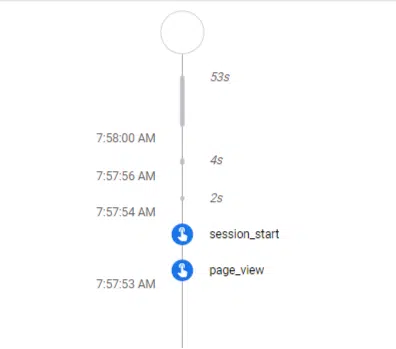
Debugview is a welcome addition to GA4 as it allows you to test your events and conversions in real-time without fumbling around in real-time reports like you had to in UA.

Image 5

You can see the events come in order, and after you’ve set up your own events, make sure those are tracking as well. 

Connecting tools

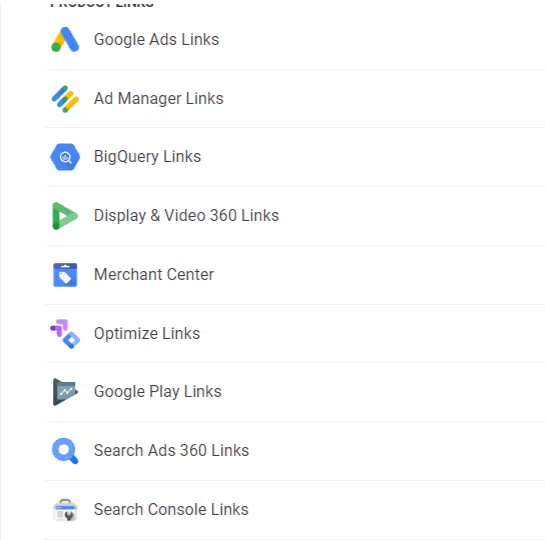
Under all the GA4 account options, you will see a new section called Product Links.

This is where you can link additional Google products such as Google Ads, BigQuery, Google Search Console, and more.

Connecting is incredibly easy, simply hit the product you want to connect and then the blue Link button at the top-right corner. 

Image 6

However, you do have to be an admin on both products you’re linking to. So, you cannot complete the link between them if you have view-only access to one or both products.

The dashboard

As you jump in, you’ll notice a very different look and feel to your dashboard. 

You will see many widgets, a recently accessed row, and additional cards with various metrics and dimensions.

Then, there’s the menu on the left side of the dashboard where you can find:

  • Home
  • Reports
  • Explore
  • Advertising
Image 7

Home

This is the dashboard you see when you first log in, where you get:

  • A quick snapshot of the last seven days.
  • A real-time report.
  • The last areas accessed.
  • Some suggested metrics and dimensions to check out.

Reports

Here is where you might see some different items. If you set up your GA4 account before April-May 2023, your Reports section will look like this:

Image 8

If you set up your account after April-May 2023, you will see something that looks like this:

Image 9

I think it’s unnecessary to include Business objectives and Life cycle together because they hold the same reports with some crossover.

  • Generate leads = Acquisition
  • Drive online sales = Monetization
  • Raise brand awareness = User Attributes
  • Examine user behavior = Engagement

For the sake of this guide, I’ll be using the Life cycle section as it is guaranteed to be in every GA4 account (unless you made edits), unlike Business objectives. 

Acquisition

Acquisition is just like it sounds: you can see how you acquired users to your site. 

The Overview report looks like your homepage, giving some basic metrics and dimensions to check out.

Image 10

User acquisition and traffic acquisition are different reports.

  • User acquisition will track how the user first arrived at your site.
  • Traffic acquisition shows the most recent traffic source.

So, if a user first landed on your site via a paid ad and then came back later through an organic visit, the User acquisition report would attribute that user to “Paid Search” for both sessions. 

The Traffic acquisition report would attribute one session to “Paid Search” and one session to “Organic Search.”

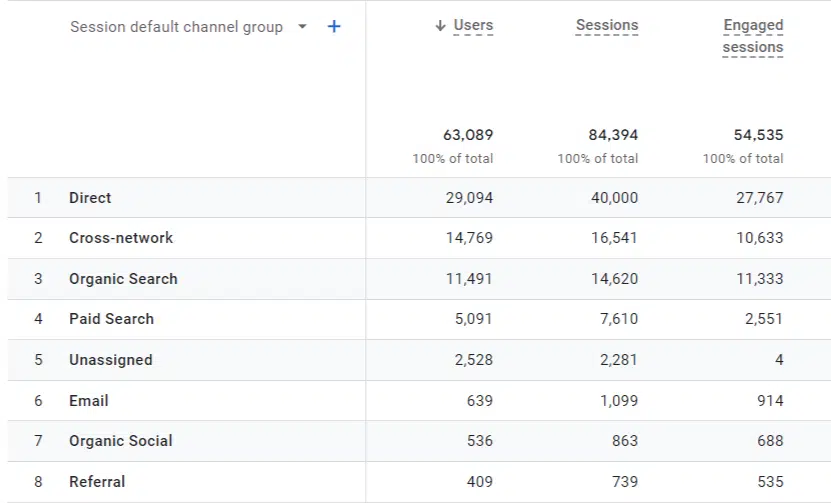
Image 11

Which you rely on depends on what your needs are. Most users rely on traffic acquisition, which will break down each session by its most recent attribution. 

Engagement

Under Acquisition, you will see Engagement, which will likely be where you spend most of your time in GA4. 

It will give you the total number of users, sessions, events, conversions, and more. This is the best place to start if you’re in charge of making monthly or quarterly reports. 

Image 12

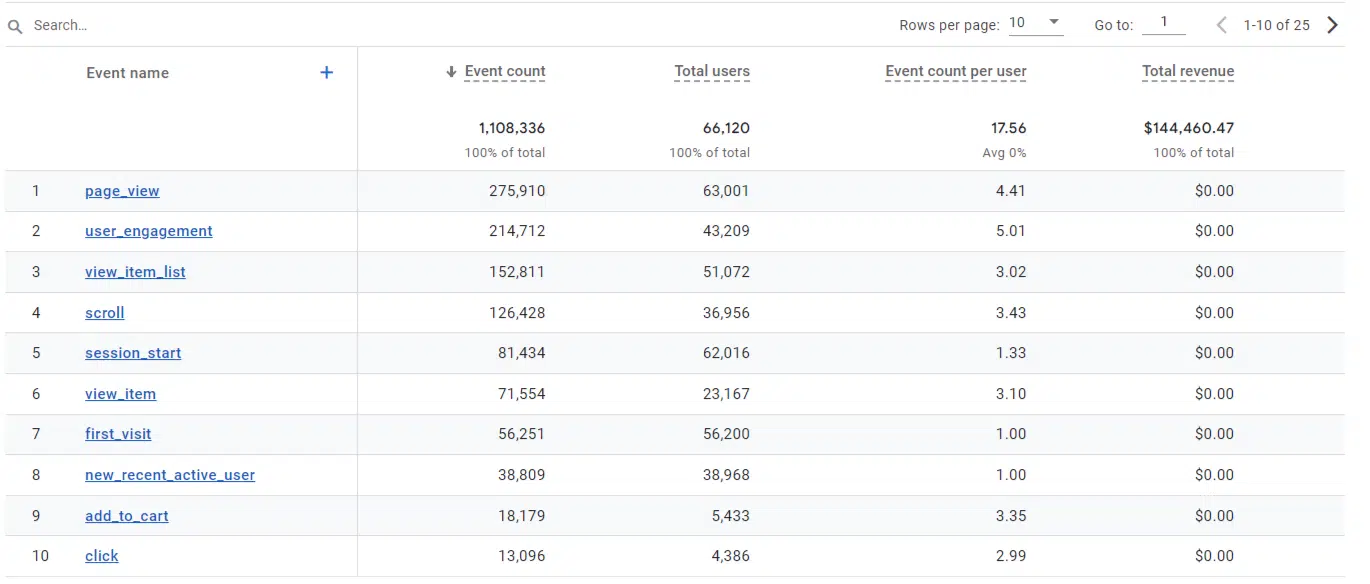
Events

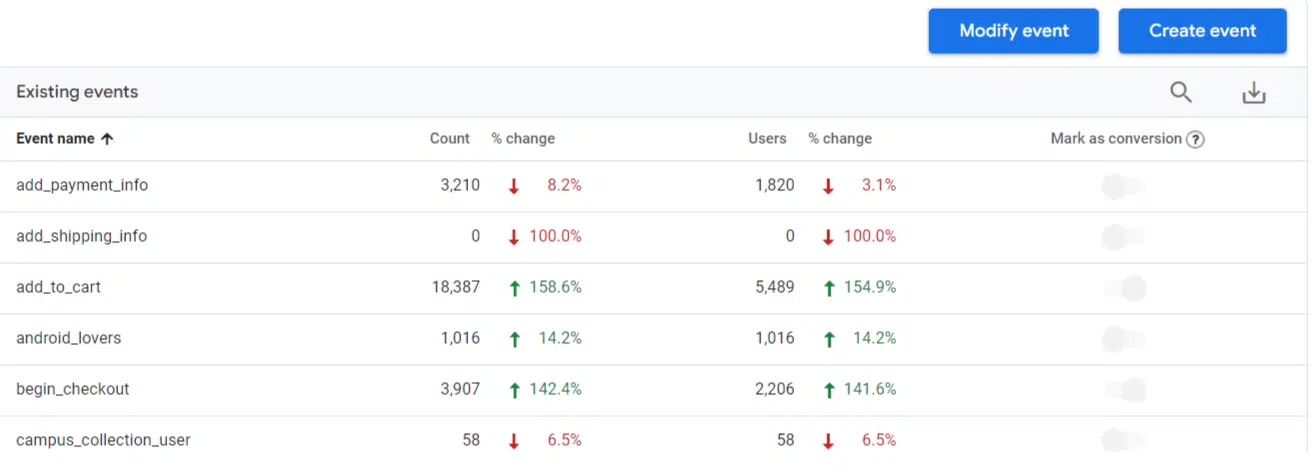
Events is where you will see all of your events. In UA, items like page views were tracked as hits. Now, they are tracked as events. Everything is an event now. 

Since everything is an event, you can have up to 500 unique event names per account. Conversions are topped out at 30 per account.

Image 13

All of your automatically collected events and custom events will appear here, including any events marked as a conversion. 

Conversions

In the Conversions report, you will see any of your events marked as a conversion. 

Image 14

Similar to the events tab, you will see the total conversion count, users, and any other metrics you want to add.

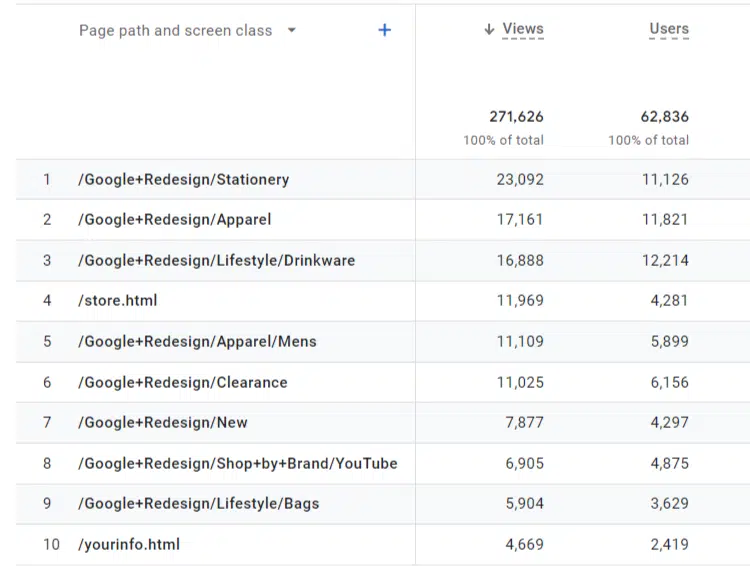
Pages and screens

Pages and screens is where you can look at pageviews over time. This allows you to see the pages people interact with on your website.

Image 15

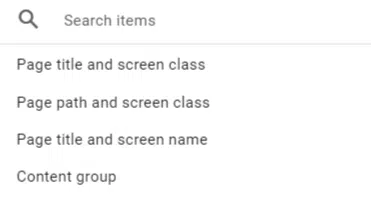
Above the row of pages is a dropdown menu with the dimensions. You can change Page path to Page title or Content group.

Image 16

Generally, I like to stick with Page path because I am more likely to recognize a URL for a report than the page’s title.

Landing pages

Landing pages will be the go-to report for many digital marketers, especially SEOs who rely on landing page sessions as the foundation for reporting.

Landing page is quite similar to the pages and screens report. You don’t have the option to change the primary dimension (to the preferred Landing page + query string, for example).

Monetization

Monetization is where ecommerce marketers will be spending a lot of their time. 

Ecommerce purchases

Just like the name suggests, you’ll be able to see revenue and stats for items across your online store.

GA4 added some handy metrics here that give you an idea of user behavior, such as: 

  • Items viewed.
  • Items added to cart.
  • Items purchased. 
Image 17

User purchase journey

This very interesting report provides a visualization of the user’s buying behavior. 

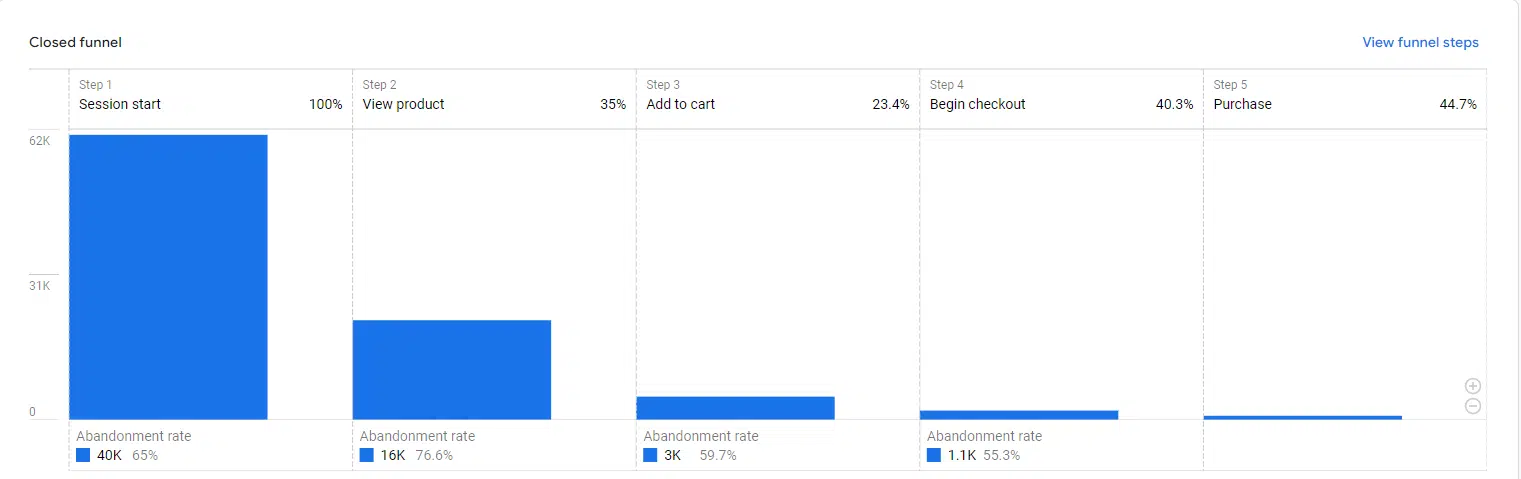
This can be edited in explorations, or you can also create your own custom funnel and export it here. 

Image 18

You can examine dropoff or any pain points along the buyer’s journey here.

User 

User provides details about the users themselves, mainly what devices they were using and more demographic information.

User Attributes

Under User Attributes, you will find Overview and Demographic details. 

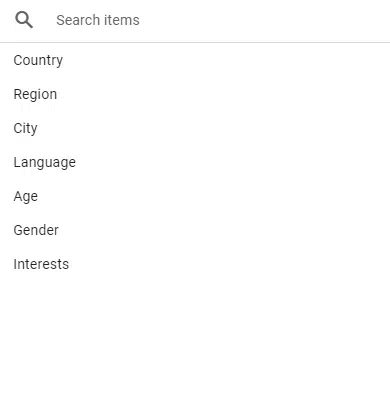
In my opinion, the overview here is more comprehensive than in other reports as it breaks down the demographic information you would expect:

  • Age
  • Gender
  • Interests
  • City
  • Country
  • Language

The Demographic Details report, on the other hand, allows you to dive into more specific metrics by demographic dimension. 

Image 19

You can break down revenue by city, country, users, and more here. 

Tech

Tech functions the same way as demographics. 

The Overview report gives you a general overview covering multiple dimensions, such as operating system, device category, browsers, and screen resolution. 

The Tech details report allows you to look at metrics by specific dimension. You can make sure your Smart TV traffic isn’t falling behind. 

Image 20

Advertising

Advertising is where you can find some quick insights into what you might find in your Google Ads dashboard. You will only see data here if you are running paid campaigns. 

All channels

Here, you will get an overview of your site’s conversion metrics. 

You can find a breakdown of conversions, cost/conversion, revenue, ROAS, and more. This is where you can check the success of various campaigns and channels.

Image 21

Model comparison

Model comparison recently changed significantly, as Google removed some attribution models from this report. This left users with “Data-driven” and “Last click” as the two primary models. 

Depending on when you made your account, you might be able to see old attribution models, but newer accounts will only have two options.

Both of these models can still be useful when reporting and looking at your data. Once again, these won’t be available unless you have paid campaigns running.

Conversion paths

In Conversion paths, you can examine touchpoints of users through channel groups, campaigns, sources, and mediums. 

Once again, this area will only be available to users running paid campaigns.


Get the daily newsletter search marketers rely on.


Next, let’s dive into creating some custom reports you can use.

Events and conversions

Events and conversions are crucial for measuring KPIs and user behavior across the site. Setting them up is a bit different than how you might be used to in Universal Analytics.

The basics

Gone are the traditional event category, event label, and event action. Now we just have an event.

Image 22

Each of these events has its own unique parameters which define the event. 

Some of these may be destination-based, others may be GA4-recommended events, and others might be custom setups, such as clicking a button or opening a chat. 

Destination-based conversion

Start by navigating the Events tab and then click Create event. Once inside, hit Create.

You’ll be asked to name your event and define some parameters here.

Remember, everything in GA4 is classified as an event, so you must set the event_name parameter to page_view.

Then, we need to set where this event should occur. Let’s say we have a simple thank-you page after a lead generation event.

The final product should look like this:

Image 23 800x388

Once you’re finished, hit Create in the top-right corner and voila! You have your first destination-based event ready.

But how do you switch it to a conversion?

Head over to the Conversions section in the admin menu. From there, hit New conversion event, enter your event name and save.

Image 24

Great, now your event is set up as a conversion!

Now, we need to test your conversion. There are a few ways to do this. 

  • You can use a third-party tool like Analytics Debugger to test your event in real-time. 
  • You can use Google Tag Manager’s preview mode and track your event in real-time.

Other custom events

Any additional custom events must be set up using Google Tag Manager. You could set up countless events, and it would be impossible to go through them all here, but we can go through the basic steps.

Go to your account’s GTM container and select Add new tag after you enter.

The Create a tag window will pop up, allowing you to create a tag from scratch. 

Start by naming your tag and then click on Tag Configuration > GA4 Event.

Image 25

If your Measurement ID is already loaded into GTM, you can select it. If not, you can manually enter it in Configuration Tag.

After you’ve done this, you should enter your event name exactly how you want it to display in GA4.

Image 26

You will have to set the trigger yourself (as stated above, there are limitless options here).

Then, you can follow the same steps as above to make it a conversion.

Customizing GA4

While the basic reports can give you some easy-to-see information, they often don’t provide the value you need. 

One of the best parts about GA4 is being able to customize it to your liking. You can easily customize and create a number of reports to give you better insights.

You can customize metrics, dimensions, and filters to make reports with easy-to-find information.

Organic landing pages

A bread-and-butter report for all SEOs – an organic landing page report is a must.

To do this, let’s go to Engagement and click on Landing Page.

Image 27

Once this loads, click on the pencil icon in the top-right corner.

Image 28

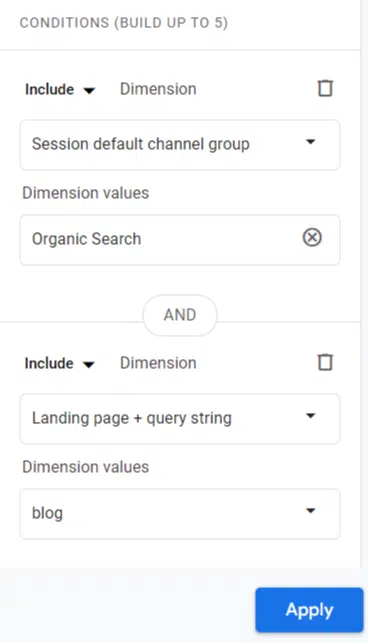
Once that loads, click on Add Filter. A new section will appear and ask you to choose a dimension. 

Type in or scroll down and select Session default channel group. Under Dimension values, choose “Organic Search.” 

Here’s what the finished product looks like:

Image 29

Hit OK and then Apply. Now, you have your organic landing pages dashboard.

You can also take this further and add additional filters to the report.

Let’s say you want to see only blog pages on your site. Go back into filters and click +Add New Condition.

You can select Landing page + query string and set it for any pages that contain /blog/. 

Now, your report will filter down organic sessions to the blog section of your site.

Image 30

Before you leave, you’ll want to ensure you save your changes.

After making any changes, you will see a blue save button appear. Here, it would be best to save it as a new report. 

This way, you’re not going to overwrite the original report and can return to it and make additional dashboards (like filtering traffic down to social, referral, etc.).

After you hit Save changes as a new report, name it and back out.

The library

When you go back to the Reports main screen, you will see a Library icon at the bottom. Click on that. 

Image 31

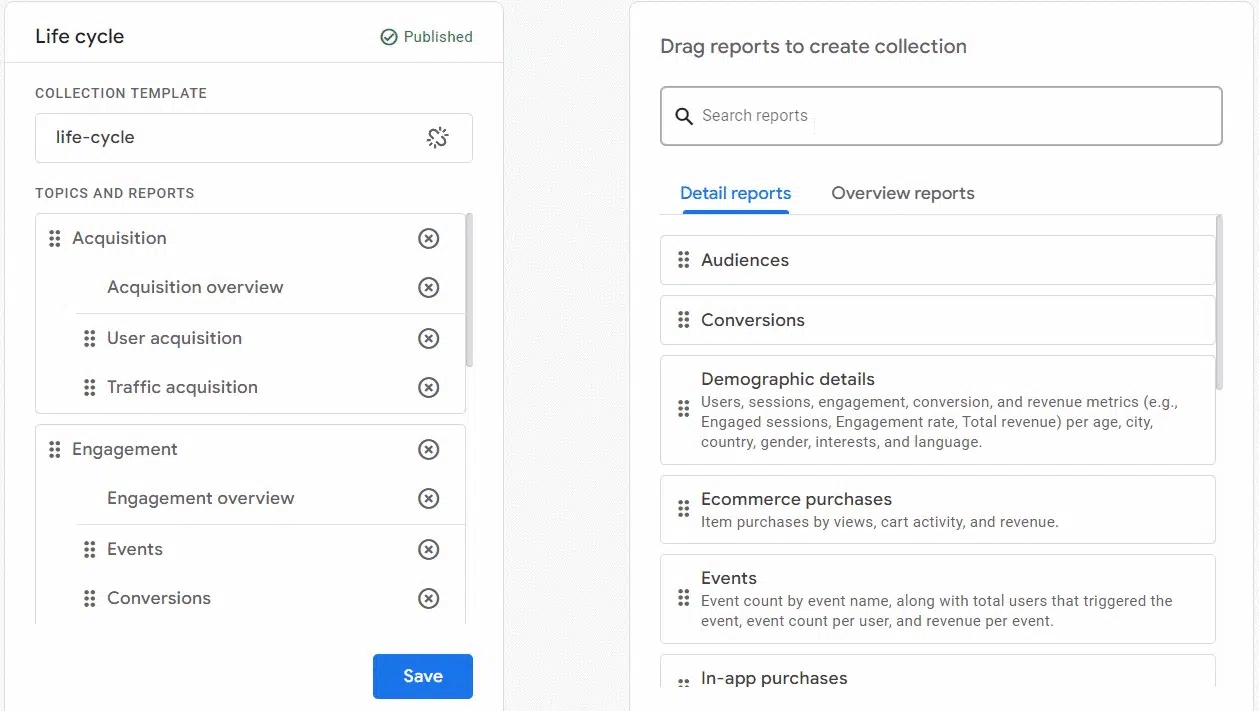
Here, look for the Life cycle card and click Edit collection. 

Image 32

From here, we can search for our custom report and easily drop it into Life Cycle. There is our first one, Organic Landing Pages.

Image 36

You can repeat this step to bring in any additional reports you want to add to your GA4 dashboard. 

Explorations

Originally a feature in UA 360, Explorations is one of the biggest features of GA4, which is why it received its own section here.

Image 33

Google describes Explorations as “a collection of advanced techniques that go beyond standard reports to help you uncover deeper insights about your customers’ behavior.”

Essentially, Explorations lets you dive a little deeper into the data than you could with the out-of-the-box reports you find in GA4. 

To get to Explorations, click on the squiggly symbol in the menu. 

Image 34

From there, you’ll see various template options.

Image 35

The different types of explorations are:

  • Free form: The “open world” of explorations. Used to create a table.
  • Funnel exploration: Track funnel progress.
  • Path exploration: A minor facelift from UA’s user behavior flow, allowing you to track custom user journeys.
  • Segment overlap: Examine custom segment behavior overlaps. 
  • Cohort exploration: Compare users grouped together by similar characteristics.
  • User lifetime: Analyze a user over their specific lifetime.

We’re only going to look at a few exploration examples today, as there could be many articles about each type of exploration. 

Free form

We already examined how to create a custom report, but an exploration allows you to dive a bit deeper. By creating a “Top Pages Exploration,” you have the flexibility to tailor everything according to your preferences.

To begin, navigate to the Explorations section and select the Blank option. Give this exploration a name such as “Top Organic Pages.”

Next, you’ll need to create a segment focusing on organic users. Click on the ‘+’ sign next to segments and choose the Session segment option.

Image

Next, we need to import dimensions and metrics into our exploration.

Click on the ‘+’ sign next to dimensions. Use the top bar to search for “landing page” and select the option that appears. Then choose “session source/medium” and import that as well.

Next, let’s bring in our metrics. Some basic, vital metrics to grab are:

  • Sessions
  • Session Conversion Rate
  • Conversions
  • Average Session Duration
  • Views per session

Now, we can start building it.

Image 1

Add the dimensions to rows and your metrics to values. 

After doing so, you’ll start to see data populate your exploration.

Explorations are, in a way, endless and can be created for whatever purpose you need.

Funnel exploration

A funnel exploration is a bit more straightforward and a must for any ecommerce business. You can track how users move across a purchase funnel and where the dropoffs are.

If you open the funnel exploration, it will have a standard funnel with the following steps:

  • First Visit
  • Session Start
  • Page View/Screen View
  • Purchase

You can see how the funnel works and the basic metrics it provides. 

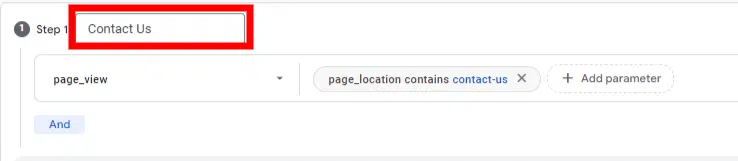
To make our own funnel, let’s make one for a Contact Us funnel where we start on the Contact Us page and end on a Thank You page.

Go to the Steps portion of your funnel and click the pencil icon. 

Image 37

Here, you can start adding your custom funnel steps. 

Image 38

To set up the parameters for the segment, I selected the event “page_view.” 

Next, I specified the starting point of the funnel by adding a condition for “page_location” that contains the text “contact-us-start.” 

Please note that there are alternative methods to achieve this, such as using the full URL or page title, but I opted for this approach here.

After the first step, I added some additional steps. Here’s what it looks like:

Image 39

Funnel options

Going through the funnel, you probably noticed some funnel options. Here’s a quick summary:

  • Indirectly/Directly Followed By:
    • Choose between directly or indirectly followed steps in your funnel.
    • If a step is “directly followed by,” then the next funnel step must immediately follow.
  • The Timer:
    • Sets a time limit between funnel steps.
    • Users who don’t complete the next step within the allotted time will not be counted in the funnel statistics.
  • Open/Closed Funnel:
    • By default, funnels are closed.
    • Opt for an open funnel to allow users to enter at any stage, not just at Step 1.

Path exploration

This one is more flexible than its old UA counterpart. 

For instance, you can choose any page or event as your starting or ending point (with a meaningful event count).

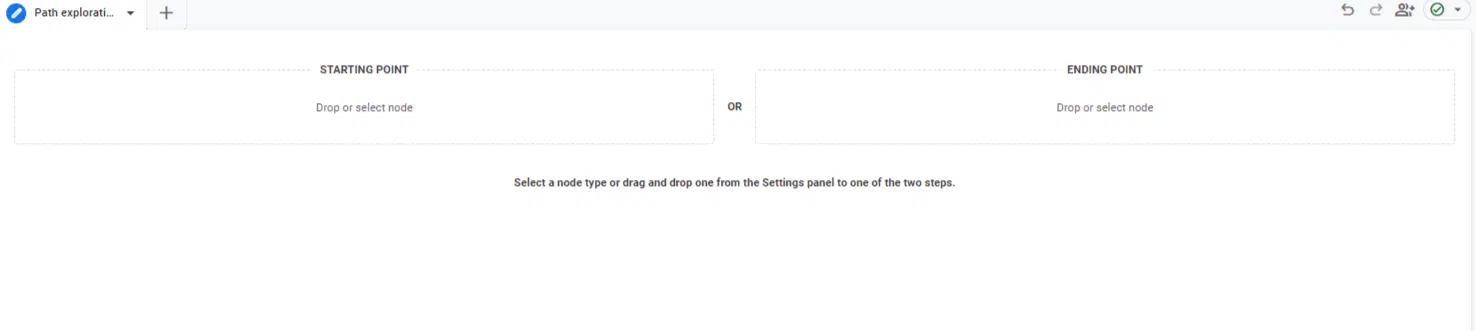
To create one, go to your Explorations dashboard and click on Path exploration. 

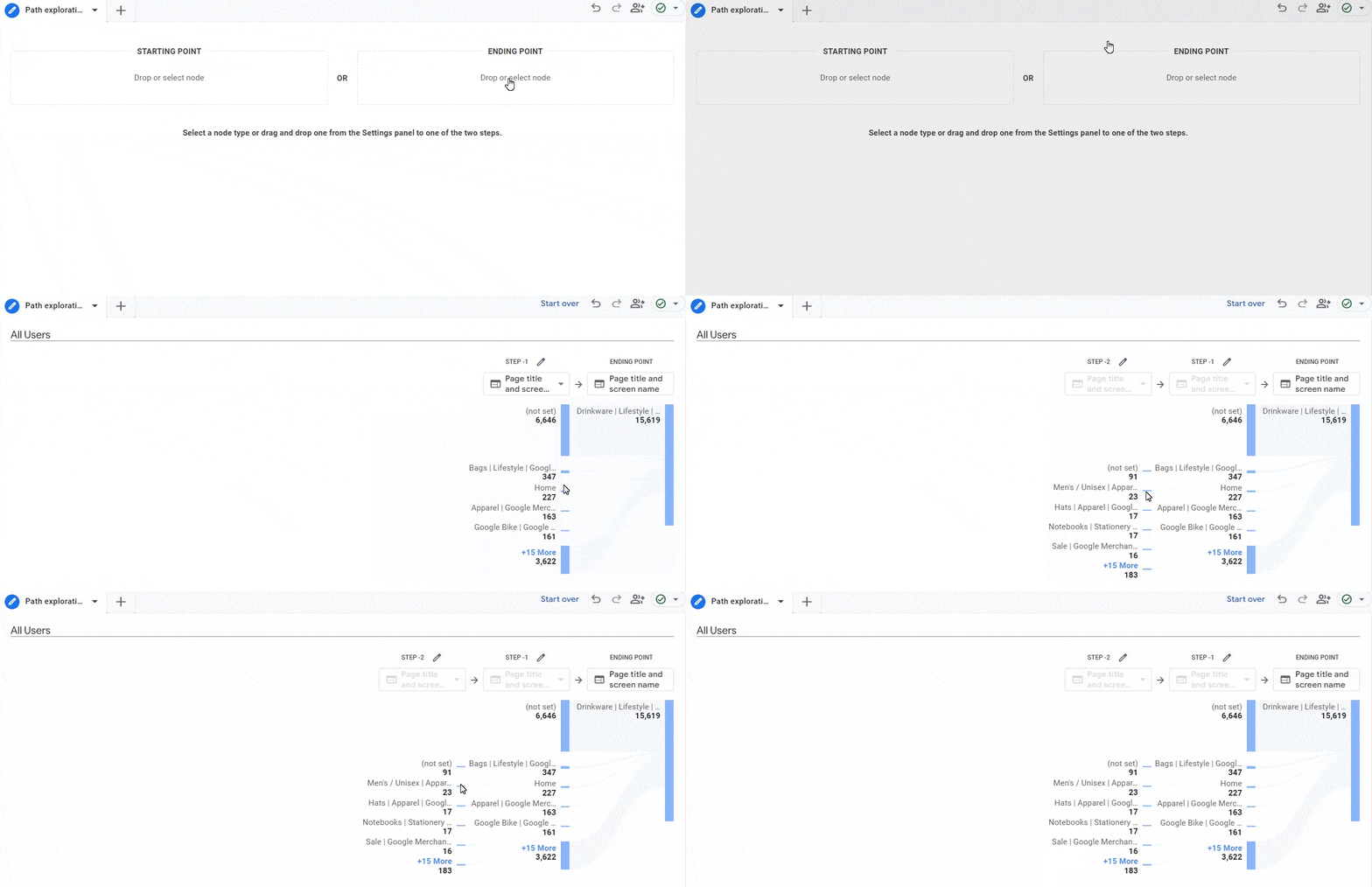
If you want to start fresh, click the Start over button in the top-right corner.

Image 40

When prompted to select your starting or ending point, choose the Starting Point option.

Let’s say you’re interested in analyzing user activity after they land on a specific blog page. Click on Starting Point and select Page path and screen class.

You’ll be presented with various page paths to choose from. You can either find the desired page or use the search function in the top-right corner to locate it easily.

After selecting the starting point, you can click on the blue nodes to explore how users navigate throughout your website.

Image 2

If you want to include multiple blog or category pages within the same path exploration, follow these steps:

  • Click Start over in the top-right corner to begin again.
  • Choose the event name and select “session_start” in the second node titled Step +1.
  • In the Step +1 node, click the pencil icon to customize the pages to include.
  • Select the desired page paths or page titles (e.g., top 3 with “Google+Redesign”).
  • Click Apply to save your selections.
  • Avoid clicking on the X+ More option unless you want to reset your filtered settings. You can explore and analyze user behavior with the chosen pages without clicking on that option.
  • These steps will allow you to set up your path exploration with specific starting points and explore user navigation within your blog or category pages.

Conversely, you can also use Ending Point. This is quite handy and can be used to track how users arrived at a certain conversion or page on your site.

Image 3

To use it, you would follow the same steps as with Starting Point by clicking on the blue nodes and moving backward. 

Getting used to GA4

There’s no doubt that GA4 will take some getting used to. With a new dashboard, metrics, dimensions, and a new way of tracking, there will definitely be some bumps along the way.

With this guide and your own experience, you’ll be able to grasp the basics of GA4 and mold it to fit your or your clients’ needs. 

Note: The GA4 Google Merch Shop Demo account was used for most screenshots unless stated otherwise.


Opinions expressed in this article are those of the guest author and not necessarily Search Engine Land. Staff authors are listed here.


Related stories

New on Search Engine Land

@media screen and (min-width: 800px) { #div-gpt-ad-3191538-7 { display: flex !important; justify-content: center !important; align-items: center !important; min-width:770px; min-height:260px; } } @media screen and (min-width: 1279px) { #div-gpt-ad-3191538-7 { display: flex !important; justify-content: center !important; align-items: center !important; min-width:800px!important; min-height:440px!important; } }

About the author

Jake Peterson

Jake Peterson is a Senior SEO and Web Analytics Manager at Go Fish Digital. Jake started his digital marketing career almost 10 years ago before settling into his current analytics role. When he’s not working, Jake enjoys cheering on his Baylor Bears or planning his next vacation.

https://searchengineland.com/how-to-use-google-analytics-4-guide-431630


Entities, topics, keywords: Clarifying core semantic SEO concepts

In this article I’ve curated some of the most commonly misunderstood elements of entity and semantic SEO, aiming to clear the fog around them.

Here’s our roadmap:

  • What are the differences between entities, topics and keywords?
  • How do entities affect keyword research?
  • What is a topical map?
  • How do you do on-page optimizations in the entity paradigm?
  • What role does schema markup play in entity SEO?
  • What are semantic networks and how do you build them?

What are the differences between entities, topics and keywords?

One of the most common areas of confusion I’ve seen when discussing entities is what differentiates keywords, topics and entities from each other. 

Because entities, keywords and topics are intertwined elements in the vast landscape of SEO, it can often be difficult to truly tease apart each definition. 

Entities

These are the foundational concepts or things in content. At a basic level, entities can be singular nouns, like “chocolate cake” or “iPhone.” 

But they can also represent more complex named concepts, such as events like “The Olympic Games” or places like “Mount Everest.” 

In SEO’s semantic framework, entities are unique, identifiable concepts consistent across various texts or contexts. They aren’t tied to specific phrases but represent broader ideas. 

Within a keyword phrase like “delicious chocolate cake recipe,” “chocolate cake” is the entity. 

On a larger scale, for a website about tech reviews, entities such as “smartphones”, “laptops”, and “gadgets” guide its overarching themes, signaling to search engines the primary subject matter.

Keywords

These are the specific phrases or terms users type into a search engine. They’re the bridge between the user’s intent and the content they’re trying to find. 

Keywords can encapsulate one or more entities, reflecting what users are actively seeking. 

For instance, while “iPhone” is an entity, a keyword that encompasses it might be “iPhone 12 Pro Max review.” 

Topics

Topics are thematic areas or categories that encapsulate one or more entities. Think of a topic as an umbrella under which multiple entities can reside. 

For example, under the topic “Smart Home Technology,” entities could include “Google Nest Hub,” “smart thermostats,” and “IoT security.”

Here’s a summary of their key distinctions:

Scope

  • Topics are broad and can encompass multiple entities and even various keywords. 
  • Entities are more specific and focused.
  • Keywords are the specific searchable terms related to both.

Hierarchical relationship

  • Entities usually fall under topics. 
  • Keywords can align with either entities or topics or sometimes both.

SEO

  • Topics guide your broader content strategy.
  • Entities help focus and refine that strategy.
  • Keywords serve as the target for actual search queries.

Intersection

  • Topics can be used to form content clusters.
  • Entities and keywords serve to refine and specify the content within those clusters.

User intent

  • Topics guide the user through their informational journey.
  • Entities provide specific answers.
  • Keywords can be crafted to meet specific user queries.

Semantic networks (in the context of SEO)

  • Topics often serve as nodes in semantic networks that connect related entities.
  • Keywords serve as the pathways that lead users to those nodes.

The relationship between topics and keywords manifests in how keywords help flesh out the various aspects of a given topic. 

In a well-structured content strategy, the keywords you target should naturally fall under the umbrella of your chosen topics. 

This ensures that your content is relevant and comprehensive and satisfies a range of user intents related to your topic.

In essence, topics serve as the overarching themes that guide the scope and direction of your content, providing a high-level focus. 

Entities further sharpen this focus, giving search engines like Google a nuanced lens to understand the core essence of your content, both on micro and macro levels. 

Keywords, meanwhile, refine and drill down into specific facets of your overarching topics, making your content discoverable to users with particular queries related to those topics.

How do entities affect keyword research?

Traditionally, SEO strategies were rooted in keyword research, focusing primarily on keyword difficulty and search volume. 

Specialists would aim for low-hanging fruit – terms a site could realistically rank for – before moving on to more competitive keywords. 

While effective in the past, this approach has become less optimal due to evolving search algorithms. 

Today, a keyword-centric methodology risks creating disjointed topics across a website, undermining the development of topical authority.

Imagine if topics occupied a physical space where some topics are proximal while others are distant. 

In this space, “bowling shoes” would be closer to “bowling” than “fun nights out with the family” – however, “fun nights out with the family” might not be far off. 

This is how advanced language models perceive language. They generate graphical representations to discern topical relevance.

If your site has a scattered topic structure, jumping from one loosely related topic to another (as with ad hoc keyword targeting), Google might find it challenging to decipher your website’s core intent. 

This could lead to a decline in ranking or just an inability to be competitive for the keywords that really matter to your business.

While targeting low-hanging fruit in terms of keywords is still viable, it doesn’t necessarily establish a website as an authority in a specific niche. 

To optimize content in this era, we need to consider two key aspects:

Density of the subject matter

Your goal should be to cover content that is graphically close together and to do it better than any competitor. Assess the competition. 

Determine which sub-niche within your realm you can outshine others in. Can you truly be the go-to expert on the subjects you target? 

Image

Logical subject expectations

Creating content that naturally aligns with your site’s objectives is crucial for SEO success. 

I often see SEO professionals broadening their content scope excessively or employing AI to cover every conceivable angle of their subject matter, which misses the mark entirely. 

For instance, imagine a site focused on “Kettlebell Workouts for Beginners.”

Adding an article about the history of kettlebell design, while interesting, may not directly benefit the site’s primary audience, who are looking for actionable workout tips. 

Entity SEO is not a free pass to cover every topic under the sun. It’s imperative to prioritize the content that resonates with your site’s main objectives and aligns with Google’s understanding of your expertise. 

In other words, before you delve into the nuances of kettlebell design, ensure you’ve already covered the basics your audience is actively searching for. 

Only expand to broader topics when you’ve observed the search engine sees you as an expert in your sub-niche (this is usually observable by top rankings and quick rankings of new articles). 

Image 1

Remember: Establishing oneself as a topical authority is an ever-evolving challenge. Success hinges on thorough research, pinpointing subtopics ripe for deeper exploration – areas others might have overlooked. 

Equally critical is identifying content clusters within competitor domains, not just to replicate but to outdo.

However, stay attuned to their backlink profiles. Gauging your ability to match or even outpace these external factors is crucial for a realistic strategy.


Get the daily newsletter search marketers rely on.


What is a topical map?

As we discussed above, SEO was often synonymous with keyword research and this was stage one of an SEO effort. 

Marketers would scour the web, hunting for keywords promising high search volumes and low competition. 

The strategy was simple: find a high-potential keyword, create content around it, rinse and repeat. 

This tactic was more about sniping possibilities than building a holistic digital presence. 

The aim was to grab those low-hanging fruits – isolated keywords that could easily be targeted to drive traffic. 

The idea was you’d build a base of ranking content and then slowly advance to more difficult terms over time. This approach was ultimately keyword-centric.

The cluster-centric approach 

In my opinion, an evolved SEO strategy should focus on strategic decisions around clusters of content and not exclusively aimed at individual keywords.

Enter topical maps – a vital tool in modern SEO that helps you better visualize and plan your content strategy. 

A topical map is essentially a visual representation of your primary subject and how it connects to various sub-topics and themes. 

Think of it as a spider diagram or a mind map. At the center of this map, you have your main subject – the overarching topic your site focuses on. 

Branching out from this central node are related sub-topics, which serve as the pillars supporting your main subject. 

Each sub-topic can further divide into specific themes or even narrower facets, providing a layered, organized structure to your content.

Imagine your central topic is “Basketball.” 

From there, branches like “Basketball Techniques,” “Basketball Equipment,” and “NBA Teams” emerge. 

Dive deeper and from “Basketball Techniques,” you have “Free Throws,” “Dribbling” and more. 

Interspersed are your keywords, suggesting content angles and user intent.

Instead of focusing on individual keywords, you’re now looking at clusters – groups of related content pieces. 

These clusters allow you to paint a comprehensive picture of a subject, making your site a one-stop hub for audiences. 

When assessing competition and volume, the focus shifts from individual keywords to these clusters, looking at the aggregate potential rather than singular opportunities. 

Here, your focus becomes analyzing the landscape for what clusters of content your competition has and looking for pockets of where you can outperform their clusters instead of their keywords.

The benefits of thinking in clusters

This shift from keywords to clusters offers multiple advantages:

Depth and breadth

  • By covering related topics under one umbrella, you provide both in-depth insights and a broad overview, catering to various user intents. 

Authority

  • A cluster approach signals to search engines that you’re not just skimming the surface. You’re diving deep, establishing your authority in a niche. This triggers search engines to rank you higher, oftentimes for terms that you have weaker external factors than the competition on. 

Flexibility

  • Clusters allow for easier content expansion. If a new trend emerges within a cluster, you can seamlessly integrate it without disrupting your site’s structure.

Keyword clustering tools can be game-changers when building topical maps. They help you identify when a keyword deserves its standalone topic page or if it fits better within a broader topic.

In essence, the older approach was cherry-picking good keywords and using their success to propel your SEO forward. 

The new approach is to select clusters of dense content that establish authority. When done correctly, you can trigger a topical authority boost and circumvent the need for superior external SEO factors.

How do you do on-page optimizations in the entity paradigm?

Now that we’ve seen how entities can be factored into your high-level strategy and content roadmap via topical maps, let’s go through questions people ask about the actual implementation of entities on your site. 

On-page SEO and entities: What’s changed?

If you’ve engaged in SEO for any time, a notable change in your Search Console query report is that your pages often rank for keywords not directly mentioned within their content. 

Entities and the knowledge graph have transformed Google’s grasp on language. Previously, search results predominantly showcased pages that explicitly mentioned a keyword. 

But now, with the deeper understanding provided by entities, Google draws from a wider pool, considering pages that address topics in a related sphere. This leads Google to favor more comprehensive content pieces. 

This shift introduced what I term “authority pages.” These are content-rich pages saturated with entity relationships, designed to answer many potential user queries. Such pages aggregate the essence of what previously required several pages. 

As you develop these authority pages, AI tools can be instrumental. 

The fundamental procedure involves a few key steps:

  • First, utilize tools or methods like TF-IDF (Term Frequency-Inverse Document Frequency), RAKE (Rapid Automatic Keyword Extraction), or keyword extraction techniques to pull out crucial keyword phrases or entities from articles that already rank highly in your target area. This step is crucial because it helps you establish the minimum subject matter and terms that Google seems to view as essential for ranking in that particular topic space.
  • Once you have identified this baseline, the next objective is to go beyond it. Your aim should be to not just match the top-ranking articles in terms of entities and keywords but to exceed them by introducing new entity relationships or facets of the topic that haven’t been extensively covered. The idea is to offer a more comprehensive, insightful piece that adds value beyond what’s currently available, thereby enhancing your chances of being viewed as an authority on the subject by search engines.

I explore these concepts and tools in greater depth in How ChatGPT can help you optimize your content for entities, where I break down the nitty-gritty of how to maximize your topical authority in the SEO landscape.

What role does schema markup play in entity SEO?

The concept of entities is crucial in the world of SEO, serving as the focal points around which content is structured. 

Leveraging schema to highlight these entities can provide search engines with an even clearer understanding of your page’s subject matter and context. 

Schema is a tool often underutilized in the SEO community. 

While many stick to generic schema setups, custom options like “Mentions schema” can vastly improve how Google understands your content. 

Mentions schema allows you to specify what or who your page mentions, and can even link to authoritative sources like Wikipedia for greater clarity. 

Here’s how to implement it. 

Step 1: Identify your core entity

Before you begin implementing schema, identify the core entity or entities around which your content revolves. 

For example, if you’re writing a comprehensive guide about “Mediterranean Diet,” your core entity is the Mediterranean Diet.

Step 2: Use mentions schema

Utilize mentions schema to specify additional entities related to your core entity. 

If you’re discussing the Mediterranean Diet, you might mention entities like “Olive Oil,” “Fish,” and “Exercise.”

{ "@context": "http://schema.org/", "@type": "Article", "mentions": [{ "@type": "Thing", "name": "Olive Oil" }, { "@type": "Thing", "name": "Fish" }, { "@type": "Thing", "name": "Exercise" }]
}

Step 3: Use ‘SameAs’ for authoritative sources

When you mention other entities, use the “SameAs” attribute to link to their authoritative sources, such as Wikipedia pages or scientific studies.

{ "mentions": { "@type": "Thing", "name": "Olive Oil", "sameAs": "https://en.wikipedia.org/wiki/Olive_oil" }
}

Step 4: Visualize using tools

Tools like Schema Zone can help you visualize your schema structure. 

Plug in your URL to see if your schema correctly highlights your core and related entities.

Step 5: Test and monitor

Use Google’s Schema Testing Tool to make sure your schema is correctly implemented. 

After that, monitor your site’s performance to see how the enhanced schema affects your search rankings.

By consciously implementing schema to outline the entities within your content, you’re making your content more understandable to search engines and paving the way for better SEO performance. 

It’s an essential step to make your content not just readable but also “understandable” by search engines.

What are semantic networks and how do you build them?

The importance of a well-structured SEO strategy cannot be overstated, especially as search engine algorithms continue to evolve. 

While topical maps provide an initial framework defining which clusters of content you should focus on, they only scratch the surface. 

Enter semantic content networks – a refined, holistic approach that ties together the multiple facets of your content into a unified whole.

What is a semantic content network?

A semantic content network is a sophisticated way to structure and interconnect your website’s content beyond isolated pages and lone keywords. 

At its core, it’s an organizational model that serves as a roadmap for interconnecting your content. 

Rather than marking standalone pages or individual keywords, you’ll be plotting out clusters of interrelated content, usually in the form of internal links and hierarchical relationships. 

How does it build on traditional models?

If you’re familiar with the “hub and spoke” model, you’ll find similarities here. 

In this enhanced model, central themes or “hubs” serve as the anchor points, with related sub-topics or “spokes” branching out. 

What sets it apart is its keen focus on logic and accessibility, ensuring that both users and search engines can easily understand the architecture and flow of your content.

Why do semantic content networks matter?

In today’s SEO landscape, search engines like Google are shifting from a narrow focus on keyword counts to a broader understanding of content, context, and semantic relationships. 

A semantic content network helps you adapt to this advanced landscape, ensuring your content is not just easily discoverable, but also resonates with this new level of search engine understanding. 

By adopting this approach, you’re creating more than just a search-optimized website. 

You’re constructing a logically interconnected web of content that enhances the user experience and aligns perfectly with modern search engines’ intelligent, semantic capabilities. 

This is the future of SEO, and it’s a future where clarity, coherence, and connectivity reign supreme.

Prioritizing entities and semantic relationships in SEO

In SEO, we’ve transitioned from a narrow keyword-focused approach to an interconnected, holistic view encompassing entities, topics, and the broader semantic relationship between them. 

Entities, being the foundational concepts within content, help search engines understand the context and essence of a page beyond mere keyword repetitions. 

As we pivot to this enriched understanding, the importance of topical maps and semantic content networks becomes clear. 

They’re not mere tools; they’re strategies to better align with the evolving nature of search engines and, in turn, enhance user experience. 

A coherent, logical content web is not just the future of SEO – it’s the present. 

Recognizing and harnessing this shift can pave the way for more meaningful, impactful online experiences.


Opinions expressed in this article are those of the guest author and not necessarily Search Engine Land. Staff authors are listed here.


Related stories

New on Search Engine Land

@media screen and (min-width: 800px) { #div-gpt-ad-3191538-7 { display: flex !important; justify-content: center !important; align-items: center !important; min-width:770px; min-height:260px; } } @media screen and (min-width: 1279px) { #div-gpt-ad-3191538-7 { display: flex !important; justify-content: center !important; align-items: center !important; min-width:800px!important; min-height:440px!important; } }

About the author

Paul DeMott

Paul DeMott, a serial tech innovator and the founder of the Helium brand line, including Helium SEO, Helium Interactive, and Venture Automotive, currently holds the position of Chief Technology Officer at Helium SEO. Paul is a software developer that has made significant contributions to the development
of SEO and paid search technologies, including the creation of Saas tools NobleSEO.io, H1seo.io and MobileAdMonitor LLC. With a background in using programming, Natural Language Processing (NLP) and data science, he has constructed tools designed to enhance SEO strategies, providing a competitive edge to practitioners. Helium SEO is a technology-forward digital marketing agency that is driven by data and maximizes the use of AI and Machine Learning to deliver excellent SEO outcomes for both mid-sized businesses and large enterprises. Helium SEO boasts a team of over 50 professionals spread across 15 states with its headquarters in Cincinnati, OH. The company’s impressive growth and performance have earned it significant accolades: It has been recently recognized as the 5th fastest growing company and the 10th largest Marketing and Advertising Agency in Cincinnati, in addition to earning the #679 spot on the Inc 5000 list of rapidly expanding firms.

https://searchengineland.com/entities-topics-keywords-relationships-seo-431696


4 tips to prepare for Black Friday and Cyber Monday by Digital Drew SEM

Black Friday And Cyber Monday 1920 1080 800x450

Did you know? In 2022, Black Friday online sales totaled over $9.12 billion, and Cyber Monday sales totaled over $11.3 billion.

Black Friday and Cyber Monday are two of the biggest shopping days of the year in the United States. These events are a great opportunity for retailers to boost sales and generate excitement for the holiday season and for people to shop all at discounted rates. 

However, for online businesses, it is very important to prepare for these days by using digital marketing services. So, before we dive into the topic, let’s first understand the significance of these days.

How to prepare for Black Friday and Cyber Monday

Black Friday and Cyber Monday are two of the biggest shopping days of the year, and businesses can use digital marketing services to prepare for them. Here are some specific digital marketing services that businesses can use to prepare for Black Friday and Cyber Monday:

1. Start planning your email marketing campaigns

Black Friday and Cyber Monday are two of the biggest shopping days of the year, and email marketing is a great way to reach your existing customers and promote your deals. Here are some tips for starting your email marketing campaigns early:

  • Start planning early. The best time to start planning your Black Friday and Cyber Monday email marketing campaigns is in September. This will give you enough time to create engaging and effective emails and to test and optimize your campaigns.
  • Personalize your emails. People are more likely to open and click on emails that are personalized to them. Use your email marketing software to segment your list by customer interests and demographics and send targeted emails that are relevant to each group.
  • Offer exclusive deals. One of the best ways to get people to open your emails is to offer exclusive deals they can’t find anywhere else. This could be a discount on a specific product, free shipping, or a gift with purchase.
  • Track your results. It’s important to track the results of your email marketing campaigns to see what’s working and what’s not. This will help you improve your campaigns over time and get better results.

2. Optimize your website for search engines with SEO

By optimizing your website for Black Friday and Cyber Monday keywords, you can increase your chances of being found by people who are looking for deals.

  • Optimize your product pages for Black Friday and Cyber Monday keywords. When people are looking for deals, they are likely to search for keywords related to Black Friday and Cyber Monday. Make sure your product pages are optimized for these keywords so that they rank higher in search results.
  • Create holiday-specific content. In addition to optimizing your product pages, you can also create holiday-specific content, such as blog posts, infographics, and social media posts. This content should be informative and engaging and help people learn more about your products and discounts.
  • Build backlinks. Backlinks are links from other websites to your website. They are a signal to Google that your website is authoritative and trustworthy. In the weeks leading up to Black Friday and Cyber Monday, focus on building backlinks from relevant websites.
  • Track your SEO performance. It’s important to track your SEO performance to see what’s working and what’s not. This will help you make necessary adjustments to your strategy.

3. Use search engine marketing to reach new customers

By running SEM campaigns during Black Friday and Cyber Monday, you can reach a large audience looking for deals.

Here are some tips for running SEM campaigns for Black Friday and Cyber Monday:

  • Set a budget. Before you start running any SEM campaigns, setting a budget is important. This will help you avoid overspending and ensure that you’re getting a good return on your investment.
  • Choose the right keywords. When choosing keywords for your SEM campaigns, it’s important to select those relevant to your products and that people are likely to search for. You can use a keyword research tool to help you find the right keywords.
  • Create effective ad copy. Your ad copy should be clear, concise, and persuasive. It should also be relevant to the keywords you’re targeting.
  • Track your results. It’s important to track the results of your SEM campaigns to see what’s working and what’s not. This will help you improve your campaigns over time and get better results.

4. Run paid social ads

Paid social ads are a great way to reach a large audience looking for deals during Black Friday and Cyber Monday. You can boost your sales and reach your marketing goals by running paid social ads on the right platforms and targeting your ads to the right people.

Here are some tips for running paid social ads for Black Friday and Cyber Monday:

  • Choose the right platform. Not all social media platforms are created equal. When choosing a platform for your paid social ads, choose one your target audience is using. For example, if you’re targeting millennials, you might want to focus on Instagram and TikTok.
  • Target your ads. When you’re targeting your paid social ads, it’s important to be as specific as possible. You can target your ads by demographics, interests, and even past purchase behavior. This will help you ensure that your ads are seen by the people who are most likely to be interested in your offer.
  • Create engaging content. Your paid social ads should be engaging and relevant to your target audience. They should also be visually appealing and easy to understand. Use high-quality images and videos and write clear and concise ad copy.
  • Offer exclusive deals. One of the best ways to get people to click on your paid social ads is to offer exclusive deals. This could be a discount on a specific product, free shipping, or a gift with purchase.
  • Track your results. It’s important to track the results of your paid social ads so that you can see what’s working and what’s not. This will help you improve your campaigns over time and get better results.

By following these tips, you can run effective paid social ads to help you reach your Black Friday and Cyber Monday goals.

It’s time to act now 

As the holiday season approaches, the competition will only intensify. By implementing the strategies outlined here, you’re setting yourself up for a successful Black Friday and Cyber Monday. Remember, the time to act is now. Start refining your email marketing campaigns, optimizing your SEO, fine-tuning your SEM strategies and crafting eye-catching paid social ads. With these pillars in place, you’ll be well on your way to surviving and thriving during the holiday sales period. Your success story begins with the steps you take today.

For some great additional ad examples check out this blog: https://digitaldrewsem.com/black-friday-facebook-ads-examples/


Related stories

New on Search Engine Land

About the author

Digital Drew SEM

Digital Drew SEM is a full service marketing and advertising agency based in NYC. We offer a wide range of services such as Search Engine Optimization, Email Marketing, Paid ads, Search Engine Marketing, and more! With a passion for staying at the forefront of digital advertising trends and a commitment to delivering exceptional results, Digital Drew SEM is your go-to partner for maximizing your online visibility and conversions. Whether you’re a startup looking to establish your digital footprint or an established brand seeking to amplify your online reach, we are dedicated to helping you achieve your goals.

https://searchengineland.com/4-tips-to-prepare-for-black-friday-and-cyber-monday-431297


This SEO strategy led to 497 page-one rankings in 7 weeks by Cynthia Ramsaran

Technical SEO

Increasing first-page rankings and organic traffic has always involved guesswork. Experienced marketers know that deciding what content to produce and how to publish it can lead to wasted time, energy, and money. That can stop anyone dead in their tracks. But what would it look like if guesswork was no longer a factor in SEO and everything that goes into it?

Join Ryan Brock, chief solution officer at DemandJump, for a follow-up to last year’s Pillar-Based Marketing case study and how DemandJump eliminated the guesswork to win 497 first-page rankings in mere weeks on a highly competitive topic.

Register and attend “497 Page One Rankings in 7 Weeks: How Pillar-Based Marketing is Changing SEO,” presented by DemandJump.


Click here to view more Search Engine Land webinars.


Related stories

New on Search Engine Land

@media screen and (min-width: 800px) { #div-gpt-ad-3191538-7 { display: flex !important; justify-content: center !important; align-items: center !important; min-width:770px; min-height:260px; } } @media screen and (min-width: 1279px) { #div-gpt-ad-3191538-7 { display: flex !important; justify-content: center !important; align-items: center !important; min-width:800px!important; min-height:440px!important; } }
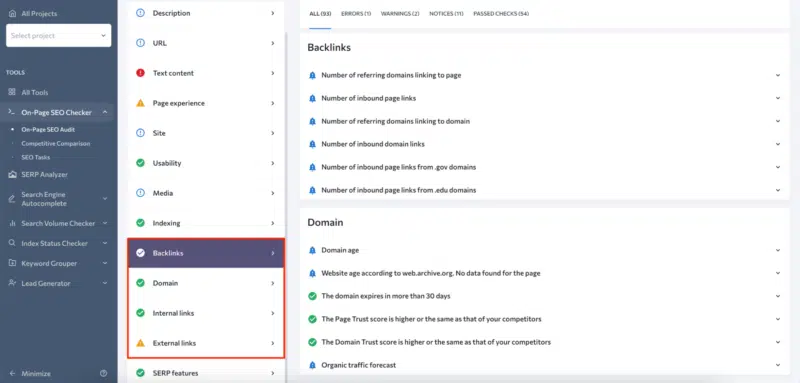
About the author

Cynthia Ramsaran

Cynthia Ramsaran is director of custom content at Third Door Media, publishers of Search Engine Land and MarTech. A multi-channel storyteller with over two decades of editorial/content marketing experience, Cynthia’s expertise spans the marketing, technology, finance, manufacturing and gaming industries. She was a writer/producer for CNBC.com and produced thought leadership for KPMG. Cynthia hails from Queens, NY and earned her Bachelor’s and MBA from St. John’s University.

https://searchengineland.com/this-seo-strategy-led-to-497-page-one-rankings-in-7-weeks-431627