How to structure people operations to scale SEO success

We often hear that SEO takes several months to a year to have an impact.

But that’s not entirely true. 

Technically speaking, results are possible within days if you get content live and indexed quickly.

But ironically, that’s often the part that gets stalled. 

Things just simply don’t go live – sometimes for months or even years.

In the marketing era of “do more with less,” SEOs have more pressure than ever before to generate impact from the work they do.

So that means content go-live and regular technical SEO updates happening efficiently is an absolute must.

That’s where operations become the key to success.

With structured operational processes, you ensure that you have the maximum impact with minimum time and resources.

To help you achieve this, let’s explore how to structure people operations to quickly and effectively scale SEO success.

The biggest roadblock to scaling SEO: People operations

The biggest roadblock to scaling SEO isn’t the technique itself. Instead, what takes so long is the operations behind SEO and the process of aligning everyone. 

People tend to disagree on what content is produced, how much content needs to be produced, who gets a say in editing, etc., which immensely elongates the entire process. 

To make things even trickier, the biggest roadblock of all is development time. The development team is often a department grab from product or IT, and they end up with task overload.

Because of this, SEO tasks end up low on their priority list, so things just sit there.

The biggest issue that hinders technical SEO progress is that “no one can get changes made,” asevidenced by Aira’s technical SEO survey of 500 SEOs.

https://aira.net/state-of-technical-seo/

The same survey also mentions that technical changes can take up to three months or longer to go live and start impacting traffic.

How long does technical SEO changes impact traffic

With these common issues, stakeholder investment in SEO often stalls because “it takes too long.” 

But in today’s highly competitive world of SEO, especially with AI, the one who wins is the one with speed. 

Nonetheless, speed in SEO doesn’t mean just putting out content randomly (although some might say that’s better than having no content go live at all). 

True SEO success involves methodical and highly structured processes poised to impact from the first day SEO is even muttered – actually, long before content and technical updates go live.

Dig deeper: How long SEO takes to work

5 steps to turn people operations into your secret weapon for successful SEO

If you want to get the most out of your SEO efforts, there’s one thing you should be focusing on – the people operations behind it. 

Use the following steps to help you turn your SEO team into a secret weapon that grows the business. 

Step 1: Establish product-market fit and viability of SEO strategy

I want to start with reviewing product-market fit because this gives you ammunition for ensuring that you’ll get a budget for SEO in the first place.

Attempting to do SEO with no budget or with a lack of people is an easy recipe for failure and resource misuse. 

In today’s market, it takes a significant investment to see results. So, before you get started, it’s important to establish the foundation from the get-go.

You establish product-market fit by reviewing whether your target audience needs your product or service.

In the context of SEO, they actively search for your product or service – or at least related topics. You’ll also want to check to see if there’s enough search volume around these topics to generate ROI for the investment in SEO. 

You can use SEOmonitor to forecast the results you can expect.

To give you an idea, here’s a quick example I created for an ecommerce company that wants to expand into Germany.

I checked the SEO impact of optimizing and localizing 30 primary product category pages:

How long does technical SEO changes impact traffic

These pages would generate 312,000 more organic traffic to their website and over 30,000 additional conversions within a year once content is live and ranking. Compared with the average order value (AOV) for their products, this SEO investment is super worth it!

Dig deeper: Use this SEO forecasting template to gain insights

Step 2: Ensure management provides enough resources by forecasting results

Use your forecast to try and determine how many resources you’ll need compared to how much ROI you’ll generate.

When you show an estimate of the ROI, management is much more likely to give you the resources you need to do SEO well, including a full team and the tech required. And when you have those crucial resources, you’ll be able to generate results more quickly. 

Here are a few examples of calculating SEO ROI for stakeholders, beginning with ecommerce: 

Ecommerce SEO ROI Forecast
Organic Monthly Traffic (based on industry average CTR of 6%) 6,000
Ecommerce Conversion Rate (conversion rate milestone within 6 months) 2%
Average Order Value EUR 1,290
Operational Costs EUR 18,000
Monthly Sales from Traffic  120
Cost Per Sale 150 EUR
Estimated Monthly Revenue from Sales from Traffic 154,800 EUR
ROI 760%

So whether you’ve used SEOmonitor or have estimated an organic traffic growth milestone, add that data to a table like this.

Next, calculate the amount of conversions from that traffic according to your estimated conversion rate multiplied by the average order value.

Subtract operational costs, and then get the forecasted KPIs for monthly sales from traffic, cost per sale, estimated monthly revenue and ROI.

Below is an example of an SEO impact forecast for B2B. It’s slightly different from ecommerce because there is no direct sales:

Complex B2B SEO Generated Revenue Forecast
Monthly Organic Traffic (across 6 months) 10,400 -> 13,520 (30% increase)
Organic Traffic Conversion Rate (conversion rate milestone within 6 months) 2%
Free Trials / Demos (SQLs) 270
Average Contract Value ARR $714M / 11,000 customers = $65,000
Lead to Close Rate 5%
Deals Closed 13 sales x $65,000
Gross Revenue $845,000 per month

In this case, you would follow a process similar to ecommerce but instead swap out free trials / demos or a contact CTA with sales qualified leads (SQLs).

Average contract value is then the same as in AOV for ecommerce. So, based on the amount of SQLs, calculate how many leads might close and how much those contracts are worth, subtract operational costs, and then you’ve got the estimated gross revenue generated from SEO.

Step 3: Organize project roles and operational workflows

Once you get management on board and your SEO strategy is structured around search intent match keywords and content that builds authority around your products and services, you’ll need to establish concrete roles for everyone involved in the project.

This provides a clear understanding of who is doing what, which creates an operational workflow that becomes an easily repeatable and scalable template. 

For example, organize the following roles and responsibilities:

  • Project manager: Ensures that the project is on time and on budget by assigning tasks to specific people and sending deadline reminders.
  • Content strategist: Creates and manages the production and implementation of the SEO strategy.
  • Content writer: Writes the content, typically as a subject matter expert or compiles information from them.
  • Editor: Edits and proofreads the writing from the content writer to ensure technical accuracy and adherence to brand ToV guidelines.
  • Designer: Creates images for content and wireframes for pages that need specific custom designs.
  • Technical SEO: Oversees crawling, indexing, and general site functionality, particularly regarding page speed and UX/UI.
  • Developer: Responsible for uploading and creating the web pages based on the wireframes from the designer and input from the content strategist. They also make changes for site optimization based on instructions from technical SEO.

These responsibilities must be turned into a step-by-step workflow with clear deadlines. For ease of understanding, here’s a quick snapshot of a spreadsheet that uses a traffic light system to show project progress statuses and roles, but ideally, this should go into a project management tool like Asana.

Traffic light system

Here are some other tips to help ensure this workflow functions well:

  • Have a dedicated developer for SEO instead of trying to borrow from the product or IT department. Someone should have a job dedicated entirely to SEO and nothing else. 
  • Organize one person responsible for editing, as more than that, and it can slow down content production immensely. 
  • Ensure workflows include website optimization, as much of SEO success comes from the optimization that’s done later. Whether the optimization is for CRO, technical SEO, or content, it’s important for SEO results. Don’t let updates sit and gather dust – get them live and take advantage of that positive impact opportunity!

Step 4: Keep track of budgets within operational workflows

Create a system to track budgets. You should keep track of budgets for specific milestones.

As you can see in the table below, each milestone is first separated by language and then by the person in charge.

It includes due date, status, estimated hours, actual hours, and the total cost for each role. 

Month Milestones Date Due Status Person In Charge Estimated Hours Actual Hours(Total) Cost Cost (Total – Formula)
June 2023 SEO Strategy EN 30.06.23 ✔️ Done Project Manager 10 22.96 €70.00 €1,607.20
30.06.23 ✔️ Done Content Strategist 5 8.15 €50.00 €407.50
30.06.23 ✔️ Done Editor 5 0 €65.00 €0.00
30.06.23 ✔️ Done Content Writer 1500 0 €0.06 €0.00
30.06.23 ✔️ Done Content Writer €0.09 €0.00
June 2023 SEO Strategy DE 30.06.23 ✔️ Done Technical SEO 10 23.43 €65.00 €1,522.95
30.06.23 ✔️ Done Content Strategist 10 5.69 €50.00 €284.50
30.06.23 ✔️ Done Designer 3.17 3.17 €38.00 €120.46
30.06.23 ✔️ Done Content Strategist 10 0 €65.00 €0.00
30.06.23 ✔️ Done Content Writer 1250 1250 €0.09 €112.50
30.06.23 ✔️ Done Content Writer 1250 1250 €0.06 €75.00
30.06.23 ✔️ Done Developer 3 3 €23.00 €69.00

You’ll also want to consider other costs when you’re calculating ROI. These should include technology, profit margin, sales, and CS costs.

Having this data compared with the current KPIs SEO is achieving is the direct information stakeholders need to assess SEO success and whether they’ll continue to invest in it.

Step 5: Create conversion tracking and reporting systems

Have a system for tracking and analysis. This is a commonly overlooked yet absolutely critical component of SEO.

If you want to get more investment in your SEO strategy, you need to prove that the resources required for SEO on an ongoing basis are worth it and are generating results. Essentially, you need to “learn to speak the stakeholder language.”

After a few months of implementing SEO – depending on your sales cycle, content indexing speed, and page rankings – you should see conversions, leads, and even some new sales.

However, to track that this came from SEO, you need to have a system set up in the first place. This should include everything from initial strategy creation through to the sale itself. In doing so, you’ll be better equipped to show that conversions came from SEO efforts. 

The best way to do this is to track basic SEO KPIs (keyword rankings, organic traffic, organic CTR, backlinks), engagement, conversion sources, and revenue. 

Typically done in GA4 or a CRM, tracking SEO KPIs might look like this: 

  • Tracking engagement:
Tracking engagemen
  • Tracking conversion sources:
Tracking conversion sources
  • Tracking revenue (completed sales like in ecommerce) or potential revenue from leads: 
Tracking revenue (completed sales like in ecommerce) or potential revenue from leads

Organize the data based on your specific business and take time to regularly present this data to stakeholders without overcomplicating it. 

Having your numbers ready when they ask or even offering them up in advance will create a more positive impression of SEO progress and its impact on the business. 

Scaling SEO isn’t about time – it’s about organizing people

The biggest roadblock to SEO isn’t the SEO itself – it’s the operations required to apply techniques and keep them moving forward. 

The best way to achieve this is to spend time creating an organized structure of people, their roles, budgets, and action items. 

Start by making sure there’s an actual need or demand for your product or service.

Next, ensure you have enough resources to accurately forecast potential results, and then break down the project into operational roles and responsibilities.

Throughout the project, keep track of budgets and create a process to track your ROI that better showcases the impact of SEO to stakeholders and decision-makers. 

Remember, scaling SEO isn’t solely about the time spent on the project or how much time passes – it’s about efficiently organizing people to get things live.

Dig deeper: A 5-step framework to scale your content operations and SEO


Opinions expressed in this article are those of the guest author and not necessarily Search Engine Land. Staff authors are listed here.


Related stories

New on Search Engine Land

@media screen and (min-width: 800px) { #div-gpt-ad-3191538-7 { display: flex !important; justify-content: center !important; align-items: center !important; min-width:770px; min-height:260px; } } @media screen and (min-width: 1279px) { #div-gpt-ad-3191538-7 { display: flex !important; justify-content: center !important; align-items: center !important; min-width:800px!important; min-height:440px!important; } }

About the author

Adriana Stein

Originally from the US and now living in Germany, Adriana Stein is the CEO and Founder of the agency, AS Marketing. She leads a team of Digital Marketing Experts who develop holistic multi-language marketing strategies for B2B and B2C companies that want to expand internationally.

https://searchengineland.com/structure-people-operations-scale-seo-success-431408


How to avoid decision fatigue in SEO

Decision fatigue refers to the progressive decline in the quality of choices made by an individual, brought on by the sheer volume of decisions one must make. 

Essentially, the brain has a finite reserve of decision-making power, and as one navigates through many choices, this cognitive reserve becomes increasingly depleted. As a result, the quality of decisions made starts to deteriorate.

In SEO, the implications of decision fatigue are particularly salient. SEO professionals are faced with plenty of daily decisions, from selecting the right long-tailed keyphrases to optimize for to dissecting intricate analytics data from websites.

While some of these daily decisions may appear trivial and others vital, it’s crucial to recognize that they all draw from the same cognitive pool. 

The brain isn’t equipped to differentiate between decisions of varying importance. Every choice consumes a portion of your finite decision-making energy.

As this cognitive reserve drains, one becomes increasingly susceptible to judgment, focus and productivity lapses. All outcomes can be particularly detrimental in the specialized field of SEO. 

Consider, for example, the task of diagnosing the reasons for poor website performance. The decisions you make and plans you put in place to make much-needed improvements can be the make-or-break action for that business and its survival.

Beyond the desk

While SEO professionals need to manage decisions in the workplace, it’s important to remember that this doesn’t clock out when you do. 

You’re faced with choices from the moment you wake up to the time you go to sleep. What outfit should you wear? Should you eat Frosted Flakes or Cheerios for breakfast? Should you call your dad on the way to work? 

Though seemingly unimportant, these decisions draw from your finite reserve of decision-making “juice.”

These small choices add up, and before you know it, you may find yourself too mentally drained to make crucial decisions at work or in your personal life. 

Therefore, managing this aspect of your cognitive health can pay dividends in multiple areas of life, including better focus and improved productivity.

Strategies for avoiding decision fatigue

Be more intentional about what decisions you focus on so that you don’t have to worry about the small stuff. 

By adopting the strategies below, you can help preserve your decision-making capability for things that matter.

The power of habit formation

One effective way to manage decision fatigue is to create habits that remove the need in the first place. 

Take, for example, your morning coffee. You don’t deliberate about it; you simply make it because it’s become a daily habit. 

The same goes for actions like brushing your teeth, checking emails or scrolling through Instagram. 

These actions are done almost automatically. You don’t need to think about it. You just do it.

Consider establishing more habits early on in the day whenever possible.

The strength of routine and choice

After forming habits, the next step is to weave them into a routine. A well-structured routine adds predictability to your day, reducing the cognitive load of making decisions.

For instance, if you’ve made it a habit to go for a run in the mornings, include it in your daily routine at a fixed time. 

This removes any deliberation over “if” or “when” to do it. By structuring your day around solid routines, you create a framework that supports automatic behavior.

Another strategy to minimize decision fatigue is to deliberately limit your options. 

A classic example is the wardrobe of many successful people, like Steve Jobs and his iconic black turtleneck.

The power of preparation

Preparation is a pre-emptive strike against decision fatigue. Here are some preparatory measures you can take:

Clothes preparation

Lay out your clothes the night before to avoid the morning dilemma of what to wear. 

This can make your mornings more efficient and leave you less stressed, allowing you to start the day on a strong note.

To-do list preparation

Writing your to-do list the day before can have a similar effect. 

It helps you organize your thoughts and eliminates the need to decide what task to tackle first when you start your workday.

Calendar scheduling and time blocking

Take this one step further by scheduling your calendar in advance and employing time-blocking techniques. Assign specific blocks of time to individual tasks or types of work. 

This method streamlines your decision-making since you only have to follow the pre-established plan, sparing your cognitive load for more significant decisions.


Get the daily newsletter search marketers rely on.


Implement systems, processes and SOPs

Having a consistent set of processes, or standard operating procedures (SOPs), can be a lifesaver in the SEO industry. 

It ensures that everyone on the team knows the steps for common tasks, minimizing the number of decisions needed for each project. Automation can also play a significant role in this.

For example, you can use tools that automatically track changes and provide summary updates instead of manually checking keyword rankings. 

Reducing the number of low-level decisions you must make frees up mental energy for more complex strategic decisions.

Prioritize difficult work for high-energy times

One common recommendation for battling decision fatigue is to tackle the most demanding tasks early in the day during your peak energy levels. 

For SEO professionals, this may include complex tasks like strategy planning, running in-depth analytics, or brainstorming content ideas.

As the day progresses, decision fatigue can set in, making it more difficult to focus and make sound judgments. 

Starting with the most challenging work lets you take advantage of your freshest, most decision-capable self.

Incorporate rest periods and varied tasks

Rest is not just about getting adequate sleep. It’s also about giving yourself a break from constant decision-making. 

Don’t jump from one complicated SEO project to another without taking time to recharge. Insert easier, less mentally taxing tasks between your major projects to provide your brain with a respite.

You might opt for more routine tasks like responding to emails, reviewing previously completed work, or updating your task list. This allows your mind to recover, improving your decision-making capability for the next challenging task.

Delegate wisely

Even if you are highly skilled, you can’t – and shouldn’t – make all the decisions yourself. 

Delegate less important decisions to trusted team members to reserve your cognitive load for the decisions that truly require your expertise. 

Empowering your team not only boosts their skills and confidence but also ensures that you are in the best mental state to tackle critical issues.

For example, let junior team members take on tasks like basic keyword research or managing social media updates while you focus on interpreting analytics or developing long-term SEO strategies.

Beating decision fatigue in SEO

The benefits are clear: improved focus, greater productivity, and, most crucially, better decision-making when it matters the most. 

For SEO professionals, where the quality of each decision can directly impact a brand’s visibility and revenue, managing decision fatigue isn’t just advisable – it’s essential.

If you’re in the field of SEO, ignoring decision fatigue is not an option. 

To stay at the top of your game, it’s crucial to understand that it exists and take proactive measures to mitigate its impact.

Doing so will enhance your professional performance and improve the quality of your life outside of work.


Opinions expressed in this article are those of the guest author and not necessarily Search Engine Land. Staff authors are listed here.


Related stories

New on Search Engine Land

@media screen and (min-width: 800px) { #div-gpt-ad-3191538-7 { display: flex !important; justify-content: center !important; align-items: center !important; min-width:770px; min-height:260px; } } @media screen and (min-width: 1279px) { #div-gpt-ad-3191538-7 { display: flex !important; justify-content: center !important; align-items: center !important; min-width:800px!important; min-height:440px!important; } }

About the author

Claire Taylor

Claire Taylor co-founded her Digital Marketing Agency, TU Marketing, in 2007. What sets Claire apart is her holistic and flexible approach and she has helped countless clients achieve online growth and success in what is often a crowded and competitive space. Claire loves business but also love to spend time travelling and challenging herself physically and mentally. From running ultra-marathons, racing against horses in Wales, through to trekking across Peru. You’ll often find her out in the countryside running or hiking with her dog Darcy and day dreaming about her next adventure.

https://searchengineland.com/decision-fatigue-seo-431418


Threads search is coming, but when?

“Search is coming to Threads,” according to Meta CEO Mark Zuckerberg.

Zuckerberg shared the news via Threads about an hour ago, but it’s unclear when it’s coming. But if he’s hyping it up, Threads search must be near.

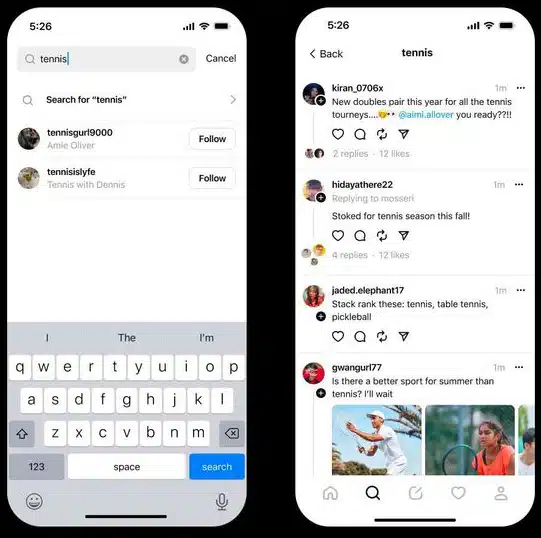
Why we care. The Threads app launched without several basic and expected features – such as the ability to search for posts using words. We have been frustratingly limited to only searching for accounts, but it seems that will finally change soon, which means more opportunities for your posts to be discovered.

Search being tested now. Threads Search is now being tested in New Zealand and Australia, TechCrunch reported. Search will rollout to more English-speaking countries but we don’t yet know when.

What it looks like. Here’s a screenshot for a Threads search for [tennis], via TechCrunch:

Threads Search Tennis

What Meta is saying. “We are actively listening to the community’s feedback and working on more features to improve the search experience,” the company said in a statement.

Better late than never? Threads took just five days to get 100 million users. However, in the weeks since, engagement has declined and it has an estimated 8 million daily active users now. We’ll soon find out whether launching the web version of Threads and having actual useful search can help reverse Threads’ downward trend.

Dig deeper. Threads FAQ: Everything marketers need to know

“For you on Threads”. Meanwhile, in another attempt to lure in users, Instagram has started testing a For you on Threads carousel with a link to open the app, TechCrunch reported.


Related stories

New on Search Engine Land

@media screen and (min-width: 800px) { #div-gpt-ad-3191538-7 { display: flex !important; justify-content: center !important; align-items: center !important; min-width:770px; min-height:260px; } } @media screen and (min-width: 1279px) { #div-gpt-ad-3191538-7 { display: flex !important; justify-content: center !important; align-items: center !important; min-width:800px!important; min-height:440px!important; } }

About the author

Danny Goodwin

Danny Goodwin has been Managing Editor of Search Engine Land & Search Marketing Expo – SMX since 2022. He joined Search Engine Land in 2022 as Senior Editor. In addition to reporting on the latest search marketing news, he manages Search Engine Land’s SME (Subject Matter Expert) program. He also helps program U.S. SMX events. Goodwin has been editing and writing about the latest developments and trends in search and digital marketing since 2007. He previously was Executive Editor of Search Engine Journal (from 2017 to 2022), managing editor of Momentology (from 2014-2016) and editor of Search Engine Watch (from 2007 to 2014). He has spoken at many major search conferences and virtual events, and has been sourced for his expertise by a wide range of publications and podcasts.

https://searchengineland.com/threads-search-is-coming-but-when-431464


Google Search Generative Experience officially rolls out links to webpages within answers

Google is now rolling out links to webpages within the Search Generative Experience AI-powered answers.

You will see the AI-powered overview answers have these down-arrow icons; when you click on them, Google will show you the relevant webpages used to help form that part of the answer.

  • “Starting today, when you see an arrow icon next to information in an AI-powered overview, you can click to see relevant web pages, and easily learn more by visiting the sites. This is launching first in the U.S. and will roll out to Japan and India over the coming weeks,” said Hema Budaraju, Senior Director of Product Management at Google Search.

What it looks like. Here is a screenshot of an example of what this feature looks like:

Google Sge Arrow Links Live

Google also shared a GIF showcasing how it works:

Google Sge Arrow Links Live

Previous tests. Google started testing links within AI-generated answers in SGE in three different formats earlier this month. Google paused the test 16 days later, but continued testing the down-arrow cards test. Now, Google has decided to go with the down-arrow format with link cards.

Google said it will continue to test various formats:

  • “We’ll continue testing different ways of presenting results and listening to feedback, while prioritizing approaches that continue to drive traffic to relevant websites.”

Launching in Japan and India. Google also said that SGE is launching as a beta in more countries and languages, including Japan and India. While Japanese users will be able to use generative AI capabilities in their local language, Google said in India users will be able to use SGE in English and Hindi.

Voice search. Google said SGE will also allow voice search “so users can simply speak their query instead of typing it and listen to the responses, which are both popular preferences in both countries.”

Ads. Ads will remain to be seen in the dedicated spots in the SGE AI-generated answer interfaces.

Early data from SGE. Google also shared some generic feedback on its “earliest experiments” with SGE.

  • Searchers have a positive experience.
  • 18- to 24-year-olds enjoy the SGE experience the most.
  • Searchers enjoy the follow-up questions within SGE, letting them refine and explore their queries more.
  • Ads are also helpful, according to Google, specifically that they are placed above or below the AI-powered overview helpful.

Why we care. It is great to see Google officially add links to webpages in the SGE AI-powered answers. The lack of citations has been frustrating for search marketers, publishers and searchers in general. Google added it will continue “prioritizing approaches that continue to drive traffic to relevant websites.”


Related stories

New on Search Engine Land

@media screen and (min-width: 800px) { #div-gpt-ad-3191538-7 { display: flex !important; justify-content: center !important; align-items: center !important; min-width:770px; min-height:260px; } } @media screen and (min-width: 1279px) { #div-gpt-ad-3191538-7 { display: flex !important; justify-content: center !important; align-items: center !important; min-width:800px!important; min-height:440px!important; } }

About the author

Barry Schwartz

Barry Schwartz is a Contributing Editor to Search Engine Land and a member of the programming team for SMX events. He owns RustyBrick, a NY based web consulting firm. He also runs Search Engine Roundtable, a popular search blog on very advanced SEM topics. Barry can be followed on Twitter here.

https://searchengineland.com/google-search-generative-experience-officially-rolls-out-links-to-web-pages-within-answers-431324


An SEO guide to optimizing your Google Publisher Center account

You see Google News surfaces every day. Top stories carousels, the Google news tab, site or app. But how do you get your content to consistently show on these surfaces?

There is no one silver bullet for Google News optimization. 

But your content will only reach its full potential across Google News surfaces if a well-optimized Google Publisher Center account backs it.

In this advanced SEO guide, it’s presumed you have an existing Publisher Center account. If not, don’t worry. You can learn how to set up your account right the first time.

Let’s dive into the intricate details of configuring Google Publisher Center to amplify your articles and videos on Google News surfaces.

Google Publisher Center settings

It’s clear Google didn’t put their best UI designer on the Publisher Center project.

To get to the basic setting, scroll down to the base of your Publisher Center homepage to the More Options section. 

Click the Manage your publication and your organization down arrow and Modify publication settings.

Publication settings

Google Publisher Center settings

Ensure the publication name is the official brand name. Not “BrandName Blog” or “BrandName Magazine.”

When you create a publication, you have an opportunity to corroborate key facts about your brand. 

This can help strengthen your brand entity in the Knowledge Graph, Google’s database of understood things. 

But if you don’t use the official brand name, Google may have difficulty connecting the two.

The facts you can confirm include:

  • Geographic target with country.
  • Language of your audience with primary language.
  • The parent organization. If this is relevant, ensure your parent company name also uses its official brand name.
  • The canonical domain has a verified primary URL and syndication partner relationships with additional URLs.
  • Visual brand identity with logos. Communicate the official logo (upload light and dark variants and use a transparent background) and the square variant, ensuring it matches what is used on social media profiles and app icons. Google “recommendations” on size and format should be interpreted as instructions.

Fonts are purely a branding decision, and they will not impact your Knowledge Graph brand entity or the visibility of content across Google News surfaces.

Content labels

Content label

Going back to the More Options section, you will see Add content labels.

Google offers five labels that can be assigned either sitewide or a specific site section.

Use these for opinion or satirical content. This can help Google correctly classify and apply E-E-A-T signals of content pieces, which, if authentically assigned, has the potential to give a visibility boost.

In the case of press releases, blogs and user-generated, this increased understanding may do the opposite on Google News surfaces. Test it if you are methodically minded. Otherwise, I’d steer clear of these three labels.

On top of these foundational settings, Publisher Center offers up to three products:

  • Google News publications.
  • Reader revenue manager.
  • News showcase.

Get the daily newsletter search marketers rely on.


Google News publication optimization

A Google News publication formally submits your content to Google News surfaces. The choices you make during setup can significantly impact performance.

General

Google News settings

Publication category provides another opportunity to inform the Google Knowledge Graph.

You can also limit distribution to a specific country or Google property, although this is not advisable if your goal is visibility.

Sections

Google News settings sections

Sections will appear as tabs in your Google News app publication.

At the bare minimum, you should have two sections:

If you are not publishing in video format, you are missing out on a significant opportunity to reach your audience.

To achieve the highest visibility, show the full extent of your content coverage by:

  • Setting up a section to match each of your website parent categories. This highlights to your readers and Google what topics you cover.
  • Having at least one of these sections tailored for local news to enter local exclusive placements.
  • Adding sections for trending topics that are expected to have some longevity.
  • Including a Personalized feed section.

Once you have all these sections set up, drag and drop them into an optimal order.

Google News - Web location vs. Feed

For article sections, a key question is whether to use Web location or Feed.

If you have development resources available, the answer is feed. Why?

  • A feed gives you the ability to select what articles are included. You may want to leave out sponsored content or specific syndication partners. It also allows manually deleting an article in the Google Publisher Center section management interface or triggering a manual refresh.
  • As for web locations, the order of articles is determined by Google ranking. With a feed, you control the order. You can show at the top the most recent, most popular or those which drive the highest engagement.
  • Web locations can show content only after Google has indexed it. Googlebot fetches feed content approximately every 30 minutes – or instantly if you use Websub. This makes Google News feeds a powerful tool for crawl optimization.

Send your developer the Google technical documentation. Be sure to validate the feed before submitting it to Google News.

Google News followers

An often under-utilized feature of Google News is the ability for your audience to follow your publication.

Google News followers

Google doesn’t currently offer an API to allow readers to follow your publication directly on-site. But a simple Google News follow button graphic linked to your publication URL will increase followers.

It can also be promoted through other marketing channels, such as social media posts, email newsletter banners, push notifications or even CPC if you want to double down on Google News as a channel.

This “news publication starring” greatly increases the chance your content will be shown in personalized placements on Google News.

This can lead to higher click-through rates, impacting the algorithm to show the content to new readers who might not have discovered it otherwise.

And supports reader retention as the increased access to your audience on Google surfaces will build a more loyal readership.

Boost your Google News visibility with an optimized Publisher Center account

Nailing your Google Publisher Center setup is essential to visibility in Google News.

Ensuring the right settings and building a strong following will give your articles and videos the best chance in the cutthroat world of content. 

As an added bonus, it helps establish your brand entity in the Google Knowledge Graph.


Opinions expressed in this article are those of the guest author and not necessarily Search Engine Land. Staff authors are listed here.


Related stories

New on Search Engine Land

@media screen and (min-width: 800px) { #div-gpt-ad-3191538-7 { display: flex !important; justify-content: center !important; align-items: center !important; min-width:770px; min-height:260px; } } @media screen and (min-width: 1279px) { #div-gpt-ad-3191538-7 { display: flex !important; justify-content: center !important; align-items: center !important; min-width:800px!important; min-height:440px!important; } }

About the author

Jes Scholz

Jes Scholz is an organic marketing consultant and SEO futurist. She delivers award-winning audience development strategies focused on entity optimisation, smart content distribution and data-driven marketing from Sydney to enterprise businesses worldwide.

https://searchengineland.com/an-seo-guide-to-optimizing-your-google-publisher-center-account-431272


Google Search testing “Mentioned in” search snippet

Google is testing a new search snippet feature titled Mentioned in.

This feature, which adds a new section to a search result snippet, lets the searcher expand and see the websites on which this site is also mentioned.

What it looks like. Here is a GIF of Mentioned in in action, provided by Brodie Clark:

Google Mentioned In Snippet Carosuel 1693391239

Clicking on the down arrow will expand the feature to reveal the first two websites that are part of a carousel mentioning the page in the search snippet. You can slide through a carousel of more sites where this website is also mentioned.

Test variation. Google is also testing a version of Mentioned in without a dropdown, where you see the carousel by default. Here is a screenshot of that from Crystal Carter:

F4yBUmrWsAAPml9

Why we care. Giving searchers information about other reputable websites that mention a site could increase trust in Google’s search results.

About this test. This seems to be a limited test. It reminds me of the goal Google had for the about this result feature. I wonder how many searchers will spend the time clicking the arrow to see more details, but that is why Google tests these features.


Related stories

New on Search Engine Land

@media screen and (min-width: 800px) { #div-gpt-ad-3191538-7 { display: flex !important; justify-content: center !important; align-items: center !important; min-width:770px; min-height:260px; } } @media screen and (min-width: 1279px) { #div-gpt-ad-3191538-7 { display: flex !important; justify-content: center !important; align-items: center !important; min-width:800px!important; min-height:440px!important; } }

About the author

Barry Schwartz

Barry Schwartz is a Contributing Editor to Search Engine Land and a member of the programming team for SMX events. He owns RustyBrick, a NY based web consulting firm. He also runs Search Engine Roundtable, a popular search blog on very advanced SEM topics. Barry can be followed on Twitter here.

https://searchengineland.com/google-search-mentioned-in-search-snippet-shows-other-web-pages-a-site-is-mentioned-431332


30 ways enterprise organizations can grow SEO with limited resources

Making the most of your SEO strategy with limited resources can be challenging.

However, there are simple and cost-effective actions you can pursue to tackle common hurdles in resource-constrained enterprise organizations.

Incorporating AI to save time and establishing smoother cross-department communication for enhanced efficiency are some effective steps.

Jessica Bowman, an enterprise SEO consultant, and Sara Resnick, global head of organic growth at Shutterstock, shared 30 valuable tips and actionable techniques you can immediately implement at SMX Advanced.

1. Differentiate yourself when using AI

When using AI for content, add unique facts, data, and expertise your brand possesses rather than letting the AI recycle the same generic information – which it may also offer to your rivals.

2. Use AI as your content intern

Treat AI like an intern gathering basic information. Then make the content uniquely yours by adding proprietary data, fresh angles and expert polish.

AI gets you started, but partnering it with human creativity produces distinctive content that stands out.

3. AI prompts for content assistance

AI can greatly assist SEOs and make their jobs easier in many ways using prompts, such as:

  • Keyword research
  • Classify query intent (knowing what’s informational, navigational, transactional)
  • Correlated queries and questions
  • Content ideation
  • Coding

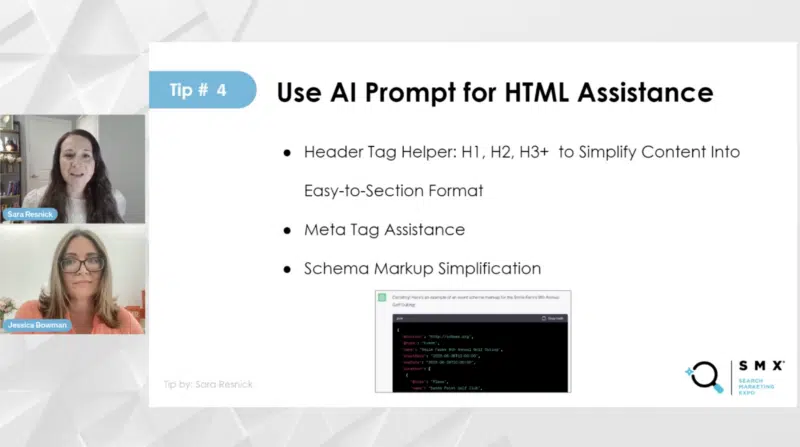
4. Use AI prompts for HTML assistance

You can use AI prompts for HTML assistance, such as requesting header tags for breaking up articles and generating headlines. But it’s essential to proofread and view AI as collaborative support rather than a word-for-word substitute.

Additionally, schema markup simplification, especially for events, is facilitated by AI, aiding in generating schema markup for specific scenarios.

Screenshot 2023 08 28 At 21.34.01 800x447

5. Content inventory and upcycle

Perform a content audit and refresh to make existing content relevant again by following these steps:

  • Check what old content is ranking for and any backlinks to it.
  • If refreshing the content, update it to be useful for today’s audience.
  • If not refreshing it, properly 301 redirect or 404/410 error code old unwanted content.
  • Quality assurance is important to ensure refreshed content is high-quality.
  • Make sure refreshed content is in XML sitemaps and interlinking so search engines can find and crawl it.

6. Internal and external linking

Make sure you are leveraging internal linking to connect priority pages. Over-educate teams on key pages and terms they should be linking to – especially those that may not have a solid understanding of SEO.

Also, cross-collaborate on SEO to inform content and PR, and encourage external partnerships to link for greater brand authority.

Don’t forget to monitor changes to top navigation links. This can sometimes change without your knowledge, so make sure that everyone is aware of how important interlinking and anchor text is.

Be aware of your social media presence in search engine results pages (SERPs).

Test how your brand appears on platforms like Instagram, Facebook, TikTok and YouTube when you perform branded searches. And make sure you take note of the differences between mobile and desktop results.

YouTube, being the second-largest search engine, holds particular significance. Make sure your brand’s visibility is consistent and effective across these platforms to enhance your brand authority.

8. Testimonials and reviews

The introduction of the additional E in E-E-A-T refers to experience, which is why ratings and reviews are so important. On Amazon, in particular, these elements have a significant influence on converting browsers into customers.

Implementing schema reviews markup can significantly boost click-through rates.

Additionally, focusing on branded queries and combining them with reviews and customer service is crucial. Ensuring the right teams are involved helps maintain brand authority and reputation alignment.

Screenshot 2023 08 28 At 21.32.18 800x446

9. Trustworthy branding

Making users feel secure is vital. Ensure your branding reflects this and highlight its importance within your team.

Also, remember to be responsive to unhappy customers. This not only relates to customer service but impacts search results and shows your commitment to customer care, enhancing trustworthiness.

10. Automation and bulk realizations

When you’re dealing with limited bandwidth, automation becomes a key player in streamlining processes.

Think about categories as a whole, such as the background category, and identify related pages. Analyze associations, prioritize interlinking, and optimize your keyword set across pages for a comprehensive strategy.

Simplify title tag adjustments in a spreadsheet for bulk uploads – this is an efficient approach to fine-tune your strategy. Also, consider seasonal cleanups, especially for large websites where crawlability is a concern.

Review pages with no clicks over 12 to 16 months, tailor your strategy, communicate it internally, and ensure no one else needs the page before retiring it.

11. Everything is connected: Look at your site as a whole

Remember, your website is a network of connections. When optimizing, think big and tackle multiple pages at once. When launching new collections, cover everything: title tags, descriptions, on-page content, team communication and interlinking.

But watch out for content overlap. Introduce new pages smartly by identifying competing topics that need interlinks. Keep the site clean by retiring old elements.

12. Scaling content tips

Here are three helpful ways to scale your content effectively:

  • Always keep non-transactional keywords handy, even if they’re not relevant immediately.
  • Utilize your marketing channels, like email, PR and paid media to support your content strategy.
  • User-generated content (UGC) and influencer-generated content (IGC) can enhance your brand narrative and authority.

Adapting your processes to include SEO is crucial.

13. Integrate SEO into official processes/workflows

Take a broader view across the organization to spot recurring workflows that might be causing SEO issues and nip those problems in the bud. The goal is to seamlessly incorporate SEO into these processes and tackle problems head-on.

An audit of these workflows is key. Often, this means focusing on content creation, development and more. Consider what needs to be done for SEO at each step, clarifying roles for the SEO team and others.

Here are a few common workflows to consider:

  • Content strategy
  • URL creation
  • Sunsetting URLs
  • Launching new pages
  • Tackling new, larger projects

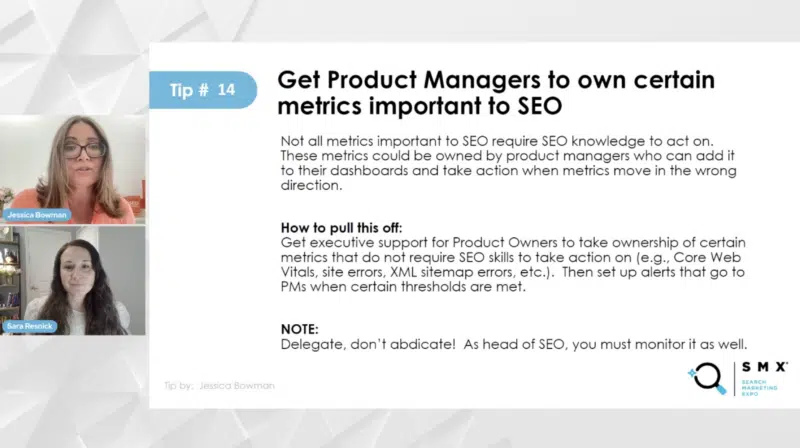
14. Get product managers to own certain metrics important to SEO

Some metrics vital for SEO success don’t necessarily need SEO expertise to act upon. These are like indicators of your website’s health.

Product managers or developers can take the reins here. The trick is to add these metrics to their dashboards and prompt them to take action if things go awry.

The key? Get executive backing to make this happen.

Product managers don’t need to be SEO gurus, but they should understand the importance. Think of it this way: you’re entrusting them with responsibilities, not passing the buck. Consider metrics like core web vitals, site errors and XML site issues.

Set up dashboards, maybe using tools like Domo, and trigger alerts for problem thresholds. Remember, it’s about delegation, not just handing off. The best SEO managers stay watchful while sharing the load.

Screenshot 2023 08 28 At 21.31.39 800x448

15. Teach other roles to recognize when to pull in the SEO team

Train other departments to recognize when they should pull in the SEO team on a particular project or task. Consider creating a cheat sheet to use to help them identify these situations.

16. Automation from product and development

Test how you can speed up some of your processes for best practices.

For example, if you have an XML sitemap, see if your tech teams can automate the process and that you’re continuously checking on them. You can also call in AI for help on tasks like cranking out schema markup.

However, make sure that your product team’s in on this too, aligning the stars with IT rules. And don’t forget inventory management, a big deal for what’s in and out of stock.

Everyone should be on the same page, and automation can make sure your SEO game stays strong, even if something’s temporarily missing or gone for good.

17. Commit to training every new hire that influences SEO

The duo shared three ways to make this happen:

  1. Personalized training: Give the VIP treatment to key players like top-notch product managers. Think of the folks behind your product and search result pages. They’re SEO champs.
  2. Virtual learning: Set up training modules online. You can turn in-person sessions into snazzy online courses. Plus, you can tailor-make modules just for the online platform. And don’t forget to loop in managers for a seamless rollout.
  3. Annual SEO training: Work with HR or team managers to integrate this into your company’s standard onboarding process, and within a year or two, you’ll be left with a team of educated SEO advocates.

18. Set up SEO certification for all roles

For the roles that impact SEO the most, certify them but have the certification ready to go immediately after the SEO training. But make participation meaningful. Perhaps, give some type of reward for completion (e.g., gift cards).

19. Train executives on the right things

Get executives to start thinking like SEO leaders. During their training, encourage them to ponder important questions:

  • How should they approach SEO at a leadership level?
  • Are their teams boosting SEO, holding it back, or maybe even affecting revenue negatively?

The goal is to make them think not just about the basics of SEO, but about where their teams fit within the entire organization.

Resnick shared a handy cheat sheet for SEO:

Screenshot 2023 08 28 At 20.47.23 800x445

Explain to your team how the elements listed impact SEO but make sure you tailor the sheet first for your company’s specific needs.

21. Create a chat channel for SEO

Get your team excited about SEO by cultivating a supportive environment, such as an SEO-dedicated Slack channel. This will help ensure the SEO department is easy to approach, quick to answer queries and have backup teammates for when you’re busy.

22. Send SEO updates to each role as they are relevant

Keep your SEO team in the loop with timely updates. For instance, let them know that Google’s replacing importance on FID with INP and Core Web Vitals.

If you use internal trackers, ensure the updates are accessible. Once news hits, spread the word to developers, product managers, and relevant teams, and make sure they’re discussing it in their meetings.

23. Get really good at writing SEO tickets

Master the art of writing SEO tickets – it’s a key area where many SEO teams run into problems.

Dedicate time to not only improve your skills but also to craft effective tickets. This can help improve efficiency and prevent unnecessary delays.

24. Get really good at QA testing

The best-in-class SEO teams do their own QA testing, Bowman said. This is crucial for validating the accuracy of your SEO tickets.

Often, SEO teams struggle with QA testing due to incomplete tests or lack of time and expertise. Rushing, inadequate knowledge or delayed testing can result in critical issues being discovered too late.

Some SEO team members might lack the technical SEO knowledge, while others are simply too busy for thorough testing.

It’s important to acknowledge that the SEO team should take the lead in comprehensive QA testing. While some tests can involve QA testers, top-notch SEO teams handle their own QA testing, as leaving it entirely to QA testers might lead to important issues being overlooked.

Screenshot 2023 08 28 At 21.33.23 800x445

25. Get really good at writing user acceptance criteria

This is closely tied to strong QA testing. In an agile setup, your role includes composing the user story and its acceptance criteria. These criteria serve as the developers’ reference for ensuring their code aligns with expectations.

Every SEO ticket must include these requirements and acceptance criteria to prevent errors during development. Becoming proficient in this process is vital to minimize mistakes and ensure seamless implementation.

If you’ve ever encountered problems (e.g., launching new feature on site only for them to vanish a few months later due to development-related issues), get a code-monitoring tool. Your IT department might already have one, so it’s worth exploring to save costs.

However, you won’t have full control to set up tests yourself; so collaboration with IT is essential.

Alternatively, you can opt for a tool like SEO Radar, which validates SEO and detects changes. This is particularly useful when things suddenly disappear from your site, as in the case of my client’s missing hreflang sections.

27. Send dashboard alerts

Instead of having everyone constantly log into an SEO tool for alerts, set up dashboard notifications. Send these alerts directly to the teams that can address them.

Collaborate with executives to ensure they take action on issues that don’t demand SEO expertise.

You can easily distribute this responsibility among developers, product owners and managers.

You might be juggling five different SEO monitoring tools. Grab their APIs and bring all the data into a single tool, preferably the one that your product managers and developers are already using, like Domo.

This way, it’s a breeze to hold other teams accountable since they’re already accustomed to checking these dashboards regularly.

29. Annotations and event tracking

In the fast-paced world of SEO, a lot is going on. So keeping tabs on your events is crucial.

For example, a list of Google algorithm updates can be shared with your teams, encouraging them to add these events as annotations in tools like Google Analytics or your chosen tracking platforms.

Another valuable practice is implementing event tracking across your website, especially for product releases. This allows you to identify correlations between events and any observed decreases in performance.


Get the daily newsletter search marketers rely on.


30. Maximize your time management

To get the most bang for your buck, ensure you efficiently use the time of your SEO team, internal colleagues, agencies and freelancers.

Recognizing the strengths of different team members, from senior experts to those newer to the field, enables you to leverage their skills effectively. For agency collaborations, prioritize higher-level tasks that align with your budget allocation.

Additionally, smart time management and execution are key, particularly for launches and projects. When working within tight timelines, the following are essential for successful execution:

  • Set realistic timeframes.
  • Send well-timed meeting invites.
  • Maintain a strategic approach.

This approach underscores the importance of efficient time allocation for accomplishing goals.


Related stories

New on Search Engine Land

@media screen and (min-width: 800px) { #div-gpt-ad-3191538-7 { display: flex !important; justify-content: center !important; align-items: center !important; min-width:770px; min-height:260px; } } @media screen and (min-width: 1279px) { #div-gpt-ad-3191538-7 { display: flex !important; justify-content: center !important; align-items: center !important; min-width:800px!important; min-height:440px!important; } }

About the author

Nicola Agius

Nicola Agius is Paid Media Editor of Search Engine Land after joining in 2023. She covers paid search, paid social, retail media and more. Prior to this, she was SEO Director at Jungle Creations (2020-2023), overseeing the company’s editorial strategy for multiple websites. She has over 15 years of experience in journalism and has previously worked at OK! Magazine (2010-2014), Mail Online (2014-2015), Mirror (2015-2017), Digital Spy (2017-2018) and The Sun (2018-2020). She also previously teamed up with SEO agency Blue Array to co-author Amazon bestselling book ‘Mastering In-House SEO’.

https://searchengineland.com/enterprise-organizations-grow-seo-limited-resources-431237


85% of titles feature keywords in Positions 1-5 of Google

Title tags that include keywords rank in the top 5 positions of Google 85% of the time.

That’s according to new research on title tags and meta descriptions shared with Search Engine Land by enterprise SEO platform BrightEdge.

Why we care. While you probably won’t find that 85% number too shocking, it’s always good to revisit fundamental SEO elements like title tags and meta descriptions to confirm whether your data indicates keyword usage (or lack of) could possibly be impacting your ranking. Yes, you can rank for a keyword without ever using that keyword on your page. But clearly, that happens more rarely.

Other key elements. Aside from the correlation between keywords in title tags and positioning:

  • 95% of pages ranking in the top 10 have meta descriptions.
  • 90% of the rankings in the top 1-5 consistently capitalize, using either title or sentence case (e.g., capitalizing brand/product names) in titles and meta descriptions.
  • 25% of pages that appear lower in search results are more likely to have grammar errors in their titles and/or meta descriptions. (However, Google has repeatedly indicated that grammar isn’t likely a ranking signal, most recently in 2017.)

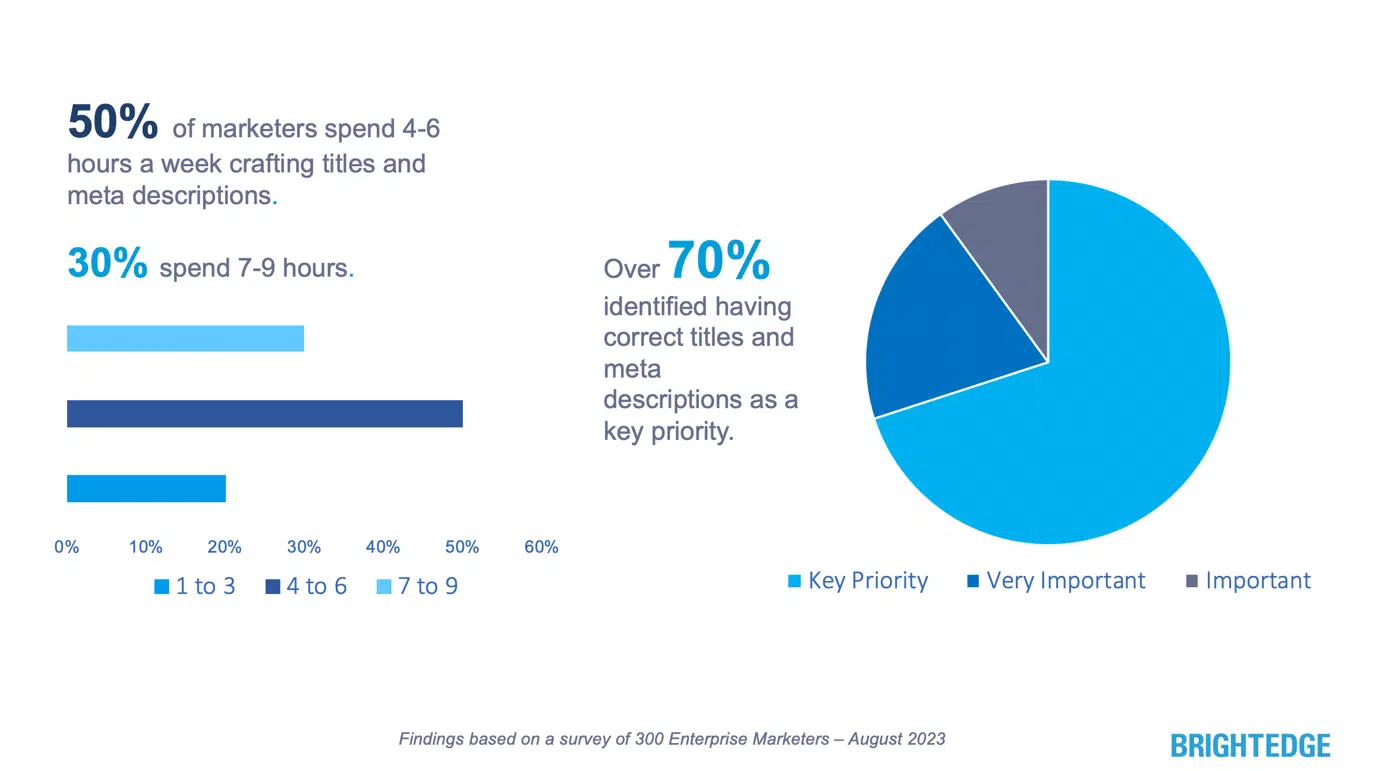
100% agreement. I never thought I’d see the day when an SEO survey found one thing everybody could agree with, but here it is: 70% of enterprise marketers believe having correct titles and meta descriptions is a key priority, while the other 30% of respondents said it was either important or very important.

That’s 100% of respondents agreeing that having correct title tags and meta descriptions is important. Zero respondents selected “neutral” or “not a major priority.”

Hours invested. Writing title tags and meta descriptions remains a significant time investment for enterprise marketers. Every week:

  • 50% invest 4-6 hours.
  • 30% invest 7-9 hours.
  • 20% invest 1-3 hours.
Title Meta Descriptions Time Priority

About this research. It is a combination of an analysis of 10,000 keywords across various major verticals (including finance, retail, travel, insurance) and a survey of 300 enterprise marketers. Both were conducted this month.

But. Correlation is not causation. Keywords are just one single ranking signal and may or may not be the reason why some webpages appear in the top 5 positions of Google.


Related stories

New on Search Engine Land

@media screen and (min-width: 800px) { #div-gpt-ad-3191538-7 { display: flex !important; justify-content: center !important; align-items: center !important; min-width:770px; min-height:260px; } } @media screen and (min-width: 1279px) { #div-gpt-ad-3191538-7 { display: flex !important; justify-content: center !important; align-items: center !important; min-width:800px!important; min-height:440px!important; } }

About the author

Danny Goodwin

Danny Goodwin has been Managing Editor of Search Engine Land & Search Marketing Expo – SMX since 2022. He joined Search Engine Land in 2022 as Senior Editor. In addition to reporting on the latest search marketing news, he manages Search Engine Land’s SME (Subject Matter Expert) program. He also helps program U.S. SMX events. Goodwin has been editing and writing about the latest developments and trends in search and digital marketing since 2007. He previously was Executive Editor of Search Engine Journal (from 2017 to 2022), managing editor of Momentology (from 2014-2016) and editor of Search Engine Watch (from 2007 to 2014). He has spoken at many major search conferences and virtual events, and has been sourced for his expertise by a wide range of publications and podcasts.

https://searchengineland.com/titles-meta-descriptions-ranking-research-431310


How to optimize your social media pages for search

Optimizing your social media pages can help boost your visibility in search engine results and attract more organic traffic to your website. 

Whether it’s Instagram, Facebook, LinkedIn or a different platform, below are some tips to optimize your social media profiles and content for the best SEO results possible.

Getting your profile information right at the onset can provide an edge over competitors. 

Here’s a concise checklist for creating a new social media profile:

  • Choose logical handles and profile names that are accurate, relevant, and easy to remember.
  • Complete your profile information. If somebody searches for your profile or account topics using the platform’s internal search feature, you want to be found.
  • Incorporate relevant keywords based on how users might try to find the profile. Let the SEO keyword strategy be your guide.
  • Link to your website. Ensure the website links to relevant social media profiles, too.
  • Interlink profiles. For example, include links to social media sites on YouTube channels and videos.
  • Maintain consistent brand messaging across digital platforms (website, social media, etc.).
  • Choose the most relevant tags and/or categories on platforms that use them, and consider integrating them into your website’s keyword strategy.
  • Include “contact” information to make it easy to get in touch with you, like including an address, phone number, email, or other means of communication.

Many best practices will apply to the profile and individual posts (content). 

However, the optimized profile is the foundation for success of social media and SEO integration.


Get the daily newsletter search marketers rely on.


Best practices for creating SEO-friendly social media content

Once you’ve established your social media profile, it is time to post relevant, optimized messaging and content.

Double down on content and context

Create content that aligns with your audience and consider the context in which your content will be viewed.

For instance, a long-form video on “how to do an oil change” might land better on YouTube, whereas “Everything you need to buy to do an oil change,” might work better as a bite-sized informational video.

Incorporate organic search keyword data

Each social media platform has its unique style and limitations for messages. For instance, every character counts on short-text platforms. 

Integrating organic search keyword data into your social media posts (scripts, captions, locations, etc.) can significantly increase your visibility. 

Monitor the popular search terms related to your brand, industry, or topic, and use them strategically within your posts.

In other words, the content should be written naturally and engagingly, as the use of too many keywords can make it sound like it was written by a machine rather than a human.

Here are some tools you can use to surface SEO and social media keywords:

  • Google Trends: Reference Google Trends for immediate insights on hot topics across languages and geographies to target engaging conversation topics with content.
  • TikTok’s Keyword Insights and Hashtag Tool: Specifically designed for TikTok, these tools identify popular keywords and hashtags within the platform and show how other accounts are using the terms. Such insights typically apply to other platforms.
  • Google Keyword Planner: A powerful tool that provides insights into search volumes and keyword ideas (requires account).

For website metadata and content, hashtag trends on platforms can also be useful in informing your keyword strategies and blog or article topics.

Master the art of using hashtags and category tags

Using relevant tags and hashtags in social media posts can increase discoverability. 

When users search for a specific tag or hashtag, your posts will appear in the search results, enhancing your visibility.

On YouTube, categorial tagging happens behind the scenes, too. Still, some platforms may not have tags at all.

Using popular and relevant hashtags could quickly increase your post’s exposure. However, avoid using too many unrelated hashtags as it can make your post seem cluttered and less engaging.

A branded or pro-social hashtag may also make sense to include on your website. If people are “Googling” your hashtag, tastefully place it in site content and metadata on your website.

The right links enhance the user experience by leading to content that aligns with audience interests and needs, boosting engagement. 

Meanwhile, incorporating relevant links in tagged and hashtagged posts increases their discoverability. 

Say you want to highlight a product your website offers in an Instagram story post. It would be wise to add a “clickable link” to the product detail page instead of the homepage (a common mistake!). 

Conversely, keeping your website’s OG/X (formerly Twitter) card metadata tags up to date is equally important. 

These tags indicate to a social media platform how a webpage should appear when shared, offering control over a featured image, title, description, and more.

Consider the timing of your posts based on platform and audiences

Understanding audience behavior is essential to enhance the visibility of your content. The timing of your posts needs to consider not only the hour of the day but also the day of the week and seasonal variations. 

Each social media platform has unique peak times, influenced by user behavior which can vary on weekdays, weekends, and during different seasons. 

The key is to experiment and adjust your posting schedule based on platform-specific insights and market trends, rather than adhering strictly to preset rules. 

As audience behaviors (and algorithms) can shift over time, it’s crucial to stay adaptable and regularly reassess your strategy to maximize engagement.

Use the power of alt text whenever available

Alt text, used to describe images for visually impaired users and search engines, is another aspect to consider while optimizing social media content for SEO. 

When posting images or videos, include relevant keywords in the alt text to improve your content’s visibility. 

Be sure to recall the primary purpose of alt text, though – to describe the image for those who cannot see it.

Engage with your audience across platforms

Engagement is a key indicator of the relevance and quality of your content. 

High levels of engagement can lead to improved visibility on social platforms and search engines alike. 

Think of what your audience needs and wants to know when looking for and coming to a profile; if a platform offers a way to “pin” or highlight relevant content, use it.

Encourage user interaction by posting engaging content, asking questions, and responding promptly to comments and messages. 

Brand-answered questions in the comments of a well-regarded social media post can replicate the impact of a well-optimized FAQ on the web.

Leverage social media for improved Google SERP visibility

When optimized effectively, social media content can impact your visibility on Google SERPs, especially for branded queries. 

While social media signals aren’t a direct ranking factor, the information shared across social platforms can help you show up on search results.

For instance, many brand videos on “how to do something” appear on Google SERP from YouTube, TikTok, and Facebook. 

The videos may very well “outrank” any on-the-website articles of a similar nature, even if the video is posted on the page.

Optimizing your social media pages for search visibility

Creating SEO-friendly social media profiles and content will enhance your visibility on search engines and draw organic traffic to your website. 

Remember, a strong profile foundation, content aligned with your audience, strategic keyword integration, user-friendly links, and consistent engagement are vital in driving your success.

Make the most of these techniques and be flexible as you fine-tune your approach.


Opinions expressed in this article are those of the guest author and not necessarily Search Engine Land. Staff authors are listed here.


Related stories

New on Search Engine Land

@media screen and (min-width: 800px) { #div-gpt-ad-3191538-7 { display: flex !important; justify-content: center !important; align-items: center !important; min-width:770px; min-height:260px; } } @media screen and (min-width: 1279px) { #div-gpt-ad-3191538-7 { display: flex !important; justify-content: center !important; align-items: center !important; min-width:800px!important; min-height:440px!important; } }

About the author

Dale Hanstad

Dale Hanstad is an enterprise SEO and digital experience professional, utilizing omnichannel integration to serve multinational corporations and household names. His work at global ad/marketing agencies has solidified his expertise, particularly in the tourism, leisure, and health/wellness sectors. Additionally, Dale spearheads Keyword People, an initiative that leverages organic marketing best practices to foster authentic connections with audiences and niche or local brands through optimized messaging.

https://searchengineland.com/how-to-optimize-your-social-media-pages-for-search-431247


Customer-centric SEO: Adapting your search strategy for success

Search behavior has evolved since the inception of search engines. Google’s confirmation that 15% of queries are new underscores the dynamic nature of search.

This exposes a weakness in traditional keyword research, which heavily relies on a user feedback loop that limits the discovery of emerging topics.

This article explores how integrating customer insights into your SEO strategy can help you succeed in the evolving search landscape.

The limitations of keyword research

Keyword research has long been considered a necessary element in content creation. However, a keyword-centric approach lacks foresight into future trends and fails to prioritize the customer.

Sadly, this approach is common in SEO campaigns. We might pursue monthly search volume (MSV) and rankings without assessing if that traffic is qualified to convert. 

Relying solely on keyword analysis often overlooks untapped opportunities and inhibits your business from staying ahead of competitors.

As searchers’ needs evolve, we must strive for a deeper understanding of our customers and integrate this knowledge into our SEO strategies.

Customer insights: A strategic approach

We gain a significant advantage when we go beyond traditional keyword research and prioritize understanding customers. Connecting and engaging with customers can uncover content ideas that competitors may have missed. 

This strategic approach enables you to become a first mover within search engine result pages (SERPs), enhancing your visibility and authority. 

Consistently delivering new content aligned with customers’ needs can compound this advantage, establishing your brand as a true authority in your industry or niche.

To establish and increase topical authority, strive to become an authoritative source that produces comprehensive and focused content on specific subjects. 

Identifying and addressing content gaps left by competitors lets you demonstrate your expertise by building a complete and high-quality collection of content, such as a blog post, knowledge base, or other resources. 

However, it is equally crucial to go beyond this by consistently bringing new ideas and information to the web. 


Get the daily newsletter search marketers rely on.


How to broaden your content roadmapping strategies

Content roadmapping should extend beyond the confines of keyword research. A more customer-centric approach enables your business to deliver exceptional value to your target audience. 

The following are alternative ways to gain insights to shape your future content strategies. You may use one or more of these methods depending on your business goals. 

Method 1: Jobs-to-be-done

A jobs-to-be-done (JTBD) analysis helps you focus on customers’ desired outcomes by examining the tasks they use a product for. This reveals valuable insights by:

  • Evaluating the wants and needs of customers.
  • Identifying the main and related jobs they are trying to accomplish.
  • Understanding the steps taken to complete each job. 

Conducting a JTBD analysis enables you to craft targeted content that addresses customers’ needs and fosters deeper connections.

Let’s consider Screaming Frog, a company seeking to enhance its SEO Spider tool and conduct a JTBD analysis. They may identify crawling sitemaps as a primary job while scraping sites using the extraction tool emerges as a related job. 

During the analysis, they might uncover the pain point when utilizing the browser’s XPath selector output in the extraction process, as it may not always yield the desired results.

This discovery prompts them to create a series of tutorials on XPath syntax, simplifying the learning process for users.

Method 2: Product-led SEO 

In this approach, you’ll develop a product that drives your SEO strategy rather than using SEO to market the product. 

The key is to build a product that is new or better than the competition, programmatic and scalable while addressing untapped search demand. 

By developing an offering incentivizing searchers to click from SERPs, you can build search demand as your product is adopted while bringing new resources to the web. 

Conduct primary research with users to validate product-market fit and learn from your customers’ needs and preferences.

SmartAsset - Paycheck calculator

A successful product that may have been part of a product-led SEO strategy is SmartAsset’s Paycheck Calculators. 

For a finance-focused website, a paycheck calculator offers value to customers who frequently manually compute paychecks for budgeting and financial planning.

Regardless of whether SmartAsset was the first to develop the paycheck calculator or merely created a better version than competitors’, tool adoption has driven an increase in search demand over time.

Paycheck calculator - Search trends

SmartAsset built and refined these calculators tailored to specific states, creating 50 high-quality pages. They succeeded in their product-led efforts by ensuring product-market fit. 

Customers naturally support a product when this is achieved since the offering is highly targeted toward helping them. 

Method 3: Conduct primary research

Primary research helps you learn about customers through:

Through this process, you can unlock valuable insights that can enhance existing content and inspire new content ideas yet to be explored on the web.

New and compelling content ideas naturally emerge as you gather and synthesize customer insights. Your team may be inspired to brainstorm innovative topics that have never been considered.  

Moreover, insights from primary research benefit marketing, support, and product teams. Integrating these insights fuels a comprehensive strategy, enhancing customer experiences beyond SERPs throughout the buyer journey.

Presenting research as a holistic customer experience solution for budget-conscious teams can secure leadership buy-in.

Dominate search with customer-centric SEO

Thriving in search demands customer-centric SEO. Beyond keywords, embracing customer insights will give your SEO strategy a competitive edge. 

Customer-centricity aligns with search engines’ aims: to deliver diverse, helpful results.

Businesses that maintain the highest level of topical authority will become trusted sources, gaining more authority in SERPs as a reward.

It’s time to go beyond keywords and embrace customer insights. By doing so, you’ll level up your SEO results and foster stronger connections with your customers.


Opinions expressed in this article are those of the guest author and not necessarily Search Engine Land. Staff authors are listed here.


Related stories

New on Search Engine Land

@media screen and (min-width: 800px) { #div-gpt-ad-3191538-7 { display: flex !important; justify-content: center !important; align-items: center !important; min-width:770px; min-height:260px; } } @media screen and (min-width: 1279px) { #div-gpt-ad-3191538-7 { display: flex !important; justify-content: center !important; align-items: center !important; min-width:800px!important; min-height:440px!important; } }

About the author

Tyler Rouwhorst

Tyler is an SEO Specialist at Wunderman Thompson Performance Marketing, where he provides SEO consultancy for clients of varying sizes across healthcare, SaaS, and retail sectors. His focus areas include strategic roadmaps that resonate with customers and technical SEO to improve clients’ overall site health. In addition, he is fascinated by the intersection of data science and SEO, and by leveraging his knowledge of Python, he develops custom tools that power unique insights and efficiencies. To connect with Tyler, visit his LinkedIn or website.

https://searchengineland.com/customer-centric-seo-adapting-search-strategy-success-431240