Using AI chatbots to 10X your keyword research

Many search marketers now leverage AI tools to support their SEO efforts, according to International SEO Consultant, Aleyda Solis.

However, while Google has confirmed that AI-generated content is OK as long as it’s high-quality, original and useful, the search engine has also indicated that expertise and content based on real human experience will be rewarded with better visibility.

Finding the right back balance is key, and SEOs that fail to do this are likely to struggle to be competitive, Solis explained at SMX Advanced. But where to start?

Here’s a recap of Solis’ top tips on how marketers can make the most out of AI, beyond generating articles, to maximize their keyword research.

1. Give specific, descriptive and comprehensive prompts

If you want the best possible answers from generative AI tools, you need to use the best possible prompts, Solis said.

“Make your prompts specific, descriptive and comprehensive,” she said before adding that instructions should address the five Ws and the H:

  • Who is the target audience?
  • What is the expected goal?
  • Where is it going to be used?
  • When is it going to be used?
  • Why do you want to use it?
  • How do we want to deliver this (e.g. format, language, tone, structure, length)?

Following these prompt rules can potentially save you a lot of time and produce quality results.

2. Hot topics inspiration

You can also generate ideas for hot topics using chatbots. If, for example, a TV show (e.g., “Succession”) was trending, you could leverage AI to find out the top 10 most searched-for questions about the series, she said:

  • “AI will provide the results in a table, listing the top questions and search intent.”
  • “I can then create content that piggybacks on the popularity of this TV series, which is amazing.”
  • “This can save you so much time as you now don’t have to go around using different tools to get these ideas.”

3. Generate article ideas

Once you’ve discovered hot topics using AI, you can connect these findings to your brand’s subject matter expert to produce article ideas.

Solis said she combined her research on “Succession” with the subject matter of a website on remote work. AI provided her with five potential article topic ideas:

  • “You can also obtain suggestions based on the top ranking articles.”
  • “Using AI, you can see what pages are already ranking well for the query that you want to target.”
  • “I asked for five article topic ideas that will allow me to rank for ‘Succession remote working’ based on the current articles ranking for this query in the top positions (but without copying them), then prioritize them based on the level of potential popularity and the user search behavior.”
  • “It’s such a creative tool!”

4. Deep dive with People also ask questions

Are you using AI to discover the intent behind Google’s People also ask questions? By identifying intent, the risk of duplication can also be eliminated, Solis said:

  • “I love People Also Ask – it helps you to understand how to structure questions.”

You can use AI to suggest title tags and descriptions for each keyword.


Get the daily newsletter search marketers rely on.


6. Discover your competition

Another great way to use AI in your day-to-day SEO tasks – use it to find out who your competitors are for specific keywords. Solis explained:

  • “This doesn’t only serve as an input to pretty much create content, but also to validate and check that you’re actually targeting the right thing.”
  • “So for example, if we are looking at who are the top five websites publishing content about ChatGPT for SEO and what are the top pages that they publish about this topic in 2023, you can use this tool for research.”
  • “But you can also validate and verify that what you are writing will provide a new and different angle on a topic that is actually also already popular too and already covered by the main websites in your industry.”

7. Inspiration without duplication

AI can suggest new and fresh content ideas for topics that rival websites have already covered. Solis said:

  • “You can ask AI to suggest three topics that have been covered but without duplicating the topics.”
  • “Just ask AI to suggest headlines for these topics.”

8. Validation and confirmation

Are you uncertain about certain questions, such as “is a single page enough to target two different search queries relating to this topic”? AI can help provide the answers. This type of validation is also applicable for a more international search scenario. Solis added:

  • “You can check if it is viable to run for a query across different country markets with the same pages because you may think, do I need different versions of this page to target this query in the UK versus the US versus Australia? Because while the language is the same, we know that in certain cases the terminology can be different.”
  • “We can double check again by asking AI what type of pages are ranking in the top 10 positions in the UK, US and Australia.”

9. Obtain video content ideas

You can also ask AI for different video content ideas based on topics and keywords that are trending.

For example, you can ask it suggest five video topics for ChatGPT for SEO based on existing trending video content. Explaining why this tool can be particularly helpful to marketers, Solis said:

  • “Many times, we can get [inspiration] blockage and cannot come up with something new and it’s difficult to identify trending topics to maximise that others are not yet covering. This is a great solution.”
  • “We can also get suggestions on hashtags for these videos when optimizing them for YouTube but without copying those in the top front pages.”

When marketers are working on more technical campaigns, perhaps in the medical or health industries, it’s important to be able to provide scientific quotes and cite research.

Solis explained that AI tools like Consensus were great for such tasks. She said:

  • “Tools like Consensus to get scientific insights to quote and link to have been so useful.”

Related stories

New on Search Engine Land

@media screen and (min-width: 800px) { #div-gpt-ad-3191538-7 { display: flex !important; justify-content: center !important; align-items: center !important; min-width:770px; min-height:260px; } } @media screen and (min-width: 1279px) { #div-gpt-ad-3191538-7 { display: flex !important; justify-content: center !important; align-items: center !important; min-width:800px!important; min-height:440px!important; } }

About the author

Nicola Agius

Nicola Agius is Paid Media Editor of Search Engine Land after joining in 2023. She covers paid search, paid social, retail media and more. Prior to this, she was SEO Director at Jungle Creations (2020-2023), overseeing the company’s editorial strategy for multiple websites. She has over 15 years of experience in journalism and has previously worked at OK! Magazine (2010-2014), Mail Online (2014-2015), Mirror (2015-2017), Digital Spy (2017-2018) and The Sun (2018-2020). She also previously teamed up with SEO agency Blue Array to co-author Amazon bestselling book ‘Mastering In-House SEO’.

https://searchengineland.com/ai-chatbots-10x-keyword-research-429526


The new Bing has failed to take any market share from Google after six months

It’s been just over six months since the new AI-powered Bing with Bing Chat launched – but its overall search engine market share remains virtually unchanged globally and in the U.S.

Why we care. When the new Bing launched, it felt like the dawn of an exciting new era in search. Microsoft seemed to have a legitimate chance to erode some of Google’s dominance and become a truly worthy competitor to Google, thanks to its new conversational and generative AI take on search. Unfortunately, that hasn’t happened.

By the numbers. Bing’s U.S. search market share was 6.47% in July, per web analytics service  StatCounter.

Us Search Market Share July2023 Statcounter
  • In February, when new Bing launched, it’s market share was 6.35%. Bing’s market share peaked at 6.61% in March.
  • But Bing’s U.S. market share was typically over 7% in 2022, with a high of 7.82% in November.

Bing’s global search market share was 2.99% in July, per StatCounter.

Global Search Market Share July2023 Statcounter
  • The highest Bing’s global search market share has been this year was in January, at 3.03%, a month before new Bing was announced. In 2022, Bing was consistently over 3%.

Microsoft disputes these numbers. A WSJ article today (paywalled, so I’m not linking to it) noted that:

  • “[Microsoft] disputed outside data, saying third-party data companies aren’t measuring all the people who are going directly to Bing’s chat page.”

StatCounter said its data takes traffic to and from Bing’s chat into account. Here’s what digital intelligence platform SimilarWeb told me:

  • “It’s possible that we’re missing some of the Bing Chat interactions that use an Edge sidebar / extension, but I don’t know how significant that is in the grand scheme of things.”

Yusuf Mehdi, Microsoft’s corporate VP and consumer CMO, told WSJ the company’s internal data shows Bing taking market share from Google, but failed to provide any figures.

  • “We’ve made more progress in the last six months than we have in the previous decade or two combined. We’re delighted with our start,” Mehdi said.

This claim seems a bit odd, considering around this time 10 years ago, Bing’s search market share was 17.9%, per comScore.

How Microsoft celebrates six months. Microsoft’s Aug. 7 blog post highlighting the number of chats (1 billion) and images created (750 million), as well as nine quarters of growth for Edge. And it earned them a surprising amount of PR thanks to many publications covering the launchiversary (Search Engine Land was not among those, because there was nothing new to report to you).

More data. I also checked with SimilarWeb and comScore for their latest data on Bing’s lack of growth. Here’s what a SimilarWeb spokesperson told me:

  • “We can see a little bit of growth for Bing, but it’s incremental. According to our official rankings for the search engine category, they were the #2 search engine with a little over 2% traffic share in the U.S. as of July, but still at about 1% worldwide.”
Bing Worldwide Us July Similarweb 800x209

Meanwhile, Bing saw a 6% decline in unique visitors and total visits from February to July, according to data from analytics firm comScore. Bing’s unique visitors and total visits also declined 2% year on year in July.

Dig deeper. Here’s some of our previous coverage of the AI search engine arms race that never actually became a race:


Related stories

New on Search Engine Land

@media screen and (min-width: 800px) { #div-gpt-ad-3191538-7 { display: flex !important; justify-content: center !important; align-items: center !important; min-width:770px; min-height:260px; } } @media screen and (min-width: 1279px) { #div-gpt-ad-3191538-7 { display: flex !important; justify-content: center !important; align-items: center !important; min-width:800px!important; min-height:440px!important; } }

About the author

Danny Goodwin

Danny Goodwin has been Managing Editor of Search Engine Land & Search Marketing Expo – SMX since 2022. He joined Search Engine Land in 2022 as Senior Editor. In addition to reporting on the latest search marketing news, he manages Search Engine Land’s SME (Subject Matter Expert) program. He also helps program U.S. SMX events. Goodwin has been editing and writing about the latest developments and trends in search and digital marketing since 2007. He previously was Executive Editor of Search Engine Journal (from 2017 to 2022), managing editor of Momentology (from 2014-2016) and editor of Search Engine Watch (from 2007 to 2014). He has spoken at many major search conferences and virtual events, and has been sourced for his expertise by a wide range of publications and podcasts.

https://searchengineland.com/new-bing-google-market-share-six-months-430840


How ChatGPT plugins can up your SEO game

ChatGPT is one of the hottest technologies to ever hit the SEO industry. This groundbreaking conversational AI is not just another chatbot.

It represents a paradigm shift in the industry – an evolution in how we approach optimization – with technology-driven understanding and adaptability. 

While ChatGPT reshaped how we approach SEO, its real magic lies within the integration capabilities introduced with GPT-4 and ChatGPT plugins. 

Understanding how GPT-4 and ChatGPT plugins impact SEO

The evolution from GPT-3.5 to GPT-4 marked more than just an expansion of the AI’s conversational abilities; it expanded its ability to engage with and interpret data. 

This interaction capability is a notable advancement. ChatGPT has evolved into an instrument that seamlessly integrates various external platforms, databases and tools.

It can then apply its natural language processing prowess to interpret and drive insights that will take your SEO game to the next level.

ChatGPT plugins, introduced with GPT-4, are the foundation for these interactions. These plugins enable the AI to connect with outside sources to streamline and even automate your SEO activities. 

Activating ChatGPT plugins

To get started with any ChatGPT plugin, you must first have an active ChatGPT Plus subscription.

From here, you can select GPT-4 and Plugins when you start a new chat. 

Activating ChatGPT plugins

Use cases: ChatGPT plugins for SEO

Let’s dive in and explore four use cases of ChatGPT plugins that can supercharge your SEO strategies. 

1. Keyword research and analysis with Noteable

Tools: Noteable (ChatGPT plugin), Semrush (Keyword data)

Let’s revolutionize your approach to Keyword Research first. With ChatGPT and Noteable, you can now complete complex interpretations of keyword data at scale. 

Noteable is a collaborative notebook platform that enables teams (and systems) to interact with and visualize data together – using SQL, Python, R, or no-code solutions. 

The “collaborative notebook” element is where it shines for SEO. With Noteable, you can connect any data set to ChatGPT – enabling it to interpret the data, create visualizations, and even change or update it on your behalf. 

Getting started with Noteable and ChatGPT

First, you will need a data set. Start with a keyword data export from Semrush or another keyword research tool.

The sample analysis used below is an export of related keywords for a new topic. Only keyword, monthly search volume, and keyword difficulty were included. 

You will also need a Noteable account. Both free and paid tiers are available. Once you have set that up, you can build out your project.

ChatGPT-Plugins_Noteable1

Step 1: First, create a Space. Think of the space as your overall container. This can be a brand, division, etc. 

Step 2: Create a Project within your space. Copy the Project URL as you’ll need this for step 4. 

Step 3: Within your project, you can now upload your .xlsx or .csv file for your data source. You can click on the uploaded data to open the file. Copy the URL; you’ll need this for step 4. 

Step 4: In ChatGPT, activate the Noteable plugin in GPT-4. Create a new chat with the following prompt:

“Connect Noteable to new project: [Project URL from step 2]
Connect to this Excel file: [Data source URL from step 3]“

ChatGPT will now connect to your data set in Noteable. It will even identify if there are any connection errors and provide you with steps to resolve them. 

Identifying and visualizing keyword opportunities

In this analysis, we are looking for high-volume keywords with relatively low competition for a new content opportunity. The seed keyword for this work is “chatgpt plugins”. 

First up – visualize the data with a scatterplot. To do so, enter the following prompt (or similar) in ChatGPT:

“Generate a scatterplot illustrating the relationship between keyword difficulty (x axis) and search volume (y axis) for all listed keywords. 

For the scatterplot, assign a color to each data point per the chart below. 

Red = keyword difficulty > 70

Green = keyword difficulty < 50

Yellow = keyword difficulty is between 50 and 70″

ChatGPT will generate a scatterplot that enables you to visualize the keyword opportunities within your data set. 

ChatGPT-Plugins_KeywordResearch3

The sweet spot for optimization is in the green and yellow dots above the search volume baseline. These represent keywords with a moderate-to-high search volume with relatively low competition. 

Next, we can ask ChatGPT to report all keywords in that group, giving us an actionable list.

In addition to the scatterplot, provide the list of keywords with a volume greater than 1,000 and keyword difficulty below 70.

ChatGPT-Plugins_KeywordResearch4

To take this a step further, save these opportunity keywords from this use case and provide them when generating the content brief outlined below. 

Other SEO uses for Noteable

Noteable and ChatGPT are a powerful duo. Together they can tackle several challenging SEO analysis activities. 

  • Consider importing your website’s ranking keywords in your data set. This will allow you to run analysis on optimization opportunities within the existing content on the site. 
  • Visualize your website’s ranking or analytics data to generate reports with a cohesive look and feel. 
  • Import a full HTML page export from Screaming Frog to audit your website’s technical SEO. 

2. Optimize existing webpages with Bramework

Tool: Bramework (ChatGPT plugin)

Bramework is a robust AI content generation platform. Its ChatGPT plugin is a free taste of what its software can do.

Where it really finds its stride is in SERP analysis – diving deep into your site’s performance in the search engine results page and sizing up the competition. 

Dual analysis for enhanced insights

Bramework’s SERP Analysis and Content Competitive Landscape are distinct features of the plugin, each bringing unique insights.

  • SERP Analysis dives into how your webpage’s content is optimized for the target keyword.
  • The Content Competitive Landscape offers a detailed comparison of your content against industry rivals, pinpointing areas for improvement. 

Merging these two capabilities into a single prompt creates a holistic view of the SERP opportunities for your content and your target keyword phrase – creating recommendations that will equip you to stand out amidst the competition. 

ChatGPT-Plugins_SERPAnalysis1

Using Bramework

To get started, simply activate the Bramework plugin in ChatGPT using GPT-4, and start entering prompts. The Bramework prompt below includes your target keyword, the webpage you are looking to optimize, and a list of ranking competitors. 

Using Bramework conduct a SERP Analysis and Content Competitive Landscape for “insert target keyword.” 

“For the SERP analysis, analyze this page: [Insert your page URL]

For the Content Competitive Landscape, compare against these competitors: 

– [Insert list of competitors]“

The Bramework output will be broken into three unique segments:

  • SERP analysis: Reveals your webpage’s optimization status for the target keyword across a series of on-page elements.
  • Content Competitive Landscape: Dives into your competitor’s on-page optimization and how that may impact their rankings.
  • Recommendations: Compiles insights driven by the SERP Analysis and Content Competitive Landscape to provide actionable recommendations for your webpage. 

Bramework output the following Recommendations for the “grain free dog food” example used above. 

ChatGPT-Plugins_SERPAnalysis2

These recommendations combine insights from the on-page optimization analysis from your site and your competitors’ sites. 

Additional on-page optimization plugins

Tool: SEO CORE AI (ChatGPT plugin)

If you want a deeper dive into only your on-page elements, consider turning to SEO CORE AI. This ChatGPT plugin analyzes your webpage against a long list of on-page optimization elements to create detailed recommendations. 

Start with this prompt: 

“Use SEO CORE AI to identify ten ways I can improve the ranking of my article for the target keyword below. 

Article: [INSERT YOUR WEBPAGE URL]

Target Keyword: [INSERT YOUR TARGET KEYWORD]”

Example output:

ChatGPT-Plugins_SERPAnalysis3

Get the daily newsletter search marketers rely on.


3. Content brief generation with Bramework

Tool: Bramework (ChatGPT plugin)

Another capability of the Bramework ChatGPT plugin that really shines is its swift and efficient generation of detailed content briefs.

By entering a simple prompt you can generate a comprehensive brief ready to be passed off to a copywriter. 

Your prompt can be as detailed or as simple as you want to make it. For example, you can combine this with the keyword research strategies outlined above to integrate high-opportunity keywords in your brief.

As with most areas of ChatGPT, the more you give it, the more precise your brief will be. However, your prompt can be as simple as:

Use Bramework to generate a content brief for a new piece of content on “grain free cat food”

Bramework’s content brief output will include: 

  • Title
  • Objective
  • Target Audience
  • Key Points to Cover
  • Call to Action
  • Tone and Style
  • SEO Considerations
  • Competitor Analysis
  • Content Length

Creating effective copy briefs with Bramework can speed up your content production, resulting in higher-quality content on your site in less time.

While this use case highlights Bramework, other ChatGPT plugins can also generate detailed content briefs. These include:

  • WebPilot
  • ChatSpot

4. Guest post strategy powered by WebPilot

Tool: WebPilot (ChatGPT plugin)

Guest blogging is a link building strategy enabling SEOs to offer unique content in exchange for a strong backlink within the same industry or niche. Finding these websites that accept guest posts in your industry has never been easier. 

Enter the WebPilot ChatGPT plugin, capable of streamlining some of the most complex SEO tasks, including building a guest posting strategy. 

Identifying guest posting opportunities

First, install the WebPilot plugin in GPT-4. Then get started with a simple prompt:

“Identify a list of 20+ websites in the [INSERT NICHE NAME] niche that accept guest posts. These identified websites should be relevant for a guest posting campaign for [INSERT YOUR DOMAIN NAME].” 

WebPilot will output a list of URLs that have previously accepted guest posts and are close to or within your chosen industry or niche. 

ChatGPT-Plugins_LinkBuilding1

You’ll want to review each of the websites provided to verify its relevance.

Then build out a tracking sheet to track your outreach campaign. Something as simple as the sheet below will suffice. 

ChatGPT-Plugins_LinkBuilding

Simplify your outreach

You can even ask ChatGPT to generate your entire email funnel for the guest post campaign. 

“Write a complete email funnel for the guest post outreach identified above.”

ChatGPT Plugins LinkBuilding3

The next level of ChatGPT

With these four powerful use cases, we’re only at the tip of the ChatGPT iceberg.

While we’ve glimpsed its potential, the true depth of what ChatGPT and its integration plugins can achieve will continue to be explored. 

Now consider combining these capabilities into a singular, comprehensive SEO strategy. This can give you a true SEO superpower – synergy, efficiency and results.

As we continue into the ChatGPT frontier, one thing is for sure – the SEOs that persistently test its limits will stay ahead of the game and their competition.  


Opinions expressed in this article are those of the guest author and not necessarily Search Engine Land. Staff authors are listed here.


Related stories

New on Search Engine Land

@media screen and (min-width: 800px) { #div-gpt-ad-3191538-7 { display: flex !important; justify-content: center !important; align-items: center !important; min-width:770px; min-height:260px; } } @media screen and (min-width: 1279px) { #div-gpt-ad-3191538-7 { display: flex !important; justify-content: center !important; align-items: center !important; min-width:800px!important; min-height:440px!important; } }

About the author

Lauren Busby

Lauren Busby is the Co-Founder of Trebletree, a boutique SEO and web design agency, where she leads the SEO/web teams in building websites for SEO success. She has worked in the SEO field since 2009, driving organic growth for a range of medium-sized to enterprise-level brands, including Carpet One and Urban Air. Lauren specializes in keyword strategy, technical SEO, and large-scale franchise/enterprise SEO.

https://searchengineland.com/chatgpt-plugins-up-seo-game-430789


There are more than 4 types of search intent

Search intent describes the purpose a user has when using a search engine.

This has been at the forefront of what Google has used over the years to:

  • Tune algorithms.
  • Shape what search engine results pages (SERPs) look like.
  • Best serve their customers – the searcher.

We’re also focused on searchers – specifically, our target audience and how they search.

Understanding what your audience needs and what they are looking for based on where they are in the customer journey or funnel is the key to SEO.

Historically search intent has been put generally into several specific categories.

However, recently at MozCon, SEO thought leader Lily Ray made an excellent point: there are actually a lot more intents:

Actual Search Intents Lily Ray

From slide 65 of Ray’s Mozcon presentation:

Or maybe we could call them sub-intents? (I won’t go as far as calling them “micro” intents.) 

Inspired by Ray, I will revisit the commonly accepted intents and my expanded list of examples.

4 most common search intents

Search intent is commonly categorized into four buckets: commercial, transactional, informational and navigational. 

These serve as the four core search intents and the foundation of how many SEOs define a search action. 

Commercial intent

Google categorizes commercial intent as pre-transactional searches.

A user intends to buy a product or service, but just needs a little extra convincing. This can include searches that compare features of similar products. 

Transactional intent

When a search query aligns with transactional intent, users are primed to purchase and often have a specific product or service in mind.

Informational intent

Informational search intents define search queries that indicate a user who wants to gain further knowledge about something.

Navigational intent

True to its name, navigational intent directs users to specific pages. The pages users search for can range anywhere from a specific social media platform to directories in your local town. 


Get the daily newsletter search marketers rely on.


Expanding for all intents and purposes

While those four search intents may broadly cover a sizable portion of queries, they don’t fully represent how users search. 

The behavior of someone searching for a movie start time at a local theater isn’t the same as someone looking for movie reviews.

Sure, both are looking for information about a movie, but they are in different stages of the customer journey. 

Expanding your understanding of search intent can help refine your engagement and marketing strategies – ultimately improving your understanding of audience segmentation, relevancy, engagement, visibility and increased conversions. 

People often use search engines when they want to: 

Compare products

Before making a purchase, people will do their due diligence. They review pricing, specifications, reviews and more around products, brands and retailers.

Purchase a product

Once the product research and hand-wringing are complete, bottom-funnel searchers will use specific searches to find the exact product they want, often including the store they intend to purchase it from. 

Find a store’s nearest location

Search engines are extremely useful for discovering which of the five fast-food burger joints within a two-mile radius of you is closest, has the best reviews and is open.

Find tutorials or tips

Enthusiasts of various hobbies, such as gardening, photography, cooking, and gaming, use search engines to find tutorials, guides, and communities related to their interests.

Fix a technical problem

When encountering technical issues with devices, software, or appliances, users can search for troubleshooting tips, forums, and support resources to help resolve their problems.

Find entertainment

Users looking for fun and entertaining things to do, such as finding activities or attractions in their city.

Get directions

Whether planning a trip to a friend’s house or a trip cross-country, people use search engines to find accurate directions, maps, and real-time traffic updates to navigate their journeys.

Catch up on current events

When a user is wanting to know the latest stories or local, national or international news.

Check the weather

Users can check the temperature, determine whether they will need an umbrella later on, or determine if they need to make backup plans in case their picnic gets rained next weekend.

Cook something delicious

Search engines make it simple to discover new recipes and cooking methods from both amateur blogs and world-renowned chefs.

Expand their brain

Search engines are a primary tool for finding information on almost any topic imaginable. From historical events to scientific concepts to trivia questions, users can quickly locate relevant articles, websites, and resources.

Do-it-themselves

DIY enthusiasts find guides, tutorials, and tips for various projects, such as home improvement, crafting, gardening, and repairs.

Self-diagnose their symptoms

Before seeking professional advice or visiting a licensed medical practitioner, users can search their symptoms to understand whether they are allergic to something or came down with a deadly illness.

Understand their neighbor

Language barriers can become much smaller thanks to language translation tools that enable users to quickly translate text, phrases, or entire web pages between different languages.

Play the stock market

Search engines provide access to real-time stock quotes, financial news, investment advice, and resources for managing personal finances and investments.

Find a new job

Job seekers use search engines to find job listings, research companies, access career advice, and prepare for job interviews.

Plan their next trip

Travelers can almost do it all directly from search engines – research destinations, flights, rental cars, and hotels and find tourist attractions and tips. 

Find photos and videos

Users search for images and videos to find visual content related to specific topics, ideas, or projects. This includes finding stock photos, artwork, memes, and video clips.

Identify something they see

Searching using images has never been more advanced with engines being able to identify flowers, wildlife, furniture, artwork, and more with just a picture.

Listen to a song

Music lovers can discover new music or listen to that song that’s been stuck in their head.

Figure out the lyrics to a song

No matter if users only know one line of the song they heard on the radio or know the title and artist, search engines can show them the lyrics.

Watch the video

Video results allow users to find movie trailers, music videos, tutorials, reviews, news clips, often without even having to leave the search results page. 

The ‘what’ and ‘why’ behind a searcher’s query

Search intent is a central key to SEO. Understanding what and why someone is searching and aligning your brand, content, and engagement opportunities with it is central to SEO.

SEO is hard enough when you have a well-defined target audience and a great strategy and plan. 

Without grasping the “what” and “why” of user search intent, your optimization efforts will miss the mark.

Having a full understanding and nuanced approach will help you nurture someone through their journey or your funnel while also giving you a chance to tell your brand story and further engage them in the process.


Opinions expressed in this article are those of the guest author and not necessarily Search Engine Land. Staff authors are listed here.


Related stories

New on Search Engine Land

@media screen and (min-width: 800px) { #div-gpt-ad-3191538-7 { display: flex !important; justify-content: center !important; align-items: center !important; min-width:770px; min-height:260px; } } @media screen and (min-width: 1279px) { #div-gpt-ad-3191538-7 { display: flex !important; justify-content: center !important; align-items: center !important; min-width:800px!important; min-height:440px!important; } }

About the author

Corey Morris

Corey Morris is a skilled marketing professional with 15+ years of experience developing award-winning, ROI-generating digital strategies for local and national brands. He was recently honored as the recipient of the KCDMA 2019 Marketer of the Year award. Corey serves as President & CEO at Voltage – a marketing firm based in Kansas City, MO. Previously, he founded the KC Search Marketing Conference to help build a local community for search marketers for career growth. He was recognized for his involvement in the conference and invited to join the global board of SEMPO (now part of DAA) as the VP of Cities.

https://searchengineland.com/search-intent-more-types-430814


Six ways generative AI can transform your search strategy by Adthena

Adthena SEL Bot 800x448

With the rise of generative artificial intelligence (AI), search marketing has been empowered with advanced capabilities that go beyond traditional approaches. Generative AI is reshaping how we find information online, transforming search marketing and revolutionizing how marketers optimize online presence.

What does generative search mean anyway?

Google splits its  AI products into two categories – Predictive and Generative. Before we dive in, let’s first understand what generative AI is and distinguish it from the more traditional form of predictive AI.

Predictive AI is Google’s bread and butter and has been transformative over the last five years. Google Ads leverages machine learning and predictive modeling to suggest actions or decisions based on user preferences, powering what you should bid in an auction and what search terms your keywords should match to, as well as providing real-time insights to help enhance the search experience.

Generative AI, on the other hand, takes data and creates new and original content, such as text, images (the banner used in this article, for example), and even videos. Unlike traditional AI systems that rely on pre-programmed rules, generative AI utilizes neural networks to learn patterns and generate outputs based on the data it has been trained on. 

With the rise of core creative AIs like ChatGPT and Midjourney coming into popular culture, it begs the question, “Does this spell the end of the publisher-backed internet and the ten blue SERP links?!”

In Adthena’s recent webinar The future of search: How Generative AI will revolutionize the search strategy, Guy Gobert-Jones, search and solutions consultant of Omnicom MediaGroup (OMG), answers this by unpacking the short and long-term impacts of generative AI. 

Gobert-Jones predicts, “The reality will be much more nuanced, focusing on where the AI creates truly addictive user experiences. We will end up with around 10% of total searches powered by this technology.” 

AI is transforming the search landscape and revolutionizing how we find information online. Its ability to generate human-like responses, understand context, and personalize search results has elevated the search experience to new heights.

From a more tactical view, here are six ways generative AI can transform your search strategy.

  1. Automated asset generation:

Automated asset generation is a big topic at the moment. These models power ad formats in campaign types like Performance Max to allow core assets to be seamlessly manipulated into different versions for different devices and ad slot sizes. 

By analyzing existing ad campaigns, user behavior and market trends, generative AI algorithms can generate original and persuasive ad copy. This AI-generated ad copy saves time and effort and will help marketers experiment with different messaging variations and identify the most effective versions – resulting in increased click-through rates (CTRs) and improved ad performance.

Conversely, Gobert-Jones questions, “Current automated asset creation does not leave room for consistent adherence to brand guidelines, but as the technology develops, I expect we will get greater ability to add the guardrails.”

This question comes up a lot. Adthena’s Campaign Optimization solution leverages AI to propose various ad copy variations and enhancements, aiming to optimize the impact of search ads and achieve maximum effectiveness.

  1. Real-time bid optimization:

The success of a paid search campaign is very much dependent on effective bid management. Leveraging real-time AI-powered data, such as keyword performance, competitors’ bidding strategies and user behavior, will help marketers optimize bidding decisions dynamically. Search marketers can now automate bid adjustments, ensuring optimal ad placement and cost efficiency. This real-time bid optimization, in turn, leads to better ad positioning, increased visibility and improved ROI.

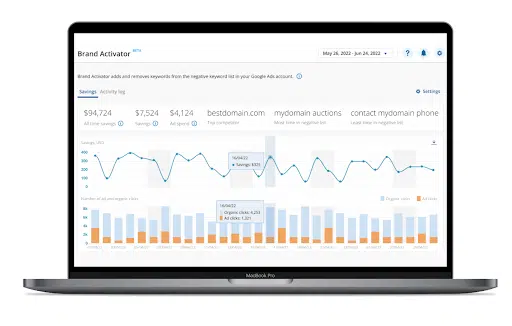
Marketers can now use automated Brand Activator technology to help with just this. When a brand term ranks number one on the SERP for both paid and organic, with no other bidders, there is no need to pay for those clicks. Brand Activator automatically detects those terms and adds them to the negative keyword list. Customers pocket the savings or reinvest in generic terms to drive new revenue.

Adthena 8 17
  1. Audience targeting and segmentation:

By analyzing user data and behavior patterns, marketers can identify relevant audience segments for paid search campaigns. Marketers can use Whole Market View technology to understand user demographics, preferences and online behavior. By leveraging AI to refine targeting strategies, marketers can deliver tailored ads to specific user groups to maximize ad relevance and increase the chance of conversions.

  1. Ad creative testing:

Without question, A/B testing is a vital aspect of paid search strategies. Generative AI can automate the ad creative testing process by generating multiple versions of ads and analyzing their performance. This provides valuable insights into which ad elements, such as headlines, images or calls to action, drive the best results. 

  1. Predictive performance analytics:

Generative AI can provide predictive analytics to forecast paid search campaign performance. By analyzing historical data, market trends and user behavior, marketers can predict the potential outcomes of different bidding strategies, budget allocations, and targeting approaches, helping them to make data-informed decisions and optimize their campaigns proactively.

  1. Ad personalization and optimization:

Last but by no means least, generative AI will help deliver personalized ads to individual users based on their preferences and behavior. Generative AI can generate customized ad variations that resonate with specific individuals by analyzing user data and historical interactions. This personalization enhances the user experience, increases relevancy, and drives higher engagement and conversion rates.

To put this into practice, a Campaign Optimization solution is available that helps customers analyze and evaluate ad copy performance by considering factors like click-through rates, conversion rates, and engagement metrics. The technology leverages AI to suggest ad copy variations and improvements to maximize the effectiveness of search ads.

What does this mean at the back end?

So, what does this all mean for marketers working within advertising platforms, such as Google Ads?

Gobert-Jones suggests this is where technology will be more transformative. “Think AI assistants in advertising platforms which are there to help you identify trends, spot opportunities and test new ad variations.”

Omnicom recently announced a series of generative AI partnerships with Google, Amazon, Microsoft and Adobe to access and apply their models within an Omnicom tech environment.

Generative AI – It’s going nowhere but upwards

Generative AI, with its ability to generate human-like responses, understand context and personalize search results, has elevated the search experience to new heights. As generative AI continues to evolve, it will undoubtedly play a vital role in shaping the future of search, offering more accurate, personalized and relevant results to users worldwide.

So, what next? 

The curious world of artificial intelligence is a minefield. If you’re a little in the dark about how AI can fit into your search strategy, unsure who is bidding on your brand, where they are doing it and what adverts they are using, check out Adthena’s guide Reveal your wasted budget with AI-powered search intelligence to reveal AI-driven strategies for unparalleled search success and revenue optimization.


Related stories

New on Search Engine Land

About the author

Adthena

Founded in 2012, Adthena is an award-winning search intelligence platform. Our unique combination of patented, AI-driven technology and a world-class team of experts helps brands, marketers, and agencies across the globe dominate their competitive landscapes. We provide our customers with a clear view of the paid search landscape, helping them optimize their spend to increase ROI, all while saving them time and better informing their cross-channel strategies. Adthena’s solutions are powered by our market-leading technology: Whole Market View creates a unique market map of a client’s entire search landscape and Smart Monitor automatically detects threats and opportunities every day. Our award-winning Local View product provides the location-based strategic insights that marketers need to dominate at a local level. For more information, visit: www.adthena.com

https://searchengineland.com/ways-generative-ai-can-transform-your-search-strategy-430445


Google: Don’t worry about SEO tool scores

No, you don’t have to worry about scores from SEO tools. Google doesn’t even use scores from some of its own tools (e.g., Lighthouse) for ranking.

That’s according to Google Search Advocate John Mueller, in the latest #AskGooglebot video.

Why we care. Even though Google has said numerous times that Google does not use SEO tool scores (e.g., Domain Authority), it has become a zombie myth (i.e., a myth that just won’t die). Tool scores are not mission-critical SEO metrics. You’re optimizing for Google and search engines – not third-party tool metrics.

Not at all. Google Chrome’s Lighthouse tool is just one example of a tool that will show you performance scores. However, like third-party tools, Google Search doesn’t use Lighthouse scores for ranking.

  • “No, Google does not use scores from third-party SEO tools or services. It doesn’t matter whether it’s about a website’s authority or a rating about spamminess, Google doesn’t use these scores at all,” Mueller said

But. Even though Google doesn’t use SEO scores for ranking, Mueller said some of these scores could be useful for finding actual issues.

  • “They could help with the next steps, or perhaps even qualify the work that was done. Knowing how to score comes to be is critical in determining whether it makes sense for you.”

The video. Watch Does Google Search use SEO scores? #AskGooglebot

[embedded content]

Related stories

New on Search Engine Land

@media screen and (min-width: 800px) { #div-gpt-ad-3191538-7 { display: flex !important; justify-content: center !important; align-items: center !important; min-width:770px; min-height:260px; } } @media screen and (min-width: 1279px) { #div-gpt-ad-3191538-7 { display: flex !important; justify-content: center !important; align-items: center !important; min-width:800px!important; min-height:440px!important; } }

About the author

Danny Goodwin

Danny Goodwin has been Managing Editor of Search Engine Land & Search Marketing Expo – SMX since 2022. He joined Search Engine Land in 2022 as Senior Editor. In addition to reporting on the latest search marketing news, he manages Search Engine Land’s SME (Subject Matter Expert) program. He also helps program U.S. SMX events. Goodwin has been editing and writing about the latest developments and trends in search and digital marketing since 2007. He previously was Executive Editor of Search Engine Journal (from 2017 to 2022), managing editor of Momentology (from 2014-2016) and editor of Search Engine Watch (from 2007 to 2014). He has spoken at many major search conferences and virtual events, and has been sourced for his expertise by a wide range of publications and podcasts.

https://searchengineland.com/google-search-seo-tools-scores-430771


Google Business Profiles to let you manage your social links

Google may soon allow businesses and organizations to manage their social media links that show up on their local listing within Google Search and Google Maps. Google added a new help document on how to manage your social links in Google Business Profiles.

Manage social links in Google Business Profiles. This feature is not fully rolled out to all businesses, yet, but some businesses may be able to login to their Google Business Profile and edit their profile and add or edit their social links within the “edit profile” section of their profile. The Google Business Profile API supposedly supports managing this now, as well.

Here is how add social links:

You can add one link per social media site. For example, you can add one Facebook and one YouTube link to your Business Profile. To add a social media link:

  1. Go to your Business Profile. Learn how to find your profile.
  2. Click Edit profile and thenBusiness information and then Contact.
  3. To edit, click Social profiles and then Down arrow Down arrow.
  4. In the drop down that opens, select the social media link you would like to add.
  5. In the web address field, add the link.
  6. Click Save.

Here is how edit social links:

  1. Go to your Business Profile. Learn how to find your profile.
  2. Click Edit profile and then Business information and then Contact.
  3. To edit, click Social profiles.
  4. Update the web address field for the social media link you’d like to update.
    • Tip: To find the correct format for social media links, refer to the table above.
  5. Click Save.

Here is remove add social links:

  1. Go to your Business Profile. Learn how to find your profile.
  2. Click Edit profile and then Business information and then Contact.
  3. In “Social profiles” next to the profile you want to remove, click Trash Trash.
  4. Click Save.

Supported social networks. Here is a list of social networks that is supported:

  • Facebook
  • Instagram
  • LinkedIn
  • Pinterest
  • TikTok
  • X (formerly known as Twitter)
  • YouTube

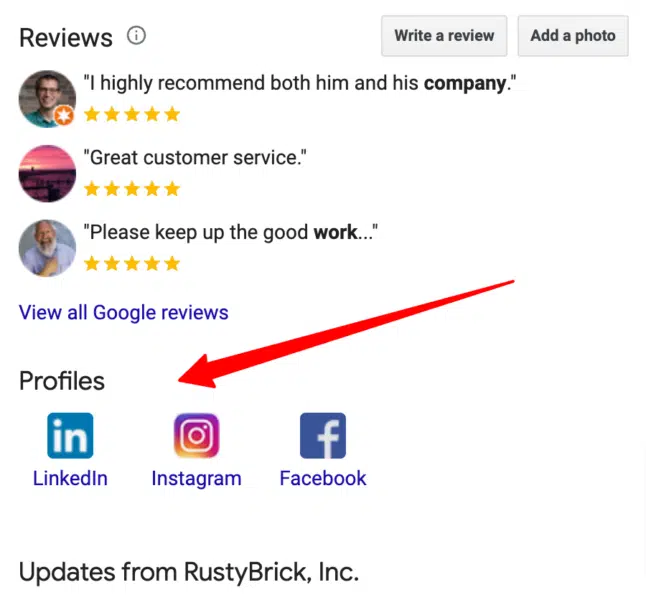
Where social links display. Currently, Google can show social links for a business or organization in the business profile in Google Search and Google Maps. Here is a screenshot of my company’s social links in Google Search, which I have no direct way of managing outside of asking someone at Google to update it manually.

Social Links Google Local Listing 646x600

Why we care. Until now, it was very hard to manage these social media links that displayed in your Google business profile listing. But soon, if not now, you should be able to manage those links directly in Google Business Profiles.

Hat tip to Elisabeth Rule for spotting this.


Related stories

New on Search Engine Land

@media screen and (min-width: 800px) { #div-gpt-ad-3191538-7 { display: flex !important; justify-content: center !important; align-items: center !important; min-width:770px; min-height:260px; } } @media screen and (min-width: 1279px) { #div-gpt-ad-3191538-7 { display: flex !important; justify-content: center !important; align-items: center !important; min-width:800px!important; min-height:440px!important; } }

About the author

Barry Schwartz

Barry Schwartz is a Contributing Editor to Search Engine Land and a member of the programming team for SMX events. He owns RustyBrick, a NY based web consulting firm. He also runs Search Engine Roundtable, a popular search blog on very advanced SEM topics. Barry can be followed on Twitter here.

https://searchengineland.com/google-business-profiles-to-let-you-manage-your-social-links-430766


XML sitemaps and SEO: What you need to know

XML sitemaps just turned 18 in June, and in honor of its full-fledged introduction into adulthood, I’m breaking down how XML sitemaps work, how to build one, and why XML sitemaps offer a boatload of SEO benefits. 

What is an XML sitemap?

In a nutshell, an XML sitemap is a protocol in XML format that tells search engines about the URLs on a website available to crawl.

XML sitemaps were meant to share information about each URL, like:

  • When it was last updated.
  • How often it changes.
  • How important it is in relation to other URLs across your website. 

XML sitemaps allow search engines to crawl your website more efficiently if certain URLs are isolated. 

If you’re an SEO professional, you probably already use XML sitemaps built into your Yoast WordPress plugin. But there are plenty of extras that you might be missing. 

How to build a dynamic XML sitemap

If you’re using WordPress, leverage SEO plugins like Yoast and RankMath to generate a dynamic XML sitemap. 

If you’re not using WordPress, follow these steps to build a dynamic XML sitemap. 

Understand your navigational structure 

Pull together a list of all our URLs on the website and group them to align to navigational structure and content groupings. 

Partner with your developer team 

Share the list of URLs grouped together with your dev team to gain their help in creating a dynamic XML sitemap using Python, PHP, or JavaScript. 

Here is an example of how to code a dynamic XML sitemap using Python: 

import xml.etree.ElementTree as ET import datetime # List of URLs (replace these with your actual URLs) urls = [     "https://www.example.com/page1",     "https://www.example.com/page2",     "https://www.example.com/page3",     # Add more URLs here ] # Create the root element urlset = ET.Element("urlset") urlset.set("xmlns", "http://www.sitemaps.org/schemas/sitemap/0.9") # Loop through URLs and create URL entries for url in urls:     url_elem = ET.SubElement(urlset, "url")     loc_elem = ET.SubElement(url_elem, "loc")     loc_elem.text = url     lastmod_elem = ET.SubElement(url_elem, "lastmod")     lastmod_elem.text = datetime.datetime.now().isoformat()     changefreq_elem = ET.SubElement(url_elem, "changefreq")     changefreq_elem.text = "daily"  # You can set this to the desired frequency     priority_elem = ET.SubElement(url_elem, "priority")     priority_elem.text = "0.5"  # You can set this to a value between 0 and 1 # Create the XML tree tree = ET.ElementTree(urlset) # Save the XML to a file tree.write("sitemap.xml", encoding="utf-8", xml_declaration=True)

When working with developers, I’ve leveraged Flask and Python together to create a truly dynamic XML sitemap that changes whenever the website’s content changes. 

If we can define the dynamic sitemap route based on the website’s content using a function like get_dynamic_urls(), we should be able to retrieve all URLs. 

@app.route('/sitemap.xml', methods=['GET']) def sitemap():     urls = get_dynamic_urls()  # Replace with your dynamic URL retrieval logic     urlset = ET.Element("urlset")     urlset.set("xmlns", "http://www.sitemaps.org/schemas/sitemap/0.9")     for url in urls:         url_elem = ET.SubElement(urlset, "url")         loc_elem = ET.SubElement(url_elem, "loc")         loc_elem.text = url         lastmod_elem = ET.SubElement(url_elem, "lastmod")         lastmod_elem.text = datetime.datetime.now().isoformat()         changefreq_elem = ET.SubElement(url_elem, "changefreq")         changefreq_elem.text = "daily"         priority_elem = ET.SubElement(url_elem, "priority")         priority_elem.text = "0.5"     xml_content = ET.tostring(urlset, encoding="utf-8")     return xml_content, {'Content-Type': 'application/xml'}

If you’re sharing code across multiple domain properties, ensure the files are coded properly on your HTML pages. 

For example, your CSS and JavaScript files should be linked using <link> and <script> tags. 

Before sharing the code across different domains, you’ll need to create a centralized server to host the shared XML sitemap rules. 

You will have multiple phases of your dynamic XML sitemap with your developers until all the rules get confirmed. 

Don’t forget to check the dynamic URLs are actually getting retrieved and integrated into your sitemap logic. 

Upload to your server 

Once your XML sitemap is compressed, upload your dynamic XML sitemap to your website’s root directory. 

Submit to search engines 

Let search engines know about your XML sitemaps by submitting them through Google Search Console and Bing Webmaster Tools. 

Ongoing maintenance 

An XML sitemap is not just a “set it and forget it” SEO tactic. It’s essential to update your XML sitemap as your website changes. 

15 tips to keep in mind when building an XML sitemap

1. XML sitemaps are not a ranking factor

When asked on X (previously Twitter) if there is a ranking advantage to using XML sitemaps, Google’s Gary Illyes responded:

  • “No, not direct anyway.”
Gary Illyes on XML sitemaps

2. Google can find your pages without a sitemap

Websites don’t need a sitemap if they are small and linked properly, Daniel Waisberg, Search Advocate at Google, shared in a Google Search Console training video. 

[embedded content]

However, he followed up by saying a sitemap might be especially helpful if: 

  • The site is really large.
  • The site’s pages are isolated.
  • The site is new or changes quickly.
Daniel Waisberg - When sitemaps are helpful

Also, it’s important to note that Google’s John Muller stated on X (previously Twitter) that having an XML sitemap is a “minimal baseline for any serious website.”

3. Google checks to see if your XML sitemap has changed before reprocessing

Google does check to see if your XML sitemap has changed before it wastes resources parsing and processing the file again, Illyes confirmed. 

He stated in an SEO Office Hours. 

  • “As soon as you change something in your sitemap, be that the URL element or last mod, the sitemap will be parsed again and generally reprocessed. That doesn’t mean that the URLs will be surely crawled of course they are still subject to the quality evaluations like any other URL. It’s also worth to mention that if you remove a URL from the sitemap because perhaps it doesn’t exist anymore that doesn’t mean it’s automatically going to be dropped from the index or even prioritized for crawling so it can be dropped sooner.”

4. XML sitemaps can get your new content indexed quicker

Mueller confirmed that telling Google your XML sitemap is updated can help get your new content indexed quicker. 

He shared: 

  • “Pinging a sitemap is a bit different than just providing it in the robots.txt — by pinging, you’re actively flagging a change in the sitemap file. If you’re keen on having new content indexed quickly, that’s a good practice.”

5. XML sitemaps must be UTF-8 encoded 

If your XML sitemap isn’t using UTF-8, search engines can’t read it. 

6. Keep the file size under 50 MB (uncompressed) or 50,000 URLs

There are size limits to your XML sitemaps. Keep it under 50,000 URLs per sitemap or 50 MB (uncompressed). 

If you have a larger file size or more URLs, use multiple XML sitemaps. 

7. You can have multiple XML sitemaps

Google lets you submit multiple sitemaps. Splitting up your sitemaps into different sections of your website to measure performance can be useful. 

For example, if you’re a large ecommerce website, you can segment your XML sitemaps by product type (i.e., women’s shoes vs. men’s shoes). 

Or, if you have multiple languages, you may want an hreflang related to your <loc> XML sitemap. 

If you have alternate languages, it does not count toward the 50,000 URL max. 

Or, if you have a lot of videos or images, you could separate your XML sitemaps into a video XML sitemap and an image XML sitemap. 

There is no rank benefit to having multiple XML sitemaps. 

8. If you have multiple XML sitemaps, remember to use a sitemap index file 

If you have multiple XML sitemaps for a large site, you’ll want to submit a sitemap index file to submit many sitemaps at once. 

9. The lastmod tag should be flawless

The <lastmod> tag is one of the most essential parts of your XML sitemap. 

For instance, my structured data leverages the <lastmod> date of my XML sitemap. 

The <lastmod> tag also signals to search engines whether you’ve refreshed old content or launched new content. 

Mueller confirmed this by stating:

  • “…If you’re just changing the timestamp  footer, sure, the page has technically changed too, but should that be prioritized – probably not.”

Bing has even made an official stance on the lastmod tag in XML sitemap, stating:

  • “For XML sitemaps, one of the most critical tags you can include in your sitemap is the “lastmod” tag.” 

10. XML sitemaps should only include 200 status URLs that are all self-canonicalized

Remember to keep only live URLs, 200 status, indexable and self-canonicalized. 

If you continue to showcase 404 or 301 redirected pages, search engines could stop crawling your XML sitemap entirely. 

Mueller responded to a comment on X (formerly known as Twitter):

  • “We’d stop fetching sitemap files if the URLs are invalid, but if you’re returning content or redirecting (which is kinda recommended), we’ll keep trying them. It shouldn’t cause problems, since overall sitemap files are only a tiny-tiny part of all URLs fetched from a site.”

11. Search engines can check your XML sitemap daily

Fabrice Canel from Microsoft shared that Microsoft checks your XML sitemap daily. 

While Mueller shared that Google checks your XML sitemap based on frequency (a.k.a., your <lastmod> tag). 

12. Page speed indirectly impacts your XML sitemap

We all know how vital page speed is to our SEO efforts. But how does a slow-performing website impact your XML sitemap?

Mueller has confirmed page speed should not impact your XML sitemap by stating:

  • “As long as it doesn’t time out, you should be fine. Maybe cache the latest version to prevent unnecessary server load?”

The truth is, I’ve worked on slow-performing websites where the XML sitemap is not loading when search engines crawl the website causing major ranking fluctuations. 

There is an indirect impact on your XML sitemap if your website does not load properly. 

This is why it’s important to use Gzip compression to reduce file size and speed up loading times. 

13. Remove <priority> tag from your XML sitemaps

Illyes compared the <priority> tag in XML sitemaps to “a bag of noise.” 

So if you’re depending on search engines to crawl your URLs in your XML sitemap based on priority, you’ll be waiting a long time. 

I recommend removing this tag from your XML sitemaps. 

14. If you have navigational structure issues, pair your XML sitemap with an HTML sitemap

There have always been mixed feelings about HTML sitemaps. 

Mueller shared that HTML sitemaps “should never be needed.” 

He continued:

  • “I changed my mind on HTML sitemaps over the years, they should never be needed. Sites small & large should always have a clear navigational structure. If you feel the need for a HTML sitemap, spend the time improving your site’s architecture instead. HTML sitemaps fit into the same bin with HTML loading spinners.”
<iframe src="https://mastodon.social/@johnmu/109477617298107922/embed" class="mastodon-embed" style="max-width: 100%; border: 0" width="400" allowfullscreen="allowfullscreen"></iframe><script src="https://mastodon.social/embed.js" async="async"></script> 

When working on large websites at an enterprise level, there are often multiple layers of decision-makers on a website navigation structure. And oftentimes, SEO best practices are taken into consideration. 

I pair both my XML sitemap with an HTML sitemap until I’m confident in our website navigation and internal linking hierarchy. 

15. Don’t forget to include all your XML sitemaps in your robots.txt file

Don’t forget to include your XML sitemaps (all of them) as links in your robots.txt file. 

Here is an example: 

Include all your XML sitemaps in your robots.txt file

Don’t worry about where in the robots.txt file these should go. There is no impact on the location of your XML sitemap in your robots.txt file. 

Mueller confirmed this: 

XML sitemaps are the blueprint of your website for search engines

Whether you’re launching a new webpage or just adding a canonical tag to a duplicate page, your XML sitemap is something you should update 24/7.

But do so with caution. 

While you shouldn’t be paranoid, your XML sitemap is the blueprint of your house for search engines. 

So don’t forget to submit your XML sitemaps to Google Search Console and Bing Webmaster Tools.


Opinions expressed in this article are those of the guest author and not necessarily Search Engine Land. Staff authors are listed here.


Related stories

New on Search Engine Land

@media screen and (min-width: 800px) { #div-gpt-ad-3191538-7 { display: flex !important; justify-content: center !important; align-items: center !important; min-width:770px; min-height:260px; } } @media screen and (min-width: 1279px) { #div-gpt-ad-3191538-7 { display: flex !important; justify-content: center !important; align-items: center !important; min-width:800px!important; min-height:440px!important; } }

About the author

Anna Crowe

Anna Crowe is a Frank’s Hot Buffalo sauce advocate (leading with obvious priorities), writer, marketer and SEO nerd. Over the last 12+ years, Anna has successfully run SEO and content programs for brands like Dollar Thrifty Rental, Marriott, Hilton, Hearst Magazine, Mailboat Records, Philip Morris International, Bloomin’ Brands and Brother USA and many more. She enjoys burritos and puppies (in that order) when she’s not moonlighting as a soccer coach. https://annaleacrowe.com/

https://searchengineland.com/xml-sitemaps-and-seo-what-you-need-to-know-430735


Google Search Generative Experience adds SGE while browsing

Google is releasing a number of new features for its new Search Generative Experience today. Those features include SGE while browsing, definition overlays in the SGE responses, and color-coded with syntax highlighting and other coding improvements within the SGE answers.

Google wrote these new features “help you better learn and make sense of information on the web: whether it’s deepening your understanding of complicated concepts, boosting your coding skills or tracking down details within a complex topic.”

SGE while browsing

Google SGE can now be used while browsing either on Chrome desktop or the Google app on iOS or Android. While browsing a webpage, you can ask Google SGE to generate key points from the page. Google SGE will then summarize the web page that you are browsing.

This works on “some web pages,” which means this feature might not work on all content on the web. Google added, “You can tap to see an AI-generated list of the key points an article covers, with links that will take you straight to what you’re looking for directly on the page.” Google will also show you an “Explore on page,” where you can see questions the article answers and jump to the relevant section to learn more.

Google’s SGE while browsing is not automated in that humans need to request that SGE summarize the page specifically; otherwise, it won’t happen.

Paywalled content. Google will not let SGE while browsing work on paywalled content. So if you are using the structured data for paywalled content, SGE while browsing will not work.

Other ways to opt-out. Google said there is currently no special meta tag to tell Google not to let SGE while browsing summarizes the content on your web pages. If you use the paywall structured data, that would prevent SGE while browsing to summarize your content, but if you do not use that, there is no alternative available, at this time, for preventing SGE while browsing.

Indexed. Google did tell me that a page needs to be in the Google index for SGE while browsing to work. So if you block that page from being indexed, that should also prevent this feature from working. But that also means your page won’t benefit from being listed in Google Search.

The key points are generated based on the latest version Google has indexed, it is not necessarily generated in real-time based on what is on the web page at the time you use this feature.

What it looks like. Here are GIFs of this in action on desktop; it is similar on mobile but the menu to request this feature is at the bottom of the browser window:

SGE While Browsing Desktop

SGE definitions

Google now is showing for select words within the SGE AI-generated answer definitions, similar to what Google showed in featured snippets contextual links. In fact, Danny Sullivan, Google’s Search Liaison, told us SGE is using similar technology that featured snippets use for this feature.

Google said, “You’ll be able to hover over certain words to preview definitions and see related diagrams or images on the topic.” These work for “various topics or questions related to STEM, economics, history and more,” Google added.

The “Tell me more about [topic]” bubble will take you to SGE’s conversation mode, where you’ll see more about the topic that’s referenced.

What it looks like. Here is a GIF of it in action:

Inline Definitions

Coding updates in SGE

SGE is also improving how it shows coding in the answers it generates with color syntax in code examples. Google said, “Segments of code in overviews will now be color-coded with syntax highlighting, so it’s faster and easier to identify elements like keywords, comments and strings, helping you better digest the code you see at a glance.”

Why we care

AI in search is evolving quickly, and SGE is one of the big players in this space. Offering SGE in web browsers is a big step in bringing it closer to Bing Chat’s Edge sidebar feature. This also may offer ways for your readers to better understand your content, give you insight into how Google SGE understands your content, and may give you ways to consume other content faster.


Related stories

New on Search Engine Land

@media screen and (min-width: 800px) { #div-gpt-ad-3191538-7 { display: flex !important; justify-content: center !important; align-items: center !important; min-width:770px; min-height:260px; } } @media screen and (min-width: 1279px) { #div-gpt-ad-3191538-7 { display: flex !important; justify-content: center !important; align-items: center !important; min-width:800px!important; min-height:440px!important; } }

About the author

Barry Schwartz

Barry Schwartz is a Contributing Editor to Search Engine Land and a member of the programming team for SMX events. He owns RustyBrick, a NY based web consulting firm. He also runs Search Engine Roundtable, a popular search blog on very advanced SEM topics. Barry can be followed on Twitter here.

https://searchengineland.com/google-search-generative-experience-while-browsing-gains-definitions-and-color-coding-syntax-430707


How to get Universal Analytics-like insights in Google Analytics 4

While many of us miss Universal Analytics (UA), the fact is it’s gone and it isn’t coming back.

So, how do we get UA-like findings out of Google Analytics 4 (GA4)?

We asked Russell Ketchum, product director of Google Analytics, in the first of a three-part series of conversations with him.

The terminology and concepts in GA4 are different from those in Universal Analytics, what does it mean to recreate UA reports for GA4?

RK: Using GA4 requires a new way of thinking.

First and foremost, when comparing UA and GA4, it’s important to remember that UA was built when the internet looked very different from how it does today – and operated very differently. To accommodate these changes, we’ve updated features in GA4 to meet today’s expectations. 

In UA, everything was a report – and there were a lot of them. And, looking back, there was a tendency to overload the purpose of several reports – which might have been great for power users but could be intimidating for newcomers.

With GA4, we’ve taken a more use-case-centric approach. 

What we now call “Reports” is intended to be the canonical set of information you’d monitor on a daily basis. It’s customizable in a way that’s shared across your organization so you can be sure that everyone is on the same page and seeing the exact same data (this can be found in the GA4 left navigation). 

So how do I come up with customized “reports” about things I want to know?

RK: For that you have Explore. Think of this more as a user’s personal “scratch pad.”

Explore lets you go really deep in your analysis – it actually has its roots in UA’s 360-only “Advanced Analysis” feature set. It offers a lot of functionality that most of our users haven’t seen before.

We don’t expect all users to go there, or at least not every day, but it’s a great option to have.

Explore is there to either answer a specific, one-off question – or to inspire a report that your organization would benefit from when added to the Reports section. 

And in the Advertising Workspace, we focus on media measurement. 

That said, depending on what your goal is, there are almost always more straightforward ways to get the answer out of GA4, rather than aiming to recreate UA reports. 

Such as…?

RK: I think it is more useful to take this even broader and talk about the challenges users can have with GA4 in general.

Let’s be honest, customers were used to Universal Analytics. In a lot of ways, UA taught its users how to think – and GA4 requires you to think differently. We know that’s hard, but it’s also intentional. So we’re committed to helping our customers bridge that gulf – for example, with the newly launched Analytics Academy. 

In UA, you had to shoehorn your view of the world into some pretty limiting constructs – sessions, bounces, last click, etc. …In GA4, we’ve broken free of those constraints, but there’s a learning curve. 

GA4 measures user engagement with your site or app differently – and more accurately. It focuses on the users and all the things those users do (measured by different events).

Here’s an example:

In UA, you’d typically look at Bounces and Time on Page to get a sense of “not valuable” traffic (or sessions or users or clicks depending on the situation). But that’s not really what it’s measuring. A Bounce is just an “unbound session” — a user came to your site, registered one page view, and took no subsequent navigation action. 

Is that a good measure of how engaged the user was? Given how the web worked in 2005 it was. Today, maybe…but more often, maybe not.

What if you have a single-page site? What if your important calls to action on a page don’t trigger navigation? 

Even if a user was actively scrolling, reading from one article to another, playing all your video content, submitting every lead gen form you wanted them to, out of the box, UA would tell you that they were all bounces and you’d be looking at a wall of manual tagging if you wanted a better answer. 

What’s the answer?

RK: With GA4, we teased it apart and did the hard parts for the customer. Now we have Sessions and Engaged Sessions — and more importantly Engaged Users. Engaged means “active or interacting with” — users that had some interaction with your site not limited to navigation. 

There’s a level deeper as well. You could have a user land on a site and immediately leave and a user that lands and just sits there. You can’t distinguish the two in UA even though it’s very different behavior. In GA4 you can. It’s the difference between a Session and an Engaged Session. With modern techniques, we can measure when your site is in focus even if unengaged — so we do. 

So that’s really what makes recreating reports from UA hard. In UA you have familiar constructs that may not be answering the questions you think they are. In GA4 you have new terms that mean what they say, but that are different from UA. If you are asking the same questions you did in UA, but GA4 has a better answer to give you, it will.

Are there similarities/overlaps between UA and GA4 I can use to do this?

RK: Yes, absolutely. GA4 can measure a lot more than UA could and can do it at scale – apps for example. But for the web, technologies may have evolved but we expect our customers to still have the same set of fundamental questions.

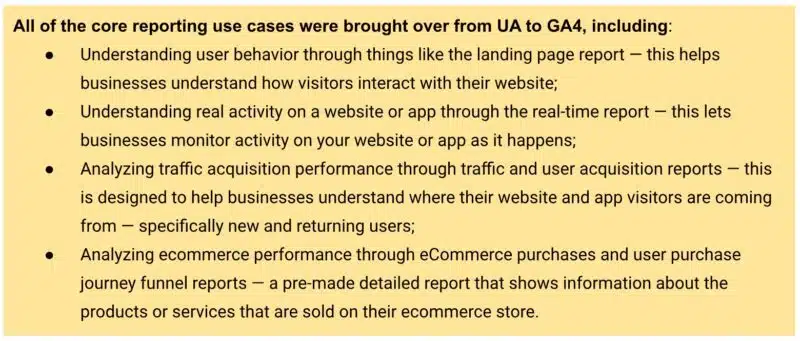
That’s why we made sure to bring over all of the core reporting use cases from UA to GA4. 

Ga4 Usecases 1 800x341
You can find more use cases here.

GA4 takes many of the existing use cases and features Universal Analytics offered and either adds to them or distills them down to be simpler and more intuitive or customizable. 

Are there specific things in GA4 I should focus on to do this?

RK: Yes! When you search GA4 for report names from UA, you’ll get pointers to the updated equivalents. Then, when you’re on a given report, but you get a different set of metrics or dimensions than you expected, look to customization – the pencil icon. 

Customization is really powerful. Generally speaking, the metrics and dimensions you’re looking for can be added.

I’d suggest making a copy of the report before saving it. That way, you can have a version of the report from the old world and a version from the new.   

Unlike UA, GA4 can be tailored for your business from the get-go. By specifying your Business Objectives, the UI will be customized for you to show relevant reports and hide others.

This is another reason that a UA report you expected may not be there. It may not be as relevant for you in GA4 as it was in UA, in other words, GA4 is likely answering your question in a different way. 

If you’re new to GA4, I really recommend taking advantage of the many customization options available. It may not be immediately familiar if you’ve been using Universal Analytics for years, but GA4 was intentionally designed to really get businesses the information that matters in a simple and streamlined way, measuring in a way that more accurately reflects the way people use the internet today.


Related stories

New on Search Engine Land

@media screen and (min-width: 800px) { #div-gpt-ad-3191538-7 { display: flex !important; justify-content: center !important; align-items: center !important; min-width:770px; min-height:260px; } } @media screen and (min-width: 1279px) { #div-gpt-ad-3191538-7 { display: flex !important; justify-content: center !important; align-items: center !important; min-width:800px!important; min-height:440px!important; } }

About the author

Constantine von Hoffman

Constantine von Hoffman is managing editor of MarTech. A veteran journalist, Con has covered business, finance, marketing and tech for CBSNews.com, Brandweek, CMO, and Inc. He has been city editor of the Boston Herald, news producer at NPR, and has written for Harvard Business Review, Boston Magazine, Sierra, and many other publications.

https://searchengineland.com/how-to-get-universal-analytics-like-insights-in-google-analytics-4-430724