Just the terminology around users, featured at the beginning of that Google documentation, is an area where people get confused as they’re trying to recreate their old UA reports in GA4:
As Proehl summarized, the high-level difference here is:
“UA was based on sessions and pageviews. GA4 is based on events and parameters. Both methods can collect and tally data, but the output in a report will look different.”
Familiarizing yourself with the differences in how things are calculated and what different terminology means and measures is an essential first step to ensuring you aren’t confused by your GA4 reports.
2. Different filters and UI
If you’ve logged into Universal Analytics and GA4, you’ll see major changes to the interface (which, like many aspects of GA4, not everyone loves).
Additionally, there are several different ways to filter data that will deviate from interface to interface.
I’ll use a specific example to demonstrate how you can get tripped up here.
To quickly get at overall organic traffic in Universal Analytics, you could go to Audience > Overview, thensegment for organic traffic:
In GA4, getting to a similar quick view of a top-line organic traffic trend may look something like this:
But this is a different metric (first user medium) and a different filter (contains organic – which works for this property but may not for a site with organic social traffic, etc.)
Some of the views or reports you were used to in UA may only be available as “Explorations,” a reporting suite within GA4 that includes:
“Free form” reports (a replacement for “custom reports” in UA).
This may be your ticket to recreating some of the views and reports you were accustomed to in UA (or at least a close approximation).
Get the daily newsletter search marketers rely on.
3. Data thresholding in GA4
GA4 data may seem to be completely missing or dramatically under-reported in certain views for certain actions (visitors, specific events, etc.) when a user drills down to a specific level.
This is a common point of confusion, particularly for small to medium-sized sites looking at granular levels of data.
“If your report or exploration is missing data, it may be because Google Analytics has applied a data threshold. Data thresholds are applied to prevent anyone viewing a report or exploration from inferring the identity of individual users based on demographics, interests, or other signals present in the data.”
If you want to avoid thresholding, here are your options:
Disable Google Signals: There are pros and cons to using Signals, but a big con is that it enables this kind of thresholding. The main pros are:
It will start populating demographic data in GA4.
It lets you reuse Google Analytics audiences as retargeting audiences in Google Ads (thus, you can show more targeted ads to them).
While it isn’t new or unique to GA4, data sampling is another factor frequently confusing users. Unlike UA, standard reports in GA4 actually won’t be sampled – which is good news!
Note that standard reports are those in the Reports tab.
However, reports that live within the Explore or Advertising sections of GA4 may be sampled.
This may lead to discrepancies in:
Standard reports – where you may see larger numbers in GA4 than UA.
Advanced reports – where sampling is applied in GA4.
The solution for avoiding sampling is to drill down to a more specific time frame (essentially the opposite of thresholding) or upgrade to Google’s paid Analytics 360 product and leverage features.
Sampling and thresholding can be applied within the same reports.
5. API limitations for GA4
There are also changes in how the Google Analytics API can process data with the advent of GA4.
This applies to third-party reporting tools and Google’s own Looker Studio.
Some key limitations to the information you’ll have available in Looker Studio include:
Only a certain number of rows are available via the API.
Not all dimensions are available yet, so certain metrics (like exits) may not be available in Looker Studio reports.
Calculations are slightly different in Looker Studio than GA4, depending on the setup of each account. Looker Studio sometimes has issues with data skewed by multiple filters, for instance.
For new users, visitors are counted as “new” at midnight, even with the same client ID, which sometimes causes discrepancies.
API quotas are present for any reporting tool, so if your data is in a third-party tool and the GA4 interface isn’t syncing up, this may be the reason.
To help address these issues, there are a few potential workarounds:
Adjusting your reports so that you’re less likely to hit quota limits.
Exporting to BigQuery first (which does have its own limitations), then connecting BigQuery to Looker Studio.
Using a third-party tool that automates the export/import timing to manage quota limits.
Being aware of Looker Studio’s specific limitations and how to recreate reports around those is a good starting point for avoiding confusion and frustration surrounding these reports.
6. Events, goals and historical data
This one is likely a bit more obvious. Still, depending on how they were initially set up and whether you migrated your UA account or events to GA4, you may or may not have events populating in your existing reports.
You won’t have GA4 data before it is installed on your site. All this may not occur immediately when you drill into a specific issue in a report.
And if you need to look at UA and GA4 data side by side, go back to the start of the article and keep in mind the differences in metrics and calculations.
Opinions expressed in this article are those of the guest author and not necessarily Search Engine Land. Staff authors are listed here.
@media screen and (min-width: 800px) { #div-gpt-ad-3191538-7 { display: flex !important; justify-content: center !important; align-items: center !important; min-width:770px; min-height:260px; }
}
@media screen and (min-width: 1279px) { #div-gpt-ad-3191538-7 { display: flex !important; justify-content: center !important; align-items: center !important; min-width:800px!important; min-height:440px!important; }
}
About the author
Tom Demers is the co-founder and managing partner of Measured SEM and Cornerstone Content. His companies offer paid search management, search engine optimization (SEO), and content marketing services to businesses of varying sizes in various industries.
Google Merchant Center adds 3D model link [virtual_model_link] attribute
Google Merchant Center has new help documentation on an attribute named 3D model link [virtual_model_link]. The new help documentation reads, “Use the 3D model link [virtual_model_link] attribute to provide more visuals for your product.”
This attribute is for shoes and home goods, the attribute is also limited to products sold in the US.
Virtual model link attribute. The [virtual_model_link] attribute can be used to communicate to Google about your 3D images. These images can be displayed in Google Search and Shopping, as we have seen for years in Google Search.
Here is a sample GIF of this in action from Google:
How to. How do you make these 3D/AR images? Google said “Merchants can create 3D and AR models of their products on their own or with the help of a partner. The list of our partners include:”
Google said when you add links to a 3D model in your feed, Google will review the 3D model before it appears in Google Search results. This can take up to two weeks.
Technical requirements. Google listed a number of technical requirements for this attribute. “These are the requirements you need to meet to show your product. If you don’t follow these requirements, we’ll disapprove your product and let you know in your Merchant Center account,” Google wrote.
Use a 3D model. The recommended file size is 10MB and shouldn’t exceed 15MB. Textures in the file can be up to 2K (4K isn’t supported). Learn more about file requirements for model specifications.
Provide a valid URL in your product data. The link should point to a .gltf, or .glb file.
Review your 3D model. You can use a validation tool to verify if your 3D model works properly.
If you don’t follow these requirements, we won’t be able to use your 3D attribute for the product.
Why we care. 3D and AR images may help you get more visibility and clicks from Google Search to your website and that may lead to more conversions and sales through your web site.
So if you can offer these 3D images and serve them through Google Merchant Center, it might be something you want to experiment to see how traffic and conversions improve.
@media screen and (min-width: 800px) { #div-gpt-ad-3191538-7 { display: flex !important; justify-content: center !important; align-items: center !important; min-width:770px; min-height:260px; }
}
@media screen and (min-width: 1279px) { #div-gpt-ad-3191538-7 { display: flex !important; justify-content: center !important; align-items: center !important; min-width:800px!important; min-height:440px!important; }
}
About the author
Barry Schwartz is a Contributing Editor to Search Engine Land and a member of the programming team for SMX events. He owns RustyBrick, a NY based web consulting firm. He also runs Search Engine Roundtable, a popular search blog on very advanced SEM topics. Barry can be followed on Twitter here.
How to target highly competitive organic keywords: An advanced approach
Whether you’re on the agency or in-house side of SEO, I’m guessing you’ve fielded a request to “get us on top of the search results” for keywords dominated by giant competitors or entities.
The good news is that a giant can’t simply outspend you to outrank you.
The bad news? Standard SEO tactics likely won’t get you at the top of the search results in this situation.
So how do you go beyond a boilerplate SEO approach to get competitive?
It comes down to competitive, keyword and audience analysis.
A good process will help you recognize what your business has to say that adds value and uniqueness that isn’t yet part of the discussion.
This article will look at how to approach that goal – and how to earn traffic and make your brand stand out in the process.
Competitive keywords: Where to start?
Let’s say you’re working for a young, innovative CRM trying to eat into the market share of Salesforce, HubSpot, and the like.
On top of competing with these giants for broad CRM terms, you’re likely trying to outrank listings like G2 and listicles like CNET. All of those have domain-level advantages that make the climb steeper.
It’s a tall task, but there’s no sense in being daunted by the competition. Instead, start assessing where there’s room for you to stand out by looking at:
What they’re saying.
How their pages are set up to rank for the keyword.
How the features of their product address the challenges of that audience.
A mapping exercise of your competitors and their ideal customer profiles should show you the blue sky available.
Presuming you’re not targeting the exact same audience, you’ll have a different set of needs and desires to address with your approach.
What kind of keyword research can give you some traction?
Google Keyword Planner (along with Semrush, Ahrefs or other keyword planning tools) will give you closely related topics and queries.
You can look at the SERP itself to see People also ask and suggested searches.
If you’re lucky, you’ll get nuggets that show you the actual features and benefits the users are looking to find with their original query.
Secondary keywords and themes will also emerge from studying discussions on Reddit, Quora, X (formerly Twitter) and maybe Threads (if they eventually use their hashtag for something other than discovering profiles).
The next step is to spend time on the psychology of the query.
Someone searching for “CRM” might be in research mode and looking for a landscape of options and capabilities, so you should consider content like a buying guide or “the evolution of CRM features.”
Meanwhile, a query like “free CRM trial” is much closer to the actual purchase decision, which means more transactional content is a better starting point.
Whatever you discern as the intent, don’t assume the other brands in the SERPs have reached the same conclusion in their ranking content. If none of them are, you have an opportunity to stand out.
Get the daily newsletter search marketers rely on.
Work with your internal teams to do audience analysis
A deeper source of knowledge than anything you’ll find online: your clients or colleagues in product development and sales.
Take the findings of your research to them and ask what they think.
You’ll either get your angle validated or get surprising insights that help you produce distinctive content that connects in a way your competitors aren’t.
Case in point: one of my clients has a product-related keyword with “precision” in it. It’s a highly valuable keyword for them and a valuable concept for their audience.
Competitive research turned up the usual mix: big sites, direct competitors, and review sites on top of the SERP.
But none of the content really addressed “precision” in the context of the keyword. They confused it with accuracy and detail.
I met with the product engineers on the client’s team. While they verified that none of the existing content had “precision” correct in context, even they couldn’t come to a consensus on what the word meant.
What started as a project to write bottom-of-funnel content turned into a project to write a top-of-funnel piece that focused on the definition itself to establish authority otherwise missing in the space.
That piece ranks high in the SERP among giants a couple of weeks after launch, and the client is thrilled.
If you’re still struggling with the main keyword, do an end-around
You won’t always get breakthroughs that clean, though.
Be ready to build momentum using longer-tail keywords and addressing more niche audiences that can establish a base for growth.
One webpage per keyword or audience can become an organism as you expand.
The other initiative to include is off-page signals, specifically from organic social media, which can get more people talking and thinking about your take on the keyword theme.
It won’t always work, but it’s always worth testing.
Targeting competitive keywords with competitive, keyword and audience analysis
It’s always easy to hear a mandate to rank for specific keywords as an unreasonable request from someone who doesn’t have the full context.
To me, it can be more of a gift. A couple of follow-up questions will tell you what business outcomes your client or teammate is trying to achieve with improved ranking.
This tells you that what you’re about to dig into carries significance.
Apply advanced thinking to your approach, and the resulting growth should get a pretty cheerful reception.
Opinions expressed in this article are those of the guest author and not necessarily Search Engine Land. Staff authors are listed here.
@media screen and (min-width: 800px) { #div-gpt-ad-3191538-7 { display: flex !important; justify-content: center !important; align-items: center !important; min-width:770px; min-height:260px; }
}
@media screen and (min-width: 1279px) { #div-gpt-ad-3191538-7 { display: flex !important; justify-content: center !important; align-items: center !important; min-width:800px!important; min-height:440px!important; }
}
About the author
Adam Tanguay is Head of SEO and Content at Jordan Digital Marketing, which he joined in Feb. 2019. Formerly Head of Marketing at Webflow and Head of Organic Growth at Weebly, Adam has developed successful growth programs with a mix of content strategy, copywriting, technical know-how, and analytics acumen across a range of organic channels.
Why we care. If you sell products on Amazon, this feature could lead to more sales. Reviews remain critical as consumers decide whether to buy a product (Amazon highlighted that “customers contributed nearly 1.5 billion reviews and ratings to Amazon stores” in 2022). The big question is whether this new feature impacts sales positively or negatively.
What it looks like. Amazon’s feature appears at the top of the Customer reviews section on product pages. The AI-generated paragraph, which mentions product features and customer sentiment, appears under a bold Customers say heading. Beneath the paragraph is this line: “AI-generated from the text of customer reviews”:
Several tappable attributes (e.g., Performance, Ease of use, Stability) appear under the customer review highlights. This feature lets you filter to only show reviews mentioning that specific attribute. Here’s a screenshot example Amazon provided for Ease of use:
Who can see the test. A “subset of mobile shoppers in the U.S. across a broad selection of products” have been opted into the test, Amazon said in a blog post.
What Amazon said. The test is likely to expand in the coming months:
“We are always testing, learning, and fine-tuning our AI models to improve the customer experience and, based on customer feedback, may expand our review highlights feature to additional categories and customers in the coming months.”
Newegg has a similar feature. Online retailer Newegg added AI-generated summaries of customer reviews on its product pages, as well as highlighting pros and cons or products.
@media screen and (min-width: 800px) { #div-gpt-ad-3191538-7 { display: flex !important; justify-content: center !important; align-items: center !important; min-width:770px; min-height:260px; }
}
@media screen and (min-width: 1279px) { #div-gpt-ad-3191538-7 { display: flex !important; justify-content: center !important; align-items: center !important; min-width:800px!important; min-height:440px!important; }
}
About the author
Danny Goodwin has been Managing Editor of Search Engine Land & Search Marketing Expo – SMX since 2022. He joined Search Engine Land in 2022 as Senior Editor. In addition to reporting on the latest search marketing news, he manages Search Engine Land’s SME (Subject Matter Expert) program. He also helps program U.S. SMX events. Goodwin has been editing and writing about the latest developments and trends in search and digital marketing since 2007. He previously was Executive Editor of Search Engine Journal (from 2017 to 2022), managing editor of Momentology (from 2014-2016) and editor of Search Engine Watch (from 2007 to 2014). He has spoken at many major search conferences and virtual events, and has been sourced for his expertise by a wide range of publications and podcasts.
No, outbound links won’t help your content rank better on Google
People have long added external links to their blogs in hopes of being seen as relevant.
Countless others are vying for these backlinks because they want their rankings to increase.
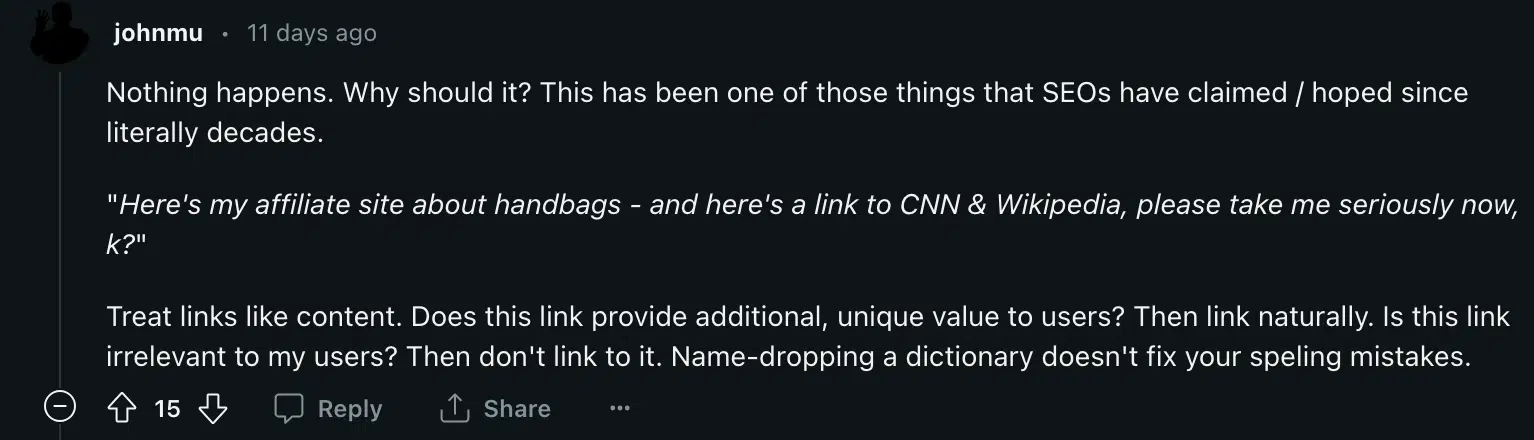
“What will happen if I external link to a popular website like Wikipedia?” a Redditor asked.
And Google’s John Mueller broke the floodgates open with his take:
“Nothing happens. Why should it? This has been one of those things that SEOs have claimed / hoped since literally decades.
“Here’s my affiliate site about handbags – and here’s a link to CNN & Wikipedia, please take me seriously now, k?”
Treat links like content. Does this link provide additional, unique value to users? Then link naturally. Is this link irrelevant to my users? Then don’t link to it. Name-dropping a dictionary doesn’t fix your spelling mistakes.”
If you’ve been following “best practices” and linking out to authority sites as part of your on-page SEO, you’re not alone.
Many people in the industry follow this practice, and there have even been some case studies proving the validity of claims that external links on your site can help with rankings.
Do – or did – external links help with rankings?
Studies on external links on a page have shown that they help. Reboot Online ran an experiment years ago that spread like wildfire, and the gist was simple:
Purchased 10 new sites.
5 sites didn’t use external links.
5 sites used external links.
Some big names in the industry chose to review the data, including Rand Fishkin.
The sites that had external links did experience a positive impact from the links. But there is one problem: the study was done in 2015/2016.
The same team redid the study in 2020 with the same results.
For 4 to 5 years, external links on the page helped with rankings.
What Google ‘really wants’ from your content
In a very “vague” manner, let’s discuss what Google wants because we know that no one really knows and is merely looking into a crystal ball that Google seems to shake up whenever it likes.
Mueller’s comment suggests links should:
Provide additional value.
Be natural.
Be relevant to the user.
So, Mueller states that linking out won’t help your site if the link is irrelevant.
If we build off Mueller’s example, imagine that we sell handbags and write an amazing article on how sustainable handbags are manufactured.
Proper linking may link to sites that link to:
Complex issues about sustainability.
Statistics on the importance of sustainable production.
However, suppose I link to a generic definition of sustainability or a CNN page on handbags that don’t provide value. In that case, Google isn’t going to rank your page higher because you created a quick link.
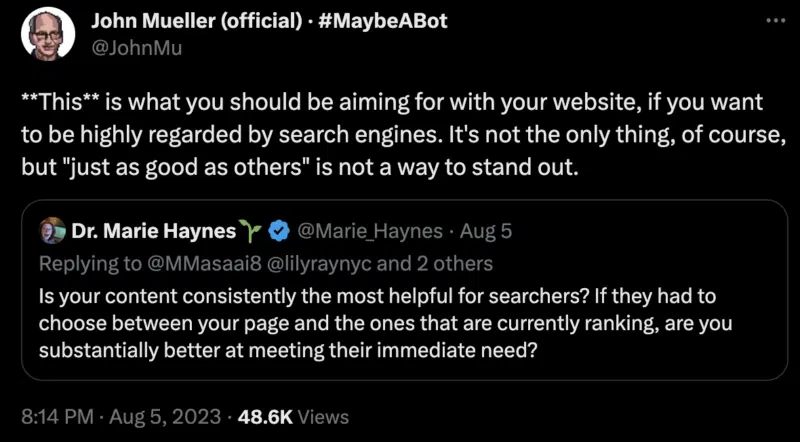
If you’ve been paying attention to Google in recent years, they keep repeating one word: “users.”
If we listen to Google, Mueller and countless other Google-related sources, they want you to do everything you can for the user.
But this isn’t the first time Mueller has repeated the same concept.
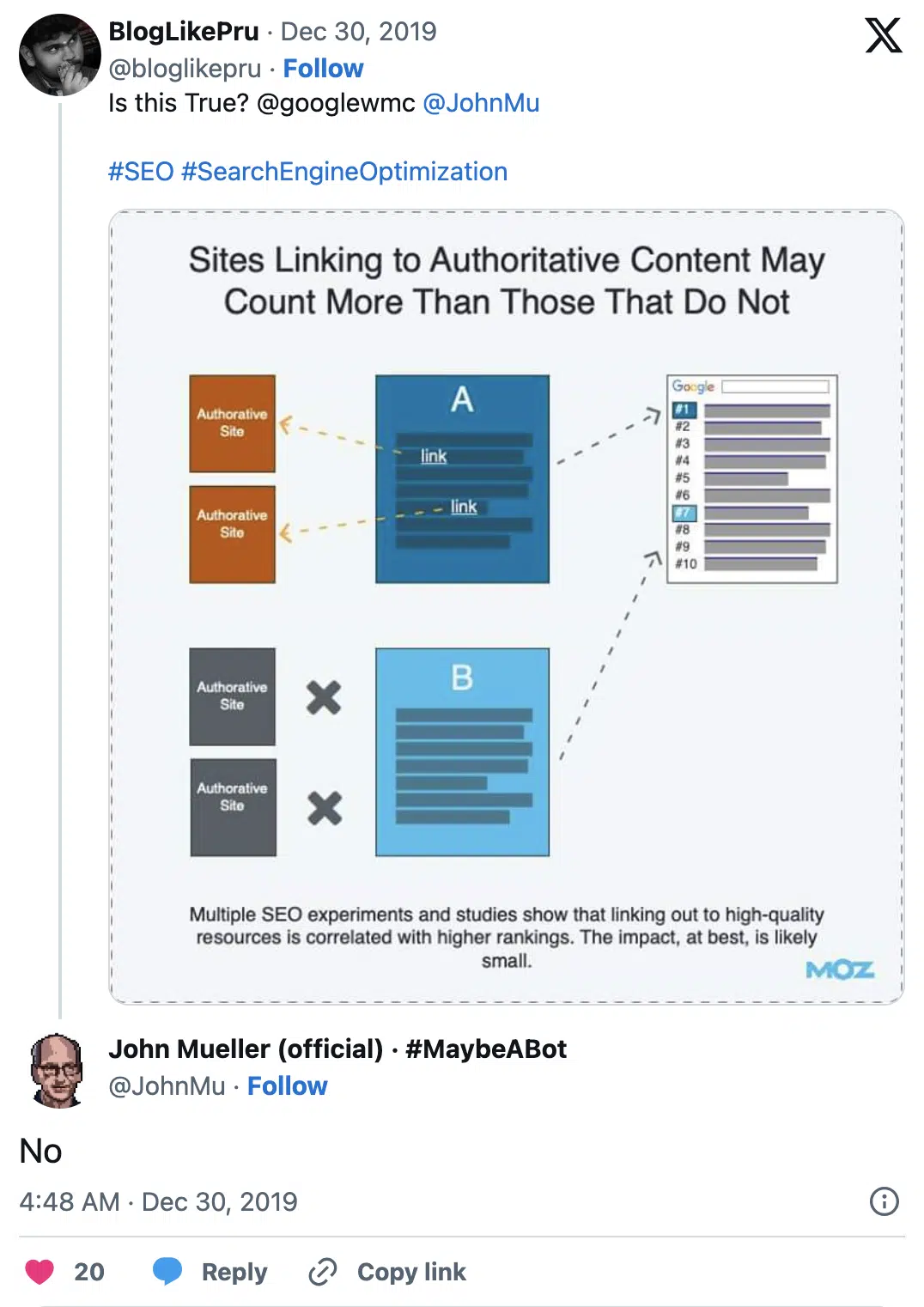
He has mentioned that linking out from your page in hopes that it nudges Google to think that your site is high quality hasn’t been a good idea since 2019, which you can also find on Twitter (X):
“Sure, sure. People have been linking to Wikipedia, CNN, etc for decades now in the hope that their low-quality pages are suddenly seen as being high-quality. That’s not how you make high-quality content.”
Get the daily newsletter search marketers rely on.
Where external links fit into the system
Everyone is talking about “users” and why you shouldn’t add a link on your page if it isn’t:
Accurate.
Relevant.
Value-adding.
When adding a link to your next blog post, ask yourself if it’s useful and helpful.
You can write about something outside your niche and link to a resource that helps the user explore additional content further.
Google wants your posts to provide deeper insights and lead users to dive deeper into the subject matter.
Why? A lot of sites are running AdSense and Analytics, and it does benefit Google to some extent.
You also kept the reader engaged, which is powerful in itself.
Linking with the intent to provide value
Google wants its users to be happy, and you need to provide some form of value if you can make a user happy.
A few things I recommend after being in the industry for years when using external links are:
Add the link to your content naturally.
Actually, read the content that you link to and ask yourself, “Is this useful?”
Defining “quality” should be easy and intuitive, yet far too many people subscribe to adding two or three high-quality links to their content and not even to the exact page of the site that is relevant.
For example, let’s assume that you have a blog post that talks about IVDD in dogs.
You might link to Wikipedia’s page on “dogs,” but it will be even better if you link to “IVDD” or dogs that have this disease.
Why would you link to IVDD?
“Dog” is something that people should know.
People may not know what IVDD is, so they want to research it further.
Your article is a resource of knowledge that the user should be able to use to answer their questions and dive deeper into a topic.
No. you should only remove links that are not valuable and make no sense.
If your article on “baking” links to a “dog,” you may want to remove this link. The link may not hurt your SEO, but does it really provide any form of value?
Probably not.
Add value. Period.
You must always focus on adding value for users with anything you do – or Google will tell you that you must.
Now, I know there will be many conflicting views on this post because we all know that Google says one thing and rewards another.
However, if you heed Google’s advice, this is Mueller’s latest and greatest information on using external links on your blog posts.
It’s as simple as evaluating each link to ensure that it’s helpful and serves a purpose.
Opinions expressed in this article are those of the guest author and not necessarily Search Engine Land. Staff authors are listed here.
@media screen and (min-width: 800px) { #div-gpt-ad-3191538-7 { display: flex !important; justify-content: center !important; align-items: center !important; min-width:770px; min-height:260px; }
}
@media screen and (min-width: 1279px) { #div-gpt-ad-3191538-7 { display: flex !important; justify-content: center !important; align-items: center !important; min-width:800px!important; min-height:440px!important; }
}
About the author
Ludwig Makhyan is a contributor for Search Engine Land, covering organic and technical SEO. His background is in web development and digital marketing. Ludwig has over 20 years of experience in website design, coding and promotion. He is the co-founder at MAZELESS, an enterprise SEO agency.
Why we should set higher standards for content production
Most online content feels like stale crackers.
Sure, it hits the spot. If you’re starving, it might help you feel less weak in the knees for a while. But then you will use that cracker-induced burst of energy to get yourself to some good food. As fast as possible.
When the only question we ask ourselves while planning and creating content is, “How do we rank for this search query over the articles already there?” we are settling for the lowest acceptable quality standard.
We are willingly reducing our meals to the equivalent of a disappointingly soft bite into the Ritz that has been left out on the dining table for more than a week.
Your typical ‘stale cracker’ SERP page. None of these options look particularly exciting, but I guess they’ll get the job done.
Why do we treat those soggy content bites as the absolute pinnacle of professional achievement?
We can do much better than replicating our competitors’ stale posts.
Imagine the crunch of properly good content – exploding with the flavor of new ideas, filling our readers’ brains with possibilities and creating a fresh memory that they will return to whenever they feel the hunger of needing the exact solution we provide.
If you want to make content that genuinely stands out, stop trying to create the least stale cracker. Consider creating some actually tasty meals.
To do so, you need to ask:
“Why would readers / listeners / viewers care about what we’re saying? So, what?”
Information alone won’t make anyone care
Too many marketers treat content as a laundry list of facts and claims.
We plan our posts by assembling a couple of statements that, we hope, are unique and relevant, like:
“50% of SEO professionals are worried about AI”
“SaaS is undergoing a rapid shift”
“AI will change how organizations analyze their data”
“To grow your email list, you should promote it on social media.”
And then… What do we do?
Once we assemble a good enough fact list, we often throw it in a content blender (by sending it to a writer as a “content brief” or pasting it into a content optimization tool) and hope for the best.
But that doesn’t work. You can’t assemble a memorable article by throwing together facts, just as you can’t plan a delicious meal based exclusively on nutritional labels.
Imagine you’re cooking lunch. But all you care about is whether your meal has a good balance of protein (primary keywords), fats (examples), and carbohydrates (long-tail variations).
You check that nutritional content, then throw everything together into an easily digestible shape (formatting) and slap a logo on it at the end. Boom! You’ve made SEO Soylent.
Soylent is not very appetizing unless you are allergic to the very concept of fun.
What’s the difference between a depressing Soylent lunch and a bowl of pesto fettuccine you’ll still dream about two decades later? Flavor.
If you want your content to do more than take up SERP real estate, you need to add flavor to the articles that you publish.
Take those facts and spice them with a focused and targeted research question.
Ask yourself…
“So, what?”
Trying to stuff as many facts as possible will only confuse your readers
I think you’ll agree: most articles on your average search page or corporate blog aren’t particularly good.
I’m not saying this to bring down any brands or individual marketers. We’ve all been there. When time is ticking and our jobs are on the line, we might let our standards drop.
To meet a deadline, we distill the act of writing to its most bare ingredients: keywords, title tags, word count, related questions, etc.
But here’s the problem: none of the features your optimization software can track will make your content memorable or even help the reader understand it.
And while a simple how-to guide or comparison piece might get the job done in some contexts, it’s not always enough.
When we think of content like search engines, we can let the user experience suffer.
This introduction feels like it’s actively attacking me with as many random facts as possible.
When I look at this introduction, I feel like the author is throwing facts at me as fast as possible from every imaginable direction.
The title has told me that we will be talking about “green marketing” and “ecosystems,” but the first sentence is also telling me about all kinds of people (“marketers, agencies, publishers, and adtech vendors”) and how they have had to deal with all kinds of problems not related to sustainability (“consumer privacy, misinformation, viewability, fraud, diversity, and inclusion”).
I’m already thinking about all of those concepts and maybe one of them is actually a relevant pain point for me, so my mind might be drifting toward questions of “misinformation” or “fraud.”
But before I’m even able to take a single breath, the author has thrown three different statistics at me, all without additional context.
I see numbers like “$600 billion,” “10 years” and “2023” and names like “IAB Europe” and “World Federation of Advertisers.” Since I’m not familiar with these organizations or reports, I am completely lost.
I want to beg for the author to slow down and just explain why they were talking about any of those reports in the first place.
But they are already moving on to tell me about how I need to “reduce the marketing and advertising industry’s carbon footprint.”
Right, this was an article about marketing and sustainability. I was too busy feeling overwhelmed to remember that.
I may be painting an exaggerated reader experience here, but honestly, I needed to read that introduction more than three times to understand any of it.
And I read these types of posts for a living! What do you think will happen with professionals or consumers not used to dense corporate blog posts?
How would you know what facts are important?
That Forrester article isn’t unique.
I constantly see authors struggling to balance all the claims they feel they need to make, all hoping to dazzle the reader with as much information as possible.
But when you add detail, you must also help the reader see whether those details are important.
Is the fact that the advertising industry is worth “$600 billion” actually helping us understand why it needs to “fight climate change”?
Why should your reader know that marketers are struggling with “cookieless targeting and measurement” when you’re telling them about sustainability?
When a user clicks on your post and sees countless seemingly irrelevant facts without any indication of why they are useful, that user will click away.
If you’re worried about AI or competitors reducing your CTRs or affecting your sales, why are you shooting yourself in the foot by making users struggle to understand you?
Think like a reader
What makes you care about anything you read on the web?
Any of us on this website probably care about backlinks and meta descriptions more than anything. But what if you weren’t looking things up for SEO?
What would you care about if you were an average internet user looking for a quick read during lunch?
I’d guess that you would probably be looking for something useful, related to your interests, interesting to follow, and new.
If you’re a business reader, you are likely trying to get better at your job.
If you’re a consumer, you might be looking for entertainment or a quick answer to some annoying problem.
Seeing several statistics probably won’t help you with any of those goals.
You need to deliver that extra value, and you can begin by thinking like your readers.
Pretend that you aren’t paid to look at your website. Look at your outline or draft with fresh eyes and ask yourself one simple question, “So, what?”
Why should we care?
You don’t have to learn a thousand frameworks to make good content. You already have a good intuition for what great content looks like as a user. But as marketers, we ignore that intuition.
A lot of content advice sounds like our main job is to trick Google into showing our particular stale cracker over all the other stale crackers ranking on that page.
We tend to assume that if a user took the effort to type a query into the search bar, they owe somebody their attention. And since they’re looking for something to click on, might as well be us, right?
Wrong. Nobody owes you attention.
As search engines display increasingly sophisticated snippets above organic results, social media platforms suppress links, and sites publish more and more content… we cannot assume that being “good enough” will actually get us a conversion.
When you audit competitor content or plan your own, ask yourself, “Why would a reader care about this?”
And here’s the key: don’t accept easy answers. Because your readers definitely won’t.
Look for points where a reader might doubt you
Whenever I analyze any marketing content, I try to get into the headspace of the most skeptical user imaginable.
I read through an article looking for reasons to click off. I look at arguments, waiting for my inner BS detector to start beeping. I wait until my attention starts to drift to something else.
Thinking about your content that way will feel unpleasant. But if you can write for the most skeptical reader, you will be much more likely to win over everyone willing to give you more benefit from the doubt.
If I’m an organic reader who clicked on this piece, I am expecting to hear about:
Community as a marketing channel.
Why we are looking for “new” organic strategies.
How all of that is relevant for companies who are planning their GTM campaigns.
Keeping all of those expectations in mind, read this introduction and honestly think about how you would perceive it:
All of these might be good points. But not when I was expecting to read about community-driven marketing.
If I want to learn about organic marketing through community, I am immediately clicking away from this piece. Why?
Because most of these sentences do not address any of the questions I was trying to answer.
I didn’t come here to talk about Google’s I/O presentation, SEO, or the doomsday impacts of AI.
I’m just trying to put together some events to generate more leads for my organization. All of these claims are irrelevant.
That piece doesn’t properly talk about “community” or what it actually looks like as a marketing channel until halfway through.
We aren’t given a proper justification for why community is the right answer to potentially lower CTRs with AI search results.
We aren’t told why we can’t keep investing in all of our other marketing channels, which might not be affected by Google’s SERP features.
And if we were already planning to use a community for our GTM strategy – we still haven’t been shown why any of our campaigns should be changing for the near future.
If I’m a skeptical reader, I will click away from your piece long before you can walk me through your marketing funnel diagrams, no matter how compelling or interesting they might be.
Add flavor to your content to enhance your claims
Let’s think back to our stale cracker analogy.
Why is the cracker so disappointing?
Because it doesn’t have much taste and the texture doesn’t match our expectations.
Even if we love crackers, we were hoping for a satisfying crunch. A soggy mouthful of bread immediately feels like a mistake.
But if we go back to our kitchen and look past those easily accessible crackers, we can find much more exciting options to satisfy our hunger.
We can look at our fridge and open our spice cabinet, trusting our senses to answer, “What looks good?”
“So, what?” isn’t a useful question because of those particular words.
It’s a guidepost to remind you that just because something you made might technically be decent enough, it won’t win over buyers when they can go to a restaurant next door.
Bonus: Content POV planning template
Ready to elevate your content campaigns with a compelling point of view?
@media screen and (min-width: 800px) { #div-gpt-ad-3191538-7 { display: flex !important; justify-content: center !important; align-items: center !important; min-width:770px; min-height:260px; }
}
@media screen and (min-width: 1279px) { #div-gpt-ad-3191538-7 { display: flex !important; justify-content: center !important; align-items: center !important; min-width:800px!important; min-height:440px!important; }
}
About the author
Mariya Delano is the founder of Kalyna Marketing, a marketing agency for B2B technical brands. She combines her background in academic writing and her love for research into helping clients with content marketing strategy, creation, and distribution. She’s worked with clients in SaaS, cybersecurity, data analytics, DevOps, AI, ecommerce, MarTech, and more. Mariya is originally from Zhytomyr, Ukraine and is currently based in New York, USA.
SEO stakeholder management: When your ‘no’ isn’t enough
SEO decisions never happen in isolation. The factors that go into optimizing for search engines have to be weighed up with other commercial impacts.
Good SEOs are always working to find that balance, to provide pragmatic solutions that consider search engines, users and corporate interests.
Usually, it’s possible to find a middle ground – a solution that minimizes risk to organic traffic while meeting the needs of other stakeholders.
Sometimes, it’s not.
There will be times in any SEO’s career when they have to say “no.”
“No, migrating that website tomorrow without a redirect map in place is a bad idea.”
“No, deleting that subdirectory is too risky.”
Hopefully, on most of these occasions, your carefully explained concerns are enough to persuade decision-makers to err on the side of caution. That’s not always the case, however.
There will be some instances where your “no” is not sufficient to stop the action from happening. So what do you do?
Quantifying the risks
One of the key ways to help stakeholders understand the cost of acting against SEO advice is by quantifying the risks.
This can be in monetary terms or the metrics that matter to the dissenting stakeholders.
Identify metrics that matter
Each business’s goals and KPIs will be different. Each stakeholder will have their view of what matters the most out of those.
Look at the department KPIs for the stakeholders. What are they measuring internally, and how can you link those to SEO impact?
For example, if the stakeholder who disagrees with you is in the marketing team, consider how SEO impacts marketing performance.
It is likely to be KPIs like traffic, conversion rate, and cost of replacing traffic through media spend that will be the most hard-hitting.
If the stakeholder is in business development, you could consider demonstrating risk through cost per acquisition without organic traffic, new user activation costs, etc.
Personal KPIs
Even more specific metrics may matter to that stakeholder as they are directly related to performance-based bonuses or personal development.
It is a good plan to be proactive in a role by finding out what each stakeholder feels is most important to their success.
This way, when you are faced with explaining risks to them, you can ensure you highlight metrics that concern them.
Give examples of the impact
Sometimes SEO advice gets ignored or overruled because the stakeholders simply can’t picture the long-term impact of going against it.
Try to forecast the impact using your data and analysis.
For example:
“If we delete these pages from the site, we can expect to lose approximately X% of our organic traffic. This is due to these pages currently receiving Y organic visits per month. In addition, we know that for organic searches, these pages feature in the purchase funnel for Z% of visitors who purchase. From this, we can reasonably expect to lose $XXX of sales per year.”
Get the daily newsletter search marketers rely on.
Use previous examples
You may want to demonstrate to stakeholders the impact of when SEO advice was not taken in the past.
You can show the dip in rankings and traffic due to changes made on the website, which went against good practice or specific advice. This can be augmented with lead or revenue data.
This can help build trust in your expertise and show the impact of not considering SEO.
Give examples from other websites
If you have no data to support your recommendations, you can draw examples from other websites.
Through competitor analysis, you will likely know when other companies in your niche have migrated a website, culled a lot of pages or internationalized.
Companies outside of your industry can also be good to use as examples. Find examples of websites that have undergone the process you are advising against.
A quick search online will often yield case studies from other SEOs that you can use.
Visibility monitoring tools can quickly show how a change to a website has impacted impressions in the SERPs.
A graph demonstrating a loss of visibility clearly shows how a proposed action could affect your website’s organic traffic.
Cost to the business
Relate the change’s impact to a direct cost the business will incur to rebuild lost organic traffic.
You can use your predictions for traffic loss and calculate the cost of using PPC campaigns to substitute that traffic.
You can also detail the time and resources that may be incurred to remedy the action.
What to do if recommendations are ignored
Once you have exhausted all the above actions and you are certain that the company will be going ahead against your advice, you still need to identify a way forward.
The best outcome for SEO in this instance is that you will be able to minimize the damage.
If that’s not possible, however, you will want to ensure that you and your team are protected from backlash.
Record your advice
Make sure that you have documented any investigations you have made into the SEO impact of the suggested actions. Pull data, predictions and examples where possible.
Build your business case about what you would prefer to happen and the risks of not following your guidance. Save this document centrally and share it with the stakeholders involved in the decision-making process.
If the project progresses as you fear, and there is a significant loss in organic visibility and traffic, you will have a record of what you have advised and why.
Ask for acknowledgment that they understand the risk
After documenting your business case, ask for acknowledgment from the stakeholders that they understand the risks associated with not following the SEO team’s advice.
This will ensure everyone involved in the decision-making is responsible for the traffic or visibility loss.
Identify work to mitigate the risk
Start planning ways to remedy the loss of traffic as soon as possible. If you cannot convince your company to avoid traffic loss, you must work on ways to replace it.
For example, suppose your website is undergoing a content cull against SEO advice. In that case, you may need to work harder on digital PR and content creation to bolster rankings in other areas.
Benchmark and record the implementation date
Keep a record of traffic, rankings and conversions before and after the activity.
Ensure you are recording the exact date that the implementation of changes occurred so you can refer back to it in the future.
Try to record somewhere central the changes that have happened and what impact they have had on SEO.
This will provide a reference for anyone as to why traffic or rankings has taken a dip and allow for better diagnostics of traffic in the future.
Monitor outcome and update on progress
Keep an eye on organic traffic and rankings directly impacted by the change, and make sure to report this to stakeholders. It may be that these reports will be enough to roll back changes.
If that can’t happen or would worsen the situation, it will add credence to your case if a similar situation arises again.
When business interests trump SEO best practices
Your job as an SEO is to provide advice and proactively mitigate risk. Sometimes, business needs will surpass SEO best practices.
If possible, when faced with a decision to go against your SEO advice, make sure to document your recommendations and what was implemented. Use this to prove why SEO needs to be considered more.
Opinions expressed in this article are those of the guest author and not necessarily Search Engine Land. Staff authors are listed here.
@media screen and (min-width: 800px) { #div-gpt-ad-3191538-7 { display: flex !important; justify-content: center !important; align-items: center !important; min-width:770px; min-height:260px; }
}
@media screen and (min-width: 1279px) { #div-gpt-ad-3191538-7 { display: flex !important; justify-content: center !important; align-items: center !important; min-width:800px!important; min-height:440px!important; }
}
About the author
Helen is a senior SEO with over a decade’s experience in the industry. She has a passion for equipping teams and training individuals in SEO strategy and tactics. Helen is often seen on stage at conferences delivering talks about digital marketing.
Are you a new search marketer looking to learn about the history of search?
Do you want to stay updated on the latest search marketing news?
If so, there’s only one person you need to “follow” to know 90% of the interesting changes in the industry.
This individual has a website; his first blog post was published on Dec. 2, 2003. The site’s Google Analytics (GA) code is tellingly short: UA-67314-1.
Several months ago, after a brief interaction on Mastodon, I was given access to his GA account to see if I could tell a story about the history of search through his work as the record-keeper of search marketing.
Looking at his posting patterns (Figure 1), it is clear that volume is no challenge. (I even double-checked this graph several times to ensure it was correct. Wow!)
Figure 1
For the last 20 years, this person has posted, on average:
This article covers the key takeaways and findings from my analysis of seroundtable.com’s historical Google Analytics data.
(If you’re interested in how I analyzed the data and which tools I used, you can check out the methodology below.)
Search engine coverage through the years
Since we had data from 2003 and a prolific poster, we thought it would be interesting to look at the topic coverage that mentioned various engines in the titles of posts (Figure 2).
Figure 2
This figure tells the same story that we all know, Google is the most-covered search engine in the last two decades.
But it’s also interesting to note Yahoo’s death and the resurgence of Microsoft Bing. (While Microsoft Bing has seen a surge in coverage, it is not clear this is helping from a usage perspective, as reported in May.)
Looking at one person’s perspective of covering the “interestingness”of these products is a unique way of understanding their history.
Notably, most major U.S. search engines received minimal mentions over the past 13 years, except for Microsoft Bing, which gained sudden prominence recently due to Microsoft’s integration with OpenAI.
Looking at the average number of sessions per post and post frequency over time by search engine cohort (Figure 2), it is clear that the extensive news coverage greatly contributes to Google’s significance for this site’s audience.
One important part of search engines is how frequently they improve their results. We can look back at the history of “algorithm updates” covered along with the search volume driven each month.
You’ll notice how the posts increase after the initial surge of traffic with an update announcement. The graph below paints a really interesting story of:
How frequent updates are (at least major ones).
Schwartz’s connection to and consistency of his coverage.
Figure 3
The impact and popularity of Google updates in the search community
We labeled roughly 20 named Google updates. The eight shown below are the top eight by overall sessions (Figure 4). We added the category “Penalty” to this chart, as this was a strong topic area in the time of Penguin.
While the topic is still discussed, its popularity has waned, as seen below. This shows the tremendous impact of Penguin updates on the search community.
Figure 4
Interestingly enough, seroundtable.com had a manual action from Google from roughly 2007 through March 2013.
Schwartz wrote about it in 2011, and we can see annotations in his GA account that point to it being lifted in March and verified lifted via reconsideration request in April.
His Google/Organic session growth (YoY) for Q1 2013 was 16%, compared to 25% in Q2 (Figure 5).
New user growth grew 22 percentage points. Despite this, the impact is dubious due to outlier spikes of interest favoring the second quarter.
Figure 5
Schwartz, from his post on the penalty (and his sponsorship links), said:
“I am stubborn and I am one of the few SEO blogs that decided to not change when Google unleashed their penalty.”
Years later, he reconsidered. (Many details are now missing in GA, but the manual penalty likely didn’t have a drastic impact.)
Seroundtable.com also fell victim to the Panda 4.1 update in 2014 (Figure 6).
As Schwartz indicated in 2015, performance started improving modestly with Panda 4.2 mid-2015 up until May 2020, when there was another sudden decline.
Figure 6
Google team members
We identified 10 Google employees mentioned in the titles of posts (Figure 7).
Of the 10, we restricted the list to show only those regularly communicating information to the SEO community.
This is my favorite view as it clearly shows the Matt Cutts vs. John Mueller eras.
As the Public Liaison for Google Search, Danny Sullivan is not as pronounced in the posts. It’s important to note that any mentions of him before late 2017 would refer to his previous role before taking up this position.
As the founder of Search Engine Watch and later the founding editor of Search Engine Land, Sullivan is undoubtedly an integral part of SEO’s history.
Figure 7
The SEO industry has no shortage of tools. Reviewing Schwartz’s posts, we can see that he has mentioned a wide range of tool companies over the years.
While posts devoted to a particular company are fairly rare, Schwartz has covered data studies and product announcements.
Below (Figure 8a), we can see the frequency of coverage in posts since 2003. This data differs from other data in this article as it considers mentions in the article title and content.
Tool Name
Mention Count
Moz
924
Rank Ranger
561
Accuranker
297
Algoroo
292
Advanced Web Rankings
289
Cognitive SEO
232
SERPmetrics
116
Yoast
91
Majestic
53
SERPs.com
46
SEMrush
44
Screaming Frog
34
Ahrefs
29
Sistrix
21
DeepCrawl
20
SimilarWeb
13
SE Ranking
12
HARO
9
SERPStat
7
SERPWoo
6
Figure 8a
Historically, we can see the benefit to tool vendors of creating aggregated ranking metrics like Mozcast.
Frequent and growing mentions with each ranking fluctuation. It is also clear here the staying power that Moz has.
Figure 8b
Top posts
The following table (Figure 9) shows the top post for each year by unique pageviews.
There is content with broader appeal (outside of the SEO community), and content that is more narrowly targeted to search engine marketers.
I wonder how he decides this balance? I was surprised a bit by this list, but it makes sense.
Year
Title
Unique Pageviews
2005
First Ever Wedding Proposal via Search Engine
3,568
2006
Google Earth – Free Download
50,669
2007
Google Earth – Free Download
44,214
2008
Google Earth – Free Download
64,097
2009
Scam: Google Money System or Google Kit
88,657
2010
How to Set Up Google AdSense Video Units via YouTube
78,537
2011
How to Set Up Google AdSense Video Units via YouTube
148,083
2012
Google Celebrates the First Drive-In Movie Theater
126,629
2013
Google Maps Murder at 52.376552,5.198303 in Netherlands
265,977
2014
Google Maps Murder at 52.376552,5.198303 in Netherlands
How to Get a Location’s Longitude/Latitude Using Google Maps on iPhone
129,300
2017
Big Google Algorithm Fred Update Seems Links Related
175,488
2018
You Can Now Opt to Remove Trending Searches in the Google Search App
125,922
2019
You Can Now Opt to Remove Trending Searches in the Google Search App
181,556
2020
Google Logo Says Thank You Coronavirus Helpers
413,202
2021
You Can Now Opt to Remove Trending Searches in the Google Search App
103,498
2022
Google Helpful Content Update to Target Content Written for Search Rankings
226,842
2023
Google Maps Murder at 52.376552,5.198303 in Netherlands
55,533
Figure 9
Seroundtable.com has, as far as I know, always allowed comments, and the SEO community loves to share opinions about Google’s shenanigans.
This view (Figure 10), suggested by John Mueller, shows posts over time by unique page views and comments (bubble size).
Figure 10
This gets interesting if we look at the data by topic category.
For example, let’s compare content on “Google Updates” with content on “Paid Advertising” (Figure 11a and 11b).
Figure 11a
Figure 11b
It is much less heated over on the paid side, but it shows the heightened level of interest, emotion, and interaction for posts covering changes that can potentially erase months or years of effort.
Links
Schwartz is not shy about linking to others.
As mentioned earlier, Schwartz reluctantly added a nofollow attribute to sponsorship links years after receiving a modest penalty from Google in 2007.
Schwartz has linked from his post content to nearly 4,000 unique domains over the last 20 years (Figure 12).
This graph shows the top 10 linked domains from the dataset, clearly illustrating the value Twitter has provided to Schwartz for surfacing information to write about over the last 10 years.
Figure 12
The next chart removes Twitter and Google and does the same thing (Figure 13).
We start to see a few sites that newer SEOs may be unaware of, but many might remember with varying degrees of fondness.
Figure 13
Get the daily newsletter search marketers rely on.
Data visualization of search trends over time
Here is a fun racing bar chart showing the top categories over the last 20 years (Figure 14). This serves as a reminder of the influx of panic within the SEO community during Google updates.
To a certain extent, this brings comfort, as even though SEO is rapidly changing, it has always been that way.
I thought something interesting here could be used to point to where a certain day was prioritized for posting, but no.
Posting just as it happens, and it happens a lot.
I mention that Schwartz is a robot based on the extraordinary consistency he has shown in posting over many years.
I have had difficulty committing to the same project for over six months, so 20 years is beyond amazing (Figure 15).
Figure 15
For balance, here is the number of sessions by day of week (Figure 16). I guess it really doesn’t matter, although mid-week is the clear winner.
Figure 16
Looking at the types of posts published in the last several years, there doesn’t seem to be a large difference between the types of posts on weekdays (Figure 17).
Where we do see differences is on Saturday and Sunday, which are days that usually involve temporal events of strong importance.
Schwartz has historically posted rarely on Saturday and Sunday, with 0.74% and 0.17% of all posts, respectively.
This makes sense intuitively since he would be more likely to break from his weekend for items that are really important to cover.
Figure 17
Important categories and word count
These are the top categories out of the ones reviewed based on slope (Figure 18). For reference, a slope is a measure that describes the direction and steepness of the line.
One reason these categories perform so well from a traffic perspective may be that this type of content breaks out of the typical SEO world bubble and into the general population of interest around Google.
Figure 18
Schwartz has often stated that he cares more about getting the news out than the depth with which it is covered.
This is supported by data when looking at the relationship between sessions and word count (Figure 19).
Figure 19
How Schwartz’s readership reflects the SEO industry and interest in different segments
SEO sub-sections
This is where the categories may get me into trouble.
At a high level, here is the relative interest in the SEO industry with respect to followers and readers of Schwartz for the four major segments of SEO (Figure 20).
As pointed out by Mueller, you can see the decade of mobile nicely.
Figure 20
AI and SEO
OK, I just wanted to do a treemap, but this is a cool view of the total sessions by posts from the “Machine Learning” category (Figure 21).
Please note that this is the total sessions of the best post in each category. This should control for the relative newness of some of the categories.
I find it fascinating that the entrance to the lexicon of BERT had a larger impact than recent machine learning changes.
Figure 21
SEO hero
For all you on-page gurus out there, here is the comparative level of interest for members of this category based on the sessions of the best-performing post (Figure 22).
A note here that “Meta” may be inflated due to matches to the company, Meta (Facebook).
Figure 22
Here are the top categories by tactic (Figure 23). As this is over the span of 20 years, a number of these tactics could actually get a website penalized.
This does show well the checkered past of SEO and the nature of Google’s PR pushes to call out tactics that attempt to game their system or harm others.
Figure 23
Paid
For my friends on the paid side, here are the members of the “Paid Advertising” group of posts. (Figure 24). Who remembers Overture?
Figure 24
Browsers
This was surprising to me based on how much Google is covered on this website and how lopsided Google’s market share is (62.85%), but hats off to Schwartz for the even coverage (Figure 25).
Figure 25
Events
Some earlier posts in history promoted specific conferences like SMX, but this was over a relatively short period, so they were removed from the dataset.
Interestingly, dominant COVID-19 content, which lasted a year or so, was compared to other categories over 20 years (Figure 26).
Also, we definitely need more Easter eggs from Google. Schwartz told me he used to do live blog events but stopped over a decade ago.
I removed most (all?) of the titles from the dataset that didn’t have at least some mention of a relevant topic (e.g., vlog episode #1234 Weekly Roundup is an example of one that would be removed).
Schwartz also mentioned he stopped covering Google logos when other publishers started covering them.
“They lost their fun.”
How cool is it to do something so driven by passion and not clicks?
Figure 26
The history of search in 32,926 posts and counting
Barry Schwartz’s author page on Search Engine Roundtable, with 32,926 articles published as of writing.
It is interesting to go back and recount all that has changed in the industry and get to know the “wild west” days of search.
And we have Barry Schwartz to thank for 20 years of covering the industry without fail.
If it involves search marketing, we know Schwartz has more than likely seen or covered it.
That’s not new.
I want to thank John Mueller and Patrick Stox for their recommendations and sanity checks on the information and data provided here. Danny Sullivan also reviewed for an additional sanity check.
The data and methodology
I started by crawling seroundtable.com in Screaming Frog, carefully pulling post meta content like Author, Post date, and Category using custom extraction. I also pulled GA data, although since this was from 2005, I knew this wouldn’t be enough. The HTML data was outputted to a CSV for further processing.
Since there are many authors on seroundtable.com, I limited the rest of the analysis only to posts written by Schwartz (he wrote more than 32,000 of them).
To better understand how much Schwartz has contributed to the website, here’s a quick look at the top 10 authors and how many articles are attributed to them (Figure 27).
Author
Articles
Barry Schwartz
32,786
Tamar Weinberg
1,875
Ben Pfeiffer
351
Chris Boggs
246
cre8pc
119
digitalpoint
40
nacho
34
evilgreenmonkey
24
seo guy
22
cshel
21
Figure 27
I then set up an API pull from GA API to pull monthly landing pages and sessions for all users. In addition, we pulled data on pageviews and external links.
After pulling all the data, I noticed that seroundtable.com used AMP, meaning two sets of URLs for many of the articles. Looking at slugs (e.g.,/category/this-is-a-slug.html), thankfully, these were all unique.
I needed to eliminate the categories, author pages, and other pages where the topic was not inferable from the title – limiting to where Screaming Frog found Authors easily cleaned this up.
From there, I cleaned the URL Paths to unique slugs and used that as my match between the crawled URL data and the GA data.
It is worth noting that seroundtable.com data begins in GA in the 4th quarter of 2005. The first post was from the 4th quarter of 2003. As pointed out by Patrick Stox, November 14, 2005, was the official launch of GA, meaning our data encompasses all data through the birth and death of GA as we all knew it.
Before this, the site used Urchin Analytics, which became GA. Of the 27,309 unique slugs found in the crawl, only 0.2% were not found in the GA data. Most were after the data cutoff of June 30, 2023.
Natural language processing (NLP)
After ensuring I had clean page data and Analytics data, I ran the page titles through a process that transitions them to ngrams. An ngram is n-term groupings. For example, “the green frog”, would be comprised of: “the,” “green,” “frog” as 1-grams, and “the green”, “green frog” as 2-grams. Running this over the titles and counting the frequency of each gram level allows for important concepts to bubble up.
We then ran all the important ngrams through a large language model (LLM) to see how well it could pick out important topics and further combine them into relevant categories. This is where we see the limitations of LLMs on niche topics. Although the models helped in the process, there was quite a bit of manually reviewing various ngrams for concepts that could build a category.
Furthermore, there are many entities and concepts like “Google” and “organic search” in the data set that are present in many posts, while temporally important topics like “hummingbird” only last for a few posts and confuse the hell out of language models.
You can review the category data here and review the main category designations in the graph below. We matched the categories to the titles using reverse-word-length-sorted matching to ensure more detailed phrases matched before broader (shorter) phrases. It is worth noting that we broke each topic up into a broad category and a more detailed sub-category.
The graph below (Figure 28) contains the broad categories with sessions above the 25th percentile. Also note that the process of classification is very subjective. To be sure, viewers will find topics they would have categorized differently.
Figure 28
External link data and SEO tool mentions were handled via separate crawls targeting only the portions of each page devoted to the main content.
The SEO tool data differs from the categorized data as it considers the title and content. Categorization of posts was done on the title only.
@media screen and (min-width: 800px) { #div-gpt-ad-3191538-7 { display: flex !important; justify-content: center !important; align-items: center !important; min-width:770px; min-height:260px; }
}
@media screen and (min-width: 1279px) { #div-gpt-ad-3191538-7 { display: flex !important; justify-content: center !important; align-items: center !important; min-width:800px!important; min-height:440px!important; }
}
About the author
JR Oakes is the VP of Strategy at LOCOMOTIVE. He has been a member of the SEO industry since 2011. Prior to that, he was an architectural glass designer, specializing in leaded and carved glass. He attended the Design School at NC State University. JR has been active in the SEO community in Raleigh, helping to organize the Raleigh SEO Meetup and Beer and SEO Meetup. In addition, he is one of the founders and moderators of /r/TechSEO on Reddit. An avid technophile, he enjoys applying new technologies to existing problems and posts a lot of open-source code on his GitHub profile. He has worked with some of the largest brands in the world and is passionate about sharing his knowledge and work with others. He has written for Search Engine Land, Search Engine Watch, opensource.com, and several other industry tools and publications.
The Internet is not forever after all: CNET deletes old articles to game Google
Aurich Lawson
CNET, one of the great-granddaddies of tech news on the web, has been having a rough year. First, its AI-written articles sparked drama, then layoffs rocked the publication. And now, Gizmodo reports that the 28-year-old site has been deleting thousands of its old articles in a quest to achieve better rankings in Google searches.
The deletion process began with small batches of articles and dramatically increased in the second half of July, leading to the removal of thousands of articles in recent weeks. Although CNET confirmed the culling of stories to Gizmodo, the exact number of deleted articles has not been disclosed.
“Removing content from our site is not a decision we take lightly. Our teams analyze many data points to determine whether there are pages on CNET that are not currently serving a meaningful audience. This is an industry-wide best practice for large sites like ours that are primarily driven by SEO traffic. In an ideal world, we would leave all of our content on our site in perpetuity. Unfortunately, we are penalized by the modern Internet for leaving all previously published content live on our site,” Taylor Canada, CNET’s senior director of marketing and communications, told Gizmodo.
SEO (search engine optimization) is the practice of attempting to purposely achieve higher rankings in search engine results by changing a website’s content. Proponents of SEO techniques believe that a higher rank in Google search results can significantly affect visitor count, product sales, or ad revenue. Many companies go to extremes trying to please Google’s ranking algorithm.
One theory of improving page rank involves a practice called “content pruning.” Gizmodo obtained an internal memo from CNET which states that removing old URLs “sends a signal to Google that says CNET is fresh, relevant and worthy of being placed higher than our competitors in search results.” However, before deleting an article, CNET reportedly maintains a local copy, sends the story to The Internet Archive’s Wayback Machine, and notifies any currently employed authors that might be affected at least 10 days in advance.
However, some experts say that CNET’s extreme example of content pruning is misguided. The website Search Engine Land notes that while Google once advised (in 2011) that removing “low-quality pages” could potentially increase rank, it also says that Google has never advised people to delete content simply because it is old. In fact, on Tuesday, Google’s SearchLiaison X account tweeted, “Are you deleting content from your site because you somehow believe Google doesn’t like “old” content? That’s not a thing! Our guidance doesn’t encourage this. Older content can still be helpful, too. Learn more about creating helpful content.”
The long, ongoing decay of the web
At one point, it was perceived as common knowledge that “the Internet is forever,” meaning that whatever you put online will always stay there. Our informal searches through Google Books and Google suggest that the phrase originated around 2005 but became very popular in the 2008-2009 social networking boom era.
As time has passed, however, it’s become increasingly clear that the Internet is transitory. Link rot threatens content on the web every day, and content found online is far from permanent. A 2021 Harvard University study examined hyperlinks in over 550,000 New York Times articles from 1996 to 2019 and discovered that 25 percent of links to specific pages were inaccessible. If it weren’t for The Internet Archive, for instance, many early websites would be completely lost.
Enlarge/ A screenshot of a PCWorld article that is missing an image.
Ars Technica
Causes of link rot include website shutdowns, server migrations, shifts to new content management systems, and more. Now we can add another culprit to the list: content pruning for SEO. It is perhaps another sign of how bad things have become with Google’s search results—full of algorithmically generated junk sites—that publications like CNET are driven to such extremes to stay above the sea of noise.
Even if websites don’t pull down content completely, certain archives can be compromised over time in other ways. Over the past decade, a plague of copyright trolls threatened many publications with lawsuits for using images in a manner that would likely constitute fair use if tested in court. But trials are expensive, so the trolls won by receiving cash settlements. In response, many websites removed old images from articles instead of sorting millions of them individually. Archives on some of IDG’s websites, such as PCWorld and Macworld, have been affected by this image culling.
Not all websites disregard their archives or fall into the SEO trap, thankfully. For example, on Ars Technica, you can still find articles written 25 years ago (and many in their original format), and Ars’ search function still works remarkably well.
From time immemorial, the protection of historical content has required making many copies without authorization, regardless of the cultural or business forces at play, and that has not changed with the Internet. Archivists operate in a parallel IP universe, borrowing scraps of reality and keeping them safe until shortsighted business decisions and copyright protectionism die down. Hopefully, despite the link rot, future historians can piece together an accurate history of our fragile digital era.
https://arstechnica.com/?p=1960032
How to use SEO and CX for better organic performance
A brand’s online success relies on interconnected variables.
Two critical facets of this interdependent digital ecosystem are search engine optimization (SEO) and customer experience (CX).
When SEO and CX work together, they:
Pave the way for businesses to reach the right people.
Convert visitors into customers.
Retain customers in the long run.
A well-optimized website attracts more traffic, and a positive customer experience ensures that the traffic converts into loyal customers.
SEO brings customers to your digital doorstep, and CX makes them stay, engage, and return.
The following tactics improve your search engine rankings and enhance the customer experience.
Help customers find what they need
Customers turn to search engines to solve their problems or to learn how to use your products.
By creating content that addresses these concerns, you can leverage SEO as a powerful customer service tool.
For instance, if you’re a software company, you could create blog posts or tutorials that answer common questions like “How to install X software” or “Troubleshooting tips for X software.”
This helps your customers and improves your visibility on search engines. This strategy involves mapping the customer journey and identifying potential issues and concerns at each stage.
Use interlinking to enhance content discoverability
Internal link building is fundamental to on-page SEO.
For example, if you have a blog post about “The Benefits of X Product,” you could internally link to a related post like “How to Use X Product Effectively.”
This helps search engines understand the relationship between your pages and guides your customers to additional relevant content.
Strategically placed internal links can guide the customer experience and improve engagement metrics such as bounce rate, pageviews, and time on site.
Improve site speed
Site speed is critical in both SEO and CX.
Consider compressing your images, reducing the number of plugins, using browser caching, and hosting your site on a dedicated server.
Tools like Google’s PageSpeed Insights can provide a detailed analysis of your site’s speed and offer suggestions for improvement.
A mobile-friendly site minimizes scrolling, loads fast, and avoids heavy elements.
For example, if your site is an ecommerce store, ensure that the product images are visible, the text is readable, and the checkout process is seamless on mobile devices.
One way to make your site mobile-friendly is to use a responsive design, which automatically adjusts the layout of your site based on the device being used.
Create a knowledge base
A well-structured knowledge base can serve as a valuable resource for your customers, helping them find answers to their questions quickly and easily.
This improves customer satisfaction and reduces the load on your customer support team.
From an SEO perspective, a knowledge base provides a wealth of content that can be indexed by search engines, improving your site’s visibility.
Ensure your knowledge base articles are well-written, easy to understand, and contain relevant keywords.
Implement schema markup
Schema markup helps search engines understand your content better.
It can be used to provide additional information about your business, such as your address, operating hours, and product reviews.
This helps boost search visibility and improve the user experience by delivering relevant information on the search results page.
Use culturally relevant and high-quality images and videos
Visual content plays a crucial role in enhancing the user experience on your site.
High-quality images and videos make your content more engaging and easier to comprehend.
However, it’s more than just the quality but the relevance.
Using images that reflect the cultural context of your target audience can significantly improve the customer experience.
When users see images they can identify with, it helps them connect more deeply with your product or service.
If you’re a global brand with a significant user base in a specific country, using images that reflect that country’s culture in your content can make those users feel more connected to your brand.
These images and videos should be optimized appropriately with appropriate alt text and descriptions for SEO.
Create a glossary
A glossary is a valuable resource that can significantly enhance the user experience, especially for businesses that operate in industries with a lot of jargon or technical terms.
By providing clear and concise definitions of these terms, you can help your customers understand your content better.
From an SEO perspective, a glossary can provide a wealth of keyword-rich content to improve your site’s visibility on search engines.
For example, a website that sells computer parts could benefit significantly from a glossary. Terms like “GPU,” “RAM,” “SSD”, and “motherboard” might be familiar to tech-savvy customers, but for others, they could be confusing.
You can also hyperlink relevant terms in your articles to their corresponding definitions in the glossary.
For instance, if you have an article about building a computer, you could hyperlink the term “GPU” to its definition in your glossary.
Post-purchase follow-up content
Follow-up content is often overlooked for SEO. Yet, post-purchase, customers seek value, such as how-to guides or maintenance advice.
Optimizing such content aids customers searching for product-related information and attracts those seeking solutions.
Encourage your customers to leave reviews and ratings of the products they’ve purchased so that they can offer value to other users.
This can provide valuable feedback for your business and create fresh, unique content for your site.
Positive reviews can improve your site’s credibility and attract loyal customers.
Any step we take to improve SEO – creating helpful content, improving site speed, or making our website more mobile-friendly – will also enhance your customer experience.
The goal is to improve your search engine rankings while enhancing the customer experience.
Get the daily newsletter search marketers rely on.
Crafting a flawless CX through SEO: A detailed breakdown
Let’s explore SEO’s pivotal role in shaping the customer journey.
Below is an ecommerce case study showcasing the synergy between SEO and CX.
Step 1: Landing on the site
The customer journey begins with a search, leading them to your site.
Effective SEO ensures your website ranks well for pertinent keywords, directing users to you when they seek relevant products.
The initial content they meet shapes their perception of your brand.
With SEO, this content is tailored to their search intent, offering a positive, purposeful introduction.
For instance, if you sell eco-friendly products and a user searches for “sustainable cleaning products,” good SEO will bring them to an informative blog post about your offerings, ensuring their first encounter with your brand is impactful and aligned with their needs.
The blog post is informative, engaging, and tailored to the user’s search intent.
It provides valuable information about each product, including its eco-friendly benefits and how to use it.
This makes the user’s first interaction with your brand positive and purposeful, as they found exactly what they were looking for.
Step 2: Product discovery and evaluation
SEO is essential in guiding users effortlessly through your website.
Headers (H1, H2, etc.) structure content for users and search engines, leading to easier product evaluations.
Continuing with the eco-friendly online store example, the user is intrigued by the “Sustainable Cleaning Products” blog post and decides to explore one of the products mentioned, a “Biodegradable Multi-Surface Cleaner.”
In this case, SEO ensures a clear page title and keyword-optimized product descriptions detailing benefits and eco-features.
The product page might also offer related content like blogs or videos for engagement, improving SEO.
Header tags segment the information into sections, aiding in both user comprehension and search engine optimization.
Linking complex terms to a glossary clarifies them for users, enriching the experience and adding keyword depth.
Step 3: Proceeding to purchase
In the example of our cleaner website, upon choosing the “Biodegradable Multi-Surface Cleaner,” the user hits “Add to Cart” and proceeds to checkout.
The seamless experience is enriched with links like a “How to Complete Your Purchase” guide and key information sections such as “Shipping Information” or “Payment Options”.
These guide the user and embed additional keywords.
Buttons like “Proceed to Payment” clarify the process for users and search engines.
Breadcrumb navigation, like “Home > Shop > Cleaning Products > Cleaner > Checkout,” contextualizes the journey, while the title “Checkout – Biodegradable Cleaner” precisely flags the page’s purpose.
Step 4: Checkout and post-purchase
The checkout page’s efficiency, especially its loading speed, is vital for customer satisfaction and successful purchases.
Slow pages can lead to cart abandonment, making speed optimization crucial.
Even post-purchase, SEO shapes CX by curating relevant follow-up content, such as personalized product tips or related blog posts, fostering ongoing brand engagement.
For instance, after purchasing the “Biodegradable Multi-Surface Cleaner”, users could receive optimized content like a “How to Use” guide.
Based on their buying patterns, personalized recommendations, such as other eco-friendly products, can re-engage customers, driving continued interaction and potential further sales.
From search to satisfaction: Synergizing SEO and CX
We create an inviting environment by:
Personalizing the users’ journey right from the initial interaction.
Equipping them with relevant resources.
Ensuring an effortless navigational experience regardless of location.
The aim is to organically attract users and facilitate their journey to becoming satisfied, recurring customers.
Our focus shifts from merely bringing in traffic to nurturing a fulfilling experience that engenders loyalty and fosters long-term customer relationships.
This is the power of converging SEO and CX – a game-changer setting the stage for lasting success.
Opinions expressed in this article are those of the guest author and not necessarily Search Engine Land. Staff authors are listed here.
@media screen and (min-width: 800px) { #div-gpt-ad-3191538-7 { display: flex !important; justify-content: center !important; align-items: center !important; min-width:770px; min-height:260px; }
}
@media screen and (min-width: 1279px) { #div-gpt-ad-3191538-7 { display: flex !important; justify-content: center !important; align-items: center !important; min-width:800px!important; min-height:440px!important; }
}
About the author
Veruska Anconitano is a Multilingual SEO and Localization Consultant with 20+ years of experience working with established brands that seek to enter non-English-speaking markets. Her work is at the intersection of SEO and Localization, where she manages workflows and processes to facilitate the collaboration of both teams to increase brand loyalty, visibility, and conversions in specific markets. She’s a polyglot and she follows a culturalized approach to SEO and Localization that merges sociology, neuroscience, and data. Aside from SEO and Localization, Veruska is also a food-travel writer, professional pizza eater, and smiler with a strong passion for everything Korean and Japanese.