Universal Analytics still processing data one month after ‘sunset’

Universal Analytics is still processing data one month after Google advised it would sunset.

The search engine had warned that everyone would be forced to migrate over to Google Analytics 4 by 30 June 2023 or else they would lose the ability to track the performance of their websites and campaigns.

However, a month later, it looks like many marketers can still use their UA accounts as usual.

Why we care. The majority of marketers did not embrace the enforced migration to GA4 and many have found the new system difficult to use with complaints raised around its user interface, a lag in data and data discrepancies. Being able to still monitor campaign and website performance in UA will come as a huge relief to those that have been struggling with GA4. However, as tempting as it may be, it would be unwise for marketers to rely on UA for analytics purposes as it could stop processing data at any minute.

What’s the latest? Shopify’s official support channel was asked by a marketer to comment on when UA data would stop processing data on its merchant platform on Friday. A spokesperson said on X:

  • “While the Universal Analytics properties will no longer process data on July 1st, merchants will still be able to see UA reports and historical data for the time being.”
  • “We don’t have a set date on when the feature will be completely removed from the admin. – Dirk.”

Word of warning. Although it does appear to be business as usual for many using UA, a warning that started appearing on the tool at the start of the month is still there, warning users to migrate to GA4. It reads:

  • “This property is scheduled to stop processing data very soon.”
  • “Any conversions and audiences you use with Google Ad campaigns will stop working.”
  • “To avoid serious disruption to your ads, book a free support session to to complete your move to Google Analytics 4 today.”
Screenshot 2023 07 31 At 15.46.04 800x26

UA sunsets for some. While many marketers can still access their data on UA, others have confirmed to Search Engine Land that their accounts have stopped processing data. James Brockbank, managing director of Digitaloft, told us:

  • “I can still see realtime for this UA property but it’s no longer tracking data as of today.
  • “This has been showing as 0 (same across a few different sites’ properties) since midnight in the properties’ time zone. Was all showing up to today.”

For marketers still using UA as opposed to GA4, it looks as though their accounts may very well be on borrowed time.


Get the daily newsletter search marketers rely on.


What has Google said? Google has confirmed that the sunset of UA has already begun but that properties are being removed in stages. All access to UA will be completely be gone by 1 July 2024. The search engine confirmed on the Analytics Help Center:

  • “Universal Analytics properties will stop processing hits, including standard properties in accounts that also contain 360 properties starting 1 July 2023.”
  • “Some properties will continue to process data for a short period after this as we stage the shutdown of Universal Analytics.”
  • “You’ll be able to access your previously processed data in your Universal Analytics property until July 1, 2024.”
  • “Starting on 1 July 2024, all users, including those accessing 360 properties, will lose access to the Universal Analytics user interface and API.”
  • “We know your data is important to you, and we recommend that you export your historical reports before this date.”

Deep dive: For more information on how to migrate to GA4, read Google’s ‘Learn how to make the switch‘ guide.


Related stories

New on Search Engine Land

@media screen and (min-width: 800px) { #div-gpt-ad-3191538-7 { display: flex !important; justify-content: center !important; align-items: center !important; min-width:770px; min-height:260px; } } @media screen and (min-width: 1279px) { #div-gpt-ad-3191538-7 { display: flex !important; justify-content: center !important; align-items: center !important; min-width:800px!important; min-height:440px!important; } }

About the author

Nicola Agius

Nicola Agius is Paid Media Editor of Search Engine Land after joining in 2023. She covers paid search, paid social, retail media and more. Prior to this, she was SEO Director at Jungle Creations (2020-2023), overseeing the company’s editorial strategy for multiple websites. She has over 15 years of experience in journalism and has previously worked at OK! Magazine (2010-2014), Mail Online (2014-2015), Mirror (2015-2017), Digital Spy (2017-2018) and The Sun (2018-2020). She also previously teamed up with SEO agency Blue Array to co-author Amazon bestselling book ‘Mastering In-House SEO’.

https://searchengineland.com/universal-analytics-processing-data-one-month-on-430025


How to create local content that builds trust and drives sales

While content is a foundational aspect of any SEO plan, it can be overwhelming for a local business to produce. 

An HVAC company, hardware store, or real estate agent may not have the time, budget or capacity to roll out an exhaustive content marketing program that a B2B SaaS startup would implement to gain market share. 

To heed the advice of creating content, many local businesses default to blogging.

Yet the results are usually underwhelming: a few 300-word articles that are read by a total of three people. 

Local content: More than blog posts

Local content can be product or service pages, case studies, client testimonials, and other content pieces that:

  • Drive people further down your sales funnel.
  • Answer every objection they have.
  • Convince them to take the next meaningful action in their buying journey. 

Local content doesn’t even need to be written content. 

The rise of iPhones, GoPros, and user-friendly editing tools means local content can include images, videos, podcasts or stories on your website. 

The most important part is that you are creating content that helps you build authority and trust with your potential customers. 

Dig deeper: How to use location-specific authority content for SEO

Below are the different types of content a local business should invest in.

1. ‘About’ content

The old adage is true: “People do business with other people, not businesses.” 

That is especially true with local businesses. 

Customers often seek out local products or services because they can get to know the sales staff, management, and owners. 

A priority for any local website should include presenting your business authentically and helping your potential customers know, like, and trust you. 

Use your website to introduce:

  • Who you are.
  • What you do.
  • Why you do it. 

Your company’s story is unique and helps set you apart from the rest of the competition. Make sure it is front and center on your website. 

Here are some types of content you can create to introduce your company’s story: 

‘About us’ page

  • What is the story of your company? 
  • What makes you unique? 
  • Why should someone trust you instead of the big national brand or your crosstown competitor? 

Company beliefs

  • What does your company stand for?
  • Talk about your company’s core values and mission statement. How are they lived out in your work?

Company history

  • Does your company have an interesting history? 
  • Maybe you are a fourth-generation, family-owned business that has weathered major changes in the industry. 
  • Perhaps you have pivoted from a small operation to a larger regional presence. 
  • Showcase the interesting parts of your history that the general public would be interested in. 

Community impact

  • Would anyone in your community notice if your company closed tomorrow? 
  • Tell the story of how your company has impacted your local community. 
  • This may include charitable work your team or individuals perform, events you sponsor, scholarships you fund, or partnerships with charities and organizations.

Our team

  • People like knowing who they are dealing with. 
  • Whether you are a retail store, a local manufacturer, or an HVAC company, you have public-facing team members whom you can highlight on your website. 
  • Depending on the size of the company and the number of public-facing employees, you may want to highlight the executive/leadership team, sales or customer support team, or individual technicians. 
  • If it makes sense, include a bio for each – highlighting their skills, experiences, and training – and contact information. 

Careers page

  • Not all your website visitors are future customers. Some are potential employees. 
  • Have a dedicated page on your website to tell your story to job seekers.
  • This is where you have employees share your culture and how you differ from other employers. 
  • You can list job openings from this page or link to your third-party hiring software. 

2. Products and services

Potential customers searching for a specific product or service will start at Google; your goal is to get your product or service page to appear in their search results. 

One of the most common mistakes I see local service businesses make is that they have a single page listing all their services. 

For instance, an exterior remodeling company only has a single service page with a paragraph – or, even worse, a bulleted list – mentioning that they install roofing, siding, windows, doors, and decks. 

At a minimum, you must have dedicated pages for every service you offer. 

Going deeper and having specific pages for sub-services would be even better. 

So you don’t just want a roofing page – you want pages on roof repair, roof replacement, hail damage, and even pages for each type of roofing material.

Here are some additional types of content you can create for your products or services:

Local angle

  • What services are only offered regionally? 
  • What restrictions, insights, or specifics can you give about your services in your target market? 
  • For example:
    • Pest control companies should focus on the most common pests in their region.
    • Builders and remodelers can mention local building codes.
    • Pool companies in colder climates will lean into winterizing pools.

Your expertise

  • You need insights from your sales team, technicians, or customer service reps to see what people struggle with and how your solution is the best. 
  • You cannot outsource your service page solely to an agency, freelancer or ChatGPT and expect it to stand out. 

Brands 

  • Do you carry certain brands in your store or prefer certain manufacturers for your materials?
  • Creating content around these brands can help you rank locally for any brand-specific searches:
    • Why are they better than others?
    • How long have you worked with them? 
    • Why do you like them?

Get the daily newsletter search marketers rely on.


3. Proof

Any business can make claims on their website:

“We are the best…”

“We are the most affordable…”

“We are the most responsive…”

But what separates great local websites is how they make a claim and back it up using social proof.

Social proof is a psychological principle in which you help people take action based on the actions of others. 

In practice, social proof shows that others have purchased from you and are satisfied with the results. 

There are plenty of ways to highlight social proof on your website:

Testimonials

  • The best type of social proof is to hear previous customers share their experience of buying from you. 
  • Showcasing these testimonials will help answer questions, alleviate doubts, and build trust with potential customers. 

Case studies

  • These are must-have proofs to showcase your work and design aesthetics.
  • Depending on your industry, you may consider:
    • Case studies (B2B).
    • Featured projects (construction or remodeling).
    • “Before and after” (lawn care).
    • Galleries (custom furniture, roofer). 

External recognition

  • Adding trust symbols to your website is a great (and underutilized) type of social proof. 
  • Industry awards and recognition, manufacturer certifications, and local business awards can help you stand out from your crosstown competition. 

4. Your difference

Why should someone choose your business? In a world of sameness, what makes your company different? 

Your website should clarify who you are, what you do, who you serve, and what makes you different. 

Here are some ways to introduce the difference in your website’s content:

Process

  • If you offer something that doesn’t involve frequent purchases – like a car, divorce, or kitchen remodel – chances are you have to conduct a lot of customer education. 
  • Make it clear on your website the steps in your process, from initial inquiry to completion. 
  • Give as many details as possible, answering common questions people have along the way. 

Comparison against competitors

  • As people research, they are bound to find your competitors – whether they are the local business across town, the national brand, a big box store, or an online ecommerce platform. 
  • What can you say about your company, product, or service that none of those can say? 

Comparison against other products or services

  • Sometimes, your competition is not a similar business down the street. You both might be competing against other choices. 
    • If you are a contractor, you are competing against DIY or handyman options. 
    • If you are a retailer, your products are competing against other products at higher or lower price points. 

5. Pricing

Pricing is one of the touchiest areas in local content – especially for service businesses. 

I get it. There are legitimate reasons why you don’t want pricing on your website. 

But your potential customers are looking for it. 

Who do you want to control the pricing discussion and help them justify their budget – you or your crosstown competitor? 

While you may not be able to give exact pricing on your website, there are still plenty of ways to broadly discuss pricing. 

This will help set proper expectations and even better pre-qualify prospects, often resulting in improved lead quality. 

Here are some ideas on how you can create content on pricing your services: 

Give a price range

  • People researching online before purchasing are not looking for exact pricing; they want to know ballpark numbers. 
  • You can provide potential customers with a price range for a typical project. This works well in combination with featured projects. 

Price breakdown 

  • One of the biggest reasons local business owners don’t put pricing on their websites is because there are too many variables. So talk about these variables. 
  • What goes into pricing a product or service? 
  • What things can affect the pricing – either positively or negatively?

Additional fees

  • What things do people not know about that get added to the purchase price? 
  • This could include taxes, fees, permits, delivery charges, or installation costs. 

Why businesses charge more or less

  • As people research, they may discover that some companies charge a lot less while others charge a lot more. 
  • Own it and explain these differences in pricing. 
  • If other companies charge significantly less, use it as an opportunity to show your value, why you charge more, and why it matters. 

Local content: Presenting your business to your customers

Creating local content is not about creating thousands of spammy content pages to hack your way to the top of search results. 

Nor is it thin blog posts that don’t get read by anyone. 

This guide has plenty of content ideas to fuel your local content strategy and help you best present your company to Google and your potential customers. 

Dig deeper: Local SEO in 2023: 5 simple ways to dominate local search


Opinions expressed in this article are those of the guest author and not necessarily Search Engine Land. Staff authors are listed here.


Related stories

New on Search Engine Land

@media screen and (min-width: 800px) { #div-gpt-ad-3191538-7 { display: flex !important; justify-content: center !important; align-items: center !important; min-width:770px; min-height:260px; } } @media screen and (min-width: 1279px) { #div-gpt-ad-3191538-7 { display: flex !important; justify-content: center !important; align-items: center !important; min-width:800px!important; min-height:440px!important; } }

About the author

Brandon Schmidt

Ever since he first got connected to the internet (AOL dial up in 1997), Brandon has been building things online, including personal blogs and websites for non-profit organizations. After serving as an ordained minister for 5 years, Brandon made the switch to digital marketing in 2015, first as a content writer and then as marketing strategist for a local SEO agency. He is currently a Local SEO Analyst at Sterling Sky, a local SEO agency in the United States and Canada. Brandon is a frequent contributor to industry publications and speaker at trade shows & conferences, including the NAHB International Builders’ Show, Pubcon, and LocalU. When not working, Brandon likes playing pickleball and disc golf. Brandon lives with his wife and two children in the heart of Amish Country in Lancaster County, Pennsylvania.

https://searchengineland.com/create-local-content-build-trust-drive-sales-429977


B2B keyword research: A comprehensive guide

B2B companies struggle with keyword research for various reasons:

  • A lack of significant search volume around their core topic.
  • Search volume for their core topic is highly concentrated around a few highly competitive keywords.
  • Search volume is concentrated around top-funnel terms that don’t convert.

Every niche and site is different – even under the B2B umbrella. 

Having worked with several B2B businesses to help drive millions of visitors along with real revenue and business value, I have developed a process for gathering a list of keyword targets to drive real leads, pipeline, and revenue for any B2B website.

This article will walk you through the entire process of what to do – including three types of keywords many B2B companies ignore that you shouldn’t.

The basics

The first phase of keyword research is to build out a list of possible keyword targets.

At this stage, you can be liberal with adding keywords here, as not all will make the cut as potential targets.

Some fundamental keywords will be obvious. If you sell software that helps companies with pricing and quotes, you’re probably aware of the term “CPQ software.” 

Terms that are obvious descriptions of your product or service, you know competitors are using, or are frequently used buzzwords in your space are good additions to your list. 

Questionnaire 

We always start a new project with a B2B client with a kickoff questionnaire that asks the client to share information, such as:

  • Their biggest product or service competitors.
  • Their biggest competitors in search results.
  • Publications (online and offline) that their prospects and customers read.
  • Conferences their prospects and customers attend.
  • “Thought leaders” in their space.

Even if you’re working in-house, reviewing and revisiting these can be a great jumping-off point for keyword research. 

Historical data

Looking at your site or your client’s historical PPC and SEO data can be a suitable means of finding ideas. 

For an older site, an overlooked opportunity may be to pull back and look at specific queries and pages that have lost traffic over time.

You may then want to refresh or create net-new content around those assets.

Pain points

Pain points are great B2B keywords because they allow you to demonstrate to searchers that:

  • You understand their problem.
  • You have solutions.

There are several reliable ways to find these types of keywords:

Forums/message boards

Continuing with our CPQ example, let’s say I’m trying to find good topics for my CPQ software site. 

I want to see what issues these users struggle with and the questions they raise their hands to ask. 

First, let’s look at a really basic search to demonstrate the “why” of the process here:

CPQ - Reddit

I just searched for my core topic + Reddit. Some threads are likely to be pretty ripe with pain points. 

When I look at the first thread, there’s this comment:

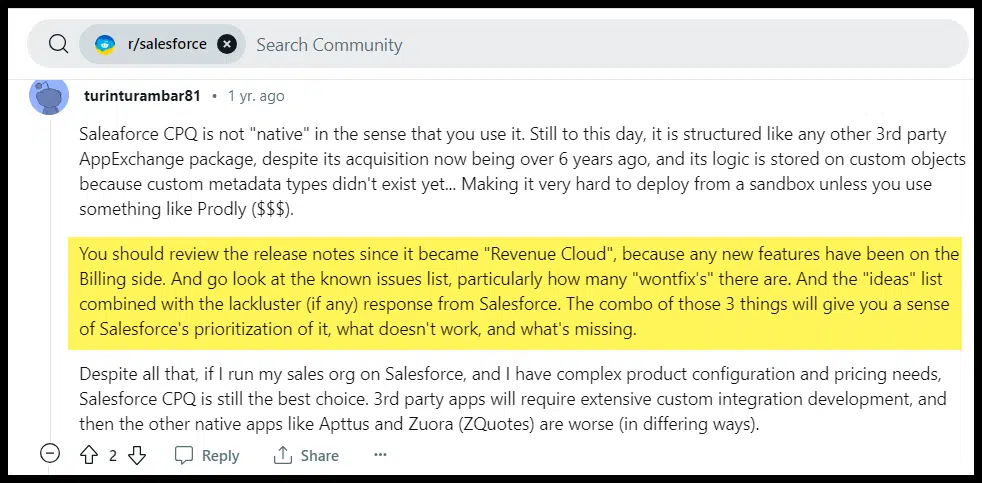
CPQ - Reddit comment

This leads us to another great place to find pain points and possible keyword ideas: user forums for related or competitive products.

This thread is about Salesforce’s CPQ product, and the commenter mentions looking at “won’t fix” issues and the “ideas” list.

If a competitor has a publicly available forum, you can work through threads to see what people are struggling with, what features they’d like to see, etc. 

These areas could be good focuses for keywords. (Again, we don’t know anything about volume and competition here, but we can add them to our list to dive into.)

Mining testimonials, reviews and customer interviews

Similarly, looking at customer and prospect data can be helpful as well. Specifically, look at:

  • Your own customer testimonials.
  • Competitor testimonials.
  • Customer interviews your sales and customer services teams have conducted. 
  • Talking to sales and customer services representatives.

They can get you started down many fruitful keyword paths.

Another great resource is third-party reviews. This is similar to forums in that you can “listen in” to what real users say about your competitor’s product.

Mining testimonials and reviews

This is from TrustRadius, which aggregates reviews of Salesforce CPQ. 

If you filter by the best and worst reviews, you can get a sense of both customers’ biggest pain points and your competitors’ most important selling features. 

As you scroll through the various review sites, you can also get topic ideas from areas like categories, alternatives considered, etc.:

Salesforce CPQ feature ratings

Again these aren’t necessarily terms we want to immediately create content against, but we can add anything that seems like a good topic for a blog post or page on our site to our list for vetting.


Get the daily newsletter search marketers rely on.


Competitors

Using a tool like Ahrefs or Semrush to see what terms your competitors are ranking for is a common and effective keyword research tactic. 

There are multiple types of competitors, however.

Search result competitors

The sites you compete against in search results may not always be product or service competitors.

  • For informational glossary-type terms, you may be competing with publishing sites or Wikipedia. 
  • For comparison, review, or best-of queries, you may be competing with third-party review and comparison sites (like the TrustRadius example). 

Let’s say we’re attempting to rank for a broad informational term like “market pricing.” 

This is a screenshot of that search result (with the Ahrefs Chrome Extension turned on to give some additional data about the sites ranking):

Market pricing SERPs

This is a great example of “SERP competitors” being different from product competitors.

While my fictitious company makes CPQ software, I’m competing with a job board, a related but different software company, and a publishing site – if we deem this term relevant and worth targeting.

Once you find these SERP competitors, how do you mine them for keywords?

SERP competitor halo effect

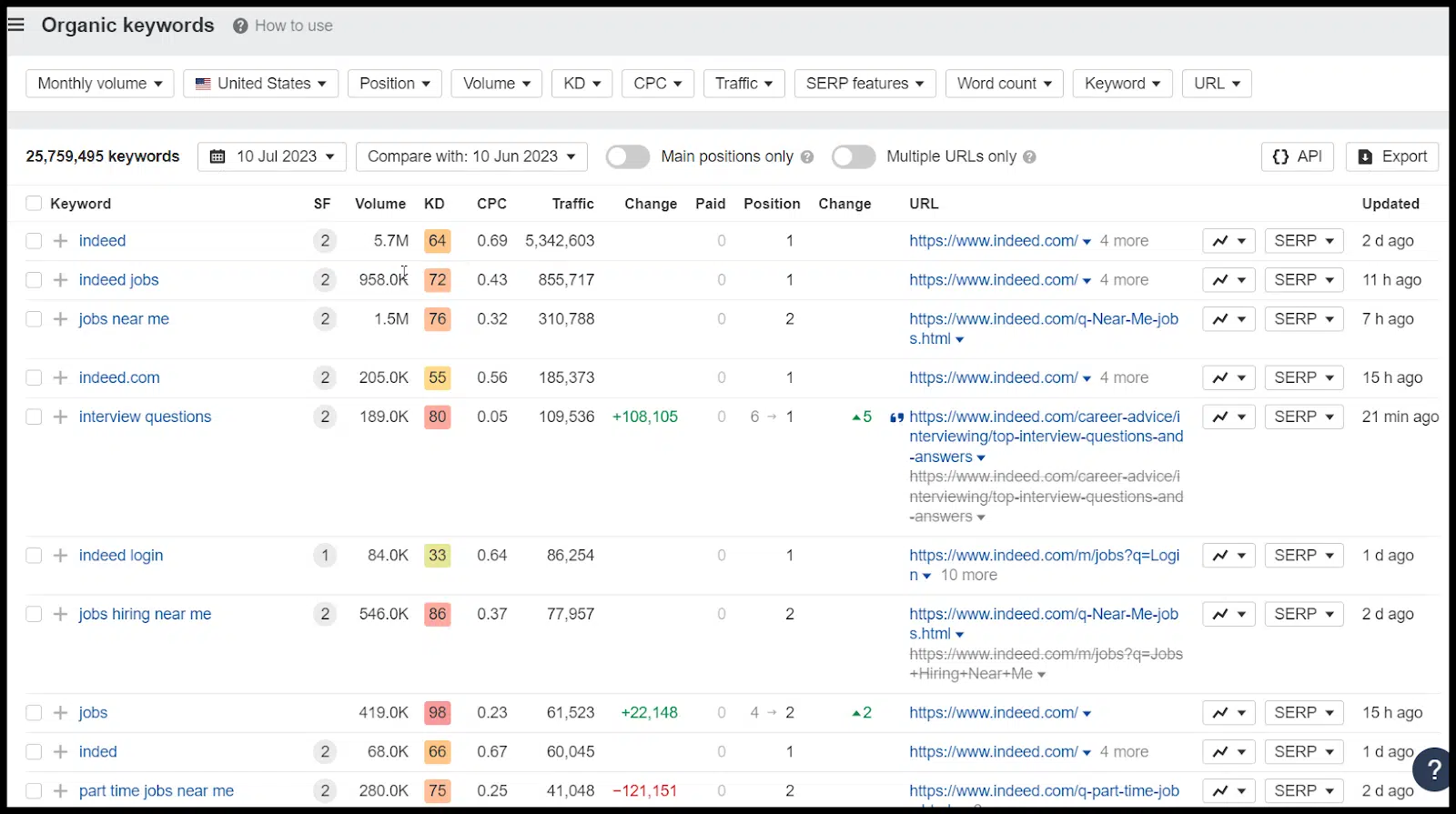
First, if I have a relatively new, small site and my product and prospect focus is narrow, I obviously can’t just drop “Indeed.com” into Ahrefs and hope to get useful keyword ideas:

SERP competitor halo effect

What I’m looking for in terms of an ideal SERP competitor to mine keywords from is:

  • A site with a lot of overlap in terms of audience and terms and topics I’d want to target.
  • A site with similar domain authority and many linking domains to mine.

This way, I know my site will have a chance to match that site in terms of topical authority and domain authority. 

For those types of sites, I can add the URL to my favorite tool and pull out terms I want to add to my list.

With a larger site like in the example above, what I can do is add some filters such as:

  • Keyword to filter for terms like CPQ or even something broad like pricing.
  • Difficulty – again, this is a good leading indicator but doesn’t necessarily mean that your site can really rank for the term in question.
  • Depending on a filter for “Lowest DR” in the search result (and filtering for my site’s DR or slightly lower / higher).

At that point, you’ll have more relevant terms that you are more likely to actually rank for.

Once you find relevant terms from one competitor, go into the search results for those related terms and find more SERP competitors to research.

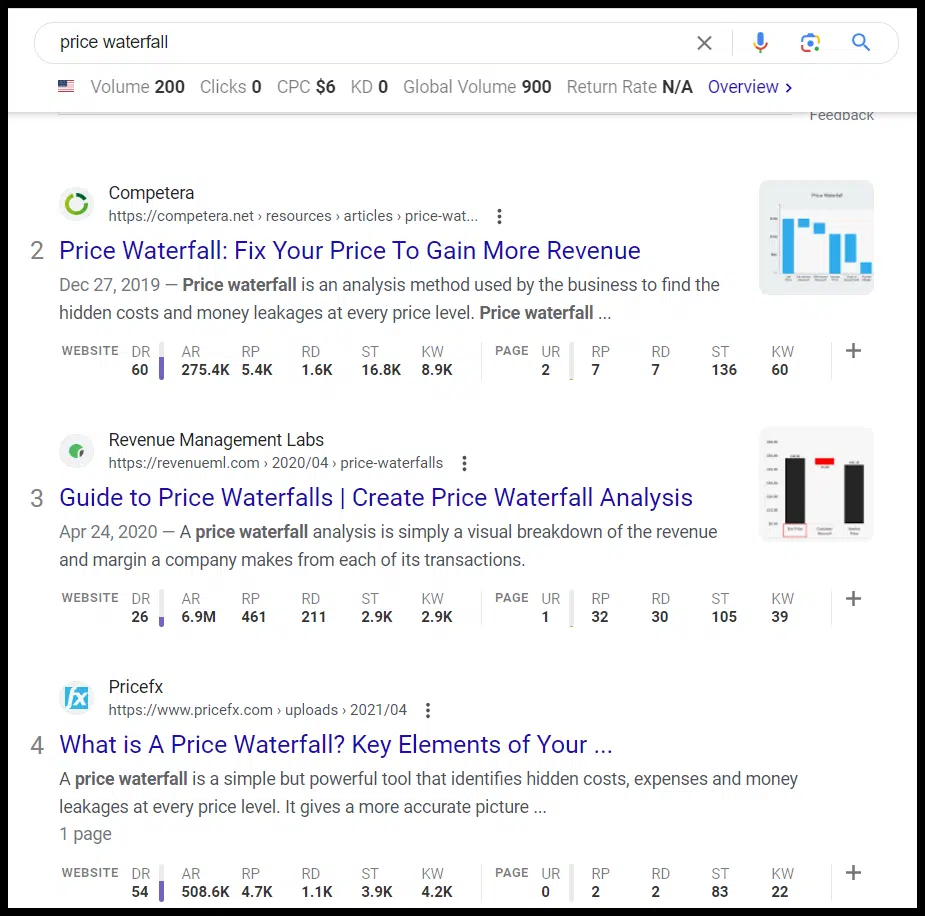
After researching market pricing, let’s say I found a great SERP competitor who also ranked for “price waterfall,” a term I wanted to target. 

I can take that one step further, and once I know that that’s a great term, go into that SERP and see which sites are ranking:

Price waterfall SERPs

Now I have some new sites I can dive into to find more keyword ideas. 

Particularly if my domain authority is somewhere in the range of these sites and they’re covering similar topics (even if their core product/service/monetization isn’t the same as mine).

Product and service competitors

Looking at the direct product and service competitors can be helpful, too. Just keep in mind a few possible pitfalls:

  • Competitors may be more or less authoritative, so you may not want to target the same terms.
  • Competitors may be targeting terms that drive traffic but don’t convert, so make sure you’re thinking through the intent of various terms and how you’ll convert traffic that drive to your site.
  • Often your competitors won’t generate much SEO traffic outside of branded queries, so depending on your niche, this may not work. 

Note: The sites in the example above are very authoritative sites in terms of volume and quality of links (despite the keyword difficulty of the example term there being a 2) – demonstrating that keyword difficulty scores aren’t always what they appear to be.

Industry resources

Another great means of collecting B2B keyword ideas is leveraging industry resources.

Mining glossaries

This could be a standard informational industry glossary or a glossary of terms for a major competitor. 

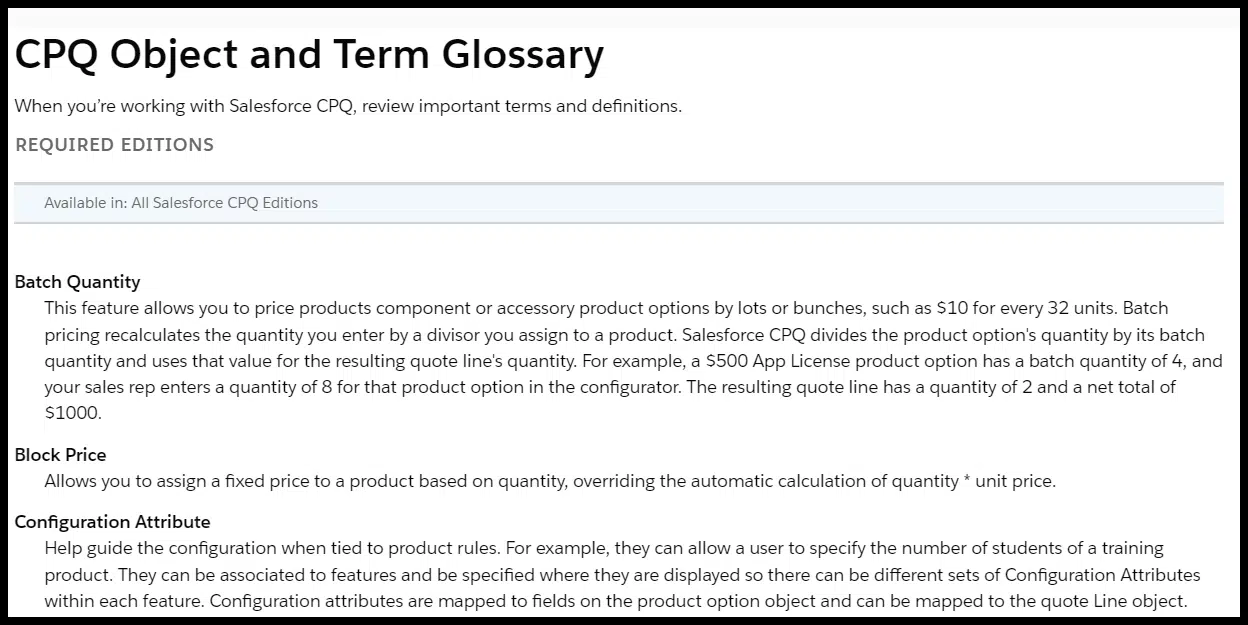
In the Salesforce CPQ example, they actually have a glossary of terms related to their products:

CPQ object and term glossary

The terms listed here are good candidates to add to your list for possible keyword targets.

Conference agendas

Similarly, the agendas for the conferences your prospects are attending can help you understand hot topics in the niche and things that are of interest that you can add to your keyword list.

Publishing sites

Even if they didn’t surface as “SERP competitors,” niche publications are often a good source of keyword ideas. 

As with competitors, you can look for terms and pages that rank and drive traffic for these sites. But ensure the sites have a similar topical theme and level of authority.

Overlooked (sometimes controversial) keyword opportunities 

Many B2B companies operate in regulated industries and are very specific about the types of content they produce and publish on their blog.

For companies that have a sufficient amount of leeway, there are a few content types that many B2B companies overlook that can target valuable content:

Top funnel glossary content

Sometimes “What is X” content seems too basic for many B2B companies as it may not be valuable for advanced audiences. 

While this may be the case, this type of content can serve a few purposes:

  • It speaks to different audiences within an organization. To the primary purchaser of a CPQ tool, the terminology related to the tool may seem basic, but some executives or people in other departments may not be as familiar. This content may give you a touchpoint with those executives when they’re researching certain features.
  • These assets frequently generate “passive links” from relevant and authoritative sites when they start to rank in search results, which helps lower-funnel pages rank and generate traffic (and direct leads).
  • These pages also help to signal topical authority to Google by allowing you to fill out various related topics around some of your better-converting terms.

Mentioning competitors

Many B2B sites are unwilling to mention competitors for various reasons. But if you’re willing to, you open up some new keyword opportunities further down the funnel.

One is “best of” queries. Many times when a searcher is looking for the “best X” they want a list of options. 

This may mean having to list out competitors and say accurate things about them (and your own products and services).

If you do, you can get top real estate for valuable search terms, however, like in this example:

Best content optimization tools

Additionally, your competitors’ brand names and modifiers frequently have reasonable search volume and are very high intent. Terms like:

  • {Competitor Name} alternatives
  • {Competitor Name} pricing
  • {Competitor Name} vs. {Your Brand} vs. {Another Competitor}
  • And so on. 

If you’re willing to write accurately about competitors and yourself, you can generate relevant traffic and trust with prospects.

Note: Be careful to be aware of any potential legal issues. This is the type of content you want to run by executives before publishing.

Mapping terms to topics and a content plan

Finally, you need to take what’s hopefully a large list of potential keywords and start to both cull it down and then turn it into action.

You can run the terms through your favorite keyword tool to help you prioritize based on keyword difficulty and search volume. 

However, it’s also important to:

  • Go to the search results and analyze the SERP to make sure you’re likely to rank.
    • Are there sites like yours in terms of the type of site, with types of content you’re willing to create, and are the ranking sites comparably authoritative in terms of volume and quality of links?
    • Tools like Ahrefs (in the Keyword Explorer tab) or LowFruits.io can help you find terms that have “weak spots” or lower authority sites ranking in the search results (or at the top of search results).
  • Confirm that the terms are relevant to your site and your audience
  • Check whether you can build related content around the topics you’re selecting to build topical authority.

This last step is critical: you’re effectively getting a broad set of possible keyword ideas from the process until now. 

From there, you want to build the topical clusters around the most relevant and profitable terms.

You can use several tools and processes, including Ahrefs, LowFruits.io, Search Response, AlsoAsked, and even Google to find related terms and search suggestions.

Building out your content map and calendar is its own process, but the steps above should give you plenty of opportunities to find great B2B keyword ideas.

Dig deeper: How to do B2B content marketing the right way (with 5 examples)


Opinions expressed in this article are those of the guest author and not necessarily Search Engine Land. Staff authors are listed here.


Related stories

New on Search Engine Land

@media screen and (min-width: 800px) { #div-gpt-ad-3191538-7 { display: flex !important; justify-content: center !important; align-items: center !important; min-width:770px; min-height:260px; } } @media screen and (min-width: 1279px) { #div-gpt-ad-3191538-7 { display: flex !important; justify-content: center !important; align-items: center !important; min-width:800px!important; min-height:440px!important; } }

About the author

Tom Demers

Tom Demers is the co-founder and managing partner of Measured SEM and Cornerstone Content. His companies offer paid search management, search engine optimization (SEO), and content marketing services to businesses of varying sizes in various industries.

https://searchengineland.com/b2b-keyword-research-guide-429961


How to audit your YouTube channel for brand success

Despite what some business leaders still (shockingly) think, YouTube isn’t just cat videos and fail compilations; it’s a mighty tool in your marketing arsenal. 

If you’re not harnessing its full potential, you’re missing out big time. 

Regularly performing a thorough audit is one way to ensure you’re squeezing all the value from your brand’s YouTube channel. Here’s how it’s done.

Understanding YouTube metrics and analytics

Views, subscribers, likes, comments and shares give a good feel for how your video content is performing. 

But if you really want to get into the nitty-gritty, YouTube Analytics is a gold mine. 

It tells you everything from watch time and traffic sources to audience demographics, with data for individual videos and the channel overall. 

Understanding these numbers is crucial to know what is and isn’t working. 

Here’s a breakdown of some of the most important metrics in YouTube analytics:

Views

  • This is the total number of times a video has been watched on YouTube. It’s a primary indicator of how many people your content is reaching.

Subscribers

  • The number of people who have subscribed to your YouTube channel. Subscribers are your core audience and will likely engage regularly with your content.

Watch time

  • The total amount of time people have spent watching your videos. This is a crucial metric as YouTube’s algorithm heavily considers watch time when ranking videos.

Audience retention

  • This metric shows you how long, on average, viewers stay engaged with your videos. If people are regularly watching your video until the end, this indicates that your content is engaging and relevant.

Engagement metrics (likes, comments, shares)

  • These metrics show how viewers interact with your videos. High levels of engagement typically indicate that your content is resonating with your audience.

Visibility metrics (impressions and CTR)

  • Impressions refer to how often your video’s thumbnail is shown to people on YouTube, while the CTR shows how often people click on it to watch the video. Having high impressions but low CTR can suggest your title or thumbnail needs a bit of tweaking.

Traffic sources

  • This shows where your viewers find your videos, whether through YouTube’s search engine, suggested videos, external sites, etc. It helps you understand where your marketing efforts are most effective.

Demographics

  • Information about your audience (e.g., age, gender, location). Knowing your audience demographics can help you create more targeted and relevant content.

Top videos

  • This shows which of your videos are most popular based on watch time. Understanding what type of content performs best can guide your future content creation strategy.

Playback locations

  • This tells you where people are watching your videos, such as on the YouTube watch page, embedded on other websites, or within YouTube’s mobile app. This helps you understand how your audience prefers to consume your content.

Remember, while these metrics are all important, the ones that matter most will depend on your specific goals and strategy.

Before you dive into the deep end, have clear goals in mind. 

Do you want to increase your subscriber base? Boost engagement? Drive traffic to your website? 

Align your YouTube channel goals with your overall marketing strategy and make sure they’re SMART:

  • Specific. 
  • Measurable.
  • Achievable.
  • Relevant.
  • Time-bound. 

5 important metrics to work on for improved YouTube ranking and visibility

If you want to audit your YouTube channel to find opportunities to improve rankings and visibility, here are the metrics you should focus on:

View duration (watch time)

YouTube wants to keep viewers glued to the platform. 

So, the longer your videos hold viewers’ attention, the more YouTube’s algorithm will favor you. 

Monitor your analytics to see which videos capture attention and why. 

  • Are they more fast-paced and engaging? 
  • Do they deliver on the promise of the title and thumbnail? 
  • Are they particularly topical? 

Do more of what’s working, and cut what’s not.

Audience retention

Many marketers miss or struggle to interpret this metric. 

Audience retention refers to the percentage of a video that viewers stick around to watch. 

If your 10-minute video consistently loses viewers at the 2-minute mark, you have a problem. 

You need to figure out what’s causing viewers to bounce and fix it. 

Is it a boring intro? A misleading title? Solve the issue to keep your audience around for longer.

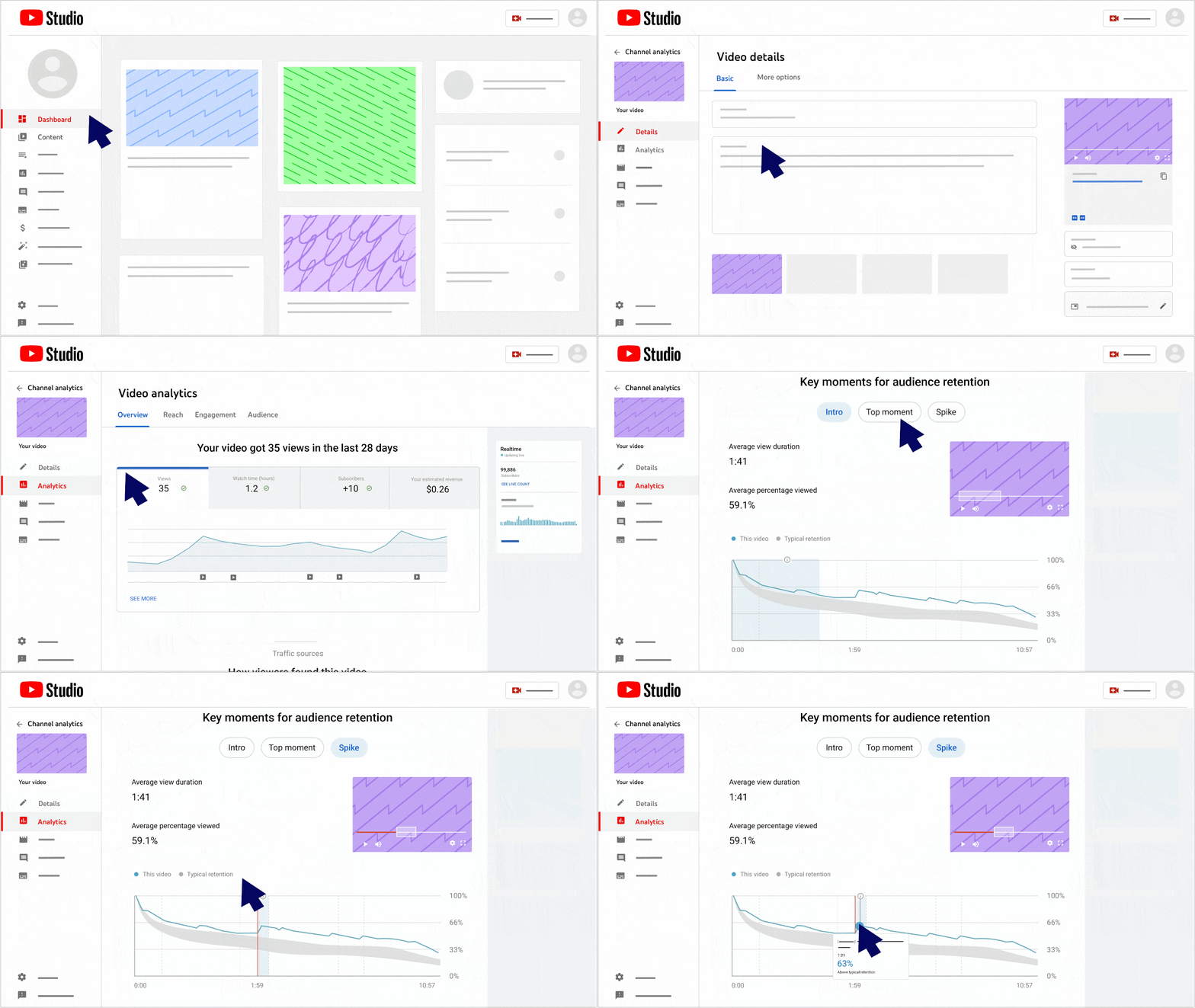
In the audience retention graph for each video, what we’re looking for is a relatively flat line or one that only gradually declines. 

Steep drops and dips are to be further investigated. 

To find the chart, go to YouTube Studio > Content > Select a video > Analytics, then scroll down to Key Moment for Audience Retention.

YouTube Studio - Audience retention

Engagement metrics (Likes, comments, shares and subscriptions)

When viewers interact with your videos – by liking, commenting, sharing, or subscribing – YouTube takes it as a sign that you’re creating valuable, engaging content. 

So encourage that interaction! Ask viewers to like, comment, share and subscribe. 

And don’t be a wallflower yourself. Respond to comments and engage with your audience. 

Just be sure to keep it positive and professional.

Click-through rate (CTR)

This measures how many people see your video thumbnail and title (impressions) and then click to watch. It’s a vital sign of how compelling your video’s ‘packaging’ is. To boost your CTR, craft irresistible titles and design eye-catching thumbnails. But remember, clickbait might earn you a click, but it’ll hurt your view duration and audience retention if your video doesn’t deliver on its promise.

Traffic sources

This shows you where your views are coming from – whether it’s YouTube search, suggested videos, external websites, or other sources. 

Understanding this can help you tailor your SEO strategy. If many viewers find you through YouTube search, you’ll want to double down on keyword optimization. 

If external websites are driving traffic, look at which sites are linking to you or embedding your content, and why.

YouTube audit essentials

Now that you understand what metrics you’re dealing with, the real work begins. 

To make your brand’s channel shine, you must first understand where it stands, what’s working, and what could use a little love. 

It’s time to roll up those sleeves and dive into a YouTube channel audit. 

Below are the essential steps and elements you must include in your audit. 

Step 1: Check out the channel aesthetics

First impressions count. Start by looking at your channel’s logo, banner, and overall visual aesthetic. 

Does it scream “your brand,” or is it more of a whisper? 

Make sure everything aligns with your brand’s identity and vibe. 

Also, double-check the About section. It should tell viewers exactly what your channel is about, when to expect new videos, and how to get in touch. 

Think of it as your brand’s elevator pitch.

Step 2: Dive into the video library

Watch a selection of videos across the library – some old, some new, some with high views, some with low views. 

Take a look at the channel analytics and pay close attention to the focus metrics I mentioned above. Compare year over year, if you can. 

This will give you a feel for the content quality and how it has evolved over time. 

  • Are the videos in line with the brand’s messaging? 
  • Are they serving the viewers’ needs or interests? 

If not, it’s time for a rethink.

An important point to understand is that you want your channel to feel timely, topical, and relevant. 

So any non-evergreen content you have that is now outdated (looking at you, “2020 SEO Trends to Watch Out For”) could be bringing down performance. 

Sadly, YouTube doesn’t allow you to upload a new version and keep all the stats from the old one, you’ll need to start from scratch. 

Step 3: Thumbnails, titles and descriptions

Here’s where we get down to the nitty-gritty. Take a look at the video thumbnails, titles, and descriptions. 

  • Are they eye-catching? 
  • Do they clearly communicate what the video is about? 
  • Are they optimized with relevant keywords? 

The combination of your thumbnail and title is like a movie poster for your video, so it needs to be compelling.

And the description is your chance to reel in viewers (and search engines) with more detail.

Step 4: Get engaged

Check out the engagement on your videos. 

  • Are viewers liking, commenting and sharing? 
  • More importantly, are you responding to those comments? 

Engagement isn’t a one-way street, so be sure to take the time to interact with your audience.

Step 5: Compare with competitors

Take a peek at what your competitors are up to. 

  • What are they doing well? 
  • What aren’t they doing so well?

Find ways to differentiate your brand and make your content stand out. 

Tools like TubeBuddy are great for competitor analysis, as well as optimizing your own channel. 

Step 6: Review your SEO

If you’re serious about success on YouTube, SEO is not optional, it’s mandatory. Optimize your video titles, descriptions, and tags with relevant keywords. 

And let’s not forget the thumbnails – they’re the first thing viewers see. Make them catchy.

Playlists are also a fantastic way to keep viewers hooked to your channel. 

YouTube SEO is a discipline in itself, but an important one to get your head around if you want to make the most of your brand’s channel. 


Get the daily newsletter search marketers rely on.


Bonus: Your YouTube upload checklist

So, you’ve done your audit, the house is in order and existing videos are starting to get some traction. 

How do we avoid having to do all this again in six months? 

Presenting YouTube upload checklists! 

A YouTube upload checklist should cover key steps in the process of preparing, optimizing and uploading a video for maximum visibility, engagement and SEO benefit. 

Here’s a rundown of the essentials:

Pre-upload

  • Content quality and value: Ensure your video provides meaningful content to your audience. Whether it’s educational or entertaining, it needs to offer something valuable.
  • Video quality: Your video should be HD quality (1080p or higher) for a professional appearance.
  • Editing: Check your video for any editing errors and ensure smooth transitions, clear audio, and appropriate pacing.
  • Branding: Incorporate your brand identity, like your logo and colors.

Upload

  • Title: Craft a catchy and relevant title that includes your main keyword.
  • Description: The first two to three lines are crucial, so include your keyword early. Expand on the video content and include relevant links.
  • Tags: Use relevant tags, including main keywords and related terms.
  • Custom thumbnail: Create a visually appealing and compelling thumbnail that aligns with your video content.
  • End screens: Use end screens to promote other videos, drive subscriptions, or guide users to your website.
  • Pinned comments: Post and pin a comment to the top of your video’s comment section. Start the conversation yourself instead of waiting for viewers to do it. It can be much quicker to get engagement flowing with this method. 
  • Closed captions: Include closed captions (CC) for your videos. This enhances accessibility and contributes to SEO, as the text is searchable.
  • Playlists: Add your video to relevant playlists to encourage extended viewing.
  • Scheduling: Determine the best time to publish your video to maximize engagement.
  • Visibility settings: Ensure your video is set to publish or scheduled to publish at a certain time.

Post-upload

  • Engagement: Engage with your audience by responding to comments.
  • Promotion: Share your video on other social platforms to increase visibility.

Double down on metrics that matter to your brand

Succeeding on YouTube and mastering its nuances might seem daunting. But once you break it down and understand the metrics that drive your channel’s success, it’s not as scary as it seems.

Creating a successful YouTube channel involves more than just posting content. It’s about knowing your audience, setting clear goals, making your content easily discoverable and engaging, and consistently evaluating and optimizing your strategy using data.

From auditing your channel aesthetics to diving deep into the video library, it’s a journey, not a one-off task.

Plus, with the handy upload checklist, you’ll set your videos up for success every time you go live. 

The key to brand success on YouTube lies in:

  • Ensuring your video is professional.
  • Having well-optimized metadata.
  • Interacting with your audience.
  • Promoting your content after upload.

All these are essential strategies for growing your YouTube channel and enhancing your brand’s visibility.


Opinions expressed in this article are those of the guest author and not necessarily Search Engine Land. Staff authors are listed here.


Related stories

New on Search Engine Land

@media screen and (min-width: 800px) { #div-gpt-ad-3191538-7 { display: flex !important; justify-content: center !important; align-items: center !important; min-width:770px; min-height:260px; } } @media screen and (min-width: 1279px) { #div-gpt-ad-3191538-7 { display: flex !important; justify-content: center !important; align-items: center !important; min-width:800px!important; min-height:440px!important; } }

About the author

Laura James

Laura James is an experienced SEO professional currently working as a Senior SEO Consultant at Flow SEO. Due to her extensive agency-side experience, she brings a wealth of expertise from various industries like eCommerce, travel, education, and retail. Laura is passionate about delivering organic growth and guidance for SaaS B2B and start-up clients. Her specialisms include international SEO, organic video, and site migrations, showcasing her broad knowledge and adaptability in the SEO field. Outside of work, Laura enjoys travel (especially Greece), 90s music, British sitcoms, Disney movies, and food.

https://searchengineland.com/audit-youtube-channel-429930


New Google Merchant Center policy: AI-generated reviews are spam

A new Google Merchant Center policy on “automated content” says reviews generated using an automated program or artificial intelligence application are considered spam and against the Google Merchant Center policies.

Google posted this update here and clarified its existing Merchant Center policies and enforcement.

Automated content policy. The new policy reads:

“Automated Content: We don’t allow reviews that are primarily generated by an automated program or artificial intelligence application. If you have identified such content, it should be marked as spam in your feed using the is_spam attribute.”

AI Content and Google. Generally, Google has been OK with people using AI to generate content, assuming that content is helpful for users and not written primarily for search engines. This is a bit of a deviation from Google’s recent messaging on using AI for content.

But one would assume that reviews require a human to use the product to generate a review and thus AI-generated reviews would be an exception. Maybe?

Other policy clarifications. Google also posted clarifications on its other Merchant Center policies. Here is what Google posted:

  • Spam: We don’t allow spam content. Ensure any content known to contain irrelevant, repetitive, or nonsensical text is marked as spam in your feed using the is_spam attribute.
  • Dangerous products or acts: Don’t submit reviews of regulated products that can cause damage, harm, or injury. For example, don’t submit reviews of guns, tobacco products, or regulated drugs. Additionally, don’t include content that depicts or provides instructions to complete activities that are dangerous and/or widely illegal.
  • Phone numbers, email addresses or URLs: Don’t submit phone numbers, email addresses and links to other websites in the review content.
  • Personal and confidential information: Don’t submit reviews that contain personal information, including but not limited to full names, credit card information, national insurance number, driving license information, etc.
  • Keep it clean: Don’t submit reviews that use obscene, profane, or offensive language or include content that depicts scenes of violence, serious injury or death, contains personal attacks, or are defamatory.
  • Conflict of interest: Don’t submit reviews that were paid for or are otherwise inauthentic. Reviews are most valuable when they are honest and unbiased. We remove reviews that we believe have conflicts of interest and/or have been written by employees or people with a vested interest in the product. Only submit reviews that were honestly solicited from customers who made a purchase.
  • Illegal content: Don’t submit reviews that contain or link to unlawful content, such as links that facilitate the sale of prescription drugs without a prescription, illegal drugs, counterfeit products, or illicit weapons. This content is not allowed.
  • Malware & Phishing: Don’t submit reviews containing links to malware, viruses, or other harmful software. We don’t allow phishing or other content that harms or interferes with the operation of the networks, servers, or other infrastructure of Google or others.
  • Copyrighted content: Don’t submit reviews that infringe on others’ rights, including copyright. For more information or to file a Digital Millennium Copyright Act (DMCA) request, review our copyright procedures.
  • Trademark infringement: Don’t submit content that uses a trademark in a way that’s likely to cause confusion about the origin of the product being reviewed.
  • Plagiarism: Don’t submit reviews containing appropriation of content created by another person or entity.
  • Sexually explicit material: Don’t submit reviews that contain sexually explicit material. We also don’t allow reviews that sexually exploit children or present them in a sexual manner. For this type of content, we remove the review, shut down the product reviews feed, and send a report to the National Center for Missing & Exploited Children (NCMEC) and to law enforcement. This content is not allowed.
  • Hate speech: Don’t submit reviews that advocate against groups of people based on their race or ethnic origin, nationality, religion, disability, gender, age, veteran status, sexual orientation, or gender identity. Violent language, terrorist content, or content intended to incite and encourage violent acts or extremist behavior, are not allowed in reviews.
  • Cross promotion of other products/websites: We don’t allow reviews that include promotional content for other unrelated websites, products, or services. If you have identified such content, it should be marked as spam in your feed using the attribute.
  • Off-topic reviews: We may remove reviews that primarily seek to discuss other topics unrelated to the product itself. This includes comments about shipping and delivery, experiences with particular retailers, political or social controversy, attacks on others, or don’t represent a first-hand experience with the product. This also includes merchant responses to reviewer comments.
  • Impersonation: We don’t allow reviews from people claiming to be someone that they aren’t.
  • Language: Reviews should be submitted in the original language they are written in. Google will display reviews in the original language with an option on the Shopping page to be translated to the user’s language.
  • Duplicate content: Each review should only appear in one feed and only once in that feed. If a review applies to multiple variations of a product, this should be designated by including multiple unique product identifiers and URLs with the review. The same review shouldn’t appear in feeds from different retailers. The retailer should own the review and shouldn’t send Google content syndicated from other sources. In the case of duplicate reviews in multiple feeds, we may blocklist one or more of the reviews or entire feeds.

Enforcement clarification. Google also posted the following clarification about how Google enforces the policies listed above:

  • We use a combination of automated and human evaluation to ensure that content and reviews comply with our policies. Our enforcement technologies use machine-learning algorithms to help protect our merchants and users by keeping our shopping platforms safe. More complex, nuanced, or severe cases are reviewed and evaluated by our specially trained experts who conduct content evaluations that might be difficult for algorithms to perform alone, for example, because an understanding of the context of the piece of content is required.
  • We take action on content and reviews that violate our policies. This may include disapproving violating content or a violating review, as well as issuing warnings or suspending accounts for repeated or egregious violations. We take repeat violations of our policies seriously.
  • When an image is flagged for a policy violation, we will now also block the associated review content.

Why we care. If you use Google Merchant Center, you should know all the existing policies and how Google enforces those policies. If you post reviews to your Merchant Center feed, it sounds like you need to ensure those reviews are not generated by AI or other automated means. If they are, you need to add the is_spam attribute to those reviews.


Related stories

New on Search Engine Land

@media screen and (min-width: 800px) { #div-gpt-ad-3191538-7 { display: flex !important; justify-content: center !important; align-items: center !important; min-width:770px; min-height:260px; } } @media screen and (min-width: 1279px) { #div-gpt-ad-3191538-7 { display: flex !important; justify-content: center !important; align-items: center !important; min-width:800px!important; min-height:440px!important; } }

About the author

Barry Schwartz

Barry Schwartz a Contributing Editor to Search Engine Land and a member of the programming team for SMX events. He owns RustyBrick, a NY based web consulting firm. He also runs Search Engine Roundtable, a popular search blog on very advanced SEM topics. Barry can be followed on Twitter here.

https://searchengineland.com/new-google-policy-says-ai-generated-reviews-are-spam-and-against-merchant-center-policies-429984


Google Search rolls out site name updates and workarounds

Google has released some really needed updates to its site names feature in Google Search. Site names are now supported on subdomains on all devices in English, French, German, and Japanese languages. Google also made other improvements and added workarounds when Google gets your site name wrong, Google announced.

Site names. Site names is the title and name of the site Google shows in the search results listings. “When Google lists a page in search results, it shows the name of the site the page comes from,” Google explained.

Subdomain support expanded. Google added support for site names with subdomains on mobile devices only, for English, French, German, and Japanese. Now it also works for all devices, not just subdomains.

Here is an example from Google’s own site.

Sitename Developers Google Com 537x338

Updated guidance. Google also updated its guidance on how to communicate your preferred site name to Google Search. Google wrote, “As a reminder, the best way to indicate a preferred site name to Google is to make use of WebSite structured data, as explained on our site name documentation.”

Also, Google now encourages more use of the alternateName property when sometimes a preferred site name isn’t available for your site.

Workarounds for site names. Google also listed a few workarounds for when the preferred or alternative names are not selected by Google Search. Google posted new workarounds in its help documentation that lists these workarounds:

  • First, try providing an alternative name using the alternateName property. If our site name system isn’t confident enough to use your preferred name, it strongly considers this option.
  • Provide your domain or subdomain name as a backup option. To provide your domain or subdomain as a backup option, add your domain or subdomain name as your alternative name. Your domain or subdomain needs to be in all lowercase (for example, example.com not Example.com) for our system to detect this as a site name preference. Our system will strongly consider using it if your preferred name isn’t selected. In this example, Burnt Toast is the most preferred option, followed by BT, and ending with the domain example.com as the final name preference.
  • If that’s still not working, then try providing your domain or subdomain name (in all lowercase) as your preferred name, as a last-resort workaround option. If you provide your domain or subdomain name as your preferred name, our system will generally select that (but we recommend only doing this as a last resort). In this example, the only preference is the domain example.com.

Need support. Having issues with your site name? Google posted a support thread in the Google support forums over here, including more FAQs.

We saw some issues with site names, some of which Google resolved. This should resolve more of those issues. In fact, I did capture some before and after examples and posted them this morning on the Search Engine Roundtable.

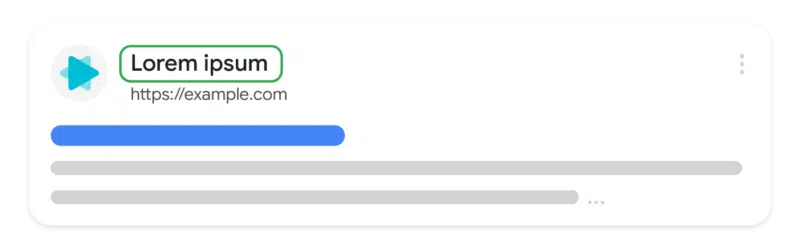
What it looks like. Here is where the site name shows in the search result snippet:

Site Name 800x251

Site names timeline. Here is the timeline Google posted of the evolution of site names since it launched in October:

  • October 2022: Site names for the domain level were introduced for mobile search results for English, French, German and Japanese.
  • April 2023 (I have this as March): Site names were added for desktop for the same set of languages.
  • May 2023: Site names are now supported on the subdomain level for the same set of languages and on mobile search results only.

Controlling site names. Google back in October explained that Google Search uses a number of ways to identify the site name for the search result. But if you want, you can use structured data on your home page to communicate to Google what the site name should be for your site. Google has specific documentation on this new Site name structured data available over here.

Upgrading the favicon. Google also recommended revisiting the documentation for favicons for the latest best practices. Google is now also suggesting you provide an icon that’s at least 48 pixels and follows the existing favicon guidelines.

Ads. This is also rolled out to the Google search ads on desktop, so the size of the site name, favicons, and also the ad label will be more prominent in mobile search. In fact, Google rolled out the “Sponsored” label in mobile search last October and today on desktop, officially replacing the “Ads” label from January 2020.

Why we care. Google has made several improvements to how it selects and shows your site name in the Google Search results. If Google is still getting it wrong and you are following the documentation, then maybe try some of those new workarounds to get your site name showing exactly how you want it in Google Search.


Related stories

New on Search Engine Land

@media screen and (min-width: 800px) { #div-gpt-ad-3191538-7 { display: flex !important; justify-content: center !important; align-items: center !important; min-width:770px; min-height:260px; } } @media screen and (min-width: 1279px) { #div-gpt-ad-3191538-7 { display: flex !important; justify-content: center !important; align-items: center !important; min-width:800px!important; min-height:440px!important; } }
About the author

Barry Schwartz

Barry Schwartz a Contributing Editor to Search Engine Land and a member of the programming team for SMX events. He owns RustyBrick, a NY based web consulting firm. He also runs Search Engine Roundtable, a popular search blog on very advanced SEM topics. Barry can be followed on Twitter here.

https://searchengineland.com/google-search-rolls-out-site-name-updates-and-workarounds-429979


Unleashing the potential of Google reviews for local SEO

Google reviews are easy to influence and can impact your local search rankings. They also matter significantly more than you might think. 

Building a strong review strategy is a crucial part of your SEO efforts that you might be overlooking. 

Invest time and energy in acquiring new reviews and retaining existing ones to enhance your local SEO. Maintaining a competitive number of reviews is essential in your market.

The kind of Google reviews you want

Any review a business gets is beneficial, but some reviews can outweigh others for SEO purposes.

You always want to make sure customers leave reviews with a lot of text where they are talking about the services they received and their experiences. 

They should mention specifics about their service like:

  • The problem they were having.
  • The experience they had with your team in terms of communication.
  • Results of the service. (Was their problem solved?)
  • Name of the employee(s) they worked with.
  • Photos of the job.

Keywords in reviews are not a ranking factor. 

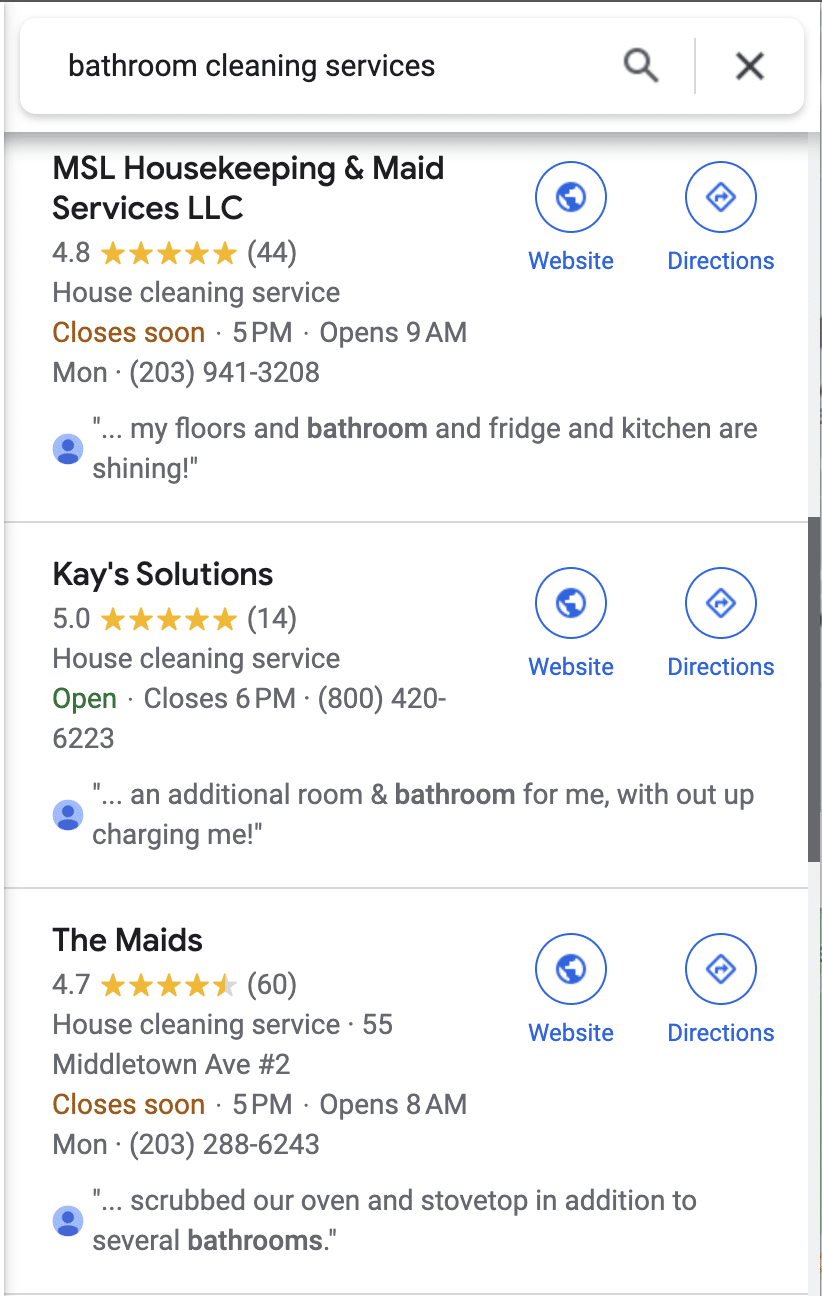
But review justifications are eligible to show up in search results and can provide a nice trust factor when someone searches for a specific service.

Review Justification In Serp

Reviews with photos tend to stick at the top longer

Incorporating visuals like photos and videos with your Google reviews can amplify their impact significantly. 

Visual content adds authenticity and credibility to the reviews. We have also noticed that these reviews tend to stay at the top much longer than reviews without photos. 

So if you are trying to get some positive reviews to stick at the top, try getting more reviews with photos.

What do we mean by “stay at the top”?

When you navigate to a business’s Google Business Profile (GBP) and then click on their reviews, the default view a user will see is sorted by “Most relevant.” 

We have found that Google sees reviews with images as relevant and stays at the top of this view longer than other reviews. 

So, encourage your customers to snap a photo of the HVAC system you just fixed, the roof you just installed, or the spring on the garage door you just replaced and add that to their review. 

Monitor GBP reviews for strategic insights

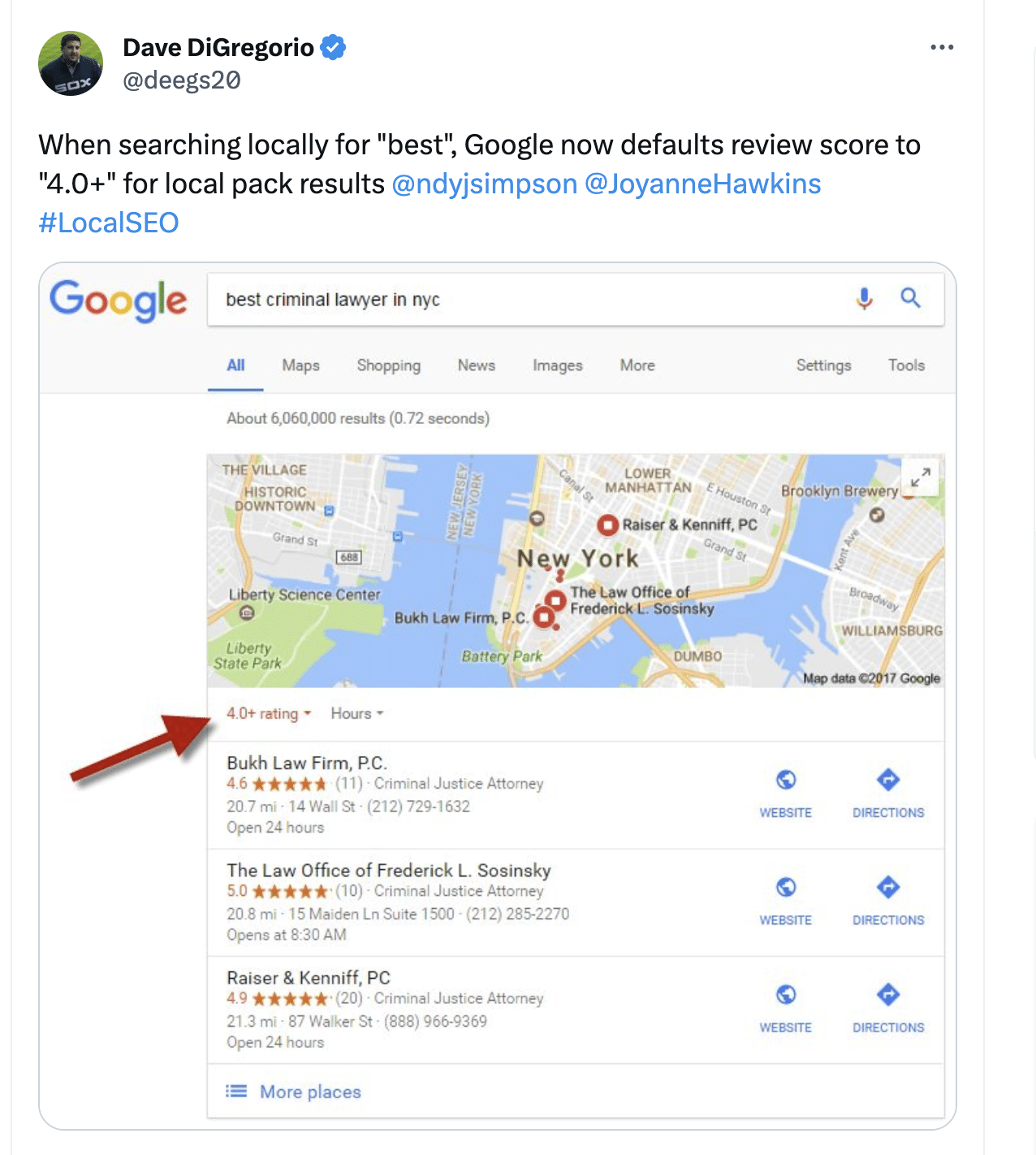
Did you know that only businesses with a 4.0-star rating and above are eligible to show up for searches with “best” or “top” in them? 

4.0 Gbp Rating

Is your business above a 4.0 rating right now? If the answer is, “I don’t know!” this part is for you.

Monitoring reviews quarterly lets you gain insights into various aspects of your online presence. 

Track fluctuations in review volume to identify trends or problems such as:

  • Losing reviews.
  • Falling behind competitors in review count.
  • Dropping below a 4.0-star rating.

You must also ensure you are receiving a steady stream of new reviews. 

Keep a trend of consistent, new reviews to maintain three-pack rankings, as review recency appears to be a local ranking factor.


Get the daily newsletter search marketers rely on.


Watch out for negative reviews showing in the top 3 on GBP

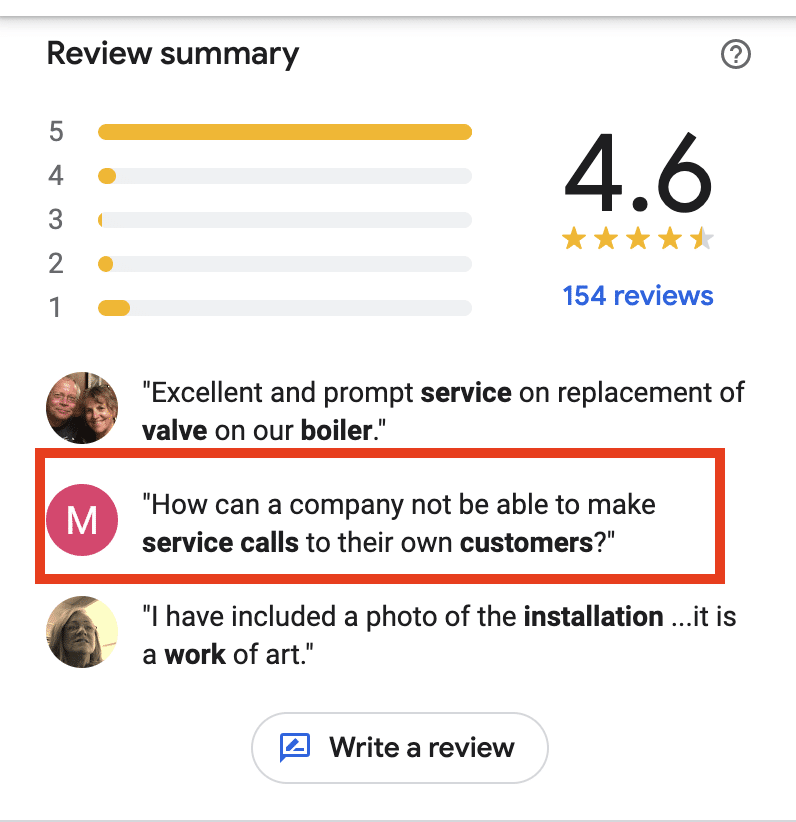
Sometimes, Google will highlight a negative review in the top 3 that appear prominently on GBP listings on desktop and mobile. 

These can harm your business’s reputation and possibly deter people from calling. 

Want to eliminate a negative review from being highlighted on your listing? 

The only way I have seen this done is to bombard the listing with legitimate, lengthy, positive reviews from your customers that include photos. Hopefully, one of those will push the negative one out.

Negative GBP review

This is not ideal since we have no control over what shows in this area. 

That said, it’s a great opportunity to respond thoughtfully to negative reviews, acknowledge customer concerns, and offer solutions publicly. 

Simultaneously, encourage satisfied customers to leave positive reviews to balance the negative feedback and hopefully push it off the listing. 

How to keep a steady stream of Google reviews with little effort

Getting new consistent reviews is key to maintaining visibility on Google Maps and growing that visibility if there is room for improvement. 

As business owners, many rely on their employees to provide top-notch service that naturally generates positive reviews. In reality, people need a little nudge to leave those positive reviews. 

Google absolutely does not allow businesses to incentivize customers for positive reviews.

It is directly against their Google review guidelines as this can be considered “deceptive content” if the customer was paid or incentivized in any way to leave the review. 

However, Google does allow business owners other ways to incentivize reviews. 

Incentivizing employees

Business owners can and should motivate employees to ask for reviews from satisfied customers during their interactions. 

They should be asking for photos along with that review as well. 

If an employee gets mentioned in a review by name or gets a customer to post a review with a photo, reward your employee by giving them a cash prize, a gift card to Amazon, or even a gift card to a local restaurant of their choice. 

If your business typically gets lots of reviews, consider doing a monthly “drawing” instead and rewarding that winner. Keep it fun and rewarding, as everyone wins here.

Automated email templates

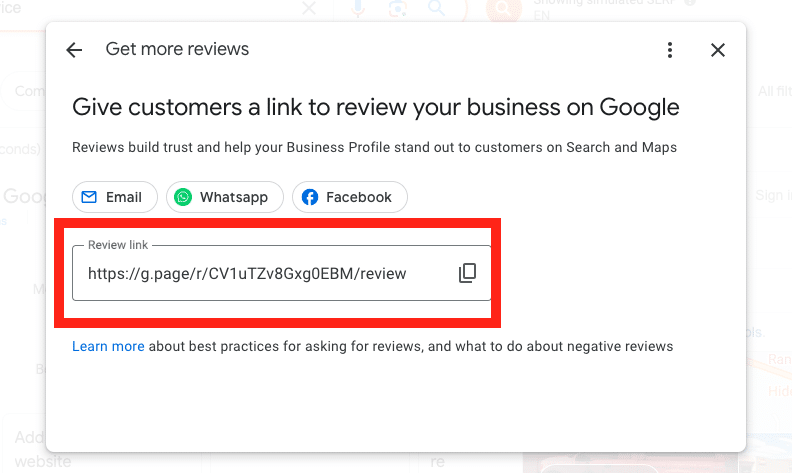
Giving customers a link to review your business on Google is super important to streamline the process for them. 

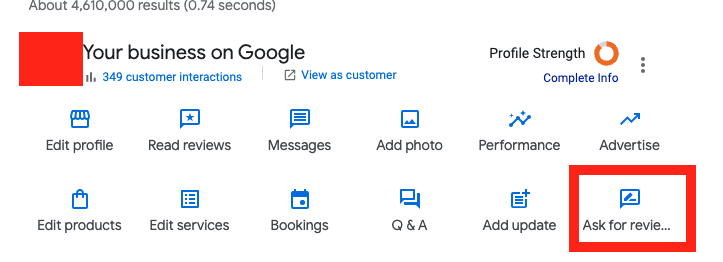
Getting the link is easy. It’s right on the GBP dashboard under “Ask for reviews.”

GBP - Ask for reviews
Ask for reviews

The trick to getting the most reviews possible with the least effort is creating an automated email template using this link to request reviews from recent customers. 

You can personalize these emails, but don’t get carried away and lose the point of the email: getting the review. 

Make sure it’s crystal clear how they can easily review you on Google, why it’s important, and the link is easily accessible.

Help, my Google reviews are missing!

Many business owners had issues with missing Google reviews a few months ago. 

New reviews were not being posted, and in some cases, reviews that had been live for years were suddenly missing from hundreds of profiles.

This problem was so widespread Google put out some support information explaining why reviews may suddenly go missing from a GBP listing. 

Google has since fixed the bug causing reviews to go missing, but the algorithm they employed that supposedly filters suspicious or inauthentic reviews is still in play. 

While the intention behind this system is to ensure review integrity, it can sometimes result in legitimate reviews being filtered out. 

If you suspect this is happening to you because you are monitoring your reviews (called a callback), then you have some options. 

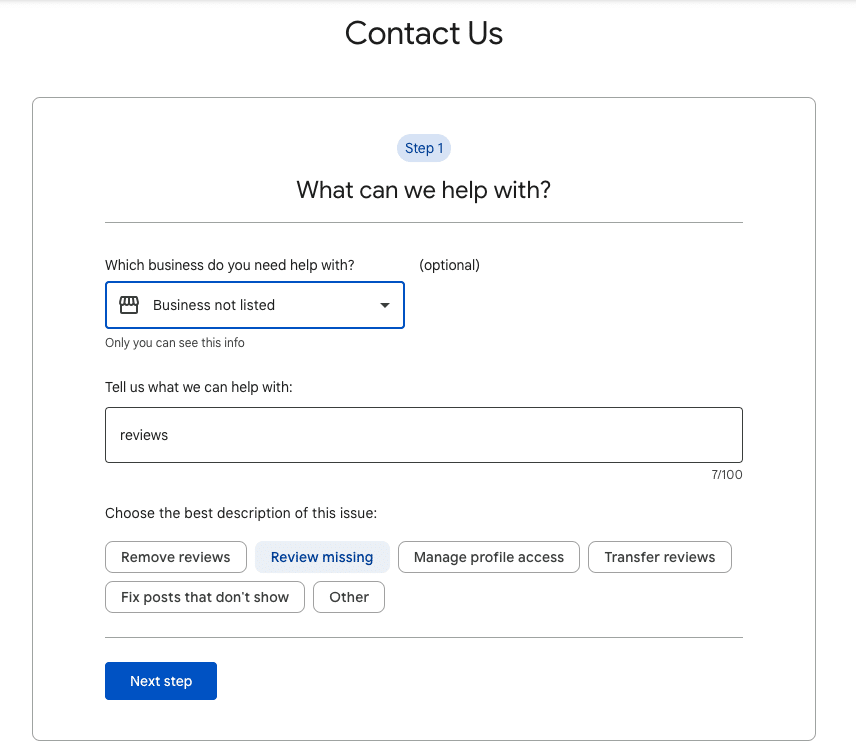
The best way to restore these is to contact support and follow these steps: 

  • Type “Reviews”
  • Select “Review missing” and follow the prompts. 

They may ask for screenshots of the missing reviews, so having those handy is recommended.

Ask for reviews

Fake reviews: The never-ending tale

Fake spam reviews can be frustrating. Is your listing being bombarded with fake, negative reviews? 

Google is usually good about catching these and removing them with their filter. 

However, sometimes fake reviews get published. In this case, Google support should be able to remove them from your listing if they are indeed fake. 

Sometimes businesses get fake positive reviews to game Google’s ranking algorithm. The frustrating thing is that it works most of the time. 

When a listing gets many fake positive reviews, they typically see improvement in rankings. 

Though it may be tempting to report them to Google and try to get those removed and hurt their rankings, typically, all the effort it takes to report the reviews isn’t worth it in the long run.

The juice ain’t worth the squeeze! That is, if you can even get the reviews removed which doesn’t always happen.

Google is far away from having a handle on their fake review problems, though they are trying, according to recent lawsuits being filed. 

Still, I always encourage business owners to focus and get more reviews on their one listing and not worry about what the competition is doing. 

Negative reviews: A chance to embrace the imperfections of your business

Negative reviews are a good thing. I am in the camp that perfection is not always trustworthy in the eyes of consumers. 

While aiming for outstanding service is crucial, an occasional less-than-perfect review online can enhance your credibility. 

Authenticity matters, and customers often appreciate businesses that show a human side, and to be human is to err. 

So when a user sees under 4.8 or 4.7 stars on Google, they tend to trust it more, according to some studies. 

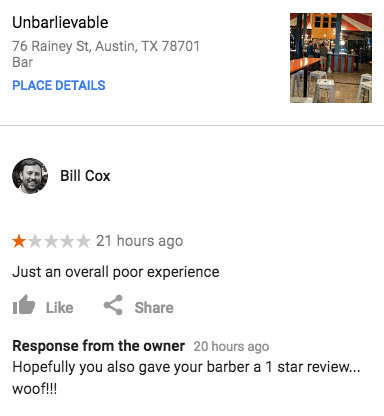
Do not be afraid of negative reviews. Take them as a chance to show your human side. People will like it, especially if you can make it funny.

Owner response lol

Opinions expressed in this article are those of the guest author and not necessarily Search Engine Land. Staff authors are listed here.


Related stories

New on Search Engine Land

@media screen and (min-width: 800px) { #div-gpt-ad-3191538-7 { display: flex !important; justify-content: center !important; align-items: center !important; min-width:770px; min-height:260px; } } @media screen and (min-width: 1279px) { #div-gpt-ad-3191538-7 { display: flex !important; justify-content: center !important; align-items: center !important; min-width:800px!important; min-height:440px!important; } }
About the author

Elizabeth Rule

Elizabeth Rule is an expert local SEO analyst who has been working in the industry since 2015. She has a passion for content creation and loves working with local businesses to develop their website’s authority and expertise through well written, helpful content As a Google Business Profile Product Expert she is also in the unique position to help businesses crack the code to gain valuable visibility in local search maps and help solve complex GBP issues. Recently, she was nominated as one of BrightLocal’s Rising Stars of Local SEO 2023. She currently works as a Local SEO Analyst at Sterling Sky, a Local SEO Agency in Canada and the USA. She is also a faculty member and speaker at Local U SEO Conference.

https://searchengineland.com/google-reviews-local-seo-unleash-potential-429883


5 leadership traps new SEO team managers should avoid

Going from an SEO professional to a manager of an SEO team, you need to shift your mindset, lean into your new role, and build trust with your team. 

Moving from focusing on your own output to your team’s needs can help you succeed in your new role. 

Transitioning from an SEO professional to manager

Moving from an individual contributor to a manager is a difficult transition on your career journey. 

In the book “The Leadership Pipeline,” co-author Ram Charan highlights the career transition points from individual contributor to manager of a team and on to leading managers. 

The first change from “leading yourself” to “leading others” is a huge shift. It requires taking on a new mindset as you move from relying on yourself to relying on and coaching your team. 

While intimidating, moving from an individual contributor role to leadership is extremely rewarding. 

The role of a manager differs from your daily responsibilities as an SEO. The overall training is likely not there as you must figure things out for yourself. 

You were promoted to management because of your past success and expertise, which are all based on your output as an individual. 

The assumption is that because you succeeded as an individual, you’re set up (or will figure out how) to lead a team. 

The bulk of the training available for new managers is the technical HR items:

  • How to fill out HR forms.
  • Approve vacation.
  • Filling out the annual performance reviews. 
  • Navigating the internal HR platform.

When I earned a promotion to a management position, I first contacted several managers, directors and VPs for their advice and references to management training.

There was no in-house training on being a good manager, coaching and developing employees, or any behaviors that I equated to “good” management.

It took some time, but I found a peer group of managers to talk to, some podcasts to listen to, and a set of resources to help along the journey to manager and leader.

To be successful in this step in your career journey, you’ll need to master a new mindset, communicate clearly and enable your team to succeed.

Using the principals from the Leadership Pipeline, you are making a transition from leading yourself to leading others:

Leading Yourself (IC) Leading Others
From To
Results from your own efforts Results from your team’s efforts
Understanding what you need to deliver Setting clear objectives for your team members to deliver
Being more productive Making your team more productive
Planning your work Planning work for the team
Being self-motivated Motivating your team
Developing yourself Developing team members

Adapting your mindset from maker to manager

As an individual, you achieved success through your own expertise and exceptional performance in your role. 

Dig deeper: Your guide to the first 90 days as an enterprise SEO director

Your measure of success shifts from your accomplishments to your team’s accomplishments. Each key point of “Leading Yourself” has a team-focused pair.

Now you focus on getting your team members to work on leading themselves while you gain expertise in leading others.

Moving to a management role requires that you embrace the mindset shift. 

You need to lead the work instead of being the best individual SEO.

Instead of your own efforts, you’re judged on the efforts and outcomes of your team.

These are scary for new managers. 

You have to rely on your team to perform. That’s scary.

You also have to shift to learn new communication, management, and leadership skills. (That’s scary, too!)

Because of that, managers often will fall back to their old behaviors. 

We like to do what we’re good at and generally avoid things that cause us stress. 

When you’re in the transition phase from individual to manager, you’re learning entirely new behaviors and redoing how you work. 

At this phase, you’ll likely be tempted to revert to your individual ways and fall into common early management traps.

Common traps new managers fall into and how to avoid them

Trap 1: Fixing mistakes rather than teaching how to do it right next time

When I first became a team manager, there was a transition period where I wanted all of the work done the way I would do it. 

That meant I was redoing much of my team’s work or spending time on it to get the output where I wanted it.

I quickly realized that I needed to work more on helping my team get better than polishing up their work myself. 

Instead of working on individual outputs, I shifted to communicating expectations and feedback on the work so they could level up. 

How to avoid this trap

Your team was hired for a reason. 

Your job is to coach them and help them improve. If they’re at 80% of what you could do. Your job is to coach them over time to get better.

Instead of fixing the work, have one on one review sessions where you walk through their work and discuss the opportunities to improve. 

Ensure you are clear on expectations for your team’s output and document as much as possible into a knowledge base (wiki, checklists, procedure documents).

Trap 2: Trying to do everything yourself and not letting go of the jobs you used to enjoy

This is another instance of not letting go and seeking comfort in doing what you know you’re good at. It’s a trap I still find myself stumbling into. 

There’s comfort in taking on a task or project and knocking it out just how you want. Getting it done – and knowing you’ve still got it – feels good. 

The downside is that you’ve taken away two development opportunities:

  • For you to grow by working on your communication skills to detail the project goals and what is needed. 
  • For your team to grow by delivering the project.

How to avoid this trap

There are often times when you are a “player-coach” and have to lead projects yourself. 

However, you should look for opportunities to delegate as much as possible to your team. 

When your boss asks you to get a project done, they’re asking for the project to be completed, not for you to be the one to do it. (Your team is an extension of you in this case.) 

Unless you are asked to be the lead, look to delegate to your team members.


Get the daily newsletter search marketers rely on.


Trap 3: Trying to still be ‘one of the team’ rather than leading the team

This is especially difficult when you’re promoted from being in a team to leading a team. 

It’s one thing when you’re the go-to or expert on the team, it’s another when you’re giving the performance reviews at the end of the year.

While you don’t want to turn off all empathy and humor, you do need to shift your behaviors with the team. 

Your role is now that of a manager and leader, with responsibilities to hold individual team members accountable for their behavior and work. 

New managers are often concerned with being liked by their team rather than providing the coaching and feedback needed to help the team perform best.

How to avoid this trap

Ensure you’re communicating clearly and setting expectations. 

Based on engagement surveys, teams want leaders to communicate with them and hold individuals accountable. 

Strive to create a culture of accountability where everyone still feels valued.

Trap 4: Not dealing with performance of behavior issues early

One of the unfun aspects of being a manager is dealing with performance issues. 

Very much like trying to “be one of the team,” managers avoid dealing with performance issues because it’s uncomfortable, and they want to be liked.

If you have a behavior issue on the team, you must address it immediately. 

If you don’t, it will become a larger issue and will be more difficult to address in the future.

How to avoid this trap

Have a one-on-one conversation with the team member immediately about behavior or performance issues. 

While it may be uncomfortable for you, not addressing it will impact your entire team. 

Your high performers will resent it when you don’t address behavior issues. 

To them, it’s a signal that behavior doesn’t matter, and you’ll have retention issues on your hands soon.

Dig deeper: The SEO career path: What it may look like and how to level up

Trap 5: Not giving enough (positive) feedback

The opposite of not dealing with performance issues, managers, in general, don’t provide enough positive feedback. 

This is the feeling of “no news is good news,” but that leaves your team unsure of where they stand.

When left with no feedback, team members may feel the worst. 

What you mean to be tacit approval (i.e., “You’re doing a great job and don’t need an intervention”), your team member may feel is a criticism (i.e., “I’m doing such a bad job he doesn’t want to speak with me”).

Manager Tools, a management resource I use, provides specific guidance for when and how to provide feedback.

How to avoid this trap

Know that your job is to build up your team and help them perform better. 

Feedback and coaching are essential tools to help your team members achieve more. 

Take notes of positive behaviors and bring those up in your one-on-ones or feedback sessions. 

Be on the lookout for the behaviors you want to encourage and let your team members know you saw the behavior and that it’s valued.

Example: 

  • “Thank you for taking notes at the meeting and sending them to the team. When you do that, it shows me that you’re engaged and keeping us organized. Please keep doing that.”

What to do as a new manager 

What should you do now that you know about the traps to avoid as a new manager?

It all starts with building relationships and earning trust.

When you earn your role as manager, you should take time to go on a listening tour. 

Schedule one-on-ones with each team member and your key stakeholders. 

This is important even if you’re being promoted and you already know all of the people. 

The beginning of your time as a manager is the time to get out, have discussions and set up new relationships as the team manager. 

You’ll find that conversations with stakeholders and partners from other departments shift. You’ll be discussing not what you can do but what your team needs to deliver to be successful.

Having one-on-ones with your team members is also important for establishing a new relationship. 

In these meetings, it’s best to ask questions about them, their goals, and their work so that you clearly understand your team.

I hope you’ll embrace the journey to leadership. It’s filled with challenges but very rewarding as you can accomplish so much more through your team than you can do yourself.


Opinions expressed in this article are those of the guest author and not necessarily Search Engine Land. Staff authors are listed here.


Related stories

New on Search Engine Land

@media screen and (min-width: 800px) { #div-gpt-ad-3191538-7 { display: flex !important; justify-content: center !important; align-items: center !important; min-width:770px; min-height:260px; } } @media screen and (min-width: 1279px) { #div-gpt-ad-3191538-7 { display: flex !important; justify-content: center !important; align-items: center !important; min-width:800px!important; min-height:440px!important; } }
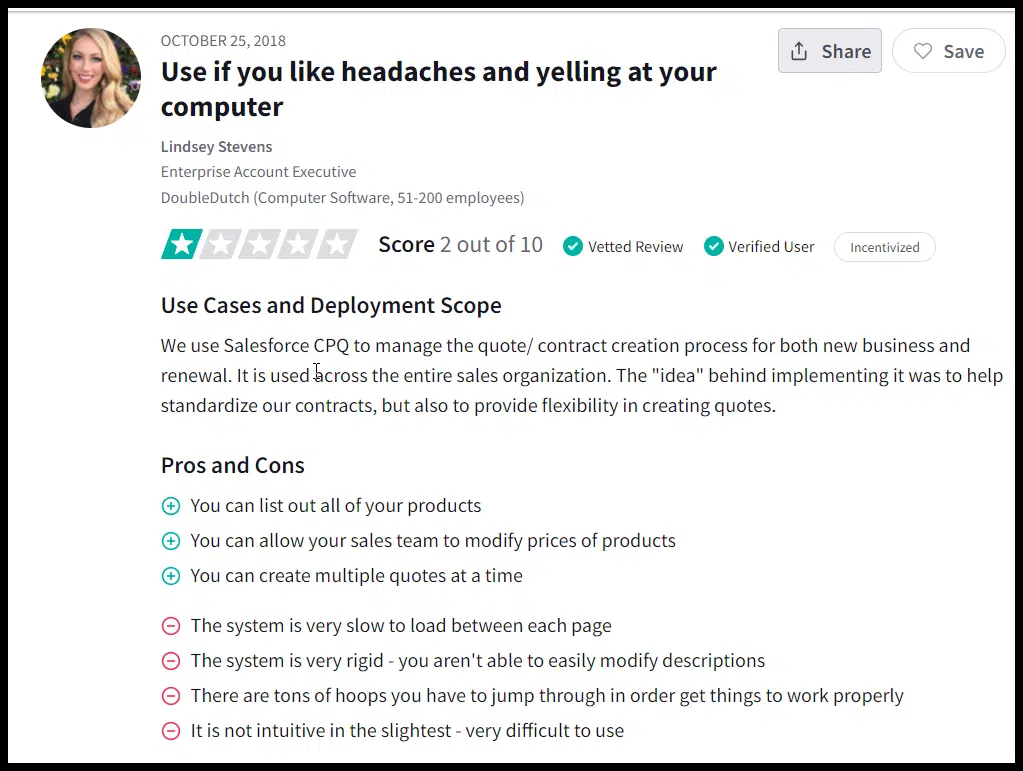
About the author

Craig Harkins

Craig Harkins is Director of SEO and Content at Apartments.com where he leads SEO products and content strategy across multiple sites. Prior to Apartments.com, Craig managed SEO programs at InterContinental Hotels Group where he built out the local SEO program for over 5,000 hotels worldwide. He has experience ranging across ecommerce, hospitality and real estate and was a credentialed journalist at the 2008 and 2012 Olympic Games.

https://searchengineland.com/seo-leadership-traps-managers-avoid-429878


OpenAI’s AI Text Classifier no longer available due to ‘low rate of accuracy’

OpenAI’s AI Text Classifier is no longer available. The tool failed to accurately classify whether a human or AI wrote submitted text, the company confirmed.

Page not found. The classifier page now shows a “Page Not Found – We couldn’t find the page you were looking for” message, rather than the tool.

Openai Page Not Found

What happened. OpenAI added a note to the original blog post announcing the AI Text Classifier:

  • “As of July 20, 2023, the AI classifier is no longer available due to its low rate of accuracy. We are working to incorporate feedback and are currently researching more effective provenance techniques for text, and have made a commitment to develop and deploy mechanisms that enable users to understand if audio or visual content is AI-generated.”

Why we care. AI content detectors have become popular among marketers, editors and SEOs since the rise of ChatGPT and other generative AI tools. However, this is a good reminder that OpenAI’s tool (like other similar tools) often fail at their only job – detecting AI content.

R.I.P. Text Classifier, 2023-2023. OpenAI announced the tool Jan. 31. It didn’t even survive a full six months. At launch, OpenAI warned that it was “impossible to reliably detect all AI-written text” and the company had “not thoroughly assessed the effectiveness of the classifier in detecting content written in collaboration with human authors.”


Related stories

New on Search Engine Land

@media screen and (min-width: 800px) { #div-gpt-ad-3191538-7 { display: flex !important; justify-content: center !important; align-items: center !important; min-width:770px; min-height:260px; } } @media screen and (min-width: 1279px) { #div-gpt-ad-3191538-7 { display: flex !important; justify-content: center !important; align-items: center !important; min-width:800px!important; min-height:440px!important; } }
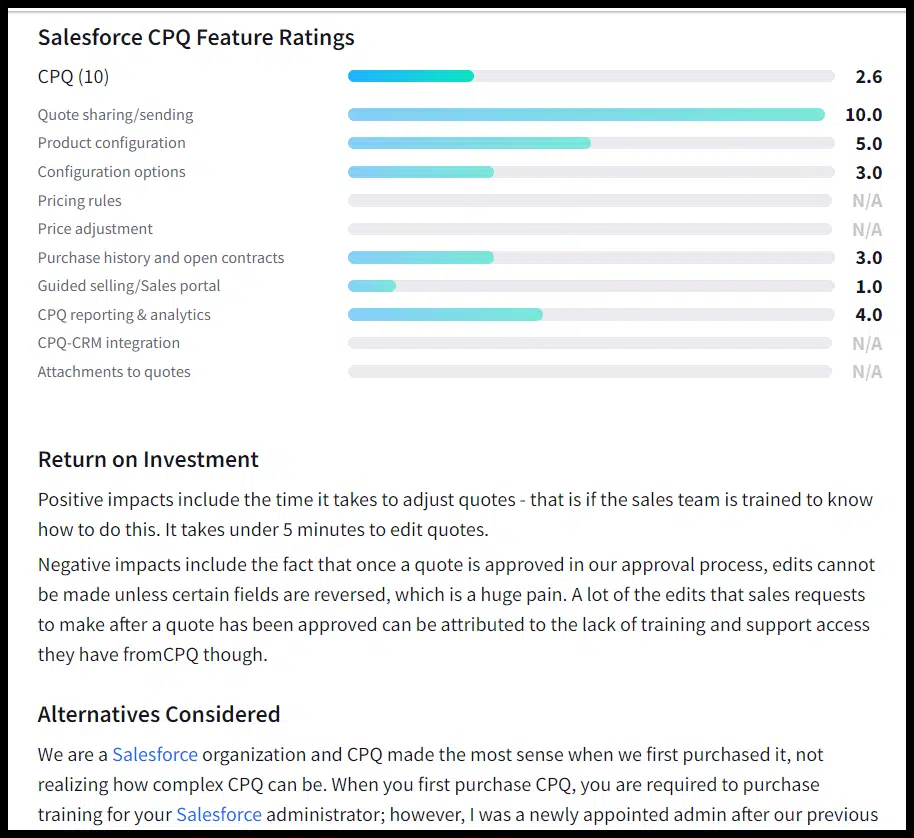
About the author

Danny Goodwin

Danny Goodwin has been Managing Editor of Search Engine Land & Search Marketing Expo – SMX since 2022. He joined Search Engine Land in 2022 as Senior Editor. In addition to reporting on the latest search marketing news, he manages Search Engine Land’s SME (Subject Matter Expert) program. He also helps program U.S. SMX events. Goodwin has been editing and writing about the latest developments and trends in search and digital marketing since 2007. He previously was Executive Editor of Search Engine Journal (from 2017 to 2022), managing editor of Momentology (from 2014-2016) and editor of Search Engine Watch (from 2007 to 2014). He has spoken at many major search conferences and virtual events, and has been sourced for his expertise by a wide range of publications and podcasts.

https://searchengineland.com/openai-ai-classifier-no-longer-available-429912


Bing Search and Bing Chat officially rolling out dark mode

Microsoft has begun to officially roll out dark mode for Bing Search and Bing Chat. We reported this was coming, along with support for Bing Chat in Chrome and Safari browsers. Microsoft’s Jordi Ribas posted on Twitter “We are starting to roll out desktop dark mode for Bing over the next few days.”

What dark mode looks like in Bing Search. Here is a screenshot of what dark mode looks like in Bing Search:

Bing Search Dark Mode

What dark mode looks like in Bing Chat. Here is a screenshot of what dark mode looks like in Bing Chat:

Bing Chat Dark Mode

How to enable dark mode in Bing. To enable dark mode in Bing Search or Bing Chat, click on the menu bar at the top right of the page and under the “appearance” section check off “dark.” You can also default to your system settings for dark or light mode:

Bing Dark Mode Setting

Why we care. Jordi Ribas from Microsoft said, “We heard the requests for dark mode and are excited for everyone to experience this feature in Bing Search and Chat.”

So this is a much-requested feature and we know Google Search supports dark mode, as does Google Bard.


Related stories

New on Search Engine Land

@media screen and (min-width: 800px) { #div-gpt-ad-3191538-7 { display: flex !important; justify-content: center !important; align-items: center !important; min-width:770px; min-height:260px; } } @media screen and (min-width: 1279px) { #div-gpt-ad-3191538-7 { display: flex !important; justify-content: center !important; align-items: center !important; min-width:800px!important; min-height:440px!important; } }
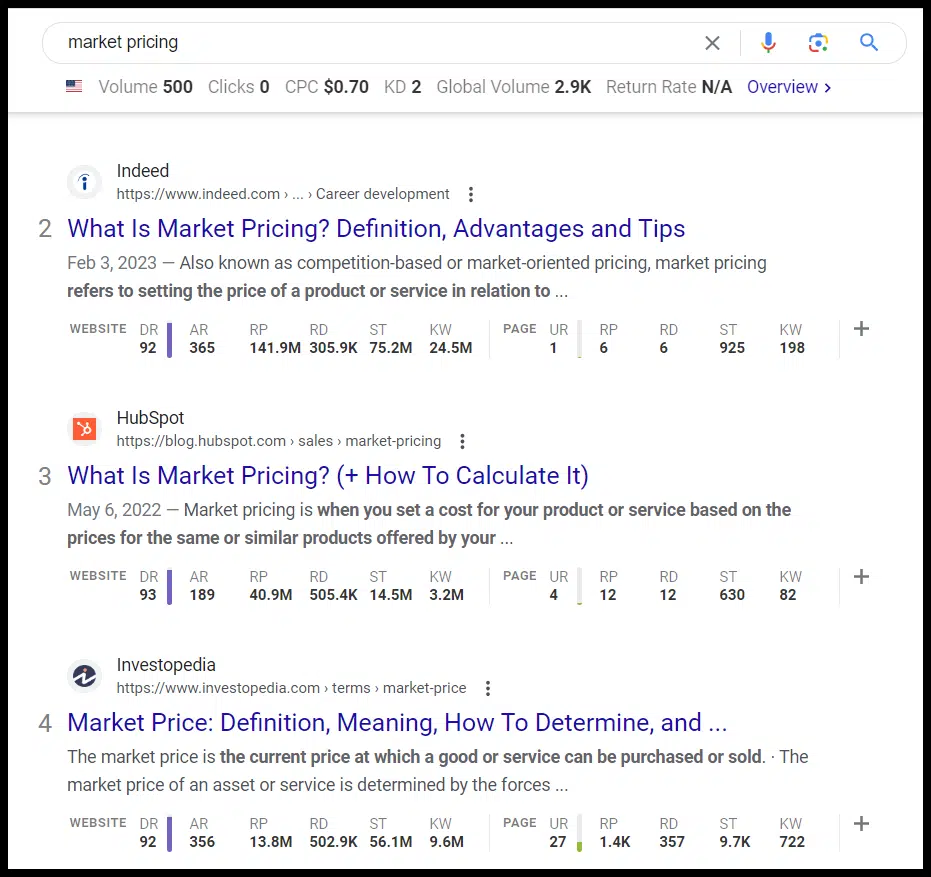
About the author

Barry Schwartz

Barry Schwartz a Contributing Editor to Search Engine Land and a member of the programming team for SMX events. He owns RustyBrick, a NY based web consulting firm. He also runs Search Engine Roundtable, a popular search blog on very advanced SEM topics. Barry can be followed on Twitter here.

https://searchengineland.com/bing-search-and-bing-chat-officially-rolling-out-dark-mode-429906