9 warning signs your SEO consultant is NOT competent

With the rise of ChatGPT, automated SEO reporting and free courses and training, it’s never been easier to throw out a shingle and advertise as an “SEO consultant.”

And why wouldn’t one want to do that? 

The average salary for an SEO specialist per Glassdoor.com is projected at just over $56,000 as of June 2023. And, with the overall SEO market valued at $77.6 billion by the end of 2023, there seems to be plenty of money and opportunity to go around.

Unfortunately, that rise of opportunity, coupled with the minimal barrier to advertising oneself as an “SEO consultant”, comes with inherent risks. This is especially true for those looking to hire qualified SEO help for their blogs, websites and campaigns.

Unlike most professional fields, search engine optimization (SEO) does not have:

  • A governing body.
  • An accepted set of industry standards.
  • A built-in mechanism to police the practices of good consultants from the bad.

So how do you know if the SEO consultant you are hiring is competent, ethical and has your interests at heart in their approach?

It helps to see the warning signs.

As a successful SEO consultant who has run his firm for 20+ years, trained SEO teams on five continents, and helped clients hire their SEOs, here are my top nine warning signs to help you make the most qualified decision for your business.

Warning sign 1: Lack of transparency in methods

SEO is not a black box. A competent SEO should be able to explain their strategies and approach to the client without hesitation or cajoling. 

You plan to provide me with a content strategy? What does that involve? 

You mention a need to make design changes? Why, and what is the end result of those changes?

You want to increase my authority and backlink profile? What strategies does that involve?

If the consultant is secretive about any or all of the above or shows a clear lack of transparency, those methods should be questioned.

  • Tip: A competent SEO consultant should be able to lay out a clear and cognizant approach to your site and goals. I call it the “toddlers and drunk adults” method. 

Warning sign 2: Unrealistic promises or expectations

My wife and I like to kid each other by saying that we have been married 23 years, and “at least” 13 of those have been happily. We disagree as to which ones, though. 

The point is that we are realistic in that marriage is not always easy or expected. And it’s the same with SEO consulting.

Any consultant who promises “first-page rankings in x period of time or extremely fast results in a short or finite amount of time” raises a red flag.

SEO is a marathon, not a sprint. Unrealistic timelines fly in the face of the learned belief that SEO requires patience, trial and error, and consistent long-term optimization.

  • Tip: it is common to have timelines and clear deliverables during any SEO engagement. Make sure whomever you are working with has a clear plan, and that plan is laid out to your satisfaction.

Warning sign 3: Can’t provide references or referrals or has outdated case studies

I’ve been extremely fortunate to accumulate hundreds of reviews on Linkedin, Facebook, and my own website. 

This kind of “social proof” is mandatory for outward manifestations of competency and trustworthiness.

An SEO consultant who is soliciting your business should be able to provide multiple referrals to current and existing clients when asked and/or show case studies from past clients that confirm the legitimacy of their expertise.

  • Tip: Search Google for the consultant’s name and company. Do other SEOs cite them? Do they show a long list of expertise-contributed interviews and news mentions? Do they even come up?

Warning sign 4: Doesn’t ask for site or analytics access or provide a detailed onboarding

Competent SEO consultants are always going to need the help of their clients!

The simplest way to ensure that cooperation is to ask for and receive access to all appropriate accounts that will provide the data needed to conduct a competent SEO campaign. At a minimum, that includes

  • Google Search Console.
  • Google Analytics.
  • Admin access to your site or blog.

Detailed onboarding should also be done to determine a simple SWOT analysis, a competitor profile, and a quick overview of client products and services. 

If none of the above is done, that’s a huge red flag that the SEO consultant may be out of their depth.

  • Tip: It’s an accepted best practice for an SEO to ask for and receive any past audits or work product you’ve done with another professional. This is especially important to ensure the current SEO can see what was missed.

Get the daily newsletter search marketers rely on.


One of the many great things I love about SEO is its ever-changing and dynamic nature. But that also requires a huge time commitment to continuing education.

I personally have subscriptions to over a dozen industry newsletters, have a curated reading list I go through every morning, and stay up-to-date on best practices that require dozens of hours of study each month.

Your SEO should clearly be up-to-date on recent announced (and unannounced) Google updates, be intimately familiar with Google Search Essentials, Google Quality Rater Guidelines, and understand fully how to comply with SEO best practices.

  • Tip: Quiz your SEO on recent “big news events” like the adoption of GA4 and the state of SGE (Search Generative Experience). Ask them questions about the Google Quality Rater Guidelines. 

Warning sign 6: Doesn’t take a holistic approach to SEO

SEO is never about one issue or one focus. SEO is honestly “all the things.”

It involves an intimate understanding of content, backlinks, technical SEO, UX, page speed, schema, and dozens of other issues.

An SEO consultant who focuses their energy on one area (i.e., backlinks) over the complete exclusion of other areas (like on-page optimization) is not taking a “holistic approach” to your site or needs.

Unless you hire an SEO for a specific finite task, that SEO should take a full and complete look at your site. That means content, site design, UX, technical issues, etc.

  • Tip: Ask your SEO what page experience, content, UX, and ads all have to do with the helpful content update and what they plan to do to improve your site, in the eyes of Google, around this specific algorithm.

Warning sign 7: States that they have ‘inside’ information on Google algorithms

I’ve been doing SEO since 1998, and I probably have less insight into how Google works now than I did back then.

Google’s Paul Haahr, one of Google’s top engineers, stated as far back as 2016 that they know how RankBrain works but not what it’s doing. This is important because RankBrain, along with BERT, is still a running AI in Google search results as of today.

The point is that SEOs can experiment and make correlations based on specific data, but nobody has inside information on Google. Don’t believe them.

Warning sign 8: Poor communication or a failure to provide regular updates and detailed reporting

Nothing screams incompetence faster or louder than a consultant’s inability to maintain regular contact with clients.

If you find that you are chasing down your SEO consultant to get campaign updates or status reports or that more than one email is required to get a response, this is a problem.

A competent SEO should provide regular updates on the efficacy of all campaigns and continued suggestions for improvement. Regular updates to show milestones have been met or reporting to show what is and is not working should be the norm, not the exception.

  • Tip: Ask your SEO consultant to explain three major differences in Google Analytics reporting from UA (GA3) to GA4, and how they are bridging the gap with new post-switch reporting.

Warning sign 9: Treating you as a vendor, not a partner

In all the audits I have with clients, I am clear about one thing: this is a partnership. Your success is my success, and I want you to be successful.

If your existing SEO consultant is not taking a similar approach, that’s a problem. 

Your SEO consultant should be invested in your success. The relationship should never be just transactional. They celebrate your wins, and they also accept shared responsibility for losses. 

My goal with all of my clients is to provide them with the best options for their needs. Sometimes, that’s not me. I have a vetted list of referrals and professionals to call upon. 

  • Tip: Regularly ask your SEO consultant about your business, goals and concerns. The result should always be a great conversation that moves your business further. If not, make a change.

Hiring the right SEO consultant can make or break your business

SEO consulting can be a lucrative career with few entry barriers, no required experience or education certifications and common gaps in competency between practitioners.

In other words, not every SEO consultant will be a winner. 

Ensure you invest resources in the right partner by reviewing the detailed warning signs above and adjusting course where needed.

The business you save may be your own. Good luck out there!


Opinions expressed in this article are those of the guest author and not necessarily Search Engine Land. Staff authors are listed here.


Related stories

New on Search Engine Land

@media screen and (min-width: 800px) { #div-gpt-ad-3191538-7 { display: flex !important; justify-content: center !important; align-items: center !important; min-width:770px; min-height:260px; } } @media screen and (min-width: 1279px) { #div-gpt-ad-3191538-7 { display: flex !important; justify-content: center !important; align-items: center !important; min-width:800px!important; min-height:440px!important; } }

About the author

Casey Markee

Casey Markee is the owner of internet consultancy Media Wyse. An SEO for over two decades, he has been working exclusively with food and lifestyle bloggers since 2015. During that time he’s worked with thousands of bloggers across every recipe niche imaginable. He likes long walks to the refrigerator and back and believes bacon and candy corn are gourmet foods.

https://searchengineland.com/seo-consultant-incompetant-warning-signs-429580



Master AI content creation with the FACTS strategy

Content creation is going through a revolutionary transformation.

Not long ago, it was a wholly human endeavor. Nowadays, AI-powered content creation is no longer a novelty. It is a necessary lifeline for businesses in the digital age.

But merely setting your AI on autopilot won’t cut it. It can lead to content that feels impersonal, generic and lacking the emotional connection that successful storytelling requires.

This is where the FACTS strategy comes in.

FACTS stands for:

  • Facts
  • Attitude
  • Creativity
  • Tune-up
  • SEO

Here’s a roadmap that balances the benefits of AI with the uniquely human aspects of content creation.

Facts: Always check for accuracy

When creating content, your facts aren’t just elements of your narrative. They’re the very essence of it. They’re the framework that lends structure to your content.

It can be all too tempting to sit back and let the technology do all the work. But that’s where many go astray.

Consider GPT-4, the advanced AI language model developed by OpenAI. It operates within its training data’s constraints, oblivious to recent developments. 

This highlights a significant aspect of using AI for content creation – ensuring factual accuracy falls squarely on your shoulders.

Doing so has several benefits:

Building trust with your audience

When your readers turn to you for information, they’re investing their trust in you. They believe in the accuracy and reliability of the information you provide. 

This trust is not a one-time deal. It’s built over time, fortified each time a reader finds value and truth in your content.

Establishing your brand as a reliable source

Every piece of content you publish is a reflection of your brand. The accuracy of your facts directly impacts your brand’s image and credibility. 

By ensuring your content is factually correct, you position your brand as a reliable source of information. 

Driving long-term success

Ensuring factual accuracy in your content isn’t just about immediate gains. It’s a long-term investment in your brand’s future. 

Brands that consistently provide accurate and valuable information stand out. 

They’re the ones that users turn to time and again, driving consistent traffic and engagement. 

Over time, this reliability translates into customer loyalty, elevating your brand to a trusted authority in your field.

Fostering engagement and dialogue

Accurate information fosters meaningful audience engagement. 

You can enhance your content’s reach and impact when readers participate in discussions and contribute their insights.

Attitude: Because everyone loves a personality

Attitude is more than just a vibe or a mood. It’s what sets you apart, making your content undeniably, unmistakably, you. 

While AI can potentially capture and convey your writing style, it needs your help and input to truly mirror your unique essence. 

Your attitude, and your brand’s personality, add color and texture to the information you share. 

It turns dry facts into engaging narratives and mundane details into captivating stories. 

By infusing your content with your unique attitude, you create a distinctive reading experience that resonates with your readers, fosters an emotional connection, and keeps them coming back for more.

Content with a unique voice humanizes your brand, making it more relatable and approachable. 

This personal touch can dramatically improve your content’s engagement rates. 

Readers are more likely to interact with content that resonates with them on an emotional level. 

AI can significantly enhance the speed and volume of your content creation. But your attitude – your brand’s unique voice – is what truly gives your content its flavor. 

With the proper training, AI can be a powerful tool in carrying your unique voice across your content.

Creativity: Give your content a creative edge

Creativity is the zest that adds a spark of magic to your content. 

Your unique creative touch elevates a good piece of AI-generated content to greatness. 

Creativity could be woven into your content through:

  • An unconventional perspective.
  • A captivating storyline.
  • A humorous anecdote.
  • A thought-provoking question.

Consider the FACTS acronym itself. It’s a simple yet inventive construct that transforms an otherwise mundane process into something engaging, memorable and fun.

AI can provide you with a robust and accurate framework of content. With this as your starting point, you can add your unique creative garnishes. 

It could be how you phrase a concept, the catchy title you come up with or the compelling call-to-action that rounds up your piece. 

With these creative touches, your content becomes not just another piece of information but a captivating narrative that wows your audience.


Get the daily newsletter search marketers rely on.


Tune-up: Where the magic truly happens

Tune-up is the process that adds finesse to your content creation. 

Even when you have an advanced AI like GPT-4 doing the heavy lifting of content creation, the human touch – a keen eye and an intuitive understanding of language nuances – is what adds the final layer of perfection. 

Here, your role transforms from a creator to a discerning editor.

This part of the process may seem less glamorous than the initial creation, but it’s where the real magic happens. 

It’s the phase where good content is honed into excellent content, where readable material becomes memorable and engaging. 

Tune-up is both an art and a science. The science lies in the technical aspects – ensuring grammatical accuracy, refining sentence structure, eliminating redundancy and ensuring optimal readability. 

This technical precision is crucial to maintaining your brand’s professional image. After all, grammatical errors or awkward sentence structures can undermine your credibility and distract from your message.

Conversely, the art lies in maintaining the narrative’s flow and rhythm, enhancing the emotional resonance, and amplifying your unique voice. 

It’s about finessing the transitions, creating compelling intros and conclusions and subtly infusing your brand’s personality into the content.

While AI has come a long way in generating high-quality content, it still needs more human sensitivity to language nuances. That’s where you step in.

Tweak the AI-generated content to ensure it aligns perfectly with your brand voice:

  • Smooth out awkward phrases.
  • Add stylistic touches.
  • Adjust the tone. 

SEO: Turn the spotlight on your content

SEO is the linchpin that brings all your content creation efforts to fruition. 

Picture this: you’ve just crafted an extraordinary piece of content – a perfect blend of accurate facts, engaging storytelling, creativity and impeccable grammar.

But what good is it if it remains hidden in the vast digital landscape, unseen by your potential audience?

SEO ensures your content isn’t lost in the digital wilderness.

It’s not enough to produce excellent content. It must be found, read and appreciated. 

SEO ensures that your meticulously crafted, AI-enhanced content doesn’t just exist – it thrives. 

It:

  • Reaches your intended audience.
  • Enhances user experience.
  • Boosts your online visibility.

Harnessing AI and FACTS

With the FACTs strategy, we find a potent blend of human creativity and AI efficiency. 

Implementing this approach ensures that AI-generated content:

  • Maintains its integrity (Facts).
  • Resonates with your audience (Attitude).
  • Stands out from the competition (Creativity).
  • Is polished and professional (Tune-up). 
  • Reaches the right audience and makes a significant impact (SEO). 

With FACTS guiding your AI, you can optimize your content production without compromising quality, engagement or visibility.


Opinions expressed in this article are those of the guest author and not necessarily Search Engine Land. Staff authors are listed here.


Related stories

New on Search Engine Land

@media screen and (min-width: 800px) { #div-gpt-ad-3191538-7 { display: flex !important; justify-content: center !important; align-items: center !important; min-width:770px; min-height:260px; } } @media screen and (min-width: 1279px) { #div-gpt-ad-3191538-7 { display: flex !important; justify-content: center !important; align-items: center !important; min-width:800px!important; min-height:440px!important; } }

About the author

Ron Lieback

Ron Lieback is the founder/CEO of ContentMender, an SEO-driven content marketing agency based in Northeastern Pennsylvania, and the author of “365 to Vision: Modern Writer’s Guide (How to Produce More Quality Writing in Less Time).” While working in digital marketing for the past decade, Lieback has ghostwritten nearly 500 articles for C-level executives across various industries. He also contributes content to leading motorcycle magazines, including Cycle World.

https://searchengineland.com/master-ai-content-creation-with-the-facts-strategy-429616


Instagram updates Reels to simplify content creation

Instagram is rolling out new features on Reels that will make it easier for brands to jump on trends, increase reach and edit videos.

For the first time, you can search the Template Browser via category, making the Meta-owned platform far simpler to navigate.

You will also now have access to more editing capabilities than ever before as the platform has made it less time-consuming to customise templates.

Why we care. Finding out what videos are trending and adding to that conversation is a great way to maximize reach by capturing the attention of people who might not have otherwise been aware of your brand. These new features not only make it easier to see what videos are popular, but the new editing capabilities make content creation simpler and faster. In addition, if you want to cash in on a trend but are struggling to come up with an original concept, Reels’ new simpler browsing system means they can now explore how other people have recreated templates for much-needed inspiration.

Template Browser revamp. You can browse through different Instagram templates via category in the updated Template Browser. These categories will be organized into Recommended and Trending – as well as whatever templates or audio that you have saved to your account.

How it works. Users be able to access the Template Browser whenever they go to create a reel. Simply:

  • Tap on the create button from the home page.
  • Tap on REEL.
  • Tap the image in the lower left corner of the screen to open your camera gallery.
  • Tap on Templates.

You can also access the Template Browser via the Reels Tab. Tap on the camera icon and then select Templates.

Save your favorite template. If you see a template you would love to use, you can save that video and return to it later. Simply tap the Use Template button located on the Reel. That footage will then be accessible in the Template Browser.

Get inspired. Whenever you stumble across a template that you would love to use but and need some inspiration, you now have the option to check out the competition. By tapping on the Template by icon in their chosen reel, brands will be shown examples of how others have used the template and gotten creative to make that video their own.

New editing capabilities. When you create templates, the audio, number of clips, duration of the clips, and AR effects will automatically be added to your reel. This means they no longer have to manually add or recreate these features themselves, saving a lot of time.

Instagram has also announced that it will start adding text and transitions that were used in the original reel to templates, which will again help save you time. However, the templates will still be fully customizable so that you can add or remove clips, adjust timings and edit preloaded elements. This new feature is expected to be rolled out in the coming weeks.


Get the daily newsletter search marketers rely on.


Added bonus. Meta also confirmed this week that Instagram Reels will now also be served on Facebook. People will also have the opportunity to write comments on these clips without switching between the apps. This means that brands now have the potential to reach more people than ever before across the Meta network.

What has Instagram said? The platform said via its announcement:

  • “Reels templates allow you to easily create a reel by reusing elements from another reel you love. Just drop in your own videos and photos to save time and put your own creative spin on a reel.
  • “We’re excited to share some upgrades to Reels templates that will help you more easily find inspiration and create engaging reels.
  • “Whether you’re joining in on a trend or want to create a fun reel to express your creativity, Reels templates can get you started in just a few taps.
  • “We’re always working on ways to improve your Reels experience. We’ll continue to build on the Reels templates feature to make it easier and more fun to create and share on Instagram.”

Related stories

New on Search Engine Land

@media screen and (min-width: 800px) { #div-gpt-ad-3191538-7 { display: flex !important; justify-content: center !important; align-items: center !important; min-width:770px; min-height:260px; } } @media screen and (min-width: 1279px) { #div-gpt-ad-3191538-7 { display: flex !important; justify-content: center !important; align-items: center !important; min-width:800px!important; min-height:440px!important; } }

About the author

Nicola Agius

Nicola Agius is Paid Media Editor of Search Engine Land after joining in 2023. She covers paid search, paid social, retail media and more. Prior to this, she was SEO Director at Jungle Creations (2020-2023), overseeing the company’s editorial strategy for multiple websites. She has over 15 years of experience in journalism and has previously worked at OK! Magazine (2010-2014), Mail Online (2014-2015), Mirror (2015-2017), Digital Spy (2017-2018) and The Sun (2018-2020). She also previously teamed up with SEO agency Blue Array to co-author Amazon bestselling book ‘Mastering In-House SEO’.

https://searchengineland.com/instagram-updates-reels-simplify-content-creation-429566


Google confirms related search operator is going away

Google is removing support for the related search operator, a special search command where Google can tell you what other websites are related to another site.

Danny Sullivan, Google’s Search Liaison, confirmed via Twitter the related search operator is going away, saying:

  • “It hasn’t really worked that well for some time, as in some cases, the information was dated.”

What is the related search operator. The related search operator allowed you to type in the Google search box, for example, [related:https://www.google.com/] and Google would return related websites to that URL. Google’s old help documentation said:

“Google determines the relatedness of URLs by comparing multiple factors, such as the entities mentioned on the page and the general category of the page.”

It’s going away. I noticed this morning that Google removed the operator from its help documentation and then asked Google if the related search operator was going away. Google confirmed it is indeed going away, although, it currently seems to return results.

Sullivan added that it was rarely used anyway.

Alternatives may come back. Sullivan added:

  • “Potentially we might revisit another way to show this type of info in the future.”

What and when that might be is unknown.

It begs the question, Google’s SGE can and does provide an AI snapshot answer to answer that question. So is the related search command needed?

Google Sge Related Example

Here is what the related search operator looks like for this site:

Google Related Operator

Why we care. If you use the related search operator for SEO and search marketing research, you may need to find an alternative solution going forward. Maybe AI search engines like Google SGE, Bard, Bing Chat, ChatGPT or others might be able to help.


Related stories

New on Search Engine Land

@media screen and (min-width: 800px) { #div-gpt-ad-3191538-7 { display: flex !important; justify-content: center !important; align-items: center !important; min-width:770px; min-height:260px; } } @media screen and (min-width: 1279px) { #div-gpt-ad-3191538-7 { display: flex !important; justify-content: center !important; align-items: center !important; min-width:800px!important; min-height:440px!important; } }

About the author

Barry Schwartz

Barry Schwartz a Contributing Editor to Search Engine Land and a member of the programming team for SMX events. He owns RustyBrick, a NY based web consulting firm. He also runs Search Engine Roundtable, a popular search blog on very advanced SEM topics. Barry can be followed on Twitter here.

https://searchengineland.com/google-confirms-related-search-operator-is-going-away-429575


5 free SEO tools and plugins to try

Are you looking for new ways to save time doing research and competitive analysis?

Then these five handy SEO tools and plugins – which are completely free to use – should help:

  • Competitor research: Wayback Machine
  • Data analysis: Copy Selected Links
  • Design and layout: GoFullPage
  • Research and data formatting: Docs Online Viewer
  • Reformat content from an image: OneNote

1. Competitor research: Wayback Machine

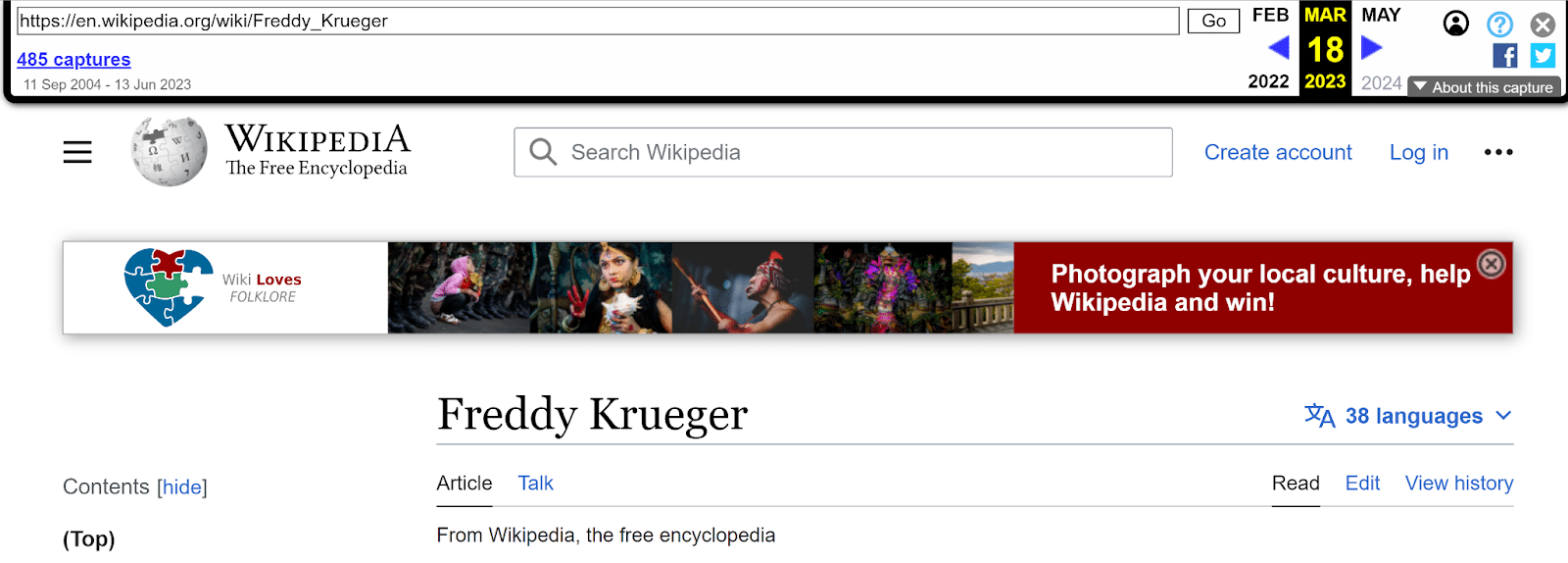
The Internet Archive Wayback Machine is one of the most underrated free tools for SEO. Not only can you use it to view past versions of your own website, but you can also use it to view competitor changes.

There are probably hundreds of tools and approaches for competitive SEO analysis, like Fluxguard and Visualping. But the Wayback Machine is free and can be used on any site. And it can’t easily be blocked by a competitor’s firewall (yes, your competitor can block IPs coming through your company’s VPN).

You can view past versions of competitor pages to see what they’ve updated, tested and reverted, like:

  • Design and layout elements
  • Calls to action (CTAs)
  • Content and headline changes
  • Keyword focus

Web Archives also has extensions for all the major browsers that let you instantly view versions of any page you’re on.

Wayback Machine example
Wayback Machine example - Freddy Kroueger

When to use it

  • Spot and track trends over time, or come up with ideas to test on your own site. 
  • Use the Changes tab to see how much a page has changed over time. It can give you clues if competitors seem to update certain pages on a regular timeline.
  • For sites that use a category or folder structure, the Sitemap tab lets you see a visual map of the structure of the site. This is especially useful for sites without an obvious or public sitemap. 
  • Share before and after screenshots if you can’t access previous versions of your page.

When you can’t use it

The Wayback Machine has one major downside: You can’t view a page that hasn’t been archived before. 

The Wayback Machine doesn’t have a record of every webpage, though it does come pretty darn close.

The Archive claims it has 813 billion web pages in its collection. With an estimated 4.5 billion indexed webpages in existence, that’s about 18% of the whole internet.

Fortunately, you can add any page to the archive that you can view later. If you search for a URL and it’s not in the archive, click the option to save it to add it to the collection. But there won’t be historical data before that point.

Dig deeper. 5 ways to use the Wayback Machine for SEO

Let’s say you have a list of linked article titles in a spreadsheet. But you need to add the actual URLs in a column too.

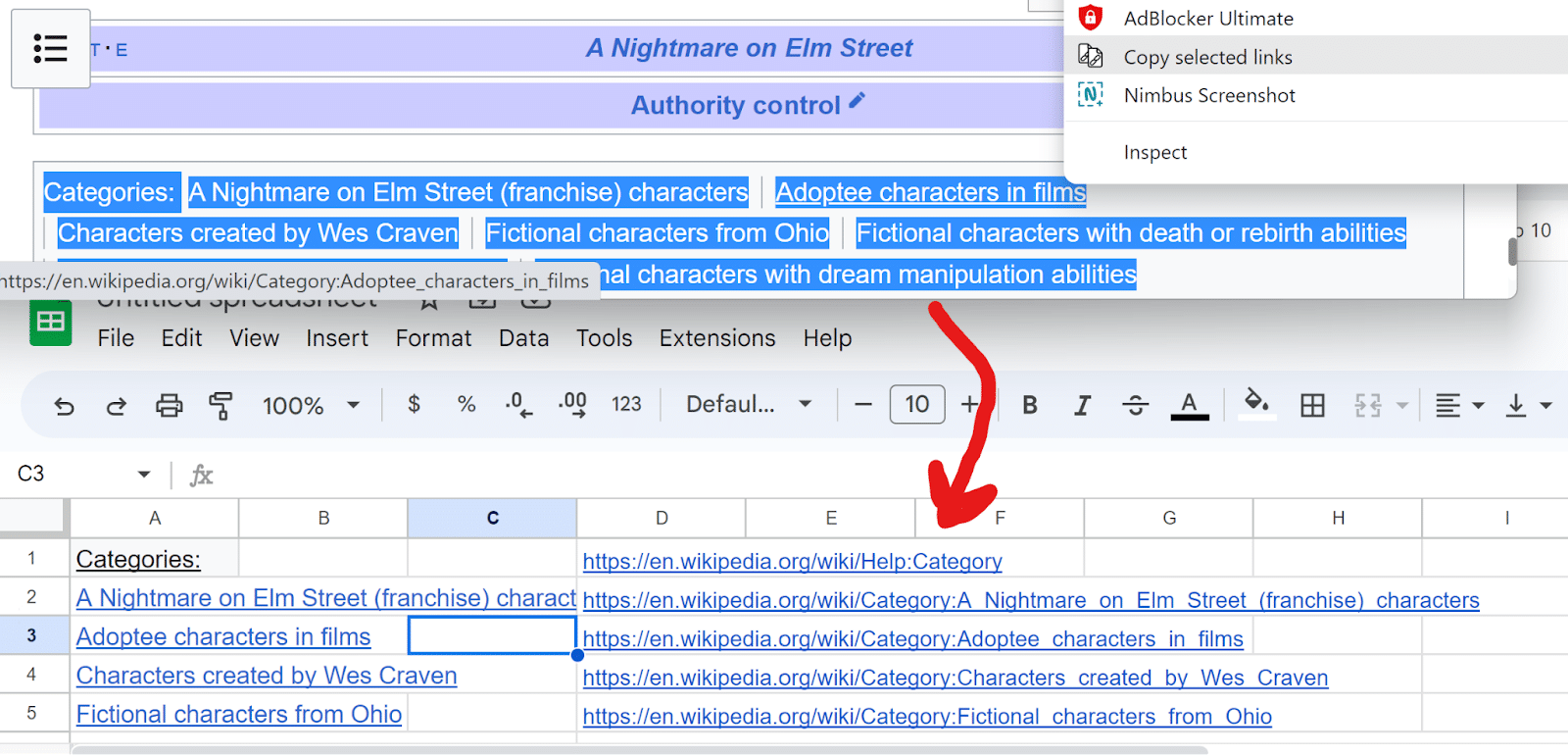
Instead of right-clicking and copying each URL into a new cell, you can use the Copy Selected Links extension for Chrome and Firefox.

Copy the linked text, then right-click and paste. Now you have a list of the URLs for the content you copied.

Copy Selected Links

When to use it

If you’re making edits across many pages on your site, typically, you’d have to log into your CMS, open each page and then click Edit. Or you might search for each page in the CMS dashboard and click Edit on each one.

If you use a CMS like WordPress, you can often copy the list of pages straight from your CMS dashboard, along with the Edit links, into the same spreadsheet. 

  • Create a spreadsheet.
  • In your CMS, select all the pages to edit and copy with Ctrl/Cmd + C.
  • In your spreadsheet, paste the list of linked pages.
  • Right-click the page titles and paste the live URLs in one column. 
  • Right-click the Edit links and paste in another column. 

Get the daily newsletter search marketers rely on.


3. Design and layout: GoFullPage

Now you have a spreadsheet with a list of the page links and edit links. You can right-click and open all the Edit links in new tabs instead of opening each page individually.

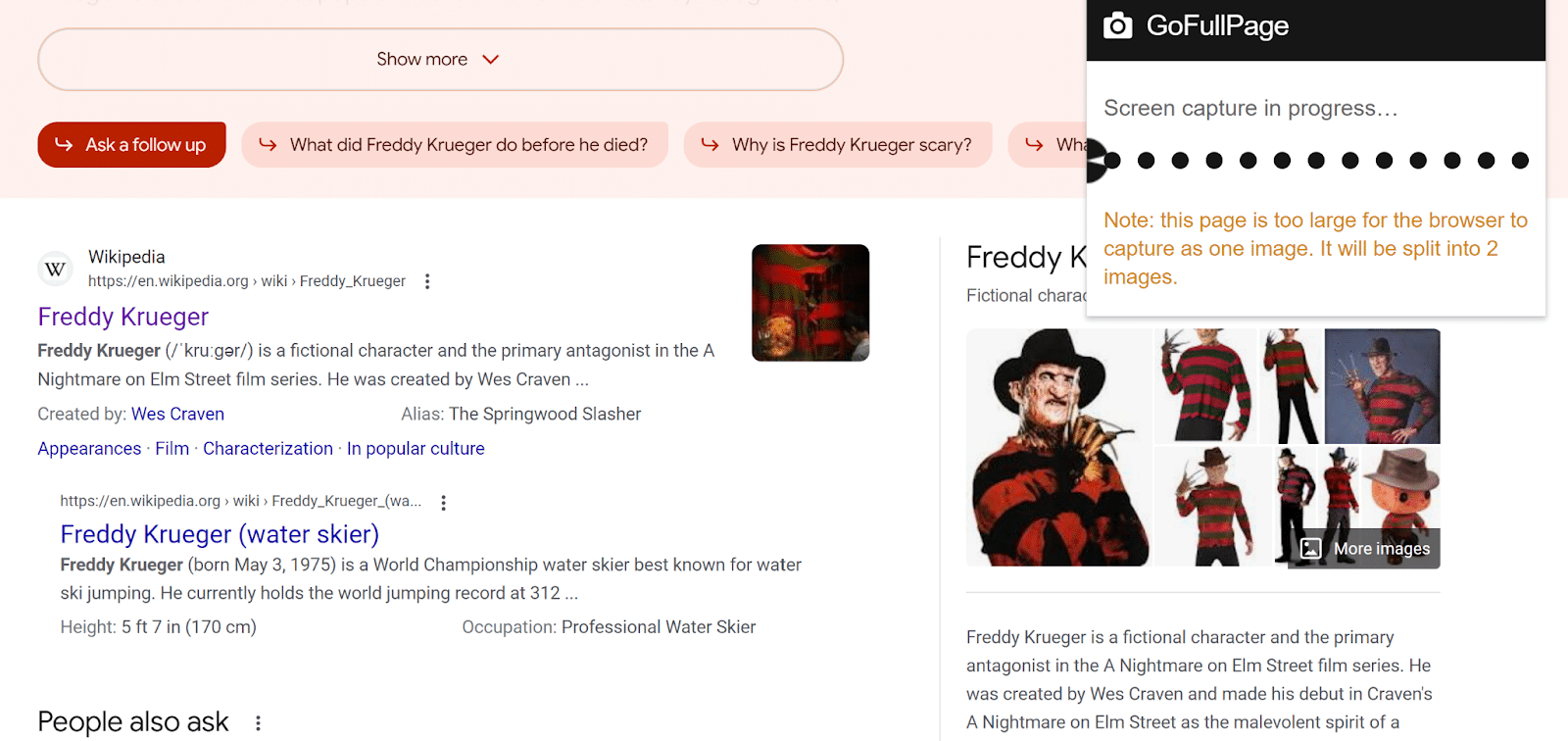
GoFullPage is a Chrome browser extension that lets you take a screenshot of an entire page at once.

You can take a picture of an entire page on desktop and mobile without needing to scroll and take multiple screenshots.

Save your screenshot as a PDF or PNG, or mark up your image with notes before you save it or share it.

GoFullPage

When to use it

  • Save search results for specific keywords to see how the SERP changes over time. 
  • Compare SERP results side-by-side for users in different locations or using different devices. 
  • Share before and after screenshots of page changes.
  • User test different versions of the same page without the need for a designer.

4. Research and data formatting: Docs Online Viewer

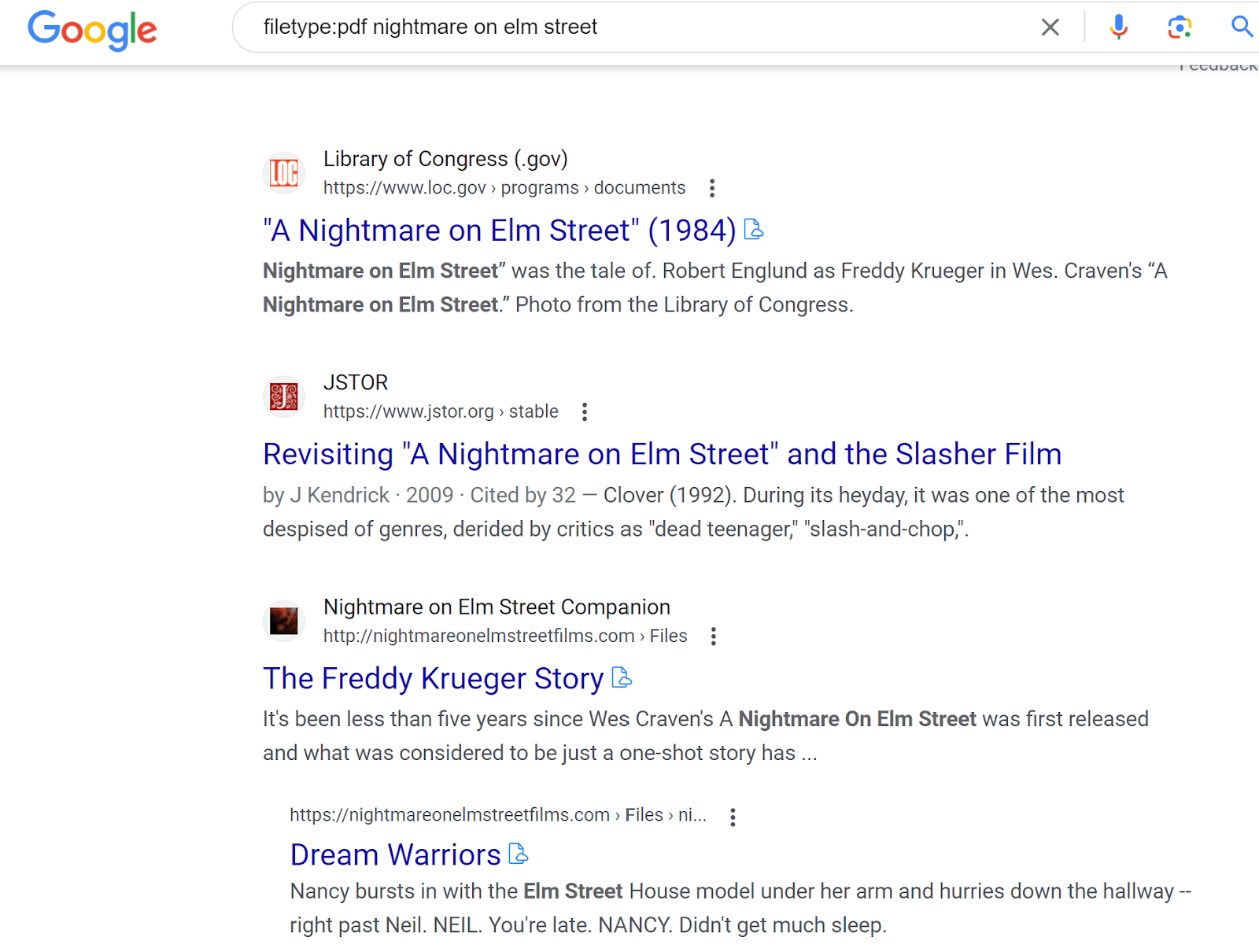
Doing an advanced web search for filetype:pdf is enormously helpful for finding specific data types, like sample files and reports.

But some sites require you to download the PDF instead of letting you view it directly in your browser. You can always open a PDF in Chrome from your Privacy and Security settings. But this isn’t foolproof.

Docs Online Viewer, a Chrome or Firefox browser extension, puts a linked cloud icon next to any PDF. Click it to view the PDF in your browser. 

Go Docs Online Viewer

When to use it

  • The obvious use case is so you never have to download a PDF first before you find out if the PDF is useful.
  • Sometimes this plugin lets you view a PDF that’s behind an email signup button – without giving away your email address.
  • Viewing the PDF in your browser also means you can combine this with other extensions, too. Use this plugin with Copy Selected Links to copy all the URLs in a database of links, for example.

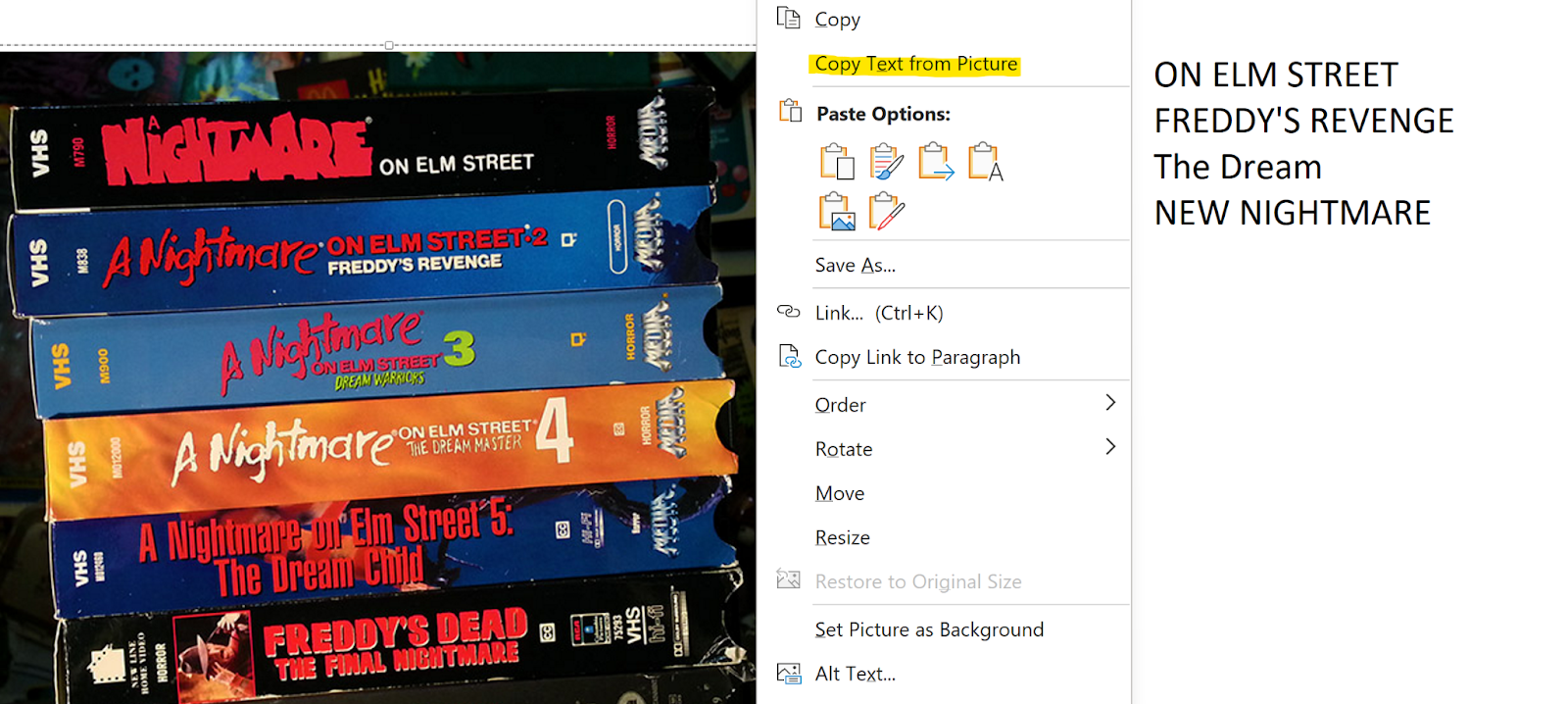
5. Reformat content from an image: OneNote

OneNote is a go-to program for organizing notes and your work life. It also has a lesser-known feature: copying text from images.

  • Copy any image into a OneNote page. 
  • Right-click on the image.
  • Select Copy Text from Picture. 
  • Paste it into your Note with Ctrl/Cmd + V or right-click + paste.

It’s not perfect at copying text by any means. But for images that are structured around copy, it can be up to 80% accurate. 

You’ll often need to check certain letters and numbers manually. OneNote might mix up a 1 and an L, for example.

10XbCa356L4eqv1un9Il9j FXJQgCS0zZPFWCjGc7OUm7LSB5DdOT44 JygAPJd8iDOjYf7Vsio18pVALh OF4S6HNTANoQpnBk3ONxbW1tkOvlRrWJBZEv8rxLXuC7VNHP1v13XOpMKGdzzzULA6Xs

When to use it

This is helpful for pulling out content from an image so you can analyze the data or turn it into on-page content.

Google can’t read content from images like it reads on-page copy, even if it does have proper alt text. Neither can screen readers. 

Whenever you have an image on a page, it’s useful to include the same info from the image in another, more readable format. Use this tool to take a diagram and turn it into copy, or include both an image of a table and an HTML table on your page.

The image-to-text feature is available with free or premium versions of OneNote. OneNote is available for both PC and Mac.

To get the most out of your SEO tools, share the best tools and tips you’ve found with your team, clients and peers.

SEOs love to try new things, so try new tools and feature whenever you can, then spread your wealth of knowledge to others.


Opinions expressed in this article are those of the guest author and not necessarily Search Engine Land. Staff authors are listed here.


Related stories

New on Search Engine Land

@media screen and (min-width: 800px) { #div-gpt-ad-3191538-7 { display: flex !important; justify-content: center !important; align-items: center !important; min-width:770px; min-height:260px; } } @media screen and (min-width: 1279px) { #div-gpt-ad-3191538-7 { display: flex !important; justify-content: center !important; align-items: center !important; min-width:800px!important; min-height:440px!important; } }

About the author

Roslyn Ayers

Roslyn Ayers is a contributing writer for Search Engine Land. With over a decade of experience in SEO, her subject matter expertise includes everything from finance and tech to ecommerce and education. Her expert analysis has been featured on sites like Bankrate, MSN and Reader’s Digest. Roslyn is currently an SEO Manager for ValuePenguin by LendingTree.

https://searchengineland.com/free-seo-tools-plugins-429536


How to calculate and improve your agency’s churn rate

To grow your agency, you need to lose some clients.

While it sounds crazy at first, there is actually value in that thought.

Understanding why clients leave enables you to improve your acquisition and retention approach. 

So if you’re an agency owner and you don’t track churn rate, this article is for you.

What is churn rate? A simple definition

Churn rate refers to the rate at which customers or subscribers discontinue or cancel their subscription or service within a specific period. It is often expressed as a percentage and is used as a metric to measure customer attrition or turnover. 

A high churn rate indicates that a significant number of customers are leaving, which can have negative implications for businesses.

Churn rate is a North Star KPI that every agency should closely monitor.

Repeat purchase rate is different from churn rate but when you think about it, it is about looking at a half-empty / half-full glass (it describes the same situation). So because your agency sells one-time projects doesn’t mean you should not pay attention.

The real question is: are your clients leaving too soon? And are those representing a significant share of your client base?

If you answered yes to both questions, don’t panic but get busy.

Conversely, you should ask yourself how many clients you need to acquire (and how fast you should do so) to reach your growth targets. If you can’t answer such questions, then get busy too! 😀

For example, say you start with 1,000 clients but also lost 100 of them over a certain period of time.

And that your growth goal is to reach 1,500 clients by the end of the next period. That means your client acquisition goal should be 1,500 – 1,000 + 100 = 600 clients.

In that example, if your churn (100 clients lost) and your acquisition (600 clients acquired) are OK, you’ll hit your target. But if you start losing more than 100 clients… careful!

The churn rate trap people fall into way too often

You need to define your analysis period better to calculate churn rate.

For example, let’s say your average client stays with your agency for two years. And say that you take a two-month reference period to analyze churn. Would you trust your churn rate? I know I would not.

Having a fixed period of time (like a fiscal year) is more often than not a mistake. You actually need to incorporate client lifetime information into your churn rate calculation.

Say you’re a subscription-based agency. The longer a client stays, the higher the probability is that he or she leaves you. It’s like a law of nature. Naturally, not all businesses are made equal in that sense:

Don’t use a fiscal year by default. While it might make sense for your business, you first want to have a somewhat clear idea of your average client lifespan. 

Basically, if your agency has been around for some time, you should have a solid idea of that average lifespan. Use that as your reference period, not a fiscal year.

How to calculate churn rate

If you have a precise figure for your average client lifespan, you can use the below formula:

Churn rate = 1 / average customer lifespan

If client lifespan is not clear enough (your agency lacks the data or is too young, etc.), then I’d recommend using scenarios. Use whatever data you already have (be it 6 months or 2 years) and use different client retention windows (say 1 year, 2 years and 5 years).

In any case, you’ll want to use the below formula:

Churn rate = clients lost during the analysis period/clients at the beginning of that same period

Sounds simple? It is. Still, there are several things to say about the above formula.

To calculate the clients you lost during the analysis period, you want to subtract the number of clients you have at the end of the period from your clients at the beginning of the period. 

That means you should not consider the clients you acquired during that same period!

So let’s use the example mentioned above: you lost 100 clients and started with 1,000 of them. That means your churn rate is 100 / 1,000 = 10%.

And yes, you want to write it in percentages. 


Get the daily newsletter search marketers rely on.


How to read churn rate?

Churn rate tells you how fast your client base is getting thinner. So with a 10% churn rate, you’ll need 10 analysis periods to lose all your clients.

So is 10% great or horrendous? It really depends on your industry.

My recommendation is: do not compare with other agencies. At best, your data on your competitors (or those industry averages we find online) is partially reliable. But most of the time, that data is complete garbage. Just ignore them.

Instead, you want to compare your present agency with your past agency. Just use the previous analysis period. That data is 100% reliable: you control it (and you did a good job at calculating it right?).

If your churn rate is decreasing, you are doing good. Conversely, if it increases, you should have a red light flashing in your head.

The only question then becomes: can you reverse that course of action before it’s too late for your agency? And only you can answer that question (“is X amount of analysis periods enough to turn the ship away from the iceberg?”).

Ideally, you have something that looks like that:

  • Period #1 : 10%
  • Period #2 : 8.5%
  • Period #3 : 7.6%
  • Period #4 : 6.8%

Methodology and data to improve churn rate

Generally speaking, all agency owners take product / service quality levels very seriously. So churn rate and pain points are very much identified already. It simply is tough (if not impossible) to solve that equation right now.

That being said, I’ll share our methodology at my agency, it is fairly simple: track client lifecycle events. Like, all of them. It can be a challenge if your organization is big and includes many managerial layers, subproducts, etc. That will add sand to your wheels for sure.

When you have enough political power to prioritize that data collection effort, you can use it in a simple funnel-like dashboard. It should help you visualize the client lifecycle and all major steps. 

Here is a simplified example to get you started:

  • Onboarding: 100% of clients are still with us. That one wasn’t hard! 😁
  • Setup completed: 98% of clients are still here.
  • First business review: 92%…
  • One-year anniversary: 60%…
  • Two-year mark: 55%…

In that example, the main pain point clearly comes after that first business review. Did you actually identify what the client was looking for? Or did you turn a blind eye to her needs?

Or maybe it has to do with client goals: they were not a good fit in the first place.

Or maybe you switch client’s teams too often and that happens before the one-year anniversary. And so on.

Once you have built that dashboard, you can pinpoint several potential areas of improvement. Simply gather more data to prioritize your efforts.

Top ideas to improve churn rate

Everything I mentioned requires relatively heavy resources to become reality. And sometimes, we only need some quick ideas to get our heads going. So here are 10 ideas to improve churn rate:

  • Improve after-sale (i.e., production) services, specifically its speed of execution. A client faces a challenge, he or she should get an answer in less than 30 minutes. Less frustration, lower churn rate.
  • Reward your most profitable clients. It doesn’t apply to all of your clients but some of them deserve extra recognition: exclusive info, semi-private events, etc.
  • Show that you listen to your clients. Package that into a program to gather, process and communicate around client feedback. People should feel they’re heard and listened to.
  • Improve service / product quality. And specifically work on perceived value. Don’t be too “geeky” about it. Your clients also need to feel that increase in the short term.
  • Keep in touch with your clients. That means working on your content marketing. That way, you make sure your clients don’t feel like the grass is greener on the other side.
  • Personalize your client communications. This can be at the report, product, service or whatever level. They need to feel some degree of uniqueness. That way, they won’t be able to get the same product / service elsewhere.
  • Have sales and after-sales teams talk. The latter team needs to understand what actually drives sales… and salespeople need to understand what tensions exist after the initial contract is signed.
  • Evaluate client satisfaction. That means working on quantitative KPIs (repeat purchase, NPO, Customer Happiness Index, etc.) and qualitative ones (interviews, etc.).
  • Update your products. If a company doesn’t evolve, it is bound to die. The same goes for products and services. Simple as that.
  • Be transparent. On deadlines, works in progress, internal capacity and limits, ability to fix x, y and z, etc.

Do you have a leaky bucket?

Measuring churn rate helps you understand how fast clients go and why. Ideally, you can solve those first challenges easily.

The next step is to implement a system to reduce churn rate. That system should be in everybody’s hands… but HR and product people are usually first in line.

End vision: your clients will love your products and services so much that they will pay more and for a longer period of time. And maybe even better: they will turn into evangelists!


Opinions expressed in this article are those of the guest author and not necessarily Search Engine Land. Staff authors are listed here.


Related stories

New on Search Engine Land

@media screen and (min-width: 800px) { #div-gpt-ad-3191538-7 { display: flex !important; justify-content: center !important; align-items: center !important; min-width:770px; min-height:260px; } } @media screen and (min-width: 1279px) { #div-gpt-ad-3191538-7 { display: flex !important; justify-content: center !important; align-items: center !important; min-width:800px!important; min-height:440px!important; } }

About the author

Rémi Kerhoas

Rémi is an internationally recognized digital marketing expert and co-founder of Quantads, a data & growth marketing agency. Since 2011, he has successfully directed teams and grown ad accounts for clients ranging from Uber, Salomon or Asana to SMBs.

https://searchengineland.com/calculate-improve-agency-churn-rate-429550


Visual Search now live in Bing Chat

Bing Chat now supports visual search, which means you can now upload a photo or take a picture and have Bing Chat respond with answers around those visuals. “Visual Search in Bing Chat is rolling out now on desktop and mobile,” Microsoft Bing posted on its blog.

What it looks like. Here is a video of it in action on the mobile interface of Bing Chat:

Here is how it works on the desktop interface of Bing Chat:

Why we care. Visual search is a big part of search in general, Bing Search added this feature back in 2018, while Google has Google Lens. Google also just rolled out Google Lens in Bard last week. Bing Chat was testing this feature for over a month.

If you want to ask Bing Chat more details about what you are seeing or on a screenshot you have access to, you can now do so.

Bridging visual and search with AI can be a lot of fun but don’t trust everything you see on these AI search features, they still can hallucinate.


Related stories

New on Search Engine Land

@media screen and (min-width: 800px) { #div-gpt-ad-3191538-7 { display: flex !important; justify-content: center !important; align-items: center !important; min-width:770px; min-height:260px; } } @media screen and (min-width: 1279px) { #div-gpt-ad-3191538-7 { display: flex !important; justify-content: center !important; align-items: center !important; min-width:800px!important; min-height:440px!important; } }

About the author

Barry Schwartz

Barry Schwartz a Contributing Editor to Search Engine Land and a member of the programming team for SMX events. He owns RustyBrick, a NY based web consulting firm. He also runs Search Engine Roundtable, a popular search blog on very advanced SEM topics. Barry can be followed on Twitter here.

https://searchengineland.com/visual-search-now-live-in-bing-chat-429527


Robots.txt is not the answer: Proposing a new meta tag for LLM/AI

While Google is opening up the discussion on giving credit and adhering to copyright when training large language models (LLMs) for generative AI products, their focus is on the robots.txt file.

However, in my opinion, this is the wrong tool to look at.

My former colleague Pierre Far wrote an excellent article on Crawlers, search engines and the sleaze of generative AI companies where he highlighted some of the immense challenges currently facing the online publishing industry. Similar to his article, I will keep this proposal high-level as developments in this field are extremely fast-paced.

Why not use robots.txt

There are a few reasons why using robots.txt is the wrong starting point for the discussion on how to respect the copyright of publishers.

Not all LLMs use crawlers and identify themselves

The burden is on the website operator to identify and block individual crawlers, which may use and/or sell their data for generative AI products. This creates a lot of extra (and unnecessary) work, especially for smaller publishers.

This also assumes that the publisher has editing access to their robots.txt file, which is not always the case with hosted solutions.

This is not a sustainable solution as the number of crawlers continues to grow

The usable file size of a robots.txt file is limited to 500 kb, according to the newly proposed robots.txt standard.

This means that a large publisher may run into problems with their robots.txt file if they need to block a lot of LLM crawlers and/or refined URL patterns in addition to other bots.

An ‘all or nothing’ approach is unacceptable

For the larger crawlers like Googlebot and Bingbot, no distinction can be made between the data being used for search engine results pages (traditionally where there is an “agreement“ between the publisher and search engine in the shape of a “citation“ to the original source) and generative AI products.

Blocking Googlebot or Bingbot for their generative AI products also blocks any potential visibility in their respective search results. This is an unacceptable situation where the publisher is forced to make a choice between “all or nothing”.

Robots.txt is all about managing crawling while the copyright discussion is all about how the data is used

The latter is about the indexation/processing phase. As such, robots.txt isn’t really relevant to this discussion but rather a last resort if nothing else works and should really not be the starting point of this particular discussion.

Robots.txt files work fine for crawlers and do not need changing for the purpose of LLMs. Yes, LLM crawlers need to identify themselves, but what we really need to talk about is indexation/processing of the crawled data.

Reinventing the wheel

Luckily, the web already has some well-established solutions which can be used for managing the usage of data with regard to copyrights. It is called Creative Commons.

Most of the Creative Commons licenses would do fine for the purpose of LLMs. To illustrate:

  • CC0 allows LLMs to distribute, remix, adapt, and build upon the material in any medium or format with no conditions.
  • CC BY allows LLMs to distribute, remix, adapt, and build upon the material in any medium or format, so long as attribution is given to the creator. The license allows for commercial use, but credit must be given to the creator.
  • CC BY-SA allows LLMs to distribute, remix, adapt, and build upon the material in any medium or format, so long as attribution is given to the creator. The license allows for commercial use. If LLMs remix, adapt, or build upon the material, it must license the modified material under identical terms.
  • CC BY-NC allows LLMs to distribute, remix, adapt, and build upon the material in any medium or format for noncommercial purposes only so long as attribution is given to the creator. 
  • CC BY-NC-SA allows LLMs to distribute, remix, adapt, and build upon the material in any medium or format for noncommercial purposes only so long as attribution is given to the creator. If LLMs remix, adapt, or build upon the material, they must license the modified material under identical terms. 
  • CC BY-ND allows LLMs to copy and distribute the material in any medium or format in unadapted form only so long as attribution is given to the creator. The license allows for commercial use and credit must be given to the creator, but no derivatives or adaptations of the work are permitted. 
  • CC BY-NC-ND allows LLMs to copy and distribute the material in any medium or format in unadapted form only, for noncommercial purposes only, and so long as attribution is given to the creator and no derivatives or adaptations of the work are permitted. 

The last two licenses are unlikely to be usable for LLMs.

However, the first five licenses mean that LLMs need to consider how they use the crawled/obtained data and ensure they adhere to the requirements placed upon using the data from the publishers, such as attribution and when sharing the product built upon the data.

This would put the burden on the “few“ LLMs in the world instead of the “many“ publishers.

The first three licenses also support “traditional“ usage of the data, for example, in search engine results where the attribution/credit is given through the link to the original website. While the fourth and the fifth license also support research and development for open-source LLMs. 

Side note: Keep in mind that all these software companies building LLMs often use open-source software where they have the same copyright license challenges with regard to the software libraries and operating systems they use to avoid copyright violations on a code level. So why reinvent the wheel when we can use a similar system for the data this code processes?

Once a publisher has identified an appropriate license, this license still needs to be communicated. Again, this is where robots.txt seems to be the wrong approach.

Just because a page should be blocked from crawling for search engines does not mean it can’t be used or isn’t useful for LLMs. These are two different use cases.

As such, to separate these use cases and allow for a more refined yet also easier approach for publishers, I recommend we use a meta tag instead.

Meta tags are pieces of code that can be inserted on a page level, within a theme or the content (I know, this is not technically correct, but HTML is forgiving enough and can be used as a last resort when a publisher has limited access to the code base). They do not require the publisher to have additional access rights other than being able to edit the HTML of the content published.

Using meta tags does not stop crawling, like the meta noindex. However, it allows you to communicate the usage rights of the data published.

And although there are existing copyright tags that can be used – notably from Dublin Core, rights-standard (abandoned proposal), copyright-meta (focuses on the name of the owner rather than the license) and other attempts – the current existing implementation of these on some websites may conflict with what we try to accomplish here.

So a new meta tag may be necessary, although I am happy to reuse an existing or old one, such as “rights-standard“, as well. For this discussion, I am proposing the following new meta tag:

<meta name="usage-rights" content="CC-BY-SA" />

In addition, I recommend that this meta tag is also supported when used in HTTP Headers, like the noindex is supported in X-Robots-Tag, to aid LLMs crawlers better managing their crawl resources (they only need to check the HTTP Headers to validate the usage rights).

X-Robots-Tag: usage-rights: CC-BY-SA

This can be used in combination with other meta tags. In the example below, the page should not be used for search results but can be used for commercial LLMs as long credit is given to the source:

X-Robots-Tag: usage-rights: CC-BY, noindex

Note: The name “usage-rights“ for the meta tag is a proposal and can be changed.

Foolproof solution

Granted, there are bad crawlers and bad actors building their LLMs and generative AI products.

The proposed meta tag solution won’t prevent the content from being used that way, but neither will the robots.txt file.

It is important to acknowledge that both methods depend on the recognition and compliance by the companies using the data for their AI products.

Conclusion

Hopefully, this article illustrates how using robots.txt for managing data usage in LLMs is, in my opinion, the wrong approach/starting point for dealing with usage and copyrights in this new age of LLMs and generative AI products.

This meta tag implementation would enable publishers to specify copyright information at the page level using Creative Commons, without preventing the page from being crawled or indexed for other purposes (like search engine results). It also allows for copyright declarations to be made for various uses, including LLMs, generative AI products, and potential future AI products.


Opinions expressed in this article are those of the guest author and not necessarily Search Engine Land. Staff authors are listed here.


Related stories

New on Search Engine Land

@media screen and (min-width: 800px) { #div-gpt-ad-3191538-7 { display: flex !important; justify-content: center !important; align-items: center !important; min-width:770px; min-height:260px; } } @media screen and (min-width: 1279px) { #div-gpt-ad-3191538-7 { display: flex !important; justify-content: center !important; align-items: center !important; min-width:800px!important; min-height:440px!important; } }

About the author

Fili Wiese

Fili is a renowned technical SEO expert, ex-Google engineer and was a senior technical lead in the Google Search Quality team. At SearchBrothers he offers SEO consulting services with SEO audits, SEO workshops and successfully recovers websites from Google penalties. Fili is also a frequent speaker at SMX and other online marketing events.

https://searchengineland.com/robots-txt-new-meta-tag-llm-ai-429510


How to incorporate macroeconomic signals into your SEO strategy

You’re an SEO with the best intentions of driving traffic and awareness for your brand (or client). After work, you take a spin to the grocery store and pay a few bucks more than you expected.

On the way home, you stop to fill your gas tank and notice that the price per gallon is higher than the last time you filled it.

You shrug and start mentally planning the next day – digging into your favorite keyword research tool, checking out site speed metrics after some asset optimizations, and prioritizing some pages to review after doing month-over-month traffic analysis.

I’m here to tell you you’re missing something.

If the last 12 months or so have taught me anything, it’s that macroeconomic trends significantly impact how users engage with online content.

Maybe SEO is not the first initiative anyone thinks of when strategizing how to incorporate macroeconomic angles inxto their marketing campaigns, but you’re missing the boat if you don’t.

This article examines:

  • The macroeconomic signals to watch and why.
  • Sources to reference to gauge user reaction.
  • How to assess users’ developing needs and emotions.
  • How to address those needs and emotions in your SEO campaigns.

The macroeconomic signals to watch and why

I’m not saying you should use daily gas prices as a barometer. I am saying they could be a good reminder to keep your finger on the pulse of the bigger picture.

Signals to watch include:

  • Consumer confidence ratings.
  • Venture capital and private equity funding trends.
  • The stock market.
  • Inflation.
  • The monthly jobs report.

If you’re in B2C, consumer confidence, inflation and jobs are key.

If you’re in B2B (especially working with high-growth companies, as I do), it’s essential to gauge how easy (and/or expensive) it is to raise funds.

And for marketing agencies, know that the macroeconomy heavily influences the economics of how businesses spend on marketing and spend to acquire users. 

If you’re working in an industry closely related to finance, like lending or real estate or insurance, you likely have a second layer of important metrics to watch (e.g., mortgage rates).

Either way, knowing the economic picture can alert you to prime times to dig in for more information to help you effectively engage users.

Sources to reference to gauge user reaction

The SEO space isn’t about staying in a bubble of reporting; it’s about keying into audience behavior, which means you must know your audiences. That goes way beyond monthly search volume and search volume over time.

Many of the major keyword tools aggregate monthly over time and won’t give you the agility you need to gauge real-time impact.

Google Trends, on the other hand, has become an incredible real-time source for changing behavior.

Check out the geo (and hourly) breakdown of the query “do air conditioners filter wildfire smoke” during the eerie period in June when Canadian wildfires were turning the metro New York skies orange:

"do air conditioners filter wildfire smoke" on Google Trends
Google Trends - interest by subregion

Twitter and Reddit are other good sources for up-to-the-minute info.

Depending on who you follow, Twitter can give you the view of people like journalists and politicians, who help shape the broad discourse.

Reddit can take you into the weeds to show you what people closer to the ground are saying.

If you’re looking to gauge impact in your specific industry and see the approaches and angles that are most popular:

  • Pick two or three trusted industry sites.
  • Gauge the (non-sponsored) articles in the prime positions. Those have almost always earned that real estate with lots of engagement.

Qualitative data from your customers, clients, and leads is always good to gather. Your own reports – from Google Search Console and Google Analytics – will show you in real time if you already have any assets that are drawing renewed interest.


Get the daily newsletter search marketers rely on.


How to assess users’ developing needs and emotions

If the sources I just referenced hit on common themes, opportunities, or challenges more than once, you’ve got another layer of analysis to do. 

What fears, ambitions, or questions do those point to that you can address with UX and content? And what modifiers might you add to more broad queries that might make them timely and relevant? 

For instance, a few years ago, when mortgage interest rates were in the 2-3% range, a simple “mortgage brokers” would have sufficed.

With interest rates soaring today, something like “mortgage broker comparison tool” or “mortgage broker price match” would likely draw tons of high-intent engagement. 

On the B2B side, less available funding means lots of budget reduction, which in turn means a reduction in transactional intent – and a shift up the funnel into research and education, which you can address with content that speaks to industry challenges and your unique solutions.

How to address those needs and emotions in your SEO campaigns

I’ve already mentioned a couple of ways to address these – changing the nature of your content and keywords to align with shifting intent. 

Other ways to use your analysis include new site hubs to address discrete challenges, updated UX to emphasize relevant themes and messaging, and even new content initiatives.

(As an example, I once had a client in the manufacturing space; we built a content strategy around the Bureau of Labor Statistics’ monthly Jobs Report in which we got real-time analysis from the client’s CEO each time the report came out, and we’d publish the analysis immediately – and get lots of incremental traffic.)

The other step is to feed intel to your paid media teammates. Suppose we’ve created a piece of content for a relevant term that gets lots of traffic and conversions (which is directional data but still indicates that the page is valuable). In that case, your paid media team will want to know that bidding on that term, even if it’s expensive, is highly likely to succeed. 

And from a keyword perspective, remember that keyword planners aren’t exactly up to date with traffic data, so if you see real-time spikes, you can help your paid colleagues take advantage before the keyword’s costs catch up to increased volume.

Looking at the bigger picture

You’ll notice that none of the above contained any (extremely amateur) predictions about the economy itself.

Whether the economy stays in flux, turns for the better, or nosedives, the same principles hold: macro trends should be reflected in SEO strategy.

And it’s not just the economy. As COVID taught us, anything with a transformative effect on society at large introduces new needs that SEOs can help address.

So consider this a reminder to broaden your perspective beyond your usual inputs. Even in SEO, a little real-time curiosity and analysis can bear fruit you won’t see growing in the keyword planner.


Opinions expressed in this article are those of the guest author and not necessarily Search Engine Land. Staff authors are listed here.


Related stories

New on Search Engine Land

@media screen and (min-width: 800px) { #div-gpt-ad-3191538-7 { display: flex !important; justify-content: center !important; align-items: center !important; min-width:770px; min-height:260px; } } @media screen and (min-width: 1279px) { #div-gpt-ad-3191538-7 { display: flex !important; justify-content: center !important; align-items: center !important; min-width:800px!important; min-height:440px!important; } }

About the author

Adam Tanguay

Adam Tanguay is Head of SEO and Content at Jordan Digital Marketing, which he joined in Feb. 2019. Formerly Head of Marketing at Webflow and Head of Organic Growth at Weebly, Adam has developed successful growth programs with a mix of content strategy, copywriting, technical know-how, and analytics acumen across a range of organic channels.

https://searchengineland.com/how-to-incorporate-macroeconomic-signals-into-your-seo-strategy-429481


How to respond to negative reviews harming your company’s reputation

Negative reviews can be scary for business owners but can also be a chance to grow and improve. 

How you handle negative reviews affects how potential customers see your business. 

This article explores the importance of responding to negative reviews, determining why they happened, and tips for addressing dissatisfied customers’ concerns.

Negative reviews can help your business

Today’s customers largely rely on review sites to inform their purchasing decisions. Negative reviews can deter potential customers and erode trust in your product or service.

There are many reasons why people may post a negative online review. 

In most cases, negative reviews are an emotional response from a customer due to an unsatisfactory experience with a business’s products or services. 

Understanding the cause of negative reviews is equally important as responding to negative reviews. 

Over the last decade, I have analyzed the review profiles of thousands of businesses. You may identify some common issues or complaints if your business deals with negative reviews. 

Negative reviews are valuable for companies to identify issues with their products, customer service, pricing, billing, etc.

Each critique provides insights for improving products, services, and customer experiences. 

Businesses can pinpoint problem areas by analyzing negative reviews and making meaningful changes to better serve their customers.

Dig deeper: A 3-phased approach to proactive online reputation management

Tips for responding to negative reviews 

Customers appreciate it when they feel heard. They want to know you are taking their review seriously. 

The way you respond to a negative review can significantly impact how prospective customers perceive your company. 

Below are my top tips for responding to negative reviews:

Be professional

It can be easy to lose your cool when you see a negative review talking poorly about your business. 

However, it’s important to maintain a calm, respectful, and professional demeanor in all responses to negative reviews. 

Avoid any language that could be deemed confrontational or defensive.

Personalize

Responses should be tailored to each specific negative review.

A common mistake is when a business uses the same response for all negative reviews – this can make the responses seem inauthentic.

Respond quickly

The ideal response time to a negative review is within 24 hours. 

This will show your customers your dedication to addressing any issues while mitigating the negative review’s damage. 

Responding quickly will also lead to a higher chance of a resolution with the upset customer.

Show empathy

Empathize with the reviewer’s concerns, and take responsibility for any mistakes or issues mentioned. 

This helps to validate their experience rather than dismissing it. It’s important to remember that thousands will potentially see your review response from your prospective customers. 

Show empathy even if you feel the reviewer is 100% wrong. 

Offer solutions

Respond to the reviewer’s concerns by directly solving their problem. 

If there is no solution presently available, provide the reviewer with an email or phone number so they can reach you to resolve the issue.  

Highlight the positive

Don’t let the opportunity pass you by to highlight any positive aspects of your business.

You can use your responses as a way to reinforce the quality of your business and the value you provide.

Follow-up

Always follow up with the reviewer via phone or email (if possible) to ensure their concerns have been addressed satisfactorily. 

If the concerns have been resolved, it is also a great opportunity to see if the reviewer is willing to update their review – which often results in a higher star rating. 

Dig deeper: A quick guide to managing your online reputation


Get the daily newsletter search marketers rely on.


Negative review response templates

One of the most important aspects of branding for a business is consistency. 

If you have negative reviews published about your business, you should consider creating review response templates for your customer service team or whoever will handle your review responses. 

Review response templates ensure that whoever is responsible for responding to the negative review sticks to the script, and treats every customer equally.

That said, you should never copy and paste the templated responses.

The first step in creating review response templates is to perform a negative review audit of all your existing negative reviews. 

Once this has been completed, analyze each negative review, identify any common trends or complaints you see within the negative reviews, and categorize them.

Each category you create should have its own templated review responses.

You should incorporate personalization and details relevant to the reviewer’s concerns every time you respond and ensure that all responses adhere to the best practices detailed above. 

The negative review response template below uses the best practices described in this article.

Dear [Reviewer’s Name],

Thank you for taking the time to share your feedback regarding your recent experience with our company. We genuinely value our customers’ opinions, and we appreciate the opportunity to address your concerns. We apologize for any inconvenience you may have experienced and assure you that we take your feedback seriously.

At [Company Name], over the last [Years In Business] we have strived to provide exceptional service and a positive experience for every customer. We are disappointed to learn that we fell short of meeting your expectations. We have taken immediate steps to rectify the situation and enhance our protocols to prevent similar issues from occurring in the future.

We would like to address your specific concerns and speak to you about the situation further. Please reach out to our customer service department at [contact information] so that we can discuss your concerns in more detail and find a resolution.

Once again, thank you for bringing this matter to our attention. We hope to have the opportunity to regain your trust and provide you with a stellar experience in the future.

Sincerely,

[Your Name]
[Your Title/Position]
[Company Name]

What about fake negative reviews? 

Fake negative reviews are one of the most frustrating experiences you can face. A fake negative review can come in several forms:

  • The fake review could be a case of mistaken identity.
  • The fake review could be from a competitor or adversary. 
  • The fake review could be due to review bombing by a disgruntled customer and others.
  • In the worst situations, fake reviews can be part of an extortion scheme.

If you suspect a fake negative review has been published about your business, check your customer database to see if the reviewer’s name matches a current or previous customer. 

If you can’t find a match, it’s possible your business was a victim of a fake review. 

The first action that should be taken is to try to get the negative review permanently removed. Most review sites allow you to flag any review for violations of their guidelines. 

For example, if you are dealing with a fake negative review on your Google Business Profile, information on how to flag the review can be found in their help documentation.

If the review site doesn’t take action to remove the fake review, you can respond to the review with the following:

[Name of Reviewer],

We appreciate you taking the time to share your feedback with us. However, we couldn’t find any record of your visit or interaction with our company. We suspect that this review may not be genuine or may have been posted in error.

If you believe there has been a misunderstanding or if there is a specific issue you would like to discuss, please reach out to our customer service department directly at [contact information]. We are always available to address any concerns or questions you may have.

Dealing with negative reviews online

Negative reviews are an inevitable part of being in business today. 

No matter what your industry, learning how to respond to negative reviews constructively will go a long way in determining your overall reputation online and ability to attract new customers. 

Follow the steps outlined above, and you’ll put your business in the best position possible to turn a negative review into a positive opportunity.


Opinions expressed in this article are those of the guest author and not necessarily Search Engine Land. Staff authors are listed here.


Related stories

New on Search Engine Land

@media screen and (min-width: 800px) { #div-gpt-ad-3191538-7 { display: flex !important; justify-content: center !important; align-items: center !important; min-width:770px; min-height:260px; } } @media screen and (min-width: 1279px) { #div-gpt-ad-3191538-7 { display: flex !important; justify-content: center !important; align-items: center !important; min-width:800px!important; min-height:440px!important; } }

About the author

Anthony Will

Anthony Will is the CEO and Co-founder of Reputation Resolutions, one of the leading online reputation management firms in the United States and globally. He is best known for his expertise in improving, protecting, and managing his clients’ online reputations on Google. Anthony is considered one of the foremost experts in online reputation management, having helped thousands of clients improve and manage their online reputations over the last decade. His company is currently rated by Business.com as the #1 online reputation management company for those dealing with online attacks and/or negative content online. Throughout his professional career, he has cultivated an impressive portfolio of clients, including Fortune 500 companies, prominent C-level executives, SMBs, politicians, celebrities, and many more. With an unwavering commitment to excellence, Anthony’s innovative strategies and experience have solidified his position as a leading authority in the online reputation management industry.

https://searchengineland.com/respond-negative-reviews-reputation-429511