Looker Studio reporting: 6 do’s and don’ts for search marketers

You’ve probably used Looker Studio (formerly Google Data Studio) to create reports for stakeholders or clients. 

I had the pleasure of seeing SearchLab’s Greg Gifford present on “Freddy Krueger’s Guide to Scary Good Reporting” recently. He spoke about ways to improve your Looker Studio reporting to make it more useful for clients. 

Below are key learnings from Gifford’s session in the form of do’s and don’ts, plus some examples of data visualizations that search marketers will find most helpful.

1. Don’t enter data into a text box manually

Work smarter, not harder. Set up a data source for the platform to instantly pull data from.

You can connect it to a specific Google Ads account and report on metrics directly from there. 

There are plenty of connectors built and supported by Looker Studio.

However, if you want to connect a platform that’s not on that list, you can do so through a third-party data integrator such as Supermetrics or Funnel.io.

You can export data to a Google Sheet and pull it into Looker Studio that way.

2. Don’t include metrics without comparison

Clients pay you to tell them a story, not spit out numbers that can already be found on their own. 

  • Why did clicks decrease compared to last month? 
  • Why did the conversion rate drop a whole percentage? There were 40 leads last month.
  • How does that compare to last month or this time last year? 

Show them what trends you are seeing in an easy-to-understand way. 

Here’s an example.
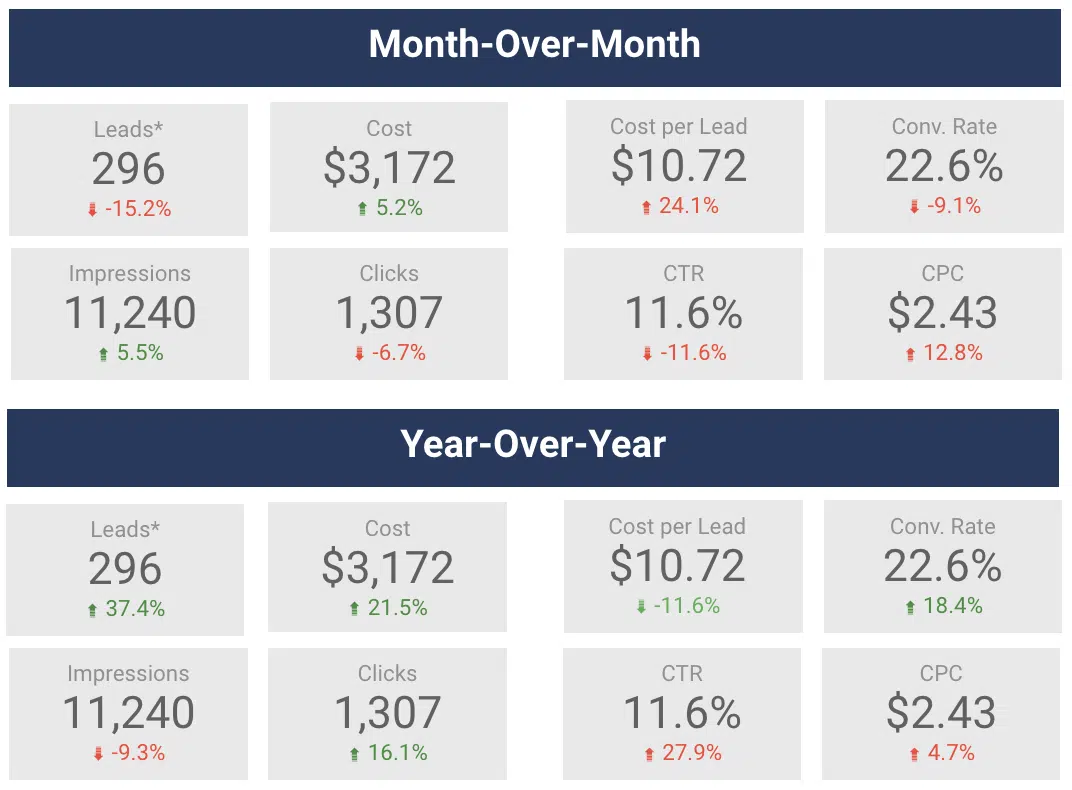
Looker studio comparisons

This is a way to demonstrate month-over-month (MoM) and year-over-year (YoY) changes for specific metrics. 

You can add these by clicking into the metric, navigating to the Setup section, and adding a comparison date range. 

Looker Studio will automatically calculate the percentage change and make it green or red based on a positive or negative trend.
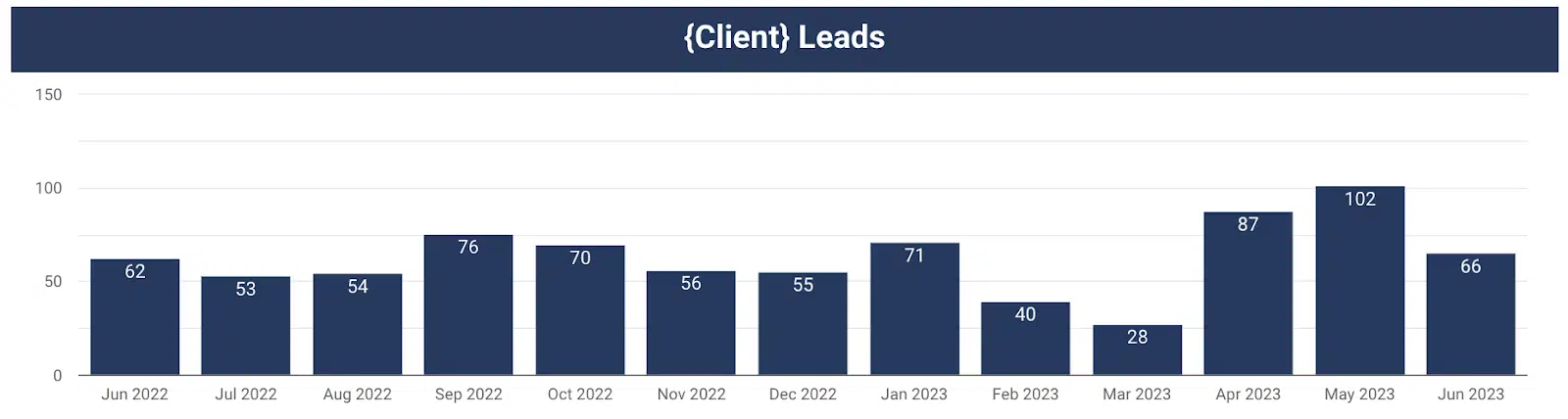
Looker studio - changes over a time period

This chart gives a visual representation of leads by month over time.

You can easily see month-over-month (MoM) and year-over-year (YoY) changes. Consider a chart like this for your report.

3. Don’t give them metrics that don’t tell them the whole story

Time on site is a metric commonly reported on. It’s typically assumed that the more time a user spends on the website, the better. 

Gifford challenged this mindset. Couldn’t spending more time on your website mean that people are unable to find what they really need? 

If they come to your website, find your contact us form, fill it out with their information, and leave it all within 45 seconds, that’s actually a good thing. 

As long as they convert, you should be happy (and the faster they convert, the better). 

Challenge yourself to choose metrics to report that will give a more accurate picture of what’s happening.


Get the daily newsletter search marketers rely on.


So now you know what not to do. Let’s discuss what you should do with your Looker Studio reports.

4. Do provide an executive summary, list of work completed and list of next steps

This is arguably the most important part of the report. 

This should serve as a tear sheet so the client has a place to quickly reference the most important insights from this past month. 

Everything else in the report is supplemental and helps provide additional color to the trends and insights you’ve provided in your executive summary. 

When you think about crafting your executive summaries, ask yourself, “So what?” 

  • My client saw 40 leads this month, so what? 
  • Traffic was up 25% month-over-month, so what? 

Use the executive summary to tell your client a story and give them the why. 

Tell them about how traffic was up 25% month-over-month because that non-brand campaign you restructured has been performing efficiently and drove 80% of the total leads for the month. 

Also, now that you’ve seen how well that campaign restructure is doing as a next step, you are going to restructure another campaign to further improve performance similarly. 

Boom! 

Now you’ve given your client the story about what happened, why that happened and what you plan to do next as a result. 

See an example executive summary template below.
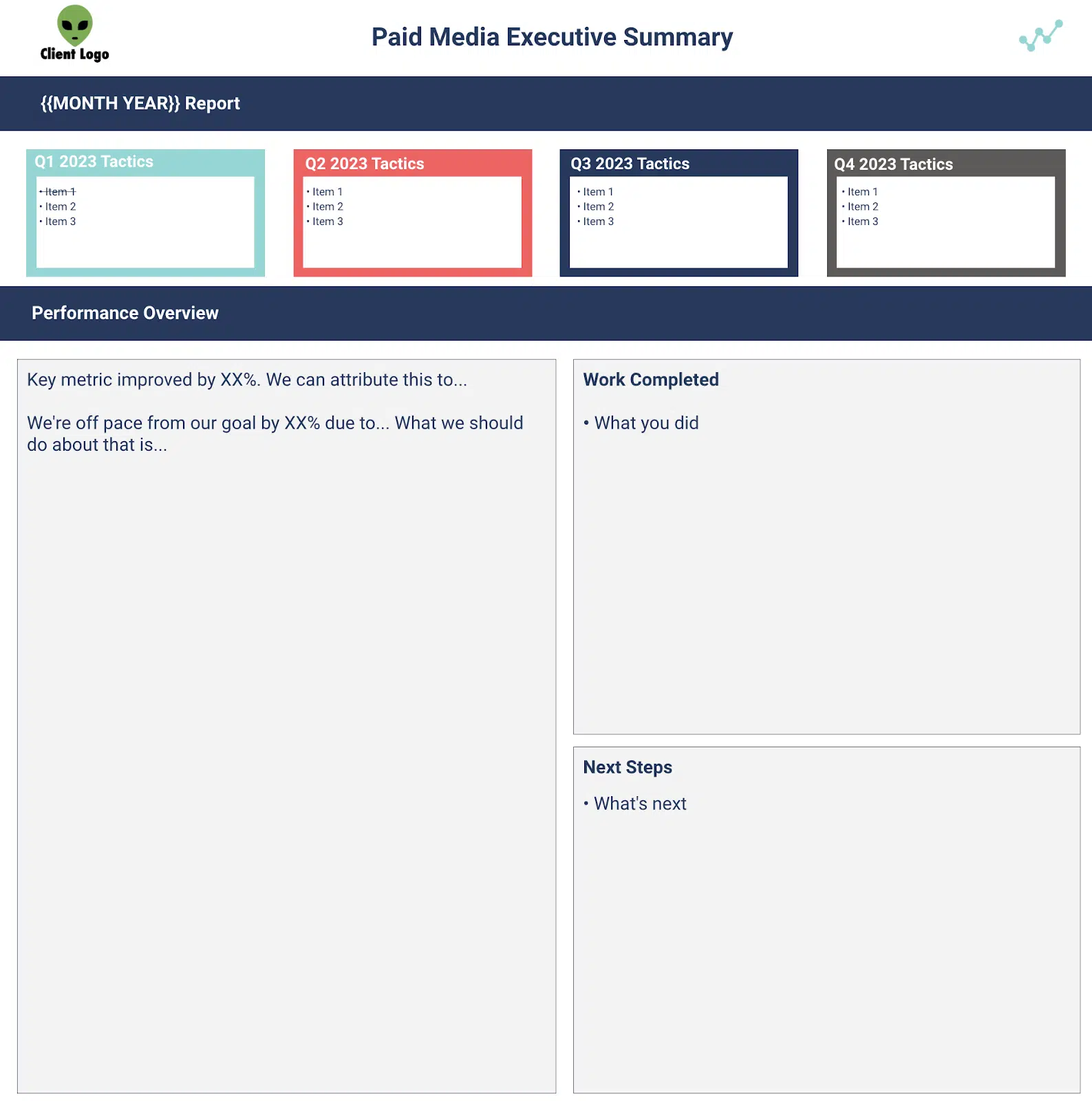
Looker studio - executive summary

It’s imperative to align KPIs with your client before creating a report. 

If you don’t have a goal you are trying to achieve, then how can you prove your value to a client? 

Think of it this way:

Put yourself in the client’s shoes. Which sounds better to you? 

“We generated 40 leads in July.” 

or

“We generated 40 leads in July, which is double our lead goal of 20.” 

Let’s put all this together into your Looker Studio report. 

Show your client that you exceeded your KPIs, don’t just tell them. 

Below is an example of how to visualize your KPI progress.
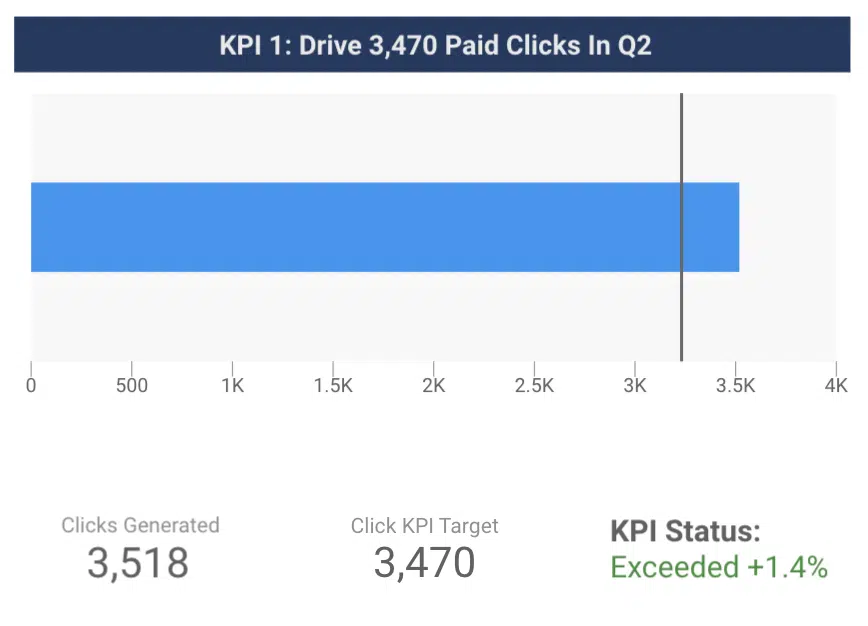
Looker studio - KPI trendsa

The blue bar shows the number of clicks generated in a given time period. 

The line shows the click KPI for the given time period. 

The client can now easily see that you exceeded the target. 

6. Do pull together data that will answer your clients questions

Think about formatting every chart as if it were answering a client’s question, Gifford suggested. 

What actions did people take on our website? 

Show them data outlining how many phone calls, contact form submissions, tour schedules, etc. they received from your marketing efforts. 

Here’s an example of how to break down conversions by type for a client:
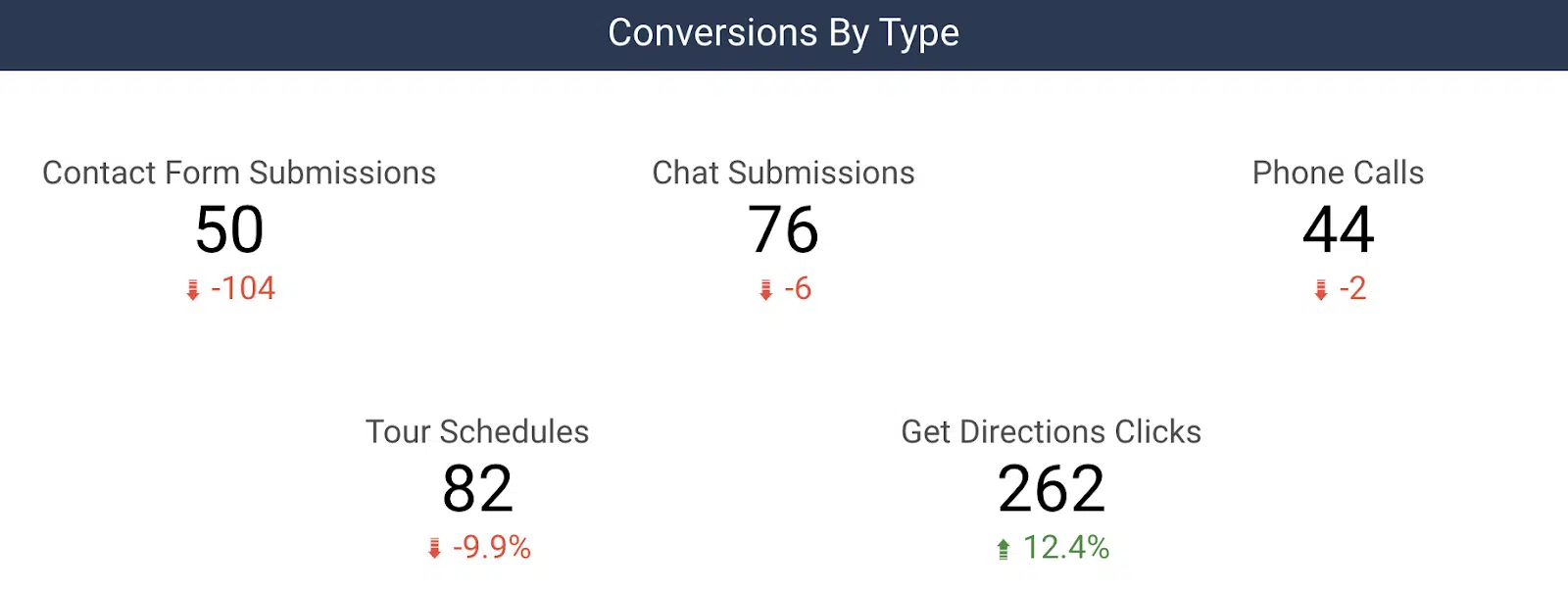
Looker studio - conversion by type

Another common question we get is, “So you drove 30 leads for us, but what does that mean for my business?” 

Connecting lead data to sales is powerful to include in reporting. 

Whether it’s actual revenue (through a CRM import) or estimated revenue (based on an average order value), you can unlock additional revenue-based metrics in your reporting, such as ROI. 

You can begin to answer their question by letting them know what percentage of those leads turned into sales, total revenue, and ROI for a given month. 

Creating useful client reports with Looker Studio

Looker Studio is an incredibly powerful reporting tool that reduces time spent manually typing in metrics.

It enables you to instantly pull together powerful data visualizations to help tell your digital marketing story.

Now, you’ve got a list of do’s and don’ts to help you get started on your path to more valuable client reporting!


Opinions expressed in this article are those of the guest author and not necessarily Search Engine Land. Staff authors are listed here.


Related stories

New on Search Engine Land

@media screen and (min-width: 800px) { #div-gpt-ad-3191538-7 { display: flex !important; justify-content: center !important; align-items: center !important; min-width:770px; min-height:260px; } } @media screen and (min-width: 1279px) { #div-gpt-ad-3191538-7 { display: flex !important; justify-content: center !important; align-items: center !important; min-width:800px!important; min-height:440px!important; } }

About the author

Christine Askew

Christine Askew is a Paid Media Team Lead at Workshop Digital where she manages a team of analysts as well as Paid Media strategies for clients. Christine is a proud James Madison University (JMU) alumni whose participation in the Google Online Marketing Challenge (GOMC) back in 2016 was a catalyst for her interest in digital marketing. Today she brings 6+ years of experience to the table after climbing the ranks at multiple agencies. Christine was recently featured on a panel in the 2022 SMX Next Session “Ask The Winners” after having received the “Best B2B Search Marketing Initiative” in the Search Engine Land Awards 2022. When Christine isn’t working to exceed her client KPIs, you can find her outside in the Denver, CO sunshine walking/running/camping/hiking locally.

https://searchengineland.com/looker-studio-reporting-dos-donts-429498


Daily Mail ‘set to sue’ Google over Bard copyright issues

Google may soon be facing fresh legal action over copyright issues from the owner of the Daily Mail.

The search engine allegedly has illegally taken hundreds of thousands of the newspaper’s articles to train its ChatGPT rival, Bard.

Daily Mail and General Trust (DMGT), the publishing house owned by Lord Rothermere, has reportedly already sought legal advice and is preparing to officially file a lawsuit against Google imminently, according to the Telegraph.

Why we care. As Pierre Far explained in Crawlers, search engines and the sleaze of generative AI companies, search engines used to give website operators full control over the crawling and indexing of their content. However, the rise of generative AI, built on large language models trained on web content, has changed all that. Many content creators and publishers are not happy about what Google and OpenAI have done and fear this could have detrimental effects.

What has Google done? Google allegedly created a dataset to develop Bard using 1 million articles from news publishers, without their permission or knowledge. It’s claimed that 75% of these stories were lifted from the Daily while the remaining 25% come from CNN’s website.


Get the daily newsletter search marketers rely on.


Why the Daily Mail and CNN? Google allegedly used content created by these publishers because they both summarise articles in bullet points at the top of every story. It’s claimed that the search engine tested Bard’s capabilities by presenting it these bullet point summaries with missing text, then asking the chatbot to fill in the blanks based on the main body of the copy.

What has Google said? Google, DMGT and CNN have all declined to comment on the reports.

More legal troubles. News of this potential lawsuit comes just days after eight plaintiffs in the US, including a best-selling author from Texas, accused Google of illegally using copyrighted content and stealing the personal information of millions of Americans to train its AI products. The individuals filed a proposed class action lawsuit in San Francisco last week, and if Google is found guilty, it could be ordered to pay out $5 billion in compensation.

Dig deeper. Crawlers, search engines and the sleaze of generative AI companies


Related stories

New on Search Engine Land

@media screen and (min-width: 800px) { #div-gpt-ad-3191538-7 { display: flex !important; justify-content: center !important; align-items: center !important; min-width:770px; min-height:260px; } } @media screen and (min-width: 1279px) { #div-gpt-ad-3191538-7 { display: flex !important; justify-content: center !important; align-items: center !important; min-width:800px!important; min-height:440px!important; } }

About the author

Nicola Agius

Nicola Agius is Paid Media Editor of Search Engine Land after joining in 2023. She covers paid search, paid social, retail media and more. Prior to this, she was SEO Director at Jungle Creations (2020-2023), overseeing the company’s editorial strategy for multiple websites. She has over 15 years of experience in journalism and has previously worked at OK! Magazine (2010-2014), Mail Online (2014-2015), Mirror (2015-2017), Digital Spy (2017-2018) and The Sun (2018-2020). She also previously teamed up with SEO agency Blue Array to co-author Amazon bestselling book ‘Mastering In-House SEO’.

https://searchengineland.com/daily-mail-sue-google-bard-copyright-429486


Tangential SEO: How to use Google Bard to find content ideas fast

When your industry is over-saturated, chances for ranking higher on search engines become harder. 

SEO tools give you keywords variations of your main keyword. But in order to attract new users, you need new keywords that people search while, at the same time, none of your competitors is targeting.

The challenge is this: how do you find these new keywords no tool can provide and no competitor is ranking for? 

That’s when tangential SEO can come to help.

This is a strategy designed to increase your visibility on search engines for keywords that are not your core business but are still relevant to your audience. 

What are the benefits of tangential SEO? 

One of the main benefits of tangential SEO is attracting a wider audience compared to targeting traditional business keywords. 

Tangentional SEO - sweet spot

Another benefit of tangential SEO is exponentially increasing the number of topics you can write about. Potentially, with this strategy, your content can scale because you don’t run out of content ideas.

When it comes to SEO performance, when you cover a range of topics, you can rank for more keywords, which means you’ll attract more traffic to your website.

Last but not least, tangential content ideas could increase your backlinks efforts. 

When you publish about trending topics around your industry, chances are your posts can passively attract new backlinks.

Let’s see a couple of examples of tangential topics. 

  • Main topic: Holiday home.
    • People looking to buy homes for holidays only. Companies operating in this niche could create topics around real estate investments and sub-letting opportunities because holiday homeowners could use these houses to earn money on the side. 
  • Main topic: Online courses.
    • Brands operating in this industry could talk about jobs you can do without a degree because students looking to buy courses online will likely avoid university. Here is an example of this content about jobs without a degree. The brand can also focus on career change topics and content, start to showcase job opportunities and create a job board.

The good news is that every niche can use tangential content. Here are more examples from various niches: 

Niche Tangential Topic
Travel Cinema 
B2B Marketing Travel
Banking Technology
Fitness Covid-19
Education Employment
CRM Remote work
Healthcare Data analysis
Tech Productivity

Tangential SEO starts from one niche and can be extended to various niches, which also means that your research will uncover new angles and perspectives you might not have noticed before.

You’ll become familiar with your customer’s expectations, pain points and motivations.

When you research the topics they like to read about, you also learn more about your industry, making you a real expert in audience research.


Get the daily newsletter search marketers rely on.


Why do you need to use AI for tangential SEO?

If it sounds like a lot of work, it’s because it is.

Tangential SEO requires a huge amount of users and industry research simply because no SEO tool can provide you with this data collection process.

The traditional method of building tangential SEO could be time-consuming. This involves some of the following steps: 

A lot of preparation is involved before you can write a line of copy.

But there is a quicker way, thanks to AI. In this case, I used Google Bard to develop new, tangential content ideas based on my audience research. 

This method could work because it essentially automates the above steps. The secret is to write the right prompt for training AI to your bespoke results. 

Essentially, we can reduce the number of steps from six to simply two: 

  • Write and refine your prompts for Bard.
  • Feed the machine with your keywords.

Now, it’s time to see this process in detail. 

Ready? Let’s go. 

Step 1: Write the prompts

Prompts are essentially instructions you give to AI in the form of text, question, information or code that communicates to AI the reply you want to get.

Writing great prompts allows you to work better with AI tools and generate relevant results instead of mediocre ones.

Good prompts can increase efficiency because you spend less time refining your instructions, and they also strengthen AI responses, providing you with accurate, in-depth and relevant answers.

Because the prompt will be long and detailed, we can split it into three parts to make it more digestible and easier to understand. 

Impersonation and context setting

This aims to provide AI with the most accurate information possible. 

Feel free to steal my prompts and generate new tangential ideas in less than two minutes.

  • “Act both as a psychologist and a search engine consultant trained in helping people find the right product or service for their needs. You are familiar with the concept of tangential SEO when evaluating common reasons for making a choice.” 

Now let’s break this first part of the prompt into further analysis to understand what I asked AI to do. 

  • “Act as a psychologist…”

This first sentence helps Bard behave as a psychologist and sets up the context in which we will operate from now on.

You can instruct Bard (or any AI tool in general) to act as different entities or engage in various situations or tasks.

You can prompt AI to impersonate characters, professionals, or even fictional creatures by providing specific instructions. 

  • “…trained in helping people find the right product or service for their needs”.

This part of the sentence opens up the AI attitude in preparation for what comes next. 

We are telling AI to become a people’s companion when choosing products or services, a sort of shopping consultant, if you will. 

“You are familiar with the concept of tangential content”. 

This part ensures that we are referring to tangential SEO, which will ensure AI responses align with what we are trying to achieve.

It also removes any misunderstanding because we don’t want to refine the prompt too often. We are trying to get this right the first time.

Set up your prompt goal

After setting the context and the impersonation, it’s time to provide Bard with instructions on the type of results we expect. 

We don’t want results to vary. We want results to be very specific for us to continue our process of creating tangential content ideas. 

  • “Create a tangential content category”

This sentence gives Bard a clear outcome. We want to create a tangential content category. 

You can also decide to create two or more categories, but the more you ask from AI, the less accurate results will be. 

Remember, AI has some limitations when it comes to spitting our results, sometimes they stop generating, especially in cases where the response takes too long. 

That’s why I’d recommend focusing on one tangential category and then repeating the same process for another content category. 

  • “Be very accurate with your choice.”

We give Bard the permission to pick a category for us. All we ask is to be very specific about it.

  • “Give common reasons why people make this particular choice”.

Remember the psychologist’s impersonation earlier on? That’s why we added it to the prompt. Now it’s time to get a reply from AI like a trained psychologist would do.

Research shows that psychology has influenced research in both consumer and marketing, so what’s the best way of understanding consumers’ behavior? 

Support prompts

In this last step of writing the prompt, we will focus on the psychological part of our research. 

We need a way to tell AI that its responses must have a psychological basis in order to be viable and accurate. Otherwise, it’s like shooting in the dark. 

  • “Give a list of explanations on the reasons why you chose this category and how it matches with the main content I’ll provide you with.”

This sentence is important because we need Bard to explain to us the reason for their category choice. 

Essentially, we are asking Bard to provide us with review tools, we need to be able to make a judgment call and assess whether this proposed category makes sense. 

  • Does the tangential category match our typical customer? 
  • Is the customer looking for this type of topic Bard is producing?

If the answer is yes, then we can be certain that the tangential topics proposed by AI are accurate. 

Lastly, we also need to take care of AI making assumptions, so we simply ask the following: 

  • “Don’t remind me of previous instructions, don’t make any assumptions.”

Step 2: Add your keywords

In the second step, we need to give direction to AI about our core business and keywords.

This part is vital because it will further resolve the problem of accuracy that we are likely to encounter with any AI tool. 

In other words, in this step, we will connect the previous instructions with your product and services. 

As an example of a prompt, we will use the topic of “online courses” for an organization that provides fitness courses and trains people to become personal trainers.

Here is an example of a prompt including both the keyword and the business description:

  • “The keyword is Personal training courses and qualifications. From Level 2 Gym Instructor course to Level 3 Personal Trainer certificate, our courses offer a wide range of level to fit your career. We don’t just offer cookie-cutter qualifications. The combination of online and face-to-face training will give you a competitive edge, preparing you to hit the ground running in your new career.”

In this prompt, we must be specific about how the business differentiates itself from competitors. I’d recommend using either your mission statement or the unique selling proposition. 

Put everything together

This is the complete prompt you can copy-paste into Bard, obviously changing the keywords and your business description. 

  • “Act both as a psychologist and a search engine consultant trained in helping people find the right product or service for their needs. You are familiar with the concept of tangential SEO when evaluating common reasons for making a choice. Create a tangential content category. Be very accurate with your choice. Give common reasons why people make this particular choice. Give a list of explanations on the reasons on the reasons why you choose this particular category and how it matches with the content I provide you. Don’t remind me of previous instructions, don’t apologise, don’t self-reference. Don’t make assumptions. Here is the keyword and business description: [insert your keyword + business content].”
Instructions for Bard

The results

If you did everything right, you should be able to get impressive results from Bard that look like this: 

Tangential content

The chat found that one of the tangential categories can be “career change.” 

This is a brilliant idea because our ideal customer is usually in the middle of changing careers from desk to fitness. They want to enjoy life at the gym and help their clients reach their fitness goals. 

Bard also provides us with ideas around the following: 

  • Articles about how to choose a new career.
  • Videos about how to make a career change.
  • Blog posts on how to network with people in your new industry.
  • Ebooks and posts on how to prepare your cover letter and CVs for your new career

This is exactly what Tangential SEO is about. It’s content that touches your core business but doesn’t directly mention it. 

Bard goes a few steps further to provide us also with a wide variety of SEO tangential categories we might want to consider: 

Tangential categories

Using AI, especially Bard, can save you so much audience research time because AI is trained with billions of data points. Humans can only scratch the surface of the variety of tangential content. 

This doesn’t mean we should rely 100% on AI. Business owners and marketers know their customers better than anyone, which puts us in the position to evaluate AI responses. 

In this practical example, I used the business description and mission statement to feed AI with it. 

Remember that all businesses can use this same methodology as long as you have a compelling case for being special and can articulate it clearly enough for AI. 


Opinions expressed in this article are those of the guest author and not necessarily Search Engine Land. Staff authors are listed here.


Related stories

New on Search Engine Land

@media screen and (min-width: 800px) { #div-gpt-ad-3191538-7 { display: flex !important; justify-content: center !important; align-items: center !important; min-width:770px; min-height:260px; } } @media screen and (min-width: 1279px) { #div-gpt-ad-3191538-7 { display: flex !important; justify-content: center !important; align-items: center !important; min-width:800px!important; min-height:440px!important; } }

About the author

Luca Tagliaferro

Luca Tagliaferro is an SEO consultant based in the U.K. consulting medium to large businesses.

https://searchengineland.com/tangential-seo-google-bard-find-content-ideas-429454


How SEO content helps increase sales

How does SEO content help increase sales?

Many brands make the mistake of relegating search engine optimization (SEO) to ranking websites and driving targeted traffic.

They never align it with their sales efforts, leaving a huge gap in their business growth strategy.

However, if executed well, SEO can help you significantly boost your sales.

And that’s exactly what I want to help you see in this post.

We’ll examine the challenges of attributing sales to SEO, how SEO content helps you increase sales and much more.

Challenges in connecting SEO efforts to revenue

Aligning SEO with revenue generation can be complex, presenting various challenges for brands. And this is why many brands fail to see how SEO can help them increase sales.

Some of these challenges include:

Lack of tools and proper configurations

Attributing revenue to SEO requires sophisticated tools and accurate configurations to extract the necessary data. Many businesses may lack the tools or skilled personnel to handle this in-house. 

Outsourcing to a SaaS SEO agency can be a beneficial solution, particularly since regular upgrades are necessary for both tools and personnel.

Complexity of attribution

Attributing revenue to SEO is daunting due to its involvement throughout the customer journey.

Users interact with multiple touchpoints before converting. This makes it difficult to pinpoint the exact impact of SEO efforts. 

While not flawless, you can use different attribution methods to help gauge the impact of SEO on your bottom line.

Use tools like Google Analytics to help you with this.

Lack of historical data for analysis

Many businesses face the challenge of limited historical data for analyzing SEO return on investment (ROI). SEO takes time to produce an ROI, which compounds the difficulty of assessing its impact without sufficient historical data.

Despite these challenges, you should still develop a system to help you track and attribute the impact of SEO to sales.

Understanding the role of SEO in revenue generation is crucial for effective marketing and resource allocation.

It helps you make informed decisions and optimize your marketing strategies for better business outcomes.


Get the daily newsletter search marketers rely on.


How SEO content helps increase sales

Viewing SEO as a mere traffic-generating channel overlooks its true potential as a key revenue driver.

SEO should be seen as an integral part of growth marketing, capable of leveraging substantial bottom-line growth.

Here are several ways in which SEO can contribute to revenue generation:

1. Powerful customer acquisition channel

You can acquire new customers effectively by shifting from using SEO solely as a traffic source to a customer acquisition channel. 

Fine-tune your SEO and content strategies to target individuals more likely to convert.

One way to do that is to prioritize bottom-of-the-funnel (BoFu) content that incorporates high purchase intent keywords. This approach positions SEO as a marketing channel and a powerful catalyst for sales. 

2. Improved customer retention rates

SEO done right can positively impact your customer retention rates. You can use it to build authority, credibility and trust. These factors encourage increased sales, a crucial factor in business growth. 

Additionally, SEO provides valuable insights into customer buying behavior. This enables the development of marketing and sales strategies tailored to help retain customers and enhance the overall efficiency and contribution of your SEO to revenue growth.

3. Reduced customer acquisition costs (CAC)

SEO helps minimize customer acquisition costs (CAC) by providing a more cost-effective alternative to paid channels.

As SEO compounds over time, it generates results without proportional cost increases. As a result, your CAC drastically reduces, leading to your bottom line experiencing a boost.

4. Reputation management and brand building

A positive brand reputation cultivated through SEO efforts yields numerous benefits.

These include customer loyalty, increased customer confidence, and transforming customers into brand ambassadors. These factors lead to heightened sales and revenue growth.

5. Support for other sales and marketing channels

SEO’s broad scope extends its influence across various sales and marketing disciplines.

Whether it’s pay-per-click advertising (PPC), affiliate marketing, social media marketing, or public relations (PR), SEO provides support and visibility to other channels.

This visibility enables more sales, especially for established brands with enterprise-level SEO strategies.

Recognizing and capitalizing on SEO’s revenue-driving capabilities can help you unlock significant growth opportunities for your business.

That’s why you must implement a comprehensive SEO strategy that aligns with your sales goals. You’ll then see its power as a catalyst for revenue generation.


Opinions expressed in this article are those of the guest author and not necessarily Search Engine Land. Staff authors are listed here.


Related stories

New on Search Engine Land

@media screen and (min-width: 800px) { #div-gpt-ad-3191538-7 { display: flex !important; justify-content: center !important; align-items: center !important; min-width:770px; min-height:260px; } } @media screen and (min-width: 1279px) { #div-gpt-ad-3191538-7 { display: flex !important; justify-content: center !important; align-items: center !important; min-width:800px!important; min-height:440px!important; } }

About the author

Julia McCoy

Julia McCoy is an 8x author and a leading strategist around creating exceptional content and presence that lasts online. As the President at Content at Scale, she leads big initiatives for one of the fastest-growing AI content writing tools for SEO marketers on the planet. She’s been named in the top 30 of all content marketers worldwide, is the founder of Content Hacker, and exited a 100-person writing agency she spent 10 years building with a desire to help marketers, teams, and entrepreneurs find the keys of online success and revenue growth without breaking. Read her eight books on Amazon, including a non-fiction memoir of her life growing up in and escaping a radical cult: Woman Rising, A True Story. Connect with her on LinkedIn.

https://searchengineland.com/seo-content-increase-sales-429443


Google fixes Google News indexing bug

Google has confirmed it fixed the ongoing issue with Google News indexing. This resulted in many publishers seeing massive traffic declines from Google News for a three-week period, starting around June 21st.

The update. Google posted an update at 5:06 pm ET today, saying, “We fixed the issue with News indexing. There will be no more updates.”

Google initially discovered the issue on July 10th, and Google identified the specific issue the day after, then implemented a fix on July 12th. After the fix was implemented, publishers began to see improvements.

Now Google is confirming the fix worked, and news publishers should see their traffic at mid-July levels.

Why we care. If your site is in Google News and you noticed a traffic drop from Google News over the past few weeks, it might have been related to this Google News indexing bug. Google fixed the issue today and you should have started to notice normal traffic levels from Google News today.


Related stories

New on Search Engine Land

@media screen and (min-width: 800px) { #div-gpt-ad-3191538-7 { display: flex !important; justify-content: center !important; align-items: center !important; min-width:770px; min-height:260px; } } @media screen and (min-width: 1279px) { #div-gpt-ad-3191538-7 { display: flex !important; justify-content: center !important; align-items: center !important; min-width:800px!important; min-height:440px!important; } }

About the author

Barry Schwartz

Barry Schwartz a Contributing Editor to Search Engine Land and a member of the programming team for SMX events. He owns RustyBrick, a NY based web consulting firm. He also runs Search Engine Roundtable, a popular search blog on very advanced SEM topics. Barry can be followed on Twitter here.

https://searchengineland.com/google-fixes-google-news-indexing-bug-429474


10 simple steps to analyze your brand SERP and build an effective digital strategy

A brand SERP is the results Google serves when a user searches for your brand name. A digital strategy is how a brand positions itself across the online ecosystem. 

I have been talking about brand SERPs since 2013. I’ve learned that a brand SERP isn’t just a “pretty Google Business Card.”

When you bake SEO into a brand’s existing digital strategy, you grow the brand SERP and the digital strategy in tandem – and dominate your niche. 

Why are brand SERPs important?

The search results for an exact match brand name is Google’s evaluation of what that brand’s audience will find most helpful, relevant and valuable.

That means the brand SERP is your guide to what’s right and what’s wrong with the digital strategy. It lets you focus on the right elements and use SEO to help “educate” Google.

Instead of leaving it to Google to present your brand, ensure the brand SERP represents what you want your audience to see.

This article will focus on the main points common to most brand SERPs. 

How to analyze a brand SERP

Type an exact brand name, look at the search results, and follow these steps. 

1. Always start at the top

The first result should be the brand’s website with rich sitelinks.

If the name is ambiguous or keyword-focused, your job is to build Google’s understanding and confidence in the brand.

For most companies, the starting point will be something like this:

The homepage looks good, but the rest could be better.

The quality of the titles and descriptions gives you a huge insight into the site’s structure and the quality of the user-centric pages such as About Us, Contact Us, login and category pages.

Fix these first. Google’s understanding of the structure and content of the site is vital for all your SEO efforts.

We often see structural issues manifest themselves here. For example, the site is in the wrong language, no About page, or an unimportant article.

Bonus tip: Look at the Schema.org implementation. If the website hasn’t used AboutPage, ContactPage and other WebPage types appropriately, it’s a sign the company has chosen to focus on visible rich results that impress the boss. 

Quality, sitewide, consistent Schema.org markup is a must-have to ensure Google is confident in its understanding of the brand.

Rich sitelinks give incredible insight into the improvements necessary for an effective digital strategy. 

2. Look at the social profiles that rank 

Which social profiles appear on a brand SERP depends on multiple factors, but user engagement on each platform is the most important. 

Let’s say your client is investing heavily in a Facebook strategy, but Facebook doesn’t rank on their brand SERP. This indicates that their strategy isn’t engaging the relevant audience enough. 

In this case, a critical analysis of what, how and with whom they share and engage will generally bring insights that will help that strategy.

The Facebook profile will rise in the rankings as the strategy gains traction. That’s a nice KPI for the social media team.

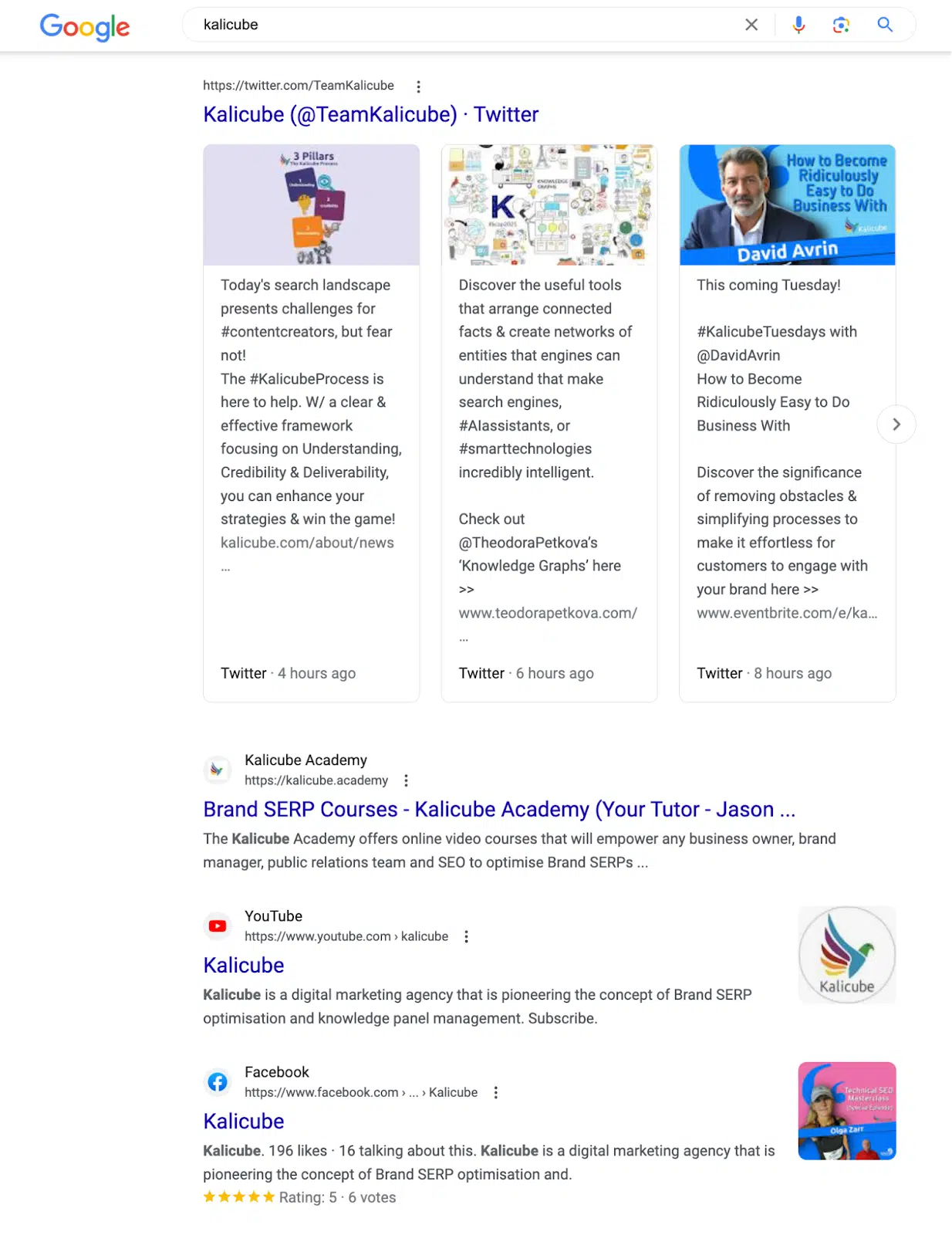
The Kalicube Twitter boxes show that we have a strong and effective Twitter strategy, and our Facebook ranking (with reviews) indicates we are doing well on Facebook.

Brand SERPs - social profiles

Although user engagement is a top priority, ensure the brand focuses on the right platforms. 

Look at competitor brand SERPs. If TikTok rarely ranks on the brand SERPs of that cohort, but LinkedIn almost always does, then you can assume that the company’s audience hangs out more on LinkedIn than TikTok. Resources spent on LinkedIn are more likely to bring direct returns. 

3. Look at videos

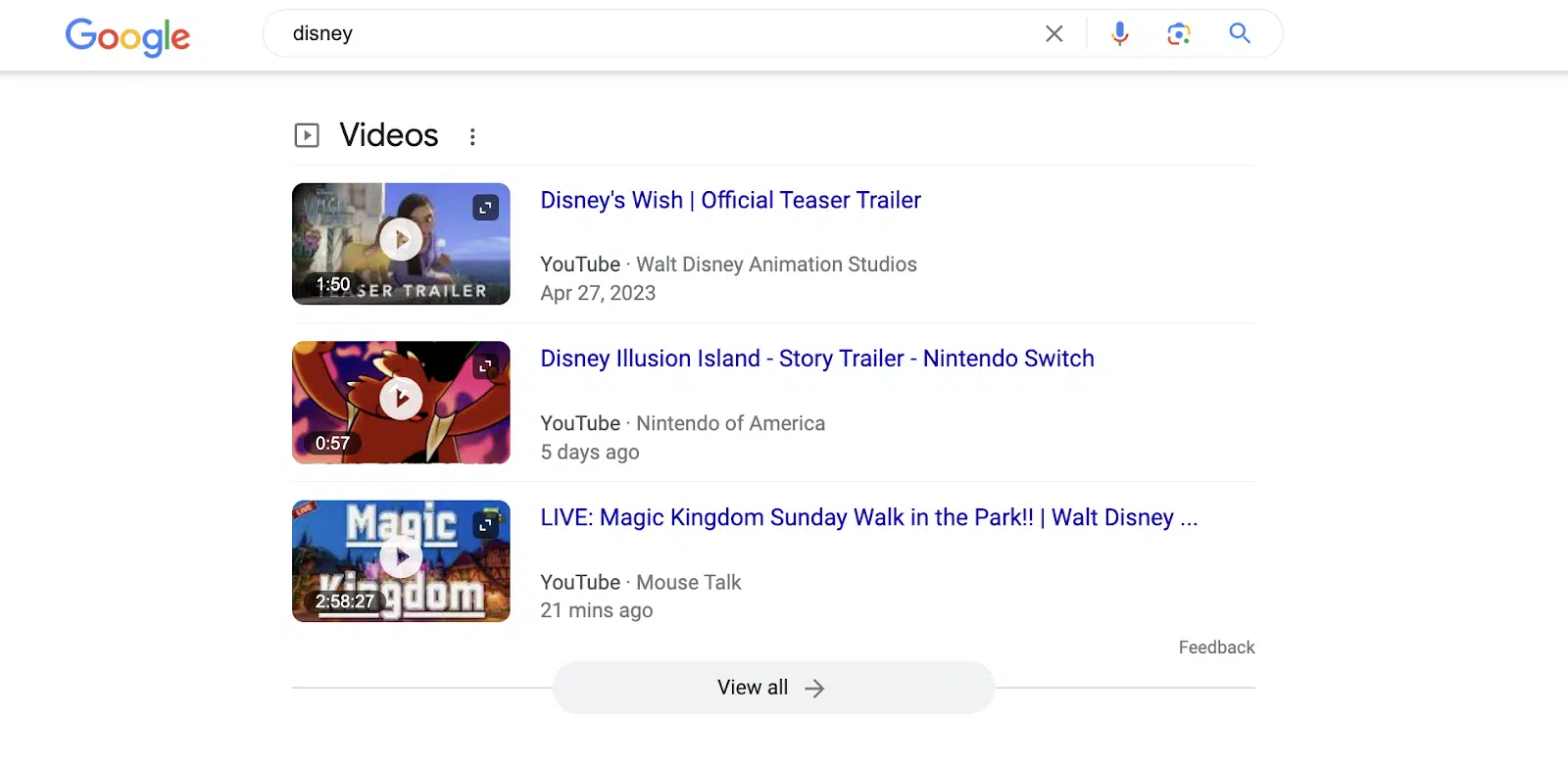
Is the client investing heavily in YouTube? If so, their YouTube channel should rank with a video box and neatly branded thumbnails.

Disney has video boxes on their brand SERP. But the design is inconsistent because the videos are pulled from multiple sources. Even their channel provides a video with a sub-optimal thumbnail.

Brand SERPs - videos

4. Look at review sites

Start a service review strategy. Get reviews for the company and its customer support on that niche’s most relevant and valuable platform. 

Platforms such as Trustpilot dominate, but these big players are not necessarily the most effective for any specific market. 

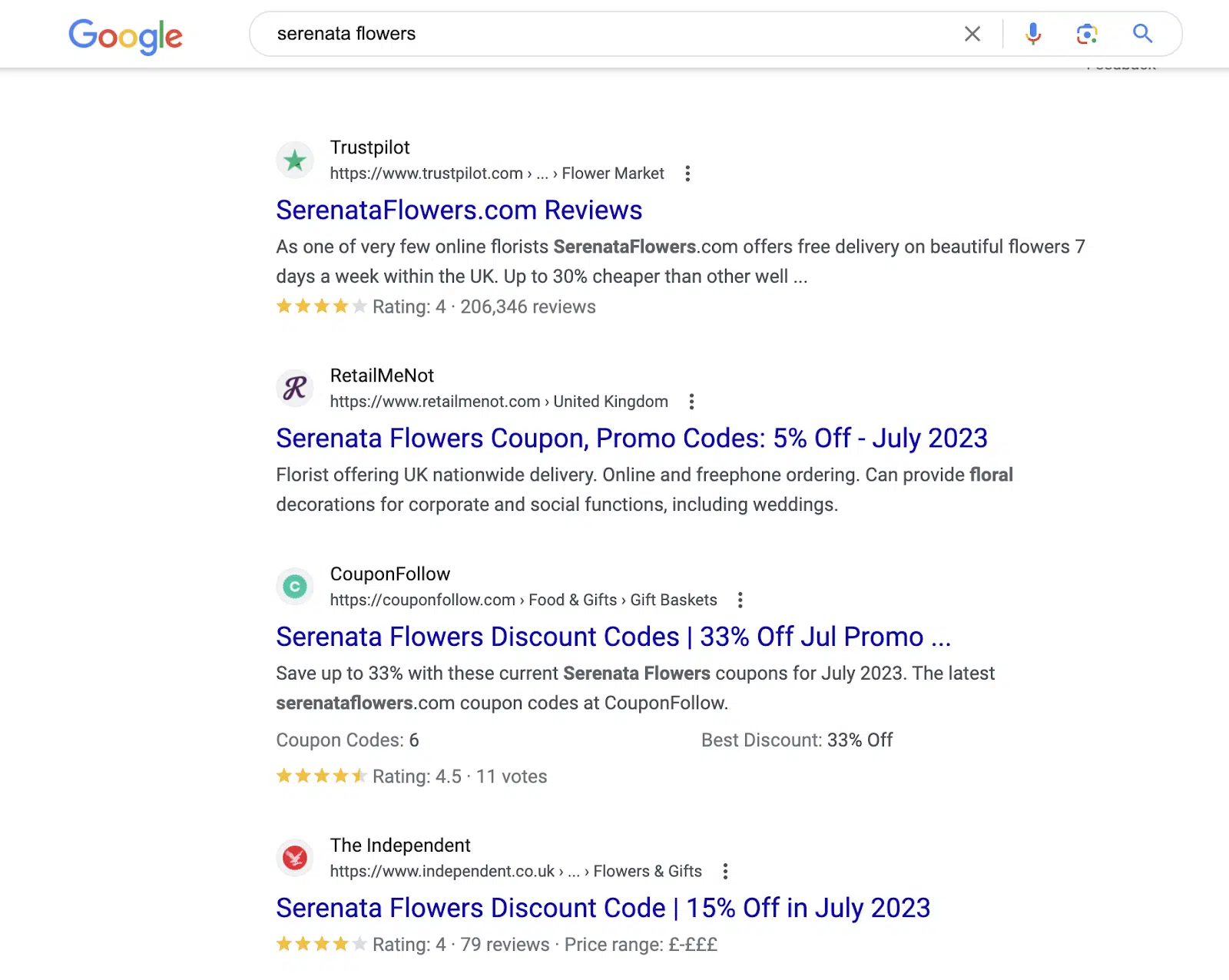
For example, Serenata Flowers, a UK flower delivery service, has over 200,000 reviews on Trustpilot and a great rating. It ranks at position four. 

But then there are three coupon sites, two with good review star ratings. Track and nurture these sites since they are visible on the brand SERP.

Brand SERPs - reviews

A quick note: Your client will also need product reviews, and the relevant platform will be where they collect service reviews.

But don’t make assumptions. Complete a separate analysis of the product brand SERP.


Get the daily newsletter search marketers rely on.


5. Look at news sites

In some markets and industries, news simply isn’t a “thing” because the information is evergreen (or at least remains fresh for several months). 

In others, it is a top priority because the information is time-sensitive (financial industries, for example) or voluminous (entertainment industries, for example). 

Your client’s brand SERP might not have news boxes, but that doesn’t mean that news isn’t important in the industry. 

A brand SERP cohort analysis (we call this “entity equivalents”) will immediately tell you if your client’s public relations strategy needs to focus on trending topics or if they can take things more slowly. 

It will also enable them to focus on the right four or five news sources rather than the scattergun approach. This saves an enormous amount of money.

6. Look at ‘People Also Ask’

If there are none, then your client has a problem. 70% of brand SERPs have People Also Ask (PAA) questions.

If Google can’t think of any questions its audience might ask, then it lacks understanding about your client’s audience and the relationship it has with them.

If Google does show PAA, check if the questions are relevant. Create an FAQ section on the website and answer them clearly if the site doesn’t have the answer to the questions.

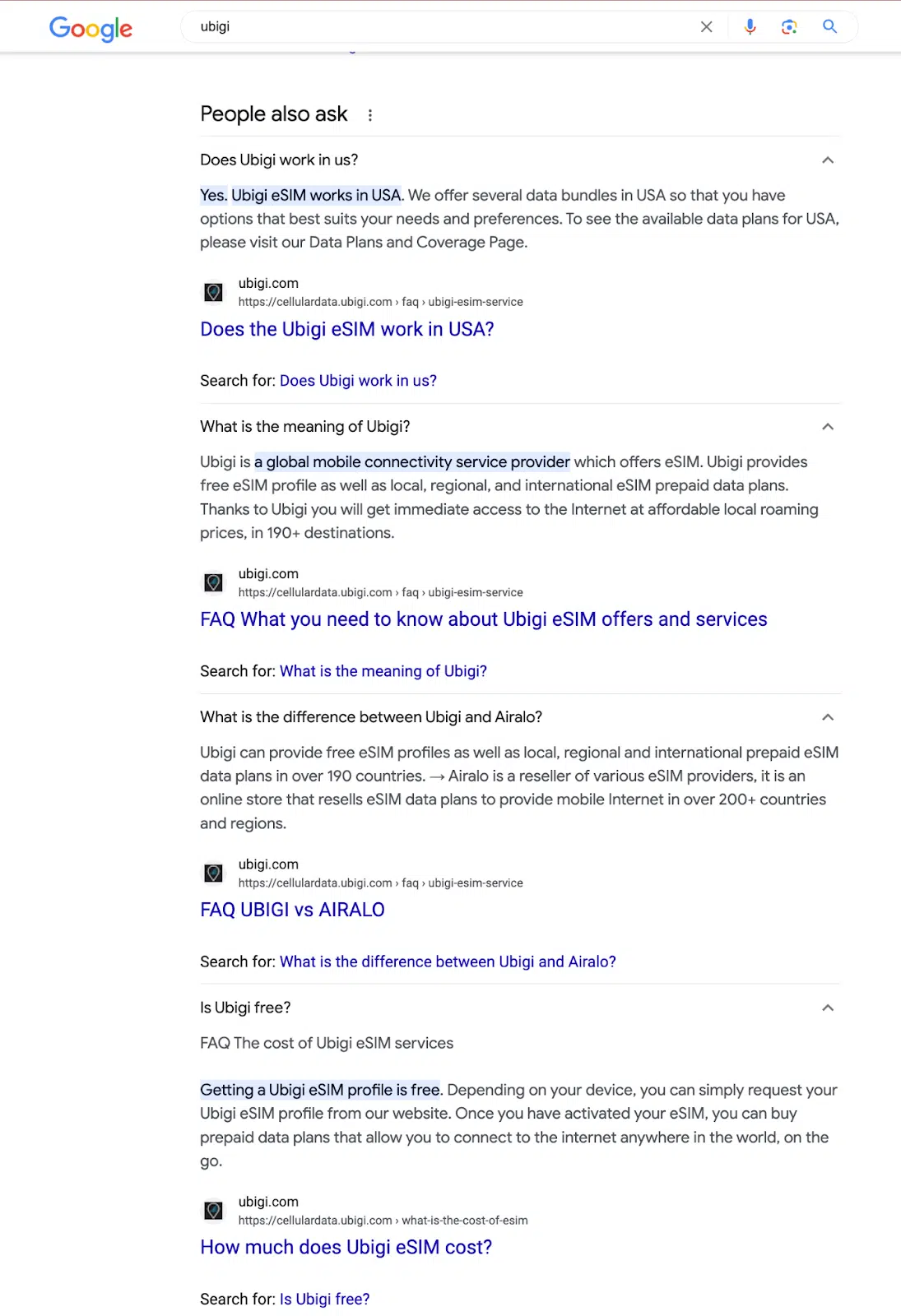
Here, Ubigi (a client who has implemented our process) has answered all the questions, and they have absolute control over the PAA on their brand SERP.

Brand SERPs - People also ask

If some of the questions are non-branded, they are critical topical questions for the client. 

The client must answer the questions because Google sees the relationship between the brand, its audience and the topic and expects an answer from you. (This is delightful news. Google is improving its understanding of the brand.)

7. Look at filter pills

Filter pills are pill-shaped clickable icons that appear below the search bar in the search results. They provide huge insights for your strategy. 

Users can inspect different parts of the brand in different verticals. They are Google’s version of a word association game.

In the case of Kalicube, our audience is interested in Kalicube Pro, the Kalicube Academy, and our Knowledge Nuggets video series.

Brand SERPs - filter pills

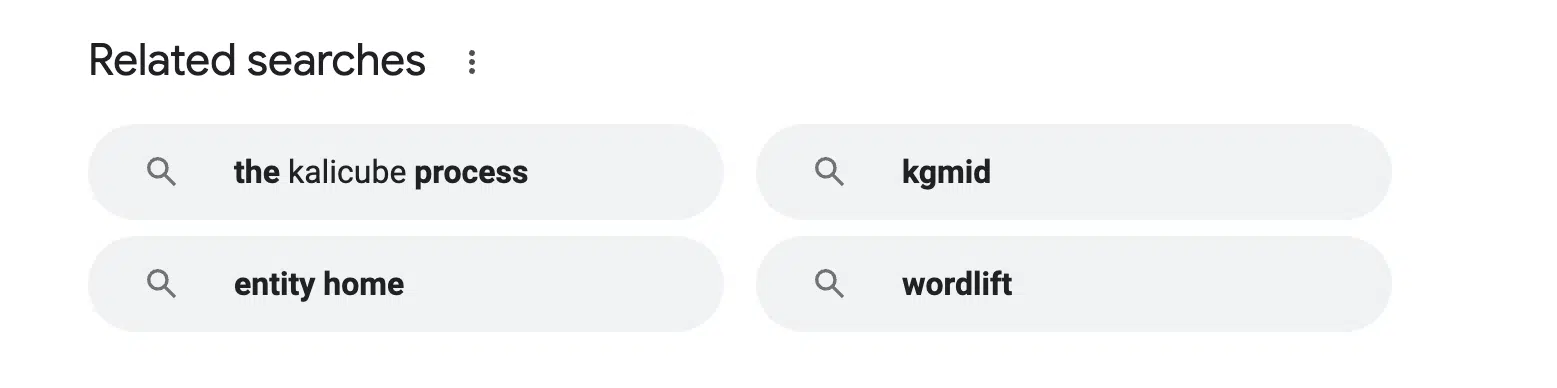
Then check the related searches at the bottom. These pills indicate more areas of focus for the digital strategy. 

  • Our partnership with WordLift is something Kalicube should focus on.
  • We should continue to communicate about “The Kalicube Process.” 
  • Google understands Kalicube’s topical authority in the knowledge panel and knowledge graph space. (We can see this in the “kgmid” and “entity home” filter pills)
Brand SERPs - related searches

8. Is there a knowledge panel?

A Google knowledge panel is a search results feature that gives a concise summary of information about a company, person, or brand collected by Google from several credible sources. It is Google’s understanding of the facts about your brand.

If the company doesn’t have a knowledge panel on their brand SERP, they have a huge problem. They aren’t in Google’s Knowledge Graph, and Google doesn’t understand who they are. 

A knowledge panel is a “must-have”. Without understanding, Google cannot evaluate your relevance to an audience nor assess your credibility (E-E-A-T) as a solution to the subset of its users who are your audience. 

You are at least a year behind in your digital strategy without a knowledge panel.

I have talked and written about this hundreds of times and won’t go into detail here. 

Focus on the entity home, consistent corroboration and signposting.

9. Search Generative Experience

Search Generative Experience (SGE) is already a focus for most SEOs. The key to managing SGE results is to see them as dynamic knowledge panels or multi-element featured snippets.

Whatever form Google’s SGE and Bing’s Chat take, one thing is clear: This is where we see the summary of the SERP. 

Both Google and Bing aim to condense the information behind the results to save users time when researching. 

Rather than clicking on five or six links, reading the pages, understanding the information and remembering it all, the answer engine (SGE/Bing Chat) provides the user with an accurate, helpful and actionable summary.

Google’s summary of your brand will typically be positive. A negative summary means the company has a significant online reputation management issue. 

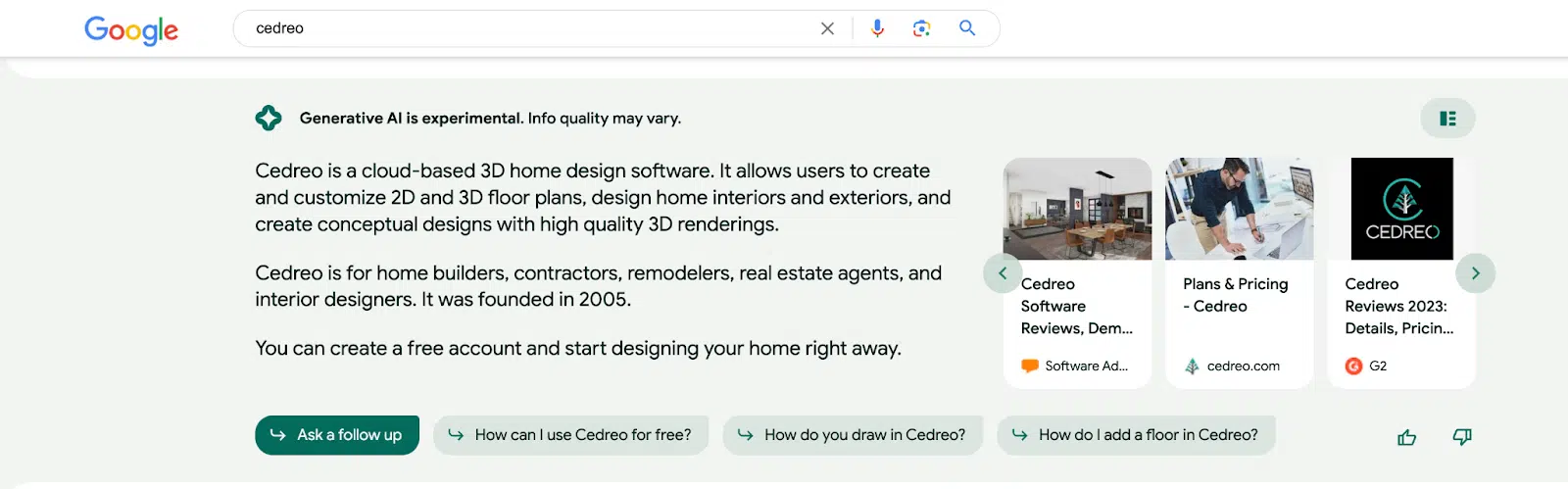
Here is an example of a brand doing it right.

Cedreo has a clear, simple, and accurate description, their website in the cards on the right, plus two relevant review sites and great follow-up questions that lead users further along the customer buying journey.

Brand SERPs - SGE

They have a clear and solid digital ecosystem which is the minimum goal for every brand.

10. Brand SERP pages 2 through 10

Reputation issues aside, the real insights are on positions 20-100 of the search results. This shows you are doing wrong or aren’t doing as well as you could be. 

If you are investing in video, but YouTube results aren’t at or near the top of the SERP, you are wasting resources. 

If you are pushing clients to review your company on Trustpilot and it ranks in position 30 or lower, there is a better platform for your market. 

If that article dedicated to your company in Forbes is in position 20, then Forbes wasn’t the most relevant public relations outreach.

Or the writing wasn’t well-focused, or you didn’t communicate the most valuable information to the journalist. 

If you want more opportunities to improve a digital strategy, analyze the brand SERPs for “{Brand} reviews” and focus there too. 

A sustainable digital strategy for brands

This article is a quick and simple overview of how a brand SERP identifies the key issues and prioritizes the different aspects of a holistic digital strategy for a brand over time.

As an in-house, freelance SEO or pure SEO agency, it can be a struggle getting the stakeholders:

Social media managers, website developers, content creators, marketers, customer support, and brand managers to collaborate on anything, let alone agree. 

Brand SERPs are an enormous opportunity because it brings them all to the united representation of the overall strategy, and they have a shared KPI that is fundamentally part of SEO.


Opinions expressed in this article are those of the guest author and not necessarily Search Engine Land. Staff authors are listed here.


Related stories

New on Search Engine Land

@media screen and (min-width: 800px) { #div-gpt-ad-3191538-7 { display: flex !important; justify-content: center !important; align-items: center !important; min-width:770px; min-height:260px; } } @media screen and (min-width: 1279px) { #div-gpt-ad-3191538-7 { display: flex !important; justify-content: center !important; align-items: center !important; min-width:800px!important; min-height:440px!important; } }

About the author

Jason Barnard

Jason Barnard is the founder and CEO of Kalicube. He is an author and digital marketer who specializes in brand SERP optimization and knowledge panel management. Barnard also hosts a marketing podcast, with more than 250 episodes and counting, where the smartest people in marketing talk to him about subjects they know inside out. With more than two decades of experience in digital marketing, he started promoting his first website in the year Google was incorporated and built it up to become one of the top 10,000 most visited sites in the world (60 million visits in 2007).

https://searchengineland.com/analyze-brand-serp-build-digital-strategy-429390


3 overlooked SEO conversion metrics to consider

SEO conversions and tracking go well beyond a direct sale or lead in your pipeline. 

They can be:

  • Newsletter and SMS subscribers that turn into sales.
  • Win-back campaigns where customers haven’t shopped yet or rediscovered you.
  • Bringing job seekers to your job listing pages, resulting in lower costs of hiring new employees.

If you only focus on direct conversions, the whole picture of your impact on the company has been missed. 

Here are some examples of metrics you may not be using but could be a good way to show your true value as an SEO to your organization. 

1. CPM revenue

If you’ve worked on news sites, are a blogger, or produce video content, then you know how important CPM and CPC revenue is. 

Although bringing eyeballs to the site or channel is important, there could be bigger wins. Increasing pageviews per visitor is the first. 

And this is an easy win for SEOs making your job easier if you don’t have to go after the big phrases that are harder to compete on.

Here’s an example. Suppose there is a phrase that brings 1,000 visitors to your site and one that brings in 600. 

The ads team is going to want that bigger number because it is more eyeballs and that means more CPM money. But that could be the wrong move.

If the 1,000 visitor term has a page view rate of 1.25, and the 600 has 2.5 pageviews, and the CPMs are equal, the 600 phrase is the better one as it is more profitable. 

The 1,000 visitor phrase term drove 1,250 pageviews, while the 600 phrase term drove 1,500. 

And if the phrase is less competitive because there’s less traffic, your job may be easier to get the ranking. And don’t stop there. Look at the actual CPMs.

If they both had a 1.5 pageview per visit average, look to see what the CPM rates are. Maybe the 1,000 phrase has a $5 CPM, but the 600 phrase has an $ 8 CPM. 

Those extra $3 add up. And it can go one level further. 

Does your publication use affiliate links? 

Look to see what the intent of the user on the page is. 

Let’s assume the CPMs are equal, giving the advantage back to the 1,000 phrase.

Maybe the 1,000 phrase is entertaining or a fun fact-reading article. That could be why the CPM is the big revenue driver. 

If the 600 phrase traffic is a “how to” or a shopping guide, or something where the user will need a product or service, then there is likely affiliate revenue on top of it. 

Instead of making the decision on traffic, pageviews, and CPMs, talk to the affiliate relationship manager and ask what revenue comes through the affiliate links. 

A $5 CPM is nothing when adding eight $20 or 20 $200 commissions. The smaller phrase has a higher appeal as you get both CPM and affiliate commission revenue.

And we can go five layers deeper, but you get the point. This is something we help the affiliates in the programs we manage so both they and our clients can grow. 

If publishers look at pageviews and CPMs to sell ads and make money, they’re going after big phrases and not the big picture. 

There is a lot more to be made. And don’t forget visitors to these pages could turn into email and SMS subscribers for long-term revenue.


Get the daily newsletter search marketers rely on.


2. Candidate acquisition

Recruiting talent is expensive and competitive. The job posting has to reach the right eyeballs and stand out on the job boards. 

But what if you could eliminate some obstacles and bring candidates directly to the HR team or hiring manager? That is another metric overlooked by SEOs.

Look at your website’s Careers page and set up a conversion in your analytics package for applications and submissions. 

Then begin optimizing the section of the website. It should be fairly easy to include location-based information if the job is regional, job posting schema, and category-based content about your hiring industry.

You can write about marketing jobs in the marketing portion of the careers section. 

Mention local meetups or communities to engage with and how your company sponsors and supports employees actively learning through this. 

It bulks up the copy and gives candidates a reason to apply as the company supports their career growth.

Tip: If your company is an active member in some of these groups, ask them for a backlink to the careers section for members looking for work.

Now, watch as the traffic increases or decreases with the optimizations and which job types begin filling out more submissions. 

Ask the recruiters, hiring managers, or HR team to let you know the quality, and then work to adjust the pages to get more qualified candidates. 

Lastly, ask the hiring teams to mark the database for who made it for an interview and how many candidates got hired. 

Present this quarterly to your boss or the organization and show how you saved the company money and time so these resources can be focused elsewhere. 

By bringing candidates directly to the website, HR doesn’t have to spend as much on job boards.

And by helping HR to build a backlog of resumes, it becomes easier to find passive candidates once a job opens up. This also saves them time and money.

3. Win-back campaigns

As SEOs, we regularly update the content on website pages and have access to data. This includes customer service logs and product managers.

And as an SEO, you’re part of marketing, giving you a big advantage over other employees. 

You can combine product and customer service data, then create an integrated marketing plan for the email and social media ads teams to get win-backs going more effectively.

To do this:

  • Talk to customer service and find ways that customers use the products or when customer service lets them know that the product can be used for more than they thought. 
  • Verify with the product managers that these uses are ok to say publicly. If you get the OK, go into the product pages and specs sheets and add the features or functions that customers did not know your company provides. 
  • Share how often people ask about these with the social media ads and email teams. 

Have them try running win-back campaigns for customers that match the demographics of the people asking and responding but have not converted yet. 

This can also apply to people that haven’t shopped in a few years and didn’t know the product or service has advanced. 

If you have exit surveys, look to see if the use was one of the reasons they left your brand. 

And these talking points can be used as “bait emails” to try and get someone who started checking out but never converted. 

As a bonus, if these features and services are in demand, you may find a higher conversion rate on your product detail pages.

This can happen when you share relevant uses for your product or service that the consumer may have wanted and did not know you provide. 

You can then create blog posts and a new content silo to build authority on the subject and drive traditional SEO conversions. 

The overlooked conversions here are email and win-back sales that came from the work you did as an SEO and potential conversion rate increases from the product pages and spec sheets you had updated.

Looking at the bigger picture

SEO conversions are more than just sales, leads, and traffic for CPMs.

Think about how your skill sets can benefit the rest of the company and begin measuring the full impact of your role as an SEO. 

You may find yourself with more budget for tools and engineering allocation if you do this well.


Opinions expressed in this article are those of the guest author and not necessarily Search Engine Land. Staff authors are listed here.


Related stories

New on Search Engine Land

@media screen and (min-width: 800px) { #div-gpt-ad-3191538-7 { display: flex !important; justify-content: center !important; align-items: center !important; min-width:770px; min-height:260px; } } @media screen and (min-width: 1279px) { #div-gpt-ad-3191538-7 { display: flex !important; justify-content: center !important; align-items: center !important; min-width:800px!important; min-height:440px!important; } }

About the author

Adam Riemer

Adam Riemer is an award winning digital marketing strategist, keynote speaker, and growth consultant with more than 20+ years of experience. His agency creates and executes integrated and growth marketing strategies based on data points and ROI. From top funnel affiliate marketing to SEO, email, and conversion optimization, he helps brands of all sizes grow and scale.

https://searchengineland.com/overlooked-seo-conversion-metrics-429420


Generative AI in search: What search marketers should prepare for

One of the fastest developing and potentially essential shifts in search marketing is artificial intelligence (AI), specifically generative AI. 

Generative AI is poised to change the nature of the search engine results page (SERP). Thus, strategies for managing digital marketing campaigns must also evolve. 

We see it now with the new Bing, powered by ChatGPT, and Google’s Search Generative Experience (SGE). 

Here are a few potential changes that search marketers should prepare for. 

Increased time spent on search results pages

Looking ahead, we can predict that users will become more comfortable engaging with AI-generated content and chat threads. 

In the future, users may spend more time on the SERP within Google or Bing, engaging in entire conversations with AI-driven chats. 

SGE will revolutionize how users navigate topics within the search engine and make the search experience more efficient. 

Less website traffic from informational queries 

Over time, user behavior will evolve to spend more time researching via SGE. As a result, users may visit fewer websites for information they can acquire from AI-driven chat. 

Marketers may find that website traffic decreases for top-funnel queries related to research. 

This shift in user behavior can concern marketers relying on website traffic to drive leads and conversions. However, it also presents an opportunity to adapt and embrace new strategies. 

By incorporating AI-driven chat into your campaigns, you can provide personalized and immediate assistance to users, building trust and loyalty. 

Additionally, you can use data from these interactions to improve your content and better serve your audience’s needs. 


Get the daily newsletter search marketers rely on.


Higher quality traffic for action-based search queries 

The phenomenon of individuals staying on the SERP to conduct research can present opportunities for digital marketers. 

Users can gather more information and gain deeper insights when conversing directly with AI-driven chatbots or virtual assistants on the search results page. 

By asking clarifying questions and receiving relevant responses, users can become more informed about the products, services, or topics they are researching. 

This enhanced consumer research process can advance users further in their purchase decision-making journey without navigating multiple websites and articles. 

This streamlined experience can be advantageous for digital marketers. 

It enables us to deliver valuable and persuasive content directly within the search results, influencing users’ decisions and potentially increasing conversion rates.

The prospect of declining website traffic is scary. However, the silver lining is that when someone arrives at your website, they are likely informed and ready to engage. 

Varying impact across verticals on SERPs

It is important to note that the impact of SGE will vary across verticals on SERPs. 

Companies like Google and Microsoft, providing AI-driven content, will ensure that their content adheres to strict editorial and regulatory guidelines. 

Specific verticals will be more sensitive to AI-driven content. Queries related to sensitive content will be more scrutinized and may not even appear within SERPs at all. 

Verticals that may see less impact from SGE include: 

  • Healthcare and medical advice
  • Legal and financial services
  • News and journalism
  • Education and academic research
  • Public safety and emergency services

By implementing strict editorial guidelines, search engines must deliver users trustworthy and authoritative AI-generated information. 

This involves algorithmic evaluation, content moderation, and partnerships with reputable sources to vet and verify the content that appears in search results. 

These efforts aim to minimize misinformation, spam, or low-quality content that could negatively impact user experiences.

Preparing for AI’s impact on digital marketing strategies

The impact of artificial intelligence on search marketing is undeniable, and it will continue to influence the industry in significant ways. 

AI-generated search results can potentially revolutionize the SERPs and digital marketing strategies. 

Let’s all keep in mind that digital marketing seems to change daily. But that’s always been the case for this industry. Marketers who have been running campaigns for over a few years know that. 

Rapid changes in our industry may cause stress and anxiety. Tactics and strategies evolve.

However, there is a great deal of opportunity for us to discover new ways to connect with our target audiences and unlock growth for our business.

Dig deeper: 3 key trends impacting search marketing today


Opinions expressed in this article are those of the guest author and not necessarily Search Engine Land. Staff authors are listed here.


Related stories

New on Search Engine Land

@media screen and (min-width: 800px) { #div-gpt-ad-3191538-7 { display: flex !important; justify-content: center !important; align-items: center !important; min-width:770px; min-height:260px; } } @media screen and (min-width: 1279px) { #div-gpt-ad-3191538-7 { display: flex !important; justify-content: center !important; align-items: center !important; min-width:800px!important; min-height:440px!important; } }

About the author

Joseph Kerschbaum

Joseph Kerschbaum is Senior Vice President of Search & Growth Labs for 3Q/DEPT. During his 20 years of experience in digital marketing, Joseph has worked with businesses of every size from SMBs to enterprise-scale. Joseph has been a regular speaker at digital marketing conferences for over a decade. Joseph is a regular contributor to Search Engine Land. He is co-author of the Wiley/Sybex book, “Pay-Per-Click SEM: One Hour a Day,” which was published long enough ago to be outdated but that is a good thing because SEM is such a dynamic industry.

https://searchengineland.com/generative-ai-search-marketing-prepare-429411


5 Google Analytics 4 ‘flaws’ that you can use to your advantage

Marketers have criticized Google Analytics 4 since it was released in late 2020.

The list of complaints is long – from the move from user tracking to event tracking, to the missing standard reports, and the replacement of bounce rate with engagement rate, to name just a few. 

GA4 is the predominant platform for measuring website performance and user behavior. (This is partly because it is free, and many competitors disappeared over the years as they couldn’t give away their software at no cost.) 

Although some will argue that GA4 falls short in many areas, I believe that many of these perceived flaws are, in fact, true improvements to the product. 

This article explores five main criticisms of GA4 and sheds light on how they actually contribute to its improvement.

1. Data discrepancies and disruptions

One primary concern about GA4 is the potential for data discrepancies and disruptions. This also happened in 2012, when users were forced to change from the original Google Analytics (GA2) to Universal Analytics (GA3, AKA UA).

With each iteration, the method used by any analytics tool for calculating unique users and sessions changes. This is to measure more accurately these critical data points used in virtually all key performance indicators (KPIs).

Critics argue that the new data model and measurement protocol lead to inconsistencies, making relying on GA4 for accurate reporting difficult. This is a flaw in their logic.

By not understanding the differences, they assume it is inaccurate, while the reality is that it is more accurate than UA. 

This is why analytics professionals (like myself) have been advocating for businesses to enable GA4 for well over a year now. This ensures you have a full year of data for meaningful comparisons (comparing GA4 vs. UA with over a year of data).

For various reasons, many organizations waited or didn’t bother to review the configuration until the last minute to ensure correct data collection. They are now faced with a great challenge when conducting period comparative analysis.

Users must embrace this opportunity, revisit their measurement plans and adopt a more comprehensive and holistic approach to data analysis. With GA4, organizations can leverage multiple data sources (through third-party data imports) and integrate them to gain a deeper understanding of their users and their journey, which was nearly impossible with UA. 

2. Learning curve and interface complexity

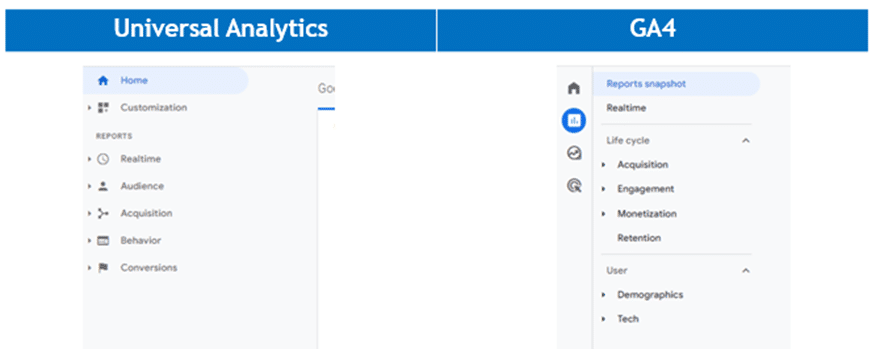
GA4 introduces a revamped user interface and a different approach to reporting, leading to a steep learning curve for many users.

Any change in a UI is difficult. GA4’s UI has been completely overhauled with no similarities to its predecessor. Critics argue that the complexity of the new interface hinders its adoption and usability. 

This should not be a surprise to any user. Most software upgrades to new versions come with a new UI. With any new UI, there is always a learning curve. 

The redesigned interface reflects a shift toward a more user-centric approach. It empowers all users (marketers and analysts) to explore data in a more intuitive and customizable manner, enabling deeper analysis and uncovering hidden patterns.

The new customizable interface lets you make the GA4 interface truly your own. Remove reports that do not apply to your business. Add custom reports that are tailored to your organization. Organize and group reports into meaningful categories. (No need to learn how Google thinks reports should be named or grouped!)

While the initial learning curve may be daunting, the long-term benefits of improved data interpretation and actionable insights and a fully customizable interface far outweigh this temporary inconvenience.

3. Limited historical data

Another critique of GA4 is its limited compatibility with historical data from UA. Users argue that this limitation hampers the ability to conduct meaningful trend analysis and track long-term performance accurately.

This is not new.

The same attitude was taken when GA migrated to UA. Back in 2012, there wasn’t an option either to port old data into the new measurement logic of UA. This left businesses with comparing apples to oranges (before and after the change) in their data.

Many analytics professionals have long advocated and argued that there was little analytics insight to gain from revisiting data more than a year old and most certainly over two years old. The pandemic’s impact on many businesses makes comparing year-over-year data meaningless, and so does comparing the past months to the same period from three or four years prior. 

Websites and apps have been updated, marketing strategies modernized and the global economy and user preferences have changed. Unless your reporting considers this, simply reporting users, sessions and even sales numbers out of context was and still is meaningless.

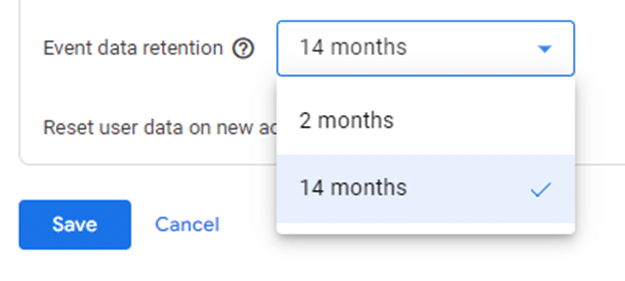
Event data retention

The new maximum GA data storage limit of 14 months is disconcerting compared to the previous “unlimited” option. To address this issue, Google has given all accounts a free BigQuery (data warehouse) account. By storing your data here, you still get virtually an unlimited time frame of storage.

Granted, configuring and using BigQuery is not simple. It entails a steep learning curve and time commitment that is beyond many Google Analytics users, especially those without their own data team.

With limited historical data, you must reevaluate your approach to measurement. How are you going to evaluate success? Adopting GA4 enables us to revisit our data collection strategies and redefine KPIs. 

This shift prompts a fresh perspective on data analysis, focusing on real-time and forward-looking insights rather than relying solely on historical trends. Consequently, we can better align strategies with current market dynamics and adapt swiftly to changing consumer behavior.

While digital analytics helps evaluate marketing performance, it is far more effective at generating questions than answering them. Reviewing your analytics for user behavior changes — and then investigating why — yields greater value than simply using it to validate campaign effectiveness.

4. Reduced customization options

GA4 offers a more streamlined approach to event tracking and customization compared to its predecessor.

Critics claim that this reduction in customization options (custom reports only) limits the ability to track specific user actions and tailor analytics to individual business needs. However, this apparent flaw ushers in a new era of efficiency. 

GA4 enables marketers and analysts to focus on the most critical metrics and outcomes by simplifying event tracking. It forces us to reevaluate our tracking requirements and prioritize the metrics that truly matter, leading to more concise and actionable insights.

The reduced customization options promote a more standardized approach to analytics, facilitating benchmarking and industry-wide comparisons.

US vs. GA4

Despite critics’ claims of a reduction in customization, GA4 does offer greater levels of customization to the UI.

You can (using the library feature) completely customize the user interface and add any number of custom reports and report sections.

With a little effort, the entire UI can be customized to your business needs. 

GA4 library

By doing so, commonly required reports become easily accessible.

Reports that were never used can be removed from the UI.

The result is faster access to data yielding greater productivity.

With the growing emphasis on user privacy, GA4’s stricter data collection and consent management mechanisms have drawn criticism. Critics argue that the enhanced privacy measures limit the availability of data for analysis and hinder marketers’ ability to understand their audience fully.

However, this perceived flaw is crucial to building trust and transparency. By embracing privacy-centric practices, businesses can strengthen their relationships with users and establish themselves as ethical data stewards.

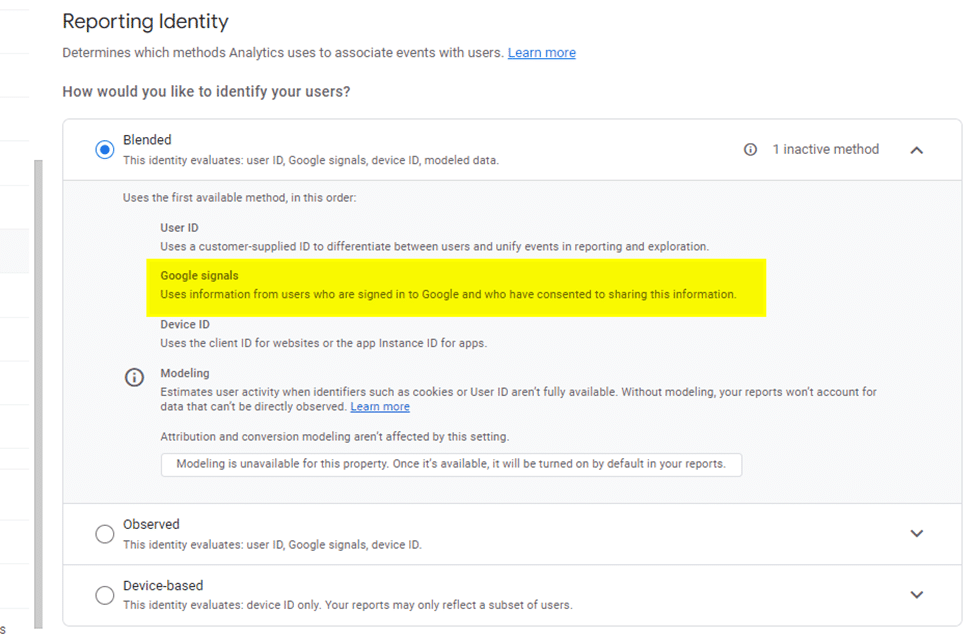
As part of the migration to GA4, website and app privacy policies must be reviewed. For sites that have enabled Google signals as part of the “Reporting Identity” and operate under the legal aspects of GDRP, this review is critical.

Reporting identity - Google signals

Embrace changes in your measurement approach

Once you get past the initial surprise of the new interface and understand why the top five complaints about it are actually positive improvements, you will likely begin to appreciate GA4.

While items are missing from the standard features, there is hope that Google will add these back in a future release. (The annotation tool and ability to save predefined segments from standard reports are missed by users.) 

Although many marketers widely consider the rollout of the GA4 upgrade as “one of the worst ever,” it brings improvements that will likely be embraced by most users within a few months.


Opinions expressed in this article are those of the guest author and not necessarily Search Engine Land. Staff authors are listed here.


Related stories

New on Search Engine Land

@media screen and (min-width: 800px) { #div-gpt-ad-3191538-7 { display: flex !important; justify-content: center !important; align-items: center !important; min-width:770px; min-height:260px; } } @media screen and (min-width: 1279px) { #div-gpt-ad-3191538-7 { display: flex !important; justify-content: center !important; align-items: center !important; min-width:800px!important; min-height:440px!important; } }

About the author

Alan K'necht

Alan K’necht an independent SEO, social and analytics consultant, a public speaker, award-winning author and a corporate trainer (SEO, social media marketing and digital analytics).

https://searchengineland.com/google-analytics-4-flaws-improvements-429418


Crawlers, search engines and the sleaze of generative AI companies

The boom of generative AI products over the past few months has prompted many websites to take countermeasures. 

The basic concern goes like this:

AI products depend on consuming large volumes of content to train their language models (the so-called large language models, or LLMs for short), and this content has to come from somewhere. AI companies see the openness of the web as permitting large-scale crawling to obtain training data, but some website operators disagree, including Reddit, Stack Overflow and Twitter.

This answer to this interesting question will no doubt be litigated in courts around the world.

This article will explore this question, focusing on the business and technical aspects. But before we dive in, a few points:

  • Although this topic touches on, and I include in this article, some legal arguments, I am not a lawyer, I am not your lawyer, and I am not giving you any advice of any sort. Talk to your favorite lawyer cat if you need legal advice.
  • I used to work at Google many years ago, mostly in web search. I do not speak on behalf of Google in any way shape or form, even when I cite some Google examples below.
  • This is a fast-moving topic. It is guaranteed that between the time I’ve finished writing this and you are reading it, something major would have happened in the industry, and it’s guaranteed I would have missed something!

The ‘deal’ between search engines and websites

We begin with how a modern search engine, like Google or Bing, works. In overly simplified terms, a search engine works like this:

  • The search engine has a list of URLs. Each URL has metadata (sometimes called “signals”) that indicate the URL may be important or useful to show in the search engine’s results pages.
  • Based on these signals, the search engine has a crawler, a bot, which is a program that fetches these URLs in some order of “importance” based on what the signals indicate. For this purpose, Google’s crawler is called Googlebot and Bing’s is Bingbot (and both have many more for other purposes, like ads). Both bots identify themselves in the user-agent header, and both can be verified programmatically by websites to be sure that the content is being served to the real search engine bot and not a spoof.
  • Once the content is fetched, it is indexed. Search engine indices are complicated databases that contain the page content along with a huge amount of metadata and other signals used to match and rank the content to user queries. An index is what actually gets searched when you type in a query in Google or Bing.

Modern search engines, the good polite ones at least, give the website operator full control over the crawling and indexing.

The Robots Exclusion Protocol is how this control is implemented, through the robots.txt file, and meta tags or headers on the web page itself. These search engines voluntarily obey the Robots Exclusion Protocol, taking a website’s implementation of the Protocol as a directive, an absolute command, not just a mere hint.

Importantly, the default position of the Protocol is that all crawling and indexing are allowed – it is permissive by default. Unless the website operator actively takes steps to implement exclusion, the website is deemed to allow crawling and indexing.

This gives us the basic framework of the deal between the search engines and websites: By default, a website will be crawled and indexed by a search engine, which, in turn, point searchers directly to the original website in their search results for relevant queries.

This deal is fundamentally an economic exchange: the costs of producing, hosting, and serving the content are incurred by the website, but the idea is that the traffic it gets in return pays that back with a profit.

Note: I’m intentionally ignoring a whole slew of related arguments here, about who has more power in this exchange, who makes more money, fairness, and much more. I’m not belittling these – I just don’t want to distract from the core topic of this article.

This indexing for traffic approach comes up elsewhere, for example when search engines are allowed to index content behind a paywall. It’s the same idea: the website shares content in return for being shown in search results that point searchers back to the website directly.

And at each step of the process of this deal, if the publisher wants to block all or some crawling or indexing in any way, then the publisher has several tools using the Robots and Exclusion Protocol. Anything still allowed to be crawled and indexed is because the website gets a direct benefit from being shown in the search results.

This argument in some form has actually been used in courts, in what has become to be known as the “robots.txt defense” and has been basically held up; see this short list of court cases, many involving Google, and this write-up from 2007 that’s not entirely happy about it.

LLMs are not search engines

It should now be very clear that an LLM is a different beast from a search engine.

A language model’s response does not directly point back to the website(s) whose content was used to train the model. There is no economic exchange like we see with search engines, and this is why many publishers (and authors) are upset.

The lack of direct source citations is the fundamental difference between a search engine and an LLM, and it is the answer to the very common question of “why should Google and Bing be allowed to scrape content but not OpenAI?” (I’m using a more polite phrasing of this question.).

Google and Bing are trying to show source links in their generative AI responses, but these sources, if shown at all, are not the complete set.

This opens up a related question: Why should a website allow its content to be used to train a language model if it doesn’t get anything in return?

That’s a very good question – and probably the most important one we should answer as a society.

LLMs do have benefits despite the major shortcomings with the current generation of LLMs (such as hallucinations, lying to the human operators, and biases, to name a few), and these benefits will only increase over time while the shortcomings get worked out. 

But for this discussion, the important point is to realize that a fundamental pillar of how the open web functions right now is not suited for LLMs. 

The sleaziness

That’s apparently not a problem for AI companies who are interested in training large models only for their own economic benefit.

OpenAI used several datasets as training data inputs (details here for GPT3), and OpenAI intentionally does not disclose the training datasets for GPT4.

Although OpenAI uses many arguments to justify not disclosing information about GPT4’s training data (discussed here), the key point for us remains: We don’t know which content was used to train it, and OpenAI does not show that in the ChatGPT responses.

Does OpenAI’s data collection obey the Robots Exclusion Protocol? Does it include copyrighted text, like textbooks or other books? Did they get permission from any website or publisher? They don’t say.

Brave Software’s super shady approach

If OpenAI’s approach is problematic, Brave Software (the maker of Brave browser and the Brave search engine) takes an even more problematic approach and stance when it comes to search and AI training data. 

The Brave search engine depends heavily on what’s called the Web Discovery Project. The approach is quite elaborate and documented here, but I’ll highlight one key fact: Brave does not appear to have a centralized crawler they operate, and none of the crawls identify themselves as crawlers for Brave, and (sit down for this) Brave sells the scraped content with rights that Brave gives the buyer for AI training.

There is a lot in that sentence, so let’s parse it out.

Brave search uses the Brave browser as a distributed crawler. As documented in this help article, there is this FAQ question and answer:

Is the Web Discovery Project a crawler?

In a way, yes. The Web Discovery Project processes fetch jobs from Brave’s web crawler. Every few seconds or minutes, the browser might be instructed to fetch a webpage and send the HTML back to Brave. However, this fetching has no impact on your browsing history or cookies—it’s done as a private fetch API call. For extra safety, the fetch job domains are pre-selected from a small set of innocuous and reputable domains.

What is the Web Discovery Project? – Brave Search

The Fetch API is a web standard functionality built into modern browser engines, including the one Brave uses. Its common use is to fetch content to show to users in the browser. For our purposes, we immediately know it is a user’s browser requesting the website’s content on behalf of Brave’s search engine.

Interestingly, a Reddit thread from June 2021 adds more details and confusion. One reply from a Brave representative is very interesting (highlights mine):

We have our own crawler, but it doesn’t contain an user-agent string (just as Brave, the browser, also does not contain a unique user-agent string) to avoid potential discrimination. That said, we have talked about potentially identifying the crawler to admins would who would like to know when/where it lands on their properties. We also respect robots.txt too, so if you don’t want Brave Search crawling your site, it won’t.

This a goldmine of facts:

  1. They have their own crawler, which may be referring to a centralized one or the distributed browser-based Web Discovery Project.
  2. This crawler doesn’t identify itself as a crawler, but it somehow obeys the Robots Exclusion Protocol (in the form of the robots.txt file). How can a website operator write a robots exclusion directive if the browser does not identify itself? Which user agent token (as it’s called) would be used in the robots.txt file to specify directives specific for Brave’s crawler? I have not been able to find any documentation from Brave.
  3. What they’re calling discrimination is actually how publishers would control crawling. The Robots Exclusion Protocol is a mechanism for publishers to discriminate between what users and crawlers are allowed to access, and discriminate between different crawlers (for example, allow Bingbot to crawl but not Googlebot). By claiming they want to avoid discrimination, Brave is actually saying that they get to decide what they crawl and index, not the publisher.

Going back to the Fetch API: By default, the Fetch API uses the browser’s user-agent string. We already know that the Brave browser does not identify itself with a unique user-agent header, using, instead, the generic user-agent string produced by the underlying browser engine.

The user-agent string can be customized, for the browser in general and the Fetch API, yet I have not found any indication that Brave does that (and indeed, the Reddit reply cited above explicitly says there is no unique identifier).

Furthermore, Brave goes on to sell the scraped data specifically for AI training, not just as search results (for example, to power a site search feature).

Visiting the Brave Search API homepage shows several price tiers, including some called “Data for AI”. These data plans include options for “Data with storage rights” that allow the subscriber to “Cache/store data to train AI models”, with the data including “Extra alternate snippets for AI” and with “Rights to use data for AI inference.” 

In summary, based on Brave’s public statements and lack of documentation, Brave crawls the web in a stealthy way, without an obvious way to control or block it, and goes on to resell the crawled content for AI training.

Or to rephrase this more bluntly, Brave has appointed itself as a for-profit distributor of copyrighted content without license or permission from website publishers.

Is this acceptable? I see it as a sleazy scraper as a service.

Google’s Publisher Controls initiative

There may be a new type of web crawler coming soon, one specifically for generative AI.

It appears that Google has recognized the incompatibility discussed above, that using the content Googlebot fetched for web search may not be suitable for training AI models.

Google has announced they want to start a community discussion to create AI Web Publisher Controls (hey, Google, I signed up, let me in please!). I wholeheartedly support having this conversation, and well done Google for opening the door to having this conversation.

As we’re in the early days, it’s important to flag that the defaults and capabilities of such controls will be critical to their success or failure. I suspect many publishers and authors will have strong opinions that we need to hear about how these AI controls should work. 

What about open-source LLMs?

An important aspect of the argument above is the economic exchange. But what if the organization behind the language model releases the model freely without benefit to itself?

There are many such open-source models, and they are trained on datasets that substantially overlap the datasets used to train commercial proprietary models. Many open-source models are good enough for some use cases right now, and they’re only getting better.

Still: Is it right that a website’s content is used without permission to train an open-source LLM?

That’s possibly a trickier question, and I think the answer currently rests on what the Robots Exclusion Protocol allows. It is possible that a better answer emerges in the form of a well-designed approach from Google’s AI Web Publisher Controls or some other similar initiative.

Watch this space.

So what can a publisher do now?

This current situation is one which many publishers neither want nor accept. What can they do?

Here we need to go back to old-school crawler/bot blocking. There are generally two types of crawlers:

  1. Crawlers that identify themselves. They may or may not obey the Robots Exclusion Protocol, but at least the server has an identifier to check to decide whether to block the request or not. Examples include Googlebot and Bingbot.
  2. Stealth crawlers, which are not used for polite search engines. They don’t identify themselves and/or do not obey the Robots Exclusion Protocol. Examples are any script kiddie’s spam scraper or Brave Search’s crawler.

There are two complementary things you can do:

  1. If the crawler obeys the Robots Exclusion Protocol, you can block it if you think the content it crawls feeds into AI training data. There are two approaches here:
    • Block all crawlers and allow only the ones you want to allow for your needs (like Googlebot and Bingbot). This is dangerous for a website’s performance in organic search. You need to be extremely careful with it, but it is effective for these crawlers.
    • Allow all crawling and block the ones you want to block. This more permissive approach is less dangerous, but of course your content may be scraped by AI or other crawlers you may not want.
  2. Use a server-side stealth bot detector, and use it to block such crawlers. Many products can do this. If you’re using a content distribution network (CDN) like many publishers do, it’s likely this kind of functionality is available through that (e.g. Akamai, Cloudflare, Fastly).

The approach I’m starting to take with the websites I operate, and discuss with clients, is a combination of options (1a) and (2), namely to use a restrictive robots.txt file along with CDN controls.

This may not be the best approach for each publisher, but I think it’s worth seriously considering. 

What does all this mean?

We’re living through times that will go down as one of the most influential in history. People are literally predicting the doom of humanity from AI. We all have a part to play in shaping the future.

For our part as creators of original content, we need to think about how to respond, and keep up and adapt to this fast-moving part of the industry. Deciding how the content we author gets created, distributed, and consumed is now a complicated mix of strategy, technology, finances, ethics and more.

However you respond, you are taking a stance at a historic moment. I feel your burden.


Opinions expressed in this article are those of the guest author and not necessarily Search Engine Land. Staff authors are listed here.


Related stories

New on Search Engine Land

@media screen and (min-width: 800px) { #div-gpt-ad-3191538-7 { display: flex !important; justify-content: center !important; align-items: center !important; min-width:770px; min-height:260px; } } @media screen and (min-width: 1279px) { #div-gpt-ad-3191538-7 { display: flex !important; justify-content: center !important; align-items: center !important; min-width:800px!important; min-height:440px!important; } }

About the author

Pierre Far

Pierre Far is a digital product management consultant, speaker, startup advisor, award judge, and founder of several online businesses. Previously, he held several roles at Google and the technology sector in the UK, including product management, community management, innovation consulting, and online marketing after completing a Ph.D. in microbial genetics from the University of Cambridge, UK.

https://searchengineland.com/crawlers-search-engines-generative-ai-companies-429389