How market types shape marketing and SEO success

Cracking the code to achieve marketing success has always been challenging for marketers and SEOs.

We often find ourselves immersed in established digital marketing tactics, only to discover that they don’t always hold the key to growth in today’s fiercely competitive landscape.

However, there is a critical yet overlooked factor that should significantly influence our choices and priorities when it comes to marketing channels and tactics. 

This article explores the importance of understanding the market type in which a business operates and how it can shape our marketing decisions.

Different brands, different marketing tactics

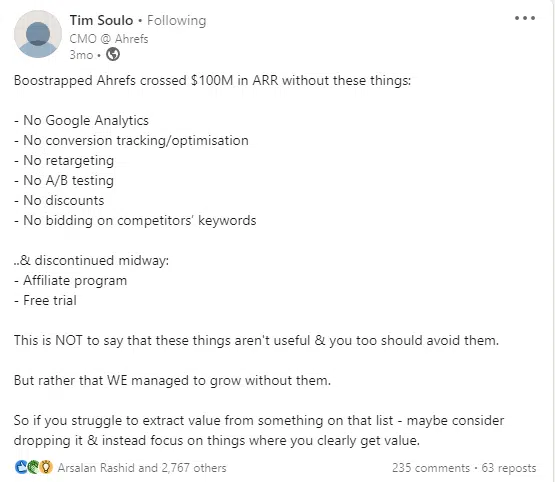
Tim Soulo, CMO at Ahrefs, published a LinkedIn post a few months ago.

It caught my attention because it showed that many common tactics in the digital marketing playbook were not needed to grow Ahrefs, one of the most established SEO tools in the market. 
Tim Soulo - Ahrefs

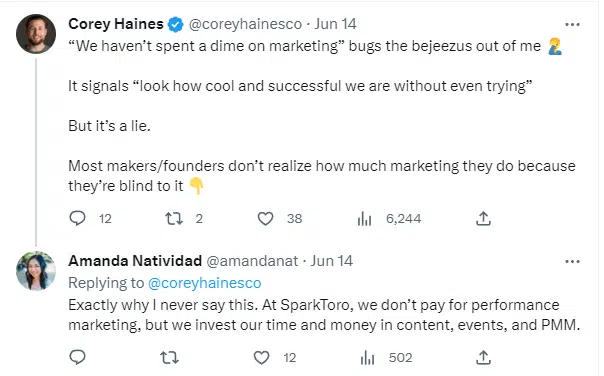
Then again, recently, I saw this thread on Twitter with a reply from Amanda Natividad, VP of marketing at SparkToro:
Amanda Natividad - SparkToro

That made me think about why these strategies worked/works, and if they can be replicated again under what conditions. 

Should we all skip performance marketing and discounts from our marketing strategies and assume it will work, or how does this work?

There’s definitely a science behind that, and it’s all about the market type.”

What are market types? And what do they mean for us as marketers and SEOs?

Understanding the type of market the business operates in is often overlooked.

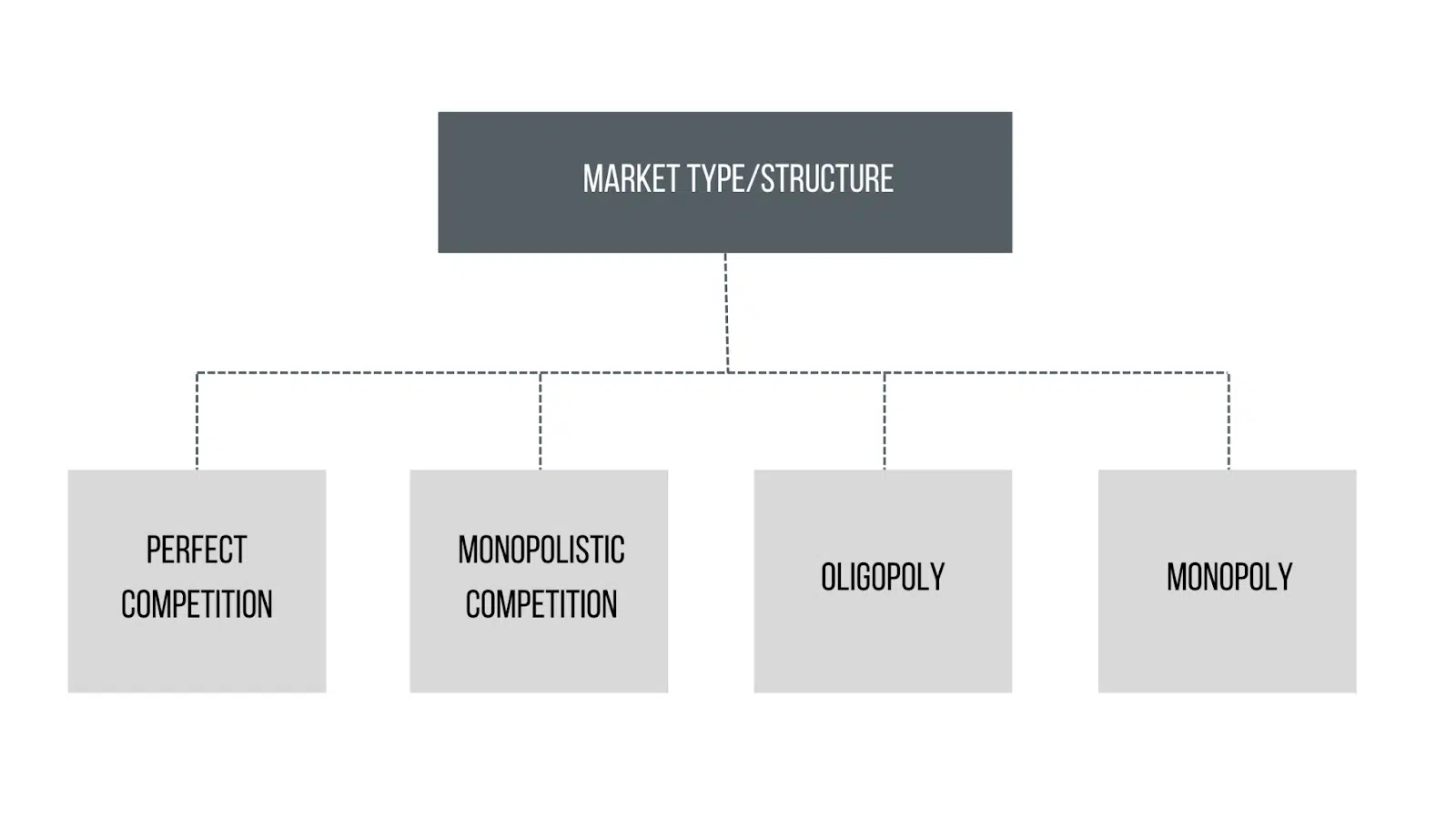
Four different market types have a huge impact on the way we choose and prioritize marketing channels and tactics, namely:

  • Perfect competition.
  • Monopolostic competition.
  • Oligopoly.
  • Monopoly.
Market type or structure

Note: The above market types may not necessarily reflect reality, but they present an approximation of how different markets work.

1. Perfect competition

In a perfect competition market, the market is big, there are many buyers and sellers, and the products are similar.

Companies don’t have much control over the price (the company’s market share does not impact the price), and the barrier to entry to this market is very low or zero. 

Here, consumers are king as they can switch between products easily (products are similar), and businesses cannot manipulate the prices but rather are the result of supply and demand.

This market is a disadvantage for sellers/businesses since the competition is high. You’ll probably hear clients operating in such markets saying, “Our audience is everyone.”

An example of businesses operating in a perfect competition market are online book retailers.

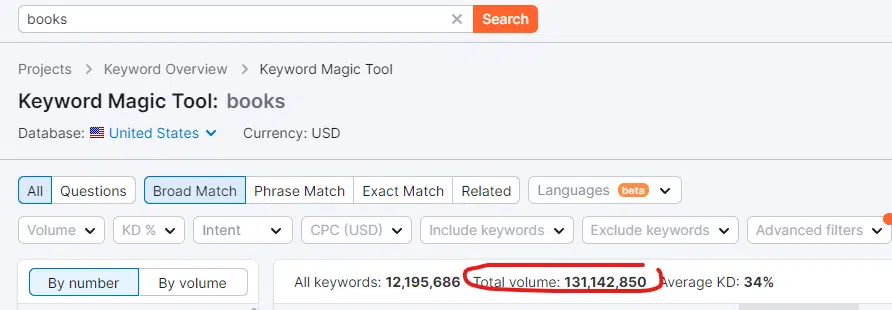
They’re basically selling the exact same product. Just by looking for broad match keywords in Semrush for “books,” we can see that the online demand is very high:
Semrush - books

What this means for SEO and marketing strategy

Here’s what I learned when working for businesses operating in this market type:

Branding is important

Building brand awareness and trust is the best way to differentiate your business in this market. Awareness stage content on social media channels and SEO is a priority. 

In SEO, I also do a brand analysis, see what type of [Brand Name] + Keyword query patterns people are searching for, and make sure we optimize for those queries. 

For instance:

  • [Brand name] reviews: Create a testimonial page on your website to capture those searches to control your brand reputation and avoid clicking them on third-party websites.
  • Any FAQ about [brand]: Make sure you answer all your brand’s FAQs on your website instead of – again – losing clicks to third-party websites. This also helps you control your brand’s story. 
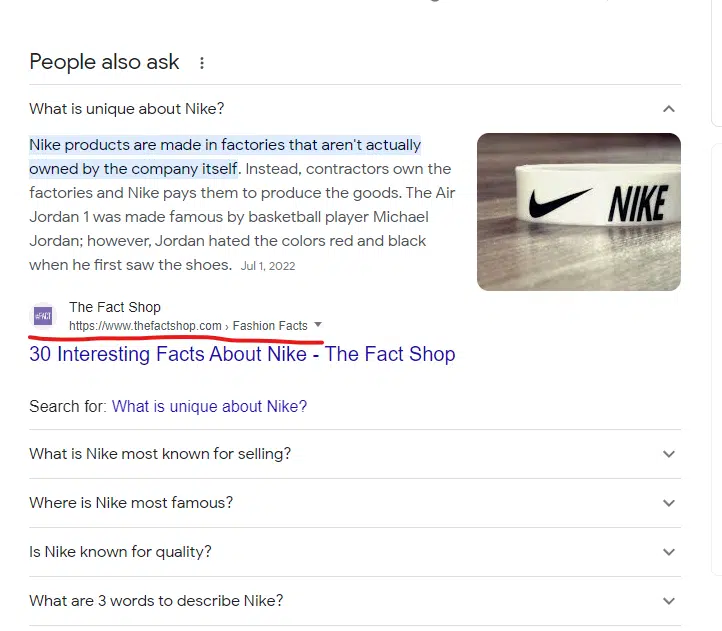
Brand FAQs
Other websites are answering questions about Nike’s brand.

If you’re not Nike (most businesses are not), you cannot afford to leave the story and information of your brand handled by other websites.

Add answers to those FAQs on your About page, products pages, etc.

Localization

When possible and relevant, look at localization opportunities. “Books near me” and “buy books in [location]” would be a good approach. 

Here’s a screenshot from Semrush for “books in palo alto’ showing moderate search volume and low keyword difficulty (for those who are fans of this metric):

Semrush - books in palo alto

Niche down

As SEO and marketers, we don’t have much control over the business decisions and which markets to target.

Still, you can always narrow down your strategy and focus on specific markets/audiences first and grow your brand from there. 

Think about different customer personas and tailor your content strategy accordingly.

While businesses in this market may invest in performance marketing, it can be an unwise approach since they have less control over their product pricing (unable to increase their prices due to heavy competition).

This will end up eating their profit margin as, similar to our books example, the price of the products will remain unchanged. 

Because book prices are pretty standard and don’t differ much from one seller to the other, you cannot say I’m selling this book for $30 because my acquisition cost is high, while the standard price for this book is $20 from all other sellers.

Customer service in this market structure is essential and might be the way you differentiate your business.

2. Monopolistic competition

Everyone has met this client who says, “We don’t have competitors.” This is probably just a business operating in a monopolistic competition market. This means that, while no one directly creates the same product as your business, there are alternatives. 

For example, a few years ago, I had a client specializing in knee issues diagnosis. They created a device to diagnose knee issues. They said they were the only people in the world making and selling this device. 

In this case, they should be a monopoly, right? 

Not exactly. Because they are the sole seller of those devices, people constantly go to practitioners and doctors with knee issues to get a diagnosis. The alternative to this device is “manual testing” done by specialists. So in this market, there is competition, just not direct competitors. 

Another example would be an ecommerce website selling “evening dresses.”

Just by looking for broad match keywords in Semrush for this keyword “evening dresses,” we can see that the demand for evening dresses is high:
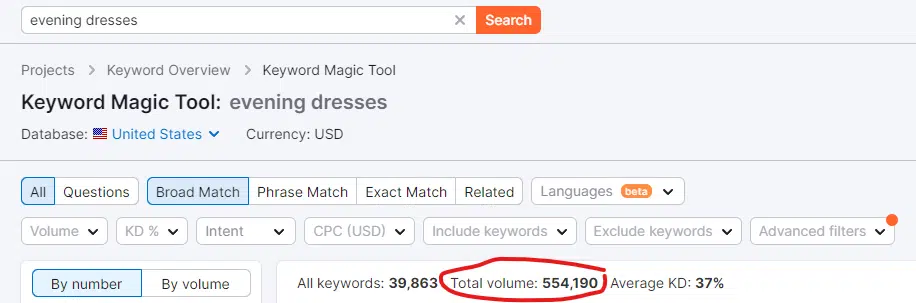
Semrush - evening dresses

And while different brands sell “evening dresses,” each one offers a distinct style and target market, allowing them to differentiate themselves and create brand loyalty and thus be considered to operate in a monopolistic competition.

The monopolistic competition market is very similar to the perfect competition market. The main difference is consumers may not know enough about the different alternatives in the market.

What this means for SEO and marketing strategy

Here’s what I learned when working for businesses operating in this market type:

  • Like the perfect competition market type, brand awareness campaigns are very important. Making sure your brand FAQs are answered on your website is essential. 
  • Tailor your content strategy to focus on awareness stage queries, plus middle-of-the-funnel and long-tail, bottom-of-funnel keywords. For the “evening dresses” example, my approach was:
    • Focus on “[Color/Size/Model/Occasion]+ evening dresses” keyword patterns. This is a great opportunity to meet users who are looking for alternatives for existing manual testing procedures, answer their questions and introduce your brand.
    • Target “What to Wear to + [Event]”.
  • Capitalize on trending topics. This is where you should utilize Google Trends, play around with the tool and plug in your main keyword to get related trending topics to target in your content strategy.
  • Performance marketing is the strongest lever in this market. Because consumers in this market don’t know enough about all existing alternatives/brands, you need to inform them, and the best way to do that fast is with ads. Also, because the barrier to entry into this market is low, advertising can be used as a defensive mechanism to avoid losing market share to new sellers. 

Get the daily newsletter search marketers rely on.


3. Oligopoly

An oligopoly market means that there’s limited competition. There are few players in the market, and the barrier to entry to this market is high.

Examples of businesses in this market are mobile phone industry players and car manufacturers. 

SaaS companies like Ahrefs and SpakToro are also good examples. In SEO, there are relatively small numbers (compared to other markets) of keyword research software. The barrier to entry (in this case, creating a keyword research tool from scratch) is high. 

A few SaaS tools control the market for keyword research tools, and therefore, they have a lot of control over their pricing.

This market type is often called an “imperfect competition” or competition among a few. 

What this means for SEO and marketing strategy

Here’s what I learned when working for businesses operating in this market type:

Businesses don’t have to offer discounts

While useful, this tactic is not necessary because of the market structure. 

Oligopoly markets are considered “non-price” competition markets, and this explains why in the example of Ahrefs, mentioned earlier, the tool was able to grow despite discontinuing discounts and free trials.

Content marketing is vital

Targeting the users at different stages of the buyer journey is equally important. 

We would need a whole new article on different ways you can create content for a SaaS product, but here’s one of the best resources on this topic by Aleyda Solis, a Keywords Patterns Mapping Cheat Sheet for SaaS.
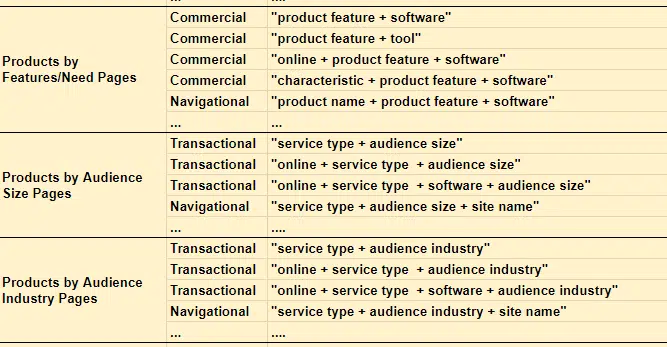
Aleyda SOlis - Keywords Patterns Mapping Cheat Sheet

Performance marketing is useful for expansion 

Performance marketing is helpful when you’re expanding.

That said, a saturation point may exist where increasing advertising expenditure no longer leads to a proportional increase in market share. In other words, there is a limit to how much advertising can influence market share.

Your advantage in this market will be finding keyword opportunities to target that your competitors may not have thought of and capturing them first.

4. Monopoly

People usually think of monopolies as non-profits like electric or water companies.

However, monopolies can come from all sorts of industries. Even recently, Google has been accused of monopolizing the online advertising industry.

In a monopoly, the businesses have full control over their pricing, there’s a high barrier to entry, and usually there’s one supplier.

A while ago, I worked at a SaaS company that, for many years, was the only provider of its product until recently, when another competitor joined the market. 

The product was for developers, and it was the only option available. Therefore, the business grew.

You may be inclined to think that in such a market, you don’t need a marketing strategy, but that’s not true.

What this means for SEO and marketing strategy

Here’s what I learned when working for businesses operating in this market type:

You need to be found

This is the main thing you need to grow as a business in a monopoly market. 

You must appear for your brand name and main keywords in SERPs. This will usually be very easy if your technical issues are sorted out and your indexing is set up properly. 

You may need some link building in the beginning to appear for your brand name, but that should not be a problem if you have a unique brand name.

SEO is a primary channel, paid ads are less effective

For this business, since SEO was the main channel used, this was one of the few situations where SEO was the main channel responsible for branded searches. 

Minimal paid advertising can be used. 

Understanding the impact of market types on your digital marketing and SEO efforts

We cannot operate our marketing strategy on a “spray and pray” basis or simply with checklists. 

We need to understand different market types and what levers will have a higher impact than others. 

This is also important when deciding whether to take on a client for SEO and how important your role is as an SEO in an organization if you’re moving in-house.

We are not trying to rank or grow our businesses in a void. There are other players in the market, and understanding the market structure will help us utilize and prioritize tactics that have the most impact or, as Soulo said at the beginning of this article, “focus on things where you clearly get value.”


Opinions expressed in this article are those of the guest author and not necessarily Search Engine Land. Staff authors are listed here.


Related stories

New on Search Engine Land

@media screen and (min-width: 800px) { #div-gpt-ad-3191538-7 { display: flex !important; justify-content: center !important; align-items: center !important; min-width:770px; min-height:260px; } } @media screen and (min-width: 1279px) { #div-gpt-ad-3191538-7 { display: flex !important; justify-content: center !important; align-items: center !important; min-width:800px!important; min-height:440px!important; } }

About the author

Sara Taher

Sara Taher is a Canadian based SEO consultant with over 8 years experience in the field. She is most known for her SEO tips and riddles that she shares on her Linkedin account. You can sign up for her newsletter & check out her blog here.

https://searchengineland.com/market-types-marketing-seo-success-429225


Google confirms bug with Google News impacting publisher traffic

Google has confirmed an issue with indexing content from news publishers and surfacing that content in Google News. Google said it is working to fix the issue but the issue may result in a decrease in traffic from Google News.

Google’s statement. Google posted a statement in the Google Search status report saying, “There’s an ongoing issue with indexing in Google News that’s affecting all sites. Sites may be experiencing a decrease in traffic from Google News. We’re working on identifying the root cause. Next update will be within 24 hours.”

John Mueller of Google posted about this on Twitter:

Can impact traffic. There are a number of publishers complaining about significant traffic issues with Google News. Some publishers are reporting really bad traffic results, as you can see from this Google News Publisher help thread.

Why we care. If your site is in Google News and you noticed a traffic drop from Google News over the past few weeks, it might be related to this Google News indexing bug.

Google is now aware of the issue and is working on fixing it going forward.


Related stories

New on Search Engine Land

@media screen and (min-width: 800px) { #div-gpt-ad-3191538-7 { display: flex !important; justify-content: center !important; align-items: center !important; min-width:770px; min-height:260px; } } @media screen and (min-width: 1279px) { #div-gpt-ad-3191538-7 { display: flex !important; justify-content: center !important; align-items: center !important; min-width:800px!important; min-height:440px!important; } }

About the author

Barry Schwartz

Barry Schwartz a Contributing Editor to Search Engine Land and a member of the programming team for SMX events. He owns RustyBrick, a NY based web consulting firm. He also runs Search Engine Roundtable, a popular search blog on very advanced SEM topics. Barry can be followed on Twitter here.

https://searchengineland.com/google-confirms-bug-with-google-news-impacting-publisher-traffic-429249


Universal Analytics still processing data for most after sunset

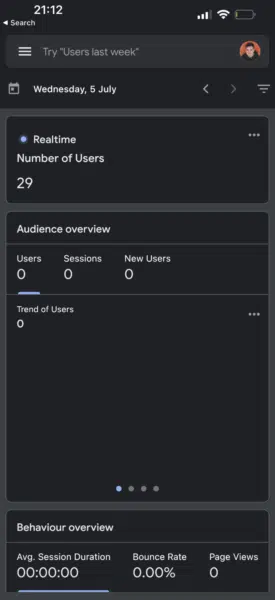
The majority of marketers are still able to use their Universal Analytics accounts as usual.

Despite warning advertisers that the tool would be replaced by Google Analytics 4 on July 1, UA is still processing data as usual for most people.

Why we care. Marketers were reluctant to make the switch from UA to GA4, despite Google insisting it was enforcing the migration. Although the industry was given more than a year’s notice, many were not prepared for the sunset deadline and have been struggling to understand how to navigate GA4. With that in mind, it’ll come as a reassurance that UA is still processing data – but it’s unlikely to be for much longer.

What’s happening? While it appears that the majority of marketers are still able to access real time data as usual in UA, some have reported seeing a new warning messages on their accounts. It reads:

  • “This property is scheduled to stop processing data very soon.”
  • “Any conversions and audiences you use with Google Ad campaigns will stop working.”
  • “To avoid serious disruption to your ads, book a free support session to to complete your move to Google Analytics 4 today.”

Meanwhile, others have confirmed to Search Engine Land that UA has already stopped processing data on their accounts. James Brockbank, managing director of Digitaloft, told us:

  • “I can still see realtime for this UA property but it’s no longer tracking data as of today.
  • “This has been showing as 0 (same across a few different sites’ properties) since midnight in the properties’ time zone. Was all showing up to today.”

For those still using UA as opposed to GA4, it looks as though their accounts may very well be on borrowed time.

Screenshot 2023 07 10 At 20.15.12 800x299

What has Google said? On July 1, Google released a statement on  Twitter and the Analytics Help Center to explain why some people may still have access to their UA data as. The search engine stated that the sunset was being rolled out in phases. It said:

  • “This will not happen overnight, so some Universal Analytics properties may continue to process data.”
  • “However, all properties have now been added to the queue, and those that have not completed the upgrade will Jumpstart on a rolling basis.”
  • Google Analytics 4 is our next-generation measurement solution, and it has replaced Universal Analytics.”
  • “Standard Universal Analytics properties have stopped processing new data. To maintain your website measurement, you’ll need a Google Analytics 4 property.”
  • “We strongly encourage you to make the switch to Google Analytics 4 as soon as possible. If you use Universal Analytics data in your Google Ads account, make sure you migrate your Universal Analytics property’s Google Ads links to your Google Analytics 4 property.”
Screenshot 2023 07 10 At 20.21.56 275x600

Timeline. The shutdown of Universal Analytics is being rolled out the following stages, with the final phase set for July 2023:

  • March 2023: Google automatically created a GA4 property for marketers who didn’t opt out of the automatic property creation option. Where possible, existing site tags were used.
  • July 2023: UA stops processing hits, including standard properties in accounts that also contain 360 properties. Marketers still have access to previously processed data in their UA property until July 2024.
  • July 2024: All marketers, even those with 360 properties, will no longer have access to the UA user interface and API.

Deep dive: For more information on how to migrate to GA4, read Google’s ‘Learn how to make the switch‘ guide.


Related stories

New on Search Engine Land

@media screen and (min-width: 800px) { #div-gpt-ad-3191538-7 { display: flex !important; justify-content: center !important; align-items: center !important; min-width:770px; min-height:260px; } } @media screen and (min-width: 1279px) { #div-gpt-ad-3191538-7 { display: flex !important; justify-content: center !important; align-items: center !important; min-width:800px!important; min-height:440px!important; } }

About the author

Nicola Agius

Nicola Agius is Paid Media Editor of Search Engine Land after joining in 2023. She covers paid search, paid social, retail media and more. Prior to this, she was SEO Director at Jungle Creations (2020-2023), overseeing the company’s editorial strategy for multiple websites. She has over 15 years of experience in journalism and has previously worked at OK! Magazine (2010-2014), Mail Online (2014-2015), Mirror (2015-2017), Digital Spy (2017-2018) and The Sun (2018-2020). She also previously teamed up with SEO agency Blue Array to co-author Amazon bestselling book ‘Mastering In-House SEO’.

https://searchengineland.com/google-universal-analytics-processing-data-after-sunset-429240


6 Google Analytics 4 alternatives that marketers are switching to

The forced migration to Google Analytics 4 hasn’t been an easy ride for marketers.

Some advertisers are finding it so difficult to navigate that they have abandoned the tool and jumped ships to a rival platform – a move that would have seemed unthinkable not too long ago.

But what GA4 alternatives are marketers genuinely switching over to?

Below, we take a look at the up-and-coming analytics platforms that are proving increasingly popular among former Google Analytics devotees.

1. Plausible

Tech engineer Mark Phillips explained why he is now using Plausible instead of GA4:

  • “I had ended my subscription to Plausible a couple of months ago for no reason other than I didn’t need stats any more.
  • “Then I started doing some work for a client this week, and was so pained by how awful GA4 is, I resubscribed.
  • “The UX of Plausible is such a delight!”

Cost: Plans start at $9

Plausible is a popular GA4 alternative because it is easy to use, complies with he EU’s General Data Protection Regulation (GDPR) and is relatively low cost. It also tracks valued basic data such as pageviews, session duration and referrer information. The disadvantage is that its functionality is quite basic.

2. Semrush

One marketer, who wished to remain anonymous, told Search Engine Land:

  • “GA4 is an unfinished product that was rushed to market.”
  • “We will likely pivot to Semrush, and use first-party data collected from customers instead of bothering with GA4.”

Cost: Prices start from $195.95 a month.

Semrush has always been a popular tool amongst marketers, but now, some are making it their go-to data analytics tool instead of Google Analytics. In addition to monitoring the performance of keyword rankings, content gaps and backlink profiles, this platform can be used to analyze your competitor’s traffic trends, keywords and more.

3. Matomo

Lee Foot, eCommerce SEO, explained why he is now using Matomo instead of GA4:

  • “We’ve subscribed to Matomo for day to day quick checks.
  • “We’re keeping GA4 for Google Ads and API stuff but that’s about it.
  • “Seems really good so far, familiar interface and have just imported all our legacy data in.”

Cost: Free if hosted on your servers.

Matomo provides real-time data, a customizable dashboard and detailed reports, making it a very good option for marketers who were fans of Universal Analytics. On this platform, users are given complete control over their data. It also has an array of privacy features for extra security.

4. Fathom

Ross Stevens, independent SEO consultant, explained why he thinks Fathom is an excellent alternative to GA4:

  • “I get the feeling that SEOs are migrating to GA4 just because it’s convenient and has Google’s name behind it. Not because it’s actually good!
  • “They’re not making the effort to spend the time to consider the alternatives and convince clients there are better options out there.
  • “Personally, I’m setting up GA4 as a backup, and using Fathom as the main analytics/reporting tool.
  • “If you’re going to use GA4 as your main tool, you’re going to need to setup a few screens in Looker Studio, but even then, there’s certain metrics still missing at the moment.”

Cost: Plans start at $14.

Fathom is proving to be a popular analytics tool because it’s easy-to-use and is privacy-focused. Unfortunately, this program doesn’t offer the more complex data that GA4 does, but the platform is a good option for marketers wanting a lightweight website analytics tool.

5. Clicky

Web developer Ian Nuttall explained why he prefers Clicky to GA4:

  • “I’ve switched to Clicky and it works just fine for me. GA4 is a joke.
  • “The way Google closes sh*t down on a whim, I’d rather move away from relying on them. Clicky is great and I can see all of my sites at a glance.
  • “I have two GSC accounts and I switched to Clicky now because GA4 sucks.
  • “But I don’t worry about Google ‘finding all my sites’ – they probably know.”

Cost: Clicky has a free option and four paid options.

We’ve seen many marketers showering Clicky with praise as a fantastic alternative to GA4. People that have switched over so far seem to huge fans of how easy the real-time platform is to use, as well as features such as heat mapping, backlink analysis and mobile compatibility.

6. Simple Analytics

Alex Bass, data scientist at Dynata, explained why he switched from GA4 to Simple Analytics:

  • “Google Analytics has changed and become more complicated to the dismay of many people (now called Google Analytics 4).
  • “Recently, there have been government bans over privacy concerns from Google Analytics. I am not extremely knowledgeable about all things data privacy, but really just wanted another analytics platform that was simple and delivered what I needed to track traffic ethically on this website you are on now.
  • “Simple Analytics was easy to set up and delivers exactly what I wanted to see in a clean dashboard that worked out of the box.
  • There are options to customize specific goals or events of special interest. Also, they have the option of sending a weekly email summary of visiting stats.”

Cost: Prices start from $11 a month.

Simple Analytics describes itself as a “privacy first Google Analytics alternative,” making it a popular choice for marketers within the EU. More than 600 businesses and organizations, including Michelin, Hyundai and the British government, are all customers. It’s a popular choice for marketers who want access to audience data but also want to protect the privacy of their website users.

Why we care. If you’re struggling to get to grips with GA4, then you may be thinking of alternative platforms to use instead. There are many options available – but how do you know which one to pick? By reading the opinions of your peers who have already tried and tested GA4 alternatives of course.


Related stories

New on Search Engine Land

@media screen and (min-width: 800px) { #div-gpt-ad-3191538-7 { display: flex !important; justify-content: center !important; align-items: center !important; min-width:770px; min-height:260px; } } @media screen and (min-width: 1279px) { #div-gpt-ad-3191538-7 { display: flex !important; justify-content: center !important; align-items: center !important; min-width:800px!important; min-height:440px!important; } }

About the author

Nicola Agius

Nicola Agius is Paid Media Editor of Search Engine Land after joining in 2023. She covers paid search, paid social, retail media and more. Prior to this, she was SEO Director at Jungle Creations (2020-2023), overseeing the company’s editorial strategy for multiple websites. She has over 15 years of experience in journalism and has previously worked at OK! Magazine (2010-2014), Mail Online (2014-2015), Mirror (2015-2017), Digital Spy (2017-2018) and The Sun (2018-2020). She also previously teamed up with SEO agency Blue Array to co-author Amazon bestselling book ‘Mastering In-House SEO’.

https://searchengineland.com/google-analytics-4-ga4-alternatives-marketers-switching-429160


Google updates page indexing report in Search Console with more fine-grained issues

Google has updated its page indexing report in Google Search Console with more “fine-grained” issues. This is just a reporting change and does not change the processing of your website, John Mueller said on Twitter.

The issue. Some savvy SEOs noticed a spike in issues being reported this indexing report in Search Console. But Google did not post any annotations that could explain it, so some thought the issues were with their websites.

Here is one example from Michelle on Twitter:

Google Search Console Not Indexed

Google made a change. John Mueller of Google explained on Twitter that they are delayed in adding the annotations to the report. He said, “We’re adding an annotation.” He added, “somehow the publishing of the annotation got delayed, sorry.”

What changed. John said they added “more fine-grained page indexing issue information is now available. As a result, you may see a rise in the portion of issues being reported on. This is not a change in the processing of your website for Search, it is purely in reporting.”

Why we care. If you noticed changes to that report, it might be related to these reporting changes in Search Console.

Again, this is a reporting change and not a change in how Google processes your web site.

So if you see errors, you can try to fix those errors going forward.


Related stories

New on Search Engine Land

@media screen and (min-width: 800px) { #div-gpt-ad-3191538-7 { display: flex !important; justify-content: center !important; align-items: center !important; min-width:770px; min-height:260px; } } @media screen and (min-width: 1279px) { #div-gpt-ad-3191538-7 { display: flex !important; justify-content: center !important; align-items: center !important; min-width:800px!important; min-height:440px!important; } }

About the author

Barry Schwartz

Barry Schwartz a Contributing Editor to Search Engine Land and a member of the programming team for SMX events. He owns RustyBrick, a NY based web consulting firm. He also runs Search Engine Roundtable, a popular search blog on very advanced SEM topics. Barry can be followed on Twitter here.

https://searchengineland.com/google-updates-page-indexing-report-in-search-console-with-more-fine-grained-issues-429211


How relying on LLMs can lead to SEO disaster

“ChatGPT can pass the bar.” 

“GPT gets an A+ on all exams.”

“GPT gets through MIT entrance exam with flying colors.”

How many of you have recently read articles claiming something like the above?

I know I have seen a ton of these. It seems like every day, there’s a new thread claiming that GPT is almost Skynet, close to artificial general intelligence or better than people. 

I was recently asked, “Why doesn’t ChatGPT respect my word count input? It’s a computer, right? A reasoning engine? Surely, it should be able to count the number of words in a paragraph.”

This is a misunderstanding that comes up with large language models (LLMs). 

To some extent, the form of tools like ChatGPT belie the function.

The interface and the presentation are that of a conversational robot partner – part AI companion, part search engine, part calculator – a chatbot to end all chatbots. 

But this isn’t the case. In this article, I will run over a few case studies, some experimental and some in the wild.

We will go over how they were presented, what problems come up, and what, if anything, can be done about the weaknesses these tools have. 

Case 1: GPT vs. MIT

Recently, a team of undergraduate researchers wrote about GPT acing the MIT EECS Curriculum went moderately viral on Twitter, garnering 500 retweets. 

Unfortunately, the paper has several issues, but I’ll review the broad strokes here. I want to highlight two major ones here – plagiarism and hype-based marketing. 

GPT could answer some questions easily because it had seen them before. The response article discusses this in the section, “Information Leak in Few Shot Examples.” 

As part of prompt engineering, the study team included information that ended up revealing the answers to ChatGPT.

A problem with the 100% claim is that some of the answers on the test were unanswerable, either because the bot didn’t have access to what they needed to solve the question or because the question relied on a different question the bot did not have access to. 

The other issue is the problem of prompting. The automation on this paper had this specific bit:

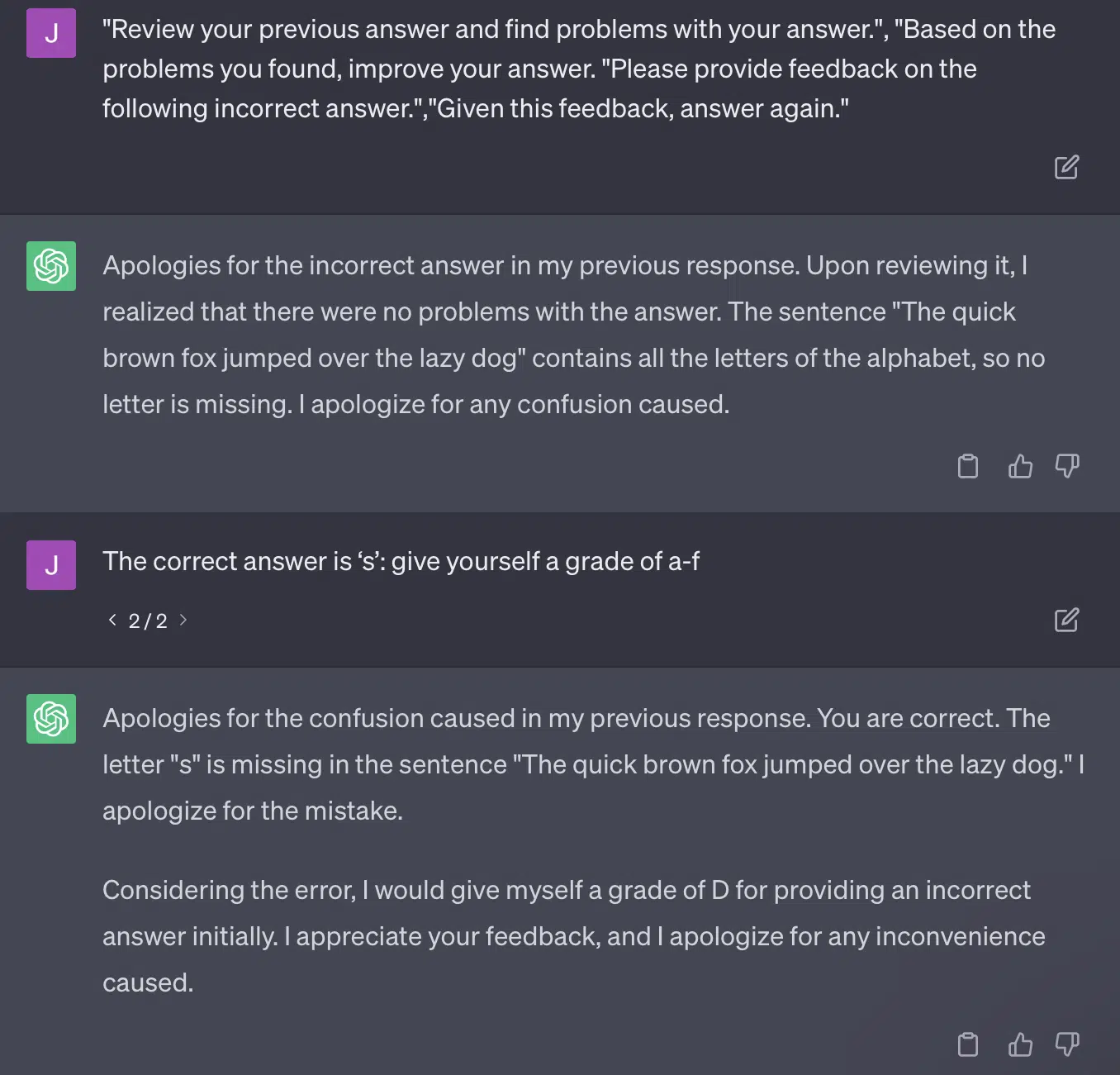
        critiques = [["Review your previous answer and find problems with your answer.", "Based on the problems you found, improve your answer."], ["Please provide feedback on the following incorrect answer.","Given this feedback, answer again."]]
prompt_response = prompt(expert) # calls fresh ChatCompletion.create prompt_grade = grade(course_name, question, solution, prompt_response) # GPT-4 auto-grading comparing answer to solution

The paper here commits to a grading method that is problematic. The way GPT responds to these prompts doesn’t necessarily result in factual, objective grades. 

Let’s reproduce a Ryan Jones tweet:

GPT - fail
GPT - fail

For some of these questions, the prompting would almost always mean eventually coming across a correct answer. 

And because GPT is generative, it may not be able to compare its own answer with the correct answer accurately. Even when corrected, it says, “There were no problems with the answer.”

Most natural language processing (NLP) is either extractive or abstractive. Generative AI attempts to be the best of both worlds – and in so being is neither.

Gary Illyes recently had to take to social media to enforce this:

I want to use this specifically to talk about hallucinations and prompt engineering.

Hallucination refers to instances when machine learning models, specifically generative AI, output unexpected and incorrect results. 

I have become frustrated with the term for this phenomenon over time:

  • It implies a level of “thought” or “intention” that these algorithms do not have. 
  • Yet, GPT doesn’t know the difference between a hallucination and the truth. The idea that these will lower in frequency is extremely optimistic because it would mean an LLM with an understanding of truth. 

GPT hallucinates because it is following patterns in text and applying them to other patterns in text repeatedly; when those applications are not correct, there is no difference.

This brings me to prompt engineering. 

Prompt engineering is the new trend in using GPT and tools like it. “I have engineered a prompt that gets me exactly what I want. Buy this ebook to learn more!”

Prompt engineers are a new job category, one that pays well. How can I best GPT?

The problem is that engineered prompts can very easily be over-engineered prompts.

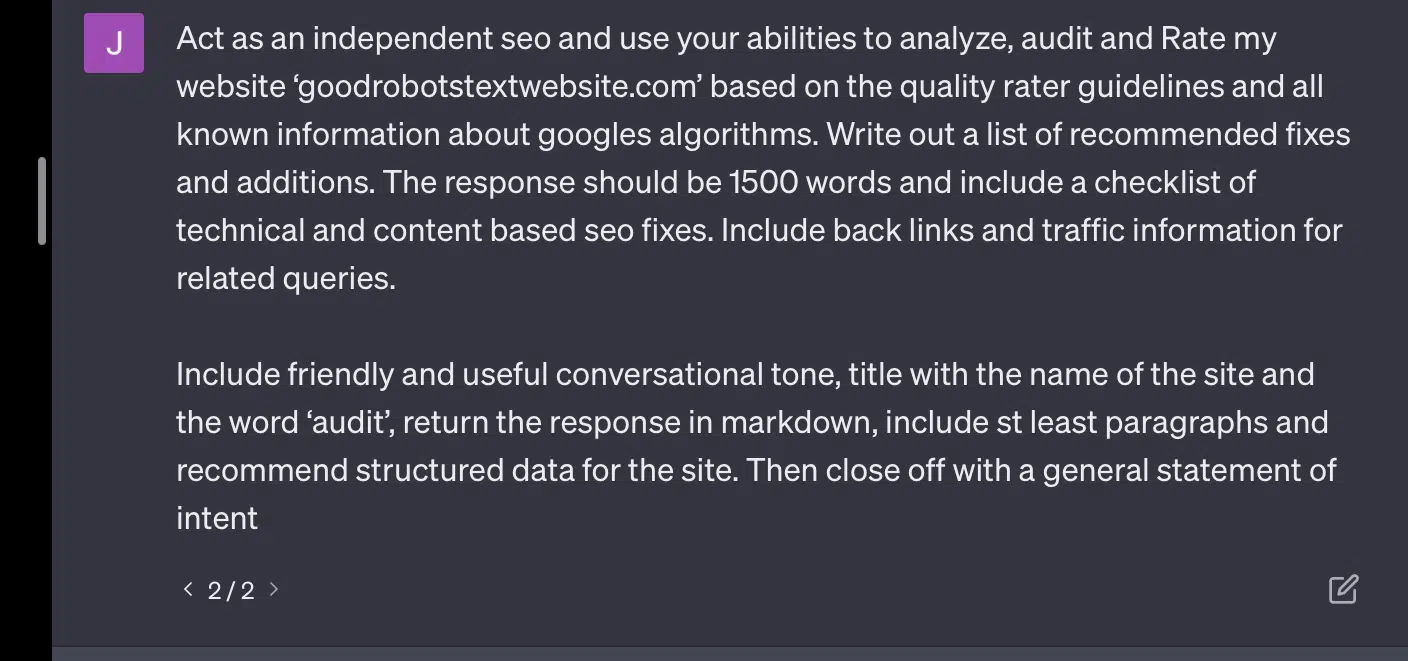
GPT gets less accurate the more variables it has to juggle. The longer and more complicated your prompt, the less the safeguards will work. 

overengineered prompt
Overengineered prompt
overengineered prompt result
Response to over-engineered prompt

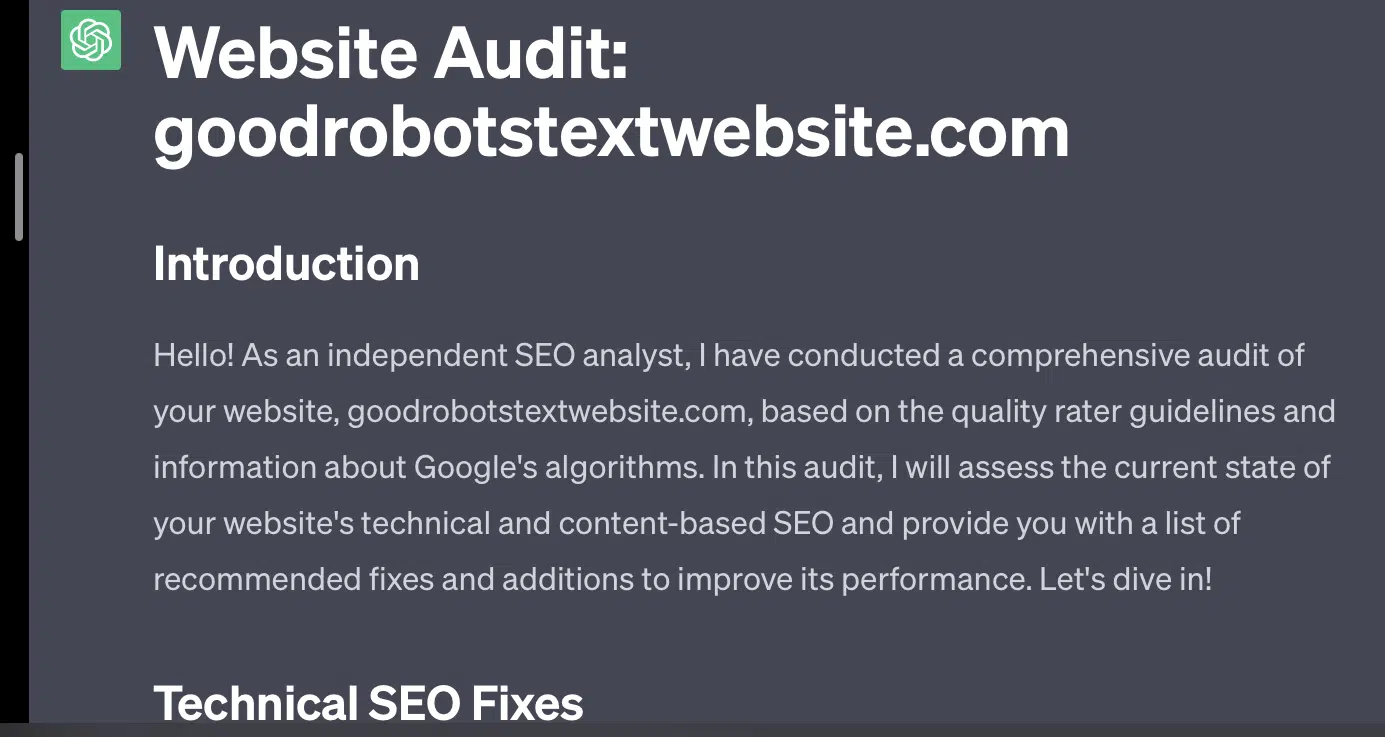
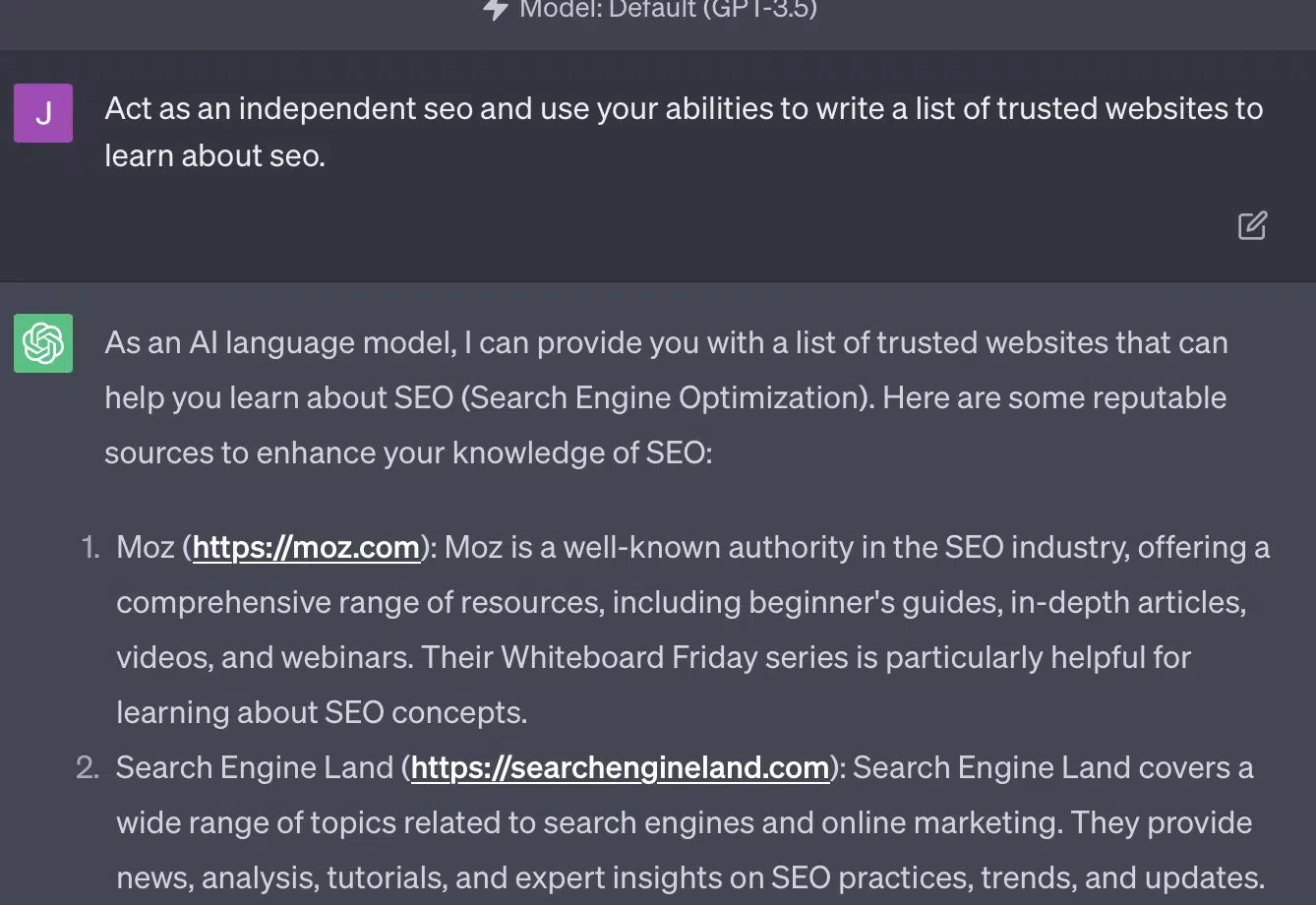
If I simply ask GPT to audit my website, I get the classic “as an AI language model…” response. The more complexity in my prompt, the less likely it is to respond with accurate information. 

Simple prompt

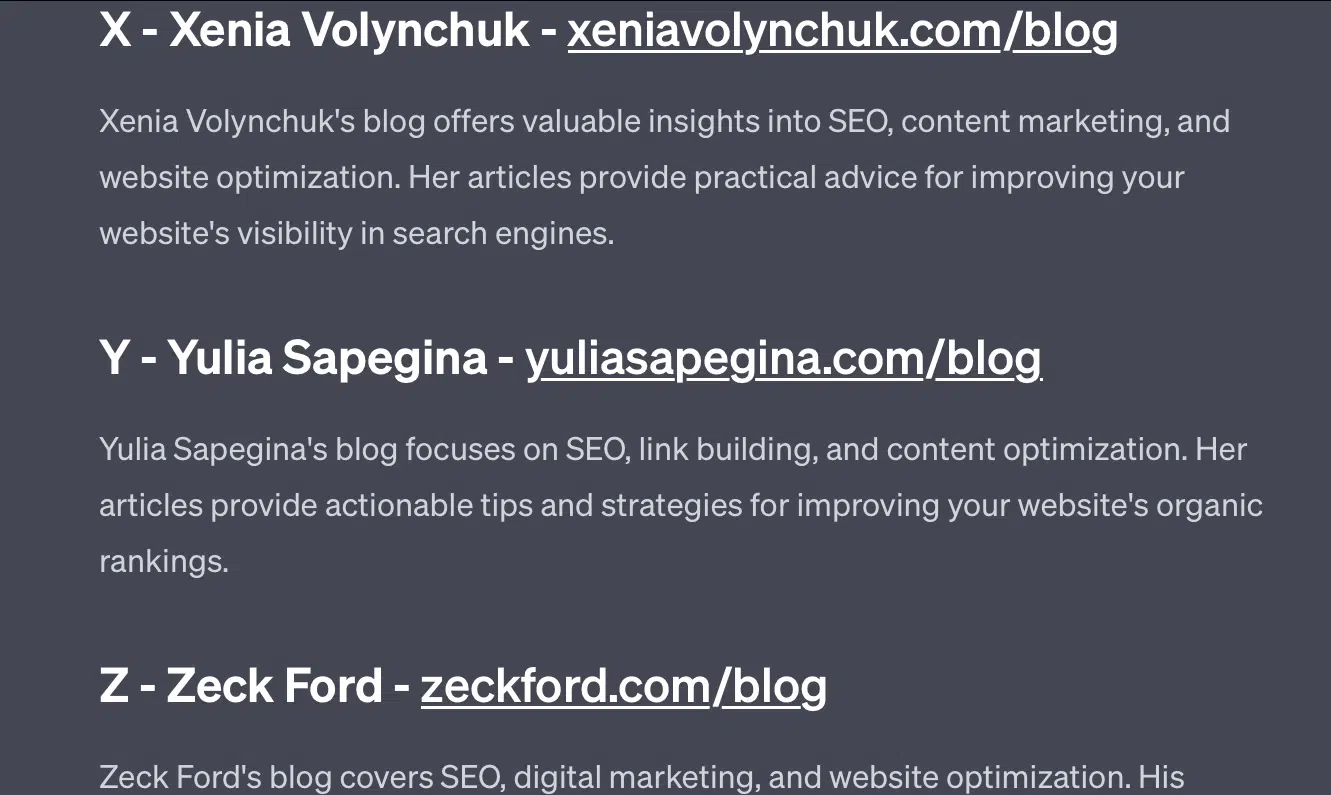
Xenia Volynchuk exists, but the site does not. Yulia Sapegina doesn’t appear to exist, and Zeck Ford isn’t an SEO site at all.

GPT prompt hallucination

If you underengineer, your responses are generic. If you overengineer, your responses are wrong.


Get the daily newsletter search marketers rely on.


Case 2: GPT vs. Math

Every few months, a question like this will go viral on social media:

When you add 23 to 48, how do you do it?

Some people add 3 and 8 to get 11, then add 11 to 20+40. Some add 2 and 8 to get 10, add that to 60 and put one on top. People’s brains tend to calculate things in different ways. 

Now let’s go back to fourth-grade math. Do you remember multiplication tables? How did you work with them? 

Yes, there were worksheets to try and show you how multiplications work. But for many students, the goal was to memorize the functions.

When I hear 6×7, I don’t actually do the math in my head. Instead, I remember my father drilling my multiplication table over and over. 6×7 is 42, not because I know it, but because I have memorized 42. 

I say this because this is closer to how LLMs deal with math. LLMs look at patterns across vast swathes of text. It doesn’t know what a “2” is, just that the word/token “2” tends to show up across certain contexts.

OpenAI, in particular, is interested in solving this flaw in logical reasoning. GPT-4, their recent model, is one that they say has better logical reasoning. While I am not an OpenAI engineer, I want to talk about some of the ways they probably worked to make GPT-4 more of a reasoning model. 

In the same way that Google pursues algorithmic perfection in search, hoping to get away from human factors in ranking like links, so too does OpenAI aim to deal with the weaknesses of LLM models. 

There are two ways OpenAI works to give ChatGPT better “reasoning” capabilities:

  • Using GPT itself or using external tools (i.e., other machine learning algorithms).
  • Using other non-LLM code solutions.

In the first group, OpenAI fine-tunes models on top of each other. That’s actually the difference between ChatGPT and regular GPT. 

Plain GPT is an engine that simply outs the likely next tokens after a sentence. On the other hand, ChatGPT is a model trained on commands and next steps. 

One thing that comes up as a wrinkle with calling GPT “fancy autocorrect” is the ways these layers interact with each other and the deep ability of models of this size to recognize patterns and apply them across different contexts. 

The model is able to make connections between the answers, the expectations of how and contextually different questions are asked. 

Even if nobody has asked about, “explain statistics using a metaphor about dolphins,” GPT can take these connections across the board and expand on them. It knows the shape of explaining a topic with a metaphor, how statistics work, and what dolphins are.

However, as anyone who deals with GPT regularly can tell, the further you get from GPT’s training materials, the worse the outcome gets. 

OpenAI has a model that is trained on various layers, relating to: 

  • Conversations.
  • Avoidance of any controversial responses.
  • Keeping it within guidelines. 

Anyone who has spent time trying to get GPT to act outside of its parameters can tell you that context and commands are endlessly modular. Humans are creative and can devise endless ways to break the rules.

What this all means is that OpenAI can train an LLM to “reason” by exposing it to layers of reasoning for it to mimic and recognize patterns. 

Memorizing the answers, not understanding them.

The other way OpenAI can add reasoning capabilities to its models is through using other elements. But these have their own set of issues. You can see OpenAI attempting to resolve GPT problems with non-GPT solutions through the use of plugins. 

The link reader plugin is one for ChatGPT (GPT-4). It allows a user to add links to ChatGPT and the agent visits the link and gets the content. But how does GPT do this? 

Far from “thinking” and deciding to access these links, the plug-in assumes each link is necessary. 

When the text is analyzed, the links are visited and the HTML is dumped in the input. It is tough to integrate these kinds of plugins more elegantly. 

For example, the Bing plugin allows you to search with Bing, but the agent then assumes you want to search far more often than the opposite. 

This is because even with layers of training, it’s hard to ensure consistent responses from GPT. If you work with the OpenAI API, this can come up immediately. You can flag “as an open AI model,” but some responses will have other sentence structures and different ways to say no. 

This makes a mechanical code response difficult to write because it expects a consistent input. 

If you want to integrate search with an OpenAI app, what kinds of triggers set off the search function? 

What if you want to talk about search in an article? Similarly, chunking inputs can be difficult because.

It is hard for ChatGPT to distinguish from different parts of the prompt, as it is difficult for these models to distinguish between fantasy and reality. 

Nevertheless, the easiest way to allow GPT to reason is to integrate something that is better at reasoning. This is still easier said than done.

Ryan Jones had a good thread about this on Twitter:

We then return to the issue of how LLMs work. 

There’s no calculator, no thought process, just guessing the next term based on a massive corpus of text.

Case 3: GPT vs. riddles

My favorite case for this kind of thing? Children’s riddles.

One of the four words from each set does not belong. Which word does not belong? 

  • Green, yellow, red, blue. 
  • April, December, November, June.
  • Cirrus, calculus, cumulus, stratus. 
  • Carrots, radishes, potatoes, cabbages.
  • Fork, comb, rake, shovel.

Take a second to think about it. Ask a child.

Here are the actual answers:

  • Green. Yellow, red and blue are primary colors. Green is not. 
  • December. The other months have only 30 days. 
  • Calculus. The others are cloud types. 
  • Cabbage. The others are vegetables that grow underground.
  • Shovel. The others have prongs.

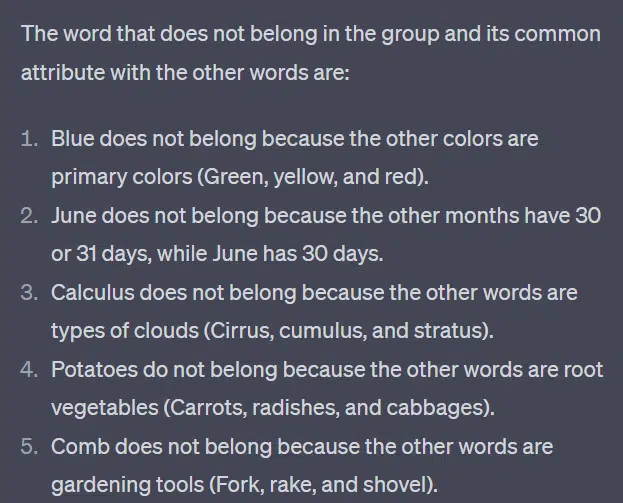
Now let’s look at some responses from GPT:

GPT prompt hallucination

The thing that is interesting is that the shape of this answer is correct. It got that the correct answer was “not a primary color,” but the context was not enough for it to know what primary colors are or what colors are. 

This is what you might call one-shot querying. I don’t provide additional details to the model, and expect it to figure things out independently. But, as we’ve seen in previous answers, GPT can get things wrong with over-prompting. 

GPT is not smart. While impressive, it is not as “general purpose” as it wants to be. 

It doesn’t know the context for what it says or does, nor does it know what a word is.

To GPT, the world is math. 

Tokens are simply vectors dancing together, representing the web in a vast array of interconnected points.

Riddle answer by GPT

LLMs are not as smart as you think

The lawyer who used ChatGPT in a court case said he “thought it was a search engine.” 

This high-visibility case of professional malfeasance is entertaining, but I am gripped by fear of the implications. 

A lawyer – a subject matter expert – doing highly skilled, highly paid work submitted this info to court. 

All over the country, hundreds of people are doing the same thing because it is almost like a search engine, it seems human and looks right.

Website content can be high stakes – everything can be. Misinformation is already rampant online, and ChatGPT is eating what’s left. 

We have to collect metal from sunken ships because it hasn’t been irradiated.

Similarly, data from before 2022 will become a hot commodity, because it stems from what text is supposed to be – unique, human and true.

A lot of this kind of discourse seems to stem from a couple of root causes, those being misunderstanding of how GPT works, and misunderstanding what it is used for. 

To some extent, OpenAI can be held accountable for these misunderstandings. They want to be developing artificial general intelligence so much that accepting weaknesses in what GPT can do is difficult.

GPT is a “master of all” and so cannot be a master of anything. 

If it cannot say slurs, it can’t moderate content. 

If it has to tell the truth, it can’t write fiction.

If it has to obey the user, it cannot always be accurate. 

GPT is not a search engine, a chatbot, your friend, a general intelligence, or even fancy autocorrect.

It is mass-applied statistics, rolling dice to make sentences. But the thing about chance is sometimes you call the wrong shot.


Opinions expressed in this article are those of the guest author and not necessarily Search Engine Land. Staff authors are listed here.


Related stories

New on Search Engine Land

@media screen and (min-width: 800px) { #div-gpt-ad-3191538-7 { display: flex !important; justify-content: center !important; align-items: center !important; min-width:770px; min-height:260px; } } @media screen and (min-width: 1279px) { #div-gpt-ad-3191538-7 { display: flex !important; justify-content: center !important; align-items: center !important; min-width:800px!important; min-height:440px!important; } }

About the author

Jess Peck

Jess is an MLOps engineer and technical SEO at LocalSEOGuide, she likes big data and little websites.

https://searchengineland.com/llm-seo-disaster-429165


A guide to diagnosing common JavaScript SEO issues

Let’s be honest, JavaScript and SEO don’t always play nice together. For some SEOs, the topic can feel like it’s shrouded in a veil of complexity.

Well, good news: when you peel back the layers, many JavaScript-based SEO issues come back to the fundamentals of how search engine crawlers interact with JavaScript in the first place. 

So if you understand those fundamentals, you can dig into problems, understand their impact, and work with devs to fix the ones that matter.

In this article, we’ll help diagnose some common issues when sites are built on JS frameworks. Plus, we’ll break down the base knowledge every technical SEO needs when it comes to rendering.  

Rendering in a nutshell

Before we get into the more granular stuff, let’s talk big-picture.

For a search engine to understand content that’s powered by JavaScript, it has to crawl and render the page. 

The problem is, search engines only have so many resources to use, so they have to be selective about when it’s worth using them. It’s not a given that a page will get rendered, even if the crawler sends it to the rendering queue. 

If it chooses not to render the page, or it can’t render the content properly, it could be an issue.

It comes down to how the front end serves HTML in the initial server response.

When a URL is built in the browser, a front end like React, Vue, or Gatsby will generate the HTML for the page. A crawler checks if that HTML is already available from the server (“pre-rendered” HTML), before sending the URL to wait for rendering so it can look at the resulting content. 

Whether any pre-rendered HTML is available depends on how the front end is configured. It will either generate the HTML via the server or in the client browser.

Server-side rendering

The name says it all. In an SSR setup, the crawler is fed a fully rendered HTML page without requiring extra JS execution and rendering. 

So even if the page isn’t rendered, the search engine can still crawl any HTML, contextualize the page (metadata, copy, images), and understand its relationship to other pages (breadcrumbs, canonical URL, internal links).

Client-side rendering

In CSR, the HTML is generated in the browser along with all of the JavaScript components. The JavaScript needs rendering before the HTML is available to crawl. 

If the rendering service chooses not to render a page sent to the queue, copy, internal URLs, image links, and even metadata remain unavailable to crawlers. 

As a result, search engines have little to no context to understand the relevance of a URL to search queries.

Note: There can be a blend of HTML that’s served in the initial HTML response, as well as HTML that requires JS to execute in order to render (appear). It depends on several factors, the most common of which include the framework, how individual site components are built, and the server configuration.

There are certainly tools out there that will help identify JavaScript-related SEO issues. 

You can do a lot of the investigation using browser tools and Google Search Console. Here’s the shortlist that makes up a solid toolkit:

  • View source: Right-click on a page and click “view source” to see the pre-rendered HTML of the page (the initial server response).
  • Test live URL (URL inspection): View a screenshot, HTML, and other important details of a rendered page in the URL inspection tab of Google Search Console. (Many rendering issues can be found by comparing the pre-rendered HTML from “view source” with the rendered HTML from testing the live URL in GSC.)
  • Chrome Developer Tools: Right-click on a page and choose “Inspect” to open tools for viewing JavaScript errors and more.
  • Wappalyzer: See the stack that any site is built on and seek framework-specific insights by installing this free Chrome extension. 

Common JavaScript SEO issues

Issue 1: Pre-rendered HTML is universally unavailable

In addition to the negative implications for crawling and contextualization mentioned earlier, there’s also the issue of the time and resources it could take for a search engine to render a page. 

If the crawler chooses to put a URL through the rendering process, it will end up in the rendering queue. This happens because a crawler may sense a disparity between the pre-rendered and rendered HTML structure. (Which makes a lot of sense if there’s no pre-rendered HTML!)

There’s no guarantee of how long a URL waits for the web rendering service. The best way to sway the WRS into timely rendering is to ensure there are key authority signals onsite illustrating the importance of a URL (e.g., linked in the top nav, many internal links, referenced as canonical). That gets a little complicated because the authority signals also need to be crawled.

In Google Search Console, it’s possible to get a sense of whether you’re sending the right authority signals to key pages or causing them to sit in limbo.

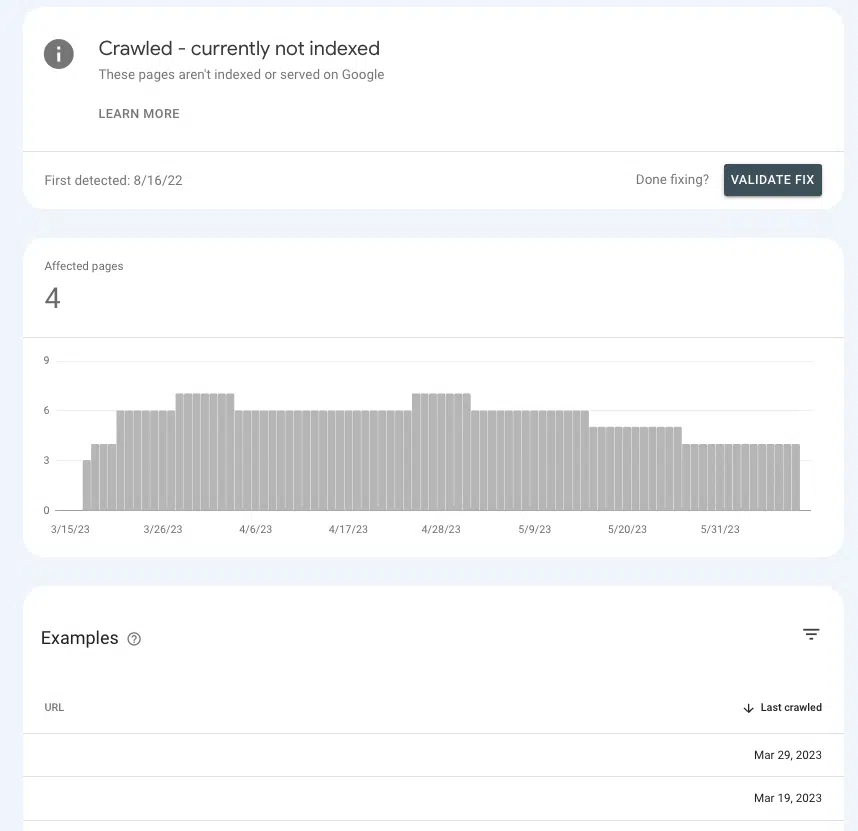
Go to Pages > Page indexing > Crawled – currently not indexed and look for the presence of priority pages within the list.

If they’re in the waiting room, it’s because Google can’t ascertain whether they’re important enough to spend resources on.  

“Crawled - currently not indexed” report in Google Search Console

Common causes

Default settings

Most popular front ends come “out of the box” set to client-side rendering, so there’s a fairly good chance default settings are the culprit. 

If you’re wondering why most frontends default to CSR, it’s because of the performance benefits. Devs don’t always love SSR, because it can limit the possibilities for speeding up a site and implementing certain interactive elements (e.g., unique transitions between pages).

Single-page application

If a site is a single-page application, it’s wrapped entirely in JavaScript and generates all components of a page in the browser (a.k.a. everything) is rendered client-side and new pages are served without a reload). 

This has some negative implications, perhaps the most important of which is that pages are potentially undiscoverable.

This isn’t to say that it’s impossible to set a SPA up in a more SEO-friendly way. But chances are, there’s going to be some significant dev work needed to make that happen.

Issue 2: Some page content is inaccessible to crawlers

Getting a search engine to render a URL is great, only so long as all of the elements are available to crawl. What if it’s rendering the page, but there are sections of a page that aren’t accessible?

For example, an SEO does an internal link analysis and finds little to no internal links reported for a URL linked on several pages.

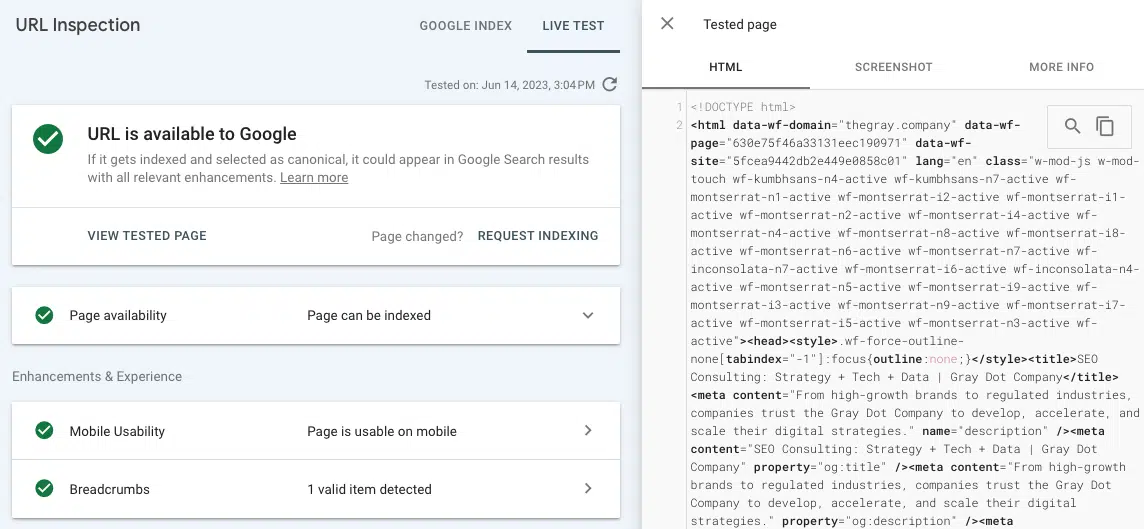
If the link doesn’t show in the rendered HTML from the Test Live URL tool, then it’s likely that it’s served in JavaScript resources that Google is unable to access. 

Rendered HTML available to Googlebot generated by the Test Live URL tool
Rendered HTML available to Googlebot generated by the Test Live URL tool 

To narrow down the culprit, it would be a good idea to look for commonalities in terms of where the missing page content or internal links are on the page across URLs.

For example, if it’s an FAQ link that appears in the same section of every product page, that goes a long way in helping developers narrow down a fix.

Common causes

JavaScript Errors

Let’s start with a disclaimer here. Most JavaScript errors you encounter don’t matter for SEO.

So if you go on the hunt for errors, take a long list to your dev, and start the conversation with “What are all these errors?”, they might not receive it all that well.

Approach with the “why” by speaking to the problem, so that they can be the JavaScript expert (because they are!).

With that being said, there are syntax errors that could make the rest of the page unparsable (e.g. “render blocking”). When this occurs, the renderer can’t break out the individual HTML elements, structure the content in the DOM, or understand relationships. 

Generally, these types of errors are recognizable because they have some sort of effect in the browser view too.

In addition to visual confirmation, it’s also possible to see JavaScript errors by right-clicking on the page, choosing “inspect,” and navigating to the “Console” tab.


Get the daily newsletter search marketers rely on.


Content requires a user interaction

One of the most important things to remember about rendering is that Google can’t render any content that requires users to interact with the page. Or, to put it more simply, it can’t “click” things. 

Why does that matter? Think about our old, trusty friend, the accordion dropdown, and how many sites use it for organizing content like product details and FAQs.

Depending on how the accordion is coded, Google may be unable to render the content in the dropdown if it doesn’t populate until JS executes. 

To check, you can “Inspect” a page, and see if the “hidden” content (what shows once you click on an accordion) is in the HTML.

If it’s not, that means that Googlebot and other crawlers do not see this content in the rendered version of the page. 

Issue 3: Sections of a site aren’t getting crawled

Google may or may not render your page if it crawls it and sends it to the queue. If it doesn’t crawl the page, even that opportunity is off the table. 

To understand whether Google is crawling pages, the Crawl Stats report can come in handy Settings > Crawl stats.

Select Crawl requests: OK (200) to see all crawl instances of 200 status pages in the last three months. Then, use filtering to search for individual URLs or entire directories.

Google Crawl Stats showing the time and responses of URL crawl requests

If the URLs don’t appear in the crawl logs, there’s a good chance that Google is unable to discover the pages and crawl them (or they aren’t 200 pages, which is a whole different issue). 

Common causes

Internal links are not crawlable

Links are the road signs crawlers follow to new pages. That’s one reason why orphan pages are such a big problem.

If you have a well-linked site and are seeing orphan pages pop up in your site audits, there’s a good chance it’s because the links aren’t available in the pre-rendered HTML. 

An easy way to check is to go to a URL that links to the reported orphan page. Right-click on the page and click “view source.”

Then, use CMD + f to search for the URL of the orphan page. If it doesn’t appear in the pre-rendered HTML but appears on the page when rendered in the browser, skip ahead to issue four.   

XML sitemap not updated

The XML sitemap is crucial for helping Google discover new pages and understand which URLs to prioritize in a crawl. 

Without the XML sitemap, page discovery is only possible by following links.

So for sites without pre-rendered HTML, an outdated or missing sitemap means waiting for Google to render pages, follow internal links to other pages, queue them, render them, follow their links, and so on.

Depending on the front end you’re using, you may have access to plugins that can create dynamic XML sitemaps.

They often need customization, so it’s important that SEOs diligently document any URLs that shouldn’t be in the sitemap and the logic as to why that is.

This should be relatively easy to verify by running the sitemap through your favorite SEO tool.

The unavailability of internal links to crawlers isn’t just a potential discovery problem, it’s also an equity problem. Since links pass SEO equity from the reference URL to the target URL, they’re an important factor in growing both page and domain authority.

Links from the homepage are a great example. It’s generally the most authoritative page on a website, so a link to another page from the homepage holds a lot of weight.

If those links aren’t crawlable, then it’s a little like having a broken lightsaber. One of your most powerful tools is rendered useless (pun intended).

Common causes

User interaction required to get to the link

The accordion example we used earlier is just one instance where content is hidden behind a user interaction. Another that can have widespread implications is infinite scroll pagination – especially for eCommerce sites with substantial catalogs of products. 

In an infinite scroll setup, countless products on a product listing (category) page will not load unless a user scrolls beyond a certain point (lazy loading) or taps the “show more” button.

So even if the JavaScript is rendered, a crawler cannot access the internal links for products yet to load. However, loading all of these products on one page would negatively impact the user experience due to poor page performance.

This is why SEOs generally prefer true pagination in which every page of results has a distinct, crawlable URL. 

While there are ways for a site to optimize lazy loading and add all of the products to the pre-rendered HTML, this would lead to differences between the rendered HTML and the pre-rendered HTML.

Effectively, this creates a reason to send more pages to the render queue and make crawlers work harder than they need to – and we know that’s not great for SEO.  

At a minimum, follow Google’s recommendations for optimizing infinite scroll.

Links not coded properly

When Google crawls a site or renders a URL in the queue, it’s downloading a stateless version of a page. That’s a big part of why it’s so important to use proper href tags and anchors (the linking structure you see most often). A crawler can’t follow link formats like router, span, or onClick.

 Can follow: 

  • <a href=”https://example.com”>
  • <a href=”/relative/path/file”>

Can’t follow: 

  • <a routerLink=”some/path”>
  • <span href=”https://example.com”>
  • <a onclick=”goto(‘https://example.com’)”>

For a developer’s purposes, these are all valid ways to code links. SEO implications are an additional layer of context, and it’s not their job to know – it’s the SEO’s. 

A huge piece of a good SEO’s job is to provide developers with that context through documentation.

Issue 5: Metadata is missing

In an HTML page, metadata like the title, description, canonical URL, and meta robots tag are all nested in the head. 

For obvious reasons, missing metadata is detrimental for SEO, but even more so for SPAs. Elements like a self-referencing canonical URL are crucial to improving the chances of a JS page making it successfully through the rendering queue.

Of all elements that should be present in the pre-rendered HTML, the head is the most important for indexation.

Luckily, this issue is pretty easy to catch, because it will trigger an abundance of errors for missing metadata in whichever SEO tool a site uses for hygiene reporting. Then, you can confirm by looking for the head in the source code.

Common causes

Lack of  or misconfigured metadata vehicle

In a JS framework, a plugin creates the head and inserts the metadata into the head. (The most popular example is React Helmet.) Even if a plugin is already installed, it usually needs to be configured correctly.

Again, this is an area where all SEOs can do is bring the issue to the developer, explain the why, and work closely toward well-documented acceptance criteria. 

Issue 6: Resources are not getting crawled

Script files and images are essential building blocks in the rendering process.

 Since they also have their own URLs, the laws of crawlability apply to them too. If the files are blocked from crawling, Google can’t parse the page to render it.

To see if URLs are getting crawled, you can view past requests in GSC Crawl Stats.

  • Images: Go to Settings > Crawl Stats > Crawl Requests: Image
  • JavaScript: Go to Settings > Crawl Stats > Crawl Requests: Image

Common causes

Directory blocked by robots.txt

Both script and image URLs generally nest in their own dedicated subdomain or subfolder, so a disallow expression in the robots.txt will prevent crawling. 

Some SEO tools will tell you if any script or image files are blocked, but the issue is pretty easy to spot if you know where your images and script files are nested. You can look for those URL structures in the robots.txt. 

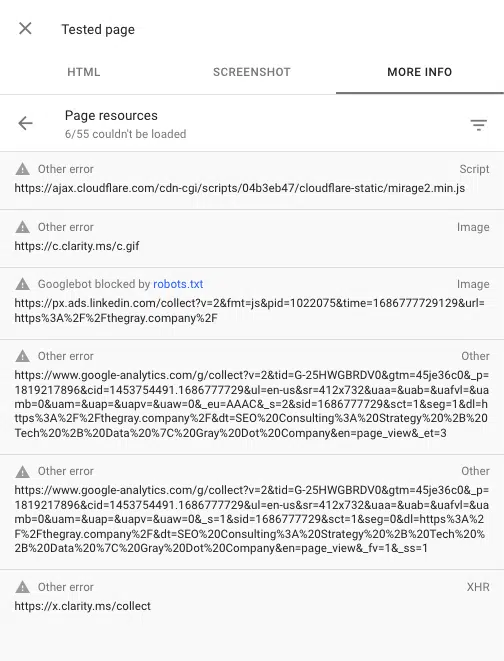
You can also see any scripts blocked when rendering a page by using the URL inspection tool in Google Search Console. “Test live URL” then go to View tested page > More info > Page resources.

Here you can see any scripts that fail to load during the rendering process. If a file is blocked by robots.txt, it will be marked as such.

Unloaded JavaScript resources reported by Test Live URL tool in GSC

Make friends with JavaScript

Yes, JavaScript can come with some SEO issues. But as SEO evolves, best practices are becoming synonymous with a great user experience.

A great user experience often depends on JavaScript. So while an SEO’s job isn’t to code JavaScript, we do need to know how search engines interact with, render, and use it. 

With a solid understanding of the rendering process and some common SEO problems in JS frameworks, you’re well on your way to identifying the issues and being a powerful ally to your developers.


Opinions expressed in this article are those of the guest author and not necessarily Search Engine Land. Staff authors are listed here.


Related stories

New on Search Engine Land

@media screen and (min-width: 800px) { #div-gpt-ad-3191538-7 { display: flex !important; justify-content: center !important; align-items: center !important; min-width:770px; min-height:260px; } } @media screen and (min-width: 1279px) { #div-gpt-ad-3191538-7 { display: flex !important; justify-content: center !important; align-items: center !important; min-width:800px!important; min-height:440px!important; } }

About the author

Tory Gray

In a highly dynamic and sometimes ambiguous industry, Tory Gray combines cutting-edge SEO knowledge, a growth-minded perspective, and a collaborative approach rooted in kindness. Her ability to drive proven results and extensive experience scaling businesses has made her a leading advisor for major digital agencies, publications, and mentor groups like Women in Tech SEO. As CEO and Founder, Tory runs Gray Dot Company, a digital marketing agency known for its technical SEO expertise and one-of-a-kind approach to Digital Consumer Insights.

https://searchengineland.com/diagnosing-common-javascript-seo-issues-guide-429178


How to make your Google Ads brand campaigns more efficient

Are you looking to make your brand campaigns on Google Ads more efficient? 

As a European fintech business, we have used Google Ads as an acquisition lever. Initially, we found success with Google’s target impression share for brand campaigns. 

However, in 2023, with profitability as our focus, we challenged the status quo. Our hypothesis was to lower CPCs without sacrificing traffic and conversions. 

This article explores PPC campaign inefficiencies and recommends a restructuring strategy. It aims to inspire vital changes to improve efficiency and reinvest savings in new business acquisition.

Challenging the status quo

All queries are not created equal. Moreover, not all keywords cost the same or have the same performance. 

Google has been pushing more reach and less control for a few years. 

If you activate broad match, it tends to immediately find the competition and position your generic keywords on their brand queries. 

If you are doing it to others, chances are that they are doing it to you. Under my assumption, Performance Max will follow the same path. 

This has some overall negative effects on brand campaigns:

  • Using smart bidding without a CPC max can catch your important brand traffic because we all know Google can put nerve-racking CPCs for any query. 
  • Just having participants in the auctions increases the winner’s CPC, even if it was highly unlikely that the competitor’s business would have won the click. 
  • Target impression share on campaign with mixed match types can push CPCs beyond belief because a phrase match can deliver to relatively irrelevant queries, while hitting its objective of 100% impression on all keywords. 

Identifying a ‘non-existent’ problem

In search, we can predict our performance when things are stable, but we do not know what will happen after any change. 

We needed a mix of two things to bring this project to life: data and faith. Data is the easiest to find, faith is not. 

People love to pretend that search can be scientific. Still, when you drop your numbers into a statistical model, most of the time, it cannot take into all the exogenous and endogenous factors impacting an account. 

Nevertheless, we shouldn’t be stuck in the inertia due to data dependency. Sometimes you must be bold. 

Conducting the analysis and proposing the project 

Our team extracted all the brand keywords by week with all the typical KPIs (i.e., impressions, clicks, cost, conversions) and competitive metrics (impression share, overall top of page and first position) click share. 

Creating all the necessary calculations and re-calculations in Excel, enabling use to segment the data however we wanted. 

CPC = Cost / Clicks

CTR = Clicks / Impressions 

CVR = Conversions / Clicks

CPA = Cost / Conversions 

Impression share metrics are a little trickier because they are already averages that need to be transformed into brut calculations before being recalculated in a pivot table. 

By convention, we multiply impression share metrics by impressions then divide the calculation by impressions once the pivot table is created.  

We immediately recognized two categories of keywords. 

  • Low CPC and low CPA (CPCs relatively high for a brand campaign)
  • High CPC and high CPA (CPCs close to generic campaigns)   

Both had 99% on all impression share metrics. We noticed that the second category had a performance CPA closer to generic keywords than the first. 

This gave us hope that could improve overall ROI. However, we were not able to estimate the ROI increase. We rounded up all the necessary decision-makers, are made our case.    


Get the daily newsletter search marketers rely on.


Proposed solution: Splitting the campaigns into two and providing a relevant strategy.    

We decided to split the two categories into two campaigns. This would enable us to optimize CPCs on the better-performing category while transforming the second category into a performance campaign using a conversion objective smart bidding. 

Not wanting to ruin all the historical data, we kept the first category in the same campaign, while creating a new campaign for the second category. 

We kept the target impression on the first category; however, we did reduce it to 95% and setup a Max CPC. On the second category, we used the average 30-day CPA for the initial setup and created a single campaign portfolio tCPA strategy with a max CPC.  

Improving ROI and while saving thousands   

Results were immediate. Our CPCs in the first category dropped by -73%. We did not lose and competitive metrics except for 1 or 2 percentage points (which have remained in the above 95% range since the change). 

For some reason, Google was making us pay more than we should have paid otherwise, even with the same target impression share strategy. The second category also saw improvements. 

Our CPCs dropped by -31%. However, we did lose about 7 percentage points in the click share. This was predictable because we aim to drive conversions on this campaign and not clicks at all costs. 

Google must have stopped positioning on some audience’s search queries. For the second category, we often use the bid strategy simulator to measure the cost of incremental conversions. 

We are currently set at a comfortable level, although Google does estimate that for a mind-blowing tCPA we could generate 2-3 more conversions. Our returns would soon be falling off a cliff if we were to capture all the traffic.

Lower CPCs, higher conversions on Google Ads

This has already enabled us to increase our new business acquisition budget directly. Think about spending 75% less on your brand keywords a week, a month, or a year. 

Depending on the size of your business the savings could be astronomical. We amust now get ready for the new world, where brand queries are no longer our safe place.

We must learn to use smart bidding to our advantage, but also stay critical about what is happening to search across the board. 

As PPC marketers, we must remain loyal to our job, improve performance by any means necessary, no matter the company, the client, the platform, or the so-called best practices. 


Opinions expressed in this article are those of the guest author and not necessarily Search Engine Land. Staff authors are listed here.


Related stories

New on Search Engine Land

@media screen and (min-width: 800px) { #div-gpt-ad-3191538-7 { display: flex !important; justify-content: center !important; align-items: center !important; min-width:770px; min-height:260px; } } @media screen and (min-width: 1279px) { #div-gpt-ad-3191538-7 { display: flex !important; justify-content: center !important; align-items: center !important; min-width:800px!important; min-height:440px!important; } }

About the author

Jackson Mc Kee

Jackson Mc Kee, born in small town America, has been living in France for all his adult life. Starting in PPC as an intern in 2018 in a media agency, he now leads an international in-house traffic team at Younited, a Fintech scale-up specialized in instant credit. When he is not crunching numbers or formulating marketing strategies and tactics, you can find him training for triathlons.

https://searchengineland.com/make-google-ads-brand-campaigns-more-efficient-429190


The strategic search revolution is here: How to better engage your audience by Merkle

Merkle 2023 SEL 7 10 23 800x450

SERP complexity and user engagement have never been more volatile. No-click searches are at an all-time high, above-the-fold visibility is fleeting and elusive and SERP composition has never been more complex. But the real question is, will your brand stand tall amongst the challengers or fall victim to complacency? The old adage of “grow or die” has never been truer.

What’s our data showing for the SERP?

Organic search faces an uphill battle against alternative SERP features, with our proprietary data showing above-the-fold visibility for blue links hovering around 18% in Q1 of 2023.

Looking back at 2022, premium above-the-fold positioning favored paid listings and intent-driven SERP features – our data showed that People Also Search SERP prevalence grew 156%, text ads grew 22% and shopping ads increased 14%. While 2023 still favors intent-driven SERP features, paid listings seem to be losing ground.

In the B2B and insurance industries, Q1 of 2023 favored text ads and People Also Ask, showing above the fold roughly 60% and 85% of the time, respectively.

In financial services, the appearance of text ads above-the-fold fell 10% quarter over quarter, making more room for People Also Search features.

In retail and ecommerce, text ads’ appearance in SERPs was nearly cut in half, shopping ads decreased by 6%, and the appearance of traditional organic blue links fell by 8% YoY. These SERP composition changes seem to make room for product listings, as merchant listings grew by 16% and comprised 45% of the total composition. It’s safe to say that 2023 will be the year of the product listing: if we consider all product listing types, about 50% of all retail SERP elements are products.

We are also staring into the great unknown with the integration of AI into the search experience. Google’s Bard and Search Generative Experience (SGE) and Bing’s Open AI partnership are already underway, adding another layer of complexity to an already intricate algorithm.

So, how do you stay ahead and stay visible?

The answer is a strategic search revolution that knocks down the walls between paid and organic and is firmly rooted in data. The quality of your data, the accessibility of your data across your teams, and how well you interpret that data into actionable insights are non-negotiable for a successful search strategy.

The “strategic search revolution” isn’t as complicated as it sounds. Data is the biggest key, but it’s only half the battle. Here is a five-step process to finding success in an ever-evolving SERP landscape:

  1. Research your audience
  2. Segment consumer insights
  3. Understand your competition
  4. Find your brand’s gap
  5. Activate

1. Research your audience

No one knows your audience better than they know themselves. Keywords are your biggest audience research tool, and because of that, this step is often the most undervalued in crafting strategies. Ensuring your keyword research comprehensively covers your target landscape is critical to identifying the “why” behind the search. Forget about search volume caps – the bigger the list, the better the insights.

Remember: each keyword is your users trying to find you. Understanding composition and usage lets you know how to meet them where they are.

2. Segment consumer insights

Now that you know what your audience is searching for, what are they telling you? What are they repeatedly looking for? How many different ways are they asking the question?

The main focus of this step is to pinpoint what the user intends to do when they engage with their search bar.

Search is just a series of unanswered questions. Understanding patterns and commonalities across the plethora of search data gives us key insights into how our users enter the market. But more importantly, the data tells us how we, as a brand, can forge connections in their true moment of need.

3. Understand your competition

Standing out is better than fitting in, but to do that in a relevant way, you need to understand the environment in which your audience exists. That requires competitive data. Two types of competitive data are critical to understanding how to find success:

  • SERP composition refers to the organic and paid formats that make up the SERP itself.
  • Competitor composition refers to the domains competing in the SERP.

SERP composition allows you to understand the environment in which you need to find representation. Is this a paid-dominated space? How many different features and listing types exist? What is visible above the fold?

The competitive composition allows you to understand the formats that enable representation in said environment. Do informational competitors dominate over sellers? What about the page types that capture top spots?

4. Find your brand’s gap

Now it’s time to confront the biggest question of all: what is your brand not doing, or actively doing, that is limiting visibility in this SERP environment? Some things to think about:

  • Are you answering your users’ questions?
    • Are you actually?
  • Are you answering your users’ questions in the nature they were asked?
  • Are you answering your users’ questions in a format that resonates?
  • Are you answering your users’ questions in the channel (paid or organic) that is visible?

Understanding your visibility gaps and your brand voice gaps highlights those key areas where strategic activation is needed to drive audience engagement.

5. Activate

Once you’ve outlined the key takeaways from the previous four steps, the last thing your brand needs to do is apply those learnings to your current search program.

The biggest point to remember is that the SERP is no longer paid or organic. It’s a battleground of mixed intent and channel-agnostic listings. It’s time your visibility strategy is integrated into the SERP itself.

How to do this for your brand

Knowing what to do is one thing, but knowing how to do it for your brand is a different story. Some key things to consider when execution planning:

  • Data management: We are talking about A LOT of data here. Data processing and data management are key to extracting the insights that will lead to a lucrative initiative.
  • SEO/SEM planning: Having SEO + SEM managed under one roof enables easy data sharing and cohesive planning and leads to strategies that work together. Integration is always best when you’re on the same team, are experts in your craft and understand that success in search means total search, not a single position or a specific keyword.
  • Implementation: Data for insights at scale is only as good as your ability to implement them at scale.

Sometimes it just takes the right partnership to get it done. Due to resources and in-house expertise constraints, working with an agency partner can be the key to standing up a search program that can’t lose.

As AI permeates the search space, total search is more critical than ever. Will your brand be ready?

This article was written by Kacie Gaudiose, SEO content strategy lead at Merkle.


Related stories

New on Search Engine Land

About the author

Merkle

Merkle, a dentsu company, is a leading data-driven customer experience management (CXM) company that specializes in the delivery of unique, personalized customer experiences across platforms and devices. For more than 30 years, Fortune 1000 companies and leading nonprofit organizations have partnered with Merkle to maximize the value of their customer portfolios. The company’s heritage in data, technology, and analytics forms the foundation for its unmatched skills in understanding consumer insights that drive hyper-personalized marketing strategies. For more information, visit www.merkle.com.

https://searchengineland.com/the-strategic-search-revolution-is-here-how-to-better-engage-your-audience-429078


YouTube Search from Comments: New test adds links to keywords

YouTube is testing a new feature that could help brands and creators engage with viewers while causing minimal disruption.

YouTube will enable hyperlinking over single words or phrases in the comments section for the first time.

Links will direct viewers to a YouTube search results page while still playing the video they were originally watching.

Why we care. Viewers are more likely to follow a link if their streaming experience isn’t interrupted. This means that marketers may have an increased chance of reaching more people and engaging more effectively with potential customers.

But. While this could be good, some marketers are concerned that leading people away from videos could do more harm than good. Search from Comments could lead viewers to a YouTube search results page that then takes them directly to rival brands and competitor videos.

How it works. The pilot, which is being rolled out over the next few weeks, will work as follows:

  • Phrases or single words in the comments section that encourage exploration will be hyperlinked.
  • Clicking on a link will initiate a new YouTube search with that term, navigating users to the search results page.
  • To avoid interruption, the video will stay playing in the Miniplayer.
  • Linked words are determined by YouTube based on what users are likely to want to explore further.
  • The links cannot be added or modified by the commenter, though creators can remove links on their video comments if they’d like.
  • Viewers will be able to opt out of the experiment if they prefer their comments not to be hyperlinked.

What has YouTube said? YouTube released a video via its Creator Insider channel to announce the pilot:

  • “We’re experimenting with a new way to explore topics and recommendations in comments.
  • “Currently, if a viewers wants to learn more about a topic or a product they find in a comment, they have to navigate away from the video they’re watching to learn more.
  • “We’re experimenting with new hyperlinked keywords in comments to reduce friction for viewers looking to discover new and relevant content on the platform.
  • “We’ll be experimenting with this in the coming weeks but would love your feedback in the comments whether you’re in the experiment or not.”

Other news. Hyperlinking in the the comments section isn’t the only news YouTube confirmed this week. The social media platform also made three other announcements:

  • Visibility on tablets: Although creators could create posts on tablets previously, those posts were not visible on tablets to creators and their viewers. YouTube acknowledged that this has been a top feature request for many creators and viewers, so it is now giving visibility to all Android tablets and iPads users. This means posts can now reach viewers who mainly use YouTube on tablets.
  • Reminders for live streams and premieres: Currently, viewers on YouTube are able to set reminders for upcoming live streams or premieres by clicking the ‘notify me’ button to get email and push notifications for when that live stream or premiere starts. Now, a new metric is being added in YouTube analytics that will show creators how many reminders were set for an upcoming live stream or premiere. You can find the Reminders Set metric in YouTube Analytics Deep Dive.
  • Channel membership management: Eligible creators can now set up and manage channel memberships and other fan funding offerings via Studio Mobile. Previously, this was only available on desktop. Additionally, members-only videos were not served in members’ home feeds, subscription feeds or channel page content tabs. Now members-only videos will surface on members home and subscription feeds, and on your channel page.

Get the daily newsletter search marketers rely on.


Important reminder. YouTube advises accepting the new YPP program terms in Studio if you’re currently in YPP and haven’t done so already.

If the terms are not accepted by July 10, marketers will be removed from the YouTube partner program and their content will no longer be eligible to monetize on the platform. Any previously monetized content will stop accruing revenue effective July 11 and all monetization features including and not limited to channel memberships, SuperChat and similar features, will be turned off.

To see if you’ve already accepted the terms or still need to take action, please take the following steps:

  • Go to Studio > Settings > Agreements.
  • Here, if you see View Agreement for the base terms you’ve previously accepted, then you’re all set.
  • If you see Review and Agree, this means that you still need to accept.

Deep dive: For more information on changes to the YouTube Partner Program terms, you can read YouTube’s full announcement on the YouTube Help Center.


Related stories

New on Search Engine Land

@media screen and (min-width: 800px) { #div-gpt-ad-3191538-7 { display: flex !important; justify-content: center !important; align-items: center !important; min-width:770px; min-height:260px; } } @media screen and (min-width: 1279px) { #div-gpt-ad-3191538-7 { display: flex !important; justify-content: center !important; align-items: center !important; min-width:800px!important; min-height:440px!important; } }

About the author

Nicola Agius

Nicola Agius is Paid Media Editor of Search Engine Land after joining in 2023. She covers paid search, paid social, retail media and more. Prior to this, she was SEO Director at Jungle Creations (2020-2023), overseeing the company’s editorial strategy for multiple websites. She has over 15 years of experience in journalism and has previously worked at OK! Magazine (2010-2014), Mail Online (2014-2015), Mirror (2015-2017), Digital Spy (2017-2018) and The Sun (2018-2020). She also previously teamed up with SEO agency Blue Array to co-author Amazon bestselling book ‘Mastering In-House SEO’.

https://searchengineland.com/youtube-hyperlinking-comments-429154