Google Ads launches new tool to help marketers connect with Gen Z
Google has launched the Gen Z Music lineup, a new tool that helps marketers better connect with young people.
The paid-for feature is now available globally to assist advertisers who would like to increase their appeal to 18- to 24-year-olds.
Why we care. Google has identified that the music favored by Gen Z plays an important role in shaping today’s culture. By finding out what songs are trending and allowing advertisers to have their campaigns displayed near media that uses the music this cohort has on repeat, brands will be seen at the forefront of culture.
The Gen Z Music lineup also provides marketers with an opportunity to better connect with Gen Z – a group of people that is rapidly becoming one of the largest online consumer groups. If advertisers aren’t paying attention to content that engages these potential customers most, then they risk failing to secure their buy-in.
How it works. The Gen Z Music lineup feature uses data from audio, long-form and YouTube Shorts to identify trending music. It follows these steps:
The Gen Z Music lineup identifies trending songs amongst 18- to 24-year-olds using regularly refreshed data across audio, long-form and YouTube Shorts.
Google AI then uses this data to package relevant music videos into the Gen Z Music lineup.
Marketers then have the option to buy the lineup.
Upon purchasing the lineup, advertisers’ campaign will then be served alongside content that plays the identified trending songs.
Get the daily newsletter search marketers rely on.
What has Google said? Brian Anderson, Google’s Global Head of Music and Audio, released a statement via the Google Ads Help newsroom. He said:
“Gen Z plays a huge role in shaping the cultural zeitgeist. And this largely happens on YouTube, where Gen Z music fans discover, consume, and participate in music across multiple formats.”
“Now we’re helping advertisers align their brand with the music Gen Z audiences (18-24) love on YouTube with the new Gen Z Music lineup.”
Deep dive. For more information, read Google’s full Gen Z Music announcement.
@media screen and (min-width: 800px) { #div-gpt-ad-3191538-7 { display: flex !important; justify-content: center !important; align-items: center !important; min-width:770px; min-height:260px; }
}
@media screen and (min-width: 1279px) { #div-gpt-ad-3191538-7 { display: flex !important; justify-content: center !important; align-items: center !important; min-width:800px!important; min-height:440px!important; }
}
About the author
Nicola Agius is Paid Media Editor of Search Engine Land after joining in 2023. She covers paid search, paid social, retail media and more. Prior to this, she was SEO Director at Jungle Creations (2020-2023), overseeing the company’s editorial strategy for multiple websites. She has over 15 years of experience in journalism and has previously worked at OK! Magazine (2010-2014), Mail Online (2014-2015), Mirror (2015-2017), Digital Spy (2017-2018) and The Sun (2018-2020). She also previously teamed up with SEO agency Blue Array to co-author Amazon bestselling book ‘Mastering In-House SEO’.
Comparing UA vs. GA4 metrics: Key differences you need to know
Unless you’ve been away on a desert island for the last 18 months, you’re well aware that Google Analytics 4 (GA4) took center stage on July 1 as the source for our web metrics. We’ve had to say goodbye to Universal Analytics (UA), an old friend to many marketers.
One of the biggest challenges marketing teams may face will be comparing a current period of data to year-over-year (YOY) historicals to measure growth success.
There are fundamental changes in how GA4 measures data vs. how UA does, so comparing data between the two won’t be an apples-to-apples scenario.
The apples-to-apples YOY comparison scenario is why there was a big push by many to get GA4 set up, running and collecting data by July 1, 2022. That would allow for a true comparison.
So what happens if you’re one of the procrastinators (don’t feel bad – there are plenty!) who won’t be able to make a true apples-to-apples comparison? Well, here’s what you need to know.
Fundamentally different data models
UA was based on sessions and pageviews. GA4 is based on events and parameters. Both methods can collect and tally data, but the output in a report will look different.
So what does this mean in plain English?
Different numbers in metrics you report
You’ll encounter cases where the metric is called the same thing so you’re tempted to believe the number should completely match up (or at least come close). However, you may find some variances.
For example:
User counts
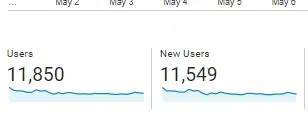
Here is a small website’s UA user/new user count for one month:
UA count of users and new users
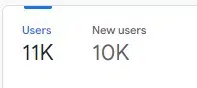
Now here is that same small website’s GA4 user/new user count for the same exact time period:
GA4 count of users and new users
In the reports snapshot, GA4 rounds the numbers, but you can see the users reported in GA4 is about 8% lower than what’s seen in UA.
The new users metric is even more pronounced (a difference of almost 14%) if you look at the rounded number. (Actual number reported in GA4 when you drill down is 10,443 – a difference of just under 10%.)
Sessions
GA4 has a couple of key differences when it comes to counting sessions, which actually make the count more accurate.
While both platforms have a default session timeout setting of 30 minutes, UA restarts the session at midnight and generates a new one when a UTM promo code is clicked on.
If you could follow that, basically, the “session count” numbers you’ve been reporting on forever aren’t exactly an exact tally.
GA4 does not restart at midnight and does not generate a new session if a UTM promo code is clicked.
For example, I have seen some websites put a promo UTM code on a link to an internal page (bad idea and unnecessary, by the way).
In UA, that causes a new session to be started and it overwrites any other UTM promo code that may have actually driven the traffic.
Conversions
The way conversions are calculated between the two platforms differ.
UA will only count one conversion per session for each goal. So for example, a user clicks on the “click to call ” multiple times.
However, the user doesn’t follow through and cancels before the call goes through the first time. Only one conversion will be counted for that goal.
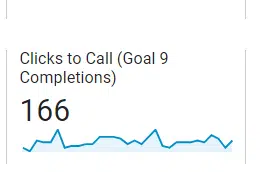
Here’s an example of the “Clicks to Call” goal setup in UA:
Clicks to Call goal completions in UA
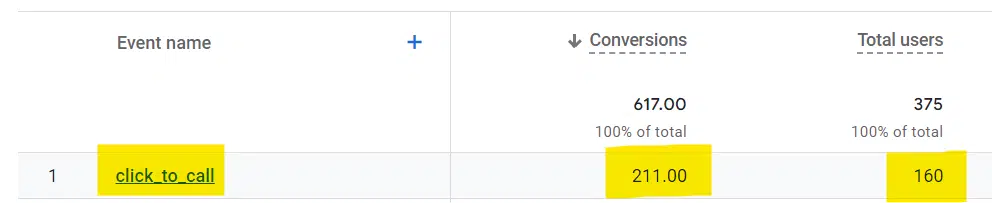
In contrast, GA4 will count a conversion every time even if that same conversion event is recorded multiple times during a session (Same user, same site, same visit):
Click to Call goal completions in GA4
Understanding the proper context matters here.
On the one hand, you could argue GA4 inflates the actual number of conversions since you basically have the same individual clicking on the “call” link multiple times (presumably for a single purpose).
On the other hand, you could argue that all you really cared about was whether the user converted on the call to action – not how many attempts it took on a particular session. Regardless of which method you feel is better, the GA4 method is now the way forward.
If we’re talking about an “Add to cart” conversion where the user put one pair of shoes in a cart, then continued to shop and added socks, GA4 would count this as two conversion events.
You could argue that GA4 counting two conversion events is appropriate (depending on how you choose to look at it).
Get the daily newsletter search marketers rely on.
Rethinking our web performance metrics
GA4 is giving us a new way to think about success metrics for the business and what really matters. Here are a couple of examples:
Sessions
We already covered the differences in how the two platforms calculate sessions, but GA4 steers us to thinking about sessions that actually result in meaningful engagement on the site.
One of the first callouts you’ll notice is “Engaged sessions,” which is simply a count of sessions where the user actually did something.
Engagement metrics
An “engaged session” can only be considered if it lasts longer than 10 seconds, has one or more conversion events, or has two or more page/screen views.
You may or may not agree, but that’s what GA4 uses for its standard. “Engaged session” is not a canned metric in UA.
Bounce rate
For a generation, marketers loved to report a low bounce rate as a measure of success. However, it’s not always a great metric. As with any success metric, context is king.
For example, a simple recipe page could do its job perfectly but show a high bounce rate.
The user got what they came for (the recipe) and then made a happy exit. Is that bad?
No, actually. It’s a good thing for the user.
Bounce rate is now gone as a stand-alone metric in GA4. Now you can refer to the engagement rate intended to show you the percentage of quality site visits. (Again, according to the definition of quality.)
If you start with 100 and subtract the engagement rate from it, in theory, you get something similar to a bounce rate.
For this article, just a quick high-level reminder of the differences:
In UA, events are used to track site actions that don’t necessarily generate a success page.
For example, you have a video on your home page. That video is played all the way through.
Upon completion of that video, there is no “Thank You” page you can easily set up as a standard conversion goal. This is where events come in.
UA lets you give “events” a category, action, and label to provide more description and context. An event is counted when an action is triggered. For example, if you have a video on the home page and track completions.
A wireframe example of a video on the front page of a site
GA4 has no category, action, or label, so there’s no point in learning it now. And with GA4, everything is an event. For example:
Pageview = Event
Session Start = Event
First Visit = Event
Scroll = Event
Click = Event
Video Start = Event
File Download = Event
Video progression = Event
Video complete = Event
Newsletter Signup = Event
Contact Submission = Event
View Search Results = Event
You get the idea.
Everything remotely worth measuring is an event.
Views vs. data streams
In UA, you can have one simple website and a mind-boggling number of views set up. You can see different numbers depending on which view you’re looking at, so it was worth understanding.
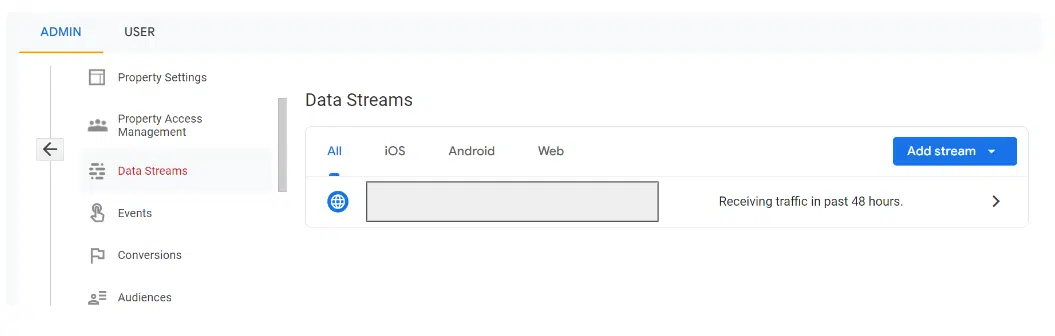
There are no more views in GA4. Instead, there are data streams. Those can be seen in Admin > Data Streams:
If you had previously set up multiple views in UA, you’ll want to look at the data stream settings in GA4 to make sure you’re measuring what matters to your business.
One of the benefits of GA4 is you can better see a more accurate reflection of the number of users.
For example, a data stream can be a website or an app. If your business also has a native mobile app, that can be a plus.
Moving on from UA to GA4
If you didn’t have GA4 set up and running by July 1, 2022, you will not have a true apples-to-apples YOY comparison for July 2023 data. So be careful how you report the numbers.
If you have no choice but to show UA data for the previous year, include a big asterisk along with an explanation. Hopefully, this article provides a little context and backup info when you’re asked why.
Opinions expressed in this article are those of the guest author and not necessarily Search Engine Land. Staff authors are listed here.
@media screen and (min-width: 800px) { #div-gpt-ad-3191538-7 { display: flex !important; justify-content: center !important; align-items: center !important; min-width:770px; min-height:260px; }
}
@media screen and (min-width: 1279px) { #div-gpt-ad-3191538-7 { display: flex !important; justify-content: center !important; align-items: center !important; min-width:800px!important; min-height:440px!important; }
}
About the author
Adam Proehl is Partner & Co-Founder at NordicClick Interactive, a full-service digital agency with local and national clients, based in Minneapolis.
In digital marketing since 1998, Proehl has spoken at numerous national and international conferences, including SMX. He is a current Advisory Board Member for the Paid Search Association.
Implementing systems in your SEO business is crucial, but starting can feel overwhelming or confusing.
You may have attempted it before but gave up due to the complexity or lack of guidance. Perhaps you made some initial progress, but the systems were not effectively implemented and followed.
Systemizing your business well can provide ample time and cost savings and potentially boost your sales.
By allowing you to focus on those all-important income-generating tasks instead of dealing with the small stuff, you can turn your business from one that plods along to one that brings you closer to those big goals of yours.
I’d go as far as to say that it’s tough to scale or grow meaningfully unless you have systems in place.
What is a system?
A system is a chain of processes, each containing a sequence of individual steps that make the system operational.
So a process might be creating a form on a WordPress website but the system could be an entire marketing funnel.
It will free up decision-making headspace for more important matters.
It ensures consistency.
It helps you to stay organized.
You can manage your time better.
It’s easy to delegate or for team members to cover for others.
Your customers get high-quality service every time.
It stops things from being missed or forgotten.
It’s essential if you ever want to sell your business.
Let’s look at each of these in a little more detail.
Freeing up decision-making capacity
Taking the decision out of your hands can help you focus on crucial work instead of making decisions about less important tasks.
Ensuring consistency
Systems mean that tasks are done in the same order and in the same way over and over again.
This is why production lines always have systems in place.
Can you imagine a factory producing chocolate bars, and they all came out tasting slightly differently or in three pieces instead of two?
Staying organized
Systems allow you to stay super organized. In some cases, not doing so can have severe consequences – an example being your invoicing system.
Managing your time
While it is a big time investment to get all of this set up, once done, you will save hours of time across your day.
Knowing that your systems are taking care of day-to-day business means you are less likely to be pulled away to deal with issues that arise.
This enables you to focus on the really important tasks, the income-generating tasks, looking after your customers and working on business growth.
Delegation
Handing work over to someone where systems are in place makes it much easier for everyone involved. If someone goes off ill unexpectedly, it is easy for someone else to pick up the work.
Customer service
Giving the same high-quality experience time and time again will keep your customers coming back for more.
They know what to expect and so feel comfortable doing business with you.
Systems make sure that all customers are treated exactly the same way and that any disputes are handled according to your internal policies.
All of this helps to take the emotion out of situations, especially concerning non-payment or complaints.
Helping you remember
If you have a system, it’s much more difficult to forget to do something.
Think about an email you read last thing on a Friday, thinking you will get to it the following week.
But come Monday, you forget all about it, and it sits in your inbox for the rest of the week. It’s only when your customer chases you do you remember that it even exists.
I’m sure we have all been there. I certainly have.
Systems help to avoid this from happening because once an input arrives and feeds into the relevant system, it’s in the right place, and that individual process begins.
Long-term plans
Do you have an exit strategy for your business?
If so, it may well include selling it to someone else at some point. If this is the case, then systemization is essential.
It is much easier to sell a business that has systems in place already. The handover becomes easier for everyone involved.
Get the daily newsletter search marketers rely on.
How to get started with systems in your SEO business
You may want to view this as a stand-alone project as it may take a little time to fully systemize everything.
Start with the big stuff, the important ones and the ones that will free up the most amount of time for you.
This may also need investment to enable you to properly automate some of these systems too, which will help free up even more time, so work out a budget ahead of time.
Start with one and map out that system from start to finish
Each system will contain several individual processes. We often see these processes recorded as standard operating procedures (SOPs).
I would suggest having a templated document with a title, version number, date, and number to identify the document and how it fits into the overall system.
You’ll also need to create an index so that at any time, if someone needs to know how to do something, they can go to your systems ‘bible’ and find the relevant one.
Testing and improvements
Once your processes are written out and system maps are created, you can move into the test and improve phase.
Test it as much as you can. Breaking the system then enables you to account for different scenarios.
Pass your SOPs to someone completely new to the tasks involved and ask them to follow them. A fresh pair of eyes can often pick out problems that might otherwise get missed.
Storage
Don’t currently have a central storage system for all of your documents? Now is the time to have one.
You could set up a Google Drive, One Drive or Dropbox account.
Whichever you use, make sure that it’s stored in a way that makes sense with filenames clearly written and simplified titles so it’s easy to find everything. Then ensure that everyone in your business can access the files.
Regular review
Once you have your systems in place, it is important to make sure that they stay relevant.
Set aside regular reviews of existing systems by going through them step by step and amending anything that has changed.
Likewise, archive anything that is no longer relevant and add in any new systems.
This folder of documents is basically the inner workings of your business, it should tell anyone exactly what they need to do to run the business your way.
You should, in essence, be able to walk away from it all tomorrow, and someone else could come in, pick up the systems and be able to carry on.
Systematize and thrive
I am a massive fan of systemization. I believe that it is essential to the success of any business owner looking to grow.
That said, while every area of your business can be systemized, I also believe that our SEO clients buy into us as people too.
So don’t completely lose that human connection element and personalization you give them.
A monthly phone call or personalized email will go a long way toward maintaining the relationships you have worked so hard to build.
Opinions expressed in this article are those of the guest author and not necessarily Search Engine Land. Staff authors are listed here.
@media screen and (min-width: 800px) { #div-gpt-ad-3191538-7 { display: flex !important; justify-content: center !important; align-items: center !important; min-width:770px; min-height:260px; }
}
@media screen and (min-width: 1279px) { #div-gpt-ad-3191538-7 { display: flex !important; justify-content: center !important; align-items: center !important; min-width:800px!important; min-height:440px!important; }
}
About the author
Claire Taylor co-founded her Digital Marketing Agency, TU Marketing, in 2007. What sets Claire apart is her holistic and flexible approach and she has helped countless clients achieve online growth and success in what is often a crowded and competitive space. Claire loves business but also love to spend time travelling and challenging herself physically and mentally. From running ultra-marathons, racing against horses in Wales, through to trekking across Peru. You’ll often find her out in the countryside running or hiking with her dog Darcy and day dreaming about her next adventure.
Why people hate the Google Analytics 4 user interface
Marketers are not happy with the Google Analytics 4 user interface (UI).
In fact, social media has been inundated with complaints about the Universal Analytics replacement – but it’s concerns over the UI that have been dominating the conversation.
So, is the GA4 UI really as bad as some are claiming? We spoke to three digital marketing experts to find out…
‘Usability is poor – but hang in there!’
Janet Driscoll Miller, president and CEO of Marketing Mojo, isn’t a fan of GA4’s UI but said “it’s not terrible”. She believes the difficulties that arise are due tot he platform being so new and different to Universal Analytics. “I don’t think Google did a very good job with usability in the design of the interface,” she tells Search Engine Land.
The settings and layout aren’t intuitive – “For example, if you create an Explorations report, you must first essentially import the dimensions and metrics you’d like to pull from in the first settings column, then pull from those into the second column which creates your data visualization. That’s certainly different than UA and not necessarily very clear to new users.”
Google needs to make some tweaks – “I think I speak for most Google Analytics power users here, they really need to add back the Annotations feature. It was a great UA feature and likely isn’t difficult to program (it’s literally a note and a date) but it was so helpful to many of us, especially when doing forensic or troubleshooting projects and working with large teams.”
Fix the sharing of Explorations reports – “When you currently create and share an Explorations report with others, you a) cannot limit who it is specifically shared with and b) those that it is shared with cannot change the report date range. Currently for others to change a shared report’s date range, the user must make a copy of the report so that user becomes that new report copy’s owner and then the date can be altered.”
If you’re struggling to navigate the new UI, simply keep practicing, Miller said.
“The more you become accustomed to how GA4 works, the easier it will get over time,” she said. “Change is hard, but this is here to stay. Before too long, we’ll all be much better with it. Hang in there!”
‘GA4 lacks basic capabilities – but we’ll get used to it’
Independent contractor and advisor, John Erikson, has been feeling increasingly frustrated with the GA4 UI. Universal Analytics was more straightforward and easier to navigate, which made simple tasks, like creating reports, much easier to carry out, he said.
Erikson explained:
No ability to use regex in the search box: “You can only search one phrase at a time which is very limiting. The only way I could find to filter by URL patterns was to set up Audiences. But Audiences have to be set up in advance, cannot be edited/changed, and the regex is limited to 100 characters so I had to split long patterns in to many chunks to build audiences.”
Problems arise if URL structures are tweaked: “If anything changes in the site in URL structure (which is guaranteed to happen many times in the future), the audience becomes obsolete and no way to look backwards.”
Time-consuming mistakes: “If you make any mistake in creating an Audience, you have to discard what you did and create a new one.”
Segments/dimensions issues: “On selecting segments/dimensions in GA4, instead of the ability in Universal to select/deselect one or more segments in a single list and click apply, you have to open customization or add comparison, click add filter, select a dimension from a long dropdown, then select dimension value from another dropdown, then apply (and you can only select one). Granted it is only a few seconds difference, but when you look at many different patterns every day, it becomes frustrating to repeat those excess UI moves over and over when you used to do it faster.”
Clumsy design: “That same dropdown structure is used in creating/editing GA4 reports. The dropdown lists are long and it is hard to find what you are looking for. You can type in partial names and more quickly find them once you know them, but initially it is very hard to scroll through them all and find what you want. Also, you can only select one so it is hard to look at multiple dimensions/values. I do find it clumsy to use.”
Despite Erkison’s issues with the new platform, he realizes it’s here to stay and is confident he will get used to it and adapt.
“It’s just frustrating when you’ve used a system that works well for many years and see it replaced by a supposed improvement that is just harder to use and lacks such basic capabilities,” he added
Get the daily newsletter search marketers rely on.
‘GA4 is missing the simplest functions’
Chris Fox, independent analytics strategist, has also been experiencing problems with GA4’s UI. He notes that simple functions that were present in UA are now either completely missing or are more complicated and time-consuming to perform. He explained:
“Time Series charts can only show data at the day level and cannot be changed to view data at a Week/Month level.”
“You have to edit reports to be able to use basic dimensions like Landing Page in a Traffic report.”
“Segments are gone and instead we have ‘Comparisons’, which don’t have preset options and do not allow you to save the ‘Comparisons’ you create like you could with Segments.”
“If you want to add a filter to both dimensions in a report with a secondary dimension, you cannot do it in the table — rather, you have to filter one in the table and the other at the report-level at the top of the page (or both at the report-level).”
“When you edit a report to add metrics, you are limited to 12; so I’m often editing a report just to view a certain metric and then resetting back to the previous configuration.”
“Before, if I wanted to look at a visualization of monthly traffic for the last year, I just had to change the date granularity in the line chart on the Channels report to ‘Monthly.’ To do that in GA4, I’d have to download the data and create the chart myself in Excel/Tableau/etc.”
Venting his frustrations, Fox told Search Engine Land that these unnecessary, time-wasting changes have made GA4 “feel like a free edition of the full product which was Universal Analytics”.
Unfortunately, he joins a long list of marketers that have been making the same complaints about the GA4 UI.
Why we care: If enough people are experiencing the same problems with GA4 and these issues are then reported to Google, the search engine may review its product to make necessary changes. In the event it doesn’t, marketers will be forced to come up with their own solutions – and it will undoubtedly be easier to come together in order to brainstorm ideas.
@media screen and (min-width: 800px) { #div-gpt-ad-3191538-7 { display: flex !important; justify-content: center !important; align-items: center !important; min-width:770px; min-height:260px; }
}
@media screen and (min-width: 1279px) { #div-gpt-ad-3191538-7 { display: flex !important; justify-content: center !important; align-items: center !important; min-width:800px!important; min-height:440px!important; }
}
About the author
Nicola Agius is Paid Media Editor of Search Engine Land after joining in 2023. She covers paid search, paid social, retail media and more. Prior to this, she was SEO Director at Jungle Creations (2020-2023), overseeing the company’s editorial strategy for multiple websites. She has over 15 years of experience in journalism and has previously worked at OK! Magazine (2010-2014), Mail Online (2014-2015), Mirror (2015-2017), Digital Spy (2017-2018) and The Sun (2018-2020). She also previously teamed up with SEO agency Blue Array to co-author Amazon bestselling book ‘Mastering In-House SEO’.
Google to explore alternatives to robots.txt in wake of generative AI and other emerging technologies
Google is exploring alternatives or supplemental ways of controlling crawling and indexing beyond the 30 year standard of the robots.txt protocol. “We believe it’s time for the web and AI communities to explore additional machine-readable means for web publisher choice and control for emerging AI and research use cases,” Google wrote.
Engaging with the community. Google said it is inviting members from the web and AI communities to discuss in a new protocol. Google said it is “kicking off a public discussion,” with a “broad range of voices from across web publishers, civil society, academia and more fields from around the world.
Timing. Google said these discussions are happening over ” to join the discussion, and we will be convening those interested in participating over the “the coming months.” So nothing is happening too soon and nothing is changing tomorrow.
Paywalled content issue. Recently, Open AI disabled the browse with Bing feature in ChatGPT after it was able to access paywalled content without publisher permission. This is one of the many reasons why maybe Google is looking for alternatives to the robots.txt protocol.
Why we care. We have all become accused to allowing bot access to our websites by using robots.txt and other forms of newer structured data. But we may be looking at new methods in the future. What those methods and protocols may look like is unknown right now but the discussion is happening.
@media screen and (min-width: 800px) { #div-gpt-ad-3191538-7 { display: flex !important; justify-content: center !important; align-items: center !important; min-width:770px; min-height:260px; }
}
@media screen and (min-width: 1279px) { #div-gpt-ad-3191538-7 { display: flex !important; justify-content: center !important; align-items: center !important; min-width:800px!important; min-height:440px!important; }
}
About the author
Barry Schwartz a Contributing Editor to Search Engine Land and a member of the programming team for SMX events. He owns RustyBrick, a NY based web consulting firm. He also runs Search Engine Roundtable, a popular search blog on very advanced SEM topics. Barry can be followed on Twitter here.
But where are marketers going if Twitter is no longer their go-to option for advertising? Below, we take a look at eight Twitter alternatives that advertisers should be paying close attention to…
1. Threads
Active users: 30 million
Meta’s Twitter alternative Threads launched yesterday, with 5 million people signing up in the first few hours. Companies to sign up within minutes of its launch include Netflix, HBO and Billboard.
Meta CEO Mark Zuckerberg said he believes Threads will be bigger than Twitter but it will take time.
“I think there should be a public conversations app with 1 billion+ people on it,” he said. “Twitter has had the opportunity to do this but hasn’t nailed it. Hopefully we will.”
Threads is available in 100 countries, including the U.S., UK, Australia and Canada, via the Apple and Google app stores. However, due to regulatory issues, it is not yet available in the EU.
Marketers can’t currently place ads on Threads, but it is expected Meta will be announcing ad space in the not-too-distant future. It’s worth noting that Meta’s other brands, such as Instagram, launched without ads. Now, advertising is one of Instagram’s biggest sources of revenue.
2. Bluesky
Active users: 200,000
Bluesky is an invite-only decentralized social networking platform that already has a string of high-profile users such as model Chrissy Teigen and US politician Alexandria Ocasio-Cortez.
However, the app, which started off as a Twitter project but is now an independent company, is still in its early testing period so has not yet been fully rolled out. Currently, people can join a waiting list to sign up when the app fully launches, but a date for this is yet to be confirmed.
Bluesky has said that it doesn’t want to make advertising its dominant business model and so had “been exploring other avenues of monetization”. However, as the app is so new, company bosses could still take any direction and so advertisers are paying close attention.
3. Substack Notes
Active users: 35 million
Substack Notes is a platform for independent writers to publish short-form posts and share ideas. Both writers and readers can use the site to share posts, links, images, quotes and more with their Substack network, and also join in conversations with other writers and fellow readers.
The app was rolled out to all writers and readers in April 2023. Its creators have described the site as a new platform designed to “inspire, enlighten, and entertain readers based on the writers you’re already reading.”
The company’s founder Chris Best has made clear his reluctance to rely on advertising for revenue since the beginning. However, active users are openly using subscriptions and sponsorships to earn more money from the website.
4. Post
Active users: 430,000
Post is a platform that allows its users to access news from premium publishers without subscriptions or adverts. The app which is still in beta, is “designed to give the voice back to the sidelined majority; there are enough platforms for extremists, and we cannot relinquish the town square to them,” according to its founder Noam Bardin, former CEO of Waze.
Unfortunately, Post’s zero-ads policy isn’t exactly the best news for marketers. Although advertisers will still play a role on the site, what they are able to post will be restricted. For example, instead of posting promotional campaigns, marketers will be limited to sharing relevant, informative and engaging content.
The app operates using a points-based currency, which can be exhanged to read full articles. Users can also tip people or publications. To get more points, users have to cough up real money.
5. Mastodon
Active users: 10 million
Rolled out in 2016, Mastodon is a popular Twitter alternative and received a surge in new sign-ups after Elon Musk took-over its rival. It operates in a similar fashion to Twitter in the sense that users can post opinions, join conversations in their news feeds, upload pictures and more. However, the key difference is that Matsodon has a decentralized network and is nonprofit.
Unfortunately for marketers, Mastodon has stated that it will never serve ads or use an algorithm to promote some profiles over others. But other options are available that may interest advertisers such as affiliate marketing, sponsorships and UGC campaigns.
6. Spill
Active users: 20,000
Spill is a new app, created by former Twitter employees, that aims to create a safe space for marginalized communities – especially for people of color and the LGBTQ+ community. The platform, which launched in January, is invite-only and is still a beta, currently only available on Apple’s OS.
The app already has a string of famous names on its books, including Lizzo, Amber Riley and Questlove, as well as its first bunch of advertisers confirmed. The platform is yet to reveal more information but promises “we’re only just getting started“.
More details are expected to be announced over the next few months.
7. Hive
Active users: 1 million
Hive is a mobile-only app which was praised as an excellent alternative to Twitter – especially when Musk came into play last year. However, although development of the platform is ongoing, the hype was short-lived and the app didn’t take off in the same way people had expected.
The platform functions in a similar way to Twitter but is different in that it claims to be free of algorithms. This means news feeds are displayed in chronological order as opposed to the order AI thinks you’ll prefer. The platform also rolled out a verification feature in June – however, unlike Twitter, Hive does not charge for this.
Hive doesn’t currently host adverts or business accounts, however, brands can still use it to promote their products and services by posting links that connect back to their brand’s site.
8. Spoutible
Active users: 240,000
Founded by Christopher Bouzy and Bot Sentinel, Spoutible is the only Black-owned social networking site. Launched in January, the app was created to provide a “safe, inclusive, and enjoyable online space” that has a “zero-tolerance policy for targeted harassment, hate speech, disinformation, and platform manipulation.”
Both solicited adverts and unsolicited content are prohibited on Spoutible. This means marketers cannot send direct messages to users about their products or services and they cannot host giveaways. Not adhering to Spoutible’s rules can result in your account being suspended. And if an account is suspended, there will not be an opportunity to get it reinstated in the future.
Why we care. Advertisers appear to be taking a step back from Twitter following Musk’s takeover last year. With that in mind, they’ll be looking for new platforms to advertise their campaigns on without sacrificing reach or quality. That may prove to be a tricky task as Twitter boasts 450 million active users globally.
Why advertisers are leaving Twitter. Marketers have been fleeing the social networking platform since Elon Musk acquired the platform for $44 billion in October and privatized the company. The billionaire put relationships with advertisers under strain by terminating key sales executives, promoting a conspiracy theory on the platform and reinstating previously banned Twitter users, such as Jordan Peterson, Andrew Tate and Rep. Marjorie Taylor Greene.
Advertisers have also been discouraged from using the platform following a sharp rise in hate speech and explicit content, coupled with an increase in ads for marijuana products and online gambling.
@media screen and (min-width: 800px) { #div-gpt-ad-3191538-7 { display: flex !important; justify-content: center !important; align-items: center !important; min-width:770px; min-height:260px; }
}
@media screen and (min-width: 1279px) { #div-gpt-ad-3191538-7 { display: flex !important; justify-content: center !important; align-items: center !important; min-width:800px!important; min-height:440px!important; }
}
About the author
Nicola Agius is Paid Media Editor of Search Engine Land after joining in 2023. She covers paid search, paid social, retail media and more. Prior to this, she was SEO Director at Jungle Creations (2020-2023), overseeing the company’s editorial strategy for multiple websites. She has over 15 years of experience in journalism and has previously worked at OK! Magazine (2010-2014), Mail Online (2014-2015), Mirror (2015-2017), Digital Spy (2017-2018) and The Sun (2018-2020). She also previously teamed up with SEO agency Blue Array to co-author Amazon bestselling book ‘Mastering In-House SEO’.
Google ranks AI-generated ‘Star Wars’ article lacking E-E-A-T
Despite constant reminders to create helpful content and the importance of E-E-A-T (expertise, experience, authoritativeness and trustworthiness) – Google Search still finds ways to rank content on Page 1 that shouldn’t be there.
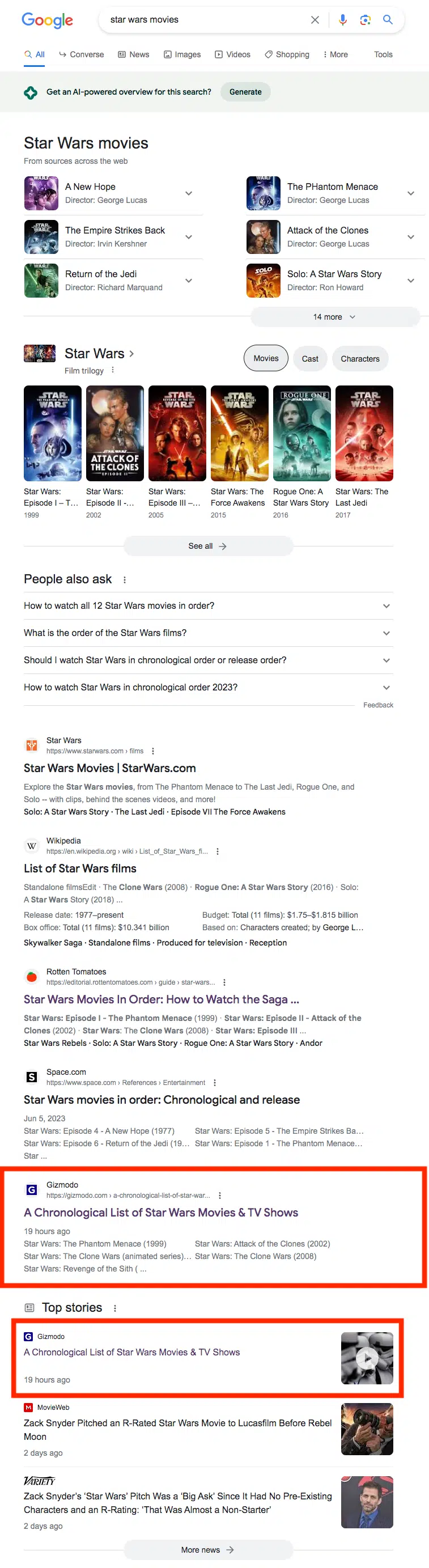
Page 1 for [Star Wars movies]. Despite multiple errors, the article ranked just fine:
Now it is in Position 5, but earlier in the day, it was in Position 3, above the Rotten Tomatoes page.
Freshness may have been a key factor here. Also, Gizmodo is a strong brand and publishes lots of content on this and related topics.
This article. It lives on the io9 section (which publishes content around science-fiction and fantasy movies, TV, books, comics) of the technology blog Gizmodo.
The editor’s response. As well all know, AI-generated content isn’t bad just because AI created it. However, this was so bad James Whitebrook, deputy editor, took to Twitter to make it clear that neither he, nor his team, had any part in the editing or publishing of the article:
Hello! As you may have seen today, an AI-generated article appeared on io9. I was informed approximately 10 minutes beforehand, and no one at io9 played a part in its editing or publication.
Here is a statement I have sent to G/O Media, alongside a lengthy list of corrections. pic.twitter.com/xlROmxmupA
“For 15 years, io9 has grown an audience that demands quality coverage of genre entertainment, from critical analysis, to insightful explainers, to accurate news and industry-shaping investigative reporting. These readers have grown io9 into one of the best performing desks at Gizmodo, G/O Media’s flagship site in terms of traffic, and they have done so by rigorously holding this team and the colleagues that came before us to a standard of expertise and accuracy that we have been product to achieve. The article published on io9 today rejects the very standards this team holds itself to on a daily basis as critics and as reporters. It is shoddily written, it is riddled with basic errors; in closing the comments section off, it denies our readers, the lifeblood of this network, the chance to publicly hold us accountable, and to call this work exactly what it is: embarrassing, unpublishable, disrespectful of both the audience and the people who work here, and a blow to our authority and integrity. It is shameful that this work has been put to our audience and to our peers in the industry as a window to G/O’s future, and it is shameful that we as a team have had to spend an egregious amount of time away from our actual work to make it clear to you the unacceptable errors made in publishing this piece.
The correction. The editorial team has now updated the article and added a note at the bottom:
“A correction was made to this story on July 6, 2023. The episodes’ rankings were incorrect. In particular, The Clone Wars was placed in the correct chronological order in the corrected list.“
If you’re curious about what the original version looks like, you can see it via the Wayback Machine.
Why we care. You absolutely can publish AI-generated content. Some of it may rank well – even on Page 1. But if that content has incorrect information, because it hasn’t been reviewed by an editor and/or subject matter expert, there could be severe long-term damage to your brand’s reputation.
Not the first, nor the last. Many brands – in an attempt to save costs by laying off human writers (see: Red Ventures’ BankRate and CNET) – are turning to AI-generated content. It’s faster and cheaper to produce, but the end result hasn’t always been good:
@media screen and (min-width: 800px) { #div-gpt-ad-3191538-7 { display: flex !important; justify-content: center !important; align-items: center !important; min-width:770px; min-height:260px; }
}
@media screen and (min-width: 1279px) { #div-gpt-ad-3191538-7 { display: flex !important; justify-content: center !important; align-items: center !important; min-width:800px!important; min-height:440px!important; }
}
About the author
Danny Goodwin has been Managing Editor of Search Engine Land & Search Marketing Expo – SMX since 2022. He joined Search Engine Land in 2022 as Senior Editor. In addition to reporting on the latest search marketing news, he manages Search Engine Land’s SME (Subject Matter Expert) program. He also helps program U.S. SMX events. Goodwin has been editing and writing about the latest developments and trends in search and digital marketing since 2007. He previously was Executive Editor of Search Engine Journal (from 2017 to 2022), managing editor of Momentology (from 2014-2016) and editor of Search Engine Watch (from 2007 to 2014). He has spoken at many major search conferences and virtual events, and has been sourced for his expertise by a wide range of publications and podcasts.
Unicorn sightings: The people who love Google Analytics 4 and why
Google Analytics 4 is better than Universal Analytics – at least, that’s what some marketers have been telling Search Engine Land.
While the new platform certainly has its fair share of haters, some advertisers seem to absolutely adore it and have been showering the tool with praise.
If you’re scratching your head wondering how on Earth they could have reached this conclusion, below, we’ve put together some of the feedback we received from these unicorns. Let us know if their explanations could persuade you to have a sudden change of heart.
1. GA4 is easier (when it’s been set up properly)
Tim Barlow, managing director of Attacat, says that GA4 is a superior tool to UA because:
“Customisation is easy.”
“When well set-up, GA4 is much easier for first-time users to get to grips with.”
“GA4 has a better data model – someone reading a blog post for 30 mins is a bounce in GA3. In GA4 they are the valued reader they are.”
“GA4 is designed for more than just websites whereas GA3 isn’t suitable for the multi-device/mixed on and offline world we now live in.”
“Consent is now a major issue in Europe. Google seems to be the only company properly investing in this issue – at least in the world of free or affordable Analytics.”
“Non-developers can achieve more with GA4 because GA3 invariably needed devs for any customisation. With GA4 you still need a dev involved but not as often.”
2. It’s more accurate
The unpopularity of GA4 is simply down to people not having enough time to learn how it works rather than it being a reflection of the tool itself, according to Drew Blumenthal, founder and CEO of Digital Drew SEM.
GA4 has a number of great features to offer the industry, once advertisers have the chance to understand how it works, he said:
“I personally think the interface is a lot sleeker than UA, but more importantly it is more accurate.
“With the loss of data through privacy policies, you need GA4 to be more accurate of the traffic coming in.
“GA4 also combines app, first-party data as well as cookie data, which is going to be a lot better long term. “
3. GA4 is powerful, flexible and creative
Digital marketer Stacey Chance admits that trying to understand how to use GA4 to its full capacity has definitely been a “learning curve”.
However, she pointed out that using events in the new tool is actually the same as it is in other analytics platforms, such as Heap, making the process straight forward than she originally realized, she said:
“Our team has found GA4’s features incredibly powerful and flexible.”
“The more we use it, the more we find creative, smart ways to leverage its features.”
4. It’s better than UA
The team at AS Marketing admit they found GA4 a bit tricky to navigate in the beginning, but since taking the time to understand how it works, they now think its a superior tool to its predecessor. They explain:
“Our team at my marketing agency has actually found GA4 to be better than Universal Analytics, because it focuses on events over a mass conglomerate of complex data with no meaning.”
“With so many companies doing digital marketing, focusing on engagement data and tracking that as events makes a lot more sense, which GA4 does a brilliant job of.”
“We also find the custom dashboards easier to set up and understand. We’ve migrated all our clients to GA4 and they’ve all been pleased with the new set up.”
Andrew Glenn, digital experience analyst and SEO Manager at Abbott, says that he is a huge fan of GA4. In fact, he tells Search Engine Land that he “loves” the new tool.
Explaining why he thinks it’s such a great platform, he said:
“GA4 is perfectly aligned to better segment audiences, learn about them and use the GMP to better serve what’s most important to those audiences.”
6. GA4 is robust and offers more flexibility
Freelance Java EE Developer Robert Nowak isn’t a huge fan of GA4’s interface and thinks some marketers may find it harder to use. However, overall, the new platform offers a bunch of benefits that have ultimately won him over. He says:
“I love the new options for event tracking – they are much more robust and offer a lot of flexibility.
“GA4 for me is a big bag – you throw in it all the data you can gather, and then you must figure out how to match pieces to filter that bag. Theoretically, this is better because you can make GA4 your own with your own setup and data you actually need instead of 100 reports you might never use in GA UA.
7. Taking pipelining possibilities to a new level
Digital strategist at Marketing Doctor Richie Moczo and his team are now confident in using GA4 after taking the time to learn how to use the tool properly. He personally now prefers this tool to its predecessor because of the capabilities it offers:
“GA4 takes data pipelining possibilities to a new level with it’s free integration with Big Query. For example, with GA4 you are limited to 25 params per event, but if you want to exceed that limit, you can send your additional parameters to big query.
“In UA this feature was only an option to Marketing 360 customers!
“Don’t make up reasons to avoid using GA4. Some of the most popular features from UA were slow to be added to GA4, however newly added GA4 have been flying into place!”
Get the daily newsletter search marketers rely on.
Why we care
GA4 has received a lot of flack from the digital marketing world following the sunset of UA. But Google’s new tool isn’t going away anywhere soon, so we had all better get used to it.
With that in mind, perhaps it’s time to let our guards down and embrace the many advantages GA4 has to offer – because it looks like there are a lot!
Why GA4 is causing issues for some marketers
Although the advertisers we spoke to above are fans of the new analytics platform, they acknowledged it’s easy to understand why some marketers might not like it.
In addition to people in general typically not responding well to change, managing director of Attacat, Tim Barlow, thinks GA4 was rolled out before it was truly ready. Despite believing it’s a superior tool to UA, he says there are a number of issues with GA4, such as:
“Some of the language used in the interface is awful! For example, the ‘Users by Session default channel group over time’ – why not just stick with ‘Session source’?”
“The out-of-the-box set-up is deliberately generalized as GA4 is designed to cover so much more than a simple website. This means however that the default reports are close to useless as they have far too many irrelevant metrics.”
“The lame attempt to promote AdSense by including advertising metrics causes extra confusion.”
“Gaining the real benefit requires a lot of set-up/getting up to speed on the tool’s capability and that’s not a journey those who only want the real basics want to have to go through.”
“Google released GA4 way too early so when people looked at it, it was missing so many features as to be virtually unusable. For example its frustrating that you can only look at daily data rather than weekly or monthly data.”
Despite flagging these issues, Barlow concludes that he is confident Google will take action and improve its product. He adds: “I have faith though that all these features will come with time.”
@media screen and (min-width: 800px) { #div-gpt-ad-3191538-7 { display: flex !important; justify-content: center !important; align-items: center !important; min-width:770px; min-height:260px; }
}
@media screen and (min-width: 1279px) { #div-gpt-ad-3191538-7 { display: flex !important; justify-content: center !important; align-items: center !important; min-width:800px!important; min-height:440px!important; }
}
About the author
Nicola Agius is Paid Media Editor of Search Engine Land after joining in 2023. She covers paid search, paid social, retail media and more. Prior to this, she was SEO Director at Jungle Creations (2020-2023), overseeing the company’s editorial strategy for multiple websites. She has over 15 years of experience in journalism and has previously worked at OK! Magazine (2010-2014), Mail Online (2014-2015), Mirror (2015-2017), Digital Spy (2017-2018) and The Sun (2018-2020). She also previously teamed up with SEO agency Blue Array to co-author Amazon bestselling book ‘Mastering In-House SEO’.
Excel has been an indispensable tool for marketers, aiding in organizing, analyzing, and presenting keyword data.
Enter artificial intelligence (AI).
By blending traditional Excel formulas with AI insights, digital marketers can unlock an even more potent combination for superior SEO performance.
This comprehensive guide will explore the intersection of Excel’s proven efficiency and AI’s groundbreaking potential to enhance keyword research practices.
How marketers use Excel to help with keyword research
Traditionally, Excel has been an invaluable keyword research tool.
Its extensive features and functionalities have collected, analyzed, and visualized keyword data, providing insights that inform SEO strategies.
Data organization and analysis
Excel is an extremely versatile tool for handling and organizing large datasets.
We often have to deal with extensive keyword lists, and Excel allows you to easily sort, filter, categorize, and store this.
CONCATENATE for creating long-tail keyword variations.
VLOOKUP or XLOOKUP for correlating keyword data.
Conditional functions like COUNTIF or SUMIF for analyzing keyword trends.
Visualizing data
Excel’s charting and graphing tools help translate complex keyword data into easy-to-understand visual formats.
Bar graphs, pie charts, line graphs, or scatter plots can represent various keyword metrics like search volume trends, rankings, or competition levels.
Advanced features
More advanced Excel features like pivot tables are often used for more in-depth keyword analysis. They allow marketers to summarize, analyze, explore, and present a summary of their keyword data.
Scalability and flexibility
It doesn’t matter if you’re dealing with 100 keywords or 100,000 – Excel can handle it.
This scalability, combined with the ability to tailor the tool to your needs, has made Excel a go-to solution for keyword research.
How AI is making Excel more efficient and useful for keyword research
Despite its strengths, Excel does have a steep learning curve, and manual data processing can be time-consuming.
We can automate and simplify many traditional Excel tasks and enjoy more intuitive data interaction through natural language processing.
So, let’s take a look at how AI can enhance your use of Excel for keyword research:
Automate routine tasks
AI can automate routine tasks such as data cleaning and preparation, reducing the amount of manual work involved.
For instance, AI could help identify and remove duplicates, split keyword strings into individual words, or even group keywords based on certain criteria. This can drastically speed up the initial stages of keyword research.
Natural language processing (NLP)
AI models like ChatGPT use NLP, which allows users to interact with data using everyday language.
This can make data analysis more intuitive and accessible, even for those with limited knowledge of complex Excel formulas.
Large dataset handling
While Excel can handle large datasets, AI can process vast amounts of data at a far more rapid pace.
This is particularly useful in keyword research, where we may deal with huge lists of potential keywords.
Predictive analysis and insights
AI can offer predictive insights based on existing data, which is not typically achievable with traditional Excel functions.
For instance, based on historical data, AI could predict future keyword trends or suggest potential high-performing keywords.
Personalization and learning
AI can learn from user interactions and adapt to individual user needs over time, providing a personalized experience.
This could manifest in various ways in keyword research, from remembering frequently used data manipulations to tailoring keyword suggestions based on past user preferences.
Data visualization support
While AI might not directly create graphs or charts as Excel does, it can suggest the most effective ways to visualize data.
It can guide users in choosing the right type of chart or graph based on the nature of their data and the insights they seek.
Enhanced decision-making
By offering a new layer of insights, AI can support and enhance decision-making in keyword research. By swiftly processing and analyzing data, AI can help identify patterns, trends, and correlations that may not be immediately evident in raw data.
AI doesn’t replace Excel, it enhances it
AI doesn’t replace Excel in keyword research; it supplements and enhances its capabilities.
By bringing together the robust functionality of Excel and the smart processing power of AI, marketers can conduct keyword research more efficiently, effectively, and in an informed manner.
Keyword grouping
Keyword grouping involves bundling similar or related keywords together. Many benefits are associated with this, including:
Optimized content strategy: Keyword grouping allows you to create targeted content for each group. This improves relevance and, consequently, search engine rankings.
Increased user engagement: Grouping similar keywords together can result in content that addresses a wider range of user queries, increasing engagement.
Enhanced PPC performance: For PPC campaigns, keyword grouping can lead to higher click-through and conversion rates as ads become more targeted and relevant.
With its versatile toolset, Excel can facilitate the keyword grouping process. Below, we’ll look at some Excel strategies you can use to group keywords and some ways AI can enhance this.
Remove duplicates
Duplicate keywords can create unnecessary noise in your data and divert your attention from unique keywords that might be more profitable.
Some of the reasons why you should remove duplicates include:
Data cleansing: By eliminating duplicates, you ensure your data is clean, accurate, and ready for analysis. This can help prevent skewed results or misguided strategies caused by redundant information.
Efficient resource allocation: Removing duplicates lets you focus your resources on unique keywords, making your SEO and PPC campaigns more efficient and cost-effective.
Avoiding keyword cannibalization: Duplicate keywords can lead to keyword cannibalization, where different pages on your site compete against each other for ranking. You can avoid this issue by eliminating duplicate keywords and ensuring each page has a unique focus.
Combining AI and Excel can create a more efficient process for handling duplicate data in keyword research.
Let’s delve into how this can be achieved:
In Excel, you would use the “Remove Duplicates” function to eliminate any duplicate entries in your list of keywords. For example:
Select your range of data.
Go to the Data tab, and click on “Remove Duplicates.”
In the pop-up box, ensure all columns you want to be considered are checked, then click OK.
While this process is straightforward, it requires manual execution and does not prevent duplicates from being reintroduced into the dataset in the future.
Additionally, if you’re working with a large dataset, it might be long-winded to keep scanning for duplicates, particularly if you’re constantly adding new data.
This is where AI can enhance the process. An AI tool can be used with Excel to automate and streamline detecting and removing duplicates.
For example, you could use ChatGPT to develop a script that automatically runs the “Remove Duplicates” function in Excel at set intervals or when new data is added.
The AI model could also cross-check new data against existing data for duplicates before it’s even entered into Excel.
Here’s a hypothetical interaction you might have with the AI:
“I have a new list of keywords. Can you check these against my existing list in Excel and identify any duplicates?”
After the AI has identified duplicates, you might ask:
“Remove the duplicates from this list.”
By offloading the task of duplicate identification and removal to AI, you can save time, reduce errors, and ensure that your Excel dataset remains clean and duplicate-free.
Remember, AI does not replace the function of Excel in this scenario, but instead, it enhances Excel’s capabilities and optimizes the process, making your keyword research more efficient and reliable.
Text filters
Excel’s “text filters” feature is another tool that aids keyword grouping. You can filter your keyword list based on certain phrases or text to create more refined and targeted keyword groups.
Some reasons why it makes sense to use text filters include:
Efficient keyword classification: When you filter your keywords based on specific text or phrases, you can easily categorize them into relevant groups. This is much quicker and more efficient than manually sorting through each keyword.
Enhanced data analysis: Text filters can also enhance your data analysis. For example, by filtering for keywords that include a specific term, you can quickly analyze how that term performs across different keyword groups.
Adaptability to changing SEO terms: Your keyword strategy must adapt as search engine algorithms and user behaviors evolve. Text filters allow you to quickly and easily modify your keyword groups to align with these changes.
We’ll use an example to delve a bit deeper. Let’s say you have a large list of keywords and want to filter out only those that contain a specific term. We’ll use the term “vegan” for the sake of this example.
In Excel, you can use the text filters option with the following steps:
Click on the filter arrow in the column’s header containing your keywords.
Under Filter, you’ll see options like ‘equals,’ ‘does not equal,’ ‘contains,’ etc.
Choose the relevant option (e.g., ‘contains’) and then input the specific term you’re looking for (i.e., ‘vegan’).
If you need a more advanced text filter, Excel offers functions like FIND, SEARCH and FILTER, which can be used with conditions in formulas.
So, if you want to filter your list of keywords so it only shows keywords that contain the word “vegan,” you could use a formula like this (assuming your keywords are in column A):
=FILTER(A:A, ISNUMBER(SEARCH("vegan", A:A)))
This formula will return a list of keywords from column A that include the word “vegan.”
With AI, you can make this process more interactive and efficient. Rather than manually applying filters each time, you can use natural language to ask the AI to apply them.
For instance, you could ask the AI:
“Filter the keywords in my Excel file that contain the term ‘vegan.’”
Through a connected API, the AI could execute the task and return a filtered list of keywords.
In addition, AI could add a layer of complexity to text filters that Excel alone can’t achieve.
For example, you could ask the AI to filter keywords that are semantically related to a certain term, not just those that contain the term.
By integrating AI’s capabilities with Excel’s robust functionality, you can streamline your keyword research process and extract more nuanced insights from your data.
Get the daily newsletter search marketers rely on.
Preparing and cleaning the data
Data preparation and cleaning is a vital step in any data-driven task, and Excel provides various functions to help in this regard.
Below, we’ll outline how some of these functions can be used and some AI prompts to enhance the process.
CONCATENATE
In keyword research, the CONCATENATE function in Excel is often used to create new keyword combinations, typically for long-tail keywords.
For instance, suppose you have a seed keyword “vegan recipes.”
You might have a list of descriptive terms in a separate column like “easy,” “quick,” “healthy,” “for beginners,” etc. To generate new keyword combinations, you can use the CONCATENATE function:
=CONCATENATE(A2, " ", B2)
Here, A2 is your seed keyword (“vegan recipes”), and B2 is one of your descriptors (“easy”). The function will result in “vegan recipes easy.”
You can drag the fill handle down to apply this function to your entire list, creating multiple long-tail keywords.
How to enhance this with AI
While the CONCATENATE function in Excel can help generate new keyword combinations, it does have limitations. It’s manual, and the resulting keyword combinations depend entirely on your pre-set descriptors.
AI can significantly enhance this process, allowing for more diverse, creative, and contextually relevant keyword combinations.
Instead of relying on a fixed list of descriptors, an AI model can generate a variety of additional terms or phrases based on the context of your seed keyword.
For example, you might ask the AI:
“Generate long-tail keyword combinations based on the seed keyword ‘vegan recipes.'”
The AI could then provide a variety of combinations that might not have been in your original list of descriptors, like “vegan recipes for meal prep,” “high-protein vegan recipes,” “gluten-free, vegan recipes,” and so on.
AI can even go beyond simple concatenation. Its understanding of language and context can help generate questions people might ask, such as “How to make easy vegan recipes” or “What are some quick vegan recipes for breakfast.”
These long-tail keywords often reflect how people naturally search, and targeting these in your SEO strategy can improve your site’s visibility and relevance.
It’s important to note that AI isn’t replacing Excel’s CONCATENATE function but is enhancing it, providing more nuanced, diverse, and natural language-based keyword combinations.
SEARCH function
The SEARCH function in Excel can be useful in keyword research for finding the presence and position of a specific keyword or phrase within a cell.
For example, if you want to identify whether the keyword “chocolate” is present in your list of long-tail keywords, you might use the SEARCH function as follows:
=SEARCH("chocolate", A2)
In this case, “chocolate” is the text you are searching for, and A2 is the cell where you search.
The function will return the starting position of the first instance of “chocolate” within the cell or an error if the text is not found.
This is an effective way to filter or classify your keyword list based on the presence of certain terms, helping you to target your SEO efforts better.
How to enhance this with AI
While the SEARCH function is quite useful, it has its limitations. It’s case-insensitive and cannot comprehend the context, synonyms, or semantic meaning.
An AI model like ChatGPT can understand the context, recognize synonyms, and even understand semantically similar words.
For example, if you ask the AI:
“Identify keywords from my list that are related to ‘chocolate.'”
The AI could return keywords that not only contain the term “chocolate” but also those that include terms like “cocoa,” “dark chocolate,” “milk chocolate,” “choc,” etc., all of which may be relevant to your search intent but would be missed by Excel’s SEARCH function.
ISNUMBER function
In keyword research, the ISNUMBER function in Excel is combined with other functions like SEARCH to validate if a specific keyword or term is present in a text string.
For example, suppose you have a list of keyword phrases in Column A and want to identify if the term “mountain bikes” appears in any of those phrases. You could use the following:
This formula will return Yes if “mountain bikes” is found within column A and No if not.
How to enhance this with AI
The ISNUMBER/SEARCH function combination is a powerful tool in Excel for keyword research. However, it is limited to exact phrase matches and does not consider the variations in how people might search for the same concept.
Integrating AI can make this process more flexible and comprehensive. An AI model like ChatGPT will recognize the exact phrase “mountain bikes” and relevant variations or synonyms, like “mountain bicycles,” “off-road bikes,” etc.
AI can be used to identify these variations in your keyword dataset and provide you with a more inclusive list of cells containing not just the exact match but also contextually relevant phrases.
MATCH function
The MATCH function in Excel can be handy in keyword research for identifying the position of a specific keyword in your list.
For example, you might use:
=MATCH("road trip", A1:A100, 0)
This formula will return the relative “road trip” position in the range A1:A100.
How to enhance this with AI
While the MATCH function is useful, it only returns the first match it encounters. AI could scan the entire dataset and return all instances of the keyword, providing a comprehensive view of where and how often the keyword appears.
For instance, you could ask the AI:
“Find all instances of ‘road trip’ in my keyword dataset.”
The AI could then return a list of positions or even the actual keywords/phrases that contain ‘road trip’, providing more context and understanding of your data.
The AI could also understand variations and synonyms of the keyword, providing even more in-depth analysis.
By leveraging AI’s natural language understanding capabilities, you can extract more from your keyword research data and develop a more robust SEO strategy.
INDEX function
The INDEX function in Excel is often used in keyword researchwhen extracting a specific keyword from your list based on its relative position.
For instance, you might use:
=INDEX(A1:A100, 15)
This formula will return the 15th keyword in the range A1:A100.
How to enhance this with AI
The traditional INDEX function is limited in its utility, as it only provides the keyword at a specific position. With AI, you can add layers of context and deeper understanding to your analysis.
For example, you might ask the AI:
“Provide synonyms for the 15th keyword in my dataset”
Or…
“What are some related search queries for the 15th keyword in my dataset?”
The AI could then return a list of synonyms or related search queries, providing a more thorough understanding of your keyword landscape.
In this way, AI can help you derive more valuable insights from your keyword data, potentially leading to more effective SEO strategies and campaigns.
With XLOOKUP
In keyword research, the XLOOKUP function can be a powerful tool for finding a specific keyword and returning its associated value.
For example, you could use it to find the search volume for a keyword:
=XLOOKUP("summer vacation", A2:A100, B2:B100)
This formula will look for “summer vacation” in the range A2:A100 and return its corresponding search volume from the range B2:B100.
How to enhance this with AI
While XLOOKUP is a very useful function in Excel, it’s limited to exact matches. With AI, you could ask, “What is the search volume for search queries similar to ‘summer vacation’?”
The AI could then return the search volumes for not only ‘summer vacation’, but also for similar search queries like ‘summer holidays’, ‘summer getaways’, etc.
This can give you a broader picture of the search volumes for a range of related keywords rather than just the exact match, which could be instrumental in shaping your SEO strategies.
Preventing false matches
In Excel, preventing false matches when looking up or matching keywords is often achieved through careful data cleaning and formatting and using the right functions and formula syntax.
This requires combining techniques, as no single formula can prevent all possible false matches. A common strategy is to use stricter criteria in your Excel functions and to clean and normalize your data before performing lookups or matches.
For example, suppose you have a list of keywords, and you want to find the position of the exact match of “road trip” using the MATCH function, preventing false positives like “business trip” or “round trip.” You might use the exact match mode of the function like so:
=MATCH("road trip", A1:A100, 0)
In this formula, the third parameter, “0”, looks for an exact match. Therefore, “business trip” or “round trip” would not be a match.
If you want to exclude multiple specific phrases or words from appearing in your keyword research, you might use a combination of functions like IF, ISERROR, and SEARCH.
For example, to exclude “business trip” and “round trip” from your search results, you might use:
This formula checks each cell in A1:A100. If “business trip” or “round trip” is found in the cell, it returns “Excluded.” Otherwise, it returns the content of the cell.
How to enhance this with AI
Preventing false matches can be greatly enhanced with AI, as AI models can understand the context and semantics of words. For example, you could ask the AI:
“Find instances of ‘road trip’ in my keyword dataset, excluding ‘business trip’ and ‘round trip.'”
The AI could then provide a list of keyword phrases containing ‘road trip’ but not ‘business trip’ or ‘round trip,’ effectively preventing these false matches.
By leveraging AI’s capability of understanding context, you can reduce the risk of false matches and improve the accuracy of your keyword research and analysis.
VLOOKUP
In keyword research, the VLOOKUP function is used when findingspecific information associated with a particular keyword from a different column.
For example, if you have a list of keywords in column A and their corresponding search volumes in column B, you can use the VLOOKUP function to find the search volume of a specific keyword.
Here’s how it would look:
=VLOOKUP("mountain trek", A2:B100, 2, FALSE)
In this example, “mountain trek” is the keyword we’re looking up, A2:B100 is the table array where the keyword and search volumes are stored, 2 is the column index number where the search volumes are found, and FALSE indicates we want an exact match.
How to enhance this with AI
While VLOOKUP is an effective tool, AI can bring a new level of understanding to your keyword research.
Instead of simply returning the search volume of an exact keyword match, AI can understand keywords’ context and semantic similarity.
For example, you might request:
“Find search volumes for keywords similar to ‘mountain trek’ in my dataset.”
The AI could then scan your dataset and return the search volume for ‘mountain trek’ and related keywords such as ‘hill hike’, ‘mountain hike’, and ‘mountain expedition’.
This AI-enhanced method could give you a broader view of your potential keyword landscape, helping you identify opportunities you might miss with traditional Excel methods.
SUMIF and AVERAGEIF
The SUMIF and AVERAGEIF functions in Excel can be helpful in keyword research when you want to calculate the sum or average of values that meet a certain condition.
For example, you could use these functions to find the total or average search volume for related keywords.
Here’s how you might use SUMIF:
=SUMIF(A2:A100, "*retreat*", B2:B100)
This formula sums the values in B2:B100 (search volumes) where the corresponding cell in A2:A100 contains “retreat.”
And here’s how you might use AVERAGEIF:
=AVERAGEIF(A2:A100, "*retreat*", B2:B100)
This formula calculates the average values in B2:B100 where the corresponding cell in A2:A100 contains “retreat.”
How to enhance this with AI
AI can extend the utility of these functions by providing a more context-aware interpretation of your keyword data.
For instance, instead of just looking for keywords containing “retreat,” the AI could understand and include synonyms or related terms, like ‘resort,’ ‘sanctuary,’ and ‘haven,’ in calculating the sum or average.
An example AI prompt might be:
“Calculate the combined search volumes for keywords in my dataset related to ‘retreat.'”
AI could then provide a sum or average that includes all contextually related keywords, giving you a more comprehensive understanding of your data and helping inform your SEO strategy.
Combining AI with traditional Excel methods can achieve a deeper, more nuanced analysis of your keyword research data.
Generating graphs
Graphical representation of data plays a crucial role in keyword research, providing visual insights that make understanding trends, comparisons, and patterns easier and more intuitive.
With its diverse chart types, Excel is an incredibly powerful tool for creating these visualizations.
From bar graphs that compare keyword volumes to line graphs that track keyword performance over time, graphs can transform raw data into valuable insights.
However, preparing the data and choosing the right graph can be complex and time-consuming. This is where AI can step in.
Let’s look at a few examples of how AI could improve graph generation in Excel for keyword research:
Data processing and preparation
Before even creating a graph, AI can help you prepare and refine your data.
For instance, an AI model could help identify and remove outliers or irrelevant keywords from your dataset.
This could be achieved through natural language understanding capabilities that allow the AI to comprehend the semantic similarity of different keywords.
An example AI prompt might be:
“Identify and exclude unrelated keywords in my dataset related to ‘mountain hiking.'”
The AI can then remove keywords that don’t fit into this context, helping to ensure your data is more relevant before it’s visualized.
Pattern and trend identification
AI can help identify significant patterns and trends in your data that you might miss with manual analysis.
For example, an AI could be used to predict future trends based on your existing keyword data, and these predictions could then be included in your Excel graphs.
An AI prompt for this could be:
“Based on my historical keyword data, predict the trending keywords for the next quarter.”
You can then include these trends in your Excel graphs for a future-facing view.
Excel and AI: Better together
It’s clear that Excel and AI have significant roles in modern keyword research.
Excel’s comprehensive range of functions and formulas allows for detailed data manipulation, while its graphing capabilities provide clear, concise visualizations of keyword trends and comparisons.
Meanwhile, AI models like ChatGPT are revolutionizing how we interact with data. Their ability to handle large datasets and natural language understanding streamlines the keyword research process.
AI tools can make the process more efficient and user-friendly, from cleaning and preparing data, searching and grouping keywords, and providing visual insights through graph generation.
However, these tools don’t replace each other but complement each other exceptionally well. Combining Excel’s robust data handling and visualization capabilities with an AI model’s intuitive, interactive interface results in a potent blend that enhances keyword research outcomes.
In this age of data-driven decision-making, integrating AI with your traditional tools is not just an upgrade– it’s a necessary step toward gaining a competitive edge.
And as AI technology continues to evolve and improve, we can only expect its role in data analysis and keyword research to become even more significant.
Remember, the ultimate goal is to use these tools to inform your SEO strategy, create relevant content, and reach your target audience effectively. In the confluence of Excel and AI, there’s a potent force waiting to propel your digital marketing efforts to new heights.
Opinions expressed in this article are those of the guest author and not necessarily Search Engine Land. Staff authors are listed here.
@media screen and (min-width: 800px) { #div-gpt-ad-3191538-7 { display: flex !important; justify-content: center !important; align-items: center !important; min-width:770px; min-height:260px; }
}
@media screen and (min-width: 1279px) { #div-gpt-ad-3191538-7 { display: flex !important; justify-content: center !important; align-items: center !important; min-width:800px!important; min-height:440px!important; }
}
About the author
Jon Clark is a proud #girldad and the Managing Partner at Moving Traffic Media, a boutique digital marketing agency in New York. He writes regularly, providing thought leadership on topics related to SEO, PPC, and Social Media. In his downtime, he enjoys hanging out at coffee shops and documenting his travels on Instagram.
Beyond keywords: How entities impact modern SEO strategies
The transition from “search engine 2.0” to “search engine 3.0” has brought significant changes, particularly with the introduction of entities.
This article explores these shifts, the impact of entities on modern SEO and how to adapt your strategies to thrive in this new era.
Building your own SEO ‘notional machine’
In my early years of learning to code, a teacher introduced an impactful concept known as “notional machine,” which reshaped my approach to programming and, later, SEO.
Simply put, it’s a developer’s approximate mental model of what happens inside the computer when they click run.
My teacher emphasized that the more detailed and accurate this mental representation was, the better equipped I would be to tackle new problems.
The most successful programmers were those who had developed the most accurate and reliable notional machines!
Drawing a parallel to SEO, when we absorb new concepts, examine a case study, or observe the impact of a change, we are continuously updating our mental model (our own notional machine) of how search engines work.
The difference between skilled SEO’s and unskilled SEOs is that they can drive results because they can pull solutions from a more accurate model.
Research in the field of expertise conducted by Anderson Ericsson provides substantial evidence to affirm this point.
His studies on expertise reveal that those who excel in their fields possess superior and more readily accessible mental models.
These models enable them to understand the intricate cause-and-effect relationships, distinguish what truly matters in a complex scenario, and perceive the underlying processes that are not immediately apparent.
With the introduction of entity SEO, several major components within Google’s search engine were altered.
It appears that many SEO professionals still operate under the rules of “search engine 2.0′, even though “search engine 3.0” now follows a slightly different set of rules.
Entity SEO introduces vocabulary and concepts that originate from machine learning and information retrieval disciplines.
These terms may seem complex because they have not been simplified into their core meanings. Once we distill them, you’ll find the concepts are not overly complicated.
My goal is to construct a simple yet effective notional machine of how the latest search engines use entities.
More specifically, I want to illustrate how your understanding of SEO needs to be updated to reflect this new reality.
While understanding the “why” behind these changes might seem unimportant, many SEO professionals effectively “hack the matrix” by using their understanding of how Google interprets the web to their advantage.
In recent times, people have built million visitor sites and transformed Google’s understanding of subject matter by manipulating these concepts.
Refresher: How we arrived at search engine 2.0
Before exploring the differences between “search engine 2.0” and “search engine 3.0”’, let’s review the core changes from the initial version 1.0.
In the beginning, search engines operated on a simple “bag of words” model.
This model treated a document as a mere collection of words, neglecting the contextual meaning or arrangement of these words.
When a user made a query, the search engine would refer to an inverted index database – a data structure mapping words to their locations in a set of documents – and retrieve documents with the highest number of matches.
However, due to its lack of understanding of the context and semantics of both documents and user queries, this model often fell short of delivering relevant and precise search results.
For example, if a user searched for “jaguar” using a “bag of words” model, the search engine would simply pull up documents containing the word “jaguar” without considering the context.
This could yield results about the Jaguar car brand, the jaguar animal, or even the Jacksonville Jaguars football team, irrespective of the user’s intent.
With the advent of “search engine 2.0,” Google adopted more sophisticated strategies. Instead of just matching words, this iteration aimed to decipher the user’s intent behind their query.
For instance, if a user searched for “jaguar,” the engine could now consider the user’s search history and location to infer the likely context.
If the user had been searching for car models or resided in an area where Jaguar cars were popular, the engine might prioritize results about the car brand over the animal or the football team.
Introducing personalized search results – considering factors like user history and location – significantly enhanced the relevance and precision of search results. This marked a significant evolution from the basic “bag of words” model to “search engine 2.0”.
Search engine 2.0 vs. 3.0
As we transitioned from “search engine 1.0” to “search engine 2.0”, we had to update our mental models and change our practices.
The quality of backlinks became crucial, prompting SEO professionals to abandon automated backlinking tools and seek backlinks from higher-quality websites, among a number of key changes.
In the era of “search engine 3.0”, it’s clear that the mental shift to accommodate these changes is still in progress.
Many concepts from the 2.0 era persist, largely because practitioners need time to observe the correlation between their adjustments and the subsequent outcomes.
A significant number of SEO professionals have yet to fully adapt to these substantial changes, or they may have made attempts to do so but haven’t quite hit the mark.
To clarify these new distinctions and provide guidance on modifying your approach, I will present an oversimplified yet useful comparison of “search engine 2.0” and “search engine 3.0”.
Query processing and information retrieval
Imagine typing the search query “Elvis” into Google.
In the era of Google’s search engine 2.0, the sophistication of the underlying algorithms enabled an understanding of user intent behind a query, beyond just matching keywords.
For instance, if a user searched for “Elvis”, the system would use natural language processing and machine learning to understand and anticipate the intent behind the query.
It would look up “Elvis” in its index and return results that mentioned the word “Elvis” or were based (almost completely) on the relevance of copy on webpages, and personalization parameters such as user history and location.
However, this model still had its limitations, as it was largely dependent on keywords, user search history, location and phrases within the text of indexed webpages.
The context of “Elvis” could mean Elvis Presley, Elvis Costello, or even a local restaurant named “Elvis”.
The challenge was that it largely relied on the user to specify and refine their query, and was still limited by the semantics of the keywords.
Query processing improvements in 3.0
Many people don’t yet realize how fundamentally the introduction of entities revolutionized the way search worked.
Since 2012, Hummingbird and RankBrain have paved the way for entities to take a more central role.
In this 3.0 model, entities refer to distinct and unique concepts or things, whether they are people, places, or objects.
Using our earlier example, “Elvis” is no longer simply a keyword, but recognized as an entity, likely referring to the famous musician Elvis Presley.
For instance, when an entity like “Elvis Presley” is identified, the search engine can now associate a wealth of attributes with this entity, including aspects such as his music, his filmography, and his birth and death dates.
This new approach significantly broadens the scope of the search. Before, a query for “Elvis” might primarily consider about 2,000,000 pages that contained the exact keyword “Elvis.”
Now, in this entity-centric model, the search engine looks beyond this to consider any pages related to Elvis’s attributes.
This could potentially widen the search field to include 10,000,000 pages, even if some of them don’t explicitly mention “Elvis.”
Moreover, this model allows the search engine to understand that other keywords related to the attributes of the Elvis entity, such as “Graceland” or “Blue Suede Shoes,” are implicitly connected to “Elvis”.
Therefore, searching for these terms could also bring up information about Elvis, widening the net of potential search results.
Get the daily newsletter search marketers rely on.
Query processing and topic boundaries in search engine 3.0
Another significant shift brought about by these improvements to entities in query processing was how Google perceives the scope of topics that should reside on a single page.
In the “search engine 2.0” era, it was advantageous to create a separate page for each identified keyword, so that the page could be optimized for that term specifically.
However, in “search engine 3.0”, the boundaries have become more fluid and are updated in real-time based on machine learning predictions and observed user behavior.
In this new era, the boundaries of a subject matter can be vast or narrow, covering a wide range of topics or focusing intensely on a particular aspect. This flexibility allows for websites to become authorities in both broad and niche areas.
Example
Consider the example of crayons. One website might aim to cover all there is to know about crayons in general – their history, types, manufacturing process, usage tips, etc.
This website aims to become a topical authority on ‘crayons’ as a whole.
On the other hand, another website might focus solely on red crayons – their unique pigments, popularity statistics, cultural significance, and so forth.
This site is trying to establish its topical authority in a narrower context, but still a valid one. It is crucial, however, that the focus on ‘red crayons’ aligns with the overall purpose of the website.
Adding micro-contexts that don’t match the broader purpose of your website might confuse Google about the relevance and authority of your site, potentially diluting its topical authority.
In theory, a website could even delve further into a micro-context and center its content solely around the “labels used on red crayons.”
This is an incredibly specific focus, and one might wonder if Google would recognize it as a topical authority.
Social media websites use machine learning to predict user interactions with content items related to a certain topic.
If a user frequently interacts with content about “labels used on red crayons,” the system might identify this as a topic of interest for the user, and the website providing the content could be recognized as an authority on this topic.
It can be theorized that Google can do something similar or at least maintain expectations of how good content should perform according to the user metrics they track.
To determine this, Google considers several factors:
Is there a significant amount of search activity around this topic?
If people are actively searching for information about the ‘labels used on red crayons,’ and the site provides comprehensive, valuable content on this topic, it could very well be recognized as a topical authority in this micro-context.
Are there good user metrics?
If users spend a long time on the site, have low bounce rates, and demonstrate other signs of engagement, Google may interpret this as a sign of the site’s authority on the topic.
Remember, topical authority is a concept based on the relativity of different subjects (entities). Your site can be considered a topical authority on subjects as broad as ‘technology’ or as narrow as “vintage typewriters.”
The crucial factor is that your site exhibits positive user behavior and employs entities effectively to establish relationships within the content. By doing so, Google begins to rely on your site to enhance its own understanding of the subject matter, regardless of the overall search volume of the topic.
SEO applications and takeaways
More comprehensive content wins
In prior versions, many webpages were overlooked for queries because they did not contain the exact words included in the search.
For instance, a well-linked page that didn’t incorporate a particular search term would not appear in the results, regardless of its other robust ranking factors, such as user engagement and backlinks.
This encouraged SEO’s to write fewer more focused content pieces to achieve rankings for a target keyword.
However, with the advent of 3.0 and its focus on understanding entities and their relationships, the game has changed.
It’s not about whether the exact search term appears on the page. Google will now search for relative entities on your page, and attempt to link these entities to related entities throughout your entire site.
It will then determine approximative relativity and rank you accordingly. This fundamental shift brings pages with strong ranking factors into the competition, even if they’re missing specific terms
The key takeaway for content creators and SEO strategists is to lean toward creating more comprehensive and expansive content.
Centralize your backlink efforts on these broad, in-depth pieces instead of splitting topics across multiple narrow-focused articles.
Use current SERPs as a starting point to identify important topics, but don’t be confined by them.
Aim to go beyond the existing topical coverage in SERPs and provide valuable, comprehensive content to the user.
This will cater to the user’s existing query and potential related queries they might have, ultimately boosting your content’s relevance and visibility in this new era of search.
Answer intent instead of focusing on keyword usage be careful with headlines
In the “search engine 3.0” era, SEO strategy has evolved. It’s no longer enough to simply insert keywords from your Search Console report into your content and hope for improved rankings.
Google’s advanced algorithms can now detect when a keyword is used out of context, which can confuse the algorithm and potentially lead to lower rankings.
Header order matters
Use your brain to connect the key ideas most relevant to your page’s goal. Make sure the content under the header matches the topic of the header.
Remember the days of brainstorming for your writing classes in elementary school?
We would draw out circles, write topics within the circles, then link them by drawing a straight line to smaller circles with relative topics to our story.
Don’t overcomplicate things. Use this strategy to form your headings, too.
In short, “search engine 3.0” requires a more thoughtful approach to keyword usage, addressing user intent and maintaining context to improve relevance and ranking potential.
Scoring and ranking the documents
Once a search engine like Google has fetched potentially relevant documents, the next crucial step is to score these pages and rank them for a user to select.
The evolution of artificial intelligence (AI) and natural language processing (NLP) has significantly transformed the way documents are ranked, marking a clear distinction between the 2.0 and 3.0 eras.
2.0 era (post-bag-of-words, pre-RankBrain)
In the 2.0 era, Google’s scoring system was primarily driven by algorithms like PageRank, Hummingbird, Panda, and Penguin.
These algorithms relied heavily on keyword matching and the number of backlinks to rank documents. Each document would get a score based on the pages and be sorted based on rank order.
Algorithm evolutions like Panda and Penguin were less about moving away from keyword matching and more about penalizing sites trying to game the system.
Keyword-based systems were still more efficient, and the hardware wasn’t advanced enough to deliver fast search results with evolved language methods.
Scoring and ranking in the era of search engine 3.0
In the “search engine 3.0” landscape, Google’s approach to scoring and ranking documents has evolved significantly.
This is the result of both software and hardware improvements. Google assesses a page’s suitability for a search query based on several key factors.
The key difference is an improved ability to quantify relevancy, rather than relying on outside signals like backlinks to identify the best content pieces:
Factual accuracy
Factually accurate content from reputable sources continues to rank higher. Google’s Knowledge-Based Trust confirms this, stating:
“We call the trustworthiness score we computed Knowledge-Based Trust (KBT)… Manual evaluation of a subset of the results confirms the effectiveness of the method.
User interaction signals
“Post low-quality content now and edit later” strategies can be problematic for these reasons. Google now considers both historical and present user engagement data associated with a webpage.
This shift is outlined in Google’s patent titled “Engagement and Experience Based Ranking” (US20140244560A1), which emphasizes the use of historical engagement scoring as part of their ranking considerations.
Quality engagements
Engagements, such as long clicks where a user stays on your page for a significant amount of time, are beneficial.
However, non-quality engagements, like quick returns to the search results (known as “pogo-sticking”), can negatively impact your ranking.
These engagement metrics can influence your ranking position and impressions, boosting your topical authority.
However, poor user engagement can lead to a drop in your page’s ranking. Recovery from such a drop can take time, underscoring the importance of consistently providing high-quality, relevant content that encourages positive user engagement.
SEO takeaways and applications
Fact-checking
Google can check factual accuracies. Invest time in creating factually accurate content.
This includes proper research, fact-checking, and citing reputable sources. Implement fact-check schema to build credibility, and relevance, for your informative articles
User engagement
Pay attention to your page’s user engagement metrics. If your content isn’t engaging users as expected, consider revising your content strategy.
Crawling and indexing
As we wrap up our exploration of the search process, let’s look at how Google’s web crawling and indexing techniques have evolved with its focus on entities.
Understanding these changes is crucial as they directly impact how you should structure your website and formulate your content strategy, including constructing your topical map.
In the “search engine 2.0” era, Google’s web crawlers, also known as spiders, systematically browsed the internet to discover new and updated pages.
They would follow links from one webpage to another and collect data about each page to store in Google’s index. This process was primarily about discovering new content and ensuring the index stayed up-to-date.
Once the crawlers discovered a page, it was added to Google’s index – a massive database of all the webpages Google has found.
The content of each page (including text, images, and videos) was analyzed, and the page was categorized based on this content.
The primary focus was on the keywords and phrases within the text and factors like backlinks, which were used to determine a page’s relevance and authority.
Fast forward to the “search engine 3.0” era, and things have become more complex.
Google’s crawlers are still discovering new and updated pages by following links across the internet. But now, they’re also trying to understand the entities that the keywords on a page represent.
For example, a page about “Elvis” might also be indexed under related entities like “rock and roll music,” “Graceland” and “Blue Suede Shoes.”
Additionally, they are following your internal links to understand which entities your site relates together.
This is a bit like a librarian not just cataloging books based on their titles but also reading them to understand how the chapters relate to each other and to the book’s overall theme.
This deeper understanding helps Google deliver more relevant and precise search results.
But how does crawling relate to topical authority and entities?
Well, when Google crawls a website, it’s not just looking at the individual pages in isolation anymore. It’s also looking at the overall theme or topic of the website.
This is where topical authority comes in.
If a website consistently publishes high-quality content on a specific topic, it can be seen as an authority on that topic.
If Google deems the site an authority, it can boost it in the search results. (Often, you’ll see sites with small backlink profiles ranking across competitive terms, likely due to a topical authority score boost they are getting.)
Interestingly enough, the concept of topical authority has been around for at least a few years now, but it’s only recently been acknowledged by Google.
Although many seasoned SEOs believed that topical authority was a ranking factor, no one could verify this through Google-published content (outside of digging through pending patents).
Don’t be misled by the word “news” in this release. Topic authority relates to all sites on the web that Google crawls, not just news sites.
This concept of topical authority is outlined in Google’s patent US20180046717A1.
The patent describes a process of determining a website’s authority based on the consistency and depth of a specific topic within the site.
For example, a website consistently publishing high-quality content about “organic gardening” may have a high purity factor (yes, Google looks at your site’s ability to stay on topic), contributing to a higher authority score.
Moreover, Google can extract the main themes from your content and graph your content, much like ChatGPT graphs words in embeddings (a feature vector).
This allows Google to visually see if your content is similar and consistent, further enhancing its understanding of your website’s topical authority.
So, in essence, the shift in Google’s indexing system is not just about understanding the content of individual pages but also about recognizing the topical focus of a website.
This underscores the importance of maintaining a consistent focus in your content strategy, as it can significantly impact your website’s visibility in search results.
SEO takeaways and applications
Consistent topic focus
Google can identify when your site deviates from its main topic. If your content is inconsistent, it can confuse your website’s purpose and objective.
Maintain a consistent focus in your content strategy to benefit from scoring boosts associated with topical authority.
Content depth
Building depth in your content is key, but it should be relevant depth. Use your understanding of your site’s primary purpose to guide the depth of your content.
For instance, if your site’s primary purpose is to provide information about digital photography techniques, don’t divert to writing in-depth about the history of film cameras.
While it’s related to photography, it doesn’t align closely with your site’s primary focus on digital techniques. Instead, deepen your content by exploring various digital photography techniques, reviewing digital cameras, or providing tips for editing digital photos.
Too much content may dilute your authority
Too much content on your website can dilute the meaning and purpose of your website.
Comb through your sitemap and make sure it only includes content that supports your key ideas and that the content is quality enough to help Google understand entities.
Use of contextual bridges
When creating new content, it’s important to use “contextual bridges” to connect it back to the primary purpose of your site.
Instead of simply adding new content to your website, always ask yourself how you can tie a new page back to your primary goal.
This will allow Google to begin associating your new page’s entities with your primary goal entity.
Limitations and constraints of topical authority
While we want to focus on building topical authority across any site we create, there are still some limitations.
These limitations are lingering ranking factors from the Web 2.0 days to which Google still grants a reasonable amount of ranking power: time on the web and backlinks.
First of all, topic authority takes time to build. With the recent explosion of AI content creation tools, this timeline can be drastically shortened, but it still takes time.
The use of topical authority is also relative to exactly how ‘authoritative’ other sites in your niche are.
For example, if you create great content based on an incredible topical map, you will still be compared to other sites in your niche.
If these other sites also have developed a great topical authority over time, we then defer to the age-old problem of backlinks and time on the web.
It is extremely difficult to outrank sites that have developed a great entity development and have done so on a domain that has been on the web for several years or longer. Possible, sure, but difficult nonetheless.
While it is quite possible to build out sites that rank well without the use of backlinks, even seasoned SEOs may struggle doing so.
Backlinks are still a very important ranking factor. Sure, they might not be as powerful as they once were, but they are still powerful.
The problem with giving such a huge amount of ranking power to backlinks comes from large news conglomerate sites that don’t actually “specialize” in any topic.
We’ve all seen it: we Google “best widget for xyz” and the first 10-15 results are news network sites that all claim to have the best guides for buying these widgets.
Do the news sites specialize in the development or selling of these widgets?
Do these news sites have topical authority when it comes to these widgets?
Not at all.
If the news sites don’t have topical authority over these widgets, why are they still dominating SERPs? It comes down to time on the web, and backlink profiles.
Since editors of these large news networks know they will rank extremely high once they click the publish button, they solicit the sale of ad space on their sites.
Companies also know their product will come up toward the top of the Google SERPs, so they willingly pay thousands and thousands of dollars for this feature.
They are, in essence, leaching off of the ability of the news site to dominate SERPs whenever they publish anything – hence the name parasite SEO.
No matter how topically authoritative your site is, it will have difficulty competing with these news site powerhouses.
Unfortunately, until Google addresses this issue, becoming a topical authority isn’t enough to compete with some of these hot SERPs that news sites dominate.
Mastering SEO in the age of entities
Hopefully, by guiding you through the journey from query processing to indexation and ranking, I have helped you update your “notional machine” to better account for the newest changes to the Google search engine.
This refined understanding should help improve your tactics, where you focus your time and rankings of your own website, and those of your clients.
Lastly, it’s crucial to remember that theory truly shines when applied in practice.
For instance, affiliate SEO practitioners discovered quite some time ago that producing a substantial amount of content on their subject matter could trigger a topical authority SEO boost.
This was realized long before the evolution of our understanding of entity SEO came into play.
The journey of SEO is always evolving, full of opportunities for discovery and improvement.
So, armed with this knowledge and insights, it’s time for you to dive in, experiment, and shape your own SEO strategies. After all, the proof of the pudding is in the eating. Happy testing!
@media screen and (min-width: 800px) { #div-gpt-ad-3191538-7 { display: flex !important; justify-content: center !important; align-items: center !important; min-width:770px; min-height:260px; }
}
@media screen and (min-width: 1279px) { #div-gpt-ad-3191538-7 { display: flex !important; justify-content: center !important; align-items: center !important; min-width:800px!important; min-height:440px!important; }
}
About the author
Timothy Warren is a serial entrepreneur and the founder of the Helium family of brands, including Helium SEO, Helium Interactive and Venture Automotive. He serves as the President and CEO of Helium SEO, which is a technology driven digital marketing agency that provides data driven digital marketing and leverages AI and Machine Learning to provide superior SEO results for mid-sized and enterprise businesses. Helium SEO has 50+ employees throughout 15 states and is headquartered in Cincinnati, OH. Helium SEO was recently named the 5thfastest growing company in Cincinnati, the 10thlargest Marketing and Advertising Agency in Cincinnati, and ranks #679 on the Inc 5000 list of fastest growing companies. Timothy travels often to speaking events and loves speaking & training audiences on SEO and digital marketing methods that are new and driving results.