9 GA4 training courses to help confused marketers

Marketers have been pulling their hair out trying to get to grips with Google Analytics 4 – fortunately, we’ve got some good news.

There are a bunch of incredible courses and resources available that’ll boost your confidence and understanding of how to use the new platform.

Here, we’ve compiled a list of 9 Google Analytics 4 training courses that you may want to consider.

Cost: $249

Level: Advanced

Duration: Two days

Search Engine Land’s former ‘Search Marketer of the Year’, Colleen Harris, is running this SMX Masterclass course online live on August 16 and 17. “The Marketing Land course is designed to give people practical applications of GA4,” Harris said. “It’s also looking at GA4 under the theme of ‘I got through July now what do I do?’ So much of GA4 this last year has just been getting things set up now it’s time to go back and say ‘how can I get more out of this tool?’”

Harris will be covering the following topics:

  • How to compare Universal GA and GA4 data after the move to GA4
  • Understanding how to build audiences to use within advertising plus a deep dive into the advertising reporting in GA4
  • Best practices for custom reporting and libraries
  • Differences between custom events, parameters and dimensions
  • How to leverage GTM for custom events and parameters

Cost: $600

Level: Three learning levels – principles, intermediate and advanced

Duration: One day

This course, put together by The Chartered Institute of Marketing, is available both in-person and online. It sets out to teach marketers how to implement GA4 and show them the advantages this system has over its predecessor, Universal Analytics.

Key features of the course include:

  • Insights powered by artificial intelligence (AI) 
  • Deeper audience integration with Google Ads 
  • Customer lifecycle-framed reporting 
  • Customer-centric data measurements  
  • New navigation and reporting 
  • Enhanced e-commerce reporting 
  • Customise reports
  • Using explore reports

Get the daily newsletter search marketers rely on.


Cost: $2,500 (for any team size)

Level: Beginner to intermediate

Duration: Six hours in total, spread across two three-hour sessions on different days

Delivered to you and your team live online, no experience is necessary for Measure Lab’s GA4 course – although there are more advanced courses available. The course comprises four modules designed to help marketers get up to speed with Google’s new analytics tool.

The course covers the following topics:

  • How GA4 works 
  • Account structure and setup
  • Using the interface 
  • Key metric definitions
  • Tracking your campaigns 
  • Standard acquisition reports 
  • Attribution modelling 
  • Advanced marketing reports
  • Reporting identities 
  • Event and page reporting 
  • Event customisation 
  • Funnels and user flows 
  • Building and using Audiences 
  • Exploration techniques
  • Segments 
  • Activation 

Cost: $49.99

Level: Beginner to intermediate

Duration: 10 videos

SEO consultant Joe Hall created this all inclusive GA4 course specifically to help SEOs. In the course, Hall details each step to getting your website set up on GA4, as well as how to build various custom reports for organic traffic.

The course covers the following topics:

  • Setting things up
  • Events and conversions
  • Collections and library
  • How to create an organic traffic report
  • How to create an organic landing pages report
  • How to create an organic conversions report
  • How to create a referring search engines report
  • How to create an organic sessions GEO map report
  • How to create an organic traffic dashboard
  • GA4 Organic Traffic Report Creation Cheat-Sheet [PDF]

Cost: $225

Level: Intermediate to advanced

Duration: 7 HD video lessons to watch at your own pace

Love Data’s practical and comprehensive course was created to help marketers master GA4 and give them a much needed confidence boost. The lessons teach you how to build GA4 reports and use them to improve the performance of your website and/or campaign.

This course covers the following topics:

  • How to use the default reports and customize them to meet your needs.
  • Correctly track inbound marketing campaigns and report on their performance.
  • Create custom audiences for in-depth analysis, reporting, and remarketing.
  • The major differences between GA4 and Universal Analytics.
  • Using conversion and e-commerce reports to measure and optimize conversions.
  • Understanding how your marketing channels work together to drive conversions.
  • Configuring GA4 to collect meaningful and accurate data

Cost: $635

Level: Intermediate

Duration: One day

Available in person and online, Jellyfish’s GA4 course was designed for marketers who already have some knowledge of GA4, such how reports are created and data is collected. It teaches all marketers need to know about setting up GA4, configuring and auditing properties and how the new platform differs from UA. Marketers will also have their newfound knowledge put to the test with hands-on, in-platform exercises.

This course covers the following topics:

  • Introduction to GA4 & Considerations
  • Planning a GA4 Implementation
  • Initial GA4 Set-up
  • Enhanced Measurement
  • Event & Ecommerce Configuration
  • Custom Definition Set-up
  • GA4 Property Settings
  • GA4 Product Integrations

Cost: $299

Level: Intermediate

Duration: 5 hours 9 minutes

Created by Charles Farina, Head of Innovation at Adswerve, this course aims to teach marketers everything they need to know to get started with GA4. Farina discusses an array of topics from data integrations to funnels to pathing reports. Upon completion, marketers are awarded a certificate.

Key features of the course include:

  • Understanding why GA4 is the future of Google Analytics and why getting started now is important
  • Learning about the new event-driven data model GA4 uses and how it is similar or different to other analytics solutions
  • Developing an implementation plan for dual-tagging or migration of your existing Google Analytics properties
  • Ability to leverage enterprise features that were previously only available in Google Analytics 360 including the BigQuery integration, funnels, and unsampled data

Cost: From $1,620

Level: Beginner to intermediate to advanced

Duration: One day

Optix Digital Academy offers bespoke training days, which can be delivered in-person and online, to suit your business’ needs. Marketers are invited to submit a brief detailing specific areas they need assistance with ahead of the course, and an outline of the training day is then agreed between the company and your business.

This course covers the following topics:

  • Introduction to GA4
  • GA4 & GTM
  • Setting up GA4
  • GA4 Interface
  • E-commerce in GA4
  • Events & conversion tracking
  • Reports
  • Explore
  • Advertising
  • Developer Support

Cost: $70

Level: Beginner

Duration: Two-hours on demand video

This Udemy course is available on mobile and TV, and was created for people starting their careers in digital marketing. A certificate is awarded upon completion with students graduating with new skills in being able to analyze website and campaign performance.

This course covers the following topics:

  • What is Google Analytics 4 and how it works02:31
  • GA4 Data Model
  • Creating a GA4 property
  • Upgrading from Google Analytics to Google Analytics 4
  • Overview of Google Analytics reports
  • Understanding Acquisition Reports
  • Campaign Tracking
  • Campaign Builder
  • Engagement Reports
  • Active Users and Stickiness
  • Retention Reports
  • Analysis Hub Overview
  • Exploration Analysis

Why we care. One of the most common complaints we saw when reviewing the answers to our GA4 readiness poll was that marketers don’t think Google has provided enough resources with regards to using the new analytics system. If you’re in this boat and are struggling with GA4, it’s essential you brush up on your knowledge so that you can continue to monitor the performance of your campaigns or else you won’t be able to accurately report your successes back to clients.

What’s the problem with GA4? Marketing Land course creator Colleen Harris told Search Engine Land that there are a lot of differences between UA and GA4, and marketers are finding the changes challenging. “There are a lot of new features in GA4 and workflow updates,” she explained. “This is also a time where most digital marketers are already trying to do so much with little time, and this is one more big thing.”

Harris added that the attribution changes within GA4 are currently posing the biggest issue to marketers. “Folks are used to getting a lot of data about the users and the reality of marketing is that we all will be getting less data and have to the same with it,” she continued.

Has Google not provided enough help? Marketers have complained that Google has not given them enough tools and resources to get their heads around GA4. However, Harris tells Search Engine Land that Google has done the best it can given the deadlines it had to meet and the large volume of people they were working with. She said: “All those UA codes come with every level of knowledge and skills, so trying to educate so many people at so many different levels is a feat.”

Why should marketers invest in GA4 training? Marketers need access to data behind their campaigns to monitor performance, create reports and make adjustments for improved ROI. So it’s essential that advertisers gain confidence in using GA4. “Data is going to flow and GA4 isn’t going to go away, so the more you stay away from it the harder it is to become comfortable with it,” said Harris.

In addition to needing to know the essentials, GA4 comes with a lot of benefits that could make a huge difference to your campaign. “The conversions path report is one of the best parts of GA4 that lets you start to understand the early, mid and late touch point before the conversions happen,” added Harris. “It opens up a lot in terms of understanding activity before the conversions.”

Deep dive: For free information and resources on how to us GA4, read the ‘Google Analytics 4 account training guide and support‘ guide.


Related stories

New on Search Engine Land

@media screen and (min-width: 800px) { #div-gpt-ad-3191538-7 { display: flex !important; justify-content: center !important; align-items: center !important; min-width:770px; min-height:260px; } } @media screen and (min-width: 1279px) { #div-gpt-ad-3191538-7 { display: flex !important; justify-content: center !important; align-items: center !important; min-width:800px!important; min-height:440px!important; } }

About the author

Nicola Agius

Nicola Agius is Paid Media Editor of Search Engine Land after joining in 2023. She covers paid search, paid social, retail media and more. Prior to this, she was SEO Director at Jungle Creations (2020-2023), overseeing the company’s editorial strategy for multiple websites. She has over 15 years of experience in journalism and has previously worked at OK! Magazine (2010-2014), Mail Online (2014-2015), Mirror (2015-2017), Digital Spy (2017-2018) and The Sun (2018-2020). She also previously teamed up with SEO agency Blue Array to co-author Amazon bestselling book ‘Mastering In-House SEO’.

https://searchengineland.com/ga4-training-courses-help-confused-marketers-428935


13 of the funniest reactions to GA4: The roast of Google Analytics 4

Marketers haven’t had the easiest time migrating from Universal Analytics to Google Analytics 4.

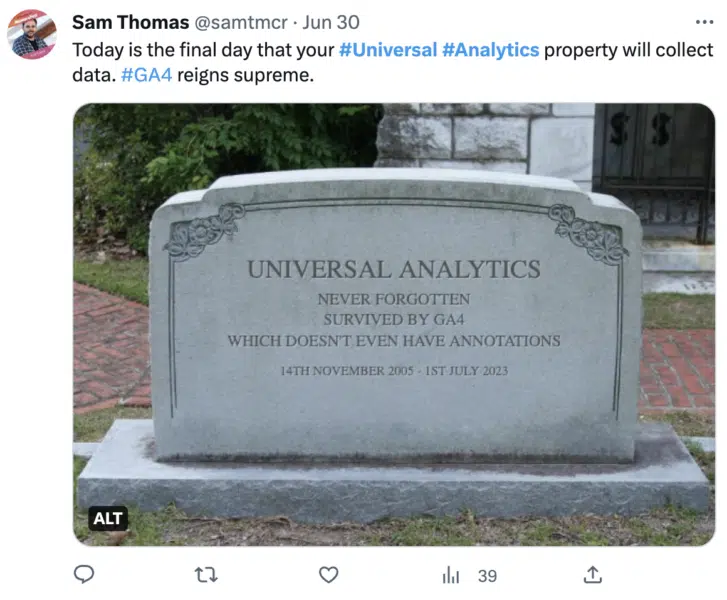
Some advertisers are so frustrated with the new tool, that they’ve even been holding funerals for UA in the hope that Google might get the message and make a sudden U-turn.

Search Engine Land recently ran a poll to find out how the industry is coping and to give marketers an opportunity to get their voices heard – and the feedback was interesting to say the least.

The enforced switchover is a historic transitional moment in digital marketing history, and we know it’s a big adjustment. But if you don’t laugh, you’ll cry. So with that in mind, we’ve put together a list of the funniest reactions we received to Google’s enforced GA4 switchover. Enjoy!

Short and sweet. Some marketers were able to summarise their experiences with GA4 in just a few words.

  • “Mad! Mad! Mad!
  • “Total cr*p!”
  • “GA4 = LAME!”
  • “One word (in fact two words): BS!”
  • “What a Waste of our time.”
  • GA4 UI team should be fired

“Google should be ashamed!” Marketers certainly know how to articulate their frustrations. They also know how to dish out some pretty epic one liners. We’re so glad we won’t be answering calls on the GA4 customer service desk on Monday.

  • “Did they find the software in a Christmas cracker? The biggest pile of sh*t I have ever seen. Unusable for scenario of casual small business owner with a simple question about their stats. I can only conclude that Google deliberately wanted to obfuscate people’s access to their own website data. If it doesn’t get better, considering removing from many customers’ sites because it is just pointless drag on speed stats.”
  • “GA4 is potentially the worst product update ever from a pure usability perspective, and Google should be ashamed of its current state.”
  • “Google trying to do tableau for dummies is not working on either level.”
  • “Simply Put, GA4 Sucks. It is a pain in the a*s to use (NOT USABLE) requires much more time than previous version lacks the same visual impact as GA3 it is junk.”

Mind games. What if Google secretly designed GA4 with a hidden agenda; to get marketers to stop using its own tools and turn to its competition instead? Makes sense. Kinda. Well, not really.

  • “This might be the least user-friendly product Google has ever produced. Almost like they don’t want people to use it.”

I’m outta here! A fantastic solution if you’re not a fan of GA4; turn on your Out Of Office, go on vacation and wait for all of this to blow over. Of course, it probably won’t. But definitely a great short-term option.

  • “I have been dreading the arrival of this date so much that I booked a trip out of town. LOL. My hope is that by the time I return from vacation, Google will have changed their mind, and Universal Analytics will continue to exist.”

Get the daily newsletter search marketers rely on.


You can’t make me. Alternatively, if you’re not in a position to take a vacation right now, just close your eyes, pretend GA4 isn’t happening and do nothing. What could possibly go wrong?

  • “Our marketing department doesn’t have the faintest idea how to follow complex directions. And most of them are out of the office for the next two weeks. So IT kicked the project over to our business insights department, who swiftly said, “We don’t have anything to do with Google Analytics anymore. Talk to Marketing. Now it looks like the project is mine. I’m a one-person department. I’m not gonna do sh*t. That’s my GA4-adjacent sob story.”

Why we care: We’re all in the same boat right now. After 11 years of relying so heavily on Universal Analytics, migrating over to GA4 is a daunting task. But unfortunately, we don’t have a choice (unless you want to consider a GA4 alternative). So we might as well get our heads down and try to figure it all out. But that doesn’t mean we can’t have a laugh along the way.


Related stories

New on Search Engine Land

@media screen and (min-width: 800px) { #div-gpt-ad-3191538-7 { display: flex !important; justify-content: center !important; align-items: center !important; min-width:770px; min-height:260px; } } @media screen and (min-width: 1279px) { #div-gpt-ad-3191538-7 { display: flex !important; justify-content: center !important; align-items: center !important; min-width:800px!important; min-height:440px!important; } }

About the author

Nicola Agius

Nicola Agius is Paid Media Editor of Search Engine Land after joining in 2023. She covers paid search, paid social, retail media and more. Prior to this, she was SEO Director at Jungle Creations (2020-2023), overseeing the company’s editorial strategy for multiple websites. She has over 15 years of experience in journalism and has previously worked at OK! Magazine (2010-2014), Mail Online (2014-2015), Mirror (2015-2017), Digital Spy (2017-2018) and The Sun (2018-2020). She also previously teamed up with SEO agency Blue Array to co-author Amazon bestselling book ‘Mastering In-House SEO’.

https://searchengineland.com/funniest-reactions-ga4-roast-google-analytics-428932


Universal Analytics dies aged 11: ‘Be brave and be strong’

Universal Analytics, a platform beloved (or at least tolerated) by marketers, died today (July 1) after 11 years.

Although the digital marketing industry had been warned that Google was preparing to turn off its life support, the news has still somehow come as a shock to many.

Heartbroken marketers across the world have been flooding Twitter to pay their respects, with some even holding their own funerals.

Screenshot 2023 07 01 At 14.58.52 558x600
Screenshot 2023 07 01 At 15.00.22 529x600
Screenshot 2023 07 01 At 14.58.15 800x291
Screenshot 2023 07 01 At 15.00.35 795x600
Screenshot 2023 07 01 At 14.59.55 727x600

Google Analytics was born in November 2005 after Urchin was acquired by Google and became a free service.

Seven years later, the search engine welcomed Universal Analytics into the world – a service that would go on to revolutionise the digital marketing industry.

The platform went on to grow from strength to strength and quickly became the most used web analytics service on Earth thanks to its many key benefits such as offline conversions and flexible session and campaign timeout settings.

Sadly, in March 2022, Google broke the hearts of advertisers in every corner of the globe when it announced that Universal Analytics would be departing our lives forever.

Russell Ketchum, director, product management at Google, fought back tears as he broke the jaw-dropping news:

  • “Universal Analytics was built for a generation of online measurement that was anchored in the desktop web, independent sessions and more easily observable data from cookies.”
  • “This measurement methodology is quickly becoming obsolete.”

Universal Analytics will be remembered for its user-friendly interface, easily accessible, up-to-date, accurate data, as well as its glorious reporting.

UA leaves behind Google Analytics 4, a replacement tool that marketers just seem to absolutely adore.

Share your stories, memories and the fun times you had with our departed friend by tweeting us @searchengineland.

Rest in peace, Universal Analytics. You were good to us.

Universal Analytics: 2012-2023.


Related stories

New on Search Engine Land

@media screen and (min-width: 800px) { #div-gpt-ad-3191538-7 { display: flex !important; justify-content: center !important; align-items: center !important; min-width:770px; min-height:260px; } } @media screen and (min-width: 1279px) { #div-gpt-ad-3191538-7 { display: flex !important; justify-content: center !important; align-items: center !important; min-width:800px!important; min-height:440px!important; } }

About the author

Nicola Agius

Nicola Agius is Paid Media Editor of Search Engine Land after joining in 2023. She covers paid search, paid social, retail media and more. Prior to this, she was SEO Director at Jungle Creations (2020-2023), overseeing the company’s editorial strategy for multiple websites. She has over 15 years of experience in journalism and has previously worked at OK! Magazine (2010-2014), Mail Online (2014-2015), Mirror (2015-2017), Digital Spy (2017-2018) and The Sun (2018-2020). She also previously teamed up with SEO agency Blue Array to co-author Amazon bestselling book ‘Mastering In-House SEO’.

https://searchengineland.com/universal-analytics-dieobituary-428924


Universal Analytics is officially replaced by Google Analytics 4

Well, it’s finally happening – the dreaded Universal Analytics sunset has started.

Here in the United States, UA is still processing data, but we were greeted by an ominous message when we logged into our account this morning:

  • “This property is scheduled to stop processing data very soon. Once this goes into effect, you’ll need a Google Analytics 4 property to measure website performance.”

This warning started appearing on UA at around 7am EST, once again reminding marketers that they must migrate to Google Analytics 4 to maintain their website measurement.

Screenshot 2023 07 01 At 13.52.42 800x34

Why we care. Today’s forced migration to GA4 is a historic transitional moment in digital marketing. Advertisers now have no choice but to use GA4 if they to track the performance of their websites and campaigns – unless they want to find an analytics alternative outside of Google of course.

How it works. Google has advised that today’s UA shutdown is being rolled out in stages which is why some marketers may still be able to access certain data. However, all properties that are still functioning are in a queue to be deleted, which will be happening on a rolling bases.

What has Google said? Google has been warning marketers that they need to migrate over to GA4 for more than a year. On Twitter and via a statement on the Analytics Help Center, Google said:

  • “Today, we begin shutting down Universal Analytics as we welcome you to Google Analytics 4.
  • “This will not happen overnight, so some Universal Analytics properties may continue to process data.
  • “However, all properties have now been added to the queue, and those that have not completed the upgrade will Jumpstart on a rolling basis.”
  • Google Analytics 4 is our next-generation measurement solution, and it has replaced Universal Analytics.”
  • “Standard Universal Analytics properties have stopped processing new data. To maintain your website measurement, you’ll need a Google Analytics 4 property.
  • “We strongly encourage you to make the switch to Google Analytics 4 as soon as possible. If you use Universal Analytics data in your Google Ads account, make sure you migrate your Universal Analytics property’s Google Ads links to your Google Analytics 4 property.

Get the daily newsletter search marketers rely on.


Timeline. The shutdown of Universal Analytics is being rolled out the following stages, with the final phase set for July 2023:

  • March 2023: Google automatically created a GA4 property for marketers who didn’t opt out of the automatic property creation option. Where possible, existing site tags were used.
  • July 2023: UA stops processing hits, including standard properties in accounts that also contain 360 properties. Marketers still have access to previously processed data in their UA property until July 2024.
  • July 2024: All marketers, even those with 360 properties, will no longer have access to the UA user interface and API.

Deep dive: For more information on how to migrate to GA4, read Google’s ‘Learn how to make the switch‘ guide.


Related stories

New on Search Engine Land

@media screen and (min-width: 800px) { #div-gpt-ad-3191538-7 { display: flex !important; justify-content: center !important; align-items: center !important; min-width:770px; min-height:260px; } } @media screen and (min-width: 1279px) { #div-gpt-ad-3191538-7 { display: flex !important; justify-content: center !important; align-items: center !important; min-width:800px!important; min-height:440px!important; } }

About the author

Nicola Agius

Nicola Agius is Paid Media Editor of Search Engine Land after joining in 2023. She covers paid search, paid social, retail media and more. Prior to this, she was SEO Director at Jungle Creations (2020-2023), overseeing the company’s editorial strategy for multiple websites. She has over 15 years of experience in journalism and has previously worked at OK! Magazine (2010-2014), Mail Online (2014-2015), Mirror (2015-2017), Digital Spy (2017-2018) and The Sun (2018-2020). She also previously teamed up with SEO agency Blue Array to co-author Amazon bestselling book ‘Mastering In-House SEO’.

https://searchengineland.com/universal-analytics-replaced-google-analytics-4-428912


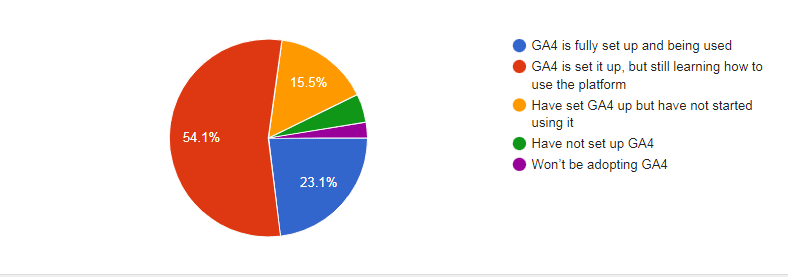
GA4 readiness: 23% have fully adopted, 50% still learning, 16% yet to begin

In just 48 hours we received around 400 responses to our poll question about Google Analytics 4.

With the standard version of Universal Analytics sunsetting tomorrow (July 1), we asked you:

What level of readiness are you (and/or your team) at when it comes to switching to GA4 from Universal Analytics?

Despite plenty of frustration:

  • Almost a quarter of respondents said they have fully implemented and already are using GA4.
  • Just over half said they had implemented it but were still learning how to use it.
  • Almost 16% have it set up but have not started using it.

The takeaway from those statistics: more than 90% of our joint readership is aboard the GA4 train, for better or worse.

GA4 Poll Graphic
  • Only 2.6% of respondents said they had no plans to use GA4.
  • 4.6% have just not set it up yet.

Why we care. At first glance, this looks like a vote of confidence in Google’s analytics strategy. After all, there are plenty of alternatives to GA4. But it’s not that simple.

Rightly or wrongly, it’s possible to adopt a tool even though you really don’t like it.

“An unfinished product rushed to market.”

“It’s not that the masses aren’t ready for GA4, it’s that GA4 isn’t ready for the masses. The UI is terrible.”

“Terrible UI, terrible reporting.”

Selected comments from poll respondents.

We might need to wait a while to see if people can make GA4 work for them or if frustrations with it start to make the alternatives look more attractive.


Related stories

New on Search Engine Land

@media screen and (min-width: 800px) { #div-gpt-ad-3191538-7 { display: flex !important; justify-content: center !important; align-items: center !important; min-width:770px; min-height:260px; } } @media screen and (min-width: 1279px) { #div-gpt-ad-3191538-7 { display: flex !important; justify-content: center !important; align-items: center !important; min-width:800px!important; min-height:440px!important; } }

About the author

Kim Davis

Kim Davis is the Editorial Director of MarTech Today. Born in London, but a New Yorker for over two decades, Kim started covering enterprise software ten years ago. His experience encompasses SaaS for the enterprise, digital- ad data-driven urban planning, and applications of SaaS, digital technology, and data in the marketing space. He first wrote about marketing technology as editor of Haymarket’s The Hub, a dedicated marketing tech website, which subsequently became a channel on the established direct marketing brand DMN. Kim joined DMN proper in 2016, as a senior editor, becoming Executive Editor, then Editor-in-Chief a position he held until January 2020. Prior to working in tech journalism, Kim was Associate Editor at a New York Times hyper-local news site, The Local: East Village, and has previously worked as an editor of an academic publication, and as a music journalist. He has written hundreds of New York restaurant reviews for a personal blog, and has been an occasional guest contributor to Eater.

https://searchengineland.com/ga4-readiness-poll-428900


From UA to GA4: Managing your reporting expectations

I’ll be blunt. Google Analytics 4 has caused agencies and businesses plenty of headaches in the past year.

The only guarantee over the next few weeks is that it will get worse before it gets better. 

The sunsetting of Universal Analytics is tomorrow, July 1 (and may have already passed by the time you are reading this). 

Many businesses are in for a shock when they start looking at their GA4 reports as their source of truth if they haven’t already. Spoiler: most haven’t yet!

There’s no doubt that GA4 offers many new reports and insights that UA struggled with (user funnel reporting) or flat out couldn’t provide (hello, data-driven attribution and predictive analytics!).

But those accustomed to using UA reporting for several years must adapt very quickly.

Where did my reports go?

Although you can go deeper into Google Ads campaign metrics once you become comfortable, more custom reporting is required than exploring similar data in UA. 

In UA, there is a Google Ads tab in the acquisition reporting section which is easy to access. There’s a bit more of a workaround in GA4, with similar out-of-the-box reports hidden away as an acquisition card. 

But to take advantage of advanced GA4 Google Ads reporting, this will be managed in the new Explore section. Not a big deal to get your head around, but for those who aren’t on the platform each day, this could be a struggle to get up to speed with. 

For the more advanced PPC marketers and data analysts, we’ve encountered a few issues when linking up certain fields to our Looker Studio dashboards. 

Source/medium and ecommerce conversion rate data (among others) are not out-of-the-box metrics that can be synced across unless you’re comfortable creating custom fields. 

Thus, many advertisers who aren’t will bypass such metrics. 

Scheduled reports are also gone (as of typing), so those businesses that received their daily/weekly/monthly reports straight into their morning inboxes have to find another solution.

The good news here is that Google has released more and more out-of-the-box reporting in the past year, so they have listened to these concerns and are acting. 

If you are still struggling with replicating similar reports and dashboards, custom reports aren’t rocket science.

Freelancers or agency PPC pros can leverage that extra skill set of new report creation that in-house marketing teams took for granted for years. 

Another bow in their cap and a necessary learning curve if you want to benefit from the new reporting suite that GA4 has to offer. 

Where there is disruption, there is opportunity.

Not so fast

Those of us who are in Google Analytics a bit too much and staring at real-time reports for large parts of the day are in for disappointment.

There is a 24-48 hour delay on all other reports without the intervention of BigQuery. 

This will be a consequence of the move away from last click to data-driven attribution. 

We do see this issue within the Google Ads interface with its delayed conversion reporting.

But for marketing executives who want to see the early impact of their 24-hour flash sale or how the first day of their Black Friday sale is going (oh, how fun that will be when November rolls around), they will have to wait a bit longer. 

And even when reports start to pull through, we won’t see complete data because of time lag.

This may be a blessing in disguise for PPC marketers whose clients love a good old next-day, 24-hour report.

Focusing on new features in the new real-time report, such as user snapshots and comparisons, could be an effective distraction tactic. 

Alternatively, if the client needs reporting to be more instantaneous, then the solution is leveraging the streaming export within BigQuery. 

It will provide next-to-precise, real-time data, which you can populate through Looker Studio dashboards during those key sale periods and events.

Just one big event

As I’m sure you already know, GA4 is all about the event. 

We say goodbye to UA’s page hits, ecommerce hits, social interactions hits, etc. and say hello, exclusively, to an event-based world. 

Events represent a fundamental data model difference between UA and GA4 properties. With that, we’ll miss a fundamental UA metric in pageviews. Sessions are king here. 

The death of the pageview means that other key UA metrics, such as bounce rate, will be calculated differently. 

UA bounce rate is when a session only has one page view, while GA4 bounce rate is the inverse of an engagement rate (new metric to GA4). 

So year-on-year comparisons are next to pointless, given they are worked out completely differently (which many people won’t know). 

These metrics are key to many businesses. To make the most of GA4, focus on similar or alternative metrics that are unique to the platform (e.g., engagement rate). 

By aligning these metrics with your objectives and identifying their value, you can shift the goalposts in your favor. 

This approach allows you to leverage the power of GA4 to your advantage rather than letting it become a stumbling block.


Get the daily newsletter search marketers rely on.


Drive that data

Data-driven attribution is the new default attribution model within GA4. 

This will cause disruptions (due to slower standard report generation) and discrepancies in channel reporting.

But in the grand scheme of things, it is absolutely the more accurate method of disseminating credit for conversions. 

Data-driven attribution is not perfect. (It is still a bit too “black box” and reliant on trusting Google for my liking). 

However, it is a much better reflection of the complex user journey spread across multiple digital touchpoints than the last click could handle.

Although data-driven attribution is new to Google Analytics, it’s not new to Google. 

It has been the default attribution model in Google Ads for at least the past year and has been around for years. 

Google Ads and GA4 data-driven attribution differ because Google Ads will only attribute across different Google channels, while GA4 will expand across all channels. 

At the very least, businesses will be familiar with how this works and why they get the odd conversion that comes through, which isn’t a whole number. (I still get asked this regularly.)

Embracing the learning curve

There’s no denying that once we all get used to GA4 and accept UA in its new role as the ghost of data past, we will be all the better for it. 

GA4 is a much more sophisticated, data-driven, privacy-centric tool than UA, and it’s long overdue. 

Because the jump from Google’s third web analytics iteration to its fourth was much larger than any of its preceding migrations, the pain points will be harder and learning curves will be more exaggerated. 

Patience is required and businesses will need to rise from the inertia of past reporting to move ahead and embrace this new dawn of data analysis. 

PPC marketers will need to guide and educate them along the way. Persist through continuous emails from company executives demanding to know why page views are down and why bounce rate has increased so much. 

Like you are showing your mom or dad how to use a smartphone for the first time and explaining to them that 5G doesn’t control minds, move forward and show them the promised land of GA4. They will love you for it and never look back.


Opinions expressed in this article are those of the guest author and not necessarily Search Engine Land. Staff authors are listed here.


Related stories

New on Search Engine Land

@media screen and (min-width: 800px) { #div-gpt-ad-3191538-7 { display: flex !important; justify-content: center !important; align-items: center !important; min-width:770px; min-height:260px; } } @media screen and (min-width: 1279px) { #div-gpt-ad-3191538-7 { display: flex !important; justify-content: center !important; align-items: center !important; min-width:800px!important; min-height:440px!important; } }

About the author

Kevin Rea

Kevin Rea is an Agency Digital Consultant for the performance team at Incubeta. Kevin has worked on the agency side for 8 and a half years. He has managed paid advertising accounts and provided digital consultancy for clients across multiple sizes, sectors and regions. He specialises in performance driven and strategic advertising solutions across multiple paid channels. Kevin is from Belfast and earned his Master degree in Marketing from John Moores University.

https://searchengineland.com/from-ua-to-ga4-managing-your-reporting-expectations-428870


How to overcome imposter syndrome in SEO and digital marketing

I have spent most of my life feeling driven by the idea that I am not enough.

Whether I’m applying for an award or talking about my career with someone over drinks, I don’t really feel comfortable listing my accomplishments.

Even writing this article, I don’t feel my voice is particularly useful or cogent.

Of course, I don’t just let these feelings win. I sit with them, challenge them, and try to write or say the words my feelings deny. And I know I’m not alone. 

These emotions are the classic markings of “imposter syndrome,” a term bandied about corporate offices almost as often as words like “synergy” or “optimization.” And at this point, everyone in the digital marketing industry has heard of imposter syndrome.

I surveyed over 150 digital marketers online, and 90% of the responses were positive: “Yes, I have experienced imposter syndrome in my digital marketing career.”

I ran two polls that confirmed the overwhelming experience of Imposter Syndrome – with 85% of Twitter respondents and 97% of LinkedIn respondents saying they experienced it in a digital marketing job.

So, most other people in digital marketing also feel like they aren’t enough.

We’re all silently berating ourselves, exhausted by self-doubt and internal criticism.

But why? Why do so many people feel like they’re trapped in the deepest well of their personal misgivings? How can we get out?

I spoke with numerous professionals in the digital marketing industry about their experiences with imposter syndrome, and I’ve uncovered three perspectives to consider when you’re facing imposter syndrome: 

Remember: Imposter syndrome won’t just disappear. It’s not an on-off switch. But our awareness of its place in our lives is crucial to managing it.

1. Look within

When imposter syndrome is defined in various papers, online forums, and discussions with my peers, it’s usually described as a feeling. It’s an emotion rooted in one’s sense of lacking, unbelonging, and inherent deficiency.

“It’s a feeling of discomfort, of agitation – it’s not a nice feeling,” Tazmin Suleman said.

A former SEO analyst, Suleman now runs a business coaching SEO practitioners on their confidence at work and in their personal lives.

She has dedicated her career to combating imposter syndrome in the SEO industry through mindfulness training and soft skills growth. After being laid off amid the pandemic, Suleman knew it was time to direct her energy toward helping others overcome their doubts. 

“If you get something wrong and say horrible things about yourself – which you wouldn’t say to someone else – how can you trust yourself?” Suleman said.

Growing as a person isn’t about critiquing oneself to the point of exhaustion but giving yourself enough grace to learn and grow. 

Suleman acknowledges that it can feel impossible to keep up in an industry beleaguered by algorithm updates, legal rulings, and the latest technical buzz (read: AI). 

“You can learn and learn and learn, but the thing that’s going to make you progress is action. And the way to take action is to feel confident,” Suleman said.

Information about the SEO industry flows infinitely, but one’s empowerment from that information can only be found by turning inward. 

Imposter syndrome begets burnout

When left unchecked, imposter syndrome inevitably mutates into burnout.

When a person doesn’t feel like they’re enough, they don’t have to care about depleting their energy, relationships, or sense of self. It’s easier to be a machine when you ignore the body’s warning signs.

Adrijana Vujadin, SEO manager at Affirma, was driven by her burnout to examine imposter syndrome and find a way past it.

“I was hoping that one day I would open my laptop and just feel good about myself. But that didn’t happen. It was just more frustrations, more negative thoughts, more sabotaging,” Vujadin said. 

She didn’t listen to her body’s anxiety attacks, ending her days covered in sweat from stress. 

“I was ready to quit even my career, my job, because I realized that my mental health and the health of my body has been impacted by my work,” Vujadin said of her SEO career.

Then she took a break and read some books about taking control of her thoughts. One year later, she’s leading a talk at Search London called “How to be SEO Confident.”

A slide from Adrijana Vujadin’s talk “How to be SEO Confident” at Search London in June 2023.

Vujadin took the time to rest and began to realize that none of the work she does in SEO matters if she’s driven to the brink of exhaustion. 

“Ninety-nine percent of people are talking about technical things and years of experience,” but this isn’t enough, Vujadin said. People can have 20+ years of experience and still feel imposter syndrome.

By posing a few questions toward one’s self-talk, a person can gain confidence and find meaning in their career:

Questions to pose against imposter thoughts

  • Is this thought useful?
  • Is this thought accurate?
  • How many times in the past have you proven yourself good enough, despite thinking you weren’t?

These questions posed by Vujadin have helped her emerge from her lowest point to her current recognition as a stronger, more confident strategist.


Get the daily newsletter search marketers rely on.


2. Look around you

In many ways, the concept of imposter syndrome is a cultural lie. It didn’t start out with the name “imposter syndrome” – it evolved into this concept as part of office culture.

Originally described as the “imposter phenomenon,” in the late 1970s, the ideas of imposter syndrome have been coopted by numerous self-help books, office support groups, and therapy sessions.

Browsing iStock, I can choose from more than 1,300+ stock photos depicting imposter syndrome.

Today, “imposter syndrome” is used as a go-to phrase for anyone facing their first day at a new job or prepping for a public speaking gig.

The term “syndrome” implies an individual faces an issue they can treat. It can be as simple as a brief feeling of nervous anxiety or as complex as a six-month depressive episode. 

Blaming oneself for imposter syndrome is self-defeating. It’s only going to create more problems.

People too often blame themselves for feeling imposter syndrome, according to Michelle Stinson Ross. As CMO of Feelalytics, Stinson Ross gathers data surrounding mental health and culture in the workplace. 

“Being made to feel I’m an imposter is actually external,” Stinson said. “That’s the community’s fault that somebody feels like an imposter. Syndrome is a misnomer … because it is not internal, it is not a malfunction of the individual. It is a malfunction of the community.”

According to Stinson Ross, the SEO community is rooted in the technology and start-up industries. Its roots can be associated with a more analytical mindset that is traditionally perceived as male.

These origins create an environment where certain types of people might struggle to feel welcome. 

George Nguyen is the director of editorial at Wix and a former editor at Search Engine Land. Despite his impressive resume, he still felt isolated because others did not look like him.

Rather than expecting people to conform to one type of logical, data-driven SEO, perhaps we can broaden our understanding of SEO as a practice and skillset. 

“The imposter syndrome is not because I’m deficient, it’s because I’m trying to fit into some perception of myself that is not entirely authentic,” Stinson Ross said. 

Allowing people to feel like their authentic selves at work creates a sense of belonging. And it is only through this sense of belonging that people can truly feel free from imposter syndrome. 

Ultimately, the SEO community and employers in the digital marketing space need to take responsibility for making others feel welcome.

While it’s an individual’s responsibility to combat negative thoughts, it’s a culture’s responsibility to support each other. 

3. Make others feel seen

There are three steps to addressing imposter syndrome:

  • Step 1: Manage your internal self-talk. Tell your imposter syndrome thoughts to chill. 
  • Step 2: Acknowledge external factors contributing to your imposter syndrome. Who’s making you feel unwelcome?
  • Step 3: Build a community. 

Kristal Audain is a product manager and former senior SEO analyst at Groundworks. She’s faced multiple hurdles throughout her digital marketing career, from getting rejected for pay raises at a previous job to getting furloughed at the start of the pandemic.

Despite these challenges, she’s grown a presence on Twitter and has appeared on popular podcasts like The SEO Rant.

“It is humbling to receive compliments and there are days where it is still hard to have my voice heard as a black woman on a male-dominated team. However, my best piece of advice to anyone that thinks you aren’t enough, talk to your community and we will help light that voice in your head with a match and blow it up,” Audain said.

It’s impossible to feel like an imposter if you’ve found your people. The SEO community is like any other group of humans – we are bettered by our support and how we make each other feel seen.

Here are a few SEO communities that are available to folks based on their unique backgrounds: 

In this list, I focused on diversity, highlighting groups for folks who might struggle with belonging. But there are many groups outside of this, from those specializing in a particular discipline of SEO to an organization’s internal Employee Resources Groups.

When we show up for each other, amazing things can happen. Whether you’re telling someone they did a great job with a presentation or reaching out to get a second perspective, everyone in SEO should feel like there’s a community to back them up. 

“You’re modeling the types of behavior and communication that can foster belonging,” Stinson Ross said.

It is only through building true, authentic relationships with others that we can grow the SEO community into a space where everyone belongs. 


Opinions expressed in this article are those of the guest author and not necessarily Search Engine Land. Staff authors are listed here.


Related stories

New on Search Engine Land

@media screen and (min-width: 800px) { #div-gpt-ad-3191538-7 { display: flex !important; justify-content: center !important; align-items: center !important; min-width:770px; min-height:260px; } } @media screen and (min-width: 1279px) { #div-gpt-ad-3191538-7 { display: flex !important; justify-content: center !important; align-items: center !important; min-width:800px!important; min-height:440px!important; } }

About the author

Harmony Huskinson

Harmony Huskinson is an award-winning SEO strategist at Portent, a full-service digital marketing agency. Harmony was named a 2023 Rising Star of Local SEO by BrightLocal and has worked with hundreds of businesses since starting her digital marketing career in 2015. You can find Harmony on Twitter or on LinkedIn if you’d like to chat about the intersection of community and digital in local spaces.

https://searchengineland.com/overcome-imposter-syndrome-seo-digital-marketing-428849


How Facebook ranks content in 2023: Feed, Stories, Reels and more

Facebook has updated its resource explaining how it ranks content across its website, including Feed, Stories and Reels.

Meta has also announced new tools and features for improved transparency on the social network, which will better assist marketers.

Why we care. Marketers and advertisers need a strong understanding of how Facebook ranks content in order for them to make informed decisions about their campaigns to achieve maximum visibility and engagement.

What’s new? Meta published a number of new features designed to provide greater clarity on its ranking factors via its digital newsroom:

  • System Cards: Facebook has created 14 system cards to help marketers understand how Facebook uses AI to rank content and create feeds that are tailored to individuals. The cards also explain how individuals can control what they see.
  • ‘Why Am I Seeing This?’: Meta is expanding this feature to Facebook Reels in the coming weeks. It enables people to understand how their previous activity on the site has influenced what content AI is currently deeming relevant to them and subsequently serving on their accounts.
  • ‘Show more, show less’: Facebook plans to make this feature, which is currently available on all posts in Feeds, Videos and Reels via the three-dot-menu, more prominent.
  • Meta’s Content Library and API: Facebook plans to roll out a new suite of tools for researchers called Meta’s Content Library and API in the next few weeks. The new library is set to include data from public posts, pages, groups, and events on the social networking site.

System cards

Facebook’s new system cards are the biggest update to its resource center. This system consists of 14 cards:

  • Feed: Facebook uses AI to calculate a relevance score for about 500 posts and then ranks them in descending order. The system is built to show a variety of content in the feed, meaning a user shouldn’t see multiple video posts in a row.
  • Feed Ranked Comments: AI ranks comments in order of what it deems will be most relevant to each user. It does this by examining factors such as how popular other comments are and whether they have been published by someone in their network.
  • Feed Recommendations: AI will determine what content users are most likely to engage with by looking at factors such as groups they have recently joined and posts they have liked. It then uses this information to decide what content (e.g., posts, reels, live videos) to recommend.
  • Reels: AI selects what reels are served and in what order by determining what a user is most likely to be interested in. It makes these predictions by examining factors such as accounts the user has followed, liked or recently engaged with.
  • Stories: The AI system automatically shows Stories from people or pages by predicting what a user most likely to be interested in. The system also applies rules to make sure users are served a balanced mix of content in Stories.
  • People You May Know: AI tried to determine people who may be of interest by looking at factors such as people who are friends with a user’s friends or people that are in the same groups as the user.
  • Video: When users view and interact with Facebook Video, one of the underlying AI systems delivers a range of video types that may match their preferences. This content is found in the Video tab. It might include reels, music, gaming or shows. This is content users may be interested in from creators that they may not follow.
  • Marketplace: When a user views and interacts with Facebook, including Facebook Marketplace feed, one of the underlying AI systems recommends relevant Marketplace listings. For example, users can see items for sale in categories such as home goods, pet supplies and sporting goods. Users’ feeds might also include other recommendations, such as sellers and content that they may be interested in.
  • Notifications: AI chooses what notifications to send and ranks notifications in order of what it deems will be most relevant to the user. Meanwhile, previously viewed notifications are displayed in the order in which they were received.
  • Search: AI awards each potential search result a score relating to how relevant that content is to a user by examining factors such as content type. It will then serve users the results in order of relevancy based on this scoring
  • Groups Feed: AI automatically determines which posts appear in the Groups feed, and in what order, by scoring content by relevancy.
  • Individual Group Feed: AI predicts what content users are most likely to engage with and then ranks it according to relevancy in their individual group feed. Relevancy factors include what and whom users have recently followed, liked or engaged with.
  • Suggested Group: Facebook’s AI will look at factors such as groups a user’s friends are members of and related topics to products a user may have recently engaged with, then use this data to identify other groups that may be of interest.
  • Pages You May Like: AI will suggest pages to follow based on pages a user’s friends have recently liked or pages that might relate to products and posts the user has recently engaged with.

Get the daily newsletter search marketers rely on.


Meta’s Content Library and API

Another big update to Facebook’s resource center is Meta’s new Content Library and API. The database is set to include data from:

  • Public posts
  • Pages
  • Groups
  • Events

People will be able to use the library to search, explore and filter on a graphical user interface or through a programmatic API.

However, under current guidelines, this tool has been set up specifically for researchers from qualified academic and research institutions pursuing scientific or public interest research topics. In order to gain access to this data, researchers will need to apply.

Personalizing the user experience

Facebook confirmed that in addition to providing greater transparency into its ranking factors, it also wanted to give users the tools to take back control of the content they see – for example, the ‘Why Am I Seeing This?” feature.

These tools give Facebook users the ability to shape their own experiences, and choose what what they do and don’t want to see. People can make changes by visiting their Feed Preferences on Facebook as well as through Settings.

What has Facebook said? Nick Clegg, Meta’s president of Global Affairs, shared details on the Meta digital newsroom about how AI is ranking content and how it’ll be easier for users to control what they see moving forward. He said:

  • “[Our AI] systems make it more likely that the posts you see are relevant and interesting to you. We’re also making it clearer how you can better control what you see on our apps, as well as testing new controls and making others more accessible. And we’re giving more detailed information for experts so they can better understand and analyze our systems.”
  • “Our AI systems predict how valuable a piece of content might be to you, so we can show it to you sooner. For example, sharing a post is often an indicator that you found that post to be interesting, so predicting that you will share a post is one factor our systems take into account.”
  • “As you might imagine, no single prediction is a perfect gauge of whether a post is valuable to you. So we use a wide variety of predictions in combination to get as close as possible to the right content, including some based on behavior and some based on user feedback received through surveys.”
  • “We hope by introducing these products to researchers early in the development process, we can receive constructive feedback to ensure we’re building the best possible tools to meet their needs”.

Deep dive: You can find a more detailed explanation of the AI behind content recommendations on the Meta AI blog. For more information on how AI uses signals to make predictions, you can visit Meta’s  Transparency Center.


Related stories

New on Search Engine Land

@media screen and (min-width: 800px) { #div-gpt-ad-3191538-7 { display: flex !important; justify-content: center !important; align-items: center !important; min-width:770px; min-height:260px; } } @media screen and (min-width: 1279px) { #div-gpt-ad-3191538-7 { display: flex !important; justify-content: center !important; align-items: center !important; min-width:800px!important; min-height:440px!important; } }

About the author

Nicola Agius

Nicola Agius is Paid Media Editor of Search Engine Land after joining in 2023. She covers paid search, paid social, retail media and more. Prior to this, she was SEO Director at Jungle Creations (2020-2023), overseeing the company’s editorial strategy for multiple websites. She has over 15 years of experience in journalism and has previously worked at OK! Magazine (2010-2014), Mail Online (2014-2015), Mirror (2015-2017), Digital Spy (2017-2018) and The Sun (2018-2020). She also previously teamed up with SEO agency Blue Array to co-author Amazon bestselling book ‘Mastering In-House SEO’.

https://searchengineland.com/how-facebook-ranks-content-2023-feed-stories-reels-428837


Buy on Google program to shut down Sept. 26

Buy on Google for Search and Shopping will shut down Sept. 26, the company announced today via an email sent to participating U.S. retailers.

While Buy on Google is ending, Buy on Google for YouTube will remain available for eligible U.S. merchants.

Why we care. Google says it is dropping Buy on Google to create a new “streamlined buying journey for shoppers” that makes it easier for retailers to sell on Google and YouTube.

What Google is saying. A Google spokesperson told Search Engine Land:

  • “Our goal is to support an open ecosystem by connecting shoppers directly with merchants, and this is a big priority for us. We developed a new streamlined checkout process that allows shoppers to go directly from Google to the checkout flow on a merchant’s website when they’re ready to buy. We’ve received great feedback from merchants and users. Buy on Google was a small feature that a very limited number of merchants used, so we’re investing in this new buying experience instead.”  

New pilot. We’re told that more merchants are already using Google’s new checkout pilot than Buy on Google. Google has created a new form if you’re interested in the new checkout pilot.

Here’s what we know about Google’s plan for a “more streamlined buying journey for shoppers,” according to this page:

  • “Instead of a multi-step buying journey, people who are ready to buy will now have the option to go directly from Google to the checkout flow on your website. Once there, they will see the chosen product already in their shopping cart and can checkout on your site with whatever payment method they select. We will be piloting this experience on Google and YouTube with select merchants and will share more information as we’re ready to take on additional partners.”

The email. Here’s a copy of an email Google is sending to merchants today:

Building great checkout experiences is something we’re focused on, and are always evolving. We’re writing to inform you that, as of September 26, 2023, the current Buy on Google program will be ending in the United States. We have some new channels that we’re excited to be testing (more info below), however, we wanted to share some key details about Buy on Google.

  1. Your participation in Buy on Google will end on September 26, 2023 and no listings on Search or Shopping will show the Buy on Google option. If you are currently onboarding, you will be removed from the process today. 
  2. All orders received through September 2023 should be fulfilled with return policies honored, regardless of program termination. 
  3. You have the option to terminate your participation in the program sooner than September if you feel this choice is more beneficial for your business.  Please reach out to support for assistance with doing this.
  4. Order data will be available for one year post program ending. You can access your reports via the instructions here.
  5. No action is required from you to end the program. 

We will continue to introduce new ways to optimize the way users navigate to checkout on our platforms, and look forward to continued engagement with our retail partners on other products such as our new checkout pilot and all other areas of collaboration through our tools, insights and training. 

We’re excited about the  streamlined checkout experience we introduced last year, wherein consumers who are ready to buy will have the option to go directly from a listing on Google to the checkout flow on your website. Once there, they will see the chosen product already in their shopping cart and can checkout on your site with whatever payment method they select.  *Merchants using the new Google checkout feature see an improvement in gross merchandise value (GMV) between 1-10%

  • *Source: Google Data, US, Retail, March 2023. [Caveat: Data pulled for existing pilot merchants]

Learn More:

  • If you are interested in joining the checkout pilot, please complete the interest form here. 
  • Please note, if you are selected to join the checkout pilot ahead of September, any current Buy on Google experiences you have running will stop showing effective immediately.  
  • For those not selected to participate in the pilot, we will reach out to you once the solution is more widely available so you can onboard then! 

For any questions or support regarding terminating your participation, please contact our support team or reach out to your Google contact.


Related stories

New on Search Engine Land

@media screen and (min-width: 800px) { #div-gpt-ad-3191538-7 { display: flex !important; justify-content: center !important; align-items: center !important; min-width:770px; min-height:260px; } } @media screen and (min-width: 1279px) { #div-gpt-ad-3191538-7 { display: flex !important; justify-content: center !important; align-items: center !important; min-width:800px!important; min-height:440px!important; } }

About the author

Danny Goodwin

Danny Goodwin has been Managing Editor of Search Engine Land & Search Marketing Expo – SMX since 2022. He joined Search Engine Land in 2022 as Senior Editor. In addition to reporting on the latest search marketing news, he manages Search Engine Land’s SME (Subject Matter Expert) program. He also helps program U.S. SMX events. Goodwin has been editing and writing about the latest developments and trends in search and digital marketing since 2007. He previously was Executive Editor of Search Engine Journal (from 2017 to 2022), managing editor of Momentology (from 2014-2016) and editor of Search Engine Watch (from 2007 to 2014). He has spoken at many major search conferences and virtual events, and has been sourced for his expertise by a wide range of publications and podcasts.

https://searchengineland.com/buy-on-google-program-to-shut-down-sept-26-428845


Bing adds new AI-powered shopping tools

Microsoft has announced new AI-powered shopping tools powered by Bing and Bing Chat. These include new price match monitors, AI-generated buying guides, and review summaries, all aimed to “help you shop and save with confidence,” Microsoft said.

Price match monitors. These new price match monitors show you a product’s price after you purchase that product. This is so you can request a pricing match from the store you bought it from if that price changes after you ordered it.

Microsoft said they have “partnered with top US retailers with existing price match policies and will be adding more over time.” This is launching in the US search results soon, Microsoft told us.

Here is a video of how Bing’s sidebar shows you the price history over time and also alerts you after the price drops:

Buying guides. Bing now uses AI to generate buying guides based on the product or category of products that you are researching. The AI-generated buying guides will also provide you with product suggestions, show you the specifications of those items side-by-side and potentially offer other smarter comparison interfaces to help you along your buying journey.

These buying guides will launch in Bing in the US today and in the Edge browser worldwide today.

Here is a video of those buying guides in action:

Review summaries. Bing will also give you review summaries if you ask for them in Bing Chat or the Edge sidebar. The review summaries will summarize what customers are saying online about the product you are researching. It will also use AI to generate top insights and popular opinions about the products.

This rolls out worldwide today across Bing.

Here is what it looks like:

Bing ShoppingBeat Hero ReviewSummary 16x9 800x450

Here is a video of it in action:

Why we care. It is fascinating to watch how Bing Chat and other AI-based search features are expanding, getting more useful and being more human-like. Clearly, if you are a retailer, getting your products into Bing Shopping is important here. But what opinions and summaries the AI-generates also will be interesting to follow.


Related stories

New on Search Engine Land

@media screen and (min-width: 800px) { #div-gpt-ad-3191538-7 { display: flex !important; justify-content: center !important; align-items: center !important; min-width:770px; min-height:260px; } } @media screen and (min-width: 1279px) { #div-gpt-ad-3191538-7 { display: flex !important; justify-content: center !important; align-items: center !important; min-width:800px!important; min-height:440px!important; } }

About the author

Barry Schwartz

Barry Schwartz a Contributing Editor to Search Engine Land and a member of the programming team for SMX events. He owns RustyBrick, a NY based web consulting firm. He also runs Search Engine Roundtable, a popular search blog on very advanced SEM topics. Barry can be followed on Twitter here.

https://searchengineland.com/bing-adds-new-ai-powered-shopping-tools-428787