GA4 for B2B: How to track events and conversions

Starting July 1, Universal Analytics will no longer collect data. B2B companies looking to track their web or app performance must use Google Analytics 4 (GA4).

GA4 provides extensive capabilities for visualizing and analyzing data. 

To avoid being overwhelmed by the abundance of data, it is crucial to fully understand the tool and determine key metrics for your business. This ensures effective measurement of web traffic in GA4.

This guide explores how to set up and track events and conversions for B2B companies.

How to measure web traffic through GA4?

To properly analyze website traffic in GA4, the first thing to understand is GA4’s acquisition reports, which are divided into two main groups with different purposes:

  • User acquisition report: This report provides insights into how users were acquired and captured for the first time on the website.
  • Traffic acquisition report: This report operates at the session level and helps identify the campaign from which each session comes from.

Hence, companies, whether B2B, ecommerce or SaaS, can use these reports to analyze the sources of users or traffic on their websites.

However, the situation changes when you move on to the next report provided by GA4, the Engagement report, which enables you to analyze events and conversions. 

By default, the tool offers a wide list of events on our website. While they may all look useful, not all are equally important. 

So, how do you identify the most valuable events for B2B companies and properly measure them? Let’s find out.

How to track events and conversions in GA4 for B2B companies

Define key KPIs for your business

To effectively track the main conversions on a B2B website, the first step is to define the most relevant KPIs for the company. 

Generally, the main conversions for B2B companies include:

  • Form submissions (requests, budgets, etc.)
  • Lead generation (newsletter subscriptions, calls, information requests, etc.)
  • File downloads (handbooks, instructions, technical data sheets, etc.)
  • Video reproductions (videos on machinery operation, maintenance, installation processes, etc.)

When visualizing the events or conversions report for the first time, you’ll notice that GA4 records different events. 

However, none correspond to the defined KPIs for a B2B website.

GA4 events
GA4 events - Conversions

To track the main conversions for your B2B company, you need to identify each type of event and set it up.

GA4 event classification

In GA4:

  • Events are the metrics that allow you to measure specific user interactions on a website, such as loading a page, clicking on a link or submitting a form.
  • Conversions are the most important events for a website that you want to highlight.

There are four ways of classifying how to measure events in GA4:

  • Events that are recorded automatically, which are subdivided into:
  • Recommended events: Events you can implement yourself with predefined names and parameters. You will mostly do it through Google Tag Manager.
  • Custom events: Events that are fully defined by the owner through Google Tag Manager.

It is best to follow the GA4 event classification guidelines to create your website’s own events. You can also create them in a recommended or customized way using Google Tag Manager.


Get the daily newsletter search marketers rely on.


From the KPI to the event: How to configure events in GA4 for B2B

Once you have defined the main KPIs for your B2B company, you need to identify the event to collect and learn how to set it up accurately. 

Key events for B2B websites are not automatically triggered. They need to be tracked using GA4 and Google Tag Manager.

GA4 for B2B - KPIs and events

Let’s take a closer look at each one.

File downloads

Need to track when a user opens or downloads a file (such as a product manual or datasheet) from the website? 

One of the best solutions is to use the enhanced measurement event called file_download. 

This event is triggered when a user clicks a link to a file with common file extensions such as documents, text files, executables, presentations, compressed files, videos, or audios.

To activate this event, go to Admin > Data Streams, select the data, and enable Enhanced measurement.

File downloads

 Then, check if the File downloads event is activated.

File downloads

Google Analytics 4 triggers the file_download event when the clicked file extensions match the following regex:

pdf|xlsx?|docx?|txt|rtf|csv|exe|key|pp(s|t|tx)|7z|pkg|rar|gz|zip|avi|mov|mp4|mpe?g|wmv|midi?|mp3|wav|wma

To check if it is triggered correctly, go to DebugView (Admin > DebugView):

File download - DebugView

If the event is being tracked, everything works as intended. 

You can now mark it as a conversion so that the results for this metric will appear in the events and conversions reports.

To mark the event as a conversion, go to Admin > Conversions.

File download - conversion

After marking it as a conversion, when you validate using DebugView, the event will no longer appear in blue as a general event. 

Instead, it will appear in green, indicating it has been marked as a conversion.

File download - marked as conversion

Triggering file download events via Google Tag Manager

The event may not be triggered correctly depending on the website’s CMS or how it is coded. 

In such cases, you’ll need to create a trigger using Google Tag Manager. (You must have a Tag Manager account set up and linked to GA4.)

A trigger for when the file is clicked: You will configure the necessary parameters to track file downloads on our website. 

For example, in the case of a PDF file, you can do it as in the following image:

GTM file download trigger

A customized trigger: If the previous method doesn’t work, you will create a custom event based on web insights. For instance:

L2dTyA2mw7e IqwVj6H4UO7AdLAMA40xTacCJ1xpSl1o096UBWgT334JCVTMnXPK5AsdtwiOKEaUQV8uHOnRcHKGGa7evd2az FLDWAFgXp0EJ3kSePFco YeUd0pCJ76ifDLDEckLb38QDUGKisd0M

Finally, create the tag with the necessary parameters, either based on your own judgment or following GA4’s recommendations for this event.

GTM custom trigger

Once the tag is created, analyze and verify that the event is correctly triggered. 

This step ensures that the event tracking functions as expected and the data is accurately recorded.

GTM tags fired

The parameters associated with the event will provide you with additional information about how users interact with the website through these events. It helps you gain insights into user behavior and engagement. 

Every time you include events via Google Tag Manager, you must add them to GA4 through the Admin > Custom definitions section.

Video reproductions

Want to track interactions with videos on the site? You can use the video engagement event, which is also an enhanced measurement event.

This event is activated in phases:

  • video_start: When the video starts playing.
  • video_progress: When the video progresses past 10%, 25%, 50%, and 75% duration time. 
  • video_complete: When the video ends.

To set up the tracking, check if Enhanced measurement is enabled and ensure that the Video engagement event is enabled within it.

Video engagement - Enhanced measurement

Next, verify if the tracking of the video engagement event is properly monitored and recorded.

Video engagement - phases

If it works successfully, activate it as a conversion.

However, if the data is not collected correctly, you need to trigger it via Google Tag Manager.

Form submission

To monitor form submissions, such as requests for quotations or to ask for more information, use the enhanced measurement event: form_submit.

Check if Form interactions is enabled in Enhanced measurement.

Form interactions - Enhanced measurement

If it is being registered correctly via DebugView, you can configure it as a conversion.

Form-submit - DebugView

Form submits via Google Tag Manager

If, for some reason, the event is not triggered, you can set it up through Google Tag Manager.

To do so, activate all the variables to collect the required data for forms. 

Activate all variables

Then, create a general trigger for all forms in GTM. From here, you can generate tags and triggers either for all forms or specific to each form.

Generate tags and triggers

An example of a trigger configuration for a contact page form:

Trigger configuration for a contact page form

Once this is done, create the tag with the recommended parameters or whatever is necessary according to your goals:

Tag configuration - recommended parameters

Finally, verify that the event is triggered.

Form-submit - trigger fired

Lead generation, calls and emails

As a B2B company, tracking various leads from calls, emails, or subscriptions to forms like newsletters are important. 

GA4 does not define these events automatically. So, below are two ways to monitor these interactions on your website.

Generate_lead as recommended event

You can collect interactions such as newsletter form subscriptions using the recommended event generate_lead, which can be triggered when a user submits a form or a request for information.

To trigger it, in this case, the quickest recommended method is via Google Tag Manager.

First, you need to create the trigger. For example, when a user subscribes to a newsletter:

Generate_lead - newsletter subscription

And then generate the tag and check that it is working:

Tag configuration - subscribe_newsletter

Finally, check with DebugView that it is activated and flag it as a conversion. It may take a few hours for this option to appear.

Generate_lead - DebugView

Leads as custom events

However, suppose you don’t want to group subscriptions or other forms of requesting information with, for instance, calls or emails within the same analysis group. In that case, this can be done using custom events. 

When naming the event, it’s ideal to make it similar to other events to simplify the data analysis. For example, when clicking on a phone to call, the event could be called click_phone.

To create this event, you would follow the same process as in the generate_lead, using Google Tag Manager.

First, create the trigger.

Leads as custom events

And then, set up the tag:

Click_phone - tag configuration

How to visualize the data?

Collecting key metrics for B2B websites is crucial, but it’s also important to visualize them quickly.

To visualize the generated conversions, go to Reports > Engagement > Conversions or create customized reports through the GA4 Exploration section.

Visualize the generated conversions

You can also create these reports using Looker Studio, as it allows easy integration with GA4.

Looker Studio - visualization

Then, you can create dynamic reports with all the events and conversions set up.

Create dynamic reports

GA4 for B2B: Hone in on what matters to your business

GA4 provides a lot of data. This is why defining the most relevant metrics for your business is so important.

This way, you can track priority KPIs and analyze your performance efficiently.


Opinions expressed in this article are those of the guest author and not necessarily Search Engine Land. Staff authors are listed here.


Related stories

New on Search Engine Land

@media screen and (min-width: 800px) { #div-gpt-ad-3191538-7 { display: flex !important; justify-content: center !important; align-items: center !important; min-width:770px; min-height:260px; } } @media screen and (min-width: 1279px) { #div-gpt-ad-3191538-7 { display: flex !important; justify-content: center !important; align-items: center !important; min-width:800px!important; min-height:440px!important; } }

About the author

Gemma Fontané

Gemma Fontané is an SEO consultant, co-founder of Orvit Digital consultancy and founder of the international ecommerces denadal.cat & tiodenadal.online. With her company, she leads strategies for B2B and Ecommerce companies to help them generate business. Gemma has knowledge and experience in international SEO as well as content and technical SEO. In the last year, as a public speaker, Gemma has spoken at conferences in different countries such as Friends of Search in Amsterdam, Search Y Paris 2022 in Paris or the International Search Summit in Barcelona and has collaborated with different industry blogs and seminars.

https://searchengineland.com/ga4-for-b2b-how-to-track-events-and-conversions-428776


Scaling an agency: Lessons of growth and change

Leading and scaling a fast-growing agency has been an incredible journey, especially since building a business was not even on my radar when I began consulting independently six years ago. 

Over the past six years building Eyeful Media, I’ve leaned into my network and colleagues, specifically those with agency experience, to navigate our growth successfully. I have learned invaluable lessons at every turn.

While we learned some lessons early, many have come as we’ve matured. We divided our journey into stages based on the Adizes organizational lifecycle model: 

  • Infancy.
  • Go-Go growth.
  • Adolescence.
  • Prime. 

We realized the need to adjust and improve our approach at each stage. 

Many of the most critical growth opportunities that we were able to capitalize on were gathered from the feedback of our clients and employees. 

Those important lessons learned at each stage of our journey have continued evolving as we matured as an organization.

Setting themes for business progression

To provide clarity and direction, we assigned a theme each year that represented the state of our business. 

In 2020, we focused on building infrastructure. 2021 was for establishing structure. In 2022, our goal was to enhance efficiency, which remains a priority in 2023.

One of the most important things we’ve done has been carefully crafting and refining our mission, vision and values. 

Having clarity around those things has allowed us to scale in a way that feels right for us, including hiring for culture fit and building infrastructure, structure, and efficiency in ways that align with what we want to accomplish and stand for.

The year of infrastructure (2020)

In the early years of our agency, we relied on a network of contractors and consultants. 

However, as we started hiring full-time employees (FTEs) in 2020, we needed a stronger infrastructure to support our growing team. 

The primary reason for switching to FTEs was to have more predictability in staffing as we pitched clients. 

The items below are all things I wish we had implemented much sooner, so if your budget allows, consider putting them in place as soon as you can afford to:

Get a payroll solution

Transitioning from paying contractors through PayPal to using Gusto for payroll greatly simplified our processes. 

With Gusto, issuing 1099s and W2s became more efficient. Integration with Corpnet and benefits also helped us manage employees in different states more effectively.

Invest in quality communication tools

We realized the need for seamless collaboration and upgraded from Google Chat to Slack based on feedback from our team. 

Investing in communication tools that facilitate effective teamwork and information sharing is crucial, especially for remote agencies.

Choose business accounting software

Start with more robust accounting software like QuickBooks Online to avoid migrating data later from a version designed for independent freelancers. 

Consistency in project naming and setting up divisions and classes will provide valuable insights for growth analysis.

Automate reporting data gathering

To reduce manual tasks and save our team’s time for analysis, we initially used Supermetrics to pull data into spreadsheets. (However, as our needs grew, we adopted Domo, a more comprehensive reporting solution, to create detailed internal and external reports during our year of efficiency).

Track time accurately

Although many dislike tracking time, we recognized its importance in understanding project and client profitability. 

Time tracking was in place starting on day one since we needed it for billing purposes, but we upgraded to a solution that better integrated with the rest of our tech stack.

(Note: In later years, we began to perform a deeper monthly analysis of the percentage of total time tracked and client/project profitability, but this set the stage)

Use a project management solution

Adopt a project management tool to streamline workflows and improve efficiency. Our first SEO hire pushed for project management. 

Since I had come out of an in-house leadership role, I didn’t realize its importance in aligning multiple organizations across concurrent workstreams.

Invest in tools that make it easy for your team to share feedback

As a values-oriented agency, having a consistent pulse on how our employees are doing is important. We implemented 15five after a suggestion from a friend who runs a much larger agency. 

Although big companies have typically used workforce management tools, this is one of the few things that changed the game for us.

Build a custom PowerPoint / Google Slides template

This might sound silly, but one of our best investments was hiring a designer to create a Google Slides template. 

We used to spend countless hours reworking decks because they were inconsistent. It’s been a huge time saver and cost us under $2,000.

Offload bookkeeping and get a CPA that can support multiple states

I used to categorize every expense in QuickBooks manually. While it’s OK to manage your own bookkeeping early in your company’s journey to understand your expenses, it stops being the best use of your time at a certain point. 

Pay someone (like Corpnet) to set up states for you for taxes and find a bookkeeper. After our first few years in business, we also had to hire a new CPA. We had outgrown our first one due to the complexity of operating in many states.

Create an overarching operating plan

As a founder, you may have a clear picture in your head of where you want to go with the agency and what’s important to you. 

But, as you hire more leaders, you want to ensure it’s also clear to them. Putting a plan down on paper also helps you identify gaps and opportunities.

Set up shared drives and organize your documents

I’d be fine putting all documents into a single folder and searching. However, not everyone can work like that, and it can be very painful to go back and organize documents afterward. 

Build an organized, scalable file structure that will make it easier to onboard new hires. When you’re growing quickly, you need people to ramp up fast, and taking time to be organized will help accelerate the process. 

While you’re at it, make sure you also put all contracts into an organized folder.

Identify revenue and expense streams

Identify what you want to sell, how you want to charge for it, and the alignment of resources to the type of work you want to do. 

In your first few years, you may be willing to take on any projects that come your way, but as you scale, you may opt to expand or reduce the breadth of your offerings.


Get the daily newsletter search marketers rely on.


The year of structure (2021)

During this phase, our main focus was establishing a solid foundation and refining our processes for scalability and strategic initiatives. 

We aimed to free up the team for strategic initiatives and improve the onboarding process. 

It can be challenging to step away from day-to-day tasks, especially if you started as a marketer and now have to become a “real” CEO.

However, delegating responsibilities and establishing a solid team structure is crucial as you hire the right people.

Maximize the technology you have in place, standardize practices, and consider using more sophisticated tools to consolidate and present data effectively. 

Introduce additional layers of management to ensure efficient communication and alignment within the agency. Exploring partnerships and securing a line of credit can also support your agency’s growth during this stage.

Build a robust onboarding process

I conducted onboarding for the first few years since I wanted to make sure that people understood our values. But this wasn’t efficient or scalable and wasn’t as effective as it could be. 

Some of our leaders decided to build a better process with more clarity around expectations for the first 90 days, links to important documents, and meet and greets with various colleagues.

Establish a team structure

At this stage, we started building additional layers of management, including adding group directors. This allowed our team to have managers to go to for help and provided more role clarity.

Implement annual reviews

I’ve never been a huge fan of annual reviews because I feel like managers should communicate feedback 365 days a year.

However, some of our greener employees wanted a more structured process that helped them understand what it would take to get to the next level. 

We started doing these in Google Docs but then moved the process to 15 Five.

Secure a line of credit

The best time to get a line of credit is when you don’t need it.

As a leader, you’re responsible for the livelihoods of your employees and their families. Have a safety line in place if you run into a cash flow issue.

Upgrade your brand

You may be flying under the radar for the first few years. As you start to scale, even through word of mouth, consider a website redesign or logo refresh. Just make sure you don’t overspend!

Hire in advance, but not too much

As your agency scales and revenue becomes more predictable, consider switching from a just-in-time hiring model to adding staff a little in advance. 

Don’t overhire so that you aren’t faced with idle bandwidth (like flowers, agency hours are perishable – once they’re gone, they’re gone!). But being staffed up gives the team more runway for training and coverage for absences. 

Use contractors to scale resources quickly if a project comes out of nowhere and you need the bandwidth.

The year of efficiency (2022)

Efficiency became our primary focus as we aimed to optimize our processes, embrace automation, and improve client and project profitability. 

We also put a heavy emphasis on developing our people. Although leadership training may not feel related to efficiency, your goal should always be to reduce involuntary turnover and create growth opportunities for your team. Coaching can help with both of those things. 

Get an assistant

As a founder, you’ll often find yourself taking on tasks that no one else is around to handle. 

This may include things like setting up email addresses for new hires or handling questions about benefits. Consider the opportunity cost of your time and offload these items to an assistant.

Build processes and templates

Navigating process implementation with early hires can be tough. You’ll likely encounter resistance, so make sure that you get their feedback early and often. 

Templates may include options like 90-day plans or reporting plans, but your goal should be finding anything being recreated frequently to save the team time. 

You may also be able to build reusable project approaches and content, although you want to avoid doing any work that feels “canned” or cookie-cutter.

Become serious about client and project profitability

You should always have a good pulse on profitability, but you may be willing to accept thinner margins during the first few years as you build your reputation. 

Ensure you have a good handle on your true cost to manage accounts based on the assigned team and their specific costs.

Develop your people – and not just with tactical platform/marketing training

Don’t assume people have the same skills as you do. Remember you’ve probably seen a lot more than they have. 

Build a robust training calendar covering topics like active listening, navigating tough conversations, and tailoring materials to clients at different organizational levels.

Realign your team

The people who got you here are not necessarily the ones who get you to your next level of growth, but you want to remain loyal to people doing good work. 

One of the toughest parts of growing a business is understanding if you need to change some of your hires’ roles or their reporting relationship. It’s also important to ensure that your team members fit within your brand and values. 

Someone may be an incredibly hard worker, but it’s best to move on from them if they are not a culture fit. A rigorous hiring process can help screen people upfront. However, you may not always get it right. 

Now that you have more employees and clients make sure that you have a lawyer review your consulting agreements, employee handbooks, employment agreements, non-disclosure agreements, and other similar paperwork. 

Laws change frequently, and you want to ensure your business is protected.

Review your bank accounts

You may have a basic checking account from when you started your agency. 

As your business grows, make sure you speak with a banker about upgrading your account and consider adding a linked savings account so that you can start to gather some interest. 

You may also be able to save on wire fees.

Upgrade your reporting suite

Now that you’re likely working with more clients, look into a more advanced reporting suite such as Domo, Tableau, or another solution that meets your firm’s needs.

Build a real budget

With a more mature company on your hands, it’s time to start operating and managing against a planned budget.

You’ll be wrong in the first year, but it’s a great muscle to build to understand where you’re growing revenue faster or slower than expected and where expenses are deviating from your plans.

6 more agency growth tips to keep in mind

Get frequent feedback from clients and your team

Nothing is more important than ensuring your clients and team members feel heard.

Capture quarterly or more frequent feedback, including NPS, eNPS, and Start/Stop/Continue. 

Pay attention to the feedback you receive to build a strong and enduring agency.

Diversify your revenue

You may not be able to control this while you’re in the early stages and you’re accepting most of what comes your way. 

Agency development consultants may recommend you focus on a specific niche, and it is a balancing act to ensure you’re protecting the health of the business and livelihoods you are responsible for in the face of that advice. 

Avoid putting too much of your business in one client or vertical’s hands. Balancing retainers with one-time projects is important to keep your business healthy. 

Retainers are easier to hire against, while one-time projects can be lucrative as long as you don’t run into a lot of scope creep.

Say no when it feels like a stretch or if the client isn’t a good fit

Nothing good can come from taking on a project that you don’t have the skills to support. 

Trust your leadership team’s perspectives, and don’t rely solely on your own intuition. It’s better to walk away graciously and even recommend another firm than to deliver sub-par work. 

Remember that you can always walk away if a client isn’t a good fit for you because they are demeaning to staff, always trying to squeeze you for more, or are generally a bad partner.

Implement minimums that allow you to do your best work 

During the early stages of company growth, you may be willing to flex on minimum retainers or project fees. 

Over time, you’ll learn how many hours your team must have to do work that you and they are proud of and are capable of driving results. 

Don’t be embarrassed by your rates. Charge what you and your work are worth.

Figure out what types of people thrive at your company

Based on the speed and complexity of our work, we’ve found it challenging to hire more junior people who require daily hands-on guidance. 

Step back, look at the patterns of who thrives and who tends to opt out or underperform, and adjust your hiring accordingly. 

You’ll want people to have the right values and skills, which requires effort.

Keep tabs on small expenses 

If you are fully remote, you’ll find that most of your expenses are people and software – and software can add up quickly. 

One quick tip is to regularly check to see if freelancers are still part of your roster so that you can cancel email, project management, time tracking, and other expenses that add up quickly. 

Do a quarterly audit of all software to ensure your team is still actively using it.

Embracing different stages of growth and change

Scaling an agency is an exciting journey filled with challenges and lessons. You can successfully scale your agency by diversifying revenue, making strategic hires, implementing efficient processes, and focusing on team development. 

Embrace the different stages of growth, adapt to the changing needs of your agency, and consistently evaluate and optimize your operations.

Remember, every step in the journey brings valuable insights that contribute to your agency’s success.


Opinions expressed in this article are those of the guest author and not necessarily Search Engine Land. Staff authors are listed here.


Related stories

New on Search Engine Land

@media screen and (min-width: 800px) { #div-gpt-ad-3191538-7 { display: flex !important; justify-content: center !important; align-items: center !important; min-width:770px; min-height:260px; } } @media screen and (min-width: 1279px) { #div-gpt-ad-3191538-7 { display: flex !important; justify-content: center !important; align-items: center !important; min-width:800px!important; min-height:440px!important; } }

About the author

Antonella Pisani

Antonella Pisani is CEO and founder at Eyeful Media, where she leads a team of passionate & talented marketers. Over the course of her career, she’s held senior digital marketing & eCommerce leadership positions with Fossil, JCPenney, Guitar Center, and Proflowers but began her career as a web designer in 1996. Antonella is based in Dallas, and her trusty sidekick, Riley (a rescue pup who also serves as the company’s Chief Security Officer), is often sleeping by her desk. She’s been to 37 countries and loves to travel any chance she gets.

https://searchengineland.com/scaling-agency-lessons-growth-change-428765


15 Google Analytics 4 alternatives: Free and low-cost options

Google Analytics 4 (GA4) is a sophisticated web analytics tool. But it isn’t your only option.

Despite its many advantages, there are also plenty of disadvantages to consider.

Luckily, there is no shortage of analytics tools that can compete with it, both in features and price.

Here, we’ve compiled a list of 15 free and low-cost alternatives to Google Analytics 4 that you may want to consider.

1. Matomo

Matomo is an open-source analytics platform that provides similar features to Google Analytics. It offers real-time analytics, customizable dashboards and detailed reports.

Matomo also gives users complete control over their data and offers a range of privacy features.

One of the most popular Google Analytics alternatives, Matomo is free if hosted on your servers.

2. Piwik PRO

Piwik PRO is a commercial spinoff of Matomo. The main differences are enterprise-level support and the integration of a customer data platform.

Like Matomo, it has an integrated privacy consent manager.

Piwik has free and paid plans.

3. Clicky

Clicky is a flash-free, real-time analytical platform that is easy to use and records and tracks user actions in detail.

It offers features like heat mapping, backlink analysis, and mobile compatibility.

Clicky has a free option and four paid options.

4. Heap

Heap is best suited for online products.

It lets you measure every interaction on your website, including swipes, clicks, tabs, form submissions and page views.

Heap also offers retroactive analytics, which allows you to examine the impact of changes to your website or app.

Heap offers both free and paid plans.

5. Clarity from Microsoft

Clarity from Microsoft focuses on users interacting with your website.

It summarizes information in a convenient dashboard and provides data like rage clicks and excessive scrolling, which could indicate user frustration. Clarity also offers session recording features, which can help you understand user behavior.

Clarity is free.

6. Woopra

Woopra provides website analytics based on four data types: people, journey, trends, and retention.

It analyzes user actions based on their journey through different touchpoints like customer reactions after introductory emails.

Woopra tracks usage through your website and apps with real-time analytics and data. It also offers customized live reports that can help you use data to improve your customer retention and engagement.

Woopra offers free and paid plans.

7. Countly

Countly is an open-source analytics tool that prides itself on being a GDPR-friendly alternative to Google Analytics.

It offers real-time analysis across websites and apps, as well as a unique user ID feature that allows the same user to be identified more easily across multiple browsers and devices.

It has free and paid options.

8. Smartlook

Smartlook is an analytics solution tool for websites, iOS/Android apps and various app frameworks.

It helps users understand how customers interact with their website or app by providing features such as session recordings, heatmaps, automatic tracked events, and conversion funnels.

Smartlook has free and paid options.

9. GoSquared

GoSquared is a web analytics platform designed for ease of use.

Its features include heatmaps, session recordings and funnel analysis. It is also privacy-focused, with features like IP anonymization and consent management.

Plans start at $9.

10. Kissmetrics

Kissmetrics tracks and analyzes user behavior based on first-party data it collects from your website or app.

Features include heatmaps, session recordings and funnel analysis. Kissmetrics helps personalize the user experience by showing different content to different users based on their behavior.

Plans start at $299.

11. Cabin Analytics

Cabin Analytics is designed to have a very small carbon footprint.

It is similar to Kissmetrics in that it is based on first-party data and can personalize user experience.

Cabin Analytics has free and paid plans. 

12. PostHog

PostHog is an all-in-one product analytics platform that includes session recording, A/B testing and other features to track user behavior in your app or website.

It is an event-based platform, which means you only pay for the events you track.

PostHog offers a generous 1 million events per month for free, so most smaller users can use it for free.

13. Plausible

Plausible is a leader in the trend of lightweight, privacy-oriented analytics tools.

It is easy to use and does not collect any personally identifiable information, making it ideal for complying with the E.U.’s General Data Protection Regulation (GDPR). This comes at the cost of functionality.

Plausible, and tools like it, only track very basic website metrics like pageviews, session duration and referrer information. It is a good option for content and marketing teams who just want easy-to-use, basic website analytics.

Plans start at $9.

14. Fathom

Fathom is another privacy-focused analytics tool like Plausible.

It doesn’t have the deeper features of GA4, but it’s a solid choice if you want a lightweight website analytics tool.

Plans start at $14.

15. Counter

Counter is an open-source analytics tool that uses a “pay what you want” model.

As with Plausible and Fathom, it is privacy focused and has very basic features and measurements.

The big difference between it and the previous two entries is you can’t drill down deeply into individual page performance. However, it is free.


Related stories

New on Search Engine Land

@media screen and (min-width: 800px) { #div-gpt-ad-3191538-7 { display: flex !important; justify-content: center !important; align-items: center !important; min-width:770px; min-height:260px; } } @media screen and (min-width: 1279px) { #div-gpt-ad-3191538-7 { display: flex !important; justify-content: center !important; align-items: center !important; min-width:800px!important; min-height:440px!important; } }

About the author

Constantine von Hoffman

Constantine von Hoffman is managing editor of MarTech. A veteran journalist, Con has covered business, finance, marketing and tech for CBSNews.com, Brandweek, CMO, and Inc. He has been city editor of the Boston Herald, news producer at NPR, and has written for Harvard Business Review, Boston Magazine, Sierra, and many other publications.

https://searchengineland.com/google-analytics-4-alternatives-free-low-cost-428794


Are you ready for Google Analytics 4? Have your say in our poll

Time is running out to migrate your website from Universal Analytics to Google Analytics 4.

Even though Google has been telling marketers for months to make the switch “as soon as possible“, most websites around the world ignored the warnings and were still using UA as of June 21. That’s a decision many may regret starting Saturday morning when UA officially sunsets.

On the other side of the coin, some brands have followed Google’s guidance and adopted GA4 – but it seems many marketers aren’t getting along with the new tool. In fact, some are even starting to look for alternative platforms.

“There are definitely reasons to look elsewhere, depending on your budgets, depending on the type of tracking that you need,” says Sharon Mostyn, CEO of Mostyn Marketing Group. “The one that I’m seeing with a lot of healthcare clients is that Google has said blatantly we are not HIPAA compliant. So that’s a good reason to consider alternatives.”

It would seem that GA4 hasn’t got off to the greatest start – but we want to hear your thoughts! Have you made the switch yet? Are you not going to bother? Or have you already and absolutely love it?

Whether you’re a marketer on the frontline at an agency, in-house or working as a freelancer, let us know whether you feel ready for the forced adoption of Google Analytics 4 – and why.

Be bluntly honest. What do you think of GA4? Do you think this was a good move by Google or is it going to make your job necessarily harder? Are you tempted to look for an alternative platform or does GA4 tick all your boxes? This is your chance to have your say!

Submit your answers below and we may include your response in a write-up of our poll results!


Related stories

New on Search Engine Land

@media screen and (min-width: 800px) { #div-gpt-ad-3191538-7 { display: flex !important; justify-content: center !important; align-items: center !important; min-width:770px; min-height:260px; } } @media screen and (min-width: 1279px) { #div-gpt-ad-3191538-7 { display: flex !important; justify-content: center !important; align-items: center !important; min-width:800px!important; min-height:440px!important; } }

About the author

Nicola Agius

Nicola Agius is Paid Media Editor of Search Engine Land after joining in 2023. She covers paid search, paid social, retail media and more. Prior to this, she was SEO Director at Jungle Creations (2020-2023), overseeing the company’s editorial strategy for multiple websites. She has over 15 years of experience in journalism and has previously worked at OK! Magazine (2010-2014), Mail Online (2014-2015), Mirror (2015-2017), Digital Spy (2017-2018) and The Sun (2018-2020). She also previously teamed up with SEO agency Blue Array to co-author Amazon bestselling book ‘Mastering In-House SEO’.

https://searchengineland.com/ready-google-analytics-4-poll-428747


How to use digital PR to drive backlinks and business growth

Trust and credibility are traits everyone strives to earn in life. 

In SEO, backlinks are an essential part of earning those coveted traits.

But many people overcomplicate how easy it is to generate backlinks. 

There’s no need to beg site owners with a digital tin cup asking for favors or shell out thousands of dollars to pay for links. 

Buying links is considered spam, consequently reducing your brand’s trust and credibility, and possibly putting you up as a manual penalty case from Google.

There are simply many more effective ways to generate backlinks and build an effective digital PR strategy. 

What’s more, it’s well known that backlinks are an important part of SEO, but they have just as much impact on other parts of your business, too.

It comes down to one key aspect: third-party social proof.

When backlink efforts are combined with high-quality PR, these tactics drive more traffic to your site, boost quality inbound leads and – ultimately – generate more revenue to grow your business.

Here’s how I’d define them from a basic conceptual perspective:

  • PR: Using media coverage to gain attention for your brand.
  • Link building: Tactics that encourage other websites to link back to your own.

Both are considered highly effective marketing tactics. While they’re technically different at the root, they should be used interchangeably to support your overarching business goals.

The best successes I’ve seen have come from earned link building. The most effective brands have something unique to say through thought leadership that incentivizes other sites to associate with your brand.

For example, using data and success stories to create compelling content are the best ways to earn trust and credibility.

This is particularly true when you contribute this information through media like a guest article, podcast, or webinar, in which you then get a backlink because the platform owner needs to cite who you are.

So, if you focus link building efforts on complementing what you’re already doing for digital PR, you kill two birds with one stone and reap the benefits from both efforts.

If you’re still on the fence about combining digital PR with link building efforts, here are the primary benefits of doing so:

Build brand authority based on thought leadership

When you repeatedly showcase your expertise on third-party platforms relevant to your audience, your audience begins to trust your advice.

This is what turns you into an authoritative brand within your industry.

Third-party social proof generates inbound leads and conversions

Once other sites recognize your brand as a trusted expert, they’ll start sharing your content with their own audiences and followers.

As those people see more of your own content, they’ll feel motivated to contact you and learn more about how you can help them.

Reduces hesitation and speeds up your sales cycle

When you’ve earned that authority, demonstrated your leadership, and boosted your organic inbound traffic flow, over half of your sales cycle is already complete.

Once an inbound lead requests a conversation, they’ve shown active intent and placed their trust in your brand. This is a major step towards closing a new sale for your company.

Creates a digital PR flywheel

Over time, you’ll become known as a go-to expert, so much so that you won’t need to pitch for links anymore.

Other brands will voluntarily contact you to collaborate, in which you automatically get backlinks for this.

This creates “the digital PR flywheel,” i.e., a system that constantly feeds into itself with less required input from your side.

Grow a highly targeted network

As the Digital PR Flywheel gains enough momentum to constantly create new PR link building opportunities, you’ve created an effective mechanism to expand your network and following.

The industry now identifies you as an authority figure in your niche space. Other players in the game will regularly involve you in their own promotional activities.

Generate backlinks without begging or paying

If you’ve followed closely, you’ll notice that none of this process for generating links involves cold outreach or payment – and when put into practice correctly, all backlinks come from authoritative sites.

As the results bear their own fruit, cold outreach and paying for links by your PR or SEO teams becomes a completely inefficient use of time and resources.


Get the daily newsletter search marketers rely on.


Here are five of the key steps that you can use to fuel your backlink strategy, establish trust and credibility, and successfully grow your business.

Step 1: Identify the primary places your audience uses to learn and get advice

Like any good business strategy, the first step to earning quality PR backlinks is to conduct the proper research.

Look into the places where you know your target audience willfully spends their own time. You can do this by identifying resources like:

SparkToro is a great tool for doing audience research. It lists relevant platforms backed by search data and organized by audience types, interests, and other variables. Use a tool like SparkToro as a starting point to do your own research, and then build from there.

As you conduct your research, include a mix of large and niche publications that you can target for your digital PR strategy – both are important to an organic growth strategy.

Smaller publications are relatively easy to get featured on, resulting in more quantitative coverage within that niche.

Larger publications are important as well because everyone recognizes their name authority.

Any links you can earn on these sites translate into instant credibility for your brand – both from Google and your audience.

Step 2: Submit topics that you’re an expert in and are relevant to your audience

Since the best way to earn links is to lean into your strengths, contact the manager of the sites you’re targeting and contribute ideas for topics you’re an absolute expert in.

You’re much more likely to be approved when you have proof, such as bylined content and event recordings.

Topics you submit should be relevant both to the platform and your target audience. Don’t go wild on product promos – instead, focus on being helpful to your target audience.

Here’s an example of how you could pitch for a podcast: 

Sample podcast pitch

If your data or expertise tells a compelling story, you’re far more likely to create something that stands out and warrants earned backlinks from highly valuable sources.

Repeatedly showcasing your expertise on third-party platforms is how to build those highly valuable traits of trust and credibility with your audience. This turns you into an authoritative brand.

Because your audience deems you a trusted expert, people will voluntarily contact you when they need help solving a core problem. This is precisely how digital PR generates high-quality inbound leads.

Depending on your business and the relative ease of your sales cycle, this approach can even translate into direct purchases that grow your business.

Additionally, events, publications, and anything that gains publicity automatically generate high-quality backlinks. This is the most effective way to do link building to support SEO and grow your business. 

Remember that Google clearly states that buying or selling links can be considered spam.

These tactics are not only unnecessary (especially when you use the tactics I’ve described), but they can actually do more harm than good to the rest of your business.

Link spam

Step 4: The digital PR flywheel starts to build

Follow the above steps, again and again, to create the digital PR flywheel – other brands willfully contact you to collaborate, so you no longer need to pitch.

In 2021, Google’s John Mueller, one of the greatest authority figures in digital PR, SEO, and organic marketing, gave his own stamp of approval on digital PR link building.

He encouraged brand builders to disregard misinformation that digital PR link building is part of an outdated spammy tactic by doubling down on efforts to build your own digital PR flywheel.

Digital PR - John Mueller

Step 5: Showcase everywhere how trusted you are across multiple highly reputable platforms

Include links within your own content to everything you’ve created in collaboration with other brands, including:

  • Events you’ve hosted with another brand.
  • Guest articles you’ve contributed.
  • Podcasts you’ve participated in. 

Those backlinks become your social proof because you’ve been cited as earning approval from a third-party site.

Think of it as earning a “peer review” for scientific journals.

Once you’ve been cited by a highly authoritative brand in the industry, you’ve earned those traits of trust and credibility for your brand that make all the difference to help grow your business.

This is again how to generate more inbound leads and direct conversions directly. People are coming to you because they trust what you have to say. You’re now selling to a warm audience, not cold.

Please remember that outreach and/or buying links are not only unnecessary but it’s also an entirely effective use of resources.

You can do more harm than good if you revert to tactics that Google and other search engines have deemed to be spammy. Don’t diminish your efforts to earn trust and credibility by falling into the link buying trap.

Overall, your PR and link building strategies should work in tandem: Link building shouldn’t just be for SEO, and when combined with PR, they bring a deeper impact on the brand authority.

A highly strategic and fully aligned digital PR and link building strategy translates into long-term benefits.

Invest your time and resources into creating highly valuable content that has something valuable to offer to give other sites a quality reason to associate their brands with your own.

Once the digital PR flywheel runs on its own steam, you’re well on your way to scalable growth!


Opinions expressed in this article are those of the guest author and not necessarily Search Engine Land. Staff authors are listed here.


Related stories

New on Search Engine Land

@media screen and (min-width: 800px) { #div-gpt-ad-3191538-7 { display: flex !important; justify-content: center !important; align-items: center !important; min-width:770px; min-height:260px; } } @media screen and (min-width: 1279px) { #div-gpt-ad-3191538-7 { display: flex !important; justify-content: center !important; align-items: center !important; min-width:800px!important; min-height:440px!important; } }

About the author

Adriana Stein

Originally from the US and now living in Germany, Adriana Stein is the CEO and Founder of the agency, AS Marketing. She leads a team of Digital Marketing Experts who develop holistic multi-language marketing strategies for B2B and B2C companies that want to expand internationally.

https://searchengineland.com/digital-pr-backlinks-business-growth-428727


A 5-step approach to optimizing websites with millions of pages

You’ve been tasked to optimize a site that is so massive it makes the Great Wall of China look like a picket fence. And it’s your sole responsibility. You need to make a big SEO impact with fewer resources. What do you do?

In this article, I’ll share five approaches you can focus on when you’re optimizing massive websites. 

By the end, you’ll feel confident knowing that you have a battle plan to conquer that great wall of webpages that lie ahead:

  • Sharpen your weapon, then go to battle.
  • Focus on global changes.
  • Improve the top-performing pages.
  • Focus on pages that target head terms.
  • Clean up the content.

1. Sharpen your weapon, then go to battle

It’s useful to have a certain mindset about your SEO program before you start. 

That said, two key steps will help you create an SEO game plan: 

  • Site analysis.
  • Competitive analysis. 

Let’s look at those in more detail.

Site analysis

In the battlefield of the search engine results pages, your website is the weapon. 

So your first mission: Sharpen that weapon by making the site the best it can be so that you’re not your own worst enemy. 

A site analysis will uncover the things that are hindering your rankings. 

You can do this in a couple of ways:

  • Run some SEO diagnostic tools.
  • Get an SEO audit.

Diagnostic tools

The average SEO tool is meant to repair your site, not rank it. In other words, it will not tell you how to rank but what you need to fix based on best practices.

Most businesses use diagnostic tools to do a self-audit. While it can uncover some useful information, there are a couple of limitations:

  • The recommendations are based on best practices and are surface-level suggestions. They don’t take into account the unique needs of the business. They do not know your competitors. They do not know the nuances of your particular industry niche. 
  • Some people will not know how to discern the things that need to be done and the things that can be left alone, nor will they know how to prioritize the recommendations based on the unique situations of their websites.

For example, let’s say you’re seeing a drop in organic search traffic. The diagnostic tool will not be able to understand what factors contribute to that – is it due to an algorithm update? Did your site recently migrate? Is your content bad?  

So, it is the diagnostic tool operator’s job (a.k.a. you) to be able to take the data and apply wisdom to ensure you are focusing on the most impactful things.  

Some tools you might consider for diagnosing your site include:

  • Nibbler
  • SEOptimer
  • UpCity’s SEO Report Card
  • WebPageTest.org
  • Semrush
  • SEOToolSet (Disclaimer: This is my company’s software)

SEO audits

Nothing beats the strategies you can uncover from a professional-level SEO audit that marries diagnostic tools with expert wisdom from an SEO vendor. 

In addition to running the best tools, an SEO expert conducting a site audit can:

  • Get to know your business, its site, past SEO decisions and your goals, and then take all of that into consideration when diagnosing your site and creating a strategy.
  • Uncover the real reasons you are not performing well in the search results using expert, technical analyses. 
  • Prioritize the recommendations so that you know exactly which steps to take in which order to make the strongest impact.

Competitive analysis

Once you’ve sharpened your tool, it’s time to go to the battlefield in the SERPs, where your second mission is to beat the competition (not the algorithm). 

Remember, you cannot attempt to beat an infinitely large algorithm. 

By focusing on what your competition is doing, and trying to do as well as them or better, you set the stage for a more manageable battle.  

Here again, you will rely on tools to help you uncover your competition’s strategy. 

You are looking to find things like who your true competitors are, and recommendations on optimizing your webpages based on the top-ranked pages in the SERPs.

Some tools you might consider for competitive research include:

  • Semrush’s Traffic Analytic and Organic Research tool 
  • Moz’s Domain Authority Checker
  • Ahrefs Content Gap and Site Explorer tools
  • SEOToolSet’s Single Page Analyzer, Research Summary report, Multi Page Analyzer, Links Report and Site Checker
  • Bruce Clay SEO WP plugin (Disclaimer: This is also my company’s tool)

By understanding your site and your competition, you can enter the battlefield with a clearly defined plan. This makes managing a large site’s SEO less overwhelming.

2. Focus on global changes

When you have a massive website, every change needs to count. That means looking at the things that can elevate the entire site or key pages across the site. 

One of the obvious wins here is improving your website performance (and your content, but more on that later). 

You can tackle things like:

  • Website speed
  • Core web vitals
  • Mobile-friendliness  
  • Code optimization 

Website speed

Website speed can impact many things: The user experience, your website rankings and conversions … so this is something to take seriously. 

Google conducted some research on speed and its impact on users back in 2017 (highlighted below), and while the data is a bit old, the message still holds.

Website speed - Google stats

As you look at your site, you may find that some of your pages may load slower than others. If that happens on your most important pages, you want to start there. 

And you may have groups of pages with the same template where making a few changes can improve speed across all those types of pages. 

Some things you may need to address are:

  • Compressing the information between your web server and search engine browser.
  • Minifying JavaScript, and cleaning up and externalizing CSS code.
  • Choosing the best file formats for images.

Some helpful tools and resources for this include:

(Note that, technically, the old page speed algorithm has been replaced by core web vitals, which I’ll cover next.)

Core web vitals

Core web vitals focus on factors that create a good user experience on your website, this includes:

  • Largest contentful paint: Having an optimal webpage load time.
  • First input delay: Ensuring users can easily interact with the page quickly. 
  • Cumulative layout shift: Making sure the elements on a webpage are stable.

Google says that “if at least 75 percent of page views to a site meet the ‘good’ threshold, the site is classified as having ‘good’ performance for that metric.”

This most likely only matters to the top-performing pages on the site, though, not the entire site, as pointed out in this Google SEO office hours: 

[embedded content]

However, Google has noted that some sites may not need to dedicate too many resources to core web vitals, or obsess about the scores:

Several tools offer lab and field data that can help you understand core web vitals:

  • PageSpeed Insights
  • Search Console (Core Web Vitals report)
  • Web Vitals Extension 
  • Chrome UX Report 
  • Lighthouse 
  • Chrome User Experience Report
  • Firebase Performance Monitoring
  • Chrome DevTools 
  • WebPageTest

So look at the most critical pages on the site, and run some tests to see what can be improved.

Mobile-friendliness

Ensuring your site is mobile-friendly is a no-brainer in today’s mobile-centric world. Of course, there’s also Google’s mobile-first indexing.

There is more to consider than you may think in order to have a mobile-friendly site. In general, you will want to think about:

  • The mobile website configuration (for example, is it responsive?).
  • How you prioritize the content for mobile users and make the content mobile friendly. 
  • Mobile-friendly design.

Tools that can help you along the way include:

Code optimization

Because the code on your website can impact a search engine’s ability to crawl your website, you can consider optimizing that code. 

Again, you can start with certain page templates or key page types and go from there.

Checking out W3.org’s developer tools can be helpful. 

Validators and tools

But a warning for beginners: You can spend a lot of time and resources trying to chase perfect code and the effort doesn’t always match the outcome. 

So it’s wise to know how to prioritize the recommendations, and you may need expert help from a developer who also understands SEO or vice versa.


Get the daily newsletter search marketers rely on.


3. Improve the top-performing pages 

Another area to laser focus your SEO efforts when you are contending with a large website is the top-performing pages. 

Typically, a handful of webpages drive the majority of organic traffic to a website. Look at those first.

This is consistent with an Ahrefs study which found that out of billions of webpages, only about 4% of them received any meaningful traffic at all.

Ahrefs traffic study

In other words: If you have to choose between optimizing a product page that drives a lot of traffic to your site versus a lesser-known product page featuring a left-handed socket wrench with a light on it, choose the top performer.

You can easily track down your top-performing pages using Google Analytics, and you can also use information from Search Console.

Pages report in Google Analytics.

In terms of how you improve these pages, again, you’ll want to focus on page analysis and competitor analysis. 

Run some diagnostic tools like those linked earlier to get a sense of where those pages are, then compare that to the top-ranked pages in the SERPs for the queries you are targeting.

As part of this, you may need to strengthen the content, so look at your content with a critical eye, too.

4. Focus on pages that target head terms

In my experience, maybe 15% of a website is targeting its “head” terms – the broader, more generic keywords/queries that people use when searching for what you have to offer. 

Ultimately, you can drive a ton of traffic if you can rank for these more generic terms – and they can be million-dollar keywords. 

So if I were to focus my efforts on a large site, I would want to optimize the pages that target head terms (the landing pages), and then secondly, optimize all the subpages that support them. 

This typically means you need solid information architecture – how you organize your content. 

If you already have well-organized content that supports your head terms, then you’d focus on optimizing those pages using some of the tools and strategies I’ve already mentioned. 

If you don’t, however, you may need to do some reorganization of the content, links and navigation on your site. This is where SEO siloing comes in handy.

SEO siloing is a form of website content organization and internal linking practices. One of the goals of this strategy is to maximize your site’s relevance for head terms.

Not only that, but SEO siloing can help by:

  • Enabling your site to show expertise and authority.
  • Ranking pages better in the SERPs.
  • Helping users navigate your website with ease.

Just to give a quick example: Say you own a power tools business that sells cordless power tools, electric power tools and gas-powered tools.

You’d start by organizing the website content (and site navigation) into categories supporting the three product lines you sell. 

Example of siloing website content

Your SEO program aligns with this because these categories will be the head terms you are after, too.

Practically, each product line will have its own section on the site with a landing page and supporting pages. 

The goal is to have well-organized landing pages and supporting pages with helpful, expert content that aligns with how people search and learn about the things you have to offer. 

Links between the landing pages and their own subpages clarify the relationships for search engine spiders crawling the website.

You can apply siloing to all types of sites, including ecommerce, B2B and informational sites.

Of course, this is a highly simplified explanation, and the details of how to make SEO siloing work well are vast.

Can this be a massive project? Yes. But it depends on the state of the site.

For some, they may have to do a larger reorganization of the content to achieve their goals, while others may need less effort with perhaps some new internal linking.

How big of a job this is depends on things like:

  • Your ability to make changes to the site (roadblocks could be buy-in or CMS issues).
  • How organized or disorganized the site’s content currently is.
  • If you need to create new content to fill in the gaps or significantly update content.

It can be a challenge but well worth it in most cases – it’s one of the ways we get our clients to rank for highly competitive one-word terms. 

For our final step in optimizing massive websites, let’s look at how you can elevate the quality of a website from an SEO perspective by focusing on the content.

5. Clean up the content

Last but not least, having excellent content is a priority. And this can be a huge challenge for large sites.

When you have massive amounts of content, you will need to divide and conquer. 

I’ve said previously that website publishers should spend half the time creating new content, and half the time updating old content. 

(And by the way, if you plan on creating new AI content, see my article on ChatGPT and SEO content.)

Large websites need a system for:

  • Evaluating the content on the site, starting with key pages, but also looking at those pages that haven’t been touched in years. 
  • Updating old pages that still offer value but need new information.
  • Updating meta tags so that you have unique, original content on every key page. 
  • Handling the irrelevant content that exists on the site (301 redirects, removing the page, etc.).

Google’s helpful content system looks at the site as a whole, not just at a page level. 

So if you have some great content, and then a whole bunch of “search engine first” content, it can negatively impact the ability of the site to do well in the search results. 

As you are evaluating your content, keep some important guidelines in mind from Google:

Then you will go through all the steps of optimizing those pages after the content is of the highest quality.

Making SEO for large websites more manageable

Large sites have their own unique issues. As you stand before the towering fortress that is your website, the divide-and-conquer attitude will help you stay sane. 

While the task may seem daunting, you can remind yourself that SEO is an ongoing job – so play the long game.


Opinions expressed in this article are those of the guest author and not necessarily Search Engine Land. Staff authors are listed here.


Related stories

New on Search Engine Land

@media screen and (min-width: 800px) { #div-gpt-ad-3191538-7 { display: flex !important; justify-content: center !important; align-items: center !important; min-width:770px; min-height:260px; } } @media screen and (min-width: 1279px) { #div-gpt-ad-3191538-7 { display: flex !important; justify-content: center !important; align-items: center !important; min-width:800px!important; min-height:440px!important; } }

About the author

Bruce Clay

Bruce Clay is the founder and president of Bruce Clay Inc., a global digital marketing optimization firm providing search engine optimization, PPC management, paid social media marketing, SEO-friendly site architecture, content development, and SEO tools and education.
Clay authored the book “Search Engine Optimization All-In-One For Dummies,” now in its fourth edition, and “Content Marketing Strategies for Professionals.” He wrote the first webpage-analysis tool, created the Search Engine Relationship Chart® and is credited with being the first to use the term search engine optimization. Bruce Clay’s renowned SEO training course is available online at SEOtraining.com.

https://searchengineland.com/optimizing-websites-millions-pages-428702


GA4 launches AMP support

Google has rolled out AMP support in Google Analytics 4 (GA4) for all publishers.

If you’re still using AMP you will now be able to continue measuring your performance in the same way as Universal Analytics (UA) when the forced GA4 migration deadline arrives on Saturday.

Why we care. Bringing this integration to GA4 allows for parity with Universal Analytics, helping publishers to make a seamless transition when UA is permanently retired this weekend.

Screenshot 2023 06 27 At 15.54.08 800x319

What has Google said? Google announced that it had rolled out AMP support in GA4 wide to publishers with less than four days to go until the sunset of Universal Analytics. It said in a statement:

  • “The GA4 migration deadline is just days away, but that hasn’t meant a slowdown of new updates for the platform.”
  • “We announced support for AMP in GA4, rolling out wide to publishers today.”
  • “AMP has helped publishers of all sizes achieve great user experiences for their readers and this integration is critical for publishers who choose to use AMP to help continue to track their metrics within GA4.”

Get the daily newsletter search marketers rely on.


Why now? Failure to do so would have caused huge problems for publishers using AMP, as they would no longer have been able to track their performance when GA4 permanently replaces UA this weekend.

Deep dive: For more information about making the switch to GA4, read Google’s How to migrate to Google Analytics 4 guide. You can also read Google’s Measurement of Accelerated Mobile Pages guide for more detailed instructions on how to implement AMP integration on GA4.


Related stories

New on Search Engine Land

@media screen and (min-width: 800px) { #div-gpt-ad-3191538-7 { display: flex !important; justify-content: center !important; align-items: center !important; min-width:770px; min-height:260px; } } @media screen and (min-width: 1279px) { #div-gpt-ad-3191538-7 { display: flex !important; justify-content: center !important; align-items: center !important; min-width:800px!important; min-height:440px!important; } }

About the author

Nicola Agius

Nicola Agius is Paid Media Editor of Search Engine Land after joining in 2023. She covers paid search, paid social, retail media and more. Prior to this, she was SEO Director at Jungle Creations (2020-2023), overseeing the company’s editorial strategy for multiple websites. She has over 15 years of experience in journalism and has previously worked at OK! Magazine (2010-2014), Mail Online (2014-2015), Mirror (2015-2017), Digital Spy (2017-2018) and The Sun (2018-2020). She also previously teamed up with SEO agency Blue Array to co-author Amazon bestselling book ‘Mastering In-House SEO’.

https://searchengineland.com/amp-support-ga4-428705


Is Google Analytics 4 right for you? What you need to consider

Google is officially sunsetting Universal Analytics (UA) this Saturday, July 1. And if you haven’t yet switched to Google Analytics 4 (GA4), Google will do it for you.

GA4 is a powerful analytics platform – but is it the right solution you – even if it is free?

Fundamentally different from UA, GA4 requires you to learn a new way of tracking data and new interfaces. So, even if you’ve been using Google Analytics for years, GA4 is an entirely new system you need to learn.

Now is the perfect moment to be sure this new analytics system is the right one.

Here is a guide to determining that for yourself.

GA4 weak spots 

“There are definitely reasons to look elsewhere, depending on your budgets, depending on the type of tracking that you need,” says Sharon Mostyn, CEO of Mostyn Marketing Group. “The one that I’m seeing with a lot of healthcare clients is that Google has said blatantly we are not HIPAA compliant. So that’s a good reason to consider alternatives.”

GA4 is a fundamentally different platform from Universal Analytics. It uses event-based tracking, which means that it tracks user interactions with your website or app as individual events. This is in contrast to Universal Analytics, which tracked user sessions as a series of hits.

The event-based tracking model in GA4 has several advantages. It:

  • Allows you to track a wider range of user interactions.
  • Provides more granular data about user behavior.
  • Is less reliant on cookies, making it more future-proof.

But there are disadvantages to consider with GA4.

In addition to privacy issues, controlling your data is one of many things to be concerned about.

No support

“There’s a thresholding that occurs depending on whether you’ve got Google Signals on,” Mostyn said. “So if you’re looking for all of your data there can be a bit of a black box with GA4.” 

Another issue: GA4’s lack of dedicated support or onboarding. This means a lot of work for large businesses with complex websites and data that must install and customize it.

Businesses of all sizes need to keep in mind that there is now a cost for long-term data storage. While GA4 comes with a free connection to BigQuery, Google’s data warehouse, there can be fees for accessing and processing your data.

Questions to consider

Here are a few other questions to consider when deciding on a web analytics platform:

  • Business goals and objectives. What do you want to achieve with your analytics? Do you need to track specific metrics, such as sales, leads or website traffic?
  • Features and functionalities. Does it have the features you need, such as event tracking, integration with other tools or advanced analytics?
  • Learning curve. How easy is it to learn? Do you need to spend hours on courses or tutorials?
  • User-friendliness. How easy is it to use? Can you easily track the metrics you need and generate reports?
  • Cost. How much does it cost? Does it offer a free plan or a trial version? Are there maintenance or other long
  • The future. Is the platform future-proof? Will it be able to handle your changing business needs?
  • Support. Is support available? How quickly can you get help if you have problems?
  • Data. How does it handle large amounts of data? How easy is it to export data?
  • Stack integration. How easily can it be integrated with other marketing tools?

By considering these factors, you can choose a web analytics platform that meets your specific needs and helps you achieve your business goals.


Related stories

New on Search Engine Land

@media screen and (min-width: 800px) { #div-gpt-ad-3191538-7 { display: flex !important; justify-content: center !important; align-items: center !important; min-width:770px; min-height:260px; } } @media screen and (min-width: 1279px) { #div-gpt-ad-3191538-7 { display: flex !important; justify-content: center !important; align-items: center !important; min-width:800px!important; min-height:440px!important; } }

About the author

Constantine von Hoffman

Constantine von Hoffman is managing editor of MarTech. A veteran journalist, Con has covered business, finance, marketing and tech for CBSNews.com, Brandweek, CMO, and Inc. He has been city editor of the Boston Herald, news producer at NPR, and has written for Harvard Business Review, Boston Magazine, Sierra, and many other publications.

https://searchengineland.com/google-analytics-4-what-to-consider-428735


Steal this 3-step content optimization blueprint that drove a 121.9% traffic increase in one year

The only constant in SEO is change.

Take the classic case:

Your page ranks top three, netting you 10x the traffic and leads and customers than competitors from positions six to ten.

So you publish publish publish to build on past success. But two things happen:

Any SEO professional worth their salt has seen this happen.

Past content that used to perform so well slowly erodes over time. 

It no longer lines up with search intent. New stuff has supplanted it. As the world evolves, so should our content. 

No need to despair, though. 

This is actually a pretty easy problem to fix. All you need is this simple three-step content optimization blueprint that we’ve used to resurrect prior winners from the dead consistently.

Why the best SEO quick wins come from optimizing and republishing content 

We helped a large publisher in the finance space increase its traffic per page by an average of 121.9% in about a year.

Around 30 different URLs were flagged as “optimization opportunities” – nerdy shorthand for “stuff that used to rank well but now kinda sucks.”

These are easy to find once you know where to look. And fairly easy to jumpstart, too.

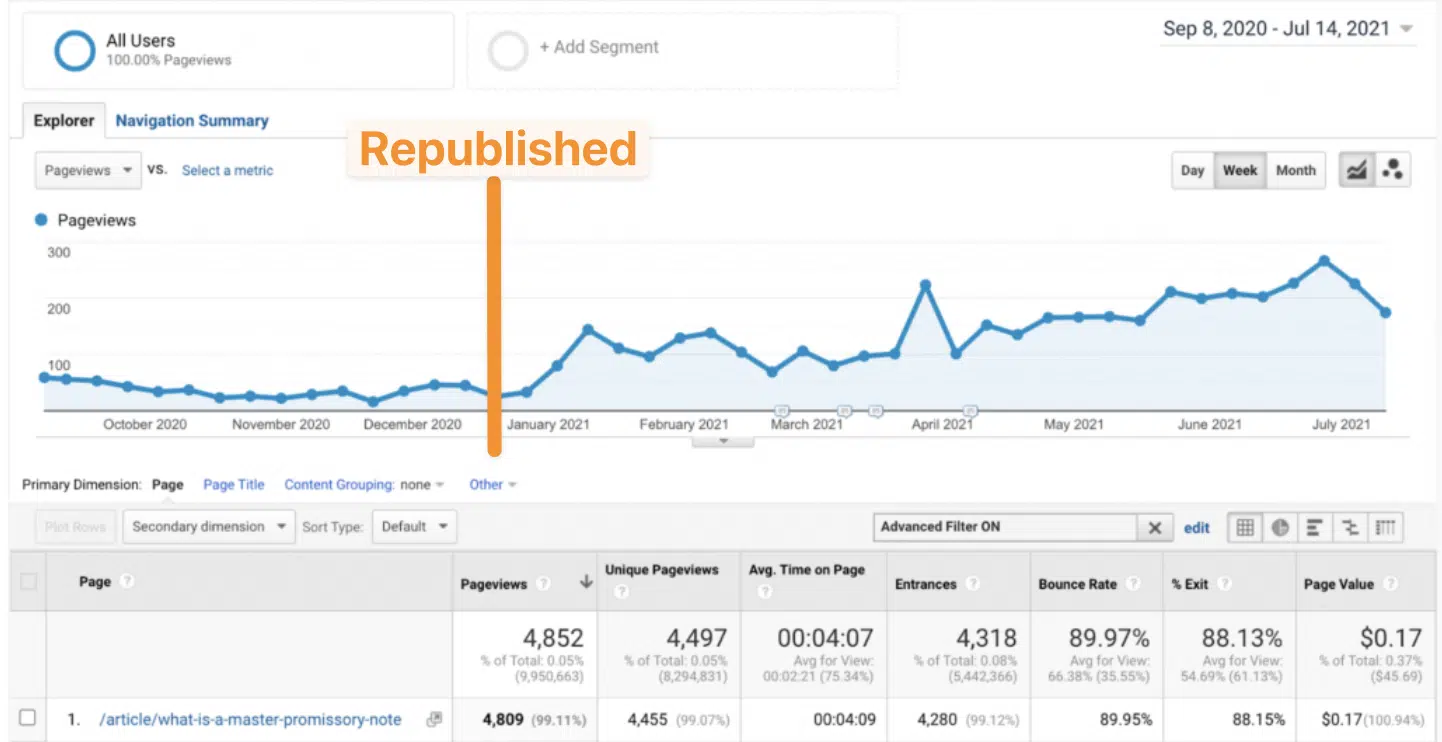
For example, one article was republished on Jan. 1, 2021, and instantly doubled in traffic.

Republished Jan. 1, 2021

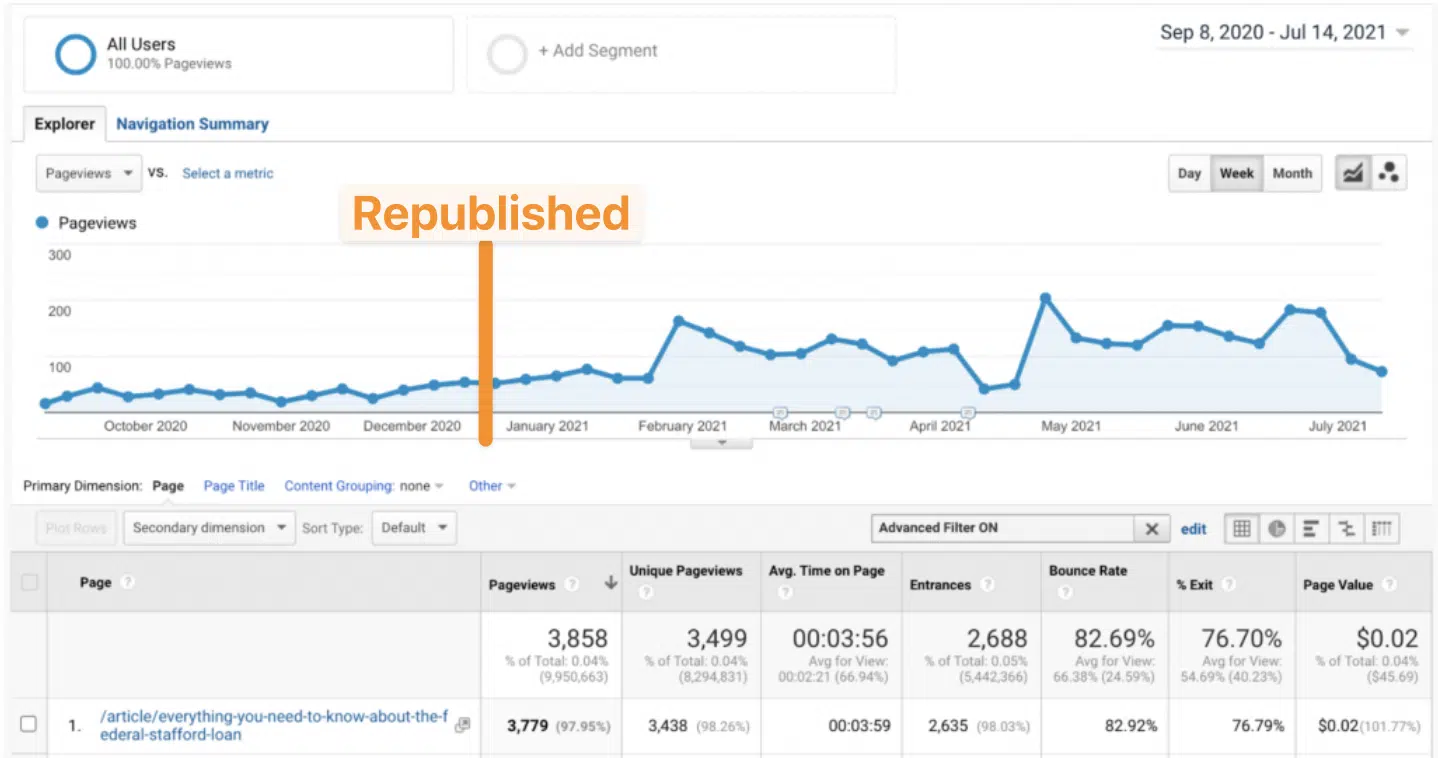
And this one, republished just a few days before on Dec. 15, 2020, resulted in a new steady stream of visits for the remainder of the next year. 

Republished Dec. 15, 2020

And another one.

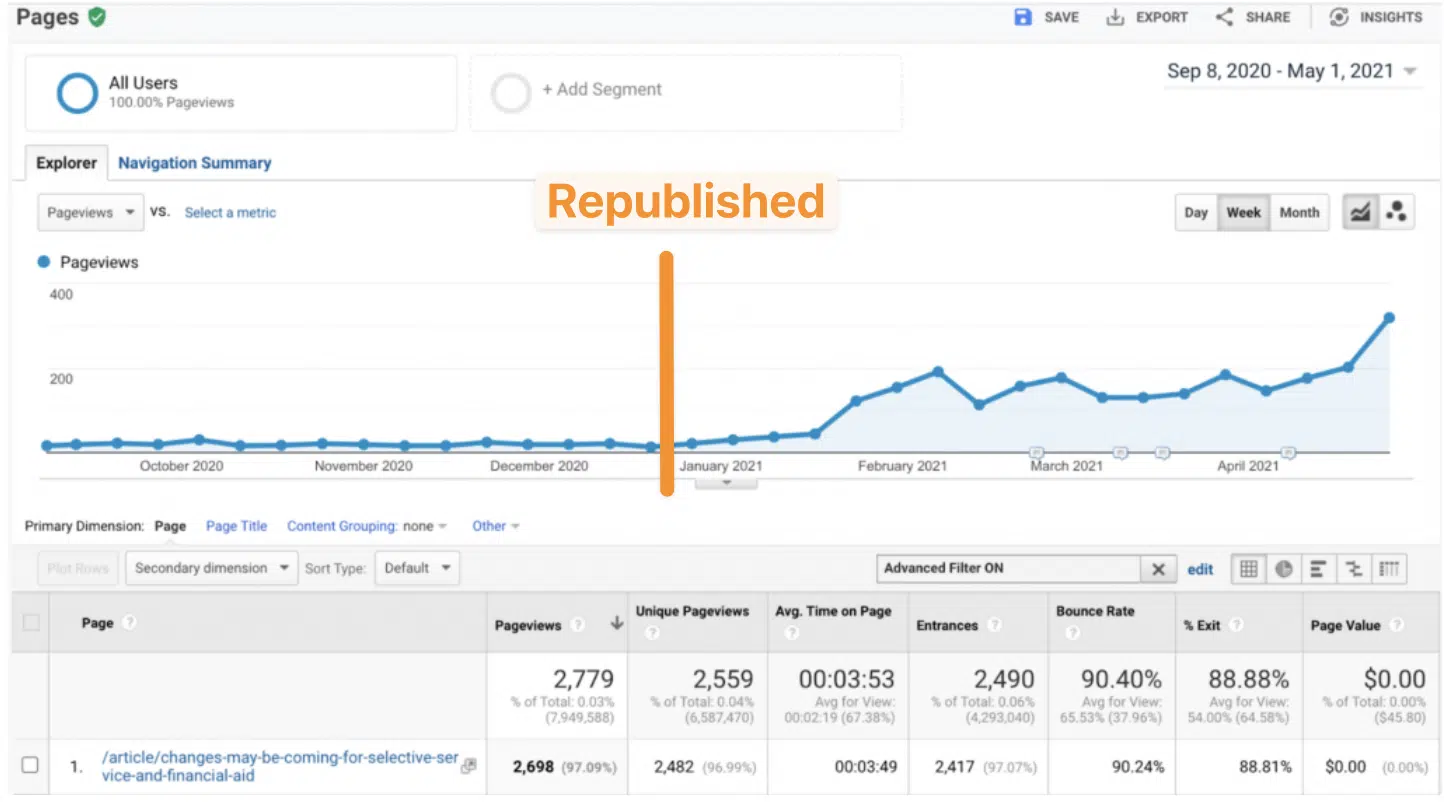
This time, republished days later on Jan. 19, 2021, took off like Elon’s rockets.

Republished Jan. 19, 2021

Convinced yet? 

Keep in mind this is a large site, originally founded waaaaaaaay back in 1999. So it’s had some success, a high DR, and topical authority for years. It’s got a head start in that sense.

But that doesn’t change the main point:

  • Want long-term (24+ months) growth? Publish new content.
  • Want short-term (< 6 months) growth? Republish existing content.

Now, let’s cut the chit-chat and run through the exact steps you can use to replicate these results.

Step 1: Identify which existing URLs are ripe for republishing

You know what they say: If it ain’t broke, don’t fix it.

Are your URLs in the top 3-5 positions already? Refresh lightly but don’t rock the boat.

But, the stuff below the top five? Now we’re talkin’.

This is the stuff that’s got some decent traction or maybe recently slipped. It’s seeing some traffic, which is important. However, not enough traffic ‘cause it’s stuck in no man’s land outside ~80% of SERP clicks.

So pull up your favorite SEO tool, and let’s run a quick list.

First, pull up all the organic keywords that your site is currently ranking for, like so:

Ahrefs organic keywords report

Next, define your parameters. This could be positions 8 to 20 or 5 to 10. Doesn’t really matter. The point is the point: stuff that’s seeing a little traffic but not nearly enough as it should.

I also like setting a floor for volume to make sure we’re not worrying about tiny keywords or pages while at the same time setting a difficulty cap to make sure we’re focusing on low-hanging fruit (and not biting off more than we can chew). 

The latter point is especially important. If you pick super difficult keywords, optimizing and republishing content on its own might not be good enough. You’ll probably still need high-quality links and more to crack into the top five sooner rather than later. 

These exact floor or cap numbers are somewhat arbitrary based on your space’s competitiveness and your site’s strength. Larger/older sites should go higher on both, while smaller/newer sites should go lower.

But let’s go with the example of “100” for minimum volume and “30” for max keyword difficulty (KD).

Ahrefs organic keywords - filtered

Now we’re getting someplace. 

About ~90 seconds worth of work just generated a list of your low-hanging SEO fruit.

So let’s now separate the wheat from the chaff. (I had to look that one up, too.)

We want to identify good republishing candidates from bad ones. We’re going to measure twice and cut once in the next section.


Get the daily newsletter search marketers rely on.


Step 2: Prioritize the 20% of your existing content will provide an 80% lift ASAP 

Good news and bad news.

That simple previous step might generate hundreds (or more) URLs on larger sites. So you’ll need to do a little manual work, ignoring or cutting or disregarding the irrelevant posts or pages.

Generally speaking, it makes sense to prioritize based on:

  • Previous results (obviously always prioritize your top lead or sale drivers, first).
  • Commercial intent (so prioritize your BOFU > over your MOFU > and then over your TOFU).
  • Top traffic getters (think: TOFU on steroids).
  • Top traffic drops (compare this period, like month or quarter, vs. the previous year).

Your actual mileage might vary, because a publisher should prioritize different posts/page types from a B2B SaaS brand vs. B2C ecomm vs. local service business.

What you’re looking for at this stage is a simple Pareto Principle. What are the 20% of URLs that will give you the fastest 80% return?

For instance, drilling into this article on subheadings quickly shows us that there are many more keyword variations we’re picking up. 

Lots actually! With great volumes and low-is KDs! So let’s flag this one as a priority now, too!

Ahrefs organic keywords - exact url

Step 3: Determine what, specifically, about the content needs updating

It’s important to keep in mind that we’re not just updating content for updating’s sake here.

This is not about simply refreshing the “Updated on…” date string in WordPress to fool the SEO gods and calling it a day.

Instead, this step is about figuring out how we’re actually going to make the content much better. We want it to rank higher and move the needle for business KPIs.

So once you have a few URLs to prioritize, it’s time to do a little heavy lifting. 

Unfortunately, content tools still suck at SEO, while SEO tools still suck at content. I’m including AI in here, too, which is still years away from making a true dent.

That means you gotta roll up your sleeves a little bit. Start by actually clicking on each URL and reading through it. Then, pull up some of the SERPs it’s currently ranking for, look at the results, and actually read through those, too. 

Now, I know what you’re thinking. 

“Wait wait wait. Nobody said anything about using their brains and experience here. No AI fancy prompts or anything? Gasp!” 

This is super easy, though. 

Here’s what you’re looking for:

  • How is your content organized, relative to what’s currently performing best on each SERP?
  • Is there a search intent mismatch, say you’re trying to rank a landing page against many informational blog posts?
  • Or is there overlapping search intent across multiple queries?
  • Is your content structured like what’s performing best already?
  • Are you experiencing any keyword cannibalization, where the wrong page URLs are currently ranking for the wrong queries?
  • Are there any gaping holes in your topic coverage?

Let’s walk through how to do this last example, first.

Some specialized content optimization software here helps cut down the workload. Enter your MarketMuse’s, Clearscope’s Frase’s, et al.

Pull up the article in question, drop in the query you’re analyzing, and let them automatically scan the top-performing pages for you.

The output in Frase, for instance, will look something like this initially. Start with obvious areas like word counts, headers, and number of images, which can quickly give you a simple gauge of whether your content structure meets or exceeds the average SERP benchmark.

Frase

Next, look for semantic keyword coverage. Essentially, when people search for X, what are the tangentially related Y and Z they also want to read about? 

Again, everything is relative here. So you shouldn’t be focusing so much on a “100%” score per se. This isn’t high school. Instead, you want to comfortable meet or exceed the competition at a bare minimum.

These specialized tools will help you easily compare semantic or related topic coverage against the competition, too, so you can quickly identify where you’re doing well… 

Content optimization

…but more importantly, where you have gaps!

In the example above, notice “mini headlines” is missing across the board. Perfect. Now we know what to add or update to our existing content.

Obviously, this is a very simple, straightforward example. But the process is the same. 

  • What, specifically, in the content needs updating? (Maybe out-of-date information, no longer relevant, etc.)
  • Where are you doing well – both structurally and content-wise – and can build upon?
  • Where are you not doing well, relative to the competition? What needs improvement?
  • Where are the remaining gaps or holes that you can potentially jump in front of the competition and outflank them before their stuff goes out of date, too?

The last one is key to future-proofing as much of your work as possible.

For example, we noticed that adding a video to one of these optimized articles dropped the bounce rate -11.94% almost overnight. 

Adding videos

This last point is to hammer home that you’re not just republishing content to bring it to par with your competitors.

It’s to surge ahead of them, throw down a competitive moat around yourself, and solidify your upcoming ranking gains for as long as possible.

Optimizing your content for the long term

Publishing brand-new content is what grows your site, traffic, and overall SEO presence for the long term.

But that’s the key word here: long term.

Anything you publish this year probably won’t move the needle until next year at the earliest.

Unless, of course, you’re upgrading and improving your existing content.

It’s almost always the single-highest leverage activity to generate short-term SEO results. The good news is that it’s pretty easy, too.

  • Pull up all your existing content that’s doing pretty well but could be doing better (position five or lower)
  • 80/20 them based on prior results, commercial intent, top traffic potential, or top traffic drops to provide the biggest lift in the shortest amount of time
  • Ruthlessly compare your content to the competition’s to figure out how to not just match them but overtake and exceed them for the long haul

These steps, on top of good content planning and production processes, allow you to out-publish, outflank, and outrank competitors before they even realize what’s happened.


Opinions expressed in this article are those of the guest author and not necessarily Search Engine Land. Staff authors are listed here.


Related stories

New on Search Engine Land

@media screen and (min-width: 800px) { #div-gpt-ad-3191538-7 { display: flex !important; justify-content: center !important; align-items: center !important; min-width:770px; min-height:260px; } } @media screen and (min-width: 1279px) { #div-gpt-ad-3191538-7 { display: flex !important; justify-content: center !important; align-items: center !important; min-width:800px!important; min-height:440px!important; } }

About the author

Brad Smith

Brad Smith owns three content marketing companies, and has been featured in publications like The New York Times, Forbes, Business Insider, and The Next Web. Each week, he shares first-hand experience and growth strategies behind some of the web’s fastest growing brands.

https://searchengineland.com/content-optimization-blueprint-traffic-increase-428647


Do your SEO and PPC teams need upskilling or reskilling?

If you looked over the agenda at SMX Advanced, held June 13-14, you probably spotted this trend:

“AI” appears in the titles of 11 sessions, including “How generative AI will change SEO as a profession.”

And this doesn’t include the titles of four other sessions on related topics like “Revolutionize your PPC game with GPT.”

Hey, I get it. Marketers and executives attended their industry’s most important events to:

  • Keep up to date with industry trends.
  • See new products and services.
  • Maintain and build relationships.

In short, attending leading conferences and trade shows keeps you informed and competitive.

And there’s no question that generative AI will change SEO as a profession and revolutionize your PPC game.

But whether you attended SMX Advanced or not, it is time to ask yourself a different question: “Do your SEO and PPC teams need upskilling or reskilling?”

Upskilling and reskilling, defined 

According to LinkedIn Learning:

“When an employee undertakes learning to expand their existing skill set, that learning is known as upskilling. These additional skills enhance the worker’s performance in their current role, potentially advancing them along their career path.”

“Employee reskilling involves learning new skills outside of the worker’s existing skillset. These skills are often closely adjacent to their current function, but may sometimes be geared toward a different path entirely.”

Why do 80% of PPC specialists need upskilling?

Based on my experience, about 80% of the PPC specialists at brands or agencies will probably need upskilling this summer and around 20% will need reskilling.

Why? 

When Google announced it was “Supercharging Search with generative AI,” Elizabeth Reid, the Vice President and GM of Search, said, “In this new generative experience, Search ads will continue to appear in dedicated ad slots throughout the page.”

And Google’s primary source of revenue is advertising, which makes up around 80% of the company’s total revenue.

So, approximately 80% of PPC specialists will need some upskilling to take advantage of the advent of Google’s search generative experience (SGE).

Suppose brands and agencies want to stay two steps ahead of competitors.

In that case, they should also provide their PPC specialists with some upskilling workshops or courses to seize the opportunities offered by the migration to Google Analytics 4 (GA4).

For example, if you link your GA4 property to Google Ads, Display & Video 360, or Search Ads 360, then you can re-engage GA4’s predictive audiences – like “Likely 7-day purchasers” and “Predicted 28-day top spenders” – with a remarketing campaign. 

These additional skills enhance a worker’s performance in their current role.

So, why will roughly 20% of your PPC team need reskilling?

Well, you already know that AI can scale asset production to serve the most relevant version of an ad across channels via Performance Max, App, and Video action campaigns.

But AI-powered solutions will soon play a pivotal role in creative development – from campaign planning to creative testing to media planning.

And that will involve learning new skills outside of a PPC manager’s existing skillset.


Get the daily newsletter search marketers rely on.


Why do 80% of SEO specialists need reskilling?

Based on my experience, about 20% of the SEO specialists at brands or agencies will probably need upskilling this summer, but around 80% will need reskilling. And it’s probably time for a reorg, too. 

Yes, I realize Reid said, “As we bring generative AI into Search, we’re committed to continue sending valuable traffic to sites across the web.” 

So, SEO is still alive. And it has survived several major Google algorithm updates since the Panda update back in 2011. So, it should survive the advent of SGE in 2023.

But SEO should become part of a Venn diagram that includes the closely adjacent disciplines of content marketing and social media marketing to maintain or improve search rankings, drive website traffic, and generate conversions.

Why?

Because Google’s continued existence in this new era of Search doesn’t depend on the success or even the survival of SEO. So, many SEOs will need to learn new skills outside of their existing skillset. 

In a post entitled, “Learn from others’ experiences with more perspectives on Search,” Lauren Clark, the Product Manager at Google Search, said:

“In the coming weeks, when you search for something that might benefit from the experiences of others, you may see a Perspectives filter appear at the top of search results. Tap the filter, and you’ll exclusively see long- and short-form videos, images, and written posts that people have shared on discussion boards, Q&A sites, and social media platforms.”

Fortunately, GA4 has some new default channels that enable SEOs to monitor the performance of organic social, organic video, and organic shopping as well as organic search. And the referral channel still lets you see which users arrive at your site via non-ad links on other sites/apps (e.g., blogs, news sites).

Plus, new research by Rand Fishkin of SparkToro found, “A substantial portion of social referral traffic comes without proper, accurate referral data, and is misclassified as ‘direct.’” Fishkin adds, “For those investing in pro-active social media marketing, we recommend using unique URLs to track activity to social promotions.”

And many brands and agencies should consider adopting new organizational structures.

For example, the SEO, content marketing, and social media marketing teams need to be integrated to survive or even thrive when long- and short-form videos, images, and written posts start to appear in the Perspectives filter.

Plus, creating at least a dotted line reporting structure with the digital PR team makes sense.

In June 2023, Think with Google published “Does your marketing have the essentials to succeed with AI?” which included this line:

  • “Silos can be kryptonite for AI, limiting its ability to optimize and maximize performance.”

It also quotes Alex Clemente, managing director of Harvard Business Review Analytic Services, who explained:

  • “Cross-functional teams will need to nurture a test-and-learn culture where leaders can quickly adjust the plan when results don’t come in as expected, or double down on what works.”

Hey, this reorg is long overdue. Google has blended video, news, images, maps and webpages since they announced universal search in 2007.

Brands and agencies have had 16 years to get around to putting everyone involved in creating content on the same team.

So, if it takes the advent of generative AI to finally get marketers and executives to restructure their teams, then it’s about time.

As Benjamin Franklin said at the time of the signing of the Declaration of Independence, “We must all hang together, or, most assuredly, we shall all hang separately”.

What should marketers and executives do next?

So, what should you do next?

Well, after you learn as much as you can about generative AI and other related topics, you should also set aside some time to think about the difference between upskilling and reskilling your employees.

Figure out if most of your PPC specialists need the former while many of your SEO specialists need the latter.

Now, brands and agencies may want to encourage their existing employees to check out the free online courses that are available in the Google Digital Garage. Some courses are provided by Google, and others from their partner universities or institutions.

Marketers and executives may also want to reimburse their employees for getting certification from a reputable institution.


Opinions expressed in this article are those of the guest author and not necessarily Search Engine Land. Staff authors are listed here.


Related stories

New on Search Engine Land

@media screen and (min-width: 800px) { #div-gpt-ad-3191538-7 { display: flex !important; justify-content: center !important; align-items: center !important; min-width:770px; min-height:260px; } } @media screen and (min-width: 1279px) { #div-gpt-ad-3191538-7 { display: flex !important; justify-content: center !important; align-items: center !important; min-width:800px!important; min-height:440px!important; } }

About the author

Greg Jarboe

Greg Jarboe is the president and co-founder of SEO-PR, which has generated award-winning results for Southwest Airlines, the Search Engine Strategies (SES) Conference & Expo series, and Rutgers University. He is the author of YouTube and Video Marketing and a co-author of Digital Marketing Fundamentals. In addition, he is one of the 25 successful gurus profiled in Michael Miller’s book, Online Marketing Heroes. Since 2003, Jarboe has written more than 1,600 articles for Search Engine Watch, Tubular Insights, Search Engine Journal, and other online publications. Over that time, he has also spoken at more than 80 industry conferences. In addition, Jarboe is an instructor at the New Media Academy in the UAE and for Rutgers, the State University of New Jersey, on Coursera.

https://searchengineland.com/seo-ppc-teams-upskilling-reskilling-428675