How customer experiences are redefining local marketing online and offline by Rio SEO
Top brands set themselves apart by crafting seamless and positive customer experiences as soon as a customer finds one of your locations – online or in-person.
Those exceptional local experiences, which we define as the intersection between local marketing and customer experiences, are imperative to build positive brand perceptions, delight customers, and encourage brand advocates. These experiences are a comprehensive journey that begins when a consumer searches for your brand and extends post-sale when they advocate for your brand.
If your marketing and customer experience teams operate independently, you’re not maximizing your business’ potential. Seamless integration, communication and collaboration between marketing and customer experience teams propel meaningful local experiences. Here’s an example of what this might look like in practice.
Crafting a best-in-class local experience
Let’s look at a quick-service restaurant brand with over 400 locations across the United States. To create positive local experiences, the brand leverages multiple tactics:
Optimizing each location’s Google Business Profile and other online listings.
Adding relevant, localized content to each location’s store-specific landing page.
Actively monitoring reviews in aggregate and at the store level.
Responding to reviews – positive and negative.
Deploying surveys to gain valuable feedback.
Analyzing sentiment in reviews, surveys, email campaigns and more to identify common themes for opportunities for improvement or to recognize stores that are excelling.
Continuous frontline training to ensure top-notch service at every store.
In turn, this quick-service restaurant brand has become synonymous with superior service and is well-recognized as a customer-centric business. However, none of the aforementioned endeavors could have come to fruition without its marketing and customer experience programs intertwining.
For example, if the marketing team fails to update their online local listings when a location moves its address, customers will be frustrated when they show up to the wrong address. In fact, a recent study conducted by Rio SEO found 20% of local consumers are unlikely to visit a business with incorrect listing information such as address, hours and contact information. This negative customer experience may lead to a negative online review.
Negative reviews impact customer experience teams who are mining for this type of feedback and would then need to communicate to the marketing team that the listing needs to be updated. Similar experiences could be avoided in the future with quick, efficient communication between teams that results in staying in sync.
Empowering cross-department collaboration through top-notch technology
Taking on local marketing and customer experience endeavors manually is an arduous feat. Historically, a business would need to seek two different vendors to help simplify and manage both these efforts at scale.
Rio SEO and Forsta, a global leader in CX, employee experience (EX) and market research, have combined to power the first end-to-end customer experience solution, known as the Local Experience Platform. This platform enables brands to engage consumers throughout the entire customer journey, from discovery to purchase through to brand reputation and advocacy.
Visit rioseo.com/platform to learn more about the Local Experience platform and see it in action.
Rio SEO is the leading Local Experience Platform for enterprise brands. The Local Experience Platform provides multilocation organizations with a comprehensive, seamlessly integrated suite of turnkey local marketing solutions proven to increase brand visibility across search engines, social networks, map applications, and more. Rio SEO is part of Forsta, a global leader in customer experience (CX), employee experience (EX) and market research (MR). The combined technologies of Forsta and Rio SEO enable brands to engage consumers throughout the entire customer journey from discovery to purchase to advocacy.
How to use Google entities and GPT-4 to create article outlines
In this article, you’ll learn how to use some scraping and Google’s Knowledge Graph to do automated prompt engineering that generates an outline and summary for an article that, if well written, will contain many key ingredients to rank well.
At the root of things, we’re telling GPT-4 to produce an article outline based on a keyword and the top entities they have found on a well-ranking page of your choice.
“The salience score for an entity provides information about the importance or centrality of that entity to the entire document text. Scores closer to 0 are less salient, while scores closer to 1.0 are highly salient.”
Seems a pretty good metric to use to influence which entities should exist in a piece of content you might want to write, doesn’t it?
Getting started
There are two ways you can go about this:
Spend about 5 minutes (maybe 10 if you need to set up your computer) and run the scripts from your machine, or…
I’m partial to the first, but I’ve also jumped to a Colab or two in my day. 😀
Assuming you’re still here and want to get this set up on your own machine but don’t yet have Python installed or an IDE (Integrated Development Environment), I will direct you first to a quick read on setting your machine up to use Jupyter Notebook. It shouldn’t take more than about 5 minutes.
Now, it’s time to get going!
Using Google entities and GPT-4 to create article outlines
To make this easy to follow along, I’m going to format the directions as follows:
Step: A brief description of the step we’re on.
Code: The code to complete that step.
Explanation: A short explanation of what the code is doing.
Step 1: Tell me what you want
Before we dive into creating the outlines, we need to define what we want.
query = input ("What do you want to rank for :") print(query) url = input("What URL should I be inspired by : ") print(url)
When run, this block will prompt the user (probably you) to enter the query you’d like the article to rank for/be about, as well as give you a place to put in the URL of an article you’d like your piece to be inspired by.
I’d suggest an article that ranks well, is in a format that will work for your site, and that you think is well-deserving of the rankings by the article’s value alone and not just the strength of the site.
When run, it will look like:
Step 2: Installing the required libraries
Next, we must install all the libraries we will use to make the magic happen.
!pip install google-cloud-language beautifulsoup4 openai
!pip install wandb --upgrade
!pip install --force-reinstall -Iv protobuf==3.20.00 import requests
import json
from bs4 import BeautifulSoup
from google.cloud import language_v1
from google.oauth2 import service_account
import os
import openai
import pandas as pd
import wandb
We’re installing the following libraries:
Requests: This library allows making HTTP requests to retrieve content from websites or web APIs.
JSON: It provides functions to work with JSON data, including parsing JSON strings into Python objects and serializing Python objects into JSON strings.
BeautifulSoup: This library is used for web scraping purposes. It helps in parsing and navigating HTML or XML documents and extracting relevant information from them.
Google.cloud.language_v1: It is a library from Google Cloud that provides natural language processing capabilities. It allows for the performing various tasks like sentiment analysis, entity recognition, and syntax analysis on text data.
Google.oauth2.service_account: This library is part of the Google OAuth2 Python package. It provides support for authenticating with Google APIs using a service account, which is a way to grant limited access to the resources of a Google Cloud project.
OS: This library provides a way to interact with the operating system. It allows accessing various functionalities like file operations, environment variables, and process management.
OpenAI: This library is the OpenAI Python package. It provides an interface to interact with OpenAI’s language models, including GPT-4 (and 3). It allows developers to generate text, perform text completions, and more.
Pandas: It is a powerful library for data manipulation and analysis. It provides data structures and functions to efficiently handle and analyze structured data, such as tables or CSV files.
WandB: This library stands for “Weights & Biases” and is a tool for experiment tracking and visualization. It helps log and visualize the metrics, hyperparameters, and other important aspects of machine learning experiments.
When run, it looks like this:
Get the daily newsletter search marketers rely on.
Step 3: Authentication
I’m going to have to sidetrack us for a moment to head off and get our authentication in place. We will need an OpenAI API key and Google Knowledge Graph Search credentials.
This will only take a few minutes.
Getting your OpenAI API
At present, you likely need to join the waitlist. I’m lucky to have access to the API early, and so I am writing this to help you get set up as soon as you get it.
The signup images are from GPT-3 and will be updated for GPT-4 once the flow is available to all.
Before you can use GPT-4, you’ll need an API key to access it.
Choose your signup method (I chose Google) and run through the verification process. You’ll need access to a phone that can receive texts for this step.
Once that’s complete, you’ll create an API key. This is so OpenAI can connect your scripts to your account.
They must know who’s doing what and determine if and how much they should charge you for what you’re doing.
OpenAI pricing
Upon signing up, you get a $5 credit which will get you surprisingly far if you’re just experimenting.
As of this writing, the pricing past that is:
Creating your OpenAI key
To create your key, click on your profile in the top right and choose View API keys.
…and then you’ll create your key.
Once you close the lightbox, you can’t view your key and will have to recreate it, so for this project, simply copy it to a Notepad doc to use shortly.
Note: Don’t save your key (a Notepad doc on your desktop is not highly secure). Once you’ve used it momentarily, close the Notepad doc without saving it.
Getting your Google Cloud authentication
First, you’ll need to log in to your Google account. (You’re on an SEO site, so I assume you have one. 🙂)
You will replace YOUR_OPENAI_API_KEY with your own key.
You will also replace /PATH-TO-FILE/FILENAME.JSON with the path to the service account key you just downloaded, including the file name.
Run the cell and you’re ready to move on.
Step 4: Create the functions
Next, we’ll create the functions to:
Scrape the webpage we entered above.
Analyze the content and extract the entities.
Generate an article using GPT-4.
#The function to scrape the web page
def scrape_url(url): response = requests.get(url) soup = BeautifulSoup(response.content, "html.parser") paragraphs = soup.find_all("p") text = " ".join([p.get_text() for p in paragraphs]) return text
#The function to pull and analyze the entities on the page using Google's Knowledge Graph API
def analyze_content(content): client = language_v1.LanguageServiceClient() response = client.analyze_entities( request={"document": language_v1.Document(content=content, type_=language_v1.Document.Type.PLAIN_TEXT), "encoding_type": language_v1.EncodingType.UTF8} ) top_entities = sorted(response.entities, key=lambda x: x.salience, reverse=True)[:10] for entity in top_entities: print(entity.name) return top_entities
#The function to generate the content
def generate_article(content): openai.api_key = os.environ["OPENAI_API_KEY"] response = openai.ChatCompletion.create( messages = [{"role": "system", "content": "You are a highly skilled writer, and you want to produce articles that will appeal to users and rank well."}, {"role": "user", "content": content}], model="gpt-4", max_tokens=1500, #The maximum with GPT-3 is 4096 including the prompt n=1, #How many results to produce per prompt #best_of=1 #When n>1 completions can be run server-side and the "best" used stop=None, temperature=0.8 #A number between 0 and 2, where higher numbers add randomness
) return response.choices[0].message.content.strip()
This is pretty much exactly what the comments describe. We’re creating three functions for the purposes outlined above.
Keen eyes will notice:
messages = [{"role": "system", "content": "You are a highly skilled writer, and you want to produce articles that will appeal to users and rank well."},
You can edit the content (You are a highly skilled writer, and you want to produce articles that will appeal to users and rank well.) and describe the role you want ChatGPT to take. You can also add tone (e.g., “You are a friendly writer …”).
Step 5: Scrape the URL and print the entities
Now we’re getting our hands dirty. It’s time to:
Scrape the URL we entered above.
Pull all the content that lives within paragraph tags.
Run it through Google Knowledge Graph API.
Output the entities for a quick preview.
Basically, you want to see anything at this stage. If you see nothing, check a different site.
You can see that line one calls the function that scrapes the URL we first entered. The second line analyzes the content to extract the entities and key metrics.
Part of the analyze_content function also prints a list of the entities found for quick reference and verification.
Step 6: Analyze the entities
When I first started playing around with the script, I started with 20 entities and quickly discovered that’s usually too many. But is the default (10) right?
To find out, we’ll write the data to W&B Tables for easy assessment. It’ll keep the data indefinitely for future evaluation.
First, you’ll need to take about 30 seconds to sign up. (Don’t worry, it’s free for this type of thing!) You can do so at https://wandb.ai/site.
Once you’ve done that, the code to do this is:
run = wandb.init(project="Article Summary With Entities") columns=["Name", "Salience"]
ent_table = wandb.Table(columns=columns) for entity in entities: ent_table.add_data(entity.name, entity.salience) run.log({"Entity Table": ent_table})
wandb.finish()
When run, the output looks like this:
And when you click the link to view your run, you’ll find:
You can see a drop in salience score. Remember that this score calculates how important that term is to the page, not the query.
When reviewing this data, you can choose to adjust the number of entities based on salience, or just when you see irrelevant terms pop up.
To adjust the number of entities, you’d head to the functions cell and edit:
You’ll then need to run the cell again and the one you ran to scrape and analyze the content to use the new entity count.
Step 7: Generate the article outline
The moment you’ve all been waiting for, it’s time to generate the article outline.
This is done in two parts. First, we need to generate the prompt by adding the cell:
entity_names = [entity.name for entity in entities]
gpt_prompt = f"Create an outline for an article about {query} that includes the following entities: {', '.join(entity_names)}."
print(gpt_prompt)
This essentially creates a prompt to generate an article:
And then, all that’s left is to generate the article outline using the following:
And if you’d also like to get a summary written up, you can add:
gpt_prompt2 = f"Write an article summary about {query} for an article with an outline of: {generated_article}."
generated_article = generate_article(gpt_prompt2)
print(generated_article)
Which will produce something like:
Opinions expressed in this article are those of the guest author and not necessarily Search Engine Land. Staff authors are listed here.
@media screen and (min-width: 800px) { #div-gpt-ad-3191538-7 { display: flex !important; justify-content: center !important; align-items: center !important; min-width:770px; min-height:260px; }
}
@media screen and (min-width: 1279px) { #div-gpt-ad-3191538-7 { display: flex !important; justify-content: center !important; align-items: center !important; min-width:800px!important; min-height:440px!important; }
}
About the author
Dave Davies is the Lead SEO for the Machine Learning Operations company Weights & Biases. He got his start in SEO in the early 2000s and in 2004 co-founded Beanstalk Internet Marketing with his wife Mary, who still runs its day-to-day operations. He hosts a weekly podcast, speaks regularly at the industry’s leading conferences, and is proud to be a regular contributor right here on Search Engine Land.
The launch of Perspectives poses a challenge for content creators to up their content production game. It is a step toward Google’s narrative of writing content for users first.
Today, most SEO content is “keyword-first,” aiming to fill content gaps and rank for specific terms.
With Perspectives, Google tells us it favors content with fresh, original viewpoints tailored for individuals rather than the most optimized content.
There’s no better way to invigorate that shift in content production mindset than creating a SERP feature that rewards content diversity.
Here’s how to incorporate unique viewpoints into your content and create dynamic, trust-inspiring spaces that drive customer conversion and loyalty.
Content for generative AI and content for Perspectives
I’ve read Google’s documentation on generative AI search and the thought leadership already published for Search Generative Experience (SGE) and Perspectives.
But there is a need to discuss the various types of content that can be cited in an SGE result and what makes content high-quality and unique enough to be highlighted in the Perspectives filter.
Given that SGE appears to source a response based on multiple sources, it would be fair to assume that for Google to determine the accuracy of an answer, it would need to have a supported consensus online.
In the case of Perspectives, alternate viewpoints may not necessarily align with the mainstream consensus or be in a format that can be presented alongside other cited sources as an SGE response to a user query.
In early SGE testing, we already see several indicators of how Google is collating information for various queries and query types. Understanding these sources is vital to our long-term growth and optimization strategies.
It’s important to note that early indications of how Google is generating it’s AI-driven content aren’t too distant from the general content guidelines (Page Quality, Needs Met) that have been around since at least the 2016 version of the search quality rater guidelines.
If anything, Google citing sources not typically ranking on Page 1 proves the “surfacing hidden gems” language they have used in the May 2023 Helpful Content Update.
This then relates to Perspectives and how strong content with added value perspectives might not tick all the other necessary boxes to appear on the traditional first page of Google but is known to Google.
So what should content creators and SEOs do now?
In line with Google’s existing rhetoric of producing good content for users, we must:
Ensure a good value proposition and beneficial purpose and E-E-A-T.
Add unique takes to the content without regurgitating what already exists online.
Get the daily newsletter search marketers rely on.
The importance of user reviews and third-party product reviews
Reviews have been an important part of the online experience for a long time.
Over the years, Google has become much better at understanding sentiment and topics in user reviews, especially on Google Business Profiles.
We’re now seeing Google include review elements within its generative search results for queries, highlighting considerations and elements where multiple reviews have complained about a product.
For example, the query [best bags for hiking] pulls through reviews and third-party reviews (dubbed “considerations”) for features such as the size of the sleeping bag compartment, side accessibility, and how waterproof the product is.
The fact that Google also pulls in product reviews from a combination of blogs and affiliates means managing your wider online presence (and optimizing your own assets) is now more critical and must be considered as part of your SEO strategy.
These considerations are perspectives being provided by third parties about your product, service, or company, deemed to be authoritative enough for inclusion.
As an SEO, this is an opportunity to work with the product and content teams to ensure users can accurately forecast their experiences and engagements with your brand.
This way, if they are able to forecast the experience accurately, they can determine if the item will meet their needs and won’t be left disappointed and leave negative reviews and perspectives.
Adding perspectives to travel content
Adding unique perspectives to your travel content is about showcasing the distinctive elements of your personal experience and presenting them in a way that resonates with your audience.
One approach could be to focus on the emotions and sensations associated with your travels.
Rather than just describing what you see, delve deeper into how it makes you feel. This can be achieved by including sensory details.
Other perspectives that people look for are more practical, such as how suitable a location might be for families with strollers, couples, or people who have sensory issues and might want to avoid heavily crowded and overwhelming places.
You can get this content by writing blog posts or through user reviews and testimonials that you include on the specific destination and travel product pages.
These inclusions might not come from keyword research, pulled in People also ask questions, or scraped by third-party tools. But they will be discoverable in your user feedback, user research, and reviews on other platforms relating to the hotel/destination/resort/area.
This approach can also be taken to accommodation listings on sites like Vrbo and Airbnb.
Let’s say you’re positioning your offering as family-friendly. As such, you’ll want to highlight features that will matter to parents with children of various ages, such as proximity to roads, whether the pool has guardrails or if babygates are available for the stairs.
Adding perspectives to ecommerce content
Incorporating user perspectives and reviews into your ecommerce product pages can significantly enhance the user experience and inspire trust.
User reviews offer a glimpse into how your product performs in real-world scenarios beyond the carefully curated product descriptions.
Some online clothes retailers already have elements for this, such as the “true to size fit” scale, where users are asked to review how the garment fits them. This informs would-be buyers if the item fitted as expected or was tighter/looser than expected for the size.
This is a great example of allowing for better user experience forecasting.
By having a dedicated section for customer reviews and ratings on your product pages, potential buyers can make more informed decisions. This can lead to increased conversion rates.
In addition, encourage customers to rate your product and share their experiences.
How did they use the product? What did they like about it? What do they think could be improved?
These insights are invaluable as they offer a layer of transparency, provide social proof, and can address common questions or concerns that prospective buyers may have.
Another way to integrate user perspectives is through user-generated content. This might include pictures or videos of your customers using your products daily, which can be incredibly persuasive.
By showcasing your products in real-life scenarios, potential customers can visualize how the product fits into their own lives, which can significantly boost the product’s appeal.
You can create a section on your product page where users can upload their pictures and videos of the product in use.
This enhances the product page with authentic and relatable content and fosters a sense of community and engagement around your brand.
Incorporating varying viewpoints into your content
Perspectives is a concrete example of Google’s commitment to prioritizing user-centric content. It also gives content creators a powerful incentive to embrace the same mindset.
Adding user perspectives and reviews can transform your webpages into dynamic, trust-inspiring spaces that drive customer conversion and loyalty.
Opinions expressed in this article are those of the guest author and not necessarily Search Engine Land. Staff authors are listed here.
@media screen and (min-width: 800px) { #div-gpt-ad-3191538-7 { display: flex !important; justify-content: center !important; align-items: center !important; min-width:770px; min-height:260px; }
}
@media screen and (min-width: 1279px) { #div-gpt-ad-3191538-7 { display: flex !important; justify-content: center !important; align-items: center !important; min-width:800px!important; min-height:440px!important; }
}
About the author
Dan Taylor is head of technical SEO at SALT.agency, a UK-based technical SEO specialist and winner of the 2022 Queens Award. Dan works with and oversees a team working with companies ranging from technology and SaaS companies to enterprise e-commerce.
The launch of ChatGPT in November 2022 has been a real game changer for digital marketers across the world. SEO professionals are still trying to navigate the potential benefits and power of this technology.
The ability to type in search queries through live chat and get perfectly and uniquely written content hosts several advantages for those looking to create more content rapidly and scale their online businesses. Webmasters can also create codes faster than they can manually and this can be used to compliment or replace developers.
However, this may also present more challenges with increased competition across the digital marketing landscape and questions on how Google’s search results are going to react with increased marketing intelligence.
We speak to some industry experts and startup marketers to get more insight into how ChatGPT is changing SEO.
Content creation
For consumers, the ability to create unique content and do it almost instantly is probably the biggest advantage of ChatGPT.
Related Content
“Many SEO professionals may have been dubious at first,” explains Andrew Baker of finance startup, Doddler.
“Writing unique content is something that is drilled into you from day one and anything that is automated or too good to be true can only be negative for SEO.”
“But the early evidence shows that ChatGPT is consistent and the content it produces is unique and can rank well if done correctly,” says Richard Allan of Divorce Bob.
“When it might have typically taken us 6 to 8 weeks to produce 50 pages of quality guides and blog posts, ChatGPT can do this in something like 3 hours.”
“We have been able to add pages for more than 1600 area codes across the US using ChatGPT – and this would have been a mountain to climb without AI or not something we would have considered doing.”
“It still needs a proper SEO person to interpret the right number of keywords, content length and other SEO bits like internal links and headings – but it certainly presents a very scalable way to push out content.
“It presents endless possibilities for targeting area codes, times, amounts and other long tail keywords both domestically and if you were to launch into different countries.”
Staffing and outsourcing
Outsourcing your content and code has been popular for many years, with startups and companies using the likes of Fiverr and outsourcing to India and Philippines for their marketing teams.
“But with ChatGPT, it questions whether you need to hire content staff at all,” argues Matthew Sullivan of consumer finance site, Harpsey.
“For years, there has been a question of whether you even need content writers or developers in-house and why pay local rates when it is cheaper abroad? But today, it is a question of whether you need to hire writers and developers at all.”
“This could mean that thousands of content writers could go out of work overnight. However, in practice, the early signs show that although millions are using ChatGPT, it is a small number to create an economic shock and that traditional businesses are still preferring the manual approach. But who knows if paid writers are using ChatGPT to do their work?”
Rapid prototyping and testing
“With the opportunity to create content so fast, this has given us an exciting way to test and try things out,” explains Gavin Cooper, the founder of Claims Bible. “And this is what a huge part of SEO really is.”
“We have been able to throw content together quickly and test out different site layouts and designs or even compare platforms such as Wix, Webflow or WordPress and determine which ranks the best in the SERPs. From there, we have been able to scale up and build out our business.”
“For us, we have been able to replicate hundreds of pages for different types of claims, whether it is for injuries, banks, car manufacturers and many more – and by having consistent meta-data and good backlinks, we have been able to secure positions on Google and generate quality leads.”
Changes in Google SERPs
If we imagine millions of websites using ChatGPT to put out new content and develop new sites, are we going to see huge fluctuations in rankings across all industries?
This does not appear to be the case yet, with ChatGPT operating now for more than 6 months. But it certainly will not be surprising if some industries which are very tech savvy such as consumer finance, casinos or crypto make huge strides in this area.
Hence, one might expect for some new brands to emerge on page 1 for some very competitive keywords, almost out of thin air, or for there to be some early wins for some sites and some even harder crashes if they get penalized.
Still need experience and SEO knowledge
SEO is always changing and no doubt, ChatGPT has created a paradigm shift and an exciting way to put out fast content and replicate code, allowing new and established businesses to scale up quicker than ever before.
Whilst the Google rule of thumb that ‘content is king’ still applies, one cannot deny it is how SEO professionals use this content that is truly important and will notably change the SEO landscape.
Whilst you can have content written quickly and to a high standard, it is not valuable unless it has smart and experienced SEO to back it up.
It is key to understand the right content to create, the right keyword research, user intent, meta-data and semantics – and if you can pair this with ChatGPT, this could be the recipe for true SEO success.
How to create an SEO Chrome extension using ChatGPT
Chrome extensions provide a quick and easy way to execute boring and repetitive tasks. Extensions can be a huge time saver in SEO. But many still don’t focus on building them.
One reason is that some marketers are unable to code complex tools, so they use whatever tool is available. That said, you don’t always need to invest your time learning difficult skills or spending money on an expensive developer to build a new complex tool.
Now, you can use ChatGPT to build your own customized SEO extensions, upload them on Google and use them daily for free. Here’s how.
Step 1: Define the requirements
Having a clear understanding of what you want your Chrome extension to do is the first step in this process. I’d advise content marketers to think about this before they start prompting ChatGPT and write down specific and clear requirements.
Requirements are normally of two types:
The task: What do you need your extension to do?
The feature: How do you want your extension to present you with the information?
Disclaimer: This process is meant for building an extension that works only on your computer, which means you won’t be able to sell it or make it available on Chrome Web Store. For that to happen, you’ll have to comply with Google guidelines, which can be found here.
For this guide, we’ll use the example of a simple SEO Chrome extension I built myself. So here are my requirements.
Information requirements
I want my SEO Chrome extension to tell me all the page elements for a quick overview of the page, without having to go into the page backend code to check them out:
Page title
Meta description
Copy headers
Internal Links, including URLs list
Images, including URLs
Canonical URL
Feature and behavior requirements
I want my extension to show me a popup window when I click the extension icon on the Chrome browser.
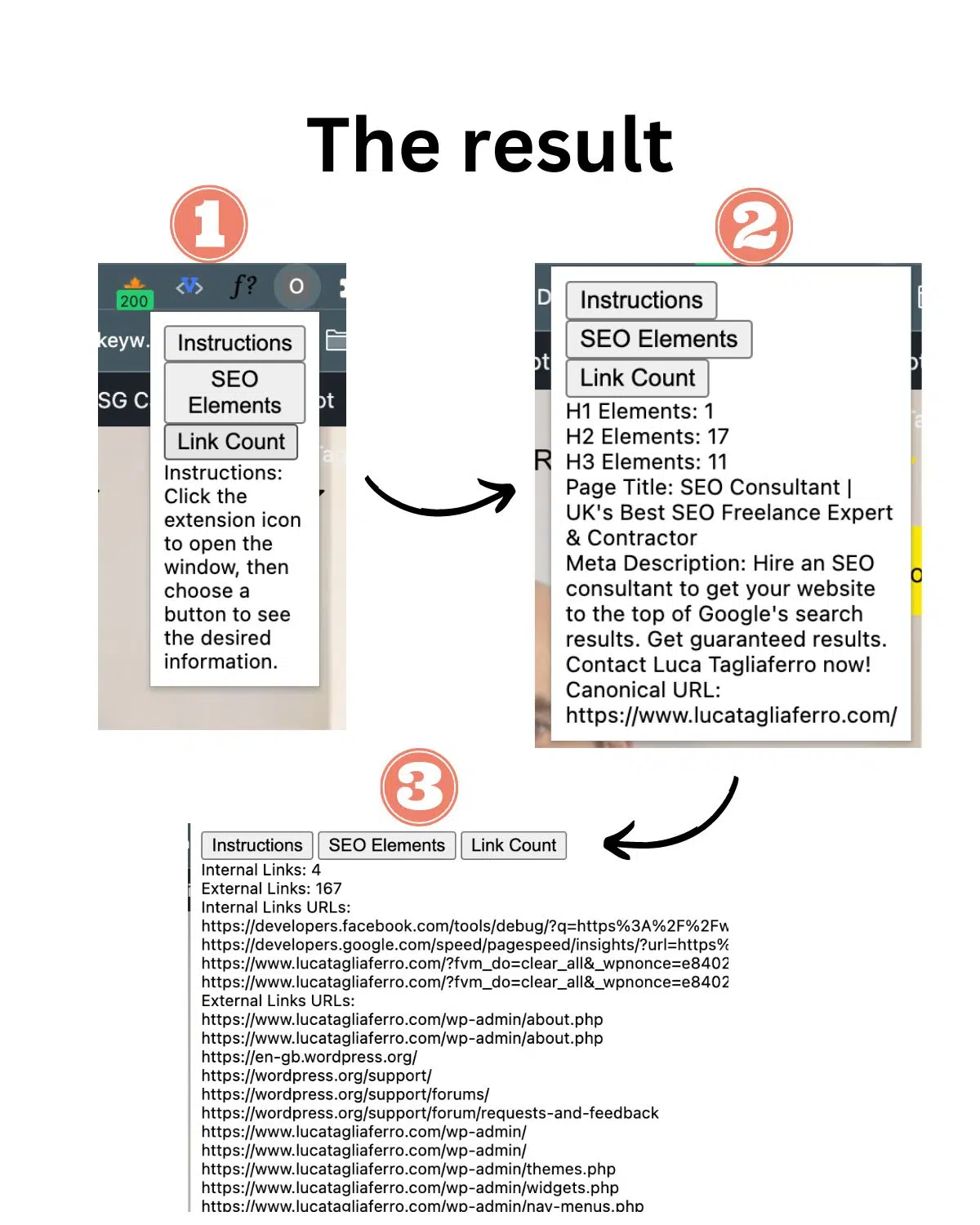
Below you can see what we will build and how it will display on Chrome.
Note: This is a basic version of the extension that doesn’t include CSS styling for simplicity. What we focus on in this guide is the actual functionality, not the style.
As you can see in the image above, you’ll need to ensure that the results of the extensions will be visible to you on your Chrome tab as a pop-up window.
Most SEO extensions work this way, they provide you with the information you need on a pop-up window when you click the extension icon.
Step 2: Write a detailed description for ChatGPT
Now that you are ready for prompting on a potential SEO extension, you can head to ChatGPT to write the detailed instructions. Again, your prompt need to be as specific and as detailed as possible.
Most prompts I see marketers using are not long, they are very short. And from short prompts, you’ll get poor results.
Here is how you can do it:
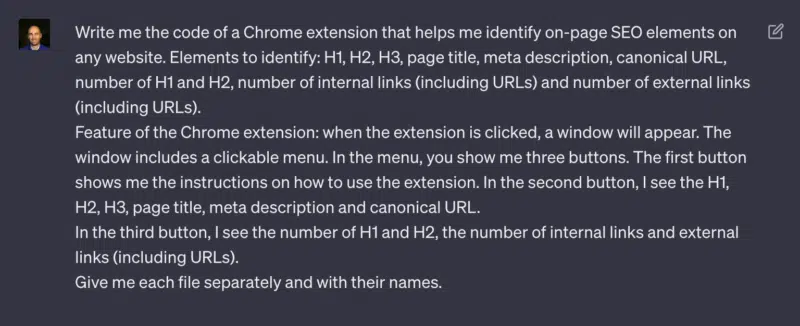
First, you need to give ChatGPT some goals. To do this, you can use the same requirement we saw in Step 1 in addition to a command line:
“Write me the code of a Chrome extension that helps me identify on-page SEO elements on any website. Elements to identify: H1, H2, H3, page title, meta description, canonical URL, number of H1 and H2 and number of internal links (including URLs).”
Now that you gave ChatGPT the goals you want to achieve, it’s time to specify exactly how you need your extension to behave. For this, we’ll be using the pop-up window feature with buttons. Here is how you can do this part:
“Feature of the Chrome extension: when the extension is clicked, a window will appear. The window includes a clickable menu. In the menu, you show me three buttons. The first button shows me the instructions on how to use the extension. In the second button, I see the H1, H2, H3, page title, meta description and canonical URL. In the third button, I see the number of H1 and H2, the number of internal links (including URLs).”
We need to be very specific about what we want to achieve. To do this, you’ll have to add the last paragraph of the prompt specifying how to need to upload the prompt.
“Give me each file separately and with their names.”
This way, you are asking ChatGPT to split the files into parts. This is important because of Step 4. So hang on in there.
Step 3: Ask ChatGPT to write the code
Finally, it’s time to take all of the sentences we wrote, copy them and paste them into ChatGPT:
One of the best functionalities of ChatGPT is the ability to write code without any issues.
That’s why, according to our instructions, ChatGPT will provide you with four separate codes.
Note: When you create a new Chrome extension, you normally need to provide several types of files, depending on how complex it is. For this example, we only need four types of files to upload inside the Chrome Account:
Manifest.json
Popup.html
Popup.js
Content.js
Using ChatGPT means that marketers don’t need to learn how to build these technical files, and that’s the whole point of this guide, but it’s still important to know what they are for.
Additionally, I’d recommend digital marketing experts learn as much as possible about these files as they need to troubleshoot possible technical issues and figure out how to make their extensions work better. Google has a specific guide on Chrome Browser Actions if you want to learn more.
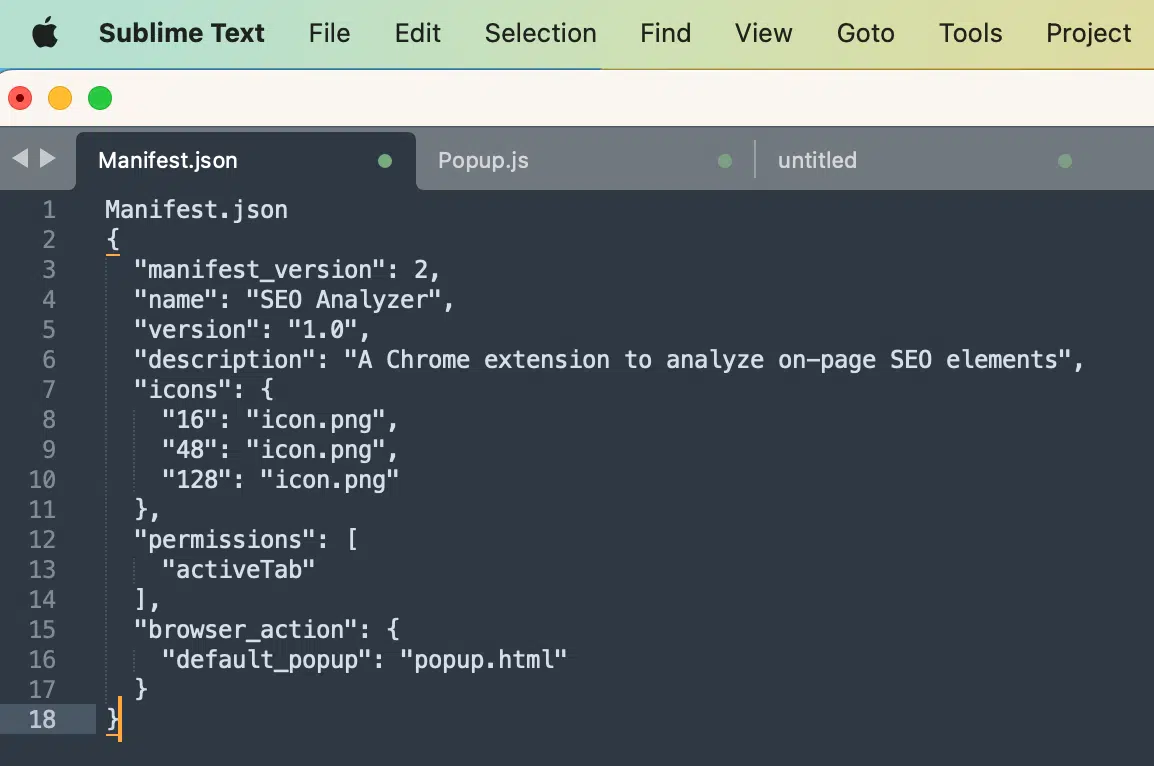
Manifest.json
The manifest.json file is a configuration file required for every Chrome extension.
It contains metadata about the extension, such as its name, version, description, icons, and permissions. It also specifies the default popup file to be displayed when the extension is clicked.
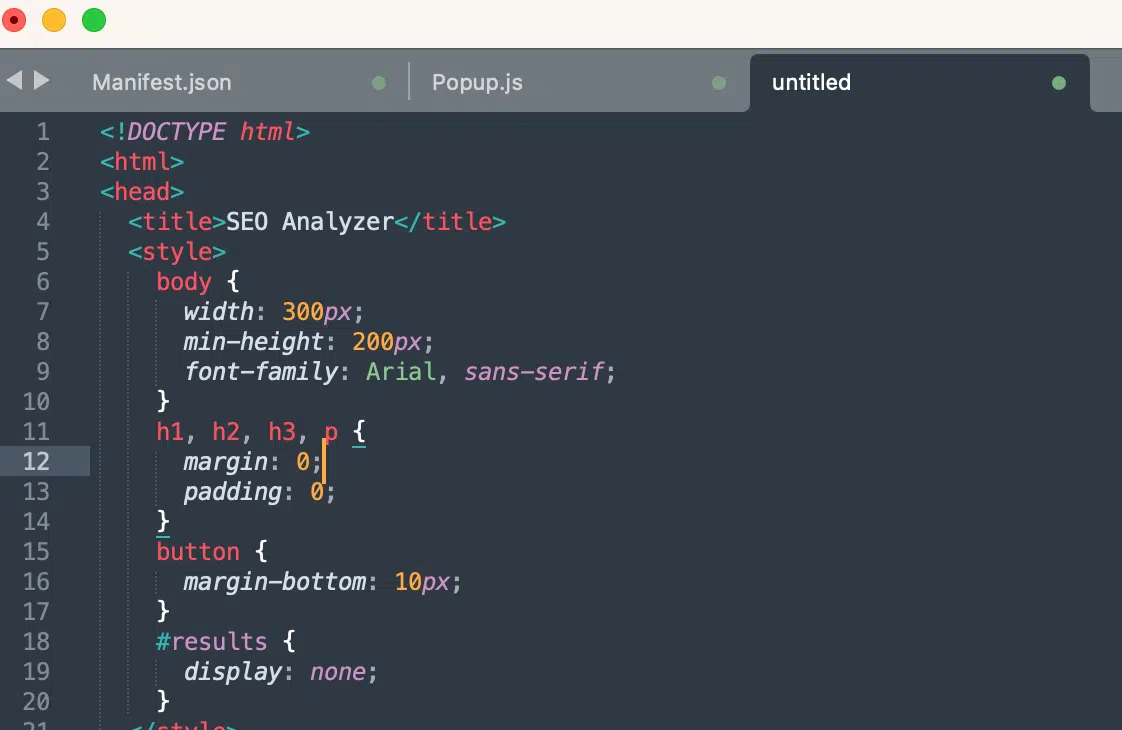
Popup.html
The popup.html file represents the user interface (UI) of the Chrome extension. It defines the layout and content that will be displayed when the extension’s icon is clicked.
In this case, it includes buttons for instructions, SEO elements, and statistics, as well as a results section to display the gathered information.
Popup JS
The popup.js file contains the JavaScript code that interacts with the UI of the Chrome extension.
It handles button clicks and sends messages to the content script (not included in the provided code) to retrieve SEO elements from the currently active webpage.
It also updates the UI to display the retrieved information in the results section when the corresponding buttons are clicked.
Content.js
The content.js file is responsible for interacting with the web page’s content and extracting the necessary data.
In this case, it listens for messages from the popup and performs the tasks.
Get the daily newsletter search marketers rely on.
Step 4: Export the ChatGPT codes into files
Now that we have the codes and the three types of files, the next step is to download these files’ information into a digestible format for the Chrome Extension.
Here is how you can do this:
Download the Sublime Text app
Sublime Text is a shareable editor that natively supports all programming languages and markup languages. Users can download the files and upload them somewhere else.
Copy and paste the codes
Now that we have the codes and Sublime Text, we need to copy the codes from ChatGPT and paste them into the required Sublime Text tabs, before we can download them on our desktops.
In each separate tab, we will paste the codes:
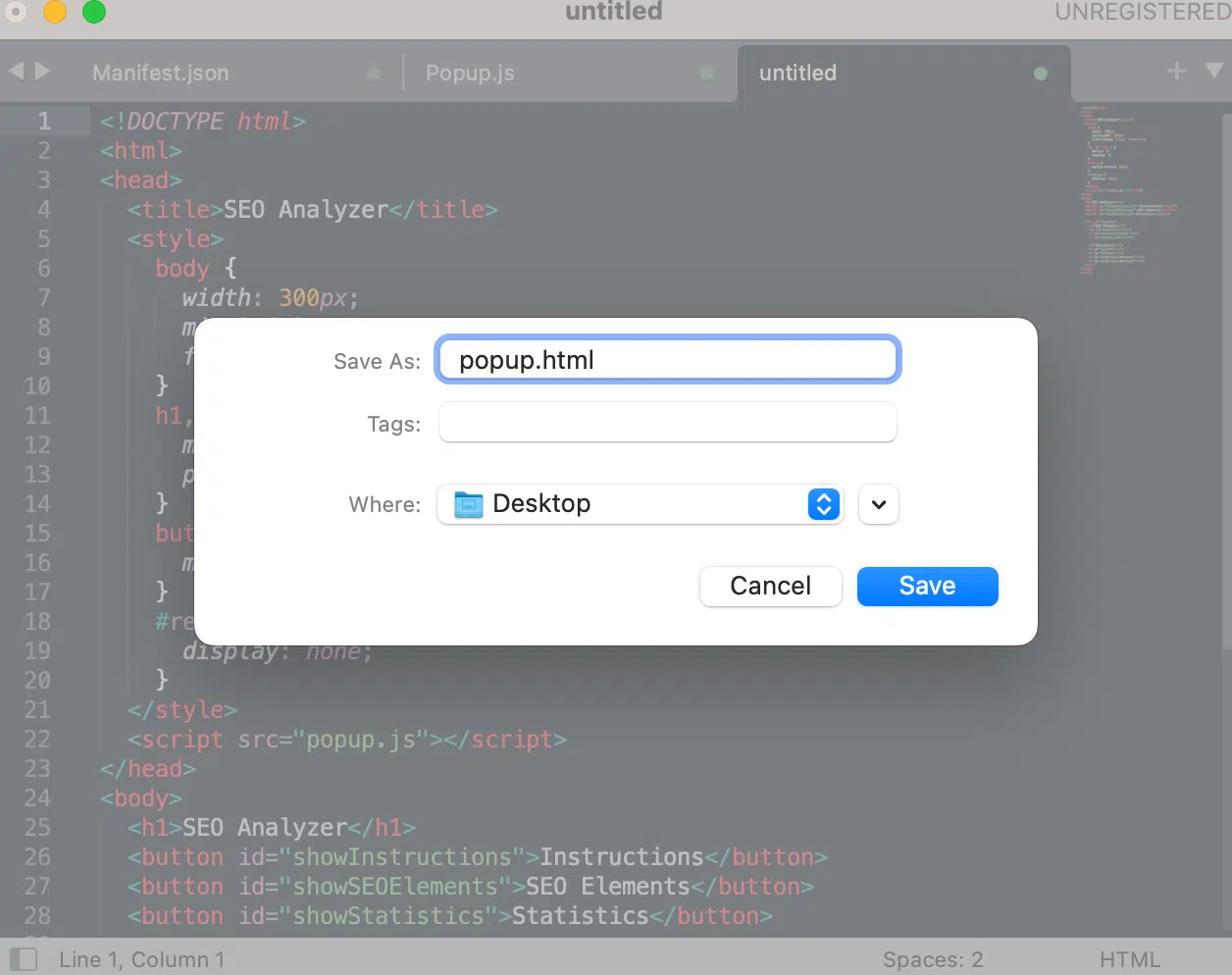
Once you press “Paste,” there will be sometimes a tab without a title that looks like this;
It’s worth mentioning that in the code examples I am using for this guide, the Sublime Text app doesn’t pick up titles automatically, so you’ll have to manually add them.
When you save the files on your desktop, you’ll be able to change the names of the files. However, this will not affect your extension.
You can save all the files into a specific folder that you can call “My SEO extension” or something like that.
Step 5: Upload the files into the Chrome extension account
Now that we have completed the hardest part of this guide, writing the code, it’s time to upload the files into your account.
For you to do this, you need to open your Chrome extensions dashboard here: chrome://extensions/
Once inside, follow these steps to correctly upload your files:
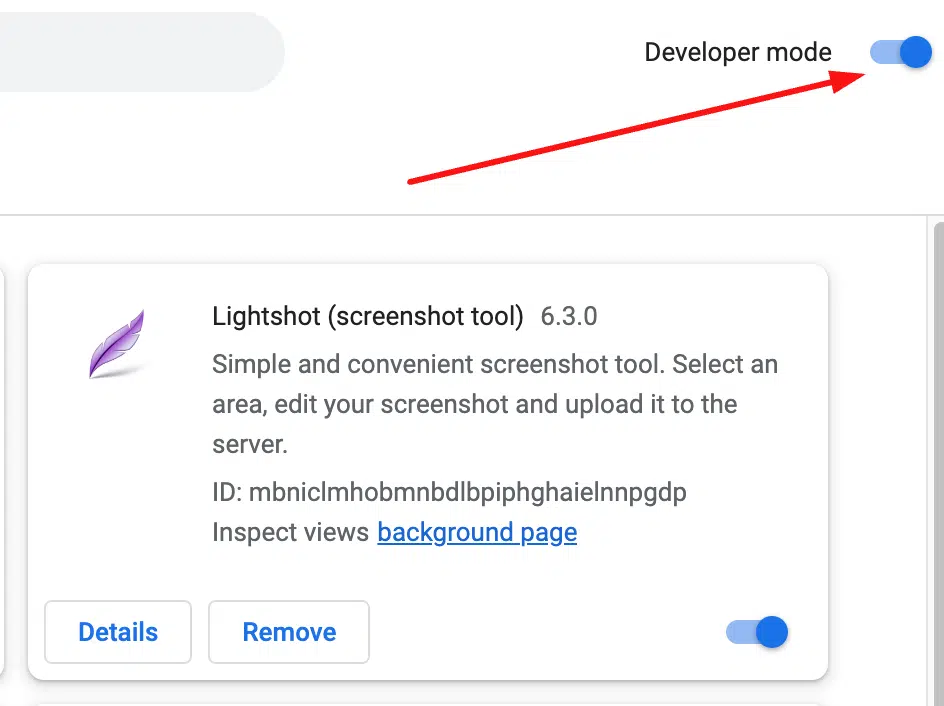
Switch on the “Developer mode” on the top right of your browser. This will allow you to open the upload function.
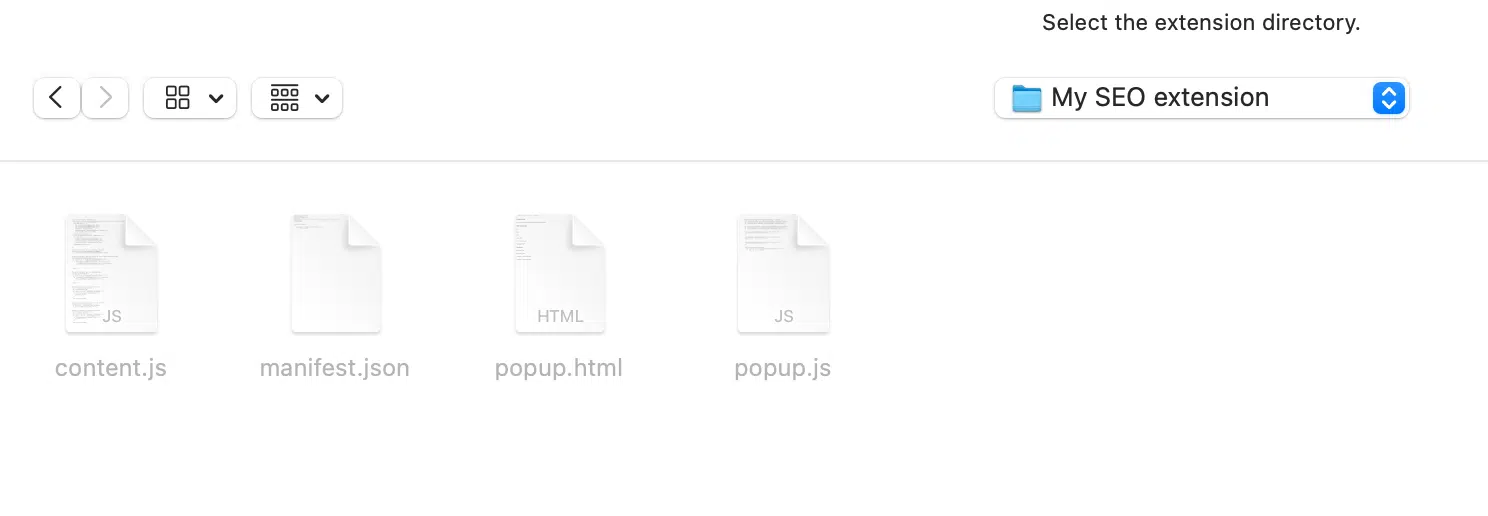
Click “Load Unpacked” to find and select your 4 files for the upload.
When you press “Load Unpacked,” this window will open if you are on a Mac.
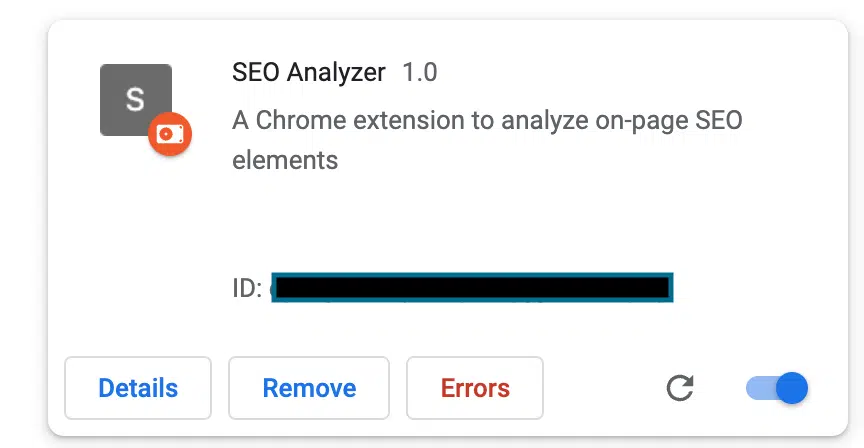
Upload all four files into the Chrome extension dashboard. If you have done everything correctly, you’ll see your extension in the list like this:
At this point, your extension is almost ready to be tested.
We built the extension with three buttons:
The instruction button to learn how to use it.
The SEO on-page elements button.
The Links button.
Each button you click will give you the ability to read the on-page information and make a quick assessment of whether the page is correctly optimized for search.
Step 6: Troubleshooting and cleaning up the code
Don’t worry if you see errors in your Chrome extension, these are unavoidable but easily fixable.
With the current version of ChatGPT, the code refers to Google’s guidelines before December 2021, and many things changed since then.
Deprecated manifest version
This means the code can be old and not updated to the latest version of Chrome extension requirements for your manifest file.
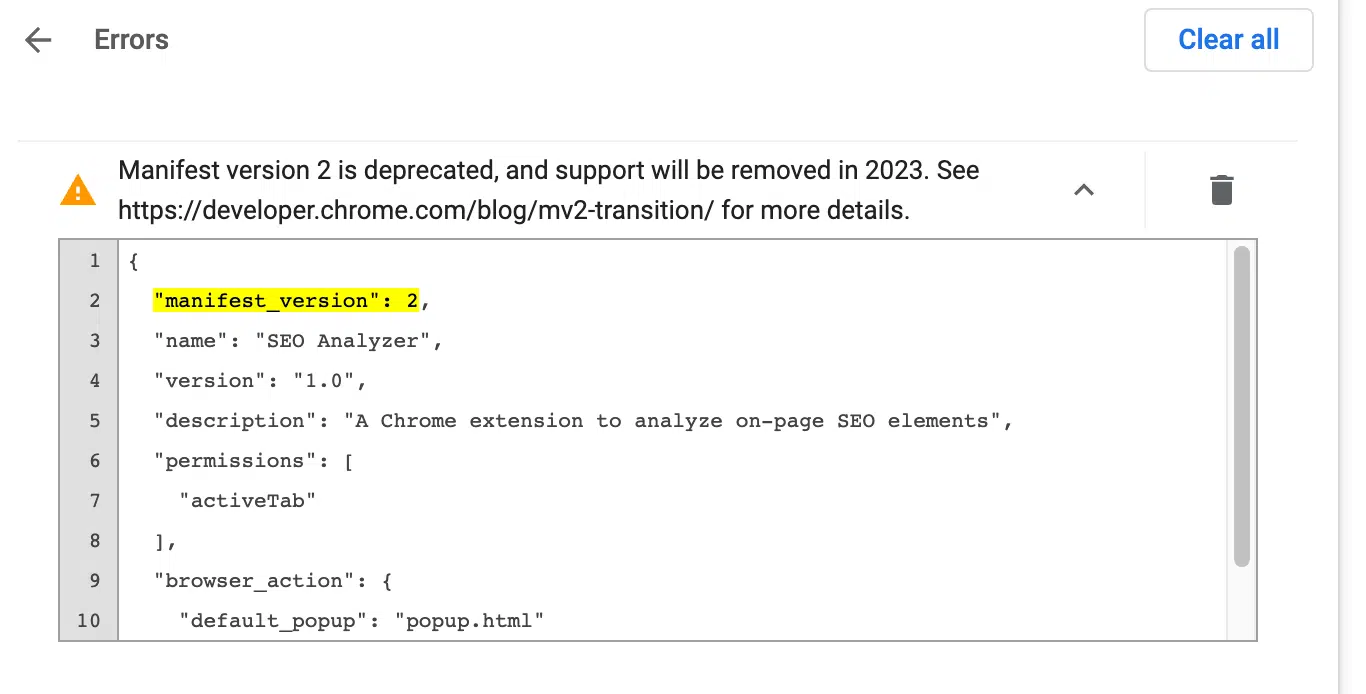
One of these errors is showing that the Manifest.json file is deprecated, which means Google wants you to update from January 2023.
It’s very likely that you encounter this type of error:
To fix this issue, all you have to do is select “manifest_version”: 2 in your Sublime Text file and replace the “2” with the “3”, which is the latest version.
Once done, upload the extension again.
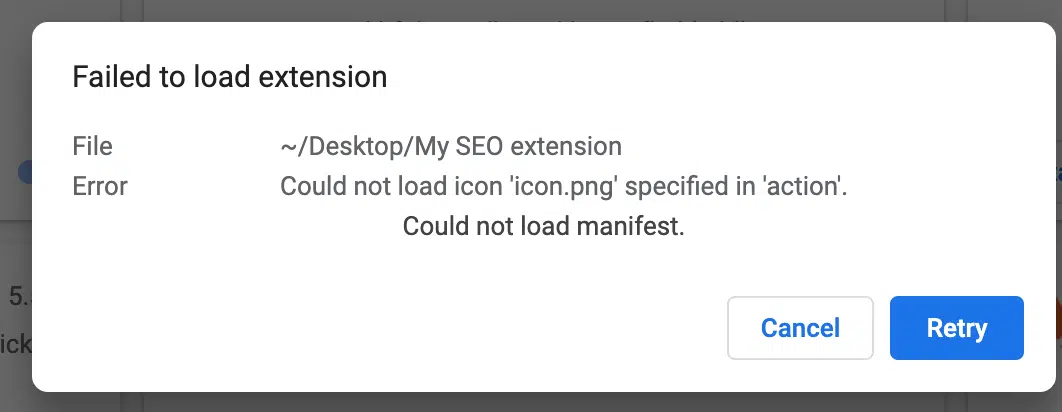
Failed to load extension
It’s very important to remove any reference to icons and images.
Otherwise, you’ll get an error that says “fail to load extension”. This is because we haven’t specified an URL for the extension icons and images.
But in this example, we don’t have to add any images or icons, so it makes sense to remove that part of the code requiring it.
Here is how you can do it:
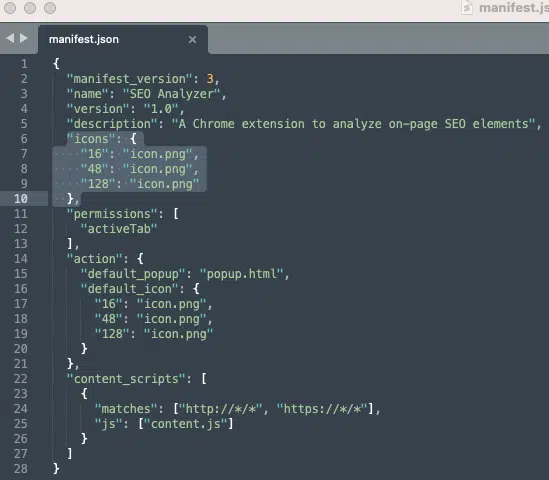
Open the Manifest.json file.
Locate the lines of code referring to the icons. In my example, the lines are 6 to 10 and 16 to 20
Remove these lines from the code and save your file.
Then upload it again in the dashboard.
This time, without the ChatGPT errors, we should have a clean and correct extension ready to be tested again.
If you did everything right, this is what you should see – or something very similar:
Start creating your own SEO Chrome extensions
If you are failing again and again, things can become quite frustrating, especially if you don’t know how to code. I know because I have been there.
Also, remember that with AI, there are no specific rules for writing proper descriptions of what you need. You might need to update your prompt a few times to make it work as you need it to.
Here is what you can do to mitigate errors and try to fix them:
Copy the error and paste it directly into ChatGPT, asking to fix it. Normally the tool is really good at explaining what is wrong with the code in simple terms. Then make the improvements recommended.
Try removing some of the extension requirements if you feel your code is just too long and complex. Start small. Maybe create just an extension for finding out the page title. Once tested successfully, add new requirements and test again.
If ChatGPT doesn’t provide you with a good solution, use the good old Google. Chances are many people before you have resolved it already.
Hopefully, with this detailed guide, you can start harnessing the power of ChatGPT and learn how to build your next SEO extension.
Opinions expressed in this article are those of the guest author and not necessarily Search Engine Land. Staff authors are listed here.
Bing Chat increases chat turns, adds visuals to travel queries and expands Bing Image Creator
Microsoft Bing has released a number of improvements to Bing Chat this week, including more chat turns, more visuals and expanding Bing Image Creator.
More chat turns. Bing Chat now supports 30 chat turns per conversation, which is up from 20 chat turns per conversation. Plus, you are now allowed 300 total chat turns per day. Bing explained, “This increase also applies to any conversations in your chat history.” So you are allowed to return to conversations where you may have previously reached your turn limit and pick up where you left off, without it counting against your turns.
Eventually, these limits will go away but AI tools like these are expensive and server intensive to run, so Microsoft is scaling it up slowly.
Visuals in travel. Bing Chat now will show and generate more visual results for your travel queries. These visuals also contain links directly to Bing Travel results.
Here is what it looks like:
Bing Image Creator expanded. Bing Image Creator now works not just in creative mode, as it launched in within Bing Chat, but now works in all chat modes, including Precise and Balanced modes.
Here is a GIF of that in action:
Why we care. We will continue to keep track of these improvements to Bing Chat, Google Bard, SGE and other AI improvements. The pace of improvements are increasing and a super fast rate.
@media screen and (min-width: 800px) { #div-gpt-ad-3191538-7 { display: flex !important; justify-content: center !important; align-items: center !important; min-width:770px; min-height:260px; }
}
@media screen and (min-width: 1279px) { #div-gpt-ad-3191538-7 { display: flex !important; justify-content: center !important; align-items: center !important; min-width:800px!important; min-height:440px!important; }
}
About the author
Barry Schwartz a Contributing Editor to Search Engine Land and a member of the programming team for SMX events. He owns RustyBrick, a NY based web consulting firm. He also runs Search Engine Roundtable, a popular search blog on very advanced SEM topics. Barry can be followed on Twitter here.
YouTube is the most profitable platform for creators, survey shows
Creators earn the most from their brand partnerships on YouTube – more than Instagram and TikTok, according to a new survey.
By the numbers. On YouTube, 6% of creators earned more than $10,001 per month – compared to 3% of Instagram creators and 2% of TikTok creators.
50% of YouTube creators earn more than $500 per month vs. Instagram (40%) and TikTok (36%).
More expensive, but. While it’s more expensive to work with YouTube creators, brands should work with them because the platform has high engagement metrics.
Creators get a 50% engagement rate, on average, which beats all other platforms by far (TikTok and Instagram had a 3% and 2% engagement rate, respectively). Engagement on YouTube was defined as views, likes, comments and shares. Also:
“YouTube’s longer video format allows creators to dive deeper into your products in each video — which is especially helpful if you’re selling products like tech gear or ready-to-build furniture, which may need step-by-step tutorials.”
About the survey. It is a combination of internal data from Aspire, an influencer marketing platform, plus a survey of 1,000 “diverse creators, varying in audience size, main platform of choice, industry, and more.” Most of the creators were U.S.-based.
Go deeper. If you want to learn more about how much to pay influencers, you can download the survey results for free from Aspire.
Creators frustrated with TikTok. Disappointed about how much they were being paid, creators were leaving TikTok claiming mental health blows and burnout, as we reported last year. Some creators claimed they were being paid between $0.02 – $0.03 per 1,000 video views.
@media screen and (min-width: 800px) { #div-gpt-ad-3191538-7 { display: flex !important; justify-content: center !important; align-items: center !important; min-width:770px; min-height:260px; }
}
@media screen and (min-width: 1279px) { #div-gpt-ad-3191538-7 { display: flex !important; justify-content: center !important; align-items: center !important; min-width:800px!important; min-height:440px!important; }
}
About the author
Danny Goodwin has been Managing Editor of Search Engine Land & Search Marketing Expo – SMX since 2022. He joined Search Engine Land in 2022 as Senior Editor. In addition to reporting on the latest search marketing news, he manages Search Engine Land’s SME (Subject Matter Expert) program. He also helps program U.S. SMX events. Goodwin has been editing and writing about the latest developments and trends in search and digital marketing since 2007. He previously was Executive Editor of Search Engine Journal (from 2017 to 2022), managing editor of Momentology (from 2014-2016) and editor of Search Engine Watch (from 2007 to 2014). He has spoken at many major search conferences and virtual events, and has been sourced for his expertise by a wide range of publications and podcasts.
Get your B2B site unstuck: Top SEO tips for stagnant sites
If you’ve ever analyzed traffic patterns for a website, you know that organic traffic ebbs and flows over time. Even the most authoritative sites will have older pages that see traffic drops.
With the recent run of algorithm updates, you might have a previously stable site that’s seen more turbulence (and even a longer-term flattening or drop) than it had in years past.
In this article, we’ll walk through steps you can take to reverse organic traffic drops or get your B2B site growing again if traffic has flattened.
Diagnosing organic traffic drops
First, it’s important to understand why you’re losing traffic. This is a good article that goes into greater depth on how to determine the real reason for a traffic drop (or flattening) which may be:
A loss in rank due to algorithm updates.
A drop in impressions due to a change in what’s displayed in search results (such as ads and search features like featured snippets, people also ask, etc.).
A drop in click-through rate due to a mix of the above reasons.
Additionally, you’ll want to dig deeper to see which specific pages are at issue. Identify the time frame you’re looking at:
If you’re seeing a steady decline, note the previous high and where the decline has been.
If traffic is flat, note the period where it plateaued.
From there, you can start to look at date-range comparisons such as:
The period where traffic dropped versus the previous period.
The low versus the previous high if there was a drop.
If traffic is flat: the most recent block of 28 days versus the 28 days where traffic was still growing.
As you dive into these comparisons, just be conscious of any seasonality and day-of-week differences that may mean your comparisons would be apples to oranges.
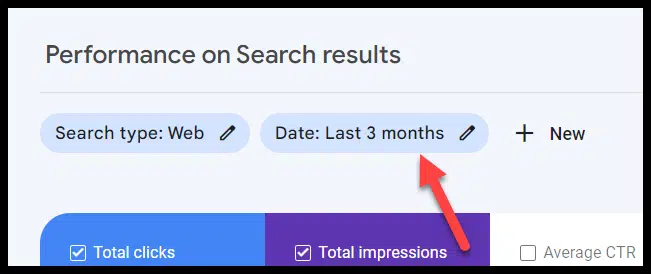
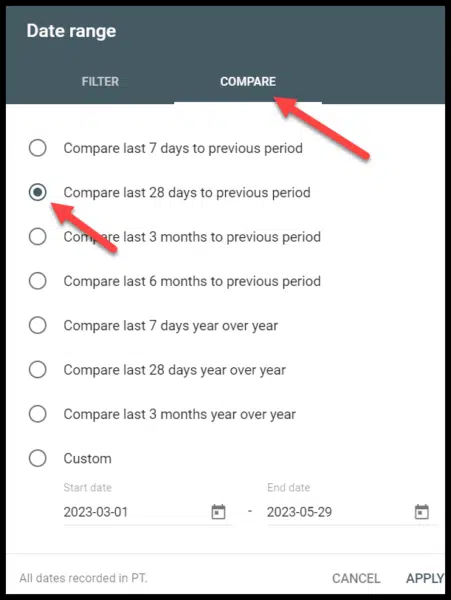
Once you know which date ranges you want to compare, you can start to see the pages that have lost the most traffic. You can do this in Google Search Console by clicking on date:
Then selecting compare and the date range you want to compare:
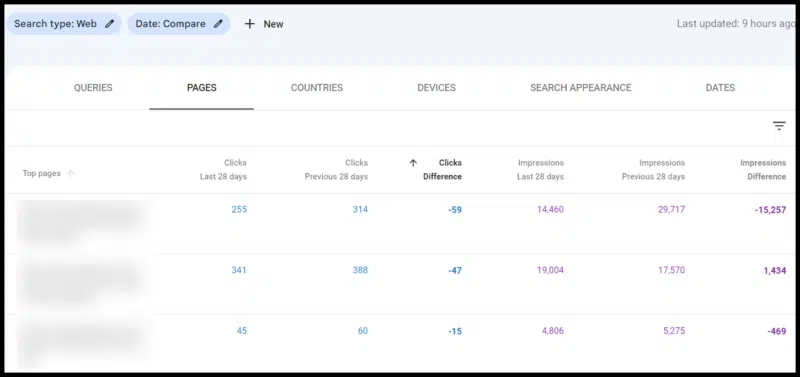
Once you do this, you can then click pages and sort the data by click difference to see pages that have lost traffic (even if traffic has been flat, you’ll likely have pages that have lost traffic – on an older site with a lot of traffic that is publishing new content, this is likely where your “traffic leak” is coming from):
Getting to the why: What’s changed?
Once you determine the pages that are losing traffic and that they are, in fact, losing rank (and aren’t just a victim of SERP changes), there are a number of steps you can take for each page that’s seen a drop to help regain traffic.
The first step is understanding why. To do this:
Identify the terms that have lost traffic on a page.
Go look at that SERP.
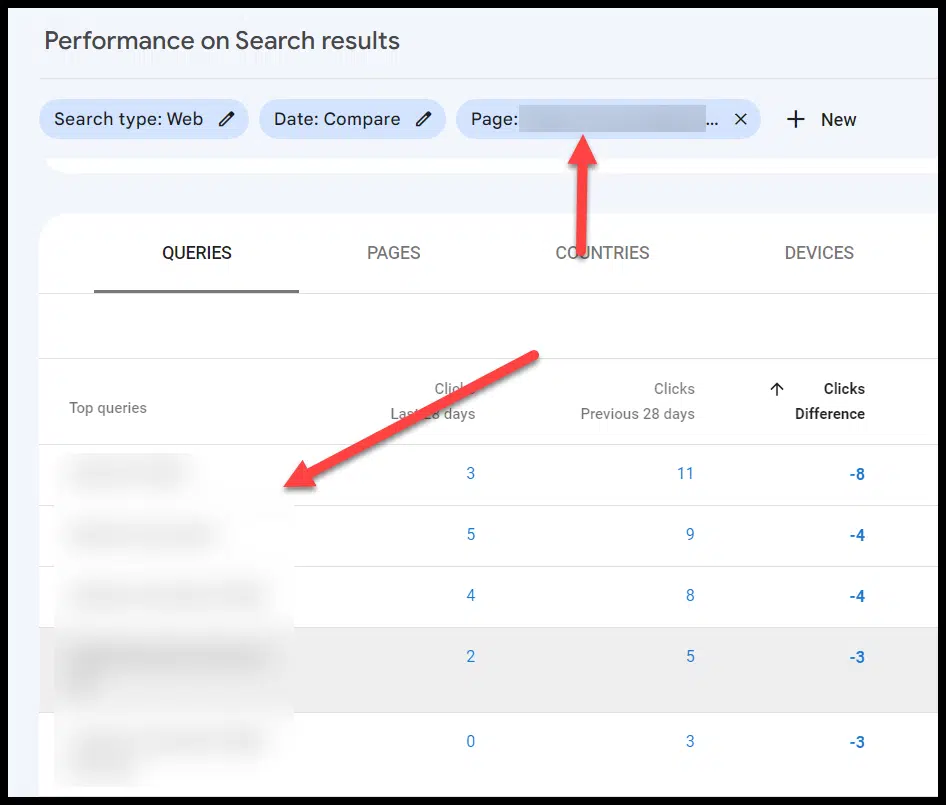
From your list of pages with the biggest page drop in GSC, you can then click the page (which creates a filter for that URL) and look at the queries, sorting by click difference in the same way you did for top pages:
You can then go look at the search results for those queries where you lost traffic. A few things may be true:
More authoritative sites may be ranking.
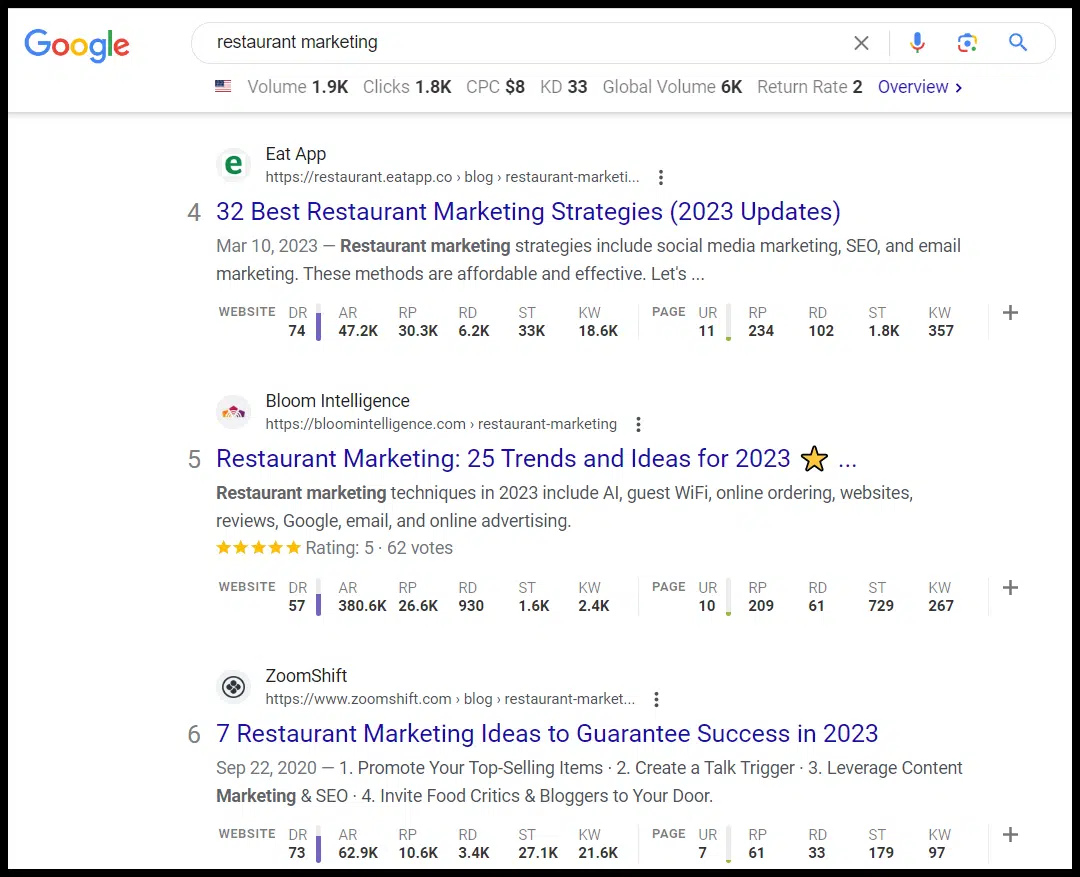
Google’s perceived search intent for that result may have changed (e.g., you may have had a large guide to restaurant marketing that ranked for the query, but now many of the results are “restaurant marketing ideas” list-style responses), and your page is no longer a good match for that intent.
More specific content may now be ranking for a query where your broader page used to rank (e.g., your restaurant marketing guide used to rank well for Google Ads campaigns for restaurants, but now the SERP is full of guides that cover that topic exclusively).
You may have the intent matched perfectly, but there may now be a flood of competitors creating pages on the same topic, and your content (which might have been the only show in town a year or two ago) may no longer be up to snuff
This is a good jumping-off point as it gives you direction on what to prioritize as you’re updating content that’s lost traffic. A good process to work through here is to:
Export the pages that have lost the most traffic (ideally looking at a few different angles in terms of date ranges).
Note the traffic drop as well as the queries that lost traffic and what you found when you inspected the SERP (why did your pages see a drop)
Now you can prioritize these based on pages that saw the biggest drops.
Importantly, if you are seeing drops on a certain content type, you want to do this inspection and update pages that are driving a lot of traffic even if they haven’t been hit yet.
If they are of similar age and content type particularly, it’s likely only a matter of time.
Diagnosing traffic drops isn’t a function that’s specific to B2B sites, but some B2B asset types tend to be particularly vulnerable to traffic drops, specifically:
Technical and trade-specific terms
Frequently, these are pages on your site that haven’t been updated in a long time and/or may be terms that you were early creating content around, but where other sites have created fresher, more thorough assets.
Recurring reports
If you put out an industry survey or “State of X” style report, those are often assets that can take a hit with time.
They often rank for a category or a basket of terms when the asset is initially created.
Then over time, other sites create more specific content that speaks to granular terms, and/or the search intent for the category term is something that shifts (i.e., a what is X page displaces a state of X report page).
Software or tool terms
Again, here assets like buying guides may be displaced with best-of lists (due to searcher intent).
Get the daily newsletter search marketers rely on.
6 steps for updating content that’s lost traffic
Once you’ve identified the specific pages losing content, there are a number of specific steps you can take to help address traffic drops.
1. Address searcher intent
The first step for updating content is to look at the search results.
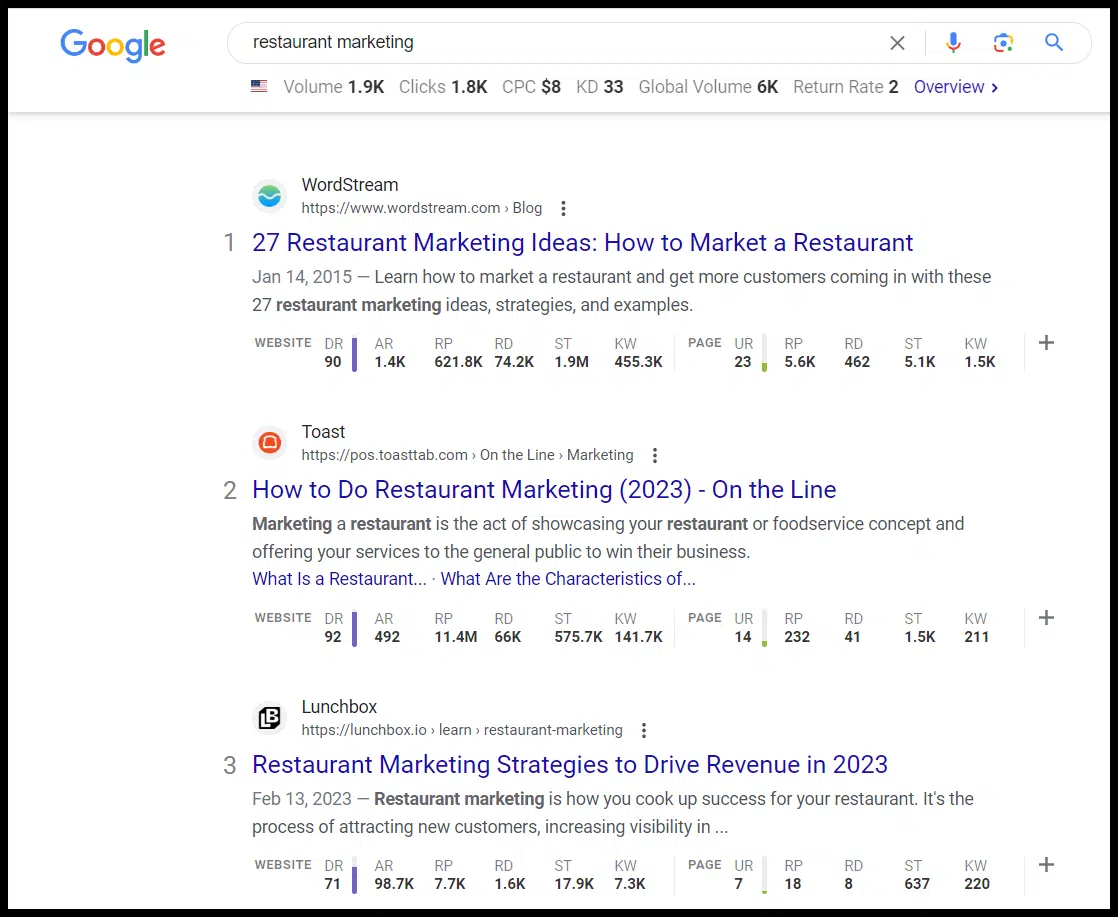
If we had an ultimate guide to restaurant marketing that had lost traffic for that term, we could look to the SERP to see the types of posts that are ranking there currently (the screenshot below is looking at the search results with the Ahrefs Google Chrome plugin enabled):
These are authoritative sites, and there’s also a mix of content types (a list of ideas, how to do restaurant marketing and a list of strategies).
As you continue to scroll down, you also see additional list style formats here:
So looking at reworking this post to be more in line with what’s currently ranking or creating a net-new asset that targets this term with a similar approach is something to consider here.
2. Get to answers more quickly
Along the same lines, if your article “What’s a Successful Restaurant Turnover Rate?” has three paragraphs about what a turnover rate is, the history of turnover rates, etc., before answering the core question you want to pull this up to address the core topic quickly and get the searcher to the information they want.
An obvious best practice for updating old content is updating broken links and refreshing any dated post information.
4. Add relevant subsections and multimedia
Looking for related topics, answering people also ask questions and related questions you can mine from tools like Ahrefs or Also Asked, and topics covered in other pages that are ranking that yours doesn’t have covered are all good ways to update content.
You can also look at the queries losing traffic and consider building new subsections to address these queries.
These updates are also a great opportunity to introduce:
More relevant images (like charts/graphs, useful visualizations that will enhance your post and improve engagement metrics).
Embedding relevant video (whether its video you’ve created, or embedding a relevant video created by someone else)
Embedding relevant social media embeds (even for B2B content there’s often content on platforms like LinkedIn or Twitter that will be relevant and will make your content fresher and more dynamic)
5. Add FAQs
Adding an FAQ section can be a great way to address questions you want to target, and leveraging FAQ schema can significantly impact click-through rates.
This provides you with some additional SERP real estate (particularly if one of the areas that has changed is how prominent your listing is in relation to other listings).
6. Add internal links
Often a post or page that’s lost traction over time has a number of unaddressed opportunities for internal links.
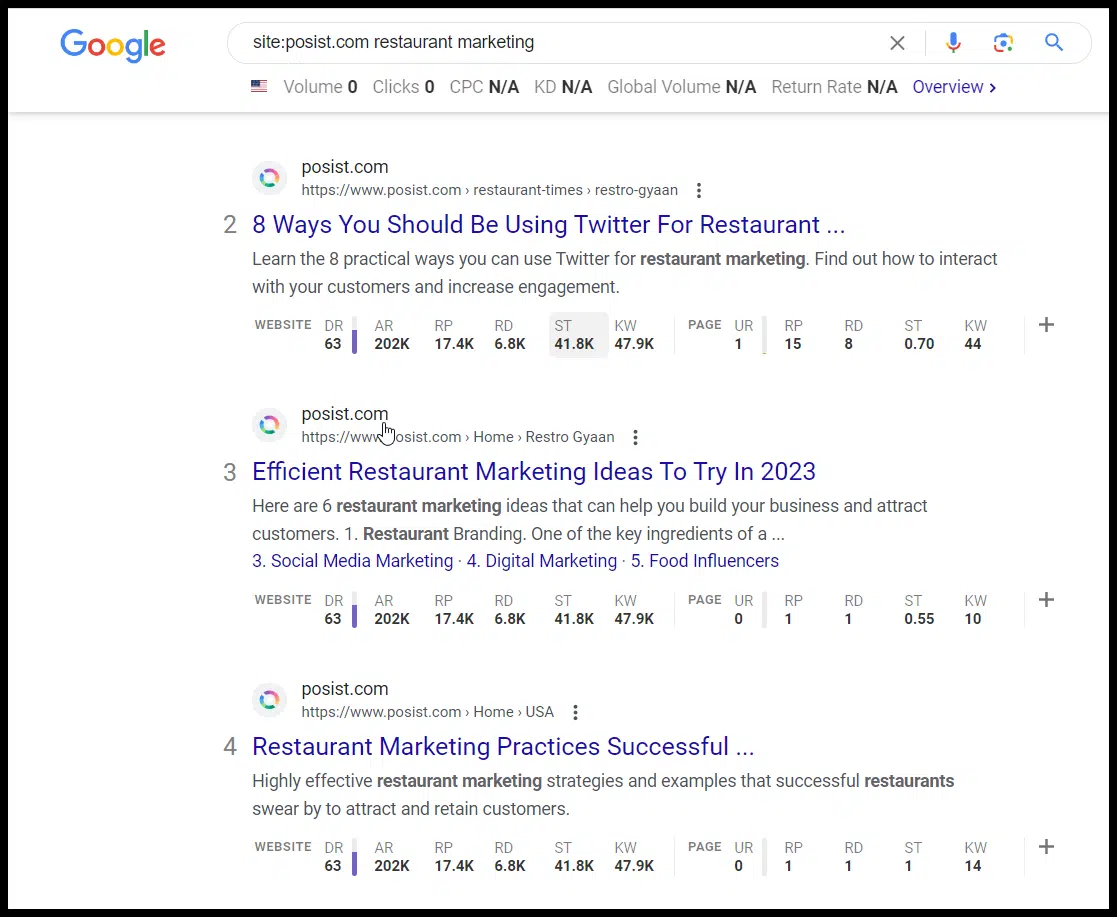
If you don’t have a more thorough process for inventorying internal links, doing a site search for your domain and the target term can be a good quick-and-dirty way to find internal linking targets to add links from for your page:
Note: This is just a random example of a site that has a restaurant marketing guide ranking on the second page. I don’t know if they have or haven’t lost traffic for this phrase or to the guide.
Addressing time stamps
Addressing the time stamps on your pages can be a powerful tactic, particularly in technical niches or just B2B niches where information can become dated quickly. (For instance, where you’re dealing with turnover in terms of models for different equipment, standards for different regulations, etc.)
Particularly, we’ve found transitioning from publish dates to last updated time-stamps on blog posts and being conscious of what date-based information you expose on the page can have a major impact on organic traffic.
Updating title tags
Loking at the SERP for the types of title tags that are ranking, thinking about the query intent, and finding a way to address query intent while standing out in your title tag can also be a difference maker here.
This can be particularly powerful on older posts if you notice that you have been using a specific title tag formula and the click-through rate across a content type has waned or stagnated.
One of the ways to combat decay for specific posts is to build out supporting content around a page that’s lost traffic, developing a more comprehensive topic cluster with more related and supporting content.
Taking an entity-based approach to thinking about how you’ve covered a topic, how it’s linked to and links to related topics, you can use the about and mention tags to highlight entities in your content via schema (more on that in this article).
Similarly, you may consider removing lower quality or irrelevant content (though proceed with caution and be sure not to delete content that’s helping you).
Technical audit and content audit
Keep in mind that all of this assumes you don’t have overarching issues like manual penalties and toxic links, crippling technical issues, or glaring content issues on your site.
If you see site-wide 50%+ dips, you’ll want to look more at a comprehensive technical audit or content audit rather than what’s been outlined above.
Opinions expressed in this article are those of the guest author and not necessarily Search Engine Land. Staff authors are listed here.
@media screen and (min-width: 800px) { #div-gpt-ad-3191538-7 { display: flex !important; justify-content: center !important; align-items: center !important; min-width:770px; min-height:260px; }
}
@media screen and (min-width: 1279px) { #div-gpt-ad-3191538-7 { display: flex !important; justify-content: center !important; align-items: center !important; min-width:800px!important; min-height:440px!important; }
}
About the author
Tom Demers is the co-founder and managing partner of Measured SEM and Cornerstone Content. His companies offer paid search management, search engine optimization (SEO), and content marketing services to businesses of varying sizes in various industries.
Content mapping: Who, what, where, when, why and how
Did you know that you can create content for every stage of the buyer’s journey?
This is how you ensure content creation is never a guessing game.
Your content can reach and impact your ideal customer whether they just discovered your brand through your blog or are stuck on your product/service page weighing a purchase – and every stage between those two bookends.
Every piece of content you publish can be a powerful motivator and educator that speaks to the heart of your prospect.
Every blog, article, ebook, case study, landing page, infographic, video – you name it – can work hard to connect with your audience at the right place and time.
The key to ensuring this happens?
Content mapping.
What is a content map?
A content map is a plan that details how your business will deliver content to your ideal customers no matter where they find themselves in the typical buyer’s journey.
In other words, a content map plots out exactly how your content will reach your audience at the right time and place.
It also shows you how to personalize your content for your specific personas along their buying journey.
Content mapping is the process of creating your content map – the plan that outlines your ideal audience, the actions they may take at each buying stage, and how your content aligns with these things to nurture them toward an ultimate goal.
The ultimate goal of content mapping depends on your business goals. However, the large overarching goal of this endeavor is to create a personalized content experience for your audience.
Ultimately, a content map helps you plan how you’ll support, nurture, engage, and draw in potential customers no matter where they are in their buying journey.
Why should you do content mapping?
Content mapping is vital to ensure your content marketing is robust and evenly spread across the customer experience.
It’s not just good for your business but also for your customers. Let’s dig into the benefits a bit more.
Create more relevant content for each buying stage
A good content marketing strategy will help you create targeted content to nurture an audience.
A great content marketing strategy, one that includes content mapping, will help you create targeted content to nurture that audience at every stage of the buying journey.
Remember, the buyer’s journey is the process of research your buyer undertakes as they become aware of a problem, consider their options, and ultimately make a decision on what to do about it.
Buyers don’t randomly decide to buy something – they come to that decision through a range of circumstances and actions. That’s the buyer’s journey.
Source: HubSpot
With content mapping, you ensure that you’re not neglecting your potential customer as they move forward on the path to purchasing.
For example, if you have tons of blogs created for the awareness stage but none for the consideration stage, some of the leads you attracted to your brand initially might fall into that gap. You helped them define and understand their problem, but you didn’t show them how they could solve it or achieve their goals.
Another brand with consideration content could swoop in here, picking up where you left off. Now you’ve lost a potential customer.
In contrast, a content map helps you stay with that customer until they’re hovering over the “purchase” button in your website’s shopping cart. In fact, it probably helped get them to that point!
That’s powerful beyond belief.
Get more returns from each content piece
Content mapping also helps you identify a solid purpose behind each content piece you publish.
You’ll create each one with a specific intent that matches up with your goals, the target audience’s needs, and the buying stage they’re in.
That makes each piece pull its weight so much more.
It’s a stark contrast between:
Hitting “publish” and praying the content helps your business in some way.
Or hitting “publish” and knowing exactly what that piece has the potential to do, and probably will do, in terms of results.
Get more engaged, invested, loyal customers
When you provide great content at every stage of your buyers’ journeys, what do you think will happen?
The engagement, connection, and affinity you build will lead to equally engaged, invested customers.
Deliver a great product or service at the end of all that, and you’ll hook them utterly and completely.
This is how you create brand ambassadors. Raving fans. Delighted customers.
Ultimately, the point of content mapping is to ensure you’re helping your prospects at every step along the way. That amount of personalization and care is naturally going to produce customers who are wild about you.
Get the daily newsletter search marketers rely on.
How to do content mapping
Ready to create a content map?
Before you start, I recommend having a content strategy in place first. Your content strategy will be useful beyond belief because a lot of the work will be done for you – laying out your content goals, researching your audience, identifying and creating personas, and more.
If you don’t have a content strategy yet, you’ll still learn much from this guide. (It may even spur you on to create one quicker!)
Once your content map is complete, you’ll understand how to map each content piece you create to each stage of the buyer’s journey for your particular audience.
1. Who: Research your audience and create personas
Your target audience is the most important piece of the content mapping puzzle. Without intricate knowledge of them, you’ll be lost.
You need to understand their preferences, behaviors, habits and needs to deliver truly personalized content to them at the right time and place.
How do you build that knowledge? Through audience research.
Audience research
Never guess what your audience is like. Your assumptions can help you at the outset, but you need to test those assumptions and make sure they’re accurate for equally accurate targeting and content mapping.
That’s what audience research is for. There are a few main ways to go about it:
Check data that already exists about your audience in studies, statistics, reports, and surveys. This is helpful if your business is new and you don’t have an established following yet.
Conduct your own surveys, polls, and interviews with your audience. Get data from real customers (if you have them) and also leads, your social media followers, or people who have expressed interest in what you sell.
If you can, focus on getting insights from real people in your orbit. This will make your personas more accurate and more helpful.
Of course, if you already have a content strategy in place, you’re a step ahead. You probably already have done audience research and have one or more personas ready to go that distill that research.
Buyer personas
How do you compile the knowledge you gain through audience research and make it more usable?
By creating buyer personas: fictional characters or avatars representing real data about your audience. Each persona is a conglomeration of the commonalities among your audience.
Think about it: For most brands, you could probably describe a type of buyer who purchases from them. For example, busy stay-at-home moms who run to Starbucks between school drop-offs, meal prepping, and soccer practices. That, right there, is a buyer persona.
If you have multiple types of ideal customers, create personas for each one so you can map their different buying journeys to your content. For example, Starbucks might add a student persona to their roster or a professional.
2. What: Map out the buying stages of your persona(s)
After your personas are set, you can lay out the common buying stages each persona goes through, including their thoughts, goals, and challenges.
We briefly touched on the stages of the buyer’s journey earlier, but to reiterate, they are:
Awareness: The buyer is aware they have a problem, but they don’t know what it is yet, or they can’t name it specifically. They are experiencing symptoms of a problem.
Consideration: The buyer has pinpointed the problem they’re dealing with. They can name it and define it. Now they’re looking at possible solutions.
Decision: The buyer has decided which solution to use and is comparing the best providers or products that offer that solution.
In each stage, your personas will have different concerns, needs, questions, and goals. Try to pinpoint these for each persona across each buying stage.
For example, let’s return to the persona of the stay-at-home mom. Based on the challenges and goals we know she has from audience research, we can outline possibilities for her buying journey. Here’s just one:
Challenge: She’s struggling to find free time during the day. Goal: She wants to find time to indulge herself.
Awareness: “How do I take time for myself?”
Consideration: “I should schedule a break for myself during the day. What can I do that would relax me?”
Decision: “Getting a delicious coffee drink would help me slow down while I treat myself. Where should I go?”
3. Where/when: Map out content types and topics for each stage of the buyer’s journey
Now that your personas are connected to buying stages, we can look at each stage individually to determine the type of content we can create to help them.
Think about:
How can you address your buyer’s needs and goals at each stage with content?
What keywords might they be using at each stage to research their problem and its solution?
Let’s go through each stage to see the common types of content you can use to target your buyers, whether in Awareness, Consideration, or Decision mode.
Note: Some types of content fit in multiple stages because they help more than one type of buyer.
Awareness content
Awareness content should seek to inform your audience. It should help them identify and understand a problem, why it matters, and/or what they should do next.
Types of content: How-to guides, checklists, infographics, informative blogs, ebooks, and social media posts.
Examples of awareness topics:
Consideration content
Consideration content should help your audience choose between various options. For example, you could teach them all possible solutions to a problem and compare/contrast them. Or you could educate them about a specific solution and why it’s the best one.
Types of content: how-to guides, product reviews and comparisons, case studies, white papers, tutorials, and webinars.
Examples of consideration topics:
Decision content
Decision content is all about convincing your audience that your product or service is the right one for their needs. This is not about sales pitches but more about presenting the value and benefits of what you offer in a way that demonstrates your expertise.
Types of content: product landing pages, testimonials and reviews, case studies, demos, and product features.
Examples of decision topics:
4. How: Use your content map to evaluate existing content/plan new content
One of the great things about a content map is that it can help you take a snapshot of all the content you’ve already produced and how each piece helps buyers.
This will help you notice gaps you need to fill – and reach more buyers in a stage you may be inadvertently ignoring.
Categorize old content by which buying stage it helps
First, look at all the content you’ve published and start categorizing it by the buying stage(s) it’s most likely to address.
If the content fits more than one category, choose the category it helps the most.
If the content fits nowhere, add it to a list of possible content pieces to update. You could potentially edit that piece to be more targeted to a specific buying stage.
Brainstorm new content topics using your content map
Once you’ve categorized your old content, you should have a good idea of the holes in your content strategy you need to fill to address different buying stages.
You should focus on filling those holes first. Use your content map to help you.
By now, your content map should have three types of information:
Your buyer personas.
The stages in your buyer journey mapped to content types.
The challenges, goals, and possible actions of each persona during each buying stage.
As you brainstorm new content topics, use your content map to ensure you create personalized, targeted content for every stage of your persona’s buying journey.
Look at your persona and what they need at each stage, including the words they’re using to search for what they need.
Research these needs in a keyword tool to find opportunities for optimizing content.
Use these terms to find related topics you could also address.
Look at the best content types that will help your persona at each stage.
Brainstorm a combination of content topics + formats that will touch your persona at the right time to help them move forward in their journey.
5. Document everything in your content map
A content map should be a physical reference you can refer to during the content creation process.
For that reason, document your content map in a way that’s easy to read and understand. Make sure you can continue adding to it as your content inventory expands, too.
For example, you could create a simple spreadsheet that lists your personas, their challenges and goals at each buying stage, and the types of content you should create to target them. Include both formats and topics.
Source: HubSpot
Start content mapping and create amazing customer experiences that lead to results
Content mapping can seem complicated at the outset.
But if you want to provide your customers with amazing content at every stage of their buying journey, you need a content map.
Learning how to create one is the hard part.
Once you have the strategy down, you’ll use your content map in ways you never imagined to understand your persona better, get major insights about their buying journey, and come up with content that is personalized to a T for their specific needs.
This is as strategic as it gets. But, as we know in content, strategy = results.
Opinions expressed in this article are those of the guest author and not necessarily Search Engine Land. Staff authors are listed here.
@media screen and (min-width: 800px) { #div-gpt-ad-3191538-7 { display: flex !important; justify-content: center !important; align-items: center !important; min-width:770px; min-height:260px; }
}
@media screen and (min-width: 1279px) { #div-gpt-ad-3191538-7 { display: flex !important; justify-content: center !important; align-items: center !important; min-width:800px!important; min-height:440px!important; }
}
About the author
Julia McCoy is the founder of Content Hacker, 7x author, and a leading strategist around creating exceptional content and brand presence that lasts online. At 19 years old, she used her last $75 to build a 7-figure writing agency which she sold ten years later. In the 2020s, she’s devoted to teaching founders and marketers the strategy, skills, and systems they need to build a business through inbound content, so they can create more lasting impact in the world.
Separated Feed and Stories into two separate sections.
Put a heavier emphasis on following its Recommendation and Community guidelines.
Added a section called Personalize your Feed and Stories, adding new tips on how to personalize Feed and Stories.
Expanded its discussion around Shadowbanning.
Instagram uses multiple algorithm
Instagram doesn’t use one algorithm to rank content. Multiple algorithms, classifiers and processes – each serving a specific purpose – determine what Instagram users see.
Instagram ranks content differently in different parts of the app (e.g., Feed, Stories, Explore, Reels and Search).
How Instagram ranks Feed
Instagram’s Feed is a mix of content from accounts that a user follows, recommended content and ads. There is also a mix of formats – videos, images and carousels.
Instagram said Feed ranking takes thousands of signals into account. The signals Instagram discussed all fall into three big buckets – the user, the creator and the post.
User signals:
Engagements – likes, shares, saves, comments and time spent interacting with a post.
Accounts the user has recently followed.
Accounts a user has recently liked or engaged with.
Format preference (e.g., Instagram will show more images if you engage more with images vs. videos or other formats).
History of interacting with another account.
Recent posts shared by the accounts a user follows.
Posts from accounts users doesn’t already follow that Instagram thinks they might be interested in. As Instagram explained:
“These are educated guesses at how likely you are to interact with a post in different ways. There are roughly a dozen of these. In Feed, the five interactions we look at most closely are how likely you are to spend a few seconds on a post, comment on it, like it, share it, and tap on the profile photo.”
Account preferences.
Creator signals:
Information about the post creator.
How many times people have interacted with that person in the past few weeks.
Instagram also tries to avoid showing too many of these in a row:
Posts from the same person.
Suggested posts.
How Instagram ranks Stories
The “input signals” Instagram looks at for Stories include:
Shared by accounts you follow (that don’t violate Instagram’s Community Guidelines).
Viewing history (how often a user views an account’s stories).
Engagement history (how often a user engages with an account’s stories – eg., a like or a DM).
Closeness (a user’s relationship with the creator and how likely they are to be connected as friends or family).
How Instagram ranks Explore
Explore is where Instagram recommends images and videos from accounts a user doesn’t follow. Ranking in Explore is similar to ranking of Feed and Stories.
Instagram looks at:
A user’s past Instagram activity (e.g., post likes, saves, shares and comments).
A user’s past Explore activity (posts a user has liked, saved, shared or commented on; how the user has interacted with posts in Explore).
Post information (how many and how quickly other users like, comment, share and save a post). Instagram said “these signals matter much more in Explore than they do in Feed or in Stories.
The user’s history of Interactions with an account.
Creator information (e.g., the number of times users have interacted with that creator in the past few weeks).
User activity (Reels a user has liked, saved, reshared, commented on, or engaged with).
The user’s history of Interactions with an account.
Reel information (e.g., popularity, the audio track, visuals in the video).
Creator information (popularity signals include number of followers, engagement level).
Reels can be less visible if they are:
Low-resolution.
Watermarked.
Muted or containing borders.
Mostly text.
Focused on political issues.
Previously posted on Instagram.
How Instagram Search works
Not mentioned in Instagram’s newest resource was how the Instagram search algorithm works. However, Instagram did that in a 2021 post, Breaking Down How Instagram Search Works.
What signals matter in Instagram Search:
The query. Instagram tries to match that to relevant usernames, bios, captions, hashtags and places.
User activity. Accounts a user follows, posts they’ve viewed and how often they have interacted with an account in the past. Instagram more often shows accounts and hashtags that a user follows or visits.
Popularity signals. The number of clicks, likes, shares and follows for accounts, hashtags and places.
Instagram’s SEO advice:
Choose an Instagram handle or profile name that’s related to the content of your posts.
Include relevant keywords and locations in your bio.
Use relevant keywords and hashtags in your captions.
@media screen and (min-width: 800px) { #div-gpt-ad-3191538-7 { display: flex !important; justify-content: center !important; align-items: center !important; min-width:770px; min-height:260px; }
}
@media screen and (min-width: 1279px) { #div-gpt-ad-3191538-7 { display: flex !important; justify-content: center !important; align-items: center !important; min-width:800px!important; min-height:440px!important; }
}
About the author
Danny Goodwin has been Managing Editor of Search Engine Land & Search Marketing Expo – SMX since 2022. He joined Search Engine Land in 2022 as Senior Editor. In addition to reporting on the latest search marketing news, he manages Search Engine Land’s SME (Subject Matter Expert) program. He also helps program U.S. SMX events. Goodwin has been editing and writing about the latest developments and trends in search and digital marketing since 2007. He previously was Executive Editor of Search Engine Journal (from 2017 to 2022), managing editor of Momentology (from 2014-2016) and editor of Search Engine Watch (from 2007 to 2014). He has spoken at many major search conferences and virtual events, and has been sourced for his expertise by a wide range of publications and podcasts.