Google announces new topic authority system to better surface news content

Google has announced a search system named “topic authority” to help surface relevant, expert, and knowledgeable content in Google Search and Google News. Google said this “helps determine which expert sources are helpful to someone’s newsy query in certain specialized topic areas, such as health, politics, or finance.”

Not new. Google’s Search Liaison, Danny Sullivan, later said on Twitter that this is an old ranking system that they are just talking about now. “To add a bit more, this isn’t a new system that’s just launched. We’ve used it for several years. Our post today is part of our regular efforts to share more about how ranking works,” he said.

How it works. Google explained that the topic authority system looks at a number of signals to understand the expertise of a publication in a specific area of interest. These include but are not limited to:

  • Notability of a source for its topic or location: Google now understands if a specific publication is “especially relevant to topics or locations.” For example, this site should be very relevant for topics on search marketing.
  • Influential and original reporting: Google can understand how original the reporting is from a publication by looking at links, citations and other areas.
  • Reputation of the source: Google can also look at the history of high-quality reporting, the recommendations from expert sources and more to see the reputation of the publication.

Example. Here is the example provided by Google, “there was a flood where you lived,” Google wrote. “The topic authority signal helps us identify content from publications in that region that regularly cover topics in your city or town and surface them towards the top of your search results. These are likely familiar publications that are trusted voices in the community, even though larger national outlets may be covering the flood as well,” Google added.

Practicality. Google said this should help surface content from original reporting news teams that are “intimately familiar with the location and topic.” Local news publications should show up more often for queries related to their local area. Publishers with a specific expertise should show up for queries on their areas of expertise.

Optimization. What should you do to optimize for topic authority? Google said just do what you are doing today, as you normally would. “Provide great coverage about the areas and topics they know well,” Google wrote.

Why we care. Hopefully if you are doing everything right, Google will reward your content and publication with better visibility and traffic from both Google Search and Google News.

Google also said this all should align with its guidance around helpful content.


Related stories

New on Search Engine Land

@media screen and (min-width: 800px) { #div-gpt-ad-3191538-7 { display: flex !important; justify-content: center !important; align-items: center !important; min-width:770px; min-height:260px; } } @media screen and (min-width: 1279px) { #div-gpt-ad-3191538-7 { display: flex !important; justify-content: center !important; align-items: center !important; min-width:800px!important; min-height:440px!important; } }

About the author

Barry Schwartz

Barry Schwartz a Contributing Editor to Search Engine Land and a member of the programming team for SMX events. He owns RustyBrick, a NY based web consulting firm. He also runs Search Engine Roundtable, a popular search blog on very advanced SEM topics. Barry can be followed on Twitter here.

https://searchengineland.com/google-launches-new-topic-authority-system-to-better-surface-news-content-427485


Google Site names now support subdomains on mobile devices

Google now supports Site names for subdomains on mobile devices, the search company just announced. Google wrote, “Site names are now supported for subdomains on mobile devices.”

Google updated its help documentation to specify subdomains on mobile.

Site names. Site names is the title and name of the site Google shows in the search results listings. “When Google lists a page in search results, it shows the name of the site the page comes from,” Google explained.

What it looks like. Here is where the site name shows in the search result snippet:

Site Name 800x251

Site names timeline. Here is the timeline Google posted of the evolution of site names since it launched in October:

  • October 2022: Site names for the domain level were introduced for mobile search results for English, French, German and Japanese.
  • April 2023 (I have this as March): Site names were added for desktop for the same set of languages.
  • May 2023: Site names are now supported on the subdomain level for the same set of languages and on mobile search results only.

Need support. Having issues with your site name? Google posted a support thread in the Google support forums over here, including more FAQs.

We recently saw some issues with site names, some of which Google resolved.

Controlling site names. Google back in October explained that Google Search uses a number of ways to identify the site name for the search result. But if you want, you can use structured data on your home page to communicate to Google what the site name should be for your site. Google has specific documentation on this new Site name structured data available over here.

Upgrading the favicon. Google also recommended revisiting the documentation for favicons for the latest best practices. Google is now also suggesting you provide an icon that’s at least 48 pixels and follows the existing favicon guidelines.

Ads. This is also rolled out to the Google search ads on desktop, so the size of the site name, favicons, and also the ad label will be more prominent in mobile search. In fact, Google rolled out the “Sponsored” label in mobile search last October and today on desktop, officially replacing the “Ads” label from January 2020.

Why we care. Now the site names will potentially show a different name for subdomains on mobile devices. So make sure to test to see how Google shows your site name for your subdomains on mobile, for multiple queries.


Related stories

New on Search Engine Land

@media screen and (min-width: 800px) { #div-gpt-ad-3191538-7 { display: flex !important; justify-content: center !important; align-items: center !important; min-width:770px; min-height:260px; } } @media screen and (min-width: 1279px) { #div-gpt-ad-3191538-7 { display: flex !important; justify-content: center !important; align-items: center !important; min-width:800px!important; min-height:440px!important; } }

About the author

Barry Schwartz

Barry Schwartz a Contributing Editor to Search Engine Land and a member of the programming team for SMX events. He owns RustyBrick, a NY based web consulting firm. He also runs Search Engine Roundtable, a popular search blog on very advanced SEM topics. Barry can be followed on Twitter here.

https://searchengineland.com/google-site-names-now-support-subdomains-on-mobile-devices-427400


OpenAI launches ChatGPT iOS app

ChatGPT is now available as an iOS app. The app is free and offers all the features you’ll find on the web version.

Why we care. ChatGPT has become an essential and popular tool for several SEOs, search marketers and content creators. Now you can use it whenever and wherever you want, all while maintaining your history. Plus, the app interface seems a bit more user-friendly than using ChatGPT on a mobile browser.

Plus. You’ll need to subscribe to ChatGPT Plus to get access to its GPT-4 model, as well as the other Plus features.

Voice input. The app also uses OpenAI’s speech-recognition system, called Whisper, to enable voice input. Early reports indicated this feature to be a bit buggy.

U.S. only for now. The app will roll out to U.S. users first, then expand to more countries in the coming weeks.

ChatGPT on Android “soon.” OpenAI said an app is coming soon for Android users.


Related stories

New on Search Engine Land

@media screen and (min-width: 800px) { #div-gpt-ad-3191538-7 { display: flex !important; justify-content: center !important; align-items: center !important; min-width:770px; min-height:260px; } } @media screen and (min-width: 1279px) { #div-gpt-ad-3191538-7 { display: flex !important; justify-content: center !important; align-items: center !important; min-width:800px!important; min-height:440px!important; } }

About the author

Danny Goodwin

Danny Goodwin has been Managing Editor of Search Engine Land & Search Marketing Expo – SMX since 2022. He joined Search Engine Land in 2022 as Senior Editor. In addition to reporting on the latest search marketing news, he manages Search Engine Land’s SME (Subject Matter Expert) program. He also helps program U.S. SMX events. Goodwin has been editing and writing about the latest developments and trends in search and digital marketing since 2007. He previously was Executive Editor of Search Engine Journal (from 2017 to 2022), managing editor of Momentology (from 2014-2016) and editor of Search Engine Watch (from 2007 to 2014). He has spoken at many major search conferences and virtual events, and has been sourced for his expertise by a wide range of publications and podcasts.

https://searchengineland.com/openai-launches-chatgpt-ios-app-427341


Optimize Google’s new Interaction to Next Paint metric

30-second summary:

  • Good page speed and user experience help your site stand out in search results
  • The Interaction to Next Paint metric is replacing First Input Delay
  • You can improve make your site respond faster to user input by reducing CPU processing times

The Core Web Vitals are a set of metrics that Google has defined to measure how good a website’s user experience is. They first became a ranking signal in 2021.

While the metric definitions have been tweaked over time, the introduction of the Interaction to Next Paint metric is the biggest change since the launch of the Core Web Vitals initiative.

What is Interaction to Next Paint (INP)?

Interaction to Next Paint is a metric that evaluates how quickly your website responds to user interaction. It measures how much time elapses between the user input, like a button click, and the next time the page content refreshes (the “next paint”).

To rank better in Google this interaction delay should be less than 200 milliseconds. This ensures that the website feels responsive to users.

How are the Core Web Vitals changing?

Google has announced that Interaction to Next Paint will become one of the three Core Web Vitals metrics in March 2024. At that point a website that responds to user input too slowly could do worse in search result rankings.

INP will replace the current First Input Delay (FID) metric. While FID also measures responsiveness, it is more limited as it only looks at the first user interaction. It also only measures the delay until the input event starts being handled, rather than waiting until the user can see the result.

Currently only 64.9% of mobile websites do well on the Interaction to Next Paint metric and it will be harder to get a good INP score than a good First Input Delay score.

How can I measure the Interaction to Next Paint metric on my website?

Run a website speed test to see how fast your website loads and how quickly it responds to user input.

Open the “Web Vitals” tab once your test is complete. You can see the Interaction to Next Paint metric at the bottom of the page.

In this case only 38% of users have a good INP experience.

How can I optimize Interaction to Next Paint?

Interaction delays happen when the browser needs to perform a lot of CPU processing before it can update the page. This can happen for two reasons:

  • Ongoing background tasks prevent the user input from being handled
  • Handling the user input itself is taking a lot of time

Background tasks often happen during the initial page load, but can happen later on as well. They are often caused by third party code embedded on the website.

Responding to a user interaction can require a lot of processing. If that can’t be optimized you can consider showing a spinner to provide visual feedback until the processing task is complete.

Running JavaScript code is the most common type of processing, but complex visual updates can also take a long time.

Use Chrome DevTools to analyze performance

The Chrome DevTools performance profiler shows what tasks are taking a long time and should be optimized. Start a recording, click on an element on the page, and then click on the longest bars in the visualization.

This allows you to identify whether the code comes from a third party or from your own website. You can also dive deeper to see how the task can be sped up.

Check the Total Blocking Time metric to identify background tasks

The Total Blocking Time metric tracks how often there are background CPU tasks that could block other code from running. If the user interacts with the page while a task is already in progress then the browser first completes that task before handling the input event.

You can use tools like Google Lighthouse to see how this metric can be optimized.

If processing-heavy tasks on your website are part of your core website code you’ll need to work with your development team to optimize these. For third parties you can review whether the script is still needed, or contact customer support of the vendor to see if it’s possible to optimize the code.

Monitor Interaction to Next Paint

Want to keep track of how you’re doing on INP and other Core Web Vitals? DebugBear can keep track of your website speed and help you optimize it.

Start a free 14-day trial today and deliver a better user experience.

Conclusion

The Interaction to Next Paint metric represents the biggest change to Google’s Core Web Vitals since they were originally announced. INP addresses the deficiencies of the previous First Input Delay metric and provides a better representation of how users experience a website.

Check how your website does on the Interaction to Next Paint metric before the ranking change is rolled out in 2024. That way you’ll have plenty of time to identify optimizations and make your website faster.

Try DebugBear with a free 14-day trial.

https://www.searchenginewatch.com/2023/05/19/optimize-googles-new-interaction-to-next-paint-metric/


Keyword difficulty in SEO guide: Everything you need to know

Keyword difficulty isn’t one of SEO’s hottest topics or latest trends. But it is a powerful metric when you understand its potential.

It can help you to make educated decisions about your prospects of ranking for specific terms, allowing you to make tactical choices that underpin your SEO strategy.

Here’s what keyword difficulty means for SEO, how the score is measured and tips for using it to get better results.

What is keyword difficulty?

Keyword difficulty is a metric that quantifies how competitive a keyword is and, therefore, how challenging it’s likely to be to rank for it. It is displayed as a value from 1 (low competition) to 100 (extremely high competition).

What does the score tell you?

Keyword difficulty in SEO tells you how difficult it’s likely to be to rank for a particular keyword in relation to the strength of the competition. However, there’s no standard for calculating the difficulty or competition to rank for a particular keyword. 

Various tools measure it differently, and scores can vary significantly based on which one you use. 

If you’re interested in this, it’s worth checking out Backlinko’s research into keyword difficulty scores across different SEO tools. 

Most tools factor the strength and number of referring domains pointing to the top ranking results in the search engines into their calculation, but many use additional metrics too. 

Where do you find it?

There are a variety of different SEO tools that provide a keyword difficulty checker. 

It is usually found in the keyword research function of a tool and displayed alongside the search volume metric, labeled difficulty, competition or KD. 

To check the competition for keywords at scale, you will likely need a paid keyword research tool. Here are some of the most well-known:

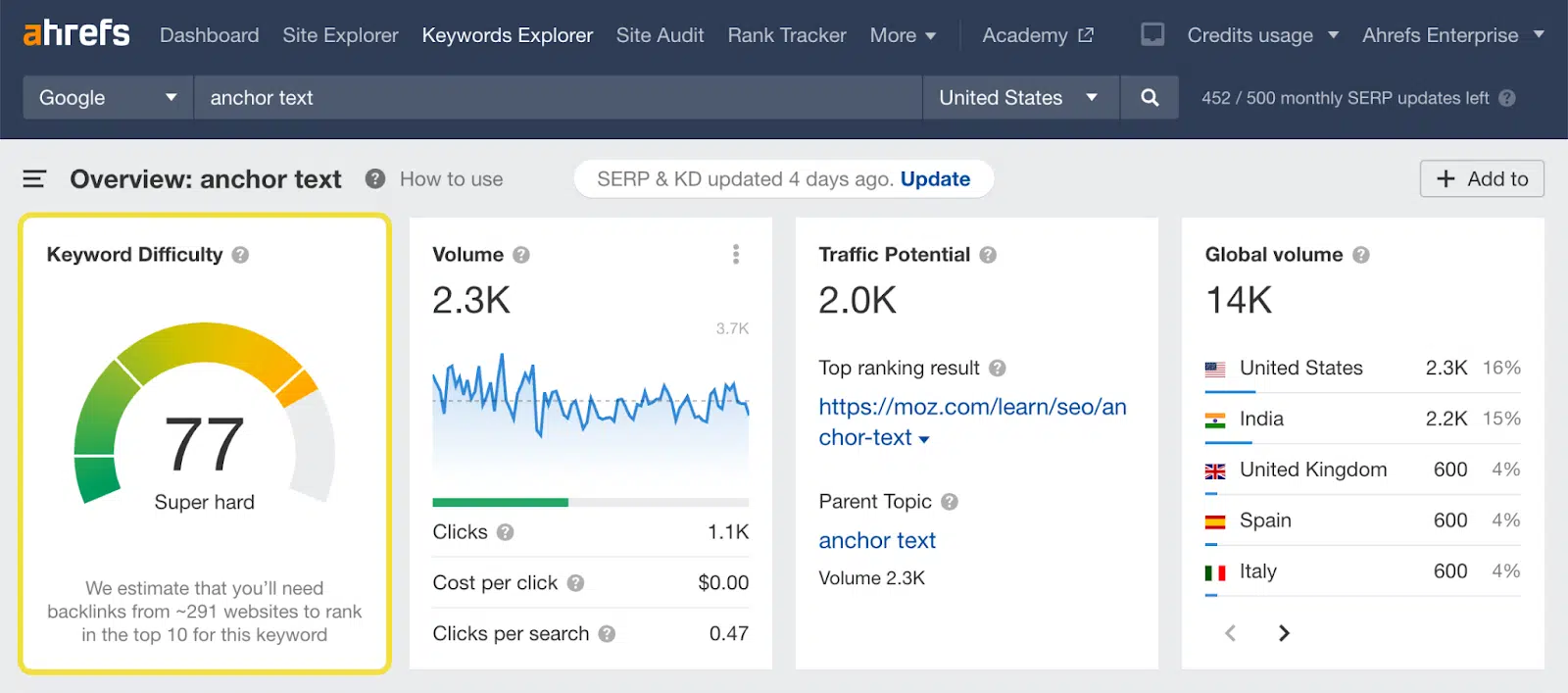
Ahrefs

Navigate to Keywords Explorer and you can begin your search. The difficulty score is clearly labeled and color-coded along with descriptive text to help you understand the difficulty level. 

Ahrefs - Keyword difficulty

How is it calculated?

Ahrefs CMO Tim Soulo explains in detail: 

“Here at Ahrefs, we use a simple method for calculating KD. We pull the top 10 ranking pages for your keyword and look up how many websites link to each of them. The more links the top-ranking pages for your keyword have, the higher its KD score. Very simple and very actionable.”

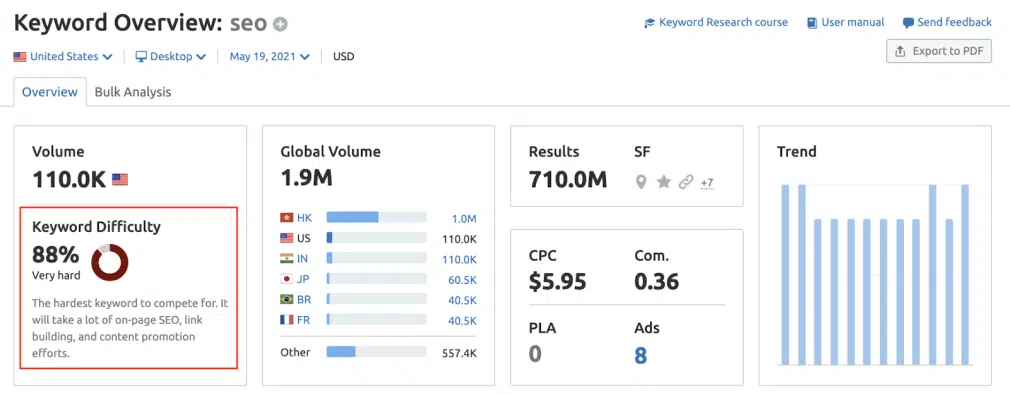
Semrush

In the Keyword Overview section of Semrush, you’ll find their difficulty metrics. There’s also a KD column in keyword reports. 

Semrush - Keyword difficulty

How is it calculated?

Semrush uses SERP analysis, keyword analysis and a score weighting based on locality. You can read the full details here. 

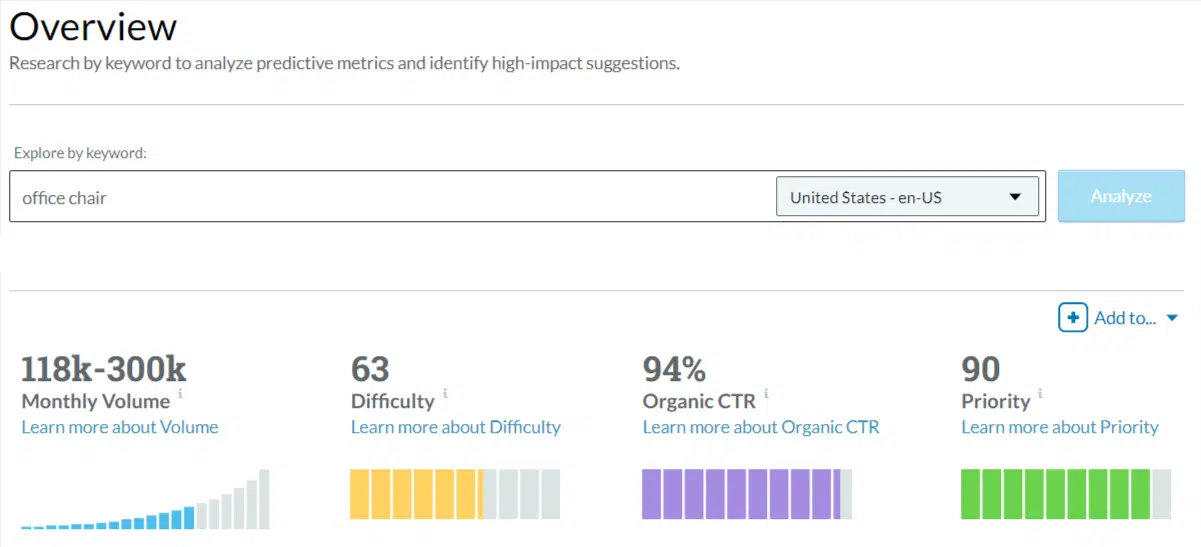
Moz

The keyword explorer in Moz gives you an immediate score that’s easy to find and interpret. 

Moz - Keyword difficulty

How is it calculated?

In their help section, Moz explains: 

“Keyword Difficulty in Keyword Explorer takes into account the Page Authority (PA) and Domain Authority (DA) scores of the results ranking on the first page of Google for the given query, as well as modifying intelligently for projected click-through rate (CTR) of a given page. Keyword Difficulty puts more weight on higher-ranking, more visible pages, and less weight on lower-ranking, less visible pages. The formula also accounts for newer pages on powerful domains that may have DA scores but have not yet been assigned PA values. The scores roughly correspond to a weighted average of the PA of the top 10, and the other inputs (DA, homepages, query term use, etc.) modify that weighted average.”

Sistrix

Head to Keywords in the top navigation to reach the keyword explorer. 

Enter a seed term or a list of terms. You’ll reach an overview page if you use a seed term, and the difficulty score is displayed for that specific term. 

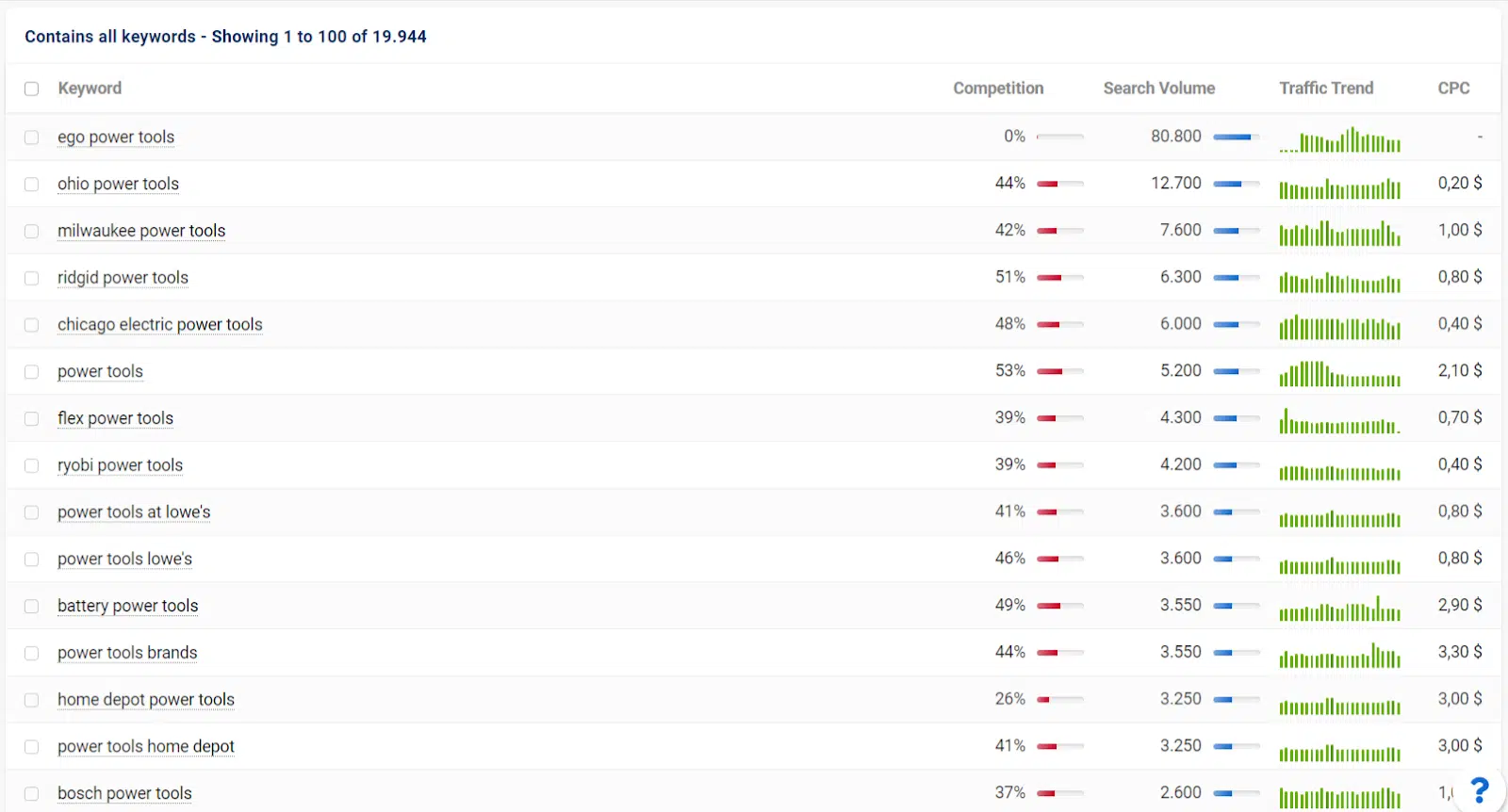
Drill down into a keyword list under Contains all keywords to reach a table with competition and keyword difficulty.

Sistrix - Keyword difficulty

How is it calculated?

Sistrix states they use “a number of values” to calculate their difficulty score. They go on to say:

“Around 15 values ​​for each keyword are regularly analysed and summarised in this key figure. These are quite intuitive metrics such as the number of searches, but also more complex observations such as the number of start pages (not sub-pages) in the top 10.

The value has a logarithmic structure. In practice, this means that an increase in the competition key figure by 10 points represents roughly twice as intense competition in the SERPs for this keyword.”

As you might expect, each tool is tight-lipped on what exactly goes into its calculation. Each approach is quite different, which explains the varying scores.  

Quick tip: Pick a tool for each project and stick to it. Don’t mix data from different tools, as you won’t be comparing like-for-like when it comes to keyword difficulty. 


Get the daily newsletter search marketers rely on.


Is keyword difficulty good or bad?

Keyword difficulty in itself is neither good nor bad. It’s simply information.

OK, if you have a brand new site to launch with a small budget and all the keywords that are relevant to you have extremely high competition, that’s bad. But that’s also pretty lousy business planning.

Having an understanding of keyword competitiveness is undoubtedly good. Appreciating how it can work for you gives you a head start on the competition. 

What is high/low keyword difficulty?

In general terms, a high-difficulty keyword has a lot of competition, making it more challenging to rank highly in the organic search results.

You’ll likely find some brand names you recognize ranking for high-difficulty terms. 

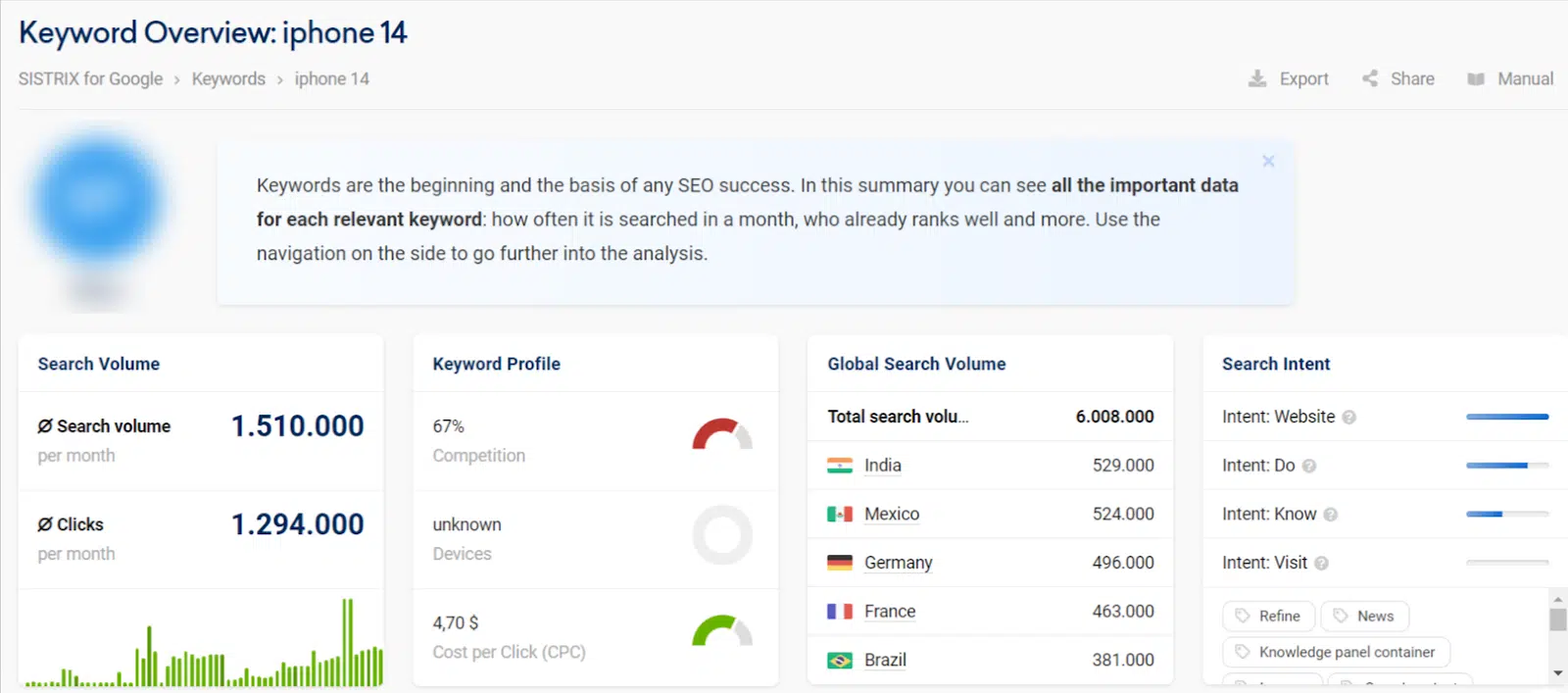
For example, let’s take the keyword “iphone 14.” Sistrix gives it a competition score of 67% in the U.S.:

Sistrix iphone 14

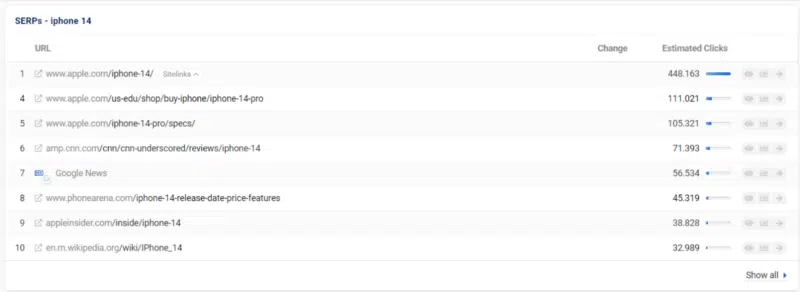
The SERPs look like this:

Sistrix iphone 14

Up against Apple, CNN and Wikipedia, we can see that ranking in the top 10 would be a challenge for smaller brands. 

Broadly speaking, low difficulty means that the competition isn’t as fierce. You might find less relevant results and may spot some niche websites that aren’t household names.

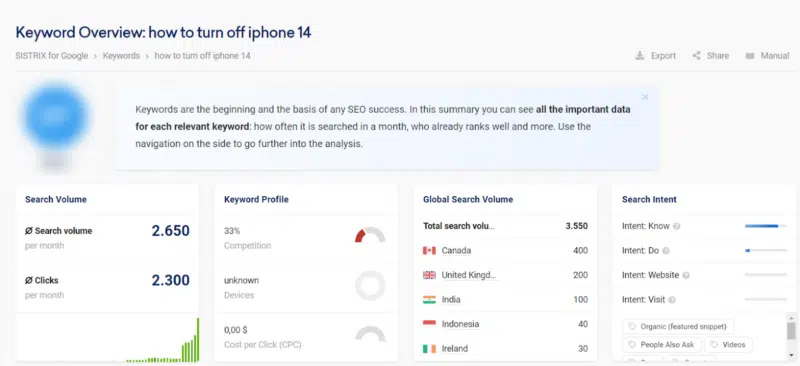
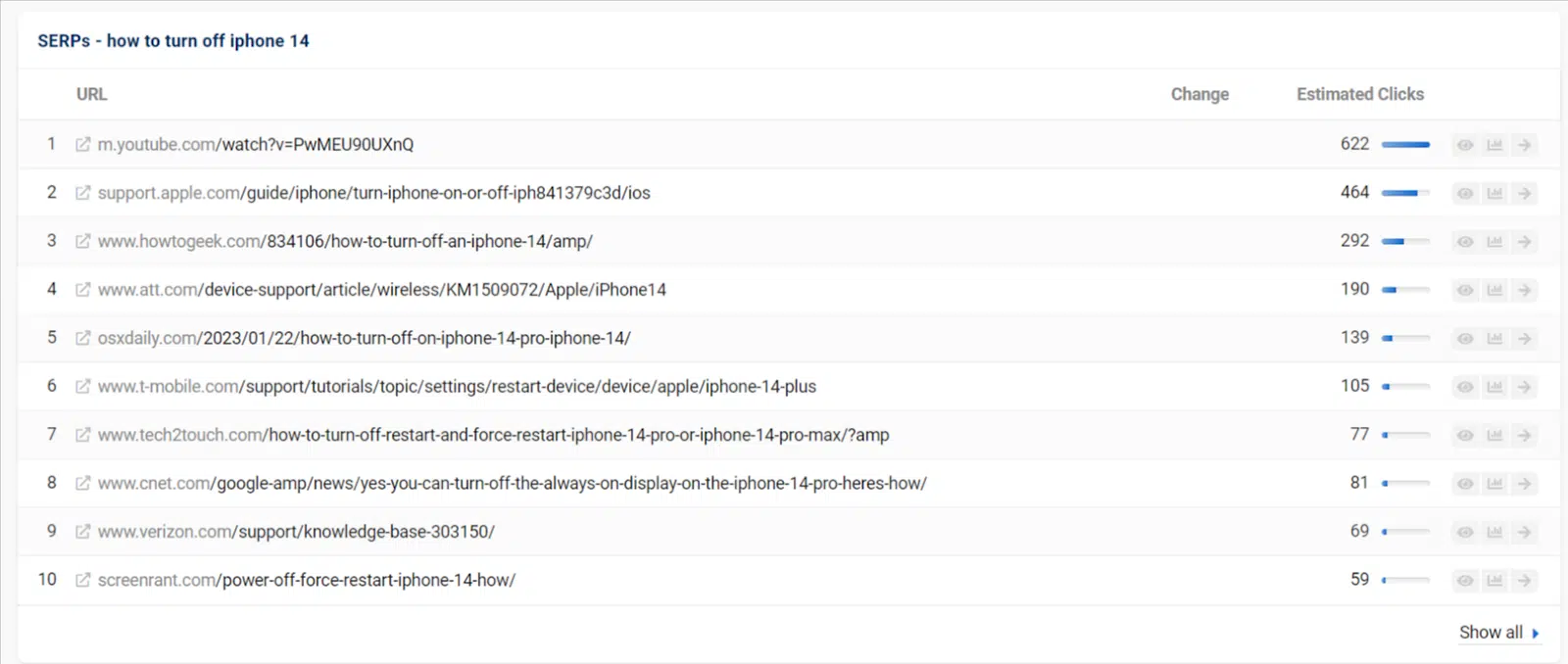
Now let’s switch that earlier example to a term with much lower difficulty “how to turn off iphone 14.”

Image 106 800x366

The competition level is just 33%. You’re still up against some big names, but you can also see some in there that you might not recognize.

This shows that if you create some really useful and relevant content, you might have a shot at ranking fairly well.

Low competition

When you’re looking at keyword competition, everything is relative. 

This is why I love using color scales to review a keyword list. It helps to visualize the highs and lows in relation to the dataset you’re working from. 

Once you’ve drawn up a list of keywords you’re interested in for a new page or piece of content, you can look at the difficulty spread across the whole list. 

What is a good keyword difficulty?

This is where things get tricky. A “good” keyword difficulty is a sweet spot relative to all the other considerations you have to make. 

The best approach is to gather all the relevant information, including competition scores, and use this all to make strategic decisions. 

It’s no easy task, but the more frequently you do it, the more you learn. 

Factors to consider when looking for a good keyword

There are various considerations to make when assessing a keyword’s viability. It’s a balance between the following:

  • Search volume.
  • Your site’s current strength in the market. 
  • The strength of your backlink profile.
  • How competitive a term is in relation to other terms you could target (difficulty).
  • How well your content can fulfill search intent.

You’ll come to your decisions by weighing up these factors. 

How do I choose keyword difficulty?

When you’re reviewing difficulty scores, it’s not a case of choosing a number or a specific difficulty level. It’s simply a useful metric to help you understand the playing field. 

Difficulty scores are a small but important part of choosing keywords for SEO. My process is as follows:

  • Enter my seed keyword into an SEO tool that provides search volume and keyword competition or difficulty metrics.
  • Select all the relevant keyword options and save them in a list.
  • Export the list to Google Sheets or Excel.
  • Sort by search volume (highest first).
  • Format the search volume and keyword difficulty columns with color scales.
  • Use the color scales as visual clues to spot keywords with high(er) search volumes and low(er) difficulty scores.
  • Pick out one or two primary and a handful of secondary keywords you’re most interested in.
  • Review the search intent for this refined list, look at what currently ranks and be honest with yourself about whether you plan to create a page that will fulfill that search intent.  
  • Remove any keywords from your refined list that don’t line up with search intent.
  • Always keep the domain you’re working on in mind. If you’re a big brand with a high authority site, you might not need to be as concerned with keyword competition as a small to medium-sized business that needs to seize every opportunity to gain ground in the SERPs. 
  • You should be left with a qualified list of target keywords to help you focus your content. 

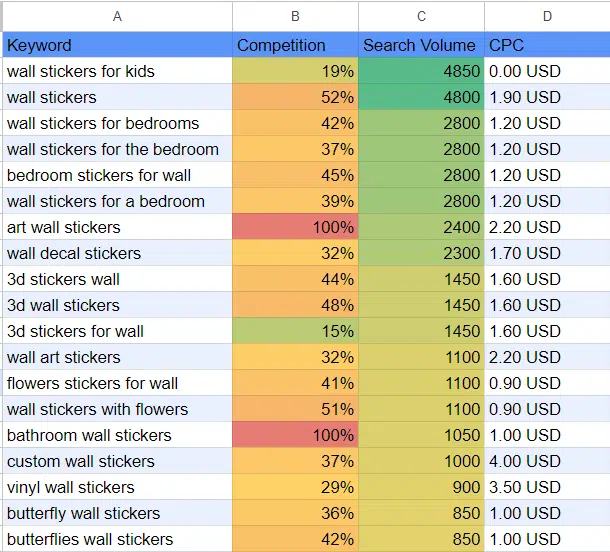
Here’s an example of how I use color scales to visualize the opportunities:

Color-scaled keyword opportunities

Here, “wall stickers for kids” looks like an interesting opportunity with a relatively high search volume (for my current dataset) and relatively low difficulty. 

Without keyword research, I might have assumed that “wall stickers” was the obvious term to go after, but it’s much more competitive and has a slightly lower search volume.

So assuming my range is for kids, I’ve found a possible target keyword here. 

But… are keywords still important for SEO?

There’s a much higher focus on AI, machine learning, natural language processing and voice search today, and even Google Analytics has hidden a lot of its keyword data (not provided). 

So you’re probably wondering why it’s even worth all this time and effort considering a keyword difficulty score.

Yet, keywords are still vitally important. This type of research gives you insight into what your target market is looking for and how they search for it. 

This can be interesting, surprising and even amusing at times! There’s no filter when we search as we have a level of anonymity that allows direct and honest questions to be asked. 

It also informs you about what your competition views as important and how you might be able to outsmart them or spot an opportunity they haven’t. 

Keyword research can help you uncover new opportunities for products, product ranges or content.

Without regularly checking what people are searching for, you could miss out on new trends that initially have lower difficulty because the competition hasn’t caught up yet. 

How you create good, helpful and authoritative content to satisfy these queries is a different question, but understanding your marketplace in the SERPs is a step you should never miss. 

A focused keyword list helps you keep your eye on the opportunities and forms the backbone of your overall strategy. 

How to find low-difficulty keywords

You can filter or sort any dataset by keyword difficulty to find low-competition keywords.

But if you want to begin your search by looking for keywords that are easier to rank for, here are a few methods you could also try: 

Adding search qualifiers

Refine your broad search by adding qualifiers. You can add words like “for,” “to” and “vs” to narrow down the options. You’ll get some more specific phrases, and usually, the difficulty score will be lower. 

Looking for the long tail

By their nature, long-tail queries tend to be more detailed, specific and lower competition. 

Because their search volumes are lower, there’s usually some low-hanging fruit for long-tail keywords.

Using tools like Google Trends, Pinterest Trends, TikTok Trends and Exploding Topics, look out for new areas of interest in your niche. 

If you identify these early enough, the competition will likely be lower. There’s always a gamble here, though. 

You can never be sure which trends will stick or how quickly the competition will catch on, potentially displacing your position in the SERPs. 

Why is keyword difficulty important?

There are so many reasons keyword difficulty is an essential metric in SEO:

It’s strategic

Keyword difficulty is really important because it allows us to think strategically. As time-poor SEOs, we want to make the biggest impact with our work.

Understanding the competition in the SERPs quickly and efficiently provides a huge help with that.

It helps us make decisions – lots of them

We can evaluate whether to spend a lot or a little effort on new content based on the level of competition. 

We can decide not to use any resources on trying to rank highly for certain keywords and gain recognition for highly competitive product ranges by other means like PPC, email or other forms of advertising. 

We can choose whether to focus our efforts on-page or off-page.    

It helps us to be smarter with our limited resources

When used as part of our strategy, keyword difficulty helps us to work smarter, not harder. 

It’s a metric that helps us narrow down large amounts of data quickly and understand our opportunities quickly. 

It can help you manage expectations

Sharing this metric with stakeholders can also help you to communicate more effectively. 

Having something quantifiable that demonstrates you’ll have to work harder or allocate more resources can help you secure the provision you need. 

Discussing this measure upfront can aid understanding, helping managers or business owners visualize why ranking for certain keywords is more challenging and might take longer. 

Managing keyword competition in your SEO campaigns

While I’m a huge advocate for collecting and reviewing keyword difficulty metrics, it’s also important not to get too hung up on them. 

As we’ve seen, each tool measures this notion in a different way. Keyword competition is more of a concept than an exact science. 

I like to see this data as a signpost, not an instruction. 

It’s there to help us make informed decisions at scale. You can read the signs and still choose to take a different turn. 

For example, if something looks too difficult, but it’s a key part of your product range or service provision, go for it anyway. 

It might just take a little longer to get to the place you’d like to be, but at least you’ll know what to expect.  


Opinions expressed in this article are those of the guest author and not necessarily Search Engine Land. Staff authors are listed here.


Related stories

New on Search Engine Land

@media screen and (min-width: 800px) { #div-gpt-ad-3191538-7 { display: flex !important; justify-content: center !important; align-items: center !important; min-width:770px; min-height:260px; } } @media screen and (min-width: 1279px) { #div-gpt-ad-3191538-7 { display: flex !important; justify-content: center !important; align-items: center !important; min-width:800px!important; min-height:440px!important; } }

About the author

Claire Brain

Claire has 17 years of experience in the digital marketing industry, specializing in SEO for 8 years. After managing both B2B and B2C SEO client accounts and leading the SEO copywriting team for a creative digital marketing team, she has moved into an in-house role. Currently, Claire combines her passion for SEO and content across 5 e-commerce sites.

https://searchengineland.com/keyword-difficulty-seo-427048


What is content readability and how to make your content easier to read

Content that doesn’t get read is useless.

So, how do you create content your audience will read (and not just skim)?

Make it more readable.

This sounds so simple it’s silly, but it’s true.

Readability is a giant factor that will determine everything from who engages with your content, how much value they get from it, and whether they’ll return to read more.

So, what is content readability, how is it measured, and how can you make your content easier to read?

It’s all inside this guide.

What is content readability?

Content readability measures how easy your content is to read for your audience.

  • Readable content is clear, easy to understand, and easy to skim. 
  • On the other hand, content that’s hard to read is hard to understand, hard to skim, and unclear.

But perhaps the major difference between readable and unreadable content lies in how much value your reader can take away from each one.

Readable content effectively conveys information so your reader learns something new, makes a discovery, or solves a problem. 

Unreadable content fails to do all of this – your reader can’t learn anything from it because the words and sentences themselves fail to make sense.

How do you measure content readability?

Content readability is both objective and subjective. It’s based on an individual’s reading level and intelligence, but it’s also measurable based on objective things like:

  • The word choices and vocabulary you use in your content.
  • How often you use common and uncommon words.
  • The structure and length of your sentences and paragraphs.

Many readability tests exist that measure your content in terms of the above factors and give you a score that tells you how readable your content is.

Here are the most common (and current, as in they were created or updated within the last 50 years) readability tests:

Flesch-Kinkaid Grade Level Formula

Flesch-Kinkaid is perhaps the most well-known readability formula. It looks at the ratio of words to sentences and syllables to words to measure the readability of your text.

Flesch-Kinkaid Grade Level Formula

This formula grades your content based on the lowest U.S. grade level that could easily read and understand it.

So, for instance, scoring a 6 means people who read at a 6th-grade level and above should be able to read your text easily.  (By the way, this is a good score to aim for with online writing.)

Tools that can check your content against this formula include Microsoft Word, Hemingway Editor, Readable, and ProWritingAid.

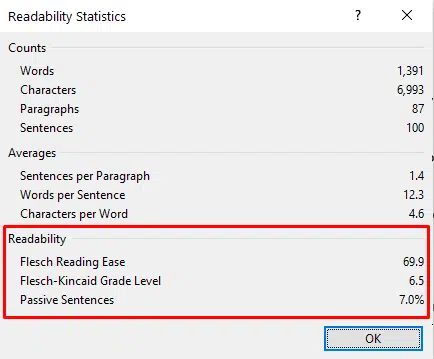
In Microsoft Word, the readability statistics appear after you run a spelling and grammar check:

Microsoft Word - Flesch-Kinkaid Grade Level

Lexile Framework for Reading

Another well-known readability measurement system primarily used in schools is the Lexile Framework. It has two parts:

  • Measuring text based on word frequency and average sentence length.
  • Measuring a person’s reading level.

For instance, content that’s harder to read (with a lot of long sentences and words that appear infrequently) will get a higher Lexile score. Content that’s easier to read (with short sentences and frequent words) will get a lower score.


Get the daily newsletter search marketers rely on.


How to make your content easier to read: 9 tips for better readability

So, now we know readable content is high-quality content.

But let’s say you’ve tested your content against a few readability checkers and discovered that it’s mostly hard to read.

What now?

It’s time to improve your content to make it more readable. Here are nine tips that will help.

1. Shorten your sentences

Shorter sentences are simpler. That’s why they’re easy to read.

Meanwhile, longer sentences tend to contain more than one thought or idea. Stuff your sentences full of information, and your readers will have difficulty untangling it all.

For this reason, shorten those sentences. And if you tend to write long sentences naturally, comb through your draft, look for them, and break them into smaller chunks.

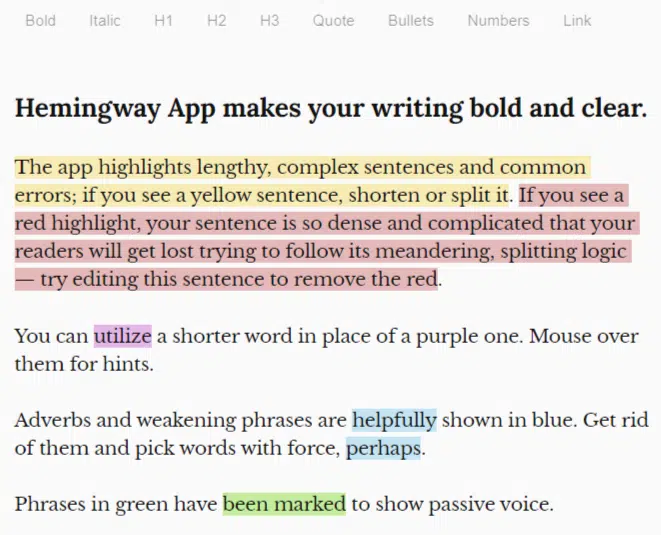
Hot tip: A tool like Hemingway Editor automatically highlights long sentences so you don’t have to hunt for them. 

Hemingway Editor automatically highlights long sentences so you don’t have to hunt for them. 

2. Break up and shorten your paragraphs

While you’re shortening your sentences, go ahead and shorten those paragraphs, too.

At most, your paragraphs for written online content should contain no more than 1-3 sentences.

A big, dense paragraph with long sentences is daunting. It’s great for a paperback novel but terrible for your blog.

Nothing spells death to your reader’s attention span worse than a wall of dense text.

A good rule of thumb for breaking up paragraphs: One paragraph = one thought or idea. As soon as you move on to your next thought, move on to a new paragraph.

Remember: The “enter” (or “return”) key is your friend.

3. Use active voice

Next readability tip: Write in active voice.

Active voice refers to how you word a sentence. When you word it actively, you clearly state the subject and verb. 

Example: “The dog ran after the ball.” 

Dog = subject. Ran = verb.

Passive voice means you’re wording a sentence passively. This means the subject of the sentence is unclear. 

Example: “The ball was run after by the dog.” 

See how the subject, the dog, is buried at the end of the sentence?

That said, sometimes passive voice works if you need to emphasize the action of the sentence vs. the subject.

For example, let’s say I wanted to tell you about a car robbery I experienced. I would say, “My car was broken into last night.”

The subject of the sentence (the person who robbed my car) is irrelevant – I don’t know who they are. What’s important to convey is that the robbery – the action – happened. 

However, tread carefully. In most cases, active voice is much clearer and easier to read than passive voice. Emphasize that when you edit your content.

4. Mix up your word choices

Repeating the same words over and over in content is boring to read. Not to mention, it looks like keyword stuffing.

Is “boring to read” the same thing as “hard to read”? Not exactly. But it’s close.

Consider that people who are bored with your content probably won’t stick around to read all of it. They’ll bounce.

That’s why mixing up your vocabulary can improve your writing. It livens up your sentences and makes them more engaging.

5. Use lists

Lists are a skimming reader’s best friend.

And if your content is easy to skim, it’s also easy to read.

For this reason, whenever you’re tempted to write a long list of items separated by commas, transform it into a numbered or bulleted list.

You can apply the same technique to:

  • Steps in a sequence.
  • A group of related items, ideas, or concepts.
  • Points in a long paragraph.
  • Any other information you want to highlight or set apart from the main text.

See what I did there?

6. Give your readers signposts

Content that’s easy to read also makes judicious use of signposts that show the reader the lay of the land.

For example, descriptive headings help your reader understand how your content is organized and what information each section will cover.

Selective use of bold text helps highlight important words, ideas, or phrases your reader should pay attention to.

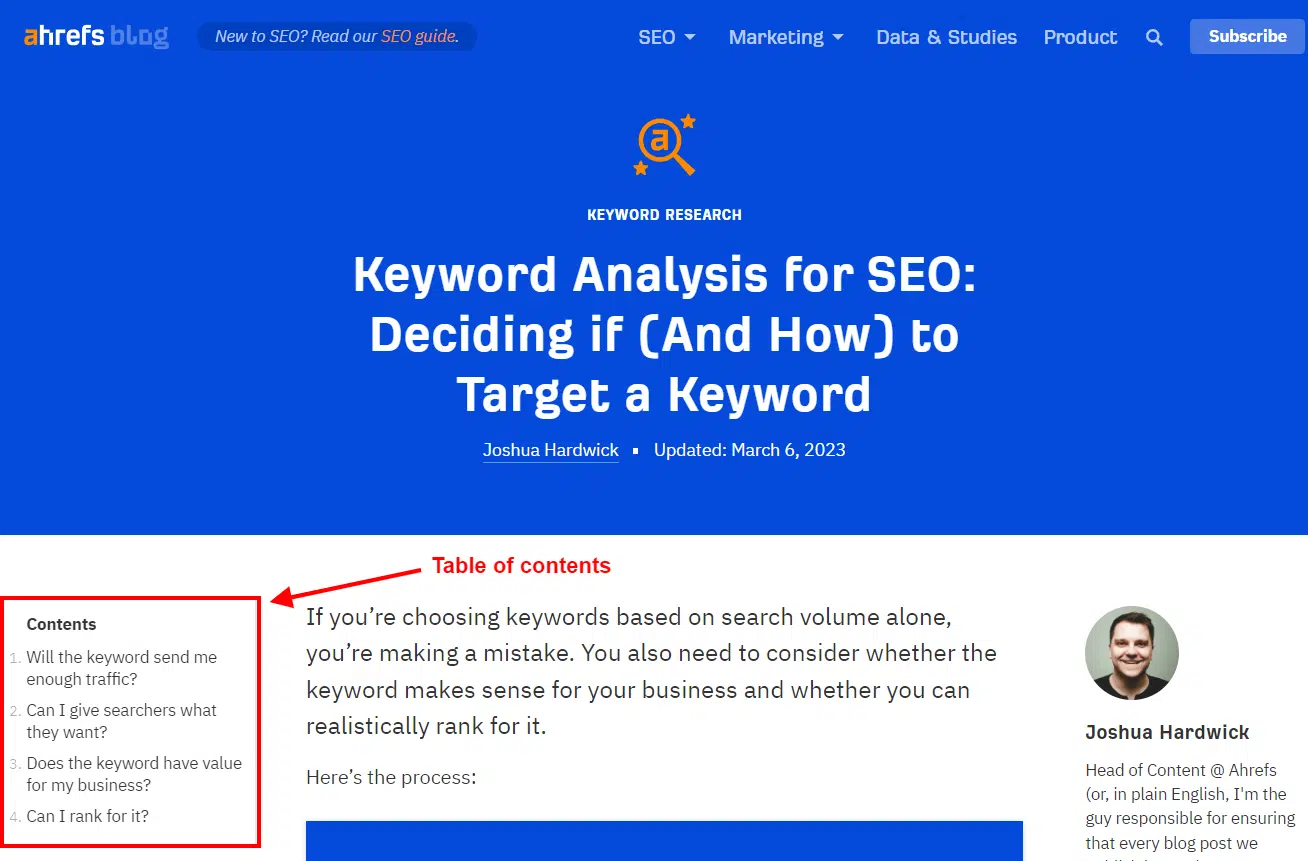
Another great signpost for long-form content is the humble table of contents. This helps your reader jump around in your article to the information they most want to read.

Here’s a good example of a blog with a table of contents by Ahrefs – a brand that uses them often:

Ahrefs Table of Contents

7. Avoid jargon and industry-speak

“Our goal was to drive more traffic to the landing page and ultimately earn ROI through sign-ups.”

Do you understand what the above sentence is saying?

If you do, you might be a marketer.

If you don’t, welcome to the world of industry-ese (also known as jargon or industry-speak).

This is the insider language that people who work within the same niche or industry use when they speak to each other.

To everyone else, it sounds like gibberish.

Using it in content that’s supposed to be targeted to your audience is a cardinal sin. Because unless you have a specific exception, your audience does not speak like you and your colleagues. 

8. Format your pages with plenty of white space

The responsibility for this one might rest with your website designer, but it’s important. Ensure your pages have plenty of white space around the content and text.

This is simply the empty space between the elements on a page.

This “room to breathe” makes your pages easier to read because the page elements won’t be crammed together. 

9. Check your content by reading it out loud 

One of the easiest ways to check your content readability is to read it aloud.

It may feel silly, but you’ll quickly discover how different your content sounds out loud vs. in your head.

When you read it out loud, you’re more likely to stumble over complex sentences and paragraphs or to notice when your words get all tangled.

When you come across these instances, try to rewrite them more simply. Smooth them out for ease of reading.

Try it. It might change how you edit content.

Improve your content readability for better results

Content readability is a big deal.

When your content is readable for your audience, they’ll have an easier time getting value out of it. They’ll learn from it, glean something new, or get the answer they were looking for.

On the other hand, content that’s hard to read will stop them from doing any of the above. It will bore or frustrate them.

And a bored, frustrated audience won’t stick around. That’s the antithesis of content marketing.

Work on your readability, and you will see better results.


Opinions expressed in this article are those of the guest author and not necessarily Search Engine Land. Staff authors are listed here.


Related stories

New on Search Engine Land

@media screen and (min-width: 800px) { #div-gpt-ad-3191538-7 { display: flex !important; justify-content: center !important; align-items: center !important; min-width:770px; min-height:260px; } } @media screen and (min-width: 1279px) { #div-gpt-ad-3191538-7 { display: flex !important; justify-content: center !important; align-items: center !important; min-width:800px!important; min-height:440px!important; } }

About the author

Julia McCoy

Julia McCoy is the founder of Content Hacker, 7x author, and a leading strategist around creating exceptional content and brand presence that lasts online. At 19 years old, she used her last $75 to build a 7-figure writing agency which she sold ten years later. In the 2020s, she’s devoted to teaching founders and marketers the strategy, skills, and systems they need to build a business through inbound content, so they can create more lasting impact in the world.

https://searchengineland.com/content-readability-426971


50% of product searches start on Amazon

Amazon continues to be the most popular starting point for online shoppers with one exception – Gen Z, according to a new survey.

Why we care. Nearly all consumers research purchases online and rely heavily on ratings and reviews. So it remains absolutely critical to be visible on any relevant platforms at moments when shoppers are researching and purchasing products.

By the numbers. Here’s where respondents said they start searching when shopping online:

  • Amazon: 50%
  • Google: 31.5%
  • Retail or brands websites: 14%
  • Reviews websites: 2%
  • Social media: 2%

But. For Generation Z, Google bested Amazon (38% vs. 36%, respectively). Gen Z was also the most likely group to start their shopping journey on social media (5%).

Reviews and ratings. Reviews and ratings can make or break a sale more than any other factor, including product price, free shipping, free returns and exchanges, and more.

Overall, 77% of respondents said they specifically seek out websites with reviews – and this number was even higher for Gen Z (87%) and millennials (81%).

  • Ratings without accompanying reviews are considered untrustworthy by 56% of survey respondents.

Where people read reviews and ratings:

  • Amazon: 94%
  • Retail websites (e.g., Target, Walmart): 91%
  • Search engines: 70%
  • Brand websites (the brand that manufactures the product: 68%
  • Independent review sites: 40%

User-generated photos and videos gain value. Sixty percent of consumers looked at user-generated images or videos when learning about new products. 

  • 77% of respondents said they trust customer photos and videos.
  • 53% said user-generated photos and videos from previous customers impacted their decision whether to purchase a product.

Google (and search). 56% of consumers consider search results (on Google and other search engines) when making purchase decisions. Also:

  • 63% of respondents said they use search engine results to learn about products they haven’t purchased before.
  • 50% said they trust search engine results when making a purchase decision.

Bottom line. Amazon continues to be the go-to product search engine for consumers. And ratings and reviews are king.

About the survey. PowerReviews surveyed 8,153 U.S. consumers in March 2023. It skewed heavily toward millennials, who made up 53% of respondents, followed by Gen X (29%); Baby Boomers (10%) and Gen Z (8%). You can learn more in the full results from PowerReviews: Survey: The Ever-Growing Power of Reviews (2023 Edition).


Related stories

New on Search Engine Land

@media screen and (min-width: 800px) { #div-gpt-ad-3191538-7 { display: flex !important; justify-content: center !important; align-items: center !important; min-width:770px; min-height:260px; } } @media screen and (min-width: 1279px) { #div-gpt-ad-3191538-7 { display: flex !important; justify-content: center !important; align-items: center !important; min-width:800px!important; min-height:440px!important; } }

About the author

Danny Goodwin

Danny Goodwin has been Managing Editor of Search Engine Land & Search Marketing Expo – SMX since 2022. He joined Search Engine Land in 2022 as Senior Editor. In addition to reporting on the latest search marketing news, he manages Search Engine Land’s SME (Subject Matter Expert) program. He also helps program U.S. SMX events. Goodwin has been editing and writing about the latest developments and trends in search and digital marketing since 2007. He previously was Executive Editor of Search Engine Journal (from 2017 to 2022), managing editor of Momentology (from 2014-2016) and editor of Search Engine Watch (from 2007 to 2014). He has spoken at many major search conferences and virtual events, and has been sourced for his expertise by a wide range of publications and podcasts.

https://searchengineland.com/50-of-product-searches-start-on-amazon-424451


Google Bard adds genuine citations in responses and more concise summaries

Google Bard has added classic and more genuine citations to the answers it provides and also is able to provide better summarization. We do not yet see these improvements and enhancements live yet but Jack Krawczyk from Google shared some examples on Twitter.

Citations improved. Google Bard now shows sources with numbers, like true citations, next to the responses. You can click on the numbers to see the source for that information. “Bard can now help you identify which parts of a response match a source. For the responses with sources, you’ll see numbers alongside the response. By clicking on the numbers you will now be able to identify the section of the text that matches the source and easily navigate to it.,” Google posted in the Bard changelog.

Here is a screenshot from Jack Krawczyk showing the numbers on the left side, with a “learn more” linked below.

Bard Citations 800x419

Concise summaries. Google also updated Bard with more advancements to its large language models to get better at providing better summarizations for answers. ” Bard is “better at summarizing information, which is especially helpful when you want to get the gist of a topic quickly,” they posted in the Bard changelog.

Here is a screenshot from Jack Krawczyk showing the summary:

Bard Summary 800x513

Why we care. Citations and links to sources are a big concern for publishers and the overall web ecosystem. Google is trying to address some of that with this update to offer more links in the Google Bard responses. Also, better summarizations with improvements to the LLMs Google has is useful and exciting to see, especially over time.

Postscript. I found a few examples of citations, they are hard to find and they are not as good as Bing Chat just yet. Here is one example and the page Bard links to has not existed in over a year, according to the Wayback Machine.

Google Bard Citations Links 800x277


Related stories

New on Search Engine Land

@media screen and (min-width: 800px) { #div-gpt-ad-3191538-7 { display: flex !important; justify-content: center !important; align-items: center !important; min-width:770px; min-height:260px; } } @media screen and (min-width: 1279px) { #div-gpt-ad-3191538-7 { display: flex !important; justify-content: center !important; align-items: center !important; min-width:800px!important; min-height:440px!important; } }

About the author

Barry Schwartz

Barry Schwartz a Contributing Editor to Search Engine Land and a member of the programming team for SMX events. He owns RustyBrick, a NY based web consulting firm. He also runs Search Engine Roundtable, a popular search blog on very advanced SEM topics. Barry can be followed on Twitter here.

https://searchengineland.com/google-bard-adds-genuine-citations-in-responses-and-more-concise-summaries-423143


SEO and website design: How to build search engine-friendly sites

Your website is the center of your digital marketing world. It’s where you have the most control and where all digital marketing rivers run toward.

Generally, the largest of those traffic sources is organic search. 

Yet, all too often, SEO is not deeply embedded when a new website is being designed (or redesigned), and SEO thinking is often only addressed after a site has launched. 

This is a problem. 

When building a new website as a marketing vehicle for your business, SEO considerations should be included in the planning stages before a line of code is written. 

My team and I have helped hundreds of businesses design and build sites that take their SEO and marketing to the next level.

Unfortunately, we have also helped many businesses recover SEO traffic after a botched website redesign that failed to factor in SEO.

This article explores why – and how – SEO plays an integral part in the website design process.

It details exactly what you need to consider to build a site for search marketing and lead generation and how to focus on what your users want to help keep the Google gods on your side.

We will also dive into common pitfalls businesses looking to build a new website and maintain SEO traffic may encounter. 

1. How to develop an SEO-friendly website

The following are the key areas to consider in building a truly optimized website. 

  • Fundamentals: Domains, hosting and CMS.
  • Crawling: The technical bit.
  • Information architecture: How to structure your SEO-friendly site.
  • Mobile: Mobile-friendly sites need more than just responsive design.
  • Page speed: Fast sites make for happy users.
  • Usability: Confuse them and lose them.

The rest of this article will dive into each of these points in detail. 

Fundamentals

There are a few core elements that set the stage for a well-optimized website design process.

Domains

Your domain name is the entry point into your website, and there should be one single (canonical) domain. You may have others, but they should all point (redirect) to this one.

Our business is called Bowler Hat. We operate in the UK. We are a web-based business. It naturally follows that our domain is www.bowlerhat.co.uk. All subdomains 301 redirect back to the main URL www.bowlerhat.co.uk. We have a few domain variations that 301 redirect back to the main URL. This all makes sense.

Your domain should be brand led in the majority of cases, and having www.crammed-my-keywords-in-here.com is not going to help you rank today (1999 just called and wants its SEO back). 

Hosting

You can buy hosting for $1 a month – but guess what? It is not very good. 

Slow, cruddy hosting creates a poor user experience and ultimately creates a site that Google is not so keen to show in the search results. 

Buy the best hosting you can afford and ensure your site has good uptime and runs well on it. 

In most cases, hosting should follow common-sense rules:

  • Be situated where your audience is
  • Be fast and ideally platform-specific (e.g., WordPress hosting for WordPress)

CMS

The CMS (content management system) you choose for your business can hugely influence how successful you are. WordPress is a great platform, but there are other options. 

Try to use the path of least resistance for your CMS choice. If one of the ubiquitous CMS platforms works for your needs – go with it. Google has to understand the big players, and they are technically sound and easy to optimize. 

The final choice here depends on your utterly unique requirements, but ensure you understand why you are using a given platform and don’t just end up with the one your web agency likes to work with.

Crawling and accessibility

The first step is ensuring a search engine can crawl your site and understand what it is that you do (and where you do it).

Indexing

To understand your site, they have to be able to read the content of the page. This means that the main content of your site should be text-based.

Even as we hurtle forwards towards and have search engines with AI features, the written word is the backbone of a search engine-friendly site, so ensure your text is well-written and sensibly optimized. 

Images, videos, PDFs and content are also important and can be a source of search engine traffic. Again, these need to be well-named, organized and discoverable to be indexed.

Link structure

To index your content beyond the home page, you need internal links that the search engine can crawl.

Your primary navigation, search engine directives and tools like XML sitemaps all help the search engine crawl your site and discover new pages. 

Information architecture and structuring your site

I have always liked the filing cabinet analogy for website structure.

Your site is the filing cabinet. The major categories are the drawers. The subcategories are the folders in the drawers. The pages are documents in the folders. 

  • Cabinet: Your website
  • Drawer: High-level category
  • Folder: Subcategory
  • File: Individual document/page

This helps to provide additional contextual information about the content on any given page. 

If you have a drawer in your cabinet for services, then anything in that drawer is a service – before a single character has been analyzed. 

This is good for Google and your users, which is what Google really cares about (and is a more straightforward concept than the sometimes esoteric nuances of SEO). 

Many websites have the following structure:

  • Home
    • Services
      • Service area
        • Individual service

For our company website, that is:

  • Home
    • Services
      • SEO
        • SEO audits

So, there is a page in this information architecture that is simply /audits/.

  • We have services. 
  • We have SEO services. 
  • We have SEO audit services. 

This all makes sense, and the structural organization of your website can help to provide context and relevance signals beyond the page itself. 

This is relevant to blog posts, articles, FAQ content, services, locations and just about anything else that is an entity within your business.

You want to structure the information about your business in a way that makes it understandable (to people and robots).

Some sites may take a deep approach to structuring content. Others may take a wide approach. The important takeaway is that things should be organized in a way that makes sense and simplifies navigation and discovery.

A three- to four-level approach like this ensures that most content can be easily navigated within three to four clicks and tends to work better than a deeper approach to site navigation (for users and search engines).

URLs

The URL further indicates context. A sensible naming convention helps provide yet more context for humans and search engines.

Following are two hypothetical sets of URLs that could map to the Services > SEO > SEO audit path laid out above – yet one makes sense, and the other does nothing to help.

  • Example 1:
    • www.example.com
    • www.example.com/services/
    • www.example.com/services/seo/
    • www.example.com/services/seo/audits/
  • Example 2:
    • www.example.com
    • www.example.com/s123/
    • www.example.com/s123/s1/
    • www.example.com/s123/s1/75/

The second set of URLs is a purposely daft example, but it serves a point – the first URL naming convention helps both search engines and users, and the second one hinders.

This further builds upon the contextual signals from your filing cabinet structure. 

Navigation

Building an SEO-friendly website navigation can also help indicate the relevant importance of a given page (in the set of pages) and provides additional context. 

Your navigation should be text-based and therefore helps send a signal about the keywords you would like a given page to rank for. 

I have always liked the signpost analogy for navigation. I walk into a supermarket and look for the signs to find what I need. Your website is no different.

A user lands on your site and has to find where they need to go in the quickest possible time. They then need a signpost to get them there. 

SEO thinking can be dangerous here, though. Mega menus with hundreds of spammy page links – this is not the way! 

The golden rule is to keep your navigation simple. Don’t make the user have to think.

The following image is a sign from my local home improvement store. Which direction takes you to the car park and which direction takes you to the deliveries entrance?

Signage example

My brain follows the “customer car park” line from left to right, so I turn right. However, the customer car park is to the left.

There is nothing to clearly illustrate right or wrong, and I read right to left – a simple line down the middle separating these would improve this.

As a mental activity, browsing websites is like driving. It is a complicated task, yet, to some degree, the brain is on autopilot.

Leverage this in your website navigation, give people what they expect, make it easy, and remove any potential for confusion else they will bounce back to the SERPs and into the open arms of your competition. 

Ensure your navigation is simple to use, promotes your most important pages and does not make your users think too hard (if at all). 

Common problems

There are many potential issues with content that can’t be found or understood by the search engine that can work against you. For example:

  • Orphaned content that can’t be found.
  • Content only available via site search.
  • Flash files, Java programs, audio files, video files.
  • AJAX and flashy site effects. (Google has gotten a lot better at reading AJAX pages, but it is still possible to obscure content with pointless effects.)
  • Frames: Content embedded from another site can be problematic.
  • Subdomains: Content split into subdomains rather than sub-folders.

Be sure that important content is easily discoverable, understandable and sits in the overall structure of the site in a way that makes sense.

Summary

If everything is done well, a human and a search engine should have a pretty good idea of what a page is about before they even look at it. Your typical SEO then just builds on this solid foundation that is laid out by your information architecture and site structure.

Mobile-friendly design

Being SEO friendly is having a site that works how your users want it to – and, in many cases, that means mobile.

Many of your future customers use mobile as the first, and often only, device to interact with your business.

Another crucial consideration for many businesses is multi-device interactions. Even if your conversions tend to be from desktop, those initial interactions may be from mobile.

Mobile-friendly means more than just responsive design. I previously looked at 28 key factors in creating mobile SEO-friendly websites that will help you move beyond simple responsive design toward truly mobile-friendly websites. 

From an SEO perspective, it is worth noting that mobile-friendliness is a confirmed ranking factor for mobile search, and it is the mobile version of your site that the search engine will use to review and rank your site.

However, far more important, mobile is how your prospective customers search for and browse your site.

It is debatable just how important features like mobile-friendly are for SEO, yet it is completely moot.

Do what works for your users and what is good for SEO. 

Page speed

Another key consideration in the mobile era is page speed. Users may be impatient, or they may not always have a great mobile data connection.

Ensuring your pages are lean and mean is a key consideration in modern SEO-friendly website design.

A great starting point is Google’s mobile-friendly test. This tool will give you feedback on mobile-friendliness, mobile speed and desktop speed. It also wraps everything up into a handy little report detailing what exactly you can do to speed things up.

Page speed is yet another essential consideration that spans how your site is built and the quality and suitability of the hosting you use.

Usability

Web usability is a combination of other factors: device-specific design, page speed, design conventions and an intuitive approach to putting the site together with the end user in mind.

Key factors to consider include:

  • Page layout: Important elements should have more prominence.
  • Visual hierarchy: Make more important elements bigger!
  • Home page and site navigation: Clearly signpost directions for users.
  • Site search: Large sites need a sensibly positioned search option.
  • Form entry: Make forms as lightweight and easy to fill as possible.
  • Design: Great design makes everything easier.

This just scratches the surface. Usability really has to be customized to the individual site.

A couple of resources I suggest checking out:

The content marketing funnel

Another key consideration to building a site that ranks is how you structure the content on your site to map to the different stages a potential customer will go through. 

The goal of your website is to help your business get in front of prospective customers on search engines and then engage and convert those customers.

A good way to approach this is to structure your content to match the stages in a standard marketing funnel:

Awareness: Top of the funnel

Awareness content will typically be your blog and informational articles. We are helping your prospective customer understand the problems they face and illustrating your experience and credibility in solving them.

Consideration: Middle of the funnel

The content at the consideration stage helps your prospect compare you against the other offerings out there. This tends to be practical content that helps the customer make a decision.

  • Case studies
  • Product or service information
  • Product demonstration videos
  • User guides

Conversion: Bottom of the funnel

Bottom-of-the-funnel content drives conversions and should gently encourage a sale or lead.

  • Reviews
  • Testimonials
  • Free trial
  • Free consultation

Remember that customers will search across this entire spectrum of content types. Therefore, ensuring all these areas are covered aids discovery via search engines and helps you win more business – win-win. 

That’s the basics covered

A lot is going on there but not without good reason, and ensure you have given each of these devil’s their due in the planning of your new site. 


Get the daily newsletter search marketers rely on.


2. SEO: How to optimize your site

OK, so now you have methodically planned and developed your website, laid your SEO foundations, and you are ready to start the actual optimization. 

Optimizing that site with a well-structured website that considers all of the points covered above becomes easier. 

Keyword targeting

Nailing your keyword strategy is much easier once you have a solid structure without internal duplication.

If we look at our previous examples for site hierarchy and structure, then adding keywords is relatively straightforward (and is something we would often do in a spreadsheet pre-design).

  • Services: www.example.com/services/
    • SEO: www.example.com/services/seo/
      • SEO audits: www.example.com/services/seo/audits/
  • www.example.com/services/
    www.example.com/services/seo/
    www.example.com/services/seo/audits/

If I use these pages as an example, we have a natural progression from broad keywords to more refined search terms. We can even consider basic modifiers such as location if we are a local business.

Home
– digital marketing agency
– digital marketing company
+ Birmingham
+ UK

Services
– marketing services
– digital marketing services
+ Birmingham
+ UK

SEO
– SEO
– Search Engine Optimization
+ Company
+ Agency
+ Birmingham
+ UK

SEO Audits
– SEO Audits
– Technical SEO Audits
+ Agency
+ Company
+ Birmingham

The point here is that a well-structured site gives you a good way to determine your keyword strategy.

You still have to do the research and copywriting, but you can be sure you have a solid strategy to target broad and more detailed terms.

Pro tip: The work done structuring your site up to this point should make this aspect a piece of cake – if you are still struggling, consider revisiting the page structure. 

HTML title tags

The <title> tag is the primary behind-the-scenes tag that can influence your search engine results. In fact, it is the only meta tag that actually influences position directly.

The best practice for title tags is as follows:

  • Place keywords at the beginning of the tag.
  • Keep the length around 50 to 60 characters.
  • Use keywords and key phrases in a natural manner.
  • Use dividers to separate elements like category and brand.
  • Focus on click-through and the end user (think call to action).
  • Have a consistent approach across the site.

Remember, don’t overdo it and over-optimize page titles. We want our keywords in the title tag, but not at the expense of click-through and human readability. A search engine may rank your content, but human clicks on it, so keep that in mind.

Pro tip: Google has started to include brand names and logos in search results (again), so you can now use any space you would have used for branding for a call to action or more optimization. 

Image 80

Meta description tags

Sure, meta descriptions don’t directly influence rankings. We all know that, right?

But that is completely missing the point here. Your meta description is the content of your advertisement for that page in a set of search engine results.

It is what wins you the click. And winning those clicks can help improve visibility and is absolutely vital in driving more users to your pages.

Meta descriptions must:

  • Truthfully describe the page content.
  • Advertise the page and improve click-through rates.
  • Consider the user’s thought process and why they will click on this page.
  • Include keywords where relevant and natural to do so.

The search engine will highlight search terms in your page title and meta description, which help a user scan the page. Don’t use this as an excuse to spam the meta description, though, or else Google likely will ignore it, and it won’t lead to that all-important click!

There are also situations where it can make sense not to create a meta description and let the search engine pull content from the page to form a description that more accurately maps to a user’s search. Your brief meta description can’t always cover all the options for a longer-form piece of content, so keep this in mind.

Tip: Got tons of meta descriptions to write? This is one of those SEO jobs that ChatGPT can really help with. 

Heading tags

Heading tags help structure the page and indicate hierarchy in a document: H1, H2, H3 and so on.

Text in heading tags correlates with improved rankings (albeit slightly), but what matters is the alignment between the structure of the site, behind-the-scenes optimization like page titles and meta descriptions and the content itself. 

Line everything up, and things make more sense for users, and we help search engines categorize our content while eking out every last bit of simple, on-page optimization we can.

Remember to align header tags with the visual hierarchy. Meaning the most important header on the page (typically the <h1>) should also be the biggest text element on the page.

You are making the document visually easy to understand here and further ensuring that design and content are working together for the best result.

Tip: The magic here is almost always in the process itself. Thinking of the content in relation to the hierarchy of information and mapping that to the visual hierarchy will almost certainly drive revisions and improve the content – that is the real SEO win! 

Page content

The content should generally be the most important part of the page. However, we still see archaic SEO practices like overt keyword density and search terms littered in the copy affecting readability.

This does not work. It makes you look illiterate and certainly does not help with your SEO. Don’t do this. 

We want to make sure the context of our page is clear. Our navigation, URLs, page titles, headers and so on should all help here. Yet we want to write naturally, using synonyms and natural language.

Focus on creating great content that engages the user. Be mindful of keywords, but certainly don’t overdo it.

Considerations for page content:

  • Keywords in content (but don’t overdo it).
  • Structure of the page.
  • Position of keywords in the content – earlier can be better.
  • Synonyms and alternatives.
  • Co-occurrence of keywords – how else do people talk about this topic?

Tip: review individual pages in Google Search Console to see what keywords the page ranks for in lower positions. Using the impression count vs. clicks you can get some easy wins here. 

Rich snippets

Rich snippets are a powerful tool to increase click-through rates. We are naturally attracted to listings that stand out in the search engine results.

Anything you can do to improve the click-through rate drives more users and makes your search engine listings work harder.

Factor in possible ranking improvements from increased engagement, and you can have a low-input, high-output SEO tactic.

The snippets that are most relevant to your business will depend on what you do, but schema.org is a great place to start.

Image optimization

Image SEO can drive a substantial amount of traffic in the right circumstances. And again, our thoughts regarding context are important here.

Google does not (yet) use the content of images, so context within the site and the page and basic optimization are crucial here.

As an example, I am looking for a hobbit-hole playhouse for my youngest, and the search brings up image results:

SERPs

I can dive right into those image results and find a multitude of options, then use the image to drive me to the site that sells the playhouse.

Optimizing your images increases the chance of improving prominence in the image search results.

Image optimization is technically straightforward:

  • Provide an image name that clearly describes what the image is.
  • Use descriptive alt text to help those who can’t see the images reinforce the image content.
  • Add OpenGraph and Twitter Cards so the image is used in social shares.
  • Use the image at the right physical size to ensure fast downloads.
  • Optimize the image’s file size to improve loading times.
  • Consider adding images to your XML sitemap.

Image optimization is relatively simple. Keep the images relevant. Don’t spam the filenames and alt text with keywords. Be descriptive.

Tip: Use captions, titles and alt text to provide as much contextual information as possible about your images. 

Optimal optimization 

You can always optimize something else, but if you structure and plan your site and then optimize these key areas, you will get 80% of the results from 20% of the effort. 

Tip: Optimization is never complete. So focus on what moves the dial and then move on. 

3. Common problems

Knowing what to optimize is essential and is the target we aim at. 

It is just as important to understand common problems that impact SEO and use this as something to run away from! 

Typically, every SEO project starts with an audit, and while we can’t cover every eventuality here, the following are some key points. 

Duplicate content

There tend to be two kinds of duplicate content: true duplicates and near-duplicates.

True duplicates are where the content exists in multiple places (different pages, sites, subdomains and so on).

Near-duplicates can be thin content or substantially similar content – think of a business with multiple locations or shoes listed on a unique page in different sizes.

Keyword cannibalization

Keyword cannibalization refers to the situation where multiple pages target the same keywords. This can impact the ability of your site to have one page that strongly targets a given term.

Where the site architecture and hierarchy have been carefully planned, you should eliminate this during the planning and design stages.

Domains, subdomains and protocols

Duplication also crops up when the site is available on multiple domains, subdomains and protocols.

Consider a business with two domains:

  • Example.com
  • Example.co.uk

With www and non-www versions:

  • Example.com
  • Example.co.uk
  • www.example.com
  • www.example.co.uk

And the site runs on HTTP and HTTPS:

  • https://example.com
  • https://example.co.uk
  • https://www.example.com
  • https://www.example.co.uk
  • https://example.com
  • https://example.co.uk
  • https://www.example.com
  • https://www.example.co.uk

Before too long, we can get to a situation where the site has eight potential variations. Factor in the site resolving on any subdomain and a few duff internal links and we can often add things like “ww.example.com” to the list above.

These kinds of issues are resolved with URL redirections.

Still, again, they deserve consideration by any web design agency that takes care of hosting and is serious about the SEO of their customers’ websites.

Botched canonical URLs

Another common issue we see is an incorrect implementation of canonical URLs.

Typically, the person building the site looks at canonical URLs as an SEO checklist kind of job. They are implemented by dynamically inserting the URL in the address bar into the canonical URL.

This is fundamentally flawed in that we can end up with the site running on multiple URLs, each with a canonical URL claiming that they are the authoritative version.

So the canonical implementation exacerbates rather than resolves the issue (sheesh). 

Canonical URLs are a powerful tool when wielded wisely, yet they must be used properly, or they can worsen matters.

Modern web design considers SEO best practices 

SEO is not some bandage you can plaster onto an existing site. 

Every website developer or CMS will list SEO credentials. Nobody says that they build sites to crash in the search results. SEO, today and beyond, is way more than a dry list of technical must-haves. 

Like all good marketing, it is ultimately about helping your prospective customers achieve their goals. 

SEO should be woven into every aspect of your marketing, and at the center of that should be your (optimized) website. 

There are a lot of moving parts with website design and SEO. 

  • The first step is to carefully plan your site to have a sensible filing cabinet structure to house your products and/or services. 
  • Then, optimize the key areas to ensure Google (and your prospects) can clearly understand what they should do next. 
  • Finally, double-check for typical issues and ensure you eliminate any areas that could be holding you back.

Opinions expressed in this article are those of the guest author and not necessarily Search Engine Land. Staff authors are listed here.


Related stories

New on Search Engine Land

@media screen and (min-width: 800px) { #div-gpt-ad-3191538-7 { display: flex !important; justify-content: center !important; align-items: center !important; min-width:770px; min-height:260px; } } @media screen and (min-width: 1279px) { #div-gpt-ad-3191538-7 { display: flex !important; justify-content: center !important; align-items: center !important; min-width:800px!important; min-height:440px!important; } }

About the author

Marcus Miller

Marcus Miller is an experienced SEO & PPC consultant based in Birmingham, UK. Marcus focuses on search marketing strategy and helping businesses cut through the smoke and mirrors of SEO, PPC and search marketing. Marcus is managing director of the UK SEO and digital marketing company Bowler Hat that focuses on helping businesses with their SEO & PPC, but also on training internal staff to help empower businesses to manage their own search destiny.

https://searchengineland.com/seo-website-design-build-search-engine-friendly-sites-422636


LinkedIn starts filtering connection, follower counts

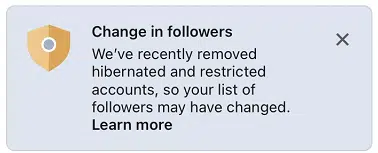
Has your list of followers on LinkedIn changed? If so, it’s because LinkedIn said it is now removing “hibernated” and “restricted” accounts from the connection and follower counts of all members and will continue to regularly do so heading forward.

New Help documentation. LinkedIn has added new Restricted and hibernated account filtering Help documentation. It explains:

“In order to better support LinkedIn members and contributors with more reliable engagement and reach insights, restricted and hibernated accounts will no longer be included in the total number of followers and connections listed on a member’s profile.”

The LinkedIn notification. Here’s what the change in followers notice looks like, as shared by @ItsSachinShah:

Linkedin Change In Followers

The impact. It depends. Some accounts may see more of an impact on their counts. LinkedIn noted some factors are:

  • How long an account has been active.
  • How many connections and followers a member has.
  • Places where members have worked or studied.

Account type explainer. So what exactly are these two types of accounts LinkedIn is filtering?

  • Hibernated accounts: A member has deactivated an account for a certain period of time.
  • Restricted accounts: A member has violated either LinkedIn’s Professional Community Policies or its User Agreement.

What happens if restricted or hibernated accounts become active. “They will be re-included in the follower and connection counts they were previously a part of. For members that reach the 30,000 connection limit, if accounts become unrestricted they will not be re-added to their audience lists unless they remove current connections,” LinkedIn explained.

Why we care. Ultimately, connection and follower counts are a vanity metric. But filtering out inactive accounts could potentially help LinkedIn users who have already reached their 30,000 connection limit, allowing them to connect with active users and potentially earn more engagement and visibility.


Related stories

New on Search Engine Land

@media screen and (min-width: 800px) { #div-gpt-ad-3191538-7 { display: flex !important; justify-content: center !important; align-items: center !important; min-width:770px; min-height:260px; } } @media screen and (min-width: 1279px) { #div-gpt-ad-3191538-7 { display: flex !important; justify-content: center !important; align-items: center !important; min-width:800px!important; min-height:440px!important; } }

About the author

Danny Goodwin

Danny Goodwin has been Managing Editor of Search Engine Land & Search Marketing Expo – SMX since 2022. He joined Search Engine Land in 2022 as Senior Editor. In addition to reporting on the latest search marketing news, he manages Search Engine Land’s SME (Subject Matter Expert) program. He also helps program U.S. SMX events. Goodwin has been editing and writing about the latest developments and trends in search and digital marketing since 2007. He previously was Executive Editor of Search Engine Journal (from 2017 to 2022), managing editor of Momentology (from 2014-2016) and editor of Search Engine Watch (from 2007 to 2014). He has spoken at many major search conferences and virtual events, and has been sourced for his expertise by a wide range of publications and podcasts.

https://searchengineland.com/linkedin-filters-connection-follower-counts-419083